CERVANTES TRAINING
ALCALA DE HENARES-MADRID-SPAIN
cervantestraining@outlook.com
http://www.cervantestraining.eu
Innovative skills in ICT through collaborative
and project-based teaching and learning
1
cervantestraining@outlook.com
http://www.cervantestraining.eu
WEBQUESTS FOR USE
IN THE CLASSROOM
cervantestraining@outlook.com
http://www.cervantestraining.eu
2
WHAT IS A WEBQUEST?
 “An inquiry-oriented activity in which
some or all of the info that learners
interact with comes from resources on the
internet” (Dodge, 1995).
 WebQuests integrate technology into the
curriculum and make it beneficial for
students.
 Good teaching with the Web.
cervantestraining@outlook.com
http://www.cervantestraining.eu
3
WHERE DID THE WEBQUEST COME
FROM?
 Bernie Dodge, a Professor at San Diego State
University came up with the idea of the
WebQuest after he prepared a task (WebQuest)
for pre-service teachers. It went so well that he
decided to do it more often, named it, and created
a webpage that described the idea
(www.webquest.org).
cervantestraining@outlook.com
http://www.cervantestraining.eu
4
THE THREE R’S OF WEBQUESTS
 Real: Are students looking at a question or topic
that concerns people in the real world (March,
2000)?
 Rich: Does the WebQuest introduce students to
interesting roles that encourage students to
problem solve? Does the WebQuest engage
students in rich discussion (March, 2000)?
 Relevant: Does the WebQuest allow students to
find themselves, their concerns, or their interest
in the scenarios given to them (March, 2000)?
cervantestraining@outlook.com
http://www.cervantestraining.eu
5
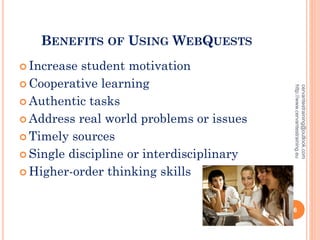
BENEFITS OF USING WEBQUESTS
 Increase student motivation
 Cooperative learning
 Authentic tasks
 Address real world problems or issues
 Timely sources
 Single discipline or interdisciplinary
 Higher-order thinking skills
cervantestraining@outlook.com
http://www.cervantestraining.eu
6
TWO TYPES OF WEBQUESTS
 Short term: Takes 1-3 class periods to complete.
The goal is knowledge, acquisition and
integration. Learners will have made sense of the
significant amount of new information they
managed (Dodge, 1995).
 Long term: Takes one week to one month to
complete. The goal is extending and refining
knowledge. Learner will have analyzed
knowledge, transformed that knowledge, and
demonstrated an understanding by creating
something others can respond to (Dodge, 1995).
cervantestraining@outlook.com
http://www.cervantestraining.eu
7
WEBQUEST PITFALLS
 Creating a task that is not authentic.
 Choosing an inappropriate topic.
 Using a WebQuest for research papers.
 WebQuests that only look at something in
one way or have one right answer.
cervantestraining@outlook.com
http://www.cervantestraining.eu
8
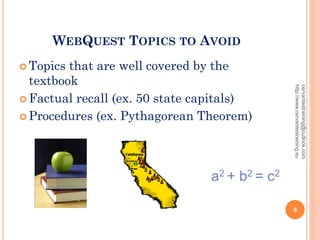
WEBQUEST TOPICS TO AVOID
 Topics that are well covered by the
textbook
 Factual recall (ex. 50 state capitals)
 Procedures (ex. Pythagorean Theorem)
a2 + b2 = c2
cervantestraining@outlook.com
http://www.cervantestraining.eu
9
QUESTIONS TO HELP CREATE MORE
AUTHENTIC WEBQUEST TASKS
 When do adults use this knowledge?
 How can that knowledge be applied to another kind
of situation?
 Does my WebQuest use life verbs like decide, design,
create, predict, or judge? Or does it use classroom
verbs like know, tell, or remember?
cervantestraining@outlook.com
http://www.cervantestraining.eu
10
A GOOD WEB-QUEST
MUST HAVE THE
FOLLOWING 5
ATTRIBUTES
cervantestraining@outlook.com
http://www.cervantestraining.eu
11
 1. It should be designed around a task
that students can complete
 Example: You will be requesting a
museum to purchase your artwork
while in the role of a famous artist
cervantestraining@outlook.com
http://www.cervantestraining.eu
12
 2. It should require higher level
thinking, not summarizing.
 Example: Identify major themes in
your artwork and analyze why those
themes would be important for a
museum to include in its exhibit
cervantestraining@outlook.com
http://www.cervantestraining.eu
13
 3. It should make good use of the web
 Example: Give websites where
students can go to get important
information like
Art History Resources
Artcyclopedia
cervantestraining@outlook.com
http://www.cervantestraining.eu
14
 4. It isn’t a research report, students
should not present a summary of the
information they find
cervantestraining@outlook.com
http://www.cervantestraining.eu
15
 5. It isn’t just a series of web-based
experiences, students will not just look at one
page and another. Their task will guide them
through the web with a purpose.
cervantestraining@outlook.com
http://www.cervantestraining.eu
16
A SUCCESSFUL WEBQUEST
 Has an open-ended task, is achievable, and is
authentic.
 Students show they are engaged and motivated.
 Students results are different from each other.
 Students bring up great issues.
 The WebQuest is unique and rich and shows
individual creativity.
cervantestraining@outlook.com
http://www.cervantestraining.eu
17
ASSESSING WEBQUESTS
 This “Rubric for Evaluating WebQuests” was
created by Bernie Dodge.
 http://www.webquest.sdsu.edu/webquestrubric.ht
ml
 This particular rubric created by Tom March is
for assessing the strengths and weakness of
WebQuests you find or create.
 http://www.bestwebquests.com/bwq/matrix.asp
cervantestraining@outlook.com
http://www.cervantestraining.eu
18
USEFUL RESOURCES TO HELP BUILD A
WEBQUEST
 The most important site to go to is Bernie
Dodge’s WebQuest site where you can find a lot of
useful information. http://webquest.org/
 QuestGarden which was created by Bernie Dodge
helps with creating WebQuests. The site provides
direction in creating a Webquest and sample
WebQuests to look into. http://questgarden.com/
 Rubistar is a great site to look into for creating
an evaluation rubric for the WebQuest.
http://rubistar.4teachers.org/
cervantestraining@outlook.com
http://www.cervantestraining.eu
19
HOW TO MAKE AN
EFFECTIVE
LEARNING TOOL
cervantestraining@outlook.com
http://www.cervantestraining.eu
20
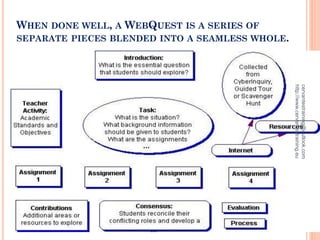
WHEN DONE WELL, A WEBQUEST IS A SERIES OF
SEPARATE PIECES BLENDED INTO A SEAMLESS WHOLE.
cervantestraining@outlook.com
http://www.cervantestraining.eu
21
STEP 1: SELECT A TOPIC
 Must be an important mathematics curriculum
standard.
 Must make good use of the Web.
 Should require a level of understanding, not just
rote learning.
cervantestraining@outlook.com
http://www.cervantestraining.eu
22
CHOOSE YOUR TOPIC
 There are great lesson ideas that will not pass
through all of these filters. They might make for
terrific classroom activities, but they won't make
terrific WebQuests. Your task now is to juggle
possible ideas until they meet all three criteria.
 Take a couple of minutes to brainstorm a list of
possible topics for your WebQuest.
cervantestraining@outlook.com
http://www.cervantestraining.eu
23
STEP 2: SELECT A DESIGN
 Select a design that will fit your topic.
 Will you use an internet template? Powerpoint?
A Word document?
 Decide on the design that you are most
comfortable with.
cervantestraining@outlook.com
http://www.cervantestraining.eu
24
STEP 3: THE TASK (THE HARDEST
PART)
 “The task is the single most important part of a
WebQuest. It provides a goal and focus for
student energies and it makes concrete the
curricular intentions of the designer. A well
designed task is doable and engaging, and elicits
thinking in learners that goes beyond rote
comprehension.”
cervantestraining@outlook.com
http://www.cervantestraining.eu
25
TASK TYPE: RETELLING
 Students are asked to absorb some info and then
demonstrate that they’ve understood.
 If the task requires looking for simple, sure
answers to pre-determined questions, then the
activity is clearly not a WebQuest even if the
answers are found on the Web. These are just
worksheets with URLs.
cervantestraining@outlook.com
http://www.cervantestraining.eu
26
TASK TYPE: COMPILATION
 Students organize information in a form that
would be useful to someone else.
 Example: cookbooks, a field guide to a particular
set of wildlife, a dictionary of terms used in a
specific realm; a Who's Who; a "Best of..."
collection.
cervantestraining@outlook.com
http://www.cervantestraining.eu
27
COMPILATION, CONT.
 There needs to be some transformation of the
information compiled. Simply putting a list of
web sites or a collection of web images together
isn't enough.
 Make a dictionary of geometry terms NOT print
off some shape pictures to color.
cervantestraining@outlook.com
http://www.cervantestraining.eu
28
TASK TYPE: MYSTERY
 Design a detective story or puzzle that needs to
be solved.
 Example: a mysterious package arrives on your
doorstep. At the end of a sequence of
information-seeking activities, your task is to
explain the significance of the package and how it
relates to division.
cervantestraining@outlook.com
http://www.cervantestraining.eu
29
TASK TYPE: JOURNALISTIC
 Is there is a specific event at the core of what you
want your students to learn? Ask your learners to
act like reporters covering the event.
 Students gather facts and organize them into a
newspaper story.
 In evaluating how they do, accuracy is important
and creativity is not.
 Example: Pi Day
cervantestraining@outlook.com
http://www.cervantestraining.eu
30
TASK TYPE: DESIGN
 requires learners to create a product or plan of
action that accomplishes a pre-determined goal
and works within specified constraints.
 Examples: travel plans, design a house given
specific physical constraints, time capsule or
museum exhibit, create a lesson to teach to
another learner
cervantestraining@outlook.com
http://www.cervantestraining.eu
31
TASK TYPE: CREATIVE PRODUCT
 Students learn about the topic by
recasting it in the form of a story or poem
or painting.
 Creative WebQuest tasks lead to the
production of something within a given
format (e.g. painting, play, skit, poster,
game, simulated diary or song) are much
more open-ended than design tasks.
 Evaluation criteria for these tasks
emphasize creativity and self-expression,
as well as criteria specific to the chosen
genre.
cervantestraining@outlook.com
http://www.cervantestraining.eu
32
TASK TYPE: CONSENSUS BUILDING
 learners take on different perspectives by studying
different sets of resources
 authentic differences of opinion that are actually
expressed by someone outside of classroom walls
 result in the development of a common report that
has a specific audience (real or simulated) and is
created in a format analogous to one used in the
world outside classroom walls (e.g., a policy white
paper, a recommendation to some government
body, a memorandum of understanding).
 Example: should calculators be allowed in school?,
evaluating math games
cervantestraining@outlook.com
http://www.cervantestraining.eu
33
TASK TYPE: PERSUASION
 Requires students to develop a convincing case
based on what they've learned.
 Might include presenting at a mock city council
hearing or a trial, writing a letter, editorial or
press release, or producing a poster or videotaped
ad designed to sway opinions.
 Often combined with consensus building tasks.
 The key to a well done persuasion task is that a
plausible audience for the message is identified
whose point of view is different or at least neutral
or apathetic.
cervantestraining@outlook.com
http://www.cervantestraining.eu
34
TASK TYPE: SELF-KNOWLEDGE
 Compels the learner to answer questions
about themselves that have no short
answers.
 Could be developed around: long term
goals, ethical and moral issues, self-
improvement, art appreciation, personal
responses to literature.
 Examples: **shrugs** not sure how to
apply this to math
cervantestraining@outlook.com
http://www.cervantestraining.eu
35
TASK TYPE: ANALYTICAL
 Learners look closely at one or more things and to
find similarities and differences
 Figure out the implications for those similarities
and differences.
 Look for relationships of cause and effect among
variables and be asked to discuss their meaning.
 Example: creating a Venn diagram comparing Italy
with England is a fine task, a better task would
include some requirement to infer what the
differences and similarities between the two
nations mean.
cervantestraining@outlook.com
http://www.cervantestraining.eu
36
TASK TYPE: JUDGEMENT
 Judgment tasks present a number of
items to the learner and ask them to rank
or rate them, or to make an informed
decision among a limited number of
choices.
 It's common, though not required, that
learners play a role while accomplishing a
judgment task.
 Example: WebQuest about WebQuests
cervantestraining@outlook.com
http://www.cervantestraining.eu
37
TASK TYPE: SCIENTIFIC
 making hypotheses based on an
understanding of background information
provided by on- or off-line sources;
 testing the hypotheses by gathering data
from pre-selected sources;
 determining whether the hypotheses were
supported and describing the results and
their implications in the standard form of
a scientific report.
cervantestraining@outlook.com
http://www.cervantestraining.eu
38
CHOOSING A TASK TYPE
 Phew!
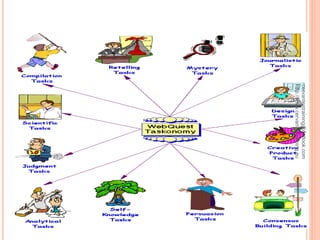
 Websites to refer to when you’re stressing
at home: Task Taxonomy and Design
Patterns (this one has templates you can
just copy and paste then type in your
info!)
cervantestraining@outlook.com
http://www.cervantestraining.eu
39
WRITE YOUR TASK
 Take a couple of minutes and experiment
with writing your topic in a variety of task
designs.
 Swap ideas with neighbors. Let’s help each
other through this!
cervantestraining@outlook.com
http://www.cervantestraining.eu
40
cervantestraining@outlook.com
http://www.cervantestraining.eu
41
STEP 4: DESIGN EVALUATION
 Complex tasks require multidimensional
measurement.
 Writing the rubric at this stage forces you
to think about what is really important.
 You might revise your task after thinking
about your evaluation.
cervantestraining@outlook.com
http://www.cervantestraining.eu
42
ASSESSMENT THOUGHTS
 How will your learners be evaluated?
 Rubric should align with the task
 Will there be a common grade for group
work vs. individual grades?
cervantestraining@outlook.com
http://www.cervantestraining.eu
43
CREATING A RUBRIC
 List some potential dimensions to assess
(organization, cooperation, effectiveness,
creativity, accuracy, completeness).
 Choose 3-5 dimensions.
 Write benchmark descriptions (low,
medium, high; beginning, developing,
accomplished; etc.).
cervantestraining@outlook.com
http://www.cervantestraining.eu
44
STEP 5: DESIGN THE PROCESS
 If you’re going to have different
roles/responsibilities, flesh those out now.
 Find a focused set of resources to provide
information for your learners (usually websites).
 For tips on using search engines effectively, go
here.
 Organize the information so students clearly know
what is expected at each site.
cervantestraining@outlook.com
http://www.cervantestraining.eu
45
STEP 6: FORMAT
 Complete the rest of the WebQuest
outline. You must include the 6
components:
1. Introduction 4. Evaluation
2. Task 5. Conclusion
3. Process 6. Credits
 See the rubric for detailed information
on what is expected for each component.
cervantestraining@outlook.com
http://www.cervantestraining.eu
46
5 Parts of a Webquest
cervantestraining@outlook.com
http://www.cervantestraining.eu
47
 Introduction
 Topic
 Task
 Process
 Resources
 Evaluation
 Conclusion
cervantestraining@outlook.com
http://www.cervantestraining.eu
48
INTRODUCTION
 This is the hook. You want to capture
your students and get them excited
about the activity.
 This should be:
 Meaningful
 Relevant
 Written at grade level
cervantestraining@outlook.com
http://www.cervantestraining.eu
49
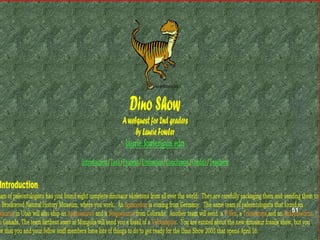
Example:
 At the beginning of this year the junior class found out the senior
trip which had always been to Disney World was now going to be
to Washington D.C. The school board reasoned that they wanted the
trip to be an educational. Many of you were furious with change
and fought to have the trip changed back to Disney World. The
school board agreed to allow the class to travel to Disney World
however; you have been asked to put the details and expenses of the
trip into a proposal to be presented to and approved by the school
board. Your team has been chosen to create the proposal which will
include an itinerary, budget, and description of the trip.
 http://questgarden.com/47/15/3/070224105812/
cervantestraining@outlook.com
http://www.cervantestraining.eu
50
cervantestraining@outlook.com
http://www.cervantestraining.eu
51
TASK
 Describes what the students will be doing
and sets the stage for students to prepare
themselves.
 The task can:
 Explain procedures
 Identify roles in a group
 Provide links to any worksheets or
graphic organizers that need to be
completed
cervantestraining@outlook.com
http://www.cervantestraining.eu
52
http://www.fccps.org/meh/teachers/misenheimer/egyptwebquest/e
gyptwebquest/atripdownthenile.htm#introduction
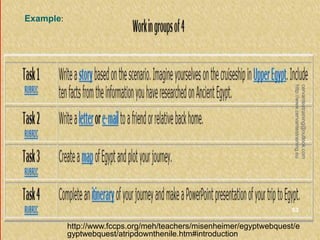
Example:
cervantestraining@outlook.com
http://www.cervantestraining.eu
53
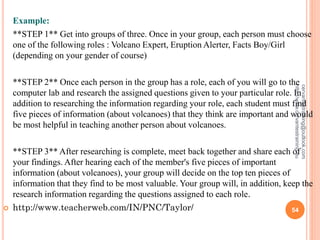
Example:
**STEP 1** Get into groups of three. Once in your group, each person must choose
one of the following roles : Volcano Expert, Eruption Alerter, Facts Boy/Girl
(depending on your gender of course)
**STEP 2** Once each person in the group has a role, each of you will go to the
computer lab and research the assigned questions given to your particular role. In
addition to researching the information regarding your role, each student must find
five pieces of information (about volcanoes) that they think are important and would
be most helpful in teaching another person about volcanoes.
**STEP 3** After researching is complete, meet back together and share each of
your findings. After hearing each of the member's five pieces of important
information (about volcanoes), your group will decide on the top ten pieces of
information that they find to be most valuable. Your group will, in addition, keep the
research information regarding the questions assigned to each role.
 http://www.teacherweb.com/IN/PNC/Taylor/
cervantestraining@outlook.com
http://www.cervantestraining.eu
54
RESOURCES
 This is were you will list the resources for your
students.
 In a webquest the main resources should be
internet based but you can supplement with
other resources.
 You will want to make sure that the resources
are the appropriate grade level and reading level.
cervantestraining@outlook.com
http://www.cervantestraining.eu
55
Example:
 Desert USA contains all kinds of resources about the desert.
 Desert Life in the American Southwest has lots of information about the Sonoran
Desert.
 Sonoran Desert contains more information about the Sonoran Desert.
 Desert Botanical Gardens is located in Phoenix, Arizona and is a great resource
for information on the desert.
 Boyce Thompson Arboretum is a Arizona State Park that has resources about the
plants and wildlife of Arizona.
 Arizona-Sonora Desert Museum is located in Tucson, Arizona and is another great
resource about the Sonoran Desert.
 Tucson Botanical Gardens is, also, located in Tucson, Arizona and it contains lots
of information on the desert.
 Desert Photos has several pictures of the desert.
 The Desert Biome is a virtual tour of the desert. You can learn all about deserts.
http://coe.west.asu.edu/students/stennille/ST3/desertwq.htm
cervantestraining@outlook.com
http://www.cervantestraining.eu
56
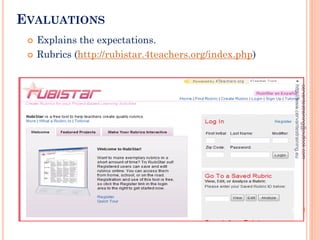
EVALUATIONS
 Explains the expectations.
 Rubrics (http://rubistar.4teachers.org/index.php)
cervantestraining@outlook.com
http://www.cervantestraining.eu
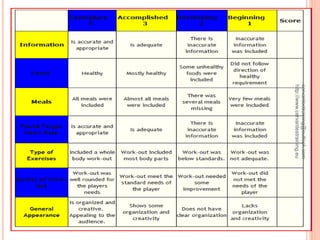
57
EXAMPLE:
cervantestraining@outlook.com
http://www.cervantestraining.eu
58
CONCLUSION
 Ties everything together and has students
reflecting on their learning and the process they
went through.
cervantestraining@outlook.com
http://www.cervantestraining.eu
59
EXAMPLE:
Congratulations on a job well done! Ms. Ima Fake is eager to
look at all the playground designs and I’m sure all the
children at Notfo Real School are very grateful.
Why let the fun and learning stop here? Put your new found
knowledge of simple machines to use some more. Perhaps you
can design a new amusement park ride that makes use of
simple machines. Maybe you can think of a problem that
could be solved with a simple machine, such as an invention
that helps to get you out of bed in the morning. These would
also be great topics to incorporate into your writing during
Writers Workshop.
Just don’t let your discovery of simple machines end here.
Look all around you. I think you’ll be amazed to discover how
often you use simple machines.
http://iteach0509.angelfire.com/
cervantestraining@outlook.com
http://www.cervantestraining.eu
60

Webquestsforuseintheclassroom

  • 1.
    CERVANTES TRAINING ALCALA DEHENARES-MADRID-SPAIN cervantestraining@outlook.com http://www.cervantestraining.eu Innovative skills in ICT through collaborative and project-based teaching and learning 1 cervantestraining@outlook.com http://www.cervantestraining.eu
  • 2.
    WEBQUESTS FOR USE INTHE CLASSROOM cervantestraining@outlook.com http://www.cervantestraining.eu 2
  • 3.
    WHAT IS AWEBQUEST?  “An inquiry-oriented activity in which some or all of the info that learners interact with comes from resources on the internet” (Dodge, 1995).  WebQuests integrate technology into the curriculum and make it beneficial for students.  Good teaching with the Web. cervantestraining@outlook.com http://www.cervantestraining.eu 3
  • 4.
    WHERE DID THEWEBQUEST COME FROM?  Bernie Dodge, a Professor at San Diego State University came up with the idea of the WebQuest after he prepared a task (WebQuest) for pre-service teachers. It went so well that he decided to do it more often, named it, and created a webpage that described the idea (www.webquest.org). cervantestraining@outlook.com http://www.cervantestraining.eu 4
  • 5.
    THE THREE R’SOF WEBQUESTS  Real: Are students looking at a question or topic that concerns people in the real world (March, 2000)?  Rich: Does the WebQuest introduce students to interesting roles that encourage students to problem solve? Does the WebQuest engage students in rich discussion (March, 2000)?  Relevant: Does the WebQuest allow students to find themselves, their concerns, or their interest in the scenarios given to them (March, 2000)? cervantestraining@outlook.com http://www.cervantestraining.eu 5
  • 6.
    BENEFITS OF USINGWEBQUESTS  Increase student motivation  Cooperative learning  Authentic tasks  Address real world problems or issues  Timely sources  Single discipline or interdisciplinary  Higher-order thinking skills cervantestraining@outlook.com http://www.cervantestraining.eu 6
  • 7.
    TWO TYPES OFWEBQUESTS  Short term: Takes 1-3 class periods to complete. The goal is knowledge, acquisition and integration. Learners will have made sense of the significant amount of new information they managed (Dodge, 1995).  Long term: Takes one week to one month to complete. The goal is extending and refining knowledge. Learner will have analyzed knowledge, transformed that knowledge, and demonstrated an understanding by creating something others can respond to (Dodge, 1995). cervantestraining@outlook.com http://www.cervantestraining.eu 7
  • 8.
    WEBQUEST PITFALLS  Creatinga task that is not authentic.  Choosing an inappropriate topic.  Using a WebQuest for research papers.  WebQuests that only look at something in one way or have one right answer. cervantestraining@outlook.com http://www.cervantestraining.eu 8
  • 9.
    WEBQUEST TOPICS TOAVOID  Topics that are well covered by the textbook  Factual recall (ex. 50 state capitals)  Procedures (ex. Pythagorean Theorem) a2 + b2 = c2 cervantestraining@outlook.com http://www.cervantestraining.eu 9
  • 10.
    QUESTIONS TO HELPCREATE MORE AUTHENTIC WEBQUEST TASKS  When do adults use this knowledge?  How can that knowledge be applied to another kind of situation?  Does my WebQuest use life verbs like decide, design, create, predict, or judge? Or does it use classroom verbs like know, tell, or remember? cervantestraining@outlook.com http://www.cervantestraining.eu 10
  • 11.
    A GOOD WEB-QUEST MUSTHAVE THE FOLLOWING 5 ATTRIBUTES cervantestraining@outlook.com http://www.cervantestraining.eu 11
  • 12.
     1. Itshould be designed around a task that students can complete  Example: You will be requesting a museum to purchase your artwork while in the role of a famous artist cervantestraining@outlook.com http://www.cervantestraining.eu 12
  • 13.
     2. Itshould require higher level thinking, not summarizing.  Example: Identify major themes in your artwork and analyze why those themes would be important for a museum to include in its exhibit cervantestraining@outlook.com http://www.cervantestraining.eu 13
  • 14.
     3. Itshould make good use of the web  Example: Give websites where students can go to get important information like Art History Resources Artcyclopedia cervantestraining@outlook.com http://www.cervantestraining.eu 14
  • 15.
     4. Itisn’t a research report, students should not present a summary of the information they find cervantestraining@outlook.com http://www.cervantestraining.eu 15
  • 16.
     5. Itisn’t just a series of web-based experiences, students will not just look at one page and another. Their task will guide them through the web with a purpose. cervantestraining@outlook.com http://www.cervantestraining.eu 16
  • 17.
    A SUCCESSFUL WEBQUEST Has an open-ended task, is achievable, and is authentic.  Students show they are engaged and motivated.  Students results are different from each other.  Students bring up great issues.  The WebQuest is unique and rich and shows individual creativity. cervantestraining@outlook.com http://www.cervantestraining.eu 17
  • 18.
    ASSESSING WEBQUESTS  This“Rubric for Evaluating WebQuests” was created by Bernie Dodge.  http://www.webquest.sdsu.edu/webquestrubric.ht ml  This particular rubric created by Tom March is for assessing the strengths and weakness of WebQuests you find or create.  http://www.bestwebquests.com/bwq/matrix.asp cervantestraining@outlook.com http://www.cervantestraining.eu 18
  • 19.
    USEFUL RESOURCES TOHELP BUILD A WEBQUEST  The most important site to go to is Bernie Dodge’s WebQuest site where you can find a lot of useful information. http://webquest.org/  QuestGarden which was created by Bernie Dodge helps with creating WebQuests. The site provides direction in creating a Webquest and sample WebQuests to look into. http://questgarden.com/  Rubistar is a great site to look into for creating an evaluation rubric for the WebQuest. http://rubistar.4teachers.org/ cervantestraining@outlook.com http://www.cervantestraining.eu 19
  • 20.
    HOW TO MAKEAN EFFECTIVE LEARNING TOOL cervantestraining@outlook.com http://www.cervantestraining.eu 20
  • 21.
    WHEN DONE WELL,A WEBQUEST IS A SERIES OF SEPARATE PIECES BLENDED INTO A SEAMLESS WHOLE. cervantestraining@outlook.com http://www.cervantestraining.eu 21
  • 22.
    STEP 1: SELECTA TOPIC  Must be an important mathematics curriculum standard.  Must make good use of the Web.  Should require a level of understanding, not just rote learning. cervantestraining@outlook.com http://www.cervantestraining.eu 22
  • 23.
    CHOOSE YOUR TOPIC There are great lesson ideas that will not pass through all of these filters. They might make for terrific classroom activities, but they won't make terrific WebQuests. Your task now is to juggle possible ideas until they meet all three criteria.  Take a couple of minutes to brainstorm a list of possible topics for your WebQuest. cervantestraining@outlook.com http://www.cervantestraining.eu 23
  • 24.
    STEP 2: SELECTA DESIGN  Select a design that will fit your topic.  Will you use an internet template? Powerpoint? A Word document?  Decide on the design that you are most comfortable with. cervantestraining@outlook.com http://www.cervantestraining.eu 24
  • 25.
    STEP 3: THETASK (THE HARDEST PART)  “The task is the single most important part of a WebQuest. It provides a goal and focus for student energies and it makes concrete the curricular intentions of the designer. A well designed task is doable and engaging, and elicits thinking in learners that goes beyond rote comprehension.” cervantestraining@outlook.com http://www.cervantestraining.eu 25
  • 26.
    TASK TYPE: RETELLING Students are asked to absorb some info and then demonstrate that they’ve understood.  If the task requires looking for simple, sure answers to pre-determined questions, then the activity is clearly not a WebQuest even if the answers are found on the Web. These are just worksheets with URLs. cervantestraining@outlook.com http://www.cervantestraining.eu 26
  • 27.
    TASK TYPE: COMPILATION Students organize information in a form that would be useful to someone else.  Example: cookbooks, a field guide to a particular set of wildlife, a dictionary of terms used in a specific realm; a Who's Who; a "Best of..." collection. cervantestraining@outlook.com http://www.cervantestraining.eu 27
  • 28.
    COMPILATION, CONT.  Thereneeds to be some transformation of the information compiled. Simply putting a list of web sites or a collection of web images together isn't enough.  Make a dictionary of geometry terms NOT print off some shape pictures to color. cervantestraining@outlook.com http://www.cervantestraining.eu 28
  • 29.
    TASK TYPE: MYSTERY Design a detective story or puzzle that needs to be solved.  Example: a mysterious package arrives on your doorstep. At the end of a sequence of information-seeking activities, your task is to explain the significance of the package and how it relates to division. cervantestraining@outlook.com http://www.cervantestraining.eu 29
  • 30.
    TASK TYPE: JOURNALISTIC Is there is a specific event at the core of what you want your students to learn? Ask your learners to act like reporters covering the event.  Students gather facts and organize them into a newspaper story.  In evaluating how they do, accuracy is important and creativity is not.  Example: Pi Day cervantestraining@outlook.com http://www.cervantestraining.eu 30
  • 31.
    TASK TYPE: DESIGN requires learners to create a product or plan of action that accomplishes a pre-determined goal and works within specified constraints.  Examples: travel plans, design a house given specific physical constraints, time capsule or museum exhibit, create a lesson to teach to another learner cervantestraining@outlook.com http://www.cervantestraining.eu 31
  • 32.
    TASK TYPE: CREATIVEPRODUCT  Students learn about the topic by recasting it in the form of a story or poem or painting.  Creative WebQuest tasks lead to the production of something within a given format (e.g. painting, play, skit, poster, game, simulated diary or song) are much more open-ended than design tasks.  Evaluation criteria for these tasks emphasize creativity and self-expression, as well as criteria specific to the chosen genre. cervantestraining@outlook.com http://www.cervantestraining.eu 32
  • 33.
    TASK TYPE: CONSENSUSBUILDING  learners take on different perspectives by studying different sets of resources  authentic differences of opinion that are actually expressed by someone outside of classroom walls  result in the development of a common report that has a specific audience (real or simulated) and is created in a format analogous to one used in the world outside classroom walls (e.g., a policy white paper, a recommendation to some government body, a memorandum of understanding).  Example: should calculators be allowed in school?, evaluating math games cervantestraining@outlook.com http://www.cervantestraining.eu 33
  • 34.
    TASK TYPE: PERSUASION Requires students to develop a convincing case based on what they've learned.  Might include presenting at a mock city council hearing or a trial, writing a letter, editorial or press release, or producing a poster or videotaped ad designed to sway opinions.  Often combined with consensus building tasks.  The key to a well done persuasion task is that a plausible audience for the message is identified whose point of view is different or at least neutral or apathetic. cervantestraining@outlook.com http://www.cervantestraining.eu 34
  • 35.
    TASK TYPE: SELF-KNOWLEDGE Compels the learner to answer questions about themselves that have no short answers.  Could be developed around: long term goals, ethical and moral issues, self- improvement, art appreciation, personal responses to literature.  Examples: **shrugs** not sure how to apply this to math cervantestraining@outlook.com http://www.cervantestraining.eu 35
  • 36.
    TASK TYPE: ANALYTICAL Learners look closely at one or more things and to find similarities and differences  Figure out the implications for those similarities and differences.  Look for relationships of cause and effect among variables and be asked to discuss their meaning.  Example: creating a Venn diagram comparing Italy with England is a fine task, a better task would include some requirement to infer what the differences and similarities between the two nations mean. cervantestraining@outlook.com http://www.cervantestraining.eu 36
  • 37.
    TASK TYPE: JUDGEMENT Judgment tasks present a number of items to the learner and ask them to rank or rate them, or to make an informed decision among a limited number of choices.  It's common, though not required, that learners play a role while accomplishing a judgment task.  Example: WebQuest about WebQuests cervantestraining@outlook.com http://www.cervantestraining.eu 37
  • 38.
    TASK TYPE: SCIENTIFIC making hypotheses based on an understanding of background information provided by on- or off-line sources;  testing the hypotheses by gathering data from pre-selected sources;  determining whether the hypotheses were supported and describing the results and their implications in the standard form of a scientific report. cervantestraining@outlook.com http://www.cervantestraining.eu 38
  • 39.
    CHOOSING A TASKTYPE  Phew!  Websites to refer to when you’re stressing at home: Task Taxonomy and Design Patterns (this one has templates you can just copy and paste then type in your info!) cervantestraining@outlook.com http://www.cervantestraining.eu 39
  • 40.
    WRITE YOUR TASK Take a couple of minutes and experiment with writing your topic in a variety of task designs.  Swap ideas with neighbors. Let’s help each other through this! cervantestraining@outlook.com http://www.cervantestraining.eu 40
  • 41.
  • 42.
    STEP 4: DESIGNEVALUATION  Complex tasks require multidimensional measurement.  Writing the rubric at this stage forces you to think about what is really important.  You might revise your task after thinking about your evaluation. cervantestraining@outlook.com http://www.cervantestraining.eu 42
  • 43.
    ASSESSMENT THOUGHTS  Howwill your learners be evaluated?  Rubric should align with the task  Will there be a common grade for group work vs. individual grades? cervantestraining@outlook.com http://www.cervantestraining.eu 43
  • 44.
    CREATING A RUBRIC List some potential dimensions to assess (organization, cooperation, effectiveness, creativity, accuracy, completeness).  Choose 3-5 dimensions.  Write benchmark descriptions (low, medium, high; beginning, developing, accomplished; etc.). cervantestraining@outlook.com http://www.cervantestraining.eu 44
  • 45.
    STEP 5: DESIGNTHE PROCESS  If you’re going to have different roles/responsibilities, flesh those out now.  Find a focused set of resources to provide information for your learners (usually websites).  For tips on using search engines effectively, go here.  Organize the information so students clearly know what is expected at each site. cervantestraining@outlook.com http://www.cervantestraining.eu 45
  • 46.
    STEP 6: FORMAT Complete the rest of the WebQuest outline. You must include the 6 components: 1. Introduction 4. Evaluation 2. Task 5. Conclusion 3. Process 6. Credits  See the rubric for detailed information on what is expected for each component. cervantestraining@outlook.com http://www.cervantestraining.eu 46
  • 47.
    5 Parts ofa Webquest cervantestraining@outlook.com http://www.cervantestraining.eu 47
  • 48.
     Introduction  Topic Task  Process  Resources  Evaluation  Conclusion cervantestraining@outlook.com http://www.cervantestraining.eu 48
  • 49.
    INTRODUCTION  This isthe hook. You want to capture your students and get them excited about the activity.  This should be:  Meaningful  Relevant  Written at grade level cervantestraining@outlook.com http://www.cervantestraining.eu 49
  • 50.
    Example:  At thebeginning of this year the junior class found out the senior trip which had always been to Disney World was now going to be to Washington D.C. The school board reasoned that they wanted the trip to be an educational. Many of you were furious with change and fought to have the trip changed back to Disney World. The school board agreed to allow the class to travel to Disney World however; you have been asked to put the details and expenses of the trip into a proposal to be presented to and approved by the school board. Your team has been chosen to create the proposal which will include an itinerary, budget, and description of the trip.  http://questgarden.com/47/15/3/070224105812/ cervantestraining@outlook.com http://www.cervantestraining.eu 50
  • 51.
  • 52.
    TASK  Describes whatthe students will be doing and sets the stage for students to prepare themselves.  The task can:  Explain procedures  Identify roles in a group  Provide links to any worksheets or graphic organizers that need to be completed cervantestraining@outlook.com http://www.cervantestraining.eu 52
  • 53.
  • 54.
    Example: **STEP 1** Getinto groups of three. Once in your group, each person must choose one of the following roles : Volcano Expert, Eruption Alerter, Facts Boy/Girl (depending on your gender of course) **STEP 2** Once each person in the group has a role, each of you will go to the computer lab and research the assigned questions given to your particular role. In addition to researching the information regarding your role, each student must find five pieces of information (about volcanoes) that they think are important and would be most helpful in teaching another person about volcanoes. **STEP 3** After researching is complete, meet back together and share each of your findings. After hearing each of the member's five pieces of important information (about volcanoes), your group will decide on the top ten pieces of information that they find to be most valuable. Your group will, in addition, keep the research information regarding the questions assigned to each role.  http://www.teacherweb.com/IN/PNC/Taylor/ cervantestraining@outlook.com http://www.cervantestraining.eu 54
  • 55.
    RESOURCES  This iswere you will list the resources for your students.  In a webquest the main resources should be internet based but you can supplement with other resources.  You will want to make sure that the resources are the appropriate grade level and reading level. cervantestraining@outlook.com http://www.cervantestraining.eu 55
  • 56.
    Example:  Desert USAcontains all kinds of resources about the desert.  Desert Life in the American Southwest has lots of information about the Sonoran Desert.  Sonoran Desert contains more information about the Sonoran Desert.  Desert Botanical Gardens is located in Phoenix, Arizona and is a great resource for information on the desert.  Boyce Thompson Arboretum is a Arizona State Park that has resources about the plants and wildlife of Arizona.  Arizona-Sonora Desert Museum is located in Tucson, Arizona and is another great resource about the Sonoran Desert.  Tucson Botanical Gardens is, also, located in Tucson, Arizona and it contains lots of information on the desert.  Desert Photos has several pictures of the desert.  The Desert Biome is a virtual tour of the desert. You can learn all about deserts. http://coe.west.asu.edu/students/stennille/ST3/desertwq.htm cervantestraining@outlook.com http://www.cervantestraining.eu 56
  • 57.
    EVALUATIONS  Explains theexpectations.  Rubrics (http://rubistar.4teachers.org/index.php) cervantestraining@outlook.com http://www.cervantestraining.eu 57
  • 58.
  • 59.
    CONCLUSION  Ties everythingtogether and has students reflecting on their learning and the process they went through. cervantestraining@outlook.com http://www.cervantestraining.eu 59
  • 60.
    EXAMPLE: Congratulations on ajob well done! Ms. Ima Fake is eager to look at all the playground designs and I’m sure all the children at Notfo Real School are very grateful. Why let the fun and learning stop here? Put your new found knowledge of simple machines to use some more. Perhaps you can design a new amusement park ride that makes use of simple machines. Maybe you can think of a problem that could be solved with a simple machine, such as an invention that helps to get you out of bed in the morning. These would also be great topics to incorporate into your writing during Writers Workshop. Just don’t let your discovery of simple machines end here. Look all around you. I think you’ll be amazed to discover how often you use simple machines. http://iteach0509.angelfire.com/ cervantestraining@outlook.com http://www.cervantestraining.eu 60