The new rock star of build tools
Webpack
Andrii Vandakurov
Hi, I’m Andrii Vandakurov
Senior Frontend developer at
We create cool things
Andrii Vandakurov
What is the base of every project ?
Assets !
Andrii Vandakurov
Of course
you can
manage this
by yourself
Andrii Vandakurov
But why ? There are lot of tools
that can help you !
Andrii Vandakurov
Diving into webpack
Andrii Vandakurov
Webpack suits well for
really big projects
because of it’s flexibility ( support for AMD, CommonJs, UMD modules ) Andrii Vandakurov
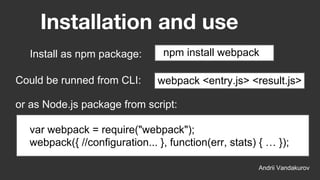
Installation and use
Andrii Vandakurov
npm install webpack
Could be runned from CLI:
Install as npm package:
webpack <entry.js> <result.js>
or as Node.js package from script:
var webpack = require("webpack");
webpack({ //configuration... }, function(err, stats) { … });
Webpack Config
you don’t need to write pure JSON
into the configuration. Use any
JavaScript you want. It’s just a
node.js (CommonJs) module…
Andrii VandakurovAndrii Vandakurov
What is CommonJs module ?
Each file has
isolated scope
Andrii Vandakurov
* so we need to module.export
everything we want to be public
module.export = 2;
File1.js
var two = require(“./File1.js”);
console.log(2 + two); // 4
File2.js
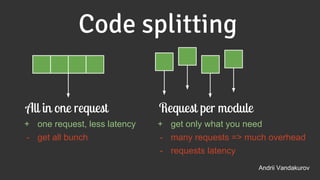
Code splitting
Andrii Vandakurov
All in one request
+ one request, less latency
- get all bunch
Request per module
+ get only what you need
- many requests => much overhead
- requests latency
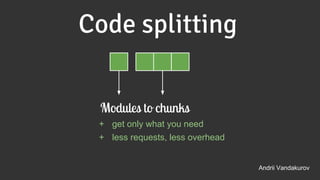
Code splitting
Andrii Vandakurov
Modules to chunks
+ get only what you need
+ less requests, less overhead
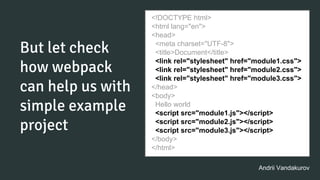
But let check
how webpack
can help us with
simple example
project
<!DOCTYPE html>
<html lang="en">
<head>
<meta charset="UTF-8">
<title>Document</title>
<link rel="stylesheet" href="module1.css">
<link rel="stylesheet" href="module2.css">
<link rel="stylesheet" href="module3.css">
</head>
<body>
Hello world
<script src="module1.js"></script>
<script src="module2.js"></script>
<script src="module3.js"></script>
</body>
</html>
Andrii Vandakurov
module.exports = {
entry: {
app: [
"./app/js/module1",
"./app/js/module2"
]
},
output: {
path: "./public/js/",
filename: "bundle.js"
}
};
<!DOCTYPE html>
<html lang="en">
<head>
<meta charset="UTF-8">
<title>Document</title>
<link rel="stylesheet" href="module1.css">
<link rel="stylesheet" href="module2.css">
<link rel="stylesheet" href="module3.css">
</head>
<body>
Hello world
<script src="bundle.js"></script>
<script src="module3.js"></script>
</body>
</html>
Andrii Vandakurov
webpack.config.js
What about
other files??
.css .png .jsx .woff .svg .
json .styl .eot .html .scss .
jpeg .jade ...
Andrii VandakurovAndrii Vandakurov
Loaders
Loaders allow you to preprocess files
as you require() or “load” them.
Loaders are kind of like “tasks” are in
other build tools
code -> loaders -> plugins -> output
Andrii Vandakurov
Continue with styles
module.exports = {
...
module: {
loaders: [
{ test: /.scss$/, loader: "style!css!autoprefixer!sass" }
]}
};
npm install style-loader css-loader sass-loader autoprefixer-loader
Andrii Vandakurov
require(“style!css!autoprefixer!sass!./mystyles.scss”);
Andrii Vandakurov
Optimize workflow with
images !
npm install url-loader
require("url?limit=10000!./file.png");
Insert image in the bundle (via Base64) if it’s
smaller than 10kb
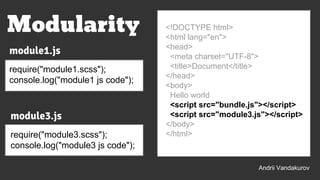
<!DOCTYPE html>
<html lang="en">
<head>
<meta charset="UTF-8">
<title>Document</title>
</head>
<body>
Hello world
<script src="bundle.js"></script>
<script src="module3.js"></script>
</body>
</html>
Modularity
module1.js
require("module1.scss");
console.log("module1 js code");
module3.js
require("module3.scss");
console.log("module3 js code");
Andrii Vandakurov
module.exports = {
...
entry: {
app: "./app/js/module1"
},
...
};
document
.querySelector(".btn-require-module")
.addEventListener("click", function(){
require.ensure(["./module3"], function(require){
var module3 = require("./module3");
}, "module3")
})
Andrii Vandakurov
Code splitting
webpack.config.js module1.js
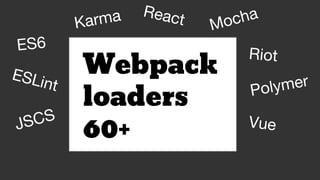
Webpack
loaders
60+
ES6
ESLint
JSCS
Mocha
Karma React
Riot
Polymer
Vue
Plugins
Andrii Vandakurov
code -> loaders -> plugins -> output
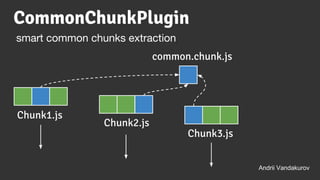
CommonChunkPlugin
Andrii Vandakurov
smart common chunks extraction
Chunk1.js
Chunk2.js
Chunk3.js
common.chunk.js
var webpack = require("webpack");
module.exports = {
...
plugins: [
new webpack.optimize.CommonsChunkPlugin("commons", "commons.js")
]
};
require(“./module4”)
console.log(“This is module 1”);
Andrii Vandakurov
module1.js
require(“./module4”)
console.log(“This is module 3”);
module3.js
CommonChunkPlugin
var webpack = require("webpack");
module.exports = {
…
plugins: [
new webpack.DefinePlugin({
ENV: JSON.stringify("dev")
})
]
};
Somewhere in your code:
if(ENV === "dev"){
console.log("Its dev");
}else{
console.log("Its NOT dev");
}
Andrii Vandakurov
DefinePlugin
injects free variables into your code without using global scope
webpack.config.js
var webpack = require("webpack");
module.exports = {
…
plugins: [
new webpack.ProvidePlugin({
"React": "react"
})
]
};
Somewhere in your code:
module.export = React.createClass({
...
})
Andrii Vandakurov
ProvidePlugin
Prevent from ‘require’ module in each file
ExtractTextPlugin
var webpack = require("webpack");
var ExtractTextPlugin = require("extract-text-webpack-plugin");
module.exports = {
…
plugins: [
new ExtractTextPlugin("module1.scss", "[name].[contenthash].css")
]
};
Andrii Vandakurov
extract styles from bundle
var webpack = require("webpack");
var HtmlWebpackPlugin = require('html-webpack-plugin');
module.exports = { …
plugins: [
new HtmlWebpackPlugin({
title: "Webpack",
"filename": "../index.html",
"inject": true,
"template": "app/index.html",
"chunks": ["commons", "module1"]
})
]
};
Andrii Vandakurov
Simplifies creation of
HTML files to serve
your webpack
bundles
HtmlWebpackPlugin
DevServer
Andrii Vandakurov
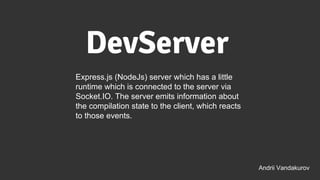
Express.js (NodeJs) server which has a little
runtime which is connected to the server via
Socket.IO. The server emits information about
the compilation state to the client, which reacts
to those events.
Andrii Vandakurov
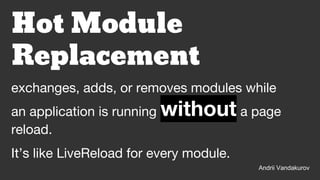
exchanges, adds, or removes modules while
an application is running without a page
reload.
Hot Module
Replacement
It’s like LiveReload for every module.
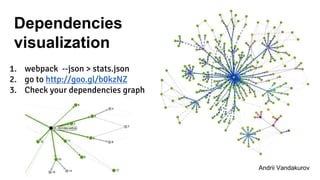
Dependencies
visualization
1. webpack --json > stats.json
2. go to http://goo.gl/b0kzNZ
3. Check your dependencies graph
Andrii VandakurovAndrii Vandakurov
QA ?
Andrii Vandakurov
Links
Andrii Vandakurov
1. Webpack official site
2. Examples
Inspired by
● Алексадр Ткаленко slides
● Alexandrine Boissière slides
Andrii Vandakurov

Webpack slides

  • 1.
    The new rockstar of build tools Webpack Andrii Vandakurov
  • 2.
    Hi, I’m AndriiVandakurov Senior Frontend developer at We create cool things Andrii Vandakurov
  • 3.
    What is thebase of every project ? Assets ! Andrii Vandakurov
  • 4.
    Of course you can managethis by yourself Andrii Vandakurov
  • 5.
    But why ?There are lot of tools that can help you ! Andrii Vandakurov
  • 6.
  • 7.
    Webpack suits wellfor really big projects because of it’s flexibility ( support for AMD, CommonJs, UMD modules ) Andrii Vandakurov
  • 8.
    Installation and use AndriiVandakurov npm install webpack Could be runned from CLI: Install as npm package: webpack <entry.js> <result.js> or as Node.js package from script: var webpack = require("webpack"); webpack({ //configuration... }, function(err, stats) { … });
  • 9.
    Webpack Config you don’tneed to write pure JSON into the configuration. Use any JavaScript you want. It’s just a node.js (CommonJs) module… Andrii VandakurovAndrii Vandakurov
  • 10.
    What is CommonJsmodule ? Each file has isolated scope Andrii Vandakurov * so we need to module.export everything we want to be public module.export = 2; File1.js var two = require(“./File1.js”); console.log(2 + two); // 4 File2.js
  • 11.
    Code splitting Andrii Vandakurov Allin one request + one request, less latency - get all bunch Request per module + get only what you need - many requests => much overhead - requests latency
  • 12.
    Code splitting Andrii Vandakurov Modulesto chunks + get only what you need + less requests, less overhead
  • 13.
    But let check howwebpack can help us with simple example project <!DOCTYPE html> <html lang="en"> <head> <meta charset="UTF-8"> <title>Document</title> <link rel="stylesheet" href="module1.css"> <link rel="stylesheet" href="module2.css"> <link rel="stylesheet" href="module3.css"> </head> <body> Hello world <script src="module1.js"></script> <script src="module2.js"></script> <script src="module3.js"></script> </body> </html> Andrii Vandakurov
  • 14.
    module.exports = { entry:{ app: [ "./app/js/module1", "./app/js/module2" ] }, output: { path: "./public/js/", filename: "bundle.js" } }; <!DOCTYPE html> <html lang="en"> <head> <meta charset="UTF-8"> <title>Document</title> <link rel="stylesheet" href="module1.css"> <link rel="stylesheet" href="module2.css"> <link rel="stylesheet" href="module3.css"> </head> <body> Hello world <script src="bundle.js"></script> <script src="module3.js"></script> </body> </html> Andrii Vandakurov webpack.config.js
  • 15.
    What about other files?? .css.png .jsx .woff .svg . json .styl .eot .html .scss . jpeg .jade ... Andrii VandakurovAndrii Vandakurov
  • 16.
    Loaders Loaders allow youto preprocess files as you require() or “load” them. Loaders are kind of like “tasks” are in other build tools code -> loaders -> plugins -> output Andrii Vandakurov
  • 17.
    Continue with styles module.exports= { ... module: { loaders: [ { test: /.scss$/, loader: "style!css!autoprefixer!sass" } ]} }; npm install style-loader css-loader sass-loader autoprefixer-loader Andrii Vandakurov require(“style!css!autoprefixer!sass!./mystyles.scss”);
  • 18.
    Andrii Vandakurov Optimize workflowwith images ! npm install url-loader require("url?limit=10000!./file.png"); Insert image in the bundle (via Base64) if it’s smaller than 10kb
  • 19.
    <!DOCTYPE html> <html lang="en"> <head> <metacharset="UTF-8"> <title>Document</title> </head> <body> Hello world <script src="bundle.js"></script> <script src="module3.js"></script> </body> </html> Modularity module1.js require("module1.scss"); console.log("module1 js code"); module3.js require("module3.scss"); console.log("module3 js code"); Andrii Vandakurov
  • 20.
    module.exports = { ... entry:{ app: "./app/js/module1" }, ... }; document .querySelector(".btn-require-module") .addEventListener("click", function(){ require.ensure(["./module3"], function(require){ var module3 = require("./module3"); }, "module3") }) Andrii Vandakurov Code splitting webpack.config.js module1.js
  • 21.
  • 22.
    Plugins Andrii Vandakurov code ->loaders -> plugins -> output
  • 23.
    CommonChunkPlugin Andrii Vandakurov smart commonchunks extraction Chunk1.js Chunk2.js Chunk3.js common.chunk.js
  • 24.
    var webpack =require("webpack"); module.exports = { ... plugins: [ new webpack.optimize.CommonsChunkPlugin("commons", "commons.js") ] }; require(“./module4”) console.log(“This is module 1”); Andrii Vandakurov module1.js require(“./module4”) console.log(“This is module 3”); module3.js CommonChunkPlugin
  • 25.
    var webpack =require("webpack"); module.exports = { … plugins: [ new webpack.DefinePlugin({ ENV: JSON.stringify("dev") }) ] }; Somewhere in your code: if(ENV === "dev"){ console.log("Its dev"); }else{ console.log("Its NOT dev"); } Andrii Vandakurov DefinePlugin injects free variables into your code without using global scope webpack.config.js
  • 26.
    var webpack =require("webpack"); module.exports = { … plugins: [ new webpack.ProvidePlugin({ "React": "react" }) ] }; Somewhere in your code: module.export = React.createClass({ ... }) Andrii Vandakurov ProvidePlugin Prevent from ‘require’ module in each file
  • 27.
    ExtractTextPlugin var webpack =require("webpack"); var ExtractTextPlugin = require("extract-text-webpack-plugin"); module.exports = { … plugins: [ new ExtractTextPlugin("module1.scss", "[name].[contenthash].css") ] }; Andrii Vandakurov extract styles from bundle
  • 28.
    var webpack =require("webpack"); var HtmlWebpackPlugin = require('html-webpack-plugin'); module.exports = { … plugins: [ new HtmlWebpackPlugin({ title: "Webpack", "filename": "../index.html", "inject": true, "template": "app/index.html", "chunks": ["commons", "module1"] }) ] }; Andrii Vandakurov Simplifies creation of HTML files to serve your webpack bundles HtmlWebpackPlugin
  • 29.
    DevServer Andrii Vandakurov Express.js (NodeJs)server which has a little runtime which is connected to the server via Socket.IO. The server emits information about the compilation state to the client, which reacts to those events.
  • 30.
    Andrii Vandakurov exchanges, adds,or removes modules while an application is running without a page reload. Hot Module Replacement It’s like LiveReload for every module.
  • 31.
    Dependencies visualization 1. webpack --json> stats.json 2. go to http://goo.gl/b0kzNZ 3. Check your dependencies graph Andrii VandakurovAndrii Vandakurov
  • 32.
  • 33.
    Links Andrii Vandakurov 1. Webpackofficial site 2. Examples Inspired by ● Алексадр Ткаленко slides ● Alexandrine Boissière slides Andrii Vandakurov