Web Technology II
Chapter 1
Introduction to
Web Techniques
 PHP is an acronym for "PHP: Hypertext Preprocessor"
 PHP is a widely-used, open source scripting language
 PHP scripts are executed on the server
 PHP is free to download and use
 PHP files can contain text, HTML, CSS, JavaScript, and PHP code
 PHP code is executed on the server, and the result is returned to the browser as
plain HTML
 PHP files have extension ".php"
 PHP can generate dynamic page content
 PHP is becoming a standard in the world of Web programming with its
simplicity, performance, reliability, flexibility and speed.
 PHP was designed/developed as a Web scripting language and although it is
possible to use it in purely command-line and GUI scripts, the Web accounts
for the vast majority of PHP uses.
 Web technology is essential today because Internet has become the number
one source to information and many of the traditional software applications
have become Web Applications.
INTRODUCTION
VARIABLES
• Every time we click a link or submit a form, we send a great deal of data about
the system and the browser to the Web server and each time the web server
responds, it sends us a great deal of data about itself. PHP has the capability to
capture that data.
• For instance, if we go to a PHP driven website and log in, it’s likely that a
predefined variable $_POST is filled (on server) with the username and password,
another predefined variable named $_SERVER contains information about the
current Web server environment.
• PHP automatically have some variables called predefined variables available
anywhere in the program.
• They are array variables. These variables are: $_ENV, $_GET, $_POST, $_COOKIE,
and $_SERVER, referred to as EGPCS.
• Several predefined variables in PHP are "superglobals", which means that they
are always accessible, regardless of scope and we can access them from any
function, class or file without having to do anything special.
• The PHP superglobal variables are $GLOBALS, $_SERVER, $_REQUEST, $_POST,
$_GET, $_FILES, $_ENV, $_COOKIE, and $_SESSION.
Regardless of the setting of the option register_globals, PHP creates six global arrays
that contain the EGPCS information as given below:
1. $_COOKIE: This global array contains any cookie values passed as part of the
request, where the keys of the array are the names of the cookies.
2. $_GET: This global array contains any parameters that are part of a GET request,
where the keys of the array are the names of the form parameters.
3. $_POST: This global array contains any parameters that are part of a POST request,
where the keys of the array are the names of the form parameters.
4. $_FILES: This global array contains information about any uploaded
files.
5. $_SERVER: This global array contains useful information about the web server, as
described in the next section.
6. $_ENV: This global array contains the values of any environment variables, where
the keys of the array are the names of the environment variables.
Server Information
Element/Code Description
$_SERVER['PHP_SELF'] Returns the filename of the currently executing script
$_SERVER['GATEWAY_INTERFACE'] Returns the version of the Common Gateway Interface (CGI) the
server is using
$_SERVER['SERVER_ADDR'] Returns the IP address of the host server
$_SERVER['SERVER_NAME'] Returns the name of the host server (such as www.w3schools.com)
$_SERVER['SERVER_SOFTWARE'] Returns the server identification string (such as Apache/2.2.24)
$_SERVER['SERVER_PROTOCOL'] Returns the name and revision of the information protocol (such as
HTTP/1.1)
$_SERVER['REQUEST_METHOD'] Returns the request method used to access the page (such as
POST)
$_SERVER['REQUEST_TIME'] Returns the timestamp of the start of the request
(such as 1377687496)
$_SERVER['QUERY_STRING'] Returns the query string if the page is accessed via a
query string
$_SERVER['HTTP_ACCEPT'] Returns the Accept header from the current request
$_SERVER['HTTP_ACCEPT_CHARSET'] Returns the Accept_Charset header from the current
request (such as utf-8,ISO-8859-1)
$_SERVER['HTTP_HOST'] Returns the Host header from the current request
$_SERVER['HTTP_REFERER'] Returns the complete URL of the current page (not
reliable because not all user-agents support it)
$_SERVER['HTTPS'] Is the script queried through a secure HTTP protocol
$_SERVER['REMOTE_ADDR'] Returns the IP address from where the user is viewing
the current page
$_SERVER['REMOTE_HOST'] Returns the Host name from where the user is
viewing the current page
$_SERVER['REMOTE_PORT'] Returns the port being used on the user's machine
to communicate with the web server
$_SERVER['SCRIPT_FILENAME'] Returns the absolute pathname of the currently
executing script
$_SERVER['SERVER_ADMIN'] Returns the value given to the SERVER_ADMIN
directive in the web server configuration file (if
your script runs on a virtual host, it will be the
value defined for that virtual host) (such as
someone@w3schools.com)
$_SERVER['SERVER_PORT'] Returns the port on the server machine being used
by the web server for communication (such as 80)
$_SERVER['SERVER_SIGNATURE'] Returns the server version and virtual host name
which are added to server-generated pages
$_SERVER['PATH_TRANSLATED'] Returns the file system based path to the current
script
$_SERVER['SCRIPT_NAME'] Returns the path of the current script
$_SERVER['SCRIPT_URI'] Returns the URI of the current page
PROCESSING FORMS
• Forms are essential parts in web development. Forms are used to communicate
between users and the server.
• Form is a way to get information of the user to the server and let the server do
something in response to the user’s input.
• We use form to register in a website, to login, to send feedback, to place order online, to
book ticket online etc.
• After submitting the form, the form is processed by PHP on the server.
• In PHP the form parameters are available in the $_GET and $_POST arrays.
• When user submits a form then the form parameter is send to the server. Before
sending the information, browser encodes it using a scheme called URL encoding.
• In this scheme, name/value pairs are joined with equal signs (=) and different pairs are
separated by the ampersand (&).
name1=value1&name2=value2&name3=value3
• Spaces are removed and replaced with the + character and any other non
alphanumeric characters are replaced with a hexadecimal values.
• After the information is encoded it is sent to the server.
• There are two HTTP methods that a client can use to pass form data to the server
i.e., GET and POST. The method is specified with the method attribute to the form tag.
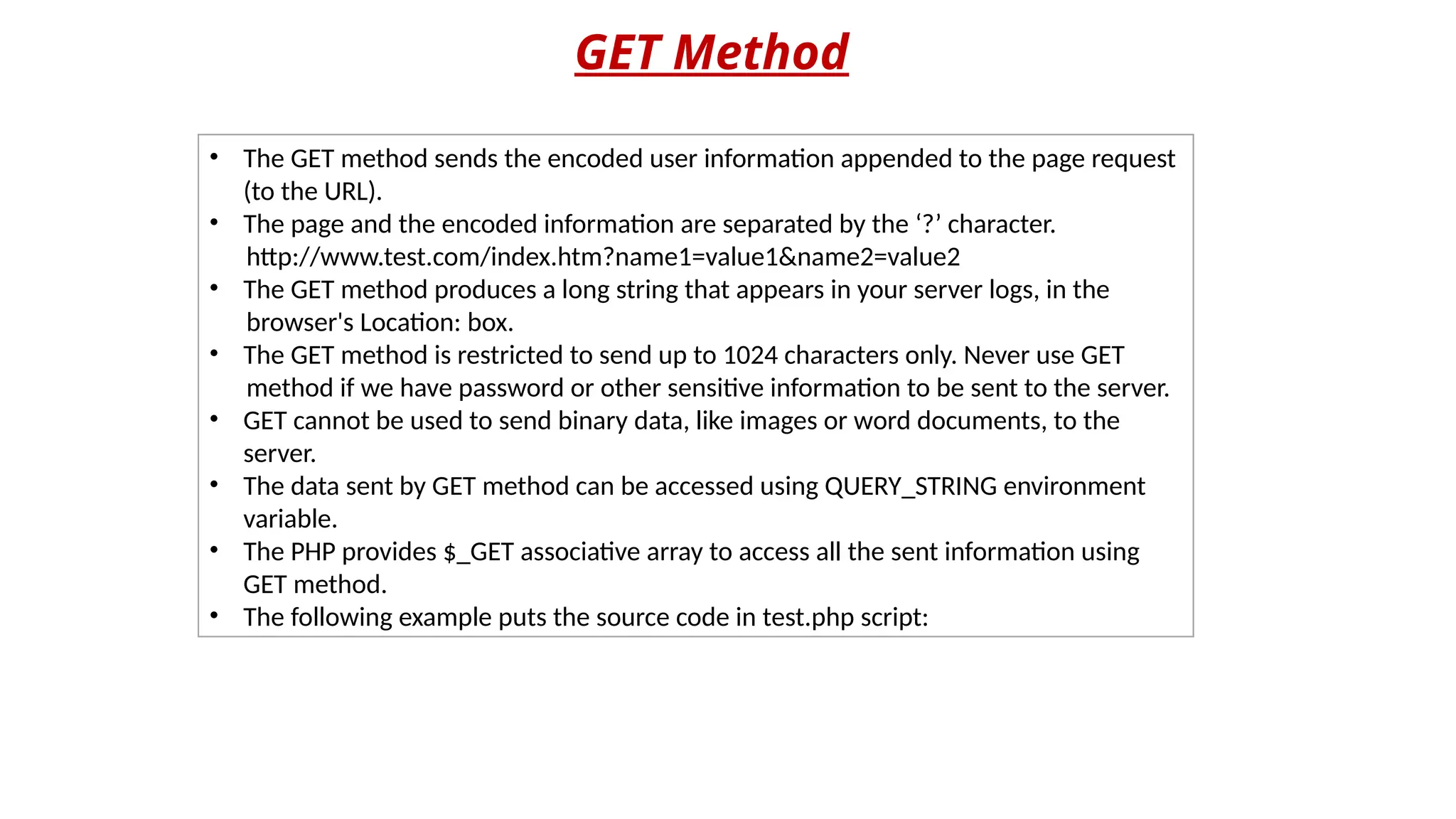
GET Method
• The GET method sends the encoded user information appended to the page request
(to the URL).
• The page and the encoded information are separated by the ‘?’ character.
http://www.test.com/index.htm?name1=value1&name2=value2
• The GET method produces a long string that appears in your server logs, in the
browser's Location: box.
• The GET method is restricted to send up to 1024 characters only. Never use GET
method if we have password or other sensitive information to be sent to the server.
• GET cannot be used to send binary data, like images or word documents, to the
server.
• The data sent by GET method can be accessed using QUERY_STRING environment
variable.
• The PHP provides $_GET associative array to access all the sent information using
GET method.
• The following example puts the source code in test.php script:
<?php
if( isset($_GET["s1"]) )
{
echo "Welcome ". $_GET['name']. "<br />";
echo "You are ". $_GET['age']. " years old.";
}
?>
<html>
<body>
<form action="<?php $_PHP_SELF?>" method="GET">
Name: <input type="text" name="name" /><br>
Age: <input type="text" name="age" /><br>
<input type="submit" name="s1" value="Ok"/>
</form>
</body>
</html>
After executing the program in the browser, HTML part will be
displayed first as follows as shown below:
Enter name and age and submit the form. Now PHP will
process the form and you will get the following output.
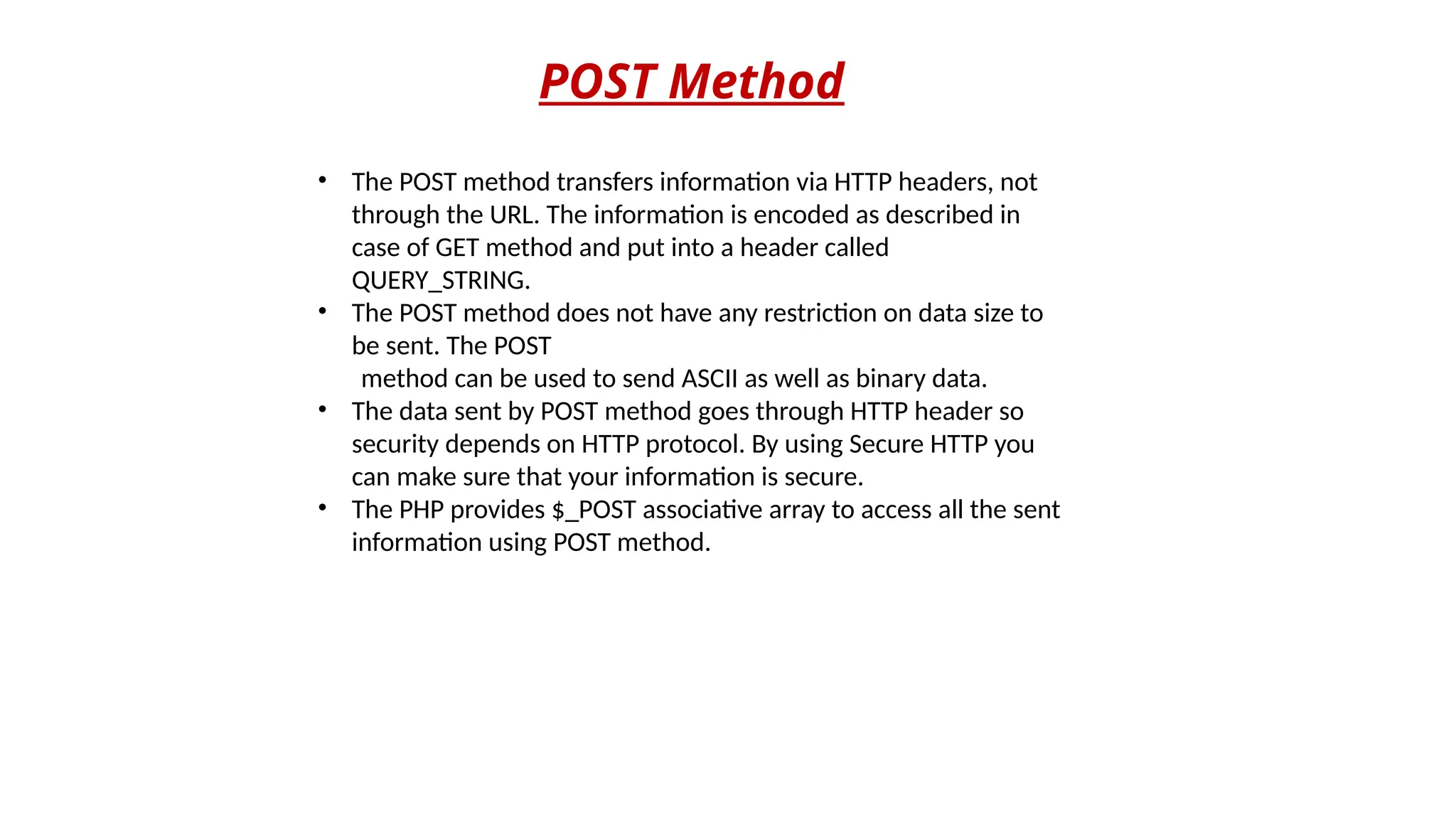
POST Method
• The POST method transfers information via HTTP headers, not
through the URL. The information is encoded as described in
case of GET method and put into a header called
QUERY_STRING.
• The POST method does not have any restriction on data size to
be sent. The POST
method can be used to send ASCII as well as binary data.
• The data sent by POST method goes through HTTP header so
security depends on HTTP protocol. By using Secure HTTP you
can make sure that your information is secure.
• The PHP provides $_POST associative array to access all the sent
information using POST method.
<?php
if( isset($_POST["s1"]) )
{
echo "Welcome ". $_POST['name']. "<br />";
echo "You are ". $_POST['age']. " years old.";
}
?>
<html>
<body>
<form action="<?php $_PHP_SELF?>" method="POST">
Name: <input type="text" name="name" /><br>
Age: <input type="text" name="age" /><br>
<input type="submit" name="s1" value="Ok"/>
</form>
</body>
</html>
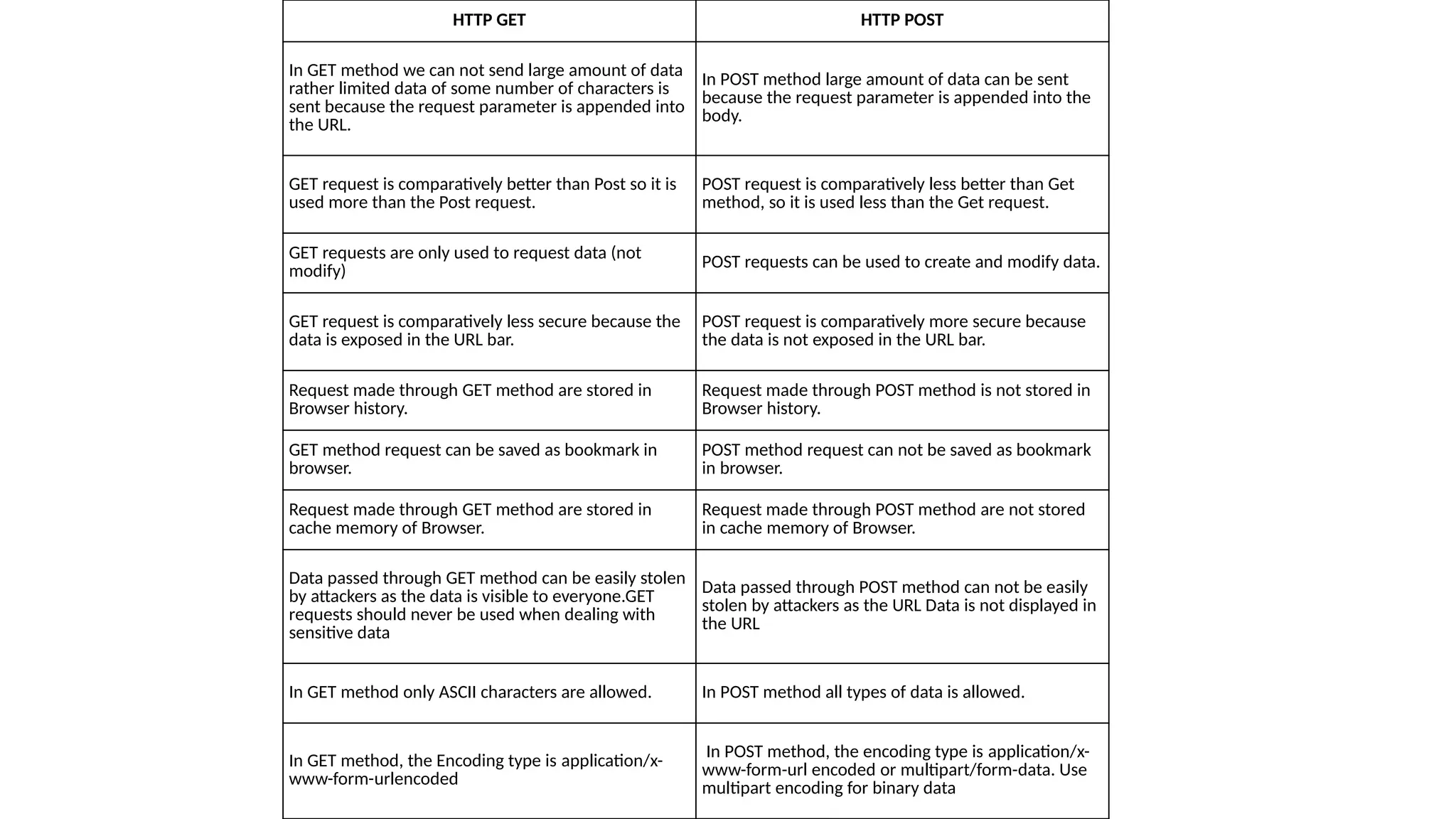
HTTP GET HTTP POST
In GET method we can not send large amount of data
rather limited data of some number of characters is
sent because the request parameter is appended into
the URL.
In POST method large amount of data can be sent
because the request parameter is appended into the
body.
GET request is comparatively better than Post so it is
used more than the Post request.
POST request is comparatively less better than Get
method, so it is used less than the Get request.
GET requests are only used to request data (not
modify)
POST requests can be used to create and modify data.
GET request is comparatively less secure because the
data is exposed in the URL bar.
POST request is comparatively more secure because
the data is not exposed in the URL bar.
Request made through GET method are stored in
Browser history.
Request made through POST method is not stored in
Browser history.
GET method request can be saved as bookmark in
browser.
POST method request can not be saved as bookmark
in browser.
Request made through GET method are stored in
cache memory of Browser.
Request made through POST method are not stored
in cache memory of Browser.
Data passed through GET method can be easily stolen
by attackers as the data is visible to everyone.GET
requests should never be used when dealing with
sensitive data
Data passed through POST method can not be easily
stolen by attackers as the URL Data is not displayed in
the URL
In GET method only ASCII characters are allowed. In POST method all types of data is allowed.
In GET method, the Encoding type is application/x-
www-form-urlencoded
In POST method, the encoding type is application/x-
www-form-url encoded or multipart/form-data. Use
multipart encoding for binary data
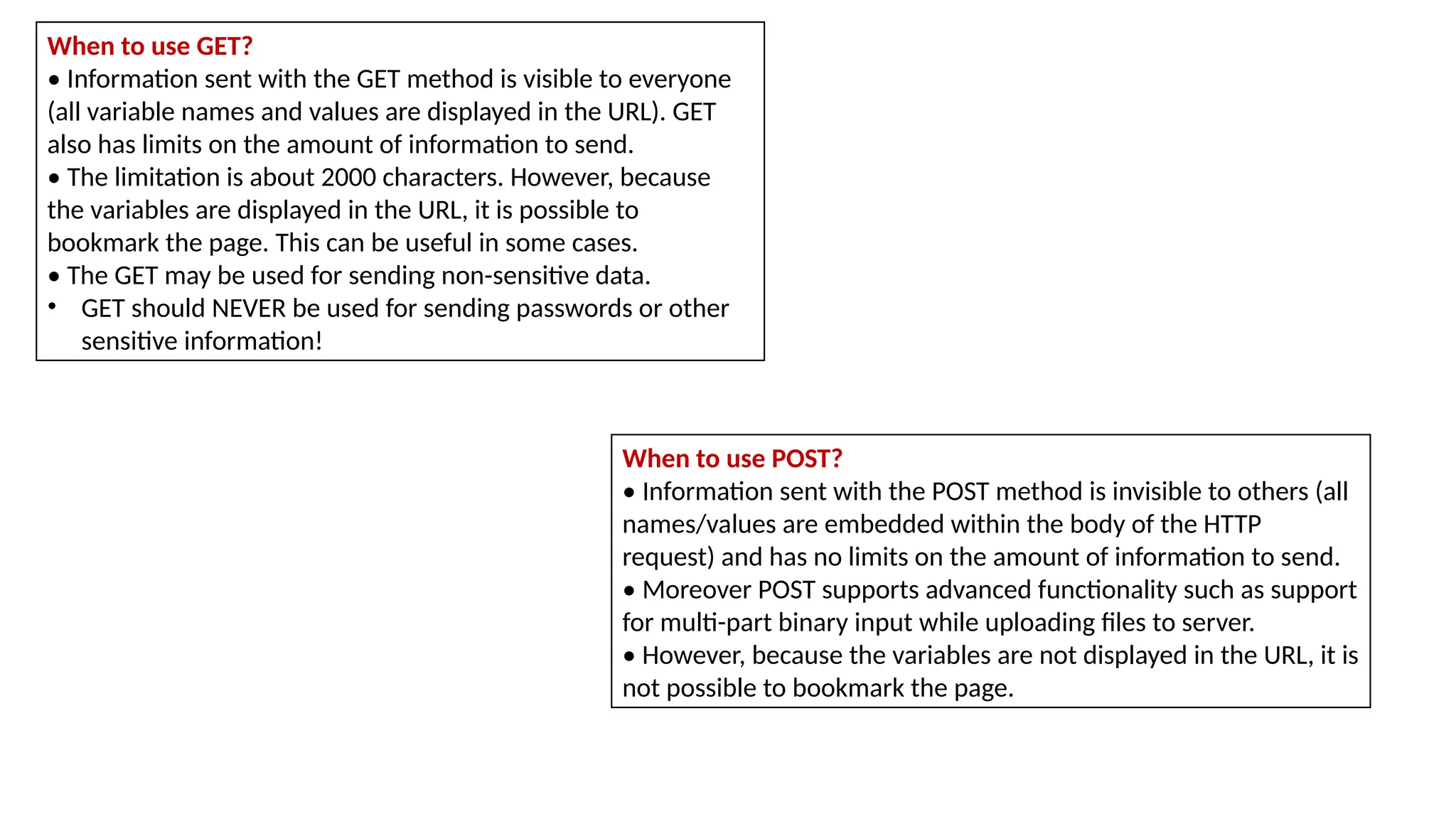
When to use GET?
• Information sent with the GET method is visible to everyone
(all variable names and values are displayed in the URL). GET
also has limits on the amount of information to send.
• The limitation is about 2000 characters. However, because
the variables are displayed in the URL, it is possible to
bookmark the page. This can be useful in some cases.
• The GET may be used for sending non-sensitive data.
• GET should NEVER be used for sending passwords or other
sensitive information!
When to use POST?
• Information sent with the POST method is invisible to others (all
names/values are embedded within the body of the HTTP
request) and has no limits on the amount of information to send.
• Moreover POST supports advanced functionality such as support
for multi-part binary input while uploading files to server.
• However, because the variables are not displayed in the URL, it is
not possible to bookmark the page.
Self Processing Pages
• A single PHP program can be used to both generate a form and process it, using
combination of HTML and PHP. This type of PHP page is known as self processing page.
For Example:
<html>
<head><title>Greet User</title></head>
<body>
<?php
if(isset($_GET['name1']))
{
$nm = $_GET['name1'];
echo "Hello " . $nm;
} else {
?>
<form action="<?php echo $_SERVER['PHP_SELF']?>" method="GET">
Enter Your Name:
<input type="text" name="name1" /> <br />
<input type="submit" name="Ok" />
</form>
<?php
}
?>
</body></html>
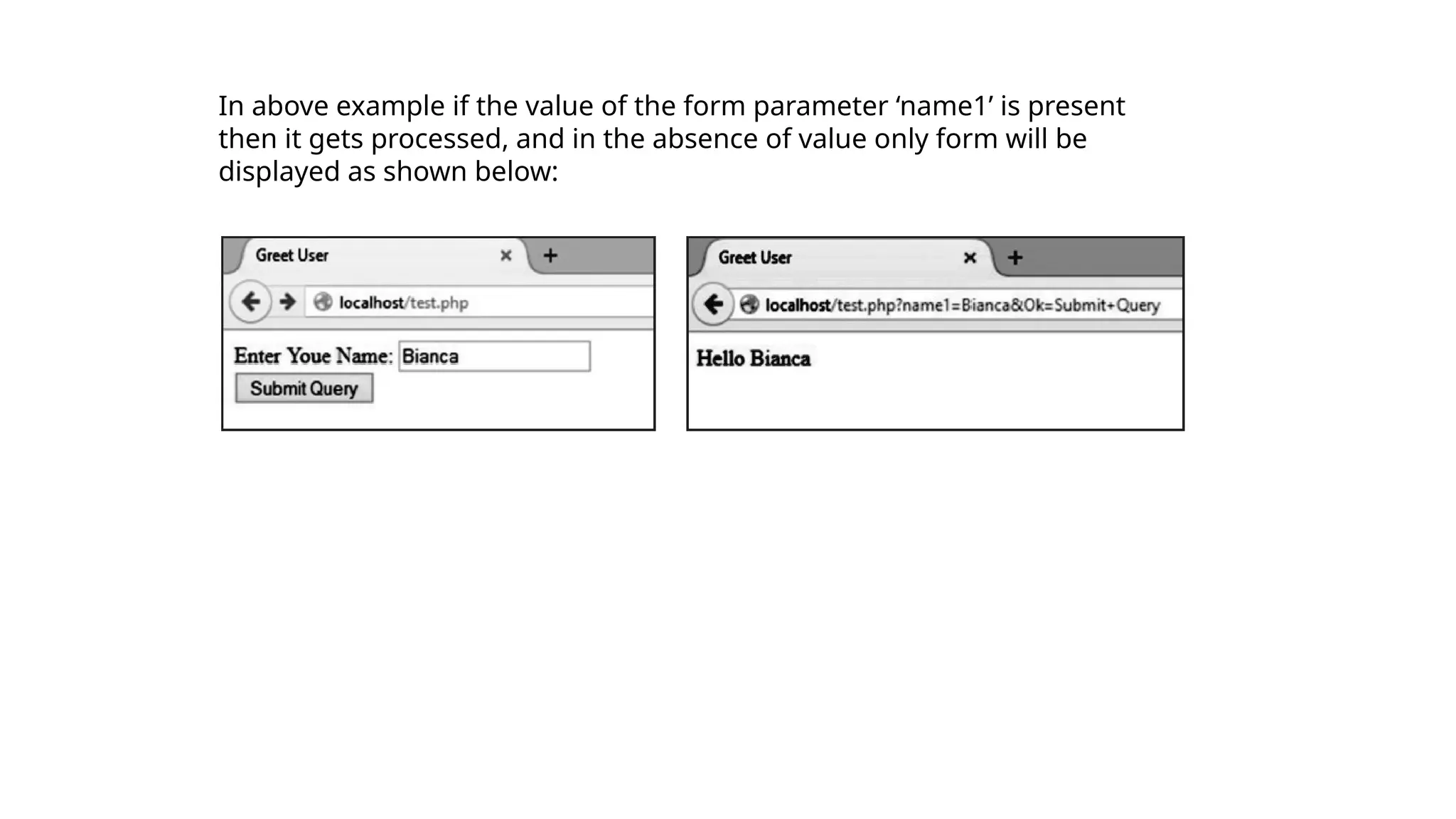
In above example if the value of the form parameter ‘name1’ is present
then it gets processed, and in the absence of value only form will be
displayed as shown below:
Sticky Forms
In sticky forms the values entered by user remain displayed with the form component, if we display the
form after submit.
• For example: If we search Google (http://www.google.com) for “PHP Cookbook”, the top of the results
page contains another search box, which already contains “PHP Cookbook”. To refine the search to “PHP
Cookbook from O’Reilly”, we can simply add the extra keywords.
<html>
<head><title>Greet User</title></head>
<body>
<form action="<?php echo $_SERVER['PHP_SELF']?>"
method="GET">
Enter Your Name:
<input type="text" name="name1" /> <br />
<input type="submit" name="Ok" />
</form>
<?php
if(isset($_GET['name1']))
{
$nm = $_GET['name1'];
echo "Hello " . $nm;
}?>
</body></html>
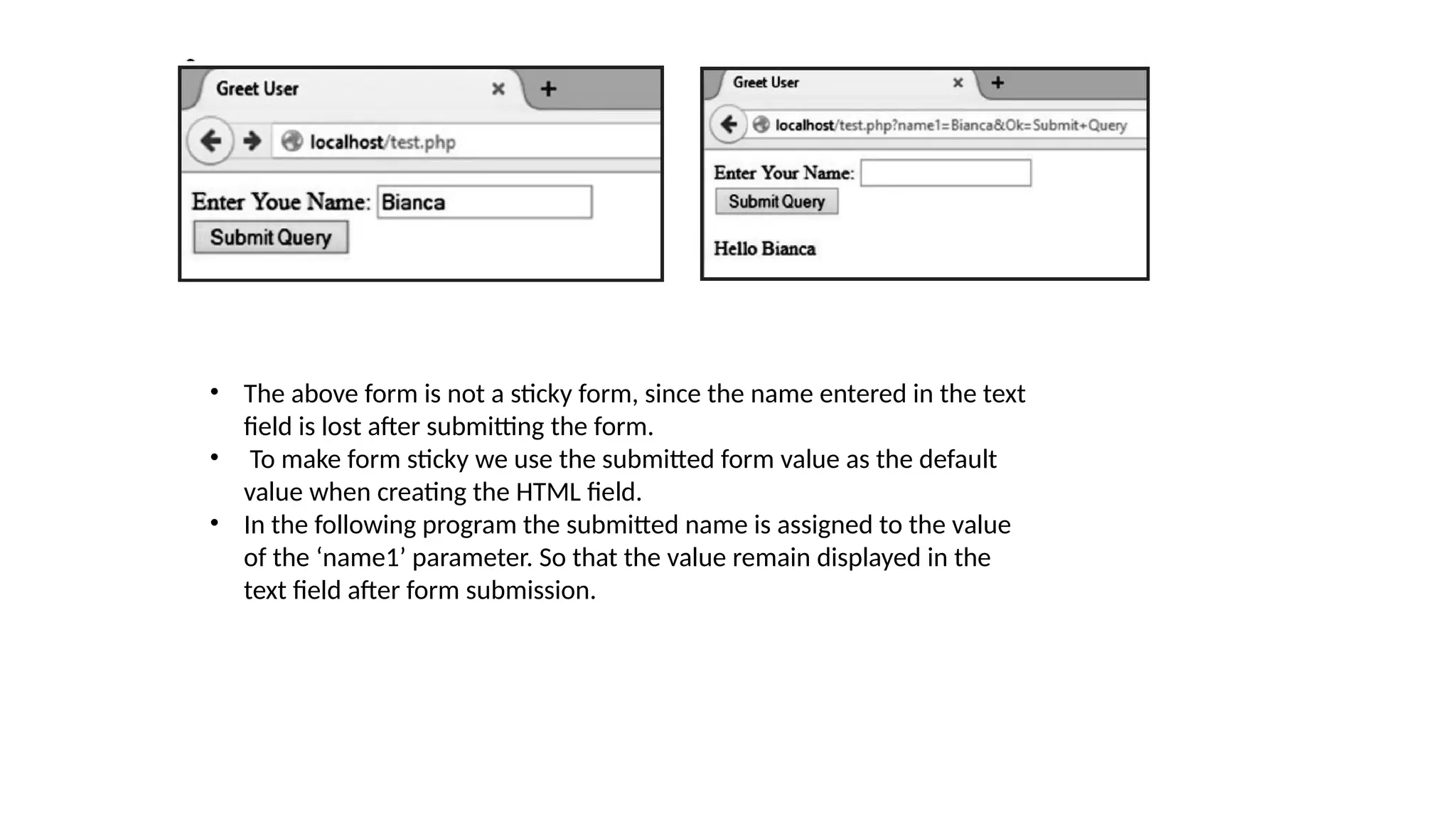
• The above form is not a sticky form, since the name entered in the text
field is lost after submitting the form.
• To make form sticky we use the submitted form value as the default
value when creating the HTML field.
• In the following program the submitted name is assigned to the value
of the ‘name1’ parameter. So that the value remain displayed in the
text field after form submission.
<html>
<head><title>Greet User</title></head>
<body>
<form action="<?php echo $_SERVER['PHP_SELF']?>" method="GET">
Enter Youe Name:
<input type="text" name="name1" value="<?php echo $_GET['name1'];?>"/> <br />
<input type="submit" name="Ok" />
</form>
<?php
if(isset($_GET['name1']))
{
$nm = $_GET['name1'];
echo "Hello " . $nm;
}
?>
</body></html>
Multivalued Parameters
• The HTML selection lists can allow multiple selections,
when name of the field in the HTML form end with [] and
the ‘multiple’ attribute is used.
• When the user submits the form, $_GET[‘ languages’]
contains an array instead of a simple string. This array
contains the values that were selected by the user.
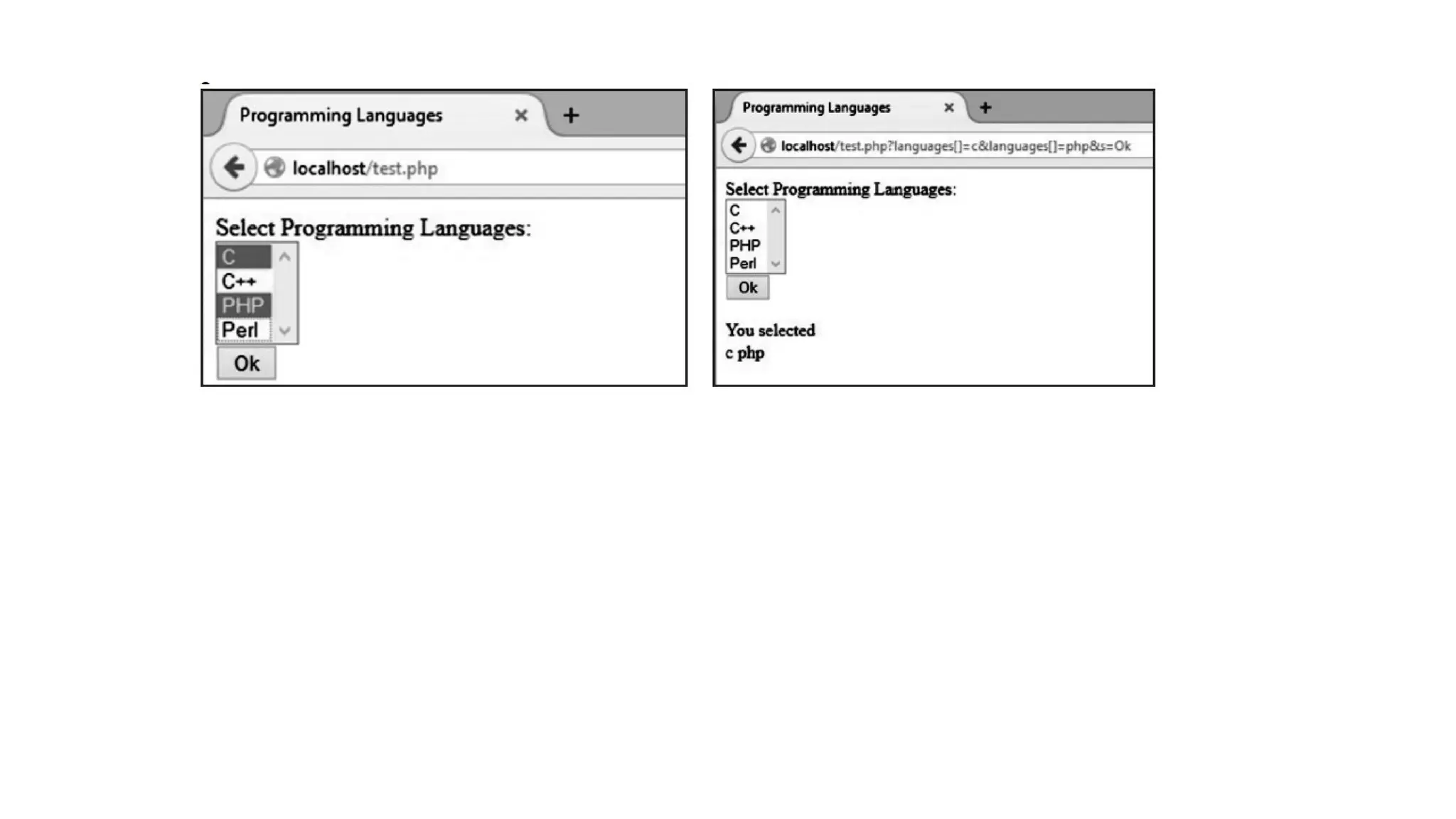
• Following example shows multiple selections. The form
provides the user with a set of programming languages
name. When the user submits the form, he gets list of the
selected of programming languages.
<html><head>
<title>Programming Languages</title></head>
<body>
<form action="<?php echo $_SERVER['PHP_SELF']?>" method="GET">
Select Programming Languages:<br />
<select name="languages[]" multiple>
<option value="c">C</option>
<option value="c++">C++</option>
<option value="php">PHP</option>
<option value="perl">Perl</option>
</select><br>
<input type="submit" name="s" value="Ok" />
</form>
<?php
if(isset($_GET['s']))
{
$lan = $_GET['languages'];
echo "You selected<br>";
foreach($lan as $k=>$v)
echo "$v ";
}
?>
</body></html>
Sticky Multivalued Parameters
• A form can have multiple elements like text field, check
boxes, radio button etc.; it is also possible to make that
form sticky.
• It is also possible to make multiple selected form
elements sticky. In such type of form each possible value
in the form is one of the submitted values.
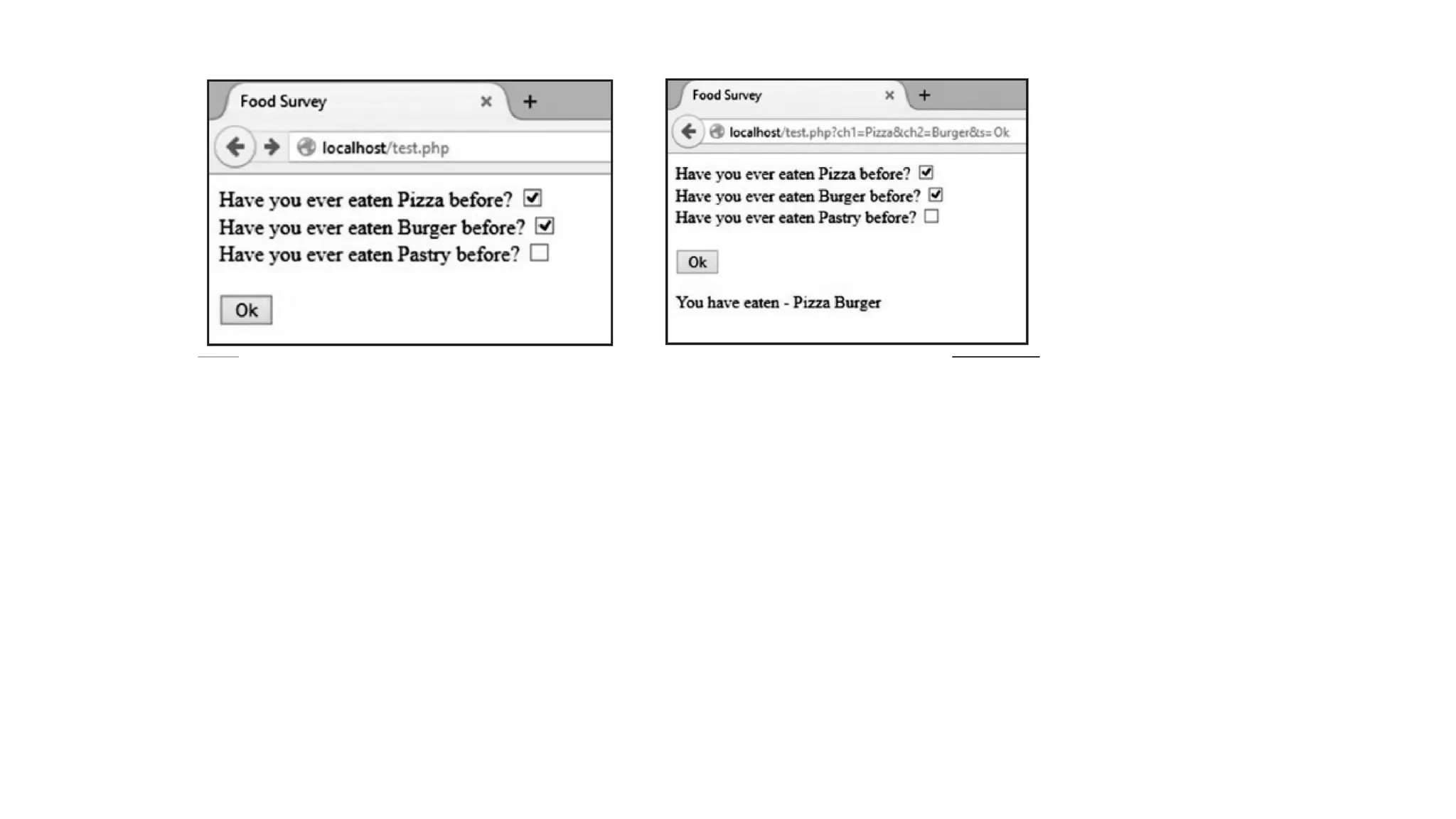
• In the program above the selected check boxes select (√)
is lost after submitting the form.
• To make such type of form sticky so that the selected
check boxes select (√) is not lost after submitting the
form.
<html>
<head><title>Food Survey</title></head>
<body>
<form action="<?php echo $_SERVER['PHP_SELF']?>" method="GET">
Have you ever eaten Pizza before?<input type="checkbox" name="ch1" value="Pizza" <?php
if(isset($_GET['ch1']) and isset($_GET['s'])) echo "checked";?>><br />
Have you ever eaten Burger before?
<input type="checkbox" name="ch2" value="Burger" <?php
if(isset($_GET['ch2']) and isset($_GET['s'])) echo "checked";?>><br />
Have you ever eaten Pastry before?
<input type="checkbox" name="ch3" value="Pastry" <?php
if(isset($_GET['ch3']) and isset($_GET['s'])) echo "checked";?>><br />
<input type="submit" name="s" value="Ok" />
</form>
<?php
if(isset($_GET['s']))
{
echo "You have eaten - ";
if(isset($_GET['ch1'])) echo "$_GET[ch1] ";
if(isset($_GET['ch2'])) echo "$_GET[ch2] ";
if(isset($_GET['ch3'])) echo "$_GET[ch3]";
}
?>
</body></html>
File Uploads
In PHP to handle file uploads, $_FILES array is used. The elements of the $_FILES array gives information about
the uploaded file.The keys are:
1. name: The name of the file, as supplied by the browser.
$_FILE[‘filename’][‘name’]
2. Type: The type of the uploaded file. For example, image/jpeg.
$_FILE[‘filename’][‘type’]
3. Size: The size of the uploaded file (in bytes). If the user attempted to upload a file that was too large, the size
is
reported as 0.
$_FILE[‘filename’][‘size’]
4. tmp_name: The name of the temporary file on the server that holds the uploaded file. If the user attempted
to upload a file that was too large, the name is reported as "none". $_FILE[‘filename’][‘tmp_name’]
5. Error: The error code resulting from the uploaded file. $_FILE[‘filename’][‘error’]
• To test whether a file was successfully uploaded or not use the function
is_uploaded_file(), as follows:
if (is_uploaded_file($_FILES['filename']['tmp_name'])
{
// successfully uploaded
}
• Files are stored in the server’s default temporary files directory,
which is specified in
php.ini with the upload_tmp_dir option.
• We can also move the file to a permanent location using
move_uploaded_file() function.
// move the file: move_uploaded_file() also does a check of the
file's
// legitimacy, so there's no need to also call is_uploaded_file()
move_uploaded_file($_FILES['filename']['tmp_name'],'/path/
to/file.txt');
• The value stored in tmp_name is the complete path to the file,
not just the base name.
• Use basename( ) to chop off the leading directories if needed.
• Second parameter of move_uploaded_file()is the target path
where the file is moved and stored permanentaly after
upload.
upload.html file:
<html>
<head><title>File Upload</title></head>
<body>
<form action="upload.php" method="post"
enctype="multipart/form-data">
Select File:
<input type="file" name="fileToUpload"/>
<input type="submit" value="Upload Image" name="submit"/>
</form>
</body>
</html>
upload.php file:
<?php
$target_path = "E:/";
$target_path = $target_path.basename
($_FILES['fileToUpload']['name']);
if(move_uploaded_file($_FILES['fileToUpload']
['tmp_name'], $target_path))
{
echo "File uploaded successfully!";
} else {
echo "Sorry, file not uploaded, please try again!";
}
?>
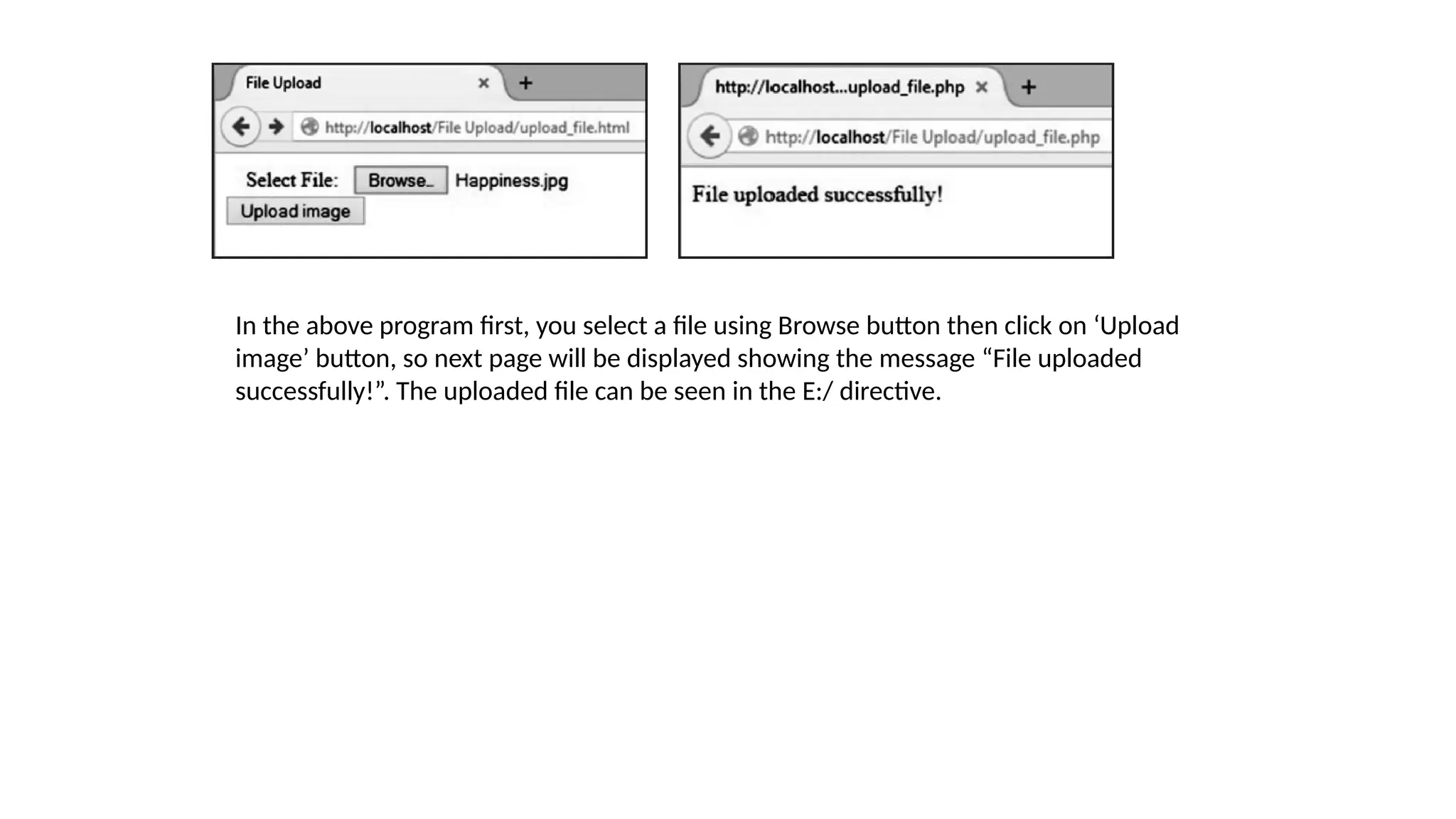
In the above program first, you select a file using Browse button then click on ‘Upload
image’ button, so next page will be displayed showing the message “File uploaded
successfully!”. The uploaded file can be seen in the E:/ directive.
Validating Forms
• When user input data in a form it should be validated before storing
it. There are two ways to validate data i.e., client side validation and
server side validation.
• For client side validation JavaScript is used, which is not secure
because user can turn off JavaScript or browser may not support it.
• The more secure way is to use PHP for the validation. PHP is used for
server side validation.
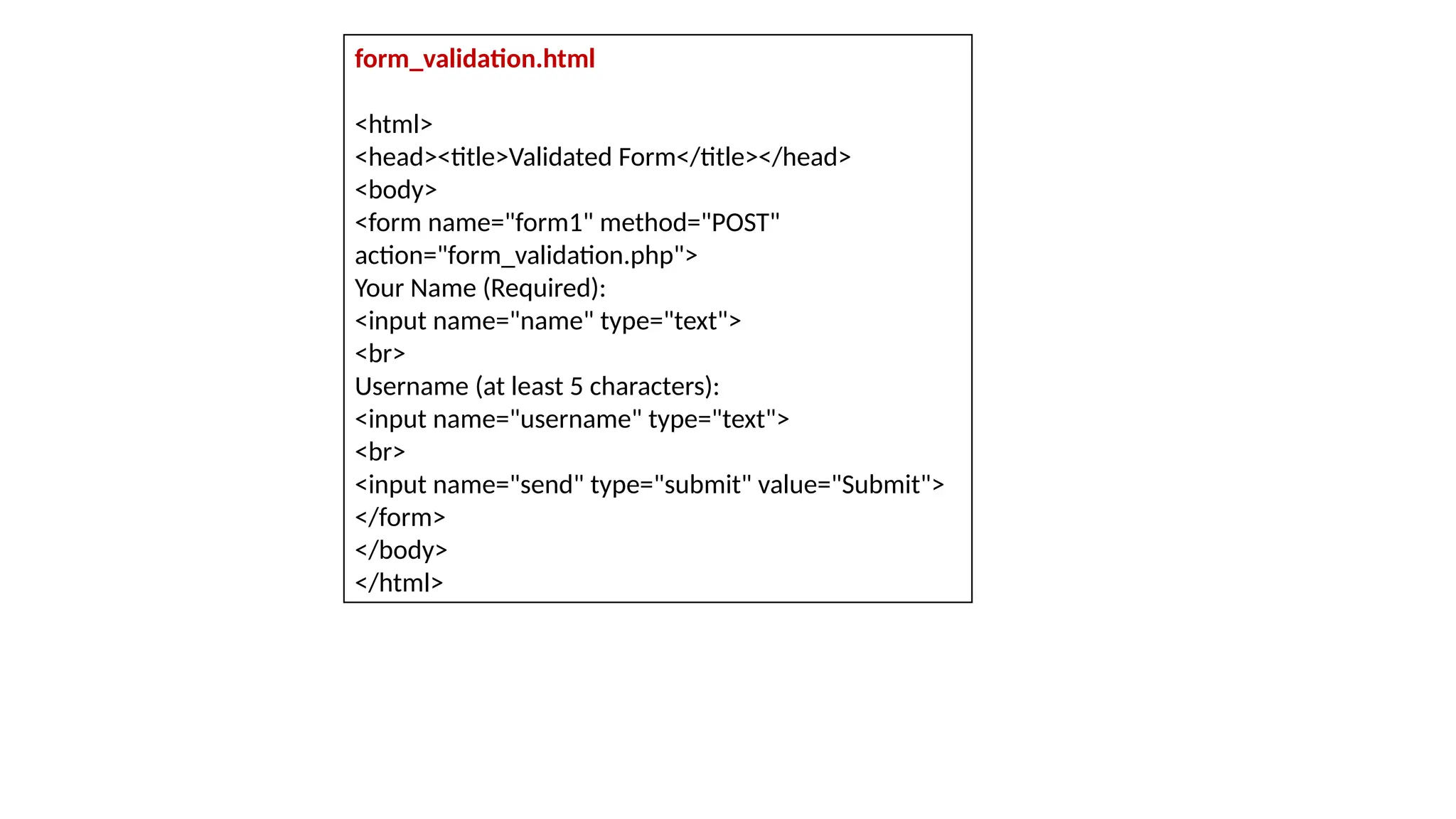
form_validation.html
<html>
<head><title>Validated Form</title></head>
<body>
<form name="form1" method="POST"
action="form_validation.php">
Your Name (Required):
<input name="name" type="text">
<br>
Username (at least 5 characters):
<input name="username" type="text">
<br>
<input name="send" type="submit" value="Submit">
</form>
</body>
</html>
form_validation.php
<?php
// First check if the form button has been submitted
if(isset($_POST['send'])){
if(!empty($_POST['name'])){ // Check if the name is empty
echo "Name: " . $_POST['name'] . "<br />";
}else{
echo "Name is missing.";
echo "<br />";
}
if(!empty ($_POST['username'])){// Check if the username is empty
if(strlen($_POST['username']) < 5 ){ // Check
if the username is at least 5 characters.
echo "Username must be at least 5 characters long.";
echo "<br />";
}else{
echo "User Name: " . $_POST['username'];
}
}else{
echo "Username is missing.";
echo "<br />";}
}else{
echo "Unauthorized access to this page.";
}?>
• In the above program there are two pages: HTML form to accept name and username from user and,
second page is PHP form processing page, is used to validate user’s data.
• Any user may come to this page directly. To prevent unauthorized access, we will check whether the user
comes to this page clicking the form button the following condition is used:
if(isset($_POST[‘send’]))
• If the user comes here directly the function will return false and the message “Unauthorized access to
this page.” is displayed.
• PHP has another function named empty() that can check whether a variable is empty.
• We will check whether the name field(“name”) in the form is empty.
• If the user has entered his name that means the field is not empty and in this case the function empty()
will return true, and the name prints.
• If the user didn’t enter his name, the function will return false and the else statement will be executed.
Then, the message “Name is missing.” will be printed.
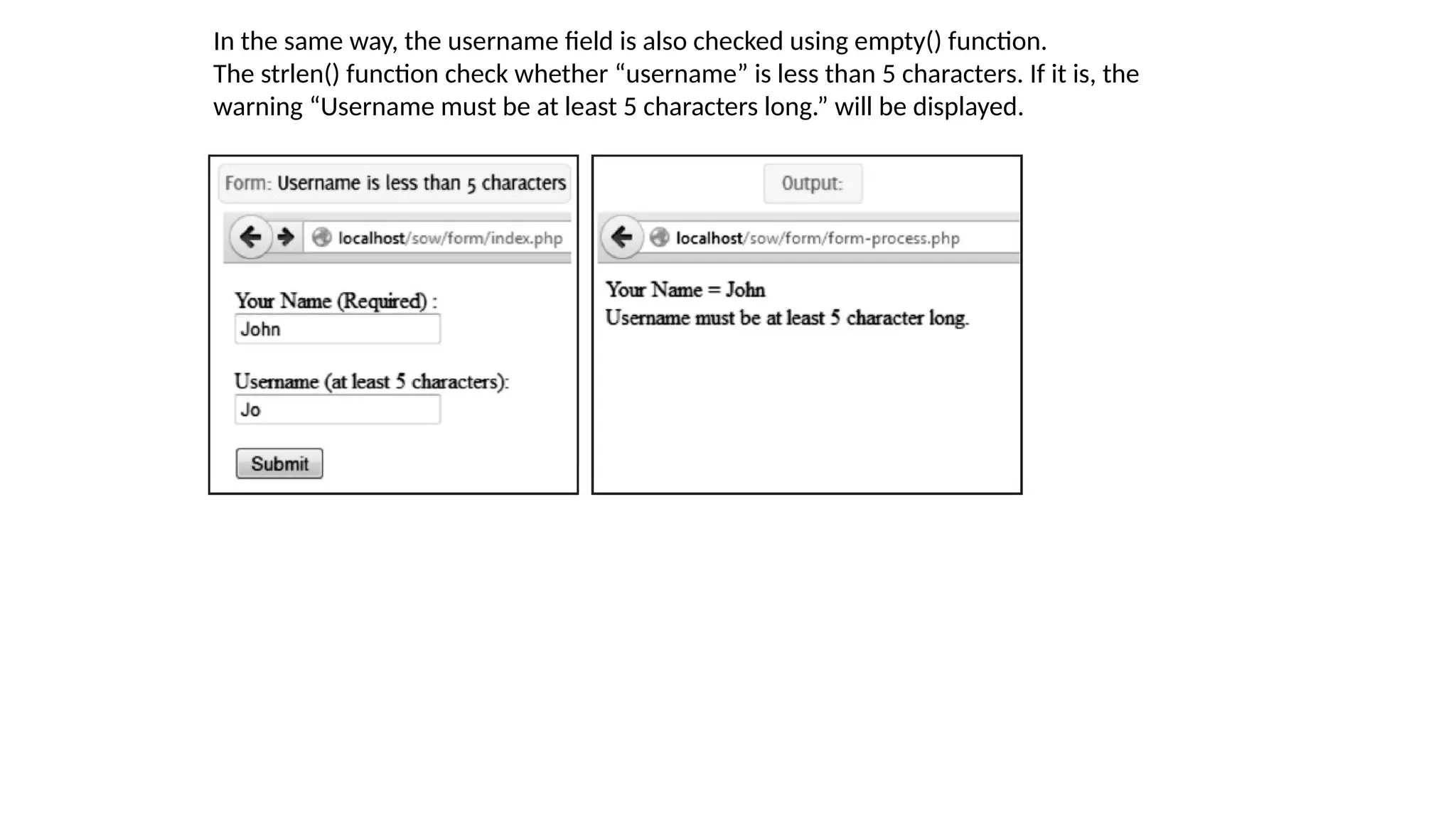
In the same way, the username field is also checked using empty() function.
The strlen() function check whether “username” is less than 5 characters. If it is, the
warning “Username must be at least 5 characters long.” will be displayed.
SETTING RESPONSE HEADERS
• When a client send a request to server for a web page, is called as HTTP request.
• The server sends back a response to the client is called as HTTP response. This HTTP
response contains headers which include some information like, the type of content in
the body of the response, how many bytes are in the body, when the response was sent, etc.
• If server sends back HTML then PHP and Apache take care of the headers, like,
identifying the document as HTML, calculating the length of the HTML page, and so on.
• If we want to send back something that is not HTML, like, set the expiration time for a
page, redirect the client's browser or generate a specific HTTP error, in that case we
need to use the header() function.
• The header() function sends a raw HTTP header to a client.
• Syntax: header(string, replace, http_response_code)
where, string: Specified header string to send.
replace: Optional, indicates whether the header should replace previous or add
second header. Default is TRUE (will replace). FALSE allow multiple headers of
same type. http_response_code: Optional, force the HTTP response code to the specified
value.
• We must set the headers before any o the body is generated. This means that all calls
to header()must happen at the very top of your file, even before the <html> tag.
• For example:
<?php
header('Content-Type: text/plain');
?>
<html>
. . . .
</html>
• Attempting to set headers after the document has started gives this warning:
Warning: Cannot add header information - headers already sent
Different Content Types:
• Content-Type header identifies the type of document being returned. Content-
type ensures that the browser displays the content correctly.
• Ordinarily this is "text/html", indicating an HTML document is about to receive
by the
browser. header(“Content-type: text/html");
Other useful document type is header(“Content-type: text/plain"); forces the
browser to
treat the page as plain text.
• Other content types are:
header(“Content-type: image/jpeg");
send a header to the web browser telling it the image type of data that it is is
about to
receive.
header(“Content-type: application/pdf");
will be outputting a PDF.
Redirections:
• Redirection means to send the user to a new URL. For this the Location header is
used with the header function:
header('Location: http://www.nirali.com/books.html');
• When this statement executes the page containing the above statement is
redirected to the page /index.html.
• If we want to pass variables to the new page, you can include them in the query
string of the URL:
header('Location: http://www.nirali.com/books.php?id=12');
• The URL that you are redirecting a user to is retrieved with GET. You can't redirect
someone to retrieve a URL via POST.
Expiration:
• A server can explicitly inform the browser, a specific date and time for the document
to expire. The server can also inform expiration date and time to proxy cache.
• To set the expiration time of a document, use the Expires header:
header('Expires: Fri, 18 Jan 2014 05:30:00 GMT');
• Following example shows how a document expires three hours from the time the page
was generated:
$now = time( );
$then = gmstrftime("%a, %d %b %Y %H:%M:%S GMT", $now + 60*60*3);
header("Expires: $then");
• The function time() returns current time and function gmstrftime() is used to generate
expiration date string.
Authentication:
• HTTP authentication works through request headers and response statuses.
• A browser can send a username and password in the request headers. If the username
and password aren't sent or aren't satisfactory, the server sends a "401 Unauthorized"
response and identifies a string (realm) via WWW-Authenticate header. This typically
pops up an "Enter username and password for ..." dialog box on the browser, and the
page is then re-requested with the updated username and password in the header.
• $_SERVER['PHP_AUTH_USER'] and $_SERVER['PHP_AUTH_PW'] global variables
contain the username and password supplied by the user, if any.
• To deny access to a page, send a WWW-Authenticate header identifying the
authentication realm as part of a response with status code 401:
header('WWW-Authenticate: Basic realm="My Website"');
header('HTTP/1.0 401 Unauthorized');
echo "You need to enter a valid username and password.";
exit;
• The header() function is used to send a message “Authentication required” to the client
browser causing it to pop up a username/password input window.
• Once, the user has entered username and password, the same URL will be called again
with the predefined variables PHP_AUTH_USER and PHP_AUTH_PW set with
username and password respectively.
<?php
if(!isset($_SERVER['PHP_AUTH_USER']))
{
header('WWW-Authenticate: Basic realm="My Website"');
header('HTTP/1.0 401 Unauthorized');
echo "You need to enter a valid username and password.";
exit;
}
else
{
echo "Hello ". $_SERVER['PHP_AUTH_USER'] . "<br>";
echo "You entered". $_SERVER['PHP_AUTH_PW'] . "as your
password";
}
?>
MAINTAINING STATE
• As we provide input to some application via the user interface, we change the state of the
application.
• State is the exact condition, movement to movement, of all the data and variables in
the application.
• We know that HTTP is a stateless protocol i.e., HTTP supports only one request per
connection. This means that with HTTP the client connects to the server to send one request
and then disconnects.
• In other words, there is no way for a server to recognize that a sequence of requests all
originate from the same client.
• When we programming for Web, you cannot keep track of a sequence of requests
from a single user, because HTTP is stateless.
• For example, in a shopping-cart application we need to know that the same user adds
items in his cart or removes items from his cart, every time when he sends request to
add or remove items.
• So building an online application with PHP requires you to use some mechanism for
maintaining state.
• PHP is able to bridge the gap between each request-response and provides persistence
of data and prolong interactivity.
• To get around the Web's lack of state, software programmers have come up with many
tricks to keep track of state information between requests which is also known as
session tracking.
Some techniques are:
1. Hidden Fields: One session tracking technique is to use hidden form fields to pass
data from one page to another. PHP treats hidden form fields just like normal form
fields, so the values are available in the $_GET or $_POST arrays. So after
submitting a form, the form data can be fetched by the next page from $_GET or
$_POST arrays.
However, a more common and popular technique is to assign each user a unique
identifier using a single hidden form field.
For example, consider a form where a user selects a product from a drop-down
box. We can simply place the product ID into a hidden form field.
<form action=”myform.php” method=”post”>
<select name=”selected_product_id”>
<option value=”121”>Product 121</option>
<option value=”122”>Product 122</option>
</select>
<input type=”submit” value=”Select Product”>
</form>
We could return a page to him using the following code:
<input type=”hidden” name=”chosen_product_id” value=”<?php echo
$_POST[selected_product_id];?>”>
The chosen_product_id value can be fetched after submitting the form.
While hidden form fields work in all browsers, they work only for a sequence of
dynamically generated forms, so they aren't as generally useful as some other
techniques.
2. URL Rewriting: In this technique you can add some extra information in
the URL. For example, you can assign a unique ID to a user as given below,
so that this ID can be passed to that page.
http://www.nirali.com/catalog.php?userid=123
This method is very insecure because everyone can see the values. User
can also change the value of variable in the URL.
3. Cookies: A third technique for maintaining state with PHP is to use
cookies. A cookie is a bit of information that the server can give to a client.
On every subsequent request the client will give that information back to
the server, thus identifying itself. Cookies are useful for retaining
information through repeated visits by a browser.
• The best way to maintain state with PHP is to use the built-in session-
tracking system. This system lets us to create persistent variables that are
accessible from different pages of the application, as well as in different
visits to the site by the same user.
Cookies
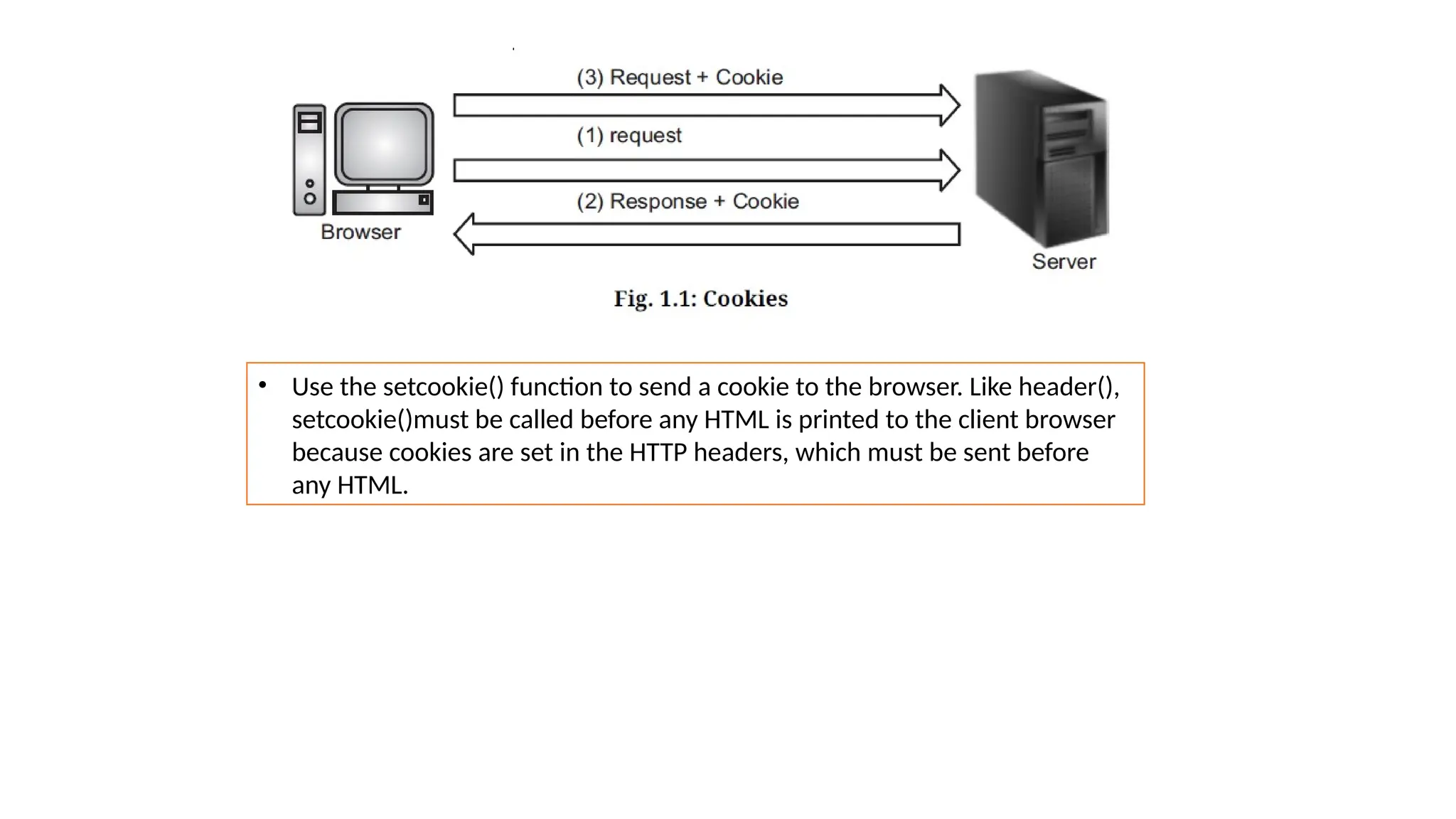
• A cookie is a small piece of data in the form of a name-value pair that is sent by a
Web server and stored by the browser on the client machine.
• This information is used by the application running on the server side to
customize the web page according to the past history of transactions from that
client machine.
• A server can send one or more cookies to a browser in the headers of a response.
Some of the cookie's fields indicate the pages for which the browser should send
the cookie as part of the request.
• Servers can store any data they like there in the value field of the cookie (within
limits), such as a unique code identifying the user, preferences, etc.
• PHP cookie is a small piece of information which is stored at client browser. It is
used to recognize the user.
• Cookie is created at server side and saved to client browser. Each time when
client sends request to the server, cookie is embedded with request. Such way,
cookie can be received at the server side.
• Use the setcookie() function to send a cookie to the browser. Like header(),
setcookie()must be called before any HTML is printed to the client browser
because cookies are set in the HTTP headers, which must be sent before
any HTML.
The syntax is,
setcookie(name [, value [, expire [, path [, domain [, secure ]]]]]);
Here, is the detail of all the arguments in above syntax:
Name: Name of the cookie, stored in an environment variable called $_COOKIE. This
variable is used while accessing cookies.
Value: Value of the named variable.
Expiry: A UNIX timestamp denoting the time at which the cookie will expire.
Path: This specifies the directories for which the cookie is valid. A single forward
slash character permits the cookie to be valid for all directories.
Domain: The browser will return the cookie only for URLs within this domain. The
default is the server hostname.
Secure: This can be set to 1 to specify that the cookie should only be sent by secure
transmission using HTTPS otherwise set to 0 which mean cookie can be sent by
regular HTTP.
• When a browser sends a cookie back to the server, you can access that cookie through
the $_COOKIE array. The key is the cookie name, and the value is the cookie's value
field.
• For example, to set cookie in one page:
<?php
setcookie("ID", "121");
setcookie("name", "Laptop");
?>
• Can be access in another page as follows:
<?php
if( isset($_COOKIE["ID"]))
{
echo "Product ID: " . $_COOKIE["ID"] . "<br />";
echo "Product Name: " . $_COOKIE["name"];
}
else
echo "Sorry... Not recognized" . "<br />";
?>
Output:
Product ID: 121
Product Name: Laptop
For instance, the following code at the top of a page keeps track of the number of times
the page has been accessed by this client:
<?php
if(!isset($_COOKIE['accesses']))
setcookie('accesses', 0);
else{
$page_accesses = $_COOKIE['accesses'];
setcookie('accesses', ++$page_accesses);
echo "This page is accessed " . $_COOKIE['accesses']
. " times";
}
Initially the cookie named “accesses” is not set, so it is set to 0. After that every time
the page is accessed the program displays how many times the page is accessed.
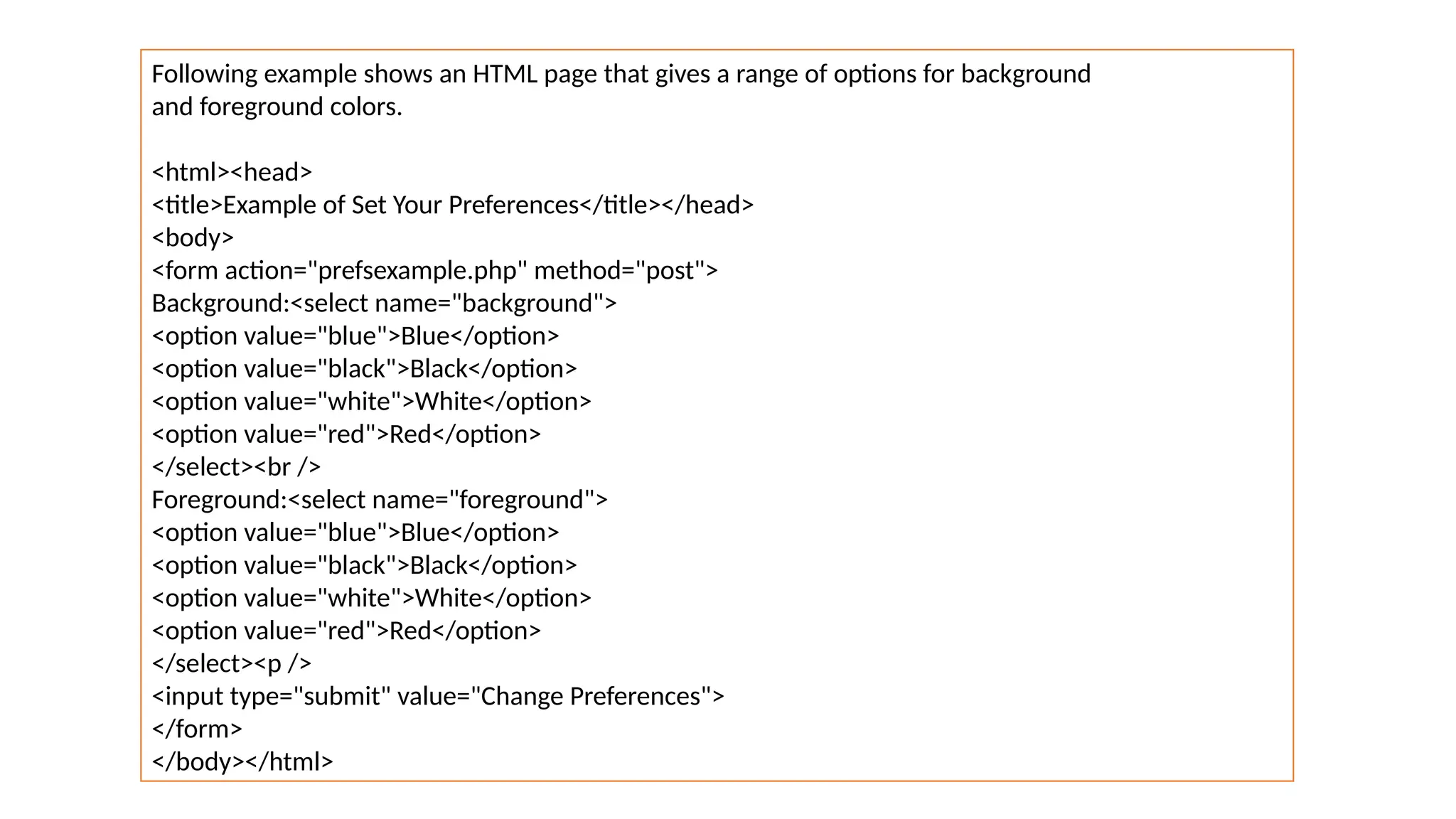
Following example shows an HTML page that gives a range of options for background
and foreground colors.
<html><head>
<title>Example of Set Your Preferences</title></head>
<body>
<form action="prefsexample.php" method="post">
Background:<select name="background">
<option value="blue">Blue</option>
<option value="black">Black</option>
<option value="white">White</option>
<option value="red">Red</option>
</select><br />
Foreground:<select name="foreground">
<option value="blue">Blue</option>
<option value="black">Black</option>
<option value="white">White</option>
<option value="red">Red</option>
</select><p />
<input type="submit" value="Change Preferences">
</form>
</body></html>
• The form in above Example submits to the PHP script prefs.php, which is shown in
following Example.
• This script sets cookies for the color preferences specified in the form. Note that the
calls to setcookie() are made before the HTML page is started.
<?php
$colors = array('black' => '#000000',
'white' => '#ffffff',
'red' => '#ff0000',
'blue' => '#0000ff');
$bg_name = $_POST['background'];
$fg_name = $_POST['foreground'];
setcookie('bg', $colors[$bg_name]);
setcookie('fg', $colors[$fg_name]);
?>
<html>
<head><title>Example of Preferences Set</title></head>
<body>
Thank you. Your preferences have been changed to:<br />
Background: <?= $bg_name?><br />
Foreground: <?= $fg_name?><br />
Click <a href="prefs-demo.php">here</a>
to see the preferences in action.
</body></html>
The page created by above Example contains a link to another page, shown in
following Example, that uses the color preferences by accessing the $_COOKIE array.
<html>
<head>
<title>Example of Front Door</title>
</head>
<?php
$bg = $_COOKIE['bg'];
$fg = $_COOKIE['fg'];
?>
<body bgcolor="<?= $bg?>" text="<?= $fg?>">
<h1>Welcome to the Store</h1>
</body>
</html>
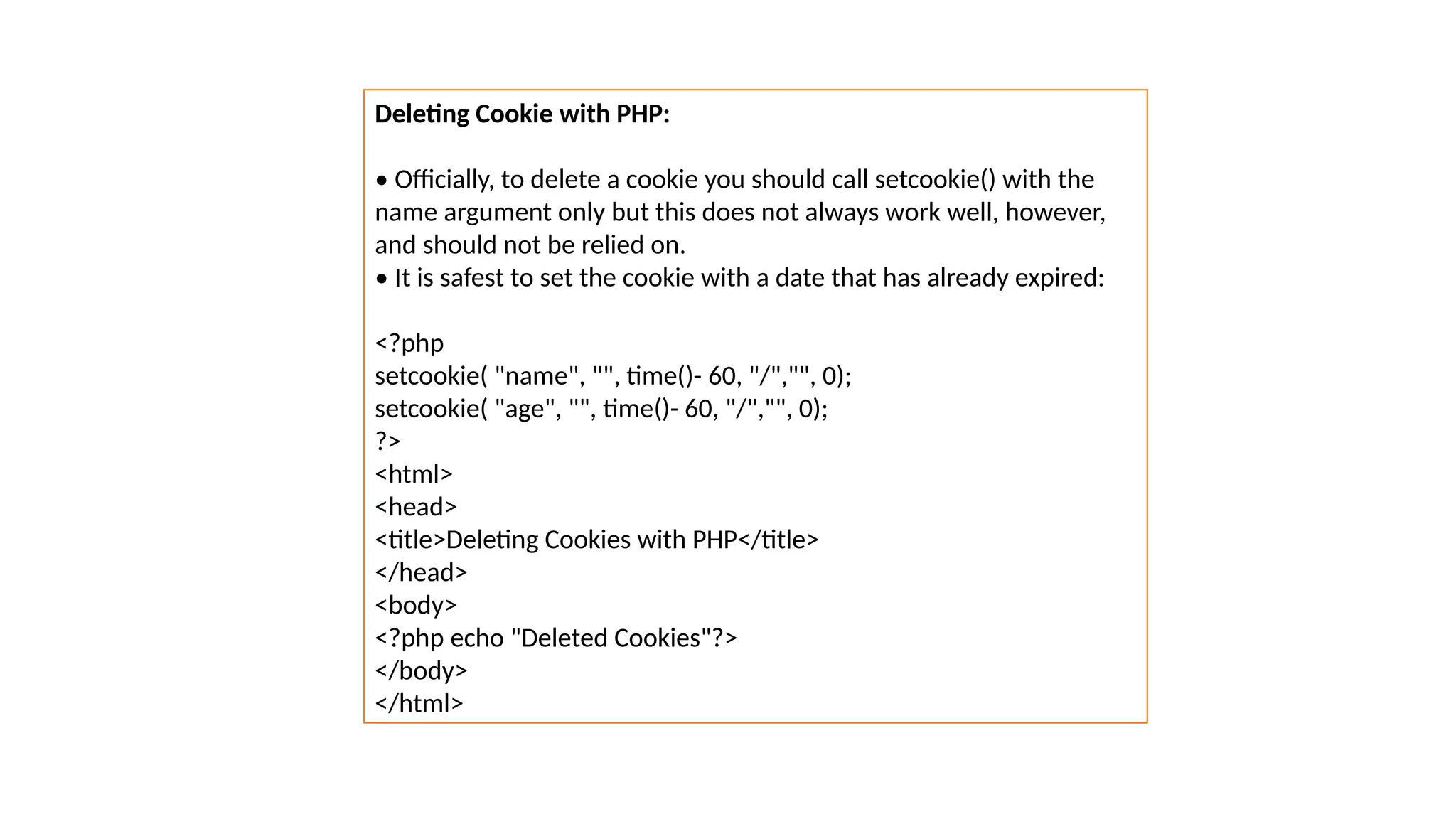
Deleting Cookie with PHP:
• Officially, to delete a cookie you should call setcookie() with the
name argument only but this does not always work well, however,
and should not be relied on.
• It is safest to set the cookie with a date that has already expired:
<?php
setcookie( "name", "", time()- 60, "/","", 0);
setcookie( "age", "", time()- 60, "/","", 0);
?>
<html>
<head>
<title>Deleting Cookies with PHP</title>
</head>
<body>
<?php echo "Deleted Cookies"?>
</body>
</html>
Sessions
• A session can be defined as "a series of related interactions between a single
client and the web server, which takes place over a period of time".
• Sessions allow you to store data in the web server that associated with a
session ID. Once you create a session, PHP sends a cookie that contains the
session ID to the web browser.
• In the subsequent requests, the web browser sends the session ID cookie back
to the web server so that PHP can retrieve the data based on the session ID
and make the data available in your script.
• Session provides a way to preserve certain data across subsequent accesses.
This enables us to build more customized applications.
• Sessions allow we to easily create multipage forms like shopping carts, save
user authentication information from page to page, and store persistent user
preferences on a site.
• PHP session is used to store and pass information from one page to another
temporarily (until user close the website).
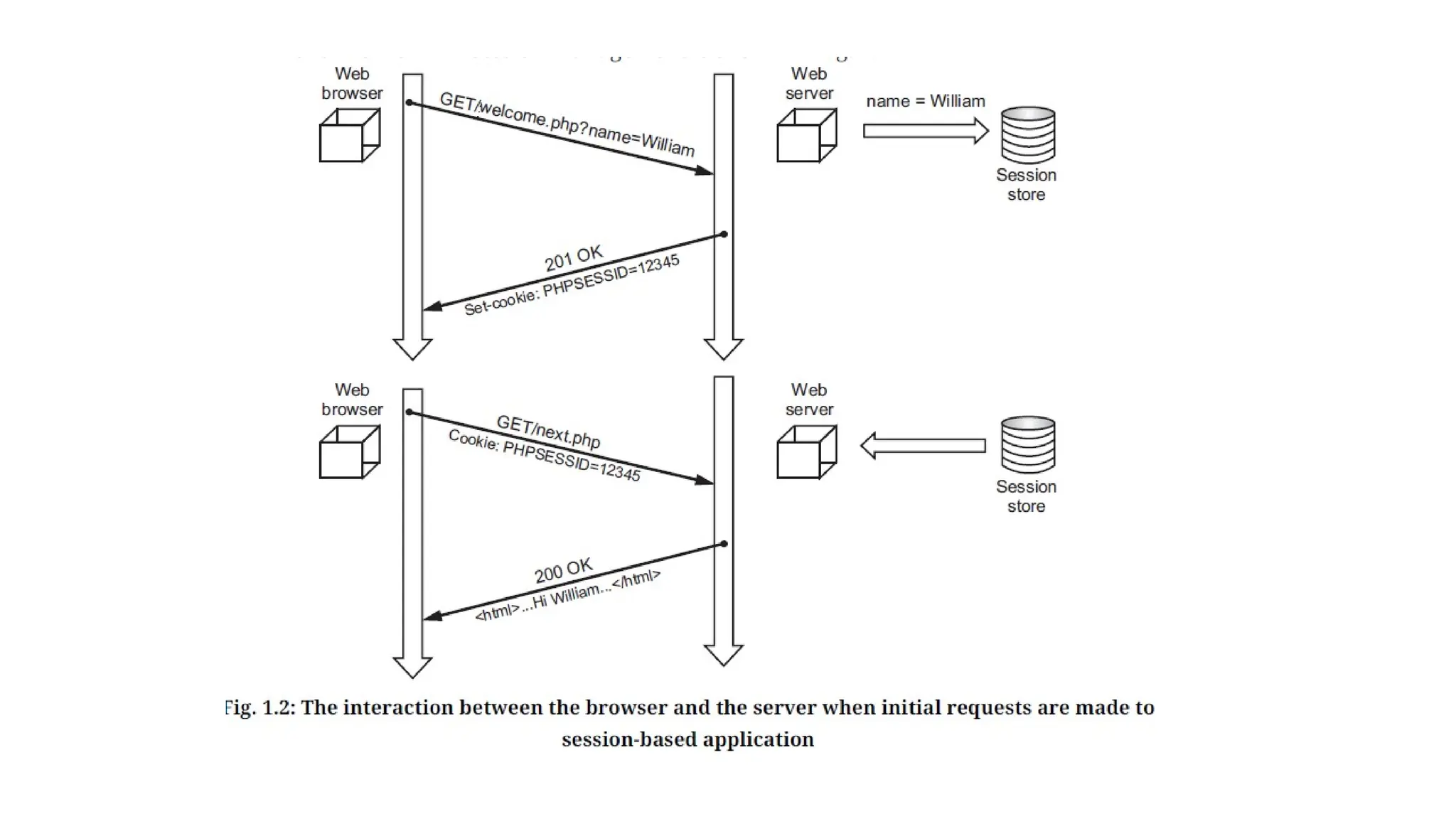
• When user first enters the session-based application by making a request to a page that starts a
session, PHP generates a session and creates a file that stores the session related variables.
• PHP sets a cookie named PHPSESSID to hold the session ID in the response the script generates. If
the user’s browser does not support cookies or has cookies turned off, the session ID is added in
URLs within the web site. The browser then records the cookie and includes it in subsequent
requests.
• In the example shown above, the script welcome.php records session variables in the session store,
and a request to next.php then has access to those variables because of the session ID.
• A session ends when the user closes the browser or after leaving the site, the server will terminate
the session after a predetermined period of time.
• PHP session_start() function is used to start the session. It starts a new or resumes existing session.
It returns existing session if session is created already. If session is not available, it creates and
returns new session.
Syntax: bool session_start (void)
• $_SESSION is an associative array that contains all session variables. It is used to set and get session
variable values.
• Session variables are stored in associative array called $_SESSION[]. These variables can be accessed
during lifetime of a session.
<?php
session_start();
if(isset( $_SESSION['counter']))
{
$_SESSION['counter'] += 1;
}
else
{
$_SESSION['counter'] = 1;
}
$msg = "You have visited this page ". $_SESSION['counter']
. " in this session.";
?>
<html>
<head>
<title>Setting up a PHP session</title>
</head>
<body>
<?php echo ( $msg );?>
</body>
</html>
How to Access Data in the Session?
• Unlike a cookie, we can store any types of data in sessions. You store data as keys and
values in the $SESSION[] superglobal array.
• For example, in the index.php file, we store user string and roles array in the session as follows:
<?php
session_start();
$_SESSION['user'] = "admin";
$roles = array("admin", "approver", "editor");
$_SESSION['roles'] = $roles;
session_write_close();
?>
<a href="test1.php">Go to profile page</a>
• In the profile.php file, you can access session data as follows:
<?php
session_start();
if(isset($_SESSION['user']))
{
echo sprintf("Welcome %s!<br>",$_SESSION['user']);
}
if(isset($_SESSION['roles']))
{
echo sprintf('Your roles: %s', implode($_SESSION['roles'],','));
}?>
Destroy a PHP Session:
• To remove all global session variables and destroy the session, use session_unset() and
session_destroy() functions.
• A PHP session can be destroyed by session_destroy() function. This function does not
need any argument and a single call can destroy all the session variables.
• If you want to destroy a single session variable then you can use unset() function to
unset a session variable.
• Here, is the example to unset a single variable:
<?php
unset($_SESSION['counter']);
?>
• Here, is the call which will destroy all the session variables:
<?php
session_start();
?>
<html><body>
<?php
// remove all session variables session_unset();
// destroy the session session_destroy();
echo "All session variables are now removed
and the session is destroyed."
?></body></html>
Alternatives to Cookies:
• By default, the session ID is passed from page to page using
PHPSESSID cookie.
• The session ID can also be passed using form fields and URLs.
• Passing the session ID via hidden form fields is extremely
awkward, as it forces you to make every link between pages be a
form's submit button.
• The URL system for passing around the session ID, however, is
very elegant.
• PHP can rewrite your HTML files, adding the session ID to every
relative link.
• For this to work, PHP must be configured with the -enable-trans-
id option when compiled.
• But the performance is decreased, because PHP must parse and
rewrite every page. Busy sites must be used cookies, as cookies
do not slowdown the website caused by page rewriting.
Custom Storage:
• By default, the session information is stored in files in
server’s temporary directory.
• Each session’s variables are stored in the separate file. The
location of the session files can be changed with session
Save_path in PHP. ini file.
• The session information is stored in two formats.
1. PHP’s built_in format.
2. WDDX.
• Here, the session data in a database which will be shared
between multiple sites.
• Here different functions are required for opening new
session, closing a session, reading session information,
writing session information, destroying a session etc.
• To use the custom session store use the following code:
<Directory “/var/html/sample”>
php_value session.save_handler user
php_value session.save.path mydb
php_value session.name session_store
</Directory>
Combining Cookies and Sessions:
• Using a combination of cookies and session, you can preserve state across visits.
• When a user leaves the site that state should be forgotten.
• Any state that should persist between user visits, such as a unique user ID, can be stored in a cookie.
• With the user's ID, we can retrieve the user's more permanent state, such as display preferences,
mailing address, and so on, from a permanent store, such as a database.
• Following example allows the user to select text and background colors and stores those values in a
cookie. Any visits to the page within the next week send the color values in the cookie.
<?php
if($_POST['bgcolor'])
{
setcookie('bgcolor', $_POST['bgcolor'], time()
+ (60 * 60 * 24 * 7));
}
$bgcolor = empty($bgcolor)? 'black': $bgcolor;
?>
<body bgcolor="<?= $bgcolor?>">
<form action="<?= $PHP_SELF?>" method="POST">
<select name="bgcolor"><option value="black">Black</option><option value="white">White</option>
<option value="gray">Gray</option><option value="blue">Blue</option>
<option value="green">Green</option><option value="red">Red</option>
</select>
<input type="submit" />
</form></body>
Example:
• A PHP script to create a login form with user name and password, once the user login, the second form should be
display to accept the user details (roll_no, name, city).If the user does not enter information within specified time
limit, expire his session and give the warning.
login.html File:
<html>
<head><title>login form </title></head>
<body>
<form method = "POST" action = "login.php">
Username :
<input type = "text" name = "user"><br>
Password :
<input type = "password" name = "pass"><br><br>
<input type = "submit" value="Submit">
</form>
</body>
</html>
login.php File:
<?php
session_start();
$_SESSION["tm"] = time();
?>
<form method = "GET" action = "new.php">
Roll No : <input type = "text" name = "rno"><br>
Name : <input type = "text" name = "nm"><br>
City : <input type = "text" name = "ct"><br><br>
<input type = "submit" value="Submit">
</form>
new.php File:
<?php
session_start();
$newt=$_SESSION['tm'] + 20;
if($newt < time())
echo "Time out";
else
{
echo "Roll No = $_GET[rno] <br>";
echo "Name = $_GET[nm] <br>";
echo "City = $_GET[ct]";
}
session_destroy( );
?>
Output: When we run login.html file, the following screen will be
displayed which will ask us to enter username and password.
After we enter any username and password, the following
screen will be display:
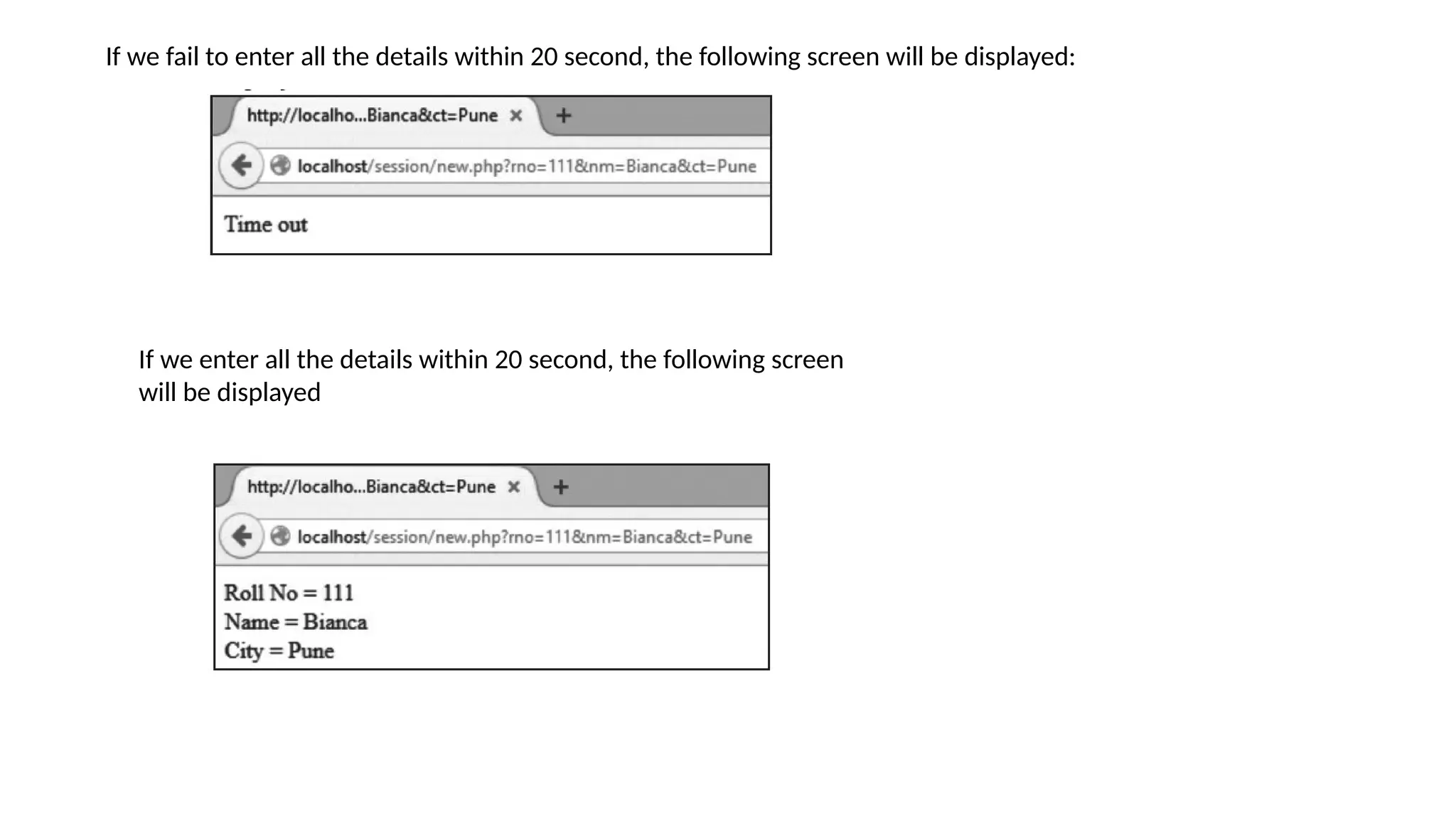
If we fail to enter all the details within 20 second, the following screen will be displayed:
If we enter all the details within 20 second, the following screen
will be displayed
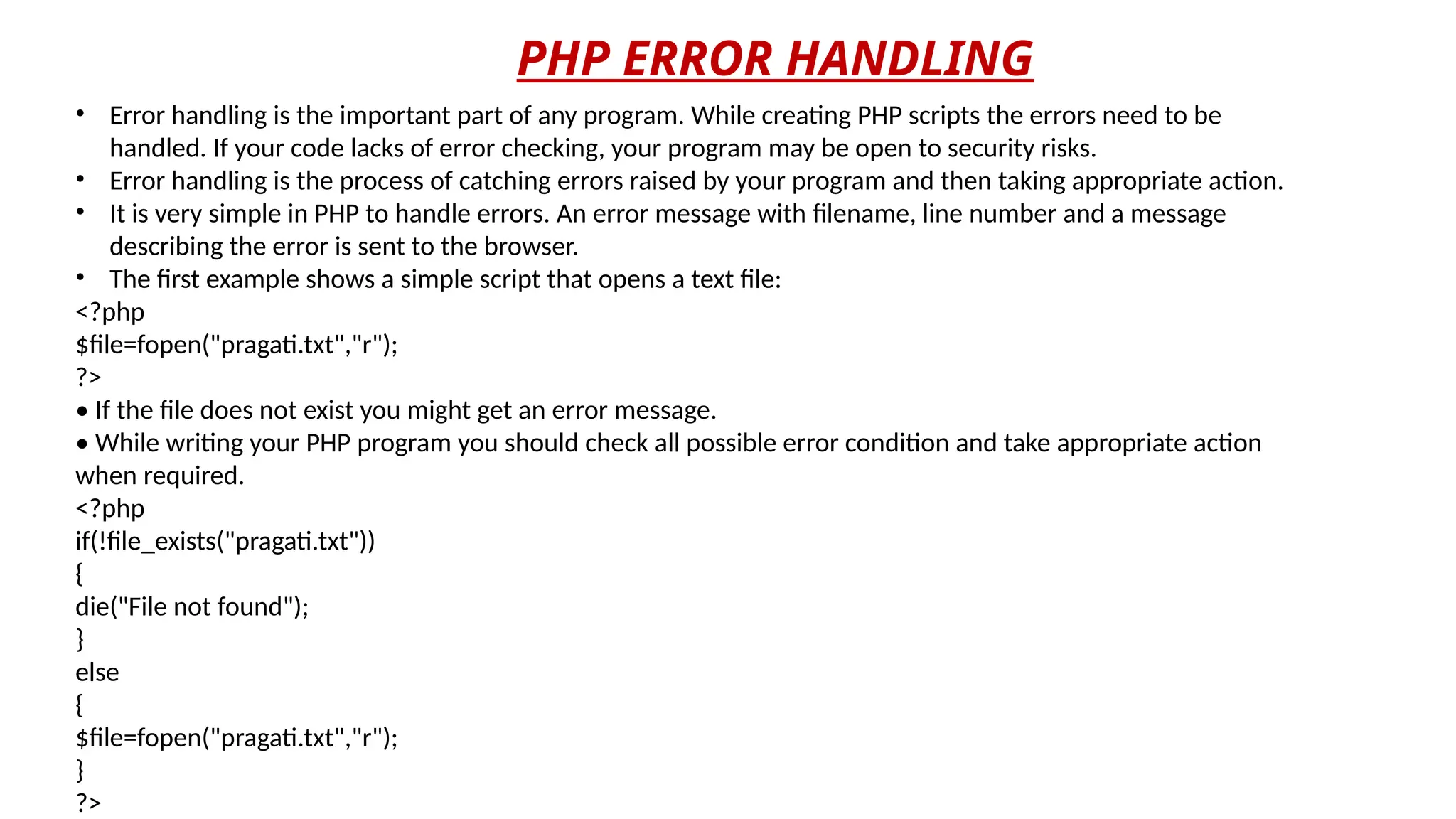
PHP ERROR HANDLING
• Error handling is the important part of any program. While creating PHP scripts the errors need to be
handled. If your code lacks of error checking, your program may be open to security risks.
• Error handling is the process of catching errors raised by your program and then taking appropriate action.
• It is very simple in PHP to handle errors. An error message with filename, line number and a message
describing the error is sent to the browser.
• The first example shows a simple script that opens a text file:
<?php
$file=fopen("pragati.txt","r");
?>
• If the file does not exist you might get an error message.
• While writing your PHP program you should check all possible error condition and take appropriate action
when required.
<?php
if(!file_exists("pragati.txt"))
{
die("File not found");
}
else
{
$file=fopen("pragati.txt","r");
}
?>
Creating a Custom Error Handler
• In PHP we can define your own error handler function to handle any error. Creating a custom error
handler is quite simple. We simply create a special function that can be called when an error occurs
in PHP. To create custom error handler first use the library function set_error_handler(). This function
sets a user-defined error handler function.
Syntax:
mixed set_error_handler (callable $error_handler[,int $error_types = E_ALL | E_STRICT])
Here, $error_handler contains name of the user defined function, that is used to handle error. Second
parameter $error_types is optional.
• The syntax of the user defined function is:
bool handler (int $errno , string $errstr [, string $errfile[, int $errline [, array $errcontext ]]])
The parameters are described as follows:
$error_level: It is required parameter and it must be an integer.
There are predefined error levels.
$error_message: It is required parameter and it is the message
which user want to print.
$error_file: It is optional parameter and used to specify the file
in which error has been occurred.
$error_line: It is optional parameter and used to specify the
line number in which error has been occurred.
$error_context: It is optional parameter and used to specify an
array containing every variable and their value when error has
been occurred.
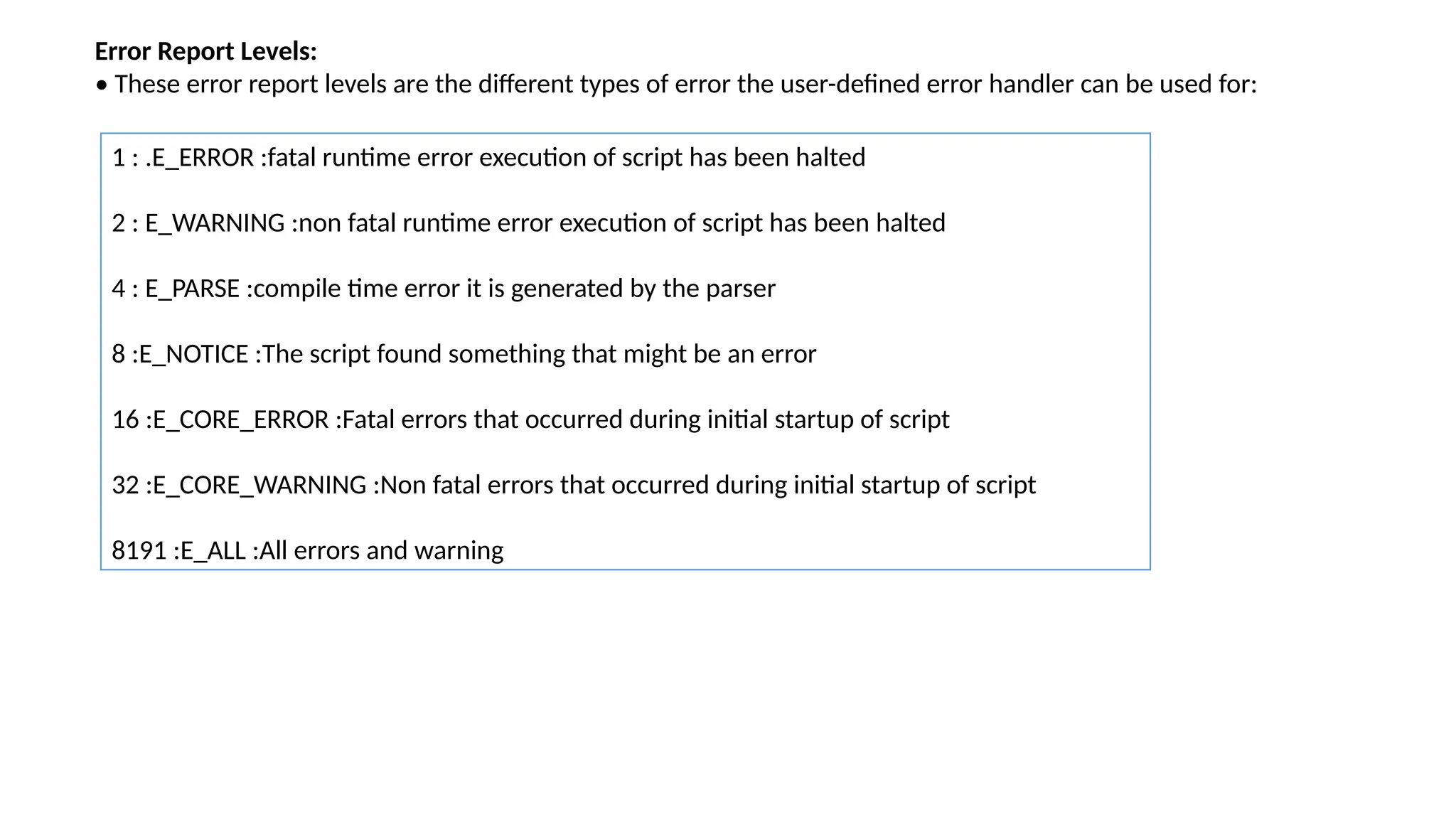
Error Report Levels:
• These error report levels are the different types of error the user-defined error handler can be used for:
1 : .E_ERROR :fatal runtime error execution of script has been halted
2 : E_WARNING :non fatal runtime error execution of script has been halted
4 : E_PARSE :compile time error it is generated by the parser
8 :E_NOTICE :The script found something that might be an error
16 :E_CORE_ERROR :Fatal errors that occurred during initial startup of script
32 :E_CORE_WARNING :Non fatal errors that occurred during initial startup of script
8191 :E_ALL :All errors and warning
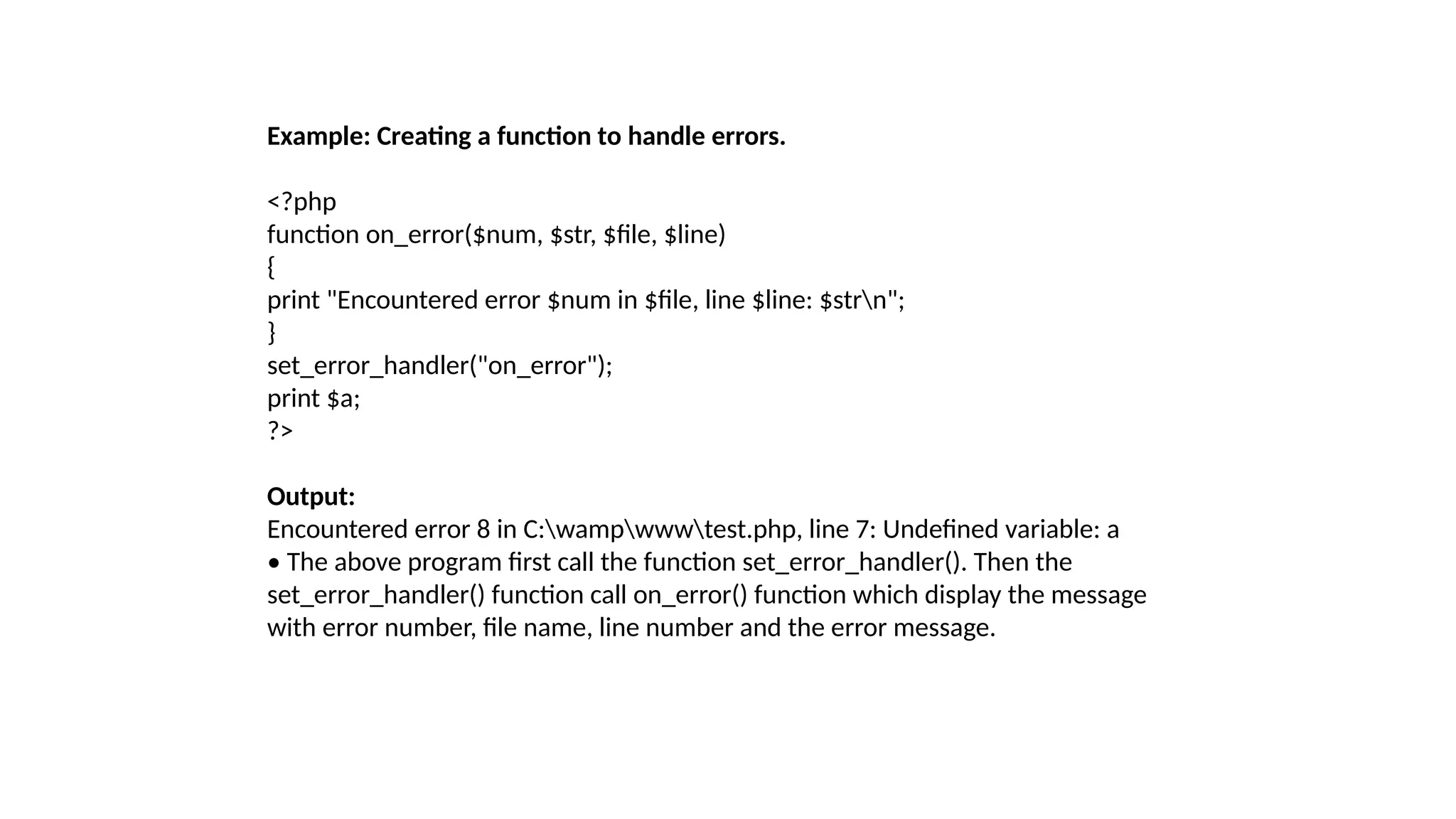
Example: Creating a function to handle errors.
<?php
function on_error($num, $str, $file, $line)
{
print "Encountered error $num in $file, line $line: $strn";
}
set_error_handler("on_error");
print $a;
?>
Output:
Encountered error 8 in C:wampwwwtest.php, line 7: Undefined variable: a
• The above program first call the function set_error_handler(). Then the
set_error_handler() function call on_error() function which display the message
with error number, file name, line number and the error message.
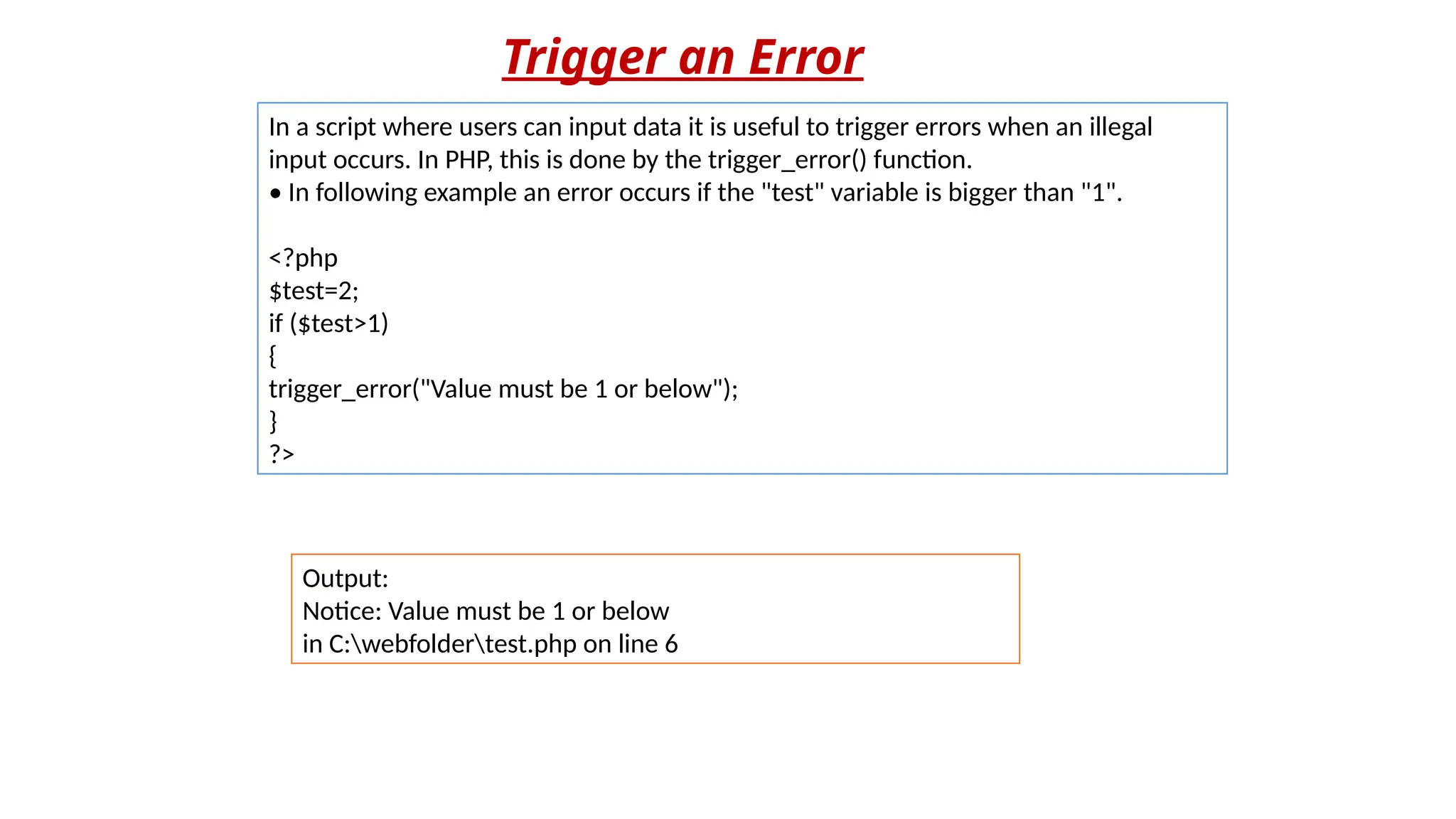
Trigger an Error
In a script where users can input data it is useful to trigger errors when an illegal
input occurs. In PHP, this is done by the trigger_error() function.
• In following example an error occurs if the "test" variable is bigger than "1".
<?php
$test=2;
if ($test>1)
{
trigger_error("Value must be 1 or below");
}
?>
Output:
Notice: Value must be 1 or below
in C:webfoldertest.php on line 6
Error Logging
• By default, PHP sends an error log to the server's logging
system or a file, depending on how the error_log
configuration is set in the php.ini file.
• By using the error_log() function you can send error logs to a
specified file or a remote destination.
• Sending error messages to yourself by e-mail can be a good
way of getting notified of specific errors.
Thank
You

Web Techniques like Cookies and Sessions

  • 1.
    Web Technology II Chapter1 Introduction to Web Techniques
  • 2.
     PHP isan acronym for "PHP: Hypertext Preprocessor"  PHP is a widely-used, open source scripting language  PHP scripts are executed on the server  PHP is free to download and use  PHP files can contain text, HTML, CSS, JavaScript, and PHP code  PHP code is executed on the server, and the result is returned to the browser as plain HTML  PHP files have extension ".php"  PHP can generate dynamic page content  PHP is becoming a standard in the world of Web programming with its simplicity, performance, reliability, flexibility and speed.  PHP was designed/developed as a Web scripting language and although it is possible to use it in purely command-line and GUI scripts, the Web accounts for the vast majority of PHP uses.  Web technology is essential today because Internet has become the number one source to information and many of the traditional software applications have become Web Applications. INTRODUCTION
  • 3.
    VARIABLES • Every timewe click a link or submit a form, we send a great deal of data about the system and the browser to the Web server and each time the web server responds, it sends us a great deal of data about itself. PHP has the capability to capture that data. • For instance, if we go to a PHP driven website and log in, it’s likely that a predefined variable $_POST is filled (on server) with the username and password, another predefined variable named $_SERVER contains information about the current Web server environment. • PHP automatically have some variables called predefined variables available anywhere in the program. • They are array variables. These variables are: $_ENV, $_GET, $_POST, $_COOKIE, and $_SERVER, referred to as EGPCS. • Several predefined variables in PHP are "superglobals", which means that they are always accessible, regardless of scope and we can access them from any function, class or file without having to do anything special. • The PHP superglobal variables are $GLOBALS, $_SERVER, $_REQUEST, $_POST, $_GET, $_FILES, $_ENV, $_COOKIE, and $_SESSION.
  • 4.
    Regardless of thesetting of the option register_globals, PHP creates six global arrays that contain the EGPCS information as given below: 1. $_COOKIE: This global array contains any cookie values passed as part of the request, where the keys of the array are the names of the cookies. 2. $_GET: This global array contains any parameters that are part of a GET request, where the keys of the array are the names of the form parameters. 3. $_POST: This global array contains any parameters that are part of a POST request, where the keys of the array are the names of the form parameters. 4. $_FILES: This global array contains information about any uploaded files. 5. $_SERVER: This global array contains useful information about the web server, as described in the next section. 6. $_ENV: This global array contains the values of any environment variables, where the keys of the array are the names of the environment variables.
  • 5.
    Server Information Element/Code Description $_SERVER['PHP_SELF']Returns the filename of the currently executing script $_SERVER['GATEWAY_INTERFACE'] Returns the version of the Common Gateway Interface (CGI) the server is using $_SERVER['SERVER_ADDR'] Returns the IP address of the host server $_SERVER['SERVER_NAME'] Returns the name of the host server (such as www.w3schools.com) $_SERVER['SERVER_SOFTWARE'] Returns the server identification string (such as Apache/2.2.24) $_SERVER['SERVER_PROTOCOL'] Returns the name and revision of the information protocol (such as HTTP/1.1) $_SERVER['REQUEST_METHOD'] Returns the request method used to access the page (such as POST)
  • 6.
    $_SERVER['REQUEST_TIME'] Returns thetimestamp of the start of the request (such as 1377687496) $_SERVER['QUERY_STRING'] Returns the query string if the page is accessed via a query string $_SERVER['HTTP_ACCEPT'] Returns the Accept header from the current request $_SERVER['HTTP_ACCEPT_CHARSET'] Returns the Accept_Charset header from the current request (such as utf-8,ISO-8859-1) $_SERVER['HTTP_HOST'] Returns the Host header from the current request $_SERVER['HTTP_REFERER'] Returns the complete URL of the current page (not reliable because not all user-agents support it) $_SERVER['HTTPS'] Is the script queried through a secure HTTP protocol $_SERVER['REMOTE_ADDR'] Returns the IP address from where the user is viewing the current page
  • 7.
    $_SERVER['REMOTE_HOST'] Returns theHost name from where the user is viewing the current page $_SERVER['REMOTE_PORT'] Returns the port being used on the user's machine to communicate with the web server $_SERVER['SCRIPT_FILENAME'] Returns the absolute pathname of the currently executing script $_SERVER['SERVER_ADMIN'] Returns the value given to the SERVER_ADMIN directive in the web server configuration file (if your script runs on a virtual host, it will be the value defined for that virtual host) (such as someone@w3schools.com) $_SERVER['SERVER_PORT'] Returns the port on the server machine being used by the web server for communication (such as 80) $_SERVER['SERVER_SIGNATURE'] Returns the server version and virtual host name which are added to server-generated pages $_SERVER['PATH_TRANSLATED'] Returns the file system based path to the current script $_SERVER['SCRIPT_NAME'] Returns the path of the current script $_SERVER['SCRIPT_URI'] Returns the URI of the current page
  • 8.
    PROCESSING FORMS • Formsare essential parts in web development. Forms are used to communicate between users and the server. • Form is a way to get information of the user to the server and let the server do something in response to the user’s input. • We use form to register in a website, to login, to send feedback, to place order online, to book ticket online etc. • After submitting the form, the form is processed by PHP on the server. • In PHP the form parameters are available in the $_GET and $_POST arrays. • When user submits a form then the form parameter is send to the server. Before sending the information, browser encodes it using a scheme called URL encoding. • In this scheme, name/value pairs are joined with equal signs (=) and different pairs are separated by the ampersand (&). name1=value1&name2=value2&name3=value3 • Spaces are removed and replaced with the + character and any other non alphanumeric characters are replaced with a hexadecimal values. • After the information is encoded it is sent to the server. • There are two HTTP methods that a client can use to pass form data to the server i.e., GET and POST. The method is specified with the method attribute to the form tag.
  • 9.
    GET Method • TheGET method sends the encoded user information appended to the page request (to the URL). • The page and the encoded information are separated by the ‘?’ character. http://www.test.com/index.htm?name1=value1&name2=value2 • The GET method produces a long string that appears in your server logs, in the browser's Location: box. • The GET method is restricted to send up to 1024 characters only. Never use GET method if we have password or other sensitive information to be sent to the server. • GET cannot be used to send binary data, like images or word documents, to the server. • The data sent by GET method can be accessed using QUERY_STRING environment variable. • The PHP provides $_GET associative array to access all the sent information using GET method. • The following example puts the source code in test.php script:
  • 10.
    <?php if( isset($_GET["s1"]) ) { echo"Welcome ". $_GET['name']. "<br />"; echo "You are ". $_GET['age']. " years old."; } ?> <html> <body> <form action="<?php $_PHP_SELF?>" method="GET"> Name: <input type="text" name="name" /><br> Age: <input type="text" name="age" /><br> <input type="submit" name="s1" value="Ok"/> </form> </body> </html> After executing the program in the browser, HTML part will be displayed first as follows as shown below: Enter name and age and submit the form. Now PHP will process the form and you will get the following output.
  • 11.
    POST Method • ThePOST method transfers information via HTTP headers, not through the URL. The information is encoded as described in case of GET method and put into a header called QUERY_STRING. • The POST method does not have any restriction on data size to be sent. The POST method can be used to send ASCII as well as binary data. • The data sent by POST method goes through HTTP header so security depends on HTTP protocol. By using Secure HTTP you can make sure that your information is secure. • The PHP provides $_POST associative array to access all the sent information using POST method.
  • 12.
    <?php if( isset($_POST["s1"]) ) { echo"Welcome ". $_POST['name']. "<br />"; echo "You are ". $_POST['age']. " years old."; } ?> <html> <body> <form action="<?php $_PHP_SELF?>" method="POST"> Name: <input type="text" name="name" /><br> Age: <input type="text" name="age" /><br> <input type="submit" name="s1" value="Ok"/> </form> </body> </html>
  • 13.
    HTTP GET HTTPPOST In GET method we can not send large amount of data rather limited data of some number of characters is sent because the request parameter is appended into the URL. In POST method large amount of data can be sent because the request parameter is appended into the body. GET request is comparatively better than Post so it is used more than the Post request. POST request is comparatively less better than Get method, so it is used less than the Get request. GET requests are only used to request data (not modify) POST requests can be used to create and modify data. GET request is comparatively less secure because the data is exposed in the URL bar. POST request is comparatively more secure because the data is not exposed in the URL bar. Request made through GET method are stored in Browser history. Request made through POST method is not stored in Browser history. GET method request can be saved as bookmark in browser. POST method request can not be saved as bookmark in browser. Request made through GET method are stored in cache memory of Browser. Request made through POST method are not stored in cache memory of Browser. Data passed through GET method can be easily stolen by attackers as the data is visible to everyone.GET requests should never be used when dealing with sensitive data Data passed through POST method can not be easily stolen by attackers as the URL Data is not displayed in the URL In GET method only ASCII characters are allowed. In POST method all types of data is allowed. In GET method, the Encoding type is application/x- www-form-urlencoded In POST method, the encoding type is application/x- www-form-url encoded or multipart/form-data. Use multipart encoding for binary data
  • 14.
    When to useGET? • Information sent with the GET method is visible to everyone (all variable names and values are displayed in the URL). GET also has limits on the amount of information to send. • The limitation is about 2000 characters. However, because the variables are displayed in the URL, it is possible to bookmark the page. This can be useful in some cases. • The GET may be used for sending non-sensitive data. • GET should NEVER be used for sending passwords or other sensitive information! When to use POST? • Information sent with the POST method is invisible to others (all names/values are embedded within the body of the HTTP request) and has no limits on the amount of information to send. • Moreover POST supports advanced functionality such as support for multi-part binary input while uploading files to server. • However, because the variables are not displayed in the URL, it is not possible to bookmark the page.
  • 15.
    Self Processing Pages •A single PHP program can be used to both generate a form and process it, using combination of HTML and PHP. This type of PHP page is known as self processing page. For Example: <html> <head><title>Greet User</title></head> <body> <?php if(isset($_GET['name1'])) { $nm = $_GET['name1']; echo "Hello " . $nm; } else { ?> <form action="<?php echo $_SERVER['PHP_SELF']?>" method="GET"> Enter Your Name: <input type="text" name="name1" /> <br /> <input type="submit" name="Ok" /> </form> <?php } ?> </body></html>
  • 16.
    In above exampleif the value of the form parameter ‘name1’ is present then it gets processed, and in the absence of value only form will be displayed as shown below:
  • 17.
    Sticky Forms In stickyforms the values entered by user remain displayed with the form component, if we display the form after submit. • For example: If we search Google (http://www.google.com) for “PHP Cookbook”, the top of the results page contains another search box, which already contains “PHP Cookbook”. To refine the search to “PHP Cookbook from O’Reilly”, we can simply add the extra keywords. <html> <head><title>Greet User</title></head> <body> <form action="<?php echo $_SERVER['PHP_SELF']?>" method="GET"> Enter Your Name: <input type="text" name="name1" /> <br /> <input type="submit" name="Ok" /> </form> <?php if(isset($_GET['name1'])) { $nm = $_GET['name1']; echo "Hello " . $nm; }?> </body></html>
  • 18.
    • The aboveform is not a sticky form, since the name entered in the text field is lost after submitting the form. • To make form sticky we use the submitted form value as the default value when creating the HTML field. • In the following program the submitted name is assigned to the value of the ‘name1’ parameter. So that the value remain displayed in the text field after form submission.
  • 19.
    <html> <head><title>Greet User</title></head> <body> <form action="<?phpecho $_SERVER['PHP_SELF']?>" method="GET"> Enter Youe Name: <input type="text" name="name1" value="<?php echo $_GET['name1'];?>"/> <br /> <input type="submit" name="Ok" /> </form> <?php if(isset($_GET['name1'])) { $nm = $_GET['name1']; echo "Hello " . $nm; } ?> </body></html>
  • 20.
    Multivalued Parameters • TheHTML selection lists can allow multiple selections, when name of the field in the HTML form end with [] and the ‘multiple’ attribute is used. • When the user submits the form, $_GET[‘ languages’] contains an array instead of a simple string. This array contains the values that were selected by the user. • Following example shows multiple selections. The form provides the user with a set of programming languages name. When the user submits the form, he gets list of the selected of programming languages.
  • 21.
    <html><head> <title>Programming Languages</title></head> <body> <form action="<?phpecho $_SERVER['PHP_SELF']?>" method="GET"> Select Programming Languages:<br /> <select name="languages[]" multiple> <option value="c">C</option> <option value="c++">C++</option> <option value="php">PHP</option> <option value="perl">Perl</option> </select><br> <input type="submit" name="s" value="Ok" /> </form> <?php if(isset($_GET['s'])) { $lan = $_GET['languages']; echo "You selected<br>"; foreach($lan as $k=>$v) echo "$v "; } ?> </body></html>
  • 23.
    Sticky Multivalued Parameters •A form can have multiple elements like text field, check boxes, radio button etc.; it is also possible to make that form sticky. • It is also possible to make multiple selected form elements sticky. In such type of form each possible value in the form is one of the submitted values. • In the program above the selected check boxes select (√) is lost after submitting the form. • To make such type of form sticky so that the selected check boxes select (√) is not lost after submitting the form.
  • 24.
    <html> <head><title>Food Survey</title></head> <body> <form action="<?phpecho $_SERVER['PHP_SELF']?>" method="GET"> Have you ever eaten Pizza before?<input type="checkbox" name="ch1" value="Pizza" <?php if(isset($_GET['ch1']) and isset($_GET['s'])) echo "checked";?>><br /> Have you ever eaten Burger before? <input type="checkbox" name="ch2" value="Burger" <?php if(isset($_GET['ch2']) and isset($_GET['s'])) echo "checked";?>><br /> Have you ever eaten Pastry before? <input type="checkbox" name="ch3" value="Pastry" <?php if(isset($_GET['ch3']) and isset($_GET['s'])) echo "checked";?>><br /> <input type="submit" name="s" value="Ok" /> </form> <?php if(isset($_GET['s'])) { echo "You have eaten - "; if(isset($_GET['ch1'])) echo "$_GET[ch1] "; if(isset($_GET['ch2'])) echo "$_GET[ch2] "; if(isset($_GET['ch3'])) echo "$_GET[ch3]"; } ?> </body></html>
  • 26.
    File Uploads In PHPto handle file uploads, $_FILES array is used. The elements of the $_FILES array gives information about the uploaded file.The keys are: 1. name: The name of the file, as supplied by the browser. $_FILE[‘filename’][‘name’] 2. Type: The type of the uploaded file. For example, image/jpeg. $_FILE[‘filename’][‘type’] 3. Size: The size of the uploaded file (in bytes). If the user attempted to upload a file that was too large, the size is reported as 0. $_FILE[‘filename’][‘size’] 4. tmp_name: The name of the temporary file on the server that holds the uploaded file. If the user attempted to upload a file that was too large, the name is reported as "none". $_FILE[‘filename’][‘tmp_name’] 5. Error: The error code resulting from the uploaded file. $_FILE[‘filename’][‘error’] • To test whether a file was successfully uploaded or not use the function is_uploaded_file(), as follows: if (is_uploaded_file($_FILES['filename']['tmp_name']) { // successfully uploaded }
  • 27.
    • Files arestored in the server’s default temporary files directory, which is specified in php.ini with the upload_tmp_dir option. • We can also move the file to a permanent location using move_uploaded_file() function. // move the file: move_uploaded_file() also does a check of the file's // legitimacy, so there's no need to also call is_uploaded_file() move_uploaded_file($_FILES['filename']['tmp_name'],'/path/ to/file.txt'); • The value stored in tmp_name is the complete path to the file, not just the base name. • Use basename( ) to chop off the leading directories if needed. • Second parameter of move_uploaded_file()is the target path where the file is moved and stored permanentaly after upload.
  • 28.
    upload.html file: <html> <head><title>File Upload</title></head> <body> <formaction="upload.php" method="post" enctype="multipart/form-data"> Select File: <input type="file" name="fileToUpload"/> <input type="submit" value="Upload Image" name="submit"/> </form> </body> </html> upload.php file: <?php $target_path = "E:/"; $target_path = $target_path.basename ($_FILES['fileToUpload']['name']); if(move_uploaded_file($_FILES['fileToUpload'] ['tmp_name'], $target_path)) { echo "File uploaded successfully!"; } else { echo "Sorry, file not uploaded, please try again!"; } ?>
  • 29.
    In the aboveprogram first, you select a file using Browse button then click on ‘Upload image’ button, so next page will be displayed showing the message “File uploaded successfully!”. The uploaded file can be seen in the E:/ directive.
  • 30.
    Validating Forms • Whenuser input data in a form it should be validated before storing it. There are two ways to validate data i.e., client side validation and server side validation. • For client side validation JavaScript is used, which is not secure because user can turn off JavaScript or browser may not support it. • The more secure way is to use PHP for the validation. PHP is used for server side validation.
  • 31.
    form_validation.html <html> <head><title>Validated Form</title></head> <body> <form name="form1"method="POST" action="form_validation.php"> Your Name (Required): <input name="name" type="text"> <br> Username (at least 5 characters): <input name="username" type="text"> <br> <input name="send" type="submit" value="Submit"> </form> </body> </html>
  • 32.
    form_validation.php <?php // First checkif the form button has been submitted if(isset($_POST['send'])){ if(!empty($_POST['name'])){ // Check if the name is empty echo "Name: " . $_POST['name'] . "<br />"; }else{ echo "Name is missing."; echo "<br />"; } if(!empty ($_POST['username'])){// Check if the username is empty if(strlen($_POST['username']) < 5 ){ // Check if the username is at least 5 characters. echo "Username must be at least 5 characters long."; echo "<br />"; }else{ echo "User Name: " . $_POST['username']; } }else{ echo "Username is missing."; echo "<br />";} }else{ echo "Unauthorized access to this page."; }?>
  • 33.
    • In theabove program there are two pages: HTML form to accept name and username from user and, second page is PHP form processing page, is used to validate user’s data. • Any user may come to this page directly. To prevent unauthorized access, we will check whether the user comes to this page clicking the form button the following condition is used: if(isset($_POST[‘send’])) • If the user comes here directly the function will return false and the message “Unauthorized access to this page.” is displayed. • PHP has another function named empty() that can check whether a variable is empty. • We will check whether the name field(“name”) in the form is empty. • If the user has entered his name that means the field is not empty and in this case the function empty() will return true, and the name prints. • If the user didn’t enter his name, the function will return false and the else statement will be executed. Then, the message “Name is missing.” will be printed.
  • 34.
    In the sameway, the username field is also checked using empty() function. The strlen() function check whether “username” is less than 5 characters. If it is, the warning “Username must be at least 5 characters long.” will be displayed.
  • 35.
    SETTING RESPONSE HEADERS •When a client send a request to server for a web page, is called as HTTP request. • The server sends back a response to the client is called as HTTP response. This HTTP response contains headers which include some information like, the type of content in the body of the response, how many bytes are in the body, when the response was sent, etc. • If server sends back HTML then PHP and Apache take care of the headers, like, identifying the document as HTML, calculating the length of the HTML page, and so on. • If we want to send back something that is not HTML, like, set the expiration time for a page, redirect the client's browser or generate a specific HTTP error, in that case we need to use the header() function. • The header() function sends a raw HTTP header to a client. • Syntax: header(string, replace, http_response_code) where, string: Specified header string to send. replace: Optional, indicates whether the header should replace previous or add second header. Default is TRUE (will replace). FALSE allow multiple headers of same type. http_response_code: Optional, force the HTTP response code to the specified value. • We must set the headers before any o the body is generated. This means that all calls to header()must happen at the very top of your file, even before the <html> tag.
  • 36.
    • For example: <?php header('Content-Type:text/plain'); ?> <html> . . . . </html> • Attempting to set headers after the document has started gives this warning: Warning: Cannot add header information - headers already sent
  • 37.
    Different Content Types: •Content-Type header identifies the type of document being returned. Content- type ensures that the browser displays the content correctly. • Ordinarily this is "text/html", indicating an HTML document is about to receive by the browser. header(“Content-type: text/html"); Other useful document type is header(“Content-type: text/plain"); forces the browser to treat the page as plain text. • Other content types are: header(“Content-type: image/jpeg"); send a header to the web browser telling it the image type of data that it is is about to receive. header(“Content-type: application/pdf"); will be outputting a PDF.
  • 38.
    Redirections: • Redirection meansto send the user to a new URL. For this the Location header is used with the header function: header('Location: http://www.nirali.com/books.html'); • When this statement executes the page containing the above statement is redirected to the page /index.html. • If we want to pass variables to the new page, you can include them in the query string of the URL: header('Location: http://www.nirali.com/books.php?id=12'); • The URL that you are redirecting a user to is retrieved with GET. You can't redirect someone to retrieve a URL via POST. Expiration: • A server can explicitly inform the browser, a specific date and time for the document to expire. The server can also inform expiration date and time to proxy cache. • To set the expiration time of a document, use the Expires header: header('Expires: Fri, 18 Jan 2014 05:30:00 GMT'); • Following example shows how a document expires three hours from the time the page was generated: $now = time( ); $then = gmstrftime("%a, %d %b %Y %H:%M:%S GMT", $now + 60*60*3); header("Expires: $then"); • The function time() returns current time and function gmstrftime() is used to generate expiration date string.
  • 39.
    Authentication: • HTTP authenticationworks through request headers and response statuses. • A browser can send a username and password in the request headers. If the username and password aren't sent or aren't satisfactory, the server sends a "401 Unauthorized" response and identifies a string (realm) via WWW-Authenticate header. This typically pops up an "Enter username and password for ..." dialog box on the browser, and the page is then re-requested with the updated username and password in the header. • $_SERVER['PHP_AUTH_USER'] and $_SERVER['PHP_AUTH_PW'] global variables contain the username and password supplied by the user, if any. • To deny access to a page, send a WWW-Authenticate header identifying the authentication realm as part of a response with status code 401: header('WWW-Authenticate: Basic realm="My Website"'); header('HTTP/1.0 401 Unauthorized'); echo "You need to enter a valid username and password."; exit; • The header() function is used to send a message “Authentication required” to the client browser causing it to pop up a username/password input window. • Once, the user has entered username and password, the same URL will be called again with the predefined variables PHP_AUTH_USER and PHP_AUTH_PW set with username and password respectively.
  • 40.
    <?php if(!isset($_SERVER['PHP_AUTH_USER'])) { header('WWW-Authenticate: Basic realm="MyWebsite"'); header('HTTP/1.0 401 Unauthorized'); echo "You need to enter a valid username and password."; exit; } else { echo "Hello ". $_SERVER['PHP_AUTH_USER'] . "<br>"; echo "You entered". $_SERVER['PHP_AUTH_PW'] . "as your password"; } ?>
  • 41.
    MAINTAINING STATE • Aswe provide input to some application via the user interface, we change the state of the application. • State is the exact condition, movement to movement, of all the data and variables in the application. • We know that HTTP is a stateless protocol i.e., HTTP supports only one request per connection. This means that with HTTP the client connects to the server to send one request and then disconnects. • In other words, there is no way for a server to recognize that a sequence of requests all originate from the same client. • When we programming for Web, you cannot keep track of a sequence of requests from a single user, because HTTP is stateless. • For example, in a shopping-cart application we need to know that the same user adds items in his cart or removes items from his cart, every time when he sends request to add or remove items. • So building an online application with PHP requires you to use some mechanism for maintaining state. • PHP is able to bridge the gap between each request-response and provides persistence of data and prolong interactivity. • To get around the Web's lack of state, software programmers have come up with many tricks to keep track of state information between requests which is also known as session tracking.
  • 42.
    Some techniques are: 1.Hidden Fields: One session tracking technique is to use hidden form fields to pass data from one page to another. PHP treats hidden form fields just like normal form fields, so the values are available in the $_GET or $_POST arrays. So after submitting a form, the form data can be fetched by the next page from $_GET or $_POST arrays. However, a more common and popular technique is to assign each user a unique identifier using a single hidden form field. For example, consider a form where a user selects a product from a drop-down box. We can simply place the product ID into a hidden form field. <form action=”myform.php” method=”post”> <select name=”selected_product_id”> <option value=”121”>Product 121</option> <option value=”122”>Product 122</option> </select> <input type=”submit” value=”Select Product”> </form> We could return a page to him using the following code: <input type=”hidden” name=”chosen_product_id” value=”<?php echo $_POST[selected_product_id];?>”> The chosen_product_id value can be fetched after submitting the form. While hidden form fields work in all browsers, they work only for a sequence of dynamically generated forms, so they aren't as generally useful as some other techniques.
  • 43.
    2. URL Rewriting:In this technique you can add some extra information in the URL. For example, you can assign a unique ID to a user as given below, so that this ID can be passed to that page. http://www.nirali.com/catalog.php?userid=123 This method is very insecure because everyone can see the values. User can also change the value of variable in the URL. 3. Cookies: A third technique for maintaining state with PHP is to use cookies. A cookie is a bit of information that the server can give to a client. On every subsequent request the client will give that information back to the server, thus identifying itself. Cookies are useful for retaining information through repeated visits by a browser. • The best way to maintain state with PHP is to use the built-in session- tracking system. This system lets us to create persistent variables that are accessible from different pages of the application, as well as in different visits to the site by the same user.
  • 44.
    Cookies • A cookieis a small piece of data in the form of a name-value pair that is sent by a Web server and stored by the browser on the client machine. • This information is used by the application running on the server side to customize the web page according to the past history of transactions from that client machine. • A server can send one or more cookies to a browser in the headers of a response. Some of the cookie's fields indicate the pages for which the browser should send the cookie as part of the request. • Servers can store any data they like there in the value field of the cookie (within limits), such as a unique code identifying the user, preferences, etc. • PHP cookie is a small piece of information which is stored at client browser. It is used to recognize the user. • Cookie is created at server side and saved to client browser. Each time when client sends request to the server, cookie is embedded with request. Such way, cookie can be received at the server side.
  • 45.
    • Use thesetcookie() function to send a cookie to the browser. Like header(), setcookie()must be called before any HTML is printed to the client browser because cookies are set in the HTTP headers, which must be sent before any HTML.
  • 46.
    The syntax is, setcookie(name[, value [, expire [, path [, domain [, secure ]]]]]); Here, is the detail of all the arguments in above syntax: Name: Name of the cookie, stored in an environment variable called $_COOKIE. This variable is used while accessing cookies. Value: Value of the named variable. Expiry: A UNIX timestamp denoting the time at which the cookie will expire. Path: This specifies the directories for which the cookie is valid. A single forward slash character permits the cookie to be valid for all directories. Domain: The browser will return the cookie only for URLs within this domain. The default is the server hostname. Secure: This can be set to 1 to specify that the cookie should only be sent by secure transmission using HTTPS otherwise set to 0 which mean cookie can be sent by regular HTTP. • When a browser sends a cookie back to the server, you can access that cookie through the $_COOKIE array. The key is the cookie name, and the value is the cookie's value field.
  • 47.
    • For example,to set cookie in one page: <?php setcookie("ID", "121"); setcookie("name", "Laptop"); ?> • Can be access in another page as follows: <?php if( isset($_COOKIE["ID"])) { echo "Product ID: " . $_COOKIE["ID"] . "<br />"; echo "Product Name: " . $_COOKIE["name"]; } else echo "Sorry... Not recognized" . "<br />"; ?> Output: Product ID: 121 Product Name: Laptop
  • 48.
    For instance, thefollowing code at the top of a page keeps track of the number of times the page has been accessed by this client: <?php if(!isset($_COOKIE['accesses'])) setcookie('accesses', 0); else{ $page_accesses = $_COOKIE['accesses']; setcookie('accesses', ++$page_accesses); echo "This page is accessed " . $_COOKIE['accesses'] . " times"; } Initially the cookie named “accesses” is not set, so it is set to 0. After that every time the page is accessed the program displays how many times the page is accessed.
  • 49.
    Following example showsan HTML page that gives a range of options for background and foreground colors. <html><head> <title>Example of Set Your Preferences</title></head> <body> <form action="prefsexample.php" method="post"> Background:<select name="background"> <option value="blue">Blue</option> <option value="black">Black</option> <option value="white">White</option> <option value="red">Red</option> </select><br /> Foreground:<select name="foreground"> <option value="blue">Blue</option> <option value="black">Black</option> <option value="white">White</option> <option value="red">Red</option> </select><p /> <input type="submit" value="Change Preferences"> </form> </body></html>
  • 50.
    • The formin above Example submits to the PHP script prefs.php, which is shown in following Example. • This script sets cookies for the color preferences specified in the form. Note that the calls to setcookie() are made before the HTML page is started. <?php $colors = array('black' => '#000000', 'white' => '#ffffff', 'red' => '#ff0000', 'blue' => '#0000ff'); $bg_name = $_POST['background']; $fg_name = $_POST['foreground']; setcookie('bg', $colors[$bg_name]); setcookie('fg', $colors[$fg_name]); ?> <html> <head><title>Example of Preferences Set</title></head> <body> Thank you. Your preferences have been changed to:<br /> Background: <?= $bg_name?><br /> Foreground: <?= $fg_name?><br /> Click <a href="prefs-demo.php">here</a> to see the preferences in action. </body></html>
  • 51.
    The page createdby above Example contains a link to another page, shown in following Example, that uses the color preferences by accessing the $_COOKIE array. <html> <head> <title>Example of Front Door</title> </head> <?php $bg = $_COOKIE['bg']; $fg = $_COOKIE['fg']; ?> <body bgcolor="<?= $bg?>" text="<?= $fg?>"> <h1>Welcome to the Store</h1> </body> </html>
  • 52.
    Deleting Cookie withPHP: • Officially, to delete a cookie you should call setcookie() with the name argument only but this does not always work well, however, and should not be relied on. • It is safest to set the cookie with a date that has already expired: <?php setcookie( "name", "", time()- 60, "/","", 0); setcookie( "age", "", time()- 60, "/","", 0); ?> <html> <head> <title>Deleting Cookies with PHP</title> </head> <body> <?php echo "Deleted Cookies"?> </body> </html>
  • 53.
    Sessions • A sessioncan be defined as "a series of related interactions between a single client and the web server, which takes place over a period of time". • Sessions allow you to store data in the web server that associated with a session ID. Once you create a session, PHP sends a cookie that contains the session ID to the web browser. • In the subsequent requests, the web browser sends the session ID cookie back to the web server so that PHP can retrieve the data based on the session ID and make the data available in your script. • Session provides a way to preserve certain data across subsequent accesses. This enables us to build more customized applications. • Sessions allow we to easily create multipage forms like shopping carts, save user authentication information from page to page, and store persistent user preferences on a site. • PHP session is used to store and pass information from one page to another temporarily (until user close the website).
  • 55.
    • When userfirst enters the session-based application by making a request to a page that starts a session, PHP generates a session and creates a file that stores the session related variables. • PHP sets a cookie named PHPSESSID to hold the session ID in the response the script generates. If the user’s browser does not support cookies or has cookies turned off, the session ID is added in URLs within the web site. The browser then records the cookie and includes it in subsequent requests. • In the example shown above, the script welcome.php records session variables in the session store, and a request to next.php then has access to those variables because of the session ID. • A session ends when the user closes the browser or after leaving the site, the server will terminate the session after a predetermined period of time. • PHP session_start() function is used to start the session. It starts a new or resumes existing session. It returns existing session if session is created already. If session is not available, it creates and returns new session. Syntax: bool session_start (void) • $_SESSION is an associative array that contains all session variables. It is used to set and get session variable values. • Session variables are stored in associative array called $_SESSION[]. These variables can be accessed during lifetime of a session.
  • 56.
    <?php session_start(); if(isset( $_SESSION['counter'])) { $_SESSION['counter'] +=1; } else { $_SESSION['counter'] = 1; } $msg = "You have visited this page ". $_SESSION['counter'] . " in this session."; ?> <html> <head> <title>Setting up a PHP session</title> </head> <body> <?php echo ( $msg );?> </body> </html>
  • 57.
    How to AccessData in the Session? • Unlike a cookie, we can store any types of data in sessions. You store data as keys and values in the $SESSION[] superglobal array. • For example, in the index.php file, we store user string and roles array in the session as follows: <?php session_start(); $_SESSION['user'] = "admin"; $roles = array("admin", "approver", "editor"); $_SESSION['roles'] = $roles; session_write_close(); ?> <a href="test1.php">Go to profile page</a> • In the profile.php file, you can access session data as follows: <?php session_start(); if(isset($_SESSION['user'])) { echo sprintf("Welcome %s!<br>",$_SESSION['user']); } if(isset($_SESSION['roles'])) { echo sprintf('Your roles: %s', implode($_SESSION['roles'],',')); }?>
  • 58.
    Destroy a PHPSession: • To remove all global session variables and destroy the session, use session_unset() and session_destroy() functions. • A PHP session can be destroyed by session_destroy() function. This function does not need any argument and a single call can destroy all the session variables. • If you want to destroy a single session variable then you can use unset() function to unset a session variable. • Here, is the example to unset a single variable: <?php unset($_SESSION['counter']); ?> • Here, is the call which will destroy all the session variables: <?php session_start(); ?> <html><body> <?php // remove all session variables session_unset(); // destroy the session session_destroy(); echo "All session variables are now removed and the session is destroyed." ?></body></html>
  • 59.
    Alternatives to Cookies: •By default, the session ID is passed from page to page using PHPSESSID cookie. • The session ID can also be passed using form fields and URLs. • Passing the session ID via hidden form fields is extremely awkward, as it forces you to make every link between pages be a form's submit button. • The URL system for passing around the session ID, however, is very elegant. • PHP can rewrite your HTML files, adding the session ID to every relative link. • For this to work, PHP must be configured with the -enable-trans- id option when compiled. • But the performance is decreased, because PHP must parse and rewrite every page. Busy sites must be used cookies, as cookies do not slowdown the website caused by page rewriting.
  • 60.
    Custom Storage: • Bydefault, the session information is stored in files in server’s temporary directory. • Each session’s variables are stored in the separate file. The location of the session files can be changed with session Save_path in PHP. ini file. • The session information is stored in two formats. 1. PHP’s built_in format. 2. WDDX. • Here, the session data in a database which will be shared between multiple sites. • Here different functions are required for opening new session, closing a session, reading session information, writing session information, destroying a session etc. • To use the custom session store use the following code: <Directory “/var/html/sample”> php_value session.save_handler user php_value session.save.path mydb php_value session.name session_store </Directory>
  • 61.
    Combining Cookies andSessions: • Using a combination of cookies and session, you can preserve state across visits. • When a user leaves the site that state should be forgotten. • Any state that should persist between user visits, such as a unique user ID, can be stored in a cookie. • With the user's ID, we can retrieve the user's more permanent state, such as display preferences, mailing address, and so on, from a permanent store, such as a database. • Following example allows the user to select text and background colors and stores those values in a cookie. Any visits to the page within the next week send the color values in the cookie. <?php if($_POST['bgcolor']) { setcookie('bgcolor', $_POST['bgcolor'], time() + (60 * 60 * 24 * 7)); } $bgcolor = empty($bgcolor)? 'black': $bgcolor; ?> <body bgcolor="<?= $bgcolor?>"> <form action="<?= $PHP_SELF?>" method="POST"> <select name="bgcolor"><option value="black">Black</option><option value="white">White</option> <option value="gray">Gray</option><option value="blue">Blue</option> <option value="green">Green</option><option value="red">Red</option> </select> <input type="submit" /> </form></body>
  • 62.
    Example: • A PHPscript to create a login form with user name and password, once the user login, the second form should be display to accept the user details (roll_no, name, city).If the user does not enter information within specified time limit, expire his session and give the warning. login.html File: <html> <head><title>login form </title></head> <body> <form method = "POST" action = "login.php"> Username : <input type = "text" name = "user"><br> Password : <input type = "password" name = "pass"><br><br> <input type = "submit" value="Submit"> </form> </body> </html> login.php File: <?php session_start(); $_SESSION["tm"] = time(); ?> <form method = "GET" action = "new.php"> Roll No : <input type = "text" name = "rno"><br> Name : <input type = "text" name = "nm"><br> City : <input type = "text" name = "ct"><br><br> <input type = "submit" value="Submit"> </form>
  • 63.
    new.php File: <?php session_start(); $newt=$_SESSION['tm'] +20; if($newt < time()) echo "Time out"; else { echo "Roll No = $_GET[rno] <br>"; echo "Name = $_GET[nm] <br>"; echo "City = $_GET[ct]"; } session_destroy( ); ?> Output: When we run login.html file, the following screen will be displayed which will ask us to enter username and password. After we enter any username and password, the following screen will be display:
  • 64.
    If we failto enter all the details within 20 second, the following screen will be displayed: If we enter all the details within 20 second, the following screen will be displayed
  • 65.
    PHP ERROR HANDLING •Error handling is the important part of any program. While creating PHP scripts the errors need to be handled. If your code lacks of error checking, your program may be open to security risks. • Error handling is the process of catching errors raised by your program and then taking appropriate action. • It is very simple in PHP to handle errors. An error message with filename, line number and a message describing the error is sent to the browser. • The first example shows a simple script that opens a text file: <?php $file=fopen("pragati.txt","r"); ?> • If the file does not exist you might get an error message. • While writing your PHP program you should check all possible error condition and take appropriate action when required. <?php if(!file_exists("pragati.txt")) { die("File not found"); } else { $file=fopen("pragati.txt","r"); } ?>
  • 66.
    Creating a CustomError Handler • In PHP we can define your own error handler function to handle any error. Creating a custom error handler is quite simple. We simply create a special function that can be called when an error occurs in PHP. To create custom error handler first use the library function set_error_handler(). This function sets a user-defined error handler function. Syntax: mixed set_error_handler (callable $error_handler[,int $error_types = E_ALL | E_STRICT]) Here, $error_handler contains name of the user defined function, that is used to handle error. Second parameter $error_types is optional. • The syntax of the user defined function is: bool handler (int $errno , string $errstr [, string $errfile[, int $errline [, array $errcontext ]]]) The parameters are described as follows: $error_level: It is required parameter and it must be an integer. There are predefined error levels. $error_message: It is required parameter and it is the message which user want to print. $error_file: It is optional parameter and used to specify the file in which error has been occurred. $error_line: It is optional parameter and used to specify the line number in which error has been occurred. $error_context: It is optional parameter and used to specify an array containing every variable and their value when error has been occurred.
  • 67.
    Error Report Levels: •These error report levels are the different types of error the user-defined error handler can be used for: 1 : .E_ERROR :fatal runtime error execution of script has been halted 2 : E_WARNING :non fatal runtime error execution of script has been halted 4 : E_PARSE :compile time error it is generated by the parser 8 :E_NOTICE :The script found something that might be an error 16 :E_CORE_ERROR :Fatal errors that occurred during initial startup of script 32 :E_CORE_WARNING :Non fatal errors that occurred during initial startup of script 8191 :E_ALL :All errors and warning
  • 68.
    Example: Creating afunction to handle errors. <?php function on_error($num, $str, $file, $line) { print "Encountered error $num in $file, line $line: $strn"; } set_error_handler("on_error"); print $a; ?> Output: Encountered error 8 in C:wampwwwtest.php, line 7: Undefined variable: a • The above program first call the function set_error_handler(). Then the set_error_handler() function call on_error() function which display the message with error number, file name, line number and the error message.
  • 69.
    Trigger an Error Ina script where users can input data it is useful to trigger errors when an illegal input occurs. In PHP, this is done by the trigger_error() function. • In following example an error occurs if the "test" variable is bigger than "1". <?php $test=2; if ($test>1) { trigger_error("Value must be 1 or below"); } ?> Output: Notice: Value must be 1 or below in C:webfoldertest.php on line 6
  • 70.
    Error Logging • Bydefault, PHP sends an error log to the server's logging system or a file, depending on how the error_log configuration is set in the php.ini file. • By using the error_log() function you can send error logs to a specified file or a remote destination. • Sending error messages to yourself by e-mail can be a good way of getting notified of specific errors.
  • 71.