Web Security
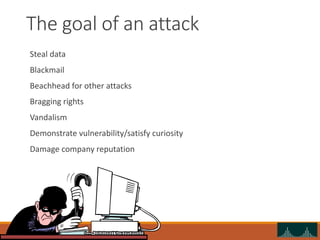
The goal of an attack
Steal data
Blackmail
Beachhead for other attacks
Bragging rights
Vandalism
Demonstrate vulnerability/satisfy curiosity
Damage company reputation
A word of warning
These tools and techniques can be dangerous
The difference between a hacker and a cracker is…permission
Admins will see strange activity in logs, and come looking for you
Authorities are prosecuting even the “good guys” for using these tools
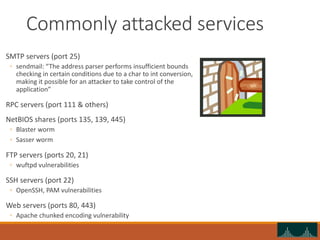
Commonly attacked services
SMTP servers (port 25)
◦ sendmail: “The address parser performs insufficient bounds
checking in certain conditions due to a char to int conversion,
making it possible for an attacker to take control of the
application”
RPC servers (port 111 & others)
NetBIOS shares (ports 135, 139, 445)
◦ Blaster worm
◦ Sasser worm
FTP servers (ports 20, 21)
◦ wuftpd vulnerabilities
SSH servers (port 22)
◦ OpenSSH, PAM vulnerabilities
Web servers (ports 80, 443)
◦ Apache chunked encoding vulnerability
Web server attack
Scan to find open ports
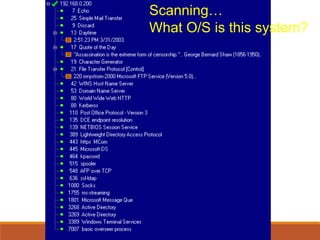
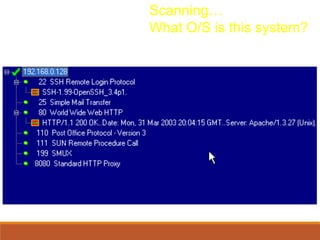
Find out what’s running on open ports (banner grabbing)
Profile the server
◦ Windows (look for Kerberos, NetBIOS, AD)
◦ Unix
◦ Use TCP fingerprinting
Probe for weaknesses on interesting ports
◦ Default configuration files and settings (e.g. popular IIS ones)
◦ Buffer overflows
◦ Insecure applications
Launch attack
◦ Use exploit code from Internet…
◦ …or build your own
Scanning…
What O/S is this system?
Scanning…
What O/S is this system?
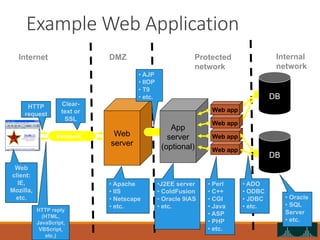
Example Web Application
Web
server
Web app
Web app
Web app
Web app
transport
DB
DB
App
server
(optional)
Web
client:
IE,
Mozilla,
etc.
HTTP reply
(HTML,
JavaScript,
VBScript,
etc.)
HTTP
request
Clear-
text or
SSL
• Apache
• IIS
• Netscape
• etc.
•J2EE server
• ColdFusion
• Oracle 9iAS
• etc.
• Perl
• C++
• CGI
• Java
• ASP
• PHP
• etc.
• ADO
• ODBC
• JDBC
• etc.
• Oracle
• SQL
Server
• etc.
Internet DMZ Protected
network
Internal
network
• AJP
• IIOP
• T9
• etc.
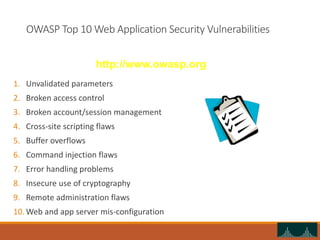
OWASP Top 10 Web Application Security Vulnerabilities
1. Unvalidated parameters
2. Broken access control
3. Broken account/session management
4. Cross-site scripting flaws
5. Buffer overflows
6. Command injection flaws
7. Error handling problems
8. Insecure use of cryptography
9. Remote administration flaws
10. Web and app server mis-configuration
http://www.owasp.org
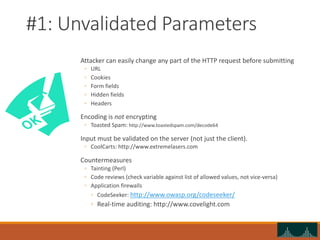
#1: Unvalidated Parameters
Attacker can easily change any part of the HTTP request before submitting
◦ URL
◦ Cookies
◦ Form fields
◦ Hidden fields
◦ Headers
Encoding is not encrypting
◦ Toasted Spam: http://www.toastedspam.com/decode64
Input must be validated on the server (not just the client).
◦ CoolCarts: http://www.extremelasers.com
Countermeasures
◦ Tainting (Perl)
◦ Code reviews (check variable against list of allowed values, not vice-versa)
◦ Application firewalls
◦ CodeSeeker: http://www.owasp.org/codeseeker/
◦ Real-time auditing: http://www.covelight.com
#2: Broken Access Control
Usually inconsistently defined/applied
Examples
◦ Forced browsing past access control checks
◦ Path traversal
◦ File permissions – may allow access to config/password
files
◦ Client-side caching
Countermeasures
◦ Use non-programmatic controls
◦ Verify access control via central container
◦ Code reviews
#3: Broken Account and Session Management
Weak authentication
◦ Password-only
◦ Easily guessable usernames (admin, etc.)
◦ Unencrypted secrets are sniffable
How to break in
◦ Guess/reset password
◦ Have app email you new password
◦ Sniff or crack password
Backend authentication
◦ How are database passwords stored?
◦ Trust relationships between hosts (IP address can be
spoofed, etc.)
Countermeasures
◦ Strong passwords
◦ Remove default user names
◦ Protect sensitive files
#4: Cross-Site Scripting (XSS)
Attacker uses trusted application/company to reflect
malicious code to end-user
Attacker can “hide” the malicious code
◦ Unicode encoding
2 types of attacks
◦ Stored
◦ Reflected
Wide-spread problem!
Countermeasures
◦ input validation
◦ Positive
◦ Negative: “< > ( ) # &”
◦ Don’t forget these: “&lt &gt &#40 &#41 &#35 &#38”
◦ User/customer education
#5: Buffer Overflows
Mostly affects web/app servers
Can affect apps/libraries too
Goal: crash the target app and get a shell
Buffer overflow example
◦ echo “vrfy `perl –e ‘print “a” x 1000’`” |nc
www.targetsystem.com 25
◦ Replace all those “a”s with something like this…
◦ char shellcode[] = “xebxlfx5ex89x76x08…”
Countermeasures
◦ Keep up with bug reports/patches
◦ Code reviews
◦ Run with limited privileges
◦ Use “safer” languages like Java
#6: Command Injection
Allows attacker to relay malicious code in form variables or URL
◦ System commands
◦ SQL
◦ Interpreted code (Perl, Python, etc.)
Many apps use calls to external programs
◦ sendmail
Examples
◦ Path traversal: “../”
◦ Add more commands: “; rm –r *”
◦ SQL injection: “’ OR 1=1”
Countermeasures
◦ Taint all input
◦ Avoid system calls (use libraries instead)
◦ Run with limited privileges
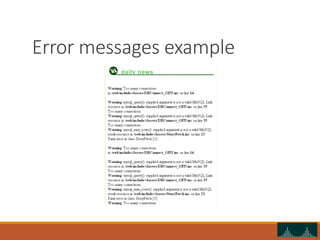
#7: Error Handling
Examples: stack traces, DB dumps
Helps attacker know how to target the app
Inconsistencies can be revealing too
◦ “File not found” vs. “Access denied”
Fail-open errors
Need to give enough info to user w/o giving too much info to
attacker
Countermeasures
◦ Code review
◦ Modify default error pages (404, 401, etc.)
Error messages example
#8: Poor Cryptography
Insecure storage of credit cards, passwords, etc.
Poor choice of algorithm (or invent your own)
Poor randomness
◦ Session IDs
◦ Tokens
◦ Cookies
Improper storage in memory
Countermeasures
◦ Store only what you must
◦ Store a hash instead of the full value (SHA-1)
◦ Use only vetted, public cryptography
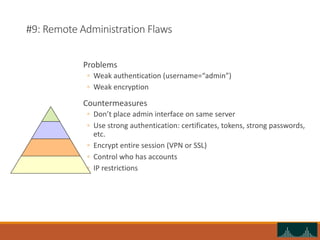
#9: Remote Administration Flaws
Problems
◦ Weak authentication (username=“admin”)
◦ Weak encryption
Countermeasures
◦ Don’t place admin interface on same server
◦ Use strong authentication: certificates, tokens, strong passwords,
etc.
◦ Encrypt entire session (VPN or SSL)
◦ Control who has accounts
◦ IP restrictions
#10: Web/App Server Misconfiguration
Tension between “work out of the box” and “use only
what you need”
Developers ≠ web masters
Examples
◦ Unpatched security flaws (BID example)
◦ Misconfigurations that allow directory traversal
◦ Administrative services accessible
◦ Default accounts/passwords
Countermeasures
◦ Create and use hardening guides
◦ Turn off all unused services
◦ Set up and audit roles, permissions, and accounts
◦ Set up logging and alerts
Principles
Turn off un-needed services
Keep systems patched
Don’t trust input
Watch for logic holes
Only provide the necessary information
Hide sensitive information
◦ Encryption
◦ Access controls
Tools used in this preso
WebGoat –vulnerable web applications for demonstration
VMWare – runs Linux & Windows 2000 virtual machines on demo
laptop.
nmap –host/port scanning to find vulnerable hosts
Ethereal – network traffic sniffing
Metasploit Framework – exploit tool
Brutus – password cracking
Sleuth – HTTP mangling against web sites

Web Security

  • 1.
  • 2.
    The goal ofan attack Steal data Blackmail Beachhead for other attacks Bragging rights Vandalism Demonstrate vulnerability/satisfy curiosity Damage company reputation
  • 3.
    A word ofwarning These tools and techniques can be dangerous The difference between a hacker and a cracker is…permission Admins will see strange activity in logs, and come looking for you Authorities are prosecuting even the “good guys” for using these tools
  • 4.
    Commonly attacked services SMTPservers (port 25) ◦ sendmail: “The address parser performs insufficient bounds checking in certain conditions due to a char to int conversion, making it possible for an attacker to take control of the application” RPC servers (port 111 & others) NetBIOS shares (ports 135, 139, 445) ◦ Blaster worm ◦ Sasser worm FTP servers (ports 20, 21) ◦ wuftpd vulnerabilities SSH servers (port 22) ◦ OpenSSH, PAM vulnerabilities Web servers (ports 80, 443) ◦ Apache chunked encoding vulnerability
  • 5.
    Web server attack Scanto find open ports Find out what’s running on open ports (banner grabbing) Profile the server ◦ Windows (look for Kerberos, NetBIOS, AD) ◦ Unix ◦ Use TCP fingerprinting Probe for weaknesses on interesting ports ◦ Default configuration files and settings (e.g. popular IIS ones) ◦ Buffer overflows ◦ Insecure applications Launch attack ◦ Use exploit code from Internet… ◦ …or build your own
  • 6.
  • 7.
  • 8.
    Example Web Application Web server Webapp Web app Web app Web app transport DB DB App server (optional) Web client: IE, Mozilla, etc. HTTP reply (HTML, JavaScript, VBScript, etc.) HTTP request Clear- text or SSL • Apache • IIS • Netscape • etc. •J2EE server • ColdFusion • Oracle 9iAS • etc. • Perl • C++ • CGI • Java • ASP • PHP • etc. • ADO • ODBC • JDBC • etc. • Oracle • SQL Server • etc. Internet DMZ Protected network Internal network • AJP • IIOP • T9 • etc.
  • 9.
    OWASP Top 10Web Application Security Vulnerabilities 1. Unvalidated parameters 2. Broken access control 3. Broken account/session management 4. Cross-site scripting flaws 5. Buffer overflows 6. Command injection flaws 7. Error handling problems 8. Insecure use of cryptography 9. Remote administration flaws 10. Web and app server mis-configuration http://www.owasp.org
  • 10.
    #1: Unvalidated Parameters Attackercan easily change any part of the HTTP request before submitting ◦ URL ◦ Cookies ◦ Form fields ◦ Hidden fields ◦ Headers Encoding is not encrypting ◦ Toasted Spam: http://www.toastedspam.com/decode64 Input must be validated on the server (not just the client). ◦ CoolCarts: http://www.extremelasers.com Countermeasures ◦ Tainting (Perl) ◦ Code reviews (check variable against list of allowed values, not vice-versa) ◦ Application firewalls ◦ CodeSeeker: http://www.owasp.org/codeseeker/ ◦ Real-time auditing: http://www.covelight.com
  • 11.
    #2: Broken AccessControl Usually inconsistently defined/applied Examples ◦ Forced browsing past access control checks ◦ Path traversal ◦ File permissions – may allow access to config/password files ◦ Client-side caching Countermeasures ◦ Use non-programmatic controls ◦ Verify access control via central container ◦ Code reviews
  • 12.
    #3: Broken Accountand Session Management Weak authentication ◦ Password-only ◦ Easily guessable usernames (admin, etc.) ◦ Unencrypted secrets are sniffable How to break in ◦ Guess/reset password ◦ Have app email you new password ◦ Sniff or crack password Backend authentication ◦ How are database passwords stored? ◦ Trust relationships between hosts (IP address can be spoofed, etc.) Countermeasures ◦ Strong passwords ◦ Remove default user names ◦ Protect sensitive files
  • 13.
    #4: Cross-Site Scripting(XSS) Attacker uses trusted application/company to reflect malicious code to end-user Attacker can “hide” the malicious code ◦ Unicode encoding 2 types of attacks ◦ Stored ◦ Reflected Wide-spread problem! Countermeasures ◦ input validation ◦ Positive ◦ Negative: “< > ( ) # &” ◦ Don’t forget these: “&lt &gt &#40 &#41 &#35 &#38” ◦ User/customer education
  • 14.
    #5: Buffer Overflows Mostlyaffects web/app servers Can affect apps/libraries too Goal: crash the target app and get a shell Buffer overflow example ◦ echo “vrfy `perl –e ‘print “a” x 1000’`” |nc www.targetsystem.com 25 ◦ Replace all those “a”s with something like this… ◦ char shellcode[] = “xebxlfx5ex89x76x08…” Countermeasures ◦ Keep up with bug reports/patches ◦ Code reviews ◦ Run with limited privileges ◦ Use “safer” languages like Java
  • 15.
    #6: Command Injection Allowsattacker to relay malicious code in form variables or URL ◦ System commands ◦ SQL ◦ Interpreted code (Perl, Python, etc.) Many apps use calls to external programs ◦ sendmail Examples ◦ Path traversal: “../” ◦ Add more commands: “; rm –r *” ◦ SQL injection: “’ OR 1=1” Countermeasures ◦ Taint all input ◦ Avoid system calls (use libraries instead) ◦ Run with limited privileges
  • 16.
    #7: Error Handling Examples:stack traces, DB dumps Helps attacker know how to target the app Inconsistencies can be revealing too ◦ “File not found” vs. “Access denied” Fail-open errors Need to give enough info to user w/o giving too much info to attacker Countermeasures ◦ Code review ◦ Modify default error pages (404, 401, etc.)
  • 17.
  • 18.
    #8: Poor Cryptography Insecurestorage of credit cards, passwords, etc. Poor choice of algorithm (or invent your own) Poor randomness ◦ Session IDs ◦ Tokens ◦ Cookies Improper storage in memory Countermeasures ◦ Store only what you must ◦ Store a hash instead of the full value (SHA-1) ◦ Use only vetted, public cryptography
  • 19.
    #9: Remote AdministrationFlaws Problems ◦ Weak authentication (username=“admin”) ◦ Weak encryption Countermeasures ◦ Don’t place admin interface on same server ◦ Use strong authentication: certificates, tokens, strong passwords, etc. ◦ Encrypt entire session (VPN or SSL) ◦ Control who has accounts ◦ IP restrictions
  • 20.
    #10: Web/App ServerMisconfiguration Tension between “work out of the box” and “use only what you need” Developers ≠ web masters Examples ◦ Unpatched security flaws (BID example) ◦ Misconfigurations that allow directory traversal ◦ Administrative services accessible ◦ Default accounts/passwords Countermeasures ◦ Create and use hardening guides ◦ Turn off all unused services ◦ Set up and audit roles, permissions, and accounts ◦ Set up logging and alerts
  • 21.
    Principles Turn off un-neededservices Keep systems patched Don’t trust input Watch for logic holes Only provide the necessary information Hide sensitive information ◦ Encryption ◦ Access controls
  • 22.
    Tools used inthis preso WebGoat –vulnerable web applications for demonstration VMWare – runs Linux & Windows 2000 virtual machines on demo laptop. nmap –host/port scanning to find vulnerable hosts Ethereal – network traffic sniffing Metasploit Framework – exploit tool Brutus – password cracking Sleuth – HTTP mangling against web sites