
Sayed Ahmed
Computer Engineering, BUET, Bangladesh
MSc, Computer Science, U of Manitoba, Canada
Owner/President/Architect/Developer
Justetc (Just et cetera) Technologies
http://www.justetc.net
http://sayed.justetc.net
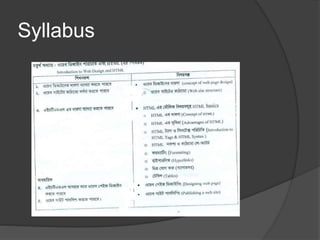
Syllabus
Learning Objects
 Concept of web design
 Structure of Web-site
 Introduction to HTML
 Design web-pages using HTML
 Publish Web-sites
Web-site Development
 Understanding Client and Server Side
Programming
○ http://www.salearningschool.com/multimedia_training/di
splayArticle.php?table=TrainingVideos&articleID=119
 Web-site Development
 Lesson 1: Part 1: How to build a simple website
from scratch
○ http://www.salearningschool.com/multimedia_training/di
splayArticle.php?table=TrainingVideos&articleID=21
 Lesson 1: Part 2: How to build a simple website from
scratch
○ http://www.salearningschool.com/multimedia_training/di
splayArticle.php?table=TrainingVideos&articleID=22
Introduction to web design
 Concepts to understand
 Web-page
 Web-site
 IP address
 Domain Name System
 Web-address
 Web-browser
Web-page
 One kind of document
 Usually having some information on it
○ Can have pictures, audio, video
 are located somewhere in the network (LAN)
or the Internet
○ Usually controlled/maintained by a software
called web-server (Apache, IIS)
 Can be accessed/viewed by using browsing
software such as Internet Explorer, Firefox
○ IE/Firefox requests the web-server to send the
document; then IE/Firefox shows it
Web-site
 Some or many web-pages
 That are related
○ Serve same or similar or related goals
 Are usually reachable from one to another
 Are usually hosted under the same name
○ Usually served from a single domain (name)
 Usually located in one server pc
○ Can be located in multiple servers
 WWW - World Wide Web
 All web-sites in the Internet creates the WWW
Web-site Examples
 Training and Education in Bangla:
 http://Bangla.SaLearningSchool.com
 http://Blog. SaLearningSchool.com
 Training and Education in English:
 http://www.SaLearningSchool.com
 http://English.SaLearningSchool.com
 http://www.SitesTree.com
---------------------------------------------------------------------------------
 Ask questions and get answers
 http://Ask.JustEtc.net
---------------------------------------------------------------------------------
 Offline IT Training:
 http://University.JustEtc.net
IP Address
 All telephones connected to the Telephone
network has a number
 All computers when connected to the
Internet will have a numeric address
 Called: IP Address
 ipconfig –all, ipconfig /release, ipconfig /flushdns
 Two types of IP address
 IPV4: 4 part IP address. Each part 0 to 128
○ 123.456.34.56
 IPV6: 6 part IP address
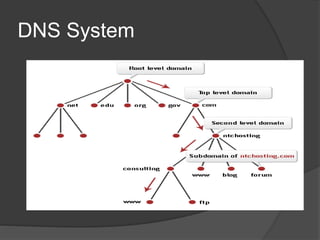
Domain Name System
(DNS)
 Web-sites are located in a computer in
the internet [the computer has an IP
address]
 We can access that web-site using that IP
address
 If you know the IP address of yahoo.com
web-site then in IE if you type that address,
you will see yahoo.com website
 But remebering the numeric address of a
web-site/computer is difficult. So
Domain Name System
(DNS)
 we have assigned a name to each web-
site
○ However, the computer and the internet works
with the IP address internally
○ So there is a conversion from name to IP; and
then works happen with IP address
 Ping yahoo.com
 Tracert google.com, tracert justetc.net
 The service in the Internet that provides
this facility is called DNS
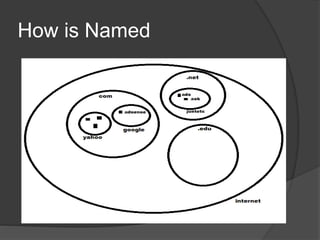
Domain Name
 The name of the web-sites are called
domain names
 The name of the computers hosting the
web-sites are called domain names
○ www.VisitorsShop.com
○ www.justetc.info
○ www.PlayAndScore.com
 Case insensitive
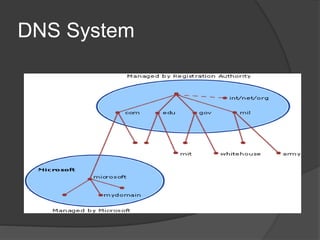
How is Named
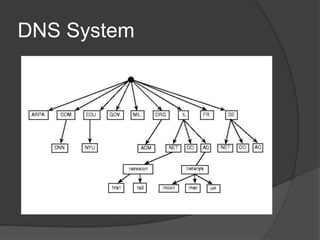
DNS System
DNS System
DNS System
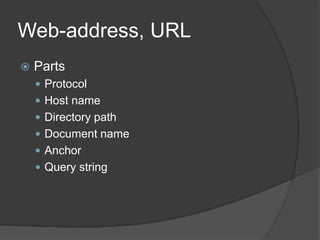
Web-address, URL
 Parts
 Protocol
 Host name
 Directory path
 Document name
 Anchor
 Query string
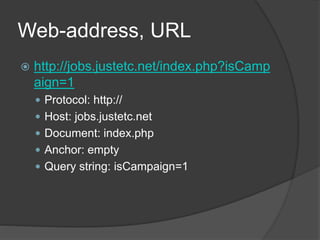
Web-address, URL
 http://jobs.justetc.net/index.php?isCamp
aign=1
 Protocol: http://
 Host: jobs.justetc.net
 Document: index.php
 Anchor: empty
 Query string: isCampaign=1
Top Level Domains
 .com : commercial
 .net : network service
 edu : educational institution
 gov : government
 int : international organization
 mil : us armed forces
 org : non - profit
Web Browser
 Web browser to access and view web-
pages/web-sites
 Firefox
 Chrome
 Internet Explorer
Our Addresses
 Trudelle Street, Toronto, Canada
 sayed@justetc.com
 Shimultuly, Gazipur, Bangladesh
 Justetc Computers
 Habib Complex, 2nd Floor
 rafik@justetc.com (01942747702)
Free Training by Justetc
 Training and Education in Bangla:
 http://Bangla.SaLearningSchool.com
 http://Blog. SaLearningSchool.com
 Training and Education in English:
 http://www.SaLearningSchool.com
 http://English.SaLearningSchool.com
 http://www.SitesTree.com
---------------------------------------------------------------------------------
 Ask questions and get answers
 http://Ask.JustEtc.net
---------------------------------------------------------------------------------
 Offline IT Training:
 http://University.JustEtc.net

Web design and_html

  • 1.
    Sayed Ahmed Computer Engineering,BUET, Bangladesh MSc, Computer Science, U of Manitoba, Canada Owner/President/Architect/Developer Justetc (Just et cetera) Technologies http://www.justetc.net http://sayed.justetc.net
  • 2.
  • 3.
    Learning Objects  Conceptof web design  Structure of Web-site  Introduction to HTML  Design web-pages using HTML  Publish Web-sites
  • 4.
    Web-site Development  UnderstandingClient and Server Side Programming ○ http://www.salearningschool.com/multimedia_training/di splayArticle.php?table=TrainingVideos&articleID=119  Web-site Development  Lesson 1: Part 1: How to build a simple website from scratch ○ http://www.salearningschool.com/multimedia_training/di splayArticle.php?table=TrainingVideos&articleID=21  Lesson 1: Part 2: How to build a simple website from scratch ○ http://www.salearningschool.com/multimedia_training/di splayArticle.php?table=TrainingVideos&articleID=22
  • 5.
    Introduction to webdesign  Concepts to understand  Web-page  Web-site  IP address  Domain Name System  Web-address  Web-browser
  • 6.
    Web-page  One kindof document  Usually having some information on it ○ Can have pictures, audio, video  are located somewhere in the network (LAN) or the Internet ○ Usually controlled/maintained by a software called web-server (Apache, IIS)  Can be accessed/viewed by using browsing software such as Internet Explorer, Firefox ○ IE/Firefox requests the web-server to send the document; then IE/Firefox shows it
  • 7.
    Web-site  Some ormany web-pages  That are related ○ Serve same or similar or related goals  Are usually reachable from one to another  Are usually hosted under the same name ○ Usually served from a single domain (name)  Usually located in one server pc ○ Can be located in multiple servers  WWW - World Wide Web  All web-sites in the Internet creates the WWW
  • 8.
    Web-site Examples  Trainingand Education in Bangla:  http://Bangla.SaLearningSchool.com  http://Blog. SaLearningSchool.com  Training and Education in English:  http://www.SaLearningSchool.com  http://English.SaLearningSchool.com  http://www.SitesTree.com ---------------------------------------------------------------------------------  Ask questions and get answers  http://Ask.JustEtc.net ---------------------------------------------------------------------------------  Offline IT Training:  http://University.JustEtc.net
  • 9.
    IP Address  Alltelephones connected to the Telephone network has a number  All computers when connected to the Internet will have a numeric address  Called: IP Address  ipconfig –all, ipconfig /release, ipconfig /flushdns  Two types of IP address  IPV4: 4 part IP address. Each part 0 to 128 ○ 123.456.34.56  IPV6: 6 part IP address
  • 10.
    Domain Name System (DNS) Web-sites are located in a computer in the internet [the computer has an IP address]  We can access that web-site using that IP address  If you know the IP address of yahoo.com web-site then in IE if you type that address, you will see yahoo.com website  But remebering the numeric address of a web-site/computer is difficult. So
  • 11.
    Domain Name System (DNS) we have assigned a name to each web- site ○ However, the computer and the internet works with the IP address internally ○ So there is a conversion from name to IP; and then works happen with IP address  Ping yahoo.com  Tracert google.com, tracert justetc.net  The service in the Internet that provides this facility is called DNS
  • 12.
    Domain Name  Thename of the web-sites are called domain names  The name of the computers hosting the web-sites are called domain names ○ www.VisitorsShop.com ○ www.justetc.info ○ www.PlayAndScore.com  Case insensitive
  • 13.
  • 14.
  • 15.
  • 16.
  • 17.
    Web-address, URL  Parts Protocol  Host name  Directory path  Document name  Anchor  Query string
  • 18.
    Web-address, URL  http://jobs.justetc.net/index.php?isCamp aign=1 Protocol: http://  Host: jobs.justetc.net  Document: index.php  Anchor: empty  Query string: isCampaign=1
  • 19.
    Top Level Domains .com : commercial  .net : network service  edu : educational institution  gov : government  int : international organization  mil : us armed forces  org : non - profit
  • 20.
    Web Browser  Webbrowser to access and view web- pages/web-sites  Firefox  Chrome  Internet Explorer
  • 21.
    Our Addresses  TrudelleStreet, Toronto, Canada  sayed@justetc.com  Shimultuly, Gazipur, Bangladesh  Justetc Computers  Habib Complex, 2nd Floor  rafik@justetc.com (01942747702)
  • 22.
    Free Training byJustetc  Training and Education in Bangla:  http://Bangla.SaLearningSchool.com  http://Blog. SaLearningSchool.com  Training and Education in English:  http://www.SaLearningSchool.com  http://English.SaLearningSchool.com  http://www.SitesTree.com ---------------------------------------------------------------------------------  Ask questions and get answers  http://Ask.JustEtc.net ---------------------------------------------------------------------------------  Offline IT Training:  http://University.JustEtc.net