hasen@microcis.net July 21, 2013Hassen poreya
Trainer, Cresco Solution
Afghanistan Workforce
Development Program
Database Design
ER to Relational Mapping
 Step 1: Mapping of regular entity type.
 Step 2: Mapping of weak entity type.
 Step 3: Mapping of binary 1:1 relationship types.
 Step 4: Mapping of binary 1:N relationship types.
 Step 5: Mapping of binary N:M relationship types.
 Step 6: Mapping of multivalued attributes.
Mapping of Regular Entity Types
 Step 1: Create relations and attributes for regular
entity types.
 For each regular entity type E in the ER schema, create
a relation R that includes all the simple attributes of E.
 Include only the simple component attributes of a
composite attribute.
 Choose one of the key attributes of E as primary key
for R.
 If the chosen key of E is composite, the set of simple
attributes that form it will together form the primary
key of R.
Example of step 1
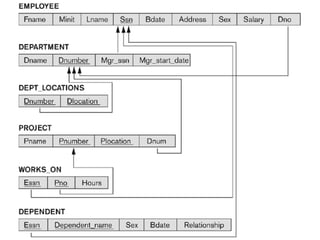
 For example, we create the relations EMPLOYEE,
DEPARTMENT, and PROJECT for the regular entity
types EMPLOYEE, DEPARTMENT, and PROJECT in
COMPANY ER schema.
 Then, we choose SSN, DNUMBER and PNUMBER as
primary keys for the relations EMPLOYEE,
DEPARTMENT, and PROJECT, respectively.
 Foreign keys are not included yet.
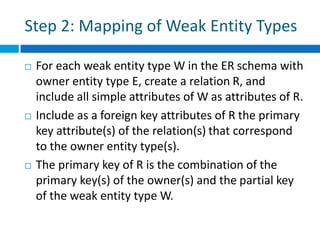
Step 2: Mapping of Weak Entity Types
 For each weak entity type W in the ER schema with
owner entity type E, create a relation R, and
include all simple attributes of W as attributes of R.
 Include as a foreign key attributes of R the primary
key attribute(s) of the relation(s) that correspond
to the owner entity type(s).
 The primary key of R is the combination of the
primary key(s) of the owner(s) and the partial key
of the weak entity type W.
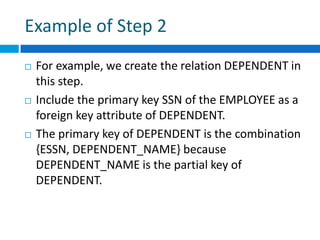
Example of Step 2
 For example, we create the relation DEPENDENT in
this step.
 Include the primary key SSN of the EMPLOYEE as a
foreign key attribute of DEPENDENT.
 The primary key of DEPENDENT is the combination
{ESSN, DEPENDENT_NAME} because
DEPENDENT_NAME is the partial key of
DEPENDENT.
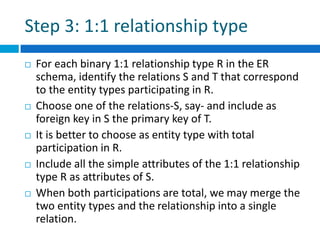
Step 3: 1:1 relationship type
 For each binary 1:1 relationship type R in the ER
schema, identify the relations S and T that correspond
to the entity types participating in R.
 Choose one of the relations-S, say- and include as
foreign key in S the primary key of T.
 It is better to choose as entity type with total
participation in R.
 Include all the simple attributes of the 1:1 relationship
type R as attributes of S.
 When both participations are total, we may merge the
two entity types and the relationship into a single
relation.
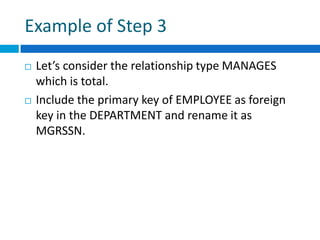
Example of Step 3
 Let’s consider the relationship type MANAGES
which is total.
 Include the primary key of EMPLOYEE as foreign
key in the DEPARTMENT and rename it as
MGRSSN.
Step 4: 1:N relationship type
 For each 1:N relationship type R, identify the
relation S that represents the participating entity
type at the N-side of R.
 Include as foreign key in S the primary key of the
relation T that represents the other entity type
participating in R.
 Include any simple attributes of the 1:N
relationship type as attributes of S.
Example of Step 4
 Let’s consider the 1:N relationships type
WORKS_FOR, and CONTROLS.
 For WORKS_FOR, include the primary key
DNUMBER of DEPARTMENT as foreign key in
EMPLOYEE and call it DNO.
 For CONTROLS, include the primary key DNUMBER
of DEPARTMENT as foreign key in PROJECT and call
it DNUM.
Step 5: M:N relationship type
 For each M:N relationship type R, create a new
relation S to represent R.
 Include as foreign key attributes in S the primary
keys of the relations that represent the
participating entity types; their combination will
form the primary key of S.
 Include any simple attributes of the M:N
relationship type as attributes of S.
 Note: We cannot represent an M:N relationship
type by a single foreign key attribute.
Example of Step 5
 Let consider the M:N relationship type
WORKS_ON.
 Include the primary keys of the PROJECT and
EMPLOYEE relations as foreign keys in WORKS_ON
and rename them as PNO and ESSN, respectively.
 Include an attribute HOURS in WORKS_ON.
Step 6: Multi-valued attributes
 For each multi-valued attribute A, create a new
relation R.
 Include an attribute corresponding to A, plus the
primary key attribute K as a foreign key in R.
 The primary key of R is the combination of A and K.
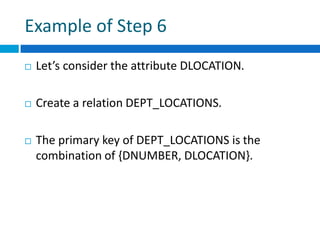
Example of Step 6
 Let’s consider the attribute DLOCATION.
 Create a relation DEPT_LOCATIONS.
 The primary key of DEPT_LOCATIONS is the
combination of {DNUMBER, DLOCATION}.
Conclusion
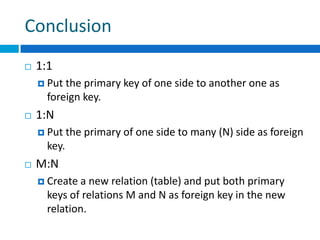
 1:1
 Put the primary key of one side to another one as
foreign key.
 1:N
 Put the primary of one side to many (N) side as foreign
key.
 M:N
 Create a new relation (table) and put both primary
keys of relations M and N as foreign key in the new
relation.
Special thanks to Mr. Abdul Rahman Sherzad,
lecturer of Computer Science faculty of Herat
University for giving resource to this lecture.
hasen@microcis.net July 21, 2013Hassen poreya
Trainer, Cresco Solution
Any Questions!
Afghanistan Workforce
Development Program

Web app development_database_design_er-mapping_12

  • 1.
    hasen@microcis.net July 21,2013Hassen poreya Trainer, Cresco Solution Afghanistan Workforce Development Program Database Design ER to Relational Mapping
  • 2.
    ER to RelationalMapping  Step 1: Mapping of regular entity type.  Step 2: Mapping of weak entity type.  Step 3: Mapping of binary 1:1 relationship types.  Step 4: Mapping of binary 1:N relationship types.  Step 5: Mapping of binary N:M relationship types.  Step 6: Mapping of multivalued attributes.
  • 3.
    Mapping of RegularEntity Types  Step 1: Create relations and attributes for regular entity types.  For each regular entity type E in the ER schema, create a relation R that includes all the simple attributes of E.  Include only the simple component attributes of a composite attribute.  Choose one of the key attributes of E as primary key for R.  If the chosen key of E is composite, the set of simple attributes that form it will together form the primary key of R.
  • 4.
    Example of step1  For example, we create the relations EMPLOYEE, DEPARTMENT, and PROJECT for the regular entity types EMPLOYEE, DEPARTMENT, and PROJECT in COMPANY ER schema.  Then, we choose SSN, DNUMBER and PNUMBER as primary keys for the relations EMPLOYEE, DEPARTMENT, and PROJECT, respectively.  Foreign keys are not included yet.
  • 5.
    Step 2: Mappingof Weak Entity Types  For each weak entity type W in the ER schema with owner entity type E, create a relation R, and include all simple attributes of W as attributes of R.  Include as a foreign key attributes of R the primary key attribute(s) of the relation(s) that correspond to the owner entity type(s).  The primary key of R is the combination of the primary key(s) of the owner(s) and the partial key of the weak entity type W.
  • 6.
    Example of Step2  For example, we create the relation DEPENDENT in this step.  Include the primary key SSN of the EMPLOYEE as a foreign key attribute of DEPENDENT.  The primary key of DEPENDENT is the combination {ESSN, DEPENDENT_NAME} because DEPENDENT_NAME is the partial key of DEPENDENT.
  • 7.
    Step 3: 1:1relationship type  For each binary 1:1 relationship type R in the ER schema, identify the relations S and T that correspond to the entity types participating in R.  Choose one of the relations-S, say- and include as foreign key in S the primary key of T.  It is better to choose as entity type with total participation in R.  Include all the simple attributes of the 1:1 relationship type R as attributes of S.  When both participations are total, we may merge the two entity types and the relationship into a single relation.
  • 8.
    Example of Step3  Let’s consider the relationship type MANAGES which is total.  Include the primary key of EMPLOYEE as foreign key in the DEPARTMENT and rename it as MGRSSN.
  • 9.
    Step 4: 1:Nrelationship type  For each 1:N relationship type R, identify the relation S that represents the participating entity type at the N-side of R.  Include as foreign key in S the primary key of the relation T that represents the other entity type participating in R.  Include any simple attributes of the 1:N relationship type as attributes of S.
  • 10.
    Example of Step4  Let’s consider the 1:N relationships type WORKS_FOR, and CONTROLS.  For WORKS_FOR, include the primary key DNUMBER of DEPARTMENT as foreign key in EMPLOYEE and call it DNO.  For CONTROLS, include the primary key DNUMBER of DEPARTMENT as foreign key in PROJECT and call it DNUM.
  • 11.
    Step 5: M:Nrelationship type  For each M:N relationship type R, create a new relation S to represent R.  Include as foreign key attributes in S the primary keys of the relations that represent the participating entity types; their combination will form the primary key of S.  Include any simple attributes of the M:N relationship type as attributes of S.  Note: We cannot represent an M:N relationship type by a single foreign key attribute.
  • 12.
    Example of Step5  Let consider the M:N relationship type WORKS_ON.  Include the primary keys of the PROJECT and EMPLOYEE relations as foreign keys in WORKS_ON and rename them as PNO and ESSN, respectively.  Include an attribute HOURS in WORKS_ON.
  • 13.
    Step 6: Multi-valuedattributes  For each multi-valued attribute A, create a new relation R.  Include an attribute corresponding to A, plus the primary key attribute K as a foreign key in R.  The primary key of R is the combination of A and K.
  • 14.
    Example of Step6  Let’s consider the attribute DLOCATION.  Create a relation DEPT_LOCATIONS.  The primary key of DEPT_LOCATIONS is the combination of {DNUMBER, DLOCATION}.
  • 16.
    Conclusion  1:1  Putthe primary key of one side to another one as foreign key.  1:N  Put the primary of one side to many (N) side as foreign key.  M:N  Create a new relation (table) and put both primary keys of relations M and N as foreign key in the new relation.
  • 17.
    Special thanks toMr. Abdul Rahman Sherzad, lecturer of Computer Science faculty of Herat University for giving resource to this lecture.
  • 18.
    hasen@microcis.net July 21,2013Hassen poreya Trainer, Cresco Solution Any Questions! Afghanistan Workforce Development Program