Walking around             Linux Kernel


                 Dharshana Kasun Warusavitharana.
                 Software Engineer,Test Automation Name
                                            Your
                 WSO2 Inc.                     Your Title
                               Your Organization (Line #1)
                               Your Organization (Line #2)
How Story Begins
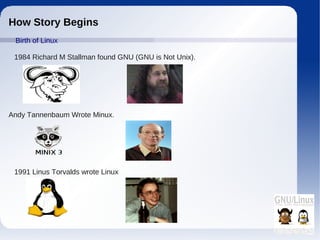
 Birth of Linux

 1984 Richard M Stallman found GNU (GNU is Not Unix).


Andy Tannenbaum Wrote Minux.


 1991 Linus Torvalds wrote Linux
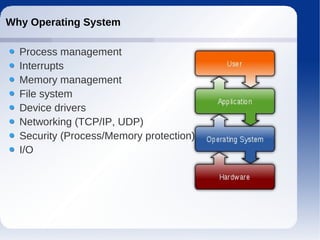
Why Operating System

  Process management
  Interrupts
  Memory management
  File system
  Device drivers
  Networking (TCP/IP, UDP)
  Security (Process/Memory protection)
  I/O
What is a Kernel

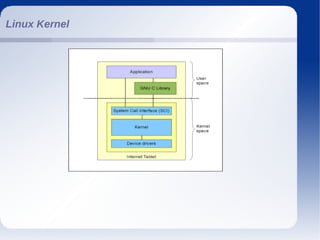
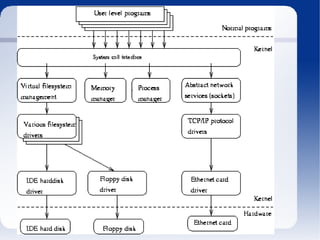
  The kernel is a bridge between applications and the
  actual data processing done at the hardware level.
  The kernel's responsibilities include
        Managing the system's resources
        The communication between hardware and software
          components
        The kernel's primary function is to manage the
          computer's resources and allow other programs to
          run and use these resources.Typically, the resources
          consist of:
        The Central Processing Unit.
        The computer's memory.
        Any Input/Output (I/O)
        Key aspects necessary in resource management.
Kernel basic facilities

  Process management
  Support to hardware abstractions (Hal Daemon).
  Setting up an address space for the application, loads the
  file containing the application's code into memory
  Multi-tasking kernels are able to give the user the illusion
  that the number of processes being run simultaneously on
  the computer.
  The kernel generally also provides these processes a way
  to communicate; this is known as inter-process
  communication (IPC) and the main approaches are
  shared memory, message passing and remote procedure
  calls (see concurrent computing).
Kernel basic facilities (Contd.....)

   Memory management
   Allows processes to safely access this memory .
   Virtual addressing, usually achieved by paging and/or
   segmentation.
   Virtual addressing allows the operating system to use other
   data stores
   Virtual addressing also allows creation of virtual partitions of
   memory in two disjointed areas.
Kernel basic facilities (Contd.....)
   Device management
    1. On the hardware side:
   Interfacing directly.
   Using a high level interface (Video BIOS).
   Using a lower-level device driver (file drivers using disk drivers).
   Simulating work with hardware, while doing something entirely
   different.

   2. On the software side:
   Allowing the operating system direct access to hardware resources.
   Implementing only primitives.
   Implementing an interface for non-driver software (Example:
   TWAIN).
   Implementing a language, sometimes high-level (Example
   Postscript).
Kernel basic facilities (Contd.....)

   System calls
   Using a software-simulated interrupt.
   Using a call gate. A call gate is a special address stored
   by the kernel in a list in kernel memory at a location
   known to the processor.
   Using a special system call instruction.
   Using a memory-based queue.
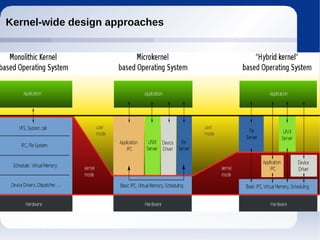
Kernel-wide design approaches
Monolithic kernels

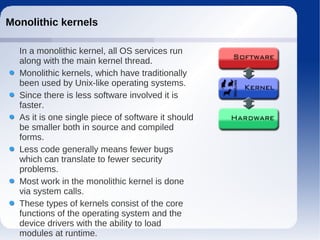
  In a monolithic kernel, all OS services run
  along with the main kernel thread.
  Monolithic kernels, which have traditionally
  been used by Unix-like operating systems.
  Since there is less software involved it is
  faster.
  As it is one single piece of software it should
  be smaller both in source and compiled
  forms.
  Less code generally means fewer bugs
  which can translate to fewer security
  problems.
  Most work in the monolithic kernel is done
  via system calls.
  These types of kernels consist of the core
  functions of the operating system and the
  device drivers with the ability to load
  modules at runtime.
Cons


  Coding in kernel space is hard, since you cannot use
  common libraries (like a full-featured libc), debugging is
  harder.
  Bugs in one part of the kernel have strong side effects.
  Kernels often become very huge, and difficult to maintain.
  Even if the modules servicing these operations are
  separate from the whole, the code integration is tight and
  difficult to do correctly.
  Since the modules run in the same address space, a bug
  can bring down the entire system.
  The disadvantage cited for monolithic kernels is that they
  are not portable; that is, they must be rewritten for each
  new architecture that the operating system is to be used
  on.
Microkernel
●


     A microkernel that is designed for a specific platform
    or device is only ever going to have what it needs to
    operate.
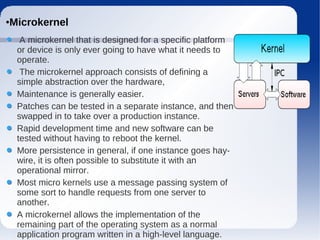
     The microkernel approach consists of defining a
    simple abstraction over the hardware,
    Maintenance is generally easier.
    Patches can be tested in a separate instance, and then
    swapped in to take over a production instance.
    Rapid development time and new software can be
    tested without having to reboot the kernel.
    More persistence in general, if one instance goes hay-
    wire, it is often possible to substitute it with an
    operational mirror.
    Most micro kernels use a message passing system of
    some sort to handle requests from one server to
    another.
    A microkernel allows the implementation of the
    remaining part of the operating system as a normal
    application program written in a high-level language.
Cons


  Disadvantages in the microkernel exist however. Some are:
  Larger running memory footprint.
  More software for interfacing is required, there is a potential for
  performance loss.
  Messaging bugs can be harder to fix due to the longer trip they have
  to take versus the one off copy in a monolithic kernel.
  Process management in general can be very complicated.
  Extremely context based. As an example, they work well for small
  single purpose (and critical) systems because if not many processes
  need to run, then the complications of process management are
  effectively mitigated.
Hybrid kernels
●


    Hybrid kernels are part of the operating systems such as
    Microsoft Windows NT, 2000 and XP. Dragonfly BSD etc.
     They are similar to micro kernels, except they include
    some additional code in kernel-space
    Many traditionally monolithic kernels are now at least
    adding (if not actively exploiting) the module capability.
    On demand capability versus spending time recompiling a
    whole kernel for things like new drivers or subsystems.
    Faster integration of third party technology (related to
    development but pertinent unto itself nonetheless).
     Disadvantages of the modular approach are:
    With more interfaces to pass through, the possibility of
    increased bugs exists (which implies more security holes).
    Maintaining modules can be confusing for some
    administrators when dealing with problems like symbol
    differences.
Linux Kernel
Lets Hack :)

   Because a driver is not working as well as it
  should, or is not working at all.
  Because we have a school or work project.
  Because the kernel is crashing, and we don’t
  know why.
  Because we want to learn how the kernel works.
  Because it’s fun! Real men hack kernels ;-
You need to install the kernel development packages
•
e.g.: gcc, make, binutils, ncurses, qt
• Extract the kernel source in /usr/src
• Optionally create a symlink
• Quick configuration using an old configuration
•
linux:# tar jxvf /tmp/linux-2.6.16.8.tar.gz
linux:# ln
-s /usr/src/linux-2.6.16.8 /usr/src/linux
linux:# cp /boot/config-2.6.14 .config
linux:# make oldconfig
Compiling the kernel
linux:# make && make install && make modules_install
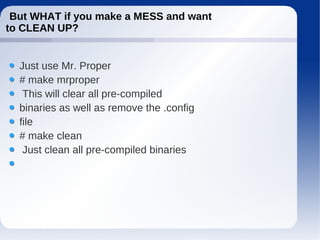
But WHAT if you make a MESS and want
to CLEAN UP?


  Just use Mr. Proper
  # make mrproper
   This will clear all pre-compiled
  binaries as well as remove the .config
  file
  # make clean
   Just clean all pre-compiled binaries
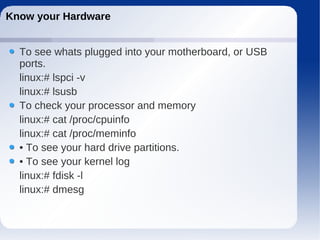
Know your Hardware


  To see whats plugged into your motherboard, or USB
  ports.
  linux:# lspci -v
  linux:# lsusb
  To check your processor and memory
  linux:# cat /proc/cpuinfo
  linux:# cat /proc/meminfo
  • To see your hard drive partitions.
  • To see your kernel log
  linux:# fdisk -l
  linux:# dmesg
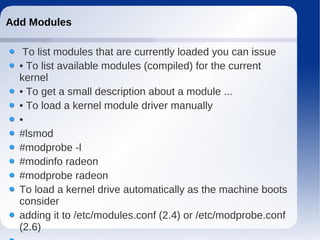
Add Modules

   To list modules that are currently loaded you can issue
  • To list available modules (compiled) for the current
  kernel
  • To get a small description about a module ...
  • To load a kernel module driver manually
  •
  #lsmod
  #modprobe -l
  #modinfo radeon
  #modprobe radeon
  To load a kernel drive automatically as the machine boots
  consider
  adding it to /etc/modules.conf (2.4) or /etc/modprobe.conf
  (2.6)
Thank You
     &
   Happy
compiling ...

Walking around linux kernel

  • 1.
    Walking around Linux Kernel Dharshana Kasun Warusavitharana. Software Engineer,Test Automation Name Your WSO2 Inc. Your Title Your Organization (Line #1) Your Organization (Line #2)
  • 2.
    How Story Begins Birth of Linux 1984 Richard M Stallman found GNU (GNU is Not Unix). Andy Tannenbaum Wrote Minux. 1991 Linus Torvalds wrote Linux
  • 3.
    Why Operating System Process management Interrupts Memory management File system Device drivers Networking (TCP/IP, UDP) Security (Process/Memory protection) I/O
  • 4.
    What is aKernel The kernel is a bridge between applications and the actual data processing done at the hardware level. The kernel's responsibilities include Managing the system's resources The communication between hardware and software components The kernel's primary function is to manage the computer's resources and allow other programs to run and use these resources.Typically, the resources consist of: The Central Processing Unit. The computer's memory. Any Input/Output (I/O) Key aspects necessary in resource management.
  • 5.
    Kernel basic facilities Process management Support to hardware abstractions (Hal Daemon). Setting up an address space for the application, loads the file containing the application's code into memory Multi-tasking kernels are able to give the user the illusion that the number of processes being run simultaneously on the computer. The kernel generally also provides these processes a way to communicate; this is known as inter-process communication (IPC) and the main approaches are shared memory, message passing and remote procedure calls (see concurrent computing).
  • 6.
    Kernel basic facilities(Contd.....) Memory management Allows processes to safely access this memory . Virtual addressing, usually achieved by paging and/or segmentation. Virtual addressing allows the operating system to use other data stores Virtual addressing also allows creation of virtual partitions of memory in two disjointed areas.
  • 7.
    Kernel basic facilities(Contd.....) Device management 1. On the hardware side: Interfacing directly. Using a high level interface (Video BIOS). Using a lower-level device driver (file drivers using disk drivers). Simulating work with hardware, while doing something entirely different. 2. On the software side: Allowing the operating system direct access to hardware resources. Implementing only primitives. Implementing an interface for non-driver software (Example: TWAIN). Implementing a language, sometimes high-level (Example Postscript).
  • 8.
    Kernel basic facilities(Contd.....) System calls Using a software-simulated interrupt. Using a call gate. A call gate is a special address stored by the kernel in a list in kernel memory at a location known to the processor. Using a special system call instruction. Using a memory-based queue.
  • 9.
  • 10.
    Monolithic kernels In a monolithic kernel, all OS services run along with the main kernel thread. Monolithic kernels, which have traditionally been used by Unix-like operating systems. Since there is less software involved it is faster. As it is one single piece of software it should be smaller both in source and compiled forms. Less code generally means fewer bugs which can translate to fewer security problems. Most work in the monolithic kernel is done via system calls. These types of kernels consist of the core functions of the operating system and the device drivers with the ability to load modules at runtime.
  • 11.
    Cons Codingin kernel space is hard, since you cannot use common libraries (like a full-featured libc), debugging is harder. Bugs in one part of the kernel have strong side effects. Kernels often become very huge, and difficult to maintain. Even if the modules servicing these operations are separate from the whole, the code integration is tight and difficult to do correctly. Since the modules run in the same address space, a bug can bring down the entire system. The disadvantage cited for monolithic kernels is that they are not portable; that is, they must be rewritten for each new architecture that the operating system is to be used on.
  • 12.
    Microkernel ● A microkernel that is designed for a specific platform or device is only ever going to have what it needs to operate. The microkernel approach consists of defining a simple abstraction over the hardware, Maintenance is generally easier. Patches can be tested in a separate instance, and then swapped in to take over a production instance. Rapid development time and new software can be tested without having to reboot the kernel. More persistence in general, if one instance goes hay- wire, it is often possible to substitute it with an operational mirror. Most micro kernels use a message passing system of some sort to handle requests from one server to another. A microkernel allows the implementation of the remaining part of the operating system as a normal application program written in a high-level language.
  • 13.
    Cons Disadvantagesin the microkernel exist however. Some are: Larger running memory footprint. More software for interfacing is required, there is a potential for performance loss. Messaging bugs can be harder to fix due to the longer trip they have to take versus the one off copy in a monolithic kernel. Process management in general can be very complicated. Extremely context based. As an example, they work well for small single purpose (and critical) systems because if not many processes need to run, then the complications of process management are effectively mitigated.
  • 14.
    Hybrid kernels ● Hybrid kernels are part of the operating systems such as Microsoft Windows NT, 2000 and XP. Dragonfly BSD etc. They are similar to micro kernels, except they include some additional code in kernel-space Many traditionally monolithic kernels are now at least adding (if not actively exploiting) the module capability. On demand capability versus spending time recompiling a whole kernel for things like new drivers or subsystems. Faster integration of third party technology (related to development but pertinent unto itself nonetheless). Disadvantages of the modular approach are: With more interfaces to pass through, the possibility of increased bugs exists (which implies more security holes). Maintaining modules can be confusing for some administrators when dealing with problems like symbol differences.
  • 15.
  • 17.
    Lets Hack :) Because a driver is not working as well as it should, or is not working at all. Because we have a school or work project. Because the kernel is crashing, and we don’t know why. Because we want to learn how the kernel works. Because it’s fun! Real men hack kernels ;-
  • 18.
    You need toinstall the kernel development packages • e.g.: gcc, make, binutils, ncurses, qt • Extract the kernel source in /usr/src • Optionally create a symlink • Quick configuration using an old configuration • linux:# tar jxvf /tmp/linux-2.6.16.8.tar.gz linux:# ln -s /usr/src/linux-2.6.16.8 /usr/src/linux linux:# cp /boot/config-2.6.14 .config linux:# make oldconfig Compiling the kernel linux:# make && make install && make modules_install
  • 19.
    But WHAT ifyou make a MESS and want to CLEAN UP? Just use Mr. Proper # make mrproper This will clear all pre-compiled binaries as well as remove the .config file # make clean Just clean all pre-compiled binaries
  • 20.
    Know your Hardware To see whats plugged into your motherboard, or USB ports. linux:# lspci -v linux:# lsusb To check your processor and memory linux:# cat /proc/cpuinfo linux:# cat /proc/meminfo • To see your hard drive partitions. • To see your kernel log linux:# fdisk -l linux:# dmesg
  • 21.
    Add Modules To list modules that are currently loaded you can issue • To list available modules (compiled) for the current kernel • To get a small description about a module ... • To load a kernel module driver manually • #lsmod #modprobe -l #modinfo radeon #modprobe radeon To load a kernel drive automatically as the machine boots consider adding it to /etc/modules.conf (2.4) or /etc/modprobe.conf (2.6)
  • 22.
    Thank You & Happy compiling ...