© 2014 VMware Inc. All rights reserved.
vRealize Network Insight 3.3
Intelligent Operations for the Virtual Network+Security Infrastructure
• Supports 11 new NSX events
such as backup not configured,
OSPF area authentication not
configured
• Add user defined events for
customized troubleshooting and
add/filter-by severity and status of
events for faster troubleshooting
• Enhanced UI, more detailed
description for events
Enhanced Visibility, Troubleshooting
& Control
Expanded Support
& Integration
Improved Event Management,
Alerting & Reporting
• Enhancements to flow reporting and
VM to VM path visibility for NAT
implementations
• Users can define “North-South” IPs
(private IPs that need to be classified
as Internet traffic) for customized,
accurate visibility and analysis
• More detailed micro-segmentation
view of ”Physical”, “Internet” and
“Other Virtual” segments for
expanded visibility
• NSX firewall implementation
enhancements such as support
for negation, direction, raw IP/port
in/dest service and VNIC
src/dst/applied to
• Panorama 7.0-7.1 support and
support for Palo Alto constructs
such as paths, firewall, events
• NSX 6.3 support
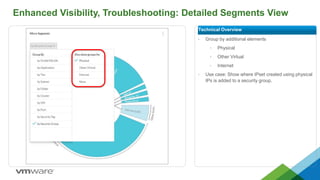
Enhanced Visibility, Troubleshooting: Detailed Segments View
• Group by additional elements
• Physical
• Other Virtual
• Internet
• Use case: Show where IPset created using physical
IPs is added to a security group.
Technical Overview
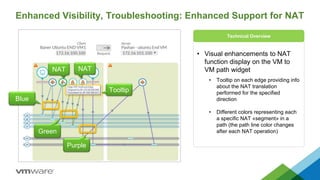
Enhanced Visibility, Troubleshooting: Enhanced Support for NAT
• Visual enhancements to NAT
function display on the VM to
VM path widget
• Tooltip on each edge providing info
about the NAT translation
performed for the specified
direction
• Different colors representing each
a specific NAT «segment» in a
path (the path line color changes
after each NAT operation)
Technical Overview
Purple
Green
Blue
NAT NAT
Tooltip
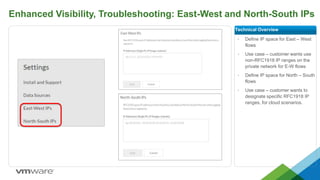
Enhanced Visibility, Troubleshooting: East-West and North-South IPs
• Define IP space for East – West
flows
• Use case – customer wants use
non-RFC1918 IP ranges on the
private network for E-W flows
• Define IP space for North – South
flows
• Use case – customer wants to
designate specific RFC1918 IP
ranges, for cloud scenarios.
Technical Overview
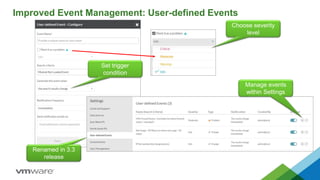
Improved Event Management: User-defined Events
Set trigger
condition
Manage events
within Settings
Choose severity
level
Renamed in 3.3
release
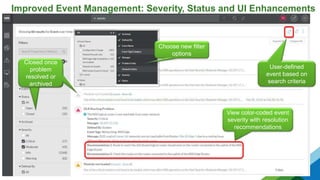
Improved Event Management: Severity, Status and UI Enhancements
New filter
options
View color-coded event
severity with resolution
recommendations
Choose new filter
options
Closed once
problem
resolved or
archived
User-defined
event based on
search criteria
Expanded Support & Integration: Enhanced Support for NSX Events
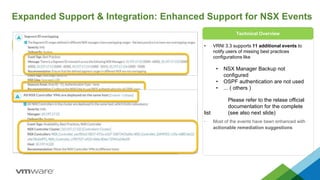
• VRNI 3.3 supports 11 additional events to
notify users of missing best practices
configurations like
• NSX Manager Backup not
configured
• OSPF authentication are not used
• ... ( others )
Please refer to the relase official
documentation for the complete
list (see also next slide)
• Most of the events have been enhanced with
actionable remediation suggestions
Technical Overview
www.vmware.com/go/vrni-hol
9
Try vRealize Network Insight

vRealize Network Insight 3.3

  • 1.
    © 2014 VMwareInc. All rights reserved. vRealize Network Insight 3.3
  • 2.
    vRealize Network Insight3.3 Intelligent Operations for the Virtual Network+Security Infrastructure • Supports 11 new NSX events such as backup not configured, OSPF area authentication not configured • Add user defined events for customized troubleshooting and add/filter-by severity and status of events for faster troubleshooting • Enhanced UI, more detailed description for events Enhanced Visibility, Troubleshooting & Control Expanded Support & Integration Improved Event Management, Alerting & Reporting • Enhancements to flow reporting and VM to VM path visibility for NAT implementations • Users can define “North-South” IPs (private IPs that need to be classified as Internet traffic) for customized, accurate visibility and analysis • More detailed micro-segmentation view of ”Physical”, “Internet” and “Other Virtual” segments for expanded visibility • NSX firewall implementation enhancements such as support for negation, direction, raw IP/port in/dest service and VNIC src/dst/applied to • Panorama 7.0-7.1 support and support for Palo Alto constructs such as paths, firewall, events • NSX 6.3 support
  • 3.
    Enhanced Visibility, Troubleshooting:Detailed Segments View • Group by additional elements • Physical • Other Virtual • Internet • Use case: Show where IPset created using physical IPs is added to a security group. Technical Overview
  • 4.
    Enhanced Visibility, Troubleshooting:Enhanced Support for NAT • Visual enhancements to NAT function display on the VM to VM path widget • Tooltip on each edge providing info about the NAT translation performed for the specified direction • Different colors representing each a specific NAT «segment» in a path (the path line color changes after each NAT operation) Technical Overview Purple Green Blue NAT NAT Tooltip
  • 5.
    Enhanced Visibility, Troubleshooting:East-West and North-South IPs • Define IP space for East – West flows • Use case – customer wants use non-RFC1918 IP ranges on the private network for E-W flows • Define IP space for North – South flows • Use case – customer wants to designate specific RFC1918 IP ranges, for cloud scenarios. Technical Overview
  • 6.
    Improved Event Management:User-defined Events Set trigger condition Manage events within Settings Choose severity level Renamed in 3.3 release
  • 7.
    Improved Event Management:Severity, Status and UI Enhancements New filter options View color-coded event severity with resolution recommendations Choose new filter options Closed once problem resolved or archived User-defined event based on search criteria
  • 8.
    Expanded Support &Integration: Enhanced Support for NSX Events • VRNI 3.3 supports 11 additional events to notify users of missing best practices configurations like • NSX Manager Backup not configured • OSPF authentication are not used • ... ( others ) Please refer to the relase official documentation for the complete list (see also next slide) • Most of the events have been enhanced with actionable remediation suggestions Technical Overview
  • 9.