VPN Access Runbook
Title Grant User VPN Access
Description User requests for VPN access from service
manager portal, after concerned parties
approve this request this runbbok is run to
give user access to VPN.
Status Not yet tested. (Should work just fine).
Needed rights to make changes in Active
Directory.
Runbook
1. Initialize Data
Part of Runbookcontrol IP,gets data fromservice portal form.Inthiscase the User ID.
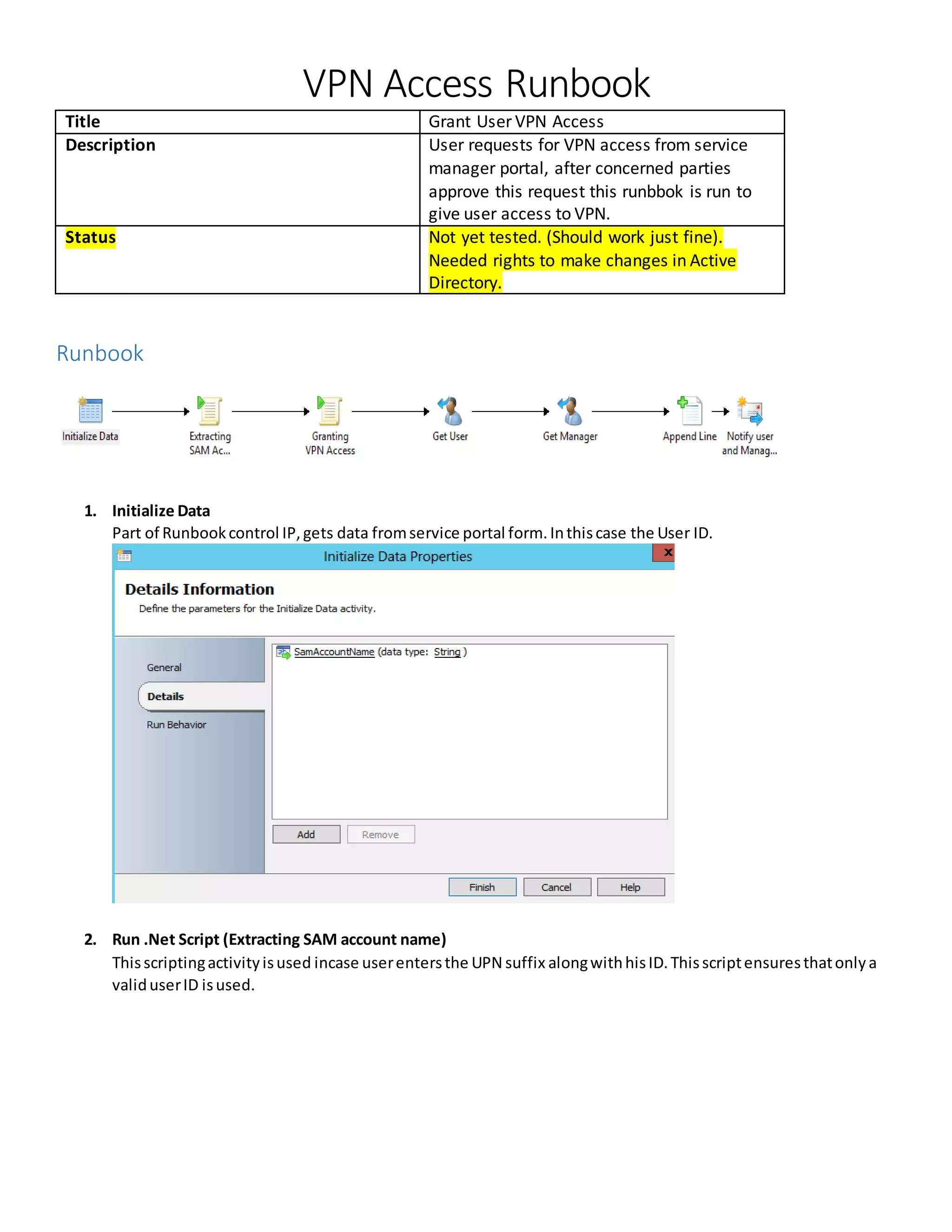
2. Run .Net Script (Extracting SAM account name)
Thisscriptingactivityisused incase userentersthe UPN suffix alongwithhisID.Thisscriptensuresthatonlya
validuserID isused.
AssemblyLink:C:WindowsMicrosoft.NETFrameworkv2.0.50727System.dll
Both namespace andassemblyare addedviathe “ADD”button.
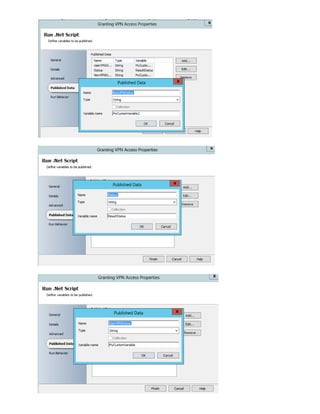
3. Run .Net Script (Grant VPNAccess)
Thisis the actual work,the scriptwhichgrants userVPN accessby makingthe msnpallowdialin property true.
Scriptis writteninPoweshell.
Code Snippet
# Set script parameters from runbook data bus and Orchestrator global variables
$DataBusInput1 = "`d.T.~Ed/{160D8A4D-B838-45E3-81B5-
D30C79069E7C}.SamAccountName`d.T.~Ed/"
$DataBusInput2 = "Test value 2"
#-----------------------------------------------------------------------
## Initialize result and trace variables
# $ResultStatus provides basic success/failed indicator
# $ErrorMessage captures any error text generated by script
# $Trace is used to record a running log of actions
$ResultStatus = ""
$ErrorMessage = ""
$Trace = (Get-Date).ToString() + "`t" + "Runbook activity script started" + " `r`n"
# Create argument array for passing data bus inputs to the external script session
$argsArray = @()
$argsArray += $DataBusInput1
$argsArray += $DataBusInput2
# Establish an external session (to localhost) to ensure 64bit PowerShell runtime
using the latest version of PowerShell installed on the runbook server
# Use this session to perform all work to ensure latest PowerShell features and
behavior available
$Session = New-PSSession -ComputerName localhost
# Invoke-Command used to start the script in the external session. Variables returned
by script are then stored in the $ReturnArray variable
$ReturnArray = Invoke-Command -Session $Session -Argumentlist $argsArray -ScriptBlock
{
# Define a parameter to accept each data bus input value. Recommend matching
names of parameters and data bus input variables above
Param(
[ValidateNotNullOrEmpty()]
[string]$DataBusInput1,
[ValidateNotNullOrEmpty()]
[string]$DataBusInput2
)
# Define function to add entry to trace log variable
function AppendLog ([string]$Message)
{
$script:CurrentAction = $Message
$script:TraceLog += ((Get-Date).ToString() + "`t" + $Message + " `r`n")
}
# Set external session trace and status variables to defaults
$ResultStatus = ""
$ErrorMessage = ""
$script:CurrentAction = ""
$script:TraceLog = ""
try
{
# Add startup details to trace log
AppendLog "Script now executing in external PowerShell version
[$($PSVersionTable.PSVersion.ToString())] session in a [$([IntPtr]::Size * 8)] bit
process"
AppendLog "Running as user
[$([Environment]::UserDomainName)$([Environment]::UserName)] on host
[$($env:COMPUTERNAME)]"
AppendLog "Parameter values received: DataBusInput1=[$DataBusInput1];
DataBusInput2=[$DataBusInput2]"
# The actual work the script does goes here
AppendLog "Doing first action"
#the actual code which does the work
Import-Module ActiveDirectory
$myCustomVariable=GET-ADUser $DataBusInput1 -Properties msnpallowdialin | select -
expand msnpallowdialin
Set-ADUser $DataBusInput1 -replace @{msnpallowdialin=$true}
$myCustomVariable2=GET-ADUser $DataBusInput1 -Properties msnpallowdialin | select -
expand msnpallowdialin
# Validate results and set return status
AppendLog "Finished work, determining result"
$EverythingWorked = $true
if($EverythingWorked -eq $true)
{
$ResultStatus = "Success"
}
else
{
$ResultStatus = "Failed"
}
}
catch
{
# Catch any errors thrown above here, setting the result status and recording
the error message to return to the activity for data bus publishing
$ResultStatus = "Failed"
$ErrorMessage = $error[0].Exception.Message
AppendLog "Exception caught during action [$script:CurrentAction]:
$ErrorMessage"
}
finally
{
# Always do whatever is in the finally block. In this case, adding some
additional detail about the outcome to the trace log for return
if($ErrorMessage.Length -gt 0)
{
AppendLog "Exiting external session with result [$ResultStatus] and error
message [$ErrorMessage]"
}
else
{
AppendLog "Exiting external session with result [$ResultStatus]"
}
}
# Return an array of the results. Additional variables like "myCustomVariable"
can be returned by adding them onto the array
$resultArray = @()
$resultArray += $ResultStatus
$resultArray += $ErrorMessage
$resultArray += $script:TraceLog
$resultArray += $myCustomVariable
$resultArray += $myCustomVariable2
return $resultArray
}#End Invoke-Command
# Get the values returned from script session for publishing to data bus
$ResultStatus = $ReturnArray[0]
$ErrorMessage = $ReturnArray[1]
$Trace += $ReturnArray[2]
$MyCustomVariable = $ReturnArray[3]
$MyCustomVariable2 = $ReturnArray[4]
# Record end of activity script process
$Trace += (Get-Date).ToString() + "`t" + "Script finished" + " `r`n"
# Close the external session
Remove-PSSession $Session
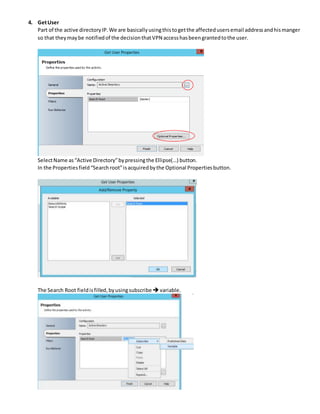
4. GetUser
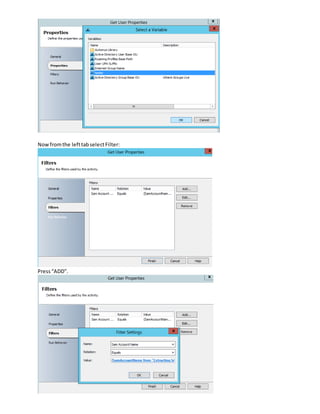
Part of the active directoryIP.We are basicallyusingthistogetthe affectedusersemail addressandhismanger
so that theymaybe notifiedof the decisionthatVPN accesshasbeengrantedtothe user.
SelectName as“Active Directory”bypressingthe Ellipse(…) button.
In the Propertiesfield“Searchroot”isacquiredbythe Optional Propertiesbutton.
The Search Root fieldisfilled,byusingsubscribe variable.
Nowfromthe lefttabselectFilter:
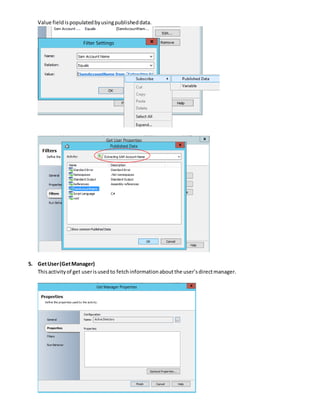
Press“ADD”.
Value fieldispopulatedbyusingpublisheddata.
5. GetUser(GetManager)
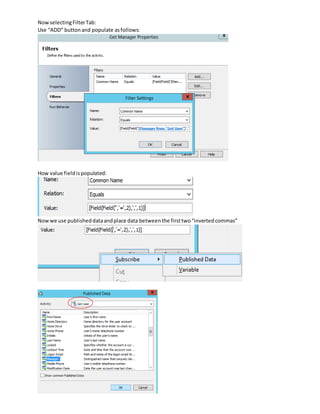
Thisactivityof get userisusedto fetchinformationaboutthe user’sdirectmanager.
NowselectingFilterTab:
Use “ADD” buttonand populate asfollows:
How value fieldispopulated:
Nowwe use publisheddataandplace data betweenthe firsttwo“invertedcommas”
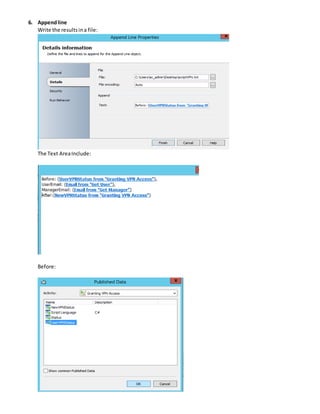
6. Appendline
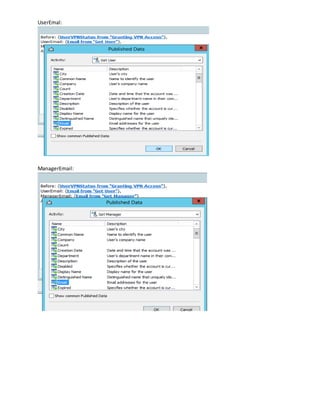
Write the resultsina file:
The Text AreaInclude:
Before:
UserEmal:
ManagerEmail:
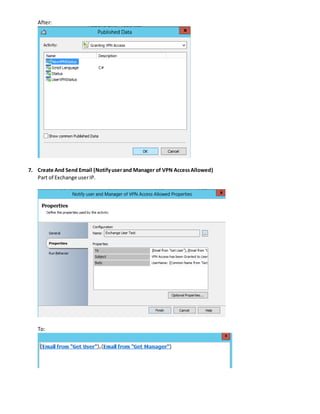
After:
7. Create And Send Email (Notifyuserand Manager of VPN AccessAllowed)
Part of Exchange userIP.
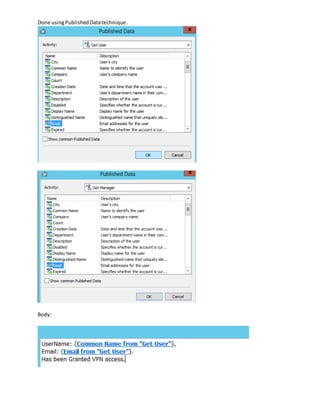
To:
Done usingPublishedDatatechnique.
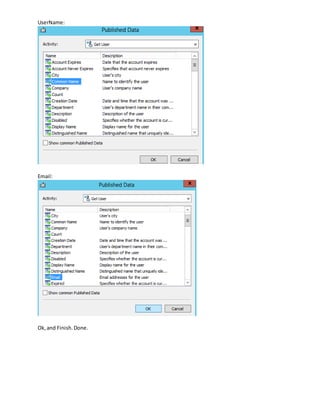
Body:
UserName:
Email:
Ok,and Finish.Done.

VPN Access Runbook

  • 1.
    VPN Access Runbook TitleGrant User VPN Access Description User requests for VPN access from service manager portal, after concerned parties approve this request this runbbok is run to give user access to VPN. Status Not yet tested. (Should work just fine). Needed rights to make changes in Active Directory. Runbook 1. Initialize Data Part of Runbookcontrol IP,gets data fromservice portal form.Inthiscase the User ID. 2. Run .Net Script (Extracting SAM account name) Thisscriptingactivityisused incase userentersthe UPN suffix alongwithhisID.Thisscriptensuresthatonlya validuserID isused.
  • 2.
  • 3.
    3. Run .NetScript (Grant VPNAccess) Thisis the actual work,the scriptwhichgrants userVPN accessby makingthe msnpallowdialin property true. Scriptis writteninPoweshell. Code Snippet # Set script parameters from runbook data bus and Orchestrator global variables $DataBusInput1 = "`d.T.~Ed/{160D8A4D-B838-45E3-81B5- D30C79069E7C}.SamAccountName`d.T.~Ed/" $DataBusInput2 = "Test value 2" #----------------------------------------------------------------------- ## Initialize result and trace variables # $ResultStatus provides basic success/failed indicator # $ErrorMessage captures any error text generated by script # $Trace is used to record a running log of actions $ResultStatus = "" $ErrorMessage = "" $Trace = (Get-Date).ToString() + "`t" + "Runbook activity script started" + " `r`n" # Create argument array for passing data bus inputs to the external script session $argsArray = @() $argsArray += $DataBusInput1 $argsArray += $DataBusInput2 # Establish an external session (to localhost) to ensure 64bit PowerShell runtime using the latest version of PowerShell installed on the runbook server # Use this session to perform all work to ensure latest PowerShell features and behavior available $Session = New-PSSession -ComputerName localhost # Invoke-Command used to start the script in the external session. Variables returned by script are then stored in the $ReturnArray variable $ReturnArray = Invoke-Command -Session $Session -Argumentlist $argsArray -ScriptBlock { # Define a parameter to accept each data bus input value. Recommend matching names of parameters and data bus input variables above Param( [ValidateNotNullOrEmpty()] [string]$DataBusInput1, [ValidateNotNullOrEmpty()] [string]$DataBusInput2 ) # Define function to add entry to trace log variable function AppendLog ([string]$Message) { $script:CurrentAction = $Message $script:TraceLog += ((Get-Date).ToString() + "`t" + $Message + " `r`n") }
  • 4.
    # Set externalsession trace and status variables to defaults $ResultStatus = "" $ErrorMessage = "" $script:CurrentAction = "" $script:TraceLog = "" try { # Add startup details to trace log AppendLog "Script now executing in external PowerShell version [$($PSVersionTable.PSVersion.ToString())] session in a [$([IntPtr]::Size * 8)] bit process" AppendLog "Running as user [$([Environment]::UserDomainName)$([Environment]::UserName)] on host [$($env:COMPUTERNAME)]" AppendLog "Parameter values received: DataBusInput1=[$DataBusInput1]; DataBusInput2=[$DataBusInput2]" # The actual work the script does goes here AppendLog "Doing first action" #the actual code which does the work Import-Module ActiveDirectory $myCustomVariable=GET-ADUser $DataBusInput1 -Properties msnpallowdialin | select - expand msnpallowdialin Set-ADUser $DataBusInput1 -replace @{msnpallowdialin=$true} $myCustomVariable2=GET-ADUser $DataBusInput1 -Properties msnpallowdialin | select - expand msnpallowdialin # Validate results and set return status AppendLog "Finished work, determining result" $EverythingWorked = $true if($EverythingWorked -eq $true) { $ResultStatus = "Success" } else { $ResultStatus = "Failed" } } catch { # Catch any errors thrown above here, setting the result status and recording the error message to return to the activity for data bus publishing $ResultStatus = "Failed" $ErrorMessage = $error[0].Exception.Message AppendLog "Exception caught during action [$script:CurrentAction]: $ErrorMessage" } finally { # Always do whatever is in the finally block. In this case, adding some additional detail about the outcome to the trace log for return if($ErrorMessage.Length -gt 0) {
  • 5.
    AppendLog "Exiting externalsession with result [$ResultStatus] and error message [$ErrorMessage]" } else { AppendLog "Exiting external session with result [$ResultStatus]" } } # Return an array of the results. Additional variables like "myCustomVariable" can be returned by adding them onto the array $resultArray = @() $resultArray += $ResultStatus $resultArray += $ErrorMessage $resultArray += $script:TraceLog $resultArray += $myCustomVariable $resultArray += $myCustomVariable2 return $resultArray }#End Invoke-Command # Get the values returned from script session for publishing to data bus $ResultStatus = $ReturnArray[0] $ErrorMessage = $ReturnArray[1] $Trace += $ReturnArray[2] $MyCustomVariable = $ReturnArray[3] $MyCustomVariable2 = $ReturnArray[4] # Record end of activity script process $Trace += (Get-Date).ToString() + "`t" + "Script finished" + " `r`n" # Close the external session Remove-PSSession $Session
  • 7.
    4. GetUser Part ofthe active directoryIP.We are basicallyusingthistogetthe affectedusersemail addressandhismanger so that theymaybe notifiedof the decisionthatVPN accesshasbeengrantedtothe user. SelectName as“Active Directory”bypressingthe Ellipse(…) button. In the Propertiesfield“Searchroot”isacquiredbythe Optional Propertiesbutton. The Search Root fieldisfilled,byusingsubscribe variable.
  • 8.
  • 9.
    Value fieldispopulatedbyusingpublisheddata. 5. GetUser(GetManager) Thisactivityofget userisusedto fetchinformationaboutthe user’sdirectmanager.
  • 10.
    NowselectingFilterTab: Use “ADD” buttonandpopulate asfollows: How value fieldispopulated: Nowwe use publisheddataandplace data betweenthe firsttwo“invertedcommas”
  • 11.
    6. Appendline Write theresultsina file: The Text AreaInclude: Before:
  • 12.
  • 13.
    After: 7. Create AndSend Email (Notifyuserand Manager of VPN AccessAllowed) Part of Exchange userIP. To:
  • 14.
  • 15.