Components Overview
VMware Horizon View 1
Topics covered
 What is Horizon view ?
 What are Horizon view components?
 How components work together?
 Basic Overview of View Components.
VMware Horizon View 2
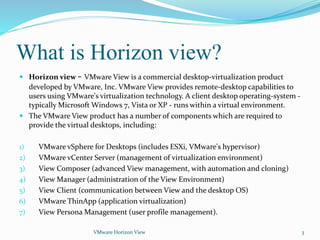
What is Horizon view?
 Horizon view - VMware View is a commercial desktop-virtualization product
developed by VMware, Inc. VMware View provides remote-desktop capabilities to
users using VMware's virtualization technology. A client desktop operating-system -
typically Microsoft Windows 7, Vista or XP - runs within a virtual environment.
 The VMware View product has a number of components which are required to
provide the virtual desktops, including:
1) VMware vSphere for Desktops (includes ESXi, VMware's hypervisor)
2) VMware vCenter Server (management of virtualization environment)
3) View Composer (advanced View management, with automation and cloning)
4) View Manager (administration of the View Environment)
5) View Client (communication between View and the desktop OS)
6) VMware ThinApp (application virtualization)
7) View Persona Management (user profile management).
VMware Horizon View 3
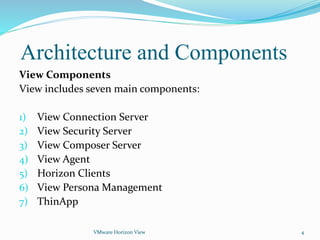
Architecture and Components
View Components
View includes seven main components:
1) View Connection Server
2) View Security Server
3) View Composer Server
4) View Agent
5) Horizon Clients
6) View Persona Management
7) ThinApp
VMware Horizon View 4
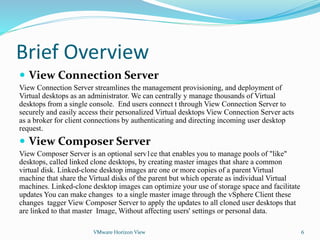
Visio Diagram of View Vermilion
VMware Horizon View 5
Platform
VMware vSphere
For Desktops
Management
VMware View Manager,
VMware View Composer,
VMware ThinApp
User Experience
PCoIP, Print,
Multi-Monitor Display,
Multimedia,
USB Redirection,
Local Mode
Centralized Virtual
Desktops
Thin Client
Desktop
Local
Mode
Vmware
Replica
server VM
Vmware
Connection
Server VM
172.19.2.142
Vmware
vCenter
Server VM
172.19.2.141
.vcenter Master
(VCDB) vCenter database
(VUM)Update Manager
database
(VIEWEVENTS)View event
database
(VIEW) View database
Active Directory
(Lakelandc.ab.ca)
Active
directory
users Groups
(Entitled)
Active
directory
users Groups
Brief Overview
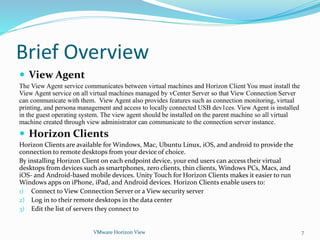
 View Connection Server
View Connection Server streamlines the management provisioning, and deployment of
Virtual desktops as an administrator. We can centrally y manage thousands of Virtual
desktops from a single console. End users connect t through View Connection Server to
securely and easily access their personalized Virtual desktops View Connection Server acts
as a broker for client connections by authenticating and directing incoming user desktop
request.
 View Composer Server
View Composer Server is an optional serv1ce that enables you to manage pools of "like"
desktops, called linked clone desktops, by creating master images that share a common
virtual disk. Linked-clone desktop images are one or more copies of a parent Virtual
machine that share the Virtual disks of the parent but which operate as individual Virtual
machines. Linked-clone desktop images can optimize your use of storage space and facilitate
updates You can make changes to a single master image through the vSphere Client these
changes tagger View Composer Server to apply the updates to all cloned user desktops that
are linked to that master Image, Without affecting users' settings or personal data.
VMware Horizon View 6
Brief Overview
 View Agent
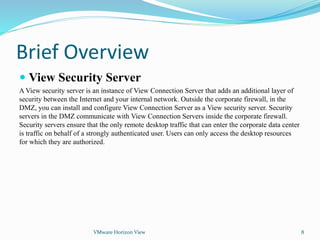
The View Agent service communicates between virtual machines and Horizon Client You must install the
View Agent service on all virtual machines managed by vCenter Server so that View Connection Server
can communicate with them. View Agent also provides features such as connection monitoring, virtual
printing, and persona management and access to locally connected USB dev1ces. View Agent is installed
in the guest operating system. The view agent should be installed on the parent machine so all virtual
machine created through view administrator can communicate to the connection server instance.
 Horizon Clients
Horizon Clients are available for Windows, Mac, Ubuntu Linux, iOS, and android to provide the
connection to remote desktops from your device of choice.
By installing Horizon Client on each endpoint device, your end users can access their virtual
desktops from devices such as smartphones, zero clients, thin clients, Windows PCs, Macs, and
iOS- and Android-based mobile devices. Unity Touch for Horizon Clients makes it easier to run
Windows apps on iPhone, iPad, and Android devices. Horizon Clients enable users to:
1) Connect to View Connection Server or a View security server
2) Log in to their remote desktops in the data center
3) Edit the list of servers they connect to
VMware Horizon View 7
Brief Overview
 View Security Server
A View security server is an instance of View Connection Server that adds an additional layer of
security between the Internet and your internal network. Outside the corporate firewall, in the
DMZ, you can install and configure View Connection Server as a View security server. Security
servers in the DMZ communicate with View Connection Servers inside the corporate firewall.
Security servers ensure that the only remote desktop traffic that can enter the corporate data center
is traffic on behalf of a strongly authenticated user. Users can only access the desktop resources
for which they are authorized.
VMware Horizon View 8
View Linked Clone Desktops
Provisioning and Customization
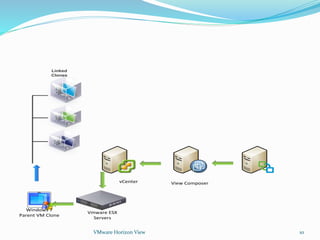
 The first phase is provisioning. View Manager initiates the creation of a linked clone
by making a call to the View Composer service to create the linked clone. The View
Composer service makes a call to vCenter Server, which sends a request to an ESX
server to create the linked clone.
 The second phase is customization. Each linked clone is given a unique identity in
the domain before a user can log in to the virtual machine. View has support for the
Microsoft Sysprep customization method. An administrator can use either
QuickPrep or Sysprep customization when creating a linked-clone pool.
VMware Horizon View 9
VMware Horizon View 10
Linked
Clones
Windows 7
Parent VM Clone
View ComposervCenter
Vmware ESX
Servers
View Linked Clone Desktops
Provisioning
These steps describe the operations by which linked clones are created and provisioned:
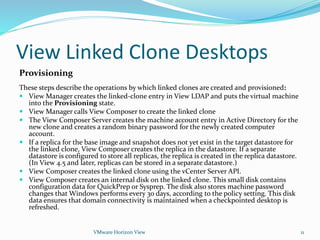
 View Manager creates the linked-clone entry in View LDAP and puts the virtual machine
into the Provisioning state.
 View Manager calls View Composer to create the linked clone
 The View Composer Server creates the machine account entry in Active Directory for the
new clone and creates a random binary password for the newly created computer
account.
 If a replica for the base image and snapshot does not yet exist in the target datastore for
the linked clone, View Composer creates the replica in the datastore. If a separate
datastore is configured to store all replicas, the replica is created in the replica datastore.
(In View 4.5 and later, replicas can be stored in a separate datastore.)
 View Composer creates the linked clone using the vCenter Server API.
 View Composer creates an internal disk on the linked clone. This small disk contains
configuration data for QuickPrep or Sysprep. The disk also stores machine password
changes that Windows performs every 30 days, according to the policy setting. This disk
data ensures that domain connectivity is maintained when a checkpointed desktop is
refreshed.
VMware Horizon View 11
View Linked Clone Desktops
Customization
These steps describe the operations by which linked clones are created and customized:
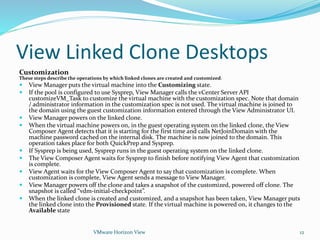
 View Manager puts the virtual machine into the Customizing state.
 If the pool is configured to use Sysprep, View Manager calls the vCenter Server API
customizeVM_Task to customize the virtual machine with the customization spec. Note that domain
/ administrator information in the customization spec is not used. The virtual machine is joined to
the domain using the guest customization information entered through the View Administrator UI.
 View Manager powers on the linked clone.
 When the virtual machine powers on, in the guest operating system on the linked clone, the View
Composer Agent detects that it is starting for the first time and calls NetJoinDomain with the
machine password cached on the internal disk. The machine is now joined to the domain. This
operation takes place for both QuickPrep and Sysprep.
 If Sysprep is being used, Sysprep runs in the guest operating system on the linked clone.
 The View Composer Agent waits for Sysprep to finish before notifying View Agent that customization
is complete.
 View Agent waits for the View Composer Agent to say that customization is complete. When
customization is complete, View Agent sends a message to View Manager.
 View Manager powers off the clone and takes a snapshot of the customized, powered off clone. The
snapshot is called “vdm-initial-checkpoint”.
 When the linked clone is created and customized, and a snapshot has been taken, View Manager puts
the linked clone into the Provisioned state. If the virtual machine is powered on, it changes to the
Available state
VMware Horizon View 12

Vmware view overview

  • 1.
  • 2.
    Topics covered  Whatis Horizon view ?  What are Horizon view components?  How components work together?  Basic Overview of View Components. VMware Horizon View 2
  • 3.
    What is Horizonview?  Horizon view - VMware View is a commercial desktop-virtualization product developed by VMware, Inc. VMware View provides remote-desktop capabilities to users using VMware's virtualization technology. A client desktop operating-system - typically Microsoft Windows 7, Vista or XP - runs within a virtual environment.  The VMware View product has a number of components which are required to provide the virtual desktops, including: 1) VMware vSphere for Desktops (includes ESXi, VMware's hypervisor) 2) VMware vCenter Server (management of virtualization environment) 3) View Composer (advanced View management, with automation and cloning) 4) View Manager (administration of the View Environment) 5) View Client (communication between View and the desktop OS) 6) VMware ThinApp (application virtualization) 7) View Persona Management (user profile management). VMware Horizon View 3
  • 4.
    Architecture and Components ViewComponents View includes seven main components: 1) View Connection Server 2) View Security Server 3) View Composer Server 4) View Agent 5) Horizon Clients 6) View Persona Management 7) ThinApp VMware Horizon View 4
  • 5.
    Visio Diagram ofView Vermilion VMware Horizon View 5 Platform VMware vSphere For Desktops Management VMware View Manager, VMware View Composer, VMware ThinApp User Experience PCoIP, Print, Multi-Monitor Display, Multimedia, USB Redirection, Local Mode Centralized Virtual Desktops Thin Client Desktop Local Mode Vmware Replica server VM Vmware Connection Server VM 172.19.2.142 Vmware vCenter Server VM 172.19.2.141 .vcenter Master (VCDB) vCenter database (VUM)Update Manager database (VIEWEVENTS)View event database (VIEW) View database Active Directory (Lakelandc.ab.ca) Active directory users Groups (Entitled) Active directory users Groups
  • 6.
    Brief Overview  ViewConnection Server View Connection Server streamlines the management provisioning, and deployment of Virtual desktops as an administrator. We can centrally y manage thousands of Virtual desktops from a single console. End users connect t through View Connection Server to securely and easily access their personalized Virtual desktops View Connection Server acts as a broker for client connections by authenticating and directing incoming user desktop request.  View Composer Server View Composer Server is an optional serv1ce that enables you to manage pools of "like" desktops, called linked clone desktops, by creating master images that share a common virtual disk. Linked-clone desktop images are one or more copies of a parent Virtual machine that share the Virtual disks of the parent but which operate as individual Virtual machines. Linked-clone desktop images can optimize your use of storage space and facilitate updates You can make changes to a single master image through the vSphere Client these changes tagger View Composer Server to apply the updates to all cloned user desktops that are linked to that master Image, Without affecting users' settings or personal data. VMware Horizon View 6
  • 7.
    Brief Overview  ViewAgent The View Agent service communicates between virtual machines and Horizon Client You must install the View Agent service on all virtual machines managed by vCenter Server so that View Connection Server can communicate with them. View Agent also provides features such as connection monitoring, virtual printing, and persona management and access to locally connected USB dev1ces. View Agent is installed in the guest operating system. The view agent should be installed on the parent machine so all virtual machine created through view administrator can communicate to the connection server instance.  Horizon Clients Horizon Clients are available for Windows, Mac, Ubuntu Linux, iOS, and android to provide the connection to remote desktops from your device of choice. By installing Horizon Client on each endpoint device, your end users can access their virtual desktops from devices such as smartphones, zero clients, thin clients, Windows PCs, Macs, and iOS- and Android-based mobile devices. Unity Touch for Horizon Clients makes it easier to run Windows apps on iPhone, iPad, and Android devices. Horizon Clients enable users to: 1) Connect to View Connection Server or a View security server 2) Log in to their remote desktops in the data center 3) Edit the list of servers they connect to VMware Horizon View 7
  • 8.
    Brief Overview  ViewSecurity Server A View security server is an instance of View Connection Server that adds an additional layer of security between the Internet and your internal network. Outside the corporate firewall, in the DMZ, you can install and configure View Connection Server as a View security server. Security servers in the DMZ communicate with View Connection Servers inside the corporate firewall. Security servers ensure that the only remote desktop traffic that can enter the corporate data center is traffic on behalf of a strongly authenticated user. Users can only access the desktop resources for which they are authorized. VMware Horizon View 8
  • 9.
    View Linked CloneDesktops Provisioning and Customization  The first phase is provisioning. View Manager initiates the creation of a linked clone by making a call to the View Composer service to create the linked clone. The View Composer service makes a call to vCenter Server, which sends a request to an ESX server to create the linked clone.  The second phase is customization. Each linked clone is given a unique identity in the domain before a user can log in to the virtual machine. View has support for the Microsoft Sysprep customization method. An administrator can use either QuickPrep or Sysprep customization when creating a linked-clone pool. VMware Horizon View 9
  • 10.
    VMware Horizon View10 Linked Clones Windows 7 Parent VM Clone View ComposervCenter Vmware ESX Servers
  • 11.
    View Linked CloneDesktops Provisioning These steps describe the operations by which linked clones are created and provisioned:  View Manager creates the linked-clone entry in View LDAP and puts the virtual machine into the Provisioning state.  View Manager calls View Composer to create the linked clone  The View Composer Server creates the machine account entry in Active Directory for the new clone and creates a random binary password for the newly created computer account.  If a replica for the base image and snapshot does not yet exist in the target datastore for the linked clone, View Composer creates the replica in the datastore. If a separate datastore is configured to store all replicas, the replica is created in the replica datastore. (In View 4.5 and later, replicas can be stored in a separate datastore.)  View Composer creates the linked clone using the vCenter Server API.  View Composer creates an internal disk on the linked clone. This small disk contains configuration data for QuickPrep or Sysprep. The disk also stores machine password changes that Windows performs every 30 days, according to the policy setting. This disk data ensures that domain connectivity is maintained when a checkpointed desktop is refreshed. VMware Horizon View 11
  • 12.
    View Linked CloneDesktops Customization These steps describe the operations by which linked clones are created and customized:  View Manager puts the virtual machine into the Customizing state.  If the pool is configured to use Sysprep, View Manager calls the vCenter Server API customizeVM_Task to customize the virtual machine with the customization spec. Note that domain / administrator information in the customization spec is not used. The virtual machine is joined to the domain using the guest customization information entered through the View Administrator UI.  View Manager powers on the linked clone.  When the virtual machine powers on, in the guest operating system on the linked clone, the View Composer Agent detects that it is starting for the first time and calls NetJoinDomain with the machine password cached on the internal disk. The machine is now joined to the domain. This operation takes place for both QuickPrep and Sysprep.  If Sysprep is being used, Sysprep runs in the guest operating system on the linked clone.  The View Composer Agent waits for Sysprep to finish before notifying View Agent that customization is complete.  View Agent waits for the View Composer Agent to say that customization is complete. When customization is complete, View Agent sends a message to View Manager.  View Manager powers off the clone and takes a snapshot of the customized, powered off clone. The snapshot is called “vdm-initial-checkpoint”.  When the linked clone is created and customized, and a snapshot has been taken, View Manager puts the linked clone into the Provisioned state. If the virtual machine is powered on, it changes to the Available state VMware Horizon View 12