VMware NSX and Arista VTEP L2 Gateway Integration
2
Who am I?
| | ex- PSO | ex-
vExpert 2014 | 2016 | 2017
VCIX6-DCV | VCIX6-NV | Working on VCDX6-NV
nz.linkedin.com/in/bayupw
@bayupw
http://bayupw.blogspot.com/
http://www.vmug.com/nsx
@bayupw | NSX, vNetwork, vCD, vCNS
VMTN User Moderator
https://communities.vmware.com/community/vmtn/nsx
Bayu Wibowo
3
Agenda
1. NSX Quick Overview, NSX VXLAN to VLAN Bridging
2. Hardware VTEP Architecture & Configuration
Does not cover:
1. NSX for vSphere 101
2. VXLAN 101
3. NSX for Multi-Hypervisor or NSX-Transformers
4
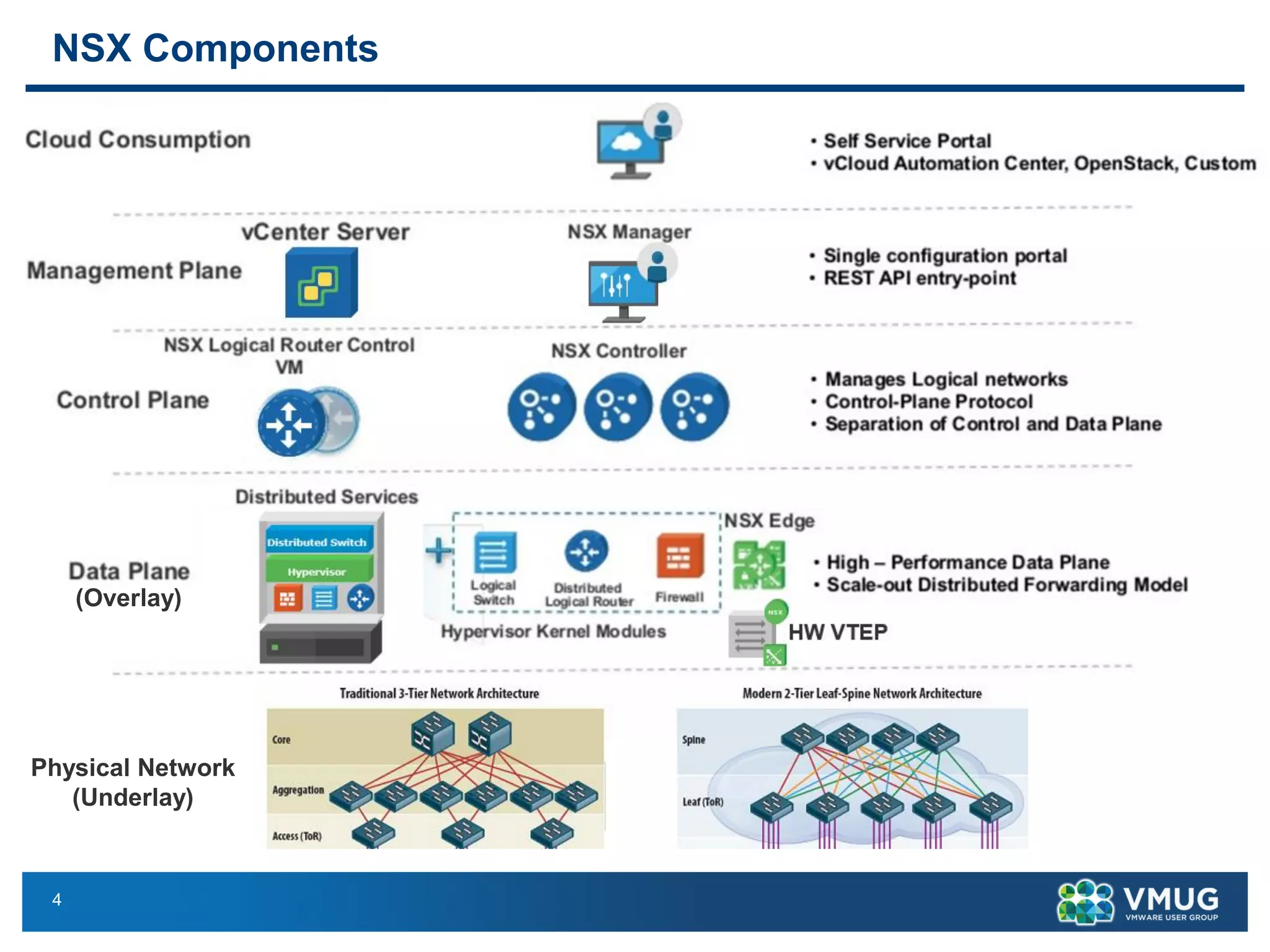
NSX Components
Physical Network
(Underlay)
(Overlay)
5
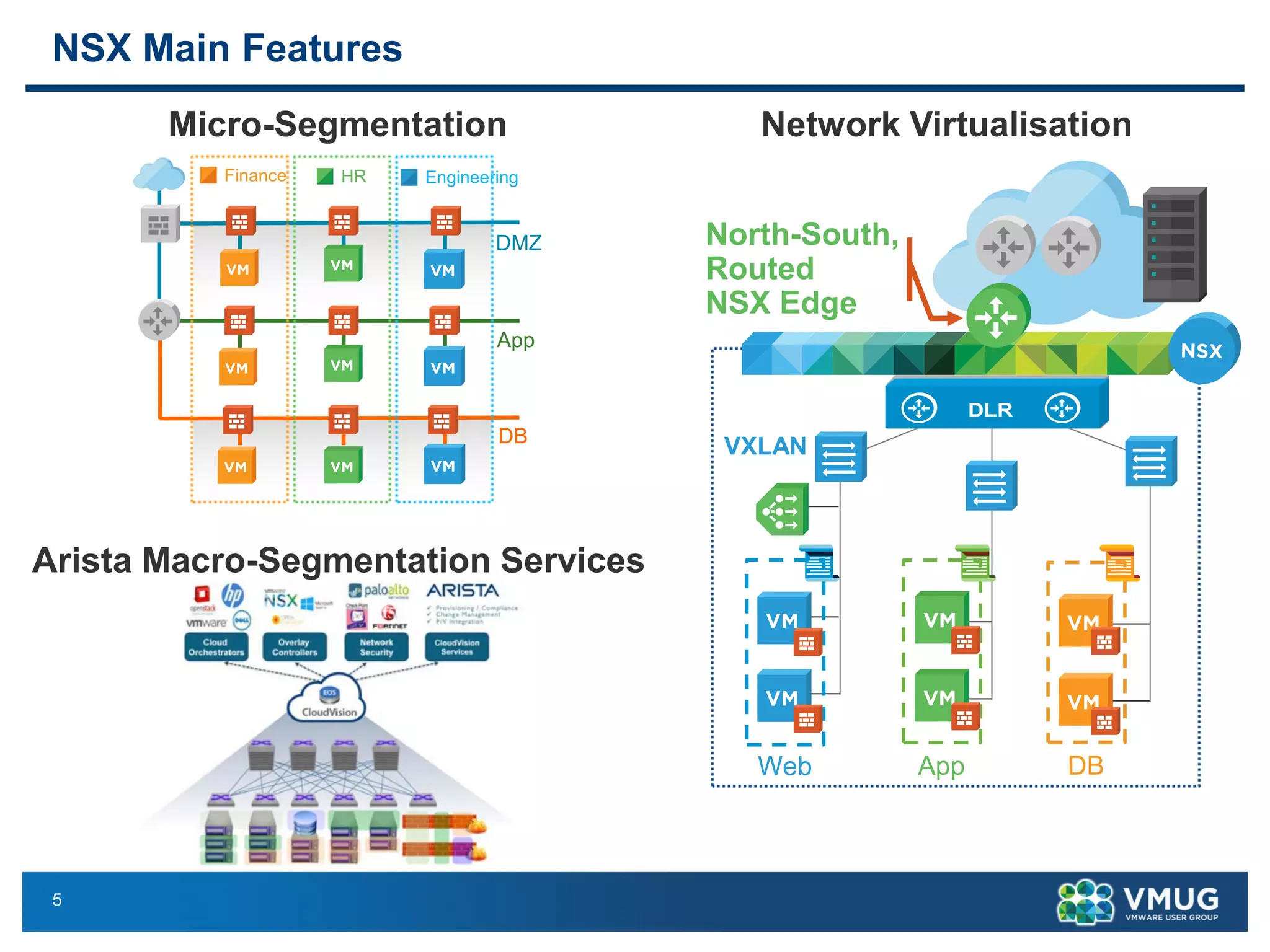
NSX Main Features
App
DMZ
DB
Finance EngineeringHR
Micro-Segmentation Network Virtualisation
Web App DB
North-South,
Routed
NSX Edge
VXLAN
DLR
Arista Macro-Segmentation Services
6
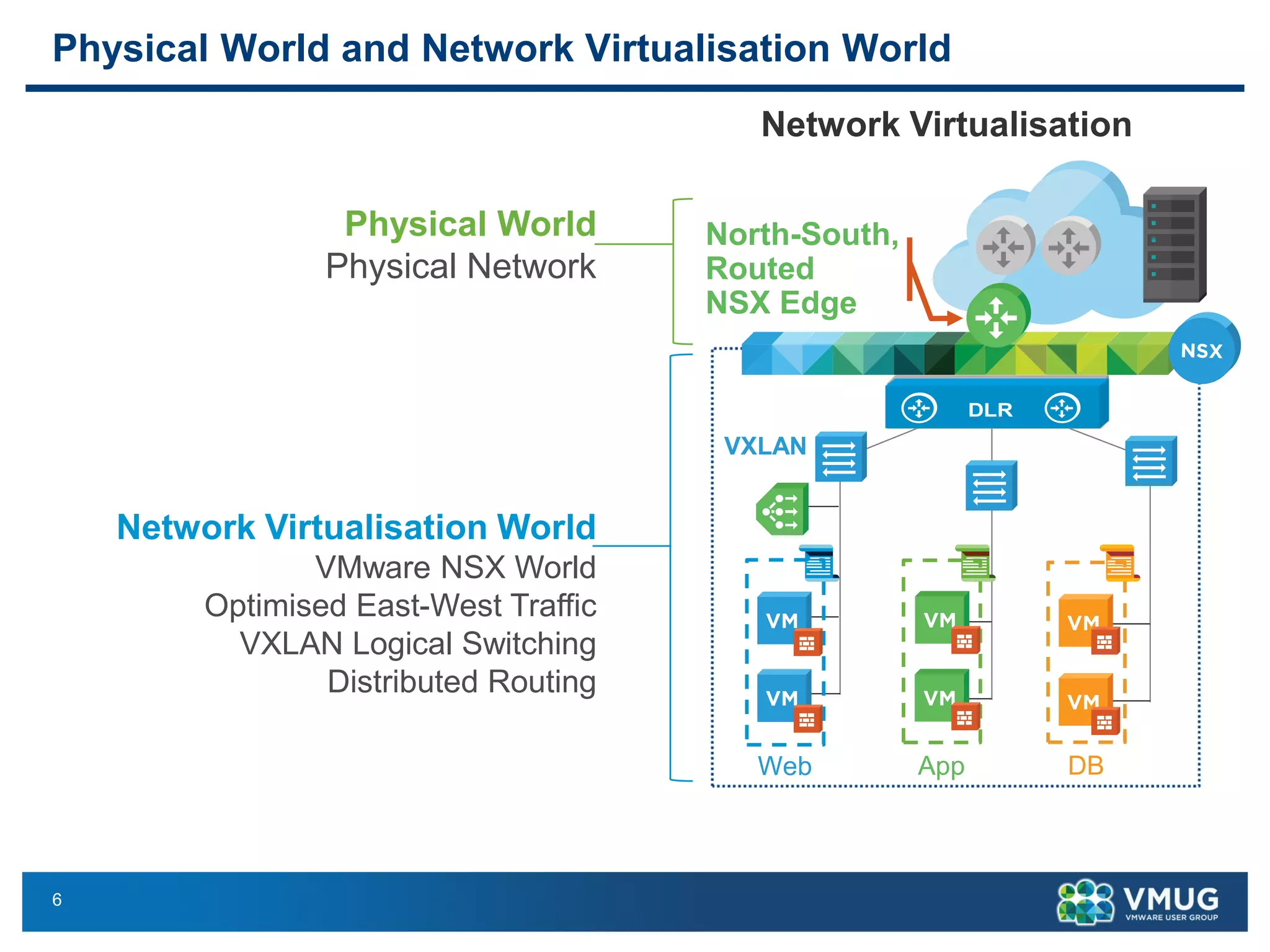
Physical World and Network Virtualisation World
Network Virtualisation
Web App DB
North-South,
Routed
NSX Edge
VXLAN
DLR
Physical World
Physical Network
Network Virtualisation World
VMware NSX World
Optimised East-West Traffic
VXLAN Logical Switching
Distributed Routing
7
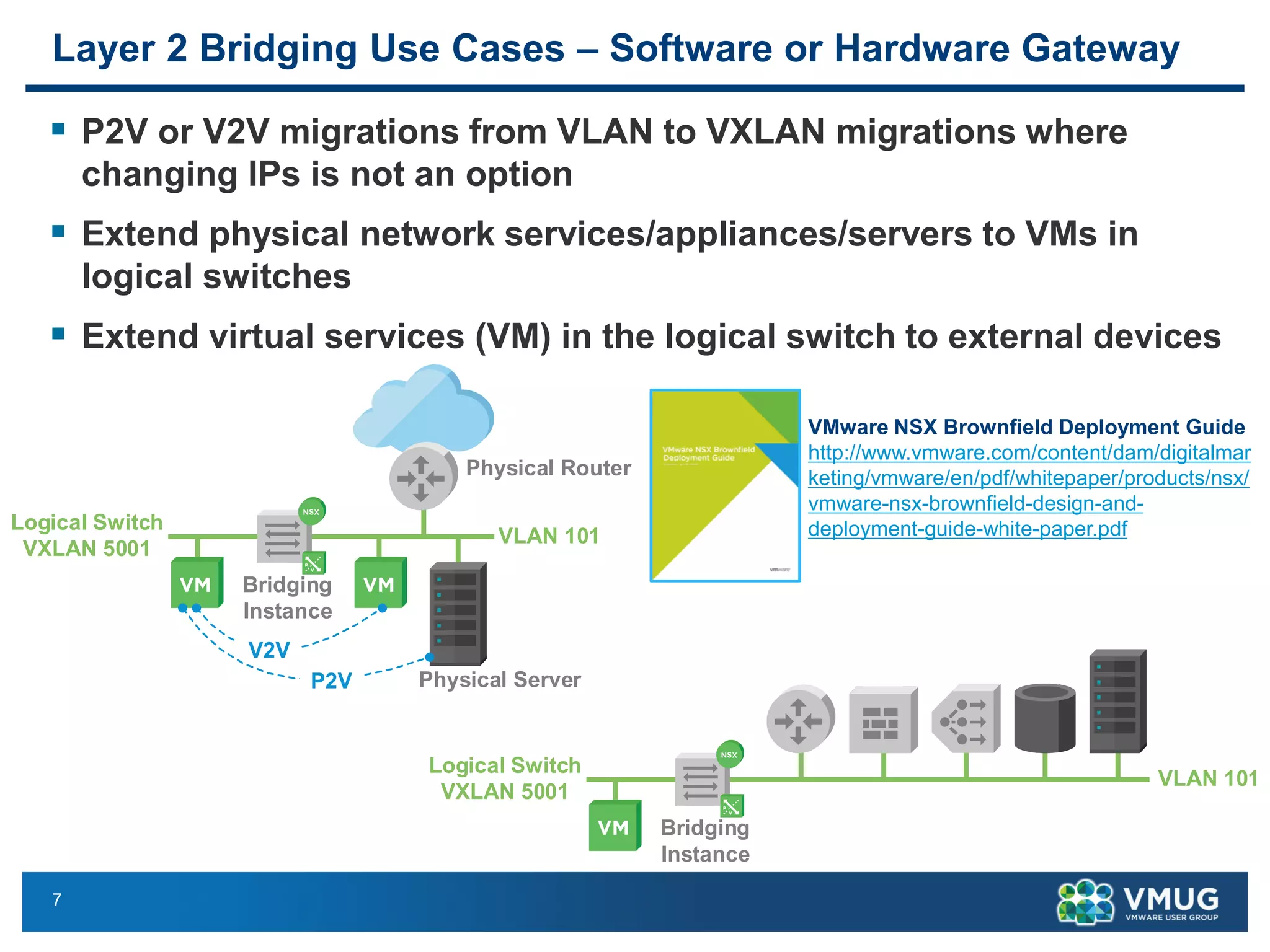
Layer 2 Bridging Use Cases – Software or Hardware Gateway
▪ P2V or V2V migrations from VLAN to VXLAN migrations where
changing IPs is not an option
▪ Extend physical network services/appliances/servers to VMs in
logical switches
▪ Extend virtual services (VM) in the logical switch to external devices
VMware NSX Brownfield Deployment Guide
http://www.vmware.com/content/dam/digitalmar
keting/vmware/en/pdf/whitepaper/products/nsx/
vmware-nsx-brownfield-design-and-
deployment-guide-white-paper.pdf
Bridging
Instance
Logical Switch
VXLAN 5001
VLAN 101
Physical Router
Physical Server
V2V
P2V
Bridging
Instance
Logical Switch
VXLAN 5001
VLAN 101
8
NSX 6.2 Software Layer 2 Bridging Enhancements
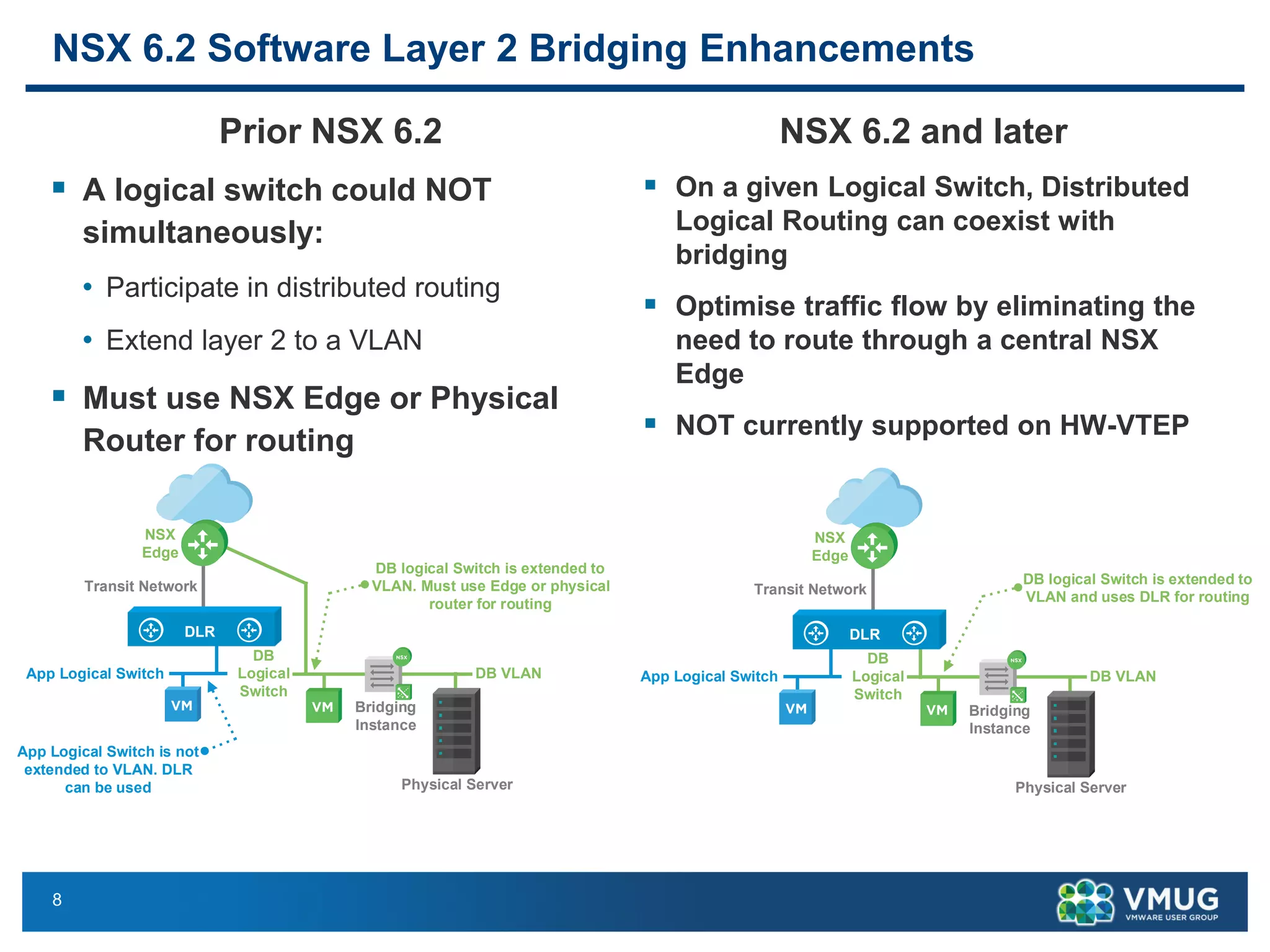
Prior NSX 6.2
▪ A logical switch could NOT
simultaneously:
• Participate in distributed routing
• Extend layer 2 to a VLAN
▪ Must use NSX Edge or Physical
Router for routing
NSX 6.2 and later
▪ On a given Logical Switch, Distributed
Logical Routing can coexist with
bridging
▪ Optimise traffic flow by eliminating the
need to route through a central NSX
Edge
▪ NOT currently supported on HW-VTEP
DLR
NSX
Edge
DB VLAN
DB
Logical
Switch
App Logical Switch
Transit Network
DB logical Switch is extended to
VLAN and uses DLR for routing
Bridging
Instance
Physical Server
DLR
NSX
Edge
DB VLAN
DB
Logical
Switch
App Logical Switch
Transit Network
App Logical Switch is not
extended to VLAN. DLR
can be used
DB logical Switch is extended to
VLAN. Must use Edge or physical
router for routing
Bridging
Instance
Physical Server
9
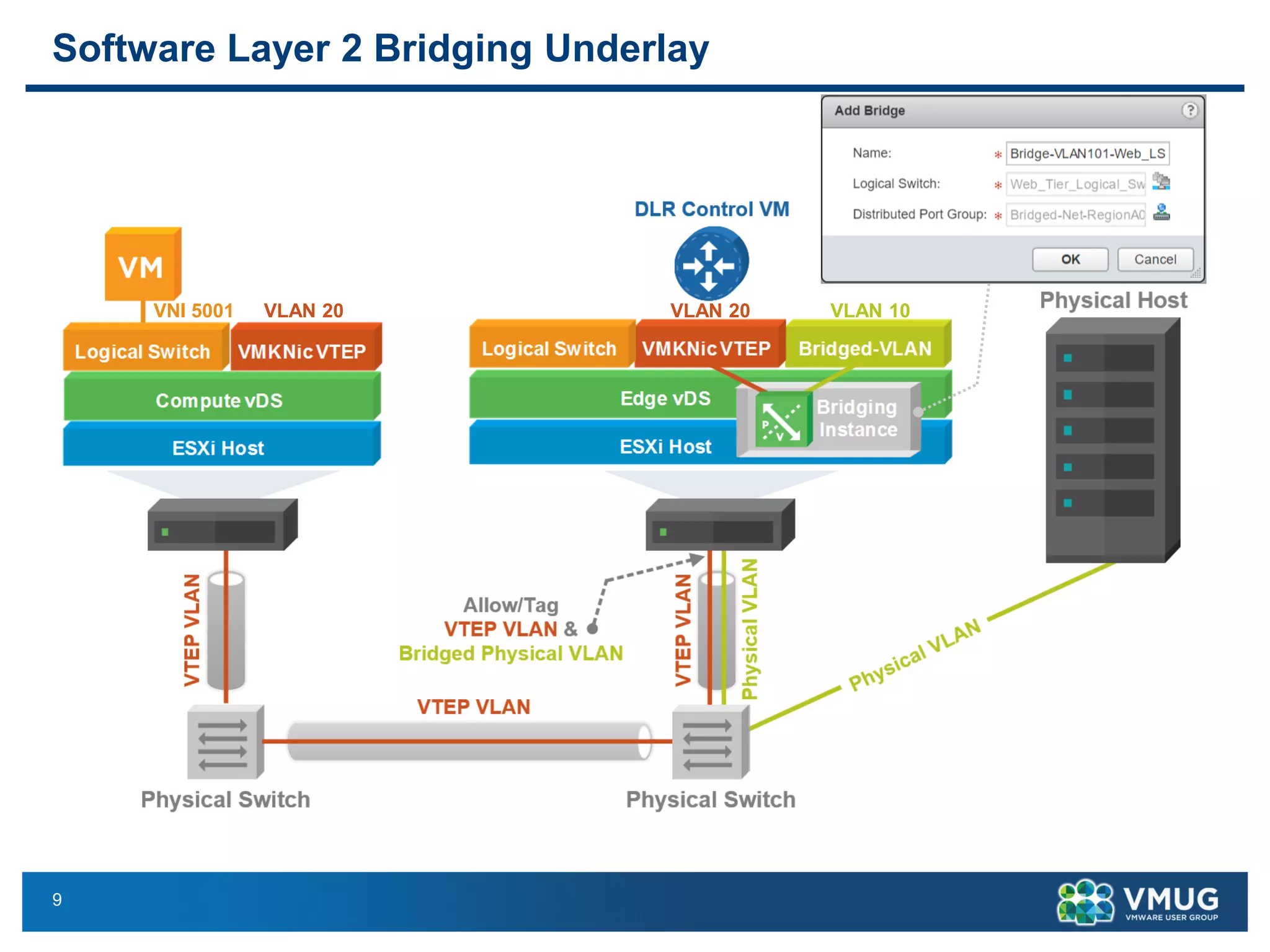
Software Layer 2 Bridging Underlay
VLAN 20 VLAN 20 VLAN 10VNI 5001
10
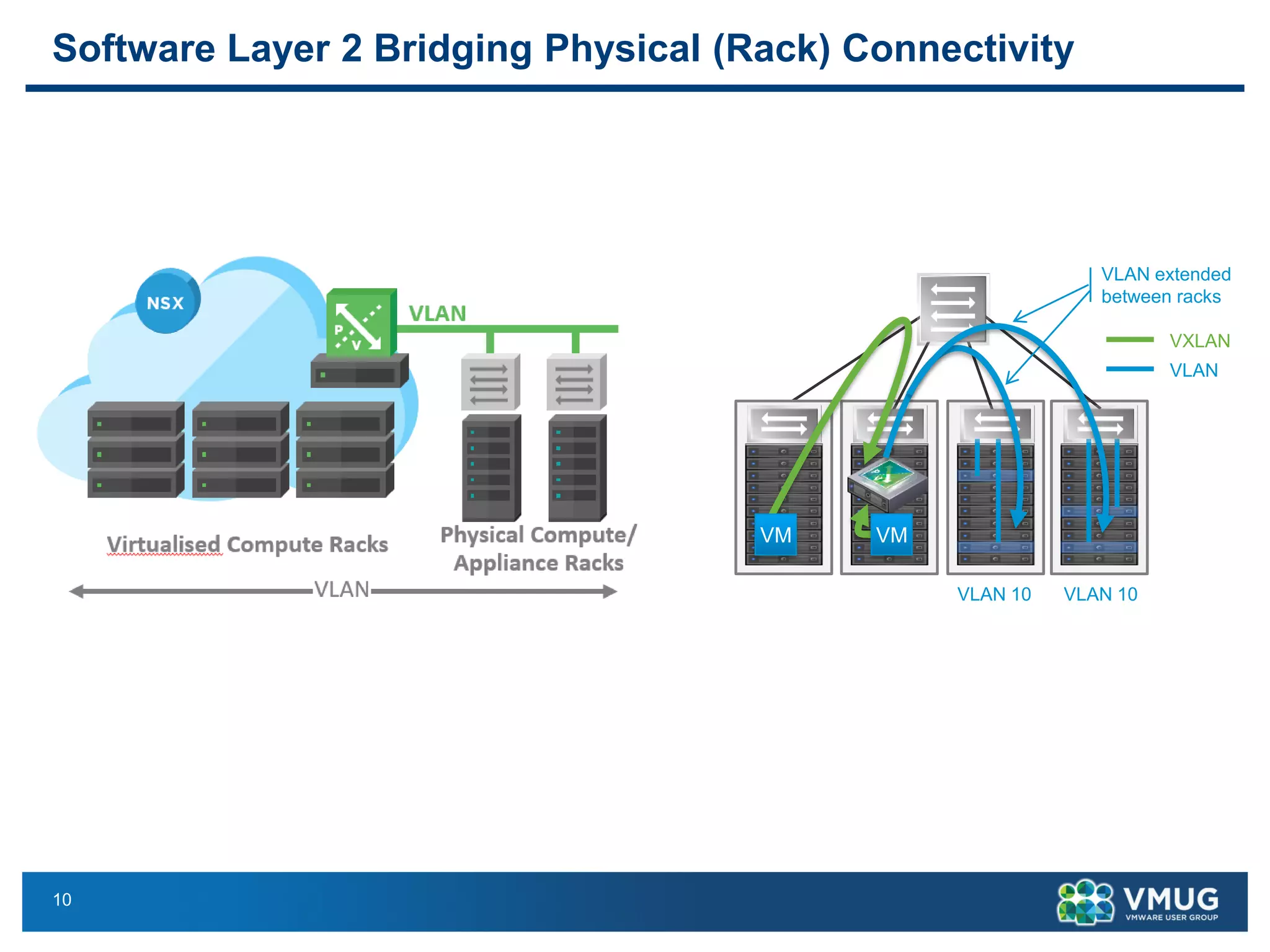
Software Layer 2 Bridging Physical (Rack) Connectivity
VLAN extended
between racks
VM VM
VLAN 10 VLAN 10
VXLAN
VLAN
11
Hardware VTEP Gateway
Hardware based Layer 2 Bridging
12
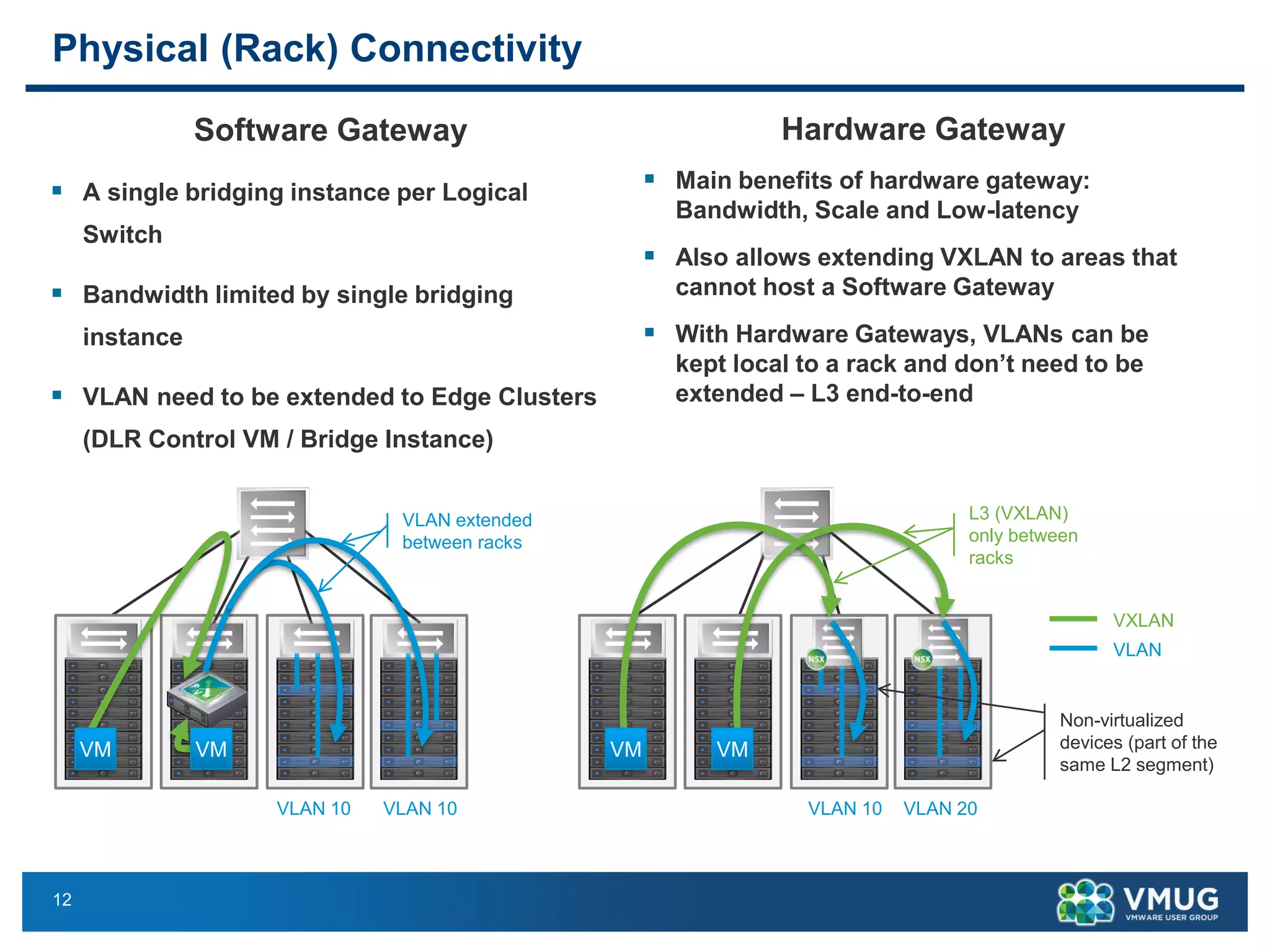
Physical (Rack) Connectivity
Software Gateway
▪ A single bridging instance per Logical
Switch
▪ Bandwidth limited by single bridging
instance
▪ VLAN need to be extended to Edge Clusters
(DLR Control VM / Bridge Instance)
Hardware Gateway
▪ Main benefits of hardware gateway:
Bandwidth, Scale and Low-latency
▪ Also allows extending VXLAN to areas that
cannot host a Software Gateway
▪ With Hardware Gateways, VLANs can be
kept local to a rack and don’t need to be
extended – L3 end-to-end
VXLAN
VLAN
Non-virtualized
devices (part of the
same L2 segment)
L3 (VXLAN)
only between
racks
VLAN 10 VLAN 20
VM VM
VLAN extended
between racks
VM VM
VLAN 10 VLAN 10
13
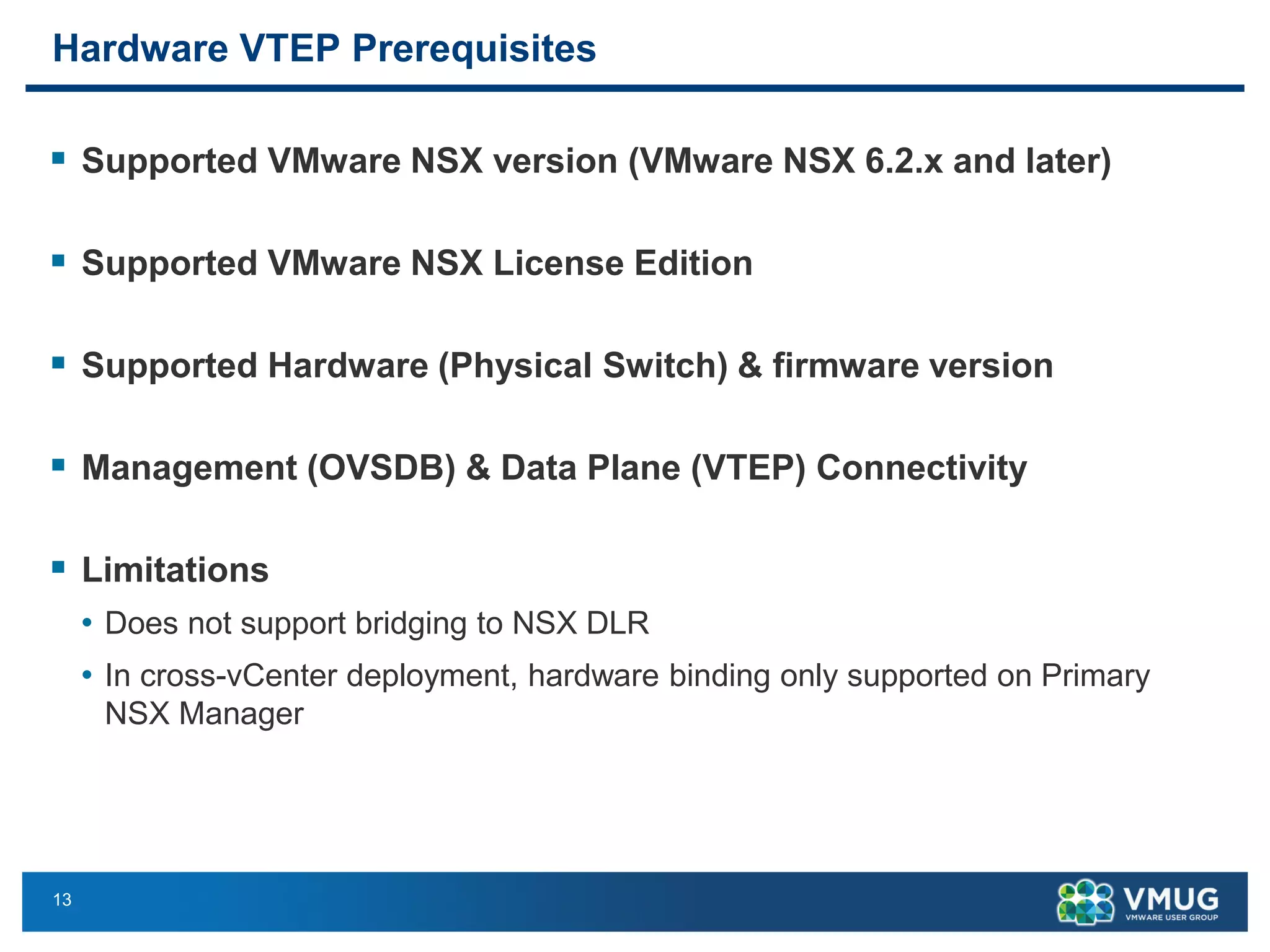
Hardware VTEP Prerequisites
▪ Supported VMware NSX version (VMware NSX 6.2.x and later)
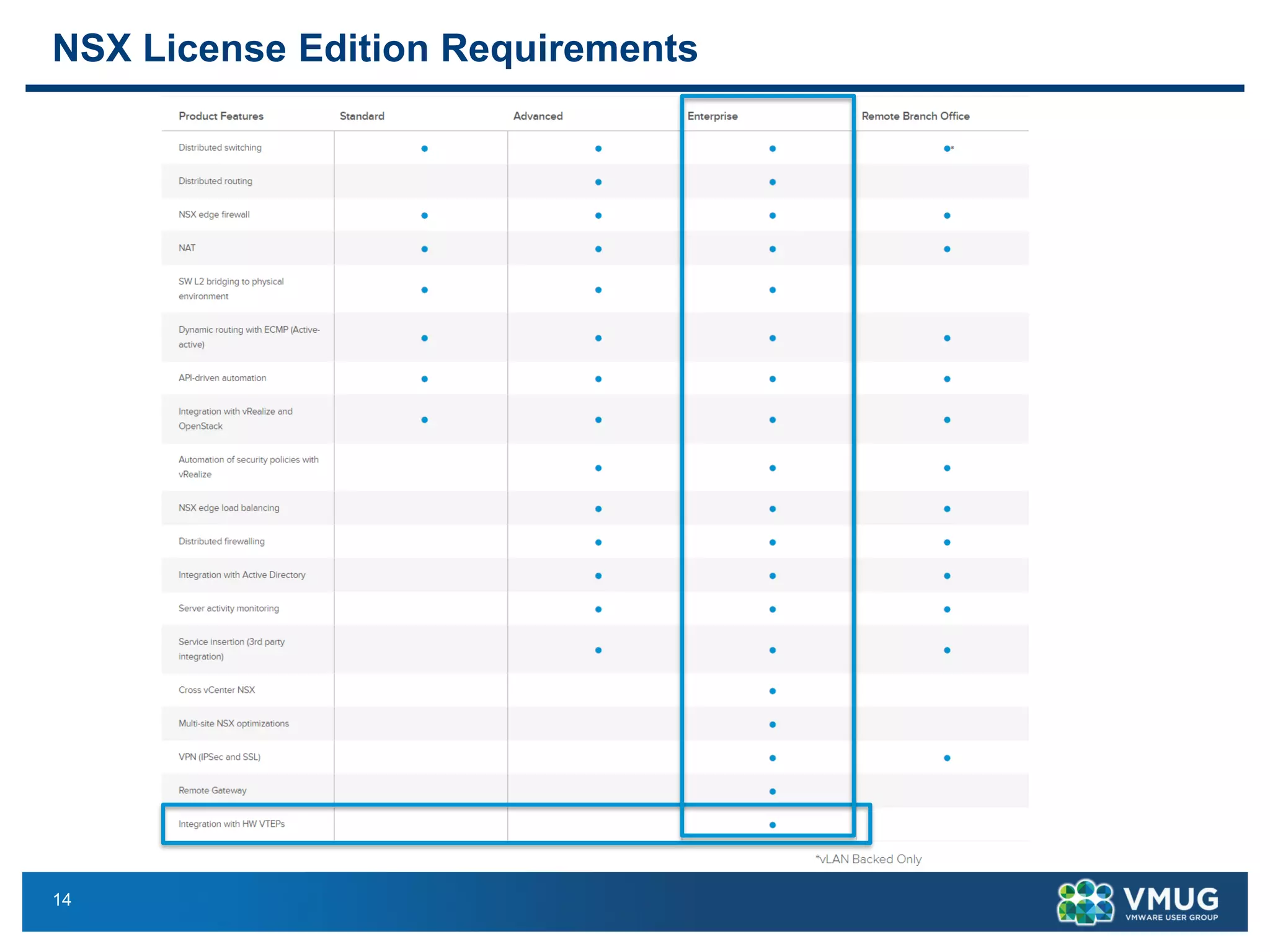
▪ Supported VMware NSX License Edition
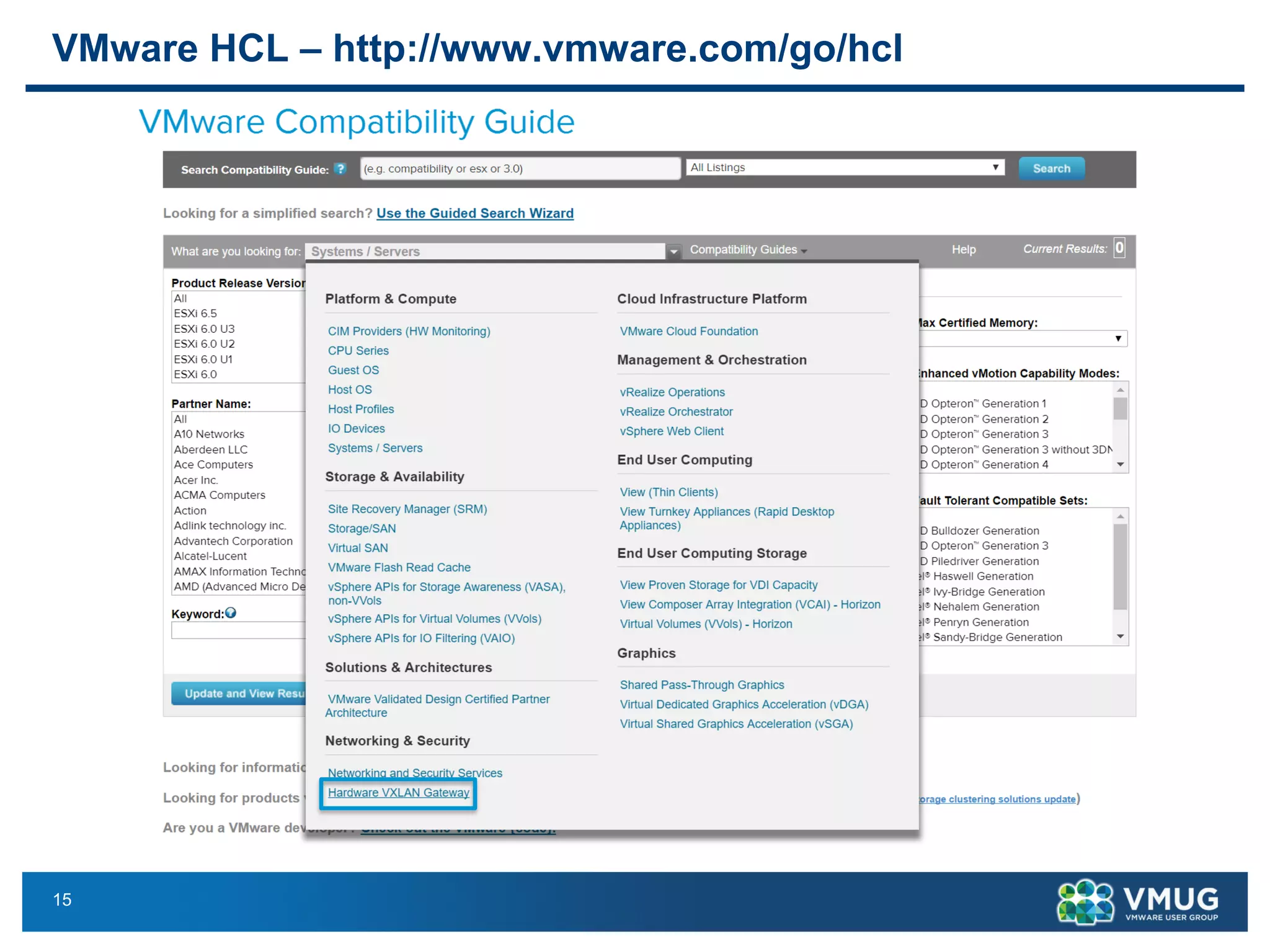
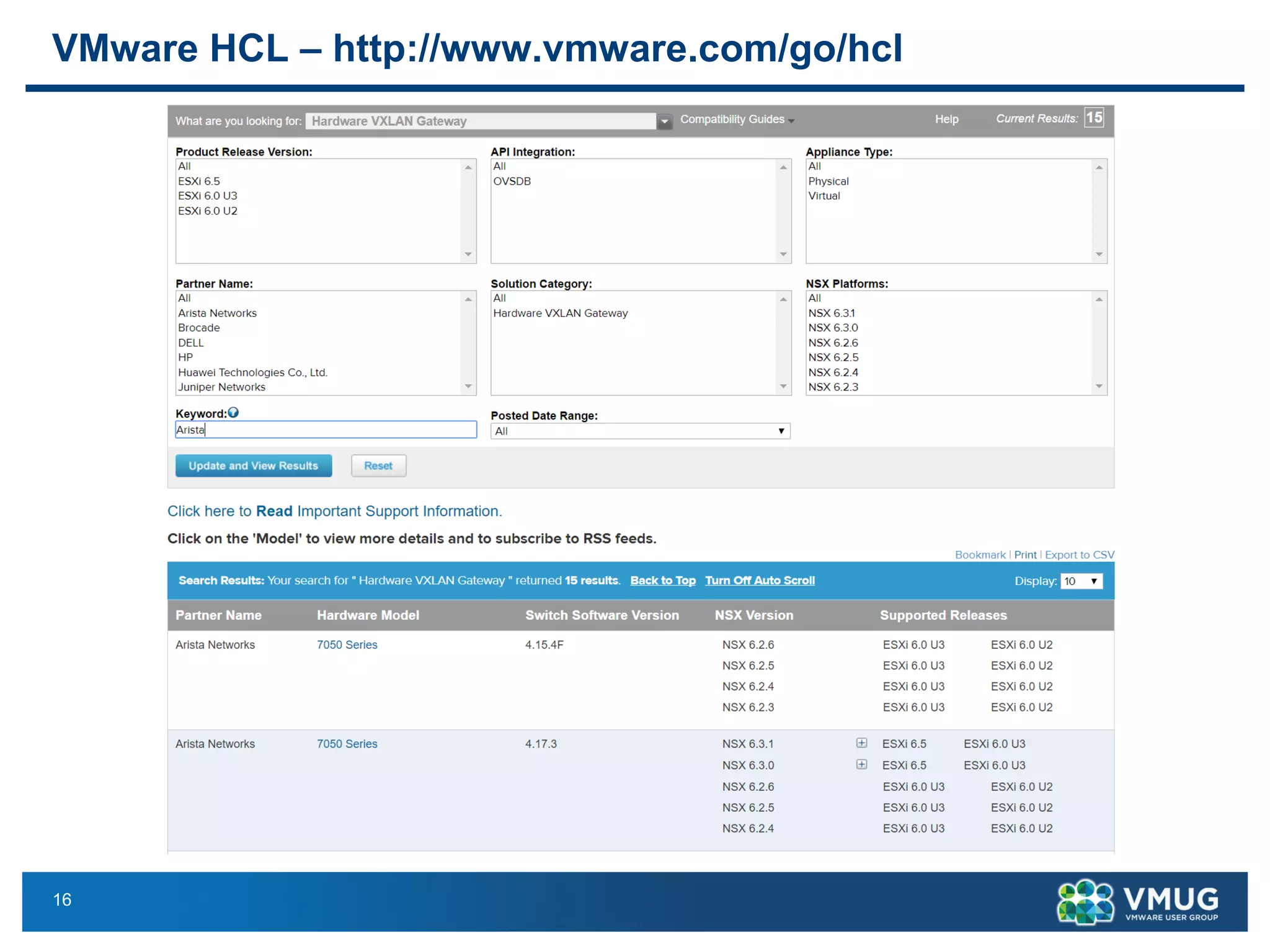
▪ Supported Hardware (Physical Switch) & firmware version
▪ Management (OVSDB) & Data Plane (VTEP) Connectivity
▪ Limitations
• Does not support bridging to NSX DLR
• In cross-vCenter deployment, hardware binding only supported on Primary
NSX Manager
14
NSX License Edition Requirements
15
VMware HCL – http://www.vmware.com/go/hcl
16
VMware HCL – http://www.vmware.com/go/hcl
17
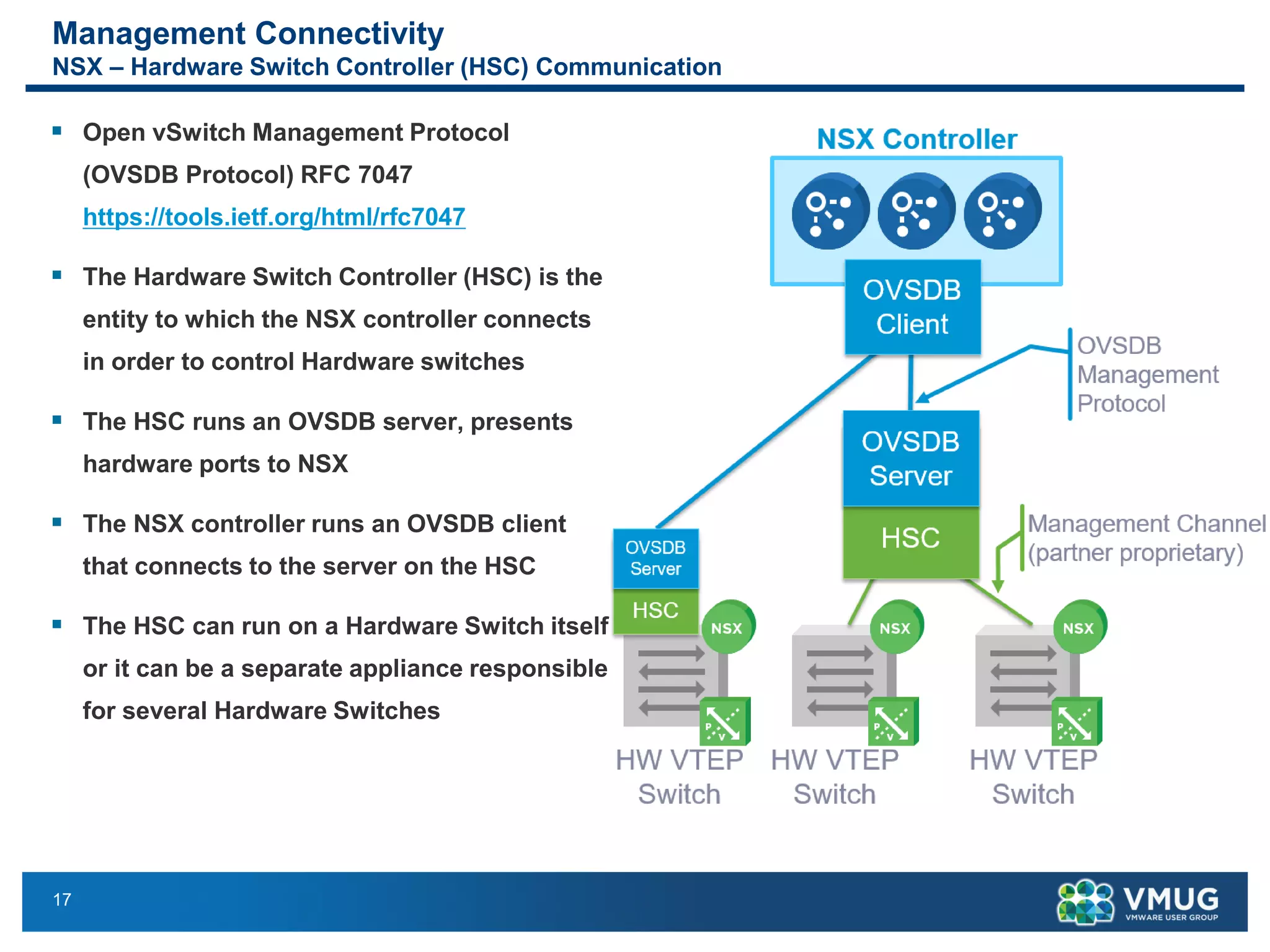
Management Connectivity
NSX – Hardware Switch Controller (HSC) Communication
▪ Open vSwitch Management Protocol
(OVSDB Protocol) RFC 7047
https://tools.ietf.org/html/rfc7047
▪ The Hardware Switch Controller (HSC) is the
entity to which the NSX controller connects
in order to control Hardware switches
▪ The HSC runs an OVSDB server, presents
hardware ports to NSX
▪ The NSX controller runs an OVSDB client
that connects to the server on the HSC
▪ The HSC can run on a Hardware Switch itself
or it can be a separate appliance responsible
for several Hardware Switches
18
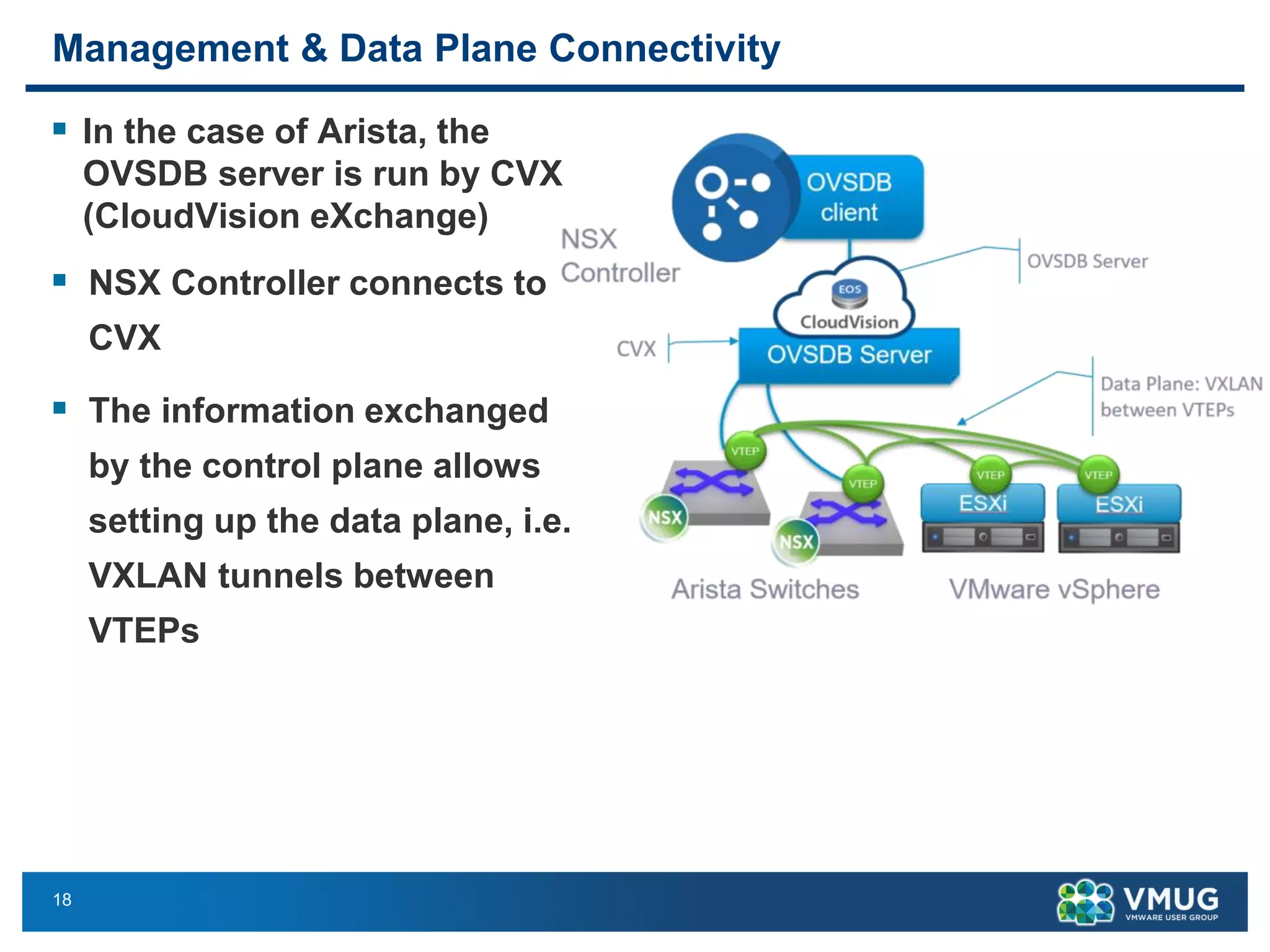
▪ In the case of Arista, the
OVSDB server is run by CVX
(CloudVision eXchange)
▪ NSX Controller connects to
CVX
▪ The information exchanged
by the control plane allows
setting up the data plane, i.e.
VXLAN tunnels between
VTEPs
Management & Data Plane Connectivity
19
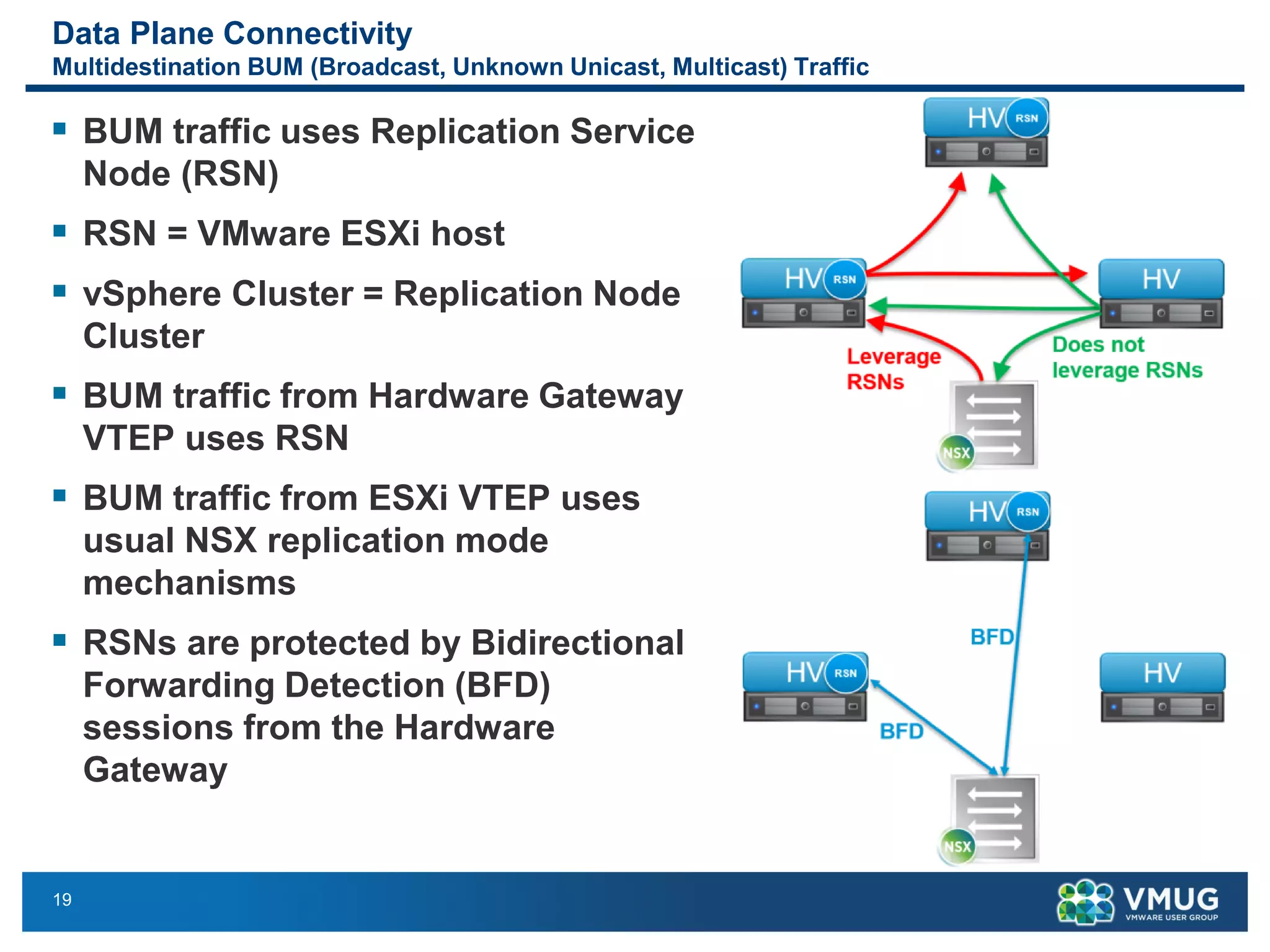
Data Plane Connectivity
Multidestination BUM (Broadcast, Unknown Unicast, Multicast) Traffic
▪ BUM traffic uses Replication Service
Node (RSN)
▪ RSN = VMware ESXi host
▪ vSphere Cluster = Replication Node
Cluster
▪ BUM traffic from Hardware Gateway
VTEP uses RSN
▪ BUM traffic from ESXi VTEP uses
usual NSX replication mode
mechanisms
▪ RSNs are protected by Bidirectional
Forwarding Detection (BFD)
sessions from the Hardware
Gateway
20
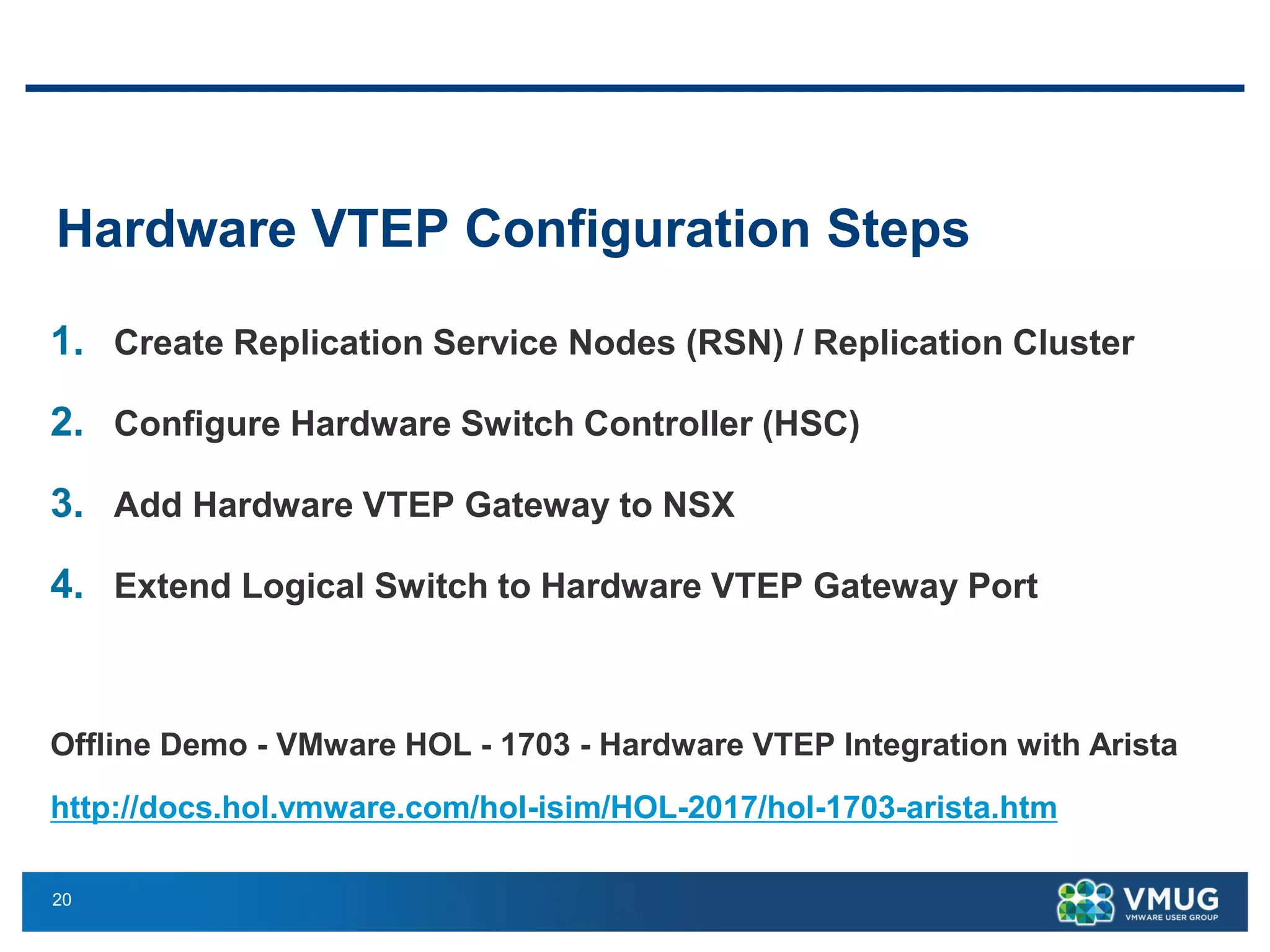
Hardware VTEP Configuration Steps
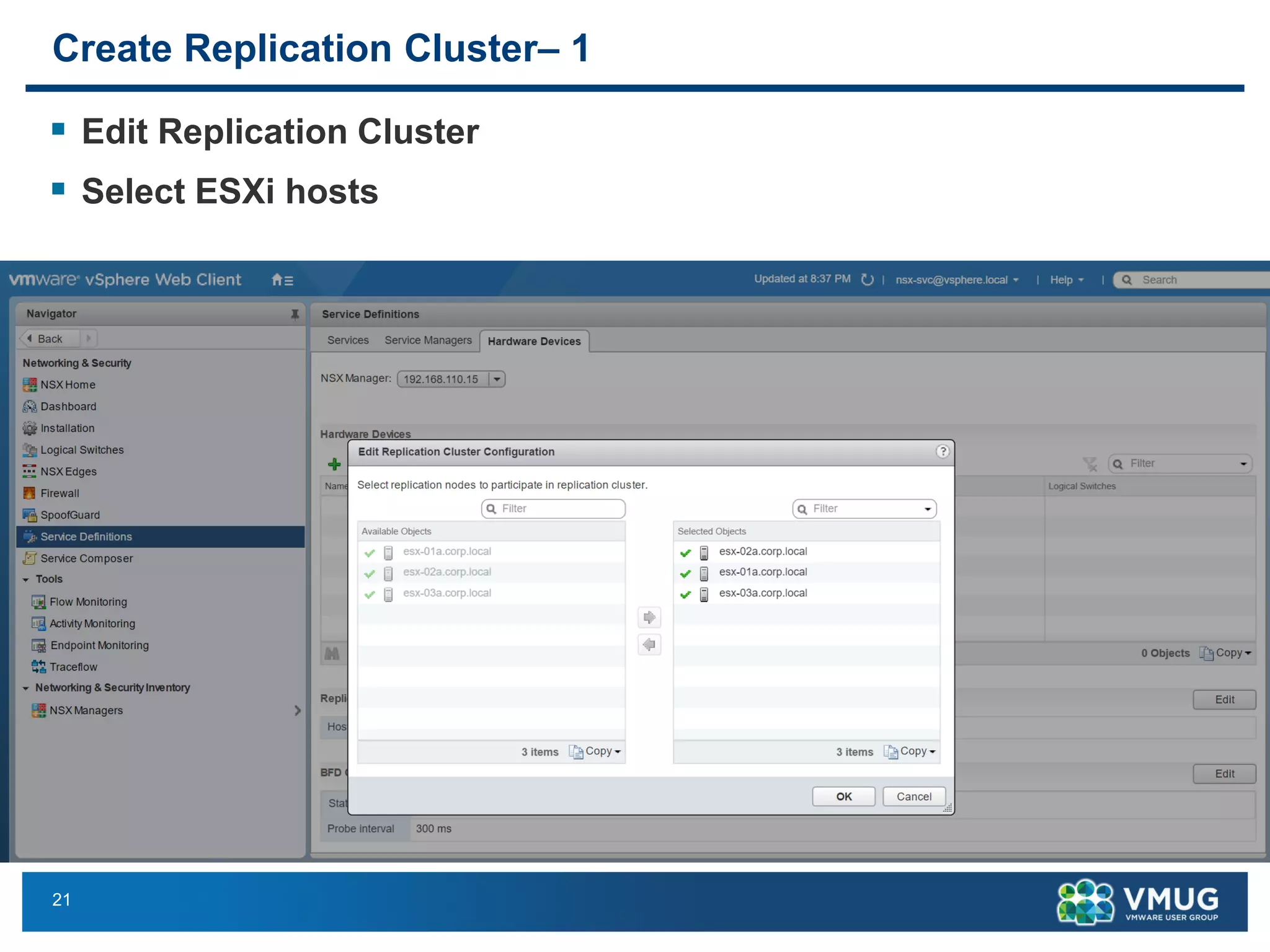
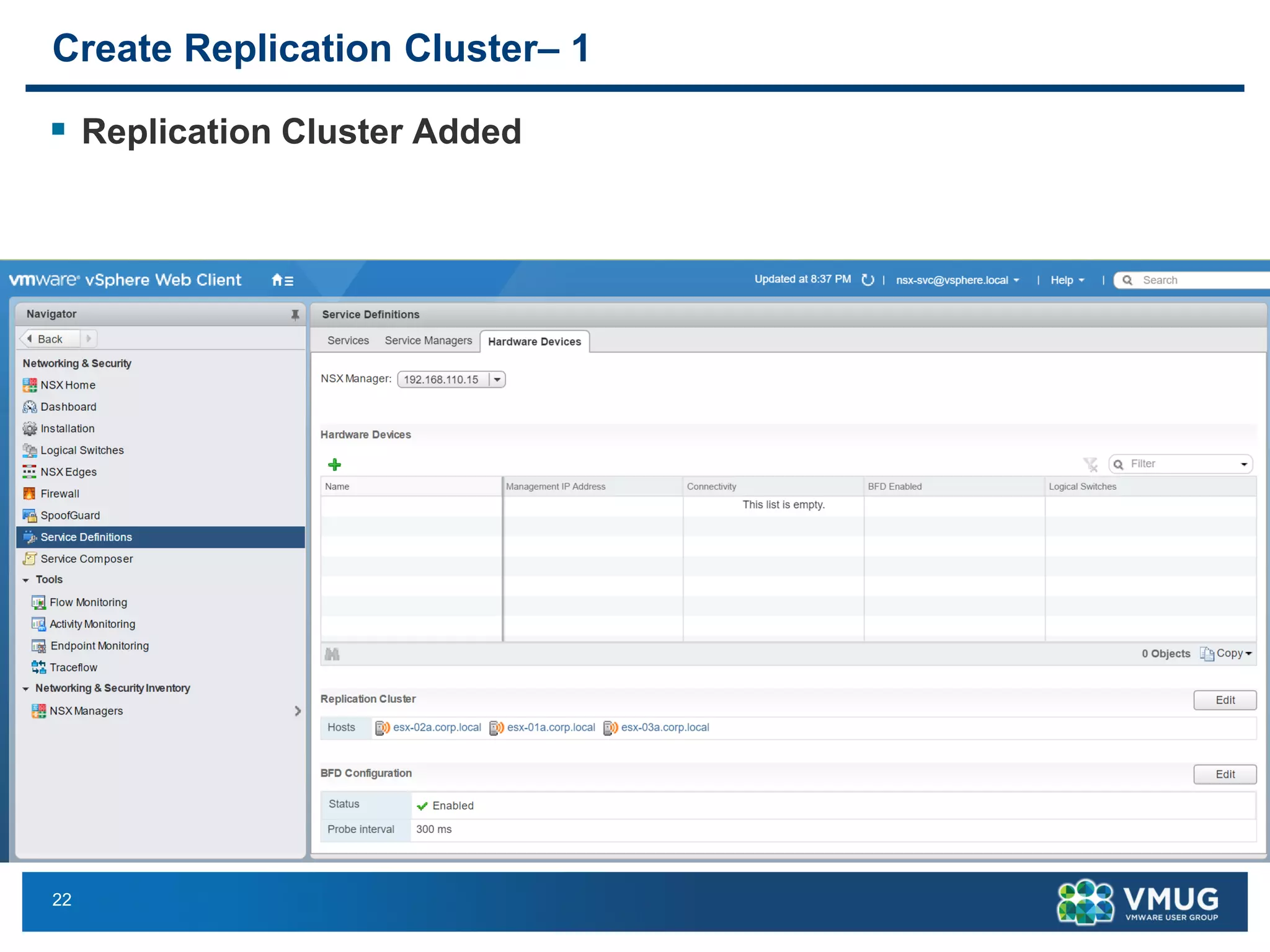
1. Create Replication Service Nodes (RSN) / Replication Cluster
2. Configure Hardware Switch Controller (HSC)
3. Add Hardware VTEP Gateway to NSX
4. Extend Logical Switch to Hardware VTEP Gateway Port
Offline Demo - VMware HOL - 1703 - Hardware VTEP Integration with Arista
http://docs.hol.vmware.com/hol-isim/HOL-2017/hol-1703-arista.htm
21
Create Replication Cluster– 1
▪ Edit Replication Cluster
▪ Select ESXi hosts
22
Create Replication Cluster– 1
▪ Replication Cluster Added
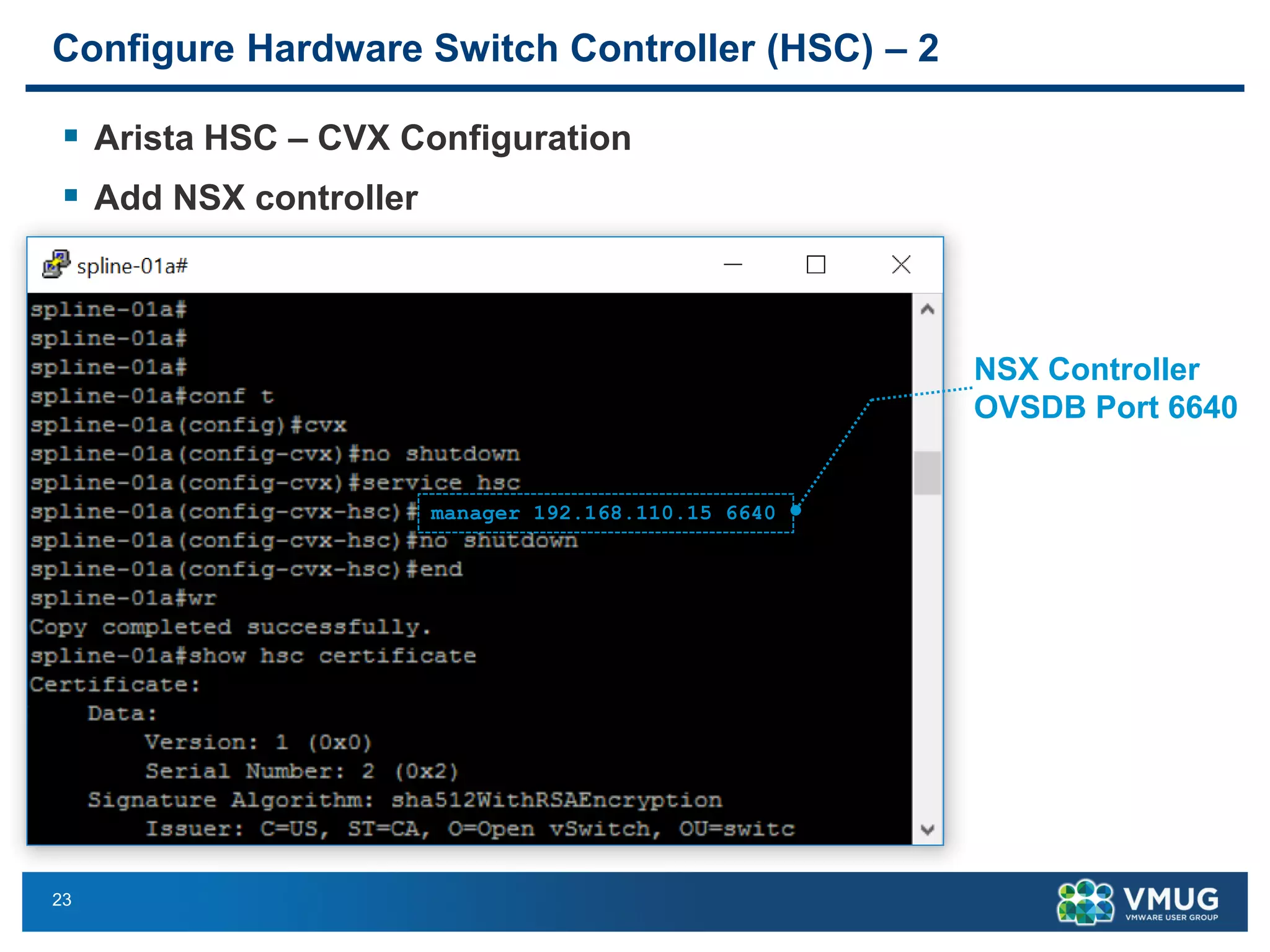
23
Configure Hardware Switch Controller (HSC) – 2
▪ Arista HSC – CVX Configuration
▪ Add NSX controller
manager 192.168.110.15 6640
NSX Controller
OVSDB Port 6640
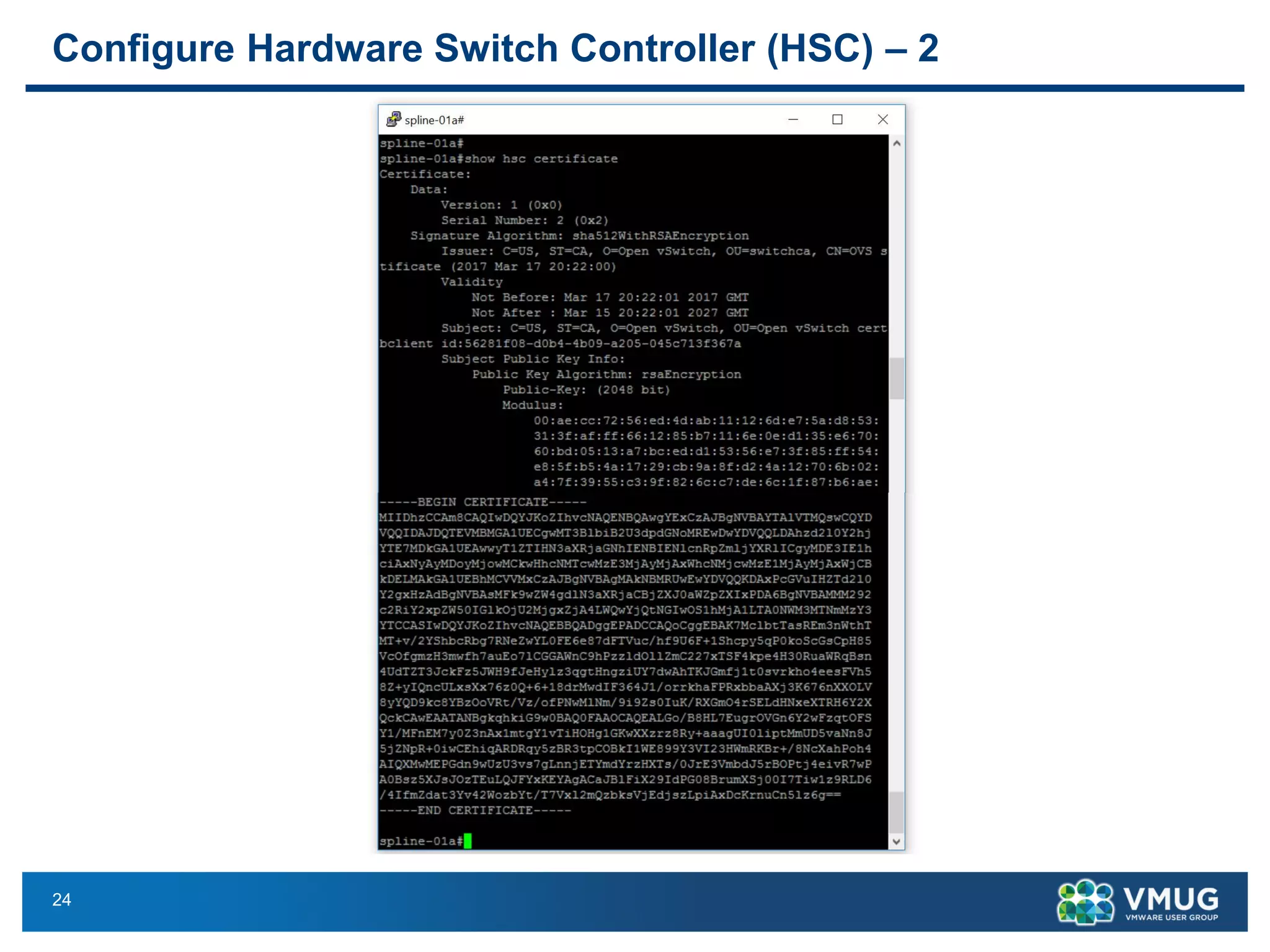
24
Configure Hardware Switch Controller (HSC) – 2
25
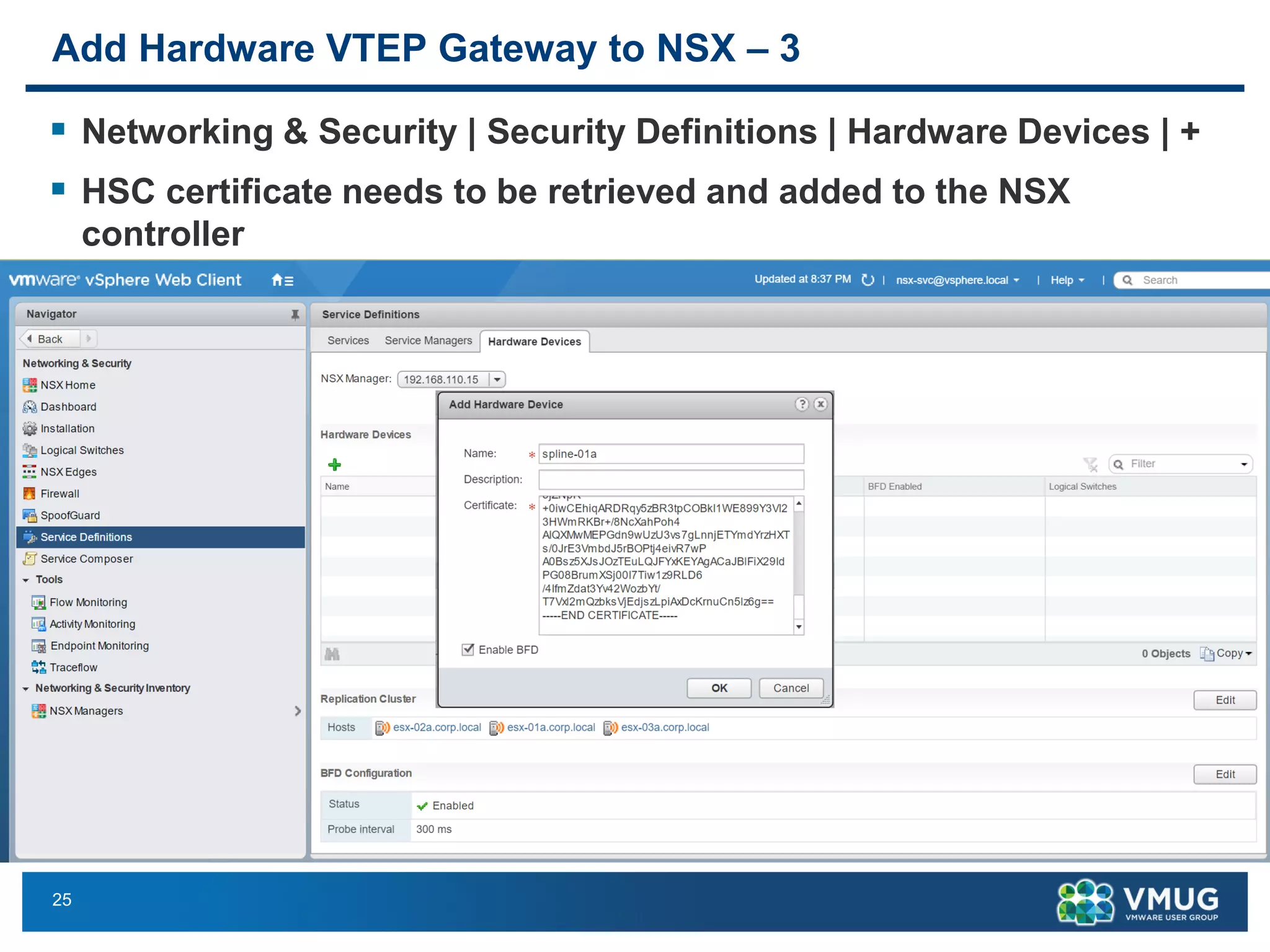
Add Hardware VTEP Gateway to NSX – 3
▪ Networking & Security | Security Definitions | Hardware Devices | +
▪ HSC certificate needs to be retrieved and added to the NSX
controller
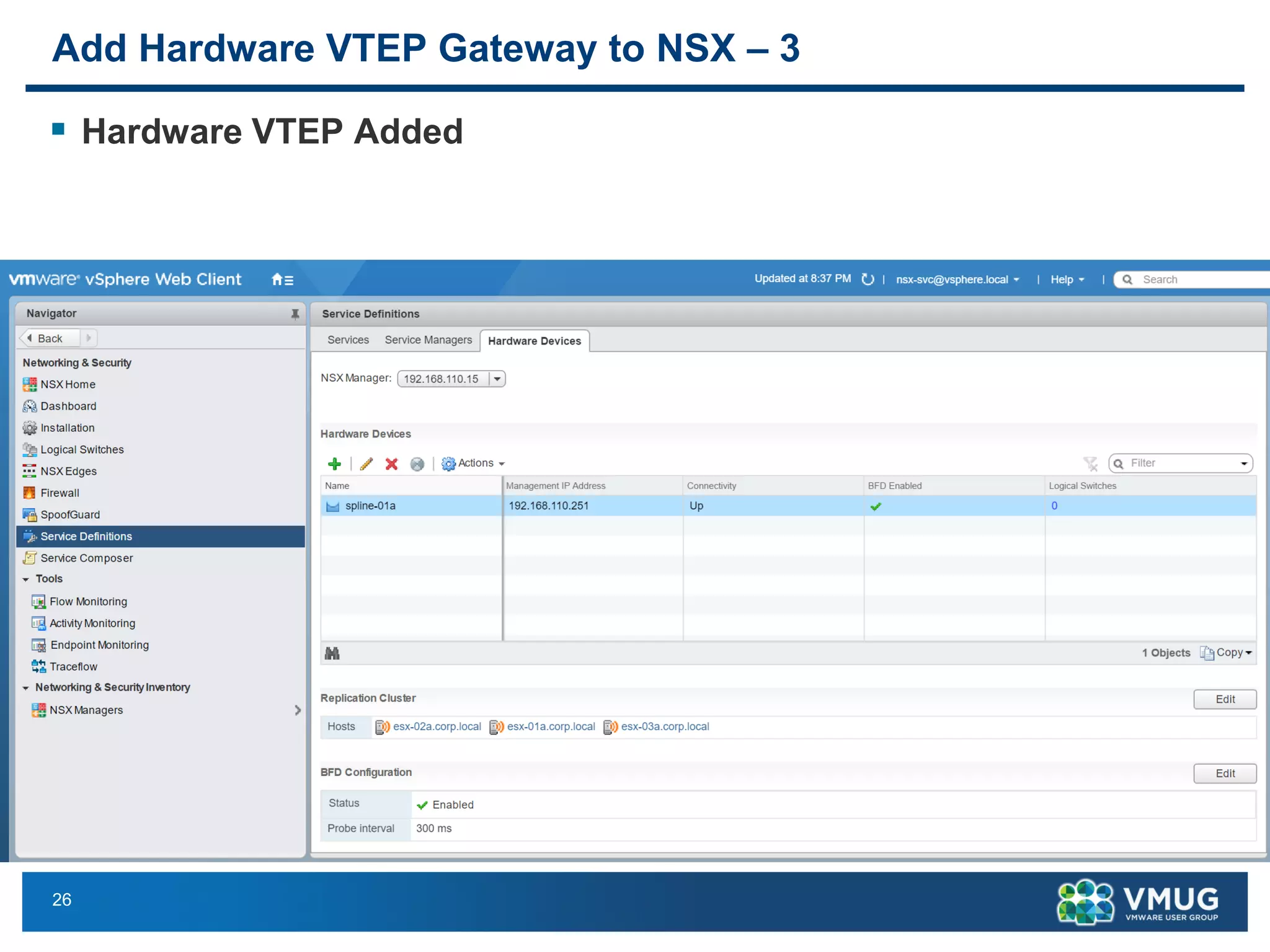
26
Add Hardware VTEP Gateway to NSX – 3
▪ Hardware VTEP Added
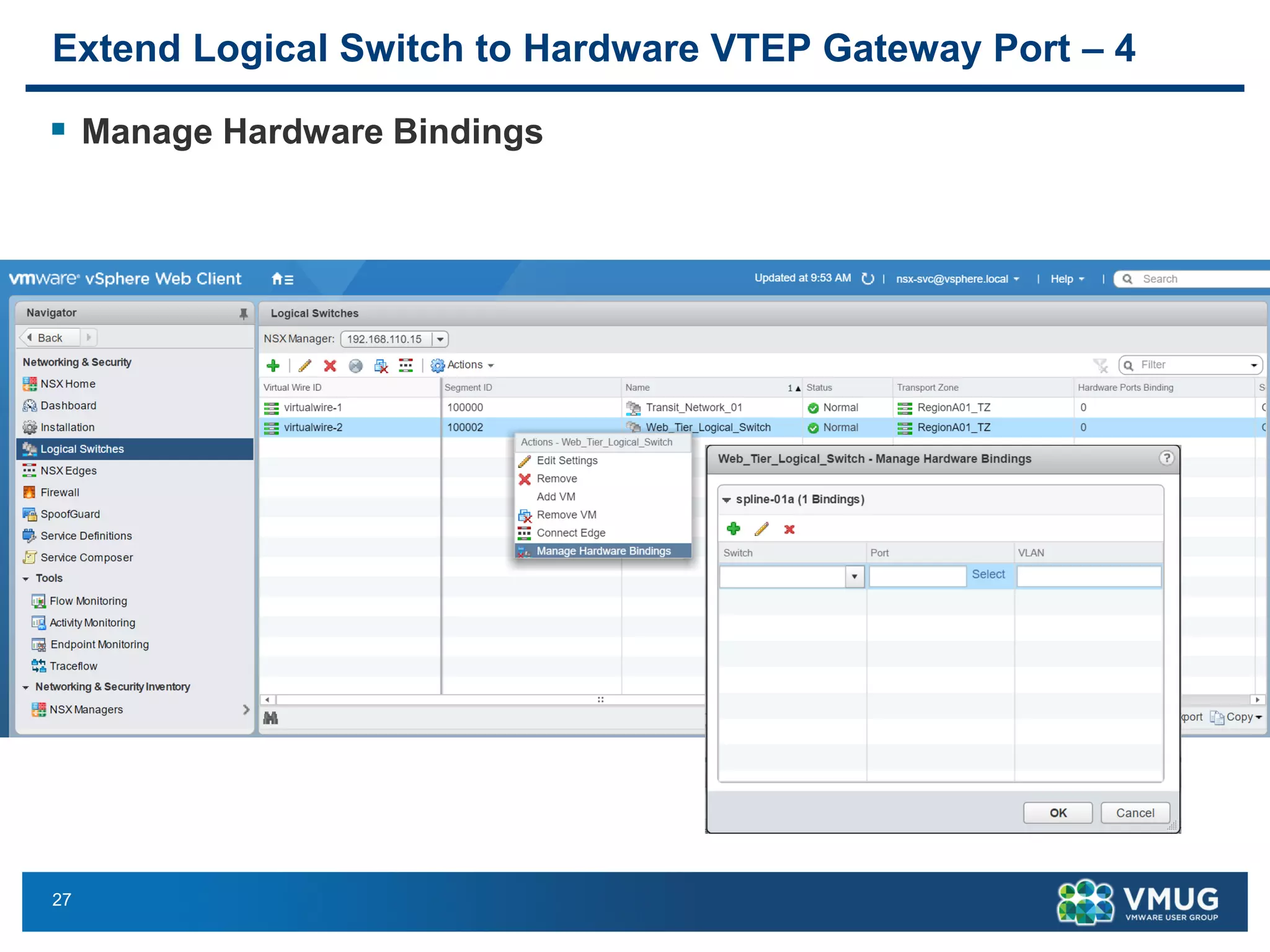
27
Extend Logical Switch to Hardware VTEP Gateway Port – 4
▪ Manage Hardware Bindings
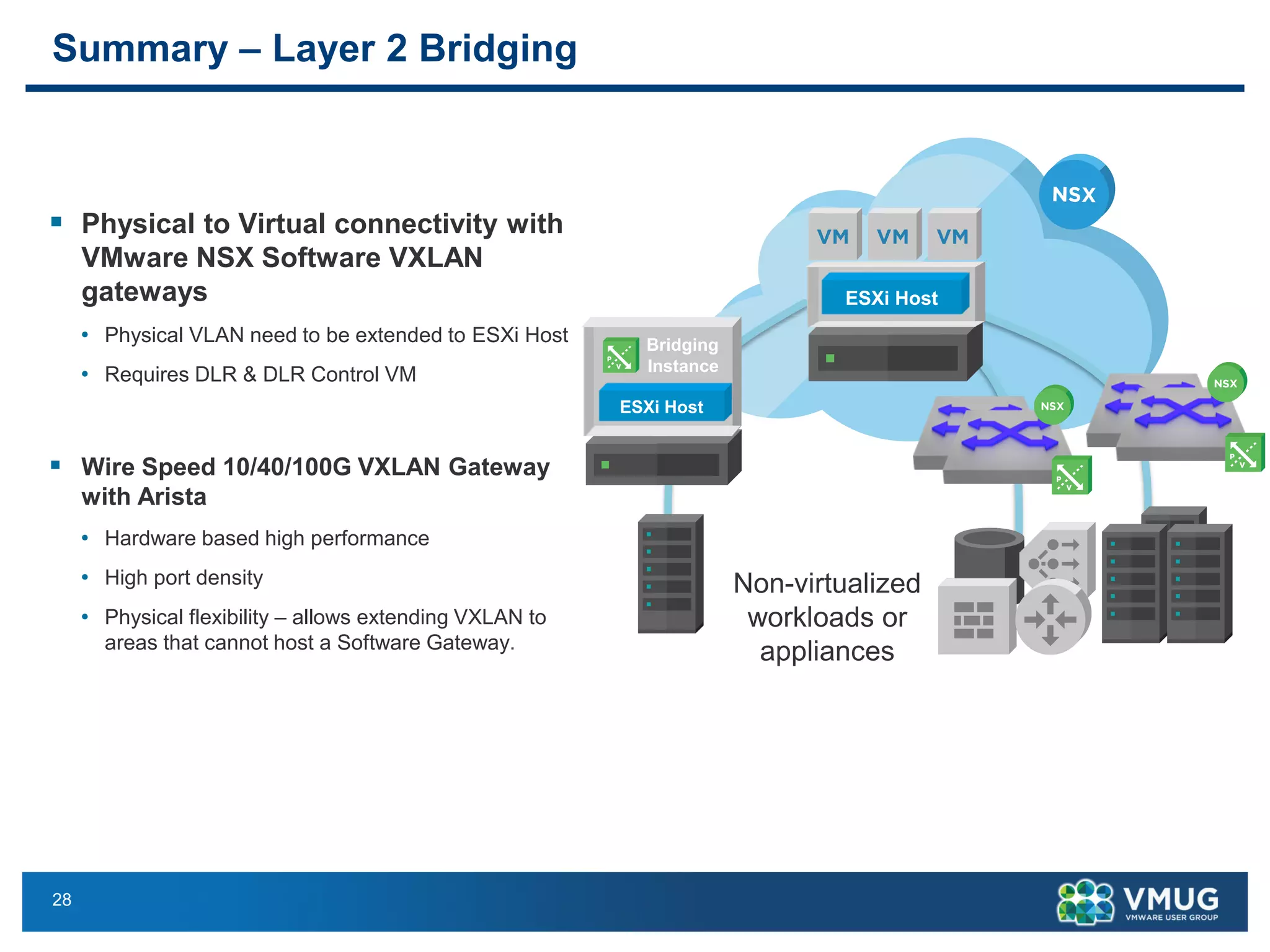
28
Summary – Layer 2 Bridging
▪ Physical to Virtual connectivity with
VMware NSX Software VXLAN
gateways
• Physical VLAN need to be extended to ESXi Host
• Requires DLR & DLR Control VM
▪ Wire Speed 10/40/100G VXLAN Gateway
with Arista
• Hardware based high performance
• High port density
• Physical flexibility – allows extending VXLAN to
areas that cannot host a Software Gateway.
Non-virtualized
workloads or
appliances
ESXi Host
Bridging
Instance
ESXi Host
29
References
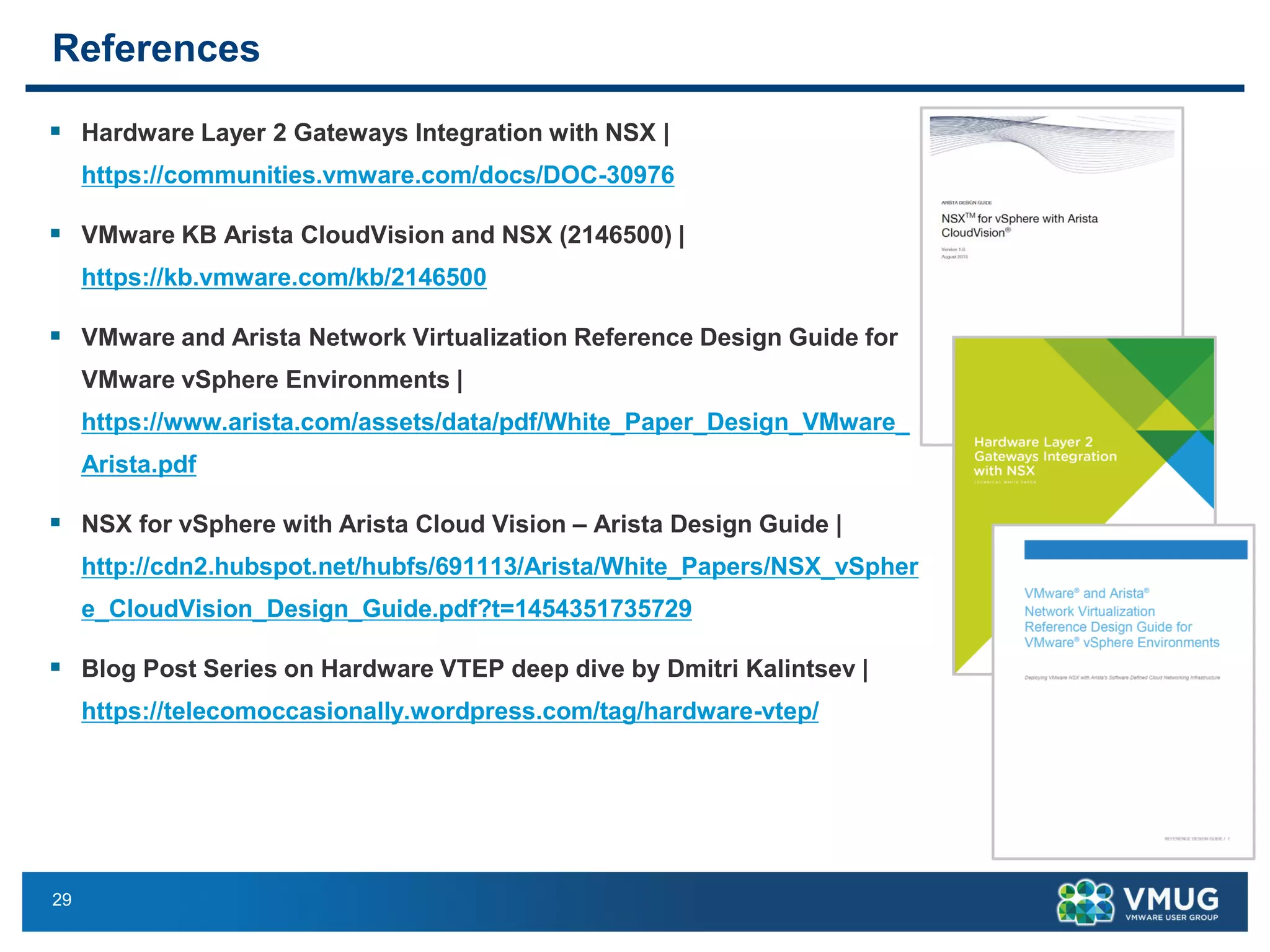
▪ Hardware Layer 2 Gateways Integration with NSX |
https://communities.vmware.com/docs/DOC-30976
▪ VMware KB Arista CloudVision and NSX (2146500) |
https://kb.vmware.com/kb/2146500
▪ VMware and Arista Network Virtualization Reference Design Guide for
VMware vSphere Environments |
https://www.arista.com/assets/data/pdf/White_Paper_Design_VMware_
Arista.pdf
▪ NSX for vSphere with Arista Cloud Vision – Arista Design Guide |
http://cdn2.hubspot.net/hubfs/691113/Arista/White_Papers/NSX_vSpher
e_CloudVision_Design_Guide.pdf?t=1454351735729
▪ Blog Post Series on Hardware VTEP deep dive by Dmitri Kalintsev |
https://telecomoccasionally.wordpress.com/tag/hardware-vtep/
30
Arista – VMware VMworld 2016 Sessions
https://solutions.arista.com/vmworld2016
▪ NET9447 - Extensible Solution for Software
Driven Data Centers (SDDC) with VMware
and Arista
▪ Speakers: Jeff Raymond, Vice President, EOS
Product Management. Anoop Dawani, Product
Manager
▪ Date & Time: Wednesday, August 31st,
3:30PM - 4:30PM
▪ Arista and VMware's vision leverages core data
center virtualization technologies to transform
data center economics through automation and
non-disruptive deployment that embraces and
extends existing infrastructure investments. This
joint solution radically simplifies, optimizes and
accelerates the entire application deployment
lifecycle.
▪ NET9094 - Customer Case Study on
American Tire Distributors (ATD): Migrating
to the Software-Defined Data Center with
Arista Networks and VMware NSX
▪ Speakers: Jeff Raymond, Vice President, EOS
Product Management
▪ Brandon Smith, Senior Data Center Engineer,
American Tire Distributors
▪ Date & Time: Thursday, September 1st,
1:30PM - 2:30PM
▪ A real world customer case study sharing their
experience in migrating from legacy data center
to network virtualization with VMware NSX and
Arista underlay.
31
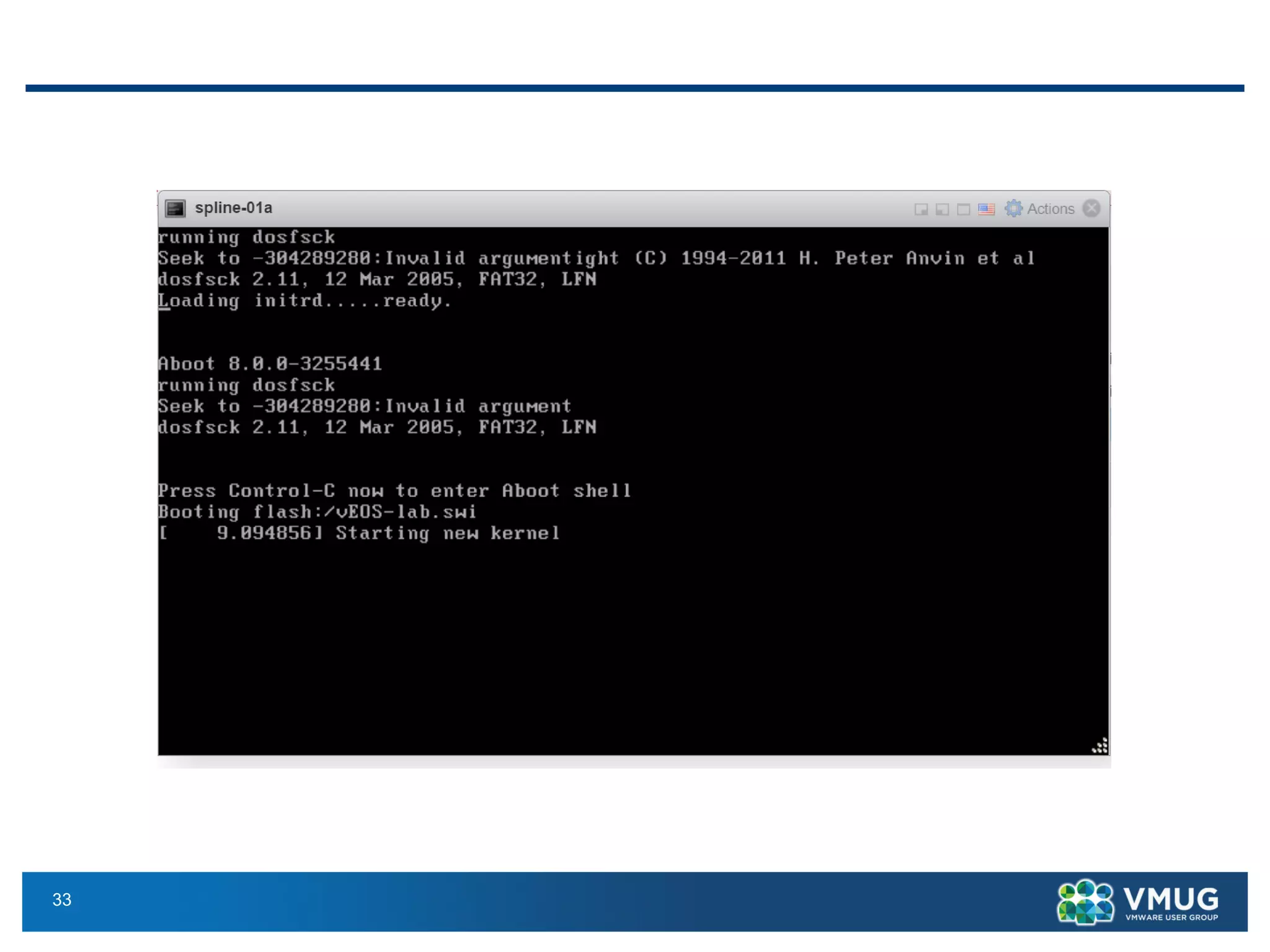
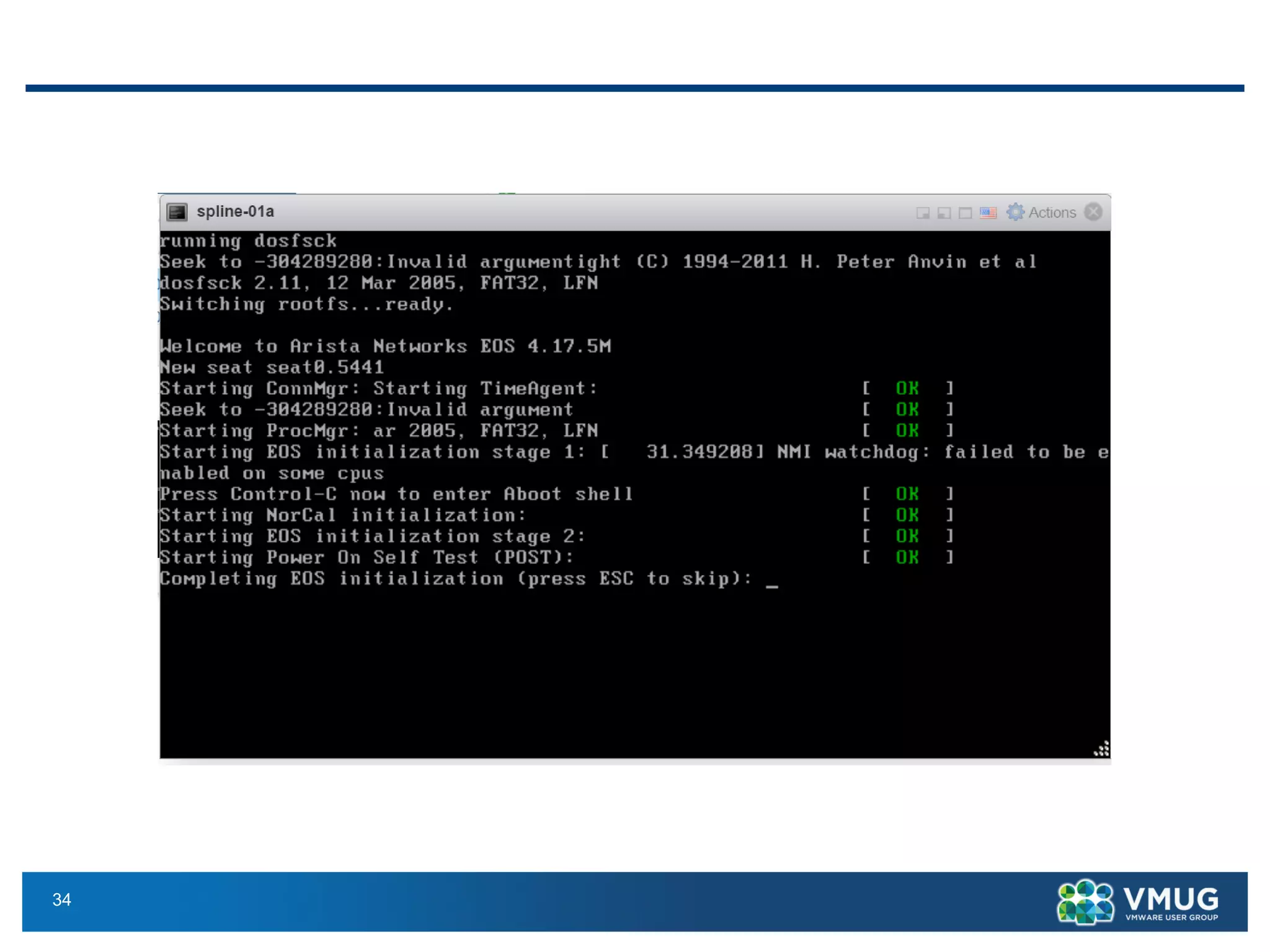
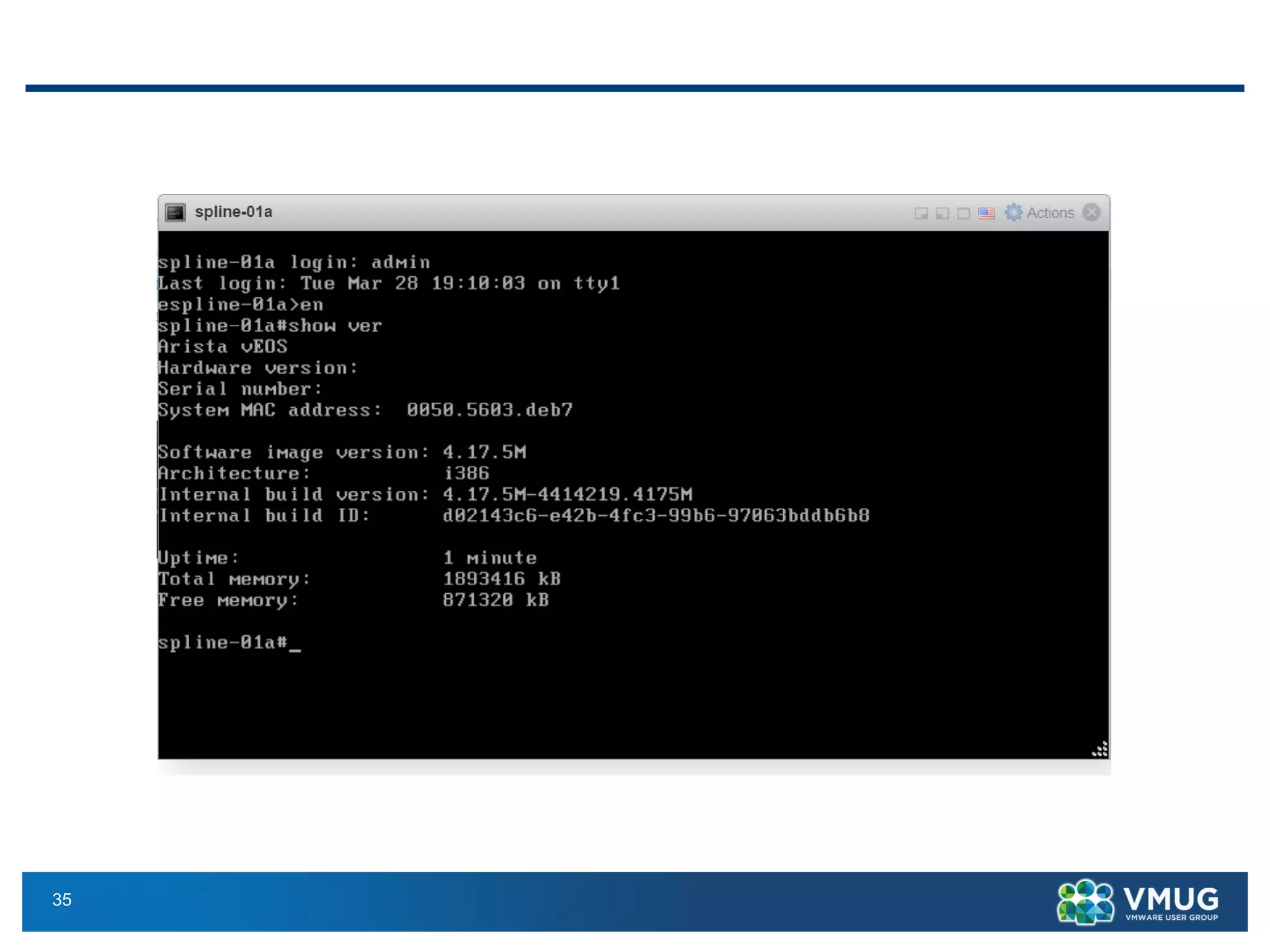
Arista vEOS Screenshots
32
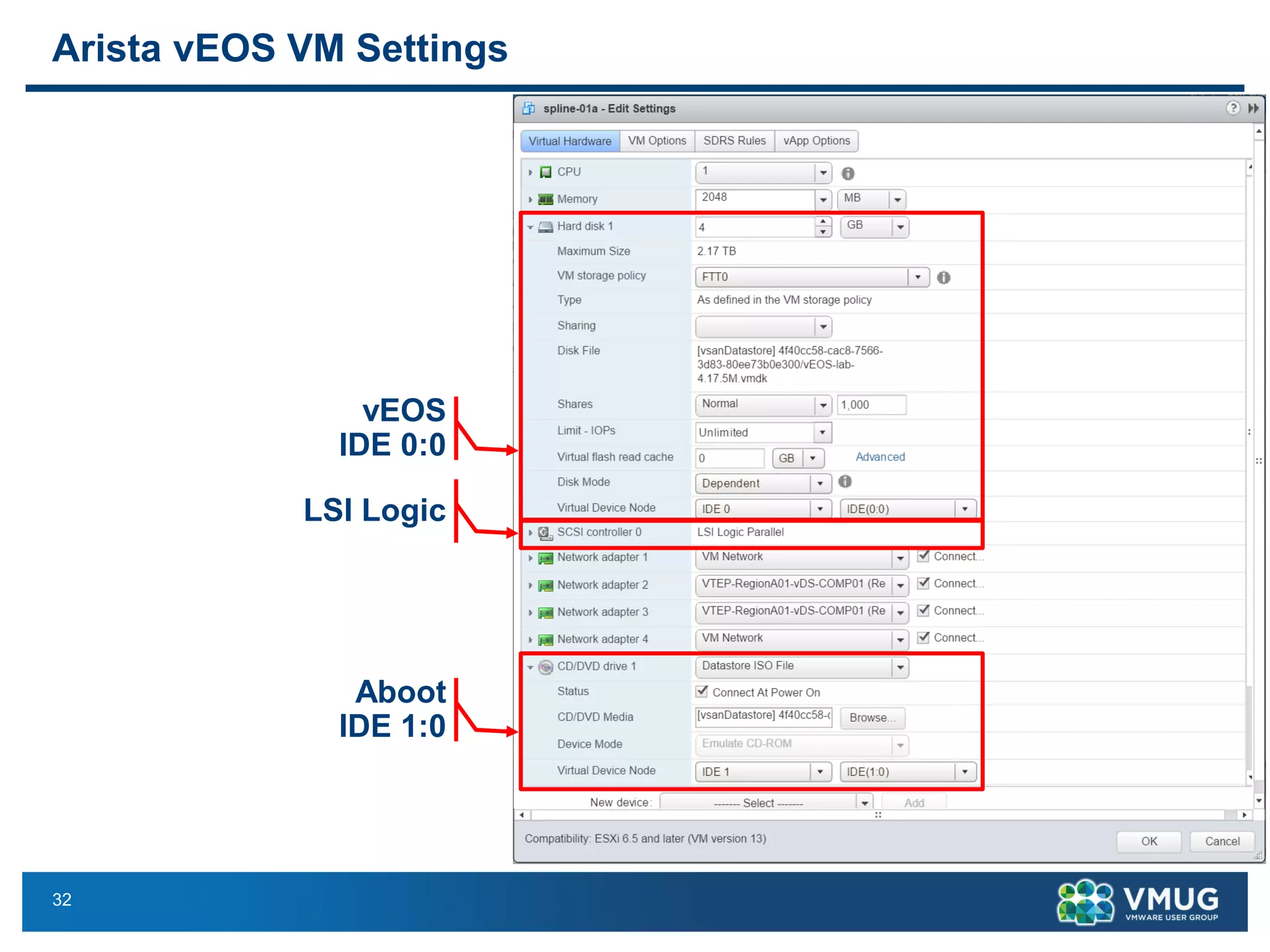
Arista vEOS VM Settings
vEOS
IDE 0:0
LSI Logic
Aboot
IDE 1:0
33
34
35
36
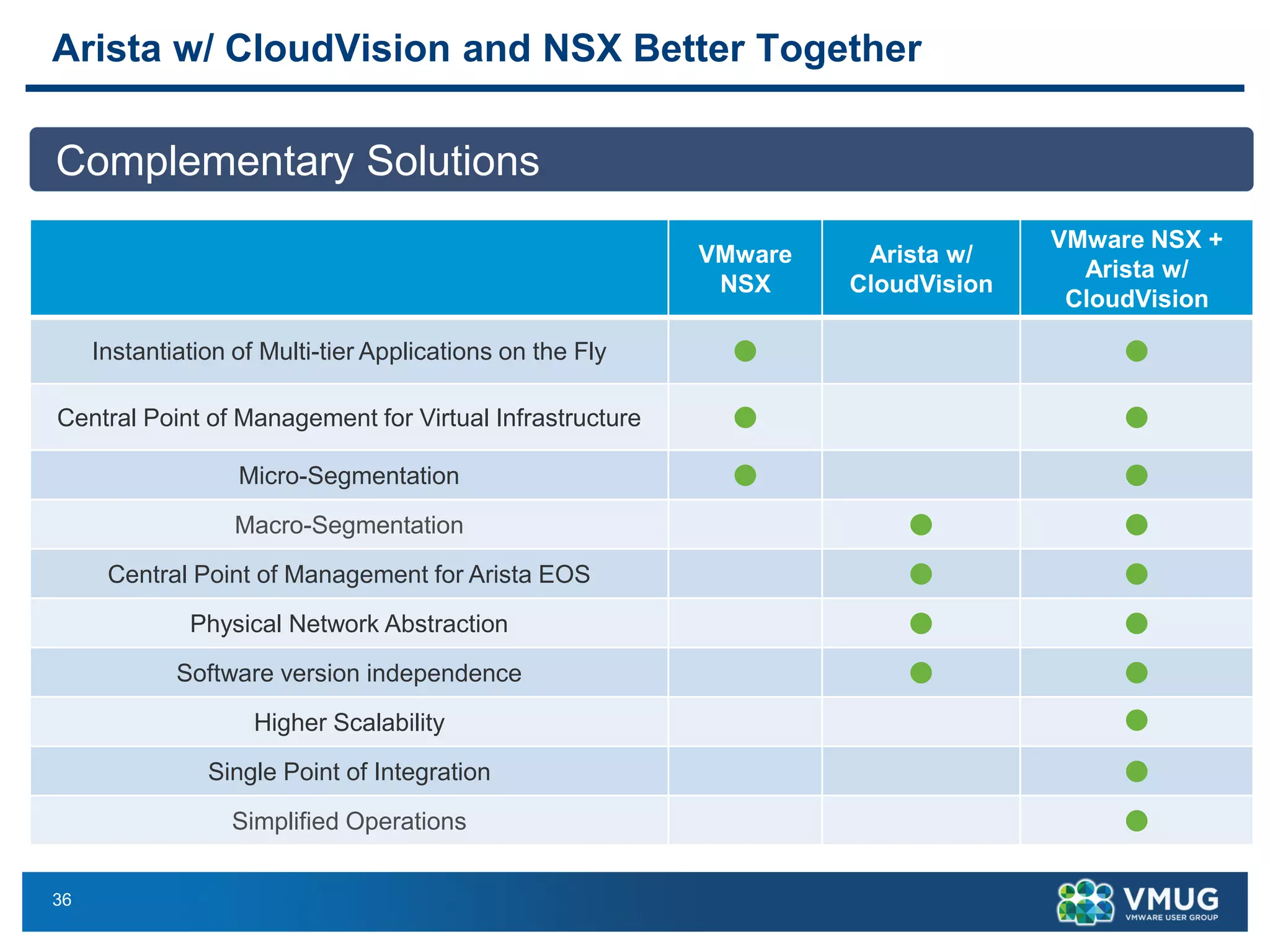
Arista w/ CloudVision and NSX Better Together
Complementary Solutions
VMware
NSX
Arista w/
CloudVision
VMware NSX +
Arista w/
CloudVision
Instantiation of Multi-tier Applications on the Fly  
Central Point of Management for Virtual Infrastructure  
Micro-Segmentation  
Macro-Segmentation  
Central Point of Management for Arista EOS  
Physical Network Abstraction  
Software version independence  
Higher Scalability 
Single Point of Integration 
Simplified Operations 
37
Join other members like you who want to share their story on using daily
technical products, implementations, and their own experiences as an IT
professional. Create a Community Spotlight Presentation!
Your presentation will be virtually featured on VMUG.com, and
can be used at a Local Community or UserCon near you!
Submit at https://www.vmug.com/Volunteer/Share-Your-Story

VMware NSX and Arista L2 Hardware VTEP Gateway Integration

  • 1.
    VMware NSX andArista VTEP L2 Gateway Integration
  • 2.
    2 Who am I? || ex- PSO | ex- vExpert 2014 | 2016 | 2017 VCIX6-DCV | VCIX6-NV | Working on VCDX6-NV nz.linkedin.com/in/bayupw @bayupw http://bayupw.blogspot.com/ http://www.vmug.com/nsx @bayupw | NSX, vNetwork, vCD, vCNS VMTN User Moderator https://communities.vmware.com/community/vmtn/nsx Bayu Wibowo
  • 3.
    3 Agenda 1. NSX QuickOverview, NSX VXLAN to VLAN Bridging 2. Hardware VTEP Architecture & Configuration Does not cover: 1. NSX for vSphere 101 2. VXLAN 101 3. NSX for Multi-Hypervisor or NSX-Transformers
  • 4.
  • 5.
    5 NSX Main Features App DMZ DB FinanceEngineeringHR Micro-Segmentation Network Virtualisation Web App DB North-South, Routed NSX Edge VXLAN DLR Arista Macro-Segmentation Services
  • 6.
    6 Physical World andNetwork Virtualisation World Network Virtualisation Web App DB North-South, Routed NSX Edge VXLAN DLR Physical World Physical Network Network Virtualisation World VMware NSX World Optimised East-West Traffic VXLAN Logical Switching Distributed Routing
  • 7.
    7 Layer 2 BridgingUse Cases – Software or Hardware Gateway ▪ P2V or V2V migrations from VLAN to VXLAN migrations where changing IPs is not an option ▪ Extend physical network services/appliances/servers to VMs in logical switches ▪ Extend virtual services (VM) in the logical switch to external devices VMware NSX Brownfield Deployment Guide http://www.vmware.com/content/dam/digitalmar keting/vmware/en/pdf/whitepaper/products/nsx/ vmware-nsx-brownfield-design-and- deployment-guide-white-paper.pdf Bridging Instance Logical Switch VXLAN 5001 VLAN 101 Physical Router Physical Server V2V P2V Bridging Instance Logical Switch VXLAN 5001 VLAN 101
  • 8.
    8 NSX 6.2 SoftwareLayer 2 Bridging Enhancements Prior NSX 6.2 ▪ A logical switch could NOT simultaneously: • Participate in distributed routing • Extend layer 2 to a VLAN ▪ Must use NSX Edge or Physical Router for routing NSX 6.2 and later ▪ On a given Logical Switch, Distributed Logical Routing can coexist with bridging ▪ Optimise traffic flow by eliminating the need to route through a central NSX Edge ▪ NOT currently supported on HW-VTEP DLR NSX Edge DB VLAN DB Logical Switch App Logical Switch Transit Network DB logical Switch is extended to VLAN and uses DLR for routing Bridging Instance Physical Server DLR NSX Edge DB VLAN DB Logical Switch App Logical Switch Transit Network App Logical Switch is not extended to VLAN. DLR can be used DB logical Switch is extended to VLAN. Must use Edge or physical router for routing Bridging Instance Physical Server
  • 9.
    9 Software Layer 2Bridging Underlay VLAN 20 VLAN 20 VLAN 10VNI 5001
  • 10.
    10 Software Layer 2Bridging Physical (Rack) Connectivity VLAN extended between racks VM VM VLAN 10 VLAN 10 VXLAN VLAN
  • 11.
    11 Hardware VTEP Gateway Hardwarebased Layer 2 Bridging
  • 12.
    12 Physical (Rack) Connectivity SoftwareGateway ▪ A single bridging instance per Logical Switch ▪ Bandwidth limited by single bridging instance ▪ VLAN need to be extended to Edge Clusters (DLR Control VM / Bridge Instance) Hardware Gateway ▪ Main benefits of hardware gateway: Bandwidth, Scale and Low-latency ▪ Also allows extending VXLAN to areas that cannot host a Software Gateway ▪ With Hardware Gateways, VLANs can be kept local to a rack and don’t need to be extended – L3 end-to-end VXLAN VLAN Non-virtualized devices (part of the same L2 segment) L3 (VXLAN) only between racks VLAN 10 VLAN 20 VM VM VLAN extended between racks VM VM VLAN 10 VLAN 10
  • 13.
    13 Hardware VTEP Prerequisites ▪Supported VMware NSX version (VMware NSX 6.2.x and later) ▪ Supported VMware NSX License Edition ▪ Supported Hardware (Physical Switch) & firmware version ▪ Management (OVSDB) & Data Plane (VTEP) Connectivity ▪ Limitations • Does not support bridging to NSX DLR • In cross-vCenter deployment, hardware binding only supported on Primary NSX Manager
  • 14.
  • 15.
    15 VMware HCL –http://www.vmware.com/go/hcl
  • 16.
    16 VMware HCL –http://www.vmware.com/go/hcl
  • 17.
    17 Management Connectivity NSX –Hardware Switch Controller (HSC) Communication ▪ Open vSwitch Management Protocol (OVSDB Protocol) RFC 7047 https://tools.ietf.org/html/rfc7047 ▪ The Hardware Switch Controller (HSC) is the entity to which the NSX controller connects in order to control Hardware switches ▪ The HSC runs an OVSDB server, presents hardware ports to NSX ▪ The NSX controller runs an OVSDB client that connects to the server on the HSC ▪ The HSC can run on a Hardware Switch itself or it can be a separate appliance responsible for several Hardware Switches
  • 18.
    18 ▪ In thecase of Arista, the OVSDB server is run by CVX (CloudVision eXchange) ▪ NSX Controller connects to CVX ▪ The information exchanged by the control plane allows setting up the data plane, i.e. VXLAN tunnels between VTEPs Management & Data Plane Connectivity
  • 19.
    19 Data Plane Connectivity MultidestinationBUM (Broadcast, Unknown Unicast, Multicast) Traffic ▪ BUM traffic uses Replication Service Node (RSN) ▪ RSN = VMware ESXi host ▪ vSphere Cluster = Replication Node Cluster ▪ BUM traffic from Hardware Gateway VTEP uses RSN ▪ BUM traffic from ESXi VTEP uses usual NSX replication mode mechanisms ▪ RSNs are protected by Bidirectional Forwarding Detection (BFD) sessions from the Hardware Gateway
  • 20.
    20 Hardware VTEP ConfigurationSteps 1. Create Replication Service Nodes (RSN) / Replication Cluster 2. Configure Hardware Switch Controller (HSC) 3. Add Hardware VTEP Gateway to NSX 4. Extend Logical Switch to Hardware VTEP Gateway Port Offline Demo - VMware HOL - 1703 - Hardware VTEP Integration with Arista http://docs.hol.vmware.com/hol-isim/HOL-2017/hol-1703-arista.htm
  • 21.
    21 Create Replication Cluster–1 ▪ Edit Replication Cluster ▪ Select ESXi hosts
  • 22.
    22 Create Replication Cluster–1 ▪ Replication Cluster Added
  • 23.
    23 Configure Hardware SwitchController (HSC) – 2 ▪ Arista HSC – CVX Configuration ▪ Add NSX controller manager 192.168.110.15 6640 NSX Controller OVSDB Port 6640
  • 24.
    24 Configure Hardware SwitchController (HSC) – 2
  • 25.
    25 Add Hardware VTEPGateway to NSX – 3 ▪ Networking & Security | Security Definitions | Hardware Devices | + ▪ HSC certificate needs to be retrieved and added to the NSX controller
  • 26.
    26 Add Hardware VTEPGateway to NSX – 3 ▪ Hardware VTEP Added
  • 27.
    27 Extend Logical Switchto Hardware VTEP Gateway Port – 4 ▪ Manage Hardware Bindings
  • 28.
    28 Summary – Layer2 Bridging ▪ Physical to Virtual connectivity with VMware NSX Software VXLAN gateways • Physical VLAN need to be extended to ESXi Host • Requires DLR & DLR Control VM ▪ Wire Speed 10/40/100G VXLAN Gateway with Arista • Hardware based high performance • High port density • Physical flexibility – allows extending VXLAN to areas that cannot host a Software Gateway. Non-virtualized workloads or appliances ESXi Host Bridging Instance ESXi Host
  • 29.
    29 References ▪ Hardware Layer2 Gateways Integration with NSX | https://communities.vmware.com/docs/DOC-30976 ▪ VMware KB Arista CloudVision and NSX (2146500) | https://kb.vmware.com/kb/2146500 ▪ VMware and Arista Network Virtualization Reference Design Guide for VMware vSphere Environments | https://www.arista.com/assets/data/pdf/White_Paper_Design_VMware_ Arista.pdf ▪ NSX for vSphere with Arista Cloud Vision – Arista Design Guide | http://cdn2.hubspot.net/hubfs/691113/Arista/White_Papers/NSX_vSpher e_CloudVision_Design_Guide.pdf?t=1454351735729 ▪ Blog Post Series on Hardware VTEP deep dive by Dmitri Kalintsev | https://telecomoccasionally.wordpress.com/tag/hardware-vtep/
  • 30.
    30 Arista – VMwareVMworld 2016 Sessions https://solutions.arista.com/vmworld2016 ▪ NET9447 - Extensible Solution for Software Driven Data Centers (SDDC) with VMware and Arista ▪ Speakers: Jeff Raymond, Vice President, EOS Product Management. Anoop Dawani, Product Manager ▪ Date & Time: Wednesday, August 31st, 3:30PM - 4:30PM ▪ Arista and VMware's vision leverages core data center virtualization technologies to transform data center economics through automation and non-disruptive deployment that embraces and extends existing infrastructure investments. This joint solution radically simplifies, optimizes and accelerates the entire application deployment lifecycle. ▪ NET9094 - Customer Case Study on American Tire Distributors (ATD): Migrating to the Software-Defined Data Center with Arista Networks and VMware NSX ▪ Speakers: Jeff Raymond, Vice President, EOS Product Management ▪ Brandon Smith, Senior Data Center Engineer, American Tire Distributors ▪ Date & Time: Thursday, September 1st, 1:30PM - 2:30PM ▪ A real world customer case study sharing their experience in migrating from legacy data center to network virtualization with VMware NSX and Arista underlay.
  • 31.
  • 32.
    32 Arista vEOS VMSettings vEOS IDE 0:0 LSI Logic Aboot IDE 1:0
  • 33.
  • 34.
  • 35.
  • 36.
    36 Arista w/ CloudVisionand NSX Better Together Complementary Solutions VMware NSX Arista w/ CloudVision VMware NSX + Arista w/ CloudVision Instantiation of Multi-tier Applications on the Fly   Central Point of Management for Virtual Infrastructure   Micro-Segmentation   Macro-Segmentation   Central Point of Management for Arista EOS   Physical Network Abstraction   Software version independence   Higher Scalability  Single Point of Integration  Simplified Operations 
  • 37.
    37 Join other memberslike you who want to share their story on using daily technical products, implementations, and their own experiences as an IT professional. Create a Community Spotlight Presentation! Your presentation will be virtually featured on VMUG.com, and can be used at a Local Community or UserCon near you! Submit at https://www.vmug.com/Volunteer/Share-Your-Story