The success and final of this project required a lot of guidance and assistance
from Prof. Pradeep Kumar and I am extremely privileged to have got this all
along the completion of my project . All that I have done is only due to such
supervision and assistance and I would not forget to thank her.
I respect and thank Prof. Pradeep Kumar for providing me an opportunity to
do the project work from home and giving me all supports and guidance
which made me complete the project .I am extremely thankful to her for
providing such a nice support and guidance although she had busy schedule
managing the academic affairs.
 A virtual assistant foe desktop also called digital assistant , is an
application program that understands natural language voice
commands and complete tasks for the users. Most of the digital
assistants are interacted with by using human voice . They may also be
referred as voice assistant .
As digital assistant become more popular , so do their capabilities and
the task they are able to perform . Below are few of popular activities
tis desktop perform.
• Answer basic question
• Searching Google/Wikipedia
• Get information about temperature
Ankush Solanki = Worked on the code
Asit Pandey = PPt. Design
Diksha Sharma= Given Content
Preeti Soni= Given Idea for this Project
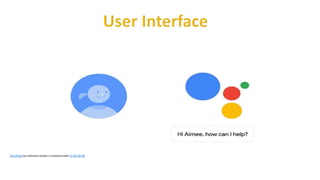
This Photo by Unknown Author is licensed underCC BY-SA-NC
1 Acknowledgement
2 Abstract
3 Introduction
4 History
5 Basic Concept
6 Demo 1.2
7 Working
8 Available Content
9 User Interface
10 Comparisons Between Popular ones
11 VPA in Future
12 Conclusion
What is Virtual Personal Assistant?
Concept of an artificial personal assistant.
Voice –controlled Personal Digital Assistants.
The combination of:
• Automatic Speech Recognition.
• Artificial Intelligence.
• Natural Language Process.
• Inter Process Communication.
This Photo by Unknown Author is licensed under CC BY
The first PDA was released in 1984 by Psion, the organizer
Early PDAs was devices having full keyword and touch screen . which
has also known as PALMs.
Which was also known as PALMs
The concept of virtual assistant was first developed by joseph
Weinbaum of MIT in the late 60s.
The first chatterbot was “ELIZA”.
“JULIA” is an example of the second generation chatterbot.
“ALICE” is example of third generation chatterbot.
Natural language Processing.
• To understand user’s speech input.
Automatic Speech Recognition.
 To understand command according to user’s input.
Artificial Intelligence.
 To learn things from user and to store all information,
about behavior and relations of user.
Inter Process Communication.
 To get important information from other software,
applications.
 Hardware:
• A phone with a touch screen interface and most of t laptops are also
touch screen.
• Computer and Phone Ram should be of a minimum 512 Mb for
phone and 1Gb for computer.
• Internet connectivity.
• Computer and Phone should have USB debugging mode for ,
development and testing purposes.
 Software:
• Operating System should be android 4.1/win8.1/IOS 6 or higher.
• The kernel version should be 3.0.16 or higher.
• Support of other basic applications like maps , calendar , camera web
connection etc.
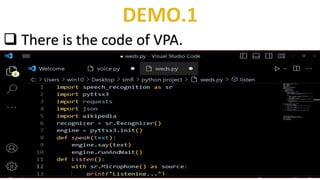
 There is the code of VPA.
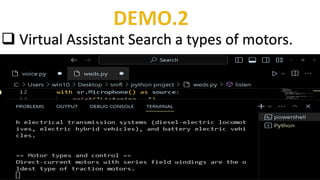
 Virtual Assistant Search a types of motors.
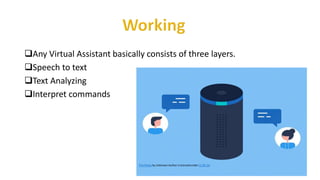
Any Virtual Assistant basically consists of three layers.
Speech to text
Text Analyzing
Interpret commands
This Photo by Unknown Author is licensed under CC BY-SA
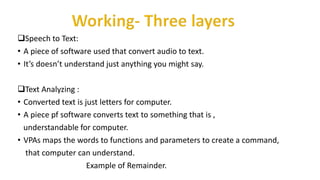
Speech to Text:
• A piece of software used that convert audio to text.
• It’s doesn’t understand just anything you might say.
Text Analyzing :
• Converted text is just letters for computer.
• A piece pf software converts text to something that is ,
understandable for computer.
• VPAs maps the words to functions and parameters to create a command,
that computer can understand.
Example of Remainder.
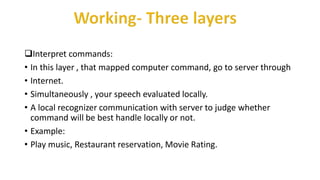
Interpret commands:
• In this layer , that mapped computer command, go to server through
• Internet.
• Simultaneously , your speech evaluated locally.
• A local recognizer communication with server to judge whether
command will be best handle locally or not.
• Example:
• Play music, Restaurant reservation, Movie Rating.
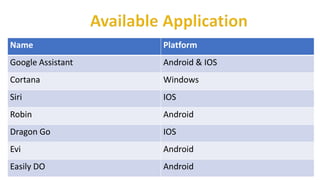
Name Platform
Google Assistant Android & IOS
Cortana Windows
Siri IOS
Robin Android
Dragon Go IOS
Evi Android
Easily DO Android
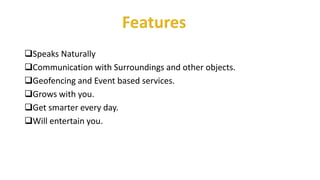
Speaks Naturally
Communication with Surroundings and other objects.
Geofencing and Event based services.
Grows with you.
Get smarter every day.
Will entertain you.
Some of the features of Virtual Assistant, you may ask him in day by day uses as
shown below:
Make Phone Calls
Schedule meetings & Appointments
Get Direction
Send Messages
Set Remainder
Ask Questions
Play Music & Videos
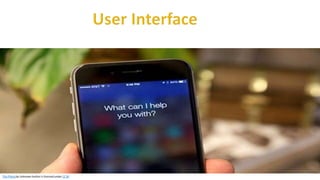
This Photo by Unknown Author is licensed under CC BY-SA-NC
This Photo by Unknown Author is licensed under CC BY
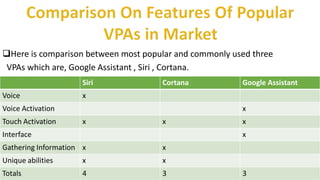
Here is comparison between most popular and commonly used three
VPAs which are, Google Assistant , Siri , Cortana.
Siri Cortana Google Assistant
Voice x
Voice Activation x
Touch Activation x x x
Interface x
Gathering Information x x
Unique abilities x x
Totals 4 3 3
They allow you to export and import data.
Store various information.
Make to do list.
Recognizes voice commands.
Controls various applications od devices.
Provides services regarding your location.
Helps to plan your whole day.
Reminds you important things on accurate situations,
Or location.
Listening problem.
VPA get problems to process wrong
Prounced words and miscellaneous words.
Silent mode support:
VPA gives response in voice output,
Thus it doesn’t work properly in silent mode.
Navigation languages:
Most of VPAs can understand only English language.
Internet access:
VPA needs internet connection to give desired output.
Next step will be strip back the physical hardware as far as possible,
With the intelligence of the VA existing in the cloud , getting pulled in
and pushing its way into lives on multiple devices on our bodies and in
our offices.
Your VA will be continually promoting you with suggestions and
tasking instructions, and will know more about you than perhaps you
do yourself.
We can expect this device to be implanted and permanent.
Virtual Personal Assistants are very effective way to organize your
Schedule . Now there are many Smart Personal Digital Assistant
applications available in market for various device platforms.
These new software Application are performing really well than [PDA
devices as they provided with all resources of your smartphone.
VPAs are also reliable than Human Personal Assistant because,
VPAs are more portable and you can use them anytime . They also
have lot of information than any assistant as they are connected with
internet.
VIRTUAL PERSONAL ASSISTANT.pdf

VIRTUAL PERSONAL ASSISTANT.pdf

  • 2.
    The success andfinal of this project required a lot of guidance and assistance from Prof. Pradeep Kumar and I am extremely privileged to have got this all along the completion of my project . All that I have done is only due to such supervision and assistance and I would not forget to thank her. I respect and thank Prof. Pradeep Kumar for providing me an opportunity to do the project work from home and giving me all supports and guidance which made me complete the project .I am extremely thankful to her for providing such a nice support and guidance although she had busy schedule managing the academic affairs.
  • 3.
     A virtualassistant foe desktop also called digital assistant , is an application program that understands natural language voice commands and complete tasks for the users. Most of the digital assistants are interacted with by using human voice . They may also be referred as voice assistant . As digital assistant become more popular , so do their capabilities and the task they are able to perform . Below are few of popular activities tis desktop perform. • Answer basic question • Searching Google/Wikipedia • Get information about temperature
  • 4.
    Ankush Solanki =Worked on the code Asit Pandey = PPt. Design Diksha Sharma= Given Content Preeti Soni= Given Idea for this Project
  • 5.
    This Photo byUnknown Author is licensed underCC BY-SA-NC 1 Acknowledgement 2 Abstract 3 Introduction 4 History 5 Basic Concept 6 Demo 1.2 7 Working 8 Available Content 9 User Interface 10 Comparisons Between Popular ones 11 VPA in Future 12 Conclusion
  • 6.
    What is VirtualPersonal Assistant? Concept of an artificial personal assistant. Voice –controlled Personal Digital Assistants. The combination of: • Automatic Speech Recognition. • Artificial Intelligence. • Natural Language Process. • Inter Process Communication. This Photo by Unknown Author is licensed under CC BY
  • 7.
    The first PDAwas released in 1984 by Psion, the organizer Early PDAs was devices having full keyword and touch screen . which has also known as PALMs. Which was also known as PALMs The concept of virtual assistant was first developed by joseph Weinbaum of MIT in the late 60s. The first chatterbot was “ELIZA”. “JULIA” is an example of the second generation chatterbot. “ALICE” is example of third generation chatterbot.
  • 8.
    Natural language Processing. •To understand user’s speech input. Automatic Speech Recognition.  To understand command according to user’s input. Artificial Intelligence.  To learn things from user and to store all information, about behavior and relations of user. Inter Process Communication.  To get important information from other software, applications.
  • 9.
     Hardware: • Aphone with a touch screen interface and most of t laptops are also touch screen. • Computer and Phone Ram should be of a minimum 512 Mb for phone and 1Gb for computer. • Internet connectivity. • Computer and Phone should have USB debugging mode for , development and testing purposes.  Software: • Operating System should be android 4.1/win8.1/IOS 6 or higher. • The kernel version should be 3.0.16 or higher. • Support of other basic applications like maps , calendar , camera web connection etc.
  • 10.
     There isthe code of VPA.
  • 11.
     Virtual AssistantSearch a types of motors.
  • 12.
    Any Virtual Assistantbasically consists of three layers. Speech to text Text Analyzing Interpret commands This Photo by Unknown Author is licensed under CC BY-SA
  • 13.
    Speech to Text: •A piece of software used that convert audio to text. • It’s doesn’t understand just anything you might say. Text Analyzing : • Converted text is just letters for computer. • A piece pf software converts text to something that is , understandable for computer. • VPAs maps the words to functions and parameters to create a command, that computer can understand. Example of Remainder.
  • 14.
    Interpret commands: • Inthis layer , that mapped computer command, go to server through • Internet. • Simultaneously , your speech evaluated locally. • A local recognizer communication with server to judge whether command will be best handle locally or not. • Example: • Play music, Restaurant reservation, Movie Rating.
  • 15.
    Name Platform Google AssistantAndroid & IOS Cortana Windows Siri IOS Robin Android Dragon Go IOS Evi Android Easily DO Android
  • 16.
    Speaks Naturally Communication withSurroundings and other objects. Geofencing and Event based services. Grows with you. Get smarter every day. Will entertain you.
  • 17.
    Some of thefeatures of Virtual Assistant, you may ask him in day by day uses as shown below: Make Phone Calls Schedule meetings & Appointments Get Direction Send Messages Set Remainder Ask Questions Play Music & Videos
  • 18.
    This Photo byUnknown Author is licensed under CC BY-SA-NC
  • 19.
    This Photo byUnknown Author is licensed under CC BY
  • 20.
    Here is comparisonbetween most popular and commonly used three VPAs which are, Google Assistant , Siri , Cortana. Siri Cortana Google Assistant Voice x Voice Activation x Touch Activation x x x Interface x Gathering Information x x Unique abilities x x Totals 4 3 3
  • 21.
    They allow youto export and import data. Store various information. Make to do list. Recognizes voice commands. Controls various applications od devices. Provides services regarding your location. Helps to plan your whole day. Reminds you important things on accurate situations, Or location.
  • 22.
    Listening problem. VPA getproblems to process wrong Prounced words and miscellaneous words. Silent mode support: VPA gives response in voice output, Thus it doesn’t work properly in silent mode. Navigation languages: Most of VPAs can understand only English language. Internet access: VPA needs internet connection to give desired output.
  • 23.
    Next step willbe strip back the physical hardware as far as possible, With the intelligence of the VA existing in the cloud , getting pulled in and pushing its way into lives on multiple devices on our bodies and in our offices. Your VA will be continually promoting you with suggestions and tasking instructions, and will know more about you than perhaps you do yourself. We can expect this device to be implanted and permanent.
  • 24.
    Virtual Personal Assistantsare very effective way to organize your Schedule . Now there are many Smart Personal Digital Assistant applications available in market for various device platforms. These new software Application are performing really well than [PDA devices as they provided with all resources of your smartphone. VPAs are also reliable than Human Personal Assistant because, VPAs are more portable and you can use them anytime . They also have lot of information than any assistant as they are connected with internet.