Agenda
● What is Virtualization?
● What is Virtualization trying to solve?
● Traditional Virtualization
● What is Docker?
○ Docker vs. Virtual Machine
● Images, Containers and Registry
● Volume Mounting, Port Publishing, Linking
● Docker Compose
● Demo
● Docker Swarm
● Docker Use Cases
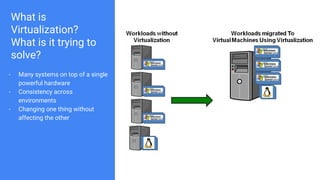
What is
Virtualization?
What is it trying to
solve?
- Many systems on top of a single
powerful hardware
- Consistency across
environments
- Changing one thing without
affecting the other
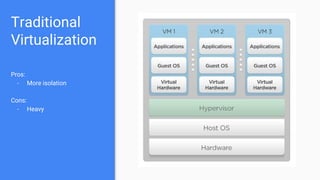
Traditional
Virtualization
Pros:
- More isolation
Cons:
- Heavy
Container Technology
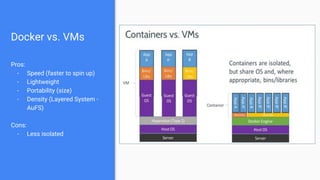
Docker vs. VMs
Pros:
- Speed (faster to spin up)
- Lightweight
- Portability (size)
- Density (Layered System -
AuFS)
Cons:
- Less isolated
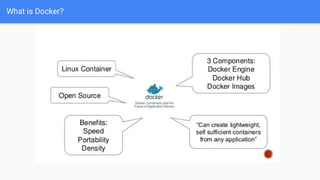
What is Docker?
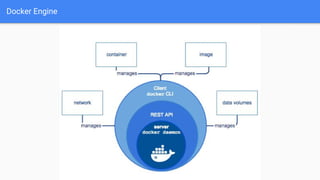
Docker Engine
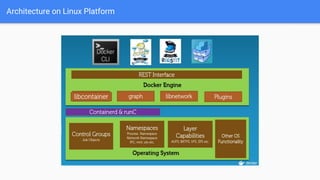
Architecture on Linux Platform
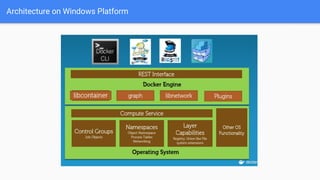
Architecture on Windows Platform
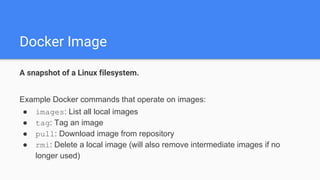
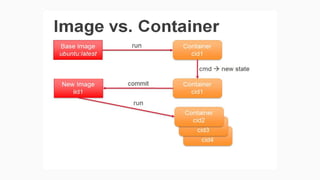
Docker Image
A snapshot of a Linux filesystem.
Example Docker commands that operate on images:
● images: List all local images
● tag: Tag an image
● pull: Download image from repository
● rmi: Delete a local image (will also remove intermediate images if no
longer used)
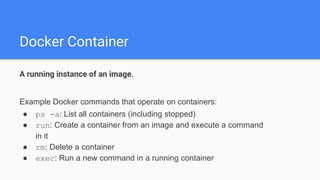
Docker Container
A running instance of an image.
Example Docker commands that operate on containers:
● ps -a: List all containers (including stopped)
● run: Create a container from an image and execute a command
in it
● rm: Delete a container
● exec: Run a new command in a running container
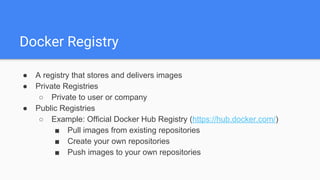
Docker Registry
● A registry that stores and delivers images
● Private Registries
○ Private to user or company
● Public Registries
○ Example: Official Docker Hub Registry (https://hub.docker.com/)
■ Pull images from existing repositories
■ Create your own repositories
■ Push images to your own repositories
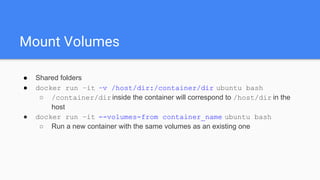
Mount Volumes
● Shared folders
● docker run –it –v /host/dir:/container/dir ubuntu bash
○ /container/dirinside the container will correspond to /host/dir in the
host
● docker run –it --volumes-from container_name ubuntu bash
○ Run a new container with the same volumes as an existing one
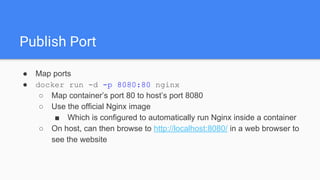
Publish Port
● Map ports
● docker run -d -p 8080:80 nginx
○ Map container’s port 80 to host’s port 8080
○ Use the official Nginx image
■ Which is configured to automatically run Nginx inside a container
○ On host, can then browse to http://localhost:8080/ in a web browser to
see the website
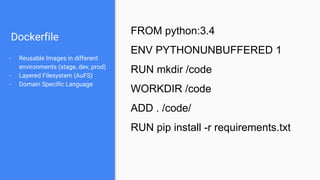
Dockerfile
- Reusable Images in different
environments (stage, dev, prod)
- Layered Filesystem (AuFS)
- Domain Specific Language
FROM python:3.4
ENV PYTHONUNBUFFERED 1
RUN mkdir /code
WORKDIR /code
ADD . /code/
RUN pip install -r requirements.txt
Docker Compose
- Written in YAML
- Make microservice containers
behave like a single system
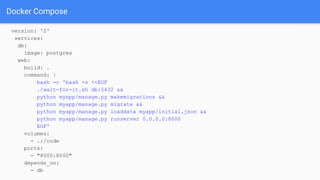
Docker Compose
version: '2'
services:
db:
image: postgres
web:
build: .
command: |
bash -c 'bash -s <<EOF
./wait-for-it.sh db:5432 &&
python myapp/manage.py makemigrations &&
python myapp/manage.py migrate &&
python myapp/manage.py loaddata myapp/initial.json &&
python myapp/manage.py runserver 0.0.0.0:8000
EOF'
volumes:
- .:/code
ports:
- "8000:8000"
depends_on:
- db
DEMO
Docker Swarm
- Clustering
- Scheduling
- Load Balancing
- Fault-tolerance
- Rolling updates
Docker Use Cases
● Consistent Environments
● Quick evaluation of software
● Microservices
Q/A

Virtual Machines and Docker

  • 2.
    Agenda ● What isVirtualization? ● What is Virtualization trying to solve? ● Traditional Virtualization ● What is Docker? ○ Docker vs. Virtual Machine ● Images, Containers and Registry ● Volume Mounting, Port Publishing, Linking ● Docker Compose ● Demo ● Docker Swarm ● Docker Use Cases
  • 3.
    What is Virtualization? What isit trying to solve? - Many systems on top of a single powerful hardware - Consistency across environments - Changing one thing without affecting the other
  • 4.
  • 5.
  • 6.
    Docker vs. VMs Pros: -Speed (faster to spin up) - Lightweight - Portability (size) - Density (Layered System - AuFS) Cons: - Less isolated
  • 7.
  • 8.
  • 9.
  • 10.
  • 11.
    Docker Image A snapshotof a Linux filesystem. Example Docker commands that operate on images: ● images: List all local images ● tag: Tag an image ● pull: Download image from repository ● rmi: Delete a local image (will also remove intermediate images if no longer used)
  • 12.
    Docker Container A runninginstance of an image. Example Docker commands that operate on containers: ● ps -a: List all containers (including stopped) ● run: Create a container from an image and execute a command in it ● rm: Delete a container ● exec: Run a new command in a running container
  • 14.
    Docker Registry ● Aregistry that stores and delivers images ● Private Registries ○ Private to user or company ● Public Registries ○ Example: Official Docker Hub Registry (https://hub.docker.com/) ■ Pull images from existing repositories ■ Create your own repositories ■ Push images to your own repositories
  • 15.
    Mount Volumes ● Sharedfolders ● docker run –it –v /host/dir:/container/dir ubuntu bash ○ /container/dirinside the container will correspond to /host/dir in the host ● docker run –it --volumes-from container_name ubuntu bash ○ Run a new container with the same volumes as an existing one
  • 16.
    Publish Port ● Mapports ● docker run -d -p 8080:80 nginx ○ Map container’s port 80 to host’s port 8080 ○ Use the official Nginx image ■ Which is configured to automatically run Nginx inside a container ○ On host, can then browse to http://localhost:8080/ in a web browser to see the website
  • 17.
    Dockerfile - Reusable Imagesin different environments (stage, dev, prod) - Layered Filesystem (AuFS) - Domain Specific Language FROM python:3.4 ENV PYTHONUNBUFFERED 1 RUN mkdir /code WORKDIR /code ADD . /code/ RUN pip install -r requirements.txt
  • 18.
    Docker Compose - Writtenin YAML - Make microservice containers behave like a single system
  • 19.
    Docker Compose version: '2' services: db: image:postgres web: build: . command: | bash -c 'bash -s <<EOF ./wait-for-it.sh db:5432 && python myapp/manage.py makemigrations && python myapp/manage.py migrate && python myapp/manage.py loaddata myapp/initial.json && python myapp/manage.py runserver 0.0.0.0:8000 EOF' volumes: - .:/code ports: - "8000:8000" depends_on: - db
  • 20.
  • 21.
    Docker Swarm - Clustering -Scheduling - Load Balancing - Fault-tolerance - Rolling updates
  • 22.
    Docker Use Cases ●Consistent Environments ● Quick evaluation of software ● Microservices
  • 23.