VIRTUAL MACHINE
Presented By : Prakhar Maurya
B.Sc. IT (3rd Semester)
@PRAKHAR
Contents :
• History
• Introduction of Virtual Machine
• Types of Virtual Machine
• Benefits
• Simulation
• Implementation
• Examples
@PRAKHAR
History :
Virtual machines first appeared as the VM Operating
system for IBM mainframes in 1972.
@PRAKHAR
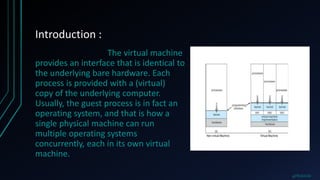
Introduction :
The virtual machine
provides an interface that is identical to
the underlying bare hardware. Each
process is provided with a (virtual)
copy of the underlying computer.
Usually, the guest process is in fact an
operating system, and that is how a
single physical machine can run
multiple operating systems
concurrently, each in its own virtual
machine.
@PRAKHAR
Types of VM :
• System Virtual Machine
• Process Virtual Machine
@PRAKHAR
System Virtual System :
System virtual machine (also
known as hardware virtual machine). The system VM
simulates the complete system hardware stack and
support the execution of complete operating system.
Process Virtual System :
Process virtual machine (also
known as application virtual machine). Process VM adds up
layer over an operating system which is use to simulate the
programming environment for the execution of individual
process.
@PRAKHAR
Benefits :
• Familiar Interfaces
• High Availability
• Scalability
• Backup and Fast Recovery
• Easy Cloning
@PRAKHAR
Simulation :
An alternative to creating an entire virtual
machine is to simply run an emulator, which allows a program
written for one OS to run on a different OS. For example, a
UNIX machine may run a DOS emulator in order to run DOS
programs, or vice-versa. Emulators tend to run considerably
slower than the native OS, and are also generally less than
perfect.
@PRAKHAR
Implementation :
Implementation may be challenging,
partially due to the consequences of user versus kernel mode.
Each of the simultaneously running kernels needs to operate in
kernel mode at some point, but the virtual machine actually
runs in user mode. So the kernel mode has to be simulated for
each of the loaded Operating Systems, and kernel system calls
passed through the virtual machine into a true kernel mode for
eventual hardware access. The virtual machines may run
slower, due to the increased levels of code between
applications and the hardware, or they may run faster, due to
the benefits of caching.
@PRAKHAR
Examples :
• VMware : VMware is desktop software runs on Microsoft Windows, Linux,
and Mac OS X, while its enterprise software hypervisors for servers, VMware
ESX and VMware ESXi, are bare-metal hypervisors that run directly
on server hardware without requiring an additional underlying operating
system.
• The JAVA Virtual Machine
• The .NET Framework
@PRAKHAR
Thank You…..
@PRAKHAR

Virtual Machine

  • 1.
    VIRTUAL MACHINE Presented By: Prakhar Maurya B.Sc. IT (3rd Semester) @PRAKHAR
  • 2.
    Contents : • History •Introduction of Virtual Machine • Types of Virtual Machine • Benefits • Simulation • Implementation • Examples @PRAKHAR
  • 3.
    History : Virtual machinesfirst appeared as the VM Operating system for IBM mainframes in 1972. @PRAKHAR
  • 4.
    Introduction : The virtualmachine provides an interface that is identical to the underlying bare hardware. Each process is provided with a (virtual) copy of the underlying computer. Usually, the guest process is in fact an operating system, and that is how a single physical machine can run multiple operating systems concurrently, each in its own virtual machine. @PRAKHAR
  • 5.
    Types of VM: • System Virtual Machine • Process Virtual Machine @PRAKHAR
  • 6.
    System Virtual System: System virtual machine (also known as hardware virtual machine). The system VM simulates the complete system hardware stack and support the execution of complete operating system. Process Virtual System : Process virtual machine (also known as application virtual machine). Process VM adds up layer over an operating system which is use to simulate the programming environment for the execution of individual process. @PRAKHAR
  • 7.
    Benefits : • FamiliarInterfaces • High Availability • Scalability • Backup and Fast Recovery • Easy Cloning @PRAKHAR
  • 8.
    Simulation : An alternativeto creating an entire virtual machine is to simply run an emulator, which allows a program written for one OS to run on a different OS. For example, a UNIX machine may run a DOS emulator in order to run DOS programs, or vice-versa. Emulators tend to run considerably slower than the native OS, and are also generally less than perfect. @PRAKHAR
  • 9.
    Implementation : Implementation maybe challenging, partially due to the consequences of user versus kernel mode. Each of the simultaneously running kernels needs to operate in kernel mode at some point, but the virtual machine actually runs in user mode. So the kernel mode has to be simulated for each of the loaded Operating Systems, and kernel system calls passed through the virtual machine into a true kernel mode for eventual hardware access. The virtual machines may run slower, due to the increased levels of code between applications and the hardware, or they may run faster, due to the benefits of caching. @PRAKHAR
  • 10.
    Examples : • VMware: VMware is desktop software runs on Microsoft Windows, Linux, and Mac OS X, while its enterprise software hypervisors for servers, VMware ESX and VMware ESXi, are bare-metal hypervisors that run directly on server hardware without requiring an additional underlying operating system. • The JAVA Virtual Machine • The .NET Framework @PRAKHAR
  • 11.