The eG VDI MonitorTM
 Management Solution for Virtual Desktop Infrastructures


                                                  Virtual desktop infrastructure (VDI), also known as hosted virtual desktops (HVD), has

     Benefits of the                              emerged as the next logical extension of virtualization technology, and may in fact surpass
                                                  server-based virtualization in IT spending. Since virtual machines are used in both server
     eG VDI Monitor                               virtualization and desktop virtualization, it is not surprising that administrators try to use the
                                                  same tool to monitor the performance of both environments. However, there are clear and
                                                  distinct differences between server virtualization and desktop virtualization.
· Monitor VDI as a service - not as
  silos: Correlate the performance across
  all components supporting the VDI               Virtual Desktop Monitoring                                      Virtual Server Monitoring
  (including virtualization platforms,            There are several reasons why virtual desktop monitoring is not the same as virtual server
  application delivery servers, connection        monitoring. First, virtual desktop infrastructures provide a service, and for the service to work,
  brokers, licensing servers, etc) and identify   every part of the infrastructure must work – the terminal servers, the network links, firewall,
                                                  connection brokers, virtualization platforms, the enterprise application servers, storage
  performance bottlenecks.
                                                  devices, Active Directory, and so on. On the other hand, server virtualization monitoring
                                                  solutions focus on just one of these tiers and hence, cannot provide the end-to-end view that
· Plan your VDI roll-outs efficiently:
                                                  administrators require.
  Understand the performance and usage
                                                  Second, to understand the usage of the infrastructure and to effectively troubleshoot user
  of every layer of every tier of your virtual
                                                  complaints, it is essential to monitor the virtual desktop infrastructure from a user perspective
  desktop infrastructure to get automatic
                                                  – i.e., Who is logged on? What physical servers and VMs are they are using? What resources
  baselines for key metrics.                      is he/she taking up? What applications is he/she accessing? etc. Since server virtualization
                                                  monitoring solutions track VMs and not users, they are not suited for VDI monitoring.
· Monitor users, not VMs: Know which
                                                  Yet another key difference is the scale of operations. While server virtualization typically has
  users logged in, when, what applications        5-10 VMs per physical server, desktop virtualization often supports 30-50 (sometimes more)
  they accessed, what resources they used,        VMs per physical server. To maintain the cost of ownership low and to minimize the overheads
  etc.                                            of the monitoring, it is not practical to require monitoring agents inside each and every
                                                  desktop. Getting a perspective of usage inside a virtual desktop without deploying an agent
· Diagnose down to the application:               inside the desktop is a key challenge.

  With a few clicks drill down to the exact       A monitoring solution does not recognize and handle these differences between desktop and
  application processes a user is accessing       server virtualization is not suited for both forms of virtualization.
  that could be causing a problem.
                                                  End-to-End Monitoring, Diagnosis, Reporting for VDI
· Get Quick ROI: One agent monitors               The eG VDI MonitorTM, part of the eG Enterprise Suite, addresses the above key needs of
  the virtualization kernel, console, and all     VDI. You can use the eG VDI Monitor during your initial deployments to identify and eliminate
  the hosted desktops.                            bottlenecks. Using a patented, automated root-cause diagnosis technology, the eG VDI
                                                  Monitor analyzes performance across every tier of the infrastructure and correlates them
                                                  over time. If a particular alert is a secondary effect of the root cause problem, it is downgraded
                                                  in severity. So by focusing on the critical alerts administrators can avoid wasting time
                                                  troubleshooting secondary effects.
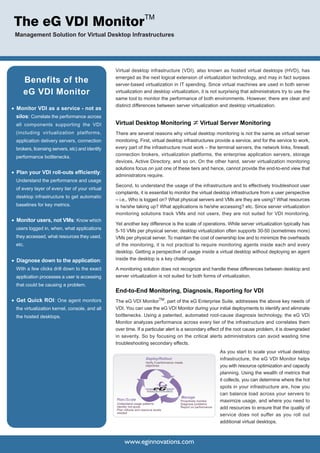
                                                                                                                              As you start to scale your virtual desktop
                                                                       Deploy/Rollout                                         infrastructure, the eG VDI Monitor helps
                                                                       Verify if performance meets
                                                                       objectives                                             you with resource optimization and capacity
                                                                                                                              planning. Using the wealth of metrics that
                                                                                                                              it collects, you can determine where the hot
                                                                                                                              spots in your infrastructure are, how you
                                                                                                                              can balance load across your servers to
                                                                        Enabling Service Excellence


                                                                                                      Manage
                                                  Plan/Scale                                          Proactively monitor     maximize usage, and where you need to
                                                  Understand usage patterns                           Diagnose problems
                                                  Identify hot-spots
                                                  Plan rollouts and resource levels
                                                                                                      Report on performance   add resources to ensure that the quality of
                                                  needed
                                                                                                                              service does not suffer as you roll out
                                                                                                                              additional virtual desktops.


                                                       www.eginnovations.com
Central to the eG VDI Monitor is a patent-pending In-N-Out
                                                                                                   Monitoring architecture. Using a single monitoring agent, the
                                                                                                   eG VDI monitor monitors the performance of the virtualization
                                                                                                   platform (VMware vSphere, Citrix XenServer, Microsoft
                                                                                                   virtualization, etc.) and obtains an "outside view" of the virtual
                                                                                                   desktops, thereby determining what percent of the physical
                                                                                                   resources each desktop is taking up. Without requiring any
                                                                                                   additional agents inside the virtual desktops, the eG VDI
                                                                                                   monitor obtains an "inside view" of each virtual desktop that
                                                                                                   indicates what applications running inside the virtual desktop
                                                                                                   are responsible for the resource usage. This information is
                                                                                                   critical for problem diagnosis and compliance tracking in
                                                                                                   virtual desktop infrastructures.

                                                                                                   The eG VDI Monitor goes well beyond managing virtualized
                                                                                                   desktops as discrete entities. End-to-end business service
                                                                                                   views show the real-time status of applications and network
                                                                                                   devices involved in virtual desktop service delivery, including
                                                                                                   firewalls, terminal servers, connection brokers, storage devices,
                                                                                                   profile servers, etc. Inter-dependencies between these
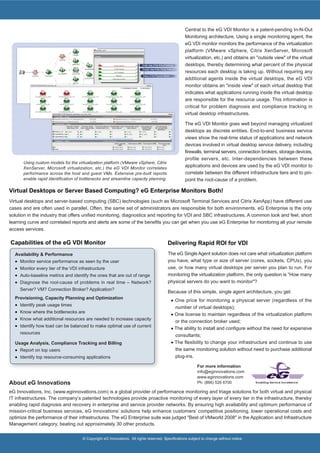
       Using custom models for the virtualization platform (VMware vSphere, Citrix
       XenServer, Microsoft virtualization, etc.) the eG VDI Monitor correlates
                                                                                                   applications and devices are used by the eG VDI monitor to
       performance across the host and guest VMs. Extensive pre-built reports                      correlate between the different infrastructure tiers and to pin-
       enable rapid identification of bottlenecks and streamline capacity planning.                point the root-cause of a problem.

Virtual Desktops or Server Based Computing? eG Enterprise Monitors Both!
Virtual desktops and server-based computing (SBC) technologies (such as Microsoft Terminal Services and Citrix XenApp) have different use
cases and are often used in parallel. Often, the same set of administrators are responsible for both environments. eG Enterprise is the only
solution in the industry that offers unified monitoring, diagnostics and reporting for VDI and SBC infrastructures. A common look and feel, short
learning curve and correlated reports and alerts are some of the benefits you can get when you use eG Enterprise for monitoring all your remote
access services.

Capabilities of the eG VDI Monitor                                                       Delivering Rapid ROI for VDI
  Availability & Performance                                                             The eG Single Agent solution does not care what virtualization platform
  ·   Monitor service performance as seen by the user                                    you have, what type or size of server (cores, sockets, CPUs), you
  ·   Monitor every tier of the VDI infrastructure                                       use, or how many virtual desktops per server you plan to run. For
  ·   Auto-baseline metrics and identify the ones that are out of range                  monitoring the virtualization platform, the only question is “How many
  ·   Diagnose the root-cause of problems in real time – Network?                        physical servers do you want to monitor"?
      Server? VM? Connection Broker? Application?
                                                                                         Because of this simple, single agent architecture, you get:
  Provisioning, Capacity Planning and Optimization
                                                                                           · One price for monitoring a physical server (regardless of the
  ·   Identify peak usage times
                                                                                             number of virtual desktops);
  ·   Know where the bottlenecks are
                                                                                           · One license to maintain regardless of the virtualization platform
  ·   Know what additional resources are needed to increase capacity
                                                                                             or the connection broker used;
  ·   Identify how load can be balanced to make optimal use of current
                                                                                           · The ability to install and configure without the need for expensive
      resources
                                                                                             consultants;
  Usage Analysis, Compliance Tracking and Billing                                          · The flexibility to change your infrastructure and continue to use
  · Report on top users                                                                      the same monitoring solution without need to purchase additional
  · Identify top resource-consuming applications                                             plug-ins.

                                                                                                           For more information
                                                                                                           info@eginnovations.com
                                                                                                           www.eginnovations.com
About eG Innovations                                                                                       Ph: (866) 526 6700             Enabling Service Excellence


eG Innovations, Inc. (www.eginnovations.com) is a global provider of performance monitoring and triage solutions for both virtual and physical
IT infrastructures. The company’s patented technologies provide proactive monitoring of every layer of every tier in the infrastructure, thereby
enabling rapid diagnosis and recovery in enterprise and service provider networks. By ensuring high availability and optimum performance of
mission-critical business services, eG Innovations’ solutions help enhance customers’ competitive positioning, lower operational costs and
optimize the performance of their infrastructures. The eG Enterprise suite was judged "Best of VMworld 2008" in the Application and Infrastructure
Management category, beating out approximately 30 other products.

                                      © Copyright eG Innovations. All rights reserved. Specifications subject to change without notice.

Virtual Desktop Infrastructure

  • 1.
    The eG VDIMonitorTM Management Solution for Virtual Desktop Infrastructures Virtual desktop infrastructure (VDI), also known as hosted virtual desktops (HVD), has Benefits of the emerged as the next logical extension of virtualization technology, and may in fact surpass server-based virtualization in IT spending. Since virtual machines are used in both server eG VDI Monitor virtualization and desktop virtualization, it is not surprising that administrators try to use the same tool to monitor the performance of both environments. However, there are clear and distinct differences between server virtualization and desktop virtualization. · Monitor VDI as a service - not as silos: Correlate the performance across all components supporting the VDI Virtual Desktop Monitoring Virtual Server Monitoring (including virtualization platforms, There are several reasons why virtual desktop monitoring is not the same as virtual server application delivery servers, connection monitoring. First, virtual desktop infrastructures provide a service, and for the service to work, brokers, licensing servers, etc) and identify every part of the infrastructure must work – the terminal servers, the network links, firewall, connection brokers, virtualization platforms, the enterprise application servers, storage performance bottlenecks. devices, Active Directory, and so on. On the other hand, server virtualization monitoring solutions focus on just one of these tiers and hence, cannot provide the end-to-end view that · Plan your VDI roll-outs efficiently: administrators require. Understand the performance and usage Second, to understand the usage of the infrastructure and to effectively troubleshoot user of every layer of every tier of your virtual complaints, it is essential to monitor the virtual desktop infrastructure from a user perspective desktop infrastructure to get automatic – i.e., Who is logged on? What physical servers and VMs are they are using? What resources baselines for key metrics. is he/she taking up? What applications is he/she accessing? etc. Since server virtualization monitoring solutions track VMs and not users, they are not suited for VDI monitoring. · Monitor users, not VMs: Know which Yet another key difference is the scale of operations. While server virtualization typically has users logged in, when, what applications 5-10 VMs per physical server, desktop virtualization often supports 30-50 (sometimes more) they accessed, what resources they used, VMs per physical server. To maintain the cost of ownership low and to minimize the overheads etc. of the monitoring, it is not practical to require monitoring agents inside each and every desktop. Getting a perspective of usage inside a virtual desktop without deploying an agent · Diagnose down to the application: inside the desktop is a key challenge. With a few clicks drill down to the exact A monitoring solution does not recognize and handle these differences between desktop and application processes a user is accessing server virtualization is not suited for both forms of virtualization. that could be causing a problem. End-to-End Monitoring, Diagnosis, Reporting for VDI · Get Quick ROI: One agent monitors The eG VDI MonitorTM, part of the eG Enterprise Suite, addresses the above key needs of the virtualization kernel, console, and all VDI. You can use the eG VDI Monitor during your initial deployments to identify and eliminate the hosted desktops. bottlenecks. Using a patented, automated root-cause diagnosis technology, the eG VDI Monitor analyzes performance across every tier of the infrastructure and correlates them over time. If a particular alert is a secondary effect of the root cause problem, it is downgraded in severity. So by focusing on the critical alerts administrators can avoid wasting time troubleshooting secondary effects. As you start to scale your virtual desktop Deploy/Rollout infrastructure, the eG VDI Monitor helps Verify if performance meets objectives you with resource optimization and capacity planning. Using the wealth of metrics that it collects, you can determine where the hot spots in your infrastructure are, how you can balance load across your servers to Enabling Service Excellence Manage Plan/Scale Proactively monitor maximize usage, and where you need to Understand usage patterns Diagnose problems Identify hot-spots Plan rollouts and resource levels Report on performance add resources to ensure that the quality of needed service does not suffer as you roll out additional virtual desktops. www.eginnovations.com
  • 2.
    Central to theeG VDI Monitor is a patent-pending In-N-Out Monitoring architecture. Using a single monitoring agent, the eG VDI monitor monitors the performance of the virtualization platform (VMware vSphere, Citrix XenServer, Microsoft virtualization, etc.) and obtains an "outside view" of the virtual desktops, thereby determining what percent of the physical resources each desktop is taking up. Without requiring any additional agents inside the virtual desktops, the eG VDI monitor obtains an "inside view" of each virtual desktop that indicates what applications running inside the virtual desktop are responsible for the resource usage. This information is critical for problem diagnosis and compliance tracking in virtual desktop infrastructures. The eG VDI Monitor goes well beyond managing virtualized desktops as discrete entities. End-to-end business service views show the real-time status of applications and network devices involved in virtual desktop service delivery, including firewalls, terminal servers, connection brokers, storage devices, profile servers, etc. Inter-dependencies between these Using custom models for the virtualization platform (VMware vSphere, Citrix XenServer, Microsoft virtualization, etc.) the eG VDI Monitor correlates applications and devices are used by the eG VDI monitor to performance across the host and guest VMs. Extensive pre-built reports correlate between the different infrastructure tiers and to pin- enable rapid identification of bottlenecks and streamline capacity planning. point the root-cause of a problem. Virtual Desktops or Server Based Computing? eG Enterprise Monitors Both! Virtual desktops and server-based computing (SBC) technologies (such as Microsoft Terminal Services and Citrix XenApp) have different use cases and are often used in parallel. Often, the same set of administrators are responsible for both environments. eG Enterprise is the only solution in the industry that offers unified monitoring, diagnostics and reporting for VDI and SBC infrastructures. A common look and feel, short learning curve and correlated reports and alerts are some of the benefits you can get when you use eG Enterprise for monitoring all your remote access services. Capabilities of the eG VDI Monitor Delivering Rapid ROI for VDI Availability & Performance The eG Single Agent solution does not care what virtualization platform · Monitor service performance as seen by the user you have, what type or size of server (cores, sockets, CPUs), you · Monitor every tier of the VDI infrastructure use, or how many virtual desktops per server you plan to run. For · Auto-baseline metrics and identify the ones that are out of range monitoring the virtualization platform, the only question is “How many · Diagnose the root-cause of problems in real time – Network? physical servers do you want to monitor"? Server? VM? Connection Broker? Application? Because of this simple, single agent architecture, you get: Provisioning, Capacity Planning and Optimization · One price for monitoring a physical server (regardless of the · Identify peak usage times number of virtual desktops); · Know where the bottlenecks are · One license to maintain regardless of the virtualization platform · Know what additional resources are needed to increase capacity or the connection broker used; · Identify how load can be balanced to make optimal use of current · The ability to install and configure without the need for expensive resources consultants; Usage Analysis, Compliance Tracking and Billing · The flexibility to change your infrastructure and continue to use · Report on top users the same monitoring solution without need to purchase additional · Identify top resource-consuming applications plug-ins. For more information info@eginnovations.com www.eginnovations.com About eG Innovations Ph: (866) 526 6700 Enabling Service Excellence eG Innovations, Inc. (www.eginnovations.com) is a global provider of performance monitoring and triage solutions for both virtual and physical IT infrastructures. The company’s patented technologies provide proactive monitoring of every layer of every tier in the infrastructure, thereby enabling rapid diagnosis and recovery in enterprise and service provider networks. By ensuring high availability and optimum performance of mission-critical business services, eG Innovations’ solutions help enhance customers’ competitive positioning, lower operational costs and optimize the performance of their infrastructures. The eG Enterprise suite was judged "Best of VMworld 2008" in the Application and Infrastructure Management category, beating out approximately 30 other products. © Copyright eG Innovations. All rights reserved. Specifications subject to change without notice.