Cache
Varnish Caching Technique
Created by: Pankaj Chauhan
What is Varnish?
lVarnish is a reverse
proxy caching system. It
acts as an operator or
security guard.
lBecause when web
request comes then it
How It Works
lVarnish caching stores
it's cache in the memory
not so much on hard
drive.
lDue to that it can able to
serve hundred or more
Extra Advantage
lVarnish caching has
these other advance
like.. saving the CPU
time, File lookup and
database request for
content.
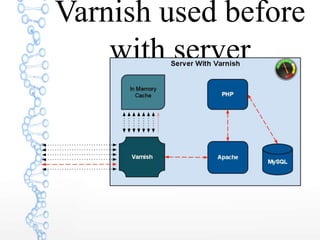
Varnish used before
with server
Varnish Method
Mostly used method:
1. vcl_init
2. vcl_recv
3. vcl_hit
4. vcl_miss
5. vcl_fetch
6. vcl_deliver
Varnish installation step with
ubuntu 14.04 + Apache
1. Sudo apt-get update
2. Sudo apt-get install varnish
3. Need to change port of apache
sudo nano /etc/apache2/ports.config
change 80 to 8080
4. Change varnish server host also you
can appy method here for caching.
sudo nano /etc/varnish/default.vcl
backend default {
.host = "127.0.0.1";
.port = "8080";
Continue...
5. sudo nano /etc/default/varnish
DAEMON_OPTS="-a :80 
-T localhost:6082 
-f /etc/varnish/default.vcl 
-S /etc/varnish/secret 
-s malloc,256m"
6. Restart apache and varnish
/etc/init.d/apache2 restart
/etc/init.d/varnish restart
How can checking varnish
status
curl -I http://localhost:8080
status like as:
HTTP/1.1 503 Service Unavailable
Server: Varnish
Content-Type: text/html; charset=utf-8
Retry-After: 5
Content-Length: 417
Accept-Ranges: bytes
Date: Tue, 27 Dec 2016 10:52:15 GMT
X-Varnish: 70237562
Age: 0
Via: 1.1 varnish
lThank You

Varnish caching technique

  • 1.
  • 2.
    What is Varnish? lVarnishis a reverse proxy caching system. It acts as an operator or security guard. lBecause when web request comes then it
  • 3.
    How It Works lVarnishcaching stores it's cache in the memory not so much on hard drive. lDue to that it can able to serve hundred or more
  • 4.
    Extra Advantage lVarnish cachinghas these other advance like.. saving the CPU time, File lookup and database request for content.
  • 5.
  • 6.
    Varnish Method Mostly usedmethod: 1. vcl_init 2. vcl_recv 3. vcl_hit 4. vcl_miss 5. vcl_fetch 6. vcl_deliver
  • 7.
    Varnish installation stepwith ubuntu 14.04 + Apache 1. Sudo apt-get update 2. Sudo apt-get install varnish 3. Need to change port of apache sudo nano /etc/apache2/ports.config change 80 to 8080 4. Change varnish server host also you can appy method here for caching. sudo nano /etc/varnish/default.vcl backend default { .host = "127.0.0.1"; .port = "8080";
  • 8.
    Continue... 5. sudo nano/etc/default/varnish DAEMON_OPTS="-a :80 -T localhost:6082 -f /etc/varnish/default.vcl -S /etc/varnish/secret -s malloc,256m" 6. Restart apache and varnish /etc/init.d/apache2 restart /etc/init.d/varnish restart
  • 9.
    How can checkingvarnish status curl -I http://localhost:8080 status like as: HTTP/1.1 503 Service Unavailable Server: Varnish Content-Type: text/html; charset=utf-8 Retry-After: 5 Content-Length: 417 Accept-Ranges: bytes Date: Tue, 27 Dec 2016 10:52:15 GMT X-Varnish: 70237562 Age: 0 Via: 1.1 varnish
  • 10.