Utilisation des capteurs dans
les applications Windows 8
       Xavier HALLADE
       Technical Marketing Engineer
       29 Novembre 2012
Legal Disclaimer & Optimization Notice
    INFORMATION IN THIS DOCUMENT IS PROVIDED IN CONNECTION WITH INTEL® PRODUCTS. EXCEPT AS PROVIDED IN INTEL’S TERMS AND
    CONDITIONS OF SALE FOR SUCH PRODUCTS, INTEL ASSUMES NO LIABILITY WHATSOEVER, AND INTEL IS CLAIMS ANY EXPRESS OR
    IMPLIED WARRANTY RELATING TO SALE AND/OR USE OF INTEL PRODUCTS, INCLUDING LIABILITY OR WARRANTIES RELATING TO FITNESS
    FOR A PARTICULAR PURPOSE, MERCHANTABILITY, OR INFRINGEMENT OF ANY PATENT, COPYRIGHT, OR OTHER INTELLECTUAL PROPERTY
    RIGHT. Intel products are not intended for use in medical, life-saving, life sustaining, critical control or safety systems, or in nuclear facility
    applications.
    • Intel products may contain design defects or errors known as errata which may cause the product to deviate from published specifications.
    Current characterized errata are available on request.
    • Intel may make changes to dates, specifications, product descriptions, and plans referenced in this document at any time, without notice.
    • This document may contain information on products in the design phase of development. The information here is subject to change without
    notice. Do not finalize a design with this information.
    • Designers must not rely on the absence or characteristics of any features or instructions marked "reserved" or "undefined." Intel reserves
    these for future definition and shall have no responsibility whatsoever for conflicts or incompatibilities arising from future changes to them.
    • Intel Corporation may have patents or pending patent applications, trademarks, copyrights, or other intellectual property rights that relate
    to the presented subject matter. The furnishing of documents and other materials and information does not provide any license, express or
    implied, by estoppel or otherwise, to any such patents, trademarks, copyrights, or other intellectual property rights.
    • Wireless connectivity and some features may require you to purchase additional software, services or external hardware.
    • Performance tests and ratings are measured using specific computer systems and/or components and reflect the approximate performance
    of Intel products as measured by those tests. Any difference in system hardware or software design or configuration may affect actual
    performance. Buyers should consult other sources of information to evaluate the performance of systems or components they are considering
    purchasing. For more information on performance tests and on the performance of Intel products, visit Intel Performance Benchmark
    Limitations
    • Intel, the Intel logo are trademarks or registered trademarks of Intel Corporation or its subsidiaries in the United States and other countries.


                  Optimization Notice
                  Intel’s compilers may or may not optimize to the same degree for non-Intel microprocessors for optimizations that are
                  not unique to Intel microprocessors. These optimizations include SSE2®, SSE3, and SSSE3 instruction sets and other
                  optimizations. Intel does not guarantee the availability, functionality, or effectiveness of any optimization on
                  microprocessors not manufactured by Intel. Microprocessor-dependent optimizations in this product are intended for use
                  with Intel microprocessors. Certain optimizations not specific to Intel microarchitecture are reserved for Intel
                  microprocessors. Please refer to the applicable product User and Reference Guides for more information regarding the
                  specific instruction sets covered by this notice.

                                                                                                                        Notice revision #20110804


2
                                                       Copyright© 2012, Intel Corporation. All rights reserved.
                                                 *Other brands and names are the property of their respective owners.
Agenda

    Introduction

    Vue d’ensemble des APIs disponibles

    Windows Runtime
     1. Capteurs de Mouvements/Orientation et Lumière
        Ambiante
     2. Localisation
     3. NFC

    Q/R


3
                             Copyright© 2012, Intel Corporation. All rights reserved.
                       *Other brands and names are the property of their respective owners.
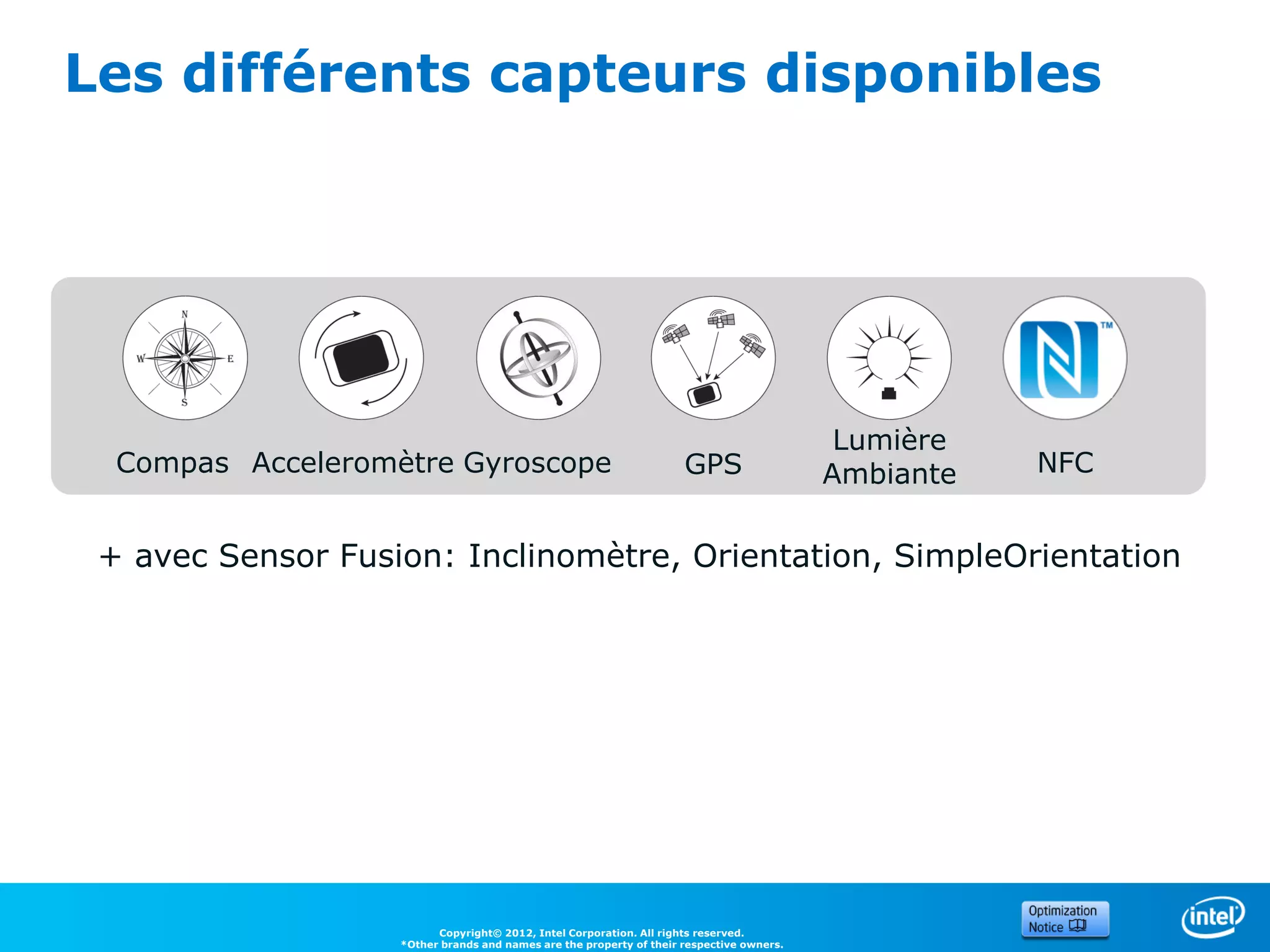
Les différents capteurs disponibles


                                                                                           Lumière
  Compas Acceleromètre Gyroscope                                     GPS                  Ambiante   NFC


 + avec Sensor Fusion: Inclinomètre, Orientation, SimpleOrientation


                         Copyright© 2012, Intel Corporation. All rights reserved.
                   *Other brands and names are the property of their respective owners.
Les APIs disponibles


5
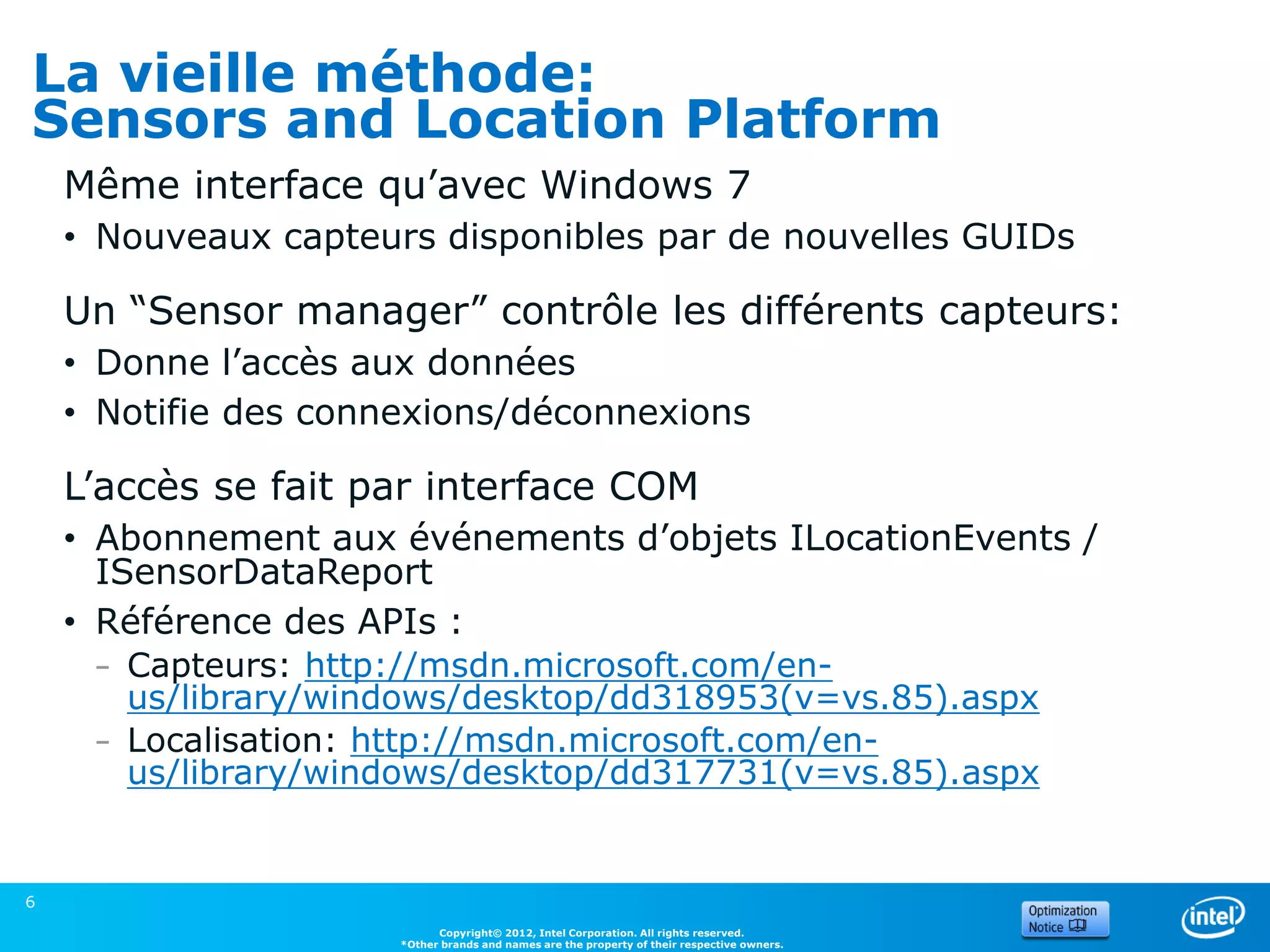
La vieille méthode:
Sensors and Location Platform
    Même interface qu’avec Windows 7
    • Nouveaux capteurs disponibles par de nouvelles GUIDs

    Un “Sensor manager” contrôle les différents capteurs:
    • Donne l’accès aux données
    • Notifie des connexions/déconnexions

    L’accès se fait par interface COM
    • Abonnement aux événements d’objets ILocationEvents /
      ISensorDataReport
    • Référence des APIs :
     – Capteurs: http://msdn.microsoft.com/en-
       us/library/windows/desktop/dd318953(v=vs.85).aspx
     – Localisation: http://msdn.microsoft.com/en-
       us/library/windows/desktop/dd317731(v=vs.85).aspx


6
                            Copyright© 2012, Intel Corporation. All rights reserved.
                      *Other brands and names are the property of their respective owners.
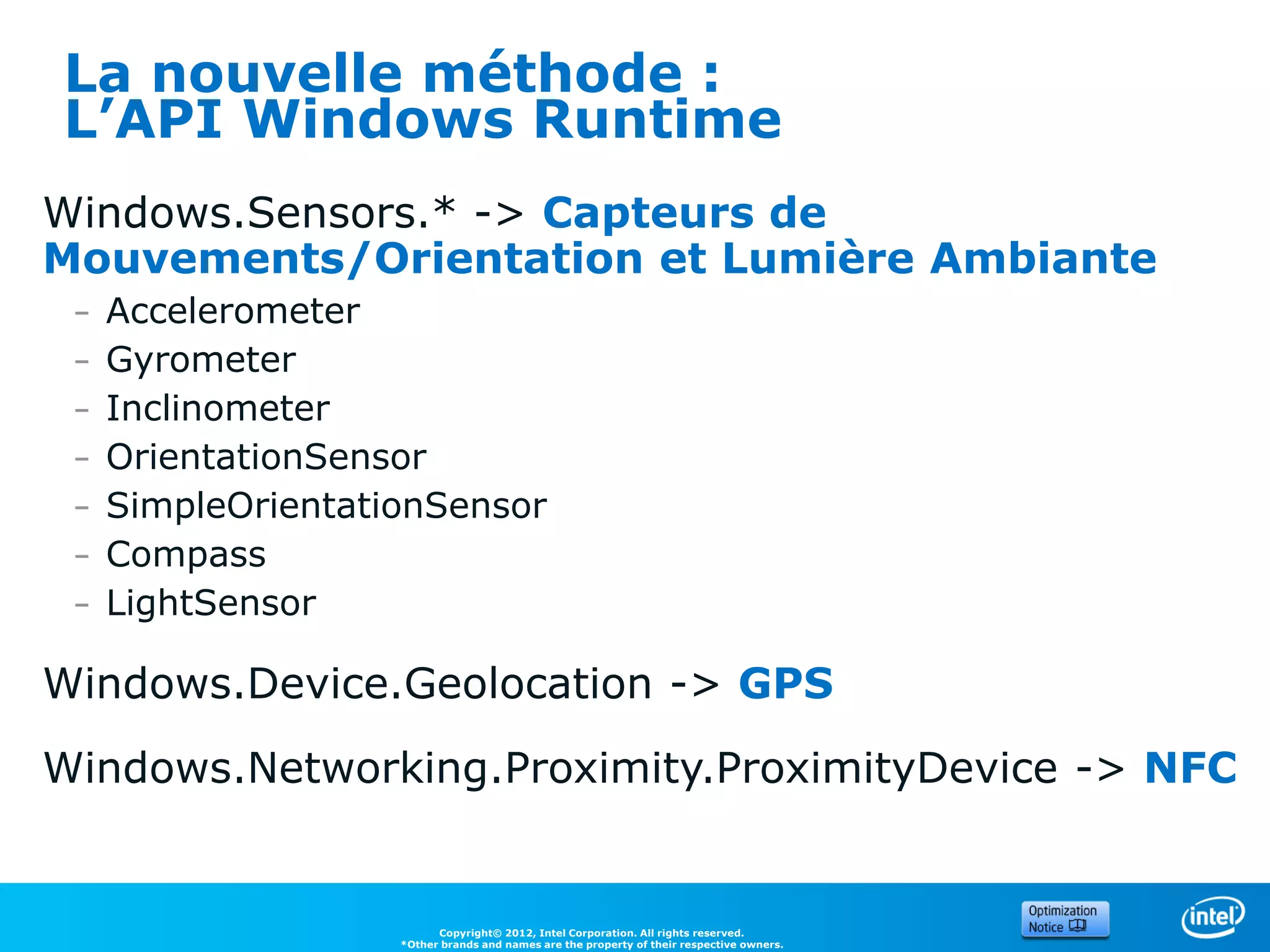
La nouvelle méthode :
L’API Windows Runtime
Windows.Sensors.* -> Capteurs de
Mouvements/Orientation et Lumière Ambiante
 –   Accelerometer
 –   Gyrometer
 –   Inclinometer
 –   OrientationSensor
 –   SimpleOrientationSensor
 –   Compass
 –   LightSensor

Windows.Device.Geolocation -> GPS
Windows.Networking.Proximity.ProximityDevice -> NFC


                          Copyright© 2012, Intel Corporation. All rights reserved.
                    *Other brands and names are the property of their respective owners.
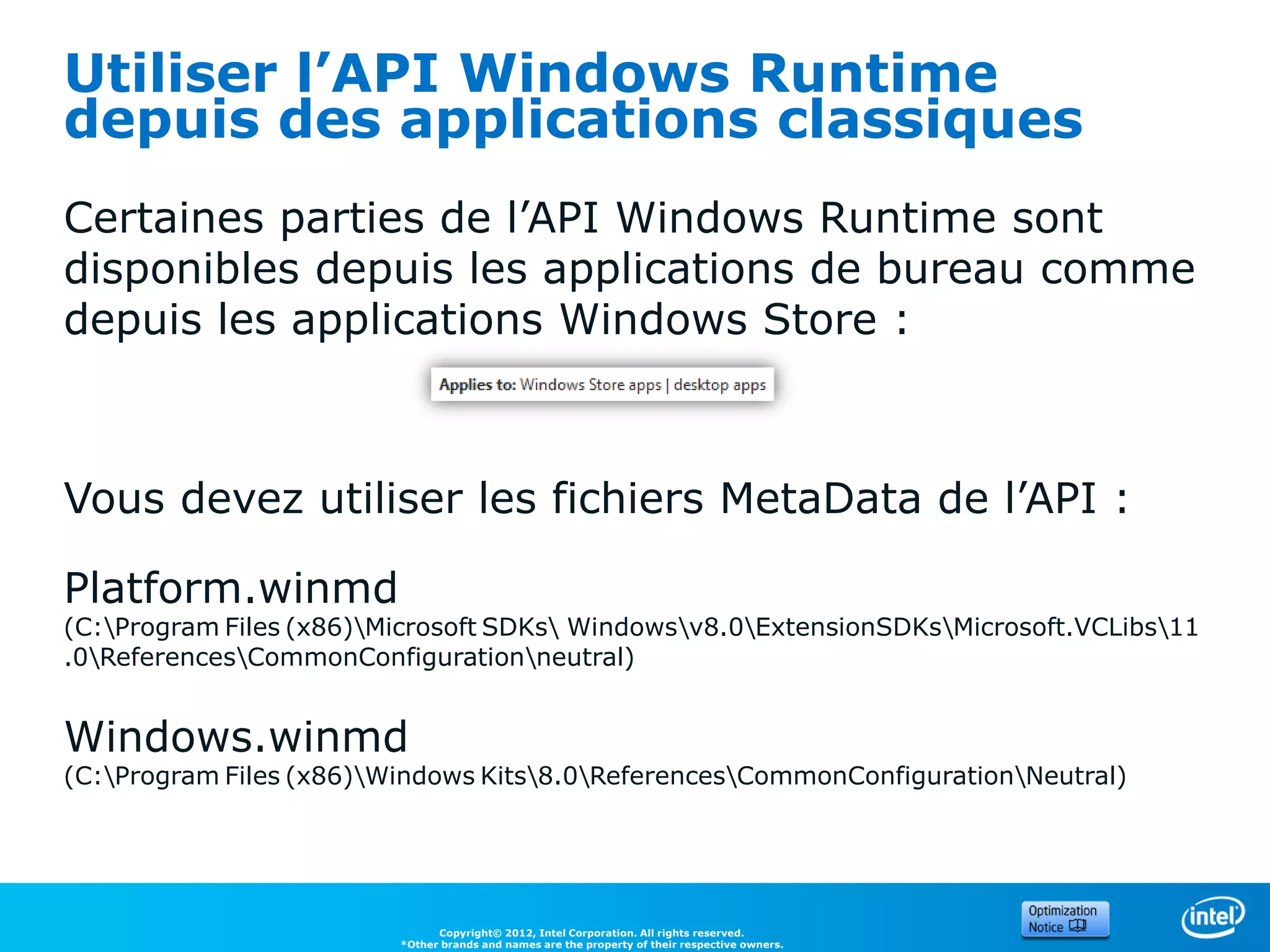
Utiliser l’API Windows Runtime
depuis des applications classiques
Certaines parties de l’API Windows Runtime sont
disponibles depuis les applications de bureau comme
depuis les applications Windows Store :


Vous devez utiliser les fichiers MetaData de l’API :

Platform.winmd
(C:Program Files (x86)Microsoft SDKs Windowsv8.0ExtensionSDKsMicrosoft.VCLibs11
.0ReferencesCommonConfigurationneutral)


Windows.winmd
(C:Program Files (x86)Windows Kits8.0ReferencesCommonConfigurationNeutral)


                               Copyright© 2012, Intel Corporation. All rights reserved.
                         *Other brands and names are the property of their respective owners.
Utiliser l’API Windows Runtime
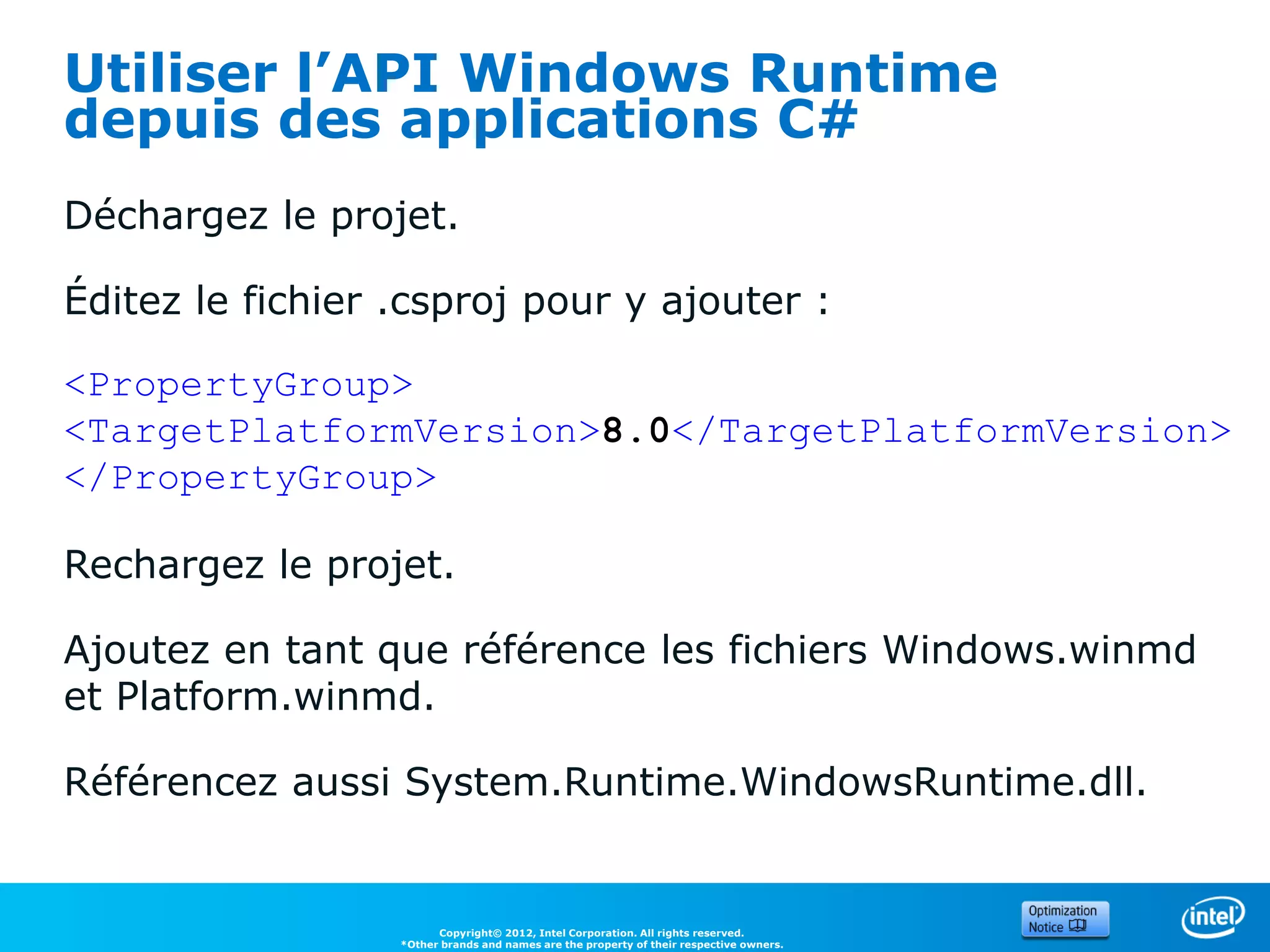
depuis des applications C#
Déchargez le projet.

Éditez le fichier .csproj pour y ajouter :

<PropertyGroup>
<TargetPlatformVersion>8.0</TargetPlatformVersion>
</PropertyGroup>

Rechargez le projet.

Ajoutez en tant que référence les fichiers Windows.winmd
et Platform.winmd.

Référencez aussi System.Runtime.WindowsRuntime.dll.


                        Copyright© 2012, Intel Corporation. All rights reserved.
                  *Other brands and names are the property of their respective owners.
Utiliser l’API Windows Runtime
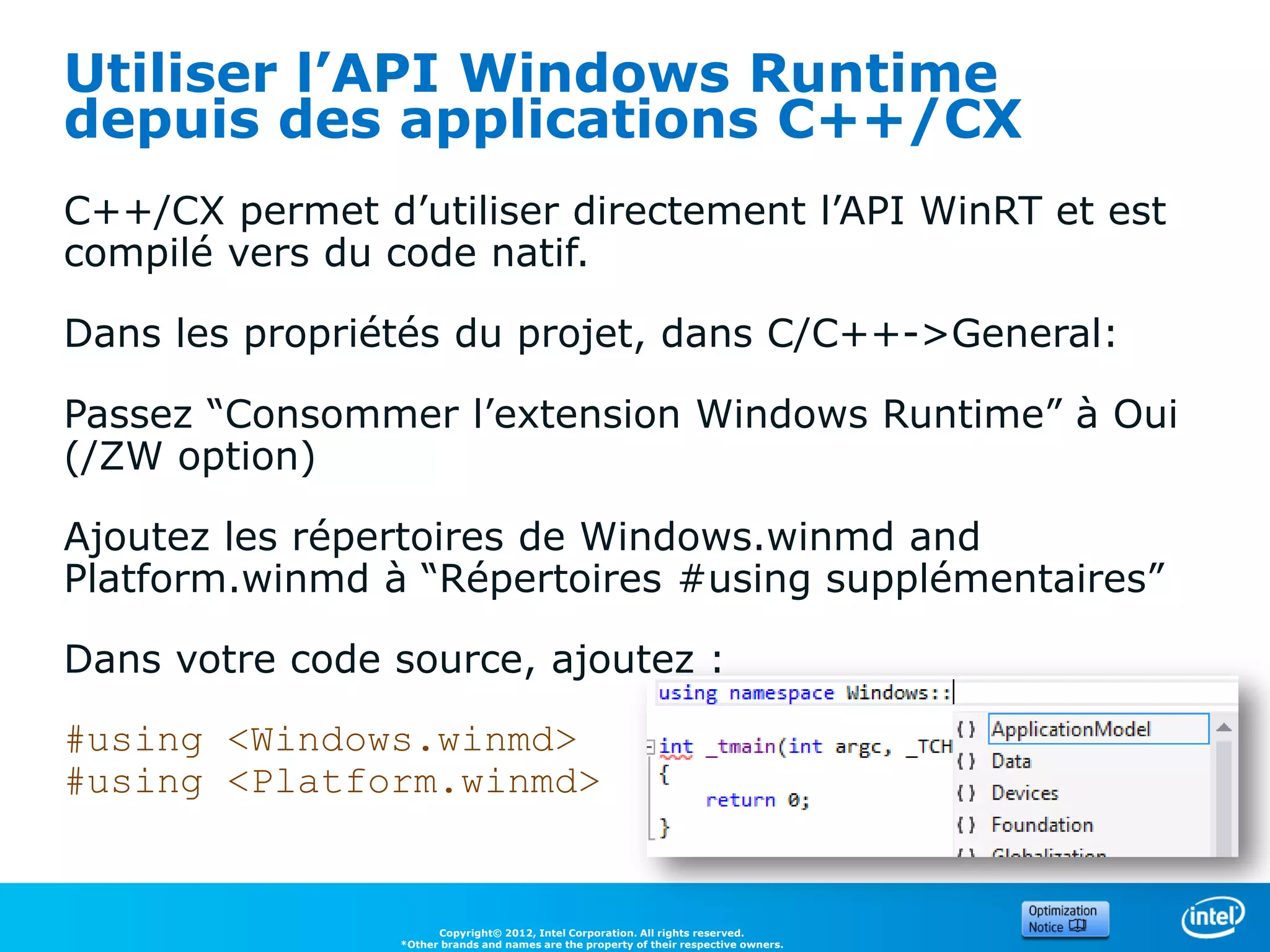
depuis des applications C++/CX
C++/CX permet d’utiliser directement l’API WinRT et est
compilé vers du code natif.

Dans les propriétés du projet, dans C/C++->General:

Passez “Consommer l’extension Windows Runtime” à Oui
(/ZW option)

Ajoutez les répertoires de Windows.winmd and
Platform.winmd à “Répertoires #using supplémentaires”

Dans votre code source, ajoutez :

#using <Windows.winmd>
#using <Platform.winmd>


                      Copyright© 2012, Intel Corporation. All rights reserved.
                *Other brands and names are the property of their respective owners.
Utiliser l’API Windows Runtime
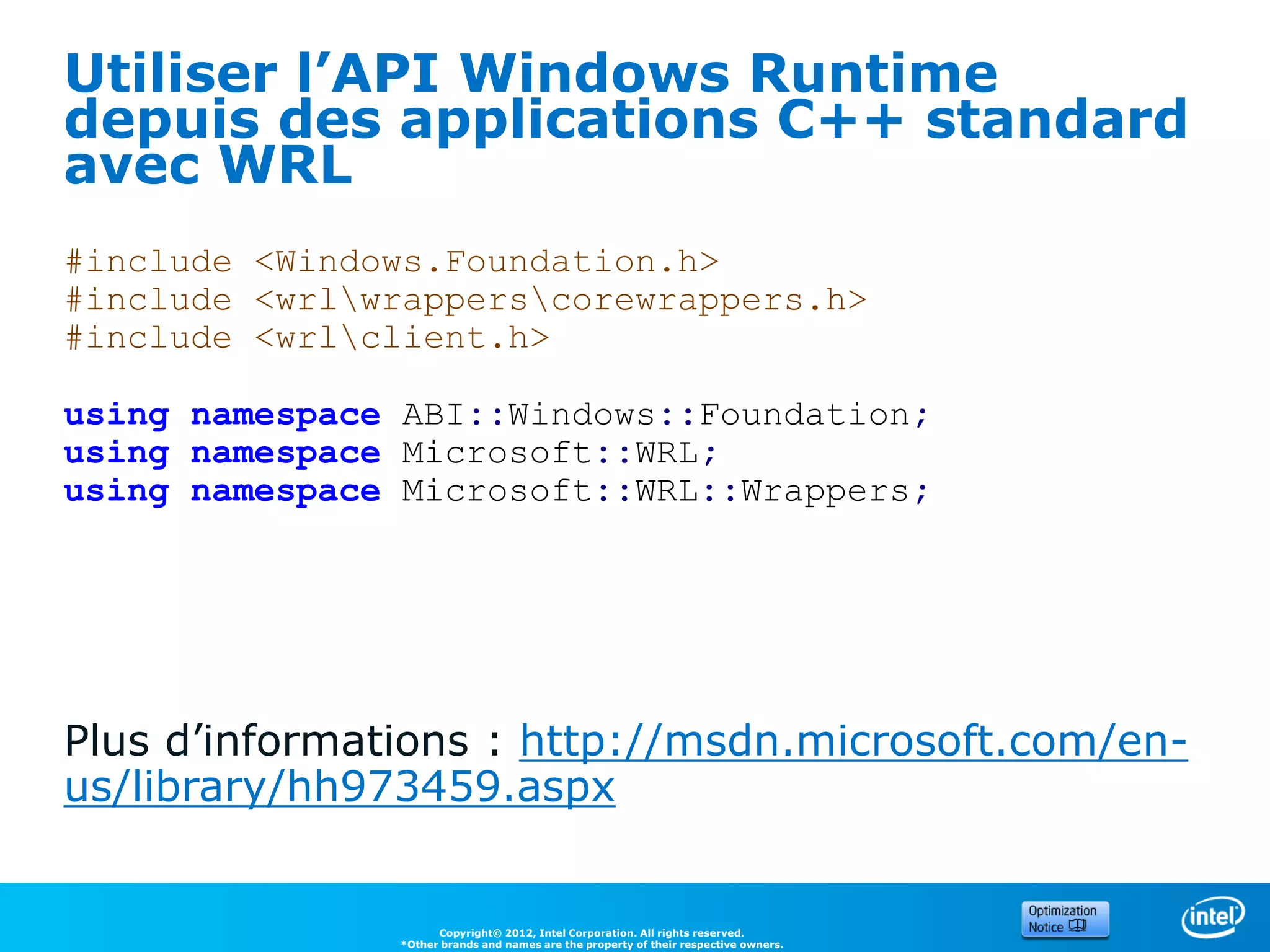
depuis des applications C++ standard
avec WRL
#include <Windows.Foundation.h>
#include <wrlwrapperscorewrappers.h>
#include <wrlclient.h>

using namespace ABI::Windows::Foundation;
using namespace Microsoft::WRL;
using namespace Microsoft::WRL::Wrappers;


Plus d’informations : http://msdn.microsoft.com/en-
us/library/hh973459.aspx


                     Copyright© 2012, Intel Corporation. All rights reserved.
               *Other brands and names are the property of their respective owners.
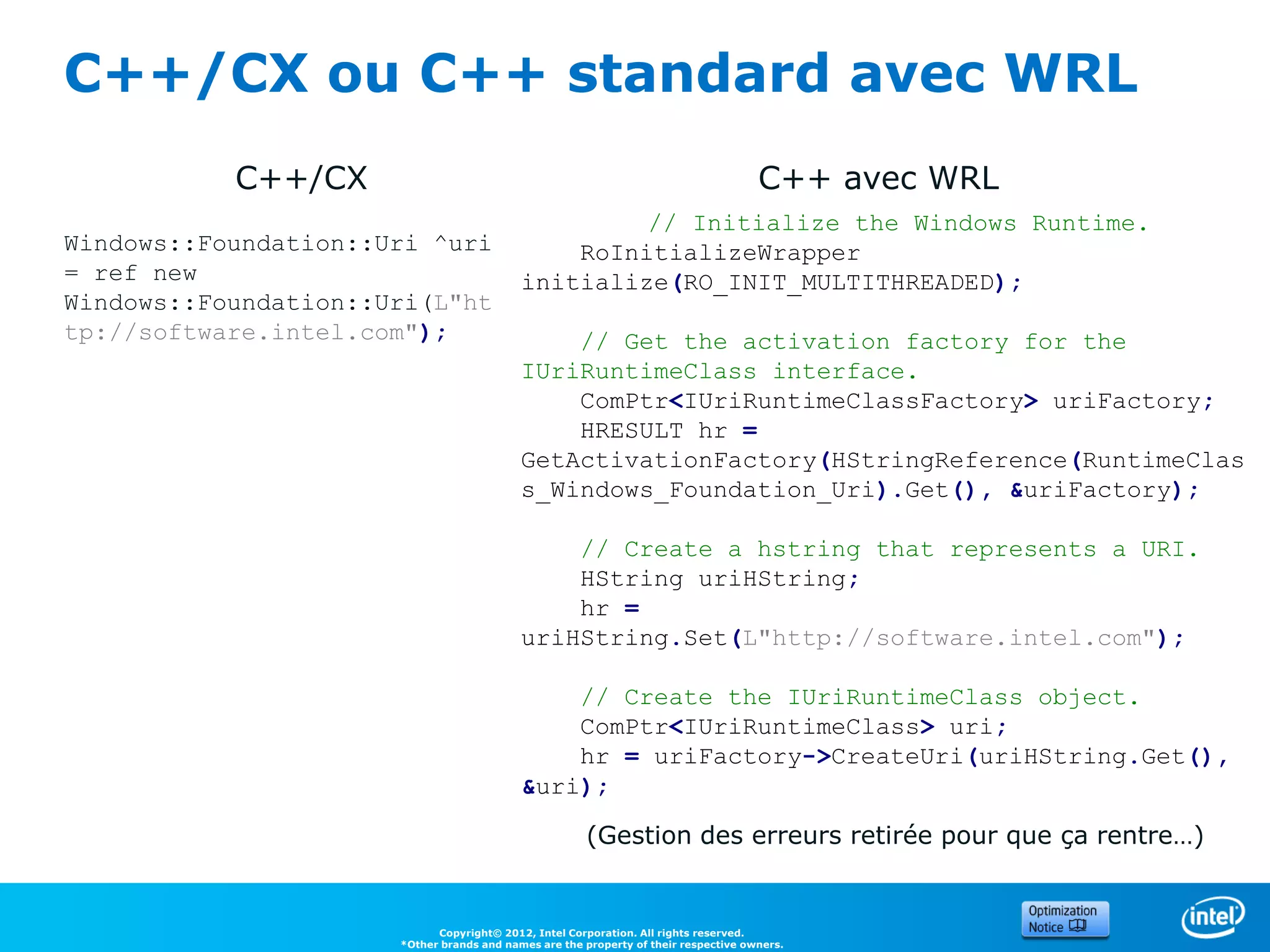
C++/CX ou C++ standard avec WRL
           C++/CX                                                                    C++ avec WRL
                                                    // Initialize the Windows Runtime.
Windows::Foundation::Uri ^uri                  RoInitializeWrapper
= ref new                                  initialize(RO_INIT_MULTITHREADED);
Windows::Foundation::Uri(L"ht
tp://software.intel.com");                     // Get the activation factory for the
                                           IUriRuntimeClass interface.
                                               ComPtr<IUriRuntimeClassFactory> uriFactory;
                                               HRESULT hr =
                                           GetActivationFactory(HStringReference(RuntimeClas
                                           s_Windows_Foundation_Uri).Get(), &uriFactory);

                                               // Create a hstring that represents a URI.
                                               HString uriHString;
                                               hr =
                                           uriHString.Set(L"http://software.intel.com");

                                               // Create the IUriRuntimeClass object.
                                               ComPtr<IUriRuntimeClass> uri;
                                               hr = uriFactory->CreateUri(uriHString.Get(),
                                           &uri);

                                                       (Gestion des erreurs retirée pour que ça rentre…)


                            Copyright© 2012, Intel Corporation. All rights reserved.
                      *Other brands and names are the property of their respective owners.
1. Capteurs de
     mouvements/orientation et
     Lumière Ambiante


13
Orientation et Mouvements

L’accéleromètre retourne l’accélération sur les axes x,
y et z, et peut aussi générer un évenement
« Shake ».

Le gyroscope retourne les vitesses de rotation.

Le magnétomètre retourne la force magnétique sur
x,y,z


                      Copyright© 2012, Intel Corporation. All rights reserved.
                *Other brands and names are the property of their respective owners.
Sensor Fusion


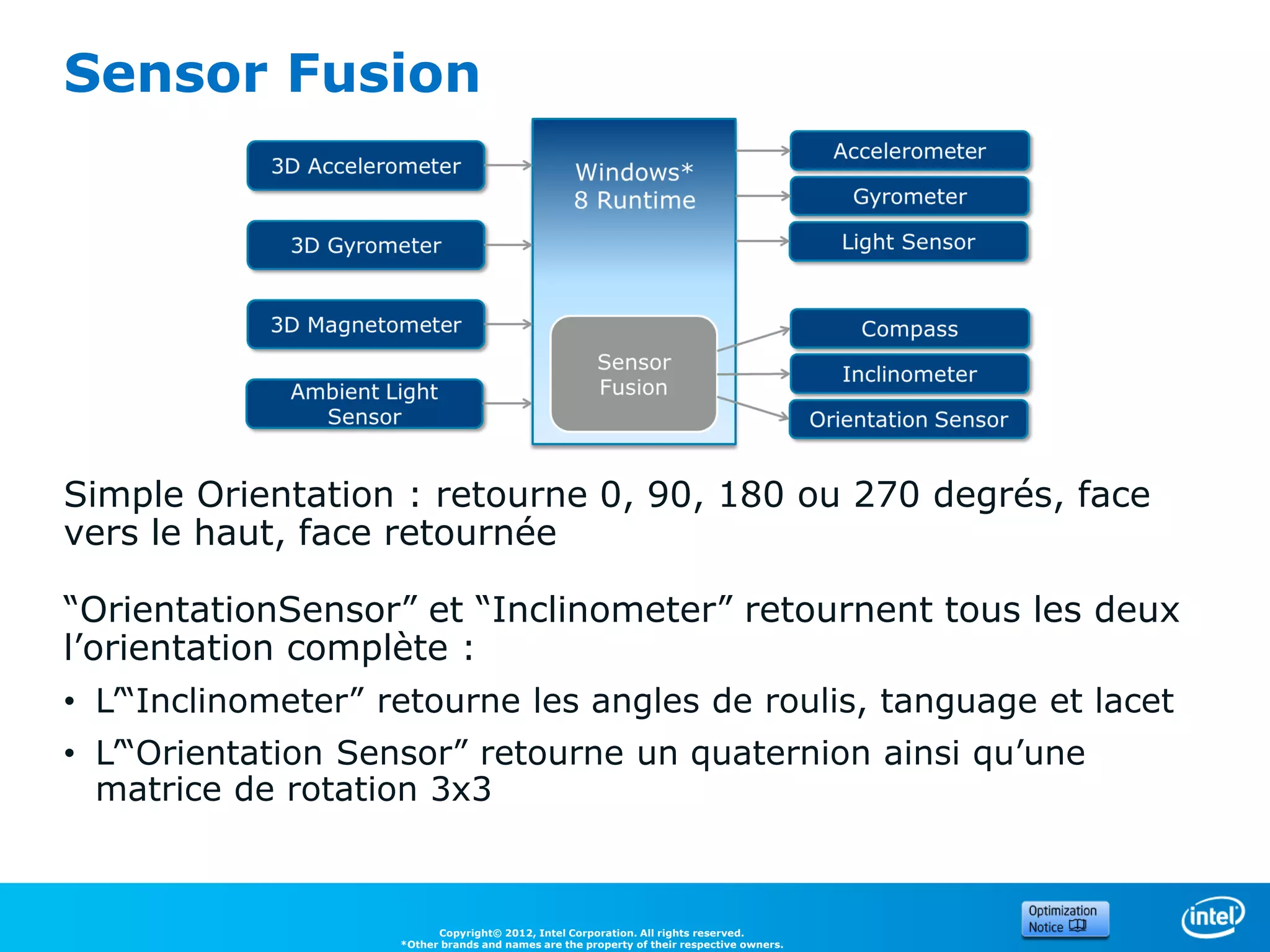
Simple Orientation : retourne 0, 90, 180 ou 270 degrés, face
vers le haut, face retournée

“OrientationSensor” et “Inclinometer” retournent tous les deux
l’orientation complète :
• L’“Inclinometer” retourne les angles de roulis, tanguage et lacet
• L’“Orientation Sensor” retourne un quaternion ainsi qu’une
  matrice de rotation 3x3


                          Copyright© 2012, Intel Corporation. All rights reserved.
                    *Other brands and names are the property of their respective owners.
Orientation et Mouvements


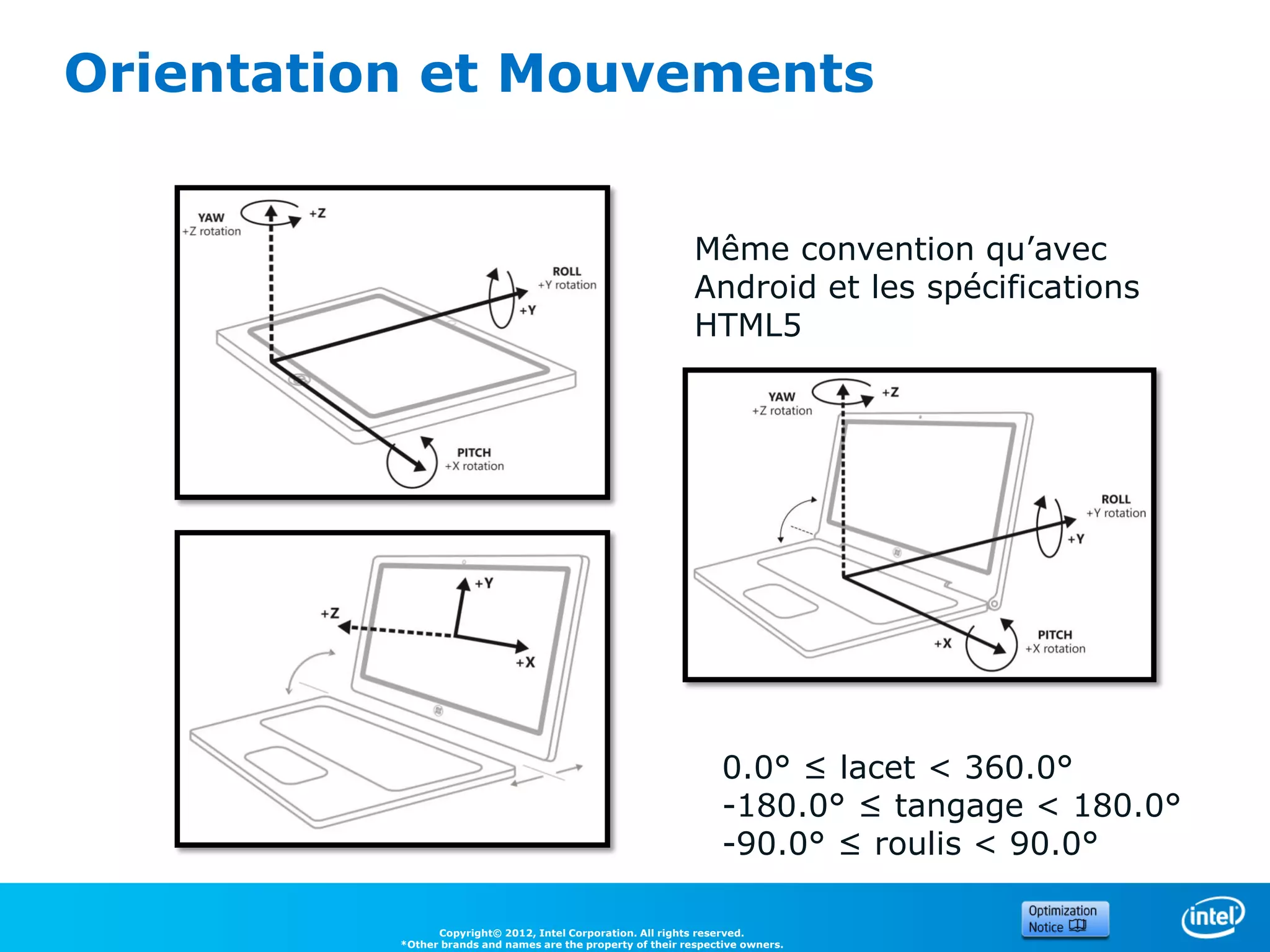
                                                              Même convention qu’avec
                                                              Android et les spécifications
                                                              HTML5


                                                                   0.0° ≤ lacet < 360.0°
                                                                   -180.0° ≤ tangage < 180.0°
                                                                   -90.0° ≤ roulis < 90.0°

                Copyright© 2012, Intel Corporation. All rights reserved.
          *Other brands and names are the property of their respective owners.
Utilisation des capteurs depuis
l’API Windows Runtime
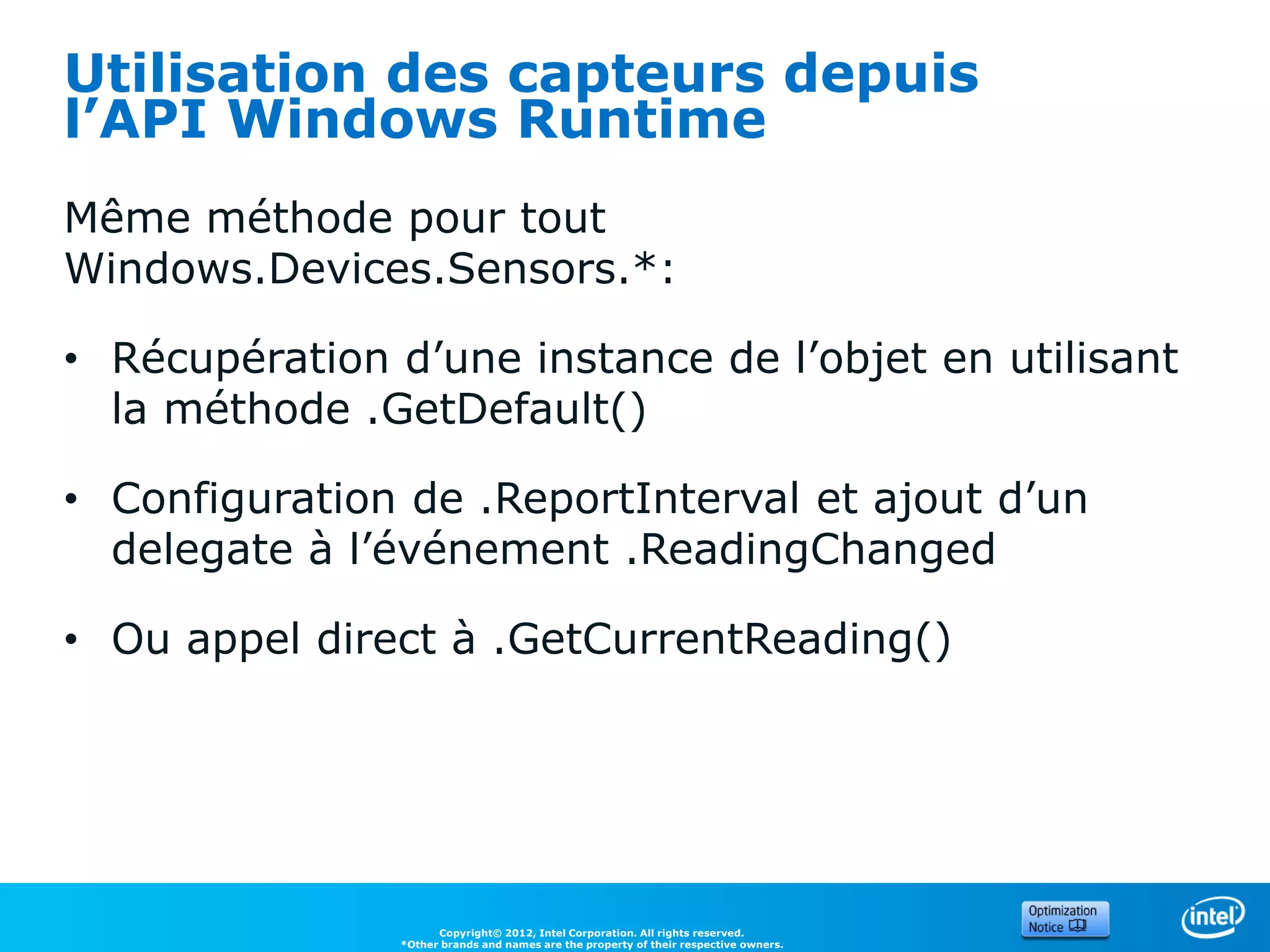
Même méthode pour tout
Windows.Devices.Sensors.*:

• Récupération d’une instance de l’objet en utilisant
  la méthode .GetDefault()

• Configuration de .ReportInterval et ajout d’un
  delegate à l’événement .ReadingChanged

• Ou appel direct à .GetCurrentReading()


                      Copyright© 2012, Intel Corporation. All rights reserved.
                *Other brands and names are the property of their respective owners.
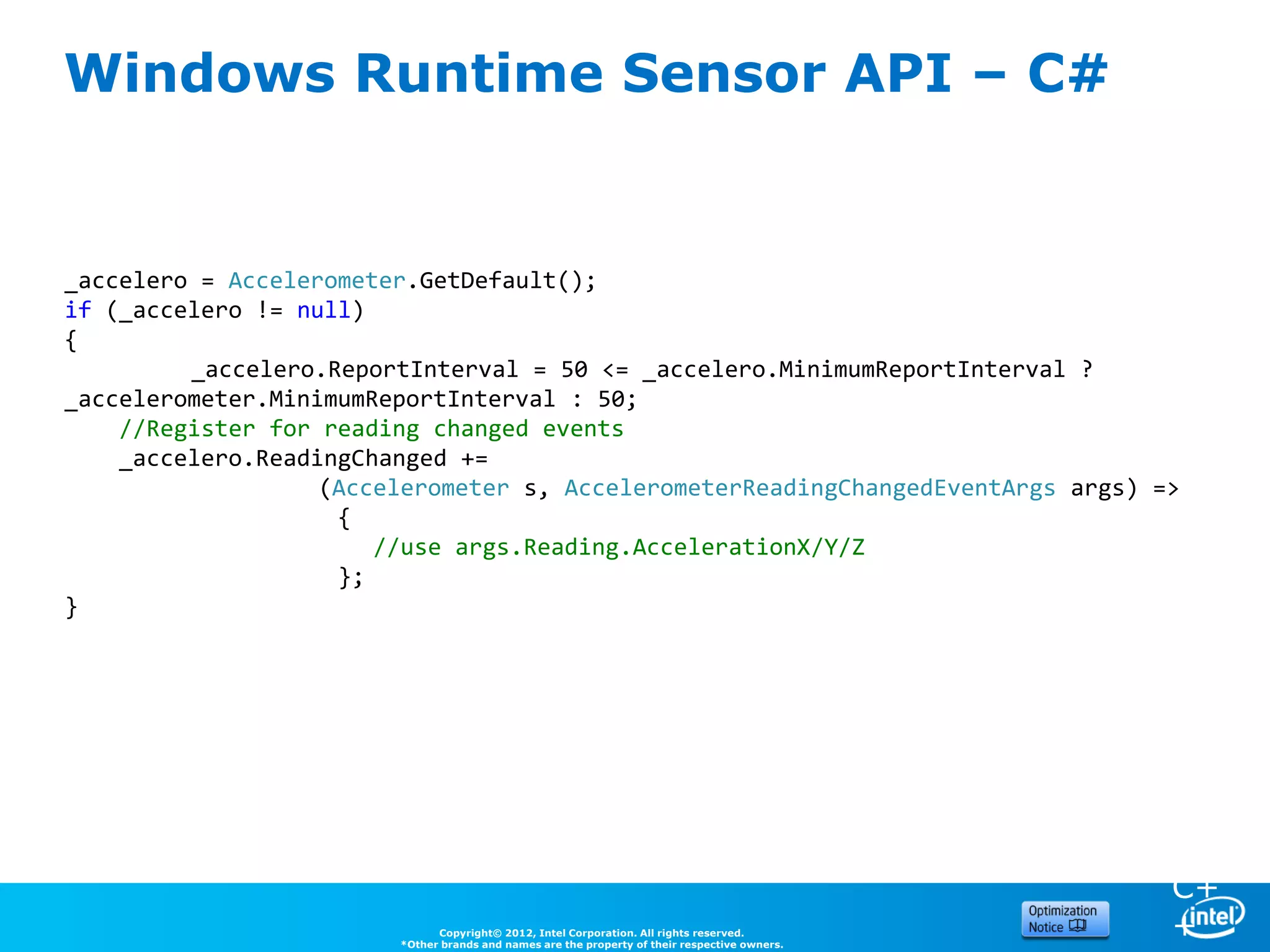
Windows Runtime Sensor API – C#


_accelero = Accelerometer.GetDefault();
if (_accelero != null)
{
         _accelero.ReportInterval = 50 <= _accelero.MinimumReportInterval ?
_accelerometer.MinimumReportInterval : 50;
    //Register for reading changed events
    _accelero.ReadingChanged +=
                   (Accelerometer s, AccelerometerReadingChangedEventArgs args) =>
                                                                                               C
                    {                                                                          #
                       //use args.Reading.AccelerationX/Y/Z
                    };
}


                                                                                               C+
                              Copyright© 2012, Intel Corporation. All rights reserved.
                        *Other brands and names are the property of their respective owners.
                                                                                               +
Windows Runtime Sensor API – C++


 Accelerometer ^accelero = Accelerometer::GetDefault();
 if(accelero!=nullptr)
 {
     accelero->ReportInterval = 50 <= accelero->MinimumReportInterval ?
 accelero->MinimumReportInterval : 50;
     accelero->ReadingChanged += ref new TypedEventHandler<Accelerometer^,
 AccelerometerReadingChangedEventArgs^>(                                                   C
         [](Object^ sender, AccelerometerReadingChangedEventArgs^ args)                    #
         {
           //read args->Reading->AccelerationX/Y/Z
         });
 }


                                                                                           C+
                          Copyright© 2012, Intel Corporation. All rights reserved.
                    *Other brands and names are the property of their respective owners.
                                                                                           +
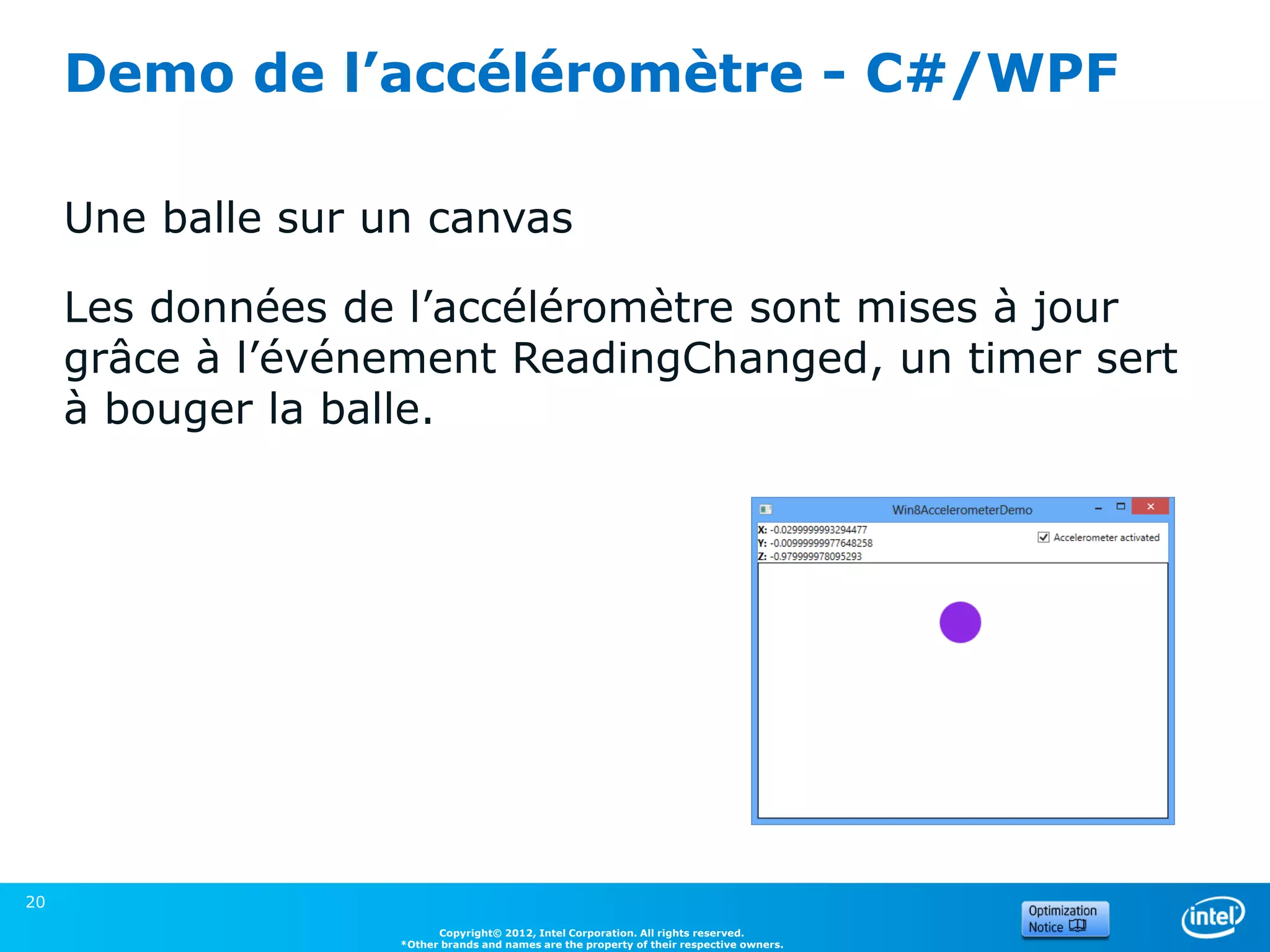
Demo de l’accéléromètre - C#/WPF

     Une balle sur un canvas

     Les données de l’accéléromètre sont mises à jour
     grâce à l’événement ReadingChanged, un timer sert
     à bouger la balle.


20
                          Copyright© 2012, Intel Corporation. All rights reserved.
                    *Other brands and names are the property of their respective owners.
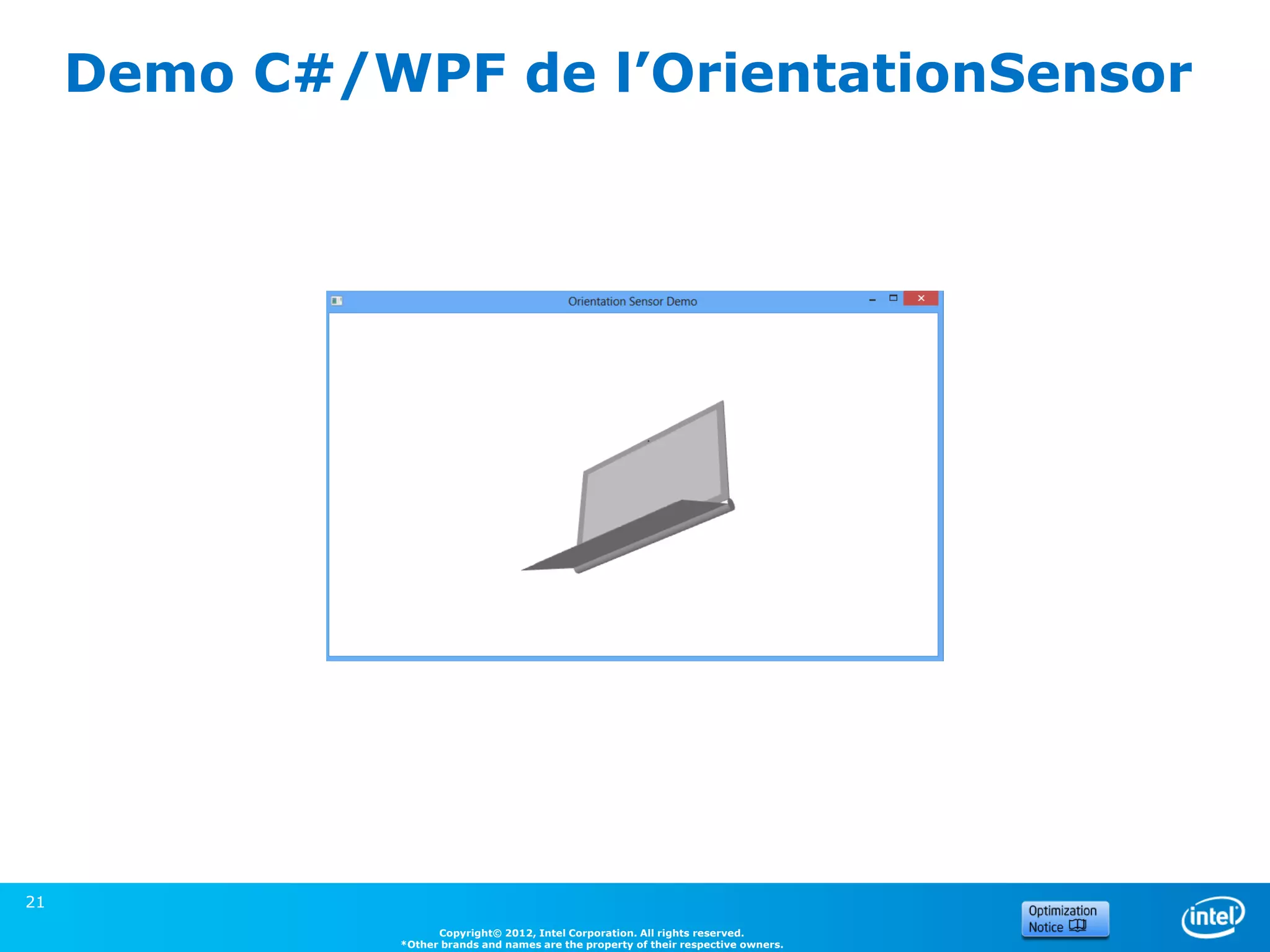
Demo C#/WPF de l’OrientationSensor


21
                     Copyright© 2012, Intel Corporation. All rights reserved.
               *Other brands and names are the property of their respective owners.
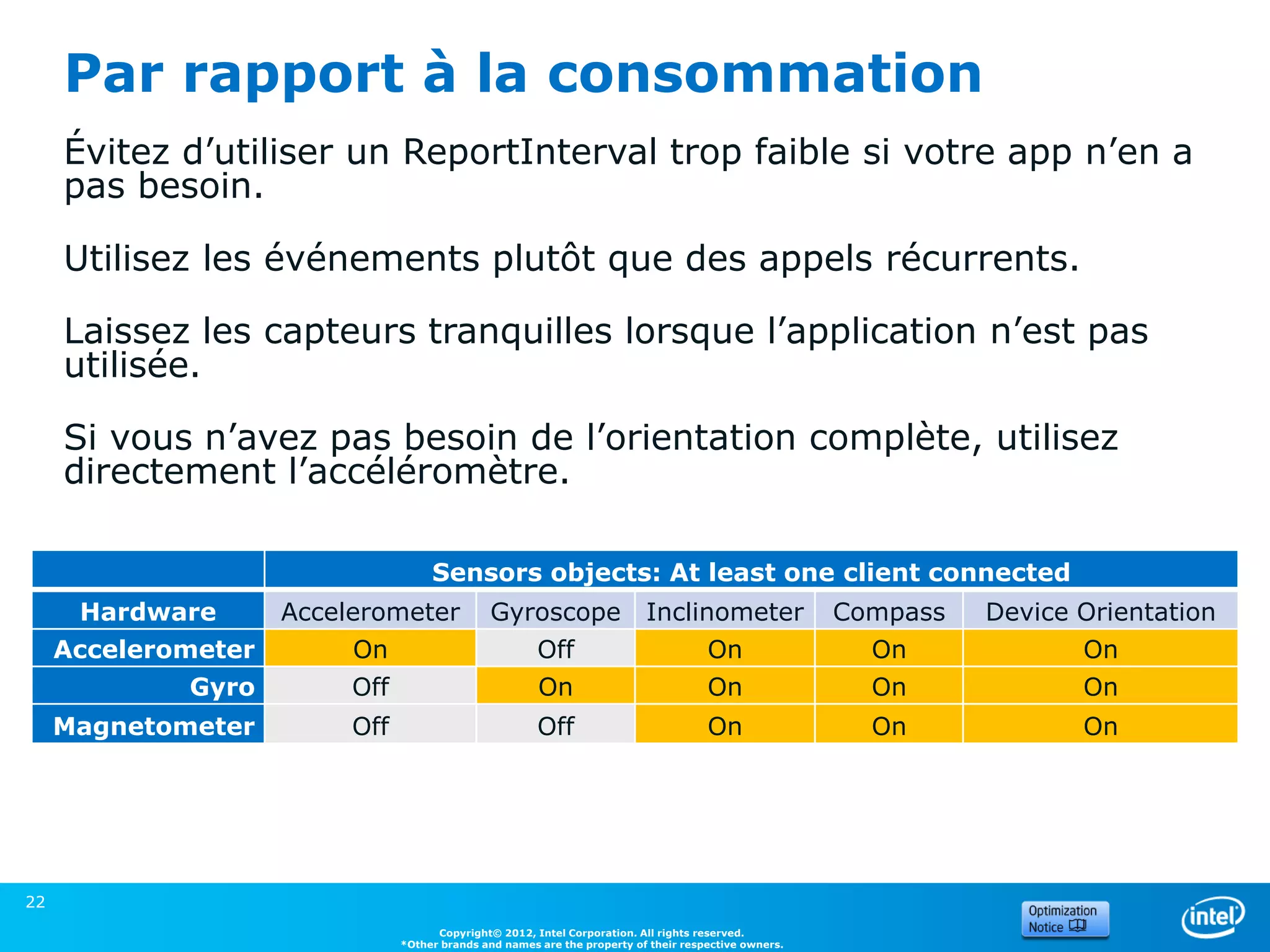
Par rapport à la consommation
     Évitez d’utiliser un ReportInterval trop faible si votre app n’en a
     pas besoin.

     Utilisez les événements plutôt que des appels récurrents.

     Laissez les capteurs tranquilles lorsque l’application n’est pas
     utilisée.

     Si vous n’avez pas besoin de l’orientation complète, utilisez
     directement l’accéléromètre.

                                     Sensors objects: At least one client connected
      Hardware       Accelerometer             Gyroscope                   Inclinometer                Compass   Device Orientation
     Accelerometer        On                            Off                           On                 On             On
             Gyro         Off                           On                            On                 On             On
     Magnetometer         Off                           Off                           On                 On             On


22
                                      Copyright© 2012, Intel Corporation. All rights reserved.
                                *Other brands and names are the property of their respective owners.
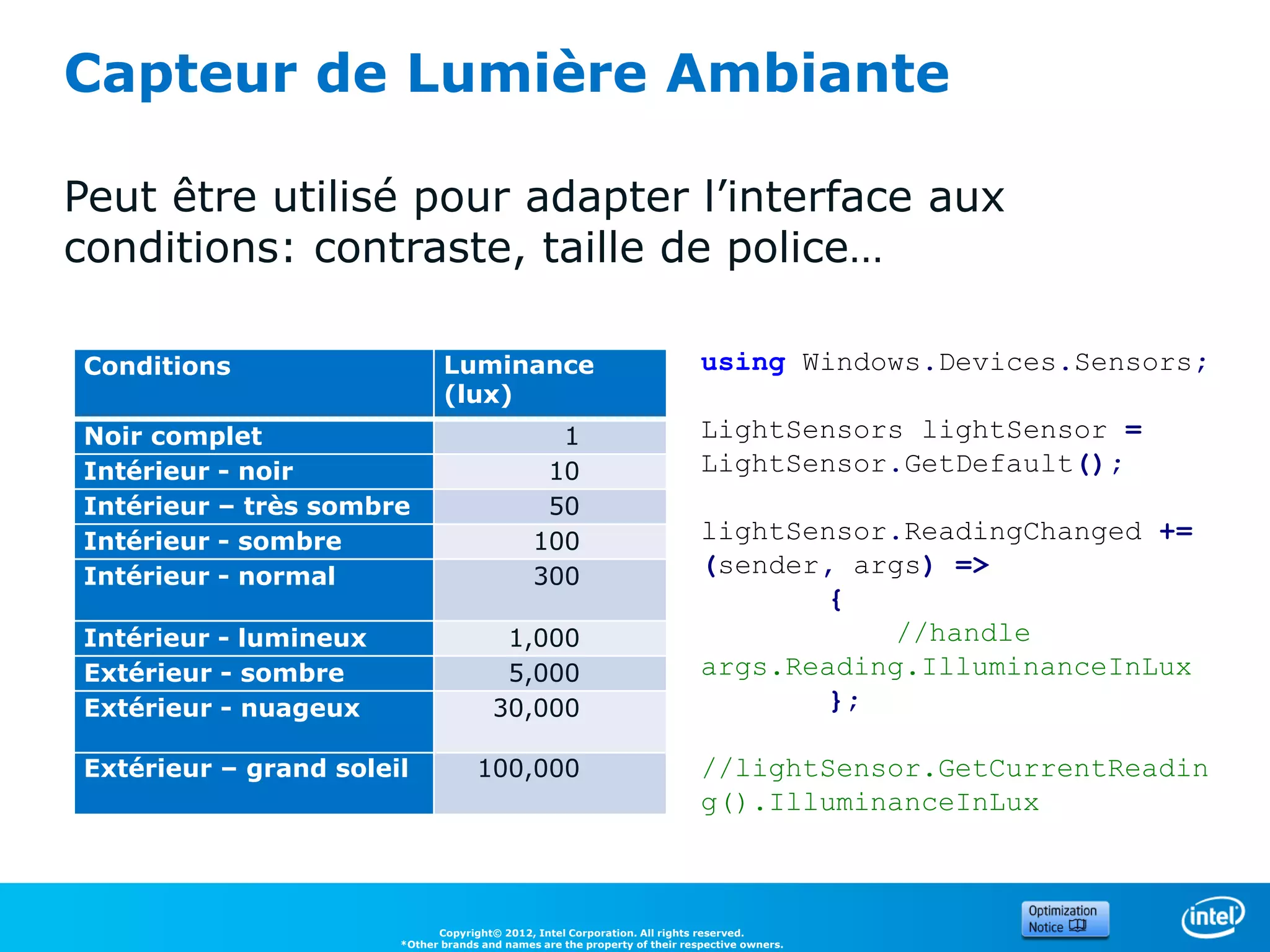
Capteur de Lumière Ambiante

Peut être utilisé pour adapter l’interface aux
conditions: contraste, taille de police…

Conditions                    Luminance                                     using Windows.Devices.Sensors;
                              (lux)
Noir complet                                    1                           LightSensors lightSensor =
Intérieur - noir                               10                           LightSensor.GetDefault();
Intérieur – très sombre                        50
Intérieur - sombre                            100                           lightSensor.ReadingChanged +=
Intérieur - normal                            300                           (sender, args) =>
                                                                                   {
Intérieur - lumineux                    1,000                                          //handle
Extérieur - sombre                      5,000                               args.Reading.IlluminanceInLux
Extérieur - nuageux                    30,000                                      };

Extérieur – grand soleil            100,000                                 //lightSensor.GetCurrentReadin
                                                                            g().IlluminanceInLux


                             Copyright© 2012, Intel Corporation. All rights reserved.
                       *Other brands and names are the property of their respective owners.
2. Localisation


24
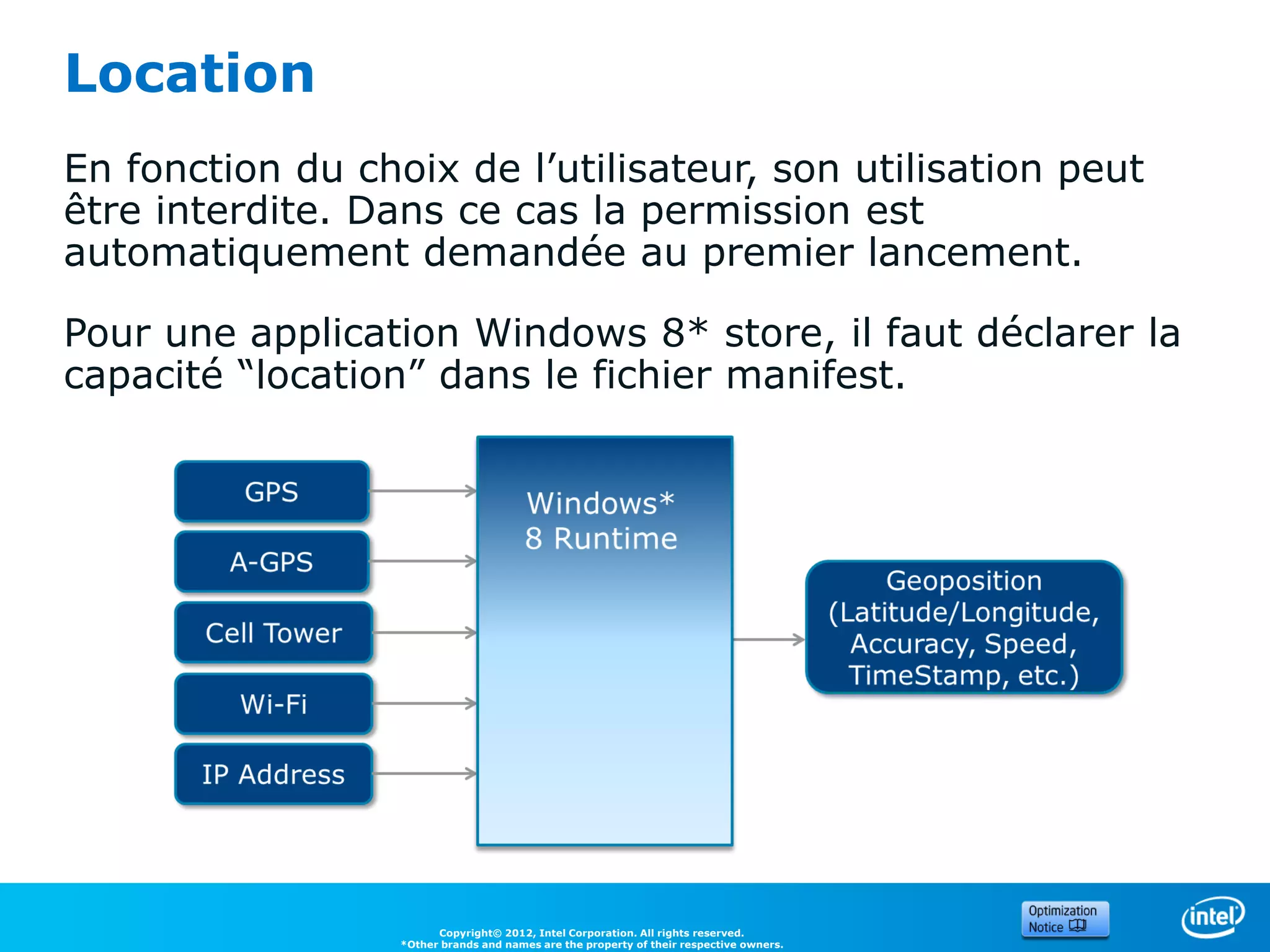
Location
En fonction du choix de l’utilisateur, son utilisation peut
être interdite. Dans ce cas la permission est
automatiquement demandée au premier lancement.

Pour une application Windows 8* store, il faut déclarer la
capacité “location” dans le fichier manifest.


                        Copyright© 2012, Intel Corporation. All rights reserved.
                  *Other brands and names are the property of their respective owners.
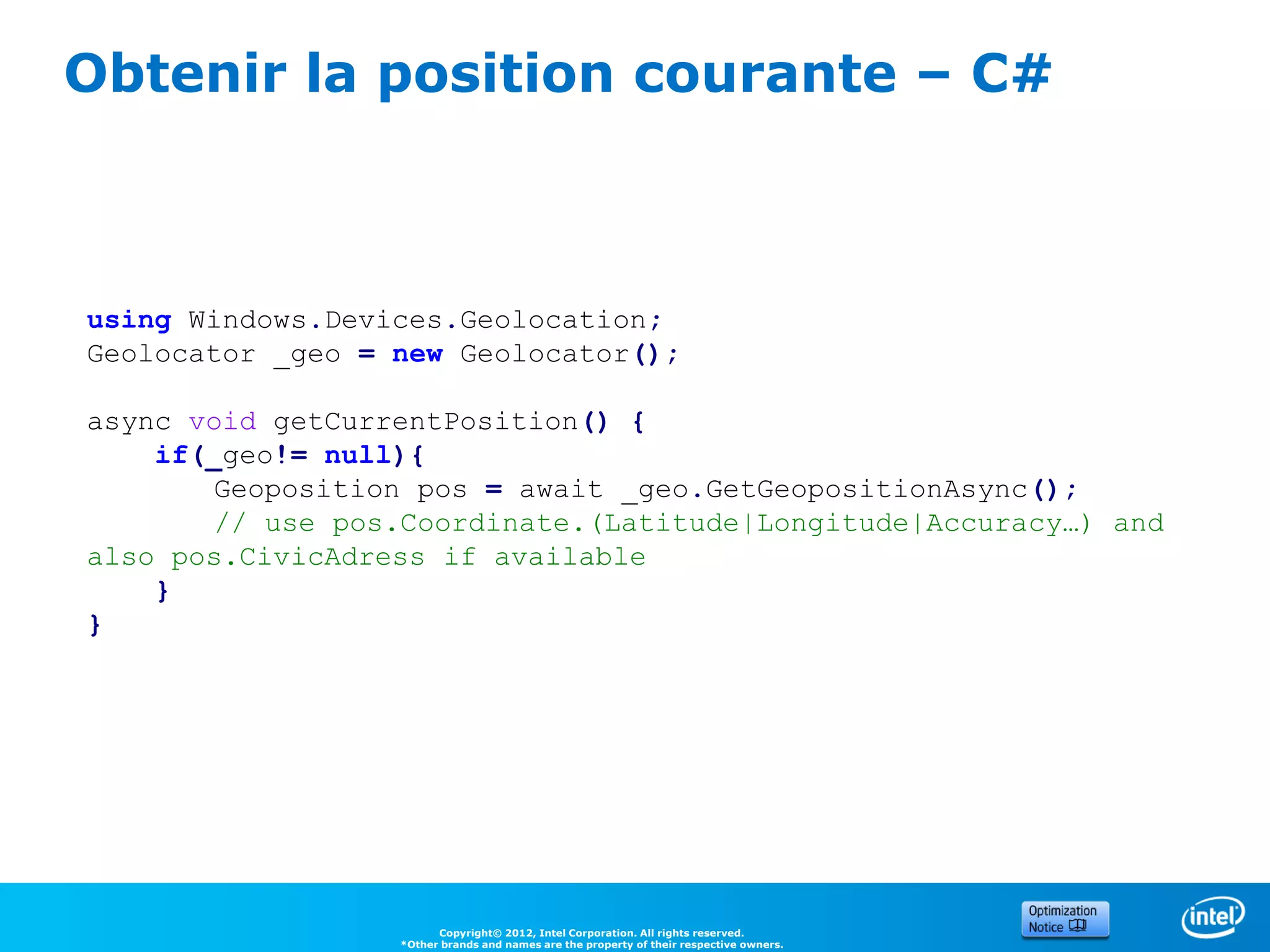
Obtenir la position courante – C#


using Windows.Devices.Geolocation;
Geolocator _geo = new Geolocator();

async void getCurrentPosition() {
    if(_geo!= null){
       Geoposition pos = await _geo.GetGeopositionAsync();
       // use pos.Coordinate.(Latitude|Longitude|Accuracy…) and
also pos.CivicAdress if available
    }
}


                        Copyright© 2012, Intel Corporation. All rights reserved.
                  *Other brands and names are the property of their respective owners.
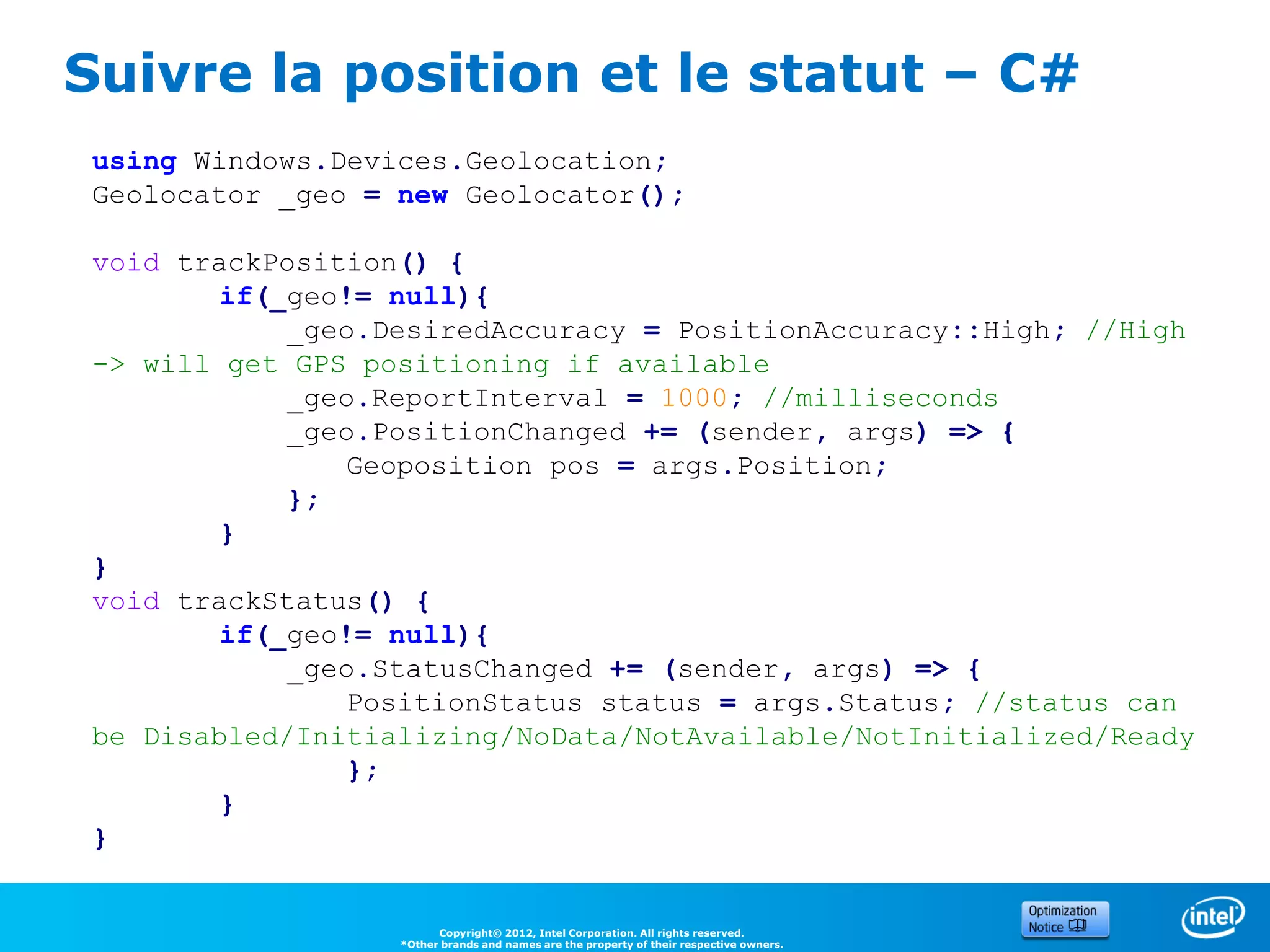
Suivre la position et le statut – C#
 using Windows.Devices.Geolocation;
 Geolocator _geo = new Geolocator();

 void trackPosition() {
         if(_geo!= null){
             _geo.DesiredAccuracy = PositionAccuracy::High; //High
 -> will get GPS positioning if available
             _geo.ReportInterval = 1000; //milliseconds
             _geo.PositionChanged += (sender, args) => {
                Geoposition pos = args.Position;
             };
         }
 }
 void trackStatus() {
         if(_geo!= null){
             _geo.StatusChanged += (sender, args) => {
                PositionStatus status = args.Status; //status can
 be Disabled/Initializing/NoData/NotAvailable/NotInitialized/Ready
                };
         }
 }


                         Copyright© 2012, Intel Corporation. All rights reserved.
                   *Other brands and names are the property of their respective owners.
3. NFC


28
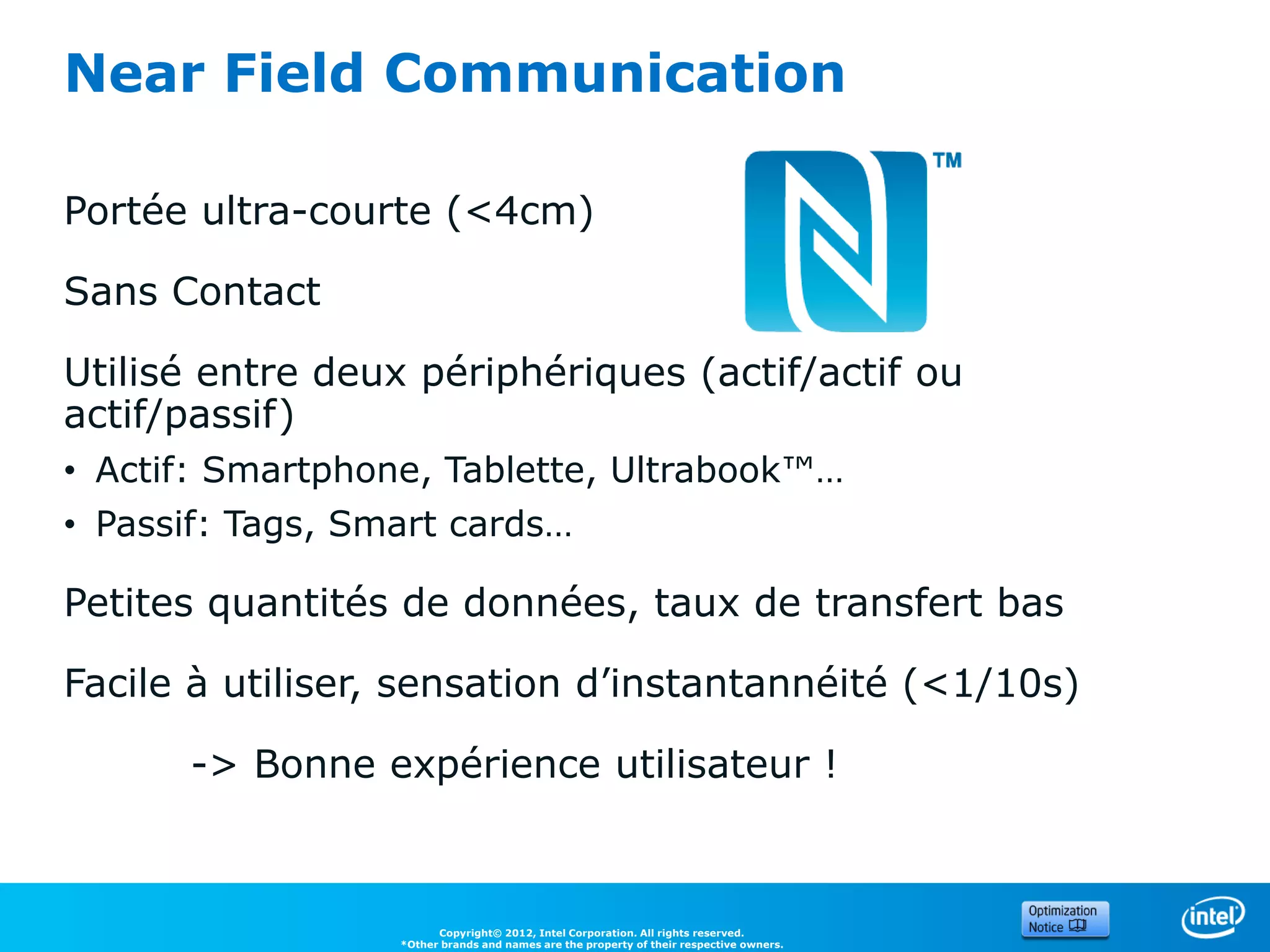
Near Field Communication

Portée ultra-courte (<4cm)

Sans Contact

Utilisé entre deux périphériques (actif/actif ou
actif/passif)
• Actif: Smartphone, Tablette, Ultrabook™…
• Passif: Tags, Smart cards…

Petites quantités de données, taux de transfert bas

Facile à utiliser, sensation d’instantannéité (<1/10s)

      -> Bonne expérience utilisateur !


                        Copyright© 2012, Intel Corporation. All rights reserved.
                  *Other brands and names are the property of their respective owners.
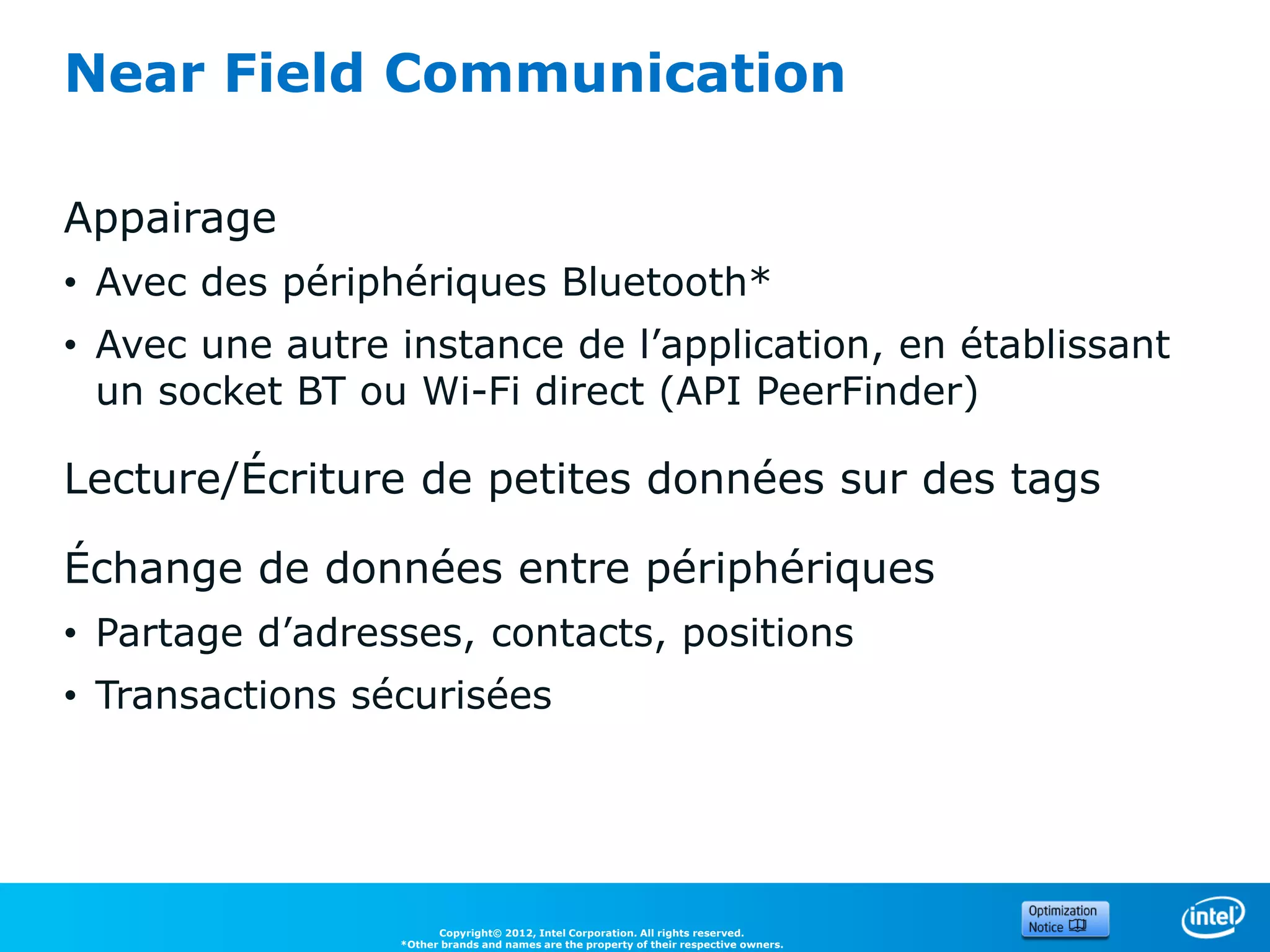
Near Field Communication

Appairage
• Avec des périphériques Bluetooth*
• Avec une autre instance de l’application, en établissant
  un socket BT ou Wi-Fi direct (API PeerFinder)

Lecture/Écriture de petites données sur des tags

Échange de données entre périphériques
• Partage d’adresses, contacts, positions
• Transactions sécurisées


                       Copyright© 2012, Intel Corporation. All rights reserved.
                 *Other brands and names are the property of their respective owners.
Vous n’avez pas forcément besoin de vous occuper du
     périphérique NFC…

     UTILISER NFC DE
     MANIÈRE TRANSPARENTE

31
                          Copyright© 2012, Intel Corporation. All rights reserved.
                    *Other brands and names are the property of their respective owners.
Utiliser NFC de manière transparente
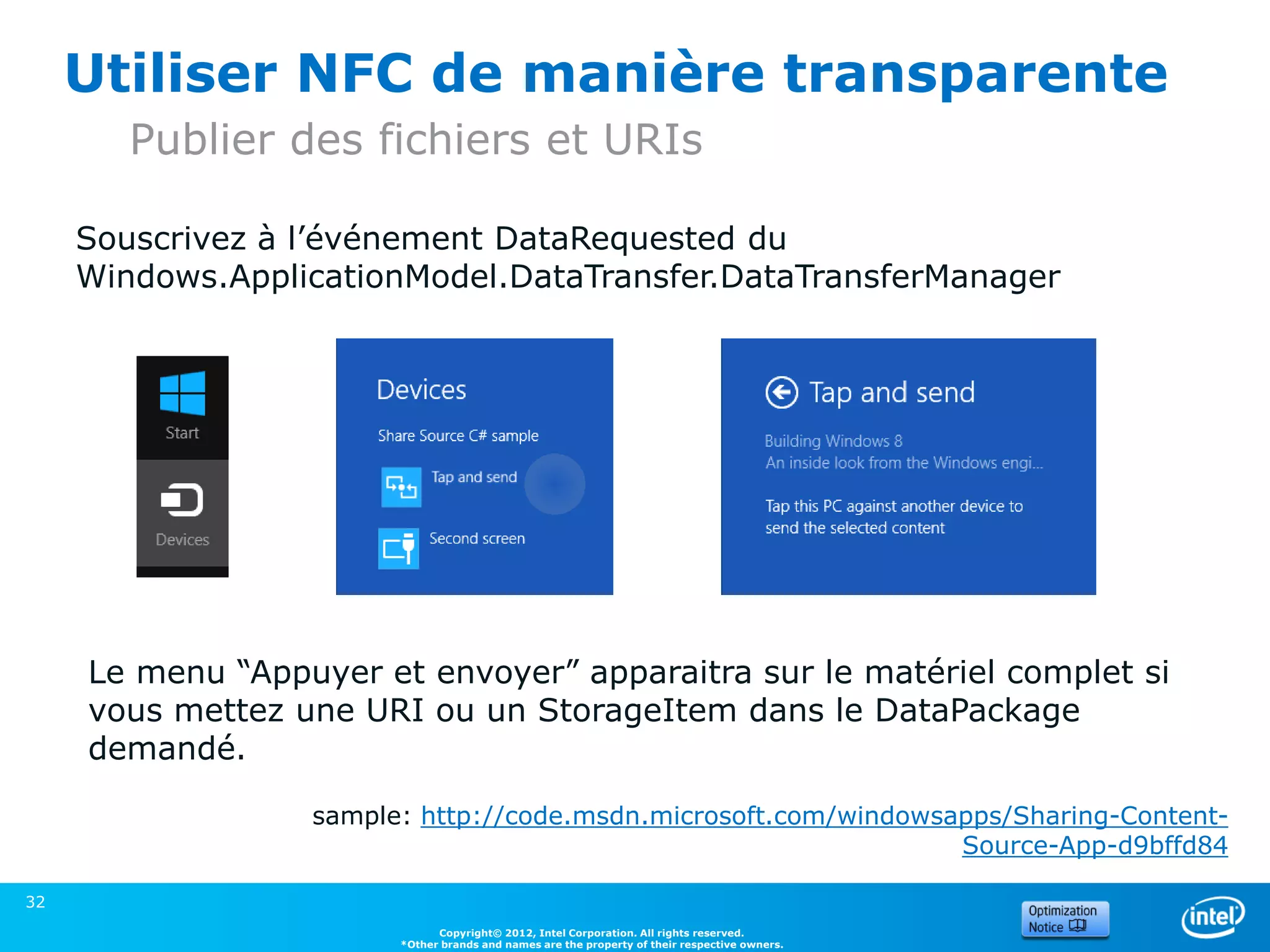
        Publier des fichiers et URIs

     Souscrivez à l’événement DataRequested du
     Windows.ApplicationModel.DataTransfer.DataTransferManager


     Le menu “Appuyer et envoyer” apparaitra sur le matériel complet si
     vous mettez une URI ou un StorageItem dans le DataPackage
     demandé.

                  sample: http://code.msdn.microsoft.com/windowsapps/Sharing-Content-
                                                                 Source-App-d9bffd84

32
                              Copyright© 2012, Intel Corporation. All rights reserved.
                        *Other brands and names are the property of their respective owners.
Utiliser NFC de manière transparente
       Recevoir des fichiers et URIs

Enregistrez une application par défaut pour un protocol
(URIs) ou un type de fichiers.


Plus d’informations sur msdn:

• File type and protocol associations model
       (applications Desktop et Windows Store)

• How to handle file activation (applications Windows Store)

• How to handle protocol activation (applications Windows
  Store)

33
                         Copyright© 2012, Intel Corporation. All rights reserved.
                   *Other brands and names are the property of their respective owners.
Avec l’API Windows Runtime

     CONTROLER LE
     PÉRIPHÉRIQUE NFC

34
                          Copyright© 2012, Intel Corporation. All rights reserved.
                    *Other brands and names are the property of their respective owners.
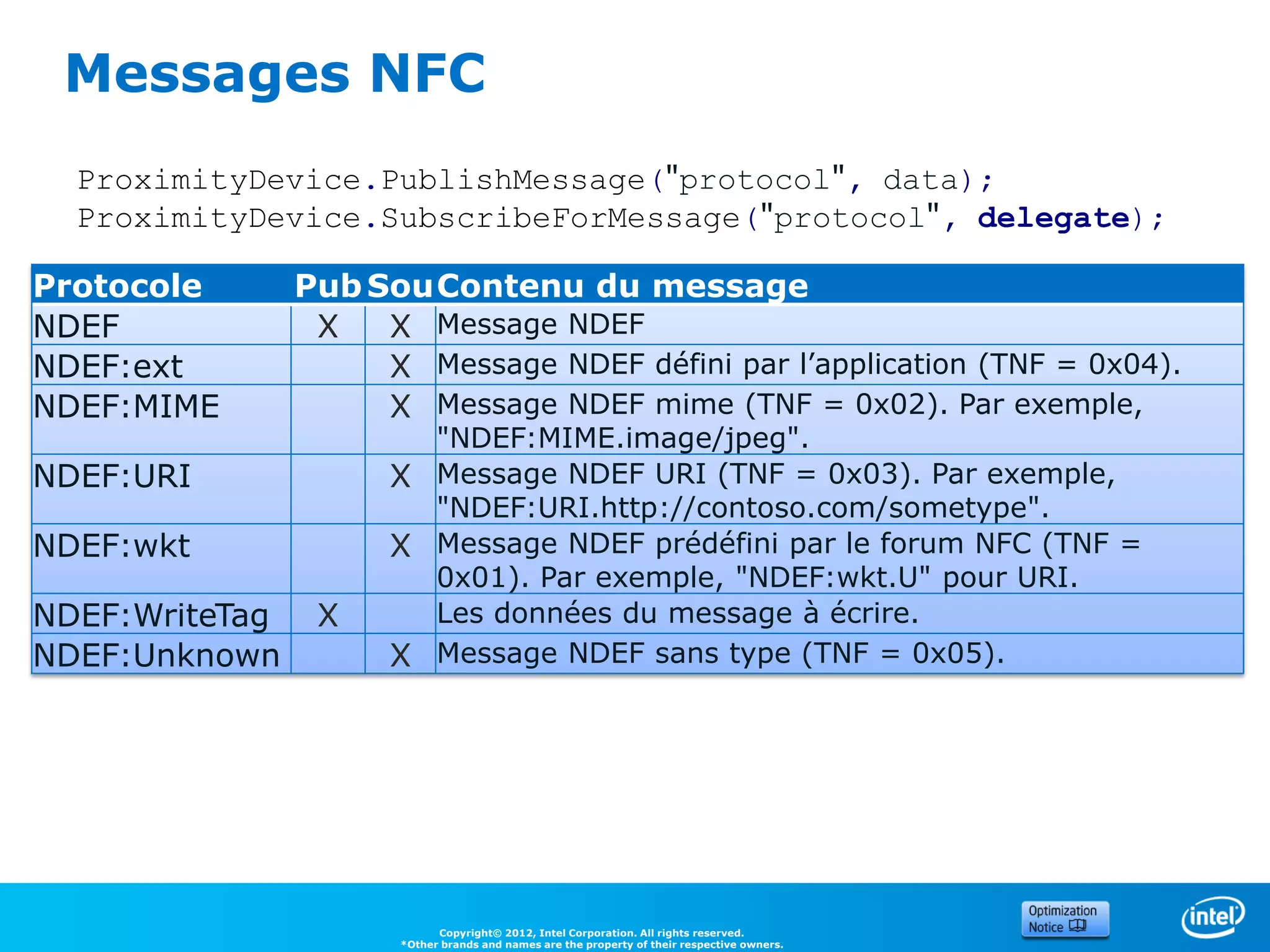
Messages NFC
  ProximityDevice.PublishMessage("protocol", data);
  ProximityDevice.SubscribeForMessage("protocol", delegate);

Protocole       Pub Sou Contenu du message
NDEF             X   X Message NDEF
NDEF:ext             X Message NDEF défini par l’application (TNF = 0x04).
NDEF:MIME            X Message NDEF mime (TNF = 0x02). Par exemple,
                        "NDEF:MIME.image/jpeg".
NDEF:URI              X Message NDEF URI (TNF = 0x03). Par exemple,
                        "NDEF:URI.http://contoso.com/sometype".
NDEF:wkt              X Message NDEF prédéfini par le forum NFC (TNF =
                        0x01). Par exemple, "NDEF:wkt.U" pour URI.
NDEF:WriteTag    X      Les données du message à écrire.
NDEF:Unknown          X Message NDEF sans type (TNF = 0x05).


                            Copyright© 2012, Intel Corporation. All rights reserved.
                      *Other brands and names are the property of their respective owners.
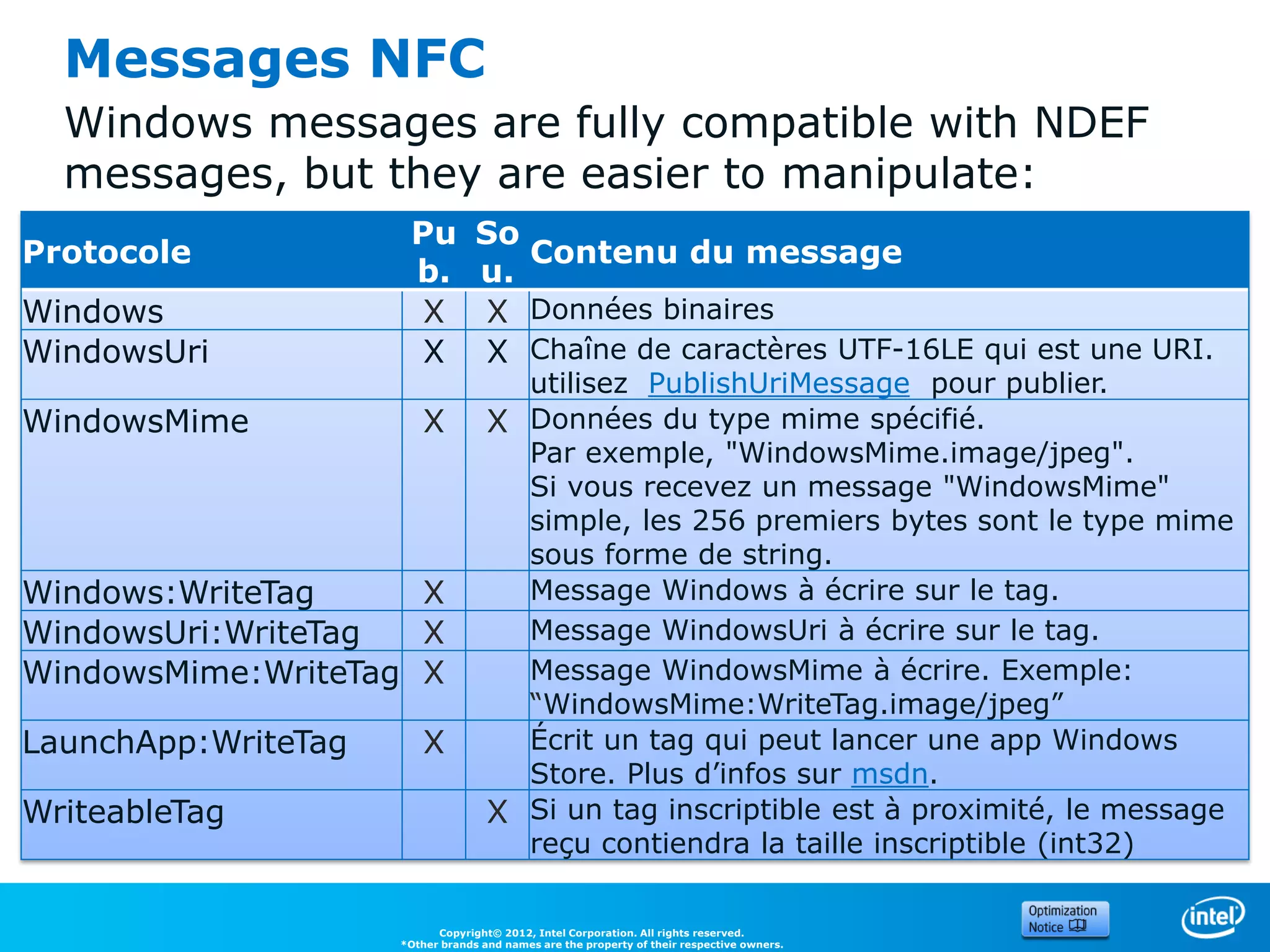
Messages NFC
  Windows messages are fully compatible with NDEF
  messages, but they are easier to manipulate:
                      Pu          So
Protocole                            Contenu du message
                      b.          u.
Windows                X          X Données binaires
WindowsUri             X          X Chaîne de caractères UTF-16LE qui est une URI.
                                      utilisez PublishUriMessage pour publier.
WindowsMime              X          X Données du type mime spécifié.
                                      Par exemple, "WindowsMime.image/jpeg".
                                      Si vous recevez un message "WindowsMime"
                                      simple, les 256 premiers bytes sont le type mime
                                      sous forme de string.
Windows:WriteTag     X                Message Windows à écrire sur le tag.
WindowsUri:WriteTag  X                Message WindowsUri à écrire sur le tag.
WindowsMime:WriteTag X                Message WindowsMime à écrire. Exemple:
                                      “WindowsMime:WriteTag.image/jpeg”
LaunchApp:WriteTag       X            Écrit un tag qui peut lancer une app Windows
                                      Store. Plus d’infos sur msdn.
WriteableTag                        X Si un tag inscriptible est à proximité, le message
                                      reçu contiendra la taille inscriptible (int32)

                           Copyright© 2012, Intel Corporation. All rights reserved.
                     *Other brands and names are the property of their respective owners.
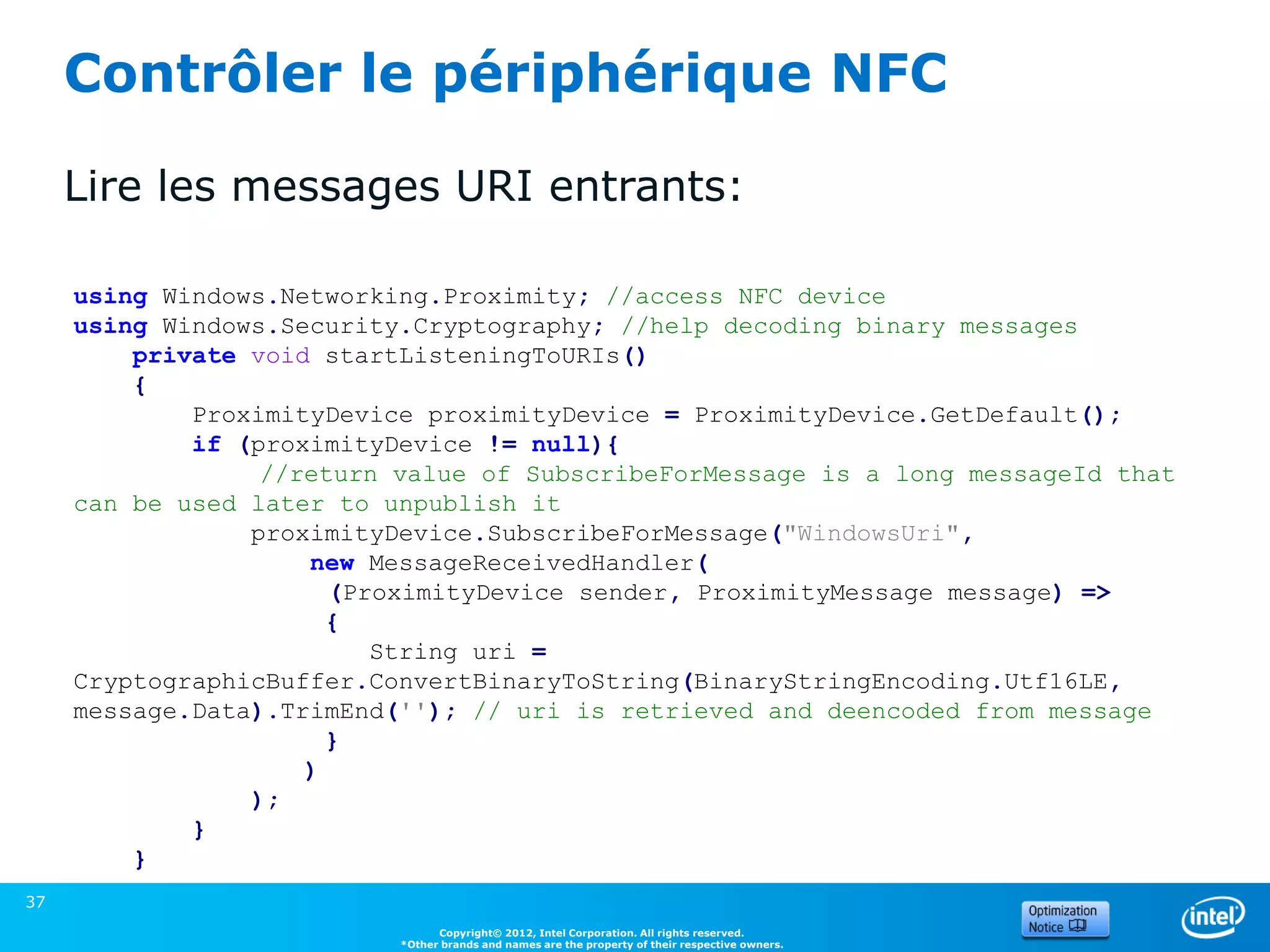
Contrôler le périphérique NFC

     Lire les messages URI entrants:

     using Windows.Networking.Proximity; //access NFC device
     using Windows.Security.Cryptography; //help decoding binary messages
         private void startListeningToURIs()
         {
             ProximityDevice proximityDevice = ProximityDevice.GetDefault();
             if (proximityDevice != null){
                  //return value of SubscribeForMessage is a long messageId that
     can be used later to unpublish it
                 proximityDevice.SubscribeForMessage("WindowsUri",
                     new MessageReceivedHandler(
                       (ProximityDevice sender, ProximityMessage message) =>
                       {
                          String uri =
     CryptographicBuffer.ConvertBinaryToString(BinaryStringEncoding.Utf16LE,
     message.Data).TrimEnd(''); // uri is retrieved and deencoded from message
                       }
                     )
                 );
             }
         }
37
                                 Copyright© 2012, Intel Corporation. All rights reserved.
                           *Other brands and names are the property of their respective owners.
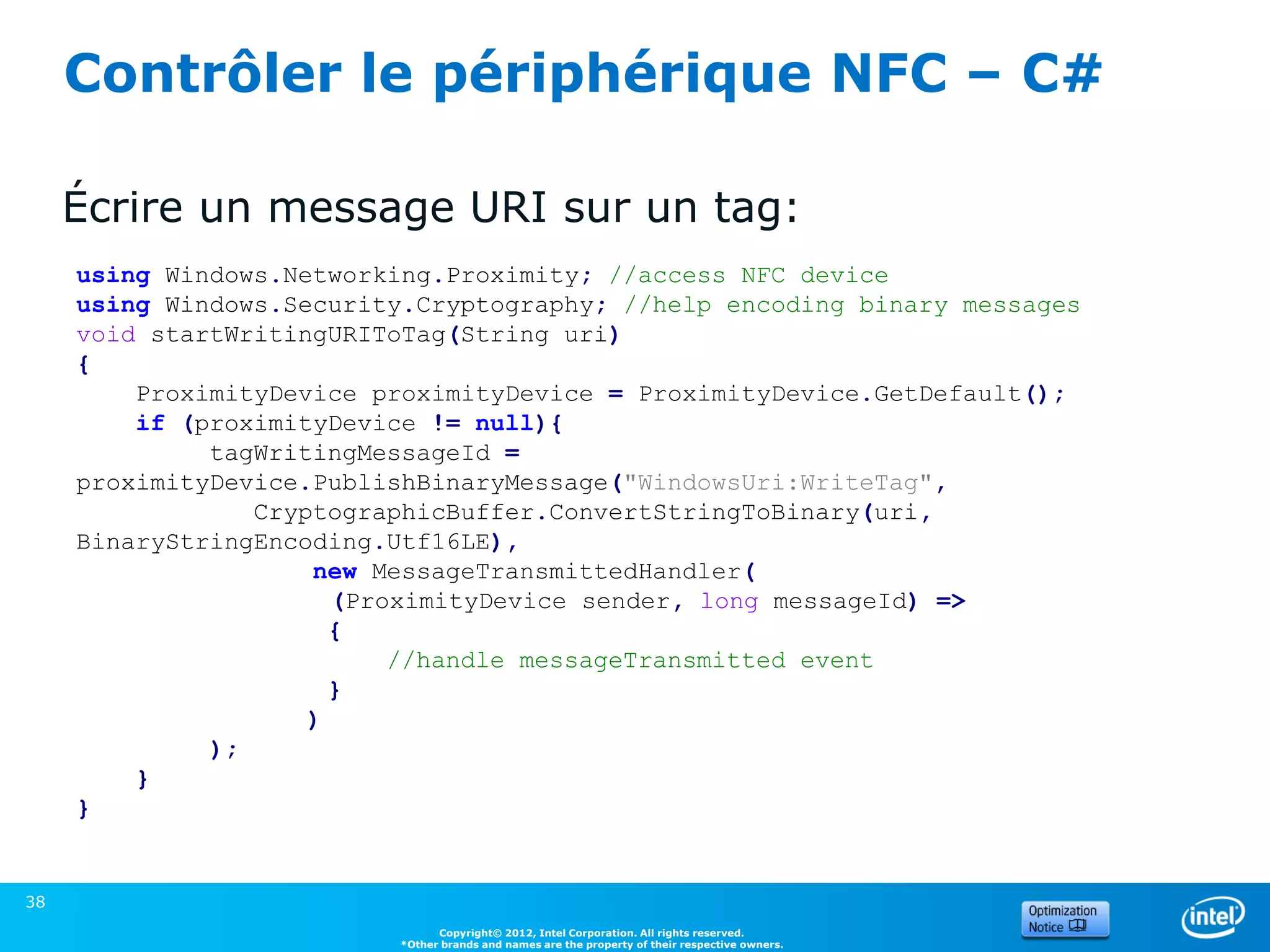
Contrôler le périphérique NFC – C#

     Écrire un message URI sur un tag:
     using Windows.Networking.Proximity; //access NFC device
     using Windows.Security.Cryptography; //help encoding binary messages
     void startWritingURIToTag(String uri)
     {
         ProximityDevice proximityDevice = ProximityDevice.GetDefault();
         if (proximityDevice != null){
              tagWritingMessageId =
     proximityDevice.PublishBinaryMessage("WindowsUri:WriteTag",
                 CryptographicBuffer.ConvertStringToBinary(uri,
     BinaryStringEncoding.Utf16LE),
                     new MessageTransmittedHandler(
                       (ProximityDevice sender, long messageId) =>
                       {
                           //handle messageTransmitted event
                       }
                     )
              );
         }
     }


38
                                Copyright© 2012, Intel Corporation. All rights reserved.
                          *Other brands and names are the property of their respective owners.
Contrôler le périphérique NFC – C#
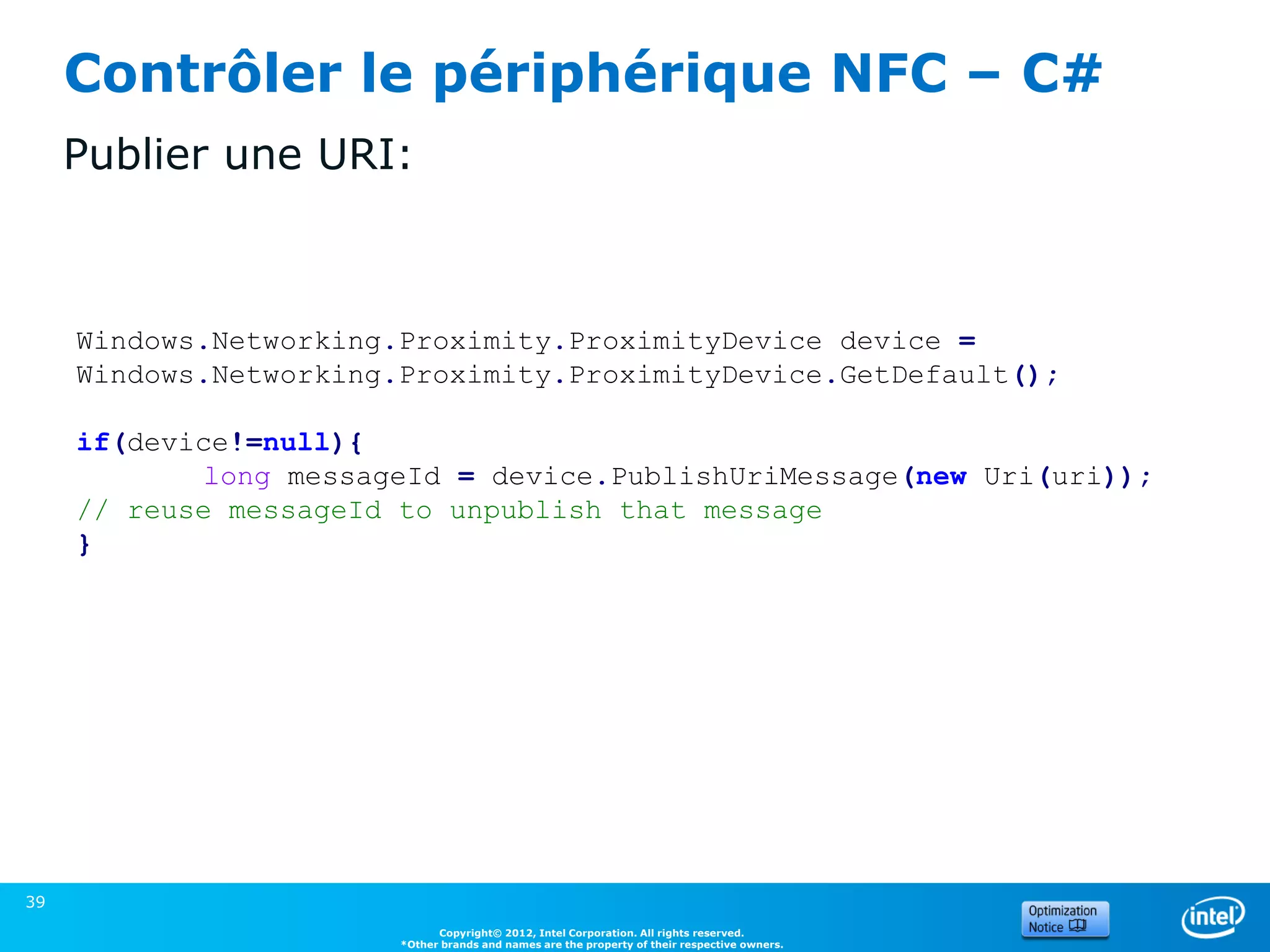
     Publier une URI:


     Windows.Networking.Proximity.ProximityDevice device =
     Windows.Networking.Proximity.ProximityDevice.GetDefault();

     if(device!=null){
            long messageId = device.PublishUriMessage(new Uri(uri));
     // reuse messageId to unpublish that message
     }


39
                              Copyright© 2012, Intel Corporation. All rights reserved.
                        *Other brands and names are the property of their respective owners.
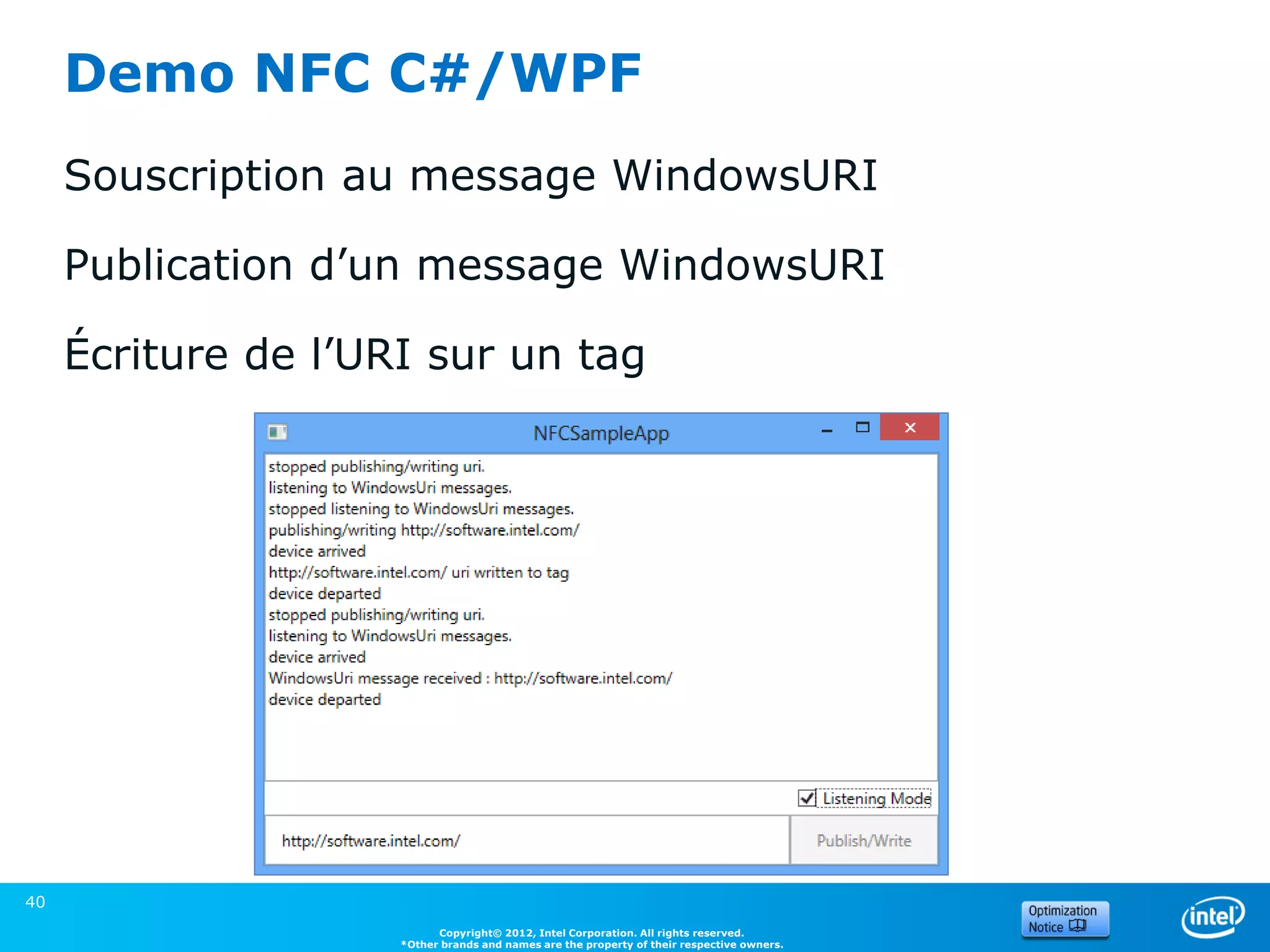
Demo NFC C#/WPF
     Souscription au message WindowsURI

     Publication d’un message WindowsURI

     Écriture de l’URI sur un tag


40
                           Copyright© 2012, Intel Corporation. All rights reserved.
                     *Other brands and names are the property of their respective owners.
4. Perceptual SDK


41
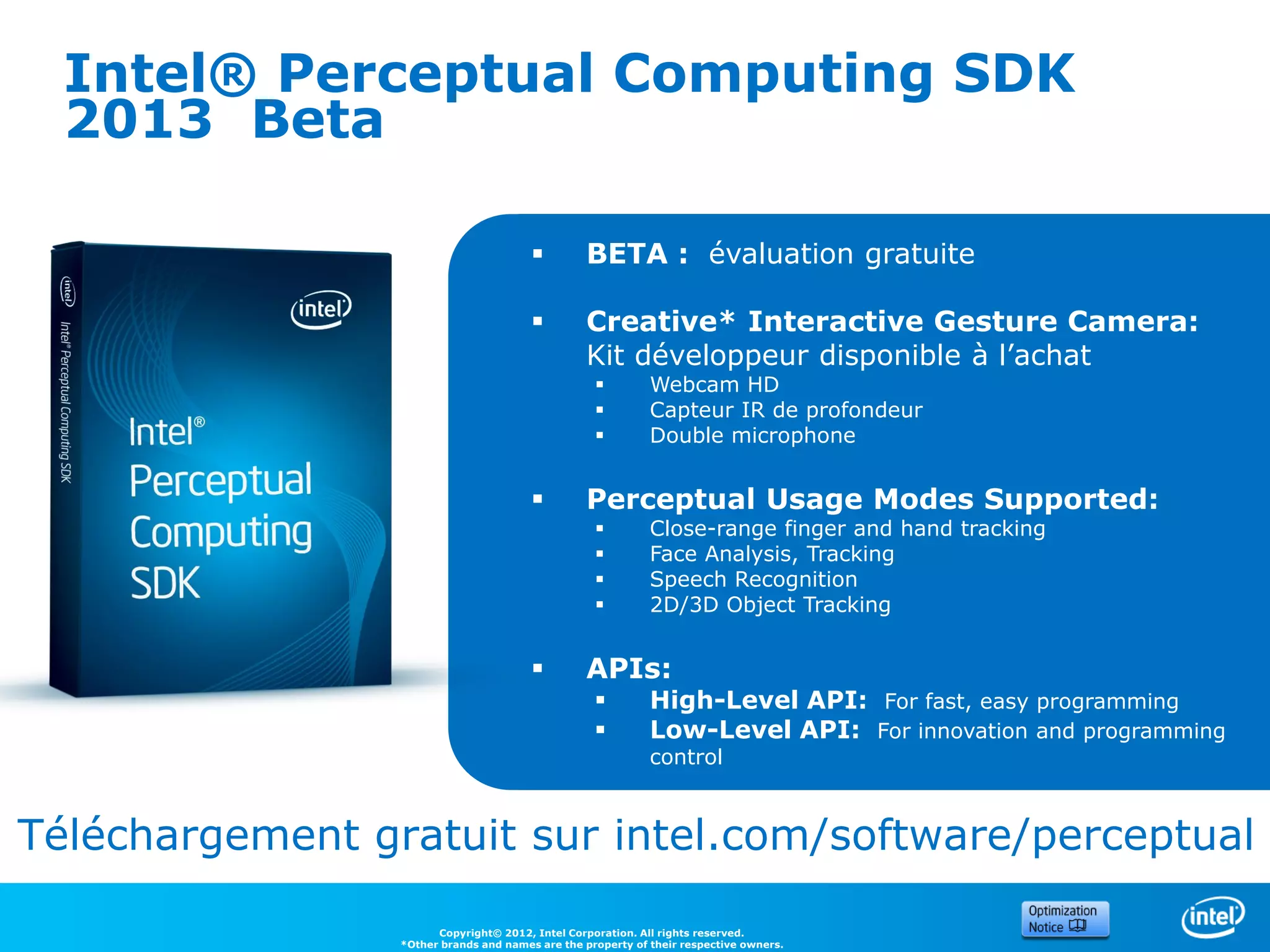
Intel® Perceptual Computing SDK
  2013 Beta

                                                BETA : évaluation gratuite

                                                Creative* Interactive Gesture Camera:
                                                 Kit développeur disponible à l’achat
                                                            Webcam HD
                                                            Capteur IR de profondeur
                                                            Double microphone


                                                Perceptual Usage Modes Supported:
                                                            Close-range finger and hand tracking
                                                            Face Analysis, Tracking
                                                            Speech Recognition
                                                            2D/3D Object Tracking


                                                APIs:
                                                            High-Level API: For fast, easy programming
                                                            Low-Level API: For innovation and programming
                                                             control


Téléchargement gratuit sur intel.com/software/perceptual

                       Copyright© 2012, Intel Corporation. All rights reserved.
                 *Other brands and names are the property of their respective owners.
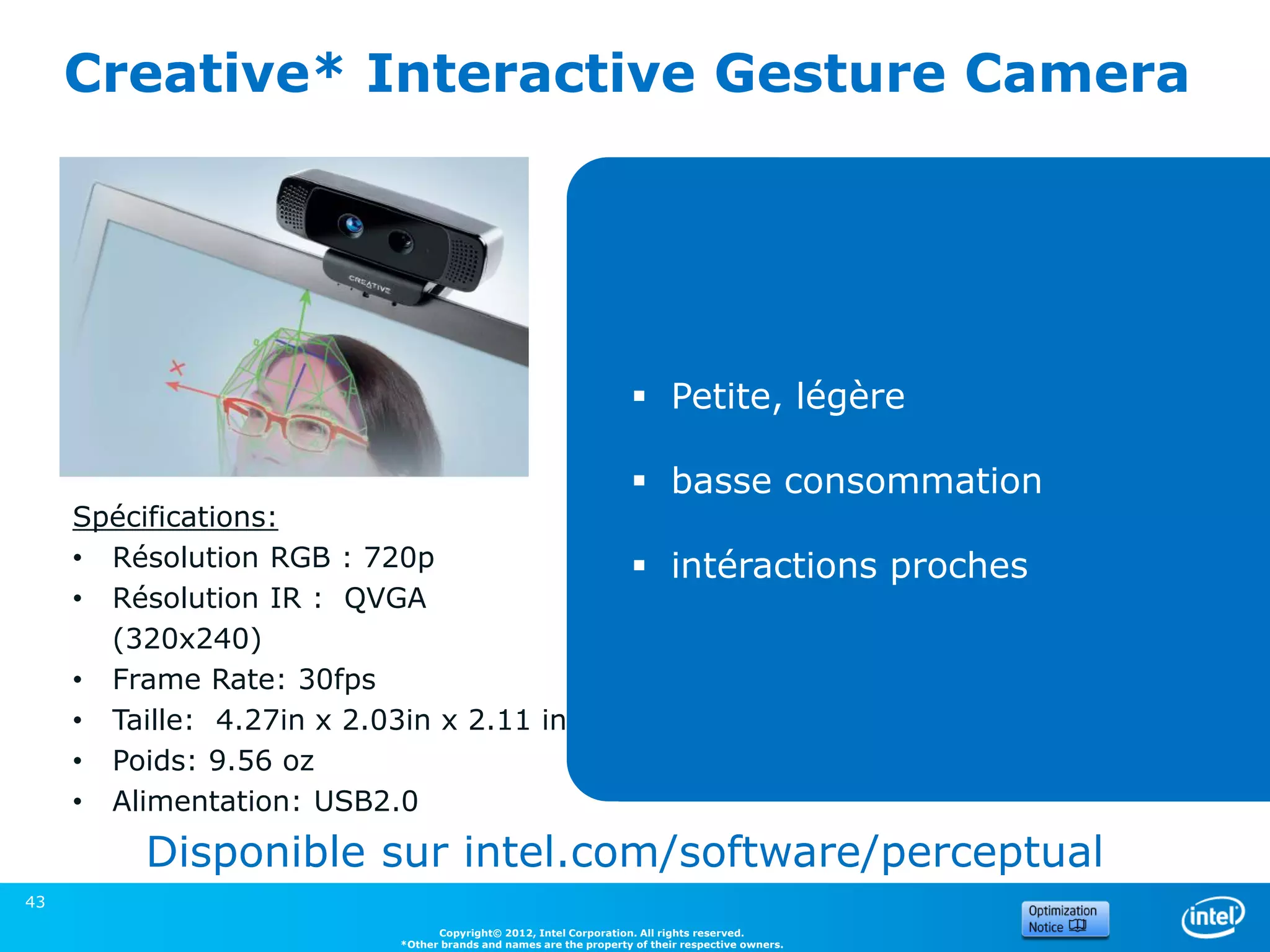
Creative* Interactive Gesture Camera


                                                                     Petite, légère

                                                                     basse consommation
     Spécifications:
     • Résolution RGB : 720p                                         intéractions proches
     • Résolution IR : QVGA
       (320x240)
     • Frame Rate: 30fps
     • Taille: 4.27in x 2.03in x 2.11 in
     • Poids: 9.56 oz
     • Alimentation: USB2.0
          Disponible sur intel.com/software/perceptual
43
                                  Copyright© 2012, Intel Corporation. All rights reserved.
                            *Other brands and names are the property of their respective owners.
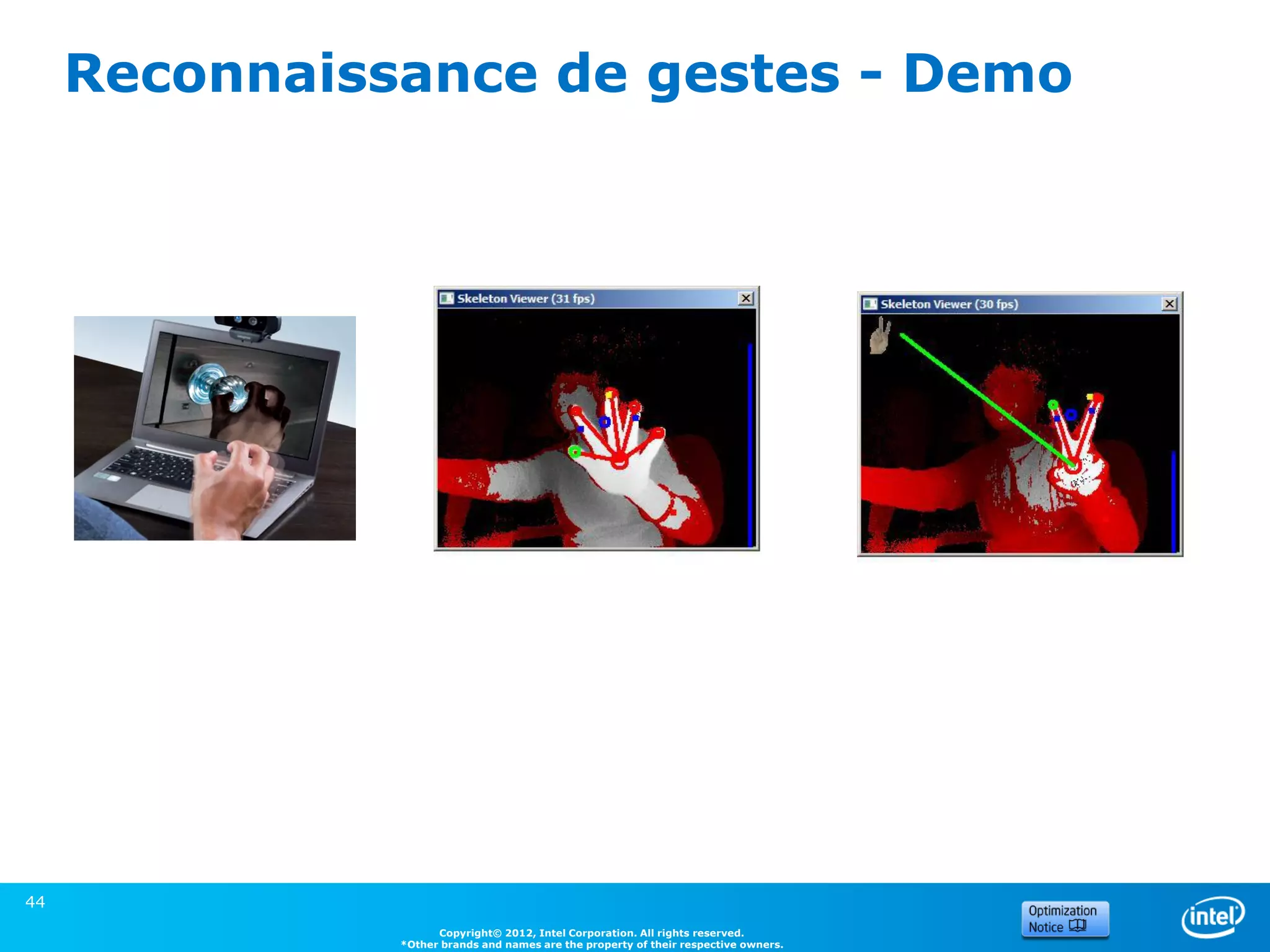
Reconnaissance de gestes - Demo


44
                     Copyright© 2012, Intel Corporation. All rights reserved.
               *Other brands and names are the property of their respective owners.
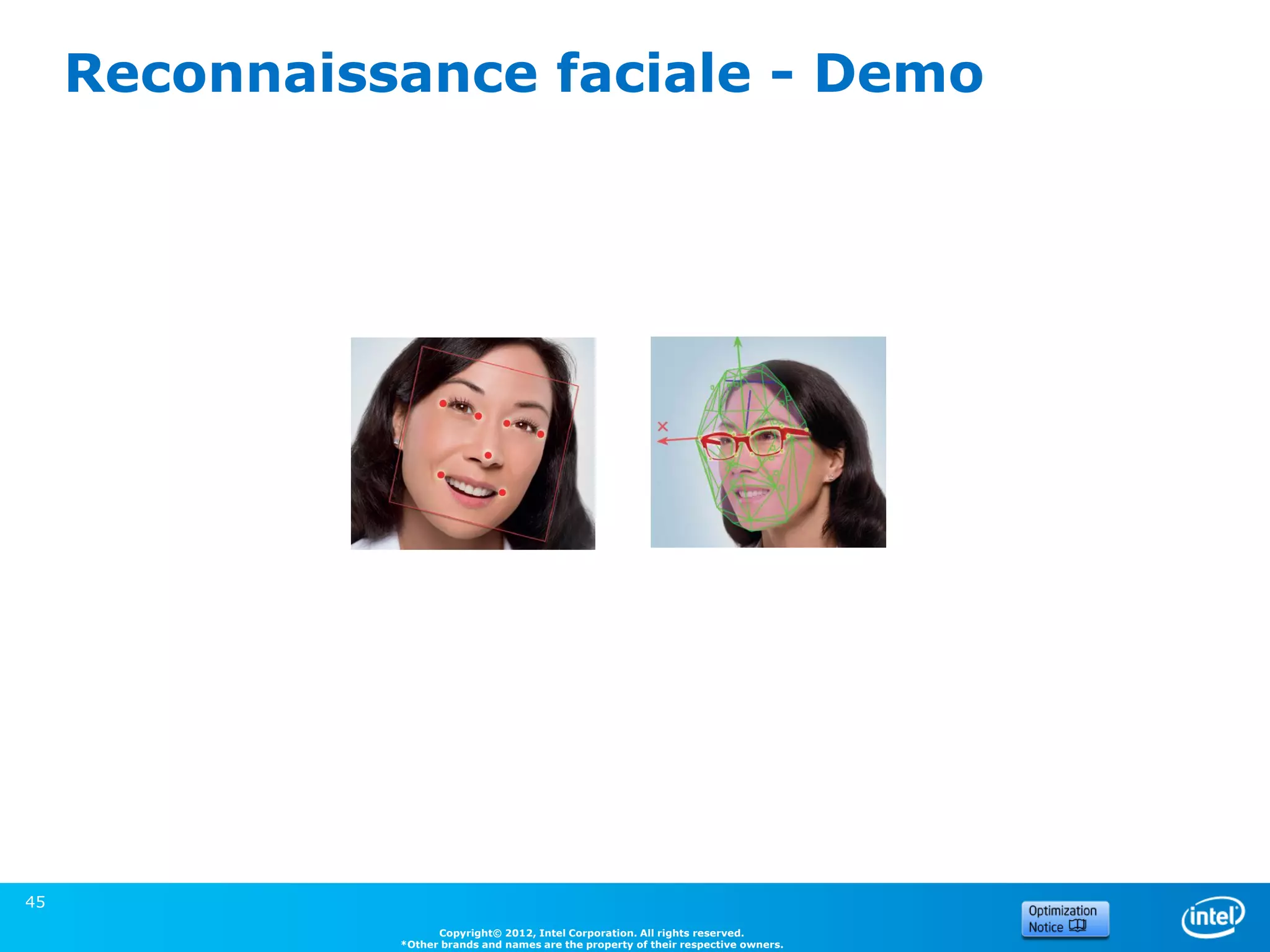
Reconnaissance faciale - Demo


45
                     Copyright© 2012, Intel Corporation. All rights reserved.
               *Other brands and names are the property of their respective owners.
Merci !


46
Questions ?


47
Backup


49            Intel Confidential
Accessing the Sensors and Location Platform

     COM INTERFACE


50
                           Copyright© 2012, Intel Corporation. All rights reserved.
                     *Other brands and names are the property of their respective owners.
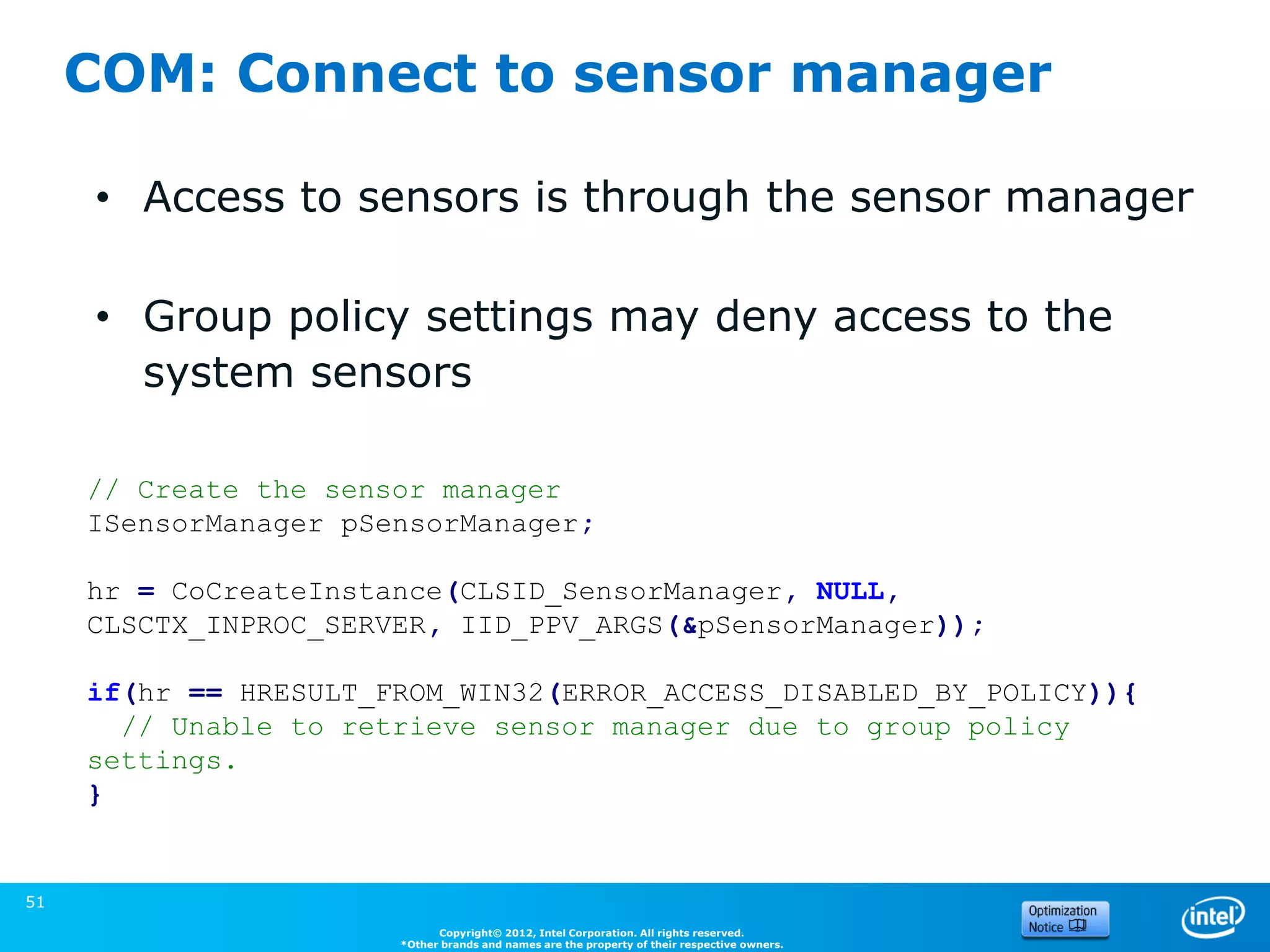
COM: Connect to sensor manager

     • Access to sensors is through the sensor manager

     • Group policy settings may deny access to the
       system sensors

     // Create the sensor manager
     ISensorManager pSensorManager;

     hr = CoCreateInstance(CLSID_SensorManager, NULL,
     CLSCTX_INPROC_SERVER, IID_PPV_ARGS(&pSensorManager));

     if(hr == HRESULT_FROM_WIN32(ERROR_ACCESS_DISABLED_BY_POLICY)){
       // Unable to retrieve sensor manager due to group policy
     settings.
     }
                                                                                              (Source: Microsoft)


51
                             Copyright© 2012, Intel Corporation. All rights reserved.
                       *Other brands and names are the property of their respective owners.
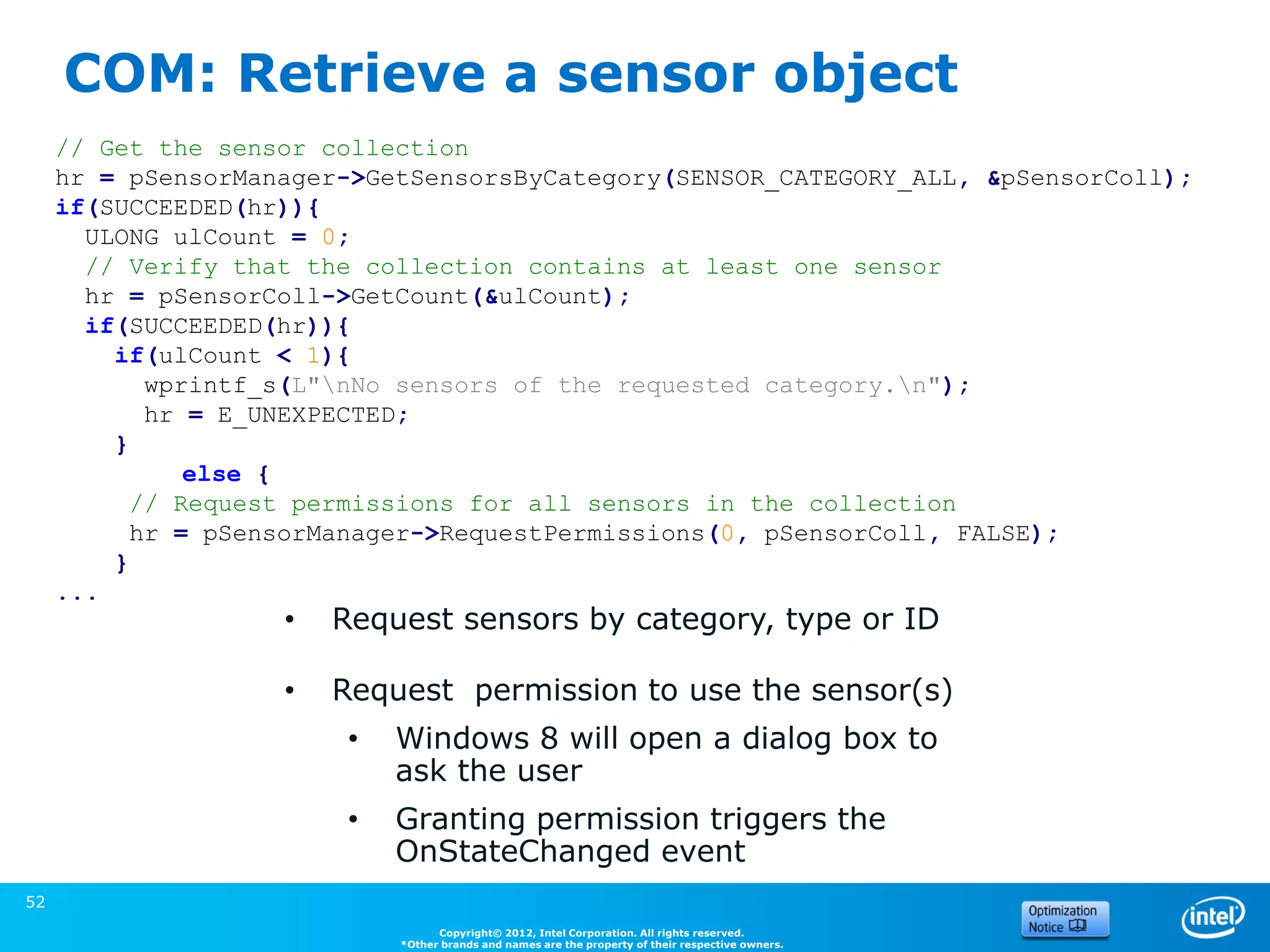
COM: Retrieve a sensor object
     // Get the sensor collection
     hr = pSensorManager->GetSensorsByCategory(SENSOR_CATEGORY_ALL, &pSensorColl);
     if(SUCCEEDED(hr)){
       ULONG ulCount = 0;
       // Verify that the collection contains at least one sensor
       hr = pSensorColl->GetCount(&ulCount);
       if(SUCCEEDED(hr)){
         if(ulCount < 1){
            wprintf_s(L"nNo sensors of the requested category.n");
            hr = E_UNEXPECTED;
         }
               else {
           // Request permissions for all sensors in the collection
           hr = pSensorManager->RequestPermissions(0, pSensorColl, FALSE);
         }
     ...
                    •   Request sensors by category, type or ID

                    •   Request permission to use the sensor(s)
                         •   Windows 8 will open a dialog box to
                             ask the user
                         •   Granting permission triggers the                                       (Source: Microsoft)
                             OnStateChanged event
52
                                   Copyright© 2012, Intel Corporation. All rights reserved.
                             *Other brands and names are the property of their respective owners.
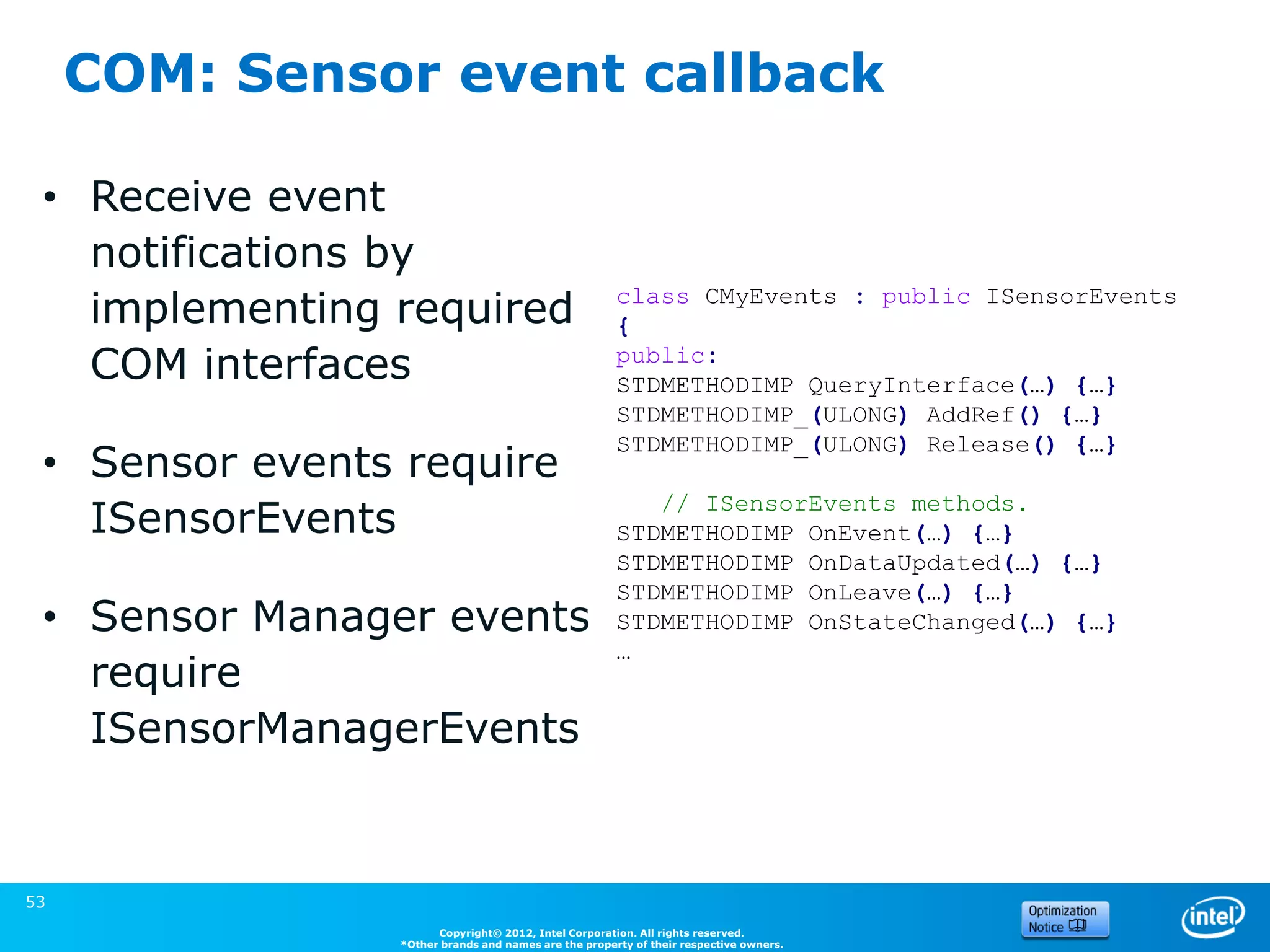
COM: Sensor event callback

 • Receive event
   notifications by
   implementing required                              class CMyEvents : public ISensorEvents
                                                      {
   COM interfaces                                     public:
                                                      STDMETHODIMP QueryInterface(…) {…}
                                                      STDMETHODIMP_(ULONG) AddRef() {…}
                                                      STDMETHODIMP_(ULONG) Release() {…}
 • Sensor events require
                                                         // ISensorEvents methods.
   ISensorEvents                                      STDMETHODIMP OnEvent(…) {…}
                                                      STDMETHODIMP OnDataUpdated(…) {…}
                                                      STDMETHODIMP OnLeave(…) {…}
 • Sensor Manager events                              STDMETHODIMP OnStateChanged(…) {…}
                                                      …
   require
   ISensorManagerEvents

                                                                                       (Source: Microsoft)


53
                      Copyright© 2012, Intel Corporation. All rights reserved.
                *Other brands and names are the property of their respective owners.
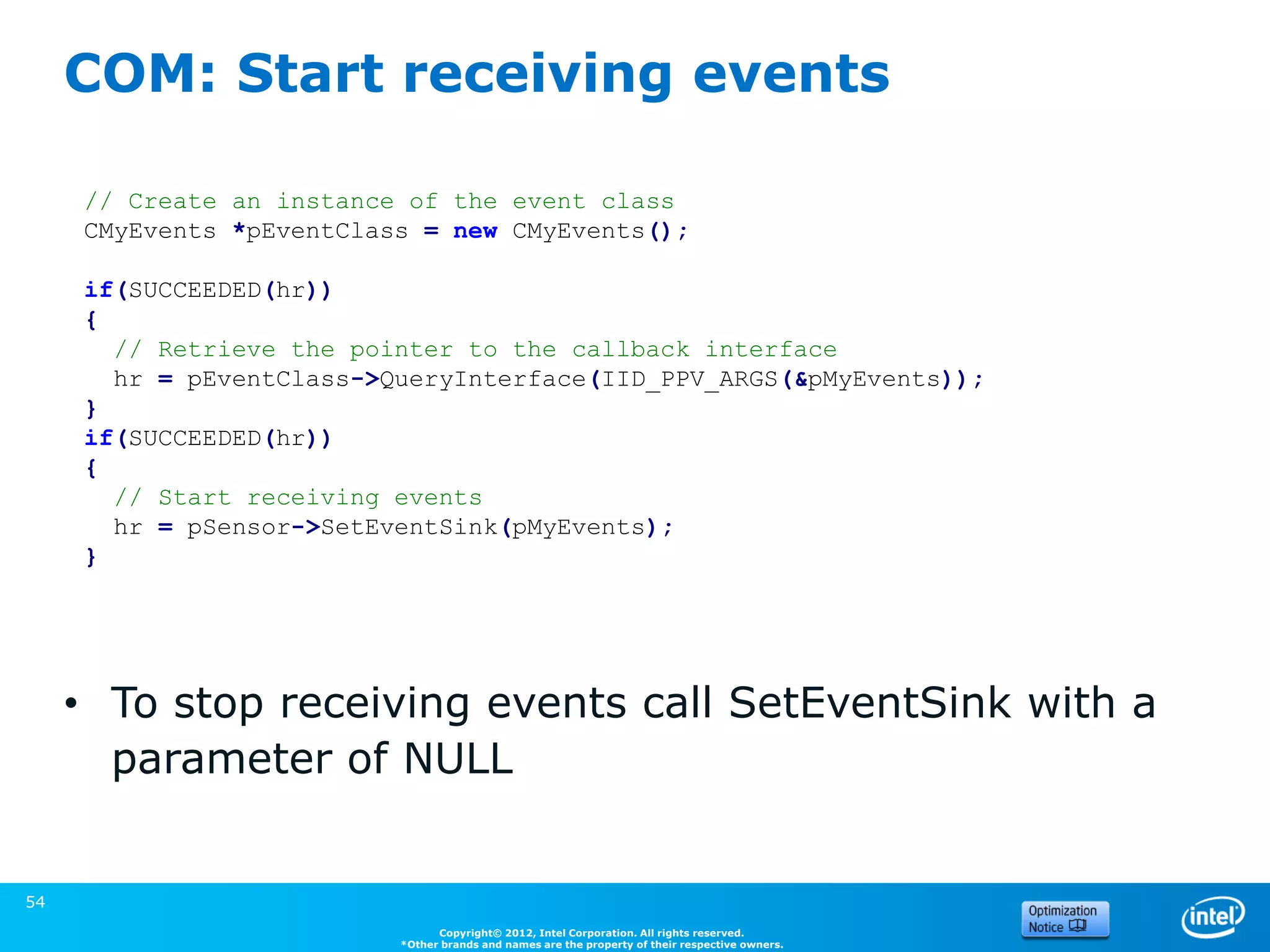
COM: Start receiving events

     // Create an instance of the event class
     CMyEvents *pEventClass = new CMyEvents();

     if(SUCCEEDED(hr))
     {
       // Retrieve the pointer to the callback interface
       hr = pEventClass->QueryInterface(IID_PPV_ARGS(&pMyEvents));
     }
     if(SUCCEEDED(hr))
     {
       // Start receiving events
       hr = pSensor->SetEventSink(pMyEvents);
     }


     • To stop receiving events call SetEventSink with a
       parameter of NULL
                                                                                                 (Source: Microsoft)


54
                                Copyright© 2012, Intel Corporation. All rights reserved.
                          *Other brands and names are the property of their respective owners.
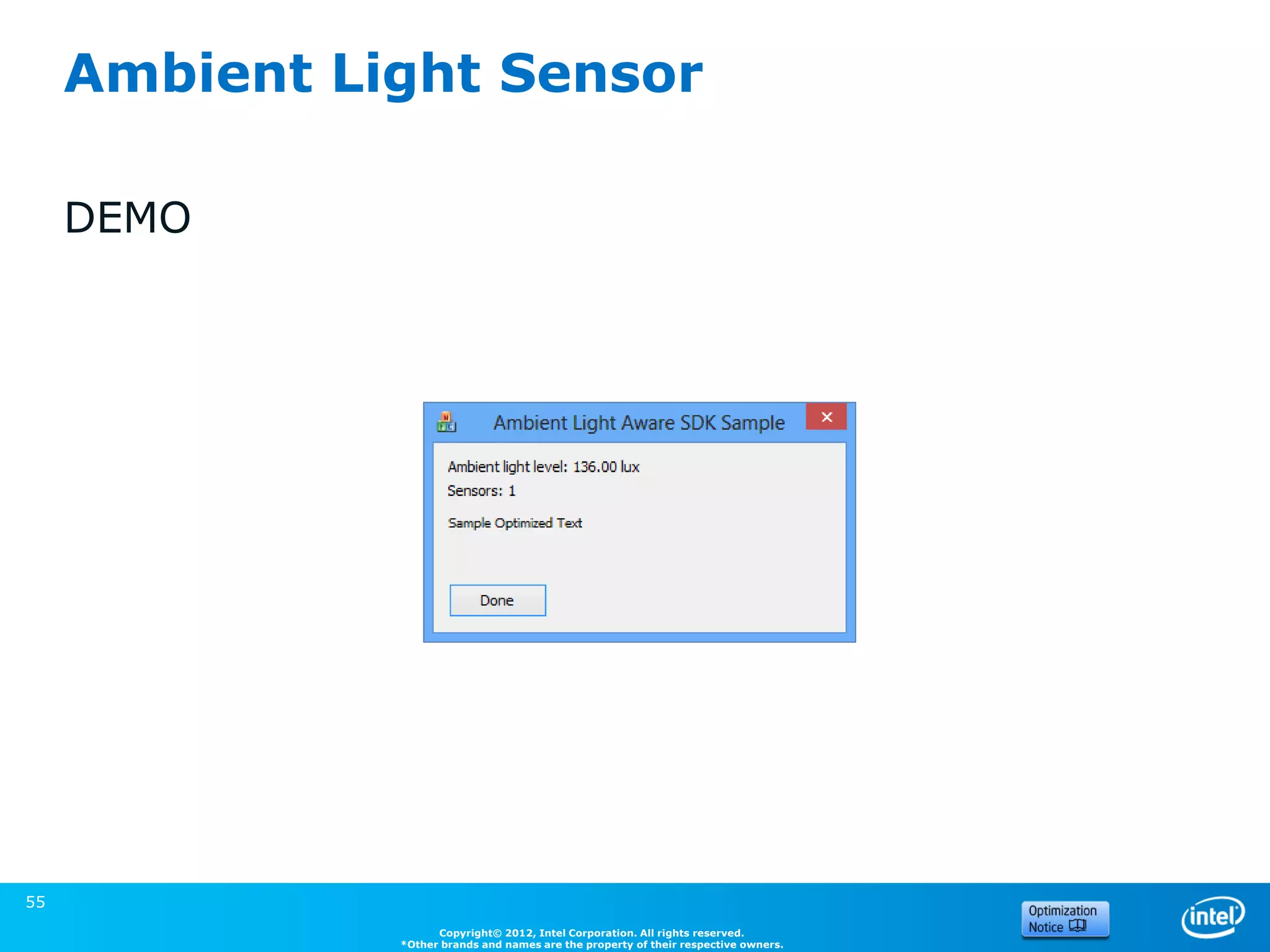
Ambient Light Sensor

     DEMO


55
                     Copyright© 2012, Intel Corporation. All rights reserved.
               *Other brands and names are the property of their respective owners.

Utilisation des capteurs dans les applications windows 8

  • 1.
    Utilisation des capteursdans les applications Windows 8 Xavier HALLADE Technical Marketing Engineer 29 Novembre 2012
  • 2.
    Legal Disclaimer &Optimization Notice INFORMATION IN THIS DOCUMENT IS PROVIDED IN CONNECTION WITH INTEL® PRODUCTS. EXCEPT AS PROVIDED IN INTEL’S TERMS AND CONDITIONS OF SALE FOR SUCH PRODUCTS, INTEL ASSUMES NO LIABILITY WHATSOEVER, AND INTEL IS CLAIMS ANY EXPRESS OR IMPLIED WARRANTY RELATING TO SALE AND/OR USE OF INTEL PRODUCTS, INCLUDING LIABILITY OR WARRANTIES RELATING TO FITNESS FOR A PARTICULAR PURPOSE, MERCHANTABILITY, OR INFRINGEMENT OF ANY PATENT, COPYRIGHT, OR OTHER INTELLECTUAL PROPERTY RIGHT. Intel products are not intended for use in medical, life-saving, life sustaining, critical control or safety systems, or in nuclear facility applications. • Intel products may contain design defects or errors known as errata which may cause the product to deviate from published specifications. Current characterized errata are available on request. • Intel may make changes to dates, specifications, product descriptions, and plans referenced in this document at any time, without notice. • This document may contain information on products in the design phase of development. The information here is subject to change without notice. Do not finalize a design with this information. • Designers must not rely on the absence or characteristics of any features or instructions marked "reserved" or "undefined." Intel reserves these for future definition and shall have no responsibility whatsoever for conflicts or incompatibilities arising from future changes to them. • Intel Corporation may have patents or pending patent applications, trademarks, copyrights, or other intellectual property rights that relate to the presented subject matter. The furnishing of documents and other materials and information does not provide any license, express or implied, by estoppel or otherwise, to any such patents, trademarks, copyrights, or other intellectual property rights. • Wireless connectivity and some features may require you to purchase additional software, services or external hardware. • Performance tests and ratings are measured using specific computer systems and/or components and reflect the approximate performance of Intel products as measured by those tests. Any difference in system hardware or software design or configuration may affect actual performance. Buyers should consult other sources of information to evaluate the performance of systems or components they are considering purchasing. For more information on performance tests and on the performance of Intel products, visit Intel Performance Benchmark Limitations • Intel, the Intel logo are trademarks or registered trademarks of Intel Corporation or its subsidiaries in the United States and other countries. Optimization Notice Intel’s compilers may or may not optimize to the same degree for non-Intel microprocessors for optimizations that are not unique to Intel microprocessors. These optimizations include SSE2®, SSE3, and SSSE3 instruction sets and other optimizations. Intel does not guarantee the availability, functionality, or effectiveness of any optimization on microprocessors not manufactured by Intel. Microprocessor-dependent optimizations in this product are intended for use with Intel microprocessors. Certain optimizations not specific to Intel microarchitecture are reserved for Intel microprocessors. Please refer to the applicable product User and Reference Guides for more information regarding the specific instruction sets covered by this notice. Notice revision #20110804 2 Copyright© 2012, Intel Corporation. All rights reserved. *Other brands and names are the property of their respective owners.
  • 3.
    Agenda Introduction Vue d’ensemble des APIs disponibles Windows Runtime 1. Capteurs de Mouvements/Orientation et Lumière Ambiante 2. Localisation 3. NFC Q/R 3 Copyright© 2012, Intel Corporation. All rights reserved. *Other brands and names are the property of their respective owners.
  • 4.
    Les différents capteursdisponibles Lumière Compas Acceleromètre Gyroscope GPS Ambiante NFC + avec Sensor Fusion: Inclinomètre, Orientation, SimpleOrientation Copyright© 2012, Intel Corporation. All rights reserved. *Other brands and names are the property of their respective owners.
  • 5.
  • 6.
    La vieille méthode: Sensorsand Location Platform Même interface qu’avec Windows 7 • Nouveaux capteurs disponibles par de nouvelles GUIDs Un “Sensor manager” contrôle les différents capteurs: • Donne l’accès aux données • Notifie des connexions/déconnexions L’accès se fait par interface COM • Abonnement aux événements d’objets ILocationEvents / ISensorDataReport • Référence des APIs : – Capteurs: http://msdn.microsoft.com/en- us/library/windows/desktop/dd318953(v=vs.85).aspx – Localisation: http://msdn.microsoft.com/en- us/library/windows/desktop/dd317731(v=vs.85).aspx 6 Copyright© 2012, Intel Corporation. All rights reserved. *Other brands and names are the property of their respective owners.
  • 7.
    La nouvelle méthode: L’API Windows Runtime Windows.Sensors.* -> Capteurs de Mouvements/Orientation et Lumière Ambiante – Accelerometer – Gyrometer – Inclinometer – OrientationSensor – SimpleOrientationSensor – Compass – LightSensor Windows.Device.Geolocation -> GPS Windows.Networking.Proximity.ProximityDevice -> NFC Copyright© 2012, Intel Corporation. All rights reserved. *Other brands and names are the property of their respective owners.
  • 8.
    Utiliser l’API WindowsRuntime depuis des applications classiques Certaines parties de l’API Windows Runtime sont disponibles depuis les applications de bureau comme depuis les applications Windows Store : Vous devez utiliser les fichiers MetaData de l’API : Platform.winmd (C:Program Files (x86)Microsoft SDKs Windowsv8.0ExtensionSDKsMicrosoft.VCLibs11 .0ReferencesCommonConfigurationneutral) Windows.winmd (C:Program Files (x86)Windows Kits8.0ReferencesCommonConfigurationNeutral) Copyright© 2012, Intel Corporation. All rights reserved. *Other brands and names are the property of their respective owners.
  • 9.
    Utiliser l’API WindowsRuntime depuis des applications C# Déchargez le projet. Éditez le fichier .csproj pour y ajouter : <PropertyGroup> <TargetPlatformVersion>8.0</TargetPlatformVersion> </PropertyGroup> Rechargez le projet. Ajoutez en tant que référence les fichiers Windows.winmd et Platform.winmd. Référencez aussi System.Runtime.WindowsRuntime.dll. Copyright© 2012, Intel Corporation. All rights reserved. *Other brands and names are the property of their respective owners.
  • 10.
    Utiliser l’API WindowsRuntime depuis des applications C++/CX C++/CX permet d’utiliser directement l’API WinRT et est compilé vers du code natif. Dans les propriétés du projet, dans C/C++->General: Passez “Consommer l’extension Windows Runtime” à Oui (/ZW option) Ajoutez les répertoires de Windows.winmd and Platform.winmd à “Répertoires #using supplémentaires” Dans votre code source, ajoutez : #using <Windows.winmd> #using <Platform.winmd> Copyright© 2012, Intel Corporation. All rights reserved. *Other brands and names are the property of their respective owners.
  • 11.
    Utiliser l’API WindowsRuntime depuis des applications C++ standard avec WRL #include <Windows.Foundation.h> #include <wrlwrapperscorewrappers.h> #include <wrlclient.h> using namespace ABI::Windows::Foundation; using namespace Microsoft::WRL; using namespace Microsoft::WRL::Wrappers; Plus d’informations : http://msdn.microsoft.com/en- us/library/hh973459.aspx Copyright© 2012, Intel Corporation. All rights reserved. *Other brands and names are the property of their respective owners.
  • 12.
    C++/CX ou C++standard avec WRL C++/CX C++ avec WRL // Initialize the Windows Runtime. Windows::Foundation::Uri ^uri RoInitializeWrapper = ref new initialize(RO_INIT_MULTITHREADED); Windows::Foundation::Uri(L"ht tp://software.intel.com"); // Get the activation factory for the IUriRuntimeClass interface. ComPtr<IUriRuntimeClassFactory> uriFactory; HRESULT hr = GetActivationFactory(HStringReference(RuntimeClas s_Windows_Foundation_Uri).Get(), &uriFactory); // Create a hstring that represents a URI. HString uriHString; hr = uriHString.Set(L"http://software.intel.com"); // Create the IUriRuntimeClass object. ComPtr<IUriRuntimeClass> uri; hr = uriFactory->CreateUri(uriHString.Get(), &uri); (Gestion des erreurs retirée pour que ça rentre…) Copyright© 2012, Intel Corporation. All rights reserved. *Other brands and names are the property of their respective owners.
  • 13.
    1. Capteurs de mouvements/orientation et Lumière Ambiante 13
  • 14.
    Orientation et Mouvements L’accéleromètreretourne l’accélération sur les axes x, y et z, et peut aussi générer un évenement « Shake ». Le gyroscope retourne les vitesses de rotation. Le magnétomètre retourne la force magnétique sur x,y,z Copyright© 2012, Intel Corporation. All rights reserved. *Other brands and names are the property of their respective owners.
  • 15.
    Sensor Fusion Simple Orientation: retourne 0, 90, 180 ou 270 degrés, face vers le haut, face retournée “OrientationSensor” et “Inclinometer” retournent tous les deux l’orientation complète : • L’“Inclinometer” retourne les angles de roulis, tanguage et lacet • L’“Orientation Sensor” retourne un quaternion ainsi qu’une matrice de rotation 3x3 Copyright© 2012, Intel Corporation. All rights reserved. *Other brands and names are the property of their respective owners.
  • 16.
    Orientation et Mouvements Même convention qu’avec Android et les spécifications HTML5 0.0° ≤ lacet < 360.0° -180.0° ≤ tangage < 180.0° -90.0° ≤ roulis < 90.0° Copyright© 2012, Intel Corporation. All rights reserved. *Other brands and names are the property of their respective owners.
  • 17.
    Utilisation des capteursdepuis l’API Windows Runtime Même méthode pour tout Windows.Devices.Sensors.*: • Récupération d’une instance de l’objet en utilisant la méthode .GetDefault() • Configuration de .ReportInterval et ajout d’un delegate à l’événement .ReadingChanged • Ou appel direct à .GetCurrentReading() Copyright© 2012, Intel Corporation. All rights reserved. *Other brands and names are the property of their respective owners.
  • 18.
    Windows Runtime SensorAPI – C# _accelero = Accelerometer.GetDefault(); if (_accelero != null) { _accelero.ReportInterval = 50 <= _accelero.MinimumReportInterval ? _accelerometer.MinimumReportInterval : 50; //Register for reading changed events _accelero.ReadingChanged += (Accelerometer s, AccelerometerReadingChangedEventArgs args) => C { # //use args.Reading.AccelerationX/Y/Z }; } C+ Copyright© 2012, Intel Corporation. All rights reserved. *Other brands and names are the property of their respective owners. +
  • 19.
    Windows Runtime SensorAPI – C++ Accelerometer ^accelero = Accelerometer::GetDefault(); if(accelero!=nullptr) { accelero->ReportInterval = 50 <= accelero->MinimumReportInterval ? accelero->MinimumReportInterval : 50; accelero->ReadingChanged += ref new TypedEventHandler<Accelerometer^, AccelerometerReadingChangedEventArgs^>( C [](Object^ sender, AccelerometerReadingChangedEventArgs^ args) # { //read args->Reading->AccelerationX/Y/Z }); } C+ Copyright© 2012, Intel Corporation. All rights reserved. *Other brands and names are the property of their respective owners. +
  • 20.
    Demo de l’accéléromètre- C#/WPF Une balle sur un canvas Les données de l’accéléromètre sont mises à jour grâce à l’événement ReadingChanged, un timer sert à bouger la balle. 20 Copyright© 2012, Intel Corporation. All rights reserved. *Other brands and names are the property of their respective owners.
  • 21.
    Demo C#/WPF del’OrientationSensor 21 Copyright© 2012, Intel Corporation. All rights reserved. *Other brands and names are the property of their respective owners.
  • 22.
    Par rapport àla consommation Évitez d’utiliser un ReportInterval trop faible si votre app n’en a pas besoin. Utilisez les événements plutôt que des appels récurrents. Laissez les capteurs tranquilles lorsque l’application n’est pas utilisée. Si vous n’avez pas besoin de l’orientation complète, utilisez directement l’accéléromètre. Sensors objects: At least one client connected Hardware Accelerometer Gyroscope Inclinometer Compass Device Orientation Accelerometer On Off On On On Gyro Off On On On On Magnetometer Off Off On On On 22 Copyright© 2012, Intel Corporation. All rights reserved. *Other brands and names are the property of their respective owners.
  • 23.
    Capteur de LumièreAmbiante Peut être utilisé pour adapter l’interface aux conditions: contraste, taille de police… Conditions Luminance using Windows.Devices.Sensors; (lux) Noir complet 1 LightSensors lightSensor = Intérieur - noir 10 LightSensor.GetDefault(); Intérieur – très sombre 50 Intérieur - sombre 100 lightSensor.ReadingChanged += Intérieur - normal 300 (sender, args) => { Intérieur - lumineux 1,000 //handle Extérieur - sombre 5,000 args.Reading.IlluminanceInLux Extérieur - nuageux 30,000 }; Extérieur – grand soleil 100,000 //lightSensor.GetCurrentReadin g().IlluminanceInLux Copyright© 2012, Intel Corporation. All rights reserved. *Other brands and names are the property of their respective owners.
  • 24.
  • 25.
    Location En fonction duchoix de l’utilisateur, son utilisation peut être interdite. Dans ce cas la permission est automatiquement demandée au premier lancement. Pour une application Windows 8* store, il faut déclarer la capacité “location” dans le fichier manifest. Copyright© 2012, Intel Corporation. All rights reserved. *Other brands and names are the property of their respective owners.
  • 26.
    Obtenir la positioncourante – C# using Windows.Devices.Geolocation; Geolocator _geo = new Geolocator(); async void getCurrentPosition() { if(_geo!= null){ Geoposition pos = await _geo.GetGeopositionAsync(); // use pos.Coordinate.(Latitude|Longitude|Accuracy…) and also pos.CivicAdress if available } } Copyright© 2012, Intel Corporation. All rights reserved. *Other brands and names are the property of their respective owners.
  • 27.
    Suivre la positionet le statut – C# using Windows.Devices.Geolocation; Geolocator _geo = new Geolocator(); void trackPosition() { if(_geo!= null){ _geo.DesiredAccuracy = PositionAccuracy::High; //High -> will get GPS positioning if available _geo.ReportInterval = 1000; //milliseconds _geo.PositionChanged += (sender, args) => { Geoposition pos = args.Position; }; } } void trackStatus() { if(_geo!= null){ _geo.StatusChanged += (sender, args) => { PositionStatus status = args.Status; //status can be Disabled/Initializing/NoData/NotAvailable/NotInitialized/Ready }; } } Copyright© 2012, Intel Corporation. All rights reserved. *Other brands and names are the property of their respective owners.
  • 28.
  • 29.
    Near Field Communication Portéeultra-courte (<4cm) Sans Contact Utilisé entre deux périphériques (actif/actif ou actif/passif) • Actif: Smartphone, Tablette, Ultrabook™… • Passif: Tags, Smart cards… Petites quantités de données, taux de transfert bas Facile à utiliser, sensation d’instantannéité (<1/10s) -> Bonne expérience utilisateur ! Copyright© 2012, Intel Corporation. All rights reserved. *Other brands and names are the property of their respective owners.
  • 30.
    Near Field Communication Appairage •Avec des périphériques Bluetooth* • Avec une autre instance de l’application, en établissant un socket BT ou Wi-Fi direct (API PeerFinder) Lecture/Écriture de petites données sur des tags Échange de données entre périphériques • Partage d’adresses, contacts, positions • Transactions sécurisées Copyright© 2012, Intel Corporation. All rights reserved. *Other brands and names are the property of their respective owners.
  • 31.
    Vous n’avez pasforcément besoin de vous occuper du périphérique NFC… UTILISER NFC DE MANIÈRE TRANSPARENTE 31 Copyright© 2012, Intel Corporation. All rights reserved. *Other brands and names are the property of their respective owners.
  • 32.
    Utiliser NFC demanière transparente Publier des fichiers et URIs Souscrivez à l’événement DataRequested du Windows.ApplicationModel.DataTransfer.DataTransferManager Le menu “Appuyer et envoyer” apparaitra sur le matériel complet si vous mettez une URI ou un StorageItem dans le DataPackage demandé. sample: http://code.msdn.microsoft.com/windowsapps/Sharing-Content- Source-App-d9bffd84 32 Copyright© 2012, Intel Corporation. All rights reserved. *Other brands and names are the property of their respective owners.
  • 33.
    Utiliser NFC demanière transparente Recevoir des fichiers et URIs Enregistrez une application par défaut pour un protocol (URIs) ou un type de fichiers. Plus d’informations sur msdn: • File type and protocol associations model (applications Desktop et Windows Store) • How to handle file activation (applications Windows Store) • How to handle protocol activation (applications Windows Store) 33 Copyright© 2012, Intel Corporation. All rights reserved. *Other brands and names are the property of their respective owners.
  • 34.
    Avec l’API WindowsRuntime CONTROLER LE PÉRIPHÉRIQUE NFC 34 Copyright© 2012, Intel Corporation. All rights reserved. *Other brands and names are the property of their respective owners.
  • 35.
    Messages NFC ProximityDevice.PublishMessage("protocol", data); ProximityDevice.SubscribeForMessage("protocol", delegate); Protocole Pub Sou Contenu du message NDEF X X Message NDEF NDEF:ext X Message NDEF défini par l’application (TNF = 0x04). NDEF:MIME X Message NDEF mime (TNF = 0x02). Par exemple, "NDEF:MIME.image/jpeg". NDEF:URI X Message NDEF URI (TNF = 0x03). Par exemple, "NDEF:URI.http://contoso.com/sometype". NDEF:wkt X Message NDEF prédéfini par le forum NFC (TNF = 0x01). Par exemple, "NDEF:wkt.U" pour URI. NDEF:WriteTag X Les données du message à écrire. NDEF:Unknown X Message NDEF sans type (TNF = 0x05). Copyright© 2012, Intel Corporation. All rights reserved. *Other brands and names are the property of their respective owners.
  • 36.
    Messages NFC Windows messages are fully compatible with NDEF messages, but they are easier to manipulate: Pu So Protocole Contenu du message b. u. Windows X X Données binaires WindowsUri X X Chaîne de caractères UTF-16LE qui est une URI. utilisez PublishUriMessage pour publier. WindowsMime X X Données du type mime spécifié. Par exemple, "WindowsMime.image/jpeg". Si vous recevez un message "WindowsMime" simple, les 256 premiers bytes sont le type mime sous forme de string. Windows:WriteTag X Message Windows à écrire sur le tag. WindowsUri:WriteTag X Message WindowsUri à écrire sur le tag. WindowsMime:WriteTag X Message WindowsMime à écrire. Exemple: “WindowsMime:WriteTag.image/jpeg” LaunchApp:WriteTag X Écrit un tag qui peut lancer une app Windows Store. Plus d’infos sur msdn. WriteableTag X Si un tag inscriptible est à proximité, le message reçu contiendra la taille inscriptible (int32) Copyright© 2012, Intel Corporation. All rights reserved. *Other brands and names are the property of their respective owners.
  • 37.
    Contrôler le périphériqueNFC Lire les messages URI entrants: using Windows.Networking.Proximity; //access NFC device using Windows.Security.Cryptography; //help decoding binary messages private void startListeningToURIs() { ProximityDevice proximityDevice = ProximityDevice.GetDefault(); if (proximityDevice != null){ //return value of SubscribeForMessage is a long messageId that can be used later to unpublish it proximityDevice.SubscribeForMessage("WindowsUri", new MessageReceivedHandler( (ProximityDevice sender, ProximityMessage message) => { String uri = CryptographicBuffer.ConvertBinaryToString(BinaryStringEncoding.Utf16LE, message.Data).TrimEnd(''); // uri is retrieved and deencoded from message } ) ); } } 37 Copyright© 2012, Intel Corporation. All rights reserved. *Other brands and names are the property of their respective owners.
  • 38.
    Contrôler le périphériqueNFC – C# Écrire un message URI sur un tag: using Windows.Networking.Proximity; //access NFC device using Windows.Security.Cryptography; //help encoding binary messages void startWritingURIToTag(String uri) { ProximityDevice proximityDevice = ProximityDevice.GetDefault(); if (proximityDevice != null){ tagWritingMessageId = proximityDevice.PublishBinaryMessage("WindowsUri:WriteTag", CryptographicBuffer.ConvertStringToBinary(uri, BinaryStringEncoding.Utf16LE), new MessageTransmittedHandler( (ProximityDevice sender, long messageId) => { //handle messageTransmitted event } ) ); } } 38 Copyright© 2012, Intel Corporation. All rights reserved. *Other brands and names are the property of their respective owners.
  • 39.
    Contrôler le périphériqueNFC – C# Publier une URI: Windows.Networking.Proximity.ProximityDevice device = Windows.Networking.Proximity.ProximityDevice.GetDefault(); if(device!=null){ long messageId = device.PublishUriMessage(new Uri(uri)); // reuse messageId to unpublish that message } 39 Copyright© 2012, Intel Corporation. All rights reserved. *Other brands and names are the property of their respective owners.
  • 40.
    Demo NFC C#/WPF Souscription au message WindowsURI Publication d’un message WindowsURI Écriture de l’URI sur un tag 40 Copyright© 2012, Intel Corporation. All rights reserved. *Other brands and names are the property of their respective owners.
  • 41.
  • 42.
    Intel® Perceptual ComputingSDK 2013 Beta  BETA : évaluation gratuite  Creative* Interactive Gesture Camera: Kit développeur disponible à l’achat  Webcam HD  Capteur IR de profondeur  Double microphone  Perceptual Usage Modes Supported:  Close-range finger and hand tracking  Face Analysis, Tracking  Speech Recognition  2D/3D Object Tracking  APIs:  High-Level API: For fast, easy programming  Low-Level API: For innovation and programming control Téléchargement gratuit sur intel.com/software/perceptual Copyright© 2012, Intel Corporation. All rights reserved. *Other brands and names are the property of their respective owners.
  • 43.
    Creative* Interactive GestureCamera  Petite, légère  basse consommation Spécifications: • Résolution RGB : 720p  intéractions proches • Résolution IR : QVGA (320x240) • Frame Rate: 30fps • Taille: 4.27in x 2.03in x 2.11 in • Poids: 9.56 oz • Alimentation: USB2.0 Disponible sur intel.com/software/perceptual 43 Copyright© 2012, Intel Corporation. All rights reserved. *Other brands and names are the property of their respective owners.
  • 44.
    Reconnaissance de gestes- Demo 44 Copyright© 2012, Intel Corporation. All rights reserved. *Other brands and names are the property of their respective owners.
  • 45.
    Reconnaissance faciale -Demo 45 Copyright© 2012, Intel Corporation. All rights reserved. *Other brands and names are the property of their respective owners.
  • 46.
  • 47.
  • 49.
    Backup 49 Intel Confidential
  • 50.
    Accessing the Sensorsand Location Platform COM INTERFACE 50 Copyright© 2012, Intel Corporation. All rights reserved. *Other brands and names are the property of their respective owners.
  • 51.
    COM: Connect tosensor manager • Access to sensors is through the sensor manager • Group policy settings may deny access to the system sensors // Create the sensor manager ISensorManager pSensorManager; hr = CoCreateInstance(CLSID_SensorManager, NULL, CLSCTX_INPROC_SERVER, IID_PPV_ARGS(&pSensorManager)); if(hr == HRESULT_FROM_WIN32(ERROR_ACCESS_DISABLED_BY_POLICY)){ // Unable to retrieve sensor manager due to group policy settings. } (Source: Microsoft) 51 Copyright© 2012, Intel Corporation. All rights reserved. *Other brands and names are the property of their respective owners.
  • 52.
    COM: Retrieve asensor object // Get the sensor collection hr = pSensorManager->GetSensorsByCategory(SENSOR_CATEGORY_ALL, &pSensorColl); if(SUCCEEDED(hr)){ ULONG ulCount = 0; // Verify that the collection contains at least one sensor hr = pSensorColl->GetCount(&ulCount); if(SUCCEEDED(hr)){ if(ulCount < 1){ wprintf_s(L"nNo sensors of the requested category.n"); hr = E_UNEXPECTED; } else { // Request permissions for all sensors in the collection hr = pSensorManager->RequestPermissions(0, pSensorColl, FALSE); } ... • Request sensors by category, type or ID • Request permission to use the sensor(s) • Windows 8 will open a dialog box to ask the user • Granting permission triggers the (Source: Microsoft) OnStateChanged event 52 Copyright© 2012, Intel Corporation. All rights reserved. *Other brands and names are the property of their respective owners.
  • 53.
    COM: Sensor eventcallback • Receive event notifications by implementing required class CMyEvents : public ISensorEvents { COM interfaces public: STDMETHODIMP QueryInterface(…) {…} STDMETHODIMP_(ULONG) AddRef() {…} STDMETHODIMP_(ULONG) Release() {…} • Sensor events require // ISensorEvents methods. ISensorEvents STDMETHODIMP OnEvent(…) {…} STDMETHODIMP OnDataUpdated(…) {…} STDMETHODIMP OnLeave(…) {…} • Sensor Manager events STDMETHODIMP OnStateChanged(…) {…} … require ISensorManagerEvents (Source: Microsoft) 53 Copyright© 2012, Intel Corporation. All rights reserved. *Other brands and names are the property of their respective owners.
  • 54.
    COM: Start receivingevents // Create an instance of the event class CMyEvents *pEventClass = new CMyEvents(); if(SUCCEEDED(hr)) { // Retrieve the pointer to the callback interface hr = pEventClass->QueryInterface(IID_PPV_ARGS(&pMyEvents)); } if(SUCCEEDED(hr)) { // Start receiving events hr = pSensor->SetEventSink(pMyEvents); } • To stop receiving events call SetEventSink with a parameter of NULL (Source: Microsoft) 54 Copyright© 2012, Intel Corporation. All rights reserved. *Other brands and names are the property of their respective owners.
  • 55.
    Ambient Light Sensor DEMO 55 Copyright© 2012, Intel Corporation. All rights reserved. *Other brands and names are the property of their respective owners.