Using all of the high
availability options in
MariaDB
WAGNER BIANCHI
MariaDB RDBA Team Lead
MariaDB Corporation
About MariaDB Corporation
MariaDB frees companies from the costs, constraints and complexity of proprietary databases, enabling them to
reinvest in what matters most – rapidly developing innovative, customer-facing applications. MariaDB uses pluggable,
purpose-built storage engines to support workloads that previously required a variety of specialized databases. With
complexity and constraints eliminated, enterprises can now depend on a single complete database for all their needs,
whether on commodity hardware or their cloud of choice. Deployed in minutes for transactional or analytical use
cases, MariaDB delivers unmatched operational agility without sacrificing key enterprise features including real ACID
compliance and full SQL. Trusted by organizations such as Deutsche Bank, DBS Bank, Nasdaq, Red Hat, The Home
Depot, ServiceNow and Verizon – MariaDB meets the same core requirements as proprietary databases at a fraction
of the cost. No wonder it’s the fastest growing open source database. Real business relies on MariaDB™.
@BIANCHI
Wagner Bianchi has been working with the MySQL ecosystem for more than 12 years now. He is an Oracle ACE
Director since 2014 and has worked on the most complex environments running Open Source solutions. Bianchi
joint MariaDB RDBA Team in 2017 where he works as Remote DBA Team Lead @ MariaDB Remote DBA
Team.
He is specialized in multi-tier/HA/FT setups when multi-integrations are needed to keep systems highly available
and fault-tolerant. MySQL Expert (DEV, DBA, NDB CLUSTER), AWS Certified Solutions Architect, and Splunk
Architect, Bianchi has worked with the biggest environments running MariaDB products like MaxScale, MariaDB
Server, AWS, Azure, providing architecture [re]design, products upgrades, and migrations.
bianchi@mariadb.com
@wagnerbianchijr
wagnerbianchi.com
mariadb.com/blog
ABSTRACT
MariaDB Corporation provides a number of high availability options, including the native MariaDB
Server replication with automatic failover and multi-master clustering, the MariaDB Cluster which
leverages the environment with a fault-tolerant solution, the MariaDB Spider that make it
possible to shard and scale the environment, and the MariaDB MaxScale that can be mixed up
with all other solutions to provide an excellent overall solution for any mission-critical application.
In this session, we’ll provide a comprehensive overview the high availability features in MariaDB,
highlight their impact on consistency and performance, discuss advanced failover strategies and
introduce new features such as casual reads and transparent connection failover.
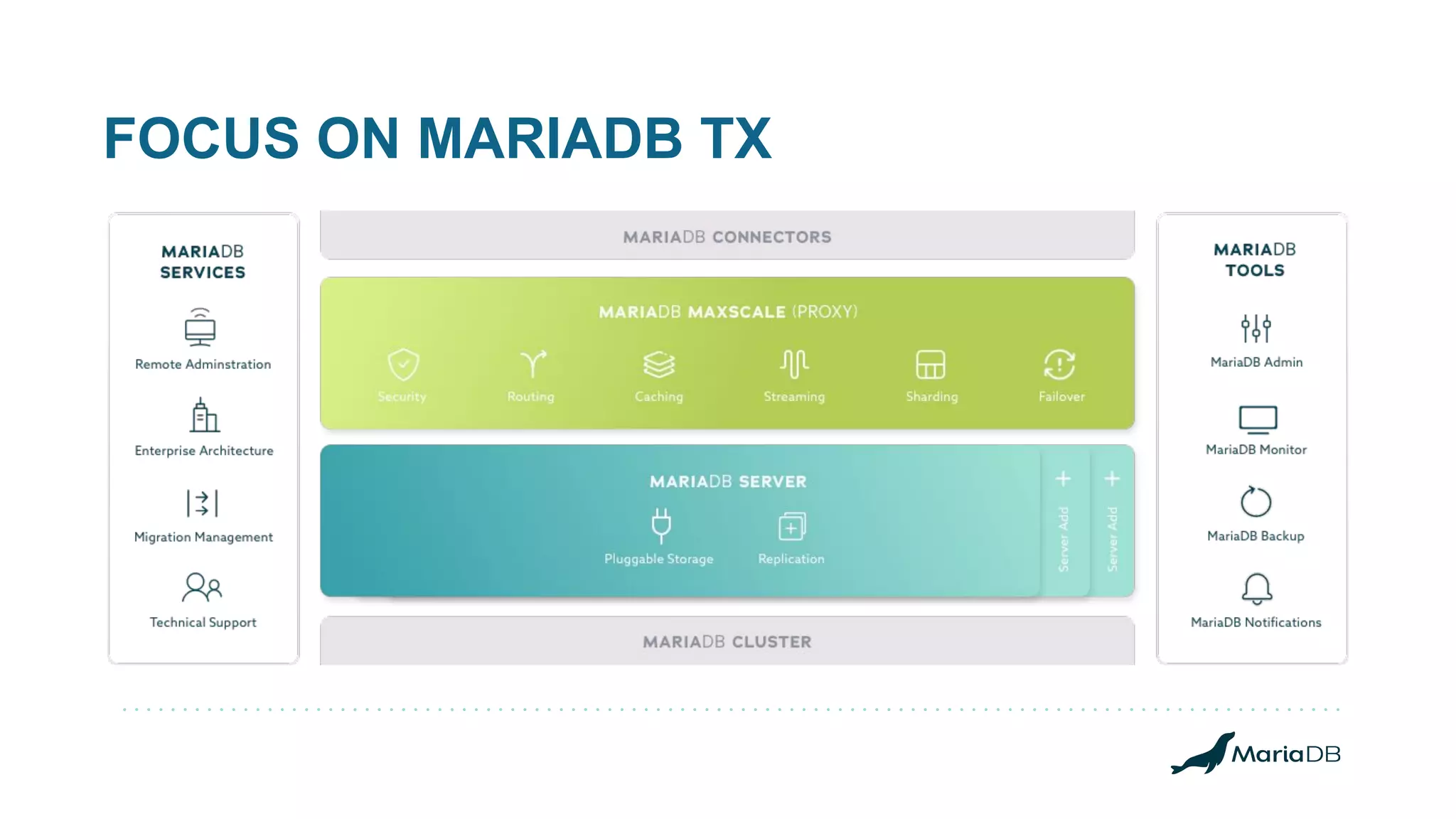
FOCUS ON MARIADB TX
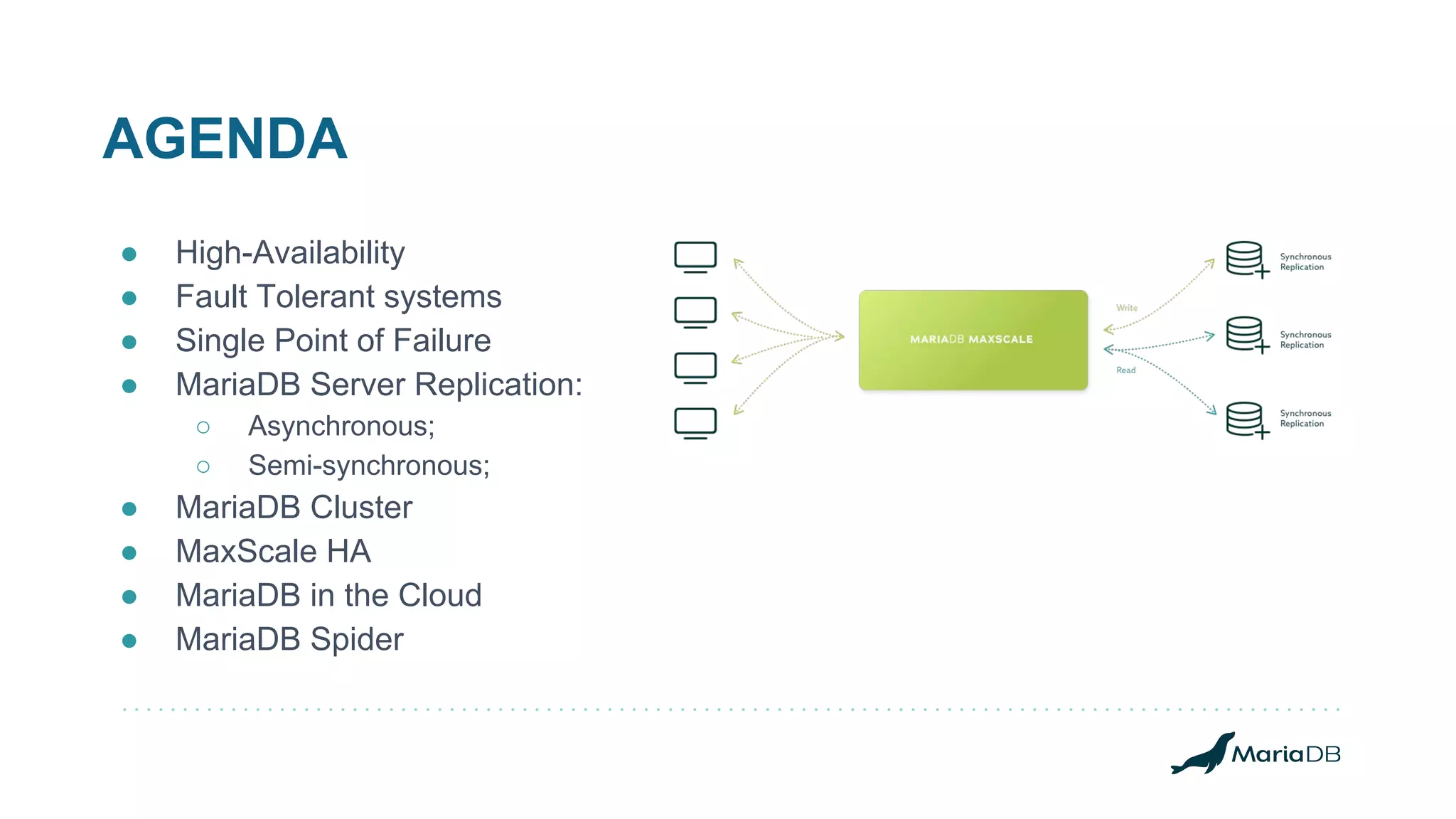
AGENDA
● High-Availability
● Fault Tolerant systems
● Single Point of Failure
● MariaDB Server Replication:
○ Asynchronous;
○ Semi-synchronous;
● MariaDB Cluster
● MaxScale HA
● MariaDB in the Cloud
● MariaDB Spider
High- Availability
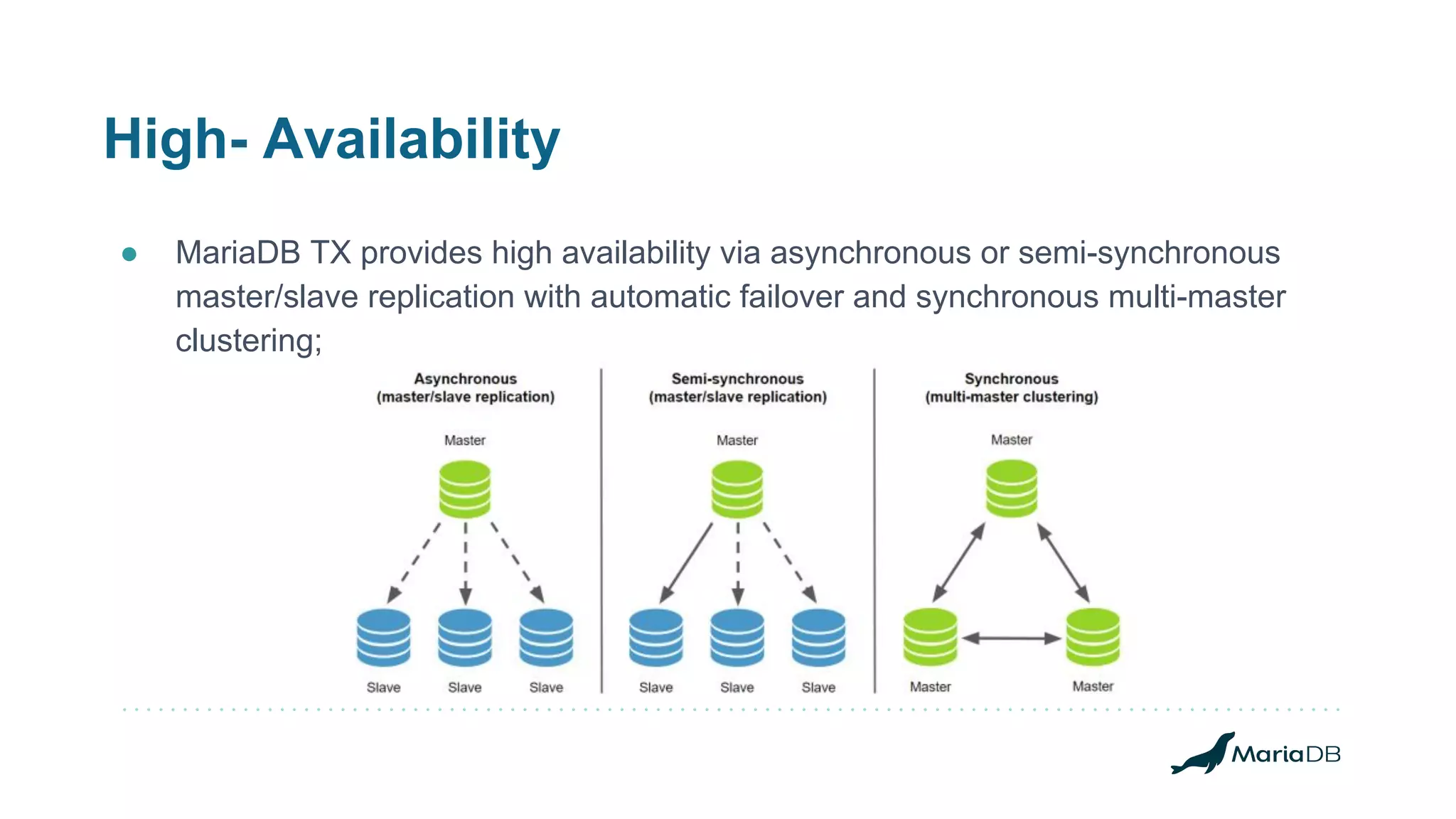
● MariaDB TX provides high availability via asynchronous or semi-synchronous
master/slave replication with automatic failover and synchronous multi-master
clustering;
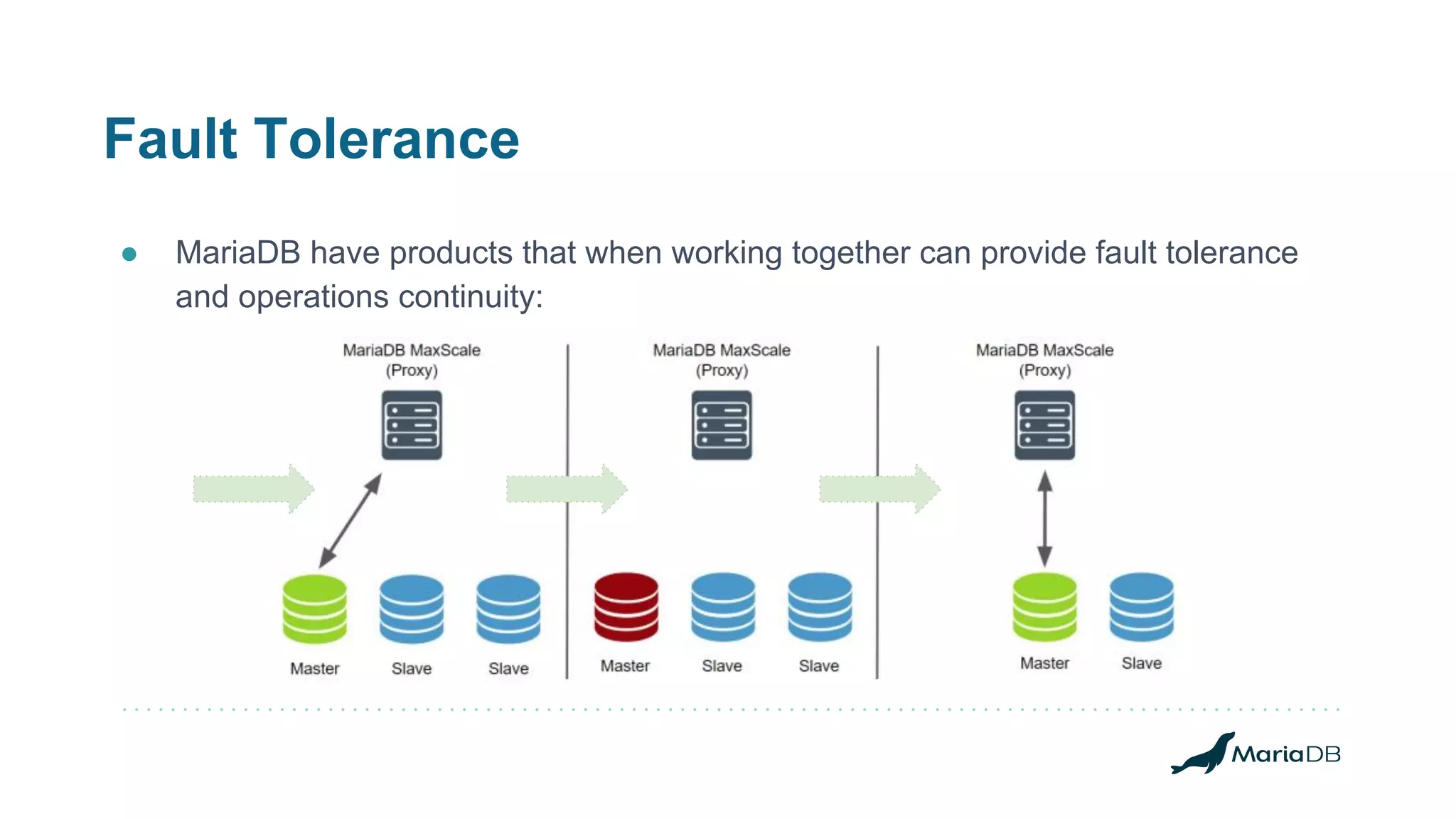
Fault Tolerance
● MariaDB have products that when working together can provide fault tolerance
and operations continuity:
Single Point Of Failure
● Replication clusters can failover on failures using MaxScale:
○ Switchover/Failover/Automatic Rejoin capabilities;
● The MariaDB Cluster fails can trigger new master election on MaxScale;
○ MaxScale protects environments against multi-master writes;
○ The same replication servers roles are used for MariaDB Cluster:
■ Master and Slaves, one master at a time.
● MaxScale can be setup in HA:
○ Standby redundancy, when one instance out of three is active at a given time;
○ Active redundancy, when all instances are receiving and routing traffic;
■ Maxscale active and passive configurations;
■ It should be planned since the setup.
MariaDB Server
Data Replication Options
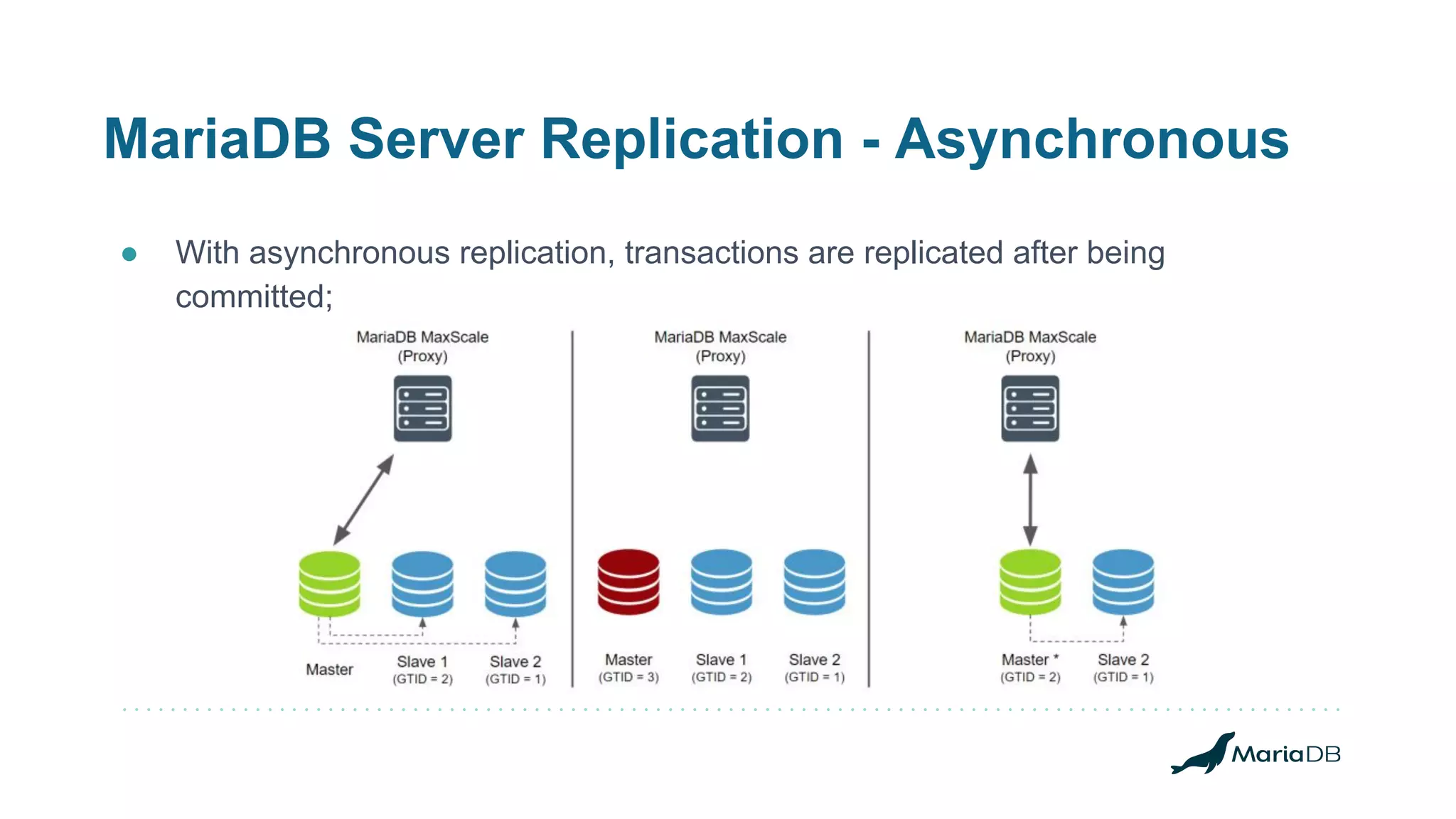
MariaDB Server Replication - Asynchronous
● With asynchronous replication, transactions are replicated after being
committed;
MariaDB Server Replication - Semi-synchronous
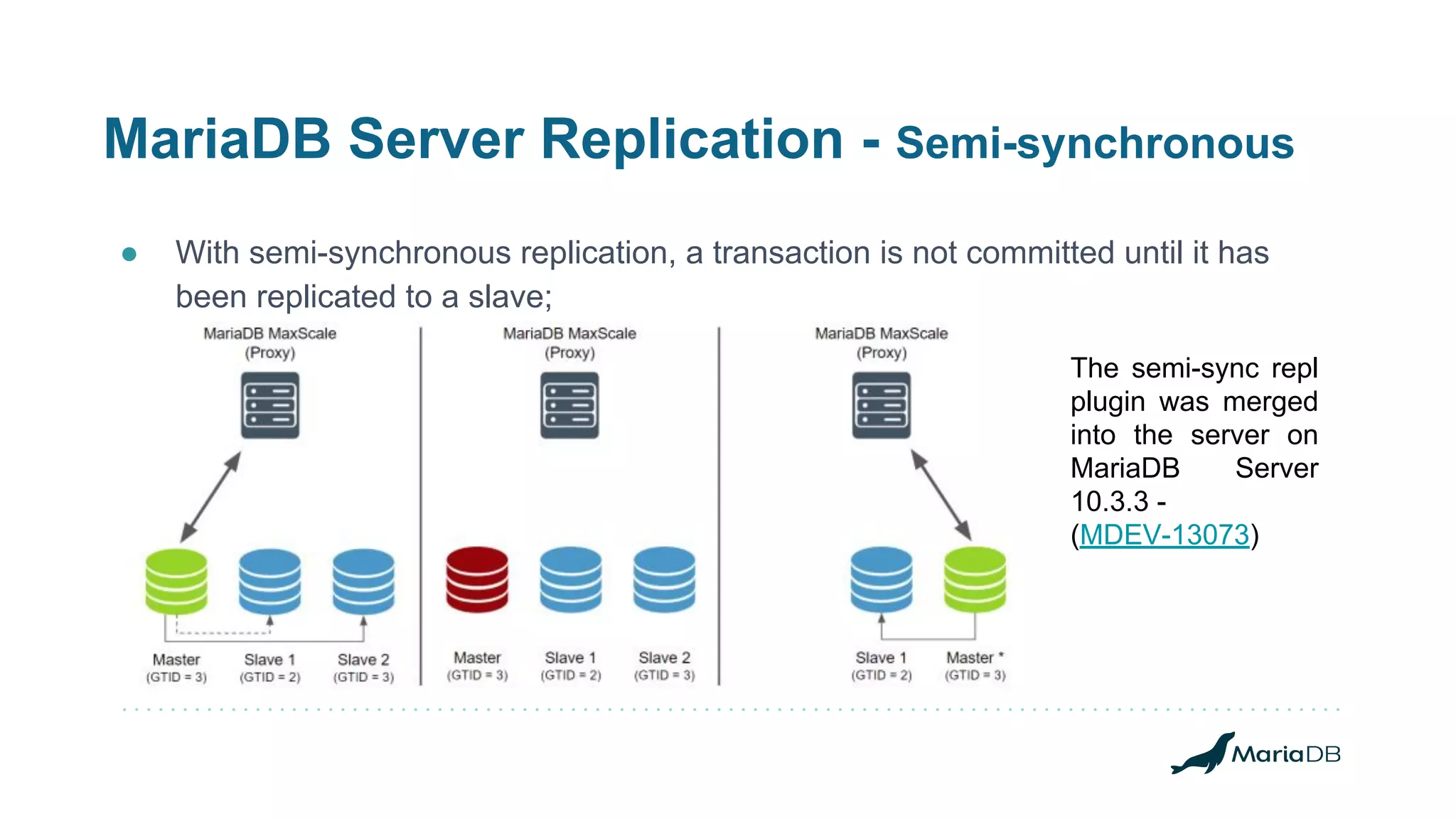
● With semi-synchronous replication, a transaction is not committed until it has
been replicated to a slave;
The semi-sync repl
plugin was merged
into the server on
MariaDB Server
10.3.3 -
(MDEV-13073)
MariaDB Cluster
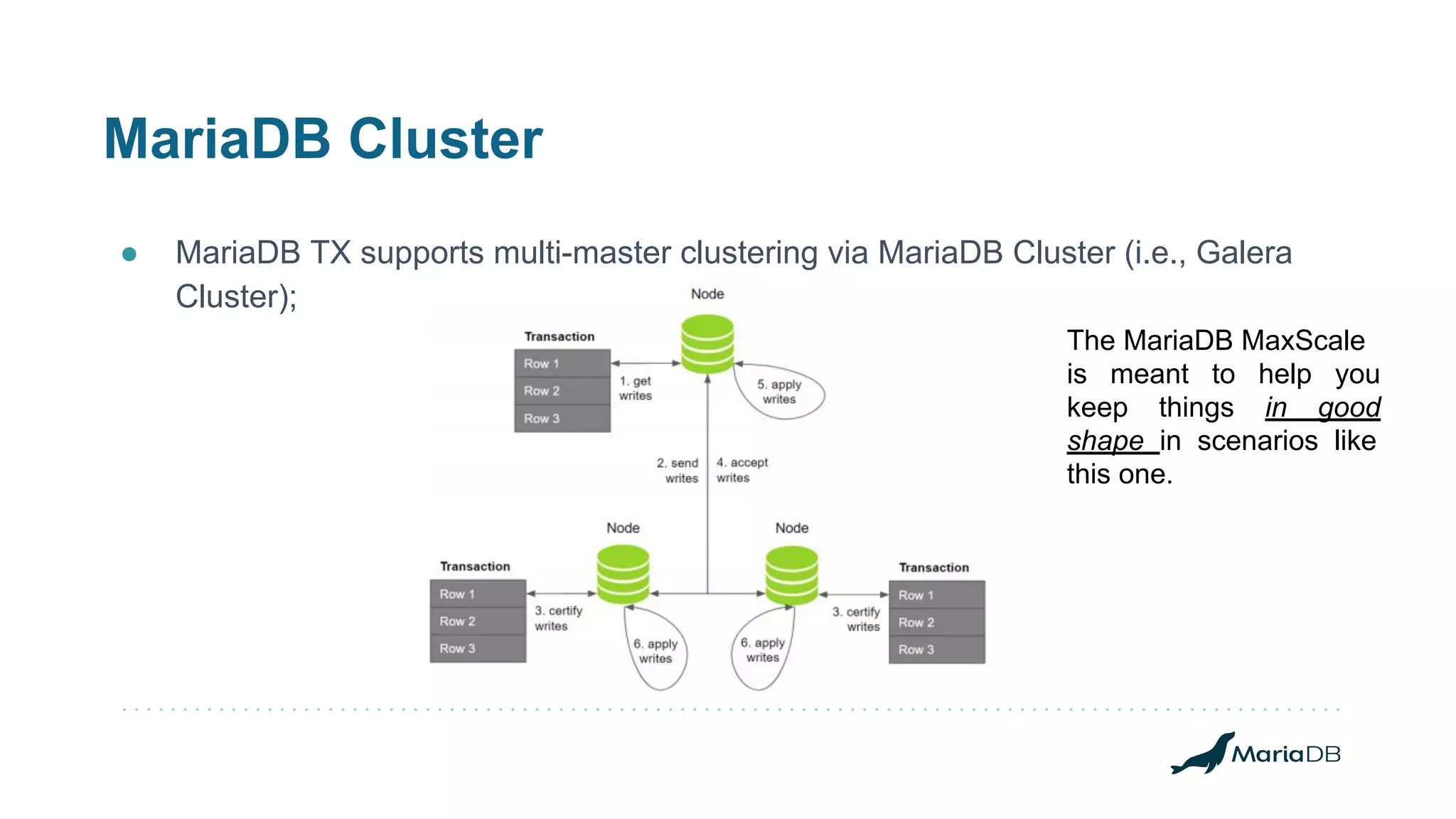
● MariaDB TX supports multi-master clustering via MariaDB Cluster (i.e., Galera
Cluster);
The MariaDB MaxScale
is meant to help you
keep things in good
shape in scenarios like
this one.
MariaDB MaxScale
High-Availability and Fault-Tolerance Configurations
MariaDB MaxScale - Replication Scale Reads
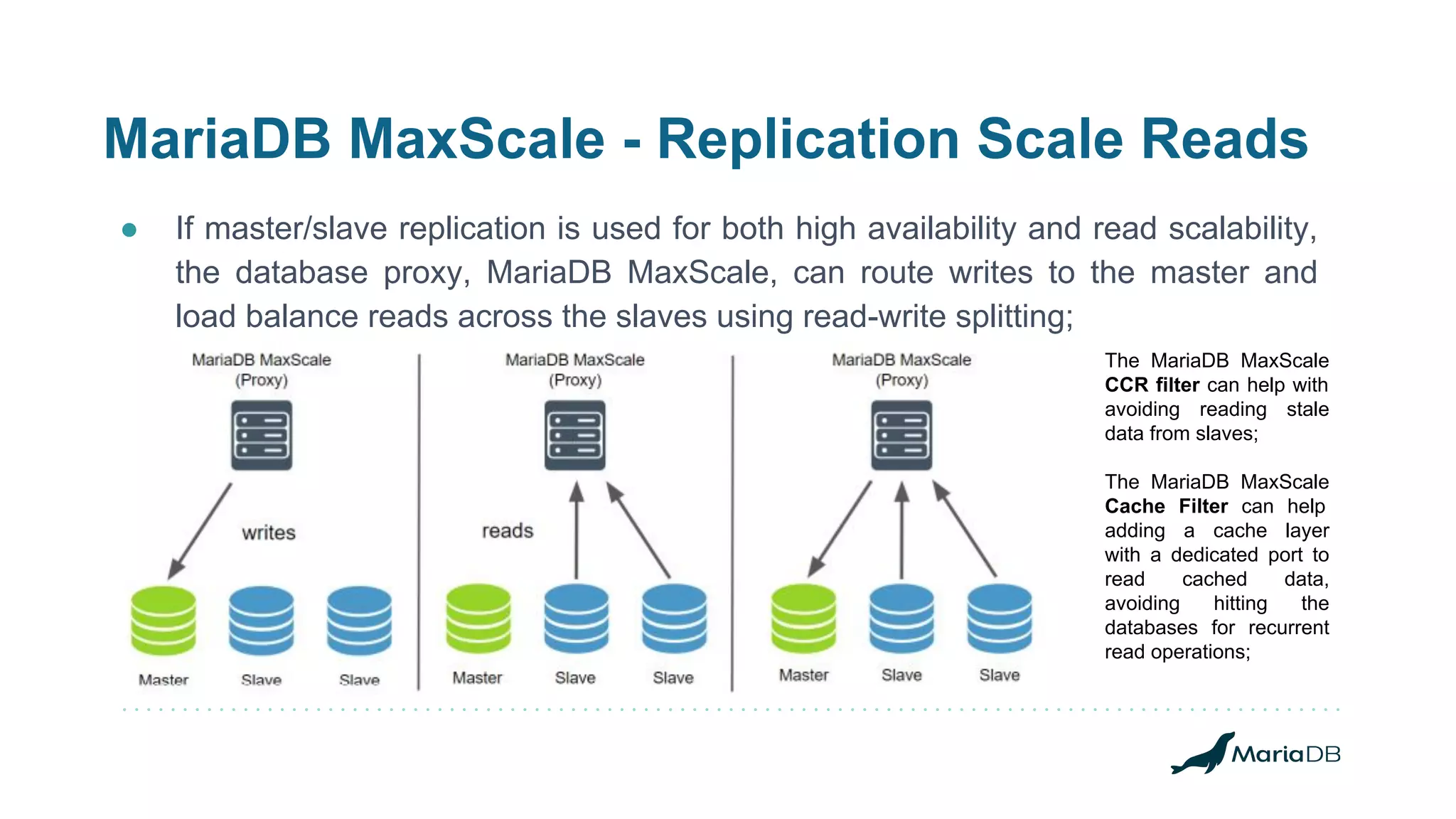
● If master/slave replication is used for both high availability and read scalability,
the database proxy, MariaDB MaxScale, can route writes to the master and
load balance reads across the slaves using read-write splitting;
The MariaDB MaxScale
CCR filter can help with
avoiding reading stale
data from slaves;
The MariaDB MaxScale
Cache Filter can help
adding a cache layer
with a dedicated port to
read cached data,
avoiding hitting the
databases for recurrent
read operations;
MariaDB MaxScale - Replication Failover
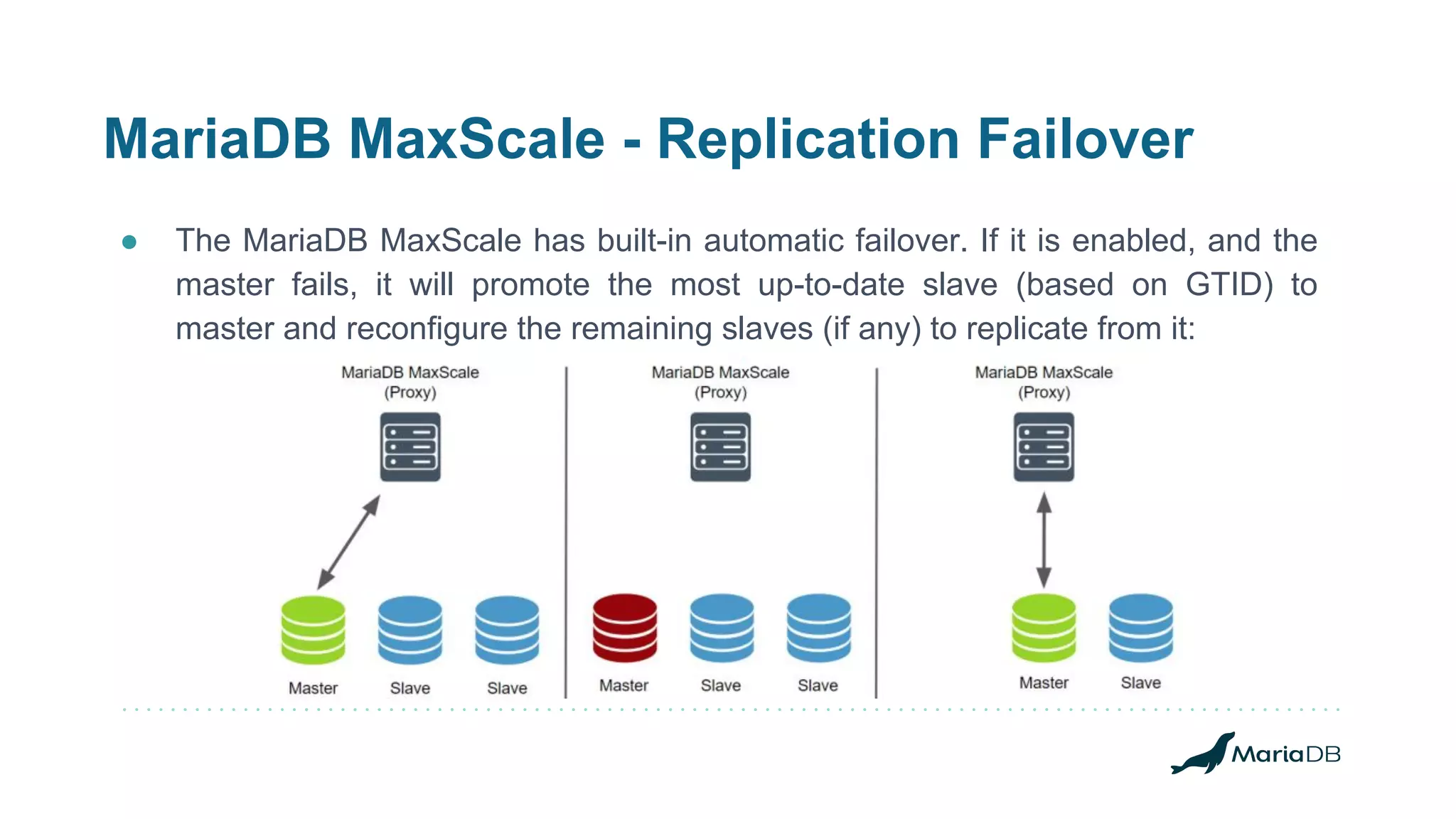
● The MariaDB MaxScale has built-in automatic failover. If it is enabled, and the
master fails, it will promote the most up-to-date slave (based on GTID) to
master and reconfigure the remaining slaves (if any) to replicate from it:
MariaDB MaxScale - Replication Switchover
● When having operational issues with the current master or even having the
need to move the current master away, promoting one of the existing slaves as
the new master, the switchover is welcome;
○ replication_user=mariadb #: replication user
○ replication_password=ACEEF153D52F8391E3218F9F2B259EAD #: replication password
○ switchover_timeout=90 #: time to complete
● There is a command to call out a monitor module so the switchover happens:
$ maxctrl call command mariadbmon switchover replication-monitor opmdb02
OK
#: what does the maxscale log says?
2019-01-06 20:29:14.596 notice : (redirect_slaves_ex): All redirects successful.
2019-01-06 20:29:14.607 notice : (manual_switchover): Switchover 'opmdb01' -> 'opmdb02' performed.
2019-01-06 20:29:14.765 notice : (mon_log_state_change): Server changed state: opmdb01[10.0.0.11:3306]: new_slave.
[Master, Running] -> [Slave, Running]
2019-01-06 20:29:14.765 notice : (mon_log_state_change): Server changed state: opmdb02[10.0.0.12:3306]:
new_master. [Slave, Running] -> [Master, Running]
MariaDB MaxScale - Replication Failover
● The MariaDBMon monitor is configured with:
○ failcount=5 #: number of passes/checks if a server failed
○ monitor_interval=1000 #: time in ms for each of the passes
○ auto_failover=true #: if the automatic failover is enabled
○ failover_timeout=10 #: time in secs the failover ops has to complete
● The formula for the failover to happen, though, is:
#: automatric_failover = monitor_interval * failcount
2018-01-12 20:19:39 error : Monitor was unable to connect to server [192.168.50.13]:3306
: "Can't connect to MySQL server on '192.168.50.13' (115)"
2018-01-12 20:19:44 warning: [mariadbmon] Master has failed. If master status does not
change in 5 monitor passes, failover begins.
MariaDB MaxScale - Replication Rejoin
● When auto_rejoin is enabled, the monitor will rejoin any standalone database
servers or any slaves replicating from a relay master to the main cluster:
2019-01-04 19:54:25.266 notice : (mon_log_state_change): Server changed state: opmdb01[10.0.0.11:3306]:
server_up. [Down] -> [Running]
2019-01-04 19:54:25.277 notice : (do_rejoin): Directing standalone server 'opmdb01' to replicate from
'opmdb02'.
2019-01-04 19:54:25.295 notice : (create_start_slave): Slave connection from opmdb01 to [10.0.0.12]:3306
created and started.
2019-01-04 19:54:25.295 notice : (handle_auto_rejoin): 1 server(s) redirected or rejoined the cluster.
2019-01-04 19:54:25.764 notice : (mon_log_state_change): Server changed state: opmdb01[10.0.0.11:3306]:
new_slave. [Running] -> [Slave, Running]
MariaDB MaxScale - Clustering
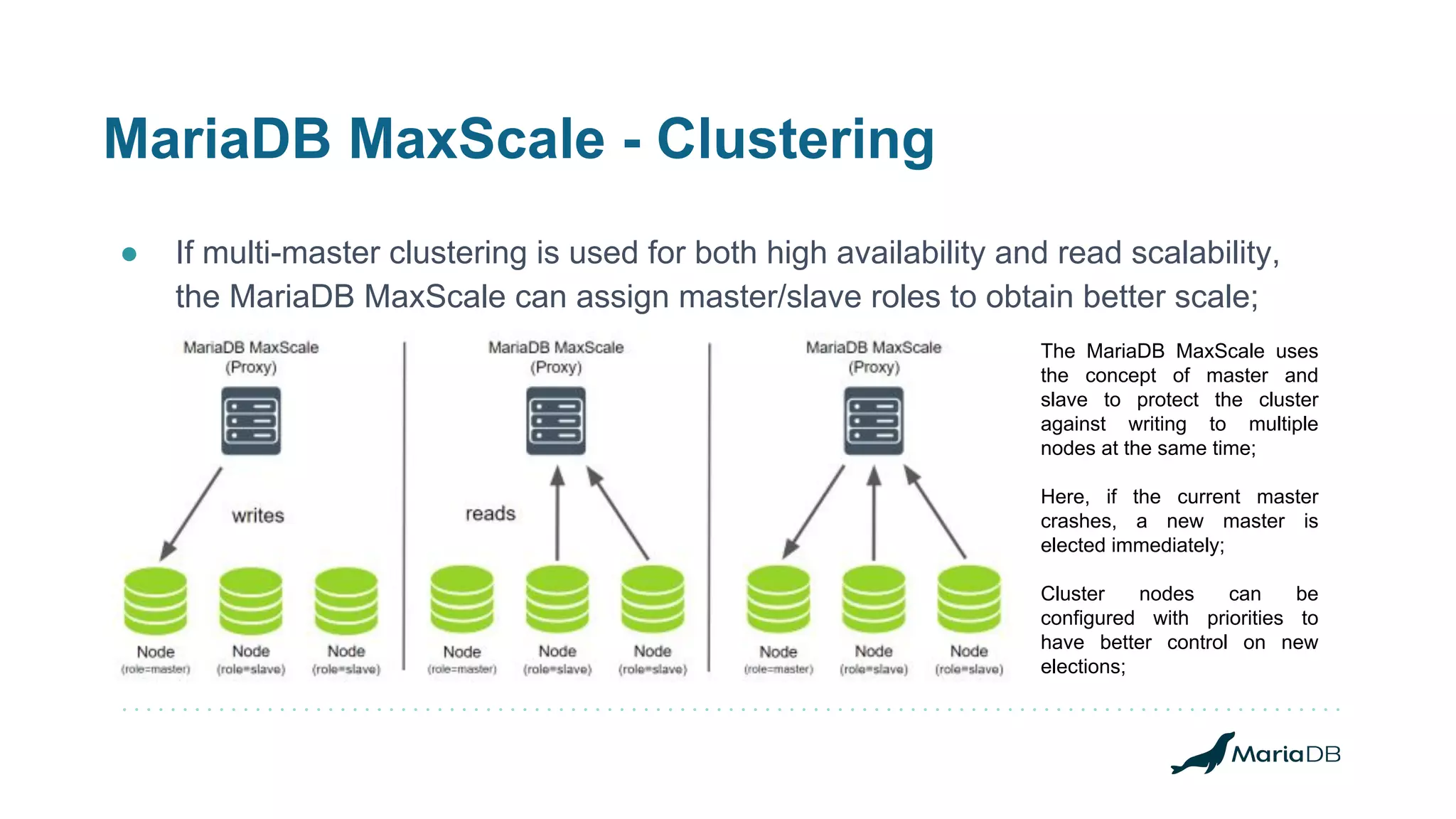
● If multi-master clustering is used for both high availability and read scalability,
the MariaDB MaxScale can assign master/slave roles to obtain better scale;
The MariaDB MaxScale uses
the concept of master and
slave to protect the cluster
against writing to multiple
nodes at the same time;
Here, if the current master
crashes, a new master is
elected immediately;
Cluster nodes can be
configured with priorities to
have better control on new
elections;
DEMO - MaxScale
● Let's see how it works:
○ Switchover;
○ Failover;
○ Automatic Rejoin.
Making the MariaDB
MaxScale Highly
Available
High-Availability and Fault-Tolerance Configurations
MaxScale Highly Available
● Two situations to make MaxScale Highly Available:
○ MaxScale on-premisses;
○ MaxScale in the Cloud;
● Additional software needed for integrating the final solution:
○ Keepalived, when on premisses and having a private VIP;
○ XLB + Corosync/Pacemaker when in the Cloud;
■ Active redundancy, you don't need extra packages, just an LB and MaxScale instances;
■ Standby redundancy, you need to handle who is online at a given time (healthy vs unhealthy);
● MariaDB RDBA proven cases in the Cloud:
MaxScale Highly Available - AWS
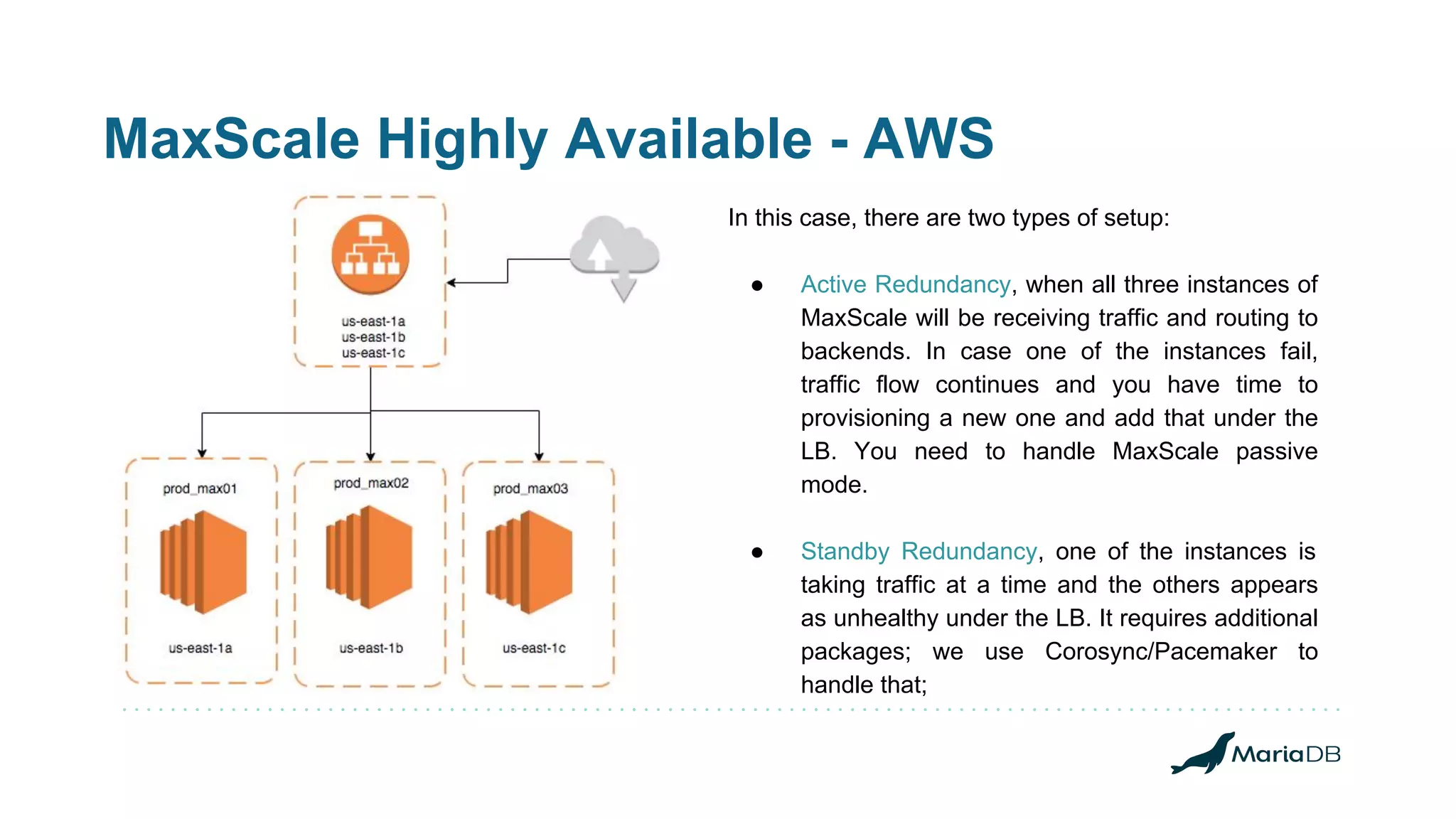
In this case, there are two types of setup:
● Active Redundancy, when all three instances of
MaxScale will be receiving traffic and routing to
backends. In case one of the instances fail,
traffic flow continues and you have time to
provisioning a new one and add that under the
LB. You need to handle MaxScale passive
mode.
● Standby Redundancy, one of the instances is
taking traffic at a time and the others appears
as unhealthy under the LB. It requires additional
packages; we use Corosync/Pacemaker to
handle that;
MaxScale Highly Available
● MaxScale, when running in passive mode (MariaDBMon):
○ It does not do a failover for replication clusters;
○ It does not execute an automatic rejoin for replication clusters;
○ It does not execute scripts as response to monitor events.
● For GaleraMon:
○ No special protection against events;
○ Don't force new elections using priorities;
○ If new elections is a concern, root_node_as_master can help, but, slow the
election time and cannot be fault-tolerant.
DEMO - MaxScale Highly Available
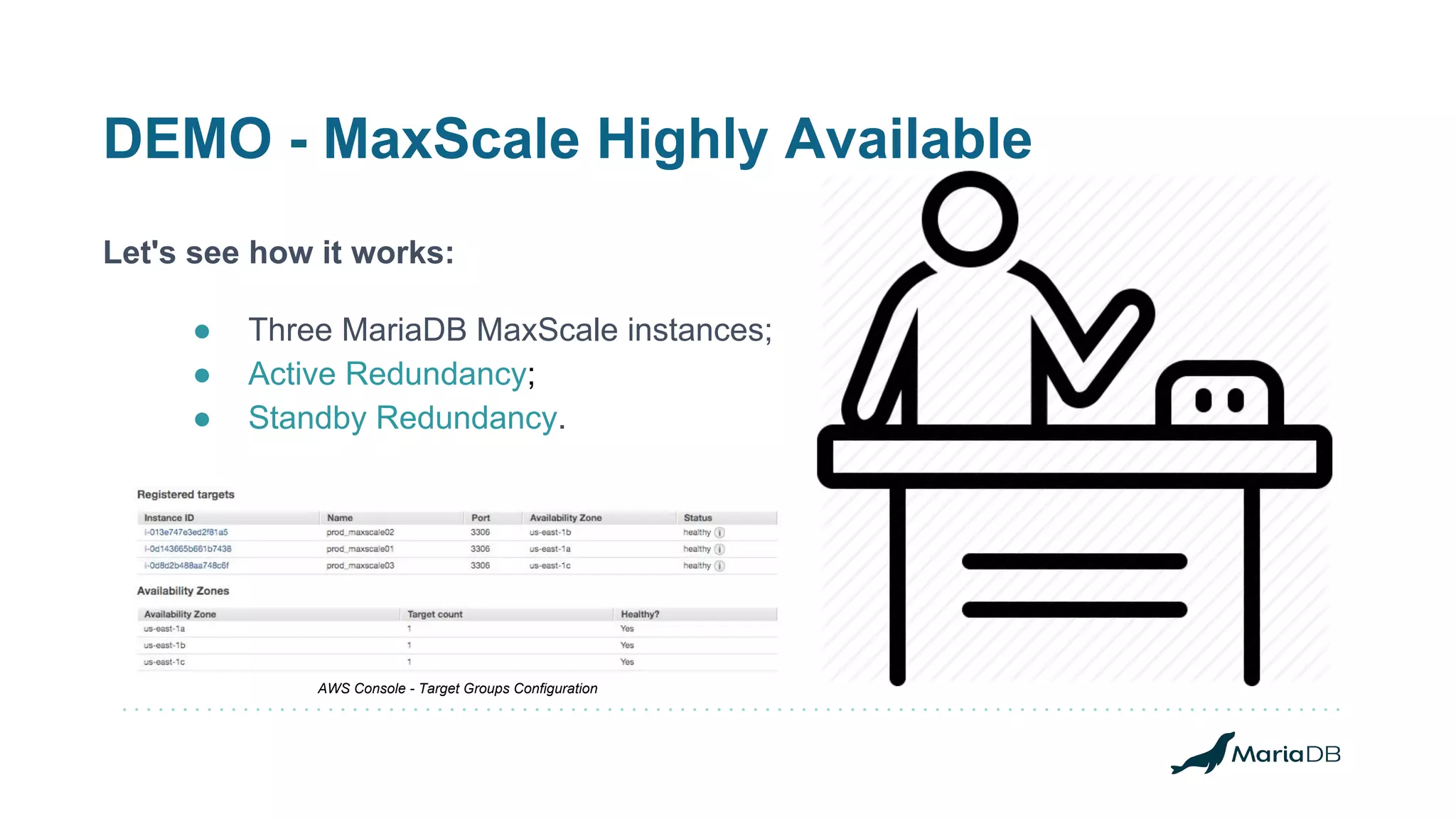
Let's see how it works:
● Three MariaDB MaxScale instances;
● Active Redundancy;
● Standby Redundancy.
AWS Console - Target Groups Configuration
MaxScale Standby Redundancy
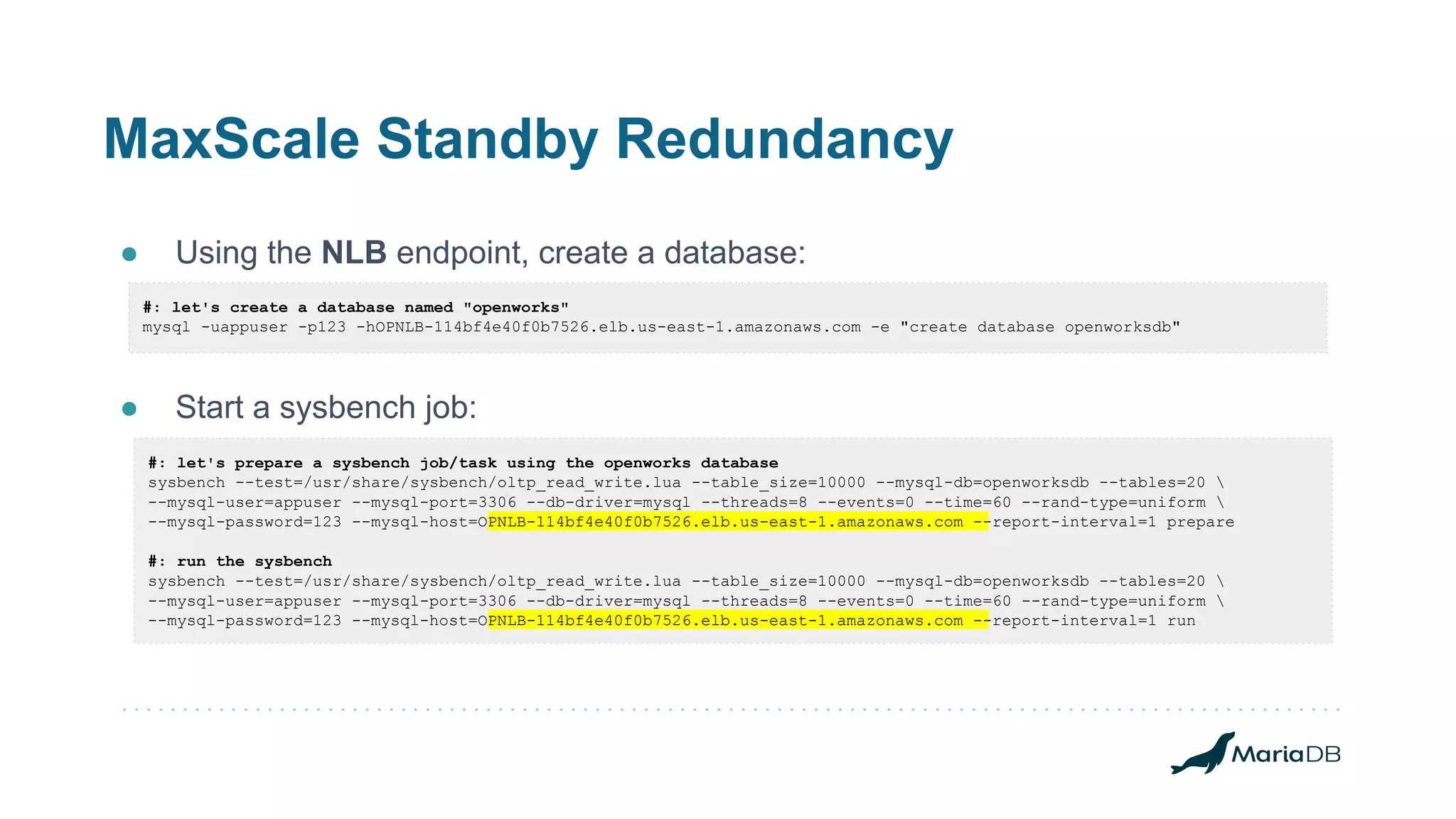
● Using the NLB endpoint, create a database:
● Start a sysbench job:
#: let's create a database named "openworks"
mysql -uappuser -p123 -hOPNLB-114bf4e40f0b7526.elb.us-east-1.amazonaws.com -e "create database openworksdb"
#: let's prepare a sysbench job/task using the openworks database
sysbench --test=/usr/share/sysbench/oltp_read_write.lua --table_size=10000 --mysql-db=openworksdb --tables=20 
--mysql-user=appuser --mysql-port=3306 --db-driver=mysql --threads=8 --events=0 --time=60 --rand-type=uniform 
--mysql-password=123 --mysql-host=OPNLB-114bf4e40f0b7526.elb.us-east-1.amazonaws.com --report-interval=1 prepare
#: run the sysbench
sysbench --test=/usr/share/sysbench/oltp_read_write.lua --table_size=10000 --mysql-db=openworksdb --tables=20 
--mysql-user=appuser --mysql-port=3306 --db-driver=mysql --threads=8 --events=0 --time=60 --rand-type=uniform 
--mysql-password=123 --mysql-host=OPNLB-114bf4e40f0b7526.elb.us-east-1.amazonaws.com --report-interval=1 run
MariaDB Spider
Sharding Databases
MariaDB Spider - Storage Engine Overview
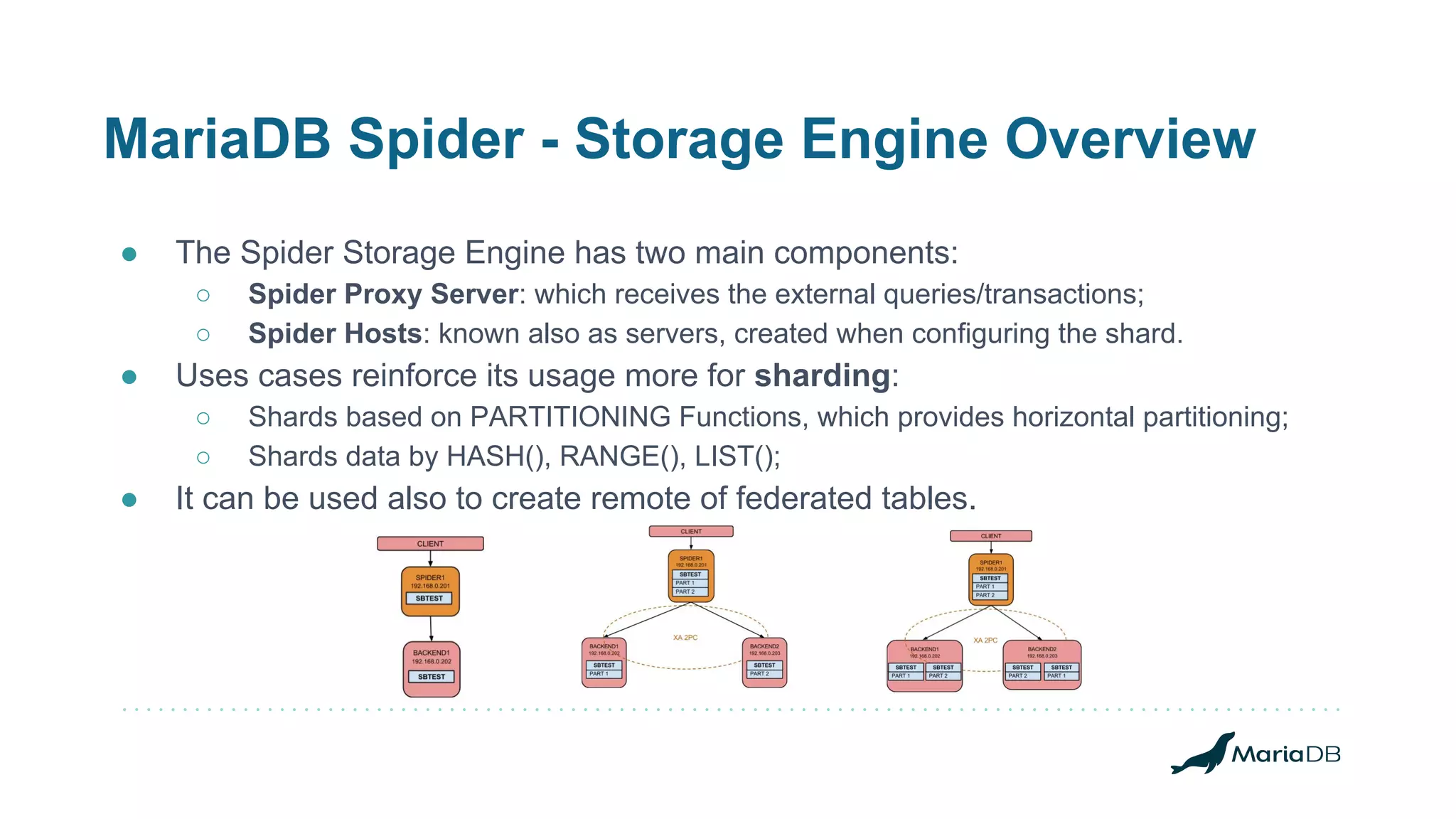
● The Spider Storage Engine has two main components:
○ Spider Proxy Server: which receives the external queries/transactions;
○ Spider Hosts: known also as servers, created when configuring the shard.
● Uses cases reinforce its usage more for sharding:
○ Shards based on PARTITIONING Functions, which provides horizontal partitioning;
○ Shards data by HASH(), RANGE(), LIST();
● It can be used also to create remote of federated tables.
MariaDB Spider - Storage Engine Demo
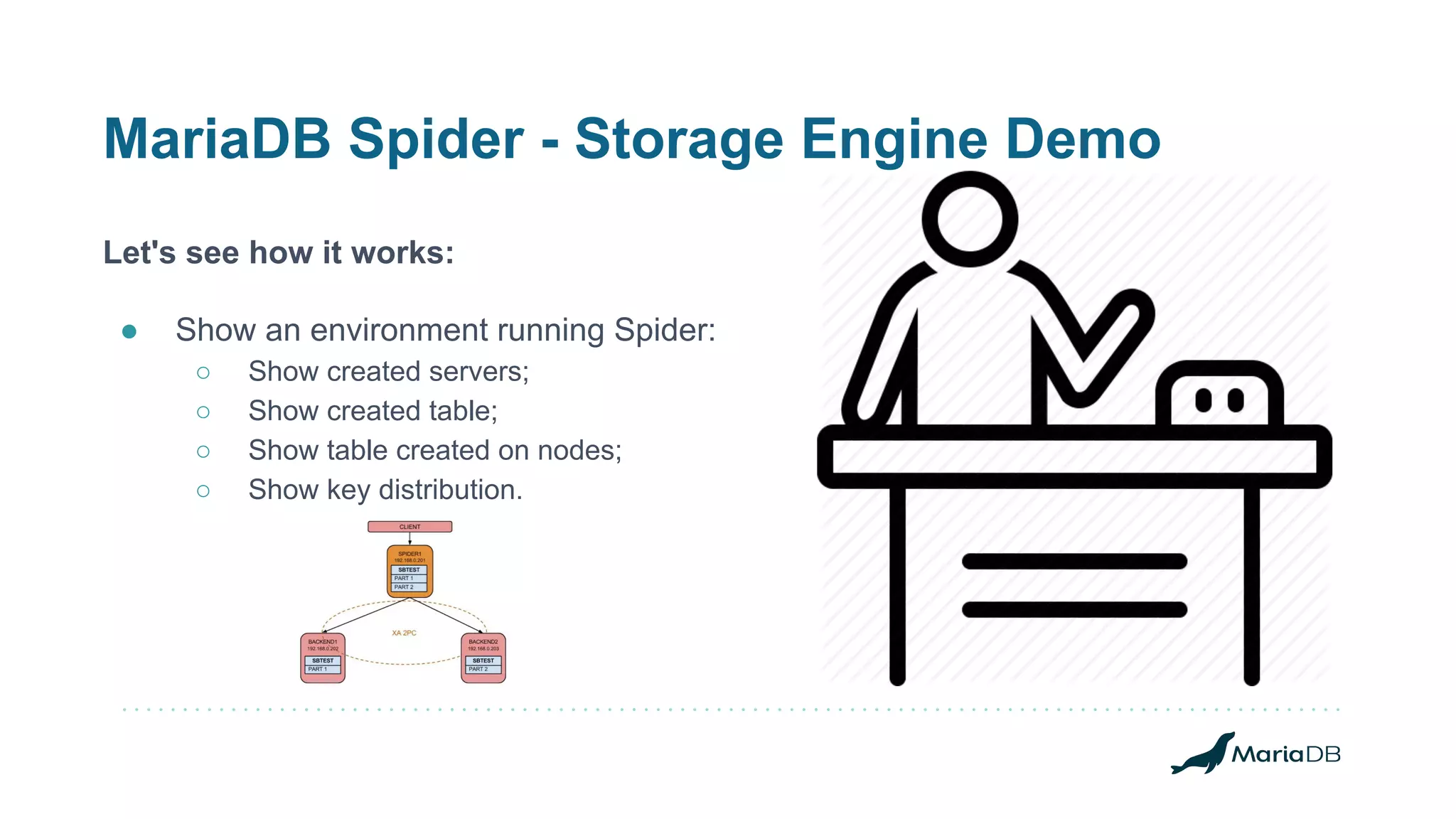
Let's see how it works:
● Show an environment running Spider:
○ Show created servers;
○ Show created table;
○ Show table created on nodes;
○ Show key distribution.
THANK YOU!

Using all of the high availability options in MariaDB

  • 1.
    Using all ofthe high availability options in MariaDB WAGNER BIANCHI MariaDB RDBA Team Lead MariaDB Corporation
  • 2.
    About MariaDB Corporation MariaDBfrees companies from the costs, constraints and complexity of proprietary databases, enabling them to reinvest in what matters most – rapidly developing innovative, customer-facing applications. MariaDB uses pluggable, purpose-built storage engines to support workloads that previously required a variety of specialized databases. With complexity and constraints eliminated, enterprises can now depend on a single complete database for all their needs, whether on commodity hardware or their cloud of choice. Deployed in minutes for transactional or analytical use cases, MariaDB delivers unmatched operational agility without sacrificing key enterprise features including real ACID compliance and full SQL. Trusted by organizations such as Deutsche Bank, DBS Bank, Nasdaq, Red Hat, The Home Depot, ServiceNow and Verizon – MariaDB meets the same core requirements as proprietary databases at a fraction of the cost. No wonder it’s the fastest growing open source database. Real business relies on MariaDB™.
  • 3.
    @BIANCHI Wagner Bianchi hasbeen working with the MySQL ecosystem for more than 12 years now. He is an Oracle ACE Director since 2014 and has worked on the most complex environments running Open Source solutions. Bianchi joint MariaDB RDBA Team in 2017 where he works as Remote DBA Team Lead @ MariaDB Remote DBA Team. He is specialized in multi-tier/HA/FT setups when multi-integrations are needed to keep systems highly available and fault-tolerant. MySQL Expert (DEV, DBA, NDB CLUSTER), AWS Certified Solutions Architect, and Splunk Architect, Bianchi has worked with the biggest environments running MariaDB products like MaxScale, MariaDB Server, AWS, Azure, providing architecture [re]design, products upgrades, and migrations. bianchi@mariadb.com @wagnerbianchijr wagnerbianchi.com mariadb.com/blog
  • 4.
    ABSTRACT MariaDB Corporation providesa number of high availability options, including the native MariaDB Server replication with automatic failover and multi-master clustering, the MariaDB Cluster which leverages the environment with a fault-tolerant solution, the MariaDB Spider that make it possible to shard and scale the environment, and the MariaDB MaxScale that can be mixed up with all other solutions to provide an excellent overall solution for any mission-critical application. In this session, we’ll provide a comprehensive overview the high availability features in MariaDB, highlight their impact on consistency and performance, discuss advanced failover strategies and introduce new features such as casual reads and transparent connection failover.
  • 5.
  • 6.
    AGENDA ● High-Availability ● FaultTolerant systems ● Single Point of Failure ● MariaDB Server Replication: ○ Asynchronous; ○ Semi-synchronous; ● MariaDB Cluster ● MaxScale HA ● MariaDB in the Cloud ● MariaDB Spider
  • 7.
    High- Availability ● MariaDBTX provides high availability via asynchronous or semi-synchronous master/slave replication with automatic failover and synchronous multi-master clustering;
  • 8.
    Fault Tolerance ● MariaDBhave products that when working together can provide fault tolerance and operations continuity:
  • 9.
    Single Point OfFailure ● Replication clusters can failover on failures using MaxScale: ○ Switchover/Failover/Automatic Rejoin capabilities; ● The MariaDB Cluster fails can trigger new master election on MaxScale; ○ MaxScale protects environments against multi-master writes; ○ The same replication servers roles are used for MariaDB Cluster: ■ Master and Slaves, one master at a time. ● MaxScale can be setup in HA: ○ Standby redundancy, when one instance out of three is active at a given time; ○ Active redundancy, when all instances are receiving and routing traffic; ■ Maxscale active and passive configurations; ■ It should be planned since the setup.
  • 10.
  • 11.
    MariaDB Server Replication- Asynchronous ● With asynchronous replication, transactions are replicated after being committed;
  • 12.
    MariaDB Server Replication- Semi-synchronous ● With semi-synchronous replication, a transaction is not committed until it has been replicated to a slave; The semi-sync repl plugin was merged into the server on MariaDB Server 10.3.3 - (MDEV-13073)
  • 13.
    MariaDB Cluster ● MariaDBTX supports multi-master clustering via MariaDB Cluster (i.e., Galera Cluster); The MariaDB MaxScale is meant to help you keep things in good shape in scenarios like this one.
  • 14.
    MariaDB MaxScale High-Availability andFault-Tolerance Configurations
  • 15.
    MariaDB MaxScale -Replication Scale Reads ● If master/slave replication is used for both high availability and read scalability, the database proxy, MariaDB MaxScale, can route writes to the master and load balance reads across the slaves using read-write splitting; The MariaDB MaxScale CCR filter can help with avoiding reading stale data from slaves; The MariaDB MaxScale Cache Filter can help adding a cache layer with a dedicated port to read cached data, avoiding hitting the databases for recurrent read operations;
  • 16.
    MariaDB MaxScale -Replication Failover ● The MariaDB MaxScale has built-in automatic failover. If it is enabled, and the master fails, it will promote the most up-to-date slave (based on GTID) to master and reconfigure the remaining slaves (if any) to replicate from it:
  • 17.
    MariaDB MaxScale -Replication Switchover ● When having operational issues with the current master or even having the need to move the current master away, promoting one of the existing slaves as the new master, the switchover is welcome; ○ replication_user=mariadb #: replication user ○ replication_password=ACEEF153D52F8391E3218F9F2B259EAD #: replication password ○ switchover_timeout=90 #: time to complete ● There is a command to call out a monitor module so the switchover happens: $ maxctrl call command mariadbmon switchover replication-monitor opmdb02 OK #: what does the maxscale log says? 2019-01-06 20:29:14.596 notice : (redirect_slaves_ex): All redirects successful. 2019-01-06 20:29:14.607 notice : (manual_switchover): Switchover 'opmdb01' -> 'opmdb02' performed. 2019-01-06 20:29:14.765 notice : (mon_log_state_change): Server changed state: opmdb01[10.0.0.11:3306]: new_slave. [Master, Running] -> [Slave, Running] 2019-01-06 20:29:14.765 notice : (mon_log_state_change): Server changed state: opmdb02[10.0.0.12:3306]: new_master. [Slave, Running] -> [Master, Running]
  • 18.
    MariaDB MaxScale -Replication Failover ● The MariaDBMon monitor is configured with: ○ failcount=5 #: number of passes/checks if a server failed ○ monitor_interval=1000 #: time in ms for each of the passes ○ auto_failover=true #: if the automatic failover is enabled ○ failover_timeout=10 #: time in secs the failover ops has to complete ● The formula for the failover to happen, though, is: #: automatric_failover = monitor_interval * failcount 2018-01-12 20:19:39 error : Monitor was unable to connect to server [192.168.50.13]:3306 : "Can't connect to MySQL server on '192.168.50.13' (115)" 2018-01-12 20:19:44 warning: [mariadbmon] Master has failed. If master status does not change in 5 monitor passes, failover begins.
  • 19.
    MariaDB MaxScale -Replication Rejoin ● When auto_rejoin is enabled, the monitor will rejoin any standalone database servers or any slaves replicating from a relay master to the main cluster: 2019-01-04 19:54:25.266 notice : (mon_log_state_change): Server changed state: opmdb01[10.0.0.11:3306]: server_up. [Down] -> [Running] 2019-01-04 19:54:25.277 notice : (do_rejoin): Directing standalone server 'opmdb01' to replicate from 'opmdb02'. 2019-01-04 19:54:25.295 notice : (create_start_slave): Slave connection from opmdb01 to [10.0.0.12]:3306 created and started. 2019-01-04 19:54:25.295 notice : (handle_auto_rejoin): 1 server(s) redirected or rejoined the cluster. 2019-01-04 19:54:25.764 notice : (mon_log_state_change): Server changed state: opmdb01[10.0.0.11:3306]: new_slave. [Running] -> [Slave, Running]
  • 20.
    MariaDB MaxScale -Clustering ● If multi-master clustering is used for both high availability and read scalability, the MariaDB MaxScale can assign master/slave roles to obtain better scale; The MariaDB MaxScale uses the concept of master and slave to protect the cluster against writing to multiple nodes at the same time; Here, if the current master crashes, a new master is elected immediately; Cluster nodes can be configured with priorities to have better control on new elections;
  • 21.
    DEMO - MaxScale ●Let's see how it works: ○ Switchover; ○ Failover; ○ Automatic Rejoin.
  • 22.
    Making the MariaDB MaxScaleHighly Available High-Availability and Fault-Tolerance Configurations
  • 23.
    MaxScale Highly Available ●Two situations to make MaxScale Highly Available: ○ MaxScale on-premisses; ○ MaxScale in the Cloud; ● Additional software needed for integrating the final solution: ○ Keepalived, when on premisses and having a private VIP; ○ XLB + Corosync/Pacemaker when in the Cloud; ■ Active redundancy, you don't need extra packages, just an LB and MaxScale instances; ■ Standby redundancy, you need to handle who is online at a given time (healthy vs unhealthy); ● MariaDB RDBA proven cases in the Cloud:
  • 24.
    MaxScale Highly Available- AWS In this case, there are two types of setup: ● Active Redundancy, when all three instances of MaxScale will be receiving traffic and routing to backends. In case one of the instances fail, traffic flow continues and you have time to provisioning a new one and add that under the LB. You need to handle MaxScale passive mode. ● Standby Redundancy, one of the instances is taking traffic at a time and the others appears as unhealthy under the LB. It requires additional packages; we use Corosync/Pacemaker to handle that;
  • 25.
    MaxScale Highly Available ●MaxScale, when running in passive mode (MariaDBMon): ○ It does not do a failover for replication clusters; ○ It does not execute an automatic rejoin for replication clusters; ○ It does not execute scripts as response to monitor events. ● For GaleraMon: ○ No special protection against events; ○ Don't force new elections using priorities; ○ If new elections is a concern, root_node_as_master can help, but, slow the election time and cannot be fault-tolerant.
  • 26.
    DEMO - MaxScaleHighly Available Let's see how it works: ● Three MariaDB MaxScale instances; ● Active Redundancy; ● Standby Redundancy. AWS Console - Target Groups Configuration
  • 27.
    MaxScale Standby Redundancy ●Using the NLB endpoint, create a database: ● Start a sysbench job: #: let's create a database named "openworks" mysql -uappuser -p123 -hOPNLB-114bf4e40f0b7526.elb.us-east-1.amazonaws.com -e "create database openworksdb" #: let's prepare a sysbench job/task using the openworks database sysbench --test=/usr/share/sysbench/oltp_read_write.lua --table_size=10000 --mysql-db=openworksdb --tables=20 --mysql-user=appuser --mysql-port=3306 --db-driver=mysql --threads=8 --events=0 --time=60 --rand-type=uniform --mysql-password=123 --mysql-host=OPNLB-114bf4e40f0b7526.elb.us-east-1.amazonaws.com --report-interval=1 prepare #: run the sysbench sysbench --test=/usr/share/sysbench/oltp_read_write.lua --table_size=10000 --mysql-db=openworksdb --tables=20 --mysql-user=appuser --mysql-port=3306 --db-driver=mysql --threads=8 --events=0 --time=60 --rand-type=uniform --mysql-password=123 --mysql-host=OPNLB-114bf4e40f0b7526.elb.us-east-1.amazonaws.com --report-interval=1 run
  • 28.
  • 29.
    MariaDB Spider -Storage Engine Overview ● The Spider Storage Engine has two main components: ○ Spider Proxy Server: which receives the external queries/transactions; ○ Spider Hosts: known also as servers, created when configuring the shard. ● Uses cases reinforce its usage more for sharding: ○ Shards based on PARTITIONING Functions, which provides horizontal partitioning; ○ Shards data by HASH(), RANGE(), LIST(); ● It can be used also to create remote of federated tables.
  • 30.
    MariaDB Spider -Storage Engine Demo Let's see how it works: ● Show an environment running Spider: ○ Show created servers; ○ Show created table; ○ Show table created on nodes; ○ Show key distribution.
  • 31.