User Interface Layer
What is User Interface?
 The user interface is the point at which human users interact with a computer, website or
application. The goal of effective UI is to make the user’s experience easy and intuitive, requiring
minimum effort on the user’s part to receive the maximum desired outcome.
 UI is created in layers of interaction that appeal to the human senses (sight, touch, auditory and
more). They include both input devices like a keyboard, mouse, trackpad, microphone, touch screen,
fingerprint scanner, e-pen and camera, and output devices like monitors, speakers and printers.
Devices that interact with multiple senses are called “multimedia user interfaces.” For example,
everyday UI uses a combination of tactile input (keyboard and mouse) and a visual and auditory
output (monitor and speakers).
Types of User Interface
Other types of user interfaces can include:
 Form-based user interface: Used to enter data into a program or application by offering a limited
selection of choices. For example, a settings menu on a device is form-based.
 Graphical user interface: A tactile UI input with a visual UI output (keyboard and monitor).
 Menu-driven user interface: A UI that uses a list of choices to navigate within a program or website. For
example, ATMs use menu-driven Uis and are easy for anyone to use.
 Touch user interface: User interface through haptics or touch. Most smartphones, tablets and any
device that operates using a touch screen use haptic input.
 Voice user interface: Interactions between humans and machines using auditory commands. Examples
include virtual assistant devices, talk-to-text and GPS.
Form-based User Interface
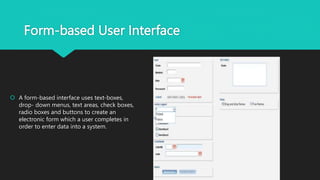
 A form-based interface uses text-boxes,
drop- down menus, text areas, check boxes,
radio boxes and buttons to create an
electronic form which a user completes in
order to enter data into a system.
Graphical User Interface
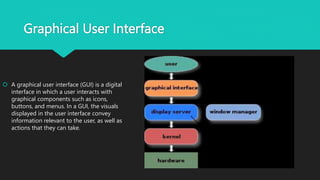
 A graphical user interface (GUI) is a digital
interface in which a user interacts with
graphical components such as icons,
buttons, and menus. In a GUI, the visuals
displayed in the user interface convey
information relevant to the user, as well as
actions that they can take.
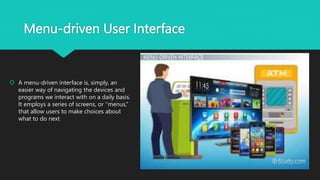
Menu-driven User Interface
 A menu-driven interface is, simply, an
easier way of navigating the devices and
programs we interact with on a daily basis.
It employs a series of screens, or ‘’menus,’’
that allow users to make choices about
what to do next
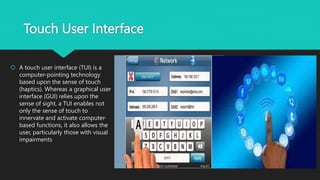
Touch User Interface
 A touch user interface (TUI) is a
computer-pointing technology
based upon the sense of touch
(haptics). Whereas a graphical user
interface (GUI) relies upon the
sense of sight, a TUI enables not
only the sense of touch to
innervate and activate computer-
based functions, it also allows the
user, particularly those with visual
impairments
Voice User Interface
 A voice-user interface makes spoken
human interaction with computers
possible, using speech recognition to
understand spoken commands and
answer questions, and typically text to
speech to play a reply. A voice command
device is a device controlled with a voice
user interface
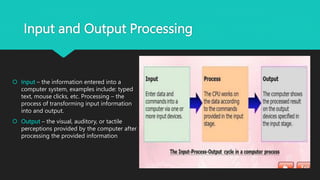
Input and Output Processing
 Input – the information entered into a
computer system, examples include: typed
text, mouse clicks, etc. Processing – the
process of transforming input information
into and output.
 Output – the visual, auditory, or tactile
perceptions provided by the computer after
processing the provided information
User Interface Layer.pptx

User Interface Layer.pptx

  • 1.
  • 2.
    What is UserInterface?  The user interface is the point at which human users interact with a computer, website or application. The goal of effective UI is to make the user’s experience easy and intuitive, requiring minimum effort on the user’s part to receive the maximum desired outcome.  UI is created in layers of interaction that appeal to the human senses (sight, touch, auditory and more). They include both input devices like a keyboard, mouse, trackpad, microphone, touch screen, fingerprint scanner, e-pen and camera, and output devices like monitors, speakers and printers. Devices that interact with multiple senses are called “multimedia user interfaces.” For example, everyday UI uses a combination of tactile input (keyboard and mouse) and a visual and auditory output (monitor and speakers).
  • 3.
    Types of UserInterface Other types of user interfaces can include:  Form-based user interface: Used to enter data into a program or application by offering a limited selection of choices. For example, a settings menu on a device is form-based.  Graphical user interface: A tactile UI input with a visual UI output (keyboard and monitor).  Menu-driven user interface: A UI that uses a list of choices to navigate within a program or website. For example, ATMs use menu-driven Uis and are easy for anyone to use.  Touch user interface: User interface through haptics or touch. Most smartphones, tablets and any device that operates using a touch screen use haptic input.  Voice user interface: Interactions between humans and machines using auditory commands. Examples include virtual assistant devices, talk-to-text and GPS.
  • 4.
    Form-based User Interface A form-based interface uses text-boxes, drop- down menus, text areas, check boxes, radio boxes and buttons to create an electronic form which a user completes in order to enter data into a system.
  • 5.
    Graphical User Interface A graphical user interface (GUI) is a digital interface in which a user interacts with graphical components such as icons, buttons, and menus. In a GUI, the visuals displayed in the user interface convey information relevant to the user, as well as actions that they can take.
  • 6.
    Menu-driven User Interface A menu-driven interface is, simply, an easier way of navigating the devices and programs we interact with on a daily basis. It employs a series of screens, or ‘’menus,’’ that allow users to make choices about what to do next
  • 7.
    Touch User Interface A touch user interface (TUI) is a computer-pointing technology based upon the sense of touch (haptics). Whereas a graphical user interface (GUI) relies upon the sense of sight, a TUI enables not only the sense of touch to innervate and activate computer- based functions, it also allows the user, particularly those with visual impairments
  • 8.
    Voice User Interface A voice-user interface makes spoken human interaction with computers possible, using speech recognition to understand spoken commands and answer questions, and typically text to speech to play a reply. A voice command device is a device controlled with a voice user interface
  • 9.
    Input and OutputProcessing  Input – the information entered into a computer system, examples include: typed text, mouse clicks, etc. Processing – the process of transforming input information into and output.  Output – the visual, auditory, or tactile perceptions provided by the computer after processing the provided information