Scope of Variablesin Python
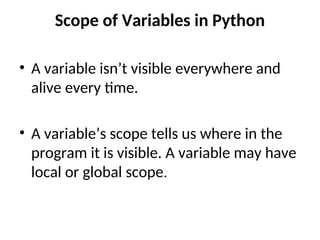
• A variable isn’t visible everywhere and
alive every time.
• A variable’s scope tells us where in the
program it is visible. A variable may have
local or global scope.
3.
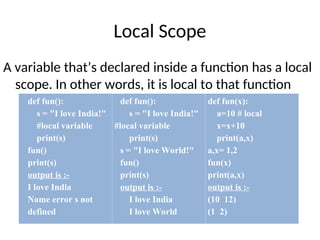
Local Scope
A variablethat’s declared inside a function has a local
scope. In other words, it is local to that function
def fun():
s = "I love India!"
#local variable
print(s)
fun()
print(s)
output is :-
I love India
Name error s not
defined
def fun():
s = "I love India!"
#local variable
print(s)
s = "I love World!"
fun()
print(s)
output is :-
I love India
I love World
def fun(x):
a=10 # local
x=x+10
print(a,x)
a,x= 1,2
fun(x)
print(a,x)
output is :-
(10 12)
(1 2)
4.
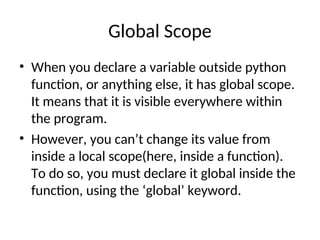
Global Scope
• Whenyou declare a variable outside python
function, or anything else, it has global scope.
It means that it is visible everywhere within
the program.
• However, you can’t change its value from
inside a local scope(here, inside a function).
To do so, you must declare it global inside the
function, using the ‘global’ keyword.
5.
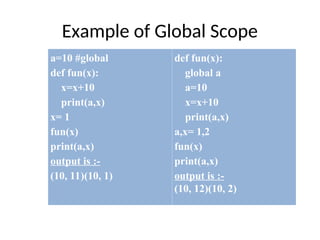
Example of GlobalScope
a=10 #global
def fun(x):
x=x+10
print(a,x)
x= 1
fun(x)
print(a,x)
output is :-
(10, 11)(10, 1)
def fun(x):
global a
a=10
x=x+10
print(a,x)
a,x= 1,2
fun(x)
print(a,x)
output is :-
(10, 12)(10, 2)
6.
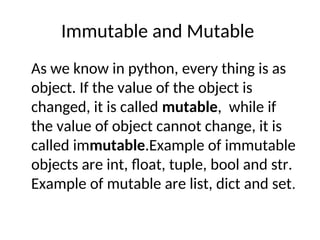
Immutable and Mutable
Aswe know in python, every thing is as
object. If the value of the object is
changed, it is called mutable, while if
the value of object cannot change, it is
called immutable.Example of immutable
objects are int, float, tuple, bool and str.
Example of mutable are list, dict and set.
7.
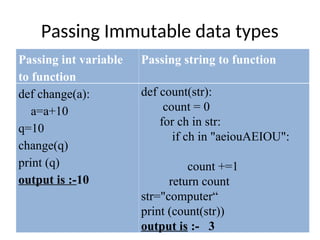
Passing Immutable datatypes
Passing int variable
to function
Passing string to function
def change(a):
a=a+10
q=10
change(q)
print (q)
output is :-10
def count(str):
count = 0
for ch in str:
if ch in "aeiouAEIOU":
count +=1
return count
str="computer“
print (count(str))
output is :- 3
8.
Passing tuple/list asparameter
Passing tuple
def change(marks):
for i in range(len(marks)):
print (marks[i]+1)
li=(10,20,30,40)
change(li)
output is :- 10 20 30 40
Passing list/array
def change(marks):
for i in range(len(marks)):
marks[i]+=10
print(marks)
li=[10,20,30,40]
change(li)
print (li)
output is :- [20, 30, 40, 50]
9.
Passing Dictionary
def change(d1):
d1['roll']=1
d1['sec']='a'
d1={"name": "amit", "class":12}
change(d1)
print (d1)
output is :- {'roll': 1, 'sec': 'a', 'name': 'amit', 'class': 12}
NOTE: The changes reflect back after calling function as
for mutable data types by default (call by refernce
method). The changes does not reflect back after calling
function as for immutable data types by default (call by
value method)
10.
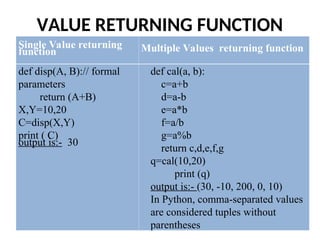
VALUE RETURNING FUNCTION
SingleValue returning
function Multiple Values returning function
def disp(A, B):// formal
parameters
return (A+B)
X,Y=10,20
C=disp(X,Y)
print ( C)
output is:- 30
def cal(a, b):
c=a+b
d=a-b
e=a*b
f=a/b
g=a%b
return c,d,e,f,g
q=cal(10,20)
print (q)
output is:- (30, -10, 200, 0, 10)
In Python, comma-separated values
are considered tuples without
parentheses
11.
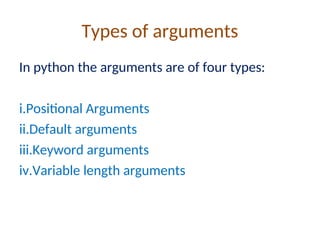
Types of arguments
Inpython the arguments are of four types:
i.Positional Arguments
ii.Default arguments
iii.Keyword arguments
iv.Variable length arguments
12.
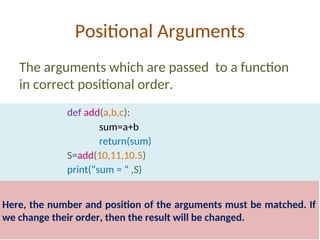
Positional Arguments
The argumentswhich are passed to a function
in correct positional order.
def add(a,b,c):
sum=a+b
return(sum)
S=add(10,11,10.5)
print(“sum = “ ,S)
Here, the number and position of the arguments must be matched. If
we change their order, then the result will be changed.
13.
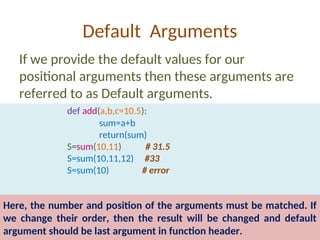
Default Arguments
If weprovide the default values for our
positional arguments then these arguments are
referred to as Default arguments.
def add(a,b,c=10.5):
sum=a+b
return(sum)
S=sum(10,11) # 31.5
S=sum(10,11,12) #33
S=sum(10) # error
Here, the number and position of the arguments must be matched. If
we change their order, then the result will be changed and default
argument should be last argument in function header.
14.
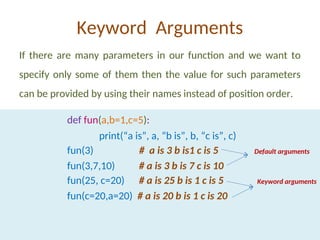
Keyword Arguments
If thereare many parameters in our function and we want to
specify only some of them then the value for such parameters
can be provided by using their names instead of position order.
def fun(a,b=1,c=5):
print(“a is”, a, “b is”, b, “c is”, c)
fun(3) # a is 3 b is1 c is 5 Default arguments
fun(3,7,10) # a is 3 b is 7 c is 10
fun(25, c=20) # a is 25 b is 1 c is 5 Keyword arguments
fun(c=20,a=20) # a is 20 b is 1 c is 20
15.
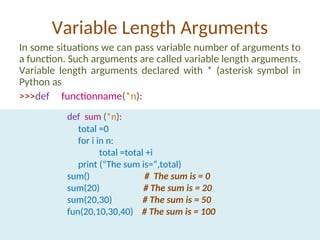
Variable Length Arguments
Insome situations we can pass variable number of arguments to
a function. Such arguments are called variable length arguments.
Variable length arguments declared with * (asterisk symbol in
Python as
>>>def functionname(*n):
def sum (*n):
total =0
for i in n:
total =total +i
print (“The sum is=“,total)
sum() # The sum is = 0
sum(20) # The sum is = 20
sum(20,30) # The sum is = 50
fun(20,10,30,40) # The sum is = 100
![Passing tuple/list as parameter
Passing tuple
def change(marks):
for i in range(len(marks)):
print (marks[i]+1)
li=(10,20,30,40)
change(li)
output is :- 10 20 30 40
Passing list/array
def change(marks):
for i in range(len(marks)):
marks[i]+=10
print(marks)
li=[10,20,30,40]
change(li)
print (li)
output is :- [20, 30, 40, 50]](https://image.slidesharecdn.com/userdefinedfunctions2-250709044450-069257e5/85/User-deined-functions-cbse-class-xii-computer-science-8-320.jpg)
![Passing Dictionary
def change(d1):
d1['roll']=1
d1['sec']='a'
d1={ "name": "amit", "class":12}
change(d1)
print (d1)
output is :- {'roll': 1, 'sec': 'a', 'name': 'amit', 'class': 12}
NOTE: The changes reflect back after calling function as
for mutable data types by default (call by refernce
method). The changes does not reflect back after calling
function as for immutable data types by default (call by
value method)](https://image.slidesharecdn.com/userdefinedfunctions2-250709044450-069257e5/85/User-deined-functions-cbse-class-xii-computer-science-9-320.jpg)