Exception handling and
Multithreaded Programming
Unit II
Exception-Handling Fundamentals
• Exception is an object that describes an exceptional (error) condition
that has occurred in a piece of code.
• It is created and thrown in the method that caused the error.
• The exception must be caught and processed.
• Generated by run-time environment or can be manually generated by
code.
• Exceptions thrown by Java relate to fundamental errors that violate
the rules of the Java language or the constraints of the Java execution
environment.
Java Exception Keywords
• try
• catch
• throw
• throws
• finally
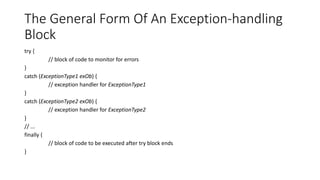
The General Form Of An Exception-handling
Block
try {
// block of code to monitor for errors
}
catch (ExceptionType1 exOb) {
// exception handler for ExceptionType1
}
catch (ExceptionType2 exOb) {
// exception handler for ExceptionType2
}
// ...
finally {
// block of code to be executed after try block ends
}
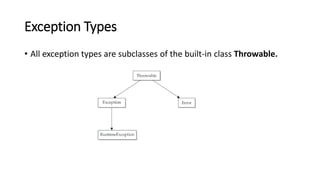
Exception Types
• All exception types are subclasses of the built-in class Throwable.
Uncaught Exceptions
• Example 1
class Exc0 {
public static void main(String args[]) {
int d = 0;
int a = 42 / d;
}
}
Output
java.lang.ArithmeticException: / by zero
at Exc0.main(Exc0.java:4)
• Example 2
class Exc1 {
static void subroutine() {
int d = 0;
int a = 10 / d;
}
public static void main(String args[]) {
Exc1.subroutine();
}
}
Output
java.lang.ArithmeticException: / by zero
at Exc1.subroutine(Exc1.java:4)
at Exc1.main(Exc1.java:7)
Using try and catch
class Exc2 {
public static void main(String args[]) {
int d, a;
try { // monitor a block of code.
d = 0;
a = 42 / d;
System.out.println("This will not be printed.");
} catch (ArithmeticException e) { // catch divide-by-zero error
System.out.println("Division by zero.");
}
System.out.println("After catch statement.");
}
}
Output
Division by zero.
After catch statement
// Handle an exception and move on.
import java.util.Random;
class HandleError {
public static void main(String args[]) {
int a=0, b=0, c=0;
Random r = new Random();
for(int i=0; i<32000; i++) {
try {
b = r.nextInt();
c = r.nextInt();
a = 12345 / (b/c);
} catch (ArithmeticException e) {
System.out.println("Division by zero.");
a = 0; // set a to zero and continue
}
System.out.println("a: " + a);
}
}
}
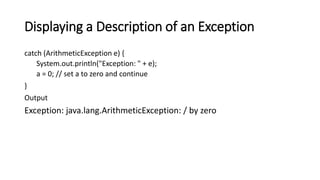
Displaying a Description of an Exception
catch (ArithmeticException e) {
System.out.println("Exception: " + e);
a = 0; // set a to zero and continue
}
Output
Exception: java.lang.ArithmeticException: / by zero
Multiple catch Clauses
// Demonstrate multiple catch statements.
class MultipleCatches {
public static void main(String args[]) {
try {int a = args.length;
System.out.println("a = " + a);
int b = 42 / a;
int c[] = { 1 };
c[42] = 99;
} catch(ArithmeticException e) {
System.out.println("Divide by 0: " + e);
} catch(ArrayIndexOutOfBoundsException e) {
System.out.println("Array index oob: " + e);
}
System.out.println("After try/catch blocks.");
}
}
Point To Remembered In Multiple Catch
Blocks
/* This program contains an error.
A subclass must come before its superclass in a series of catch statements. If not, unreachable code will be created and a compile-time error
will result.
*/
class SuperSubCatch {
public static void main(String args[]) {
try {
int a = 0;
int b = 42 / a;
} catch(Exception e) {
System.out.println("Generic Exception catch.");
}
/* This catch is never reached because ArithmeticException is a subclass of Exception. */
catch(ArithmeticException e) { // ERROR – unreachable
System.out.println("This is never reached.");
}
}
}
Nested try Statements
// An example of nested try statements.
class NestTry {
public static void main(String args[]) {
try {
int a = args.length;
/* If no command-line args are present,
the following statement will generate
a divide-by-zero exception. */
int b = 42 / a;
System.out.println("a = " + a);
try { // nested try block
/* If one command-line arg is used,
then a divide-by-zero exception
will be generated by the following code. */
if(a==1) a = a/(a-a); // division by zero
/* If two command-line args are used,
then generate an out-of-bounds exception. */
if(a==2) {
int c[] = { 1 };
c[42] = 99; // generate an out-of-bounds exception
}
} catch(ArrayIndexOutOfBoundsException e) {
System.out.println("Array index out-of-bounds: " + e);
}
} catch(ArithmeticException e) {
System.out.println("Divide by 0: " + e);
}
}
}
/* Try statements can be implicitly nested via calls to methods. */
class MethNestTry {
static void nesttry(int a) {
try { // nested try block
/* If one command-line arg is used, then a divide-by-zero exception will be generated by the following code. */
if(a==1) a = a/(a-a); // division by zero
/* If two command-line args are used, then generate an out-of-bounds exception. */
if(a==2) {
int c[] = { 1 };
c[42] = 99; // generate an out-of-bounds exception
}
} catch(ArrayIndexOutOfBoundsException e) {
System.out.println("Array index out-of-bounds: " + e);
}
}
public static void main(String args[]) {
try {
int a = args.length;
/* If no command-line args are present, the following statement will generate a divide-by-zero exception. */
int b = 42 / a;
System.out.println("a = " + a);
nesttry(a);
} catch(ArithmeticException e) {
System.out.println("Divide by 0: " + e);
}
}
}
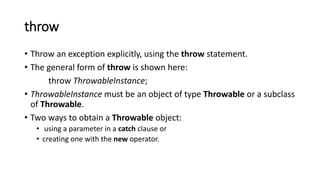
throw
• Throw an exception explicitly, using the throw statement.
• The general form of throw is shown here:
throw ThrowableInstance;
• ThrowableInstance must be an object of type Throwable or a subclass
of Throwable.
• Two ways to obtain a Throwable object:
• using a parameter in a catch clause or
• creating one with the new operator.
throw cont..
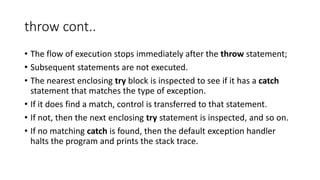
• The flow of execution stops immediately after the throw statement;
• Subsequent statements are not executed.
• The nearest enclosing try block is inspected to see if it has a catch
statement that matches the type of exception.
• If it does find a match, control is transferred to that statement.
• If not, then the next enclosing try statement is inspected, and so on.
• If no matching catch is found, then the default exception handler
halts the program and prints the stack trace.
// Demonstrate throw.
class ThrowDemo {
static void demoproc() {
try {
throw new NullPointerException("demo");
} catch(NullPointerException e) {
System.out.println("Caught inside demoproc.");
throw e; // rethrow the exception
}
}
public static void main(String args[]) {
try {
demoproc();
} catch(NullPointerException e) {
System.out.println("Recaught: " + e);
}
}
}
throws
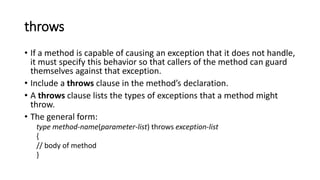
• If a method is capable of causing an exception that it does not handle,
it must specify this behavior so that callers of the method can guard
themselves against that exception.
• Include a throws clause in the method’s declaration.
• A throws clause lists the types of exceptions that a method might
throw.
• The general form:
type method-name(parameter-list) throws exception-list
{
// body of method
}
// This program contains an error and will not compile.
class ThrowsDemo {
static void throwOne() {
System.out.println("Inside throwOne.");
throw new IllegalAccessException("demo");
}
public static void main(String args[]) {
throwOne();
}
}
// This is now correct.
class ThrowsDemo {
static void throwOne() throws IllegalAccessException {
System.out.println("Inside throwOne.");
throw new IllegalAccessException("demo");
}
public static void main(String args[]) {
try {
throwOne();
} catch (IllegalAccessException e) {
System.out.println("Caught " + e);
}
}
}
finally
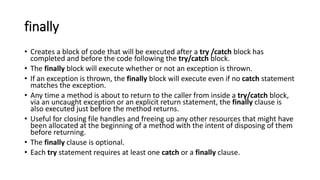
• Creates a block of code that will be executed after a try /catch block has
completed and before the code following the try/catch block.
• The finally block will execute whether or not an exception is thrown.
• If an exception is thrown, the finally block will execute even if no catch statement
matches the exception.
• Any time a method is about to return to the caller from inside a try/catch block,
via an uncaught exception or an explicit return statement, the finally clause is
also executed just before the method returns.
• Useful for closing file handles and freeing up any other resources that might have
been allocated at the beginning of a method with the intent of disposing of them
before returning.
• The finally clause is optional.
• Each try statement requires at least one catch or a finally clause.
// Demonstrate finally.
class FinallyDemo {
// Through an exception out of the method.
static void procA() {
try {
System.out.println("inside procA");
throw new RuntimeException("demo");
} finally {
System.out.println("procA's finally");
}
}
// Return from within a try block.
static void procB() {
try {
System.out.println("inside procB");
return;
} finally {
System.out.println("procB's finally");
}
}
// Execute a try block normally.
static void procC() {
try {
System.out.println("inside procC");
} finally {
System.out.println("procC's finally");
}
}
public static void main(String args[]) {
try {
procA();
} catch (Exception e) {
System.out.println("Exception caught");
}
procB();
procC();
}
}
Java’s Built-in Exceptions
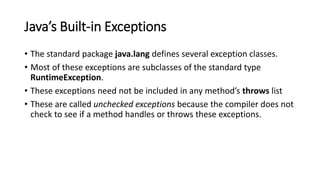
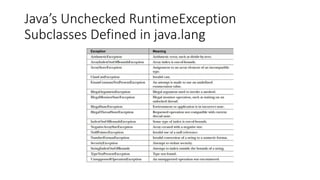
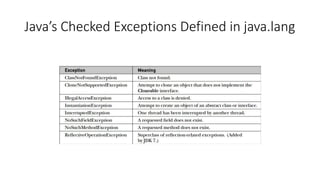
• The standard package java.lang defines several exception classes.
• Most of these exceptions are subclasses of the standard type
RuntimeException.
• These exceptions need not be included in any method’s throws list
• These are called unchecked exceptions because the compiler does not
check to see if a method handles or throws these exceptions.
Java’s Unchecked RuntimeException
Subclasses Defined in java.lang
Java’s Checked Exceptions Defined in java.lang
Multithreaded Programming
• Built-in support
• Definition:
A multithreaded program contains two or more parts that can run
concurrently. Each part of such a program is called a thread, and
each thread defines a separate path of execution. Thus,
multithreading is a specialized form of multitasking.
• Two distinct types of multitasking: process-based and thread-based.
Multiprocessing
• Definition:
The processing of several computer programs at the same time
especially by a computer system with two or more processors
sharing a single memory
Process-based multitasking
• A process is a program that is executing.
• Allows computer to run two or more programs concurrently.
• A program is the smallest unit of code that can be dispatched by the
scheduler.
• Processes are heavyweight tasks that require their own separate
address spaces.
• Interprocess communication is expensive and limited.
• Context switching from one process to another is also costly.
• Process-based multitasking is not under Java’s direct control
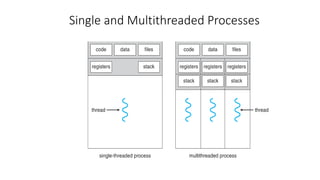
Thread-based multitasking
• The thread is the smallest unit of dispatchable code
• A single program can perform two or more tasks simultaneously.
• Requires less overhead than multitasking processes.
• are lighter weight
• They share the same address space and cooperatively share the same
heavyweight process.
• Interthread communication is inexpensive, and context switching
from one thread to the next is lower in cost.
Single and Multithreaded Processes
Advantages of Multithreaded Programming
• Efficient programs that make maximum use of the processing power
available in the system
• Keeps idle time to a minimum
• important for the interactive, networked environment in which Java operates
because idle time is common
The Java Thread Model
• The Java run-time system depends on threads for many things.
• All the class libraries are designed with multithreading.
• Java uses threads to enable the entire environment to be
asynchronous.
• Single-threaded systems use an approach called an event loop with
polling.
• Once this polling mechanism returns then the event loop dispatches
control to the appropriate event handler.
• When a thread blocks because it is waiting for some resource, the
entire program stops running.
The Java Thread Model cont..
• Java’s multithreading eliminates the main loop/polling mechanism.
• One thread can pause without stopping other parts of the program.
• When a thread blocks in a Java program, only the single thread that is
blocked pauses.
• All other threads continue to run.
Thread Priorities
• Each thread is assigned a priority that determines how that thread should be treated
with respect to the others.
• Are integers that specify the relative priority of one thread to another.
• Context switch: a thread’s priority is used to decide when to switch from one running
thread to the next.
• Rules for context switch:
• A thread can voluntarily relinquish control. This is done by explicitly yielding, sleeping, or blocking
on pending I/O. In this scenario, all other threads are examined, and the highest-priority thread
that is ready to run is given the CPU.
• A thread can be preempted by a higher-priority thread. In this case, a lower-priority thread that
does not yield the processor is simply preempted—no matter what it is doing—by a higher-
priority thread. Basically, as soon as a higher-priority thread wants to run, it does. This is called
preemptive multitasking.
• Threads of equal priority are time-sliced automatically in round-robin fashion in
Windows OS.
• Other OS, threads of equal priority must voluntarily yield control to their peers
Synchronization
• Java uses the monitor.
• The monitor is a control mechanism first defined by C.A.R. Hoare.
• A monitor can be considered as a very small box that can hold only one thread.
• Once a thread enters a monitor, all other threads must wait until that thread exits
the monitor.
• A monitor can be used to protect a shared asset from being manipulated by more
than one thread at a time.
• Most multithreaded systems expose monitors as objects, the program must
explicitly acquire and manipulate
• In Java, each object has its own implicit monitor that is automatically entered
when one of the object’s synchronized methods is called.
• Once a thread is inside a synchronized method, no other thread can call any other
synchronized method on the same object.
Messaging
• In other programming languages, the operating system to establish
communication between threads.
• Java provides a clean, low-cost way for two or more threads to talk to
each other, via calls to predefined methods that all objects have.
• Java’s messaging system allows a thread to enter a synchronized
method on an object, and then wait there until some other thread
explicitly notifies it to come out.
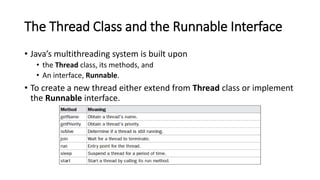
The Thread Class and the Runnable Interface
• Java’s multithreading system is built upon
• the Thread class, its methods, and
• An interface, Runnable.
• To create a new thread either extend from Thread class or implement
the Runnable interface.
The Main Thread
• When a Java program starts up, one thread begins running immediately.
• The main thread of your program is the one that is executed when the program
begins.
• The main thread is important for two reasons:
• It is the thread from which other “child” threads will be spawned.
• Often, it must be the last thread to finish execution because it performs various shutdown
actions.
• It can be controlled through a Thread object.
• Obtain a reference to it by calling the method currentThread( ), which is a public
static member of Thread.
• Its general form
static Thread currentThread( )
• This method returns a reference to the thread in which it is called.
class CurrentThreadDemo
{
public static void main(String args[])
{
Thread t = Thread.currentThread();
System.out.println("Current thread: " + t);
t.setName("My Thread");
System.out.println("After name change: " + t);
try
{
for(int n = 5; n > 0; n--)
{
System.out.println(n);
Thread.sleep(1000);
}
}
catch (InterruptedException e)
{
System.out.println("Main thread interrupted");
}
}
}
Methods of the Thread class
• static void sleep(long milliseconds) throws InterruptedException
• static void sleep(long milliseconds,int nanoseconds) throws
InterruptedException
• final void setName(String threadName)
• final String getName( )
Creating a Thread
• Two ways
• implement the Runnable interface.
• extend the Thread class
Implementing Runnable
• Create a class that implements the Runnable interface.
• Runnable abstracts a unit of executable code.
• Class needs to implement a single method called run( ).
public void run( )
• Define the code that constitutes the new thread.
• Can call other methods, use other classes, and declare variables, like the main thread can.
• Establishes the entry point for another, concurrent thread of execution within the program.
• This thread will end when run( )returns.
• instantiate an object of type Thread from within that class.
• Thread defines several constructors.
Thread(Runnable threadOb, String threadName)
• After the new thread is created, it will not start running until the start( ) method is called.
• It is declared within Thread.
• start( )executes a call to run( ).
void start( )
ThreadDemo.java
Extending Thread
• Create a new class that extends Thread, and then to create an
instance of that class.
• Override the run( ) method, which is the entry point for the new
thread.
• Also call start( ) to begin execution of the new thread.
ExtendThread.java
Choosing an Approach
• The Thread class defines several methods that can be overridden by a
derived class.
• The only one that must be overridden is run( ).
• The same method required when you implement Runnable.
• Classes should be extended only when they are being enhanced or
modified in some way.
• If not overriding any of Thread’s other methods, it is probably best to
simply implement Runnable.
Creating Multiple Threads
MultiThreadDemo.java
Using isAlive( )
• Two ways to determine whether a thread has finished.
• Call isAlive( ) on the thread.
• General form
final boolean isAlive( )
• Returns true if the thread upon which it is called is still running
otherwise false.
• Occasionally useful
Using Join()
• more commonly used to wait for a thread to finish is called join( ),
• General form:
final void join( ) throws InterruptedException
• This method waits until the thread on which it is called terminates.
• Its name comes from the concept of the calling thread waiting until
the specified thread joins it.
• Additional forms of join( ) allow to specify a maximum amount of
time to wait for the specified thread to terminate.
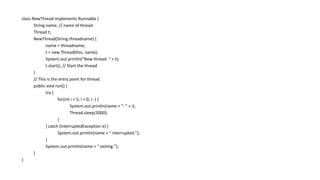
class NewThread implements Runnable {
String name; // name of thread
Thread t;
NewThread(String threadname) {
name = threadname;
t = new Thread(this, name);
System.out.println("New thread: " + t);
t.start(); // Start the thread
}
// This is the entry point for thread.
public void run() {
try {
for(int i = 5; i > 0; i--) {
System.out.println(name + ": " + i);
Thread.sleep(1000);
}
} catch (InterruptedException e) {
System.out.println(name + " interrupted.");
}
System.out.println(name + " exiting.");
}
}
class DemoJoin {
public static void main(String args[]) {
NewThread ob1 = new NewThread("One");
NewThread ob2 = new NewThread("Two");
NewThread ob3 = new NewThread("Three");
System.out.println("Thread One is alive: “+ ob1.t.isAlive());
System.out.println("Thread Two is alive: "+ ob2.t.isAlive());
System.out.println("Thread Three is alive: "+ ob3.t.isAlive());
// wait for threads to finish
try {
System.out.println("Waiting for threads to finish.");
ob1.t.join();
ob2.t.join();
ob3.t.join();
} catch (InterruptedException e) {
System.out.println("Main thread Interrupted");
}
System.out.println("Thread One is alive: “+ ob1.t.isAlive());
System.out.println("Thread Two is alive: "+ ob2.t.isAlive());
System.out.println("Thread Three is alive: "+ ob3.t.isAlive());
System.out.println("Main thread exiting.");
}
}
Thread Priorities
• Used by the thread scheduler to decide when each thread should be
allowed to run.
• In theory, higher-priority threads get more CPU time than lower-priority
threads.
• In practice, the amount of CPU time that a thread gets often depends on
several factors besides its priority.
• A higher-priority thread can also preempt a lower-priority one.
• In theory, threads of equal priority should get equal access to the CPU but
this depends on the environment in which the program is running.
• Some types of tasks are CPU-intensive. Such threads dominate the CPU,
• Yield control occasionally so that other threads can run.
Thread Priorities cont..
• general form:
final void setPriority(int level)
• Level specifies the new priority setting for the calling thread.
• The value of level must be within the range MIN_PRIORITY(1) and
MAX_PRIORITY(10).
• NORM_PRIORITY is the default priority which is currently 5.
• Defined as static final variables within Thread.
• Obtain the current priority setting by calling the getPriority( ) method of
Thread.
final int getPriority( )
Synchronization
• When two or more threads need access to a shared resource, they need
some way to ensure that the resource will be used by only one thread at a
time.
• A monitor is an object that is used as a mutually exclusive lock.
• Only one thread can own a monitor at a given time.
• When a thread acquires a lock, it is said to have entered the monitor.
• All other threads attempting to enter the locked monitor will be suspended
until the first thread exits the monitor.
• These other threads are said to be waiting for the monitor.
• A thread that owns a monitor can reenter the same monitor if it so desires.
Synchronized Methods
• All objects have their own implicit monitor.
• To enter an object’s monitor, just call a method that has been
modified with the synchronized keyword.
• Returning from the synchronized method the object exit from the
monitor and relinquish control of the object to the next waiting
thread.
• Example: Synch.java
The synchronized Statement
• Synchronized method is easy and effective means of achieving
synchronization.
• Synchronized methods cannot be used on library classes or classes defined
by other developers.
• Put calls to the methods defined by this class inside a synchronized block.
• General form
synchronized(object) {
// statements to be synchronized
}
• Example: Synch1.java

Unit II Java & J2EE regarding Java application development

  • 1.
  • 2.
    Exception-Handling Fundamentals • Exceptionis an object that describes an exceptional (error) condition that has occurred in a piece of code. • It is created and thrown in the method that caused the error. • The exception must be caught and processed. • Generated by run-time environment or can be manually generated by code. • Exceptions thrown by Java relate to fundamental errors that violate the rules of the Java language or the constraints of the Java execution environment.
  • 3.
    Java Exception Keywords •try • catch • throw • throws • finally
  • 4.
    The General FormOf An Exception-handling Block try { // block of code to monitor for errors } catch (ExceptionType1 exOb) { // exception handler for ExceptionType1 } catch (ExceptionType2 exOb) { // exception handler for ExceptionType2 } // ... finally { // block of code to be executed after try block ends }
  • 5.
    Exception Types • Allexception types are subclasses of the built-in class Throwable.
  • 6.
    Uncaught Exceptions • Example1 class Exc0 { public static void main(String args[]) { int d = 0; int a = 42 / d; } } Output java.lang.ArithmeticException: / by zero at Exc0.main(Exc0.java:4)
  • 7.
    • Example 2 classExc1 { static void subroutine() { int d = 0; int a = 10 / d; } public static void main(String args[]) { Exc1.subroutine(); } } Output java.lang.ArithmeticException: / by zero at Exc1.subroutine(Exc1.java:4) at Exc1.main(Exc1.java:7)
  • 8.
    Using try andcatch class Exc2 { public static void main(String args[]) { int d, a; try { // monitor a block of code. d = 0; a = 42 / d; System.out.println("This will not be printed."); } catch (ArithmeticException e) { // catch divide-by-zero error System.out.println("Division by zero."); } System.out.println("After catch statement."); } } Output Division by zero. After catch statement
  • 9.
    // Handle anexception and move on. import java.util.Random; class HandleError { public static void main(String args[]) { int a=0, b=0, c=0; Random r = new Random(); for(int i=0; i<32000; i++) { try { b = r.nextInt(); c = r.nextInt(); a = 12345 / (b/c); } catch (ArithmeticException e) { System.out.println("Division by zero."); a = 0; // set a to zero and continue } System.out.println("a: " + a); } } }
  • 10.
    Displaying a Descriptionof an Exception catch (ArithmeticException e) { System.out.println("Exception: " + e); a = 0; // set a to zero and continue } Output Exception: java.lang.ArithmeticException: / by zero
  • 11.
    Multiple catch Clauses //Demonstrate multiple catch statements. class MultipleCatches { public static void main(String args[]) { try {int a = args.length; System.out.println("a = " + a); int b = 42 / a; int c[] = { 1 }; c[42] = 99; } catch(ArithmeticException e) { System.out.println("Divide by 0: " + e); } catch(ArrayIndexOutOfBoundsException e) { System.out.println("Array index oob: " + e); } System.out.println("After try/catch blocks."); } }
  • 12.
    Point To RememberedIn Multiple Catch Blocks /* This program contains an error. A subclass must come before its superclass in a series of catch statements. If not, unreachable code will be created and a compile-time error will result. */ class SuperSubCatch { public static void main(String args[]) { try { int a = 0; int b = 42 / a; } catch(Exception e) { System.out.println("Generic Exception catch."); } /* This catch is never reached because ArithmeticException is a subclass of Exception. */ catch(ArithmeticException e) { // ERROR – unreachable System.out.println("This is never reached."); } } }
  • 13.
    Nested try Statements //An example of nested try statements. class NestTry { public static void main(String args[]) { try { int a = args.length; /* If no command-line args are present, the following statement will generate a divide-by-zero exception. */ int b = 42 / a; System.out.println("a = " + a); try { // nested try block /* If one command-line arg is used, then a divide-by-zero exception will be generated by the following code. */ if(a==1) a = a/(a-a); // division by zero /* If two command-line args are used, then generate an out-of-bounds exception. */ if(a==2) { int c[] = { 1 }; c[42] = 99; // generate an out-of-bounds exception } } catch(ArrayIndexOutOfBoundsException e) { System.out.println("Array index out-of-bounds: " + e); } } catch(ArithmeticException e) { System.out.println("Divide by 0: " + e); } } }
  • 14.
    /* Try statementscan be implicitly nested via calls to methods. */ class MethNestTry { static void nesttry(int a) { try { // nested try block /* If one command-line arg is used, then a divide-by-zero exception will be generated by the following code. */ if(a==1) a = a/(a-a); // division by zero /* If two command-line args are used, then generate an out-of-bounds exception. */ if(a==2) { int c[] = { 1 }; c[42] = 99; // generate an out-of-bounds exception } } catch(ArrayIndexOutOfBoundsException e) { System.out.println("Array index out-of-bounds: " + e); } } public static void main(String args[]) { try { int a = args.length; /* If no command-line args are present, the following statement will generate a divide-by-zero exception. */ int b = 42 / a; System.out.println("a = " + a); nesttry(a); } catch(ArithmeticException e) { System.out.println("Divide by 0: " + e); } } }
  • 15.
    throw • Throw anexception explicitly, using the throw statement. • The general form of throw is shown here: throw ThrowableInstance; • ThrowableInstance must be an object of type Throwable or a subclass of Throwable. • Two ways to obtain a Throwable object: • using a parameter in a catch clause or • creating one with the new operator.
  • 16.
    throw cont.. • Theflow of execution stops immediately after the throw statement; • Subsequent statements are not executed. • The nearest enclosing try block is inspected to see if it has a catch statement that matches the type of exception. • If it does find a match, control is transferred to that statement. • If not, then the next enclosing try statement is inspected, and so on. • If no matching catch is found, then the default exception handler halts the program and prints the stack trace.
  • 17.
    // Demonstrate throw. classThrowDemo { static void demoproc() { try { throw new NullPointerException("demo"); } catch(NullPointerException e) { System.out.println("Caught inside demoproc."); throw e; // rethrow the exception } } public static void main(String args[]) { try { demoproc(); } catch(NullPointerException e) { System.out.println("Recaught: " + e); } } }
  • 18.
    throws • If amethod is capable of causing an exception that it does not handle, it must specify this behavior so that callers of the method can guard themselves against that exception. • Include a throws clause in the method’s declaration. • A throws clause lists the types of exceptions that a method might throw. • The general form: type method-name(parameter-list) throws exception-list { // body of method }
  • 19.
    // This programcontains an error and will not compile. class ThrowsDemo { static void throwOne() { System.out.println("Inside throwOne."); throw new IllegalAccessException("demo"); } public static void main(String args[]) { throwOne(); } }
  • 20.
    // This isnow correct. class ThrowsDemo { static void throwOne() throws IllegalAccessException { System.out.println("Inside throwOne."); throw new IllegalAccessException("demo"); } public static void main(String args[]) { try { throwOne(); } catch (IllegalAccessException e) { System.out.println("Caught " + e); } } }
  • 21.
    finally • Creates ablock of code that will be executed after a try /catch block has completed and before the code following the try/catch block. • The finally block will execute whether or not an exception is thrown. • If an exception is thrown, the finally block will execute even if no catch statement matches the exception. • Any time a method is about to return to the caller from inside a try/catch block, via an uncaught exception or an explicit return statement, the finally clause is also executed just before the method returns. • Useful for closing file handles and freeing up any other resources that might have been allocated at the beginning of a method with the intent of disposing of them before returning. • The finally clause is optional. • Each try statement requires at least one catch or a finally clause.
  • 22.
    // Demonstrate finally. classFinallyDemo { // Through an exception out of the method. static void procA() { try { System.out.println("inside procA"); throw new RuntimeException("demo"); } finally { System.out.println("procA's finally"); } } // Return from within a try block. static void procB() { try { System.out.println("inside procB"); return; } finally { System.out.println("procB's finally"); } } // Execute a try block normally. static void procC() { try { System.out.println("inside procC"); } finally { System.out.println("procC's finally"); } } public static void main(String args[]) { try { procA(); } catch (Exception e) { System.out.println("Exception caught"); } procB(); procC(); } }
  • 23.
    Java’s Built-in Exceptions •The standard package java.lang defines several exception classes. • Most of these exceptions are subclasses of the standard type RuntimeException. • These exceptions need not be included in any method’s throws list • These are called unchecked exceptions because the compiler does not check to see if a method handles or throws these exceptions.
  • 24.
  • 25.
  • 26.
    Multithreaded Programming • Built-insupport • Definition: A multithreaded program contains two or more parts that can run concurrently. Each part of such a program is called a thread, and each thread defines a separate path of execution. Thus, multithreading is a specialized form of multitasking. • Two distinct types of multitasking: process-based and thread-based.
  • 27.
    Multiprocessing • Definition: The processingof several computer programs at the same time especially by a computer system with two or more processors sharing a single memory
  • 28.
    Process-based multitasking • Aprocess is a program that is executing. • Allows computer to run two or more programs concurrently. • A program is the smallest unit of code that can be dispatched by the scheduler. • Processes are heavyweight tasks that require their own separate address spaces. • Interprocess communication is expensive and limited. • Context switching from one process to another is also costly. • Process-based multitasking is not under Java’s direct control
  • 29.
    Thread-based multitasking • Thethread is the smallest unit of dispatchable code • A single program can perform two or more tasks simultaneously. • Requires less overhead than multitasking processes. • are lighter weight • They share the same address space and cooperatively share the same heavyweight process. • Interthread communication is inexpensive, and context switching from one thread to the next is lower in cost.
  • 30.
  • 31.
    Advantages of MultithreadedProgramming • Efficient programs that make maximum use of the processing power available in the system • Keeps idle time to a minimum • important for the interactive, networked environment in which Java operates because idle time is common
  • 32.
    The Java ThreadModel • The Java run-time system depends on threads for many things. • All the class libraries are designed with multithreading. • Java uses threads to enable the entire environment to be asynchronous. • Single-threaded systems use an approach called an event loop with polling. • Once this polling mechanism returns then the event loop dispatches control to the appropriate event handler. • When a thread blocks because it is waiting for some resource, the entire program stops running.
  • 33.
    The Java ThreadModel cont.. • Java’s multithreading eliminates the main loop/polling mechanism. • One thread can pause without stopping other parts of the program. • When a thread blocks in a Java program, only the single thread that is blocked pauses. • All other threads continue to run.
  • 34.
    Thread Priorities • Eachthread is assigned a priority that determines how that thread should be treated with respect to the others. • Are integers that specify the relative priority of one thread to another. • Context switch: a thread’s priority is used to decide when to switch from one running thread to the next. • Rules for context switch: • A thread can voluntarily relinquish control. This is done by explicitly yielding, sleeping, or blocking on pending I/O. In this scenario, all other threads are examined, and the highest-priority thread that is ready to run is given the CPU. • A thread can be preempted by a higher-priority thread. In this case, a lower-priority thread that does not yield the processor is simply preempted—no matter what it is doing—by a higher- priority thread. Basically, as soon as a higher-priority thread wants to run, it does. This is called preemptive multitasking. • Threads of equal priority are time-sliced automatically in round-robin fashion in Windows OS. • Other OS, threads of equal priority must voluntarily yield control to their peers
  • 35.
    Synchronization • Java usesthe monitor. • The monitor is a control mechanism first defined by C.A.R. Hoare. • A monitor can be considered as a very small box that can hold only one thread. • Once a thread enters a monitor, all other threads must wait until that thread exits the monitor. • A monitor can be used to protect a shared asset from being manipulated by more than one thread at a time. • Most multithreaded systems expose monitors as objects, the program must explicitly acquire and manipulate • In Java, each object has its own implicit monitor that is automatically entered when one of the object’s synchronized methods is called. • Once a thread is inside a synchronized method, no other thread can call any other synchronized method on the same object.
  • 36.
    Messaging • In otherprogramming languages, the operating system to establish communication between threads. • Java provides a clean, low-cost way for two or more threads to talk to each other, via calls to predefined methods that all objects have. • Java’s messaging system allows a thread to enter a synchronized method on an object, and then wait there until some other thread explicitly notifies it to come out.
  • 37.
    The Thread Classand the Runnable Interface • Java’s multithreading system is built upon • the Thread class, its methods, and • An interface, Runnable. • To create a new thread either extend from Thread class or implement the Runnable interface.
  • 38.
    The Main Thread •When a Java program starts up, one thread begins running immediately. • The main thread of your program is the one that is executed when the program begins. • The main thread is important for two reasons: • It is the thread from which other “child” threads will be spawned. • Often, it must be the last thread to finish execution because it performs various shutdown actions. • It can be controlled through a Thread object. • Obtain a reference to it by calling the method currentThread( ), which is a public static member of Thread. • Its general form static Thread currentThread( ) • This method returns a reference to the thread in which it is called.
  • 39.
    class CurrentThreadDemo { public staticvoid main(String args[]) { Thread t = Thread.currentThread(); System.out.println("Current thread: " + t); t.setName("My Thread"); System.out.println("After name change: " + t); try { for(int n = 5; n > 0; n--) { System.out.println(n); Thread.sleep(1000); } } catch (InterruptedException e) { System.out.println("Main thread interrupted"); } } }
  • 40.
    Methods of theThread class • static void sleep(long milliseconds) throws InterruptedException • static void sleep(long milliseconds,int nanoseconds) throws InterruptedException • final void setName(String threadName) • final String getName( )
  • 41.
    Creating a Thread •Two ways • implement the Runnable interface. • extend the Thread class
  • 42.
    Implementing Runnable • Createa class that implements the Runnable interface. • Runnable abstracts a unit of executable code. • Class needs to implement a single method called run( ). public void run( ) • Define the code that constitutes the new thread. • Can call other methods, use other classes, and declare variables, like the main thread can. • Establishes the entry point for another, concurrent thread of execution within the program. • This thread will end when run( )returns. • instantiate an object of type Thread from within that class. • Thread defines several constructors. Thread(Runnable threadOb, String threadName) • After the new thread is created, it will not start running until the start( ) method is called. • It is declared within Thread. • start( )executes a call to run( ). void start( )
  • 43.
  • 44.
    Extending Thread • Createa new class that extends Thread, and then to create an instance of that class. • Override the run( ) method, which is the entry point for the new thread. • Also call start( ) to begin execution of the new thread. ExtendThread.java
  • 45.
    Choosing an Approach •The Thread class defines several methods that can be overridden by a derived class. • The only one that must be overridden is run( ). • The same method required when you implement Runnable. • Classes should be extended only when they are being enhanced or modified in some way. • If not overriding any of Thread’s other methods, it is probably best to simply implement Runnable.
  • 46.
  • 47.
    Using isAlive( ) •Two ways to determine whether a thread has finished. • Call isAlive( ) on the thread. • General form final boolean isAlive( ) • Returns true if the thread upon which it is called is still running otherwise false. • Occasionally useful
  • 48.
    Using Join() • morecommonly used to wait for a thread to finish is called join( ), • General form: final void join( ) throws InterruptedException • This method waits until the thread on which it is called terminates. • Its name comes from the concept of the calling thread waiting until the specified thread joins it. • Additional forms of join( ) allow to specify a maximum amount of time to wait for the specified thread to terminate.
  • 49.
    class NewThread implementsRunnable { String name; // name of thread Thread t; NewThread(String threadname) { name = threadname; t = new Thread(this, name); System.out.println("New thread: " + t); t.start(); // Start the thread } // This is the entry point for thread. public void run() { try { for(int i = 5; i > 0; i--) { System.out.println(name + ": " + i); Thread.sleep(1000); } } catch (InterruptedException e) { System.out.println(name + " interrupted."); } System.out.println(name + " exiting."); } }
  • 50.
    class DemoJoin { publicstatic void main(String args[]) { NewThread ob1 = new NewThread("One"); NewThread ob2 = new NewThread("Two"); NewThread ob3 = new NewThread("Three"); System.out.println("Thread One is alive: “+ ob1.t.isAlive()); System.out.println("Thread Two is alive: "+ ob2.t.isAlive()); System.out.println("Thread Three is alive: "+ ob3.t.isAlive()); // wait for threads to finish try { System.out.println("Waiting for threads to finish."); ob1.t.join(); ob2.t.join(); ob3.t.join(); } catch (InterruptedException e) { System.out.println("Main thread Interrupted"); } System.out.println("Thread One is alive: “+ ob1.t.isAlive()); System.out.println("Thread Two is alive: "+ ob2.t.isAlive()); System.out.println("Thread Three is alive: "+ ob3.t.isAlive()); System.out.println("Main thread exiting."); } }
  • 51.
    Thread Priorities • Usedby the thread scheduler to decide when each thread should be allowed to run. • In theory, higher-priority threads get more CPU time than lower-priority threads. • In practice, the amount of CPU time that a thread gets often depends on several factors besides its priority. • A higher-priority thread can also preempt a lower-priority one. • In theory, threads of equal priority should get equal access to the CPU but this depends on the environment in which the program is running. • Some types of tasks are CPU-intensive. Such threads dominate the CPU, • Yield control occasionally so that other threads can run.
  • 52.
    Thread Priorities cont.. •general form: final void setPriority(int level) • Level specifies the new priority setting for the calling thread. • The value of level must be within the range MIN_PRIORITY(1) and MAX_PRIORITY(10). • NORM_PRIORITY is the default priority which is currently 5. • Defined as static final variables within Thread. • Obtain the current priority setting by calling the getPriority( ) method of Thread. final int getPriority( )
  • 53.
    Synchronization • When twoor more threads need access to a shared resource, they need some way to ensure that the resource will be used by only one thread at a time. • A monitor is an object that is used as a mutually exclusive lock. • Only one thread can own a monitor at a given time. • When a thread acquires a lock, it is said to have entered the monitor. • All other threads attempting to enter the locked monitor will be suspended until the first thread exits the monitor. • These other threads are said to be waiting for the monitor. • A thread that owns a monitor can reenter the same monitor if it so desires.
  • 54.
    Synchronized Methods • Allobjects have their own implicit monitor. • To enter an object’s monitor, just call a method that has been modified with the synchronized keyword. • Returning from the synchronized method the object exit from the monitor and relinquish control of the object to the next waiting thread. • Example: Synch.java
  • 55.
    The synchronized Statement •Synchronized method is easy and effective means of achieving synchronization. • Synchronized methods cannot be used on library classes or classes defined by other developers. • Put calls to the methods defined by this class inside a synchronized block. • General form synchronized(object) { // statements to be synchronized } • Example: Synch1.java