Introduction to Python
Whyto Learn Python?
Characteristics of Python
Features of Python
History of Python
Advantages of Python
Installation of Python
Python environments
1
2.
Why to LearnPython?
• Python is a high-level, interpreted, interactive and object-oriented scripting
language.
• Python is Interpreted
• Python is Interactive
• Python is Object-Oriented
• Python is a Beginner's Language
2
3.
Characteristics of Python
•It supports functional and structured programming methods as well as OOP.
• It can be used as a scripting language or can be compiled to byte-code for
building large applications.
• It provides very high-level dynamic data types and supports dynamic type
checking.
• It supports automatic garbage collection.
• It can be easily integrated with C, C++, COM, ActiveX, CORBA, and Java.
3
4.
Features of Python
•Easy-to-learn
• Easy-to-read
• Easy-to-maintain
• A broad standard library
• Interactive Mode
• Portable
• Extendable
• Databases
• GUI Programming
• Scalable
4
5.
History of Python
•Python was developed by Guido van Rossum in the late eighties and early nineties at the
• National Research Institute for Mathematics and Computer Science in the Netherlands.
• Python is derived from many other languages, including ABC, Modula-3, C, C++, Algol-
68, SmallTalk, and Unix shell and other scripting languages.
• Python is copyrighted. Like Perl, Python source code is now available under the GNU
General Public License (GPL).
• Python is now maintained by a core development team at the institute, although Guido
van Rossum still holds a vital role in directing its progress.
• Python 1.0 was released in November 1994. In 2000, Python 2.0 was released.
• Python 2.7.11 is the latest edition of Python 2.
• Python 3.0 was released in 2008. Python 3 is not backward compatible with Python 2.
• Python 3.9.9 is the latest version of Python 3.
5
6.
Advantages of Python
•Developers can learn it quickly
• Typically involves less code
• Syntax is easier to read
• Utilized by every major technology company
• Huge amount of additional open-source libraries.
6
7.
Installation of Python
•Python can be downloaded from https://www.python.org/doc/.
• The documentation is available in HTML, PDF, and PostScript formats.
• Also can be installed using Anaconda distribution from
www.anaconda.com/downloads
• This distribution includes Python as well as many other useful libraries,
including Jupyter.
• Anaconda can also easily be installed on to any major OS, Windows,
MacOS, or Linux.
7
8.
Python Environments
• Thereare several ways to run Python code.
• Different options for development environments
• There are 3 main types of environments:
○ Text Editors
○ Full IDEs
○ Notebook Environments
8
9.
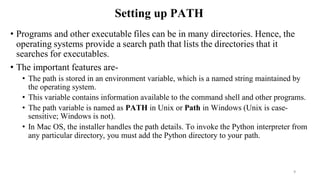
Setting up PATH
•Programs and other executable files can be in many directories. Hence, the
operating systems provide a search path that lists the directories that it
searches for executables.
• The important features are-
• The path is stored in an environment variable, which is a named string maintained by
the operating system.
• This variable contains information available to the command shell and other programs.
• The path variable is named as PATH in Unix or Path in Windows (Unix is case-
sensitive; Windows is not).
• In Mac OS, the installer handles the path details. To invoke the Python interpreter from
any particular directory, you must add the Python directory to your path.
9
10.
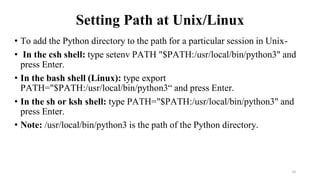
Setting Path atUnix/Linux
• To add the Python directory to the path for a particular session in Unix-
• In the csh shell: type setenv PATH "$PATH:/usr/local/bin/python3" and
press Enter.
• In the bash shell (Linux): type export
PATH="$PATH:/usr/local/bin/python3“ and press Enter.
• In the sh or ksh shell: type PATH="$PATH:/usr/local/bin/python3" and
press Enter.
• Note: /usr/local/bin/python3 is the path of the Python directory.
10
11.
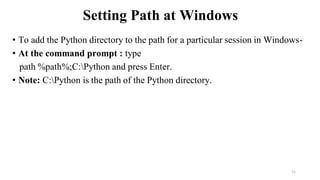
Setting Path atWindows
• To add the Python directory to the path for a particular session in Windows-
• At the command prompt : type
path %path%;C:Python and press Enter.
• Note: C:Python is the path of the Python directory.
11
12.
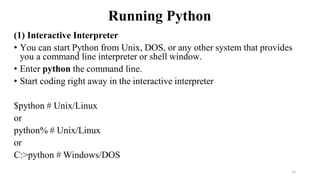
Running Python
(1) InteractiveInterpreter
• You can start Python from Unix, DOS, or any other system that provides
you a command line interpreter or shell window.
• Enter python the command line.
• Start coding right away in the interactive interpreter
$python # Unix/Linux
or
python% # Unix/Linux
or
C:>python # Windows/DOS
12
13.
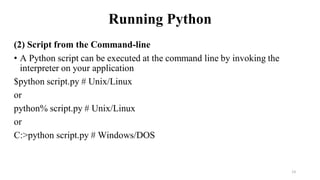
Running Python
(2) Scriptfrom the Command-line
• A Python script can be executed at the command line by invoking the
interpreter on your application
$python script.py # Unix/Linux
or
python% script.py # Unix/Linux
or
C:>python script.py # Windows/DOS
13
14.
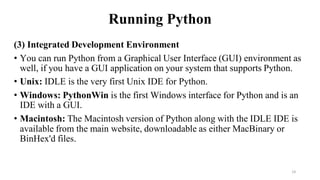
Running Python
(3) IntegratedDevelopment Environment
• You can run Python from a Graphical User Interface (GUI) environment as
well, if you have a GUI application on your system that supports Python.
• Unix: IDLE is the very first Unix IDE for Python.
• Windows: PythonWin is the first Windows interface for Python and is an
IDE with a GUI.
• Macintosh: The Macintosh version of Python along with the IDLE IDE is
available from the main website, downloadable as either MacBinary or
BinHex'd files.
14
15.
Python Program
• Executionof the programs in different modes of programming.
• Interactive Mode Programming
• Invoking the interpreter without passing a script file as a parameter brings up the
following prompt-
• $ python
• Python 3.3.2 (default, Dec 10 2013, 11:35:01)
• [GCC 4.6.3] on Linux
• Type "help", "copyright", "credits", or "license" for more information.
• >>>
15
16.
Python Program cont..
•On Windows:
Python 3.4.3 (v3.4.3:9b73f1c3e601, Feb 24 2015, 22:43:06) [MSC v.1600 32
bit (Intel)] on win32
Type "copyright", "credits" or "license()" for more information.
>>>
Type the following text at the Python prompt and press Enter-
>>> print ("Hello, Python!")
Output: Hello, Python!
16
17.
Python Program cont..
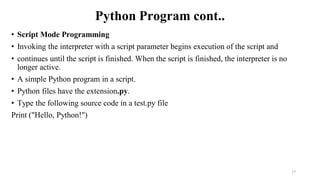
•Script Mode Programming
• Invoking the interpreter with a script parameter begins execution of the script and
• continues until the script is finished. When the script is finished, the interpreter is no
longer active.
• A simple Python program in a script.
• Python files have the extension.py.
• Type the following source code in a test.py file
Print ("Hello, Python!")
17
18.
Python Program cont..
•On Linux
$ python test.py
This produces the following result-
Hello, Python!
• On Windows
C:Python34>Python test.py
This produces the following result-
Output: Hello, Python!
18
19.
Python Identifiers
• APython identifier is a name used to identify a variable, function, class, module or other
object.
• An identifier starts with a letter A to Z or a to z or an underscore (_) followed by zero or
more letters, underscores and digits (0 to 9).
• Python does not allow punctuation characters such as @, $, and % within identifiers.
• Python is a case sensitive programming language. Thus, Manpower and manpower are
two different identifiers in Python.
• The following are naming conventions for Python identifiers-
• Class names start with an uppercase letter. All other identifiers start with a lowercase letter.
• Starting an identifier with a single leading underscore indicates that the identifier is private.
• Starting an identifier with two leading underscores indicates a strong private identifier.
• If the identifier also ends with two trailing underscores, the identifier is a language defined
special name.
19
20.
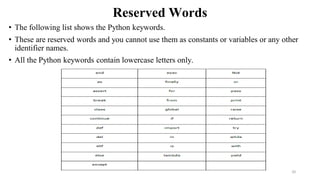
Reserved Words
• Thefollowing list shows the Python keywords.
• These are reserved words and you cannot use them as constants or variables or any other
identifier names.
• All the Python keywords contain lowercase letters only.
20
21.
Lines and Indentation
•Python does not use braces({}) to indicate blocks of code for class and function definitions
or flow control.
• Blocks of code are denoted by line indentation, which is rigidly enforced.
• The number of spaces in the indentation is variable, but all statements within the block
must be indented the same amount.
• The following block generates an error
if True:
print ("Answer")
print ("True")
else:
print "(Answer")
print ("False")
• For Example
if
True:
print ("Answer")
print ("True")
else:
print "(Answer")
print ("False") 21
22.
Multi-Line Statements
• Statementsin Python typically end with a new line. Python, however, allows the use of
the line continuation character () to denote that the line should continue. For example
total = item_one +
item_two +
item_three
The statements contained within the [], {}, or () brackets do not need to use the line
continuation character.
For example
days = ['Monday', 'Tuesday', 'Wednesday',
'Thursday', 'Friday']
22
23.
Quotation in Python
•Python accepts single ('), double (") and triple (''' or """) quotes to denote string literals, as
long as the same type of quote starts and ends the string.
• The triple quotes are used to span the string across multiple lines.
• For example, all the following are legal
word= 'word'
sentence = "This is a sentence."
paragraph = """This is a paragraph. It is
made up of multiple lines and sentences."""
23
24.
Comments in Python
•A hash sign (#) that is not inside a string literal is the beginning of a comment.
• All characters after the #, up to the end of the physical line, are part of the comment and the Python
interpreter ignores them.
#!/usr/bin/python3
# First comment
print ("Hello, Python!") # second comment
This produces the following result-
Hello, Python!
You can type a comment on the same line after a statement or expression
name = “Omkar" # This is again comment
• Python does not have multiple-line commenting feature. You have to comment each line individually as
follows-
# This is a comment.
# This is a comment, too.
# This is a comment, too.
24
25.
Multiple Statements ona Single Line
• The semicolon ( ; ) allows multiple statements on a single line given that no statement starts a new code
block.
• Here is a sample snip using the semicolon
import sys; x = 'foo'; sys.stdout.write(x + 'n')
• Multiple Statement Groups as Suites
• Groups of individual statements, which make a single code block are called suites in Python. Compound or
complex statements, such as if, while, def, and class require a header line and a suite.
• Header lines begin the statement (with the keyword) and terminate with a colon ( : ) and are followed by one
or more lines which make up the suite. For example −
if expression :
suite
elif expression :
suite
else :
suite
25
26.
Command Line Arguments
•Many programs can be run to provide you with some basic information about how they should be run.
• Python enables you to do this with -h:
$ python -h
usage: python [option] ... [-c cmd | -m mod | file | -] [arg] ...
Options and arguments (and corresponding environment variables):
-c cmd : program passed in as string (terminates option list)
-d : debug output from parser (also PYTHONDEBUG=x)
-E : ignore environment variables (such as PYTHONPATH)
-h : print this help message and exit
[ etc. ]
26
27.
Command Line Arguments
•Python provided a getopt module that helps you parse command-line options and arguments.
• This module provides two functions and an exception to enable command line argument parsing.
getopt.getopt method
• This method parses the command line options and parameter list. Following is a simple syntax for this
method
getopt.getopt(args, options, [long_options])
Here is the detail of the parameters-
• args: This is the argument list to be parsed.
• options: This is the string of option letters that the script wants to recognize, with options that require an
argument should be followed by a colon (:).
• long_options: This is an optional parameter and if specified, must be a list of strings with the names of the
long options, which should be supported. Long options, which require an argument should be followed by
an equal sign ('='). To accept only long options, options should be an empty string.
• This method returns a value consisting of two elements- the first is a list of (option, value) pairs, the second
is a list of program arguments left after the option list was stripped.
• Each option-and-value pair returned has the option as its first element, prefixed with a hyphen for short
options (e.g., '-x') or two hyphens for long options (e.g., '- -long-option'). 27
28.
Python 3 –Variable Types
• Variables are nothing but reserved memory locations to store values.
• It means that when you create a variable, you reserve some space in the memory.
• Based on the data type of a variable, the interpreter allocates memory and decides what
can be stored in the reserved memory.
• Therefore, by assigning different data types to the variables, you can store integers,
decimals or characters in these variables.
Assigning Values to Variables
• Python variables do not need explicit declaration to reserve memory space.
• The declaration happens automatically when you assign a value to a variable.
• The equal sign (=) is used to assign values to variables.
• The operand to the left of the = operator is the name of the variable and the operand to the
right of the = operator is the value stored in the variable.
28
29.
Python 3 –Variable Types
• For example-
#!/usr/bin/python3
counter = 100 # An integer assignment
miles = 1000.0 # A floating point
name = “Omkar" # A string
print (counter)
print (miles)
print (name)
Here, 100, 1000.0 and “Omkar" are the values assigned to counter, miles, and name variables,
respectively.
This produces the following result −
100
1000.0
Omkar 29
30.
Python 3 –Variable Types
• Multiple Assignment
• Python allows you to assign a single value to several variables simultaneously.
• For example
a = b = c = 1
• Here, an integer object is created with the value 1, and all the three variables are assigned
to the same memory location.
• You can also assign multiple objects to multiple variables.
• For example
a, b, c = 1, 2, “Omkar"
• Here, two integer objects with values 1 and 2 are assigned to the variables a and b whereas
third variable with string value.
30
31.
Python Data Types
NameType Description
Integers int Whole numbers, such as: 3 300 200
Floating point float Numbers with a decimal point: 2.3 4.6 100.0
Strings str Ordered sequence of characters: "hello" 'Sammy' "2000"
Lists list Ordered sequence of objects: [10,"hello",200.3]
Dictionaries dict Unordered Key:Value pairs: {"mykey" : "value" , "name" : "Frankie"}
Tuples tup Ordered immutable sequence of objects: (10,"hello",200.3)
Sets set Unordered collection of unique objects: {"a","b"}
Booleans bool Logical value indicating True or False
31
32.
Standard Data Types
•The data stored in memory can be of many types.
• For example, a person's age is stored as a numeric value and his or her address is stored as
alphanumeric characters.
• Python has various standard data types that are used to define the operations possible on
them and the storage method for each of them.
• Python has five standard data types-
• Numbers
• String
• List
• Tuple
• Dictionary
32
33.
Python Numbers
• Numberdata types store numeric values. Number objects are created when you assign a value to them.
• For example
var1 = 1
var2 = 10
• You can also delete the reference to a number object by using the del statement.
• The syntax of the del statement is −
del var1[,var2[,var3[....,varN]]]]
• You can delete a single object or multiple objects by using the del statement.
• For example
del var
del var_a, var_b
• Python supports three different numerical types −
• int (signed integers)
• float (floating point real values)
• complex (complex numbers)
All integers in Python 3 are represented as long integers.
Hence, there is no separate number type as long.
33
34.
Python Numbers
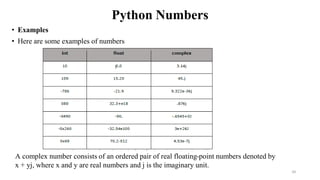
• Examples
•Here are some examples of numbers
A complex number consists of an ordered pair of real floating-point numbers denoted by
x + yj, where x and y are real numbers and j is the imaginary unit.
34
35.
Python Strings
• Stringsin Python are identified as a contiguous set of characters represented in the quotation
marks.
• Python allows either pair of single or double quotes.
• Subsets of strings can be taken using the slice operator ([ ] and [:] ) with indexes starting at 0 in the
beginning of the string and working their way from -1 to the end.
• The plus (+) sign is the string concatenation operator and the asterisk (*) is the repetition operator.
• For example-
#!/usr/bin/python3
str = 'Hello World!'
print (str) # Prints complete string
print (str[0]) # Prints first character of the string
print (str[2:5]) # Prints characters starting from 3rd to 5th
print (str[2:]) # Prints string starting from 3rd character
print (str * 2) # Prints string two times
print (str + " TEST") # Prints concatenated string
This will produce the following result
Hello World!
H
llo
llo World!
Hello World!Hello World!
Hello World!TEST.
35
36.
Python Strings
• Stringsin Python are identified as a contiguous set of characters represented in the
quotation marks.
• Python allows either pair of single or double quotes.
• Subsets of strings can be taken using the slice operator ([ ] and [:] ) with indexes
starting at 0 in the beginning of the string and working their way from -1 to the end.
• The plus (+) sign is the string concatenation operator and the asterisk (*) is the
repetition operator.
36
37.
Python Strings
For example-
#!/usr/bin/python3
str= 'Hello World!'
print (str) # Prints complete string
print (str[0]) # Prints first character of the string
print (str[2:5]) # Prints characters starting from 3rd to 5th
print (str[2:]) # Prints string starting from 3rd character
print (str * 2) # Prints string two times
print (str + "TEST") # Prints concatenated string This will produce the following result
Hello World!
H
llo
llo World!
Hello World!Hello World!
Hello World!TEST.
37
38.
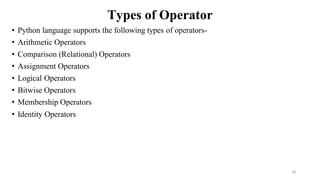
Types of Operator
•Python language supports the following types of operators-
• Arithmetic Operators
• Comparison (Relational) Operators
• Assignment Operators
• Logical Operators
• Bitwise Operators
• Membership Operators
• Identity Operators
38
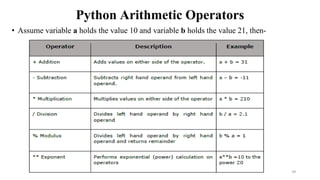
Python Arithmetic Operators
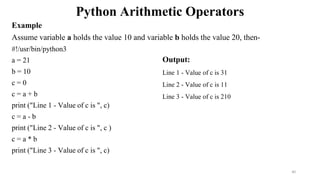
Example
Assumevariable a holds the value 10 and variable b holds the value 20, then-
#!/usr/bin/python3
a = 21
b = 10
c = 0
c = a + b
print ("Line 1 - Value of c is ", c)
c = a - b
print ("Line 2 - Value of c is ", c )
c = a * b
print ("Line 3 - Value of c is ", c)
Output:
Line 1 - Value of c is 31
Line 2 - Value of c is 11
Line 3 - Value of c is 210
40
41.
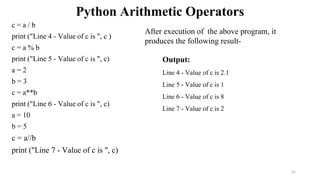
Python Arithmetic Operators
c= a / b
print ("Line 4 - Value of c is ", c )
c = a % b
print ("Line 5 - Value of c is ", c)
a = 2
b = 3
c = a**b
print ("Line 6 - Value of c is ", c)
a = 10
b = 5
c = a//b
print ("Line 7 - Value of c is ", c)
Output:
Line 4 - Value of c is 2.1
Line 5 - Value of c is 1
Line 6 - Value of c is 8
Line 7 - Value of c is 2
After execution of the above program, it
produces the following result-
41
42.
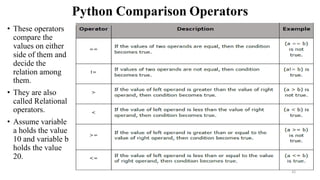
Python Comparison Operators
•These operators
compare the
values on either
side of them and
decide the
relation among
them.
• They are also
called Relational
operators.
• Assume variable
a holds the value
10 and variable b
holds the value
20.
42
43.
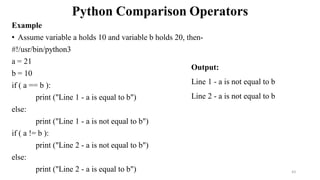
Python Comparison Operators
Example
•Assume variable a holds 10 and variable b holds 20, then-
#!/usr/bin/python3
a = 21
b = 10
if ( a == b ):
print ("Line 1 - a is equal to b")
else:
print ("Line 1 - a is not equal to b")
if ( a != b ):
print ("Line 2 - a is not equal to b")
else:
print ("Line 2 - a is equal to b")
Output:
Line 1 - a is not equal to b
Line 2 - a is not equal to b
43
44.
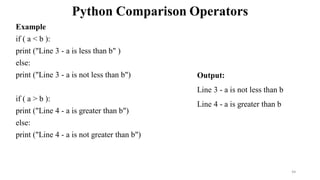
Python Comparison Operators
Example
if( a < b ):
print ("Line 3 - a is less than b" )
else:
print ("Line 3 - a is not less than b")
if ( a > b ):
print ("Line 4 - a is greater than b")
else:
print ("Line 4 - a is not greater than b")
Output:
Line 3 - a is not less than b
Line 4 - a is greater than b
44
45.
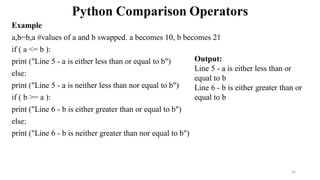
Python Comparison Operators
Example
a,b=b,a#values of a and b swapped. a becomes 10, b becomes 21
if ( a <= b ):
print ("Line 5 - a is either less than or equal to b")
else:
print ("Line 5 - a is neither less than nor equal to b")
if ( b >= a ):
print ("Line 6 - b is either greater than or equal to b")
else:
print ("Line 6 - b is neither greater than nor equal to b")
Output:
Line 5 - a is either less than or
equal to b
Line 6 - b is either greater than or
equal to b
45
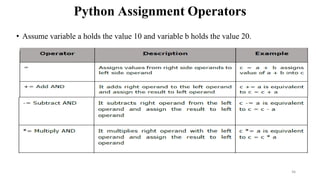
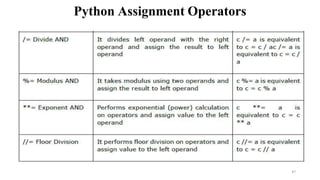
Python Assignment Operators
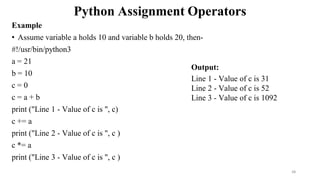
Example
•Assume variable a holds 10 and variable b holds 20, then-
#!/usr/bin/python3
a = 21
b = 10
c = 0
c = a + b
print ("Line 1 - Value of c is ", c)
c += a
print ("Line 2 - Value of c is ", c )
c *= a
print ("Line 3 - Value of c is ", c )
Output:
Line 1 - Value of c is 31
Line 2 - Value of c is 52
Line 3 - Value of c is 1092
48
49.
Python Assignment Operators
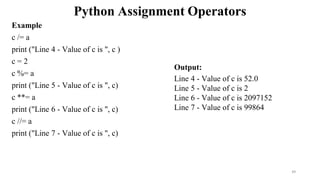
Example
c/= a
print ("Line 4 - Value of c is ", c )
c = 2
c %= a
print ("Line 5 - Value of c is ", c)
c **= a
print ("Line 6 - Value of c is ", c)
c //= a
print ("Line 7 - Value of c is ", c)
Output:
Line 4 - Value of c is 52.0
Line 5 - Value of c is 2
Line 6 - Value of c is 2097152
Line 7 - Value of c is 99864
49
50.
Python Bitwise Operators
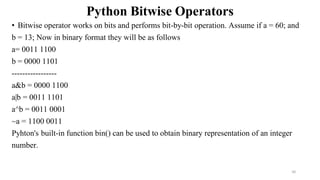
•Bitwise operator works on bits and performs bit-by-bit operation. Assume if a = 60; and
b = 13; Now in binary format they will be as follows
a= 0011 1100
b = 0000 1101
-----------------
a&b = 0000 1100
a|b = 0011 1101
a^b = 0011 0001
~a = 1100 0011
Pyhton's built-in function bin() can be used to obtain binary representation of an integer
number.
50
Python Bitwise Operators
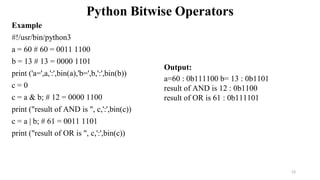
Example
#!/usr/bin/python3
a= 60 # 60 = 0011 1100
b = 13 # 13 = 0000 1101
print ('a=',a,':',bin(a),'b=',b,':',bin(b))
c = 0
c = a & b; # 12 = 0000 1100
print ("result of AND is ", c,':',bin(c))
c = a | b; # 61 = 0011 1101
print ("result of OR is ", c,':',bin(c))
Output:
a=60 : 0b111100 b= 13 : 0b1101
result of AND is 12 : 0b1100
result of OR is 61 : 0b111101
52
53.
Python Bitwise Operators
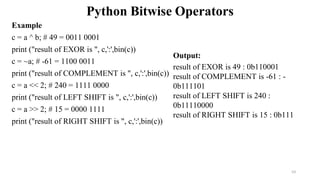
Example
c= a ^ b; # 49 = 0011 0001
print ("result of EXOR is ", c,':',bin(c))
c = ~a; # -61 = 1100 0011
print ("result of COMPLEMENT is ", c,':',bin(c))
c = a << 2; # 240 = 1111 0000
print ("result of LEFT SHIFT is ", c,':',bin(c))
c = a >> 2; # 15 = 0000 1111
print ("result of RIGHT SHIFT is ", c,':',bin(c))
Output:
result of EXOR is 49 : 0b110001
result of COMPLEMENT is -61 : -
0b111101
result of LEFT SHIFT is 240 :
0b11110000
result of RIGHT SHIFT is 15 : 0b111
53
54.
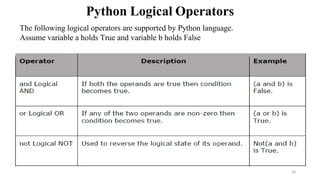
Python Logical Operators
Thefollowing logical operators are supported by Python language.
Assume variable a holds True and variable b holds False
54
![Python Program
• Execution of the programs in different modes of programming.
• Interactive Mode Programming
• Invoking the interpreter without passing a script file as a parameter brings up the
following prompt-
• $ python
• Python 3.3.2 (default, Dec 10 2013, 11:35:01)
• [GCC 4.6.3] on Linux
• Type "help", "copyright", "credits", or "license" for more information.
• >>>
15](https://image.slidesharecdn.com/unit1-part-1-introductiontopython-250616033014-37d74862/85/Unit-1-Part-1-Introduction-to-Python-pdf-15-320.jpg)
![Python Program cont..
• On Windows:
Python 3.4.3 (v3.4.3:9b73f1c3e601, Feb 24 2015, 22:43:06) [MSC v.1600 32
bit (Intel)] on win32
Type "copyright", "credits" or "license()" for more information.
>>>
Type the following text at the Python prompt and press Enter-
>>> print ("Hello, Python!")
Output: Hello, Python!
16](https://image.slidesharecdn.com/unit1-part-1-introductiontopython-250616033014-37d74862/85/Unit-1-Part-1-Introduction-to-Python-pdf-16-320.jpg)
![Multi-Line Statements
• Statements in Python typically end with a new line. Python, however, allows the use of
the line continuation character () to denote that the line should continue. For example
total = item_one +
item_two +
item_three
The statements contained within the [], {}, or () brackets do not need to use the line
continuation character.
For example
days = ['Monday', 'Tuesday', 'Wednesday',
'Thursday', 'Friday']
22](https://image.slidesharecdn.com/unit1-part-1-introductiontopython-250616033014-37d74862/85/Unit-1-Part-1-Introduction-to-Python-pdf-22-320.jpg)
![Command Line Arguments
• Many programs can be run to provide you with some basic information about how they should be run.
• Python enables you to do this with -h:
$ python -h
usage: python [option] ... [-c cmd | -m mod | file | -] [arg] ...
Options and arguments (and corresponding environment variables):
-c cmd : program passed in as string (terminates option list)
-d : debug output from parser (also PYTHONDEBUG=x)
-E : ignore environment variables (such as PYTHONPATH)
-h : print this help message and exit
[ etc. ]
26](https://image.slidesharecdn.com/unit1-part-1-introductiontopython-250616033014-37d74862/85/Unit-1-Part-1-Introduction-to-Python-pdf-26-320.jpg)
![Command Line Arguments
• Python provided a getopt module that helps you parse command-line options and arguments.
• This module provides two functions and an exception to enable command line argument parsing.
getopt.getopt method
• This method parses the command line options and parameter list. Following is a simple syntax for this
method
getopt.getopt(args, options, [long_options])
Here is the detail of the parameters-
• args: This is the argument list to be parsed.
• options: This is the string of option letters that the script wants to recognize, with options that require an
argument should be followed by a colon (:).
• long_options: This is an optional parameter and if specified, must be a list of strings with the names of the
long options, which should be supported. Long options, which require an argument should be followed by
an equal sign ('='). To accept only long options, options should be an empty string.
• This method returns a value consisting of two elements- the first is a list of (option, value) pairs, the second
is a list of program arguments left after the option list was stripped.
• Each option-and-value pair returned has the option as its first element, prefixed with a hyphen for short
options (e.g., '-x') or two hyphens for long options (e.g., '- -long-option'). 27](https://image.slidesharecdn.com/unit1-part-1-introductiontopython-250616033014-37d74862/85/Unit-1-Part-1-Introduction-to-Python-pdf-27-320.jpg)
![Python Data Types
Name Type Description
Integers int Whole numbers, such as: 3 300 200
Floating point float Numbers with a decimal point: 2.3 4.6 100.0
Strings str Ordered sequence of characters: "hello" 'Sammy' "2000"
Lists list Ordered sequence of objects: [10,"hello",200.3]
Dictionaries dict Unordered Key:Value pairs: {"mykey" : "value" , "name" : "Frankie"}
Tuples tup Ordered immutable sequence of objects: (10,"hello",200.3)
Sets set Unordered collection of unique objects: {"a","b"}
Booleans bool Logical value indicating True or False
31](https://image.slidesharecdn.com/unit1-part-1-introductiontopython-250616033014-37d74862/85/Unit-1-Part-1-Introduction-to-Python-pdf-31-320.jpg)
![Python Numbers
• Number data types store numeric values. Number objects are created when you assign a value to them.
• For example
var1 = 1
var2 = 10
• You can also delete the reference to a number object by using the del statement.
• The syntax of the del statement is −
del var1[,var2[,var3[....,varN]]]]
• You can delete a single object or multiple objects by using the del statement.
• For example
del var
del var_a, var_b
• Python supports three different numerical types −
• int (signed integers)
• float (floating point real values)
• complex (complex numbers)
All integers in Python 3 are represented as long integers.
Hence, there is no separate number type as long.
33](https://image.slidesharecdn.com/unit1-part-1-introductiontopython-250616033014-37d74862/85/Unit-1-Part-1-Introduction-to-Python-pdf-33-320.jpg)
![Python Strings
• Strings in Python are identified as a contiguous set of characters represented in the quotation
marks.
• Python allows either pair of single or double quotes.
• Subsets of strings can be taken using the slice operator ([ ] and [:] ) with indexes starting at 0 in the
beginning of the string and working their way from -1 to the end.
• The plus (+) sign is the string concatenation operator and the asterisk (*) is the repetition operator.
• For example-
#!/usr/bin/python3
str = 'Hello World!'
print (str) # Prints complete string
print (str[0]) # Prints first character of the string
print (str[2:5]) # Prints characters starting from 3rd to 5th
print (str[2:]) # Prints string starting from 3rd character
print (str * 2) # Prints string two times
print (str + " TEST") # Prints concatenated string
This will produce the following result
Hello World!
H
llo
llo World!
Hello World!Hello World!
Hello World!TEST.
35](https://image.slidesharecdn.com/unit1-part-1-introductiontopython-250616033014-37d74862/85/Unit-1-Part-1-Introduction-to-Python-pdf-35-320.jpg)
![Python Strings
• Strings in Python are identified as a contiguous set of characters represented in the
quotation marks.
• Python allows either pair of single or double quotes.
• Subsets of strings can be taken using the slice operator ([ ] and [:] ) with indexes
starting at 0 in the beginning of the string and working their way from -1 to the end.
• The plus (+) sign is the string concatenation operator and the asterisk (*) is the
repetition operator.
36](https://image.slidesharecdn.com/unit1-part-1-introductiontopython-250616033014-37d74862/85/Unit-1-Part-1-Introduction-to-Python-pdf-36-320.jpg)
![Python Strings
For example-
#!/usr/bin/python3
str = 'Hello World!'
print (str) # Prints complete string
print (str[0]) # Prints first character of the string
print (str[2:5]) # Prints characters starting from 3rd to 5th
print (str[2:]) # Prints string starting from 3rd character
print (str * 2) # Prints string two times
print (str + "TEST") # Prints concatenated string This will produce the following result
Hello World!
H
llo
llo World!
Hello World!Hello World!
Hello World!TEST.
37](https://image.slidesharecdn.com/unit1-part-1-introductiontopython-250616033014-37d74862/85/Unit-1-Part-1-Introduction-to-Python-pdf-37-320.jpg)