Under the hood of
Overview
Introduction
 • Define web analytics
 • Why it’s important
 • The lay of the land

Gathering information
                                    Application
•   General visitor metrics
                                    Using this information to
•   Where your visitors come from
                                    •Measure marketing efforts
•   How they find you
                                    •Optimize performance
•   How they use your site
                                    •Make informed decisions about
                                    content and design
What do you want to learn from your
Google Analytics reports?
Web Analytics Defined
• Google Analytics (GA) is a service offered by
  Google that generates detailed statistics
  about the visitsmade for people like you so you
        The product is made for people like you so you
         The product is to a website.
        can make informed marketing decisions.
         can make informed marketing decisions.
• It is the most widely used website statistics
  service.
• The product is aimed at marketers = you       as opposed
  to webmasters and technologists from which
  the industry of web analytics originally grew.
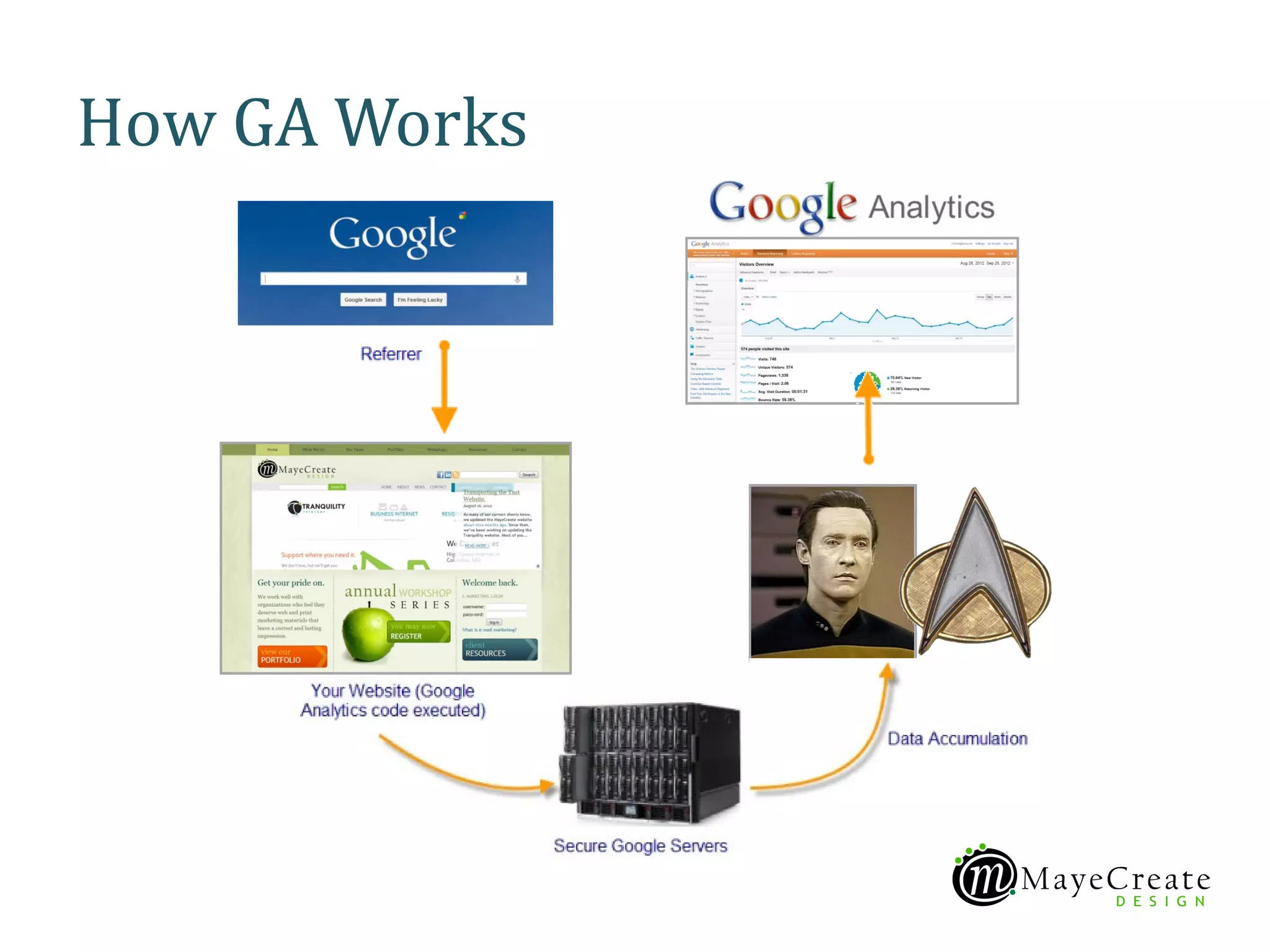
How GA Works
Why it’s important
• Websites are one of the most trackable
  marketing tools available to small businesses.
• Analytics help you gauge effectiveness of
  marketing efforts outside your website.
• Data provided assists with optimizing content.
• Results allow you to make informed decisions
  about content and site design.
Lay of the land
• Login at www.google.com/analytics
• Choose your site profile or search for it
• Welcome to the dashboard!
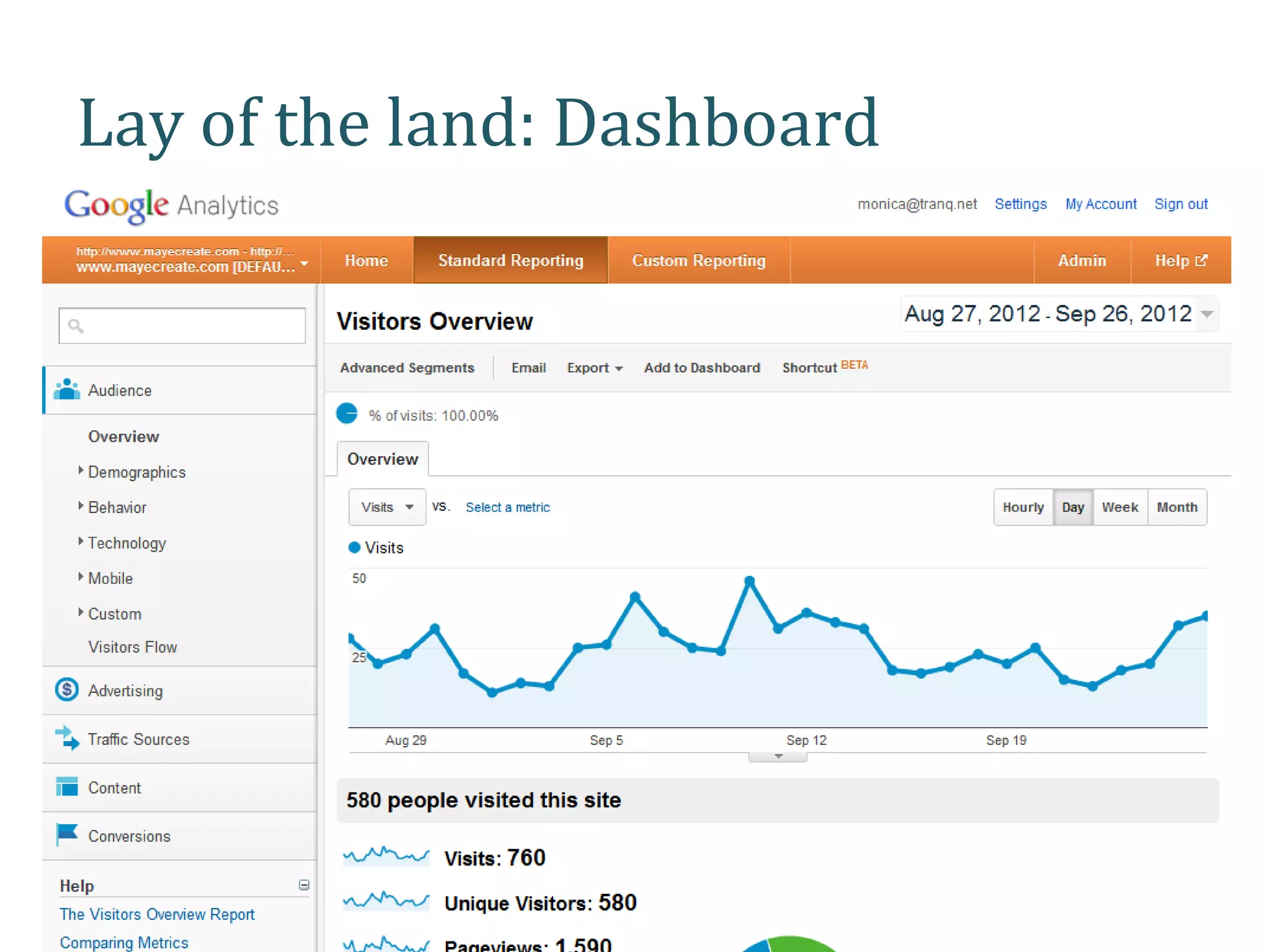
Lay of the land: Dashboard
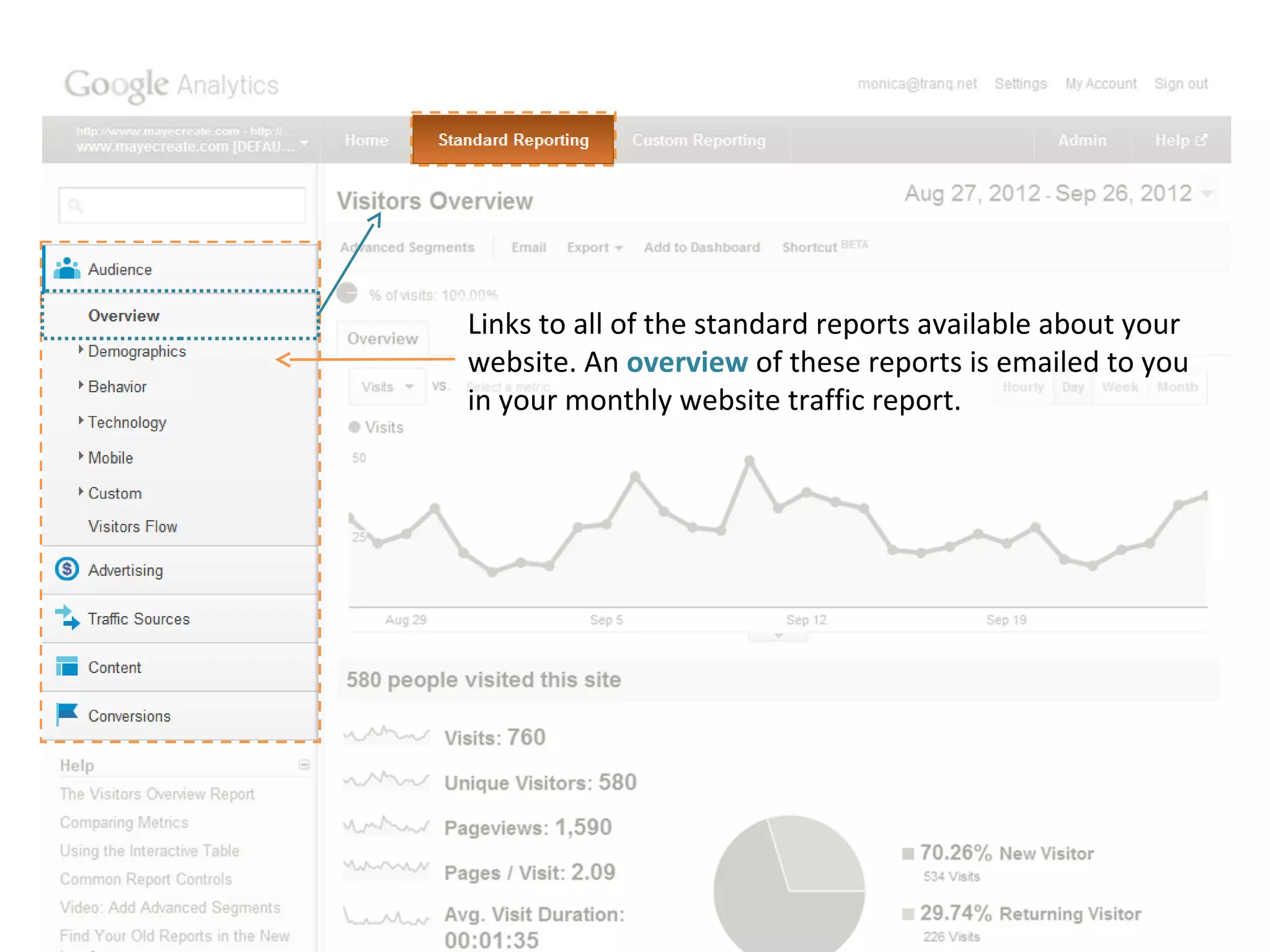
Links to all of the standard reports available about your
website. An overview of these reports is emailed to you
in your monthly website traffic report.
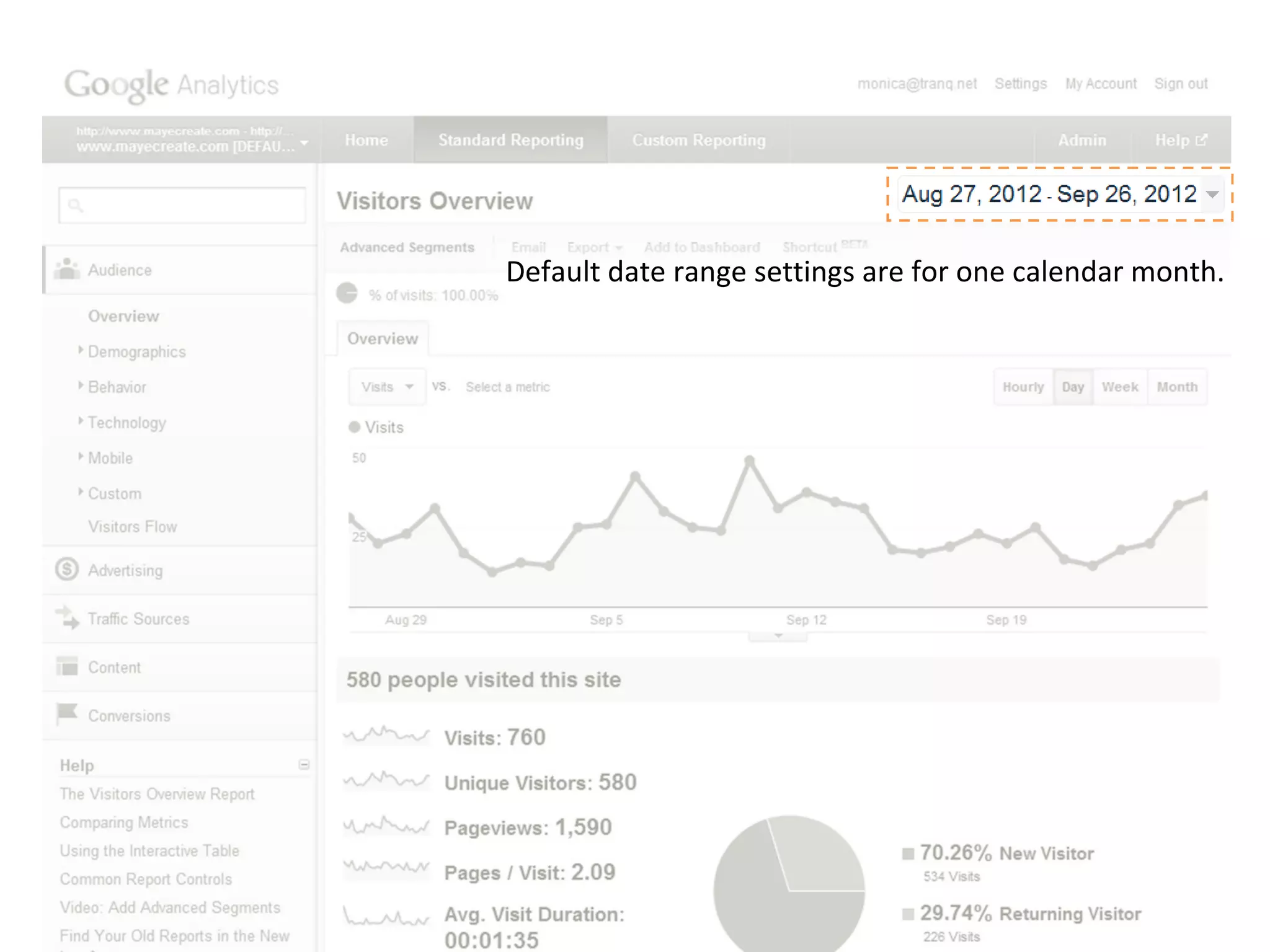
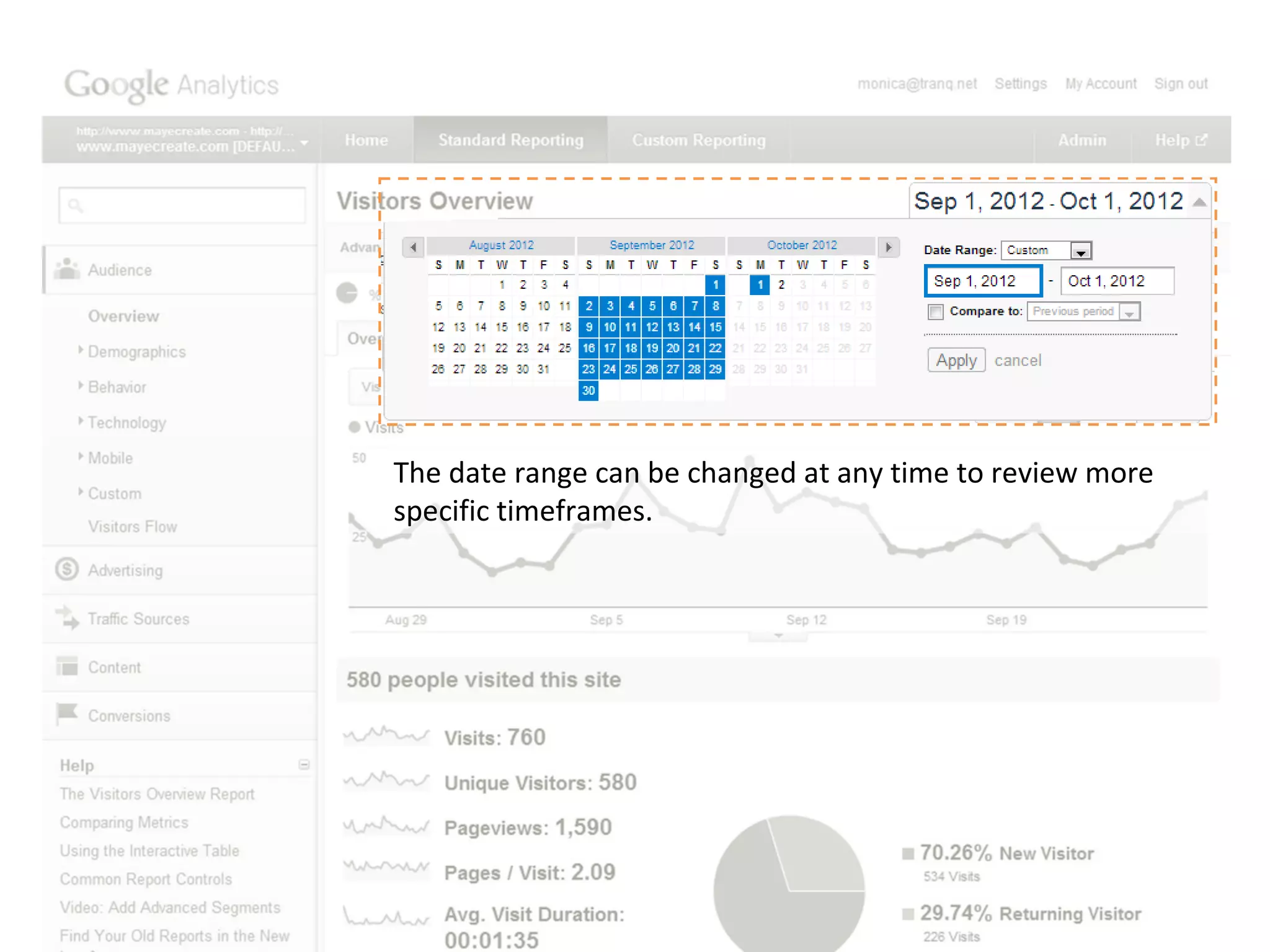
Default date range settings are for one calendar month.
The date range can be changed at any time to review more
specific timeframes.
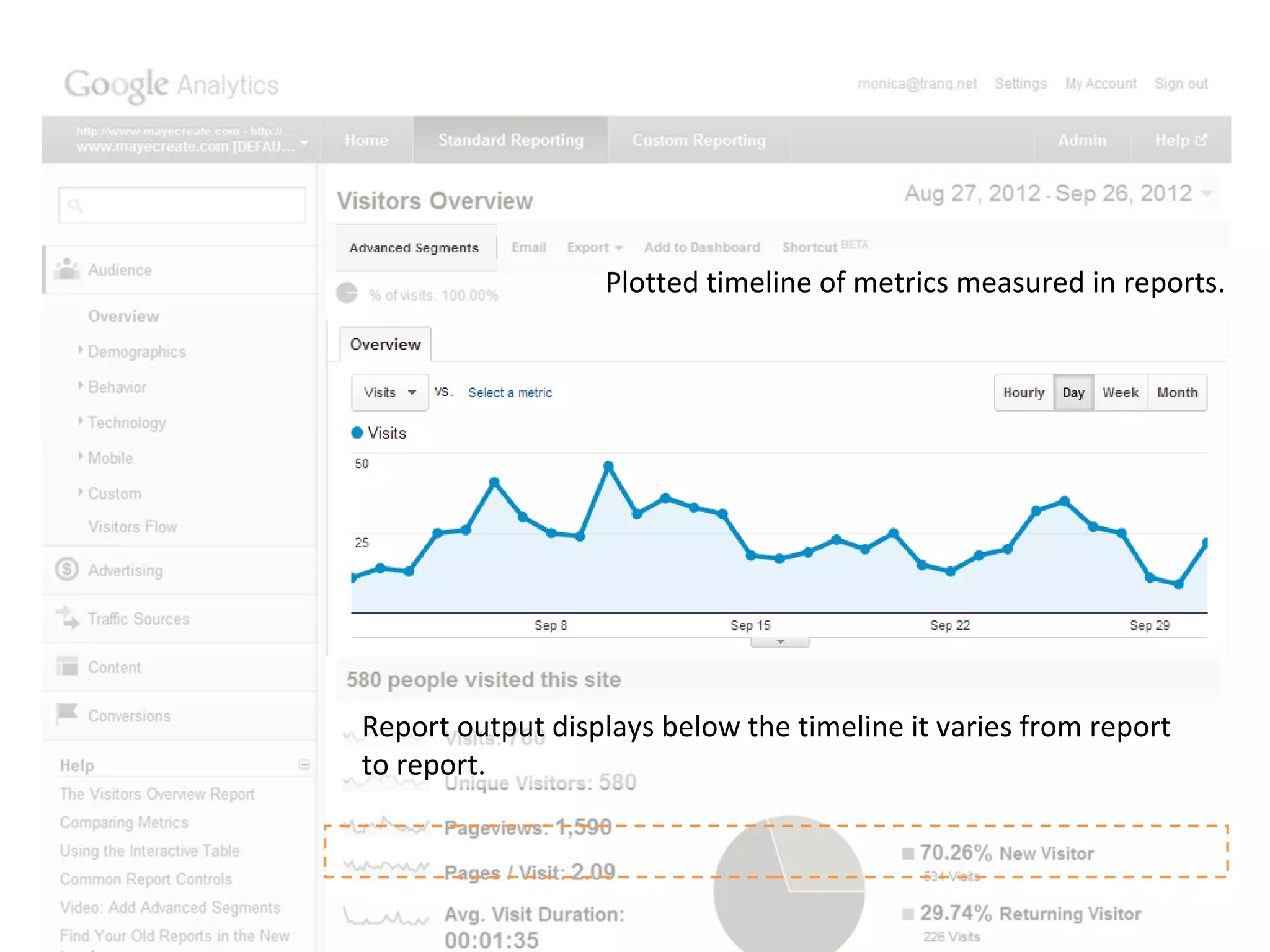
Plotted timeline of metrics measured in reports.


Report output displays below the timeline it varies from report
to report.
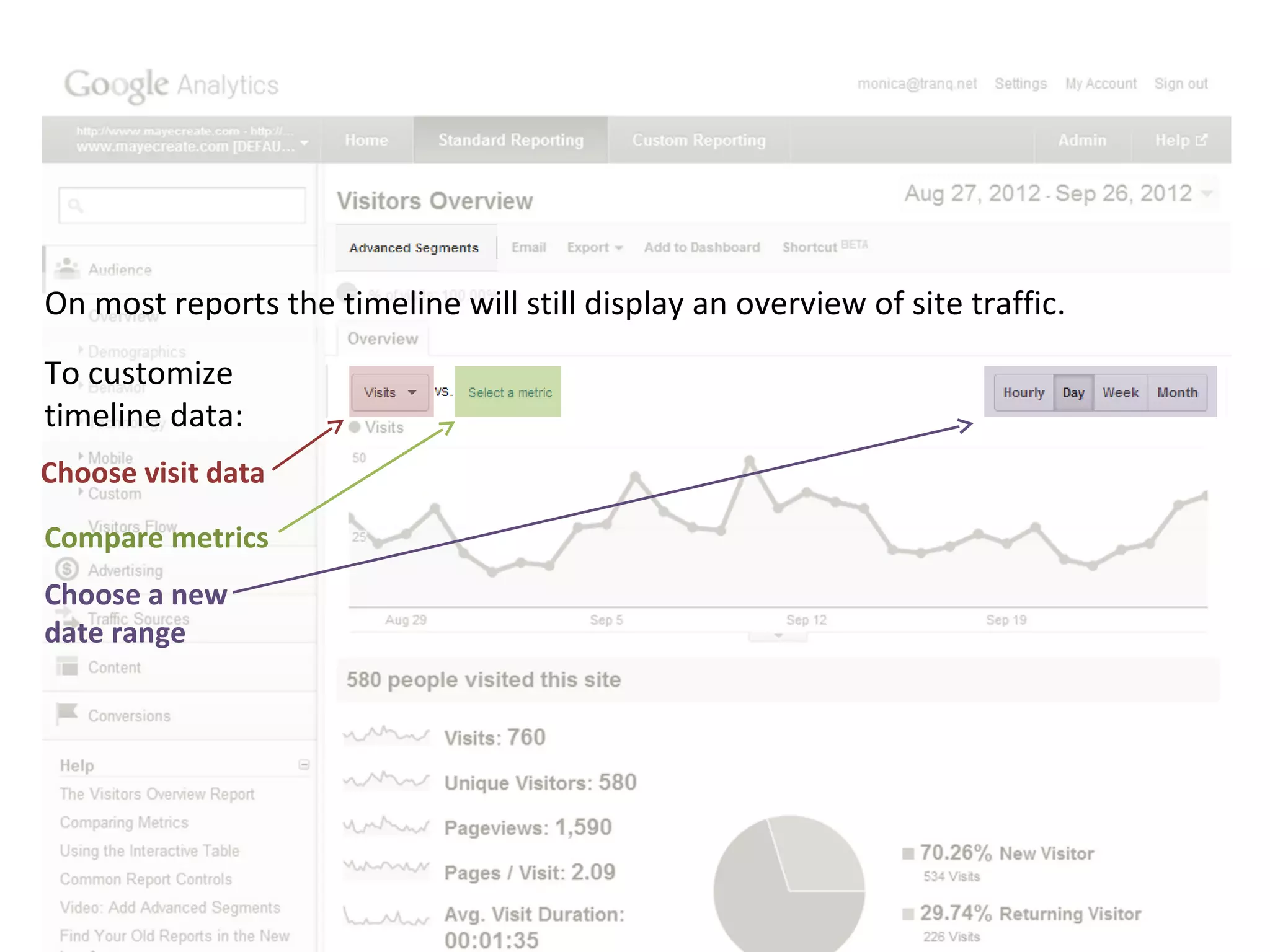
On most reports the timeline will still display an overview of site traffic.
To customize
timeline data:
Choose visit data

Compare metrics
Choose a new
date range
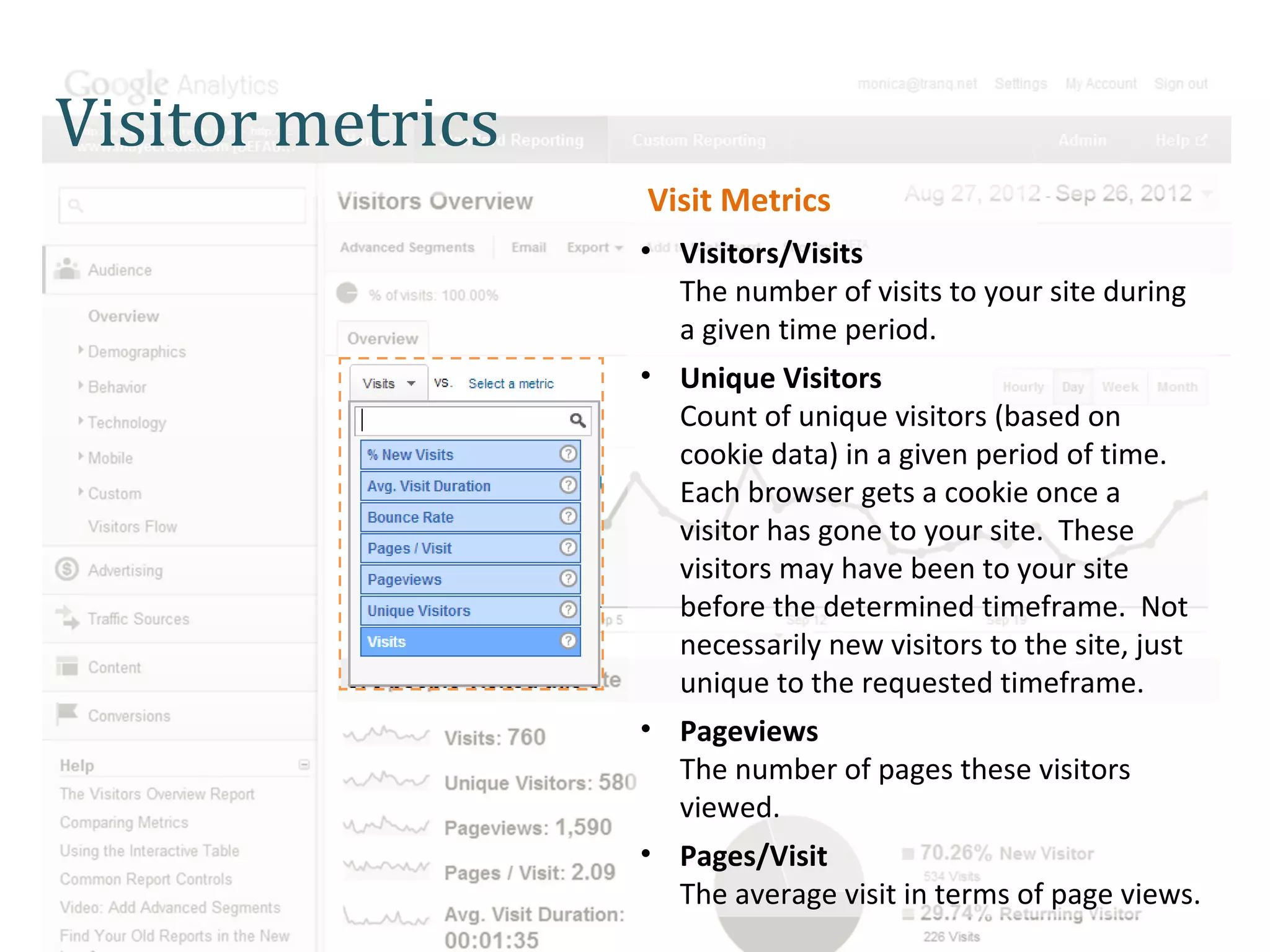
Visitor metrics
                  Visit Metrics
                  • Visitors/Visits
                    The number of visits to your site during
                    a given time period.
                  • Unique Visitors
                    Count of unique visitors (based on
                    cookie data) in a given period of time.
                    Each browser gets a cookie once a
                    visitor has gone to your site. These
                    visitors may have been to your site
                    before the determined timeframe. Not
                    necessarily new visitors to the site, just
                    unique to the requested timeframe.
                  • Pageviews
                    The number of pages these visitors
                    viewed.
                  • Pages/Visit
                    The average visit in terms of page views.
Visitor metrics
                  Visit Metrics (Cont.)
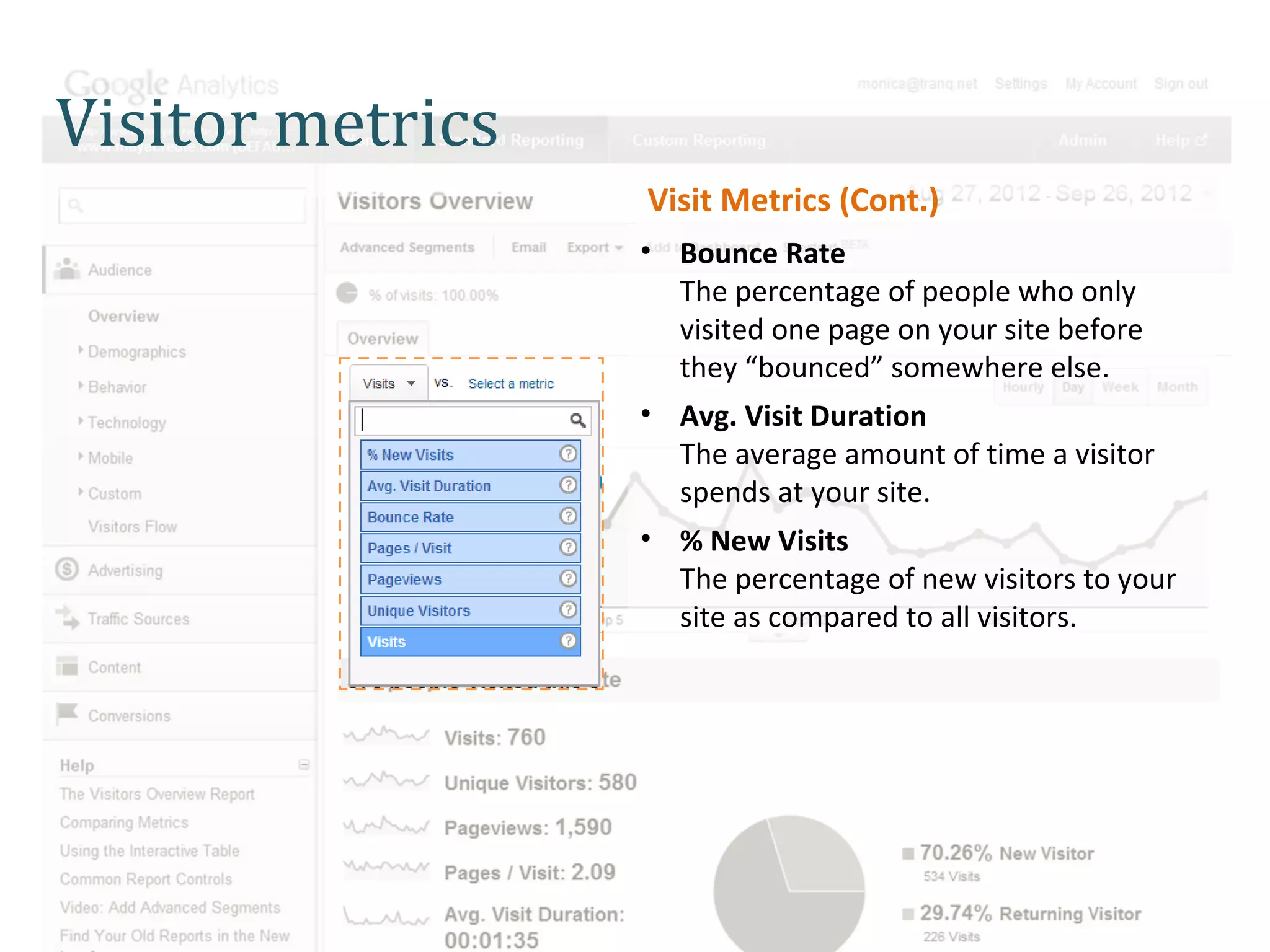
                  • Bounce Rate
                    The percentage of people who only
                    visited one page on your site before
                    they “bounced” somewhere else.
                  • Avg. Visit Duration
                    The average amount of time a visitor
                    spends at your site.
                  • % New Visits
                    The percentage of new visitors to your
                    site as compared to all visitors.
Unique Visitors vs Visits

Let’s compare metrics.
Visitor metrics

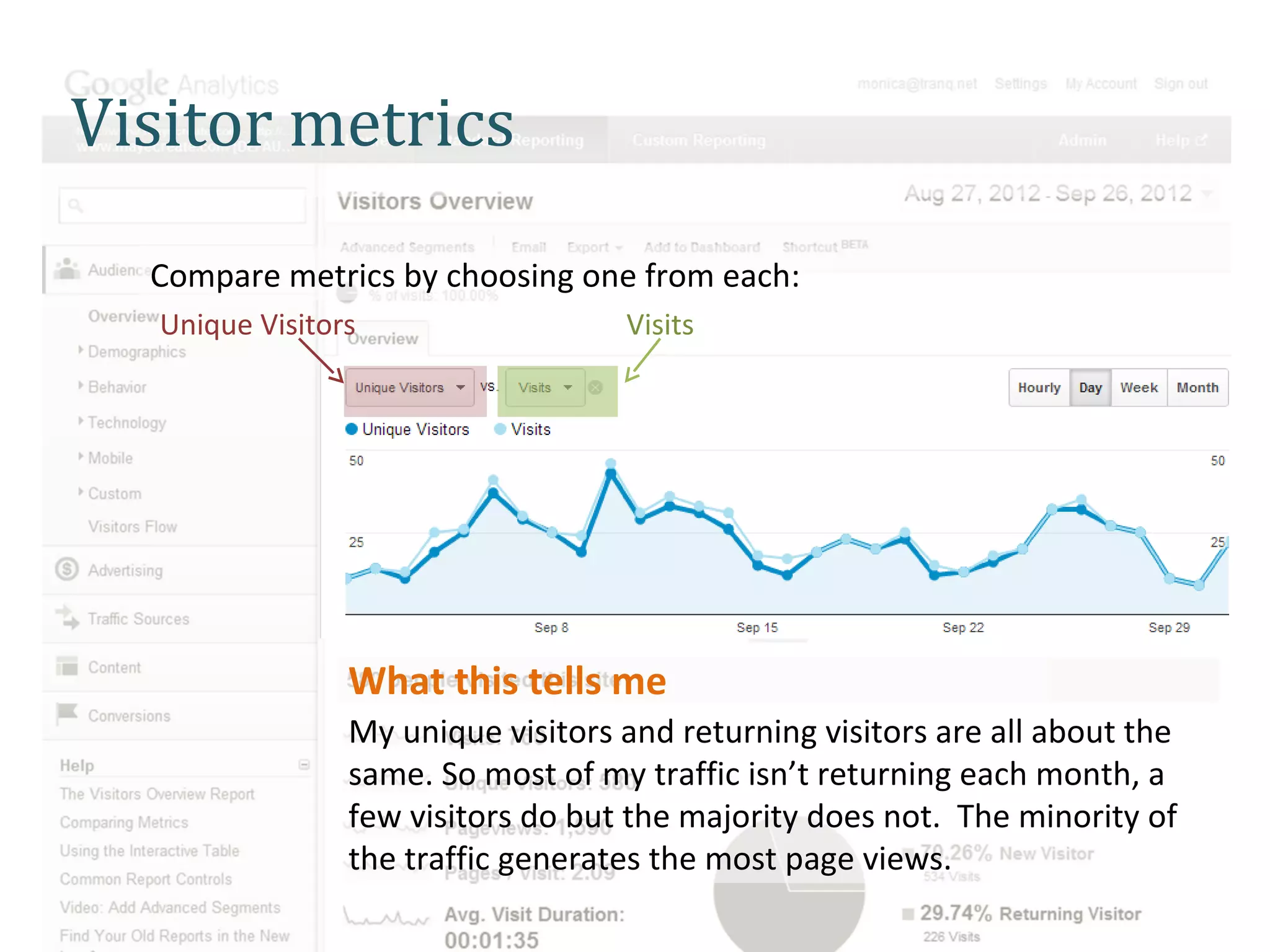
  Compare metrics by choosing one from each:
   Unique Visitors                  Visits


                 What this tells me
                 My unique visitors and returning visitors are all about the
                 same. So most of my traffic isn’t returning each month, a
                 few visitors do but the majority does not. The minority of
                 the traffic generates the most page views.
Compare traffic patterns and email marketing mailing dates

Reports in action!
APPLICATION

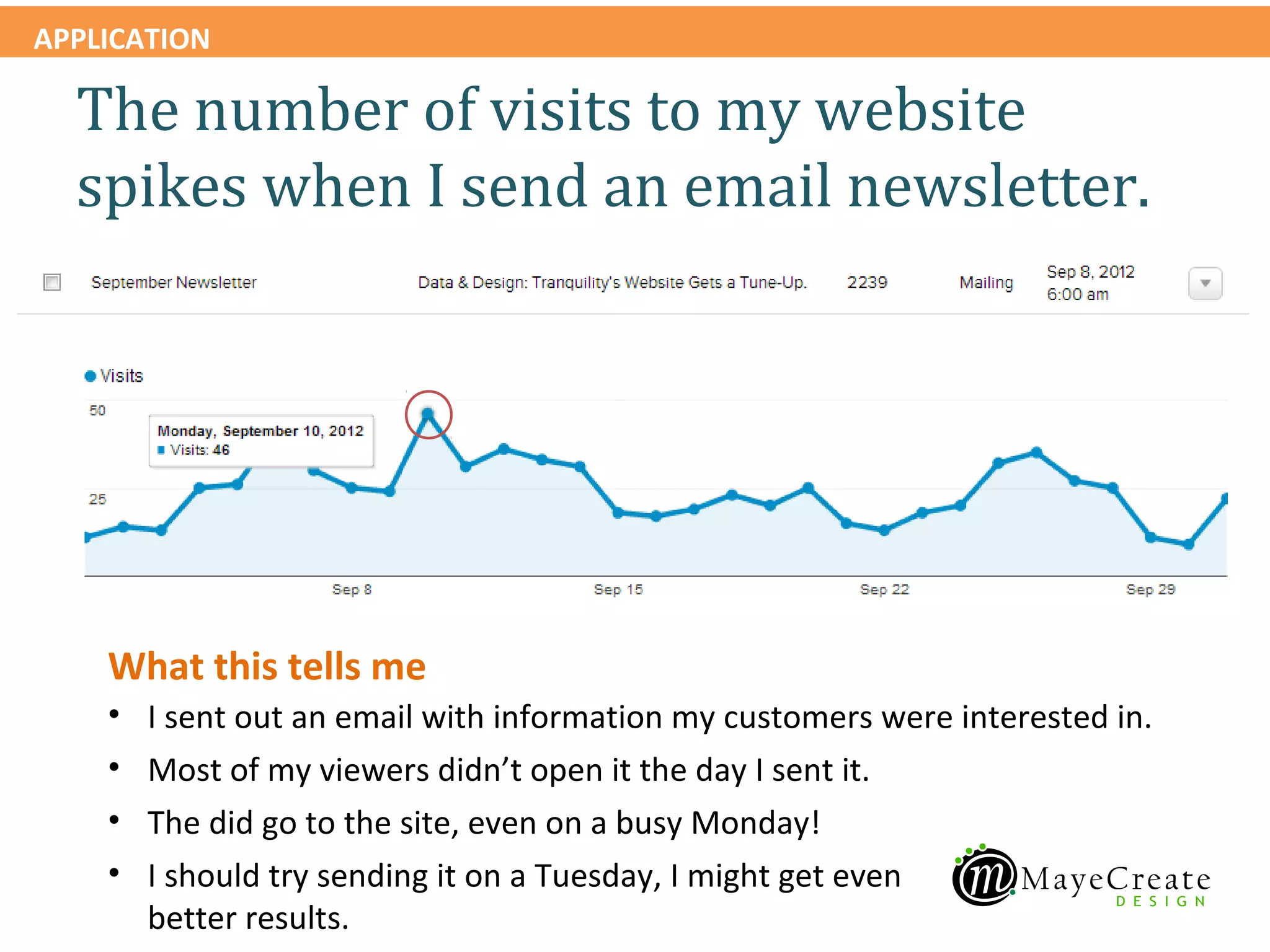
  The number of visits to my website
  spikes when I send an email newsletter.


    What this tells me
    •   I sent out an email with information my customers were interested in.
    •   Most of my viewers didn’t open it the day I sent it.
    •   The did go to the site, even on a busy Monday!
    •   I should try sending it on a Tuesday, I might get even
        better results.
APPLICATION

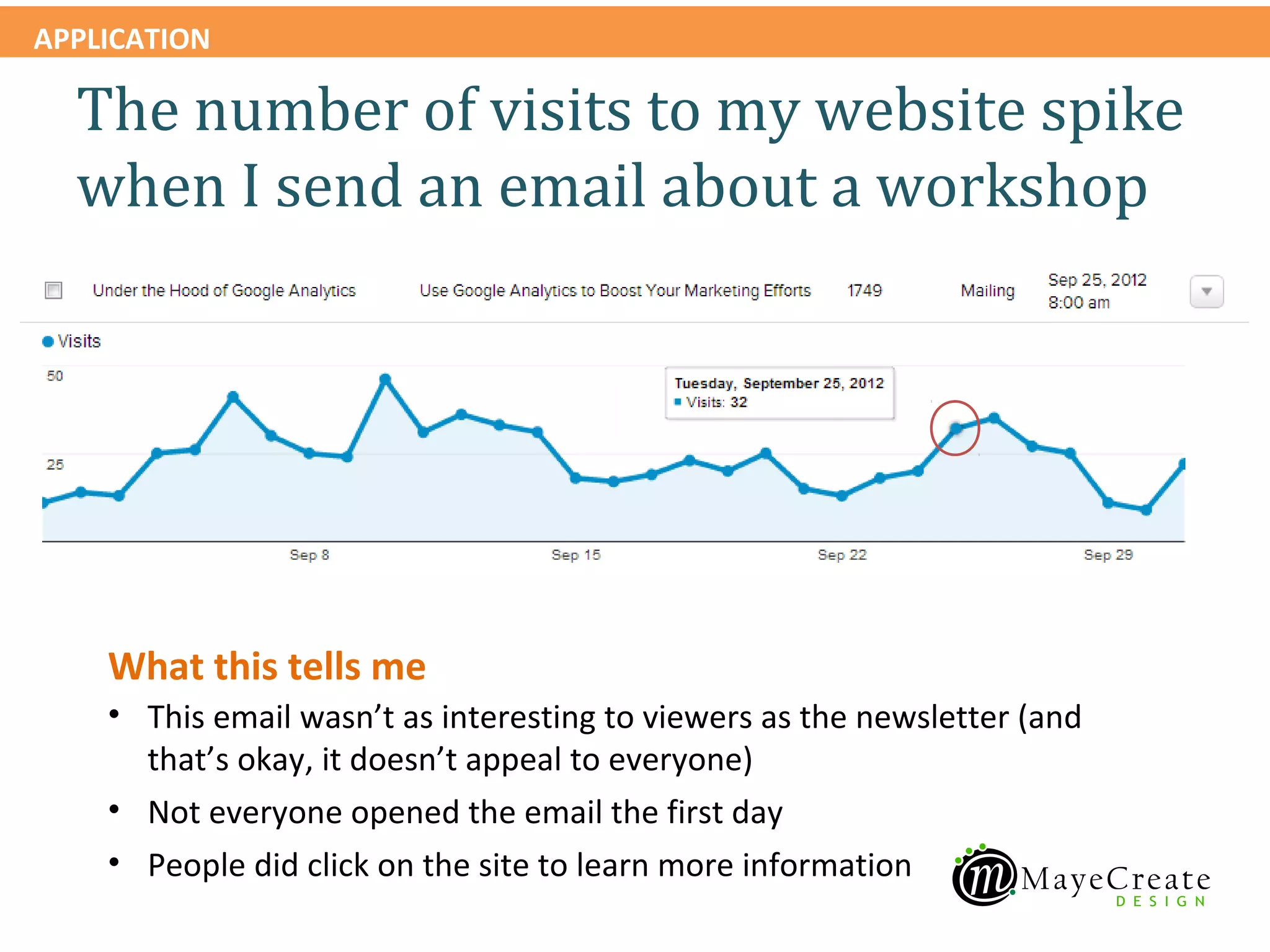
  The number of visits to my website spike
  when I send an email about a workshop


    What this tells me
    • This email wasn’t as interesting to viewers as the newsletter (and
      that’s okay, it doesn’t appeal to everyone)
    • Not everyone opened the email the first day
    • People did click on the site to learn more information
APPLICATION

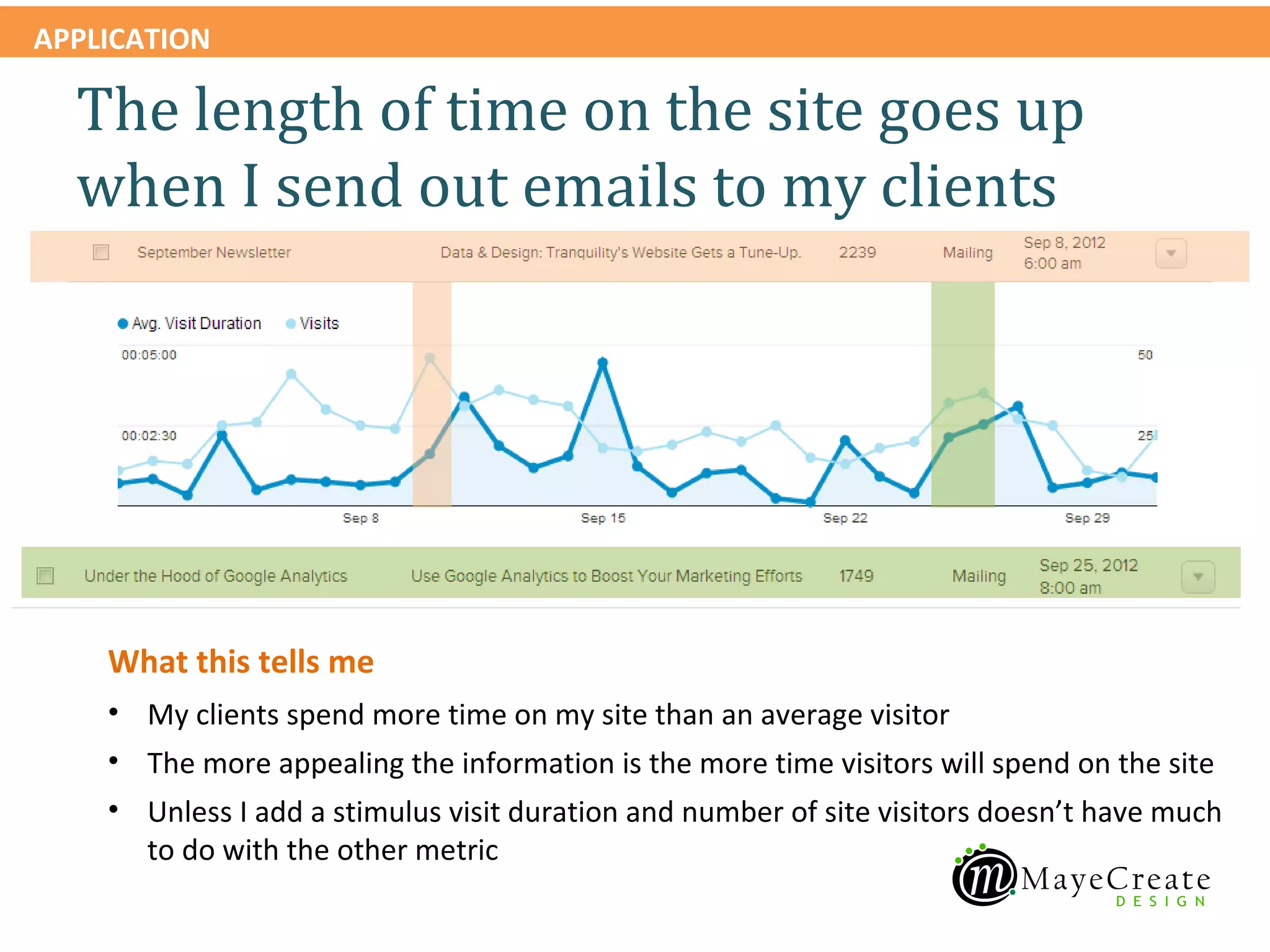
  The length of time on the site goes up
  when I send out emails to my clients


    What this tells me
    • My clients spend more time on my site than an average visitor
    • The more appealing the information is the more time visitors will spend on the site
    • Unless I add a stimulus visit duration and number of site visitors doesn’t have much
      to do with the other metric
APPLICATION


  Our site goals
  • Lower Bounce Rate
    This can often seem deceptively high, but many people
    will get to your site and realize that it wasn’t what they
    were looking for, or you may have a popular image
    indexed by Google’s Image Search that generates a lot
    of “drive-by” traffic and skews your numbers.
    Alternatively, it may represent that your site is difficult
    to navigate or understand for new visitors.
  • Generate More High Quality Traffic
  • Increase Return Visitors
APPLICATION


  Our site goals
  Our action plan:
  •Removing resources on our site that were hit often
  and are not reaching our target market. Asking
  search engines to stop indexing the resources
  •Updating our site more regularly with information
  our target market is interested in
  •Sending our regular email newsletters
APPLICATION

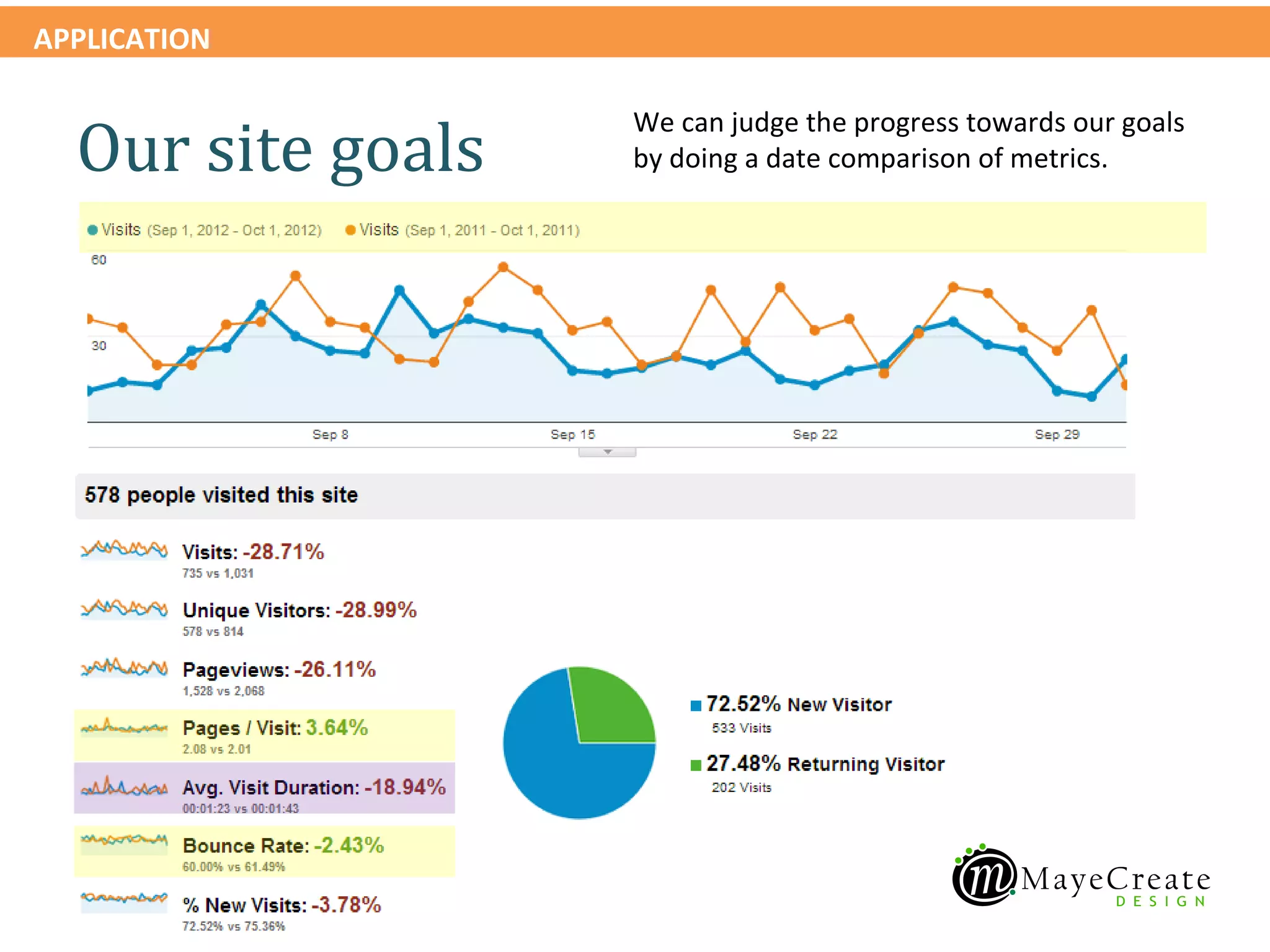
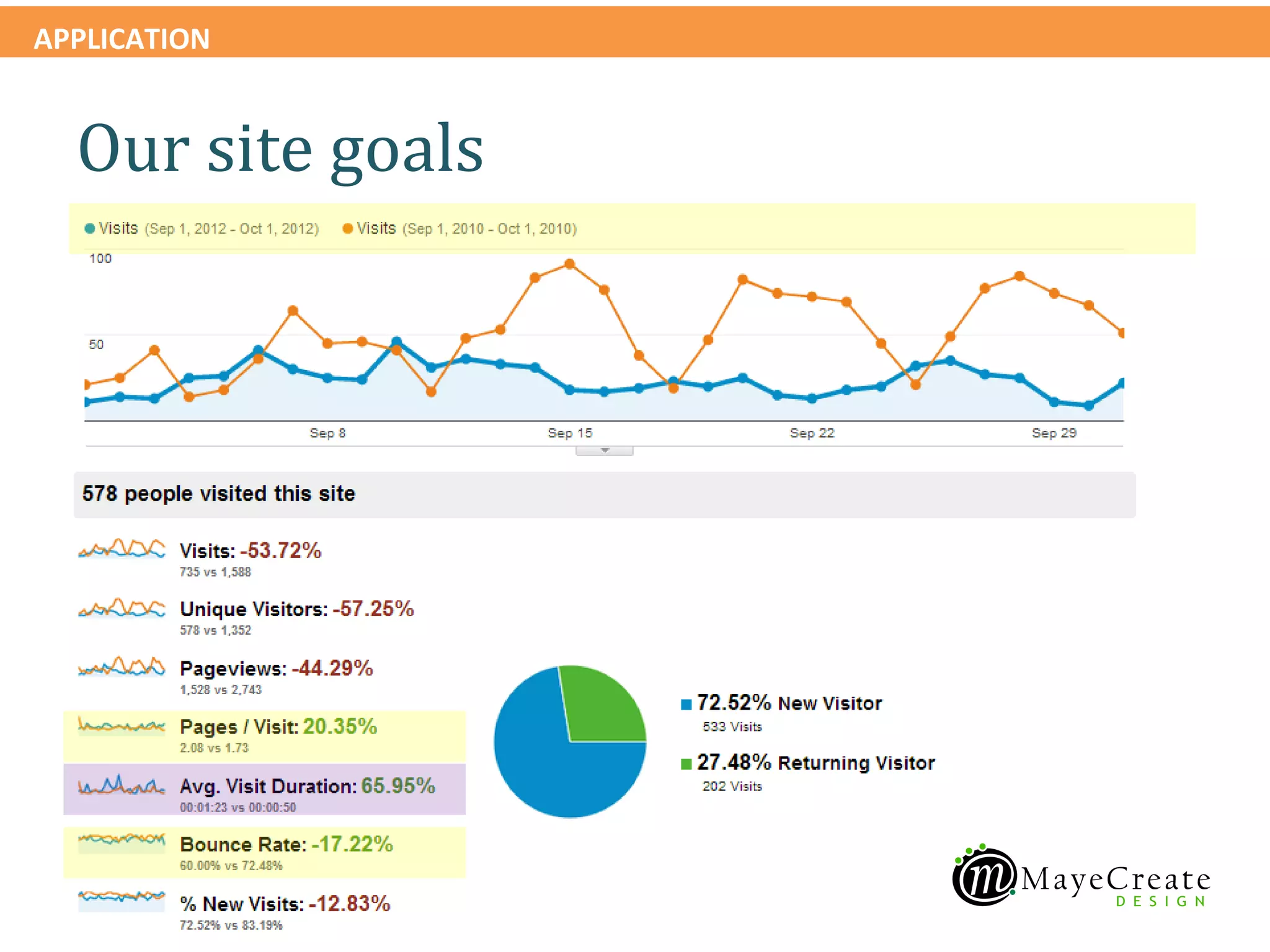
                   We can judge the progress towards our goals
  Our site goals   by doing a date comparison of metrics.
APPLICATION


  Our site goals
Where visitors come from

Devices                            Location
• Mobile                           • City
   – iPhone                        • State
   – Andriod
                                   • Country
   – Blackberry
• Desktop
   – PC
   – Mac
   – Monitor size and resolution
• Browser
APPLICATION


    Audience > Mobile > Overview

    Review mobile visitors report
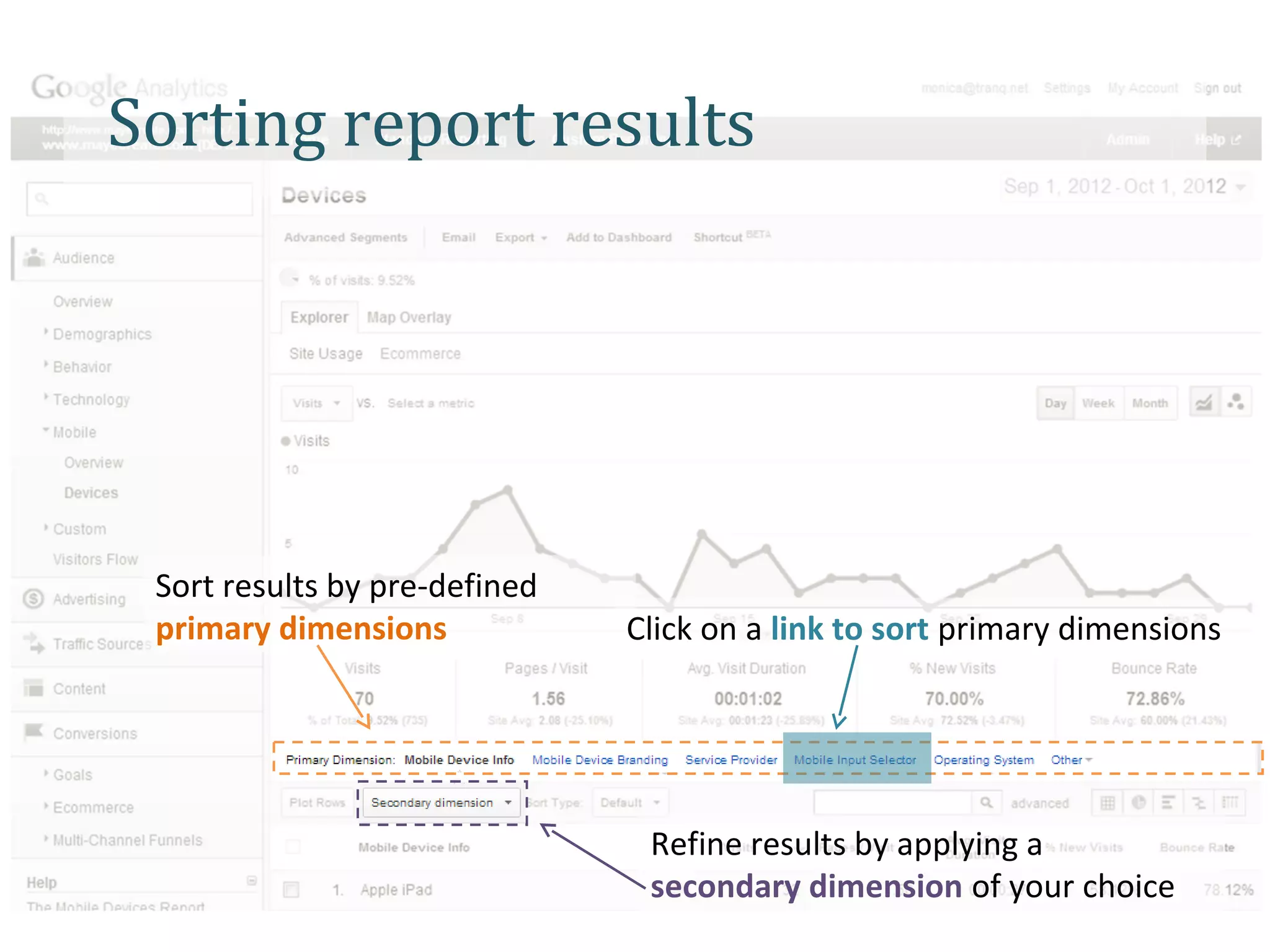
Sorting report results


 Sort results by pre-defined
 primary dimensions            Click on a link to sort primary dimensions


                                Refine results by applying a
                                secondary dimension of your choice
APPLICATION


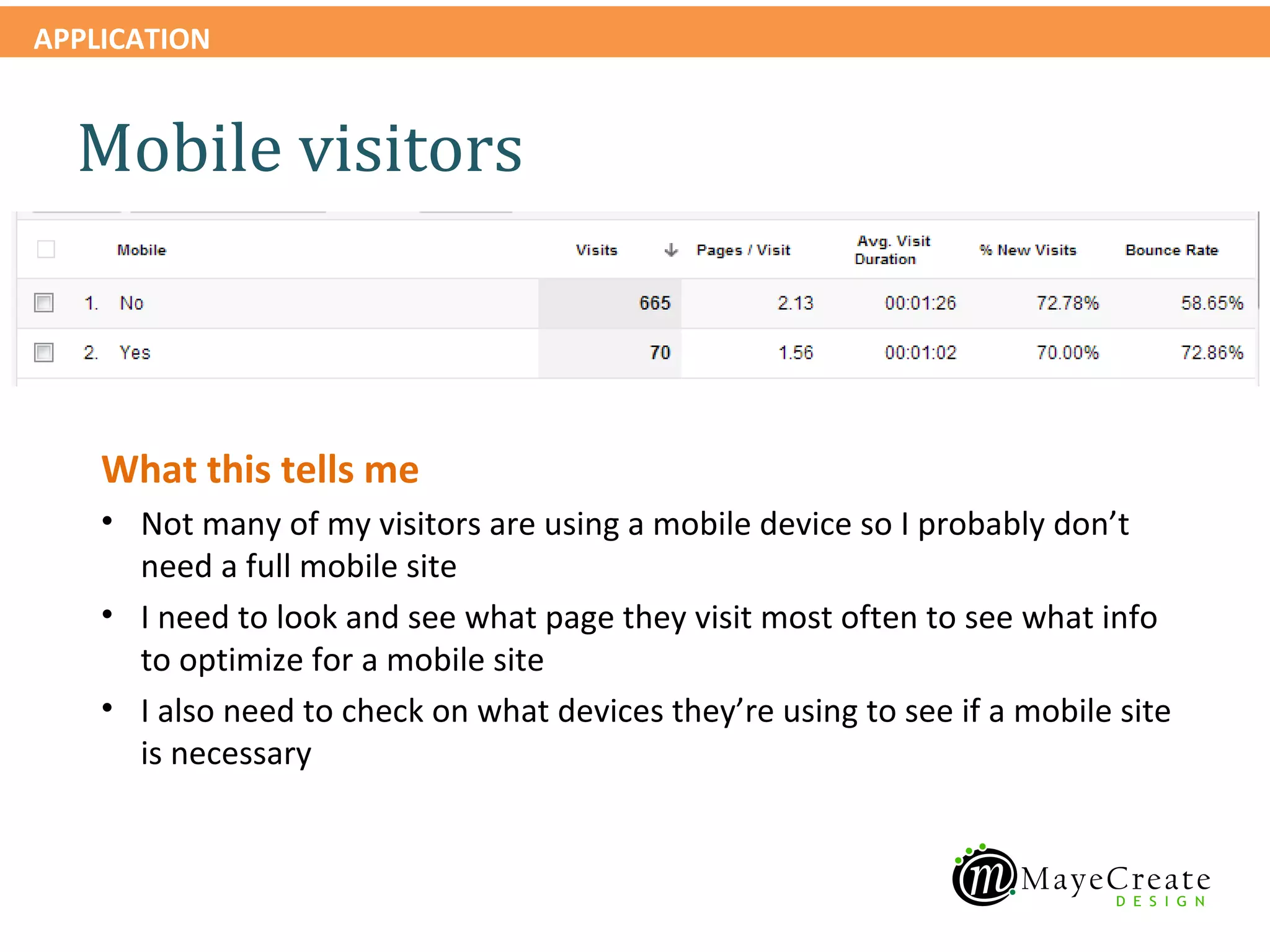
  Mobile visitors


    What this tells me
    • Not many of my visitors are using a mobile device so I probably don’t
      need a full mobile site
    • I need to look and see what page they visit most often to see what info
      to optimize for a mobile site
    • I also need to check on what devices they’re using to see if a mobile site
      is necessary
APPLICATION


    Audience > Mobile > Devices

    Review mobile devices report
APPLICATION


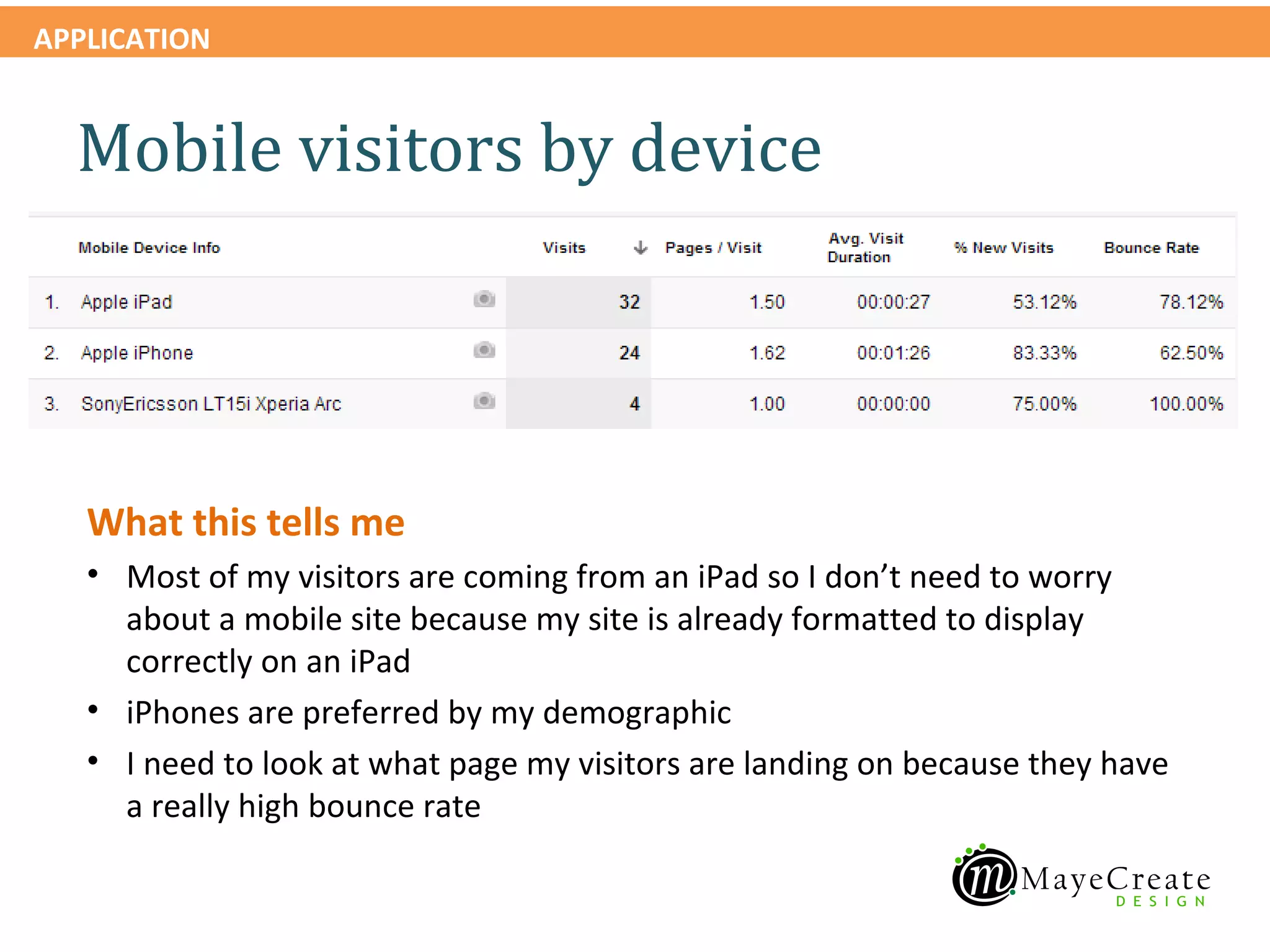
  Mobile visitors by device


   What this tells me
   • Most of my visitors are coming from an iPad so I don’t need to worry
     about a mobile site because my site is already formatted to display
     correctly on an iPad
   • iPhones are preferred by my demographic
   • I need to look at what page my visitors are landing on because they have
     a really high bounce rate
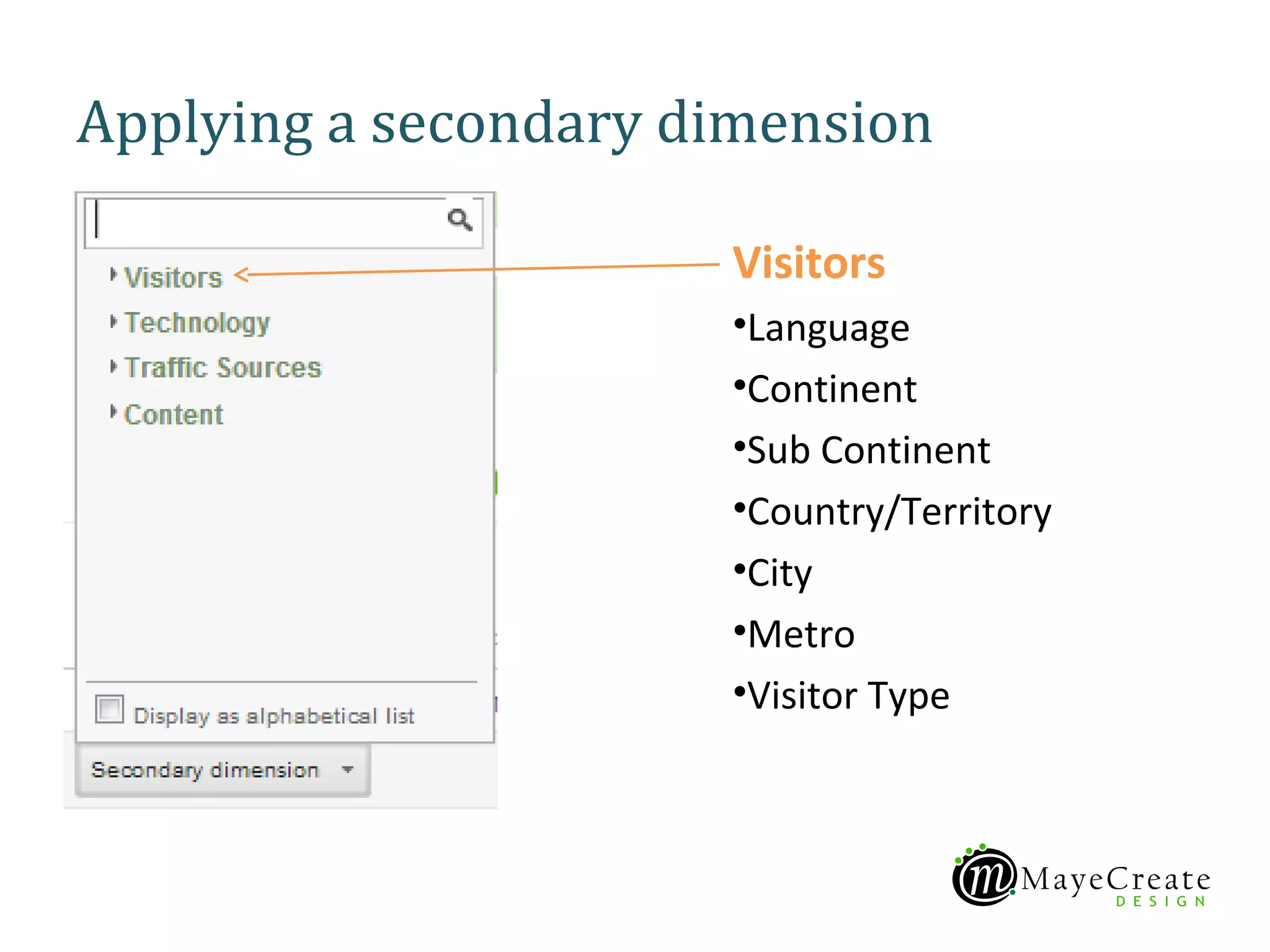
Applying a secondary dimension

                      Visitors
                      •Language
                      •Continent
                      •Sub Continent
                      •Country/Territory
                      •City
                      •Metro
                      •Visitor Type
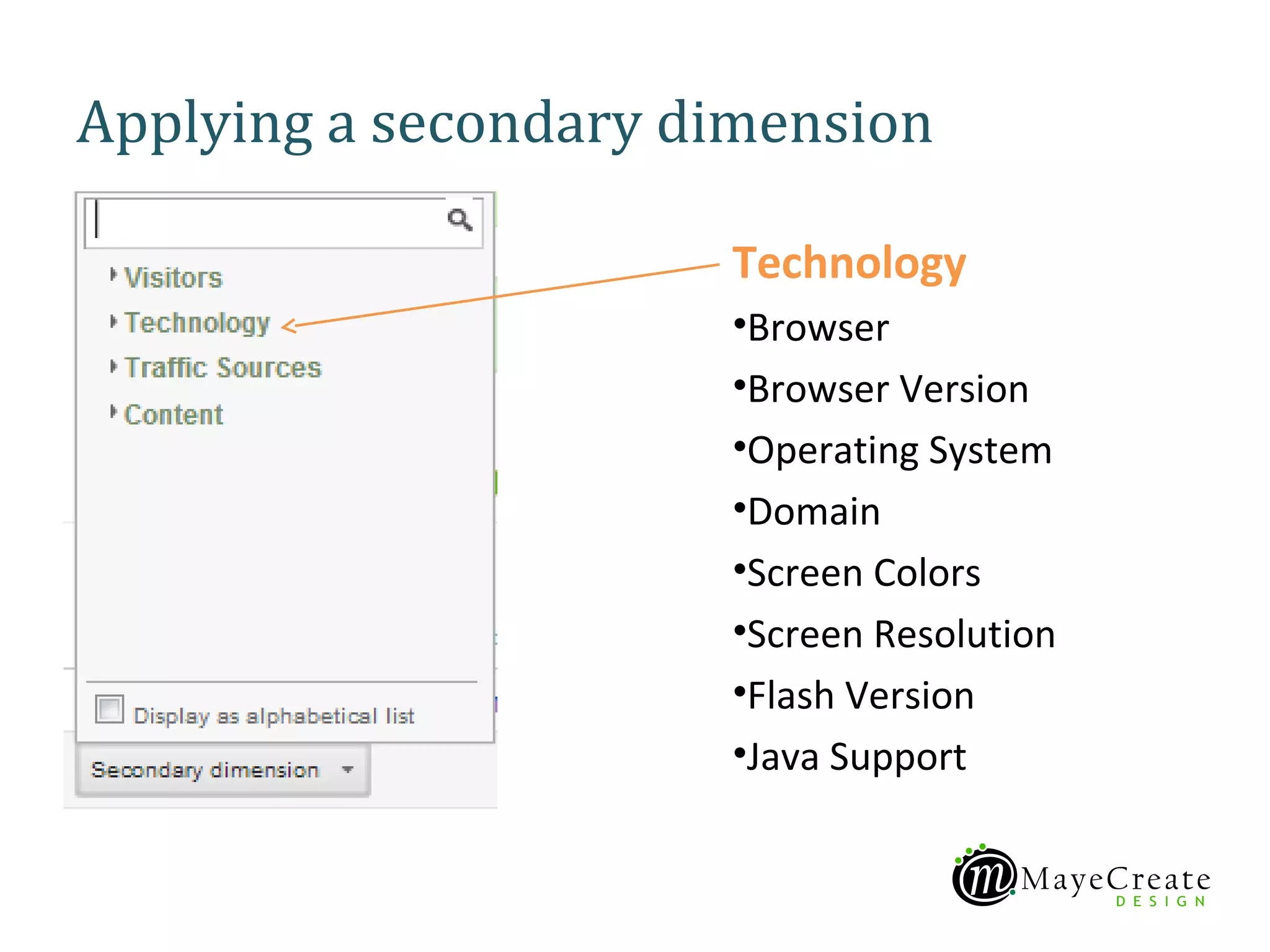
Applying a secondary dimension

                      Technology
                      •Browser
                      •Browser Version
                      •Operating System
                      •Domain
                      •Screen Colors
                      •Screen Resolution
                      •Flash Version
                      •Java Support
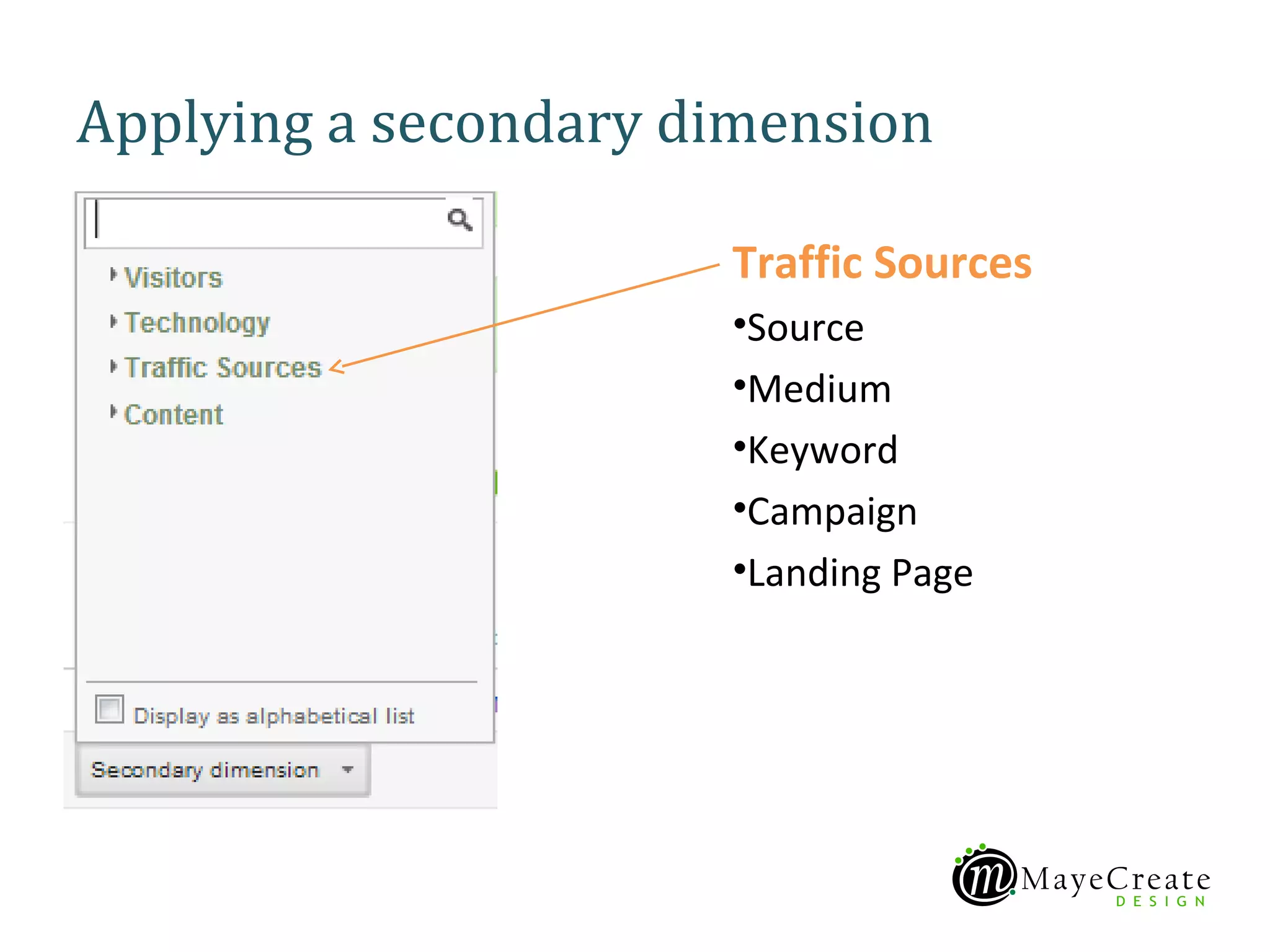
Applying a secondary dimension

                      Traffic Sources
                      •Source
                      •Medium
                      •Keyword
                      •Campaign
                      •Landing Page
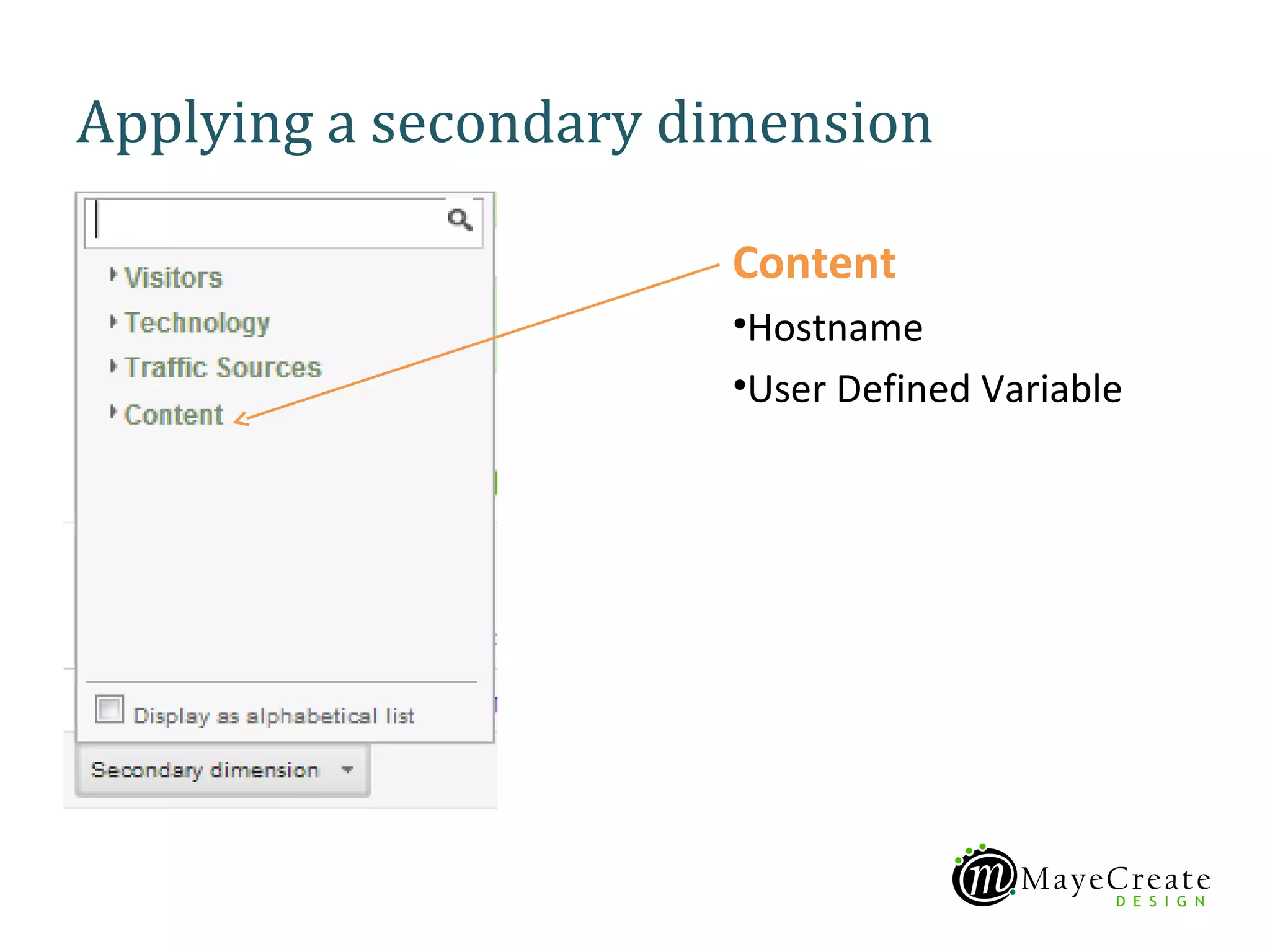
Applying a secondary dimension

                      Content
                      •Hostname
                      •User Defined Variable
APPLICATION


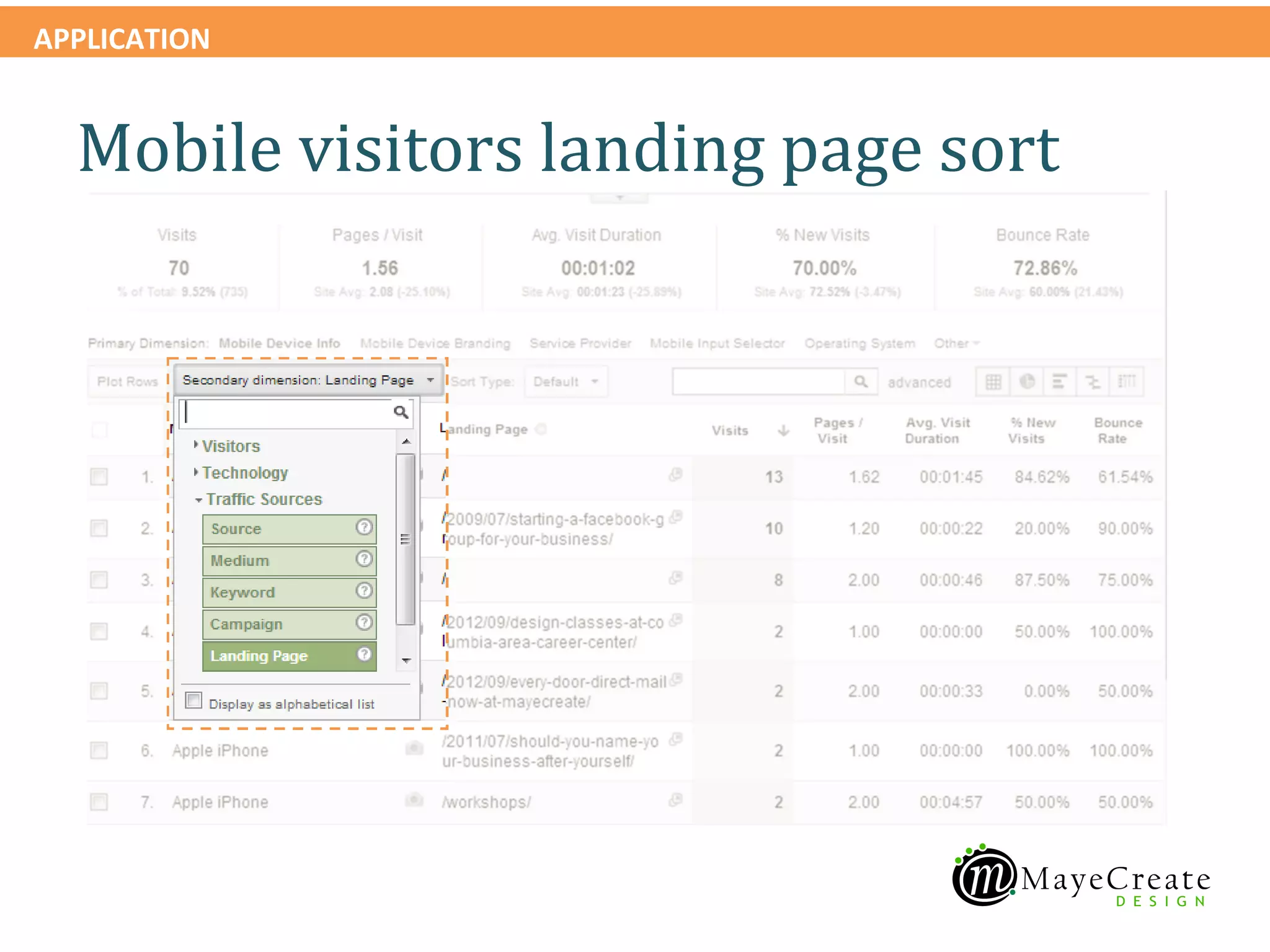
  Mobile visitors landing page sort
APPLICATION


  Mobile visitors landing page sort
APPLICATION


  Mobile visitors
  landing page
  sort

 What this tells me
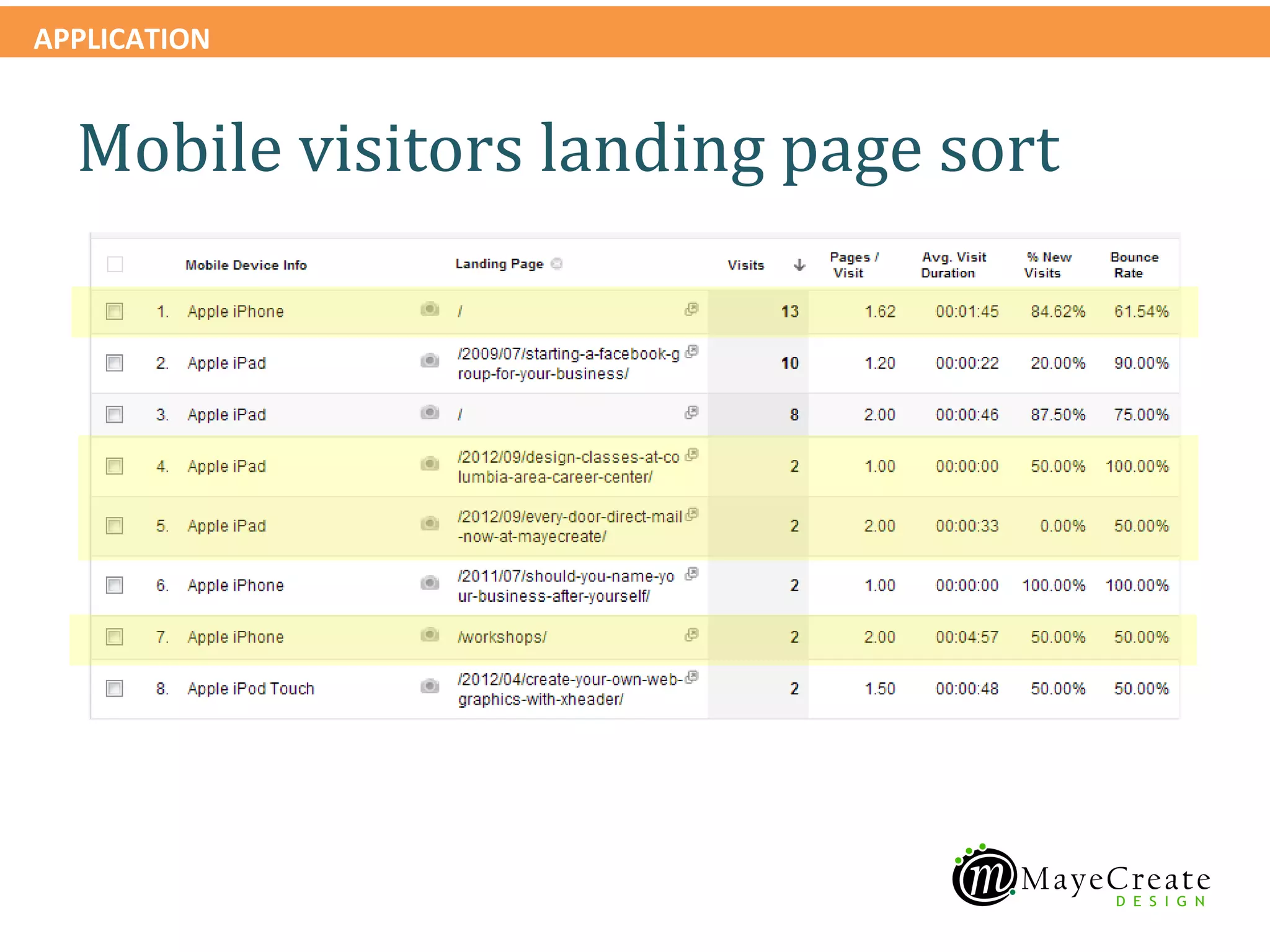
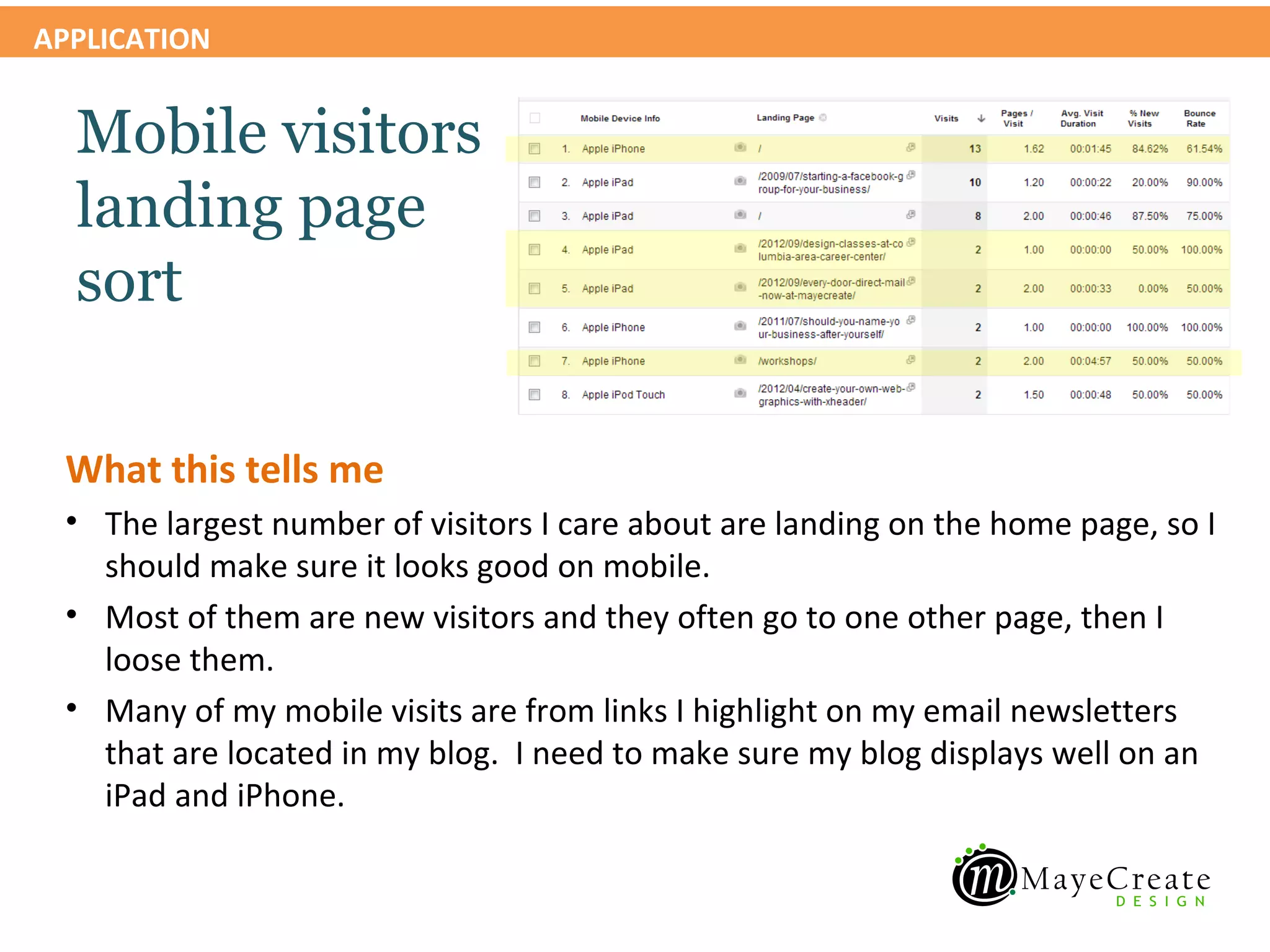
 • The largest number of visitors I care about are landing on the home page, so I
   should make sure it looks good on mobile.
 • Most of them are new visitors and they often go to one other page, then I
   loose them.
 • Many of my mobile visits are from links I highlight on my email newsletters
   that are located in my blog. I need to make sure my blog displays well on an
   iPad and iPhone.
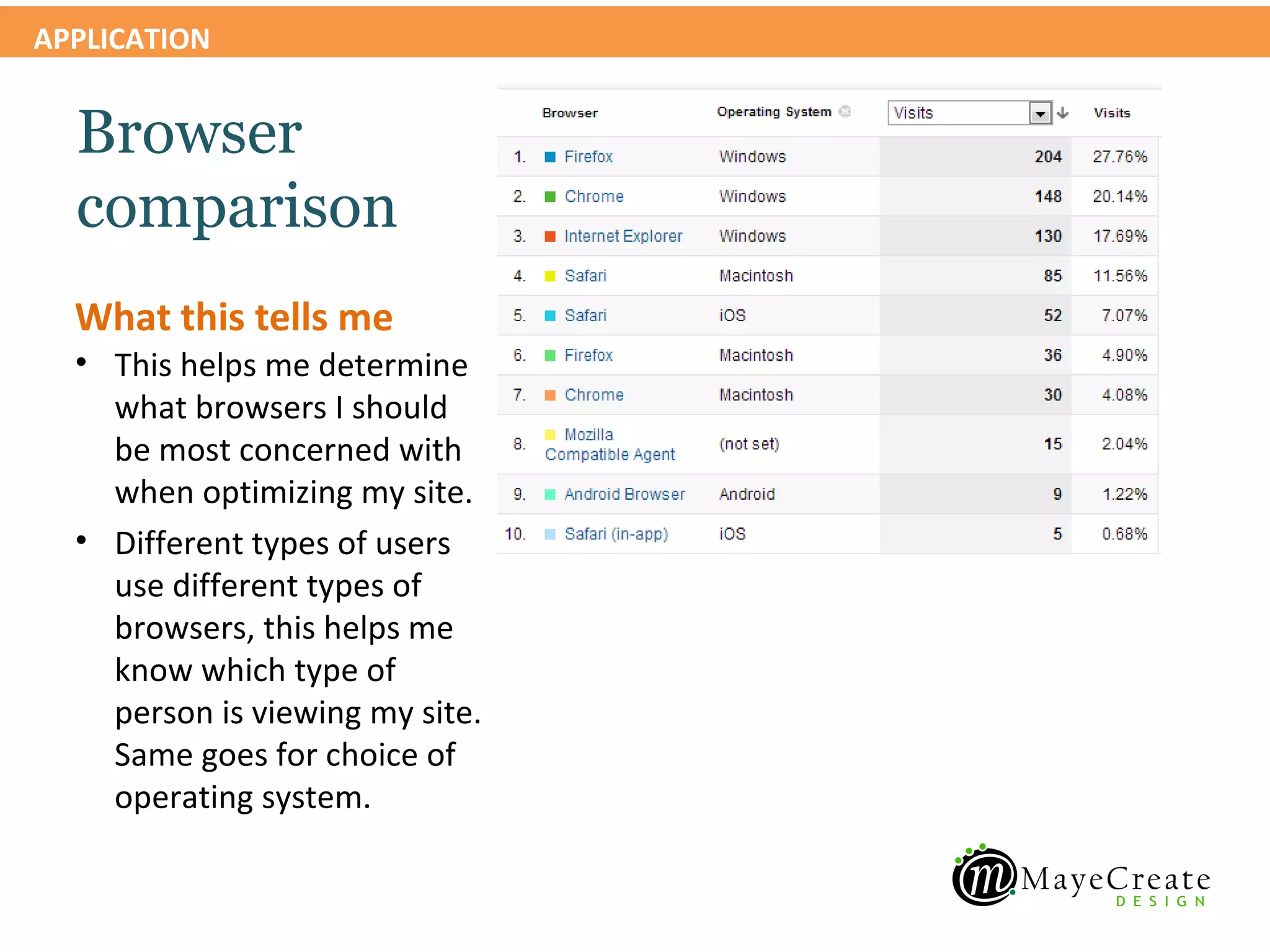
APPLICATION


  Browser
  comparison
  What this tells me
  • This helps me determine
    what browsers I should
    be most concerned with
    when optimizing my site.
  • Different types of users
    use different types of
    browsers, this helps me
    know which type of
    person is viewing my site.
    Same goes for choice of
    operating system.
APPLICATION


    Audience > Technology > Browser & OS

    Review browser & OS report
APPLICATION


  Browser
  comparison
  2010 vs 2012
  What this tells me
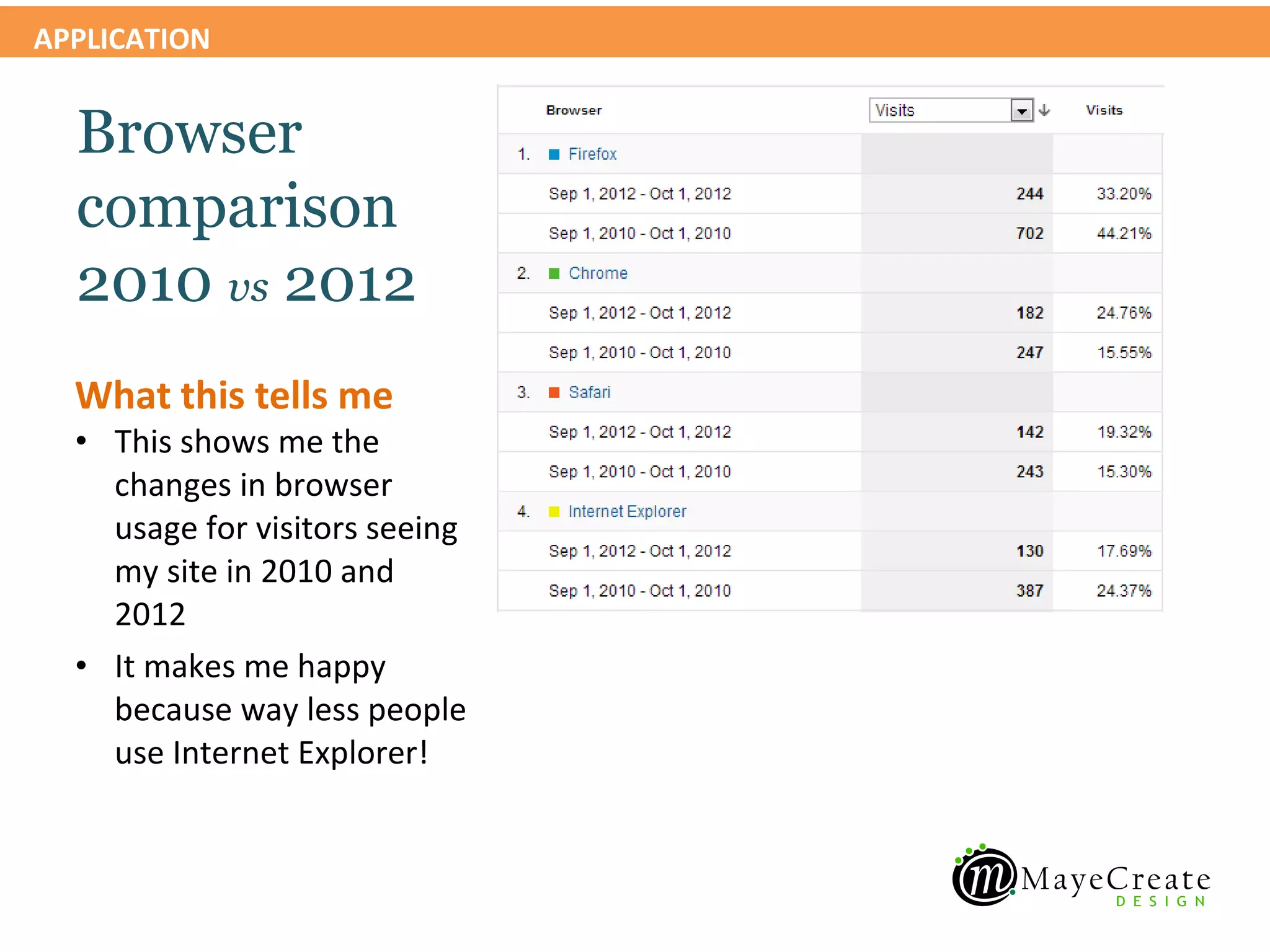
  • This shows me the
    changes in browser
    usage for visitors seeing
    my site in 2010 and
    2012
  • It makes me happy
    because way less people
    use Internet Explorer!
APPLICATION


    Audience > Demographics > Location

    View visitor location report
APPLICATION


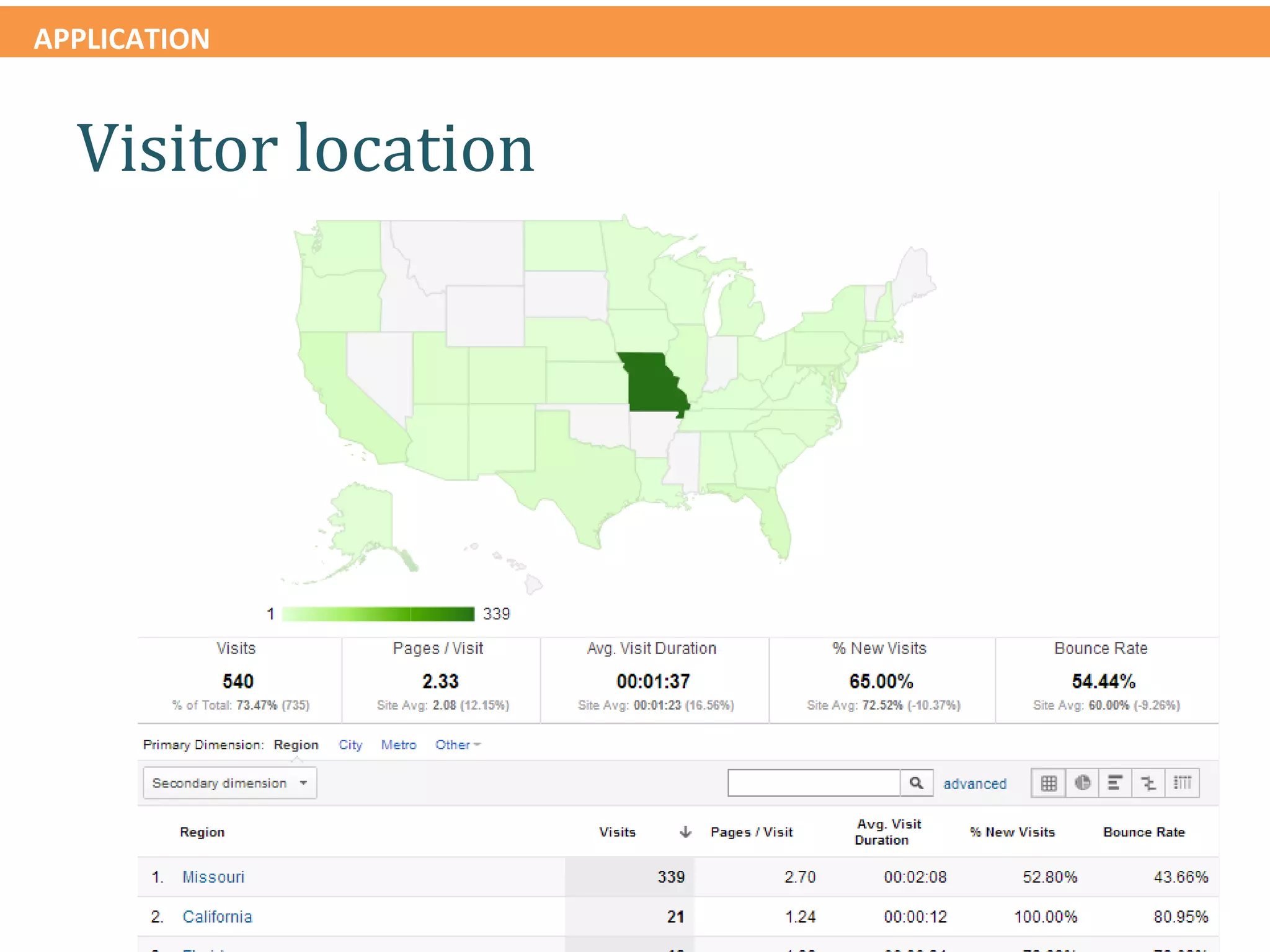
  Visitor location
APPLICATION


  Visitor
  location
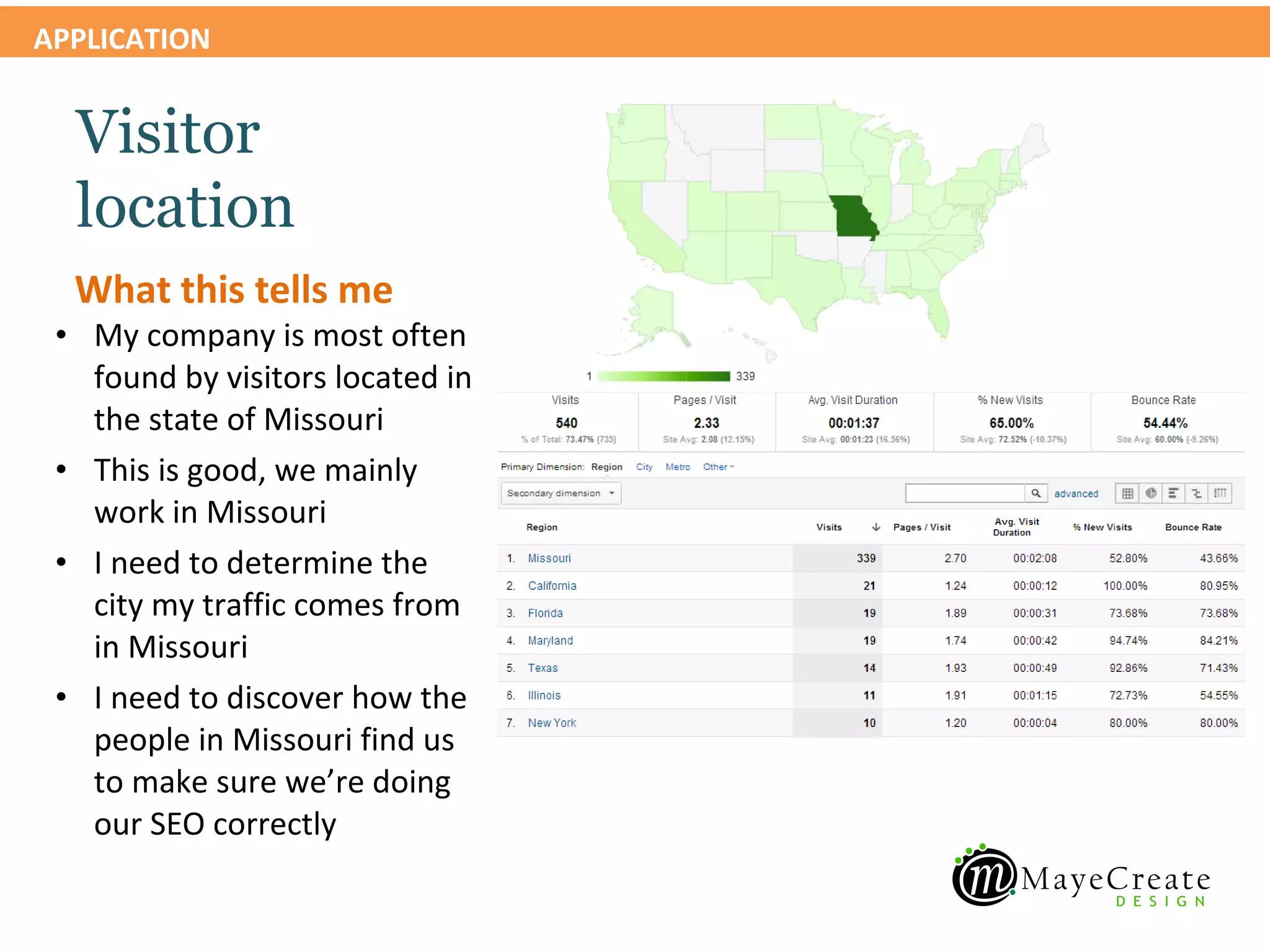
  What this tells me
 • My company is most often
   found by visitors located in
   the state of Missouri
 • This is good, we mainly
   work in Missouri
 • I need to determine the
   city my traffic comes from
   in Missouri
 • I need to discover how the
   people in Missouri find us
   to make sure we’re doing
   our SEO correctly
APPLICATION


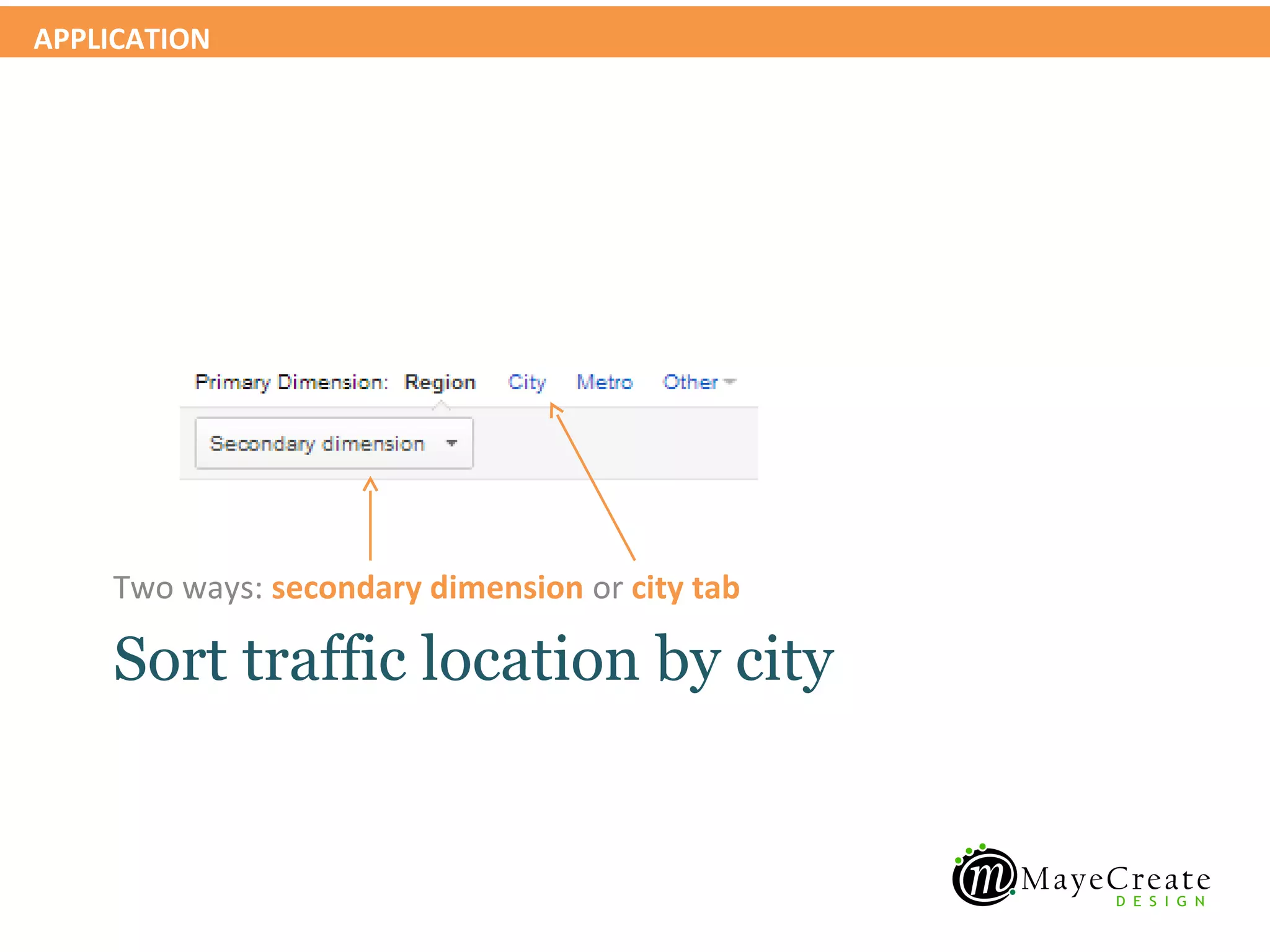
    Two ways: secondary dimension or city tab

    Sort traffic location by city
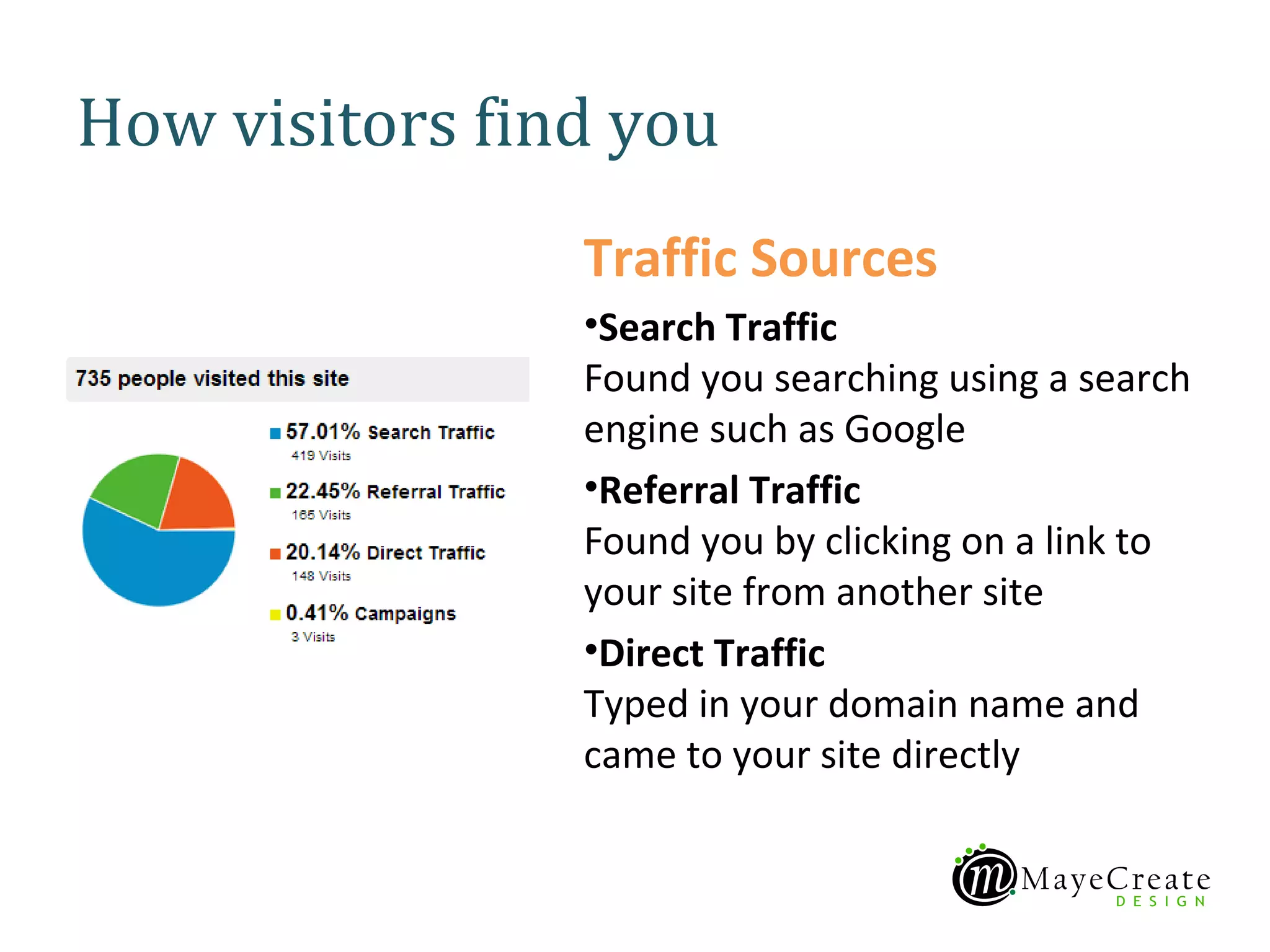
How visitors find you
                Traffic Sources
                •Search Traffic
                Found you searching using a search
                engine such as Google
                •Referral Traffic
                Found you by clicking on a link to
                your site from another site
                •Direct Traffic
                Typed in your domain name and
                came to your site directly
APPLICATION


    Traffic Sources > Search > Organic

    View search traffic report
APPLICATION


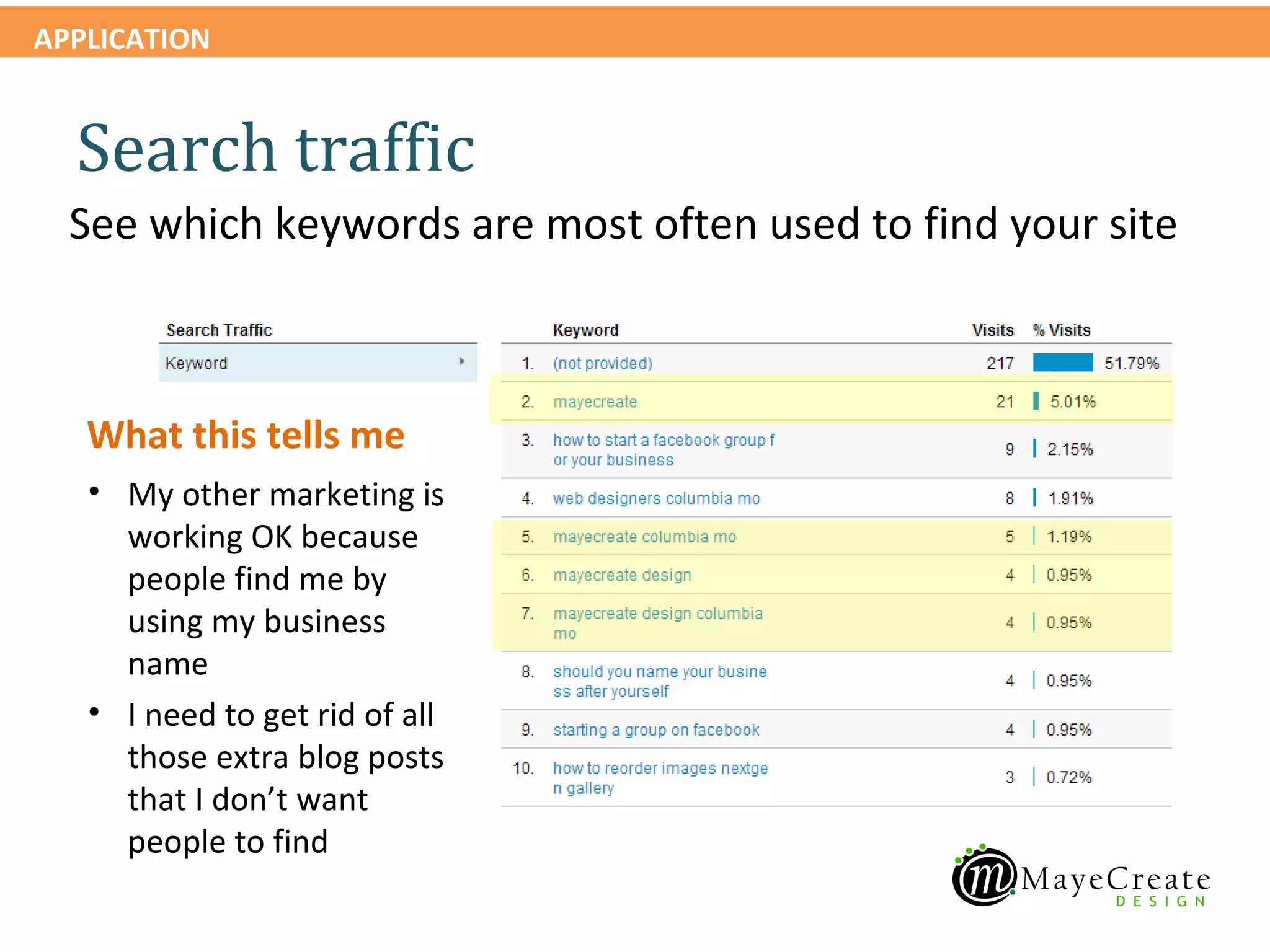
  Search traffic
  See which keywords are most often used to find your site


   What this tells me
   • My other marketing is
     working OK because
     people find me by
     using my business
     name
   • I need to get rid of all
     those extra blog posts
     that I don’t want
     people to find
APPLICATION


  Search traffic
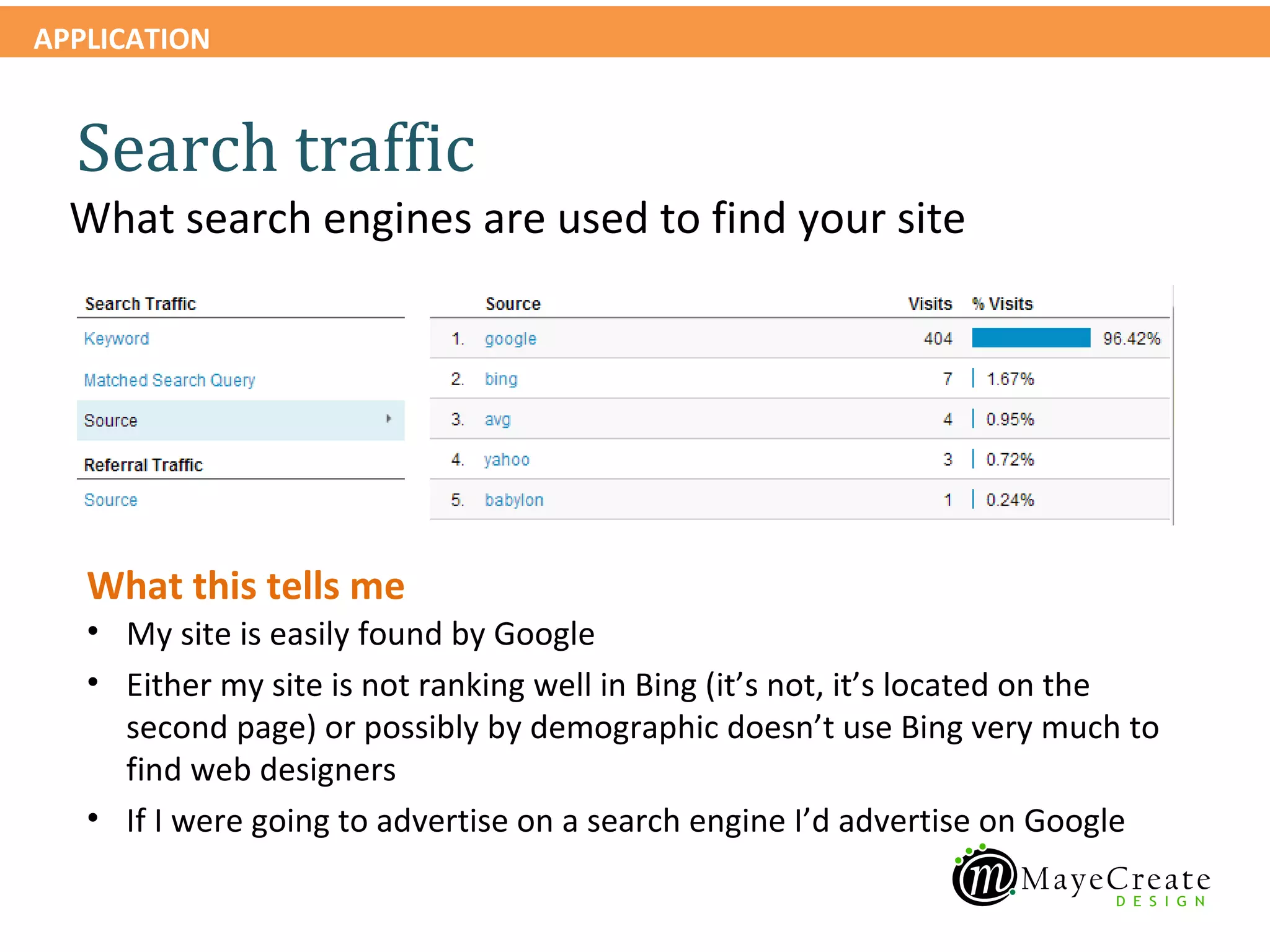
  What search engines are used to find your site


   What this tells me
   • My site is easily found by Google
   • Either my site is not ranking well in Bing (it’s not, it’s located on the
     second page) or possibly by demographic doesn’t use Bing very much to
     find web designers
   • If I were going to advertise on a search engine I’d advertise on Google
APPLICATION


    Traffic Sources > Sources > Referrals

    View referral traffic report
APPLICATION


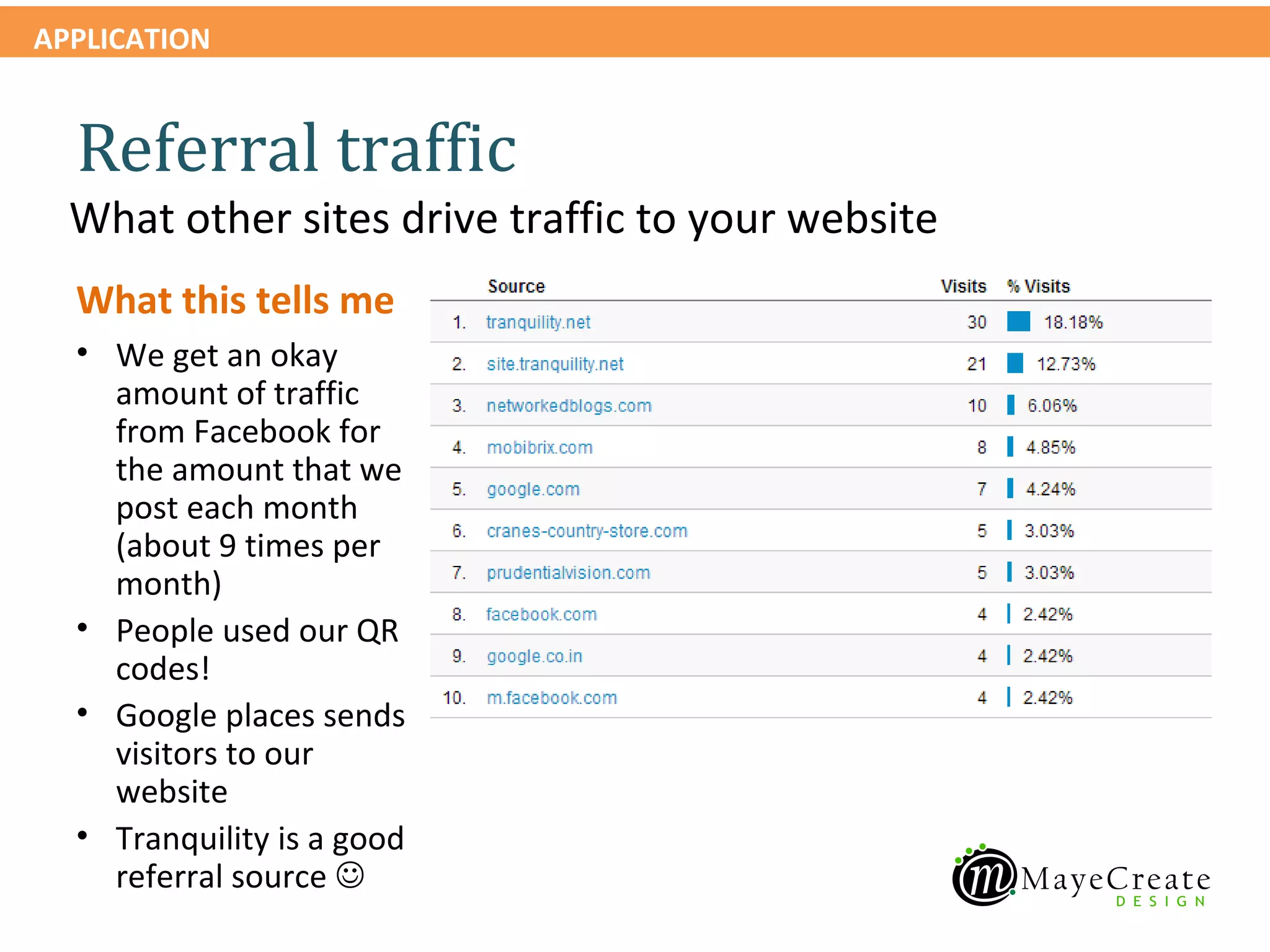
  Referral traffic
  What other sites drive traffic to your website
  What this tells me
  • We get an okay
    amount of traffic
    from Facebook for
    the amount that we
    post each month
    (about 9 times per
    month)
  • People used our QR
    codes!
  • Google places sends
    visitors to our
    website
  • Tranquility is a good
    referral source 
APPLICATION


    Traffic Sources > Sources > Direct

    View direct traffic report
APPLICATION


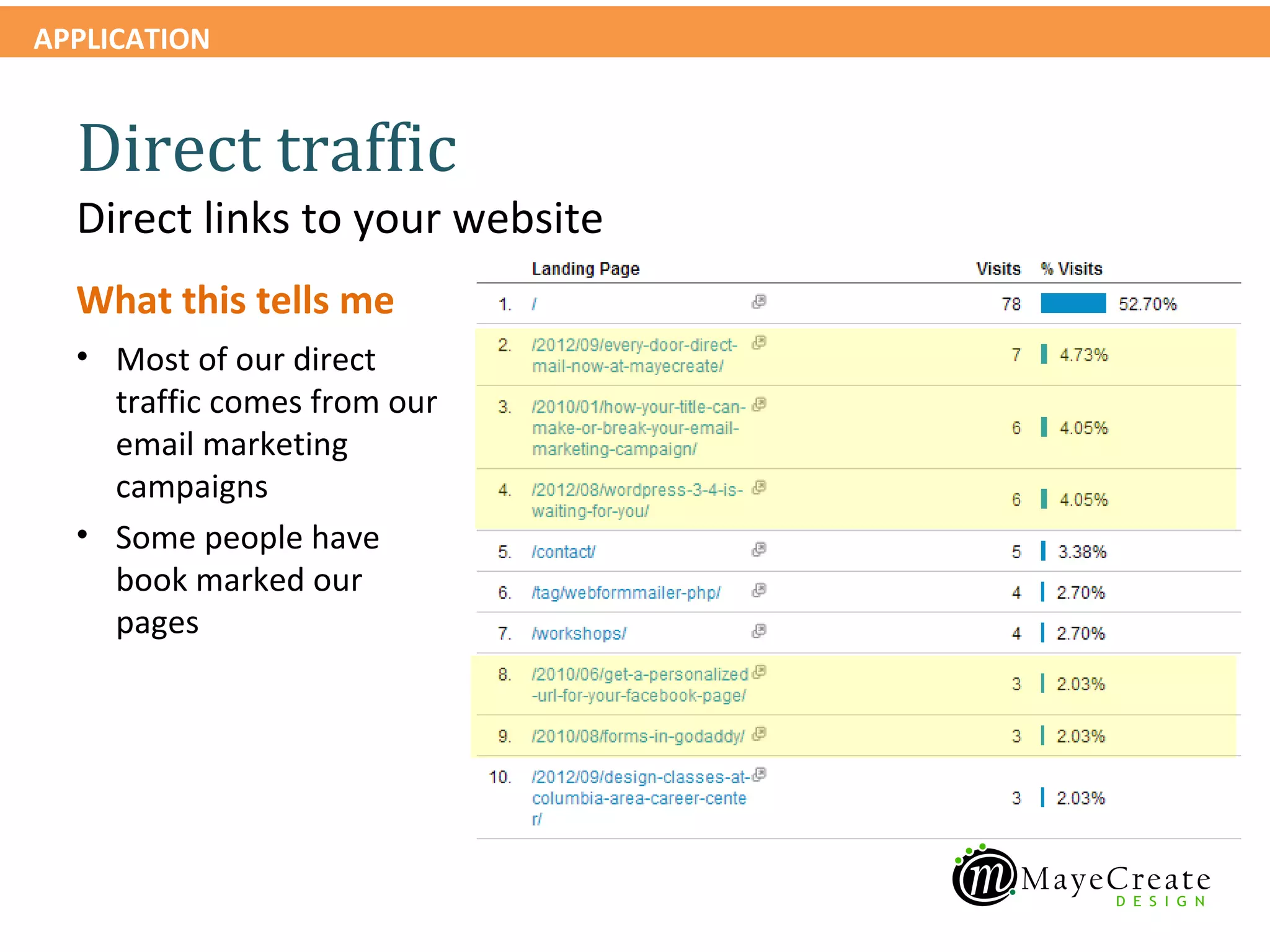
  Direct traffic
  Direct links to your website
  What this tells me
  • Most of our direct
    traffic comes from our
    email marketing
    campaigns
  • Some people have
    book marked our
    pages
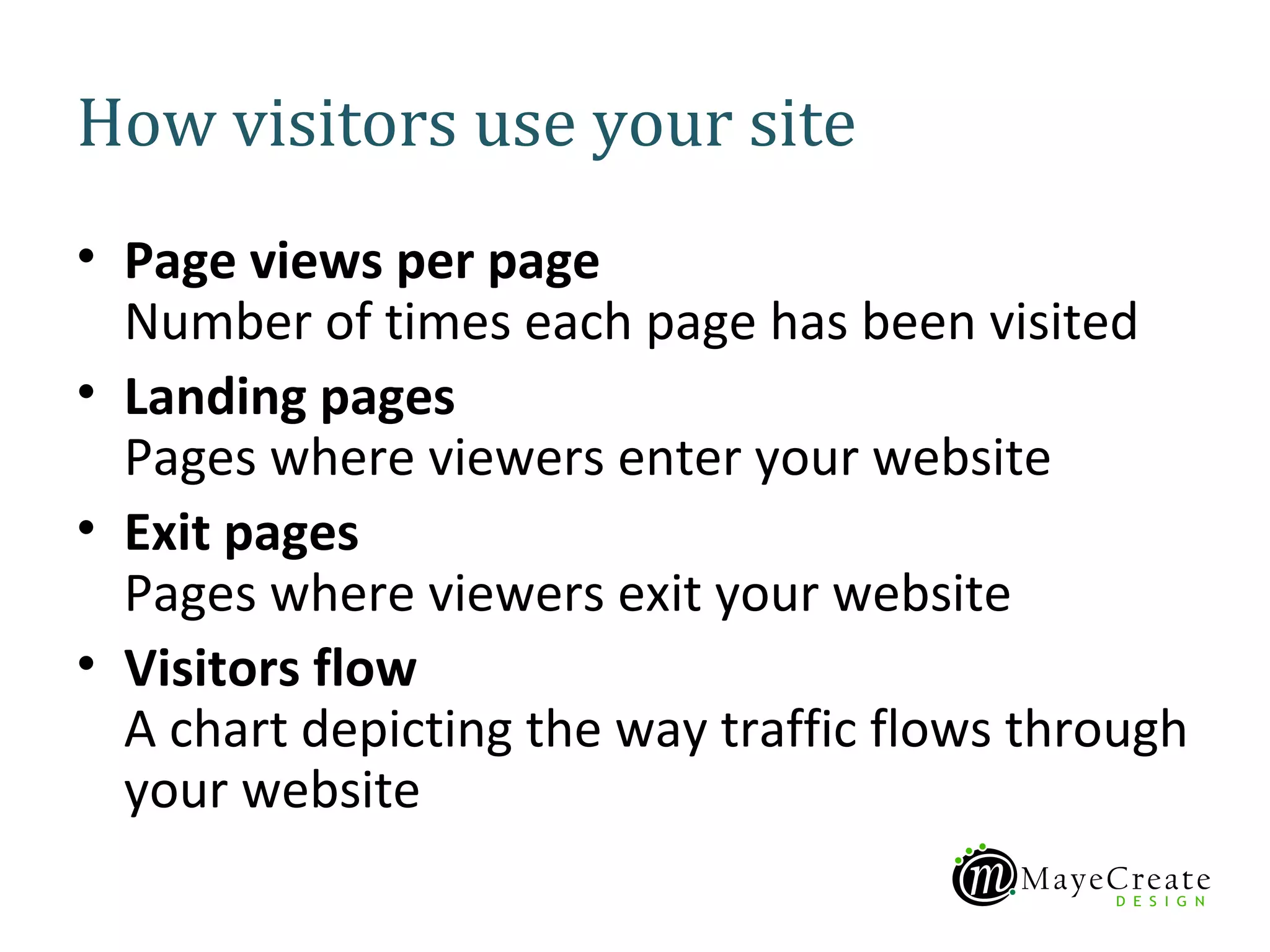
How visitors use your site
• Page views per page
  Number of times each page has been visited
• Landing pages
  Pages where viewers enter your website
• Exit pages
  Pages where viewers exit your website
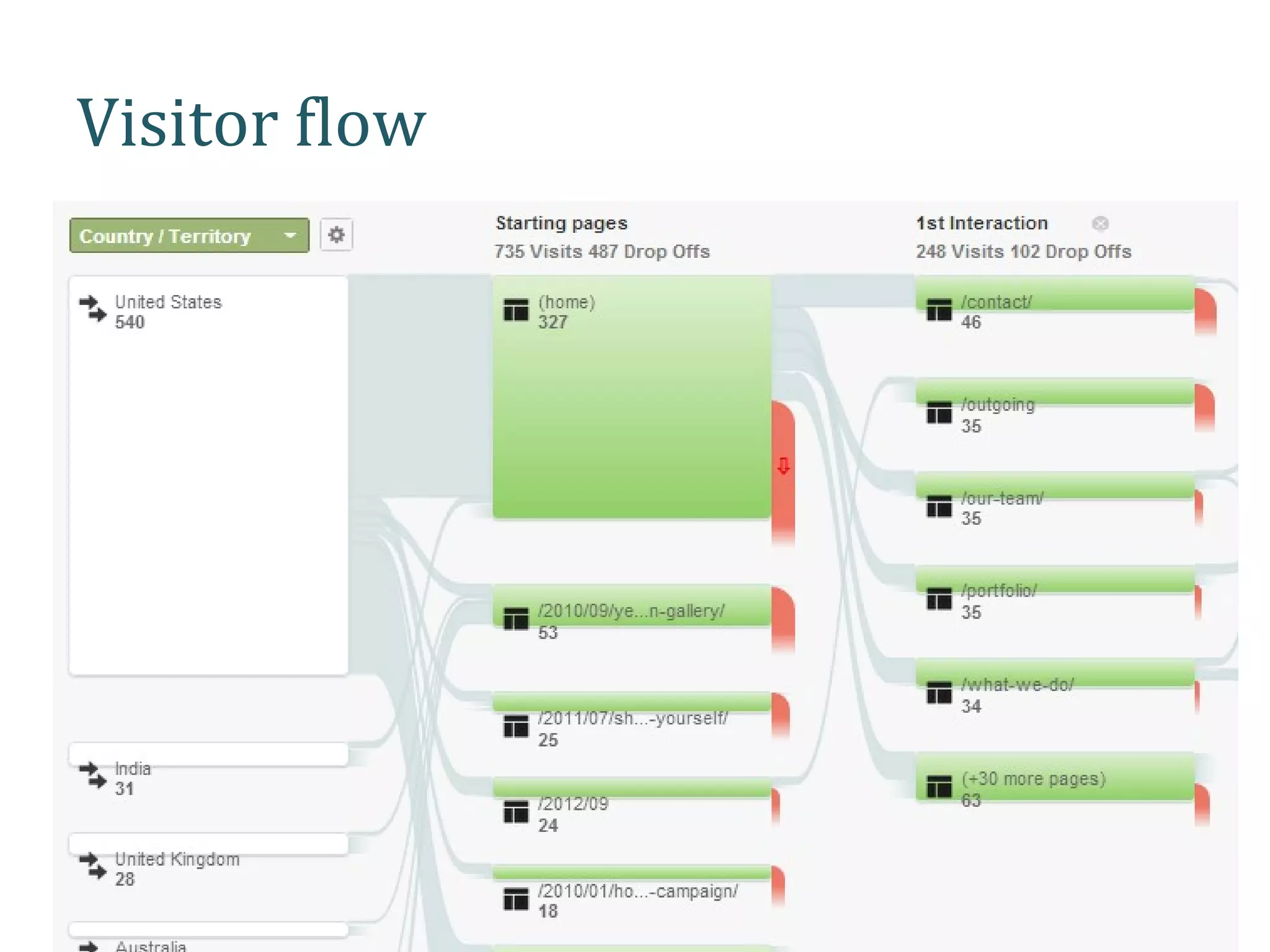
• Visitors flow
  A chart depicting the way traffic flows through
  your website
APPLICATION


    Content > Site Content > All Pages

    View page views report
APPLICATION


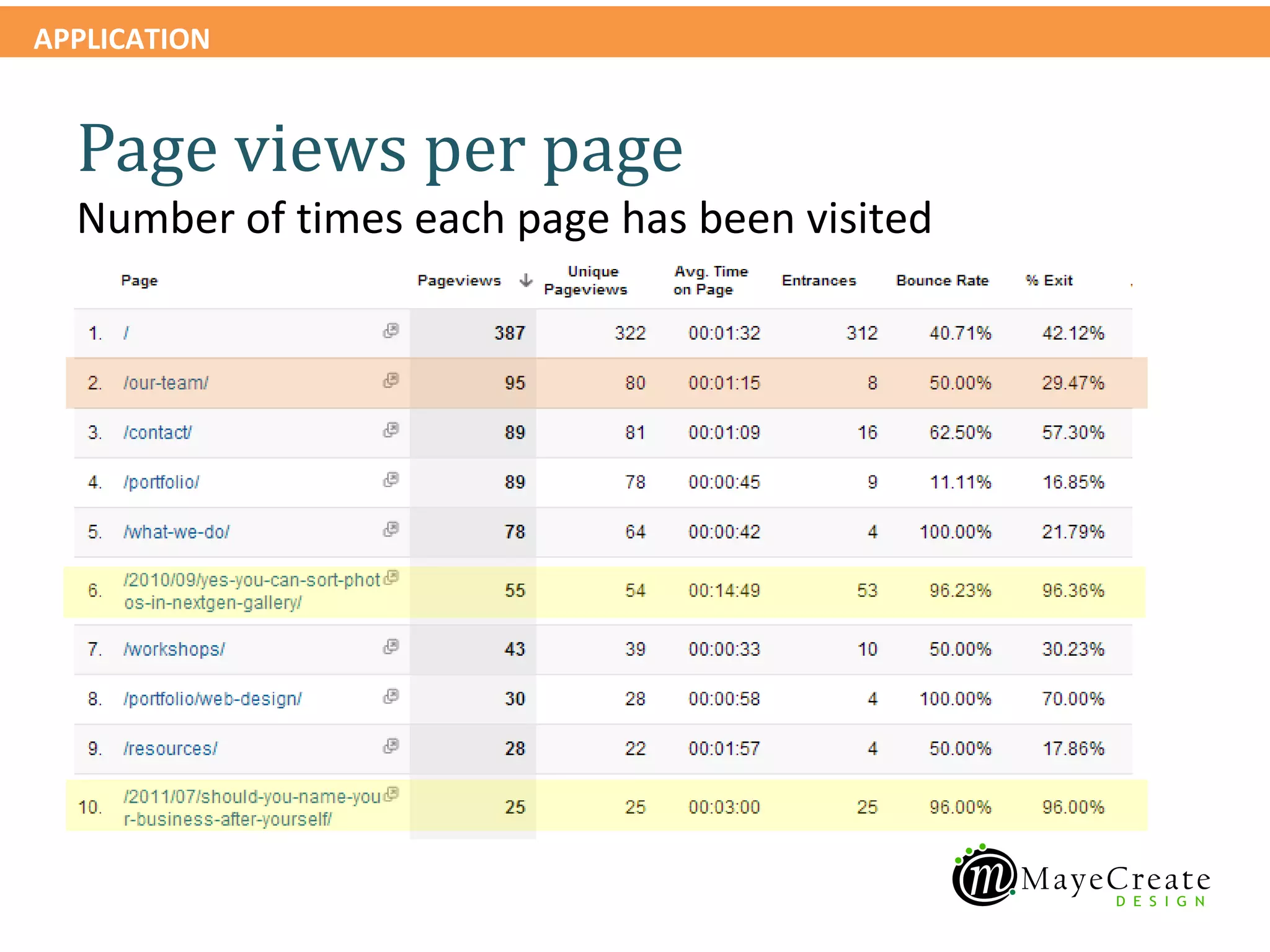
  Page views per page
  Number of times each page has been visited
APPLICATION


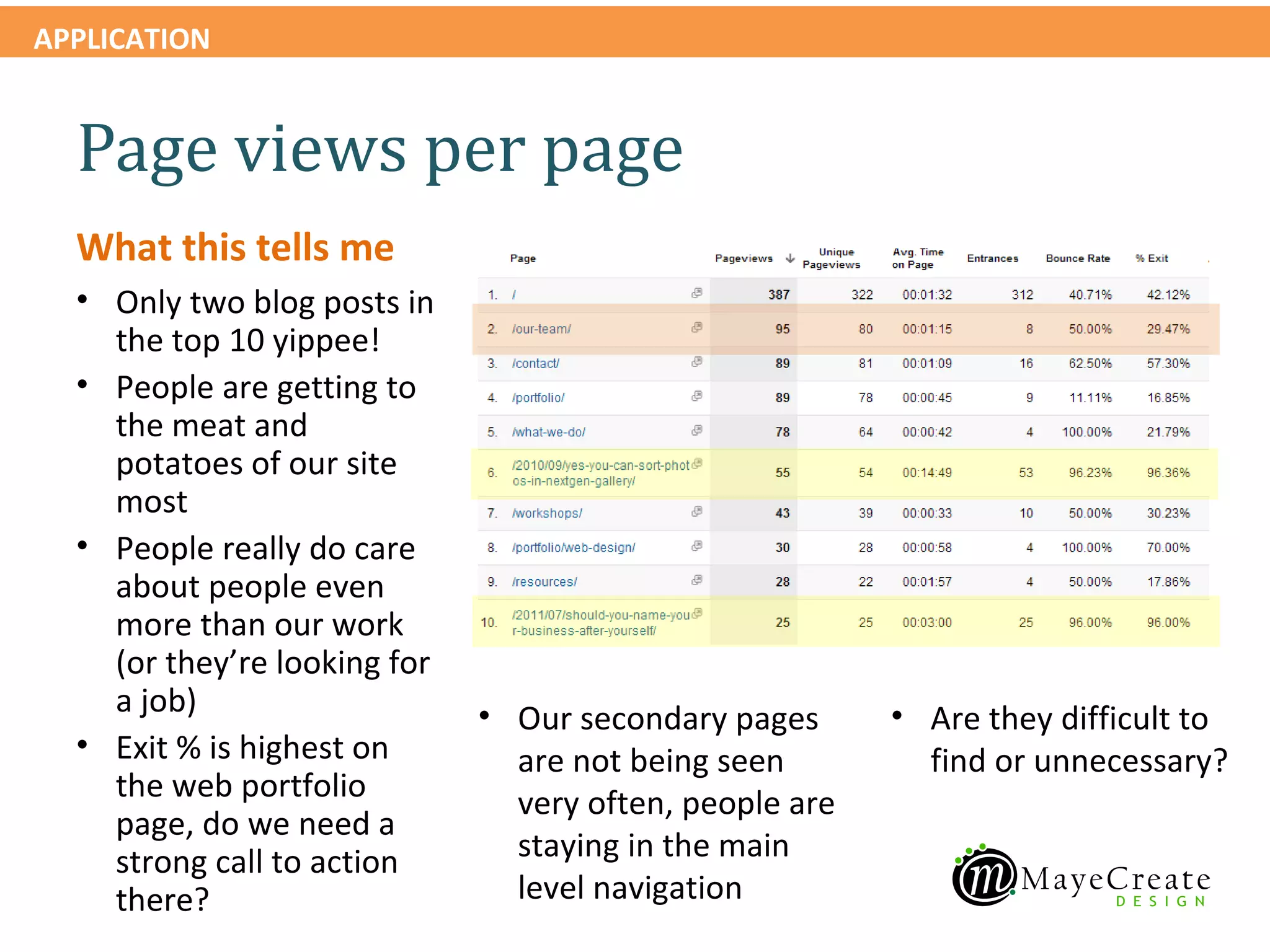
  Page views per page
  What this tells me
  • Only two blog posts in
    the top 10 yippee!
  • People are getting to
    the meat and
    potatoes of our site
    most
  • People really do care
    about people even
    more than our work
    (or they’re looking for
    a job)                    • Our secondary pages      • Are they difficult to
  • Exit % is highest on        are not being seen         find or unnecessary?
    the web portfolio           very often, people are
    page, do we need a
    strong call to action       staying in the main
    there?                      level navigation
APPLICATION


    Content > Site Content > Landing Pages

    View landing pages report
APPLICATION


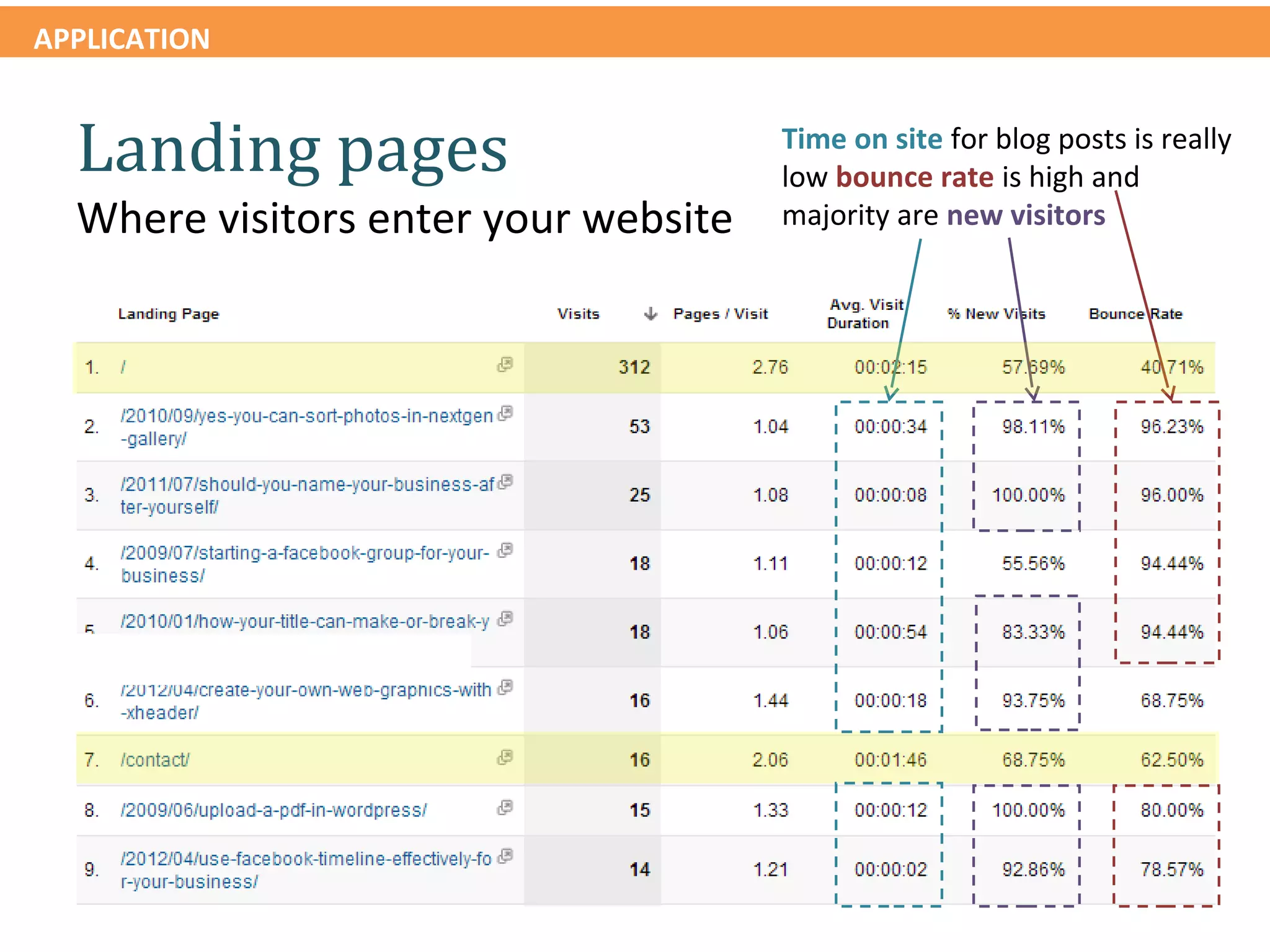
  Landing pages                       Time on site for blog posts is really
                                      low bounce rate is high and
  Where visitors enter your website   majority are new visitors
APPLICATION


  Landing pages

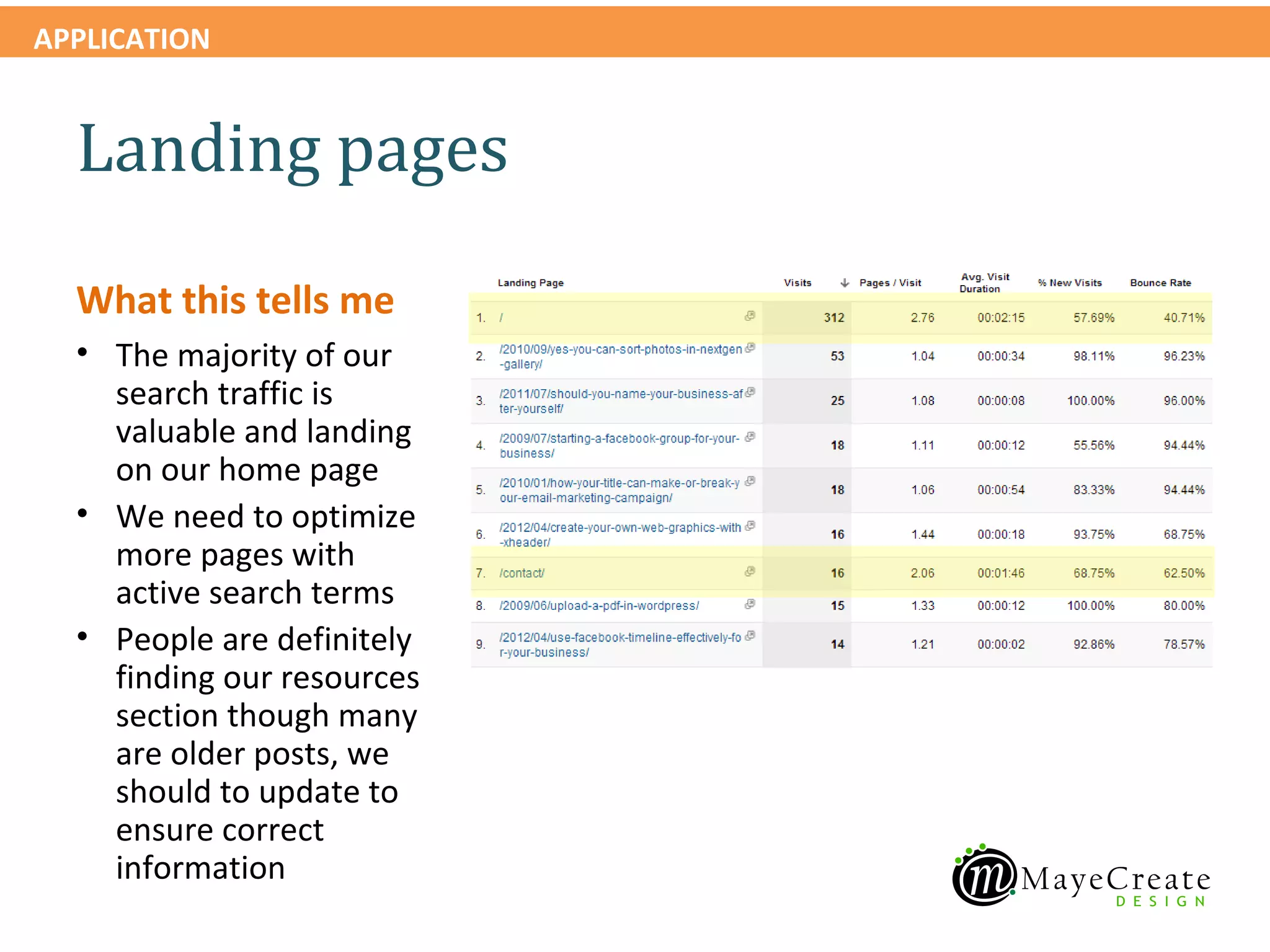
  What this tells me
  • The majority of our
    search traffic is
    valuable and landing
    on our home page
  • We need to optimize
    more pages with
    active search terms
  • People are definitely
    finding our resources
    section though many
    are older posts, we
    should to update to
    ensure correct
    information
APPLICATION


    Content > Site Content > Exit Pages

    View exit pages report
APPLICATION


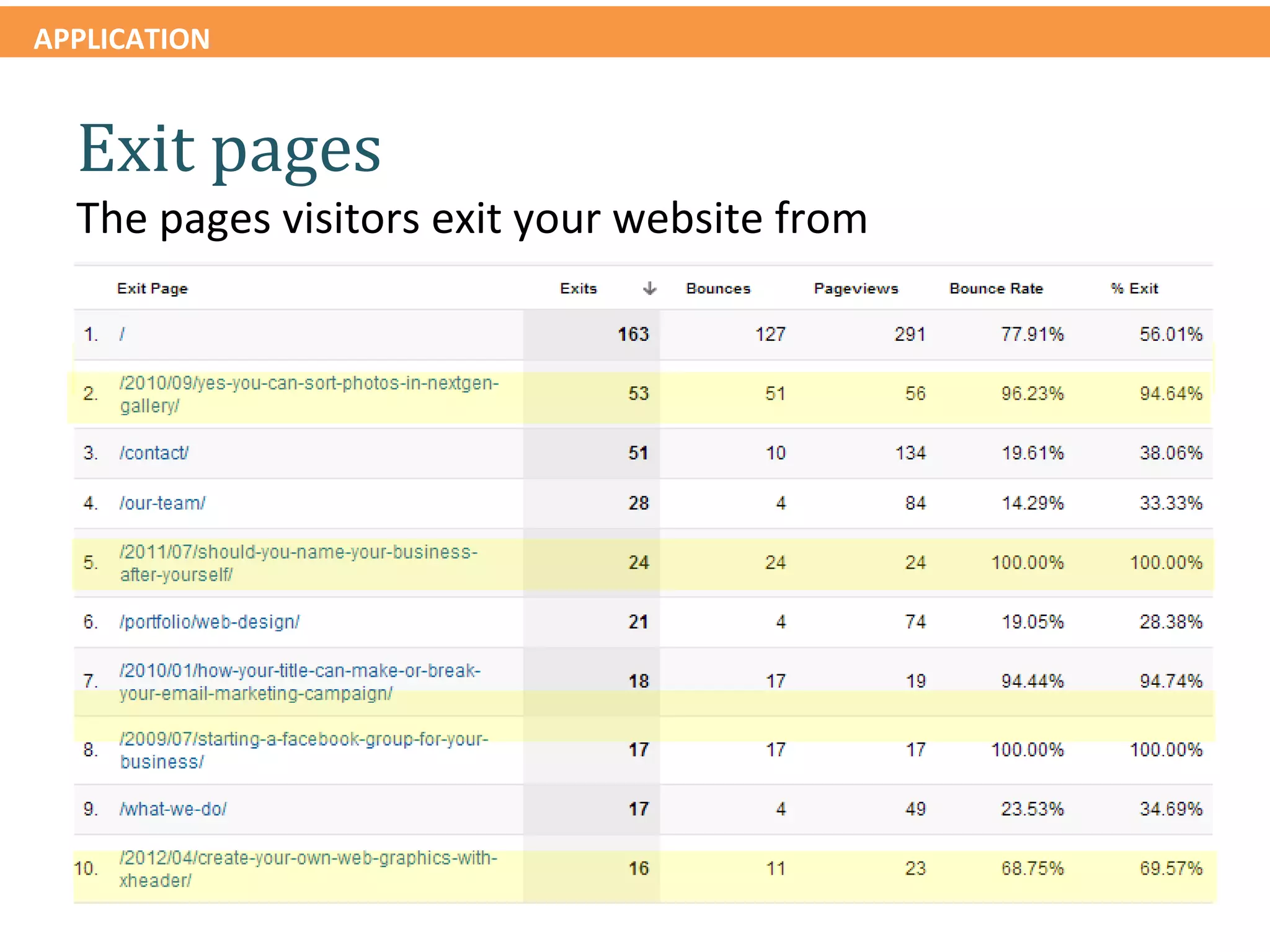
  Exit pages
  The pages visitors exit your website from
APPLICATION


  Exit pages
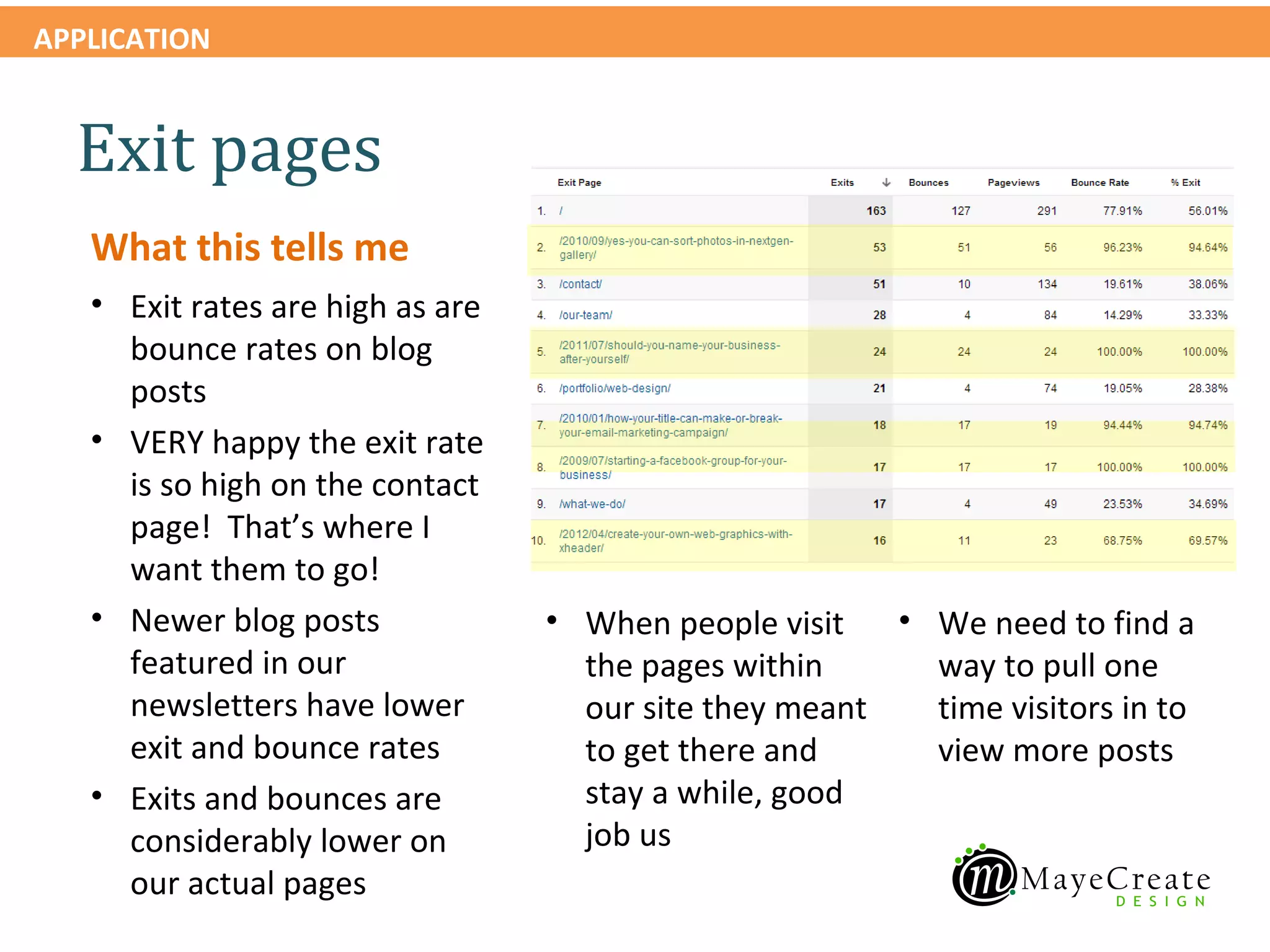
   What this tells me
   • Exit rates are high as are
     bounce rates on blog
     posts
   • VERY happy the exit rate
     is so high on the contact
     page! That’s where I
     want them to go!
   • Newer blog posts             • When people visit   • We need to find a
     featured in our                the pages within      way to pull one
     newsletters have lower         our site they meant   time visitors in to
     exit and bounce rates          to get there and      view more posts
   • Exits and bounces are          stay a while, good
     considerably lower on          job us
     our actual pages
Visitor flow
APPLICATION


    Audience > Visitors Flow

    View visitors flow for your website
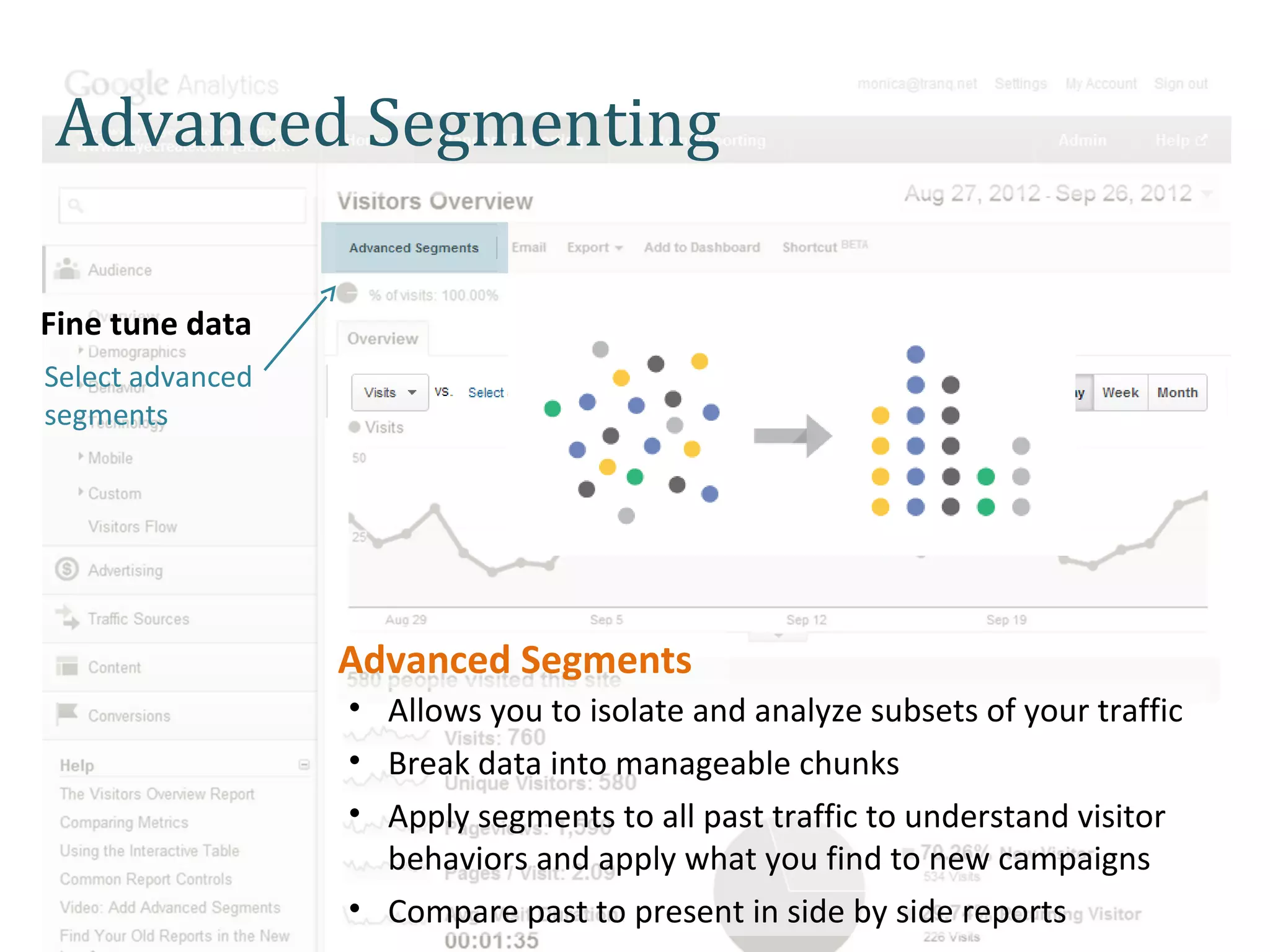
Advanced Segmenting

Fine tune data
Select advanced
segments


                  Advanced Segments
                  • Allows you to isolate and analyze subsets of your traffic
                  • Break data into manageable chunks
                  • Apply segments to all past traffic to understand visitor
                    behaviors and apply what you find to new campaigns
                  • Compare past to present in side by side reports
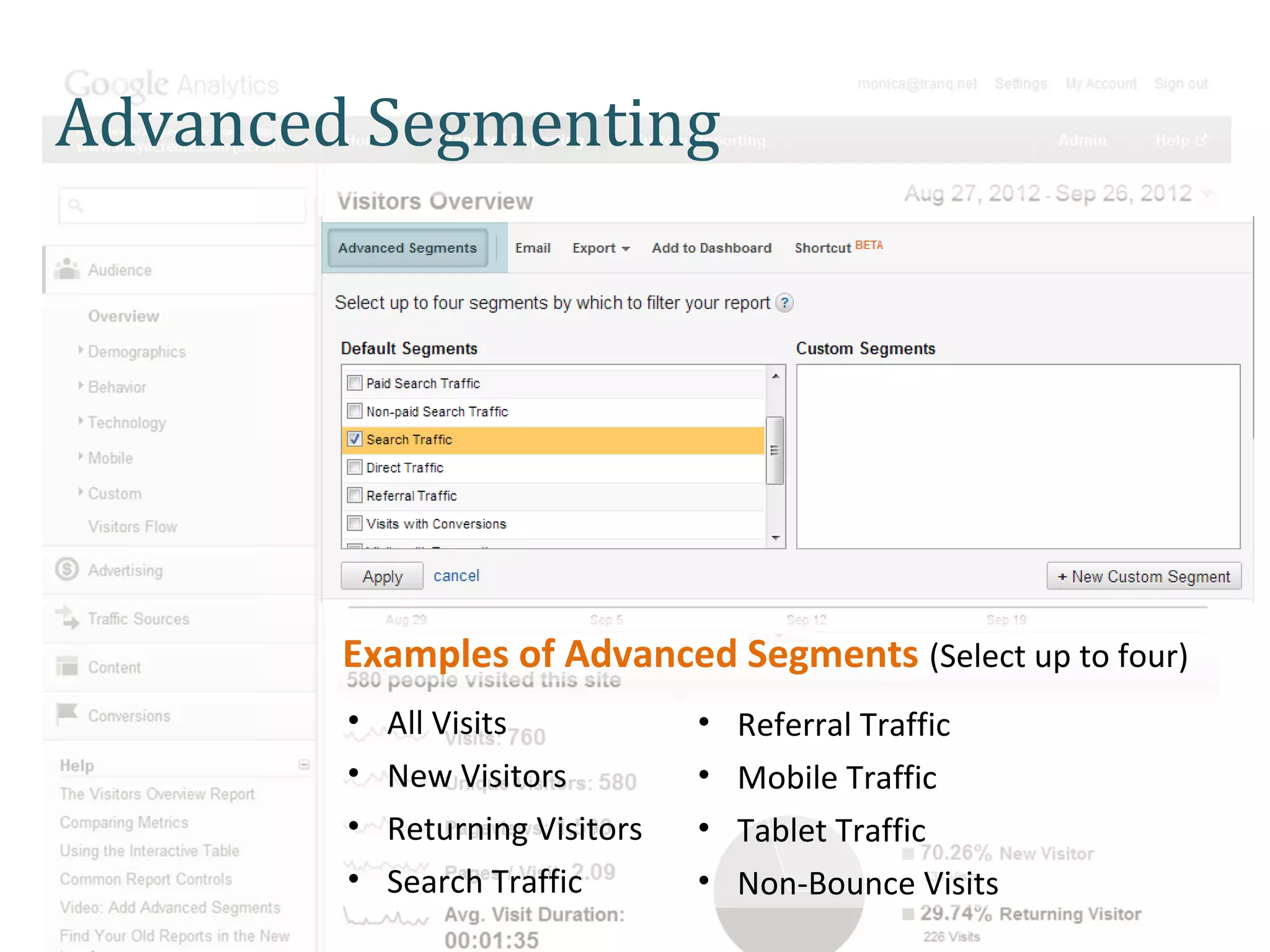
Advanced Segmenting


        Examples of Advanced Segments (Select up to four)
        •   All Visits           •   Referral Traffic
        •   New Visitors         •   Mobile Traffic
        •   Returning Visitors   •   Tablet Traffic
        •   Search Traffic       •   Non-Bounce Visits
APPLICATION


    PRACTICE: Find cities, source and keywords

    Drill down visitor information by
    mobile and location
APPLICATION


    What information do you need to learn from your website?

    Questions and Examples
Overview
Introduction
 • Define web analytics
 • Why it’s important
 • The lay of the land

Gathering information
                                    Application
•   General visitor metrics
                                    Using this information to
•   Where your visitors come from
                                    •Measure marketing efforts
•   How they find you
                                    •Optimize performance
•   How they use your site
                                    •Make informed decisions about
                                    content and design

Under the hood of Google Analytics

  • 1.
  • 2.
    Overview Introduction • Defineweb analytics • Why it’s important • The lay of the land Gathering information Application • General visitor metrics Using this information to • Where your visitors come from •Measure marketing efforts • How they find you •Optimize performance • How they use your site •Make informed decisions about content and design
  • 3.
    What do youwant to learn from your Google Analytics reports?
  • 4.
    Web Analytics Defined •Google Analytics (GA) is a service offered by Google that generates detailed statistics about the visitsmade for people like you so you The product is made for people like you so you The product is to a website. can make informed marketing decisions. can make informed marketing decisions. • It is the most widely used website statistics service. • The product is aimed at marketers = you as opposed to webmasters and technologists from which the industry of web analytics originally grew.
  • 5.
  • 6.
    Why it’s important •Websites are one of the most trackable marketing tools available to small businesses. • Analytics help you gauge effectiveness of marketing efforts outside your website. • Data provided assists with optimizing content. • Results allow you to make informed decisions about content and site design.
  • 7.
    Lay of theland • Login at www.google.com/analytics • Choose your site profile or search for it • Welcome to the dashboard!
  • 8.
    Lay of theland: Dashboard
  • 9.
    Links to allof the standard reports available about your website. An overview of these reports is emailed to you in your monthly website traffic report.
  • 10.
    Default date rangesettings are for one calendar month.
  • 11.
    The date rangecan be changed at any time to review more specific timeframes.
  • 12.
    Plotted timeline ofmetrics measured in reports. Report output displays below the timeline it varies from report to report.
  • 13.
    On most reportsthe timeline will still display an overview of site traffic. To customize timeline data: Choose visit data Compare metrics Choose a new date range
  • 14.
    Visitor metrics Visit Metrics • Visitors/Visits The number of visits to your site during a given time period. • Unique Visitors Count of unique visitors (based on cookie data) in a given period of time. Each browser gets a cookie once a visitor has gone to your site. These visitors may have been to your site before the determined timeframe. Not necessarily new visitors to the site, just unique to the requested timeframe. • Pageviews The number of pages these visitors viewed. • Pages/Visit The average visit in terms of page views.
  • 15.
    Visitor metrics Visit Metrics (Cont.) • Bounce Rate The percentage of people who only visited one page on your site before they “bounced” somewhere else. • Avg. Visit Duration The average amount of time a visitor spends at your site. • % New Visits The percentage of new visitors to your site as compared to all visitors.
  • 16.
    Unique Visitors vsVisits Let’s compare metrics.
  • 17.
    Visitor metrics Compare metrics by choosing one from each: Unique Visitors Visits What this tells me My unique visitors and returning visitors are all about the same. So most of my traffic isn’t returning each month, a few visitors do but the majority does not. The minority of the traffic generates the most page views.
  • 18.
    Compare traffic patternsand email marketing mailing dates Reports in action!
  • 19.
    APPLICATION Thenumber of visits to my website spikes when I send an email newsletter. What this tells me • I sent out an email with information my customers were interested in. • Most of my viewers didn’t open it the day I sent it. • The did go to the site, even on a busy Monday! • I should try sending it on a Tuesday, I might get even better results.
  • 20.
    APPLICATION Thenumber of visits to my website spike when I send an email about a workshop What this tells me • This email wasn’t as interesting to viewers as the newsletter (and that’s okay, it doesn’t appeal to everyone) • Not everyone opened the email the first day • People did click on the site to learn more information
  • 21.
    APPLICATION Thelength of time on the site goes up when I send out emails to my clients What this tells me • My clients spend more time on my site than an average visitor • The more appealing the information is the more time visitors will spend on the site • Unless I add a stimulus visit duration and number of site visitors doesn’t have much to do with the other metric
  • 22.
    APPLICATION Oursite goals • Lower Bounce Rate This can often seem deceptively high, but many people will get to your site and realize that it wasn’t what they were looking for, or you may have a popular image indexed by Google’s Image Search that generates a lot of “drive-by” traffic and skews your numbers. Alternatively, it may represent that your site is difficult to navigate or understand for new visitors. • Generate More High Quality Traffic • Increase Return Visitors
  • 23.
    APPLICATION Oursite goals Our action plan: •Removing resources on our site that were hit often and are not reaching our target market. Asking search engines to stop indexing the resources •Updating our site more regularly with information our target market is interested in •Sending our regular email newsletters
  • 24.
    APPLICATION We can judge the progress towards our goals Our site goals by doing a date comparison of metrics.
  • 25.
    APPLICATION Oursite goals
  • 26.
    Where visitors comefrom Devices Location • Mobile • City – iPhone • State – Andriod • Country – Blackberry • Desktop – PC – Mac – Monitor size and resolution • Browser
  • 27.
    APPLICATION Audience > Mobile > Overview Review mobile visitors report
  • 28.
    Sorting report results Sort results by pre-defined primary dimensions Click on a link to sort primary dimensions Refine results by applying a secondary dimension of your choice
  • 29.
    APPLICATION Mobilevisitors What this tells me • Not many of my visitors are using a mobile device so I probably don’t need a full mobile site • I need to look and see what page they visit most often to see what info to optimize for a mobile site • I also need to check on what devices they’re using to see if a mobile site is necessary
  • 30.
    APPLICATION Audience > Mobile > Devices Review mobile devices report
  • 31.
    APPLICATION Mobilevisitors by device What this tells me • Most of my visitors are coming from an iPad so I don’t need to worry about a mobile site because my site is already formatted to display correctly on an iPad • iPhones are preferred by my demographic • I need to look at what page my visitors are landing on because they have a really high bounce rate
  • 32.
    Applying a secondarydimension Visitors •Language •Continent •Sub Continent •Country/Territory •City •Metro •Visitor Type
  • 33.
    Applying a secondarydimension Technology •Browser •Browser Version •Operating System •Domain •Screen Colors •Screen Resolution •Flash Version •Java Support
  • 34.
    Applying a secondarydimension Traffic Sources •Source •Medium •Keyword •Campaign •Landing Page
  • 35.
    Applying a secondarydimension Content •Hostname •User Defined Variable
  • 36.
    APPLICATION Mobilevisitors landing page sort
  • 37.
    APPLICATION Mobilevisitors landing page sort
  • 38.
    APPLICATION Mobilevisitors landing page sort What this tells me • The largest number of visitors I care about are landing on the home page, so I should make sure it looks good on mobile. • Most of them are new visitors and they often go to one other page, then I loose them. • Many of my mobile visits are from links I highlight on my email newsletters that are located in my blog. I need to make sure my blog displays well on an iPad and iPhone.
  • 39.
    APPLICATION Browser comparison What this tells me • This helps me determine what browsers I should be most concerned with when optimizing my site. • Different types of users use different types of browsers, this helps me know which type of person is viewing my site. Same goes for choice of operating system.
  • 40.
    APPLICATION Audience > Technology > Browser & OS Review browser & OS report
  • 41.
    APPLICATION Browser comparison 2010 vs 2012 What this tells me • This shows me the changes in browser usage for visitors seeing my site in 2010 and 2012 • It makes me happy because way less people use Internet Explorer!
  • 42.
    APPLICATION Audience > Demographics > Location View visitor location report
  • 43.
  • 44.
    APPLICATION Visitor location What this tells me • My company is most often found by visitors located in the state of Missouri • This is good, we mainly work in Missouri • I need to determine the city my traffic comes from in Missouri • I need to discover how the people in Missouri find us to make sure we’re doing our SEO correctly
  • 45.
    APPLICATION Two ways: secondary dimension or city tab Sort traffic location by city
  • 46.
    How visitors findyou Traffic Sources •Search Traffic Found you searching using a search engine such as Google •Referral Traffic Found you by clicking on a link to your site from another site •Direct Traffic Typed in your domain name and came to your site directly
  • 47.
    APPLICATION Traffic Sources > Search > Organic View search traffic report
  • 48.
    APPLICATION Searchtraffic See which keywords are most often used to find your site What this tells me • My other marketing is working OK because people find me by using my business name • I need to get rid of all those extra blog posts that I don’t want people to find
  • 49.
    APPLICATION Searchtraffic What search engines are used to find your site What this tells me • My site is easily found by Google • Either my site is not ranking well in Bing (it’s not, it’s located on the second page) or possibly by demographic doesn’t use Bing very much to find web designers • If I were going to advertise on a search engine I’d advertise on Google
  • 50.
    APPLICATION Traffic Sources > Sources > Referrals View referral traffic report
  • 51.
    APPLICATION Referraltraffic What other sites drive traffic to your website What this tells me • We get an okay amount of traffic from Facebook for the amount that we post each month (about 9 times per month) • People used our QR codes! • Google places sends visitors to our website • Tranquility is a good referral source 
  • 52.
    APPLICATION Traffic Sources > Sources > Direct View direct traffic report
  • 53.
    APPLICATION Directtraffic Direct links to your website What this tells me • Most of our direct traffic comes from our email marketing campaigns • Some people have book marked our pages
  • 54.
    How visitors useyour site • Page views per page Number of times each page has been visited • Landing pages Pages where viewers enter your website • Exit pages Pages where viewers exit your website • Visitors flow A chart depicting the way traffic flows through your website
  • 55.
    APPLICATION Content > Site Content > All Pages View page views report
  • 56.
    APPLICATION Pageviews per page Number of times each page has been visited
  • 57.
    APPLICATION Pageviews per page What this tells me • Only two blog posts in the top 10 yippee! • People are getting to the meat and potatoes of our site most • People really do care about people even more than our work (or they’re looking for a job) • Our secondary pages • Are they difficult to • Exit % is highest on are not being seen find or unnecessary? the web portfolio very often, people are page, do we need a strong call to action staying in the main there? level navigation
  • 58.
    APPLICATION Content > Site Content > Landing Pages View landing pages report
  • 59.
    APPLICATION Landingpages Time on site for blog posts is really low bounce rate is high and Where visitors enter your website majority are new visitors
  • 60.
    APPLICATION Landingpages What this tells me • The majority of our search traffic is valuable and landing on our home page • We need to optimize more pages with active search terms • People are definitely finding our resources section though many are older posts, we should to update to ensure correct information
  • 61.
    APPLICATION Content > Site Content > Exit Pages View exit pages report
  • 62.
    APPLICATION Exitpages The pages visitors exit your website from
  • 63.
    APPLICATION Exitpages What this tells me • Exit rates are high as are bounce rates on blog posts • VERY happy the exit rate is so high on the contact page! That’s where I want them to go! • Newer blog posts • When people visit • We need to find a featured in our the pages within way to pull one newsletters have lower our site they meant time visitors in to exit and bounce rates to get there and view more posts • Exits and bounces are stay a while, good considerably lower on job us our actual pages
  • 64.
  • 65.
    APPLICATION Audience > Visitors Flow View visitors flow for your website
  • 66.
    Advanced Segmenting Fine tunedata Select advanced segments Advanced Segments • Allows you to isolate and analyze subsets of your traffic • Break data into manageable chunks • Apply segments to all past traffic to understand visitor behaviors and apply what you find to new campaigns • Compare past to present in side by side reports
  • 67.
    Advanced Segmenting Examples of Advanced Segments (Select up to four) • All Visits • Referral Traffic • New Visitors • Mobile Traffic • Returning Visitors • Tablet Traffic • Search Traffic • Non-Bounce Visits
  • 68.
    APPLICATION PRACTICE: Find cities, source and keywords Drill down visitor information by mobile and location
  • 69.
    APPLICATION What information do you need to learn from your website? Questions and Examples
  • 70.
    Overview Introduction • Defineweb analytics • Why it’s important • The lay of the land Gathering information Application • General visitor metrics Using this information to • Where your visitors come from •Measure marketing efforts • How they find you •Optimize performance • How they use your site •Make informed decisions about content and design