</Seminar>
TypeScript
TaiVT
</Agenda>
1. What is TypeScript?
2. Why TypeScript?
3. TypeScript Cons?
4. Installation
5. Features
6. Examples
7. Q/A
</Introduction>
</What is TypeScript?>
● TypeScript is JavaScript with syntax for types.
● TypeScript is a strongly typed programming language that builds on
JavaScript, giving you better tooling at any scale.
</What is TypeScript?>
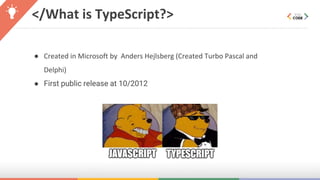
● Created in Microsoft by Anders Hejlsberg (Created Turbo Pascal and
Delphi)
● First public release at 10/2012
</Why use TypeScript?>
1. Optional static typing
2. Early spotted bugs
3. Predictability
4. Readability
5. Rich IDE support
6. Fast refactoring
7. Power of OOP
8. Cross-platform and cross-browser compatibility
9. Huge talent pool
10.Support from the tech world
</TypeScript Cons?>
1. Not true static typing
2. One more JavaScript to learn
3. Bloated code
4. Adding extra step — transpiling
</Install?>
● Global
○ npm install -g typescript
● Dev Only
○ npm install typescript --save-dev
</Feature: Data types?>
● Any
● Primitive
● Number
● Boolean
● String
● Void
● Null
● Undefined
● Unknown
● Array
● Enum
● Composition Types
● Unions
● Literals
● Intersection types
● Tuples
● Optional properties
</Feature: Data types - any>
Any is used when it’s impossible to determine the type of variable.
</Feature: Data types - Primitive>
● boolean - true/false value
● string - any char
● TypeScript doesn’t have separate type like float, double, int. These all are
floating point values => number
● void - used in return type of method/function
● null|undefined - null or undefined value
</Feature: Data types - Primitive>
</Feature: Data types - Array>
</Feature: Data types - Enum>
Composition Types
</Feature: Data types - Unions>
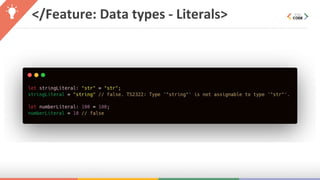
</Feature: Data types - Literals>
</Feature: Data types - Intersection>
</Feature: Data types - Tuples>
</Feature: Data types - Optional
Property>
</Feature: Type Aliases>
</Feature: Interface>
</Feature: Different>
Type Aliases - Interface
Different
</Feature: Different>
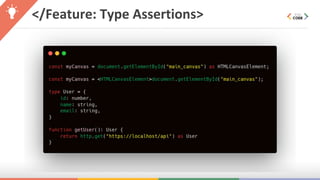
</Feature: Type Assertions>
</Feature: Decorators>
● With the introduction of Classes in TypeScript and ES6, there now exist certain scenarios that
require additional features to support annotating or modifying classes and class members.
Decorators provide a way to add both annotations and a meta-programming syntax for class
declarations and members. Decorators are a stage 2 proposal for JavaScript and are available as
an experimental feature of TypeScript.
● A Decorator is a special kind of declaration that can be attached to a class declaration, method,
accessor, property, or parameter. Decorators use the form @expression, where expression must
evaluate to a function that will be called at runtime with information about the decorated
declaration.
</Feature: Decorators>
How to use:
Command Line:
tsc --target ES5 --experimentalDecorators
tsconfig.json:
{
"compilerOptions": {
"target": "ES5",
"experimentalDecorators": true
}
}
</Feature: Decorators>
How to use:
Command Line:
tsc --target ES5 --experimentalDecorators
tsconfig.json:
{
"compilerOptions": {
"target": "ES5",
"experimentalDecorators": true
}
}
</Feature: Decorators>
How to use:
Command Line:
tsc --target ES5 --experimentalDecorators
tsconfig.json:
{
"compilerOptions": {
"target": "ES5",
"experimentalDecorators": true
}
}
</Feature: Decorators>
Syntax:
</Feature: Decorators>
Use:
</Feature: Decorators - Example>
Output:
</Feature: Generics>
● Generics allow creating “type variables” which can be used to create
classes, functions & type aliases that don't need to explicitly define
the types that they use.
● Generics makes it easier to write reusable code.
</Feature: Generics - Example>
</Examples>
</Q/A>
</End>
Thanks For Watching!

TypeScript Introduction