Social Media Training Session 1


Participant Exercises
    Topic 1: Social Media Overview and Introduction

    Topic 2: Twitter


                                                             Dr. Jim Hamill
                                                           Alan Stevenson
                                                            Vincent Hamill
                                                      www.energise2-0.com
                                                              March, 2011
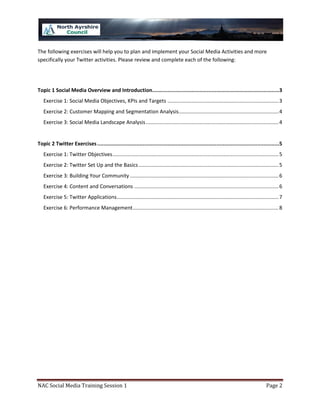
The following exercises will help you to plan and implement your Social Media Activities and more
specifically your Twitter activities. Please review and complete each of the following:


Topic 1 Social Media Overview and Introduction.................................................................................3
   Exercise 1: Social Media Objectives, KPIs and Targets ............................................................................. 3
   Exercise 2: Customer Mapping and Segmentation Analysis ..................................................................... 4
   Exercise 3: Social Media Landscape Analysis ............................................................................................ 4


Topic 2 Twitter Exercises ....................................................................................................................5
   Exercise 1: Twitter Objectives ................................................................................................................... 5
   Exercise 2: Twitter Set Up and the Basics ................................................................................................. 5
   Exercise 3: Building Your Community ....................................................................................................... 6
   Exercise 4: Content and Conversations .................................................................................................... 6
   Exercise 5: Twitter Applications ................................................................................................................ 7
   Exercise 6: Performance Management ..................................................................................................... 8


NAC Social Media Training Session 1                                                                                                          Page 2
Topic 1 Social Media Overview and Introduction
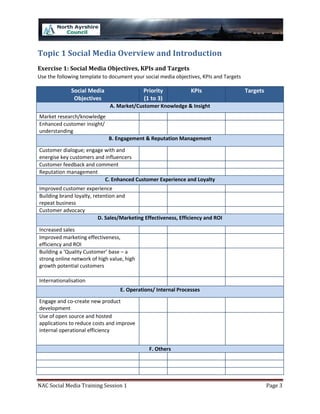
Exercise 1: Social Media Objectives, KPIs and Targets
Use the following template to document your social media objectives, KPIs and Targets

              Social Media                  Priority            KPIs                    Targets
               Objectives                   (1 to 3)
                              A. Market/Customer Knowledge & Insight
Market research/knowledge
Enhanced customer insight/
understanding
                             B. Engagement & Reputation Management

Customer dialogue; engage with and
energise key customers and influencers
Customer feedback and comment
Reputation management
                           C. Enhanced Customer Experience and Loyalty
Improved customer experience
Building brand loyalty, retention and
repeat business
Customer advocacy
                          D. Sales/Marketing Effectiveness, Efficiency and ROI

Increased sales
Improved marketing effectiveness,
efficiency and ROI
Building a ‘Quality Customer’ base – a
strong online network of high value, high
growth potential customers

Internationalisation
                                  E. Operations/ Internal Processes
Engage and co-create new product
development
Use of open source and hosted
applications to reduce costs and improve
internal operational efficiency


                                              F. Others


NAC Social Media Training Session 1                                                               Page 3
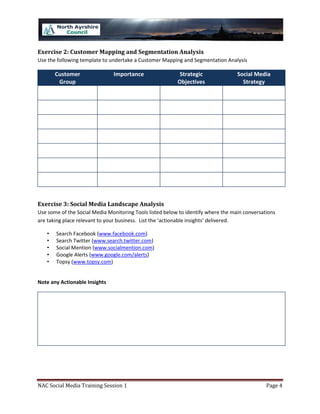
Exercise 2: Customer Mapping and Segmentation Analysis
Use the following template to undertake a Customer Mapping and Segmentation Analysis

       Customer                Importance                  Strategic               Social Media
        Group                                             Objectives                 Strategy


Exercise 3: Social Media Landscape Analysis
Use some of the Social Media Monitoring Tools listed below to identify where the main conversations
are taking place relevant to your business. List the ‘actionable insights’ delivered.

   •   Search Facebook (www.facebook.com)
   •   Search Twitter (www.search.twitter.com)
   •   Social Mention (www.socialmention.com)
   •   Google Alerts (www.google.com/alerts)
   •   Topsy (www.topsy.com)


Note any Actionable Insights


NAC Social Media Training Session 1                                                            Page 4
Topic 2 Twitter Exercises
Exercise 1: Twitter Objectives
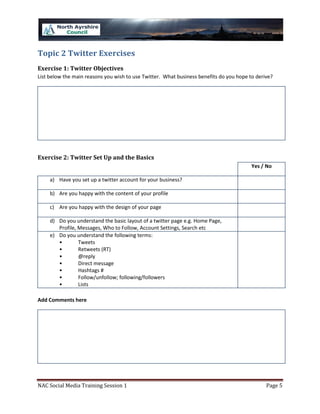
List below the main reasons you wish to use Twitter. What business benefits do you hope to derive?


Exercise 2: Twitter Set Up and the Basics
                                                                                         Yes / No

     a) Have you set up a twitter account for your business?

     b) Are you happy with the content of your profile

     c) Are you happy with the design of your page

     d) Do you understand the basic layout of a twitter page e.g. Home Page,
        Profile, Messages, Who to Follow, Account Settings, Search etc
     e) Do you understand the following terms:
        •        Tweets
        •        Retweets (RT)
        •        @reply
        •        Direct message
        •        Hashtags #
        •        Follow/unfollow; following/followers
        •        Lists

Add Comments here


NAC Social Media Training Session 1                                                            Page 5
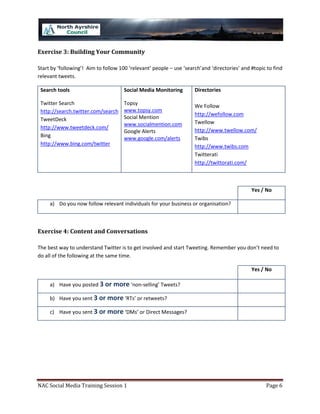
Exercise 3: Building Your Community

Start by ‘following’! Aim to follow 100 ‘relevant’ people – use ‘search’and ‘directories’ and #topic to find
relevant tweets.

 Search tools                         Social Media Monitoring        Directories

 Twitter Search                       Topsy                          We Follow
 http://search.twitter.com/search     www.topsy.com
                                                                     http://wefollow.com
 TweetDeck                            Social Mention
                                      www.socialmention.com          Twellow
 http://www.tweetdeck.com/                                           http://www.twellow.com/
                                      Google Alerts
 Bing                                 www.google.com/alerts          Twibs
 http://www.bing.com/twitter                                         http://www.twibs.com
                                                                     Twitterati
                                                                     http://twittorati.com/


                                                                                              Yes / No

     a) Do you now follow relevant individuals for your business or organisation?


Exercise 4: Content and Conversations

The best way to understand Twitter is to get involved and start Tweeting. Remember you don’t need to
do all of the following at the same time.

                                                                                              Yes / No

     a) Have you posted 3 or more ‘non-selling’ Tweets?

     b) Have you sent 3 or more ‘RTs’ or retweets?

     c) Have you sent 3 or more ‘DMs’ or Direct Messages?


NAC Social Media Training Session 1                                                                 Page 6
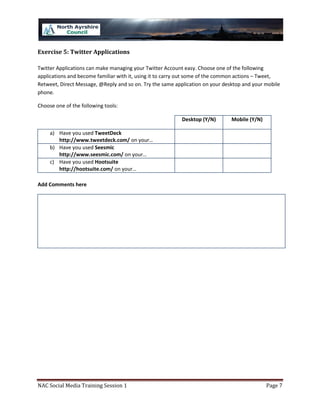
Exercise 5: Twitter Applications

Twitter Applications can make managing your Twitter Account easy. Choose one of the following
applications and become familiar with it, using it to carry out some of the common actions – Tweet,
Retweet, Direct Message, @Reply and so on. Try the same application on your desktop and your mobile
phone.

Choose one of the following tools:

                                                          Desktop (Y/N)        Mobile (Y/N)

     a) Have you used TweetDeck
        http://www.tweetdeck.com/ on your…
     b) Have you used Seesmic
        http://www.seesmic.com/ on your…
     c) Have you used Hootsuite
        http://hootsuite.com/ on your…

Add Comments here


NAC Social Media Training Session 1                                                           Page 7
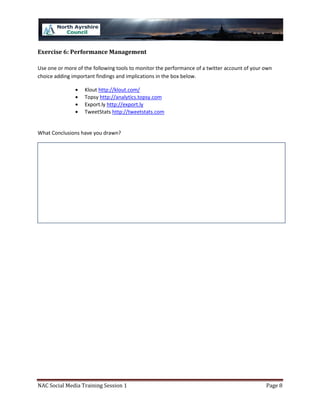
Exercise 6: Performance Management

Use one or more of the following tools to monitor the performance of a twitter account of your own
choice adding important findings and implications in the box below.

                   Klout http://klout.com/
                   Topsy http://analytics.topsy.com
                   Export.ly http://export.ly
                   TweetStats http://tweetstats.com


What Conclusions have you drawn?


NAC Social Media Training Session 1                                                            Page 8

North Ayrshire Twitter Training Session

  • 1.
    Social Media TrainingSession 1 Participant Exercises Topic 1: Social Media Overview and Introduction Topic 2: Twitter Dr. Jim Hamill Alan Stevenson Vincent Hamill www.energise2-0.com March, 2011
  • 2.
    The following exerciseswill help you to plan and implement your Social Media Activities and more specifically your Twitter activities. Please review and complete each of the following: Topic 1 Social Media Overview and Introduction.................................................................................3 Exercise 1: Social Media Objectives, KPIs and Targets ............................................................................. 3 Exercise 2: Customer Mapping and Segmentation Analysis ..................................................................... 4 Exercise 3: Social Media Landscape Analysis ............................................................................................ 4 Topic 2 Twitter Exercises ....................................................................................................................5 Exercise 1: Twitter Objectives ................................................................................................................... 5 Exercise 2: Twitter Set Up and the Basics ................................................................................................. 5 Exercise 3: Building Your Community ....................................................................................................... 6 Exercise 4: Content and Conversations .................................................................................................... 6 Exercise 5: Twitter Applications ................................................................................................................ 7 Exercise 6: Performance Management ..................................................................................................... 8 NAC Social Media Training Session 1 Page 2
  • 3.
    Topic 1 SocialMedia Overview and Introduction Exercise 1: Social Media Objectives, KPIs and Targets Use the following template to document your social media objectives, KPIs and Targets Social Media Priority KPIs Targets Objectives (1 to 3) A. Market/Customer Knowledge & Insight Market research/knowledge Enhanced customer insight/ understanding B. Engagement & Reputation Management Customer dialogue; engage with and energise key customers and influencers Customer feedback and comment Reputation management C. Enhanced Customer Experience and Loyalty Improved customer experience Building brand loyalty, retention and repeat business Customer advocacy D. Sales/Marketing Effectiveness, Efficiency and ROI Increased sales Improved marketing effectiveness, efficiency and ROI Building a ‘Quality Customer’ base – a strong online network of high value, high growth potential customers Internationalisation E. Operations/ Internal Processes Engage and co-create new product development Use of open source and hosted applications to reduce costs and improve internal operational efficiency F. Others NAC Social Media Training Session 1 Page 3
  • 4.
    Exercise 2: CustomerMapping and Segmentation Analysis Use the following template to undertake a Customer Mapping and Segmentation Analysis Customer Importance Strategic Social Media Group Objectives Strategy Exercise 3: Social Media Landscape Analysis Use some of the Social Media Monitoring Tools listed below to identify where the main conversations are taking place relevant to your business. List the ‘actionable insights’ delivered. • Search Facebook (www.facebook.com) • Search Twitter (www.search.twitter.com) • Social Mention (www.socialmention.com) • Google Alerts (www.google.com/alerts) • Topsy (www.topsy.com) Note any Actionable Insights NAC Social Media Training Session 1 Page 4
  • 5.
    Topic 2 TwitterExercises Exercise 1: Twitter Objectives List below the main reasons you wish to use Twitter. What business benefits do you hope to derive? Exercise 2: Twitter Set Up and the Basics Yes / No a) Have you set up a twitter account for your business? b) Are you happy with the content of your profile c) Are you happy with the design of your page d) Do you understand the basic layout of a twitter page e.g. Home Page, Profile, Messages, Who to Follow, Account Settings, Search etc e) Do you understand the following terms: • Tweets • Retweets (RT) • @reply • Direct message • Hashtags # • Follow/unfollow; following/followers • Lists Add Comments here NAC Social Media Training Session 1 Page 5
  • 6.
    Exercise 3: BuildingYour Community Start by ‘following’! Aim to follow 100 ‘relevant’ people – use ‘search’and ‘directories’ and #topic to find relevant tweets. Search tools Social Media Monitoring Directories Twitter Search Topsy We Follow http://search.twitter.com/search www.topsy.com http://wefollow.com TweetDeck Social Mention www.socialmention.com Twellow http://www.tweetdeck.com/ http://www.twellow.com/ Google Alerts Bing www.google.com/alerts Twibs http://www.bing.com/twitter http://www.twibs.com Twitterati http://twittorati.com/ Yes / No a) Do you now follow relevant individuals for your business or organisation? Exercise 4: Content and Conversations The best way to understand Twitter is to get involved and start Tweeting. Remember you don’t need to do all of the following at the same time. Yes / No a) Have you posted 3 or more ‘non-selling’ Tweets? b) Have you sent 3 or more ‘RTs’ or retweets? c) Have you sent 3 or more ‘DMs’ or Direct Messages? NAC Social Media Training Session 1 Page 6
  • 7.
    Exercise 5: TwitterApplications Twitter Applications can make managing your Twitter Account easy. Choose one of the following applications and become familiar with it, using it to carry out some of the common actions – Tweet, Retweet, Direct Message, @Reply and so on. Try the same application on your desktop and your mobile phone. Choose one of the following tools: Desktop (Y/N) Mobile (Y/N) a) Have you used TweetDeck http://www.tweetdeck.com/ on your… b) Have you used Seesmic http://www.seesmic.com/ on your… c) Have you used Hootsuite http://hootsuite.com/ on your… Add Comments here NAC Social Media Training Session 1 Page 7
  • 8.
    Exercise 6: PerformanceManagement Use one or more of the following tools to monitor the performance of a twitter account of your own choice adding important findings and implications in the box below. Klout http://klout.com/ Topsy http://analytics.topsy.com Export.ly http://export.ly TweetStats http://tweetstats.com What Conclusions have you drawn? NAC Social Media Training Session 1 Page 8