Download free for 30 days
Sign in
Upload
Language (EN)
Support
Business
Mobile
Social Media
Marketing
Technology
Art & Photos
Career
Design
Education
Presentations & Public Speaking
Government & Nonprofit
Healthcare
Internet
Law
Leadership & Management
Automotive
Engineering
Software
Recruiting & HR
Retail
Sales
Services
Science
Small Business & Entrepreneurship
Food
Environment
Economy & Finance
Data & Analytics
Investor Relations
Sports
Spiritual
News & Politics
Travel
Self Improvement
Real Estate
Entertainment & Humor
Health & Medicine
Devices & Hardware
Lifestyle
Change Language
Language
English
Español
Português
Français
Deutsche
Cancel
Save
EN
Uploaded by
AntonioIsipJr1
48 views
Troubleshooting BGP.pdf.................
Troubleshooting BGP.pdf.................
Technology
◦
Read more
0
Save
Share
Embed
Embed presentation
Download
Download to read offline
1
/ 121
2
/ 121
3
/ 121
4
/ 121
5
/ 121
6
/ 121
7
/ 121
8
/ 121
9
/ 121
10
/ 121
11
/ 121
12
/ 121
13
/ 121
14
/ 121
15
/ 121
16
/ 121
17
/ 121
18
/ 121
19
/ 121
20
/ 121
21
/ 121
22
/ 121
23
/ 121
24
/ 121
25
/ 121
26
/ 121
27
/ 121
28
/ 121
29
/ 121
30
/ 121
31
/ 121
32
/ 121
33
/ 121
34
/ 121
35
/ 121
36
/ 121
37
/ 121
38
/ 121
39
/ 121
40
/ 121
41
/ 121
42
/ 121
43
/ 121
44
/ 121
45
/ 121
46
/ 121
47
/ 121
48
/ 121
49
/ 121
50
/ 121
51
/ 121
52
/ 121
53
/ 121
54
/ 121
55
/ 121
56
/ 121
57
/ 121
58
/ 121
59
/ 121
60
/ 121
61
/ 121
62
/ 121
63
/ 121
64
/ 121
65
/ 121
66
/ 121
67
/ 121
68
/ 121
69
/ 121
70
/ 121
71
/ 121
72
/ 121
73
/ 121
74
/ 121
75
/ 121
76
/ 121
77
/ 121
78
/ 121
79
/ 121
80
/ 121
81
/ 121
82
/ 121
83
/ 121
84
/ 121
85
/ 121
86
/ 121
87
/ 121
88
/ 121
89
/ 121
90
/ 121
91
/ 121
92
/ 121
93
/ 121
94
/ 121
95
/ 121
96
/ 121
97
/ 121
98
/ 121
99
/ 121
100
/ 121
101
/ 121
102
/ 121
103
/ 121
104
/ 121
105
/ 121
106
/ 121
107
/ 121
108
/ 121
109
/ 121
110
/ 121
111
/ 121
112
/ 121
113
/ 121
114
/ 121
115
/ 121
116
/ 121
117
/ 121
118
/ 121
119
/ 121
120
/ 121
121
/ 121
More Related Content
PPTX
Cisco Live Milan 2015 - BGP advance
by
Bertrand Duvivier
PDF
BGP Advance Technique by Steven & James
by
Febrian
PPT
Using tech support_website_ip_routing_20_aug2006
by
Fran Checa
PDF
NANOG50.Talk33.NANOG50-BGP-Techniques.pdf
by
AntonioIsipJr1
PDF
A Deep Dive into BAsic and Design Best PRactices fr BGP and L3VPN
by
AntonioIsipJr1
PDF
Troubleshooting BGP
by
APNIC
PDF
Advancebgp 100530220734-phpapp02
by
Jamil Jamil
PDF
Krzysztof Mazepa - IOS XR - IP Fast Convergence
by
PROIDEA
Cisco Live Milan 2015 - BGP advance
by
Bertrand Duvivier
BGP Advance Technique by Steven & James
by
Febrian
Using tech support_website_ip_routing_20_aug2006
by
Fran Checa
NANOG50.Talk33.NANOG50-BGP-Techniques.pdf
by
AntonioIsipJr1
A Deep Dive into BAsic and Design Best PRactices fr BGP and L3VPN
by
AntonioIsipJr1
Troubleshooting BGP
by
APNIC
Advancebgp 100530220734-phpapp02
by
Jamil Jamil
Krzysztof Mazepa - IOS XR - IP Fast Convergence
by
PROIDEA
Similar to Troubleshooting BGP.pdf.................
PDF
BRKRST-3068 Troubleshooting Catalyst 2K and 3K.pdf
by
ssusercbaa33
PDF
Bgp Toc
by
bigb0206
PDF
Bgp attribute-case study
by
SalvatoreFILORIZZO
PDF
Redes Avanzado Sdwan proyecto autoestudio
by
ssuser5e5938
PPTX
ENCOR_Chapter_11 - BGP implementation.pptx
by
nshg93
PPTX
Border Gatway Protocol
by
Shashank Asthana
PDF
Troubleshooting BGP
by
Duane Bodle
PDF
PLNOG15: BGP New Advanced Features - Piotr Wojciechowski
by
PROIDEA
PDF
Apnic_bgp_training_cisco_ciscosaicoc.pdf
by
PCCW GLOBAL
PDF
Naked BGP
by
Thomas Mangin
PPTX
CCNP ROUTE V7 CH7
by
Chaing Ravuth
PPT
Bgp 6 advanced transit as issues
by
Auguste Behe
PPT
Bgp
by
Raghu Kiran
PDF
bgp features presentation routing protocle
by
Badr Belhajja
PPTX
CCCNP ROUTE v6_ch06
by
Licenciatura en Redes y Sistemas Operativos
PDF
Troubleshooting Firewalls (2012 San Diego)
by
Cisco Security
DOCX
CCNP Route 642 902 BGP
by
IT Tech
PDF
BGM book
by
wafi muhammad
PDF
Bgp
by
Golak Nayak
PPTX
An Overview of Border Gateway Protocol (BGP)
by
Jasim Alam
BRKRST-3068 Troubleshooting Catalyst 2K and 3K.pdf
by
ssusercbaa33
Bgp Toc
by
bigb0206
Bgp attribute-case study
by
SalvatoreFILORIZZO
Redes Avanzado Sdwan proyecto autoestudio
by
ssuser5e5938
ENCOR_Chapter_11 - BGP implementation.pptx
by
nshg93
Border Gatway Protocol
by
Shashank Asthana
Troubleshooting BGP
by
Duane Bodle
PLNOG15: BGP New Advanced Features - Piotr Wojciechowski
by
PROIDEA
Apnic_bgp_training_cisco_ciscosaicoc.pdf
by
PCCW GLOBAL
Naked BGP
by
Thomas Mangin
CCNP ROUTE V7 CH7
by
Chaing Ravuth
Bgp 6 advanced transit as issues
by
Auguste Behe
Bgp
by
Raghu Kiran
bgp features presentation routing protocle
by
Badr Belhajja
CCCNP ROUTE v6_ch06
by
Licenciatura en Redes y Sistemas Operativos
Troubleshooting Firewalls (2012 San Diego)
by
Cisco Security
CCNP Route 642 902 BGP
by
IT Tech
BGM book
by
wafi muhammad
Bgp
by
Golak Nayak
An Overview of Border Gateway Protocol (BGP)
by
Jasim Alam
More from AntonioIsipJr1
PDF
Cisco Live ACI.pdf......................
by
AntonioIsipJr1
PDF
Demystifying ISE Deployments.pdf........
by
AntonioIsipJr1
PDF
2007_Intro to SOAR......................
by
AntonioIsipJr1
PDF
2-Infrastructure as Code for Network Operations An Executive’s guide for achi...
by
AntonioIsipJr1
PDF
1-Infrastructure as Code for NXOS and NDFC with Ansible.pdf
by
AntonioIsipJr1
PDF
Webex Calling,,,,,, Where do I begin.pdf
by
AntonioIsipJr1
PDF
Deep Dive on F5 BIG-IQ, BIG-IP and Cisco.pdf
by
AntonioIsipJr1
PDF
enterprise_campus_qos_0 (1234567890).pdf
by
AntonioIsipJr1
PDF
BRKSEC-2021 Firewall Architectures in the Data Centre and Internet Edge.pdf
by
AntonioIsipJr1
PDF
MPLS EVPN...............................
by
AntonioIsipJr1
Cisco Live ACI.pdf......................
by
AntonioIsipJr1
Demystifying ISE Deployments.pdf........
by
AntonioIsipJr1
2007_Intro to SOAR......................
by
AntonioIsipJr1
2-Infrastructure as Code for Network Operations An Executive’s guide for achi...
by
AntonioIsipJr1
1-Infrastructure as Code for NXOS and NDFC with Ansible.pdf
by
AntonioIsipJr1
Webex Calling,,,,,, Where do I begin.pdf
by
AntonioIsipJr1
Deep Dive on F5 BIG-IQ, BIG-IP and Cisco.pdf
by
AntonioIsipJr1
enterprise_campus_qos_0 (1234567890).pdf
by
AntonioIsipJr1
BRKSEC-2021 Firewall Architectures in the Data Centre and Internet Edge.pdf
by
AntonioIsipJr1
MPLS EVPN...............................
by
AntonioIsipJr1
Recently uploaded
PPTX
Working Session — Build a Document Understanding Automation Using an OOTB ML ...
by
DianaGray10
PPTX
TravelTech Paris 2025 | Beyond the pipes: Why Channel Management isn’t really...
by
apidays
PDF
Session 1/5: Enhancing Automation with Screenplay & Business Rules
by
suhanisingh58689
PDF
How to Install XRDP on CentOS 10 .pdf
by
Green Webpage
PDF
Why Many Smart Device Platforms Fail to Scale?
by
Promeraki Developments
PDF
Chapter 5 Security Mechanisms iin computer security.pdf
by
Getnet Tigabie Askale -(GM)
PDF
How does MES(Manufacturing Execution System) work?
by
akipii ogaoga
PPTX
Tech Trends 2026: AI Agents, Quantum Computing, Robotics & Cybersecurity
by
ridwansassman
PDF
Explaining specific examples of purpose-specific BOM
by
akipii ogaoga
PDF
Self-Correction Failure Diagnostic: Detecting Drift in Complex Systems
by
Systems Research Group
PDF
The new book “Marketing in the Metaverse” spotlights Scott M. Graffius’ research
by
Scott M. Graffius
PDF
Explaining the flow of purpose-specific BOM
by
akipii ogaoga
PDF
Oracle Cloud Infrastructure 2025 Architect Professional (1Z0-1127-25) Master ...
by
ExamCert App
PPTX
Beyond the Algorithm: Designing Human-Centric Public Service with AI
by
Alan Dix
PDF
final~~~~~~~~~~~~~~~~~~~~~~~~~~~~~~~.pdf
by
omarbishtawi04
PDF
Writing GPU-Ready AI Models in Pure Java with Babylon
by
Ana-Maria Mihalceanu
PDF
UiPath Automation Developer Associate Training Series 2026 - Session 2
by
DianaGray10
PPTX
How Does an ICO Launchpad Work Step-by-Step Breakdown.pptx
by
Tom Hardy S
PDF
TravelTech Paris 2025 | The EU Digital Identity Wallet and it’s impact on Tra...
by
apidays
PDF
Poročilo odbora CIS (CH08873) za leto 2025 na letni skupščini IEEE Slovenija ...
by
University of Maribor
Working Session — Build a Document Understanding Automation Using an OOTB ML ...
by
DianaGray10
TravelTech Paris 2025 | Beyond the pipes: Why Channel Management isn’t really...
by
apidays
Session 1/5: Enhancing Automation with Screenplay & Business Rules
by
suhanisingh58689
How to Install XRDP on CentOS 10 .pdf
by
Green Webpage
Why Many Smart Device Platforms Fail to Scale?
by
Promeraki Developments
Chapter 5 Security Mechanisms iin computer security.pdf
by
Getnet Tigabie Askale -(GM)
How does MES(Manufacturing Execution System) work?
by
akipii ogaoga
Tech Trends 2026: AI Agents, Quantum Computing, Robotics & Cybersecurity
by
ridwansassman
Explaining specific examples of purpose-specific BOM
by
akipii ogaoga
Self-Correction Failure Diagnostic: Detecting Drift in Complex Systems
by
Systems Research Group
The new book “Marketing in the Metaverse” spotlights Scott M. Graffius’ research
by
Scott M. Graffius
Explaining the flow of purpose-specific BOM
by
akipii ogaoga
Oracle Cloud Infrastructure 2025 Architect Professional (1Z0-1127-25) Master ...
by
ExamCert App
Beyond the Algorithm: Designing Human-Centric Public Service with AI
by
Alan Dix
final~~~~~~~~~~~~~~~~~~~~~~~~~~~~~~~.pdf
by
omarbishtawi04
Writing GPU-Ready AI Models in Pure Java with Babylon
by
Ana-Maria Mihalceanu
UiPath Automation Developer Associate Training Series 2026 - Session 2
by
DianaGray10
How Does an ICO Launchpad Work Step-by-Step Breakdown.pptx
by
Tom Hardy S
TravelTech Paris 2025 | The EU Digital Identity Wallet and it’s impact on Tra...
by
apidays
Poročilo odbora CIS (CH08873) za leto 2025 na letni skupščini IEEE Slovenija ...
by
University of Maribor
Troubleshooting BGP.pdf.................
2.
Troubleshooting BGP Vinit Jain
– CCIE# 22854 Routing Protocols (RP) HTTS - @vinugenie BRKRST-3320
3.
• Introduction • Generic
Troubleshooting Advice • BGP Peering, Session Flaps • Peering across FW and NAT, PMTUD • Best Path calculation, Convergence • Missing Routes, Unexpected Routes, Filtering and Stale Routes • Troubleshooting with BGP Table Version , Route Churn • Troubleshooting with NX-OS • Debugs, Event-History • Troubleshooting VxLAN BGP-EVPN Agenda
4.
Generic Troubleshooting Methodologies
5.
© 2017 Cisco
and/or its affiliates. All rights reserved. Cisco Public 5 BRKRST-3320 Generic Troubleshooting Advice • Define the problem • Narrow down the problem • Can you reproduce it? • Which device(s) are the cause of the problem? • Verify relevant configuration pieces • Troubleshoot one thing at a time • 20k routes flapping? Pick one route and focus on that one route • Have a co-worker take a look • Forces you to talk through the problem • Different set of eyes may spot something • Packet capture tools • Platform based / SPAN Few Basic Things
6.
© 2017 Cisco
and/or its affiliates. All rights reserved. Cisco Public 6 BRKRST-3320 Generic Troubleshooting Advice • Use NTP to sync timestamps on your routers • clock timezone EST -5 0 • clock summer-time EDT recurring • ntp server x.x.x.x • Use a Syslog Server • logging buffered {informational | debugging} • logging host x.x.x.x • service timestamps log datetime msec localtime • Tacacs Logs • Viewing Commands executed during / before the problem • Use show accounting logs (on NX-OS) NTP, Syslog, Tacacs
7.
© 2017 Cisco
and/or its affiliates. All rights reserved. Cisco Public 7 BRKRST-3320 Generic Troubleshooting Advice • “The CPU on this router is high” • High compared to what? • What is the CPU load normally at this time of day? • Things to keep track of • CPU load • Free Memory • Largest block of memory • Input/Output load for interfaces • Rate of BGP bestpath changes • Etc., etc. Define the baseline…
8.
© 2017 Cisco
and/or its affiliates. All rights reserved. Cisco Public 8 BRKRST-3320 Generic Troubleshooting Advice • IOS / IOS XE Embedded Packet Capture • 6500 / 7600 ELAM NETDR Capture MPA (Mini Protocol Analyzer) • ASR9000 Network Processor Capture • Nexus (7k, 5k, 3k) Ethanalyzer Elam Packet Capture Tools
9.
© 2017 Cisco
and/or its affiliates. All rights reserved. Cisco Public 9 BRKRST-3320 Generic Troubleshooting Advice • Use SPAN to get traffic to your sniffer • monitor session 1 source interface Te2/4 rx • monitor session 1 destination interface Te2/2 • IOS-XR • Only supported on ASR-9000 • Use ACLs to control what packets to SPAN • RSPAN • “RSPAN has all the features of SPAN, plus support for source ports and destination ports that are distributed across multiple switches, allowing one to monitor any destination port located on the RSPAN VLAN. Hence, one can monitor the traffic on one switch using a device on another switch.” Sniffer Captures – Last Resort
10.
BGP Peering Issues,
Session Flaps
11.
© 2017 Cisco
and/or its affiliates. All rights reserved. Cisco Public 11 BRKRST-3320 BGP Peering Issues • Verify Configuration Peering IP Address AS Number MD5 Authentication (Optional) ebgp-multihop hop-count (eBGP only) • Verify Reachability ping remote-ip source source-ip • If reachability issues found: Use traceroute to verify where the trace is dropping Preliminary checks R1 R2 R3 router bgp 65000 bgp router-id 192.168.2.2 bgp log-neighbor-changes neighbor 192.168.1.1 remote-as 65000 neighbor 192.168.1.1 update-sour lo0 neighbor 192.168.3.3 remote-as 65535 neighbor 192.168.3.3 password C!sc0 neighbor 192.168.3.3 ebgp-multi 2
12.
© 2017 Cisco
and/or its affiliates. All rights reserved. Cisco Public 12 BRKRST-3320 BGP Peering Issues • BGP uses a TTL of 1 for eBGP peers − Also verifies if NEXTHOP is directly connected • For eBGP peers that are more than 1 hop away a larger TTL must be used − No longer verifies if NEXTHOP is directly connected • Use neighbor disable-connected-check • Disables the “is the NEXTHOP on a connected subnet” check ebgp-multihop and disable-connected-check AS65535 AS65534 OSPF R1 R2 R3 iBGP eBGP router bgp 65534 neighbor 192.168.3.3 remote-as 65535 neighbor 192.168.3.3 disable-connected-check
13.
© 2017 Cisco
and/or its affiliates. All rights reserved. Cisco Public 13 BRKRST-3320 BGP Peering Issues • Verify any Firewall / ACLs in the path for TCP port 179 • • Ensure BGP Pass-Through configured • ASA / PIX offsets TCP sequence number with a random number for every TCP session • Causes MD5 authentication to fail • ASA strips off TCP option 19 Blocking ACLs R1 R2 R1#telnet 2.2.2.2 179 /source-interface loopback 0 Trying 2.2.2.2 ... % Destination unreachable; gateway or host down 1. Create ACL to permit BGP traffic 2. Create TCP Map to allow TCP option 19 3. Create class-map to match BGP traffic 4. Disable sequence number randomization and Enable TCP option 19 in global policy
14.
© 2017 Cisco
and/or its affiliates. All rights reserved. Cisco Public BGP Peering Issues access-list OUT extended permit tcp host 10.1.12.1 host 10.1.12.2 eq bgp access-list OUT extended permit tcp host 10.1.12.2 eq bgp host 10.1.12.2 ! access-list BGP-TRAFFIC extended permit tcp host 10.1.110.2 host 10.1.110.10 eq bgp access-list BGP-TRAFFIC extended permit tcp host 10.1.110.2 eq bgp host 10.1.110.10 ! tcp-map TCP-OPTION-19 tcp-options range 19 19 allow ! access-group OUT in interface Outside ! class-map BGP_TRAFFIC match access-list BGP-TRAFFIC ! policy-map global_policy class BGP_TRAFFIC set connection random-sequence-number disable set connection advanced-options TCP-OPTION-19 BGP Pass-Through – ASA FW Configuration BRKRST-3320 14
15.
© 2017 Cisco
and/or its affiliates. All rights reserved. Cisco Public BGP Peering Issues • NAT Translation – 10.1.12.1 translated to 10.1.23.3 • BGP Peering between R1 and R2 • What will be the neighbor IP configured- • On R1? • On R2? BGP Across NAT R1 R2 NAT FW 10.1.12.1 10.1.12.2 10.1.23.1 10.1.23.2 BRKRST-3320 15
16.
© 2017 Cisco
and/or its affiliates. All rights reserved. Cisco Public BGP Peering Issues • BGP NOTIFICATIONs consist of an error code, sub-code and data - All Error Codes and Sub-codes can be found here - http://www.iana.org/assignments/bgp-parameters/bgp-parameters.xml - http://tinyurl.com/bgp-notification-codes - Data portion may contain what triggered the notification - Example: corrupt part of the UPDATE Notifications R2# *Mar 24 20:25:47.262: %BGP-5-ADJCHANGE: neighbor 1.1.1.1 Down BGP Notification sent *Mar 24 20:25:47.262: %BGP-3-NOTIFICATION: sent to neighbor 1.1.1.1 4/0 (hold time expired) 0 bytes BRKRST-3320 16
17.
© 2017 Cisco
and/or its affiliates. All rights reserved. Cisco Public BRKRST-3320 17
18.
© 2017 Cisco
and/or its affiliates. All rights reserved. Cisco Public Notifications Contd… The first 2 in “2/2” is the Error Code….so “OPEN Message Error” Value Name Reference 1 Message Header Error RFC 4271 2 OPEN Message Error RFC 4271 3 UPDATE Message Error RFC 4271 4 Hold Timer Expired RFC 4271 5 Finite State Machine Error RFC 4271 6 Cease RFC 4271 %BGP-3-NOTIFICATION: sent to neighbor 2.2.2.2 2/2 (peer in wrong AS) 2 bytes 00C8 FFFF FFFF FFFF FFFF FFFF FFFF FFFF FFFF 002D 0104 00C8 00B4 0202 0202 1002 0601 0400 0100 0102 0280 0002 0202 00 BRKRST-3320 18
19.
© 2017 Cisco
and/or its affiliates. All rights reserved. Cisco Public Subcode # Subcode Name Subcode Description 1 Unsupported BGP version The version of BGP the peer is running isn’t compatible with the local version of BGP 2 Bad Peer AS The AS this peer is locally configured for doesn’t match the AS the peer is advertising 3 Bad BGP Identifier The BGP router ID is the same as the local BGP router ID 4 Unsupported Optional Parameter There is an option in the packet which the local BGP speaker doesn’t recognize 6 Unacceptable Hold Time The remote BGP peer has requested a BGP hold time which is not allowed (too low) 7 Unsupported Capability The peer has asked for support for a feature which the local router does not support OPEN Message Subcodes shown above The second 2 in “2/2” is the Error Subcode….so “Bad Peer AS” Notifications Contd… BRKRST-3320 19
20.
© 2017 Cisco
and/or its affiliates. All rights reserved. Cisco Public BGP Peering Issues Problem with TCP Process (show tcp brief) PCB Recv-Q Send-Q Local Address Foreign Address State 0x48277ea4 0 0 :::179 :::0 LISTEN 0x48276c50 0 0 0.0.0.0:23 0.0.0.0:0 LISTEN 0x48290da8 0 0 12.26.28.152:23 223.255.254.249:48877 ESTAB 0x4827755c 0 0 0.0.0.0:179 0.0.0.0:0 LISTEN • PCB is the internal identifier used by TCP. It can be used as input to other show commands. • Recv-Q shows how much received data is waiting to be “read” from TCP by application. • Send-Q shows how much application data is waiting to be “sent” by TCP. • Local-address and foreign address identify the two end points of the connection. • State identifies the current state of the connection. BRKRST-3320 20
21.
© 2017 Cisco
and/or its affiliates. All rights reserved. Cisco Public BGP Peering Issues • LISTEN • A listen socket on which incoming connections will be accepted. • ESTAB • An established connection • CLOSED • Socket not fully programmed – most often seen on standby RP by applications that are warm or hot standby. Connections that are getting established: • SYNSENT • A SYN message was sent to peer. • SYNRCVD • A SYN message was received from peer – socket will move into ESTAB state. Connections that are getting terminated: • CLOSEWAIT, CLOSING, LASTACK, TIMEWAIT, FINWAIT1, FINWAIT2 Most Common TCP States BRKRST-3320 21
22.
© 2017 Cisco
and/or its affiliates. All rights reserved. Cisco Public BGP Peering Issues XR# show tcp detail pcb 0x48277a58 Connection state is ESTAB, I/O status: 0, socket status: 0 PCB 0x48277a58, vrfid 0x60000000, Pak Prio: Unspecified, TOS: 16, TTL: 255 Local host: 12.26.28.152, Local port: 179 (Local App PID: 180393) Foreign host: 223.255.254.249, Foreign port: 49017 Current send queue size in bytes: 0 (max 16384) Current receive queue size in bytes: 0 (max 16384) mis-ordered: 0 bytes Current receive queue size in packets: 0 (max 50) • Pak Prio: Did the application mark the packet with correct priority? Determines the queuing within the router before it goes out on the wire. • TOS: Type of service, goes out on the wire. • TTL: Important for eBGP for the TTL security check • Mis-ordered: How much of the received data is out-of-order? • Receive queue in packets: how many packets are sitting in receive buffers? Detailed info about a TCP Socket BRKRST-3320 22
23.
© 2017 Cisco
and/or its affiliates. All rights reserved. Cisco Public 23 BRKRST-3320 BGP Peering Issues • What if a peer sends you a message that causes us to send a NOTIFICATION? • Corrupt UPDATE • Bad OPEN message, etc. • View the message that triggered the NOTIFICATION show ip bgp neighbor 1.1.1.1 | begin Last reset Last reset 5d12h, due to BGP Notification sent, invalid or corrupt AS path Message received that caused BGP to send a Notification: FFFFFFFF FFFFFFFF FFFFFFFF FFFFFFFF 005C0200 00004140 01010040 0206065D 1CFC059F 400304D5 8C20F480 04040000 05054005 04000000 55C0081C 329C4844 329C6E28 329C6E29 58F50082 58F5EACE 58F5FA02 58F5FA6E 18D14E70 Malformed Update http://bgpaste.convergence.cx/
24.
© 2017 Cisco
and/or its affiliates. All rights reserved. Cisco Public BGP Peering Issues *Jan 5 18:18:04.667: %BGP-3-NOTIFICATION: sent to neighbor 10.1.12.1 active 2/7 (unsupported/disjoint capability) 0 bytes R2# *Jan 5 18:18:04.671: %BGP-4-MSGDUMP: unsupported or mal- formatted message received from 10.1.12.1: FFFF FFFF FFFF FFFF FFFF FFFF FFFF FFFF 002D 0104 0064 00B4 0101 0101 1002 0601 0400 0100 0102 0280 0002 0202 00 Unsupported Capability - Disable capability negotiation during session establishment process using the below hidden command neighbor x.x.x.x dont-capability-negotiate BRKRST-3320 24
25.
© 2017 Cisco
and/or its affiliates. All rights reserved. Cisco Public Peering Issues • BGP Peering has been up for months, but all of a sudden, BGP session goes down and never comes back up • IGP goes down as well? Yes • Debug shows keepalives are getting generated • Check for the Interface Queue on both sides • Interface Queue (both input and output queue) getting wedge can cause this symptom • Temporary workarounds – Increase the Queue size, RP Switchover • If its input queue wedge, check the show buffer input-interface x/y packet to analyze what packets are stuck in queue. Also checking for incoming traffic rate • If its output queue, check for outgoing traffic rate. Check the transmission side Stable BGP peers going into Idle State R2#show interface gi0/1 | in queue Input queue: 0/375/0/0 (size/max/drops/flushes); Total output drops: 0 Output queue: 1001/1000 (size/max) BRKRST-3320 25
26.
© 2017 Cisco
and/or its affiliates. All rights reserved. Cisco Public 26 BRKRST-3320 BGP Peering Issues Notifications – Hold Time Expired • R1 sends hold time expired NOTIFICATION to R2 • R1 did not receive a KA from R2 for holdtime seconds • One of two issues • R2 is not generating keepalives • R2 is generating keepalives but R1 is not receiving them R1 R2 %BGP-5-ADJCHANGE: neighbor 2.2.2.2 Down BGP Notification sent %BGP-3-NOTIFICATION: sent to neighbor 2.2.2.2 4/0 (hold time expired) R1#show ip bgp neighbor 2.2.2.2 | include last reset Last reset 00:01:02, due to BGP Notification sent, hold time expired NOTIFICATION
27.
© 2017 Cisco
and/or its affiliates. All rights reserved. Cisco Public BGP Peering Issues • Check if R2 is building keepalives (KA) − Check for output drops on R2 outgoing interface − When did R2 last build a BGP message for R1. (Should be within “keepalive interval” seconds • R2 is building messages for R1 but possibly R2 is unable to send them − Check OutQ and MsgSent Counters – show bgp afi safi summary − OutQ is the number of packets waiting for TCP to Tx to a peer − MsgSent is the number of packets TCP has removed from OutQ and transmitted for a peer Notifications - Hold Time Expired R2#show ip bgp neighbors 1.1.1.1 Last read 00:00:15, last write 00:00:44, hold time is 180, keepalive interval is 60 seconds BRKRST-3320 27
28.
© 2017 Cisco
and/or its affiliates. All rights reserved. Cisco Public R2#show ip bgp sum | begin Neighbor Neighbor … MsgRcvd MsgSent TblVer InQ OutQ Up/Down State/PfxRcd 1.1.1.1 … 53 284 10167 0 98 00:02:24 0 R2#show ip bgp sum | begin Neighbor Neighbor … MsgRcvd MsgSent TblVer InQ OutQ Up/Down State/PfxRcd 1.1.1.1 … 53 284 10167 0 97 00:01:20 0 At least one BGP keepalive interval apart The number of packets generated is increasing The number of packets transmitted is not increasing OutQ is incrementing due to keepalive generation MsgSent is not incrementing Something is “stuck” on the OutQ The keepalives are not leaving R2!! BGP Peering Issues Notifications – Hold Time Expired BRKRST-3320 28
29.
© 2017 Cisco
and/or its affiliates. All rights reserved. Cisco Public Randomly Flapping Peers • What if the BGP peer is flapping continuously, but not at regular intervals. • Sometimes it flaps every 2 minutes and sometimes it flaps after 5 minutes • Most probable cause could be keepalives are not getting generated in timely manner • Or, they are not being forwarded out in a timely manner Flapping continuously but not at regular intervals… R2#show ip bgp sum | begin Neighbor Neighbor … MsgRcvd MsgSent TblVer InQ OutQ Up/Down State/PfxRcd 10.1.13.3 … 160 284 10167 0 0 00:01:20 10 R2#show ip bgp sum | begin Neighbor Neighbor … MsgRcvd MsgSent TblVer InQ OutQ Up/Down State/PfxRcd 10.1.13.3 … 165 296 10167 0 0 00:00:39 10 BRKRST-3320 29
30.
© 2017 Cisco
and/or its affiliates. All rights reserved. Cisco Public Randomly Flapping Peers ASR1k – EPC Capture and Debugs ASR1k(config)#ip access-list extended MYACL ASR1k(config-acl)#permit tcp host 10.1.13.1 eq bgp host 10.1.13.3 ASR1k(config-acl)#permit tcp host 10.1.13.1 host 10.1.13.3 eq bgp ASR1k#monitor capture CAP1 buffer circular packets 1000 ASR1k#monitor capture CAP1 buffer size 10 ASR1k#monitor capture CAP1 interface GigabitEthernet0/0/0 in ASR1k#monitor capture CAP1 access-list MYACL ASR1k#monitor capture CAP1 start ASR1k#monitor capture CAP1 stop ASR1k#monitor capture CAP1 export bootflash:cap1.pcap ASR1k#debug ip bgp keepalives BRKRST-3320 30
31.
© 2017 Cisco
and/or its affiliates. All rights reserved. Cisco Public Randomly Flapping Peers ASR1k – EPC Capture ASR1k#show monitor capture buffer CAP1 dump 16:25:44.938 JST Aug 21 2015 : IPv4 LES CEF : Gig0/0 None F19495B0: AABBCC00 0800AABB *;L...*; F19495C0: CC000700 08004540 003B1C5D 4000FE06 L.....E@.;.]@.~. F19495D0: 42020707 07070808 08084A07 00B39372 B.........J..3.r F19495E0: FFE37CDC E3D35018 3D671161 0000FFFF .c|cSP.=g.a.... F19495F0: FFFFFFFF FFFFFFFF FFFFFFFF FD ............} BRKRST-3320 31
32.
© 2017 Cisco
and/or its affiliates. All rights reserved. Cisco Public Flapping BGP Peers *Jun 22 15:16:23.033: %BGP-3-NOTIFICATION: received from neighbor 192.168.2.2 4/0 (hold time expired) 0 bytes *Jun 22 15:16:23.033: %BGP-5-ADJCHANGE: neighbor 192.168.2.2 Down BGP Notification received *Jun 22 15:16:55.621: %BGP-5-ADJCHANGE: neighbor 192.168.2.2 Up *Jun 22 15:19:56.409: %BGP-3-NOTIFICATION: received from neighbor 192.168.2.2 4/0 (hold time expired) 0 bytes *Jun 22 15:19:56.409: %BGP-5-ADJCHANGE: neighbor 192.168.2.2 Down BGP Notification received *Jun 22 15:20:13.361: %BGP-5-ADJCHANGE: neighbor 192.168.2.2 Up Regular Interval Flaps BRKRST-3320 32
33.
© 2017 Cisco
and/or its affiliates. All rights reserved. Cisco Public Flapping BGP Peers • Do R1 and R2 still have IP connectivity? • Ping using peering addresses (loopback to loopback) • Ping with mss (max-segment-size) with df-bit set • MSS – Max Segment Size • 536 bytes by default • Path MTU Discovery finds smallest MTU between R1 and R2 • Subtracts 40 bytes for TCP/IP overhead • Note the MSS and ping accordingly R1#sh ip bgp neighbors 192.168.2.2 BGP neighbor is 192.168.2.2, remote AS 2, external link Datagrams (max data segment is 1460 bytes): R1# ping 192.168.2.2 source loop0 size 1500 df-bit Notifications – Hold Time Expired BRKRST-3320 33
34.
© 2017 Cisco
and/or its affiliates. All rights reserved. Cisco Public Flapping BGP Peers • R1 sends a packet with packet size of outgoing interface MTU and DF-bit set • Intermittent device who has lower MTU has two options • Fragment and send the packets (if DF-bit not set) • Drop the packet and send ICMP error message Type 3 Code 4 • ICMP error message also have the MTU details in the Next-Hop MTU field • Source on receiving the message, sends the packet with mentioned MTU. Path MTU Discovery R1 R2 AS65535 Lo0 = 192.168.1.1/32 Lo0 = 192.168.2.2/32 1500 Type 3 – Destination Unreachable Code 4 – Fragmentation needed and DF-bit set BRKRST-3320 34
35.
© 2017 Cisco
and/or its affiliates. All rights reserved. Cisco Public Flapping BGP Peers • MSS ping • BGP OPENs and Keepalives are small • UPDATEs can be much larger • Maybe small packets work but larger packets do not? Notifications – Hold Time Expired R1#ping 192.168.2.2 source loop0 Type escape sequence to abort. Sending 5, 100-byte ICMP Echos to 192.168.2.2, timeout is 2 seconds: !!!!! Success rate is 100 percent (5/5), round-trip min/avg/max = 16/21/24 ms R1#ping 192.168.2.2 source loop0 size 1500 df-bit Type escape sequence to abort. Sending 5, 1500-byte ICMP Echos to 192.168.2.2, timeout is 2 seconds: Packet sent with the DF bit set . . . . . Success rate is 100 percent (5/5), round-trip min/avg/max = 1/1/1 ms BRKRST-3320 35
36.
© 2017 Cisco
and/or its affiliates. All rights reserved. Cisco Public Flapping BGP Peers • Default MSS – 536 bytes • MSS Calculation • MSS = MTU – IP Header (20) – TCP header (20) • Globally Assigning MSS Value • Rtr(config)#ip tcp mss <value> MSS Calculation BRKRST-3320 36
37.
BGP BestPath, Convergence
38.
© 2017 Cisco
and/or its affiliates. All rights reserved. Cisco Public BGP Best Path Path Selection Algorithm 1 Not synchronized Only happens if “sync” is configured AND the route isn’t in your IGP 2 Inaccessible NEXTHOP IGP does not have a route to the BGP NEXTHOP 3 Received-only paths Happens if “soft-reconfig inbound” is applied. A path will be received-only if it was denied/modified by inbound policy. • Quick bestpath review • Remember • BGP only advertises one path per prefix…the bestpath • Cannot advertise path from one iBGP peer to another • Bestpath selection process is a little lengthy • First eliminate paths that are ineligible for bestpath BRKRST-3320 38
39.
© 2017 Cisco
and/or its affiliates. All rights reserved. Cisco Public BGP Best Path • If a BGP route does not have a valid next hop, then it will not be installed in the RIB • Use show bgp afi safi <prefix> to verify the prefix and the NH Inaccessible Next-Hop BGP routing table entry for 192.168.1.0/24 Versions: Process bRIB/RIB SendTblVer Speaker 2929 2929 Paths: (1 available, no best path) Not advertised to any peer Received by speaker 0 Local 10.0.200.1 (inaccessible) from 10.0.101.2 (10.0.101.2) Origin IGP, localpref 100, valid, confed-internal BRKRST-3320 39
40.
© 2017 Cisco
and/or its affiliates. All rights reserved. Cisco Public BGP Best Path Path Selection Algorithm 1 Weight Highest wins Scope is router only 2 LOCAL_PREFERENCE Highest wins Scope is AS only 3 Locally Originated Redistribution or network statement favored over aggregate-address 4 AS_PATH Shortest wins Skipped if “bgp bestpath as-path ignore” configured AS_SET counts as 1 CONFED parts do not count 5 ORIGIN Lowest wins IGP < EGP < Incomplete 6 MED Lowest wins MEDs are compared only if the first AS in the AS_SEQUENCE is the same 7 eBGP over iBGP 8 Metric to Next Hop Lowest wins IGP cost to the BGP NEXTHOP 9 Multiple Paths in RIB Flag path as “multipath” is max-paths is configured 10 Oldest External Wins Unless BGP best path compare router-id configured 11 BGP Router ID Lowest 12 CLUSTER_LIST Smallest Shorter CLUSTER_LIST wins 13 Neighbor Address Lowest Lowest neighbor address BRKRST-3320 40
41.
© 2017 Cisco
and/or its affiliates. All rights reserved. Cisco Public BGP Best Path Viewing Best Path R1#show bgp ipv4 unicast 192.168.200.200/32 BGP routing table entry for 192.168.200.200/32, version 2 Paths: (2 available, best #2, table default) Advertised to update-groups: 1 Refresh Epoch 1 200, (Received from a RR-client) 192.168.3.3 (metric 2) from 192.168.3.3 (192.168.3.3) Origin IGP, metric 0, localpref 100, valid, internal, rx pathid: 0, tx pathid: 0 Refresh Epoch 1 200, (Received from a RR-client) 192.168.2.2 (metric 2) from 192.168.2.2 (192.168.2.2) Origin IGP, metric 0, localpref 100, valid, internal, best rx pathid: 0, tx pathid: 0x0 show bgp ipv4 unicast 192.168.200.200/32 bestpath BRKRST-3320 41
42.
© 2017 Cisco
and/or its affiliates. All rights reserved. Cisco Public BGP Best Path Viewing Best Path IOS-XR-1#show bgp ipv4 unicast 192.168.200.200/32 bestpath-compare BGP routing table entry for 192.168.200.200/32, version 2 . . . Path #1: Received by speaker 0 200, (Received from a RR-client) 192.168.2.2 (metric 2) from 192.168.2.2 (192.168.2.2) Origin IGP, metric 0, localpref 100, valid, internal, best, group-best Received Path ID 0, Local Path ID 1, version 5 best of AS 200, Overall best Path #2: Received by speaker 0 200, (Received from a RR-client) 192.168.3.3 (metric 2) from 192.168.3.3 (192.168.3.3) Origin IGP, metric 0, localpref 100, valid, internal Received Path ID 0, Local Path ID 0, version 0 Higher router ID than best path (path #1) BRKRST-3320 42
43.
© 2017 Cisco
and/or its affiliates. All rights reserved. Cisco Public Convergence • BGP Table is getting updated slowly • Traffic loss (Traffic Black-Hole) is experienced • High CPU • Two general convergence situations − Initial startup − Periodic route changes Symptoms BRKRST-3320 43
44.
© 2017 Cisco
and/or its affiliates. All rights reserved. Cisco Public Convergence • Initial convergence happens when: • A router boots • RP failover • clear ip bgp * • How long initial convergence takes is a factor of the amount of work to be done and the router/network’s ability to do this fast and efficiently Initial Startup BRKRST-3320 44
45.
© 2017 Cisco
and/or its affiliates. All rights reserved. Cisco Public Convergence Initial Startup Initial convergence can be stressful…if you are approaching BGP scalability limits this is when you will see issues. BRKRST-3320 45
46.
© 2017 Cisco
and/or its affiliates. All rights reserved. Cisco Public 46 BRKRST-3320 Convergence What work needs to be done? 1) Accept routes from all peers • Not too difficult 2) Calculate bestpaths • This is easy 3) Install bestpaths in the RIB • Also fairly easy 4) Advertise bestpaths to all peers • This can be difficult and may take several minutes depending on the following variables… Initial Startup
47.
© 2017 Cisco
and/or its affiliates. All rights reserved. Cisco Public Convergence • Number of peers • Number of address-families • Number of path/prefix per address-family • Link speed of individual interface, individual peer • Different update group settings and topology • Complexity of attribute creation / parsing for each address-family Dimensional Factors BRKRST-3320 47
48.
© 2017 Cisco
and/or its affiliates. All rights reserved. Cisco Public 48 BRKRST-3320 Convergence UPDATE Packing An UPDATE contains a set of Attributes and a list of prefixes (NLRI) ‒ BGP starts an UPDATE by building an attribute set ‒ BGP then packs as many destinations (NLRIs) as it can into the UPDATE NLRI = Network Layer Reachability Information Only NLRI with a matching attribute set can be placed in the UPDATE NLRI are added to the UPDATE until it is full (4096 bytes max) Least Efficient MED 50 Origin IGP MED 50 Origin IGP 10.1.1.0/24 MED 50 Origin IGP 10.1.2.0/24 10.1.3.0/24 Most Efficient MED 50 Origin IGP 10.1.1.0/24 10.1.2.0/24 10.1.3.0/24
49.
© 2017 Cisco
and/or its affiliates. All rights reserved. Cisco Public 49 BRKRST-3320 Convergence • The fewer attribute sets you have the better • More NLRI will share an attribute set • Fewer UPDATEs to converge • Things you can do to reduce attribute sets • next-hop-self for all iBGP sessions • Don’t accept/send communities you don’t need • Use cluster-id to put RRs in the same POP in a cluster • To see how many attribute sets you have show ip bgp summary 190844 network entries using 21565372 bytes of memory 302705 path entries using 15740660 bytes of memory 57469/31045 BGP path/bestpath attribute entries using 6206652 bytes of memory UPDATE Packing
50.
© 2017 Cisco
and/or its affiliates. All rights reserved. Cisco Public Update Group on RR RR#show bgp ipv4 unicast update-group 10 BGP version 4 update-group 2, internal, Address Family: IPv4 Unicast BGP Update version : 300/0, messages 0 Route-Reflector Client Topology: global, highest version: 300, tail marker: 300 Format state: Current working (OK, last not in list) Refresh blocked (not in list, last not in list) Update messages formatted 239, replicated 24210, current 0, refresh 0, limit 2000 Number of NLRIs in the update sent: max 812, min 0 Minimum time between advertisement runs is 0 seconds Has 101 members: 10.1.1.2 10.2.1.1 10.2.1.10 10.2.1.100 10.2.1.11 10.2.1.12 10.2.1.13 10.2.1.14 ... RR • Update groups are very usefull on all BGP speakers – but mostly on RR due to • Number of peers • Same outbound policy – IBGP peers typically do not have any outbound policies BRKRST-3320 50
51.
© 2017 Cisco
and/or its affiliates. All rights reserved. Cisco Public Troubleshooting BGP Convergence Update Groups on IOS XR • IOS XR have hierarchical update groups • Sub-Groups are subset of neighbors within an update Group • Neighbors running at same pace • Even a newly configured neighbor is put in a separate sub-group till it reaches the same table version as other members Update Group 1 Update Group 2 Update Group 3 Sub- group 1 Sub- group 2 Sub- group 3 Nei-1 Nei-2 M1 M2 M3 Message List Update Message BRKRST-3320 51
52.
© 2017 Cisco
and/or its affiliates. All rights reserved. Cisco Public Troubleshooting BGP Convergence Update Groups on IOS XR RP/0/0/CPU0:R10#show bgp update-group Update group for IPv4 Unicast, index 0.2: <snip> Sub-groups merged: 5 Number of refresh subgroups: 0 Messages formatted: 36, replicated: 68 All neighbors are assigned to sub-group(s) Neighbors in sub-group: 0.2, Filter-Groups num:3 Neighbors in filter-group: 0.3(RT num: 3) 10.1.100.1 Neighbors in filter-group: 0.1(RT num: 3) 10.1.100.2 Neighbors in filter-group: 0.2(RT num: 3) 10.1.100.8 Update Group Sub-group Refresh sub-groups Filter Groups Neighbors BRKRST-3320 52
53.
© 2017 Cisco
and/or its affiliates. All rights reserved. Cisco Public Convergence TCP MSS – Max Segment Size TCP MSS (max segment size) is also a factor in convergence times. The larger the MSS the fewer TCP packets it takes to transport the BGP updates. Fewer packets means less overhead and faster convergence. BGP UPDATE Attribute NLRI NLRI NLRI ..NLRIs.. ..NLRIs.. Attribute NLRI Default MSS BGP UDPATE is split into two TCP packets ..NLRIs.. NLRI NLRI ..NLRIs.. Increased MSS The entire BGP update can fit in one TCP packet IP Header TCP Header IP Header TCP Header Attribute NLRI NLRI NLRI ..NLRIs.. ..NLRIs.. IP Header TCP Header BRKRST-3320 53
54.
© 2017 Cisco
and/or its affiliates. All rights reserved. Cisco Public 54 BRKRST-3320 Convergence • MSS – Max Segment Size • Limit on packet size for a TCP socket • 536 bytes by default • Path MTU Discovery • Finds smallest MTU between R1 and R2 • Subtract 40 bytes for TCP/IP overhead • Enabled by default for BGP • neighbor x.x.x.x transport path-mtu-discovery disable • To find the MSS R1#sh ip bgp neighbors BGP neighbor is 2.2.2.2, remote AS 3, external link Datagrams (max data segment is 1460 bytes): TCP MSS – Max Segment Size
55.
© 2017 Cisco
and/or its affiliates. All rights reserved. Cisco Public 55 BRKRST-3320 Convergence • Primarily an issue on RRs (Route Reflectors) with • One or two interfaces connecting to the core • Hundreds of RRCs (Route Reflector Clients) • RR sends out tons of UPDATES to RRCs • RRCs send TCP ACKs • RR core facing interface(s) receive huge wave of TCP ACKs Dropping TCP Acks RR RRCs TCP ACKs BGP UPDATEs
56.
© 2017 Cisco
and/or its affiliates. All rights reserved. Cisco Public Convergence • Quick ATF review… • ATF = Address Tracking Filter • ATF is a middle man between the RIB and RIB clients • BGP, OSPF, EIGRP, etc. are clients of the RIB • A client tells ATF what prefixes he is interested in • ATF tracks each prefix • Notify the client when the route to a registered prefix changes • Client is responsible for taking action based on ATF notification • Provides a scalable event driven model for dealing with RIB changes Address Tracking Filter BRKRST-3320 56
57.
© 2017 Cisco
and/or its affiliates. All rights reserved. Cisco Public Convergence • BGP nexthop tracking • Relies on ATF • Event driven convergence model • Register NEXTHOPs with ATF • 10.1.1.3 • 10.1.1.5 • ATF filters out changes for 10.1.1.1/32, 10.1.1.2/32, and 10.1.1.4/32 • BGP has not registered for these • Changes to 10.1.1.3/32 and 10.1.1.5/32 are passed along to BGP • Recompute bestpath for prefixes that use these NEXTHOPs • No need to wait for BGP Scanner Nexthop Tracking – NHT RIB 10.1.1.1/32 10.1.1.2/32 10.1.1.3/32 10.1.1.4/32 10.1.1.5/32 ATF BGP NEXTHOPs 10.1.1.3 10.1.1.5 BGP BRKRST-3320 57
58.
© 2017 Cisco
and/or its affiliates. All rights reserved. Cisco Public Convergence • Enabled by default • [no] bgp nexthop trigger enable • BGP registers all nexthops with ATF • show ip bgp attr next-hop ribfilter • Trigger delay is configurable • bgp nexthop trigger delay <0-100> • 5 seconds by default • Debugs • debug ip bgp events nexthop • debug ip bgp rib-filter Nexthop Tracking BRKRST-3320 58
59.
© 2017 Cisco
and/or its affiliates. All rights reserved. Cisco Public Convergence • How is the timer enforced for peer X? • Timer starts when all routes have been advertised to X • For the next MRAI (seconds) we will not propagate any bestpath changes to peer X • Once X’s MRAI timer expires, send him updates and withdraws • Restart the timer and the process repeats… • User may see a wave of updates and withdraws to peer X every MRAI seconds • User will NOT see a delay of MRAI between each individual update and/or withdraw • BGP would never converge if this were the case MRAI (Minimum Route Advertisement Interval) BRKRST-3320 59
60.
© 2017 Cisco
and/or its affiliates. All rights reserved. Cisco Public Convergence • MRAI timeline for BGP peer w/ MRAI of 5 seconds • T0 • The big bang • T7 • Bestpath Change #1 • UPDATE sent immediately • MRAI timer starts, will expire at T12 • T10 • Bestpath Change #2 • Must wait until T12 for MRAI to expire • T12 • MRAI expires • Bestpath Change #2 is Txed • MRAI timer starts, will expire at T17 • T17 • MRAI expires • No pending UPDATEs MRAI t0 t5 t10 t15 t20 t25 •TX update #1 •Start MRAI Bestpath Change #2 Bestpath Change #1 •MRAI Expires •TX update #2 •Start MRAI •MRAI Expires BRKRST-3320 60
61.
© 2017 Cisco
and/or its affiliates. All rights reserved. Cisco Public 61 BRKRST-3320 Convergence • BGP is not a link state protocol, it is path vector • May take several “rounds/cycles” of exchanging updates and withdraws for the network to converge • MRAI must expire between each round! • The more fully meshed the network and the more tiers of ASes, the more rounds required for convergence • Think about • How many tiers of ASes there are in the Internet • How meshy peering can be in the Internet MRAI
62.
© 2017 Cisco
and/or its affiliates. All rights reserved. Cisco Public Convergence • Internet churn means we are constantly setting and waiting on MRAI timers • One flapping prefix slows convergence for all prefixes • Internet table sees roughly 6 bestpath changes per second • For iBGP and PE-CE eBGP peers • neighbor x.x.x.x advertisement-interval 0 • Has been the default since 12.0(32)S • For regular eBGP peers • Default is 30 seconds • Lowering to 0 may get you dampened • OK to lower for eBGP peers if they are not using dampening MRAI BRKRST-3320 62
63.
© 2017 Cisco
and/or its affiliates. All rights reserved. Cisco Public Troubleshooting BGP Convergence – IOS XR Show bgp all all convergence RP/0/0/CPU0:R10# show bgp all all convergence Address Family: IPv4 Unicast ==================================== Converged. All received routes in RIB, all neighbors updated. All neighbors have empty write queues. Address Family: VPNv4 Unicast ============================ Not converged. Received routes may not be entered in RIB. One or more neighbors may need updating. Not converged – implies that there are BGP neighbors that for which the replication has not completed yet BRKRST-3320 63
64.
© 2017 Cisco
and/or its affiliates. All rights reserved. Cisco Public Troubleshooting BGP Convergence – IOS XR Verifying Performance Statistics 0/0/CPU0:R10#sh bgp ipv4 uni update-gr 0.2 performance-statistics Update group for IPv4 Unicast, index 0.2: <snip> Messages formatted: 0, replicated: 0 All neighbors are assigned to sub-group(s) Neighbors in sub-group: 0.1, Filter-Groups num:1 Neighbors in filter-group: 0.1(RT num: 0) 10.1.102.2 10.1.103.2 10.1.104.2 10.1.105.2 Updates generated for 0 prefixes in 10 calls(best-external:0) (time spent: 10.000 secs) <snip> Verify the time spent in generating and replicated the updates BRKRST-3320 64
65.
Missing Routes, Unexpected Routes,
Filtering, Stale Routes
66.
© 2017 Cisco
and/or its affiliates. All rights reserved. Cisco Public Missing Routes / Stale Routes • Missing Routes • The remote peer has not received the route • Possible Problem • Either speaker didn’t advertise the routes or the remote peer didn’t receive or process the BGP update • Inbound / Outbound Route-maps (Filtering) • Stale Routes • A route present in the BGP table learnt from remote peer but not present on the remote peer BGP table • Possible Problem • Either remote speaker didn’t advertise the withdraw or the local device didn’t process the withdraw • EOR received What does it mean? BRKRST-3320 66
67.
© 2017 Cisco
and/or its affiliates. All rights reserved. Cisco Public Missing Routes • IOS and NX-OS by default install routes in the BGP table for prefixes learnt from eBGP peers • IOS XR requires a mandatory RPL policy to have them installed in BGP table. • The RPL can permit all routes or conditional routes RPL in IOS XR route-policy Inbound-ROUTES if destination in A1-Prefix-Set then pass else drop endif end-policy router bgp 65530 neighbor-group IGW remote-as 65530 address-family ipv4 unicast route-policy Inbound-ROUTES in BRKRST-3320 67
68.
© 2017 Cisco
and/or its affiliates. All rights reserved. Cisco Public Missing Routes • May not see the routes in BGP table, incase BGP remains in read-only mode • To have the BGP routes installed, BGP should be in read-write mode • On XR, use the below commands to verify BGP in read-write mode • Show bgp • Show bgp process performance-statistics detail • At the very bottom of this output, you will see the below lines, if the device entered the read-write mode BGP not in read-write mode First neighbor established: Jan 23 20:15:45 Entered DO_BESTPATH mode: Jan 23 20:15:49 Entered DO_IMPORT mode: Jan 23 20:15:49 Entered DO_RIBUPD mode: Jan 23 20:15:49 Entered Normal mode: Jan 23 20:15:49 Latest UPDATE sent: Jan 23 20:18:39 BRKRST-3320 68
69.
© 2017 Cisco
and/or its affiliates. All rights reserved. Cisco Public Unexpected Routes • What is the outcome of the above redistribution ? Route-Map Problem route-map OSPF2BGP permit 10 match ip prefix-list FILTERv4 ! router bgp 100 address-family ipv4 unicast redistribute ospf 1 route-map OSPF2BGP BRKRST-3320 69
70.
© 2017 Cisco
and/or its affiliates. All rights reserved. Cisco Public Unexpected Routes • What is the outcome of the above redistribution ? Route-Map Problem route-map OSPF2BGP permit 10 match ip prefix-list FILTERv4 route-map OSPF2BGP permit 20 match ipv6 prefix-list FILTERv6 ! router bgp 100 address-family ipv4 unicast redistribute ospf 1 route-map OSPF2BGP address-family ipv6 unicast redistribute ospfv3 1 route-map OSPF2BGP BRKRST-3320 70
71.
© 2017 Cisco
and/or its affiliates. All rights reserved. Cisco Public Unexpected Routes • A route map processes routes or IP packets in a linear fashion, that is, starting from the lowest sequence number. • If referred policies (for example, prefix lists) within a match statement of a route- map entry return either a no-match or a deny-match, Device fails the match statement and processes the next route-map entry. • Without any match statement in a route-map entry, the permission (permit or deny) of the route-map entry decides the result for all the routes or packets. Route-Map Behavior BRKRST-3320 71
72.
© 2017 Cisco
and/or its affiliates. All rights reserved. Cisco Public Troubleshooting Filtering Topology R2#show bgp ipv4 unicast Network Next Hop Metric LocPrf Weight Path *> 172.16.0.0/24 192.168.200.3 0 0 300 80 90 21003 2100 i *> 172.16.4.0/23 192.168.200.3 0 0 300 1080 1090 1100 1110 i *> 172.16.16.0/22 192.168.200.3 0 0 300 11234 21234 31234 i *> 172.16.99.0/24 192.168.200.3 0 0 300 40 i *> 172.16.129.0/24 192.168.200.3 0 0 300 10010 300 30010 30050 i *>i192.168.0.0 10.12.1.1 0 100 0 100 80 90 21003 2100 i *>i192.168.4.0/23 10.12.1.1 0 100 0 100 1080 1090 1100 1110 i *>i192.168.16.0/22 10.12.1.1 0 100 0 100 11234 21234 31234 i *>i192.168.99.0 10.12.1.1 0 100 0 100 40 i *>i192.168.129.0 10.12.1.1 0 100 0 100 10010 300 30010 30050 i BRKRST-3320 72
73.
© 2017 Cisco
and/or its affiliates. All rights reserved. Cisco Public Troubleshooting Filtering Regex Query Modifiers Modifier Description Modifier Description _ (Underscore) Matches a space ^ (Caret) Indicates the start of the string $ (Dollar Sign) Indicates the end of the string [] (Brackets) Matches a single character or nesting within a range - (Hyphen) Indicates a range of numbers in brackets [^] (Caret in Brackets) Excludes the characters listed in brackets () (Parentheses) Used for nesting of search patterns | (Pipe) Provides ‘or’ functionality to the query . (Period) Matches a single character, including a space * (Asterisk) Matches zero or more characters or patterns + (Plus Sign) One or more instances of the character or pattern ? (Question Mark) Matches one or no instances of the character or pattern. BRKRST-3320 73
74.
© 2017 Cisco
and/or its affiliates. All rights reserved. Cisco Public Troubleshooting Filtering Regex R2#show bgp ipv4 unicast regexp _300_ ! Output omitted for brevity Network Next Hop Metric LocPrf Weight Path *> 172.16.0.0/24 192.168.200.3 0 0 300 80 90 21003 455 i *> 172.16.4.0/23 192.168.200.3 0 0 300 878 1190 1100 1010 i *> 172.16.16.0/22 192.168.200.3 0 0 300 779 21234 45 i *> 172.16.99.0/24 192.168.200.3 0 0 300 145 40 i *> 172.16.129.0/24 192.168.200.3 0 0 300 10010 300 1010 40 50 i *>i192.168.129.0 10.12.1.1 0 100 0 100 10010 300 1010 40 50 i R2#show bgp ipv4 unicast regexp ^300_ ! Output omitted for brevity Network Next Hop Metric LocPrf Weight Path *> 172.16.0.0/24 192.168.200.3 0 0 300 80 90 21003 455 i *> 172.16.4.0/23 192.168.200.3 0 0 300 878 1190 1100 1010 i *> 172.16.16.0/22 192.168.200.3 0 0 300 779 21234 45 i *> 172.16.99.0/24 192.168.200.3 0 0 300 145 40 i *> 172.16.129.0/24 192.168.200.3 0 0 300 10010 300 1010 40 50 i BRKRST-3320 74
75.
© 2017 Cisco
and/or its affiliates. All rights reserved. Cisco Public Troubleshooting Filtering Regex R2#show bgp ipv4 unicast regexp [4-8]0_ ! Output omitted for brevity Network Next Hop Metric LocPrf Weight Path *> 172.16.0.0/24 192.168.200.3 0 0 300 80 90 21003 455 i *> 172.16.99.0/24 192.168.200.3 0 0 300 145 40 i *> 172.16.129.0/24 192.168.200.3 0 0 300 10010 300 1010 40 50 i *>i192.168.0.0 10.12.1.1 0 100 0 100 80 90 21003 455 i *>i192.168.99.0 10.12.1.1 0 100 0 100 145 40 i *>i192.168.129.0 10.12.1.1 0 100 0 100 10010 300 1010 40 50 i R2#show bgp ipv4 unicast regexp ^[13]00_[^3-8] ! Output omitted for brevity Network Next Hop Metric LocPrf Weight Path *> 172.16.99.0/24 192.168.200.3 0 0 300 145 40 i *> 172.16.129.0/24 192.168.200.3 0 0 300 10010 300 1010 40 50 i *>i192.168.99.0 10.12.1.1 0 100 0 100 145 40 i *>i192.168.129.0 10.12.1.1 0 100 0 100 10010 300 1010 40 50 i BRKRST-3320 75
76.
© 2017 Cisco
and/or its affiliates. All rights reserved. Cisco Public Troubleshooting Filtering Prefix-List Blocking Prefixes RTR#debug bgp ipv4 unicast updates in BGP updates debugging is on (inbound) for address family: IPv4 Unicast RTR#clear bgp ipv4 unicast 10.1.45.4 soft in ! Output omitted for brevity * 18:59:42.515: BGP(0): process 10.1.12.0/24, next hop 10.1.45.4, metric 0 from 10.1.45.4 * 18:59:42.515: BGP(0): Prefix 10.1.12.0/24 rejected by inbound filter-list. * 18:59:42.515: BGP(0): update denied NXOS5# debug bgp updates NXOS5# clear bgp ipv4 unicast 10.1.45.4 soft in ! Output omitted for brevity 19:02:54 bgp: 300 [8449] UPD: [IPv4 Unicast] 10.1.45.4 Inbound as-path-list 1, action permit 19:02:54 bgp: 300 [8449] UPD: [IPv4 Unicast] 10.1.45.4 Inbound as-path-list 1, action deny 19:02:54 bgp: 300 [8449] UPD: [IPv4 Unicast] Dropping prefix 10.1.12.0/24 from peer 10.1.45.4, due to attribute policy rejected BRKRST-3320 76
77.
© 2017 Cisco
and/or its affiliates. All rights reserved. Cisco Public Troubleshooting Filtering IOS XR BGP RPL Debugging RP/0/0/CPU0:XR#debug bgp policy-execution events RP/0/0/CPU0:XR#clear bgp ipv4 unicast 10.1.45.4 soft RP/0/0/CPU0: 06:19:10.000 : bgp[1053]: --Running policy 'R4-IN':--- RP/0/0/CPU0: 06:19:10.000 : bgp[1053]: Attach pt='neighbor-in-dflt' RP/0/0/CPU0: 06:19:10.000 : bgp[1053]: Attach pt inst='default-IPv4-Uni-10.1.45.4' RP/0/0/CPU0: 06:19:10.000 : bgp[1053]: Input route attributes: RP/0/0/CPU0: 06:19:10.000 : bgp[1053]: as-path: 200 100 600 RP/0/0/CPU0: 06:19:10.000 : bgp[1053]: as-path-length: 3 RP/0/0/CPU0: 06:19:10.000 : bgp[1053]: as-path-unique-length: 3 RP/0/0/CPU0: 06:19:10.000 : bgp[1053]: community: No Community Information . . . RP/0/0/CPU0: 06:19:10.000 : bgp[1053]: path-type: ebgp RP/0/0/CPU0: 06:19:10.000 : bgp[1053]: aigp-metric: 0 RP/0/0/CPU0: 06:19:10.000 : bgp[1053]: validation-state: not-found RP/0/0/CPU0: 06:19:10.000 : bgp[1053]: Policy execution trace: RP/0/0/CPU0: 06:19:10.000 : bgp[1053]: Condition: destination in (10.0.0.0/8 ...) RP/0/0/CPU0: 06:19:10.000 : bgp[1053]: Condition evaluated to FALSE RP/0/0/CPU0: 06:19:10.000 : bgp[1053]: Condition: destination in (172.16.0.0/12 ...) RP/0/0/CPU0: 06:19:10.000 : bgp[1053]: Condition evaluated to FALSE RP/0/0/CPU0: 06:19:10.000 : bgp[1053]: End policy: result=DROP route-policy R4-IN if destination in (10.0.0.0/8 le 32) then pass endif if destination in (172.16.0.0/12 le 32) then set med 20 endif end-policy BRKRST-3320 77
78.
© 2017 Cisco
and/or its affiliates. All rights reserved. Cisco Public Stale Routes • Symptoms • Stale Entry to BGP Peer • Traffic Black-Hole • Outage • Possible Causes • BGP Slow Peer • Sender didn't process the updates • Receiver didn't process the update Symptoms and Possible Causes BRKRST-3320 78
79.
© 2017 Cisco
and/or its affiliates. All rights reserved. Cisco Public IGP + MPLS + BGP Topology Reference Lo0-10.229.39.92 PE1 P-PE2 P-PE3 iRR1 iRR2 cRR PE2 PE3 PE4 Lo0-10.229.34.128 Lo0-10.229.37.2 Central RR Inline RR BRKRST-3320 79
80.
© 2017 Cisco
and/or its affiliates. All rights reserved. Cisco Public Stale Routes Example – Route on BGP Speaker RP/0/RSP0/CPU0:RR1#show bgp ipv4 labeled-unicast 10.229.37.92 BGP routing table entry for 10.229.37.92/32 Local Label: 25528 Last Modified: Jan 13 10:20:52.424 for 11:45:15 Paths: (1 available, best #1) Path #1: Received by speaker 0 Advertised to update-groups (with more than one peer): 0.1 0.2 0.3 0.7 Local 10.229.34.128 (metric 5) from 192.168.53.9 (10.229.37.92) Received Label 26596 Origin IGP, metric 0, localpref 100, valid, internal, best, group-best Received Path ID 1, Local Path ID 0, version 301642 Community: 65080:109 Originator: 10.229.37.92, Cluster list: 0.0.254.56, 10.229.34.128 BRKRST-3320 80
81.
© 2017 Cisco
and/or its affiliates. All rights reserved. Cisco Public Stale Routes Example – Stale Entry on Receiving Router Central-RR#show bgp ipv4 unicast 10.229.37.92 BGP routing table entry for 10.229.37.92/32, version 290518 BGP Bestpath: deterministic-med Paths: (3 available, best #2, table default) Refresh Epoch 1 Local, (Received from a RR-client) 10.229.34.128 (metric 116) from 10.229.34.128 (10.229.34.128) Origin IGP, metric 0, localpref 100, valid, internal, best2 Community: 65080:109 Originator: 10.229.37.92, Cluster list: 10.229.34.128 mpls labels in/out nolabel/26596 rx pathid: 0x1A, tx pathid: 0x1 Local, (Received from a RR-client) 10.229.37.2 (metric 113) from 10.229.37.2 (10.229.37.2) Origin IGP, metric 0, localpref 100, valid, internal, best Community: 65080:109 Originator: 10.229.37.92, Cluster list: 10.229.37.2 mpls labels in/out nolabel/27183 rx pathid: 0x7, tx pathid: 0x0 BRKRST-3320 81
82.
© 2017 Cisco
and/or its affiliates. All rights reserved. Cisco Public Stale Routes • On IOS, its difficult to get to the root cause after the problem has occurred. • Enable conditional debugs and wait for the issue to happen again • Reproduce the problem in lab environment (hard but not impossible) • On IOS XR, use show bgp trace and bgp debugs to understand if the advertisement has been sent/received or not • Debug • On NX-OS, use show bgp event-history events | errors to figure out if the prefix has been received / advertised or not How to Troubleshoot? BRKRST-3320 82
83.
© 2017 Cisco
and/or its affiliates. All rights reserved. Cisco Public Stale Routes or Missing Routes / Advertisements Conditional Debugs IOS-1#show access-list 99 Standard IP access list 99 permit 10.1.1.0 0.0.0.255 IOS-1#debug ip bgp 2.2.2.2 update 99 IOS-XR route-policy DEBUG_BGP if destination in BGP_PREFIX then pass else drop endif end-policy prefix-set BGP_PREFIX 100.1.1.0/24 end-set debug bgp update ipv4 unicast [in | out] route-policy DEBUG_BGP BRKRST-3320 83
84.
Route Churn and
Troubleshooting with BGP Table Version
85.
© 2017 Cisco
and/or its affiliates. All rights reserved. Cisco Public Route Churn • Define “High” • Know what normal CPU utilization is for the router in question • Is the CPU spiking due to “BGP Scanner” or is it constant? • Look at the scenario • Is BGP going through “Initial Convergence”? • If not then route churn is the usual culprit • Illegal recursive lookup or some other factor causes bestpath changes for the entire table Symptom - High CPU? Router#show process cpu CPU utilization for five seconds: 100%/0%; one minute: 99%; five minutes: 81% .... 139 6795740 1020252 6660 88.34% 91.63% 74.01% 0 BGP Router BRKRST-3320 85
86.
© 2017 Cisco
and/or its affiliates. All rights reserved. Cisco Public Route Churn • How to identify route churn? • Do “sh ip bgp summary”, note the table version • Wait 60 seconds • Do “sh ip bgp summary”, compare the table version from 60 seconds ago • You have 150k routes and see the table version increase by 300 • This is probably normal route churn • Know how many bestpath changes you normally see per minute • You have 150k routes and see the table version fluctuating by 20K - 50k • This is bad and is the cause of your high CPU High CPU due to BGP Router BRKRST-3320 86
87.
© 2017 Cisco
and/or its affiliates. All rights reserved. Cisco Public Route Churn Router#Show ip bgp all sum | in tab BGP table version is 936574954, main routing table version 936574954 BGP table version is 429591477, main routing table version 429591477 Router# Router#Show ip bgp all sum | in tab BGP table version is 936576768, main routing table version 936575068 BGP table version is 429591526, main routing table version 429591526 Router# Router#show ip route | in 00:00:0 B 187.164.0.0 [200/0] via 218.185.80.140, 00:00:00 B 187.52.0.0 [200/0] via 218.185.80.140, 00:00:00 B 187.24.0.0 [200/0] via 218.185.80.140, 00:00:00 B 187.68.0.0 [200/0] via 218.185.80.140, 00:00:00 B 186.136.0.0 [200/0] via 218.185.80.140, 00:00:00 . . . . Over 1800 prefixes flapped < 4 seconds later BRKRST-3320 87
88.
© 2017 Cisco
and/or its affiliates. All rights reserved. Cisco Public Route Churn • What causes massive table version changes? • Flapping peers • Hold-timer expiring? • Corrupt UPDATE? • Route churn • Don’t try to troubleshoot the entire BGP table at once • Identify one prefix that is churning and troubleshoot that one prefix • Will likely fix the problem with the rest of the BGP table churn Table Version Changes? BRKRST-3320 88
89.
© 2017 Cisco
and/or its affiliates. All rights reserved. Cisco Public Route Churn • Figuring out flapping routes from routing table is easy (even in vrf) − Show ip route vrf * | in 00:00:0|VRF • How about identifying flapping routes on the VPNv4 Route Reflector? − Show bgp vpnv4 unicast all summary | in table − Use the table version as the marker in the below command to see the routes which flapped after the last command that was executed − Show bgp vpnv4 unicast all version [version-num | recent version-num] − Use the next-hop of the prefixes from the above command, to see why the prefixes are flapping Flapping Routes in BGP BRKRST-3320 89
90.
© 2017 Cisco
and/or its affiliates. All rights reserved. Cisco Public Route Churn Flapping Routes in BGP R1#show bgp ipv4 unicast version recent 6 BGP table version is 12, local router ID is 192.168.1.1 Status codes: s suppressed, d damped, h history, * valid, > best, i - internal, r RIB-failure, S Stale, m multipath, b backup-path, f RT-Filter, x best-external, a additional-path, c RIB-compressed, Origin codes: i - IGP, e - EGP, ? – incomplete RPKI validation codes: V valid, I invalid, N Not found Network Next Hop Metric LocPrf Weight Path r>i 192.168.2.2/32 192.168.2.2 0 100 0 i r>i 192.168.3.3/32 192.168.3.3 0 100 0 i *mi 192.168.200.200/32 192.168.3.3 0 100 0 200 i *>i 192.168.2.2 0 100 0 200 i BRKRST-3320 90
91.
© 2017 Cisco
and/or its affiliates. All rights reserved. Cisco Public Route Churn • IOS XR has more interesting command for table version updates • Show bgp afi safi version <start-version> <end-version> Flapping Routes in BGP on IOS XR RP/0/0/CPU0:XR1#show bgp ipv4 unicast version 5 7 VRF: default ------------ Status codes: s suppressed, d damped, h history, * valid, > best i - internal, r RIB-failure, S stale, N Nexthop-discard Origin codes: i - IGP, e - EGP, ? – incomplete Network Next Hop Metric LocPrf Version Path *>i192.168.2.2/32 192.168.2.2 0 100 6 i*>i192.168.3.3/32 192.168.3.3 0 100 7 i*>i192.168.200.200/32 192.168.2.2 0 100 5 200 i i 192.168.3.3 0 100 5 200 i Processed 3 prefixes, 4 paths BRKRST-3320 91
92.
© 2017 Cisco
and/or its affiliates. All rights reserved. Cisco Public Route Churn • If there are too many updates coming onto the router, one way to identify it would be • Show ip traffic | section TCP • Symptom – TCP traffic increasing rapidly, but table version for IPv4 and VPNv4 AFI is only increasing by 200 or 300 or a smaller value • Check for different AFI’s enabled on the router and checking for the table version changes in those AFI’s • Especially IPv6 or VPNv6 as those can have more impact with fewer prefixes flapping Which AFI? BRKRST-3320 92
93.
© 2017 Cisco
and/or its affiliates. All rights reserved. Cisco Public Embedded Event Manager (EEM) • Serves as a powerful tool for high CPU troubleshooting • Triggered based on event and thresholds • Multiple actions can be set based on events event manager applet HIGHCPU event snmp oid "1.3.6.1.4.1.9.9.109.1.1.1.1.3.1" get-type exact entry-op gt entry-val "90" exit-op lt exit-val "70" poll-interval 5 maxrun 200 action 1.0 syslog msg "START of TAC-EEM: High CPU" action 1.1 cli command ”show clock" action 1.3 cli command ”show ip bgp all summary | append disk0:proc_CPU" action 2.0 cli command "sh clock | append disk0:proc_CPU" action 2.1 cli command "show process cpu sorted | append disk0:proc_CPU“ action 2.2 cli command "show proc cpu history | append disk0:proc_CPU" action 2.3 cli command " show ip bgp all summary | append disk0:proc_CPU" action 3.1 cli command "show log | append disk0:proc_CPU" action 4.0 syslog msg "END of TAC-EEM: High CPU" BRKRST-3320 93
94.
Troubleshooting with NX-OS
95.
© 2017 Cisco
and/or its affiliates. All rights reserved. Cisco Public Troubleshooting with NX-OS • Sometimes we may require to verify some configuration parameters for BGP • Cannot always run the command “show run bgp” • To verify the config parameters, use the command “show bgp process” • Includes the following: • BGP Router-ID • Confed ID or Cluster ID • Process and Memory state • # of configured peers and established peers • AFI information • Redistribution (if any) • Route-map • NHT Information Verifying BGP Configuration Parameters BRKRST-3320 95
96.
© 2017 Cisco
and/or its affiliates. All rights reserved. Cisco Public Show bgp process N7K1# show bgp process BGP Process Information BGP Process ID : 5128 BGP Protocol Started, reason: : configuration BGP Protocol Tag : 1 BGP Protocol State : Running BGP Memory State : OK BGP asformat : asplain BGP attributes information Number of attribute entries : 15 HWM of attribute entries : 49 Bytes used by entries : 1380 Entries pending delete : 0 HWM of entries pending delete : 0 BGP paths per attribute HWM : 11 BGP AS path entries : 0 Bytes used by AS path entries : 0 Information regarding configured VRFs: BGP Information for VRF default VRF Id : 1 VRF state : UP Router-ID : 192.168.1.1 Configured Router-ID : 192.168.1.1 Confed-ID : 0 Cluster-ID : 0.0.0.0 No. of configured peers : 10 No. of pending config peers : 0 No. of established peers : 0 VRF RD : Not configured . . . BRKRST-3320 96
97.
© 2017 Cisco
and/or its affiliates. All rights reserved. Cisco Public Show bgp process N7K1# show bgp process contd. . . Information for address family IPv4 Unicast in VRF default Table Id : 1 Table state : UP Peers Active-peers Routes Paths Networks Aggregates 5 0 19 20 10 0 Redistribution static, route-map static-bgp direct, route-map rm-permit-all eigrp, route-map rm-permit-all Default-Information originate enabled Nexthop trigger-delay critical 3000 ms non-critical 10000 ms BRKRST-3320 97
98.
© 2017 Cisco
and/or its affiliates. All rights reserved. Cisco Public Troubleshooting with NX-OS • NX-OS event-history capability is alternate to running debugs • Event-History Buffer Sizes: • Large • Medium • Small • Event-History maintained for: • Events • Errors • Detail • Msgs • CLI BGP Event-History BRKRST-3320 98
99.
© 2017 Cisco
and/or its affiliates. All rights reserved. Cisco Public Troubleshooting with NX-OS Processing an Incoming Update – show bgp event-history detail 05:28:12.515623: (default) UPD: Received UPDATE message from 10.1.23.2 05:28:12.515616: (default) BRIB: [IPv4 Unicast] (192.168.1.1/32 (10.1.23.2)): returning from bgp_brib_add, new_path: 0, change: 0, undelete: 0, history: 0, force: 0, (pflags=0x28), reeval=0 05:28:12.515608: (default) BRIB: [IPv4 Unicast] 192.168.1.1/32 from 10.1.23.2 was already in BRIB with same attributes 05:28:12.515600: (default) BRIB: [IPv4 Unicast] (192.168.1.1/32 (10.1.23.2)): bgp_brib_add: handling nexthop 05:28:12.515593: (default) BRIB: [IPv4 Unicast] Path to 192.168.1.1/32 via 192.168.2.2 already exists, dflags=0x8001a 05:28:12.515580: (default) BRIB: [IPv4 Unicast] Installing prefix 192.168.1.1/32 (10.1.23.2) via 10.1.23.2 into BRIB with extcomm 05:28:12.515557: (default) UPD: [IPv4 Unicast] Received prefix 192.168.1.1/32 from peer 10.1.23.2, origin 0, next hop 10.1.23.2, localpref 0, med 005:28:12.515524: (default) UPD: 10.1.23.2 Received attr code 2, length 10, AS-Path: <200 100 > 05:28:12.515503: (default) UPD: Attr code 3, length 4, Next-hop: 10.1.23.2 05:28:12.515454: (default) UPD: Attr code 1, length 1, Origin: IGP 05:28:12.515446: (default) UPD: 10.1.23.2 parsed UPDATE message from peer, len 52 , withdraw len 0, attr len 24, nlri len 5 BRKRST-3320 99
100.
© 2017 Cisco
and/or its affiliates. All rights reserved. Cisco Public Troubleshooting with NX-OS Update Generation – show bgp event-history detail 05:28:11.478903: (default) UPD: [IPv4 Unicast] 10.1.23.2 Created UPD msg (len 52) with prefix 192.168.1.1/32 ( Installed in HW) path-id 1 for peer 05:28:11.478886: (default) UPD: 10.1.23.2 Sending attr code 3, length 4, Next-hop: 10.1.23.3 05:28:11.478880: (default) UPD: 10.1.23.2 Sending attr code 2, length 10, AS-Path: <300 100 > 05:28:11.478870: (default) UPD: 10.1.23.2 Sending attr code 1, length 1, Origin: IGP 05:28:11.478856: (default) UPD: [IPv4 Unicast] consider sending 192.168.1.1/32 to peer 10.1.23.2, path-id 1, best-ext is off . . . 05:28:11.478717: (default) EVT: [IPv4 Unicast] soft refresh out completed for 1 peers 05:28:11.478690: (default) EVT: [IPv4 Unicast] Adding peer 10.1.23.2 for update gen 05:28:11.478686: (default) BRIB: [IPv4 Unicast] Group setting SRM for dest 192.168.3.3/32 05:28:11.478682: (default) BRIB: [IPv4 Unicast] Group setting SRM for dest 192.168.2.2/32 05:28:11.478678: (default) BRIB: [IPv4 Unicast] Group setting SRM for dest 192.168.1.1/32 05:28:11.478666: (default) EVT: [IPv4 Unicast] 1 peer(s) being soft refreshed out 05:28:11.478661: (default) EVT: [IPv4 Unicast] 10.1.23.2 [peer index 2] 05:28:11.478638: (default) EVT: [IPv4 Unicast] Doing soft out BGP table walk for peers 05:28:10.478332: (default) EVT: [IPv4 Unicast] Scheduling peer 10.1.23.2 for soft refresh out 05:28:10.478321: (default) EVT: Received ROUTEREFRESH message from 10.1.23.2 BRKRST-3320 100
101.
© 2017 Cisco
and/or its affiliates. All rights reserved. Cisco Public Troubleshooting with NX-OS • Conditional Debugging • Troubleshooting URIB Conditional Debugging and URIB Show routing internal event-history ufdm Show routing internal event-history ufdm-summary Show routing internal event-history recursive debug bgp events updates rib brib import debug logfile bgp debug-filter bgp vrf vpn1 debug-filter bgp address-family ipv4 unicast debug-filter bgp neighbor 10.1.202.2 debug-filter bgp prefix 192.168.2.2/32 BRKRST-3320 101
102.
© 2017 Cisco
and/or its affiliates. All rights reserved. Cisco Public Troubleshooting with NX-OS • Route-map functionality is provided by a new process in DC-OS called Route Policy Manager (RPM) • RPM handles route-maps, AS path access lists, community lists and prefix lists • The route-maps are configured the same way as they are configured in Cisco IOS, but are managed by RPM • If there are any issues seen with route-maps not functioning Route Policy Manager BRKRST-3320 102
103.
© 2017 Cisco
and/or its affiliates. All rights reserved. Cisco Public Troubleshooting with NX-OS Route Policy Manager R3# show system internal sysmgr service name rpm Service "rpm" ("rpm", 203): UUID = 0x131, PID = 5265, SAP = 348 State: SRV_STATE_HANDSHAKED (entered at time Mon Jan 30 03:07:59 2017). Restart count: 1 Time of last restart: Mon Aug 22 03:07:57 2016. The service never crashed since the last reboot. Tag = N/A Plugin ID: 1 BRKRST-3320 103
104.
© 2017 Cisco
and/or its affiliates. All rights reserved. Cisco Public Troubleshooting with NX-OS • Use RPM Event-history when troubleshooting any misbehavior of route policy / redistribution / missing routes / routes not learnt • Use the below commands to troubleshoot RPM issues • Show system internal rpm event-history events (For RPM Events) • Show system internal rpm event-history errors (For errors with RPM) • Show system internal rpm event-history rsw (RPM Interaction with RPM software) • Show system internal rpm event-history msgs (RPM Message logs) • Show system internal rpm event-history trace (RPM Traces) Route Policy Manager BRKRST-3320 104
105.
Troubleshooting VxLAN BGP-EVPN
106.
© 2017 Cisco
and/or its affiliates. All rights reserved. Cisco Public VxLAN BGP EVPN VXLAN Overview Local LAN Segment Physical Host Local LAN Segment Physical Host Virtual Hosts Local LAN Segment Virtual Switch Edge Device Edge Device Edge Device IP Interface BRKRST-3320 106
107.
© 2017 Cisco
and/or its affiliates. All rights reserved. Cisco Public VxLAN BGP EVPN VXLAN Overview Local LAN Segment Physical Host Local LAN Segment Physical Host VTEP V V V VTEP Encapsulation Virtual Hosts Local LAN Segment Virtual Switch VTEP – VXLAN Tunnel End-Point VNI/VNID – VXLAN Network Identifier VTEP BRKRST-3320 107
108.
© 2017 Cisco
and/or its affiliates. All rights reserved. Cisco Public BGP for VxLAN • Control plane learning for end host Layer-2 and Layer-3 reachability information to build more robust and scalable VXLAN overlay networks. • Leverages the decade-long MP-BGP VPN technology to support scalable multi-tenant VXLAN overlay networks. • EVPN address family carries both Layer 2 and Layer 3 reachability information. This provides integrated bridging and routing in VXLAN overlay networks. WHY? BRKRST-3320 108
109.
© 2017 Cisco
and/or its affiliates. All rights reserved. Cisco Public BGP for VxLAN • Minimizes network flooding through protocol-driven host MAC/IP route distribution and ARP suppression on the local VTEPs. • Provides optimal forwarding for east-west and north-south bound traffic with the distributed any-cast function • Provides VTEP peer discovery and authentication which mitigates the risk of rouge VTEPs in the VXLAN overlay network. Advantages BRKRST-3320 109
110.
© 2017 Cisco
and/or its affiliates. All rights reserved. Cisco Public router bgp 100 router-id 10.1.1.11 log-neighbor-changes address-family ipv4 unicast address-family l2vpn evpn neighbor 10.1.1.1 remote-as 100 update-source loopback0 address-family ipv4 unicast address-family l2vpn evpn send-community extended neighbor 10.1.1.2 remote-as 100 update-source loopback0 address-family ipv4 unicast address-family l2vpn evpn send-community extended vrf evpn-tenant-1 address-family ipv4 unicast advertise l2vpn evpn <snip> MP-BGP Configuration on VTEP Define MP-BGP neighbors. Under each neighbor define address-family ipv4 unicast and l2vpn evpn Under address-family ipv4 unicast of each tenant VRF instance, enable advertising EVPN routes Send extended community for both MAC and Host IP reachability information address-family ipv4 evpn for vxlan host-based routing For your reference only BRKRST-3320 110
111.
© 2017 Cisco
and/or its affiliates. All rights reserved. Cisco Public N9396-1# show bgp l2vpn evpn summary BGP summary information for VRF default, address family L2VPN EVPN BGP router identifier 10.40.1.1, local AS number 65040 BGP table version is 26, L2VPN EVPN config peers 1, capable peers 1 7 network entries and 7 paths using 696 bytes of memory BGP attribute entries [4/576], BGP AS path entries [0/0] BGP community entries [0/0], BGP clusterlist entries [1/4] Neighbor V AS MsgRcvd MsgSent TblVer InQ OutQ Up/Down State/PfxRcd 10.40.1.3 4 65040 50 50 26 0 0 00:34:16 2 N9396-1# VxLAN BGP EVPN Check Remote BGP neighbor Remote VTEP BRKRST-3320 111
112.
© 2017 Cisco
and/or its affiliates. All rights reserved. Cisco Public N9396-1# show bgp l2vpn evpn BGP routing table information for VRF default, address family L2VPN EVPN BGP table version is 26, local router ID is 10.40.1.1 Status: s-suppressed, x-deleted, S-stale, d-dampened, h-history, *-valid, >-best Path type: i-internal, e-external, c-confed, l-local, a-aggregate, r-redist, I-i njected Origin codes: i - IGP, e - EGP, ? - incomplete, | - multipath, & - backup Network Next Hop Metric LocPrf Weight Path Route Distinguisher: 10.40.1.1:36569 (L2VNI 400502) *>i[2]:[0]:[0]:[48]:[8cb6.4f2f.45c2]:[0]:[0.0.0.0]/216 10.40.1.2 100 0 i *>i[2]:[0]:[0]:[48]:[8cb6.4f2f.45c2]:[32]:[8.40.2.100]/272 10.40.1.2 100 0 I < snip > MAC entry This entry indicates that an ARP has been seen by the VTEP VxLAN BGP EVPN Verifying MAC and ARP learnt in BGP BRKRST-3320 112
113.
© 2017 Cisco
and/or its affiliates. All rights reserved. Cisco Public N9396-1# show bgp l2vpn evpn neighbors 10.40.1.3 BGP neighbor is 10.40.1.3, remote AS 65040, ibgp link, Peer index 1 BGP version 4, remote router ID 10.40.1.3 BGP state = Established, up for 00:36:20 Using loopback0 as update source for this peer Enable logging neighbor events <snip> For address family: L2VPN EVPN BGP table version 26, neighbor version 26 2 accepted paths consume 152 bytes of memory First Update Rcvd : 00:08:15 Last Update Rcvd : 00:08:15 2 sent paths First Update Sent : 00:09:24 Last Update Sent : 00:09:23 VxLAN BGP EVPN Verifying paths received and sent BRKRST-3320 113
114.
© 2017 Cisco
and/or its affiliates. All rights reserved. Cisco Public N9396-1# show bgp event-history events | grep "8cb6.4f2f.45c2|L2VPN" <snip> entry for 10.40.1.1:36569:[2]:[0]:[0]:[48]:[8cb6.4f2f.45c2]:[0]:[0.0.0.0]/112 2015 Apr 27 02:09:33.208255 bgp 65040 [3312]: [3323]: (default) IMP: [L2VPN EVPN] Importing prefix 10.40.1.2:36569:[2]:[0]:[0]:[48]:[8cb6.4f2f.45c2]:[0]:[0.0.0.0]/112 2015 Apr 27 02:09:33.208249 bgp 65040 [3312]: [3323]: (default) IMP: bgp_tbl_ctx_import: 1849: [L2VPN EVPN] OK IMPORTING 10.40.1.2:36569:[2]:[0]:[0]:[48]:[8cb6.4f2f.45c2]:[0]:[0.0.0.0]/112 from RD 10.40.1.2:36569 to RD 10.40.1.1:36569 2015 Apr 27 02:09:33.208241 bgp 65040 [3312]: [3323]: (default) IMP: bgp_tbl_ctx_import: 1640: [L2VPN EVPN] Importing 10.40.1.2:36569:[2]:[0]:[0]:[48]:[8cb6.4f2f.45c2]:[0]:[0.0.0.0]/112 to RD 10.40.1.1:36569 <snip> 2015 Apr 27 02:09:33.208122 bgp 65040 [3312]: [3322]: (default) UPD: [L2VPN EVPN] Received 10.40.1.2:36569:[2]:[0]:[0]:[48]:[8cb6.4f2f.45c2]:[0]:[0.0.0.0] route from peer 10.40.1.3 MAC address 8cb6.4f2f.45c2 received from VTEP with RD 10.40.1.2:36569 is imported into RIB 114 BRKRST-3320 VxLAN BGP EVPN Checking BGP Event History
115.
© 2017 Cisco
and/or its affiliates. All rights reserved. Cisco Public https://goo.gl/M0EOfb https://goo.gl/Y6d2D3 BRKRST-3320 115
116.
© 2017 Cisco
and/or its affiliates. All rights reserved. Cisco Public Call to Action • Explore most common BGP problems that you faced in your network • Baseline your network resources (CPU, Memory, BGP Prefixes, TCAM,…) • What changed in BGP? (New prefixes, route-maps, filters, peers…) • Try to narrow down the problem with techniques we discussed • Collect as much information with available show commands during problematic condition – Helps faster resolution • Leverage scripting tools for sporadic problems (EEM, TCL,…) • Enable event tracing – helps in forensic investigation for RCA • Debug is a last resort. Be cautious and be specific (with filters) BRKRST-3320 116
117.
© 2017 Cisco
and/or its affiliates. All rights reserved. Cisco Public Complete Your Online Session Evaluation Don’t forget: Cisco Live sessions will be available for viewing on-demand after the event at CiscoLive.com/Online • Please complete your Online Session Evaluations after each session • Complete 4 Session Evaluations & the Overall Conference Evaluation (available from Thursday) to receive your Cisco Live T-shirt • All surveys can be completed via the Cisco Live Mobile App or the Communication Stations BRKRST-3320 117
118.
© 2017 Cisco
and/or its affiliates. All rights reserved. Cisco Public Continue Your Education • Demos in the Cisco campus • Walk-in Self-Paced Labs • Lunch & Learn • Meet the Engineer 1:1 meetings • Related sessions BRKRST-3320 118
119.
Q & A
120.
Thank You
Download

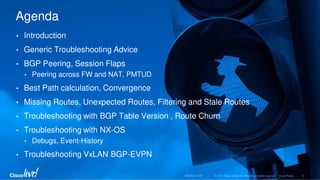

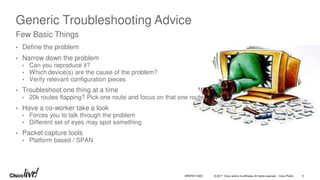
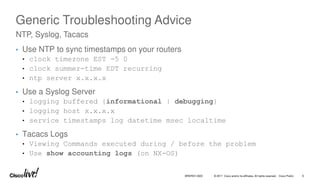
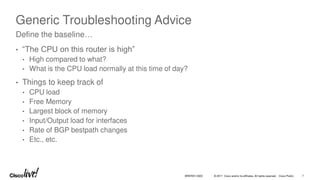
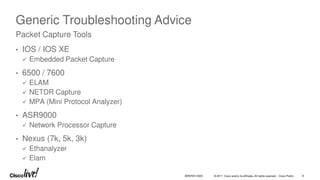
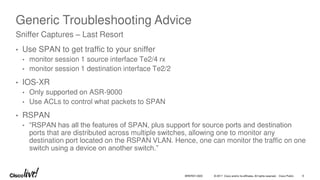
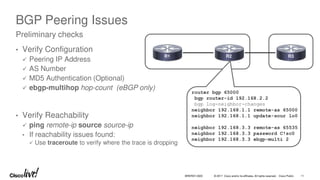
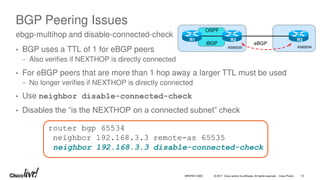
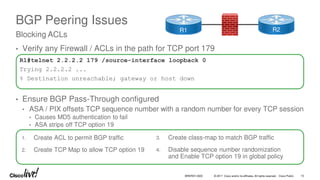
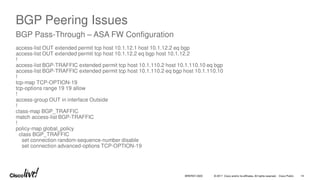
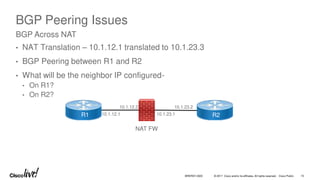
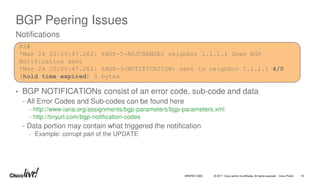
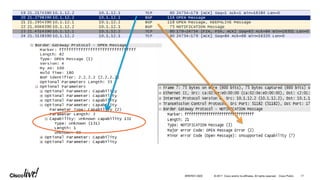
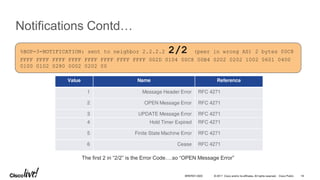
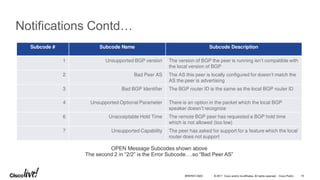
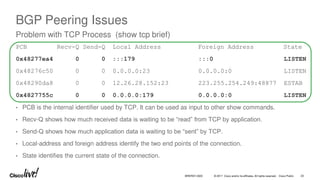
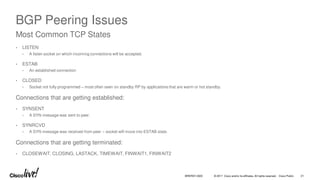
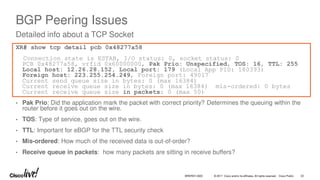
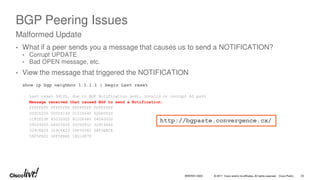
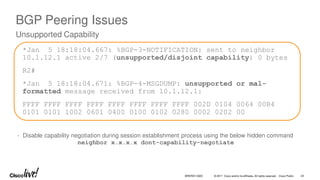
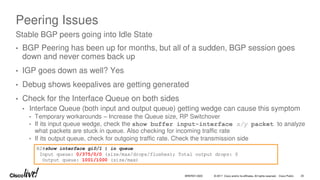
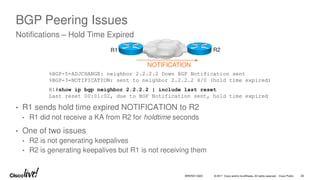
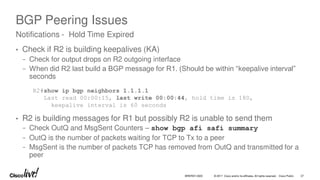
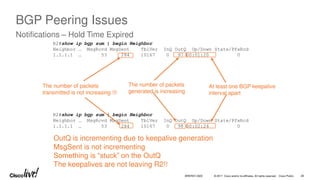
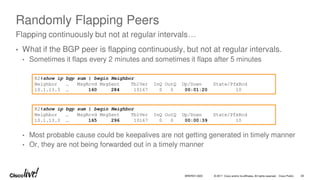
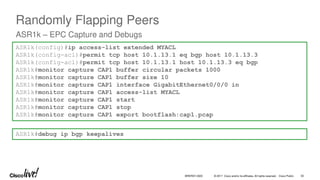
![© 2017 Cisco and/or its affiliates. All rights reserved. Cisco Public
Randomly Flapping Peers
ASR1k – EPC Capture
ASR1k#show monitor capture buffer CAP1 dump
16:25:44.938 JST Aug 21 2015 : IPv4 LES CEF : Gig0/0 None
F19495B0: AABBCC00 0800AABB *;L...*;
F19495C0: CC000700 08004540 003B1C5D 4000FE06 L.....E@.;.]@.~.
F19495D0: 42020707 07070808 08084A07 00B39372 B.........J..3.r
F19495E0: FFE37CDC E3D35018 3D671161 0000FFFF .c|cSP.=g.a....
F19495F0: FFFFFFFF FFFFFFFF FFFFFFFF FD ............}
BRKRST-3320 31](https://image.slidesharecdn.com/troubleshootingbgp-250716092549-ce7ffed4/85/Troubleshooting-BGP-pdf-31-320.jpg)
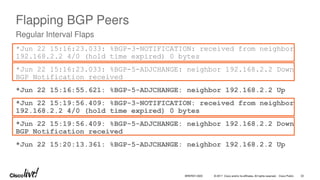
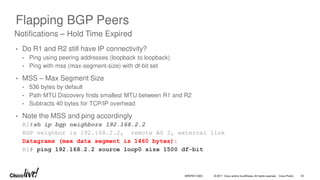
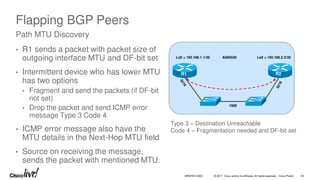
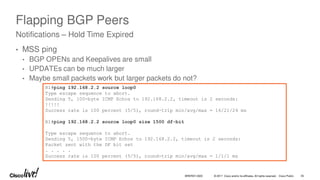
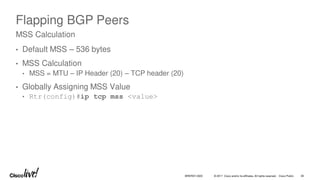

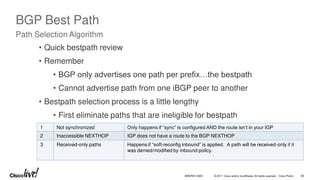
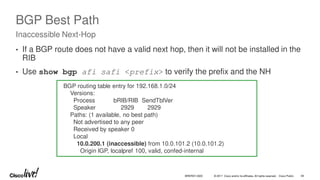
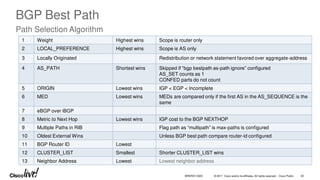
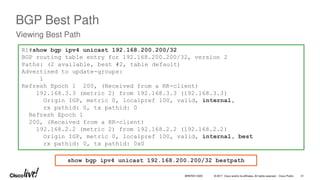
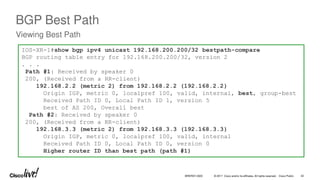
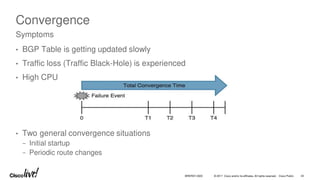
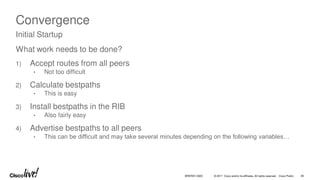
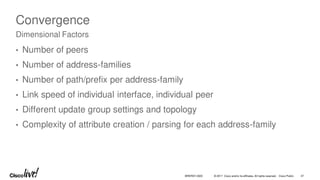
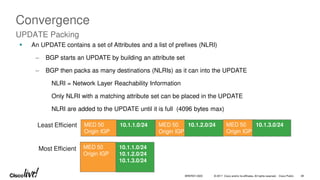
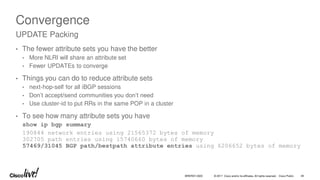
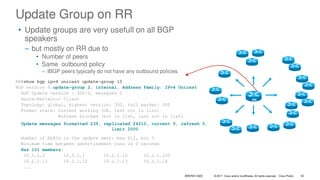
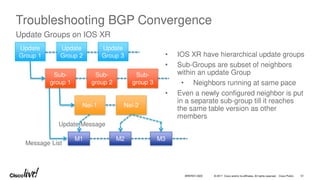
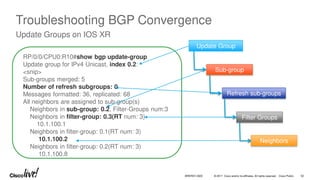
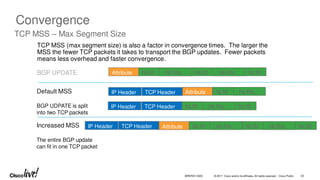
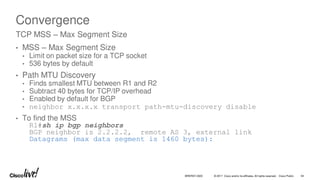
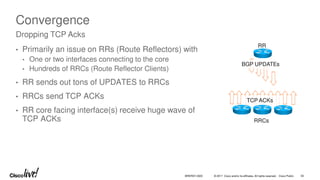
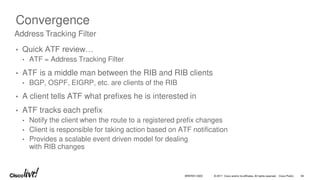
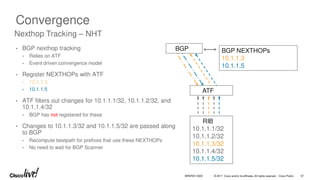
![© 2017 Cisco and/or its affiliates. All rights reserved. Cisco Public
Convergence
• Enabled by default
• [no] bgp nexthop trigger enable
• BGP registers all nexthops with ATF
• show ip bgp attr next-hop ribfilter
• Trigger delay is configurable
• bgp nexthop trigger delay <0-100>
• 5 seconds by default
• Debugs
• debug ip bgp events nexthop
• debug ip bgp rib-filter
Nexthop Tracking
BRKRST-3320 58](https://image.slidesharecdn.com/troubleshootingbgp-250716092549-ce7ffed4/85/Troubleshooting-BGP-pdf-58-320.jpg)
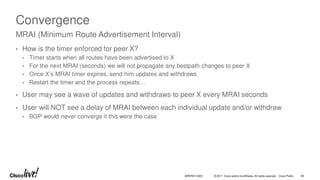
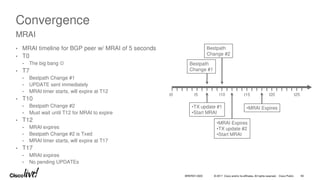
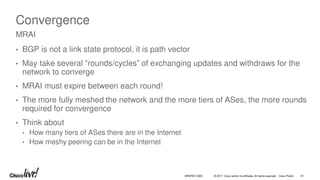
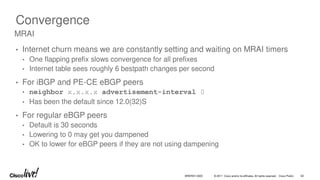
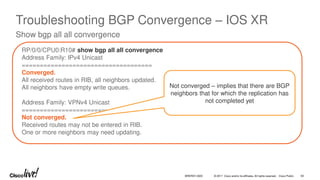
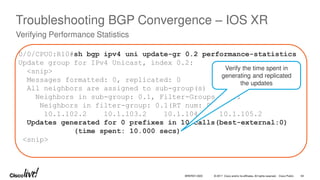
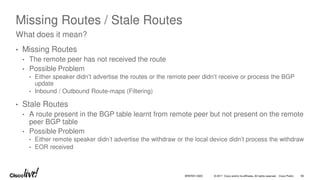
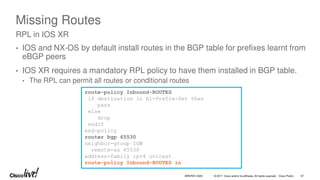
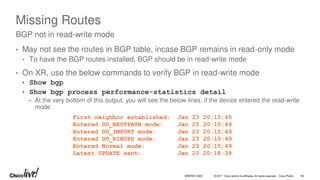
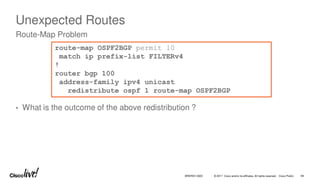
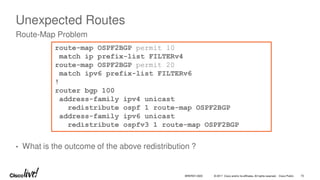
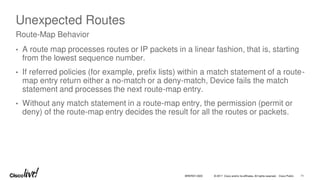
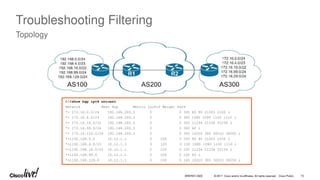
![© 2017 Cisco and/or its affiliates. All rights reserved. Cisco Public
Troubleshooting Filtering
Regex Query Modifiers
Modifier Description
Modifier Description
_ (Underscore) Matches a space
^ (Caret) Indicates the start of the string
$ (Dollar Sign) Indicates the end of the string
[] (Brackets) Matches a single character or nesting within a range
- (Hyphen) Indicates a range of numbers in brackets
[^] (Caret in Brackets) Excludes the characters listed in brackets
() (Parentheses) Used for nesting of search patterns
| (Pipe) Provides ‘or’ functionality to the query
. (Period) Matches a single character, including a space
* (Asterisk) Matches zero or more characters or patterns
+ (Plus Sign) One or more instances of the character or pattern
? (Question Mark) Matches one or no instances of the character or pattern.
BRKRST-3320 73](https://image.slidesharecdn.com/troubleshootingbgp-250716092549-ce7ffed4/85/Troubleshooting-BGP-pdf-73-320.jpg)
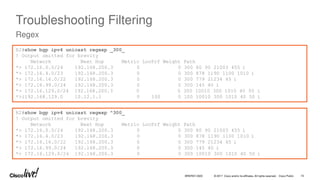
![© 2017 Cisco and/or its affiliates. All rights reserved. Cisco Public
Troubleshooting Filtering
Regex
R2#show bgp ipv4 unicast regexp [4-8]0_
! Output omitted for brevity
Network Next Hop Metric LocPrf Weight Path
*> 172.16.0.0/24 192.168.200.3 0 0 300 80 90 21003 455 i
*> 172.16.99.0/24 192.168.200.3 0 0 300 145 40 i
*> 172.16.129.0/24 192.168.200.3 0 0 300 10010 300 1010 40 50 i
*>i192.168.0.0 10.12.1.1 0 100 0 100 80 90 21003 455 i
*>i192.168.99.0 10.12.1.1 0 100 0 100 145 40 i
*>i192.168.129.0 10.12.1.1 0 100 0 100 10010 300 1010 40 50 i
R2#show bgp ipv4 unicast regexp ^[13]00_[^3-8]
! Output omitted for brevity
Network Next Hop Metric LocPrf Weight Path
*> 172.16.99.0/24 192.168.200.3 0 0 300 145 40 i
*> 172.16.129.0/24 192.168.200.3 0 0 300 10010 300 1010 40 50 i
*>i192.168.99.0 10.12.1.1 0 100 0 100 145 40 i
*>i192.168.129.0 10.12.1.1 0 100 0 100 10010 300 1010 40 50 i
BRKRST-3320 75](https://image.slidesharecdn.com/troubleshootingbgp-250716092549-ce7ffed4/85/Troubleshooting-BGP-pdf-75-320.jpg)
![© 2017 Cisco and/or its affiliates. All rights reserved. Cisco Public
Troubleshooting Filtering
Prefix-List Blocking Prefixes
RTR#debug bgp ipv4 unicast updates in
BGP updates debugging is on (inbound) for address family: IPv4 Unicast
RTR#clear bgp ipv4 unicast 10.1.45.4 soft in
! Output omitted for brevity
* 18:59:42.515: BGP(0): process 10.1.12.0/24, next hop 10.1.45.4, metric 0 from 10.1.45.4
* 18:59:42.515: BGP(0): Prefix 10.1.12.0/24 rejected by inbound filter-list.
* 18:59:42.515: BGP(0): update denied
NXOS5# debug bgp updates
NXOS5# clear bgp ipv4 unicast 10.1.45.4 soft in
! Output omitted for brevity
19:02:54 bgp: 300 [8449] UPD: [IPv4 Unicast] 10.1.45.4 Inbound as-path-list 1, action permit
19:02:54 bgp: 300 [8449] UPD: [IPv4 Unicast] 10.1.45.4 Inbound as-path-list 1, action deny
19:02:54 bgp: 300 [8449] UPD: [IPv4 Unicast] Dropping prefix 10.1.12.0/24 from peer 10.1.45.4,
due to attribute policy rejected
BRKRST-3320 76](https://image.slidesharecdn.com/troubleshootingbgp-250716092549-ce7ffed4/85/Troubleshooting-BGP-pdf-76-320.jpg)
![© 2017 Cisco and/or its affiliates. All rights reserved. Cisco Public
Troubleshooting Filtering
IOS XR BGP RPL Debugging
RP/0/0/CPU0:XR#debug bgp policy-execution events
RP/0/0/CPU0:XR#clear bgp ipv4 unicast 10.1.45.4 soft
RP/0/0/CPU0: 06:19:10.000 : bgp[1053]: --Running policy 'R4-IN':---
RP/0/0/CPU0: 06:19:10.000 : bgp[1053]: Attach pt='neighbor-in-dflt'
RP/0/0/CPU0: 06:19:10.000 : bgp[1053]: Attach pt inst='default-IPv4-Uni-10.1.45.4'
RP/0/0/CPU0: 06:19:10.000 : bgp[1053]: Input route attributes:
RP/0/0/CPU0: 06:19:10.000 : bgp[1053]: as-path: 200 100 600
RP/0/0/CPU0: 06:19:10.000 : bgp[1053]: as-path-length: 3
RP/0/0/CPU0: 06:19:10.000 : bgp[1053]: as-path-unique-length: 3
RP/0/0/CPU0: 06:19:10.000 : bgp[1053]: community: No Community Information
. . .
RP/0/0/CPU0: 06:19:10.000 : bgp[1053]: path-type: ebgp
RP/0/0/CPU0: 06:19:10.000 : bgp[1053]: aigp-metric: 0
RP/0/0/CPU0: 06:19:10.000 : bgp[1053]: validation-state: not-found
RP/0/0/CPU0: 06:19:10.000 : bgp[1053]: Policy execution trace:
RP/0/0/CPU0: 06:19:10.000 : bgp[1053]: Condition: destination in (10.0.0.0/8 ...)
RP/0/0/CPU0: 06:19:10.000 : bgp[1053]: Condition evaluated to FALSE
RP/0/0/CPU0: 06:19:10.000 : bgp[1053]: Condition: destination in (172.16.0.0/12 ...)
RP/0/0/CPU0: 06:19:10.000 : bgp[1053]: Condition evaluated to FALSE
RP/0/0/CPU0: 06:19:10.000 : bgp[1053]: End policy: result=DROP
route-policy R4-IN
if destination in (10.0.0.0/8 le 32) then
pass
endif
if destination in (172.16.0.0/12 le 32) then
set med 20
endif
end-policy
BRKRST-3320 77](https://image.slidesharecdn.com/troubleshootingbgp-250716092549-ce7ffed4/85/Troubleshooting-BGP-pdf-77-320.jpg)
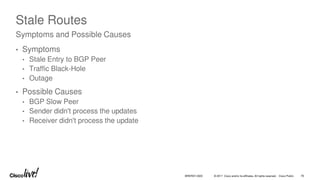
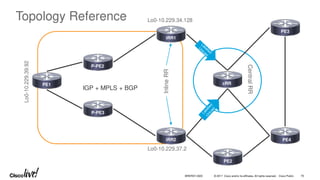
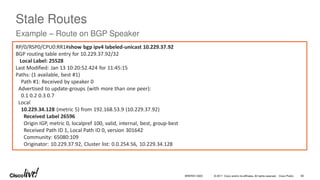
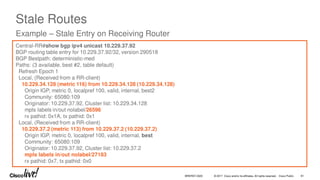
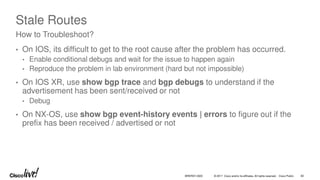
![© 2017 Cisco and/or its affiliates. All rights reserved. Cisco Public
Stale Routes or Missing Routes / Advertisements
Conditional Debugs
IOS-1#show access-list 99
Standard IP access list 99
permit 10.1.1.0 0.0.0.255
IOS-1#debug ip bgp 2.2.2.2 update 99
IOS-XR
route-policy DEBUG_BGP
if destination in BGP_PREFIX then
pass
else
drop
endif
end-policy
prefix-set BGP_PREFIX
100.1.1.0/24
end-set
debug bgp update ipv4 unicast [in | out] route-policy DEBUG_BGP
BRKRST-3320 83](https://image.slidesharecdn.com/troubleshootingbgp-250716092549-ce7ffed4/85/Troubleshooting-BGP-pdf-83-320.jpg)
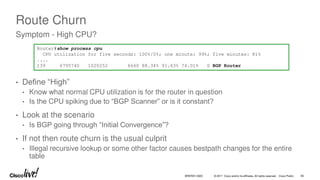
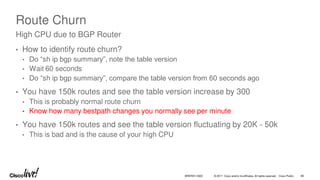
![© 2017 Cisco and/or its affiliates. All rights reserved. Cisco Public
Route Churn
Router#Show ip bgp all sum | in tab
BGP table version is 936574954, main routing table version 936574954
BGP table version is 429591477, main routing table version 429591477
Router#
Router#Show ip bgp all sum | in tab
BGP table version is 936576768, main routing table version 936575068
BGP table version is 429591526, main routing table version 429591526
Router#
Router#show ip route | in 00:00:0
B 187.164.0.0 [200/0] via 218.185.80.140, 00:00:00
B 187.52.0.0 [200/0] via 218.185.80.140, 00:00:00
B 187.24.0.0 [200/0] via 218.185.80.140, 00:00:00
B 187.68.0.0 [200/0] via 218.185.80.140, 00:00:00
B 186.136.0.0 [200/0] via 218.185.80.140, 00:00:00
. . . .
Over 1800 prefixes flapped < 4 seconds later
BRKRST-3320 87](https://image.slidesharecdn.com/troubleshootingbgp-250716092549-ce7ffed4/85/Troubleshooting-BGP-pdf-87-320.jpg)
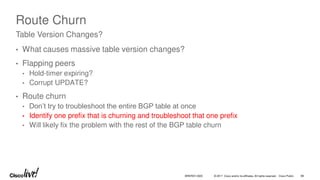
![© 2017 Cisco and/or its affiliates. All rights reserved. Cisco Public
Route Churn
• Figuring out flapping routes from routing table is easy (even in vrf)
− Show ip route vrf * | in 00:00:0|VRF
• How about identifying flapping routes on the VPNv4 Route Reflector?
− Show bgp vpnv4 unicast all summary | in table
− Use the table version as the marker in the below command to see the routes which
flapped after the last command that was executed
− Show bgp vpnv4 unicast all version [version-num | recent
version-num]
− Use the next-hop of the prefixes from the above command, to see why the prefixes are
flapping
Flapping Routes in BGP
BRKRST-3320 89](https://image.slidesharecdn.com/troubleshootingbgp-250716092549-ce7ffed4/85/Troubleshooting-BGP-pdf-89-320.jpg)
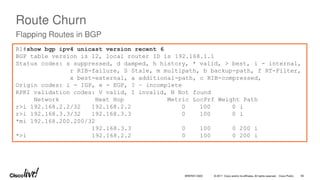
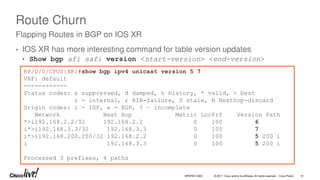
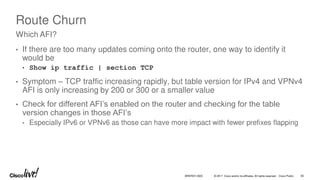
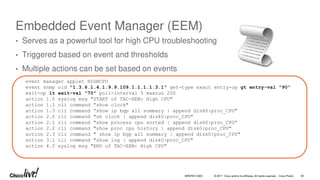
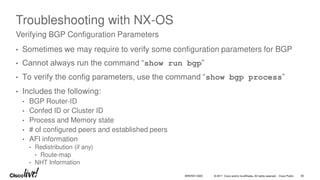
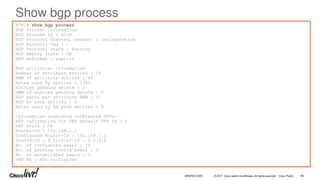
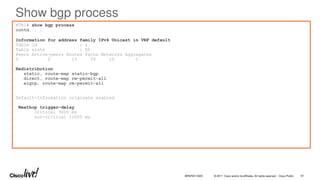
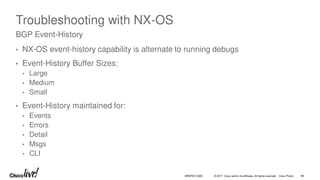
![© 2017 Cisco and/or its affiliates. All rights reserved. Cisco Public
Troubleshooting with NX-OS
Processing an Incoming Update – show bgp event-history detail
05:28:12.515623: (default) UPD: Received UPDATE message from 10.1.23.2
05:28:12.515616: (default) BRIB: [IPv4 Unicast] (192.168.1.1/32 (10.1.23.2)): returning from
bgp_brib_add, new_path: 0, change: 0, undelete: 0, history: 0, force: 0, (pflags=0x28), reeval=0
05:28:12.515608: (default) BRIB: [IPv4 Unicast] 192.168.1.1/32 from 10.1.23.2 was already in BRIB
with same attributes
05:28:12.515600: (default) BRIB: [IPv4 Unicast] (192.168.1.1/32 (10.1.23.2)): bgp_brib_add:
handling nexthop
05:28:12.515593: (default) BRIB: [IPv4 Unicast] Path to 192.168.1.1/32 via 192.168.2.2 already
exists, dflags=0x8001a
05:28:12.515580: (default) BRIB: [IPv4 Unicast] Installing prefix 192.168.1.1/32 (10.1.23.2) via
10.1.23.2 into BRIB with extcomm
05:28:12.515557: (default) UPD: [IPv4 Unicast] Received prefix 192.168.1.1/32 from peer
10.1.23.2, origin 0, next hop 10.1.23.2, localpref 0, med
005:28:12.515524: (default) UPD: 10.1.23.2 Received attr code 2, length 10, AS-Path: <200 100 >
05:28:12.515503: (default) UPD: Attr code 3, length 4, Next-hop: 10.1.23.2
05:28:12.515454: (default) UPD: Attr code 1, length 1, Origin: IGP
05:28:12.515446: (default) UPD: 10.1.23.2 parsed UPDATE message from peer, len 52 , withdraw len
0, attr len 24, nlri len 5
BRKRST-3320 99](https://image.slidesharecdn.com/troubleshootingbgp-250716092549-ce7ffed4/85/Troubleshooting-BGP-pdf-99-320.jpg)
![© 2017 Cisco and/or its affiliates. All rights reserved. Cisco Public
Troubleshooting with NX-OS
Update Generation – show bgp event-history detail
05:28:11.478903: (default) UPD: [IPv4 Unicast] 10.1.23.2 Created UPD msg (len 52) with prefix
192.168.1.1/32 ( Installed in HW) path-id 1 for peer
05:28:11.478886: (default) UPD: 10.1.23.2 Sending attr code 3, length 4, Next-hop: 10.1.23.3
05:28:11.478880: (default) UPD: 10.1.23.2 Sending attr code 2, length 10, AS-Path: <300 100 >
05:28:11.478870: (default) UPD: 10.1.23.2 Sending attr code 1, length 1, Origin: IGP
05:28:11.478856: (default) UPD: [IPv4 Unicast] consider sending 192.168.1.1/32 to peer 10.1.23.2,
path-id 1, best-ext is off
. . .
05:28:11.478717: (default) EVT: [IPv4 Unicast] soft refresh out completed for 1 peers
05:28:11.478690: (default) EVT: [IPv4 Unicast] Adding peer 10.1.23.2 for update gen
05:28:11.478686: (default) BRIB: [IPv4 Unicast] Group setting SRM for dest 192.168.3.3/32
05:28:11.478682: (default) BRIB: [IPv4 Unicast] Group setting SRM for dest 192.168.2.2/32
05:28:11.478678: (default) BRIB: [IPv4 Unicast] Group setting SRM for dest 192.168.1.1/32
05:28:11.478666: (default) EVT: [IPv4 Unicast] 1 peer(s) being soft refreshed out
05:28:11.478661: (default) EVT: [IPv4 Unicast] 10.1.23.2 [peer index 2]
05:28:11.478638: (default) EVT: [IPv4 Unicast] Doing soft out BGP table walk for peers
05:28:10.478332: (default) EVT: [IPv4 Unicast] Scheduling peer 10.1.23.2 for soft refresh out
05:28:10.478321: (default) EVT: Received ROUTEREFRESH message from 10.1.23.2
BRKRST-3320 100](https://image.slidesharecdn.com/troubleshootingbgp-250716092549-ce7ffed4/85/Troubleshooting-BGP-pdf-100-320.jpg)
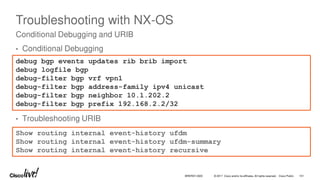
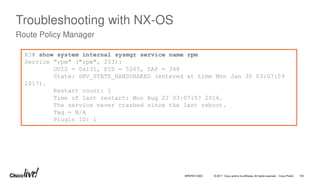
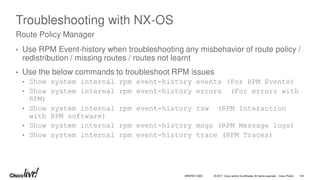

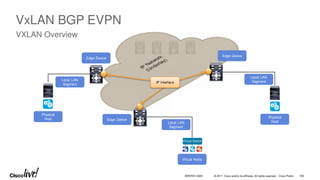
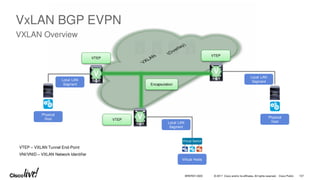
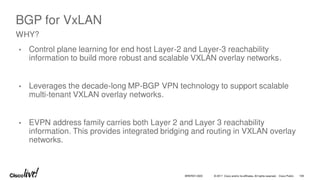
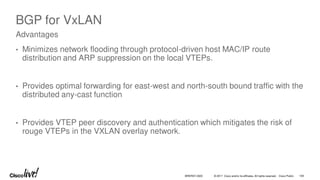
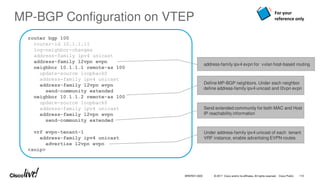
![© 2017 Cisco and/or its affiliates. All rights reserved. Cisco Public
N9396-1# show bgp l2vpn evpn summary
BGP summary information for VRF default, address family L2VPN EVPN
BGP router identifier 10.40.1.1, local AS number 65040
BGP table version is 26, L2VPN EVPN config peers 1, capable peers 1
7 network entries and 7 paths using 696 bytes of memory
BGP attribute entries [4/576], BGP AS path entries [0/0]
BGP community entries [0/0], BGP clusterlist entries [1/4]
Neighbor V AS MsgRcvd MsgSent TblVer InQ OutQ Up/Down State/PfxRcd
10.40.1.3 4 65040 50 50 26 0 0 00:34:16 2
N9396-1#
VxLAN BGP EVPN
Check Remote BGP neighbor
Remote VTEP
BRKRST-3320 111](https://image.slidesharecdn.com/troubleshootingbgp-250716092549-ce7ffed4/85/Troubleshooting-BGP-pdf-111-320.jpg)
![© 2017 Cisco and/or its affiliates. All rights reserved. Cisco Public
N9396-1# show bgp l2vpn evpn
BGP routing table information for VRF default, address family L2VPN EVPN
BGP table version is 26, local router ID is 10.40.1.1
Status: s-suppressed, x-deleted, S-stale, d-dampened, h-history, *-valid, >-best
Path type: i-internal, e-external, c-confed, l-local, a-aggregate, r-redist, I-i
njected
Origin codes: i - IGP, e - EGP, ? - incomplete, | - multipath, & - backup
Network Next Hop Metric LocPrf Weight Path
Route Distinguisher: 10.40.1.1:36569 (L2VNI 400502)
*>i[2]:[0]:[0]:[48]:[8cb6.4f2f.45c2]:[0]:[0.0.0.0]/216
10.40.1.2 100 0 i
*>i[2]:[0]:[0]:[48]:[8cb6.4f2f.45c2]:[32]:[8.40.2.100]/272
10.40.1.2 100 0 I
< snip >
MAC entry
This entry indicates that an ARP has been
seen by the VTEP
VxLAN BGP EVPN
Verifying MAC and ARP learnt in BGP
BRKRST-3320 112](https://image.slidesharecdn.com/troubleshootingbgp-250716092549-ce7ffed4/85/Troubleshooting-BGP-pdf-112-320.jpg)
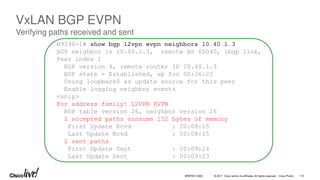
![© 2017 Cisco and/or its affiliates. All rights reserved. Cisco Public
N9396-1# show bgp event-history events | grep "8cb6.4f2f.45c2|L2VPN"
<snip>
entry for 10.40.1.1:36569:[2]:[0]:[0]:[48]:[8cb6.4f2f.45c2]:[0]:[0.0.0.0]/112
2015 Apr 27 02:09:33.208255 bgp 65040 [3312]: [3323]: (default) IMP: [L2VPN EVPN]
Importing prefix 10.40.1.2:36569:[2]:[0]:[0]:[48]:[8cb6.4f2f.45c2]:[0]:[0.0.0.0]/112
2015 Apr 27 02:09:33.208249 bgp 65040 [3312]: [3323]: (default) IMP: bgp_tbl_ctx_import:
1849: [L2VPN EVPN] OK IMPORTING
10.40.1.2:36569:[2]:[0]:[0]:[48]:[8cb6.4f2f.45c2]:[0]:[0.0.0.0]/112 from RD
10.40.1.2:36569 to RD 10.40.1.1:36569
2015 Apr 27 02:09:33.208241 bgp 65040 [3312]: [3323]: (default) IMP: bgp_tbl_ctx_import:
1640: [L2VPN EVPN] Importing
10.40.1.2:36569:[2]:[0]:[0]:[48]:[8cb6.4f2f.45c2]:[0]:[0.0.0.0]/112 to RD 10.40.1.1:36569
<snip>
2015 Apr 27 02:09:33.208122 bgp 65040 [3312]: [3322]: (default) UPD: [L2VPN EVPN] Received
10.40.1.2:36569:[2]:[0]:[0]:[48]:[8cb6.4f2f.45c2]:[0]:[0.0.0.0] route from peer 10.40.1.3
MAC address 8cb6.4f2f.45c2 received from
VTEP with RD 10.40.1.2:36569 is imported
into RIB
114
BRKRST-3320
VxLAN BGP EVPN
Checking BGP Event History](https://image.slidesharecdn.com/troubleshootingbgp-250716092549-ce7ffed4/85/Troubleshooting-BGP-pdf-114-320.jpg)