Trees 
(Data Structure) 
Trupti agrawal 1
Trees Data Structures 
 Tree 
 Nodes 
 Each node can have 0 or more children 
 A node can have at most one parent 
 Binary tree 
 Tree with 0–2 children per node 
Tree Binary Tree Trupti agrawal 2
Trees 
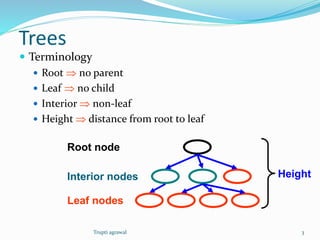
 Terminology 
 Root  no parent 
 Leaf  no child 
 Interior  non-leaf 
 Height  distance from root to leaf 
Root node 
Interior nodes Height 
Leaf nodes 
Trupti agrawal 3
Binary Search Trees 
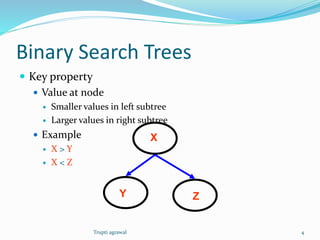
 Key property 
 Value at node 
 Smaller values in left subtree 
 Larger values in right subtree 
 Example 
 X > Y 
 X < Z 
Y 
X 
Z 
Trupti agrawal 4
Binary Search Trees 
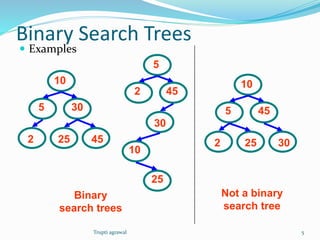
 Examples 
Binary 
search trees 
Not a binary 
search tree 
5 
10 
30 
2 25 45 
5 
10 
45 
2 25 30 
5 
10 
30 
2 
25 
45 
Trupti agrawal 5
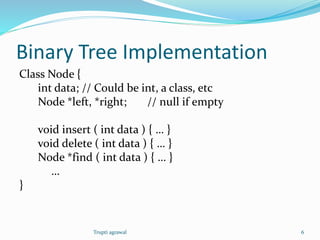
Binary Tree Implementation 
Class Node { 
int data; // Could be int, a class, etc 
Node *left, *right; // null if empty 
void insert ( int data ) { … } 
void delete ( int data ) { … } 
Node *find ( int data ) { … } 
… 
} 
Trupti agrawal 6
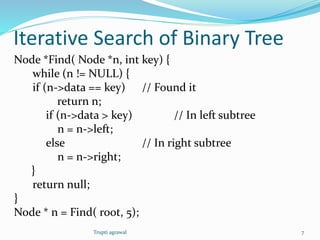
Iterative Search of Binary Tree 
Node *Find( Node *n, int key) { 
while (n != NULL) { 
if (n->data == key) // Found it 
return n; 
if (n->data > key) // In left subtree 
n = n->left; 
else // In right subtree 
n = n->right; 
} 
return null; 
} 
Node * n = Find( root, 5); 
Trupti agrawal 7
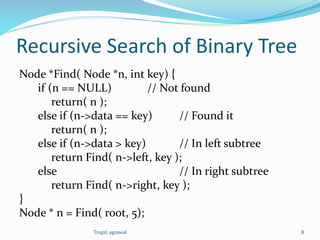
Recursive Search of Binary Tree 
Node *Find( Node *n, int key) { 
if (n == NULL) // Not found 
return( n ); 
else if (n->data == key) // Found it 
return( n ); 
else if (n->data > key) // In left subtree 
return Find( n->left, key ); 
else // In right subtree 
return Find( n->right, key ); 
} 
Node * n = Find( root, 5); 
Trupti agrawal 8
Example Binary Searches 
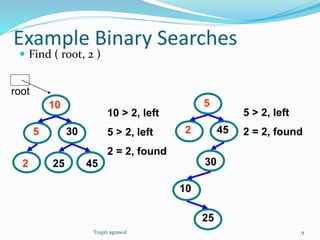
 Find ( root, 2 ) 
5 
10 
30 
2 25 45 
5 
10 
30 
2 
25 
45 
10 > 2, left 
5 > 2, left 
2 = 2, found 
5 > 2, left 
2 = 2, found 
root 
Trupti agrawal 9
Example Binary Searches 
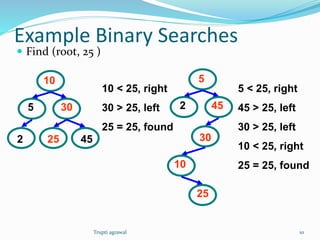
 Find (root, 25 ) 
5 
10 
30 
2 25 45 
5 
10 
30 
2 
25 
45 
10 < 25, right 
30 > 25, left 
25 = 25, found 
5 < 25, right 
45 > 25, left 
30 > 25, left 
10 < 25, right 
25 = 25, found 
Trupti agrawal 10
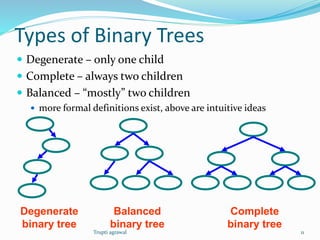
Types of Binary Trees 
 Degenerate – only one child 
 Complete – always two children 
 Balanced – “mostly” two children 
 more formal definitions exist, above are intuitive ideas 
Degenerate 
binary tree 
Balanced 
binary tree 
Complete 
binary tree 
Trupti agrawal 11
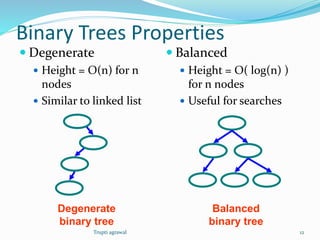
Binary Trees Properties 
 Degenerate 
 Height = O(n) for n 
nodes 
 Similar to linked list 
 Balanced 
 Height = O( log(n) ) 
for n nodes 
 Useful for searches 
Degenerate 
binary tree 
Balanced 
binary tree 
Trupti agrawal 12
Binary Search Properties 
 Time of search 
 Proportional to height of tree 
 Balanced binary tree 
 O( log(n) ) time 
 Degenerate tree 
 O( n ) time 
 Like searching linked list / unsorted array 
Trupti agrawal 13
Binary Search Tree Construction 
 How to build & maintain binary trees? 
 Insertion 
 Deletion 
 Maintain key property (invariant) 
 Smaller values in left subtree 
 Larger values in right subtree 
Trupti agrawal 14
Binary Search Tree – Insertion 
 Algorithm 
1. Perform search for value X 
2. Search will end at node Y (if X not in tree) 
3. If X < Y, insert new leaf X as new left subtree for Y 
4. If X > Y, insert new leaf X as new right subtree for Y 
 Observations 
 O( log(n) ) operation for balanced tree 
 Insertions may unbalance tree 
Trupti agrawal 15
Example Insertion 
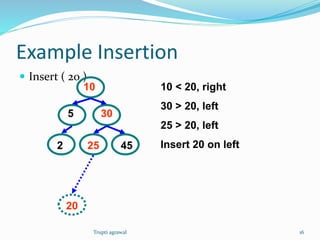
 Insert ( 20 ) 
5 
10 
30 
2 25 45 
10 < 20, right 
30 > 20, left 
25 > 20, left 
Insert 20 on left 
20 
Trupti agrawal 16
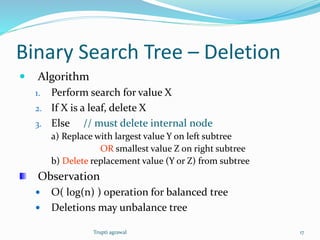
Binary Search Tree – Deletion 
 Algorithm 
1. Perform search for value X 
2. If X is a leaf, delete X 
3. Else // must delete internal node 
a) Replace with largest value Y on left subtree 
OR smallest value Z on right subtree 
b) Delete replacement value (Y or Z) from subtree 
Observation 
 O( log(n) ) operation for balanced tree 
 Deletions may unbalance tree 
Trupti agrawal 17
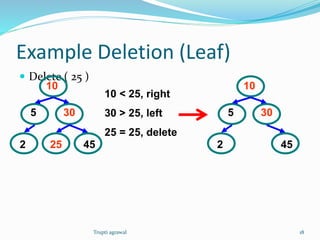
Example Deletion (Leaf) 
 Delete ( 25 ) 
5 
10 
30 
2 25 45 
10 < 25, right 
30 > 25, left 
25 = 25, delete 
5 
10 
30 
2 45 
Trupti agrawal 18
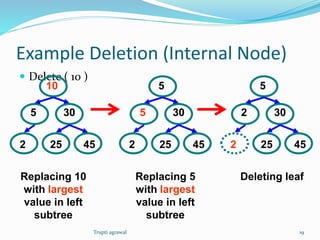
Example Deletion (Internal Node) 
 Delete ( 10 ) 
5 
10 
30 
2 25 45 
5 
5 
30 
2 25 45 
2 
5 
30 
2 25 45 
Replacing 10 
with largest 
value in left 
subtree 
Replacing 5 
with largest 
value in left 
subtree 
Deleting leaf 
Trupti agrawal 19
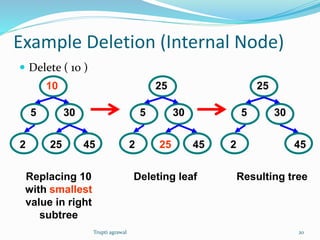
Example Deletion (Internal Node) 
 Delete ( 10 ) 
5 
10 
30 
2 25 45 
5 
25 
30 
2 25 45 
5 
25 
30 
2 45 
Replacing 10 
with smallest 
value in right 
subtree 
Deleting leaf Resulting tree 
Trupti agrawal 20
Balanced Search Trees 
 Kinds of balanced binary search trees 
 height balanced vs. weight balanced 
 “Tree rotations” used to maintain balance on insert/delete 
 Non-binary search trees 
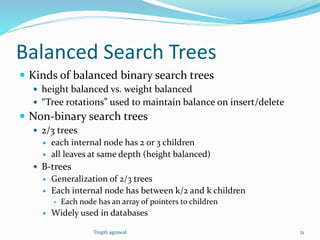
 2/3 trees 
 each internal node has 2 or 3 children 
 all leaves at same depth (height balanced) 
 B-trees 
 Generalization of 2/3 trees 
 Each internal node has between k/2 and k children 
 Each node has an array of pointers to children 
 Widely used in databases 
Trupti agrawal 21
Other (Non-Search) Trees 
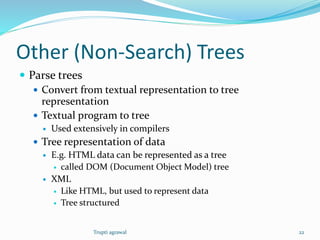
 Parse trees 
 Convert from textual representation to tree 
representation 
 Textual program to tree 
 Used extensively in compilers 
 Tree representation of data 
 E.g. HTML data can be represented as a tree 
 called DOM (Document Object Model) tree 
 XML 
 Like HTML, but used to represent data 
 Tree structured 
Trupti agrawal 22
Parse Trees 
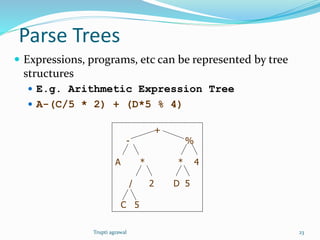
 Expressions, programs, etc can be represented by tree 
structures 
 E.g. Arithmetic Expression Tree 
 A-(C/5 * 2) + (D*5 % 4) 
+ 
- % 
A * * 4 
/ 2 D 5 
C 5 
Trupti agrawal 23
Tree Traversal 
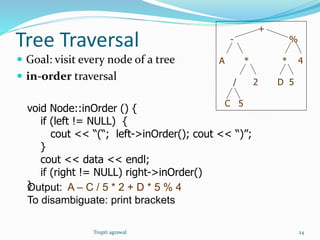
 Goal: visit every node of a tree 
 in-order traversal 
void Node::inOrder () { 
if (left != NULL) { 
cout << “(“; left->inOrder(); cout << “)”; 
} 
cout << data << endl; 
if (right != NULL) right->inOrder() 
}Output: A – C / 5 * 2 + D * 5 % 4 
To disambiguate: print brackets 
+ 
- % 
A * * 4 
/ 2 D 5 
C 5 
Trupti agrawal 24
Tree Traversal (contd.) 
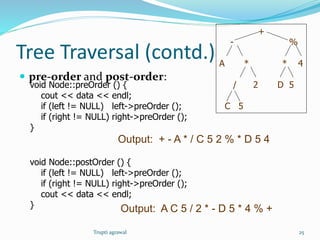
 pre-order and post-order: 
void Node::preOrder () { 
cout << data << endl; 
if (left != NULL) left->preOrder (); 
if (right != NULL) right->preOrder (); 
} 
void Node::postOrder () { 
if (left != NULL) left->preOrder (); 
if (right != NULL) right->preOrder (); 
cout << data << endl; 
} 
+ 
- % 
A * * 4 
/ 2 D 5 
C 5 
Output: + - A * / C 5 2 % * D 5 4 
Output: A C 5 / 2 * - D 5 * 4 % + 
Trupti agrawal 25
THANK YOU…!!! 
Trupti agrawal 26

Trees (data structure)

  • 1.
    Trees (Data Structure) Trupti agrawal 1
  • 2.
    Trees Data Structures  Tree  Nodes  Each node can have 0 or more children  A node can have at most one parent  Binary tree  Tree with 0–2 children per node Tree Binary Tree Trupti agrawal 2
  • 3.
    Trees  Terminology  Root  no parent  Leaf  no child  Interior  non-leaf  Height  distance from root to leaf Root node Interior nodes Height Leaf nodes Trupti agrawal 3
  • 4.
    Binary Search Trees  Key property  Value at node  Smaller values in left subtree  Larger values in right subtree  Example  X > Y  X < Z Y X Z Trupti agrawal 4
  • 5.
    Binary Search Trees  Examples Binary search trees Not a binary search tree 5 10 30 2 25 45 5 10 45 2 25 30 5 10 30 2 25 45 Trupti agrawal 5
  • 6.
    Binary Tree Implementation Class Node { int data; // Could be int, a class, etc Node *left, *right; // null if empty void insert ( int data ) { … } void delete ( int data ) { … } Node *find ( int data ) { … } … } Trupti agrawal 6
  • 7.
    Iterative Search ofBinary Tree Node *Find( Node *n, int key) { while (n != NULL) { if (n->data == key) // Found it return n; if (n->data > key) // In left subtree n = n->left; else // In right subtree n = n->right; } return null; } Node * n = Find( root, 5); Trupti agrawal 7
  • 8.
    Recursive Search ofBinary Tree Node *Find( Node *n, int key) { if (n == NULL) // Not found return( n ); else if (n->data == key) // Found it return( n ); else if (n->data > key) // In left subtree return Find( n->left, key ); else // In right subtree return Find( n->right, key ); } Node * n = Find( root, 5); Trupti agrawal 8
  • 9.
    Example Binary Searches  Find ( root, 2 ) 5 10 30 2 25 45 5 10 30 2 25 45 10 > 2, left 5 > 2, left 2 = 2, found 5 > 2, left 2 = 2, found root Trupti agrawal 9
  • 10.
    Example Binary Searches  Find (root, 25 ) 5 10 30 2 25 45 5 10 30 2 25 45 10 < 25, right 30 > 25, left 25 = 25, found 5 < 25, right 45 > 25, left 30 > 25, left 10 < 25, right 25 = 25, found Trupti agrawal 10
  • 11.
    Types of BinaryTrees  Degenerate – only one child  Complete – always two children  Balanced – “mostly” two children  more formal definitions exist, above are intuitive ideas Degenerate binary tree Balanced binary tree Complete binary tree Trupti agrawal 11
  • 12.
    Binary Trees Properties  Degenerate  Height = O(n) for n nodes  Similar to linked list  Balanced  Height = O( log(n) ) for n nodes  Useful for searches Degenerate binary tree Balanced binary tree Trupti agrawal 12
  • 13.
    Binary Search Properties  Time of search  Proportional to height of tree  Balanced binary tree  O( log(n) ) time  Degenerate tree  O( n ) time  Like searching linked list / unsorted array Trupti agrawal 13
  • 14.
    Binary Search TreeConstruction  How to build & maintain binary trees?  Insertion  Deletion  Maintain key property (invariant)  Smaller values in left subtree  Larger values in right subtree Trupti agrawal 14
  • 15.
    Binary Search Tree– Insertion  Algorithm 1. Perform search for value X 2. Search will end at node Y (if X not in tree) 3. If X < Y, insert new leaf X as new left subtree for Y 4. If X > Y, insert new leaf X as new right subtree for Y  Observations  O( log(n) ) operation for balanced tree  Insertions may unbalance tree Trupti agrawal 15
  • 16.
    Example Insertion Insert ( 20 ) 5 10 30 2 25 45 10 < 20, right 30 > 20, left 25 > 20, left Insert 20 on left 20 Trupti agrawal 16
  • 17.
    Binary Search Tree– Deletion  Algorithm 1. Perform search for value X 2. If X is a leaf, delete X 3. Else // must delete internal node a) Replace with largest value Y on left subtree OR smallest value Z on right subtree b) Delete replacement value (Y or Z) from subtree Observation  O( log(n) ) operation for balanced tree  Deletions may unbalance tree Trupti agrawal 17
  • 18.
    Example Deletion (Leaf)  Delete ( 25 ) 5 10 30 2 25 45 10 < 25, right 30 > 25, left 25 = 25, delete 5 10 30 2 45 Trupti agrawal 18
  • 19.
    Example Deletion (InternalNode)  Delete ( 10 ) 5 10 30 2 25 45 5 5 30 2 25 45 2 5 30 2 25 45 Replacing 10 with largest value in left subtree Replacing 5 with largest value in left subtree Deleting leaf Trupti agrawal 19
  • 20.
    Example Deletion (InternalNode)  Delete ( 10 ) 5 10 30 2 25 45 5 25 30 2 25 45 5 25 30 2 45 Replacing 10 with smallest value in right subtree Deleting leaf Resulting tree Trupti agrawal 20
  • 21.
    Balanced Search Trees  Kinds of balanced binary search trees  height balanced vs. weight balanced  “Tree rotations” used to maintain balance on insert/delete  Non-binary search trees  2/3 trees  each internal node has 2 or 3 children  all leaves at same depth (height balanced)  B-trees  Generalization of 2/3 trees  Each internal node has between k/2 and k children  Each node has an array of pointers to children  Widely used in databases Trupti agrawal 21
  • 22.
    Other (Non-Search) Trees  Parse trees  Convert from textual representation to tree representation  Textual program to tree  Used extensively in compilers  Tree representation of data  E.g. HTML data can be represented as a tree  called DOM (Document Object Model) tree  XML  Like HTML, but used to represent data  Tree structured Trupti agrawal 22
  • 23.
    Parse Trees Expressions, programs, etc can be represented by tree structures  E.g. Arithmetic Expression Tree  A-(C/5 * 2) + (D*5 % 4) + - % A * * 4 / 2 D 5 C 5 Trupti agrawal 23
  • 24.
    Tree Traversal Goal: visit every node of a tree  in-order traversal void Node::inOrder () { if (left != NULL) { cout << “(“; left->inOrder(); cout << “)”; } cout << data << endl; if (right != NULL) right->inOrder() }Output: A – C / 5 * 2 + D * 5 % 4 To disambiguate: print brackets + - % A * * 4 / 2 D 5 C 5 Trupti agrawal 24
  • 25.
    Tree Traversal (contd.)  pre-order and post-order: void Node::preOrder () { cout << data << endl; if (left != NULL) left->preOrder (); if (right != NULL) right->preOrder (); } void Node::postOrder () { if (left != NULL) left->preOrder (); if (right != NULL) right->preOrder (); cout << data << endl; } + - % A * * 4 / 2 D 5 C 5 Output: + - A * / C 5 2 % * D 5 4 Output: A C 5 / 2 * - D 5 * 4 % + Trupti agrawal 25
  • 26.