DATAANALYSIS
FOR PYTHON
Learning Objectives
TO UNDERSTAND THE IMPORTANCE OF PYTHON LIBRARIES IN DATAANALYSIS.
LEARN HOW TO IMPORT AND UTILIZE EXTERNAL LIBRARIES IN PYTHON.
MASTER NUMPY'S ROLE IN NUMERICAL COMPUTING AND ARRAY MANIPULATION.
TO UNDERSTAND PANDAS' IMPORTANCE FOR STRUCTURED DATA MANIPULATION AND ANALYSIS.
TO UNDERSTAND THE IMPORTANCE OF DATA PREPROCESSING IN PREPARING DATA.
RECOGNIZE EDA'S ROLE IN DATA UNDERSTANDING AND VISUALIZATION
2
Introduction – Libraries
 A python library is a collection of related modules.
 It contains bundles of code that can be used repeatedly in different programs.
 It makes python programming simpler and convenient for the programmer.
 As we don’t need to write the same code again and again for different programs. P
 ython libraries play a very vital role in fields of machine learning, data science, data visualization, etc.
3
Introduction – Important Libraries/Packages
 Pandas - Data Analysis
 Numpy – Data Analysis
 Matplotlib - Visualisation
 Seaborn - Visualisation
 Scikit-learn - ML
 Requests – Api
 Selenium – Web scrapping / Browser Automation
 Pyodbc
 xml.etree.ElementTree
 Openpyxl
 Xlsxwriter
4
Numpy
NumPy, short for "Numerical Python," is a foundational library for numerical and scientific computing in the
Python programming language.
It is the go-to library for performing efficient numerical operations on large datasets, and it serves as the
backbone for numerous other scientific and data-related libraries
5
Numpy
 Array Representation
 Data Storage
 Vectorized Operations
 Universal Functions (ufuncs)
 Broadcasting
 Indexing and Slicing
 Mathematical Functions
6
7
BASIC METHODS IN NUMPY
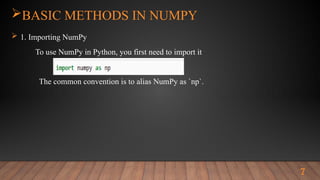
 1. Importing NumPy
To use NumPy in Python, you first need to import it
The common convention is to alias NumPy as `np`.
8
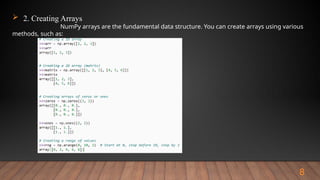
 2. Creating Arrays
NumPy arrays are the fundamental data structure. You can create arrays using various
methods, such as:
9
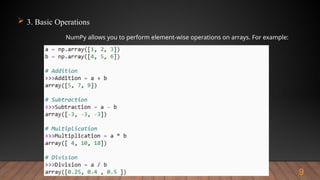
 3. Basic Operations
NumPy allows you to perform element-wise operations on arrays. For example:
10
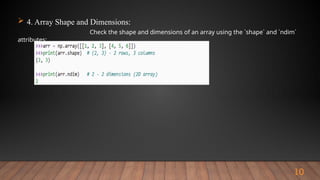
 4. Array Shape and Dimensions:
Check the shape and dimensions of an array using the `shape` and `ndim`
attributes:
11
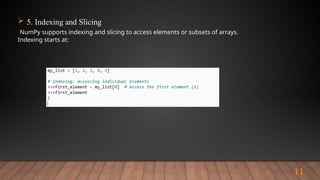
 5. Indexing and Slicing
NumPy supports indexing and slicing to access elements or subsets of arrays.
Indexing starts at:
12
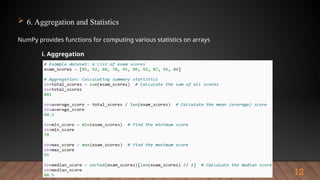
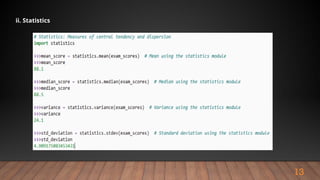
 6. Aggregation and Statistics
NumPy provides functions for computing various statistics on arrays
i. Aggregation
13
ii. Statistics
14
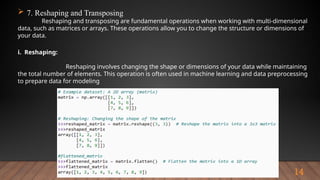
 7. Reshaping and Transposing
Reshaping and transposing are fundamental operations when working with multi-dimensional
data, such as matrices or arrays. These operations allow you to change the structure or dimensions of
your data.
i. Reshaping:
Reshaping involves changing the shape or dimensions of your data while maintaining
the total number of elements. This operation is often used in machine learning and data preprocessing
to prepare data for modeling
15
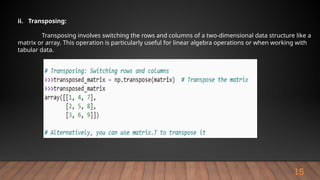
ii. Transposing:
Transposing involves switching the rows and columns of a two-dimensional data structure like a
matrix or array. This operation is particularly useful for linear algebra operations or when working with
tabular data.
16
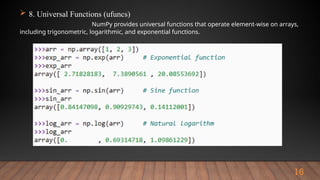
 8. Universal Functions (ufuncs)
NumPy provides universal functions that operate element-wise on arrays,
including trigonometric, logarithmic, and exponential functions.
17
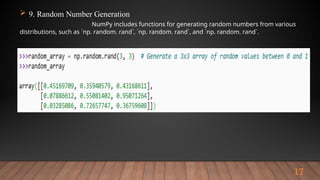
 9. Random Number Generation
NumPy includes functions for generating random numbers from various
distributions, such as `np. random. rand`, `np. random. rand`, and `np. random. rand`.
18
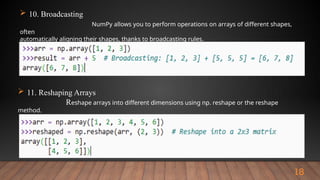
 10. Broadcasting
NumPy allows you to perform operations on arrays of different shapes,
often
automatically aligning their shapes, thanks to broadcasting rules.
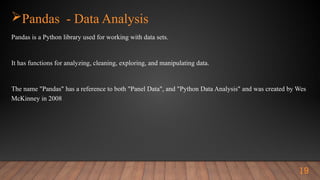
 11. Reshaping Arrays
Reshape arrays into different dimensions using np. reshape or the reshape
method.
Pandas - Data Analysis
Pandas is a Python library used for working with data sets.
It has functions for analyzing, cleaning, exploring, and manipulating data.
The name "Pandas" has a reference to both "Panel Data", and "Python Data Analysis" and was created by Wes
McKinney in 2008
19
Pandas - Data Analysis - Contents
 Data Structures
 - Series
 - Data Frame
 Data Alignment
 Label Based Indexing
 Data Cleaning
 Data Aggregation
 Data Merging and Joining
 Data Visualisation Integration
20
Pandas - Data Analysis
 Examples – Creating and Loading Dataframe
 Creating Data Frame
- From Dictionary
Loading Data to Dataframe
- From External Data Sources
- CSV
- JSON
- XML
- Excel
- Database (Tally / Access) using Sql
21
Pandas - Data Analysis - Viewing Data
 Examples - Viewing Data
 df.head()
 df.tail()
 df.shape
 df.info()
 df.describe()
 df.sample(~)
These methods are invaluable for getting an initial sense of your data's structure and
Content.
22
Pandas - Data Analysis - Indexing and Selecting Data
 Examples - Indexing and Selecting Data
 Viewing Data
 Name_Column = df[`Name`
 Subset = df[[‘Name’, ‘Age’]]
 Young_People = df[df[“age”] <30]
 Hint : For further reference
https://pandas.pydata.org/Pandas_Cheat_Sheet.pdf
23
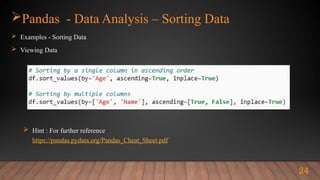
Pandas - Data Analysis – Sorting Data
 Examples - Sorting Data
 Viewing Data
 Hint : For further reference
https://pandas.pydata.org/Pandas_Cheat_Sheet.pdf
24
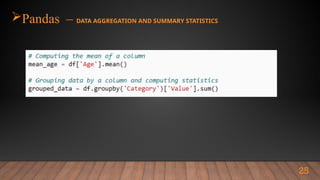
Pandas – DATA AGGREGATION AND SUMMARY STATISTICS
25
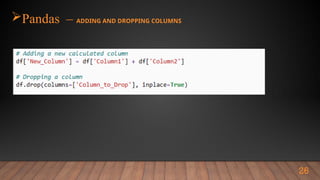
Pandas – ADDING AND DROPPING COLUMNS
26
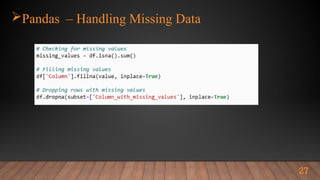
Pandas – Handling Missing Data
27
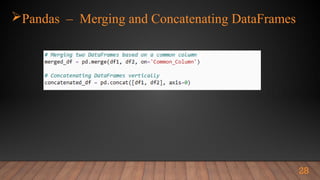
Pandas – Merging and Concatenating DataFrames
28
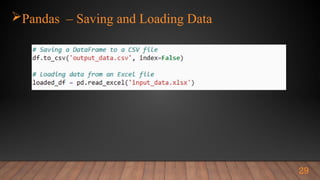
Pandas – Saving and Loading Data
29
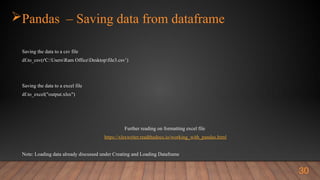
Pandas – Saving data from dataframe
Saving the data to a csv file
df.to_csv(r'C:UsersRam OfficeDesktopfile3.csv’)
Saving the data to a excel file
df.to_excel("output.xlsx")
Further reading on formatting excel file
https://xlsxwriter.readthedocs.io/working_with_pandas.html
Note: Loading data already discussed under Creating and Loading Dataframe
30
Data Preprocessing Steps
31
IMPORTANCE OF DATA PREPROCESSING
 Data Quality Improvement:
 Enhanced Model Performance
 Extraction and Engineering
 Normalization and Scaling
 Handling Categorical Data:
 Dimensionality Reduction:
 Improved Interpretability:
Data Preprocessing Steps
32
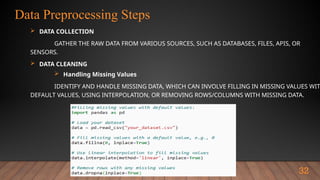
 DATA COLLECTION
GATHER THE RAW DATA FROM VARIOUS SOURCES, SUCH AS DATABASES, FILES, APIS, OR
SENSORS.
 DATA CLEANING
 Handling Missing Values
IDENTIFY AND HANDLE MISSING DATA, WHICH CAN INVOLVE FILLING IN MISSING VALUES WIT
DEFAULT VALUES, USING INTERPOLATION, OR REMOVING ROWS/COLUMNS WITH MISSING DATA.
Data Preprocessing Steps
33
 DATA REDUCTION
 Dimensionality Reduction
 Principal Component Analysis (PCA)
 Feature Selection
 Recursive Feature Elimination (RFE)
 DATA IMBALANCE HANDLING
 Oversampling
 Undersampling
 Synthetic Data Generation (SMOTE)
Pandas – Extracting data from different data sources
Practical Approach
 Module Case Study - 1
Conversion of JSON Data to Excel
Students may use any
GSTR2A or GSTR2 or GSTR3B File to Convert data to Excel
Approach - 1
Using pandas data frame to read Json file and then write to excel
Approach – 2
Using openpyxl library read json parts and write to excel directly
34
Pandas – Extracting data from different data sources
Practical Approach
 Module Case Study - 2
Conversion of XML Data to Excel
Students may use any
Income Tax return file to extract ITR Balance sheet and profit and loss data to excel
Approach - 1
Use XML Element tree Module
https://docs.python.org/3/library/xml.etree.elementtree.html
35
Pandas – Extracting data from different data sources
Practical Approach
 Module Case Study - 3
Consolidate multiple excel files to single file
Students may use the excel file provided to consolidate into single file
Approach :
Use Dataframe in pandas and merging feature .
36
Pandas – Extracting data from different data sources
Practical Approach
 Module Case Study - 4
Convert 26As text file to excel
Approach :
Use Dataframe in pandas and merging feature .
Use Regex
37
Pandas – Extracting data from different data sources
Practical Approach
 Module Case Study - 5
Get Ledger Master Data from Tally data using sql Query
Query
Select $Name, $Parent, $_PRimaryGroup, $OpeningBalance, $_ClosingBalance from Ledger
Libraries used
Pyodbc
38

To understand the importance of Python libraries in data analysis.

  • 1.
  • 2.
    Learning Objectives TO UNDERSTANDTHE IMPORTANCE OF PYTHON LIBRARIES IN DATAANALYSIS. LEARN HOW TO IMPORT AND UTILIZE EXTERNAL LIBRARIES IN PYTHON. MASTER NUMPY'S ROLE IN NUMERICAL COMPUTING AND ARRAY MANIPULATION. TO UNDERSTAND PANDAS' IMPORTANCE FOR STRUCTURED DATA MANIPULATION AND ANALYSIS. TO UNDERSTAND THE IMPORTANCE OF DATA PREPROCESSING IN PREPARING DATA. RECOGNIZE EDA'S ROLE IN DATA UNDERSTANDING AND VISUALIZATION 2
  • 3.
    Introduction – Libraries A python library is a collection of related modules.  It contains bundles of code that can be used repeatedly in different programs.  It makes python programming simpler and convenient for the programmer.  As we don’t need to write the same code again and again for different programs. P  ython libraries play a very vital role in fields of machine learning, data science, data visualization, etc. 3
  • 4.
    Introduction – ImportantLibraries/Packages  Pandas - Data Analysis  Numpy – Data Analysis  Matplotlib - Visualisation  Seaborn - Visualisation  Scikit-learn - ML  Requests – Api  Selenium – Web scrapping / Browser Automation  Pyodbc  xml.etree.ElementTree  Openpyxl  Xlsxwriter 4
  • 5.
    Numpy NumPy, short for"Numerical Python," is a foundational library for numerical and scientific computing in the Python programming language. It is the go-to library for performing efficient numerical operations on large datasets, and it serves as the backbone for numerous other scientific and data-related libraries 5
  • 6.
    Numpy  Array Representation Data Storage  Vectorized Operations  Universal Functions (ufuncs)  Broadcasting  Indexing and Slicing  Mathematical Functions 6
  • 7.
    7 BASIC METHODS INNUMPY  1. Importing NumPy To use NumPy in Python, you first need to import it The common convention is to alias NumPy as `np`.
  • 8.
    8  2. CreatingArrays NumPy arrays are the fundamental data structure. You can create arrays using various methods, such as:
  • 9.
    9  3. BasicOperations NumPy allows you to perform element-wise operations on arrays. For example:
  • 10.
    10  4. ArrayShape and Dimensions: Check the shape and dimensions of an array using the `shape` and `ndim` attributes:
  • 11.
    11  5. Indexingand Slicing NumPy supports indexing and slicing to access elements or subsets of arrays. Indexing starts at:
  • 12.
    12  6. Aggregationand Statistics NumPy provides functions for computing various statistics on arrays i. Aggregation
  • 13.
  • 14.
    14  7. Reshapingand Transposing Reshaping and transposing are fundamental operations when working with multi-dimensional data, such as matrices or arrays. These operations allow you to change the structure or dimensions of your data. i. Reshaping: Reshaping involves changing the shape or dimensions of your data while maintaining the total number of elements. This operation is often used in machine learning and data preprocessing to prepare data for modeling
  • 15.
    15 ii. Transposing: Transposing involvesswitching the rows and columns of a two-dimensional data structure like a matrix or array. This operation is particularly useful for linear algebra operations or when working with tabular data.
  • 16.
    16  8. UniversalFunctions (ufuncs) NumPy provides universal functions that operate element-wise on arrays, including trigonometric, logarithmic, and exponential functions.
  • 17.
    17  9. RandomNumber Generation NumPy includes functions for generating random numbers from various distributions, such as `np. random. rand`, `np. random. rand`, and `np. random. rand`.
  • 18.
    18  10. Broadcasting NumPyallows you to perform operations on arrays of different shapes, often automatically aligning their shapes, thanks to broadcasting rules.  11. Reshaping Arrays Reshape arrays into different dimensions using np. reshape or the reshape method.
  • 19.
    Pandas - DataAnalysis Pandas is a Python library used for working with data sets. It has functions for analyzing, cleaning, exploring, and manipulating data. The name "Pandas" has a reference to both "Panel Data", and "Python Data Analysis" and was created by Wes McKinney in 2008 19
  • 20.
    Pandas - DataAnalysis - Contents  Data Structures  - Series  - Data Frame  Data Alignment  Label Based Indexing  Data Cleaning  Data Aggregation  Data Merging and Joining  Data Visualisation Integration 20
  • 21.
    Pandas - DataAnalysis  Examples – Creating and Loading Dataframe  Creating Data Frame - From Dictionary Loading Data to Dataframe - From External Data Sources - CSV - JSON - XML - Excel - Database (Tally / Access) using Sql 21
  • 22.
    Pandas - DataAnalysis - Viewing Data  Examples - Viewing Data  df.head()  df.tail()  df.shape  df.info()  df.describe()  df.sample(~) These methods are invaluable for getting an initial sense of your data's structure and Content. 22
  • 23.
    Pandas - DataAnalysis - Indexing and Selecting Data  Examples - Indexing and Selecting Data  Viewing Data  Name_Column = df[`Name`  Subset = df[[‘Name’, ‘Age’]]  Young_People = df[df[“age”] <30]  Hint : For further reference https://pandas.pydata.org/Pandas_Cheat_Sheet.pdf 23
  • 24.
    Pandas - DataAnalysis – Sorting Data  Examples - Sorting Data  Viewing Data  Hint : For further reference https://pandas.pydata.org/Pandas_Cheat_Sheet.pdf 24
  • 25.
    Pandas – DATAAGGREGATION AND SUMMARY STATISTICS 25
  • 26.
    Pandas – ADDINGAND DROPPING COLUMNS 26
  • 27.
    Pandas – HandlingMissing Data 27
  • 28.
    Pandas – Mergingand Concatenating DataFrames 28
  • 29.
    Pandas – Savingand Loading Data 29
  • 30.
    Pandas – Savingdata from dataframe Saving the data to a csv file df.to_csv(r'C:UsersRam OfficeDesktopfile3.csv’) Saving the data to a excel file df.to_excel("output.xlsx") Further reading on formatting excel file https://xlsxwriter.readthedocs.io/working_with_pandas.html Note: Loading data already discussed under Creating and Loading Dataframe 30
  • 31.
    Data Preprocessing Steps 31 IMPORTANCEOF DATA PREPROCESSING  Data Quality Improvement:  Enhanced Model Performance  Extraction and Engineering  Normalization and Scaling  Handling Categorical Data:  Dimensionality Reduction:  Improved Interpretability:
  • 32.
    Data Preprocessing Steps 32 DATA COLLECTION GATHER THE RAW DATA FROM VARIOUS SOURCES, SUCH AS DATABASES, FILES, APIS, OR SENSORS.  DATA CLEANING  Handling Missing Values IDENTIFY AND HANDLE MISSING DATA, WHICH CAN INVOLVE FILLING IN MISSING VALUES WIT DEFAULT VALUES, USING INTERPOLATION, OR REMOVING ROWS/COLUMNS WITH MISSING DATA.
  • 33.
    Data Preprocessing Steps 33 DATA REDUCTION  Dimensionality Reduction  Principal Component Analysis (PCA)  Feature Selection  Recursive Feature Elimination (RFE)  DATA IMBALANCE HANDLING  Oversampling  Undersampling  Synthetic Data Generation (SMOTE)
  • 34.
    Pandas – Extractingdata from different data sources Practical Approach  Module Case Study - 1 Conversion of JSON Data to Excel Students may use any GSTR2A or GSTR2 or GSTR3B File to Convert data to Excel Approach - 1 Using pandas data frame to read Json file and then write to excel Approach – 2 Using openpyxl library read json parts and write to excel directly 34
  • 35.
    Pandas – Extractingdata from different data sources Practical Approach  Module Case Study - 2 Conversion of XML Data to Excel Students may use any Income Tax return file to extract ITR Balance sheet and profit and loss data to excel Approach - 1 Use XML Element tree Module https://docs.python.org/3/library/xml.etree.elementtree.html 35
  • 36.
    Pandas – Extractingdata from different data sources Practical Approach  Module Case Study - 3 Consolidate multiple excel files to single file Students may use the excel file provided to consolidate into single file Approach : Use Dataframe in pandas and merging feature . 36
  • 37.
    Pandas – Extractingdata from different data sources Practical Approach  Module Case Study - 4 Convert 26As text file to excel Approach : Use Dataframe in pandas and merging feature . Use Regex 37
  • 38.
    Pandas – Extractingdata from different data sources Practical Approach  Module Case Study - 5 Get Ledger Master Data from Tally data using sql Query Query Select $Name, $Parent, $_PRimaryGroup, $OpeningBalance, $_ClosingBalance from Ledger Libraries used Pyodbc 38