Hello It’s Me
App that speaks your voice
App Inventor Introduction
&
Essential Questions
● What features have you seen in mobile apps that make
you curious how it was made?
● Have you thought about building apps before and
why/why not?
Objectives
1. Log in and out, and create, save, and retrieve projects in the MIT App Inventor programming
environment.
2. Demonstrate an understanding of the Designer and what its different sections represent.
3. Code an app using the App Inventor Blocks Editor.
4. Test and debug using the MIT AI2 Companion app (or emulator).
5. Identify and use the correct components and blocks for an audio and visual app.
6. Develop computational identity by creating a mobile app.
App Inventor Introduction
An app is a set of event handlers. Each event handler has an
event and a response. The response is a sequence of blocks
that are executed when the event happens.
Did you know?
1. Building apps is not as hard as you might think, especially with App Inventor.
2. App Inventor is a blocks-based programming language for building mobile
apps.
a. Inventor components work (left to right then top to bottom).
b. Blocks are the code that make the components “do” things.
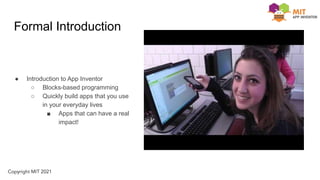
Formal Introduction
● Introduction to App Inventor
○ Blocks-based programming
○ Quickly build apps that you use
in your everyday lives
■ Apps that can have a real
impact!
Lesson 1:
Complete the Two Button Game Student Guide:
Lesson 2:
Complete the Hello It’s Me Student Guide:
Vocabulary Words
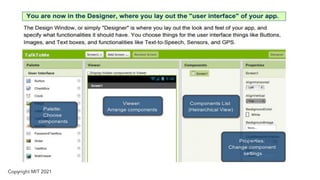
Designer Editor
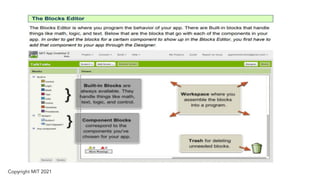
Blocks Editor
Event (when Button1.Click)
Response (Player1.Start)
Button
Image
Player
Component

The Hello It_s Me Teacher Presentation.pdf

  • 1.
    Hello It’s Me Appthat speaks your voice App Inventor Introduction &
  • 2.
    Essential Questions ● Whatfeatures have you seen in mobile apps that make you curious how it was made? ● Have you thought about building apps before and why/why not?
  • 3.
    Objectives 1. Log inand out, and create, save, and retrieve projects in the MIT App Inventor programming environment. 2. Demonstrate an understanding of the Designer and what its different sections represent. 3. Code an app using the App Inventor Blocks Editor. 4. Test and debug using the MIT AI2 Companion app (or emulator). 5. Identify and use the correct components and blocks for an audio and visual app. 6. Develop computational identity by creating a mobile app.
  • 4.
    App Inventor Introduction Anapp is a set of event handlers. Each event handler has an event and a response. The response is a sequence of blocks that are executed when the event happens.
  • 5.
    Did you know? 1.Building apps is not as hard as you might think, especially with App Inventor. 2. App Inventor is a blocks-based programming language for building mobile apps. a. Inventor components work (left to right then top to bottom). b. Blocks are the code that make the components “do” things.
  • 6.
    Formal Introduction ● Introductionto App Inventor ○ Blocks-based programming ○ Quickly build apps that you use in your everyday lives ■ Apps that can have a real impact!
  • 9.
    Lesson 1: Complete theTwo Button Game Student Guide: Lesson 2: Complete the Hello It’s Me Student Guide:
  • 10.
    Vocabulary Words Designer Editor BlocksEditor Event (when Button1.Click) Response (Player1.Start) Button Image Player Component