THE 7 BASIC QUALITY TOOLS
Dr. Aya AL-Basosy
We agreed before that Quality is considered
“Fulfillment of requirements to meet the customers’ expectations”
And these Requirements include Price, quality of the product and
Level of Service (during and after)
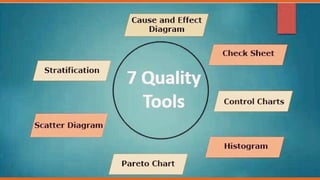
What about the 7 basic Quality tools?
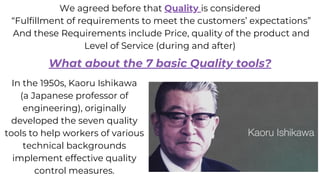
In the 1950s, Kaoru Ishikawa
(a Japanese professor of
engineering), originally
developed the seven quality
tools to help workers of various
technical backgrounds
implement effective quality
control measures.
By using The 7 basic tools ,we can identify and resolve
quality-related issues quickly and efficiently, these quality
management tools are considered the gold standard for
troubleshooting a variety of quality issues.
Now, they’re implemented in conjunction with the most
widely used process improvement methodologies including
various phases of Six Sigma, TQM, continuous improvement
processes and Lean management
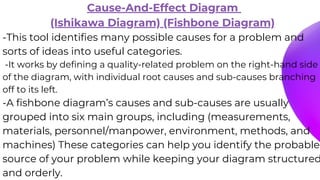
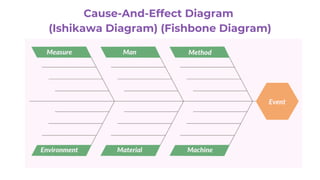
Cause-And-Effect Diagram
(Ishikawa Diagram) (Fishbone Diagram)
-This tool identifies many possible causes for a problem and
sorts of ideas into useful categories.
-It works by defining a quality-related problem on the right-hand side
of the diagram, with individual root causes and sub-causes branching
off to its left.
-A fishbone diagram’s causes and sub-causes are usually
grouped into six main groups, including (measurements,
materials, personnel/manpower, environment, methods, and
machines) These categories can help you identify the probable
source of your problem while keeping your diagram structured
and orderly.
Cause-And-Effect Diagram
(Ishikawa Diagram) (Fishbone Diagram)
Check Sheet
-It can be used to collect quantitative or qualitative data
-It is prepared form collecting and analyzing data.
-It is a generic tool that can be adapted for a wide variety of
purposes
When to use Check Sheet ?
-When data can be observed and collected repeatedly by the
same person or at the same location
-When collecting data on the frequency or patterns of events,
problems, defects, defect location, defect causes, or similar
issues
-When collecting data from a production process
How to make a Check Sheet ?
1. Decide which problem will be observed and
develop operational definitions.
2. Decide when data will be collected and for how long.
3. Design the form, Set it up so that data can be recorded
simply by making check marks or similar symbols and so that
data do not have to be recopied for analysis.
4. Label all spaces on the form.
5. Test the check sheet for a short trial period to be sure it
collects the appropriate data and is easy to use.
6. Each time the targeted event or problem occurs, record data
on the check sheet.
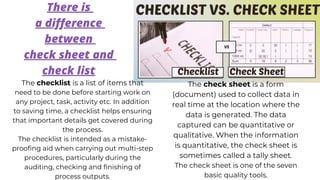
There is
a difference
between
check sheet and
check list
The checklist is a list of items that
need to be done before starting work on
any project, task, activity etc. In addition
to saving time, a checklist helps ensuring
that important details get covered during
the process.
The checklist is intended as a mistake-
proofing aid when carrying out multi-step
procedures, particularly during the
auditing, checking and finishing of
process outputs.
The check sheet is a form
(document) used to collect data in
real time at the location where the
data is generated. The data
captured can be quantitative or
qualitative. When the information
is quantitative, the check sheet is
sometimes called a tally sheet.
The check sheet is one of the seven
basic quality tools.
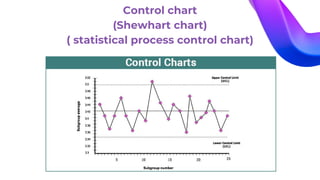
Control chart
(Shewhart chart)( statistical process control chart)
-Used to study how a process changes over time. Comparing current data to
historical control limits leads to conclusions about whether the process variation
is consistent (in control) or is unpredictable (out of control, affected by special
causes of variation)
-A central line is used to depict an average or mean, as well as an upper and
lower line to depict upper and lower control limits based on historical data. By
comparing historical data to data collected from your current process, you can
determine whether your current process is controlled or affected by specific
variations.
-Using a control chart can save your organization time and money by predicting
process performance, particularly in terms of what your customer or
organization expects in your final product.
Control chart
(Shewhart chart)
( statistical process control chart)
Histogram
The most commonly used graph for showing frequency distributions,
or how often each different value in a set of data occurs.
When to use Histogram ?
-When the data are numerical.
-When You want to see the shape of the data’s distribution, especially when
determining whether the output of a process is distributed approximately
normally
-When analyzing whether a process can meet the customer’s requirements
-When analyzing what the output from a supplier’s process looks like
-When seeing whether a process change has occurred from one time period
to another
-When determining whether the outputs of two or more processes are
different
-You wish to communicate the distribution of data quickly and easily to others
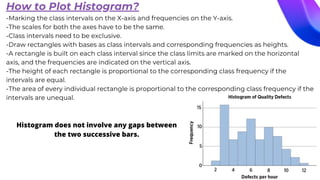
How to Plot Histogram?
-Marking the class intervals on the X-axis and frequencies on the Y-axis.
-The scales for both the axes have to be the same.
-Class intervals need to be exclusive.
-Draw rectangles with bases as class intervals and corresponding frequencies as heights.
-A rectangle is built on each class interval since the class limits are marked on the horizontal
axis, and the frequencies are indicated on the vertical axis.
-The height of each rectangle is proportional to the corresponding class frequency if the
intervals are equal.
-The area of every individual rectangle is proportional to the corresponding class frequency if the
intervals are unequal.
Histogram does not involve any gaps between
the two successive bars.
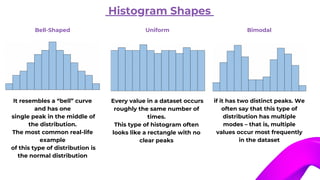
Histogram Shapes
Bell-Shaped
It resembles a “bell” curve
and has one
single peak in the middle of
the distribution.
The most common real-life
example
of this type of distribution is
the normal distribution
Uniform
Every value in a dataset occurs
roughly the same number of
times.
This type of histogram often
looks like a rectangle with no
clear peaks
Bimodal
if it has two distinct peaks. We
often say that this type of
distribution has multiple
modes – that is, multiple
values occur most frequently
in the dataset
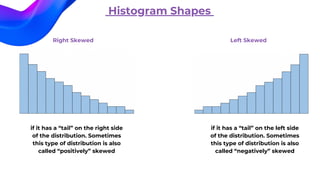
Histogram Shapes
Right Skewed
if it has a “tail” on the right side
of the distribution. Sometimes
this type of distribution is also
called “positively” skewed
Left Skewed
if it has a “tail” on the left side
of the distribution. Sometimes
this type of distribution is also
called “negatively” skewed
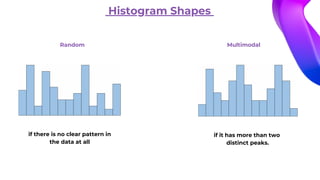
Histogram Shapes
Multimodal
if it has more than two
distinct peaks.
Random
if there is no clear pattern in
the data at all
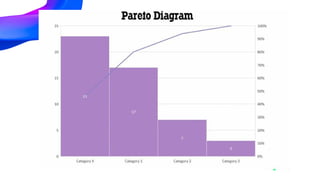
Pareto Chart
(Pareto diagram) (Pareto analysis)
It is a bar graph in which the lengths of the bars represent frequency or cost (time or money)
and are arranged with longest bars on the left and the shortest to the right.
In this way the chart visually depicts which situations are more significant
The Pareto chart is used to prioritize the contributors which make the biggest impact on a
problem, or which represents the largest areas of opportunity. These diagrams communicate
the principle of 80:20. It states that 80% of an effect comes from 20% of the causes
When to use Pareto Chart ?
-When analyzing data about the frequency of problems or causes in a process
-When there are many problems or causes and you want to focus on the most
significant
-When analyzing broad causes by looking at their specific components
-When communicating with others about your data
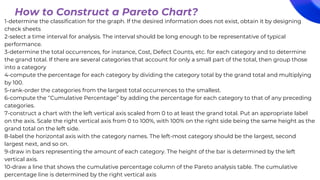
1-determine the classification for the graph. If the desired information does not exist, obtain it by designing
check sheets
2-select a time interval for analysis. The interval should be long enough to be representative of typical
performance.
3-determine the total occurrences, for instance, Cost, Defect Counts, etc. for each category and to determine
the grand total. If there are several categories that account for only a small part of the total, then group those
into a category
4-compute the percentage for each category by dividing the category total by the grand total and multiplying
by 100.
5-rank-order the categories from the largest total occurrences to the smallest.
6-compute the ‘‘Cumulative Percentage’’ by adding the percentage for each category to that of any preceding
categories.
7-construct a chart with the left vertical axis scaled from 0 to at least the grand total. Put an appropriate label
on the axis. Scale the right vertical axis from 0 to 100%, with 100% on the right side being the same height as the
grand total on the left side.
8-label the horizontal axis with the category names. The left-most category should be the largest, second
largest next, and so on.
9-draw in bars representing the amount of each category. The height of the bar is determined by the left
vertical axis.
10-draw a line that shows the cumulative percentage column of the Pareto analysis table. The cumulative
percentage line is determined by the right vertical axis
How to Construct a Pareto Chart?
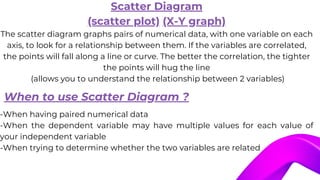
Scatter Diagram
(scatter plot) (X-Y graph)
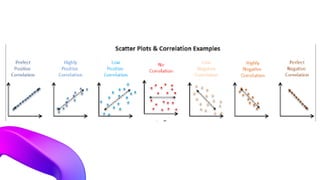
The scatter diagram graphs pairs of numerical data, with one variable on each
axis, to look for a relationship between them. If the variables are correlated,
the points will fall along a line or curve. The better the correlation, the tighter
the points will hug the line
(allows you to understand the relationship between 2 variables)
-When having paired numerical data
-When the dependent variable may have multiple values for each value of
your independent variable
-When trying to determine whether the two variables are related
When to use Scatter Diagram ?
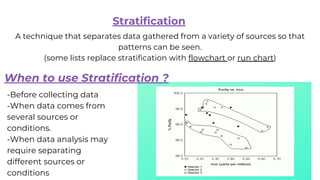
A technique that separates data gathered from a variety of sources so that
patterns can be seen.
(some lists replace stratification with flowchart or run chart)
Stratification
When to use Stratification ?
-Before collecting data
-When data comes from
several sources or
conditions.
-When data analysis may
require separating
different sources or
conditions
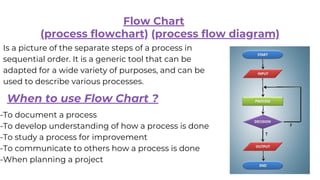
Flow Chart
(process flowchart) (process flow diagram)
Is a picture of the separate steps of a process in
sequential order. It is a generic tool that can be
adapted for a wide variety of purposes, and can be
used to describe various processes.
When to use Flow Chart ?
-To document a process
-To develop understanding of how a process is done
-To study a process for improvement
-To communicate to others how a process is done
-When planning a project
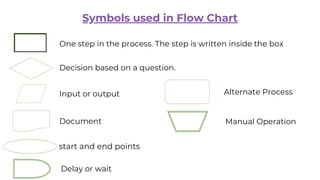
Symbols used in Flow Chart
One step in the process. The step is written inside the box
Decision based on a question.
Input or output
Document
start and end points
Delay or wait
Alternate Process
Manual Operation
Dr. Aya AL-Basosy

The 7 basic Quality Tools.pdf for helathcare

  • 1.
    THE 7 BASICQUALITY TOOLS Dr. Aya AL-Basosy
  • 2.
    We agreed beforethat Quality is considered “Fulfillment of requirements to meet the customers’ expectations” And these Requirements include Price, quality of the product and Level of Service (during and after) What about the 7 basic Quality tools? In the 1950s, Kaoru Ishikawa (a Japanese professor of engineering), originally developed the seven quality tools to help workers of various technical backgrounds implement effective quality control measures.
  • 3.
    By using The7 basic tools ,we can identify and resolve quality-related issues quickly and efficiently, these quality management tools are considered the gold standard for troubleshooting a variety of quality issues. Now, they’re implemented in conjunction with the most widely used process improvement methodologies including various phases of Six Sigma, TQM, continuous improvement processes and Lean management
  • 5.
    Cause-And-Effect Diagram (Ishikawa Diagram)(Fishbone Diagram) -This tool identifies many possible causes for a problem and sorts of ideas into useful categories. -It works by defining a quality-related problem on the right-hand side of the diagram, with individual root causes and sub-causes branching off to its left. -A fishbone diagram’s causes and sub-causes are usually grouped into six main groups, including (measurements, materials, personnel/manpower, environment, methods, and machines) These categories can help you identify the probable source of your problem while keeping your diagram structured and orderly.
  • 6.
  • 7.
    Check Sheet -It canbe used to collect quantitative or qualitative data -It is prepared form collecting and analyzing data. -It is a generic tool that can be adapted for a wide variety of purposes When to use Check Sheet ? -When data can be observed and collected repeatedly by the same person or at the same location -When collecting data on the frequency or patterns of events, problems, defects, defect location, defect causes, or similar issues -When collecting data from a production process
  • 8.
    How to makea Check Sheet ? 1. Decide which problem will be observed and develop operational definitions. 2. Decide when data will be collected and for how long. 3. Design the form, Set it up so that data can be recorded simply by making check marks or similar symbols and so that data do not have to be recopied for analysis. 4. Label all spaces on the form. 5. Test the check sheet for a short trial period to be sure it collects the appropriate data and is easy to use. 6. Each time the targeted event or problem occurs, record data on the check sheet.
  • 9.
    There is a difference between checksheet and check list The checklist is a list of items that need to be done before starting work on any project, task, activity etc. In addition to saving time, a checklist helps ensuring that important details get covered during the process. The checklist is intended as a mistake- proofing aid when carrying out multi-step procedures, particularly during the auditing, checking and finishing of process outputs. The check sheet is a form (document) used to collect data in real time at the location where the data is generated. The data captured can be quantitative or qualitative. When the information is quantitative, the check sheet is sometimes called a tally sheet. The check sheet is one of the seven basic quality tools.
  • 10.
    Control chart (Shewhart chart)(statistical process control chart) -Used to study how a process changes over time. Comparing current data to historical control limits leads to conclusions about whether the process variation is consistent (in control) or is unpredictable (out of control, affected by special causes of variation) -A central line is used to depict an average or mean, as well as an upper and lower line to depict upper and lower control limits based on historical data. By comparing historical data to data collected from your current process, you can determine whether your current process is controlled or affected by specific variations. -Using a control chart can save your organization time and money by predicting process performance, particularly in terms of what your customer or organization expects in your final product.
  • 11.
    Control chart (Shewhart chart) (statistical process control chart)
  • 12.
    Histogram The most commonlyused graph for showing frequency distributions, or how often each different value in a set of data occurs. When to use Histogram ? -When the data are numerical. -When You want to see the shape of the data’s distribution, especially when determining whether the output of a process is distributed approximately normally -When analyzing whether a process can meet the customer’s requirements -When analyzing what the output from a supplier’s process looks like -When seeing whether a process change has occurred from one time period to another -When determining whether the outputs of two or more processes are different -You wish to communicate the distribution of data quickly and easily to others
  • 13.
    How to PlotHistogram? -Marking the class intervals on the X-axis and frequencies on the Y-axis. -The scales for both the axes have to be the same. -Class intervals need to be exclusive. -Draw rectangles with bases as class intervals and corresponding frequencies as heights. -A rectangle is built on each class interval since the class limits are marked on the horizontal axis, and the frequencies are indicated on the vertical axis. -The height of each rectangle is proportional to the corresponding class frequency if the intervals are equal. -The area of every individual rectangle is proportional to the corresponding class frequency if the intervals are unequal. Histogram does not involve any gaps between the two successive bars.
  • 14.
    Histogram Shapes Bell-Shaped It resemblesa “bell” curve and has one single peak in the middle of the distribution. The most common real-life example of this type of distribution is the normal distribution Uniform Every value in a dataset occurs roughly the same number of times. This type of histogram often looks like a rectangle with no clear peaks Bimodal if it has two distinct peaks. We often say that this type of distribution has multiple modes – that is, multiple values occur most frequently in the dataset
  • 15.
    Histogram Shapes Right Skewed ifit has a “tail” on the right side of the distribution. Sometimes this type of distribution is also called “positively” skewed Left Skewed if it has a “tail” on the left side of the distribution. Sometimes this type of distribution is also called “negatively” skewed
  • 16.
    Histogram Shapes Multimodal if ithas more than two distinct peaks. Random if there is no clear pattern in the data at all
  • 17.
    Pareto Chart (Pareto diagram)(Pareto analysis) It is a bar graph in which the lengths of the bars represent frequency or cost (time or money) and are arranged with longest bars on the left and the shortest to the right. In this way the chart visually depicts which situations are more significant The Pareto chart is used to prioritize the contributors which make the biggest impact on a problem, or which represents the largest areas of opportunity. These diagrams communicate the principle of 80:20. It states that 80% of an effect comes from 20% of the causes When to use Pareto Chart ? -When analyzing data about the frequency of problems or causes in a process -When there are many problems or causes and you want to focus on the most significant -When analyzing broad causes by looking at their specific components -When communicating with others about your data
  • 18.
    1-determine the classificationfor the graph. If the desired information does not exist, obtain it by designing check sheets 2-select a time interval for analysis. The interval should be long enough to be representative of typical performance. 3-determine the total occurrences, for instance, Cost, Defect Counts, etc. for each category and to determine the grand total. If there are several categories that account for only a small part of the total, then group those into a category 4-compute the percentage for each category by dividing the category total by the grand total and multiplying by 100. 5-rank-order the categories from the largest total occurrences to the smallest. 6-compute the ‘‘Cumulative Percentage’’ by adding the percentage for each category to that of any preceding categories. 7-construct a chart with the left vertical axis scaled from 0 to at least the grand total. Put an appropriate label on the axis. Scale the right vertical axis from 0 to 100%, with 100% on the right side being the same height as the grand total on the left side. 8-label the horizontal axis with the category names. The left-most category should be the largest, second largest next, and so on. 9-draw in bars representing the amount of each category. The height of the bar is determined by the left vertical axis. 10-draw a line that shows the cumulative percentage column of the Pareto analysis table. The cumulative percentage line is determined by the right vertical axis How to Construct a Pareto Chart?
  • 20.
    Scatter Diagram (scatter plot)(X-Y graph) The scatter diagram graphs pairs of numerical data, with one variable on each axis, to look for a relationship between them. If the variables are correlated, the points will fall along a line or curve. The better the correlation, the tighter the points will hug the line (allows you to understand the relationship between 2 variables) -When having paired numerical data -When the dependent variable may have multiple values for each value of your independent variable -When trying to determine whether the two variables are related When to use Scatter Diagram ?
  • 22.
    A technique thatseparates data gathered from a variety of sources so that patterns can be seen. (some lists replace stratification with flowchart or run chart) Stratification When to use Stratification ? -Before collecting data -When data comes from several sources or conditions. -When data analysis may require separating different sources or conditions
  • 23.
    Flow Chart (process flowchart)(process flow diagram) Is a picture of the separate steps of a process in sequential order. It is a generic tool that can be adapted for a wide variety of purposes, and can be used to describe various processes. When to use Flow Chart ? -To document a process -To develop understanding of how a process is done -To study a process for improvement -To communicate to others how a process is done -When planning a project
  • 24.
    Symbols used inFlow Chart One step in the process. The step is written inside the box Decision based on a question. Input or output Document start and end points Delay or wait Alternate Process Manual Operation
  • 25.