Testing SOAP/REST Web Services
Using JMeter
July 2014
Representational Site Transfer (REST)
• The most popular RESTs include:
1. GET
2. POST
3. PUT
4. DELETE
• The response return status codes indicate success or failure,
along with any applicable headers. JSON represents the
affected fields (or nothing) in the message-body.
*
02
How to Write a JMeter Script with GET (1)
GET is the easiest and most common request method.
To write a JMeter script with GET:
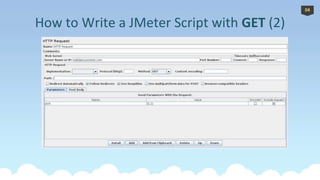
1.Add an HTTP Request to your Thread Group.
2.Fill in the Server Name or IP, path, and select the GET method.
– For example, we use validate.jsontest.com as Server Name and ‘/’ as path
3.If your API request contains query parameters, you may specify them in [a]
path (for example, ‘/?json=[1:1]’) or in [a] Parameters area:
1. Name: json
2. Value: [1:1]
*
03
How to Write a JMeter Script with GET (2)
04
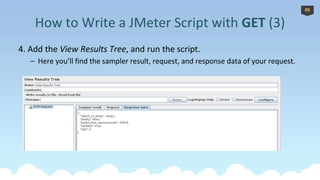
4. Add the View Results Tree, and run the script.
– Here you’ll find the sampler result, request, and response data of your request.
*
How to Write a JMeter Script with GET (3)
05
• With POST requests, you can fill both the body and the
headers. You can also specify query parameters in path.
• The HTTP headers, which contain metadata, are tightly defined
by the HTTP spec. They can only contain plain text and must be
formatted in a certain manner.
*
How to Write a JMeter Script with POST (1)
06
• To specify headers, you’ll need the HTTP Header Manager with
the most common headers. These include Content-Type and
Accept:
– Content-Type : This entity-header field indicates the media type of
the entity-body sent to the recipient.
– Accept: This can be used to specify certain media types which are
acceptable for the response. You can use a user agent to simulate
different behaviors of various browsers.
• Post Body can be useful for the following requests: GWT RPC
HTTP, JSON REST HTTP, XML REST HTTP and SOAP HTTP.
*
How to Write a JMeter Script with POST (2)
07
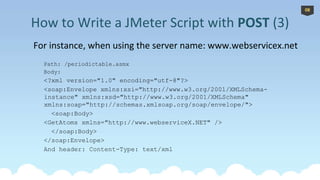
For instance, when using the server name: www.webservicex.net
Path: /periodictable.asmx
Body:
<?xml version="1.0" encoding="utf-8"?>
<soap:Envelope xmlns:xsi="http://www.w3.org/2001/XMLSchema-
instance" xmlns:xsd="http://www.w3.org/2001/XMLSchema"
xmlns:soap="http://schemas.xmlsoap.org/soap/envelope/">
<soap:Body>
<GetAtoms xmlns="http://www.webserviceX.NET" />
</soap:Body>
</soap:Envelope>
And header: Content-Type: text/xml
*
How to Write a JMeter Script with POST (3)
08
*
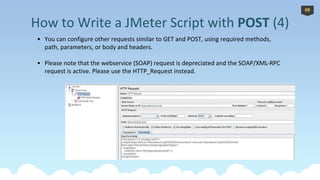
• You can configure other requests similar to GET and POST, using required methods,
path, parameters, or body and headers.
• Please note that the webservice (SOAP) request is depreciated and the SOAP/XML-RPC
request is active. Please use the HTTP_Request instead.
How to Write a JMeter Script with POST (4)
09
*
How to Write a JMeter Script with POST (5)
10
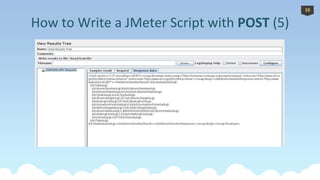
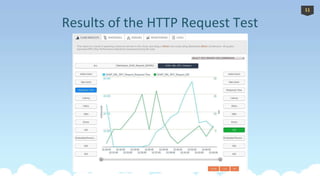
Results of the HTTP Request Test
*
11
For more information about Performance Testing and JMeter:
BlazeMeter.com/blog/ support@blazemeter.com @BlazeMeter
Get Your Free JMeter
Training Course!
Learn Apache JMeter with a
step-by-step video course:
http://bit.ly/1rMAkmt
12

Testing Soap/Rest Web Services with JMeter

  • 1.
    Testing SOAP/REST WebServices Using JMeter July 2014
  • 2.
    Representational Site Transfer(REST) • The most popular RESTs include: 1. GET 2. POST 3. PUT 4. DELETE • The response return status codes indicate success or failure, along with any applicable headers. JSON represents the affected fields (or nothing) in the message-body. * 02
  • 3.
    How to Writea JMeter Script with GET (1) GET is the easiest and most common request method. To write a JMeter script with GET: 1.Add an HTTP Request to your Thread Group. 2.Fill in the Server Name or IP, path, and select the GET method. – For example, we use validate.jsontest.com as Server Name and ‘/’ as path 3.If your API request contains query parameters, you may specify them in [a] path (for example, ‘/?json=[1:1]’) or in [a] Parameters area: 1. Name: json 2. Value: [1:1] * 03
  • 4.
    How to Writea JMeter Script with GET (2) 04
  • 5.
    4. Add theView Results Tree, and run the script. – Here you’ll find the sampler result, request, and response data of your request. * How to Write a JMeter Script with GET (3) 05
  • 6.
    • With POSTrequests, you can fill both the body and the headers. You can also specify query parameters in path. • The HTTP headers, which contain metadata, are tightly defined by the HTTP spec. They can only contain plain text and must be formatted in a certain manner. * How to Write a JMeter Script with POST (1) 06
  • 7.
    • To specifyheaders, you’ll need the HTTP Header Manager with the most common headers. These include Content-Type and Accept: – Content-Type : This entity-header field indicates the media type of the entity-body sent to the recipient. – Accept: This can be used to specify certain media types which are acceptable for the response. You can use a user agent to simulate different behaviors of various browsers. • Post Body can be useful for the following requests: GWT RPC HTTP, JSON REST HTTP, XML REST HTTP and SOAP HTTP. * How to Write a JMeter Script with POST (2) 07
  • 8.
    For instance, whenusing the server name: www.webservicex.net Path: /periodictable.asmx Body: <?xml version="1.0" encoding="utf-8"?> <soap:Envelope xmlns:xsi="http://www.w3.org/2001/XMLSchema- instance" xmlns:xsd="http://www.w3.org/2001/XMLSchema" xmlns:soap="http://schemas.xmlsoap.org/soap/envelope/"> <soap:Body> <GetAtoms xmlns="http://www.webserviceX.NET" /> </soap:Body> </soap:Envelope> And header: Content-Type: text/xml * How to Write a JMeter Script with POST (3) 08
  • 9.
    * • You canconfigure other requests similar to GET and POST, using required methods, path, parameters, or body and headers. • Please note that the webservice (SOAP) request is depreciated and the SOAP/XML-RPC request is active. Please use the HTTP_Request instead. How to Write a JMeter Script with POST (4) 09
  • 10.
    * How to Writea JMeter Script with POST (5) 10
  • 11.
    Results of theHTTP Request Test * 11
  • 12.
    For more informationabout Performance Testing and JMeter: BlazeMeter.com/blog/ support@blazemeter.com @BlazeMeter Get Your Free JMeter Training Course! Learn Apache JMeter with a step-by-step video course: http://bit.ly/1rMAkmt 12