
Presentation on
Test Design Techniques
- IV/01 Designing test cases
- IV/02 Categories of test design techniques
- IV/03 Black box techniques
- IV/04 White box techniques
- IV/05 Experience- based techniques
- IV/06 Choosing test techniques
IV – Test Design Technique
01 – Designing Test cases
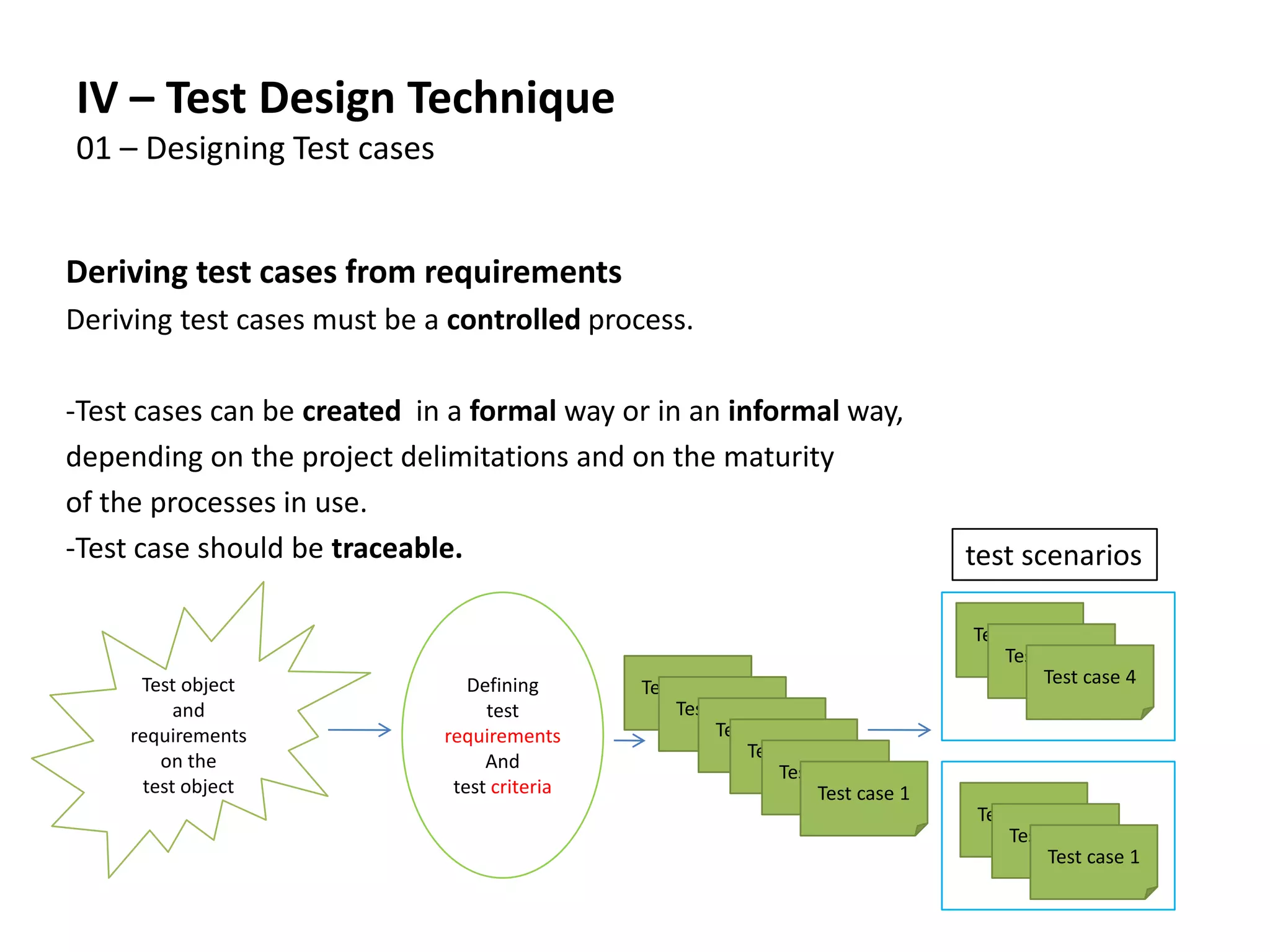
Deriving test cases from requirements
Deriving test cases must be a controlled process.
-Test cases can be created in a formal way or in an informal way,
depending on the project delimitations and on the maturity
of the processes in use.
-Test case should be traceable.
Test object
and
requirements
on the
test object
Defining
test
requirements
And
test criteria
Test case 1
Test case 1
Test case 1
Test case 1
Test case 1
Test case 1
Test case 1
Test case 1
Test case 1
Test case 4
Test case 4
Test case 4
test scenarios
Deriving Test Case from Requirement:
-Test Object:
The subject to be examined: a document or a
piece of software in the software
development process
-Test Condition
An item or an event: a function, a
transaction, or an element in the system
-Test Criteria
The test object has to confirm the test
criteria in order to pass the test
Test case description according to IEEE 829:
- Distinct identification: Id or key in order to link, for example, an error
report to the test case where it appeared
- Preconditions: situation previous to test execution or characteristics of
the test object before conducting the test case
- Input values: description of the input data on the test object
- Expected result: output data that the test object is expected to
produce
- Post conditions: Characteristics of the test object after test execution,
description of its situation after the test
- Dependencies: order of execution of test cases, reason for
dependencies
- Requirements: Characteristics of the test object that the test case will
examine
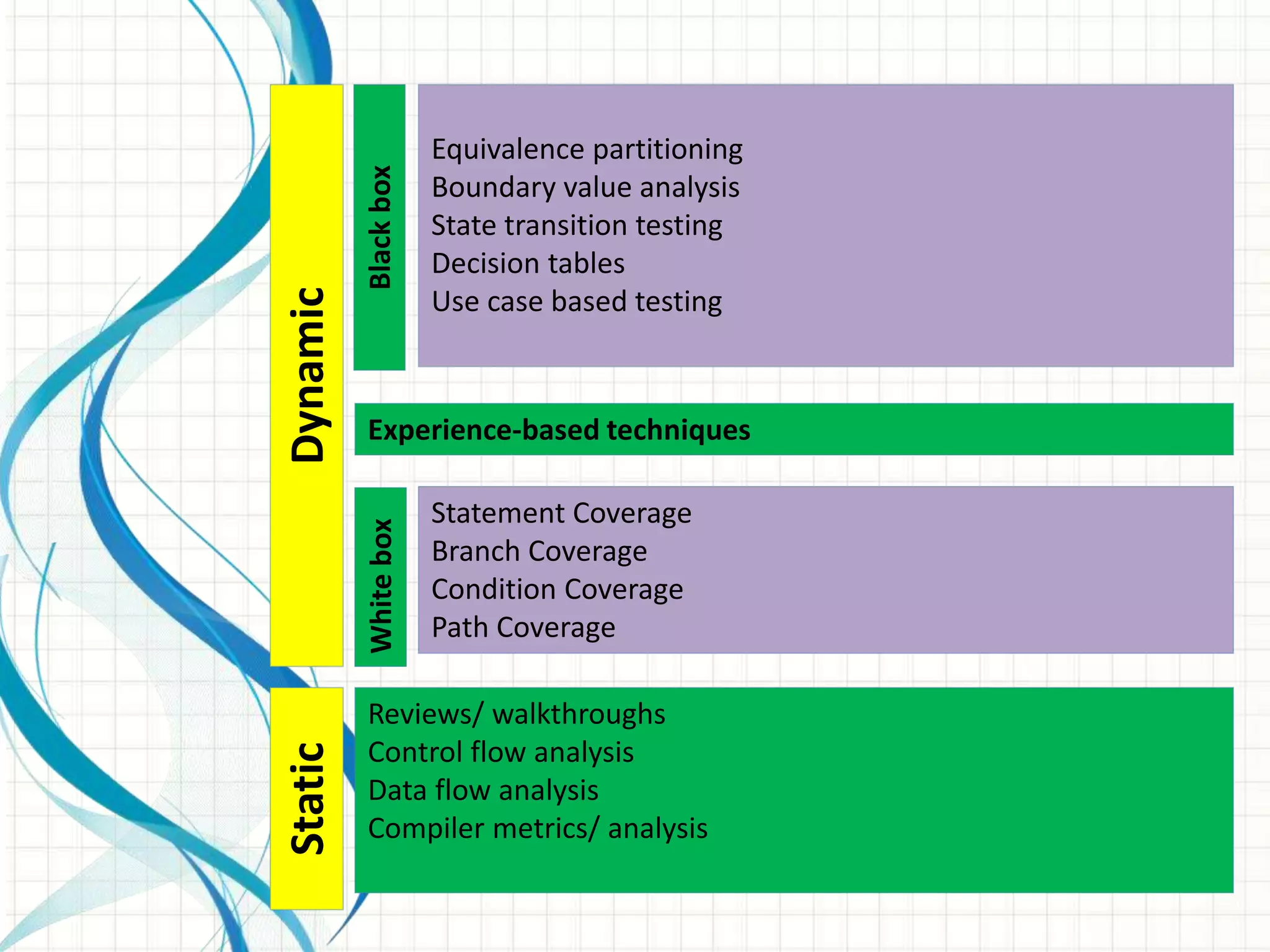
StaticDynamic
WhiteboxBlackbox
Reviews/ walkthroughs
Control flow analysis
Data flow analysis
Compiler metrics/ analysis
Statement Coverage
Branch Coverage
Condition Coverage
Path Coverage
Experience-based techniques
Equivalence partitioning
Boundary value analysis
State transition testing
Decision tables
Use case based testing
Black-box Technique:
The Tester looks the test object as a Black Box
-internal structure of the test object is irrelevant
or unknown
-Testing of input/ output behavior
-Black box testing is also called functional testing
or specification oriented testing
White-box Technique:
The Tester knows the internal structure of the program
and code
-i.e. component hierarchy, control flow, data flow
Test case are selected on the basis of internal program
Code/ program structure
White box testing is also called structure based testing
Or control flow based testing
Categories of test design methods:
Specification based methods:
(Black Box)
Structure based methods:
(White Box)
Experienced based methods:
(Black Box)
StaticDynamic
WhiteboxBlackbox
Reviews/ walkthroughs
Control flow analysis
Data flow analysis
Compiler metrics/ analysis
Statement Coverage
Branch Coverage
Condition Coverage
Path Coverage
Experience-based techniques
Equivalence partitioning
Boundary value analysis
State transition testing
Decision tables
Use case based testing
Equivalence class (EC) partitioning
- The range of defined values is grouped into equivalence classes, for which
the following rules apply:
- All values, for which a common behavior of the program is
expected, are grouped together in one equivalence class
- Equivalence class may not overlap and may not contain any gaps
- Equivalence class may contain a range of values
(e.g. 0<x<10) or a single value (e.g. x=“Yes”)
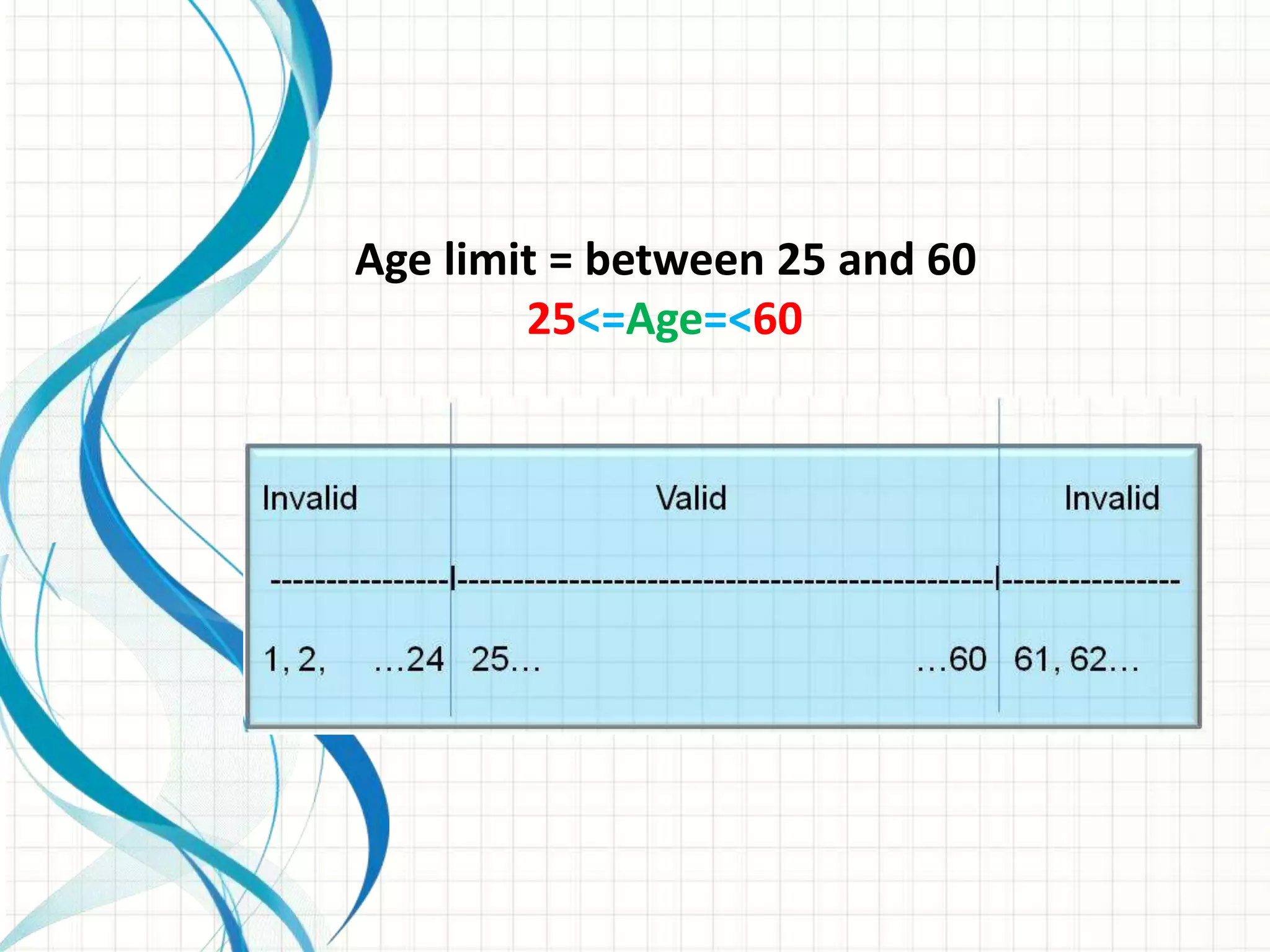
-invalid EC
- valid EC:
Age limit = between 25 and 60
25<=Age=<60
Equivalence class partitioning – example
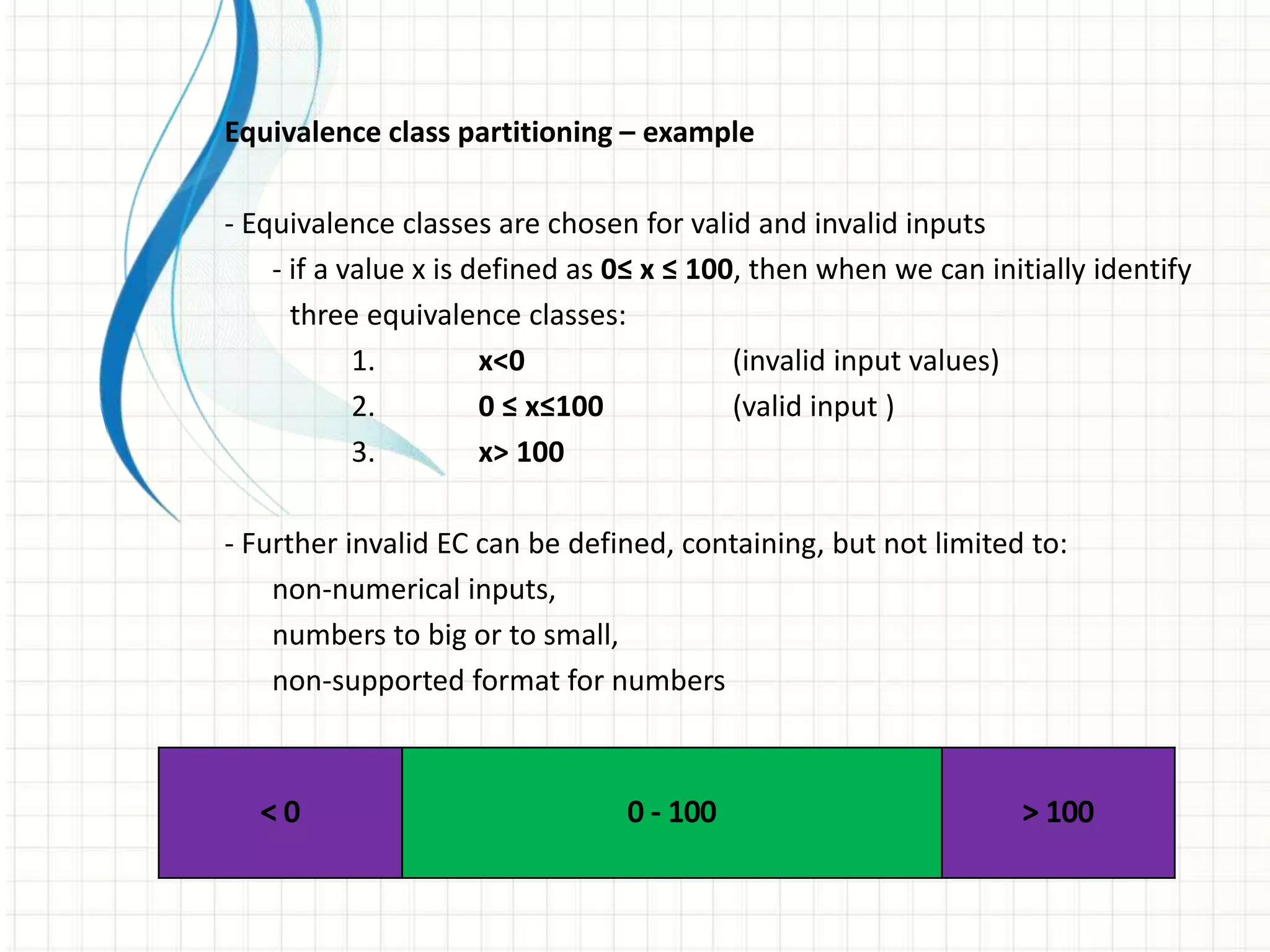
- Equivalence classes are chosen for valid and invalid inputs
- if a value x is defined as 0≤ x ≤ 100, then when we can initially identify
three equivalence classes:
1. x<0 (invalid input values)
2. 0 ≤ x≤100 (valid input )
3. x> 100
- Further invalid EC can be defined, containing, but not limited to:
non-numerical inputs,
numbers to big or to small,
non-supported format for numbers
Equivalence class partitioning – example
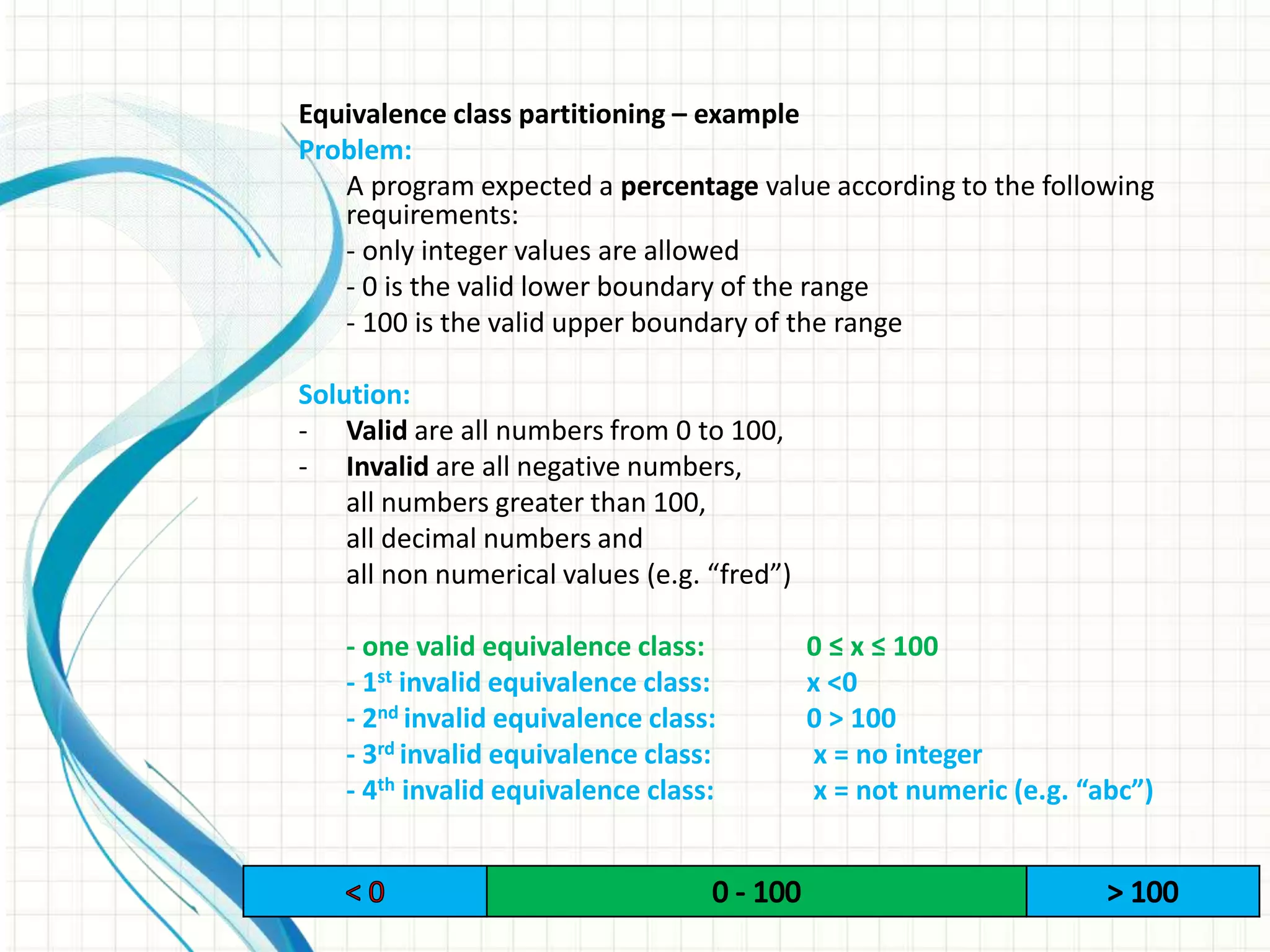
Problem:
A program expected a percentage value according to the following
requirements:
- only integer values are allowed
- 0 is the valid lower boundary of the range
- 100 is the valid upper boundary of the range
Solution:
- Valid are all numbers from 0 to 100,
- Invalid are all negative numbers,
all numbers greater than 100,
all decimal numbers and
all non numerical values (e.g. “fred”)
- one valid equivalence class: 0 ≤ x ≤ 100
- 1st invalid equivalence class: x <0
- 2nd invalid equivalence class: 0 > 100
- 3rd invalid equivalence class: x = no integer
- 4th invalid equivalence class: x = not numeric (e.g. “abc”)
Equivalence class partitioning – example
Additional Requirement:
The percentage value will now be displayed in a bar chart.
The following additional requirements apply (both values included):
- values between 0 and 15 : Orange bar,
- values between 16 and 50: Green bar,
- values between 51 and 85: Yellow bar,
- values between 86 and 100: Blue bar,
Additional Solution for valid EC:
- Now there are four instead of one valid equivalence classes:
- 1st valid equivalence class: 0 ≤ x ≤ 15
- 2nd valid equivalence class: 15 ≤ x ≤ 50
- 3rd valid equivalence class: 51 ≤ x ≤ 85
- 4th valid equivalence class: 86 ≤ x ≤ 100
Variable EC Representative
Percentage Value
(Valid)
EC 1: 0<= X <=15 +10
EC 2: 16<= X <=50 +20
EC 3: 51<= X <=85 +80
EC 4: 85<= X <=100 +90
Percentage Value
(Invalid)
EC 5: X<0 -10
EC 6: X>100 +200
EC 7: X not integer 1.5
EC 8: X non number abc
EC Partitioning – Picking Representatives
Price of the Product:
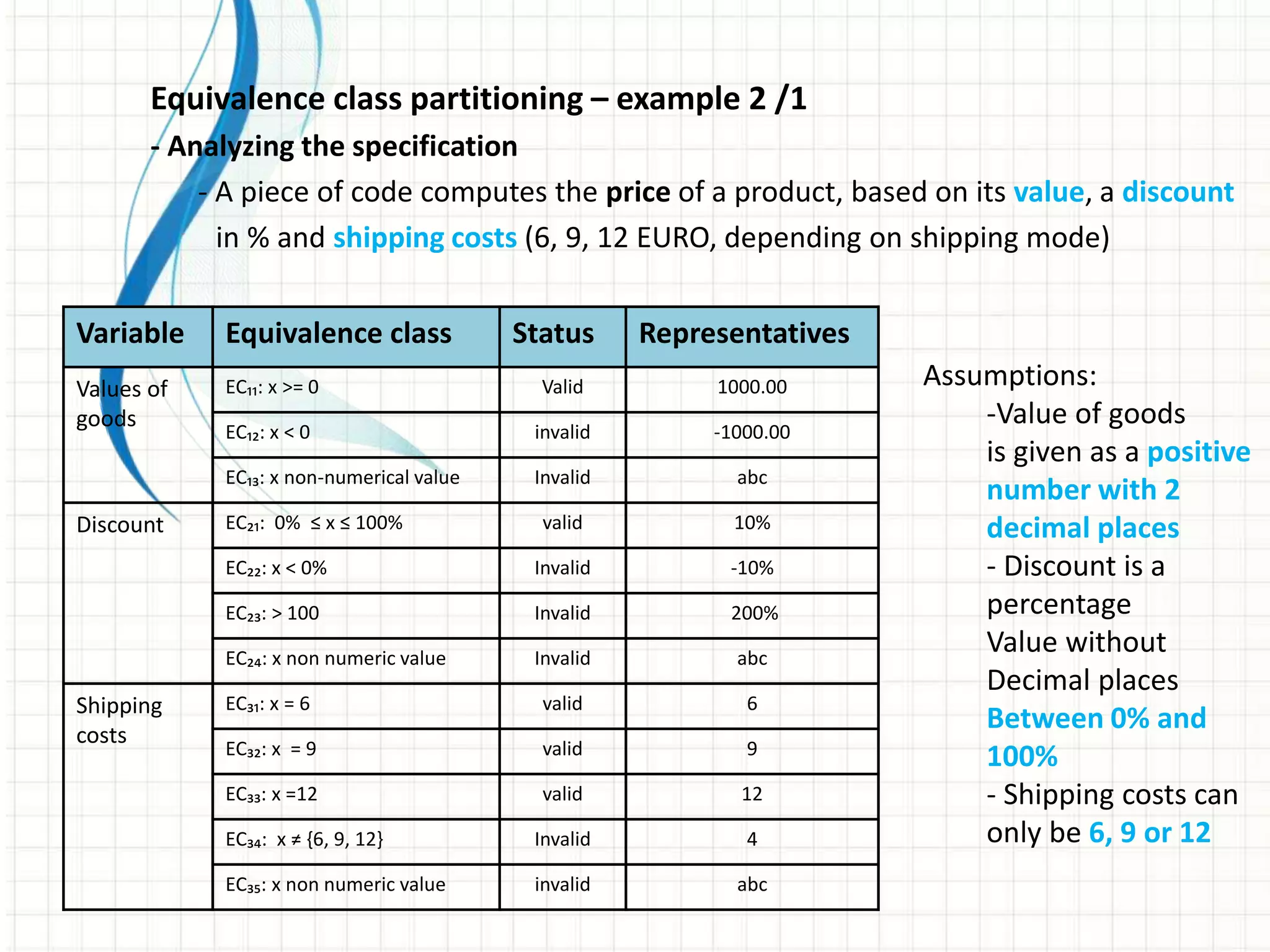
Equivalence class partitioning – example 2 /1
- Analyzing the specification
- A piece of code computes the price of a product, based on its value, a discount
in % and shipping costs (6, 9, 12 EURO, depending on shipping mode)
Variable Equivalence class Status Representatives
Values of
goods
EC₁₁: x >= 0 Valid 1000.00
EC₁₂: x < 0 invalid -1000.00
EC₁₃: x non-numerical value Invalid abc
Discount EC₂₁: 0% ≤ x ≤ 100% valid 10%
EC₂₂: x < 0% Invalid -10%
EC₂₃: > 100 Invalid 200%
EC₂₄: x non numeric value Invalid abc
Shipping
costs
EC₃₁: x = 6 valid 6
EC₃₂: x = 9 valid 9
EC₃₃: x =12 valid 12
EC₃₄: x ≠ {6, 9, 12} Invalid 4
EC₃₅: x non numeric value invalid abc
Assumptions:
-Value of goods
is given as a positive
number with 2
decimal places
- Discount is a
percentage
Value without
Decimal places
Between 0% and
100%
- Shipping costs can
only be 6, 9 or 12
Equivalence class partitioning – example 2 /2
- Test cases for valid EC:
- Valid equivalence classes provide the following combinations or
test cases: T01, T02 and T03
Variable Equivalence class Status Representatives T01 T02 T03
Values of
goods
EC₁₁: x >= 0 valid 1000,00 * * *
EC₁₂: x < 0 invalid -1000,00
EC₁₃: x non-numerical value Invalid Fred
Discount EC₂₁: 0% ≤ x ≤ 100% valid 10% * * *
EC₂₂: x < 0% Invalid -10%
EC₂₃: > 100 Invalid 200%
EC₂₄: x non numeric value Invalid Fred
Shipping
costs
EC₃₁: x = 6 valid 6 *
EC₃₂: x = 9 valid 9 *
EC₃₃: x =12 valid 12 *
EC₃₄: x ≠ {6, 9, 12} Invalid 4
EC₃₅: x non numeric value invalid Fred
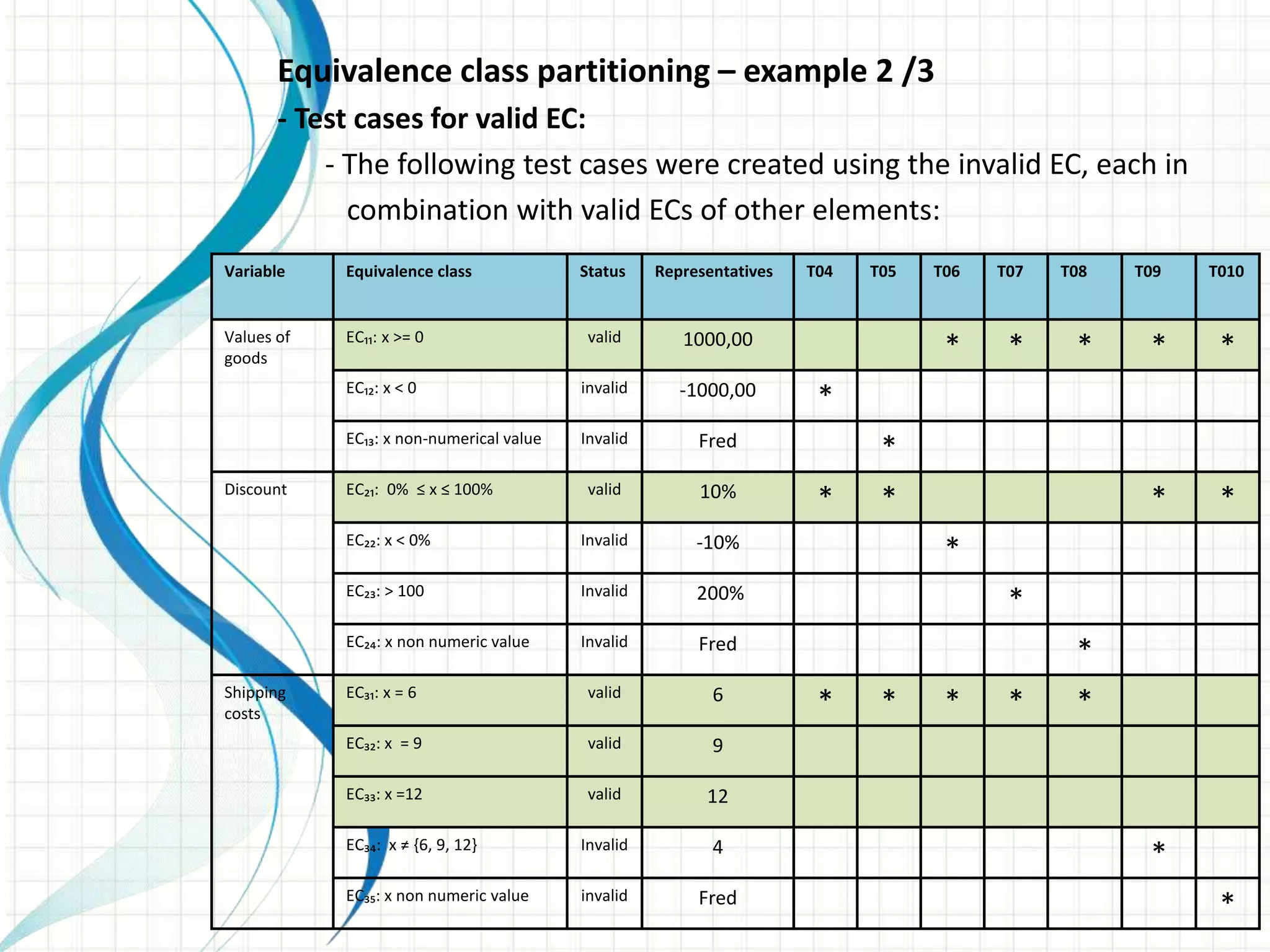
Equivalence class partitioning – example 2 /3
- Test cases for valid EC:
- The following test cases were created using the invalid EC, each in
combination with valid ECs of other elements:
Variable Equivalence class Status Representatives T04 T05 T06 T07 T08 T09 T010
Values of
goods
EC₁₁: x >= 0 valid 1000,00 * * * * *
EC₁₂: x < 0 invalid -1000,00 *
EC₁₃: x non-numerical value Invalid Fred *
Discount EC₂₁: 0% ≤ x ≤ 100% valid 10% * * * *
EC₂₂: x < 0% Invalid -10% *
EC₂₃: > 100 Invalid 200% *
EC₂₄: x non numeric value Invalid Fred *
Shipping
costs
EC₃₁: x = 6 valid 6 * * * * *
EC₃₂: x = 9 valid 9
EC₃₃: x =12 valid 12
EC₃₄: x ≠ {6, 9, 12} Invalid 4 *
EC₃₅: x non numeric value invalid Fred *
Equivalence class partitioning – example 2 /4
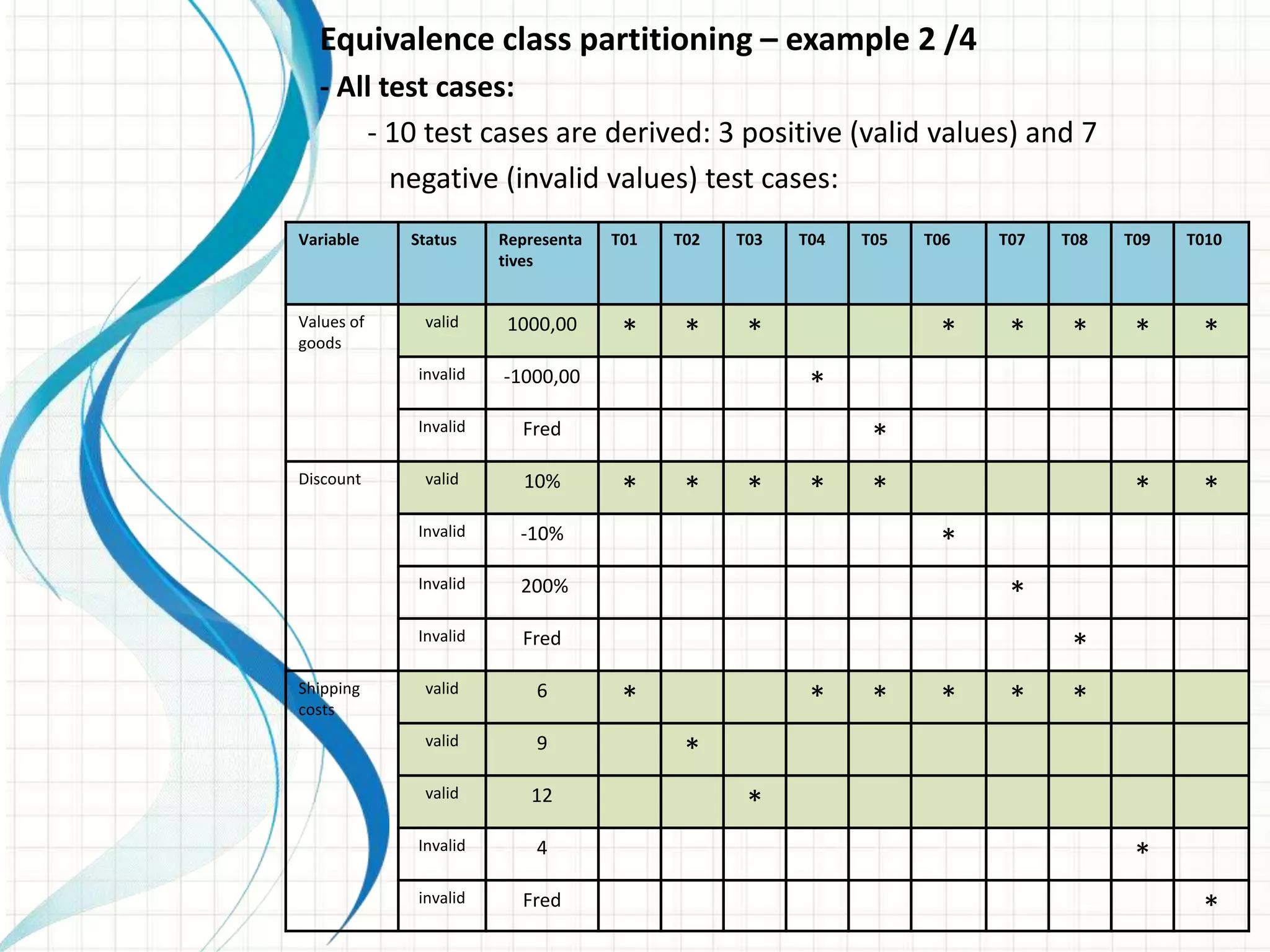
- All test cases:
- 10 test cases are derived: 3 positive (valid values) and 7
negative (invalid values) test cases:
Variable Status Representa
tives
T01 T02 T03 T04 T05 T06 T07 T08 T09 T010
Values of
goods
valid 1000,00 * * * * * * * *
invalid -1000,00 *
Invalid Fred *
Discount valid 10% * * * * * * *
Invalid -10% *
Invalid 200% *
Invalid Fred *
Shipping
costs
valid 6 * * * * * *
valid 9 *
valid 12 *
Invalid 4 *
invalid Fred *
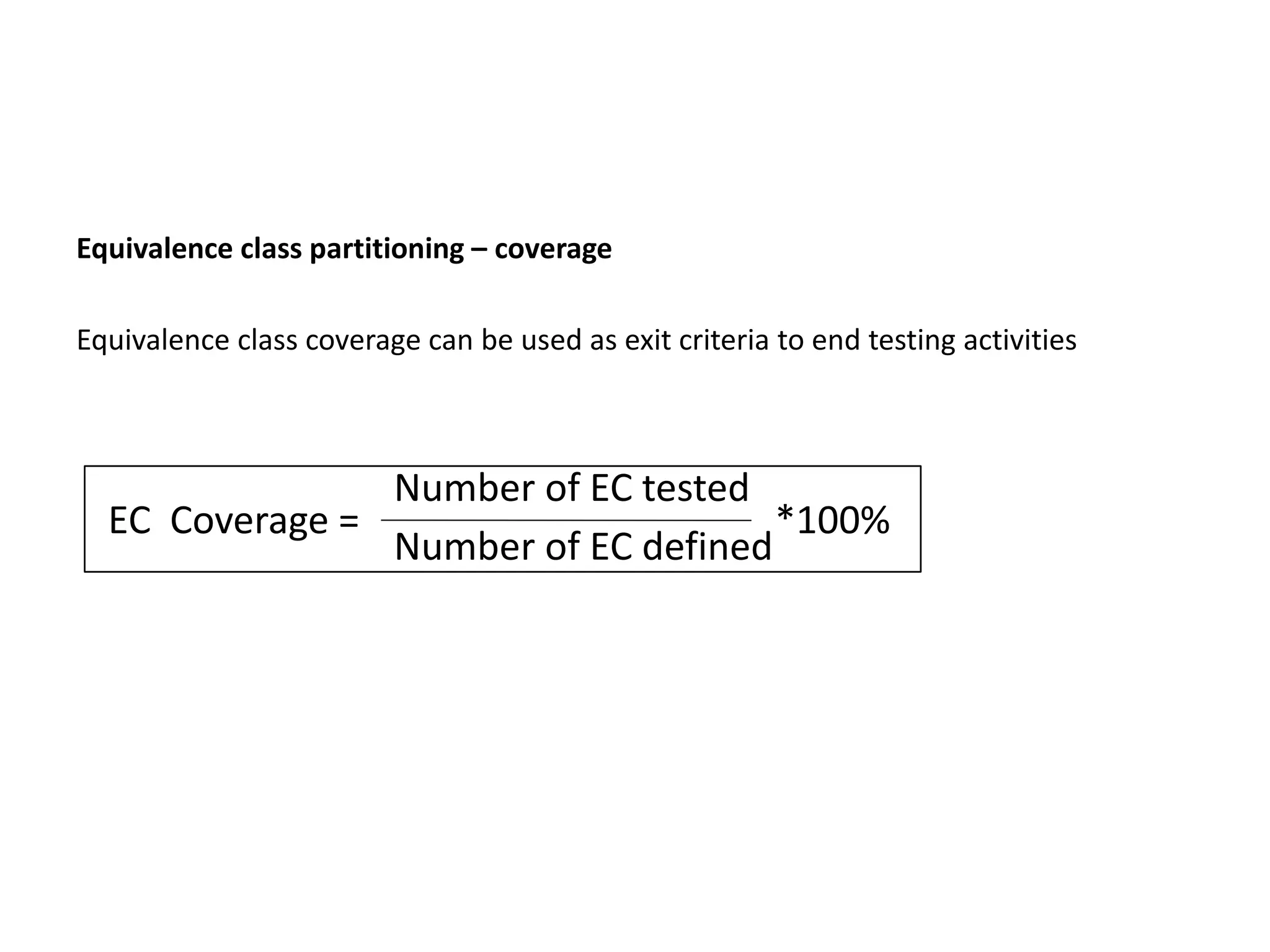
Equivalence class partitioning – coverage
Equivalence class coverage can be used as exit criteria to end testing activities
EC Coverage =
Number of EC tested
Number of EC defined
*100%

Test design techniques

  • 1.
    Presentation on Test DesignTechniques - IV/01 Designing test cases - IV/02 Categories of test design techniques - IV/03 Black box techniques - IV/04 White box techniques - IV/05 Experience- based techniques - IV/06 Choosing test techniques
  • 2.
    IV – TestDesign Technique 01 – Designing Test cases Deriving test cases from requirements Deriving test cases must be a controlled process. -Test cases can be created in a formal way or in an informal way, depending on the project delimitations and on the maturity of the processes in use. -Test case should be traceable. Test object and requirements on the test object Defining test requirements And test criteria Test case 1 Test case 1 Test case 1 Test case 1 Test case 1 Test case 1 Test case 1 Test case 1 Test case 1 Test case 4 Test case 4 Test case 4 test scenarios
  • 3.
    Deriving Test Casefrom Requirement: -Test Object: The subject to be examined: a document or a piece of software in the software development process -Test Condition An item or an event: a function, a transaction, or an element in the system -Test Criteria The test object has to confirm the test criteria in order to pass the test
  • 4.
    Test case descriptionaccording to IEEE 829: - Distinct identification: Id or key in order to link, for example, an error report to the test case where it appeared - Preconditions: situation previous to test execution or characteristics of the test object before conducting the test case - Input values: description of the input data on the test object - Expected result: output data that the test object is expected to produce - Post conditions: Characteristics of the test object after test execution, description of its situation after the test - Dependencies: order of execution of test cases, reason for dependencies - Requirements: Characteristics of the test object that the test case will examine
  • 5.
    StaticDynamic WhiteboxBlackbox Reviews/ walkthroughs Control flowanalysis Data flow analysis Compiler metrics/ analysis Statement Coverage Branch Coverage Condition Coverage Path Coverage Experience-based techniques Equivalence partitioning Boundary value analysis State transition testing Decision tables Use case based testing
  • 6.
    Black-box Technique: The Testerlooks the test object as a Black Box -internal structure of the test object is irrelevant or unknown -Testing of input/ output behavior -Black box testing is also called functional testing or specification oriented testing
  • 7.
    White-box Technique: The Testerknows the internal structure of the program and code -i.e. component hierarchy, control flow, data flow Test case are selected on the basis of internal program Code/ program structure White box testing is also called structure based testing Or control flow based testing
  • 8.
    Categories of testdesign methods: Specification based methods: (Black Box) Structure based methods: (White Box) Experienced based methods: (Black Box)
  • 9.
    StaticDynamic WhiteboxBlackbox Reviews/ walkthroughs Control flowanalysis Data flow analysis Compiler metrics/ analysis Statement Coverage Branch Coverage Condition Coverage Path Coverage Experience-based techniques Equivalence partitioning Boundary value analysis State transition testing Decision tables Use case based testing
  • 10.
    Equivalence class (EC)partitioning Equivalence class (EC) partitioning - The range of defined values is grouped into equivalence classes, for which the following rules apply: - All values, for which a common behavior of the program is expected, are grouped together in one equivalence class - Equivalence class may not overlap and may not contain any gaps - Equivalence class may contain a range of values (e.g. 0<x<10) or a single value (e.g. x=“Yes”) -invalid EC - valid EC:
  • 11.
    Age limit =between 25 and 60 25<=Age=<60
  • 12.
    Equivalence class partitioning– example - Equivalence classes are chosen for valid and invalid inputs - if a value x is defined as 0≤ x ≤ 100, then when we can initially identify three equivalence classes: 1. x<0 (invalid input values) 2. 0 ≤ x≤100 (valid input ) 3. x> 100 - Further invalid EC can be defined, containing, but not limited to: non-numerical inputs, numbers to big or to small, non-supported format for numbers
  • 13.
    Equivalence class partitioning– example Problem: A program expected a percentage value according to the following requirements: - only integer values are allowed - 0 is the valid lower boundary of the range - 100 is the valid upper boundary of the range Solution: - Valid are all numbers from 0 to 100, - Invalid are all negative numbers, all numbers greater than 100, all decimal numbers and all non numerical values (e.g. “fred”) - one valid equivalence class: 0 ≤ x ≤ 100 - 1st invalid equivalence class: x <0 - 2nd invalid equivalence class: 0 > 100 - 3rd invalid equivalence class: x = no integer - 4th invalid equivalence class: x = not numeric (e.g. “abc”)
  • 14.
    Equivalence class partitioning– example Additional Requirement: The percentage value will now be displayed in a bar chart. The following additional requirements apply (both values included): - values between 0 and 15 : Orange bar, - values between 16 and 50: Green bar, - values between 51 and 85: Yellow bar, - values between 86 and 100: Blue bar, Additional Solution for valid EC: - Now there are four instead of one valid equivalence classes: - 1st valid equivalence class: 0 ≤ x ≤ 15 - 2nd valid equivalence class: 15 ≤ x ≤ 50 - 3rd valid equivalence class: 51 ≤ x ≤ 85 - 4th valid equivalence class: 86 ≤ x ≤ 100
  • 15.
    Variable EC Representative PercentageValue (Valid) EC 1: 0<= X <=15 +10 EC 2: 16<= X <=50 +20 EC 3: 51<= X <=85 +80 EC 4: 85<= X <=100 +90 Percentage Value (Invalid) EC 5: X<0 -10 EC 6: X>100 +200 EC 7: X not integer 1.5 EC 8: X non number abc EC Partitioning – Picking Representatives
  • 16.
    Price of theProduct:
  • 17.
    Equivalence class partitioning– example 2 /1 - Analyzing the specification - A piece of code computes the price of a product, based on its value, a discount in % and shipping costs (6, 9, 12 EURO, depending on shipping mode) Variable Equivalence class Status Representatives Values of goods EC₁₁: x >= 0 Valid 1000.00 EC₁₂: x < 0 invalid -1000.00 EC₁₃: x non-numerical value Invalid abc Discount EC₂₁: 0% ≤ x ≤ 100% valid 10% EC₂₂: x < 0% Invalid -10% EC₂₃: > 100 Invalid 200% EC₂₄: x non numeric value Invalid abc Shipping costs EC₃₁: x = 6 valid 6 EC₃₂: x = 9 valid 9 EC₃₃: x =12 valid 12 EC₃₄: x ≠ {6, 9, 12} Invalid 4 EC₃₅: x non numeric value invalid abc Assumptions: -Value of goods is given as a positive number with 2 decimal places - Discount is a percentage Value without Decimal places Between 0% and 100% - Shipping costs can only be 6, 9 or 12
  • 18.
    Equivalence class partitioning– example 2 /2 - Test cases for valid EC: - Valid equivalence classes provide the following combinations or test cases: T01, T02 and T03 Variable Equivalence class Status Representatives T01 T02 T03 Values of goods EC₁₁: x >= 0 valid 1000,00 * * * EC₁₂: x < 0 invalid -1000,00 EC₁₃: x non-numerical value Invalid Fred Discount EC₂₁: 0% ≤ x ≤ 100% valid 10% * * * EC₂₂: x < 0% Invalid -10% EC₂₃: > 100 Invalid 200% EC₂₄: x non numeric value Invalid Fred Shipping costs EC₃₁: x = 6 valid 6 * EC₃₂: x = 9 valid 9 * EC₃₃: x =12 valid 12 * EC₃₄: x ≠ {6, 9, 12} Invalid 4 EC₃₅: x non numeric value invalid Fred
  • 19.
    Equivalence class partitioning– example 2 /3 - Test cases for valid EC: - The following test cases were created using the invalid EC, each in combination with valid ECs of other elements: Variable Equivalence class Status Representatives T04 T05 T06 T07 T08 T09 T010 Values of goods EC₁₁: x >= 0 valid 1000,00 * * * * * EC₁₂: x < 0 invalid -1000,00 * EC₁₃: x non-numerical value Invalid Fred * Discount EC₂₁: 0% ≤ x ≤ 100% valid 10% * * * * EC₂₂: x < 0% Invalid -10% * EC₂₃: > 100 Invalid 200% * EC₂₄: x non numeric value Invalid Fred * Shipping costs EC₃₁: x = 6 valid 6 * * * * * EC₃₂: x = 9 valid 9 EC₃₃: x =12 valid 12 EC₃₄: x ≠ {6, 9, 12} Invalid 4 * EC₃₅: x non numeric value invalid Fred *
  • 20.
    Equivalence class partitioning– example 2 /4 - All test cases: - 10 test cases are derived: 3 positive (valid values) and 7 negative (invalid values) test cases: Variable Status Representa tives T01 T02 T03 T04 T05 T06 T07 T08 T09 T010 Values of goods valid 1000,00 * * * * * * * * invalid -1000,00 * Invalid Fred * Discount valid 10% * * * * * * * Invalid -10% * Invalid 200% * Invalid Fred * Shipping costs valid 6 * * * * * * valid 9 * valid 12 * Invalid 4 * invalid Fred *
  • 21.
    Equivalence class partitioning– coverage Equivalence class coverage can be used as exit criteria to end testing activities EC Coverage = Number of EC tested Number of EC defined *100%