Technology Integration Workshop Blended Learning De
ELP 584 Fall Term
Julie Silberman
Overvie
w
Curricu
lum Map
Ice
Breaker
70-20-10
Elements
of
Integrati
on
Workshop
Activiti
es
Polling
Questio
n
Resources
Click on a tab to navigate presentation
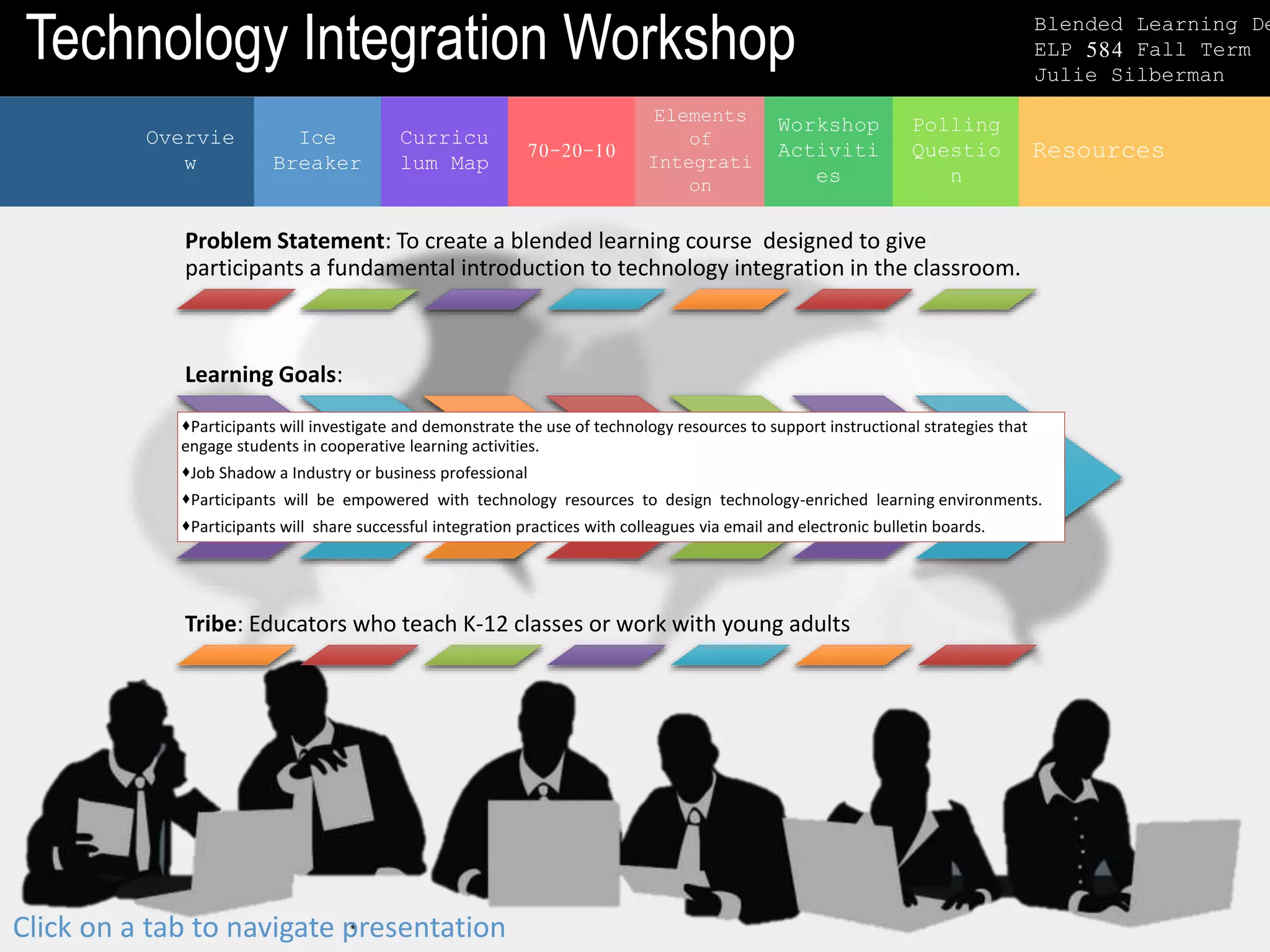
Problem Statement: To create a blended learning course designed to give
participants a fundamental introduction to technology integration in the classroom.
Learning Goals:
Participants will investigate and demonstrate the use of technology resources to support instructional strategies that
engage students in cooperative learning activities.
Job Shadow a Industry or business professional
Participants will be empowered with technology resources to design technology-enriched learning environments.
Participants will share successful integration practices with colleagues via email and electronic bulletin boards.
Tribe: Educators who teach K-12 classes or work with young adults
Technology Integration Workshop Blended Learning De
ELP 584 Fall Term
Julie Silberman
Curricu
lum Map
Ice
Breaker
70-20-10
Elements
of
Integrati
on
Workshop
Activiti
es
Polling
Questio
n
Overvie
w
Resources
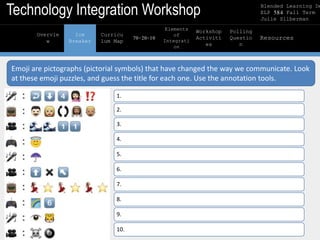
Emoji are pictographs (pictorial symbols) that have changed the way we communicate. Look
at these emoji puzzles, and guess the title for each one. Use the annotation tools.
1.
2.
3.
4.
5.
6.
7.
8.
9.
10.
Technology Integration Workshop Blended Learning De
ELP 584 Fall Term
Julie Silberman
Curricu
lum Map
Overvie
w
Curricu
lum Map
Ice
Breaker
70-20-10
Elements
of
Integrati
on
Workshop
Activiti
es
Polling
Questio
n
Resources
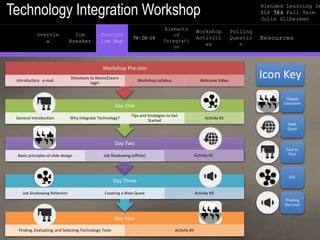
Day Four
Finding, Evaluating, and Selecting Technology Tools Activity #4
Day Three
Job Shadowing Refection Creating a Web-Quest Activity #3
Day Two
Basic principles of slide design Job Shadowing (offsite) Activity #2
Day One
General Introduction Why Integrate Technology?
Tips and Strategies to Get
Started
Activity #1
Workshop Pre-Join
Introductory e-mail
Directions to Desire2Learn
login
Workshop syllabus Welcome Video
Icon Key
Flipped
Classroom
Web
Quest
Face to
Face
D2L
Thinking
Out Loud
Technology Integration Workshop Blended Learning De
ELP 584 Fall Term
Julie Silberman
The
Digital
Divide
Overvie
w
Curricu
lum Map
Ice
Breaker
70-20-10
Elements
of
Integrati
on
Workshop
Activiti
es
Polling
Questio
n
Resources
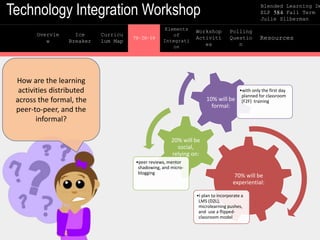
How are the learning
activities distributed
across the formal, the
peer-to-peer, and the
informal?
70% will be
experiential:
•I plan to incorporate a
LMS (D2L),
microlearning pushes,
and use a flipped-
classroom model
20% will be
social,
relying on:
•peer reviews, mentor
shadowing, and micro-
blogging
10% will be
formal:
•with only the first day
planned for classroom
(F2F) training
Technology Integration Workshop Blended Learning De
ELP 584 Fall Term
Julie Silberman
Elements
of
Integrati
on
Overvie
w
Curricu
lum Map
Ice
Breaker
70-20-10
Elements
of
Integrati
on
Workshop
Activiti
es
Polling
Questio
n
Resources
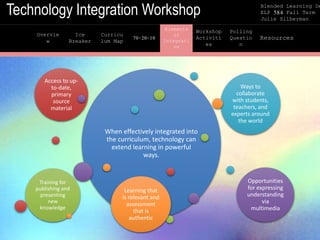
When effectively integrated into
the curriculum, technology can
extend learning in powerful
ways.
Access to up-
to-date,
primary
source
material
Ways to
collaborate
with students,
teachers, and
experts around
the world
Opportunities
for expressing
understanding
via
multimedia
Learning that
is relevant and
assessment
that is
authentic
Training for
publishing and
presenting
new
knowledge
Technology Integration Workshop Blended Learning De
ELP 584 Fall Term
Julie Silberman
TAB 6
Overvie
w
Curricu
lum Map
Ice
Breaker
70-20-10
Elements
of
Integrati
on
Workshop
Activiti
es
Polling
Questio
n
Resources
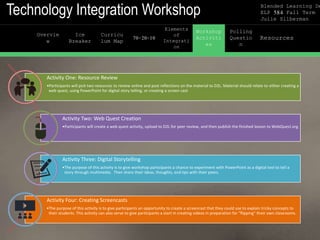
Activity One: Resource Review
•Participants will pick two resources to review online and post reflections on the material to D2L. Material should relate to either creating a
web quest, using PowerPoint for digital story telling, or creating a screen cast
Activity Two: Web Quest Creation
•Participants will create a web quest activity, upload to D2L for peer review, and then publish the finished lesson to WebQuest.org
Activity Three: Digital Storytelling
•The purpose of this activity is to give workshop participants a chance to experiment with PowerPoint as a digital tool to tell a
story through multimedia. Then share their ideas, thoughts, and tips with their peers.
Activity Four: Creating Screencasts
•The purpose of this activity is to give participants an opportunity to create a screencast that they could use to explain tricky concepts to
their students. This activity can also serve to give participants a start in creating videos in preparation for "flipping" their own classrooms.
Technology Integration Workshop Blended Learning De
ELP 584 Fall Term
Julie Silberman
TAB 7
Overvie
w
Curricu
lum Map
Ice
Breaker
70-20-10
Elements
of
Integrati
on
Workshop
Activiti
es
Polling
Questio
n
Resources
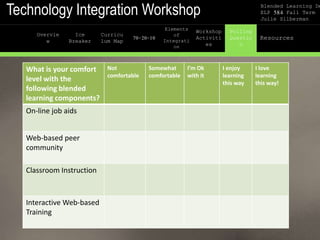
What is your comfort
level with the
following blended
learning components?
Not
comfortable
Somewhat
comfortable
I’m Ok
with it
I enjoy
learning
this way
I love
learning
this way!
On-line job aids
Web-based peer
community
Classroom Instruction
Interactive Web-based
Training
Technology Integration Workshop Blended Learning De
ELP 584 Fall Term
Julie Silberman
TAB 8
Overvie
w
Curricu
lum Map
Ice
Breaker
70-20-10
Elements
of
Integrati
on
Workshop
Activiti
es
Polling
Questio
n
Resources
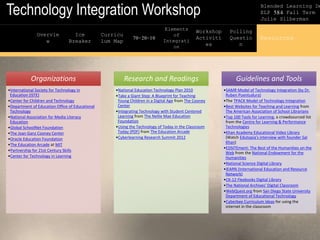
Organizations
•International Society for Technology in
Education (ISTE)
•Center for Children and Technology
•Department of Education Office of Educational
Technology
•National Association for Media Literacy
Education
•Global SchoolNet Foundation
•The Joan Ganz Cooney Center
•Oracle Education Foundation
•The Education Arcade at MIT
•Partnership for 21st Century Skills
•Center for Technology in Learning
Research and Readings
•National Education Technology Plan 2010
•Take a Giant Step: A Blueprint for Teaching
Young Children in a Digital Age from The Cooney
Center
•Integrating Technology with Student Centered
Learning from The Nellie Mae Education
Foundation
•Using the Technology of Today in the Classroom
Today (PDF) from The Education Arcade
•Cyberlearning Research Summit 2012
Guidelines and Tools
•SAMR Model of Technology Integration (by Dr.
Ruben Puentudura)
•The TPACK Model of Technology Integration
•Best Websites for Teaching and Learning from
The American Association of School Librarians
•Top 100 Tools for Learning, a crowdsourced list
from the Centre for Learning & Performance
Technologies
•Khan Academy Educational Video Library
(Watch Edutopia's interview with founder Sal
Khan)
•EDSITEment: The Best of the Humanities on the
Web from the National Endowment for the
Humanities
•National Science Digital Library
•iEARN (International Education and Resource
Network)
•CK-12 Flexbooks Digital Library
•The National Archives' Digital Classroom
•WebQuest.org from San Diego State University
Department of Educational Technology
•Cyberbee Curriculum Ideas for using the
internet in the classroom

Technolgy Intergration Workshop: Blended Learning Design

  • 1.
    Technology Integration WorkshopBlended Learning De ELP 584 Fall Term Julie Silberman Overvie w Curricu lum Map Ice Breaker 70-20-10 Elements of Integrati on Workshop Activiti es Polling Questio n Resources Click on a tab to navigate presentation Problem Statement: To create a blended learning course designed to give participants a fundamental introduction to technology integration in the classroom. Learning Goals: Participants will investigate and demonstrate the use of technology resources to support instructional strategies that engage students in cooperative learning activities. Job Shadow a Industry or business professional Participants will be empowered with technology resources to design technology-enriched learning environments. Participants will share successful integration practices with colleagues via email and electronic bulletin boards. Tribe: Educators who teach K-12 classes or work with young adults
  • 2.
    Technology Integration WorkshopBlended Learning De ELP 584 Fall Term Julie Silberman Curricu lum Map Ice Breaker 70-20-10 Elements of Integrati on Workshop Activiti es Polling Questio n Overvie w Resources Emoji are pictographs (pictorial symbols) that have changed the way we communicate. Look at these emoji puzzles, and guess the title for each one. Use the annotation tools. 1. 2. 3. 4. 5. 6. 7. 8. 9. 10.
  • 3.
    Technology Integration WorkshopBlended Learning De ELP 584 Fall Term Julie Silberman Curricu lum Map Overvie w Curricu lum Map Ice Breaker 70-20-10 Elements of Integrati on Workshop Activiti es Polling Questio n Resources Day Four Finding, Evaluating, and Selecting Technology Tools Activity #4 Day Three Job Shadowing Refection Creating a Web-Quest Activity #3 Day Two Basic principles of slide design Job Shadowing (offsite) Activity #2 Day One General Introduction Why Integrate Technology? Tips and Strategies to Get Started Activity #1 Workshop Pre-Join Introductory e-mail Directions to Desire2Learn login Workshop syllabus Welcome Video Icon Key Flipped Classroom Web Quest Face to Face D2L Thinking Out Loud
  • 4.
    Technology Integration WorkshopBlended Learning De ELP 584 Fall Term Julie Silberman The Digital Divide Overvie w Curricu lum Map Ice Breaker 70-20-10 Elements of Integrati on Workshop Activiti es Polling Questio n Resources How are the learning activities distributed across the formal, the peer-to-peer, and the informal? 70% will be experiential: •I plan to incorporate a LMS (D2L), microlearning pushes, and use a flipped- classroom model 20% will be social, relying on: •peer reviews, mentor shadowing, and micro- blogging 10% will be formal: •with only the first day planned for classroom (F2F) training
  • 5.
    Technology Integration WorkshopBlended Learning De ELP 584 Fall Term Julie Silberman Elements of Integrati on Overvie w Curricu lum Map Ice Breaker 70-20-10 Elements of Integrati on Workshop Activiti es Polling Questio n Resources When effectively integrated into the curriculum, technology can extend learning in powerful ways. Access to up- to-date, primary source material Ways to collaborate with students, teachers, and experts around the world Opportunities for expressing understanding via multimedia Learning that is relevant and assessment that is authentic Training for publishing and presenting new knowledge
  • 6.
    Technology Integration WorkshopBlended Learning De ELP 584 Fall Term Julie Silberman TAB 6 Overvie w Curricu lum Map Ice Breaker 70-20-10 Elements of Integrati on Workshop Activiti es Polling Questio n Resources Activity One: Resource Review •Participants will pick two resources to review online and post reflections on the material to D2L. Material should relate to either creating a web quest, using PowerPoint for digital story telling, or creating a screen cast Activity Two: Web Quest Creation •Participants will create a web quest activity, upload to D2L for peer review, and then publish the finished lesson to WebQuest.org Activity Three: Digital Storytelling •The purpose of this activity is to give workshop participants a chance to experiment with PowerPoint as a digital tool to tell a story through multimedia. Then share their ideas, thoughts, and tips with their peers. Activity Four: Creating Screencasts •The purpose of this activity is to give participants an opportunity to create a screencast that they could use to explain tricky concepts to their students. This activity can also serve to give participants a start in creating videos in preparation for "flipping" their own classrooms.
  • 7.
    Technology Integration WorkshopBlended Learning De ELP 584 Fall Term Julie Silberman TAB 7 Overvie w Curricu lum Map Ice Breaker 70-20-10 Elements of Integrati on Workshop Activiti es Polling Questio n Resources What is your comfort level with the following blended learning components? Not comfortable Somewhat comfortable I’m Ok with it I enjoy learning this way I love learning this way! On-line job aids Web-based peer community Classroom Instruction Interactive Web-based Training
  • 8.
    Technology Integration WorkshopBlended Learning De ELP 584 Fall Term Julie Silberman TAB 8 Overvie w Curricu lum Map Ice Breaker 70-20-10 Elements of Integrati on Workshop Activiti es Polling Questio n Resources Organizations •International Society for Technology in Education (ISTE) •Center for Children and Technology •Department of Education Office of Educational Technology •National Association for Media Literacy Education •Global SchoolNet Foundation •The Joan Ganz Cooney Center •Oracle Education Foundation •The Education Arcade at MIT •Partnership for 21st Century Skills •Center for Technology in Learning Research and Readings •National Education Technology Plan 2010 •Take a Giant Step: A Blueprint for Teaching Young Children in a Digital Age from The Cooney Center •Integrating Technology with Student Centered Learning from The Nellie Mae Education Foundation •Using the Technology of Today in the Classroom Today (PDF) from The Education Arcade •Cyberlearning Research Summit 2012 Guidelines and Tools •SAMR Model of Technology Integration (by Dr. Ruben Puentudura) •The TPACK Model of Technology Integration •Best Websites for Teaching and Learning from The American Association of School Librarians •Top 100 Tools for Learning, a crowdsourced list from the Centre for Learning & Performance Technologies •Khan Academy Educational Video Library (Watch Edutopia's interview with founder Sal Khan) •EDSITEment: The Best of the Humanities on the Web from the National Endowment for the Humanities •National Science Digital Library •iEARN (International Education and Resource Network) •CK-12 Flexbooks Digital Library •The National Archives' Digital Classroom •WebQuest.org from San Diego State University Department of Educational Technology •Cyberbee Curriculum Ideas for using the internet in the classroom

Editor's Notes

  • #2 I created this proposal to address the difficulties most teachers face integrating technology into their classroom lives. A report from Grunwald Associates, a research firm that was employed by the National School Board Association to survey technology decision-makers in 811 school districts, found only 39 percent of teachers report "moderate" or "frequent" use of technology as an instructional tool (Grunwald Associates, 2010). Why is this? Some teachers, experts say, still are reluctant to use technology, mostly because of lack of time, a lack of resources, or a lack of confidence in their ability to use the available technology. This blended learning workshop is designed to boost teacher confidence and provide resources and training on the use of technology.
  • #3 Social media has massively impacted the way we communicate in an amazingly short period of time. (since the late 1990’s) Amazing Fact: “Face With Tears of Joy” emoji was Oxford Dictionary’s 2015 Word of the Year. What is the biggest difference between emoji and emoticons? Emoji Codes: meant to be read and transferred by computers then decoded into Pre-Defined images users can see. They are limited in number. Emoticons: They are user created images from text so the possible combinations is infinite. Answers: Song: Turn Down for What! TV Show: Wife Swap Movie: Oceans 11 Game: Halo Song: Umbrella Movie: North by Northwest TV show: Dancing with the starts Game: Rainbow 6 Song: Eye of the Tiger
  • #4 What is a flipped Classroom: Wikipedia “Flipped classroom is an instructional strategy and a type of blended learning that reverses the traditional learning environment by delivering instructional content, often online, outside of the classroom. It moves activities, including those that may have traditionally been considered homework, into the classroom. In a flipped classroom, students watch online lectures, collaborate in online discussions, or carry out research at home and engage in concepts in the classroom with the guidance of a mentor.” This blended learning element allows my participants to view short video lectures at home before the class session, while in-class time is devoted to exercises, projects, and discussions.
  • #7 Here in more details I have the four projects that will be covered in my blended learning course.
  • #8  The eLearning Guild is a community for eLearning professionals. They conducted a Blended Learning Best Practices Survey. It was conducted between February 10th and March 5, 2003. A total of 192 people completed the survey. Here are some interesting results: The top three blended learning practices used were: Classroom Instruction 75.2% Interactive Web-based Training 66.9% Self-paced content 66.1% On-line job aids 43.8% Web-based peer community 28.1%