system and network administration course introduction
1.
SYSTEM AND NETWORK
ADMINISTRATION(IT-413)
INSTRUCTOR: ABDULLAH JAVED
(MOHAMMADAJ24@GMAIL.COM)
LECTURER,
GOVT. POSTGRADUATE COLLEGE, JHELUM
Lecture 01.0
Fall 2021
2.
2
AGENDA
• Introduction
• Course
•System
• System Administration
• Network
• Network Admin
• Sys and Net Admin
• Course Overview
• Administrivia and Logistics
• Motivation for studying the course
3.
3
ABOUT THIS COURSE
Themain objectives of this course are to:
• Guide you step-by-step in creating your own custom build Linux system from scratch,
using nothing but the sources of software that are needed.
• Learn more about the inner workings of Linux and how the various pieces of the
operating system fit together.
4.
4
SYSTEM
• System isany set of related parts for which there is sufficient coherence between the
parts to make viewing them as a whole useful
• These components persistently impact each other (specifically or in a roundabout way)
to keep up their action and the presence of the system, to accomplish the objective of
the system.
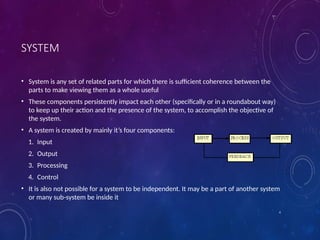
• A system is created by mainly it’s four components:
1. Input
2. Output
3. Processing
4. Control
• It is also not possible for a system to be independent. It may be a part of another system
or many sub-system be inside it
5.
5
SYSTEM ADMINISTRATION
• Planningand management of the machine room environment
• design machine room; specify cooling, cabling, power connections, and environmental
controls (fire alarm, security)
• Install and maintain operating system software, application software, and patches.
• Determine hardware and software pre-requisites, which patches to install, which services to
provide, and which services to disable.
6.
NETWORK
• A computernetwork, often simply referred to as a network, is a collection of computers and
devices connected by communications channels that facilitates communications among users
and allows users to share resources with other users.
NETWORK CLASSIFICATIONS
Connection method
Computernetworks can be classified according to the hardware
and software technology that is used to interconnect the
individual devices in the network, such as optical fiber, Ethernet,
Wireless LAN.
• Ethernet uses physical wiring to connect devices. Frequently
deployed devices include hubs, switches, bridges and/or routers.
• Wireless LAN technology is designed to connect devices without
wiring. These devices use radio waves or infrared signals as a
transmission medium.
9.
WIRED TECHNOLOGIES
• Twistedpair wire is the most widely used medium for telecommunication. Twisted-pair wires
are ordinary telephone wires which consist of two insulated copper wires twisted into pairs
and are used for both voice and data transmission. The use of two wires twisted together
helps to reduce crosstalk and electromagnetic induction. The transmission speed ranges from
2 million bits per second to 100 million bits per second.
• Coaxial cable is widely used for cable television systems, office buildings, and other worksites
for local area networks. The cables consist of copper or aluminum wire wrapped with
insulating layer typically of a flexible material with a high dielectric constant, all of which are
surrounded by a conductive layer. The layers of insulation help minimize interference and
distortion. Transmission speed range from 200 million to more than 500 million bits per
second.
• Optical fiber cable consists of one or more filaments of glass fiber wrapped in protective
layers. It transmits light which can travel over extended distances without signal loss. Fiber-
optic cables are not affected by electromagnetic radiation. Transmission speed may reach
trillions of bits per second. The transmission speed of fiber optics is hundreds of times faster
than for coaxial cables and thousands of times faster than for twisted-pair wire.
10.
WIRELESS TECHNOLOGIES
• TerrestrialMicrowave – Terrestrial microwaves use Earth-based transmitter and receiver. The equipment
look similar to satellite dishes. Terrestrial microwaves use low-gigahertz range, which limits all
communications to line-of-sight. Path between relay stations spaced approx. 30 miles apart. Microwave
antennas are usually placed on top of buildings, towers, hills, and mountain peaks.
• Communications Satellites – The satellites use microwave radio as their telecommunications medium
which are not deflected by the Earth's atmosphere. The satellites are stationed in space, typically 22,000
miles above the equator. These Earth-orbiting systems are capable of receiving and relaying voice, data,
and TV signals.
• Cellular and PCS Systems – Use several radio communications technologies. The systems are divided to
different geographic area. Each area has low-power transmitter or radio relay antenna device to relay calls
from one area to the next area.
• Wireless LANs – Wireless local area network use a high-frequency radio technology similar to digital
cellular and a low-frequency radio technology. Wireless LANs use spread spectrum technology to enable
communication between multiple devices in a limited area. An example of open-standards wireless radio-
wave technology is IEEE 802.11b.
• Bluetooth – A short range wireless technology. Operate at approx. 1Mbps with range from 10 to 100
meters. Bluetooth is an open wireless protocol for data exchange over short distances.
• The Wireless Web – The wireless web refers to the use of the World Wide Web through equipments like
cellular phones, pagers,PDAs, and other portable communications devices. The wireless web service offers
anytime/anywhere connection.
11.
TYPES OF NETWORKS
•Personal area network
• Local area network
• Home area network
• Campus area network
• Metropolitan area network
• Wide area network
• Global area network
• Virtual private network
• Internetwork
• Internet
• Intranets and extranets
• Intranets and extranets are parts or extensions of a
computer network, usually a local area network.
• An intranet is a set of networks, using the
Internet Protocol and IP-based tools such as web
browsers and file transfer applications, that is under
the control of a single administrative entity. That
administrative entity closes the intranet to all but
specific, authorized users. Most commonly, an intranet
is the internal network of an organization. A large
intranet will typically have at least one web server to
provide users with organizational information.
• An extranet is a network that is limited in scope to a
single organization or entity and also has limited
connections to the networks of one or more other
usually, but not necessarily, trusted organizations or
entities (e.g., a company's customers may be given
access to some part of its intranet creating in this way
an extranet, while at the same time the customers may
not be considered 'trusted' from a security standpoint).
Technically, an extranet may also be categorized as a
CAN, MAN, WAN, or other type of network, although,
by definition, an extranet cannot consist of a single
LAN; it must have at least one connection with an
external network.
12.
CLIENT SERVER ARCHITECTURE
•A network architecture in which each computer or process on the network is
either a client or a server.
• Servers are powerful computers or processes dedicated to managing
disk drives (file servers), printers (print servers), or network traffic (network
servers ).
• Clients are PCs or workstations on which users run applications. Clients rely on
servers for resources, such as files, devices, and even processing power.
• Client-server architectures are sometimes called two-tier architectures.
13.
NETWORK SERVICES
• DNS
•DHCP
• NFS
• E-Mail
• FTP
• Internet Sharing
• File Sharing
• Printing Services
14.
SYSTEM & NETWORKADMINISTRATION
RESPONSIBILITIES
A system administrator's responsibilities might include:
• Analyzing system logs and identifying potential issues with computer systems.
• Introducing and integrating new technologies into existing data center environments.
• Performing routine audits of systems and software.
• Performing backups.
• Applying operating system updates, patches, and configuration changes.
• Installing and configuring new hardware and software.
• Adding, removing, or updating user account information, resetting passwords, etc.
• Answering technical queries.
• Responsibility for security.
• Responsibility for documenting the configuration of the system.
• Troubleshooting any reported problems.
• System performance tuning.
• Ensuring that the network infrastructure is up and running.
• System administrators, in larger organizations, tend not to be system architects, system engineers, or system designers. However,
like many roles in this field, demarcations between systems administration and other technical roles often are not well defined in
smaller organizations. Even in larger organizations, senior systems administrators often have skills in these other areas as a result of
their working experience.
• In smaller organizations, IT/computing specialties are less often discerned in detail, and the term system administrator is used in a
rather generic way — they are the people who know how the computer systems work and can respond when something fails.
15.
15
LOGISTICS
• Prereq: OperatingSystems and Computer Networks
• Credit Hours: 3
• Thursdays and Fridays
• Primary form of interaction: Classroom Discussions
• Secondary: Piazza and WhatsApp
• Tools: VirtualBox, Ubuntu 18 LTS
• Programming Language: C
16.
16
COURSE OVERVIEW
• Introductionto Operating Systems: What is an
operating system, History of Linux, Comparison
between Linux &windows, System requirements,
Mount points.
• Linux Installation: Linux Installation, Dual boot with
Windows XP.
• File System Structure: DOS to Linux cheat sheet,
Linux file systems, nodes, Data storage layout in
ext4.File systems hierarchy standards, File system
structure.
• Directory Structure and Basic Commands: The
Directory tree structure, Basic commands, Logging in,
Logging out, Shutting down, Changing your password,
etc.
• Permissions: Permissions, Symbols used between
levels & Permissions, Adding rights to a file,
Removing rights from a file, Changing permissions
with numbers
• Linux Devices: Hard and floppy drives, Serial Devices,
CD and tape drives, Device commands, Adding
device. Working with /dev Directories, Managing
partitions. Drives managing memory Devices,
Managing printer devices, Managing SCSI devices.
• Networking Server Configuration: DNS and DHCP
server configuration, Linux Apache, PHP with MYSQL
configuration, Samba, Telnet, SSH, The quota service,
Squid.
17.
17
WHY STUDY SNA?
•Its goal is ensuring the systems are running efficiently and effectively
• Every organization that uses more than one computer or software platform needs a
network administrator to coordinate and connect all the different systems
• Manage servers and operating systems.
• Implement security measures
• “System and Network administration is like keeping trains on time; no one notices
except when they are late”