http://eglobiotraining.com
A programming language is used to write
computer programs such as application and utilities.

      Programming allows a programmer or end user to
develop the sets of instructions that constitute a
computer program or software. The role of a
programming language can be described in two ways:

Technical: It is a means for instructing a Computer to
  perform Tasks
Conceptual: It is a framework within which we
  organize our ideas about things and processes.
                http://eglobiotraining.com
As an individual, I have learned that programming is
a very broad because it composes many scripts, applications
and can be used to run a program that has been part of the
programming language.

      A programming language should both provide means
to describe primitive data and procedures and means to
combine and abstract those into more complex ones.

       The distinction between data and procedures is not
that clear cut. In many programming languages, procedures
can be passed as data (to be applied to ``real'' data) and
sometimes processed like ``ordinary'' data. Conversely
``ordinary'' data can be turned into procedures by an
evaluation mechanism.

                 http://eglobiotraining.com
At first, programming is confusing because you
have so much to understand about codes that will enable
to run a program. Programming has applications and
program development, the best example for this is the
Internet bowser…

       Programming is a creative process done by
programmers to instruct a computer on how to do a task.
Fundamentally programs manipulate numbers and text.
These are the building blocks of all programs.
Programming languages let you use them in different
ways, e.g adding numbers, etc… or storing data on disk
for later retrieval.

                http://eglobiotraining.com
You have to consider languages to run or write
your own program, most demanded language in
programming is the DEV C++ (a full-featured
Integrated Development Environment (IDE)).

      C++ is one of the most used programming
languages in the world. Also known as "C with
Classes".

New to programming or thinking about it? It might
surprise you to know that there are many programmers
who program just for fun and it can lead to a job.

               http://eglobiotraining.com
Switch case statements are a substitute for
long if statements that compare a variable to
several "integral" values ("integral" values are
simply values that can be expressed as an integer,
such as the value of a char).


             http://eglobiotraining.com
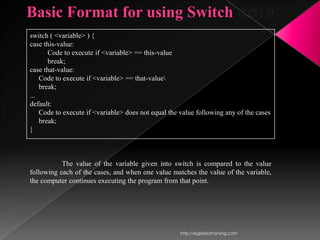
Basic Format for using Switch case:
switch ( <variable> ) {
case this-value:
       Code to execute if <variable> == this-value
       break;
case that-value:
    Code to execute if <variable> == that-value
    break;
...
default:
    Code to execute if <variable> does not equal the value following any of the cases
    break;
}


           The value of the variable given into switch is compared to the value
following each of the cases, and when one value matches the value of the variable,
the computer continues executing the program from that point.


                                                     http://eglobiotraining.com
The condition of a switch statement is a value.
The case says that if it has the value of whatever is
after that case then do whatever follows the colon.
The break is used to break out of the case statements.
An important thing to note about the switch
statement is that the case values may only be
constant integral expressions.


              http://eglobiotraining.com
“Break” is a keyword that breaks out of the code
block, usually surrounded by braces, which it is in.
In this case, break prevents the program from falling
through and executing the code in all the other case
statements.


             http://eglobiotraining.com
The default case is optional, but it is wise to
include it as it handles any unexpected cases. Switch
statements serves as a simple way to write long if
statements when the requirements are met. Often it
can be used to process input from a user.


             http://eglobiotraining.com
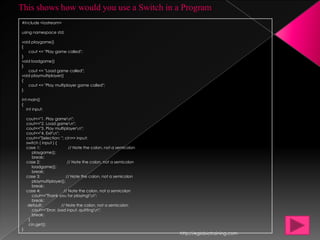
This shows how would you use a Switch in a Program
#include <iostream>

using namespace std;

void playgame()
{
   cout << "Play game called";
}
void loadgame()
}
   cout << "Load game called";
void playmultiplayer()
{
   cout << "Play multiplayer game called";
}

int main()
{
   int input;

    cout<<"1. Play gamen";
    cout<<"2. Load gamen";
    cout<<"3. Play multiplayern";
    cout<<"4. Exitn";
    cout<<"Selection: "; cin>> input;
    switch ( input ) {
    case 1:                 // Note the colon, not a semicolon
       playgame();
       break;
    case 2:                // Note the colon, not a semicolon
       loadgame();
       break;
    case 3:               // Note the colon, not a semicolon
       playmultiplayer();
       break;
    case 4:             // Note the colon, not a semicolon
       cout<<"Thank you for playing!n";
       break;
     default:          // Note the colon, not a semicolon
       cout<<"Error, bad input, quittingn";
       break;
     }
     cin.get();
}
                                                                 http://eglobiotraining.com
That program will compile, but cannot be run until the
undefined functions are given bodies, but it serves as a
model (albeit simple) for processing input. If you do not
understand this then try mentally putting in if statements for
the case statements. Default simply skips out of the switch
case construction and allows the program to terminate
naturally. If you do not like that, then you can make a loop
around the whole thing to have it wait for valid input. You
could easily make a few small functions if you wish to test the
code.


                http://eglobiotraining.com
Loops are used to repeat a block of code.
Being able to have your program repeatedly
execute a block of code is one of the most basic
but useful tasks in programming -- many
programs or websites that produce extremely
complex output (such as a message board) are
really only executing a single task many times.


            http://eglobiotraining.com
(They may be executing a small number of
tasks, but in principle, to produce a list of
messages only requires repeating the operation of
reading in some data and displaying it.) Now,
think about what this means: a loop lets you write
a very simple statement to produce a significantly
greater     result    simply     by     repetition.


              http://eglobiotraining.com
One Caveat: before going further, you should understand
the concept of C++'s true and false, because it will be
necessary when working with loops (the conditions are the
same as with if statements).

   Three types of Loops:
          for, while, and do..


               http://eglobiotraining.com
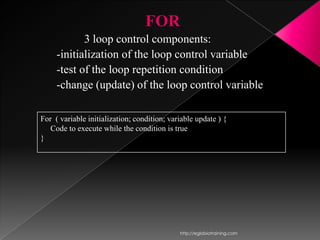
FOR
            3 loop control components:
     -initialization of the loop control variable
     -test of the loop repetition condition
     -change (update) of the loop control variable

For ( variable initialization; condition; variable update ) {
   Code to execute while the condition is true
}


                                             http://eglobiotraining.com
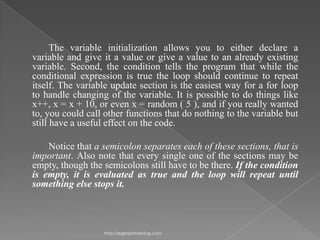
The variable initialization allows you to either declare a
variable and give it a value or give a value to an already existing
variable. Second, the condition tells the program that while the
conditional expression is true the loop should continue to repeat
itself. The variable update section is the easiest way for a for loop
to handle changing of the variable. It is possible to do things like
x++, x = x + 10, or even x = random ( 5 ), and if you really wanted
to, you could call other functions that do nothing to the variable but
still have a useful effect on the code.

    Notice that a semicolon separates each of these sections, that is
important. Also note that every single one of the sections may be
empty, though the semicolons still have to be there. If the condition
is empty, it is evaluated as true and the loop will repeat until
something else stops it.


                  http://eglobiotraining.com
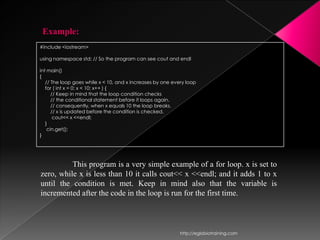
Example:
#include <iostream>

using namespace std; // So the program can see cout and endl

int main()
{
   // The loop goes while x < 10, and x increases by one every loop
   for ( int x = 0; x < 10; x++ ) {
      // Keep in mind that the loop condition checks
      // the conditional statement before it loops again.
      // consequently, when x equals 10 the loop breaks.
      // x is updated before the condition is checked.
       cout<< x <<endl;
   }
    cin.get();
}


          This program is a very simple example of a for loop. x is set to
zero, while x is less than 10 it calls cout<< x <<endl; and it adds 1 to x
until the condition is met. Keep in mind also that the variable is
incremented after the code in the loop is run for the first time.


                                                            http://eglobiotraining.com
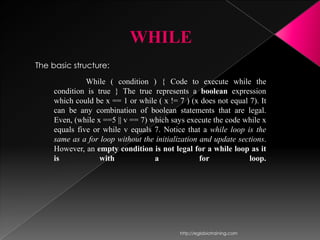
WHILE
The basic structure:
               While ( condition ) { Code to execute while the
     condition is true } The true represents a boolean expression
     which could be x == 1 or while ( x != 7 ) (x does not equal 7). It
     can be any combination of boolean statements that are legal.
     Even, (while x ==5 || v == 7) which says execute the code while x
     equals five or while v equals 7. Notice that a while loop is the
     same as a for loop without the initialization and update sections.
     However, an empty condition is not legal for a while loop as it
     is            with             a              for           loop.


                                            http://eglobiotraining.com
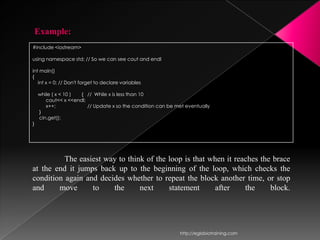
Example:
#include <iostream>

using namespace std; // So we can see cout and endl

int main()
{
   int x = 0; // Don't forget to declare variables

    while ( x < 10 ) { // While x is less than 10
       cout<< x <<endl;
       x++;             // Update x so the condition can be met eventually
    }
    cin.get();
}


          The easiest way to think of the loop is that when it reaches the brace
at the end it jumps back up to the beginning of the loop, which checks the
condition again and decides whether to repeat the block another time, or stop
and     move      to    the      next     statement      after    the     block.


                                                             http://eglobiotraining.com
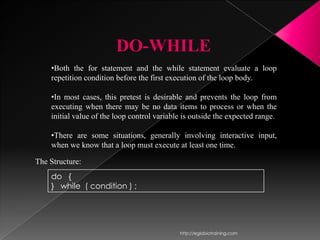
DO-WHILE
    •Both the for statement and the while statement evaluate a loop
    repetition condition before the first execution of the loop body.

    •In most cases, this pretest is desirable and prevents the loop from
    executing when there may be no data items to process or when the
    initial value of the loop control variable is outside the expected range.

    •There are some situations, generally involving interactive input,
    when we know that a loop must execute at least one time.

The Structure:
    do {
    } while ( condition ) ;


                                             http://eglobiotraining.com
Notice that the condition is tested at the end of the block
instead of the beginning, so the block will be executed at least
once. If the condition is true, we jump back to the beginning
of the block and execute it again. A do..while loop is
basically a reversed while loop. A while loop says "Loop
while the condition is true, and execute this block of code", a
do..while loop says "Execute this block of code, and loop
while the condition is true".


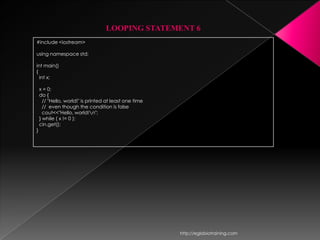
                http://eglobiotraining.com
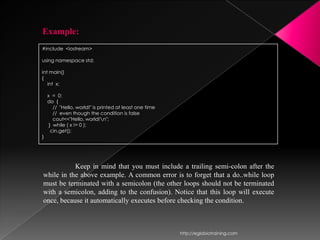
Example:
#include <iostream>

using namespace std;

int main()
{
   int x;

    x = 0;
    do {
       // "Hello, world!" is printed at least one time
       // even though the condition is false
       cout<<"Hello, world!n";
     } while ( x != 0 );
      cin.get();
}


           Keep in mind that you must include a trailing semi-colon after the
while in the above example. A common error is to forget that a do..while loop
must be terminated with a semicolon (the other loops should not be terminated
with a semicolon, adding to the confusion). Notice that this loop will execute
once, because it automatically executes before checking the condition.


                                                         http://eglobiotraining.com
http://eglobiotraining.com
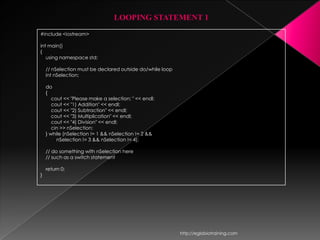
LOOPING STATEMENT 1
#include <iostream>

int main()
{
   using namespace std;

    // nSelection must be declared outside do/while loop
    int nSelection;

    do
    {
       cout << "Please make a selection: " << endl;
       cout << "1) Addition" << endl;
       cout << "2) Subtraction" << endl;
       cout << "3) Multiplication" << endl;
       cout << "4) Division" << endl;
       cin >> nSelection;
    } while (nSelection != 1 && nSelection != 2 &&
         nSelection != 3 && nSelection != 4);

    // do something with nSelection here
    // such as a switch statement

    return 0;
}


                                                           http://eglobiotraining.com
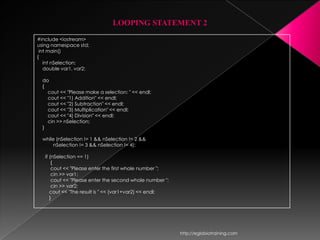
LOOPING STATEMENT 2
#include <iostream>
using namespace std;
 int main()
{
   int nSelection;
   double var1, var2;

  do
  {
    cout << "Please make a selection: " << endl;
    cout << "1) Addition" << endl;
    cout << "2) Subtraction" << endl;
    cout << "3) Multiplication" << endl;
    cout << "4) Division" << endl;
    cin >> nSelection;
  }

  while (nSelection != 1 && nSelection != 2 &&
       nSelection != 3 && nSelection != 4);

   if (nSelection == 1)
       {
       cout << "Please enter the first whole number ";
       cin >> var1;
       cout << "Please enter the second whole number ";
       cin >> var2;
      cout << "The result is " << (var1+var2) << endl;
      }


                                                          http://eglobiotraining.com
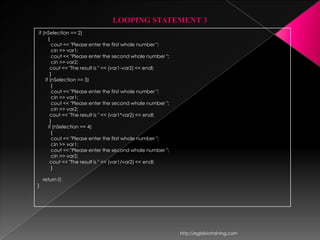
LOOPING STATEMENT 3
if (nSelection == 2)
      {
        cout << "Please enter the first whole number ";
        cin >> var1;
        cout << "Please enter the second whole number ";
        cin >> var2;
       cout << "The result is " << (var1-var2) << endl;
       }
    if (nSelection == 3)
        {
        cout << "Please enter the first whole number ";
        cin >> var1;
        cout << "Please enter the second whole number ";
        cin >> var2;
       cout << "The result is " << (var1*var2) << endl;
       }
      if (nSelection == 4)
        {
        cout << "Please enter the first whole number ";
        cin >> var1;
        cout << "Please enter the second whole number ";
        cin >> var2;
       cout << "The result is " << (var1/var2) << endl;
        }

    return 0;
}


                                                           http://eglobiotraining.com
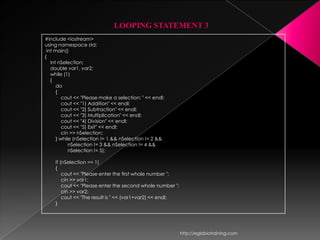
LOOPING STATEMENT 3
#include <iostream>
using namespace std;
 int main()
{
   int nSelection;
   double var1, var2;
   while (1)
   {
      do
      {
         cout << "Please make a selection: " << endl;
         cout << "1) Addition" << endl;
         cout << "2) Subtraction" << endl;
         cout << "3) Multiplication" << endl;
         cout << "4) Division" << endl;
         cout << "5) Exit" << endl;
         cin >> nSelection;
      } while (nSelection != 1 && nSelection != 2 &&
            nSelection != 3 && nSelection != 4 &&
            nSelection != 5);

    if (nSelection == 1)
    {
        cout << "Please enter the first whole number ";
        cin >> var1;
        cout << "Please enter the second whole number ";
        cin >> var2;
        cout << "The result is " << (var1+var2) << endl;
    }


                                                           http://eglobiotraining.com
LOOPING STATEMENT 4
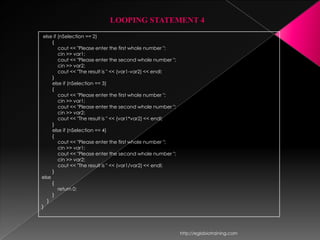
 else if (nSelection == 2)
     {
         cout << "Please enter the first whole number ";
         cin >> var1;
         cout << "Please enter the second whole number ";
         cin >> var2;
         cout << "The result is " << (var1-var2) << endl;
     }
     else if (nSelection == 3)
     {
         cout << "Please enter the first whole number ";
         cin >> var1;
         cout << "Please enter the second whole number ";
         cin >> var2;
         cout << "The result is " << (var1*var2) << endl;
     }
     else if (nSelection == 4)
     {
         cout << "Please enter the first whole number ";
         cin >> var1;
         cout << "Please enter the second whole number ";
         cin >> var2;
         cout << "The result is " << (var1/var2) << endl;
     }
else
     {
         return 0;
     }
   }
}


                                                            http://eglobiotraining.com
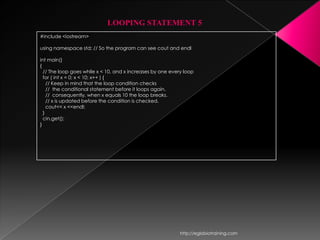
LOOPING STATEMENT 5
#include <iostream>

using namespace std; // So the program can see cout and endl

int main()
{
  // The loop goes while x < 10, and x increases by one every loop
  for ( int x = 0; x < 10; x++ ) {
    // Keep in mind that the loop condition checks
    // the conditional statement before it loops again.
    // consequently, when x equals 10 the loop breaks.
    // x is updated before the condition is checked.
    cout<< x <<endl;
  }
  cin.get();
}


                                                            http://eglobiotraining.com
LOOPING STATEMENT 6
#include <iostream>

using namespace std;

int main()
{
  int x;

    x = 0;
    do {
      // "Hello, world!" is printed at least one time
      // even though the condition is false
      cout<<"Hello, world!n";
    } while ( x != 0 );
    cin.get();
}


                                                        http://eglobiotraining.com
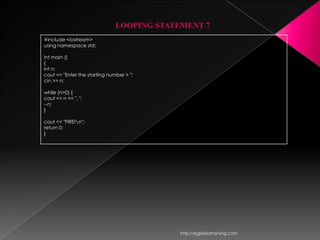
LOOPING STATEMENT 7
#include <iostream>
using namespace std;

int main ()
{
int n;
cout << "Enter the starting number > ";
cin >> n;

while (n>0) {
cout << n << ", ";
--n;
}

cout << "FIRE!n";
return 0;
}


                                           http://eglobiotraining.com
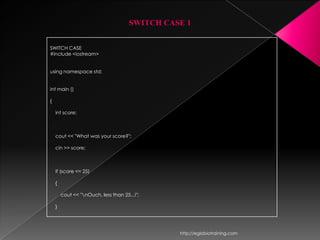
SWITCH CASE 1


SWITCH CASE
#include <iostream>


using namespace std;


int main ()

{

    int score;


    cout << "What was your score?";

    cin >> score;


    if (score <= 25)

    {

        cout << "nOuch, less than 25...!";

    }


                                                http://eglobiotraining.com
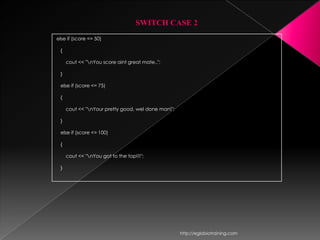
SWITCH CASE 2
else if (score <= 50)

 {

     cout << "nYou score aint great mate..";

 }

 else if (score <= 75)

 {

     cout << "nYour pretty good, wel done man!";

 }

 else if (score <= 100)

 {

     cout << "nYou got to the top!!!";

 }


                                                    http://eglobiotraining.com
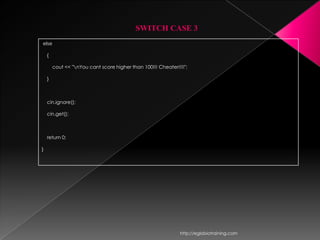
SWITCH CASE 3
else

    {

        cout << "nYou cant score higher than 100!!! Cheater!!!!";

    }


    cin.ignore();

    cin.get();


    return 0;

}


                                                              http://eglobiotraining.com
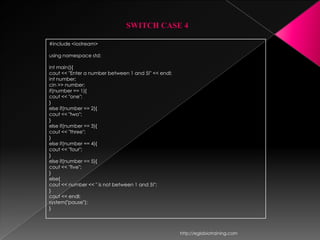
SWITCH CASE 4

#include <iostream>

using namespace std;

int main(){
cout << "Enter a number between 1 and 5!" << endl;
int number;
cin >> number;
if(number == 1){
cout << "one";
}
else if(number == 2){
cout << "two";
}
else if(number == 3){
cout << "three";
}
else if(number == 4){
cout << "four";
}
else if(number == 5){
cout << "five";
}
else{
cout << number << " is not between 1 and 5!";
}
cout << endl;
system("pause");
}


                                                     http://eglobiotraining.com
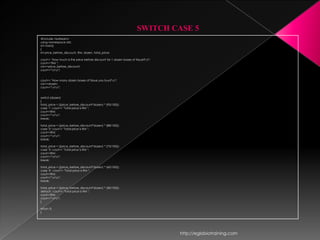
SWITCH CASE 5
#include <iostream>
using namespace std;
int main()
{
int price_before_discount, RM, dozen, total_price;

cout<< "How much is the price before discount for 1 dozen boxes of tissue?n";
cout<<"RM ";
cin>>price_before_discount;
cout<<"nn";


cout<< "How many dozen boxes of tissue you buy?n";
cin>>dozen;
cout<<"nn";


switch (dozen)
{
total_price = ((price_before_discount*dozen) * (95/100));
case '1': cout<< "Total price is RM ";
cout<<RM;
cout<<"nn";
break;

total_price = ((price_before_discount*dozen) * (88/100));
case '2': cout<< "Total price is RM ";
cout<<RM;
cout<<"nn";
break;

total_price = ((price_before_discount*dozen) * (75/100));
case '3': cout<< "Total price is RM ";
cout<<RM;
cout<<"nn";
break;

total_price = ((price_before_discount*dozen) * (60/100));
case '4' : cout<< "Total price is RM ";
cout<<RM;
cout<<"nn";
break;

total_price = ((price_before_discount*dozen) * (40/100));
default : cout<< "Total price is RM ";
cout<<RM;
cout<<"nn";
}

return 0;
}


                                                                                 http://eglobiotraining.com
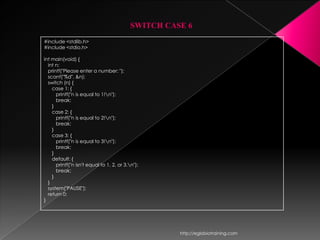
SWITCH CASE 6
#include <stdlib.h>
#include <stdio.h>

int main(void) {
  int n;
  printf("Please enter a number: ");
  scanf("%d", &n);
  switch (n) {
    case 1: {
      printf("n is equal to 1!n");
      break;
    }
    case 2: {
      printf("n is equal to 2!n");
      break;
    }
    case 3: {
      printf("n is equal to 3!n");
      break;
    }
    default: {
      printf("n isn't equal to 1, 2, or 3.n");
      break;
    }
  }
  system("PAUSE");
  return 0;
}


                                                     http://eglobiotraining.com
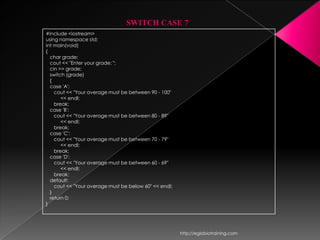
SWITCH CASE 7
#include <iostream>
using namespace std;
int main(void)
{
  char grade;
  cout << "Enter your grade: ";
  cin >> grade;
  switch (grade)
  {
  case 'A':
    cout << "Your average must be between 90 - 100"
       << endl;
    break;
  case 'B':
    cout << "Your average must be between 80 - 89"
       << endl;
    break;
  case 'C':
    cout << "Your average must be between 70 - 79"
       << endl;
    break;
  case 'D':
    cout << "Your average must be between 60 - 69"
       << endl;
    break;
  default:
    cout << "Your average must be below 60" << endl;
  }
  return 0;
}


                                                       http://eglobiotraining.com
http://eglobiotraining.com
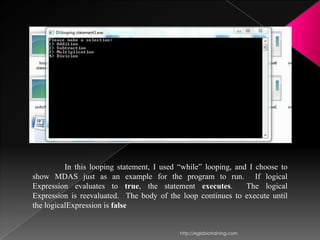
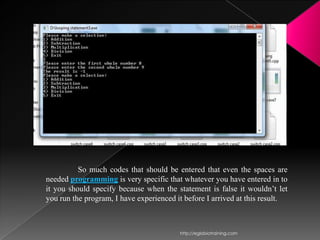
In this looping statement, I used “while” looping, and I choose to
show MDAS just as an example for the program to run. If logical
Expression evaluates to true, the statement executes.           The logical
Expression is reevaluated. The body of the loop continues to execute until
the logicalExpression is false


                                           http://eglobiotraining.com
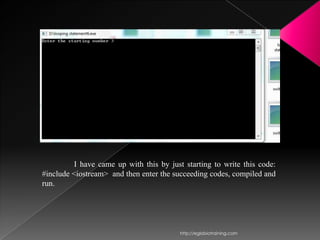
I have came up with this by just starting to write this code:
#include <iostream> and then enter the succeeding codes, compiled and
run.


                                         http://eglobiotraining.com
When I learned that programming is very sensitive and at
the same time very detailed when it comes to entering codes, I make
sure that it is clear means that I put everything important codes in it
so that the program would run.


                                         http://eglobiotraining.com
So much codes that should be entered that even the spaces are
needed programming is very specific that whatever you have entered in to
it you should specify because when the statement is false it wouldn’t let
you run the program, I have experienced it before I arrived at this result.


                                         http://eglobiotraining.com
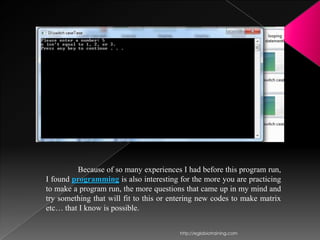
Because of so many experiences I had before this program run,
I found programming is also interesting for the more you are practicing
to make a program run, the more questions that came up in my mind and
try something that will fit to this or entering new codes to make matrix
etc… that I know is possible.


                                         http://eglobiotraining.com
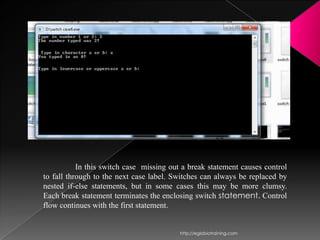
In this switch case missing out a break statement causes control
to fall through to the next case label. Switches can always be replaced by
nested if-else statements, but in some cases this may be more clumsy.
Each break statement terminates the enclosing switch statement. Control
flow continues with the first statement.


                                          http://eglobiotraining.com
Unlike if-then and if-then-else statements, the switch statement can
have a number of possible execution paths, A switch works with
the byte, short, char, and int primitive data types.


                                             http://eglobiotraining.com
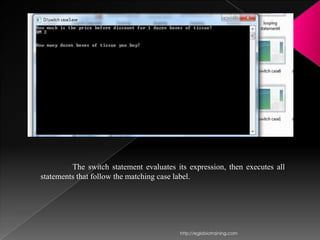
The switch statement evaluates its expression, then executes all
statements that follow the matching case label.


                                         http://eglobiotraining.com
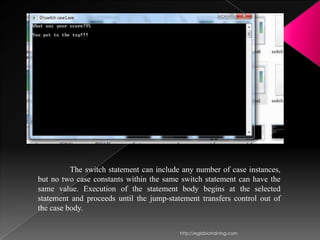
The switch statement can include any number of case instances,
but no two case constants within the same switch statement can have the
same value. Execution of the statement body begins at the selected
statement and proceeds until the jump-statement transfers control out of
the case body.


                                          http://eglobiotraining.com
Submitted to:
    Prof. Erwin Globio


     Submitted by:
Unite, Jamaica Aubrey T.
       BM10203


 http://eglobiotraining.com

Switch case and looping jam

  • 1.
  • 2.
    A programming languageis used to write computer programs such as application and utilities. Programming allows a programmer or end user to develop the sets of instructions that constitute a computer program or software. The role of a programming language can be described in two ways: Technical: It is a means for instructing a Computer to perform Tasks Conceptual: It is a framework within which we organize our ideas about things and processes. http://eglobiotraining.com
  • 3.
    As an individual,I have learned that programming is a very broad because it composes many scripts, applications and can be used to run a program that has been part of the programming language. A programming language should both provide means to describe primitive data and procedures and means to combine and abstract those into more complex ones. The distinction between data and procedures is not that clear cut. In many programming languages, procedures can be passed as data (to be applied to ``real'' data) and sometimes processed like ``ordinary'' data. Conversely ``ordinary'' data can be turned into procedures by an evaluation mechanism. http://eglobiotraining.com
  • 4.
    At first, programmingis confusing because you have so much to understand about codes that will enable to run a program. Programming has applications and program development, the best example for this is the Internet bowser… Programming is a creative process done by programmers to instruct a computer on how to do a task. Fundamentally programs manipulate numbers and text. These are the building blocks of all programs. Programming languages let you use them in different ways, e.g adding numbers, etc… or storing data on disk for later retrieval. http://eglobiotraining.com
  • 5.
    You have toconsider languages to run or write your own program, most demanded language in programming is the DEV C++ (a full-featured Integrated Development Environment (IDE)). C++ is one of the most used programming languages in the world. Also known as "C with Classes". New to programming or thinking about it? It might surprise you to know that there are many programmers who program just for fun and it can lead to a job. http://eglobiotraining.com
  • 6.
    Switch case statementsare a substitute for long if statements that compare a variable to several "integral" values ("integral" values are simply values that can be expressed as an integer, such as the value of a char). http://eglobiotraining.com
  • 7.
    Basic Format forusing Switch case: switch ( <variable> ) { case this-value: Code to execute if <variable> == this-value break; case that-value: Code to execute if <variable> == that-value break; ... default: Code to execute if <variable> does not equal the value following any of the cases break; } The value of the variable given into switch is compared to the value following each of the cases, and when one value matches the value of the variable, the computer continues executing the program from that point. http://eglobiotraining.com
  • 8.
    The condition ofa switch statement is a value. The case says that if it has the value of whatever is after that case then do whatever follows the colon. The break is used to break out of the case statements. An important thing to note about the switch statement is that the case values may only be constant integral expressions. http://eglobiotraining.com
  • 9.
    “Break” is akeyword that breaks out of the code block, usually surrounded by braces, which it is in. In this case, break prevents the program from falling through and executing the code in all the other case statements. http://eglobiotraining.com
  • 10.
    The default caseis optional, but it is wise to include it as it handles any unexpected cases. Switch statements serves as a simple way to write long if statements when the requirements are met. Often it can be used to process input from a user. http://eglobiotraining.com
  • 11.
    This shows howwould you use a Switch in a Program #include <iostream> using namespace std; void playgame() { cout << "Play game called"; } void loadgame() } cout << "Load game called"; void playmultiplayer() { cout << "Play multiplayer game called"; } int main() { int input; cout<<"1. Play gamen"; cout<<"2. Load gamen"; cout<<"3. Play multiplayern"; cout<<"4. Exitn"; cout<<"Selection: "; cin>> input; switch ( input ) { case 1: // Note the colon, not a semicolon playgame(); break; case 2: // Note the colon, not a semicolon loadgame(); break; case 3: // Note the colon, not a semicolon playmultiplayer(); break; case 4: // Note the colon, not a semicolon cout<<"Thank you for playing!n"; break; default: // Note the colon, not a semicolon cout<<"Error, bad input, quittingn"; break; } cin.get(); } http://eglobiotraining.com
  • 12.
    That program willcompile, but cannot be run until the undefined functions are given bodies, but it serves as a model (albeit simple) for processing input. If you do not understand this then try mentally putting in if statements for the case statements. Default simply skips out of the switch case construction and allows the program to terminate naturally. If you do not like that, then you can make a loop around the whole thing to have it wait for valid input. You could easily make a few small functions if you wish to test the code. http://eglobiotraining.com
  • 13.
    Loops are usedto repeat a block of code. Being able to have your program repeatedly execute a block of code is one of the most basic but useful tasks in programming -- many programs or websites that produce extremely complex output (such as a message board) are really only executing a single task many times. http://eglobiotraining.com
  • 14.
    (They may beexecuting a small number of tasks, but in principle, to produce a list of messages only requires repeating the operation of reading in some data and displaying it.) Now, think about what this means: a loop lets you write a very simple statement to produce a significantly greater result simply by repetition. http://eglobiotraining.com
  • 15.
    One Caveat: beforegoing further, you should understand the concept of C++'s true and false, because it will be necessary when working with loops (the conditions are the same as with if statements). Three types of Loops: for, while, and do.. http://eglobiotraining.com
  • 16.
    FOR 3 loop control components: -initialization of the loop control variable -test of the loop repetition condition -change (update) of the loop control variable For ( variable initialization; condition; variable update ) { Code to execute while the condition is true } http://eglobiotraining.com
  • 17.
    The variable initializationallows you to either declare a variable and give it a value or give a value to an already existing variable. Second, the condition tells the program that while the conditional expression is true the loop should continue to repeat itself. The variable update section is the easiest way for a for loop to handle changing of the variable. It is possible to do things like x++, x = x + 10, or even x = random ( 5 ), and if you really wanted to, you could call other functions that do nothing to the variable but still have a useful effect on the code. Notice that a semicolon separates each of these sections, that is important. Also note that every single one of the sections may be empty, though the semicolons still have to be there. If the condition is empty, it is evaluated as true and the loop will repeat until something else stops it. http://eglobiotraining.com
  • 18.
    Example: #include <iostream> using namespacestd; // So the program can see cout and endl int main() { // The loop goes while x < 10, and x increases by one every loop for ( int x = 0; x < 10; x++ ) { // Keep in mind that the loop condition checks // the conditional statement before it loops again. // consequently, when x equals 10 the loop breaks. // x is updated before the condition is checked. cout<< x <<endl; } cin.get(); } This program is a very simple example of a for loop. x is set to zero, while x is less than 10 it calls cout<< x <<endl; and it adds 1 to x until the condition is met. Keep in mind also that the variable is incremented after the code in the loop is run for the first time. http://eglobiotraining.com
  • 19.
    WHILE The basic structure: While ( condition ) { Code to execute while the condition is true } The true represents a boolean expression which could be x == 1 or while ( x != 7 ) (x does not equal 7). It can be any combination of boolean statements that are legal. Even, (while x ==5 || v == 7) which says execute the code while x equals five or while v equals 7. Notice that a while loop is the same as a for loop without the initialization and update sections. However, an empty condition is not legal for a while loop as it is with a for loop. http://eglobiotraining.com
  • 20.
    Example: #include <iostream> using namespacestd; // So we can see cout and endl int main() { int x = 0; // Don't forget to declare variables while ( x < 10 ) { // While x is less than 10 cout<< x <<endl; x++; // Update x so the condition can be met eventually } cin.get(); } The easiest way to think of the loop is that when it reaches the brace at the end it jumps back up to the beginning of the loop, which checks the condition again and decides whether to repeat the block another time, or stop and move to the next statement after the block. http://eglobiotraining.com
  • 21.
    DO-WHILE •Both the for statement and the while statement evaluate a loop repetition condition before the first execution of the loop body. •In most cases, this pretest is desirable and prevents the loop from executing when there may be no data items to process or when the initial value of the loop control variable is outside the expected range. •There are some situations, generally involving interactive input, when we know that a loop must execute at least one time. The Structure: do { } while ( condition ) ; http://eglobiotraining.com
  • 22.
    Notice that thecondition is tested at the end of the block instead of the beginning, so the block will be executed at least once. If the condition is true, we jump back to the beginning of the block and execute it again. A do..while loop is basically a reversed while loop. A while loop says "Loop while the condition is true, and execute this block of code", a do..while loop says "Execute this block of code, and loop while the condition is true". http://eglobiotraining.com
  • 23.
    Example: #include <iostream> using namespacestd; int main() { int x; x = 0; do { // "Hello, world!" is printed at least one time // even though the condition is false cout<<"Hello, world!n"; } while ( x != 0 ); cin.get(); } Keep in mind that you must include a trailing semi-colon after the while in the above example. A common error is to forget that a do..while loop must be terminated with a semicolon (the other loops should not be terminated with a semicolon, adding to the confusion). Notice that this loop will execute once, because it automatically executes before checking the condition. http://eglobiotraining.com
  • 24.
  • 25.
    LOOPING STATEMENT 1 #include<iostream> int main() { using namespace std; // nSelection must be declared outside do/while loop int nSelection; do { cout << "Please make a selection: " << endl; cout << "1) Addition" << endl; cout << "2) Subtraction" << endl; cout << "3) Multiplication" << endl; cout << "4) Division" << endl; cin >> nSelection; } while (nSelection != 1 && nSelection != 2 && nSelection != 3 && nSelection != 4); // do something with nSelection here // such as a switch statement return 0; } http://eglobiotraining.com
  • 26.
    LOOPING STATEMENT 2 #include<iostream> using namespace std; int main() { int nSelection; double var1, var2; do { cout << "Please make a selection: " << endl; cout << "1) Addition" << endl; cout << "2) Subtraction" << endl; cout << "3) Multiplication" << endl; cout << "4) Division" << endl; cin >> nSelection; } while (nSelection != 1 && nSelection != 2 && nSelection != 3 && nSelection != 4); if (nSelection == 1) { cout << "Please enter the first whole number "; cin >> var1; cout << "Please enter the second whole number "; cin >> var2; cout << "The result is " << (var1+var2) << endl; } http://eglobiotraining.com
  • 27.
    LOOPING STATEMENT 3 if(nSelection == 2) { cout << "Please enter the first whole number "; cin >> var1; cout << "Please enter the second whole number "; cin >> var2; cout << "The result is " << (var1-var2) << endl; } if (nSelection == 3) { cout << "Please enter the first whole number "; cin >> var1; cout << "Please enter the second whole number "; cin >> var2; cout << "The result is " << (var1*var2) << endl; } if (nSelection == 4) { cout << "Please enter the first whole number "; cin >> var1; cout << "Please enter the second whole number "; cin >> var2; cout << "The result is " << (var1/var2) << endl; } return 0; } http://eglobiotraining.com
  • 28.
    LOOPING STATEMENT 3 #include<iostream> using namespace std; int main() { int nSelection; double var1, var2; while (1) { do { cout << "Please make a selection: " << endl; cout << "1) Addition" << endl; cout << "2) Subtraction" << endl; cout << "3) Multiplication" << endl; cout << "4) Division" << endl; cout << "5) Exit" << endl; cin >> nSelection; } while (nSelection != 1 && nSelection != 2 && nSelection != 3 && nSelection != 4 && nSelection != 5); if (nSelection == 1) { cout << "Please enter the first whole number "; cin >> var1; cout << "Please enter the second whole number "; cin >> var2; cout << "The result is " << (var1+var2) << endl; } http://eglobiotraining.com
  • 29.
    LOOPING STATEMENT 4 else if (nSelection == 2) { cout << "Please enter the first whole number "; cin >> var1; cout << "Please enter the second whole number "; cin >> var2; cout << "The result is " << (var1-var2) << endl; } else if (nSelection == 3) { cout << "Please enter the first whole number "; cin >> var1; cout << "Please enter the second whole number "; cin >> var2; cout << "The result is " << (var1*var2) << endl; } else if (nSelection == 4) { cout << "Please enter the first whole number "; cin >> var1; cout << "Please enter the second whole number "; cin >> var2; cout << "The result is " << (var1/var2) << endl; } else { return 0; } } } http://eglobiotraining.com
  • 30.
    LOOPING STATEMENT 5 #include<iostream> using namespace std; // So the program can see cout and endl int main() { // The loop goes while x < 10, and x increases by one every loop for ( int x = 0; x < 10; x++ ) { // Keep in mind that the loop condition checks // the conditional statement before it loops again. // consequently, when x equals 10 the loop breaks. // x is updated before the condition is checked. cout<< x <<endl; } cin.get(); } http://eglobiotraining.com
  • 31.
    LOOPING STATEMENT 6 #include<iostream> using namespace std; int main() { int x; x = 0; do { // "Hello, world!" is printed at least one time // even though the condition is false cout<<"Hello, world!n"; } while ( x != 0 ); cin.get(); } http://eglobiotraining.com
  • 32.
    LOOPING STATEMENT 7 #include<iostream> using namespace std; int main () { int n; cout << "Enter the starting number > "; cin >> n; while (n>0) { cout << n << ", "; --n; } cout << "FIRE!n"; return 0; } http://eglobiotraining.com
  • 33.
    SWITCH CASE 1 SWITCHCASE #include <iostream> using namespace std; int main () { int score; cout << "What was your score?"; cin >> score; if (score <= 25) { cout << "nOuch, less than 25...!"; } http://eglobiotraining.com
  • 34.
    SWITCH CASE 2 elseif (score <= 50) { cout << "nYou score aint great mate.."; } else if (score <= 75) { cout << "nYour pretty good, wel done man!"; } else if (score <= 100) { cout << "nYou got to the top!!!"; } http://eglobiotraining.com
  • 35.
    SWITCH CASE 3 else { cout << "nYou cant score higher than 100!!! Cheater!!!!"; } cin.ignore(); cin.get(); return 0; } http://eglobiotraining.com
  • 36.
    SWITCH CASE 4 #include<iostream> using namespace std; int main(){ cout << "Enter a number between 1 and 5!" << endl; int number; cin >> number; if(number == 1){ cout << "one"; } else if(number == 2){ cout << "two"; } else if(number == 3){ cout << "three"; } else if(number == 4){ cout << "four"; } else if(number == 5){ cout << "five"; } else{ cout << number << " is not between 1 and 5!"; } cout << endl; system("pause"); } http://eglobiotraining.com
  • 37.
    SWITCH CASE 5 #include<iostream> using namespace std; int main() { int price_before_discount, RM, dozen, total_price; cout<< "How much is the price before discount for 1 dozen boxes of tissue?n"; cout<<"RM "; cin>>price_before_discount; cout<<"nn"; cout<< "How many dozen boxes of tissue you buy?n"; cin>>dozen; cout<<"nn"; switch (dozen) { total_price = ((price_before_discount*dozen) * (95/100)); case '1': cout<< "Total price is RM "; cout<<RM; cout<<"nn"; break; total_price = ((price_before_discount*dozen) * (88/100)); case '2': cout<< "Total price is RM "; cout<<RM; cout<<"nn"; break; total_price = ((price_before_discount*dozen) * (75/100)); case '3': cout<< "Total price is RM "; cout<<RM; cout<<"nn"; break; total_price = ((price_before_discount*dozen) * (60/100)); case '4' : cout<< "Total price is RM "; cout<<RM; cout<<"nn"; break; total_price = ((price_before_discount*dozen) * (40/100)); default : cout<< "Total price is RM "; cout<<RM; cout<<"nn"; } return 0; } http://eglobiotraining.com
  • 38.
    SWITCH CASE 6 #include<stdlib.h> #include <stdio.h> int main(void) { int n; printf("Please enter a number: "); scanf("%d", &n); switch (n) { case 1: { printf("n is equal to 1!n"); break; } case 2: { printf("n is equal to 2!n"); break; } case 3: { printf("n is equal to 3!n"); break; } default: { printf("n isn't equal to 1, 2, or 3.n"); break; } } system("PAUSE"); return 0; } http://eglobiotraining.com
  • 39.
    SWITCH CASE 7 #include<iostream> using namespace std; int main(void) { char grade; cout << "Enter your grade: "; cin >> grade; switch (grade) { case 'A': cout << "Your average must be between 90 - 100" << endl; break; case 'B': cout << "Your average must be between 80 - 89" << endl; break; case 'C': cout << "Your average must be between 70 - 79" << endl; break; case 'D': cout << "Your average must be between 60 - 69" << endl; break; default: cout << "Your average must be below 60" << endl; } return 0; } http://eglobiotraining.com
  • 40.
  • 41.
    In this loopingstatement, I used “while” looping, and I choose to show MDAS just as an example for the program to run. If logical Expression evaluates to true, the statement executes. The logical Expression is reevaluated. The body of the loop continues to execute until the logicalExpression is false http://eglobiotraining.com
  • 42.
    I have cameup with this by just starting to write this code: #include <iostream> and then enter the succeeding codes, compiled and run. http://eglobiotraining.com
  • 43.
    When I learnedthat programming is very sensitive and at the same time very detailed when it comes to entering codes, I make sure that it is clear means that I put everything important codes in it so that the program would run. http://eglobiotraining.com
  • 44.
    So much codesthat should be entered that even the spaces are needed programming is very specific that whatever you have entered in to it you should specify because when the statement is false it wouldn’t let you run the program, I have experienced it before I arrived at this result. http://eglobiotraining.com
  • 45.
    Because of somany experiences I had before this program run, I found programming is also interesting for the more you are practicing to make a program run, the more questions that came up in my mind and try something that will fit to this or entering new codes to make matrix etc… that I know is possible. http://eglobiotraining.com
  • 46.
    In this switchcase missing out a break statement causes control to fall through to the next case label. Switches can always be replaced by nested if-else statements, but in some cases this may be more clumsy. Each break statement terminates the enclosing switch statement. Control flow continues with the first statement. http://eglobiotraining.com
  • 47.
    Unlike if-then andif-then-else statements, the switch statement can have a number of possible execution paths, A switch works with the byte, short, char, and int primitive data types. http://eglobiotraining.com
  • 48.
    The switch statementevaluates its expression, then executes all statements that follow the matching case label. http://eglobiotraining.com
  • 49.
    The switch statementcan include any number of case instances, but no two case constants within the same switch statement can have the same value. Execution of the statement body begins at the selected statement and proceeds until the jump-statement transfers control out of the case body. http://eglobiotraining.com
  • 50.
    Submitted to: Prof. Erwin Globio Submitted by: Unite, Jamaica Aubrey T. BM10203 http://eglobiotraining.com