Students
Management System
{Sheeraz Ali ˚Qaswar Sarfarz ˚Zain Ali ˚Musa Mumtaz ˚Kumail}
TABLE OF CONTENTS
01
Intro
02
Working
03
Flow Of
the Program
04
Demonstration
Flow OF
The
Program
Here we are
going to
Demonstrate
Our Program
Demonstration
Process that allow to store
the output of program in
file (text file) and can be
used any time.
Allow a program to interact
with external files,
• Reading
• Writing
Printing of schedule
Feature of prototype of noticeboard
FILE handling IN
C++
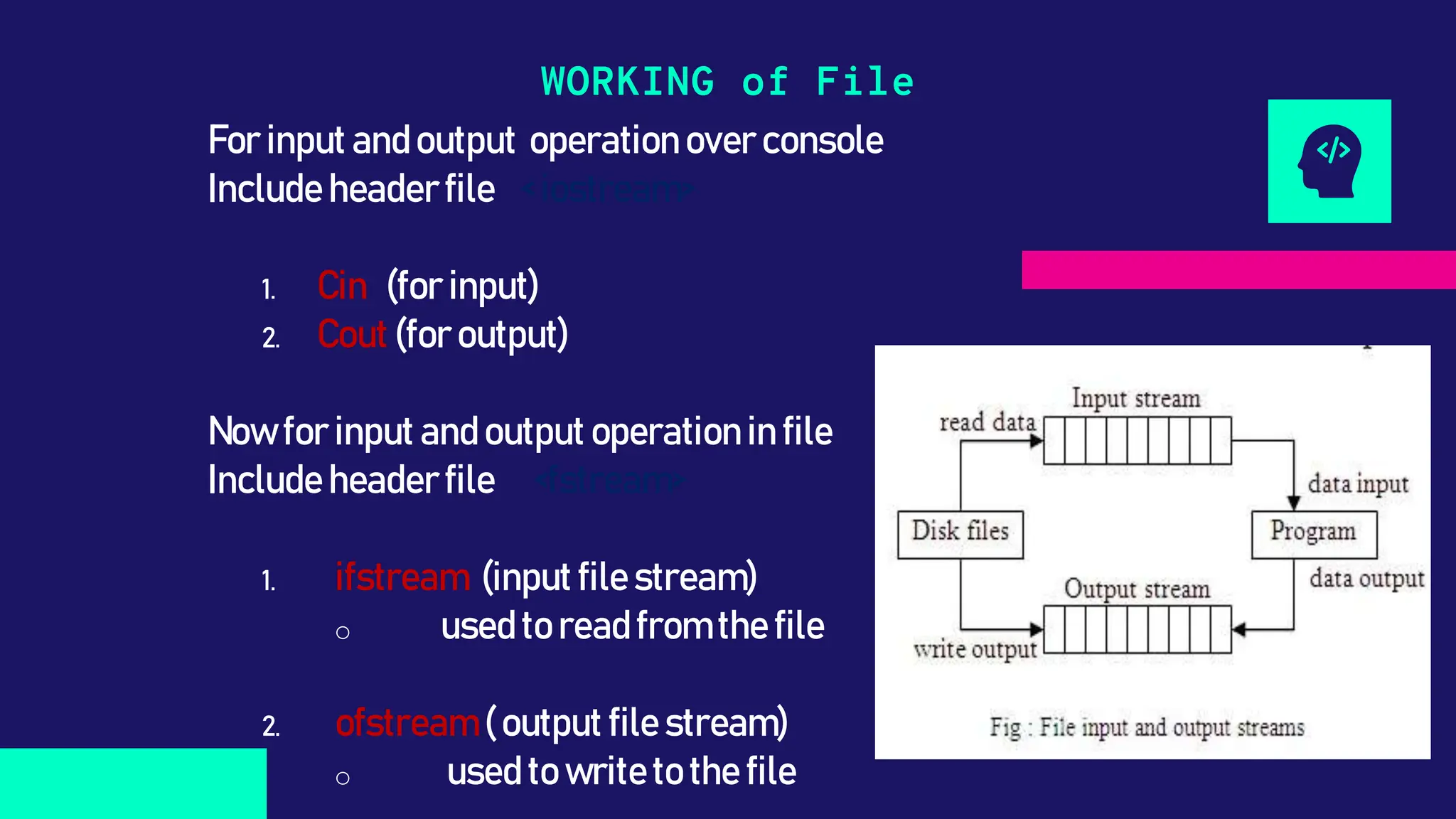
For input andoutput operationover console
Include headerfile < iostream>
1. Cin (for input)
2. Cout (foroutput)
Nowfor input andoutput operationin file
Include headerfile <fstream>
1. ifstream (inputfile stream)
o usedto readfromthe file
2. ofstream (output file stream)
o used to writeto the file
WORKING of File
Declaration of File
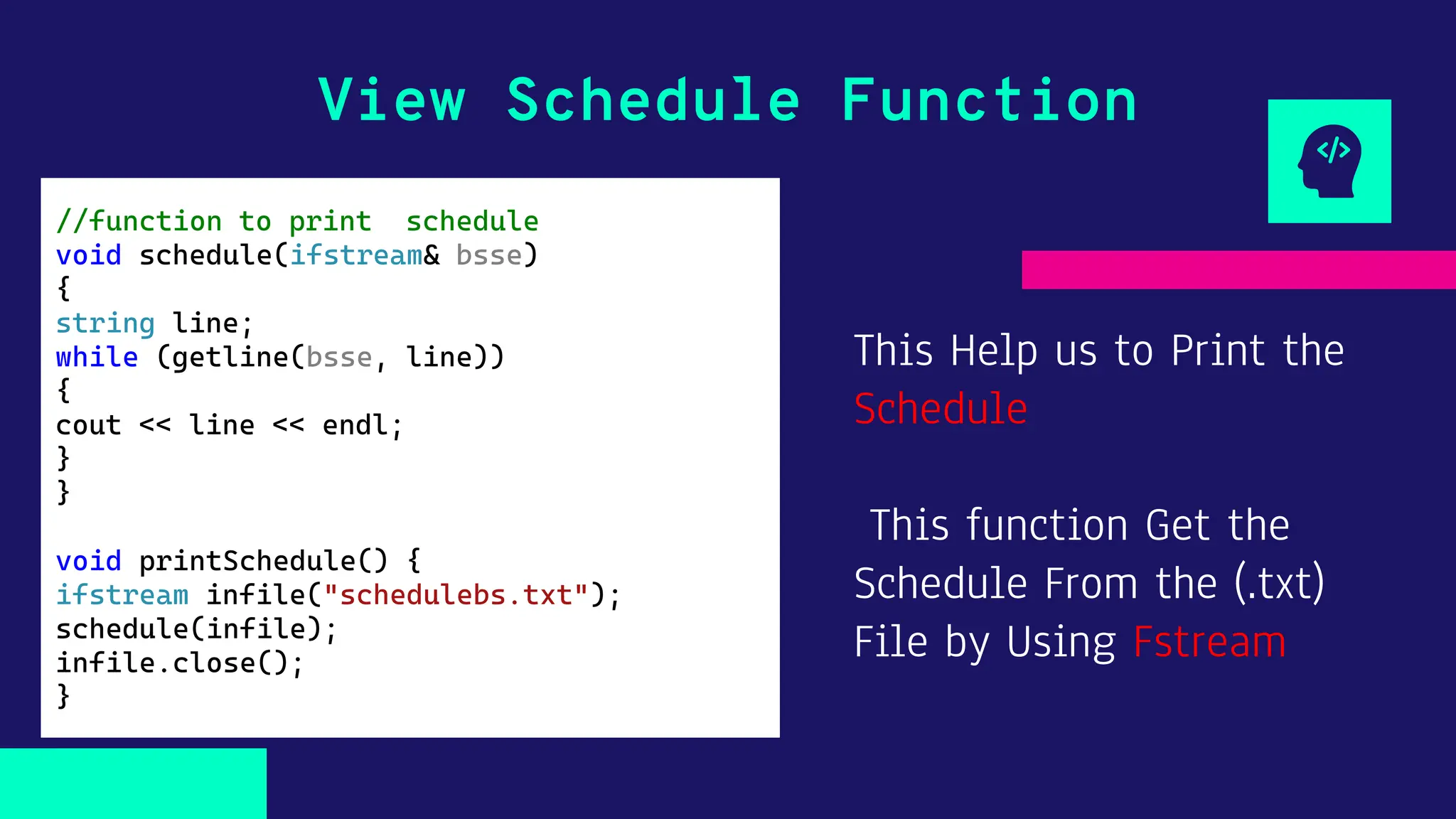
This Help us to Print the
Schedule
This function Get the
Schedule From the (.txt)
File by Using Fstream
View Schedule Function
//function to print schedule
void schedule(ifstream& bsse)
{
string line;
while (getline(bsse, line))
{
cout << line << endl;
}
}
void printSchedule() {
ifstream infile("schedulebs.txt");
schedule(infile);
infile.close();
}
This Function use Update
the Notice Board
It take input from the
teacher until exit
Update NoticeBoard Function
void update(const string& updates) //function for teacher to add
updates
{
ofstream instruct("updates.txt");
cout << "Type Announcement for Studnets. Type 'exit' to stop." << endl;
string instruction;
while (true) {
getline(cin, instruction);
if (instruction == "exit")
{
break;
}
instruct << instruction << endl;
}
instruct.close();
cout << "nn";
}
void Notice() {
string uo;
update("updates.txt");
cout << "Instruction has been sent to students successfully." << endl;
cout << "nn";
}
This Help us to Print the
NoticeBorad
This function Get the
noticeboard update From
the (updates.txt) File by
Using istream
View NoticeBoard Function
void viewNotice() {
ifstream
update("updates.txt");
upd(update);
update.close();
cout << "nn";
}
It Displays the Attandace
of the Students according
by the Number of Class#
View Attandance Function
void attandance() {
cout << "**Attandance**n";
cout << ":****************:nn";
cout << setw(30) << "Attandance" << endl;
cout <<setw(19)<<"Class #" ;
for (int i = 0; i < TClasses; i++) {
cout << setw(3) << i + 1;
}
cout << endl;
cout << "******************************************" << endl;
for (int k = 0; k < tstudents; k++) {
double pre = 0;
cout << setw(14) << students[k].name <<"("<< setw(3)<< students[k].roll << ")";
for (int i = 0; i < today; i++) {
if (students[k].presence[i] == 1) {
cout << setw(3) << 'P';
pre++;
}
else {
cout << setw(3) << 'A';
}
};
if (pre >= 15) {
pre = (pre / today) * 100;
cout << setw(10) << pre << "%";
if (pre <= 60) {
cout << setw(14) << " Disqualified!";
}
else {
cout << setw(14) << " Outstanding!";
}
}
cout << "nn";
}
• It’s a Security Check For
the Teacher.
• If someone else Try to
access the teacher
function.
• it will not let him Login
Pin Security
upin = 0;
cout << "Enter Pin :";
cin >> upin;
if (pin==upin) {
teacher();
}
It’s a Attandance Marker
Function.
It let teacher to Mark
Attandance of Students
with respective days.
Mark Attandance Function
int markAttandance() {
cout << "**Teacher Interface**n";
cout << ":******** MARK Attandance
********:nn";
cout << "Enter Attandance Class# " <<
today+1 << ".nNote: 1 = Present, 0 =
Absent : n";
for (int i = 0; i < tstudents; i++) {
cout << students[i].name << " : ";
cin >> students[i].presence[today];
}
today++;
return 0;
}
To Add a Student it will
ask for the Name
And his Previous class
attandace.
Then it will Assign a ID
to the Student
Automaticaly
Manage Students> ADD Function
int add() {
cout << "**Teacher Interface**n";
cout << ":******** ADD ********:nn";
cout << "Enter Student Name: ";
cin >> students[tstudents].name;
for (int i = 0; i < today; i++) {
cout << "Enter Day " << i + 1 << endl;
cin >> students[tstudents].presence[i];
}
newid = newid + tstudents;
newid++;
students[tstudents].roll = newid;
tstudents++;
return 0;
}
To edit any Student Name
& Attandace
This finds the Student
Record with the help of
Roll#
If it finds any student
with Inputed Roll# it will
let Teacehr Edit that.
Manage Students> EDIT Function
int edit() {
int editit;
int position = 0, find = 0;
cout << "**Teacher Interface**n";
cout << ":******** EDIT ********:nn";
cout << "Enter Student Roll # To Edit :";
cin >> editit;
for (int i = 0; i < tstudents; i++) {
if (students[i].roll == editit) {
position = i;
find = 1;
break;
}
}
if (find == 1) {
cout << "Enter Re-Wrtie Name: ";
cin>>students[position].name;
for (int i = 0; i <= today; i++) {
cout << "Re-Enter Attandance Day "<< i + 1<<" Note: 1 = Present , 0 =
Absent : ";
cin >> students[position].presence[i];
}
cout << "Student Data Edited Successfulnn";
}
else {
cout << "No Data Foundnn";
}
return 0;
}
To Delete a Student from
the array it will ask for
the roll# to Find.
This Function Will replace
that student Data with the
one ahead.
And Subtract 1 from the
Total Students
Manage Students> EDIT Function
if (find == 1) {
for (int i = position; i < tstudents;
i++){
students[i].name = students[i + 1].name;
students[i].roll = students[i + 1].roll;
for (int k = 0; k < today; k++) {
students[i].presence[k] = students[i +
1].presence[k];
}
}
cout << "Student Data Deleted
Successfulnn";
}
else {
cout << "No Data Foundnn";
} tstudents--;
CREDITS: This presentation template was created by
Slidesgo, incluiding icons by Flaticon, and
infographics & images by Freepik.
THANKS!
Do you have any questions?
Please, keep this slide for attribution.
collaborators[5]=
{Sheeraz Ali,
Qaswar Sarfarz,
Zain Ali,
Musa Mumtaz
Kumail};
string

Students Management System c++ project.pptx

  • 1.
    Students Management System {Sheeraz Ali˚Qaswar Sarfarz ˚Zain Ali ˚Musa Mumtaz ˚Kumail}
  • 2.
    TABLE OF CONTENTS 01 Intro 02 Working 03 FlowOf the Program 04 Demonstration
  • 3.
  • 4.
    Here we are goingto Demonstrate Our Program Demonstration
  • 5.
    Process that allowto store the output of program in file (text file) and can be used any time. Allow a program to interact with external files, • Reading • Writing Printing of schedule Feature of prototype of noticeboard FILE handling IN C++
  • 6.
    For input andoutputoperationover console Include headerfile < iostream> 1. Cin (for input) 2. Cout (foroutput) Nowfor input andoutput operationin file Include headerfile <fstream> 1. ifstream (inputfile stream) o usedto readfromthe file 2. ofstream (output file stream) o used to writeto the file WORKING of File
  • 7.
  • 8.
    This Help usto Print the Schedule This function Get the Schedule From the (.txt) File by Using Fstream View Schedule Function //function to print schedule void schedule(ifstream& bsse) { string line; while (getline(bsse, line)) { cout << line << endl; } } void printSchedule() { ifstream infile("schedulebs.txt"); schedule(infile); infile.close(); }
  • 9.
    This Function useUpdate the Notice Board It take input from the teacher until exit Update NoticeBoard Function void update(const string& updates) //function for teacher to add updates { ofstream instruct("updates.txt"); cout << "Type Announcement for Studnets. Type 'exit' to stop." << endl; string instruction; while (true) { getline(cin, instruction); if (instruction == "exit") { break; } instruct << instruction << endl; } instruct.close(); cout << "nn"; } void Notice() { string uo; update("updates.txt"); cout << "Instruction has been sent to students successfully." << endl; cout << "nn"; }
  • 10.
    This Help usto Print the NoticeBorad This function Get the noticeboard update From the (updates.txt) File by Using istream View NoticeBoard Function void viewNotice() { ifstream update("updates.txt"); upd(update); update.close(); cout << "nn"; }
  • 11.
    It Displays theAttandace of the Students according by the Number of Class# View Attandance Function void attandance() { cout << "**Attandance**n"; cout << ":****************:nn"; cout << setw(30) << "Attandance" << endl; cout <<setw(19)<<"Class #" ; for (int i = 0; i < TClasses; i++) { cout << setw(3) << i + 1; } cout << endl; cout << "******************************************" << endl; for (int k = 0; k < tstudents; k++) { double pre = 0; cout << setw(14) << students[k].name <<"("<< setw(3)<< students[k].roll << ")"; for (int i = 0; i < today; i++) { if (students[k].presence[i] == 1) { cout << setw(3) << 'P'; pre++; } else { cout << setw(3) << 'A'; } }; if (pre >= 15) { pre = (pre / today) * 100; cout << setw(10) << pre << "%"; if (pre <= 60) { cout << setw(14) << " Disqualified!"; } else { cout << setw(14) << " Outstanding!"; } } cout << "nn"; }
  • 12.
    • It’s aSecurity Check For the Teacher. • If someone else Try to access the teacher function. • it will not let him Login Pin Security upin = 0; cout << "Enter Pin :"; cin >> upin; if (pin==upin) { teacher(); }
  • 13.
    It’s a AttandanceMarker Function. It let teacher to Mark Attandance of Students with respective days. Mark Attandance Function int markAttandance() { cout << "**Teacher Interface**n"; cout << ":******** MARK Attandance ********:nn"; cout << "Enter Attandance Class# " << today+1 << ".nNote: 1 = Present, 0 = Absent : n"; for (int i = 0; i < tstudents; i++) { cout << students[i].name << " : "; cin >> students[i].presence[today]; } today++; return 0; }
  • 14.
    To Add aStudent it will ask for the Name And his Previous class attandace. Then it will Assign a ID to the Student Automaticaly Manage Students> ADD Function int add() { cout << "**Teacher Interface**n"; cout << ":******** ADD ********:nn"; cout << "Enter Student Name: "; cin >> students[tstudents].name; for (int i = 0; i < today; i++) { cout << "Enter Day " << i + 1 << endl; cin >> students[tstudents].presence[i]; } newid = newid + tstudents; newid++; students[tstudents].roll = newid; tstudents++; return 0; }
  • 15.
    To edit anyStudent Name & Attandace This finds the Student Record with the help of Roll# If it finds any student with Inputed Roll# it will let Teacehr Edit that. Manage Students> EDIT Function int edit() { int editit; int position = 0, find = 0; cout << "**Teacher Interface**n"; cout << ":******** EDIT ********:nn"; cout << "Enter Student Roll # To Edit :"; cin >> editit; for (int i = 0; i < tstudents; i++) { if (students[i].roll == editit) { position = i; find = 1; break; } } if (find == 1) { cout << "Enter Re-Wrtie Name: "; cin>>students[position].name; for (int i = 0; i <= today; i++) { cout << "Re-Enter Attandance Day "<< i + 1<<" Note: 1 = Present , 0 = Absent : "; cin >> students[position].presence[i]; } cout << "Student Data Edited Successfulnn"; } else { cout << "No Data Foundnn"; } return 0; }
  • 16.
    To Delete aStudent from the array it will ask for the roll# to Find. This Function Will replace that student Data with the one ahead. And Subtract 1 from the Total Students Manage Students> EDIT Function if (find == 1) { for (int i = position; i < tstudents; i++){ students[i].name = students[i + 1].name; students[i].roll = students[i + 1].roll; for (int k = 0; k < today; k++) { students[i].presence[k] = students[i + 1].presence[k]; } } cout << "Student Data Deleted Successfulnn"; } else { cout << "No Data Foundnn"; } tstudents--;
  • 17.
    CREDITS: This presentationtemplate was created by Slidesgo, incluiding icons by Flaticon, and infographics & images by Freepik. THANKS! Do you have any questions? Please, keep this slide for attribution. collaborators[5]= {Sheeraz Ali, Qaswar Sarfarz, Zain Ali, Musa Mumtaz Kumail}; string