(C) Copyright KeywordMarketing Inc. All rights reserved. No reproduction without written permission.
■ Google AdWordsで支払いを設定
① 「請求とお支払」をクリックします。
② 「国」を選択し、その後、「続行」をクリックします。
2.
(C) Copyright KeywordMarketing Inc. All rights reserved. No reproduction without written permission.
■
1
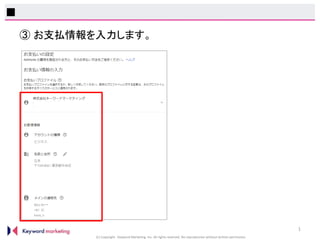
③ お支払情報を入力します。
3.
(C) Copyright KeywordMarketing Inc. All rights reserved. No reproduction without written permission.
■
2
④ お支払タイプを選択します。
※銀行振込の場合は「手動支払い」を選択してください。
その後、お支払い方法を入力し、「送信」をクリックしてください。
4.
(C) Copyright KeywordMarketing Inc. All rights reserved. No reproduction without written permission.
■ Yahoo!プロモーション広告で支払いを設定
① 「資金管理」をクリックします。
② クレジットカードで支払う場合は、「カード情報を登録」をクリックし、
その後に表示される画面でカード情報を入力してください。
銀行振込で支払う場合は、「作成」をクリックします。