Java
Performance
Tuning
조대협
인사!!

조대협

•
•
•
•
•
•
•
•

개발자
웹로직 기술 지원 엔지니어
장애 진단, 성능 튜닝
컨설턴트 (SOA,EAI,ALM,Enterprise 2.0)
아키텍트 (대용량 분산 시스템)
APAC 클라우드 수석 아키텍트
프리렌서
지금은 Chief(Cheap?) 아키텍트

블로그 : http://bcho.tistory.com
이메일 : bw.cho@samsung.com
ICEBREAK

질문 : 성능이란??
•
•
•
•

안나오면 파트장님한테 깨지는 것
다음은 그룹장님에게 깨지는 것
막판은 실장님에게 소환 당하는 것
동시에 처리할 수 있는 트렌젝션의 양과,
응답시간. (TPS & Response Time)
오늘은?

•
•
•
•

성능 엔지니어링
자바 애플리케이션의 병목 구간 발견
JVM 튜닝
잡다한 자바 성능팁
성능 엔지니어링
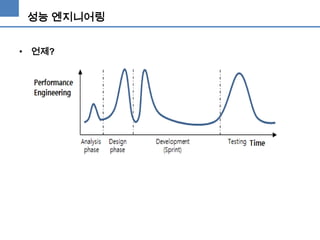
• 언제?
성능 엔지니어링

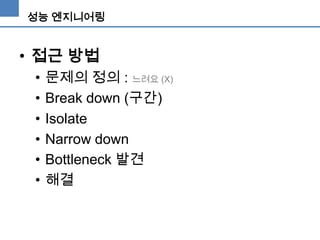
• 접근 방법
•
•
•
•
•
•

문제의 정의 : 느려요 (X)
Break down (구간)
Isolate
Narrow down
Bottleneck 발견
해결
성능 엔지니어링

• 필요한것은?
 도구 : 부하테스트 도구, 모니터링 도구, 프로파일링 도구
 역량 : FIN_WAIT가 모지?
 전문 지식 : 내부구조가 어떻게 되지?
 경험
 그리고 집요함!!  이것이 포인트!! (여기서
다 갈림)
Chapter 1.
자바 애플리케이션의 병목 구간 찾아내기
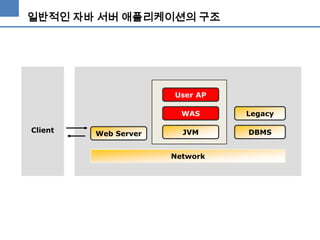
일반적인 자바 서버 애플리케이션의 구조

User AP
WAS
Client

Web Server

Legacy

JVM

DBMS

Network
기본지식
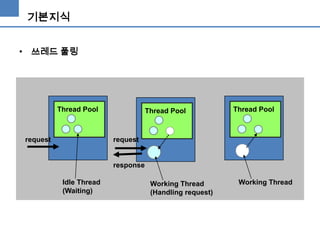
• 쓰레드 풀링

Thread Pool

request

Thread Pool

Thread Pool

request

response
Idle Thread
(Waiting)

Working Thread
(Handling request)

Working Thread
기본 지식
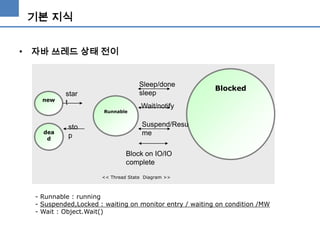
• 자바 쓰레드 상태 전이

new

Sleep/done
sleep

star
t
Runnable

dea
d

sto
p

Blocked

Wait/notify
Suspend/Resu
me

Block on IO/IO
complete
<< Thread State Diagram >>

- Runnable : running
- Suspended,Locked : waiting on monitor entry / waiting on condition /MW
- Wait : Object.Wait()
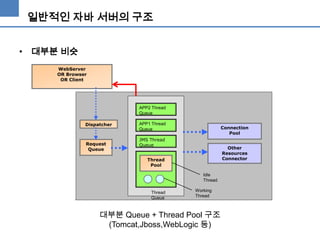
일반적인 자바 서버의 구조
• 대부분 비슷
WebServer
OR Browser
OR Client

APP2 Thread
Queue
Dispatcher

Request
Queue

APP1 Thread
Queue

Connection
Pool

JMS Thread
Queue

Other
Resources
Connector

Thread
Pool
Idle
Thread
Thread
Queue

Working
Thread

대부분 Queue + Thread Pool 구조
(Tomcat,Jboss,WebLogic 등)
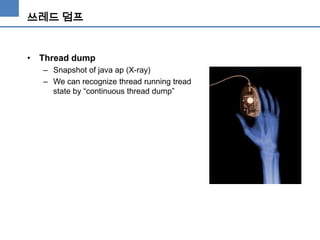
쓰레드 덤프

• Thread dump
– Snapshot of java ap (X-ray)
– We can recognize thread running tread
state by “continuous thread dump”
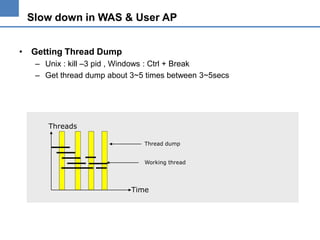
Slow down in WAS & User AP
• Getting Thread Dump
– Unix : kill –3 pid , Windows : Ctrl + Break
– Get thread dump about 3~5 times between 3~5secs

Threads
Thread dump
Working thread

Time
Slow down in WAS & User AP
• Thread dump
– It displays all of thread state by “THREAD STACK”

"ExecuteThread: '42' for queue: 'default'" daemon prio=5 tid=0x3504b0 nid=0x34 runnable
[0x9607e000..0x9607fc68]
at
at
at
at
at
at
at
at
at
at
at
at
at
at
at
at
at

java.net.SocketInputStream.read(SocketInputStream.java:85)
oracle.net.ns.Packet.receive(Unknown Source)
oracle.net.ns.NetInputStream.getNextPacket(Unknown Source)
oracle.net.ns.NetInputStream.read(Unknown Source)
oracle.jdbc.ttc7.MAREngine.unmarshalUB1(MAREngine.java:730)
oracle.jdbc.ttc7.MAREngine.unmarshalSB1(MAREngine.java:702)
oracle.jdbc.ttc7.Oall7.receive(Oall7.java:373)
oracle.jdbc.ttc7.TTC7Protocol.doOall7(TTC7Protocol.java:1427)
oracle.jdbc.ttc7.TTC7Protocol.fetch(TTC7Protocol.java:911)
oracle.jdbc.driver.OracleStatement.doExecuteQuery(OracleStatement.java:1948)
oracle.jdbc.driver.OracleStatement.doExecuteWithTimeout(OracleStatement.java:2137)
oracle.jdbc.driver.OraclePreparedStatement.executeUpdate(OraclePreparedStatement.java:404)
oracle.jdbc.driver.OraclePreparedStatement.executeQuery(OraclePreparedStatement.java:344)
weblogic.jdbc.pool.PreparedStatement.executeQuery(PreparedStatement.java:51)
weblogic.jdbc.rmi.internal.PreparedStatementImpl.executeQuery(PreparedStatementImpl.java:56)

Sun JVM
Thread name

Thread State

Thread id (signature)

Program stack of this thread
Slow down in WAS & User AP
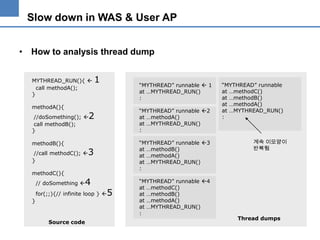
• How to analysis thread dump
MYTHREAD_RUN(){ 
call methodA();
}
methodA(){
//doSomething(); 
call methodB();
}
methodB(){
//call methodC(); 
}
methodC(){
// doSomething 

1

Source code

“MYTHREAD” runnable 2
at …methodA()
at …MYTHREAD_RUN()
:

2

“MYTHREAD” runnable 3
at …methodB()
at …methodA()
at …MYTHREAD_RUN()
:

3

4

for(;;){// infinite loop } 

}

“MYTHREAD” runnable  1
at …MYTHREAD_RUN()
:

5

“MYTHREAD” runnable 4
at …methodC()
at …methodB()
at …methodA()
at …MYTHREAD_RUN()
:

“MYTHREAD” runnable
at …methodC()
at …methodB()
at …methodA()
at …MYTHREAD_RUN()
:

계속 이모양이
반복됨

Thread dumps
Slow down in WAS & User AP
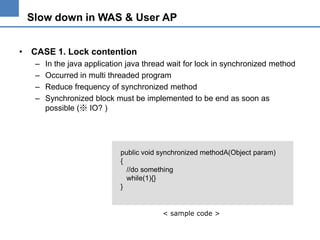
• CASE 1. Lock contention
–
–
–
–

In the java application java thread wait for lock in synchronized method
Occurred in multi threaded program
Reduce frequency of synchronized method
Synchronized block must be implemented to be end as soon as
possible (※ IO? )

public void synchronized methodA(Object param)
{
//do something
while(1){}
}

< sample code >
Slow down in WAS & User AP
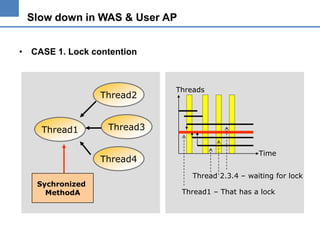
• CASE 1. Lock contention

Thread2

Thread1

Thread3
Thread4

Sychronized
MethodA

Threads

Time
Thread 2.3.4 – waiting for lock
Thread1 – That has a lock
Slow down in WAS & User AP
• CASE 1. Lock contention : Thread dump example
"ExecuteThread: '12' for queue: 'weblogic.kernel.Default'" daemon prio=10 tid=0x0055ae20
nid=23 lwp_id=3722788 waiting for monitor entry [0x2fb6e000..0x2fb6d530]
:
at java.lang.ClassLoader.loadClass(ClassLoader.java:255)
:
at org.apache.xerces.jaxp.SAXParserFactoryImpl.newSAXParser(Unknown Source)
at org.apache.axis.utils.XMLUtils.getSAXParser(XMLUtils.java:252)
- locked <0x329fcf50> (a java.lang.Class)
"ExecuteThread: '13' for queue: 'weblogic.kernel.Default'" daemon prio=10 tid=0x0055bde0 nid=24
lwp_id=3722789 waiting for monitor entry [0x2faec000..0x2faec530]
at org.apache.axis.utils.XMLUtils.getSAXParser(XMLUtils.java:247)
- waiting to lock <0x329fcf50> (a java.lang.Class)
:
"ExecuteThread: '15' for queue: 'weblogic.kernel.Default'" daemon prio=10 tid=0x0061dc20 nid=26
lwp_id=3722791 waiting for monitor entry [0x2f9ea000..0x2f9ea530]
at org.apache.axis.utils.XMLUtils.releaseSAXParser(XMLUtils.java:283)
- waiting to lock <0x329fcf50> (a java.lang.Class)
at
Slow down in WAS & User AP
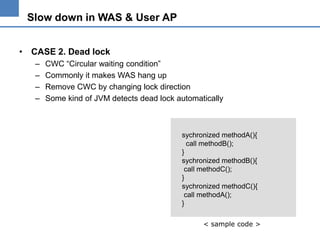
• CASE 2. Dead lock
–
–
–
–

CWC “Circular waiting condition”
Commonly it makes WAS hang up
Remove CWC by changing lock direction
Some kind of JVM detects dead lock automatically

sychronized methodA(){
call methodB();
}
sychronized methodB(){
call methodC();
}
sychronized methodC(){
call methodA();
}
< sample code >
Slow down in WAS & User AP
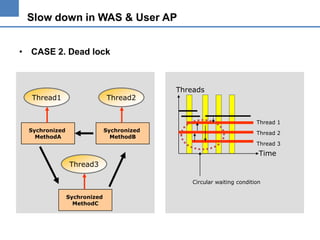
• CASE 2. Dead lock

Thread1

Thread2

Threads

Thread 1
Sychronized
MethodA

Sychronized
MethodB

Thread 2
Thread 3

Time
Thread3
Circular waiting condition
Sychronized
MethodC
Slow down in WAS & User AP
• CASE 2. Dead lock
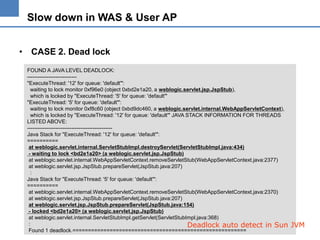
FOUND A JAVA LEVEL DEADLOCK:
---------------------------"ExecuteThread: '12' for queue: 'default'":
waiting to lock monitor 0xf96e0 (object 0xbd2e1a20, a weblogic.servlet.jsp.JspStub),
which is locked by "ExecuteThread: '5' for queue: 'default'"
"ExecuteThread: '5' for queue: 'default'":
waiting to lock monitor 0xf8c60 (object 0xbd9dc460, a weblogic.servlet.internal.WebAppServletContext),
which is locked by "ExecuteThread: '12' for queue: 'default'" JAVA STACK INFORMATION FOR THREADS
LISTED ABOVE:
-----------------------------------------------Java Stack for "ExecuteThread: '12' for queue: 'default'":
==========
at weblogic.servlet.internal.ServletStubImpl.destroyServlet(ServletStubImpl.java:434)
- waiting to lock <bd2e1a20> (a weblogic.servlet.jsp.JspStub)
at weblogic.servlet.internal.WebAppServletContext.removeServletStub(WebAppServletContext.java:2377)
at weblogic.servlet.jsp.JspStub.prepareServlet(JspStub.java:207)
:
Java Stack for "ExecuteThread: '5' for queue: 'default'":
==========
at weblogic.servlet.internal.WebAppServletContext.removeServletStub(WebAppServletContext.java:2370)
at weblogic.servlet.jsp.JspStub.prepareServlet(JspStub.java:207)
at weblogic.servlet.jsp.JspStub.prepareServlet(JspStub.java:154)
- locked <bd2e1a20> (a weblogic.servlet.jsp.JspStub)
at weblogic.servlet.internal.ServletStubImpl.getServlet(ServletStubImpl.java:368)
:
Deadlock auto detect in Sun
Found 1 deadlock.========================================================

JVM
Slow down in WAS & User AP
• CASE 2. Dead lock
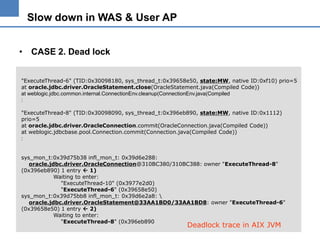
"ExecuteThread-6" (TID:0x30098180, sys_thread_t:0x39658e50, state:MW, native ID:0xf10) prio=5
at oracle.jdbc.driver.OracleStatement.close(OracleStatement.java(Compiled Code))
at weblogic.jdbc.common.internal.ConnectionEnv.cleanup(ConnectionEnv.java(Compiled
:
"ExecuteThread-8" (TID:0x30098090, sys_thread_t:0x396eb890, state:MW, native ID:0x1112)
prio=5
at oracle.jdbc.driver.OracleConnection.commit(OracleConnection.java(Compiled Code))
at weblogic.jdbcbase.pool.Connection.commit(Connection.java(Compiled Code))
:
sys_mon_t:0x39d75b38 infl_mon_t: 0x39d6e288:
oracle.jdbc.driver.OracleConnection@310BC380/310BC388: owner "ExecuteThread-8"
(0x396eb890) 1 entry  1)
Waiting to enter:
"ExecuteThread-10" (0x3977e2d0)
"ExecuteThread-6" (0x39658e50)
sys_mon_t:0x39d75bb8 infl_mon_t: 0x39d6e2a8: 
oracle.jdbc.driver.OracleStatement@33AA1BD0/33AA1BD8: owner "ExecuteThread-6"
(0x39658e50) 1 entry  2)
Waiting to enter:
"ExecuteThread-8" (0x396eb890

Deadlock trace in AIX JVM
Slow down in WAS & User AP
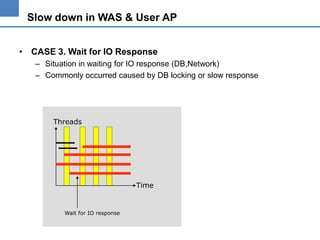
• CASE 3. Wait for IO Response
– Situation in waiting for IO response (DB,Network)
– Commonly occurred caused by DB locking or slow response

Threads

Time

Wait for IO response
Slow down in WAS & User AP
• CASE 3. Wait for IO Response

"ExecuteThread: '42' for queue: 'default'" daemon prio=5 tid=0x3504b0 nid=0x34 runnable [0x9607e000..0x9607fc68]
at java.net.SocketInputStream.socketRead(Native Method)
at java.net.SocketInputStream.read(SocketInputStream.java:85)
at oracle.net.ns.Packet.receive(Unknown Source)
at oracle.net.ns.NetInputStream.getNextPacket(Unknown Source)
at oracle.net.ns.NetInputStream.read(Unknown Source)
at oracle.jdbc.ttc7.MAREngine.unmarshalUB1(MAREngine.java:730)
at oracle.jdbc.ttc7.MAREngine.unmarshalSB1(MAREngine.java:702)
at oracle.jdbc.ttc7.Oall7.receive(Oall7.java:373)
at oracle.jdbc.ttc7.TTC7Protocol.doOall7(TTC7Protocol.java:1427)
at oracle.jdbc.ttc7.TTC7Protocol.fetch(TTC7Protocol.java:911)
at oracle.jdbc.driver.OracleStatement.doExecuteQuery(OracleStatement.java:1948)
at oracle.jdbc.driver.OracleStatement.doExecuteWithTimeout(OracleStatement.java:2137)
at oracle.jdbc.driver.OraclePreparedStatement.executeUpdate(OraclePreparedStatement.java:404)
at oracle.jdbc.driver.OraclePreparedStatement.executeQuery(OraclePreparedStatement.java:344)
at weblogic.jdbc.pool.PreparedStatement.executeQuery(PreparedStatement.java:51)
at weblogic.jdbc.rmi.internal.PreparedStatementImpl.executeQuery(PreparedStatementImpl.java:56)
at weblogic.jdbc.rmi.SerialPreparedStatement.executeQuery(SerialPreparedStatement.java:42)
at com.XXXX 생략
at ……..
Slow down in WAS & User AP
• CASE 4. High CPU usage
– When monitoring CPU usage by top,glance. WAS process consumes a
lot of CPU - almost 90~100%
– Find it using tools below
•
•
•
•

Sun : prstat,pstack,thread dump
AIX : ps –mp,dbx,thread dump
HP : glance,thread dump
See a document “How to find bottleneck in J2EE application “ in
http://www.j2eestudy.co.kr
Slow down in WAS & User AP
• CASE 4. High CPU usage
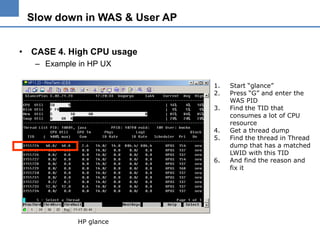
– Example in HP UX
1.
2.
3.
4.
5.
6.

HP glance

Start “glance”
Press “G” and enter the
WAS PID
Find the TID that
consumes a lot of CPU
resource
Get a thread dump
Find the thread in Thread
dump that has a matched
LWID with this TID
And find the reason and
fix it
Slow down in WAS & User AP
• Summarize
–
–
–
–

Thread dump is snapshot of Java Application.
If u meet a slowdown situation, Get a thread dump.
Analysis thread dump.
And fix it..
결론은…
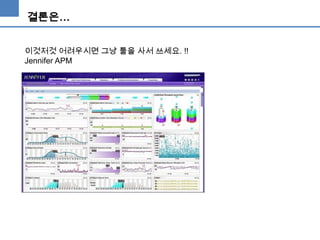
이것저것 어려우시면 그냥 툴을 사서 쓰세요. !!
Jennifer APM
Chapter 2.
JVM 튜닝
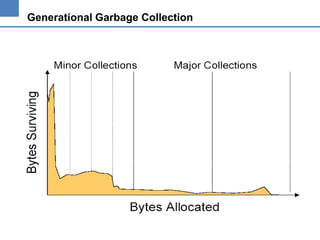
Generational Garbage Collection
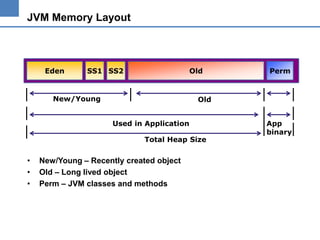
JVM Memory Layout

Eden

SS1 SS2

Old

New/Young

Old
Used in Application
Total Heap Size

•
•
•

Perm

New/Young – Recently created object
Old – Long lived object
Perm – JVM classes and methods

App
binary
Garbage Collection
•

Garbage Collection
– Collecting unused java object
– Cleaning memory
– Minor GC
• Collection memory in New/Young generation

– Major GC (Full GC)
• Collection memory in Old generation
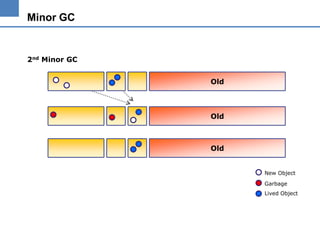
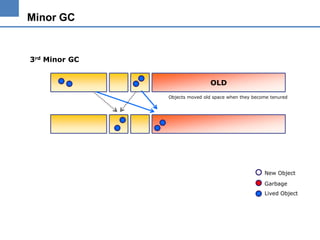
Minor GC
•

Minor Collection
– New/Young Generation
– Copy and Scavenge
– Very Fast
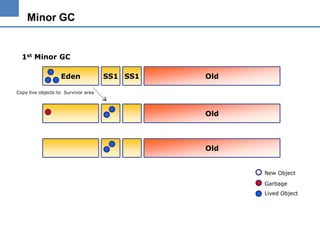
Minor GC

1st Minor GC
Eden

SS1 SS1

Old

Copy live objects to Survivor area

Old

Old
New Object
Garbage
Lived Object
Minor GC

2nd Minor GC

Old

Old

Old
New Object
Garbage
Lived Object
Minor GC

3rd Minor GC
OLD
Objects moved old space when they become tenured

New Object
Garbage
Lived Object
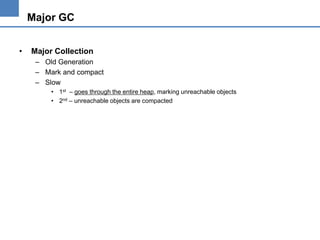
Major GC
•

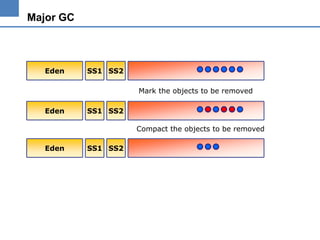
Major Collection
– Old Generation
– Mark and compact
– Slow
• 1st – goes through the entire heap, marking unreachable objects
• 2nd – unreachable objects are compacted
Major GC

Eden

SS1 SS2
Mark the objects to be removed

Eden

SS1 SS2
Compact the objects to be removed

Eden

SS1 SS2
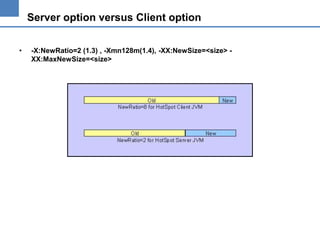
Server option versus Client option
•

-X:NewRatio=2 (1.3) , -Xmn128m(1.4), -XX:NewSize=<size> XX:MaxNewSize=<size>
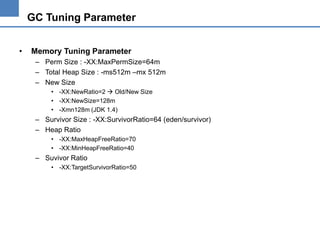
GC Tuning Parameter
•

Memory Tuning Parameter
– Perm Size : -XX:MaxPermSize=64m
– Total Heap Size : -ms512m –mx 512m
– New Size
• -XX:NewRatio=2  Old/New Size
• -XX:NewSize=128m
• -Xmn128m (JDK 1.4)

– Survivor Size : -XX:SurvivorRatio=64 (eden/survivor)
– Heap Ratio
• -XX:MaxHeapFreeRatio=70
• -XX:MinHeapFreeRatio=40

– Suvivor Ratio
• -XX:TargetSurvivorRatio=50
Support for –XX Option
•

•

Options that begin with -X are nonstandard (not guaranteed to be
supported on all VM implementations), and are subject to change
without notice in subsequent releases of the Java 2 SDK.
Because the -XX options have specific system requirements for
correct operation and may require privileged access to system
configuration parameters, they are not recommended for casual use.
These options are also subject to change without notice.
Garbage Collection Model
•

New type of GC
–
–
–
–

Default Collector
Parallel GC for young generation - JDK 1.4
Concurrent GC for old generation - JDK 1.4
Incremental Low Pause Collector (Train GC)
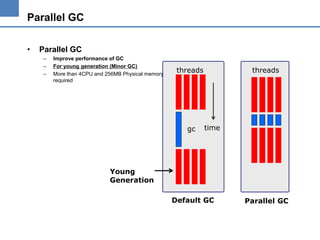
Parallel GC
•

Parallel GC
–
–
–

Improve performance of GC
For young generation (Minor GC)
More than 4CPU and 256MB Physical memory
required

threads

gc

threads

time

Young
Generation
Default GC

Parallel GC
Parallel GC
•

Two Parallel Collectors
– Low-pause : -XX:+UseParNewGC
• Near real-time or pause dependent application
• Works with
– Mark and compact collector
– Concurrent old area collector

– Throughput : -XX:+UseParallelGC
• Enterprise or throughput oriented application
• Works only with the mark and compact collector
Parallel GC
•

Throughput Collector
– –XX:+UseParallelGC
– -XX:ParallelGCThreads=<desired number>
– -XX:+UseAdaptiveSizePolicy
• Adaptive resizing of the young generation
Parallel GC
•

Throughput Collector
– AggressiveHeap
• Enabled By-XX:+AggresiveHeap
• Inspect machine resources and attempts to set various parameters to be optimal for
long-running,memory-intensive jobs
– Useful in more than 4 CPU machine, more than 256M
– Useful in Server Application
– Do not use with –ms and –mx

• Example) HP Itanium 1.4.2 java -XX:+ServerApp -XX:+AggresiveHeap -Xmn3400m spec.jbb.JBBmain -propfile Test1
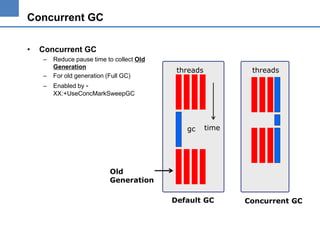
Concurrent GC
•

Concurrent GC
–
–

–

Reduce pause time to collect Old
Generation
For old generation (Full GC)

threads

threads

Enabled by XX:+UseConcMarkSweepGC

gc

time

Old
Generation
Default GC

Concurrent GC
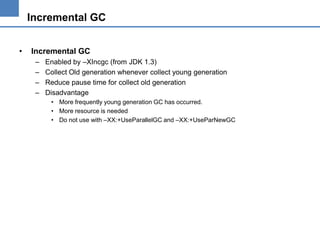
Incremental GC
•

Incremental GC
–
–
–
–

Enabled by –XIncgc (from JDK 1.3)
Collect Old generation whenever collect young generation
Reduce pause time for collect old generation
Disadvantage
• More frequently young generation GC has occurred.
• More resource is needed
• Do not use with –XX:+UseParallelGC and –XX:+UseParNewGC
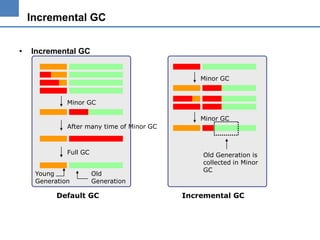
Incremental GC
•

Incremental GC
Minor GC

Minor GC

Minor GC
After many time of Minor GC

Full GC
Young
Generation

Old
Generation

Default GC

Old Generation is
collected in Minor
GC

Incremental GC
Incremental GC
•

Incremental GC
-client –XX:+PrintGCDetails -Xincgc –ms32m –mx32m

[GC [DefNew: 540K->35K(576K), 0.0053557 secs][Train: 3495K->3493K(32128K), 0.0043531 secs] 4036K>3529K(32704K), 0.0099856 secs]
[GC [DefNew: 547K->64K(576K), 0.0048216 secs][Train: 3529K->3540K(32128K), 0.0058683 secs] 4041K>3604K(32704K), 0.0109779 secs]
[GC [DefNew: 575K->64K(576K), 0.0164904 secs] 4116K->3670K(32704K), 0.0169019 secs]
[GC [DefNew: 576K->64K(576K), 0.0057541 secs][Train: 3671K->3651K(32128K), 0.0051286 secs] 4182K>3715K(32704K), 0.0113042 secs]
[GC [DefNew: 575K->56K(576K), 0.0114559 secs] 4227K->3745K(32704K), 0.0191390 secs]
[Full GC [Train MSC: 3689K->3280K(32128K), 0.0909523 secs] 4038K->3378K(32704K), 0.0910213 secs]
[GC [DefNew: 502K->64K(576K), 0.0173220 secs][Train: 3329K->3329K(32128K), 0.0066279 secs] 3782K>3393K(32704K), 0.0325125 secs

Minor GC

Young Generation GC

Old Generation GC in Minor GC Time

Sun JVM 1.4.1 in Windows OS
Full GC
Garbage Collection Measurement
•
•
•

-verbosegc (All Platform)
-XX:+PrintGCDetails ( JDK 1.4)
-Xverbosegc (HP)
Garbage Collection Measurement
•

-verbosegc

[GC 40549K->20909K(64768K), 0.0484179 secs]
[GC 41197K->21405K(64768K), 0.0411095 secs]
[GC 41693K->22995K(64768K), 0.0846190 secs]
[GC 43283K->23672K(64768K), 0.0492838 secs]
[Full GC 43960K->1749K(64768K), 0.1452965 secs]
[GC 22037K->2810K(64768K), 0.0310949 secs]
[GC 23098K->3657K(64768K), 0.0469624 secs]
[GC 23945K->4847K(64768K), 0.0580108 secs]
GC Time
Total Heap Size
Heap size after GC
Heap size before GC

Full GC
GC Log analysis using AWK script
•

Awk script

BEGIN{
printf("MinortMajortAlivetFreen");
}
{
if( substr($0,1,4) == "[GC "){
split($0,array," ");
printf("%st0.0t",array[3])

}

split(array[2],barray,"K")
before=barray[1]
after=substr(barray[2],3)
reclaim=before-after
printf("%st%sn",after,reclaim)

if( substr($0,1,9) == "[Full GC "){
split($0,array," ");
printf("0.0t%st",array[4])
split(array[3],barray,"K")
before = barray[1]
after = substr(barray[2],3)
reclaim = before - after
printf("%st%sn",after,reclaim)

}

}
next;

gc.awk

※ Usage
% awk –f gc.awk gc.log

Minor
Major
Alive
0.0484179 0.0
20909
0.0411095 0.0
21405
0.0846190 0.0
22995
0.0492838 0.0
23672
0.0
0.1452965 1749
0.0310949 0.0
2810
0.0469624 0.0
3657
0.0580108 0.0
4847

gc.log

Freed
19640
19792
18698
19611
42211
19227
19441
19098
GC Log analysis using AWK script

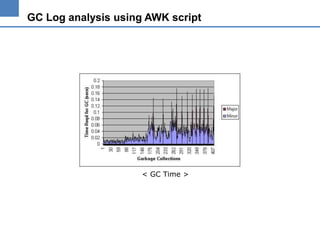
< GC Time >
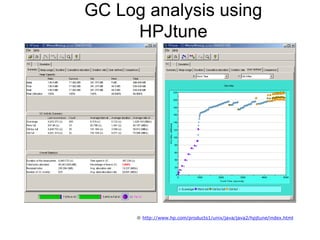
GC Log analysis using
HPJtune

※ http://www.hp.com/products1/unix/java/java2/hpjtune/index.html
GC Log analysis using AWK script

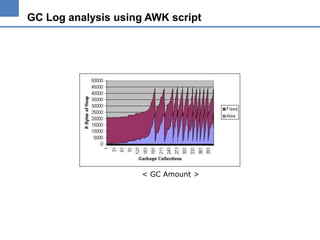
< GC Amount >
Garbage Collection Tuning
•

GC Tuning
– Find Most Important factor
• Low pause? Or High performance?
• Select appropriate GC model (New Model has risk!!)

– Select “server” or “client”
– Find appropriate Heap size by reviewing GC log
– Find ratio of young and old generation
Garbage Collection Tuning
•

GC Tuning
– Full GC  Most important factor in GC tuning
•
•
•
•

How frequently ? How long ?
Short and Frequently  decrease old space
Long and Sometimes  increase old space
Short and Sometimes  decrease throughput  by Load balancing

– Fix Heap size
• Set “ms” and “mx” as same
• Remove shrinking and growing overhead

– Don’t
• Don’t make heap size bigger than physical memory (SWAP)
• Don’t make new generation bigger than half the heap
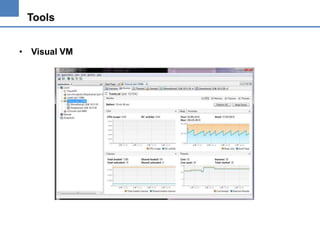
Tools
• Visual VM
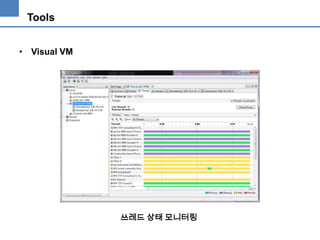
Tools
• Visual VM

쓰레드 상태 모니터링
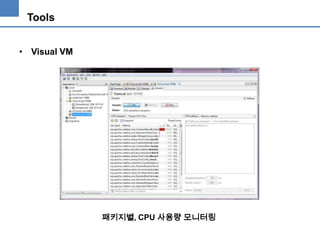
Tools
• Visual VM

패키지별, CPU 사용량 모니터링
Example
Example

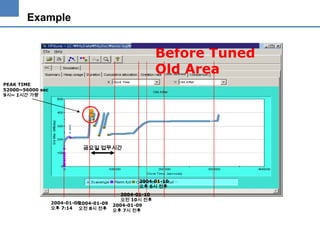
Before Tuned
Old Area
PEAK TIME
52000~56000 sec
9시~ 1시간 가량

금요일 업무시간

2004-01-10
오후 6시 전후

2004-01-08
2004-01-09
오후 7:14 오전 8시 전후

2004-01-10
오전 10시 전후
2004-01-09
오후 7시 전후
Example

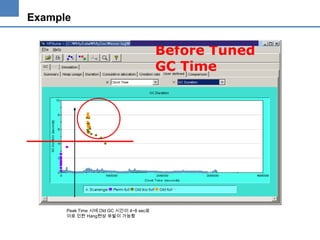
Before Tuned
GC Time

Peak Time 시에 Old GC 시간이 4~8 sec로
이로 인한 Hang현상 유발이 가능함
Example

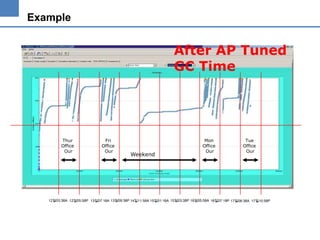
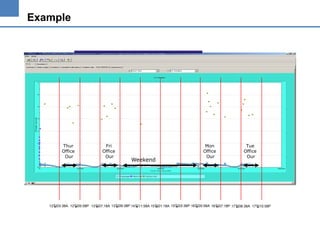
After AP Tuned
GC Time

Thur
Office
Our

Fri
Office
Our

Weekend

Mon
Office
Our

Tue
Office
Our

12일03:38A 12일05:58P 13일07:18A 13일09:38P 14일11:58A 15일01:18A 15일03:38P 16일05:58A 16일07:18P 17일08:38A 17일10:58P
Example

Thur
Office
Our

Fri
Office
Our

Weekend

Mon
Office
Our

Tue
Office
Our

12일03:38A 12일05:58P 13일07:18A 13일09:38P 14일11:58A 15일01:18A 15일03:38P 16일05:58A 16일07:18P 17일08:38A 17일10:58P
Chapter 3.
잡다한 자바 코딩 성능 팁들.
자바 코딩팁
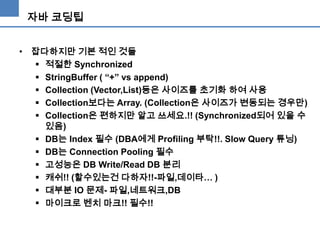
• 잡다하지만 기본 적인 것들
 적절한 Synchronized
 StringBuffer ( “+” vs append)
 Collection (Vector,List)등은 사이즈를 초기화 하여 사용
 Collection보다는 Array. (Collection은 사이즈가 변동되는 경우만)
 Collection은 편하지만 알고 쓰세요.!! (Synchronized되어 있을 수
있음)
 DB는 Index 필수 (DBA에게 Profiling 부탁!!. Slow Query 튜닝)
 DB는 Connection Pooling 필수
 고성능은 DB Write/Read DB 분리
 캐쉬!! (할수있는건 다하자!!-파일,데이타… )
 대부분 IO 문제- 파일,네트워크,DB
 마이크로 벤치 마크!! 필수!!
자바 코딩팁
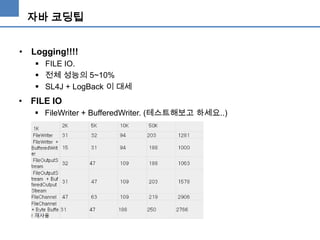
• Logging!!!!
 FILE IO.
 전체 성능의 5~10%
 SL4J + LogBack 이 대세

• FILE IO
 FileWriter + BufferedWriter. (테스트해보고 하세요..)
Application Server
•
•
•
•

HTTP 1.1 Keep Alive
DB Connection Pooling
적절한 Working Thread 수
불필요한 Logging 자제!!
감사합니다. :)

자바 성능 강의

  • 1.
  • 2.
    인사!! 조대협 • • • • • • • • 개발자 웹로직 기술 지원엔지니어 장애 진단, 성능 튜닝 컨설턴트 (SOA,EAI,ALM,Enterprise 2.0) 아키텍트 (대용량 분산 시스템) APAC 클라우드 수석 아키텍트 프리렌서 지금은 Chief(Cheap?) 아키텍트 블로그 : http://bcho.tistory.com 이메일 : bw.cho@samsung.com
  • 3.
    ICEBREAK 질문 : 성능이란?? • • • • 안나오면파트장님한테 깨지는 것 다음은 그룹장님에게 깨지는 것 막판은 실장님에게 소환 당하는 것 동시에 처리할 수 있는 트렌젝션의 양과, 응답시간. (TPS & Response Time)
  • 4.
    오늘은? • • • • 성능 엔지니어링 자바 애플리케이션의병목 구간 발견 JVM 튜닝 잡다한 자바 성능팁
  • 5.
  • 6.
    성능 엔지니어링 • 접근방법 • • • • • • 문제의 정의 : 느려요 (X) Break down (구간) Isolate Narrow down Bottleneck 발견 해결
  • 7.
    성능 엔지니어링 • 필요한것은? 도구 : 부하테스트 도구, 모니터링 도구, 프로파일링 도구  역량 : FIN_WAIT가 모지?  전문 지식 : 내부구조가 어떻게 되지?  경험  그리고 집요함!!  이것이 포인트!! (여기서 다 갈림)
  • 8.
    Chapter 1. 자바 애플리케이션의병목 구간 찾아내기
  • 9.
    일반적인 자바 서버애플리케이션의 구조 User AP WAS Client Web Server Legacy JVM DBMS Network
  • 10.
    기본지식 • 쓰레드 풀링 ThreadPool request Thread Pool Thread Pool request response Idle Thread (Waiting) Working Thread (Handling request) Working Thread
  • 11.
    기본 지식 • 자바쓰레드 상태 전이 new Sleep/done sleep star t Runnable dea d sto p Blocked Wait/notify Suspend/Resu me Block on IO/IO complete << Thread State Diagram >> - Runnable : running - Suspended,Locked : waiting on monitor entry / waiting on condition /MW - Wait : Object.Wait()
  • 12.
    일반적인 자바 서버의구조 • 대부분 비슷 WebServer OR Browser OR Client APP2 Thread Queue Dispatcher Request Queue APP1 Thread Queue Connection Pool JMS Thread Queue Other Resources Connector Thread Pool Idle Thread Thread Queue Working Thread 대부분 Queue + Thread Pool 구조 (Tomcat,Jboss,WebLogic 등)
  • 13.
    쓰레드 덤프 • Threaddump – Snapshot of java ap (X-ray) – We can recognize thread running tread state by “continuous thread dump”
  • 14.
    Slow down inWAS & User AP • Getting Thread Dump – Unix : kill –3 pid , Windows : Ctrl + Break – Get thread dump about 3~5 times between 3~5secs Threads Thread dump Working thread Time
  • 15.
    Slow down inWAS & User AP • Thread dump – It displays all of thread state by “THREAD STACK” "ExecuteThread: '42' for queue: 'default'" daemon prio=5 tid=0x3504b0 nid=0x34 runnable [0x9607e000..0x9607fc68] at at at at at at at at at at at at at at at at at java.net.SocketInputStream.read(SocketInputStream.java:85) oracle.net.ns.Packet.receive(Unknown Source) oracle.net.ns.NetInputStream.getNextPacket(Unknown Source) oracle.net.ns.NetInputStream.read(Unknown Source) oracle.net.ns.NetInputStream.read(Unknown Source) oracle.net.ns.NetInputStream.read(Unknown Source) oracle.jdbc.ttc7.MAREngine.unmarshalUB1(MAREngine.java:730) oracle.jdbc.ttc7.MAREngine.unmarshalSB1(MAREngine.java:702) oracle.jdbc.ttc7.Oall7.receive(Oall7.java:373) oracle.jdbc.ttc7.TTC7Protocol.doOall7(TTC7Protocol.java:1427) oracle.jdbc.ttc7.TTC7Protocol.fetch(TTC7Protocol.java:911) oracle.jdbc.driver.OracleStatement.doExecuteQuery(OracleStatement.java:1948) oracle.jdbc.driver.OracleStatement.doExecuteWithTimeout(OracleStatement.java:2137) oracle.jdbc.driver.OraclePreparedStatement.executeUpdate(OraclePreparedStatement.java:404) oracle.jdbc.driver.OraclePreparedStatement.executeQuery(OraclePreparedStatement.java:344) weblogic.jdbc.pool.PreparedStatement.executeQuery(PreparedStatement.java:51) weblogic.jdbc.rmi.internal.PreparedStatementImpl.executeQuery(PreparedStatementImpl.java:56) Sun JVM Thread name Thread State Thread id (signature) Program stack of this thread
  • 16.
    Slow down inWAS & User AP • How to analysis thread dump MYTHREAD_RUN(){  call methodA(); } methodA(){ //doSomething();  call methodB(); } methodB(){ //call methodC();  } methodC(){ // doSomething  1 Source code “MYTHREAD” runnable 2 at …methodA() at …MYTHREAD_RUN() : 2 “MYTHREAD” runnable 3 at …methodB() at …methodA() at …MYTHREAD_RUN() : 3 4 for(;;){// infinite loop }  } “MYTHREAD” runnable  1 at …MYTHREAD_RUN() : 5 “MYTHREAD” runnable 4 at …methodC() at …methodB() at …methodA() at …MYTHREAD_RUN() : “MYTHREAD” runnable at …methodC() at …methodB() at …methodA() at …MYTHREAD_RUN() : 계속 이모양이 반복됨 Thread dumps
  • 17.
    Slow down inWAS & User AP • CASE 1. Lock contention – – – – In the java application java thread wait for lock in synchronized method Occurred in multi threaded program Reduce frequency of synchronized method Synchronized block must be implemented to be end as soon as possible (※ IO? ) public void synchronized methodA(Object param) { //do something while(1){} } < sample code >
  • 18.
    Slow down inWAS & User AP • CASE 1. Lock contention Thread2 Thread1 Thread3 Thread4 Sychronized MethodA Threads Time Thread 2.3.4 – waiting for lock Thread1 – That has a lock
  • 19.
    Slow down inWAS & User AP • CASE 1. Lock contention : Thread dump example "ExecuteThread: '12' for queue: 'weblogic.kernel.Default'" daemon prio=10 tid=0x0055ae20 nid=23 lwp_id=3722788 waiting for monitor entry [0x2fb6e000..0x2fb6d530] : at java.lang.ClassLoader.loadClass(ClassLoader.java:255) : at org.apache.xerces.jaxp.SAXParserFactoryImpl.newSAXParser(Unknown Source) at org.apache.axis.utils.XMLUtils.getSAXParser(XMLUtils.java:252) - locked <0x329fcf50> (a java.lang.Class) "ExecuteThread: '13' for queue: 'weblogic.kernel.Default'" daemon prio=10 tid=0x0055bde0 nid=24 lwp_id=3722789 waiting for monitor entry [0x2faec000..0x2faec530] at org.apache.axis.utils.XMLUtils.getSAXParser(XMLUtils.java:247) - waiting to lock <0x329fcf50> (a java.lang.Class) : "ExecuteThread: '15' for queue: 'weblogic.kernel.Default'" daemon prio=10 tid=0x0061dc20 nid=26 lwp_id=3722791 waiting for monitor entry [0x2f9ea000..0x2f9ea530] at org.apache.axis.utils.XMLUtils.releaseSAXParser(XMLUtils.java:283) - waiting to lock <0x329fcf50> (a java.lang.Class) at
  • 20.
    Slow down inWAS & User AP • CASE 2. Dead lock – – – – CWC “Circular waiting condition” Commonly it makes WAS hang up Remove CWC by changing lock direction Some kind of JVM detects dead lock automatically sychronized methodA(){ call methodB(); } sychronized methodB(){ call methodC(); } sychronized methodC(){ call methodA(); } < sample code >
  • 21.
    Slow down inWAS & User AP • CASE 2. Dead lock Thread1 Thread2 Threads Thread 1 Sychronized MethodA Sychronized MethodB Thread 2 Thread 3 Time Thread3 Circular waiting condition Sychronized MethodC
  • 22.
    Slow down inWAS & User AP • CASE 2. Dead lock FOUND A JAVA LEVEL DEADLOCK: ---------------------------"ExecuteThread: '12' for queue: 'default'": waiting to lock monitor 0xf96e0 (object 0xbd2e1a20, a weblogic.servlet.jsp.JspStub), which is locked by "ExecuteThread: '5' for queue: 'default'" "ExecuteThread: '5' for queue: 'default'": waiting to lock monitor 0xf8c60 (object 0xbd9dc460, a weblogic.servlet.internal.WebAppServletContext), which is locked by "ExecuteThread: '12' for queue: 'default'" JAVA STACK INFORMATION FOR THREADS LISTED ABOVE: -----------------------------------------------Java Stack for "ExecuteThread: '12' for queue: 'default'": ========== at weblogic.servlet.internal.ServletStubImpl.destroyServlet(ServletStubImpl.java:434) - waiting to lock <bd2e1a20> (a weblogic.servlet.jsp.JspStub) at weblogic.servlet.internal.WebAppServletContext.removeServletStub(WebAppServletContext.java:2377) at weblogic.servlet.jsp.JspStub.prepareServlet(JspStub.java:207) : Java Stack for "ExecuteThread: '5' for queue: 'default'": ========== at weblogic.servlet.internal.WebAppServletContext.removeServletStub(WebAppServletContext.java:2370) at weblogic.servlet.jsp.JspStub.prepareServlet(JspStub.java:207) at weblogic.servlet.jsp.JspStub.prepareServlet(JspStub.java:154) - locked <bd2e1a20> (a weblogic.servlet.jsp.JspStub) at weblogic.servlet.internal.ServletStubImpl.getServlet(ServletStubImpl.java:368) : Deadlock auto detect in Sun Found 1 deadlock.======================================================== JVM
  • 23.
    Slow down inWAS & User AP • CASE 2. Dead lock "ExecuteThread-6" (TID:0x30098180, sys_thread_t:0x39658e50, state:MW, native ID:0xf10) prio=5 at oracle.jdbc.driver.OracleStatement.close(OracleStatement.java(Compiled Code)) at weblogic.jdbc.common.internal.ConnectionEnv.cleanup(ConnectionEnv.java(Compiled : "ExecuteThread-8" (TID:0x30098090, sys_thread_t:0x396eb890, state:MW, native ID:0x1112) prio=5 at oracle.jdbc.driver.OracleConnection.commit(OracleConnection.java(Compiled Code)) at weblogic.jdbcbase.pool.Connection.commit(Connection.java(Compiled Code)) : sys_mon_t:0x39d75b38 infl_mon_t: 0x39d6e288: oracle.jdbc.driver.OracleConnection@310BC380/310BC388: owner "ExecuteThread-8" (0x396eb890) 1 entry  1) Waiting to enter: "ExecuteThread-10" (0x3977e2d0) "ExecuteThread-6" (0x39658e50) sys_mon_t:0x39d75bb8 infl_mon_t: 0x39d6e2a8: oracle.jdbc.driver.OracleStatement@33AA1BD0/33AA1BD8: owner "ExecuteThread-6" (0x39658e50) 1 entry  2) Waiting to enter: "ExecuteThread-8" (0x396eb890 Deadlock trace in AIX JVM
  • 24.
    Slow down inWAS & User AP • CASE 3. Wait for IO Response – Situation in waiting for IO response (DB,Network) – Commonly occurred caused by DB locking or slow response Threads Time Wait for IO response
  • 25.
    Slow down inWAS & User AP • CASE 3. Wait for IO Response "ExecuteThread: '42' for queue: 'default'" daemon prio=5 tid=0x3504b0 nid=0x34 runnable [0x9607e000..0x9607fc68] at java.net.SocketInputStream.socketRead(Native Method) at java.net.SocketInputStream.read(SocketInputStream.java:85) at oracle.net.ns.Packet.receive(Unknown Source) at oracle.net.ns.NetInputStream.getNextPacket(Unknown Source) at oracle.net.ns.NetInputStream.read(Unknown Source) at oracle.net.ns.NetInputStream.read(Unknown Source) at oracle.net.ns.NetInputStream.read(Unknown Source) at oracle.jdbc.ttc7.MAREngine.unmarshalUB1(MAREngine.java:730) at oracle.jdbc.ttc7.MAREngine.unmarshalSB1(MAREngine.java:702) at oracle.jdbc.ttc7.Oall7.receive(Oall7.java:373) at oracle.jdbc.ttc7.TTC7Protocol.doOall7(TTC7Protocol.java:1427) at oracle.jdbc.ttc7.TTC7Protocol.fetch(TTC7Protocol.java:911) at oracle.jdbc.driver.OracleStatement.doExecuteQuery(OracleStatement.java:1948) at oracle.jdbc.driver.OracleStatement.doExecuteWithTimeout(OracleStatement.java:2137) at oracle.jdbc.driver.OraclePreparedStatement.executeUpdate(OraclePreparedStatement.java:404) at oracle.jdbc.driver.OraclePreparedStatement.executeQuery(OraclePreparedStatement.java:344) at weblogic.jdbc.pool.PreparedStatement.executeQuery(PreparedStatement.java:51) at weblogic.jdbc.rmi.internal.PreparedStatementImpl.executeQuery(PreparedStatementImpl.java:56) at weblogic.jdbc.rmi.SerialPreparedStatement.executeQuery(SerialPreparedStatement.java:42) at com.XXXX 생략 at ……..
  • 26.
    Slow down inWAS & User AP • CASE 4. High CPU usage – When monitoring CPU usage by top,glance. WAS process consumes a lot of CPU - almost 90~100% – Find it using tools below • • • • Sun : prstat,pstack,thread dump AIX : ps –mp,dbx,thread dump HP : glance,thread dump See a document “How to find bottleneck in J2EE application “ in http://www.j2eestudy.co.kr
  • 27.
    Slow down inWAS & User AP • CASE 4. High CPU usage – Example in HP UX 1. 2. 3. 4. 5. 6. HP glance Start “glance” Press “G” and enter the WAS PID Find the TID that consumes a lot of CPU resource Get a thread dump Find the thread in Thread dump that has a matched LWID with this TID And find the reason and fix it
  • 28.
    Slow down inWAS & User AP • Summarize – – – – Thread dump is snapshot of Java Application. If u meet a slowdown situation, Get a thread dump. Analysis thread dump. And fix it..
  • 29.
    결론은… 이것저것 어려우시면 그냥툴을 사서 쓰세요. !! Jennifer APM
  • 30.
  • 31.
  • 32.
    JVM Memory Layout Eden SS1SS2 Old New/Young Old Used in Application Total Heap Size • • • Perm New/Young – Recently created object Old – Long lived object Perm – JVM classes and methods App binary
  • 33.
    Garbage Collection • Garbage Collection –Collecting unused java object – Cleaning memory – Minor GC • Collection memory in New/Young generation – Major GC (Full GC) • Collection memory in Old generation
  • 34.
    Minor GC • Minor Collection –New/Young Generation – Copy and Scavenge – Very Fast
  • 35.
    Minor GC 1st MinorGC Eden SS1 SS1 Old Copy live objects to Survivor area Old Old New Object Garbage Lived Object
  • 36.
    Minor GC 2nd MinorGC Old Old Old New Object Garbage Lived Object
  • 37.
    Minor GC 3rd MinorGC OLD Objects moved old space when they become tenured New Object Garbage Lived Object
  • 38.
    Major GC • Major Collection –Old Generation – Mark and compact – Slow • 1st – goes through the entire heap, marking unreachable objects • 2nd – unreachable objects are compacted
  • 39.
    Major GC Eden SS1 SS2 Markthe objects to be removed Eden SS1 SS2 Compact the objects to be removed Eden SS1 SS2
  • 40.
    Server option versusClient option • -X:NewRatio=2 (1.3) , -Xmn128m(1.4), -XX:NewSize=<size> XX:MaxNewSize=<size>
  • 41.
    GC Tuning Parameter • MemoryTuning Parameter – Perm Size : -XX:MaxPermSize=64m – Total Heap Size : -ms512m –mx 512m – New Size • -XX:NewRatio=2  Old/New Size • -XX:NewSize=128m • -Xmn128m (JDK 1.4) – Survivor Size : -XX:SurvivorRatio=64 (eden/survivor) – Heap Ratio • -XX:MaxHeapFreeRatio=70 • -XX:MinHeapFreeRatio=40 – Suvivor Ratio • -XX:TargetSurvivorRatio=50
  • 42.
    Support for –XXOption • • Options that begin with -X are nonstandard (not guaranteed to be supported on all VM implementations), and are subject to change without notice in subsequent releases of the Java 2 SDK. Because the -XX options have specific system requirements for correct operation and may require privileged access to system configuration parameters, they are not recommended for casual use. These options are also subject to change without notice.
  • 43.
    Garbage Collection Model • Newtype of GC – – – – Default Collector Parallel GC for young generation - JDK 1.4 Concurrent GC for old generation - JDK 1.4 Incremental Low Pause Collector (Train GC)
  • 44.
    Parallel GC • Parallel GC – – – Improveperformance of GC For young generation (Minor GC) More than 4CPU and 256MB Physical memory required threads gc threads time Young Generation Default GC Parallel GC
  • 45.
    Parallel GC • Two ParallelCollectors – Low-pause : -XX:+UseParNewGC • Near real-time or pause dependent application • Works with – Mark and compact collector – Concurrent old area collector – Throughput : -XX:+UseParallelGC • Enterprise or throughput oriented application • Works only with the mark and compact collector
  • 46.
    Parallel GC • Throughput Collector ––XX:+UseParallelGC – -XX:ParallelGCThreads=<desired number> – -XX:+UseAdaptiveSizePolicy • Adaptive resizing of the young generation
  • 47.
    Parallel GC • Throughput Collector –AggressiveHeap • Enabled By-XX:+AggresiveHeap • Inspect machine resources and attempts to set various parameters to be optimal for long-running,memory-intensive jobs – Useful in more than 4 CPU machine, more than 256M – Useful in Server Application – Do not use with –ms and –mx • Example) HP Itanium 1.4.2 java -XX:+ServerApp -XX:+AggresiveHeap -Xmn3400m spec.jbb.JBBmain -propfile Test1
  • 48.
    Concurrent GC • Concurrent GC – – – Reducepause time to collect Old Generation For old generation (Full GC) threads threads Enabled by XX:+UseConcMarkSweepGC gc time Old Generation Default GC Concurrent GC
  • 49.
    Incremental GC • Incremental GC – – – – Enabledby –XIncgc (from JDK 1.3) Collect Old generation whenever collect young generation Reduce pause time for collect old generation Disadvantage • More frequently young generation GC has occurred. • More resource is needed • Do not use with –XX:+UseParallelGC and –XX:+UseParNewGC
  • 50.
    Incremental GC • Incremental GC MinorGC Minor GC Minor GC After many time of Minor GC Full GC Young Generation Old Generation Default GC Old Generation is collected in Minor GC Incremental GC
  • 51.
    Incremental GC • Incremental GC -client–XX:+PrintGCDetails -Xincgc –ms32m –mx32m [GC [DefNew: 540K->35K(576K), 0.0053557 secs][Train: 3495K->3493K(32128K), 0.0043531 secs] 4036K>3529K(32704K), 0.0099856 secs] [GC [DefNew: 547K->64K(576K), 0.0048216 secs][Train: 3529K->3540K(32128K), 0.0058683 secs] 4041K>3604K(32704K), 0.0109779 secs] [GC [DefNew: 575K->64K(576K), 0.0164904 secs] 4116K->3670K(32704K), 0.0169019 secs] [GC [DefNew: 576K->64K(576K), 0.0057541 secs][Train: 3671K->3651K(32128K), 0.0051286 secs] 4182K>3715K(32704K), 0.0113042 secs] [GC [DefNew: 575K->56K(576K), 0.0114559 secs] 4227K->3745K(32704K), 0.0191390 secs] [Full GC [Train MSC: 3689K->3280K(32128K), 0.0909523 secs] 4038K->3378K(32704K), 0.0910213 secs] [GC [DefNew: 502K->64K(576K), 0.0173220 secs][Train: 3329K->3329K(32128K), 0.0066279 secs] 3782K>3393K(32704K), 0.0325125 secs Minor GC Young Generation GC Old Generation GC in Minor GC Time Sun JVM 1.4.1 in Windows OS Full GC
  • 52.
    Garbage Collection Measurement • • • -verbosegc(All Platform) -XX:+PrintGCDetails ( JDK 1.4) -Xverbosegc (HP)
  • 53.
    Garbage Collection Measurement • -verbosegc [GC40549K->20909K(64768K), 0.0484179 secs] [GC 41197K->21405K(64768K), 0.0411095 secs] [GC 41693K->22995K(64768K), 0.0846190 secs] [GC 43283K->23672K(64768K), 0.0492838 secs] [Full GC 43960K->1749K(64768K), 0.1452965 secs] [GC 22037K->2810K(64768K), 0.0310949 secs] [GC 23098K->3657K(64768K), 0.0469624 secs] [GC 23945K->4847K(64768K), 0.0580108 secs] GC Time Total Heap Size Heap size after GC Heap size before GC Full GC
  • 54.
    GC Log analysisusing AWK script • Awk script BEGIN{ printf("MinortMajortAlivetFreen"); } { if( substr($0,1,4) == "[GC "){ split($0,array," "); printf("%st0.0t",array[3]) } split(array[2],barray,"K") before=barray[1] after=substr(barray[2],3) reclaim=before-after printf("%st%sn",after,reclaim) if( substr($0,1,9) == "[Full GC "){ split($0,array," "); printf("0.0t%st",array[4]) split(array[3],barray,"K") before = barray[1] after = substr(barray[2],3) reclaim = before - after printf("%st%sn",after,reclaim) } } next; gc.awk ※ Usage % awk –f gc.awk gc.log Minor Major Alive 0.0484179 0.0 20909 0.0411095 0.0 21405 0.0846190 0.0 22995 0.0492838 0.0 23672 0.0 0.1452965 1749 0.0310949 0.0 2810 0.0469624 0.0 3657 0.0580108 0.0 4847 gc.log Freed 19640 19792 18698 19611 42211 19227 19441 19098
  • 55.
    GC Log analysisusing AWK script < GC Time >
  • 56.
    GC Log analysisusing HPJtune ※ http://www.hp.com/products1/unix/java/java2/hpjtune/index.html
  • 57.
    GC Log analysisusing AWK script < GC Amount >
  • 58.
    Garbage Collection Tuning • GCTuning – Find Most Important factor • Low pause? Or High performance? • Select appropriate GC model (New Model has risk!!) – Select “server” or “client” – Find appropriate Heap size by reviewing GC log – Find ratio of young and old generation
  • 59.
    Garbage Collection Tuning • GCTuning – Full GC  Most important factor in GC tuning • • • • How frequently ? How long ? Short and Frequently  decrease old space Long and Sometimes  increase old space Short and Sometimes  decrease throughput  by Load balancing – Fix Heap size • Set “ms” and “mx” as same • Remove shrinking and growing overhead – Don’t • Don’t make heap size bigger than physical memory (SWAP) • Don’t make new generation bigger than half the heap
  • 60.
  • 61.
    Tools • Visual VM 쓰레드상태 모니터링
  • 62.
    Tools • Visual VM 패키지별,CPU 사용량 모니터링
  • 63.
  • 64.
    Example Before Tuned Old Area PEAKTIME 52000~56000 sec 9시~ 1시간 가량 금요일 업무시간 2004-01-10 오후 6시 전후 2004-01-08 2004-01-09 오후 7:14 오전 8시 전후 2004-01-10 오전 10시 전후 2004-01-09 오후 7시 전후
  • 65.
    Example Before Tuned GC Time PeakTime 시에 Old GC 시간이 4~8 sec로 이로 인한 Hang현상 유발이 가능함
  • 66.
    Example After AP Tuned GCTime Thur Office Our Fri Office Our Weekend Mon Office Our Tue Office Our 12일03:38A 12일05:58P 13일07:18A 13일09:38P 14일11:58A 15일01:18A 15일03:38P 16일05:58A 16일07:18P 17일08:38A 17일10:58P
  • 67.
    Example Thur Office Our Fri Office Our Weekend Mon Office Our Tue Office Our 12일03:38A 12일05:58P 13일07:18A13일09:38P 14일11:58A 15일01:18A 15일03:38P 16일05:58A 16일07:18P 17일08:38A 17일10:58P
  • 68.
    Chapter 3. 잡다한 자바코딩 성능 팁들.
  • 69.
    자바 코딩팁 • 잡다하지만기본 적인 것들  적절한 Synchronized  StringBuffer ( “+” vs append)  Collection (Vector,List)등은 사이즈를 초기화 하여 사용  Collection보다는 Array. (Collection은 사이즈가 변동되는 경우만)  Collection은 편하지만 알고 쓰세요.!! (Synchronized되어 있을 수 있음)  DB는 Index 필수 (DBA에게 Profiling 부탁!!. Slow Query 튜닝)  DB는 Connection Pooling 필수  고성능은 DB Write/Read DB 분리  캐쉬!! (할수있는건 다하자!!-파일,데이타… )  대부분 IO 문제- 파일,네트워크,DB  마이크로 벤치 마크!! 필수!!
  • 70.
    자바 코딩팁 • Logging!!!! FILE IO.  전체 성능의 5~10%  SL4J + LogBack 이 대세 • FILE IO  FileWriter + BufferedWriter. (테스트해보고 하세요..)
  • 71.
    Application Server • • • • HTTP 1.1Keep Alive DB Connection Pooling 적절한 Working Thread 수 불필요한 Logging 자제!!
  • 72.