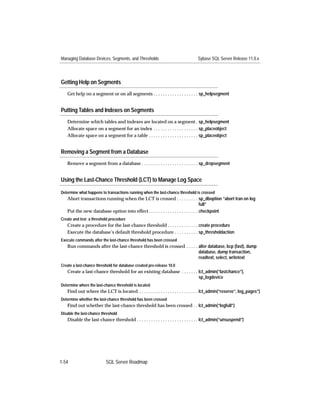
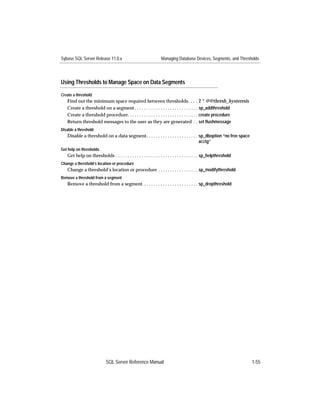
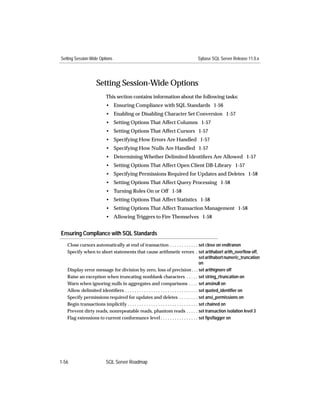
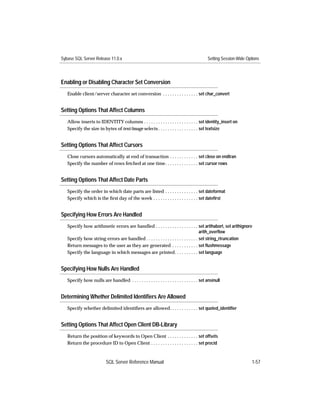
Sybase SQL Server™ Reference Manual

  Volume 1: Commands, Functions,
             and Topics


                 Sybase SQL Server Release 11.0.x
                 Document ID: 32401-01-1100-03
                 Last Revised: January 24, 1996
Principal author: Server Publications Group

Document ID: 32401-01-1100
                         This publication pertains to Sybase SQL Server Release 11.0.x of the Sybase
                         database management software and to any subsequent release until otherwise
                         indicated in new editions or technical notes. Information in this document is
                         subject to change without notice. The software described herein is furnished under
                         a license agreement, and it may be used or copied only in accordance with the
                         terms of that agreement.


Document Orders
                         To order additional documents, U.S. and Canadian customers should call
                         Customer Fulfillment at (800) 685-8225, fax (617) 229-9845.
                         Customers in other countries with a U.S. license agreement may contact Customer
                         Fulfillment via the above fax number. All other international customers should
                         contact their Sybase subsidiary or local distributor.
                         Upgrades are provided only at regularly scheduled software release dates.
                         Copyright © 1989–1995 by Sybase, Inc. All rights reserved.
                         No part of this publication may be reproduced, transmitted, or translated in any
                         form or by any means, electronic, mechanical, manual, optical, or otherwise,
                         without the prior written permission of Sybase, Inc.


Sybase Trademarks
                         APT-FORMS, Data Workbench, DBA Companion, Deft, GainExposure, Gain
                         Momentum, Navigation Server, PowerBuilder, Powersoft, Replication Server,
                         SA Companion, SQL Advantage, SQL Debug, SQL Monitor, SQL SMART, SQL
                         Solutions, SQR, SYBASE, the Sybase logo, Transact-SQL, and VQL are registered
                         trademarks of Sybase, Inc. Adaptable Windowing Environment, ADA Workbench,
                         AnswerBase, Application Manager, APT-Build, APT-Edit, APT-Execute,
                         APT-Library, APT-Translator, APT Workbench, Backup Server, Bit-Wise,
                         Client-Library, Client/Server Architecture for the Online Enterprise,
                         Client/Server for the Real World, Client Services, Configurator, Connection
                         Manager, Database Analyzer, DBA Companion Application Manager, DBA
                         Companion Resource Manager, DB-Library, Deft Analyst, Deft Designer, Deft
                         Educational, Deft Professional, Deft Trial, Developers Workbench,
                         DirectCONNECT, Easy SQR, Embedded SQL, EMS, Enterprise Builder, Enterprise
                         Client/Server, Enterprise CONNECT, Enterprise Manager, Enterprise SQL Server
                         Manager, Enterprise Work Architecture, Enterprise Work Designer, Enterprise
                         Work Modeler, EWA, Gain Interplay, Gateway Manager, InfoMaker, Interactive
                         Quality Accelerator, Intermedia Server, IQ Accelerator, Maintenance Express,
                         MAP, MDI, MDI Access Server, MDI Database Gateway, MethodSet, Movedb,
                         Navigation Server Manager, Net-Gateway, Net-Library, New Media Studio,
                         OmniCONNECT, OmniSQL Access Module, OmniSQL Gateway, OmniSQL
                         Server, OmniSQL Toolkit, Open Client, Open Client/Server, Open Client/Server
                         Interfaces, Open Gateway, Open Server, Open Solutions, PC APT-Execute,
PC DB-Net, PC Net Library, Powersoft Portfolio, Replication Agent, Replication
                    Driver, Replication Server Manager, Report-Execute, Report Workbench, Resource
                    Manager, RW-DisplayLib, RW-Library, SAFE, SDF, Secure SQL Server, Secure SQL
                    Toolset, SKILS, SQL Anywhere, SQL Code Checker, SQL Edit, SQL Edit/TPU, SQL
                    Server, SQL Server/CFT, SQL Server/DBM, SQL Server Manager, SQL Server
                    Monitor, SQL Station, SQL Toolset, SQR Developers Kit, SQR Execute, SQR
                    Toolkit, SQR Workbench, Sybase Client/Server Interfaces, Sybase Gateways,
                    Sybase Intermedia, Sybase Interplay, Sybase IQ, Sybase MPP, Sybase SQL Desktop,
                    Sybase SQL Lifecycle, Sybase SQL Workgroup, Sybase Synergy Program, Sybase
                    Virtual Server Architecture, Sybase User Workbench, SyBooks, System 10, System
                    11, the System XI logo, Tabular Data Stream, The Enterprise Client/Server
                    Company, The Online Information Center, Warehouse WORKS, Watcom SQL,
                    WebSights, WorkGroup SQL Server, XA-Library, and XA-Server are trademarks of
                    Sybase, Inc.
                    All other company and product names used herein may be trademarks or
                    registered trademarks of their respective companies.


Restricted Rights
                    Use, duplication, or disclosure by the government is subject to the restrictions set
                    forth in subparagraph (c)(1)(ii) of DFARS 52.227-7013 for the DOD and as set forth
                    in FAR 52.227-19(a)-(d) for civilian agencies.
                    Sybase, Inc., 6475 Christie Avenue, Emeryville, CA 94608.
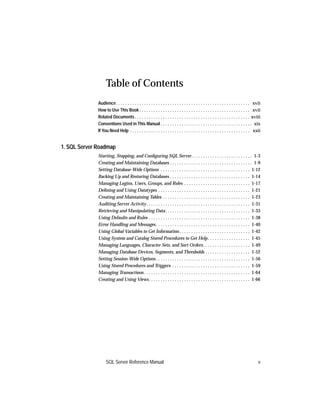
Table of Contents
              Audience. . . . . . . . . . . . . . . . . . . . . . . . . . . . . . . . . . . . . . . . . . . . . . . . . . . . . . . . . xvii
              How to Use This Book . . . . . . . . . . . . . . . . . . . . . . . . . . . . . . . . . . . . . . . . . . . . . . . xvii
              Related Documents . . . . . . . . . . . . . . . . . . . . . . . . . . . . . . . . . . . . . . . . . . . . . . . . . xviii
              Conventions Used in This Manual . . . . . . . . . . . . . . . . . . . . . . . . . . . . . . . . . . . . . . . xix
              If You Need Help . . . . . . . . . . . . . . . . . . . . . . . . . . . . . . . . . . . . . . . . . . . . . . . . . . . xxii


1. SQL Server Roadmap
              Starting, Stopping, and Configuring SQL Server. . . . . . . . . . . . . . . . . . . . . . . . . . 1-3
              Creating and Maintaining Databases . . . . . . . . . . . . . . . . . . . . . . . . . . . . . . . . . . . 1-9
              Setting Database-Wide Options . . . . . . . . . . . . . . . . . . . . . . . . . . . . . . . . . . . . . . 1-12
              Backing Up and Restoring Databases . . . . . . . . . . . . . . . . . . . . . . . . . . . . . . . . . . 1-14
              Managing Logins, Users, Groups, and Roles . . . . . . . . . . . . . . . . . . . . . . . . . . . . 1-17
              Defining and Using Datatypes . . . . . . . . . . . . . . . . . . . . . . . . . . . . . . . . . . . . . . . 1-21
              Creating and Maintaining Tables . . . . . . . . . . . . . . . . . . . . . . . . . . . . . . . . . . . . . 1-23
              Auditing Server Activity . . . . . . . . . . . . . . . . . . . . . . . . . . . . . . . . . . . . . . . . . . . . 1-31
              Retrieving and Manipulating Data . . . . . . . . . . . . . . . . . . . . . . . . . . . . . . . . . . . . 1-33
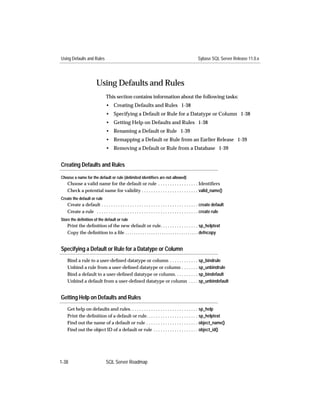
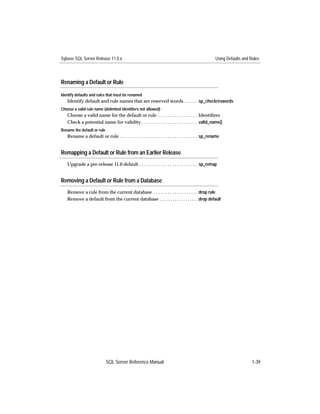
              Using Defaults and Rules . . . . . . . . . . . . . . . . . . . . . . . . . . . . . . . . . . . . . . . . . . . 1-38
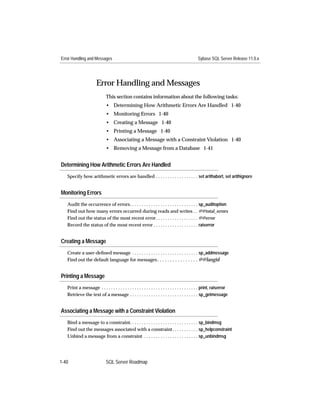
              Error Handling and Messages . . . . . . . . . . . . . . . . . . . . . . . . . . . . . . . . . . . . . . . . 1-40
              Using Global Variables to Get Information . . . . . . . . . . . . . . . . . . . . . . . . . . . . . . 1-42
              Using System and Catalog Stored Procedures to Get Help . . . . . . . . . . . . . . . . . . 1-45
              Managing Languages, Character Sets, and Sort Orders . . . . . . . . . . . . . . . . . . . . 1-49
              Managing Database Devices, Segments, and Thresholds . . . . . . . . . . . . . . . . . . . 1-52
              Setting Session-Wide Options . . . . . . . . . . . . . . . . . . . . . . . . . . . . . . . . . . . . . . . . 1-56
              Using Stored Procedures and Triggers . . . . . . . . . . . . . . . . . . . . . . . . . . . . . . . . . 1-59
              Managing Transactions . . . . . . . . . . . . . . . . . . . . . . . . . . . . . . . . . . . . . . . . . . . . . 1-64
              Creating and Using Views. . . . . . . . . . . . . . . . . . . . . . . . . . . . . . . . . . . . . . . . . . . 1-66


                   SQL Server Reference Manual                                                                                            v
Sybase SQL Server Release 11.0.x


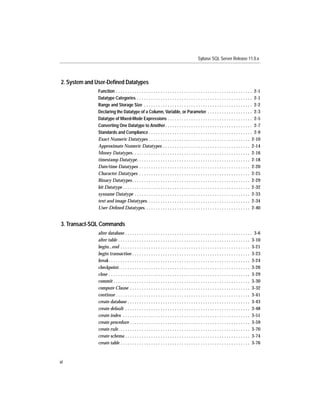
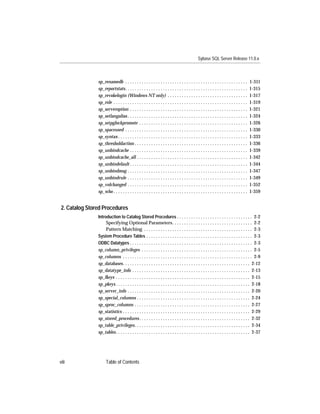
2. System and User-Defined Datatypes
              Function . . . . . . . . . . . . . . . . . . . . . . . . . . . . . . . . . . . . . . . . . . . . . . . . . . . . . . . . . . 2-1
              Datatype Categories . . . . . . . . . . . . . . . . . . . . . . . . . . . . . . . . . . . . . . . . . . . . . . . . . 2-1
              Range and Storage Size . . . . . . . . . . . . . . . . . . . . . . . . . . . . . . . . . . . . . . . . . . . . . . 2-2
              Declaring the Datatype of a Column, Variable, or Parameter . . . . . . . . . . . . . . . . . . . 2-3
              Datatype of Mixed-Mode Expressions . . . . . . . . . . . . . . . . . . . . . . . . . . . . . . . . . . . . 2-5
              Converting One Datatype to Another . . . . . . . . . . . . . . . . . . . . . . . . . . . . . . . . . . . . . 2-7
              Standards and Compliance . . . . . . . . . . . . . . . . . . . . . . . . . . . . . . . . . . . . . . . . . . . . 2-9
              Exact Numeric Datatypes . . . . . . . . . . . . . . . . . . . . . . . . . . . . . . . . . . . . . . . . . . . 2-10
              Approximate Numeric Datatypes . . . . . . . . . . . . . . . . . . . . . . . . . . . . . . . . . . . . . 2-14
              Money Datatypes. . . . . . . . . . . . . . . . . . . . . . . . . . . . . . . . . . . . . . . . . . . . . . . . . . 2-16
              timestamp Datatype. . . . . . . . . . . . . . . . . . . . . . . . . . . . . . . . . . . . . . . . . . . . . . . . 2-18
              Date/time Datatypes . . . . . . . . . . . . . . . . . . . . . . . . . . . . . . . . . . . . . . . . . . . . . . . 2-20
              Character Datatypes . . . . . . . . . . . . . . . . . . . . . . . . . . . . . . . . . . . . . . . . . . . . . . . 2-25
              Binary Datatypes . . . . . . . . . . . . . . . . . . . . . . . . . . . . . . . . . . . . . . . . . . . . . . . . . . 2-29
              bit Datatype . . . . . . . . . . . . . . . . . . . . . . . . . . . . . . . . . . . . . . . . . . . . . . . . . . . . . . 2-32
              sysname Datatype . . . . . . . . . . . . . . . . . . . . . . . . . . . . . . . . . . . . . . . . . . . . . . . . . 2-33
              text and image Datatypes. . . . . . . . . . . . . . . . . . . . . . . . . . . . . . . . . . . . . . . . . . . . 2-34
              User-Defined Datatypes. . . . . . . . . . . . . . . . . . . . . . . . . . . . . . . . . . . . . . . . . . . . . 2-40


3. Transact-SQL Commands
              alter database . . . . . . . . . . . . . . . . . . . . . . . . . . . . . . . . . . . . . . . . . . . . . . . . . . . . . . 3-6
              alter table . . . . . . . . . . . . . . . . . . . . . . . . . . . . . . . . . . . . . . . . . . . . . . . . . . . . . . . . 3-10
              begin...end . . . . . . . . . . . . . . . . . . . . . . . . . . . . . . . . . . . . . . . . . . . . . . . . . . . . . . . 3-21
              begin transaction . . . . . . . . . . . . . . . . . . . . . . . . . . . . . . . . . . . . . . . . . . . . . . . . . . 3-23
              break . . . . . . . . . . . . . . . . . . . . . . . . . . . . . . . . . . . . . . . . . . . . . . . . . . . . . . . . . . . . 3-24
              checkpoint. . . . . . . . . . . . . . . . . . . . . . . . . . . . . . . . . . . . . . . . . . . . . . . . . . . . . . . . 3-26
              close . . . . . . . . . . . . . . . . . . . . . . . . . . . . . . . . . . . . . . . . . . . . . . . . . . . . . . . . . . . . 3-29
              commit . . . . . . . . . . . . . . . . . . . . . . . . . . . . . . . . . . . . . . . . . . . . . . . . . . . . . . . . . . 3-30
              compute Clause . . . . . . . . . . . . . . . . . . . . . . . . . . . . . . . . . . . . . . . . . . . . . . . . . . . 3-32
              continue . . . . . . . . . . . . . . . . . . . . . . . . . . . . . . . . . . . . . . . . . . . . . . . . . . . . . . . . . 3-41
              create database . . . . . . . . . . . . . . . . . . . . . . . . . . . . . . . . . . . . . . . . . . . . . . . . . . . . 3-43
              create default . . . . . . . . . . . . . . . . . . . . . . . . . . . . . . . . . . . . . . . . . . . . . . . . . . . . . 3-48
              create index . . . . . . . . . . . . . . . . . . . . . . . . . . . . . . . . . . . . . . . . . . . . . . . . . . . . . . 3-51
              create procedure . . . . . . . . . . . . . . . . . . . . . . . . . . . . . . . . . . . . . . . . . . . . . . . . . . . 3-59
              create rule. . . . . . . . . . . . . . . . . . . . . . . . . . . . . . . . . . . . . . . . . . . . . . . . . . . . . . . . 3-70
              create schema . . . . . . . . . . . . . . . . . . . . . . . . . . . . . . . . . . . . . . . . . . . . . . . . . . . . . 3-74
              create table . . . . . . . . . . . . . . . . . . . . . . . . . . . . . . . . . . . . . . . . . . . . . . . . . . . . . . . 3-76


vi
Sybase SQL Server Release 11.0.x


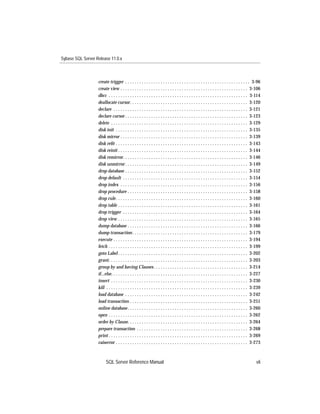
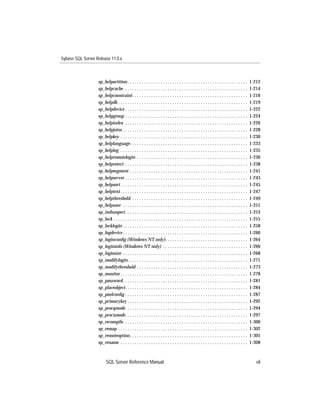
                   create trigger . . . . . . . . . . . . . . . . . . . . . . . . . . . . . . . . . . . . . . . . . . . . . . . . . . . . . 3-96
                   create view . . . . . . . . . . . . . . . . . . . . . . . . . . . . . . . . . . . . . . . . . . . . . . . . . . . . . . 3-106
                   dbcc . . . . . . . . . . . . . . . . . . . . . . . . . . . . . . . . . . . . . . . . . . . . . . . . . . . . . . . . . . . 3-114
                   deallocate cursor. . . . . . . . . . . . . . . . . . . . . . . . . . . . . . . . . . . . . . . . . . . . . . . . . . 3-120
                   declare . . . . . . . . . . . . . . . . . . . . . . . . . . . . . . . . . . . . . . . . . . . . . . . . . . . . . . . . . 3-121
                   declare cursor . . . . . . . . . . . . . . . . . . . . . . . . . . . . . . . . . . . . . . . . . . . . . . . . . . . . 3-123
                   delete . . . . . . . . . . . . . . . . . . . . . . . . . . . . . . . . . . . . . . . . . . . . . . . . . . . . . . . . . . 3-129
                   disk init . . . . . . . . . . . . . . . . . . . . . . . . . . . . . . . . . . . . . . . . . . . . . . . . . . . . . . . . 3-135
                   disk mirror . . . . . . . . . . . . . . . . . . . . . . . . . . . . . . . . . . . . . . . . . . . . . . . . . . . . . . 3-139
                   disk refit . . . . . . . . . . . . . . . . . . . . . . . . . . . . . . . . . . . . . . . . . . . . . . . . . . . . . . . . 3-143
                   disk reinit . . . . . . . . . . . . . . . . . . . . . . . . . . . . . . . . . . . . . . . . . . . . . . . . . . . . . . . 3-144
                   disk remirror. . . . . . . . . . . . . . . . . . . . . . . . . . . . . . . . . . . . . . . . . . . . . . . . . . . . . 3-146
                   disk unmirror . . . . . . . . . . . . . . . . . . . . . . . . . . . . . . . . . . . . . . . . . . . . . . . . . . . . 3-149
                   drop database . . . . . . . . . . . . . . . . . . . . . . . . . . . . . . . . . . . . . . . . . . . . . . . . . . . . 3-152
                   drop default . . . . . . . . . . . . . . . . . . . . . . . . . . . . . . . . . . . . . . . . . . . . . . . . . . . . . 3-154
                   drop index . . . . . . . . . . . . . . . . . . . . . . . . . . . . . . . . . . . . . . . . . . . . . . . . . . . . . . 3-156
                   drop procedure . . . . . . . . . . . . . . . . . . . . . . . . . . . . . . . . . . . . . . . . . . . . . . . . . . . 3-158
                   drop rule . . . . . . . . . . . . . . . . . . . . . . . . . . . . . . . . . . . . . . . . . . . . . . . . . . . . . . . . 3-160
                   drop table . . . . . . . . . . . . . . . . . . . . . . . . . . . . . . . . . . . . . . . . . . . . . . . . . . . . . . . 3-161
                   drop trigger . . . . . . . . . . . . . . . . . . . . . . . . . . . . . . . . . . . . . . . . . . . . . . . . . . . . . 3-164
                   drop view . . . . . . . . . . . . . . . . . . . . . . . . . . . . . . . . . . . . . . . . . . . . . . . . . . . . . . . 3-165
                   dump database . . . . . . . . . . . . . . . . . . . . . . . . . . . . . . . . . . . . . . . . . . . . . . . . . . . 3-166
                   dump transaction . . . . . . . . . . . . . . . . . . . . . . . . . . . . . . . . . . . . . . . . . . . . . . . . . 3-179
                   execute . . . . . . . . . . . . . . . . . . . . . . . . . . . . . . . . . . . . . . . . . . . . . . . . . . . . . . . . . 3-194
                   fetch . . . . . . . . . . . . . . . . . . . . . . . . . . . . . . . . . . . . . . . . . . . . . . . . . . . . . . . . . . . 3-199
                   goto Label . . . . . . . . . . . . . . . . . . . . . . . . . . . . . . . . . . . . . . . . . . . . . . . . . . . . . . . 3-202
                   grant. . . . . . . . . . . . . . . . . . . . . . . . . . . . . . . . . . . . . . . . . . . . . . . . . . . . . . . . . . . 3-203
                   group by and having Clauses. . . . . . . . . . . . . . . . . . . . . . . . . . . . . . . . . . . . . . . . 3-214
                   if...else. . . . . . . . . . . . . . . . . . . . . . . . . . . . . . . . . . . . . . . . . . . . . . . . . . . . . . . . . . 3-227
                   insert . . . . . . . . . . . . . . . . . . . . . . . . . . . . . . . . . . . . . . . . . . . . . . . . . . . . . . . . . . 3-230
                   kill . . . . . . . . . . . . . . . . . . . . . . . . . . . . . . . . . . . . . . . . . . . . . . . . . . . . . . . . . . . . 3-239
                   load database . . . . . . . . . . . . . . . . . . . . . . . . . . . . . . . . . . . . . . . . . . . . . . . . . . . . 3-242
                   load transaction . . . . . . . . . . . . . . . . . . . . . . . . . . . . . . . . . . . . . . . . . . . . . . . . . . 3-251
                   online database . . . . . . . . . . . . . . . . . . . . . . . . . . . . . . . . . . . . . . . . . . . . . . . . . . . 3-260
                   open . . . . . . . . . . . . . . . . . . . . . . . . . . . . . . . . . . . . . . . . . . . . . . . . . . . . . . . . . . . 3-262
                   order by Clause. . . . . . . . . . . . . . . . . . . . . . . . . . . . . . . . . . . . . . . . . . . . . . . . . . . 3-264
                   prepare transaction . . . . . . . . . . . . . . . . . . . . . . . . . . . . . . . . . . . . . . . . . . . . . . . 3-268
                   print . . . . . . . . . . . . . . . . . . . . . . . . . . . . . . . . . . . . . . . . . . . . . . . . . . . . . . . . . . . 3-269
                   raiserror . . . . . . . . . . . . . . . . . . . . . . . . . . . . . . . . . . . . . . . . . . . . . . . . . . . . . . . . 3-273


                         SQL Server Reference Manual                                                                                             vii
Sybase SQL Server Release 11.0.x


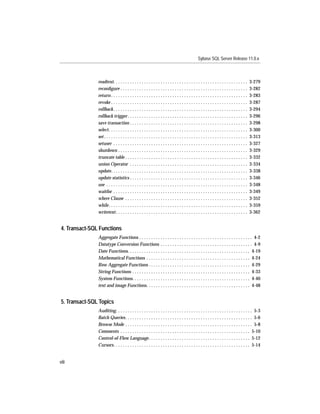
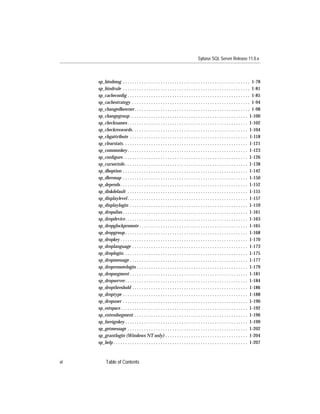
                readtext. . . . . . . . . . . . . . . . . . . . . . . . . . . . . . . . . . . . . . . . . . . . . . . . . . . . . . . . .       3-279
                reconfigure . . . . . . . . . . . . . . . . . . . . . . . . . . . . . . . . . . . . . . . . . . . . . . . . . . . . . .          3-282
                return . . . . . . . . . . . . . . . . . . . . . . . . . . . . . . . . . . . . . . . . . . . . . . . . . . . . . . . . . .      3-283
                revoke . . . . . . . . . . . . . . . . . . . . . . . . . . . . . . . . . . . . . . . . . . . . . . . . . . . . . . . . . .      3-287
                rollback . . . . . . . . . . . . . . . . . . . . . . . . . . . . . . . . . . . . . . . . . . . . . . . . . . . . . . . . .      3-294
                rollback trigger . . . . . . . . . . . . . . . . . . . . . . . . . . . . . . . . . . . . . . . . . . . . . . . . . . .          3-296
                save transaction . . . . . . . . . . . . . . . . . . . . . . . . . . . . . . . . . . . . . . . . . . . . . . . . . .            3-298
                select. . . . . . . . . . . . . . . . . . . . . . . . . . . . . . . . . . . . . . . . . . . . . . . . . . . . . . . . . . .     3-300
                set . . . . . . . . . . . . . . . . . . . . . . . . . . . . . . . . . . . . . . . . . . . . . . . . . . . . . . . . . . . . .   3-313
                setuser . . . . . . . . . . . . . . . . . . . . . . . . . . . . . . . . . . . . . . . . . . . . . . . . . . . . . . . . .       3-327
                shutdown . . . . . . . . . . . . . . . . . . . . . . . . . . . . . . . . . . . . . . . . . . . . . . . . . . . . . . .          3-329
                truncate table . . . . . . . . . . . . . . . . . . . . . . . . . . . . . . . . . . . . . . . . . . . . . . . . . . . .          3-332
                union Operator . . . . . . . . . . . . . . . . . . . . . . . . . . . . . . . . . . . . . . . . . . . . . . . . . .              3-334
                update. . . . . . . . . . . . . . . . . . . . . . . . . . . . . . . . . . . . . . . . . . . . . . . . . . . . . . . . . .       3-338
                update statistics . . . . . . . . . . . . . . . . . . . . . . . . . . . . . . . . . . . . . . . . . . . . . . . . . .           3-346
                use . . . . . . . . . . . . . . . . . . . . . . . . . . . . . . . . . . . . . . . . . . . . . . . . . . . . . . . . . . . .     3-348
                waitfor . . . . . . . . . . . . . . . . . . . . . . . . . . . . . . . . . . . . . . . . . . . . . . . . . . . . . . . . .       3-349
                where Clause . . . . . . . . . . . . . . . . . . . . . . . . . . . . . . . . . . . . . . . . . . . . . . . . . . . .            3-352
                while . . . . . . . . . . . . . . . . . . . . . . . . . . . . . . . . . . . . . . . . . . . . . . . . . . . . . . . . . . .     3-359
                writetext . . . . . . . . . . . . . . . . . . . . . . . . . . . . . . . . . . . . . . . . . . . . . . . . . . . . . . . .       3-362


 4. Transact-SQL Functions
                Aggregate Functions . . . . . . . . . . . . . . . . . . . . . . . . . . . . . . . . . . . . . . . . . . . . . . . . 4-2
                Datatype Conversion Functions . . . . . . . . . . . . . . . . . . . . . . . . . . . . . . . . . . . . . . . 4-9
                Date Functions. . . . . . . . . . . . . . . . . . . . . . . . . . . . . . . . . . . . . . . . . . . . . . . . . . . . 4-19
                Mathematical Functions . . . . . . . . . . . . . . . . . . . . . . . . . . . . . . . . . . . . . . . . . . . . 4-24
                Row Aggregate Functions . . . . . . . . . . . . . . . . . . . . . . . . . . . . . . . . . . . . . . . . . . . 4-29
                String Functions . . . . . . . . . . . . . . . . . . . . . . . . . . . . . . . . . . . . . . . . . . . . . . . . . . 4-33
                System Functions. . . . . . . . . . . . . . . . . . . . . . . . . . . . . . . . . . . . . . . . . . . . . . . . . . 4-40
                text and image Functions. . . . . . . . . . . . . . . . . . . . . . . . . . . . . . . . . . . . . . . . . . . . 4-48


 5. Transact-SQL Topics
                Auditing. . . . . . . . . . . . . . . . . . . . . . . . . . . . . . . . . . . . . . . . . . . . . . . . . . . . . . . . . . 5-3
                Batch Queries. . . . . . . . . . . . . . . . . . . . . . . . . . . . . . . . . . . . . . . . . . . . . . . . . . . . . . 5-6
                Browse Mode . . . . . . . . . . . . . . . . . . . . . . . . . . . . . . . . . . . . . . . . . . . . . . . . . . . . . . 5-8
                Comments . . . . . . . . . . . . . . . . . . . . . . . . . . . . . . . . . . . . . . . . . . . . . . . . . . . . . . . 5-10
                Control-of-Flow Language . . . . . . . . . . . . . . . . . . . . . . . . . . . . . . . . . . . . . . . . . . . 5-12
                Cursors. . . . . . . . . . . . . . . . . . . . . . . . . . . . . . . . . . . . . . . . . . . . . . . . . . . . . . . . . . 5-14


viii
Sybase SQL Server Release 11.0.x


                   Disk Mirroring . . . . . . . . . . . . . . . . . . . . . . . . . . . . . . . . . . . . . . . . . . . . . . . . . . . 5-27
                   Expressions . . . . . . . . . . . . . . . . . . . . . . . . . . . . . . . . . . . . . . . . . . . . . . . . . . . . . . 5-32
                   Identifiers . . . . . . . . . . . . . . . . . . . . . . . . . . . . . . . . . . . . . . . . . . . . . . . . . . . . . . . . 5-41
                   IDENTITY Columns . . . . . . . . . . . . . . . . . . . . . . . . . . . . . . . . . . . . . . . . . . . . . . . 5-47
                   Joins . . . . . . . . . . . . . . . . . . . . . . . . . . . . . . . . . . . . . . . . . . . . . . . . . . . . . . . . . . . . 5-61
                   Login Management . . . . . . . . . . . . . . . . . . . . . . . . . . . . . . . . . . . . . . . . . . . . . . . . 5-67
                   Null Values . . . . . . . . . . . . . . . . . . . . . . . . . . . . . . . . . . . . . . . . . . . . . . . . . . . . . . 5-70
                   Parameters . . . . . . . . . . . . . . . . . . . . . . . . . . . . . . . . . . . . . . . . . . . . . . . . . . . . . . . 5-78
                   Roles . . . . . . . . . . . . . . . . . . . . . . . . . . . . . . . . . . . . . . . . . . . . . . . . . . . . . . . . . . . . 5-81
                   Search Conditions . . . . . . . . . . . . . . . . . . . . . . . . . . . . . . . . . . . . . . . . . . . . . . . . . 5-87
                   Subqueries . . . . . . . . . . . . . . . . . . . . . . . . . . . . . . . . . . . . . . . . . . . . . . . . . . . . . . . 5-92
                   Temporary Tables . . . . . . . . . . . . . . . . . . . . . . . . . . . . . . . . . . . . . . . . . . . . . . . . . . 5-98
                   Transactions . . . . . . . . . . . . . . . . . . . . . . . . . . . . . . . . . . . . . . . . . . . . . . . . . . . . . 5-102
                   Variables (Local and Global) . . . . . . . . . . . . . . . . . . . . . . . . . . . . . . . . . . . . . . . . 5-122
                   Wildcard Characters . . . . . . . . . . . . . . . . . . . . . . . . . . . . . . . . . . . . . . . . . . . . . . 5-129


Index


                         SQL Server Reference Manual                                                                                              ix
Sybase SQL Server Release 11.0.x


x
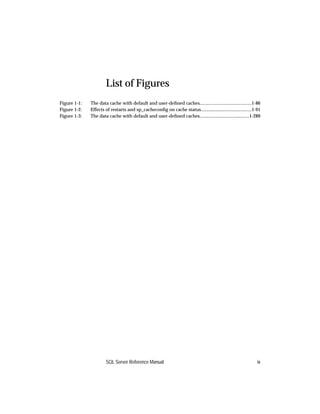
List of Figures
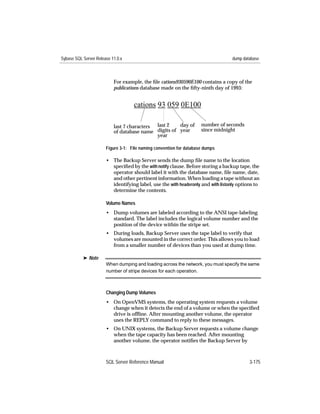
Figure 3-1:   File naming convention for database dumps ........................................................3-175
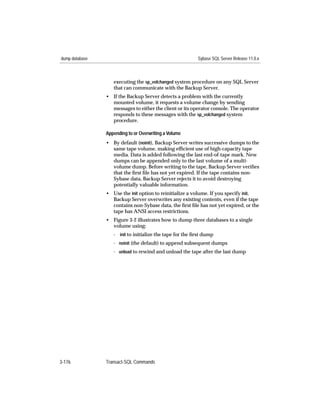
Figure 3-2:   Dumping several databases to the same volume..................................................3-177
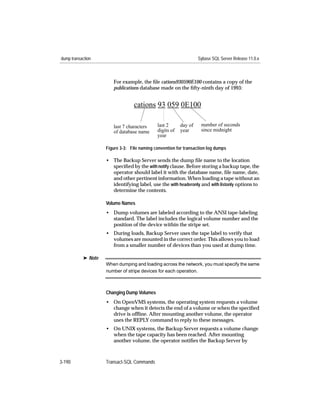
Figure 3-3:   File naming convention for transaction log dumps..............................................3-190
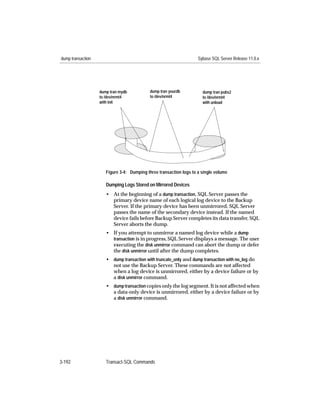
Figure 3-4:   Dumping three transaction logs to a single volume.............................................3-192
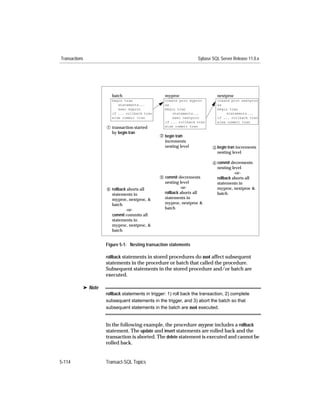
Figure 5-1:   Nesting transaction statements................................................................................5-114


                        SQL Server Reference Manual                                                                           xi
Sybase SQL Server Release 11.0.x


xii
List of Tables
Table 1:      Syntax statement conventions .....................................................................................xix
Table 2:      Types of expressions used in syntax statements ..................................................... xxii
Table 2-1:    Datatype categories .......................................................................................................2-1
Table 2-2:    Range and storage size for SQL Server system datatypes.......................................2-2
Table 2-3:    Precision and scale after arithmetic operations.........................................................2-7
Table 2-4:    Automatic conversion of fixed-length datatypes......................................................2-7
Table 2-5:    Integer datatypes .........................................................................................................2-10
Table 2-6:    Valid integer values .....................................................................................................2-10
Table 2-7:    Invalid integer values..................................................................................................2-11
Table 2-8:    Valid decimal values ...................................................................................................2-12
Table 2-9:    Invalid decimal values ................................................................................................2-12
Table 2-10:   Approximate numeric datatypes...............................................................................2-14
Table 2-11:   Money datatypes .........................................................................................................2-16
Table 2-12:   Transact-SQL datatypes for storing dates and times..............................................2-20
Table 2-13:   Date formats for datetime and smalldatetime datatypes ......................................2-21
Table 2-14:   Examples of datetime entries .....................................................................................2-23
Table 2-15:   Character datatypes.....................................................................................................2-25
Table 2-16:   Storage of text and image data ..................................................................................2-36
Table 2-17:   text and image global variables .................................................................................2-38
Table 3-1:    Transact-SQL commands..............................................................................................3-1
Table 3-2:    Information stored about referential integrity constraints ....................................3-17
Table 3-3:    Row aggregate functions used with the compute clause ......................................3-32
Table 3-4:    compute by clauses and detail rows .........................................................................3-38
Table 3-5:    Relationship between nulls and column defaults...................................................3-50
Table 3-6:    Duplicate row options.................................................................................................3-55
Table 3-7:    Index options................................................................................................................3-55
Table 3-8:    Rule binding precedence ............................................................................................3-71
Table 3-9:    Variable-length datatypes used to store nulls .........................................................3-85
Table 3-10:   Methods of integrity enforcement.............................................................................3-87
Table 3-11:   Information stored about cross-database referential integrity constraints .........3-92
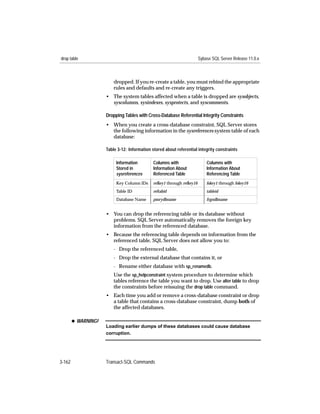
Table 3-12:   Information stored about referential integrity constraints ..................................3-162
Table 3-13:   Commands used to back up databases and logs ..................................................3-171
Table 3-14:   Commands used to back up databases ..................................................................3-184
Table 3-15:   @@sqlstatus values ....................................................................................................3-200
Table 3-16:   Object access permissions.........................................................................................3-204
Table 3-17:   Command and object permissions..........................................................................3-207
Table 3-18:   Status values reported by sp_who ..........................................................................3-240
Table 3-19:   Commands used to restore databases from dumps .............................................3-245


                         SQL Server Reference Manual                                                                                       xiii
Sybase SQL Server Release 11.0.x


Table 3-20:   Commands used to restore databases ....................................................................3-254
Table 3-21:   Effect of sort order choices .......................................................................................3-266
Table 3-22:   SQL Server error return values................................................................................3-285
Table 3-23:   Object access permissions.........................................................................................3-288
Table 3-24:   Results of using aggregates with group by............................................................3-304
Table 3-25:   Permissions required for update and delete..........................................................3-314
Table 3-26:   Options to set for entry level SQL92 compliance..................................................3-325
Table 3-27:   Comparing datatypes in union operations ............................................................3-336
Table 3-28:   Comparison operators ..............................................................................................3-353
Table 3-29:   Arithmetic operators .................................................................................................3-354
Table 3-30:   Bitwise operators .......................................................................................................3-354
Table 3-31:   Wildcard characters...................................................................................................3-356
Table 4-1:    Transact-SQL functions.................................................................................................4-1
Table 4-2:    Aggregate functions ......................................................................................................4-2
Table 4-3:    Datatype conversion functions ....................................................................................4-9
Table 4-4:    Display formats for date/time information.............................................................4-10
Table 4-5:    Explicit, implicit, and unsupported datatype conversions ...................................4-12
Table 4-6:    Date functions ..............................................................................................................4-19
Table 4-7:    Date parts and their values ........................................................................................4-21
Table 4-8:    Arguments used in mathematical functions............................................................4-24
Table 4-9:    Mathematical functions ..............................................................................................4-25
Table 4-10:   Row aggregate functions ............................................................................................4-29
Table 4-11:   Arguments used in string functions .........................................................................4-33
Table 4-12:   Function names, arguments, and results..................................................................4-34
Table 4-13:   Arguments used in system functions .......................................................................4-40
Table 4-14:   System functions, arguments, and results ...............................................................4-41
Table 4-15:   text and image functions, arguments, and results ..................................................4-48
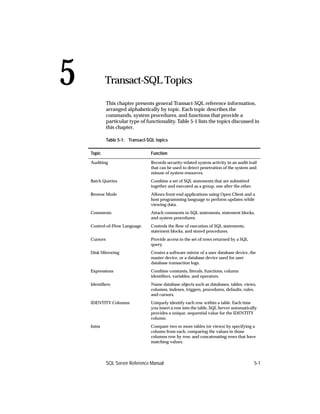
Table 5-1:    Transact-SQL topics.......................................................................................................5-1
Table 5-2:    System procedures used to manage auditing options .............................................5-4
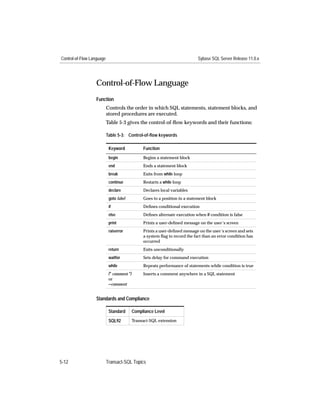
Table 5-3:    Control-of-flow keywords ..........................................................................................5-12
Table 5-4:    @@sqlstatus values ......................................................................................................5-22
Table 5-5:    Arithmetic operators ...................................................................................................5-33
Table 5-6:    Truth tables for bitwise operations............................................................................5-34
Table 5-7:    Examples of bitwise operations.................................................................................5-34
Table 5-8:    Comparison operators ................................................................................................5-35
Table 5-9:    Wildcard characters used with like...........................................................................5-37
Table 5-10:   Truth tables for logical expressions...........................................................................5-38
Table 5-11:   Comparison operators ................................................................................................5-62
Table 5-12:   System procedures for login account management................................................5-67
Table 5-13:   Conversion of fixed-length to variable-length datatypes ......................................5-71
Table 5-14:   Column definition and null defaults ........................................................................5-75


xiv                      List of Tables
Sybase SQL Server Release 11.0.x


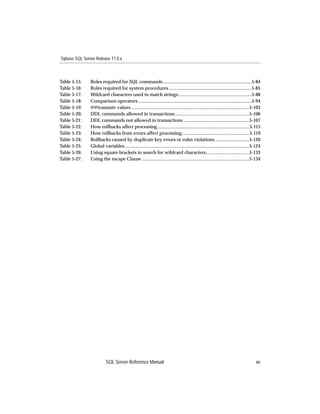
Table 5-15:    Roles required for SQL commands ...........................................................................5-84
Table 5-16:    Roles required for system procedures ......................................................................5-85
Table 5-17:    Wildcard characters used in match strings ..............................................................5-88
Table 5-18:    Comparison operators ................................................................................................5-94
Table 5-19:    @@transtate values ....................................................................................................5-103
Table 5-20:    DDL commands allowed in transactions ...............................................................5-106
Table 5-21:    DDL commands not allowed in transactions ........................................................5-107
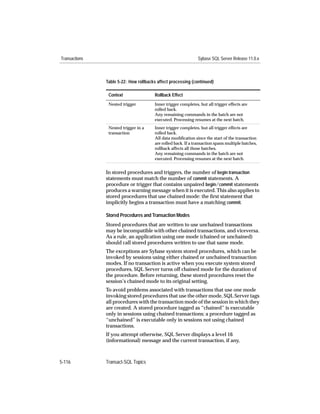
Table 5-22:    How rollbacks affect processing..............................................................................5-115
Table 5-23:    How rollbacks from errors affect processing.........................................................5-119
Table 5-24:    Rollbacks caused by duplicate key errors or rules violations .............................5-120
Table 5-25:    Global variables .........................................................................................................5-124
Table 5-26:    Using square brackets to search for wildcard characters.....................................5-133
Table 5-27:    Using the escape Clause ...........................................................................................5-134


                          SQL Server Reference Manual                                                                                     xv
Sybase SQL Server Release 11.0.x


xvi   List of Tables
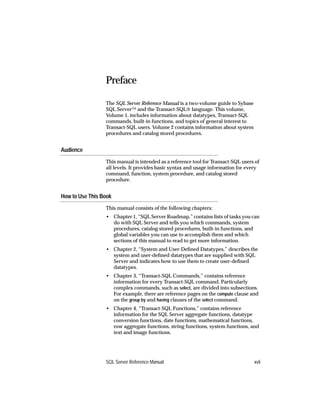
Preface

                 The SQL Server Reference Manual is a two-volume guide to Sybase
                 SQL Server™ and the Transact-SQL® language. This volume,
                 Volume 1, includes information about datatypes, Transact-SQL
                 commands, built-in functions, and topics of general interest to
                 Transact-SQL users. Volume 2 contains information about system
                 procedures and catalog stored procedures.


Audience
                 This manual is intended as a reference tool for Transact-SQL users of
                 all levels. It provides basic syntax and usage information for every
                 command, function, system procedure, and catalog stored
                 procedure.


How to Use This Book
                 This manual consists of the following chapters:
                 • Chapter 1, “SQL Server Roadmap,” contains lists of tasks you can
                   do with SQL Server and tells you which commands, system
                   procedures, catalog stored procedures, built-in functions, and
                   global variables you can use to accomplish them and which
                   sections of this manual to read to get more information.
                 • Chapter 2, “System and User-Defined Datatypes,” describes the
                   system and user-defined datatypes that are supplied with SQL
                   Server and indicates how to use them to create user-defined
                   datatypes.
                 • Chapter 3, “Transact-SQL Commands,” contains reference
                   information for every Transact-SQL command. Particularly
                   complex commands, such as select, are divided into subsections.
                   For example, there are reference pages on the compute clause and
                   on the group by and having clauses of the select command.
                 • Chapter 4, “Transact-SQL Functions,” contains reference
                   information for the SQL Server aggregate functions, datatype
                   conversion functions, date functions, mathematical functions,
                   row aggregate functions, string functions, system functions, and
                   text and image functions.


                 SQL Server Reference Manual                                       xvii
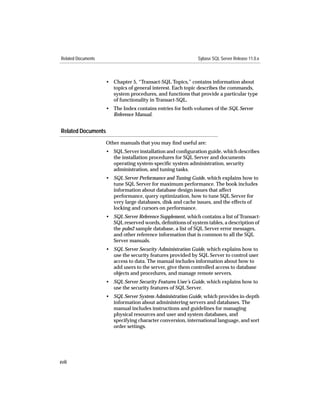
Related Documents                                            Sybase SQL Server Release 11.0.x


                    • Chapter 5, “Transact-SQL Topics,” contains information about
                      topics of general interest. Each topic describes the commands,
                      system procedures, and functions that provide a particular type
                      of functionality in Transact-SQL.
                    • The Index contains entries for both volumes of the SQL Server
                      Reference Manual.


Related Documents
                    Other manuals that you may find useful are:
                    • SQL Server installation and configuration guide, which describes
                      the installation procedures for SQL Server and documents
                      operating system-specific system administration, security
                      administration, and tuning tasks.
                    • SQL Server Performance and Tuning Guide, which explains how to
                      tune SQL Server for maximum performance. The book includes
                      information about database design issues that affect
                      performance, query optimization, how to tune SQL Server for
                      very large databases, disk and cache issues, and the effects of
                      locking and cursors on performance.
                    • SQL Server Reference Supplement, which contains a list of Transact-
                      SQL reserved words, definitions of system tables, a description of
                      the pubs2 sample database, a list of SQL Server error messages,
                      and other reference information that is common to all the SQL
                      Server manuals.
                    • SQL Server Security Administration Guide, which explains how to
                      use the security features provided by SQL Server to control user
                      access to data. The manual includes information about how to
                      add users to the server, give them controlled access to database
                      objects and procedures, and manage remote servers.
                    • SQL Server Security Features User’s Guide, which explains how to
                      use the security features of SQL Server.
                    • SQL Server System Administration Guide, which provides in-depth
                      information about administering servers and databases. The
                      manual includes instructions and guidelines for managing
                      physical resources and user and system databases, and
                      specifying character conversion, international language, and sort
                      order settings.


xviii
Sybase SQL Server Release 11.0.x                                        Conventions Used in This Manual


                       • SQL Server utility programs manual, which documents the
                         Sybase utility programs, such as isql and bcp that are executed at
                         the operating system level.
                       • Transact-SQL User’s Guide, which documents Transact-SQL,
                         Sybase’s enhanced version of the relational database language. It
                         serves as a textbook for beginning users of the database
                         management system.
                       • What’s New in Sybase SQL Server Release 11.0?, which describes the
                         new features in SQL Server release 11.0.


Conventions Used in This Manual


                   Formatting SQL Statements

                       SQL is a free-form language: there are no rules about the number of
                       words you can put on a line or where you must break a line.
                       However, for readability, all examples and syntax statements in this
                       manual are formatted so that each clause of a statement begins on a
                       new line. Clauses that have more than one part extend to additional
                       lines, which are indented.


                   SQL Syntax Conventions

                       The conventions for syntax statements in this manual are as follows:

                       Table 1: Syntax statement conventions

                        Key           Definition
                        command       Command names, command option names, utility names,
                                      utility flags, and other keywords are in bold Courier in
                                      syntax statements, and in bold Helvetica in paragraph text.
                        variable      Variables, or words that stand for values that you fill in, are in
                                      italics.
                        { }           Curly braces indicate that you choose at least one of the
                                      enclosed options. Do not include braces in your option.
                        [ ]           Brackets mean choosing one or more of the enclosed options is
                                      optional. Do not include brackets in your option.
                        ( )           Parentheses are to be typed as part of the command.


                       SQL Server Reference Manual                                                    xix
Conventions Used in This Manual                                       Sybase SQL Server Release 11.0.x


                        Table 1: Syntax statement conventions (continued)

                         Key            Definition
                         |              The vertical bar means you may select only one of the options
                                        shown.
                         ,              The comma means you may choose as many of the options
                                        shown as you like, separating your choices with commas to be
                                        typed as part of the command.


                        • Syntax statements (displaying the syntax and all options for a
                          command) are printed like this:
                             sp_dropdevice [device_name]
                             or, for a command with more options:
                             select column_name
                                 from table_name
                                 where search_conditions
                             In syntax statements, keywords (commands) are in normal font
                             and identifiers are in lowercase: normal font for keywords,
                             italics for user-supplied words.
                        • Examples showing the use of Transact-SQL commands are
                          printed like this:
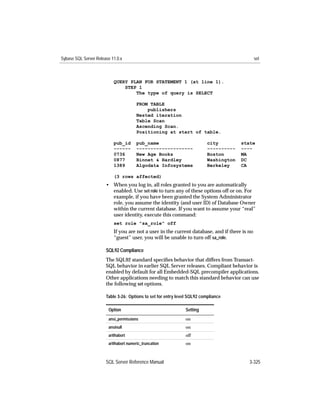
                             select * from publishers
                        • Examples of output from the computer are printed like this:
                             pub_id    pub_name                             city             state
                             -------   -------------------                  -----------      -----
                             0736      New Age Books                        Boston           MA
                             0877      Binnet & Hardley                     Washington       DC
                             1389      Algodata Infosystems                 Berkeley         CA

                             (3 rows affected)


                        Case

                        You can disregard case when you type keywords:
                             SELECT is the same as Select is the same as select
                        SQL Server’s sensitivity to the case (upper or lower) of database
                        objects, such as table names, and data depends on the sort order
                        installed on your SQL Server. Case sensitivity can be changed for
                        single-byte character sets by reconfiguring SQL Server’s sort order.
                        (See the System Administration Guide for more information.)


xx
Sybase SQL Server Release 11.0.x                                     Conventions Used in This Manual


                       Obligatory Options {You Must Choose At Least One}

                       • Curly Braces and Vertical Bars: Choose one and only one option.
                           {die_on_your_feet | live_on_your_knees |
                           live_on_your_feet}
                       • Curly Braces and Commas: Choose one or more options. If you
                         choose more than one, separate your choices with commas.
                           {cash, check, credit}


                       Optional Options [You Don’t Have to Choose Any]

                       • One Item in Square Brackets: You don’t have to choose it.
                           [anchovies]
                       • Square Brackets and Vertical Bars: Choose none or only one.
                           [beans | rice | sweet_potatoes]
                       • Square Brackets and Commas: Choose none, one, or more than
                         one option. If you choose more than one, separate your choices
                         with commas.
                           [extra_cheese, avocados, sour_cream]


                       Ellipsis: Do It Again (and Again)...

                       An ellipsis (...) means that you can repeat the last unit as many times
                       as you like. In this syntax statement, buy is a required keyword:
                           buy thing = price [cash | check | credit]
                               [, thing = price [cash | check | credit]]...
                       You must buy at least one thing and give its price. You may choose a
                       method of payment: one of the items enclosed in square brackets.
                       You may also choose to buy additional things: as many of them as
                       you like. For each thing you buy, give its name, its price, and
                       (optionally) a method of payment.


                       SQL Server Reference Manual                                               xxi
If You Need Help                                                    Sybase SQL Server Release 11.0.x


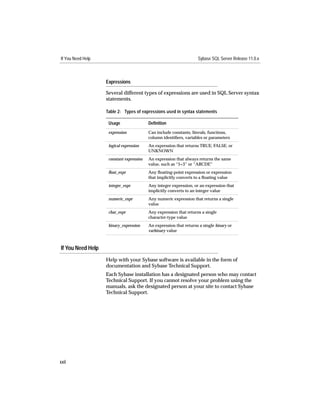
                   Expressions

                   Several different types of expressions are used in SQL Server syntax
                   statements.

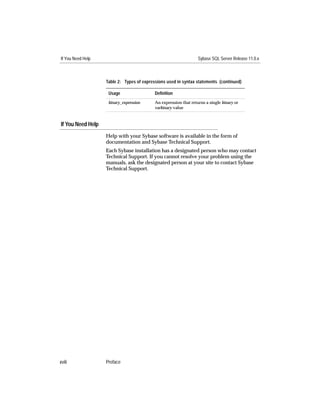
                   Table 2: Types of expressions used in syntax statements

                    Usage                 Definition
                    expression            Can include constants, literals, functions,
                                          column identifiers, variables or parameters
                    logical expression    An expression that returns TRUE, FALSE, or
                                          UNKNOWN
                    constant expression   An expression that always returns the same
                                          value, such as “5+3” or “ABCDE”
                    float_expr             Any floating-point expression or expression
                                          that implicitly converts to a floating value
                    integer_expr          Any integer expression, or an expression that
                                          implicitly converts to an integer value
                    numeric_expr          Any numeric expression that returns a single
                                          value
                    char_expr             Any expression that returns a single
                                          character-type value
                    binary_expression     An expression that returns a single binary or
                                          varbinary value


If You Need Help
                   Help with your Sybase software is available in the form of
                   documentation and Sybase Technical Support.
                   Each Sybase installation has a designated person who may contact
                   Technical Support. If you cannot resolve your problem using the
                   manuals, ask the designated person at your site to contact Sybase
                   Technical Support.


xxii
SQL Server
Roadmap
1   SQL Server Roadmap                                                 1.


    This chapter helps you figure out how to use SQL Server to
    accomplish particular tasks. It tells you which commands, functions,
    global variables, system and catalog stored procedures, utility
    programs, and global variables to use and which sections of the
    documentation to read.
    This chapter contains information about the following topics:
    • Starting, Stopping, and Configuring SQL Server 1-3
    • Creating and Maintaining Databases 1-9
    • Setting Database-Wide Options 1-12
    • Backing Up and Restoring Databases 1-14
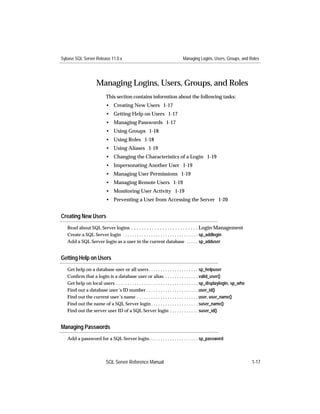
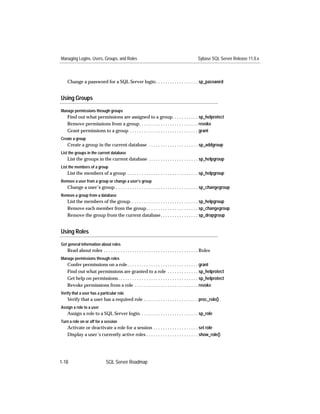
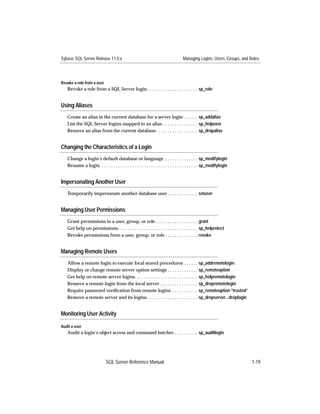
    • Managing Logins, Users, Groups, and Roles 1-17
    • Defining and Using Datatypes 1-21
    • Creating and Maintaining Tables 1-23
    • Auditing Server Activity 1-31
    • Retrieving and Manipulating Data 1-33
    • Using Defaults and Rules 1-38
    • Error Handling and Messages 1-40
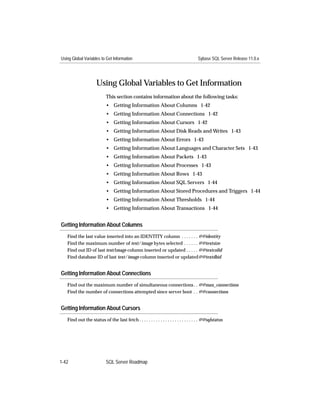
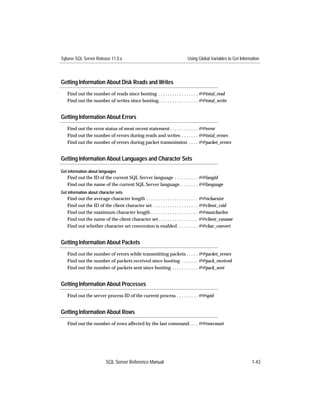
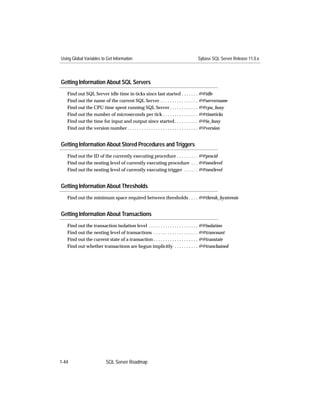
    • Using Global Variables to Get Information 1-42
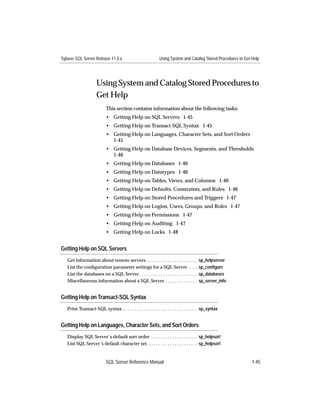
    • Using System and Catalog Stored Procedures to Get Help 1-45
    • Managing Languages, Character Sets, and Sort Orders 1-49
    • Managing Database Devices, Segments, and Thresholds 1-52
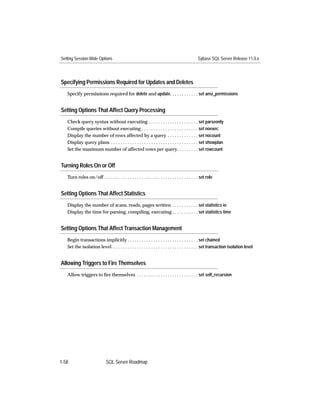
    • Setting Session-Wide Options 1-56
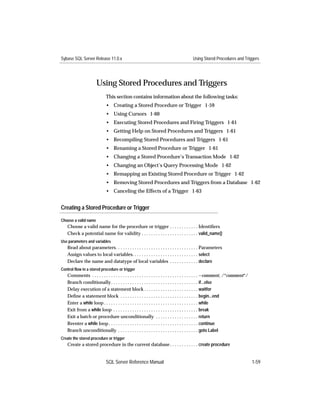
    • Using Stored Procedures and Triggers 1-59
    • Managing Transactions 1-64
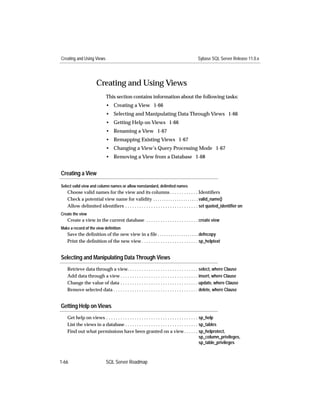
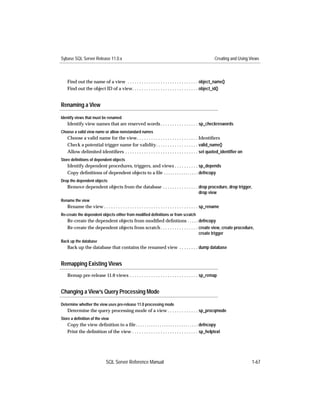
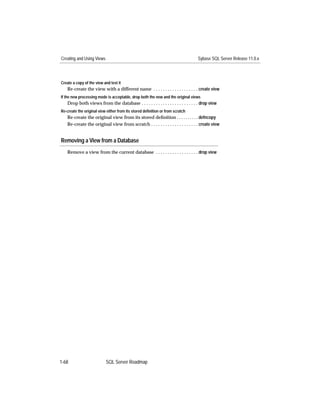
    • Creating and Using Views 1-66
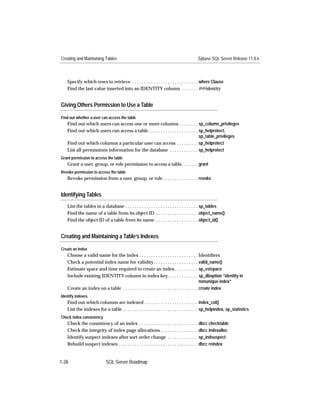
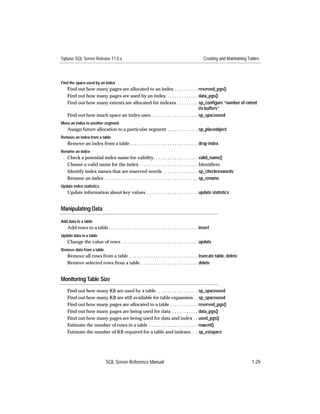
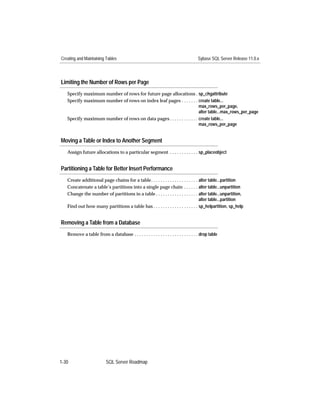
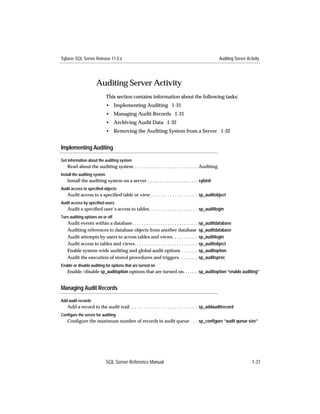
    Each topic consists of a list of related tasks. For example, the topic
    “Starting, Stopping, and Configuring SQL Server” includes such tasks
    as “Starting and Stopping SQL Server,” “Displaying Current
    Configuration Parameter Values,” and “Configuring Backup and
    Recovery.”


    SQL Server Reference Manual                                        1-1
Sybase SQL Server Release 11.0.x


      Each task lists one or more related activities, plus the name of the
      command or other syntactical element used to accomplish each
      activity. For detailed information about syntax or usage, click on the
      name of the command, function or procedure, or look in the
      appropriate section of this manual. For detailed information about
      utility commands, refer to your SQL Server utility programs manual.


1-2    SQL Server Roadmap
Sybase SQL Server Release 11.0.x                                                    Starting, Stopping, and Configuring SQL Server


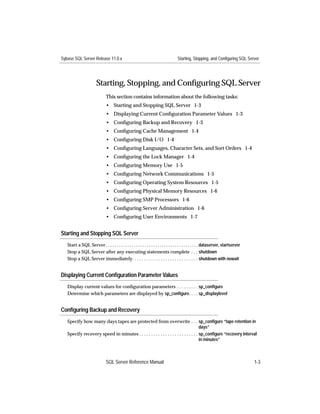
                        Starting, Stopping, and Configuring SQL Server
                               This section contains information about the following tasks:
                               • Starting and Stopping SQL Server 1-3
                               • Displaying Current Configuration Parameter Values 1-3
                               • Configuring Backup and Recovery 1-3
                               • Configuring Cache Management 1-4
                               • Configuring Disk I/O 1-4
                               • Configuring Languages, Character Sets, and Sort Orders 1-4
                               • Configuring the Lock Manager 1-4
                               • Configuring Memory Use 1-5
                               • Configuring Network Communications 1-5
                               • Configuring Operating System Resources 1-5
                               • Configuring Physical Memory Resources 1-6
                               • Configuring SMP Processors 1-6
                               • Configuring Server Administration 1-6
                               • Configuring User Environments 1-7


Starting and Stopping SQL Server
   Start a SQL Server . . . . . . . . . . . . . . . . . . . . . . . . . . . . . . . . . . . . . . . . . . . dataserver, startserver
   Stop a SQL Server after any executing statements complete . . . shutdown
   Stop a SQL Server immediately. . . . . . . . . . . . . . . . . . . . . . . . . . . . shutdown with nowait


Displaying Current Configuration Parameter Values
   Display current values for configuration parameters . . . . . . . . . sp_configure
   Determine which parameters are displayed by sp_configure. . . . sp_displaylevel


Configuring Backup and Recovery
   Specify how many days tapes are protected from overwrite . . . sp_configure “tape retention in
                                                                                       days”
   Specify recovery speed in minutes . . . . . . . . . . . . . . . . . . . . . . . . . sp_configure “recovery interval
                                                                                       in minutes”


                               SQL Server Reference Manual                                                                            1-3
Starting, Stopping, and Configuring SQL Server                                          Sybase SQL Server Release 11.0.x


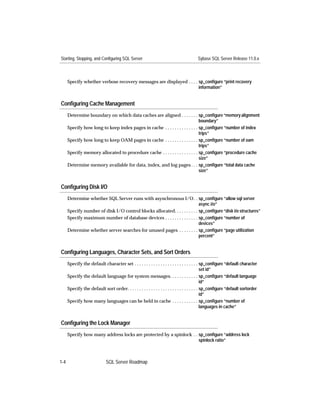
      Specify whether verbose recovery messages are displayed . . . . sp_configure “print recovery
                                                                      information”


Configuring Cache Management
      Determine boundary on which data caches are aligned . . . . . . . sp_configure “memory alignment
                                                                                boundary”
      Specify how long to keep index pages in cache . . . . . . . . . . . . . . sp_configure “number of index
                                                                                trips”
      Specify how long to keep OAM pages in cache . . . . . . . . . . . . . . sp_configure “number of oam
                                                                                trips”
      Specify memory allocated to procedure cache . . . . . . . . . . . . . . . sp_configure “procedure cache
                                                                                size”
      Determine memory available for data, index, and log pages . . . sp_configure “total data cache
                                                                                size”


Configuring Disk I/O
      Determine whether SQL Server runs with asynchronous I/O . . sp_configure “allow sql server
                                                                             async i/o”
      Specify number of disk I/O control blocks allocated. . . . . . . . . . sp_configure “disk i/o structures”
      Specify maximum number of database devices . . . . . . . . . . . . . . sp_configure “number of
                                                                             devices”
      Determine whether server searches for unused pages . . . . . . . . sp_configure “page utilization
                                                                             percent”


Configuring Languages, Character Sets, and Sort Orders
      Specify the default character set . . . . . . . . . . . . . . . . . . . . . . . . . . . sp_configure “default character
                                                                                                set id”
      Specify the default language for system messages. . . . . . . . . . . . sp_configure “default language
                                                                                                id”
      Specify the default sort order. . . . . . . . . . . . . . . . . . . . . . . . . . . . . . sp_configure “default sortorder
                                                                                                id”
      Specify how many languages can be held in cache . . . . . . . . . . . sp_configure “number of
                                                                                                languages in cache”


Configuring the Lock Manager
      Specify how many address locks are protected by a spinlock . . sp_configure “address lock
                                                                     spinlock ratio”


1-4                           SQL Server Roadmap
Sybase SQL Server Release 11.0.x                                  Starting, Stopping, and Configuring SQL Server


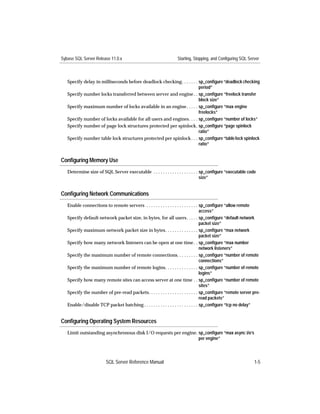
   Specify delay in milliseconds before deadlock checking. . . . . . . sp_configure “deadlock checking
                                                                       period”
   Specify number locks transferred between server and engine . . sp_configure “freelock transfer
                                                                       block size”
   Specify maximum number of locks available in an engine . . . . . sp_configure “max engine
                                                                       freelocks”
   Specify number of locks available for all users and engines. . . . sp_configure “number of locks”
   Specify number of page lock structures protected per spinlock. sp_configure “page spinlock
                                                                       ratio”
   Specify number table lock structures protected per spinlock . . . sp_configure “table lock spinlock
                                                                       ratio”


Configuring Memory Use
   Determine size of SQL Server executable . . . . . . . . . . . . . . . . . . . sp_configure “executable code
                                                                                 size”


Configuring Network Communications
   Enable connections to remote servers . . . . . . . . . . . . . . . . . . . . . . sp_configure “allow remote
                                                                                    access”
   Specify default network packet size, in bytes, for all users . . . . . sp_configure “default network
                                                                                    packet size”
   Specify maximum network packet size in bytes. . . . . . . . . . . . . . sp_configure “max network
                                                                                    packet size”
   Specify how many network listeners can be open at one time . . sp_configure “max number
                                                                                    network listeners”
   Specify the maximum number of remote connections. . . . . . . . . sp_configure “number of remote
                                                                                    connections”
   Specify the maximum number of remote logins. . . . . . . . . . . . . . sp_configure “number of remote
                                                                                    logins”
   Specify how many remote sites can access server at one time . . sp_configure “number of remote
                                                                                    sites”
   Specify the number of pre-read packets. . . . . . . . . . . . . . . . . . . . . sp_configure “remote server pre-
                                                                                    read packets”
   Enable/disable TCP packet batching . . . . . . . . . . . . . . . . . . . . . . . sp_configure “tcp no delay”


Configuring Operating System Resources
   Limit outstanding asynchronous disk I/O requests per engine. sp_configure “max async i/o’s
                                                                per engine”


                         SQL Server Reference Manual                                                          1-5
Starting, Stopping, and Configuring SQL Server                                      Sybase SQL Server Release 11.0.x


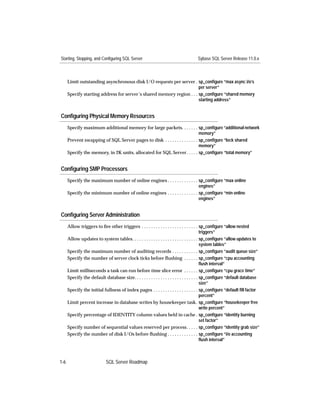
      Limit outstanding asynchronous disk I/O requests per server . sp_configure “max async i/o’s
                                                                       per server”
      Specify starting address for server’s shared memory region . . . sp_configure “shared memory
                                                                       starting address”


Configuring Physical Memory Resources
      Specify maximum additional memory for large packets. . . . . . . sp_configure “additional network
                                                                               memory”
      Prevent swapping of SQL Server pages to disk . . . . . . . . . . . . . . sp_configure “lock shared
                                                                               memory”
      Specify the memory, in 2K units, allocated for SQL Server. . . . . sp_configure “total memory”


Configuring SMP Processors
      Specify the maximum number of online engines . . . . . . . . . . . . . sp_configure “max online
                                                                             engines”
      Specify the minimum number of online engines . . . . . . . . . . . . . sp_configure “min online
                                                                             engines”


Configuring Server Administration
      Allow triggers to fire other triggers . . . . . . . . . . . . . . . . . . . . . . . . sp_configure “allow nested
                                                                                             triggers”
      Allow updates to system tables. . . . . . . . . . . . . . . . . . . . . . . . . . . . sp_configure “allow updates to
                                                                                             system tables”
      Specify the maximum number of auditing records . . . . . . . . . . . sp_configure “audit queue size”
      Specify the number of server clock ticks before flushing . . . . . . sp_configure “cpu accounting
                                                                                             flush interval”
      Limit milliseconds a task can run before time slice error . . . . . . sp_configure “cpu grace time”
      Specify the default database size. . . . . . . . . . . . . . . . . . . . . . . . . . . sp_configure “default database
                                                                                             size”
      Specify the initial fullness of index pages . . . . . . . . . . . . . . . . . . . sp_configure “default fill factor
                                                                                             percent”
      Limit percent increase in database writes by housekeeper task. sp_configure “housekeeper free
                                                                                             write percent”
      Specify percentage of IDENTITY column values held in cache . sp_configure “identity burning
                                                                                             set factor”
      Specify number of sequential values reserved per process. . . . . sp_configure “identity grab size”
      Specify the number of disk I/Os before flushing . . . . . . . . . . . . . sp_configure “i/o accounting
                                                                                             flush interval”


1-6                          SQL Server Roadmap
Sybase SQL Server Release 11.0.x                                     Starting, Stopping, and Configuring SQL Server


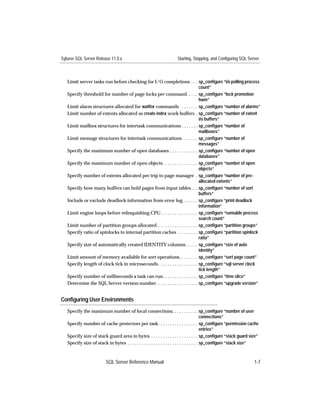
   Limit server tasks run before checking for I/O completions . . . sp_configure “i/o polling process
                                                                                  count”
   Specify threshold for number of page locks per command. . . . . sp_configure “lock promotion
                                                                                  hwm”
   Limit alarm structures allocated for waitfor commands . . . . . . . sp_configure “number of alarms”
   Limit number of extents allocated as create index work buffers . sp_configure “number of extent
                                                                                  i/o buffers”
   Limit mailbox structures for intertask communications . . . . . . . sp_configure “number of
                                                                                  mailboxes”
   Limit message structures for intertask communications. . . . . . . sp_configure “number of
                                                                                  messages”
   Specify the maximum number of open databases . . . . . . . . . . . . sp_configure “number of open
                                                                                  databases”
   Specify the maximum number of open objects . . . . . . . . . . . . . . . sp_configure “number of open
                                                                                  objects”
   Specify number of extents allocated per trip to page manager . sp_configure “number of pre-
                                                                                  allocated extents”
   Specify how many buffers can hold pages from input tables . . . sp_configure “number of sort
                                                                                  buffers”
   Include or exclude deadlock information from error log . . . . . . sp_configure “print deadlock
                                                                                  information”
   Limit engine loops before relinquishing CPU. . . . . . . . . . . . . . . . sp_configure “runnable process
                                                                                  search count”
   Limit number of partition groups allocated . . . . . . . . . . . . . . . . . sp_configure “partition groups”
   Specify ratio of spinlocks to internal partition caches . . . . . . . . . sp_configure “partition spinlock
                                                                                  ratio”
   Specify size of automatically created IDENTITY columns . . . . . sp_configure “size of auto
                                                                                  identity”
   Limit amount of memory available for sort operations. . . . . . . . sp_configure “sort page count”
   Specify length of clock tick in microseconds . . . . . . . . . . . . . . . . . sp_configure “sql server clock
                                                                                  tick length”
   Specify number of milliseconds a task can run. . . . . . . . . . . . . . . sp_configure “time slice”
   Determine the SQL Server version number. . . . . . . . . . . . . . . . . . sp_configure “upgrade version”


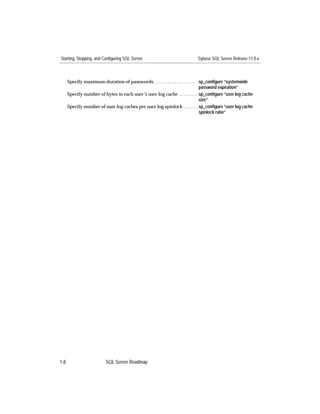
Configuring User Environments
   Specify the maximum number of local connections. . . . . . . . . . . sp_configure “number of user
                                                                                              connections”
   Specify number of cache protectors per task. . . . . . . . . . . . . . . . . sp_configure “permission cache
                                                                                              entries”
   Specify size of stack guard area in bytes . . . . . . . . . . . . . . . . . . . . sp_configure “stack guard size”
   Specify size of stack in bytes . . . . . . . . . . . . . . . . . . . . . . . . . . . . . . sp_configure “stack size”


                          SQL Server Reference Manual                                                              1-7
Starting, Stopping, and Configuring SQL Server                             Sybase SQL Server Release 11.0.x


      Specify maximum duration of passwords . . . . . . . . . . . . . . . . . . . sp_configure “systemwide
                                                                                  password expiration”
      Specify number of bytes in each user’s user log cache . . . . . . . . sp_configure “user log cache
                                                                                  size”
      Specify number of user log caches per user log spinlock . . . . . . sp_configure “user log cache
                                                                                  spinlock ratio”


1-8                       SQL Server Roadmap
Sybase SQL Server Release 11.0.x                                                          Creating and Maintaining Databases


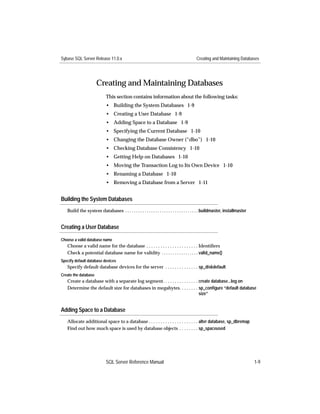
                      Creating and Maintaining Databases
                             This section contains information about the following tasks:
                             • Building the System Databases 1-9
                             • Creating a User Database 1-9
                             • Adding Space to a Database 1-9
                             • Specifying the Current Database 1-10
                             • Changing the Database Owner (“dbo”) 1-10
                             • Checking Database Consistency 1-10
                             • Getting Help on Databases 1-10
                             • Moving the Transaction Log to Its Own Device 1-10
                             • Renaming a Database 1-10
                             • Removing a Database from a Server 1-11


Building the System Databases
   Build the system databases . . . . . . . . . . . . . . . . . . . . . . . . . . . . . . . . . . buildmaster, installmaster


Creating a User Database

Choose a valid database name
   Choose a valid name for the database . . . . . . . . . . . . . . . . . . . . . . Identifiers
   Check a potential database name for validity . . . . . . . . . . . . . . . . . valid_name()
Specify default database devices
   Specify default database devices for the server . . . . . . . . . . . . . . sp_diskdefault
Create the database
   Create a database with a separate log segment. . . . . . . . . . . . . . . create database...log on
   Determine the default size for databases in megabytes. . . . . . . . sp_configure “default database
                                                                              size”


Adding Space to a Database
   Allocate additional space to a database . . . . . . . . . . . . . . . . . . . . . alter database, sp_dbremap
   Find out how much space is used by database objects . . . . . . . . sp_spaceused


                             SQL Server Reference Manual                                                                       1-9
Creating and Maintaining Databases                                                      Sybase SQL Server Release 11.0.x


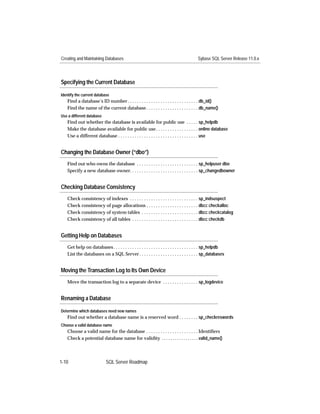
Specifying the Current Database

Identify the current database
   Find a database’s ID number . . . . . . . . . . . . . . . . . . . . . . . . . . . . . . db_id()
   Find the name of the current database . . . . . . . . . . . . . . . . . . . . . . db_name()
Use a different database
   Find out whether the database is available for public use . . . . . sp_helpdb
   Make the database available for public use . . . . . . . . . . . . . . . . . . online database
   Use a different database . . . . . . . . . . . . . . . . . . . . . . . . . . . . . . . . . . use


Changing the Database Owner (“dbo”)
   Find out who owns the database . . . . . . . . . . . . . . . . . . . . . . . . . . sp_helpuser dbo
   Specify a new database owner. . . . . . . . . . . . . . . . . . . . . . . . . . . . . sp_changedbowner


Checking Database Consistency
   Check consistency of indexes . . . . . . . . . . . . . . . . . . . . . . . . . . . . . sp_indsuspect
   Check consistency of page allocations . . . . . . . . . . . . . . . . . . . . . . dbcc checkalloc
   Check consistency of system tables . . . . . . . . . . . . . . . . . . . . . . . . dbcc checkcatalog
   Check consistency of all tables . . . . . . . . . . . . . . . . . . . . . . . . . . . . dbcc checkdb


Getting Help on Databases
   Get help on databases . . . . . . . . . . . . . . . . . . . . . . . . . . . . . . . . . . . . sp_helpdb
   List the databases on a SQL Server . . . . . . . . . . . . . . . . . . . . . . . . . sp_databases


Moving the Transaction Log to Its Own Device
   Move the transaction log to a separate device . . . . . . . . . . . . . . . sp_logdevice


Renaming a Database

Determine which databases need new names
   Find out whether a database name is a reserved word . . . . . . . . sp_checkreswords
Choose a valid database name
   Choose a valid name for the database . . . . . . . . . . . . . . . . . . . . . . Identifiers
   Check a potential database name for validity . . . . . . . . . . . . . . . . . valid_name()


1-10                        SQL Server Roadmap
Sybase SQL Server Release 11.0.x                                                         Creating and Maintaining Databases


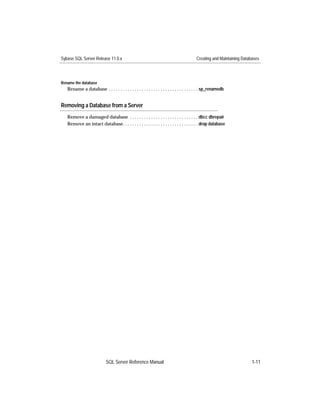
Rename the database
   Rename a database . . . . . . . . . . . . . . . . . . . . . . . . . . . . . . . . . . . . . . sp_renamedb


Removing a Database from a Server
   Remove a damaged database . . . . . . . . . . . . . . . . . . . . . . . . . . . . . dbcc dbrepair
   Remove an intact database. . . . . . . . . . . . . . . . . . . . . . . . . . . . . . . . drop database


                            SQL Server Reference Manual                                                                1-11
Setting Database-Wide Options                                                          Sybase SQL Server Release 11.0.x


                     Setting Database-Wide Options
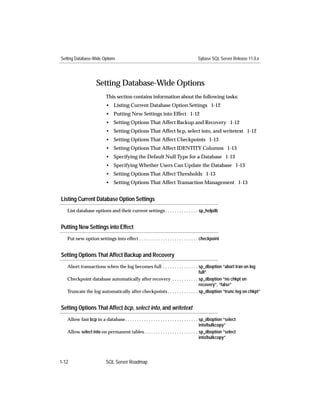
                           This section contains information about the following tasks:
                           • Listing Current Database Option Settings 1-12
                           • Putting New Settings into Effect 1-12
                           • Setting Options That Affect Backup and Recovery 1-12
                           • Setting Options That Affect bcp, select into, and writetext 1-12
                           • Setting Options That Affect Checkpoints 1-13
                           • Setting Options That Affect IDENTITY Columns 1-13
                           • Specifying the Default Null Type for a Database 1-13
                           • Specifying Whether Users Can Update the Database 1-13
                           • Setting Options That Affect Thresholds 1-13
                           • Setting Options That Affect Transaction Management 1-13


Listing Current Database Option Settings
   List database options and their current settings . . . . . . . . . . . . . . sp_helpdb


Putting New Settings into Effect
   Put new option settings into effect . . . . . . . . . . . . . . . . . . . . . . . . . checkpoint


Setting Options That Affect Backup and Recovery
   Abort transactions when the log becomes full . . . . . . . . . . . . . . . sp_dboption “abort tran on log
                                                                              full”
   Checkpoint database automatically after recovery . . . . . . . . . . . sp_dboption “no chkpt on
                                                                              recovery”, “false”
   Truncate the log automatically after checkpoints . . . . . . . . . . . . . sp_dboption “trunc log on chkpt”


Setting Options That Affect bcp, select into, and writetext
   Allow fast bcp in a database. . . . . . . . . . . . . . . . . . . . . . . . . . . . . . . sp_dboption “select
                                                                                             into/bulkcopy”
   Allow select into on permanent tables. . . . . . . . . . . . . . . . . . . . . . . sp_dboption “select
                                                                                             into/bulkcopy”


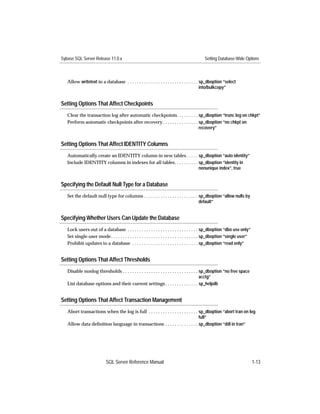
1-12                       SQL Server Roadmap
Sybase SQL Server Release 11.0.x                                                             Setting Database-Wide Options


   Allow writetext in a database . . . . . . . . . . . . . . . . . . . . . . . . . . . . . . sp_dboption “select
                                                                                             into/bulkcopy”


Setting Options That Affect Checkpoints
   Clear the transaction log after automatic checkpoints. . . . . . . . . sp_dboption “trunc log on chkpt”
   Perform automatic checkpoints after recovery . . . . . . . . . . . . . . . sp_dboption “no chkpt on
                                                                              recovery”


Setting Options That Affect IDENTITY Columns
   Automatically create an IDENTITY column in new tables . . . . . sp_dboption “auto identity”
   Include IDENTITY columns in indexes for all tables. . . . . . . . . . sp_dboption “identity in
                                                                         nonunique index”, true


Specifying the Default Null Type for a Database
   Set the default null type for columns . . . . . . . . . . . . . . . . . . . . . . . sp_dboption “allow nulls by
                                                                                       default”


Specifying Whether Users Can Update the Database
   Lock users out of a database . . . . . . . . . . . . . . . . . . . . . . . . . . . . . . sp_dboption “dbo use only”
   Set single-user mode . . . . . . . . . . . . . . . . . . . . . . . . . . . . . . . . . . . . . sp_dboption “single user”
   Prohibit updates to a database . . . . . . . . . . . . . . . . . . . . . . . . . . . . sp_dboption “read only”


Setting Options That Affect Thresholds
   Disable nonlog thresholds . . . . . . . . . . . . . . . . . . . . . . . . . . . . . . . . sp_dboption “no free space
                                                                                             acctg”
   List database options and their current settings . . . . . . . . . . . . . . sp_helpdb


Setting Options That Affect Transaction Management
   Abort transactions when the log is full . . . . . . . . . . . . . . . . . . . . . sp_dboption “abort tran on log
                                                                                     full”
   Allow data definition language in transactions . . . . . . . . . . . . . . sp_dboption “ddl in tran”


                            SQL Server Reference Manual                                                                       1-13
Backing Up and Restoring Databases                                                              Sybase SQL Server Release 11.0.x


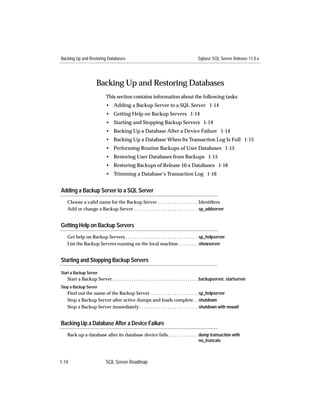
                       Backing Up and Restoring Databases
                              This section contains information about the following tasks:
                              • Adding a Backup Server to a SQL Server 1-14
                              • Getting Help on Backup Servers 1-14
                              • Starting and Stopping Backup Servers 1-14
                              • Backing Up a Database After a Device Failure 1-14
                              • Backing Up a Database When Its Transaction Log Is Full 1-15
                              • Performing Routine Backups of User Databases 1-15
                              • Restoring User Databases from Backups 1-15
                              • Restoring Backups of Release 10.x Databases 1-16
                              • Trimming a Database’s Transaction Log 1-16


Adding a Backup Server to a SQL Server
   Choose a valid name for the Backup Server . . . . . . . . . . . . . . . . . Identifiers
   Add or change a Backup Server . . . . . . . . . . . . . . . . . . . . . . . . . . . sp_addserver


Getting Help on Backup Servers
   Get help on Backup Servers . . . . . . . . . . . . . . . . . . . . . . . . . . . . . . . sp_helpserver
   List the Backup Servers running on the local machine . . . . . . . . . showserver


Starting and Stopping Backup Servers

Start a Backup Server
   Start a Backup Server . . . . . . . . . . . . . . . . . . . . . . . . . . . . . . . . . . . . . . . . backupserver, startserver
Stop a Backup Server
   Find out the name of the Backup Server . . . . . . . . . . . . . . . . . . . . sp_helpserver
   Stop a Backup Server after active dumps and loads complete . . shutdown
   Stop a Backup Server immediately . . . . . . . . . . . . . . . . . . . . . . . . . shutdown with nowait


Backing Up a Database After a Device Failure
   Back up a database after its database device fails. . . . . . . . . . . . . dump transaction with
                                                                               no_truncate


1-14                          SQL Server Roadmap
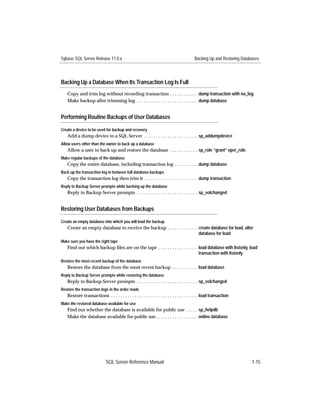
Sybase SQL Server Release 11.0.x                                                           Backing Up and Restoring Databases


Backing Up a Database When Its Transaction Log Is Full
    Copy and trim log without recording transaction . . . . . . . . . . . . dump transaction with no_log
    Make backup after trimming log . . . . . . . . . . . . . . . . . . . . . . . . . . dump database


Performing Routine Backups of User Databases

Create a device to be used for backup and recovery
    Add a dump device to a SQL Server . . . . . . . . . . . . . . . . . . . . . . . sp_addumpdevice
Allow users other than the owner to back up a database
    Allow a user to back up and restore the database . . . . . . . . . . . . sp_role “grant” oper_role
Make regular backups of the database
    Copy the entire database, including transaction log . . . . . . . . . . dump database
Back up the transaction log in between full database backups
   Copy the transaction log then trim it . . . . . . . . . . . . . . . . . . . . . . . . . dump transaction
Reply to Backup Server prompts while backing up the database
    Reply to Backup Server prompts . . . . . . . . . . . . . . . . . . . . . . . . . . sp_volchanged


Restoring User Databases from Backups

Create an empty database into which you will load the backup
    Create an empty database to receive the backup . . . . . . . . . . . . . create database for load, alter
                                                                             database for load
Make sure you have the right tape
    Find out which backup files are on the tape . . . . . . . . . . . . . . . . . load database with listonly, load
                                                                                 transaction with listonly
Restore the most recent backup of the database
    Restore the database from the most recent backup . . . . . . . . . . . load database
Reply to Backup Server prompts while restoring the database
    Reply to Backup Server prompts . . . . . . . . . . . . . . . . . . . . . . . . . . sp_volchanged
Restore the transaction logs in the order made
    Restore transactions . . . . . . . . . . . . . . . . . . . . . . . . . . . . . . . . . . . . . load transaction
Make the restored database available for use
    Find out whether the database is available for public use . . . . . sp_helpdb
    Make the database available for public use . . . . . . . . . . . . . . . . . . online database


                              SQL Server Reference Manual                                                                1-15
Backing Up and Restoring Databases                                                     Sybase SQL Server Release 11.0.x


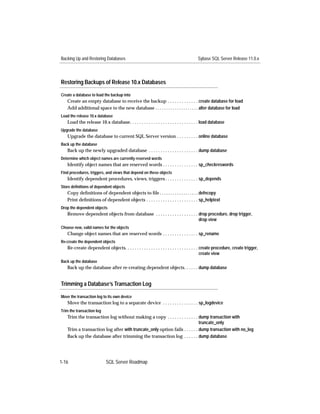
Restoring Backups of Release 10.x Databases

Create a database to load the backup into
   Create an empty database to receive the backup . . . . . . . . . . . . . create database for load
   Add additional space to the new database . . . . . . . . . . . . . . . . . . . . alter database for load
Load the release 10.x database
   Load the release 10.x database. . . . . . . . . . . . . . . . . . . . . . . . . . . . . load database
Upgrade the database
   Upgrade the database to current SQL Server version . . . . . . . . . online database
Back up the database
   Back up the newly upgraded database . . . . . . . . . . . . . . . . . . . . . dump database
Determine which object names are currently reserved words
   Identify object names that are reserved words . . . . . . . . . . . . . . . sp_checkreswords
Find procedures, triggers, and views that depend on these objects
   Identify dependent procedures, views, triggers . . . . . . . . . . . . . . sp_depends
Store definitions of dependent objects
   Copy definitions of dependent objects to file . . . . . . . . . . . . . . . . . . defncopy
   Print definitions of dependent objects . . . . . . . . . . . . . . . . . . . . . . sp_helptext
Drop the dependent objects
   Remove dependent objects from database . . . . . . . . . . . . . . . . . . drop procedure, drop trigger,
                                                                              drop view
Choose new, valid names for the objects
   Change object names that are reserved words . . . . . . . . . . . . . . . sp_rename
Re-create the dependent objects
   Re-create dependent objects. . . . . . . . . . . . . . . . . . . . . . . . . . . . . . . create procedure, create trigger,
                                                                                            create view
Back up the database
   Back up the database after re-creating dependent objects. . . . . . dump database


Trimming a Database’s Transaction Log

Move the transaction log to its own device
   Move the transaction log to a separate device . . . . . . . . . . . . . . . sp_logdevice
Trim the transaction log
   Trim the transaction log without making a copy . . . . . . . . . . . . . dump transaction with
                                                                            truncate_only
   Trim a transaction log after with truncate_only option fails . . . . . . dump transaction with no_log
   Back up the database after trimming the transaction log . . . . . . dump database


1-16                       SQL Server Roadmap
Sybase SQL Server Release 11.0.x                                               Managing Logins, Users, Groups, and Roles


                      Managing Logins, Users, Groups, and Roles
                            This section contains informtion about the following tasks:
                            • Creating New Users 1-17
                            • Getting Help on Users 1-17
                            • Managing Passwords 1-17
                            • Using Groups 1-18
                            • Using Roles 1-18
                            • Using Aliases 1-19
                            • Changing the Characteristics of a Login 1-19
                            • Impersonating Another User 1-19
                            • Managing User Permissions 1-19
                            • Managing Remote Users 1-19
                            • Monitoring User Activity 1-19
                            • Preventing a User from Accessing the Server 1-20


Creating New Users
   Read about SQL Server logins . . . . . . . . . . . . . . . . . . . . . . . . . . Login Management
   Create a SQL Server login . . . . . . . . . . . . . . . . . . . . . . . . . . . . . . . . sp_addlogin
   Add a SQL Server login as a user in the current database . . . . . sp_adduser


Getting Help on Users
   Get help on a database user or all users . . . . . . . . . . . . . . . . . . . . . sp_helpuser
   Confirm that a login is a database user or alias. . . . . . . . . . . . . . . valid_user()
   Get help on local users . . . . . . . . . . . . . . . . . . . . . . . . . . . . . . . . . . . sp_displaylogin, sp_who
   Find out a database user’s ID number . . . . . . . . . . . . . . . . . . . . . . user_id()
   Find out the current user’s name . . . . . . . . . . . . . . . . . . . . . . . . . . user, user_name()
   Find out the name of a SQL Server login . . . . . . . . . . . . . . . . . . . . suser_name()
   Find out the server user ID of a SQL Server login . . . . . . . . . . . . suser_id()


Managing Passwords
   Add a password for a SQL Server login. . . . . . . . . . . . . . . . . . . . . sp_password


                            SQL Server Reference Manual                                                                    1-17
Managing Logins, Users, Groups, and Roles                                                        Sybase SQL Server Release 11.0.x


    Change a password for a SQL Server login . . . . . . . . . . . . . . . . . . sp_password


Using Groups

Manage permissions through groups
    Find out what permissions are assigned to a group. . . . . . . . . . . sp_helprotect
    Remove permissions from a group. . . . . . . . . . . . . . . . . . . . . . . . . revoke
    Grant permissions to a group . . . . . . . . . . . . . . . . . . . . . . . . . . . . . grant
Create a group
    Create a group in the current database . . . . . . . . . . . . . . . . . . . . . sp_addgroup
List the groups in the current database
    List the groups in the current database . . . . . . . . . . . . . . . . . . . . . sp_helpgroup
List the members of a group
    List the members of a group . . . . . . . . . . . . . . . . . . . . . . . . . . . . . . sp_helpgroup
Remove a user from a group or change a user’s group
    Change a user’s group . . . . . . . . . . . . . . . . . . . . . . . . . . . . . . . . . . . sp_changegroup
Remove a group from a database
    List the members of the group. . . . . . . . . . . . . . . . . . . . . . . . . . . . . sp_helpgroup
    Remove each member from the group . . . . . . . . . . . . . . . . . . . . . . sp_changegroup
    Remove the group from the current database. . . . . . . . . . . . . . . . sp_dropgroup


Using Roles

Get general information about roles
    Read about roles . . . . . . . . . . . . . . . . . . . . . . . . . . . . . . . . . . . . . . . . Roles
Manage permissions through roles
    Confer permissions on a role . . . . . . . . . . . . . . . . . . . . . . . . . . . . . . grant
    Find out what permissions are granted to a role . . . . . . . . . . . . . sp_helprotect
    Get help on permissions . . . . . . . . . . . . . . . . . . . . . . . . . . . . . . . . . . sp_helprotect
    Revoke permissions from a role . . . . . . . . . . . . . . . . . . . . . . . . . . . revoke
Verify that a user has a particular role
    Verify that a user has a required role . . . . . . . . . . . . . . . . . . . . . . . proc_role()
Assign a role to a user
    Assign a role to a SQL Server login. . . . . . . . . . . . . . . . . . . . . . . . . sp_role
Turn a role on or off for a session
    Activate or deactivate a role for a session . . . . . . . . . . . . . . . . . . . set role
    Display a user’s currently active roles . . . . . . . . . . . . . . . . . . . . . . show_role()


1-18                           SQL Server Roadmap
Sybase SQL Server Release 11.0.x                                                   Managing Logins, Users, Groups, and Roles


Revoke a role from a user
   Revoke a role from a SQL Server login. . . . . . . . . . . . . . . . . . . . . . sp_role


Using Aliases
   Create an alias in the current database for a server login . . . . . . sp_addalias
   List the SQL Server logins mapped to an alias . . . . . . . . . . . . . . . sp_helpuser
   Remove an alias from the current database. . . . . . . . . . . . . . . . . . sp_dropalias


Changing the Characteristics of a Login
   Change a login’s default database or language . . . . . . . . . . . . . . sp_modifylogin
   Rename a login . . . . . . . . . . . . . . . . . . . . . . . . . . . . . . . . . . . . . . . . . sp_modifylogin


Impersonating Another User
   Temporarily impersonate another database user . . . . . . . . . . . . . setuser


Managing User Permissions
   Grant permissions to a user, group, or role . . . . . . . . . . . . . . . . . . grant
   Get help on permissions . . . . . . . . . . . . . . . . . . . . . . . . . . . . . . . . . . sp_helprotect
   Revoke permissions from a user, group, or role . . . . . . . . . . . . . . revoke


Managing Remote Users
   Allow a remote login to execute local stored procedures . . . . . . sp_addremotelogin
   Display or change remote server option settings . . . . . . . . . . . . . sp_remoteoption
   Get help on remote server logins . . . . . . . . . . . . . . . . . . . . . . . . . . sp_helpremotelogin
   Remove a remote login from the local server . . . . . . . . . . . . . . . . sp_dropremotelogin
   Require password verification from remote logins . . . . . . . . . . . sp_remoteoption “trusted”
   Remove a remote server and its logins. . . . . . . . . . . . . . . . . . . . . . sp_dropserver...droplogin


Monitoring User Activity

Audit a user
   Audit a login’s object access and command batches . . . . . . . . . . sp_auditlogin


                             SQL Server Reference Manual                                                                1-19
Managing Logins, Users, Groups, and Roles                                                 Sybase SQL Server Release 11.0.x


Report a login’s system usage
   Close the accounting period and report system usage . . . . . . . . sp_clearstats
   Report system usage . . . . . . . . . . . . . . . . . . . . . . . . . . . . . . . . . . . . sp_reportstats
   List the processes run by a SQL Server login . . . . . . . . . . . . . . . . sp_who


Preventing a User from Accessing the Server

Remove a user from a database
   Remove a user from the current database . . . . . . . . . . . . . . . . . . . sp_dropuser
   Remove an alias from the current database. . . . . . . . . . . . . . . . . . sp_dropalias
Lock a login or remove it from the server
   List locked logins. . . . . . . . . . . . . . . . . . . . . . . . . . . . . . . . . . . . . . . . sp_locklogin
   Lock or unlock a SQL Server login . . . . . . . . . . . . . . . . . . . . . . . . . sp_locklogin
   Remove a login from SQL Server . . . . . . . . . . . . . . . . . . . . . . . . . . sp_droplogin
   Remove a remote login from the local server . . . . . . . . . . . . . . . . sp_dropremotelogin


1-20                        SQL Server Roadmap
Sybase SQL Server Release 11.0.x                                                          Defining and Using Datatypes


                     Defining and Using Datatypes
                           This section contains information about the following tasks:
                           • Getting Information About Datatypes 1-21
                           • Converting Data to Another Datatype or Format 1-21
                           • Creating User-Defined Datatypes 1-22
                           • Finding a Column’s Datatype 1-22
                           • Renaming a User-Defined Datatype 1-22
                           • Removing a User-Defined Datatype from a Database 1-22


Getting Information About Datatypes
   Get help on system datatypes . . . . . . . . . . . . . . . . . . . . . . . . . . . . . sp_datatype_info, sp_help
   Read about system datatypes . . . . . . . . . . . . . . . . . . . . . . . . . . . . . System and User-Defined
                                                                                                 Datatypes
   Read about exact numeric types . . . . . . . . . . . . . . . . . . . . . . . . . . . Exact Numeric Datatypes
   Read about approximate numeric types . . . . . . . . . . . . . . . . . . . . Approximate Numeric
                                                                                                 Datatypes
   Read about datatypes for monetary values . . . . . . . . . . . . . . . . . . Money Datatypes
   Read about datatypes for dates and times. . . . . . . . . . . . . . . . . . . Date/time Datatypes
   Read about the timestamp type. . . . . . . . . . . . . . . . . . . . . . . . . . . . . timestamp Datatype
   Read about character types . . . . . . . . . . . . . . . . . . . . . . . . . . . . . . . Character Datatypes
   Read about datatypes for binary values. . . . . . . . . . . . . . . . . . . . . Binary Datatypes
   Read about the bit type . . . . . . . . . . . . . . . . . . . . . . . . . . . . . . . . . . . bit Datatype
   Read about the sysname type . . . . . . . . . . . . . . . . . . . . . . . . . . . . . . sysname Datatype
   Read about text and image types . . . . . . . . . . . . . . . . . . . . . . . . . . . text and image Datatypes
   Read about user-defined datatypes . . . . . . . . . . . . . . . . . . . . . . . . User-Defined Datatypes


Converting Data to Another Datatype or Format
   Convert one datatype to another . . . . . . . . . . . . . . . . . . . . . . . . . . convert()
   Convert a date to another date format . . . . . . . . . . . . . . . . . . . . . . convert()
   Convert an angle from degrees to radians. . . . . . . . . . . . . . . . . . . radians()
   Convert an angle from radians to degrees. . . . . . . . . . . . . . . . . . . degrees()
   Find the ASCII code for the first character in an expression. . . . ascii()
   Find the character with a specified ASCII code . . . . . . . . . . . . . . char()
   Convert a floating point number to a character string. . . . . . . . . str()


                           SQL Server Reference Manual                                                                1-21
Defining and Using Datatypes                                                                    Sybase SQL Server Release 11.0.x


   Find the integer equivalent of a hexadecimal string . . . . . . . . . . hextoint()
   Find the hexadecimal equivalent of an integer . . . . . . . . . . . . . . . inttohex()
   Convert a string from uppercase to lowercase . . . . . . . . . . . . . . . lower()
   Convert a string from lowercase to uppercase . . . . . . . . . . . . . . . upper()


Creating User-Defined Datatypes

Read about user-defined datatypes
   Get information about user-defined datatypes . . . . . . . . . . . . . User-Defined Datatypes
   Get information about columns with system-generated values. IDENTITY Columns
   Get information about column null types . . . . . . . . . . . . . . . . . . . Null Values
Choose a name for the user-defined datatype
   Choose a valid name for the datatype . . . . . . . . . . . . . . . . . . . . . . Identifiers
   Check a potential datatype name for validity . . . . . . . . . . . . . . . . . valid_name()
Create the datatype
   Create a user-defined datatype . . . . . . . . . . . . . . . . . . . . . . . . . . . . sp_addtype
Specify a default value for columns of the datatype
   Create a default . . . . . . . . . . . . . . . . . . . . . . . . . . . . . . . . . . . . . . . . . create default
   Bind the default to the user-defined datatype. . . . . . . . . . . . . . . . sp_bindefault
   Unbind the default from the user-defined datatype . . . . . . . . . . sp_unbindefault
Specify rules for valid values
   Create a rule . . . . . . . . . . . . . . . . . . . . . . . . . . . . . . . . . . . . . . . . . . . . create rule
   Bind the rule to the user-defined datatype . . . . . . . . . . . . . . . . . . sp_bindrule
   Unbind the rule from the user-defined datatype . . . . . . . . . . . . . sp_unbindrule


Finding a Column’s Datatype
   Find a column’s datatype . . . . . . . . . . . . . . . . . . . . . . . . . . . . . . . . . sp_columns


Renaming a User-Defined Datatype
   Choose a valid datatype name . . . . . . . . . . . . . . . . . . . . . . . . . . . . Identifiers, valid_name()
   Identify datatype names that are reserved words . . . . . . . . . . . . sp_checkreswords
   Rename a datatype . . . . . . . . . . . . . . . . . . . . . . . . . . . . . . . . . . . . . . sp_rename


Removing a User-Defined Datatype from a Database
   Remove a user-defined datatype from the current database . . . sp_droptype


1-22                          SQL Server Roadmap
Sybase SQL Server Release 11.0.x                                                      Creating and Maintaining Tables


                    Creating and Maintaining Tables
                          This section contains information about the following tasks:
                          • Using Temporary Tables 1-23
                          • Using IDENTITY Columns 1-23
                          • Creating a Table from Scratch 1-24
                          • Using an Existing Table to Create a New Table 1-24
                          • Adding Constraints, Defaults, Rules, and Keys to a Table 1-25
                          • Adding a Column to a Table 1-26
                          • Renaming a Column 1-26
                          • Renaming a Table 1-27
                          • Checking Table Consistency 1-27
                          • Determining Column Datatype, Length, and Value 1-27
                          • Giving Others Permission to Use a Table 1-28
                          • Identifying Tables 1-28
                          • Creating and Maintaining a Table’s Indexes 1-28
                          • Manipulating Data 1-29
                          • Monitoring Table Size 1-29
                          • Limiting the Number of Rows per Page 1-30
                          • Moving a Table or Index to Another Segment 1-30
                          • Partitioning a Table for Better Insert Performance 1-30
                          • Removing a Table from a Database 1-30


Using Temporary Tables
   Read about temporary tables. . . . . . . . . . . . . . . . . . . . . . . . . . . . . . Temporary Tables


Using IDENTITY Columns

Get general information about IDENTITY columns
   Read about IDENTITY columns . . . . . . . . . . . . . . . . . . . . . . . . . . . IDENTITY Columns
Configure server parameters for IDENTITY columns
   Specify the percentage of column values held in cache . . . . . . . . sp_configure “identity set
                                                                         burning factor”


                          SQL Server Reference Manual                                                            1-23
Creating and Maintaining Tables                                                                 Sybase SQL Server Release 11.0.x


   Specify number of sequential values reserved per process. . . . . sp_configure “identity grab size”
   Specify size of automatically created IDENTITY columns . . . . . sp_configure “size of auto
                                                                     identity”
Set database options for IDENTITY columns
   Include IDENTITY columns in indexes for all tables. . . . . . . . . . sp_dboption “identity in
                                                                         nonunique index”, true
Set session options for IDENTITY columns
   Allow explicit inserts into an IDENTITY column. . . . . . . . . . . . . set identity_insert on
   Automatically create an IDENTITY column in new tables . . . . . set auto identity on
Retrieve IDENTITY column values
   Find the last value inserted into an IDENTITY column . . . . . . . @@identity
   Pseudonym for a table’s IDENTITY column . . . . . . . . . . . . . . . . . . syb_identity


Creating a Table from Scratch

Create a schema
   Create a schema in the current database . . . . . . . . . . . . . . . . . . . . create schema
Choose valid table and column names or allow nonstandard names
   Choose a valid name for the table and its columns . . . . . . . . . . . Identifiers
   Check potential names for validity. . . . . . . . . . . . . . . . . . . . . . . . . valid_name()
   Allow delimited identifiers . . . . . . . . . . . . . . . . . . . . . . . . . . . . . . . set quoted_identifier on
Create the table
   Create a new table . . . . . . . . . . . . . . . . . . . . . . . . . . . . . . . . . . . . . . . create table
Back up the database
   Back up the database that contains the new table . . . . . . . . . . . . dump database


Using an Existing Table to Create a New Table

Choose a valid table name or allow nonstandard names
   Choose a valid name for the table. . . . . . . . . . . . . . . . . . . . . . . . . . Identifiers
   Check a potential table name for validity . . . . . . . . . . . . . . . . . . . valid_name()
   Allow delimited identifiers . . . . . . . . . . . . . . . . . . . . . . . . . . . . . . . set quoted_identifier on
Set database option allowing use of the select into command
   Allow the use of the select into command in the database . . . . . . sp_dboption “select
                                                                                          into/bulkcopy”
   Put new option setting into effect . . . . . . . . . . . . . . . . . . . . . . . . . . checkpoint
Create the new table
   Create a table and populate with existing data. . . . . . . . . . . . . . . select into


1-24                          SQL Server Roadmap
Sybase SQL Server Release 11.0.x                                                                  Creating and Maintaining Tables


Disallow select into command
   Allow the use of the select into command in the database . . . . . . sp_dboption “select
                                                                                          into/bulkcopy”
   Put new option setting into effect . . . . . . . . . . . . . . . . . . . . . . . . . . checkpoint
Back up the database
   Back up the database that contains the new table . . . . . . . . . . . . dump database


Adding Constraints, Defaults, Rules, and Keys to a Table

Use SQL92 primary key, foreign key, and unique constraints
   Add a named constraint to an existing table . . . . . . . . . . . . . . . . . alter table
   List the definition of the constraint. . . . . . . . . . . . . . . . . . . . . . . . . sp_helptext
   Change a constraint or remove it from a table . . . . . . . . . . . . . . . alter table
Create a message that displays whenever the SQL92 constraint is violated
   Add a user message to a database . . . . . . . . . . . . . . . . . . . . . . . . . sp_addmessage
   Associate the message with a named constraint. . . . . . . . . . . . . . sp_bindmsg
   Find out what message is associated with a constraint . . . . . . . . sp_helpconstraint
   Associate a different message with a constraint . . . . . . . . . . . . . . sp_unbindmsg, sp_bindmsg
Specify a default value for a column
   Create a default . . . . . . . . . . . . . . . . . . . . . . . . . . . . . . . . . . . . . . . . . create default
   Bind the default to a column . . . . . . . . . . . . . . . . . . . . . . . . . . . . . . sp_bindefault
   Unbind the default from a column . . . . . . . . . . . . . . . . . . . . . . . . . sp_unbindefault
Specify a rule that determines valid column values
   Create a rule that determines acceptable values . . . . . . . . . . . . . . create rule
   Bind the rule to a column . . . . . . . . . . . . . . . . . . . . . . . . . . . . . . . . . sp_bindrule
   Unbind the rule from a column. . . . . . . . . . . . . . . . . . . . . . . . . . . . sp_unbindrule
Use common keys
   List potential common keys . . . . . . . . . . . . . . . . . . . . . . . . . . . . . . . sp_helpjoins
   Define a common key . . . . . . . . . . . . . . . . . . . . . . . . . . . . . . . . . . . . sp_commonkey
   Get help on common keys . . . . . . . . . . . . . . . . . . . . . . . . . . . . . . . . sp_helpkey
Use logical foreign keys
   Create a foreign key . . . . . . . . . . . . . . . . . . . . . . . . . . . . . . . . . . . . . sp_foreignkey
   Get help on logical foreign keys . . . . . . . . . . . . . . . . . . . . . . . . . . . sp_fkeys, sp_helpkey
   Create a trigger to enforce a logical foreign key . . . . . . . . . . . . . . create trigger
   Remove a logical foreign key from a table. . . . . . . . . . . . . . . . . . . sp_dropkey
Use logical primary keys
   Create a logical primary key . . . . . . . . . . . . . . . . . . . . . . . . . . . . . . sp_primarykey
   Get help on logical primary keys . . . . . . . . . . . . . . . . . . . . . . . . . . sp_pkeys, sp_helpkey


                              SQL Server Reference Manual                                                                    1-25
Creating and Maintaining Tables                                                            Sybase SQL Server Release 11.0.x


   Create a trigger to enforce a logical primary key . . . . . . . . . . . . . create trigger
   Remove a logical primary key from a table . . . . . . . . . . . . . . . . . . sp_dropkey


Adding a Column to a Table

Store definitions of objects that depend on the table
   List views, procedures, triggers that depend on the table. . . . . . sp_depends
   Store definitions of dependent objects in a file. . . . . . . . . . . . . . . . . defncopy
   Print definitions of dependent objects . . . . . . . . . . . . . . . . . . . . . . sp_helptext
Drop dependent objects
   Drop dependent objects . . . . . . . . . . . . . . . . . . . . . . . . . . . . . . . . . . drop procedure, drop trigger,
                                                                                              drop view
Choose a valid column name or allow nonstandard names
   Choose a valid column name. . . . . . . . . . . . . . . . . . . . . . . . . . . . . . Identifiers
   Check a potential column name for validity . . . . . . . . . . . . . . . . . valid_name()
   Allow delimited identifiers during the session. . . . . . . . . . . . . . . set quoted_identifier on
Add the column to the table
   Add the new column to the table . . . . . . . . . . . . . . . . . . . . . . . . . . alter table
Re-create dependent objects
   Re-create dependent objects. . . . . . . . . . . . . . . . . . . . . . . . . . . . . . . create procedure, create trigger,
                                                                                            create view
Back up the database
   Back up the database that contains the new table . . . . . . . . . . . . dump database


Renaming a Column

Identify columns that must be renamed
   Identify column names that are reserved words . . . . . . . . . . . . . sp_checkreswords
Choose a valid column name or allow nonstandard names
   Choose a valid column name. . . . . . . . . . . . . . . . . . . . . . . . . . . . . . Identifiers
   Check a potential column name for validity . . . . . . . . . . . . . . . . . valid_name()
   Allow delimited identifiers during the session. . . . . . . . . . . . . . . set quoted_identifier on
   Find a column’s name from its ID. . . . . . . . . . . . . . . . . . . . . . . . . . col_name()
Rename a column
   Rename a column . . . . . . . . . . . . . . . . . . . . . . . . . . . . . . . . . . . . . . . sp_rename


1-26                         SQL Server Roadmap
Sybase SQL Server Release 11.0.x                                                                   Creating and Maintaining Tables


Renaming a Table

Identify tables that must be renamed
   Identify table names that are reserved words . . . . . . . . . . . . . . . . sp_checkreswords
Choose a valid table name or allow nonstandard names
   Choose a valid name for the table. . . . . . . . . . . . . . . . . . . . . . . . . . Identifiers
   Check a potential table name for validity . . . . . . . . . . . . . . . . . . . valid_name()
   Allow delimited identifiers . . . . . . . . . . . . . . . . . . . . . . . . . . . . . . . set quoted_identifier on
Store definitons of objects that depend on the table
   Identify dependent objects. . . . . . . . . . . . . . . . . . . . . . . . . . . . . . . . sp_depends
   Copy definitions of dependent objects to a file . . . . . . . . . . . . . . . . defncopy
   Print definitions of dependent objects . . . . . . . . . . . . . . . . . . . . . . sp_helptext
Rename the table
   Rename a table . . . . . . . . . . . . . . . . . . . . . . . . . . . . . . . . . . . . . . . . . . sp_rename
Drop the dependent objects
   Remove dependent objects from the database . . . . . . . . . . . . . . . drop procedure, drop trigger,
                                                                            drop view
Re-create the dependent objects
   Re-create dependent objects. . . . . . . . . . . . . . . . . . . . . . . . . . . . . . . create procedure, create trigger,
                                                                                            create view
Back up the database
   Back up the database that contains the table. . . . . . . . . . . . . . . . . dump database


Checking Table Consistency
   Check the consistency of a table . . . . . . . . . . . . . . . . . . . . . . . . . . . dbcc checktable
   Check the integrity of page allocations . . . . . . . . . . . . . . . . . . . . . dbcc tablealloc
   Identify suspect indexes . . . . . . . . . . . . . . . . . . . . . . . . . . . . . . . . . . sp_indsuspect


Determining Column Datatype, Length, and Value

Determine a column’s datatype
   Find out the datatypes of each column in a table . . . . . . . . . . . . . sp_help
   Find out the datatypes of selected columns in a table . . . . . . . . . sp_columns
Determine a column’s length
   Find out actual length of data in a column . . . . . . . . . . . . . . . . . . datalength()
   Find out defined column length . . . . . . . . . . . . . . . . . . . . . . . . . . . col_length()
Determine a column’s value
   Retrieve the value of a column . . . . . . . . . . . . . . . . . . . . . . . . . . . . select


                              SQL Server Reference Manual                                                                     1-27
Creating and Maintaining Tables                                                          Sybase SQL Server Release 11.0.x


   Specify which rows to retrieve . . . . . . . . . . . . . . . . . . . . . . . . . . . . where Clause
   Find the last value inserted into an IDENTITY column . . . . . . . @@identity


Giving Others Permission to Use a Table

Find out whether a user can access the table
   Find out which users can access one or more columns . . . . . . . . sp_column_privileges
   Find out which users can access a table . . . . . . . . . . . . . . . . . . . . . sp_helprotect,
                                                                                     sp_table_privileges
   Find out which columns a particular user can access . . . . . . . . . sp_helprotect
   List all permissions information for the database . . . . . . . . . . . . sp_helprotect
Grant permission to access the table
   Grant a user, group, or role permission to access a table. . . . . . . grant
Revoke permission to access the table
   Revoke permission from a user, group, or role . . . . . . . . . . . . . . . revoke


Identifying Tables
   List the tables in a database . . . . . . . . . . . . . . . . . . . . . . . . . . . . . . . sp_tables
   Find the name of a table from its object ID . . . . . . . . . . . . . . . . . . object_name()
   Find the object ID of a table from its name . . . . . . . . . . . . . . . . . . object_id()


Creating and Maintaining a Table’s Indexes

Create an Index
   Choose a valid name for the index . . . . . . . . . . . . . . . . . . . . . . . . . Identifiers
   Check a potential index name for validity. . . . . . . . . . . . . . . . . . . valid_name()
   Estimate space and time required to create an index . . . . . . . . . . sp_estspace
   Include existing IDENTITY column in index key. . . . . . . . . . . . . sp_dboption “identity in
                                                                                              nonunique index”
   Create an index on a table . . . . . . . . . . . . . . . . . . . . . . . . . . . . . . . . create index
Identify indexes
   Find out which columns are indexed . . . . . . . . . . . . . . . . . . . . . . . index_col()
   List the indexes for a table . . . . . . . . . . . . . . . . . . . . . . . . . . . . . . . . sp_helpindex, sp_statistics
Check index consistency
   Check the consistency of an index . . . . . . . . . . . . . . . . . . . . . . . . . dbcc checktable
   Check the integrity of index page allocations . . . . . . . . . . . . . . . . dbcc indexalloc
   Identify suspect indexes after sort order change . . . . . . . . . . . . . sp_indsuspect
   Rebuild suspect indexes . . . . . . . . . . . . . . . . . . . . . . . . . . . . . . . . . . dbcc reindex


1-28                        SQL Server Roadmap
Sybase SQL Server Release 11.0.x                                                                    Creating and Maintaining Tables


Find the space used by an index
   Find out how many pages are allocated to an index . . . . . . . . . . reserved_pgs()
   Find out how many pages are used by an index . . . . . . . . . . . . . data_pgs()
   Find out how many extents are allocated for indexes . . . . . . . . . sp_configure “number of extent
                                                                                 i/o buffers”
   Find out how much space an index uses . . . . . . . . . . . . . . . . . . . . sp_spaceused
Move an index to another segment
   Assign future allocation to a particular segment . . . . . . . . . . . . . sp_placeobject
Remove an index from a table
   Remove an index from a table . . . . . . . . . . . . . . . . . . . . . . . . . . . . . drop index
Rename an index
   Check a potential index name for validity. . . . . . . . . . . . . . . . . . . valid_name()
   Choose a valid name for the index . . . . . . . . . . . . . . . . . . . . . . . . . Identifiers
   Identify index names that are reserved words . . . . . . . . . . . . . . . sp_checkreswords
   Rename an index . . . . . . . . . . . . . . . . . . . . . . . . . . . . . . . . . . . . . . . . sp_rename
Update index statistics
   Update information about key values . . . . . . . . . . . . . . . . . . . . . . update statistics


Manipulating Data

Add data to a table
   Add rows to a table . . . . . . . . . . . . . . . . . . . . . . . . . . . . . . . . . . . . . . insert
Update data in a table
   Change the value of rows . . . . . . . . . . . . . . . . . . . . . . . . . . . . . . . . update
Remove data from a table
   Remove all rows from a table . . . . . . . . . . . . . . . . . . . . . . . . . . . . . truncate table, delete
   Remove selected rows from a table. . . . . . . . . . . . . . . . . . . . . . . . . delete


Monitoring Table Size
   Find out how many KB are used by a table . . . . . . . . . . . . . . . . . . sp_spaceused
   Find out how many KB are still available for table expansion . . sp_spaceused
   Find out how many pages are allocated to a table . . . . . . . . . . . . reserved_pgs()
   Find out how many pages are being used for data . . . . . . . . . . . data_pgs()
   Find out how many pages are being used for data and index . . used_pgs()
   Estimate the number of rows in a table . . . . . . . . . . . . . . . . . . . . . rowcnt()
   Estimate the number of KB required for a table and indexes . . . sp_estspace


                              SQL Server Reference Manual                                                                      1-29
Creating and Maintaining Tables                                                      Sybase SQL Server Release 11.0.x


Limiting the Number of Rows per Page
   Specify maximum number of rows for future page allocations . sp_chgattribute
   Specify maximum number of rows on index leaf pages . . . . . . . create table...
                                                                        max_rows_per_page,
                                                                        alter table...max_rows_per_page
   Specify maximum number of rows on data pages . . . . . . . . . . . . create table...
                                                                        max_rows_per_page


Moving a Table or Index to Another Segment
   Assign future allocations to a particular segment . . . . . . . . . . . . sp_placeobject


Partitioning a Table for Better Insert Performance
   Create additional page chains for a table. . . . . . . . . . . . . . . . . . . . alter table...partition
   Concatenate a table’s partitions into a single page chain . . . . . . alter table...unpartition
   Change the number of partitions in a table . . . . . . . . . . . . . . . . . . alter table...unpartition,
                                                                                    alter table...partition
   Find out how many partitions a table has . . . . . . . . . . . . . . . . . . . sp_helpartition, sp_help


Removing a Table from a Database
   Remove a table from a database . . . . . . . . . . . . . . . . . . . . . . . . . . . drop table


1-30                       SQL Server Roadmap
Sybase SQL Server Release 11.0.x                                                                     Auditing Server Activity


                      Auditing Server Activity
                              This section contains information about the following tasks:
                              • Implementing Auditing 1-31
                              • Managing Audit Records 1-31
                              • Archiving Audit Data 1-32
                              • Removing the Auditing System from a Server 1-32


Implementing Auditing

Get information about the auditing system
   Read about the auditing system . . . . . . . . . . . . . . . . . . . . . . . . . . . Auditing
Install the auditing system
   Install the auditing system on a server . . . . . . . . . . . . . . . . . . . . . . . . sybinit
Audit access to specified objects
   Audit access to a specified table or view . . . . . . . . . . . . . . . . . . . . sp_auditobject
Audit access by specified users
   Audit a specified user’s access to tables. . . . . . . . . . . . . . . . . . . . . sp_auditlogin
Turn auditing options on or off
   Audit events within a database . . . . . . . . . . . . . . . . . . . . . . . . . . . . sp_auditdatabase
   Auditing references to database objects from another database sp_auditdatabase
   Audit attempts by users to access tables and views. . . . . . . . . . . sp_auditlogin
   Audit access to tables and views. . . . . . . . . . . . . . . . . . . . . . . . . . . sp_auditobject
   Enable system-wide auditing and global audit options . . . . . . . sp_auditoption
   Audit the execution of stored procedures and triggers . . . . . . . . sp_auditsproc
Enable or disable auditing for options that are turned on
   Enable/disable sp_auditoption options that are turned on. . . . . . . sp_auditoption “enable auditing”


Managing Audit Records

Add audit records
   Add a record to the audit trail . . . . . . . . . . . . . . . . . . . . . . . . . . . . . sp_addauditrecord
Configure the server for auditing
   Configure the maximum number of records in audit queue . . . sp_configure “audit queue size”


                              SQL Server Reference Manual                                                               1-31
Auditing Server Activity                                                               Sybase SQL Server Release 11.0.x


Archiving Audit Data

Create an archive database
   Create an archive database on a separate device . . . . . . . . . . . . . create database
Create an archive table or archive data to an existing table
   Allow select into and fast bcp in the archive database. . . . . . . . . . sp_dboption “select into/bulk
                                                                                     copy”
   Put the new database option into effect . . . . . . . . . . . . . . . . . . . . . checkpoint
   Create a new table in the database; copy audit data into it . . . . . select into
   Copy audit data into a pre-existing archive table. . . . . . . . . . . . . insert
   Disallow select into and bcp in the archive database . . . . . . . . . . . sp_dboption “select into/bulk
                                                                                     copy”
   Put the new database option into effect . . . . . . . . . . . . . . . . . . . . . checkpoint
Make a copy of the archive database
   Back up the archive database. . . . . . . . . . . . . . . . . . . . . . . . . . . . . . dump database
Delete the archived rows from the sysaudits table
   Delete all rows from the sysaudits audit table . . . . . . . . . . . . . . . . truncate table
Use a threshold to automate the archive procedure
   Add a threshold to monitor free space on sysaudits segment . . . sp_addthreshold
   Create a threshold procedure to archive audit data . . . . . . . . . . . create procedure


Removing the Auditing System from a Server

Disable audit options
   Disable all current auditing . . . . . . . . . . . . . . . . . . . . . . . . . . . . . . . sp_auditoption “enable auditing”,
                                                                                              “off”
Drop the auditing database
   Remove the sybsecurity auditing database . . . . . . . . . . . . . . . . . . . drop database


1-32                       SQL Server Roadmap
Sybase SQL Server Release 11.0.x                                                           Retrieving and Manipulating Data


                      Retrieving and Manipulating Data
                              This section contains information about the following tasks:
                              • Retrieving Data from a Table 1-33
                              • Joining Data from Multiple Tables 1-34
                              • Comparing Data 1-34
                              • Operating on Data 1-34
                              • Converting Data to Another Datatype or Format 1-34
                              • Manipulating Character Strings 1-34
                              • Operating on Data 1-34
                              • Manipulating Numbers 1-36
                              • Manipulating Dates, Times and Timestamps 1-36
                              • Manipulating text and image Data 1-37


Retrieving Data from a Table
   Return the value of data . . . . . . . . . . . . . . . . . . . . . . . . . . . . . . . . . . select, union Operator, where
                                                                                                 Clause, group by and having
                                                                                                 Clauses, order by Clause
   Read text or image data . . . . . . . . . . . . . . . . . . . . . . . . . . . . . . . . . . . readtext
Add data to a table or view
   Add data to a table or view . . . . . . . . . . . . . . . . . . . . . . . . . . . . . . . insert, where Clause
   Allow inserts to an IDENTITY column . . . . . . . . . . . . . . . . . . . . . set identity_insert on
Remove data from a table or view
   Remove all data from a table . . . . . . . . . . . . . . . . . . . . . . . . . . . . . . truncate table, delete
   Remove selected rows from a table or view . . . . . . . . . . . . . . . . . delete, where Clause
Copy Data to or from a table
   Allow data to be copied to or from a table. . . . . . . . . . . . . . . . . . . sp_dboption “select into/bulk
                                                                                                    copy”
   Copy data to or from a file . . . . . . . . . . . . . . . . . . . . . . . . . . . . . . . . . . . bcp
   Create a table populated with data from another table . . . . . . . . select into
Change the value of data
   Change the value of data in a table or view . . . . . . . . . . . . . . . . . update, where Clause


                              SQL Server Reference Manual                                                                   1-33
Retrieving and Manipulating Data                                                                    Sybase SQL Server Release 11.0.x


Joining Data from Multiple Tables
   Left join operator . . . . . . . . . . . . . . . . . . . . . . . . . . . . . . . . . . . . . . . . *=
   Right join operator . . . . . . . . . . . . . . . . . . . . . . . . . . . . . . . . . . . . . . =*


Comparing Data
   Compare two timestamps . . . . . . . . . . . . . . . . . . . . . . . . . . . . . . . . tsequal
   Read about comparing timestamps . . . . . . . . . . . . . . . . . . . . . . . . Comparing timestamp Values
   Comparison operators . . . . . . . . . . . . . . . . . . . . . . . . . . . . . . . . . . . =, >, <, >=, <=, !=, <>, !>, !<


Operating on Data
   Read about operators and their precedence . . . . . . . . . . . . . . . . . Expressions
   Arithmetic operators. . . . . . . . . . . . . . . . . . . . . . . . . . . . . . . . . . . . . +, -, *, /, %
   Bitwise operators . . . . . . . . . . . . . . . . . . . . . . . . . . . . . . . . . . . . . . . . &, |, ^, ~
   Comparison operators . . . . . . . . . . . . . . . . . . . . . . . . . . . . . . . . . . . =, >, <, >=, <=, !=, <>, !>, !<
   Concatenation operator . . . . . . . . . . . . . . . . . . . . . . . . . . . . . . . . . . +
   Outer join operators . . . . . . . . . . . . . . . . . . . . . . . . . . . . . . . . . . . . . *=, =*


Converting Data to Another Datatype or Format
   Convert one datatype to another . . . . . . . . . . . . . . . . . . . . . . . . . . convert()
   Convert a date to another date format . . . . . . . . . . . . . . . . . . . . . . convert()
   Convert an angle from degrees to radians. . . . . . . . . . . . . . . . . . . radians()
   Convert an angle from radians to degrees. . . . . . . . . . . . . . . . . . . degrees()
   Find the ASCII code for the first character in an expression. . . . ascii()
   Find the character with a specified ASCII code . . . . . . . . . . . . . . char()
   Convert a floating point number to a character string. . . . . . . . . str()
   Find the integer equivalent of a hexadecimal string . . . . . . . . . . hextoint()
   Find the hexadecimal equivalent of an integer . . . . . . . . . . . . . . . inttohex()
   Convert a string from uppercase to lowercase . . . . . . . . . . . . . . . lower()
   Convert a string from lowercase to uppercase . . . . . . . . . . . . . . . upper()


Manipulating Character Strings

Find data that matches a pattern
   Read about wildcard characters . . . . . . . . . . . . . . . . . . . . . . . . . . . Wildcard Characters
   Find a pattern’s starting position within a string . . . . . . . . . . . . . charindex(), patindex()


1-34                           SQL Server Roadmap
Sybase SQL Server Release 11.0.x                                                                    Retrieving and Manipulating Data


    Find data that matches a pattern . . . . . . . . . . . . . . . . . . . . . . . . . . . . . like
    Represent a single character. . . . . . . . . . . . . . . . . . . . . . . . . . . . . . . _
    Represent any number of characters . . . . . . . . . . . . . . . . . . . . . . . %
    Represent a range of characters. . . . . . . . . . . . . . . . . . . . . . . . . . . . []
    Represent “not” . . . . . . . . . . . . . . . . . . . . . . . . . . . . . . . . . . . . . . . . . ^
Concatenate data
    Concatenation operator . . . . . . . . . . . . . . . . . . . . . . . . . . . . . . . . . . +
Handle blanks
    Create a string consisting of a specified number of blanks . . . . . space()
    Remove leading blanks from a string. . . . . . . . . . . . . . . . . . . . . . . ltrim()
    Remove trailing blanks from a string . . . . . . . . . . . . . . . . . . . . . . . rtrim()
    Specify how blanks are handled . . . . . . . . . . . . . . . . . . . . . . . . . . . set string_rtruncation
Extract data from a string
    Remove leading blanks from a string. . . . . . . . . . . . . . . . . . . . . . . ltrim()
    Remove trailing blanks from a string . . . . . . . . . . . . . . . . . . . . . . . rtrim()
    Retrieve a portion of a string . . . . . . . . . . . . . . . . . . . . . . . . . . . . . . right(), substring()
Find the ASCII code for data
    Find the ASCII code for the first character in a string . . . . . . . . . ascii()
Find the length of a string
    Find out how many bytes are in a string . . . . . . . . . . . . . . . . . . . . datalength()
    Find out how many characters are in a string . . . . . . . . . . . . . . . . char_length()
Find the soundex code for character data
    Find the soundex code for a string . . . . . . . . . . . . . . . . . . . . . . . . . soundex()
    Find the difference between two soundex values. . . . . . . . . . . . . difference()
Substitute one value for another
    Replace a portion of one string with another string. . . . . . . . . . . stuff()
    Substitute a value for nulls. . . . . . . . . . . . . . . . . . . . . . . . . . . . . . . . isnull()
Replicate data
    Create a string with a specified number of blanks . . . . . . . . . . . . space()
    Replicate a string a specified number of times . . . . . . . . . . . . . . . replicate()
Reverse the order of character data
    Reverse the order of a string . . . . . . . . . . . . . . . . . . . . . . . . . . . . . . reverse()


                               SQL Server Reference Manual                                                                     1-35
Retrieving and Manipulating Data                                                           Sybase SQL Server Release 11.0.x


Manipulating Numbers

Create summary data
   Calculate summary values for a set of rows . . . . . . . . . . . . . . . . . avg(),count(),max(), min(), sum()
   Create separate row for summary data . . . . . . . . . . . . . . . . . . . . . compute Clause
   Specify how to evaluate nulls in aggregates, comparisons . . . . . set ansinull
Find the absolute value of data
   Find the absolute value of a number . . . . . . . . . . . . . . . . . . . . . . . abs()
Raise data to a power
   Exponents and logarithms . . . . . . . . . . . . . . . . . . . . . . . . . . . . . . . . exp(), log, log10, power(), sqrt()
Find the arithmetic sign (plus or minus) of data
   Find the sign of a number . . . . . . . . . . . . . . . . . . . . . . . . . . . . . . . . sign()
Calculate trigonometric functions
   Calculate the trigonometric function of an angle . . . . . . . . . . . . . acos(), asin(), atan(), atn2(), cos(),
                                                                                                 cot(), sin(), tan()
   Convert between degrees and radians . . . . . . . . . . . . . . . . . . . . . . degrees(), radians()
   Calculate the value of pi . . . . . . . . . . . . . . . . . . . . . . . . . . . . . . . . . . pi()
Generate random numbers
   Generate random numbers . . . . . . . . . . . . . . . . . . . . . . . . . . . . . . . rand()
Round data
   Find the largest integer <= to the specified value. . . . . . . . . . . . . floor()
   Find the smallest integer >= the specified value. . . . . . . . . . . . . . ceiling()
   Round a number to a specified number of significant digits . . . round()


Manipulating Dates, Times and Timestamps
   Find the current date. . . . . . . . . . . . . . . . . . . . . . . . . . . . . . . . . . . . . getdate()
   Calculate the interval between two dates . . . . . . . . . . . . . . . . . . . datediff()
   Calculate the sum of a date and an interval . . . . . . . . . . . . . . . . . dateadd()
   Change the display format of a date. . . . . . . . . . . . . . . . . . . . . . . . convert()
   Compare two timestamps . . . . . . . . . . . . . . . . . . . . . . . . . . . . . . . . tsequal()
   Find the integer value of a date part. . . . . . . . . . . . . . . . . . . . . . . . datepart()
   Find the name of a date part . . . . . . . . . . . . . . . . . . . . . . . . . . . . . . datename()
   Set the internal date format . . . . . . . . . . . . . . . . . . . . . . . . . . . . . . . set dateformat
   Specify the name of the first day of the week . . . . . . . . . . . . . . . . set datefirst
   Specify the names of days and months . . . . . . . . . . . . . . . . . . . . . sp_addlanguage


1-36                         SQL Server Roadmap
Sybase SQL Server Release 11.0.x                                                             Retrieving and Manipulating Data


Manipulating text and image Data
   Assign a pointer to the first text or image page . . . . . . . . . . . . . . . insert
   Convert text data to a multibyte character set. . . . . . . . . . . . . . . . dbcc fix_text
   Find maximum number of text or image bytes for selects . . . . . . @@textsize
   Read text or image data . . . . . . . . . . . . . . . . . . . . . . . . . . . . . . . . . . . readtext
   Retrieve the pointer to the first text or image page . . . . . . . . . . . . textptr()
   Set the maximum number of text or image bytes for selects . . . . set textsize
   Validate the pointer to the first text or image page . . . . . . . . . . . . textvalid()
   Write text or image data . . . . . . . . . . . . . . . . . . . . . . . . . . . . . . . . . . . writetext


                            SQL Server Reference Manual                                                                 1-37
Using Defaults and Rules                                                                          Sybase SQL Server Release 11.0.x


                        Using Defaults and Rules
                               This section contains information about the following tasks:
                               • Creating Defaults and Rules 1-38
                               • Specifying a Default or Rule for a Datatype or Column 1-38
                               • Getting Help on Defaults and Rules 1-38
                               • Renaming a Default or Rule 1-39
                               • Remapping a Default or Rule from an Earlier Release 1-39
                               • Removing a Default or Rule from a Database 1-39


Creating Defaults and Rules

Choose a name for the default or rule (delimited identifiers are not allowed)
    Choose a valid name for the default or rule . . . . . . . . . . . . . . . . . Identifiers
    Check a potential name for validity . . . . . . . . . . . . . . . . . . . . . . . . valid_name()
Create the default or rule
    Create a default . . . . . . . . . . . . . . . . . . . . . . . . . . . . . . . . . . . . . . . . . create default
    Create a rule . . . . . . . . . . . . . . . . . . . . . . . . . . . . . . . . . . . . . . . . . . . create rule
Store the definition of the default or rule
    Print the definition of the new default or rule. . . . . . . . . . . . . . . . sp_helptext
    Copy the definition to a file . . . . . . . . . . . . . . . . . . . . . . . . . . . . . . . . . . defncopy


Specifying a Default or Rule for a Datatype or Column
    Bind a rule to a user-defined datatype or column . . . . . . . . . . . . sp_bindrule
    Unbind a rule from a user-defined datatype or column . . . . . . . sp_unbindrule
    Bind a default to a user-defined datatype or column. . . . . . . . . . sp_bindefault
    Unbind a default from a user-defined datatype or column . . . . sp_unbindefault


Getting Help on Defaults and Rules
    Get help on defaults and rules. . . . . . . . . . . . . . . . . . . . . . . . . . . . . sp_help
    Print the definition of a default or rule. . . . . . . . . . . . . . . . . . . . . . sp_helptext
    Find out the name of a default or rule . . . . . . . . . . . . . . . . . . . . . . object_name()
    Find out the object ID of a default or rule . . . . . . . . . . . . . . . . . . . object_id()


1-38                           SQL Server Roadmap
Sybase SQL Server Release 11.0.x                                                                    Using Defaults and Rules


Renaming a Default or Rule

Identify defaults and rules that must be renamed
   Identify default and rule names that are reserved words . . . . . . sp_checkreswords
Choose a valid rule name (delimited identifiers not allowed)
   Choose a valid name for the default or rule . . . . . . . . . . . . . . . . . Identifiers
   Check a potential name for validity . . . . . . . . . . . . . . . . . . . . . . . . valid_name()
Rename the default or rule
   Rename a default or rule . . . . . . . . . . . . . . . . . . . . . . . . . . . . . . . . . sp_rename


Remapping a Default or Rule from an Earlier Release
   Upgrade a pre-release 11.0 default . . . . . . . . . . . . . . . . . . . . . . . . . sp_remap


Removing a Default or Rule from a Database
   Remove a rule from the current database . . . . . . . . . . . . . . . . . . . drop rule
   Remove a default from the current database . . . . . . . . . . . . . . . . . . drop default


                             SQL Server Reference Manual                                                                1-39
Error Handling and Messages                                                                    Sybase SQL Server Release 11.0.x


                       Error Handling and Messages
                              This section contains information about the following tasks:
                              • Determining How Arithmetic Errors Are Handled 1-40
                              • Monitoring Errors 1-40
                              • Creating a Message 1-40
                              • Printing a Message 1-40
                              • Associating a Message with a Constraint Violation 1-40
                              • Removing a Message from a Database 1-41


Determining How Arithmetic Errors Are Handled
   Specify how arithmetic errors are handled . . . . . . . . . . . . . . . . . . set arithabort, set arithignore


Monitoring Errors
   Audit the occurrence of errors. . . . . . . . . . . . . . . . . . . . . . . . . . . . . sp_auditoption
   Find out how many errors occurred during reads and writes . . @@total_errors
   Find out the status of the most recent error. . . . . . . . . . . . . . . . . . @@error
   Record the status of the most recent error . . . . . . . . . . . . . . . . . . . raiserror


Creating a Message
   Create a user-defined message . . . . . . . . . . . . . . . . . . . . . . . . . . . . sp_addmessage
   Find out the default language for messages . . . . . . . . . . . . . . . . @@langid


Printing a Message
   Print a message . . . . . . . . . . . . . . . . . . . . . . . . . . . . . . . . . . . . . . . . . print, raiserror
   Retrieve the text of a message . . . . . . . . . . . . . . . . . . . . . . . . . . . . . sp_getmessage


Associating a Message with a Constraint Violation
   Bind a message to a constraint. . . . . . . . . . . . . . . . . . . . . . . . . . . . . sp_bindmsg
   Find out the messages associated with a constraint. . . . . . . . . . . sp_helpconstraint
   Unbind a message from a constraint . . . . . . . . . . . . . . . . . . . . . . . sp_unbindmsg


1-40                          SQL Server Roadmap
Sybase SQL Server Release 11.0.x                                                    Error Handling and Messages


Removing a Message from a Database
   Remove a message from a database . . . . . . . . . . . . . . . . . . . . . . . . sp_dropmessage


                         SQL Server Reference Manual                                                       1-41
Using Global Variables to Get Information                                             Sybase SQL Server Release 11.0.x


                     Using Global Variables to Get Information
                           This section contains information about the following tasks:
                           • Getting Information About Columns 1-42
                           • Getting Information About Connections 1-42
                           • Getting Information About Cursors 1-42
                           • Getting Information About Disk Reads and Writes 1-43
                           • Getting Information About Errors 1-43
                           • Getting Information About Languages and Character Sets 1-43
                           • Getting Information About Packets 1-43
                           • Getting Information About Processes 1-43
                           • Getting Information About Rows 1-43
                           • Getting Information About SQL Servers 1-44
                           • Getting Information About Stored Procedures and Triggers 1-44
                           • Getting Information About Thresholds 1-44
                           • Getting Information About Transactions 1-44


Getting Information About Columns
   Find the last value inserted into an IDENTITY column . . . . . . . @@identity
   Find the maximum number of text/image bytes selected . . . . . . @@textsize
   Find out ID of last text/image column inserted or updated . . . . . @@textcolid
   Find database ID of last text/image column inserted or updated@@textdbid


Getting Information About Connections
   Find out the maximum number of simultaneous connections . . @@max_connections
   Find the number of connections attempted since server boot . . @@connections


Getting Information About Cursors
   Find out the status of the last fetch . . . . . . . . . . . . . . . . . . . . . . . . . @@sqlstatus


1-42                       SQL Server Roadmap
Sybase SQL Server Release 11.0.x                                        Using Global Variables to Get Information


Getting Information About Disk Reads and Writes
   Find out the number of reads since booting . . . . . . . . . . . . . . . . . @@total_read
   Find out the number of writes since booting. . . . . . . . . . . . . . . . . @@total_write


Getting Information About Errors
   Find out the error status of most recent statement . . . . . . . . . . . . @@error
   Find out the number of errors during reads and writes . . . . . . . @@total_errors
   Find out the number of errors during packet transmission . . . . @@packet_errors


Getting Information About Languages and Character Sets

Get information about languages
   Find out the ID of the current SQL Server language . . . . . . . . . . @@langid
   Find out the name of the current SQL Server language. . . . . . . . @@language
Get information about character sets
   Find out the average character length . . . . . . . . . . . . . . . . . . . . . . @@ncharsize
   Find out the ID of the client character set . . . . . . . . . . . . . . . . . . . @@client_csid
   Find out the maximum character length . . . . . . . . . . . . . . . . . . . . @@maxcharlen
   Find out the name of the client character set . . . . . . . . . . . . . . . . . @@client_csname
   Find out whether character set conversion is enabled . . . . . . . . . @@char_convert


Getting Information About Packets
   Find out the number of errors while transmitting packets . . . . . @@packet_errors
   Find out the number of packets received since booting . . . . . . . @@pack_received
   Find out the number of packets sent since booting . . . . . . . . . . . @@pack_sent


Getting Information About Processes
   Find out the server process ID of the current process . . . . . . . . . @@spid


Getting Information About Rows
   Find out the number of rows affected by the last command. . . . @@rowcount


                          SQL Server Reference Manual                                                       1-43
Using Global Variables to Get Information                                         Sybase SQL Server Release 11.0.x


Getting Information About SQL Servers
   Find out SQL Server idle time in ticks since last started . . . . . . . @@idle
   Find out the name of the current SQL Server . . . . . . . . . . . . . . . . @@servername
   Find out the CPU time spent running SQL Server . . . . . . . . . . . . @@cpu_busy
   Find out the number of microseconds per tick . . . . . . . . . . . . . . . @@timeticks
   Find out the time for input and output since started . . . . . . . . . . @@io_busy
   Find out the version number . . . . . . . . . . . . . . . . . . . . . . . . . . . . . . @@version


Getting Information About Stored Procedures and Triggers
   Find out the ID of the currently executing procedure . . . . . . . . . @@procid
   Find out the nesting level of currently executing procedure . . . @@nestlevel
   Find out the nesting level of currently executing trigger . . . . . . @@nestlevel


Getting Information About Thresholds
   Find out the minimum space required between thresholds . . . . @@thresh_hysteresis


Getting Information About Transactions
   Find out the transaction isolation level . . . . . . . . . . . . . . . . . . . . . @@isolation
   Find out the nesting level of transactions . . . . . . . . . . . . . . . . . . . @@trancount
   Find out the current state of a transaction . . . . . . . . . . . . . . . . . . . @@transtate
   Find out whether transactions are begun implicitly . . . . . . . . . . @@tranchained


1-44                      SQL Server Roadmap
Sybase SQL Server Release 11.0.x                               Using System and Catalog Stored Procedures to Get Help


                      Using System and Catalog Stored Procedures to
                      Get Help
                            This section contains information about the following tasks:
                            • Getting Help on SQL Servers 1-45
                            • Getting Help on Transact-SQL Syntax 1-45
                            • Getting Help on Languages, Character Sets, and Sort Orders
                              1-45
                            • Getting Help on Database Devices, Segments, and Thresholds
                              1-46
                            • Getting Help on Databases 1-46
                            • Getting Help on Datatypes 1-46
                            • Getting Help on Tables, Views, and Columns 1-46
                            • Getting Help on Defaults, Constraints, and Rules 1-46
                            • Getting Help on Stored Procedures and Triggers 1-47
                            • Getting Help on Logins, Users, Groups, and Roles 1-47
                            • Getting Help on Permissions 1-47
                            • Getting Help on Auditing 1-47
                            • Getting Help on Locks 1-48


Getting Help on SQL Servers
   Get information about remote servers . . . . . . . . . . . . . . . . . . . . . . sp_helpserver
   List the configuration parameter settings for a SQL Server . . . . sp_configure
   List the databases on a SQL Server . . . . . . . . . . . . . . . . . . . . . . . . . sp_databases
   Miscellaneous information about a SQL Server . . . . . . . . . . . . . . sp_server_info


Getting Help on Transact-SQL Syntax
   Print Transact-SQL syntax . . . . . . . . . . . . . . . . . . . . . . . . . . . . . . . . sp_syntax


Getting Help on Languages, Character Sets, and Sort Orders
   Display SQL Server’s default sort order . . . . . . . . . . . . . . . . . . . . sp_helpsort
   List SQL Server’s default character set. . . . . . . . . . . . . . . . . . . . . . sp_helpsort


                            SQL Server Reference Manual                                                          1-45
Using System and Catalog Stored Procedures to Get Help                               Sybase SQL Server Release 11.0.x


   Get information about an alternate language . . . . . . . . . . . . . . . . sp_helplanguage
   Get information about all installed alternate languages . . . . . . . sp_helplanguage


Getting Help on Database Devices, Segments, and Thresholds
   Get information about database and dump devices . . . . . . . . . . sp_helpdevice
   Find out which device contains the first log page . . . . . . . . . . . . sp_helplog
   Get information about segments. . . . . . . . . . . . . . . . . . . . . . . . . . . sp_helpsegment
   Get information about a threshold . . . . . . . . . . . . . . . . . . . . . . . . . sp_helpthreshold
   Get information about all thresholds in a database . . . . . . . . . . . sp_helpthreshold


Getting Help on Databases
   Get information about a particular database. . . . . . . . . . . . . . . . . sp_helpdb
   Get information about all databases on a SQL Server . . . . . . . . . sp_helpdb
   List a database’s option settings . . . . . . . . . . . . . . . . . . . . . . . . . . . sp_dboption
   List the databases on a SQL Server . . . . . . . . . . . . . . . . . . . . . . . . . sp_databases


Getting Help on Datatypes
   Get information about a particular datatype. . . . . . . . . . . . . . . . . sp_datatype_info, sp_help
   Get information about all datatypes. . . . . . . . . . . . . . . . . . . . . . . . sp_datatype_info


Getting Help on Tables, Views, and Columns
   Get information about tables and views . . . . . . . . . . . . . . . . . . . . sp_help, sp_tables
   Get permissions information for a table or view . . . . . . . . . . . . . sp_table_privileges
   Print the definition of a view . . . . . . . . . . . . . . . . . . . . . . . . . . . . . . sp_helptext
   Get information about the indexes on a table . . . . . . . . . . . . . . . . sp_helpindex, sp_help
   Get information about a table’s foreign keys . . . . . . . . . . . . . . . . sp_fkeys
   Get information about a table’s primary keys. . . . . . . . . . . . . . . . sp_pkeys
   Find out the datatype of a column . . . . . . . . . . . . . . . . . . . . . . . . . sp_columns
   Find out the permissions granted on a column . . . . . . . . . . . . . . sp_column_privileges
   List the likely join candidates in two tables or views. . . . . . . . . . sp_helpjoins


Getting Help on Defaults, Constraints, and Rules
   Get information about a default or rule . . . . . . . . . . . . . . . . . . . . . sp_help
   Print the definition of a default, constraint, or rule . . . . . . . . . . . sp_helptext


1-46                       SQL Server Roadmap
Sybase SQL Server Release 11.0.x                               Using System and Catalog Stored Procedures to Get Help


   List a table’s unique and primary key constraints . . . . . . . . . . . . sp_help
   List all constraints on a table . . . . . . . . . . . . . . . . . . . . . . . . . . . . . . sp_helpconstraint


Getting Help on Stored Procedures and Triggers
   Get information about stored procedure . . . . . . . . . . . . . . . . . . . . sp_help, sp_stored_procedures
   Get information about triggers . . . . . . . . . . . . . . . . . . . . . . . . . . . . sp_help
   Print the definition of a stored procedure or trigger . . . . . . . . . . sp_helptext


Getting Help on Logins, Users, Groups, and Roles

Get help on server logins
   Find out whether auditing is enabled for a login . . . . . . . . . . . . . sp_auditlogin
   Get information about a login . . . . . . . . . . . . . . . . . . . . . . . . . . . . . sp_displaylogin
   Get information about remote server logins . . . . . . . . . . . . . . . . . sp_helpremotelogin
   List all locked logins . . . . . . . . . . . . . . . . . . . . . . . . . . . . . . . . . . . . . sp_locklogin
Get help on database users
   Find out who the database owner is. . . . . . . . . . . . . . . . . . . . . . . . sp_helpuser
   Get information about a database user or all users . . . . . . . . . . . sp_helpuser
Get help on groups
   Get information about a group . . . . . . . . . . . . . . . . . . . . . . . . . . . . sp_helpgroup
   Get information about all groups in the current database . . . . . sp_helpgroup
Get help on roles
   Get permissions information for a role . . . . . . . . . . . . . . . . . . . . . sp_helprotect


Getting Help on Permissions
   Get permissions information for one or more columns. . . . . . . . sp_column_privileges
   Get permissions information for a table or view . . . . . . . . . . . . . sp_helprotect,
                                                                             sp_table_privileges
   Get permissions information for a user, group, or role . . . . . . . . sp_helprotect


Getting Help on Auditing
   Find out what global auditing options are turned on . . . . . . . . . sp_auditoption
   Find out whether database access is audited . . . . . . . . . . . . . . . . sp_auditdatabase
   Find out whether procedure and trigger execution is audited . . sp_auditsproc
   Find out whether table and view access is audited . . . . . . . . . . . sp_auditobject
   Find out whether user actions are audited . . . . . . . . . . . . . . . . . . sp_auditlogin


                            SQL Server Reference Manual                                                            1-47
Using System and Catalog Stored Procedures to Get Help                         Sybase SQL Server Release 11.0.x


Getting Help on Locks
   Get information about locks held by a particular task. . . . . . . . . sp_lock
   Get information about tasks that hold locks . . . . . . . . . . . . . . . . . sp_lock


1-48                     SQL Server Roadmap
Sybase SQL Server Release 11.0.x                            Managing Languages, Character Sets, and Sort Orders


                    Managing Languages, Character Sets, and Sort
                    Orders
                         This section contains information about the following tasks:
                         • Installing and De-Installing Languages 1-49
                         • Specifying the Date Parts for a Language 1-49
                         • Using Aliases for Languages 1-49
                         • Changing a User’s Language 1-50
                         • Identifying the Current Server Language 1-50
                         • Changing Character Sets 1-50
                         • Determining Character Length 1-50
                         • Converting Between Client and Server Character Sets 1-50
                         • Identifying Character Sets 1-50
                         • Finding the Default Sort Order 1-50
                         • Rebuilding Indexes After Changing Sort Orders 1-51


Installing and De-Installing Languages
   Set the maximum number of languages on a server . . . . . . . . . . sp_configure “language in
                                                                                              cache”
   Set the language for system messages . . . . . . . . . . . . . . . . . . . . . . sp_configure “default language
                                                                                              id”
   Install a language on SQL Server . . . . . . . . . . . . . . . . . . . . . . . . . . . . . langinstall
   Remove a language from SQL Server. . . . . . . . . . . . . . . . . . . . . . . sp_droplanguage


Specifying the Date Parts for a Language
   Specify names for days of the week and for months . . . . . . . . . . sp_addlanguage


Using Aliases for Languages
   Assign an alias for an alternate language . . . . . . . . . . . . . . . . . . . sp_setlangalias
   Change the alias for an alternate language . . . . . . . . . . . . . . . . . . sp_setlangalias


                         SQL Server Reference Manual                                                          1-49
Managing Languages, Character Sets, and Sort Orders                                  Sybase SQL Server Release 11.0.x


Changing a User’s Language
   Assign a user’s default language . . . . . . . . . . . . . . . . . . . . . . . . . . sp_addlogin
   Change a user’s default language. . . . . . . . . . . . . . . . . . . . . . . . . . sp_modifylogin
   Set the language for a session . . . . . . . . . . . . . . . . . . . . . . . . . . . . . set language


Identifying the Current Server Language
   Find out the ID of the current SQL Server language . . . . . . . . . . @@langid
   Find out the name of the current SQL Server language. . . . . . . . @@language


Changing Character Sets
   Find out SQL Server’s default character set . . . . . . . . . . . . . . . . . . . sp_helpsort
   Configure SQL Server’s default character set . . . . . . . . . . . . . . . . sp_configure “default character
                                                                                                        set id”
   Change character sets. . . . . . . . . . . . . . . . . . . . . . . . . . . . . . . . . . . . . . . . sybinit
   Upgrade text values after changing character sets . . . . . . . . . . . . dbcc fix_text


Determining Character Length
   Find out the average length of a national character . . . . . . . . . . . @@ncharsize
   Find out the maximum length of a character . . . . . . . . . . . . . . . . @@maxcharlen


Converting Between Client and Server Character Sets
   Find out whether client/server conversion is enabled . . . . . . . . @@char_convert
   Enable client/server character set conversion . . . . . . . . . . . . . . . set charconvert


Identifying Character Sets
   Find out the ID of the client character set . . . . . . . . . . . . . . . . . . . @@client_csid
   Find out the name of the client character set . . . . . . . . . . . . . . . . . @@client_csname


Finding the Default Sort Order
   List the default sort order for a SQL Server . . . . . . . . . . . . . . . . . . sp_helpsort


1-50                       SQL Server Roadmap
Sybase SQL Server Release 11.0.x                     Managing Languages, Character Sets, and Sort Orders


Rebuilding Indexes After Changing Sort Orders
   Identify and rebuild indexes affected by sort order change . . . . sp_indsuspect


                       SQL Server Reference Manual                                                  1-51
Managing Database Devices, Segments, and Thresholds                                              Sybase SQL Server Release 11.0.x


                       Managing Database Devices, Segments, and
                       Thresholds
                              This section contains information about the following tasks:
                              • Building the Master Device 1-52
                              • Creating a Database Device 1-52
                              • Placing a Database’s Transaction Log on a Device 1-52
                              • Mirroring Database Devices 1-53
                              • Specifying the Default Database Devices for a Server 1-53
                              • Getting Help on Database Devices 1-53
                              • Monitoring Free Space on a Database Device 1-53
                              • Writing Changed Pages to the Database Device 1-53
                              • Removing a Database Device from a Server 1-53
                              • Defining a Segment 1-53
                              • Getting Help on Segments 1-54
                              • Putting Tables and Indexes on Segments 1-54
                              • Removing a Segment from a Database 1-54
                              • Using the Last-Chance Threshold (LCT) to Manage Log Space
                                1-54
                              • Using Thresholds to Manage Space on Data Segments 1-55


Building the Master Device
   Build the master device . . . . . . . . . . . . . . . . . . . . . . . . . . . . . . . . . . . . . . buildmaster


Creating a Database Device
   Add a device to a restored master database . . . . . . . . . . . . . . . . . . disk refit, disk reinit
   Initialize a database device for SQL Server . . . . . . . . . . . . . . . . . . disk init
   Recognize a device added since the last dump. . . . . . . . . . . . . . . disk refit, disk reinit


Placing a Database’s Transaction Log on a Device
   Find out which device contains the first log page . . . . . . . . . . . . sp_helplog


1-52                          SQL Server Roadmap
Sybase SQL Server Release 11.0.x                                    Managing Database Devices, Segments, and Thresholds


   Place the log on a separate database device . . . . . . . . . . . . . . . . . sp_logdevice


Mirroring Database Devices
   Back up master after changing a mirror . . . . . . . . . . . . . . . . . . . . . dump database
   Create a software mirror for a database device. . . . . . . . . . . . . . . disk mirror
   Disable a mirror . . . . . . . . . . . . . . . . . . . . . . . . . . . . . . . . . . . . . . . . . disk unmirror
   Restart a mirror . . . . . . . . . . . . . . . . . . . . . . . . . . . . . . . . . . . . . . . . . disk remirror


Specifying the Default Database Devices for a Server
   Specify a device as a default for database creation. . . . . . . . . . . . sp_diskdefault


Getting Help on Database Devices
   Get help on database and dump devices . . . . . . . . . . . . . . . . . . . . sp_helpdevice


Monitoring Free Space on a Database Device
   Find out the number of free pages on a disk piece . . . . . . . . . . . . curunreservedpgs()


Writing Changed Pages to the Database Device
   Write changed pages to the database device . . . . . . . . . . . . . . . . . checkpoint


Removing a Database Device from a Server
   Remove a database or dump device from a SQL Server . . . . . . . sp_dropdevice


Defining a Segment

Create a segment
   Define a segment on the current database’s device . . . . . . . . . . . sp_addsegment
Add another device to the segment
   Add a database device to a segment. . . . . . . . . . . . . . . . . . . . . . . . sp_extendsegment
Remove a device from the segment
   Remove a database device from a segment . . . . . . . . . . . . . . . . . . sp_dropsegment


                              SQL Server Reference Manual                                                             1-53
Managing Database Devices, Segments, and Thresholds                               Sybase SQL Server Release 11.0.x


Getting Help on Segments
   Get help on a segment or on all segments . . . . . . . . . . . . . . . . . . . sp_helpsegment


Putting Tables and Indexes on Segments
   Determine which tables and indexes are located on a segment . sp_helpsegment
   Allocate space on a segment for an index . . . . . . . . . . . . . . . . . . . sp_placeobject
   Allocate space on a segment for a table . . . . . . . . . . . . . . . . . . . . . sp_placeobject


Removing a Segment from a Database
   Remove a segment from a database . . . . . . . . . . . . . . . . . . . . . . . . sp_dropsegment


Using the Last-Chance Threshold (LCT) to Manage Log Space

Determine what happens to transactions running when the last-chance threshold is crossed
   Abort transactions running when the LCT is crossed . . . . . . . . . sp_dboption “abort tran on log
                                                                                     full”
   Put the new database option into effect . . . . . . . . . . . . . . . . . . . . . checkpoint
Create and test a threshold procedure
   Create a procedure for the last-chance threshold . . . . . . . . . . . . . create procedure
   Execute the database’s default threshold procedure . . . . . . . . . . sp_thresholdaction
Execute commands after the last-chance threshold has been crossed
   Run commands after the last-chance threshold is crossed . . . . . alter database, bcp (fast), dump
                                                                     database, dump transaction,
                                                                     readtext, select, writetext
Create a last-chance threshold for database created pre-release 10.0
   Create a last-chance threshold for an existing database . . . . . . . lct_admin(“lastchance”),
                                                                         sp_logdevice
Determine where the last-chance threshold is located
   Find out where the LCT is located . . . . . . . . . . . . . . . . . . . . . . . . . lct_admin(“reserve”, log_pages”)
Determine whether the last-chance threshold has been crossed
   Find out whether the last-chance threshold has been crossed . . lct_admin(“logfull”)
Disable the last-chance threshold
   Disable the last-chance threshold . . . . . . . . . . . . . . . . . . . . . . . . . . lct_admin(“unsuspend”)


1-54                      SQL Server Roadmap
Sybase SQL Server Release 11.0.x                                 Managing Database Devices, Segments, and Thresholds


Using Thresholds to Manage Space on Data Segments

Create a threshold
   Find out the minimum space required between thresholds . . . . 2 * @@thresh_hysteresis
   Create a threshold on a segment . . . . . . . . . . . . . . . . . . . . . . . . . . . sp_addthreshold
   Create a threshold procedure. . . . . . . . . . . . . . . . . . . . . . . . . . . . . . create procedure
   Return threshold messages to the user as they are generated . . set flushmessage
Disable a threshold
   Disable a threshold on a data segment. . . . . . . . . . . . . . . . . . . . . . sp_dboption “no free space
                                                                                    acctg”
Get help on thresholds
   Get help on thresholds . . . . . . . . . . . . . . . . . . . . . . . . . . . . . . . . . . . sp_helpthreshold
Change a threshold’s location or procedure
   Change a threshold’s location or procedure . . . . . . . . . . . . . . . . . sp_modifythreshold
Remove a threshold from a segment
   Remove a threshold from a segment . . . . . . . . . . . . . . . . . . . . . . . sp_dropthreshold


                            SQL Server Reference Manual                                                            1-55
Setting Session-Wide Options                                                          Sybase SQL Server Release 11.0.x


                     Setting Session-Wide Options
                           This section contains information about the following tasks:
                           • Ensuring Compliance with SQL Standards 1-56
                           • Enabling or Disabling Character Set Conversion 1-57
                           • Setting Options That Affect Columns 1-57
                           • Setting Options That Affect Cursors 1-57
                           • Specifying How Errors Are Handled 1-57
                           • Specifying How Nulls Are Handled 1-57
                           • Determining Whether Delimited Identifiers Are Allowed 1-57
                           • Setting Options That Affect Open Client DB-Library 1-57
                           • Specifying Permissions Required for Updates and Deletes 1-58
                           • Setting Options That Affect Query Processing 1-58
                           • Turning Roles On or Off 1-58
                           • Setting Options That Affect Statistics 1-58
                           • Setting Options That Affect Transaction Management 1-58
                           • Allowing Triggers to Fire Themselves 1-58


Ensuring Compliance with SQL Standards
   Close cursors automatically at end of transaction . . . . . . . . . . . . set close on endtranon
   Specify when to abort statements that cause arithmetic errors . set arithabort arith_overflow off,
                                                                                             set arithabort numeric_truncation
                                                                                             on
   Display error message for division by zero, loss of precision . . . set arithignore off
   Raise an exception when truncating nonblank characters . . . . . set string_rtruncation on
   Warn when ignoring nulls in aggregates and comparisons . . . . set ansinull on
   Allow delimited identifiers . . . . . . . . . . . . . . . . . . . . . . . . . . . . . . . set quoted_identifier on
   Specify permissions required for updates and deletes . . . . . . . . set ansi_permissions on
   Begin transactions implicitly . . . . . . . . . . . . . . . . . . . . . . . . . . . . . . set chained on
   Prevent dirty reads, nonrepeatable reads, phantom reads . . . . . set transaction isolation level 3
   Flag extensions to current conformance level . . . . . . . . . . . . . . . . set fipsflagger on


1-56                       SQL Server Roadmap
Sybase SQL Server Release 11.0.x                                                             Setting Session-Wide Options


Enabling or Disabling Character Set Conversion
   Enable client/server character set conversion . . . . . . . . . . . . . . . set char_convert


Setting Options That Affect Columns
   Allow inserts to IDENTITY columns . . . . . . . . . . . . . . . . . . . . . . . set identity_insert on
   Specify the size in bytes of text/image selects . . . . . . . . . . . . . . . . . set textsize


Setting Options That Affect Cursors
   Close cursors automatically at end of transaction . . . . . . . . . . . . set close on endtran
   Specify the number of rows fetched at one time. . . . . . . . . . . . . . set cursor rows


Setting Options That Affect Date Parts
   Specify the order in which date parts are listed . . . . . . . . . . . . . . set dateformat
   Specify which is the first day of the week . . . . . . . . . . . . . . . . . . . set datefirst


Specifying How Errors Are Handled
   Specify how arithmetic errors are handled . . . . . . . . . . . . . . . . . . set arithabort, set arithignore
                                                                                     arith_overflow
   Specify how string errors are handled . . . . . . . . . . . . . . . . . . . . . . set string_rtruncation
   Return messages to the user as they are generated . . . . . . . . . . . set flushmessage
   Specify the language in which messages are printed. . . . . . . . . . set language


Specifying How Nulls Are Handled
   Specify how nulls are handled . . . . . . . . . . . . . . . . . . . . . . . . . . . . set ansinull


Determining Whether Delimited Identifiers Are Allowed
   Specify whether delimited identifiers are allowed. . . . . . . . . . . . set quoted_identifier


Setting Options That Affect Open Client DB-Library
   Return the position of keywords to Open Client . . . . . . . . . . . . . set offsets
   Return the procedure ID to Open Client . . . . . . . . . . . . . . . . . . . . set procid


                           SQL Server Reference Manual                                                               1-57
Setting Session-Wide Options                                                                      Sybase SQL Server Release 11.0.x


Specifying Permissions Required for Updates and Deletes
   Specify permissions required for delete and update. . . . . . . . . . . . set ansi_permissions


Setting Options That Affect Query Processing
   Check query syntax without executing . . . . . . . . . . . . . . . . . . . . . set parseonly
   Compile queries without executing . . . . . . . . . . . . . . . . . . . . . . . . set noexec
   Display the number of rows affected by a query . . . . . . . . . . . . . set nocount
   Display query plans . . . . . . . . . . . . . . . . . . . . . . . . . . . . . . . . . . . . . set showplan
   Set the maximum number of affected rows per query. . . . . . . . . set rowcount


Turning Roles On or Off
   Turn roles on/off . . . . . . . . . . . . . . . . . . . . . . . . . . . . . . . . . . . . . . . . set role


Setting Options That Affect Statistics
   Display the number of scans, reads, pages written . . . . . . . . . . . set statistics io
   Display the time for parsing, compiling, executing . . . . . . . . . . . set statistics time


Setting Options That Affect Transaction Management
   Begin transactions implicitly . . . . . . . . . . . . . . . . . . . . . . . . . . . . . . set chained
   Set the isolation level . . . . . . . . . . . . . . . . . . . . . . . . . . . . . . . . . . . . set transaction isolation level


Allowing Triggers to Fire Themselves
   Allow triggers to fire themselves . . . . . . . . . . . . . . . . . . . . . . . . . . set self_recursion


1-58                           SQL Server Roadmap
Sybase SQL Server Release 11.0.x                                                       Using Stored Procedures and Triggers


                      Using Stored Procedures and Triggers
                            This section contains information about the following tasks:
                            • Creating a Stored Procedure or Trigger 1-59
                            • Using Cursors 1-60
                            • Executing Stored Procedures and Firing Triggers 1-61
                            • Getting Help on Stored Procedures and Triggers 1-61
                            • Recompiling Stored Procedures and Triggers 1-61
                            • Renaming a Stored Procedure or Trigger 1-61
                            • Changing a Stored Procedure’s Transaction Mode 1-62
                            • Changing an Object’s Query Processing Mode 1-62
                            • Remapping an Existing Stored Procedure or Trigger 1-62
                            • Removing Stored Procedures and Triggers from a Database 1-62
                            • Canceling the Effects of a Trigger 1-63


Creating a Stored Procedure or Trigger

Choose a valid name
   Choose a valid name for the procedure or trigger . . . . . . . . . . . . Identifiers
   Check a potential name for validity . . . . . . . . . . . . . . . . . . . . . . . . valid_name()
Use parameters and variables
   Read about parameters. . . . . . . . . . . . . . . . . . . . . . . . . . . . . . . . . . . Parameters
   Assign values to local variables. . . . . . . . . . . . . . . . . . . . . . . . . . . . select
   Declare the name and datatype of local variables . . . . . . . . . . . . declare
Control flow in a stored procedure or trigger
   Comments . . . . . . . . . . . . . . . . . . . . . . . . . . . . . . . . . . . . . . . . . . . . . --comment, /*comment*/
   Branch conditionally . . . . . . . . . . . . . . . . . . . . . . . . . . . . . . . . . . . . . if...else
   Delay execution of a statement block . . . . . . . . . . . . . . . . . . . . . . . waitfor
   Define a statement block . . . . . . . . . . . . . . . . . . . . . . . . . . . . . . . . . begin...end
   Enter a while loop . . . . . . . . . . . . . . . . . . . . . . . . . . . . . . . . . . . . . . . . while
   Exit from a while loop . . . . . . . . . . . . . . . . . . . . . . . . . . . . . . . . . . . . break
   Exit a batch or procedure unconditionally . . . . . . . . . . . . . . . . . . return
   Reenter a while loop . . . . . . . . . . . . . . . . . . . . . . . . . . . . . . . . . . . . . . continue
   Branch unconditionally . . . . . . . . . . . . . . . . . . . . . . . . . . . . . . . . . . goto Label
Create the stored procedure or trigger
   Create a stored procedure in the current database . . . . . . . . . . . . create procedure


                            SQL Server Reference Manual                                                                        1-59
Using Stored Procedures and Triggers                                                            Sybase SQL Server Release 11.0.x


   Create a trigger in the current database . . . . . . . . . . . . . . . . . . . . . create trigger
Make a record of the new definition
   Copy a procedure or trigger definition to a file . . . . . . . . . . . . . . . . defncopy
   Print a procedure or trigger definition . . . . . . . . . . . . . . . . . . . . . . sp_helptext
Excluding commands from a trigger definition
   Commands you cannot include in a trigger . . . . . . . . . . . . . . . . . alter database, alter table, create
                                                                                           database, create default, create
                                                                                           index, create procedure, create
                                                                                           rule, create table, create trigger,
                                                                                           create view, disk init, disk mirror,
                                                                                           disk reinit, disk remirror, disk
                                                                                           unmirror, drop database, drop
                                                                                           default, drop index, drop
                                                                                           procedure, drop rule, drop table,
                                                                                           drop trigger, drop view, grant,
                                                                                           load database, load transaction,
                                                                                           reconfigure, revoke, select into,
                                                                                           truncate table, update statistics
   Impersonate the table owner . . . . . . . . . . . . . . . . . . . . . . . . . . . . . . setuser


Using Cursors

Get information about cursors
   Read about cursors . . . . . . . . . . . . . . . . . . . . . . . . . . . . . . . . . . . . . . Cursors
Set session-specific options
   Close open cursors when transactions end . . . . . . . . . . . . . . . . . . set close on endtran
   Set the transaction isolation level . . . . . . . . . . . . . . . . . . . . . . . . . . set transaction isolation level
   Set the number of rows retrieved per fetch . . . . . . . . . . . . . . . . . . set cursor rows
Create a cursor
   Choose a valid name for the cursor . . . . . . . . . . . . . . . . . . . . . . . . Identifiers
   Check a potential cursor name for validity . . . . . . . . . . . . . . . . . . valid_name()
   Define a cursor . . . . . . . . . . . . . . . . . . . . . . . . . . . . . . . . . . . . . . . . . . declare cursor
Get help on the cursor
   Get help on cursors . . . . . . . . . . . . . . . . . . . . . . . . . . . . . . . . . . . . . . sp_cursorinfo
Open the cursor
   Open a cursor for processing . . . . . . . . . . . . . . . . . . . . . . . . . . . . . . open
Retrieve and manipulate data
   Include existing IDENTITY column in all indexes . . . . . . . . . . . . sp_dboption “identity in
                                                                                           nonunique index”
   Find out how many rows have been fetched. . . . . . . . . . . . . . . . . @@rowcount
   Find out the status of the last fetch . . . . . . . . . . . . . . . . . . . . . . . . . @@sqlstatus


1-60                          SQL Server Roadmap
Sybase SQL Server Release 11.0.x                                                Using Stored Procedures and Triggers


   Remove the row to which the cursor is pointing . . . . . . . . . . . . . delete where current of
   Retrieve data through a cursor . . . . . . . . . . . . . . . . . . . . . . . . . . . . fetch
   Update the row to which the cursor is pointing . . . . . . . . . . . . . . update where current of
Close the cursor
   Deactivate a cursor without releasing memory . . . . . . . . . . . . . . close
   Deactivate a cursor and release its allocated memory . . . . . . . . . deallocate cursor


Executing Stored Procedures and Firing Triggers
   Delay execution of a stored procedure . . . . . . . . . . . . . . . . . . . . . . waitfor
   Execute a stored procedure . . . . . . . . . . . . . . . . . . . . . . . . . . . . . . . execute, procedure_name
   Verify that a user has the required role to execute a procedure . proc_role()
   Allow triggers to fire other triggers . . . . . . . . . . . . . . . . . . . . . . . . sp_configure “allow nested
                                                                                            triggers”
   Find number of procedures or triggers called by others . . . . . . @@nestlevel
   Allow triggers to fire themselves during a session. . . . . . . . . . . . set self_recursion


Getting Help on Stored Procedures and Triggers
   Get information about stored procedures . . . . . . . . . . . . . . . . . . . sp_help, sp_stored_procedures
   Find out the datatype of parameters . . . . . . . . . . . . . . . . . . . . . . . sp_sproc_columns
   Get help on a trigger . . . . . . . . . . . . . . . . . . . . . . . . . . . . . . . . . . . . . sp_help
   Find out the current nesting level of a stored procedure. . . . . . . @@nestlevel
   Find out the permissions granted on a stored procedure . . . . . . sp_helprotect
   Find out the name of a procedure or trigger . . . . . . . . . . . . . . . . . object_name()
   Find out the object ID of a procedure or trigger . . . . . . . . . . . . . . object_id()
   Find out the object ID of the currently executing procedure . . . @@procid


Recompiling Stored Procedures and Triggers
   Identify the procedures and triggers that reference a table . . . . sp_depends
   Identify the tables referenced by a procedure or trigger . . . . . . . sp_depends
   Recompile the procedures and triggers that reference a table . . sp_recompile


Renaming a Stored Procedure or Trigger

Determine which procedure and trigger names must be changed
   Identify procedure names that are reserved words . . . . . . . . . . . sp_checkreswords


                          SQL Server Reference Manual                                                                 1-61
Using Stored Procedures and Triggers                                                          Sybase SQL Server Release 11.0.x


Choose a valid procedure or trigger name
   Check a potential procedure or trigger name for validity . . . . . . valid_name()
   Choose a valid name for the procedure or trigger . . . . . . . . . . . . Identifiers
Rename a stored procedure
   Rename a stored procedure or trigger . . . . . . . . . . . . . . . . . . . . . . sp_rename


Changing a Stored Procedure’s Transaction Mode
   Change or display the transaction mode of a procedure. . . . . . . sp_procxmode


Changing an Object’s Query Processing Mode

Determine whether the procedure or trigger uses pre-release 11.0 processing mode
   Determine the query processing mode of a stored procedure . . sp_procqmode
Store a definition of the procedure or trigger
   Copy the definition to a file . . . . . . . . . . . . . . . . . . . . . . . . . . . . . . . . . . defncopy
   Print the definition . . . . . . . . . . . . . . . . . . . . . . . . . . . . . . . . . . . . . . sp_helptext
Create a copy of the procedure or trigger and test it
   Re-create the procedure with a different name . . . . . . . . . . . . . . . create procedure
   Re-create the trigger with a different name . . . . . . . . . . . . . . . . . . create trigger
If the new processing mode is acceptable, drop both the new and the original objects
   Drop both procedures from the database . . . . . . . . . . . . . . . . . . . drop procedure
   Drop both triggers from the database . . . . . . . . . . . . . . . . . . . . . . drop trigger
Re-create the original object either from its stored definition or from scratch
   Re-create the original object from its stored definition . . . . . . . . . defncopy
   Re-create the original procedure from scratch . . . . . . . . . . . . . . . create procedure
   Re-create the original trigger from scratch . . . . . . . . . . . . . . . . . . create trigger


Remapping an Existing Stored Procedure or Trigger
   Remap procedures and triggers created with earlier versions . . sp_remap


Removing Stored Procedures and Triggers from a Database
   Remove a procedure from the current database . . . . . . . . . . . . . . drop procedure
   Remove a trigger from current database . . . . . . . . . . . . . . . . . . . . drop trigger


1-62                          SQL Server Roadmap
Sybase SQL Server Release 11.0.x                                                       Using Stored Procedures and Triggers


Canceling the Effects of a Trigger
   Cancel the effects of a trigger. . . . . . . . . . . . . . . . . . . . . . . . . . . . . . rollback trigger


                            SQL Server Reference Manual                                                                1-63
Managing Transactions                                                                    Sybase SQL Server Release 11.0.x


                      Managing Transactions
                            This section contains information about the following tasks:
                            • Ensuring That Transactions Comply with SQL Standards 1-64
                            • Defining a Transaction 1-64
                            • Getting Information About Transactions 1-64
                            • Determining What Happens to Transactions When the Log Is Full
                              1-65
                            • Changing the Transaction Mode of a Stored Procedure 1-65


Ensuring That Transactions Comply with SQL Standards
   Find out whether transactions begin implicitly . . . . . . . . . . . . . . @@tranchained
   Begin transactions implicitly . . . . . . . . . . . . . . . . . . . . . . . . . . . . . . set chained
   Find out the transaction isolation level . . . . . . . . . . . . . . . . . . . . . @@isolation
   Prevent dirty reads, nonrepeatable reads, phantom reads . . . . . set transaction isolation level 3


Defining a Transaction
   Allow data definition language in transactions . . . . . . . . . . . . . . sp_dboption “ddl in tran”
   Begin a user-defined transaction. . . . . . . . . . . . . . . . . . . . . . . . . . . begin transaction
   Cancel a user-defined transaction . . . . . . . . . . . . . . . . . . . . . . . . . . rollback
   Define a savepoint within a transaction. . . . . . . . . . . . . . . . . . . . . save transaction
   Prepare a user-defined transaction to be commited . . . . . . . . . . . prepare transaction
   Roll back a transaction to a savepoint . . . . . . . . . . . . . . . . . . . . . . rollback
   Write a transaction to the transaction log . . . . . . . . . . . . . . . . . . . commit


Getting Information About Transactions

Read about transaction management
   Read about transactions . . . . . . . . . . . . . . . . . . . . . . . . . . . . . . . . . . Transactions
Find the nesting level of a transaction
   Find out the nesting level of a transaction . . . . . . . . . . . . . . . . . . . @@trancount
Find the state of a transaction
   Find out the state of a transaction . . . . . . . . . . . . . . . . . . . . . . . . . . @@transtate


1-64                        SQL Server Roadmap
Sybase SQL Server Release 11.0.x                                                             Managing Transactions


Determining What Happens to Transactions When the Log Is Full
   Abort transactions when the log is full . . . . . . . . . . . . . . . . . . . . . sp_dboption “abort tran on log
                                                                                     full”


Changing the Transaction Mode of a Stored Procedure
   Change the transaction mode for a stored procedure . . . . . . . . . sp_procxmode


                         SQL Server Reference Manual                                                            1-65
Creating and Using Views                                                                   Sybase SQL Server Release 11.0.x


                      Creating and Using Views
                             This section contains information about the following tasks:
                             • Creating a View 1-66
                             • Selecting and Manipulating Data Through Views 1-66
                             • Getting Help on Views 1-66
                             • Renaming a View 1-67
                             • Remapping Existing Views 1-67
                             • Changing a View’s Query Processing Mode 1-67
                             • Removing a View from a Database 1-68


Creating a View

Select valid view and column names or allow nonstandard, delimited names
   Choose valid names for the view and its columns . . . . . . . . . . . . Identifiers
   Check a potential view name for validity . . . . . . . . . . . . . . . . . . . . . valid_name()
   Allow delimited identifiers . . . . . . . . . . . . . . . . . . . . . . . . . . . . . . . set quoted_identifier on
Create the view
   Create a view in the current database . . . . . . . . . . . . . . . . . . . . . . create view
Make a record of the view definition
   Save the definition of the new view in a file . . . . . . . . . . . . . . . . . . . defncopy
   Print the definition of the new view . . . . . . . . . . . . . . . . . . . . . . . . sp_helptext


Selecting and Manipulating Data Through Views
   Retrieve data through a view. . . . . . . . . . . . . . . . . . . . . . . . . . . . . . select, where Clause
   Add data through a view . . . . . . . . . . . . . . . . . . . . . . . . . . . . . . . . . insert, where Clause
   Change the value of data . . . . . . . . . . . . . . . . . . . . . . . . . . . . . . . . . update, where Clause
   Remove selected data . . . . . . . . . . . . . . . . . . . . . . . . . . . . . . . . . . . . delete, where Clause


Getting Help on Views
   Get help on views . . . . . . . . . . . . . . . . . . . . . . . . . . . . . . . . . . . . . . . sp_help
   List the views in a database . . . . . . . . . . . . . . . . . . . . . . . . . . . . . . . sp_tables
   Find out what permissions have been granted on a view . . . . . . sp_helprotect,
                                                                                                   sp_column_privileges,
                                                                                                   sp_table_privileges


1-66                         SQL Server Roadmap
Sybase SQL Server Release 11.0.x                                                                         Creating and Using Views


    Find out the name of a view . . . . . . . . . . . . . . . . . . . . . . . . . . . . . . object_name()
    Find out the object ID of a view. . . . . . . . . . . . . . . . . . . . . . . . . . . . object_id()


Renaming a View

Identify views that must be renamed
    Identify view names that are reserved words . . . . . . . . . . . . . . . . sp_checkreswords
Choose a valid view name or allow nonstandard names
    Choose a valid name for the view. . . . . . . . . . . . . . . . . . . . . . . . . . Identifiers
    Check a potential trigger name for validity. . . . . . . . . . . . . . . . . . valid_name()
    Allow delimited identifiers . . . . . . . . . . . . . . . . . . . . . . . . . . . . . . . set quoted_identifier on
Store definitions of dependent objects
    Identify dependent procedures, triggers, and views . . . . . . . . . . sp_depends
    Copy definitions of dependent objects to a file . . . . . . . . . . . . . . . . defncopy
Drop the dependent objects
    Remove dependent objects from the database . . . . . . . . . . . . . . . drop procedure, drop trigger,
                                                                             drop view
Rename the view
    Rename the view . . . . . . . . . . . . . . . . . . . . . . . . . . . . . . . . . . . . . . . . sp_rename
Re-create the dependent objects either from modified definitions or from scratch
    Re-create the dependent objects from modified defintions . . . . . defncopy
    Re-create the dependent objects from scratch . . . . . . . . . . . . . . . . create view, create procedure,
                                                                                 create trigger
Back up the database
    Back up the database that contains the renamed view . . . . . . . . dump database


Remapping Existing Views
    Remap pre-release 11.0 views . . . . . . . . . . . . . . . . . . . . . . . . . . . . . sp_remap


Changing a View’s Query Processing Mode

Determine whether the view uses pre-release 11.0 processing mode
    Determine the query processing mode of a view . . . . . . . . . . . . . sp_procqmode
Store a definition of the view
    Copy the view definition to a file . . . . . . . . . . . . . . . . . . . . . . . . . . . . . defncopy
    Print the definition of the view . . . . . . . . . . . . . . . . . . . . . . . . . . . . sp_helptext


                              SQL Server Reference Manual                                                                    1-67
Creating and Using Views                                                          Sybase SQL Server Release 11.0.x


Create a copy of the view and test it
   Re-create the view with a different name . . . . . . . . . . . . . . . . . . . create view
If the new processing mode is acceptable, drop both the new and the original views
   Drop both views from the database . . . . . . . . . . . . . . . . . . . . . . . . drop view
Re-create the original view either from its stored definition or from scratch
   Re-create the original view from its stored definition . . . . . . . . . . defncopy
   Re-create the original view from scratch . . . . . . . . . . . . . . . . . . . . create view


Removing a View from a Database
   Remove a view from the current database . . . . . . . . . . . . . . . . . . drop view


1-68                       SQL Server Roadmap
System and User-
Defined Datatypes
2                  System and User-Defined Datatypes2.

Function
                   Datatypes specify the type of information, size, and storage format of
                   columns, stored procedure parameters, and local variables.


Datatype Categories
                   SQL Server provides a number of system datatypes, as well as the
                   user-defined datatypes timestamp and sysname.
                   SQL Server datatypes fall into the following categories, each of
                   which is described in a section of this chapter:

                   Table 2-1: Datatype categories

            Category                     Use
            Exact numeric datatypes      Numeric values (both integers and numbers with a
                                         decimal portion) that must be represented exactly
            Approximate numeric          Numeric data that can tolerate rounding during
            datatypes                    arithmetic operations
            Money datatypes              Monetary data
            Date/time datatypes          Date and time information
            Timestamp datatype           Tables that are browsed in Client-Library™ applications
            Character datatypes          Strings consisting of letters, numbers, and symbols
            Binary datatypes             Raw binary data, such as pictures, in a hexadecimal-like
                                         notation
            Bit datatype                 True/false and yes/no type data
            Sysname datatype             System tables
            Text and image datatypes     Printable characters or hexadecimal-like data that
                                         requires more than 255 bytes of storage
            User-defined datatypes        Defining objects that inherit the rules, default, null type,
                                         IDENTITY property, and base datatype


                   SQL Server Reference Manual                                                    2-1
Range and Storage Size                                                             Sybase SQL Server Release 11.0.x


Range and Storage Size
                         Table 2-2 lists the system-supplied datatypes and their synonyms
                         and provides information about the range of valid values and
                         storage size for each. For simplicity, the datatypes are printed in
                         lowercase characters, although SQL Server allows you to use either
                         uppercase or lowercase characters for system datatypes. (User-
                         defined datatypes, such as timestamp, are case sensitive.) Most SQL
                         Server-supplied datatypes are not reserved words and can be used to
                         name other objects

                         Table 2-2: Range and storage size for SQL Server system datatypes

 Datatypes             Synonyms            Range                                             Bytes of Storage

 Exact numeric datatypes
 tinyint                                   0 to 255                                          1
 smallint                                  -215   (-32,768) to      215   -1 (32,767)        2
 int                   integer             -231 (-2,147,483,648) to                          4
                                           231 -1 (2,147,483,647)
 numeric (p, s)                            -1038 to 1038 -1                                  2 to 17
 decimal (p, s)        dec                 -1038   to   1038   -1                            2 to 17
 Approximate numeric datatypes
 float (precision)                          Machine dependent                                 4 or 8
 double precision                          Machine dependent                                 8
 real                                      Machine dependent                                 4
 Money datatypes
 smallmoney                                -214,748.3648 to 214,748.3647                     4
 money                                     -922,337,203,685,477.5808 to                      8
                                            922,337,203,685,477.5807
 Date/time datatypes
 smalldatetime                             January 1, 1900 to June 6, 2079                   4
 datetime                                  January 1, 1753 to                                8
                                           December 31, 9999


2-2                      System and User-Defined Datatypes
Sybase SQL Server Release 11.0.x                      Declaring the Datatype of a Column, Variable, or Parameter


                         Table 2-2: Range and storage size for SQL Server system datatypes (continued)

Datatypes             Synonyms               Range                                      Bytes of Storage

Character datatypes
char(n)               character              255 characters or fewer                    n
varchar(n)            char[acter] varying    255 characters or fewer                    actual entry length
nchar(n)              national char[acter]   255 characters or fewer                    n * @@ncharsize
nvarchar(n)           nchar varying,         255 characters or fewer                    n
                      national char[acter]
                      varying
Binary datatypes
binary(n)                                    255 bytes or fewer                         n
varbinary(n)                                 255 bytes or fewer                         actual entry length
Bit datatype
bit                                          0 or 1                                     1 (1 byte holds up to
                                                                                        8 bit columns)
Text and image datatypes
text                                         231 -1 (2,147,483,647) bytes or fewer      0 until initialized,
                                                                                        then a multiple of 2K
image                                        231 -1 (2,147,483,647) bytes or fewer      0 until initialized,
                                                                                        then a multiple of 2K


Declaring the Datatype of a Column, Variable, or Parameter
                         You must declare the datatype for a column, local variable, or
                         parameter. The datatype can be any of the system-supplied
                         datatypes or any user-defined datatype in the database.


                   Declaring the Datatype for a Column in a Table

                         Use the following syntax to declare the datatype of a new column in
                         an alter table or create table statement:
                         create table [[database.]owner.]table_name
                            (column_name datatype [identity | not null | null]
                                [, column_name datatype [identity | not null |
                                    null]]...)


                         SQL Server Reference Manual                                                          2-3
Declaring the Datatype of a Column, Variable, or Parameter          Sybase SQL Server Release 11.0.x


                         alter table [[database.]owner.]table_name
                            add column_name datatype [identity | null
                                [, column_name datatype [identity | null]...
                         For example:
                             create table         sales_daily
                                 (stor_id         char(4)not null,
                                  ord_num         numeric(10,0)identity,
                                  ord_amt         money null)


                     Declaring the Datatype for a Local Variable in a Batch or Procedure

                         Use the following syntax to declare the datatype for a local variable
                         in a batch or stored procedure:
                         declare @variable_name datatype
                            [, @variable_name datatype]...
                         For example:
                             declare @hope money


                     Declaring the Datatype for a Parameter in a Stored Procedure

                         Use the following syntax to declare the datatype for a parameter in a
                         stored procedure:
                         create procedure [owner.]procedure_name [;number]
                            [[(]@parameter_name datatype [= default] [output]
                                [,@parameter_name datatype [= default]
                                    [output]]...[)]]
                            [with recompile]
                            as SQL_statements
                         For example:
                             create procedure auname_sp @auname varchar(40)
                             as
                                 select au_lname, title, au_ord
                                 from authors, titles, titleauthor
                                 where @auname = au_lname
                                 and authors.au_id = titleauthor.au_id
                                 and titles.title_id = titleauthor.title_id


2-4                      System and User-Defined Datatypes
Sybase SQL Server Release 11.0.x                                   Datatype of Mixed-Mode Expressions


                   Determining the Datatype of a Literal

                       You cannot declare the datatype of a literal. SQL Server treats all
                       character literals as varchar. Numeric literals entered with E notation
                       are treated as float; all others as exact numerics:
                       • Literals between 231 - 1 and -231 with no decimal point are treated
                         as integer.
                       • Literals that include a decimal point, or that fall outside the range
                         for integers, are treated as numeric.

           ® Note
                       To preserve backward compatibility, use E notation for numeric literals that
                       should be treated as floats.


Datatype of Mixed-Mode Expressions
                       When you perform concatenation or mixed-mode arithmetic on
                       values with different datatypes, SQL Server must determine the
                       datatype, length, and precision of the result.


                   Determining the Datatype Hierarchy

                       Each system datatype has a datatype hierarchy, which is stored in
                       the systypes system table. User-defined datatypes inherit the
                       hierarchy of the system datatype on which they are based.
                       The following query ranks the datatypes in a database by hierarchy.
                       In addition to the information shown below, your query results will
                       include information about any user-defined datatypes in the
                       database:
                           select name,hierarchy
                           from systypes
                           order by hierarchy
                           name                          hierarchy
                           ----------------------------- ---------
                           floatn                               1
                           float                                2
                           datetimn                             3
                           datetime                             4
                           real                                 5
                           numericn                             6


                       SQL Server Reference Manual                                                2-5
Datatype of Mixed-Mode Expressions                                Sybase SQL Server Release 11.0.x


                           numeric                                          7
                           decimaln                                         8
                           decimal                                          9
                           moneyn                                          10
                           money                                           11
                           smallmoney                                      12
                           smalldatetime                                   13
                           intn                                            14
                           int                                             15
                           smallint                                        16
                           tinyint                                         17
                           bit                                             18
                           varchar                                         19
                           sysname                                         19
                           nvarchar                                        19
                           char                                            20
                           nchar                                           20
                           varbinary                                       21
                           timestamp                                       21
                           binary                                          22
                           text                                            23
                           image                                           24
                           (28 rows affected)
                       The datatype hierarchy determines the results of computations using
                       values of different datatypes. The result value is assigned the
                       datatype that is closest to the top of the list.
                       In the following example, qty from the sales table is multiplied by
                       royalty from the roysched table. qty is a smallint, which has a hierarchy
                       of 16; royalty is an int, which has a hierarchy of 15. Therefore, the
                       datatype of the result is an int.
                       smallint(qty) * int(royalty) = int


                   Determining Precision and Scale

                       For numeric and decimal datatypes, each combination of precision
                       and scale is a distinct SQL Server datatype. If you perform arithmetic
                       on two numeric or decimal values:
                       • n1 with precision p1 and scale s1, and
                       • n2 with precision p2 and scale n2


2-6                    System and User-Defined Datatypes
Sybase SQL Server Release 11.0.x                                             Converting One Datatype to Another


                       SQL Server determines the precision and scale of the results as
                       follows:

                       Table 2-3: Precision and scale after arithmetic operations

                        Operation      Precision                                       Scale
                        n1 + n2        max(s1, s2) + max(p1 -s1, p2 - s2) + 1          max(s1, s2)
                        n1 - n2        max(s1, s2) + max(p1 -s1, p2 - s2) + 1          max(s1, s2)
                        n1 * n2        s1 + s2 + (p1 - s1) + (p2 - s2) + 1             s1 + s2
                        n1 / n2         max(s1 + p2 + 1, 6) + p1 - s1 + p2             max(s1 + p2 -s2 + 1, 6)


Converting One Datatype to Another
                       Many conversions from one datatype to another are handled
                       automatically by SQL Server. These are called implicit conversions.
                       Other conversions must be performed explicitly with the convert,
                       inttohex, and hextoint functions. See “Datatype Conversion Functions”
                       for details about datatype conversions supported by SQL Server.


                   Automatic Conversion of Fixed-Length NULL Columns

                       Only columns with variable-length datatypes can store null values.
                       When you create a NULL column with a fixed-length datatype, SQL
                       Server automatically converts it to the corresponding variable-
                       length datatype. SQL Server does not inform the user of the datatype
                       change.
                       The following chart lists the fixed- and variable-length datatypes to
                       which they are converted. Certain variable-length datatypes, such as
                       moneyn, are reserved datatypes; you cannot use them to create
                       columns, variables, or parameters:
                       Table 2-4: Automatic conversion of fixed-length datatypes

                        Original Fixed-Length
                                                     Converted To
                        Datatype
                        char                         varchar
                        nchar                        nvarchar
                        binary                       varbinary
                        datetime                     datetimn
                        float                         floatn
                        int, smallint, and tinyint   intn


                       SQL Server Reference Manual                                                          2-7
Converting One Datatype to Another                                    Sybase SQL Server Release 11.0.x


                        Table 2-4: Automatic conversion of fixed-length datatypes (continued)

                         Original Fixed-Length
                                                  Converted To
                         Datatype
                         decimal                  decimaln
                         numeric                  numericn
                         money and smallmoney     moneyn


                    Handling Overflow and Truncation Errors

                        The arithabort option determines how SQL Server behaves when an
                        arithmetic error occurs. The two arithabort options, arithabort
                        arith_overflow and arithabort numeric_truncation, handle different types of
                        arithmetic errors. You can set each option independently, or set both
                        options with a single set arithabort on or set arithabort off statement.
                        • arithabort arith_overflow specifies behavior following a divide-by-
                          zero error or a loss of precision during either an explicit or an
                          implicit datatype conversion. This type of error is considered
                          serious. The default setting, arithabort arith_overflow on, rolls back the
                          entire transaction or batch in which the error occurs. If you set
                          arithabort arith_overflow off, SQL Server aborts the statement that
                          causes the error but continues to process other statements in the
                          transaction or batch.
                        • arithabort numeric_truncation specifies behavior following a loss of
                          scale by an exact numeric datatype during an implicit datatype
                          conversion. (When an explicit conversion results in a loss of scale,
                          the results are truncated without warning.) The default setting,
                          arithabort numeric_truncation on, aborts the statement that causes the
                          error but continues to process other statements in the transaction
                          or batch. If you set arithabort numeric_truncation off, SQL Server
                          truncates the query results and continues processing.
                        The arithignore option determines whether SQL Server prints a
                        warning message after an overflow error. By default, the arithignore
                        option is turned off. This causes SQL Server to display a warning
                        message after any query that results in numeric overflow. To ignore
                        overflow errors, set the arithignore option on.

            ® Note
                        The arithabort and arithignore options were redefined for release 10.0. If you
                        use these options in your applications, examine them to be sure they still
                        produce the desired effects.


2-8                     System and User-Defined Datatypes
Sybase SQL Server Release 11.0.x                                               Standards and Compliance


Standards and Compliance

                        Standard   Compliance Level
                        SQL92      Transact-SQL provides the smallint, int, numeric, decimal, float,
                                   double precision, real, char, and varchar SQL92 datatypes. The
                                   tinyint, binary, varbinary, image, bit, datetime, smalldatetime,
                                   money, smallmoney, nchar, nvarchar, sysname, text, timestamp, and
                                   user-defined datatypes are Transact-SQL extensions.


                       SQL Server Reference Manual                                                     2-9
Exact Numeric Datatypes                                                    Sybase SQL Server Release 11.0.x


                  Exact Numeric Datatypes
                  Function
                          Use the exact numeric datatypes when it is important to represent a
                          value exactly. SQL Server provides exact numeric types for both
                          integers (whole numbers) and numbers with a decimal portion.

                  Integer Types
                          SQL Server provides three exact numeric datatypes, tinyint, smallint,
                          and int (or integer), to store integers. Choose among the integer types
                          based on the expected size of the numbers to be stored. Internal
                          storage size varies by type:

                          Table 2-5: Integer datatypes

                                                                                                 Bytes of
                           Datatype     Stores
                                                                                                 Storage
                           tinyint      Whole numbers between 0 and 255, inclusive.              1
                                        (Negative numbers are not permitted.)
                           smallint     Whole numbers between -215 and 215 -1                    2
                                        (-32,768 and 32,767), inclusive.
                           int[eger]    Whole numbers between-231 and 231 - 1                    4
                                        (-2,147,483,648 and 2,147,483,647), inclusive.


                          Entering Integer Data
                          You enter integer data as a string of digits without commas. Integer
                          data can include a decimal point as long as all digits to the right of
                          the decimal point are zeros. The smallint and integer types can be
                          preceded by an optional plus or minus sign; the tinyint type can be
                          preceded by an optional plus sign.
                          The following table shows some valid entries for a column with a
                          datatype of integer and indicates how isql displays these values:

                          Table 2-6: Valid integer values

                           Value Entered    Value Displayed
                                        2                   2
                                       +2                   2
                                       -2                   -2


2-10                      System and User-Defined Datatypes
Sybase SQL Server Release 11.0.x                                                    Exact Numeric Datatypes


                       Table 2-6: Valid integer values (continued)

                        Value Entered      Value Displayed
                                      2.                   2
                                   2.000                   2


                       Following are some invalid entries for an integer column:

                       Table 2-7: Invalid integer values

                        Value Entered      Type of Error
                        2,000              Commas not allowed
                        2-                 Minus sign should precede digits
                        3.45               Digits to the right of the decimal point are nonzero.


                  Decimal Datatypes
                       SQL Server provides two other exact numeric datatypes, numeric and
                       dec[imal], for numbers that include decimal points. Data stored in
                       numeric and decimal columns is packed to conserve disk space, and
                       preserves its accuracy to the least significant digit after arithmetic
                       operations. The numeric and decimal datatypes are identical in all
                       respects but one: only numeric datatypes with a scale of 0 can be used
                       for the IDENTITY column.

                       Specifying Precision and Scale
                       The exact numeric datatypes accept two optional parameters,
                       precision and scale, enclosed in parentheses and separated by a
                       comma:
                       datatype [(precision [, scale])]
                       SQL Server treats each combination of precision and scale as a
                       distinct datatype. For example, numeric (10,0) and numeric (5,0) are
                       two separate datatypes. The precision and scale determine the range
                       of values that can be stored in a decimal or numeric column:
                       • The precision specifies the maximum number of decimal digits
                         that can be stored in the column. It includes all digits, both to the
                         right and to the left of the decimal point. You can specify
                         precisions ranging from 1 digit to 38 digits or use the default
                         precision of 18 digits.


                       SQL Server Reference Manual                                                     2-11
Exact Numeric Datatypes                                                 Sybase SQL Server Release 11.0.x


                          • The scale specifies the maximum number of digits that can be
                            stored to the right of the decimal point. The scale must be less
                            than or equal to the precision. You can specify a scale ranging
                            from 0 digits to 38 digits or use the default scale of 0 digits.

                          Storage Size
                          The storage size for a numeric or decimal column depends on its
                          precision. The minimum storage requirement is 2 bytes for a 1- or
                          2-digit column. Storage size increases by 1 byte for each additional
                          2 digits of precision, up to a maximum of 17 bytes.

                          Entering Decimal Data
                          Enter decimal and numeric data as a string of digits preceded by an
                          optional plus or minus sign and including an optional decimal point.
                          If the value exceeds either the precision or scale specified for the
                          column, SQL Server returns an error message. Exact numeric types
                          with a scale of 0 are displayed without a decimal point.
                          The following table shows some valid entries for a column with a
                          datatype of numeric(5,3) and indicates how these values are
                          displayed by isql:

                          Table 2-8: Valid decimal values

                           Value Entered   Value Displayed
                           12.345          12.345
                           +12.345         12.345
                           -12.345         -12.345
                           12.345000       12.345
                           12.1            12.100
                           12              12.000


                          The following table shows some invalid entries for a column with a
                          datatype of numeric(5,3):

                          Table 2-9: Invalid decimal values

                           Value Entered   Type of Error
                           1,200           Comma not allowed
                           12-             Minus sign should precede digits


2-12                      System and User-Defined Datatypes
Sybase SQL Server Release 11.0.x                                                Exact Numeric Datatypes


                       Table 2-9: Invalid decimal values (continued)

                        Value Entered   Type of Error
                        12.345678       Too many nonzero digits to the right of the decimal point


                  Standards and Compliance

                        Standard    Compliance Level
                        SQL92       Transact-SQL provides the smallint, int, numeric, and decimal
                                    SQL92 exact numeric datatypes. The tinyint type is a Transact-
                                    SQL extension.


                       SQL Server Reference Manual                                                   2-13
Approximate Numeric Datatypes                                           Sybase SQL Server Release 11.0.x


                  Approximate Numeric Datatypes
                  Function
                       Use the approximate numeric types, float, double precision, and real,
                       for numeric data that can tolerate rounding during arithmetic
                       operations. The approximate numeric types are especially suited to
                       data that covers a wide range of values. They support all aggregate
                       functions and all arithmetic operations except modulo.

                  Range, Precision, and Storage Size
                       The real and double precision types are built on types supplied by the
                       operating system. The float type accepts an optional binary precision
                       in parentheses. float columns with a precision of 1–15 are stored as
                       real; those with higher precision are stored as double precision. The
                       range and storage precision for all three types is machine dependent.
                       The following table shows the range and storage size for each
                       approximate numeric type. Note that isql displays only 6 significant
                       digits after the decimal point and rounds the remainder:

                       Table 2-10: Approximate numeric datatypes

                        Datatype                    Bytes of Storage
                        float[(default precision)]   4 for default precision < 16
                                                    8 for default precision >= 16
                        double precision            8
                        real                        4


                  Entering Approximate Numeric Data
                       You enter approximate numeric data as a mantissa followed by an
                       optional exponent:
                       •The mantissa is a signed or unsigned number, with or without a
                         decimal point. The column’s binary precision determines the
                         maximum number of binary digits allowed in the mantissa.
                       •The exponent, which begins with the character “e” or “E,” must be
                         a whole number.
                       The value represented by the entry is the following product:
                           mantissa * 10EXPONENT
                       For example, 2.4E3 represents the value 2.4 times 103, or 2400.


2-14                   System and User-Defined Datatypes
Sybase SQL Server Release 11.0.x                                           Approximate Numeric Datatypes


                  Standards and Compliance

                        Standard   Compliance Level
                        SQL92      The float, double precision, and real datatypes are entry level
                                   compliant.


                       SQL Server Reference Manual                                                  2-15
Money Datatypes                                                       Sybase SQL Server Release 11.0.x


                  Money Datatypes
                  Function
                      Use the money and smallmoney datatypes to store monetary data. You
                      can use these types for U.S. dollars and other decimal currencies, but
                      SQL Server provides no means to convert from one currency to
                      another. You can use all arithmetic operations except modulo, and all
                      aggregate functions, with and smallmoney data.

                  Accuracy
                      Both money and smallmoney are accurate to one ten-thousandth of a
                      monetary unit, but they round values up to two decimal places for
                      display purposes. The default print format places a comma after
                      every three digits.

                  Range and Storage Size
                      The following table summarizes the range and storage requirements
                      for money datatypes:

                      Table 2-11: Money datatypes

                                                                               Bytes of
                       Datatype       Range
                                                                               Storage
                       money          Monetary values between                  8
                                      +922,337,203,685,477.5807 and
                                      -922,337,203,685,477.5808
                       smallmoney     Monetary values between                  4
                                      +214,748.3647 and -214,748.3648


                  Entering Monetary Values
                      Monetary values entered with E notation are interpreted as float. This
                      may cause an entry to be rejected or to lose some of its precision
                      when it is stored as a money or smallmoney value.
                      money and smallmoney values can be entered with or without a
                      preceding currency symbol, such as the dollar sign ($), yen sign (¥),
                      or pound sterling sign (£). To enter a negative value, place the minus
                      sign after the currency symbol. Do not include commas in your entry.


2-16                  System and User-Defined Datatypes
Sybase SQL Server Release 11.0.x                                                   Money Datatypes


                  Standards and Compliance

                        Standard   Compliance Level
                        SQL92      The money and smallmoney datatypes are Transact-SQL
                                   extensions.


                       SQL Server Reference Manual                                            2-17
timestamp Datatype                                                Sybase SQL Server Release 11.0.x


                     timestamp Datatype
                     Function
                         Use the user-defined datatype timestamp in tables that are to be
                         browsed in Client-Library applications (see “Browse Mode” for
                         more information). SQL Server automatically updates the timestamp
                         column each time its row is modified. A table can have only one
                         column of timestamp datatype.

                     Datatype Definition
                         timestamp is a SQL Server-supplied, user-defined datatype that is
                         defined as varbinary(8) NULL. It requires 8 bytes of storage. Because
                         timestamp is a user-defined datatype, you cannot use it to define other
                         user-defined datatypes.
                         Unlike the SQL standard timestamp datatype, the Transact-SQL
                         timestamp datatype does not hold date and time information. It holds
                         binary-type data like that below:
                              timestamp
                             ------------------
                              0x0001000000000e51

                     Creating a timestamp Column
                         If you create a column named timestamp without specifying a
                         datatype, SQL Server automatically defines the column as a
                         timestamp datatype:
                                  create table testing
                                      (c1 int, timestamp, c2 int)
                         You can also explicitly assign the timestamp datatype to a column
                         named timestamp:
                                  create table testing
                                      (c1 int, timestamp timestamp, c2 int)
                         or to a column with another name:
                                  create table testing
                                      (c1 int, t_stamp timestamp,c2 int)
                         You can create a column named timestamp and assign it another
                         datatype (although this could be confusing to other users, and would


2-18                     System and User-Defined Datatypes
Sybase SQL Server Release 11.0.x                                                     timestamp Datatype


                       not allow the use of the browse functions in Open Client™ or with the
                       tsequal function):
                                   create table testing
                                       (c1 int, timestamp datetime)

                  Standards and Compliance

                        Standard     Compliance Level
                        SQL92        The timestamp datatype is a Transact-SQL extension.


                       SQL Server Reference Manual                                                 2-19
Date/time Datatypes                                                     Sybase SQL Server Release 11.0.x


                      Date/time Datatypes
                      Function
                          Use the datetime and smalldatetime datatypes to store absolute date
                          and time information without time zone.

            ® Note
                          SQL Server also provides a timestamp datatype, which stores binary-type
                          information.


                      Range and Storage Requirements
                          The following table summarizes the range and storage requirements
                          for these datatypes:

                          Table 2-12: Transact-SQL datatypes for storing dates and times

                                                                                             Bytes of
                           Datatype           Range
                                                                                             Storage
                           datetime           January 1, 1753 through December 31, 9999      8
                           smalldatetime      January 1, 1900 through June 6, 2079           4


                      Entering datetime and smalldatetime Data
                          The datetime and smalldatetime datatypes consist of a date portion
                          either followed by or preceded by a time portion. (You can omit
                          either the date or the time or both.) Both datetime and smalldatetime
                          values must be enclosed in single or double quotes.
                          • datetime columns hold dates between January 1, 1753 and
                            December 31, 9999. datetime values are accurate to 1/300 of a
                            second on platforms that support this level of granularity. Storage
                            size is 8 bytes: 4 bytes for the number of days since the base date
                            of January 1, 1900 and 4 bytes for the time of day.
                          • smalldatetime columns hold dates from January 1, 1900 to June 6,
                            2079, with accuracy to the minute. Storage size is 4 bytes: 2 bytes
                            for the number of days since January 1, 1900 and 2 bytes for the
                            number of minutes since midnight.


2-20                      System and User-Defined Datatypes
Sybase SQL Server Release 11.0.x                                                    Date/time Datatypes


                         Entering the Date Portion of a datetime or smalldatetime Value
                         Dates consist of a month, day, and year and can be entered in a
                         variety of formats:
                         • You can enter the entire date as an unseparated string of 4, 6, or 8
                           digits, or use slash(/), hyphen (-), or period(.) separators between
                           the date parts.
                            - When entering dates as unseparated strings, use the
                              appropriate format for that string length. Use leading zeros for
                              single-digit years, months, and days. Dates entered in the
                              wrong format may be misinterpreted or result in errors.
                            - When entering dates with separators, use the set dateformat
                              option to determine the expected order of date parts.
                         • Some date formats accept 2-digit years (yy). Dates greater than or
                           equal to 50 are interpreted as 19yy; those less than 50 are
                           interpreted as 20yy.
                         • You can specify the month as either a number or a name. Month
                           names and their abbreviations are language-specific and can be
                           entered in uppercase, lowercase, or mixed case.
                         • If you omit the date portion of a datetime or smalldatetime value,
                           SQL Server uses the default date of January 1, 1900.
                         Table 2-13 describes the acceptable formats for entering the date
                         portion of a datetime or smalldatetime value:

                         Table 2-13: Date formats for datetime and smalldatetime datatypes

Date Format                        Interpretation                 Sample Entries     Meaning
4-digit string with no             Interpreted as yyyy. Date      “1947”             Jan 1 1947
separators                         defaults to Jan 1 of the
                                   specified year.
6-digit string with no             Interpreted as yymmdd.         “450128”           Jan 28 2045
separators                         For yy < 50, year is 20yy.
                                                                  “520128”           Jan 28 1952
                                   For yy >= 50, year is 19yy.
8-digit string with no             Interpreted as yyyymmdd.       “19940415”         Apr 15 1994
separators


                         SQL Server Reference Manual                                               2-21
Date/time Datatypes                                                            Sybase SQL Server Release 11.0.x


                         Table 2-13: Date formats for datetime and smalldatetime datatypes (continued)

 Date Format                       Interpretation                         Sample Entries     Meaning
 String consisting of 2-digit      The dateformat and language set        “4/15/94”          All of these
 month, day, and year              options determine the                  “4.15.94”          entries are
 separated by slashes,             expected order of date parts.          “4-15-94”          interpreted as
 hyphens, or periods, or a         For us_english, the default            “04.15/94”         Apr 15 1994
 combination of the above.         order is mdy.                                             when the
                                                                                             dateformat
                                   For yy < 50, year is interpreted
                                                                                             option is set to
                                   as 20yy. For yy >= 50, year is
                                                                                             mdy.
                                   interpreted as 19yy.
 String consisting of 2-digit      The dateformat and language set        “04/15.1994”       Interpreted as
 month, 2-digit day, and 4-        options determine the                                     Apr 15 1994
 digit year separated by           expected order of date parts.                             when the
 slashes, hyphens, or periods,     For us_english, the default                               dateformat
 or a combination of the           order is mdy.                                             option is set to
 above.                                                                                      mdy.
 Month is entered in character     If 4-digit year is entered, date       “April 15, 1994”   All of these
 form (either full month name      parts can be entered in any            “1994 15 apr”      entries are
 or its standard abbreviation),    order.                                 “1994 April 15”    interpreted as
 followed by an optional                                                  “15 APR 1994”      Apr 15 1994.
 comma.
                                   If day is omitted, all 4 digits of     “apr 1994”         Apr 1 1994
                                   year must be specified. Day
                                   defaults to the first day of the
                                   month.
                                   If year is only 2 digits (yy), it is   “mar 16 17”        Mar 16 2017
                                   expected to appear after the
                                                                          “apr 15 94”        Apr 15 1994
                                   day.
                                   For yy < 50, year is interpreted
                                   as 20yy. For yy >= 50, year is
                                   interpreted as 19yy.
 The empty string, ““              Date defaults to Jan 1 1900.           ““                 Jan 1 1900


                         Entering the Time Portion of a datetime or smalldatetime Value
                         The time component of a datetime or smalldatetime value must be
                         specified as follows:
                                hours[:minutes[:seconds[:milliseconds]] [AM | PM]
                         • Use 12AM for midnight and 12PM for noon.
                         • A time value must contain either a colon or an AM or PM
                           signifier. The AM or PM can be entered in uppercase, lowercase,
                           or mixed case.


2-22                     System and User-Defined Datatypes
Sybase SQL Server Release 11.0.x                                               Date/time Datatypes


                       • The seconds specification can include either a decimal portion
                         preceded by a decimal point or a number of milliseconds
                         preceded by a colon. For example, “12:30:20:1” means twenty and
                         one millisecond past 12:30 while “12:30:20.1” means twenty and
                         one-tenth of a second past 12:30.
                       • If you omit the time portion of a datetime or smalldatetime value,
                         SQL Server uses the default time of 12:00:00:000AM.

                       Display Formats for datetime and smalldatetime Values
                       The display format for datetime and smalldatetime values is “Mon dd
                       yyyy hh:mmAM” (or PM); for example, “Apr 15 1988 10:23PM”. To
                       display seconds and milliseconds, and to obtain additional date
                       styles and date-part orderings, use the convert function to convert the
                       data to a character string.
                       Following are some examples of datetime entries and their display
                       values:

                       Table 2-14: Examples of datetime entries

                        Entry                   Value Displayed
                        “1947”                  Jan 1 1947 12:00AM
                        “450128 12:30:1PM”      Jan 28 2045 12:30PM
                        “12:30.1PM 450128”      Jan 28 2045 12:30PM
                        “14:30.22”              Jan 1 1900 2:30PM
                        “4am”                   Jan 1 1900 4:00AM


                       Finding datetime Values That Match a Pattern
                       Use the like keyword to look for dates that match a particular pattern.
                       If you use the equality operator (=) to search datetime values for a
                       particular month, day, and year, SQL Server returns only those
                       values for which the time is precisely 12:00:00:000AM.
                       For example, if you insert the value “9:20” into a column named
                       arrival_time, SQL Server converts the entry into “Jan 1 1900 9:20AM”.
                       If you look for this entry using the equality operator, it is not found:
                           where arrival_time = "9:20" /* does not match */
                       You can find the entry using the like operator:
                           where arrival_time like "%9:20%"


                       SQL Server Reference Manual                                            2-23
Date/time Datatypes                                                     Sybase SQL Server Release 11.0.x


                          When using like, SQL Server first converts the dates to datetime format
                          and then to varchar. The display format consists of the 3-character
                          month in the current language, 2 characters for the day, and 4
                          characters for the year, the time in hours and minutes, and “AM” or
                          “PM.”
                          You cannot use the wide variety of input formats when searching
                          with like. Since the standard display formats do not include seconds
                          or milliseconds, you cannot search for seconds or milliseconds with
                          like and a match pattern, unless you are also using style 9 or 109 and
                          the convert function.
                          If you are using like, and the day of the month a number between 1
                          and 9, you must insert two spaces between the month and day to
                          match the varchar conversion of the datetime value. Similarly, if the
                          hour is less than 10, the conversion places two spaces between the
                          year and the hour. The clause:
                             like May 2%
                          (with one space between “May” and “2”) finds all dates from May 20
                          through May 29, but not May 2. You do not need to insert the extra
                          space with other date comparisons, only with like, since the datetime
                          values are converted to varchar only for the like comparison.

                          Manipulating Dates
                          You can do some arithmetic calculations on datetime values with the
                          built-in date functions. (See ‘‘Date Functions’’.)

                      Standards and Compliance

                           Standard   Compliance Level
                           SQL92      The datetime and smalldatetime datatypes are Transact-SQL
                                      extensions.


2-24                      System and User-Defined Datatypes
Sybase SQL Server Release 11.0.x                                                  Character Datatypes


                  Character Datatypes
                  Function
                       Use the character datatypes to store strings consisting of letters,
                       numbers, and symbols. Use the fixed-length datatype, char(n), and
                       the variable-length datatype, varchar(n), for single-byte character sets
                       such as us_english. Use the fixed-length datatype, nchar(n), and the
                       variable-length datatype, nvarchar(n), for multibyte character sets
                       such as Japanese.

                  Length and Storage Size
                       Use n to specify the length in characters for the fixed-length
                       datatypes, char(n) and nchar(n). Entries shorter than the assigned
                       length are blank-padded; entries longer than the assigned length,
                       truncated without warning unless the string_rtruncation option to the
                       set command is set to on. Fixed-length columns that allow nulls are
                       internally converted to variable-length columns.
                       Use n to specify the maximum length in characters for the variable-
                       length datatypes, varchar(n) and nvarchar(n). Data in variable-length
                       columns is stripped of trailing blanks; storage size is the actual
                       length of the data entered. Data in variable-length variables and
                       parameters retains all trailing blanks, but is not padded to the full
                       defined length. Character literals are treated as variable-length
                       datatypes.
                       Fixed-length columns tend to take more storage space than variable-
                       length columns, but are accessed somewhat faster. The following
                       table summarizes the storage requirements of the different character
                       datatypes:

                       Table 2-15: Character datatypes

                        Datatype       Stores                                 Bytes of Storage
                        char(n)        Fixed-length data, such as social      n
                                       security numbers or postal codes, in
                                       single-byte character sets.
                        nchar(n)       Fixed-length data in multibyte         n * @@ncharsize
                                       character sets
                        varchar(n)     Variable-length data, such as names,   Actual number of
                                       in single-byte character sets.         characters entered


                       SQL Server Reference Manual                                                 2-25
Character Datatypes                                                   Sybase SQL Server Release 11.0.x


                      Table 2-15: Character datatypes

                        Datatype       Stores                                    Bytes of Storage
                        nvarchar(n)    Variable-length data in multibyte         Actual number of
                                       character sets                            characters *
                                                                                 @@ncharsize


                      Determining Column Length with System Functions
                      Use the char_length string function and datalength system function to
                      determine column length. char_length returns the number of
                      characters, stripping trailing blanks for variable-length datatypes.
                      datalength returns the number of bytes.

                  Use the text Datatype for Strings Longer Than 255 Characters
                      Use the text datatype (described in “text and image Datatypes”) for
                      strings longer than 255 characters.

                  Entering Character Data
                      Character strings must be enclosed in single or double quotes. If you
                      have set quoted_identifier on, use single quotes for character strings or
                      SQL Server treats them as identifiers.
                      Strings that include the double-quote character should be
                      surrounded by single quotes. Strings that include the single-quote
                      character should be surrounded by double quotes. For example:
                          ’George said, "There must be a better way."’
                          "Isn’t there a better way?"
                      An alternative is to enter two quotation marks for each quotation
                      mark you want to include in the string. For example:
                          "George said, ""There must be a better way.""
                          ’Isn’’t there a better way?’
                      To continue a character string onto the next line of your screen, enter
                      a backslash () before going to the next line.


2-26                  System and User-Defined Datatypes
Sybase SQL Server Release 11.0.x                                            Character Datatypes


                  Treatment of Blanks
                       The following example creates a table, spaces, with both fixed- and
                       variable-length character columns:
                           create table spaces (cnot char(5) not null,
                               cnull char(5) null,
                               vnot varchar(5) not null,
                                   vnull varchar(5) null,
                               explanation varchar(25) not null)

                           insert spaces values ("a", "b", "c", "d",
                               "pads char-not-null only")
                           insert spaces values ("1    ", "2     ", "3                ",
                               "4    ", "truncates trailing blanks")
                           insert spaces values ("    e", "    f", "                 g",
                                 "   h", "leading blanks, no change")
                           insert spaces values ("   w ", "   x ", "               y ",
                               "   z ", "truncates trailing blanks")
                           insert spaces values ("", "", "", "",
                               "empty string equals space" )

                           select "[" + cnot + "]",
                                  "[" + cnull + "]",
                                  "[" + vnot + "]",
                                  "[" + vnull + "]",
                               explanation from spaces
                                                        explanation
        -------       -------      -------   -------   --------------------
        [a    ]       [b]          [c]       [d]       pads char-not-null only
        [1    ]       [2]          [3]       [4]       truncates trailing blanks
        [    e]       [    f]      [    g]   [    h]   leading blanks, no change
        [   w ]       [   x]       [   y]    [   z]    truncates trailing blanks
        [     ]       [ ]          [ ]       [ ]       empty string equals space

       (5 rows affected)
                       This example illustrates how the column’s datatype and null type
                       interact to determine how blank spaces are treated:
                       • Only char not null and nchar not null columns are padded to the full
                         width of the column; char null columns are treated like varchar and
                         nchar null columns are treated like nvarchar.
                       • Preceding blanks are not affected.
                       • Trailing blanks are truncated except for char and nchar not null
                         columns.


                       SQL Server Reference Manual                                          2-27
Character Datatypes                                                  Sybase SQL Server Release 11.0.x


                      • The empty string ("") is treated as a single space. In char and nchar
                        not null columns, the result is a column-length field of spaces.

                  Manipulating Character Data
                      You can use the like keyword to search character strings for particular
                      characters and the built-in string functions to manipulate their
                      contents. Strings consisting of numbers can used for arithmetic after
                      being converted to exact and approximate numeric datatypes with
                      the convert function.

                  Standards and Compliance

                       Standard    Compliance Level
                       SQL92       Transact-SQL provides the char and varchar SQL92 datatypes.
                                   The nchar and nvarchar datatypes are Transact-SQL extensions.


2-28                  System and User-Defined Datatypes
Sybase SQL Server Release 11.0.x                                                Binary Datatypes


                  Binary Datatypes
                  Function
                       Use the binary datatypes, binary(n) and varbinary(n), to store up to
                       255 bytes of raw binary data, such as pictures, in a hexadecimal-like
                       notation.

                  Valid Binary and Varbinary Entries
                       Binary data begins with the characters “0x” and can include any
                       combination of digits and the uppercase and lowercase letters A
                       through F.
                       Use n to specify the column length in bytes, or use the default length
                       of 1 byte. Each byte stores 2 binary digits. If you enter a value longer
                       than n, SQL Server truncates the entry to the specified length without
                       warning or error.
                       • Use the fixed-length binary type, binary(n), for data in which all
                         entries are expected to be approximately equal in length.
                       • Use the variable-length binary type, varbinary(n), for data that is
                         expected to vary greatly in length.
                       Because entries in binary columns are zero-padded to the column
                       length (n), they may require more storage space than those in
                       varbinary columns, but they are accessed somewhat faster.

                  Use the image Datatype for Entries Over 255 Bytes
                       Use the image datatype to store larger blocks of binary data (up to
                       2,147,483,647 bytes) on external data pages. You cannot use the image
                       datatype for variables or for parameters in stored procedures. See the
                       section “text and image Datatypes” for more information.

                  Treatment of Trailing Zeros
                       All binary not null columns are padded with zeros to the full width of
                       the column. Trailing zeros are truncated in all varbinary data, and in
                       binary null columns since columns which accept null values must be
                       treated as variable-length.
                       The following example creates a table with all four variations of
                       binary and varbinary datatypes, NULL and NOT NULL. The same
                       data is inserted in all four columns, and is padded or truncated
                       according to the datatype of the column.


                       SQL Server Reference Manual                                          2-29
Binary Datatypes                                                 Sybase SQL Server Release 11.0.x


                          create table zeros (bnot binary(5) not null,
                                      bnull binary(5) null,
                                      vnot varbinary(5) not null,
                                      vnull varbinary(5) null)

                          insert zeros values (0x12345000, 0x12345000,
                                      0x12345000, 0x12345000)
                          insert zeros values (0x123, 0x123, 0x123, 0x123)
                          select * from zeros
                          bnot                   bnull           vnot             vnull
                          ------------           ---------       ----------       ---------
                          0x1234500000           0x123450        0x123450         0x123450
                          0x0123000000           0x0123          0x0123           0x0123
                       Because each byte of storage holds 2 binary digits, SQL Server
                       expects binary entries to consist of the characters “0x” followed by an
                       even number of digits. When the “0x” is followed by an odd number
                       of digits, SQL Server assumes that you omitted the leading 0 before
                       the digits and adds it for you.
                       Input values “0x00” and “0x0” are stored as “0x00” in variable-
                       length binary columns (binary null, image and varbinary columns). In
                       fixed-length binary (binary not null) columns, the value is padded with
                       zeros to the full length of the field:
                          insert zeros values (0x0, 0x0,0x0, 0x0)
                          select * from zeros where bnot = 0x00
                          bnot                 bnull         vnot             vnull
                          ----------           ------        -----            ------------
                          0x0000000000         0x00          0x00             0x00

                   Platform Dependence
                       Because the exact form in which you enter a particular value
                       depends upon the platform you are using, calculations involving
                       binary data can produce different results on different machines.
                       For platform-independent conversions between hexadecimal strings
                       and integers, use the inttohex and hextoint functions rather than the
                       platform-specific convert function. (See ‘‘Datatype Conversion
                       Functions’’ for details.)


2-30                   System and User-Defined Datatypes
Sybase SQL Server Release 11.0.x                                                     Binary Datatypes


                  Standards and Compliance

                        Standard   Compliance Level
                        SQL92      The binary and varbinary datatypes are Transact-SQL
                                   extensions.


                       SQL Server Reference Manual                                               2-31
bit Datatype                                                   Sybase SQL Server Release 11.0.x


               bit Datatype
               Function
                    Use bit columns for true/false and yes/no types of data. The status
                    column in the syscolumns system table indicates the unique offset
                    position for bit columns.

               Entering bit data
                    bit columns hold either 0 or 1. Integer values other than 0 or 1 are
                    accepted, but are always interpreted as 1.

               Storage Size
                    Storage size is 1 byte. Multiple bit datatypes in a table are collected
                    into bytes. For example, 7 bit columns fit into 1 byte; 9 bit columns
                    take 2 bytes.

               Restrictions
                    Columns with a datatype of bit cannot be NULL and cannot have
                    indexes on them.

               Standards and Compliance

                     Standard      Compliance Level
                     SQL92         Transact-SQL extension


2-32                System and User-Defined Datatypes
Sybase SQL Server Release 11.0.x                                                    sysname Datatype


                  sysname Datatype
                  Function
                       sysname is a user-defined datatype that is distributed on the SQL
                       Server installation tape and used in the system tables. Its definition
                       is:
                           varchar(30) "not null"

                  Using the sysname Datatype
                       You cannot declare a column, parameter, or variable to be of type
                       sysname. It is possible, however, to create a user-defined datatype
                       with a base type of sysname. You can then define columns,
                       parameters, and variables with the user-defined datatype.

                  Standards and Compliance

                        Standard   Compliance Level
                        SQL92      All user-defined datatypes, including sysname, are Transact-SQL
                                   extensions.


                       SQL Server Reference Manual                                              2-33
text and image Datatypes                                                Sybase SQL Server Release 11.0.x


                   text and image Datatypes
                   Function
                           text columns are variable-length columns that can hold up to
                           2,147,483,647 (231 - 1) bytes of printable characters.
                           image columns are variable-length columns that can hold up to
                           2,147,483,647 (231 - 1) bytes of hexadecimal-like data.

                   Defining a text or image Column
                           You define a text or image column as you would any other column,
                           with a create table or alter table statement. text and image datatype
                           definitions do not include lengths. They do permit null values. The
                           column definition takes the form:
                           column_name {text | image} [null]
                           For example, the create table statement for the author’s blurbs table in
                           the pubs2 database with a text column, blurb, that permits null values,
                           is:
                              create table blurbs
                              (au_id id not null,
                              copy text null)
                           To create the au_pix table in the pubs2 database with an image column:
                              create table au_pix
                              (au_id          char(11) not null,
                              pic             image null,
                              format_type     char(11) null,
                              bytesize        int null,
                              pixwidth_hor    char(14) null,
                              pixwidth_vert   char(14) null)

                   How SQL Server Stores text and image Data
                           SQL Server stores text and image data in a linked list of data pages
                           that are separate from the rest of the table. Each text or image page
                           stores a maximum of 1800 bytes of data. All text and image data for a
                           table is stored in a single page chain, regardless of the number of text
                           and image columns the table contains.

                           Putting Additional Pages on Another Device
                           You can place subsequent text and image data pages on a different
                           logical device with sp_placeobject.


2-34                       System and User-Defined Datatypes
Sybase SQL Server Release 11.0.x                                              text and image Datatypes


                       Zero Padding
                       image values of less than 255 bytes that have an odd number of bytes
                       are padded with a leading zero (an insert of “0xaaabb” becomes
                       “0x0aaabb”).

           ® Note
                       It is an error to insert image values of more than 255 bytes that have an odd
                       number of bytes.


                       Partitioning Has No Effect on How the Data Is Stored
                       You can use the partition option of the alter table command to partition
                       a table that contains text and image columns. Partitioning the table
                       creates additional page chains for the other columns in the table, but
                       has no effect on the way the text and image columns are stored.

                  Initializing text and image Columns
                       text and image columns are not initialized until you update them or
                       insert a non-null value. Initialization allocates at least one data page
                       for each non-null text or image data value. It also creates a pointer in
                       the table to the location of the text or image data.
                       For example, the following statements create the table testtext and
                       initialize the blurb column by inserting a non-null value. The column
                       now has a valid text pointer, and the first 2K data page has been
                       allocated.
                           create table texttest
                           (title_id varchar(6), blurb text null, pub_id char(4))
                           insert texttest values
                           ("BU7832", "Straight Talk About Computers is an
                           annotated analysis of what computers can do for
                           you: a no-hype guide for the critical user.",
                           "1389")
                       The following statements create a table for image values and initialize
                       the image column:
                           create table imagetest
                           (image_id varchar(6), imagecol image null,
                           graphic_id char(4))
                           insert imagetest values
                           ("94732", 0x0000008300000000000100000000013c,
                           "1389")


                       SQL Server Reference Manual                                                2-35
text and image Datatypes                                                   Sybase SQL Server Release 11.0.x


            ® Note
                           Remember to surround text values with quotation marks and precede
                           image values with the characters “0x”.


                           See the Client-Library/C Reference Manual for information on inserting
                           and updating text and image data with Client-Library programs.

                   Saving Space by Allowing Nulls
                           To save storage space for empty text or image columns, define them to
                           permit null values and insert nulls until you use the column. Inserting
                           a null value does not initialize a text or image column and, therefore,
                           does not create a text pointer or allocate 2K bytes of storage. For
                           example, the following statement inserts values into the title_id and
                           pub_id columns of the testtext table created above, but does not
                           initialize the blurb text column:
                              insert texttest
                              (title_id, pub_id) values ("BU7832", "1389")
                           Once a text or image row is given a non-null value, it always contains
                           at least one data page. Resetting the value to null does not deallocate
                           its data page.

                   Getting Information from sysindexes
                           Each table with text or image columns has an additional row in
                           sysindexes that provides information about these columns. The name
                           column in sysindexes uses the form “ttablename”; the indid is always
                           255. These columns provide information about text storage:
                           Table 2-16: Storage of text and image data

                           Column          Description
                           ioampg          Pointer to the allocation page for the text page chain
                           first            Pointer to the first page of text data
                           root            Pointer to the last page
                           segment         Number of the segment where the object resides

                           You can query the sysindexes table for information about these
                           columns. For example, the following query reports the number of
                           data pages used by the blurbs table in the pubs2 database:
                              select name, data_pgs(object_id(“blurbs”), ioampg)
                              from sysindexes
                              where name = “tblurbs”


2-36                       System and User-Defined Datatypes
Sybase SQL Server Release 11.0.x                                             text and image Datatypes


                           name
                           ------------------------------ -----------
                           tblurbs                                7

                  Using readtext and writetext
                       Using the DB-Library™ functions dbwritetext and dbmoretext is the most
                       efficient way to enter large text and image values. Before you can use
                       writetext to enter text data or readtext to read it, you must initialize the
                       text column. See readtext and writetext for more details.
                       Using update to replace existing text and image data with NULL
                       reclaims all of the allocated data pages except the first page, which
                       remains available for future use of writetext. To deallocate all of the
                       storage for the row, use delete to remove the entire row.

                  Determining How Much Space a Column Uses
                       The system procedure sp_spaceused provides information about the
                       space used for text data as index_size:
                           sp_spaceused blurbs
       name            rowtotal             reserved data     index_size unused
       --------------- --------             --------- ------- ---------- ------
       blurbs          6                    32 KB     2 KB    14 KB      16 KB

                  Restrictions on text and image Columns
                       text and image columns cannot be used:
                       • As parameters to stored procedures or as values passed to these
                         parameters
                       • As local variables
                       • In order by, compute, and group by clauses
                       • In an index
                       • In subqueries or joins
                       • In a where clause, except with the keyword like
                       • With the + concatenation operator


                       SQL Server Reference Manual                                               2-37
text and image Datatypes                                                    Sybase SQL Server Release 11.0.x


                   Selecting text and image Data
                           The following global variables return information on text and image
                           data:

                           Table 2-17: text and image global variables

                            Variable          Explanation
                            @@textptr         The text pointer of the last text or image column inserted or
                                              updated by a process. Do not confuse this global variable
                                              with the Open Client textptr() function.
                            @@textcolid       ID of the column referenced by @@textptr.
                            @@textdbid        ID of a database containing the object with the column
                                              referenced by @@textptr.
                            @@textobjid       ID of the object containing the column referenced by
                                              @@textptr.
                            @@textsize        Current value of the set textsize option, which specifies the
                                              maximum length, in bytes, of text or image data to be
                                              returned with a select statement. It defaults to 32K. The
                                              maximum size for @@textsize is 231 - 1 (that is, 2,147,483,647).
                            @@textts          Text timestamp of the column referenced by @@textptr.


                   Converting the text and image Datatypes
                           You can explicitly convert text values to char or varchar and image
                           values to binary or varbinary with the convert function, but you are
                           limited to the maximum length of the character and binary
                           datatypes, 255 bytes. If you do not specify the length, the converted
                           value has a default length of 30 bytes. Implicit conversion is not
                           supported.

                   Pattern Matching in text Data
                           Use the patindex function to search for the starting position of the first
                           occurrence of a specified pattern in a text, varchar, or char column. The
                           % wildcard character must precede and follow the pattern (except
                           when you are searching for the first or last character).
                           You can also use the like keyword to search for a particular pattern.
                           The following example selects each text data value from the copy
                           column of the blurbs table that contains the pattern “Net Etiquette”.
                               select copy from blurb
                               where copy like "%Net Etiquette%"


2-38                       System and User-Defined Datatypes
Sybase SQL Server Release 11.0.x                                              text and image Datatypes


                  Duplicate Rows Are Prohibited
                       Because the pointer to the text or image data uniquely identifies each
                       row, a table that contains text or image data cannot contain duplicate
                       rows unless the pointer has not been initialized; that is, unless all text
                       and image data is NULL.

                  Standards and Compliance

                        Standard   Compliance Level
                        SQL92      The text and image datatypes are Transact-SQL extensions.


                       SQL Server Reference Manual                                                2-39
User-Defined Datatypes                                                Sybase SQL Server Release 11.0.x


                  User-Defined Datatypes
                  Function
                         User-defined datatypes are built from the system datatypes and from
                         the sysname user-defined datatype. Once you create a user-defined
                         datatype, you can use it to define columns, parameters, and variables.
                         Objects that are created from user-defined datatypes inherit their
                         rules, defaults, null type, and IDENTITY property, as well as the
                         system datatypes on which they are based.

                  Creating Frequently Used Datatypes in the model Database
                         A user-defined datatype must be created in each database in which it
                         will be used. It is a good practice to create frequently used types in
                         the model database. These types are automatically added to each new
                         database (including tempdb, which is used for temporary tables) as it
                         is created.

                  Creating a User-Defined Datatype
                         SQL Server allows you to create user-defined datatypes, based on
                         any system datatype, with the sp_addtype system procedure. You
                         cannot create a user-defined datatype based on another user-defined
                         datatype, such as timestamp or the tid datatype in the pubs2 database.
                         sysname, as described above, is a special case.
                         User-defined datatypes are database objects. Their names are case-
                         sensitive and must conform to the rules for identifiers.
                         You can bind rules to user-defined datatypes with sp_bindrule and
                         bind defaults with sp_bindefault.
                         By default, objects built on a user-defined datatype inherit its null
                         type or IDENTITY property. You can override these in a column
                         definition.

                  Renaming a User-Defined Datatype
                         Use sp_rename to rename a user-defined datatype.

                  Dropping a User-Defined Datatype
                         Use sp_droptype to remove a user-defined datatype from a database.

           ® Note
                         You cannot drop a datatype that is already in use in any table.


2-40                     System and User-Defined Datatypes
Sybase SQL Server Release 11.0.x                                              User-Defined Datatypes


                  Getting Help on Datatypes
                       Use the sp_help system procedure to display information about the
                       properties of a system datatype or a user-defined datatype. You can
                       also use this procedure to display the datatype, length, precision,
                       and scale for each column in a table.

                  Standards and Compliance

                        Standard   Compliance Level
                        SQL92      User-defined datatypes are a Transact-SQL extension.


                       SQL Server Reference Manual                                              2-41
User-Defined Datatypes                                       Sybase SQL Server Release 11.0.x


2-42                     System and User-Defined Datatypes
Commands
3            Transact-SQL Commands                                                            3.


               This chapter describes commands, clauses, and other elements used
               to construct a Transact-SQL statement. Table 3-1 lists the elements
               discussed in this chapter and describes the function of each element.

               Table 3-1: Transact-SQL commands

    Command                         Description
    alter database                  Increases the amount of space allocated to a database.
    alter table                     Adds new columns; adds, changes, or drops constraints,
                                    changes constraints; partitions or unpartitions an
                                    existing table.
    begin...end                     Encloses a series of SQL statements so that control-of-
                                    flow language, such as if...else, can affect the
                                    performance of the whole group.
    begin transaction               Marks the starting point of a user-defined transaction.
    break                           Causes an exit from a while loop. break is often activated
                                    by an if test.
    checkpoint                      Writes all “dirty” pages (pages that have been updated
                                    since they were last written) to the database device.
    close                           Deactivates a cursor.
    commit                          Marks the ending point of a user-defined transaction.
    compute clause                  Generates summary values that appear as additional
                                    rows in the query results.
    continue                        Causes the while loop to restart. continue is often
                                    activated by an if test.
    create database                 Creates a new database.
    create default                  Specifies a value to insert in a column (or in all columns
                                    of a user-defined datatype) if no value is explicitly
                                    supplied at insert time.
    create index                    Creates an index on one or more columns in a table.
    create procedure                Creates a stored procedure that can take one or more
                                    user-supplied parameters.
    create rule                     Specifies the domain of acceptable values for a
                                    particular column or for any column of a user-defined
                                    datatype.
    create schema                   Creates a new collection of tables, views and
                                    permissions for a database user.


               SQL Server Reference Manual                                                    3-1
Sybase SQL Server Release 11.0.x


                  Table 3-1: Transact-SQL commands (continued)

      Command                          Description
      create table                     Creates new tables and optional integrity constraints.
      create trigger                   Creates a trigger, a type of stored procedure often used
                                       for enforcing integrity constraints. A trigger executes
                                       automatically when a user attempts a specified data
                                       modification statement on a specified table.
      create view                      Creates a view, which is an alternative way of looking at
                                       the data in one or more tables.
      dbcc                             Database Consistency Checker (dbcc) checks the logical
                                       and physical consistency of a database. dbcc should be
                                       used regularly as a periodic check or if damage is
                                       suspected.
      deallocate cursor                Makes a cursor inaccessible and releases all memory
                                       resources committed to that cursor.
      declare                          Declares the name and type of local variables for a batch
                                       or procedure. Local variables are assigned values with a
                                       select statement.
      declare cursor                   Defines a cursor.
      delete                           Removes rows from a table.
      disk init                        Makes a physical device or file usable by SQL Server. (It
                                       is not necessary to use disk init on the master device,
                                       which is initialized by the sybinit installation program.)
      disk mirror                      Creates a software mirror that immediately takes over
                                       when the primary device fails. You can mirror the
                                       master device, devices that store data, and devices that
                                       store transaction logs; you cannot mirror dump devices.
      disk refit                        Rebuilds the master database’s sysusages and sysdatabases
                                       system tables from information contained in sysdevices.
                                       Use disk refit after disk reinit as part of the procedure to
                                       restore the master database.
      disk reinit                      Rebuilds the master database’s sysdevices system table.
                                       Use disk reinit as part of the procedure to restore the
                                       master database.
      disk remirror                    Reenables disk mirroring after it is stopped by failure of
                                       a mirrored device or temporarily disabled by the disk
                                       unmirror command.
      disk unmirror                    Disables either the original device or its mirror, allowing
                                       hardware maintenance or the changing of a hardware
                                       device.
      drop database                    Removes one or more databases from a SQL Server.


3-2               Transact-SQL Commands
Sybase SQL Server Release 11.0.x


                           Table 3-1: Transact-SQL commands (continued)

               Command                          Description
               drop default                     Removes a user-defined default.
               drop index                       Removes an index from a table in the current database.
               drop procedure                   Removes user-defined stored procedures.
               drop rule                        Removes a user-defined rule.
               drop table                       Removes a table definition and all of its data, indexes,
                                                triggers, and permission specifications from the
                                                database.
               drop trigger                     Removes a trigger.
               drop view                        Removes one or more views from the current database.
               dump database                    Makes a backup copy of the entire database, including
                                                the transaction log, in a form that can be read in with
                                                load database.
               dump transaction                 Makes a copy of a transaction log and removes the
                                                inactive portion.
                                                no_truncate copies the log without truncating it. Use
                                                when the database is inaccessible after device failure.
                                                truncate_only truncates the log without copying it. Use for
                                                databases without a separate log segment and databases
                                                for which you do not need an up-to-date dump.
                                                no_log truncates a log without copying it and without
                                                logging the event. Use only as a last resort, when your
                                                usual method of dumping the transaction log fails
                                                because of insufficient log space.
               execute                          Runs a system procedure or a user-defined stored
                                                procedure.
               fetch                            Returns a row or a set of rows from a cursor result set.
               goto label                       Branches to a user-defined label.
               grant                            Assigns permissions to users.
               group by and having clauses      Used in select statements to divide a table into groups.
               if...else                        Imposes conditions on the execution of a SQL statement.
                                                The statement following an if keyword and its condition
                                                is executed if the condition is satisfied (when the logical
                                                expression returns “true”). The optional else keyword
                                                introduces an alternate SQL statement that executes
                                                when the if condition is not satisfied (when the logical
                                                expression returns “false”).
               insert                           Adds new rows to a table or view.


                           SQL Server Reference Manual                                                     3-3
Sybase SQL Server Release 11.0.x


                  Table 3-1: Transact-SQL commands (continued)

      Command                          Description
      kill                             Kills a process.
      load database                    Loads a backup copy of a user database, including its
                                       transaction log. The listonly and headeronly options
                                       display information about the dump files without
                                       loading them.
      load transaction                 Loads a backup copy of the transaction log. The listonly
                                       and headeronly options display information about the
                                       dump files without loading them.
      online database                  Marks a database available for public use after a normal
                                       load sequence and, if needed, upgrades a loaded
                                       database and transaction log dumps to the current
                                       version of SQL Server.
      open                             Opens a cursor for processing.
      order by clause                  Returns query results in the specified column(s) in
                                       sorted order.
      prepare transaction              Used by DB-Library in a two-phase commit application
                                       to see if a server is prepared to commit a transaction.
      print                            Prints a user-defined message on the user’s screen.
      raiserror                        Prints a user-defined error message on the user’s screen
                                       and sets a system flag to record that an error condition
                                       has occurred.
      readtext                         Reads text and image values, starting from a specified
                                       offset and reading a specified number of bytes or
                                       characters.
      reconfigure                       The reconfigure command currently has no effect; it is
                                       included to allow existing scripts to run without
                                       modification. In previous releases, reconfigure was
                                       required after the sp_configure system procedure to
                                       implement new configuration parameter settings.
      return                           Exits from a batch or procedure unconditionally,
                                       optionally providing a return status. Statements
                                       following return are not executed.
      revoke                           Revokes permissions from users.
      rollback                         Rolls a user-defined transaction back to the last
                                       savepoint inside the transaction or to the beginning of
                                       the transaction.
      rollback trigger                 Rolls back the work done in a trigger, including the
                                       update that caused the trigger to fire, and issues an
                                       optional raiserror statement.


3-4               Transact-SQL Commands
Sybase SQL Server Release 11.0.x


                           Table 3-1: Transact-SQL commands (continued)

               Command                          Description
               save transaction                 Sets a savepoint within a transaction.
               select                           Retrieves rows from database objects.
               set                              Sets SQL Server query-processing options for the
                                                duration of the user’s work session. Can be used to set
                                                some options inside a trigger or stored procedure.
               setuser                          Allows a Database Owner to impersonate another user.
               shutdown                         Shuts down SQL Server or a Backup Server™. This
                                                command can be issued only by a System
                                                Administrator.
               truncate table                   Removes all rows from a table.
               union operator                   Returns a single result set that combines the results of
                                                two or more queries. Duplicate rows are eliminated
                                                from the result set unless the all keyword is specified.
               update                           Changes data in existing rows, either by adding data or
                                                by modifying existing data.
               update statistics                Updates information about the distribution of key
                                                values in specified indexes.
               use                              Specifies the database with which you want to work.
               waitfor                          Specifies a specific time, a time interval, or an event for
                                                the execution of a statement block, stored procedure, or
                                                transaction.
               where clause                     Sets the search conditions in a select, insert, update, or
                                                delete statement. (Joins and subqueries are specified in
                                                the search conditions: see the “Joins” and “Subqueries”
                                                sections for full details.)
               while                            Sets a condition for the repeated execution of a
                                                statement or statement block. The statement(s) are
                                                executed repeatedly as long as the specified condition is
                                                true.
               writetext                        Permits non-logged, interactive updating of an existing
                                                text or image column.


                           SQL Server Reference Manual                                                     3-5
alter database                                                   Sybase SQL Server Release 11.0.x


                 alter database
                 Function
                     Increases the amount of space allocated to a database.

                 Syntax
                     alter database database_name
                        [on {default | database_device } [= size]
                            [, database_device [= size]]...]
                        [log on { default | database_device } [ = size ]
                            [ , database_device [= size]]...]
                        [with override]
                        [for load]

                 Keywords and Options

                     database_name – is the name of the database. The database name can
                         be a literal, a variable, or a stored procedure parameter.
                     on – indicates that you want to specify a size and/or location for the
                          database extension. If you have your log and data on separate
                          device fragments, use this clause for the data device and the log on
                          clause for the log device.

                     default – indicates that alter database can put the database extension on
                         any default database device(s) (as shown by sp_helpdevice). To
                          specify a size for the database extension without specifying the
                          exact location, use this command:
                          on default = size
                          To change a database device’s status to default, use the system
                          procedure sp_diskdefault.
                     database_device – is the name of the database device on which you
                         want to locate the database extension. A database can occupy
                         more than one database device with different amounts of space
                         on each.
                     size – is the amount of space, in megabytes, allocated to the database
                         extension. The minimum extension is 1MB (512 2K pages). The
                         default value is 1MB. Legal values for the size parameter range
                         from 1 to 2048MB.
                     log on – indicates that you want to specify additional space for the
                          database’s transaction logs. See the information above about


3-6                  Transact-SQL Commands
Sybase SQL Server Release 11.0.x                                                      alter database


                           default, database_device, and size. The log on clause uses the same
                           defaults as the on clause.
                       with override – forces SQL Server to accept your device specifications,
                           even if they mix data and transaction logs on the same device,
                           thereby endangering up-to-the-minute recoverability for your
                           database. If you attempt to mix log and data on the same device
                           without this clause, the alter database command fails. If you mix log
                           and data, and use with override, you are warned, but the command
                           succeeds.
                       for load – is used only after create database for load, when you must re-
                           create the space allocations and segment usage of the database
                           being loaded from a dump.

                  Examples
                       1. alter database mydb
                           Adds 1MB to the database mydb on a default database device.
                       2. alter database pubs2
                          on newdata = 3
                           Adds 3MB to the space allocated for the pubs2 database on the
                           database device named newdata.
                       3. alter database production
                          on userdata1 = 10
                          log on logdev = 2
                           Adds 10MB of space for data on userdata1 and 2MB for the log on
                           logdev.

                  Comments

                       Restrictions
                       • You must be using the master database, or executing a stored
                         procedure in the master database, to use alter database.
                       • If SQL Server cannot allocate the requested space, it comes as
                         close as possible per device and prints a message telling how
                         much space has been allocated on each database device.
                       • You can expand the master database only on the master device.
                         An attempt to use alter database to expand the master database to
                         any other database device results in an error message. Here is an


                       SQL Server Reference Manual                                               3-7
alter database                                               Sybase SQL Server Release 11.0.x


                    example of the correct statement for modifying the master
                    database on the master device:
                    alter database master on master = 1
                 • The maximum number of device fragments for any database is
                   128. Each time you allocate space on a database device with create
                   database or alter database, that allocation represents a device
                   fragment, and the allocation is entered as a row in sysusages.
                 • If you use alter database on a database that is in the process of being
                   dumped, the alter database command cannot complete until the
                   dump finishes. SQL Server locks the in-memory map of database
                   space use during a dump. If you issue an alter database command
                   while this in-memory map is locked, SQL Server updates the map
                   from the disk after the dump completes. If you interrupt alter
                   database, you are instructed to run sp_dbremap. If you fail to run
                   sp_dbremap, the space you added will not become available to SQL
                   Server until the next reboot.
                 • You can use alter database on database_device on an offline database.

                 Backing Up master After Allocating More Space
                 • Back up the master database with the dump database command after
                   each use of alter database. This makes recovery easier and safer in
                   case master becomes damaged.
                 • If you use alter database and fail to back up master, you may be able
                   to recover the changes with disk refit.

                 Placing the Log on a Separate Device
                 • To increase the amount of storage space allocated for the
                   transaction log when you have used the log on extension to create
                   database, give the name of the log’s device in the log on clause when
                   you issue the alter database command.
                 • If you did not use the log on extension of create database to place
                   your logs on a separate device, you may not be able to recover
                   fully in case of a hard disk crash. However, you can extend your
                   logs in this case by using alter database with the log on clause, and
                   then sp_logdevice.

                 Getting Help on Space Usage
                 • To see the names, sizes, and usage of device fragments already in
                   use by a database, execute sp_helpdb dbname.


3-8              Transact-SQL Commands
Sybase SQL Server Release 11.0.x                                                         alter database


                       • To see how much space the current database is using, execute
                         sp_spaceused.

                       The system and default Segments
                       • The system and default segments are mapped to each new
                         database device included in the on clause of an alter database
                         command. To unmap these segments, use sp_dropsegment.
                       • When you use alter database (without override) to extend a database
                         on a device already in use by that database, the segments mapped
                         to that device are also extended. If you use the override clause, all
                         device fragments named in the on clause become system/default
                         segments, and all device fragments named in the log on clause
                         become log segments.

                       Using alter database to Awaken Sleeping Processes
                       • If user processes are suspended due to reaching a last-chance
                         threshold on a log segment, use alter database to add space to the
                         log segment. The processes awaken when the amount of free
                         space exceeds the last-chance threshold.

                  Standards and Compliance

                        Standard   Compliance Level

                        SQL92      Transact-SQL extension


                  Permissions
                       alter database permission defaults to the Database Owner. System
                       Administrators can also alter databases.

                  See Also
                        Commands                     create database, drop database, load database
                        System procedures            sp_addsegment, sp_dropsegment, sp_helpdb,
                                                     sp_helpsegment, sp_logdevice, sp_renamedb,
                                                     sp_spaceused


                       SQL Server Reference Manual                                                   3-9
alter table                                               Sybase SQL Server Release 11.0.x


              alter table
              Function
                  Adds new columns; adds, changes, or drops constraints; partitions or
                  unpartitions an existing table.

              Syntax
                  alter table [database.[owner].]table_name
                     {add column_name datatype
                         [default {constant_expression | user | null}]
                         {[{identity | null}]
                         | [[constraint constraint_name]
                           {{unique | primary key}
                             [clustered | nonclustered]
                             [with {fillfactor | max_rows_per_page} = x]
                                      [on segment_name]
                             | references [[database.]owner.]ref_table
                                [(ref_column)]
                             | check (search_condition)}]}...
                         {[, next_column]}...

                       | add {[constraint constraint_name]
                           {unique | primary key}
                             [clustered | nonclustered]
                             (column_name [{, column_name}...])
                             [with {fillfactor | max_rows_per_page} = x]
                                  [on segment_name]
                          | foreign key (column_name [{, column_name}...])
                               references [[database.]owner.]ref_table
                                   [(ref_column [{, ref_column}...])]
                           | check (search_condition)}

                       | drop constraint constraint_name

                       | replace column_name
                           default {constant_expression | user | null}

                       | partition number_of_partitions

                       | unpartition}

              Keywords and Options
                  table_name – is the name of the table you want to change.


3-10              Transact-SQL Commands
Sybase SQL Server Release 11.0.x                                                      alter table


                       add – specifies the name of the column or constraint you want to add
                           to the table.

                       column_name – is the name of a column in that table.
                       datatype – is any system datatype except bit or any user-defined
                           datatype except those based on bit.
                       default – specifies a default value for a column. If you have declared a
                           default and the user does not provide a value for this column
                           when inserting data, SQL Server inserts this value. The default
                           can be a constant_expression, user (to insert the name of the user
                           who is performing the insert), or null (to insert the null value).
                       constant_expression – is a constant expression to use as a default value
                          for a column. It cannot include the name of any columns or other
                          database objects, but you can include built-in functions that do
                          not reference database objects. This default value must be
                          compatible with the datatype of the column.
                       user | null – specifies that SQL Server should insert the user name or
                           the null value as the default if the user does not supply a value.
                           For user, the datatype of the column must be either char(30) or
                           varchar(30). For null, the column must allow null values.
                       identity – indicates that the column has the IDENTITY property. Each
                           table in a database can have one IDENTITY column of type
                           numeric and scale zero. IDENTITY columns are not updatable
                           and do not allow nulls.
                           IDENTITY columns are used to store sequential numbers, such
                           as invoice numbers or employee numbers, that are generated
                           automatically by SQL Server. The value of the IDENTITY
                           column uniquely identifies each row in a table.
                       null – specifies that SQL Server assigns a null value if a user does not
                           provide a value during an insertion and no default exists.
                       constraint – introduces the name of an integrity constraint. This
                           keyword and the constraint_name are optional.

                       constraint_name – is the name of the constraint. It must conform to the
                          rules for identifiers and be unique in the database. If you do not
                          specify the name for a table-level constraint, SQL Server
                          generates a name as follows:
                                   tabname_colname_objectid


                       SQL Server Reference Manual                                          3-11
alter table                                               Sybase SQL Server Release 11.0.x


                 where tabname is the first 10 characters of the table name, colname
                 is the first 5 characters of the column name, and objectid is the
                 object ID number for the constraint. If you do not specify the
                 name for a unique or primary key constraint, SQL Server
                 generates a name as follows:
                       tabname_colname_tabindid
                 where tabindid is a string concatenation of the table ID and index
                 ID.
              unique – constrains the values in the indicated column or columns so
                 that no two rows can have the same non-null value. This
                 constraint creates a unique index that can be dropped only if the
                 constraint is dropped. You cannot use this option along with the
                 null option described above.

              primary key – constrains the values in the indicated column or columns
                 so that no two rows can have the same value and so that the value
                 cannot be NULL. This constraint creates a unique index that can
                 be dropped only if the constraint is dropped.
              clustered | nonclustered – specifies that the index created by a unique or
                  primary key constraint is a clustered or nonclustered index. clustered
                 is the default (unless a clustered index already exists for the table)
                 for primary key constraints; nonclustered is the default for unique
                 constraints. There can be only one clustered index per table. See
                 create index for more information.

              fillfactor – specifies how full SQL Server will make each page when it
                   is creating a new index on existing data. The fillfactor percentage is
                 relevant only at the time the index is created. As the data changes,
                 the pages are not maintained at any particular level of fullness.
                 The default for fillfactor is 0; this is used when you do not include
                 with fillfactor in the create index statement (unless the value has been
                 changed with sp_configure). When specifying a fillfactor, use a value
                 between 1 and 100.
                 A fillfactor of 0 creates clustered indexes with completely full
                 pages and nonclustered indexes with completely full leaf pages.
                 It leaves a comfortable amount of space within the index B-tree
                 in both clustered and nonclustered indexes. There is seldom a
                 reason to change the fillfactor.
                 If the fillfactor is set to 100, SQL Server creates both clustered and
                 nonclustered indexes with each page 100 percent full. A fillfactor


3-12          Transact-SQL Commands
Sybase SQL Server Release 11.0.x                                                       alter table


                           of 100 makes sense only for read-only tables—tables to which no
                           additional data will ever be added.
                           fillfactor values smaller than 100 (except 0, which is a special case)
                           cause SQL Server to create new indexes with pages that are not
                           completely full. A fillfactor of 10 might be a reasonable choice if
                           you are creating an index on a table that will eventually hold a
                           great deal more data, but small fillfactor values cause each index
                           (or index and data) to take more storage space.

     x WARNING!
                       Creating a clustered index with a fillfactor affects the amount of storage
                       space your data occupies, since SQL Server redistributes the data as
                       it creates the clustered index.


                       max_rows_per_page – limits the number of rows on data pages and the
                          leaf level pages of indexes. Unlike fillfactor, the max_rows_per_page
                          value is maintained until it is changed with sp_chgattribute.
                           If you do not specify a value for max_rows_per_page, SQL Server
                           uses a value of 0 when creating the index. When specifying
                           max_rows_per_page for data pages, use a value between 0 and 256.
                           The maximum number of rows per page for nonclustered
                           indexes depends on the size of the index key; SQL Server returns
                           an error message if the specified value is too high.
                           For indexes created by constraints, a max_rows_per_page of 0
                           creates clustered indexes with full pages and nonclustered
                           indexes with full leaf pages. A 0 setting leaves a comfortable
                           amount of space within the index B-tree in both clustered and
                           nonclustered indexes.
                           If max_rows_per_page is set to 1, SQL Server creates both clustered
                           and nonclustered leaf index pages with one row per page at the
                           leaf level. You can use this to reduce lock contention on
                           frequently accessed data.
                           Low max_rows_per_page values cause SQL Server to create new
                           indexes with pages that are not completely full, uses more
                           storage space, and may cause more page splits.


                       SQL Server Reference Manual                                           3-13
alter table                                                     Sybase SQL Server Release 11.0.x


       x WARNING!
                    Creating a clustered index with max_rows_per_page can affect the
                    amount of storage space your data occupies, since SQL Server
                    redistributes the data as it creates the clustered index.


                    on segment_name – specifies that the index is to be created on the
                        named segment. Before the on segment_name option can be used,
                        the device must be initialized with disk init, and the segment must
                        be added to the database with the sp_addsegment system
                        procedure. See your System Administrator or use sp_helpsegment
                       for a list of the segment names available in your database.
                       If you specify clustered and use the on segment_name option, the
                       entire table migrates to the segment you specify, since the leaf
                       level of the index contains the actual data pages.
                    references – specifies a column list for a referential integrity constraint.
                       You can specify only one column value for a column-constraint.
                       By including this constraint with a table that references another
                       table, any data inserted into the “referencing” table must already
                       exist in the “referenced” table.
                       To use this constraint, you must have references permission on the
                       referenced table. The specified columns in the referenced table
                       must be constrained by a unique index (created by either a unique
                       constraint or a create index statement). If no columns are specified,
                       there must be a primary key constraint on the appropriate columns
                       in the referenced table. Also, the datatypes of the referencing
                       table columns must exactly match the datatype of the referenced
                       table columns.
                    foreign key – specifies that the listed column(s) are foreign keys in this
                       table whose matching primary keys are the columns listed in the
                       references clause.

                    ref_table – is the name of the table that contains the referenced
                        columns. You can reference tables in another database.
                    ref_column – is the name of the column or columns in the referenced
                        table.
                    check – specifies a search_condition constraint that SQL Server enforces
                       for all the rows in the table.


3-14                Transact-SQL Commands
Sybase SQL Server Release 11.0.x                                                      alter table


                       search_condition – is a boolean expression that defines the check
                           constraint on the column values. These constraints can include:
                           - A list of constant expressions introduced with in.
                           - A set of conditions, which may contain wildcard characters,
                             introduced with like.
                           An expression can include arithmetic operations and Transact-
                           SQL functions. The search_condition cannot contain subqueries,
                           aggregate functions, parameters, or host variables.
                       next_column – indicates that you can include additional column
                          definitions (separated by commas) using the same syntax
                          described for a column definition.
                       drop – specifies the name of the constraint you want to drop from the
                           table.
                       replace – specifies the column whose default value you want to
                           change with the new value specified by a following default clause.
                       partition number_of_partitions – creates multiple database page chains
                           for the table. SQL Server can perform concurrent insertion
                           operations into the last page of each chain. The
                           number_of_partitions must be a positive integer greater than or
                           equal to 2. Each partition requires an additional control page; lack
                           of disk space can limit the number of partitions you can create in
                           a table. Lack of memory can limit the number of partitioned
                           tables you can access.
                       unpartition – creates a single page chain for the table by concatenating
                           all subsequent page chains with the first.

                  Examples
                       1. alter table publishers
                          add manager_name varchar(40) null
                           Adds a column to a table. For each existing row in the table, SQL
                           Server assigns a NULL column value.
                       2. alter table sales_daily
                          add ord_num numeric(5,0) identity
                           Adds an IDENTITY column to a table. For each existing row in
                           the table, SQL Server assigns a unique, sequential column value.
                           Note that the IDENTITY column has type numeric and scale zero.
                           The precision determines the maximum value (10 5 - 1, or 99,999)
                           that can be inserted into the column.


                       SQL Server Reference Manual                                          3-15
alter table                                                  Sybase SQL Server Release 11.0.x


                 3. alter table authors
                    add constraint au_identification
                    primary key (au_lname, au_fname, address)
                    Adds a primary key constraint to the authors table. If there is an
                    existing primary key or unique constraint on the table, the
                    existing constraint must be dropped first. See Example 4.
                 4. alter table titles
                    drop constraint au_identification
                    Drops the au_identification constraint.
                 5. alter table authors
                    replace phone default null
                    Changes the default constraint on the phone column in the
                    authors tables to insert the value NULL if the user does not enter
                    a value.
                 6. alter table titleauthor partition 5
                    Creates four new page chains for the titleauthor table. After the
                    table is partitioned, existing data remains in the first partition.
                    New rows, however, are inserted into all five partitions.
                 7. alter table titleauthor unpartition
                    alter table titleauthor partition 6
                    Concatenates all page chains of the titleauthor table and then
                    repartitions it with six partitions.

              Comments

                 Restrictions
                 • You cannot add a column of datatype bit to an existing table.
                 • The number of columns in a table cannot exceed 250. The
                   maximum number of bytes per row is 1962.
                 • You cannot delete columns from a table. Use select into to create a
                   new table with a different column structure or sort order.
                 • A column added with alter table is not visible to stored procedures
                   that select * from that table. To reference the new column, drop the
                   procedures and re-create them.
                 • You cannot partition a system table, a user table with a clustered
                   index, or a table that is already partitioned.
                 • You cannot issue the alter table command with a partition or unpartition
                   clause within a user-defined transaction.


3-16             Transact-SQL Commands
Sybase SQL Server Release 11.0.x                                                               alter table


                       Getting Information About Tables
                       • For information about a table and its columns, use sp_help.
                       • To rename a table, execute the system procedure sp_rename (do not
                         rename the system tables).
                       • For information about integrity constraints (unique, primary key,
                         references, and check) or the default clause, see create table in this
                         chapter.

                       Using Cross-Database Referential Integrity Constraints
                       • When you create a cross-database constraint, SQL Server stores
                         the following information in the sysreferences system table of each
                         database:

                       Table 3-2: Information stored about referential integrity constraints

                            Information         Columns with Information
                                                                               Columns with Information
                            Stored in            About the Referenced
                                                                              About the Referencing Table
                            sysreferences                Table
                            Key column IDs      refkey1 through refkey16     fokey1 through fokey16
                            Table ID            reftabid                     tableid
                            Database name       pmrydbname                   frgndbname


                       • You can drop the referencing table or its database without
                         problems. SQL Server automatically removes the foreign key
                         information from the referenced database.
                       • Because the referencing table depends on information from the
                         referenced table, SQL Server does not allow you to:
                           - Drop the referenced table,
                           - Drop the external database that contains it, or
                           - Rename either database with sp_renamedb.
                           You must first remove the cross-database constraint with alter
                           table.
                       • Each time you add or remove a cross-database constraint, or drop
                         a table that contains a cross-database constraint, dump both of
                         the affected databases.


                       SQL Server Reference Manual                                                    3-17
alter table                                                       Sybase SQL Server Release 11.0.x


       x WARNING!
                    Loading earlier dumps of these databases could cause database
                    corruption.


                    • The sysreferences system table stores the name—not the ID
                      number—of the external database. SQL Server cannot guarantee
                      referential integrity if you use load database to change the database
                      name or to load it onto a different server.

       x WARNING!
                    Before dumping a database in order to load it with a different name or
                    move it to another SQL Server, use alter table to drop all external
                    referential integrity constraints.


                    Partitioning Tables for Improved Insert Performance
                    • An unpartitioned table with no clustered index consists of a
                      single double-linked chain of database pages. Each insertion into
                      the table uses the last page of the chain. SQL Server holds an
                      exclusive lock on the last page while it inserts the rows, blocking
                      other concurrent transactions from inserting into the table.
                    • Partitioning a table with the partition clause of the alter table
                      command creates additional page chains. Because each chain has
                      its own last page, multiple last pages are available at any given
                      time for concurrent insert operations. This improves insert
                      performance by reducing page contention. If the segment
                      containing the table is spread over multiple physical devices,
                      partitioning also improves insert performance by reducing I/O
                      contention while the server flushes data from cache to disk.
                    • When you partition a table, SQL Server allocates a control page
                      for each partition, including the first. The existing page chain
                      becomes part of the first partition. SQL Server creates a first page
                      for each subsequent partition.
                    • You can partition both empty tables and those that contain data.
                      Partitioning a table does not move data; existing data remains
                      where it was originally stored, in the first partition. For best
                      performance, partition a table before inserting data.
                    • You cannot partition a system table, a user table with a clustered
                      index, or a table that is already partitioned. You can partition a


3-18                Transact-SQL Commands
Sybase SQL Server Release 11.0.x                                                        alter table


                           table that contains text and image columns; however, partitioning
                           has no effect on the way text and image columns are stored.
                       • Since each partition has its own control page, partitioned tables
                         require slightly more disk space than unpartitioned tables.
                         Partition only those tables whose insert performance would be
                         improved: tables that are expected to eventually become large
                         and tables that show high contention during insertion operations.
                       • SQL Server manages partitioned tables transparently to users
                         and applications.
                       • Once you have partitioned a table, you cannot use the drop table,
                         create clustered index, or truncate table command or the sp_placeobject
                         system procedure on it. Before performing any of these
                         operations, you must unpartition the table with the unpartition
                         clause of alter table.
                       • To change the number of partitions in a table, first use the
                         unpartition clause of alter table to concatenate all existing page
                         chains, and then use the partition clause of alter table to repartition
                         the table.
                       • Use the sp_helpartition or sp_help system procedure to list the control
                         page and first page for each partition in a partitioned table.
                       • When you unpartition a table with the unpartition clause of the alter
                         table command, SQL Server deallocates all control pages,
                         including that of the first partition, and concatenates the page
                         chains. The resulting single page chain contains no empty pages,
                         with the possible exception of the first page.
                       • Unpartitioning a table changes page linkages but does not move
                         data.

                       Adding IDENTITY Columns
                       • When adding an IDENTITY column to a table, make sure the
                         column precision is large enough to accommodate the number of
                         existing rows. If the number of rows exceeds 10 PRECISION - 1, SQL
                         Server generates an error when adding the column.
                       • When you add an IDENTITY column to a table, SQL Server:
                           - Locks the table until all the IDENTITY column values have
                             been generated. If a table contains a large number of rows, this
                             process may be time-consuming.
                           - Assigns each existing row a unique, sequential IDENTITY
                             column value, beginning with the value 1.


                       SQL Server Reference Manual                                            3-19
alter table                                                    Sybase SQL Server Release 11.0.x


                     - Logs each insert operation into the table. Use dump transaction to
                       clear the database’s transaction log before adding an
                       IDENTITY column to a table with a large number of rows.
                  • Each time you insert a row into the table, SQL Server generates an
                    IDENTITY column value that is one higher than the last value.
                    This value takes precedence over any defaults declared for the
                    column in the alter table statement or bound to it with sp_bindefault.

              Standards and Compliance

                   Standard   Compliance Level           Comments

                   SQL92      Transact-SQL extension     See “System and User-Defined
                                                         Datatypes” for datatype compliance
                                                         information.

              Permissions
                  alter table permission defaults to the table owner; it cannot be
                  transferred except to the Database Owner, who can impersonate the
                  table owner by running the setuser command. System Administrators
                  can also alter users’ tables.

              See Also
                   Commands                  create table, dbcc, drop database, insert
                   Topics                    IDENTITY Columns

                   System procedures         sp_help, sp_helpartition, sp_rename


3-20              Transact-SQL Commands
Sybase SQL Server Release 11.0.x                                                        begin...end


                  begin...end
                  Function
                       Encloses a series of SQL statements so that control-of-flow language,
                       such as if...else, can affect the performance of the whole group.

                  Syntax
                           begin
                               statement block
                           end

                  Keywords and Options

                       statement block – a series of statements enclosed by begin and end.

                  Examples
                       1. if (select avg(price) from titles) < $15
                          begin
                            update titles
                            set price = price * $2
                            select title, price
                            from titles
                            where price > $28
                          end
                           Without begin and end, the if condition would cause execution of
                           only one SQL statement.
                       2. create trigger deltitle
                          on titles
                          for delete
                          as
                          if
                             (select count(*) from deleted, salesdetail
                            where salesdetail.title_id = deleted.title_id) > 0
                             begin
                               rollback transaction
                               print "You can’t delete a title with sales."
                             end
                          else
                             print "Deletion successful--no sales for this
                                 title."

                  Comments
                       • begin...end blocks can nest within other begin...end blocks.


                       SQL Server Reference Manual                                            3-21
begin...end                                                   Sybase SQL Server Release 11.0.x


              Standards and Compliance

                   Standard    Compliance Level
                   SQL92       Transact-SQL extension


              Permissions
                  begin...end permission defaults to all users. No permission is required
                  to use it.

              See Also
                   Topics                     Control-of-Flow Language


3-22              Transact-SQL Commands
Sybase SQL Server Release 11.0.x                                                          begin transaction


                  begin transaction
                  Function
                       Marks the starting point of a user-defined transaction.

                  Syntax
                       begin tran[saction] [transaction_name]

                  Keywords and Options

                       transaction_name – is the name assigned to this transaction. It must
                           conform to the rules for identifiers. Use transaction names only
                           on the outermost pair of nested begin transaction/commit or begin
                           transaction/rollback statements.

                  Comments
                       • See the “Transactions” topic for full information on using
                         transaction statements.
                       • Define a transaction by enclosing SQL statements and/or system
                         procedures within the phrases begin transaction and commit. If you
                         set chained transaction mode, SQL Server implicitly invokes a
                         begin transaction before the following statements: delete, insert, open,
                         fetch, select, and update. You must still explicitly close the
                         transaction with a commit.
                       • To cancel all or part of a transaction, use the rollback command.
                         The rollback command must appear within a transaction; you
                         cannot roll back a transaction after it is committed.

                  Standards and Compliance

                        Standard   Compliance Level
                        SQL92      Transact-SQL extension


                  Permissions
                       begin transaction permission defaults to all users. No permission is
                       required to use it.

                  See Also
                        Commands                     commit, rollback, save transaction
                        Topics                       Transactions


                       SQL Server Reference Manual                                                    3-23
break                                                    Sybase SQL Server Release 11.0.x


        break
        Function
            Causes an exit from a while loop. break is often activated by an if test.

        Syntax
            while logical_expression
                   statement
               break
                   statement
               continue

        Keywords and Options

            logical_expression – is an expression (a column name, constant, any
                combination of column names and constants connected by
                arithmetic or bitwise operators, or a subquery) that returns
                TRUE, FALSE, or NULL. If the logical expression contains a select
                statement, enclose the select statement in parentheses.

        Examples
                 while (select avg(price) from titles) < $30
                  begin
                   update titles
                   set price = price * 2
                   select max(price) from titles
                   if (select max(price) from titles) > $50
                      break
                   else
                      continue
                  end
                  begin
                   print "Too much for the market to bear"
                  end
                 If the average price is less than $30, double the prices. Then,
                 select the maximum price. If it is less than or equal to $50, restart
                 the while loop and double the prices again. If the maximum price
                 is more than $50, exit the while loop and print a message.

        Comments
            • break causes an exit from a while loop. Statements that appear after
              the keyword end, which marks the end of the loop, are then
              executed.


3-24        Transact-SQL Commands
Sybase SQL Server Release 11.0.x                                                             break


                           If two or more while loops are nested, the inner break exits to the
                           next outermost loop. First, all the statements after the end of the
                           inner loop run; then, the next outermost loop restarts.

                  Standards and Compliance

                        Standard   Compliance Level
                        SQL92      Transact-SQL extension


                  Permissions
                       break permission defaults to all users. No permission is required to
                       use it.

                  See Also
                        Commands                     continue, while
                        Topics                       Control-of-Flow Language, Expressions


                       SQL Server Reference Manual                                            3-25
checkpoint                                                  Sybase SQL Server Release 11.0.x


             checkpoint
             Function
                 Writes all dirty pages (pages that have been updated since they were
                 last written) to the database device.

             Syntax
                 checkpoint

             Examples
                      checkpoint
                      All dirty pages in the current database have been written to the
                      database device, regardless of the system checkpoint schedule.

             Comments

                 Automatic Checkpoints
                 • Checkpoints caused by the checkpoint command supplement
                   automatic checkpoints, which occur at intervals calculated by
                   SQL Server on the basis of the configurable value for maximum
                   acceptable recovery time.
                 • The checkpoint shortens the automatic recovery process by
                   identifying a point at which all completed transactions are
                   guaranteed to have been written to the database device. A typical
                   checkpoint takes about 1 second, although checkpoint time varies,
                   depending on the amount of activity on SQL Server.
                 • The automatic checkpoint interval is calculated by SQL Server on
                   the basis of system activity and the recovery interval value in the
                   system table syscurconfigs. The recovery interval determines
                   checkpoint frequency by specifying the maximum amount of time
                   it should take the system to recover. Reset this value by executing
                   the system procedure sp_configure.
                 • If the housekeeper task is able to flush all active buffer pools in all
                   configured caches during the server’s idle time, it wakes up the
                   checkpoint task. The checkpoint task determines whether it can
                   checkpoint the database.
                      Checkpoints that occur as a result of the housekeeper task are
                      known as free checkpoints. They do not involve writing many
                      dirty pages to the database device, since the housekeeper task


3-26             Transact-SQL Commands
Sybase SQL Server Release 11.0.x                                                    checkpoint


                           has already done this work. They may improve recovery speed
                           for the database.

                       Manual Checkpoints
                       • Use checkpoint only as a precautionary measure in special
                         circumstances. For example, you are instructed to issue the
                         checkpoint command after resetting select into/bulk copy.
                       • Use checkpoint each time you change a database option with the
                         system procedure sp_dboption. If you use sp_dboption inside a user-
                         defined transaction, and then roll back that transaction, you must
                         issue another checkpoint command in order to make the rollback
                         take effect on the option change.
                           For example:
                           begin tran
                           use master
                           go

                           sp_dboption "pubs2", "single", "true"
                           go
                           use pubs2
                           go
                           checkpoint
                           go

                           rollback tran
                           go
                           If the following checkpoint is not issued, the pubs2 database
                           remains single-user.
                           checkpoint
                           go

                  Standards and Compliance

                        Standard   Compliance Level

                        SQL92      Transact-SQL extension


                  Permissions
                       checkpoint permission defaults to the Database Owner. It cannot be
                       transferred.


                       SQL Server Reference Manual                                         3-27
checkpoint                                               Sybase SQL Server Release 11.0.x


             See Also
                  System procedures      sp_configure, sp_dboption


3-28             Transact-SQL Commands
Sybase SQL Server Release 11.0.x                                                                      close


                  close
                  Function
                       Deactivates a cursor.

                  Syntax
                       close cursor_name

                  Parameters

                       cursor_name – is the name of the cursor to close.

                  Examples
                       close authors_crsr
                       Closes the cursor named authors_crsr.

                  Comments
                       • SQL Server returns an error message if the cursor is already
                         closed or does not exist.
                       • The close command essentially removes the cursor’s result set.
                         The cursor position within the result set is undefined for a closed
                         cursor.

                  Standards and Compliance

                        Standard   Compliance Level

                        SQL92      Entry level compliant


                  Permissions
                       close permission defaults to all users. No permission is required to
                       use it.

                  See Also
                        Commands                     deallocate cursor, declare cursor, fetch, open
                        Topics                       Cursors


                       SQL Server Reference Manual                                                     3-29
commit                                                     Sybase SQL Server Release 11.0.x


         commit
         Function
             Marks the ending point of a user-defined transaction.

         Syntax
             commit [tran[saction] | work] [transaction_name]

         Keywords and Options

             transaction_name – is the name assigned to the transaction. It must
                 conform to the rules for identifiers. Use transaction names only
                 on the outermost pair of nested begin transaction/commit or begin
                 transaction/rollback statements.

         Comments
             • See the “Transactions” topic for full information on using
               transaction statements.
             • Define a transaction by enclosing SQL statements and/or system
               procedures with the phrases begin transaction and commit. If you set
               the chained transaction mode, SQL Server implicitly invokes a
               begin transaction before the following statements: delete, insert, open,
               fetch, select, and update. You must still explicitly enclose the
               transaction with a commit.
             • To cancel all or part of an entire transaction, use the rollback
               command. The rollback command must appear within a
               transaction. You cannot roll back a transaction after the commit has
               been entered.
                  If no transaction is currently active, the commit or rollback
                  statement has no effect on SQL Server.

         Standards and Compliance

              Standard    Compliance Level           Comments
              SQL92       Entry level compliant      The commit transaction and commit
                                                     tran forms of the statement are
                                                     Transact-SQL extensions.

         Permissions
             commit permission defaults to all users.


3-30         Transact-SQL Commands
Sybase SQL Server Release 11.0.x                                                                     commit


                  See Also
                        Commands                     begin transaction, rollback, save transaction
                        Topics                       Transactions


                       SQL Server Reference Manual                                                     3-31
compute Clause                                                      Sybase SQL Server Release 11.0.x


                 compute Clause
                 Function
                     Generates summary values that appear as additional rows in the
                     query results. This allows you to see the detail and summary rows in
                     one set of results. You can calculate summary values for subgroups,
                     and you can calculate more than one aggregate for the same group.

                 Syntax
                     start_of_select_statement
                        compute row_aggregate (column_name)
                            [, row_aggregate(column_name)]...
                        [by column_name [, column_name]...]

                 Keywords and Options

                     row_aggregate – is one of the following:
                     Table 3-3: Row aggregate functions used with the compute clause

                      Function Meaning

                      sum       Total of values in the (numeric) column
                      avg       Average of values in the (numeric) column

                      min       Lowest value in the column
                      max       Highest value in the column
                      count     Number of values in the column

                     column_name – is the name of a column. It must be enclosed in
                         parentheses. Only numeric columns can be used with sum and
                         avg.
                          One compute clause can apply several aggregate functions to the
                          same set of grouping columns (see examples 2 and 3). To create
                          more than one group, use more than one compute clause (see
                          example 5).
                     by – indicates that row aggregate values are to be calculated for
                         subgroups. Whenever the value of the by item changes, row
                         aggregate values are generated. If you use by, you must use
                         order by.


3-32                 Transact-SQL Commands
Sybase SQL Server Release 11.0.x                                               compute Clause


                           Listing more than one item after by breaks a group into
                           subgroups and applies a function at each level of grouping.

                  Examples
                       1. select type, price
                          from titles
                          where price > $12
                          and type like "%cook"
                          order by type, price
                          compute sum(price) by type
                           type       price
                           ---------  ------------
                           mod_cook          19.99
                                      sum
                                      ------------
                                             19.99
                           type       price
                           --------- ------------
                           trad_cook         14.99
                           trad_cook         20.95
                                      sum
                                      ------------
                                             35.94
                           (5 rows affected)
                           Calculates the sum of the prices of each type of cook book that
                           costs more than $12.
                       2. select type, price, advance
                          from titles
                          where price > $12
                          and type like "%cook"
                          order by type, price
                          compute sum(price), sum(advance) by type
                           type         price         advance
                           ---------    ---------     ------------
                           mod_cook         19.99             0.00
                                       sum            sum
                                        ---------     ------------
                                            19.99             0.00


                       SQL Server Reference Manual                                       3-33
compute Clause                                           Sybase SQL Server Release 11.0.x


                    type       price           advance
                    ---------  ---------       ------------
                    trad_cook      14.99            8,000.00
                    trad_cook      20.95            7,000.00
                               sum             sum
                               ---------       ------------
                                   35.94           15,000.00
                    (5 rows affected)
                    Calculates the sum of the prices and advances for each type of
                    cook book that costs more than $12.
                 3. select type, price, advance
                    from titles
                    where price > $12
                    and type like "%cook"
                    order by type, price
                    compute sum(price), max(advance) by type
                    type      price     advance
                    --------- --------- -------------
                    mod_cook      19.99         0.00
                              sum
                              ---------
                                  19.99
                                        max
                                        -------------
                                                 0.00
                    type      price     advance
                    --------- --------- -------------
                    trad_cook     14.99      8,000.00
                    trad_cook     20.95      7,000.00
                              sum
                              ---------
                                  35.94
                                         max
                                         -------------
                                              8,000.00
                    (5 rows affected)
                    Calculates the sum of the prices and maximum advance of each
                    type of cook book that costs more than $12.
                 4. select type, pub_id, price
                    from titles
                    where price > $10
                    and type = "psychology"
                    order by type, pub_id, price
                    compute sum(price) by type, pub_id


3-34             Transact-SQL Commands
Sybase SQL Server Release 11.0.x                                               compute Clause


                           type            pub_id    price
                           ------------    --------- -----------
                           psychology      0736           10.95
                           psychology      0736           19.99
                                                      sum
                                                      ---------
                                                          30.94
                           type         pub_id    price
                           ------------ --------- ---------
                           psychology   0877          21.59
                                                  sum
                                                  ---------
                                                      21.59
                           (5 rows affected)
                           Breaks on type and pub_id and calculates the sum of the prices of
                           psychology books by type-publisher ID combination.
                       5. select type, pub_id, price
                          from titles
                          where price > $10
                          and type = "psychology"
                          order by type, pub_id, price
                          compute sum(price) by type, pub_id
                          compute sum(price) by type
                           type            pub_id    price
                           ------------    --------- ---------
                           psychology      0736          10.95
                           psychology      0736          19.99
                                                     sum
                                                     ---------
                                                         30.94
                           type         pub_id    price
                           ------------ --------- ---------
                           psychology   0877          21.59
                                                  sum
                                                  ---------
                                                      21.59
                                                  sum
                                                  ---------
                                                      52.53
                           (6 rows affected)
                           Calculates the grand total of the prices of psychology books that
                           cost more than $10 in addition to sums by type and pub_id.


                       SQL Server Reference Manual                                       3-35
compute Clause                                              Sybase SQL Server Release 11.0.x


                    6. select type, price, advance
                       from titles
                       where price > $10
                       and type like "%cook"
                       compute sum(price), sum(advance)
                       type       price              advance
                       ---------  -----------        --------------
                       mod_cook          19.99                 0.00
                       trad_cook         20.95             8,000.00
                       trad_cook         11.95             4,000.00
                       trad_cook         14.99             7,000.00
                                   sum               sum
                                  -----------        --------------
                                         67.88            19,000.00
                       (5 rows affected)
                       Calculates the grand totals of the prices and advances of cook
                       books that cost more than $10.
                    7. select type, price, price*2
                       from titles
                       where type like "%cook"
                       compute sum(price), sum(price*2)
                       type         price
                       ------------ --------------         ------------
                       mod_cook              19.99                39.98
                       mod_cook               2.99                 5.98
                       trad_cook             20.95                41.90
                       trad_cook             11.95                23.90
                       trad_cook             14.99                29.98
                                    sum                    sum
                                    =============          ============
                                            70.87               141.74
                       Calculates the sum of the price of cook books and the sum of the
                       price used in an expression.


                 Comments

                    Restrictions
                    • You cannot use a compute clause in a cursor declaration.
                    • Summary values can be computed for both expressions and
                      columns. Any expression or column that appears in the compute
                      clause must appear in the select list.


3-36                Transact-SQL Commands
Sybase SQL Server Release 11.0.x                                                 compute Clause


                       • Aliases for column names are not allowed as arguments to the
                         row aggregate in a compute clause, although they can be used in
                         the select list, the order by clause, and the by clause of compute.
                       • You cannot use select into in the same statement as a compute clause,
                         because statements that include compute do not generate normal
                         tables.
                       • If you use compute by, you must also use an order by clause. The
                         columns listed after compute by must be identical to or a subset of
                         those listed after order by and must be in the same left-to-right
                         order, start with the same expression, and not skip any
                         expressions. For example, if the order by clause is:
                           order by a, b, c
                           the compute by clause can be any (or all) of these:
                           compute by a, b, c
                           compute by a, b
                           compute by a
                       • The compute keyword can be used without by to generate grand
                         totals, grand counts, and so on. order by is optional if you use the
                         compute keyword without by. See example 6.
                       • In a select statement with a compute clause, the order of columns in
                         the select list overrides the order of the aggregates in the compute
                         clause. DB-Library programmers must be aware of this in order
                         to put the aggregate results in the right place. See “Row
                         Aggregates” for an example.

                       compute Results Appear As a New Row or Rows
                       • The aggregate functions ordinarily produce a single value for all
                         the selected rows in the table or for each group, and these
                         summary values are shown as new columns. For example:
                           select type, sum(price), sum(advance)
                           from titles
                           where type like "%cook"
                           group by type
                           type
                           -------------       ---------     ----------
                           mod_cook                22.98     15,000.00
                           trad_cook               47.89     19,000.00

                           (2 rows affected)


                       SQL Server Reference Manual                                         3-37
compute Clause                                                     Sybase SQL Server Release 11.0.x


                   • The compute clause makes it possible to retrieve detail and
                     summary rows with one command. For example:
                       select type, price, advance
                       from titles
                       where type like "%cook"
                       order by type
                       compute sum(price), sum(advance) by type
                       type             price          advance
                       ---------        ---------      --------------
                       mod_cook               2.99          15,000.00
                       mod_cook             19.99                0.00
                                        sum            sum
                                        ---------      --------------
                                            22.98           15,000.00

                       type             price          advance
                       ---------        ---------      --------------
                       trad_cook            11.95            4,000.00
                       trad_cook            14.99            8,000.00
                       trad_cook            20.95            7,000.00
                                        sum            sum
                                        ---------      --------------
                                            47.89           19,000.00

                       (7 rows affected)

                   Table 3-4: compute by clauses and detail rows

                 Clauses and Grouping    Output                        Examples
                 One compute clause,     One detail row                1, 2, 4, 6, 7
                 same function
                 One compute clause,     One detail row per type of    3
                 different functions     function
                 More than one           One detail row per            Same results as having one
                 compute clause, same    compute clause; detail        compute clause with
                 grouping columns        rows together in the output   different functions
                 More than one           One detail row per            5
                 compute clause,         compute clause; detail
                 different grouping      rows in different places,
                 columns                 depending on the grouping


3-38               Transact-SQL Commands
Sybase SQL Server Release 11.0.x                                                compute Clause


                       Case Sensitivity
                       • If your server has a case-insensitive sort order installed, compute
                         ignores the case of the data in the columns you specify. For
                         example, given this data:
                           select * from groupdemo
                           lname      amount
                           ---------- ------------------
                           Smith                  10.00
                           smith                   5.00
                           SMITH                   7.00
                           Levi                    9.00
                           Lévi                   20.00
                           compute by on lname produces these results:
                             select lname, amount from groupdemo
                             order by lname
                             compute sum(amount) by lname
                             lname      amount
                             ---------- ------------------------
                             Levi                           9.00
                                        sum
                                        ------------------------
                                                            9.00

                             lname      amount
                             ---------- ------------------------
                             Lévi                          20.00
                                        sum
                                        ------------------------
                                                           20.00

                             lname      amount
                             ---------- ------------------------
                             smith                          5.00
                             SMITH                          7.00
                             Smith                         10.00
                                        sum
                                        ------------------------
                                                           22.00
                           The same query on a case- and accent-insensitive server
                           produces these results:


                       SQL Server Reference Manual                                        3-39
compute Clause                                                    Sybase SQL Server Release 11.0.x


                            lname      amount
                            ---------- ------------------------
                            Levi                           9.00
                            Lévi                          20.00
                                       sum
                                       ------------------------
                                                          29.00

                            lname      amount
                            ---------- ------------------------
                            smith                          5.00
                            SMITH                          7.00
                            Smith                         10.00
                                       sum
                                       ------------------------
                                                          22.00

                 Standards and Compliance

                      Standard    Compliance Level

                      SQL92       Transact-SQL extension


                 See Also
                      Commands                   group by and having Clauses, select
                      Functions                  Aggregate Functions, Row Aggregate Functions


3-40                 Transact-SQL Commands
Sybase SQL Server Release 11.0.x                                                            continue


                  continue
                  Function
                       Causes the while loop to restart. continue is often activated by an if test.

                  Syntax
                       while boolean_expression
                              statement
                          break
                              statement
                          continue

                  Examples
                           while (select avg(price) from titles) < $30
                           begin
                             update titles
                             set price = price * 2
                             select max(price) from titles

                             if (select max(price) from titles) > $50
                                 break
                             else
                                 continue
                           end

                           begin
                           print "Too much for the market to bear"
                           end
                       If the average price is less than $30, double the prices. Then, select the
                       maximum price. If it is less than or equal to $50, restart the while loop
                       and double the prices again. If the maximum price is more than $50,
                       exit the while loop and print a message.

                  Comments
                       • continue causes the while loop to restart, skipping any statements
                         after continue.


                       SQL Server Reference Manual                                              3-41
continue                                                  Sybase SQL Server Release 11.0.x


           Standards and Compliance

                Standard   Compliance Level
                SQL92      Transact-SQL extension


           Permissions
               continue permission defaults to all users. No permission is required to
               use it.

           See Also
                Commands                  break, while
                Topics                    Control-of-Flow Language, Expressions


3-42           Transact-SQL Commands
Sybase SQL Server Release 11.0.x                                                  create database


                  create database
                  Function
                       Creates a new database. Use create database from the master database.

                  Syntax
                       create database database_name
                          [on {default | database_device} [= size]
                              [, database_device [= size]]...]
                          [log on database_device [= size]
                              [, database_device [= size]]...]
                          [with override]
                          [for load]

                  Keywords and Options

                       database_name – is the name of the new database. It must conform to
                           the rules for identifiers.
                       on – is a keyword indicating that you want to specify a location and
                           (optionally) a size for the database.
                       default – indicates that create database can put the new database on any
                           default database device(s) (as shown in sysdevices.status). To
                           specify a size for the database without specifying a location, use
                           this command:
                           on default = size
                           To change a database device’s status to “default,” use the system
                           procedure sp_diskdefault.
                       database_device – is the logical name of the device on which you want
                           to locate the database. A database can occupy different amounts
                           of space on each of several database devices.

                       size – is the amount of space (in megabytes) allocated to the database.
                           The SQL Server-supplied default size is 2MB. System
                           Administrators can increase the default size by using sp_configure
                           to change the value of default database size and restarting SQL
                           Server. The default database size parameter must be at least as large
                           as the model database. If you increase the size of the model
                           database, the default size must also be increased. Values for
                           database size can range from 2MB to 2048MB.


                       SQL Server Reference Manual                                           3-43
create database                                                  Sybase SQL Server Release 11.0.x


                         If SQL Server cannot give you as much space as you want where
                         you have requested it, it comes as close as possible on a per-
                         device basis, and prints a message telling how much space was
                         allocated and where it was allocated.
                     log on – specifies the logical name of the device that will be used to
                         store the database logs. You can specify more than one device in
                         the log on clause.
                      with override – allows you to specify the same device name in the on
                          and log on clauses, even if this creates a device fragment with data
                         and a device fragment with log on the same device. You can still
                         use dump transaction on the log segment, but if the device fails, you
                         cannot use the with no_truncate option to recover changes made
                         since your last dump. If you attempt to mix log and data on the
                         same device without this clause, the create database command fails.
                         If you mix log and data, and use with override, you are warned, but
                         the command succeeds.
                     for load – invokes a streamlined version of create database that can be
                         used only for loading a database dump. Use this option for
                         recovering from media failure or for moving a database from one
                         machine to another.

                  Examples
                     1. create database pubs
                     2. create database pubs
                        on default = 4
                     3. create database pubs
                        on datadev = 3, moredatadev = 2
                     4. create database pubs
                        on datadev = 3
                        log on logdev = 1

                  Comments

                     Restrictions
                     • SQL Server can manage up to 32,767 databases.
                     • Only one database can be created at a time. If two database
                       creation requests collide, one user will get this message:
                         model database in use: cannot create new database


3-44                 Transact-SQL Commands
Sybase SQL Server Release 11.0.x                                                   create database


                       • The maximum number of device fragments for any database is
                         128. Each time you allocate space on a database device with create
                         database or alter database, that allocation represents a device
                         fragment, and the allocation is entered as a row in sysusages.
                       • The maximum number of named segments for any database is 32.
                         Segments are named subsets of database devices available to a
                         particular SQL Server. For more information on segments, see
                         Chapter 16, “Creating and Using Segments,” in the System
                         Administration Guide.
                       • If you do not specify a location and size for a database, the default
                         location is any default database device(s) indicated in
                         master..sysdevices. The default size is the larger of the size of the
                         model database or the default database size parameter in
                         sysconfigures.

                       New Databases Are Created from model
                       • SQL Server creates a new database by copying the model
                         database.
                       • You can customize model by adding tables, stored procedures,
                         user-defined datatypes, and other objects, and by changing
                         database option settings. New databases inherit these objects and
                         settings from model.
                       • To guarantee recoverability, the create database command must
                         clear every page that was not initialized when the model database
                         was copied. This may take several minutes, depending on the
                         size of the database and the speed of your system.
                           If you are creating a database in order to load a database dump
                           into it, you can use the for load option to skip the page-clearing
                           step. This makes database creation considerably faster.

                       Ensuring Database Recoverability
                       • Back up the master database each time you create a new database.
                         This makes recovery easier and safer in case master is damaged.

           ® Note
                       If you create a database and fail to back up master, you may be able to
                       recover the changes with disk refit.


                       • The with override clause allows you to mix log and data segments
                         on a single device. However, for full recoverability, the device or


                       SQL Server Reference Manual                                            3-45
create database                                               Sybase SQL Server Release 11.0.x


                     devices specified in log on should be different from the physical
                     device that stores the data. In the event of a hard disk crash, the
                     database can be recovered from database dumps and the
                     transaction logs. A small database can be created on a single
                     device that is used to store both the transaction log and the data,
                     but you must rely on the dump database command for backups.
                  • The size of the device required for the transaction log varies
                    according to the amount of update activity and the frequency of
                    transaction log dumps. As a rule of thumb, allocate to the log
                    device 10–25 percent of the space you allocate to the database
                    itself. It is best to start small, since space allocated to a transaction
                    log device cannot be reclaimed and cannot be used for storage of
                    data.
                  • If you create a database using the for load option, you can run only
                    the following commands in the new database before loading a
                    database dump:
                     - alter database for load
                     - drop database
                     - load database
                     Use alter database for load to create the new database in the image of
                     the database from which the database dump to be loaded was
                     made. See Chapter 19, “Backing Up and Restoring User
                     Databases,” in the System Administration Guide for a discussion of
                     duplicating space allocation when loading a dump into a new
                     database.
                     After you load the database dump into the new database, there
                     are no restrictions on the commands you can use.

                  Getting Information About Databases
                  • To get a report on a database, execute the system procedure
                    sp_helpdb.
                  • For a report on the space used in a database, use sp_spaceused.


3-46              Transact-SQL Commands
Sybase SQL Server Release 11.0.x                                                        create database


                  Standards and Compliance

                        Standard   Compliance Level
                        SQL92      Transact-SQL extension


                  Permissions
                       create database permission defaults to System Administrators, who
                       can transfer it to users who are listed in the sysusers table of the
                       current database. However, create database permission is often
                       centralized in order to maintain control over database storage
                       allocation.
                       If you are creating the sybsecurity database, you must also be a
                       System Security Officer.
                       create database permission is not included in the grant all command.

                  See Also
                        Commands                     alter database, drop database, dump database,
                                                     load database
                        System procedures            sp_changedbowner, sp_diskdefault, sp_helpdb,
                                                     sp_logdevice, sp_renamedb, sp_spaceused


                       SQL Server Reference Manual                                                   3-47
create default                                                   Sybase SQL Server Release 11.0.x


                 create default
                 Function
                     Specifies a value to insert in a column (or in all columns of a user-
                     defined datatype) if no value is explicitly supplied at insert time.

                 Syntax
                     create default [owner.]default_name
                        as constant_expression

                 Keywords and Options

                     default_name – is the name of the default. It must conform to the rules
                         for identifiers.

                     constant_expression – is an expression that does not include the names
                        of any columns or other database objects. You can include built-in
                        functions that do not reference database objects. Enclose
                        character and date constants in quotes and use a “0x” prefix for
                        binary constants.

                 Examples
                     1. create default phonedflt as "UNKNOWN"
                          Defines a default value. Now, you need to bind it to the
                          appropriate column or user-defined datatype with the
                          sp_bindefault system stored procedure.
                     2. sp_bindefault phonedflt, "authors.phone"
                          The default takes effect only if there is no entry in the phone
                          column of the authors table. “No entry” is different than entering
                          a null value. To get the default using isql, you must issue an insert
                          command with a column list that does not include the column
                          that has the default.
                     3. create default todays_date as getdate()
                          Creates a default value, todays_date, that inserts the current date
                          into the columns to which it is bound.

                 Comments

                     Restrictions
                     • You can create a default only in the current database.


3-48                 Transact-SQL Commands
Sybase SQL Server Release 11.0.x                                                   create default


                       • Bind a default to a column or user-defined datatype—but not a
                         SQL Server-supplied datatype—with sp_bindefault.
                       • create default statements cannot be combined with other statements
                         in a single batch.
                       • You must drop a default before you create a new one of the same
                         name, and you must unbind a default (with the system procedure
                         sp_unbindefault) before you drop it.
                       • You can bind a new default to a column or datatype without
                         unbinding the old one. The new default overrides and
                         automatically unbinds the old one. However, if you bind one
                         default to a user-defined datatype, you cannot bind another
                         default to a column of that datatype.

                       Datatype Compatibility
                       • SQL Server generates an error message when it tries to insert a
                         default value that is not compatible with the column’s datatype.
                         For example, if you bind the default “N/A” to an integer column,
                         any insert that does not specify the column value will fail.
                       • If a default value is too long for a character column, SQL Server
                         either truncates the string or generates an exception, depending
                         on the setting of the string_rtruncation option. For more information,
                         see the set command.

                       Getting Information About Defaults
                       • Default definitions are stored in syscomments.
                       • After a default is bound to a column, its object ID is stored in
                         syscolumns. After a default is bound to a user-defined datatype,
                         its object ID is stored in systypes.
                       • To display definitions and binding information, execute the
                         system procedure sp_help with the default name as the parameter.
                       • To rename a default, use sp_rename.
                       • For a report on the text of a default, use sp_helptext.

                       Defaults and Rules
                       • If a column has both a default and a rule associated with it, the
                         default value must not violate the rule. A default that conflicts
                         with a rule will never be inserted. SQL Server will generate an
                         error message each time it attempts to insert such a default.


                       SQL Server Reference Manual                                          3-49
create default                                                           Sybase SQL Server Release 11.0.x


                     Defaults and Nulls
                     • If you specify NOT NULL when you create a column and do not
                       create a default for it, an error message is displayed whenever a
                       user fails to make an entry in that column.
                     • The following table illustrates the relationship between the
                       existence of a default and the definition of a column as NULL or
                       NOT NULL. The entries in the table show the result.

                     Table 3-5: Relationship between nulls and column defaults

                      Column Null      No Entry,       No Entry,      Enter NULL,       Enter NULL,
                      Type             No Default      Default        No Default        Default
                      NULL             Null            Default        Null              Null
                      NOT NULL         Error           Default        Error             Error


                     Specifying a Default Value in create table
                     • You can also define column defaults using the default clause of the
                       create table statement as an alternative to using create default.
                       However, these column defaults are specific for that table; you
                       cannot bind them to other tables. See create table and alter table for
                       information about integrity constraints.

                 Standards and Compliance

                      Standard      Compliance Level               Comments

                      SQL92         Transact-SQL extension         Use the default clause of the create
                                                                   table statement to create defaults
                                                                   that are SQL92 compliant.

                 Permissions
                     create default permission defaults to the Database Owner, who can
                     transfer it to other users.

                 See Also
                      Commands                      alter table,create rule, create table, drop default,
                                                    drop rule
                      Topics                        Batch Queries

                      System procedures             sp_bindefault, sp_help,sp_helptext, sp_rename,
                                                    sp_unbindefault


3-50                 Transact-SQL Commands
Sybase SQL Server Release 11.0.x                                                       create index


                  create index
                  Function
                       Creates an index on one or more columns in a table.

                  Syntax
                       create [unique] [clustered | nonclustered]
                              index index_name
                          on [[database.]owner.]table_name (column_name
                              [, column_name]...)
                          [with {{fillfactor | max_rows_per_page} = x,
                              ignore_dup_key, sorted_data,
                              [ignore_dup_row | allow_dup_row]}]
                          [on segment_name]

                  Keywords and Options

                       unique – prohibits duplicate index values (also called “key values”).
                           The system checks for duplicate key values when the index is
                           created (if data already exists), and checks each time data is
                           added with an insert or update. If there is a duplicate key value or if
                           more than one row contains a null value, the command is aborted
                           and an error message giving the duplicate is printed.

     x WARNING!
                       SQL Server does not detect duplicate rows if a table contains any
                       non-null text or image columns.


                           update or insert commands that generate duplicate key values are
                           canceled, unless the index was created with ignore_dup_row or
                           ignore_dup_key.
                           Composite indexes (indexes in which the key value is composed
                           of more than one column) can also be unique.
                           The default is non-unique.
                       clustered – means the physical order of rows on this database device is
                           the same as the indexed order of the rows. The bottom or leaf
                           level of the clustered index contains the actual data pages. A
                           clustered index almost always retrieves data faster than a
                           nonclustered index. Only one clustered index per table is
                           permitted.


                       SQL Server Reference Manual                                            3-51
create index                                               Sybase SQL Server Release 11.0.x


                  The clustered index is often created on the table’s primary key
                  (the column or columns that uniquely identify the row). The
                  primary key can be recorded in the database (for use by front-
                  end programs and the system procedure sp_depends) with the
                  system procedure sp_primarykey. If clustered is not specified,
                  nonclustered is assumed.

               nonclustered – means that there is a level of indirection between the
                  index structure and the data itself. You can have up to 249
                  nonclustered indexes per table.

               index_name – is the name of the index. Index names must be unique
                  within a table, but need not be unique within a database.
               table_name – is the name of the table in which the indexed column or
                   columns are located.

               column_name – is the column or columns to which the index applies.
                   Composite indexes are based on the combined values of up to 16
                   columns. The sum of the maximum lengths of all the columns
                   used in a composite index cannot exceed 256 bytes. List the
                   columns to be included in the composite index (in the order in
                   which they should be sorted) inside the parentheses after
                   table_name.
               fillfactor – specifies how full SQL Server will make each page when it
                    is creating a new index on existing data. The fillfactor percentage is
                  relevant only at the time the index is created. As the data changes,
                  the pages are not maintained at any particular level of fullness.
                  The default for fillfactor is 0; this is used when you do not include
                  with fillfactor in the create index statement (unless the value has been
                  changed with sp_configure). When specifying a fillfactor, use a value
                  between 1 and 100.
                  A fillfactor of 0 creates clustered indexes with completely full
                  pages and nonclustered indexes with completely full leaf pages.
                  It leaves a comfortable amount of space within the index B-tree
                  in both the clustered and nonclustered indexes. There is seldom
                  a reason to change the fillfactor.
                  If the fillfactor is set to 100, SQL Server creates both clustered and
                  nonclustered indexes with each page 100 percent full. A fillfactor
                  of 100 only makes sense for read-only tables—tables to which no
                  additional data will ever be added.
                  fillfactor values smaller than 100 (except 0, which is a special case)
                  cause SQL Server to create new indexes with pages that are not


3-52           Transact-SQL Commands
Sybase SQL Server Release 11.0.x                                                     create index


                           completely full. A fillfactor of 10 might be a reasonable choice if
                           you are creating an index on a table that will eventually hold a
                           great deal more data, but small fillfactor values cause each index
                           (or index and data) to take more storage space.

     x WARNING!
                       Creating a clustered index with a fillfactor affects the amount of storage
                       space your data occupies, since SQL Server redistributes the data as
                       it creates the clustered index.


                       max_rows_per_page – limits the number of rows on data pages and the
                          leaf level pages of indexes. max_rows_per_page and fillfactor are
                          mutually exclusive. Unlike fillfactor, the max_rows_per_page value is
                          maintained until it is changed with sp_chgattribute.
                           If you do not specify a value for max_rows_per_page, SQL Server
                           uses a value of 0 when creating the table. Values for tables and
                           clustered indexes are between 0 and 256. The maximum number
                           of rows per page for nonclustered indexes depends on the size of
                           the index key. SQL Server returns an error message if the
                           specified value is too high.
                           A max_rows_per_page of 0 creates clustered indexes with full pages
                           and nonclustered indexes with full leaf pages. It leaves a
                           comfortable amount of space within the index B-tree in both
                           clustered and nonclustered indexes.
                           If max_rows_per_page is set to 1, SQL Server creates both clustered
                           and nonclustered indexes with one row per page at the leaf level.
                           Use low values to reduce lock contention on frequently accessed
                           data. However, low max_rows_per_page values cause SQL Server to
                           create new indexes with pages that are not completely full, uses
                           more storage space, and may cause more page splits.

     x WARNING!
                       Creating a clustered index with max_rows_per_page can affect the
                       amount of storage space your data occupies, since SQL Server
                       redistributes the data as it creates the clustered index.


                       ignore_dup_key – responds to a duplicate key entry into a table that has
                           a unique index (clustered or nonclustered). An attempted insert of
                           a duplicate key is ignored, and the insert is canceled with an
                           informational message.


                       SQL Server Reference Manual                                          3-53
create index                                                         Sybase SQL Server Release 11.0.x


                           If ignore_dup_key is in effect, a transaction that contains duplicate
                           keys will proceed to completion, and informational messages
                           about the presence of duplicate keys will appear.

               ® Note
                        When ignore_dup_key is in effect, an attempted update that creates a
                        duplicate key causes that update to be canceled. After the cancellation, any
                        transaction that may have been active at the time may continue as though
                        the update had never taken place.


                           You cannot create a unique index on a column that includes
                           duplicate values or more than one null value, whether or not
                           ignore_dup_key is set. If you attempt to do so, SQL Server prints an
                           error message that gives the first of the duplicate values. You
                           must eliminate duplicates before you create a unique index on
                           the column.
                        ignore_dup_row andallow_dup_row – are options for creating a non-
                           unique clustered index. These options are not relevant when
                           creating a non-unique nonclustered index. (Since a SQL Server
                           nonclustered index attaches a unique row identification number
                           internally, it never worries about duplicate rows—even for
                           identical data values.)
                           ignore_dup_row and allow_dup_row are mutually exclusive.
                           Including the allow_dup_row option allows you to create a new,
                           non-unique clustered index on a table that includes duplicate
                           rows. If a table has a non-unique clustered index that was
                           created without the allow_dup_row option, you cannot create new
                           duplicate rows using the insert or update command.
                           If any index in the table is unique, the requirement for
                           uniqueness takes precedence over the allow_dup_row option. You
                           cannot create an index with allow_dup_row if a unique index exists
                           on any column in the table.
                           The ignore_dup_row option is also used with a non-unique
                           clustered index. The ignore_dup_row option is used to eliminate
                           duplicates from a batch of data. ignore_dup_row cancels any insert
                           or update that would create a duplicate row, but does not roll
                           back the entire transaction.
                           The ignore_dup_row option is not allowed if a unique index exists
                           on any column in the table.


3-54                    Transact-SQL Commands
Sybase SQL Server Release 11.0.x                                                               create index


                           This table illustrates how allow_dup_row and ignore_dup_row affect
                           attempts to create a non-unique clustered index on a table that
                           includes duplicate rows and to enter duplicate rows into a table.

                       Table 3-6: Duplicate row options

                                              Create an Index on a Table   Insert Duplicate Rows
                        Option Setting
                                              That Has Duplicate Rows      into a Table With Index
                        Neither option set    create index fails.          insert fails.
                        allow_dup_row set     create index completes.      insert completes.
                        ignore_dup_row set    Index is created but         All rows are inserted
                                              duplicate rows are           except duplicates; error
                                              discarded; error message.    message. See warning.


                           The following table shows how index options can be used:
                       Table 3-7: Index options

                        Index Type                Options
                        Clustered                 ignore_dup_row | allow_dup_row
                        Unique clustered          ignore_dup_key
                        Nonclustered              None
                        Unique nonclustered       ignore_dup_key, ignore_dup_row

                       sorted_data – speeds creation of an index when the data in the table is
                           already in sorted order (for example, when you have used bcp to
                           copy data that has already been sorted into an empty table). The
                           speed increase becomes significant on large tables and increases
                           to several times faster in tables larger than 1GB. This option can
                           be used in conjunction with any other create index options with no
                           effect on their operation.
                           If sorted_data is specified, but data is not in sorted order, an error
                           message is displayed and the command is aborted.
                           This option speeds indexing only for clustered indexes or unique
                           nonclustered indexes. Creating a non-unique nonclustered index
                           succeeds unless there are rows with duplicate keys. If there are
                           rows with duplicate keys, an error message is displayed and the
                           command is aborted.
                         on segment_name – specifies that the index is to be created on the
                           named segment. Before the on segment_name option can be used,
                           the device must be initialized with disk init, and the segment must
                           be added to the database with the sp_addsegment system


                       SQL Server Reference Manual                                                    3-55
create index                                                Sybase SQL Server Release 11.0.x


                      procedure. See your System Administrator or use sp_helpsegment
                      for a list of the segment names available in your database.
                      If you specify clustered and use the on segment_name option, the
                      entire table migrates to the segment you specify, since the leaf
                      level of the index contains the actual data pages.

               Examples
                  1. create index au_id_ind
                     on authors (au_id)
                  2. create unique clustered index au_id_ind
                     on authors(au_id)
                  3. create index ind1
                     on titleauthor (au_id, title_id)
                  4. create nonclustered index zip_ind
                     on authors(zip)
                     with fillfactor = 25

               Comments

                  Restrictions
                  • You cannot create an index on a column with a datatype of bit,
                    text, or image.
                  • A table can have a maximum of 249 nonclustered indexes.
                  • A table can have a maximum of one clustered index.
                  • You can create an index on a temporary table. It disappears when
                    the table disappears.
                  • You can create an index on a table in another database, as long as
                    you are the owner of that table.
                  • You cannot create an index on a view.
                  • create index runs more slowly while a dump database is taking place.
                  • You cannot partition a table that has a clustered index or create a
                    clustered index on a partitioned table.

                  Creating Indexes Efficiently
                  • Indexes speed data retrieval, but can slow data update.
                    Performance improvements can be realized by creating a table on
                    one segment and its nonclustered indexes on another segment,
                    when the segments are on separate physical devices.


3-56              Transact-SQL Commands
Sybase SQL Server Release 11.0.x                                                    create index


                       • By default, SQL Server reads and writes single data pages while
                         creating indexes. A System Administrator can allocate buffers
                         that allow create index to read and write eight data pages (called an
                         “extent”) at a time. This increases performance when you create
                         indexes on large tables. See the sp_configure system procedure for
                         more information.
                       • Create a clustered index before creating any nonclustered
                         indexes, since nonclustered indexes are automatically rebuilt
                         when a clustered index is created.
                       • Index all columns that are regularly used in joins.
                       • SQL Server runs update statistics on the new index if the table
                         contains data. You should run update statistics periodically if you
                         add data to the table that changes the distribution of keys in the
                         index. The query optimizer uses the information created by update
                         statistics to select the best plan for running queries on the table.

                       Space Requirements for Indexes
                       • Space is allocated to tables and indexes in increments of one
                         extent, or eight pages, at a time. Each time an extent is filled,
                         another extent is allocated. (Use the system procedure
                         sp_spaceused to display the amount of space allocated and used by
                         an index.)
                       • A table “follows” its clustered index. When you create a table and
                         then use the on segment_name extension to create clustered index, the
                         table migrates to the segment where the index is created.
                       • To create a clustered index, SQL Server duplicates the existing
                         data; the server deletes the original data when the index is
                         complete. Before creating a clustered index, use sp_spaceused to
                         make sure that the database has at least 120 percent of the size of
                         the table available as free space.
                       • The sorted_data option does not reduce the amount of space
                         required to create an index.

                       Getting Information About Tables and Indexes
                       • Each index—including composite indexes—is represented by
                         one row in sysindexes.
                       • For information about the order of the data retrieved through
                         indexes and the effects of a SQL Server’s installed sort order, see
                         the order by clause.


                       SQL Server Reference Manual                                         3-57
create index                                                         Sybase SQL Server Release 11.0.x


                   • For information about a table’s indexes, execute the system
                     procedure sp_helpindex.

                   Using Unique Constraints in Place of Indexes
                   • As an alternative to create index, you can implicitly create unique
                     indexes by specifying a unique constraint with the create table or
                     alter table statement. The unique constraint creates a clustered or
                     nonclustered unique index on the columns of a table. These
                     “implicit” indexes are named after the constraint and they follow
                     the same rules for indexes created using create index.
                   • You cannot drop indexes supporting unique constraints using the
                     drop index statement. They are dropped when the constraints are
                     dropped through an alter table statement or when the table is
                     dropped. See create table for more information about unique
                     constraints.

               Standards and Compliance

                    Standard   Compliance Level

                    SQL92      Transact-SQL extension


               Permissions
                   create index permission defaults to the table owner and is not
                   transferable.

               See Also

                    Commands                      alter table, create table, drop index, insert, order
                                                  by Clause, reconfigure, set, update, update
                                                  statistics
                    System procedures             sp_addsegment, sp_helpindex, sp_helpsegment,
                                                  sp_spaceused


3-58               Transact-SQL Commands
Sybase SQL Server Release 11.0.x                                              create procedure


                  create procedure
                  Function
                       Creates a stored procedure that can take one or more user-supplied
                       parameters.

                  Syntax
                       create procedure [owner.]procedure_name[;number]
                          [[(]@parameter_name
                              datatype [(length) | (precision [, scale])]
                              [= default][output]
                          [, @parameter_name
                              datatype [(length) | (precision [, scale])]
                              [= default][output]]...[)]]
                          [with recompile]
                          as SQL_statements

                  Keywords and Options

                       procedure_name – is the name of the procedure. It must conform to the
                          rules for identifiers.

                       ;number – is an optional integer used to group procedures of the same
                          name so that they can be dropped together with a single drop
                          procedure statement. Procedures used in the same application are
                          often grouped this way. For example, if the procedures used with
                          the application orders are named orderproc;1, orderproc;2, and so
                          on, the statement:
                             drop proc orderproc
                           drops the entire group.
                           Once procedures have been grouped, individual procedures
                           within the group cannot be dropped. For example, the
                           statement:
                             drop procedure orderproc;2
                           is not allowed.

                       parameter_name – is the name of an argument to the procedure. The
                          value of each parameter is supplied when the procedure is
                          executed. (Parameter names are optional in create procedure
                          statements—a procedure need not take any arguments.)
                           Parameter names must be preceded by the @ sign and conform
                           to the rules for identifiers. A parameter name, including the @


                       SQL Server Reference Manual                                        3-59
create procedure                                             Sybase SQL Server Release 11.0.x


                      sign, can be a maximum of 30 characters. Parameters are local to
                      the procedure: the same parameter names can be used in other
                      procedures.
                      If the value of a parameter contains non-alphanumeric
                      characters, it must be enclosed in quotes. This includes object
                      names qualified by a database name or owner name, since they
                      include a period. If the value of a character parameter begins
                      with a numeric character, it also must be enclosed in quotes.

                   datatype [(length) | (precision [, scale])] – is the datatype of the
                       parameter. See Chapter 2, ‘‘System and User-Defined Datatypes’’
                       for more information about datatypes. Stored procedure
                       parameters cannot have a datatype of text or image or a user-
                       defined datatype whose underlying type is text or image.
                      The char, varchar, nchar, nvarchar, binary, and varbinary datatypes
                      should include a length in parentheses. If you omit the length,
                      SQL Server truncates the parameter value to one character.
                      The float datatype expects a binary precision in parentheses. If
                      you omit the precision, SQL Server uses the default precision for
                      your platform.
                      The numeric and decimal datatypes expect a precision and scale,
                      enclosed in parentheses and separated by a comma. If you omit
                      the precision and scale, SQL Server uses a default precision of 18
                      and a scale of 0.
                   default – defines a default parameter value for the procedure. If a
                       default is defined, a user can execute the procedure without
                       giving a parameter. The default must be a constant. It can include
                       the wildcard characters (%, _, [ ], and [^]) if the procedure uses
                       the parameter name with the keyword like. (See example 2.)
                      The default can be NULL. The procedure definition can specify
                      that some action be taken if the parameter value is NULL. (See
                      example 3.)
                   output – indicates that the parameter is a return parameter. Its value
                       can be returned to the execute command that called this
                      procedure. Use return parameters to return information to the
                      calling procedure. (See example 5.)
                      To return a parameter value through several level of nested
                      procedures, each procedure must include the output option with
                      the parameter name, including the execute command that calls
                      the highest level procedure.


3-60               Transact-SQL Commands
Sybase SQL Server Release 11.0.x                                                       create procedure


                       with recompile – means that SQL Server never saves a plan for this
                           procedure; a new plan is created each time it is executed. Use this
                           optional clause when you expect that the execution of a
                           procedure will not be typical—that is, when you need a new plan.

                       SQL_statements – specify the actions the procedure is to take. Any
                         number and kind of SQL statements can be included, with the
                         exception of the create view, create default, create rule, create procedure,
                         create trigger, or use statement.
                           create procedure SQL statements often include control-of-flow
                           language, including one or more of the following: declare; if...else;
                           while; break; continue; begin...end; goto label; return; waitfor;
                           /* comment */. They can also refer to parameters defined for the
                           procedure.
                           The SQL statements can reference objects in another database, as
                           long as they are properly qualified.

                  Examples
                       1. create procedure showind @tabname varchar(30)
                          as
                             select sysobjects.name, sysindexes.name, indid
                             from sysindexes, sysobjects
                             where sysobjects.name = @tabname
                             and sysobjects.id = sysindexes.id
                           Given a table name, the procedure showind displays its name and
                           the names and identification numbers of any indexes on any of
                           its columns.
                           Here are the acceptable syntax forms for executing showind:
                           execute showind titles
                           execute showind @tabname = "titles"
                           Or, if this is the first statement in a file or batch:
                           showind titles
                       2. create procedure
                          showsysind @table varchar(30) = "sys%"
                          as
                             select sysobjects.name, sysindexes.name, indid
                             from sysindexes, sysobjects
                             where sysobjects.name like @table
                             and sysobjects.id = sysindexes.id
                           This procedure displays information about the system tables if
                           the user does not supply a parameter.


                       SQL Server Reference Manual                                                 3-61
create procedure                                           Sybase SQL Server Release 11.0.x


                   3. create procedure
                      showindnew @table varchar(30) = null
                      as
                         if @table is null
                          print "Please give a table name"
                         else
                          select sysobjects.name, sysindexes.name, indid
                          from sysindexes, sysobjects
                          where sysobjects.name = @table
                          and sysobjects.id = sysindexes.id
                      This procedure specifies an action to be taken if the parameter is
                      NULL (that is, if the user does not give a parameter).
                   4. create procedure mathtutor @mult1 int, @mult2 int,
                         @result int output
                      as
                      select @result = @mult1 * @mult2
                      This stored procedure multiplies two integer parameters and
                      returns the product in the output parameter, @result. If the
                      procedure is executed by passing it 3 integers, the select
                      statement performs the multiplication and assigns the values,
                      but does not print the return parameter:
                      mathtutor 5, 6, 32
                      (return status 0)
                   5. declare @guess int
                      select @guess = 32
                      exec mathtutor 5, 6, @result = @guess output
                      (1 row affected)
                      (return status = 0)

                      Return parameters:

                      @result
                      -----------
                               30
                      In this example, both the procedure and the execute statement
                      include the output option with a parameter name so that the
                      procedure can return a value to the caller. The output parameter
                      and any subsequent parameters in the execute statement, @result,
                      must be passed as:
                         @parameter = value
                      - The value of the return parameter is always reported, whether
                        or not its value has changed.


3-62               Transact-SQL Commands
Sybase SQL Server Release 11.0.x                                                 create procedure


                           - @result does not need to be declared in the calling batch
                             because it is the name of a parameter to be passed to mathtutor.
                           - Although the changed value of @result is returned to the caller
                             in the variable assigned in the execute statement (in this case,
                             @guess), it is displayed under its own heading (@result).
                       6. declare @guess int
                          declare @store int
                          select @guess = 32
                          select @store = @guess
                          execute mathtutor 5, 6, @result = @guess output
                          select Your_answer = @store, Right_answer = @guess
                          if @guess = @store
                               print "Right-o"
                          else
                               print "Wrong, wrong, wrong!"
                           (1 row affected)
                           (1 row affected)
                           (return status = 0)

                           Return parameters:

                           @result
                           -----------
                                    30

                           Your_answer Right_answer
                           ----------- ------------
                                    32           30

                           (1 row affected)
                           Wrong, wrong, wrong!
                           Return parameters can be used in additional SQL statements in
                           the batch or calling procedure. This example shows how to use
                           the value of @guess in conditional clauses after the execute
                           statement by storing it in another variable name, @store, during
                           the procedure call. When return parameters are used in an
                           execute statement that is part of a SQL batch, the return values are
                           printed with a heading before subsequent statements in the
                           batch are executed.


                       SQL Server Reference Manual                                           3-63
create procedure                                                 Sybase SQL Server Release 11.0.x


                   Comments

                      Restrictions
                      • The maximum number of parameters that a stored procedure can
                        have is 255.
                      • The maximum number of local and global variables in a
                        procedure is limited only by available memory.
                      • The maximum amount of text in a stored procedure is 16MB.
                      • A create procedure statement cannot be combined with other
                        statements in a single batch.
                      • You can create a stored procedure only in the current database,
                        although the procedure can reference objects from other
                        databases. Any objects referenced in a procedure must exist at the
                        time you create the procedure. You can create an object within a
                        procedure and then reference it, as long as the object is created
                        before it is referenced.
                      • You cannot create a table and insert data into the table in the same
                        batch, because when the insert statement is compiled, the table
                        does not yet exist.
                      • If you use select * in your create procedure statement, the procedure
                        (even if you use the with recompile option to execute) does not pick
                        up any new columns you may have added to the table. You must
                        drop the procedure and re-create it.
                      • Within a stored procedure, you cannot create an object (including
                        a temporary table), drop it, and then create a new object with the
                        same name. SQL Server creates the objects defined in a stored
                        procedure when the procedure is executed, not when it is
                        compiled.

       x WARNING!
                      Certain changes to databases, such as dropping and re-creating
                      indexes, can cause object IDs to change. Stored procedures
                      recompile automatically in this case, and can increase slightly in size.
                      You should always leave some space for this increase.


                      Executing Stored Procedures
                      • Once a procedure is created, you can run it by issuing the execute
                        command along with the procedure’s name and any parameters.


3-64                  Transact-SQL Commands
Sybase SQL Server Release 11.0.x                                                 create procedure


                           If a procedure is the first statement in a batch, you can give its
                           name without the keyword execute.

                       System Procedures
                       • System Administrators can create new system procedures in the
                         sybsystemprocs database. System procedure names must begin
                         with the characters “sp_”. These procedures can be executed from
                         any database by specifying the procedure name; it is not
                         necessary to qualify it with the sybsystemprocs database name. For
                         more information about creating system procedures, see
                         ‘‘Creating System Procedures’’ on page 1-7 of the System
                         Administration Guide.
                       • System procedure results may vary depending on the context in
                         which they are executed. For example, the system procedure
                         sp_foo, which executes the db_name() system function, returns the
                         name of the database from which it is executed. When executed
                         from the pubs2 database, it returns the value “pubs2”:
                           use pubs2
                           sp_foo
                           ------------------------------
                           pubs2
                           (1 row affected, return status = 0)
                           When executed from sybsystemprocs, it returns the value
                           “sybsystemprocs”:
                           use sybsystemprocs
                           sp_foo
                           ------------------------------
                           sybsystemprocs
                           (1 row affected, return status = 0)

                       Procedure Return Status
                       • Stored procedures can return an integer value called a return
                         status. The return status either indicates that the procedure
                         executed successfully or specifies the type of error that occurred.


                       SQL Server Reference Manual                                           3-65
create procedure                                              Sybase SQL Server Release 11.0.x


                   • When you execute a stored procedure, it automatically returns
                     the appropriate status code. SQL Server currently returns the
                     following status codes:

                       Code      Meaning
                         0       Procedure executed without error
                        -1       Missing object
                        -2       Datatype error
                        -3       Process was chosen as deadlock victim
                        -4       Permission error
                        -5       Syntax error
                        -6       Miscellaneous user error
                        -7       Resource error, such as out of space
                        -8       Non-fatal internal problem
                        -9       System limit was reached
                       -10       Fatal internal inconsistency
                       -11       Fatal internal inconsistency
                       -12       Table or index is corrupt
                       -13       Database is corrupt
                       -14       Hardware error

                      Codes -15 through -99 are reserved for future use.
                   • Users can generate a user-defined return status with the return
                     statement. The status can be any integer other than 0 through -99.
                     The following example returns “1” when a book has a valid
                     contract and “2” in all other cases:
                      create proc checkcontract @titleid tid
                      as
                      if (select contract from titles where
                              title_id = @titleid) = 1
                         return 1
                      else
                         return 2
                      checkcontract @titleid = "BU1111"
                      (return status = 1)
                      checkcontract @titleid = "MC3026"
                      (return status = 2)
                   • If more than one error occurs during execution, the code with the
                     highest absolute value is returned. User-defined return values
                     take precedence over system-defined values.


3-66               Transact-SQL Commands
Sybase SQL Server Release 11.0.x                                                    create procedure


                       Object Identifiers
                       • To rename a procedure, use sp_rename.
                       • If a procedure references table names, column names, or view
                         names that are not valid identifiers, you must set quoted_identifier on
                         before the create procedure command and enclose each such name
                         in double quotes. The quoted_identifier option does not need to be
                         on when you execute the procedure.
                       • Column headings in select statements in procedures that will be
                         called by APT-SQL must conform to the rules for identifiers.
                       • You must drop and re-create the procedure if any of the objects it
                         references have been renamed.
                       • Inside a stored procedure, object names used with the alter table,
                         create table, drop table, truncate table, create index, drop index, update
                         statistics, and dbcc commands must be qualified with the object
                         owner’s name if other users are to make use of the stored
                         procedure. For example, user “mary,” who owns table marytab,
                         should qualify the name of her table inside a stored procedure
                         (when it is used with these commands) if she wants other users to
                         be able to execute it, like this:
                           create procedure p1
                           as
                           create index marytab_ind
                           on mary.marytab(col1)
                           This is because the object names are resolved when the
                           procedure is run. If user “john” tries to execute procedure “p1”,
                           SQL Server looks for a table called marytab owned by the user
                           “mary.”
                           Object names used with other statements (for example, select or
                           insert) inside a stored procedure need not be qualified because
                           the names are resolved when the procedure is compiled.

                       Temporary Tables and Procedures
                       • You can create a procedure to reference a temporary table if the
                         temporary table is created in the current session. A temporary
                         table created within a procedure disappears when the procedure
                         exits. See “Temporary Tables” for more information.
                       • System procedures such as sp_help work on temporary tables, but
                         only if you use them from tempdb.


                       SQL Server Reference Manual                                              3-67
create procedure                                                 Sybase SQL Server Release 11.0.x


                       Setting Options in Procedures
                       • You can use the set command inside a stored procedure. The set
                         option remains in effect during the execution of the procedure
                         and then reverts to its former setting.

                       Getting Information About Procedures
                       • For a report on the objects referenced by a procedure, use
                         sp_depends.
                       • The @@error global variable is zeroed out each time a stored
                         procedure executes successfully.
                       • To display the text of a create procedure statement, which is stored
                         in syscomments, use the system procedure sp_helptext with the
                         procedure name as the parameter.
                       • To display the text of a system-defined procedure, execute
                         sp_helptext from the master database.

                       Nested Procedures
                       • Procedure nesting occurs when one stored procedure calls
                         another.
                       • If you execute a procedure that calls another procedure, the called
                         procedure can access objects created by the calling procedure.
                       • The nesting level is incremented when the called procedure
                         begins execution and it is decremented when the called
                         procedure completes execution. Exceeding the maximum of 16
                         levels of nesting causes the transaction to fail.
                       • The current nesting level is stored in the @@nestlevel global
                         variable.

                   Standards and Compliance

                        Standard   Compliance Level

                        SQL92      Transact-SQL extension


                   Permissions
                       create procedure permission defaults to the Database Owner, who can
                       transfer it to other users.
                       Permission to use a procedure must be granted explicitly with the
                       grant command and may be revoked with the revoke command.


3-68                   Transact-SQL Commands
Sybase SQL Server Release 11.0.x                                                          create procedure


                       Permissions on Objects: Procedure Creation Time
                       When you create a procedure, SQL Server makes no permission
                       checks on objects, such as tables and views, that are referenced by the
                       procedure. Therefore, you can create a procedure successfully even
                       though you do not have access to its objects. All permission checks
                       occur when a user executes the procedure.
                       One exception to this is when you try to create a procedure that
                       accesses a database that you are not permitted to access. In this case,
                       SQL Server gives you an error message.

                       Permissions on Objects: Procedure Execution Time
                       When the procedure is executed, permission checks on objects
                       depend upon whether the procedure and all referenced objects are
                       owned by the same user.
                       • If the procedure’s objects are owned by differerent users, the
                         invoker must have been granted direct access to the objects. For
                         example, if the procedure performs a select from a table that the
                         user cannot access, the procedure execution fails.
                       • If a procedure and its objects are owned by the same user,
                         however, special rules apply. The invoker automatically has
                         “implicit permission” to access the procedure’s objects even
                         though the invoker could not access them directly. Without
                         having to grant users direct access to your tables and views, you
                         can give them restricted access with a stored procedure. In this
                         way, a stored procedure can be a security mechanism. For
                         example, invokers of the procedure might be able to access only
                         certain rows and columns of your table.
                           A detailed description of the rules for implicit permissions is
                           discussed in ‘‘Managing User Permissions’’ in the Security
                           Administration Guide.

                  See Also
                        Commands                     begin...end, break, continue, declare, drop
                                                     procedure, execute, goto Label, grant, if...else,
                                                     return, select, waitfor, while
                        Topics                       Batch Queries, Comments, Parameters,
                                                     Variables (Local and Global), Wildcard
                                                     Characters
                        System procedures            sp_depends, sp_helptext, sp_rename


                       SQL Server Reference Manual                                                       3-69
create rule                                                  Sybase SQL Server Release 11.0.x


              create rule
              Function
                  Specifies the domain of acceptable values for a particular column or
                  for any column of a user-defined datatype.

              Syntax
                  create rule [owner.]rule_name
                     as condition_expression

              Keywords and Options

                  rule_name – is the name of the new rule. It must conform to the rules
                      for identifiers.

                  condition_expression – specifies the conditions that define the rule. It
                     can be any expression that is valid in a where clause, and can
                     include arithmetic operators, relational operators, in, like, between,
                     and so on. However, it cannot reference a column or any other
                     database object. Built-in functions that do not reference database
                     objects can be included.
                       A condition_expression takes one argument. The argument is
                       prefixed by the @ sign and refers to the value that is entered via
                       the update or insert command. You can use any name or symbol to
                       represent the value when you write the rule, but the first
                       character must be the @ sign. Enclose character and date
                       constants in quotes, and precede binary constants with “0x”.

              Examples
                  1. create rule limit
                     as @advance < $1000
                  2. create rule pubid_rule
                     as @pub_id in (’1389’, ’0736’, ’0877’)
                  3. create rule picture
                     as @value like ’_-%[0-9]’

              Comments

                  Restrictions
                  • You can create a rule only in the current database.


3-70              Transact-SQL Commands
Sybase SQL Server Release 11.0.x                                                         create rule


                       • Rules do not apply to the data that already exists in the database
                         at the time the rules are created.
                       • create rule statements cannot be combined with other statements in
                         a single batch.
                       • You cannot bind a rule to a SQL Server-supplied datatype or to a
                         column of type text, image, or timestamp.
                       • You must drop a rule before you create a new one of the same
                         name, and you must unbind a rule before you drop it. Use:
                           sp_unbindrule objname [, futureonly]

                       Binding Rules
                       • Use the system procedure sp_bindrule to bind a rule to a column or
                         user-defined datatype. Its syntax is:
                           sp_bindrule rulename, objname [, futureonly]
                       • A rule that is bound to a user-defined datatype is activated when
                         you insert a value into, or update, a column of that type. Rules do
                         not test values inserted into variables of that type.
                       • The rule must be compatible with the datatype of the column. For
                         example, you cannot use:
                           @value like A%
                           as a rule for an exact or approximate numeric column. If the rule
                           is not compatible with the column to which it is bound, SQL
                           Server generates an error message when it tries to insert a value,
                           not when you bind it.
                       • You can bind a rule to a column or datatype without unbinding
                         an existing rule.
                       • Rules bound to columns always take precedence over rules
                         bound to user-defined datatypes, regardless of which rule was
                         most recently bound. The following chart indicates the
                         precedence when binding rules to columns and user-defined
                         datatypes where rules already exist:
                       Table 3-8: Rule binding precedence

                                                     Old Rule Bound to       Old Rule Bound to
                            New Rule Bound To
                                                     User-Defined Datatype    Column
                            User-defined datatype     New rule replaces old   No change
                            Column                   New rule replaces old   New rule replaces old


                       SQL Server Reference Manual                                               3-71
create rule                                                   Sybase SQL Server Release 11.0.x


              Rules and Nulls
              • Rules do not override column definitions. If a rule is bound to a
                column that allows null values, you can insert NULL into the
                column, implicitly or explicitly, even though NULL is not
                included in the text of the rule. For example, if you create a rule
                specifying “@val in (1,2,3)” or “@amount > 10000”, and bind this
                rule to a table column that allows null values, you can still insert
                NULL into that column. The column definition overrides the
                rule.

              Getting Information About Rules
              • After a rule is bound to a particular column or user-defined
                datatype, its ID is stored in the syscolumns or systypes system
                tables.
              • To get a report on a rule, use sp_help.
              • To display the text of a rule, which is stored in the syscomments
                system table, execute the system procedure sp_helptext with the
                rule name as the parameter.
              • To rename a rule, use sp_rename.

              Defaults and Rules
              • If a column has both a default and a rule associated with it, the
                default must fall within the domain defined by the rule. A default
                that conflicts with a rule will never be inserted. SQL Server
                generates an error message each time it attempts to insert the
                default.

              Using Integrity Constraints in Place of Rules
              • You can also define rules using check integrity constraints with the
                create table statement. However, these constraints are specific for
                that table; you cannot bind them to other tables. See create table
                and alter table for information about integrity constraints.


3-72          Transact-SQL Commands
Sybase SQL Server Release 11.0.x                                                                  create rule


                  Standards and Compliance

                        Standard   Compliance Level               Comments
                        SQL92      Transact-SQL extension         To create rules using SQL92-
                                                                  compliant syntax, use the check
                                                                  clause of the create table statement.

                  Permissions
                       create rule permission defaults to the Database Owner, who can
                       transfer it to other users.

                  See Also
                        Commands                     alter table, create default, create table, drop
                                                     default, drop rule
                        Topics                       Batch Queries

                        System procedures            sp_bindrule, sp_help, sp_helptext, sp_rename,
                                                     sp_unbindrule


                       SQL Server Reference Manual                                                        3-73
create schema                                                    Sybase SQL Server Release 11.0.x


                create schema
                Function
                    Creates a new collection of tables, views, and permissions for a
                    database user.

                Syntax
                    create schema authorization authorization_name
                       create_oject_statement
                           [ create_object_statement ... ]
                       [ permission_statement ... ]

                Keywords and Options

                    authorization_name – must be the name of the current user in the
                       database.

                    create_object_statement – is a create table or create view statement.
                    permission_statement– is a grant or revoke command.

                Examples
                         create schema authorization pogo
                             create table newtitles (
                                 title_id tid not null,
                                 title varchar(30) not null)
                             create table      newauthors (
                                 au_id id      not null,
                                 au_lname      varchar(40) not null,
                                 au_fname      varchar(20) not null)
                             create table newtitleauthors (
                                 au_id id not null,
                                 title_id tid not null)
                             create view tit_auth_view
                             as
                                 select au_lname, au_fname
                                     from newtitles, newauthors,
                                          newtitleauthors
                                 where
                                 newtitleauthors.au_id = newauthors.au_id
                                 and
                                 newtitleauthors.title_id =
                                       newtitles.title_id


3-74                Transact-SQL Commands
Sybase SQL Server Release 11.0.x                                                            create schema


                                   grant select on tit_auth_view to public
                                   revoke select on tit_auth_view from churchy

                  Comments
                       • Schemas can be created only in the current database.
                       • The authorization_name, also called the schema authorization
                         identifier, must be the name of the current user.
                       • The user must have the correct command permissions (create table
                         and/or create view). If the user creates a view on tables owned by
                         another database user, permissions on the view are checked
                         when a user attempts to access data through the view, not when
                         the view is created.
                       • The create schema command is terminated by:
                           - The regular command terminator (“go” by default in isql).
                           - Any statement other than create table, create view, grant, or revoke.
                       • If any of the statements within a create schema statement fail, the
                         entire command is rolled back as a unit, and none of the
                         commands take effect.
                       • create schema adds information about tables, views, and
                         permissions to the system tables. Use the appropriate drop
                         command (drop table or drop view) to drop objects created with create
                         schema. Permissions granted or revoked in a schema can be
                         changed with the standard grant and revoke commands outside the
                         schema creation statement.

                  Standards and Compliance

                        Standard     Compliance Level

                        SQL92        Entry level compliant


                  Permissions
                       create schema can be executed by any user of a database. The user must
                       have permission to create the objects specified in the schema; that is,
                       create table and/or create view permission.

                  See Also
                        Commands                     create table, create view, grant, revoke


                       SQL Server Reference Manual                                                   3-75
create table                                                 Sybase SQL Server Release 11.0.x


               create table
               Function
                   Creates new tables and optional integrity constraints.

               Syntax
                    create table [database.[owner].]table_name
                      (column_name datatype
                          [default {constant_expression | user | null}]
                          {[{identity | null | not null}]
                          | [[constraint constraint_name]
                              {{unique | primary key}
                               [clustered | nonclustered]
                               [with {fillfactor |max_rows_per_page}= x]
                              [on segment_name]
                              | references [[database.]owner.]ref_table
                                  [(ref_column)]
                              | check (search_condition)}]}...

                        | [constraint constraint_name]
                            {{unique | primary key}
                                [clustered | nonclustered]
                                (column_name [{, column_name}...])
                                 [with {fillfactor |max_rows_per_page}= x]
                                 [on segment_name]
                            | foreign key (column_name [{,
                        column_name}...])
                                references [[database.]owner.]ref_table
                                    [(ref_column [{, ref_column}...])]
                             | check (search_condition)}

                        [{, {next_column | next_constraint}}...])

                        [with max_rows_per_page = x] [on segment_name]

               Keywords and Options

                   table_name – is the name of the new table. It must be unique within
                       the database and to the owner. If you have set quoted_identifier on,
                       you can use a delimited identifier for the table. Otherwise, it must
                       conform to the rules for identifiers. See ‘‘Identifiers’’ for more
                       information about valid table names.
                        You can create a temporary table by preceding the table name
                        with either a pound sign (#) or “tempdb..”. The first 13
                        characters of a temporary table name that begins with a pound


3-76               Transact-SQL Commands
Sybase SQL Server Release 11.0.x                                                       create table


                           sign (including the pound sign) must be unique to a user, per
                           session. Such tables can be accessed only by the current SQL
                           Server session. They are stored in tempdb..objects by their names
                           plus a system-supplied numeric suffix, and they disappear at the
                           end of the current session or when they are explicitly dropped.
                           Temporary tables created with the “tempdb..” prefix are sharable
                           among SQL Server sessions. They exist until they are explicitly
                           dropped by their owner or until SQL Server reboots. See
                           “Temporary Tables” for more information.
                           You can create a table in a different database, as long as you are
                           listed in the sysusers table and have create table permission for that
                           database. For example, to create a table called newtable in the
                           database otherdb:
                           create table otherdb..newtable
                           or:
                           create table otherdb.yourname.newtable

                       column_name – is the name of the column in the table. It must be
                           unique in the table. If you have set quoted_identifier on, you can use
                           a delimited identifier for the column. Otherwise, it must conform
                           to the rules for identifiers. See ‘‘Identifiers’’ for more information
                           about valid column names.

                       datatype – is the datatype of the column. System or user-defined
                           datatypes are acceptable. Certain datatypes expect a length, n, in
                           parentheses:
                             datatype(n)
                           Others expect a precision, p, and scale, s:
                             datatype(p,s)
                           See “Datatypes” for more information.
                       default – specifies a default value for a column. If you have declared a
                           default and the user does not provide a value for the column
                           when inserting data, SQL Server inserts the defaultvalue. The
                           default can be a constant expression, user to insert the name of the
                           user who is performing the insert, or null to insert the null value.
                           Defaults declared for columns with the IDENTITY property have
                           no effect on column values.

                       constant_expression – is a constant expression to use as a default value
                          for the column. It cannot include the name of any columns or
                          other database objects, but can include built-in functions that do


                       SQL Server Reference Manual                                            3-77
create table                                                Sybase SQL Server Release 11.0.x


                  not reference database objects. This default value must be
                  compatible with the datatype of the column.
               user | null – specifies that SQL Server should insert the user name or
                  the null value as the default if the user does not supply a value.
                  For user, the datatype of the column must be either char(30) or
                  varchar(30). For null, the column must allow null values.
               identity – indicates that the column has the IDENTITY property. Each
                  table in a database can have one IDENTITY column with a type of
                  numeric and a scale of 0. IDENTITY columns are not updatable
                  and do not allow nulls.
                  IDENTITY columns are used to store sequential numbers, such
                  as invoice numbers or employee numbers, that are generated
                  automatically by SQL Server. The value of the IDENTITY
                  column uniquely identifies each row in a table.
               null | not null – specifies that SQL Server assigns a null value if a user
                  does not provide a value during an insertion and no default exists
                  (for null), or that a user must provide a non-null value if no default
                  exists (for not null). If you do not specify null or not null, SQL Server
                  uses not null by default. However, you can switch this default
                  using sp_dboption to make the default compatible with the SQL
                  standards.
               constraint – introduces the name of an integrity constraint. This
                  keyword and the constraint_name are optional.

               constraint_name – is the name of the constraint. It must conform to the
                  rules for identifiers and be unique in the database. If you do not
                  specify the name for a referential or check constraint, SQL Server
                  generates a name as follows:
                        tabname_colname_objectid
                  where tabname is the first 10 characters of the table name, colname
                  is the first 5 characters of the column name, and objectid is the
                  object ID number for the constraint. If you do not specify the
                  name for a unique or primary key constraint, SQL Server
                  generates the following name:
                        tabname_colname_tabindid
                  where tabindid is a string concatenation of the table ID and index
                  ID.
               unique – constrains the values in the indicated column or columns so
                  that no two rows have the same value. This constraint creates a


3-78           Transact-SQL Commands
Sybase SQL Server Release 11.0.x                                                        create table


                           unique index that can be dropped only primary key – constrains the
                           values in the indicated column or columns so that no two rows
                           have the same value, and so that the value cannot be NULL. This
                           constraint creates a unique index that can be dropped only if the
                           constraint is dropped using alter table.
                       clustered | nonclustered – specifies that the index created by a unique or
                           primary key constraint is a clustered or nonclustered index. clustered
                           is the default for primary key constraints; nonclustered is the
                           default for unique constraints. There can be only one clustered
                           index per table. See create index for more information.
                       fillfactor – specifies how full SQL Server will make each page when it
                            is creating a new index on existing data. The fillfactor percentage is
                           relevant only at the time the index is created. As the data changes,
                           the pages are not maintained at any particular level of fullness.
                           The default for fillfactor is 0; this is used when you do not include
                           with fillfactor in the create index statement (unless the value has been
                           changed with sp_configure). When specifying a fillfactor, use a value
                           between 1 and 100.
                           A fillfactor of 0 creates clustered indexes with completely full
                           pages and nonclustered indexes with completely full leaf pages.
                           It leaves a comfortable amount of space within the index B-tree
                           in both the clustered and nonclustered indexes. There is seldom
                           a reason to change the fillfactor.
                           If the fillfactor is set to 100, SQL Server creates both clustered and
                           nonclustered indexes with each page 100 percent full. A fillfactor
                           of 100 makes sense only for read-only tables—tables to which no
                           additional data will ever be added.
                           fillfactor values smaller than 100 (except 0, which is a special case)
                           cause SQL Server to create new indexes with pages that are not
                           completely full. A fillfactor of 10 might be a reasonable choice if
                           you are creating an index on a table that will eventually hold a
                           great deal more data, but small fillfactor values cause each index
                           (or index and data) to take more storage space.

     x WARNING!
                       Creating a clustered index with a fillfactor affects the amount of storage
                       space your data occupies, since SQL Server redistributes the data as
                       it creates the clustered index.


                       SQL Server Reference Manual                                             3-79
create table                                               Sybase SQL Server Release 11.0.x


               max_rows_per_page – limits the number of rows on data pages and the
                  leaf level pages of indexes. Unlike fillfactor, the max_rows_per_page
                  value is maintained when data is inserted or deleted.
                  If you do not specify a value for max_rows_per_page, SQL Server
                  uses a value of 0 when creating the table. Values for tables and
                  clustered indexes are between 0 and 256. The maximum number
                  of rows per page for nonclustered indexes depends on the size of
                  the index key; SQL Server returns an error message if the
                  specified value is too high.
                  A max_rows_per_page of 0 creates clustered indexes with full data
                  pages and nonclustered indexes with full leaf pages. It leaves a
                  comfortable amount of space within the index B-tree in both
                  clustered and nonclustered indexes.
                  Using low values for max_rows_per_page reduces lock contention
                  on frequently accessed data. However, using low values also
                  causes SQL Server to create new indexes with pages that are not
                  completely full, uses more storage space, and may cause more
                  page splits.
               on segment_name – specifies that the index is to be created on the
                   named segment. Before the on segment_name option can be used,
                   the device must be initialized with disk init, and the segment must
                   be added to the database with the sp_addsegment system
                   procedure. See your System Administrator or use sp_helpsegment
                  for a list of the segment names available in your database.
                  If you specify clustered and use the on segment_name option, the
                  entire table migrates to the segment you specify, since the leaf
                  level of the index contains the actual data pages.
               references – specifies a column list for a referential integrity constraint.
                  You can specify only one column value for a column-constraint.
                  By including this constraint with a table that references another
                  table, any data inserted into the “referencing” table must already
                  exist in the “referenced” table.
                  To use this constraint, you must have references permission on the
                  referenced table. The specified columns in the referenced table
                  must be constrained by a unique index (created by either a unique
                  constraint or a create index statement). If no columns are specified,
                  there must be a primary key constraint on the appropriate columns
                  in the referenced table. Also, the datatypes of the referencing
                  table columns must match the datatype of the referenced table
                  columns.


3-80           Transact-SQL Commands
Sybase SQL Server Release 11.0.x                                                      create table


                       foreign key – specifies that the listed column(s) are foreign keys in this
                           table whose target keys are the columns listed in the following
                           references clause. The foreign key syntax is permitted only for
                           table-level constraints, not for column-level constraints.

                       ref_table – is the name of the table that contains the referenced
                           columns. You can reference tables in another database.
                       ref_column – is the name of the column or columns in the referenced
                           table.
                       check – specifies a search_condition constraint that SQL Server enforces
                          for all the rows in the table. You can specify check constraints as
                          table or column constraints; create table allows multiple check
                           constraints in a column definition.

                       search_condition – is the check constraint on the column values. These
                           constraints can include:
                           - A list of constant expressions introduced with in
                           - A set of conditions introduced with like, which may contain
                             wildcard characters
                           Column check constraints can reference only the columns on
                           which they are defined; they cannot reference other columns in
                           the table. Table check constraints can reference any columns in
                           the table.
                           An expression can include arithmetic operators and functions.
                           The search_condition cannot contain subqueries, aggregate
                           functions, host variables, or parameters.

                       next_column | next_constraint – indicates that you can include
                          additional column definitions or table constraints (separated by
                          commas) using the same syntax described for a column definition
                          or table constraint definition.
                       on segment_name – specifies the name of the segment on which to
                           place the table. When using on segment_name, the logical device
                           must already have been assigned to the database with create
                           database or alter database, and the segment must have been created
                           in the database with sp_addsegment. See your System
                           Administrator or use sp_helpsegment for a list of the segment
                           names available in your database.


                       SQL Server Reference Manual                                           3-81
create table                                                 Sybase SQL Server Release 11.0.x


               Examples
                  1. create table titles
                     (title_idtid not null,
                     title varchar(80) not null,
                     type char(12) not null,
                     pub_id char(4) null,
                     price money null,
                     advance money null,
                     total_sales int null,
                     notes varchar(200)null,
                     pubdate datetime not null,
                     contract bitnot null)
                      Creates the titles table.
                  2. create table "compute"
                     ("max" int,"min" int, "total score" int)
                      Creates the compute table. The table name and the column
                      names, max and min, are enclosed in double quotes because they
                      are reserved words. The total score column name is enclosed in
                      double quotes because it contains an embedded blank. Before
                      creating this table, you must set quoted_identifier on.
                  3. create table sales
                     (stor_id         char(4)      not null,
                     ord_num          varchar(20) not null,
                     date             datetime     not null,
                     unique clustered (stor_id, ord_num))
                      Creates the sales table and a clustered index in one step with a
                      unique constraint. (In the pubs2 database installation script, there
                      are separate create table and create index statements.)
                  4. create table salesdetail
                     (stor_id    char(4)                  not null,
                     ord_num     varchar(20)              not null,
                     title_id     tid                     not null
                                  references titles(title_id),
                     qty          smallintdefault 0       not null,
                     discount    float                    not null,

                      constraint salesdet_constr
                          foreign key (stor_id, ord_num)
                          references sales(stor_id, ord_num))
                      Creates the salesdetail table with two referential integrity
                      constraints and one default value. There is a table-level
                      referential integrity constraint named salesdet_constr, and a
                      column-level referential integrity constraint on the title_id


3-82              Transact-SQL Commands
Sybase SQL Server Release 11.0.x                                                     create table


                           column without a specified name. Both constraints specify
                           columns that have unique indexes in the referenced tables (titles
                           and sales). The default clause with the qty column specifies 0 as its
                           default value.
                       5. create table publishers
                          (pub_idchar(4)not null
                                    check (pub_id in ("1389", "0736", "0877",
                          "1622", "1756")
                                    or pub_id like "99[0-9][0-9]"),
                          pub_name     varchar(40) null,
                          city     varchar(20) null,
                          state     char(2) null)
                           Creates the table publishers with a check constraint on the pub_id
                           column. This column-level constraint can be used in place of the
                           pub_idrule included in the pubs2 database:
                           create rule pub_idrule
                           as @pub_id in ("1389", "0736", "0877",
                           "1622", "1756")
                           or @pub_id like "99[0-9][0-9]"
                       6. create table sales_daily
                          (stor_id         char(4)       not null,
                          ord_num          numeric(10,0)   identity,
                          ord_amt          money         null)
                           Specifies the ord_num column as the IDENTITY column for the
                           sales_daily table. The first time you insert a row into the table,
                           SQL Server assigns a value of 1 to the IDENTITY column. On
                           each subsequent insert, the value of the column is incremented
                           by 1.

                  Comments

                       Restrictions
                       • There can be up to 2 billion tables per database and 250 user-
                         defined columns per table. The number of rows per table is
                         limited only by available storage.
                       • The maximum number of bytes per row is 1962. If you create
                         tables with varchar, nvarchar, or varbinary columns whose total
                         defined width is greater than 1962 bytes, a warning message
                         appears, but the table is created. If you try to insert more than
                         1962 bytes into such a row, or to update a row so that its total row
                         size is greater than 1962, SQL Server produces an error message,
                         and the command fails.


                       SQL Server Reference Manual                                          3-83
create table                                                          Sybase SQL Server Release 11.0.x


                        • The table is created in the currently open database unless you
                          specify a different database in the create table statement. You can
                          create a table or index in another database, if you are listed in the
                          sysusers table and have create table permission in the database.
                        • Space is allocated to tables and indexes in increments of one
                          extent, or eight pages, at a time. Each time an extent is filled,
                          another extent is allocated. To see the amount of space allocated
                          and used by a table, use sp_spaceused.

               ® Note
                        When a create table command occurs within an if...else block or a while loop,
                        SQL Server creates the schema for the table before determining whether
                        the condition is true. This may lead to errors if the table already exists.
                        Make sure a table with the same name does not already exist in the
                        database.


                        Column Definitions
                        • When you create a column from a user-defined datatype:
                           - You cannot change the length, precision, or scale.
                           - You can use a NULL type to create a NOT NULL column, but
                             not to create an IDENTITY column.
                           - You can use a NOT NULL type to create a NULL column, but
                             not to create an IDENTITY column.
                           - You can use an IDENTITY type to create a NOT NULL column,
                             but the column inherits the IDENTITY property. You cannot
                             use an IDENTITY type to create a NULL column.
                        • Only columns with variable-length datatypes can store null
                          values. When you create a NULL column with a fixed-length
                          datatype, SQL Server automatically converts it to the
                          corresponding variable-length datatype. SQL Server does not
                          inform the user of the type change.
                           The following table lists the fixed-length datatypes and the
                           variable-length datatypes to which they are converted. Certain


3-84                    Transact-SQL Commands
Sybase SQL Server Release 11.0.x                                                  create table


                           variable-length datatypes, such as moneyn, are reserved types
                           that cannot be used to create columns, variables, or parameters:
                       Table 3-9: Variable-length datatypes used to store nulls

                            Original Fixed-Length
                                                         Converted To
                            Datatype
                            char                         varchar
                            nchar                        nvarchar
                            binary                       varbinary
                            datetime                     datetimn
                            float                         floatn
                            int, smallint, and tinyint   intn
                            decimal                      decimaln
                            numeric                      numericn
                            money and smallmoney         moneyn

                       • For a report on a table and its columns, execute the system
                         procedure sp_help.

                       Temporary Tables
                       • Temporary tables are stored in the temporary database, tempdb.
                       • You can associate rules, defaults and indexes with temporary
                         tables, but you cannot create a view on temporary tables or
                         associate triggers with them.
                       • When you create a temporary table, you can use a user-defined
                         datatype only if the type is in tempdb..systypes. To add a user-
                         defined datatype to tempdb for the current session only, execute
                         sp_addtype while using tempdb. To add the datatype permanently,
                         execute sp_addtype while using model, and then restart SQL Server
                         so that model is copied to tempdb.

                       Using Indexes
                       • A table “follows” its clustered index. If you create a table on one
                         segment and then create its clustered index on another segment,
                         the table will “migrate” to the segment where the index is
                         created.
                       • You can make inserts, updates, and selects faster by creating a
                         table on one segment, and its nonclustered indexes on another
                         segment, if the segments are on separate physical devices. See the
                         System Administration Guide for more information.


                       SQL Server Reference Manual                                       3-85
create table                                                   Sybase SQL Server Release 11.0.x


                    Renaming a Table or Its Columns
                    • Use sp_rename to rename a table or column.
                    • After renaming a table or any of its columns, use sp_depends to
                      determine which procedures, triggers, and views depend on the
                      table and redefine these objects.

       x WARNING!
                    If you do not redefine these dependent objects, they will no longer
                    work after SQL Server recompiles them.


                    Defining Integrity Constraints
                    • The create table statement helps control a database’s integrity
                      through a series of integrity constraints as defined by the SQL
                      standards. These integrity constraint clauses restrict the data that
                      users can insert into a table. You can also use defaults, rules,
                      indexes, and triggers to enforce database integrity.
                       Integrity constraints offer the advantages of defining integrity
                       controls in one step during the table creation process and of
                       simplifying the process to create those integrity controls.
                       However, integrity constraints are more limited in scope and less
                       comprehensive than defaults, rules, indexes, and triggers.
                    • You must declare constraints that operate on more than one
                      column as table-level constraints; declare constraints that operate
                      on just one column as column-level constraints. The difference is
                      syntactic: you place column-level constraints after the column
                      name and datatype, before the delimiting comma (see example
                      4). You enter table-level constraints as separate comma-delimited
                      clauses (see example 2). SQL Server treats table-level and
                      column-level constraints the same way; neither way is more
                      efficient than the other.
                    • You can create the following types of constraints at the table level
                      or the column level:
                       - Aunique constraint requires that no two rows in a table have the
                         same values in the specified columns. In addition, a primary key
                         constraint requires that there be no null values in the column.
                       - Referential integrity (references) constraints require that the data
                         being inserted or updated in specific columns must already
                         have matching data in the specified table and columns.


3-86                Transact-SQL Commands
Sybase SQL Server Release 11.0.x                                                                 create table


                           - check constraints limit the values of the data inserted into the
                             columns.
                           You can also enforce data integrity by restricting the use of null
                           values in a column (the null or not null keywords) and by
                           providing default values for columns (the default clause).
                       • You can define primary, foreign, and common keys on a table
                         with the system procedures sp_primarykey, sp_foreignkey, and
                         sp_commonkey. These procedures save information in system
                         tables, which can help clarify the relationships between tables in
                         a database. But they do not replace the functions of the primary key
                         and foreign key keywords in a create table statement. For a report on
                         keys that have been defined, use sp_helpkey. For a report on
                         frequently used joins, execute sp_helpjoins.
                       • Transact-SQL provides several mechanisms for integrity
                         enforcement. In addition to the constraints you can declare as
                         part of create table, you can create rules, defaults, indexes, and
                         triggers. The following table summarizes the integrity constraints
                         and describes the other methods of integrity enforcement:

                       Table 3-10: Methods of integrity enforcement

                            In create table                   Other Methods
                            unique constraint                 create unique index (on a column that
                                                              allows null values)
                            primary key constraint            create unique index (on a column that
                                                              does not allow null values)
                            references constraint             create trigger
                            check constraint (table level)    create trigger
                            check constraint (column level)   create trigger or create rule and sp_bindrule
                            default clause                    create default and sp_bindefault


                           Which method you choose depends on your requirements. For
                           example, triggers provide more complex handling of referential
                           integrity (such as referencing other columns or objects) than
                           those declared in create table. Also, the constraints defined in a
                           create table statement are specific for that table. Unlike triggers,
                           rules, or defaults, you cannot bind them to other tables, and you
                           can only drop or change them using alter table. Constraints cannot
                           contain subqueries or aggregate functions, even on the same
                           table.


                       SQL Server Reference Manual                                                      3-87
create table                                            Sybase SQL Server Release 11.0.x


               • The create table command can include many constraints, with
                 these limitations:
                  - The number of unique constraints is limited by the number of
                    indexes that table can have.
                  - A table can have only one primary key constraint.
                  - You can include only one default clause per column in a table,
                    but you can define different constraints on the same column.
                  For example:
                  create table discount_titles
                  (title_id   varchar(6)   default "PS7777" not null
                          unique clustered
                          references titles(title_id)
                          check (title_id like "PS%"),
                  new_price   money)
                  Column title_id of the new table discount_titles is defined with
                  each integrity constraint.
               • You can create error messages and bind them to referential
                 integrity and check constraints. Create messages with
                 sp_addmessage and bind them to the constraints with sp_bindmsg.
                 For more information, see sp_addmessage and sp_bindmsg in Volume
                 2.
               • SQL Server always evaluates check constraints before the
                 referential constraints are enforced. Triggers are evaluated after
                 all the integrity constraints. If any constraint fails, SQL Server
                 cancels the data modification statement and any associated
                 triggers are not executed. However, a constraint violation does
                 not roll back the current transaction.
               • For information about any constraints defined for a table, use
                 sp_helpconstraint. sp_helpconstraint is described in Volume 2.

               Unique and Primary Key Constraints
               • You can declare unique constraints at the column level or the table
                 level. unique constraints require that all values in the specified
                 columns must be unique. No two rows in the table are allowed to
                 have the same value in the specified column.
               • A primary key constraint is a more restrictive form of unique
                 constraint. Columns with primary key constraints may not contain
                 null values.


3-88           Transact-SQL Commands
Sybase SQL Server Release 11.0.x                                                       create table


           ® Note
                       The create table statement’s unique and primary key constraints create
                       indexes that define unique or primary key attributes of columns.
                       sp_primarykey, sp_foreignkey, and sp_commonkey define logical relationships
                       between columns. These relationships must be enforced using indexes and
                       triggers.


                       • Table-level unique or primary key constraints appear in the create table
                         statement as separate items and must include the names of one or
                         more columns from the table being created.
                       • unique or primary key constraints create a unique index on the
                         specified columns. The unique constraint in example 3 creates a
                         unique, clustered index, exactly the same as the statement:
                           create unique clustered index salesind
                               on sales (stor_id, ord_num)
                           The only difference is the index name, which you could set to
                           salesind by naming the constraint.
                       • The definition of unique constraints in the SQL standards specifies
                         that the column definition shall not allow null values. By default,
                         SQL Server defines the column as not allowing null values (if you
                         have not changed this using sp_dboption) when you omit null or not
                         null keywords in the column definition. In Transact-SQL, you can
                         define the column to allow null values along with the unique
                         constraint, since the unique index used to enforce the constraint
                         allows you to insert a null value.
                       • unique constraints create unique nonclustered indexes by default;
                         primary key constraints create unique clustered indexes by default.
                         There can be only one clustered index on a table, so you can
                         specify only one unique clustered or primary key clustered constraint.
                       • The unique or primary key integrity constraints of create table offer a
                         simpler alternative to the create index statement. They have the
                         following limitations:
                           - You cannot create non-unique indexes.
                           - You cannot use all the options provided by create index.
                           - You must drop these indexes using alter table drop constraint.


                       SQL Server Reference Manual                                            3-89
create table                                                 Sybase SQL Server Release 11.0.x


               Referential Integrity Constraints
               • Referential integrity constraints require that data inserted into a
                 “referencing” table which defines the constraint must have
                 matching values in a “referenced” table. A referential integrity
                 constraint is satisfied for either of the following conditions:
                  - The data in the constrained column(s) of the referencing table
                    contains a null value.
                  - The data in the constrained column(s) of the referencing table
                    matches data values in the corresponding columns of the
                    referenced table.
                   Using the pubs2 database as an example, a row inserted into the
                   salesdetail table (which records the sale of books) must have a
                   valid title_id in the titles table. salesdetail is the referencing table
                   and titles table is the referenced table. Currently, pubs2 enforces
                   this referential integrity using a trigger. However, the salesdetail
                   table could include this column definition and referential
                   integrity constraint to accomplish the same task:
                   title_id tid
                       references titles(title_id)
               • A table can include a referential integrity constraint on itself.
               • You cannot delete rows or update column values from a
                 referenced table that match values in a referencing table.
               • You cannot drop the referenced table until the referencing table is
                 dropped or the referential integrity constraint is removed (unless
                 it includes only a referential integrity constraint on itself).
               • SQL Server does not enforce referential integrity constraints for
                 temporary tables.
               • To create a table that references another user’s table, you must
                 have references permission on the referenced table. For
                 information about assigning references permissions, see the grant
                 command.
               • Table-level referential integrity constraints appear in the create
                 table statement as separate items. They must include the foreign key
                 clause and a list of one or more column names.
                   Column names in the references clause are optional only if the
                   columns in the referenced table are designated as a primary key
                   through a primary key constraint.


3-90           Transact-SQL Commands
Sybase SQL Server Release 11.0.x                                                        create table


                           The referenced columns must be constrained by a unique index
                           in that referenced table. You can create that unique index using
                           either the unique constraint or the create index statement.
                       • The datatypes of the referencing table columns must exactly
                         match the datatypes of the referenced table columns. For
                         example, the datatype of col1 in the referencing table (test_type)
                         matches the datatype of pub_id in the referenced table (publishers):
                           create table test_type
                           (col1 char(4) not null
                               references publishers(pub_id),
                           col2 varchar(20) not null)
                       • The referenced table must exist at the time you define the
                         referential integrity constraint. For tables that cross-reference one
                         another, use the create schema statement to define both tables
                         “simultaneously.” As an alternative, create one table without the
                         constraint and later add it using the alter table statement. See create
                         schema or alter table for more information.
                       • The create table referential integrity constraints offer a simple way
                         to enforce data integrity. Unlike triggers, they cannot:
                           - “Cascade” changes through related tables in the database
                           - Enforce complex restrictions by referencing other columns or
                             database objects
                           - Perform “what-if” analysis
                           Referential integrity constraints do not roll back transactions
                           when a data modification violates the constraint. Triggers allow
                           you to choose whether to roll back or continue the transaction
                           depending on how you handle referential integrity.

           ® Note
                       SQL Server checks referential integrity constraints before any triggers, so
                       a data modification statement that violates the constraint does not also fire
                       the trigger.


                       SQL Server Reference Manual                                             3-91
create table                                                           Sybase SQL Server Release 11.0.x


                    Using Cross-Database Referential Integrity Constraints
                    • When you create a cross-database constraint, SQL Server stores
                      the following information in the sysreferences system table of each
                      database:

                    Table 3-11: Information stored about cross-database referential integrity
                                constraints

                                            sysreferences Column           sysreferences Column
                         Information
                                            for the Referenced Table       for the Referencing Table
                         Key column IDs     refkey1 through refkey16       fokey1 through fokey16
                         Table ID           reftabid                       tableid
                         Database name      pmrydbname                     frgndbname


                    • You can drop the referencing table or its database without
                      problems. SQL Server automatically removes the foreign key
                      information from the referenced database.
                    • Because the referencing table depends on information from the
                      referenced table, SQL Server does not allow you to:
                       - Drop the referenced table,
                       - Drop the external database that contains it, or
                       - Rename either database with sp_renamedb.
                        You must first remove the cross-database constraint with alter
                        table.
                    • Each time you add or remove a cross-database constraint, or drop
                      a table that contains a cross-database constraint, dump both of
                      the affected databases.

       x WARNING!
                    Loading earlier dumps of databases containing cross-database
                    constraints could cause database corruption.


                    • The sysreferences system table stores the name—not the ID
                      number—of the external database. SQL Server cannot guarantee
                      referential integrity if you use load database to change the database
                      name or to load it onto a different server.


3-92                Transact-SQL Commands
Sybase SQL Server Release 11.0.x                                                      create table


     x WARNING!
                       Before dumping a database in order to load it with a different name or
                       move it to another SQL Server, use alter table to drop all external
                       referential integrity constraints.


                       Check Constraints
                       • check constraints limit the values users can insert into a column of
                         a table. A check constraint specifies a search_condition that any
                         value must pass before it is inserted into the table. A
                         search_condition can include:
                           - A list of constant expressions introduced with in
                           - A range of constant expressions introduced with between
                           - A set of conditions introduced with like, which can contain
                             wildcard characters
                           An expression can include arithmetic operators and Transact-
                           SQL built-in functions. The search_condition cannot contain
                           subqueries, aggregate functions, or a host variable or parameter.
                           SQL Server does not enforce check constraints for temporary
                           tables.
                       • If the check constraint is a column-level check constraint, it can
                         reference only the column on which it is defined; it cannot
                         reference other columns in the table. Table-level check constraints
                         can reference any columns in the table.
                       • create table allows multiple check constraints in a column
                         definition.
                       • check integrity constraints offer an alternative to using rules and
                         triggers. They are specific to the table in which they are created,
                         and cannot be bound to columns of other tables or to user-defined
                         datatypes.

                       IDENTITY Columns
                       • The first time you insert a row into the table, SQL Server assigns
                         the IDENTITY column a value of 1. Each new row gets a column
                         value that is 1 higher than the last value. This value takes
                         precedence over any defaults declared for the column in the create
                         table statement or bound to the column with the sp_bindefault
                         system procedure. The maximum value that can be inserted into
                         the IDENTITY column is 10 PRECISION - 1.


                       SQL Server Reference Manual                                           3-93
create table                                              Sybase SQL Server Release 11.0.x


               • Only the table owner, Database Owner, or System Administrator
                 can explicitly insert a value into an IDENTITY column after
                 setting identity_insert on for the base table. (At any time, a user can
                 turn on the identity_insert option for a single table in a database.)
                  Inserting a value into the IDENTITY column allows you to
                  specify a “seed” value for the column or to restore a row that
                  was deleted in error. Unless you have created a unique index on
                  the IDENTITY column, SQL Server does not verify the
                  uniqueness of the value. You can insert any positive integer.
               • You can reference an IDENTITY column using the syb_identity
                 keyword, qualified by the table name where necessary, in place of
                 the actual column name.
               • System Administrators can use the auto identity database option to
                 automatically include a 10-digit IDENTITY column in new tables.
                 To turn on this feature in a database, use:
                  sp_dboption database_name, "auto identity", "true"
                  Each time a user creates a table in the database without
                  specifying either a primary key, a unique constraint, or an
                  IDENTITY column, SQL Server automatically defines an
                  IDENTITY column. This column, SYB_IDENTITY_COL, is not
                  visible when you retrieve columns with the select * statement.
                  You must explicitly include the column name in the select list.
               • Server failures can create gaps in IDENTITY column values. The
                 maximum size of the gap depends on the setting of the identity
                 burning set factor configuration parameter. Gaps can also occur due
                 to transaction rollbacks, the deletion of rows, or the manual
                 insertion of data into the IDENTITY column.


3-94           Transact-SQL Commands
Sybase SQL Server Release 11.0.x                                                           create table


                  Standards and Compliance

                        Standard   Compliance Level           Comments
                        SQL92      Entry level compliant      The following are Transact-SQL
                                                              extensions:
                                                              • The on segment_name clause
                                                              • Use of a database name to qualify
                                                                a table or column name
                                                              • IDENTITY columns
                                                              • The not null column default
                                                              See “System and User-Defined
                                                              Datatypes” for datatype compliance
                                                              information.

                  Permissions
                       create table permission defaults to the Database Owner, who can
                       transfer it to other users. Any user can create temporary tables. If you
                       are creating the sysaudits table, which is used for auditing, you must
                       be a Systems Security Officer.

                  See Also
                        Commands                  alter table, create index, create rule, create
                                                  schema, create view, drop index, drop rule, drop
                                                  table
                        Topics                    IDENTITY Columns

                        System procedures         sp_addmessage, sp_addsegment, sp_addtype,
                                                  sp_bindmsg, sp_commonkey, sp_depends,
                                                  sp_foreignkey, sp_help, sp_helpjoins,
                                                  sp_helpsegment, sp_primarykey, sp_rename,
                                                  sp_spaceused


                       SQL Server Reference Manual                                                   3-95
create trigger                                                   Sybase SQL Server Release 11.0.x


                 create trigger
                 Function
                     Creates a trigger, a type of stored procedure that is often used for
                     enforcing integrity constraints. A trigger executes automatically when
                     a user attempts a specified data modification statement on a specified
                     table.

                 Syntax
                     create trigger [owner.]trigger_name
                        on [owner.]table_name
                        for {insert , update , delete}
                        as SQL_statements
                     Or, using the if update clause:
                     create trigger [owner.]trigger_name
                        on [owner.]table_name
                        for {insert , update}
                        as
                            [if update (column_name)
                                [{and | or} update (column_name)]...]
                                SQL_statements
                            [if update (column_name)
                                [{and | or} update (column_name)]...
                                SQL_statements]...

                 Keywords and Options

                     trigger_name – is the name of the trigger. It must conform to the rules
                         for identifiers and be unique in the database.
                     insert, update, delete – can be included in any combination. delete cannot
                         be used with the if update clause.
                     SQL_statements – specify trigger conditions and trigger actions.
                       Trigger conditions determine whether the attempted insert, update,
                       or delete cause the trigger actions to be carried out. They often
                       include a subquery preceded by the keyword if. In example 2, the
                       subquery that follows the keyword if is the trigger condition.
                          Trigger actions take effect when the user action (insert, update, or
                          delete) is attempted. If multiple trigger actions are specified, they
                          are grouped with begin and end.
                          See “Triggers and Transactions” for a list of statements that are
                          not allowed in a trigger definition. See “The deleted and inserted


3-96                 Transact-SQL Commands
Sybase SQL Server Release 11.0.x                                                       create trigger


                           Logical Tables” for information about the deleted and inserted
                           logical tables that can be included in trigger definitions.
                       if update – is used to test whether the specified column is included in
                            the set list of an update statement, or is affected by an insert. This
                           allows specified trigger actions to be associated with updates to
                           specified columns. (See example 3.) More than one column can be
                           specified, and you can use more than one if update statement in a
                           create trigger statement. (See example 5.)

                  Examples
                       1. create trigger reminder
                          on titles
                          for insert, update as
                          print "Don’t forget to print a report for
                          accounting."
                           Prints a message when anyone tries to add data or change data
                           in the titles table.
                       2. create trigger t1
                          on titleauthor
                          for insert as
                          if (select count(*)
                               from titles, inserted
                               where titles.title_id = inserted.title_id) = 0
                          begin
                          print "Please put the book’s title_id in the
                                  titles table first."
                          rollback transaction
                          end
                           Prevents insertion of a new row into titleauthor if there is no
                           corresponding title_id in the titles table.
                       3. create trigger t2
                          on publishers
                          for update as
                          if update (pub_id) and @@rowcount = 1
                          begin
                              update titles
                              set titles.pub_id = inserted.pub_id
                              from titles, deleted, inserted
                              where deleted.pub_id = titles.pub_id
                          end
                           If the pub_id column of the publishers table is changed, make the
                           corresponding change in the titles table.


                       SQL Server Reference Manual                                              3-97
create trigger                                             Sybase SQL Server Release 11.0.x


                 4. create trigger t3
                    on titleauthor
                    for delete as
                    begin
                        delete titles
                        from titles, deleted
                        where deleted.title_id = titles.title_id
                        delete titleauthor
                        from titleauthor, deleted
                        where deleted.title_id = titleauthor.title_id
                        print "All references to this title have been
                        deleted from titles and titleauthor."
                    end
                    If any row is deleted from titleauthor, that title is also deleted
                    from the titles table. If the book was written by more than one
                    author, other references to it in titleauthor are also deleted.
                 5. create trigger stopupdatetrig
                    on titles
                    for update
                    as
                    if update (title_id)
                       and datename(dw, getdate())
                       in ("Saturday", "Sunday")
                       begin
                         rollback transaction
                         print "We don’t allow changes to"
                         print "primary keys on the weekend!"
                       end
                    if update (price) or update (advance)
                       if (select count(*) from inserted
                         where (inserted.price * inserted.total_sales)
                         < inserted.advance) > 0
                         begin
                           rollback transaction
                           print "We don’t allow changes to price or"
                           print "advance for a title until its total"
                           print "revenue exceeds its latest advance."
                         end
                    Prevents updates to the primary key on weekends. Prevents
                    updates to the price or advance of a title unless the total revenue
                    amount for that title surpasses its advance amount.


3-98             Transact-SQL Commands
Sybase SQL Server Release 11.0.x                                                       create trigger


                  Comments

                       Triggers and Referential Integrity
                       • Triggers are commonly used to enforce referential integrity
                         (integrity rules about relationships between the primary and
                         foreign keys of tables or views), to supply cascading deletes, and
                         to supply cascading updates. (See examples 2, 3, and 4,
                         respectively.)
                       • A trigger “fires” only after the data modification statement has
                         completed and SQL Server has checked for any datatype, rule, or
                         integrity constraint violations. The trigger and the statement that
                         fires it are treated as a single transaction that can be rolled back
                         from within the trigger. If a severe error is detected, the entire
                         transaction is rolled back.
                       • You can also enforce referential integrity using constraints
                         defined with the create table statement as an alternative to using
                         create trigger. See “create table” and “alter table” for information about
                         integrity constraints.

                       The deleted and inserted Logical Tables
                       • deleted and inserted are logical (conceptual) tables. They are
                         structurally like the table for which the trigger is defined—that is,
                         the table on which the user action is attempted—and hold the old
                         values or new values of the rows that would be changed by the
                         user action.
                       • deleted and inserted tables can be examined by the trigger to
                         determine whether or how the trigger action(s) should be carried
                         out, but the tables themselves cannot be altered by the trigger’s
                         actions.
                       •    deleted tables are used with delete and update; inserted with insert
                           and update. (An update is a delete followed by an insert: it affects
                           the deleted table first, and then the inserted table).

                       Trigger Restrictions
                       • You can create a trigger only in the current database. If you use an
                         owner name to qualify a trigger, you must explicitly qualify the
                         table name the same way. A trigger may reference objects outside
                         the current database.
                       • A trigger cannot apply to more than one table. However, the same
                         trigger action can be defined for more than one user action (for


                       SQL Server Reference Manual                                              3-99
create trigger                                              Sybase SQL Server Release 11.0.x


                    example, insert and update) in the same create trigger statement. A
                    table can have a maximum of three triggers—one each for insert,
                    update, and delete.
                 • Each new trigger on a table or column for the same operation
                   (insert, update, or delete) overwrites the previous one. No warning
                   message is given before the overwrite occurs.
                 • You cannot create a trigger on a temporary table.
                 • You cannot create a trigger on a view.
                 • It is recommended that a trigger not include select statements that
                   return results to the user, since special handling for these
                   returned results would have to be written into every application
                   program in which modifications to the trigger table are allowed.
                 • If a trigger references table names, column names, or view names
                   that are not valid identifiers, you must set quoted_identifier on before
                   the create trigger command and enclose each such name in double
                   quotes. The quoted_identifier option does not need to be on when
                   the trigger fires.

                 Getting Information About Triggers
                 • The execution plan for a trigger is stored in sysprocedures. Each
                   trigger is assigned an identification number, which is stored as a
                   new row in sysobjects and as an entry in the sysobjects row for the
                   table to which it applies.
                 • To display the text of a trigger, which is stored in syscomments,
                   execute the system procedure sp_helptext.
                 • For a report on a trigger, execute the system procedure sp_help.
                 • For a report on the tables and views that are referenced by a
                   trigger, use sp_depends.

                 Triggers and Performance
                 • In performance terms, trigger overhead is usually very low. The
                   time involved in running a trigger is spent mostly in referencing
                   other tables, which are either in memory or on the database
                   device.
                 • The deleted and inserted tables often referenced by triggers are
                   always in memory rather than on the database device, because
                   they are logical tables. The location of other tables referenced by
                   the trigger determines the amount of time the operation takes.


3-100            Transact-SQL Commands
Sybase SQL Server Release 11.0.x                                                    create trigger


                       Setting Options Within Triggers
                       • You can use the set command inside a trigger. The set option you
                         invoke remains in effect during the execution of the trigger and
                         then reverts to its former setting. In particular, the self_recursion
                         option, described above, can be used inside a trigger so that data
                         modifications by the trigger itself can cause the trigger to fire
                         again.

                       Dropping a Trigger
                       • You must drop and re-create the trigger if you rename any of the
                         objects that the trigger references. You can rename a trigger with
                         sp_rename.
                       • When you drop a table, any triggers associated with it are also
                         dropped.

                       Actions That Cause Triggers to Fire
                       • A truncate table command is not caught by a delete trigger. Although
                         a truncate table statement is, in effect, like a delete without a where
                         clause (it removes all rows), changes to the data rows are not
                         logged, and so cannot “fire” a trigger.
                           Since permission for the truncate table command defaults to the
                           table owner and is not transferable, only the table owner need
                           worry about inadvertently circumventing a delete trigger with a
                           truncate table statement.
                       • The writetext command, whether logged or unlogged, does not
                         cause a trigger to fire.
                       • A trigger fires only once per data modification statement. A
                         complex query containing a while loop may repeat an update or
                         insert many times, and the trigger is fired each time.

                       Triggers and Transactions
                       • Once a trigger is defined, the action it specifies on the table to
                         which it applies is always implicitly part of a transaction, along
                         with the trigger itself. Triggers are often used to roll back an entire
                         transaction if an error is detected, or can roll back the effects of a
                         specific data modification:
                           - When the trigger contains the rollback transaction command, the
                             rollback aborts the entire batch, and any statements in the
                             batch following the rollback are not executed.


                       SQL Server Reference Manual                                          3-101
create trigger                                                       Sybase SQL Server Release 11.0.x


                    - When the trigger contains the rollback trigger, the rollback affects
                      only the data modification that caused the trigger to fire. The
                      rollback trigger command can include a raiserror statement.
                      Subsequent statements in the batch are executed.
                 • Since triggers execute as part of a transaction, the following
                   statements and system procedures are not allowed in a trigger:
                    - All create commands, including create database, create table, create
                      index, create procedure, create default, create rule, create trigger, and
                       create view
                    - All drop commands
                    - alter table and alter database
                    - truncate table
                    - grant and revoke
                    - update statistics
                    - sp_configure and reconfigure
                    - load database and load transaction
                    - disk init, disk mirror, disk refit, disk reinit, disk remirror, disk unmirror
                    - select into
                 • If a desired result (such as a summary value) depends on the
                   number of rows a data modification affects, you should use
                   @@rowcount to test for multirow data modifications (an insert,
                   delete, or update based on a select statement), and take appropriate
                   actions. Any Transact-SQL statement that does not return rows
                   (such as an if statement) sets @@rowcount to 0, so the test of
                   @@rowcount should occur at the beginning of the trigger.

                 Update and Insert Triggers
                 • When an insert or update command is executed, rows are added to
                   both the trigger table and the inserted table at the same time. The
                   rows in inserted are always duplicates of one or more rows in the
                   trigger table.
                 • An update or insert trigger can use the if update command to
                   determine whether the update or insert changed a particular
                   column. if update(column_name) is true for an insert statement
                   whenever the column is assigned a value in the select list or in the
                   values clause. An explicit NULL or a default assigns a value to a
                   column and thus activates the trigger. An implicit NULL,
                   however, does not. Here are some examples:


3-102            Transact-SQL Commands
Sybase SQL Server Release 11.0.x                                                         create trigger


                       1. create table junk
                          (a int null,
                          b int not null)
                       2. /* If update is true for either column */
                          insert junk (a, b)
                          values (1, 2)
                       3. insert junk
                          /* if update is true for either column */
                          values(1,2)
                       4. insert junk /* explicit null */
                          /* if update is true for either column */
                          values(NULL,2)
                       5. insert junk (b)/* with a default for column a,
                          values(2) /* if update is true for either column */
                       6. insert junk (b) /* with no default for column a,
                          values(2) /* if update is not true for column a */
                           if update is never true for a delete statement.

                       Nesting Triggers and Trigger Recursion
                       • SQL Server allows nested triggers by default. To prevent triggers
                         from nesting, use sp_configure to set the allow nested triggers option to
                         0 (off), as follows:
                           sp_configure "allow nested triggers", 0
                       • Triggers can be nested to a depth of 16 levels. If a trigger changes
                         a table on which there is another trigger, the second trigger will
                         fire, and can then call a third trigger, and so forth. If any trigger in
                         the chain sets off an infinite loop, the nesting level will be
                         exceeded and the trigger will abort, rolling back the transaction
                         that contains the trigger query.

           ® Note
                       Since triggers are put into a transaction, a failure at any level of a set of
                       nested triggers cancels the entire transaction: all data modifications are
                       rolled back. Supply your triggers with messages and other error handling
                       and debugging aids in order to determine where the failure occurred.


                       • The global variable @@nestlevel contains the nesting level of the
                         current execution. Each time a stored procedure or trigger calls
                         another stored procedure or trigger, the nesting level is


                       SQL Server Reference Manual                                               3-103
create trigger                                                       Sybase SQL Server Release 11.0.x


                        incremented. If the maximum of 16 is exceeded, the transaction
                        aborts.
                     • If a trigger calls a stored procedure that performs actions that
                       would cause the trigger to fire again, the trigger is reactivated
                       only if nested triggers are enabled. Unless there are conditions
                       within the trigger that limit the number of recursions, this causes
                       a nesting-level overflow.
                        For example, if an update trigger calls a stored procedure that
                        performs an update, the trigger and stored procedure execute
                        exactly once if allow nested triggers is set off. If allow nested triggers is
                        set on, and the number of updates is not limited by some
                        condition in the trigger or procedure, the procedure or trigger
                        loop continues until it exceeds the 16-level maximum nesting
                        value.
                     • By default, a trigger does not call itself in response to a second
                       data modification to the same table within the trigger, regardless
                       of the setting of the allow nested triggers configuration parameter. A
                       set option, self_recursion, enables a trigger to fire again as a result of
                       a data modification within the trigger. For example, if an update
                       trigger on one column of a table results in an update to another
                       column, the update trigger fires only once when self recursion is
                       disabled, but it can fire up to 16 times if self recursion is set on.
                       The allow nested triggers configuration parameter must also be
                       enabled in order for self recursion to take place.

                 Standards and Compliance

                      Standard   Compliance Level

                      SQL92      Transact-SQL extension


                 Permissions
                     create trigger permission defaults to the table owner and is not
                     transferable except to the Database Owner, who can impersonate the
                     table owner by running the setuser command.

                     Permissions on Objects: Trigger Creation Time
                     When you create a trigger, SQL Server makes no permission checks
                     on objects, such as tables and views, that are referenced by the
                     trigger. Therefore, you can create a trigger successfully, even though
                     you do not have access to its objects. All permission checks occur
                     when the trigger fires.


3-104                Transact-SQL Commands
Sybase SQL Server Release 11.0.x                                                              create trigger


                       One exception to this is when you try to create a procedure that
                       accesses a database that you are not permitted to access. In this case,
                       SQL Server gives you an error message.

                       Permissions on Objects: Trigger Execution Time
                       When the trigger executes, permission checks on its objects depend
                       on whether the trigger and its objects are owned by the same user.
                       • If the trigger and its objects are not owned by the same user, the
                         user who caused the trigger to fire must have been granted direct
                         access to the objects. For example, if the trigger performs a select
                         from a table the user cannot access, the trigger execution fails. In
                         addition, the data modification that caused the trigger to fire is
                         rolled back.
                       • If a trigger and its objects are owned by the same user, special
                         rules apply. The user automatically has “implicit permission” to
                         access the trigger’s objects, even though the user cannot access
                         them directly. A detailed description of the rules for implicit
                         permissions is discussed in ‘‘Managing User Permissions’’ in the
                         Security Administration Guide.

                  See Also
                        Commands                     alter table, create procedure, create table, drop
                                                     trigger, rollback trigger, set
                        System procedures            sp_commonkey, sp_configure, sp_depends,
                                                     sp_foreignkey, sp_help, sp_helptext,
                                                     sp_primarykey, sp_rename, sp_spaceused


                       SQL Server Reference Manual                                                    3-105
create view                                                  Sybase SQL Server Release 11.0.x


              create view
              Function
                  Creates a view, which is an alternative way of looking at the data in
                  one or more tables.

              Syntax
                  create view [owner.]view_name
                     [(column_name [, column_name]...)]
                     as select [distinct] select_statement
                     [with check option]

              Keywords and Options

                  view_name – is the name of the view. The name cannot include the
                     database name. If you have set quoted_identifier on, you can use a
                     delimited identifier. Otherwise, the view name must conform to
                     the rules for identifiers. See ‘‘Identifiers’’ for more information
                     about valid view names.

                  column_name – specifies names to be used as headings for the
                      columns in the view. If you have set quoted_identifier on, you can use
                      a delimited identifier. Otherwise, the column name must conform
                      to the rules for identifiers. See ‘‘Identifiers’’ for more information
                      about valid column names.
                       It is always legal to supply column names, but is required only
                       in the following cases:
                       - When a column is derived from an arithmetic expression,
                         function, string concatenation, or constant
                       - When two or more columns have the same name (usually
                         because of a join)
                       - When you want to give a column in a view a different name
                         than the column from which it is derived (see example 3).
                       Column names can also be assigned in the select statement (see
                       Example 4). If no column names are specified, the view columns
                       acquire the same names as the columns in the select statement.
                  select - begins the select statement that defines the view.

                  distinct - specifies that the view cannot contain duplicate rows
                       (optional).


3-106             Transact-SQL Commands
Sybase SQL Server Release 11.0.x                                                     create view


                       select_statement – completes the select statement that defines the view.
                           It can use more than one table and other views.
                       with check option – indicates that all data modification statements are
                           validated against the view selection criteria. All rows inserted or
                           updated through the view must remain visible through the view.

                  Examples
                       1. create view titles_view
                          as select title, type, price, pubdate
                          from titles
                       2. create view "new view" ("column 1", "column 2")
                          as select col1, col2 from "old view"
                           Creates the “new view” view from “old view.” Both columns are
                           renamed in the new view. All view and column names that
                           include embedded blanks are enclosed in double quotation
                           marks. Before creating the view, you must set quoted_identifier on.
                       3. create view accounts (title, advance, amt_due)
                          as select title, advance, price * total_sales
                          from titles
                          where price > $5
                       4. create view cities
                          (authorname, acity, publishername, pcity)
                          as select au_lname, authors.city, pub_name,
                          publishers.city
                          from authors, publishers
                          where authors.city = publishers.city
                           Creates a view derived from two base tables, authors and
                           publishers. The view contains the names and cities of authors
                           who live in a city in which there is a publisher.
                       5. create view cities2
                          as select authorname = au_lname,
                          acity = authors.city, publishername = pub_name,
                          pcity = publishers.city
                          from authors, publishers
                          where authors.city = publishers.city
                           Creates a view with the same definition as in example 3, but with
                           column headings provided in the select statement.
                       6. create view author_codes
                          as select distinct au_id
                          from titleauthor


                       SQL Server Reference Manual                                        3-107
create view                                                Sybase SQL Server Release 11.0.x


                    Creates a view, author_codes, derived from titleauthor that lists the
                    unique author identification codes.
                 7. create view price_list (price)
                    as select distinct price
                    from titles
                 8. create view stores_cal
                    as select * from stores
                    where state = “CA”
                    with check option
                    Creates a view of the stores table that excludes information about
                    stores outside of California. The with check option clause validates
                    each inserted or updated row against the view’s selection
                    criteria. Rows for which state has a value other than “CA” are
                    rejected.
                 9. create view stores_cal30
                    as select * from stores_cal
                    where payterms = “Net 30”
                    Creates a view, stores_cal30, which is derived from stores_cal. The
                    new view inherits the check option from stores_cal. All rows that
                    are inserted or updated through stores_cal30 must have a state
                    value of “CA”. Because stores_cal30 has no with check option clause,
                    it is possible to insert or update rows through stores_cal30 for
                    which payterms has a value other than “Net 30”.
                 10.create view stores_cal30_check
                    as select * from stores_cal
                    where payterms = “Net 30”
                    with check option
                    Creates a view, stores_cal30_check, derived from stores_cal. The
                    new view inherits the check option from stores_cal. It also has a
                    with check option clause of its own. Each row that is inserted or
                    updated through stores_cal30_check is validated against the
                    selection criteria of both stores_cal and stores_cal30_check. Rows
                    with a state value other than “CA” or a payterms value other than
                    “Net 30” are rejected.

              Comments
                 • You can use views as security mechanisms by granting
                   permission on a view, but not on its underlying tables.

                 Restrictions on Views
                 • You can create a view only in the current database.


3-108            Transact-SQL Commands
Sybase SQL Server Release 11.0.x                                                    create view


                       • The number of columns referenced by a view cannot exceed 250.
                       • You cannot create a view on a temporary table.
                       • You cannot create a trigger or build an index on a view.
                       • You cannot use readtext or writetext on text or image columns in
                         views.
                       • You cannot include order by or compute clauses, the keyword into, or
                         the union operator in the select statements that define views.
                       • create view statements can be combined with other SQL statements
                         in a single batch.

     x WARNING!
                       When a create view command occurs within an if...else block or a while
                       loop, SQL Server creates the schema for the view before determining
                       whether the condition is true. This may lead to errors if the view
                       already exists. Make sure a view with that name does not already exist
                       in the database.


                       View Resolution
                       • If you alter the structure of a view’s underlying table(s) by adding
                         or deleting columns, the new columns will not appear in a view
                         defined with a select * clause unless the view is deleted and
                         redefined. The asterisk shorthand is interpreted and expanded
                         when the view is first created.
                       • To get a report of the tables or views on which a view depends,
                         and of objects that depend on a view, execute the system
                         procedure sp_depends.
                       • If a view depends on a table (or view) that has been dropped, SQL
                         Server produces an error message when anyone tries to use the
                         view. If a new table (or view) with the same name and schema is
                         created to replace the one that has been dropped, the view again
                         becomes usable.
                       • You can redefine a view without redefining other views that
                         depend on it unless the redefinition makes it impossible for SQL
                         Server to translate the dependent view.
                       • To display the text of a view, which is stored in syscomments,
                         execute the system procedure sp_helptext with the view name as
                         the parameter.


                       SQL Server Reference Manual                                       3-109
create view                                             Sybase SQL Server Release 11.0.x


              • You can rename a view with sp_rename.
              • When you query through a view, SQL Server checks to make sure
                that all the database objects referenced anywhere in the statement
                exist, that they are valid in the context of the statement, and that
                data update commands do not violate data integrity rules. If any
                of these checks fail, you get an error message. If the checks are
                successful, create view “translates” the view into an action on the
                underlying table(s).
              • For more information about views, see the Transact-SQL User’s
                Guide.

              Modifying Data Through Views
              • delete statements are not allowed on multitable views.
              • insert statements are not allowed unless all not null columns in the
                underlying table or view are included in the view through which
                you are inserting new rows. (SQL Server cannot supply values for
                not null columns in the underlying table or view.)
              • You cannot insert a row through a view that includes a computed
                column.
              • insert statements are not allowed on join views created with distinct
                or with check option.
              • update statements are allowed on join views with check option. The
                update fails if any of the affected columns appears in the where
                clause, in an expression that includes columns from more than
                one table.
              • If you insert or update a row through a join view, all affected
                columns must belong to the same base table.
              • You cannot update or insert into a view defined with the distinct
                clause.
              • Data update statements cannot change any column in a view that
                is a computation and cannot change a view that includes
                aggregates.

              IDENTITY Columns and Views
              • You cannot add a new IDENTITY column to a view with the
                column_name = identity(precision) syntax.
              • To insert an explicit value into an IDENTITY column, the table
                owner, Database Owner, or System Administrator must set
                identity_insert on for the column’s base table, not through the view


3-110         Transact-SQL Commands
Sybase SQL Server Release 11.0.x                                                     create view


                           through which it is being inserted. At any time, a user can set
                           identity_insert on for a single table in a database.

                       group by Clauses and Views
                       • When creating a view for security reasons, you must be careful
                         when using aggregate functions and the group by clause. A
                         Transact-SQL extension allows you to name columns that do not
                         appear in the group by clause. If you name a column that is not in
                         the group by clause, SQL Server returns detailed data rows for the
                         column. For example, this query:
                           select title_id, type, sum(total_sales)
                           from titles
                           group by type
                           returns a row for every title_id (18 rows)—more data than you
                           might intend. While this query:
                           select type, sum(total_sales)
                           from titles
                           group by type
                           returns one row for each type (6 rows).
                       For more information about group by, see ‘‘group by and having
                       Clauses’’.

                       distinct Clauses and Views
                       • The distinct clause defines a view as a database object that contains
                         no duplicate rows. A row is defined to be a duplicate of another
                         row if all of its column values match the same column values in
                         another row. Null values are considered to be duplicates of other
                         null values.
                           Querying a subset of a view’s columns can result in what appear
                           to be duplicate rows. However, the underlying rows in the view
                           are still unique. This is because SQL Server applies the distinct
                           requirement to the view’s definition when it accesses the view
                           for the first time (before it does any projection and selection) so
                           that all the view’s rows are distinct from each other. If you select
                           a subset of columns, some of which contain the same values, the
                           results appear to contain duplicate rows.
                           You can specify distinct more than once in the view definition’s
                           select statement to eliminate duplicate rows, as part of an
                           aggregate function or a group by clause. For example:


                       SQL Server Reference Manual                                        3-111
create view                                                    Sybase SQL Server Release 11.0.x


                     select distinct count(distinct title_id), price
                     from titles
                  • The scope of the distinct applies only for that view; it does not
                    cover any new views derived from the distinct view.

                  with check option Clauses and Views
                  • If a view is created with check option, each row that is inserted or
                    updated through the view must meet the selection criteria of the
                    view.
                  • If a view is created with check option, all views derived from the
                    “base” view must satisfy its check option. Each row inserted or
                    updated through the derived view must remain visible through
                    the base view.

              Standards and Compliance

                   Standard   Compliance Level          Comments

                   SQL92      Entry level compliant     The use of more than one distinct
                                                        keyword and the use of
                                                        “column_heading = column_name” in
                                                        the select list are Transact-SQL
                                                        extensions.

              Permissions
                  create view permission defaults to the Database Owner, who can
                  transfer it to other users.

                  Permissions on Objects: View Creation Time
                  When you create a view, SQL Server makes no permission checks on
                  objects, such as tables and views, that are referenced by the view.
                  Therefore, you can create a view successfully even if you do not have
                  access to its objects. All permission checks occur when a user invokes
                  the view.
                  One exception to this is when you try to create a view that accesses a
                  database that you are not permitted to access. In this case, SQL
                  Server gives you an error message.


3-112             Transact-SQL Commands
Sybase SQL Server Release 11.0.x                                                          create view


                       Permissions on Objects: View Execution Time
                       When the view is invoked, permission checks on its objects depend
                       on whether the view and all referenced objects are owned by the
                       same user.
                       • If the view and its objects are not owned by the same user, the
                         invoker must have been granted direct access to the objects. For
                         example, if the view performs a select from a table the invoker
                         cannot access, the select statement fails.
                       • If the view and its objects are owned by the same user, special
                         rules apply. The invoker automatically has “implicit permission”
                         to access the view’s objects even though the invoker could not
                         access them directly. Without having to grant users direct access
                         to your tables, you can give them restricted access with a view. In
                         this way, a view can be a security mechanism. For example,
                         invokers of the view might be able to access only certain rows and
                         columns of your table. A detailed description of the rules for
                         implicit permissions is discussed in ‘‘Managing User
                         Permissions’’ in the Security Administration Guide.

                  See Also
                        Commands                     create schema, drop view, update
                        System procedures            sp_depends, sp_help, sp_helptext, sp_rename


                       SQL Server Reference Manual                                             3-113
dbcc                                                           Sybase SQL Server Release 11.0.x


               dbcc
               Function
                   Database Consistency Checker (dbcc) checks the logical and physical
                   consistency of a database. dbcc should be used regularly as a periodic
                   check or if damage is suspected.

               Syntax
                   dbcc
                      {checktable({table_name|table_id}[, skip_ncindex])|

                          checkdb [(database_name [, skip_ncindex])]|

                          checkalloc [(database_name [, fix | nofix])]|
                          tablealloc ({table_name | table_id}
                             [, {full | optimized | fast | null}
                             [, fix | nofix]])|
                          indexalloc ({table_name | table_id}, index_id
                             [, {full | optimized | fast | null}
                             [, fix | nofix]])|

                          checkcatalog [(database_name)]|

                          dbrepair (database_name, dropdb)|

                          reindex ({table_name | table_id})|
                          fix_text ({table_name | table_id})}

               Keywords and Options

                   checktable – checks the specified table to see that index and data pages
                        are correctly linked, that indexes are in properly sorted order, that
                        all pointers are consistent, that the data information on each page
                        is reasonable, and that page offsets are reasonable. If the log
                        segment is on its own device, running dbcc checktable on the syslogs
                        table reports the log(s) used and free space. For example:
        Checking syslogs
        The total number of data pages in this table is 1.
        *** NOTICE: Space used on the log segment is 0.20 Mbytes, 0.13%.
        *** NOTICE: Space free on the log segment is 153.4 Mbytes,
        99.87%.
        DBCC execution completed. If dbcc printed error messages, see
        your System Administrator.


3-114              Transact-SQL Commands
Sybase SQL Server Release 11.0.x                                                                dbcc


                           If the log segment is not on its own device, this message appears:
       *** NOTICE: Notification of log space used/free cannot be
       reported because the log segment is not on its own device.
                           The skip_ncindex option causes dbcc checktable to skip checking the
                           nonclustered indexes on user tables. The default is to check all
                           indexes.
                       checkdb – runs the same checks as checktable, but on each table,
                           including syslogs, in the specified database. If no database name is
                           given, checkdb checks the current database.
                           The skip_ncindex option causes dbcc checktable to skip checking the
                           nonclustered indexes on a user table. The default is to check all
                           indexes.
                       checkalloc – checks the specified database to see that all pages are
                           correctly allocated and that no page that is allocated is not used.
                           If no database name is given, checkalloc checks the current
                           database. It always uses the optimized report option (see tablealloc
                           below).
                           checkalloc reports on the amount of space allocated and used. The
                           default mode for checkalloc is nofix. You must put the database into
                           single-user mode in order to use the fix option.
                           For a discussion of page allocation in SQL Server, see Chapter 4,
                           “Diagnosing System Problems,” in the System Administration
                           Guide.
                       tablealloc – checks the specified table to see that all pages are correctly
                           allocated and that no page that is allocated is not used. This is a
                           smaller version of checkalloc, providing the same integrity checks
                           on an individual table. It can be used with the table name or the
                           table’s object ID (the id column from sysobjects). For an example
                           of tablealloc output, see Chapter 4, “Diagnosing System
                           Problems,” in the System Administration Guide.
                           Three types of reports can be generated with tablealloc: full,
                           optimized, and fast.
                           - The full option is equivalent to checkalloc at a table level; it
                             reports all types of allocation errors.
                           - The optimized option produces a report based on the allocation
                             pages listed in the object allocation map (OAM) pages for the
                             table. It does not report and cannot fix unreferenced extents on
                             allocation pages that are not listed in the OAM pages. The


                       SQL Server Reference Manual                                              3-115
dbcc                                                           Sybase SQL Server Release 11.0.x


                       optimized option is the default if no type is indicated, or if you
                       use null.
                    - The fast option does not produce an allocation report, but
                      produces an exception report of pages that are referenced but
                      not allocated in the extent (2521-level errors).
                 fix | nofix – determines whether or not tablealloc fixes the allocation
                     errors found in the table. The default is fix for all tables except
                     system tables, for which the default is nofix. To use the fix option
                    with system tables, you must first put the database into single
                    user mode.

        ® Note
                 You can specify fix or nofix only if you include a value for the type of report
                 (full, optimized, fast, or null).


                 indexalloc – checks the specified index to see that all pages are
                    correctly allocated and that no page that is allocated is not used.
                    This is a smaller version of checkalloc, providing the same integrity
                    checks on an individual index. It can be used with the table name
                    or the table’s object id (the id column from sysobjects) plus the
                    index’s indid from sysindexes.
                    indexalloc produces the same three types of reports as tablealloc: full,
                    optimized, and fast (see tablealloc). The fix|nofix option functions the
                    same with indexalloc as with tablealloc.

        ® Note
                 You can specify fix or nofix only if you include a value for the type of report
                 (full, optimized, fast, or null).


                 checkcatalog – checks for consistency in and between system tables.
                    For example, it makes sure that every type in syscolumns has a
                    matching entry in systypes, that every table and view in sysobjects
                    has at least one column in syscolumns, and that the last checkpoint
                    in syslogs is valid. checkcatalog also reports on any segments that
                    have been defined. If no database name is given, checkcatalog
                    checks the current database.

                 dbrepair (database_name, dropdb) – drops a damaged database. The drop
                     database command does not work on a damaged database.


3-116            Transact-SQL Commands
Sybase SQL Server Release 11.0.x                                                             dbcc


                           Users cannot be using the database being dropped when this
                           dbcc statement is issued (including the user issuing the
                           statement).
                       reindex – checks the integrity of indexes on user tables by running a
                           “fast” version of dbcc checktable. It can be used with either a table’s
                           name or id (object ID) from sysobjects. The function prints a
                           message when it discovers the first index-related error, and then
                           drops and re-creates the suspect indexes. It must be run by the
                           System Administrator or table owner after SQL Server’s sort
                           order has been changed and indexes have been marked suspect
                           by SQL Server.
                           Following is an example:
                           dbcc reindex(titles)
                           One or more indexes are corrupt. They will be
                                rebuilt.
                           In the above example, dbcc reindex has discovered one or more
                           corrupt indexes in the table titles. The dbcc utility drops and re-
                           creates the appropriate indexes. If the indexes for a table are
                           already correct, or if there are no indexes for the table, dbcc reindex
                           does not rebuild the index, but prints an informational message
                           instead.
                           The command is also aborted if a table is suspected of containing
                           corrupt data. If that happens, an error message appears
                           instructing the user to run dbcc checktable. dbcc reindex does not
                           allow re-indexing of system tables. System indexes are checked
                           and rebuilt, if necessary, as an automatic part of recovery after
                           SQL Server is restarted following a sort order change.
                       fix_text – upgrades text values after a SQL Server’s character set has
                           been changed from any character set to a new multibyte character
                           set.
                           Changing to a multibyte character set makes the internal
                           management of text data more complicated. Since a text value
                           can be large enough to cover several pages, SQL Server must be
                           able to handle characters that span page boundaries. To do so,
                           the server requires additional information on each of the text
                           pages. The System Administrator or table owner must run dbcc
                           fix_text on each table that has text data to calculate the new values
                           needed. See the System Administration Guide for more
                           information.


                       SQL Server Reference Manual                                           3-117
dbcc                                                        Sybase SQL Server Release 11.0.x


               Examples
                  1. dbcc checkalloc(pubs2)
                  2. dbcc tablealloc(publishers, null, nofix)
                      SQL Server returns an optimized report of allocation for this
                      table, but does not fix any allocation errors it finds.
                  3. dbcc checktable(salesdetail)
        Checking salesdetail
        The total number of pages in partition 1 is 3.
        The total number of pages in partition 2 is 1.
        The total number of pages in partition 3 is 1.
        The total number of pages in partition 4 is 1.
        The total number of data pages in this table is 10.
        Table has 116 data rows.
        DBCC execution completed. If DBCC printed error messages,
        contact a user with System Administrator (SA) role.
                  4. dbcc indexalloc ("pubs..titleauthor", 2, full)
                      SQL Server returns a full report of allocation for the index
                      audidind with an indid of 2 on the titleauthor table and fixes any
                      allocation errors it finds.
                  5. dbcc dbrepair(pubs2, dropdb)
                  6. dbcc reindex(titles)
                  7. dbcc fix_text(texttest)

               Comments
                  • dbcc (Database Consistency Checker) can be run while the
                    database is active, except for the dbrepair(database_name, dropdb)
                    option and dbcc checkalloc with the fix option.
                  • dbcc locks database objects as it checks them. See the dbcc
                    discussion in the System Administration Guide for information on
                    minimizing performance problems while using dbcc.
                  • To qualify a table or index name with a user name or the database
                    name, enclose the qualified name in single or double quotation
                    marks. For example:
                      dbcc tablealloc("pubs2.pogo.testtable")
                  • dbcc reindex cannot be run within a user-defined transaction.
                  • dbcc fix_text can generate a large number of log records, and it is
                    possible for the log to fill up while running the utility. The utility
                    is designed so that updates are done in a series of small
                    transactions: in case of a log space failure, only a small amount of


3-118             Transact-SQL Commands
Sybase SQL Server Release 11.0.x                                                              dbcc


                           work is lost. If you run out of log space, clear out your log and
                           restart dbcc fix_text using the same table that was being upgraded
                           when the original dbcc fix_text failed.
                       • If you attempt to use select, readtext, or writetext on text values after
                         changing to a multibyte character set, and you have not run dbcc
                         fix_text, the command fails and an error message instructs you to
                         run dbcc fix_text on the table. However, you can delete text rows
                         after changing character sets without running dbcc fix_text.
                       • dbcc output is sent as messages or errors, rather than as result
                         rows. Client programs and scripts should check the appropriate
                         error handlers.
                       • If a table is partitioned, dbcc checktable returns information about
                         each partition.

                  Standards and Compliance

                        Standard   Compliance Level

                        SQL92      Transact-SQL extension


                  Permissions
                       Only the table owner can execute dbcc with the checktable, fix_text, and
                       reindex options. Only the Database Owner can use the checkdb,
                       checkalloc, checkcatalog, indexalloc, and tablealloc options. You must be a
                       System Administrator to use the dbrepair option.

                  See Also
                        Commands                     drop database, reconfigure
                        System procedures            sp_configure, sp_helpdb


                       SQL Server Reference Manual                                           3-119
deallocate cursor                                                    Sybase SQL Server Release 11.0.x


                    deallocate cursor
                    Function
                        Makes a cursor inaccessible and releases all memory resources
                        committed to that cursor.

                    Syntax
                        deallocate cursor cursor_name

                    Parameters

                        cursor_name – is the name of the cursor to deallocate.

                    Examples
                        1. deallocate cursor authors_crsr
                        Deallocates the cursor named “authors_crsr.”

                    Comments
                        • SQL Server returns an error message if the cursor does not exist.
                        • You must deallocate a cursor before you can use its cursor name
                          as part of another declare cursor statement.
                        • deallocate cursor has no effect on memory resource usage when
                          specified in a stored procedure or trigger.
                        • You can deallocate a cursor whether it is open or closed.

                    Standards and Compliance

                         Standard   Compliance Level
                         SQL92      Transact-SQL extension


                    Permissions
                        deallocate cursor permission defaults to all users. No permission is
                        required to use it.

                    See Also
                         Commands                  close, declare cursor
                         Topics                    Cursors


3-120                   Transact-SQL Commands
Sybase SQL Server Release 11.0.x                                                       declare


                  declare
                  Function
                       Declares the name and type of local variables for a batch or procedure.
                       Local variables are assigned values with a select statement.

                  Syntax
                       Variable declaration:
                       declare @variable_name datatype
                          [, @variable_name datatype]...
                       Variable assignment:
                       select @variable = {expression | select_statement}
                          [, @variable = {expression | select_statement} ...]
                          [from table_list]
                          [where search_conditions]
                          [group by group_by_list]
                          [having search_conditions]
                          [order by order_by_list]
                          [compute function_list [by by_list]]

                  Keywords and Options

                       @variable_name – must begin with @ and must conform to the rules
                          for identifiers.

                       datatype – can be either a system datatype or a user-defined datatype.

                  Examples
                       1. declare @one varchar(18), @two varchar(18)
                          select @one = "this is one", @two = "this is two"
                          if @one = "this is one"
                            print "you got one"
                          if @two = "this is two"
                            print "you got two"
                          else print "nope"
                       2. declare @veryhigh money
                          select @veryhigh = max(price)
                            from titles
                          if @veryhigh > $20
                            print "Ouch!"


                       SQL Server Reference Manual                                       3-121
declare                                                      Sybase SQL Server Release 11.0.x


          Comments
              • The maximum number of parameters in a procedure is 255. The
                number of local or global variables is limited only by available
                memory. The @ sign denotes a variable name.
              • Local variables are often used as counters for while loops or if...else
                blocks. In stored procedures, they are declared for automatic,
                noninteractive use by the procedure when it executes. Local
                variables must be used in the batch or procedure in which they
                are declared.
              • The select statement that assigns a value to the local variable
                usually returns a single value. If there is more than one value to
                return, the variable is assigned the last one. The select statement
                that assigns values to variables cannot be used to retrieve data in
                the same statement.
              • The print and raiserror commands can take local variables as
                arguments.
              • Users cannot create global variables and cannot update the value
                of global variables directly in a select statement.

          Standards and Compliance

               Standard   Compliance Level

               SQL92      Transact-SQL extension


          Permissions
              declare permission defaults to all users. No permission is required to
              use it.

          See Also
               Commands                  print, raiserror, select, while
               Topics                    Parameters, Variables (Local and Global)


3-122         Transact-SQL Commands
Sybase SQL Server Release 11.0.x                                                        declare cursor


                  declare cursor
                  Function
                       Defines a cursor.

                  Syntax
                       declare cursor_name cursor
                          for select_statement
                          [for {read only | update [of column_name_list]}]

                  Parameters

                       cursor_name – is the name of the cursor being defined.

                       select_statement – is the query that defines the cursor result set. See
                           select for more information.

                       for read only – specifies that the cursor result set cannot be updated.

                       for update – specifies that the cursor result set is updatable.

                       of column_name_list – is the list of columns from the cursor result set
                           (specified by the select_statement) defined as updatable. SQL Server
                           also allows you to include columns that are not specified in the list
                           of columns of the cursor’s select_statement (and excluded from the
                           result set), but that are part of the tables specified in the
                           select_statement.

                  Examples
                       1. declare authors_crsr cursor
                          for select au_id, au_lname, au_fname
                          from authors
                          where state != 'CA'
                           Defines a result set for the authors_crsr cursor that contains all
                           authors from the authors table who do not reside in California.
                       2. declare titles_crsr cursor
                          for select title, title_id from titles
                          where title_id like "BU%"
                          for read only
                           Defines a read-only result set for the titles_crsr cursor that
                           contains the business-type books from the titles table.


                       SQL Server Reference Manual                                              3-123
declare cursor                                                  Sybase SQL Server Release 11.0.x


                    3. declare pubs_crsr cursor
                       for select pub_name, city, state
                       from publishers
                       for update of city, state
                       Defines an updatable result set for the pubs_crsr cursor that
                       contains all of the rows from the publishers table. It defines the
                       address of each publisher (city and state columns) for update.

                 Comments

                    Restrictions on Cursors
                    • A declare cursor statement must precede any open statement for that
                      cursor.
                    • You cannot include other statements with declare cursor in the same
                      Transact-SQL batch.
                    • cursor_name must be a valid SQL Server identifier name (not
                      longer than 30 characters and must start with a letter or the symbol
                      # or _).

                    select Statement
                    • select_statement can use the full syntax and semantics of a
                      Transact-SQL select statement, with these restrictions:
                       - select_statement must contain a from clause.
                       - select_statement cannot contain a compute, for browse, or into clause.
                       - select_statement can contain the holdlock keyword.
                    • The select_statement can contain references to Transact-SQL
                      parameter names or Transact-SQL local variables (for all cursor
                      types except language—see “Cursors” in Chapter 5,
                      ‘‘Transact-SQL Topics’’ for information about cursor types). The
                      names must reference the Transact-SQL parameters and local
                      variables defined in the procedure, trigger, or statement batch that
                      contains the declare cursor statement.
                       The parameters and local variables referenced in the declare cursor
                       statement do not have to contain valid values until the cursor is
                       opened.
                    • The select_statement can contain references to the inserted and
                      deleted temporary tables that are used in triggers.


3-124               Transact-SQL Commands
Sybase SQL Server Release 11.0.x                                                 declare cursor


                       Scope
                       • A cursor is defined by its scope. Scope determines the region
                         where the cursor is known. Once a cursor’s scope no longer exists,
                         its cursor name also no longer exists. SQL Server divides the scope
                         of a cursor into the following regions:
                           - Session – this region starts when a client logs onto SQL Server
                             and ends when it logs off. This region precludes any regions
                             defined by stored procedures or triggers.
                           - Stored procedure – this region starts when a stored procedure
                             begins execution and ends when it completes execution. If a
                             stored procedure calls another stored procedure, SQL Server
                             starts a new region and treats it as a subregion of the first
                             procedure.
                           - Trigger – this region starts when a stored procedure begins
                             execution and ends when it completes execution.
                       • A cursor name must be unique within a given scope. Scopes are
                         distinct in that a cursor name defined in one region can also be
                         defined in another region or within its own subregion. However,
                         you cannot access a cursor defined in one region from another
                         region. SQL Server does allow access to a cursor in a subregion if
                         no other cursor with the same name exists in the subregion.
                           Name conflicts within a particular scope are detected by SQL
                           Server only during run time. For example, the following stored
                           procedure works correctly because only one names_crsr cursor is
                           defined in its scope:
                           create procedure proc1 as
                               declare @flag int
                               if (@flag)
                                    declare names_crsr cursor
                                    for select au_fname from authors
                               else
                                    declare names_crsr cursor
                                    for select au_lname from authors


                       SQL Server Reference Manual                                       3-125
declare cursor                                               Sybase SQL Server Release 11.0.x


                 Result Set
                 • Cursor result set rows may not reflect the values in the actual base
                   table rows. For example, a cursor declared with an order by clause
                   usually requires the creation of an internal table to order the rows
                   for the cursor result set. SQL Server does not lock the rows in the
                   base table that correspond to the rows in the internal table, which
                   permits other clients to update these base table rows. In that case,
                   the rows returned to the client from the cursor result set would
                   not be in sync with the base table rows.
                 • A cursor result set is generated as the rows are returned through a
                   fetch of that cursor. This means that a cursor select query is
                   processed like a normal select query. This process, known as a
                   cursor scan, provides a faster turnaround time and eliminates the
                   need to read rows that are not required by the application.
                    A restriction of cursor scans is that they can only use the unique
                    indexes of a table. However, if none of the base tables referenced
                    by the cursor result set are updated by another process in the
                    same lock space as the cursor, the restriction is unnecessary. SQL
                    Server allows the declaration of cursors on tables without
                    unique indexes, but any attempt to update these tables in the
                    same lock space closes all cursors on such tables.

                 Updatable Cursors
                 • After defining a cursor using declare cursor, SQL Server determines
                   if it is updatable or read-only. If a cursor is updatable, you can
                   update or delete rows within the cursor result set. If a cursor is
                   read-only, you cannot change the result set.
                 • Use the for update or for read only clause to explicitly define a cursor
                   as updatable or read-only. You cannot define an updatable cursor
                   if its select_statement contains one of the following constructs:
                    - distinct option
                    - group by clause
                    - Aggregate function
                    - Subquery
                    - union operator
                    - at isolation read uncommitted clause
                    If you omit either the for update or the read only clause, SQL Server
                    checks to see whether the cursor is updatable.


3-126            Transact-SQL Commands
Sybase SQL Server Release 11.0.x                                                    declare cursor


                           SQL Server also defines a cursor as read-only if you declare a
                           Language- or Server-type cursor that includes an order by clause as
                           part of its select_statement. SQL Server handles updates differently
                           for Client- or Executable-type cursors, thereby eliminating this
                           restriction.
                       • If you do not specify a column_name_list with the for update clause,
                         all the specified columns in the query are updatable. SQL Server
                         attempts to use unique indexes for updatable cursors when
                         scanning the base table. For cursors, SQL Server considers an index
                         containing an IDENTITY column to be unique, even if it is not
                         declared so.
                           If you do not specify the for update clause, SQL Server chooses any
                           unique index, although it can also use other indexes or table
                           scans if no unique index exists for the specified table columns.
                           However, when you specify the for update clause, SQL Server
                           must use a unique index defined for one or more of the columns
                           to scan the base table. If none exists, it returns an error.
                       • Any columns of the base table that you specify in the
                         column_name_list of for update should include only the columns
                         you need to update. The list should not include any columns
                         included in at least one unique index. This allows SQL Server to
                         use that unique index for its cursor scan, which helps prevent an
                         update anomaly called the Halloween problem.
                           This problem occurs when a client updates a column of a cursor
                           result set row that defines the order in which the rows are
                           returned from the base tables. For example, if SQL Server
                           accesses a base table using an index, and the index key is
                           updated by the client, the updated index row can move within
                           the index and be read again by the cursor. This is a result of an
                           updatable cursor only logically creating a cursor result set. The
                           cursor result set is actually the base tables that derive the cursor.
                       • If you specify the read only option, the cursor result set cannot be
                         updated using the delete or update statement.


                       SQL Server Reference Manual                                          3-127
declare cursor                                                   Sybase SQL Server Release 11.0.x


                 Standards and Compliance

                      Standard   Compliance Level          Comments
                      SQL92      Entry level compliant     The for update and for read only
                                                           options are Transact-SQL
                                                           extensions.

                 Permissions
                     declare cursor permission defaults to all users. No permission is
                     required to use it.

                 See Also
                      Commands                      open
                      Topics                     Cursors


3-128                Transact-SQL Commands
Sybase SQL Server Release 11.0.x                                                            delete


                  delete
                  Function
                       Removes rows from a table.

                  Syntax
                       delete [from]
                          [[database.]owner.]{view_name|table_name}
                          [where search_conditions]
                       delete [[database.]owner.]{table_name | view_name}
                          [from [[database.]owner.]{view_name|table_name
                           [(index index_name [ prefetch size ][lru|mru])]}
                           [, [[database.]owner.]{view_name|table_name
                           (index index_name [ prefetch size ][lru|mru])]}
                          ]...]
                          [where search_conditions]
                       delete [from]
                          [[database.]owner.]{table_name|view_name}
                          where current of cursor_name

                  Keywords and Options
                       from – (after delete) is an optional keyword used for compatibility with
                           other versions of SQL. Follow it with the name of the table or
                           view from which you want to remove rows.
                       from – (after table_name or view_name) lets you name more than one
                           table or view to use with a where clause when specifying which
                           rows to delete. This from clause allows you to delete rows from
                           one table based on data stored in other tables, giving you much of
                           the power of an embedded select statement.
                       where – is a standard where clause. See “where Clause” for more
                           information.
                       index index_name – specifies an index to use for accessing table_name.
                           You cannot use this option when you delete from a view, but you
                           can use it as part of a select in a create view statement.
                       prefetch size – specifies the I/O size, in kilobytes, for tables that are
                           bound to caches with large I/Os configured. Valid values for size
                           are 2, 4, 8, and 16. You cannot use this option when you select
                           from a view, but you can use it as part of a select in a create view


                       SQL Server Reference Manual                                           3-129
delete                                                   Sybase SQL Server Release 11.0.x


                statement. The procedure sp_helpcache shows the valid sizes for
                the cache an object is bound to, or for the default cache.
            lru | mru – specifies the buffer replacement strategy to use for the table.
                  Use lru to force the optimizer to read the table into the cache on the
                MRU/LRU (most-recently-used/least-recently-used) chain. Use
                mru to discard the buffer from cache, and replace it with the next
                buffer for the table. You cannot use this option when you select
                from a view, but you can use it as part of a select in a create view
                statement.

            where current of cursor_name – causes SQL Server to delete the row of
                the table or view indicated by the current cursor position for
                cursor_name.

         Examples
            1. delete authors
                Deletes all rows from the authors table.
            2. delete from authors
               where au_lname = "McBadden"
                Deletes a row or rows from the authors table.
            3. delete titles
               from titles, authors, titleauthor
               where authors.au_lname = ’Bennet’
                 and authors.au_id = titleauthor.au_id
                 and titleauthor.title_id = titles.title_id
                Deletes rows for books written by Bennet from the titles table.
                (The pubs2 database includes a trigger (deltitle) that prevents the
                deletion of the titles recorded in the sales table; you must drop
                this trigger for this example to work.)
            4. delete titles where current of title_crsr
                Deletes a row from the titles table currently indicated by the
                cursor title_crsr.
            5. delete authors
               where syb_identity = 4
                Determines which row has a value of 4 for the IDENTITY
                column and deletes it from the authors table. Note the use of the
                syb_identity keyword instead of the actual name of the IDENTITY
                column.


3-130       Transact-SQL Commands
Sybase SQL Server Release 11.0.x                                                         delete


                  Comments

                       Restrictions
                       • You cannot use delete with a multi-table view (one whose from
                         clause names more than one table), even though you may be able
                         to use update or insert on that same view. When you delete a row
                         through a view, you change multiple tables, which is not
                         permitted. insert and update statements that affect only one base
                         table of the view are permitted.
                       • SQL Server treats two different designations for the same table in
                         a delete as two tables. For example, the following delete issued in
                         pubs2 specifies discounts as two tables (discounts and
                         pubs2..discounts):
                           delete discounts
                           from pubs2..discounts, pubs2..stores
                           where pubs2..discounts.stor_id =
                               pubs2..stores.stor_id
                           In this case, the join does not include discounts, so the where
                           condition remains true for every row; SQL Server deletes all
                           rows in discounts (which is not the desired result). To avoid this
                           problem, use the same designation for a table throughout the
                           statement.
                       • If you are deleting a row from a table that is referenced from other
                         tables via referential constraints, SQL Server checks all the
                         referencing tables before permitting the delete. If the row you are
                         attempting to delete contains a primary key that is being used as
                         a foreign key by one of the referencing tables, the delete is not
                         allowed.

                       Deleting All Rows from a Table
                       • If you do not use a where clause, all rows in the table named after
                         delete [from] are removed. The table, though empty of data,
                         continues to exist until you issue a drop table command.
                       • truncate table and delete without a row specification are functionally
                         equivalent, but truncate table is faster. delete removes rows one at a
                         time and logs these transactions. truncate table removes whole data
                         pages, and the rows are not logged.
                           Both delete and truncate table reclaim the space occupied by the
                           data and its associated indexes.


                       SQL Server Reference Manual                                        3-131
delete                                                Sybase SQL Server Release 11.0.x


         Removing Rows from Partitioned Tables
         • Partitioning heap tables (tables with no clustered index) with the
           partition clause of the alter table command can improve insert
           performance.
         • You cannot use the truncate table command on a partitioned table.
           To remove all rows from a partitioned table, either use the delete
           command without a where clause or unpartition the table before
           issuing the truncate table command.

         delete and Transactions
         • In chained transaction mode, each delete statement implicitly
           begins a new transaction if no transaction is currently active. Use
           commit to complete any deletes or use rollback to undo the changes.
           For example:
            delete from sales where date < '01/01/89'
            if exists (select stor_id
                 from stores
                 where stor_id not in
                 (select stor_id from sales))
                     rollback transaction
            else
                     commit transaction
            This batch begins a transaction (using the chained transaction
            mode) and deletes rows with dates earlier than Jan. 1, 1989 from
            the sales table. If it deletes all sales entries associated with a store,
            it rolls back all the changes to sales and ends the transaction.
            Otherwise, it commits the deletions and ends the transaction.
            For more information about the chained mode, see
            “Transactions”.

         Delete Triggers
         • You can define a trigger that will take a specified action when a
           delete command is issued on a specified table.

         Using delete where current of
         • Use the clause where current of with cursors. Before deleting rows
           using the clause where current of, you must first define the cursor
           with declare cursor and open it using the open statement. Position
           the cursor on the row you want to delete using one or more fetch
           statements. The cursor name cannot be a Transact-SQL parameter
           or local variable. The cursor must be an updatable cursor or SQL


3-132    Transact-SQL Commands
Sybase SQL Server Release 11.0.x                                                              delete


                           Server returns an error. Any deletion to the cursor result set also
                           affects the base table row from which the cursor row is derived.
                           You can delete only one row at a time using the cursor.
                       • You cannot delete rows in a cursor result set if the cursor’s select
                         statement contains a join clause, even though the cursor is
                         considered updatable. The table_name or view_name specified
                         with a delete...where current of must be the table or view specified in
                         the first from clause of the select statement that defines the cursor.
                       • After the deletion of a row from the cursor’s result set, the cursor
                         is positioned before the next row in the cursor’s result set. You
                         must issue a fetch to access the next row. If the deleted row is the
                         last row of the cursor result set, the cursor is positioned after the
                         last row of the result set. The following describes the position and
                         behavior of open cursors affected by a delete:
                           - If a client deletes a row (using another cursor or a regular delete)
                             and that row represents the current cursor position of other
                             opened cursors owned by the same client, the position of each
                             affected cursor is implicitly set to before the next available row.
                             However, it is not possible for one client to delete a row
                             representing the current cursor position of another client’s
                             cursor.
                           - If a client deletes a row which represents the current cursor
                             position of another cursor defined by a join operation and
                             owned by the same client, SQL Server still accepts the delete
                             statement. However, it implicitly closes the cursor defined by
                             the join.

                       Using index, prefetch, or lru|mru
                       • These options override the choices made by the SQL Server
                         optimizer. Use them with caution, and always check the
                         performance impact with set statistics io on. See the SQL Server
                         Performance and Tuning Guide for more information about using
                         these options.

                  Standards and Compliance

                        Standard    Compliance Level          Comments
                        SQL92       Entry level compliant     The use of more than one table in
                                                              the from clause and qualification of
                                                              table name with database name are
                                                              Transact-SQL extensions.


                       SQL Server Reference Manual                                             3-133
delete                                                        Sybase SQL Server Release 11.0.x


         Permissions
             delete permission defaults to the table or view owner, who can
             transfer it to other users.
             If you have set ansi_permissions on, you must have select permission on
             all columns appearing in the where clause, in addition to the regular
             permissions required for delete statements. By default, ansi_permissions
             is off.

         See Also
              Commands                     create trigger, drop table, drop trigger, truncate
                                           table, where Clause
              Topics                       Cursors, Transactions


3-134        Transact-SQL Commands
Sybase SQL Server Release 11.0.x                                                        disk init


                  disk init
                  Function
                       Makes a physical device or file usable by SQL Server. (The master
                       device is initialized by the sybinit installation program; it is not
                       necessary to initialize this device with disk init.)

                  Syntax
                       disk init
                          name = "device_name" ,
                          physname = "physicalname" ,
                          vdevno = virtual_device_number ,
                          size = number_of_blocks
                          [, vstart = virtual_address ,
                          cntrltype = controller_number ]
                          [, contiguous] (OpenVMS only)

                  Keywords and Options

                       name – is the name of the database device or file. The name must
                           conform to the rules for identifiers and must be enclosed in single
                           or double quotes. This name is used in the create database and alter
                           database commands.

                       physname – is the full specification of the database device. This name
                           must be enclosed in single or double quotes.
                       vdevno – is the virtual device number. It must be unique among the
                           database devices associated with SQL Server. The device number
                           0 is reserved for the master device. Valid device numbers are
                           between 1 and 255, but the highest number must be one less than
                           the number of database devices for which your SQL Server is
                           configured. For example, for a SQL Server with the default
                           configuration of 10 devices, the available device numbers are 1–9.
                           To see the maximum number of devices available on your SQL
                           Server, run sp_configure, and check the number of devices value.
                           To determine the virtual device number, look at the
                           device_number column of the sp_helpdevice report, and use the next
                           unused integer.
                           If you drop a device with sp_dropdevice, you cannot reuse its
                           vdevno until the server is rebooted.

                       size – is the size of the database device in 2K blocks.


                       SQL Server Reference Manual                                         3-135
disk init                                                        Sybase SQL Server Release 11.0.x


                        If you plan to use the new device for the creation of a new
                        database, the minimum size is the size of the model database, 1024
                        2K blocks (2MB). If you are initializing a log device, the size can
                        be as small as 512 2K blocks (1MB). The maximum size is
                        1048576 pages (2GB).

            ® Note
                     The disk init command fails if the number of 2K blocks on the physical
                     device is less than size + vstart.


                     vstart – is the starting virtual address, or the starting offset, in 2K
                         blocks. The value for vstart should be 0 (the default). Reset vstart
                        only if instructed to do so.

                     cntrltype – specifies the disk controller. Its default value is 0. Reset
                         cntrltype only if instructed to do so.

                     contiguous – forces contiguous database file creation (OpenVMS only).
                        This option is meaningful only when initializing a file; it has no
                        effect when initializing a foreign device. If you include the
                        contiguous option, the system creates a contiguous file or the
                        command fails with an error message. If you do not include the
                        contiguous option, the system still tries to create a contiguous file.
                        If it fails to create the file contiguously, the system creates a file
                        that does not force contiguity. In either case, the system displays
                        a message indicating the type of file that is created.

                 Examples
                     1. disk init
                          name = "user_disk",
                          physname = "/dev/rxy1a",
                          vdevno = 2, size = 5120
                        Initializes a disk on a UNIX system.
                     2. disk init
                         name = "user_disk",
                         physname = "disk$rose_1:[dbs]user.dbs",
                         vdevno = 2, size = 5120,
                         contiguous
                        Initializes a disk on an OpenVMS system, forcing the database
                        file to be created contiguously.


3-136                Transact-SQL Commands
Sybase SQL Server Release 11.0.x                                                        disk init


                  Comments
                       • To successfully complete disk initialization, the “sybase” user
                         must have the appropriate operating system permissions on the
                         device that is being initialized.
                       • Use disk init for each new database device. Each time disk init is
                         issued, a row is added to master..sysdevices. A new database
                         device does not automatically become part of the pool of default
                         database storage. Assign default status to a database device with
                         the system procedure sp_diskdefault.
                       • On OpenVMS systems, using a logical name to refer to the
                         physname offers more flexibility than using a hard-coded path
                         name. For example, if you define the logical name ‘‘userdisk’’ as:
                           disk$rose_1:[dbs]user.dbs
                           you can change the physname in the OpenVMS example above to
                           “userdisk”. To reorganize your disk or to move ‘‘user.dbs’’, just
                           redefine the logical name as the new path.
                           Any logical name used by a particular SQL Server must be:
                           - A system logical name, or
                           - A process logical name defined in the runserver file for that
                             SQL Server.
                       • Back up the master database with the dump database or dump
                         transaction command after each use of disk init. This makes recovery
                         easier and safer in case master is damaged. (If you add a device
                         with disk init and fail to back up master, you may be able to recover
                         the changes by using disk reinit and then stopping and restarting
                         SQL Server.)
                       • User databases are assigned to database devices with the optional
                         clause:
                           on device_name
                           of the create database or alter database command.
                       • The preferred method for placing a database’s transaction log
                         (that is, the system table syslogs) on a different device than the one
                         on which the rest of the database is stored, is the log on extension
                         to create database. Alternatively, you can name at least two devices
                         when you create the database, and then execute the system
                         procedure sp_logdevice. You can also alter database to a second
                         device and then run sp_logdevice.


                       SQL Server Reference Manual                                        3-137
disk init                                                           Sybase SQL Server Release 11.0.x


            ® Note
                     The log on extension immediately moves the entire log to a separate device.
                     The sp_logdevice method retains part of the system log on the original
                     database device until transaction activity causes the migration to become
                     complete.


                     • For a report on all SQL Server devices on your system (both
                       database and dump devices), execute the system procedure
                       sp_helpdevice.
                     • Remove a database device with the system procedure
                       sp_dropdevice. You must first drop all existing databases on that
                       device.
                        After dropping a database device, you can create a new one with
                        the same name (using disk init), as long as you give it a different
                        physical name and virtual device number. If you want to use the
                        same physical name and virtual device number, you must restart
                        SQL Server.
                     • If disk init failed because you gave a size that was too large for the
                       database device, use a different virtual device number or restart
                       the Server before executing disk init again.

                 Standards and Compliance

                      Standard   Compliance Level

                      SQL92      Transact-SQL extension


                 Permissions
                     disk init permission defaults to System Administrators and is not
                     transferable. You must be using the master database to use disk init.

                 See Also
                      Commands                   alter database, create database, disk refit, disk
                                                 reinit, dump database, dump transaction, load
                                                 database, load transaction
                      System procedures          sp_diskdefault, sp_dropdevice, sp_helpdevice,
                                                 sp_logdevice


3-138                Transact-SQL Commands
Sybase SQL Server Release 11.0.x                                                        disk mirror


                  disk mirror
                  Function
                       Creates a software mirror that immediately takes over when the
                       primary device fails. You can mirror the master device, devices that
                       store data, and devices that store transaction logs. However, you
                       cannot mirror dump devices.

                  Syntax
                       disk mirror
                          name = "device_name" ,
                          mirror = "physicalname"
                          [ ,writes = { serial | noserial }]
                          [ ,contiguous ] (OpenVMS only)

                  Keywords and Options

                       name – is the name of the database device that you want to mirror.
                           This is recorded in the name column of the sysdevices table. The
                           name must be enclosed in single or double quotes.
                       mirror – is the full path name of the database mirror device that is to be
                           your secondary device. It must be enclosed in single or double
                           quotes. If the secondary device is a file, physicalname should be a
                           path specification sufficient to clearly identify the file. It cannot be
                           an existing file.
                       writes – allows you to choose whether to enforce serial writes to the
                           devices. In the default case (serial), the write to the primary
                           database device is guaranteed to finish before the write to the
                           secondary device begins. If the primary and secondary devices
                           are on different physical devices, serial writes can ensure that at
                           least one of the disks will be unaffected in the event of a power
                           failure.
                       contiguous – (OpenVMS only) is meaningful only if the mirror is a file
                           rather than a foreign device. This option forces the file that will be
                           used as the secondary device to be created contiguously. If you
                           include the contiguous option, the system creates a contiguous file
                           or the command fails with an error message. If you do not include
                           the contiguous option, the system still tries to create a contiguous
                           file. If it fails to create the file contiguously, the system creates a
                           file that does not force contiguity. In either case, the system


                       SQL Server Reference Manual                                           3-139
disk mirror                                                 Sybase SQL Server Release 11.0.x


                     displays a message indicating the type of file that is created. The
                     contiguous option is also available with disk init for OpenVMS users.

              Examples
                 1. disk mirror
                      name = "user_disk",
                      mirror = "/server/data/mirror.dat"
                     Creates a software mirror for the database device user_disk on
                     the file mirror.dat.

              Comments
                 • Devices are mirrored, not databases.
                 • A device and its mirror constitute one logical device. The physical
                   name of the mirror device goes in the mirrorname column of the
                   sysdevices table. It does not require a separate entry in sysdevices
                   and should not be initialized with disk init.
                 • To retain use of asynchronous I/O, always mirror devices that are
                   capable of asynchronous I/O to other devices capable of
                   asynchronous I/O. In most cases, this means mirroring raw
                   devices to raw devices and operating system files to operating
                   system files.
                     If the operating system cannot perform asynchronous I/O on
                     files, mirroring a raw device to a regular file produces an error
                     message. Mirroring a regular file to a raw device will work, but
                     will not use asynchronous I/O.
                 • Mirror all default database devices so that you are still protected
                   if a create or alter database command affects a database device in the
                   default list.
                 • You can mirror or unmirror database devices without shutting
                   down SQL Server. Disk mirroring does not interfere with
                   ongoing activities in the database.
                 • Back up the master database with the dump database command after
                   each use of disk mirror. This makes recovery easier and safer in case
                   master is damaged.
                 • When a read or write to a mirrored device is unsuccessful, SQL
                   Server causes the bad device to become unmirrored, and prints
                   error messages. SQL Server continues to run, unmirrored. The
                   System Administrator must use the disk remirror command to
                   restart mirroring.


3-140            Transact-SQL Commands
Sybase SQL Server Release 11.0.x                                                       disk mirror


                       • Always put user database transaction logs on a separate database
                         device. To put a database’s transaction log (that is, the system
                         table syslogs) on a different device than the one on which the rest
                         of the database is stored, name the database device and the log
                         device when you create the database. You could also alter database
                         to a second device and then run the system procedure sp_logdevice.
                       • For greater protection, mirror the database device used for
                         transaction logs.
                       • If you mirror the database device for the master database, you can
                         use the -r option and the name of the mirror for UNIX, or the
                         mastermirror option for OpenVMS, when you restart SQL Server
                         with the dataserver utility program. Add this to the
                         RUN_servername file for that server so that the startserver utility
                         program knows about it. For example:
                           dataserver -dmaster.dat -rmirror.dat
                           starts a master device named master.dat and its mirror, mirror.dat.
                           For more information, see dataserver and startserver in the SQL
                           Server utility programs manual.
                       • If you mirror a database device that has unallocated space (room
                         for additional create database and alter database statement to allocate
                         part of the device), disk mirror begins mirroring these allocations
                         when they are made, not when the disk mirror command is issued.
                       • For a report on all SQL Server devices on your system (user
                         database devices and their mirrors, as well as dump devices),
                         execute the system procedure sp_helpdevice.
                       • For more details about disk mirroring in the OpenVMS
                         environment, see the SQL Server installation and configuration
                         guide.

                  Standards and Compliance

                        Standard   Compliance Level
                        SQL92      Transact-SQL extension


                  Permissions
                       disk mirror permission defaults to the System Administrator and is not
                       transferable. You must be using the master database to use disk mirror.


                       SQL Server Reference Manual                                          3-141
disk mirror                                                  Sybase SQL Server Release 11.0.x


              See Also
                   Commands               alter database, create database, disk init, disk refit,
                                          disk reinit, disk remirror, disk unmirror, dump
                                          database, dump transaction, load database, load
                                          transaction
                   Topics                 Disk Mirroring

                   System procedures      sp_diskdefault, sp_helpdevice, sp_logdevice
                   Utility programs       dataserver, startserver


3-142             Transact-SQL Commands
Sybase SQL Server Release 11.0.x                                                         disk refit


                  disk refit
                  Function
                       Rebuilds the master database’s sysusages and sysdatabases system
                       tables from information contained in sysdevices. Use disk refit after disk
                       reinit as part of the procedure to restore the master database.

                  Syntax
                       disk refit

                  Examples
                           disk refit

                  Comments
                       • SQL Server automatically shuts down after disk refit rebuilds the
                         system tables.
                       • For more information, see the SQL Server installation and
                         configuration guide or the System Administration Guide.

                  Standards and Compliance

                        Standard   Compliance Level

                        SQL92      Transact-SQL extension


                  Permissions
                       disk refit permission defaults to System Administrators, and is not
                       transferable. You must be in the master database to use disk refit.

                  See Also
                        Commands                     disk init, disk reinit
                        System procedures            sp_addumpdevice, sp_helpdevice


                       SQL Server Reference Manual                                          3-143
disk reinit                                                    Sybase SQL Server Release 11.0.x


              disk reinit
              Function
                  Rebuilds the master database’s sysdevices system table. Use disk reinit as
                  part of the procedure to restore the master database.

              Syntax
                  disk reinit
                     name = "device_name",
                     physname = "physicalname" ,
                     vdevno = virtual_device_number ,
                     size = number_of_blocks
                     [, vstart = virtual_address ,
                     cntrltype = controller_number]

              Keywords and Options

                  name – is the name of the database device. It must conform to the
                       rules for identifiers, and it must be enclosed in single or double
                       quotes. This name is used in the create database and alter database
                       commands.
                  physname – is the name of the database device. The physical name
                       must be enclosed in single or double quotes.
                  vdevno – is the virtual device number. It must be unique among
                       devices used by SQL Server. The device number 0 is reserved for
                       the master database device. Legal numbers are between 1 and 255,
                       but cannot be greater than the number of database devices for
                       which your system is configured. The default is 50 devices.
                  size – is the size of the database device in 2K blocks. The minimum
                       usable size is 1024 2K blocks (2MB).
                  vstart – is the starting virtual address, or the starting offset, in 2K
                      blocks. The value for vstart should be 0 (the default). Reset it only
                       if instructed to do so.
                  cntrltype – specifies the disk controller. Its default value is 0. Reset it
                       only if instructed to do so.


3-144             Transact-SQL Commands
Sybase SQL Server Release 11.0.x                                                                  disk reinit


                  Examples
                           disk reinit
                             name = "user_disk",
                             physname = "/server/data/userdata.dat",
                             vdevno = 2, size = 5120

                  Comments
                       • disk reinit ensures that master..sysdevices is correct if the master
                         database has been damaged or if devices have been added since
                         the last dump of master.
                       • disk reinit is similar to disk init, but does not initialize the database
                         device.
                       • For complete information on restoring the master database, see
                         the SQL Server installation and configuration guide or the System
                         Administration Guide.

                  Standards and Compliance

                        Standard   Compliance level

                        SQL92      Transact-SQL extension


                  Permissions
                       disk reinit permission defaults to System Administrators and is not
                       transferable. You must be in the master database to use disk reinit.

                  See Also
                        Commands                      alter database, create database, dbcc, disk init,
                                                      disk refit
                        System procedures             sp_addumpdevice, sp_helpdevice


                       SQL Server Reference Manual                                                    3-145
disk remirror                                                  Sybase SQL Server Release 11.0.x


                disk remirror
                Function
                    Restarts disk mirroring after it is stopped by failure of a mirrored
                    device or temporarily disabled by the disk unmirror command.

                Syntax
                    disk remirror
                       name = "device_name"

                Keywords and Options

                    name – is the name of the database device that you want to remirror.
                         This is recorded in the name column of the sysdevices table. The
                         name must be enclosed in single or double quotes.

                Examples
                    1. disk remirror
                         name = "user_disk"
                         Resumes software mirroring on the database device user_disk.

                Comments
                    • Devices, not databases, are mirrored.
                    • You should mirror all the default database devices so that you are
                      still protected if a create or alter database command affects a
                      database device in the default list.
                    • You can mirror, remirror, or unmirror database devices without
                      shutting down SQL Server. Disk mirroring does not interfere
                      with ongoing activities in the database.
                    • It is important to back up the master database with the dump
                      database command after each use of disk remirror. This makes
                      recovery easier and safer in case master is damaged.
                    • When a read or write to a mirrored device is unsuccessful, SQL
                      Server causes the bad device to become unmirrored and prints
                      error messages. SQL Server continues to run, unmirrored. The
                      System Administrator must use disk remirror to restart mirroring.
                    • Use disk remirror to reestablish mirroring after it has been
                      temporarily stopped with the mode = retain option of the disk
                      unmirror command. The disk remirror command copies data on the
                      retained disk to the mirror. If mirroring is permanently disabled


3-146               Transact-SQL Commands
Sybase SQL Server Release 11.0.x                                                    disk remirror


                           with the mode = remove option, you must remove the operating
                           system file that contains the mirror before using disk remirror.
                       • In addition to mirroring user database devices, always put user
                         database transaction logs on a separate database device. The
                         database device used for transaction logs can also be mirrored for
                         even greater protection. To put a database’s transaction log (that
                         is, the system table syslogs) on a different device than the one on
                         which the rest of the database is stored, name the database device
                         and the log device when you create the database. You could also
                         alter database to a second device and then run the system procedure
                         sp_logdevice.
                       • If you mirror the database device for the master database, you can
                         use the -r option and the name of the mirror for UNIX, or the
                         mastermirror option for OpenVMS, when you restart SQL Server
                         with the dataserver utility program. Add this option to the
                         RUN_servername file for that server so that the startserver utility
                         program knows about it. For example:
                           dataserver -dmaster.dat -rmirror.dat
                           starts a master device named master.dat and its mirror, mirror.dat.
                           For more information, see dataserver and startserver in the SQL
                           Server utility programs manual for your platform.
                       • For a report on all SQL Server devices on your system (user
                         database devices and their mirrors, as well as dump devices),
                         execute the system procedure sp_helpdevice.
                       • For more details about disk mirroring in the OpenVMS
                         environment, see your SQL Server installation and configuration
                         guide.

                  Standards and Compliance

                        Standard   Compliance Level

                        SQL92      Transact-SQL extension


                  Permissions
                       disk remirror permission defaults to the System Administrator, and is
                       not transferable. You must be using the master database to use disk
                       remirror.


                       SQL Server Reference Manual                                         3-147
disk remirror                                                  Sybase SQL Server Release 11.0.x


                See Also
                     Commands               alter database, create database, disk init, disk
                                            mirror, disk refit, disk reinit, disk unmirror, dump
                                            database, dump transaction, load database, load
                                            transaction
                     Topics                 Disk Mirroring

                     System procedures      sp_diskdefault, sp_helpdevice, sp_logdevice
                     Utility programs       dataserver, startserver


3-148               Transact-SQL Commands
Sybase SQL Server Release 11.0.x                                                     disk unmirror


                  disk unmirror
                  Function
                       Deactivates disk mirroring to allow hardware maintenance or the
                       changing of a hardware device. disk unmirror disables either the original
                       database device or the mirror so that it is no longer available to SQL
                       Server for reads or writes. It does not remove the associated file from
                       the operating system.

                  Syntax
                       disk unmirror
                          name = "device_name"
                          [ ,side = { "primary" | secondary }]
                          [ ,mode = { retain | remove }]

                  Keywords and Options

                       name – is the name of the database device that you want to unmirror.
                           The name must be enclosed in single or double quotes.
                       side – specifies whether to disable the primary device or the secondary
                           device (the mirror). By default, the secondary device is
                           unmirrored.
                       mode – determines whether the unmirroring is temporary (retain) or
                          permanent (remove). By default, unmirroring is temporary.
                           Set retain when you plan to remirror the database device later in
                           the same configuration. This option mimics what happens when
                           the primary device fails:
                           - I/O is directed only at the device not being unmirrored
                           - The status column of sysdevices indicates that mirroring is
                             deactivated
                           remove eliminates all sysdevices references to a mirror device:
                           - The status column indicates that the mirroring feature is
                             ignored
                           - The phyname column is replaced by the name of the secondary
                             device in the mirrorname column if the primary device is the
                             one being deactivated
                           - The mirrorname column is set to NULL


                       SQL Server Reference Manual                                           3-149
disk unmirror                                                      Sybase SQL Server Release 11.0.x


                 Examples
                     1. disk unmirror
                        name = "user_disk"
                        Suspends software mirroring for the database device user_disk.

                 Comments
                     • You can unmirror a database device while it is in use.
                     • You cannot unmirror any of a database’s devices while a dump
                       database, load database, or load transaction command is in progress for
                       that database. SQL Server displays a message asking you
                       whether to abort the dump or load or to defer the disk unmirror until
                       after the dump or load completes.
                     • You cannot unmirror a database’s log device while a dump
                       transaction is in progress for that database, SQL Server displays a
                       message asking you whether to abort the dump or defer the disk
                       unmirror until after the dump completes.

            ® Note
                     dump transaction with truncate_only and dump transaction with no_log are not
                     affected when a log device is unmirrored.


                     • Disk unmirroring alters the sysdevices table in the master database.
                       It is important to back up the master database with the dump
                       database command after each use of disk unmirror. This makes
                       recovery easier and safer in case master is damaged.
                     • Use disk remirror to reestablish mirroring after it is temporarily
                       stopped with the mode = retain option of the disk unmirror command.
                       If mirroring is permanently disabled with the mode = remove
                       option, you must remove the operating system file that contains
                       the mirror before using disk remirror.
                     • You should mirror all the default database devices so that you are
                       still protected if a create or alter database command affects a
                       database device in the default list.
                     • When a read or write to a mirrored device is unsuccessful, SQL
                       Server automatically unmirrors the bad device and prints error
                       messages. SQL Server continues to run, unmirrored. A System
                       Administrator must restart mirroring with the disk remirror
                       command.


3-150                Transact-SQL Commands
Sybase SQL Server Release 11.0.x                                                              disk unmirror


                       • For a report on all SQL Server devices on your system (user
                         database devices and their mirrors, as well as dump devices),
                         execute the system procedure sp_helpdevice.
                       • For more details about disk mirroring in the OpenVMS
                         environment, see your SQL Server installation and configuration
                         guide.

                  Standards and Compliance

                        Standard    Compliance Level

                        SQL92       Transact-SQL extension


                  Permissions
                       disk unmirror permission defaults to the System Administrator, and is
                       not transferable. You must be using the master database to use disk
                       unmirror.

                  See Also
                        Commands                     alter database, create database, disk init, disk
                                                     mirror, disk refit, disk reinit, disk remirror, dump
                                                     database, dump transaction, load database, load
                                                     transaction
                        Topics                       Disk Mirroring

                        System procedures            sp_diskdefault, sp_helpdevice, sp_logdevice
                        Utility programs             dataserver, startserver


                       SQL Server Reference Manual                                                   3-151
drop database                                                   Sybase SQL Server Release 11.0.x


                drop database
                Function
                    Removes one or more databases from SQL Server.

                Syntax
                    drop database database_name [, database_name]...

                Keywords and Options

                    database_name – is the name of a database to remove. Use sp_helpdb to
                        get a list of databases.

                Examples
                    1. drop database publishing
                    2. drop database publishing, newpubs
                         The dropped databases (and their contents) are gone.

                Comments
                    • You must be using the master database to drop a database.
                    • Removing a database deletes the database and all its objects, frees
                      its storage allocation, and erases its entries from the sysdatabases
                      and sysusages system tables in the master database.
                    • You cannot drop a database that is in use (open for reading or
                      writing by any user).
                    • You cannot use drop database to remove a database that is
                      referenced by a table in another database. Execute the following
                      query to determine which tables and external databases have
                      foreign key constraints on primary key tables in the current
                      database:
                         select object_name(tableid), db_name(frgndbname)
                         from sysreferences
                         where frgndbname is not null
                         Use alter table to drop these cross-database constraints, and then
                         reissue the drop database command.
                    • You cannot use drop database to remove a damaged database. Use
                      the dbcc dbrepair command:
                         dbcc dbrepair (database_name, dropdb)


3-152               Transact-SQL Commands
Sybase SQL Server Release 11.0.x                                                           drop database


                       • You cannot drop the sybsecurity database if auditing is enabled.
                         If auditing is disabled, only the System Security Officer can drop
                         sybsecurity.

                  Standards and Compliance

                        Standard   Compliance Level
                        SQL92      Transact-SQL extension


                  Permissions
                       Only the Database Owner can execute drop database, except for the
                       sybsecurity database, which can be dropped only by the System
                       Security Officer.

                  See Also
                        Commands                     alter database, create database, dbcc, use
                        System procedures            sp_changedbowner, sp_helpdb, sp_renamedb,
                                                     sp_spaceused


                       SQL Server Reference Manual                                                 3-153
drop default                                                 Sybase SQL Server Release 11.0.x


               drop default
               Function
                   Removes a user-defined default.

               Syntax
                   drop default [owner.]default_name
                      [, [owner.]default_name]...

               Keywords and Options

                   default_name – is the name of an existing default. Execute sp_help to
                       get a list of existing defaults.

               Examples
                        drop default datedefault
                        The user-defined default datedefault has been dropped.

               Comments
                   • You cannot drop a default that is currently bound to a column or
                     to a user-defined datatype. Use the system procedure
                     sp_unbindefault to unbind the default before you drop it.
                   • You can bind a new default to a column or user-defined datatype
                     without unbinding its current default. The new default overrides
                     the old one.
                   • When you drop a default for a NULL column, NULL becomes the
                     column’s default value. When you drop a default for a NOT
                     NULL column, an error message is displayed if users do not
                     explicitly enter a value for that column.

               Standards and Compliance

                    Standard   Compliance Level
                    SQL92      Transact-SQL extension


               Permissions
                   drop default permission defaults to the owner of the default and is not
                   transferable.


3-154              Transact-SQL Commands
Sybase SQL Server Release 11.0.x                                                             drop default


                  See Also
                        Commands                     create default
                        System procedures            sp_help, sp_helptext, sp_unbindefault


                       SQL Server Reference Manual                                                 3-155
drop index                                                  Sybase SQL Server Release 11.0.x


             drop index
             Function
                 Removes an index from a table in the current database.

             Syntax
                 drop index table_name.index_name
                    [, table_name.index_name]...

             Keywords and Options

                 table_name – is the table in which the indexed column is located. The
                     table must be in the current database.

                 index_name – is the index to be dropped. In Transact-SQL, index
                    names need not be unique in a database, though they must be
                    unique within a table.

             Examples
                      drop index authors.au_id_ind
                      The index au_id_ind in the authors table no longer exists.

             Comments
                 • Once the drop index command is issued, you regain all the space
                   that was previously occupied by the index. This space can be
                   used for any database objects.
                 • You cannot use drop index on the system tables in the master
                   database or in user databases.
                 • You cannot drop indexes that support unique constraints using
                   the drop index statement. Such indexes are dropped when the
                   constraints are dropped through alter table or when the table is
                   dropped. See create table for more information about unique
                   constraint indexes.
                 • You cannot drop indexes that are currently used by any open
                   cursor. For information about which cursors are open and what
                   indexes they use, use sp_cursorinfo.
                 • To get information about what indexes exist on a table or view,
                   use:
                      sp_helpindex tabview_name
                      where tabview_name is the name of the table or view.


3-156            Transact-SQL Commands
Sybase SQL Server Release 11.0.x                                                           drop index


                  Standards and Compliance

                        Standard   Compliance Level
                        SQL92      Transact-SQL extension


                  Permissions
                       drop index permission defaults to the index owner and is not
                       transferable.

                  See Also
                        Commands                     create index
                        System procedures            sp_cursorinfo, sp_helpindex, sp_spaceused


                       SQL Server Reference Manual                                               3-157
drop procedure                                               Sybase SQL Server Release 11.0.x


                 drop procedure
                 Function
                     Removes user-defined stored procedures.

                 Syntax
                     drop proc[edure] [owner.]procedure_name
                        [, [owner.]procedure_name] ...

                 Keywords and Options

                     procedure_name – is the name of the stored procedure to be dropped.

                 Examples
                          drop procedure showind
                          The stored procedure showind has been deleted.

                 Comments
                     • The existence of a stored procedure is checked each time a user or
                       a program executes that procedure.
                     • A procedure group (more than one procedure with the same
                       name but with different ;number suffixes) can be dropped with a
                       single drop procedure statement. For example, if the procedures
                       used with the application orders were named orderproc;1,
                       orderproc;2, and so on, the following statement:
                          drop proc orderproc
                          would drop the entire group. Once procedures have been
                          grouped, individual procedures within the group cannot be
                          dropped. For example, the statement:
                          drop procedure orderproc;2
                          is not allowed.
                     • The system procedure sp_helptext displays the procedure’s text,
                       which is stored in syscomments.
                     • drop procedure drops user-created procedures only from your
                       current database.


3-158                Transact-SQL Commands
Sybase SQL Server Release 11.0.x                                                       drop procedure


                  Standards and Compliance

                        Standard   Compliance level
                        SQL92      Transact-SQL extension


                  Permissions
                       drop procedure permission defaults to the procedure owner and is not
                       transferable.

                  See Also
                        Commands                      create procedure
                        System procedures             sp_depends, sp_helptext, sp_rename


                       SQL Server Reference Manual                                             3-159
drop rule                                                    Sybase SQL Server Release 11.0.x


            drop rule
            Function
                Removes a user-defined rule.

            Syntax
                drop rule [owner.]rule_name [, [owner.]rule_name]...

            Examples
                     drop rule pubid_rule
                     The rule pubid_rule no longer exists.

            Keywords and Options

                rule_name – is the name of the rule to be dropped.

            Comments
                • Before dropping a rule, you must unbind it using the system
                  procedure sp_unbindrule. If the rule has not been unbound, an error
                  message will be displayed and the drop rule command will be
                  aborted.
                • You can bind a new rule to a column or user-defined datatype
                  without unbinding its current rule. The new rule overrides the
                  old one.
                • After you drop a rule, new data entered into the columns that
                  were previously governed by it goes in without constraints.
                  Existing data is not affected in any way.

            Standards and Compliance

                 Standard    Compliance Level
                 SQL92       Transact-SQL extension


            Permissions
                drop rule permission defaults to the rule owner and is not transferable.

            See Also
                 Commands                   create rule
                 System procedures          sp_bindrule, sp_help, sp_helptext, sp_unbindrule


3-160           Transact-SQL Commands
Sybase SQL Server Release 11.0.x                                                           drop table


                  drop table
                  Function
                       Removes a table definition and all of its data, indexes, triggers, and
                       permissions from the database.

                  Syntax
                       drop table [[database.]owner.]table_name
                          [, [[database.]owner.]table_name ]...

                  Keywords and Options

                       table_name – is the name of the table to be dropped.

                  Examples
                           drop table roysched
                           The table roysched and its data and indexes no longer exist.

                  Comments

                       Restrictions
                       • You cannot use the drop table command on any system tables in the
                         master database or in a user database.
                       • Once you have partitioned a table, you cannot drop it. You must
                         use the unpartition clause of the alter table command before you can
                         issue the drop table command.
                       • You can drop a table in any database, as long as you are the table
                         owner. For example, to drop a table called newtable in the
                         database otherdb:
                           drop table otherdb..newtable
                           or:
                           drop table otherdb.yourname.newtable
                       • If you delete all the rows in a table or use the truncate table
                         command, the table still exists until you drop it.

                       Effects of Dropping a Table
                       • When you drop a table, any rules or defaults on it lose their
                         binding, and any triggers associated with it are automatically


                       SQL Server Reference Manual                                             3-161
drop table                                                               Sybase SQL Server Release 11.0.x


                         dropped. If you re-create a table, you must rebind the appropriate
                         rules and defaults and re-create any triggers.
                     • The system tables affected when a table is dropped are sysobjects,
                       syscolumns, sysindexes, sysprotects, and syscomments.

                     Dropping Tables with Cross-Database Referential Integrity Constraints
                     • When you create a cross-database constraint, SQL Server stores
                       the following information in the sysreferences system table of each
                       database:

                     Table 3-12: Information stored about referential integrity constraints

                          Information         Columns with                   Columns with
                          Stored in           Information About              Information About
                          sysreferences       Referenced Table               Referencing Table
                          Key Column IDs      refkey1 through refkey16       fokey1 through fokey16
                          Table ID            reftabid                       tableid
                          Database Name       pmrydbname                     frgndbname


                     • You can drop the referencing table or its database without
                       problems. SQL Server automatically removes the foreign key
                       information from the referenced database.
                     • Because the referencing table depends on information from the
                       referenced table, SQL Server does not allow you to:
                        - Drop the referenced table,
                        - Drop the external database that contains it, or
                        - Rename either database with sp_renamedb.
                         Use the sp_helpconstraint system procedure to determine which
                         tables reference the table you want to drop. Use alter table to drop
                         the constraints before reissuing the drop table command.
                     • Each time you add or remove a cross-database constraint or drop
                       a table that contains a cross-database constraint, dump both of
                       the affected databases.

        x WARNING!
                     Loading earlier dumps of these databases could cause database
                     corruption.


3-162                Transact-SQL Commands
Sybase SQL Server Release 11.0.x                                                                   drop table


                  Standards and Compliance

                        Standard   Compliance Level
                        SQL92      Transact-SQL extension


                  Permissions
                       drop table permission defaults to the table owner and is not
                       transferable except to the Database Owner, who can impersonate the
                       table owner by running the setuser command.

                  See Also
                        Commands                     alter table, create table, delete, truncate table
                        System procedures            sp_depends, sp_help, sp_spaceused


                       SQL Server Reference Manual                                                       3-163
drop trigger                                                     Sybase SQL Server Release 11.0.x


               drop trigger
               Function
                   Removes a trigger.

               Syntax
                   drop trigger [owner.]trigger_name
                      [, [owner.]trigger_name]...

               Keywords and Options

                   trigger_name – is the name of the trigger to be dropped.

               Examples
                   1. drop trigger trigger1
                        The trigger trigger1 no longer exists.

               Standards and Compliance

                    Standard    Compliance Level

                    SQL92       Transact-SQL extension


               Permissions
                   drop trigger permission defaults to the trigger owner and is not
                   transferable.

               See Also
                    Commands                   create trigger
                    System procedures          sp_depends, sp_help, sp_helptext


3-164              Transact-SQL Commands
Sybase SQL Server Release 11.0.x                                                        drop view


                  drop view
                  Function
                       Removes one or more views from the current database.

                  Syntax
                       drop view [owner.]view_name [, [owner.]view_name]...

                  Keywords and Options

                       view_name – is the name of the view to be dropped. It must be a legal
                          identifier. It cannot include a database name.

                  Examples
                           drop view new_price
                           Removes the view new_price from the current database.

                  Comments
                       • When you use drop view, the definition of the view and other
                         information about it is deleted from the system tables sysobjects,
                         syscolumns, syscomments, sysdepends, sysprocedures, and sysprotects.
                         All privileges for the view are deleted, too.
                       • Existence of a view is checked each time the view is referenced,
                         for example, by another view or by a stored procedure.

                  Standards and Compliance

                        Standard   Compliance Level

                        SQL92      Transact-SQL extension


                  Permissions
                       drop view permission defaults to the view owner and is not
                       transferable.

                  See Also
                        Commands                     create view
                        System procedures            sp_depends, sp_help, sp_helptext


                       SQL Server Reference Manual                                         3-165
dump database                                                Sybase SQL Server Release 11.0.x


                dump database
                Function
                    Makes a backup copy of the entire database, including the transaction
                    log, in a form that can be read in with load database. Dumps and loads
                    are performed through Backup Server.

                Syntax
                    dump database database_name
                       to stripe_device [ at backup_server_name ]
                           [density = density_value,
                            blocksize = number_bytes,
                            capacity = number_kilobytes,
                            dumpvolume = volume_name,
                            file = file_name]
                       [stripe on stripe_device [ at backup_server_name ]
                           [density = density_value,
                            blocksize = number_bytes,
                            capacity = number_kilobytes,
                            dumpvolume = volume_name,
                            file = file_name]]
                       [[stripe on stripe_device [ at backup_server_name ]
                           [density = density_value,
                            blocksize = number_bytes,
                            capacity = number_kilobytes,
                            dumpvolume = volume_name,
                            file = file_name]]...]
                       [with {
                            density = density_value,
                            blocksize = number_bytes,
                            capacity = number_kilobytes,
                            dumpvolume = volume_name,
                            file = file_name,
                           [dismount | nodismount],
                           [nounload | unload],
                           retaindays = number_days,
                           [noinit | init],
                           notify = {client | operator_console}
                           }]]

                Keywords and Options

                    database_name – is the name of the database from which you are
                        copying data. The database name can be specified as a literal, a
                        local variable, or a parameter to a stored procedure.


3-166               Transact-SQL Commands
Sybase SQL Server Release 11.0.x                                                  dump database


                       to stripe_device – is the device to which data is being copied. See
                           “Specifying Dump Devices” in this section for information about
                           what form to use when specifying a dump device.
                       at backup_server_name – is the name of the Backup Server. Do not
                           specify this parameter if dumping to the default Backup Server.
                           Specify this parameter only if dumping over the network to a
                           remote Backup Server. You can specify up to 32 different remote
                           Backup Servers using this option. When dumping across the
                           network, specify the network name of a remote Backup Server
                           running on the machine to which the dump device is attached.
                           For platforms that use interfaces files, the backup_server_name must
                           appear in the interfaces file.
                       density = density_value – overrides the default density for a tape
                           device. Use this option only when reinitializing a volume on
                           OpenVMS systems. Valid densities are 800, 1600, 6250, 6666,
                           10000, and 38000. Not all values are valid for every tape drive; use
                           the correct density for your tape drive.
                       blocksize = number_bytes – overrides the default block size for a dump
                           device. (Wherever possible, use the default block size; it is the
                           “best” block size for your system.) The block size must be at least
                           one database page (2048 bytes for most systems) and must be an
                           exact multiple of the database page size. On OpenVMS systems,
                           block size cannot exceed 55,296 bytes.
                       capacity = number_kilobytes – is the maximum amount of data that the
                           device can write to a single tape volume. The capacity must be at
                           least five database pages and should be less than the recom-
                           mended capacity for your device.
                           A general rule of thumb for calculating capacity uses 70% of the
                           manufacturer’s maximum capacity for the device; allowing 30%
                           for overhead (inter-record gaps, tape marks, etc.). This rule of
                           thumb will work in most cases, but may not work in all cases
                           due to differences in overhead across vendors and across
                           devices.
                           On UNIX platforms that cannot reliably detect the end-of-tape
                           marker, you must indicate how many kilobytes can be dumped
                           to the tape. You must supply a capacity for dump devices
                           specified as a physical path name. If a dump device is specified
                           as a logical device name, the Backup Server uses the size
                           parameter stored in the sysdevices system table unless you
                           specify a capacity.


                       SQL Server Reference Manual                                           3-167
dump database                                                  Sybase SQL Server Release 11.0.x


                     dumpvolume = volume_name – establishes the name that is assigned to
                        the volume. The maximum length of volume_name is 6 characters.
                        Backup Server writes the volume_name in the ANSI tape label
                        when overwriting an existing dump, dumping to a brand new
                        tape, or dumping to a tape whose contents are not recognizable.
                        The load database command checks the label and generates an error
                        message if the wrong volume is loaded.

        x WARNING!
                     Be sure to label each tape volume as you create it. This makes it
                     easier for the operator to load the correct tape.


                     stripe on stripe_device – is an additional dump device. You can use up
                          to 32 devices, including the device named in the to stripe_device
                        clause. The Backup Server splits the database into approximately
                        equal portions, and sends each portion to a different device.
                        Dumps are made concurrently on all devices, reducing the time
                        required to make a dump and requiring fewer volume changes
                        during the dump. See “Specifying Dump Devices” for
                        information about how to specify a dump device.
                     dismount | nodismount – on platforms, such as OpenVMS, that
                        support logical dismount, determines whether tapes remain
                        mounted. By default, all tapes used for a dump are dismounted
                        when the dump completes. Use nodismount to keep tapes available
                        for additional dumps or loads.
                     nounload | unload – determines whether tapes rewind after the dump
                        completes. By default, tapes do not rewind, allowing you to make
                        additional dumps to the same tape volume. Specify unload for the
                        last dump file to be added to a multidump volume. This rewinds
                        and unloads the tape when the dump completes.
                     retaindays = number_days – on UNIX systems, specifies the number of
                        days that Backup Server protects you from overwriting a dump.
                        This option is meaningful for disk, 1/4-inch cartridge, and
                        single-file media. On multifile media, this option is meaningful
                        for all volumes but the first. If you try to overwrite a dump
                        before it expires, Backup Server requests confirmation before
                        overwriting the unexpired volume.
                        The number_days must be a positive integer, or 0 for dumps that
                        you can overwrite immediately. If you do not specify a retaindays


3-168                Transact-SQL Commands
Sybase SQL Server Release 11.0.x                                                    dump database


                           value, Backup Server uses the server-wide tape retention in days
                           value, set by sp_configure.
                       noinit | init – determines whether the dump is appended to existing
                           dump files or reinitializes (overwrites) the tape volume. By
                           default, dumps are appended following the last end-of-tape
                           mark, allowing you to dump additional databases to the same
                           volume. New dumps can be appended only to the last volume of
                           a multi-volume dump. Use init for the first database you dump to
                           a tape to overwrite its contents.
                           Use init when you want Backup Server to store or update tape
                           device characteristics in the tape configuration file. For more
                           information, see ‘‘Tape Device Determination by Backup Server’’
                           on page 19-8 in the System Administration Guide.
                       file = file_name – is the name of the dump file. The name cannot exceed
                           17 characters and must conform to operating system conventions
                           for file names. If you do not specify a file name, Backup Server
                           creates a default. For more information, see “Dump Files”.
                       notify = {client | operator_console} – overrides the default message
                           destination.
                           - On operating systems (such as OpenVMS) that offer an
                             operator terminal feature, volume change messages are always
                             sent to the operator terminal on the machine on which the
                             Backup Server is running. Use client to route other Backup
                             Server messages to the terminal session that initiated the dump
                             database.
                           - On operating systems (such as UNIX) that do not offer an
                             operator terminal feature, messages are sent to the client that
                             initiated the dump database. Use operator_console to route messages
                             to the terminal on which the Backup Server is running.

                  Examples
                       1. For UNIX:
                          dump database pubs2
                            to "/dev/nrmt0"
                           For OpenVMS:
                           dump database pubs2
                             to "MTA0:"
                           Dumps the database pubs2 to a tape device. If the tape has an
                           ANSI tape label, this command appends this dump to the files
                           already on the tape, since the init option is not specified.


                       SQL Server Reference Manual                                            3-169
dump database                                            Sybase SQL Server Release 11.0.x


                2. For UNIX:
                   dump database pubs2
                        to "/dev/rmt4" at REMOTE_BKP_SERVER
                        stripe on "/dev/nrmt5" at REMOTE_BKP_SERVER
                        stripe on "/dev/nrmt0" at REMOTE_BKP_SERVER
                   with retaindays = 14
                   For OpenVMS:
                   dump database pubs2
                           to "MTA0:" at REMOTE_BKP_SERVER
                       stripe on "MTA1:" at REMOTE_BKP_SERVER
                       stripe on "MTA2:" at REMOTE_BKP_SERVER
                   Dumps the pubs2 database, using the REMOTE_BKP_SERVER
                   Backup Server. The command names three dump devices, so the
                   Backup Server dumps approximately one-third of the database
                   to each device. This command appends the dump to existing
                   files on the tapes. On UNIX systems, the retaindays option
                   specifies that the tapes cannot be overwritten for 14 days.
                   (OpenVMS systems do not use the retaindays option; they always
                   create new versions of files.)
                3. For UNIX:
                   dump database pubs2
                        to "/dev/nrmt0"
                        with init
                   For OpenVMS:
                   dump database pubs2
                       to "MTA0:"
                       with init
                   The init option initializes the tape volume, overwriting any
                   existing files.
                4. For UNIX:
                   dump database pubs2
                        to "/dev/nrmt0"
                        with unload
                   For OpenVMS:
                   dump database pubs2
                     to "MTA0:"
                       with unload
                   Rewinds the dump volumes upon completion of the dump.
                5. For UNIX:
                   dump database pubs2
                        to "/dev/nrmt0"
                          with notify = client


3-170           Transact-SQL Commands
Sybase SQL Server Release 11.0.x                                                           dump database


                           For OpenVMS:
                           dump database pubs2
                             to "MTA0:"
                               with notify = client
                           The notify clause sends Backup Server messages requesting
                           volume changes to the client which initiated the dump request,
                           rather than sending them to the default location, the console of
                           the Backup Server machine.

                  Comments

                       Commands Used to Back Up Databases
                       Table 3-13 describes the commands and system procedures used to
                       back up databases:

                       Table 3-13: Commands used to back up databases and logs

                        Use This Command                      To Do This
                        dump database                         Make routine dumps of the entire
                                                              database, including the transaction log
                        dump transaction                      Make routine dumps of the transaction
                                                              log, then truncate the inactive portion
                        dump transaction with no_truncate     Dump the transaction log after failure of a
                                                              database device
                        dump transaction with truncate_only   Truncate the log without making a copy
                                                              backup
                        then
                        dump database                         Copy the entire database
                        dump transaction with no_log          Truncate the log after your usual method
                                                              fails due to insufficient log space
                        then
                        dump database                         Copy the entire database
                        sp_volchanged                         Respond to the Backup Server’s volume
                                                              change messages


                       dump database Restrictions
                       • You cannot dump from a 11.0 SQL Server to a 10.x Backup Server.
                         You can dump a 10.x SQL Server to a 11.0 Backup Server.
                       • You can not have Sybase dumps and non-Sybase data (for
                         example, UNIX archives) on the same tape.


                       SQL Server Reference Manual                                                   3-171
dump database                                                  Sybase SQL Server Release 11.0.x


                     • If a database has cross-database referential integrity constraints,
                       the sysreferences system table stores the name—not the ID
                       number—of the external database. SQL Server cannot guarantee
                       referential integrity if you use load database to change the database
                       name or to load it onto a different server.

        x WARNING!
                     Before dumping a database in order to load it with a different name or
                     move it to another SQL Server, use alter table to drop all external
                     referential integrity constraints.


                     • You cannot use the dump database command in a user-defined
                       transaction.
                     • If you issue a dump database command on a database where a dump
                       transaction is already in progress, the dump database command sleeps
                       until the transaction dump completes.
                     • When using 1/4-inch cartridge tape, you can dump only one
                       database or transaction log per tape.

                     Scheduling Dumps
                     • SQL Server database dumps are dynamic—they can take place
                       while the database is active. Because it may slow the system
                       down slightly, so you may want to run dump database when the
                       database is not being heavily updated.
                     • Back up the master database regularly and frequently. In
                       addition to your regular backups, dump master after each create
                       database, alter database, and disk init command is issued.
                     • Back up the model database each time you make a change to the
                       database.
                     • Use dump database immediately after creating a database, to make
                       a copy of the entire database. You cannot run dump transaction on a
                       new database until you have run dump database.
                     • Each time you add or remove a cross-database constraint or drop
                       a table that contains a cross-database constraint, dump both of
                       the affected databases.


3-172                Transact-SQL Commands
Sybase SQL Server Release 11.0.x                                                  dump database


     x WARNING!
                       Loading earlier dumps of these databases could cause database
                       corruption.


                       • Develop a regular schedule for backing up user databases and
                         their transaction logs.
                       • Use thresholds to automate backup procedures. To take
                         advantage of SQL Server’s last-chance threshold, create user
                         databases with a separate log segment. See Chapter 21,
                         “Managing Free Space with Thresholds” in the System
                         Administration Guide for more information about thresholds.

                       Dumping the System Databases
                       • The master, model, and sybsystemprocs databases do not have a
                         separate segment for their transaction logs. Use dump transaction
                         with truncate_only to purge the log, then dump database to back up the
                         database.
                       • The backups of the master database are needed for recovery
                         procedures in case of a failure that affects the master database. See
                         Chapter 20, “Backing Up and Restoring the System Databases,”
                         in the System Administration Guide for step-by-step instructions
                         for backing up and restoring the master database.

                       Specifying Dump Devices
                       • You can specify the dump device as a literal, a local variable, or a
                         parameter to a stored procedure.
                       • You cannot dump to the “null device” (on UNIX, /dev/null; on
                         OpenVMS, any device name beginning with NL).
                       • You can specify a local dump device as:
                           - A logical device name from the sysdevices system table
                           - An absolute path name
                           - A relative path name
                           The Backup Server resolves relative path names using SQL
                           Server’s current working directory.
                       • When dumping across the network, you must specify the
                         absolute path name of the dump device. The path name must be
                         valid on the machine on which the Backup Server is running. If


                       SQL Server Reference Manual                                        3-173
dump database                                              Sybase SQL Server Release 11.0.x


                   the name includes any characters except letters, numbers or the
                   underscore (_), you must enclose it in quotes.
                • Ownership and permissions problems on the dump device may
                  interfere with the use of dump commands. The sp_addumpdevice
                  procedure adds the device to the system tables, but does not
                  guarantee that you can dump to that device or create a file as a
                  dump device.
                • You can run more than one dump (or load) at the same time, as
                  long as each uses different dump devices.

                Determining Tape Device Characteristics
                • If you issue a dump command without the init qualifier and Backup
                  Server cannot determine the device type, the dump command fails.
                  For more information, see ‘‘Tape Device Determination by
                  Backup Server’’ on page 19-8 of the System Administration Guide.

                Backup Servers
                • You must have a Backup Server running on the same machine as
                  SQL Server. (On OpenVMS systems, the Backup Server can be
                  running in the same cluster as the SQL Server, as long as all
                  database devices are visible to both.) The Backup Server must be
                  listed in the master..sysservers table. This entry is created during
                  installation or upgrade, and should not be deleted.
                • If your backup devices are located on another machine so that
                  you dump across a network, you must also have a Backup Server
                  installed on the remote machine.

                Dump Files
                • Dumping a database with the init option overwrites any existing
                  files on the tape or disk.
                • Dump file names identify which database was dumped and
                  when the dump was made. If you do not specify a file name,
                  Backup Server creates a default file name by concatenating the:
                   - Last seven characters of the database name
                   - Two-digit year number
                   - Three-digit day of the year (1–366)
                   - Hexadecimal-encoded time at which the dump file was created


3-174           Transact-SQL Commands
Sybase SQL Server Release 11.0.x                                                   dump database


                           For example, the file cations930590E100 contains a copy of the
                           publications database made on the fifty-ninth day of 1993:


                                    cations 93 059 0E100

                           last 7 characters last 2   day of         number of seconds
                           of database name digits of year           since midnight
                                             year

                       Figure 3-1: File naming convention for database dumps

                       • The Backup Server sends the dump file name to the location
                         specified by the with notify clause. Before storing a backup tape, the
                         operator should label it with the database name, file name, date,
                         and other pertinent information. When loading a tape without an
                         identifying label, use the with headeronly and with listonly options to
                         determine the contents.

                       Volume Names
                       • Dump volumes are labeled according to the ANSI tape-labeling
                         standard. The label includes the logical volume number and the
                         position of the device within the stripe set.
                       • During loads, Backup Server uses the tape label to verify that
                         volumes are mounted in the correct order. This allows you to load
                         from a smaller number of devices than you used at dump time.

           ® Note
                       When dumping and loading across the network, you must specify the same
                       number of stripe devices for each operation.


                       Changing Dump Volumes
                       • On OpenVMS systems, the operating system requests a volume
                         change when it detects the end of a volume or when the specified
                         drive is offline. After mounting another volume, the operator
                         uses the REPLY command to reply to these messages.
                       • On UNIX systems, the Backup Server requests a volume change
                         when the tape capacity has been reached. After mounting
                         another volume, the operator notifies the Backup Server by


                       SQL Server Reference Manual                                         3-175
dump database                                             Sybase SQL Server Release 11.0.x


                   executing the sp_volchanged system procedure on any SQL Server
                   that can communicate with the Backup Server.
                • If the Backup Server detects a problem with the currently
                  mounted volume, it requests a volume change by sending
                  messages to either the client or its operator console. The operator
                  responds to these messages with the sp_volchanged system
                  procedure.

                Appending to or Overwriting a Volume
                • By default (noinit), Backup Server writes successive dumps to the
                  same tape volume, making efficient use of high-capacity tape
                  media. Data is added following the last end-of-tape mark. New
                  dumps can be appended only to the last volume of a multi-
                  volume dump. Before writing to the tape, Backup Server verifies
                  that the first file has not yet expired. If the tape contains non-
                  Sybase data, Backup Server rejects it to avoid destroying
                  potentially valuable information.
                • Use the init option to reinitialize a volume. If you specify init,
                  Backup Server overwrites any existing contents, even if the tape
                  contains non-Sybase data, the first file has not yet expired, or the
                  tape has ANSI access restrictions.
                • Figure 3-2 illustrates how to dump three databases to a single
                  volume using:
                   - init to initialize the tape for the first dump
                   - noinit (the default) to append subsequent dumps
                   - unload to rewind and unload the tape after the last dump


3-176           Transact-SQL Commands
Sybase SQL Server Release 11.0.x                                                    dump database


                    dump database mydb       dump database yourdb    dump database pubs2
                    to /dev/nrmt4            to /dev/nrmt4           to /dev/nrmt4
                    with init                                        with unload


                       Figure 3-2: Dumping several databases to the same volume

                       Dumping Databases Whose Devices Are Mirrored
                       • At the beginning of a dump database, SQL Server passes Backup
                         Server the primary device name of all database and log devices. If
                         the primary device has been unmirrored, SQL Server passes the
                         name of the secondary device instead. If any named device fails
                         before the Backup Server completes its data transfer, SQL Server
                         aborts the dump.
                       • If you attempt to unmirror any of the named database devices
                         while a dump database is in progress, SQL Server displays a
                         message. The user executing the disk unmirror command can abort
                         the dump or defer the disk unmirror until after the dump is
                         complete.

                  Standards and Compliance

                        Standard    Compliance Level
                        SQL92       Transact-SQL extension


                  Permissions
                       Only the System Administrator, the Database Owner, and users with
                       the Operator role can execute dump database.


                       SQL Server Reference Manual                                          3-177
dump database                                                Sybase SQL Server Release 11.0.x


                See Also
                     Commands               dump transaction, load database, load transaction
                     Topics                 Roles

                     System procedures      sp_addthreshold, sp_addumpdevice,
                                            sp_dropdevice, sp_dropthreshold,
                                            sp_helpdevice, sp_helpdb, sp_helpthreshold,
                                            sp_logdevice, sp_spaceused, sp_volchanged


3-178               Transact-SQL Commands
Sybase SQL Server Release 11.0.x                                                  dump transaction


                  dump transaction
                  Function
                       Makes a copy of a transaction log and removes the inactive portion.

                  Syntax
                       To make a routine log dump:
                       dump tran[saction] database_name
                          to stripe_device [ at backup_server_name ]
                              [density = density_value,
                               blocksize = number_bytes,
                               capacity = number_kilobytes,
                               dumpvolume = volume_name,
                               file = file_name]
                          [stripe on stripe_device [ at backup_server_name ]
                              [density = density_value,
                               blocksize = number_bytes,
                               capacity = number_kilobytes,
                               dumpvolume = volume_name,
                               file = file_name]]
                          [[stripe on stripe_device [ at backup_server_name ]
                              [density = density_value,
                               blocksize = number_bytes,
                               capacity = number_kilobytes,
                               dumpvolume = volume_name,
                               file = file_name] ]...]
                          [with {
                              density = density_value,
                              blocksize = number_bytes,
                              capacity = number_kilobytes,
                              dumpvolume = volume_name,
                              file = file_name,
                              [dismount | nodismount],
                              [nounload | unload],
                              retaindays = number_days,
                              [noinit | init],
                              notify = {client | operator_console}}]
                       To truncate the log without making a backup copy:
                       dump tran[saction] database_name
                          with truncate_only
                       To truncate a log that is filled to capacity. Use only as a last resort:
                       dump tran[saction] database_name
                          with no_log


                       SQL Server Reference Manual                                          3-179
dump transaction                                                  Sybase SQL Server Release 11.0.x


                       To back up the log after a database device fails:
                       dump tran[saction] database_name
                          to stripe_device [ at backup_server_name ]
                              [density = density_value,
                               blocksize = number_bytes,
                               capacity = number_kilobytes,
                               dumpvolume = volume_name,
                               file = file_name]
                          [stripe on stripe_device [ at backup_server_name ]
                              [density = density_value,
                               blocksize = number_bytes,
                               capacity = number_kilobytes,
                               dumpvolume = volume_name,
                               file = file_name]]
                          [[stripe on stripe_device [ at backup_server_name ]
                              [density = density_value,
                               blocksize = number_bytes,
                               capacity = number_kilobytes,
                               dumpvolume = volume_name,
                               file = file_name] ]...]
                          [with {
                              density = density_value,
                              blocksize = number_bytes,
                              capacity = number_kilobytes,
                              dumpvolume = volume_name,
                              file = file_name,
                              [dismount | nodismount],
                              [nounload | unload],
                              retaindays = number_days,
                              [noinit | init],
                              no_truncate,
                              notify = {client | operator_console}}]

                   Keywords and Options

                       database_name – is the name of the database from which you are
                           copying data. The name can be given as a literal, a local variable,
                           or a parameter to a stored procedure.
                       truncate_only – removes the inactive part of the log without making a
                          backup copy. Use on databases without separate log segments,
                          Do not specify a dump device or Backup Server name.
                       no_log – removes the inactive part of the log without making a
                          backup copy and without recording the procedure in the
                          transaction log. Use no_log only when you have totally run out of
                          log space and cannot run your usual dump transaction command.


3-180                  Transact-SQL Commands
Sybase SQL Server Release 11.0.x                                                   dump transaction


                           Use no_log as a last resort and use it only once after dump transaction
                           with truncate_only fails. For additional information, see “When All
                           Else Fails: with no_log” on page -186 of this manual and
                           ‘‘Truncating a Log That Has No Free Space’’ on page 19-31 of the
                           System Administration Guide.
                       to stripe_device – is the device to which data is being dumped. See
                           “Specifying Dump Devices” for information about what form to
                           use when specifying a dump device.
                       at backup_server_name – is the name of the Backup Server. Do not
                           specify this parameter if dumping to the default Backup Server.
                           Specify this parameter only if dumping over the network to a
                           remote Backup Server. You can specify up to 32 different remote
                           Backup Servers using this option. When dumping across the
                           network, specify the network name of a remote Backup Server
                           running on the machine to which the dump device is attached.
                           For platforms that use interfaces files, the backup_server_name
                           must appear in the interfaces file.
                       density = density_value – overrides the default density for a tape
                           device. Use this option only when reinitializing a volume on
                           OpenVMS systems. Valid densities are 800, 1600, 6250, 6666,
                           10000, and 38000. Not all values are valid for every tape drive; use
                           the correct density for your tape drive.
                       blocksize = number_bytes – overrides the default block size for a dump
                           device. (Wherever possible, use the default block size; it is the
                           best block size for your system.) The block size must be at least
                           one database page (2048 bytes for most systems) and must be an
                           exact multiple of the database page size. On OpenVMS systems,
                           block size cannot exceed 55,296 bytes.
                       capacity = number_kilobytes – is the maximum amount of data that the
                           device can write to a single tape volume. The capacity must be at
                           least five database pages, and should be slightly less than the
                           recommended capacity for your device.
                           A general rule of thumb for calculating capacity uses 70% of the
                           manufacturer’s maximum capacity for the device; allowing 30%
                           for overhead (inter-record gaps, tape marks, etc.). This rule of
                           thumb will work in most cases, but may not work in all cases
                           due to differences in overhead across vendors and across
                           devices.
                           OpenVMS systems write until they reach the physical end-of-
                           tape marker, when they send a volume change request.


                       SQL Server Reference Manual                                           3-181
dump transaction                                             Sybase SQL Server Release 11.0.x


                      On UNIX platforms that cannot reliably detect the end-of-tape
                      marker, you must indicate how many kilobytes can be dumped
                      to the tape. You must supply a capacity for dump devices
                      specified as a physical path name. If a dump device is specified
                      as a logical device name, the Backup Server uses the size
                      parameter stored in the sysdevices system table unless you
                      specify a capacity.
                   dumpvolume = volume_name – establishes the name that is assigned to
                      the volume. The maximum length of volume_name is 6 characters.
                      The Backup Server writes the volume_name in the ANSI tape label
                      when overwriting an existing dump, dumping to a brand new
                      tape, or dumping to a tape whose contents are not recognizable.
                      The load transaction command checks the label and generates an
                      error message if the wrong volume is loaded.
                   stripe on stripe_device – is an additional dump device. You can use up
                        to 32 devices, including the device named in the to stripe_device
                      clause. The Backup Server splits the log into approximately equal
                      portions, and sends each portion to a different device. Dumps are
                      made concurrently on all devices, reducing the time and the
                      number of volume changes required. See “Specifying Dump
                      Devices” for information about how to specify a dump device.
                   dismount | nodismount – on platforms that support logical dismount
                      (such as OpenVMS), determines whether tapes remain mounted.
                      By default, all tapes used for a dump are dismounted when the
                      dump completes. Use nodismount to keep tapes available for
                      additional dumps or loads.
                   nounload | unload – determines whether tapes rewind after the dump
                      completes. By default, tapes do not rewind, allowing you to make
                      additional dumps to the same tape volume. Specify unload for the
                      last dump file to be added to a multi-dump volume. This rewinds
                      and unloads the tape when the dump completes.
                   retaindays = number_days – on UNIX systems, specifies the number of
                      days that Backup Server protects you from overwriting a dump.
                      This option is meaningful for disk, 1/4-inch cartridge, and
                      single-file media. On multi-file media, this option is
                      meaningful for all volumes but the first. If you try to overwrite
                      a dump before it expires, Backup Server requests confirmation
                      before overwriting the unexpired volume.
                      The number_days must be a positive integer, or 0 for dumps you
                      can overwrite immediately. If you do not specify a retaindays


3-182              Transact-SQL Commands
Sybase SQL Server Release 11.0.x                                                   dump transaction


                           value, Backup Server uses the server-wide tape retention in days
                           value, set by sp_configure.
                       noinit | init – determines whether the dump is appended to existing
                           dump files or reinitializes (overwrites) the tape volume. By
                           default, dumps are appended following the last end-of-tape
                           mark, allowing you to dump additional databases to the same
                           volume. New dumps can be appended only to the last volume of
                           a multi-volume dump. Use init for the first database you dump to
                           a tape, to overwrite its contents.
                           Use init when you want Backup Server to store or update tape
                           device characteristics in the tape configuration file. For more
                           information, see ‘‘Tape Device Determination by Backup Server’’
                           on page 19-8 in the System Administration Guide.
                       file = file_name – is the name of the dump file. The name cannot exceed
                           17 characters and must conform to operating system conventions
                           for file names. If you do not specify a file name, Backup Server
                           creates a default file name. For more information, see “Dump
                           Files”.
                       no_truncate – dumps a transaction log, even if the disk containing the
                           data segments for a database is inaccessible, using a pointer to
                           the transaction log in the master database. The with no_truncate
                           option provides up-to-the-minute log recovery when the
                           transaction log resides on an undamaged device, and the master
                           database and user databases reside on different physical devices.
                       notify = {client | operator_console} – overrides the default message
                           destination.
                           - On operating systems (such as OpenVMS) that offer an
                             operator terminal feature, volume change messages are always
                             sent to the operator terminal on the machine on which the
                             Backup Server is running. Use client to route other Backup
                             Server messages to the terminal session that initiated the dump
                             database.
                           - On operating systems (such as UNIX) that do not offer an
                             operator terminal feature, messages are sent to the client that
                             initiated the dump database. Use operator_console to route messages
                             to the terminal on which the Backup Server is running.


                       SQL Server Reference Manual                                            3-183
dump transaction                                                     Sybase SQL Server Release 11.0.x


                   Examples
                      1. For UNIX:
                         dump transaction pubs2
                           to "/dev/nrmt0"
                          For OpenVMS:
                          dump database pubs2
                            to "MTA0:"
                          Dumps the transaction log to a tape, appending it to the files on
                          the tape, since the init option is not specified.
                      2. For UNIX:
                         dump transaction mydb
                              to "/dev/nrmt4" at REMOTE_BKP_SERVER
                              stripe on "/dev/nrmt5" at REMOTE_BKP_SERVER
                         with init, retaindays = 14
                          For OpenVMS:
                          dump transaction mydb
                              to "MTA0:" at REMOTE_BKP_SERVER
                              stripe on "MTA1:" at REMOTE_BKP_SERVER
                          with init
                          Dumps the transaction log for the mydb database, using the
                          Backup Server REMOTE_BKP_SERVER. The Backup Server
                          dumps approximately half the log to each of the two devices.
                          The init option overwrites any existing files on the tape. On UNIX
                          systems, the retaindays option specifies that the tapes cannot be
                          overwritten for 14 days. (OpenVMS systems do not use retaindays;
                          they always create new versions of dump files.)

                   Comments

                      Commands Used to Back Up Databases
                      Figure 3-14 describes the commands and system procedures used to
                      back up databases:

                      Table 3-14: Commands used to back up databases

                        Use This Command                To Do This
                        dump database                   Make routine dumps of the entire
                                                        database, including the transaction log
                        dump transaction                Make routine dumps of the transaction
                                                        log (the system table, syslogs), then
                                                        truncate the inactive portion


3-184                 Transact-SQL Commands
Sybase SQL Server Release 11.0.x                                                          dump transaction


                       Table 3-14: Commands used to back up databases

                        Use This Command                      To Do This
                        dump transaction with no_truncate     Dump the transaction log after failure of a
                                                              database device
                        dump transaction with truncate_only   Truncate the log without making a copy
                                                              backup
                        then
                        dump database                         Copy the entire database
                        dump transaction with no_log          Truncate the log after your usual method
                                                              fails due to insufficient log space
                        then
                        dump database                         Copy the entire database
                        sp_volchanged                         Respond to the Backup Server’s volume
                                                              change messages


                       dump transaction Restrictions
                       • You cannot dump to the “null device” (on UNIX, /dev/null; on
                         OpenVMS, any device name beginning with NL).
                       • You cannot use the dump transaction command in a transaction.
                       • When using 1/4-inch cartridge tape, you can dump only one
                         database or transaction log per tape.
                       • You cannot issue a dump transaction to a device while the trunc log on
                         chkpt database option is enabled or after enabling select into/bulk
                         copy and making unlogged changes to the database with select into,
                         “fast” bulk copy operations, or default unlogged writetext
                         operations. Use dump database instead.

     x WARNING!
                       Never modify the log table syslogs with a delete, update, or insert
                       command.


                       • If a database does not have a separate log segment, you cannot
                         use dump transaction to copy the log and truncate it.
                       • If a user or threshold procedure issues a dump transaction command
                         on a database where a dump database or another dump transaction is in
                         progress, the second command sleeps until the first completes.


                       SQL Server Reference Manual                                                   3-185
dump transaction                                                  Sybase SQL Server Release 11.0.x


                     • To restore a database, use load database to load the most recent
                       database dump, then load transaction to load each subsequent
                       transaction log dump in the order in which it was made.
                     • Each time you add or remove a cross-database constraint, or drop
                       a table that contains a cross-database constraint, dump both of
                       the affected databases.
                     • You cannot dump from a 11.0 SQL Server to a 10.x Backup Server.
                       You can dump a 10.x SQL Server to a 11.0 Backup Server.
                     • You can not have Sybase dumps and non-Sybase data (for
                       example, UNIX archives) on the same tape.

        x WARNING!
                     Loading earlier dumps of these databases can cause database
                     corruption.


                     Copying the Log After Device Failure: with no_truncate
                     • After device failure, use dump transaction with no_truncate to copy the
                       log without truncating it. You can use this option only if your log
                       is on a separate segment and your master database is accessible.
                     • The backup created by dump transaction with no_truncate is the most
                       recent dump for your log. When restoring the database, load this
                       dump last.

                     Databases Without Separate Log Segments: with truncate_only
                     • When a database does not have a separate log segment, use dump
                       transaction with truncate_only to remove committed transactions from
                       the log without making a backup copy.

        x WARNING!
                     dump transaction with truncate_only provides no means to recover your
                     databases. Run dump database at the earliest opportunity to ensure
                     recoverability.


                     • Use with truncate_only on the master, model, and sybsystemprocs
                       databases, which do not have a separate log segment.
                     • You can also use this option on very small databases, which can
                       store the transaction log and data on the same device.


3-186                Transact-SQL Commands
Sybase SQL Server Release 11.0.x                                                  dump transaction


                       • Mission-critical user databases should have a separate log
                         segment. Use the log on clause of create database to create a database
                         with a separate log segment, or alter database and sp_logdevice to
                         transfer the log to a separate device.

                       When All Else Fails: with no_log
                       • Use dump transaction with no_log only as a last resort, after your usual
                         method of dumping the transaction log (dump transaction or dump
                         transaction with truncate_only) fails because of insufficient log space.
                       • dump transaction with no_log truncates the log without logging the
                         dump transaction event. Because it copies no data, it requires
                         only the name of the database.
                       • Every use of dump transaction...with no_log is considered an error, and
                         is recorded in the server’s error log.

     x WARNING!
                       dump transaction with no_log provides no means to recover your
                       databases. Run dump database at the earliest opportunity to ensure
                       recoverability.


                       • If you have created your databases with separate log segments,
                         written a last-chance threshold procedure that dumps your
                         transaction log often enough, and allocated enough space to your
                         log and database, you should not have to use this option. If you
                         must use with no_log, increase the frequency of your dumps and
                         the amount of log space.

                       Scheduling Dumps
                       • Transaction log dumps are dynamic—they can take place while
                         the database is active. Because it may slow the system down
                         slightly, you may want to run dumps when the database is not
                         being heavily updated.
                       • Use dump database immediately after creating a database to make a
                         copy of the entire database. You cannot run dump transaction on a
                         new database until you have run dump database.
                       • Develop a regular schedule for backing up user databases and
                         their transaction logs.


                       SQL Server Reference Manual                                          3-187
dump transaction                                              Sybase SQL Server Release 11.0.x


                   • dump transaction uses less storage space and takes less time than
                     dump database. Transaction log dumps are typically made more
                     frequently than database dumps.

                   Using Thresholds to Automate dump transaction
                   • Use thresholds to automate backup procedures. To take
                     advantage of SQL Server’s last-chance threshold, create user
                     databases with a separate log segment.
                   • When space on the log segment falls below the last-chance
                     threshold, SQL Server executes the last-chance threshold
                     procedure. Including a dump transaction command in your last-
                     chance threshold procedure helps protect you from running out
                     of log space. For more information, see the sp_thresholdaction
                     system procedure in Volume 2 of this manual.
                   • You can use sp_addthreshold to add a second threshold to monitor
                     log space. For more information about thresholds, see the System
                     Administration Guide.

                   Specifying Dump Devices
                   • You can specify the dump device as a literal, a local variable, or a
                     parameter to a stored procedure.
                   • You can specify a local dump device as:
                      - A logical device name from the sysdevices system table
                      - An absolute path name
                      - A relative path name
                      The Backup Server resolves relative path names using SQL
                      Server’s current working directory.
                   • When dumping across the network, you must specify the
                     absolute path name of the dump device. The path name must be
                     valid on the machine on which the Backup Server is running. If
                     the name includes any characters except letters, numbers, or the
                     underscore (_), you must enclose it in quotes.
                   • Ownership and permissions problems on the dump device may
                     interfere with use of dump commands. The sp_addumpdevice
                     procedure adds the device to the system tables, but does not
                     guarantee that you can dump to that device or create a file as a
                     dump device.
                   • You can run more than one dump (or load) at the same time, as
                     long as they use different dump devices.


3-188              Transact-SQL Commands
Sybase SQL Server Release 11.0.x                                               dump transaction


                       Determining Tape Device Characteristics
                       • If you issue a dump transaction command without the init qualifier
                         and Backup Server cannot determine the device type, the dump
                         transaction command fails. For more information, see ‘‘Tape Device
                         Determination by Backup Server’’ on page 19-8 of the System
                         Administration Guide.

                       Backup Servers
                       • You must have a Backup Server running on the same machine as
                         your SQL Server. (On OpenVMS systems, the Backup Server can
                         be running in the same cluster as the SQL Server, as long as all
                         database devices are visible to both.) The Backup Server must be
                         listed in the master..sysservers table. This entry is created during
                         installation or upgrade and should not be deleted.
                       • If your backup devices are located on another machine so that
                         you dump across a network, you must also have a Backup Server
                         installed on the remote machine.

                       Dump Files
                       • Dumping a log with the init option overwrites any existing files on
                         the tape or disk.
                       • Dump file names identify which database was dumped and
                         when the dump was made. If you do not specify a file name,
                         Backup Server creates a default file name by concatenating the:
                           - Last seven characters of the database name
                           - Two-digit year number
                           - Three-digit day of the year (1– 366)
                           - Hexadecimal-encoded time at which the dump file was created


                       SQL Server Reference Manual                                       3-189
dump transaction                                                  Sybase SQL Server Release 11.0.x


                       For example, the file cations930590E100 contains a copy of the
                       publications database made on the fifty-ninth day of 1993:


                                 cations 93 059 0E100

                       last 7 characters     last 2      day of    number of seconds
                       of database name      digits of   year      since midnight
                                             year

                    Figure 3-3: File naming convention for transaction log dumps

                    • The Backup Server sends the dump file name to the location
                      specified by the with notify clause. Before storing a backup tape, the
                      operator should label it with the database name, file name, date,
                      and other pertinent information. When loading a tape without an
                      identifying label, use the with headeronly and with listonly options to
                      determine the contents.

                    Volume Names
                    • Dump volumes are labeled according to the ANSI tape-labeling
                      standard. The label includes the logical volume number and the
                      position of the device within the stripe set.
                    • During loads, Backup Server uses the tape label to verify that
                      volumes are mounted in the correct order. This allows you to load
                      from a smaller number of devices than you used at dump time.

           ® Note
                    When dumping and loading across the network, you must specify the same
                    number of stripe devices for each operation.


                    Changing Dump Volumes
                    • On OpenVMS systems, the operating system requests a volume
                      change when it detects the end of a volume or when the specified
                      drive is offline. After mounting another volume, the operator
                      uses the REPLY command to reply to these messages.
                    • On UNIX systems, the Backup Server requests a volume change
                      when the tape capacity has been reached. After mounting
                      another volume, the operator notifies the Backup Server by


3-190               Transact-SQL Commands
Sybase SQL Server Release 11.0.x                                               dump transaction


                           executing the sp_volchanged system procedure on any SQL Server
                           that can communicate with the Backup Server.
                       • If the Backup Server detects a problem with the currently
                         mounted volume (for example, the wrong volume is mounted),
                         it requests a volume change by sending messages to either the
                         client or its operator console. The operator responds to these
                         messages with the sp_volchanged system procedure.

                       Appending to/Overwriting a Volume
                       • By default (noinit), Backup Server writes successive dumps to the
                         same tape volume, making efficient use of high-capacity tape
                         media. Data is added following the last end-of-tape mark. New
                         dumps can be appended only to the last volume of a multivolume
                         dump. Before writing to the tape, Backup Server verifies that the
                         first file has not yet expired. If the tape contains non-Sybase data,
                         Backup Server rejects it to avoid destroying potentially valuable
                         information.
                       • Use the init option to reinitialize a volume. If you specify init,
                         Backup Server overwrites any existing contents, even if the tape
                         contains non-Sybase data, the first file has not yet expired, or the
                         tape has ANSI access restrictions.
                       • Figure 3-4 illustrates how to dump three transaction logs to a
                         single volume. Use:
                           - init to initialize the tape for the first dump
                           - noinit (the default) to append subsequent dumps
                           - unload to rewind and unload the tape after the last dump


                       SQL Server Reference Manual                                       3-191
dump transaction                                                    Sybase SQL Server Release 11.0.x


                   dump tran mydb           dump tran yourdb          dump tran pubs2
                   to /dev/nrmt4            to /dev/nrmt4             to /dev/nrmt4
                   with init                                          with unload


                      Figure 3-4: Dumping three transaction logs to a single volume

                      Dumping Logs Stored on Mirrored Devices
                      • At the beginning of a dump transaction, SQL Server passes the
                        primary device name of each logical log device to the Backup
                        Server. If the primary device has been unmirrored, SQL Server
                        passes the name of the secondary device instead. If the named
                        device fails before Backup Server completes its data transfer, SQL
                        Server aborts the dump.
                      • If you attempt to unmirror a named log device while a dump
                        transaction is in progress, SQL Server displays a message. The user
                        executing the disk unmirror command can abort the dump or defer
                        the disk unmirror until after the dump completes.
                      • dump transaction with truncate_only and dump transaction with no_log do
                        not use the Backup Server. These commands are not affected
                        when a log device is unmirrored, either by a device failure or by
                        a disk unmirror command.
                      • dump transaction copies only the log segment. It is not affected when
                        a data-only device is unmirrored, either by a device failure or by
                        a disk unmirror command.


3-192                 Transact-SQL Commands
Sybase SQL Server Release 11.0.x                                                      dump transaction


                  Standards and Compliance

                        Standard   Compliance Level
                        SQL92      Transact-SQL extension


                  Permissions
                       Only System Administrators, users who have been granted the
                       Operator role, and the Database Owner can execute dump transaction.

                  See Also
                        Commands                     dump database, load database, load transaction
                        Topics                       Roles

                        System procedures            sp_addumpdevice, sp_dboption, sp_dropdevice,
                                                     sp_helpdevice, sp_logdevice, sp_volchanged


                       SQL Server Reference Manual                                               3-193
execute                                                  Sybase SQL Server Release 11.0.x


          execute
          Function
              Runs a system procedure or a user-defined stored procedure.

          Syntax
              [execute] [@return_status = ]
                 [[[server.]database.]owner.]procedure_name[;number]
                     [[@parameter_name =] value |
                         [@parameter_name =] @variable [output]
                     [,[@parameter_name =] value |
                         [@parameter_name =] @variable [output]...]]
                 [with recompile]

          Keywords and Options

              execute – is used to execute a stored procedure. It is necessary only if
                   the stored procedure call is not the first statement in a batch.

              @return_status – is an optional integer variable that stores the return
                 status of a stored procedure. It must be declared in the batch or
                 stored procedure before it is used in an execute statement.
              procedure_name – is the name of a procedure that has been defined
                 with a create procedure statement. You can execute a procedure in
                 another database as long as you are its owner or have permission
                 to execute it in that database. You can execute a procedure on
                 another SQL Server as long as you have permission to use that
                 server and to execute the procedure in that database.
                   If you specify a server name, but do not specify a database name,
                   SQL Server looks for the procedure in your default database. The
                   owner name is optional only if the Database Owner (“dbo”)
                   owns the procedure or if you own it.

              ;number – is an optional integer used to group procedures of the same
                 name so that they can be dropped together with a single drop
                 procedure statement. Procedures used in the same application are
                 often grouped this way. For example, if the procedures used with
                 the application orders are named orderproc;1, orderproc;2, and so
                 on, the statement:
                   drop proc orderproc


3-194         Transact-SQL Commands
Sybase SQL Server Release 11.0.x                                                         execute


                           drops the entire group. Once procedures have been grouped,
                           individual procedures within the group cannot be dropped. For
                           example, you cannot execute the statement:
                           drop procedure orderproc;2

                       parameter_name – is the name of an argument to the procedure, as
                          defined in the create procedure statement. Parameter names must
                          be preceded by the “@” sign.
                           If the “@parameter_name = value” form is used, parameter names
                           and constants need not be supplied in the order defined in the
                           create procedure statement. However, if this form is used for any
                           parameter, it must be used for all subsequent parameters.

                       value – is the value of the parameter or argument to the procedure. If
                           you do not use parameter names, parameter values must be
                           supplied in the order defined in the create procedure statement.
                           If a default is defined in the create procedure statement, a user can
                           execute the procedure without giving a parameter. The default
                           must be a constant. It can include the wildcard characters (%, _ ,
                           [], and [^]) if the procedure uses the parameter name with the
                           keyword like. See example 2 in the create procedure section.
                           The default can be NULL. Usually, the procedure definition
                           specifies what action should be taken if a parameter value is
                           NULL.

                       @variable – is the name of a variable used to store a return parameter.
                       output – indicates that the stored procedure is to return a return
                           parameter. The matching parameter in the stored procedure must
                           also have been created with the keyword output.
                       with recompile – forces compilation of a new plan. Use this option if the
                           parameter you’re supplying is atypical or if the data has
                           significantly changed. The changed plan is used on subsequent
                           executions.

                  Examples
                       1. execute showind titles
                           or:
                           exec showind @tabname = titles
                           or, if this is the only statement in a batch or file:
                           showind titles


                       SQL Server Reference Manual                                          3-195
execute                                               Sybase SQL Server Release 11.0.x


                All three examples above execute the stored procedure showind
                with a parameter value titles.
             2. declare @retstat int
                execute @retstat = GATEWAY.pubs.dbo.checkcontract
                "409-56-4008"
                Executes the stored procedure checkcontract on the remote server
                GATEWAY. Stores the return status indicating success or failure
                in @retstat.
             3. declare @percent int
                select @percent = 10
                execute roy_check "BU1032", 1050, @pc = @percent
                output
                select Percent = @percent
                Executes the stored procedure roy_check, passing three param-
                eters. The third parameter, @pc, is an output parameter. After
                execution of the procedure, the return value is available in the
                variable @percent.

          Comments
             • There are two ways to supply parameters—by position, or by
               using:
                parameter_name = value
                If you use the second form, you do not have to supply the
                parameters in the order defined in the create procedure statement.
                If you are using the output keyword and intend to use the return
                parameters in additional statements in your batch or procedure,
                the value of the parameter must be passed as a variable, for
                example:
                parameter_name = @variable_name
             • You cannot use text and image columns as parameters to stored
               procedures or as values passed to parameters.
             • It is an error to execute a procedure specifying output for a
               parameter that is not defined as a return parameter in the create
               procedure statement.
             • You cannot pass constants to stored procedures using output; the
               return parameter requires a variable name. You must declare the
               variable’s datatype and assign it a value before executing the
               procedure. Return parameters cannot have a datatype of text or
               image.


3-196        Transact-SQL Commands
Sybase SQL Server Release 11.0.x                                                       execute


                       • It is not necessary to use the keyword execute if the statement is
                         the first one in a batch. A batch is a segment of an input file
                         terminated by the word “go” on a line by itself.
                       • Since the execution plan for a procedure is stored the first time it
                         is run, subsequent run time is much shorter than for the
                         equivalent set of standalone statements.
                       • Nesting occurs when one stored procedure calls another. The
                         nesting level is incremented when the called procedure begins
                         execution and it is decremented when the called procedure
                         completes execution. Exceeding the maximum of 16 levels of
                         nesting causes the transaction to fail. The current nesting level is
                         stored in the @@nestlevel global variable.
                       • Return values 0 and -1 through -14 are currently used by SQL
                         Server to indicate the execution status of stored procedures.
                         Values from -15 through -99 are reserved for future use. See return
                         for a list of values.
                       • Parameters are not part of transactions, so if a parameter is
                         changed in a transaction which is later rolled back, its value does
                         not revert to its previous value. The value that is returned to the
                         caller is always the value at the time the procedure returns.
                       • If you use select * in your create procedure statement, the procedure
                         does not pick up any new columns you may have added to the
                         table (even if you use the with recompile option to execute). You
                         must drop the procedure and re-create it.
                       • Commands executed via remote procedure calls cannot be rolled
                         back.
                       • System procedure results may vary, depending on the context in
                         which they are executed. For example, the system procedure
                         sp_foo, which executes the db_name() system function, returns the
                         name of the database from which it is executed. When executed
                         from the pubs2 database, it returns the value “pubs2”:
                           use pubs2
                           sp_foo
                           ------------------------------
                           pubs2
                           (1 row affected, return status = 0)


                       SQL Server Reference Manual                                       3-197
execute                                                   Sybase SQL Server Release 11.0.x


                 When executed from sybsystemprocs, it returns the value
                 “sybsystemprocs”:
                 use sybsystemprocs
                 sp_foo
                 ------------------------------
                 sybsystemprocs
                 (1 row affected, return status = 0)

          Standards and Compliance

               Standard   Compliance Level

               SQL92      Transact-SQL extension


          Permissions
              execute permission defaults to the owner of the stored procedure,
              who can transfer it to other users.

          See Also
               Commands                  create procedure, drop procedure, return
               Topics                    Parameters, Variables (Local and Global),
                                         Wildcard Characters
               System procedures         sp_depends, sp_helptext


3-198         Transact-SQL Commands
Sybase SQL Server Release 11.0.x                                                           fetch


                  fetch
                  Function
                       Returns a row or a set of rows from a cursor result set.

                  Syntax
                       fetch cursor_name [ into fetch_target_list ]

                  Parameters

                       cursor_name – the name of the cursor

                       into fetch_target_list – is a comma-separated list of parameters or local
                           variables into which cursor results are placed. The parameters
                           and variables must be declared prior to the fetch.

                  Examples
                       1. fetch authors_crsr
                           Returns a row of information from the cursor result set defined
                           by the authors_crsr cursor.
                       2. fetch pubs_crsr into @name, @city, @state
                           Returns a row of information from the cursor result set defined
                           by the pubs_crsr cursor into the variables @name, @city, and
                           @state.

                  Comments

                       Restrictions
                       • Before you can use fetch, you must declare the cursor and open it.
                       • The cursor_name cannot be a Transact-SQL parameter or local
                         variable.
                       • You cannot fetch a row that has already been fetched. There is no
                         way to backtrack through the result set. But you can close and
                         reopen the cursor to create the cursor result set again and start
                         from the beginning.
                       • SQL Server expects a one-to-one correspondence between the
                         variables in the fetch_target_list and the target list expressions
                         specified by the select_statement that defines the cursor. The
                         datatypes of the variables or parameters must be compatible with
                         the datatypes of the columns in the cursor result set.


                       SQL Server Reference Manual                                         3-199
fetch                                                      Sybase SQL Server Release 11.0.x


        • When you set chained transaction mode, SQL Server implicitly
          begins a transaction with the fetch statement if no transaction is
          currently active. However, this situation occurs only when you
          set the close on endtran option and the cursor remains open after the
          end of the transaction that initially opened it, since the open
          statement also automatically begins a transaction.

        Cursor Position
        • After you fetch all the rows, the cursor points to the last row of the
          result set. If you fetch again, SQL Server returns a warning
          through the @@sqlstatus variable (described below) indicating
          there is no more data, and the cursor position moves beyond the
          end of the result set. You can no longer update or delete from that
          current cursor position.
        • With fetch into, SQL Server does not advance the cursor position
          when an error occurs because the number of variables in the
          fetch_target_list does not equal the number of target list
          expressions specified by the query that defines the cursor.
          However, it does advance the cursor position, even if a
          compatibility error occurs between the datatypes of the variables
          and the datatypes of the columns in the cursor result set.

        Determining How Many Rows Are Fetched
        • You can fetch one or more rows at a time. Use the cursor rows option
          of the set command to specify the number of rows to fetch.

        Getting Information About Fetches
        • The @@sqlstatus global variable holds status information
          (warning exceptions) resulting from the execution of a fetch
          statement. The value of @@sqlstatus is 0, 1, or 2.

        Table 3-15: @@sqlstatus values

             0         Indicates successful completion of the fetch statement.
             1         Indicates that the fetch statement resulted in an error.
             2         Indicates that there is no more data in the result set. This warning
                       can occur if the current cursor position is on the last row in the
                       result set and the client submits a fetch statement for that cursor.


                 Only a fetch statement can set @@sqlstatus. All other statements
                 have no effect on @@sqlstatus.


3-200   Transact-SQL Commands
Sybase SQL Server Release 11.0.x                                                                     fetch


                       • The @@rowcount global variable holds the number of rows
                         returned from the cursor result set to the client up to the last fetch.
                         In other words, it represents the total number of rows seen by the
                         client at any one point in time.
                           Once all the rows have been read from the cursor result set,
                           @@rowcount represents the total number of rows in the cursor
                           results set. Each open cursor is associated with a specific
                           @@rowcount variable, which is dropped when you close the
                           cursor. Check @@rowcount after a fetch to get the number of rows
                           read for the cursor specified in that fetch.

                  Standards and Compliance

                        Standard   Compliance Level              Comments

                        SQL92      Entry level compliant         The use of variables in a target list
                                                                 and fetch of multiple rows are
                                                                 Transact-SQL extensions.

                  Permissions
                       fetch permission defaults to all users.

                  See Also
                        Commands                     declare cursor, open, set
                        Topics                       Cursors, Transactions


                       SQL Server Reference Manual                                                   3-201
goto Label                                                     Sybase SQL Server Release 11.0.x


             goto Label
             Function
                 Branches to a user-defined label.

             Syntax
                 label:
                    goto label

             Examples
                       declare @count smallint
                       select @count = 1
                       restart:
                         print "yes"
                       select @count = @count + 1
                       while @count <=4
                         goto restart

             Comments
                 • The label name must conform to the rules for identifiers and must
                   be followed by a colon (:) when it is declared. It is not followed by
                   a colon when it is used with goto.
                 • The goto is usually made dependent on an if or while test, or some
                   other condition, in order to avoid an endless loop between goto
                   and the label.

             Standards and Compliance

                  Standard   Compliance Level
                  SQL92      Transact-SQL extension


             Permissions
                 goto permission defaults to all users. No permission is required to use
                 it.

             See Also
                  Commands                  if...else, while
                  Topics                    Control-of-Flow Language


3-202            Transact-SQL Commands
Sybase SQL Server Release 11.0.x                                                                  grant


                  grant
                  Function
                       Assigns permissions to users.

                  Syntax
                       To grant permission to access database objects:
                       grant {all [privileges]| permission_list}
                          on { table_name [(column_list)]
                              | view_name[(column_list)]
                              | stored_procedure_name}
                          to {public | name_list | role_name}
                          [with grant option]
                       To grant permission to create database objects:
                       grant {all [privileges] | command_list}
                          to {public | name_list | role_name}

                  Keywords and Options

                       all – when used to assign permission to access database objects (the
                            first syntax format), all specifies that all permissions applicable to
                            the specified object are granted. All object owners can use grant all
                           with an object name to grant permissions on their own objects.
                           Only a System Administrator or the Database Owner can assign
                           permission to create database objects (the second syntax format).
                           When used by a System Administrator, grant all assigns all create
                           permissions (create database, create default, create procedure, create rule,
                           create table, and create view). When the Database Owner uses grant
                           all, SQL Server grants all create permissions except create database,
                           and prints an informational message.
                       permission_list – is a list of object access permissions granted. If more
                          than one permission is listed, separate them with commas. The


                       SQL Server Reference Manual                                               3-203
grant                                                      Sybase SQL Server Release 11.0.x


           following table illustrates the access permissions that can be
           granted on each type of object:

        Table 3-16: Object access permissions

         Object                 permission_list Can Include:
         Table or view          select, insert, delete, update, references
         Column                 select, update, references
                                Column names can be specified in either
                                permission_list or column_list (see example 2).
         Stored procedure       execute


        command_list – is a list of object creation permissions to be granted. If
           more than one command is listed, separate them with commas.
           The command list can include create database, create default, create
           procedure, create rule, create table, and create view. create database
           permission can only be granted by a System Administrator, and
           only from within the master database.

        table_name – is the name of the table on which you are granting
            permissions. The table must be in your current database. Only
            one object can be listed for each grant statement.
        column_list – is a list of columns, separated by commas, to which the
            permissions apply. If columns are specified, only select, references,
            and update permissions can be granted.
        view_name – is the name of the view on which you are granting
           permissions. The view must be in your current database. Only
           one object can be listed for each grant statement.
        stored _procedure_name – is the name of the stored procedure on
            which you are granting permissions. The stored procedure must
            be in your current database. Only one object can be listed for each
            grant statement.

        public – is all users. For object access permissions, public excludes the
            object owner. For object creation permissions, public excludes the
           Database Owner (who “owns” object creation permissions within
           the database). You cannot grant permissions with grant option to
           “public” or to other groups or roles.
        name_list – is a list of users’ database names and/or group names,
           separated by commas.


3-204   Transact-SQL Commands
Sybase SQL Server Release 11.0.x                                                            grant


                       role_name – is the name of a SQL Server role. This allows you to grant
                           specific permissions to all users who have been granted a specific
                           role. The roles are sa_role (System Administrator), sso_role (System
                           Security Officer), and oper_role (Operator). Roles are granted to
                           users with sp_role.
                       with grant option – allows the users specified in name_list to grant object
                           access permissions to other users. You can grant permissions with
                           grant option only to individual users, not to “public” or to a group
                           or role.

                  Examples
                       1. grant insert, delete
                          on titles
                          to mary, sales
                           Grants Mary and the “sales” group permission to use the insert
                           and delete commands on the titles table.
                       2. grant update
                          on titles (price, advance)
                          to public
                           or:
                           grant update (price, advance)
                           on titles
                           to public
                           Two ways to grant update permission on the price and advance
                           columns of the titles table to “public” (which includes all users).
                       3. grant create database, create table
                          to mary, john
                           Grants Mary and John permission to use the create database and
                           create table commands. Because create database permission is being
                           granted, this command can be executed only by a System
                           Administrator within the master database. Mary and John’s create
                           table permission applies only to the master database.
                       4. grant all on titles
                          to public
                           Grants complete access permissions on the titles table to all
                           users.


                       SQL Server Reference Manual                                          3-205
grant                                                 Sybase SQL Server Release 11.0.x


           5. grant all
              to public
              Grants all object creation permissions in the current database to
              all users. If this command is executed by a System Administrator
              from the master database, it includes create database permission.
           6. grant update on authors
              to mary
              with grant option
              Gives Mary permission to use the update command on the authors
              table, and to grant that permission to others.
           7. grant select, update on titles(price)
              to bob
              with grant option
              Gives Bob permission to use the select and update commands on
              the price column of the titles table, and to grant that permission
              to others.
           8. grant execute on new_sproc
              to sso_role
              Grants permission to execute the new_sproc stored procedure to
              all System Security Officers.
           9. grant references on titles(price)
              to james
              Grants James permission to create a referential integrity
              constraint on another table that refers to the price column of the
              titles table.

        Comments
           • You can substitute the word from for to in the grant syntax.
           • Table 3-17: Command and object permissions summarizes default
             permissions on Transact-SQL commands in SQL Server. The user
             listed under the “Defaults To” heading is the lowest level of user
             automatically granted permission to execute a command. This
             user can grant or revoke the permission if it is transferable. Users at
             higher levels than the default are either automatically assigned
             the permission or (in the case of Database Owners) can get it via
             the setuser command.
              For example, the owner of a database does not automatically
              receive permissions on objects owned by other users. A
              Database Owner can always gain any such permission by
              assuming the identity of the object owner with the setuser


3-206      Transact-SQL Commands
Sybase SQL Server Release 11.0.x                                                                    grant


                           command and then issuing the appropriate grant or revoke
                           statements. System Administrators have permission to access all
                           commands and objects at any time.
                           The SQL Server installation script assigns a set of permissions to
                           the default group “public.” grant or revoke statements need not be
                           written for these permissions.
                           Table 3-17 does not include the System Security Officer, who
                           does not have any special permissions on commands and
                           objects, but only on certain system procedures.

                       Table 3-17: Command and object permissions

                                   Command and Object Permissions

                                                                                     Can Be
                                              Defaults To
                                                                                 Granted/Revoked
Statement
                       System                 Database      Object
                                   Operator                           Public    Yes     No    N/A
                       Admin.                 Owner         Owner
alter database                                     •                             (1)
alter table                                                    •                         •
begin transaction                                                        •                     •
checkpoint                                         •                                     •
commit                                                                   •                     •
create database           •                                                      •
create default                                     •                             •
create index                                                   •                         •
create procedure                                   •                             •
create rule                                        •                             •
create table                                       •                    (2)     • (2)
create trigger                                                 •                         •
create view                                        •                             •
(1) Transferred with database ownership                     (5) Transferred with select permission
(2) Public can create temporary tables, no permission       (6) Transferred with update permission
required                                                    No means use of the command is never
(3) If a view, permission defaults to view owner            restricted
(4) Defaults to stored procedure owner                      N/A means use of the command is always
                                                            restricted


                       SQL Server Reference Manual                                                 3-207
grant                                                                     Sybase SQL Server Release 11.0.x


                        Table 3-17: Command and object permissions (continued)

                                  Command and Object Permissions

                                                                                        Can Be
                                              Defaults To
                                                                                    Granted/Revoked
 Statement
                       System                 Database      Object
                                   Operator                              Public    Yes    No     N/A
                       Admin.                 Owner         Owner
 dbcc                  Varies depending upon options. See dbcc in this                      •
                       manual.
 delete                                                      • (3)                  •
 disk init                 •                                                                •
 disk mirror               •
 disk refit                 •
 disk reinit               •
 disk remirror             •
 disk unmirror             •                                                                •
 drop (any object)                                             •                            •
 dump database                        •            •                                        •
 dump transaction                     •            •                                        •
 execute                                                      •(4)                  •
 grant on object                                               •                    •
 grant command                                     •                                •
 insert                                                      • (3)                  •
 kill                      •                                                                •
 load database                        •            •                                        •
 load transaction                     •            •                                        •
 print                                                                      •                      •
 raiserror                                                                  •                      •
 readtext                                                      •                    (5)
 (1) Transferred with database ownership                    (5) Transferred with select permission
 (2) Public can create temporary tables, no permission      (6) Transferred with update permission
 required                                                   No means use of the command is never
 (3) If a view, permission defaults to view owner           restricted
 (4) Defaults to stored procedure owner                     N/A means use of the command is always
                                                            restricted


3-208                   Transact-SQL Commands
Sybase SQL Server Release 11.0.x                                                                    grant


                       Table 3-17: Command and object permissions (continued)

                                   Command and Object Permissions

                                                                                     Can Be
                                              Defaults To
                                                                                 Granted/Revoked
Statement
                       System                 Database      Object
                                   Operator                           Public    Yes    No     N/A
                       Admin.                 Owner         Owner
revoke on object                                               •                        •
revoke command                                     •                                    •
rollback                                                                 •                     •
save transaction                                                         •                     •
select                                                       • (3)               •
set                                                                      •                     •
setuser                                            •                                    •
shutdown                  •                                                             •
truncate table                                                 •                        •
update                                                       • (3)               •
update statistics                                              •                        •
writetext                                                      •                 (6)
(1) Transferred with database ownership                     (5) Transferred with select permission
(2) Public can create temporary tables, no permission       (6) Transferred with update permission
required                                                    No means use of the command is never
(3) If a view, permission defaults to view owner            restricted
(4) Defaults to stored procedure owner                      N/A means use of the command is always
                                                            restricted


                       • You can grant or revoke permissions only on objects in the current
                         database.
                       • Before you create a table that includes a referential integrity
                         constraint to reference another user’s table, you must be granted
                         references permission on that referenced table (see example 10).
                         The table must also include a unique constraint or unique index
                         on the referenced columns. See create table for more information
                         about referential integrity constraints.
                       • grant and revoke commands are order-sensitive. The command that
                         takes effect when there is a conflict is the most recently issued
                         one.


                       SQL Server Reference Manual                                                 3-209
grant                                              Sybase SQL Server Release 11.0.x


        • A user can be granted permission on a view or stored procedure
          even if he or she has no permissions on objects the procedure or
          view references. See the System Administration Guide for more
          information on using views and stored procedures as security
          mechanisms.
        • SQL Server grants all users permission to declare cursors,
          regardless of the permissions defined for the base tables or views
          referenced in the declare cursor statement. Cursors are not defined
          as SQL Server objects (such as tables), so no permissions can be
          applied against a cursor. When a user opens a cursor, SQL Server
          determines whether the user has select permissions on the objects
          that define that cursor’s result set. It checks permissions on each
          open of a cursor.
           If the user has permission to access the objects defined by the
           cursor, SQL Server opens the cursor and allows the user to fetch
           row data through the cursor. SQL Server does not apply
           permission checking for each fetch. However, if the user performs
           a delete or an update through that cursor, the regular permission
           checking applies for deleting and updating the data of objects
           referenced in the cursor result set.
        • A grant statement adds one row to the sysprotects system table for
          each user, group, or role that receives the permission. If you
          subsequently revoke the permission from the user or group, SQL
          Server removes the row from sysprotects. If you revoke the
          permission from selected group members only, but not from the
          entire group to which it was granted, SQL Server retains the
          original row and adds a new row for the revoke.
        • If a user inherits a particular permission by virtue of being a
          member of a group, and then the same permission is explicitly
          granted to the user, no row is added to sysprotects. For example, if
          “public” has been granted select permission on the phone column
          of the authors table, then John, a member of “public,” is granted
          select permission on all columns of authors. The row added to
          sysprotects as a result of the grant to John will contain references to
          all columns of authors except for the phone column, on which he
          already had permission.
        • You can get information about permissions with these system
          procedures:
           - sp_helprotect reports permissions information for a database
             object or a user.


3-210   Transact-SQL Commands
Sybase SQL Server Release 11.0.x                                                                grant


                           - sp_column_privileges reports permissions information for one or
                             more columns in a table or view.
                           - sp_table_privileges reports permissions information for all
                             columns in a table or view.

                       grant all (Object Creation Permissions)
                       • When used with only user or group names (no object names),
                         grant all assigns these permissions: create database, create default, create
                         procedure, create rule, create table, and create view. create database
                         permission can be granted only by a System Administrator and
                         only from within the master database.
                       • Only the Database Owner and System Administrator can use the
                         grant all syntax without an object name to grant create command
                         permissions to users or groups. When the grant all command is
                         used by the Database Owner, an informational message is
                         printed, stating that only a System Administrator can grant create
                         database permission. All other permissions noted above are
                         granted.
                       • All object owners can use grant all with an object name to grant
                         permissions on their own objects. When used with a table or view
                         name plus user or group names, grant all enables delete, insert, select,
                         and update permissions on the table.

                       grant with grant option Rules
                       • You cannot grant permissions with grant option to “public” or to a
                         group or role.
                       • In granting permissions, a System Administrator is treated as the
                         object owner. If a System Administrator grants permission on
                         another user’s object, the owner‘s name appears as the grantor in
                         sysprotects and in sp_helprotect output.
                       • Information for each grant is kept in the system table sysprotects
                         with the following exceptions:
                           - SQL Server displays an informational message if a specific
                             permission is granted to a user more than once by the same
                             grantor. Only the first grant is kept.
                           - If two grants are exactly same except that one of them is granted
                             with grant option, the grant with grant option is kept.
                           - If two grant statements grant the same permissions on a
                             particular table to a specific user, but the columns specified in


                       SQL Server Reference Manual                                             3-211
grant                                             Sybase SQL Server Release 11.0.x


              the grants are different, SQL Server treats the grants as if they
              were one statement. For example, the following grant
              statements are equivalent:
           grant select on titles(price, contract) to keiko
           grant select on titles(advance) to keiko
           grant select on titles(price, contract, advance)
           to keiko

        Granting Permission to Roles
        • You can use the grant command to grant object creation or object
          access permissions to all users who have been granted a specified
          role. (See example 8.) This allows you to restrict use of a stored
          procedure or an object to users who are System Administrators,
          System Security Officers, or Operators. To grant or revoke roles,
          use sp_role.
           However, grant execute permission does not prevent users who do
           not have a specified role from being individually granted
           permission to execute a stored procedure. If you want to ensure,
           for example, that only System Security Officers can ever be
           granted permission to execute a stored procedure, you can use
           the proc_role system function within the stored procedure itself. It
           checks to see whether the invoking user has the correct role to
           execute the procedure. See “System Functions” for more
           information.
        • Permissions that are granted to roles override permissions that
          are granted to users or groups. For example, say John has been
          granted the System Security Officer role, and sso_role has been
          granted permission on the sales table. If John’s individual
          permission on sales is revoked, he can still access sales because his
          role permissions override his individual permissions.

        Users and User Groups
        • User groups allow you to grant or revoke permissions to more than
          one user with a single statement. Each user can be a member of
          only one group and is always a member of “public.”
        • The Database Owner or System Administrator can add new users
          with sp_adduser and create groups with sp_addgroup. To allow users
          with logins on SQL Server to use the database with limited
          privileges, you can add a “guest” user with sp_adduser, and assign
          limited permissions to “guest”. All users with logins can access
          the database as “guest”.


3-212   Transact-SQL Commands
Sybase SQL Server Release 11.0.x                                                                 grant


                       • To remove a user, use sp_dropuser. To remove a group, use
                         sp_dropgroup.
                           To add a new user to a group other than “public,” use sp_adduser.
                           To change an established user’s group, use sp_changegroup.
                           To display the members of a group, use sp_helpgroup.
                       • When sp_changegroup is executed to change group membership, it
                         clears the in-memory protection cache by executing:
                              grant all to null
                           so that the cache can be refreshed with updated information
                           from the sysprotects table. If you need to modify sysprotects
                           directly, contact Sybase Technical Support.

                  Standards and Compliance

                        Standard   Compliance Level             Comments

                        SQL92      Entry level compliant        Granting permissions to groups is a
                                                                Transact-SQL extension.

                  Permissions
                       grant permission defaults to object owners. Those users can grant
                       permission to other users on their own database objects. Only
                       System Administrators can grant create database permission, and only
                       from the master database.

                  See Also
                        Commands                     revoke, setuser
                        System procedures            sp_addgroup, sp_adduser, sp_changedbowner,
                                                     sp_changegroup, sp_dropgroup, sp_dropuser,
                                                     sp_helpgroup, sp_helprotect, sp_helpuser,
                                                     sp_role
                        Catalog stored procedures    sp_column_privileges


                       SQL Server Reference Manual                                              3-213
group by and having Clauses                                         Sybase SQL Server Release 11.0.x


                   group by and having Clauses
                   Function
                        Used in select statements to divide a table into groups and to return
                        only groups that match conditions in the having clause.

                   Syntax
                        Start of select statement
                        [group by [all] aggregate_free_expression
                           [, aggregate_free_expression]...]
                        [having search_conditions]
                        End of select statement

                   Keywords and Options

                        group by – specifies the groups into which the table will be divided,
                              and if aggregate functions are included in the select list, finds a
                              summary value for each group. These summary values appear as
                              columns in the results, one for each group. You can refer to these
                              summary columns in the having clause.
                              You can use the avg, count, max, min, and sum aggregate functions
                              in the select list before group by (the expression is usually a
                              column name). For more information, see ‘‘Aggregate
                              Functions’’.
                              A table can be grouped by any combination of columns—that is,
                              groups can be nested within each other, as in example 2.
                        all – a Transact-SQL extension that includes all groups in the results,
                             even those excluded by a where clause. For example:
                              select type, avg(price)
                              from titles
                              where advance > 7000
                              group by all type


3-214                   Transact-SQL Commands
Sybase SQL Server Release 11.0.x                                       group by and having Clauses


                           type
                           -----------------         ----------
                           UNDECIDED                       NULL
                           business                        2.99
                           mod_cook                        2.99
                           popular_comp                   20.00
                           psychology                      NULL
                           trad_cook                      14.99

                           (6 rows affected)
                           “NULL” in the aggregate column indicates groups that would be
                           excluded by the where clause. having clauses negate the meaning
                           of all.
                       aggregate_free_expression – is an expression that includes no
                          aggregates. A Transact-SQL extension allows grouping by an
                          aggregate-free expression as well as by a column name.
                           You cannot group by column heading or alias. This example is
                           correct:
                           select Price=avg(price), Pay=avg(advance),
                           Total=price * $1.15
                           from titles
                           group by price * $1.15

                       having – sets conditions for the group by clause, similar to the way in
                           which where sets conditions for the select clause.
                           having search conditions can include aggregate expressions;
                           otherwise having search conditions are identical to where search
                           conditions. Following is an example of a having clause with
                           aggregates:
                           select pub_id, total = sum(total_sales)
                           from titles
                           where total_sales is not null
                           group by pub_id
                           having count(*)>5
                           A having clause can include a maximum of 128 search arguments
                           per result table, where the search arguments are in the form:
                           column_name comparison-operator
                               constant-expression and ...
                            There is no limit to the number of expressions.


                       SQL Server Reference Manual                                          3-215
group by and having Clauses                                         Sybase SQL Server Release 11.0.x


                   Examples
                        1. select type, avg(advance), sum(total_sales)
                           from titles
                           group by type
                              Calculates the average advance and the sum of the sales for each
                              type of book.
                        2. select type, pub_id, avg(advance), sum(total_sales)
                           from titles
                           group by type, pub_id
                              Groups the results by type and then by pub_id within each type.
                        3. select type, avg(price)
                           from titles
                           group by type
                           having type like ’p%’
                              Calculates results for all groups but displays only groups whose
                              type begins with “p”.
                        4. select pub_id, sum(advance), avg(price)
                           from titles
                           group by pub_id
                           having sum(advance) > $15000
                           and avg(price) < $10
                           and pub_id > "0700"
                              Calculates results for all groups, but displays results for groups
                              matching the mulitple conditions in the having clause.
                        5. select p.pub_id, sum(t.total_sales)
                           from publishers p, titles t
                           where p.pub_id = t.pub_id
                           group by p.pub_id
                              Calculates the total sales for each group (publisher) after joining
                              the titles and publishers tables.
                        6. select title_id, advance, price
                           from titles
                           where advance > 1000
                           having price > avg(price)
                              Displays the titles that have an advance greater than $1000 and a
                              price greater than the average price of all titles.

                   Comments
                        • You can use a column name or any expression (except a column
                          heading or alias) after group by. You can group by a column or an
                          expression that does not appear in the select list (a Transact-SQL


3-216                   Transact-SQL Commands
Sybase SQL Server Release 11.0.x                                        group by and having Clauses


                           extension described in “Transact-SQL Extensions to group by and
                           having”).
                       • The maximum number of columns or expressions allowed in a
                         group by clause is 16.
                       • The sum of the maximum lengths of all the columns specified by
                         the group by clause cannot exceed 256 bytes.
                       • Null values in the group by column are put into a single group.
                       • You cannot name text or image columns in group by and having
                         clauses.
                       • You cannot use a group by clause in the select statement of an
                         updatable cursor.
                       • Aggregate functions can be used only in the select list or in a
                         having clause. They cannot be used in a where or group by clause.
                           Aggregate functions are of two types. Aggregates applied to all
                           the rows in a table (producing a single value for the whole table
                           per function) are called scalar aggregates. An aggregate function
                           in the select list with no group by clause applies to the whole table;
                           it is one example of a scalar aggregate.
                           Aggregates applied to a group of rows in a specified column or
                           expression (producing a value for each group per function) are
                           called vector aggregates. For either aggregate type, the results of
                           the aggregate operations are shown as new columns that the
                           having clause can refer to.
                           You can nest a vector aggregate inside a scalar aggregate. (See
                           ‘‘Aggregate Functions’’ for more information and an example.)

                       How group by and having Queries with Aggregates Work
                       • The where clause excludes rows that do not meet its search
                         conditions; its function remains the same for grouped or non-
                         grouped queries.
                       • The group by clause collects the remaining rows into one group for
                         each unique value in the group by expression. Omitting group by
                         creates a single group for the whole table (scalar aggregate).
                       • Aggregate functions specified in the select list calculate summary
                         values for each group. For scalar aggregates, there is only one
                         value for the table. Vector aggregates calculate values for the
                         distinct groups.


                       SQL Server Reference Manual                                           3-217
group by and having Clauses                                           Sybase SQL Server Release 11.0.x


                        • The having clause excludes groups from the results that do not
                          meet its search conditions. having only tests rows, but the presence
                          or absence of a group by clause may make its behavior appear
                          contradictory:
                              - When the query includes group by, having excludes result group
                                rows. This is why having seems to operate on groups.
                              - When the query has no group by, having excludes result rows
                                from the (single-group) table. This is why having seems to
                                operate on rows (similar to a where clause).

                        Standard group by and having Queries
                        • All group by and having queries in the“Examples” section adhere to
                          the SQL standard. It dictates that queries using group by, having,
                          and vector aggregate functions produce one row and one
                          summary value per group, using these guidelines:
                              - Columns in a select list must also be in the group by expression
                                or they must be arguments of aggregate functions.
                              - A group by expression can only contain column names that are
                                in the select list. However, columns used only as arguments of
                                aggregate functions in the select list do not qualify.
                              - Columns in a having expression must be single-valued—
                                arguments of aggregates, for instance—and they must be in the
                                select list or group by clause. Queries with a select list aggregate
                                and a having clause must have a group by clause. If you omit the
                                group by for a query without a select list aggregate, all the rows
                                not excluded by the where clause are considered to be a single
                                group (see example 6).
                              In non-grouped queries, the principle that “where excludes rows”
                              always seems straightforward. In grouped queries, the principle
                              expands to “where excludes rows before group by, then having
                              excludes rows from the display of results.”
                        • The standard allows queries that join two or more tables to use
                          group by and having, if they also adhere to the above guidelines (see
                          example 5). When specifying joins or other complex queries, you
                          should use the standard syntax of group by and having until you
                          fully comprehend the effect of the Transact-SQL extensions to
                          both clauses (described in the following sections).
                              To help you avoid the extension “pitfalls,” SQL Server provides
                              the fipsflagger option to the set command that issues a non-fatal


3-218                   Transact-SQL Commands
Sybase SQL Server Release 11.0.x                                        group by and having Clauses


                           warning for each occurrence of a Transact-SQL extension in a
                           query. See set for more information.

                       Transact-SQL Extensions to group by and having
                       • Transact-SQL extensions to standard SQL make displaying data
                         more flexible, by allowing references to columns and expressions
                         that are not used for creating groups or summary calculations:
                           - A select list that includes aggregates can include “extended”
                             columns that are not arguments of aggregate functions and are
                             not included in the group by clause. An extended column affects
                             the display of final results, since additional rows are displayed.
                           - The group by clause can include columns or expressions that are
                             not in the select list.
                           - The group by all clause displays all groups, even those excluded
                             from calculations by a where clause. See the example for the
                             keyword all in the “Keywords and Options” section.
                           - The having clause can include columns or expressions not in the
                             select list and not in the group by clause.
                           When the Transact-SQL extensions add rows and columns to the
                           display, or group by is omitted, query results can be hard to
                           interpret. The examples that follow can help you understand
                           how Transact-SQL extensions can affect query results.
                       • The following examples illustrate the differences between
                         queries using standard group by and having clauses vs. queries
                         using the Transact-SQL extensions:
                       1. select type, avg(price)
                          from titles
                          group by type
                           type
                           ----------------------         ----------
                           UNDECIDED                            NULL
                           business                            13.73
                           mod_cook                            11.49
                           popular_comp                        21.48
                           psychology                          13.50
                           trad_cook                           15.96

                           (6 rows affected)
                           A standard grouping query.


                       SQL Server Reference Manual                                           3-219
group by and having Clauses                                        Sybase SQL Server Release 11.0.x


                        2. select type, price, avg(price)
                           from titles
                           group by type
                              type         price
                              ------------ ---------------- ----------------
                              business                19.99            13.73
                              business                11.95            13.73
                              business                 2.99            13.73
                              business                19.99            13.73
                              mod_cook                19.99            11.49
                              mod_cook                 2.99            11.49
                              UNDECIDED                NULL             NULL
                              popular_comp            22.95            21.48
                              popular_comp            20.00            21.48
                              popular_comp             NULL            21.48
                              psychology              21.59            13.50
                              psychology              10.95            13.50
                              psychology               7.00            13.50
                              psychology              19.99            13.50
                              psychology               7.99            13.50
                              trad_cook               20.95            15.96
                              trad_cook               11.95            15.96
                              trad_cook               14.99            15.96

                              (18 rows affected)
                              The Transact-SQL extended column, price (in the select list, but
                              not an aggregate and not in the group by clause), causes all
                              qualified rows to display in each qualified group, even though a
                              standard group by clause produces a single row per group. The
                              group by still affects the vector aggregate, which computes the
                              average price per group displayed on each row of each group
                              (they are the same values that were computed for the previous
                              example).


3-220                   Transact-SQL Commands
Sybase SQL Server Release 11.0.x                                       group by and having Clauses


                       3. select type, price, avg(price)
                          from titles
                          where price > 10.00
                          group by type
                           type         price
                           ------------ ---------------- ----------------
                           business                19.99            17.31
                           business                11.95            17.31
                           business                 2.99            17.31
                           business                19.99            17.31
                           mod_cook                19.99            19.99
                           mod_cook                 2.99            19.99
                           popular_comp            22.95            21.48
                           popular_comp            20.00            21.48
                           popular_comp             NULL            21.48
                           psychology              21.59            17.51
                           psychology              10.95            17.51
                           psychology               7.00            17.51
                           psychology              19.99            17.51
                           psychology               7.99            17.51
                           trad_cook               20.95            15.96
                           trad_cook               11.95            15.96
                           trad_cook               14.99            15.96

                           (17 rows affected)
                           The way that Transact-SQL extended columns are handled can
                           make it look as if a query is ignoring a where clause. This query
                           computes the average prices using only those rows that satisfy
                           the where clause, but also displays rows that do not match the
                           where clause.
                           SQL Server first builds a worktable containing just the type and
                           the aggregate values using the where clause. This worktable is
                           joined back to the titles table on the grouping column type to
                           include the price column in the results, but the where clause is not
                           used in the join.
                           The only row in titles that is not in the results is the lone row
                           with type = “UNDECIDED” and a NULL price, that is, a row for
                           which there were no results in the worktable. If you also want to
                           eliminate the rows from the displayed results that have prices of
                           less than $10.00, you must add a having clause that repeats the
                           where clause, as in the next example.


                       SQL Server Reference Manual                                          3-221
group by and having Clauses                                        Sybase SQL Server Release 11.0.x


                        4. select type, price, avg(price)
                           from titles
                           where price > 10.00
                           group by type
                           having price > 10.00
                              type         price
                              ----------- ---------------- ----------------
                              business                 19.99          17.31
                              business                 11.95          17.31
                              business                 19.99          17.31
                              mod_cook                 19.99          19.99
                              popular_comp             22.95          21.48
                              popular_comp             20.00          21.48
                              psychology               21.59          17.51
                              psychology               10.95          17.51
                              psychology               19.99          17.51
                              trad_cook                20.95          15.96
                              trad_cook                11.95          15.96
                              trad_cook                14.99          15.96

                              (12 rows affected)
                              If you are specifying additional conditions, such as aggregates,
                              in the having clause, be sure to also include all conditions
                              specified in the where clause. SQL Server will appear to ignore
                              any where clause conditions that are missing from the having
                              clause.
                        5. select p.pub_id, t.type, sum(t.total_sales)
                           from publishers p, titles t
                           where p.pub_id = t.pub_id
                           group by p.pub_id, t.type
                              pub_id    type
                              ------    ------------     --------
                              0736      business            18722
                              0736      psychology           9564
                              0877      UNDECIDED            NULL
                              0877      mod_cook            24278
                              0877      psychology            375
                              0877      trad_cook           19566
                              1389      business            12066
                              1389      popular_comp        12875

                              (8 rows affected)
                              This is an example of a standard grouping query using a join
                              between two tables. It groups by pub_id and then by type within
                              each publisher ID to calculate the vector aggregate for each row.


3-222                   Transact-SQL Commands
Sybase SQL Server Release 11.0.x                                      group by and having Clauses


                           You may think that it is only necessary to group using the
                           relevant columns, pub_id and type, to produce the results, and
                           add extended columns as follows:
                           select p.pub_id, p.pub_name, t.type,
                               sum(t.total_sales)
                           from publishers p, titles t
                           where p.pub_id = t.pub_id
                           group by p.pub_id, t.type
                           However, the results for the above query are much different
                           from the results for the first query in this example. After joining
                           the two tables to determine the vector aggregate in a worktable,
                           SQL Server joins the worktable to the table (publishers) of the
                           extended column for the final results. Each extended column
                           from a different table invokes an additional join.
                           As you can see, using the extended column extension in queries
                           that join tables can easily produce results that are difficult to
                           comprehend. In most cases, you should use the standard group by
                           when joining tables in your queries.
                       6. select p.pub_id, sum(t.total_sales)
                          from publishers p, titles t
                          where p.pub_id = t.pub_id
                          group by p.pub_id, t.type
                           pub_id
                           ------    --------
                           0736         18722
                           0736          9564
                           0877          NULL
                           0877         24278
                           0877           375
                           0877         19566
                           1389         12066
                           1389         12875

                           (8 rows affected)
                           This example uses the Transact-SQL extension to group by of
                           including columns that are not in the select list. Both the pub_id
                           and type columns are used to group the results for the vector
                           aggregate. However, the final results do not include the type
                           within each publisher. In this case, you may only want to know
                           how many distinct title types are sold for each publisher.
                       7. select pub_id, count(pub_id)
                          from publishers


                       SQL Server Reference Manual                                         3-223
group by and having Clauses                                          Sybase SQL Server Release 11.0.x


                              pub_id
                              ---------- ---------
                              0736               3
                              0877               3
                              1389               3

                              (3 rows affected)
                              This example combines two Transact-SQL extension effects. First
                              it omits the group by clause while including an aggregate in the
                              select list. Second, it includes an extended column. By omitting
                              the group by clause:
                              - The table becomes a single group. The scalar aggregate counts
                                three qualified rows.
                              - pub_id becomes a Transact-SQL extended column because it
                                does not appear in a group by clause. No having clause is present,
                                so all rows in the group are qualified to be displayed.
                        8. select pub_id, count(pub_id)
                           from publishers
                           where pub_id < "1000"
                              pub_id
                              -------------- -----------
                              0736                    2
                              0877                    2
                              1389                    2

                              (3 rows affected)
                              The where clause excludes publishers with a pub_id of 1000 or
                              greater from the single group, so the scalar aggregate counts two
                              qualified rows. The extended column pub_id displays all
                              qualified rows from the publishers table.
                        9. select pub_id, count(pub_id)
                           from publishers
                           having pub_id < "1000"
                              pub_id
                              -------------- ---------
                              0736                   3
                              0877                   3
                              (2 rows affected)
                              This example illustrates an effect of a having clause used without
                              a group by clause.


3-224                   Transact-SQL Commands
Sybase SQL Server Release 11.0.x                                        group by and having Clauses


                           - The table is considered a single group. No where clause excludes
                             rows, so all the rows in the group (table) are qualified to be
                             counted.
                           - The rows in this single-group table are tested by the having
                             clause.
                           - These combined effects display the two qualified rows.
                       10.select type, avg(price)
                          from titles
                          group by type
                          having sum(total_sales) > 10000
                           type
                           ------------      ----------
                           business               13.73
                           mod_cook               11.49
                           popular_comp           21.48
                           trad_cook              15.96

                           (4 rows affected)
                           This example uses the extension to having that allows columns or
                           expressions not in the select list and not in the group by clause. It
                           determines the average price for each title type, but it excludes
                           those types that do not have more than 10,000 in total sales, even
                           though the sum aggregate does not appear in the results.

                       group by and having and Sort Orders
                       If your server has a case-insensitive sort order, group by ignores the
                       case of the grouping columns. For example, given this data on a case-
                       insensitive server:
                           select lname, amount
                           from groupdemo
                           lname      amount
                           ---------- ------------------
                           Smith                  10.00
                           smith                   5.00
                           SMITH                   7.00
                           Levi                    9.00
                           Lévi                   20.00
                       grouping by lname produces these results:
                           select lname, sum(amount)
                           from groupdemo
                           group by lname


                       SQL Server Reference Manual                                           3-225
group by and having Clauses                                           Sybase SQL Server Release 11.0.x


                              lname
                              ---------- ------------------
                              Levi                    9.00
                              Lévi                   20.00
                              Smith                  22.00
                        The same query on a case- and accent-insensitive server produces
                        these results:
                               lname
                               ---------- ------------------
                               Levi                    29.00
                               Smith                   22.00

                   Standards and Compliance

                         Standard    Compliance Level           Comments

                         SQL92       Entry level compliant      The use within the select list of
                                                                columns that are not in the group
                                                                by list and have no aggregate
                                                                functions is a Transact-SQL
                                                                extension.
                                                                The use of the all keyword is a
                                                                Transact-SQL extension.

                   See Also
                         Commands                    compute Clause, declare, select, where Clause
                         Functions                   Aggregate Functions, Row Aggregate Functions

                         Topics                      Cursors


3-226                   Transact-SQL Commands
Sybase SQL Server Release 11.0.x                                                       if...else


                  if...else
                  Function
                       Imposes conditions on the execution of a SQL statement. The
                       statement following an if keyword and its condition is executed if the
                       condition is satisfied (when the logical expression returns TRUE). The
                       optional else keyword introduces an alternate SQL statement that
                       executes when the if condition is not satisfied (when the logical
                       expression returns FALSE).

                  Syntax
                       if logical_expression
                          statements
                       [else
                          [if logical_expression]
                          statement]

                  Keywords and Options

                       logical_expression – is an expression (a column name, a constant, any
                           combination of column names and constants connected by
                           arithmetic or bitwise operators, or a subquery) that returns
                           TRUE, FALSE, or NULL. If the expression contains a select
                           statement, the select statement must be enclosed in parentheses.

                       statements – is either a single SQL statement or a block of statements
                           delimited by begin and end.

                  Examples
                       1. if 3 > 2
                           print "yes"
                       2. if exists (select postalcode from authors
                           where postalcode = "94705")
                           print "Berkeley author"
                       3. if (select max(id) from sysobjects) < 100
                             print "No user-created objects in this
                          database" else
                           begin
                             print "These are the user-created objects"
                             select name, type, id
                             from sysobjects
                             where id > 100
                           end


                       SQL Server Reference Manual                                       3-227
if...else                                                          Sybase SQL Server Release 11.0.x


                        The if...else condition tests for the presence of user-created objects
                        (all of which have ID numbers greater than 100) in a database.
                        Where user tables exist, the else clause prints a message and
                        selects their names, types, and ID numbers.
                     4. if (select total_sales
                             from titles
                             where title_id = “PC9999”) > 100
                        select “true”
                        else
                        select “false”
                        Since the value for total sales for PC9999 in the titles is NULL,
                        this query returns FALSE. The else portion of the query is
                        performed when the if portion returns FALSE or NULL. See
                        “Expressions” for more information on truth values and logical
                        expressions.

                 Comments
                     • The if or else conditional affects the performance of only a single
                       SQL statement, unless statements are grouped into a block
                       between the keywords begin and end. (See example 3.)
                        The statement clause could be an execute stored procedure
                        command, or any other legal SQL statement or statement block.
                     • If a select statement is used as part of the boolean expression, it
                       must return a single value.
                     • if...else constructs can be used either in a stored procedure (where
                       they are often used to test for the existence of some parameter) or
                       in ad hoc queries. (See examples 1 and 2.)
                     • if tests can be nested either within another if or following an else.
                       The maximum number of if tests you can nest varies with the
                       complexity of any select statements (or other language constructs)
                       that you include with each if...else construct.

            ® Note
                     When a create table or create view command occurs within an if...else block,
                     SQL Server creates the schema for the table or view before determining
                     whether the condition is true. This may lead to errors if the table or view
                     already exists.


3-228                Transact-SQL Commands
Sybase SQL Server Release 11.0.x                                                              if...else


                  Standards and Compliance

                        Standard   Compliance Level
                        SQL92      Transact-SQL extension


                  Permissions
                       if...else permission defaults to all users. No permission is required to
                       use it.

                  See Also
                        Commands                     begin...end, create procedure
                        Topics                       Control-of-Flow Language, Expressions,
                                                     Subqueries


                       SQL Server Reference Manual                                              3-229
insert                                                   Sybase SQL Server Release 11.0.x


         insert
         Function
             Adds new rows to a table or view.

         Syntax
             insert [into]
                [database.[owner.]]{table_name|view_name}
                [(column_list)]
                {values (expression [, expression]...)
                    |select_statement }

         Keywords and Options

             into – is optional.

             column_list – is a list of one or more columns to which data is to be
                 added. Enclose the list in parentheses. The columns can be listed
                 in any order, but the incoming data (whether in a values clause or
                 a select clause) must be in the same order. If a column has the
                 IDENTITY property, you can substitute the syb_identity keyword
                 for the actual column name.
                  The column list is necessary when some, but not all, of the
                  columns in the table are to receive data. If no column list is
                  given, the insert is assumed to affect all of the columns in the
                  receiving table (in create table order).
                  See “The Insert Column List” for more information.
             values – is a keyword that introduces a list of expressions.

             expression – specifies constant expressions, variables, parameters or
                null values for the indicated columns. The values list must be
                enclosed in parentheses and must match the explicit or implicit
                column list. Enclose character and datetime constants in single or
                double quotes. See “Datatypes” for more information about data
                entry rules.

             select_statement – is a standard select statement used to retrieve the
                 values to be inserted.


3-230        Transact-SQL Commands
Sybase SQL Server Release 11.0.x                                                         insert


                  Examples
                       1. insert titles
                          values("BU2222", "Faster!", "business", "1389",
                              null, null, null, "ok", "06/17/87", 0)
                       2. insert titles
                          (title_id, title, type, pub_id, notes, pubdate,
                              contract)
                          values (’BU1237’, ’Get Going!’, ’business’,
                               ’1389’, ’great’, ’06/18/86’, 1)
                       3. insert newauthors
                            select *
                            from authors
                            where city = "San Francisco"
                       4. insert test
                            select *
                            from test
                            where city = "San Francisco"

                  Comments
                       • insert only adds new rows: use update to modify column values in
                         a row you have already inserted.

                       The Insert Column List
                       • The column list determines the order in which values are entered.
                         For example, suppose that you have a table called newpublishers
                         that is identical in structure and content to the publishers table in
                         pubs2. In the example below, the columns in the column list of the
                         newpublishers table match the columns of the select list in the
                         publishers table.
                           insert newpublishers (pub_id, pub_name)
                           select pub_id, pub_name
                               from publishers
                               where pub_name="New Age Data"
                           The pub_id and pub_name for “New Age Data” are stored in the
                           pub_id and pub_name columns of newpublishers.
                           In the next example, the order of the columns in the column list
                           of the newpublishers table does not match the order of the
                           columns of the select list of the publishers table.
                           insert newpublishers (pub_id, pub_name)
                               select pub_name, pub_id
                               from publishers
                               where pub_name="New Age Data"


                       SQL Server Reference Manual                                       3-231
insert                                                Sybase SQL Server Release 11.0.x


            The result is that the pub_id for “New Age Data” is stored in the
            pub_name column of the newpublishers table, and the pub_name
            for “New Age Data” is stored in the pub_id column of the
            newpublishers table.
         • You can omit items from the column and values lists as long as
           the omitted columns allow null values. See example 2.

         Validating Column Values
         • insert interacts with the ignore_dup_key, ignore_dup_row, and
           allow_dup_row options set with the create index command. (See create
           index for more information.)
         • A rule or check constraint can restrict the domain of legal values
           that can be entered into a column. Rules are created with create rule
           and bound with the system procedure sp_bindrule. check
           constraints are declared with the create table statement.
         • A default can supply a value if a user does not explicitly enter
           one. Defaults are created with create default and bound with the
           system procedure sp_bindefault, or they are declared with the create
           table statement.
         • If an insert statement violates domain or integrity rules (see create
           rule and create trigger), or if it is the wrong datatype (see create table
           and ‘‘System and User-Defined Datatypes’’), the statement fails
           and SQL Server displays an error message.

         Treatment of Blanks
         • Inserting an empty string (“”) into a variable character type or
           text column inserts a single space. char columns are padded to the
           defined length.
         • All trailing spaces are removed from data that is inserted into
           varchar columns, except in the case of a string that contains only
           spaces. Strings that contain only spaces are truncated to a single
           space. Strings that are longer than the specified length of a char,
           nchar, varchar, or nvarchar column are silently truncated unless the
           string_rtruncation option is set to on.

         Inserting into text and image Columns
         • An insert of a NULL into a text or image column does not create a
           valid text pointer, nor does it preallocate 2K per value as would
           otherwise occur. Use update to get a valid text pointer for that
           column.


3-232    Transact-SQL Commands
Sybase SQL Server Release 11.0.x                                                          insert


                       Insert Triggers
                       • You can define a trigger that takes a specified action when an
                         insert command is issued on a specified table.

                       Inserting Rows Selected from Another Table
                       • You can select rows from a table and insert them into the same table
                         in a single statement. (See example 4.)
                       • To insert data with select from a table that has null values in some
                         fields into a table that does not allow null values, you must
                         provide a substitute value for any NULL entries in the original
                         table. For example, to insert data into an advances table that won’t
                         allow null values, this example substitutes 0 for the NULL fields:
                           insert advances
                           select pub_id, isnull(advance, 0) from titles
                           Without the isnull function, this command would insert all the
                           rows with non-null values into advances, and produce error
                           messages for all the rows where the advance column in titles
                           contained NULL.
                           If this kind of substitution cannot be made for your data, it is not
                           possible to insert the data containing null values into the
                           columns with the NOT NULL specification.
                           Two tables can be identically structured, but differ in whether null
                           values are permitted in some fields. You can use sp_help to see the
                           null types of the columns in your table.

                       Transactions and insert
                       • When you set chained transaction mode, SQL Server implicitly
                         begins a transaction with the insert statement if no transaction is
                         currently active. To complete any inserts, you must commit the
                         transaction, or you can rollback the changes. For example:
                           insert stores (stor_id, stor_name, city, state)
                                values ('9999', 'Books-R-Us', 'Fremont', 'AZ')
                           if exists (select t1.city, t2.city
                                from stores t1, stores t2
                                where t1.city = t2.city
                                and t1.state = t2.state
                                and t1.stor_id < t2.stor_id)
                                    rollback transaction
                           else
                                    commit transaction


                       SQL Server Reference Manual                                        3-233
insert                                              Sybase SQL Server Release 11.0.x


            In chained transaction mode, this batch begins a transaction and
            inserts a new row into the stores table. If it inserts a row
            containing the same city and state information as another store
            in the table, it rolls back the changes to stores and ends the
            transaction. Otherwise, it commits the insertions and ends the
            transaction. For more information about the chained mode, see
            “Transactions”.

         Inserting Values into IDENTITY Columns
         • When inserting a row into a table, do not include the name of the
           IDENTITY column in the column list or its value in the values list.
           If the table consists of only one column, an IDENTITY column,
           omit the column list and leave the values list empty as follows:
            insert id_table values()
         • The first time you insert a row into a table, SQL Server assigns the
           IDENTITY column a value of 1. Each new row gets a column
           value that is one higher than the last. This value takes precedence
           over any defaults declared for the column in the create table or alter
           table statement or bound to the column with the sp_bindefault
           system procedure.
            Server failures can create gaps in IDENTITY column values. The
            maximum size of the gap depends on the setting of the identity
            burning set factor configuration variable. Gaps can also result from
            manual insertion of data into the IDENTITY column, deletion of
            rows, and transaction rollbacks.
         • Only the table owner, Database Owner, or System Administrator
           can explicitly insert a value into an IDENTITY column after
           setting identity_insert on for the column’s base table. A user can turn
           the identity_insert option on for one table in a database at a time.
           When identity_insert is turned on, each insert statement must include
           a column list and must specify an explicit value for the
           IDENTITY column.
            Inserting a value into the IDENTITY column allows you to
            specify a “seed” value for the column or to restore a row that
            was deleted in error. Unless you have created a unique index on
            the IDENTITY column, SQL Server does not verify the
            uniqueness of the value; you can insert any positive integer.
         • The maximum value that can be inserted into an IDENTITY
           column is 10 PRECISION - 1. Once an IDENTITY column reaches this
           value, all further insert statements return an error that aborts the
           current transaction.


3-234    Transact-SQL Commands
Sybase SQL Server Release 11.0.x                                                           insert


                           When this happens, use the create table statement to create a new
                           table that is identical to the old one, but that has a larger
                           precision for the IDENTITY column. Once you have created the
                           new table, use either the insert statement or the bcp utility to copy
                           the data from the old table to the new one.
                       • Use the @@identity global variable to retrieve the last value that
                         was inserted into an IDENTITY column. If the last insert or select
                         into statement affected a table with no IDENTITY column,
                         @@identity returns the value 0.
                       • An IDENTITY column selected into a result table observes the
                         following rules with regard to inheritance of the IDENTITY
                         property:
                           - If an IDENTITY column is selected more than once, it is defined
                             as NOT NULL in the new table. It does not inherit the
                             IDENTITY property.
                           - If an IDENTITY column is selected as part of an expression, the
                             resulting column does not inherit the IDENTITY property. It is
                             created as NULL if any column in the expression allows nulls,
                             and NOT NULL otherwise.
                           - If the select statement contains a group by clause or aggregate
                             function, the resulting column does not inherit the IDENTITY
                             property. Columns that include an aggregate of the IDENTITY
                             column are created NULL; others are created NOT NULL.
                           - An IDENTITY column that is selected into a table with a union
                             or join does not retain the IDENTITY property. If the table
                             contains the union of the IDENTITY column and a NULL
                             column, the new column is defined as NULL. Otherwise, it is
                             defined as NOT NULL.
                       • To insert an explicit value into an IDENTITY column, the table
                         owner, Database Owner, or System Administrator must set
                         identity_insert on for the column’s base table, not for the view
                         through which it is being inserted.

                       Inserting Data Through Views
                       • If a view is created with check option, each row that is inserted
                         through the view must meet the selection criteria of the view.


                       SQL Server Reference Manual                                         3-235
insert                                                         Sybase SQL Server Release 11.0.x


                 For example, the stores_cal view includes all rows of the stores
                 table for which state has a value of “CA”:
                 create view stores_cal
                 as select * from stores
                 where state = “CA”
                 with check option
                 The with check option clause checks each insert statement against the
                 view’s selection criteria. Rows for which state has a value other
                 than “CA” are rejected.
             • If a view is created with check option, all views derived from the
               “base” view must satisfy the view’s selection criteria. Each new
               row inserted through a derived view must be visible through the
               base view.
                 Consider the view stores_cal30, which is derived from stores_cal.
                 The new view includes information about stores in California
                 with payment terms of “Net 30”:
                 create view stores_cal30
                 as select * from stores_cal
                 where payterms = "Net 30"
                 Because stores_cal was created with check option, all rows inserted
                 or updated through stores_cal30 must be visible through
                 stores_cal. Any row with a state value other than “CA” is rejected.
                 Notice that stores_cal30 does not have a with check option clause of
                 its own. This means that it is possible to insert or update a row
                 with a payterms value other than “Net 30” through stores_cal30.
                 The following update statement would be successful, even though
                 the row would no longer be visible through stores_cal30:
                 update stores_cal30
                 set payterms = “Net 60”
                 where stor_id = “7067”
             • insert statements are not allowed on join views created with check
                 option.
             • If you insert or update a row through a join view, all affected
               columns must belong to the same base table.

         Partitioning Tables for Improved Insert Performance
             • An unpartitioned table with no clustered index consists of a
               single doubly linked chain of database pages. Each insertion into
               the table uses the last page of the chain. SQL Server holds an


3-236        Transact-SQL Commands
Sybase SQL Server Release 11.0.x                                                             insert


                           exclusive lock on the last page while it inserts the rows, blocking
                           other concurrent transactions from inserting data into the table.
                       • Partitioning a table with the partition clause of the alter table
                         command creates additional page chains. Each chain has its own
                         last page, which can be used for concurrent insert operations.
                         This improves insert performance by reducing page contention.
                         If the table is spread over multiple physical devices, partitioning
                         also improves insert performance by reducing I/O contention
                         while the server flushes data from cache to disk.
                       • Because each partition has a separate control page, partitioned
                         tables require slightly more disk space than unpartitioned tables.
                         Partition only those tables whose insert performance would
                         benefit: tables that are expected to grow large over time and
                         tables that show high contention during insert operations.
                       • You can partition both empty tables and those that contain data.
                         Partitioning a table does not cause its data to be moved; all
                         existing data remains in the first partition.
                           For best performance, partition a table before inserting data.
                           This allows the data to be distributed evenly across all partitions.
                       • You cannot partition a system table, a user table with a clustered
                         index, or a table that is already partitioned. You can partition a
                         table that contains text and image columns; however, partitioning
                         has no effect on the way the text and image columns are stored.
                       • When inserting rows into partitioned tables, SQL Server
                         randomly assigns each transaction to one of the table’s available
                         partitions. Users cannot control which partition or device is used
                         for a particular insert.
                       • A user-defined transaction that makes multiple inserts into the
                         same table uses a single, randomly chosen partition for all of the
                         inserts. This prevents a single transaction from locking the last
                         pages of all partitions in the table.
                       • After partitioning a table, continue to monitor its insert
                         performance. If you need to change the number of partitions in
                         the table, use the unpartition clause of alter table to concatenate all
                         existing page chains, and then use the partition clause of alter table to
                         repartition the table.
                       • Use the sp_helpartition or the sp_help system procedure to list the
                         control page and first page of each partition in a table.


                       SQL Server Reference Manual                                           3-237
insert                                                         Sybase SQL Server Release 11.0.x


         Standards and Compliance

              Standard    Compliance Level              Comments
              SQL92       Entry level compliant         The following are Transact-SQL
                                                        extensions:
                                                        • A union operator in the select
                                                          portion of an insert statement
                                                        • Qualification of a table or column
                                                          name by a database name
                                                        • Insertion through a view that
                                                          contains a join (Note: this is not
                                                          detected by the FIPS flagger.)

         Permissions
             insert permission defaults to the table or view owner, who can
             transfer it to other users.
             insert permission for a table’s IDENTITY column is limited to the
             table owner, Database Owner, and System Administrator.

         See Also
              Commands                     alter table, create default, create index, create rule,
                                           create table, create trigger, dbcc, delete, select,
                                           update
              Datatypes                    System and User-Defined Datatypes

              System procedures            sp_bindefault, sp_bindrule, sp_help,
                                           sp_helpartition, sp_unbindefault, sp_unbindrule
              Utility programs             bcp


3-238        Transact-SQL Commands
Sybase SQL Server Release 11.0.x                                                            kill


                  kill
                  Function
                       Kills a process.

                  Syntax
                       kill spid

                  Keywords and Options

                       spid – is the identification number of the process you want to kill. spid
                           must be a constant; it cannot be passed as a parameter to a stored
                           procedure or used as a local variable. Use sp_who to see a list of
                           processes and other information.

                  Examples
                           kill 1378

                  Comments
                       • To get a report on the current processes, execute the system
                         procedure sp_who. Following is a typical report:
        spid     status            loginame   hostname blk dbname cmd
         ----    --------          --------   -------- --- ------ --------------
          1      recv sleep        bird       jazzy    0   master AWAITING COMMAND
          2      sleeping          NULL                0   master NETWORK HANDLER
          3      sleeping          NULL                0   master MIRROR HANDLER
          4      sleeping          NULL                0   master AUDIT PROCESS
          5      sleeping          NULL                0   master CHECKPOINT SLEEP
          6      recv sleep        rose       petal    0   master AWAITING COMMAND
          7      running           sa         helos    0   master SELECT
          8      send sleep        daisy      chain    0   pubs2 SELECT
          9      alarm sleep       lily       pond     0   master WAITFOR
         10      lock sleep        viola      cello    7   pubs2 SELECT
                           The spid column contains the process identification numbers
                           used in the Transact-SQL kill command. The blk column contains
                           the process ID of a blocking process, if there is one. A blocking
                           process (which may have an exclusive lock) is one that is holding
                           resources that another process needs. In this example, process 10
                           (a select on a table) is blocked by process 7 (a begin transaction
                           followed by an insert on the same table).


                       SQL Server Reference Manual                                        3-239
kill                                                     Sybase SQL Server Release 11.0.x


        The status column reports the state of the command. The following
        table shows the status values and the effects of sp_who:

        Table 3-18: Status values reported by sp_who

         Status           Condition                       Effects of kill Command
         recv sleep       Waiting on a network read       Immediate.
         send sleep       Waiting on a network send       Immediate.
         alarm sleep      Waiting on an alarm, such as    Immediat.
                          waitfor delay
                          "10:00"
         lock sleep       Waiting on a lock               Immediate.
                          acquisition
         sleeping         Waiting disk I/O, or some       Killed when it “wakes up”,
                          other resource. Probably        usually immediate. A few
                          indicates a process that is     sleeping processes do not
                          running, but doing              wake up, and require a Server
                          extensive disk I/O              reboot to clear.
         runnable         In the queue of runnable        Immediate.
                          processes
         running          Actively running on one of      Immediate.
                          the server engines
         infected         Server has detected serious     kill command not
                          error condition; extremely      recommended. Server reboot
                          rare                            probably required to clear
                                                          process.
         background       A process, such as a            Immediate; use kill with
                          threshold procedure, run by     extreme care. Recommend a
                          SQL Server rather than by a     careful check of sysprocesses
                          user process                    before killing a background
                                                          process.
         log suspend      Processes suspended by          Killed when it “wakes up”:
                          reaching the last-chance
                                                          1. When space is freed in the
                          threshold on the log
                                                             log by a dump transaction
                                                             command, or
                                                          2. When an SA uses the
                                                             lct_admin function to wake
                                                             up “log suspend”
                                                             processes.


3-240   Transact-SQL Commands
Sybase SQL Server Release 11.0.x                                                             kill


                       To get a report on the current locks and the spids of the processes
                       holding them, use the system procedure sp_lock. Following is a
                       typical report:
          spid         locktype        table_id                 page     dbname
        ------         -----------     -----------              ------   --------
             1         Sh_intent       16003088                 0        master
             1         Ex_page         16003088                 761      master
             4         Sh_table        112003430                0        pubs2
             4         Ex_table        240003886                0        pubs2
                           In this example, process 4 has an exclusive table lock and a
                           shared table lock. Process 1 has an exclusive page lock and an
                           intent lock.


                  Standards and Compliance

                        Standard   Compliance Level

                        SQL92      Transact-SQL extension


                  Permissions
                       kill permission defaults to System Administrators, and is not
                       transferable.

                  See Also
                        Commands                     shutdown
                        System procedures            sp_lock, sp_who


                       SQL Server Reference Manual                                      3-241
load database                                                  Sybase SQL Server Release 11.0.x


                load database
                Function
                    Loads a backup copy of a user database, including its transaction log,
                    that was created with dump database. The listonly and headeronly options
                    display information about the dump files without loading them.
                    Dumps and loads are performed through Backup Server.

                Syntax
                    load database database_name
                       from stripe_device [at backup_server_name ]
                           [density = density_value,
                           blocksize = number_bytes,
                           dumpvolume = volume_name,
                           file = file_name]
                       [stripe on stripe_device [at backup_server_name ]
                                [density = density_value,
                            blocksize = number_bytes,
                            dumpvolume = volume_name,
                            file = file_name]
                       [[stripe on stripe_device [at backup_server_name ]
                           [density = density_value,
                            blocksize = number_bytes,
                            dumpvolume = volume_name,
                            file = file_name]]...]
                       [with {
                           density = density_value,
                           blocksize = number_bytes,
                           dumpvolume = volume_name,
                           file = file_name,
                           [dismount | nodismount],
                           [nounload | unload],
                           listonly [= full],
                           headeronly,
                           notify = {client | operator_console}
                           }]

                Keywords and Options

                    database_name – is the name of the database that will receive the
                        backup copy. It can be either a newly created database or an
                        existing database. Loading dumped data to an existing database
                        overwrites all existing data. The receiving database must be at
                        least as large as the dumped database. The database can be


3-242               Transact-SQL Commands
Sybase SQL Server Release 11.0.x                                                   load database


                           specified as a literal, a local variable, or a stored procedure
                           parameter.
                       from stripe_device – is the device from which data is being loaded. See
                           “Specifying Dump Devices” for information about what form to
                           use when specifying a dump device. See the SQL Server
                           installation and configuration guide for a list of supported dump
                           devices.
                       at backup_server_name – is the name of a remote Backup Server
                           running on the machine to which the dump device is attached.
                           For platforms that use interfaces files, the backup_server_name must
                           appear in the interfaces file.
                       density = density_value – this option is ignored.

                       blocksize = number_bytes – overrides the default block size for a dump
                           device. Do not specify a block size on OpenVMS systems. If you
                           specify a block size on UNIX systems, it should be identical to
                           that used to make the dump.
                       dumpvolume = volume_name – is the volume name field of the ANSI
                          tape label. load database checks this label when the tape is opened
                           and generates an error message if the wrong volume is loaded.
                       stripe on stripe_device – is an additional dump device. You can use up
                            to 32 devices, including the device named in the to stripe_device
                           clause. The Backup Server loads data from all devices
                           concurrently, reducing the time and the number of volume
                           changes required. See “Specifying Dump Devices” for
                           information about how to specify a dump device.
                       dismount | nodismount – on platforms that support logical dismount
                           (such as OpenVMS), determines whether tapes remain mounted.
                           By default, all tapes used for a load are dismounted when the
                           load completes. Use nodismount to keep tapes available for
                           additional loads or dumps.
                       nounload | unload – determines whether tapes rewind after the load
                           completes. By default, tapes do not rewind, allowing you to make
                           additional loads from the same tape volume. Specify unload for the
                           last dump file to be loaded from a multi-dump volume. This
                           rewinds and unloads the tape when the load completes.
                       file = file_name – is the name of a particular database dump on the tape
                           volume. If you did not record the dump file names at the time you


                       SQL Server Reference Manual                                          3-243
load database                                                     Sybase SQL Server Release 11.0.x


                        made the dump, use listonly to display information about all
                        dump files.
                     listonly [ = full] – displays information about all dump files on a tape
                          volume, but does not load the database. listonly identifies the
                        database and device, the date and time the dump was made, and
                        the date and time it can be overwritten. listonly = full provides
                        additional details about the dump. Both reports are sorted by
                        ANSI tape label.
                        After listing the files on a volume, the Backup Server sends a
                        volume change request. The operator can either mount another
                        tape volume or terminate the list operation for all dump devices.
                        Due to current implementation, the listonly option “overrides”
                        the headeronly option.

        x WARNING!
                     Do not use load database with listonly on 1/4-inch cartridge tape.


                     headeronly – displays header information for a single dump file, but
                        does not load the database. headeronly displays information about
                        the first file on the tape unless you use the file = file_name option to
                        specify another file name. The dump header indicates whether
                        the file contains a database or transaction log dump, the database
                        ID, the file name, the date the dump was made, the character set,
                        sort order, page count, and next object ID.
                     notify = {client | operator_console} – overrides the default message
                        destination.
                        - On operating systems (such as OpenVMS) that offer an
                          operator terminal feature, volume change messages are always
                          sent to the operator terminal on the machine on which the
                          Backup Server is running. Use client to route other Backup
                          Server messages to the terminal session that initiated the dump
                          database.
                        - On operating systems (such as UNIX) that do not offer an
                          operator terminal feature, messages are sent to the client that
                          initiated the dump database. Use operator_console to route messages
                          to the terminal on which the Backup Server is running.


3-244                Transact-SQL Commands
Sybase SQL Server Release 11.0.x                                                             load database


                  Examples
                       1. For UNIX:
                          load database pubs2
                            from "/dev/nrmt0"
                           For OpenVMS:
                           load database pubs2
                             from "MTA0:"
                           Reloads the database pubs2 from a tape device.
                       2. For UNIX:
                          load database pubs2
                               from "/dev/nrmt4" at REMOTE_BKP_SERVER
                               stripe on "/dev/nrmt5" at REMOTE_BKP_SERVER
                                 stripe on "/dev/nrmt0" at REMOTE_BKP_SERVER
                           For OpenVMS:
                           load database pubs2
                               from "MTA0:" at REMOTE_BKP_SERVER
                               stripe on "MTA1:" at REMOTE_BKP_SERVER
                             stripe on "MTA2:" at REMOTE_BKP_SERVER
                           Loads the pubs2 database, using the Backup Server
                           REMOTE_BKP_SERVER. This command names three devices.

                  Comments

                       Commands Used to Restore Databases from Dumps
                       Table 3-19 describes the commands and system procedures used to
                       restore databases from backups:

                       Table 3-19: Commands used to restore databases from dumps

                        Use This Command                  To Do This
                        create database for load          Create a database for the purpose of loading a
                                                          dump
                        load database                     Restore a database from a dump
                        load transaction                  Apply recent transactions to a database
                        online database                   Make database available for public use after a
                                                          normal load sequence or after upgrading the
                                                          database to the current version of SQL Server
                        load { database | transaction }   Identify the dump files on a tape
                        with {headeronly| listonly}


                       SQL Server Reference Manual                                                   3-245
load database                                                    Sybase SQL Server Release 11.0.x


                     Table 3-19: Commands used to restore databases from dumps (continued)

                      Use This Command            To Do This
                      sp_volchanged               Respond to the Backup Server’s volume
                                                  change messages


                     load database Restrictions
                     • You cannot load a dump that was made on a different platform.
                     • You cannot load a dump generated on a SQL Server prior to
                       release 10.0.
                     • To restore a user database
                        - Load the most recent database dump
                        - Load in order all transaction log dumps made since the last
                          database dump
                        - Issue the online database command to make the database
                          available for public use.
                     • SQL Server checks the timestamp on each dump to make sure
                       that it is being loaded to the correct database and in the correct
                       sequence.
                     • If a database has cross-database referential integrity constraints,
                       the sysreferences system table stores the name—not the ID
                       number—of the external database. SQL Server cannot guarantee
                       referential integrity if you use load database to change the database
                       name or to load it onto a different server.

        x WARNING!
                     Before dumping a database in order to load it with a different name or
                     move it to another SQL Server, use alter table to drop all external
                     referential integrity constraints.


                     • load database overwrites any existing data in the database.
                     • The receiving database must be as large as or larger than the
                       database to be loaded. If the receiving database is too small, SQL
                       Server displays an error message that gives the required size.
                     • You cannot load from the “null device” (on UNIX, /dev/null; on
                       OpenVMS, any device name beginning with NL).
                     • You cannot use the load database command in a user-defined
                       transaction.


3-246                Transact-SQL Commands
Sybase SQL Server Release 11.0.x                                                 load database


                       • Each time you add or remove a cross-database constraint, or drop
                         a table that contains a cross-database constraint, dump both of
                         the affected databases.

     x WARNING!
                       Loading earlier dumps of these databases can cause database
                       corruption.


                       Locking Users Out During Loads
                       • While you are loading a database, it cannot be in use. The load
                         database command sets the status of the database to “offline.” No
                         one can use the database while it is in “offline” status. The
                         “offline” status prevents users from accessing and changing the
                         database during a load sequence.
                       • A database loaded by load database remains inaccessible until the
                         online database command is issued.

                       Upgrading Database and Transaction Log Dumps
                       • To upgrade a user database dump to the current version of SQL
                         Server:
                           - Load the most recent database dump
                           - Load all transaction logs generated after the last database
                             dump
                           - Use online database to do the upgrade
                           - Dump the newly upgraded database immediately after
                             upgrade to create a dump consistent with the current version
                             of SQL Server.
                       • You can upgrade only a release 10.0 or later user database as
                         described above.

                       Specifying Dump Devices
                       • You can specify the dump device as a literal, a local variable, or a
                         parameter to a stored procedure.
                       • You can specify a local device as:
                           - A logical device name from the sysdevices system table
                           - An absolute path name


                       SQL Server Reference Manual                                         3-247
load database                                                 Sybase SQL Server Release 11.0.x


                       - A relative path name
                       The Backup Server resolves relative path names using SQL
                       Server’s current working directory.
                    • When loading across the network, specify the absolute path name
                      of the dump device. The path name must be valid on the machine
                      on which the Backup Server is running. If the name includes
                      characters other than letters, numbers, or the underscore (_),
                      enclose the entire name in quotes.
                    • Ownership and permissions problems on the dump device may
                      interfere with use of load commands.
                    • You can run more than one load (or dump) at the same time as
                      long as they use different physical devices.

                    Backup Servers
                    • You must have a Backup Server running on the same machine as
                      your SQL Server. (On OpenVMS systems, the Backup Server can
                      be running in the same cluster as the SQL Server, as long as all
                      database devices are visible to both.) The Backup Server must be
                      listed in the master..sysservers table. This entry is created during
                      installation or upgrade, and should not be deleted.
                    • If your backup devices are located on another machine, so that
                      you load across a network, you must also have a Backup Server
                      installed on the remote machine.

                    Volume Names
                    • Dump volumes are labeled according to the ANSI tape-labeling
                      standard. The label includes the logical volume number and the
                      position of the device within the stripe set.
                    • During loads, Backup Server uses the tape label to verify that
                      volumes are mounted in the correct order. This allows you to load
                      from a smaller number of devices than you used at dump time.

           ® Note
                    When dumping and loading across the network, you must specify the same
                    number of stripe devices for each operation.


3-248               Transact-SQL Commands
Sybase SQL Server Release 11.0.x                                                  load database


                       Changing Dump Volumes
                       • If the Backup Server detects a problem with the currently
                         mounted volume, it requests a volume change by sending
                         messages to either the client or its operator console. After
                         mounting another volume, the operator notifies the Backup
                         Server by executing the sp_volchanged system procedure on any
                         SQL Server that can communicate with the Backup Server.
                       • On OpenVMS systems, the operating system requests a volume
                         change when the specified drive is offline. After mounting
                         another volume, the operator uses the REPLY command to reply
                         to these messages.

                       Restoring the System Databases
                       • Because the master, model, and sybsystemprocs databases do not
                         store their transaction logs on a separate segment, you cannot use
                         dump transaction to make a copy of the transaction log.
                       • See the System Administration Guide for step-by-step instructions
                         on restoring the system databases from dumps.

                       Disk Mirroring
                       • At the beginning of a load, SQL Server passes Backup Server the
                         primary device name of each logical database and log device. If
                         the primary device has been unmirrored, SQL Server passes the
                         name of the secondary device instead. If any named device fails
                         before Backup Server completes its data transfer, SQL Server
                         aborts the load.
                       • If you attempt to unmirror any named device while a load database
                         is in progress, SQL Server displays a message. The user executing
                         the disk unmirror command can abort the load or defer the disk
                         unmirror until after the load completes.
                       • The Backup Server loads the data onto the primary device and
                         then load database copies it to the secondary device. load database
                         takes longer to complete if any database device is mirrored.


                       SQL Server Reference Manual                                       3-249
load database                                                   Sybase SQL Server Release 11.0.x


                Standards and Compliance

                     Standard   Compliance Level
                     SQL92      Transact-SQL extension


                Permissions
                    Only a System Administrator, Database Owner, or user with the
                    Operator role can execute load database.

                See Also
                     Commands                  dbcc, dump database, dump transaction, load
                                               transaction, online database
                     System procedures         sp_helpdevice, sp_volchanged, sp_helpdb


3-250               Transact-SQL Commands
Sybase SQL Server Release 11.0.x                                                 load transaction


                  load transaction
                  Function
                       Loads a backup copy of the transaction log that was created with the
                       dump transaction command. The listonly and headeronly options display
                       information about the dump files without loading them. Dumps and
                       loads are performed through Backup Server.

                  Syntax
                       load tran[saction] database_name
                          from stripe_device [at backup_server_name]
                              [density = density_value,
                               blocksize = number_bytes,
                               dumpvolume = volume_name,
                               file = file_name]
                          [stripe on stripe_device [at backup_server_name]
                              [density = density_value,
                               blocksize = number_bytes,
                               dumpvolume = volume_name,
                               file = file_name]
                          [[stripe on stripe_device [at backup_server_name]
                              [density = density_value,
                               blocksize = number_bytes,
                               dumpvolume = volume_name,
                               file = file_name]]...]
                          [with {
                              density = density_value,
                              blocksize = number_bytes,
                              dumpvolume = volume_name,
                              file = file_name,
                              [dismount | nodismount],
                              [nounload | unload],
                              listonly [= full],
                              headeronly,
                              notify = {client | operator_console}
                          }]

                  Keywords and Options

                       database_name – is the name of the database that will receive data
                           from a dumped backup copy. It can be either a newly created
                           database that has no data or an existing database. Loading
                           dumped data to an existing database replaces existing data with
                           the loaded data. The log segment of the receiving database must
                           be at least as large as the log segment of the dumped database.


                       SQL Server Reference Manual                                         3-251
load transaction                                              Sybase SQL Server Release 11.0.x


                      The database can be specified as a literal, a local variable, or a
                      parameter of a stored procedure.
                   from stripe_device – is the name of the dump device from which you
                      are loading the transaction log. See “Specifying Dump Devices”
                      for information about what form to use when specifying a dump
                      device. See the SQL Server installation and configuration guide
                      for a list of supported dump devices.
                   at backup_server_name – is the name of a remote Backup Server
                      running on the machine to which the dump device is attached.
                      For platforms that use interfaces files, the backup_server_name
                      must appear in the interfaces file.
                   density = density_value – overrides the default density for a tape
                      device. This option is ignored.
                   blocksize = number_bytes – overrides the default block size for a dump
                      device. Do not specify a block size on OpenVMS systems. If you
                      specify a block size on UNIX systems, it should be identical to
                      that used to make the dump.
                   dumpvolume = volume_name – is the volume name field of the ANSI
                      tape label. load database checks this label when the tape is opened
                      and generates an error message if the wrong volume is loaded.
                   stripe on stripe_device – is an additional dump device. You can use up
                        to 32 devices, including the device named in the to stripe_device
                      clause. The Backup Server loads data from all devices
                      concurrently, reducing the time and the number of volume
                      changes required. See “Specifying Dump Devices” for
                      information about how to specify a dump device.
                   dismount | nodismount – on platforms that support logical dismount
                      (such as OpenVMS), determines whether tapes remain mounted.
                      By default, all tapes used for a load are dismounted when the
                      load completes. Use nodismount to keep tapes available for
                      additional loads or dumps.
                   nounload | unload – determines whether tapes rewind after the load
                      completes. By default, tapes do not rewind, allowing you to make
                      additional loads from the same tape volume. Specify unload for the
                      last dump file to be loaded from a multi-dump volume. This
                      rewinds and unloads the tape when the load completes.
                   file = file_name – is the name of a particular database dump on the
                      tape volume. If you did not record the dump file names at the


3-252              Transact-SQL Commands
Sybase SQL Server Release 11.0.x                                                     load transaction


                           time you made the dump, use listonly to display information about
                           all dump files.
                       listonly [ = full] – displays information about all dump files on a tape
                            volume, but does not load the transaction log. listonly identifies
                           the database and device, the date and time the dump was made,
                           and the date and time it can be overwritten. listonly = full provides
                           additional details about the dump. Both reports are sorted by
                           ANSI tape label.
                           After listing the files on a volume, the Backup Server sends a
                           volume change request. The operator can either mount another
                           tape volume or terminate the list operation for all dump devices.
                           Due to current implementation, the listonly option “overrides”
                           the headeronly option.

     x WARNING!
                       Do not use load transaction with listonly on 1/4-inch cartridge tape.


                       headeronly – displays header information for a single dump file, but
                          does not load the database. headeronly displays information about
                          the first file on the tape unless you use the file = file_name option to
                           specify another file name. The dump header indicates whether
                           the file contains a database or transaction log dump, the database
                           ID, the file name, the date the dump was made, the character set,
                           sort order, page count and next object ID, the checkpoint location
                           in the log, the location of the oldest begin transaction record and old
                           and new sequence dates.
                       notify = {client | operator_console} – overrides the default message
                           destination.
                           - On operating systems (such as OpenVMS) that offer an
                             operator terminal feature, volume change messages are always
                             sent to the operator terminal on the machine on which the
                             Backup Server is running. Use client to route other Backup
                             Server messages to the terminal session that initiated the dump
                             database.
                           - On operating systems (such as UNIX) that do not offer an
                             operator terminal feature, messages are sent to the client that
                             initiated the dump database. Use operator_console to route messages
                             to the terminal on which the Backup Server is running.


                       SQL Server Reference Manual                                             3-253
load transaction                                                          Sybase SQL Server Release 11.0.x


                   Examples
                      1. For UNIX:
                         load transaction pubs2
                           from "/dev/nrmt0"
                           For OpenVMS:
                           load transaction pubs2
                             from "MTA0:"
                           Loads the transaction log for the database pubs2 tape.
                      2. For UNIX:
                         load transaction pubs2
                                from "/dev/nrmt4" at REMOTE_BKP_SERVER
                              stripe on "/dev/nrmt5" at REMOTE_BKP_SERVER
                              stripe on "/dev/nrmt0" at REMOTE_BKP_SERVER
                           For OpenVMS:
                           load transaction pubs2
                             from "MTA0:" at REMOTE_BKP_SERVER
                             stripe on "MTA1:" at REMOTE_BKP_SERVER
                             stripe on "MTA2:" at REMOTE_BKP_SERVER
                           Loads the transaction log for the pubs2 database, using the
                           Backup Server REMOTE_BKP_SERVER.

                   Comments

                      Commands Used to Restore Databases from Dumps
                      Table 3-20 describes the commands and system procedures used to
                      restore databases from backups:

                      Table 3-20: Commands used to restore databases

                        Use This Command                  To Do This
                        create database for load          Create a database for the purpose of loading a
                                                          dump
                        load database                     Restore a database from a dump
                        load transaction                  Apply recent transactions to a database
                        online database                   Make database available for public use after a
                                                          normal load sequence or after upgrading the
                                                          database to the current version of SQL Server
                        load { database | transaction }   Identify the dump files on a tape
                        with {headeronly | listonly}


3-254                 Transact-SQL Commands
Sybase SQL Server Release 11.0.x                                                      load transaction


                       Table 3-20: Commands used to restore databases (continued)

                        Use This Command               To Do This
                        sp_volchanged                  Respond to the Backup Server’s volume
                                                       change messages


                       load transaction Restrictions
                       • You cannot load a dump that was made on a different platform.
                       • You cannot load a dump generated on a SQL Server prior to
                         release 10.0.
                       • The database and transaction logs must be at the same release
                         level. For example, you cannot load a release 10.0 transaction log
                         into a release 11.0 database.
                       • Load transaction logs in chronological order.
                       • You cannot load from the “null device” (on UNIX, /dev/null; on
                         OpenVMS, any device name beginning with NL).
                       • You cannot use load tran after an online database command that does
                         an upgrade. The following sequence is incorrect for upgrading a
                         database: load database, online database, load tran. The correct sequence
                         for upgrading a database is load database, load tran, online database.
                       • You can use load tran after online database if there was no upgrade or
                         version change.
                       • To restore a database:
                           - Load the most recent database dump
                           - Load in order all transaction log dumps made since the last
                             database dump
                           - Issue the online database command to make the database
                             available for public use.
                       • You cannot use the load transaction command in a user-defined
                         transaction.
                       • Each time you add or remove a cross-database constraint, or drop
                         a table that contains a cross-database constraint, dump both of
                         the affected databases.

     x WARNING!
                       Loading earlier dumps of these databases can cause database
                       corruption.


                       SQL Server Reference Manual                                              3-255
load transaction                                             Sybase SQL Server Release 11.0.x


                   • For more information on backup and recovery of SQL Server
                     databases, see the System Administration Guide.

                   Locking Users out During Loads
                   • While you are loading a database, it cannot be in use. The load
                     database command sets the status of the database to “offline.” No
                     one can use the database while it is in “offline” status. The
                     “offline” status prevents users from accessing and changing the
                     database during a load sequence.
                   • A database loaded by load database remains inaccessible until the
                     online database command is issued.
                   • The load transaction command, unlike load database, does not change
                     the offline/online status of the database. load tran leaves the status
                     of the database the way it found it.

                   Upgrading Database and Transaction Log Dumps
                   • To upgrade a user database to the current version of SQL Server
                      - Load the most recent database dump
                      - Load in order all transaction logs generated after the last
                        database dump
                      - Use online database to do the upgrade
                      - Dump the newly upgraded database immediately after
                        upgrade to create a dump consistent with the current version
                        of SQL Server.
                   • You can only upgrade a release 10.0 or later user database as
                     described above.

                   Specifying Dump Devices
                   • You can specify the dump device as a literal, a local variable, or a
                     parameter to a stored procedure.
                   • When loading from a local device, you can specify the dump
                     device as:
                      - An absolute path name
                      - A relative path name
                      - A logical device name from the sysdevices system table
                      The Backup Server resolves relative path names using SQL
                      Server’s current working directory.


3-256              Transact-SQL Commands
Sybase SQL Server Release 11.0.x                                                load transaction


                       • When loading across the network, you must specify the absolute
                         path name of the dump device. (You cannot use a relative path
                         name or a logical device name from the sysdevices system table.)
                         The path name must be valid on the machine on which the
                         Backup Server is running. If the name includes any characters
                         other than letters, numbers or the underscore (_), you must
                         enclose it in quotes.
                       • Ownership and permissions problems on the dump device may
                         interfere with use of load commands. The sp_addumpdevice
                         procedure adds the device to the system tables, but does not
                         guarantee that you can load from that device or create a file as a
                         dump device.
                       • You can run more than one load (or dump) at the same time, as
                         long as they use different physical devices.

                       Backup Servers
                       • You must have a Backup Server running on the same machine as
                         your SQL Server. (On OpenVMS systems, the Backup Server can
                         be running in the same cluster as the SQL Server, as long as all
                         database devices are visible to both.) The Backup Server must be
                         listed in the master..sysservers table. This entry is created during
                         installation or upgrade, and should not be deleted.
                       • If your backup devices are located on another machine so that
                         you load across a network, you must also have a Backup Server
                         installed on the remote machine.

                       Volume Names
                       • Dump volumes are labeled according to the ANSI tape-labeling
                         standard. The label includes the logical volume number and the
                         position of the device within the stripe set.
                       • During loads, Backup Server uses the tape label to verify that
                         volumes are mounted in the correct order. This allows you to load
                         from a smaller number of devices than you used at dump time.

           ® Note
                       When dumping and loading across the network, you must specify the same
                       number of stripe devices for each operation.


                       SQL Server Reference Manual                                        3-257
load transaction                                               Sybase SQL Server Release 11.0.x


                   Changing Dump Volumes
                   • If the Backup Server detects a problem with the currently
                     mounted volume, it requests a volume change by sending
                     messages to either the client or its operator console. After
                     mounting another volume, the operator notifies the Backup
                     Server by executing the sp_volchanged system procedure on any
                     SQL Server that can communicate with the Backup Server.
                   • On OpenVMS systems, the operating system requests a volume
                     change when the specified drive is offline. After mounting
                     another volume, the operator uses the REPLY command to reply
                     to these messages.

                   Restoring the System Databases
                   • Because the master, model, and sybsystemprocs databases do not
                     store their transaction logs on a separate segment, you cannot use
                     dump transaction to make a copy of the transaction log.
                   • See the System Administration Guide for step-by-step instructions
                     on restoring the system databases from dumps.

                   Disk Mirroring
                   • At the beginning of a load, SQL Server passes the primary device
                     name of each logical database device and each logical log device
                     to the Backup Server. If the primary device has been unmirrored,
                     SQL Server passes the name of the secondary device instead. If
                     any named device fails before the Backup Server completes its
                     data transfer, SQL Server aborts the load.
                   • If you attempt to unmirror any of the named devices while a load
                     transaction is in progress, SQL Server displays a message. The user
                     executing the disk unmirror command can abort the load or defer
                     the disk unmirror until after the load completes.
                   • The Backup Server loads the data onto the primary device and
                     then load transaction copies it to the secondary device. load transaction
                     takes longer to complete if any database device is mirrored.


3-258              Transact-SQL Commands
Sybase SQL Server Release 11.0.x                                                       load transaction


                  Standards and Compliance

                        Standard   Compliance Level
                        SQL92      Transact-SQL extension


                  Permissions
                       load transaction permission defaults to the Database Owner and
                       Operators, and is not transferable.

                  See Also
                        Commands                     disk unmirror, dump database, dump transaction,
                                                     load database, online database
                        System procedures            sp_helpdevice, sp_volchanged, sp_helpdb


                       SQL Server Reference Manual                                               3-259
online database                                                    Sybase SQL Server Release 11.0.x


                  online database
                  Function
                      Marks a database available for public use after a normal load
                      sequence and, if needed, upgrades a loaded database and
                      transaction log dumps to the current version of SQL Server.

                  Syntax
                      online database database_name

                  Parameters

                      database_name – is the name of the database.

                  Examples
                      1. online database pubs2
                           Makes the pubs2 database available for public use after a load
                           sequence completes.

                  Comments
                      • The online database command is only required after a database or
                        transaction log load sequence. It is not required for new
                        installations or upgrades. When SQL Server is upgraded to a new
                        release, all databases associated with that server are
                        automatically upgraded.
                      • When a load database command is issued, the database’s status is
                        set to “offline.” The offline status is set in the sysdatabases system
                        table and remains set until the online database command completes.
                      • The online database command brings a database online for general
                        use after a normal database or transaction log load sequence.
                      • Do not issue the online database command until all transaction logs
                        are loaded. The command sequence is:
                           - load database
                           - load transaction (there may be more than one load transaction)
                           - online database
                      • The online database command also initiates, if needed, the upgrade
                        of a loaded database and transaction logs dumps to make the
                        database compatible with the current version of SQL Server.
                        After the upgrade completes, the database is made available for


3-260                 Transact-SQL Commands
Sybase SQL Server Release 11.0.x                                                       online database


                           public use. If errors occur during processing, the database
                           remains offline.
                       • The online database command only upgrades databases at SQL
                         Server release 10.0 or later.
                       • If you upgrade a database, you must do a dump database on the
                         newly upgraded database to create a dump consistent with the
                         current version of SQL Server. This must occur before a dump
                         transaction command is permitted.
                       • online database only upgrades user databases.
                       • If you execute online database against a currently online database,
                         no processing occurs and no error messages are generated.
                       • sp_helpdb displays the offline/online status of a database.

                  Standards and Compliance

                        Standard   Compliance Level

                        SQL92      Transact-SQL extension


                  Permissions
                       Only a System Administrator, Database Owner, or user with the
                       Operator role can execute online database.

                  See Also
                        Commands                     dump database, dump transaction, load database,
                                                     load transaction
                        System Procedures            sp_helpdb


                       SQL Server Reference Manual                                              3-261
open                                                  Sybase SQL Server Release 11.0.x


        open
        Function
            Opens a cursor for processing.

        Syntax
            open cursor_name

        Parameters

            cursor_name – the name of the cursor to open

        Examples
            1. open authors_crsr
                 Opens the cursor named authors_crsr.

        Comments
            • SQL Server returns an error message if the cursor is already open
              or if the cursor has not been created with the declare cursor
              statement.
            • You must first open a cursor to use the fetch, update, and delete
              statements.
            • Opening the cursor causes SQL Server to evaluate the select
              statement that defines the cursor (specified in the declare cursor
              statement) and makes the cursor result set available for
              processing.
            • When the cursor is first opened, it is positioned before the first
              row of the cursor result set.
            • When you set the chained transaction mode, SQL Server
              implicitly begins a transaction with the open statement if no
              transaction is currently active.


        Permissions
            open permission defaults to all users.


3-262       Transact-SQL Commands
Sybase SQL Server Release 11.0.x                                                    open


                  Standards and Compliance

                        Standard   Compliance Level
                        SQL92      Entry level compliant


                  See Also
                        Commands                     close, declare cursor, fetch
                        Topics                        Cursors, Transactions


                       SQL Server Reference Manual                                  3-263
order by Clause                                                  Sybase SQL Server Release 11.0.x


                  order by Clause
                  Function
                      Returns query results in the specified column(s) in sorted order.

                  Syntax
                      [Start of select statement]
                      [order by {[table_name.| view_name.]column_name
                             | select_list_number | expression} [asc | desc]
                         [,{[table_name.| view_name.] column_name
                               select_list_number|expression} [asc
                                  |desc]]...]
                      [End of select statement]

                  Keywords and Options
                      order by – sorts the results by columns. In Transact-SQL, you can order
                          by items that do not appear in the select list. You can sort by a
                           column heading, a column name, an expression, an alias name (if
                           it was specified in the select list), or a number representing the
                           position of the item in the select list (the select_list_number).
                      asc – sorts the results in ascending order. If you do not specify asc or
                          desc, asc is assumed.

                      desc – sorts the results in descending order.

                  Examples
                      1. select title, type, price
                         from titles
                         where price > $9.99
                         order by title
                      2. select type, price, advance
                         from titles
                         order by type desc
                         compute avg(price), avg(advance) by type
                      3. select title_id, advance/total_sales
                         from titles
                         order by advance/total_sales
                      4. select title as BookName, type as Type
                         from titles
                         order by Type


3-264                 Transact-SQL Commands
Sybase SQL Server Release 11.0.x                                                   order by Clause


                  Comments

                       Restrictions
                       • Use order by to display your query results in a meaningful order.
                         Without an order by clause, you cannot control the order in which
                         results are returned by SQL Server.
                       • The maximum number of columns allowed in an order by clause is
                         16.
                       • The sum of the maximum lengths of all the columns specified by
                         the order by clause cannot exceed 2014 bytes.
                       • order by cannot be used on text or image datatype columns.
                       • Subqueries and view definitions cannot include an order by clause
                         (or a compute clause or the keyword into). Conversely, you cannot
                         use a subquery, an aggregate, a variable, or a constant expression
                         in an order by list.
                       • You cannot update the result set of a Server or Language type
                         cursor if it contains an order by clause in its select statement. See
                         “Cursors” for more information about the restrictions applied to
                         updatable cursors.
                       • If you use compute by, you must also use an order by clause. The
                         expressions listed after compute by must be identical to or a subset
                         of those listed after order by, must be in the same left-to-right order,
                         must start with the same expression, and must not skip any
                         expressions. For example, if the order by clause is:
                           order by a, b, c
                           the compute by clause can be any (or all) of these:
                           compute by a, b, c
                           compute by a, b
                           compute by a
                           The keyword compute can be used without by to generate grand
                           totals, grand counts, and so on. In this case, order by is optional.

                       Collating Sequences
                       • With order by, null values come before all others.
                       • The sort order (collating sequence) on your SQL Server
                         determines how your data is sorted. The sort order choices are
                         binary, dictionary, case-insensitive, case-insensitive with


                       SQL Server Reference Manual                                          3-265
order by Clause                                                    Sybase SQL Server Release 11.0.x


                      preference, and case- and accent-insensitive. Sort orders that are
                      particular to specific national languages may also be provided.

                  Table 3-21: Effect of sort order choices

                       SQL Server’s Sort
                                                Effects on order by Results
                       Order
                       Binary order             Sorts all data according to the numeric byte-value
                                                of each character in the character set. Binary
                                                order sorts all uppercase letters before lowercase
                                                letters. Binary sort order is the only option for
                                                multibyte character sets.
                       Dictionary order         Sorts uppercase letters before their lowercase
                                                counterparts (case-sensitive). Dictionary order
                                                recognizes the various accented forms of a letter
                                                and sorts them after the unaccented form.
                       Dictionary order,        Sorts data in dictionary order but does not
                       case-insensitive         recognize case differences. Uppercase letters are
                                                equivalent to their lowercase counterparts and
                                                will be sorted as described below.
                       Dictionary order,        Sorts an uppercase letter in the preferred
                       case-insensitive with    position, before its lowercase version. It does not
                       preference               recognize case difference when performing
                                                comparisons (for example, in where clauses).
                       Dictionary order,        Sorts data in dictionary order but does not
                       case- and accent-        recognize case differences; treats accented forms
                       insensitive              of a letter as equivalent to the associated
                                                unaccented letter. It intermingles accented and
                                                unaccented letters in sorting results.


                  • The system procedure sp_helpsort reports the sort order installed
                    on your server. When two rows have equivalent values in the
                    Server’s sort order, the following rules are used to order the rows:
                     - The values in the columns named in the order by clause are
                       compared.
                     - If two rows have equivalent column values, the binary value of
                       the entire rows is compared byte by byte. This comparison is
                       performed on the row in the order in which the columns are
                       stored internally, not the order of the columns as they are
                       named in the query or in the original create table clause. (In brief,
                       data is stored with all the fixed-length columns in order
                       followed by all the variable length columns in order.)
                     - If rows are equal, row IDs are compared.


3-266             Transact-SQL Commands
Sybase SQL Server Release 11.0.x                                                        order by Clause


                           Given this table:
                           create table sortdemo (lname varchar(20),
                                                  init char(1) not null)
                           and this data:
                           lname            init
                           ----------       ----
                           Smith            B
                           SMITH            C
                           smith            A
                           you get these results when you order by lname:
                           lname            init
                           ----------       ----
                           smith            A
                           Smith            B
                           SMITH            C
                           Since the fixed-length char data (the init column) is stored first
                           internally, the order by sorts these rows based on the binary values
                           “Asmith”, “BSmith” and “CSMITH”.
                           If init is a varchar instead, the lname column is stored first
                           internally, then the init column, and the comparison takes place
                           on the binary values “SMITHC”, “SmithB” and “smithA”, and
                           the rows are returned in that order.

                  Standards and Compliance

                        Standard   Compliance Level             Comments

                        SQL92      Entry level compliant        Specifying new column headings
                                                                in the order by clause of a select
                                                                statement when the union operator
                                                                is used is a Transact-SQL extension.

                  See Also
                        Commands                     compute Clause declare, group by and having
                                                     Clauses, select, where Clause
                        Topics                       Cursors, Expressions


                       SQL Server Reference Manual                                                 3-267
prepare transaction                                                     Sybase SQL Server Release 11.0.x


                      prepare transaction
                      Function
                          Used by DB-Library™ in a two-phase commit application to see if a
                          server is prepared to commit a transaction.

                      Syntax
                          prepare tran[saction]

                      Comments
                          • See the Open Client DB-Library Reference Manual for more
                            information.

                      Standards and Compliance

                           Standard   Compliance Level

                           SQL92      Transact-SQL extension


                      See Also
                           Commands                  begin transaction, commit, rollback,save
                                                     transaction,
                           Topics                        Transactions


3-268                     Transact-SQL Commands
Sybase SQL Server Release 11.0.x                                                           print


                  print
                  Function
                       Prints a user-defined message on the user’s screen.

                  Syntax
                       print
                          {format_string | @local_variable |
                          @@global_variable}
                              [, arg_list]

                  Keywords and Options

                       format_string – can be either a variable or a string of characters. The
                          maximum length of format_string is 255 bytes.
                           Format strings can contain up to 20 unique placeholders in any
                           order. These placeholders are replaced with the formatted
                           contents of any arguments that follow format_string when the
                           text of the message is sent to the client.
                           To allow reordering of the arguments when format strings are
                           translated to a language with a different grammatical structure,
                           the placeholders are numbered. A placeholder for an argument
                           appears in this format: “%nn!”—a percent sign (%), followed by
                           an integer from 1 to 20, followed by an exclamation point (!). The
                           integer represents the argument number in the string in the
                           argument list. “%1!” is the first argument in the original version,
                           “%2!” is the second argument, and so on.
                           Indicating the position of the argument in this way makes it
                           possible to translate correctly, even when the order in which the
                           arguments appear in the target language is different.
                           For example, assume the following is an English message:
                           %1! is not allowed in %2!.
                           The German version of this message is:
                           %1! ist in %2! nicht zulassig.
                           The Japanese version of this message is:


                           In this example, “%1!” represents the same argument in all three
                           languages, as does “ %2!.” This example shows the reordering of


                       SQL Server Reference Manual                                        3-269
print                                                 Sybase SQL Server Release 11.0.x


               the arguments that is sometimes necessary in the translated
               form.

           @local_variable – must be of type char, nchar, varchar, or nvarchar, and
              must be declared within the batch or procedure in which it is
              used.
           @@global_variable – must be of type char or varchar or automatically
             convertible to these types, such as @@version. Currently,
             @@version is the only character-type global variable.
           arg_list – may be a series of either variables or constants separated by
              commas. arg_list is optional unless a format string containing
              placeholders of the form “%nn!” is provided. In that case, the
              arg_list must have at least as many arguments as the highest
              numbered placeholder. An argument can be any datatype except
              text or image; it is converted to a character datatype before being
              included in the final message.

        Examples
           1. if exists (select postalcode from authors
              where postalcode = ’94705’)
              print "Berkeley author"
           2. declare @msg char(50)
              select @msg = "What’s up, doc?"
              print @msg
               What’s up, doc?
           3. declare @tabname varchar(30)
              select @tabname = "titles"

               declare @username varchar(30)
               select @username = "ezekiel"
               print "The table ’%1!’ is not owned by the user
               ’%2!’.", @tabname, @username
               The table ’titles’ is not owned
               by the user ’ezekiel.’

        Comments
           • The maximum output string length of format_string plus all
             arguments after substitution is 512 bytes.
           • If you use placeholders in a format string, keep this in mind: for
             each placeholder n in the string, the placeholders 1 through n-1
             must also exist in the same string, although they do not have to be


3-270      Transact-SQL Commands
Sybase SQL Server Release 11.0.x                                                           print


                             in numerical order. For example, you cannot have placeholders 1
                             and 3 in a format string without having the placeholder 2 in the
                             same string. If you omit a number in a format string, an error
                             message is generated when print is executed.
                       • The arg_list must include an argument for each placeholder in the
                         format_string, or the transaction is aborted. It is permissible to
                         have more arguments than placeholders.
                       • To include a literal percent sign as part of the error message, use
                         two percent signs (‘‘%%’’) in the format_string. If you include a
                         single percent sign (‘‘%’’) in the format_string that is not used as a
                         placeholder, SQL Server returns an error message.
                       • If an argument evaluates to NULL, it is converted into a zero-
                         length character string. If you do not want zero-length strings in
                         the output, use the isnull function (see “System Functions”). For
                         example, if @arg is null, the following:
                             declare @arg varchar(30)
                             select @arg = isnull(col1, "nothing") from
                             table_a where ...
                             print "I think we have %1! here", @arg
                             prints:
                             I think we have nothing here.
                       • User-defined messages can be added to the system table
                         sysusermessages for use by any application. Use sp_addmessage to
                         add messages to sysusermessages; use sp_getmessage to retrieve
                         messages for use by print and raiserror.
                       • Use raiserror instead of print if you want to print a user-defined
                         error message and have the error number stored in @@error.

                  Standards and Compliance

                        Standard       Compliance Level
                        SQL92          Transact-SQL extension


                  Permissions
                       print permission defaults to all users. No permission is required to use
                       it.


                       SQL Server Reference Manual                                        3-271
print                                                    Sybase SQL Server Release 11.0.x


        See Also
             Commands               declare, raiserror
             Topics                 Variables (Local and Global)

             System procedures      sp_addmessage, sp_getmessage


3-272       Transact-SQL Commands
Sybase SQL Server Release 11.0.x                                                         raiserror


                  raiserror
                  Function
                       Prints a user-defined error message on the user’s screen and sets a
                       system flag to record that an error condition has occurred.

                  Syntax
                       raiserror error_number
                          [{format_string | @local_variable}] [, arg_list]
                          [with errordata restricted_select_list]

                  Keywords and Options

                       error_number – is an integer with a value greater than 17,000. If the
                           error_number is between 17,000 and 19,999, and format_string is
                           missing or empty (““), SQL Server retrieves error message text
                           from the sysmessages table in the master database. These error
                           messages are used chiefly by system procedures.
                           If error_number is 20,000 or greater and format_string is missing or
                           empty, raiserror retrieves the message text from the
                           sysusermessages table in the database from which the query or
                           stored procedure originates. SQL Server attempts to retrieve
                           messages from either sysmessages or sysusermessages in the
                           language defined by the current setting of @@langid.

                       format_string – is a string of characters with a maximum length of 255
                          bytes. Optionally, you can declare format_string in a local variable
                          and use that variable with raiserror (see @local_variable).
                           raiserror recognizes placeholders in the character string that is to
                           be printed out. Format strings may contain up to 20 unique
                           placeholders in any order. These placeholders are replaced with
                           the formatted contents of any arguments that follow
                           format_string when the text of the message is sent to the client.
                           To allow reordering of the arguments when format strings are
                           translated to a language with a different grammatical structure,
                           the placeholders are numbered. A placeholder for an argument
                           appears in this format: “%nn!”— a percent sign (%), followed by
                           an integer from 1 to 20, followed by an exclamation point (!). The
                           integer represents the argument number in the string in the
                           argument list. “%1!” is the first argument in the original version,
                           “%2!” is the second argument, and so on.


                       SQL Server Reference Manual                                          3-273
raiserror                                              Sybase SQL Server Release 11.0.x


               Indicating the position of the argument in this way makes it
               possible to translate correctly even when the order in which the
               arguments appear in the target language is different from their
               order in the source language.
               For example, assume the following is an English message:
               %1! is not allowed in %2!.
               The German version of this message is:
               %1! ist in %2! nicht zulassig.
               The Japanese version of this message is:


               In this example, “%1!” represents the same argument in all three
               languages, as does “%2!.”This example shows the reordering of
               the arguments that is sometimes necessary in the translated
               form.

            @local_variable – is a local variable containing the format_string value.
               It must be of type char or varchar and must be declared within the
               batch or procedure in which it is used.

            arg_list – is a series of variables or constants separated by commas.
               arg_list is optional unless a format string containing placeholders
               of the form “%nn!” is provided. An argument can be any
               datatype except text or image; it is converted to the char datatype
               before being included in the final string.
               If an argument evaluates to NULL, SQL Server converts it into a
               zero-length char string.
            with errordata – supplies extended error data.

            restricted_select_list – is one or more of the following items:
               - “*”, representing all columns in create table order.
               - A list of column names in the order in which you want to see
                 them. When selecting an existing IDENTITY column, you can
                 substitute the syb_identity keyword, qualified by the table name
                 where necessary, for the actual column name.
               - A specification to add a new IDENTITY column to the result
                 table:
                     column_name = identity(precision)


3-274       Transact-SQL Commands
Sybase SQL Server Release 11.0.x                                                         raiserror


                           - A replacement for the default column heading (the column
                             name), in the form:
                                    column_heading = column_name
                              or:
                                    column_name column_heading
                              or:
                                    column_name as column_heading
                              The column heading may be enclosed in quotation marks for
                              any of these forms. The heading must be enclosed in quotation
                              marks if it is not a valid identifier (that is, if it is a reserved
                              word, if it begins with a special character, or if it contains
                              spaces or punctuation marks).
                           - An expression (a column name, constant, function, or any
                             combination of column names, constants, and functions
                             connected by arithmetic or bitwise operators, or a subquery).
                           - A built-in function or an aggregate
                           - Any combination of the items listed above
                           The restricted_select_list can also perform variable assignment, in
                           the form:
                                    @variable = expression
                                        [, @variable = expression ...]
                           Restrictions to restricted_select_list are:
                           - You cannot combine variable assignment with any of the other
                             restricted_select_list options.
                           - You cannot use from, where, or other select clauses in
                             restricted_select_list.
                           - You cannot use “*” to represent all columns in
                             restricted_select_list.
                           For more information, see “Expressions,” “Functions,” and
                           “Subqueries.”


                       SQL Server Reference Manual                                          3-275
raiserror                                                 Sybase SQL Server Release 11.0.x


            Examples
               1. create procedure showtable_sp @tabname varchar(18)
                  as
                  if not exists (select name from sysobjects
                       where name = @tabname)
                       begin
                         raiserror 99999 "Table %1! not found.",
                           @tabname
                       end
                  else
                       begin
                         select sysobjects.name, type, crdate, indid
                         from sysindexes, sysobjects
                         where sysobjects.name = @tabname
                         and sysobjects.id = sysindexes.id
                       end
                   This stored procedure example returns an error if it does not find
                   the table supplied with the @tabname parameter variable.
               2. sp_addmessage 25001,
                  "There is already a remote user named '%1!'
                  for remote server '%2!'."

                   raiserror 25001, jane, myserver
                   This example adds a message to sysusermessages, then tests the
                   message with raiserror, providing the substitution arguments.
               raiserror 20100 "Login must be at least 5
                      characters long" with errordata "column" =
                       "login", "server" = @@servername
               This example uses the with errordata option to return the extended error
               data column and transtate to a client application to indicate which
               column was involved and which server was used.

            Comments
               • User-defined messages can be generated ad hoc, as in the
                 example above, or they can be added to the system table
                 sysusermessages for use by any application. Use sp_addmessage to
                 add messages to sysusermessages; use sp_getmessage to retrieve
                 messages for use by print and raiserror.
               • Error numbers for user-defined error messages must be greater
                 than 20,000. The maximum value is 2,147,483,647 (231 -1).
               • The severity level of all user-defined error messages is 16. This
                 level indicates that the user has made a a non-fatal error.


3-276          Transact-SQL Commands
Sybase SQL Server Release 11.0.x                                                         raiserror


                       • The maximum output string length of format_string plus all
                         arguments after substitution is 512 bytes.
                       • If you use placeholders in a format string, keep this in mind: for
                         each placeholder n in the string, the placeholders 1 through n-1
                         must also exist in the same string, although they do not have to be
                         in numerical order. For example, you cannot have placeholders 1
                         and 3 in a format string without having the placeholder 2 in the
                         same string. If you omit a number in a format string, an error
                         message is generated when raiserror is executed.
                       • If there are too few arguments relative to the number of
                         placeholders in format_string, an error message displays and the
                         transaction is aborted. It is permissible to have more arguments
                         than placeholders in format_string.
                       • To include a literal percent sign as part of the error message, use
                         two per cent signs (‘‘%%’’) in the format_string. If you include a
                         single per cent sign (‘‘%’’) in the format_string that is not used as a
                         placeholder, SQL Server returns an error message.
                       • If an argument evaluates to NULL, it is converted into a zero-
                         length char string. If you do not want zero-length strings in the
                         output, use the isnull function (see ‘‘System Functions’’).
                       • When raiserror is executed, the error number is placed in the global
                         variable @@error, which stores the error number that was most
                         recently generated by the system.
                       • Use raiserror instead of print if you want an error number stored in
                         @@error.
                       • To include an arg_list with raiserror, put a comma after
                         error_number or format_string before the first argument. To include
                         extended error data, separate the first extended_value from
                         error_number, format_string, or arg_list using a space (not a
                         comma).

                  Standards and Compliance

                        Standard   Compliance Level
                        SQL92      Transact-SQL extension


                  Permissions
                       raiserror permission defaults to all users. No permission is required to
                       use it.


                       SQL Server Reference Manual                                          3-277
raiserror                                                Sybase SQL Server Release 11.0.x


            See Also
                 Commands               declare, print
                 Topics                 Variables (Local and Global)

                 System procedures      sp_addmessage, sp_getmessage


3-278           Transact-SQL Commands
Sybase SQL Server Release 11.0.x                                                            readtext


                  readtext
                  Function
                       Reads text and image values, starting from a specified offset and
                       reading a specified number of bytes or characters.

                  Syntax
                       readtext [[database.]owner.]table_name.column_name
                          text_pointer offset size [holdlock]
                          [using {bytes | chars | characters}]
                          [at isolation {read uncommitted | read committed |
                              serializable}]

                  Keywords and Options

                       table_name.column_name – the name of the text or image column must
                           include the table name. The database name and owner name are
                           optional.

                       text_pointer– a varbinary(16) value that stores the pointer to the text or
                           image data. Use the textptr function to determine this value, as
                           shown in the example below. Text and image data is not stored in
                           the same set of linked pages as other table columns. It is stored in
                           a separate set of linked pages. A pointer to the actual location is
                           stored with the data; textptr returns this pointer.
                       offset – specifies the number of bytes or characters to skip before
                           starting to read text or image data.

                       size – specifies the number of bytes or characters of data to read.
                       holdlock – causes the text value to be locked for reads until the end of
                           the transaction. Other users can read the value but they cannot
                           modify it.
                       using – specifies whether readtext interprets the offset and size
                           parameters as a number of bytes (bytes) or as a number oftextptr
                           characters (chars or characters are synonymous). This option has no
                           effect when used with a single-byte character set or with image
                           values (readtext reads image values only on a byte-by-byte basis). If
                           the using option is not given, readtext interprets the size and offset
                           arguments as bytes.
                       at isolation – specifies the isolation level (0, 1, or 3) of the query. If you
                           omit this clause, the query use the isolation level of the session in


                       SQL Server Reference Manual                                             3-279
readtext                                                    Sybase SQL Server Release 11.0.x


                  which it executes (isolation level 1 by default). You cannot specify
                  holdlock in a query that also specifies at isolation read uncommitted. For
                  the other isolation levels, holdlock takes precedence over the at
                  isolation clause. For more information about isolation levels, see
                  “Transactions” in Chapter 5, “Transact-SQL Topics.”
              read uncommitted – specifies isolation level 0 for the query. You can
                  specify 0 instead of read uncommitted with the at isolation clause.
              read committed – specifies isolation level 1 for the query. You can
                  specify “1” instead of read committed with the at isolation clause.
              serializable – specifies isolation level 3 for the query. You can specify
                  “3” instead of serializable with the at isolation clause.

           Examples
                  create table texttest
                  (title_id varchar(6), blurb text null,
                      pub_id char(4))
                  insert texttest values ("BU1032",
                  "The Busy Executive’s Database Guide is an
                  overview of available database systems with
                  emphasis on common business applications.
                  Illustrated.", "1389")
                  declare @val varbinary(16)
                  select @val = textptr(blurb) from texttest
                   where title_id = "BU1032"
                  readtext texttest.blurb @val 1 5 using chars
                  After creating the table texttest and entering values into it, this
                  example selects the second through the sixth character of the
                  blurb column.

           Comments
              • The textptr function returns a 16-byte binary string (text pointer) to
                the text or image column in the specified row, or to the text or image
                column in the last row returned by the query, if more than one
                row is returned. It is best to declare a local variable to hold the text
                pointer, and then use the variable with readtext.
              • The value in the global variable @@textsize, which is the limit on
                the number of bytes of data to be returned, supersedes the size
                specified for readtext if it is less than that size. Use set textsize to
                change the value of @@textsize.


3-280         Transact-SQL Commands
Sybase SQL Server Release 11.0.x                                                         readtext


                       • When using bytes as the offset and size, SQL Server may find
                         partial characters at the beginning or end of the text data to be
                         returned. If it does and character set conversion is on, the server
                         replaces each partial character with a question mark (?) before
                         returning the text to the client.
                       • SQL Server has to determine the number of bytes to send to the
                         client in response to a readtext command. When the offset and size
                         are in bytes, determining the number of bytes in the returned text
                         is simple. When the offset and size are in characters, the server
                         must take an extra step to calculate the number of bytes being
                         returned to the client. As a result, performance may be slower
                         when using characters as the offset and size. The using characters
                         option is useful only when SQL Server is using a multibyte
                         character set: this option ensures that readtext will not return
                         partial characters.
                       • You cannot use readtext on text and image columns in views.
                       • If you attempt to use readtext on text values after changing to a
                         multibyte character set and have not run dbcc fix_text, the
                         command fails and an error message is generated instructing you
                         to run dbcc fix_text on the table.

                  Standards and Compliance

                        Standard    Compliance level

                        SQL92       Transact-SQL extension


                  Permissions
                       readtext requires select permission on the table. readtext permission is
                       transferred when select permission is transferred.

                  See Also
                        Commands                   set, writetext
                        Functions                  text and image Functions

                        Datatypes                  text and image Datatypes


                       SQL Server Reference Manual                                         3-281
reconfigure                                                          Sybase SQL Server Release 11.0.x


                   reconfigure
                   Function
                       The reconfigure command currently has no effect; it is included to allow
                       existing scripts to run without modification. In previous releases,
                       reconfigure was required after the sp_configure system procedure to
                       implement new configuration parameter settings.

              ® Note
                       If you have scripts that include reconfigure, you should change them at your
                       earliest convenience. Although reconfigure is included in this release, it may
                       not be supported in subsequent releases.


                   Standards and Compliance

                        Standard   Compliance Level

                        SQL92      Transact-SQL extension


                   See Also
                        System procedures           sp_configure


3-282                  Transact-SQL Commands
Sybase SQL Server Release 11.0.x                                                         return


                  return
                  Function
                       Exits from a batch or procedure unconditionally and provides an
                       optional return status. Statements following return are not executed.

                  Syntax
                       return [integer_expression]

                  Keywords and Options

                       integer_expression – is the integer value returned by the procedure.
                           Stored procedures can return an integer value to a calling
                           procedure or application program.

                  Examples
                       1. create procedure findrules @nm varchar(30) = null
                          as
                          if @nm is null
                          begin
                             print "You must give a user name"
                             return
                          end
                          else
                          begin
                              select sysobjects.name, sysobjects.id,
                              sysobjects.uid
                           from sysobjects, master..syslogins
                              where master..syslogins.name = @nm
                              and sysobjects.uid = master..syslogins.suid
                              and sysobjects.type = "R"
                          end
                           If no user name is given as a parameter, the return command
                           causes the procedure to exit after a message has been sent to the
                           user’s screen. If a user name is given, the names of the rules
                           created by that user in the current database are retrieved from
                           the appropriate system tables.


                       SQL Server Reference Manual                                       3-283
return                                                Sybase SQL Server Release 11.0.x


            2. print "Begin update batch"
               update titles
                   set price = price + $3
                   where title_id = 'BU2075'
               update titles
                   set price = price + $3
                   where title_id = 'BU1111'
               if (select avg(price) from titles
                       where title_id like 'BU%') > $15
               begin
                     print "Batch stopped; average price over $15"
                   return
               end
               update titles
                   set price = price + $2
                     where title_id = 'BU1032'
               If the updates cause the average price of business titles to exceed
               $15, the return command terminates the batch before any more
               updates are performed on titles.
            3. create proc checkcontract @param varchar(11)
               as
               declare @status int
               if (select contract from titles where title_id =
               @param) = 1
                  return 1
               else
                  return 2
               This procedure creates two user-defined status codes: a value of
               1 is returned if the contract column contains a 1; a value of 2 is
               returned for any other condition (for example, a value of 0 on
               contract or a title_id that did not match a row).

         Comments
            • The return status value can be used in subsequent statements in
              the batch or procedure that executed the current procedure, but
              must be given in the form:
               execute @retval = procedure_name
               See execute for more information.
            • SQL Server reserves 0 to indicate a successful return, and
              negative values in the range -1 to -99 to indicate different reasons
              for failure. If no user-defined return value is provided, the SQL
              Server value is used. User-defined return status values must not


3-284       Transact-SQL Commands
Sybase SQL Server Release 11.0.x                                                          return


                              conflict with those reserved by SQL Server. Numbers 0 and -1 to
                              -14 are currently in use:
                       Table 3-22: SQL Server error return values

                        Value        Meaning
                        0            Procedure executed without error
                        -1           Missing object
                        -2           Datatype error
                        -3           Process was chosen as deadlock victim
                        -4           Permission error
                        -5           Syntax error
                        -6           Miscellaneous user error
                        -7           Resource error, such as out of space
                        -8           Non-fatal internal problem
                        -9           System limit was reached
                        -10          Fatal internal inconsistency
                        -11          Fatal internal inconsistency
                        -12          Table or index is corrupt
                        -13          Database is corrupt
                        -14          Hardware error

                              Values -15 to -99 are reserved for future SQL Server use.
                       • If more than one error occurs during execution, the status with
                         the highest absolute value is returned. User-defined return values
                         always take precedence over SQL Server-supplied return values.
                       • The return command can be used at any point where you want to
                         exit from a batch or procedure. Return is immediate and
                         complete: statements after return are not executed.
                       • A stored procedure cannot return a NULL return status. If a
                         procedure attempts to return a null value, for example, using
                         return @status where @status is NULL, a warning message is
                         generated, and a value in the range of 0 to -14 is returned.

                  Standards and Compliance

                        Standard      Compliance Level
                        SQL92         Transact-SQL extension


                  Permissions
                       return permission defaults to all users. No permission is required to
                       use it.


                       SQL Server Reference Manual                                        3-285
return                                                   Sybase SQL Server Release 11.0.x


         See Also
              Commands               begin...end, execute, if...else, while


3-286        Transact-SQL Commands
Sybase SQL Server Release 11.0.x                                                               revoke


                  revoke
                  Function
                       Revokes permissions from users.

                  Syntax
                       To revoke permission to access database objects:
                       revoke [grant option for]
                          {all [privileges] | permission_list}
                          on { table_name [(column_list)]
                              | view_name [(column_list)]
                              | stored_procedure_name}
                          from {public | name_list | role_name}
                          [cascade]
                       To revoke permission to create database objects:
                       revoke {all [privileges] | command_list}
                          from {public | name_list | role_name}

                  Keywords and Options

                       all – when used to revoke permission to access database objects (the
                            first syntax format), all specifies that all permissions applicable to
                            the specified object are revoked. All object owners can use revoke
                            all with an object name to revoke permissions on their own
                           objects.
                           Only the System Administrator or the Database Owner can
                           revoke permission to revoke create database objects (the second
                           syntax format). When used by the System Administrator, revoke
                           all revokes all create permissions (create database, create default, create
                           procedure, create rule, create table, and create view). When the Database
                           Owner uses revoke all, SQL Server revokes all create permissions
                           except create database, and prints an informational message.
                       permission_list – is a list of permissions to be revoked. If more than
                          one permission is listed, separate them with commas. The
                          following table illustrates the access permissions that can be
                          granted and revoked on each type of object:


                       SQL Server Reference Manual                                               3-287
revoke                                                      Sybase SQL Server Release 11.0.x


         Table 3-23: Object access permissions

          Object                 permission_list Can Include:
          table or view          select, insert, delete, update, references
          column                 select, update, references

                                 Column names can be specified in either
                                 permission_list or column_list (see example 2).
          stored procedure       execute


            Permissions can be revoked only by the user who granted them.

         command_list – is a list of object creation permissions to be revoked. If
            more than one command is listed, separate them with commas.
            The command list can include create database, create default, create
            procedure, create rule, create table, and create view. create database
            permission can be revoked only by a System Administrator and
            only from the master database.

         table_name – is the name of the table on which you are revoking
             permissions. The table must be in your current database. Only
             one object can be listed for each revoke statement.
         column_list – is a list of columns, separated by commas, to which the
             privileges apply. If columns are specified, only select and update
             permissions can be revoked.

         view_name – is the name of the view on which you are revoking
            permissions. The view must be in your current database. Only
            one object can be listed for each revoke statement.
         stored _procedure_name – is the name of the stored procedure on
             which you are revoking permissions. The stored procedure must
             be in your current database. Only one object can be listed for each
             revoke statement.

         public – is all users. For object access permissions, public excludes the
             object owner. For object creation permissions, public excludes the
            Database Owner (who “owns” object creation permissions within
            the database).

         name_list – is a list of user and/or group names, separated by
            commas.


3-288    Transact-SQL Commands
Sybase SQL Server Release 11.0.x                                                              revoke


                       role_name – is the name of a SQL Server role. This allows you to
                           revoke permissions from all users who have been granted a
                           specific role. The roles are sa_role (System Administrator), sso_role
                           (System Security Officer), and oper_role (Operator). Roles are
                           granted with sp_role.
                       grant option for – revokes with grant option permissions, so that the user(s)
                           specified in name_list can no longer grant the specified
                           permissions to other users. If those users have granted
                           permissions to yet other users, you must use the cascade option to
                           revoke permissions from those users as well. The user specified in
                           name_list retains permission to access the object, but can no
                           longer grant access to other users. grant option for applies only to
                           object access permissions, not to object creation permissions.
                       cascade – for use with grant option for: revokes the specified object access
                           permissions from all users to whom the revokee granted
                           permissions. Applies only to object access permissions, not to
                           object creation permissions. (When you use revoke without grant
                           option for, permissions granted to other users by the revokee are
                           also revoked: the cascade occurs automatically.)

                  Examples
                       1. revoke insert, delete
                          on titles
                          from mary, sales
                           Revokes insert and delete permissions on the titles table from Mary
                           and the “sales” group.
                       2. revoke update
                          on titles (price, advance)
                          from public
                           or:
                           revoke update (price, advance)
                           on titles
                           from public
                           Two ways to revoke update permission on the price and advance
                           columns of the titles table from “public”.
                       3. revoke create database, create table
                          from mary, john
                           Revokes permission to use the create database and create table
                           commands from Mary and John. Because create database
                           permission is being revoked, this command must be executed by


                       SQL Server Reference Manual                                             3-289
revoke                                                Sybase SQL Server Release 11.0.x


               a System Administrator from within the master database. Mary
               and John’s create table permission will be revoked only within the
               master database.
            4. revoke all
               from mary
               Revokes all object creation permissions from Mary in the current
               database.
            5. revoke all
               on titles
               from mary
               Revokes all object access permissions on the titles table from
               Mary.
            6. revoke references
               on titles (price, advance)
               from tom
               or:
               revoke references (price, advance)
               on titles
               from tom
               Two ways to revoke Tom’s permission to create a referential
               integrity constraint on another table that refers to the price and
               advance columns of the titles table.
            7. revoke execute on new_sproc
               from oper_role
               Revokes permission to execute the new_sproc stored procedure
               from all users who have been granted the Operator role.
            8. revoke grant option for
               insert, update, delete
               on authors
               from john
               cascade
               Revokes John’s permission to grant insert, update, and delete
               permissions on the authors table to other users. Also revokes
               from other users any such permissions that John has granted.

         Comments
            • See the grant command for a table covering permissions.
            • You can only grant or revoke permissions on objects in your
              current database.


3-290       Transact-SQL Commands
Sybase SQL Server Release 11.0.x                                                           revoke


                       • You can only revoke permissions that were granted by you.
                       • grant and revoke commands are order-sensitive. When there is a
                         conflict, the command issued most recently takes effect.
                       • The word to can be substituted for the word from in the revoke
                         syntax.
                       • Permissions granted to roles override permissions granted to
                         individual users or groups. Therefore, if you revoke a permission
                         from a user who has been granted a role, and the role has that
                         same permission, the user will retain it. For example, say John has
                         been granted the System Security Officer role, and sso_role has
                         been granted permission on the sales table. If John’s individual
                         permission on sales is revoked, he is still able to access sales
                         because his role permissions override his individual permissions.
                       • Revoking a specific permission from “public” or from a group
                         also revokes it from users who were individually granted the
                         permission.
                       • Database user groups allow you to grant or revoke permissions to
                         more than one user at a time. A user can be a member of only one
                         group and is always a member of the default group, “public.”
                         SQL Server’s installation script assigns a set of permissions to
                         “public.”
                           Groups are created with the system procedure sp_addgroup and
                           removed with sp_dropgroup. New users can be added to a group
                           with sp_adduser. A user‘s group membership can be changed with
                           sp_changegroup. To display the members of a group, use
                           sp_helpgroup.
                       • If you do not specify grant option for in a revoke statement, with grant
                         option permissions are revoked from the user along with the
                         specified object access permissions. In addition, if the user has
                         granted the specified permissions to any other users, all of those
                         permissions are revoked. In other words, the revoke automatically
                         cascades.
                       • revoke grant option revokes the user’s ability to grant the specified
                         permission to other users, but does not revoke the permission
                         itself from that user. If the user has granted that permission to
                         others, you must use the cascade option or you receive an error
                         message and the revoke fails.
                           For example, say you revoke the with grant option from the user
                           Bob on titles, with this statement:


                       SQL Server Reference Manual                                          3-291
revoke                                                Sybase SQL Server Release 11.0.x


                revoke grant option for all
                for select
                on titles
                from bob
                cascade
                - If Bob has not granted this permission to other users, this
                  command revokes his ability to grant this permission to others,
                  but he retains select permission on the titles table.
                - If Bob has granted this permission to other users, you must use
                  the cascade option. If you do not, you receive an error message
                  and the revoke fails. cascade revokes this select permission from
                  all users to whom Bob has granted it, as well as their ability to
                  grant it to others.
             • A grant statement adds one row to the sysprotects system table for
               each user, group, or role that receives the permission. If you
               subsequently revoke the permission from the user or group, SQL
               Server removes the row from sysprotects. If you revoke the
               permission from only selected group members, but not from the
               entire group to which it was granted, SQL Server retains the
               original row and adds a new row for the revoke.

         Standards and Compliance

              Standard   Compliance Level

              SQL92      Transact-SQL extension


         Permissions
             revoke permission defaults to object owners. Those users can revoke
             permission from other users on their own database objects. Only
             System Administrators can revoke create database permission, and
             only from the master database.


3-292        Transact-SQL Commands
Sybase SQL Server Release 11.0.x                                                            revoke


                  See Also
                        Commands                     grant, setuser
                        Topics                       Roles

                        System procedures            sp_addgroup, sp_adduser, sp_changedbowner,
                                                     sp_changegroup, sp_dropgroup, sp_dropuser,
                                                     sp_helpgroup, sp_helprotect, sp_helpuser,
                                                     sp_role


                       SQL Server Reference Manual                                           3-293
rollback                                                  Sybase SQL Server Release 11.0.x


           rollback
           Function
               Rolls back a user-defined transaction to the last savepoint inside the
               transaction or to the beginning of the transaction.

           Syntax
               rollback {tran[saction] | work}
                  [transaction_name | savepoint_name]

           Keywords and Options

               transaction_name – is the name assigned to the transaction. It must
                   conform to the rules for identifiers.

               savepoint_name – is the name assigned to the savepoint in the save
                  transaction statement. The name must conform to the rules for
                  identifiers.

           Comments

               Restrictions
               • If no transaction is currently active, the commit or rollback statement
                 has no effect.
               • The rollback command must appear within a transaction. You
                 cannot roll back a transaction after commit has been entered.

               Rolling Back an Entire Transaction
               • rollback, without a savepoint name, cancels an entire transaction.
                 All of the transaction’s statements or procedures are undone.
               • If no savepoint_name or transaction_name is given with the rollback
                 command, the transaction is rolled back to the first begin transaction
                 in the batch. This also includes transactions started through an
                 implicit begin transaction using the chained transaction mode.

               Rolling Back to a Savepoint
               • To cancel part of a transaction, use rollback with a savepoint_name.
                 A savepoint is a marker set by the user within a transaction using
                 the command save transaction. All of the statements or procedures
                 between the savepoint and the rollback are undone.


3-294          Transact-SQL Commands
Sybase SQL Server Release 11.0.x                                                                  rollback


                           After a transaction is rolled back to a savepoint, it can proceed to
                           completion (executing any SQL statements after that rollback)
                           using commit, or it can be canceled altogether using rollback
                           without a savepoint. There is no limit on the number of
                           savepoints within a transaction.

                       Rollbacks Within Triggers and Stored Procedures
                       • In triggers or stored procedures, rollback statements without
                         transaction or savepoint names roll back all statements to the first
                         explicit or implicit begin transaction in the batch that called the
                         procedure or fired the trigger.
                       • When a trigger contains a rollback command without a savepoint
                         name, the rollback aborts the entire batch. Any statements in the
                         batch following the rollback will not be executed.
                       • A remote procedure call (RPC) is executed independently from
                         any transaction in which it is included. In a standard transaction
                         (that is, not using Open Client DB-Library two-phase commit),
                         commands executed via an RPC by a remote server are not rolled
                         back with rollback, and do not depend on commit to be executed.
                       • See “Transactions” in Chapter 5, ‘‘Transact-SQL Topics’’ for full
                         information on using transaction management statements and on
                         the effects of rollback on stored procedures, triggers and batches.

                  Standards and Compliance

                        Standard   Compliance Level              Comments

                        SQL92      Entry level compliant         The rollback transaction and rollback
                                                                 tran forms of the statement and the
                                                                 use of a transaction name are
                                                                 Transact-SQL extensions.

                  Permissions
                       rollback permission defaults to “public.” No permission is required to
                       use it.

                  See Also
                        Commands                     begin transaction, commit, create trigger, save
                                                     transaction
                        Topics                       Transactions


                       SQL Server Reference Manual                                                  3-295
rollback trigger                                                   Sybase SQL Server Release 11.0.x


                   rollback trigger
                   Function
                       Rolls back the work done in a trigger, including the data modification
                       that caused the trigger to fire, and issues an optional raiserror statement.

                   Syntax
                       rollback trigger
                          [with raiserror_statement]

                   Keywords and Options

                       with raiserror_statement – specifies a raiserror statement, which prints a
                            user-defined error message and sets a system flag to record that
                            an error condition has occurred. This provides the ability to raise
                            an error to the client when the rollback trigger is executed so that
                            the transaction state in the error reflects the rollback. For infor-
                            mation about the syntax and rules defining raiserror_statement,
                            see raiserror in this chapter.

                   Examples
                            rollback trigger with raiserror 25002
                                "title_id does not exist in titles table."
                            Rolls back a trigger and issues the user-defined error message
                            25002.

                   Comments
                       • When the rollback trigger is executed, SQL Server aborts the
                         currently executing command and halts execution of the rest of
                         the trigger.
                       • If the trigger that issues the rollback trigger is nested within other
                         triggers, SQL Server rolls back all work done in these triggers up
                         to and including the update that caused the first trigger to fire.
                       • SQL Server ignores a rollback trigger executed outside of a trigger
                         and does not issue a raiserror associated with the statement.
                         However, a rollback trigger executed outside of a trigger but inside
                         a transaction generates an error that causes SQL Server to roll
                         back the transaction and abort the current statement batch.


3-296                  Transact-SQL Commands
Sybase SQL Server Release 11.0.x                                                           rollback trigger


                  Standards and Compliance

                        Standard   Compliance Level
                        SQL92      Transact-SQL extension


                  Permissions
                       rollback trigger permission defaults to “public.” No permission is
                       required to use it.

                  See Also
                        Commands                     create trigger, raiserror, rollback
                        Topics                       Transactions


                       SQL Server Reference Manual                                                   3-297
save transaction                                                 Sybase SQL Server Release 11.0.x


                   save transaction
                   Function
                       Sets a savepoint within a transaction.

                   Syntax
                       save transaction savepoint_name

                   Keywords and Options

                       savepoint_name – is the name assigned to the savepoint. It must
                          conform to the rules for identifiers.

                   Comments
                       • See “Transactions” in Chapter 5, “Transact-SQL Topics,” for full
                         information on using transaction statements.
                       • A savepoint is a user-defined marker within a transaction that
                         allows portions of a transaction to be rolled back. The command
                         rollback savepoint_name rolls back to the indicated savepoint; all of
                         the statements or procedures between the savepoint and the
                         rollback are undone.
                            Statements preceding the savepoint are not undone—but neither
                            are they committed. After rolling back to the savepoint, the
                            transaction continues to execute statements. A rollback without a
                            savepoint cancels the entire transaction. A commit allows it to
                            proceed to completion.
                       • There is no limit on the number of savepoints within a
                         transaction.
                       • If no savepoint_name or transaction_name is given with the rollback
                         command, all statements back to the first begin transaction in a batch
                         are rolled back and the entire transaction is cancelled.

                   Standards and Compliance

                        Standard    Compliance Level
                        SQL92       Transact-SQL extension


                   Permissions
                       save transaction permission defaults to “public.” No permission is
                       required to use it.


3-298                  Transact-SQL Commands
Sybase SQL Server Release 11.0.x                                                           save transaction


                  See Also
                        Commands                     begin transaction, commit, rollback
                        Topics                       Transactions


                       SQL Server Reference Manual                                                   3-299
select                                                     Sybase SQL Server Release 11.0.x


         select
         Function
             Retrieves rows from database objects.

         Syntax
             select [all | distinct] select_list
                [into [[database.]owner.]table_name]
                [from [[database.]owner.]{view_name|table_name
                  [(index index_name [ prefetch size ][lru|mru])]}
                        [holdlock | noholdlock] [shared]
                    [,[[database.]owner.]{view_name|table_name
                  [(index index_name [ prefetch size ][lru|mru])]}
                        [holdlock | noholdlock] [shared]]... ]

                  [where search_conditions]

                  [group by [all] aggregate_free_expression
                      [, aggregate_free_expression]... ]
                  [having search_conditions]

                  [order by
                  {[[[database.]owner.]{table_name.|view_name.}]
                      column_name | select_list_number | expression}
                          [asc | desc]
                  [,{[[[database.]owner.]{table_name|view_name.}]
                      column_name | select_list_number | expression}
                          [asc | desc]]...]

                  [compute row_aggregate(column_name)
                          [, row_aggregate(column_name)]...
                      [by column_name [, column_name]...]]

                  [for {read only | update [of column_name_list]}]

                  [at isolation {read uncommitted | read committed |
                      serializable}]

                  [for browse]

         Keywords and Options
             all – includes all rows in the results. all is the default.

             distinct – includes only unique rows in the results. Null values are
                  considered equal for the purposes of the keyword distinct: only


3-300        Transact-SQL Commands
Sybase SQL Server Release 11.0.x                                                             select


                           one NULL is selected no matter how many are encountered.
                           distinct must be the first word in the select list.

                       select_list – is one or more of the following items:
                       • “*”, representing all columns in create table order.
                       • A list of column names in the order in which you want to see
                         them. When selecting an existing IDENTITY column, you can
                         substitute the syb_identity keyword, qualified by the table name
                         where necessary, for the actual column name.
                       • A specification to add a new IDENTITY column to the result
                         table:
                                   column_name = identity(precision)
                       • A replacement for the default column heading (the column
                         name), in the form:
                                   column_heading = column_name
                           or:
                                   column_name column_heading
                           or:
                                   column_name as column_heading
                           The column heading can be enclosed in quotation marks for any
                           of these forms. The heading must be enclosed in quotation
                           marks if it is not a valid identifier (that is, if it is a reserved word,
                           if it begins with a special character, or if it contains spaces or
                           punctuation marks).
                       • An expression (a column name, constant, function, or any
                         combination of column names, constants, and functions
                         connected by arithmetic or bitwise operators, or a subquery).
                       • A built-in function or an aggregate
                       • Any combination of the items listed above
                           The select_list can also perform variable assignment, in the form:
                                   @variable = expression
                                       [, @variable = expression ...]
                           You cannot combine variable assignment with any of the other
                           select_list options.
                           For more information, see “Expressions,” “Functions,” and
                           “Subqueries”.


                       SQL Server Reference Manual                                            3-301
select                                              Sybase SQL Server Release 11.0.x


         into – creates a new table based on the columns specified in the select
              list and the rows chosen in the where clause.
         from – indicates which tables and views to use in the select statement.
            It is always required except when the select list contains no
            column names (that is, constants and arithmetic expressions
            only):
            select 5 x, 2 y, "the product is", 5*2 Result
            At most, a query can reference 16 tables and 12 worktables (such
            as those created by aggregate functions). The 16 table limit
            includes:
            - Tables (or views on tables) listed in the from clause
            - Each instance of multiple references to the same table (self-
              joins)
            - Tables referenced in subqueries
            - Tables referenced as part of referential integrity constraints
            - Base tables referenced by the views listed in the from clause
         view_name, table_name – lists tables and views used in the select
            statement. If there is more than one table or view in the list,
            separate their names by commas. The order of the tables and
            views after the keyword from does not affect the results.
            You can query tables in different databases in the same
            statement.
            Table names and view names can be given correlation names,
            either for clarity or to distinguish the different roles that a table
            or view play in a self-join or subquery. Give the table or view
            name, then a space, then the correlation name, like this:
            select pub_name, title_id
                from publishers pu, titles t
                where t.pub_id = pu.pub_id
            All other references to that table, for example in a where clause,
            must use the correlation name. Correlation names cannot begin
            with a numeral.
         index index_name – specifies the index to use to access table_name. You
            cannot use this option when you select from a view, but you can
            use it as part of a select in a create view statement.
         prefetch size – specifies the I/O size in kilobytes for tables bound to
            caches with large I/Os configured. Valid values for size are 2, 4, 8,


3-302    Transact-SQL Commands
Sybase SQL Server Release 11.0.x                                                             select


                           and 16. You cannot use this option when you select from a view,
                           but you can use it as part of a select in a create view statement. The
                           procedure sp_helpcache shows the valid sizes for the cache an
                           object is bound to or for the default cache.
                       lru | mru – specifies the buffer replacement strategy to use for the table.
                             Use lru to force the optimizer to read the table into the cache on the
                           MRU/LRU (most-recently-used/least-recently-used)chain. Use
                           mru to discard the buffer from cache, and replace it with the next
                           buffer for the table. You cannot use this option when you select
                           from a view, but you can use it as part of a select in a create view
                           statement.

                       holdlock – makes a shared lock on a specified table or view more
                           restrictive by holding it until the completion of a transaction
                           (instead of releasing the shared lock as soon as the required data
                           page is no longer needed, whether or not the transaction has been
                           completed).
                           The holdlock option applies only to the table or view for which it
                           is specified, and only for the duration of the transaction defined
                           by the statement in which it is used. Setting the transaction isolation
                           level 3 option of the set command implicitly applies a holdlock for
                           each select within a transaction. The keyword holdlock is not
                           permitted in a select statement that includes the for browse option.
                           You cannot specify both a holdlock and noholdlock option in a
                           query.
                       noholdlock – prevents the server from holding any locks acquired
                          during the execution of this select statement, regardless of the
                           transaction isolation level currently in effect. You cannot specify
                           both a holdlock and noholdlock option in a query.
                       shared – instructs SQL Server to use a shared lock (instead of an
                           update lock) on a specified table or view. This allows other clients
                           to obtain an update lock on that table or view. You can use the
                           shared keyword only with a select included as part of a declare cursor
                           statement. For example:
                           declare shared_crsr cursor
                           for select title, title_id
                           from titles shared
                           where title_id like "BU%"
                           You can use the holdlock keyword in conjunction with shared after
                           each table or view name, but holdlock must precede shared.


                       SQL Server Reference Manual                                            3-303
select                                                     Sybase SQL Server Release 11.0.x


         search_conditions – used to set the conditions for the rows that are
             retrieved. A search condition can include column names,
             expressions, arithmetic operators, comparison operators, the
             keywords not, like, is null, and, or, between, in, exists, any, and all,
             subqueries, or any combination of these items. Although there is
             no limit to the number of search conditions that can be included
             in a statement, a where clause can include a maximum of 128
             search conditions per table. where search conditions and having
             search conditions are identical with one exception: where clauses
             cannot contain aggregates but having clauses can. See the sections
             on “where Clause,” “Expressions,” and “Subqueries” for more
             information.
         group by – finds a value for each group. These values appear as new
             columns in the results, rather than as new rows.
             When group by is used with standard SQL, each item in the select
             list must either have a fixed value in every row in the group or
             be used with aggregate functions, which produce a single value
             for each group. Transact-SQL has no such restrictions on the
             items in the select list. Also, Transact-SQL allows you to group
             by any expression (though not by a column alias); with standard
             SQL, you can only group by a column.
             You can use these aggregates with group by (expression is almost
             always a column name):

         Table 3-24: Results of using aggregates with group by

          Aggregate Function                   Result
          sum([all | distinct] expression)     Total of the values in the numeric column
          avg([all | distinct] expression)     Average of the values in the numeric
                                               column
          count([all | distinct] expression)   Number of (distinct) non-null values in the
                                               column
          count(*)                             Number of selected rows
          max(expression)                      Highest value in the column
          min(expression)                      Lowest value in the column


             See “group by and having Clauses” and “Aggregates” for more
             information.
             A table can be grouped by any combination of columns—that is,
             groups can be nested within each other. You cannot group by a


3-304    Transact-SQL Commands
Sybase SQL Server Release 11.0.x                                                            select


                           column heading; you must use a column name, an expression, or
                           a number representing the position of the item in the select list.
                       group by all – includes all groups in the results, even those that do not
                           have any rows that meet the search conditions.
                           (See “group by and having Clauses” for an example.)
                       aggregate_free_expression – is an expression that includes no aggre-
                          gates.
                       having – sets conditions for the group by clause, similar to the way that
                           where sets conditions for the select clause. There is no limit on the
                           number of conditions that can be included.
                           You can use a having clause without a group by clause.
                           If there are columns in the select list that do not have aggregate
                           functions applied to them and are not included in the query’s
                           group by clause (illegal in standard SQL), the meanings of having
                           and where are somewhat different.
                           In this situation, a where clause restricts the rows that are
                           included in the calculation of the aggregate, but does not restrict
                           the rows returned by the query. Conversely, a having clause
                           restricts the rows returned by the query, but does not affect the
                           calculation of the aggregate. See “group by and having Clauses” for
                           examples.
                       order by – sorts the results by columns. In Transact-SQL, you can use
                           order by for items that do not appear in the select list. You can sort
                           by a column name, a column heading (or alias), an expression, or
                           a number representing the position of the item in the select list (the
                           select_list_number). If you sort by select list number, the columns
                           to which the order by clause refers must be included in the select
                           list, and the select list cannot be * (asterisk).
                       asc – sorts results in ascending order (the default).

                       desc – sorts results in descending order.

                       compute – used with row aggregates (sum, avg, min, max, and count) to
                           generate control break summary values. The summary values
                           appear as additional rows in the query results, allowing you to
                           see detail and summary rows with one statement.
                           You cannot use a select into clause with compute.
                           If you use compute by, you must also use an order by clause. The
                           columns listed after compute by must be identical to or a subset of


                       SQL Server Reference Manual                                          3-305
select                                                 Sybase SQL Server Release 11.0.x


            those listed after order by, and must be in the same left-to-right
            order, start with the same expression, and not skip any
            expressions.
            For example, if the order by clause is:
            order by a, b, c
            the compute by clause can be any (or all) of these:
            compute by a, b, c
            compute by a, b
            compute by a
            The keyword compute can be used without by to generate grand
            totals, grand counts, and so on. order by is optional if you use
            compute without by. See “compute Clause” for details and
            examples.
         for {read only | update} – specifies that a cursor result set is read-only or
            updatable. You can use this option only within a stored
            procedure, and only when the procedure defines a query for a
            cursor. In this case, the select is the only statement allowed in the
            procedure, and it defines the for read only or for update option
            (instead of the declare cursor statement). This method of declaring
            cursors provides the advantage of page-level locking while
            fetching rows.
            If the select in the stored procedure is not used to define a cursor,
            SQL Server ignores this option. See the Embedded SQL™
            documentation for more information about declaring cursors
            using stored procedures. For information about read-only or
            updatable cursors, see “Cursors” in Chapter 5, “Transact-SQL
            Topics.”
         of column_name_list – is the list of columns from a cursor result set
             defined as updatable with the for update option.
         at isolation – specifies the isolation level (0, 1, or 3) of the query. If you
            omit this clause, the query use the isolation level of the session in
            which it executes (isolation level 1 by default). The at isolation
            clause is only valid for single queries or within the declare cursor
            statement. SQL Server returns a syntax error if you use at isolation:
            - With a query using the into clause
            - Within a subquery
            - With a query in the create view statement
            - With a query in the insert statement


3-306    Transact-SQL Commands
Sybase SQL Server Release 11.0.x                                                             select


                           - With a query using the for browse clause
                           If there is a union operator in the query, you must specify the at
                           isolation clause after the last select. You cannot specify holdlock,
                           noholdlock, or shared in a query that also specifies at isolation read
                           uncommitted. For the other isolation levels, holdlock takes
                           precedence over the at isolation clause. For more information
                           about isolation levels, see “Transactions” in Chapter 5,
                           “Transact-SQL Topics.”
                       read uncommitted – specifies isolation level 0 for the query. You can
                           specify “0” instead of read uncommitted with the at isolation clause.
                       read committed – specifies isolation level 1 for the query. You can
                           specify “1” instead of read committed with the at isolation clause.
                       serializable – specifies isolation level 3 for the query. You can specify
                           “3” instead of serializable with the at isolation clause.
                       for browse – must be attached to the end of a SQL statement sent to
                           SQL Server in a DB-Library browse application. (See “Browse
                           Mode” in Chapter 5, “Transact-SQL Topics,” and the Open Client
                           DB-Library Reference Manual for details.)

                  Examples
                       1. select * from publishers
                       2. select pub_id, pub_name, city, state from
                          publishers
                       3. select "The publisher’s name is",
                          Publisher = pub_name, pub_id
                          from publishers
                       4. select type as Type, price as Price
                          from titles
                       5. select pub_id, total = sum (total_sales)
                              into #advance_rpt
                          from titles
                          where advance < $10000
                              and total_sales is not null
                          group by pub_id
                          having count(*) > 1
                       6. select “Author_name” = au_fname + “ “ + au_lname
                              into #tempnames
                              from authors


                       SQL Server Reference Manual                                           3-307
select                                                 Sybase SQL Server Release 11.0.x


            7. select type, price, advance from titles
               order by type desc
               compute avg(price), sum(advance) by type
               compute sum(price), sum(advance)
            8. select type, price, advance from titles
               compute sum(price), sum(advance)
            9. select * into coffeetabletitles from titles
               where price > $20
            10.select * into newtitles from titles
               where price > $25 and price < $20
            11.select title_id, title
                   from titles (index title_id_ind prefetch 16)
                   where title_id like "BU%"
            12.select sales_east.syb_identity,
               sales_west.syb_identity
               from sales_east, sales_west
            13.select *, row_id = identity(10)
               into newtitles from titles
            14.select pub_id, pub_name
               from publishers
               at isolation read uncommitted

         Comments
            • The keywords in the select statement, as in all other statements,
              must be used in the order shown in the syntax statement.
            • The keyword all can be used after select for compatibility with
              other implementations of SQL. all is the default. Used in this
              context, all is the opposite of distinct. All retrieved rows are
              included in the results, whether or not some are duplicates.
            • Except in create table, create view, and select into statements, column
              headings may include any characters, including blanks and SQL
              Server keywords, if the column heading is enclosed in quotes. If
              the heading is not enclosed in quotes, it must conform to the rules
              for identifiers.
            • Column headings in create table, create view, and select into
              statements, table aliases, and select statements in stored
              procedures called by APT-SQL must conform to the rules for
              identifiers.
            • To insert data with select from a table that has null values in some
              fields into a table that does not allow null values, you must
              provide a substitute value for any NULL entries in the original


3-308       Transact-SQL Commands
Sybase SQL Server Release 11.0.x                                                          select


                           table. For example, to insert data into an advances table that won’t
                           allow null values, this example substitutes “0” for the NULL
                           fields:
                           insert advances
                           select pub_id, isnull(advance, 0) from titles
                           Without the isnull function, this command would insert all the
                           rows with non-null values into advances, and produce error
                           messages for all the rows where the advance column in titles
                           contained NULL.
                           If this kind of substitution cannot be made for your data, it is not
                           possible to insert the data containing null values into the
                           columns with the NOT NULL specification.
                           Two tables may be identically structured, but different in whether
                           null values are permitted in some fields. You can use sp_help to see
                           the null types of the columns in your table.
                       • The default length of text or image data returned with a select
                         statement is 32K. Use set textsize to change the value. The size for
                         the current session is stored in the global variable @@textsize.
                         Certain client software may issue a set textsize command on
                         logging into SQL Server.
                       • Data from remote SQL Servers can be retrieved through the use of
                         remote procedure calls. See create procedure and execute for more
                         information.
                       • The index, prefetch and lru | mru options specify the index, cache and
                         I/O strategies for query execution. See the Performance and Tuning
                         Guide for more information before using these options.
                       • A select used in a cursor definition (through declare cursor) must
                         contain a from clause, but it cannot contain the compute, for browse,
                         or into clauses. If the select contains any of the following
                         constructs:
                           -distinct option
                           -group by clause
                           -Aggregate functions
                           -union operator
                           the cursor is considered “read-only” and not “updatable.” If you
                           declare a cursor inside a stored procedure with a select
                           containing an order by clause, that cursor is also considered read-
                           only. Even if it is considered updatable, you cannot delete a row


                       SQL Server Reference Manual                                        3-309
select                                                Sybase SQL Server Release 11.0.x


             using a cursor which is defined by a select containing a join of
             two or more tables. See declare cursor for more information.

         select into
         • select into is a two-step operation. The first step creates the new
           table. The second step inserts the specified rows into the new
           table.
             Because select into operations are not logged, they cannot be
             issued within user-defined transactions and cannot be rolled
             back. If a select into statement fails after creating a new table, SQL
             Server does not automatically drop the table or deallocate its
             first data page. Use the drop table statement to remove the new
             table, then re-issue the select into statement.
         • The name of the new table must be unique in the database and
           must conform to the rules for identifiers. You can also select into
           temporary tables. See examples 5, 6 and 9.
         • Any rules, constraints, or defaults associated with the base table
           are not carried over to the new table. You must bind those rules or
           defaults to the new table using sp_bindrule and sp_bindefault.
         • select into does not carry over the base table’s max_rows_per_page
           value, and creates the new table with a max_rows_per_page value of
           0. Use sp_chgattribute to set the max_rows_per_page value.
         • The select into/bulkcopy option must be set on (by executing
           sp_dboption) in order to select into a permanent table. You do not
           have to set the select into/bulkcopy option on in order to select into a
           temporary table, since the temporary database is never
           recovered.
             Once you have used select into in a database, you must perform a
             full database dump before you can use the dump transaction
             command. select into operations are not logged and changes are
             therefore not recoverable from transaction logs. In this situation,
             issuing the dump transaction statement produces an error message
             instructing you to use dump database instead.
             By default, the select into/bulkcopy option is off in newly created
             databases. To change the default situation, turn this option on in
             the model database.
         • select into runs more slowly while a dump database is taking place.
         • You can use select into to create a duplicate table with no data by
           having a false condition in the where clause. See example 10.


3-310    Transact-SQL Commands
Sybase SQL Server Release 11.0.x                                                         select


                       • You must provide a column heading for any column in the select
                         list that contains an aggregate function or any expression. The use
                         of any constant, arithmetic or character expression, the use of
                         built-in functions, or concatenation in the select list requires a
                         column heading for the affected item. The column heading must
                         be a valid identifier or must be enclosed in quotation marks. See
                         examples 5 and 6.
                       • You cannot use select into inside a user-defined transaction, or in
                         the same statement as a compute clause.
                       • To select an IDENTITY column into a result table, include the
                         column name (or the syb_identity keyword) in the select statement’s
                         column_list. The new column observes the following rules:
                           - If an IDENTITY column is selected more than once, it is defined
                             as NOT NULL in the new table. It does not inherit the
                             IDENTITY property.
                           - If an IDENTITY column is selected as part of an expression, the
                             resulting column does not inherit the IDENTITY property. It is
                             created as NULL if any column in the expression allows nulls;
                             otherwise as NOT NULL.
                           - If the select statement contains a group by clause or aggregate
                             function, the resulting column does not inherit the IDENTITY
                             property. Columns that include an aggregate of the IDENTITY
                             column are created NULL; others are NOT NULL.
                           - An IDENTITY column that is selected into a table with a union
                             or join does not retain the IDENTITY property. If the table
                             contains the union of the IDENTITY column and a NULL
                             column, the new column is defined as NULL. Otherwise, it is
                             defined as NOT NULL.
                       • You cannot use select into to create a new table with multiple
                         IDENTITY columns. If the select statement includes both an
                         existing IDENTITY column and a new IDENTITY specification of
                         the form column_name = identity(precision), the statement fails.
                       • For information about the Embedded SQL command select into
                         host_var_list, see the Open Client Embedded SQL Reference Manual.

                       Using index, prefetch, or lru|mru
                       • These options override the choices made by the SQL Server
                         optimizer. Use them with caution, and always check the
                         performance impact with set statistics io on. See the Performance and
                         Tuning Guide for more information about using these options.


                       SQL Server Reference Manual                                       3-311
select                                                       Sybase SQL Server Release 11.0.x


         Standards and Compliance

              Standard    Compliance Level             Comments
              SQL92       Entry level compliant        The following are Transact-SQL
                                                       extensions:
                                                       • select into to create a new table
                                                       • compute clauses
                                                       • global and local variables
                                                       • index clause, prefetch, and lru | mru
                                                       • holdlock, noholdlock, and shared
                                                         keywords
                                                       • “column_heading = column_name”
                                                       • qualified table and column
                                                         names
                                                       • select in a for browse clause
                                                       • the use within the select list of
                                                         columns that are not in the group
                                                         by list and have no aggregate
                                                         functions

         Permissions
             select permission defaults to the owner of the table or view, who can
             transfer it to other users.

         See Also
              Commands                     compute Clause, create trigger, delete, group by
                                           and having Clauses, insert, set, union Operator,
                                           update, where Clause
              Functions                    Aggregate Functions, Row Aggregate Functions

              Topics                       Expressions, Wildcard Characters

              System procedures            sp_cachestrategy, sp_dboption


3-312        Transact-SQL Commands
Sybase SQL Server Release 11.0.x                                                          set


                  set
                  Function
                       Sets SQL Server query-processing options for the duration of the
                       user’s work session. Can be used to set some options inside a trigger
                       or stored procedure.

                  Syntax
                       set ansinull {on | off}
                       set ansi_permissions {on | off}
                       set arithabort [arith_overflow | numeric_truncation]
                          {on | off}
                       set arithignore [arith_overflow] {on | off}
                       set {chained, close on endtran, nocount, noexec,
                          parseonly, procid, self_recursion, showplan}
                          {on | off}
                       set char_convert {off | on [with {error | no_error}] |
                          charset [with {error | no_error}]}
                       set cursor rows number for cursor_name
                       set {datefirst number, dateformat format,
                          language language}
                       set fipsflagger {on | off}
                       set flushmessage {on | off}
                       set identity_insert [database.[owner.]]table_name
                          {on | off}
                       set offsets {select, from, order, compute, table,
                          procedure, statement, param, execute} {on | off}
                       set prefetch [on|off]
                       set quoted_identifier {on | off}
                       set role {"sa_role" | "sso_role" | "oper_role"}
                          {on | off}
                       set {rowcount number, textsize number}
                       set statistics {io, subquerycache, time} {on | off}
                       set string_rtruncation {on | off}
                       set table count number
                       set textsize {number}


                       SQL Server Reference Manual                                      3-313
set                                                         Sybase SQL Server Release 11.0.x


            set transaction isolation level {0 | 1 | 3}

        Keywords and Options
            ansinull – determines whether or not evaluation of NULL-valued
               operands in SQL equality (=) or inequality (!=) comparisons or
               aggregate functions, also called set functions, is compliant with
               the SQL92 standard. When ansinull is set on, SQL Server generates
               a warning each time an aggregate function eliminates a null-
               valued operand from calculation. This option does not affect how
               SQL Server evaluates NULL values in other kinds of SQL
               statements such as create table.
            ansi_permissions – determines whether SQL92 permissions
                requirements for delete and update statements are checked. The
                default value is off. The following table summarizes these
               requirements:

            Table 3-25: Permissions required for update and delete

                             Permissions Required with      Permissions Required with
                 Command
                             set ansi_permissions off       set ansi_permissions on
                 update      • update permission on         • update permission on
                               columns where values           columns where values are
                               are being set                  being set
                                                            • select permission on all
                                                              columns appearing in where
                                                              clause
                                                            • select permission on all
                                                              columns on right side of set
                                                              clause
                 delete      • delete permission on table   • delete permission on table
                                                            • select permission on all
                                                              columns appearing in where
                                                              clause


            arithabort – determines how SQL Server behaves when an arithmetic
                 error occurs. The two arithabort options, arithabort arith_overflow and
                 arithabort numeric_truncation, handle different types of arithmetic
               errors. You can set each option independently or set both options
               with a single set arithabort on or set arithabort off statement.
            • arithabort arith_overflow specifies behavior following a divide-by-
              zero error or a loss of precision during either an explicit or an


3-314       Transact-SQL Commands
Sybase SQL Server Release 11.0.x                                                                 set


                           implicit datatype conversion. This type of error is considered
                           serious. The default setting, arithabort arith_overflow on, rolls back the
                           entire transaction or batch in which the error occurs. If you set
                           arithabort arith_overflow off, SQL Server aborts the statement that
                           causes the error but continues to process other statements in the
                           transaction or batch.
                       • arithabort numeric_truncation specifies behavior following a loss of
                         scale by an exact numeric type during an implicit datatype
                         conversion. (When an explicit conversion results in a loss of scale,
                         the results are truncated without warning.) The default setting,
                         arithabort numeric_truncation on, aborts the statement that causes the
                         error but continues to process other statements in the transaction
                         or batch. If you set arithabort numeric_truncation off, SQL Server
                         truncates the query results and continues processing.
                       arithignore arith_overflow– determines whether SQL Server displays a
                           message after a divide-by-zero error or a loss of precision. The
                           default setting, off, displays a warning message after these errors.
                           Setting arithignore arith_overflow on suppresses warning messages
                           after these errors. The optional arith_overflow keyword can be
                           omitted without any effect.
                       chained – begins a transaction just before the first data retrieval or data
                           modification statement at the beginning of a session and after a
                           transaction ends. In chained mode, SQL Server implicitly
                           executes a begin transaction before the following statements: delete,
                           fetch, insert, open, select, and update. You cannot execute set chained
                           within a transaction.
                       char_convert – turns character set conversion off and on between SQL
                           Server and a client. If the client is using Open Client DB-Library
                           release 4.6 or later, conversion is turned on during the login
                           process (if the client and server use different character sets) and
                           set to a default based on the character set that the client is using.
                           set char_convert charset can also be used to start conversion between
                           the server character set and a different client character set.
                           charset can be either the character set’s ID or a name from
                           syscharsets with a type less than 2000.
                           set char_convert off turns conversion off so that characters are sent
                           and received unchanged. set char_convert on turns conversion on if
                           it is turned off. If character set conversion was not previously
                           turned on during the login process or by the set char_convert
                           charset command, set char_convert on generates an error message.


                       SQL Server Reference Manual                                             3-315
set                                                 Sybase SQL Server Release 11.0.x


           When the with no_error option is included, SQL Server does not
           notify an application when characters from SQL Server cannot
           be converted to the client’s character set. Error reporting is
           initially set on when a client connects with SQL Server: if you do
           not want error reporting, you must turn it off for each session
           with set char_convert {on | charset} with no_error. To turn error
           reporting back on within a session, use set char_convert {on | charset}
           with error.
           Whether or not error reporting is turned on, the bytes that
           cannot be converted are replaced with ASCII question marks (?).
           See “Converting Character Sets Between SQL Server and
           Clients” in Chapter 13, “Converting Character Sets Between SQL
           Server and Clients” in the System Administration Guide for a more
           complete discussion of error handling in character set
           conversion.
        close on endtran – causes SQL Server to close all cursors opened within
           a transaction at the end of that transaction. A transaction ends by
           the use of either the commit or rollback statement. However, only
           cursors declared within the scope (stored procedure, trigger, and
           so on) that sets this option are affected. See “Cursors” for more
           information about cursor scopes.
        cursor rows – causes SQL Server to return the number of rows for each
            cursor fetch request from a client application. You can set the cursor
            rows option for a cursor whether it is open or closed. However,
            this option does not affect a fetch request containing an into clause.
            cursor_name specifies the cursor for which to set the number of
           rows returned.
        datefirst – sets the first week day to a number from 1 to 7. The
           us_english default is 1 (Sunday).
        dateformat – sets the order of the date parts month/day/year for entering
           datetime or smalldatetime data. Valid arguments are mdy, dmy, ymd,
           ydm, myd, and dym. The us_english default is mdy.
        fipsflagger – determines whether SQL Server displays a warning
           message when Transact-SQL extensions to entry level SQL92 are
           used. By default, SQL Server does not tell you when you use non-
           standard SQL.
        flushmessage – determines when SQL Server returns messages to the
           user. By default messages are stored in a buffer until the query
           that generated them completes or the buffer is filled to capacity.


3-316   Transact-SQL Commands
Sybase SQL Server Release 11.0.x                                                               set


                           Use set flushmessage on to return messages to the user immediately,
                           as they are generated.
                       identity_insert – determines whether inserts into a table’s IDENTITY
                           column are allowed. (Note that updates to an IDENTITY column
                           are never allowed.) This option can be used only with base tables.
                           It cannot be used with views or set within a trigger.
                           Setting identity_insert on allows the table owner, Database Owner,
                           or System Administrator to explicitly insert a value into an
                           IDENTITY column. Setting identity _insert off restores the default
                           behavior by prohibiting inserts to IDENTITY columns. At any
                           time, you can turn on the identity_insert option for a single table in
                           a database.
                           Inserting a value into the IDENTITY column allows you to
                           specify a “seed” value for the column or to restore a row that
                           was deleted in error. Unless you have created a unique index on
                           the IDENTITY column, SQL Server does not verify the
                           uniqueness of the inserted value; you can insert any positive
                           integer.
                       language – is the official name of the language that displays system
                           messages. The language must be available on the server.
                           us_english is the default.
                       nocount – turns off the display of rows affected by a statement. The
                          global variable @@rowcount is updated even when nocount is on.
                       noexec – compiles each query but does not execute it. noexec is often
                          used with showplan. Once noexec is turned on, no subsequent
                          commands are executed (including other set commands) until
                          noexec is turned off.

                       offsets – returns the position of specified keywords (with relation to
                           the beginning of the query) in Transact-SQL statements. The
                           keyword list is a comma-separated list that can include any of the
                           following Transact-SQL constructs: select, from, order, compute, table,
                           procedure, statement, param, and execute. This option is used in Open
                           Client DB-Library only.
                       parseonly – checks the syntax of each query and returns any error
                           messages without compiling or executing the query. Returns
                           offsets if the offsets option is set on and there are no errors.
                           parseonly should not be used inside a stored procedure or trigger.

                       prefetch – enables or disables large I/Os to the data cache.


                       SQL Server Reference Manual                                           3-317
set                                                  Sybase SQL Server Release 11.0.x


        procid – returns the ID number of the stored procedure to Open Client
           DB-Library/C (not to the user) before sending rows generated by
           the stored procedure.
        quoted_identifier – determines whether SQL Server recognizes
           delimited identifiers. By default, quoted_identifier is set off and all
           identifiers must conform to the rules for valid identifiers. If you
           set quoted_identifier on, you can use table, view, and column names
           that begin with a non-alphabetic character, include characters
           that would not otherwise be allowed, or are reserved words by
           enclosing the identifiers within double quotation marks.
           Delimited identifiers cannot exceed 28 bytes, cannot be used as
           parameters to system procedures, and may not be recognized by
           all front-end products.
           When quoted_identifier is on, all character strings enclosed within
           double quotes are treated as identifiers. Use single quotes
           around character or binary strings.
        role – turns the specified role on or off during the current session.
           When you log in, all roles that have been granted to you are
           automatically turned on. Use set role to turn any roles off, and
           back on again if desired. The roles are sa_role, sso_role, and oper_role.
           If you are not a user in the current database, and if there is no
           “guest” user, you will be unable to turn off sa_role, because there
           is no server user ID for you to assume.
        rowcount – causes SQL Server to stop processing the query (select,
           insert, update or delete) after the specified number of rows are
           affected. To turn this option off, use:
           set rowcount 0

        self_recursion – determines whether or not SQL Server allows triggers
           to cause themselves to fire again (called self recursion). By
           default, SQL Server does not allow self recursion in triggers. You
           can turn this option on only for the duration of a current client
           session; its effect is limited by the scope of the trigger that sets it.
           For example, if the trigger that sets self_recursion on returns or
           causes another trigger to fire, this option reverts to off.
        showplan – generates a description of the processing plan for the
           query. The results of showplan are of use in performance
           diagnostics. showplan does not print results when it is used inside
           a stored procedure or trigger. See the Performance and Tuning
           Guide for more information.


3-318   Transact-SQL Commands
Sybase SQL Server Release 11.0.x                                                                 set


                       statistics io – displays the number of times the table is accessed (scan
                           count), the number of logical reads (pages accessed in memory),
                           and the number of physical reads (database device accesses) for
                           each table referenced in the statement; for each command, it
                           displays the number of buffers written. See the Performance and
                           Tuning Guide for more information.
                       statistics subquerycache – displays the number of cache hits, misses, and
                           the number of rows in the subquery cache for each subquery.
                       statistics time – displays the time it took to parse and compile for each
                           command; for each step of the command, it displays the time it
                           took to execute. Times are given in milliseconds and in timeticks,
                           the exact value of which is machine-dependent. See the Perfor-
                           mance and Tuning Guide for more information.
                       string_rtruncation – determines whether SQL Server raises a SQLSTATE
                            exception when an insert or update truncates a char or varchar string.
                           If the truncated characters consist only of spaces, no exception is
                           raised. The default setting, off, does not raise the SQLSTATE
                           exception and the character string is silently truncated.
                       table count – sets the number of tables considered at one time while
                           optimizing a join. The default is 4. Valid values are 1 to 8. Any
                           value greater than 8 defaults to 8. This option may improve the
                           optimization of certain join queries, but increases the compilation
                           cost.
                       textsize – specifies the maximum size in bytes of text or image type data
                           to be returned with a select statement. The @@textsize global
                           variable stores the current setting. To reset to the default size
                           (32K), use the command:
                           set textsize 0

                       transaction isolation level – sets the transaction isolation level for your
                           session to 0, 1, or 3. Once you set this option, any current or future
                           transactions will operate at that isolation level. By default, SQL
                           Server’s transaction isolation level is 1, which allows shared read
                           locks on data.
                           Scans at isolation level 0 do not acquire any locks. Therefore, it is
                           possible that the result set of a level 0 scan may change while the
                           scan is in progress. If the scan position is lost due to changes in
                           the underlying table, a unique index is required to restart the
                           scan. In the absence of a unique index, the scan may be aborted.


                       SQL Server Reference Manual                                             3-319
set                                                     Sybase SQL Server Release 11.0.x


               By default, a unique index is required for a level 0 scan on a table
               that does not reside in a read-only database. You can override
               this requirement by forcing the SQL Server to choose a
               non-unique index or a table scan, as follows:
               select * from table_name (index table_name)
               Activity on the underlying table may cause the scan to be
               aborted before completion.
               If you specify isolation level 3, SQL Server applies a holdlock to all
               select and readtext operations in a transaction, which holds the
               queries’ read locks until the end of that transaction. If you also
               set chained mode, that isolation level remains in effect for any
               data retrieval or modification statement that implicitly begins a
               transaction. For more information about isolation levels, see the
               “Transactions” topic.

        Examples
           1. set showplan, noexec on
              go
              select * from publishers
              go
               For each query, SQL Server returns a description of the
               processing plan but does not execute it.
           2. set textsize 100
               Sets the limit on text or image data returned with a select
               statement to 100 bytes.
           3. set rowcount 4
               For each insert, update, delete, or select, SQL Server stops processing
               the query after it affects the first four rows. For example:
               select title_id, price from titles
               title_id     price
               --------     ----------
               BU1032             19.99
               BU1111             11.95
               BU2075              2.99
               BU7832             19.99

               (4 rows affected)
           4. set char_convert on with error
               SQL Server turns character set conversion on, setting it to a
               default based on the character set the client is using. SQL Server


3-320      Transact-SQL Commands
Sybase SQL Server Release 11.0.x                                                         set


                           also notifies the client or application when characters cannot be
                           converted to the client’s character set.
                       5. set cursor rows 5 for test_cursor
                           Once set, SQL Server returns five rows for each succeeding fetch
                           statement requested by a client using test_cursor.
                       6. set identity_insert stores_south on
                          go
                          insert stores_south (syb_identity)
                          values (100)
                          go
                          set identity_insert stores_south off
                          go
                           Allows the table owner or the Database Owner to insert a value
                           of 100 into the IDENTITY column of the stores_south table, then
                           prohibits further inserts to this column. Note the use of the
                           syb_identity keyword; SQL Server replaces this with the actual
                           name of the IDENTITY column.
                       7. set transaction isolation level 3
                           Automatically implements read-locks with each select in a
                           transaction for the duration of that transaction.
                       8. set role "sa_role" off
                           Deactivates the user’s System Administrator role for the current
                           session.
                       9. set fipsflagger on
                           Tells SQL Server to display a warning message if you use a
                           Transact-SQL extension. If you then use non-standard SQL, like
                           this:
                           use pubs2
                           go
                           SQL Server displays:
                           SQL statement on line number 1 contains Non-ANSI
                           text. The error is caused due to the use of use
                           database.
                       10.set ansinull on
                           Tells SQL Server to evaluate NULL-valued operands of equality
                           (=) and inequality (!=) comparisons and aggregate functions in
                           compliance with the entry level SQL92 standard.


                       SQL Server Reference Manual                                     3-321
set                                                   Sybase SQL Server Release 11.0.x


              When set ansinull is on, aggregate functions and row aggregates
              raise the following SQLSTATE warning upon encountering null
              values in one or more columns or rows:
              Warning - null value eliminated in set function
              If the value of either of the equality or inequality operands is
              NULL, the comparison’s result is UNKNOWN. For example, the
              following query returns no rows in ansinull mode:
              select * from titles where price = null
              If you set ansinull off, the same query returns rows in which price is
              NULL.
           11.set string_rtruncation on
              Causes SQL Server to generate an exception when truncating a
              char or nchar string. If an insert or update would truncate a string,
              SQL Server displays:
              string data, right truncation
           12.set quoted_identifier on
              go
              create table ”!*&strange_table”
              (”emp’s_name”char(10), age int)
              go
              set quoted_identifier off
              go
              Tells SQL Server to treat any character string enclosed in double
              quotes as an identifier. The table name “!*&strange_table” and
              the column name “emp’s_name” are legal identifier names while
              quoted_identifier is set on.

        Comments
           • If you use the set command inside a trigger or stored procedure,
             the option reverts to its former setting after the trigger or
             procedure executes.
           • If you specify more than one option, the first syntax error causes
             all following options to be ignored. The options specified before
             the error are, however, executed, and the new option values are
             set.
           • The ansinull option affects equality (=) and inequality (!=)
             comparisons, and aggregate functions (also called set functions).
             SQL92 requires that if either one of the two operands of an
             equality comparison is NULL, the result is UNKNOWN.


3-322      Transact-SQL Commands
Sybase SQL Server Release 11.0.x                                                                 set


                           Transact-SQL treats NULL values differently. If one of the
                           operands is a column, parameter, or variable, and the other
                           operand is the NULL constant or a parameter or variable whose
                           value is NULL, the result is either TRUE or FALSE.
                       • The set options can be divided into these categories:
                           - parseonly, noexec, prefetch, showplan, rowcount, and nocount control
                             the way a query is executed. It doesn’t make sense to set both
                             parseonly and noexec on. The default setting for rowcount is 0
                             (return all rows); the default for the others is off.
                           - The statistics options display performance statistics after each
                             query. The default setting for these options is off.
                           - arithabort determines whether SQL Server aborts queries with
                             arithmetic overflow and numeric truncation errors. arithignore
                             determines whether SQL Server prints a warning message if a
                             query results in an arithmetic overflow. By default, both
                             options are turned on.
                           For more information about parseonly, noexec, prefetch, showplan and
                           statistics, see the Performance and Tuning Guide.

           ® Note
                       The arithabort and arithignore options were redefined for release 10.0 and
                       later. If you use these options in your applications, examine them to be sure
                       they are still producing the desired effect.


                           - offsets and procid are used in DB-Library to interpret results
                             from SQL Server. The default setting for these options is on.
                           - datefirst, dateformat, and language affect date functions, date order,
                             and message display. In the default language, us_english,
                             datefirst is 7 (Saturday), dateformat is mdy, and messages are
                             displayed in us_english. set language implies that SQL Server
                             should use the first weekday and date format of the language it
                             specifies, but it will not override an explicit set datefirst or set
                             dateformat command issued earlier in the current session.
                           - textsize controls the size of text type data returned with a select
                             statement. The default setting is 32K in isql. Some client
                             software sets other default values. Setting textsize to 0 restores
                             the default value of 32K.
                           - char_convert controls character set conversion between SQL
                             Server and a client.


                       SQL Server Reference Manual                                             3-323
set                                                 Sybase SQL Server Release 11.0.x


           - cursor rows and close on endtran affect the way SQL Server handles
             cursors. The default setting for cursor rows with all cursors is 1.
             The default setting for close on endtran is off.
           - identity_insert allows or prohibits inserts that affect a table’s
             IDENTITY column.
           - chained and transaction isolation level allow SQL Server to handle
             transactions in a way that is compliant with the SQL standards.
           - self_recursion allows SQL Server to handle triggers that cause
             themselves to fire. The default setting for self_recursion is off.
           - fipsflagger on causes SQL Server to flag the use of nonstandard
             SQL.
           - string_rtruncation on causes SQL Server to raise an exception error
             when truncating a char or nchar string.
           - quoted_identifier on causes SQL Server to treat character strings
             enclosed in double quotes as identifiers.
        • All set options except showplan and char_convert take effect
          immediately. showplan takes effect in the following batch. Here are
          two examples that use set showplan on:
           set showplan on
           select * from publishers
           go
           pub_id     pub_name                           city             state
           -------    -----------------------            -----------      -----
           0736       New Age Books                      Boston           MA
           0877       Binnet & Hardley                   Washington       DC
           1389       Algodata Infosystems               Berkeley         CA

           (3 rows affected)
           But:
           set showplan on
           go
           select * from publishers
           go


3-324   Transact-SQL Commands
Sybase SQL Server Release 11.0.x                                                               set


                           QUERY PLAN FOR STATEMENT 1 (at line 1).
                               STEP 1
                                   The type of query is SELECT

                                        FROM TABLE
                                            publishers
                                        Nested iteration
                                        Table Scan
                                        Ascending Scan.
                                        Positioning at start of table.

                           pub_id       pub_name                           city         state
                           ------       --------------------               ----------   ----
                           0736         New Age Books                      Boston       MA
                           0877         Binnet & Hardley                   Washington   DC
                           1389         Algodata Infosystems               Berkeley     CA

                           (3 rows affected)
                       • When you log in, all roles granted to you are automatically
                         enabled. Use set role to turn any of these options off or on. For
                         example, if you have been granted the System Administrator
                         role, you assume the identity (and user ID) of Database Owner
                         within the current database. If you want to assume your “real”
                         user identity, execute this command:
                           set role "sa_role" off
                           If you are not a user in the current database, and if there is no
                           “guest” user, you will be unable to turn off sa_role.

                       SQL92 Compliance
                       The SQL92 standard specifies behavior that differs from Transact-
                       SQL behavior in earlier SQL Server releases. Compliant behavior is
                       enabled by default for all Embedded-SQL precompiler applications.
                       Other applications needing to match this standard behavior can use
                       the following set options.

                       Table 3-26: Options to set for entry level SQL92 compliance

                        Option                                  Setting
                        ansi_permissions                        on
                        ansinull                                on
                        arithabort                              off
                        arithabort numeric_truncation           on


                       SQL Server Reference Manual                                         3-325
set                                                            Sybase SQL Server Release 11.0.x


            Table 3-26: Options to set for entry level SQL92 compliance (continued)

             Option                                    Setting
             arithignore                               off
             chained                                   on
             close on endtran                          on
             fipsflagger                                 on
             quoted_identifier                          on
             string_rtruncation                        on
             transaction isolation level               3


        Standards and Compliance

             Standard      Compliance Level

             SQL92         Transact-SQL extension


        Permissions
            In general, set permission defaults to all users. However, to use set
            role, an administrator must have granted you the role. If you gain
            entry to a database only because you have a certain role, you cannot
            turn that role off while you are using the database. For example, if
            you are not normally authorized to use a database info_plan, but you
            use it as a System Administrator, SQL Server returns an error
            message if you try to turn sa_role off while you are still in info_plan.

        See Also
             Commands                      create trigger, fetch, insert
             Functions                     Datatype Conversion Functions

             Topics                        Batch Queries, Cursors, Roles, Transactions


3-326       Transact-SQL Commands
Sybase SQL Server Release 11.0.x                                                     setuser


                  setuser
                  Function
                       Allows a Database Owner to impersonate another user.

                  Syntax
                       setuser ["user_name"]

                  Examples
                           setuser "mary"
                           go
                           grant select on authors to joe
                           setuser
                           go
                           The Database Owner temporarily adopts Mary’s identity in the
                           database in order to grant Joe permissions on authors, a table
                           owned by Mary.

                  Comments
                       • The Database Owner uses setuser to adopt the identity of another
                         user in order to use another user’s database object, to grant
                         permissions, to create an object, or for some other reason.
                       • When the Database Owner uses the setuser command, SQL Server
                         checks the permissions of the user being impersonated instead of
                         the permissions of the Database Owner. The user being
                         impersonated must be listed in the sysusers table of the database.
                       • The setuser command remains in effect until another setuser
                         command is given, or until the current database is changed with
                         the use command.
                       • Executing the setuser command with no user name reestablishes
                         the Database Owner’s original identity.
                       • System Administrators can use setuser to create objects that will
                         be owned by another user. However, since a System
                         Administrator operates outside the permissions system, she or he
                         cannot use setuser to acquire another user’s permissions.


                       SQL Server Reference Manual                                    3-327
setuser                                                       Sybase SQL Server Release 11.0.x


          Standards and Compliance

               Standard   Compliance Level
               SQL92      Transact-SQL extension


          Permissions
              setuser permission defaults to the Database Owner, and is not
              transferable.

          See Also
               Commands                  grant, revoke, use


3-328         Transact-SQL Commands
Sybase SQL Server Release 11.0.x                                                      shutdown


                  shutdown
                  Function
                       Shuts down the SQL Server from which the command is issued, its
                       local Backup Server, or a remote Backup Server. This command can be
                       issued only by a System Administrator.

                  Syntax
                       shutdown [srvname] [with {wait | nowait}]

                  Keywords and Options

                       srvname – is the logical name by which the Backup Server is known
                          in the SQL Server’s sysservers system table. This parameter is not
                          required when shutting down the local SQL Server.
                       with wait – is the default. This brings the SQL Server or Backup Server
                           down gracefully.
                       with nowait – shuts down the SQL Server or Backup Server
                           immediately, without waiting for currently executing statements
                           to finish.

           ® Note
                       Useof shutdown with nowait can lead to gaps in IDENTITY column values.


                  Examples
                       1. shutdown
                           Gracefully shuts down the SQL Server from which the shutdown
                           command is issued.
                       2. shutdown with nowait
                           Shuts down the SQL Server immediately.
                       3. shutdown SYB_BACKUP
                           Shuts down the local Backup Server.


                       SQL Server Reference Manual                                        3-329
shutdown                                                    Sybase SQL Server Release 11.0.x


                  4. sp_helpserver
        name        network_name  status                              id
        ---------- ------------- ------------------------------------ -
        -
        REM_BACKUP whale_backup   timeouts, no net password encryption
        3 SYB_BACKUP slug_backup    timeouts, net password
        encryption    1
        eel         eel                                             0
        whale       whale        timeouts, no net password encryption 2
        (return status = 0)
                     shutdown REM_BACKUP
                     Uses sp_helpserver to determine the whale_backup Backup Server’s
                     name within SQL Server. Shuts down this remote Backup Server
                     by specifying this name in the shutdown command.

               Comments
                  • Unless you use the nowait option, shutdown attempts to bring SQL
                    Server down gracefully by:
                     - Disabling logins (except for the System Administrator)
                     - Performing a checkpoint in every database
                     - Waiting for currently executing SQL statements or stored
                       procedures to finish.
                     Shutting down the server gracefully (without the nowait option)
                     minimizes the amount of work that must be done by the
                     automatic recovery process.
                  • Unless you use the nowait option, shutdown backup_server waits for
                    active dumps and/or loads to complete. Once you issue a
                    shutdown command to a Backup Server, no new dumps or loads
                    that use this Backup Server can start.
                  • Use shutdown with nowait only in extreme circumstances. On SQL
                    Server, issue a checkpoint command before executing a shutdown with
                     nowait.
                  • You can halt only the local SQL Server with shutdown; you cannot
                    halt a remote SQL Server.
                  • You can only halt a Backup Server if:
                     - It is listed in your sysservers table. The system procedure
                       sp_addserver adds entries to sysservers.
                     - It is listed in the interfaces file for the SQL Server where you
                       execute the command.


3-330             Transact-SQL Commands
Sybase SQL Server Release 11.0.x                                                   shutdown


                       • Use the sp_helpserver system procedure to determine the name by
                         which a Backup Server is known to the SQL Server. Specify the
                         Backup Server’s name—not its network_name—as the shutdown
                         srvname parameter.

                  Standards and Compliance

                        Standard   Compliance Level
                        SQL92      Transact-SQL extension


                  Permissions
                       shutdown permission defaults to System Administrators, and is not
                       transferable.

                  See Also
                        Commands                     alter database
                        System procedures            sp_addserver, sp_helpserver


                       SQL Server Reference Manual                                    3-331
truncate table                                                   Sybase SQL Server Release 11.0.x


                 truncate table
                 Function
                     Removes all rows from a table.

                 Syntax
                     truncate table [[database.]owner.]table_name

                 Examples
                          truncate table authors
                          Removes all data from the authors table.

                 Comments
                     • truncate table deletes all rows from a table. The table structure and
                       all the indexes continue to exist until you issue a drop table
                       command. The rules and defaults that are bound to the columns
                       remain bound, and triggers remain in effect.
                     • truncate table deallocates the distribution pages for all indexes;
                       remember to run update statistics after adding new rows to the
                       table.
                     • truncate table is equivalent to—but faster than—a delete without a
                       where clause. delete removes rows one at a time and logs each
                       deleted row as a transaction; truncate table deallocates whole data
                       pages and makes fewer log entries. Both delete and truncate table
                       reclaim the space occupied by the data and its associated indexes.
                     • Although a truncate table statement is, in effect, like a delete without
                       a where clause, truncate table cannot “fire” a trigger, because the
                       deletion of the individual rows is not logged.
                     • You cannot use the truncate table command on a partitioned table.
                       Unpartition the table with the unpartition clause of the alter table
                       command before issuing the truncate table command.
                          You can use the delete command without a where clause to remove
                          all rows from a partitioned table without first unpartitioning it.
                          This method is generally slower than truncate table, since it deletes
                          one row at a time and logs each delete operation.

                 Permissions
                     truncate table permission defaults to the table owner, and is not
                     transferable. To truncate the sysaudits table, you must be a System
                     Security Officer.


3-332                Transact-SQL Commands
Sybase SQL Server Release 11.0.x                                                          truncate table


                  Standards and Compliance

                        Standard   Compliance Level
                        SQL92      Transact-SQL extension


                  Permissions
                       truncate table permission defaults to the table owner, and is not
                       transferable.

                  See Also
                        Commands                     create trigger, delete, drop table


                       SQL Server Reference Manual                                                3-333
union Operator                                                   Sybase SQL Server Release 11.0.x


                 union Operator
                 Function
                     Returns a single result set that combines the results of two or more
                     queries. Duplicate rows are eliminated from the result set unless the all
                     keyword is specified.

                 Syntax
                              select select_list [into clause]
                                  [from clause] [where clause]
                                  [group by clause] [having clause]
                          [union [all]
                              select select_list
                                  [from clause] [where clause]
                                  [group by clause] [having clause] ]...
                          [order by clause]
                          [compute clause]

                 Keywords and Options

                     union – creates the union of data specified by two select statements.

                     all – includes all rows in the results; duplicates are not removed.

                     into – creates a new table based on the columns specified in the select
                          list and the rows chosen in the where clause. The first query in the
                          union operation is the only one that can contain an into clause.

                 Examples
                     1. select stor_id, stor_name from sales
                        union
                        select stor_id, stor_name from sales_east
                          The result set includes the contents of the stor_id and stor_name
                          columns of both the sales and sales_east tables.
                     2. select pub_id, pub_name, city into results
                        from publishers
                        union
                        select stor_id, stor_name, city from stores
                        union
                        select stor_id, stor_name, city from stores_east
                          The into clause in the first query specifies that table results hold
                          the final result set of the union of the specified columns of the
                          publishers, stores, and stores_east tables.


3-334                Transact-SQL Commands
Sybase SQL Server Release 11.0.x                                                   union Operator


                       3. select au_lname, city, state from authors
                          union
                          ((select stor_name, city, state from sales
                          union
                          select stor_name, city, state from sales_east)
                          union
                          select pub_name, city, state from publishers)
                           First the union of the specified columns in the sales and sales_east
                           tables is generated, and then the union of that result with
                           publishers is generated. Finally, the union of the second result and
                           authors is generated.

                  Comments
                       • order by and compute clauses are allowed only at the end of the union
                         statement to define the order of the final results or to compute
                         summary values.
                       • group by and having clauses can be used only within individual
                         queries and cannot be used to affect the final result set.
                       • The default evaluation order of a SQL statement containing union
                         operators is left-to-right.
                       • Since union is a binary operation, parentheses must be added to an
                         expression involving more than two queries to specify valuation
                         order.
                       • The first query in the union statement may contain an into clause
                         that creates a table to hold the final result set. The into statement
                         must be in the first query or you will receive an error message.
                         (See example 2.)
                       • The union operator cannot appear within a create view statement.
                       • The union operator cannot appear within a subquery.
                       • The for browse clause cannot be specified in queries involving the
                         union operator.
                       • The union operator can appear within an insert...select statement.
                         For example:
                           insert into sales.all
                             select * from sales
                             union
                             select * from sales_east
                       • All select lists in the SQL statement must have the same number
                         of expressions (column names, arithmetic expressions, aggregate


                       SQL Server Reference Manual                                         3-335
union Operator                                                 Sybase SQL Server Release 11.0.x


                    functions, and so on). For example, this statement is invalid
                    because the first select list is longer than the second:
                    select au_id, title_id, au_ord from titleauthor
                    union
                    select stor_id, date from sales
                 • Corresponding columns in the select lists of union statements
                   must occur in the same order, because union compares the
                   columns one-to-one in the order given in the individual queries.
                 • The column names in the table resulting from a union are taken
                   from the first individual query in the union statement. If you want
                   to define a new column heading for the result set, you must do it
                   in the first query. In addition, if you want to refer to a column in
                   the result set by a new name (for example, in an order by
                   statement), you must refer to it in that way in the first select
                   statement. For example, the following query is correct:
                    select Cities = city from stores
                    union
                    select city from stores_east
                    order by Cities
                 • You cannot use union in the select statement of an updatable cursor.
                 • The descriptions of the columns that are part of a union operation
                   do not have to be identical. Here are the rules for comparing the
                   datatypes and options of corresponding columns:

                 Table 3-27: Comparing datatypes in union operations

                      Datatype of Column in union      Datatype of Corresponding Column in
                      Operation                        Result Table
                      Not datatype-compatible (data    Error returned by SQL Server.
                      conversion not handled
                      implicitly by SQL Server).
                      Both fixed length char with       Fixed length char with length equal to
                      lengths L1 and L2.               the greater of L1 and L2.
                      Both fixed length binary with     Fixed length binary with length equal to
                      lengths L1 and L2                the greater of L1 and L2.
                      Either or both are variable      Variable length char with length equal to
                      length char.                     the maximum of the lengths specified
                                                       for the column in the union.
                      Either or both variable length   Variable length binary with length
                      binary.                          equal to the maximum of the lengths
                                                       specified for the columns in the union.


3-336            Transact-SQL Commands
Sybase SQL Server Release 11.0.x                                                             union Operator


                       Table 3-27: Comparing datatypes in union operations (continued)

                             Datatype of Column in union       Datatype of Corresponding Column in
                             Operation                         Result Table
                             Both are numeric datatypes (for   A datatype equal to the maximum
                             example, smallint, int, float,     precision of the two columns. For
                             money).                           example, if a column of table A is of
                                                               type int and the corresponding column
                                                               of table B is of type float, then the
                                                               datatype of the corresponding column
                                                               of the result table is float, because float is
                                                               more precise than int.
                             Both column descriptions          Specifies NOT NULL.
                             specify NOT NULL.


                  Standards and Compliance

                        Standard     Compliance Level            Comments

                        SQL92        Entry level compliant       The following are Transact-SQL
                                                                 extensions:
                                                                 • The use of union in the select
                                                                   clause of an insert statement
                                                                 • Specifying new column headings
                                                                   in the order by clause of a select
                                                                   statement when the union
                                                                   operator is present in the select
                                                                   statement

                  See Also
                        Commands                      compute Clause, declare, group by and having
                                                      Clauses, order by Clause, select, where Clause
                        Functions                     Datatype Conversion Functions


                       SQL Server Reference Manual                                                    3-337
update                                                   Sybase SQL Server Release 11.0.x


         update
         Function
             Changes data in existing rows, either by adding data or by modifying
             existing data.

         Syntax
             update [[database.]owner.]{table_name | view_name}
                set [[[database.]owner.]{table_name.|view_name.}]
                    column_name1 =
                        {expression1|NULL|(select_statement)}
                    [, column_name2 =
                        {expression2|NULL|(select_statement)}]...
                [from [[database.]owner.]{view_name|table_name
                [(index index_name [ prefetch size ][lru|mru])]}

                       [,[[database.]owner.]{view_name|table_name
                  [(index index_name [ prefetch size ][lru|mru])]}]
                  ...]
                  [where search_conditions]
             update [[database.]owner.]{table_name | view_name}
                set [[[database.]owner.]{table_name.|view_name.}]
                    column_name1 =
                       {expression1|NULL|(select_statement)}
                    [, column_name2 =
                       {expression2|NULL|(select_statement)}]...
                where current of cursor_name

         Keywords and Options

             set – specifies the column name and assigns the new value. The value
                  can be an expression or a NULL. When more than one column
                  name and value pair is listed, they must be separated by commas.
             from – uses data from other tables or views to modify rows in the table
                  or view you are updating.
             where – is a standard where clause. (See “where Clause.”)

             index index_name – specifies the index to be used to access table_name.
                  You cannot use this option when you select from a view, but you
                  can use it as part of a select in a create view statement.
             prefetch size – specifies the I/O size in kilobytes for tables bound to
                  caches with large I/Os configured. Valid values for size are 2, 4, 8,


3-338        Transact-SQL Commands
Sybase SQL Server Release 11.0.x                                                            update


                           and 16. You cannot use this option when you select from a view,
                           but you can use it as part of a select in a create view statement. The
                           procedure sp_helpcache shows the valid sizes for the cache an
                           object is bound to or for the default cache.
                       lru | mru – specifies the buffer replacement strategy to use for the table.
                             Use lru to force the optimizer to read the table into the cache on the
                           MRU/LRU (most-recently-used/least-recently-used) chain. Use
                           mru to discard the buffer from cache, and replace it with the next
                           buffer for the table. You cannot use this option when you select
                           from a view, but you can use it as part of a select in a create view
                           statement.

                       where current of – causes SQL Server to update the row of the table or
                           view indicated by the current cursor position for cursor_name.

                  Examples
                       1. update authors
                          set au_lname = "MacBadden"
                          where au_lname = "McBadden"
                           All the McBaddens in the authors table are now MacBaddens.
                       2. update titles
                          set total_sales = total_sales + qty
                          from titles, salesdetail, sales
                          where titles.title_id = salesdetail.title_id
                              and salesdetail.stor_id = sales.stor_id
                              and salesdetail.ord_num = sales.ord_num
                              and sales.date in
                                 (select max(sales.date) from sales)
                           Modifies the total_sales column to reflect the most recent sales
                           recorded in the sales and salesdetail tables. This assumes that only
                           one set of sales is recorded for a given title on a given date, and
                           that updates are up to date!
                       3. update titles
                          set price = 24.95
                          where current of title_crsr
                           Changes the price of the book in titles currently pointed at by
                           title_crsr to $24.95.
                       4. update titles
                          set price = 18.95
                          where syb_identity = 4
                           Finds the row for which the IDENTITY column equals 4 and
                           changes the price of the book to $18.95. SQL Server replaces the


                       SQL Server Reference Manual                                            3-339
update                                               Sybase SQL Server Release 11.0.x


               syb_identity keyword with the actual name of the IDENTITY
               column.

         Comments
            • Use update to change values in rows that have already been
              inserted. Use insert to add new rows.
            • update interacts with the ignore_dup_key, ignore_dup_row, and
              allow_dup_row options set with the create index command. (See create
              index for more information.)
            • SQL Server treats two different designations for the same table in
              an update as two tables. For example, the following update issued in
              pubs2 specifies discounts as two tables (discounts and
              pubs2..discounts):
               update discounts
               set discount = 25
               from pubs2..discounts, pubs2..stores
               where pubs2..discounts.stor_id =
                   pubs2..stores.stor_id
               In this case, the join does not include discounts, so the where
               condition remains true for every row; SQL Server updates all
               rows in discounts (which is not the desired result). To avoid this
               problem, use the same designation for a table throughout the
               statement.
            • You can define a trigger that takes a specified action when an
              update command is issued on a specified table or on a specified
              column of a table.

            update and Transactions
            • When you set chained transaction mode on, and there is no
              transaction currently active, SQL Server implicitly begins a
              transaction with the update statement. To complete the update,
              you must either commit the transaction or rollback the changes. For
              example:


3-340       Transact-SQL Commands
Sybase SQL Server Release 11.0.x                                                        update


                           update stores set city = 'Concord'
                                where stor_id = '7066'
                           if exists (select t1.city, t2.city
                                from stores t1, stores t2
                                where t1.city = t2.city
                                and t1.state = t2.state
                                and t1.stor_id < t2.stor_id)
                                    rollback transaction
                           else
                                    commit transaction
                           This batch begins a transaction (using chained transaction mode)
                           and updates a row in the stores table. If it updates a row
                           containing the same city and state information as another store
                           in the table, it rolls back the changes to stores and ends the
                           transaction. Otherwise, it commits the updates and ends the
                           transaction. For more information about the chained mode, see
                           the “Transactions” topic.
                       • SQL Server does not prevent you from issuing an update statement
                         that updates a single row more than once in a given transaction.
                         However, because of the way the update is processed, updates
                         from a single statement do not accumulate. That is, if an update
                         statement modifies the same row twice, the second update is not
                         based on the new values from the first update but on the original
                         values. The results are unpredictable since they depend on the
                         order of processing.

                       Updating Character Data
                       • Updating variable-length character data or text columns with the
                         empty string (“”) inserts a single space. Fixed-length character
                         columns are padded to the defined length.
                       • All trailing spaces are removed from variable-length column
                         data, except in the case of a string which contains only spaces.
                         Strings that contain only spaces are truncated to a single space.
                         Strings longer than the specified length of a char, nchar, varchar, or
                         nvarchar column are silently truncated unless the string_rtruncation
                         option is set to on.
                       • An update to a text column initializes the text column, assigns it a
                         valid text pointer, and allocates at least one 2K data page.

                       update and Cursors
                       • To update a row using a cursor, first define the cursor with declare
                         cursor, then open it. The cursor name cannot be a Transact-SQL


                       SQL Server Reference Manual                                       3-341
update                                             Sybase SQL Server Release 11.0.x


            parameter or local variable, and it must be an updatable cursor or
            SQL Server returns an error. Any update to the cursor result set
            also affects the base table row that the cursor row is derived from.
         • The table_name or view_name specified with an update...where current
           of must be the table or view specified in the first from clause of the
           select statement that defines the cursor. If that from clause
           references more than one table or view (using a join), you can
           specify only the table or view actually being updated.
            After the update, the cursor position remains unchanged. You
            can continue to update the row at that cursor position as long as
            another SQL statement does not move the position of that cursor.
         • SQL Server allows you to update columns that are not specified
           in the list of columns of the cursor’s select_statement, but that are
           part of the tables specified in the select_statement. However, when
           you specify a column_name_list with for update when declaring the
           cursor, you can only update those specific columns.

         Updating IDENTITY Columns
         • A column with the IDENTITY property cannot be updated, either
           through its base table or through a view. To determine whether a
           column was defined with the IDENTITY property, use the sp_help
           system procedure on the column’s base table.
         • An IDENTITY column selected into a result table observes the
           following rules with regard to inheritance of the IDENTITY
           property:
            - If an IDENTITY column is selected more than once, it is defined
              as NOT NULL in the new table. It does not inherit the
              IDENTITY property.
            - If an IDENTITY column is selected as part of an expression, the
              resulting column does not inherit the IDENTITY property. It is
              created as NULL if any column in the expression allows nulls;
              otherwise, it is NOT NULL.
            - If the select statement contains a group by clause or aggregate
              function, the resulting column does not inherit the IDENTITY
              property. Columns that include an aggregate of the IDENTITY
              column are created NULL; others are created NOT NULL.
            - An IDENTITY column that is selected into a table with a union
              or join does not retain the IDENTITY property. If the table
              contains the union of the IDENTITY column and a NULL


3-342    Transact-SQL Commands
Sybase SQL Server Release 11.0.x                                                         update


                              column, the new column is defined as NULL. Otherwise, it is
                              defined as NOT NULL.

                       Updating Data Through Views
                       • You cannot update views defined with the distinct clause.
                       • If a view is created with check option, each row that is updated
                         through the view must remain visible through the view. For
                         example, the stores_cal view includes all rows of the stores table
                         for which state has a value of “CA”. The with check option clause
                         checks each update statement against the view’s selection criteria:
                           create view stores_cal
                           as select * from stores
                           where state = “CA”
                           with check option
                           update statements, such as the one below, fail if they change state
                           to any value other than “CA”:
                           update stores_cal
                           set state = “WA”
                           where store_id = “7066”
                       • If a view is created with check option, all views derived from the
                         “base” view must satisfy the view’s selection criteria. Each row
                         updated through a derived view must remain visible through the
                         base view.
                           Consider the view stores_cal30, which is derived from stores_cal.
                           The new view includes information about stores in California
                           with payment terms of “Net 30”:
                           create view stores_cal30
                           as select * from stores_cal
                           where payterms = “Net 30”
                           Because stores_cal was created with check option, all rows updated
                           through stores_cal30 must remain visible through stores_cal. Any
                           row that changes state to a value other than “CA” is rejected.
                           Notice that stores_cal30 does not have a with check option clause of
                           its own. This means that it is possible to update a row with a
                           payterms value other than “Net 30” through stores_cal30. The
                           following update statement would be successful, even though the
                           row would no longer be visible through stores_cal30:
                           update stores_cal30
                           set payterms = "Net 60"
                           where stor_id = "7067"


                       SQL Server Reference Manual                                        3-343
update                                                  Sybase SQL Server Release 11.0.x


             • You cannot update a row through a view that joins columns from
               two or more tables unless both of the following conditions are
               true:
                - The view has no with check option clause
                - All columns being updated belong to the same base table
             • update statements are allowed on join views with check option. The
               update fails if any of the affected columns appears in the where
               clause, in an expression that includes columns from more than
               one table.
             • If you update a row through a join view, all affected columns
               must belong to the same base table.

             Using index, prefetch, or lru|mru
             • These options override the choices made by the SQL Server
               optimizer. Use them with caution, and always check the
               performance impact with set statistics io on. See the Performance and
               Tuning Guide for more information about using these options.

         Standards and Compliance

              Standard    Compliance Level        Comments

              SQL92       Entry level compliant   The use of a from clause or a
                                                  qualified table or column name are
                                                  Transact-SQL extensions detected
                                                  by the FIPS flagger. Updates
                                                  through a join view or a view
                                                  whose target list contains an
                                                  expression are Transact-SQL
                                                  extensions that cannot be detected
                                                  until run time and are not flagged
                                                  by the FIPS flagger.

         Permissions
             update permission defaults to the table or view owner, who can
             transfer it to other users.
             If you have set ansi_permissions on, you will need, in addition to the
             regular permissions required for update statements, to have select
             permission on all columns appearing in the where clause, and select
             permission on all columns on the right side of the set clause.


3-344        Transact-SQL Commands
Sybase SQL Server Release 11.0.x                                                                    update


                  See Also
                        Commands                     create default, create index, create rule, create
                                                     trigger, insert, where Clause
                        Topics                       Cursors, text and image Datatypes, Transactions

                        System procedures            sp_bindefault, sp_bindrule, sp_help,
                                                     sp_unbindefault, sp_unbindrule


                       SQL Server Reference Manual                                                       3-345
update statistics                                                   Sybase SQL Server Release 11.0.x


                    update statistics
                    Function
                        Updates information about the distribution of key values in specified
                        indexes.

                    Syntax
                        update statistics table_name [index_name]

                    Keywords and Options

                        table_name – is the name of the table with which the index is
                            associated. table_name is required, since Transact-SQL does not
                            require index names to be unique in a database.

                        index_name – is the name of the index to be updated. If an index name
                           is not specified, the distribution statistics for all the indexes in the
                           specified table are updated.

                    Comments
                        • SQL Server keeps statistics about the distribution of the key
                          values in each index, and uses these statistics in its decisions
                          about which index(es) to use in query processing.
                        • When you create on index on a table that contains data, update
                          statistics is automatically run for the new index.
                        • The optimization of your queries depends on the accuracy of the
                          distribution steps. If there is significant change in the key values
                          in your index, you should rerun update statistics on that index. Use
                          the update statistics command if a great deal of data in an indexed
                          column has been added, changed, or removed (that is, if you
                          suspect that the distribution of key values has changed).
                        • Run update statistics after adding new rows to a table whose rows
                          had previously been deleted with truncate table.
                        • When you run update statistics on an index that contains data, or
                          create an index on a table that contains data, the distribution
                          column in sysindexes is updated to point to the distribution page
                          for the index.
                        • update statistics updates allocation page values used to estimate the
                          number of rows in a table. These statistics are used by the rowcnt
                          function and sp_spaceused.


3-346                   Transact-SQL Commands
Sybase SQL Server Release 11.0.x                                                  update statistics


                  Standards and Compliance

                        Standard   Compliance Level
                        SQL92      Transact-SQL extension


                  Permissions
                       update statistics permission defaults to the table owner and is not
                       transferable. The command can also be executed by the Database
                       Owner, who can impersonate the table owner by running the setuser
                       command.

                  See Also
                        Commands                     create index
                        System procedures            sp_helpindex


                       SQL Server Reference Manual                                           3-347
use                                                      Sybase SQL Server Release 11.0.x


        use
        Function
            Specifies the database with which you want to work.

        Syntax
            use database_name

        Examples
                 use pubs2
                 go
            The current database is now pubs2.

        Comments
            • The use command must be executed before you can reference
              objects in a database.
            • use cannot be included in a stored procedure or a trigger.
            • An alias permits a user to use a database under another name in
              order to gain access to that database. Use the system procedure
              sp_addalias.

        Standards and Compliance

              Standard   Compliance Level

              SQL92      Transact-SQL extension


        Permissions
            If the database has a guest account, all users can use the database. If
            the database does not have a guest account, you must be a valid user
            in the database, have an alias in the database, or be a System
            Administrator or System Security Officer.

        See Also
              Commands                  create database, drop database
              System procedures         sp_addalias, sp_adduser, sp_modifylogin


3-348       Transact-SQL Commands
Sybase SQL Server Release 11.0.x                                                          waitfor


                  waitfor
                  Function
                       Specifies a specific time, a time interval, or an event for the execution
                       of a statement block, stored procedure, or transaction.

                  Syntax
                       waitfor { delay time | time time | errorexit
                          | processexit | mirrorexit }

                  Keywords and Options

                       delay – instructs SQL Server to wait until the specified amount of time
                           has passed, up to a maximum of 24 hours.
                       time – instructs SQL Server to wait until the specified time.

                       time – a time in one of the acceptable formats for datetime data. You
                          cannot specify dates—the date portion of the datetime value is not
                          allowed.
                       errorexit – instructs SQL Server to wait until a kernel or user process
                           terminates abnormally.
                       processexit – instructs SQL Server to wait until a kernel or user process
                           terminates for any reason.
                       mirrorexit – instructs SQL Server to wait for a mirror failure.

                  Examples
                       1. begin
                              waitfor time "14:20"
                              insert chess(next_move)
                                 values(’Q-KR5’)
                              execute sendmail ’judy’
                          end
                           At 2:20 p.m., the chess table will be updated with my next move,
                           and a procedure called sendmail will insert a row in a table
                           owned by Judy, notifying her that a new move now exists in the
                           chess table.


                       SQL Server Reference Manual                                         3-349
waitfor                                                 Sybase SQL Server Release 11.0.x


              2. begin
                     waitfor delay "00:00:10"
                       print "Ten seconds have passed.              Your time
                         is up."
                 end

          Comments
              • After issuing the waitfor command, you cannot use your
                connection to SQL Server until the time or event that you
                specified occurs.
              • You can use waitfor errorexit with a procedure that kills the
                abnormally terminated process, in order to free system resources
                that would otherwise be taken up by an infected process.
              • To find out which process terminated, check the sysprocesses table
                with the system procedure sp_who.
              • The time you specify with waitfor time or waitfor delay can include
                hours, minutes, and seconds. Use the format hh:mi:ss, as
                described in ‘‘Date/time Datatypes’’.
                  For example:
                  waitfor time "16:23"
                  instructs SQL Server to wait until 4:23 p.m. The statement:
                  waitfor delay "01:30"
                  instructs SQL Server to wait for 1 hour and 30 minutes.
              • You can use waitfor mirrorexit within a DB-Library program to notify
                users when there is a mirror failure.

          Standards and Compliance

               Standard   Compliance Level

               SQL92      Transact-SQL extension


          Permissions
              waitfor permission defaults to all users. No permission is required to
              use it.


3-350         Transact-SQL Commands
Sybase SQL Server Release 11.0.x                                           waitfor


                  See Also
                        Commands                     begin...end
                        Datatypes                    Date/time Datatypes

                        Topics                       Disk Mirroring

                        System procedures            sp_who


                       SQL Server Reference Manual                          3-351
where Clause                                                     Sybase SQL Server Release 11.0.x


               where Clause
               Function
                   Sets the search conditions in a select, insert, update, or delete statement.
                   (Joins and subqueries are specified in the search conditions: see the
                   “Joins” and “Subqueries” sections for full details.)

               Syntax
                   Search conditions immediately follow the keyword where in a select,
                   insert, update, or delete statement. If you use more than one search
                   condition in a single statement, connect the conditions with and or or.
                   where [not] expression comparison_operator expression
                   where [not] expression [not] like                 "match_string"
                      [escape "escape_character"]
                   where [not] expression is [not] null
                   where [not]
                      expression [not] between expression and expression
                   where [not]
                      expression [not] in ({value_list | subquery})
                   where [not] exists (subquery)
                   where [not]
                      expression comparison_operator {any|all} (subquery)
                   where [not] column_name join_operator column_name
                   where [not] boolean_expression
                   where [not] expression {and | or} [not] expression

               Keywords and Options

                   all – is used with > or < and a subquery. It returns results when all
                        values retrieved in the subquery match the value in the where or
                        having clause of the outer statement. (See “Subqueries” for more
                        information.)
                   and – joins two conditions and returns results when both of the condi-
                        tions are true.
                        When more than one logical operator is used in a statement, and
                        operators are normally evaluated first. However, you can change
                        the order of execution with parentheses.


3-352              Transact-SQL Commands
Sybase SQL Server Release 11.0.x                                                    where Clause


                       any – is used with >, <, or = and a subquery. It returns results when any
                           value retrieved in the subquery matches the value in the where or
                           having clause of the outer statement. (See “Subqueries” for more
                           information.)
                       between – is the range-start keyword. Use and for the range-end value.
                           The range:
                           where @val between x and y
                           is inclusive; the range:
                           x and @val < y
                           is not. Queries using between return no rows if the first value
                           specified is greater than the second value.

                       column_name – is the name of the column used in the comparison.
                           Qualify the column name with its table or view name if there is
                           any ambiguity. For columns with the IDENTITY property, you
                           can specify the syb_identity keyword, qualified by a table name
                           where necessary, rather than the actual column name.

                       comparison_operator – is one of the following:
                       Table 3-28: Comparison operators

                            Symbol   Meaning
                               =     Equal to
                               >     Greater than
                               <     Less than
                              >=     Greater than or equal to
                              <=     Less than or equal to
                               !=    Not equal to
                              <>     Not equal to
                               !>    Not greater than
                               !<    Not less than

                           In comparing char, nchar, varchar, and nvarchar data, < means
                           closer to the beginning of the alphabet and > means closer to the
                           end of the alphabet.
                           Case and special character evaluations depend on the collating
                           sequence of the operating system on the machine on which SQL
                           Server is located. For example, lowercase letters may be greater
                           than uppercase letters, and uppercase letters may be greater than
                           numbers.


                       SQL Server Reference Manual                                          3-353
where Clause                                                 Sybase SQL Server Release 11.0.x


                  Trailing blanks are ignored for the purposes of comparison. For
                  example, “Dirk” is the same as “Dirk ”.
                  In comparing dates, < means earlier and > means later. Put
                  quotes around all character and date data used with a
                  comparison operator. For example:
                    = "Bennet"
                    > "94609"
                   See “Datatypes” for more information about data entry rules.
               escape – specifies an escape character with which you can search for
                  literal occurrences of wildcard characters. See “Wildcard
                  Characters” for a complete explanation.
               exists – is used with a subquery to test for the existence of some result
                  from the subquery. (See “Subqueries” for more information.)

               expression – is a column name, a constant, a function, a subquery, or
                  any combination of column names, constants, and functions
                  connected by arithmetic or bitwise operators.
                  The arithmetic operators are:
               Table 3-29: Arithmetic operators

                   Symbol          Meaning
                    +              Addition
                    -              Subtraction
                    *              Multiplication
                    /              Division
                    %              Modulo

                  Addition, subtraction, division, and multiplication can be used
                  on exact numeric, approximate numeric, and money types. The
                  modulo operator can be used only with integer types. A modulo
                  is the integer remainder after a division involving two integers.
                  For example, 21 % 9 = 3 because 21 divided by 9 equals 2 with a
                  remainder of 3.
                  The bitwise operators are:
               Table 3-30: Bitwise operators

                   Symbol      Meaning
                    &          Bitwise and (two operands)
                    |          Bitwise or (two operands)
                    ^          Bitwise exclusive or (two operands)


3-354          Transact-SQL Commands
Sybase SQL Server Release 11.0.x                                                    where Clause


                       Table 3-30: Bitwise operators

                            Symbol     Meaning
                             ~         Bitwise not (one operand)

                           The bitwise operators can be used only on the integer types. All
                           the bitwise operators translate the integer arguments into binary
                           representation before evaluating them. (See “Expressions” for
                           more information.)
                       in – allows you to select values that match any one of a list of values.
                           The comparator can be a constant or a column name, and the list
                           can be a set of constants or, more commonly, a subquery. (See
                           “Subqueries” for information on using in with a subquery.)
                           Enclose the list of values in parentheses.
                       is null – is used when searching for null values.

                       join_operator – is a comparison operator or one of the symbols =* or *=.
                           (See “Joins” for more information.)
                       like – is a keyword indicating that the following character string
                            (enclosed by single or double quotes) is a matching pattern. like is
                           available for char, varchar, nchar, nvarchar, and datetime columns,
                           but not to search for seconds or milliseconds.
                           You can use the keyword like and wildcard characters with
                           datetime data as well as with char and varchar. When you use like
                           with datetime values, SQL Server converts the dates to the
                           standard datetime format, and then to varchar. Since the standard
                           storage format does not include seconds or milliseconds, you
                           cannot search for seconds or milliseconds with like and a pattern.
                           It is a good idea to use like when you search for datetime values,
                           since datetime entries may contain a variety of date parts. For
                           example, if you insert the value “9:20” into a column named
                           arrival_time, the clause:
                           where arrival_time = '9:20'
                           would not find it because SQL Server converts the entry into
                           “Jan 1, 1900 9:20AM.” However, the clause:
                           where arrival_time like '%9:20%'
                           would find it.

                       logical_expression – is an expression that returns “true” or “false.”
                           (See “Expressions” for a full definition.)


                       SQL Server Reference Manual                                         3-355
where Clause                                                   Sybase SQL Server Release 11.0.x


               match_string – is a string of characters and wildcard characters
                  enclosed in quotes. The wildcard characters are:

               Table 3-31: Wildcard characters

                    Symbol     Meaning
                     %         Any string of 0 or more characters
                     _         Any single character
                     []        Any single character within the
                               specified range ([a-f]) or set ([abcdef])
                     [^]       Any single character not within the
                               specified range ([^a-f]) or set
                               ([^abcdef])


                  For complete information, including information on using
                  alternative character set definitions in wildcards, see “Wildcard
                  Characters.”
               not – negates any logical expression or keywords such as like, null,
                   between, in, and exists.

               or – joins two conditions and returns results when either of the
                  conditions is true.
                  When more than one logical operator is used in a statement, or
                  operators are normally evaluated after and operators. However,
                  you can change the order of execution with parentheses.

               subquery – is a restricted select statement (order by and compute clauses
                  and the keyword into are not allowed) inside the where or having
                  clause of a select, insert, delete, update, or subquery. (See
                  “Subqueries” for more information.)

               value_list – is a list of values. Put single or double quotes around
                   character values, and separate each value from the following one
                   with a comma. (See example 7.) The list can be a list of variables,
                   for example:
                  in (@a, @b, @c)
                  but you cannot use a variable containing a list, such as:
                  @a = "'1', '2', '3'"
                  for a values list.


3-356          Transact-SQL Commands
Sybase SQL Server Release 11.0.x                                                    where Clause


                  Examples
                       1. where advance * $2 > total_sales * price
                       2. where phone not like '415%'
                           Finds all the rows in which the phone number does not begin
                           with 415.
                       3. where au_lname like "[CK]ars[eo]n"
                           Finds the rows for authors named Carson, Carsen, Karsen, and
                           Karson.
                       4. where sales_east.syb_identity = 4
                           Finds the row of the sales_east table in which the IDENTITY
                           column has a value of 4.
                       5. where advance < $5000 or advance is null
                       6. where (type = "business" or type = "psychology")
                           and advance > $5500
                       7. where total_sales between 4095 and 12000
                       8. where state in ('CA', 'IN', ''MD')
                           Finds the rows in which the state is one of the three in the list.

                  Comments
                       • where and having search conditions are identical, except that
                         aggregate functions are not permitted in where clauses. For
                         example:
                           having avg(price) > 20
                           is legal;
                           where avg(price) > 20
                           is not. See “Aggregates” for information on the use of aggregate
                           functions, and “group by and having Clauses” for examples.
                       • There are two ways to specify literal quotes within a char or
                         varchar entry. The first method is to use two quotes. For example,
                         if you began a character entry with a single quote and wish to
                         include a single quote as part of the entry, use two single quotes:
                           'I don''t understand.''
                           With double quotes:
                           "He said, ""It’s not really confusing."""
                           The second method is to enclose a quote in the opposite kind of
                           quote mark. In other words, surround an entry containing


                       SQL Server Reference Manual                                         3-357
where Clause                                                      Sybase SQL Server Release 11.0.x


                      double quotes with single quotes (or vice versa). Here are some
                      examples:
                      ’George said, "There must be a better way."’
                      "Isn’t there a better way?"
                      ’George asked, "Isn”t there a better way?"’
                   • To enter a character string that is longer than the width of your
                     screen, enter a backslash () before going to the next line.
                   • If a column is compared to a constant or variable in a where clause,
                     SQL Server converts the constant or variable into the datatype of
                     the column, so the system can use the index for data retrieval. For
                     example, float expressions are converted to int when compared to
                     an int column. For example:
                      where int_column = 2
                          selects rows where int_column = 2.
                   • A where clause can include a maximum of 128 search arguments
                     per table, where the search arguments are in the form:
                      column_name comparison-operator constant-expression

               Standards and Compliance

                    Standard     Compliance Level

                    SQL92        Entry level compliant


               See Also
                    Commands                     delete, execute, group by and having Clauses,
                                                 insert, select, update
                    Datatypes                    System and User-Defined Datatypes

                    Topics                       Expressions, Subqueries, Wildcard Characters

                    System procedures            sp_helpjoins


3-358              Transact-SQL Commands
Sybase SQL Server Release 11.0.x                                                               while


                  while
                  Function
                       Sets a condition for the repeated execution of a statement or statement
                       block. The statement(s) are executed repeatedly as long as the
                       specified condition is true.

                  Syntax
                       while logical_expression
                               statement

                  Keywords and Options

                       logical_expression – is any expression that returns TRUE, FALSE, or
                           NULL.

                       statement – can be a single SQL statement, but is usually a block of
                           SQL statements delimited by begin and end.

                  Examples
                           while (select avg(price) from titles) < $30
                           begin
                               select title_id, price
                                   from titles
                                   where price > $20
                               update titles
                                   set price = price * 2
                           end
                           If the average price is less than $30, double the prices of all books
                           in the titles table. As long as it is still less than $30, the while loop
                           keeps doubling the prices. Other than determining the titles
                           whose price exceeds $20, the select inside the while loop also
                           indicates how many loops where completed (each average result
                           returned by SQL Server indicates one loop).

                  Comments
                       • The execution of statements in the while loop can be controlled
                         from inside the loop with the break and continue commands.
                       • continue causes the while loop to restart, skipping any statements
                         after the continue. break causes an exit from the while loop, and any
                         statements that appear after the keyword end, which marks the


                       SQL Server Reference Manual                                             3-359
while                                                           Sybase SQL Server Release 11.0.x


                        end of the loop, are executed. break and continue are often (but not
                        always) activated by if tests.
                        For example:
                        while (select avg(price) from titles) < $30
                        begin
                            update titles
                                 set price = price * 2
                            if (select max(price) from titles) > $50
                                 break
                            else
                                 if (select avg(price) from titles) > $30
                                     continue
                            print "Average price still under $30"
                        end

                        select title_id, price from titles
                            where price > $30
                        This batch continues to double the prices of all books in titles as
                        long as the average book price is less than $30. However, if any
                        book price exceeds $50, the break stops the while loop. The continue
                        prevents the print statement from executing if the average does
                        exceed $30. Regardless of how the while loop terminates (either
                        normally or through the break), the last query indicates what
                        books are priced over $30.
                     • If two or more while loops are nested, the break exits to the next
                       outermost loop. First all the statements after the end of the inner
                       loop run, and then the next outermost loop restarts.

        x WARNING!
                     If a create table or create view command occurs within a while loop, SQL
                     Server creates the schema for the table or view before determining
                     whether the condition is true. This may lead to errors if the table or
                     view already exists.


3-360                Transact-SQL Commands
Sybase SQL Server Release 11.0.x                                                                while


                  Standards and Compliance

                        Standard   Compliance Level
                        SQL92      Transact-SQL extension


                  Permissions
                       while permission defaults to all users. No permission is required to
                       use it.

                  See Also
                        Commands                     begin...end, break, continue, goto Label


                       SQL Server Reference Manual                                              3-361
writetext                                                   Sybase SQL Server Release 11.0.x


            writetext
            Function
                Permits non-logged, interactive updating of an existing text or image
                column.

            Syntax
                writetext [[database.]owner.]table_name.column_name
                   text_pointer [with log] data

            Keywords and Options

                table_name.column_name – the name of the column must include the
                    table name. The database name and owner name are optional.

                text_pointer – a varbinary(16) value that stores the pointer to the text or
                    image data. Use the textptr function to determine this value, as
                    shown in the example below. text and image data is not stored in
                    the same set of linked pages as other table columns. It is stored in
                    a separate set of linked pages. A pointer to the actual location is
                    stored with the data; textptr returns this pointer.
                with log – logs the inserted text or image data. The use of this option
                     aids media recovery, but logging large blocks of data quickly
                     increases the size of the transaction log. Make sure that the
                     transaction log resides on a separate database device (see create
                     database, sp_logdevice, and the System Administration Guide for
                     details).

                data – the data to be written into the text or image column. text data
                    must be enclosed in quotes. image data must be preceded by “0x”.
                    Check the information about the client software you are using to
                    determine the maximum length of text or image data the client can
                    handle.

            Examples
                     declare @val varbinary(16)
                     select @val = textptr(copy) from blurbs
                         where au_id = “409-56-7008”
                     writetext blurbs.copy @val with log "hello world"
                     This example puts the text pointer into the local variable @val,
                     then writetext places the text string “hello world” into the text
                     field pointed to by @val.


3-362           Transact-SQL Commands
Sybase SQL Server Release 11.0.x                                                         writetext


                  Comments
                       • The maximum length of text that can be inserted interactively
                         with writetext is approximately 120K bytes for text and image data.
                       • By default, writetext is a non-logged operation. This means that text
                         or image data is not logged when it is written into the database. In
                         order to use writetext in its default, non-logged state, a System
                         Administrator must use sp_dboption to set select into/bulkcopy on.
                         This permits the insertion of non-logged data.
                       • writetext updates text data in an existing row. The update
                         completely replaces all of the existing text.
                       • writetext operations are not caught by an insert or update trigger.
                       • writetext requires a valid text pointer to the text or image column. In
                         order for a valid text pointer to exist, a text column must contain
                         either actual data or a null value that has been explicitly entered
                         with update.
                           Given the table textnull with columns key and x, where x is a text
                           column that permits nulls, this update sets all the text values to
                           NULL and assigns a valid text pointer in the text column:
                           update textnull
                           set x = null
                           No text pointer results from an insert of an explicit null:
                           insert textnull values (2,null)
                           or this implicit null insert:
                           insert textnull (key)
                           values (2)
                       • insert and update on text columns are logged operations.
                       • You cannot use writetext on text and image columns in views.
                       • If you attempt to use writetext on text values after changing to a
                         multibyte character set and have not run dbcc fix_text, the
                         command fails and an error message is generated instructing you
                         to run dbcc fix_text on the table.
                       • writetext in its default. unlogged mode runs more slowly while a
                         dump database is taking place.
                       • The Client-Library™ functions dbwritetext and dbmoretext are faster
                         and use less dynamic memory than writetext. These functions can
                         insert up to 2GB of text data.


                       SQL Server Reference Manual                                          3-363
writetext                                                   Sybase SQL Server Release 11.0.x


            Standards and Compliance

                 Standard    Compliance Level
                 SQL92       Transact-SQL extension


            Permissions
                writetext permission defaults to the table owner, who can transfer it to
                other users.

            See Also
                 Commands                   readtext
                 Functions                  text and image Functions

                 Datatypes                  text and image Datatypes


3-364           Transact-SQL Commands
Functions
4   Transact-SQL Functions                                                     4.


    This chapter describes the Transact-SQL functions. Functions are
    used to return information from the database. They are allowed in
    the select list, in the where clause, and anywhere else an expression is
    allowed. They are often used as part of a stored procedure or
    program.
    Table 4-1 lists the different types of Transact-SQL functions and
    describes the type of information each returns:

    Table 4-1: Transact-SQL functions

     Type of Function      Description
     Aggregate             Generate summary values that appear as new
                           columns in the query results.
     Datatype Conversion   Change expressions from one datatype to another and
                           specify new display formats for date/time
                           information.
     Date                  Do computations on datetime and smalldatetime values
                           and their components, date parts.
     Mathematical          Return values commonly needed for operations on
                           mathematical data.
     Row Aggregate         Generate summary values that appear as additional
                           rows in the query results.
     String                Operate on binary data, character strings, and
                           expressions.
     System                Return special information from the database.
     text/image            Supply values commonly needed for operations on
                           text and image data.


    SQL Server Reference Manual                                                4-1
Aggregate Functions                                                      Sybase SQL Server Release 11.0.x


                  Aggregate Functions
                  Function
                      The aggregate functions generate summary values that appear as new
                      columns in the query results. They can be used in the select list or the
                      having clause of a select statement or subquery, and often appear in a
                      statement that includes a group by clause.

                  Syntax
                      Aggregates follow the general form:
                      aggregate_function ([all | distinct] expression)
                      The aggregate functions, their individual syntax, and the results they
                      produce are shown later. Note that expression is usually a column
                      name, all and distinct are optional for sum, avg, and count (but not
                      count(*)), and that count(*) takes no arguments. sum and avg can be used
                      only on exact numeric, approximate numeric, and money datatypes.

                      Table 4-2: Aggregate functions

                       Aggregate Function                   Result
                       sum([all | distinct] expression)     Total of (distinct) values in the numeric
                                                            column
                       avg([all | distinct] expression)     Average of (distinct) values in the
                                                            numeric column
                       count([all | distinct] expression)   Number of (distinct) non-null values in
                                                            the column
                       count(*)                             Number of selected rows

                       max(expression)                      Highest value in the expression
                       min(expression)                      Lowest value in the expression


                  Keywords and Options
                      aggregate_function – is the name of one of the aggregates. The
                         aggregate functions calculate summary values, such as averages
                         and sums, from the values in a particular column. For each set of
                         rows to which an aggregate function is applied, a single value is
                         generated.
                           The aggregates can be used in a select list or a having clause. They
                           cannot be used in a where clause.


4-2                   Transact-SQL Functions
Sybase SQL Server Release 11.0.x                                                 Aggregate Functions


                           Aggregates are often used with group by. With group by, the table is
                           divided into groups. Aggregates produce a single value for each
                           group. Without group by, an aggregate function in the select list
                           produces a single value as a result, whether it is operating on all
                           the rows in a table or on a subset of rows defined by a where
                           clause.

                       all – applies the aggregate to all values. all is the default.

                       distinct – eliminates duplicate values before an aggregate is applied.
                            distinct is optional with sum, avg, and count.

                       column_name – is the name of a column.

                       expression – is a column name, constant, function, any combination of
                          column names, constants, and functions connected by arithmetic
                          or bitwise operators, or a subquery. With aggregates, an
                          expression is usually a column name. (See “Expressions” for
                          more information.)
                       sum – finds the sum of all the values in a column. sum can only be
                           used on numeric (integer, floating point, or money) datatypes.
                           Null values are ignored in calculating sums.
                       avg – finds the average of the values in a column. avg can only be used
                           on numeric (integer, floating point, or money) datatypes. Null
                           values are ignored in calculating averages.
                       count – finds the number of non-null values in a column. When distinct
                          is specified, count finds the number of unique non-null values.
                          count can be used with all datatypes except text and image. Null
                          values are ignored when counting. count(column_name) will return
                           a value of 0 on empty tables, on columns that contain only null
                           values, and on groups that contain only null values.
                       count(*) – finds the number of rows. count(*) does not take any
                          arguments, and cannot be used with distinct. All rows are counted,
                           regardless of the presence of null values.
                       max – finds the maximum value in a column. max can be used with
                           exact and approximate numeric, character, and datetime columns.
                           It cannot be used with bit columns. With character columns, max
                           finds the highest value in the collating sequence. max ignores null
                           values. distinct is not available, since it is not meaningful with max.
                       min – finds the minimum value in a column. min can be used with
                           numeric, character, and datetime columns. It cannot be used with


                       SQL Server Reference Manual                                               4-3
Aggregate Functions                                              Sybase SQL Server Release 11.0.x


                         bit columns. With character columns, min finds the lowest value in
                         the sort sequence. min ignores null values. distinct is not available,
                         since it is not meaningful with min.

                  Examples
                      1. select avg(advance), sum(total_sales)
                         from titles
                         where type = "business"
                         Calculates the average advance and the sum of total sales for all
                         business books. Each of these aggregate functions produces a
                         single summary value for all of the retrieved rows.
                      2. select type, avg(advance), sum(total_sales)
                         from titles
                         group by type
                         Used with a group by clause, the aggregate functions produce
                         single values for each group, rather than for the whole table.
                         This statement produces summary values for each type of book.
                      3. select count(distinct city)
                         from authors
                         Finds the number of different cities in which authors live.
                      4. select type
                         from titles
                         group by type
                         having count(*) > 1
                         Lists the types in the titles table, but eliminates the types that
                         include only one book, or none.
                      5. select pub_id, sum(advance), avg(price)
                         from titles
                         group by pub_id
                         having sum(advance) > $25000 and avg(price) > $15
                         Groups the titles table by publishers, and includes only those
                         groups of publishers who have paid more than $25,000 in total
                         advances, and whose books average more than $15 in price.

                  Comments
                      • Aggregate functions can be used in the select_list or in the having
                        clause of a select statement. They cannot be used in a where clause.
                        Because each aggregate in a query requires its own work table, a
                        query using aggregates cannot exceed the maximum number of
                        work tables allowed in a query (12).


4-4                   Transact-SQL Functions
Sybase SQL Server Release 11.0.x                                                Aggregate Functions


                       • Aggregate functions calculate the summary values of the non-
                         null values in a particular column. If the ansinull option is set off
                         (the default), there is no warning when an aggregate function
                         encounters a null. If ansinull is set on, a query returns the following
                         SQLSTATE warning when an aggregate function encounters a
                         null:
                           Warning- null value eliminated in set function
                       • Aggregate functions can be applied to all the rows in a table, in
                         which case they produce a single value, a scalar aggregate. They
                         can also be applied to all the rows that have the same value in a
                         specified column or expression (using the group by and, optionally,
                         the having clause), in which case they produce a value for each
                         group, a vector aggregate. The results of the aggregate functions
                         are shown as new columns.
                           You can nest a vector aggregate inside a scalar aggregate. For
                           example:
                           select type, avg(price), avg(avg(price))
                           from titles
                           group by type
                           type
                           ------------       ------------       ------------
                           UNDECIDED                  NULL             15.23
                           business                  13.73             15.23
                           mod_cook                  11.49             15.23
                           popular_comp              21.48             15.23
                           psychology                13.50             15.23
                           trad_cook                 15.96             15.23

                           (6 rows affected)
                           The group by clause applies to the vector aggregate—in this case,
                           avg(price). The scalar aggregate—avg(avg(price))—is the average of
                           the average prices by type in the titles table.
                       • In standard SQL, when a select_list includes an aggregate, all the
                         select_list columns must either have aggregate functions applied
                         to them or be in the group by list. Transact-SQL has no such
                         restrictions.
                           The first example following shows a select statement with the
                           standard restrictions; the second one shows the same statement
                           with another item (title_id) added to the select list; order by is also
                           added to illustrate the difference in displays. These “extra”
                           columns can also be referenced in a having clause.


                       SQL Server Reference Manual                                              4-5
Aggregate Functions                                            Sybase SQL Server Release 11.0.x


                         select type, avg(price), avg(advance)
                         from titles
                         group by type
                         type
                         ------------          ------------   ------------
                         UNDECIDED                     NULL          NULL
                         business                     13.73      6,281.25
                         mod_cook                     11.49      7,500.00
                         popular_comp                 21.48      7,500.00
                         psychology                   13.50      4,255.00
                         trad_cook                    15.96      6,333.33

                         (6 rows affected)
                         select type, title_id, avg(price), avg(advance)
                         from titles
                         group by type
                         order by type
                         type         title_id
                         ----------- --------             ----------    ---------
                         UNDECIDED       MC3026              NULL           NULL
                         business        BU1032              13.73      6,281.25
                         business        BU1111              13.73      6,281.25
                         business        BU2075              13.73      6,281.25
                         business        BU7832              13.73      6,281.25
                         mod_cook        MC2222              11.49      7,500.00
                         mod_cook        MC3021              11.49      7,500.00
                         popular_comp    PC1035              21.48      7,500.00
                         popular_comp    PC8888              21.48      7,500.00
                         popular_comp    PC9999              21.48      7,500.00
                         psychology      PS1372              13.50      4,255.00
                         psychology      PS2091              13.50      4,255.00
                         psychology      PS2106              13.50      4,255.00
                         psychology      PS3333              13.50      4,255.00
                         psychology      PS7777              13.50      4,255.00
                         trad_cook       TC3218              15.96      6,333.33
                         trad_cook       TC4203              15.96      6,333.33
                         trad_cook       TC7777              15.96      6,333.33

                         (18 rows affected)
                      • You can use either a column name or any other expression (except
                        a column heading or alias) after group by.
                      • Null values in the group by column are put into a single group.
                      • The compute clause in a select statement uses row aggregates to
                        produce summary values. The row aggregates make it possible to


4-6                   Transact-SQL Functions
Sybase SQL Server Release 11.0.x                                              Aggregate Functions


                           retrieve detail and summary rows with one command. The
                           following example illustrates this feature:
                           select type, title_id, price, advance
                           from titles
                           where type = "psychology"
                           order by type
                           compute sum(price), sum(advance) by type
                           type           title_id        price           advance
                           -----------    -------         ----------      ---------
                           psychology     PS1372              21.59       7,000.00
                           psychology     PS2091              10.95       2,275.00
                           psychology     PS2106              7.00        6,000.00
                           psychology     PS3333              19.99       2,000.00
                           psychology     PS7777              7.99        4,000.00
                                                              sum         sum
                                                              -------     ----------
                                                              67.52       21,275.00
                           (6 rows affected)
                           Note the difference in display between the above example and
                           the earlier examples without compute.
                       •    When tables are being joined, including count(*) in the select list
                           produces the count of the number of rows in the joined results. If
                           the objective is to count the number of rows from one table that
                           match criteria, use count(column_name).
                       • When you sum or average integer data, SQL Server treats the
                         result as an int value, even if the datatype of the column is smallint
                         or tinyint. To avoid overflow errors in DB-Library programs,
                         declare all variables for results of averages or sums as type int.
                       • Aggregate functions cannot be used on virtual tables such as
                         sysprocesses and syslocks.
                       • If you include an aggregate function in the select clause of a
                         cursor, that cursor is not updatable.


                       SQL Server Reference Manual                                            4-7
Aggregate Functions                                                 Sybase SQL Server Release 11.0.x


                  Standards and Compliance

                       Standard    Compliance Level           Comments
                       SQL92       Entry level compliant      By default, the aggregate
                                                              functions are not
                                                              compliant. set ansinull on
                                                              for compliant behavior.

                  See Also
                       Commands                    compute Clause, group by and having Clauses,
                                                   select, where Clause
                       Functions                   Row Aggregate Functions

                       Topics                      Cursors


4-8                   Transact-SQL Functions
Sybase SQL Server Release 11.0.x                                              Datatype Conversion Functions


                  Datatype Conversion Functions
                  Function
                       Datatype conversion functions change expressions from one datatype
                       to another and specify new display formats for date/time information.
                       SQL Server provides three datatype conversion functions, convert(),
                       inttohex(), and hextoint(), which can be used in the select list, in the where
                       clause, and anywhere else an expression is allowed.

                  Syntax

                       Table 4-3: Datatype conversion functions

                        Function    Argument                             Result
                        convert     (datatype                            Converts between a wide variety
                                    [(length) | (precision[, scale])],   of datatypes and reformats
                                    expression[, style])                 date/time and money data for
                                                                         display purposes.
                        hextoint    (hexadecimal_string)                 Returns the platform-
                                                                         independent integer equivalent
                                                                         of a hexadecimal string.
                        inttohex    (integer_expression)                 Returns the platform-
                                                                         independent hexadecimal
                                                                         equivalent of an integer.


                  Keywords and Options

                       datatype – is the system-supplied datatype (for example, char(10),
                           varbinary(50), or int) into which the expression is to be converted.
                           User-defined datatypes cannot be used.
                       length – is an optional parameter used with char, nchar, varchar,
                           nvarchar, binary and varbinary datatypes. If you do not supply a
                           length, SQL Server truncates the data to 30 characters for the
                           character types and 30 bytes for the binary types. The maximum
                           allowable length for character and binary data is 255.
                       precision – is the number of significant digits in a numeric or decimal
                           datatype. For float datatypes, precision is the number of
                           significant binary digits in the mantissa. If you do not supply a
                           precision, SQL Server uses the default precision of 18 for numeric
                           and decimal datatypes.


                       SQL Server Reference Manual                                                        4-9
Datatype Conversion Functions                                            Sybase SQL Server Release 11.0.x


                        scale – is the number of digits to the right of the decimal point in a
                            numeric, or decimal datatype. If you do not supply a scale, SQL
                            Server uses the default scale of 0.

                        expression – is the value to be converted from one datatype or date
                           format to another.
                        hexadecimal_string – is the hexadecimal value to be converted to an
                           integer. This must be either a character type column or variable
                           name or a valid hexadecimal string, with or without a “0x” prefix,
                           enclosed in quotes.
                        integer_expression – is the integer value to be converted to a
                            hexadecimal string.

                        style – is the display format to use for the converted data. When
                            converting money or smallmoney data to a character type, use a
                            style of 1 to display a comma after every 3 digits.
                            When converting datetime or smalldatetime data to a character
                            type, use the style numbers in Table 4-4 to specify the display
                            format. Values in the leftmost column display 2-digit years (yy).
                            For 4-digit years (yyyy), add 100 or use the value in the middle
                            column.

                        Table 4-4: Display formats for date/time information

                                Without        With Century
                                                              Output
                                Century (yy)   (yyyy)
                                -              0 or 100       mon dd yyyy hh:miAM (or PM)
                                1              101            mm/dd/yy
                                2              102            yy.mm.dd
                                3              103            dd/mm/yy
                                4              104            dd.mm.yy
                                5              105            dd-mm-yy
                                6              106            dd mon yy
                                7              107            mon dd, yy
                                8              108            hh:mm:ss
                                -              9 or 109       mon dd yyyy
                                                              hh:mi:ss:mmmAM (or PM)
                                10             110            mm-dd-yy


4-10                    Transact-SQL Functions
Sybase SQL Server Release 11.0.x                                         Datatype Conversion Functions


                       Table 4-4: Display formats for date/time information (continued)

                            Without         With Century
                                                           Output
                            Century (yy)    (yyyy)
                            11              111            yy/mm/dd
                            12              112            yymmdd


                           The default values (style 0 or 100, and 9 or 109) always return the
                           century (yyyy).
                           When converting to char or varchar from smalldatetime, styles that
                           include seconds or milliseconds show zeros in those positions.

                  Supported Conversions
                       SQL Server performs certain datatype conversions automatically.
                       These are called implicit conversions. For example, if you compare
                       a char expression and a datetime expression, or a smallint expression
                       and an int expression, or char expressions of different lengths, SQL
                       Server automatically converts one datatype to another.
                       You must request other datatype conversions explicitly, using one of
                       the built-in datatype conversion functions. For example, before
                       concatenating numeric expressions, you must convert them to
                       character expressions.
                       SQL Server does not allow you to convert certain datatypes to certain
                       other datatypes, either implicitly or explicitly. For example, you
                       cannot convert smallint data to datetime, or datetime data to smallint.
                       Unsupported conversions result in error messages.
                       Explicit, implicit, and unsupported datatype conversionsTable 4-5 indicates
                       whether individual datatype conversions are performed implicitly
                       or explicitly or are unsupported.


                       SQL Server Reference Manual                                                4-11
Datatype Conversion Functions                                                                                                            Sybase SQL Server Release 11.0.x


                            Table 4-5: Explicit, implicit, and unsupported datatype conversions


                                                                                                     varchar, nvarchar


                                                                                                                                                           smalldatetime
                                                                                                                                smallmoney
                                                                                       char, nchar
   From


                                                                                                                                                                                               varbinary
                                                                                                                                                                           datetime
                                                               numeric
                                                     decimal
                                    smallint


                                                                                                                                             money
                          tinyint


                                                                                                                                                                                      binary


                                                                                                                                                                                                           image
                                                                                float
                                                                         real


                                                                                                                         text
                   To


                                               int


                                                                                                                                                     bit
   tinyint                 –          I        I       I         I        I      I      E              E                 U         I          I      I     U               U           I         I         U
   smallint                 I        –         I       I         I        I      I      E              E                 U         I          I      I     U               U           I         I         U
   int                      I         I        –       I         I        I      I      E              E                 U         I          I      I     U               U           I         I         U
   decimal                  I         I        I     I/E I/E              I      I      E              E                 U         I          I      I     U               U           I         I         U
   numeric                  I         I        I     I/E I/E              I      I      E              E                 U         I          I      I     U               U           I         I         U
   real                     I         I        I       I         I       –       I      E              E                 U         I          I      I     U               U           I         I         U
   float                     I         I        I       I         I        I     –       E              E                 U         I          I      I     U               U           I         I         U
   char, nchar             E         E         E      E         E        E      E         I               I               I      E           E       E        I              I         I         I          I
   varchar, nvarchar       E         E         E      E         E        E      E         I               I               I      E           E       E        I              I         I         I          I
   text                    U        U          U      U         U        U      U       E              E                 U      U            U       U     U               U          U        U           U
   smallmoney               I         I        I       I         I        I      I        I               I              U        –           I      I     U               U           I         I         U
   money                    I         I        I       I         I        I      I        I               I              U         I          –      I     U               U           I         I         U
   bit                      I         I        I       I         I        I      I        I               I              U         I          I      –     U               U           I         I         U
   smalldatetime           U        U          U      U         U        U      U       E              E                 U      U            U       U       –               I         I         I         U
   datetime                U        U          U      U         U        U      U       E              E                 U      U            U       U        I             –          I         I         U
   binary                   I         I        I       I         I        I      I        I               I              U         I          I      I        I              I         –         I          I
   varbinary                I         I        I       I         I        I      I        I               I              U         I          I      I        I              I         I        –           I
   image                   U        U          U      U         U        U      U      U              U                  U      U            U       U     U               U           I         I         U
   Key:
   E Explicit datatype conversion is required.
   I Conversion can be done either implicitly or with an explicit datatype conversion function.
   I/E Explicit datatype conversion function required when there is loss of precision or scale and
   arithabort numeric_truncation is on; implicit conversion allowed otherwise.
   U Unsupported conversion.
   – Conversion of a datatype to itself. These conversions are allowed but are meaningless.


                   Examples
                        1. select title, convert(char(12), total_sales)
                           from titles
                        2. select title, total_sales
                           from titles
                           where convert(char(20), total_sales) like "1%"
                        3. select convert(char(12), getdate(), 3)


4-12                    Transact-SQL Functions
Sybase SQL Server Release 11.0.x                                      Datatype Conversion Functions


                           Converts the current date to style “3”, dd/mm/yy.
                       4. select convert(varchar(12), pubdate, 3) from titles
                           If the value pubdate can be null, you must use varchar rather than
                           char, or errors may result.
                       5. select hextoint (“0x00000100”)
                           Returns the integer equivalent of the hexadecimal string
                           “0x00000100”. The result is always 256, regardless of the
                           platform on which it is executed.
                       6. select convert(integer, 0x00000100)
                           Returns the integer equivalent of the string “0x00000100”.
                           Results can vary from one platform to another.
                       7. select inttohex (10)
                           Returns a hexadecimal string, without a “0x” prefix,
                           representing the value of the integer 10. The result is always
                           0000000A regardless of the executing platform.
                       8. select convert (binary, 10)
                           Returns the platform-specific bit pattern as a Sybase binary type.
                       9. select convert(bit, $1.11)
                           Returns 1, the bit string equivalent of $1.11.

                  Converting Character Data to a Non-Character Type
                       Character data can be converted to a non-character type—such as a
                       money, date/time, exact numeric, or approximate numeric type—if
                       it consists entirely of characters that are valid for the new type.
                       Leading blanks are ignored.
                       Syntax errors are generated when the data includes unacceptable
                       characters. Following are some examples of characters that cause
                       syntax errors:
                       • Commas or decimal points in integer data
                       • Commas in monetary data
                       • Letters in exact or approximate numeric data or bit stream data
                       • Misspelled month names in date/time data

                  Converting from One Character Type to Another
                       When converting from a multibyte character set to a single-byte
                       character set, characters with no single-byte equivalent are
                       converted to blanks.


                       SQL Server Reference Manual                                             4-13
Datatype Conversion Functions                                      Sybase SQL Server Release 11.0.x


                        text columns can be explicitly converted to char, nchar, varchar, or
                        nvarchar. You are limited to the maximum length of the character
                        datatypes, 255 bytes. If you do not specify the length, the converted
                        value has a default length of 30 bytes.

                  Converting Numbers to a Character Type
                        Exact and approximate numeric data can be converted to a character
                        type. If the new type is too short to accommodate the entire string, an
                        insufficient space error is generated. For example, the following
                        conversion tries to store a 5-character string in a 1-character type:
                            select convert(char(1), 12.34)
                            Insufficient result space for explicit conversion
                            of NUMERIC value ’12.34’ to a CHAR field.

           ® Note
                        When converting float data to a character type, the new type should be at
                        least 25 characters long.


                  Rounding During Conversion to/from Money Types
                        The money and smallmoney types store four digits to the right of the
                        decimal point, but round up to the nearest hundredth (.01) for
                        display purposes. When data is converted to a money type, it is
                        rounded up to four places.
                        Data converted from a money type follows the same rounding
                        behavior if possible. If the new type is an exact numeric with less
                        than three decimal places, the data is rounded to the scale of the new
                        type. For example, when $4.50 is converted to an integer, it yields 5:
                            select convert(int, $4.50)
                                -----------
                                          5
                        Data converted to money or smallmoney is assumed to be in full
                        currency units such as dollars rather than in fractional units such as
                        cents. For example, the integer value of 5 would be converted to the
                        money equivalent of 5 dollars, not 5 cents, in us_english.

                  Converting Date/time Information
                        Data that is recognizable as a date can be converted to datetime or
                        smalldatetime. Incorrect month names lead to syntax errors. Dates
                        that fall outside the acceptable range for the datatype lead to
                        arithmetic overflow errors.


4-14                    Transact-SQL Functions
Sybase SQL Server Release 11.0.x                                        Datatype Conversion Functions


                       When datetime values are converted to smalldatetime, they are
                       rounded up to the nearest minute.

                  Converting Between Numeric Types
                       Data can be converted from one numeric type to another. If the new
                       type is an exact numeric whose precision or scale is not sufficient to
                       hold the data, errors can occur. Use the arithabort and arithignore options
                       to determine how these errors are handled.

           ® Note
                       The arithabort and arithignore options have been redefined for release 10.0
                       and later. If you use these options in your applications, examine them to be
                       sure they are still producing the desired behavior.


                       Arithmetic Overflow and Divide-by Zero Errors
                       Divide-by-zero errors occur when SQL Server tries to divide a
                       numeric value by zero. Arithmetic overflow errors occur when the
                       new type has too few decimal places to accommodate the results.
                       This happens during:
                       • Explicit or implicit conversions to exact types with a lower
                         precision or scale
                       • Explicit or implicit conversions of data that falls outside the
                         acceptable range for a money or datetime type
                       • Conversions of hexadecimal strings requiring more than 4 bytes
                         of storage using hextoint
                       Both arithmetic overflow and divide-by-zero errors are considered
                       serious, whether they occur during implicit or explicit conversions.
                       Use the arithabort arith_overflow option to determine how SQL Server
                       handles these errors. The default setting, arithabort arith_overflow on,
                       rolls back the entire transaction or batch in which the error occurs. If
                       you set arithabort arith_overflow off, SQL Server aborts the statement that
                       causes the error but continues to process other statements in the
                       transaction or batch.You can use the @@error global variable to check
                       statement results.
                       Use the arithignore arith_overflow option to determine whether SQL
                       Server displays a message after these errors. The default setting, off,
                       displays a warning message when a divide-by-zero error or a loss of
                       precision occurs. Setting arithignore arith_overflow on suppresses


                       SQL Server Reference Manual                                               4-15
Datatype Conversion Functions                                        Sybase SQL Server Release 11.0.x


                        warning messages after these errors. The optional arith_overflow
                        keyword can be omitted without any effect.

                        Scale Errors
                        When an explicit conversion results in a loss of scale, the results are
                        truncated without warning. For example, when you explicitly
                        convert a float, numeric, or decimal type to an integer, SQL Server
                        assumes you really want the result to be an integer and truncates all
                        numbers to the right of the decimal point.
                        During implicit conversions to numeric or decimal types, loss of scale
                        generates a scale error. Use the arithabort numeric_truncation option to
                        determine how serious such an error is considered. The default
                        setting, arithabort numeric_truncation on, aborts the statement that causes
                        the error but continues to process other statements in the transaction
                        or batch. If you set arithabort numeric_truncation off, SQL Server truncates
                        the query results and continues processing.

           ® Note
                        For entry level SQL92 compliance, set:
                        - arithabort arith_overflow off
                        - arithabort numeric_truncation on
                        - arithignore off


                        Domain Errors
                        The convert() function generates a domain error when the function’s
                        argument falls outside the range over which the function is defined.
                        This should happen rarely.

                  Conversions Between Binary and Integer Types
                        The binary and varbinary types store hexadecimal-like data consisting
                        of a “0x” prefix followed by a string of digits and letters. These
                        strings are interpreted differently by different platforms. For
                        example, the string “0x0000100” represents 65536 on machines that
                        consider byte 0 most significant, and 256 on machines that consider
                        byte 0 least significant.

                        The convert Function and Implicit Conversions
                        The binary types can be converted to integer types either explicitly,
                        using the convert function, or implicitly. The data is stripped of its


4-16                    Transact-SQL Functions
Sybase SQL Server Release 11.0.x                                     Datatype Conversion Functions


                       “0x” prefix and then zero-padded, if it is too short for the new type,
                       or truncated, if it is too long.
                       Both convert and the implicit datatype conversions evaluate binary
                       data differently on different platforms. Because of this, results may
                       vary from one platform to another. Use the hextoint function for
                       platform-independent conversion of hexadecimal strings to integers,
                       and the inttohex function for platform-independent conversion of
                       integers to hexadecimal values.

                       The hextoint Function
                       Use the hextoint function for platform-independent conversions of
                       hexadecimal data to integers. hextoint accepts a valid hexadecimal
                       string, with or without a” 0x” prefix, enclosed in quotes, or the name
                       of a character type column or variable.
                       hextoint returns the integer equivalent of the hexadecimal string. The
                       function always returns the same integer equivalent for a given
                       hexadecimal string, regardless of the platform on which it is
                       executed.

                       The inttohex Function
                       Use the inttohex function for platform-independent conversions of
                       integers to hexadecimal strings. inttohex accepts any expression that
                       evaluates to an integer. It always returns the same hexadecimal
                       equivalent for a given expression, regardless of the platform on
                       which it is executed.

                  Converting Image Columns to Binary Types
                       You can use the convert function to convert an image column to binary
                       or varbinary. You are limited to the maximum length of the binary
                       datatypes, 255 bytes. If you do not specify the length, the converted
                       value has a default length of 30 characters.

                   Converting Other Types to bit
                       Exact and approximate numeric types can be converted to the bit
                       type implicitly. Character types require an explicit convert function.
                       The expression being converted must consist only of digits, a
                       decimal point, a currency symbol, and a plus or minus sign. The
                       presence of other characters generates syntax errors.
                       The bit equivalent of 0 is 0. The bit equivalent of any other number
                       is 1.


                       SQL Server Reference Manual                                            4-17
Datatype Conversion Functions                                        Sybase SQL Server Release 11.0.x


                  Standards and Compliance

                         Standard    Compliance Level
                         SQL92       Transact-SQL extension


                  See Also
                         Functions                  Date Functions, Mathematical Functions, String
                                                    Functions, text and image Functions
                         Datatypes                  System and User-Defined Datatypes


4-18                    Transact-SQL Functions
Sybase SQL Server Release 11.0.x                                                          Date Functions


                  Date Functions
                  Function
                       Manipulate values of the type datetime or smalldatetime.

                  Syntax
                       All date functions except getdate take arguments. Function names,
                       arguments, and results are listed in the following table.

                       Table 4-5: Date functions

                        Function           Argument                   Result
                        dateadd            (datepart,                 Returns the date produced by
                                           numeric_expression,        adding the specified number
                                           date)                      of the specified date parts to
                                                                      the date. numeric_expression
                                                                      can be any numeric type; the
                                                                      value is truncated to an
                                                                      integer.
                        datediff           (datepart, date1, date2)   Returns date2 - date1,
                                                                      measured in the specified
                                                                      date part.
                        datename           (datepart, date)           Returns the name of the
                                                                      specified part (such as the
                                                                      month “June”) of a datetime
                                                                      value, as a character string. If
                                                                      the result is numeric, such as
                                                                      “23” for the day, it is still
                                                                      returned as a character string.
                        datepart           (datepart, date)           Returns an integer value for
                                                                      the specified part of a datetime
                                                                      value.
                        getdate            ()                         Returns the current system
                                                                      date and time.


                  Keywords and Options
                       dateadd – adds an interval to a specified date. It takes three
                           arguments—the datepart, a number, and a date. The result is a
                           datetime value equal to the date plus the number of date parts.
                           If the date argument is a smalldatetime value, the result is also a
                           smalldatetime. You can use dateadd to add seconds or milliseconds


                       SQL Server Reference Manual                                                  4-19
Date Functions                                             Sybase SQL Server Release 11.0.x


                    to a smalldatetime, but it is only meaningful if the result date
                    returned by dateadd changes by at least one minute.
                 datediff – calculates the number of date parts between two specified
                    dates. It takes three arguments. The first is a date part. The second
                    and third are dates, either datetime or smalldatetime values. The
                    result is a signed integer value equal to date2 - date1, in date
                    parts.
                    datediff results are always truncated, not rounded, when the
                    result is not an even multiple of the date part. For example,
                    using hour as the date part, the difference between “4:00 AM”
                    and “5:50AM” is 1.
                    When you use day as the date part, it counts the number of
                    midnights between the two times specified. For example, the
                    difference between January 1, 1992, 23:00 and January 2, 1992,
                    01:00 is 1; the difference between January 1, 1992 00:00 and
                    January 1, 1992, 23:59 is 0.
                    The month datepart counts the number of first-of-the-months
                    between two dates. For example, the difference between January
                    25 and February 2 is 1, while the difference between January 1
                    and January 31 is 0.
                    When you use the date part week with datediff, you get the number
                    of Sundays between the two dates, including the second date but
                    not the first. For example, the number of weeks between Sunday,
                    January 4 and Sunday, January 11 is 1.
                    If smalldatetime values are used, they are converted to datetime
                    values internally for the calculation. Seconds and milliseconds in
                    smalldatetime values are automatically set to 0 for the purpose of
                    the difference calculation.
                 getdate – produces the current date and time in SQL Server’s standard
                    internal format for datetime values. getdate takes the NULL
                    argument, ().
                 datename – produces the specified datepart (the first argument) of the
                    specified date (the second argument) as a character string. Takes
                    either a datetime or smalldatetime value as its second argument.
                 datepart – produces the specified datepart (the first argument) of the
                    specified date (the second argument) as an integer. Takes either a
                    datetime or smalldatetime value as its second argument.


4-20             Transact-SQL Functions
Sybase SQL Server Release 11.0.x                                                             Date Functions


                           It is also used as an argument with dateadd, datediff, datename, and
                           datepart. The following table lists the date parts, the abbreviations
                           recognized by SQL Server, and the acceptable values.
                       Table 4-6: Date parts and their values

                            Date Part          Abbreviation     Values
                            year               yy               1753 - 9999 (2079 for smalldatetime)
                            quarter            qq               1-4
                            month              mm               1 - 12
                            week               wk               1 - 54
                            day                dd               1 - 31
                            dayofyear          dy               1 - 366
                            weekday            dw               1 - 7 (Sun.-Sat.)
                            hour               hh               0 - 23
                            minute             mi               0 - 59
                            second             ss               0 - 59
                            millisecond        ms               0 - 999

                           If the year is given with two digits, <50 is the next century (“25”
                           is “2025”) and >=50 is this century (“50” is “1950”).
                           Milliseconds can be preceded by either a colon or a period. If
                           preceded by a colon, the number means thousandths of a
                           second. If preceded by a period, a single digit means tenths of a
                           second, two digits mean hundredths of a second, and three
                           digits mean thousandths of a second. For example, “12:30:20:1”
                           means twenty and one-thousandth of a second past 12:30;
                           “12:30:20.1” means twenty and one-tenth of a second past 12:30.
                       date – an argument used with dateadd, datediff, datename, and datepart.
                           The date can be either the function getdate, a character string in
                           one of the acceptable date formats (see “Datatypes”), an
                           expression that evaluates to a valid date format, or the name of a
                           datetime column.

                  Examples
                       1. Command                                                   Result
                           select rightnow = getdate()     Nov 25 1995 10:32AM
                           select datepart(month,getdate())   11
                           select datename(month getdate())   November
                           This example assumes a current date of November 25, 1995,
                           10:32 a.m.


                       SQL Server Reference Manual                                                     4-21
Date Functions                                                Sybase SQL Server Release 11.0.x


                    2. select newpubdate = dateadd(day, 21, pubdate)
                       from titles
                       Displays the new publication dates when the publication dates
                       of all the books in the titles table slip 21 days.
                    3. select newdate = datediff(day, pubdate, getdate())
                       from titles
                       This query finds the number of days elapsed between pubdate
                       and the current date (obtained with the getdate function).

                 Comments
                    • Date functions can be used in the select list or where clause of a
                      query.
                    • Use the datetime datatype only for dates after January 1, 1753.
                      datetime values must be enclosed in single or double quotes. Use
                      char, nchar, varchar or nvarchar for earlier dates. SQL Server
                      recognizes a wide variety of date formats. See ‘‘Datatype
                      Conversion Functions’’ and ‘‘System and User-Defined
                      Datatypes’’ for more information.
                       SQL Server automatically converts between character and
                       datetime values when necessary (for example, when you compare
                       a character value to a datetime value).
                    • The date part weekday or dw returns the day of the week (Sunday,
                      Monday, etc.) when used with datename, and a corresponding
                      number when used with datepart. The numbers that correspond to
                      the names of weekdays depend on the datefirst setting. Some
                      language defaults (including us_english) produce Sunday=1,
                      Monday=2, and so on; others produce Monday=1, Tuesday=2,
                      and so on.The default behavior can be changed on a per-session
                      basis with set datefirst.
                       Using weekday or dw with dateadd and datediff is not logical, and
                       produces spurious results. Use day or dd instead.
                    • Since smalldatetime is accurate only to the minute, when a
                      smalldatetime value is used with either datename or datepart, seconds
                      and milliseconds are always 0.
                    • The datediff function produces results of datatype int, and causes
                      errors if the result is greater than 2,147,483,647. For milliseconds,
                      this is approximately 24 days, 20:31.846 hours. For seconds, this is
                      68 years, 19 days, 3:14:07 hours.


4-22                Transact-SQL Functions
Sybase SQL Server Release 11.0.x                                                        Date Functions


                  Standards and Compliance

                        Standard    Compliance Level
                        SQL92       Transact-SQL extension


                  See Also

                        Datatypes                    System and User-Defined Datatypes

                        Commands                     select, where Clause
                        Functions                    Datatype Conversion Functions

                        Topics                       Expressions


                       SQL Server Reference Manual                                                4-23
Mathematical Functions                                                 Sybase SQL Server Release 11.0.x


                   Mathematical Functions
                   Function
                         Mathematical functions return values commonly needed for
                         operations on mathematical data. Mathematical function names are
                         not keywords.

                   Syntax
                         The mathematical functions take the general form:
                                    function_name(arguments)
                         The chart below lists the types of arguments that are used in the
                         mathematical functions.

                         Table 4-7: Arguments used in mathematical functions

                          Argument
                                            Can Be Replaced By
                          Type
                          approx_numeric    Any approximate numeric (float, real, or double
                                            precision) column name, variable, constant expression,
                                            or a combination of these.
                          integer           Any integer (tinyint, smallint or int) column name,
                                            variable, constant expression, or a combination of
                                            these.
                          numeric           Any exact numeric (numeric, dec, decimal, tinyint,
                                            smallint, or int), approximate numeric (float, real, or
                                            double precision), or money column, variable, constant
                                            expression, or a combination of these
                          power             Any exact numeric, approximate numeric, or money
                                            column, variable, or constant expression, or a
                                            combination of these.


                         Each function also accepts arguments that can be implicitly
                         converted to the specified type. For example, functions that accept
                         approximate numeric types also accept integer types. SQL Server
                         automatically converts the argument to the desired type.
                         If a function takes more than one expression of the same type, the
                         expressions are numbered (for example, approx_numeric1,
                         approx_numeric2.


4-24                     Transact-SQL Functions
Sybase SQL Server Release 11.0.x                                                Mathematical Functions


                       Following are the mathematical functions, their arguments, and the
                       results they return:

                       Table 4-8: Mathematical functions

                        Function    Argument            Result
                        abs         (numeric)           Returns the absolute value of a given
                                                        expression. Results are of the same type and
                                                        have the same precision and scale as the
                                                        numeric expression.
                        acos        (approx_numeric)    Returns the angle (in radians) whose cosine
                                                        is the specified value.
                        asin        (approx_numeric)    Returns the angle (in radians) whose sine is
                                                        the specified value.
                        atan        (approx_numeric)    Returns the angle (in radians) whose tangent
                                                        is the specified value.
                        atn2        (approx_numeric1,   Returns the angle (in radians) whose tangent
                                    approx_numeric2)    is (approx_numeric1/approx_numeric2).
                        ceiling     (numeric)           Returns the smallest integer greater than or
                                                        equal to the specified value. Results are of
                                                        the same type as the numeric expression. For
                                                        numeric and decimal expressions, the results
                                                        have a precision equal to that of the
                                                        expression and a scale of 0.
                        cos         (approx_numeric)    Returns the cosine of the specified angle (in
                                                        radians).
                        cot         (approx_numeric)    Returns the cotangent of the specified angle
                                                        (in radians).
                        degrees     (numeric)           Converts radians to degrees. Results are of
                                                        the same type as the numeric expression. For
                                                        numeric and decimal expressions, the results
                                                        have an internal precision of 77 and a scale
                                                        equal to that of the expression. When money
                                                        datatypes are used, internal conversion to
                                                        float may cause loss of precision.
                        exp         (approx_numeric)    Returns the exponential value of the
                                                        specified value.
                        floor        (numeric)           Returns the largest integer less than or equal
                                                        to the specified value. Results are of the
                                                        same type as the numeric expression. For
                                                        numeric and decimal expressions, the results
                                                        have a precision equal to that of the
                                                        expression and a scale of 0.


                       SQL Server Reference Manual                                                 4-25
Mathematical Functions                                                   Sybase SQL Server Release 11.0.x


                         Table 4-8: Mathematical functions (continued)

                          Function    Argument             Result
                          log         (approx_numeric)     Returns the natural logarithm of the
                                                           specified value.
                          log10       (approx_numeric)     Returns the base 10 logarithm of the
                                                           specified value.
                          pi          ()                   Returns the constant value of
                                                           3.1415926535897931.
                          power       (numeric, power)     Returns the value of numeric raised to the
                                                           power power. Results are of the same type as
                                                           numeric. For expressions of type numeric or
                                                           decimal, the results have an internal
                                                           precision of 77 and a scale equal to that of the
                                                           expression.
                          radians     (numeric)            Converts degrees to radians. Results are of
                                                           the same type as numeric. For expressions of
                                                           type numeric or decimal, the results have an
                                                           internal precision of 77 and a scale equal to
                                                           that of the numeric expression. When money
                                                           datatypes are used, internal conversion to
                                                           float may cause loss of precision.
                          rand        ([integer])          Returns a random float value between 0 and
                                                           1, using the optional integer as a seed value.
                          round       (numeric, integer)   Rounds the numeric so that it has integer
                                                           significant digits. A positive integer
                                                           determines the number of significant digits
                                                           to the right of the decimal point; a negative
                                                           integer, the number of significant digits to
                                                           the left of the decimal point. Results are of
                                                           the same type as the numeric expression
                                                           and, for numeric and decimal expressions,
                                                           have an internal precision of 77 and scale
                                                           equal to that of the numeric expression.
                          sign        (numeric)            Returns the positive (+1), zero (0), or
                                                           negative (-1). Results are of the same type,
                                                           and have the same precision and scale, as the
                                                           numeric expression.
                          sin         (approx_numeric)     Returns the sine of the specified angle
                                                           (measured in radians).
                          sqrt        (approx_numeric)     Returns the square root of the specified
                                                           value.
                          tan         (approx_numeric)     Returns the tangent of the specified angle
                                                           (measured in radians).


4-26                     Transact-SQL Functions
Sybase SQL Server Release 11.0.x                                             Mathematical Functions


                  Examples
                           Statement                               Result
                           select      floor(123)                  123
                           select      floor(123.45)               123
                           select      floor(1.2345E2)             123.000000
                           select      floor(-123.45)              -124
                           select      floor(-1.2345E2)            -124.000000
                           select      floor($123.45)              123.00
                           select      ceiling(123.45)             124
                           select      ceiling(-123.45)            -123
                           select      ceiling(1.2345E2)           124.000000
                           select      ceiling(-1.2345E2)          -123.000000
                           select      ceiling($123.45)            124.00
                           select      round(123.4545, 2)          123.4500
                           select      round(123.45, -2)           100.00
                           select      round(1.2345E2, 2)          123.450000
                           select      round(1.2345E2, -2)         100.000000
                       The round function always returns a value. If integer is negative and
                       exceeds the number of significant digits in numeric, SQL Server
                       returns a result of 0. (This is expressed in the form 0.00, where the
                       number of zeros to the right of the decimal point is equal to the scale
                       of numeric.) For example:
                           select round(55.55, -3)
                       returns a value of 0.00.

                  Comments
                       • Error traps are provided to handle domain or range errors of
                         these functions. Users can set the arithabort and arithignore options to
                         determine how domain errors are handled:
                           - arithabort arith_overflow specifies behavior following a divide-by-
                             zero error or a loss of precision. The default setting, arithabort
                             arith_overflow on, rolls back the entire transaction or batch in
                             which the error occurs. If you set arithabort arith_overflow off, SQL
                             Server aborts the statement that causes the error, but continues
                             to process other statements in the transaction or batch.
                           - arithabort numeric_truncation specifies behavior following a loss of
                             scale by an exact numeric type during an implicit datatype
                             conversion. (When an explicit conversion results in a loss of
                             scale, the results are truncated without warning.) The default
                             setting, arithabort numeric_truncation on, aborts the statement that
                             causes the error but continues to process other statements in


                       SQL Server Reference Manual                                             4-27
Mathematical Functions                                                 Sybase SQL Server Release 11.0.x


                               the transaction or batch. If you set arithabort numeric_truncation off,
                               SQL Server truncates the query results and continues
                               processing.
                            - By default, the arithignore arith_overflow option is turned off,
                              causing SQL Server to display a warning message after any
                              query that results in numeric overflow. Set the arithignore option
                              on to ignore overflow errors.

           ® Note
                         The arithabort and arithignore options have been redefined for release 10.0
                         and later. If you use these options in your applications, examine them to be
                         sure they still produce the desired effects.


                         • The rand function uses the output of a 32-bit pseudo-random
                           integer generator. The integer is divided by the maximum 32-bit
                           integer to give a double value between 0.0 and 1.0. The rand
                           function is seeded randomly at server start-up, so getting the
                           same sequence of random numbers is unlikely, unless the user
                           first initializes this function with a constant seed value. The rand
                           function is a global resource. Multiple users calling the rand
                           function progress along a single stream of pseudo-random
                           values. If a repeatable series of random numbers is needed, the
                           user must assure that the function is seeded with the same value
                           initially and that no other user calls rand while the repeatable
                           sequence is desired.


                   Standards and Compliance

                          Standard    Compliance Level
                          SQL92       Transact-SQL extension


                   See Also
                          Commands                   set
                          Functions                  Datatype Conversion Functions, String
                                                     Functions, text and image Functions


4-28                     Transact-SQL Functions
Sybase SQL Server Release 11.0.x                                               Row Aggregate Functions


                  Row Aggregate Functions
                  Function
                       Generate summary values that appear as additional rows in the query
                       results.

                  Syntax
                       Start of select statement
                       compute row_aggregate(column_name)
                              [, row_aggregate(column_name)]...
                          [by column_name [, column_name]...]

                  Keywords and Options

                       row_aggregate – is one of the following:
                       Table 4-9: Row aggregate functions

                        Name       Meaning
                        sum        Total of values in the (numeric) column
                        avg        Average of values in the (numeric) column
                        min        Lowest value in the column
                        max        Highest value in the column
                        count      Number of non-null values in the column

                       column_name – is the name of a column. It must be enclosed in
                           parentheses. Only exact numeric, approximate numeric, and
                           money columns can be used with sum and avg.
                           One compute clause can apply the same function to several
                           columns. When using more than one function, use more than
                           one compute clause.
                       by – indicates that row aggregate values are to be calculated for
                           subgroups. Whenever the value of the by item changes, row
                           aggregate values are generated. If you use by, you must use order
                           by.
                           Listing more than one item after by breaks a group into
                           subgroups and applies a function at each level of grouping.


                       SQL Server Reference Manual                                                4-29
Row Aggregate Functions                                           Sybase SQL Server Release 11.0.x


                  Examples
                          1. select type, price
                             from titles
                             where price > $10 and type like "%cook"
                             order by type, price
                             compute sum(price) by type
                              type       price
                             ---------- ----------
                             mod_cook         19.99
                                        sum
                                        ----------
                                              19.99
                              type      price
                             ---------- ----------
                             trad_cook        11.95
                             trad_cook        14.99
                             trad_cook        20.95
                                        sum
                                        ----------
                                              47.89

                             (6 rows affected)
                             Calculates the sum of the price of each type of cookbook over
                             $10.
                             (See “compute Clause” for more examples and information about
                             row aggregate functions.)

                  Comments
                          • The row aggregates make it possible to retrieve detail and
                            summary rows with one command. The aggregate functions, on
                            the other hand, ordinarily produce a single value for all the
                            selected rows in the table or for each group, and these summary
                            values are shown as new columns.
                             The following examples illustrate the differences:
                             select type, sum(price), sum(advance)
                             from titles
                             where type like "%cook"
                             group by type


4-30                      Transact-SQL Functions
Sybase SQL Server Release 11.0.x                                           Row Aggregate Functions


                           type
                           ----------      ----------      ----------------
                           mod_cook             22.98             15,000.00
                           trad_cook            47.89             19,000.00

                           (2 rows affected)
                           select type, price, advance
                           from titles
                           where type like "%cook"
                           order by type
                           compute sum(price), sum(advance) by type
                           type        price               advance
                           ----------  ----------          ----------------
                           mod_cook           2.99                 15,000.00
                           mod_cook          19.99                      0.00
                                       sum                 sum
                                       ----------          ----------------
                                             22.98                 15,000.00
                           type         price                  advance
                           ---------- ----------           ----------------
                           trad_cook         11.95                  4,000.00
                           trad_cook         14.99                  8,000.00
                           trad_cook         20.95                  7,000.00
                                       sum                 sum
                                       ----------          ----------------
                                             47.89                 19,000.00
                           (7 rows affected)
                       • The columns in the compute clause must appear in the select list.
                       • If the ansinull option is set off (the default), there is no warning
                         when a row aggregate encounters a null. If ansinull is set on, a
                         query returns the following SQLSTATE warning when a row
                         aggregate encounters a null:
                           Warning- null value eliminated in set function
                       • You cannot use select into in the same statement as a compute clause
                         because statements that include compute generate tables that
                         include the summary results, which are not stored in the
                         database.
                       • When you sum or average integer data, SQL Server treats the
                         result as an int value, even if the datatype of the column is smallint
                         or tinyint. To avoid overflow errors in DB-Library programs,
                         make all variable declarations for results of averages or sums
                         type int.


                       SQL Server Reference Manual                                              4-31
Row Aggregate Functions                                                Sybase SQL Server Release 11.0.x


                          • In a select statement with a compute clause, the order of columns in
                            the select list overrides the order of the aggregates in the compute
                            clause. For example:
                             select a, b, c
                             from test
                             compute sum(c), max(b), min(a)
                             a         b        c
                             --------- ------- -------
                                     1       2         3
                                     3       2         1
                                               sum
                                               =======
                                                     4
                                       max
                                       =======
                                             2
                             min
                             =========
                                     1
                             (3 rows affected)
                             DB-Library programmers must be aware of this in order to put
                             the aggregate results in the right place.

                  Standards and Compliance

                           Standard    Compliance Level

                           SQL92       Transact-SQL extension


                  See Also
                           Commands                   compute Clause, group by and having Clauses,
                                                      order by Clause, select
                           Functions                  Aggregate Functions


4-32                      Transact-SQL Functions
Sybase SQL Server Release 11.0.x                                                         String Functions


                  String Functions
                  Function
                       Operate on binary data, character strings, and expressions. String
                       functions can be nested, and they can be used anywhere an
                       expression is allowed. When you use constants with a string
                       function, enclose them in single or double quotes. String function
                       names are not keywords.

                  Syntax
                       The string functions take the general form:
                       function_name(arguments)
                       The chart below lists the arguments used in string functions. If a
                       function takes more than one argument of the same type, the
                       arguments are numbered (for example, char_expr1, char_expr2).

                       Table 4-10: Arguments used in string functions

                        Argument
                                           Can Be Replaced By
                        Type
                        char_expr          A character-type column name, variable, or constant
                                           expression of char, varchar, nchar or nvarchar type.
                                           Functions that also accept text-type column names are
                                           noted in the explanation. Constant expressions must
                                           be enclosed in quotation marks.
                        expression         A binary or character column name, variable or
                                           constant expression. Can be char, varchar, nchar or
                                           nvarchar data (as for char_expr, above) plus binary or
                                           varbinary.
                        pattern            A character expression (of char or varchar datatype)
                                           that may include any of the pattern-match wildcard
                                           characters supported by SQL Server. Only the patindex
                                           function accepts pattern (and, therefore, wildcard
                                           characters).
                        approx_numeric     Any approximate numeric (float, real, or double
                                           precision) column name, variable, or constant
                                           expression.
                        integer_expr       Any integer (tinyint, smallint, or int) column name,
                                           variable, or constant expression. Maximum size
                                           ranges are noted, as they apply.
                        start              An integer_expr.


                       SQL Server Reference Manual                                                  4-33
String Functions                                                     Sybase SQL Server Release 11.0.x


                   Table 4-10: Arguments used in string functions (continued)

                    Argument
                                        Can Be Replaced By
                    Type
                    length              An integer_expr.


                   Each function also accepts arguments that can be implicitly
                   converted to the specified type. For example, functions that accept
                   approximate numeric expressions also accept integer expressions.
                   SQL Server automatically converts the argument to the desired type.
                   The following table lists function names, arguments, and results.

                   Table 4-11: Function names, arguments, and results

                    Function      Argument                 Result
                    ascii         (char_expr)              Returns the ASCII code for the first
                                                           character in the expression.
                    char          (integer_expr)           Converts a single-byte integer value to a
                                                           character value. (char is usually used as the
                                                           inverse of ascii.) integer_expr must be
                                                           between 0 and 255. Returns a char
                                                           datatype. If the resulting value is the first
                                                           byte of a multibyte character, the
                                                           character may be undefined.
                    charindex     (expression1,            Searches expression2 for the first
                                  expression2)             occurrence of expression1 and returns an
                                                           integer representing its starting position.
                                                           If expression1 is not found, returns 0. If
                                                           expression1 contains wildcard characters,
                                                           charindex treats them as literals.
                    char_length   (char_expr)              Returns an integer representing the
                                                           number of characters in a character
                                                           expression or text value. For variable-
                                                           length data, char_length strips the
                                                           expression of trailing blanks before
                                                           counting the number of characters. For
                                                           multi-byte character sets, the number of
                                                           characters in the expression is usually less
                                                           than the number of bytes; use datalength
                                                           (see “System Functions”) to determine the
                                                           number of bytes.
                    difference    (char_expr1,             Returns an integer representing the
                                  char_expr2)              difference between two soundex values.
                                                           See soundex, below.


4-34               Transact-SQL Functions
Sybase SQL Server Release 11.0.x                                                        String Functions


                       Table 4-11: Function names, arguments, and results (continued)

                        Function     Argument              Result
                        lower        (char_expr)           Converts uppercase to lowercase,
                                                           returning a character value.
                        ltrim        (char_expr)           Removes leading blanks from the
                                                           character expression. Only values
                                                           equivalent to the space character in the
                                                           current character set are removed.
                        patindex     (“%pattern%”,         Returns an integer representing the
                                     char_expr [, using    starting position of the first occurrence of
                                     {bytes | chars |      pattern in the specified character
                                     characters} ] )       expression, or a zero if pattern is not
                                                           found. By default, patindex returns the
                                                           offset in characters; to return the offset in
                                                           bytes (multibyte character strings),
                                                           specify using bytes. The % wildcard
                                                           character must precede and follow pattern
                                                           (except when searching for first or last
                                                           characters). See “Wildcard Characters” for
                                                           a description of the wildcard characters
                                                           that can be used in pattern. Can be used on
                                                           text data.
                        replicate    (char_expr,           Returns a string with the same datatype
                                     integer_expr)         as char_expr, containing the same
                                                           expression repeated the specified number
                                                           of times or as many times as will fit into a
                                                           255 byte space, whichever is less.
                        reverse      (char_expr)           Returns the reverse of char_expr; if
                                                           char_expr is “abcd”, it returns “dcba”.
                        right        (char_expr,           Returns the part of the character
                                     integer_expr)         expression starting the specified number
                                                           of characters from the right. Return value
                                                           has the same datatype as the character
                                                           expression.
                        rtrim        (char_expr)           Removes trailing blanks. Only values
                                                           equivalent to the space character in the
                                                           current character set are removed.
                        soundex      (char_expr)           Returns a four-character soundex code for
                                                           character strings that are composed of a
                                                           contiguous sequence of valid single- or
                                                           double-byte roman letters.
                        space        (integer_expr)        Returns a string with the indicated
                                                           number of single-byte spaces.


                       SQL Server Reference Manual                                                   4-35
String Functions                                                             Sybase SQL Server Release 11.0.x


                      Table 4-11: Function names, arguments, and results (continued)

                        Function        Argument                   Result
                        str             (approx_numeric            Returns a character representation of the
                                        [, length [, decimal] ])   floating point number. length sets the
                                                                   number of characters to be returned
                                                                   (including the decimal point, all digits to
                                                                   the right and left of the decimal point, and
                                                                   blanks); decimal sets the number of
                                                                   decimal digits to be returned.
                                                                   length and decimal are optional. If given,
                                                                   they must be non-negative. Default length
                                                                   is 10; default decimal is 0. str() rounds the
                                                                   decimal portion of the number so that the
                                                                   results fit within the specified length.
                        stuff           (char_expr1, start,        Deletes length characters from char_expr1
                                        length, char_expr2)        at start, then inserts char_expr2 into
                                                                   char_expr1 at start. To delete characters
                                                                   without inserting other characters,
                                                                   char_expr2 should be NULL (not “”, which
                                                                   indicates a single space).
                        substring       (expression, start,        Returns part of a character or binary
                                        length)                    string. start specifies the character
                                                                   position at which the substring begins.
                                                                   length specifies the number of characters
                                                                   in the substring.
                        upper           (char_expr)                Converts lowercase to uppercase,
                                                                   returning a character value.


                   Examples
                      1. select au_lname, substring(au_fname, 1, 1)
                         from authors
                              Displays the last name and first initial of each author, for
                              example, “Bennet A.”
                      2. select substring(upper(au_lname), 1, 3)
                         from authors
                              Converts the author’s last name to uppercase and then displays
                              the first three characters.
                      3. select substring((pub_id + title_id), 1, 6)
                              Concatenates pub_id and title_id, then displays the first six
                              characters of the resulting string.


4-36                  Transact-SQL Functions
Sybase SQL Server Release 11.0.x                                                  String Functions


                       4. select charindex("wonderful", notes)
                          from titles
                          where title_id = "TC3218"
                           Returns the position at which the character expression
                           “wonderful” begins in the notes column of titles.
                       5. select au_id, patindex(“%circus%”, copy)
                          from blurbs
                           Selects the author ID and the starting character position of the
                           words “circus” in the copy column. It returns “0” if the pattern is
                           not found. patindex can be used on all character data, including
                           text data, and the % wildcard characters must be used unless you
                           are searching for the first or last characters in a field.
                       6. select right(“abcde”, 3)
                          cde

                           select right(“abcde”, 6)
                           abcde

                           select str(1234.7, 4)
                           1235
                           select stuff(“abc”, 2, 1, “xyz”)
                           axyzc
                           Shows some sample results of the right, str, and stuff functions.

                  Comments
                       • patindex can be used on char, varchar, nchar, nvarchar and text data.
                         The other string functions can only be used on char, varchar, binary,
                         and varbinary datatypes, plus the datatypes that convert
                         implicitly to char or varchar.
                       • The string functions can be nested. See example 2.
                       • When you use constants with the string functions, enclose them
                         in single or double quotes.
                       • The string functions can be used in a select list, in a where clause,
                         or anywhere an expression is allowed.
                       • Length and decimal arguments to str (if supplied) must be
                         positive. The default length is 10. The default decimal is 0. The
                         length should be long enough to accommodate the decimal point
                         and the number’s sign. The decimal portion of the result is
                         rounded to fit within the specified length. If the integer portion of
                         the number does not fit within the length, however, str returns a
                         row of asterisks of the specified length. For example:


                       SQL Server Reference Manual                                           4-37
String Functions                                             Sybase SQL Server Release 11.0.x


                      select str(123.456, 2, 4)
                      --
                      **
                      (1 row affected)
                      A short approx_numer is right justified in the specified length,
                      and a long approx_numer is truncated to the specified number of
                      decimal places.
                   • The stuff function inserts a string into another string. It deletes a
                     specified length of characters in expr1 at the start position. It then
                     inserts expr2 string into expr1 string at the start position.
                      If the start position or the length is negative, a NULL string is
                      returned. If the start position is longer than expr1, a NULL string
                      is returned. If the length to delete is longer than expr1, expr1 is
                      deleted through its last character.
                      select stuff("abc", 2, 3, "xyz")
                      ----
                      axyz
                      (1 row affected)
                      To use stuff to delete a character, replace expr2 with “NULL”
                      rather than with empty quotation marks. Using ‘‘ ‘’ to specify a
                      null character replaces it with a space.
                      select stuff(“abcdef”, 2, 3, null)
                      go
                      ---
                      aef
                      (1 row affected)


                      select stuff(“abcdef”, 2, 3, ““)
                      ----
                      a ef
                      (1 row affected)
                   • The soundex function converts an alpha string to a four-digit code
                     for use in locating similar-sounding words or names. All vowels
                     are ignored unless they constitute the first letter of the string. For
                     example, these two strings return the same value:
                      select soundex ("smith"), soundex ("smythe")
                      ----- -----
                      S530 S530


4-38               Transact-SQL Functions
Sybase SQL Server Release 11.0.x                                                     String Functions


                       • The difference function compares two strings and evaluates the
                         similarity between them, returning a value from 0 to 4. The best
                         match is 4.
                           select difference("smithers", "smothers")
                           ---------
                           4
                           (1 row affected)
                           select difference("smothers", "brothers")
                           ---------
                           2
                           (1 row affected)
                           The string values must be composed of a contiguous sequence of
                           valid single- or double-byte roman letters.

                  Standards and Compliance

                        Standard    Compliance Level

                        SQL92       Transact-SQL extension


                  See Also
                        Commands                     select
                        Functions                    Datatype Conversion Functions, Mathematical
                                                     Functions, text and image Functions
                        Topics                       Expressions


                       SQL Server Reference Manual                                              4-39
System Functions                                                       Sybase SQL Server Release 11.0.x


                   System Functions
                   Function
                       Return special information from the database.

                   Syntax
                       System functions take the general form:
                       function_name(arguments)
                       The chart below lists types of arguments usually preceded by select.

                       Table 4-12: Arguments used in system functions

                        Argument
                                         Can Be Replaced By
                        Type
                        character_       A column name, variable, constant expression, or a
                        expression       combination of any of these that evaluates to a single
                                         value of type char or varchar.
                        column_id        A numeric expression that is a column ID of a column.
                                         These are stored in the colid column of syscolumns.
                        database_id      A numeric expression that is the ID for a database.
                                         These are stored in the db_id column of sysdatabases.
                        doampg           The sysindexes pointer to the data pages’ object
                                         allocation map.
                        expression       A column name, variable, constant expression, or a
                                         combination of any of these that evaluates to a single
                                         value. It can be of any datatype.
                        ioampg           The sysindexes pointer to the index pages’ object
                                         allocation map.
                        object_id        A numeric expression that is an object ID for a table,
                                         view, or other database object. These are stored in the
                                         id column of sysobjects.
                        object_name      A character expression that is the name of a database
                                         object, such as a table, view, procedure, trigger,
                                         default, or rule. The name can be fully qualified (that
                                         is, it can include the database and owner name). It
                                         must be enclosed in quotes.


                       Some character expression arguments, such as server_user_name, can
                       include variables or literals, or concatenated literals, column names,


4-40                   Transact-SQL Functions
Sybase SQL Server Release 11.0.x                                                      System Functions


                       and variables. All literals must be enclosed in quotation marks, as
                       shown in the examples that follow Table 4-13.
                       Function names, arguments, and results are listed in the following
                       table. Where the argument is optional, the function returns the
                       current value.

                       Table 4-13: System functions, arguments, and results

                        Function            Argument                 Result
                        col_name            (object_id, column_id    Returns the column name.
                                            [, database_id])
                        col_length          (object_name,            Returns the defined length of
                                            column_name)             column. Use datalength to see
                                                                     the actual data size.
                        curunreservedpgs    (dbid, lstart,           Returns the number of free
                                            unreservedpgs)           pages in a disk piece. If the
                                                                     database is open, the value is
                                                                     taken from memory; if the
                                                                     database is not in use, the value
                                                                     is taken from the unreservedpgs
                                                                     column in sysusages. See
                                                                     Example 10.
                        data_pgs            (object_id, {doampg |    Returns the number of pages
                                            ioampg})                 used by table (doampg) or index
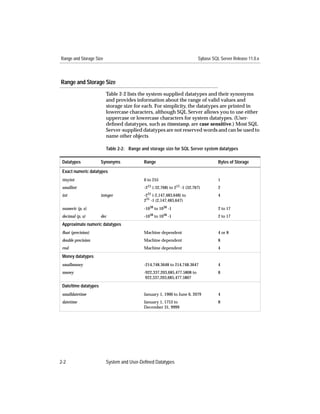
                                                                     (ioampg). The result does not
                                                                     include pages used for internal
                                                                     structures.
                        datalength          (expression)             Returns the length of expression
                                                                     in bytes. expression is usually a
                                                                     column name. If expression is a
                                                                     character constant, it must be
                                                                     enclosed in quotes.
                        db_id               ([database_name])        Returns the database ID
                                                                     number. database_name must be
                                                                     a character expression; if it is a
                                                                     constant expression, it must be
                                                                     enclosed in quotes. If no
                                                                     database_name is supplied, db_id
                                                                     returns the ID number of the
                                                                     current database.
                        db_name             ([database_id])          Returns the database name.
                                                                     database_id must be a numeric
                                                                     expression. If no database_id is
                                                                     supplied, db_name returns the
                                                                     name of the current database.


                       SQL Server Reference Manual                                                  4-41
System Functions                                                     Sybase SQL Server Release 11.0.x


                   Table 4-13: System functions, arguments, and results (continued)

                    Function            Argument                     Result
                    host_id             ()                           Returns the host process ID of
                                                                     the client process (not the Server
                                                                     process).
                    host_name           ()                           Returns the current host
                                                                     computer name of the client
                                                                     process (not the Server process).
                    index_col           (object_name, index_id,      Returns the name of the indexed
                                        key_# [, user_id])           column; returns NULL if
                                                                     object_name is not a table or view
                                                                     name.
                    isnull              (expression1,                Substitutes the value specified
                                        expression2)                 in expression2 when expression1
                                                                     evaluates to NULL.The
                                                                     datatypes of the expressions
                                                                     must convert implicitly, or you
                                                                     must use the convert function.
                    lct_admin           ({{ "lastchance" |           Manages the log segment’s last-
                                        "logfull" | "unsuspend"} ,   chance threshold.
                                        database_id} |
                                                                     lastchance creates a last-chance
                                        "reserve", log_pages})
                                                                     threshold in the specified
                                                                     database.
                                                                     logfull returns 1 if the last-chance
                                                                     threshold has been crossed in
                                                                     the specified database and 0 if it
                                                                     has not.
                                                                     unsuspend awakens suspended
                                                                     tasks in the database and
                                                                     disables the last-chance
                                                                     threshold if that threshold has
                                                                     been crossed.
                                                                     reserve returns the number of
                                                                     free log pages required to
                                                                     successfully dump a
                                                                     transaction log of the specified
                                                                     size.
                    object_id           (object_name)                Returns the object ID.
                    object_name         (object_id[, database_id])   Returns the object name.


4-42               Transact-SQL Functions
Sybase SQL Server Release 11.0.x                                                          System Functions


                       Table 4-13: System functions, arguments, and results (continued)

                        Function            Argument                    Result
                        proc_role           ("sa_role" | "sso_role" |   Checks to see if the invoking
                                            "oper_role")                user possesses the correct role to
                                                                        execute the procedure. Returns
                                                                        1 if the invoker has the required
                                                                        role. Otherwise, returns 0.
                        reserved_pgs        (object_id,                 Returns the number of pages
                                            {doampg|ioampg})            allocated to table or index. This
                                                                        function does report pages used
                                                                        for internal structures.
                        rowcnt              (doampg)                    Returns the number of rows in a
                                                                        table (estimate).
                        show_role           ()                          Returns the user’s current active
                                                                        roles, if any (sa_role, sso_role, or
                                                                        oper_role). If the user has no
                                                                        roles, returns NULL.
                        suser_id            ([server_user_name])        Returns the server user’s ID
                                                                        number from syslogins. If no
                                                                        server_user_name is supplied, it
                                                                        returns the server ID of the
                                                                        current user.
                        suser_name          ([server_user_id])          Returns the server user’s name.
                                                                        Server user’s IDs are stored in
                                                                        syslogins. If no server_user_id is
                                                                        supplied, it returns the name of
                                                                        the current user.
                        used_pgs            (object_id, doampg,         Returns the total number of
                                            ioampg)                     pages used by a table and its
                                                                        clustered index.
                        tsequal             (timestamp, timestamp2)     Compares timestamp values to
                                                                        prevent update on a row that
                                                                        has been modified since it was
                                                                        selected for browsing.
                                                                        timestamp is the timestamp of
                                                                        the browsed row; timestamp2 is
                                                                        the timestamp of the stored row.
                                                                        Allows you to use browse mode
                                                                        without calling DB-Library.
                                                                        (See “Browse Mode.”)
                        user                                            Returns the user’s name.


                       SQL Server Reference Manual                                                      4-43
System Functions                                                    Sybase SQL Server Release 11.0.x


                      Table 4-13: System functions, arguments, and results (continued)

                        Function           Argument                 Result
                        user_id            ([user_name])            Returns the user’s ID number.
                                                                    Reports the number from
                                                                    sysusers in the current database.
                                                                    If no user_name is supplied, it
                                                                    returns the ID of the current
                                                                    user.
                        user_name          ([user_id])              Returns the user’s name, based
                                                                    on the user’s ID in the current
                                                                    database. If no user_id is
                                                                    supplied, it returns the name of
                                                                    the current user.
                        valid_name         (character_expression)   Returns 0 if the character
                                                                    expression is not a valid
                                                                    identifier (illegal characters or
                                                                    more than 30 bytes long), a
                                                                    nonzero number if it is a valid
                                                                    identifier.
                        valid_user         (server_user_id)         Returns 1 if the specified ID is a
                                                                    valid user or alias in at least one
                                                                    database on this SQL Server.
                                                                    You must have the sa_role or
                                                                    sso_role role to use this function
                                                                    on a server_user_id other than
                                                                    your own.


                   Examples
                      1. select user_id("harold")
                          Returns Harold’s ID, 13.
                      2. select user_name(13)
                          Returns the login name for user 13, which is “harold.”
                      3. select db_name()
                          Returns the name of the current database.
                      4. select avg(isnull(price,$10.00))
                         from titles
                          Finds the average of the prices of all titles, substituting the value
                          $10.00 for all NULL entries in price.


4-44                  Transact-SQL Functions
Sybase SQL Server Release 11.0.x                                                 System Functions


                       5. select isnull(price,0)
                          from titles
                           Returns all rows from titles, replacing null values in price with
                           “0”.
                       6. select x = col_length("titles", "title")
                           Finds the length of the title column in the titles table. The “x” is
                           included to give a column heading to the result.
                       7. select Length = datalength(pub_name)
                          from publishers
                           Finds the length of the pub_name column in the publishers table.
                       8. select name from sysusers
                          where name = user_name(1)
                           Finds all rows in sysusers where the name is equal to the result of
                           applying the system function user_name to user ID 1.
                       9. select object_id("pubs2." + user_name() + ".mytab")
                           Finds the object ID for the table mytab owned by the current user.
                       10.select db_name(dbid), d.name,
                              curunreservedpgs(dbid, lstart, unreservedpgs)
                              from sysusages u, sysdevices d
                              where d.low <= u.size + vstart
                                  and d.high >= u.size + vstart -1
                                  and d.status &2 = 2
                           Returns the database name, device name, and the number of
                           unreserved pages for each device fragment.
                       11.select sysobjects.name,
                          Pages = data_pgs(sysindexes.id, doampg)
                          from sysindexes, sysobjects
                          where sysindexes.id = sysobjects.id
                              and sysindexes.id > 100
                              and (indid = 1 or indid = 0)
                           Estimates the number of data pages used by user tables (which
                           have object IDs that are greater than 100). An indid of 0 indicates
                           a table without a clustered index; an indid of 1 indicates a table
                           with a clustered index. This query does not return rows for any
                           nonclustered indexes or include the size of text chains (which
                           have indid = 255). To see this information, use ioampg in the
                           data_pgs function and indid > 1 in the where clause.
                       12.select show_role()
                           Returns a list of your current active roles.


                       SQL Server Reference Manual                                           4-45
System Functions                                                 Sybase SQL Server Release 11.0.x


                      13.select proc_role("sso_role")
                         Checks to see whether the user has the role of System Security
                         Officer. If so, returns 1; otherwise, returns 0.

                   Comments
                      • All system functions except user require parentheses.
                      • When the argument to a system function is optional, the current
                        database, host computer, server user, or database user is
                        assumed.
                      • The system functions can be used in a select list, in a where clause,
                        and anywhere an expression is allowed.
                      • The server user ID of the “sa” account is 1. When other users are
                        granted the role of System Administrator, they retain their own
                        server user IDs.
                      • Server user ID -1 is always reserved for a guest account.
                      • The user ID of the Database Owner is always 1. When a System
                        Administrator uses a database, he or she becomes Database
                        Owner, with user ID 1. If the user turns off his or her System
                        Administrator role for a session, the user assumes his or her own
                        database user ID. If the user has no database user ID in the
                        current database, he or she cannot execute set role “sa_role” off.
                      • The user_name function returns the name of the current user if the
                        argument is less than 0.
                      • col_length finds the defined length of a column; datalength finds the
                        actual length of the data stored in each row. datalength is useful on
                        varchar, varbinary, text and image datatypes, since these datatypes
                        can store variable lengths. datalength of any NULL data returns
                        NULL. For all other datatypes, datalength reports their defined
                        length. For text and image columns, col_length returns 16, the length
                        of the binary(16) pointer to the actual text page.
                      • data_pgs returns the number of pages used by a table or index; it
                        does not include pages used for internal structures. used_pgs
                        returns the number of pages used by a table and its clustered
                        index; it does include pages used for internal structures.
                      • To check the size of the transaction log, the table syslogs, use:
                         select reserved_pgs(id, doampg)
                      • Use proc_role within a stored procedure to guarantee that only
                        users with a specific role can execute it. While grant execute can also
                        restrict execute permission on a stored procedure, users without


4-46                  Transact-SQL Functions
Sybase SQL Server Release 11.0.x                                                 System Functions


                           the required role can still be granted permission to execute it.
                           Only proc_role provides a fail-safe way to prevent inappropriate
                           access to a particular stored procedure.
                       • rowcnt estimates the number of rows, based on the average
                         number of rows per page in a table, and the number of pages in
                         the tablet. This value can vary unexpectedly when the server
                         reboots and transactions have to be recovered. Correct values are
                         restored by running update statistics, dbcc checktable or dbcc checkdb.

                  Standards and Compliance

                        Standard   Compliance Level

                        SQL92      The user function is entry level
                                   compliant. All other system
                                   functions are Transact-SQL
                                   extensions.

                  See Also
                        Commands                     grant, select


                       SQL Server Reference Manual                                           4-47
text and image Functions                                                      Sybase SQL Server Release 11.0.x


                       text and image Functions
                       Function
                           Operate on text and image data. Text and image built-in function
                           names are not keywords. Use the set textsize option to limit the amount
                           of text or image data that a select statement retrieves.

                       Syntax
                           Text and image functions take the general form:
                           function_name(argument)
                           Function names, arguments, and results are listed in the following
                           table. A pattern is an alphanumeric expression of char, varchar, binary,
                           or varbinary type used for pattern matching.

                           Table 4-14: text and image functions, arguments, and results

           Function             Argument                     Result
           patindex             (“%pattern%”, char_expr      Returns an integer value representing the
                                 [, using {bytes | chars |   starting position of the first occurrence of pattern
                                characters} ] )              in the specified character expression, or zero if
                                                             pattern is not found. By default, patindex returns
                                                             the offset in characters; to return the offset in
                                                             bytes for multibyte character strings, specify
                                                             using bytes. The % wildcard character must
                                                             precede and follow pattern, except when
                                                             searching for first or last characters. See
                                                             ‘‘Wildcard Characters’’ for a description of the
                                                             wildcard characters that can be used in pattern.
           textptr              (text_columname)             Returns the text pointer value, a 16-byte binary
                                                             value. The text pointer is checked to ensure that
                                                             it points to the first text page.
           textvalid            (“table_name.col_name”,      Checks if a given text pointer is valid. Note that
                                textpointer)                 the identifier for a text or image column must
                                                             include the table name. Returns 1 if the pointer
                                                             is valid or 0 if the pointer is invalid.


4-48                       Transact-SQL Functions
Sybase SQL Server Release 11.0.x                                           text and image Functions


                  Examples
                       1. declare @val varbinary(16)
                          select @val = textptr(copy) from blurbs
                          where au_id = “486-29-1786”
                          readtext blurbs.copy @val 1 5
                           This example uses the textptr function to locate the text column,
                           copy, associated with au_id 486-29-1786 in author’s blurbs table.
                           The text pointer is put into a local variable @val and supplied as a
                           parameter to the readtext command, which returns 5 bytes starting
                           at the second byte (offset of 1).
                       2. select au_id, textptr(copy) from blurbs
                           Selects the title_id column and the 16-byte text pointer of the blurb
                           column from the texttest table.
                       3. select textvalid (“blurbs.copy”, textptr(copy))
                          from blurbs
                           Reports whether a valid text pointer exists for each value in the
                           copy column of the blurbs table.

                  Comments
                       • If a text or image column has not been initialized by a non-null insert
                         or by any update statement, textptr returns a NULL pointer. Use
                         textvalid to check whether a text pointer exists. You cannot use
                         writetext or readtext without a valid text pointer.
                       • Use the datalength function to get the length of data in text and image
                         columns. See “System Functions” for details.
                       • The patindex function returns the character position of a given
                         character string in text columns. See also “String Functions.”
                       • text and image columns cannot be used:
                           - As parameters to stored procedures
                           - As values passed to stored procedures
                           - As local variables
                           - In order by, compute, and group by clauses
                           - In an index
                           - In a where clause, except with the keyword like
                           - In joins


                       SQL Server Reference Manual                                             4-49
text and image Functions                                                      Sybase SQL Server Release 11.0.x


                   Standards and Compliance

                            Standard    Compliance Level
                            SQL92       Transact-SQL extension


                   See Also
                            Commands                       readtext, set, writetext
                            Functions                  Datatype Conversion Functions, Mathematical
                                                       Functions, String Functions, System Functions
                            Datatypes                      text and image Datatypes


4-50                       Transact-SQL Functions
Topics
5           Transact-SQL Topics                                                             5.


              This chapter presents general Transact-SQL reference information,
              arranged alphabetically by topic. Each topic describes the
              commands, system procedures, and functions that provide a
              particular type of functionality. Table 5-1 lists the topics discussed in
              this chapter.

              Table 5-1: Transact-SQL topics

    Topic                          Function
    Auditing                       Records security-related system activity in an audit trail
                                   that can be used to detect penetration of the system and
                                   misuse of system resources.
    Batch Queries                  Combine a set of SQL statements that are submitted
                                   together and executed as a group, one after the other.
    Browse Mode                    Allows front-end applications using Open Client and a
                                   host programming language to perform updates while
                                   viewing data.
    Comments                       Attach comments to SQL statements, statement blocks,
                                   and system procedures.
    Control-of-Flow Language       Controls the flow of execution of SQL statements,
                                   statement blocks, and stored procedures.
    Cursors                        Provide access to the set of rows returned by a SQL
                                   query.
    Disk Mirroring                 Creates a software mirror of a user database device, the
                                   master device, or a database device used for user
                                   database transaction logs.
    Expressions                    Combine constants, literals, functions, column
                                   identifiers, variables, and operators.
    Identifiers                     Name database objects such as databases, tables, views,
                                   columns, indexes, triggers, procedures, defaults, rules,
                                   and cursors.
    IDENTITY Columns               Uniquely identify each row within a table. Each time
                                   you insert a row into the table, SQL Server automatically
                                   provides a unique, sequential value for the IDENTITY
                                   column.
    Joins                          Compare two or more tables (or views) by specifying a
                                   column from each, comparing the values in those
                                   columns row by row, and concatenating rows that have
                                   matching values.


              SQL Server Reference Manual                                                   5-1
Sybase SQL Server Release 11.0.x


              Table 5-1: Transact-SQL topics (continued)

      Topic                          Function
      Login Management               Verifies the identities of SQL Server users and
                                     administers SQL Server login accounts.
      Null Values                    Mark columns whose value is unknown (as opposed to
                                     those that have 0 or blank as a value).
      Parameters                     Are arguments to a stored procedure.
      Roles                          Provide greater individual accountability for users
                                     performing system administration and security-related
                                     tasks on SQL Server.
      Search Conditions              Set the conditions in a where or having clause.
      Subqueries                     Nest a select statement inside a select, insert, update, or
                                     delete statement, another subquery, or anywhere an
                                     expression is allowed (if it returns a single value).
      Temporary Tables               Store data in tempdb for the duration of the current
                                     session.
      Transactions                   Group SQL statements so that they are treated as a unit:
                                     either all statements in the group are executed, or no
                                     statements in the group are executed.
      Variables (Local and Global)   Assume values assigned by a declare statement (local
                                     variables) or supplied by SQL Server (global variables).
      Wildcard Characters            Represent one or more characters in a string. Wildcard
                                     characters are used with the keyword like to find
                                     character and date strings that match a particular
                                     pattern.


5-2           Transact-SQL Topics
Sybase SQL Server Release 11.0.x                                                        Auditing


                  Auditing
                  Function
                       Record security-related system activity in an audit trail that can be
                       used to detect penetration of the system and misuse of system
                       resources.

                  The Audit System
                       The audit system consists of the sybsecurity database and a set of
                       stored procedures that allow you to selectively set the audit options
                       you need.
                       You can choose to audit the following:
                       • Within a server, you can audit logins and logouts, server boots,
                         RPC connections made from other servers, errors, and execution
                         of commands requiring special roles.
                       • At the database level, you can audit the use of the grant, revoke,
                         truncate table, and drop commands within a database; the use of the
                         drop and use commands on a database; and references to a specific
                         database from within another database.
                       • At the user level, you can audit a specified user’s attempts to
                         access tables and views, and you can audit the text of commands
                         submitted to the server by a user.
                       • At the object level, you can audit accesses to specified tables and
                         views and execution of stored procedures and triggers.
                       Auditing is discussed in more detail in the Security Administration
                       Guide.

                  The sybsecurity Database
                       The sybsecurity database consists of:
                       • The sysaudits table, which is the audit trail. All audit records are
                         written into sysaudits.
                       • The sysauditoptions table, which contains one row for each global
                         audit option.
                       • All of the other default system tables, derived from the model
                         database.
                       See the SQL Server Reference Supplement for a description of each
                       system table.


                       SQL Server Reference Manual                                             5-3
Auditing                                                           Sybase SQL Server Release 11.0.x


           Installing the Audit System
                You can install the audit system and sybsecurity database at any time.
                See your installation and configuration guide for information.

           Setting Audit Options
                System Security Officers can determine the type of auditing to be
                performed in the system. Auditing options are managed using the
                following system procedures:

                Table 5-2: System procedures used to manage auditing options

                 System Procedure        Description
                 sp_auditoption          Enables and disables system-wide auditing and global
                                         audit options
                 sp_auditdatabase        Establishes auditing of different types of events within a
                                         database, or of references to objects within that database
                                         from another database
                 sp_auditobject          Establishes selective auditing of accesses to tables and
                                         views
                 sp_auditsproc           Audits the execution of stored procedures and triggers
                 sp_auditlogin           Audits a user’s attempts to access tables and views, or
                                         the text of commands that the user executes
                 sp_addauditrecord       Allows users to enter user-defined audit records
                                         (comments) into the audit trail


           The Audit Queue
                When an audited event occurs, an audit record first goes to the audit
                queue, where it waits until it can be added to the audit trail. You can
                configure the size of the audit queue with the audit queue size option to
                sp_configure. The size of the audit queue is set according to your
                needs. See the Security Administration Guide for information on how
                to configure the size of the audit queue and the effects of different
                queue sizes.

           The Audit Trail
                The audit trail is contained in the sybsecurity..sysaudits table. It is a
                special table in that the only operations allowed on it are select and
                truncate table, and these operations can be performed only by System
                Security Officers. The columns of sysaudits are described in the SQL
                Server Reference Supplement. Procedures for archiving the audit trail
                are discussed in the System Administration Guide.


5-4             Transact-SQL Topics
Sybase SQL Server Release 11.0.x                                                                Auditing


                  Permissions
                       Only System Security Officers can enable auditing and execute the
                       system procedures to set audit options. The exception is
                       sp_addauditrecord, which can be run by any user who has been granted
                       permission to execute it.

                  See Also
                        System procedures            sp_addauditrecord, sp_auditdatabase,
                                                     sp_auditlogin, sp_auditobject, sp_auditoption,
                                                     sp_auditsproc


                       SQL Server Reference Manual                                                    5-5
Batch Queries                                                   Sybase SQL Server Release 11.0.x


                Batch Queries
                Function
                    A batch or batch file is a set of SQL statements submitted together
                    and executed as a group, one after the other. A batch is terminated by
                    an end-of-batch signal. With the isql utility, this is the word “go” on a
                    line by itself.
                    Following is an example of a batch that contains two SQL statements:
                        select count(*) from titles
                        select count(*) from authors
                        go

                Submitting Batches to isql
                    You can submit batches to isql either interactively or from an
                    operating system file. A file submitted to isql can include more than
                    one batch of SQL statements if each batch is terminated by the word
                    “go”. For details on the isql utility, see your utility programs manual.

                Referencing Database Objects
                    Before referencing objects in a database, you must issue a use
                    statement for that database. For example:
                        use master
                        go
                        select count(*)
                        from sysdatabases
                        go

                Creating Objects Within a Batch
                    Certain data definition statements cannot be combined with other
                    statements within a batch. These include create procedure, create rule,
                    create default, create trigger and create view.
                    create database, create table, and create index can be combined with other
                    statements in a single batch. The following batch creates the table
                    test, inserts a row into the table, and then retrieves the new row:
                        create table test
                           (column1 char(10), column2 int)
                        insert test
                           values ("hello", 598)
                        select * from test
                        go


5-6                 Transact-SQL Topics
Sybase SQL Server Release 11.0.x                                                            Batch Queries


                  Dropping Objects Within a Batch
                       You cannot drop an object and then reference or re-create it in the
                       same batch.

                  Applying Rules and Defaults Within a Batch
                       Rules and defaults cannot be bound to columns and used during the
                       same batch. sp_bindrule or sp_bindefault cannot be in the same batch as
                       insert statements that invoke the rule or default.

                  Setting Options in a Batch
                       Some options set with a set statement do not take effect until the end
                       of the batch. See set for details.

                  Permissions on Objects
                       SQL Server compiles the batch before executing it. During
                       compilation of the batch, SQL Server makes no permission checks on
                       objects, such as tables and views, that are referenced by the batch.
                       Permission checks occur when SQL Server executes the batch. One
                       exception to this is access to another database other than the current
                       one. In this case, SQL Server gives you an error message at
                       compilation time without executing any statements in the batch.

                  See Also
                        Commands                     create database,create default, create index,
                                                     create procedure, create rule, create table, create
                                                     trigger, create view, set


                       SQL Server Reference Manual                                                     5-7
Browse Mode                                                   Sybase SQL Server Release 11.0.x


              Browse Mode
              Function
                  Browse mode supports the ability to perform updates while viewing
                  data. It is used in front-end applications using DB-Library and a host
                  programming language.

              Browsing a Table
                  To browse a table in a front-end application, append the for browse
                  keywords to the end of the select statement sent to SQL Server. A for
                  browse clause cannot be used in statements involving the union
                  operator or in cursor declarations. The use of the keyword holdlock is
                  forbidden in a select statement that includes the for browse option.
                  For example:
                  Start of select statement in an Open Client application
                  ...
                  for browse
                  more application
                  A table can be browsed in a front-end application if its rows have
                  been timestamped.

              Timestamping a New Table for Browsing
                  When creating a new table for browsing, include a column named
                  timestamp in the table definition. The column is automatically
                  assigned a datatype of timestamp; you do not have to specify its
                  datatype. For example:
                      create table newtable(col1 int, timestamp,
                          col3 char(7))
                  Whenever you insert or update a row, SQL Server timestamps it by
                  automatically assigning a unique varbinary value to the timestamp
                  column.

              Timestamping an Existing Table
                  To prepare an existing table for browsing, add a column named
                  timestamp with alter table. For example:
                      alter table oldtable add timestamp


5-8               Transact-SQL Topics
Sybase SQL Server Release 11.0.x                                                        Browse Mode


                       A timestamp column with a NULL value is added to each existing
                       row. To generate a timestamp, update each existing row without
                       specifying new column values.
                       For example:
                           update oldtable
                           set col1 = col1

                  Comparing timestamp Values
                       Use the tsequal system function to compare timestamps when you are
                       using browse mode in a front-end application. For example, the
                       following statement updates a row in publishers that has been
                       browsed. It compares the timestamp column in the browsed version
                       of the row with the hexadecimal timestamp in the stored version. If
                       the two timestamps are not equal, you receive an error message and
                       the row is not updated.
                           update publishers
                           set city = "Springfield"
                           where pub_id = "0736"
                           and tsequal(timestamp,0x0001000000002ea8)
                       The tsequal function should not be used in the where clause as a search
                       argument. When using tsequal, the rest of the where clause should
                       match a single row uniquely. The tsequal function should be used only
                       in insert and update statements. If a timestamp column has to used as a
                       search clause then it should be compared like a regular varbinary
                       column, that is, timestamp1 = timepstamp2.

                  Standards and Compliance

                        Standard    Compliance Level

                        SQL92       Transact-SQL extension


                  See Also
                        Functions                    System Functions
                        Datatypes                    System and User-Defined Datatypes
                        System procedures            sp_primarykey


                       SQL Server Reference Manual                                              5-9
Comments                                               Sybase SQL Server Release 11.0.x


           Comments
           Function
               Comments attach explanatory text to SQL statements, statement
               blocks, and stored procedures. Comments are not executed.
               A comment can be inserted on a line by itself or at the end of a
               command line. Two comment styles are available: the “slash-asterisk”
               style:
               /* text of comment */
               and the “double-hyphen” style:
               -- text of comment

           Slash-Asterisk Style Comments
               Multiple-line comments are allowed, as long as they are surrounded
               by /* and */.
               A stylistic convention often used for multiple-line comments is to
               begin the first line with /* and subsequent lines with **. The
               comment ends with */ as usual.
               The /* form permits nesting.
               Following are examples:
                   /* this procedure finds rules by user name*/
                   create procedure findmyrule @nm varchar(30) = null
                   as
                   if @nm is null
                   begin
                      print "You must give a user name"
                      return
                      print "I have returned"
                   /* this statement follows return,
                   ** so won’t be executed */
                   end
                   else       /* print the rule names and IDs, and
                              the user ID */
                      select sysobjects.name, sysobjects.id,
                         sysobjects.uid
                      from sysobjects, master..syslogins
                      where master..syslogins.name = @nm
                      and sysobjects.uid = master..syslogins.suid
                      and sysobjects.type = "R"


5-10           Transact-SQL Topics
Sybase SQL Server Release 11.0.x                                                       Comments


                  Double-Hyphen Style Comments
                       This comment style begins with two consecutive hyphens followed
                       by a space, and terminates with a newline character. Multiple-line
                       comments are therefore not possible.
                       SQL Server does not interpret two consecutive hyphens within a
                       string literal or within a /*-style comment as signaling the beginning
                       of a comment.
                       To represent an expression that contains two consecutive minus
                       signs (binary followed by unary), put a space or an opening
                       parenthesis between the two hyphens.
                       Following are examples:
                           -- this procedure finds rules by user name
                           create procedure findmyrule @nm varchar(30) = null
                           as
                           if @nm is null
                           begin
                              print "You must give a user name"
                              return
                              print "I have returned"
                           -- each line of a multiple-line comment
                           -- must be marked separately.
                           end
                           else          -- print the rule names and IDs, and
                                     -- the user ID
                              select sysobjects.name, sysobjects.id,
                                 sysobjects.uid
                              from sysobjects, master..syslogins
                              where master..syslogins.name = @nm
                              and sysobjects.uid = master..syslogins.suid
                              and sysobjects.type = "R"

                  Standards and Compliance

                        Standard   Compliance Level        Comments
                        SQL92      Entry level compliant   The /* style comment is a
                                                           Transact-SQL extension.


                       SQL Server Reference Manual                                         5-11
Control-of-Flow Language                                                      Sybase SQL Server Release 11.0.x


                  Control-of-Flow Language
                  Function
                           Controls the order in which SQL statements, statement blocks, and
                           stored procedures are executed.
                           Table 5-3 gives the control-of-flow keywords and their functions:

                           Table 5-3: Control-of-flow keywords

                            Keyword              Function
                            begin                Begins a statement block
                            end                  Ends a statement block
                            break                Exits from while loop
                            continue             Restarts a while loop
                            declare              Declares local variables
                            goto label           Goes to a position in a statement block
                            if                   Defines conditional execution
                            else                 Defines alternate execution when if condition is false
                            print                Prints a user-defined message on the user’s screen
                            raiserror            Prints a user-defined message on the user’s screen and sets
                                                 a system flag to record the fact than an error condition has
                                                 occurred
                            return               Exits unconditionally
                            waitfor              Sets delay for command execution
                            while                Repeats performance of statements while condition is true
                            /* comment */        Inserts a comment anywhere in a SQL statement
                            or
                            --comment


                  Standards and Compliance

                            Standard        Compliance Level

                            SQL92           Transact-SQL extension


5-12                       Transact-SQL Topics
Sybase SQL Server Release 11.0.x                                                   Control-of-Flow Language


                  See Also
                        Commands                     begin...end, break, continue, create procedure,
                                                     create trigger, declare, goto Label, if...else, print,
                                                     raiserror, return, waitfor, while
                        Topics                       Batch Queries, Comments, Parameters,
                                                     Variables (Local and Global)


                       SQL Server Reference Manual                                                        5-13
Cursors                                                   Sybase SQL Server Release 11.0.x


          Cursors
          Function
              A cursor provides access to the set of rows returned by a SQL query. A
              cursor is a symbolic name that is associated with a select statement.
              Cursors enable you to access individual rows of data returned by SQL
              Server. Cursors consist of two parts: the cursor result set and the
              cursor position.
              The cursor result set is the set of rows returned by the select statement
              defined for a cursor. The cursor position is the current pointer to one
              row within the result set.

          Creating a Cursor
              To create a cursor, use the declare cursor statement:
                  declare cursor_name cursor
                  for select_statement
                  [for {read only | update [of column_name_list]}]
              The cursor_name is the name of the cursor. It must be a valid SQL
              Server identifier not longer than 30 characters and must start with a
              letter, a pound symbol (#), or an underscore (_).
              select_statement is the query that defines the cursor result set. See
              select for information about its options.
              The for read only option specifies that the cursor result set cannot be
              updated. In contrast, the for update option specifies that the cursor
              result set is updatable. You can specify of column_name_list after for
              update with the list of columns from the select_statement defined as
              updatable.
              The following example defines a result set for the authors_crsr cursor
              that contains all authors from the authors table who do not reside in
              California:
                  declare authors_crsr cursor
                  for select au_id, au_lname, au_fname
                  from authors
                  where state != 'CA'
              The declare cursor statement must precede any open statement for that
              cursor. You cannot include other statements with declare cursor in the
              same Transact-SQL batch, except when using a cursor within a
              stored procedure.


5-14          Transact-SQL Topics
Sybase SQL Server Release 11.0.x                                                         Cursors


                  Opening a Cursor
                       To open a cursor:
                           open cursor_name

                  Fetching a Row
                       After opening a cursor, you can fetch a row:
                           fetch cursor_name [into fetch_target_list]
                       SQL Server moves the cursor position one or more rows down the
                       cursor result set. It retrieves the data from each row of the result set
                       and stores the current position, allowing further fetches until it
                       reaches the end of the result set.
                       into fetch_target_list specifies that the column data returned should be
                       placed into the specified variables. The fetch_target_list must consist
                       of Transact-SQL parameters or local variables that have been
                       previously declared.
                       For example, after declaring the @id, @lname, and @fname variables,
                       you can fetch rows from the authors_crsr as follows:
                           fetch authors_crsr into @id, @lname, @fname
                       By default, the fetch command only brings back one row at a time.
                       You can use the cursor rows option of the set command to change the
                       number of rows fetch returns. However, this option does not affect a
                       fetch containing an into clause.

                  Closing a Cursor
                       When you are finished with the result set of a cursor, you can close it:
                           close cursor_name
                       Closing the cursor does not change its definition. You can open the
                       cursor again, and SQL Server creates a new cursor result set using the
                       same query as before.

                  Deallocating a Cursor
                       If you want to discard the cursor, you must deallocate it:
                           deallocate cursor cursor_name
                       Deallocating a cursor frees up any resources associated with the
                       cursor, including the cursor name. You cannot reuse a cursor name
                       until you deallocate it. If you deallocate an open cursor, SQL Server
                       automatically closes it. Terminating a client connection to a server
                       also closes and deallocates any open cursors.


                       SQL Server Reference Manual                                          5-15
Cursors                                                Sybase SQL Server Release 11.0.x


          Example: Using a Cursor
              The following stored procedure checks the sales table to see if any
              books by a particular author have sold well. It uses a cursor to
              examine each row, then prints information. Without the cursor, it
              would need several select statements to accomplish the same task.
                  create procedure au_sales (@author_id id)
                  as

                  /* declare local variables used for fetch */
                  declare @title_id tid
                  declare @title varchar(80)
                  declare @ytd_sales int
                  declare @msg varchar(120)

                  /* declare the cursor to get each book written
                      by given author */
                  declare author_sales cursor for
                  select ta.title_id, t.title, t.total_sales
                  from titleauthor ta, titles t
                  where ta.title_id = t.title_id
                  and ta.au_id = @author_id

                  open author_sales

                  fetch author_sales
                          into @title_id, @title, @ytd_sales

                  if (@@sqlstatus = 2)
                  begin
                      print "We do not sell books by this author."
                      close author_sales
                      return
                  end

                  /* if cursor result set is not empty, then process
                      each row of information */
                  while (@@sqlstatus = 0)
                  begin
                      if (@ytd_sales = NULL)
                      begin
                          select @msg = @title +
                              " had no sales this year."
                          print @msg
                      end
                      else if (@ytd_sales < 500)
                      begin


5-16          Transact-SQL Topics
Sybase SQL Server Release 11.0.x                                                     Cursors


                                       select @msg = @title +
                                           " had poor sales this year."
                                       print @msg
                                   end
                                   else if (@ytd_sales < 1000)
                                   begin
                                        select @msg = @title +
                                            " had mediocre sales this year."
                                        print @msg
                                   end
                                   else
                                   begin
                                        select @msg = @title +
                                            " had good sales this year."
                                        print @msg
                                   end

                                   fetch author_sales into @title_id, @title,
                                   @ytd_sales
                           end

                           /* if error occurred, call a designated handler */
                           if (@@sqlstatus = 1) exec error_handle

                           close author_sales

                           deallocate cursor author_sales

                           return

                  Types of Cursors
                       There are four kinds of cursors: Client cursors, Execute cursors,
                       Server cursors, and Language cursors.
                       • Client cursors are declared through Open Client calls (or
                         Embedded SQL). The Open Client keeps track of the rows
                         returned from SQL Server and buffers them for the application.
                         Updates and deletes to the result set of Client cursors can only be
                         done through the Open Client calls.
                       • Execute cursors are a subset of Client cursors whose result set is
                         defined by a stored procedure. The stored procedure can use
                         parameters. The values of the parameters are sent through Open
                         Client calls.
                       • Server cursors are declared inside a stored procedure. The client
                         executing the stored procedure is not aware of the presence of


                       SQL Server Reference Manual                                         5-17
Cursors                                                  Sybase SQL Server Release 11.0.x


                  these cursors. Results returned to the client for a fetch appear
                  exactly the same as the results from a normal select.
              • Language cursors are declared in SQL without using Open
                Client. As with Server cursors, Open Client is completely
                unaware of the cursors and the results are sent back to the client
                in the same format as a normal select.
              Client cursors, through the use of applications using Open Client
              calls or Embedded-SQL, are the most frequently used form of
              cursors. To simplify the discussion of cursors, the examples in this
              manual show Language and Server cursors. For examples of Client
              or Execute cursors, see your Open Client or Embedded-SQL
              documentation.

          Determining a Cursor’s Scope
              A cursor is defined by its scope. The scope determines the region in
              which the cursor is known. Once a cursor’s scope no longer exists, its
              cursor name also no longer exists. SQL Server divides the scope of a
              cursor into the following regions:
              • Session – this region starts when a client logs onto SQL Server
                and ends when it logs off. This region does not include any
                regions defined by stored procedures or triggers.
              • Stored procedure – this region starts when a stored procedure
                begins execution and ends when it completes execution. If a
                stored procedure calls another stored procedure, SQL Server
                starts a new region and treats it as a subregion of the first
                procedure.
              • Trigger – this region starts when a trigger begins execution and
                ends when it completes execution.
              A cursor name must be unique within a given scope. Scopes are
              distinct in that a cursor name defined in one region can also be
              defined in another or within its own subregion. However, you
              cannot access a cursor defined in one region from another region.
              SQL Server does allow access to a cursor in subregions if no other
              cursor with that same name exists in the subregion.
              Name conflicts within a particular scope are only detected by SQL
              Server during run time.


5-18          Transact-SQL Topics
Sybase SQL Server Release 11.0.x                                                        Cursors


                       For example:
                           create procedure proc1 as
                               declare @flag int
                               if (@flag)
                                    declare names_crsr cursor
                                    for select au_fname from authors
                               else
                                    declare names_crsr cursor
                                    for select au_lname from authors
                       This stored procedure works because only one names_crsr cursor is
                       defined in its scope.

                  Cursor Result Set and Cursor Scans
                       Cursor result set rows may not reflect the values in the actual base
                       table rows. For example, a cursor declared with an order by clause
                       usually requires the creation of an internal table to order the rows for
                       the cursor result set. SQL Server does not lock the rows in the base
                       table that correspond to the rows in the internal table, which permits
                       other clients to update these base table rows. In that case, the rows
                       returned to the client from the cursor result set would not be
                       synchronized with the base table rows.
                       A cursor result set is generated as the rows are returned through a
                       fetch of that cursor. This means that a cursor select query is processed
                       like a normal select query. This process, known as a cursor scan,
                       provides a faster turnaround time and eliminates the need to read
                       rows the application does not require.
                       SQL Server requires that cursor scans use a unique index of a table,
                       particularly for isolation level 0 reads. If the table has an IDENTITY
                       column and you need to create a non-unique index on it, use the
                       identity in nonunique index database option to automatically include an
                       IDENTITY column in the table’s index keys so that all indexes
                       created on the table are unique. This database option makes logically
                       non-unique indexes internally unique, and allows these indexes to
                       be used to process updatable cursors for isolation level 0 reads.
                       However, you can still use cursors that reference tables without
                       indexes, if none of those tables are updated by another process that
                       causes the current row position to move. For example:
                           declare storinfo_crsr cursor
                           for select stor_id, stor_name, payterms
                               from stores
                               where state = 'CA'


                       SQL Server Reference Manual                                         5-19
Cursors                                                         Sybase SQL Server Release 11.0.x


                   The table stores specified with the above cursor does not have any
                   indexes. SQL Server allows the declaration of cursors on tables
                   without unique indexes, but any update or delete in these tables that
                   moves the position of the rows close all cursors on such tables.

               Updating or Deleting Rows Using Cursors
                   You can update and delete rows with cursors using the update or delete
                   statements, but you cannot insert new rows. You can update or
                   delete rows for an updatable cursor. If the cursor is read-only, you
                   can only read the data; you cannot update or delete it. By default,
                   SQL Server attempts to determine whether a cursor is updatable
                   before designating it as read-only.

          ® Note
                   You cannot delete a row from a cursor defined by a select statement
                   containing a join, even if the cursor is updatable.


                   Cautions when Updating a Join
                   If an update to a cursor defined by a select statement containing a
                   join changes the position of the row, the cursor may report incorrect
                   results.
                   For example,

               Determining Whether a Cursor Is Updatable
                   You can explicitly specify whether a cursor is updatable using the
                   read only or update keywords in the declare statement. For example, the
                   following defines an updatable result set for the pubs_crsr cursor:
                       declare pubs_crsr cursor
                       for select pub_name, city, state
                       from publishers
                       for update of city, state
                   This example includes all the rows from the publishers table, but it
                   explicitly defines only the city and state columns for update.
                   If you do not explicitly specify for read only or for update, the cursor is
                   implicitly updatable when the select statement does not contain any
                   of the following:
                   • distinct option
                   • group by clause


5-20               Transact-SQL Topics
Sybase SQL Server Release 11.0.x                                                        Cursors


                       • Aggregate function
                       • Subquery
                       • union operator
                       • at isolation read uncommitted clause
                       You cannot specify the for update option if a cursor’s select_statement
                       contains one of the above constructs. SQL Server also defines a
                       cursor as read-only if you declare a Language or Server type cursor
                       that includes an order by clause as part of its select_statement. SQL
                       Server handles updates differently for Client or Executable type
                       cursors, thereby eliminating this restriction.

                  Determining Which Columns Can Be Updated
                       If you do not specify a column_name_list with the for update option, all
                       the specified columns in the query are updatable. SQL Server
                       attempts to use unique indexes for updatable cursors when scanning
                       the base table. For cursors, SQL Server considers an index containing
                       an IDENTITY column to be unique, even if it is not declared so.
                       If you do not specify the for update option, SQL Server uses any unique
                       index, although it can also use other indexes or table scans if no
                       unique index exists for the specified table columns. However, when
                       you specify the for update option, then SQL Server must use a unique
                       index defined for one or more of the columns to scan the base table.
                       If none exists, it returns an error.
                       For updatable cursors, SQL Server allows you to update columns
                       that are not specified in the list of columns of the cursor’s
                       select_statement, but that are part of the tables specified in the
                       select_statement. However, when you specify a column_name_list with
                       for update, you can update only those specific columns.
                       Any columns of the base table you specify in the column_name_list of
                       for update should include only those columns you need to update, and
                       not any columns included in at least one unique index. This allows
                       SQL Server to use that unique index for its cursor scan which helps
                       prevent an update anomaly called the Halloween Problem.
                       This problem occurs when a client updates a column of a cursor
                       result set row which defines the order in which the rows are returned
                       from the base tables. For example, if SQL Server accesses a base table
                       using an index and the index key is updated by the client, the
                       updated index row can move within the index and be read again by
                       the cursor. This is a result of an updatable cursor only logically
                       creating a cursor result set. The cursor result set is actually the base
                       tables that derive the cursor.


                       SQL Server Reference Manual                                         5-21
Cursors                                                       Sybase SQL Server Release 11.0.x


              For information about how to update or delete cursor rows, see the
              update and delete statements in this manual.

          Getting Information About Cursors
              Two global variables, @@sqlstatus and @@rowcount, and a system
              procedure, sp_cursorinfo, provide information about cursors.

              Using @@sqlstatus
              @@sqlstatus holds status information (warnings and exceptions)
              resulting from the execution of a fetch statement. The value of
              @@sqlstatus is 0, 1, or 2.
              Table 5-4: @@sqlstatus values

               Status   Meaning
               0        The fetch statement completed successfully.
               1        The fetch statement resulted in an error.
               2        There is no more data in the result set. This warning can occur if the
                        current cursor position is on the last row in the result set and the
                        client submits a fetch statement for that cursor.

              Only a fetch statement can set @@sqlstatus. All other statements have
              no effect on @@sqlstatus.

              Using @@rowcount
              @@rowcount is the number of rows returned from the cursor result set
              to the client up to the last fetch. In other words, it represents the total
              number of rows seen by the client at any one point in time.
              Once all the rows are read from a cursor result set, @@rowcount
              represents the total number of rows in that result set. Each open
              cursor is associated with a specific @@rowcount variable. The variable
              is dropped when you close the cursor. Checking @@rowcount after a
              fetch provides you with the number of rows read for the cursor
              specified in that fetch.

              Using sp_cursorinfo
              In addition to these to variables, SQL Server provides the system
              procedure sp_cursorinfo, which displays information about the cursor
              name, its current status (such as open or closed), and its result
              columns. For example:
                   sp_cursorinfo 0, authors_crsr


5-22          Transact-SQL Topics
Sybase SQL Server Release 11.0.x                                                              Cursors


                           Cursor name 'authors_crsr' is declared at nesting
                               level '0'.
                           The cursor id is 327681
                           The cursor has been successfully opened 1 times
                           The cursor was compiled at isolation level 1.
                           The cursor is not open.
                           The cursor will remain open when a transaction is
                               commited or rolled back.
                           The number of rows returned for each FETCH is 1.
                           The cursor is updatable.
                           There are 3 columns returned by this cursor.
                           The result columns are:
                           Name = 'au_id', Table = 'authors', Type = ID,
                               Length = 11 (updatable)
                           Name = 'au_lname', Table = 'authors', Type =
                               VARCHAR, Length = 40 (updatable)
                           Name = 'au_fname', Table = 'authors', Type =
                               VARCHAR, Length = 20 (updatable)
                       For more information, see sp_cursorinfo.

                  Cursors and Locking
                       Cursor locking methods are similar to the current locking methods
                       for SQL Server. In general, statements that read data (such as select or
                       readtext) use shared locks on each data page to avoid reading changed
                       data from an uncommitted transaction. Update statements use
                       exclusive locks on each page they change. To reduce deadlocks and
                       improve concurrency, SQL Server often precedes an exclusive lock
                       with an update lock, which indicates that the client intends to change
                       data on the page.
                       For updatable cursors, SQL Server uses update locks by default
                       when scanning tables or views referenced with the for update option of
                       declare cursor. If the for update clause is included but the list is empty, all
                       tables and views referenced in the from clause of the select_statement
                       receive update locks by default.
                       You can instruct SQL Server to use shared locks instead of update
                       locks by adding the shared keyword to that from clause. Specifically,
                       you should add shared after each table name for which you prefer a
                       shared lock.


                       SQL Server Reference Manual                                                5-23
Cursors                                                          Sybase SQL Server Release 11.0.x


          ® Note
                   SQL Server releases an update lock when the cursor position moves off the
                   data page. Since an application buffers rows for Client cursors, the
                   corresponding Server cursor may be positioned on a different data row and
                   page than the Client cursor. In this case, a second client could update the
                   row that represents the current cursor position of the first client even if the
                   first client used the for update option.


                   Any exclusive locks acquired by a cursor in a transaction are held
                   until the end of that transaction. This also applies to shared or update
                   locks when using the holdlock keyword or the set isolation level 3 option.
                   However, if you do not set the close on endtran option, the cursor
                   remains open past the end of the transaction, and its current page
                   lock remains in effect. It could also continue to acquire locks as it
                   fetches additional rows.
                   For more information about locking in SQL Server, see the
                   Performance and Tuning Guide.

                   Cursor Locking Options
                   These are the effects of specifying the holdlock or shared options (of the
                   select statement) when defining an updatable cursor:
                   • If you omit both options, you can read data on the currently
                     fetched pages only. Other users cannot update your currently
                     fetched pages, through a cursor or otherwise. Other users can
                     declare a cursor on the same tables you use for your cursor, but
                     they cannot get an update lock on your currently fetched pages.
                   • If you specify the shared option, you can read data on the currently
                     fetched pages only. Other users cannot update your currently
                     fetched pages, through a cursor or otherwise.
                   • If you specify the holdlock option, you can read data on all pages
                     fetched (in a current transaction) or only the pages currently
                     fetched (if not in a transaction). Other users cannot update your
                     currently fetched pages or pages fetched in your current
                     transaction, through a cursor or otherwise. Other users can
                     declare a cursor on the same tables you use for your cursor, but
                     they cannot get an update lock on your currently fetched pages or
                     pages fetched in your current transaction.
                   • If you specify both options, you can read data on all pages fetched
                     (in a current transaction) or only the pages currently fetched (if


5-24               Transact-SQL Topics
Sybase SQL Server Release 11.0.x                                                            Cursors


                           not in a transaction). Other users cannot update your currently
                           fetched pages, through a cursor or otherwise.

                       Cursor Isolation Levels
                       SQL Server provides three isolation levels for cursors:
                       • Level 0 – SQL Server uses no locks on base table pages that
                         contain a row representing a current cursor position. Cursors
                         acquire no read locks for their scans, so they do not block other
                         applications from accessing the same data. However, cursors
                         operating at this isolation level are not updatable, and they
                         require a unique index on the base table to ensure the accuracy of
                         their scans.
                       • Level 1 – SQL Server uses a shared or update lock on base table
                         pages that contain a row representing a current cursor position.
                         The page remains locked until the current cursor position moves
                         off the page (as a result of fetch statements), or the cursor is closed.
                         If an index is used to search the base table rows, it also applies
                         shared or update locks to those corresponding index pages. This
                         is the default locking behavior for SQL Server.
                       • Level 3 – SQL Server uses a shared or update lock on any base
                         table pages that have been read in a transaction on behalf of the
                         cursor. In addition, the locks are held until the transaction ends,
                         as opposed to releasing the locks when the data page is no longer
                         needed. The holdlock keyword applies this locking level to the base
                         tables (as specified by the query on the tables or views.
                       Besides using holdlock, you can use set transaction isolation level to define
                       one of the above levels for your session. After setting this option, any
                       cursors you open will use that isolation level. You can also use the
                       select statement’s at isolation clause to change the isolation level for a
                       specific cursor. For example:
                           declare commit_crsr cursor
                           for select *
                           from titles
                           at isolation read committed
                       This makes the cursor operate at isolation level 1 regardless of the
                       isolation level of the session that opens it. If you declare a cursor at
                       isolation level 0 (read uncommitted), SQL Server also defines the cursor
                       as read-only. You cannot specify the for update clause along with at
                       isolation read uncommitted in a declare cursor statement.


                       SQL Server Reference Manual                                             5-25
Cursors                                                     Sybase SQL Server Release 11.0.x


              SQL Server decides a cursor’s isolation level when you open it, not
              when it is declared. Once you open the cursor, SQL Server
              determines it isolation level as follows:
              • If the cursor was declared with the at isolation clause, that isolation
                level overrides the transaction isolation level in which it is
                opened.
              • If the cursor was not declared with at isolation, the cursor uses the
                isolation level of the session in which it is opened. If you close the
                cursor and later reopen it, the cursor acquires the current
                isolation level of the session.
              SQL Server compiles the cursor’s query when you declare it. This
              compilation process is different for isolation level 0 as compared to
              isolation levels 1 or 3. If you declare a language or client cursor in a
              transaction with isolation level 1 or 3, opening it in a transaction at
              isolation level 0 causes an error.
              For example:
                 set transaction isolation level 1
                 declare publishers_crsr cursor
                     for select *
                     from publishers
                 open publishers_crsr     /* no error */
                 fetch publishers_crsr
                 close publishers_crsr
                 set transaction isolation level 0
                 open publishers_crsr     /* error */
              For more information about using cursors with transactions or about
              isolation levels, see “Transactions” in this chapter.

          See Also
               Commands                  close, deallocate cursor, declare cursor, delete,
                                         fetch, open, set, update
               System procedures         sp_cursorinfo


5-26          Transact-SQL Topics
Sybase SQL Server Release 11.0.x                                                     Disk Mirroring


                  Disk Mirroring
                  Function
                       Creates a software mirror of a user database device, the master
                       database device, or a database device used for user database
                       transaction logs. If a database device fails, its mirror immediately takes
                       over.
                       Disk mirroring does not interfere with ongoing activities in the
                       database. You can mirror or unmirror database devices without
                       shutting down SQL Server.

                  Deciding What to Mirror
                       You should mirror all default database devices so that you are still
                       protected if a create or alter database command affects a database device
                       in the default list.
                       In addition to mirroring user database devices, you should always
                       put their transaction logs on a separate database device. You can also
                       mirror the database device used for transaction logs, for even greater
                       protection.
                       To put a database’s transaction log (that is, the system table syslogs)
                       on a different device than the one on which the rest of the database is
                       stored, name the database device and the log device when you create
                       the database. You can also alter database to add a second device and
                       then run the system procedure sp_logdevice.

                  Mirroring a Device
                       Use the disk mirror command to mirror a database device. Its syntax is:
                       disk mirror
                          name = "device_name" ,
                          mirror = "physicalname"
                          [ ,writes = { serial | noserial }]
                          [ ,contiguous ] (OpenVMS only)
                       For example, to create a software mirror for the database device
                       user_disk on the file mirror.dat:
                           disk mirror
                             name = "user_disk",
                             mirror = "/server/data/mirror.dat"


                       SQL Server Reference Manual                                            5-27
Disk Mirroring                                                    Sybase SQL Server Release 11.0.x


                     Specifying the Mirror Device
                     Use the mirror = "physicalname” clause to specify the path to the mirror
                     device, enclosed in single or double quotes. If the mirror device is a
                     file, physicalname must unambiguously identify the path where SQL
                     Server will create the file; it cannot specify the name of an existing
                     file.
                     A device and its mirror together constitute one logical device. The
                     mirror device is used only as a secondary device and does not
                     require a separate entry in sysdevices. SQL Server stores the physical
                     name of the mirror device in the mirrorname column of the sysdevices
                     table.

                     Overriding Serial Writes
                     By default (writes = serial), the write to the primary database device is
                     guaranteed to finish before the write to the secondary device begins.
                     When the primary and secondary devices are on different physical
                     devices, serial writes help ensure that one of the disks is unaffected
                     by a power failure.
                     Use the writes = noserial option to override serial writes.

                     Requiring the Mirror File to Be Contiguous (OpenVMS Only)
                     When creating a file as a secondary device, SQL Server tries to use
                     contiguous space. If not enough contiguous blocks are found, the file
                     is created discontiguously and a message displays.
                     Use the contiguous option to force secondary files to be created
                     contiguously. If you include the contiguous option, the system creates
                     a contiguous file or the command fails with an error message.

                 Automatic Unmirroring After Device Failure
                     When a read or write to a mirrored device is unsuccessful, SQL
                     Server causes the bad device to become unmirrored, and prints error
                     messages. SQL Server continues to run, unmirrored. The System
                     Administrator must remirror the disk to restart mirroring.


5-28                 Transact-SQL Topics
Sybase SQL Server Release 11.0.x                                                  Disk Mirroring


                  Disabling a Mirror
                       Use the disk unmirror command to disable a mirror, either temporarily
                       or permanently. Its syntax is:
                       disk unmirror
                          name = "device_name"
                          [ ,side = { primary | secondary }]
                          [ ,mode = { retain | remove }]
                       For example, to suspend software mirroring for the database device
                       user_disk:
                           disk unmirror
                             name = "user_disk"

                       Choosing Which Device to Disable
                       Use the side clause to specify which device of a mirrored pair to
                       disable. By default, SQL Server disables the secondary device (the
                       mirror). Use side=primary to disable the device listed in the phyname
                       column of sysdevices.

                       Temporarily Deactivating a Device
                       By default (mode=retain), SQL Server deactivates the specified device
                       temporarily; you can reactivate it later. This is similar to what
                       happens when a device fails and SQL Server activates its mirror:
                       • I/O is directed only at the remaining device of the mirrored pair.
                       • The status column of sysdevices is altered to indicate that the
                         mirroring feature has been deactivated.
                       • The entries for primary (phyname) and secondary (mirrorname)
                         disks are unchanged.

                       Permanently Disabling a Mirror
                       Use mode=remove to completely disable disk mirroring. This option
                       eliminates all references in the system tables to a mirror device, but
                       does not remove an operating system file that has been used as a
                       mirror.
                       If you set mode=remove:
                       • The status column is altered to indicate that the mirroring feature
                         is to be completely ignored.


                       SQL Server Reference Manual                                         5-29
Disk Mirroring                                                    Sybase SQL Server Release 11.0.x


                     • The phyname column is replaced by the name of the secondary
                       device in the mirrorname column if the primary device is the one
                       being deactivated.
                     • The mirrorname column is set to NULL.

                 Reenabling a Mirror
                     Use the disk remirror command to reenable a mirror that has been
                     temporarily disabled by the disk unmirror command or by device
                     failure. Its syntax is:
                     disk remirror
                        name = "device_name"
                     For example, to resume software mirroring on the database device
                     user_disk:
                         disk remirror
                           name = "user_disk"

                 Backing Up master after the Disk Mirroring Commands
                     It is important to back up the master database with the dump database
                     command after each use of disk mirror, disk unmirror, or disk remirror. This
                     makes recovery easier and safer in case master is damaged.

                 Mirroring the Master Device
                     If you mirror the database device for the master database, you can use
                     the -r option and the name of the mirror for UNIX, or the /mastermirror
                     option for OpenVMS, when you restart SQL Server with the dataserver
                     utility program. Add this option to the RUN_servername file for that
                     server so that the startserver utility program will know about it. For
                     example:
                         dataserver -dmaster.dat -rmirror.dat
                     starts a master device named master.dat and its mirror, mirror.dat. For
                     more information, see dataserver and startserver, see your utility
                     programs guide.

                 Getting Information About Devices and Mirrors
                     For a report on all SQL Server devices on your system (user database
                     devices and their mirrors, as well as dump devices), execute the
                     system procedure sp_helpdevice.


5-30                 Transact-SQL Topics
Sybase SQL Server Release 11.0.x                                                            Disk Mirroring


                  See Also
                        Commands                     alter database, create database, disk init, disk
                                                     mirror, disk refit, disk reinit, disk remirror, disk
                                                     unmirror, dump database, dump transaction, load
                                                     database, load transaction
                        System procedures            sp_diskdefault, sp_helpdevice, sp_logdevice
                        Utility programs             dataserver, startserver


                       SQL Server Reference Manual                                                    5-31
Expressions                                                 Sybase SQL Server Release 11.0.x


              Expressions
              Function
                  An expression is a combination of one or more constants, literals,
                  functions, column identifiers and/or variables, separated by
                  operators, that returns a single value. Expressions can be of several
                  types, including arithmetic, relational, logical (or Boolean), and
                  character string. In some Transact-SQL clauses, a subquery can be
                  used in an expression.

              Arithmetic and Character Expressions
                  The general pattern for arithmetic and character expressions is:
                  {constant | column_name | function | (subquery)}
                         [{arithmetic_operator | bitwise_operator |
                          string_operator | comparison_operator }
                     {constant | column_name | function | (subquery)}]...

              Relational and Logical Expressions
                  A logical expression or relational expression returns TRUE, FALSE,
                  or UNKNOWN. The general patterns are:
                  expression comparison_operator [any | all] expression
                  expression [not] in expression
                  [not]exists expression
                  expression [not] between expression and expression
                  expression [not] like "match_string"
                     [escape "escape_character"]
                  not expression like “match_string”
                     [escape "escape_character"]
                  expression is [not] null
                  not logical_expression
                  logical_expression {and | or} logical_expression

              Operator Precedence
                  Operators have the following precedence levels, where 1 is the
                  highest level and 6 is the lowest:
                  1. unary (single argument) - + ~
                  2. * / %


5-32              Transact-SQL Topics
Sybase SQL Server Release 11.0.x                                                  Expressions


                       3. binary (two argument) + - & | ^
                       4. not
                       5. and
                       6. or
                       When all operators in an expression are of the same level, the order
                       of execution is left to right. You can change the order of execution
                       with parentheses—the most deeply nested expression is handled
                       first.

                  Arithmetic Operators
                       SQL Server uses the following arithmetic operators:
                       Table 5-5: Arithmetic operators

                        Symbol     Meaning
                         +         Addition
                         –         Subtraction
                         *         Multiplication
                         /         Division
                         %         Modulo (Transact-SQL extension)

                       Addition, subtraction, division, and multiplication can be used on
                       exact numeric, approximate numeric, and money type columns.
                       The modulo operator cannot be used on smallmoney, money, float or
                       real columns. Modulo finds the integer remainder after a division
                       involving two whole numbers. For example, 21 % 11 = 10 because 21
                       divided by 11 equals 1 with a remainder of 10.
                       When you perform arithmetic operations on mixed datatypes, for
                       example float and int, SQL Server follows specific rules for
                       determining the type of the result. See “Datatypes” for more
                       information.

                  Bitwise Operators
                       The bitwise operators are a Transact-SQL extension for use with
                       integer type data. These operators convert each integer operand into
                       its binary representation, then evaluate the operands column by
                       column. A value of 1 corresponds to true; a value of 0 corresponds to
                       false.


                       SQL Server Reference Manual                                       5-33
Expressions                                                    Sybase SQL Server Release 11.0.x


              The following tables summarize the results for operands of 0 and 1.
              If either operand is NULL, the bitwise operator returns NULL:
              Table 5-6: Truth tables for bitwise operations

              & ( and)            1        0
              1                   1        0

              0                   0        0


               | ( or)            1        0
              1                   1        1

              0                   1        0


              ^ (exclusive or)    1        0
              1                   0        1

              0                   1        0


              ~ (not)
              1                   FALSE

              0                   0


              The following examples use two tinyint arguments, A = 170
              (10101010 in binary form) and B = 75 (01001011 in binary form):

              Table 5-7: Examples of bitwise operations

                            Binary
               Operation                   Result      Explanation
                            Form
               (A & B)      10101010       10          Result column equals 1 if both A and
                            01001011                   B are 1. Otherwise, result column
                            ------------               equals 0.

                            00001010
               (A | B)      10101010       235         Result column equals 1 if either A or
                            01001011                   B, or both, is 1. Otherwise, result
                            ------------               column equals 0.

                            11101011


5-34          Transact-SQL Topics
Sybase SQL Server Release 11.0.x                                                              Expressions


                       Table 5-7: Examples of bitwise operations (continued)

                                     Binary
                        Operation                   Result       Explanation
                                     Form
                        (A ^ B)      10101010       225          Result column equals 1 if either A or
                                     01001011                    B, but not both, is 1.
                                     ------------

                                     11100001
                        (~A)         10101010       85           All 1’s are changed to 0’s and all
                                     ------------                0’s to 1’s.

                                     01010101


                  The String Concatenation Operator
                       The string operator + can be used to concatenate two or more
                       character or binary expressions. For example:
                       1. select Name = (au_lname + ", " + au_fname)
                          from authors
                             Displays author names under the column heading Name in last-
                             name first-name order, with a comma after the last name; for
                             example, “Bennett, Abraham.”
                       2. select "abc" + "" + "def"
                             Returns the string “abc def”. The empty string is interpreted as a
                             single space in all char, varchar, nchar, nvarchar, and text
                             concatenation, and in varchar insert and assignment statements.
                       When concatenating non-character, non-binary expressions, always
                       use convert:
                             select "The date is " +
                                 convert(varchar(12), getdate())

                  The Comparison Operators
                       SQL Server uses the following comparison operators:
                       Table 5-8: Comparison operators

                        Symbol        Meaning
                        =             Equal to
                        >             Greater than
                        <             Less than
                        >=            Greater than or equal to
                        <=            Less than or equal to


                       SQL Server Reference Manual                                                    5-35
Expressions                                                       Sybase SQL Server Release 11.0.x


                   Table 5-8: Comparison operators

                    Symbol        Meaning
                    <>            Not equal to
                    !=            Not equal to (Transact-SQL extension)
                    !>            Not greater than (Transact-SQL
                                  extension)
                    !<            Not less than (Transact-SQL extension)

                   In comparing character data, < means closer to the beginning of the
                   server’s sort order and > means closer to the end of the sort order.
                   Uppercase and lowercase letters are equal in a case-insensitive sort
                   order. Use sp_helpsort to see the sort order for your SQL Server.
                   Trailing blanks are ignored for comparison purposes. So, for
                   example, “Dirk” is the same as “Dirk ”.
                   In comparing dates, < means earlier and > means later.
                   Put single or double quotes around all character and datetime data
                   used with a comparison operator:
                         = "Bennet"
                         > "May 22 1947"

              Nonstandard Operators
                   The following operators are Transact-SQL extensions:
                   • Modulo operator: %
                   • Negative comparison operators: !>, !<, !=
                   • Bitwise operators: ~, ^, |, &
                   • Join operators: *= and =*

              Using any, all and in
                   any is used with <, >, or = and a subquery. It returns results when any
                   value retrieved in the subquery matches the value in the where or
                   having clause of the outer statement. See “Subqueries” for more
                   information.
                   all is used with < or > and a subquery. It returns results when all
                   values retrieved in the subquery are less than (<) or greater than (>)
                   the value in the where or having clause of the outer statement. See
                   “Subqueries” for more information.
                   in returns results when any value returned by the second expression
                   matches the value in the first expression. The second expression
                   must be a subquery or a list of values enclosed in parentheses. in is
                   equivalent to = any. See “where Clause” for details.


5-36               Transact-SQL Topics
Sybase SQL Server Release 11.0.x                                                             Expressions


                  Negating and Testing

                       not negates the meaning of a keyword or logical expression.
                       Use exists, followed by a subquery, to test for the existence of a
                       particular result.

                  Ranges
                       between is the range-start keyword; and is the range-end keyword. The
                       range:
                             where column1 between x and y
                        is inclusive. The range:
                             where column1 > x and column1 < y
                       is not inclusive.

                  Pattern Matching with like and Wildcard Characters
                       like indicates that the following expression matches a pattern. like is
                       available for all character and datetime datatypes, but cannot be used
                       to search for seconds or milliseconds.
                       A match_string is a character string that can be used with a number of
                       wildcard characters:
                       Table 5-9: Wildcard characters used with like

                        Symbol     Meaning
                           %       Any string of 0 or more characters
                           _       Any single character
                           []      Any single character within the specified range ([a-f]) or set
                                   ([abcdef])
                           [^]     Any single character not within the specified range ([^a-f]) or
                                   set ([^abcdef])

                       The wildcard character and the match string must be enclosed in
                       single or double quotes (like “[dD]eFr_nce”). For complete
                       information, including information on using alternative character set
                       definitions in wildcard characters, see “Wildcard Characters.”

                  Escape Characters
                       The escape keyword specifies an escape character with which you can
                       search for literal occurrences of wildcard characters. See “Wildcard
                       Characters” for a complete explanation.


                       SQL Server Reference Manual                                                  5-37
Expressions                                                          Sybase SQL Server Release 11.0.x


              Using Nulls
                  Use is null or is not null in queries on columns defined to allow null
                  values. If null is used to query columns defined as not null, SQL Server
                  displays an error message.
                  An expression with a bitwise or arithmetic operator evaluates to
                  NULL if any of the operands are null. See “Null Values” for more
                  information.

              Connecting Expressions
                  and connects two expressions and returns results when both are true.
                  or connects two or more conditions and returns results when either of
                  the conditions is true.
                  When more than one logical operator is used in a statement, and is
                  evaluated before or. You can change the order of execution with
                  parentheses.
                  Table 5-10 shows the results of logical operations, including those
                  that involve null values:

                  Table 5-10: Truth tables for logical expressions

                   and           TRUE            FALSE               NULL
                   TRUE          TRUE            FALSE               UNKNOWN

                   FALSE         FALSE           FALSE               FALSE

                   NULL          UNKNOWN         FALSE               UNKNOWN


                   or            TRUE            FALSE               NULL
                   TRUE          TRUE            TRUE                TRUE

                   FALSE         TRUE            FALSE               UNKNOWN

                   NULL          TRUE            UNKNOWN             UNKNOWN


                   not
                   TRUE          FALSE

                   FALSE         TRUE

                   NULL          UNKNOWN


5-38              Transact-SQL Topics
Sybase SQL Server Release 11.0.x                                                       Expressions


                       The result UNKNOWN indicates that one or more of the expressions
                       evaluates to NULL, and that the result of the operation cannot be
                       determined to be either TRUE or FALSE. See “Null Values” for more
                       information.

                  Using Parentheses in Expressions
                       Parentheses can be used to group the elements in an expression.
                       When “expression” is given as a variable in a syntax statement, a
                       simple expression is assumed. “Logical expression” is specified
                       when only a logical expression is acceptable.

                  Comparing Character Expressions
                       Character constant expressions are treated as varchar. If they are
                       compared with non-varchar variables or column data, the datatype
                       precedence rules are used in the comparison (that is, the datatype
                       with lower precedence is converted to the datatype with higher
                       precedence). If implicit datatype conversion is not supported, you
                       must use the convert function.
                       Comparison of a char expression to a varchar expression follows the
                       datatype precedence rule; the “lower” datatype is converted to the
                       “higher” datatype. All varchar expressions are converted to char (that
                       is, trailing blanks are appended) for the comparison.

                  Using the Empty String
                       The empty string (“”) or (‘’) is interpreted as a single blank in insert or
                       assignment statements on varchar data. In concatenation of varchar,
                       char, nchar, nvarchar data, the empty string is interpreted as a single
                       space; for example:
                           "abc" + "" + "def"
                       is stored as “abc def”. The empty string is never evaluated as NULL.

                  Including Quotation Marks in Character Expressions
                       There are two ways to specify literal quotes within a char or varchar
                       entry. The first method is to double the quotes. For example, if you
                       begin a character entry with a single quote but want to include a
                       single quote as part of the entry, use two single quotes:
                           'I don''t understand.'
                       With double quotes:
                           "He said, ""It’s not really confusing."""


                       SQL Server Reference Manual                                            5-39
Expressions                                                       Sybase SQL Server Release 11.0.x


                  The second method is to enclose a quote in the opposite kind of quote
                  mark. In other words, surround an entry containing a double quote
                  with single quotes (or vice versa). Here are some examples:
                      'George said, "There must be a better way."'
                      "Isn’t there a better way?"
                      'George asked, "Isn”t there a better way?"'

              Using the Continuation Character
                  To continue a character string to the next line on your screen, enter a
                  backslash () before going to the next line.

              See Also
                   Commands                      select, where Clause
                   Topics                        Subqueries, Wildcard Characters
                   System procedures             sp_helpjoins


5-40              Transact-SQL Topics
Sybase SQL Server Release 11.0.x                                                          Identifiers


                  Identifiers
                  Function
                       Identifiers are names for database objects such as databases, tables,
                       views, columns, indexes, triggers, procedures, defaults, rules, and
                       cursors.

                  Valid Identifiers
                       SQL Server identifiers can be a maximum of 30 bytes in length,
                       whether single-byte or multibyte characters are used. The first
                       character of an identifier must be either an alphabetic character as
                       defined in the current character set or the underscore (_) symbol.

           ® Note
                       Temporary table names, which begin with the pound sign (#), and local
                       variable names, which begin with the at sign(@), are exceptions to this rule.


                       Subsequent characters can include letters, numbers, the symbols #, @,
                       _, or currency symbols such as $ (dollars), ¥ (yen), and £ (pound
                       sterling). Identifiers cannot include special characters such as !, %, ^,
                       &, *, and . or embedded spaces.
                       You cannot use a reserved word, such as a Transact-SQL command, as
                       an identifier. For a complete list of reserved words, see the SQL Server
                       Reference Supplement.

                  Object Names That Begin with # (Temporary Tables)
                       Tables whose names begin with the pound sign (#) are temporary
                       tables. You cannot create other types of objects whose names begin
                       with the pound sign.
                       SQL Server performs special operations on temporary table names to
                       maintain unique naming on a per-session basis. Long temporary
                       tables names are truncated to 13 characters (including the pound
                       sign); short names are padded to 13 characters with underscores (_).
                       A 17-digit numeric suffix that is unique for a SQL Server session is
                       appended.

                  Case Sensitivity
                       Sensitivity to the case (upper or lower) of identifiers and data
                       depends on the sort order installed on your SQL Server. Case
                       sensitivity can be changed for single-byte character sets by


                       SQL Server Reference Manual                                              5-41
Identifiers                                                 Sybase SQL Server Release 11.0.x


                    reconfiguring SQL Server’s sort order (see the System Administration
                    Guide for more information). Case is significant in utility program
                    options.
                    If SQL Server is installed with a case-insensitive sort order, you
                    cannot create a table named MYTABLE if a table named MyTable or
                    mytable already exists. Similarly, this command:
                        select * from MYTABLE
                    will return rows from MYTABLE, MyTable, or mytable, or any
                    combination of uppercase and lowercase letters in the name.

                Uniqueness
                    Object names need not be unique in a database. However, column
                    names and index names must be unique within a table, and other
                    object names must be unique for each owner within a database.
                    Database names must be unique on SQL Server.

                Using Delimited Identifiers
                    Delimited identifiers are object names enclosed in double quotes.
                    Using delimited identifiers allows you to avoid certain restrictions
                    on object names. Table, view, and column names can be delimited by
                    quotes; other object names cannot.
                    Delimited identifiers can be reserved words, can begin with non-
                    alphabetic characters, and can include characters that would not
                    otherwise be allowed. They cannot exceed 28 bytes.

       x WARNING!
                    Delimited identifiers may not be recognized by all front-end
                    applications and should not be used as parameters to system
                    procedures.


                    Before creating or referencing a delimited identifier, you must
                    execute:
                        set quoted_identifier on
                    Each time you use the delimited identifier in a statement, you must
                    enclose it in double quotes. For example:
                        create table "1one"(col1 char(3))
                        create table "include spaces" (col1 int)
                        create table "grant"("add" int)
                        insert "grant"("add") values (3)


5-42                Transact-SQL Topics
Sybase SQL Server Release 11.0.x                                                      Identifiers


                       While the quoted_identifier option is turned on, do not use double
                       quotes around character or date strings; use single quotes instead.
                       Delimiting these strings with double quotes causes SQL Server to
                       treat them as identifiers. For example, to insert a character string into
                       col1 of 1table, use:
                           insert "1one"(col1) values (‘abc’)
                       not:
                           insert "1one"(col1) values ("abc")
                       To insert a single quote into a column, use two consecutive single
                       quotation marks. For example, to insert the characters “a’b” into col1
                       use:
                           insert "1one"(col1) values(‘a’’b’)

                  Using Qualified Object Names
                       You can uniquely identify a table or column by adding other names
                       that qualify it—the database name, owner’s name, and (for a
                       column) the table or view name. Each of these qualifiers is separated
                       from the next by a period. For example:
                           database.owner.table_name.column_name
                           database.owner.view_name.column_name
                       The naming conventions are:
                           [[database.]owner.]table_name
                           [[database.]owner.]view_name

                       Using Delimited Identifiers Within an Object Name
                       If the quoted_identifier option is set on, you can use double quotes
                       around individual parts of a qualified object name. Use a separate
                       pair of quotes for each qualifier that requires quotes. For example,
                       use:
                           database.owner."table_name"."column_name"
                       rather than:
                           database.owner."table_name.column_name"

                       Omitting the Owner Name
                       You can omit the intermediate elements in a name and use dots to
                       indicate their positions, as long as the system is given enough
                       information to identify the object:


                       SQL Server Reference Manual                                          5-43
Identifiers                                               Sybase SQL Server Release 11.0.x


                 database..table_name
                 database..view_name

              Referencing Your Own Objects in the Current Database
              You need not use the database name or owner name to reference
              your own objects in the current database. The default value for owner
              is the current user, and the default value for database is the current
              database.
              If you reference an object without qualifying it with the database
              name and owner name, SQL Server tries to find the object in the
              current database among the objects you own.

              Referencing Objects Owned by the Database Owner
              If you omit the owner name and you do not own an object by that
              name, SQL Server looks for objects of that name owned by the
              Database Owner. You must qualify objects owned by the Database
              Owner only if you own an object of the same name, but want to use
              the object owned by the Database Owner. However, you must
              qualify objects owned by other users with the user’s name, whether
              you own objects of the same name or not.

              Using Qualified Identifiers Consistently
              When qualifying a column name and table name in the same
              statement, be sure to use the same qualifying expressions for each;
              they are evaluated as strings and must match or an error is returned.
              The second of the following examples is incorrect because the syntax
              style for the column name does not match the syntax style used for
              the table name.
              1. select demo.mary.publishers.city
                 from demo.mary.publishers
                 city
                 -----------------------
                 Boston
                 Washington
                 Berkeley
              2. select demo.mary.publishers.city
                 from demo..publishers
                 The column prefix “demo.mary.publishers" does not
                 match a table name or alias name used in the query.


5-44          Transact-SQL Topics
Sybase SQL Server Release 11.0.x                                                      Identifiers


                  Determining Whether an Identifier Is Valid
                       Use the system function valid_name after changing character sets or
                       before creating a table or view, to determine whether the object name
                       is acceptable to SQL Server. Here is the syntax:
                           select valid_name("Object_name")
                       If object_name is not a valid identifier (for example, if it contains
                       illegal characters or is more than 30 bytes long), SQL Server returns a
                       0. If object_name is a valid identifier, SQL Server returns a number
                       other than 0.

                  Renaming Database Objects
                       Rename user objects (including user-defined datatypes) with
                       sp_rename.

     x WARNING!
                       After you rename a table or column, be sure to redefine any
                       procedures, triggers, and views that depend on the renamed object.


                  Using Multibyte Character Sets
                       In multibyte character sets, a wider range of characters is available
                       for use in identifiers. For example, on a server with the Japanese
                       language installed, the following types of characters may be used as
                       the first character of an identifier: Zenkaku or Hankaku Katakana,
                       Hiragana, Kanji, Romaji, Greek, Cyrillic, or ASCII.
                       Although Hankaku Katakana characters are legal in identifiers on
                       Japanese systems, they are not recommended for use in
                       heterogeneous systems. These characters cannot be converted
                       between the EUC-JIS and Shift-JIS character sets.
                       The same is true for some 8-bit European characters. For example,
                       the character “Œ,” the OE ligature, is part of the Macintosh character
                       set (codepoint 0xCE). This character does not exist in the ISO 8859-1
                       (iso_1) character set. If “Œ” exists in data being converted from the
                       Macintosh to the ISO 8859-1 character set, it causes a conversion
                       error.
                       If an object identifier contains a character that cannot be converted,
                       the client loses direct access to that object.


                       SQL Server Reference Manual                                          5-45
Identifiers                                                        Sybase SQL Server Release 11.0.x


              Standards and Compliance

                   Standard    Compliance Level
                   SQL92       To be entry level compliant, identifiers
                               must not:
                               • Begin with the pound sign (#)
                               • Have more than 18 characters
                               • Contain lowercase letters

              See Also
                   Commands                     create database, create default, create procedure,
                                                create rule, create table, create trigger, create
                                                view, select, set
                   Functions                    System Functions
                   Datatypes                    System and User-Defined Datatypes
                   System procedures            sp_rename


5-46              Transact-SQL Topics
Sybase SQL Server Release 11.0.x                                               IDENTITY Columns


                  IDENTITY Columns
                  Function
                       IDENTITY columns contain system-generated values that uniquely
                       identify each row within a table. They are used to store sequential
                       numbers, such as invoice numbers or employee numbers, that are
                       generated automatically by SQL Server. The value of the IDENTITY
                       column uniquely identifies each row in a table.
                       Each table in a database can have a single IDENTITY column with a
                       datatype of numeric and a scale of 0. You can define an IDENTITY
                       column when you create a table with a create table or select into
                       statement, or add it later with an alter table statement.
                       By definition, IDENTITY columns cannot be updated and do not
                       allow nulls. Each time you insert a row into a table, SQL Server
                       automatically supplies a unique, sequential value for its IDENTITY
                       column, beginning with the value 1. Manual insertions, deletions,
                       transaction rollbacks, the identity grab size configuration parameter, and
                       server shutdowns and failures can create gaps in IDENTITY column
                       values.

                  Defining an IDENTITY Column in a New Table
                       You can define an IDENTITY column with any desired precision—
                       from 1 to 38 digits—in a new table. Specify the identity keyword,
                       instead of null or not null, in the create table statement:
                           create table table_name
                               (column_name numeric(precision,0) identity)
                       The following example creates a new table, my_table, with an
                       IDENTITY column called id_col. Values for this column can range
                       from 1 through 10 4 - 1, or 9,999:
                           create table my_table
                               (id_col numeric(4,0) identity, col2 char(5))

                  Adding an IDENTITY Column to an Existing Table
                       To add an IDENTITY column to an existing table, specify the identity
                       keyword in the alter table statement:
                           alter table table_name add column_name
                               numeric(precision,0) identity
                       The following example adds an IDENTITY column, row_id, to the
                       stores table:


                       SQL Server Reference Manual                                          5-47
IDENTITY Columns                                                   Sybase SQL Server Release 11.0.x


                           alter table stores add row_id numeric(5,0) identity
                       When you add an IDENTITY column to a table, SQL Server assigns a
                       unique sequential value, beginning with the value 1, to each existing
                       row. If the table contains a large number of rows, this process can be
                       time consuming. If the number of rows exceeds the maximum value
                       allowed for the column (in this case, 105 - 1, or 99,999), the alter table
                       statement fails.

                   Creating “Hidden” IDENTITY Columns Automatically
                       System Administrators can use the auto identity database option to
                       automatically include a 10-digit IDENTITY column in new tables. To
                       turn this feature on in a database, use:
                           sp_dboption database_name, "auto identity", "true"
                       Each time a user creates a new table without specifying either a
                       primary key, a unique constraint, or an IDENTITY column, SQL Server
                       automatically defines an IDENTITY column. The IDENTITY column
                       is not visible when you use select * to retrieve all columns from the
                       table. You must explicitly include the column name,
                       SYB_IDENTITY_COL (all capital letters), in the select list.
                       To set the precision of the automatic IDENTITY column, use the size
                       of auto identity configuration parameter. For example:
                           sp_configure "size of auto identity", 15
                       sets the precision of the IDENTITY column to 15.

                   Reserving a Block of IDENTITY Column Values
                       The identity grab size configuration parameter allows each SQL Server
                       process to reserve a block of IDENTITY column values for inserts
                       into tables that have an IDENTITY column. This configuration
                       parameter is a performance enhancement for multiprocessor
                       environments. It reduces the number of times a SQL Server engine
                       must hold an internal synchronization structure when inserting
                       implicit identity values. For example:
                           sp_configure "identity grab size", 20
                       sets the number of reserved values to 20. Afterward, when a user
                       performs an insert into a table containing an IDENTITY column, SQL
                       Server reserves a block of 20 IDENTITY column values for that user.
                       Therefore, during the current session, the next 20 rows the user
                       inserts into the table will have sequential IDENTITY column values.
                       If a second user inserts rows into the same table while the first user is


5-48                   Transact-SQL Topics
Sybase SQL Server Release 11.0.x                                              IDENTITY Columns


                       performing inserts, SQL Server will reserve the next block of 20
                       IDENTITY column values for the second user.
                       For example, suppose the following table containing an IDENTITY
                       column has been created and the identity grab size is set to 10:
                           create table my_titles
                           (title_idnumeric(5,0)identity,
                           titlevarchar(30)not null)
                       The first user, User 1, inserts the following rows into the my_titles
                       table:
                           insert my_titles (title)
                           values ("The Trauma of the Inner Child")
                           insert my_titles (title)
                           values ("A Farewell to Angst")
                           insert my_titles (title)
                           values ("Life Without Anger")
                       SQL Server allows User 1 a block of 10 sequential IDENTITY values,
                       for example, title_id numbers 1–10.
                       While User 1 is inserting rows to my_titles, the second user, User 2,
                       begins inserting rows into my_titles. SQL Server grants User 2 the
                       next available block of reserved IDENTITY values, that is, values 11–
                       20.
                       If User 1 enters only three titles and then logs off SQL Server, the
                       remaining seven reserved IDENTITY values are lost. The result is a
                       gap in the table’s IDENTITY values. For this reason, avoid setting the
                       identity grab size too high, as this can cause gaps in the IDENTITY
                       column numbering.

                  Referencing an IDENTITY Column with syb_identity
                       Once you have created an IDENTITY column, you do not need to
                       remember its name. You can use the syb_identity keyword, qualified by
                       the table name where necessary, to reference the IDENTITY column
                       in a select, insert, update, or delete statement.
                       For example, the following update statement finds the row in which
                       the IDENTITY column equals 1 and changes the name of the store to
                       “Barney’s”:
                           update stores_cal
                           set stor_name = "Barney's"
                           where syb_identity = 1


                       SQL Server Reference Manual                                        5-49
IDENTITY Columns                                                    Sybase SQL Server Release 11.0.x


                   Selecting an Existing IDENTITY Column into a New Table
                       To select an existing IDENTITY column into a new table, include the
                       column name (or the syb_identity keyword) in the select statement’s
                       column_list:
                           select column_list
                           into table_name
                           from table_name
                       The following example creates a new table, stores_cal_pay30, based
                       on columns from the stores_cal table:
                           select row_id, stor_id, stor_name
                           into stores_cal_pay30
                           from stores_cal
                           where payterms = "Net 30"

                       When the New Column Does Not Inherit the IDENTITY Property
                       When you select an IDENTITY column into a new table, the new
                       column inherits the IDENTITY property unless one of the following
                       conditions would result:
                       • A table with more than one IDENTITY column
                       • An IDENTITY column whose value must be computed
                       • An IDENTITY column value that cannot be guaranteed as unique

                       Selecting the IDENTITY Column More Than Once
                       A table cannot have more than one IDENTITY column. If an
                       IDENTITY column is selected more than once, it is defined as NOT
                       NULL in the new table. It does not inherit the IDENTITY property.
                       In the following example, the row_id column, which is selected once
                       by name and once by the syb_identity keyword, is defined as NOT
                       NULL in stores_cal_pay60:
                           select syb_identity, row_id, stor_id, stor_name
                           into stores_cal_pay60
                           from stores_cal
                           where payterms = “Net 60”

                       Defining a Column Whose Value Must Be Computed
                       IDENTITY column values are generated by SQL Server. New
                       columns that are based on IDENTITY columns, but whose values
                       must be computed rather than generated, cannot inherit the
                       IDENTITY property.


5-50                   Transact-SQL Topics
Sybase SQL Server Release 11.0.x                                              IDENTITY Columns


                       If a table’s select statement includes an IDENTITY column as part of
                       an expression, the resulting column value must be computed. The
                       new column is created as NULL if any column in the expression
                       allows nulls, and NOT NULL otherwise.
                       In the following example, the new_id column, which is computed by
                       adding 1000 to the value of row_id, is created NOT NULL:
                           select new_id = row_id + 1000, stor_name
                           into new_stores
                           from stores_cal
                       Column values are also computed if the select statement contains a
                       group by clause or aggregate function. If the IDENTITY column is the
                       argument of the aggregate function, the resulting column is created
                       NULL. Otherwise, it is created NOT NULL.

                       Defining a Column Whose Value May Not Be Unique
                       The value of the IDENTITY column uniquely identifies each row in a
                       table. If a table’s select statement contains a union or join, however,
                       individual rows can appear multiple times in the result set.
                       An IDENTITY column that is selected into a table with a union or
                       join does not retain the IDENTITY property. If the table contains the
                       union of the IDENTITY column and a NULL column, the new
                       column is defined as NULL. Otherwise, it is defined as NOT NULL.

                  Adding a New IDENTITY Column with select into
                       To define a new IDENTITY column in a table’s select into statement,
                       add a description of the IDENTITY column before the into clause.
                       Note that the description includes the column precision, but not its
                       scale:
                           select column_list
                           identity_column_name = identity(precision)
                           into table_name
                           from table_name
                       The following example creates a new table, new_discounts, from the
                       discounts table and adds a new IDENTITY column, id_col:
                           select *, id_col=identity(5)
                           into new_discounts
                           from discounts
                       No table can have more than one IDENTITY column. If the
                       column_list includes an existing IDENTITY column, and you add a
                       description of a new IDENTITY column, the select into statement fails.


                       SQL Server Reference Manual                                        5-51
IDENTITY Columns                                                   Sybase SQL Server Release 11.0.x


                   Using sp_help to Determine Whether a Column Has the IDENTITY Property
                       To determine whether a column has the IDENTITY property, use the
                       sp_help system procedure on the column’s base table. This procedure
                       lists each column in the table. Columns with the IDENTITY property
                       have an “Identity” value of 1; others have an “Identity” value of 0.
                       Running sp_help on the publishers table shows that it does not have an
                       IDENTITY column:
       Name                   Owner          Type
       ---------------------- -------------- --------
       publisher              dbo            user table

       Data_located_on_segment                     When_created
       ------------------------------              --------------------
       default                                     Jan 1 1900 12:00AM

       Column_name       Type Length Nulls           Default_name     Rule_name Identity
       -----------       ----- ------ -----          ------------     --------- --------
       pub_id            char       4     0          NULL             pub_idrule       0
       pub_name          varchar   40     1          NULL             NULL             0
       city              varchar   20     1          NULL             NULL             0
       state             char       2     1          NULL             NULL             0

       index_name            index_description                      index_keys
       -----------           -------------------------------------- -------
       pubind                clustered, unique located on default   pub_id

       (1 row affected)
       keytype object      related_object                object_keys   related_keys
       ------- ------      --------------                ------------ ------------
       primary publishers -- none --                     pub_id, *, *, *, *, *, *, *
       *, *, *, *, *, *, *, *
       foreign titles      publishers                    pub_id, *, *, *, *, *, *, *
       pub_id, *, *, *, *, *, *, *

       (return status = 0)

                   Including IDENTITY Columns in Non-Unique Indexes
                       The identity in nonunique index database option automatically includes
                       an IDENTITY column in a table’s index keys, so that all indexes
                       created on the table are unique. This database option makes logically
                       non-unique indexes internally unique, and allows these indexes to
                       be used to process updatable cursors and isolation level 0 reads.


5-52                   Transact-SQL Topics
Sybase SQL Server Release 11.0.x                                                   IDENTITY Columns


                       To enable identity in nonunique indexes, enter:
       sp_dboption pubs2, "identity in nonunique index", true
                       The table must already have an IDENTITY column for the identity in
                       nonunique index database option to work. Use the identity in nonunique
                       index database option if you plan to use cursors and isolation level 0
                       reads on tables with non-unique indexes. A unique index ensures
                       that the cursor will be positioned at the correct row the next time a
                       fetch is performed on that cursor.
                       For example, after setting identity in nonunique index to and auto identity to
                       true, suppose you create the following table, which has no indexes:
                           create table title_prices
                           (titlevarchar(80)not null,
                           price money null)
                       sp_help shows that the table contains an IDENTITY column,
                       SYB_IDENTITY_COL, which is automatically created by the auto
                       identity database option. If you create an index on the title column, use
                       sp_helpindex to verify that the index automatically includes the
                       IDENTITY column.

                  Automatically Generating IDENTITY Column Values
                       The first time you insert a row into a table, SQL Server assigns the
                       IDENTITY column a value of 1. Each new row you insert gets an
                       IDENTITY column value one higher than the last. Server failures, the
                       identity grab size configuration parameter, manual insertions, deletions,
                       server shutdowns, and transaction rollbacks can lead to gaps in these
                       values.
                       Because SQL Server automatically generates the IDENTITY column
                       value, insert statements should not list the IDENTITY column (or the
                       syb_identity keyword) or specify its value.
                       Following are two examples of insert statements for a table with an
                       IDENTITY column. The first statement has no column list:
                             insert stores_wash
                             values ("Best Books", "Net 60")
                       The second statement includes a column list, but omits the
                       IDENTITY column, row_id:
                           insert stores_wash (stor_name, payterms)
                           values ("Books And Stuff", "Net 30")


                       SQL Server Reference Manual                                               5-53
IDENTITY Columns                                                        Sybase SQL Server Release 11.0.x


                        As it executes each statement, SQL Server automatically supplies a
                        value for the row_id column:
                            select * from stores_wash
       row_id        stor_name                                                     payterms
       -------       ----------------------------------------                      ------------
            1        Doc-U-Mat: Quality Laundry and Books                          Net 60
            2        Eric the Read Books                                           Net 60
            3        Best Books                                                    Net 60
            4        Books And Stuff                                               Net 30

                   Allowing Explicit Inserts by Setting identity_insert on
                        There may be times when you want to insert an explicit value into an
                        IDENTITY column. For example, you may want IDENTITY column
                        values to begin with 101, rather than 1. Or you may need to restore a
                        row that was deleted in error.
                        Only the table owner, the Database Owner, or a System
                        Administrator can explicitly insert a value into an IDENTITY
                        column. Before inserting the data, the user must set identity_insert on for
                        the column’s base table. At any time, you can set identity_insert on for
                        one table in a database.
                        When identity_insert is turned on, each insert statement for the table
                        must include a column list. The values list must specify an explicit
                        IDENTITY column value.
                        The following example enables explicit inserts to the sales_daily table
                        and specifies a starting value of 101 for the IDENTITY column:
                            set identity_insert sales_daily on
                            insert into sales_daily (syb_identity, stor_id)
                            values (101, “13-J-9”)
                        Unless you have created a unique index on the IDENTITY column,
                        SQL Server does not verify the value’s uniqueness before inserting it.
                        You can insert any positive integer that falls within the column’s
                        range. This can cause gaps in IDENTITY column values.

                   Retrieving IDENTITY Column Values with @@identity
                        Use the @@identity global variable to retrieve the last value inserted
                        into an IDENTITY column. The value of @@ identity changes each
                        time an insert, select into, or bcp statement inserts a row into a table.
                        • If the statement affects a table without an IDENTITY column,
                          @@identity is set to 0.


5-54                    Transact-SQL Topics
Sybase SQL Server Release 11.0.x                                                   IDENTITY Columns


                       • If the statement inserts multiple rows, @@identity reflects the last
                         value inserted into the IDENTITY column.
                       This change is permanent. @@identity does not revert to its previous
                       value if the insert, select into, or bcp statement fails or if the transaction
                       that contains it is rolled back.

                  Reaching the Column’s Maximum Value
                       The maximum value that can be inserted into an IDENTITY column
                       is 10 PRECISION - 1. If you do not specify a precision for the IDENTITY
                       column, SQL Server uses the default precision for numeric columns
                       (18 digits).
                       Once an IDENTITY column reaches its maximum value, all further
                       insert statements return an error that aborts the current transaction.
                       When this happens, use the create table statement to create a new table
                       identical to the old, but with a larger precision for the IDENTITY
                       column. Once you have created the new table, use the insert statement
                       or the bcp utility to copy the data from the old table to the new.

                  Bulk Copying into a Table with an IDENTITY Column
                       By default, when you bulk copy data into a table with an IDENTITY
                       column, bcp assigns each row a temporary IDENTITY column value
                       of 0. As it inserts each row into the table, the server assigns it a
                       unique, sequential IDENTITY column value, beginning with the
                       next available value. To enter an explicit IDENTITY column value for
                       each row, specify the -E (UNIX) or /identity (OpenVMS) flag. Refer to
                       your SQL Server utility programs manual for more information on
                       bcp options that affect IDENTITY columns.

                  Including an IDENTITY Column in a View
                       You can define a view that includes an IDENTITY column by listing
                       the column name, or the syb_identity keyword, in the view’s
                       select_statement. You cannot add a new IDENTITY column to a view
                       with the identity_column_name = identity(precision) syntax.
                       The underlying column retains the IDENTITY property. When you
                       update a row through the view, you cannot specify a new value for
                       the IDENTITY column. When you insert a row through the view,
                       SQL Server automatically generates a new, sequential value for the
                       IDENTITY column. Only the table owner, Database Owner, or
                       System Administrator can explicitly insert a value into the
                       IDENTITY column after turning identity_insert on for the column’s base
                       table.


                       SQL Server Reference Manual                                               5-55
IDENTITY Columns                                                          Sybase SQL Server Release 11.0.x


          ® Note
                       It is not sufficient to set identity_insert on for the view.


                       Although the column behaves like an IDENTITY column, SQL
                       Server does not always recognize that it has the IDENTITY property.
                       A view is considered not to have an IDENTITY column if it:
                       • Joins columns from multiple tables
                       • Includes an aggregate function
                       • Selects an IDENTITY column more than once
                       • Includes the IDENTITY column as part of an expression
                       Under these circumstances, you cannot use the syb_identity keyword
                       to select a column from the view. If you execute the sp_help procedure
                       on the view, all columns display an Identity value of 0, indicating that
                       there is no IDENTITY column.
                       In the following example, the row_id column is not recognized as an
                       IDENTITY column with respect to the store_discounts view because
                       store_discounts joins columns from two tables:
                           create view store_discounts
                           as
                           select stor_name, row_id, discount
                           from stores, new_discounts
                           where stores.stor_id = new_discounts.stor_id

                   Creating a User-Defined Datatype with the IDENTITY Property
                       You can use the sp_addtype system procedure to create a user-defined
                       datatype with the IDENTITY property. The new type must be based
                       on a physical type of numeric with a scale of 0:
                           sp_addtype typename, "numeric (precision , 0)",
                           "identity"
                       The following example creates a user-defined type, IdentType, with
                       the IDENTITY property:
                           sp_addtype IdentType, "numeric(4,0)", "identity"
                       When you create a column from an IDENTITY type, you can specify
                       either identity or not null—or neither one—in the create or alter table
                       statement. The column automatically inherits the IDENTITY
                       property.


5-56                   Transact-SQL Topics
Sybase SQL Server Release 11.0.x                                                IDENTITY Columns


                       Following are three different ways to create an IDENTITY column
                       from the IdentType user-defined type:
                           create table new_table (id_col IdentType)
                           create table new_table (id_col IdentType identity)
                           create table new_table (id_col IdentType not null)

           ® Note
                       If you try to create a column that allows nulls from an IDENTITY type, the
                       create table or alter table statement fails.


                  Creating IDENTITY Columns from Other User-Defined Datatypes
                       You can also create IDENTITY columns from user-defined datatypes
                       that do not have the IDENTITY property. The user-defined types
                       must have a physical datatype of numeric with a scale of 0, and must
                       be defined as not null.

                  Controlling Gaps in IDENTITY Column Values
                       IDENTITY column values can range from a low of 1 to a high of
                       10 COLUMN PRECISION - 1. SQL Server divides the set of possible values
                       into blocks of consecutive numbers, and makes one block of numbers
                       at a time available in memory.
                       When assigning an IDENTITY column value, SQL Server draws the
                       next available value from the block. Once all the values in the block
                       have been used, SQL Server makes the next block available.
                       Choosing the next IDENTITY value from a block of available
                       numbers improves server performance, but can lead to gaps in
                       column values.

                       Gaps Due to Server Failures and Shutdowns
                       Whenever SQL Server fails, it discards any remaining values in the
                       current block. This also happens when you terminate the server
                       using the shutdown with nowait command. When you restart SQL Server,
                       it makes the next block of numbers available for the IDENTITY
                       column.


                       SQL Server Reference Manual                                           5-57
IDENTITY Columns                                                Sybase SQL Server Release 11.0.x


                   For example, a 2-digit IDENTITY column can have values ranging
                   from 1 to 99. SQL Server might make values 1–5 available for the first
                   set of insertions:

                                    Potential IDENTITY Column Values
                   1–5                                       6–99
                   Available                           Not yet available

                   • The first time you insert a row, SQL Server assigns the IDENTITY
                     column a value of 1.
                   • The second time you insert a row, SQL Server assigns a value of 2.
                   • If SQL Server fails at this point, it discards the remaining
                     numbers in the block (3, 4, and 5).
                   • When you restart SQL Server, it makes a new block of numbers
                     (6–10) available:

                                    Potential IDENTITY Column Values
                   1–5                   6–10                   11–99
                   No longer available    Available             Not yet available

                   • The next time you insert a row, SQL Server assigns the IDENTITY
                     column a value of 6. The values 3, 4, and 5 are skipped.
                   You use the identity burning set factor configuration variable to control
                   the size of gaps resulting from server failure. This variable, which is
                   set during installation, determines what percentage of the potential
                   column values is contained in each block of available numbers. The
                   default value of 5000 releases .05 percent (.0005) of potential column
                   values for use at a time.
                   System Administrators can reset the identity burning set factor variable
                   using the sp_configure system procedure:
                      sp_configure "identity burning set factor", value
                   Determine what percentage of available numbers you want to make
                   available at a time. This number should be high enough for good
                   performance, but not so high that gaps are unacceptably large.
                   Express the number in decimal form, and then multiply it by
                   10,000,000 (10 raised to the power 7) to get the correct value for
                   sp_configure.
                   For example, to release 15 percent (.15) of the potential IDENTITY
                   column values at a time, you specify a value of .15 times 107 (or
                   1,500,000) in sp_configure:
                      sp_configure "identity burning set factor", 1500000


5-58               Transact-SQL Topics
Sybase SQL Server Release 11.0.x                                                    IDENTITY Columns


                       Gaps Due to Insertions, Deletions, Identity Grab Size, and Rollbacks
                       Manual insertions into the IDENTITY column, deletion of rows, the
                       identity grab size configuration variable, and transaction rollbacks can
                       create gaps in IDENTITY column values. These gaps are not affected
                       by the setting of the identity burning set factor configuration parameter.
                       For example, assume you have an IDENTITY column with the
                       following values:
                           select syb_identity from stores_cal
                             id_col
                             -------
                                  1
                                  2
                                  3
                                  4
                                  5
                           (5 rows affected)
                       You can delete all rows for which the IDENTITY column falls
                       between 2 and 4, leaving gaps in the column values:
                           delete stores_cal
                           where syb_identity between 2 and 4
                           select syb_identity from stores_cal
                             id_col
                             -------
                                  1
                                  5
                       After turning identity_insert on for the table, the table owner, Database
                       Owner, or System Administrator can manually insert any legal value
                       greater than 5. For example, inserting a value of 55 would create a
                       large gap in IDENTITY column values:
                           insert stores_cal
                           (syb_identity, stor_id, stor_name)
                           values (55, “5025”, “Good Reads”)
                           select syb_identity from stores_cal
                           id_col
                            -------
                                  1
                                  5
                                55
                       If identity_insert is then turned off, SQL Server assigns an IDENTITY
                       column value of 55 + 1, or 56, for the next insertion. If the transaction


                       SQL Server Reference Manual                                              5-59
IDENTITY Columns                                                       Sybase SQL Server Release 11.0.x


                       that contains the insert statement is rolled back, SQL Server discards
                       the value 56 and uses a value of 57 for the next insertion.

                   Standards and Compliance

                        Standard    Compliance Level
                        SQL92       Transact-SQL extension


                   See Also
                        Datatypes                  System and User-Defined Datatypes

                        Commands                   alter table, create table, delete, insert, select, set,
                                                   update, where Clause
                        Topics                     Null Values

                        System procedures          sp_dboption


5-60                   Transact-SQL Topics
Sybase SQL Server Release 11.0.x                                                          Joins


                  Joins
                  Function
                       Joins compare two or more tables (or views) by specifying a column
                       from each, comparing the values in those columns row by row, and
                       concatenating rows that have matching values. Joins can also be stated
                       as subqueries. (See “Subqueries” for more information.)

                  Join Syntax
                       A join can be embedded in a select, update, insert, delete, or subquery.
                       Other search conditions and clauses may follow the join condition(s).
                       Joins use the following syntax:
                       Start of select, update, insert, delete, or subquery
                          from {table_list | view_list}
                          where [not]
                              [table_name. | view_name.]column_name
                                             join_operator
                              [table_name. | view_name.]column_name
                          [{and | or} [not]
                              [table_name.|view_name.]column_name
                                            join_operator
                              [table_name.|view_name.]column_name]...
                       End of select, update, insert, delete, or subquery

                  Specifying Which Tables and Views to Join
                       Use from to specify which tables and views to join. All tables and/or
                       views referenced elsewhere in the statement must be included in the
                       from clause.
                        At most, a query can reference 16 tables. This maximum includes:
                       • Base tables or views listed in the from clause
                       • Each instance of multiple references to the same table (self-joins)
                       • Tables referenced in subqueries
                       • Work tables created as a result of the query
                       The following example joins columns from the titles and publishers
                       tables, doubling the price of all books published in California:
                           update titles
                             set price = price * 2
                             from titles, publishers
                             where titles.pub_id = publishers.pub_id
                             and publishers.state = "CA"


                       SQL Server Reference Manual                                         5-61
Joins                                                      Sybase SQL Server Release 11.0.x


        Determining Which Rows to Include in the Results
            Use the where clause to determine which rows are included in the
            results. where specifies the connection between the table(s) and
            view(s) named in the from clause. Be sure to qualify column names if
            there is ambiguity about the table or view to which they belong.

        Joined Columns Must Have Comparable Datatypes
            The columns being joined must have the same or comparable
            datatypes. Use the convert function when comparing columns whose
            datatypes cannot be implicitly converted. Joins cannot be used for
            columns containing text or image values.

        Comparison Operators
            Joins based on a comparison of scalar values are called theta joins.
            Theta joins use the following comparison operators:
            Table 5-11: Comparison operators

             Symbol    Meaning
             =         Equal to

             >         Greater than

             <         Less than

             >=        Greater than or equal to

             <=        Less than or equal to

             !=        Not equal to

             <>        Not equal to

             !>        Not greater than

             !<        Not less than


            You can use more than one join operator to join more than two tables
            or to join more than two pairs of columns. These “join expressions”
            are usually connected with and, although or is also legal.
            Following are two examples of joins connected by and. The first lists
            information about books (type of book, author, and title), ordered by
            book type. Books with more than one author have multiple listings,
            one for each author.
                  select type, au_lname, au_fname, title
                  from authors, titles, titleauthor
                  where authors.au_id = titleauthor.au_id
                  and titles.title_id = titleauthor.title_id
                  order by type


5-62        Transact-SQL Topics
Sybase SQL Server Release 11.0.x                                                           Joins


                       The second finds the names of authors and publishers that are
                       located in the same city and state:
                           select au_fname, au_lname, pub_name
                           from authors, publishers
                           where authors.city = publishers.city
                           and authors.state = publishers.state

                  Using the not Operator
                       The expression:
                           not column_name = column_name
                       is equivalent to:
                           column_name != column_name

                  Equijoins and Natural Joins
                       Joins based on equality (=) are called equijoins. A natural join is an
                       equijoin with only one of the matching columns displayed in the
                       results. For example, the following join finds the names of authors
                       and publishers that are located in the same city:
                           select au_fname, au_lname, pub_name
                           from authors, publishers
                           where authors.city = publishers.city

                  Not Equal Joins
                       The not equal join (!= or <>) is usually best used with a self-join. For
                       each book in titles, the following example finds all other books of the
                       same type that have a different price:
                           select titles.type, t1.title_id, t1.price,
                           t2.title_id, t2.price
                           from titles t1, titles t2
                           where t1.type = t2.type
                           and t1.price != t2.price
                       Exercise caution when interpreting the results of a not equal join. For
                       example, it would be easy to think you could find the authors that do
                       not live in a city in which a publisher is located with a not equal join:
                           /*Incorrect Statement*/
                              select distinct au_lname, authors.city
                              from publishers, authors
                              where publishers.city != authors.city
                       However, this query actually finds the authors who live in a city
                       where some publisher is not located—which is all of them. The
                       correct SQL statement is a subquery:


                       SQL Server Reference Manual                                          5-63
Joins                                                  Sybase SQL Server Release 11.0.x


                select distinct au_lname, authors.city
                from publishers, authors
                where authors.city not in
                (select city from publishers
                 where authors.city = publishers.city)

        Self-Joins
            Joins that compare values within the same column of one table are
            called self-joins. To distinguish the two roles in which the table
            appears, use aliases.
            For example, the following join finds the authors with the same
            postal code as other authors, eliminating the rows where the
            author’s name matches itself. It uses the aliases au1 and au2 for the
            authors table:
                select au1.au_fname, au1.au_lname, au2.au_fname,
                au2.au_lname
                from authors au1, authors au2
                where au1.postalcode = au2.postalcode
                and (au1.au_lname + au1.au_fname) !=
                    (au2.au_lname + au2.au_fname)

        Outer Joins
            Joins that include all rows regardless of whether there is a matching
            row are called outer joins. SQL Server supports both left and right
            outer joins.
            The left outer join, *=, selects all rows from the first table that meet
            the statement’s restrictions. The second table generates values if
            there is a match on the join condition. Otherwise, the second table
            generates null values.
            For example, the following left outer join lists all authors and finds
            the publishers (if any) in their city:
                select au_fname, au_lname, pub_name
                from authors, publishers
                where authors.city *= publishers.city
            The right outer join, =*, selects all rows from the second table that
            meet the statement’s restrictions. The first table generates values if
            there is a match on the join condition. Otherwise, the first table
            generates null values.
            A table is either an inner or an outer member of an outer join. If the
            join operator is *=, the second table is the inner table; if the join
            operator is =*, the first table is the inner table. You can compare a
            column from the inner table to a constant as well as using it in the


5-64        Transact-SQL Topics
Sybase SQL Server Release 11.0.x                                                        Joins


                       outer join. For example, if you want to find out which title has sold
                       more than 4000 copies:
                           select qty, title from salesdetail, titles
                           where qty > 4000
                           and titles.title_id *= salesdetail.title_id
                       However, the inner table in an outer join cannot also participate in a
                       regular join clause.

                  Comparison of Nulls
                       Null values in tables or views being joined will never match each
                       other. Since bit columns do not permit NULLs, a value of 0 appears in
                       an outer join when there is no match for a bit column that is in the
                       inner table.

                  Join Views
                       If you define a view with an outer join, and then query the view with
                       a qualification on a column from the inner table of the outer join, the
                       results may be other than what you expect. All rows from the inner
                       table are returned. Rows that do not meet the qualification show a
                       NULL value in the appropriate columns of those rows.
                       The following rules determine what types of updates you can make
                       to columns through join views:
                       • delete statements are not allowed on join views.
                       • insert statements are not allowed on join views created with check
                           option.
                       • update statements are allowed on join views with check option. The
                         update fails if any of the affected columns appears in the where
                         clause, in an expression that includes columns from more than
                         one table.
                       • If you insert or update a row through a join view, all affected
                         columns must belong to the same base table.

                  Using Joins in Cursor Definitions
                       If you use a join in a cursor definition, you cannot delete rows from
                       the cursor result set, even if the cursor is updatable.

                  Standards and Compliance
                       The join operators *= and =* are Transact-SQL extensions.


                       SQL Server Reference Manual                                         5-65
Joins                                               Sybase SQL Server Release 11.0.x


        See Also
             Commands             delete, insert, select, update, where Clause
             Functions            Datatype Conversion Functions

             Topics               Subqueries

             System procedures    sp_helpjoins


5-66        Transact-SQL Topics
Sybase SQL Server Release 11.0.x                                                    Login Management


                  Login Management
                  Function
                       Mechanisms used to verify the identities of SQL Server users and to
                       administer SQL Server login accounts.

                  Login Management System Procedures
                       The following system procedures are used to manage SQL Server
                       login accounts:

                       Table 5-12: System procedures for login account management

                        Procedure               Function
                        sp_addlogin             Adds new user accounts to SQL Server. It allows you
                                                to specify the login name, password, default database,
                                                default language, and the user’s full name.
                        sp_addremotelogin       Authorizes an existing user on another SQL Server to
                                                execute remote procedure calls to this SQL Server.
                        sp_displaylogin         Displays information about SQL Server login
                                                accounts.
                        sp_droplogin            Drops a SQL Server login account. An account cannot
                                                be dropped if the owner is a user in any database on
                                                the server. It is recommended that accounts be locked
                                                rather than dropped.
                        sp_dropremotelogin      Drops a remote user’s login.
                        sp_helpremotelogin      Reports information on a particular remote server’s
                                                logins, or on all remote servers’ logins.
                        sp_locklogin            Locks or unlocks a SQL Server account so that the user
                                                cannot log in. Locked accounts can own objects and
                                                can be Database Owners.
                        sp_modifylogin          Allows you to add or modify a SQL Server user’s
                                                default database, default language, or full name.
                        sp_password             Changes a user’s SQL Server password.
                        sp_serveroption         Displays or changes server options. The net password
                                                encryption option specifies that passwords are to be
                                                encrypted when sent across the network in remote
                                                procedure calls. The timeouts option disables the
                                                normal timeout code used by the local server, so the
                                                site connection handler does not automatically drop
                                                the physical connection after a minute with no logical
                                                connection.


                       SQL Server Reference Manual                                               5-67
Login Management                                                   Sybase SQL Server Release 11.0.x


                      Table 5-12: System procedures for login account management (continued)

                        Procedure              Function
                        sp_who                 Displays information about a particular SQL Server
                                               user or all current SQL Server users and processes.


                   Password Management
                      Management of passwords is essential to the security of any system.
                      Password secrecy in SQL Server is ultimately the responsibility of the
                      individual user, but the following features help to keep passwords
                      confidential:
                      • Passwords must be at least 6 bytes long. This is enforced by
                        sp_addlogin and sp_password.
                      • User passwords are stored in master..syslogins in encrypted form,
                        using an exportable one-way encryption algorithm.
                      • You can globally enforce password expiration using the password
                        expiration interval configuration parameter. This parameter sets the
                        number of days that passwords remain in effect after they are
                        changed. Users are warned before their passwords expire.
                        Warnings begin when the number of days remaining before
                        expiration is less than 25 percent of the value of password expiration
                        interval or seven days, whichever is greater. When a user’s
                        password has expired, the user can log into SQL Server but
                        cannot execute any commands until he or she has changed the
                        password using sp_password. See the Security Administration Guide
                        for more information.
                      • By setting the net password encryption option to sp_serveroption, you
                        may choose to send either unencrypted passwords or client-side
                        encrypted passwords across the network when executing remote
                        procedure calls. Similarly, you can use the isql encryption option
                        (-X for UNIX, /encrypt for OpenVMS) to establish password
                        encryption between isql and the server. See sp_serveroption and the
                        SQL Server utility programs manual for more information.
                      • If all System Security Officer passwords are lost or forgotten,
                        there is an option to the dataserver command that generates a new
                        password for a System Security Officer’s account. See dataserver in
                        the SQL Server utility programs manual for more information.


5-68                  Transact-SQL Topics
Sybase SQL Server Release 11.0.x                                                    Login Management


                  See Also
                        Topics                       Roles

                        System procedures            sp_addlogin, sp_addremotelogin, sp_configure,
                                                     sp_droplogin, sp_dropremotelogin, sp_locklogin,
                                                     sp_modifylogin, sp_password, sp_serveroption
                        Utility programs             dataserver, isql


                       SQL Server Reference Manual                                                5-69
Null Values                                                     Sybase SQL Server Release 11.0.x


              Null Values
              Function
                  Nulls mark columns whose value is unknown (as opposed to those
                  that have 0 or blank as a value). NULL allows you to distinguish
                  between a deliberate entry of 0 (for numeric columns) or blank (for
                  character columns) and a non-entry (NULL for both numeric and
                  character columns).

              Declaring a Column’s Null Type
                  When you create a column, you specify either a null type or the
                  IDENTITY property. The null type determines whether the column
                  requires an explicit entry.

                  Creating a New Table
                  In create table statements, declare each column as null, not null, or identity
                  or accept the default null type for the database:
                  column_name datatype [null | not null | identity]
                  null indicates that no entry is required for the column. not null means
                  that a user must provide a value for the column if no defined default
                  value exists. By definition, columns with the IDENTITY property do
                  not allow nulls.
                  The default null type for a column in a create table statement is to not
                  allow nulls. To comply with the SQL standards, which require that
                  columns allow nulls by default, use sp_dboption to set the allow nulls by
                  default option to true.

                  Adding a Column to an Existing Table
                  When adding a column to an existing table, you can specify it as null or
                  identity:
                  column_name datatype [null | identity]
                  When you add a column other than an IDENTITY column, SQL
                  Server sets each existing row to NULL

              Displaying a Column’s Null Type
                  The system procedure sp_help reports the nulltype of a column (1 or 0,
                  depending on whether or not the column accepts null values).


5-70              Transact-SQL Topics
Sybase SQL Server Release 11.0.x                                                            Null Values


                  Nulls Require Variable Length Datatypes
                       Only columns with variable-length datatypes can store null values.
                       When you create a NULL column with a fixed-length datatype, SQL
                       Server automatically converts it to the corresponding variable-
                       length datatype. SQL Server does not inform you of the type change.
                       The following chart lists the fixed-length datatypes and the variable-
                       length datatypes to which they are converted. Certain variable-
                       length datatypes, such as moneyn, are reserved types; you cannot use
                       them to create columns, variables, or parameters:

                       Table 5-13: Conversion of fixed-length to variable-length datatypes

                        Original Fixed-Length Datatype   Converted To
                        char                             varchar
                        nchar                            nvarchar
                        binary                           varbinary
                        datetime                         datetimn
                        float                             floatn
                        int, smallint, and tinyint       intn
                        decimal                          decimaln
                        numeric                          numericn
                        money and smallmoney             moneyn


                       These changes affect the handling of char, nchar, and binary data. Data
                       entered into these columns follow the rules for variable-length
                       columns, rather than being padded with spaces or zeros to the full
                       length of the column specification.

                  Testing a Column for Null Values
                       Use is null in where, if, and while clauses to compare column values to
                       NULL and to select them or perform a particular action based on the
                       results of the comparison. Only columns that return a value of TRUE
                       are selected or result in the specified action; those that return FALSE
                       or UNKNOWN do not.


                       SQL Server Reference Manual                                                5-71
Null Values                                               Sybase SQL Server Release 11.0.x


              The following example selects only rows for which advance is $5000
              or null:
                 select title_id, advance
                 from titles
                 where advance < $5000 or advance is null

              Comparisons That Return TRUE
              In general, the result of comparing null values is UNKNOWN, since
              it is not possible to determine whether NULL is equal (or not equal)
              to a given value or to another NULL. There are three exceptions. The
              following cases return TRUE when expression is any column, variable
              or literal, or combination of these, which evaluates as NULL:
              • expression is null
              • expression = null
              • expression = @x where @x is a variable or parameter containing
                NULL. This exception facilitates writing stored procedures with
                null default parameters.
              The negative versions of these expressions return TRUE when the
              expression does not evaluate to NULL:
              • expression is not null
              • expression != null
              • expression != @x
              Note that the far right side of these exceptions is a literal null, or a
              variable or parameter containing NULL. If the far right side of the
              comparison is an expression (such as @nullvar + 1), the entire
              expression evaluates to NULL.
              Following these rules, null column values do not join with other null
              column values. Comparing null column values to other null column
              values in a where clause always returns UNKNOWN for null values,
              regardless of the comparison operator, and the rows are not included
              in the results. For example, this query returns no result rows where
              column1 contains NULL in both tables (although it may return other
              rows):
                 select column1
                 from table1, table2
                 where table1.column1 = table2.column1


5-72          Transact-SQL Topics
Sybase SQL Server Release 11.0.x                                                      Null Values


                       Difference Between FALSE and UNKNOWN
                       Although neither FALSE nor UNKNOWN returns values, there is an
                       important logical difference between FALSE and UNKNOWN,
                       because the opposite of false (“not false”) is true. For example,
                       “1 = 2” evaluates to false and its opposite, “1 != 2”, evaluates to true.
                       But “not unknown” is still unknown. If null values are included in a
                       comparison, you can not negate the expression to get the opposite set
                       of rows or the opposite truth value.

                  Inserting a Null Value into a Column
                       You can explicitly insert NULL into a column:
                       values({expression | null}
                          [, {expression | null}]...)
                       The following example shows two equivalent insert statements. In the
                       first statement, the user explicitly inserts a NULL into column t1. In
                       the second, SQL Server provides a NULL value for t1 because the
                       user has not specified an explicit column value:
                           create table test
                           (t1 char(10) null, t2 char(10) not null)
                           insert test
                           values (null, "stuff")
                           insert test (t2)
                           values ("stuff")

                  Changing a Column’s Value to NULL
                       Use the update statement to set a column value to NULL. Its syntax is:
                       set column_name = {expression | null}
                          [, column_name = {expression | null}]...
                       The following example finds all rows in which the title_id is TC3218
                       and replaces the advance with NULL:
                           update titles
                           set advance = null
                           where title_id = "TC3218"

                  Declaring NULL as the Default for a Parameter
                       In the create procedure statement, you can declare NULL as the default
                       value for individual parameters:
                       create procedure procedure_name
                          @param datatype [ = null ]
                          [, @param datatype [ = null ]]...


                       SQL Server Reference Manual                                          5-73
Null Values                                                    Sybase SQL Server Release 11.0.x


                  The following example creates a stored procedure, and assigns the
                  parameter @id a default value of NULL:
                      create procedure myproc @id varchar(6) = null
                      as
                      select title_id, pub_id from titles
                      where title_id = @id
                  For information on NULL as a parameter default, see create procedure.

              Substituting a Value for NULLs
                  Use the isnull built-in function to substitute a particular value for nulls.
                  The substitution is made only for display purposes; actual column
                  values are not affected. The syntax is:
                  isnull(expression, value)
                  For example, use the following statement to select all the rows from
                  test, and display all the null values in column t1 with the value
                  unknown.
                      select isnull(t1, "unknown")
                      from test
                  If you use is null or “= NULL” to try to find null values in columns
                  defined as not null, SQL Server generates an error message.

              Rules and Null Values
                  It is not possible to define a column to allow nulls, and then to
                  override this definition with a rule that prohibits null values. For
                  example, if a column definition specifies NULL and the rule specifies
                  this:
                      @val in (1,2,3)
                  an implicit or explicit NULL does not violate the rule. The column
                  definition overrides the rule, even a rule that specifies:
                      @val is not null

              Defaults and Null Values
                  If you specify NOT NULL when you create a column and do not
                  create a default for it, an error message occurs when a user fails to
                  make an entry in that column during an insert. In addition, the user
                  cannot insert or update such a column with NULL as a value.
                  The following table illustrates the interaction between a column’s
                  default and its null type when a user specifies no column value or
                  explicitly enters a NULL value. The three possible results are a null


5-74              Transact-SQL Topics
Sybase SQL Server Release 11.0.x                                                         Null Values


                       value for the column, the default value for the column, or an error
                       message.

                       Table 5-14: Column definition and null defaults

                        Column          No Entry,      No Entry,        Enter NULL,   Enter NULL,
                        Definition       No Default     Default          No Default    Default
                        NULL            Null value     Default value    Null value    Null value
                        NOT NULL        Error          Default value    Error         Error


                  text and image Columns
                       text and image columns created with insert and NULL are not
                       initialized and contain no value. They do not use storage space and
                       cannot be accessed with readtext or writetext.
                       When a NULL value is written in a text or image column with update,
                       the column is initialized, a valid text pointer to the column is inserted
                       into the table, and a 2K data page is allocated to the column. Once the
                       column is initialized, it can be accessed by readtext and writetext. See
                       ‘‘text and image Datatypes’’ for more information.

                  Using the “NULL” Character String
                       Only columns for which NULL was specified in the create table
                       statement and into which you have explicitly entered NULL (no
                       quotes), or into which no data has been entered, contain null values.
                       Avoid entering the character string “NULL” (with quotes) as data for
                       a character column. It can only lead to confusion. Use “N/A”,
                       “none”, or similar values instead. When you want to enter the value
                       NULL explicitly, do not use single or double quotes.

                  NULLs vs. the Empty String
                       The empty string (“ ”or ‘ ’) is always stored as a single space in
                       variables and column data. This concatenation statement:
                           "abc" + "" + "def"
                       is equivalent to “abc def”, not to “abcdef”. The empty string is never
                       evaluated as NULL.

                  Aggregate Functions and NULLs
                       By default, the ansinull option is set off. Aggregates ignore null values,
                       except count(*), which includes them. For example, in the calculation


                       SQL Server Reference Manual                                             5-75
Null Values                                                    Sybase SQL Server Release 11.0.x


                   avg(advance), null values in the advance column are not counted,
                   either in calculating the total amount or the number of values.
                   For SQL92 compliance, use set ansinull on. Aggregates that encounter
                   nulls generate a warning.

              group by Clauses and Null Values
                   When the group by clause is used, null values form their own group.

              order by Clauses and Null Values
                   With order by, null values come before all others.

              select distinct and Null Values
                   In a select clause with the keyword distinct, which selects only unique
                   rows, null values are considered duplicates of each other. Only one
                   NULL is selected, no matter how many are encountered.

              Subqueries That Return No Values
                   The result of a subquery that returns no values is NULL. If a
                   subquery returns NULL, the query failed.

              Inserting Nulls into Columns That Do Not Allow Them
                   To insert data with select from a table that has null values in some
                   fields into a table that does not allow null values, you must provide
                   a substitute value for any NULL entries in the original table. For
                   example, to insert data into an advances table that does not allow null
                   values, this example substitutes “0” for the NULL fields:
                       insert advances
                       select pub_id, isnull(advance, 0) from titles
                   Without the isnull function, this command would insert all the rows
                   with non-null values into advances, and produce error messages for
                   all the rows where the advance column in titles contained NULL.
                   If this kind of substitution cannot be made for your data, it is not
                   possible to insert the data containing null values into the columns
                   with the NOT NULL specification.

              Expressions That Evaluate to NULL
                   An expression with an arithmetic or bitwise operator evaluates to
                   NULL if any of the operands are null. For example:
                       1 + column1
                   evaluates to NULL if column1 is NULL.


5-76               Transact-SQL Topics
Sybase SQL Server Release 11.0.x                                                             Null Values


                  See Also
                        Datatypes                    text and image Datatypes

                        Commands                     create procedure, create table, group by and
                                                     having Clauses, insert, select, update
                        Functions                    Aggregate Functions

                        Topics                       Subqueries

                        System procedures            sp_help


                       SQL Server Reference Manual                                                  5-77
Parameters                                                Sybase SQL Server Release 11.0.x


             Parameters
             Function
                 Parameters are arguments to a stored procedure. You define
                 parameters when you create the procedure and supply their values
                 when you execute the procedure. Not all procedures require
                 parameters.

             Declaring Procedure Parameters
                 You declare procedure parameters in the create procedure statement.
                 The declaration must include the parameter name and datatype and
                 can include other optional information:
                 create procedure [owner.]procedure_name[;number]
                    [ [(] @parameter_name datatype [= default] [output]
                        [,@parameter_name datatype [= default]
                    [output]]
                        ... [)] ]
                    [with recompile]
                    as SQL_statements

                 Parameter Names
                 Parameter names must be preceded by the @ sign and conform to the
                 rules for identifiers. Enclose any parameter value that includes
                 punctuation (such as an object name qualified by a database name or
                 owner name) in single or double quotes.
                 Parameter names are local to the procedure. The same parameter
                 names can be used in multiple procedures.

                 Parameter Datatypes
                 Parameters can have any datatype except text or image. Some
                 datatypes expect a length or precision and scale in parentheses. See
                 the “Datatypes” section for a list of SQL Server-supplied datatypes
                 and their syntax.

                 Default Parameter Values
                 To make a parameter optional, specify a default value. Users can
                 execute the procedure without specifying an explicit value for that
                 parameter.


5-78             Transact-SQL Topics
Sybase SQL Server Release 11.0.x                                                  Parameters


                       The default must be a constant. It can include wildcard characters
                       (%, _, [], and [^]) if the procedure uses the parameter name with the
                       keyword like.
                       The default can be NULL. The procedure definition can specify that
                       some action be taken if the parameter value is NULL. See create
                       procedure for examples.

                       Output Parameters
                       Use the output keyword for return parameters. When the procedure is
                       executed, these parameters return their values to the calling
                       procedure or batch. See execute for more information.

                  Specifying Parameter Values
                       You specify parameter values when you execute the stored
                       procedure:
                       [execute] [@return_status = ]
                          [[server.]database.]owner.]procedure_name[;number]
                          [[@parameter_name =] value |
                              [@parameter_name =] @variable [output]
                          [,[@parameter_name =] value |
                              [@parameter_name =] @variable [output]... ]]
                          [with recompile]
                       The value can be a constant or the name of a database object such as
                       a table or column. It cannot be of type text or image.

                       Specifying Values by Name
                       You can specify parameter values in any order using the
                       parameter_name = value syntax. If a parameter has a default, you do
                       not need to specify its value.
                       The following procedure shows the datatype of any column. Here,
                       the procedure displays the datatype of the qty column from the
                       salesdetail table.
                           create procedure showtype @tabname varchar(18),
                           @colname varchar(18) as
                             select syscolumns.name, syscolumns.length,
                             systypes.name
                             from syscolumns, systypes, sysobjects
                             where sysobjects.id = syscolumns.id
                             and @tabname = sysobjects.name
                             and @colname = syscolumns.name
                             and syscolumns.type = systypes.type


                       SQL Server Reference Manual                                      5-79
Parameters                                                      Sybase SQL Server Release 11.0.x


                 When the procedure is executed, the @tabname and @colname values
                 can be given in a different order from the create procedure statement if
                 they are specified by name:
                    exec showtype
                    @colname = qty , @tabname = salesdetail

                 Specifying Values by Order
                 If you omit the parameter names, you must supply them in the order
                 in which they were defined in the create procedure statement. Use
                 commas between parameter values. In the following example, the
                 values for @tabname and @colname are specified without names but in
                 the same order as in the create procedure statement:
                    exec showtype salesdetail, qty
                 If a parameter has a default, you do not need to specify its value. Use
                 a comma for each optional parameter whose value you do not
                 specify.

                 Returning an Execution Status
                 Use @return_status = to return an execution status to the calling
                 procedure or batch. The execution status can be a SQL Server-
                 supplied value or a value supplied by the user in a return command.

             Standards and Compliance
                 Stored procedures and their parameters are Transact-SQL
                 extensions.

             See Also
                  Datatypes                   System and User-Defined Datatypes

                  Commands                    create procedure, declare, drop procedure,
                                              execute
                  Topics                      Variables (Local and Global)


5-80             Transact-SQL Topics
Sybase SQL Server Release 11.0.x                                                       Roles


                  Roles
                  Function
                       Roles provide individual accountability for users performing system
                       administration and security-related tasks in SQL Server.

                  About Roles
                       Individual server login accounts can be granted specific roles. When
                       a user with the System Administrator role logs in, he or she can
                       perform system administration tasks that can then be audited and
                       attributed to the individual login.
                       The roles are:
                       • System Administrator (sa_role), which is required for system
                         administration tasks such as:
                           - Installing SQL Server
                           - Managing disk storage
                           - Granting permissions to SQL Server users
                           - Transferring bulk data between SQL Server and other software
                             programs
                           - Modifying, dropping, and locking server login accounts
                           - Monitoring SQL Server’s automatic recovery procedure
                           - Diagnosing system problems and reporting them as
                             appropriate
                           - Fine-tuning SQL Server by changing the configurable system
                             parameters
                           - Creating user databases and granting ownership of them
                           - Granting and revoking the System Administrator role
                           - Setting up groups (which are convenient in granting and
                             revoking permissions)
                           SQL Server does no permission checking on objects accessed by
                           System Administrators. In addition, a System Administrator
                           becomes the Database Owner in any database he or she is using
                           by assuming user ID 1.
                       • System Security Officer (sso_role), which is required for security-
                         related tasks such as:
                           - Creating server login accounts


                       SQL Server Reference Manual                                      5-81
Roles                                                 Sybase SQL Server Release 11.0.x


               - Granting and revoking the System Security Officer and
                 Operator roles
               - Changing the password of any account
               - Setting the password expiration interval
               - Managing the audit system
               A System Security Officer is not exempt from permission
               checking, and is not automatically treated as Database Owner in
               any database he or she is using.
            • Operator (oper_role), which is used to back up and restore
              databases on a server-wide basis. These operations can be
              performed in a single database by the Database Owner or by a
              System Administrator. The Operator role allows a single user to
              back up and restore multiple databases without having to be a
              user in each one.
            More than one login account on a SQL Server can be granted any
            role, and one login can be granted more than one role.
            The system procedures sp_droplogin, sp_locklogin, and sp_role ensure
            that there is always at least one unlocked login account that has been
            granted the System Security Officer role, and one that has been
            granted the System Administrator role. You cannot lock or drop the
            last remaining System Security Officer or System Administrator
            login.

        Role Management

            Granting and Revoking Roles to Users
            Roles are granted to and revoked from individual users with the
            sp_role system procedure.
            For example, this command:
               sp_role "grant", sa_role, arthur
            grants the role of System Administrator to “arthur”.
            Only a System Administrator can grant the System Administrator
            role, and only a System Security Officer can grant the System
            Security Officer and Operator roles.


5-82        Transact-SQL Topics
Sybase SQL Server Release 11.0.x                                                          Roles


                       Roles and Stored Procedures
                       You can use the grant execute command to grant execute permission on
                       a stored procedure to all users who have been granted a specified
                       role. Similarly, revoke execute removes this permission.
                       However, grant execute permission does not prevent users who do not
                       have the specified role from being granted execute permission on a
                       stored procedure. If you want to ensure, for example, that all users
                       who are not System Administrators can never be granted permission
                       to execute a stored procedure, you can use the proc_role system
                       function within the stored procedure itself. It checks to see whether
                       the invoking user has the correct role to execute the procedure. See
                       “System Functions” for more information.

                       Enabling and Disabling Roles in a Session
                       The role option of the set command allows you to turn a specified role
                       on or off for your current session. When you log in, all roles that have
                       been granted to you are enabled. If, for example, you have been
                       granted the System Administrator role, you assume the identity of
                       Database Owner in any database you use. You may want to disable
                       your System Administrator role at times and assume your “real”
                       user identity instead, using this command:
                           set role sa_role off

                       Displaying Role Information
                       • The sp_displaylogin system procedure displays information about a
                         server login, including server user ID, name, roles granted to the
                         login, date of last password change, and whether the login is
                         locked.
                       • The show_role system function returns the user’s current active
                         roles, if any. See “System Functions” for more information.

                  Commands Requiring Specific Roles
                       The following tables list SQL commands and system procedures that
                       require the user who is executing them to have a particular role
                       (System Administrator, System Security Officer, or Operator) or
                       status (Database Owner, table owner).


                       SQL Server Reference Manual                                         5-83
Roles                                                   Sybase SQL Server Release 11.0.x


        SQL Commands That Require Roles

        Table 5-15: Roles required for SQL commands

         Commands                  Required Role or User Status
         alter database            System Administrator (SA) or Database Owner
         create database           SA or permission granted with grant
         Some dbcc commands        SA, Database Owner, or table owner
         disk init                 SA
         disk refit
         disk reinit
         disk mirror               SA
         disk remirror
         disk unmirror
         drop database             SA or Database Owner
         dump database             Operator or Database Owner
         dump transaction
         grant all                 SA or object owner
         grant create database     SA
         grant with grant option   SA or object owner
         kill                      SA
         load database             Operator or Database Owner
         load transaction
         reconfigure                SA
         revoke all                SA or object owner
         revoke create database    SA
         setuser                   SA or Database Owner
         shutdown                  SA
         update statistics         SA or table owner


5-84    Transact-SQL Topics
Sybase SQL Server Release 11.0.x                                                               Roles


                       System Procedures That Require Specific Roles

                       Table 5-16: Roles required for system procedures

                        System Procedures                       Required Role or User Status
                        sp_addalias                             SA or Database Owner
                        sp_addgroup                             SA or Database Owner
                        sp_addlanguage                          SA
                        sp_addlogin                             System Security Officer (SSO)
                        sp_addremotelogin                       SA
                        sp_addsegment                           SA or Database Owner
                        sp_addserver                            SSO
                        sp_addumpdevice                         SA
                        sp_adduser                              SA or Database Owner
                        sp_auditdatabase                        SSO
                        sp_auditobject                          SSO
                        sp_auditoption                          SSO
                        sp_auditsproc                           SSO
                        sp_auditlogin                           SSO
                        sp_changedbowner                        SA
                        sp_changegroup                          SA or Database Owner
                        sp_clearstats                           SA
                        sp_configure
                         without parameters                     Any user
                         general updates options                SA
                         allow updates to system table option   SSO
                         audit queue size option                SSO
                         passwordexp option                     SSO
                        sp_dboption
                         without parameters                     Any user
                         with parameters                        SA or Database Owner
                        sp_diskdefault                          SA
                        sp_displaylogin                         SA, SSO, or account owner
                        sp_dropalias                            SA or Database Owner
                        sp_dropdevice                           SA
                        sp_dropgroup                            SA or Database Owner


                       SQL Server Reference Manual                                              5-85
Roles                                                           Sybase SQL Server Release 11.0.x


            Table 5-16: Roles required for system procedures (continued)

             System Procedures                      Required Role or User Status
             sp_droplanguage                        SA
             sp_droplogin                           SA
             sp_dropmessage                         SA, Database Owner, or object owner
             sp_dropremotelogin                     SA
             sp_dropsegment                         SA or Database Owner
             sp_dropserver                          SSO
             sp_dropuser                            SA or Database Owner
             sp_extendsegment                       SA or Database Owner
             sp_locklogin                           SSO or SA
             sp_logdevice                           SA or Database Owner
             sp_modifylogin                         SA
             sp_monitor                             SA
             sp_password                            SSO or account owner
             sp_placeobject                         SA, Database Owner, or table owner
             sp_remoteoption with parameters        SSO
             sp_rename                              SA, Database Owner, or object owner
             sp_renamedb                            SA
             sp_reportstats                         SA
             sp_role                                SSO for SSO and Operator roles;
                                                    SA for SA role
             sp_serveroption
              net password encryption option        SSO
              timeouts option                       SA
             sp_setlangalias                        SA
             sp_sortorder                           SA


        See Also
             Commands                      grant, revoke, set
             Functions                     System Functions

             System procedures             sp_configure, sp_displaylogin, sp_locklogin,
                                           sp_role


5-86        Transact-SQL Topics
Sybase SQL Server Release 11.0.x                                                  Search Conditions


                  Search Conditions
                  Function
                       Search conditions set the conditions in a where or having clause. (Joins
                       and subqueries are specified in the search conditions: see “Joins” and
                       “Subqueries” for full details.)

                  Using Search Conditions
                       Search conditions immediately follow the keywords where or having in
                       a select, insert, update, or delete statement. A where clause can include a
                       maximum of 128 search conditions per table.

                       Comparing where and having
                       having search conditions differ from where search conditions only in
                       that aggregate functions are not allowed in where clauses. The
                       example below is legal:
                           having avg(price) > $20
                       The following example is not:
                           where avg(price) > $20
                       See “Aggregates” for information on the use of aggregate functions.

                       having Without group by
                       You can use a having clause without a group by clause.
                       If there are columns in the select list that neither have aggregate
                       functions applied to them nor are included in the query’s group by
                       clause (illegal in standard SQL), the meanings of having and where are
                       somewhat different.
                       In this situation, a where clause restricts the rows that are included in
                       the calculation of the aggregate, but does not restrict the rows
                       returned by the query. Conversely, a having clause restricts the rows
                       returned by the query, but does not affect the calculation of the
                       aggregate. See “group by and having Clauses” for examples.

                  Expressions in Search Conditions
                       Search conditions with expressions use the following format:
                       {where | having} [not]
                          expression comparison_operator expression


                       SQL Server Reference Manual                                             5-87
Search Conditions                                                          Sybase SQL Server Release 11.0.x


                        See “Expressions” for an explanation of expression and the available
                        comparison_operators.

                    Using like
                        The like keyword indicates that the following character string
                        (enclosed by single or double quotes) is a matching pattern. like is
                        available for char, varchar, text, and datetime columns. Search
                        conditions can specify the like keyword in the following format:
                        {where | having} [not]
                           column_name [not] like               "match_string"
                        The wildcard characters are:

                        Table 5-17: Wildcard characters used in match strings

                          Symbol      Meaning
                                 %    Any string of 0 or more characters
                                 _    Any single character
                                 []   Any single character within the specified range
                                      ([a-f]) or set ([abcdef])
                             [^]      Any single character not within the specified
                                      range ([^a-f]) or set ([^abcdef])


                        Both the wildcard character and the string must be enclosed in single
                        or double quotes. For complete information, including information
                        on using alternative character set definitions in wildcard characters,
                        see “Wildcard Characters.”
                        The following example finds the rows for authors named Carson,
                        Carsen, Karsen, and Karson.
                            where au_lname like "[CK]ars[eo]n"
                        When you use like with datetime values, SQL Server converts the
                        dates to the standard datetime format, and then to varchar. Use the
                        convert function to display seconds and milliseconds.
                        It is a good idea to use like when you search for datetime values, since
                        datetime entries may contain a variety of date parts. For example, the
                        clause:
                             where arrival_time = ‘9:20’
                        would not find the value ‘9:20’ inserted into the arrival_time column,
                        because SQL Server converts the entry into “Jan 1, 1900 9:20AM.”


5-88                    Transact-SQL Topics
Sybase SQL Server Release 11.0.x                                                 Search Conditions


                       However, the clause:
                           where arrival_time like ‘%9:20%’
                       would find this value.

                  Negating Expressions with not
                       not can negate any logical expression and keywords such as like, null,
                       between, in, and exists.
                       The following example finds all the rows in which the phone number
                       does not begin with 415:
                           where phone not like ’415%’

                  Searching for NULLs with is null
                       is [not] null is used when searching for null values (or all values except
                       null values). It is allowed only if the column has been defined to
                       allow null values in the create table statement.
                       An expression with a bitwise or arithmetic operator evaluates to
                       NULL if any of the operands are null.
                       The general syntax is:
                       {where | having} [not] column_name is [not] null
                       For example:
                           where advance < $5000 or advance is null

                  Specifying a Range of Values with between
                       Specify ranges in search conditions as follows:
                       {where | having} [not]
                          expression [not] between expression and expression
                       For example:
                           where total_sales between 4095 and 12000
                       between is the range-start keyword. Use and for the range-end value.
                       The range:
                           total_sales between x and y
                       is inclusive, unlike the range:
                           total_sales > x and total_sales < y

                  Specifying a List of Values with in
                       The in keyword allows you to select values that match any one of a
                       list of values. The expression can be a constant or a column name,


                       SQL Server Reference Manual                                            5-89
Search Conditions                                                   Sybase SQL Server Release 11.0.x


                         and the values list can be a set of constants or, more commonly, a
                         subquery. (See “Subqueries” for information on using in with a
                         subquery.)
                         Enclose the list of values in parentheses. Put single or double quotes
                         around char, varchar, and datetime values, and separate each value
                         from the following one with a comma. The syntax is as follows:
                         {where | having} [not]
                            expression [not] in ({value_list | subquery})
                         The following example finds the rows in which the state is one of the
                         three in the list.
                             where state in (‘CA’, ‘IN’, ‘MD’)

                    Testing for Existence with exists
                         The exists keyword is used with a subquery to test for the existence of
                         some result from the subquery. The general syntax follows:
                         {where | having} [not] exists (subquery)

                    Using any and all
                         any is used with <, >, or = and a subquery. It returns results when any
                         value retrieved in the subquery matches the value in the where or
                         having clause of the outer statement.
                         all is used with < or > and a subquery. It returns results when all
                         values retrieved in the subquery match the value in the where or having
                         clause of the outer statement.
                         The syntax for any and all is:
                         {where | having} [not]
                            expression comparison_operator {any |all}
                            (subquery)

                    Using Join Operators
                         The syntax of join operators in search conditions is:
                         {where | having} [not]
                            column_name join_operator column_name
                         where join_operator is a comparison operator, =*, or *= (see “Joins” for
                         more information) and column_name is the name of a column used in
                         the comparison. Qualify the name of the column if there is any
                         ambiguity.


5-90                     Transact-SQL Topics
Sybase SQL Server Release 11.0.x                                                         Search Conditions


                  Connecting Search Conditions
                       If you use more than one of the search conditions in a single
                       statement, connect the conditions with and or or. The syntax is:
                       {where | having} [not]
                          logical_expression {and | or} logical_expression
                       and joins two conditions and returns results when both of the
                       conditions are true.
                       or joins two conditions and returns results when either of the
                       conditions is true.
                       When more than one logical operator is used in a statement, and
                       operators are normally evaluated before or operators. You can change
                       the order of execution with parentheses. For example:
                           where (type = "business" or type = "psychology")
                           and
                           advance > $5500

                  Standards and Compliance

                        Standard    Compliance Level             Comments

                        SQL92       Entry level compliant        The following are Transact-SQL
                                                                 extensions:
                                                                 • Modulo operator %
                                                                 • Negative comparison operators
                                                                   !>, !<, and !=
                                                                 • Bitwise operators ~, ^, |, and &
                                                                 • Join operators *= and =*
                                                                 • Wildcard characters [] and -
                                                                 • Not operator ^

                  See Also
                        Commands                     delete, execute, insert, select, update
                        Functions                    Aggregate Functions

                        Topics                       Expressions, Joins, Subqueries, Wildcard
                                                     Characters
                        System procedures            sp_helpjoins


                       SQL Server Reference Manual                                                    5-91
Subqueries                                                    Sybase SQL Server Release 11.0.x


             Subqueries
             Function
                 Subqueries are select statements nested inside a select, insert, update, or
                 delete statement, another subquery, or anywhere an expression is
                 allowed.

             Subquery Syntax
                 A subquery has this restricted select syntax:
                 (select [all | distinct] subquery_select_list
                    [from [[database.]owner.]{{view_name|table_name
                     [({index index_name | prefetch size |[lru|mru]})]}
                            [holdlock | noholdlock] [shared]
                        [,[[database.]owner.]{view_name|table_name
                     [({index index_name | prefetch size |[lru|mru]})]}
                            [holdlock | noholdlock] [shared]]... ]
                    [where search_conditions]
                    [group by aggregate_free_expression
                        [, aggregate_free_expression]...]
                    [having search_conditions])
                 Always enclose a subquery in parentheses.
                 For subqueries introduced with in or a comparison operator, the
                 subquery_select_list is restricted to one expression. If a column name
                 is used in the where or having clause of the outer statement, a column
                 name in the subquery_select_list must be join compatible with it.
                 The subquery_select_list must consist of only one column name,
                 except in the exists subquery, in which case the asterisk (*) is usually
                 used in place of the single column name. Do not specify more than
                 one column name. Be sure to qualify column names with table or
                 view names if there is ambiguity about the table or view to which
                 they belong.
                 Many statements that contain subqueries can be alternatively stated as
                 joins, and are processed as joins by SQL Server.
                 See select for more information on the other options. See “where
                 Clause” for more information on search conditions and where clause
                 syntax.


5-92             Transact-SQL Topics
Sybase SQL Server Release 11.0.x                                                      Subqueries


                  Restrictions
                       The following restrictions apply to subqueries:
                       • The maximum number of subqueries on each side of a union is
                         16.
                       • The sum of the maximum lengths of all the columns specified by
                         a subquery cannot exceed 256 bytes.
                       • Subqueries cannot be used in an order by, group by, or compute by list.
                       • Subqueries cannot include order by or compute clauses or the
                         keywords into, browse or union.
                       • The where clause of a subquery can only contain an aggregate
                         function if the subquery is in a having clause of an outer query and
                         the aggregate value is a column from a table in the from clause of
                         the outer query.
                       • text and image datatypes are not allowed in subqueries.
                       • You cannot use correlated (repeating) subqueries in the select
                         clause of an updatable cursor defined by declare cursor.

                  Types of Subqueries
                       Subqueries can be classified as two types: expression subqueries
                       and quantified predicate subqueries. Expression subqueries must
                       return a single result, and can be used anywhere an expression is
                       allowed in SQL. Quantified predicate subqueries return 0 or more
                       values.
                       Subqueries of either type are either correlated (repeating) or non-
                       correlated.
                       The following paragraphs explain the types of subqueries in detail.

                  Expression Subqueries
                       Expression subqueries include:
                       • Subqueries in a select list
                       • Subqueries in a where or having clause connected by a comparison
                         operator (=, !=, >, >=, <, <=)
                       The syntax for using subqueries with comparison operators in a
                       select, insert, update, or delete statement is:
                       expression comparison_operator [any | all] (subquery)


                       SQL Server Reference Manual                                          5-93
Subqueries                                                   Sybase SQL Server Release 11.0.x


                 An expression consists of a subquery or any combination of column
                 names, constants, and functions connected by arithmetic or bitwise
                 operators.
                 The comparison_operator is one of the following:
                 Table 5-18: Comparison operators

                  Symbol     Meaning
                   =         Equal to
                   >         Greater than
                   <         Less than
                   >=        Greater than or equal to
                   <=        Less than or equal to
                   !=        Not equal to
                   <>        Not equal to
                   !>        Not greater than
                   !<        Not less than

                 See “Expressions” for more information on comparison operators.

             Quantified Predicate Subqueries
                 Quantified predicate subqueries return 0 or more values. Quantified
                 predicate subqueries include subqueries in a where or having clause of
                 an outer query connected by in, any, all, or exists. There are three types
                 of quantified predicate subqueries:
                 • any/all subqueries
                 • in/not in subqueries
                 • exists/not exists subqueries

                 Quantified Predicate Subqueries with any
                 The any keyword is used with a comparison operator (=, !=, >, >=, <, <=)
                 and a subquery. > any is true (and the subquery returns results) if the
                 value in the outer query is greater than any single value in the list
                 (that is, greater than the minimum value in the list). < any is true (and
                 the subquery returns results) if the value in the outer query is less
                 than any one of the values in the list (that is, less than the maximum
                 value in the list). = any means that the value being compared must be
                 equal to any one of the values in the list.
                 The following example finds the authors that live in the same city as
                 some publisher is located:


5-94             Transact-SQL Topics
Sybase SQL Server Release 11.0.x                                                     Subqueries


                       select au_lname, au_fname from authors
                          where city = any
                             (select city
                              from publishers)

                       Quantified Predicate Subqueries with all
                       The all keyword is used with a comparison operator (=, !=, >, >=, <, <=)
                       and a subquery. > all means that the value being compared must be
                       greater than all the values in the list (that is, greater than the
                       maximum value). < all means that the value being compared must be
                       less than all the values in the list (that is, less than the minimum
                       value). = all means that the value being compared must be equal to all
                       the values in the list.
                       The following example finds the books that commanded an advance
                       greater than the largest advance paid by New Age Books:
                       select title from titles
                          where advance > all
                            (select advance from titles, publishers
                             where titles.pub_id = publishers.pub_id
                             and pub_name = "New Age Books")
                       However, if the set returned by the inner query contains a NULL, the
                       all query returns 0 rows. This is because NULL stands for “value
                       unknown,” and it is impossible to tell whether the value you are
                       comparing is greater than an unknown value.
                       The following example finds that no books commanded an advance
                       greater than the largest advance paid by Algodata Infosystems,
                       because one book published by Algodata Infosystems has a null
                       advance:
                       select title from titles
                          where advance > all
                            (select advance from titles, publishers
                             where titles.pub_id = publishers.pub_id
                             and pub_name = "Algodata Infosystems")
                           title
                           --------------------------------------------------
                           (0 rows affected)

                       Quantified Predicate Subqueries with in and not in
                       The syntax for using subqueries with the in and not in keywords in a
                       select, insert, update, or delete statement is:
                       expression [not] in (subquery)


                       SQL Server Reference Manual                                         5-95
Subqueries                                                Sybase SQL Server Release 11.0.x


             The in keyword returns results when any value in the subquery
             matches the value in the where clause of the outer statement. (in is
             equivalent to = any.) You can also use in with a list of values enclosed
             in parentheses. See “where Clause” for details.
             The following example uses in to find all the publishers that publish
             business books:
             select pub_name from publishers
                where pub_id in
                  (select pub_id from titles
                  where type = "business")
             The next example uses in to find the names of authors who have
             participated in writing at least one popular computing book (note
             that it nests one subquery within another):
             select au_lname, au_fname from authors
                where au_id in
                   (select au_id from titleauthor
                   where title_id in
                     (select title_id from titles
                     where type = "popular_comp"))
             not in is equivalent to !all.

             Quantified Predicate Subqueries with exists
             The syntax for using subqueries with the exists keyword in a select,
             insert, update, or delete statement is:
             [not] exists (subquery)
             exists tests for the existence of some result from the subquery. Its
             select list generally consists of a asterisk (*). The following example
             finds the names of publishers who have published business books:
                 select pub_name from publishers
                 where exists
                   (select * from titles
                    where pub_id = publishers.pub_id
                    and type = "business")
             not exists is satisfied if the subquery returns no rows.
             The syntax for exists is somewhat different from the syntax for the
             other keywords; it does not take an expression between where and


5-96         Transact-SQL Topics
Sybase SQL Server Release 11.0.x                                                            Subqueries


                       itself. The following two queries, which are semantically equivalent,
                       illustrate the difference:
                           select pub_name from publishers
                           where exists
                           (select * from titles
                           where pub_id = publishers.pub_id
                           and type = "business")
                           select pub_name from publishers
                           where pub_id in
                           (select pub_id from titles
                           where type = "business")

                  Correlated Subqueries
                       A correlated (or repeating) subquery depends on the outer query for
                       its values. It is executed repeatedly, once for each row selected by the
                       outer query. For example, the subquery in the following statement
                       cannot be evaluated independently of the outer query. The value for
                       authors.au_id changes as the outer query examines each row in
                       authors:
                           select au_lname, au_fname from authors
                           where 100 in
                               (select royaltyper from titleauthor
                               where titleauthor.au_id = authors.au_id)
                       A correlated subquery can also be used in the having clause of an
                       outer query. This example finds the types of books for which the
                       maximum advance is more than twice the average for the group:
                           select t1.type from titles t1
                           group by t1.type
                           having max(t1.advance) >= all
                               (select 2 * avg(t2.advance) from titles t2
                               where t1.type = t2.type)

                  See Also
                        Commands                     delete, execute, group by and having Clauses,
                                                     insert, select, update, where Clause
                        Topics                       Cursors, Expressions, Joins


                       SQL Server Reference Manual                                                   5-97
Temporary Tables                                                   Sybase SQL Server Release 11.0.x


                   Temporary Tables
                   Two Types of Temporary Tables
                       Temporary tables are created in the tempdb database, not the current
                       database. To create a temporary table, you must have create table
                       permission in tempdb. create table permission defaults to public.
                       There are two kinds of temporary tables:
                       • Tables that are accessible only by the current session and exist
                         only for the duration of the current session
                       • Tables that are accessible by any user on any session and exist
                         either until specifically dropped or until SQL Server reboots.

                   Tables Accessible Only by the Current Session
                       A non-sharable temporary table exists until the current session ends,
                       or until its owner drops it using drop table. You create a non-sharable
                       temporary table by specifying a table name beginning with a pound
                       sign (#). Do not qualify the table name with a database name.
                       For example:
                           create table #my_temptbl

                       SQL Server Appends a Suffix to the Table Name
                       To ensure that the temporary table name is unique for the current
                       session, SQL Server:
                       • Truncates the table name to 13 characters (including the pound
                         sign)
                       • Pads shorter names to 13 characters, using underscores (_)
                       • Appends a 17-digit numeric suffix that is unique for a SQL Server
                         session


5-98                   Transact-SQL Topics
Sybase SQL Server Release 11.0.x                                               Temporary Tables


                       The following example shows a table created as #temptable and
                       stored as #temptable___00000050010721973:
                           use pubs2
                           go
                           create table #temptable (task char(30))
                           go
                           use tempdb
                           go
                           select name from sysobjects where name like
                               ‘#temptable%’
                           go
                           name
                           ------------------------------
                           #temptable___00000050010721973
                           (1 row affected)

                       Restrictions on Temporary Tables
                       Temporary tables with names that begin with # are subject to the
                       following restrictions:
                       • You cannot create views on these tables.
                       • You cannot associate triggers with these tables.
                       These restrictions do not apply to sharable temporary tables created
                       in tempdb.

                  Tables That Can Be Shared Among Sessions
                       You create these sharable temporary tables by specifying tempdb as
                       part of the table’s name in the create table statement, or by creating
                       them directly in tempdb. The following examples both create a
                       sharable temporary table, my_temptbl, in tempdb:
                       1. create table tempdb..my_temptbl
                       2. use tempdb
                          create table my_temptbl
                       SQL Server does not change the names of temporary tables created
                       this way. The table exists either until you reboot SQL Server, or until
                       its owner drops it using drop table. Temporary tables are not
                       recoverable.

                  Using Rules, Defaults, and Indexes
                       You can associate rules, defaults and indexes with temporary tables.
                       Indexes created on a temporary table disappear when the temporary
                       table disappears.


                       SQL Server Reference Manual                                         5-99
Temporary Tables                                                     Sybase SQL Server Release 11.0.x


                   Manipulating Temporary Tables in Stored Procedures
                       Stored procedures can reference temporary tables that are created
                       during the current session. Within a stored procedure, you cannot
                       create a temporary table, drop it, and then create a new temporary
                       table with the same name.

                       Temporary Tables with Names Beginning with “#”
                       Temporary tables with names beginning with “#” that are created
                       within stored procedures disappear when the procedure exits. A
                       single procedure can:
                       • Create a temporary table
                       • Insert data into the table
                       • Run queries on the table
                       • Call other procedures that reference the temporary table
                       Since the temporary table must exist in order to create procedures
                       that reference it, here are the steps to follow:
                       1. Create the temporary table you need with a create table statement.
                       2. Create the procedures that access the temporary table (but not
                          the one that creates it).
                       3. Drop the temporary table.
                       4. Create the procedure that creates the table and calls the
                          procedures created in step 2.

                       Tables with Names Beginning with tempdb..
                       You can also create temporary tables without the # prefix, using create
                       table tempdb..tablename from inside a stored procedure. These tables do
                       not disappear when the procedure completes, so they can be
                       referenced by independent procedures. Follow the steps listed above
                       to create these tables.

                   Using System Procedures on Temporary Tables
                       System procedures such as sp_help only work on temporary tables if
                       you invoke them from tempdb.

                   Using User-Defined Datatypes in Temporary Tables
                       User-defined datatypes cannot be used in temporary tables unless
                       the datatypes exist in tempdb; that is, unless they have been explicitly
                       created in tempdb since the last time SQL Server was rebooted.


5-100                  Transact-SQL Topics
Sybase SQL Server Release 11.0.x                                                   Temporary Tables


                  Selecting into Temporary Result Tables
                       You do not have to set the select into/bulkcopy option on to select into a
                       temporary table.

                  Standards and Compliance
                       Temporary tables are a Transact-SQL extension.

                  See Also
                        Commands                     create table, drop table


                       SQL Server Reference Manual                                            5-101
Transactions                                                    Sybase SQL Server Release 11.0.x


               Transactions
               Function
                   User-defined transactions provide a mechanism for grouping
                   statements so that they are treated as a unit: either all statements in
                   the group are executed, or no statements in the group are executed.

               Beginning, Committing, and Rolling Back Transactions
                   begin transaction marks the beginning of a transaction block. All
                   subsequent statements, up to a rollback or a matching commit, are
                   treated as a unit: they are all rolled back (if unsuccessful) or
                   committed (if successful).
                   To explicitly define the beginning of a transaction:
                   begin {transaction | tran} [transaction_name]
                   transaction_name is the name assigned to the transaction. It must
                   conform to the rules for identifiers. Use transaction names only on
                   the outermost pair of nested begin/commit or begin/rollback statements.
                   To commit a transaction:
                   commit [transaction | tran | work]
                      [transaction_name]
                   To roll a transaction back to a savepoint or to the beginning of a
                   transaction:
                   rollback [transaction | tran | work]
                      [transaction_name | savepoint_name]
                   savepoint_name is the name assigned to the savepoint. It must
                   conform to the rules for identifiers.
                   To mark a savepoint within a transaction:
                   save {transaction | tran} savepoint_name

               Compliance to SQL Standards
                   To get transactions that comply with the SQL standards, you must set
                   the chained and transaction isolation level 3 options at the beginning of
                   every application which changes the mode and isolation level for
                   subsequent transactions. If your application uses cursors, you must
                   also set the close on endtran option. Each of these options is described
                   later.


5-102              Transact-SQL Topics
Sybase SQL Server Release 11.0.x                                                                 Transactions


                  Using @@transtate to Track Transactions
                       The global variable @@transtate keeps track of the current state of a
                       transaction. SQL Server determines what state to return by keeping
                       track of any transaction changes after a statement executes.
                       @@transtate may contain the following values:

                       Table 5-19: @@transtate values

                        Value      Meaning
                        0          Transaction in progress: an explicit or implicit transaction is
                                   in effect; the previous statement executed successfully.
                        1          Transaction succeeded: the transaction completed and
                                   committed its changes.
                        2          Statement aborted: the previous statement was aborted; no
                                   effect on the transaction.
                        3          Transaction aborted: the transaction aborted and rolled back
                                   any changes.


                       SQL Server does not clear @@transtate after every statement. You can
                       use @@transtate after a statement (such as an insert) to determine
                       whether it was successful or aborted and to determine its effect on
                       the transaction.

                  Example of a User-Defined Transaction
                       A user sets out to change the royalty split for the two authors of
                       The Gourmet Microwave. Since the database would be inconsistent
                       between the two updates, they must be grouped into a user-defined
                       transaction. For example:
                            begin transaction royalty_change

                            update titleauthor
                            set royaltyper = 65
                            from titleauthor, titles
                            where royaltyper = 75
                            and titleauthor.title_id = titles.title_id
                            and title = "The Gourmet Microwave"

                            update titleauthor
                            set royaltyper = 35
                            from titleauthor, titles
                            where royaltyper = 25
                            and titleauthor.title_id = titles.title_id
                            and title = "The Gourmet Microwave"


                       SQL Server Reference Manual                                                     5-103
Transactions                                                   Sybase SQL Server Release 11.0.x


                       save transaction percentchanged

                       /*   After updating the royaltyper entries for
                       **   the two authors, insert the savepoint
                       **   percentchanged, then determine how a 10%
                       **   increase in the book’s price would affect
                       **   the authors’ royalty earnings. */

                       update titles
                       set price = price * 1.1
                       where title = "The Gourmet Microwave"

                       select (price * total_sales) * royaltyper
                       from titles, titleauthor
                       where title = "The Gourmet Microwave"
                       and titles.title_id = titleauthor.title_id

                       /* The transaction is rolled back to the savepoint
                       ** with the rollback transaction command. */

                       rollback transaction percentchanged

                       commit transaction

               Nesting Transactions
                   You can nest begin transaction/commit statements. When begin/commit
                   statements are nested, the outermost pair actually create and commit
                   the transaction; inner pairs just keep track of the nesting level. The
                   transaction is not committed until the commit that matches the
                   outermost begin transaction (explicit or implicit) is issued. Normally,
                   this transaction “nesting” occurs as stored procedures or triggers
                   which contain begin/commit pairs call each other.

                   Using @@trancount to Determine Nesting Level
                   The global variable @@trancount keeps track of the nesting levels of
                   transactions. A @@trancount of 0 indicates no current transaction. An
                   initial explicit or implicit begin transaction sets @@trancount to 1. Each
                   subsequent explicit begin transaction increments @@trancount. commit
                   decrements @@trancount. Firing a trigger also increments
                   @@trancount, and the transaction begins with the statement that
                   causes the trigger to fire. Nested transactions are not committed until
                   @@trancount reaches 0.


5-104              Transact-SQL Topics
Sybase SQL Server Release 11.0.x                                                     Transactions


                       For example:
                           begin tran
                               statements                 Group A, @@trancount = 1
                               begin tran
                                   statements             Group B, @@trancount = 2
                                   begin tran
                                      statements          Group C, @@trancount = 3
                                   commit tran
                               commit tran
                           commit tran                    All statement groups committed here

                  Issues to Consider
                       You should consider the following issues when dealing with
                       transactions in your applications:
                       • A rollback statement, without a transaction or savepoint name,
                         always rolls back statements to the outermost begin transaction
                         (explicit or implicit) statement, and cancels the transaction. If
                         there is no current transaction when you issue rollback, the
                         statement has no effect.
                           In triggers or stored procedures, rollback statements, without
                           transaction or savepoint names, roll back all statements to the
                           outermost begin transaction (explicit or implicit).
                       • rollback does not produce any messages to the user. If warnings are
                         needed, use raiserror or print statements.
                       • Grouping a large number of Transact-SQL commands into one
                         long-running transaction may affect recovery time. If SQL Server
                         fails during a long transaction, recovery time increases, since SQL
                         Server must first undo the entire transaction.
                       • You can refer to as many as eight databases within a transaction.
                         However, SQL Server may refer to internal databases to process a
                         transaction, so the number of databases you can actually refer to
                         may be lower. SQL Server displays an error message if you
                         exceed the open databases limit.
                       • A remote procedure call (RPC) is executed independently from
                         any transaction in which it is included. In a standard transaction
                         (that is, not using Open Client DB-Library/C two-phase commit),
                         commands executed via an RPC by a remote server are not rolled
                         back with rollback, and do not depend on commit to be executed.
                       • Transactions cannot span more than one connection between a
                         client application and a server. For example, an Open Client


                       SQL Server Reference Manual                                         5-105
Transactions                                                       Sybase SQL Server Release 11.0.x


                         DB-Library/C application cannot group SQL statements in a
                         transaction across multiple open DBPROCESSes.

                 Commands Not Allowed Within Transactions
                     Data definition language commands are not allowed within
                     transactions unless you set the ddl in tran database option to true. You
                     can check the current setting of ddl in tran with sp_helpdb.
                     To set ddl in tran to true for a database (such as mydb), move to the
                     master database and type:
                         sp_dboption mydb, "ddl in tran", true
                     Then execute the checkpoint command in that database.

        x WARNING!
                     Data definition language commands hold locks on system tables
                     such as sysobjects. Use them only in short transactions.

                     Avoid using data definition language on tempdb within transactions.
                     Always leave ddl in tran set to false in tempdb.


                     Commands Allowed by the ddl in tran Option
                     The following commands can be used inside a user-defined
                     transaction only if the ddl in tran option to sp_dboption is set to true:

                     Table 5-20: DDL commands allowed in transactions

                      alter table       create default     drop default       grant
                      (clauses          create index       drop index         revoke
                      other than        create procedure   drop procedure
                      partition and     create rule        drop rule
                      unpartition are   create schema      drop table
                      allowed)          create table       drop trigger
                                        create trigger     drop view
                                        create view


5-106                Transact-SQL Topics
Sybase SQL Server Release 11.0.x                                                          Transactions


                       Commands That Are Never Allowed in Transactions
                       The following commands cannot be used inside a user-defined
                       transaction under any circumstances:

                       Table 5-21: DDL commands not allowed in transactions

                            alter database              dump transaction       reconfigure
                            alter table...partition     drop database          select into
                            alter table...unpartition   load transaction       truncate table
                            create database             load database          update statistics
                            disk init
                            dump database


                       System Procedures That Are Never Allowed in Transactions
                       In addition, the following system procedures cannot be used within
                       user-defined transactions:
                       • sp_helpdb, sp_helpdevice, sp_helpindex, sp_helpjoins, sp_helpserver,
                         sp_lookup, sp_spaceused, and sp_syntax system procedures (because
                         they create temporary tables)
                       • System procedures that change the master database
                       • The sp_configure system procedure

                       Allowing Data Definition Language in model
                       If ddl in tran is true in the model database, the commands are allowed
                       inside transactions in all databases created after ddl in tran was set in
                       model.

                  Using Savepoints in Transactions
                       save transaction transaction_name provides a mechanism for selectively
                       rolling back portions of a batch. You can commit only certain
                       portions of a batch by rolling back the undesired portion to a
                       savepoint before committing the entire batch. For example:
                           begin tran
                               statements                                  Group A
                               save tran mytran
                                   statements                              Group B
                               rollback tran mytran                        Rolls back group B
                               statements                                  Group C
                           commit tran                                     Commits groups A and C


                       SQL Server Reference Manual                                                 5-107
Transactions                                                    Sybase SQL Server Release 11.0.x


                     You can also use save transaction to create transactions within stored
                     procedures or triggers in such a way that they can be rolled back
                     without affecting batches or other procedures. For example:
                         create proc myproc as
                         begin tran
                         save tran mytran
                         statements
                         if ...
                             begin
                                  rollback tran mytran
                             /*
                             ** Rolls back to savepoint.
                             */
                                  commit tran
                             /*
                             ** This commit needed; rollback to a savepoint
                             ** does not cancel a transaction.
                             */
                              end
                         else
                                commit tran
                                /*
                                ** Matches begin tran; either commits
                                ** transaction (if not nested) or
                                ** decrements nesting level.
                                */
                     Unless you are rolling back to a savepoint, use transaction names
                     only on the outermost pair of begin/commit or begin/rollback
                     statements.

        x WARNING!
                     Transaction names are ignored, or can cause errors, when used in
                     nested transaction statements. If you are using transactions in stored
                     procedures or triggers that could be called from within other
                     transactions, do not use transaction names.


                 Choosing a Transaction Mode
                     SQL Server supports two transaction modes:
                     • The default mode, called unchained mode or Transact-SQL
                       mode, requires explicit begin transaction statements paired with
                       commit or rollback statements to complete the transaction.


5-108                Transact-SQL Topics
Sybase SQL Server Release 11.0.x                                                       Transactions


                       • The SQL standards require chained mode, which implicitly
                         begins a transaction before any data retrieval or modification
                         statement. These statements include: delete, insert, open, fetch, select,
                         and update. You must still explicitly end the transaction with
                         commit or rollback.
                       You can set either mode using the chained option of the set command.
                       For example:
                           set chained on
                       However, do not mix these transaction modes in your applications.
                       The behavior of batches, stored procedures, and triggers can vary
                       depending on the mode.
                       For example, the following group of statements produce different
                       results depending on which mode you use:
                           insert into publishers
                               values ('9999', null, null, null)
                           begin transaction
                           delete from publishers where pub_id = ‘9999’
                           rollback transaction
                       In unchained mode, the rollback affects only the delete statement, so
                       publishers still contains the inserted row. In chained mode, the insert
                       statement implicitly begins a transaction, and the rollback affects all
                       statements up to the beginning of that transaction, including the
                       insert.
                       All application programs and adhoc user queries should know their
                       current transaction mode. Which transaction mode you use depends
                       on whether or not a particular query or application requires
                       compliance to the SQL standards. Applications that will use chained
                       transactions (for example, the Embedded-SQL precompiler) should
                       set chained mode at the beginning of each session.
                       In chained mode, a data retrieval or modification statement begins a
                       transaction whether or not it executes successfully. Even a select
                       which does not access a table begins a transaction. However, a fetch
                       begins a transaction only when an application has not set close on
                       endtran, which allows cursors to remain open across transactions.
                       The global variable @@tranchained contains the current transaction
                       mode of the Transact-SQL program. @@tranchained returns 0 for
                       unchained and 1 for chained.
                       You cannot execute the set chained command within a transaction. If
                       you do, SQL Server issues a level 16 (informational) error message,
                       and the current transaction continues unchanged.


                       SQL Server Reference Manual                                           5-109
Transactions                                                    Sybase SQL Server Release 11.0.x


               Choosing a Transaction Isolation Level
                   The SQL92 standard defines four levels of isolation for transactions.
                   Each isolation level specifies the kinds of actions which are not
                   permitted while concurrent transactions execute. Higher isolation
                   levels include the restrictions imposed by the lower levels:
                   • Level 0 prevents other transactions from changing data already
                     modified (through an insert, delete, update, and so on) by an
                     uncommitted transaction. The other transactions are blocked
                     from modifying that data until the transaction commits.
                     However, other transactions can still read the uncommitted data
                     (“dirty reads”).
                   • Level 1 prevents dirty reads. Such reads occur when one
                     transaction modifies a row, and then a second transaction reads
                     that row before the first transaction commits the change. If the
                     first transaction rolls back the change, the information read by the
                     second transaction becomes invalid. By default, Transact-SQL
                     never allows this to happen.
                   • Level 2 prevents non-repeatable reads. Such reads occur when
                     one transaction reads a row and then a second transaction
                     modifies that row. If the second transaction commits its change,
                     subsequent reads by the first transaction yield different results
                     than the original read.
                   • Level 3 prevents phantoms. “Phantoms” occur when one
                     transaction reads a set of rows that satisfy a search condition, and
                     then a second transaction modifies the data (through an insert,
                     delete, update, and so on). If the first transaction repeats the read
                     with the same search conditions, it obtains a different set of rows.
                     Transact-SQL supports this level of isolation through the holdlock
                     option of the select statement. holdlock applies a read-lock on the
                     data until the transaction ends.
                   By default, SQL Server’s transaction isolation level is 1. The SQL92
                   standard requires that level 3 be the default isolation for all
                   transactions. This prevents dirty reads, non-repeatable reads, and
                   phantoms. To enforce this default level of isolation, Transact-SQL
                   provides the transaction isolation level 3 option of the set statement. This
                   instructs SQL Server to automatically apply a holdlock to all select
                   operations in a transaction.
                   Applications that should use transaction isolation level 3 should set that
                   isolation level at the beginning of each session. However, setting
                   transaction isolation level 3 causes SQL Server to hold any read-locks for
                   the duration of the transaction. If you also use the chained


5-110              Transact-SQL Topics
Sybase SQL Server Release 11.0.x                                                       Transactions


                       transaction mode, that isolation level remains in effect for any data
                       retrieval or modification statement that implicitly begins a
                       transaction. In both cases, this can lead to concurrency problems for
                       some applications since more locks may be held for longer periods of
                       time.
                       Applications not impacted by dirty reads may see better concurrency
                       and reduced deadlocks when accessing the same data by setting
                       transaction isolation level 0 at the beginning of each session. An example
                       is an application that finds the momentary average balance for all
                       savings accounts stored in a table. Since it requires only a snapshot of
                       the current average balance, which probably changes quite
                       frequently in a very active table, the application should query the
                       table using isolation level 0. Other applications that require data
                       consistency, such as deposits and withdrawals to specific accounts in
                       the table, should avoid using isolation level 0.
                       Scans at isolation level 0 do not acquire any locks. Therefore, it is
                       possible that the result set of a level 0 scan may change while the scan
                       is in progress. If the scan position is lost due to changes in the
                       underlying table, a unique index is required to restart the scan. In the
                       absence of a unique index, the scan may be aborted.
                       By default, a unique index is required for a level 0 scan on a table that
                       does not reside in a read-only database. You can override this
                       requirement by forcing the SQL Server to choose a
                       non-unique index or a table scan, as follows:
                           select * from table_name (index table_name)
                       Activity on the underlying table may cause the scan to be aborted
                       before completion.
                       The global variable @@isolation contains the current isolation level of
                       your Transact-SQL session or program. @@isolation returns the value
                       of the active level (0, 1, or 3). For example:
                           select @@isolation
                           ----------
                                   1

                           (1 row affected)

                       Changing the Isolation Level for a Query
                       You can change the isolation level for a query by using the at isolation
                       clause with the select or readtext statements. The read uncommitted, read
                       committed, and serializable options of at isolation represent each isolation
                       level as defined in the following table:


                       SQL Server Reference Manual                                            5-111
Transactions                                                     Sybase SQL Server Release 11.0.x


                at isolation Option            Isolation Level
                read uncommited                0
                read committed                 1
                serializable                   3


               For example, the following two statements query the same table at
               isolation levels 0 and 3, respectively:
                   select *
                   from titles
                   at isolation read uncommitted
                   select *
                   from titles
                   at isolation serializable
               The at isolation clause is only valid for single select/readtext queries or
               within the declare cursor statement. You cannot specify holdlock (or
               noholdlock and shared) in a query that also specifies at isolation read
               uncommitted. For more information about isolation levels and locking,
               see the Performance and Tuning Guide.

               Isolation Level Precedences
               The following describes the precedence rules when using the
               different methods of defining isolation levels:
               1. The holdlock, noholdlock, and shared keywords take precedence over
                  the at isolation clause and set transaction isolation level option, except
                  in the case of isolation level 0. For example:
                   /* This query executes at isolation level 3 */
                   select *
                       from titles holdlock
                       at isolation read committed
                   create view authors_nolock
                       as select * from authors noholdlock
                   set transaction isolation level 3
                   /* This query executes at isolation level 1 */
                   select * from authors_nolock
               2. The at isolation clause always takes precedence over the set
                  transaction isolation level option. For example:


5-112          Transact-SQL Topics
Sybase SQL Server Release 11.0.x                                                      Transactions


                           set transaction isolation level 3
                           /* executes at isolation level 0 */
                           select * from publishers
                               at isolation read uncommitted
                           You cannot use the read uncommitted option of at isolation in the
                           same query as the holdlock, noholdlock, and shared keywords.
                       3. The transaction isolation level 0 option of the set command takes
                          precedence over the holdlock, noholdlock, and shared keywords. For
                          example:
                           set transaction isolation level 0
                           /* executes at isolation level 0 */
                           select *
                               from titles holdlock
                           SQL Server will issue a warning before executing the above
                           query.

                       Stored Procedures, Triggers, and Isolation Levels
                       The Sybase system stored procedures always operate at isolation
                       level 1, regardless of the transaction or session isolation level. User
                       stored procedures operate at the isolation level of the transaction that
                       executes it. If the isolation level changes within a stored procedure,
                       the new isolation level remains in effect only during the execution of
                       the stored procedure.
                       Since triggers are fired by data modification statements (like insert),
                       all triggers execute at either the transaction’s isolation level or
                       isolation level 1, which ever is higher. So, if a trigger fires in a
                       transaction at level 0, SQL Server sets the trigger’s isolation level to 1
                       before executing its first statement.

                  Using Transactions in Stored Procedures and Triggers
                       A rollback statement in a stored procedure or trigger that rolls back
                       past more than one explicit or implicit begin transaction statement
                       produces an informational message indicating the number of nesting
                       levels affected. This message does not affect subsequent processing.
                       The illustration that follows demonstrates a sequence of events that
                       might occur due to nested transaction statements in triggers and
                       procedures.


                       SQL Server Reference Manual                                             5-113
Transactions                                                          Sybase SQL Server Release 11.0.x


                           batch                      myproc                    nextproc
                           begin tran                 create proc myproc        create proc nextproc
                              statements...           as                        as
                              exec myproc             begin tran                begin tran
                           if ... rollback tran           statements...              statements...
                           else commit tran               exec nextproc         if ... rollback tran
                                                      if ... rollback tran      else commit tran
                        Œ transaction started         else commit tran
                           by begin tran
                                                    begin tran
                                                      increments
                                                      nesting level           Ž begin tran increments
                                                                                nesting level

                                                                               commit decrements
                                                                                nesting level
                                                                                          -or-
                                                    commit decrements          rollback aborts all
                                                      nesting level             statements in
                                                               -or-             myproc, nextproc &
                        ‘ rollback aborts all
                           statements in              rollback aborts all       batch
                           myproc, nextproc, &        statements in
                           batch                      myproc, nextproc &
                                  -or-                batch
                           commit commits all
                           statements in
                           myproc, nextproc, &
                           batch


                        Figure 5-1: Nesting transaction statements

                        rollback statements in stored procedures do not affect subsequent
                        statements in the procedure or batch that called the procedure.
                        Subsequent statements in the stored procedure and/or batch are
                        executed.

               ® Note
                        rollback statements in trigger: 1) roll back the transaction, 2) complete
                        subsequent statements in the trigger, and 3) abort the batch so that
                        subsequent statements in the batch are not executed.


                        In the following example, the procedure myproc includes a rollback
                        statement. The update and insert statements are rolled back and the
                        transaction is aborted. The delete statement is executed and cannot be
                        rolled back.


5-114                   Transact-SQL Topics
Sybase SQL Server Release 11.0.x                                                            Transactions


                           begin tran
                           update mytab ...
                           insert abc values ...
                           execute myproc
                           delete mytab ...
                       However, in the following example, if there is an insert trigger on xyz
                       that includes a rollback, the entire transaction is rolled back, and the
                       delete is not performed:
                           begin tran
                           update mytab ...
                           insert xyz values ...
                           delete mytab ...
                       The following table summarizes how rollback affects SQL Server
                       processing in several different contexts (such as within a transaction,
                       stored procedure, or trigger):

                       Table 5-22: How rollbacks affect processing

                        Context                Rollback Effect
                        Transaction only       All data modifications since the start of the transaction
                                               are rolled back. If a transaction spans multiple batches,
                                               rollback affects all those batches.
                                               Any commands after the rollback are executed.
                        Stored procedure       None.
                        only
                        Stored procedure in    All data modification since the start of the transaction
                        a transaction          are rolled back. If a transaction spans multiple batches,
                                               rollback affects all those batches.
                                               Any commands after the rollback are executed.
                                               Stored procedure produces error message 266:
                                               “Transaction count after EXECUTE indicates that a
                                               COMMIT or ROLLBACK TRAN is missing.”
                        Trigger only           Trigger completes, but trigger effects are rolled back.

                                               Any remaining commands in the batch are not
                                               executed. Processing resumes at the next batch.
                        Trigger in a           Trigger completes, but trigger effects are rolled back.
                        transaction
                                               All data modification since the start of the transaction
                                               are rolled back. If a transaction spans multiple batches,
                                               rollback affects all those batches.
                                               Any remaining commands in the batch are not
                                               executed. Processing resumes at the next batch.


                       SQL Server Reference Manual                                                 5-115
Transactions                                                   Sybase SQL Server Release 11.0.x


               Table 5-22: How rollbacks affect processing (continued)

                Context                Rollback Effect
                Nested trigger         Inner trigger completes, but all trigger effects are
                                       rolled back.
                                       Any remaining commands in the batch are not
                                       executed. Processing resumes at the next batch.
                Nested trigger in a    Inner trigger completes, but all trigger effects are
                transaction            rolled back.
                                       All data modification since the start of the transaction
                                       are rolled back. If a transaction spans multiple batches,
                                       rollback affects all those batches.
                                       Any remaining commands in the batch are not
                                       executed. Processing resumes at the next batch.


               In stored procedures and triggers, the number of begin transaction
               statements must match the number of commit statements. A
               procedure or trigger that contains unpaired begin/commit statements
               produces a warning message when it is executed. This also applies to
               stored procedures that use chained mode: the first statement that
               implicitly begins a transaction must have a matching commit.

               Stored Procedures and Transaction Modes
               Stored procedures that are written to use unchained transactions
               may be incompatible with other chained transactions, and viceversa.
               As a rule, an application using one mode (chained or unchained)
               should call stored procedures written to use that same mode.
               The exceptions are Sybase system stored procedures, which can be
               invoked by sessions using either chained or unchained transaction
               modes. If no transaction is active when you execute system stored
               procedures, SQL Server turns off chained mode for the duration of
               the procedure. Before returning, these stored procedures reset the
               session’s chained mode to its original setting.
               To avoid problems associated with transactions that use one mode
               invoking stored procedures that use the other mode, SQL Server tags
               all procedures with the transaction mode of the session in which they
               are created. A stored procedure tagged as “chained” is executable
               only in sessions using chained transactions; a procedure tagged as
               “unchained” is executable only in sessions not using chained
               transactions.
               If you attempt otherwise, SQL Server displays a level 16
               (informational) message and the current transaction, if any,


5-116          Transact-SQL Topics
Sybase SQL Server Release 11.0.x                                                       Transactions


                       continues unchanged. A third tag, “anymode,” is available to
                       indicate stored procedures that can run under either transaction
                       mode. You can change the tag value associated with stored
                       procedures using the sp_procxmode system stored procedure.
                       Triggers are executable under any transaction mode. Since they are
                       always called as part of a data modification statement, they are part
                       of a chained transaction if a session uses the chained mode, or they
                       maintain their current transaction mode.

                  Cursors and Transactions
                       A cursor’s state (open or closed) does not change when a transaction
                       ends through a commit or abort, unless the close on endtran option or
                       the chained mode is set. The set close on endtran statement enforces
                       behavior that is compliant with the SQL standards: it associates an
                       open cursor with its active transaction. Committing or rolling back
                       that transaction automatically closes any open cursors associated
                       with it. Opening a cursor when the chained mode is set starts a
                       transaction. SQL Server closes that cursor when the chained
                       transaction is closed or rolled back.
                       For example, the following statements:
                           open cursor test
                           commit tran
                           open cursor test
                       result in a Transact-SQL error because the cursor’s open state does
                       not change when its transaction ends. However, if you set close on
                       endtran or use the chained mode, the cursor’s state changes from open
                       to closed after the commit tran. This allows the cursor to be reopened.

           ® Note
                       Since client applications buffer rows returned through cursors and allow
                       users to scroll within those buffers, those client applications should not
                       scroll backwards after a transaction aborts. The rows in a client cache may
                       become invalid because of a transaction rollback (unknown to the client)
                       enforced by the close on endtran option or the chained mode.


                       Any exclusive locks acquired by a cursor in a transaction are held
                       until the end of that transaction. This also applies to shared locks
                       when using the holdlock keyword or the set isolation level 3 option.
                       However, if you do not set the close on endtran option, the cursor
                       remains open past the end of the transaction, and its current page


                       SQL Server Reference Manual                                           5-117
Transactions                                                      Sybase SQL Server Release 11.0.x


                   lock remains in effect. It could also continue to acquire locks as it
                   fetches additional rows.
                   The following rules define the behavior of updates through a cursor
                   with regard to transactions:
                   • If an update occurs within an explicit transaction (that is, client
                     specified), the update is considered part of the transaction. If the
                     transaction commits, any updates included with the transaction
                     also commit. If the transaction aborts, any updates included with
                     the transaction are rolled back. Updates through the same cursor
                     that occurred outside the aborted transaction are not affected.
                   • If updates through a cursor occur within an explicit transaction,
                     SQL Server does not commit them when the cursor is closed. It
                     commits or rolls back pending updates only when the transaction
                     associated with that cursor ends.
                   • A transaction commit or abort has no effect on SQL cursor
                     statements that do not manipulate result rows, such as declare
                     cursor, open cursor, close cursor, set cursor rows, and deallocate cursor. For
                     example, if the client opens a cursor within a transaction and the
                     transaction aborts, the cursor remains open after the abort (unless
                     the close on endtran is set or the chained mode is used).

               Errors and Transaction Rollbacks
                   Transactions maintain the integrity of your data, and certain errors
                   that would affect data integrity affect the state of implicit or explicit
                   transactions:
                   • Errors with severity levels of 19 or greater
                       Since these errors terminate the user connection to the server,
                       any errors of level 19 or greater that occur while a user
                       transaction is in progress abort the transaction and roll back all
                       statements to the outermost begin transaction. SQL Server always
                       rolls back any uncommitted transactions at the end of a session.
                   • Data modification commands that affect data integrity:
                       - Arithmetic overflow/divide by zero errors (effects on
                         transactions can be changed with the set arithabort arith_overflow
                         command)
                       - Permissions violations
                       - Rules violations
                       - Duplicate key violations


5-118              Transact-SQL Topics
Sybase SQL Server Release 11.0.x                                                              Transactions


                       The following table summarizes how a rollback caused by a
                       permission or arithoverflow error affects SQL Server processing in
                       several different contexts (such as within a transaction, stored
                       procedure, or trigger):

                       Table 5-23: How rollbacks from errors affect processing

                        Context                 Effect of Permission or Arithoverflow Error Rollback
                        Transaction only        All data modifications since the start of the transaction
                                                are rolled back. If a transaction spans multiple batches,
                                                rollback affects all those batches.
                                                Any remaining commands in the batch are not
                                                executed. Processing resumes at the next batch.
                        Stored procedure        Current command is aborted. Any previous
                        only                    commands are not rolled back.
                                                With permission errors, any following commands are
                                                executed. With arithabort arith_overflow on, any
                                                remaining commands in the batch are not executed;
                                                processing resumes at the next batch.
                        Stored procedure in     Stored procedure is aborted.
                        a transaction           All data modifications since the start of the transaction
                                                are rolled back. If a transaction spans multiple batches,
                                                rollback affects all those batches.
                                                Any remaining commands in the batch are not
                                                executed. Processing resumes at the next batch.
                        Trigger only            Trigger is aborted, and trigger effects are rolled back.

                                                Any remaining commands in the batch are not
                                                executed. Processing resumes at the next batch.
                        Trigger in a            Trigger is aborted, and trigger effects are rolled back.
                        transaction
                                                All data modifications since the start of the transaction
                                                are rolled back. If a transaction spans multiple batches,
                                                rollback affects all those batches.
                                                Any remaining commands in the batch are not
                                                executed. Processing resumes at the next batch.
                        Nested trigger          Inner trigger is aborted, and all trigger effects are
                                                rolled back.
                                                Any remaining commands in the batch are not
                                                executed. Processing resumes at the next batch.


                       SQL Server Reference Manual                                                      5-119
Transactions                                                    Sybase SQL Server Release 11.0.x


               Table 5-23: How rollbacks from errors affect processing (continued)

                Context                 Effect of Permission or Arithoverflow Error Rollback
                Nested trigger in a     Inner trigger is aborted, and all trigger effects are
                transaction             rolled back.
                                        All data modifications since the start of the transaction
                                        are rolled back. If a transaction spans multiple batches,
                                        rollback affects all those batches.
                                        Any remaining commands in the batch are not
                                        executed. Processing resumes at the next batch.
                Trigger with rollback   Trigger effects are rolled back. All data modifications
                followed by an error    since the start of the transaction are rolled back. If a
                in the transaction      transaction spans multiple batches, rollback affects all
                                        those batches.
                                        Trigger continues and gets permission or arithabort
                                        error. Normally, that error halts trigger execution, but
                                        trigger continues in this case.
                                        After trigger completes, any remaining commands in
                                        the batch are not executed. Processing resumes at the
                                        next batch.


               Duplicate key errors and rules violations are special cases. The
               trigger completes (unless there is also a return statement) and
               statements such as print, raiserror, or remote procedure calls are
               performed. Then, the trigger and the rest of the transaction are rolled
               back and the rest of the batch is aborted. Note that remote procedure
               calls executed from inside a normal SQL transaction (not using DB-
               Library two-phase commit) are not rolled back by a rollback
               statement.
               The following table summarizes how a rollback caused by a
               duplicate key or rules error affects SQL Server processing in several
               different contexts:

               Table 5-24: Rollbacks caused by duplicate key errors or rules violations

                Context                 Effect of Duplicate Key or Rules Error Rollback
                Transaction only        Current command is aborted. Any previous
                                        commands are not rolled back, and any following
                                        commands are executed.
                Stored procedure        Same as above.
                only
                Stored procedure in     Same as above.
                a transaction


5-120          Transact-SQL Topics
Sybase SQL Server Release 11.0.x                                                              Transactions


                       Table 5-24: Rollbacks caused by duplicate key errors or rules violations

                        Context                 Effect of Duplicate Key or Rules Error Rollback
                        Trigger only            Trigger completes, but trigger effects are rolled back.

                                                Any remaining commands in the batch are not
                                                executed. Processing resumes at the next batch.
                        Trigger in a            Trigger completes, but trigger effects are rolled back.
                        transaction
                                                All data modifications since the start of the transaction
                                                are rolled back. If a transaction spans multiple batches,
                                                rollback affects all those batches.
                                                Any remaining commands in the batch are not
                                                executed. Processing resumes at the next batch.
                        Nested trigger          Inner trigger completes, but all trigger effects are
                                                rolled back.
                                                Any remaining commands in the batch are not
                                                executed. Processing resumes at the next batch.
                        Nested trigger in a     Inner trigger completes, but all trigger effects are
                        transaction             rolled back.
                                                All data modifications since the start of the transaction
                                                are rolled back. If a transaction spans multiple batches,
                                                rollback affects all those batches.
                                                Any remaining commands in the batch are not
                                                executed. Processing resumes at the next batch.
                        Trigger with rollback   Trigger effects are rolled back. All data modifications
                        followed by an error    since the start of the transaction are rolled back. If a
                        in the transaction      transaction spans multiple batches, rollback affects all
                                                those batches.
                                                Trigger continues and gets duplicate key or rules error.
                                                Normally, the trigger rolls back effects and continues,
                                                but trigger effects are not rolled back in this case.
                                                After trigger completes, any remaining commands in
                                                the batch are not executed. Processing resumes at the
                                                next batch.


                  See Also
                        Commands                     begin transaction, commit, rollback, set


                       SQL Server Reference Manual                                                     5-121
Variables (Local and Global)                                        Sybase SQL Server Release 11.0.x


                    Variables (Local and Global)
                    The Two Kinds of Variables
                         Variables are defined entities that are assigned values. SQL Server has
                         two kinds of variables:
                         • A local variable is defined with a declare statement and assigned
                           an initial value within the statement batch where it is declared
                           with a select statement.
                         • Global variables are SQL Server-supplied variables that have
                           system-supplied values.

                    Where to Use Local Variables
                         Variables can be used nearly anywhere the SQL syntax indicates that
                         an expression can be used, such as char_expr, integer_expression,
                         numeric_expr or float_expr. They can be passed as parameters to
                         system procedures. Variables are often used in a batch or procedure
                         as counters for while loops or if...else blocks.

                    Declaring a Local Variable
                         Use the following syntax to declare a local variable’s name and
                         datatype:
                         declare @variable_name datatype
                            [, @variable_name datatype]...
                         The variable name must be preceded by the @ sign and conform to
                         the rules for identifiers. The datatype can be any datatype except text,
                         image, or sysname.

                    Assigning a Value to a Local Variable
                         When a variable is declared, it has NULL value. Use a select
                         statement to assign a specific value to the variable:
                         select @variable_name = expression
                                [ , @variable_name = expression ]...
                            [from clause] [where clause] [group by clause]
                            [having clause] [order by clause] [compute clause]
                         The select statement that assigns values to local variables should
                         return a single value. If it returns more than one value, the variable is
                         assigned the last value returned. If it does not return a value (for
                         example, if no rows are matched in a where clause) the value of the
                         variable is left unchanged.


5-122                    Transact-SQL Topics
Sybase SQL Server Release 11.0.x                                       Variables (Local and Global)


                       You cannot use the same select statement to assign a value to a
                       variable and to retrieve data. For example, the following is not legal:
                           /* ILLEGAL STATEMENT */
                           declare @veryhigh money
                           select @veryhigh = max(price), title_id from titles
                       Do not use a single select statement to assign a value to one variable
                       and then to another whose value is based on the first. Doing so can
                       yield unpredictable results. For example, the following queries both
                       try to find the value of @c2. The first query yields NULL, while the
                       second query yields the correct answer, 0.033333:
                           /* this is wrong*/
                           declare @c1 float, @c2 float
                           select @c1 = 1000/1000, @c2 = @c1/30
                           select @c1, @c2

                           /* do it this way */
                           declare @c1 float, @c2 float
                           select @c1 = 1000/1000
                           select @c2 = @c1/30
                           select @c1 , @c2
                       1. declare @veryhigh money
                          select @veryhigh = max(price) from titles
                          if @veryhigh > $20
                              print "Ouch!"
                       2. declare @one varchar(18), @two varchar(18)
                          select @one = "this is one", @two = "this is two"
                          if @one = "this is one"
                              print "you got one"
                          if @two = "this is two"
                              print "you got two"
                          else print "nope"
                       3. /* Determine if a given au_id has a row in au_pix*/
                          /* Turn off result counting */
                          set nocount on
                          /* declare the variables */
                          declare @c int,
                                  @min_id varchar(30)
                          /*First, count the rows*/
                          select @c = count(*) from authors
                          /* Initialize @min_id to "" */
                          select @min_id = ""
                          /* while loop executes once for each authors row */
                          while @c > 0
                          begin


                       SQL Server Reference Manual                                           5-123
Variables (Local and Global)                                               Sybase SQL Server Release 11.0.x


                                      /*Find the smallest au_id*/
                                      select @min_id = min(au_id)
                                          from authors
                                          where au_id > @min_id
                                      /*Is there a match in au_pix?*/
                                      maxreadif exists (select au_id
                                          from au_pix
                                          where au_id = @min_id)
                                      begin
                                          print “A Match! %1!”, @min_id
                                      end
                                      select @c = @c -1 /*decrement the counter */
                               end
                               This example uses local variables in a counter in a while loop, for
                               doing matching in a where clause, in an if statement, and also sets
                               or resets values in select statements.

                    Using Global Variables
                         Predefined global variables are distinguished from local variables by
                         having two @ signs preceding their names, for example, @@error,
                         @@rowcount. Users cannot create global variables, and cannot update
                         the value of global variables directly in a select statement.
                         Many global variables report on system activity occurring from the
                         last time SQL Server was started. The system procedure sp_monitor
                         displays the current values of some of the global variables.

                    List of Global Variables
                         The global variables are:

                         Table 5-25: Global variables

                           Variable               Description
                           @@char_convert         Contains 0 if character set conversion is not in effect.
                                                  Contains 1 if character set conversion is in effect.

                           @@client_csname        The client’s character set name. Set to NULL if client
                                                  character set has never been initialized; otherwise, it
                                                  contains the name of the most recently used character
                                                  set.
                           @@client_csid          The client’s character set ID. Set to -1 if client character
                                                  set has never been initialized; otherwise, it contains
                                                  the most recently used client character set ID from
                                                  syscharsets.


5-124                    Transact-SQL Topics
Sybase SQL Server Release 11.0.x                                               Variables (Local and Global)


                       Table 5-25: Global variables (continued)

                        Variable                Description
                        @@connections           The number of logins or attempted logins since SQL
                                                Server was last started.
                        @@cpu_busy              The amount of time, in ticks, that the CPU has spent
                                                doing SQL Server work since the last time SQL
                                                Server was started.
                        @@error                 Commonly used to check the error status (succeeded
                                                or failed) of the most recently executed statement. It
                                                contains 0 if the previous transaction succeeded;
                                                otherwise, it contains the last error number generated
                                                by the system. A statement such as:
                                                if @@error != 0 return
                                                causes an exit if an error occurs.
                                                Every Transact-SQL statement resets @@error,
                                                including print statements or if tests, so the status
                                                check must immediately follow the statement whose
                                                success is in question.
                        @@identity              The last value inserted into an IDENTITY column by
                                                an insert or select into statement. @@identity is reset
                                                each time a row is inserted into a table. If a statement
                                                inserts multiple rows, @@identity reflects the
                                                IDENTITY value for the last row inserted. If the
                                                affected table does not contain an IDENTITY column,
                                                @@identity is set to 0.
                                                The value of @@identity is not affected by the failure of
                                                an insert or select into statement, or the rollback of the
                                                transaction that contained it. @@identity retains the
                                                last value inserted into an IDENTITY column, even if
                                                the statement that inserted it fails to commit.
                        @@idle                  The amount of time, in ticks, that SQL Server has been
                                                idle since it was last started.
                        @@io_busy               The amount of time, in ticks, that SQL Server has
                                                spent doing input and output operations since it was
                                                last started.
                        @@isolation             The current isolation level of the Transact-SQL
                                                program. @@isolation takes the value of the active level
                                                (0, 1, or 3).
                        @@langid                The local language id of the language currently in use
                                                (specified in syslanguages.langid).
                        @@language              The name of the language currently in use (specified
                                                in syslanguages.name).


                       SQL Server Reference Manual                                                   5-125
Variables (Local and Global)                                             Sybase SQL Server Release 11.0.x


                         Table 5-25: Global variables (continued)

                           Variable               Description
                           @@maxcharlen           The maximum length, in bytes, of a character in SQL
                                                  Server’s default character set.
                           @@max_connections      The maximum number of simultaneous connections
                                                  that can be made with SQL Server in this computer
                                                  environment. The user can configure SQL Server for
                                                  any number of connections less than or equal to the
                                                  value of @@max_connections with sp_configure ‘‘number
                                                  of user connections’’.
                           @@ncharsize            The average length, in bytes, of a national character.
                           @@nestlevel            The nesting level of current execution (initially 0).
                                                  Each time a stored procedure or trigger calls another
                                                  stored procedure or trigger, the nesting level is
                                                  incremented. If the maximum of 16 is exceeded, the
                                                  transaction aborts.
                           @@pack_received        The number of input packets read by SQL Server since
                                                  it was last started.
                           @@pack_sent            The number of output packets written by SQL Server
                                                  since it was last started.
                           @@packet_errors        The number of errors that have occurred while SQL
                                                  Server was sending and receiving packets.
                           @@procid               The stored procedure ID of the currently executing
                                                  procedure.
                           @@rowcount             The number of rows affected by the last command.
                                                  @@rowcount is set to 0 by any command which does
                                                  not return rows, such as an if statement. With cursors,
                                                  @@rowcount represents the cumulative number of
                                                  rows returned from the cursor result set to the client,
                                                  up to the last fetch request.
                           @@servername           The name of the local SQL Server. You must define a
                                                  server name with sp_addserver, and then restart SQL
                                                  Server.
                           @@spid                 The server process ID number of the current process.


5-126                    Transact-SQL Topics
Sybase SQL Server Release 11.0.x                                              Variables (Local and Global)


                       Table 5-25: Global variables (continued)

                        Variable                Description
                        @@sqlstatus             Contains status information resulting from the last
                                                fetch statement. @@sqlstatus may contain the
                                                following values:
                                                0 - The fetch statement completed successfully.
                                                1 - The fetch statement completed successfully.
                                                2 - There is no more data in the result set. This
                                                warning occurs if the current cursor position is on the
                                                last row in the result set and the client submits a fetch
                                                command for that cursor.
                        @@textcolid             The ID of the column referenced by @@textptr. The
                                                datatype of this variable is tinyint.
                        @@textdbid              The database ID of a database containing an object
                                                with the column referenced by @@textptr. The
                                                datatype of this variable is smallint.
                        @@textobjid             The ID of the object containing the column referenced
                                                by @@textptr. The datatype of this variable is int.
                        @@textptr               The text pointer of the last text or image column
                                                inserted or updated by a process. The datatype of this
                                                variable is binary(16). (Do not confuse this variable
                                                with the textptr() function.)
                        @@textsize              The current value of the set textsize option, which
                                                specifies the maximum length, in bytes, of text or
                                                image data to be returned with a select statement.
                                                Defaults to 32K.
                        @@textts                The text time stamp of the column referenced by
                                                @@textptr. The datatype of this variable is varbinary(8).
                        @@thresh_hysteresis     The change in free space required to activate a
                                                threshold. This amount, also known as the hysteresis
                                                value, is measured in 2K database pages. It
                                                determines how closely thresholds can be placed on a
                                                database segment.
                        @@timeticks             The number of microseconds per tick. The amount of
                                                time per tick is machine dependent.
                        @@total_errors          The number of errors that have occurred while SQL
                                                Server was reading or writing.
                        @@total_read            The number of disk reads by SQL Server since it was
                                                last started.
                        @@total_write           The number of disk writes by SQL Server since it was
                                                last started.


                       SQL Server Reference Manual                                                    5-127
Variables (Local and Global)                                              Sybase SQL Server Release 11.0.x


                         Table 5-25: Global variables (continued)

                           Variable               Description
                           @@tranchained          The current transaction mode of the Transact-SQL
                                                  program. @@tranchained returns 0 for unchained or 1
                                                  for chained.
                           @@trancount            The nesting level of transactions. Each begin transaction
                                                  in a batch increments the transaction count. When
                                                  you query @@trancount in chained transaction mode,
                                                  its value is never zero since the query automatically
                                                  initiates a transaction.
                           @@transtate            The current state of a transaction after a statement
                                                  executes. However, @@transtate does not get cleared
                                                  for each statement, unlike @@error. @@transtate may
                                                  contain the following values:
                                                  0 - Transaction in progress: an explicit or implicit
                                                  transaction is in effect; the previous statement
                                                  executed successfully.
                                                  1 - Transaction succeeded: the transaction completed
                                                  and committed its changes.
                                                  2 - Statement aborted: the previous statement was
                                                  aborted; no effect on the transaction.
                                                  3 - Transaction aborted: the transaction aborted and
                                                  rolled back any changes.
                           @@version              The date of the current version of SQL Server.


                    See Also
                           Commands                    declare, print, raiserror
                           Topics                      System and User-Defined Datatypes

                           System procedures           sp_monitor


5-128                    Transact-SQL Topics
Sybase SQL Server Release 11.0.x                                              Wildcard Characters


                  Wildcard Characters
                  Function
                       Represent one or more characters, or a range of characters, in a match
                       string.

                  Using Wildcard Characters
                       Use wildcard characters in where and having clauses to find character or
                       date/time information that is like—or not like—the match string:
                       {where | having} [not]
                          expression [not] like match_string
                              [escape "escape_character"]
                       expression can be any combination of column names, constants, or
                       functions with a character value.
                       match_string is the pattern to be found in the expression. It can be a
                       any combination of constants, variables, and column names or a
                       concatenated expression, such as:
                           like @variable + "%".
                       If the match string is a constant, it must always be enclosed in single
                       or double quotes.

                  The Percent (%) Wildcard Character
                       Use the % wildcard character to represent any string of zero or more
                       characters. For example, to find all the phone numbers in the authors
                       table that begin with the 415 area code:
                           select phone
                           from authors
                           where phone like "415%"
                       To find names that have the characters “en” in them (Bennet, Green,
                       McBadden):
                           select au_lname
                           from authors
                           where au_lname like "%en%"
                       Trailing blanks following “%” in a like clause are truncated to a single
                       trailing blank. For example, “%” followed by 2 spaces matches
                       “X ”(one space); “X ” (two spaces); “X ” (three spaces), or any
                       number of trailing spaces.


                       SQL Server Reference Manual                                         5-129
Wildcard Characters                                                   Sybase SQL Server Release 11.0.x


                      The Underscore (_) Wildcard Character
                           Use the _ wildcard character to represent any single character. For
                           example, to find all six-letter names that end with “heryl” (for
                           example, Cheryl):
                               select au_fname
                               from authors
                               where au_fname like "_heryl"

                      Bracketed ([ ]) Characters
                           Use brackets to enclose a range of characters, such as [a-f], or a set of
                           characters such as [a2Br]. When ranges are used, all values in the sort
                           order between (and including) rangespec1 and rangespec2 are
                           returned. For example, “[0-z” matches 0-9, A-Z and a-z (and several
                           punctuation characters) in 7-bit ASCII.
                           To find names ending with “inger” and beginning with any single
                           character between M and Z:
                               select au_lname
                               from authors
                               where au_lname like "[M-Z]inger"
                           To find both “DeFrance” and “deFrance”:
                               select au_lname
                               from authors
                               where au_lname like "[dD]eFrance"

                      The Caret (^) Wildcard Character
                           The caret is the negative wildcard character. Use it to find strings that
                           do not match a particular pattern. For example, “[^a-f]” finds strings
                           that are not in the range a-f and “[^a2bR]” finds strings that are not
                           “a,” “2,” “b,” or “R.”
                           To find names beginning with “M” where the second letter is not “c”:
                               select au_lname
                               from authors
                               where au_lname like "M[^c]%"
                           When ranges are used, all values in the sort order between (and
                           including) rangespec1 and rangespec2 are returned. “[0-z]” , for
                           example, matches 0-9, A-Z , a-z, and several punctuation characters
                           in 7-bit ASCII.


5-130                      Transact-SQL Topics
Sybase SQL Server Release 11.0.x                                                Wildcard Characters


                  Using not like
                       Use not like to find strings that do not match a particular pattern.
                       These two queries are equivalent: they find all the phone numbers in
                       the authors table that do not begin with the 415 area code.
                           select phone
                           from authors
                           where phone not like "415%"

                           select phone
                           from authors
                           where not phone like "415%"

                  not like and ^ May Give Different Results
                       You cannot always duplicate not like patterns with like and the
                       negative wildcard character [^]. This is because not like finds the items
                       that do not match the entire like pattern, but like with negative
                       wildcard characters is evaluated one character at a time.
                       For example, this query finds the system tables in a database whose
                       names begin with “sys”:
                           select name
                           from sysobjects
                           where name like "sys%"
                       To see all the objects that are not system tables, use
                            not like "sys%"
                       If you have a total of 32 objects and like finds 13 names that match the
                       pattern, not like will find exactly the 19 objects that do not match the
                       pattern.
                       A pattern such as like “[^s][^y][^s]%” may not produce the same
                       results. Instead of 19, you might get only 14, with all the names that
                       begin with “s” or have “y” as the second letter or have “s” as the
                       third letter eliminated from the results, as well as the system table
                       names. This is because match strings with negative wildcard
                       characters are evaluated in steps, one character at a time. If the match
                       fails at any point in the evaluation, it is eliminated.

                  Case and Accent Insensitivity
                       If your SQL Server uses a case-insensitive sort order, case is ignored
                       when comparing expression and match_string. For example, this
                       clause:
                           where col_name like “Sm%”


                       SQL Server Reference Manual                                           5-131
Wildcard Characters                                                     Sybase SQL Server Release 11.0.x


                          would return “Smith,” “smith,” and “SMITH” on a case-insensitive
                          SQL Server.
                          If your SQL Server is also accent-insensitive, it will treat all accented
                          characters as equal to each other and to their unaccented
                          counterparts, both uppercase and lowercase. The sp_helpsort system
                          procedure displays the characters that are treated as equivalent,
                          displaying an “=” between them.

                      Using Multibyte Wildcard Characters
                          If the multibyte character set configured on your SQL Server defines
                          equivalent double-byte characters for the wildcard characters _, %, -
                          [, ], and ^, you can substitute the equivalent character in the match
                          string. The underscore equivalent represents either a single- or
                          double-byte character in the match string.

                      Using Wildcard Characters As Literal Characters
                          To search for the occurrence of a %, _, [, ], or ^ within a string, you
                          must use an escape character. When a wildcard character is used in
                          conjunction with an escape character, SQL Server interprets the
                          wildcard character literally, rather than using it to represent other
                          characters.
                          SQL Server provides two types of escape characters:
                          • Square brackets (a Transact-SQL extension)
                          • Any single character that immediately follows an escape clause
                            (compliant with the SQL standards)

                          Using Square Brackets As Escape Characters
                          Use square brackets as escape characters for the percent sign, the
                          underscore, and the open bracket. The close bracket does not need an
                          escape character; use it by itself. If you use the dash as a literal
                          character, it must be the first character inside a set of square brackets.


5-132                     Transact-SQL Topics
Sybase SQL Server Release 11.0.x                                                    Wildcard Characters


                       Table 5-26 shows some examples of square brackets as escape
                       characters:
                       Table 5-26: Using square brackets to search for wildcard characters

                        like Predicate         Meaning
                        like "5%"              5 followed by any string of 0 or more characters
                        like "5[%]"            5%
                        like "_n"              an, in, on (and so on)
                        like "[_]n"            _n
                        like "[a-cdf]"         a, b, c, d, or f
                        like "[-acdf]"         -, a, c, d, or f
                        like "[[]"             [
                        like "]"               ]
                        like “[[]ab]”          []ab

                       Using the escape Clause
                       Use the escape clause to specify an escape character. Any single
                       character in the server’s default character set can be used as an
                       escape character. If you try to use more than one character as an
                       escape character, SQL Server generates an exception.
                       Do not use existing wildcard characters as escape characters because:
                       • If you specify the underscore ( _ ) or percent sign (%) as an escape
                         character, it loses its special meaning within that like predicate,
                         and acts only as an escape character.
                       • If you specify the opening or closing bracket ( [ or ] ) as an escape
                         character, the Transact-SQL meaning of the bracket is disabled
                         within that like predicate.
                       • If you specify the hyphen or caret (- or ^) as an escape character,
                         it loses its special meaning and acts only as an escape character.
                       An escape character retains its special meaning within square
                       brackets, unlike wildcard characters such as the underscore, the
                       percent sign, and the open bracket.
                       The escape character is valid only within its like predicate and has no
                       effect on other like predicates contained in the same statement. The
                       only characters that are valid following an escape character are the
                       wildcard characters ( _, %, [, ], or [^] ), and the escape character itself.
                       The escape character affects only the character following it, and
                       subsequent characters are not affected by it.
                       If the pattern contains two literal occurrences of the character that
                       happens to be the escape character, the string must contain four
                       consecutive escape characters. If the escape character does not divide


                       SQL Server Reference Manual                                                5-133
Wildcard Characters                                                          Sybase SQL Server Release 11.0.x


                          the pattern into pieces of one or two characters, SQL Server returns
                          an error message.
                          Following are examples of like predicates with escape clauses:.
                          Table 5-27: Using the escape Clause

                           like Predicate                                Meaning
                           like "5@%" escape "@"                         5%
                           like "*_n" escape "*"                         _n
                           like "%80@%%" escape "@"                      String containing 80%
                           like "*_sql**%" escape "*"                    String containing _sql*
                           like "%#####_#%%" escape "#"                  String containing ##_%

                          To enforce standard behavior and disable the special meaning of the
                          square brackets, use set fipsflagger on.

                      Wildcard Characters Have No Special Meaning Without like
                          Wildcard characters used without like have no special meaning. For
                          example, this query finds any phone numbers that start with the four
                          characters “415%”:
                              select phone
                              from authors
                              where phone = "415%"

                      Using Wildcard Characters with datetime Data
                          When you use like with datetime values, SQL Server converts the
                          dates to the standard datetime format, and then to varchar. Since the
                          standard storage format does not include seconds or milliseconds,
                          you cannot search for seconds or milliseconds with like and a pattern.
                          It is a good idea to use like when you search for datetime values, since
                          datetime entries may contain a variety of date parts. For example, if
                          you insert the value “9:20” and the current date into a column named
                          arrival_time, the clause:
                              where arrival_time = '9:20'
                          would not find the value, because SQL Server converts the entry into
                          “Jan 1 1900 9:20AM.” However, the clause below would find this
                          value:
                              where arrival_time like '%9:20%'

                      See Also
                           Commands                       where Clause


5-134                     Transact-SQL Topics
Index
                   The index is divided into three sections:
                   • Symbols
                       Indexes each of the symbols used in Sybase SQL Server
                       documentation.
                   • Numerics
                       Indexes entries that begin numerically.
                   • Subjects
                       Indexes subjects alphabetically.
                   Page numbers in bold are primary references.


Symbols                                              “exclusive or” bitwise operator Vol. 1
                                                          5-34
& (ampersand) “and” bitwise
                                                     wildcard character Vol. 1 5-37, Vol. 1
        operator Vol. 1 5-34
                                                          5-130
* (asterisk)
                                                 : (colon) preceding milliseconds Vol. 1
   for overlength numbers Vol. 1 4-37
                                                          4-21
   multiplication operator Vol. 1 5-33
                                                 , (comma)
   pairs surrounding comments Vol. 1
                                                     not allowed in money values Vol. 1
        5-10
                                                          2-16
   select and Vol. 1 3-109
                                                     in SQL statements Vol. 1 xx, Vol. 2 xv
*= (asterisk equals) outer join
                                                     in user-defined datatypes Vol. 2 1-41
        operator Vol. 1 5-64
                                                 {} (curly braces) in SQL statements Vol.
*/ (asterisk slash) comment
                                                          1 xix, Vol. 2 xv
        keyword Vol. 1 5-10
                                                 $ (dollar sign)
@ (at sign)
                                                     in identifiers Vol. 1 5-41
   local variable name Vol. 1 3-121 to
                                                     in money datatypes Vol. 1 2-16
        Vol. 1 3-122
                                                 .. (dots) in database object names Vol. 1
   procedure parameters and Vol. 1
                                                          5-43
        3-195, Vol. 2 1-8
                                                 -- (double hyphen) comments Vol. 1
   rule arguments and Vol. 1 3-70
                                                          5-11
@@ (at signs), global variable name Vol.
                                                 ... (ellipsis) in SQL statements Vol. 1 xxi,
        1 5-124
                                                          Vol. 2 xvii
 (backslash), character string
                                                 =* (equals asterisk) outer join
        continuation with Vol. 1 3-358,
                                                          operator Vol. 1 5-64
        Vol. 1 5-40
                                                 = (equal to) comparison operator Vol. 1
^ (caret)
                                                          5-35, Vol. 1 5-62


                   SQL Server Reference Manual                                        Index-1
Sybase SQL Server Release 11.0.x


> (greater than) comparison                  # (pound sign), temporary table
        operator Vol. 1 5-35                         identifier prefix Vol. 1 3-76, Vol. 1
   in joins Vol. 1 5-62                              5-100
>= (greater than or equal to) comparison     £ (pound sterling sign)
        operator Vol. 1 5-35, Vol. 1 5-62       in identifiers Vol. 1 5-41
< (less than) comparison operator Vol. 1        in money datatypes Vol. 1 2-16
        5-35, Vol. 1 5-62                    ?? (question marks)
<= (less than or equal to) comparison           for partial characters Vol. 1 3-281
        operator Vol. 1 5-35, Vol. 1 5-62    " " (quotation marks)
- (minus sign)                                  comparison operators and Vol. 1 5-36
   arithmetic operator Vol. 1 5-33              enclosing constant values Vol. 1 4-37
   for negative monetary values Vol. 1          enclosing datetime values Vol. 1 2-20
        2-16                                    enclosing empty strings Vol. 1 5-39,
!= (not equal to) comparison                         Vol. 1 5-75
        operator Vol. 1 5-36, Vol. 1 5-62       enclosing parameter values Vol. 1
<> (not equal to) comparison                         5-78
        operator Vol. 1 5-36, Vol. 1 5-62       enclosing reserved words Vol. 2 1-109
!> (not greater than) comparison                enclosing values in Vol. 2 1-8, Vol. 2
        operator Vol. 1 5-36, Vol. 1 5-62            2-2
!< (not less than) comparison                   in expressions Vol. 1 5-39
        operator Vol. 1 5-36, Vol. 1 5-62       literal specification of Vol. 1 5-39, Vol.
() (parentheses)                                     1 3-357
   in expressions Vol. 1 4-20, Vol. 1 5-39      single, and quoted_identifier Vol. 2 1-116
   in SQL statements Vol. 1 xix, Vol. 2 xv   / (slash), arithmetic operator
   in system functions Vol. 1 4-46                   (division) Vol. 1 5-33
   in user-defined datatypes Vol. 2 1-41      /* (slash asterisk) comment
% (percent sign)                                     keyword Vol. 1 5-10
   arithmetic operator (modulo) Vol. 1       [ ] (square brackets)
        5-33                                    character set wildcard Vol. 1 5-37,
   error message literal Vol. 1 3-271                Vol. 1 5-88, Vol. 1 5-130
   error message placeholder Vol. 1             in SQL statements Vol. 1 xix, Vol. 2 xv
        3-269                                [^] (square brackets and caret) character
   wildcard character Vol. 1 5-37, Vol. 1            set wildcard Vol. 1 5-37, Vol. 1
        5-88                                         5-88
. (period)                                   ~ (tilde) “not” bitwise operator Vol. 1
   preceding milliseconds Vol. 1 4-21                5-34
   separator for qualifier names Vol. 1       _ (underscore)
        5-43                                    character string wildcard Vol. 1 5-37,
| (pipe) “or” bitwise operator Vol. 1                Vol. 1 5-130
        5-34                                    object identifier prefix Vol. 1 5-41
+ (plus)                                        in temporary table names Vol. 1 5-41,
   arithmetic operator Vol. 1 5-33                   Vol. 1 5-98
   string concatenation operator Vol. 1      ¥ (yen sign)
        5-35                                    in identifiers Vol. 1 5-41


Index-2
Sybase SQL Server Release 11.0.x


    in money datatypes Vol. 1 2-16                   Accounts. See Logins
                                                     acos mathematical function Vol. 1 4-25
                                                     Adding
Numerics                                               aliases Vol. 2 1-10 to Vol. 2 1-11
0 return status Vol. 2 1-8, Vol. 2 2-2                 columns to a table Vol. 1 3-10
“0x” Vol. 1 2-29, Vol. 1 2-30, Vol. 1 4-16             date strings Vol. 2 1-16 to Vol. 2 1-20
   writetext command and image data Vol.               dump devices Vol. 2 1-47 to Vol. 2
        1 3-362                                              1-49
21st century numbers Vol. 1 2-20                       foreign keys Vol. 2 1-199 to Vol. 2
7-bit ASCII characters, checking with                        1-201
        sp_checknames Vol. 2 1-102                     group to a database Vol. 2 1-14 to Vol.
7-bit terminal, sp_helpsort output Vol. 2                    2 1-15
        1-245                                          an interval to a date Vol. 1 4-19
8-bit terminal, sp_helpsort output Vol. 2              logins to Server Vol. 2 1-21 to Vol. 2
        1-246                                                1-23
                                                       messages to sysusermessages Vol. 1
                                                             3-271, Vol. 2 1-24 to Vol. 2 1-25
A                                                      mirror device Vol. 1 3-139 to Vol. 1
                                                             3-142, Vol. 1 5-27 to Vol. 1 5-31
Abbreviations for date parts Vol. 1 4-21
                                                       objects to tempdb Vol. 1 3-85
abort tran on log full database option Vol. 2
                                                       remote logins Vol. 2 1-26 to Vol. 2 1-28
        1-144
                                                       rows to a table or view Vol. 1 3-230 to
abs absolute value mathematical
                                                             Vol. 1 3-238
        function Vol. 1 4-25
                                                       segments Vol. 2 1-29 to Vol. 2 1-31
Accent sensitivity
                                                       servers Vol. 2 1-32 to Vol. 2 1-34
  compute and Vol. 1 3-39
                                                       space to a database Vol. 1 3-6 to Vol. 1
  dictionary sort order and Vol. 1 3-266
                                                             3-9
  group by and Vol. 1 3-226
                                                       thresholds Vol. 2 1-35 to Vol. 2 1-40
  wildcard characters and Vol. 1 5-132
                                                       timestamp column Vol. 1 5-8
Access
                                                       user-defined datatypes Vol. 1 2-40,
  See also Permissions; Users
                                                             Vol. 2 1-41 to Vol. 2 1-46
  auditing stored procedures and
                                                       users to a database Vol. 2 1-21 to Vol.
        triggers with sp_auditsproc Vol. 1
                                                             2 1-23, Vol. 2 1-50 to Vol. 2 1-52
        5-4, Vol. 2 1-66 to Vol. 2 1-68
                                                       users to a group Vol. 2 1-50 to Vol. 2
  auditing table and view with
                                                             1-52, Vol. 2 1-100 to Vol. 2 1-101
        sp_auditlogin Vol. 1 5-4, Vol. 2 1-56
                                                     additional network memory configuration
        to Vol. 2 1-58
                                                             parameter Vol. 2 1-129
  auditing table and view with                       Addition operator (+) Vol. 1 5-33
        sp_auditobject Vol. 1 5-4, Vol. 2 1-59
                                                     add keyword, alter table Vol. 1 3-11
        to Vol. 2 1-61                               address lock spinlock ratio configuration
Accountability. See Roles                                    parameter Vol. 2 1-129
Accounting, chargeback                               Aggregate-free expression, grouping
  sp_clearstats Vol. 2 1-121
                                                             by Vol. 1 3-215
  sp_reportstats Vol. 2 1-315 to Vol. 2
        1-316


                       SQL Server Reference Manual                                      Index-3
Sybase SQL Server Release 11.0.x


Aggregate functions Vol. 1 4-2 to Vol. 1     all keyword
       4-8                                      aggregate functions and Vol. 1 4-2,
  See also Row aggregates; individual                 Vol. 1 4-3
       function names                           comparison operators and Vol. 1 5-95
  all keyword and Vol. 1 4-3                    grant Vol. 1 3-203, Vol. 1 3-211
  cursors and Vol. 1 4-7, Vol. 1 5-21           group by Vol. 1 3-214
  difference from row aggregates Vol. 1         negated by having clause Vol. 1 3-215
       4-30                                     revoke Vol. 1 3-287
  distinct keyword and Vol. 1 4-3               searching with Vol. 1 5-90
  group by clause and Vol. 1 3-214, Vol. 1      select Vol. 1 3-300, Vol. 1 3-308
       3-217, Vol. 1 4-3, Vol. 1 4-6            subqueries including Vol. 1 5-36, Vol.
  having clause and Vol. 1 3-215, Vol. 1              1 5-95
       3-217, Vol. 1 4-2, Vol. 1 4-4            union Vol. 1 3-334
  null values and Vol. 1 5-75                   where Vol. 1 3-352
  scalar aggregates Vol. 1 3-217, Vol. 1     Allocation map. See Object Allocation
       4-5                                            Map (OAM)
  vector aggregates Vol. 1 4-5               allow_dup_row option, create index Vol. 1
  vector aggregates, group by and Vol. 1              3-54
       3-217                                 allow nested triggers configuration
Aging                                                 parameter Vol. 2 1-129
  number of index trips configuration         allow nulls by default database option Vol. 2
       parameter Vol. 2 1-132                         1-144
Alias, column                                allow remote access configuration
  compute clauses allowing Vol. 1 3-37                parameter Vol. 2 1-129
  prohibited after group by Vol. 1 3-215,       System Security Officer and Vol. 2
       Vol. 1 3-216                                   1-128
Alias, language                              allow sql server async i/o configuration
  assigning Vol. 2 1-324 to Vol. 2 1-325              parameter Vol. 2 1-129
  defining Vol. 2 1-16 to Vol. 2 1-20         allow updates to system tables configuration
Alias, user                                           parameter Vol. 2 1-129
  See also Logins; Users                        System Security Officer and Vol. 2
  assigning Vol. 2 1-10 to Vol. 2 1-11                1-128
  assigning different names compared         alter database command Vol. 1 3-6 to Vol.
       to Vol. 2 1-50                                 1 3-9
  database ownership transfer and Vol.          for load option Vol. 1 3-7
       2 1-98                                   sp_dbremap and Vol. 2 1-150
  dropping Vol. 2 1-161 to Vol. 2 1-162,        with override option Vol. 1 3-7
       Vol. 2 1-190                          Alternate identity. See Alias, user
  sp_helpuser and Vol. 2 1-252               Alternate languages. See Languages,
  sysalternates table Vol. 2 1-10, Vol. 2             alternate
       1-161                                 alter table command Vol. 1 3-10 to Vol. 1
Aliases                                               3-20
  server Vol. 2 1-32                            adding timestamp column Vol. 1 5-8
  table correlation names Vol. 1 3-302          null values and Vol. 1 5-70


Index-4
Sybase SQL Server Release 11.0.x


and keyword                                             mathematical functions and
   in expressions Vol. 1 5-38                                arith_overflow Vol. 1 4-28
   in joins Vol. 1 5-62                              Arithmetic errors Vol. 1 4-27
   range-end Vol. 1 3-353, Vol. 1 5-37,              Arithmetic expressions Vol. 1 5-32
        Vol. 1 5-89                                  Arithmetic operations
   in search conditions Vol. 1 3-352, Vol.              approximate numeric datatypes
        1 5-91                                               and Vol. 1 2-14
Angles, mathematical functions for Vol.                 exact numeric datatypes and Vol. 1
        1 4-25                                               2-10
ansi_permissions option, set Vol. 1 3-314               money datatypes and Vol. 1 2-16
ansinull option, set Vol. 1 3-314                    Arithmetic operators
any keyword                                             in expressions Vol. 1 5-33
   comparison operators and Vol. 1 5-94                 where clause Vol. 1 3-354
   in expressions Vol. 1 5-36                        Ascending order, asc keyword Vol. 1
   searching with Vol. 1 5-90                                3-264, Vol. 1 3-305
   subqueries using Vol. 1 5-94                      ASCII characters
   where clause Vol. 1 3-353                            ascii string function and Vol. 1 4-34
Approximate numeric datatypes Vol. 1                    checking for with sp_checknames Vol. 2
        2-14                                                 1-102
Arguments                                            ascii string function Vol. 1 4-34
   See also Logical expressions                      asin mathematical function Vol. 1 4-25
   mathematical function Vol. 1 4-24                 Asterisk (*)
   numbered placeholders for, in print                  for overlength numbers Vol. 1 4-37
        command Vol. 1 3-269, Vol. 1                    multiplication operator Vol. 1 5-33
        3-270                                           pairs surrounding comments Vol. 1
   stored procedures (parameters) Vol. 1                     5-10
        5-78                                            select and Vol. 1 3-109
   string functions Vol. 1 4-33                      atan mathematical function Vol. 1 4-25
   system functions Vol. 1 4-40                      @@char_convert global variable Vol. 1
   in user-defined error messages Vol. 1                      5-124
        3-274                                        @@client_csid global variable Vol. 1
   where clause, number allowed Vol. 1                       5-124
        3-358                                        @@client_csname global variable Vol. 1
arithabort option, set                                       5-124
   arith_overflow and Vol. 1 2-8, Vol. 1              @@connections global variable Vol. 1
        3-314, Vol. 1 4-15                                   5-125
   mathematical functions and                           sp_monitor and Vol. 2 1-279
        arith_overflow Vol. 1 4-27                    @@cpu_busy global variable Vol. 1 5-125
   mathematical functions and                           sp_monitor and Vol. 2 1-279
        numeric_truncation Vol. 1 4-27               @@error global variable Vol. 1 5-125
   numeric_truncation and Vol. 1 4-16                   stored procedures and Vol. 1 3-68
arithignore option, set                                 user-defined error messages and Vol.
   arith_overflow and Vol. 1 3-315, Vol. 1                    1 3-271, Vol. 1 3-277
        4-15


                       SQL Server Reference Manual                                     Index-5
Sybase SQL Server Release 11.0.x


@@identity global variable Vol. 1 3-235,    @@textdbid global variable Vol. 1 2-38,
      Vol. 1 5-54 to Vol. 1 5-55, Vol. 1             Vol. 1 5-127
      5-125                                 @@textobjid global variable Vol. 1 2-38,
@@idle global variable Vol. 1 5-125                  Vol. 1 5-127
 sp_monitor and Vol. 2 1-279                @@textptr global variable Vol. 1 2-38,
@@io_busy global variable Vol. 1 5-125               Vol. 1 5-127
 sp_monitor and Vol. 2 1-279                @@textsize global variable Vol. 1 5-127
@@isolation global variable Vol. 1 5-111,      readtext and Vol. 1 3-280
      Vol. 1 5-125                             set textsize and Vol. 1 2-38, Vol. 1 3-319
@@langid global variable Vol. 1 3-273,      @@textts global variable Vol. 1 2-38, Vol.
      Vol. 1 5-125                                   1 5-127
@@language global variable Vol. 1 5-125     @@thresh_hysteresis global variable Vol.
@@max_connections global variable Vol.               1 5-127
      1 5-126                                  threshold placement and Vol. 2 1-36
@@maxcharlen global variable Vol. 1         @@timeticks global variable Vol. 1 5-127
      5-126                                 @@total_errors global variable Vol. 1
@@ncharsize global variable Vol. 1 5-126             5-127
 sp_addtype and Vol. 2 1-43                    sp_monitor and Vol. 2 1-279
@@nestlevel global variable Vol. 1 5-126,   @@total_read global variable Vol. 1 5-127
      Vol. 1 3-197                             sp_monitor and Vol. 2 1-279
 nested procedures and Vol. 1 3-68          @@total_write global variable Vol. 1
 nested triggers and Vol. 1 3-103                    5-127
@@pack_received global variable Vol. 1         sp_monitor and Vol. 2 1-279
      5-126                                 @@tranchained global variable Vol. 1
 sp_monitor and Vol. 2 1-279                         5-109, Vol. 1 5-128
@@pack_sent global variable                 @@trancount global variable Vol. 1
 sp_monitor and Vol. 2 1-279                         5-104, Vol. 1 5-128
@@packet_errors global variable Vol. 1      @@transtate global variable Vol. 1 5-128
      5-126                                 @@version global variable Vol. 1 3-270,
 sp_monitor and Vol. 2 1-279                         Vol. 1 5-124
@@procid global variable Vol. 1 5-126       atn2 mathematical function Vol. 1 4-25
@@rowcount global variable Vol. 1 5-126     at option
 cursors and Vol. 1 3-201, Vol. 1 5-22         dump database Vol. 1 3-167
 set rowcount and Vol. 1 3-317                 dump transaction Vol. 1 3-181
 triggers and Vol. 1 3-102                     load database Vol. 1 3-243
@@servername global variable Vol. 1            load transaction Vol. 1 3-252
      5-126                                 At sign (@)
@@spid global variable Vol. 1 5-126            local variable name Vol. 1 3-121 to
@@sqlstatus global variable                          Vol. 1 3-122
 cursors and Vol. 1 5-22                       procedure parameters and Vol. 1
 fetch and Vol. 1 3-200                              3-195, Vol. 2 1-8
@@textcolid global variable Vol. 1 2-38,       rule arguments and Vol. 1 3-70
      Vol. 1 5-127


Index-6
Sybase SQL Server Release 11.0.x


Attributes, displaying with                            checkpoints Vol. 1 3-26
        sp_server_info Vol. 2 2-20 to Vol. 2           datatype conversion Vol. 1 3-84
        2-22                                           housekeeper task Vol. 2 1-130
Auditing Vol. 1 5-3 to Vol. 1 5-5                      timestamp columns Vol. 1 2-18
  adhoc records option Vol. 2 1-62                     triggers Vol. 1 3-96
  archiving audit data Vol. 1 1-32                   avg aggregate function Vol. 1 4-3
  commands Vol. 1 5-3                                  as row aggregate Vol. 1 4-29
  databases Vol. 1 5-3, Vol. 2 1-53 to
        Vol. 2 1-55
  enabling and disabling Vol. 2 1-62                 B
  errors Vol. 2 1-63                                 Backslash () for character string
  global options Vol. 2 1-62                                continuation Vol. 1 3-358, Vol. 1
  implementing Vol. 1 1-31                                  5-40
  logins Vol. 2 1-63                                 Backups
  logouts Vol. 2 1-62                                  See also Dump, database; Dump,
  managing audit records Vol. 1 1-31                        transaction log; Load, database;
  privileged commands, use of Vol. 2                        Load, transaction log
        1-63                                           disk mirroring and Vol. 1 3-140, Vol. 1
  queue, size of Vol. 1 5-4                                 3-150, Vol. 1 5-30
  remote procedure calls Vol. 2 1-63                   disk remirroring and Vol. 1 3-146
  removing from a server Vol. 1 1-32                   master database Vol. 1 3-8
  role toggling Vol. 2 1-63                          Backup Server
  server boots Vol. 2 1-62                             adding remote Vol. 1 1-14
  stored procedures Vol. 2 1-66 to Vol. 2              getting help Vol. 1 1-14
        1-68                                           information about Vol. 2 1-243
  sysaudits table Vol. 1 5-3                           multiple Vol. 2 1-33
  system procedures for Vol. 2 1-53 to                 replying to prompts Vol. 1 1-14
        Vol. 2 1-68                                    starting Vol. 1 1-14
  table access Vol. 2 1-56, Vol. 2 1-59                stopping Vol. 1 1-14
  triggers Vol. 2 1-66 to Vol. 2 1-68                  volume handling messages Vol. 2
  turning on and off Vol. 1 5-4, Vol. 2                     1-352 to Vol. 2 1-358
        1-62 to Vol. 2 1-65                          Base 10 logarithm function Vol. 1 4-26
  users Vol. 2 1-56 to Vol. 2 1-58                   Base tables. See Tables
  view access Vol. 2 1-56, Vol. 2 1-59               basic display level Vol. 2 1-157
audit queue size configuration                        Batch processing Vol. 1 5-6 to Vol. 1 5-7
        parameter Vol. 2 1-129                         create default and Vol. 1 3-49, Vol. 1 5-7
  System Security Officer and Vol. 2                    execute Vol. 1 3-194, Vol. 1 3-197
        1-128                                          go command Vol. 1 5-6
Audit trail Vol. 1 5-4                                 return status Vol. 1 3-283 to Vol. 1
  adding comments Vol. 2 1-12                               3-286
Authority. See Permissions                             set options for Vol. 1 3-324
Authorizations. See Permissions                      bcp (bulk copy utility)
auto identity database option Vol. 2 1-145             IDENTITY columns and Vol. 1 5-55
Automatic operations                                   select into/bulkcopy and Vol. 2 1-147


                       SQL Server Reference Manual                                        Index-7
Sybase SQL Server Release 11.0.x


begin...end commands Vol. 1 3-21 to Vol.           character datatypes and Vol. 1 2-25 to
          1 3-22                                         Vol. 1 2-28, Vol. 1 3-232, Vol. 1
   if...else and Vol. 1 3-227                            3-341
   triggers and Vol. 1 3-96                        in comparisons Vol. 1 5-36
begin transaction command Vol. 1 3-23              empty string evaluated as Vol. 1 5-39
   commit and Vol. 1 3-30                          like and Vol. 1 5-129
   rollback to Vol. 1 3-294                        removing leading with ltrim
between keyword Vol. 1 5-37                              function Vol. 1 4-35
   check constraint using Vol. 1 3-93              removing trailing with rtrim
   search conditions Vol. 1 5-89                         function Vol. 1 4-35
   where Vol. 1 3-353                              in system procedure parameter
binary datatype Vol. 1 2-29 to Vol. 1 2-31               values Vol. 2 1-8
Binary datatypes Vol. 1 2-29 to Vol. 1             using null compared to Vol. 1 5-70
          2-30                                  Blocking process Vol. 1 3-239
   “0x” prefix Vol. 1 2-29, Vol. 1 3-48,            sp_lock report on Vol. 2 1-256
          Vol. 1 3-70                              sp_who report on Vol. 2 1-359
   bitwise operations on Vol. 1 5-34            Blocks, database device Vol. 1 3-136
   trailing zeros in Vol. 1 2-29                blocksize option
Binary expressions Vol. 1 xxii, Vol. 2             dump database Vol. 1 3-167
          xviii                                    dump transaction Vol. 1 3-181
   concatenating Vol. 1 5-35                       load database Vol. 1 3-243
Binary operation, union Vol. 1 3-335               load transaction Vol. 1 3-252
Binary sort order of character sets Vol. 1      Boolean (logical) expressions Vol. 1 5-32
          3-266, Vol. 2 1-246                      select statements in Vol. 1 3-228
Binding                                         Brackets. See Square brackets [ ]
   data caches Vol. 2 1-69 to Vol. 2 1-73       Branching Vol. 1 3-202
   defaults Vol. 1 3-49, Vol. 2 1-74 to Vol.    break command Vol. 1 3-24 to Vol. 1 3-25,
          2 1-77                                         Vol. 1 3-359 to Vol. 1 3-360
   objects to data caches Vol. 2 1-69 to        Browse mode Vol. 1 5-8 to Vol. 1 5-9
          Vol. 2 1-73                              cursor declarations and Vol. 1 5-8
   rules Vol. 1 3-72, Vol. 2 1-81 to Vol. 2        select Vol. 1 3-307
          1-84                                     and timestamp datatype Vol. 1 2-18,
   unbinding and Vol. 1 3-154, Vol. 2                    Vol. 1 4-43
          1-339 to Vol. 2 1-341, Vol. 2 1-344   B-trees, index
   user messages to constraints Vol. 2             fillfactor and Vol. 1 3-52
          1-78 to Vol. 2 1-80                   Built-in functions Vol. 1 4-1 to Vol. 1
bit datatype Vol. 1 2-32                                 4-50
Bitwise operators Vol. 1 5-33 to Vol. 1            See also individual function names
          5-34                                     date Vol. 1 4-19 to Vol. 1 4-23
   where clause Vol. 1 3-354                       image Vol. 1 4-48 to Vol. 1 4-50
Blanks                                             mathematical Vol. 1 4-24 to Vol. 1
   See also Spaces, character                            4-28
   catalog stored procedure parameter              string Vol. 1 4-33 to Vol. 1 4-39
          values Vol. 2 2-2                        system Vol. 1 4-40 to Vol. 1 4-47


Index-8
Sybase SQL Server Release 11.0.x


  text Vol. 1 4-48 to Vol. 1 4-50                       group by and Vol. 1 3-225
  type conversion Vol. 1 4-9 to Vol. 1                  sort order and Vol. 1 3-266
       4-18                                             in SQL Vol. 1 xx, Vol. 2 xvi
Bulk copying. See bcp (bulk copy utility)            Catalog stored procedures Vol. 2 2-1 to
by row aggregate subgroup Vol. 1 3-32,                       Vol. 2 2-38
       Vol. 1 4-29                                      list of Vol. 2 2-1
Bytes Vol. 1 2-20                                       return status Vol. 2 2-2
  See also Size                                         syntax Vol. 2 2-2 to Vol. 2 2-3
  per row Vol. 1 3-16, Vol. 1 3-83                   ceiling mathematical function Vol. 1 4-25
bytes option, readtext Vol. 1 3-279                  chained option, set Vol. 1 3-315
                                                     Chained transaction mode Vol. 1 5-109
                                                        commit and Vol. 1 3-30
C                                                       delete and Vol. 1 3-132
Cache, partition Vol. 2 1-133                           fetch and Vol. 1 3-200
Caches, data                                            insert and Vol. 1 3-233
  binding objects to Vol. 2 1-69                        open and Vol. 1 3-262
  configuring Vol. 2 1-69 to Vol. 2 1-73,                sp_procxmode and Vol. 2 1-298
       Vol. 2 1-85 to Vol. 2 1-93, Vol. 2               update and Vol. 1 3-340
       1-287 to Vol. 2 1-291                         Chains of pages
  dropping Vol. 2 1-88                                  text or image data Vol. 1 2-34
  information about Vol. 2 1-89, Vol. 2              Changes, canceling. See rollback
       1-214                                                 command
  logonly type Vol. 2 1-88                           Changing
  overhead Vol. 2 1-87, Vol. 2 1-214                    See also Updating
  recovery and Vol. 2 1-89                              database options Vol. 2 1-142 to Vol. 2
  status Vol. 2 1-90                                         1-149
  unbinding all objects from Vol. 2                     Database Owners Vol. 2 1-98 to Vol. 2
       1-342                                                 1-99
  unbinding objects from Vol. 2 1-339                   language alias Vol. 2 1-324
Calculating dates Vol. 1 4-20                           passwords Vol. 2 1-281 to Vol. 2 1-283
Canceling a command at rowcount Vol. 1                  tables Vol. 1 3-10 to Vol. 1 3-20
       3-318                                            thresholds Vol. 2 1-273 to Vol. 2 1-277
  See also rollback command                             user’s group Vol. 2 1-100 to Vol. 2
Canceling an update Vol. 1 3-54                              1-101
capacity option                                         view definitions Vol. 1 3-109
  dump database Vol. 1 3-167                         @@char_convert global variable Vol. 1
  dump transaction Vol. 1 3-181                              5-124
cascade option, revoke Vol. 1 3-289, Vol. 1          char_convert option, set Vol. 1 3-315
       3-291                                         char_length string function Vol. 1 4-34
Cascading changes (triggers) Vol. 1 3-99             Character data
Case sensitivity Vol. 1 5-41                            avoiding “NULL” in Vol. 1 5-75
  in comparison expressions Vol. 1                   Character expressions Vol. 1 xxii, Vol. 1
       5-36, Vol. 1 5-131 to Vol. 1 5-132                    5-32, Vol. 2 xvii
  compute and Vol. 1 3-39


                       SQL Server Reference Manual                                      Index-9
Sybase SQL Server Release 11.0.x


  blanks or spaces in Vol. 1 2-25 to Vol.     closing accounting period Vol. 1 1-20
        1 2-28                                reporting system usage Vol. 1 1-20
Characters                                    sp_clearstats procedure Vol. 2 1-121 to
  See also Spaces, character                        Vol. 2 1-122
  “0x” Vol. 1 2-29, Vol. 1 2-30, Vol. 1       sp_reportstats procedure Vol. 2 1-315 to
        3-70, Vol. 1 4-16                           Vol. 2 1-316
  not converted with char_convert Vol. 1    charindex string function Vol. 1 4-34
        3-315                               chars or characters option, readtext Vol. 1
  number of Vol. 1 4-34                             3-279
  stuff function for deleting Vol. 1 4-38   char string function Vol. 1 4-34
  wildcard Vol. 1 5-129 to Vol. 1 5-134     checkalloc option, dbcc Vol. 1 3-115
Character sets                              checkcatalog option, dbcc Vol. 1 3-116
  changing Vol. 1 1-50                      Check constraints
  changing names of Vol. 2 1-113, Vol. 2      binding user messages to Vol. 2 1-78
        1-115                                 displaying the text of Vol. 2 1-247
  checking with sp_checknames Vol. 2          insert and Vol. 1 3-232
        1-102                                 renaming Vol. 2 1-308 to Vol. 2 1-310
  checking with sp_checkreswords Vol. 2     checkdb option, dbcc Vol. 1 3-115
        1-108                               Checker, consistency. See dbcc (Database
  conversion between client and                     Consistency Checker)
        server Vol. 1 1-50, Vol. 1 3-315    Checking passwords. See Passwords;
  conversion errors Vol. 1 5-45                     sp_remoteoption system procedure
  determining character length Vol. 1       check option
        1-50                                  alter table Vol. 1 3-14
  fix_text upgrade after change in Vol. 1      create table Vol. 1 3-81
        3-117                               checkpoint command Vol. 1 3-26 to Vol. 1
  identifying Vol. 1 1-50                           3-28
  iso_1 Vol. 1 5-45                           setting database options and Vol. 2
  multibyte Vol. 1 5-45, Vol. 2 1-246               1-144
  object identifiers and Vol. 1 5-45         Checkpoint process Vol. 1 3-26 to Vol. 1
  set char_convert Vol. 1 3-315                     3-28
  set options for Vol. 1 1-57                 See also Recovery; Savepoints
  sp_helpsort display of Vol. 2 1-245       checktable option, dbcc Vol. 1 3-114 to Vol.
Character strings                                   1 3-115
  continuation with backslash () Vol.      Clearing accounting statistics Vol. 2
        1 5-40                                      1-121 to Vol. 2 1-122
  empty Vol. 1 3-232, Vol. 1 5-39           Client
  specifying quotes within Vol. 1 5-39        character set conversion Vol. 1 3-315
  truncation Vol. 1 3-232, Vol. 1 3-319       cursors Vol. 1 5-17
  wildcards in Vol. 1 5-37                    host computer name Vol. 1 4-42
char datatype Vol. 1 2-25                   @@client_csid global variable Vol. 1
  in expressions Vol. 1 5-39                        5-124
  row sort order and Vol. 1 3-267           @@client_csname global variable Vol. 1
Chargeback accounting                               5-124


Index-10
Sybase SQL Server Release 11.0.x


close command Vol. 1 3-29                            Column pairs. See Joins; Keys
close on endtran option, set Vol. 1 3-316            Columns
Closing cursors Vol. 1 3-29                            adding data with insert Vol. 1 3-231
clustered constraint                                   adding to table Vol. 1 1-26, Vol. 1 3-10
   alter table Vol. 1 3-12                             common key Vol. 2 1-123 to Vol. 2
   create table Vol. 1 3-79                                 1-125
Clustered indexes                                      comparing and concatenating Vol. 1
   See also Indexes                                         5-61 to Vol. 1 5-66
   creating Vol. 1 3-51 to Vol. 1 3-52                 creating indexes on Vol. 1 3-51 to Vol.
   fillfactor and Vol. 1 3-52                                1 3-58
   migration of tables to Vol. 1 3-57, Vol.            datatypes Vol. 1 1-27, Vol. 2 2-9 to
         1 3-85                                             Vol. 2 2-11
   number of total pages used Vol. 1                   defaults for Vol. 1 3-48 to Vol. 1 3-50,
         4-43                                               Vol. 1 3-232, Vol. 2 1-74 to Vol. 2
   pages allocated to Vol. 1 4-46                           1-77
   segments and Vol. 1 3-55, Vol. 1 3-57               dependencies, finding Vol. 2 1-111
   used_pgs system function and Vol. 1                 foreign keys Vol. 2 1-199 to Vol. 2
         4-43                                               1-201, Vol. 2 2-15 to Vol. 2 2-17
cntrltype option                                       gaps in IDENTITY values Vol. 1 5-57
   disk init Vol. 1 3-136                                   to Vol. 1 5-60
   disk reinit Vol. 1 3-144                            group by and Vol. 1 3-215
Codes                                                  identifying Vol. 1 5-43
   datatype Vol. 2 2-13                                IDENTITY Vol. 1 5-47 to Vol. 1 5-60
   ODBC datatype Vol. 2 2-3                            indexing Vol. 1 1-28
   soundex Vol. 1 4-35                                 joins and Vol. 1 5-62, Vol. 2 1-228
col_length system function Vol. 1 4-41,                length definition Vol. 1 4-46, Vol. 1
         Vol. 1 4-46                                        5-71
col_name system function Vol. 1 4-41                   length of Vol. 1 1-27, Vol. 1 4-41
Collating sequence. See Sort order                     list and insert Vol. 1 3-230
Collision of database creation                         null values and default Vol. 1 3-50,
         requests Vol. 1 3-44                               Vol. 1 3-72, Vol. 1 5-74
Column data. See Datatypes                             numeric, and row aggregates Vol. 1
Column identifiers. See Identifiers                           4-29
Column name Vol. 1 4-41                                order by Vol. 1 3-305
   aliasing Vol. 1 3-275, Vol. 1 3-301                 permissions on Vol. 1 1-28, Vol. 1
   changing Vol. 2 1-111, Vol. 2 1-308 to                   3-204, Vol. 1 3-288, Vol. 2 2-5 to
         Vol. 2 1-310                                       Vol. 2 2-8
   checking with sp_checknames Vol. 2                  per table Vol. 1 3-16
         1-102                                         primary key Vol. 2 1-292
   grouping by Vol. 1 3-215, Vol. 1 3-216              renaming Vol. 1 1-26
   in parentheses Vol. 1 4-29                          rules Vol. 1 3-232, Vol. 2 1-81 to Vol. 2
   as qualifier Vol. 1 5-43                                  1-84
   union result set Vol. 1 3-336                       rules conflict with definitions of Vol.
   views and Vol. 1 3-106                                   1 3-72, Vol. 1 5-71


                       SQL Server Reference Manual                                      Index-11
Sybase SQL Server Release 11.0.x


   set options for Vol. 1 1-57                  select Vol. 1 5-111
  sizes of (list) Vol. 1 2-2 to Vol. 1 2-3      statistics io for Vol. 1 3-319
  specifying rules for valid values Vol.        statistics time information on Vol. 1
       1 1-25                                         3-319
  specifying value of Vol. 1 1-28               Transact-SQL, summary table Vol. 1
  system-generated Vol. 1 5-47                        3-1 to Vol. 1 3-5
  unbinding defaults from Vol. 2 1-344        Comments Vol. 1 5-10 to Vol. 1 5-11
       to Vol. 2 1-346                          adding to audit trail Vol. 2 1-12
  unbinding rules with                          as control-of-flow language Vol. 1
       sp_unbindrule Vol. 2 1-349 to Vol. 2           5-12
       1-351                                    double hyphen style Vol. 1 5-11
  union of Vol. 1 3-336                       commit command Vol. 1 3-30 to Vol. 1
  variable-length Vol. 1 5-71                         3-31
  variable-length, and sort order Vol. 1        begin transaction and Vol. 1 3-23, Vol. 1
       3-266                                          3-30
  views and Vol. 1 3-106                        rollback and Vol. 1 3-30, Vol. 1 3-295
Columns padding. See Padding, data            commit work command. See commit
Comma (,)                                             command
  not allowed in money values Vol. 1          Common keys Vol. 1 3-84
       2-16                                     See also Foreign keys; Joins; Primary
  in SQL statements Vol. 1 xx, Vol. 2 xv              keys
  in user-defined datatypes Vol. 2 1-41          defining Vol. 2 1-123 to Vol. 2 1-125
Command execution delay. See waitfor            dropping Vol. 2 1-170
       command                                  join candidates and Vol. 2 1-228
Command permissions Vol. 1 3-207 to             reporting Vol. 2 1-230 to Vol. 2 1-232
       Vol. 1 3-209                           Comparing values
  See also Object permissions;                  datatype conversion for Vol. 1 3-358
       Permissions                              difference string function Vol. 1 4-39
  grant all Vol. 1 3-211                        in expressions Vol. 1 5-36
  grant assignment of Vol. 1 3-203 to           for joins Vol. 1 5-62
       Vol. 1 3-213                             null-valued operands Vol. 1 3-314
  levels Vol. 1 3-206                           for sort order Vol. 1 3-266 to Vol. 1
  revoking Vol. 1 3-288                               3-267
Commands                                        timestamp Vol. 1 4-43, Vol. 1 5-9
  auditing Vol. 1 5-3                           in where clause Vol. 1 3-358
  display syntax of Vol. 2 1-333 to Vol. 2    Comparison operators
       1-335                                    See also Relational expressions
  not allowed in user-defined                    in expressions Vol. 1 5-35
       transactions Vol. 1 5-107                symbols Vol. 1 5-35
  order sensitive Vol. 1 3-209, Vol. 1          where clause Vol. 1 3-353
       3-291                                  Compatibility, data
  readtext Vol. 1 5-111                         create default and Vol. 1 3-49
  roles required Vol. 1 5-83                    of rule to column datatype Vol. 1 3-71
  rowcount range for Vol. 1 3-318


Index-12
Sybase SQL Server Release 11.0.x


Compiling                                              alter table Vol. 1 3-11
  sp_recompile and Vol. 2 1-300 to Vol. 2              create table Vol. 1 3-78
       1-301                                         Constraints
  time (statistics time) Vol. 1 3-319                  binding user messages to Vol. 2 1-78
  without execution (noexec) Vol. 1                    changing table Vol. 1 3-10
       3-317                                           create table Vol. 1 3-86
Composite indexes Vol. 1 3-51, Vol. 1                  cross-database Vol. 1 3-92, Vol. 1
       3-52, Vol. 1 3-57                                    3-162
comprehensive display level Vol. 2 1-157               displaying the text of Vol. 2 1-247
compute clause Vol. 1 3-32 to Vol. 1 3-40              error messages Vol. 1 3-88
  order by and Vol. 1 3-265, Vol. 1 3-305              indexes created by and
  select Vol. 1 3-305                                       max_rows_per_page Vol. 1 3-13
  using row aggregates Vol. 1 4-6                      information about Vol. 2 1-212, Vol. 2
  without by Vol. 1 3-37                                    1-216
Computing dates Vol. 1 4-20                            referential integrity Vol. 1 3-90
Concatenation                                          renaming Vol. 2 1-308 to Vol. 2 1-310
  of rows with matching values Vol. 1                  unbinding messages with
       5-61 to Vol. 1 5-66                                  sp_unbindmsg Vol. 2 1-347 to Vol. 2
  using + operator Vol. 1 5-35                              1-348
Conceptual (logical) tables Vol. 1 3-99,               unique Vol. 1 3-88
       Vol. 1 3-100                                  contiguous option (OpenVMS)
Configuration (Server)                                  disk init Vol. 1 3-136
  see also Configuration                                disk mirror Vol. 1 3-139, Vol. 1 5-28
       parameters Vol. 2 1-126                       Continuation lines, character string Vol.
configuration file configuration                               1 3-358, Vol. 1 5-40
       parameter Vol. 2 1-129                        continue command Vol. 1 3-41 to Vol. 1
Configuration parameters Vol. 1 3-4,                         3-42
       Vol. 1 3-282                                    while loop Vol. 1 3-359 to Vol. 1 3-360
  changing Vol. 2 1-126 to Vol. 2 1-137              Controller, device
  display levels Vol. 2 1-157                          sp_helpdevice and number Vol. 2 1-223
Connections                                          Control-of-flow language Vol. 1 5-12 to
  transactions and Vol. 1 5-105                             Vol. 1 5-13
@@connections global variable Vol. 1                   begin...end and Vol. 1 3-21
       5-125                                           create procedure and Vol. 1 3-61
  sp_monitor and Vol. 2 1-279                          keywords table Vol. 1 5-12
Consistency check. See dbcc (Database                Conventions
       Consistency Checker)                            See also Syntax
Constants Vol. 1 xxii, Vol. 2 xvii                     identifier name Vol. 1 5-43
  in expressions Vol. 1 5-39                           multiple-line comments Vol. 1 5-10
  return parameters in place of Vol. 1                 Transact-SQL syntax Vol. 1 xix to Vol.
       3-196                                                1 xxi, Vol. 2 xv to Vol. 2 xvii
  in string functions Vol. 1 4-33, Vol. 1              used in manuals Vol. 1 xviii, Vol. 2
       4-37                                                 xiv to Vol. 2 xvii
constraint keyword


                       SQL Server Reference Manual                                     Index-13
Sybase SQL Server Release 11.0.x


Conversion                                     Counters, while loop. See while loop
  automatic values Vol. 1 2-7                  @@cpu_busy global variable Vol. 1 5-125
  between character sets Vol. 1 5-45              sp_monitor and Vol. 2 1-279
  character value to ASCII code Vol. 1         cpu accounting flush interval configuration
        4-34                                           parameter Vol. 2 1-129
  columns Vol. 1 3-84                          cpu grace time configuration
  datatypes Vol. 1 4-9 to Vol. 1 4-18,                 parameter Vol. 2 1-129
        Vol. 1 5-71                            CPU usage
  dates used with like Vol. 1 2-23, Vol. 1        configuration parameters
        3-355                                          affecting Vol. 2 1-129
  degrees to radians Vol. 1 4-26                  monitoring Vol. 2 1-279
  implicit Vol. 1 2-7, Vol. 1 5-39             create database command Vol. 1 3-43 to
  integer value to character value Vol. 1              Vol. 1 3-47
        4-34                                      disk init and Vol. 1 3-137
  lowercase to uppercase Vol. 1 4-36              log on option Vol. 1 3-44
  of lower to higher datatypes Vol. 1             log on option compared to
        5-39                                           sp_logdevice Vol. 2 1-260
  null values and automatic Vol. 1 2-7,           permission Vol. 1 3-211
        Vol. 1 3-84                            create default command Vol. 1 3-48 to Vol.
  radians to degrees Vol. 1 4-25                       1 3-50
  string concatenation Vol. 1 5-35                batches and Vol. 1 3-49
  styles for dates Vol. 1 4-10                 create index command Vol. 1 3-51 to Vol. 1
  uppercase to lowercase Vol. 1 4-35                   3-58
  where clause and datatype Vol. 1 3-358          insert and Vol. 1 3-232
convert function Vol. 1 4-9 to Vol. 1 4-18        sp_extendsegment and Vol. 2 1-196
  concatenation and Vol. 1 5-35                create procedure command Vol. 1 3-59 to
  date styles Vol. 1 4-10                              Vol. 1 3-69
  text values Vol. 1 2-38                         See also Stored procedures
  truncating values Vol. 1 4-14                   null values and Vol. 1 5-73
Copying                                           order of parameters in Vol. 1 3-195,
  the model database Vol. 1 3-44                       Vol. 1 3-196
  with create database Vol. 1 3-43 to Vol. 1      return status and Vol. 1 3-65 to Vol. 1
        3-46                                           3-66
Correlated subqueries Vol. 1 5-97                 select * in Vol. 1 3-64
  See also Subqueries                          create rule command Vol. 1 3-70 to Vol. 1
Correlation names                                      3-73
  table names Vol. 1 3-302                     create schema command Vol. 1 3-74 to
Corrupt indexes. See reindex option, dbcc              Vol. 1 3-75
cos mathematical function Vol. 1 4-25          create table command Vol. 1 3-76 to Vol. 1
cot mathematical function Vol. 1 4-25                  3-95
count(*) aggregate function Vol. 1 4-3            column order and Vol. 1 3-266
  including null values Vol. 1 5-75               null values and Vol. 1 3-78, Vol. 1 5-70
count aggregate function Vol. 1 4-3                    to Vol. 1 5-75
  as row aggregate Vol. 1 4-29                    sp_extendsegment and Vol. 2 1-196


Index-14
Sybase SQL Server Release 11.0.x


create trigger command Vol. 1 3-96 to Vol.             aggregate functions and Vol. 1 4-7
        1 3-113                                        client Vol. 1 5-17
create view command Vol. 1 3-106 to Vol.               closing Vol. 1 3-29
        1 3-113                                        compute clause and Vol. 1 3-36
Creating                                               datatype compatibility Vol. 1 3-199
   databases Vol. 1 3-43 to Vol. 1 3-47                deallocating Vol. 1 3-120
   datatypes Vol. 2 1-41 to Vol. 2 1-46                declaring Vol. 1 3-123 to Vol. 1 3-128,
   defaults Vol. 1 3-48 to Vol. 1 3-50                      Vol. 1 5-14 to Vol. 1 5-21
   indexes Vol. 1 3-51 to Vol. 1 3-58                  deleting rows Vol. 1 3-132, Vol. 1 5-20
   rules Vol. 1 3-70 to Vol. 1 3-73                    execute Vol. 1 5-17
   schemas Vol. 1 3-74 to Vol. 1 3-75                  fetching Vol. 1 3-199 to Vol. 1 3-201
   stored procedures Vol. 1 3-59 to Vol. 1             for browse and Vol. 1 5-8
        3-69                                           grant and Vol. 1 3-210
   tables Vol. 1 3-76 to Vol. 1 3-95, Vol. 1           group by and Vol. 1 3-217
        3-302                                          Halloween problem Vol. 1 3-127, Vol.
   thresholds Vol. 2 1-35 to Vol. 2 1-40                    1 5-21
   triggers Vol. 1 3-96 to Vol. 1 3-105                indexes and Vol. 1 5-19 to Vol. 1 5-21
   user aliases Vol. 2 1-10 to Vol. 2 1-11             information about Vol. 2 1-138
   views Vol. 1 3-106 to Vol. 1 3-113                  isolation levels and Vol. 1 5-53
Curly braces ({}) in SQL statements Vol.               in joins Vol. 1 5-65
        1 xix, Vol. 2 xv                               language Vol. 1 5-18
Currency symbols Vol. 1 2-16, Vol. 1                   locking and Vol. 1 5-23 to Vol. 1 5-26
        5-41                                           nonunique indexes Vol. 1 5-19
Current database                                       opening Vol. 1 3-262
   changing Vol. 1 3-348                               order by and Vol. 1 3-265, Vol. 1 5-19
   space used by Vol. 2 1-330 to Vol. 2                position Vol. 1 5-14
        1-332                                          read-only Vol. 1 3-126
Current date Vol. 1 4-20                               regions Vol. 1 5-18
Current locks, sp_lock system                          scans Vol. 1 3-126, Vol. 1 5-19
        procedure Vol. 1 3-241, Vol. 2                 scope Vol. 1 3-125, Vol. 1 5-18
        1-255                                          select and Vol. 1 3-309
Current processes. See Processes (Server               server Vol. 1 5-17
        tasks)                                         set options for Vol. 1 1-57
Current usage statistics Vol. 2 1-315 to               subqueries and Vol. 1 5-93
        Vol. 2 1-316                                   transactions and Vol. 1 5-117 to Vol. 1
Current user                                                5-118
   suser_id system function Vol. 1 4-43                unique indexes Vol. 1 5-19, Vol. 1 5-53
   suser_name system function Vol. 1 4-43              updatable Vol. 1 3-126, Vol. 1 5-23
   user system function Vol. 1 4-43                    updating rows Vol. 1 3-341, Vol. 1
Cursor result set Vol. 1 3-126, Vol. 1 5-14                 5-20
   datatypes and Vol. 1 3-199                          using Vol. 1 1-60
   returning rows Vol. 1 3-199                       curunreservedpgs system function Vol. 1
cursor rows option, set Vol. 1 3-316                        4-41
Cursors Vol. 1 5-14 to Vol. 1 5-26


                       SQL Server Reference Manual                                    Index-15
Sybase SQL Server Release 11.0.x


Custom datatypes. See User-defined                 sp_helpdevice system procedure Vol. 2
       datatypes                                      1-222
Cyrillic characters Vol. 1 5-45                  status Vol. 2 1-155
                                                 transaction logs on separate Vol. 1
                                                      3-141, Vol. 1 3-147, Vol. 1 5-27
D                                               Database dump. See Dump, database;
Damaged database, removing and                        Dump devices
        repairing Vol. 1 3-116                  Database dumps
Data Vol. 1 1-36                                 volume name Vol. 1 3-175
  adding to table Vol. 1 1-33                   Database files. See Files
  blanks in Vol. 1 1-35                         Database object owners
  comparing Vol. 1 1-34                          See also Database Owners; Ownership
  concatenating character Vol. 1 1-35            identifiers and Vol. 1 5-44
  copying Vol. 1 1-33                            sp_depends system procedure and Vol.
  extracting from string Vol. 1 1-35                  2 1-152
  finding ASCII code Vol. 1 1-35                 Database objects
  finding length of Vol. 1 1-35                   See also individual object names
  finding patterns in Vol. 1 1-34                 adding to tempdb Vol. 1 3-85
  joining from multiple tables Vol. 1            auditing Vol. 2 1-59 to Vol. 2 1-61
        1-33                                     binding defaults to Vol. 2 1-74 to Vol.
  removing Vol. 1 1-33                                2 1-77
  replacing Vol. 1 1-35                          binding rules to Vol. 2 1-81
  retrieving from table Vol. 1 1-33              dependencies of Vol. 2 1-152 to Vol. 2
  rounding Vol. 1 1-36                                1-154
  spaces in Vol. 1 1-35                          display text of Vol. 2 1-247
  summary Vol. 1 1-36                            finding Vol. 2 1-153, Vol. 2 1-210
  text and image Vol. 1 1-37                     identifier names Vol. 1 5-41
data_pgs system function Vol. 1 4-41, Vol.       ID number (object_id) Vol. 1 4-42
        1 4-46                                   listings of Vol. 2 1-207
Database administration Vol. 1 1-9               permissions on Vol. 1 3-208, Vol. 2
Database design                                       1-238
  dropping keys Vol. 2 1-170                     permissions when creating
  logical relationships in Vol. 2 1-123,              procedures Vol. 1 3-69
        Vol. 2 1-199                             permissions when creating
Database devices                                      triggers Vol. 1 3-104
  alter database and Vol. 1 3-6                  permissions when creating
  defaulton or defaultoff status Vol. 2 1-155         views Vol. 1 3-112
        to Vol. 2 1-156                          permissions when executing
  dropping Vol. 2 1-163 to Vol. 2 1-164               procedures Vol. 1 3-69
  dropping segments from Vol. 2 1-181            permissions when executing
        to Vol. 2 1-183                               triggers Vol. 1 3-105
  last device reference for Vol. 2 1-183         permissions when invoking
  listing of Vol. 2 1-222                             views Vol. 1 3-113
  new database Vol. 1 3-43                       remapping Vol. 2 1-302 to Vol. 2 1-304


Index-16
Sybase SQL Server Release 11.0.x


 renaming Vol. 2 1-308 to Vol. 2 1-310                checking with sp_checknames Vol. 2
 select_list Vol. 1 3-274 to Vol. 1 3-275,                 1-102
      Vol. 1 3-301                                    creating Vol. 1 1-9
 sp_tables list of Vol. 2 2-37 to Vol. 2              creating with separate log
      2-38                                                 segment Vol. 1 3-187
 space used by Vol. 2 1-330 to Vol. 2                 dropping segments from Vol. 2 1-181
      1-332                                                to Vol. 2 1-183
 user-defined datatypes as Vol. 1 2-40                 dumping Vol. 1 3-166 to Vol. 1 3-178
Database options Vol. 2 1-144 to Vol. 2               getting help Vol. 1 1-10
      1-148                                           ID number, db_id function Vol. 1 4-41
 See also individual option names                     listing with sp_databases Vol. 2 2-12
 listing Vol. 2 1-142 to Vol. 2 1-149                 listing with sp_helpdb Vol. 2 1-219
 showing settings Vol. 2 1-144, Vol. 2                loading Vol. 1 3-242 to Vol. 1 3-250
      1-219                                           lock promotion thresholds for Vol. 2
Database Owners                                            1-327
 See also Database object owners;                     moving transaction log to own
      Permissions                                          device Vol. 1 1-10, Vol. 1 1-16
 adding users Vol. 2 1-50                             number of Server Vol. 1 3-44
 changing Vol. 2 1-98                                 options Vol. 2 1-142 to Vol. 2 1-149
 dbo use only database option Vol. 2                  recovering Vol. 1 3-242 to Vol. 1 3-250
      1-145                                           removing and repairing
 information on Vol. 2 1-251 to Vol. 2                     damaged Vol. 1 3-116
      1-252                                           removing from server Vol. 1 1-11
 name as qualifier Vol. 1 5-43, Vol. 1                 renaming Vol. 1 1-13, Vol. 2 1-311 to
      5-44                                                 Vol. 2 1-314
 objects and identifiers Vol. 1 5-44                   selecting Vol. 1 3-348
 permissions granted by Vol. 1 3-203                  specifying current Vol. 1 1-10
 transferring ownership Vol. 2 1-98                   storage extension Vol. 1 3-6
 use of setuser Vol. 1 3-206                          trimming transaction log Vol. 1 1-16
 user ID number 1 Vol. 1 4-46                         unbinding from data caches Vol. 2
Databases                                                  1-339
 See also Database objects                            upgrading database dumps Vol. 1
 adding space Vol. 1 1-9                                   1-16, Vol. 1 3-247, Vol. 1 3-256
 auditing Vol. 1 5-3, Vol. 2 1-53 to Vol.             use command Vol. 1 3-348
      2 1-55                                         Databases, system. See master database;
 backing up Vol. 1 1-14, Vol. 1 3-166 to                   model database; sybsystemprocs
      Vol. 1 3-178                                         database; tempdb database
 backing up when transaction log is                  Data caches
      full Vol. 1 1-13                                binding objects to Vol. 2 1-69
 binding to data caches Vol. 2 1-69,                  configuring Vol. 2 1-69 to Vol. 2 1-73,
      Vol. 2 1-70                                          Vol. 2 1-85 to Vol. 2 1-93, Vol. 2
 building system Vol. 1 1-9                                1-287 to Vol. 2 1-291
 changing owner Vol. 1 1-10                           dropping Vol. 2 1-88
 checking consistency Vol. 1 1-10


                       SQL Server Reference Manual                                   Index-17
Sybase SQL Server Release 11.0.x


  information about Vol. 2 1-89, Vol. 2        implicit Vol. 1 4-11
       1-214                                   inttohex function Vol. 1 4-9, Vol. 1 4-17
  logonly type Vol. 2 1-88                     money information Vol. 1 4-14
  overhead Vol. 2 1-87, Vol. 2 1-214           numeric information Vol. 1 4-14, Vol.
  recovery and Vol. 2 1-89                          1 4-15
  status Vol. 2 1-90                           overflow errors Vol. 1 4-15
  unbinding all objects from Vol. 2            rounding during Vol. 1 4-14
       1-342                                   scale errors Vol. 1 4-16
  unbinding objects from Vol. 2 1-339         Datatype precedence. See Precedence
Data definition                                Datatypes Vol. 1 2-1 to Vol. 1 2-9
  transactions and Vol. 1 5-106                See also User-defined datatypes;
Data dependency. See Dependencies,                  individual datatype names
       database object                         approximate numeric Vol. 1 2-14
Data dictionary. See System tables             binary Vol. 1 2-29 to Vol. 1 2-30
Data integrity Vol. 1 3-232                    bit Vol. 1 2-32
  See also Referential integrity               codes Vol. 2 2-3, Vol. 2 2-13
       constraints                             comparison in union operations Vol. 1
  dbcc utility Vol. 1 3-114                         3-336
datalength system function Vol. 1 4-41,        compatibility of column and
       Vol. 1 4-46                                  default Vol. 1 3-49
Data modification                               cursor result set and Vol. 1 3-199
  text and image with writetext Vol. 1         date and time Vol. 1 2-20 to Vol. 1 2-24
       3-362                                   datetime values comparison Vol. 1
  update Vol. 1 3-338                               5-36
Data padding. See Padding, data                decimal Vol. 1 2-11
dataserver utility command                     defaults and Vol. 2 1-74 to Vol. 2 1-77
  See also SQL Server utility programs         defining Vol. 1 1-22
       manual                                  dropping user-defined Vol. 1 2-40,
  disk mirror and Vol. 1 3-141                      Vol. 2 1-188
  disk remirror and Vol. 1 3-147               exact numeric Vol. 1 2-10 to Vol. 1
Datatype conversions Vol. 1 4-9 to Vol.             2-11
       1 4-18                                  extended Vol. 2 2-3
  bit information Vol. 1 4-17                  finding a column’s Vol. 1 1-22
  character information Vol. 1 4-13            getting help on Vol. 1 1-21
  column definitions and Vol. 1 3-84,           hierarchy Vol. 1 2-5, Vol. 2 1-43
       Vol. 1 5-71                             integer Vol. 1 2-10 to Vol. 1 2-11
  convert function Vol. 1 4-9 to Vol. 1        invalid in group by and having
       4-18                                         clauses Vol. 1 3-217
  date/time information Vol. 1 4-14            joins and Vol. 1 5-62
  domain errors Vol. 1 4-16                    list of Vol. 1 2-2
  hexadecimal-like information Vol. 1          local variables and Vol. 1 3-121
       4-16                                    mixed, arithmetic operations on Vol.
  hextoint function Vol. 1 4-9, Vol. 1 4-17         1 5-33
  image Vol. 1 4-17                            ODBC Vol. 2 2-3


Index-18
Sybase SQL Server Release 11.0.x


  physical Vol. 2 1-41                                 See also set command
  removing from database Vol. 1 1-22                   comparison of Vol. 1 5-36
  renaming Vol. 1 1-38                                 conversion Vol. 1 2-24
  sp_datatype_info information on Vol. 2               date functions and Vol. 1 4-20
        2-13 to Vol. 2 2-14                            values and comparisons Vol. 1 2-24
  sp_help information on Vol. 2 1-207 to             day date part Vol. 1 4-21
        Vol. 2 1-211                                 dayofyear date part abbreviation and
  summary of Vol. 1 2-2                                     values Vol. 1 4-21
  trailing zeros in Vol. 1 2-29                      Days
  unbinding defaults from Vol. 2 1-344                 alternate language Vol. 2 1-16
        to Vol. 2 1-346                                date style Vol. 1 4-10
  unbinding rules with                               db_id system function Vol. 1 4-41
        sp_unbindrule Vol. 2 1-349 to Vol. 2         db_name system function Vol. 1 4-41
        1-351                                        dbcc (Database Consistency
Datatypes, custom. See User-defined                          Checker) Vol. 1 3-114 to Vol. 1
        datatypes                                           3-119
dateadd function Vol. 1 4-19, Vol. 1 4-22              See also individual dbcc options
datediff function Vol. 1 4-20, Vol. 1 4-22             readtext and Vol. 1 3-281
datefirst option, set Vol. 1 3-316, Vol. 1              scripts and sp_checkreswords Vol. 2
        4-22                                                1-110
dateformat option, set Vol. 1 2-22, Vol. 1             space allocation and Vol. 2 1-285
        3-316                                        DB-Library programs
Date functions Vol. 1 4-19 to Vol. 1 4-23              browse mode Vol. 1 3-307
  See also individual function names                   changing identifier names and Vol. 2
datename function Vol. 1 4-20, Vol. 1 4-22                  1-110
datepart function Vol. 1 4-20, Vol. 1 4-22             dbmoretext Vol. 1 2-37
Date parts Vol. 1 4-20                                 dbwritetext Vol. 1 2-37
  abbreviation names and values Vol. 1                 dbwritetext and dbmoretext, writetext
        4-21                                                compared to Vol. 1 3-363
  entering Vol. 1 2-20                                 overflow errors Vol. 1 4-7, Vol. 1 4-31,
  order of Vol. 1 2-22, Vol. 1 3-316, Vol.                  Vol. 1 4-32
        2 1-16                                         prepare transaction Vol. 1 3-268
Dates                                                  set options for Vol. 1 3-317, Vol. 1
  comparing Vol. 1 5-36                                     3-323
  datatypes Vol. 1 2-20 to Vol. 1 2-24                 transactions and Vol. 1 5-120
  display formats Vol. 1 3-316                         waitfor mirrorexit and Vol. 1 3-350
  display formats, waitfor command Vol.              dbmoretext DB-Library function Vol. 1
        1 3-350                                             2-37
  earliest allowed Vol. 1 2-20, Vol. 1               dbo use only database option
        4-22                                           setting with sp_dboption Vol. 2 1-145
  pre-1753 datatypes for Vol. 1 4-22                 dbrepair option, dbcc Vol. 1 3-116
  set options for Vol. 1 1-57                        dbwritetext DB-Library function Vol. 1
datetime datatype Vol. 1 2-20 to Vol. 1                     2-37
        2-24                                         dd. See day date part


                       SQL Server Reference Manual                                     Index-19
Sybase SQL Server Release 11.0.x


ddl in tran database option Vol. 2 1-145        alter table Vol. 1 3-11
Deactivation of disk mirroring Vol. 1           create table Vol. 1 3-77
        3-149 to Vol. 1 3-151                 default language id configuration
deadlock checking period configuration                 parameter Vol. 2 1-21, Vol. 2
        parameter Vol. 2 1-129                        1-130
deadlock retries configuration                 default network packet size configuration
        parameter Vol. 2 1-130                        parameter Vol. 2 1-130
deallocate cursor command Vol. 1 3-120        defaulton | defaultoff option,
Deallocating cursors Vol. 1 3-120                     sp_diskdefault Vol. 2 1-155
Debugging aids                                Defaults Vol. 1 3-232
  triggers and Vol. 1 3-103                     in batches Vol. 1 5-7
decimal datatype Vol. 1 2-11                    binding Vol. 2 1-74 to Vol. 2 1-77
Decimal numbers                                 checking name with
  round function and Vol. 1 4-26                      sp_checkreswords Vol. 2 1-107
  str function, representation of Vol. 1        column Vol. 1 3-11
        4-36, Vol. 1 4-37                       creating Vol. 1 1-38, Vol. 1 3-48 to Vol.
declare command Vol. 1 3-121 to Vol. 1                1 3-50
        3-122                                   definitions and create default Vol. 1 3-48
  local variables and Vol. 1 5-122                    to Vol. 1 3-50
declare cursor command Vol. 1 3-123 to          displaying the text of Vol. 2 1-247
        Vol. 1 3-128                            dropping Vol. 1 3-154
Declaring                                       IDENTITY columns and Vol. 1 3-20
  cursors Vol. 1 5-14 to Vol. 1 5-21            remapping Vol. 2 1-302 to Vol. 2 1-304
  local variables Vol. 1 3-121, Vol. 1          removing from database Vol. 1 1-39
        5-122                                   renaming Vol. 1 1-38, Vol. 2 1-111,
default character set id configuration                 Vol. 2 1-308 to Vol. 2 1-310
        parameter Vol. 2 1-130                  rules and Vol. 1 3-49, Vol. 1 3-72
Default database                                specifying for column or
  See also sysdevices table                           datatype Vol. 1 1-38
  assigning with sp_addlogin Vol. 2 1-21        unbinding Vol. 2 1-344 to Vol. 2 1-346
  changing with sp_modifylogin Vol. 2           upgrading Vol. 1 1-39
        1-271                                 default segment
  modifying Vol. 2 1-22                         alter database Vol. 1 3-9
Default database devices                        dropping Vol. 2 1-182
  setting status with sp_diskdefault Vol. 2     mapping Vol. 2 1-30
        1-155                                 Default settings
  sp_helpdevice and Vol. 2 1-222                changing login Vol. 2 1-22, Vol. 2
default database size configuration                    1-271
        parameter Vol. 2 1-130                  configuration parameters Vol. 2 1-128
  in sysconfigures Vol. 1 3-45                   date display format Vol. 1 2-23
default fill factor percent configuration         language Vol. 2 1-21
        parameter Vol. 2 1-130                  parameters for stored
default keyword                                       procedures Vol. 1 3-60, Vol. 1 5-78
  alter database Vol. 1 3-6                     set command options Vol. 1 3-323


Index-20
Sybase SQL Server Release 11.0.x


  weekday order Vol. 1 4-22                          Device failure
default sortorder id configuration                       dumping transaction log after Vol. 1
        parameter Vol. 2 1-130                               3-183, Vol. 1 3-186
Defining local variables Vol. 1 3-121 to              Device fragments
        Vol. 1 3-122, Vol. 1 5-122                      number of Vol. 1 3-8, Vol. 1 3-45
defncopy utility command Vol. 2 1-109                   sp_helpdb report on Vol. 2 1-219
Degrees, conversion to radians Vol. 1                Device initialization. See Initializing
        4-26                                         Devices
degrees mathematical function Vol. 1                    See also sysdevices table
        4-25                                            adding to segment Vol. 1 1-53
Delayed execution (waitfor) Vol. 1 3-349                adding to server Vol. 1 1-15
delete command Vol. 1 3-129 to Vol. 1                   building master Vol. 1 1-52
        3-134                                           changing names of Vol. 2 1-112, Vol. 2
   auditing use of Vol. 2 1-59                               1-115
   cursors and Vol. 1 5-20                              creating Vol. 1 1-52
   text row Vol. 1 2-37                                 disk mirroring to Vol. 1 3-139 to Vol. 1
   triggers and Vol. 1 3-100                                 3-142, Vol. 1 5-27 to Vol. 1 5-31
   truncate table compared to Vol. 1 3-332              getting help on Vol. 1 1-53
deleted table                                           information on log Vol. 2 1-235
   triggers and Vol. 1 3-99, Vol. 1 3-100               mirroring Vol. 1 1-53
Deleting                                                monitoring free space Vol. 1 1-53
   See also Dropping                                    numbering Vol. 1 3-135, Vol. 1 3-144
   files Vol. 2 1-163                                    removing from segment Vol. 1 1-53
Delimited identifiers                                    removing from server Vol. 1 1-53
   set options for Vol. 1 1-57                          secondary Vol. 1 3-140, Vol. 1 5-28
   testing Vol. 2 1-109                                 specifying default Vol. 1 1-53
   using Vol. 2 1-108, Vol. 2 1-115 to Vol.             writing to Vol. 1 1-53
        2 1-116                                      Dictionary sort order Vol. 1 3-266
Demand locks Vol. 2 1-256                            difference string function Vol. 1 4-34, Vol.
density option                                               1 4-39
   dump database Vol. 1 3-167                        Direct updates to system tables Vol. 2
   dump transaction Vol. 1 3-181                             1-112, Vol. 2 1-129
   load database Vol. 1 3-243                        Dirty pages
   load transaction Vol. 1 3-252                        updating Vol. 1 3-26 to Vol. 1 3-28
Dependencies, database object                        Dirty reads Vol. 1 5-110
   changing names of Vol. 2 1-109                    Disabling mirroring. See Disk mirroring
   recompilation and Vol. 2 1-309                    Disk controllers Vol. 1 3-136, Vol. 1
   sp_depends system procedure Vol. 1                        3-144
        3-85, Vol. 2 1-152 to Vol. 2 1-154           Disk devices
Descending order (desc keyword) Vol. 1                  adding Vol. 1 3-135 to Vol. 1 3-138,
        3-264, Vol. 1 3-305                                  Vol. 2 1-47 to Vol. 2 1-49
detail option, sp_helpconstraint Vol. 2 1-216           mirroring Vol. 1 3-139 to Vol. 1 3-142,
                                                             Vol. 1 5-27 to Vol. 1 5-31


                       SQL Server Reference Manual                                       Index-21
Sybase SQL Server Release 11.0.x


   unmirroring Vol. 1 3-149 to Vol. 1           create procedure statement text Vol. 1
         3-151, Vol. 1 5-29                           3-68
disk i/o structures configuration                 database options Vol. 2 1-142 to Vol. 2
         parameter Vol. 2 1-130                       1-149
disk init command Vol. 1 3-135 to Vol. 1         procedures for information Vol. 1
         3-138                                        3-61
   master database backup after Vol. 1           setting for command-affected
         3-137                                        rows Vol. 1 3-317
disk mirror command Vol. 1 3-139 to Vol.         syntax of modules Vol. 2 1-333
         1 3-142, Vol. 1 5-27                    text of database objects Vol. 2 1-247
Disk mirroring Vol. 1 3-139 to Vol. 1            trigger text Vol. 1 3-100
         3-142, Vol. 1 5-27 to Vol. 1 5-31    distinct keyword
   database dump and Vol. 1 3-177                aggregate functions and Vol. 1 4-2,
   database load and Vol. 1 3-249                     Vol. 1 4-3
   restarting Vol. 1 3-146 to Vol. 1 3-148,      create view Vol. 1 3-106
         Vol. 1 5-30                             cursors and Vol. 1 5-20
   sp_who report on Vol. 2 1-359                 select Vol. 1 3-300, Vol. 1 3-308
   transaction log dump and Vol. 1               select, null values and Vol. 1 5-76
         3-192                                Dividing tables into groups. See group by
   transaction log load and Vol. 1 3-258      Division operator (/) Vol. 1 5-33
   unmirroring and Vol. 1 3-149 to Vol. 1     Dollar sign ($)
         3-151, Vol. 1 5-29                      in identifiers Vol. 1 5-41
   waitfor mirrorexit Vol. 1 3-349               in money datatypes Vol. 1 2-16
disk option, sp_addumpdevice Vol. 2 1-47      Domain rules Vol. 1 3-232
disk refit command Vol. 1 3-143                   create rule command Vol. 1 3-70
   create database and Vol. 1 3-45               mathematical functions errors in Vol.
disk reinit command Vol. 1 3-144 to Vol. 1            1 4-27
         3-145                                   violations Vol. 1 3-232
   See also disk init command                 Dots (..) for omitted name elements Vol.
disk remirror command Vol. 1 3-146 to                 1 5-43
         Vol. 1 3-148, Vol. 1 5-30            Double-byte characters. See Multibyte
   See also Disk mirroring                            character sets
disk unmirror command Vol. 1 3-149 to         double precision datatype Vol. 1 2-14
         Vol. 1 3-151, Vol. 1 5-29            Double-precision floating point
   See also Disk mirroring                            values Vol. 1 2-14
dismount option                               Doubling quotes
   dump database Vol. 1 3-168                    in character strings Vol. 1 2-26, Vol. 1
   dump transaction Vol. 1 3-182                      3-357
   load database Vol. 1 3-243                    in expressions Vol. 1 5-39
   load transaction Vol. 1 3-252              drop commands
Display                                          auditing use of Vol. 2 1-53
   auditing information Vol. 2 1-57           drop database command Vol. 1 3-152 to
   character sets Vol. 2 1-245                        Vol. 1 3-153
                                                 damaged databases and Vol. 1 3-116


Index-22
Sybase SQL Server Release 11.0.x


dropdb option, dbcc dbrepair Vol. 1 3-116               tables Vol. 1 3-161 to Vol. 1 3-163
drop default command Vol. 1 3-154 to Vol.               tables with triggers Vol. 1 3-101
       1 3-155                                          triggers Vol. 1 3-101, Vol. 1 3-164
drop index command Vol. 1 3-156 to Vol. 1               user-defined datatype Vol. 2 1-188 to
       3-157                                                 Vol. 2 1-189
drop keyword, alter table Vol. 1 3-15                   user-defined messages Vol. 2 1-177 to
drop logins option, sp_dropserver Vol. 2                     Vol. 2 1-178
       1-184                                            user from a database Vol. 2 1-190 to
dropmessages option, sp_droplanguage Vol.                    Vol. 2 1-191
      2 1-173                                           user from a group Vol. 2 1-100
Dropping                                                views Vol. 1 3-165
  See also Deleting                                  drop procedure command Vol. 1 3-158 to
  aliased user Vol. 2 1-161 to Vol. 2                        Vol. 1 3-159
      1-162                                             grouped procedures and Vol. 1 3-158,
  batches and Vol. 1 5-7                                     Vol. 1 3-194
  character with stuff function Vol. 1               drop rule command Vol. 1 3-160
      4-38                                           drop table command Vol. 1 3-161 to Vol. 1
  columns from a table Vol. 1 3-16                           3-163
  corrupt indexes Vol. 1 3-117                       drop trigger command Vol. 1 3-164
  cursor rows Vol. 1 5-20                            drop view command Vol. 1 3-165
  damaged database Vol. 1 3-116                      Dump, database
  database devices Vol. 2 1-163 to Vol. 2               across networks Vol. 1 3-172
      1-164                                             appending to volume Vol. 1 3-176 to
  databases Vol. 1 3-152 to Vol. 1 3-153                     Vol. 1 3-177
  dbcc dbrepair database Vol. 1 3-116                   Backup Server, remote Vol. 1 3-167
  defaults Vol. 1 3-49, Vol. 1 3-154                    Backup Server and Vol. 1 3-174
  grouped procedures Vol. 1 3-59                        block size Vol. 1 3-167
  groups Vol. 2 1-168 to Vol. 2 1-169                   commands used for Vol. 1 3-171, Vol.
  indexes Vol. 1 3-156 to Vol. 1 3-157                       1 3-186
  leading or trailing blanks Vol. 1 4-35                dismounting tapes Vol. 1 3-168
  lock promotion thresholds Vol. 2                      dump devices Vol. 1 3-167, Vol. 1
      1-165                                                  3-173
  procedures Vol. 1 3-158 to Vol. 1 3-159               dump striping Vol. 1 3-168
  remote logins Vol. 2 1-179 to Vol. 2                  dynamic Vol. 1 3-172
      1-180, Vol. 2 1-184                               expiration date Vol. 1 3-168
  remote servers Vol. 2 1-184 to Vol. 2                 file name Vol. 1 3-169, Vol. 1 3-174 to
      1-185                                                  Vol. 1 3-175
  rows from a table Vol. 1 3-129 to Vol.                initializing/appending Vol. 1 3-169
      1 3-134, Vol. 1 3-161                             interrupted Vol. 2 1-150
  rows from a table using truncate                      loading Vol. 1 3-46, Vol. 1 3-242 to
      table Vol. 1 3-332                                     Vol. 1 3-250
  rules Vol. 1 3-160                                    master database Vol. 1 3-173
  segment from a database Vol. 2 1-181                  message destination Vol. 1 3-169
      to Vol. 2 1-183                                   new databases and Vol. 1 3-172


                       SQL Server Reference Manual                                    Index-23
Sybase SQL Server Release 11.0.x


  overwriting Vol. 1 3-168, Vol. 1 3-176      after using dump transaction with
       to Vol. 1 3-177                             no_log Vol. 1 3-180
  remote Vol. 1 3-174                         dump transaction and Vol. 1 3-172
  rewinding tapes after Vol. 1 3-168          master database and Vol. 1 3-172
  scheduling Vol. 1 3-171 to Vol. 1 3-173     restrictions Vol. 1 3-171
  successive Vol. 1 3-175, Vol. 1 3-190       select into and Vol. 1 3-310
  system databases Vol. 1 3-173             Dump devices
  tape capacity Vol. 1 3-167                  See also Database devices; Log device
  tape density Vol. 1 3-167                   adding Vol. 2 1-47 to Vol. 2 1-49
  thresholds and Vol. 1 3-173                 dropping Vol. 2 1-163 to Vol. 2 1-164
  volume changes Vol. 1 3-175                 dump, database and Vol. 1 3-167
  volume name Vol. 1 3-168                    dump, transaction log and Vol. 1
Dump, transaction log                              3-181
  across networks Vol. 1 3-187                listing Vol. 2 1-222
  appending dumps Vol. 1 3-183                naming Vol. 1 3-167, Vol. 1 3-181, Vol.
  appending to volume Vol. 1 3-191 to              1 3-188
       Vol. 1 3-192                           number required Vol. 1 3-248
  Backup Server, remote Vol. 1 3-189          permission and ownership
  command used for Vol. 1 3-186                    problems Vol. 2 1-48
  dismounting tapes Vol. 1 3-182            Dump striping
  dump striping Vol. 1 3-182                  database dumps and Vol. 1 3-168
  expiration date Vol. 1 3-182                transaction dumps and Vol. 1 3-182
  file name Vol. 1 3-183, Vol. 1 3-189 to    dump transaction command Vol. 1 3-179 to
       Vol. 1 3-190                                Vol. 1 3-193
  initializing tape Vol. 1 3-183              See also Dump, transaction log
  initializing volume Vol. 1 3-191 to         after using disk init Vol. 1 3-137
       Vol. 1 3-192                           permissions for execution Vol. 1
  insufficient log space Vol. 1 3-187               3-193
  loading Vol. 1 3-251 to Vol. 1 3-259        select into/bulkcopy and Vol. 1 3-185
  message destination Vol. 1 3-183            sp_logdevice and Vol. 2 1-261
  permissions problems Vol. 1 3-185           trunc log on chkpt and Vol. 1 3-185
  remote Vol. 1 3-189, Vol. 1 3-190           with no_log option Vol. 1 3-187
  rewinding tapes after Vol. 1 3-182          with no_truncate option Vol. 1 3-183,
  scheduling Vol. 1 3-187 to Vol. 1 3-188          Vol. 1 3-186
  tape capacity Vol. 1 3-181                  with truncate_only option Vol. 1 3-186
  thresholds and Vol. 1 3-188               dumpvolume option
  volume name Vol. 1 3-182, Vol. 1            dump database Vol. 1 3-168, Vol. 2 1-352
       3-190                                  dump transaction Vol. 1 3-182
dump database command Vol. 1 3-166 to         load database Vol. 1 3-243
       Vol. 1 3-178                           load transaction Vol. 1 3-252
  See also Dump, database                   Duplicate key errors, user
  after using create database Vol. 1 3-45          transaction Vol. 1 5-120
  after using disk init Vol. 1 3-137        Duplicate rows
                                              indexes and Vol. 1 3-51, Vol. 1 3-54


Index-24
Sybase SQL Server Release 11.0.x


   removing with union Vol. 1 3-334                  Error handling
   text or image Vol. 1 2-38                           in character set conversion Vol. 1
Duplication                                                 3-316
   null values considered as Vol. 1 5-76               dbcc and Vol. 1 3-118
   of space for a new database Vol. 1                  domain or range Vol. 1 4-27
        3-46                                           triggers and Vol. 1 3-103
   of a table with no data Vol. 1 3-310              Error messages
Duplication of text. See replicate string              Backup Server Vol. 2 1-356
        function                                       character conversion Vol. 1 3-316
dw. See weekday date part                              printing user-defined Vol. 1 3-271
dy. See dayofyear date part                            user-defined Vol. 1 3-273 to Vol. 1
Dynamic dumps Vol. 1 3-172, Vol. 1                          3-278
        3-187                                          user-defined transactions and Vol. 1
                                                            5-105
                                                     Errors
E                                                      See also Error messages
8-bit terminal, sp_helpsort output Vol. 2              allocation Vol. 1 3-116
        1-246                                          arithmetic overflow Vol. 1 4-15
Ellipsis (...) in SQL statements Vol. 1 xxi,           auditing Vol. 1 5-3, Vol. 2 1-63
        Vol. 2 xvii                                    convert function Vol. 1 4-13 to Vol. 1
else keyword. See if...else conditions                      4-16
Embedded spaces. See Spaces                            divide-by-zero Vol. 1 4-15
Embedding join operations Vol. 1 5-61                  domain Vol. 1 4-16
Empty string (" ") or (' ')                            duplicate key Vol. 1 5-120
   not evaluated as null Vol. 1 5-75                   handling arithmetic Vol. 1 1-40
   as a single space Vol. 1 2-28, Vol. 1               monitoring Vol. 1 1-40
        3-232, Vol. 1 5-39                             number of Vol. 2 1-279
   updating an Vol. 1 3-341                            numbers for user-defined Vol. 1 3-273
Enclosing quotes in expressions Vol. 1                 packet Vol. 1 5-126
        5-39                                           return status values Vol. 1 3-284
end keyword Vol. 1 3-21                                scale Vol. 1 4-16
e or E exponent notation                               set options for Vol. 1 1-57
   approximate numeric datatypes Vol.                  in stored procedures Vol. 1 5-119
        1 2-14                                         trapping mathematical Vol. 1 4-27
   money datatypes and Vol. 1 2-16                     in user-defined transactions Vol. 1
   numeric literals and Vol. 1 2-5                          5-120
Equal to. See Comparison operators                   Escape characters Vol. 1 5-132
Equijoins Vol. 1 5-63                                  wildcard characters and Vol. 1 5-134
errorexit keyword, waitfor Vol. 1 3-349              escape keyword Vol. 1 5-133 to Vol. 1
@@error global variable Vol. 1 5-125                        5-134
   stored procedures and Vol. 1 3-68                   in expressions Vol. 1 5-37
   user-defined error messages and Vol.                 where Vol. 1 3-354
        1 3-271, Vol. 1 3-277                        European characters in object
                                                            identifiers Vol. 1 5-45


                       SQL Server Reference Manual                                   Index-25
Sybase SQL Server Release 11.0.x


Evaluation order Vol. 1 3-335                numbering in mathematical
event buffers per engine configuration            functions Vol. 1 4-24
        parameter Vol. 2 1-130               summary values for Vol. 1 3-36
Exact numeric datatypes Vol. 1 2-10 to       types of Vol. 1 xxii, Vol. 1 5-32, Vol. 2
        Vol. 1 2-11                              xvii
   arithmetic operations and Vol. 1 2-10   Expression subqueries Vol. 1 5-93
Exception report, dbcc tablealloc Vol. 1   Extended columns, Transact-SQL Vol. 1
        3-116                                    3-219, Vol. 1 3-221
Exclusive locks Vol. 2 1-256               Extended datatypes, ODBC Vol. 2 2-3
executable code size configuration          Extending segments Vol. 2 1-196
        parameter Vol. 2 1-130             Extensions
execute command Vol. 1 3-194 to Vol. 1       database storage Vol. 1 3-6
        3-198                                Transact-SQL Vol. 1 3-219
   create procedure and Vol. 1 3-64        Extents Vol. 1 3-57, Vol. 1 3-84, Vol. 1
Execute cursors Vol. 1 5-17                      3-115
Execution delay. See waitfor command
exists keyword
   in expressions Vol. 1 5-37              F
   search conditions Vol. 1 5-90           Failures, media
   in subqueries Vol. 1 5-96                  See also Recovery
   where Vol. 1 3-354                         automatic failover and Vol. 1 3-149
Exit                                          automatic unmirroring Vol. 1 5-28
   unconditional, and return                  disk mirroring and Vol. 1 5-27
        command Vol. 1 3-283 to Vol. 1        disk remirror and Vol. 1 3-146
        3-286                                 trunc log on chkpt database option
   waitfor command Vol. 1 3-349                    and Vol. 2 1-147
Explicit null value Vol. 1 5-75            fast option
exp mathematical function Vol. 1 4-25         dbcc indexalloc Vol. 1 3-116
Exponent, datatype (e or E)                   dbcc tablealloc Vol. 1 3-115
   approximate numeric types Vol. 1        fetch command Vol. 1 3-199 to Vol. 1
        2-14                                       3-201
   money types Vol. 1 2-16                 Fetching cursors Vol. 1 3-199 to Vol. 1
   numeric literals and Vol. 1 2-5                 3-201, Vol. 1 5-15
Exponential value Vol. 1 4-25              Fields, data. See Columns
Expressions Vol. 1 5-32 to Vol. 1 5-40     File name
   definition of Vol. 1 5-32                   database dumps Vol. 1 3-174 to Vol. 1
   enclosing quotes in Vol. 1 5-39                 3-175
   evaluation order in Vol. 1 3-335        file option
   grouping by Vol. 1 3-216                   dump database Vol. 1 3-169
   including null values Vol. 1 5-76          dump transaction Vol. 1 3-183
   insert and Vol. 1 3-230                    load database Vol. 1 3-243
   name and table name qualifying Vol.        load transaction Vol. 1 3-252
        1 5-44                             Files
                                              See also Tables; Transaction log


Index-26
Sybase SQL Server Release 11.0.x


   contiguous (OpenVMS) Vol. 1 3-136,                  str character representation of Vol. 1
         Vol. 1 3-140                                      4-36
   deleting Vol. 2 1-163                             floor mathematical function Vol. 1 4-25
   inaccessible after sp_dropdevice Vol. 2           flushmessage option, set Vol. 1 3-316
         1-163                                       for browse option, select Vol. 1 3-307
   localization Vol. 2 1-115                         foreign key constraint
   mirror device Vol. 1 3-139, Vol. 1 5-28              alter table Vol. 1 3-14
Fillfactor                                              create table Vol. 1 3-81
   alter table Vol. 1 3-12                           Foreign keys Vol. 1 3-84
   create index and Vol. 1 3-52                         dropping Vol. 2 1-170
   default fill factor percent configuration              inserting Vol. 2 1-199 to Vol. 2 1-201
         parameter Vol. 2 1-130                         sp_fkeys information on Vol. 2 2-15 to
fillfactor option                                              Vol. 2 2-17
   alter table Vol. 1 3-12                              sp_helpkey and Vol. 2 1-230
   create index Vol. 1 3-52                          for load option
   create table Vol. 1 3-79                             alter database Vol. 1 3-7
Finding database objects Vol. 2 1-153,                  create database Vol. 1 3-44, Vol. 1 3-46
         Vol. 2 1-210                                   with override Vol. 1 3-44
   See also Retrieving; Search conditions            Formats, date. See Dates
Finding users. See Logins; Users                     Format strings
FIPS flagger                                             print Vol. 1 3-269
   insert extension not detected by Vol. 1              in user-defined error messages Vol. 1
         3-238                                                3-273, Vol. 2 1-24
   set option for Vol. 1 3-316                       Formulas
   update extensions not detected by Vol.               max_rows_per_page of nonclustered
         1 3-344                                              indexes Vol. 2 1-119
fipsflagger option, set Vol. 1 3-316                   for read only option, declare cursor Vol. 1
First column parameter. See Keys                              3-123, Vol. 1 5-14
First-of-the-months, number of Vol. 1                for update option, declare cursor Vol. 1
         4-20                                                 3-123, Vol. 1 5-14
First page                                           Fragments, device space
   log device Vol. 2 1-235                              sp_placeobject and Vol. 2 1-285
   text pointer Vol. 1 4-48                          freelock transfer block size configuration
fix_text option, dbcc Vol. 1 3-117, Vol. 1                     parameter Vol. 2 1-130
         3-119                                       Free pages, curunreservedpgs system
Fixed-length columns                                          function Vol. 1 4-41
   stored order of Vol. 1 3-266                      from keyword
fix option                                               delete Vol. 1 3-129
   dbcc indexalloc Vol. 1 3-116                         grant Vol. 1 3-206
   dbcc tablealloc Vol. 1 3-115, Vol. 1 3-116           joins Vol. 1 5-61
float datatype Vol. 1 2-14                               load database Vol. 1 3-243
Floating point data Vol. 1 xxii, Vol. 2                 load transaction Vol. 1 3-252
         xvii                                           select Vol. 1 3-302


                       SQL Server Reference Manual                                      Index-27
Sybase SQL Server Release 11.0.x


    sp_tables list of objects appearing in         See also individual variable names
        clause Vol. 2 2-37 to Vol. 2 2-38          sp_monitor report on Vol. 2 1-278
   update Vol. 1 3-338                          go command terminator Vol. 1 5-6
Front-end applications, browse mode             goto keyword Vol. 1 3-202
        and Vol. 1 5-8                          Grammatical structure, numbered
Full name                                               placeholders and Vol. 1 3-269
   modifying with sp_modifylogin Vol. 2         Grand totals
        1-271                                      compute Vol. 1 3-37
   specifying with sp_addlogin Vol. 2 1-22         order by Vol. 1 3-265
full option                                     grant command Vol. 1 3-203 to Vol. 1
   dbcc indexalloc Vol. 1 3-116                         3-213
   dbcc tablealloc Vol. 1 3-115                    all keyword Vol. 1 3-203
Functions                                          auditing use of Vol. 2 1-53
   aggregate Vol. 1 4-2 to Vol. 1 4-8              "public" group and Vol. 1 3-204
   conversion Vol. 1 4-9 to Vol. 1 4-18            roles and Vol. 1 3-205, Vol. 1 3-212
   date Vol. 1 4-19 to Vol. 1 4-23              Granting roles with sp_role Vol. 2 1-319
   image Vol. 1 4-48 to Vol. 1 4-50                     to Vol. 2 1-320
   mathematical Vol. 1 4-24 to Vol. 1           grant option
        4-28                                       sp_helprotect Vol. 2 1-238
   row aggregate Vol. 1 4-29 to Vol. 1             sp_role Vol. 2 1-319
        4-32                                    grant option for option, revoke Vol. 1 3-289
   string Vol. 1 4-33 to Vol. 1 4-39            Greater than. See Comparison operators
   system Vol. 1 4-40 to Vol. 1 4-47            Greek characters Vol. 1 5-45
   text Vol. 1 4-48 to Vol. 1 4-50              group by clause Vol. 1 3-214 to Vol. 1
futureonly option                                       3-226
   sp_bindefault Vol. 2 1-74                       aggregate functions and Vol. 1 3-214,
   sp_bindrule Vol. 2 1-81, Vol. 2 1-83                 Vol. 1 3-217, Vol. 1 4-3, Vol. 1 4-6
   sp_unbindefault Vol. 2 1-344, Vol. 2 1-345      cursors and Vol. 1 5-20
   sp_unbindrule Vol. 2 1-349                      having clause and Vol. 1 3-214 to Vol. 1
Future space allocation. See sp_placeobject             3-226
        system procedure; Space                    having clause and, in standard
        allocation                                      SQL Vol. 1 3-218
                                                   having clause and, in
                                                        Transact-SQL Vol. 1 3-219
G                                                  having clause and, sort orders Vol. 1
Gaps in IDENTITY column values Vol.                     3-225
       1 5-57 to Vol. 1 5-60                       null values and Vol. 1 5-76
German language print message                      select Vol. 1 3-304 to Vol. 1 3-305
       example Vol. 1 3-269                        views and Vol. 1 3-111
getdate date function Vol. 1 4-20                  without having clause Vol. 1 3-224
Getting messages. See sp_getmessage             Grouping
       system procedure                            See also User-defined transactions
Global variables Vol. 1 5-122 to Vol. 1            multiple trigger actions Vol. 1 3-96
       5-128                                       procedures Vol. 1 5-102 to Vol. 1 5-120


Index-28
Sybase SQL Server Release 11.0.x


  procedures of the same name Vol. 1                   in views Vol. 1 3-106
       3-194                                         Help
  stored procedures Vol. 1 3-158                       sp_syntax display Vol. 2 1-333
  stored procedures of the same                        Technical Support Vol. 1 xxii, Vol. 2
       name Vol. 1 3-59                                     xviii
  table rows Vol. 1 3-217                              using system procedures for Vol. 1
Groups                                                      1-45
  See also "public" group                            Help reports
  changing Vol. 2 1-100 to Vol. 2 1-101                See also Information (Server); System
  changing a user’s Vol. 1 1-19                             procedures
  creating Vol. 1 1-18                                 constraints Vol. 2 1-216
  dropping Vol. 2 1-168 to Vol. 2 1-169                database devices Vol. 2 1-222
  grant and Vol. 1 3-212                               database object Vol. 2 1-207
  information on Vol. 2 1-224                          databases Vol. 2 1-219
  listing Vol. 1 1-18                                  datatypes Vol. 2 1-207
  removing from a database Vol. 1 1-18                 dump devices Vol. 2 1-222
  revoke and Vol. 1 3-291                              groups Vol. 2 1-224
  revoking permissions from Vol. 1                     indexes Vol. 2 1-226
       1-18                                            joins Vol. 2 1-228
  sp_addgroup Vol. 2 1-14 to Vol. 2 1-15               keys Vol. 2 1-230
  sp_adduser procedure Vol. 2 1-50                     language, alternate Vol. 2 1-233
  table rows Vol. 1 3-214                              logins Vol. 2 1-236
Guest users                                            permissions Vol. 2 1-238
  permissions Vol. 1 3-212                             remote servers Vol. 2 1-243
  in sybsystemprocs database Vol. 2 1-7                segments Vol. 2 1-241
  in master Vol. 2 1-191                               system procedures Vol. 2 1-207 to
                                                            Vol. 2 1-252
                                                       text, object Vol. 2 1-247
H                                                      thresholds Vol. 2 1-249
Halloween problem Vol. 1 3-127, Vol. 1                 users Vol. 2 1-251 to Vol. 2 1-252
       5-21                                          Hexadecimal numbers
having clause Vol. 1 3-214 to Vol. 1 3-226             “0x” prefix for Vol. 1 3-48
  aggregate functions and Vol. 1 3-215,                converting Vol. 1 4-16
       Vol. 1 3-217, Vol. 1 4-2, Vol. 1 4-4          hextoint function Vol. 1 4-9, Vol. 1 4-17
  difference from where clause Vol. 1                hh. See hour date part
       5-87                                          Hierarchy
  group by and Vol. 1 3-214 to Vol. 1                  See also Precedence
       3-226                                           lock promotion thresholds Vol. 2
  group by extensions in Transact-SQL                       1-327
       and Vol. 1 3-219                                operators Vol. 1 5-32
  negates all Vol. 1 3-215                             user-defined datatypes Vol. 2 1-43
  select Vol. 1 3-305                                Hierarchy of permissions. See
  subqueries using Vol. 1 5-97                              Permissions
Headings, column Vol. 1 3-215                        Historic dates, pre-1753 Vol. 1 4-22


                       SQL Server Reference Manual                                     Index-29
Sybase SQL Server Release 11.0.x


holdlock keyword                                   identity_insert option, set Vol. 1 3-317, Vol.
  cursors and Vol. 1 5-24                                 1 5-54
  readtext Vol. 1 3-279                            identity burning set factor configuration
  select Vol. 1 3-303, Vol. 2 1-256                       parameter Vol. 1 3-234, Vol. 1
host_id system function Vol. 1 4-42                       5-58, Vol. 2 1-131
host_name system function Vol. 1 4-42              IDENTITY columns Vol. 1 5-47 to Vol. 1
Host computer name Vol. 1 4-42                            5-60
Host process ID, client process Vol. 1               adding to tables Vol. 1 5-47
       4-42                                          automatic Vol. 2 1-145
hour date part Vol. 1 4-21                           automatically including in
Hour values date style Vol. 1 4-10                        indexes Vol. 1 5-52
housekeeper free write percent configuration          bulk copy and Vol. 1 5-55
       parameter Vol. 2 1-130                        configuration parameters
Hyphens as comments Vol. 1 5-11                           affecting Vol. 2 1-131
                                                     creating tables with Vol. 1 3-93, Vol. 1
                                                          5-47
I                                                    database options using Vol. 2 1-146
I/O                                                  datatype of Vol. 1 5-47
    configuring size Vol. 2 1-287                     defaults and Vol. 1 3-20
    devices, disk mirroring to Vol. 1                gaps in values Vol. 1 5-57 to Vol. 1
         3-139, Vol. 1 5-28                               5-60
    prefetch and delete Vol. 1 3-129                 inserting values into Vol. 1 3-230, Vol.
    prefetch and select Vol. 1 3-302                      1 5-54
    prefetch and update Vol. 1 3-338                 inserts into tables with Vol. 1 3-234 to
    usage statistics Vol. 2 1-315                         Vol. 1 3-235, Vol. 1 5-53
i/o accounting flush interval configuration            maximum value of Vol. 1 3-234, Vol. 1
         parameter Vol. 2 1-131                           5-55
i/o polling process count configuration               nonunique indexes Vol. 2 1-146
         parameter Vol. 2 1-131                      null values and Vol. 1 3-235, Vol. 1
Identifiers Vol. 1 5-41 to Vol. 1 5-46                     5-70
    delimited Vol. 2 1-108                           reserving block of Vol. 1 5-48
    quoted Vol. 2 1-108                              retrieving last value Vol. 1 5-54
    renaming Vol. 1 5-45, Vol. 2 1-109               selecting Vol. 1 3-235, Vol. 1 3-311,
    reserved words and Vol. 2 1-104 to                    Vol. 1 5-49
         Vol. 2 1-117                                sp_help and Vol. 1 5-52
    select Vol. 1 3-308                              system-generated values Vol. 1 5-53
    set quoted_identifier on Vol. 2 1-108, Vol. 2     unique values for Vol. 1 5-54
         1-115 to Vol. 2 1-116                       updates not allowed Vol. 1 3-342
    sp_checkreswords and Vol. 2 1-108                views and Vol. 1 3-110, Vol. 1 5-55 to
    system functions and Vol. 1 4-44                      Vol. 1 5-56
Identities                                         @@identity global variable Vol. 1 3-235,
    setuser command Vol. 1 3-327                          Vol. 1 5-54 to Vol. 1 5-55, Vol. 1
    users Vol. 1 5-67 to Vol. 1 5-69                      5-125


Index-30
Sybase SQL Server Release 11.0.x


identity grab size configuration                         writetext to Vol. 1 3-362
           parameter Vol. 1 5-48, Vol. 2             image datatype
           1-131                                        length of data returned Vol. 1 3-309
identity in nonunique index database                 Image functions Vol. 1 4-48 to Vol. 1
           option Vol. 1 5-19, Vol. 1 5-52                   4-50
     setting with sp_dboption Vol. 2 1-146           Immediate shutdown Vol. 1 3-329
identity keyword Vol. 1 5-47                         Impersonating a user. See setuser
     alter table Vol. 1 3-11                                 command
     create table Vol. 1 3-78                        Implicit conversion (of datatypes) Vol. 1
     sp_addtype and Vol. 2 1-41                              2-7, Vol. 1 5-39
Identity of user. See Aliases; Logins;               Inactive transaction log space Vol. 1
           Users                                             3-180
IDENTITY property for user-defined                    Included groups, group by query Vol. 1
           datatypes Vol. 1 5-56                             3-219
@@idle global variable Vol. 1 5-125                  Incompatibility of data. See Character set
     sp_monitor and Vol. 2 1-279                             conversion; Conversion
IDs, user                                            index_col system function Vol. 1 4-42
     See also Logins                                 indexalloc option, dbcc Vol. 1 3-116
     database (db_id) Vol. 1 4-41                    Indexes
     server user Vol. 1 4-43                            See also Clustered indexes; Database
     stored procedure (procid) Vol. 1 3-318                  objects; Non-clustered indexes
     user_id function for Vol. 1 4-43                   binding to data caches Vol. 2 1-69
if...else conditions Vol. 1 3-227 to Vol. 1             checking consistency Vol. 1 1-28
           3-229                                        checking name with
     continue and Vol. 1 3-41                                sp_checkreswords Vol. 2 1-107
     local variables and Vol. 1 3-122                   checking with sp_checknames Vol. 2
if update clause, create trigger Vol. 1 3-96,                1-102
           Vol. 1 3-97, Vol. 1 3-102                    composite Vol. 1 3-57
ignore_dup_key option, create index Vol. 1              creating Vol. 1 1-28, Vol. 1 3-51 to Vol.
           3-53                                              1 3-58
ignore_dup_row option, create index Vol. 1              cursors using Vol. 1 5-19 to Vol. 1 5-21
           3-54                                         dbcc indexalloc and Vol. 1 3-116
image datatype Vol. 1 2-29, Vol. 1 2-34 to              dropping Vol. 1 3-156 to Vol. 1 3-157
           Vol. 1 2-39                                  estimating space and time
     “0x” prefix for Vol. 1 2-38                              requirements Vol. 2 1-192
     functions Vol. 1 4-48 to Vol. 1 4-50               finding space used Vol. 1 1-29
     initializing Vol. 1 2-35                           IDENTITY columns and gaps Vol. 1
     initializing with null values Vol. 1                    5-54
           5-75                                         IDENTITY columns in
     length of data returned Vol. 1 3-319                    nonunique Vol. 1 5-52, Vol. 2
     null values in Vol. 1 2-36, Vol. 1 5-75                 1-146
     pointer values in readtext Vol. 1 3-279            information about Vol. 2 1-226
     storage on separate devices Vol. 1                 integrity checks (dbcc) Vol. 1 3-117
           3-279                                        joins and Vol. 1 3-57


                       SQL Server Reference Manual                                       Index-31
Sybase SQL Server Release 11.0.x


  key values Vol. 1 3-346                       alternate languages Vol. 2 1-233
  listing Vol. 1 3-156                          cache bindings Vol. 2 1-71
  max_rows_per_page and Vol. 1 3-14, Vol.       current locks Vol. 2 1-255
       1 3-80                                   database devices Vol. 2 1-222
  moving to another segment Vol. 1              database objects Vol. 2 1-207
       1-29                                     Database Owners Vol. 2 1-251 to Vol.
  naming Vol. 1 3-52                                 2 1-252
  nonclustered Vol. 1 3-52                      databases Vol. 2 1-219
  nonunique Vol. 1 5-52                         data caches Vol. 2 1-89
  number allowed Vol. 1 3-56                    datatypes Vol. 2 1-207
  page allocation check Vol. 1 3-116            display procedures Vol. 1 3-61
  removing from table Vol. 1 1-29               dump devices Vol. 2 1-222
  renaming Vol. 1 1-29, Vol. 2 1-110,           first page of log Vol. 2 1-235
       Vol. 2 1-308 to Vol. 2 1-310             groups Vol. 2 1-224, Vol. 2 1-251 to
  sp_placeobject space allocation for Vol.           Vol. 2 1-252
       2 1-284 to Vol. 2 1-286                  indexes Vol. 2 1-226
  sp_statistics information on Vol. 2 2-29      join columns Vol. 2 1-228
       to Vol. 2 2-31                           keys Vol. 2 1-230
  space used by Vol. 2 1-331                    languages Vol. 2 1-233
  suspect Vol. 2 1-253 to Vol. 2 1-254          log device Vol. 2 1-235
  sysindexes table Vol. 1 2-36                  logins Vol. 2 1-359 to Vol. 2 1-361
  truncate table and Vol. 1 3-332               monitor statistics Vol. 2 1-278
  types of Vol. 1 3-51 to Vol. 1 3-52, Vol.     permissions Vol. 2 1-238
       1 3-55                                   remote server logins Vol. 2 1-236
  unbinding from data caches Vol. 2             remote servers Vol. 2 1-243
       1-339                                    segments Vol. 2 1-241
  update statistics on Vol. 1 1-29, Vol. 1      server logins Vol. 2 1-359 to Vol. 2
       3-57, Vol. 1 3-346                            1-361
  views and Vol. 1 3-56                         server users Vol. 2 1-159
Index pages                                     space usage Vol. 1 3-57, Vol. 2 1-330
  allocation of Vol. 1 4-43                     suspect indexes Vol. 2 1-253 to Vol. 2
  fillfactor effect on Vol. 1 3-12, Vol. 1            1-254
       3-52, Vol. 1 3-79                        text Vol. 1 3-68, Vol. 2 1-247
  leaf level Vol. 1 3-12, Vol. 1 3-51, Vol.     thresholds Vol. 2 1-249
       1 3-52, Vol. 1 3-79                      users, database Vol. 2 1-251 to Vol. 2
  system functions Vol. 1 4-41, Vol. 1               1-252
       4-43, Vol. 1 4-46                      Information messages (Server). See Error
  total of table and Vol. 1 4-43                     messages; Severity levels
Indirection between index structure and       Initializing
       data Vol. 1 3-52                         disk reinit and Vol. 1 3-137, Vol. 1 3-144
Infected processes                                   to Vol. 1 3-145
  removal with kill Vol. 2 1-360                disk space Vol. 1 3-135 to Vol. 1 3-138
  waitfor errorexit and Vol. 1 3-350            text or image columns Vol. 1 2-37
Information (Server)


Index-32
Sybase SQL Server Release 11.0.x


init option                                          Integrity of data
   dump database Vol. 1 3-169                           constraints Vol. 1 3-86
   dump transaction Vol. 1 3-183                        methods Vol. 1 3-87
in keyword                                              transactions and Vol. 1 5-118
   alter table and Vol. 1 3-15                       Intent table locks Vol. 2 1-256
   check constraint using Vol. 1 3-93                Interfaces file
   in expressions Vol. 1 5-36                           changing server names in Vol. 2 1-115
   search conditions Vol. 1 5-89                        sp_addserver and Vol. 2 1-32
   subqueries Vol. 1 5-96                            Intermediate display level for
   where Vol. 1 3-355                                         configuration parameters Vol. 2
In-memory map Vol. 1 3-8                                      1-157
Inner queries. See Nesting; Subqueries               Internal datatypes of null columns Vol.
Inner tables of joins Vol. 1 5-64                             1 2-7, Vol. 1 3-84
Input packets, number of Vol. 1 5-126,                  See also Datatypes
        Vol. 2 1-279                                 Internal structures, pages used for Vol.
insert command Vol. 1 3-230 to Vol. 1                         1 4-41, Vol. 1 4-43
        3-238                                        Interval, automatic checkpoint Vol. 1
   auditing use of Vol. 2 1-59                                3-26
   create default and Vol. 1 3-48                    into keyword
   create procedure and Vol. 1 3-64                     declare cursor Vol. 1 5-15
   IDENTITY columns and Vol. 1 3-234                    fetch Vol. 1 3-199
        to Vol. 1 3-235, Vol. 1 5-53                    insert Vol. 1 3-230
   null/not null columns and Vol. 1                     select Vol. 1 3-302, Vol. 1 3-310
        3-110, Vol. 1 5-73, Vol. 1 5-76                 union Vol. 1 3-334
   triggers and Vol. 1 3-100, Vol. 1 3-102           inttohex function Vol. 1 4-9, Vol. 1 4-17
   update and Vol. 1 3-231                           @@io_busy global variable Vol. 1 5-125
   views and Vol. 1 3-110, Vol. 1 3-235 to              sp_monitor and Vol. 2 1-279
        Vol. 1 3-236                                 is not null keyword in expressions Vol. 1
inserted table                                                5-38
   triggers and Vol. 1 3-99, Vol. 1 3-100            is null keyword Vol. 1 5-74
Inserting                                               in expressions Vol. 1 5-38
   leading zero automatic Vol. 1 2-29                   where Vol. 1 3-355
   spaces in text strings Vol. 1 4-35                isnull system function Vol. 1 4-42, Vol. 1
int datatype Vol. 1 2-10                                      5-74
   aggregate functions and Vol. 1 4-7                   insert and Vol. 1 3-233, Vol. 1 5-76
Integer data Vol. 1 2-10                                print and Vol. 1 3-271
   in SQL Vol. 1 xxii, Vol. 2 xvii                      select and Vol. 1 3-309
Integer datatypes, converting to Vol. 1              iso_1 character set Vol. 1 5-45
        4-16                                         @@isolation global variable Vol. 1 5-111,
Integer remainder. See Modulo operator                        Vol. 1 5-125
        (%)                                          Isolation levels
Integrity. See dbcc (Database Consistency               catalog stored procedures Vol. 2 2-2
        Checker); Referential integrity                 changing for queries Vol. 1 5-111
                                                        cursor locking Vol. 1 5-25


                       SQL Server Reference Manual                                     Index-33
Sybase SQL Server Release 11.0.x


    identity in nonunique index database          Transact-SQL Vol. 1 5-41
        option and Vol. 2 1-146               kill command Vol. 1 3-239 to Vol. 1 3-241
   system procedures Vol. 2 1-8                   sp_who and Vol. 2 1-359, Vol. 2 1-360
   transactions Vol. 1 5-110 to Vol. 1
        5-111
isql utility command                          L
   approximate numeric datatypes              Labels
        and Vol. 1 2-14                          dump volumes Vol. 1 3-175, Vol. 1
   defaults and Vol. 1 3-48                           3-248, Vol. 1 3-257
   go command terminator Vol. 1 5-6              goto label Vol. 1 3-202
                                              @@langid global variable Vol. 1 3-273,
                                                      Vol. 1 5-125
J                                             Language cursors Vol. 1 5-18
Japanese character sets                       Language defaults Vol. 2 1-21
  object identifiers and Vol. 1 5-45              adding Vol. 2 1-16 to Vol. 2 1-20
  print message example Vol. 1 3-269             changing user’s Vol. 1 1-50, Vol. 2
Joins Vol. 1 5-61 to Vol. 1 5-66                      1-22
  count or count(*) with Vol. 1 4-7              identifying Vol. 1 1-50
  equijoins Vol. 1 5-63                       @@language global variable Vol. 1 5-125
  indexes and Vol. 1 3-57                     language option, set Vol. 1 3-317
  information on Vol. 2 1-228                 Languages, alternate
  not-equal Vol. 1 5-63                          alias for Vol. 2 1-324
  null values and Vol. 1 5-65, Vol. 1 5-72       changing names of Vol. 2 1-113, Vol. 2
  operators for Vol. 1 5-62                           1-115
  outer Vol. 1 5-64                              checking with sp_checkreswords Vol. 2
  restrictions Vol. 1 5-62                            1-108
  self-joins Vol. 1 5-64                         date formats in Vol. 2 1-16
  sp_commonkey Vol. 2 1-123                      dropping Vol. 2 1-173 to Vol. 2 1-174
  subqueries compared to Vol. 1 5-63             dropping messages in Vol. 2 1-177
  table groups and Vol. 1 3-221                  information on Vol. 2 1-233
  theta Vol. 1 5-62                              installing on server Vol. 1 1-49
                                                 official name Vol. 2 1-324
                                                 specifying date parts Vol. 1 1-49
K                                                structure and translation Vol. 1 3-269
Keys, table Vol. 1 3-84                          syslanguages table Vol. 2 1-233
  See also Common keys; Indexes                  system messages and Vol. 1 3-317,
  dropping Vol. 2 1-170                               Vol. 2 1-202
  information on Vol. 2 1-230                    user-defined messages Vol. 2 1-24
  syskeys table Vol. 2 1-123, Vol. 2 1-199,      using aliases for Vol. 1 1-49
      Vol. 2 1-292                               weekday order and Vol. 1 4-22
Key values Vol. 1 3-346                          without Language Modules Vol. 2
Keywords                                              1-16
  control-of-flow Vol. 1 5-12                  Last-chance thresholds Vol. 1 4-42, Vol.
  as identifiers Vol. 2 1-104                          2 1-36, Vol. 2 1-274, Vol. 2 1-276


Index-34
Sybase SQL Server Release 11.0.x


lct_admin system function Vol. 1 4-42                    global variables Vol. 1 5-124 to Vol. 1
Leading blanks, removal with ltrim                            5-128
         function Vol. 1 4-35                            mathematical functions Vol. 1 4-25 to
Leading zeros, automatic insertion                            Vol. 1 4-28
         of Vol. 1 2-29                                  reserved return status values Vol. 1
Leaf levels of indexes                                        3-284
   clustered index Vol. 1 3-12, Vol. 1                   sort order choices and effects Vol. 1
         3-51, Vol. 1 3-52, Vol. 1 3-79                       3-266
Leaving a procedure. See return command                  system procedures Vol. 2 1-1 to Vol. 2
Length                                                        1-7
   See also Size                                     Listing
   of expressions in bytes Vol. 1 4-41                   datatypes with types Vol. 1 2-5 to Vol.
   of columns Vol. 1 4-41                                     1 2-6
Less than. See Comparison operators                      existing defaults Vol. 1 3-154
Levels                                                   user group members Vol. 1 3-213
   nested procedures and Vol. 1 3-68,                listonly option
         Vol. 1 3-197                                    load database Vol. 1 3-244
   nesting Vol. 1 5-104                                  load transaction Vol. 1 3-253
   nesting triggers Vol. 1 3-103                     Literal character specification
   @@nestlevel Vol. 1 3-68, Vol. 1 5-126                 like match string Vol. 1 5-132
   permission assignment Vol. 1 3-206                    quotes (" ") Vol. 1 4-40, Vol. 1 5-39
   @@trancount global variable Vol. 1                Literal values
         5-104, Vol. 1 5-128                             datatypes of Vol. 1 2-5
   transaction isolation Vol. 1 5-110 to                 in expressions Vol. 1 4-40
         Vol. 1 5-111                                    null Vol. 1 5-76
like keyword                                         Load, database Vol. 1 3-242 to Vol. 1
   alter table and Vol. 1 3-15                                3-250
   check constraint using Vol. 1 3-93                    across networks Vol. 1 3-248
   in expressions Vol. 1 5-37                            Backup Server and Vol. 1 3-248
   search conditions and Vol. 1 5-88                     block size Vol. 1 3-243
   searching for dates with Vol. 1 2-23                  commands used for Vol. 1 3-245
   where Vol. 1 3-355                                    cross-platform not supported Vol. 1
   wildcard characters used with Vol. 1                       3-246, Vol. 1 3-255
         5-37                                            disk mirroring and Vol. 1 3-249
Linkage, page. See Pages (data)                          dismounting tapes after Vol. 1 3-243
Linking users. See Alias, user                           file name, listing Vol. 1 3-244
List                                                     header, listing Vol. 1 3-244
   catalog stored procedures Vol. 2 2-1                  load striping Vol. 1 3-243
   commands requiring roles Vol. 1 5-84                  message destination Vol. 1 3-244, Vol.
   configuration parameters Vol. 2 1-129                       1 3-257
         to Vol. 2 1-135                                 new database Vol. 1 3-46
   database auditing options Vol. 2 1-53                 remote Vol. 1 3-248
   error return values Vol. 1 3-284                      restricting use Vol. 1 3-247, Vol. 1
                                                              3-256


                       SQL Server Reference Manual                                      Index-35
Sybase SQL Server Release 11.0.x


   restrictions Vol. 1 3-246                   cache unbinding and Vol. 2 1-340
   rewinding tapes after Vol. 1 3-243          control over Vol. 2 1-255 to Vol. 2
   size required Vol. 1 3-246                       1-257
   updates prohibited during Vol. 1            cursors and Vol. 1 5-23 to Vol. 1 5-26
        3-246                                  logins Vol. 2 1-258
   volume name Vol. 1 3-243                    text for reads Vol. 1 3-279
Load, transaction log Vol. 1 3-251 to       lock promotion HWM configuration
        Vol. 1 3-259                                parameter Vol. 2 1-131
   commands used for Vol. 1 3-254           lock promotion LWM configuration
   disk mirroring and Vol. 1 3-258                  parameter Vol. 2 1-131
   dismounting tape after Vol. 1 3-252      lock promotion PCT configuration
   dump devices Vol. 1 3-252                        parameter Vol. 2 1-131
   file name, listing Vol. 1 3-253           Lock promotion thresholds
   header, listing Vol. 1 3-253                setting with sp_setpglockpromote Vol. 2
   load striping Vol. 1 3-252                       1-326
   message destination Vol. 1 3-253         Locks
   rewinding tape after Vol. 1 3-252           exclusive page Vol. 2 1-256
   volume name Vol. 1 3-252                    exclusive table Vol. 2 1-256
load database command Vol. 1 3-242 to          getting help on Vol. 1 1-47
        Vol. 1 3-250                           intent table Vol. 2 1-256
   restrictions Vol. 1 3-246                   page Vol. 2 1-256
load transaction command Vol. 1 3-251 to       shared page Vol. 2 1-256
        Vol. 1 3-259                           shared table Vol. 2 1-256
   restrictions Vol. 1 3-255                   sp_lock system procedure Vol. 2 1-255
Local alias, language Vol. 2 1-324                  to Vol. 2 1-257
Localization                                   types of Vol. 2 1-256
   changing language names and              lock shared memory configuration
        files Vol. 2 1-115                           parameter Vol. 2 1-131
local option, sp_addserver Vol. 2 1-32      log10 mathematical function Vol. 1 4-26
Local servers Vol. 2 1-32                   Logarithm, base 10 Vol. 1 4-26
   See also Remote servers; Servers         Log device
Local variables Vol. 1 5-122 to Vol. 1         See also Transaction logs
        5-128                                  information Vol. 2 1-235
   declare (name and datatype) Vol. 1          purging a Vol. 1 3-173
        3-121                                  space allocation Vol. 1 3-46, Vol. 1
   raiserror and Vol. 1 3-274                       3-118, Vol. 1 3-136
   in screen messages Vol. 1 3-270          Logging
   in user-defined error messages Vol. 1        select into Vol. 1 3-310
        3-274                                  text or image data Vol. 1 3-362
Location of new database Vol. 1 3-43           triggers and unlogged
lock | unlock option, sp_locklogin Vol. 2           operations Vol. 1 3-101
        1-258                                  writetext command Vol. 1 3-362
Locking                                     Logical (conceptual) tables Vol. 1 3-99,
   cache binding and Vol. 2 1-71                    Vol. 1 3-100


Index-36
Sybase SQL Server Release 11.0.x


Logical consistency. See dbcc (Database                  remote Vol. 2 1-179 to Vol. 2 1-180,
         Consistency Checker)                                  Vol. 2 1-184
Logical device name Vol. 2 1-47, Vol. 2                  sysremotelogins table Vol. 2 1-26 to
         1-155                                                 Vol. 2 1-28, Vol. 2 1-179, Vol. 2
  disk mirroring Vol. 1 3-139                                  1-184, Vol. 2 1-236
  disk remirroring Vol. 1 3-146                          unlocking Vol. 1 5-67, Vol. 2 1-258 to
  disk unmirroring Vol. 1 3-149                                Vol. 2 1-259
  for syslogs table Vol. 2 1-260                     log mathematical function Vol. 1 4-26
  new database Vol. 1 3-43                           log on option
Logical expressions Vol. 1 xxii, Vol. 2                  alter database Vol. 1 3-6
         xvii                                            create database Vol. 1 3-44
  if...else Vol. 1 3-227                                 create database, and sp_logdevice Vol. 2
  syntax Vol. 1 3-24, Vol. 1 5-32                              1-260
  truth tables for Vol. 1 5-38 to Vol. 1             Logs. See Segments; Transaction logs
         5-39                                        Log segment
Logical reads (statistics io) Vol. 1 3-319               dbcc checktable report on Vol. 1 3-114
Login management Vol. 1 5-67 to Vol. 1                   not on its own device Vol. 1 3-115
         5-69                                            sp_helplog report on Vol. 2 1-235
Logins                                                   sp_helpthreshold report on Vol. 2 1-249
  See also Remote logins; Users                      logsegment log storage
  accounting statistics Vol. 2 1-121, Vol.               dropping Vol. 2 1-182
         2 1-316                                     log10 mathematical function Vol. 1 4-26
  adding to Servers Vol. 2 1-21 to Vol. 2            Loops
         1-23                                            goto label Vol. 1 3-202
  alias Vol. 2 1-10, Vol. 2 1-161                        trigger chain infinite Vol. 1 3-103
  auditing Vol. 2 1-63                                   while Vol. 1 3-24, Vol. 1 3-359
  changing current database                              while, continue and Vol. 1 3-41
         owner Vol. 2 1-98                               while, local variables and Vol. 1 5-122
  char_convert setting for Vol. 1 3-315              Lower and higher datatypes. See
  disabling Vol. 1 3-330                                       Precedence
  dropping Vol. 2 1-175, Vol. 2 1-184                Lowercase letters, sort order and Vol. 1
  information on Vol. 2 1-159, Vol. 2                          3-266
         1-236                                           See also Case sensitivity
  locking Vol. 1 5-67, Vol. 2 1-258 to               lower string function Vol. 1 4-35
         Vol. 2 1-259                                ltrim string function Vol. 1 4-35
  management Vol. 1 5-67 to Vol. 1 5-69
  modifying accounts Vol. 2 1-271 to
         Vol. 2 1-272                                M
  number of Vol. 2 1-279                             Machine ticks Vol. 2 1-279
  options for remote Vol. 2 1-305                    Macintosh character set Vol. 1 5-45
  password change Vol. 2 1-281 to Vol.               Mapping
         2 1-283                                      See also Alias, user
  “probe” Vol. 2 1-316                                databases Vol. 2 1-150
                                                      remote users Vol. 2 1-26


                       SQL Server Reference Manual                                       Index-37
Sybase SQL Server Release 11.0.x


  system and default segments Vol. 1         create table Vol. 1 3-80
        3-9                                max aggregate function Vol. 1 4-3
Markers, user-defined. See Placeholders;      as row aggregate Vol. 1 4-29
        Savepoints                         max async i/os per engine configuration
master database                                  parameter Vol. 2 1-131
  See also Recovery of master database     max async i/os per server configuration
  alter database and Vol. 1 3-7                   parameter Vol. 2 1-131
  backing up Vol. 1 3-186                  @@maxcharlen global variable Vol. 1
  checking with sp_checkreswords Vol. 2           5-126
        1-107                              max engine freelocks configuration
  create database and Vol. 1 3-45                 parameter Vol. 2 1-131
  disk init and Vol. 1 3-137               max network packet size configuration
  disk mirror and Vol. 1 3-140                    parameter Vol. 2 1-132
  disk refit and Vol. 1 3-143               max number of network listeners configuration
  disk reinit and Vol. 1 3-144                    parameter Vol. 2 1-132
  disk remirror and Vol. 1 3-146           max online engines configuration
  disk unmirror and Vol. 1 3-150                  parameter Vol. 2 1-131
  drop index and Vol. 1 3-156              Memory
  dropping databases and Vol. 1 3-152        See also Space
  loading a backup Vol. 1 3-249, Vol. 1      mapping Vol. 2 1-150
        3-258                                releasing with deallocate cursor Vol. 1
  sp_dboption and Vol. 2 1-144                    3-120
  system procedure tables Vol. 2 1-9       memory alignment boundary configuration
  thresholds and Vol. 2 1-37, Vol. 2              parameter Vol. 2 1-132
        1-275                              Memory pools
  transaction log purging Vol. 1 3-173,      configuring Vol. 2 1-287
        Vol. 1 3-186                         configuring wash percentage Vol. 2
Master device Vol. 1 3-8                          1-290
Matching                                     defaults Vol. 2 1-86
  See also Comparison; Pattern matching      minimum size of Vol. 2 1-289
  name and table name Vol. 1 5-44            transaction logs and Vol. 2 1-289
  row (*= or =*), outer join Vol. 1 5-64   Message output parameter,
  values in joins Vol. 1 5-61 to Vol. 1           sp_getmessage Vol. 2 1-202
        5-66                               Messages
Mathematical functions Vol. 1 4-24 to        adding user-defined Vol. 2 1-24 to
        Vol. 1 4-28                               Vol. 2 1-25
  rand Vol. 1 4-28                           creating Vol. 1 1-40
  syntax Vol. 1 4-24                         dropping system with
@@max_connections global variable Vol.            sp_droplanguage Vol. 2 1-173
        1 5-126                              dropping user-defined Vol. 2 1-177 to
max_rows_per_page option                          Vol. 2 1-178
  alter table and Vol. 1 3-13                language setting for Vol. 1 3-317, Vol.
  changing with sp_relimit Vol. 2 1-118           2 1-177, Vol. 2 1-202
  create index and Vol. 1 3-53


Index-38
Sybase SQL Server Release 11.0.x


   mathematical functions and Vol. 1                 Mistakes, user. See Errors
        4-28                                         Mixed datatypes, arithmetic operations
   number for Vol. 2 1-24, Vol. 2 1-177,                    on Vol. 1 5-33
        Vol. 2 1-202                                 mm. See month date part
   printing Vol. 1 1-40                              model database
   printing user-defined Vol. 1 3-269 to                changing database options Vol. 2
        Vol. 1 3-272                                        1-144
   removing from database Vol. 1 1-41                  copying the Vol. 1 3-44
   revoke Vol. 1 3-292                                 user-defined datatypes in Vol. 1 2-40
   screen Vol. 1 3-269 to Vol. 1 3-272               mode option, disk unmirror Vol. 1 3-149,
   sp_getmessage procedure Vol. 2 1-202                     Vol. 1 5-29
        to Vol. 2 1-203                              Modules, display syntax of Vol. 2 1-333
   sp_volchanged list Vol. 2 1-355 to Vol. 2         Modulo operator (%) Vol. 1 5-33
        1-358                                          use restrictions Vol. 1 5-33
   specifying for constraint                         Money
        violations Vol. 1 1-40                         default comma placement Vol. 1 2-16
   sysusermessages table Vol. 2 1-24 to                symbols Vol. 1 5-41
        Vol. 2 1-25                                  money datatype Vol. 1 2-16, Vol. 1 2-20
   transactions and Vol. 1 5-105                       arithmetic operations and Vol. 1 2-16
   trigger Vol. 1 3-100                              Monitoring
   unbinding with sp_unbindmsg Vol. 2                  space remaining Vol. 2 1-35, Vol. 2
        1-347 to Vol. 2 1-348                               1-36, Vol. 2 1-274
Messages, system procedure. See System                 system activity Vol. 1 5-124, Vol. 2
        procedures; individual procedure                    1-278
        names                                        month date part Vol. 1 4-21
mi. See minute date part                             Month values
Midnights, number of Vol. 1 4-20                       alternate language Vol. 2 1-16
Migration                                              date part abbreviation and Vol. 1 4-21
   of system log to another device Vol. 1              date style Vol. 1 4-10
        3-137                                        Moving
   of tables to clustered indexes Vol. 1               indexes Vol. 2 1-284
        3-57, Vol. 1 3-85                              tables Vol. 2 1-284
millisecond date part Vol. 1 4-21                      transaction logs Vol. 2 1-260
Millisecond values, datediff results                   user to new group Vol. 2 1-100
        in Vol. 1 4-22                               MRU replacement strategy
min aggregate function Vol. 1 4-3                      disabling Vol. 2 1-94
   as row aggregate Vol. 1 4-29                      ms. See millisecond date part
Minus sign (-) subtraction operator Vol.             Multibyte character sets
        1 5-33                                         converting Vol. 1 4-13
minute date part Vol. 1 4-21                           fix_text upgrade for Vol. 1 3-117, Vol. 1
mirrorexit keyword                                          3-119
   waitfor Vol. 1 3-349                                identifier names Vol. 1 5-45
Mirroring. See Disk mirroring                          nchar datatype for Vol. 1 2-25
mirror keyword, disk mirror Vol. 1 3-139               readtext and Vol. 1 3-281


                       SQL Server Reference Manual                                     Index-39
Sybase SQL Server Release 11.0.x


    readtext using characters for Vol. 1 3-281    configuration parameters Vol. 2 1-129
 sort order Vol. 2 1-246                               to Vol. 2 1-135
 sp_helpsort output Vol. 2 1-246                  date parts Vol. 1 4-21
 wildcard characters and Vol. 1 5-132             db_name function Vol. 1 4-41
 writetext and Vol. 1 3-363                       finding similar-sounding Vol. 1 4-38
Multiple-line comments Vol. 1 5-10                host computer Vol. 1 4-42
Multiple trigger actions Vol. 1 3-96              index_col and index Vol. 1 4-42
Multiplication (*) operator Vol. 1 5-33           object_name function Vol. 1 4-42
Multi-table views Vol. 1 3-110, Vol. 1            omitted elements of (..) Vol. 1 5-43
      3-344, Vol. 1 5-65                          parameter, in create procedure Vol. 1
 See also Views                                        3-59
 delete and Vol. 1 3-110, Vol. 1 3-131,           qualifying database objects Vol. 1
      Vol. 1 5-65                                      5-43, Vol. 1 5-45
 insert and Vol. 1 5-65                           remote user Vol. 2 1-179
                                                  segment Vol. 1 3-14, Vol. 1 3-55, Vol. 1
                                                       3-80, Vol. 1 3-81, Vol. 2 1-30
N                                                 server Vol. 2 1-32
“N/A”, using “NULL” or Vol. 1 5-75                server attribute Vol. 2 2-20
Name of device                                    setuser Vol. 1 3-327
  disk mirroring and Vol. 1 3-139                 sorting groups of Vol. 1 3-225
  disk remirroring and Vol. 1 3-146               suser_name function Vol. 1 4-43
  disk unmirroring and Vol. 1 3-149               of transactions Vol. 1 5-108
  dump device Vol. 1 3-167, Vol. 1 3-181          user_name function Vol. 1 4-44
  physical, disk reinit and Vol. 1 3-144          user’s full Vol. 2 1-21
name option                                       user system function Vol. 1 4-43
  disk init Vol. 1 3-135                          view Vol. 1 3-165
  disk reinit Vol. 1 3-144                        weekday numbers and Vol. 1 4-22
Names                                            Names in calendar. See Date parts
  See also Identifiers                            Naming
  alias Vol. 2 1-10, Vol. 2 1-161, Vol. 2         columns in views Vol. 1 3-106
       1-190                                      conventions Vol. 1 5-41 to Vol. 1 5-46
  alias for table Vol. 1 3-302                    cursors Vol. 1 3-124
  assigning different, compared to                database device Vol. 1 3-135
       aliases Vol. 2 1-50                        database objects Vol. 1 5-41 to Vol. 1
  changing database object Vol. 2 1-308                5-46
       to Vol. 2 1-310                            file Vol. 1 3-135
  changing identifier Vol. 2 1-109                 groups Vol. 2 1-14
  checking with sp_checknames Vol. 2              identifiers Vol. 1 5-41 to Vol. 1 5-46
       1-102                                      indexes Vol. 1 3-52
  checking with sp_checkreswords Vol. 2           stored procedures Vol. 1 3-64
       1-104                                      tables Vol. 1 3-76
  checking with valid_name Vol. 1 5-45            temporary tables Vol. 1 3-76, Vol. 1
  column, in views Vol. 1 3-106                        5-98
                                                  transactions Vol. 1 5-102


Index-40
Sybase SQL Server Release 11.0.x


  triggers Vol. 1 3-96                               no_log option, dump transaction Vol. 1 3-180
  user-defined datatypes Vol. 1 2-40,                 no_truncate option, dump transaction Vol. 1
         Vol. 2 1-43                                       3-183
  views Vol. 1 3-106                                 no chkpt on recovery database option
National Character. See nchar datatype                 setting with sp_dboption Vol. 2 1-146
Natural joins Vol. 1 5-63                            nocount option, set Vol. 1 3-317
Natural logarithm Vol. 1 4-26                        nodismount option
nchar datatype Vol. 1 2-25                             dump database Vol. 1 3-168
@@ncharsize global variable Vol. 1 5-126               dump transaction Vol. 1 3-182
  sp_addtype and Vol. 2 1-43                           load database Vol. 1 3-243
Negative sign (-) in money values Vol. 1               load transaction Vol. 1 3-252
         2-16                                        noexec option, set Vol. 1 3-317
Nested select statements. See select                 nofix option
         command; Subqueries                           dbcc tablealloc Vol. 1 3-116
nested triggers configuration                         no free space acctg database option
         parameter Vol. 1 3-103, Vol. 1                setting with sp_dboption Vol. 2 1-146
         3-104                                       noholdlock keyword, select Vol. 1 3-303
Nesting                                              noinit option
  See also Joins                                       dump database Vol. 1 3-169
  aggregate functions Vol. 1 4-5                       dump transaction Vol. 1 3-183
  begin...end blocks Vol. 1 3-21                     nonclustered constraint
  begin transaction/commit statements Vol.             alter table Vol. 1 3-12
         1 5-104                                       create table Vol. 1 3-79
  comments Vol. 1 5-10                               Nonclustered indexes Vol. 1 3-52
  cursors Vol. 2 1-138                               “none”, using “NULL” or Vol. 1 5-75
  if...else conditions Vol. 1 3-228                  Non-logged operations Vol. 1 3-362
  levels Vol. 1 3-68                                 Nonrepeatable reads Vol. 1 5-110
  levels of triggers Vol. 1 3-103                    noserial option, disk mirror Vol. 1 3-139,
  stored procedures Vol. 1 3-64, Vol. 1                       Vol. 1 5-28
         3-197                                       Not equal joins (!= or <>) Vol. 1 5-63
  string functions Vol. 1 4-37                       notify option
  subqueries Vol. 1 5-92 to Vol. 1 5-97                dump database Vol. 1 3-169
  transactions Vol. 1 5-104                            dump transaction Vol. 1 3-183
  triggers Vol. 1 3-103                                load database Vol. 1 3-244
  warning on transactions Vol. 1 5-108                 load transaction Vol. 1 3-253
  while loops Vol. 1 3-360                           not keyword
  while loops, break and Vol. 1 3-25                   in expressions Vol. 1 5-37
@@nestlevel global variable Vol. 1 5-126,              in joins Vol. 1 5-63
         Vol. 1 3-197                                  search conditions Vol. 1 5-89
  nested procedures and Vol. 1 3-68                    where Vol. 1 3-356
  nested triggers and Vol. 1 3-103                   not like keyword Vol. 1 5-131
net password encryption option                       not null keyword Vol. 1 5-70
  sp_serveroption Vol. 2 1-321                         create table Vol. 1 3-78
%nn! (placeholder format) Vol. 1 3-269                 in expressions Vol. 1 5-38


                       SQL Server Reference Manual                                        Index-41
Sybase SQL Server Release 11.0.x


Not null values                               null defaults and Vol. 1 3-50, Vol. 1
  defining Vol. 1 3-50, Vol. 1 5-75                 3-72, Vol. 1 5-74
  dropping defaults for Vol. 1 3-154          in search conditions Vol. 1 5-89
  insert and Vol. 1 3-233                     select statements and Vol. 1 3-308
  search conditions Vol. 1 5-89               set options for Vol. 1 1-57
  select statements and Vol. 1 3-308          sort order of Vol. 1 3-265, Vol. 1 5-76
  sp_addtype and Vol. 2 1-42                  sp_addtype and Vol. 2 1-41
  spaces in Vol. 1 2-27                       stored procedures cannot return Vol.
  for user-defined data Vol. 2 1-42                 1 3-285
  views and Vol. 1 3-110                      text and image columns Vol. 1 2-36,
nounload option                                    Vol. 1 3-232
  dump database Vol. 1 3-168                  triggers and Vol. 1 3-102
  dump transaction Vol. 1 3-182               for user-defined datatypes Vol. 2 1-41
  load database Vol. 1 3-243                 Number (quantity of)
  load transaction Vol. 1 3-252               See also Range; Size
nowait option, shutdown Vol. 1 3-329          active dumps or loads Vol. 1 3-174,
null keyword Vol. 1 5-70                           Vol. 1 3-188, Vol. 1 3-248, Vol. 1
  alter table Vol. 1 3-11                          3-257
  create table Vol. 1 3-78                    arguments, in a where clause Vol. 1
  in expressions Vol. 1 5-38                       3-358
Null string in character columns Vol. 1       arguments and placeholders Vol. 1
        4-38, Vol. 1 5-75                          3-270
Null values Vol. 1 5-70 to Vol. 1 5-77        bytes in returned text Vol. 1 3-280
  column datatype conversion for Vol.         bytes per row Vol. 1 3-16, Vol. 1 3-83
        1 2-27                                clustered indexes Vol. 1 3-51
  column defaults and Vol. 1 3-50, Vol.       databases Server can manage Vol. 1
        1 3-72                                     3-44
  comparing Vol. 1 3-314                      databases within transactions Vol. 1
  create procedure and Vol. 1 5-73                 5-105
  default parameters as Vol. 1 5-72           device fragments Vol. 1 3-8, Vol. 1
  defining Vol. 1 3-50, Vol. 1 3-84, Vol. 1         3-45
        5-75                                  different triggers Vol. 1 3-100
  dropping defaults for Vol. 1 3-154          first-of-the-months Vol. 1 4-20
  in expressions Vol. 1 5-38                  groups per user Vol. 2 1-100
  group by and Vol. 1 3-217                   having clause search arguments Vol. 1
  inserting substitute values for Vol. 1           3-215
        3-233, Vol. 1 5-76                    logical reads (statistics io) Vol. 1 3-319
  joins and Vol. 1 5-65                       messages per constraint Vol. 2 1-78
  new column Vol. 1 3-11, Vol. 1 3-50         midnights Vol. 1 4-20
  new rules and column definition Vol.         named segments Vol. 1 3-45, Vol. 2
        1 3-72, Vol. 1 5-76                        1-30
  not allowed in IDENTITY                     nesting levels Vol. 1 3-68
        columns Vol. 1 5-47                   nesting levels, for triggers Vol. 1
                                                   3-103


Index-42
Sybase SQL Server Release 11.0.x


  nonclustered indexes Vol. 1 3-52, Vol.             number of oam trips configuration
        1 3-56                                             parameter Vol. 2 1-132
  parameters in a procedure Vol. 1                   number of open databases configuration
        3-122                                              parameter Vol. 2 1-132
  physical reads (statistics io) Vol. 1 3-319        number of open objects configuration
  placeholders in a format string Vol. 1                    parameter Vol. 2 1-132
        3-270                                        Number of pages
  rows in count(*) Vol. 1 4-2, Vol. 1 4-3              allocated to table or index Vol. 1 4-43
  rows in rowcnt function Vol. 1 4-43,                 in an extent Vol. 1 3-57, Vol. 1 3-84
        Vol. 1 4-47                                    reserved_pgs function Vol. 1 4-43
  scans (statistics io) Vol. 1 3-319                   statistics io and Vol. 1 3-319
  set textsize function Vol. 1 5-127                   used_pgs function Vol. 1 4-43
  stored procedure parameters Vol. 1                   used by table and clustered index
        3-64                                                (total) Vol. 1 4-43
  Sundays Vol. 1 4-20                                  used by table or index Vol. 1 4-41
  tables allowed in a query Vol. 1 3-302,              written (statistics io) Vol. 1 3-319
        Vol. 1 4-4, Vol. 1 5-61                      number of pre-allocated extents configuration
  tables per database Vol. 1 3-83                           parameter Vol. 2 1-133
  timestamp columns Vol. 1 2-18                      number of remote connections configuration
  updates Vol. 1 3-104                                      parameter Vol. 2 1-133
  worktables allowed Vol. 1 4-4                      number of remote logins configuration
number of alarms configuration                               parameter Vol. 2 1-133
        parameter Vol. 2 1-132                       number of remote sites configuration
Number of characters                                        parameter Vol. 2 1-133
  date interpretation and Vol. 1 2-23                number of sort buffers configuration
  in a column Vol. 1 2-25                                   parameter Vol. 2 1-133
Number of columns                                    number of user connections configuration
  in an order by clause Vol. 1 3-265                        parameter Vol. 2 1-133
  per table Vol. 1 3-16, Vol. 1 3-83                 Numbers
  in a view Vol. 1 3-109                               See also Code numbers; IDs, user
number of devices configuration                         asterisks (**) for overlength Vol. 1
        parameter Vol. 2 1-132                              4-37
number of extent i/o buffers configuration              converting strings of Vol. 1 2-28
        parameter Vol. 2 1-132                         database ID Vol. 1 4-41
number of index trips configuration                     datatype code Vol. 2 2-3
        parameter Vol. 2 1-132                         default character set ID Vol. 2 1-130
number of languages in cache configuration              device Vol. 2 1-223
        parameter Vol. 2 1-132                         error return values (Server) Vol. 1
number of locks configuration                                3-284
        parameter Vol. 2 1-132                         global variable unit Vol. 2 1-279
number of mailboxes configuration                       in mathematical function
        parameter Vol. 2 1-132                              expressions Vol. 1 4-24
number of messages configuration                        message Vol. 2 1-24, Vol. 2 1-177, Vol.
        parameter Vol. 2 1-132                              2 1-202


                       SQL Server Reference Manual                                       Index-43
Sybase SQL Server Release 11.0.x


  ODBC datatype code Vol. 2 2-3            Object owners. See Database object
  odd or even binary Vol. 1 2-30                    owners
  placeholder (%nn!) Vol. 1 3-269          Object permissions
  procid setting Vol. 1 3-318                 See also Command permissions;
  random float Vol. 1 4-26                           Permissions
  same name group procedure Vol. 1            grant Vol. 1 3-203 to Vol. 1 3-213
       3-59, Vol. 1 3-158, Vol. 1 3-194       grant all Vol. 1 3-211
  select list Vol. 1 3-305                 Objects. See Database objects; Databases
  statistics io Vol. 1 3-319               Objects referencing, create procedure
  virtual device Vol. 1 3-135, Vol. 1               and Vol. 1 3-64
       3-138, Vol. 1 3-144                 ODBC. See Open Database Connectivity
  weekday names and Vol. 1 3-316, Vol.              (ODBC) API
       1 4-22, Vol. 2 1-16                 Official language name Vol. 2 1-17, Vol.
Numeric data                                        2 1-324
  row aggregates and Vol. 1 4-29              See also Aliases; Languages, alternate
numeric datatype Vol. 1 2-11               Offset position, readtext command Vol. 1
  range and storage size Vol. 1 2-2                 3-279
Numeric expressions Vol. 1 xxii, Vol. 2    offsets option, set Vol. 1 3-317
       xvii                                of option, declare cursor Vol. 1 3-123, Vol. 1
  round function for Vol. 1 4-26                    5-14
nvarchar datatype Vol. 1 2-25 to Vol. 1    on keyword
       2-26                                   alter database Vol. 1 3-6
  spaces in Vol. 1 2-25                       alter table Vol. 1 3-14
                                              create index Vol. 1 3-55, Vol. 1 3-57
                                              create table Vol. 1 3-80, Vol. 1 3-81
O                                          online database command Vol. 1 3-247,
Object. See Database objects                        Vol. 1 3-254, Vol. 1 3-255, Vol. 1
object_id system function Vol. 1 4-42               3-256, Vol. 1 3-260 to Vol. 1 3-261
object_name system function Vol. 1 4-42,      bringing databases online Vol. 1
        Vol. 2 1-256                                3-246
Object Allocation Map (OAM)                   dump transaction and Vol. 1 3-255
        pages Vol. 1 3-115                 Open Client applications
Object names, database                        keywords Vol. 1 3-317
  See also Identifiers                         procid setting Vol. 1 3-318
  as parameters Vol. 1 3-60                   set options for Vol. 1 1-57, Vol. 1
  checking with sp_checknames Vol. 2                3-317, Vol. 1 3-323
        1-102                              open command Vol. 1 3-262 to Vol. 1
  checking with sp_checkreswords Vol. 2             3-263
        1-107                              Open Database Connectivity (ODBC)
  set options for Vol. 1 1-57                       API datatypes Vol. 2 2-3
  in stored procedures Vol. 1 3-67, Vol.   Opening cursors Vol. 1 3-262, Vol. 1
        1 3-68                                      5-15
  user-defined datatype names as Vol.       OpenVMS systems
        1 2-40


Index-44
Sybase SQL Server Release 11.0.x


  contiguous option on Vol. 1 3-139, Vol.               of names in a group Vol. 1 3-225
       1 5-28                                           of null values Vol. 1 3-265, Vol. 1 5-76
  mirroring options Vol. 1 3-140                        of parameters in create procedure Vol. 1
Operator role Vol. 1 5-82                                    3-195, Vol. 1 3-196
  assigning Vol. 2 1-319                                reversing character expression Vol. 1
Operators                                                    4-35
  arithmetic Vol. 1 5-33                                for unbinding a rule Vol. 1 3-71
  bitwise Vol. 1 5-33 to Vol. 1 5-34                    weekday numeric Vol. 1 4-22
  comparison Vol. 1 5-35                             order by clause Vol. 1 3-264 to Vol. 1 3-267
  precedence Vol. 1 5-32                                compute by and Vol. 1 3-37, Vol. 1
Optimization                                                 3-265, Vol. 1 3-305
  queries (sp_recompile) Vol. 2 1-300                   select Vol. 1 3-305
optimized report                                     Order of commands Vol. 1 3-209, Vol. 1
  dbcc indexalloc Vol. 1 3-116                               3-291
  dbcc tablealloc Vol. 1 3-115                       Original identity, resuming an. See
Options                                                      setuser command
  See also Configuration parameters                   or keyword
  database Vol. 2 1-142 to Vol. 2 1-149                 in expressions Vol. 1 5-38
  remote logins Vol. 2 1-305 to Vol. 2                  in joins Vol. 1 5-62
       1-307                                            search conditions Vol. 1 5-91
  remote servers Vol. 2 1-321 to Vol. 2                 where Vol. 1 3-356
       1-323                                         Other users, qualifying objects owned
Order                                                        by Vol. 1 5-45
  See also Indexes; Precedence; Sort                 Outer joins Vol. 1 5-64
       order                                         Outer queries. See Subqueries
  of arguments in translated                         Output
       strings Vol. 1 3-269                             See also Results; Variables
  ascending sort Vol. 1 3-264, Vol. 1                   dbcc Vol. 1 3-119
       3-305                                            zero-length string Vol. 1 3-271
  of column list and insert data Vol. 1              output option
       3-230                                            create procedure Vol. 1 3-60, Vol. 1 3-195,
  of columns (fixed and variable                              Vol. 1 3-196
       length) Vol. 1 3-266                             execute Vol. 1 3-195
  columns and row aggregates Vol. 1                     return parameter Vol. 1 3-195, Vol. 1
       3-37, Vol. 1 4-32                                     5-79
  of creating indexes Vol. 1 3-57                       sp_getmessage Vol. 2 1-202
  of date parts Vol. 1 2-22, Vol. 1 3-316,           Output packets, number of Vol. 2 1-279
       Vol. 2 1-16                                   Overflow errors
  descending sort Vol. 1 3-264, Vol. 1                  DB-Library Vol. 1 4-7, Vol. 1 4-31, Vol.
       3-305                                                 1 4-32
  error message arguments Vol. 1 3-269                  set arithabort and Vol. 1 3-314
  of evaluation Vol. 1 3-335                         Overhead
  of execution of operators in                          triggers Vol. 1 3-100
       expressions Vol. 1 5-33                       Override. See with override option


                       SQL Server Reference Manual                                        Index-45
Sybase SQL Server Release 11.0.x


Overwriting triggers Vol. 1 3-100               data_pgs system function Vol. 1 4-41,
Owners. See Database object owners;                   Vol. 1 4-46
      Database Owners                           extents and Vol. 1 3-57, Vol. 1 3-84,
Ownership                                             Vol. 1 3-115
 See also Permissions; setuser command          locks held on Vol. 2 1-256
 of command and object                          multibyte characters and Vol. 1 3-117
      permissions Vol. 1 3-206                  reserved_pgs system function Vol. 1
 dump devices and Vol. 2 1-48                         4-43
 of objects being referenced Vol. 1 5-45        statistics io and Vol. 1 3-319
 of rules Vol. 1 3-72                           used_pgs system function Vol. 1 4-43,
 of stored procedures Vol. 1 3-67, Vol.               Vol. 1 4-46
      1 3-69                                    used for internal structures Vol. 1
 of triggers Vol. 1 3-105                             4-41, Vol. 1 4-43
 of views Vol. 1 3-113                          used in a table or index Vol. 1 4-41,
                                                      Vol. 1 4-43
                                              Pages, index
P                                               truncate table and Vol. 1 3-332
@@pack_received global variable Vol. 1        Page splits Vol. 1 3-13, Vol. 1 3-53, Vol. 1
       5-126                                          3-80
  sp_monitor and Vol. 2 1-279                 page utilization percent configuration
@@pack_sent global variable                           parameter Vol. 2 1-133
  sp_monitor and Vol. 2 1-279                 Pair, mirrored Vol. 1 3-149
@@packet_errors global variable Vol. 1        Pair of columns. See Common keys; Joins
       5-126                                  Parameters, procedure Vol. 1 5-78 to
  sp_monitor and Vol. 2 1-279                         Vol. 1 5-80
Padding, data                                   See also Local variables
  blanks and Vol. 1 2-25, Vol. 1 3-232          datatypes Vol. 1 3-60
  image datatype Vol. 1 2-38                    defaults Vol. 1 3-60
  null values and Vol. 1 5-71                   execute and Vol. 1 3-195
  underscores in temporary table                naming Vol. 1 3-59
       names Vol. 1 5-41, Vol. 1 5-98           not part of transactions Vol. 1 3-197
  with zeros Vol. 1 2-29                        ways to supply Vol. 1 3-195, Vol. 1
Page locks                                            3-196, Vol. 2 1-8, Vol. 2 2-2
  types of Vol. 2 1-256                       Parentheses ()
page lock spinlock ratio configuration           See also Symbols section of this index
       parameter Vol. 2 1-133                   in an expression Vol. 1 5-39
Pages, data                                     in SQL statements Vol. 1 xix, Vol. 2 xv
  See also Index pages; Table pages             in system functions Vol. 1 4-46
  allocation of Vol. 1 4-43                     in user-defined datatypes Vol. 2 1-41
  chain of Vol. 1 2-34, Vol. 1 3-15, Vol. 1     in an expression Vol. 1 4-20
       3-18 to Vol. 1 3-19                    parseonly option, set Vol. 1 3-317
  computing number of, with                   Partial characters, reading Vol. 1 3-281
       sp_spaceused Vol. 2 1-331              partition groups configuration
                                                      parameter Vol. 2 1-133


Index-46
Sybase SQL Server Release 11.0.x


Partitions                                           Performance
  alter table Vol. 1 3-15                              select into and Vol. 1 3-310
  caches for Vol. 2 1-133                              showplan and diagnostics Vol. 1 3-318
  configuration parameters for Vol. 2                   triggers and Vol. 1 3-100
        1-133                                          writetext during dump database Vol. 1
partition spinlock ratio configuration                       3-363
        parameter Vol. 2 1-133                       perform disk i/o on engine 0 configuration
Passwords Vol. 1 5-68                                       parameter Vol. 2 1-134
  date of last change Vol. 2 1-159                   Period (.) separator for qualifier
  encryption over network Vol. 2 1-322                      names Vol. 1 5-43
  setting with sp_addlogin Vol. 2 1-21               permission cache entries configuration
  sp_password Vol. 2 1-281 to Vol. 2 1-283                  parameter Vol. 2 1-134
  sp_remoteoption and Vol. 2 1-305                   Permissions
  sp_serveroption and Vol. 2 1-322                     assigned by Database Owner Vol. 1
  trusted logins or verifying Vol. 2                        3-203
        1-305                                          assigning Vol. 1 3-203
Path name                                              changing with setuser Vol. 1 3-327
  dump device Vol. 2 1-47                              command Vol. 1 3-207 to Vol. 1 3-209
  hard-coded or logical device Vol. 1                  creating and executing
        3-137                                               procedures Vol. 1 3-68, Vol. 1 5-7
  mirror device Vol. 1 3-139, Vol. 1 5-28              creating and using views Vol. 1 3-112
patindexfunction Vol. 1 4-37                           creating with create schema Vol. 1 3-74
patindex string function Vol. 1 4-35, Vol. 1                to Vol. 1 3-75
        4-37                                           displaying user’s Vol. 2 1-159
  See also Wildcard characters                         dump devices and Vol. 2 1-48
  text/image function Vol. 1 2-38, Vol. 1              errors Vol. 1 5-119
        4-48                                           grant Vol. 1 3-203 to Vol. 1 3-213
Pattern matching                                       granting Vol. 2 1-238
  See also String functions; Wildcard                  groups and Vol. 1 3-290
        characters                                     information on Vol. 2 1-238
  charindex string function Vol. 1 4-34                new Database Owner Vol. 2 1-98
  difference string function Vol. 1 4-34,              new database user Vol. 2 1-272
        Vol. 1 4-39                                    object Vol. 1 3-208
  patindex string function Vol. 1 4-35,                "public" group Vol. 1 3-207 to Vol. 1
        Vol. 1 4-48                                         3-209
  wildcard Vol. 2 2-3                                  readtext and column Vol. 1 5-75
PC DB-Library. See DB-Library                          revoke command Vol. 1 3-287 to Vol. 1
        programs                                            3-293
Percent sign (%)                                       revoking Vol. 2 1-238
  error message placeholder Vol. 1                     set options for Vol. 1 1-58
        3-269                                          sp_column_privileges information
  literal in error messages Vol. 1 3-271                    on Vol. 2 2-5 to Vol. 2 2-8
  modulo operator Vol. 1 5-33                          system procedures Vol. 2 1-7
  wildcard Vol. 1 5-37, Vol. 1 5-88                    writetext and column Vol. 1 5-75


                       SQL Server Reference Manual                                    Index-47
Sybase SQL Server Release 11.0.x


Phantoms in transactions Vol. 1 5-110            rule binding Vol. 1 3-72, Vol. 2 1-82
Physical database consistency. See dbcc          of user-defined return values Vol. 1
        (Database Consistency Checker)                 3-285
Physical datatypes Vol. 2 1-41                Preceding blanks. See Blanks; Spaces,
Physical device name Vol. 2 1-47                       character
Physical reads (statistics io) Vol. 1 3-319   Precision, datatype
physname option                                  approximate numeric types Vol. 1
   disk init Vol. 1 3-135                              2-14
   disk init, in OpenVMS Vol. 1 3-137            exact numeric types Vol. 1 2-11
   disk reinit Vol. 1 3-144                      money types Vol. 1 2-16
pi mathematical function Vol. 1 4-26             sp_help report on Vol. 2 1-209
Placeholders                                     user-defined datatypes Vol. 2 1-41
   print message Vol. 1 3-269                 Predefined global variables (@@) Vol. 1
Plan                                                   5-124
   create procedure and Vol. 1 3-61           Preference, uppercase letter sort
Plus (+)                                               order Vol. 1 3-266
   arithmetic operator Vol. 1 5-33            Prefetch
   string concatenation operator Vol. 1          disabling Vol. 2 1-94
        5-35                                     enabling Vol. 2 1-94
Pointers                                      prefetch keyword
   null for uninitialized text or image          delete Vol. 1 3-129
        column Vol. 1 4-49                       select Vol. 1 3-302
   text or image column Vol. 1 2-35, Vol. 1      update Vol. 1 3-338
        2-39, Vol. 1 3-279                    Prefix, locktype information Vol. 2 1-256
   text or image page Vol. 1 4-48             prepare transaction command Vol. 1 3-268
Pointers, device. See Segments                primary key constraint
Pools, memory                                    alter table Vol. 1 3-12
   configuring Vol. 2 1-287                       create table Vol. 1 3-79
   defaults Vol. 2 1-86                       Primary keys Vol. 1 3-84
Positioning cursors Vol. 1 5-14                  sp_dropkey procedure Vol. 2 1-170
Pound sign (#) temporary table name              sp_foreignkey and Vol. 2 1-199
        prefix Vol. 1 3-76, Vol. 1 5-100          sp_helpkey and Vol. 2 1-230
Pound sterling sign (£)                          sp_primarykey definition of Vol. 2 1-292
   in identifiers Vol. 1 5-41                     updating Vol. 1 3-98
   in money datatypes Vol. 1 2-16             primary option, disk unmirror Vol. 1 3-149
power mathematical function Vol. 1 4-26       print command Vol. 1 3-269 to Vol. 1
Precedence                                             3-272
   of column order over order of                 local variables and Vol. 1 3-122
        aggregates Vol. 1 4-32                   using raiserror or Vol. 1 3-271
   of lower and higher datatypes Vol. 1       print deadlock information configuration
        5-39                                           parameter Vol. 2 1-134
   of operators in expressions Vol. 1 5-32    Printing user-defined messages Vol. 1
   order-sensitive commands and Vol. 1                 3-269 to Vol. 1 3-272
        3-209, Vol. 1 3-291


Index-48
Sybase SQL Server Release 11.0.x


print recovery information configuration                permissions Vol. 1 3-207 to Vol. 1
        parameter Vol. 2 1-134                               3-209
Privileges. See Permissions                            sp_addgroup and Vol. 2 1-14
“probe” login account Vol. 2 1-316                     sp_adduser and Vol. 2 1-50
Probe Process, Two Phase Commit Vol.                   sp_changegroup and Vol. 2 1-100
        2 1-316                                        sp_dropgroup and Vol. 2 1-168
proc_role system function Vol. 1 4-43,                 sp_helpgroup report on Vol. 2 1-224
        Vol. 1 4-46                                  public keyword
procedure cache percent configuration                   grant Vol. 1 3-204
        parameter Vol. 2 1-134                         revoke Vol. 1 3-288
Procedure calls. See Remote procedure                Punctuation
        calls                                          characters allowed in identifiers Vol.
Procedure groups Vol. 1 3-158, Vol. 1                        1 5-41
        3-194                                          enclosing in quotation marks Vol. 2
Procedure plan, create procedure and Vol.                    1-8, Vol. 2 2-2
        1 3-61                                         in user-defined datatypes Vol. 2 1-41
Procedures. See Stored procedures;
        System procedures
Processes (Server tasks)                             Q
   See also Servers                                  qq. See quarter date part
   checking locks on Vol. 2 1-255 to Vol.            Qualifier names Vol. 1 5-43, Vol. 1 5-45
        2 1-257                                      quarter date part Vol. 1 4-21
   ID number Vol. 1 3-239, Vol. 2 1-359              Queries
   infected Vol. 2 1-360                               compilation and optimization Vol. 2
   infected, waitfor errorexit Vol. 1 3-350                  1-300
   killing Vol. 1 3-239 to Vol. 1 3-241                compilation without execution Vol. 1
   sp_who report on Vol. 1 3-239, Vol. 2                     3-317
        1-359 to Vol. 2 1-361                          execution settings Vol. 1 3-313 to Vol.
processexit keyword                                          1 3-326
   waitfor Vol. 1 3-349                                keywords list Vol. 1 3-317
Process logical name. See Logical device               nesting subqueries Vol. 1 5-92 to Vol.
        name                                                 1 5-97
@@procid global variable Vol. 1 5-126                  showplan setting Vol. 1 3-318
procid option, set Vol. 1 3-318                        sp_tables and Vol. 2 2-37
Prompts, sp_volchanged Vol. 2 1-355 to                 syntax check (set parseonly) Vol. 1
        Vol. 2 1-358                                         3-317
Protection system                                      trigger firing by Vol. 1 3-101
   command and object                                  union Vol. 1 3-334 to Vol. 1 3-337
        permissions Vol. 1 3-206                       views and Vol. 1 3-110
"public" group Vol. 1 3-212, Vol. 1 3-288,             with/without group by and having Vol.
        Vol. 1 3-291                                         1 3-217
   See also Groups                                   Query analysis
   grant and Vol. 1 3-204                              set noexec Vol. 1 3-317
   information report Vol. 2 1-224                     set statistics io Vol. 1 3-319


                       SQL Server Reference Manual                                     Index-49
Sybase SQL Server Release 11.0.x


    set statistics time Vol. 1 3-319             of date part values Vol. 1 4-21
    showplan and Vol. 1 3-318                    errors in mathematical functions Vol.
Query processing                                      1 4-27
  modes Vol. 2 1-294 to Vol. 2 1-296             of money values allowed Vol. 1 2-16
  set options for Vol. 1 1-58, Vol. 1 3-313      of recognized dates Vol. 1 2-20
Question marks (??)                              in search conditions Vol. 1 5-89
  for partial characters Vol. 1 3-281            set rowcount Vol. 1 3-318
Quotation marks (" ")                            wildcard characters specifying Vol. 1
  comparison operators and Vol. 1 5-36                5-37, Vol. 1 5-130
  for empty strings Vol. 1 5-39, Vol. 1       Range-end keyword, and Vol. 1 5-37,
       5-75                                           Vol. 1 5-89
  enclosing constant values Vol. 1 4-37       Range-start keyword, between Vol. 1
  enclosing datetime values Vol. 1 2-20               5-37, Vol. 1 5-89
  enclosing parameter values Vol. 1           Read-only cursors Vol. 1 3-126, Vol. 1
       5-78                                           5-14
  enclosing reserved words Vol. 2 1-109       read only database option
  enclosing values in Vol. 2 1-8, Vol. 2         setting with sp_dboption Vol. 2 1-147
       2-2                                    Reads
  in expressions Vol. 1 5-39                     dirty Vol. 1 5-110
  literal specification of Vol. 1 3-357,          nonrepeatable Vol. 1 5-110
       Vol. 1 5-39                            readtext command Vol. 1 3-279 to Vol. 1
  single, and quoted_identifier Vol. 2 1-116           3-281, Vol. 1 5-111
quoted_identifier option, set Vol. 1 3-318        text data initialization
Quoted identifiers                                     requirement Vol. 1 2-37
  testing Vol. 2 1-109                        real datatype Vol. 1 2-14
  using Vol. 2 1-108, Vol. 2 1-115 to Vol.    Rebuilding
       2 1-116                                   automatic, of nonclustered index Vol.
                                                      1 3-57
                                                 indexes Vol. 1 3-117
R                                                system tables Vol. 1 3-116
Radians, conversion to degrees Vol. 1         Recompilation
        4-25                                    create procedure with recompile
radians mathematical function Vol. 1                 option Vol. 1 3-61, Vol. 1 3-64
        4-26                                     dependent objects definition and Vol.
raiserror command Vol. 1 3-273 to Vol. 1             2 1-309
        3-278                                    execute with recompile option Vol. 1
   compared to print Vol. 1 3-277                    3-195
   local variables and Vol. 1 3-122              stored procedures Vol. 1 3-64, Vol. 2
   using print or Vol. 1 3-271                       1-300 to Vol. 2 1-301
rand mathematical function Vol. 1 4-26,          without notice Vol. 2 1-309
        Vol. 1 4-28                           reconfigure command Vol. 1 3-282
Range                                         Records, audit Vol. 1 5-4, Vol. 2 1-12
   See also Numbers; Size                     Recovery
   datediff results Vol. 1 4-22                  data caches and Vol. 2 1-89


Index-50
Sybase SQL Server Release 11.0.x


   dump transaction and Vol. 1 3-188                 Reinitializing, disk reinit and Vol. 1 3-144
   time and checkpoint Vol. 1 3-26                          to Vol. 1 3-145
   time and transaction size Vol. 1 5-105            Relational expressions Vol. 1 5-32
recovery interval in minutes configuration              See also Comparison operators
         parameter Vol. 2 1-134                      Remapping database objects Vol. 2
Recovery of master database Vol. 1 3-173                    1-302 to Vol. 2 1-304
   after using create database Vol. 1 3-45           Remarks text. See Comments
   after using disk init Vol. 1 3-137                Remirroring. See Disk mirroring
Re-creating                                          Remote logins
   indexes Vol. 1 3-117                                See also Logins; Users
   procedures Vol. 1 3-67                              dropping Vol. 2 1-179 to Vol. 2 1-180
   tables Vol. 1 3-162                                 information on Vol. 2 1-236
Recursions, limited Vol. 1 3-104                       sp_remoteoption for Vol. 2 1-305 to Vol.
Reference information                                       2 1-307
   catalog stored procedures Vol. 2 2-1                sysremotelogins table Vol. 2 1-26 to
   system procedures Vol. 2 1-1 to Vol. 2                   Vol. 2 1-28
         1-9                                           trusted or untrusted mode Vol. 2
   Transact-SQL commands Vol. 1 3-1 to                      1-305
         Vol. 1 3-5                                  Remote procedure calls Vol. 1 3-309
   Transact-SQL functions Vol. 1 4-1                   auditing Vol. 1 5-3, Vol. 2 1-63
   Transact-SQL topics Vol. 1 5-1 to Vol.              execute and Vol. 1 3-197
         1 5-2                                         rollback and Vol. 1 3-295
references constraint                                  sp_password Vol. 2 1-282
   alter table Vol. 1 3-14                             user-defined transactions Vol. 1
   create table Vol. 1 3-80                                 5-105, Vol. 1 5-120
Referencing, object. See Dependencies,               remote server pre-read packets configuration
         database object                                    parameter Vol. 2 1-134
Referential integrity                                Remote servers Vol. 1 3-309
   triggers for Vol. 1 3-96 to Vol. 1 3-105            See also Servers
Referential integrity constraints Vol. 1               changing names of Vol. 2 1-113, Vol. 2
         3-90                                               1-115
   binding user messages to Vol. 2 1-78                dropping logins Vol. 2 1-179
   create table and Vol. 1 3-86                        information on Vol. 2 1-243
   cross-database Vol. 1 3-92, Vol. 1                  information on logins of Vol. 2 1-236
         3-162                                         passwords on Vol. 2 1-282
   renaming Vol. 2 1-308 to Vol. 2 1-310               sp_remoteoption and Vol. 2 1-305 to Vol.
Regulations                                                 2 1-307
   for finding objects Vol. 2 1-153, Vol. 2           Remote users. See Remote logins
         1-210                                       remove option, disk unmirror Vol. 1 3-149,
   identifiers Vol. 1 5-41 to Vol. 1 5-46                    Vol. 1 5-29
   sort order ties Vol. 1 3-266 to Vol. 1            Removing. See Dropping
         3-267                                       Renaming Vol. 2 1-308 to Vol. 2 1-310
reindex option, dbcc Vol. 1 3-117                      See also sp_rename system procedure
   after sp_indsuspect Vol. 2 1-253                    a database Vol. 2 1-311 to Vol. 2 1-314


                       SQL Server Reference Manual                                       Index-51
Sybase SQL Server Release 11.0.x


   identity of object owner Vol. 1 3-206          database with load database Vol. 1 3-242
   stored procedures Vol. 1 3-64                       to Vol. 1 3-250
   triggers Vol. 1 3-101                       Restrictions
   views Vol. 1 3-110                             load database command Vol. 1 3-246
   warnings about Vol. 2 1-309, Vol. 2            load transaction command Vol. 1 3-255
        1-312                                     text and image columns Vol. 1 4-49
Repairing a damaged database Vol. 1            Results
        3-116                                     See also Output
Repeated execution. See while loop                of aggregate operations Vol. 1 3-217
Repeating subquery. See Subqueries                cursor result set Vol. 1 3-126, Vol. 1
replace keyword, alter table Vol. 1 3-15               3-199, Vol. 1 5-14
replicate string function Vol. 1 4-35             null value operations and Vol. 1 5-70
Reports                                                to Vol. 1 5-77
   sp_who Vol. 1 3-239, Vol. 2 1-359 to Vol.      order by and sorting Vol. 1 3-264 to Vol.
        2 1-361                                        1 3-267
   types of dbcc Vol. 1 3-115                     of row aggregate operations Vol. 1
reserved_pgs system function Vol. 1 4-43               4-29
Reserved connections. See number of user       retaindays option
        connections configuration                  dump database Vol. 1 3-168
        parameter                                 dump transaction Vol. 1 3-182
Reserved return status values Vol. 1           retain option, disk unmirror Vol. 1 3-149
        3-284                                  Retrieving
Reserved words                                    See also Search conditions; select
   catalog stored procedures and Vol. 2                command
        2-2                                       current date and time Vol. 1 4-20
   database object identifiers and Vol. 1          error message text Vol. 1 3-269, Vol. 2
        5-41                                           1-202
   as identifiers Vol. 2 1-104 to Vol. 2           null values Vol. 1 5-72
        1-117                                     similar-sounding words or
   system procedures and Vol. 2 1-8                    names Vol. 1 4-38
Response time. See waitfor command             return command Vol. 1 3-283 to Vol. 1
Restarting while loops Vol. 1 3-41                     3-286
Restarts, Server                               Return parameters
   after using disk refit Vol. 1 3-143             output keyword Vol. 1 3-60, Vol. 1
   after using sp_dropdevice Vol. 2 1-163              3-195, Vol. 1 5-79
   before using create database Vol. 1 3-43    Return status
   rowcnt and Vol. 1 4-47                         catalog stored procedures Vol. 2 2-2
   using dataserver utility Vol. 1 3-141,         stored procedure Vol. 1 3-194, Vol. 1
        Vol. 1 3-147                                   3-283, Vol. 1 5-80
Restoring                                         system procedures Vol. 2 1-8
   See also Recovery                           reverse string function Vol. 1 4-35
   a damaged master database Vol. 1            revoke command Vol. 1 3-287 to Vol. 1
        3-143, Vol. 1 3-144                            3-293
                                                  auditing use of Vol. 2 1-53


Index-52
Sybase SQL Server Release 11.0.x


   object and command                                rollback trigger command Vol. 1 3-102,
        permissions Vol. 1 3-207                           Vol. 1 3-296 to Vol. 1 3-297
Revoking roles with sp_role Vol. 2 1-319             rollback work command. See rollback
        to Vol. 2 1-320                                      command
right string function Vol. 1 4-35                    Rounding Vol. 1 4-26
role option, set Vol. 1 3-318                           approximate numeric datatypes Vol.
Roles Vol. 1 5-81 to Vol. 1 5-86                             1 2-14
   activating Vol. 1 1-18                               datetime to smalldatetime values Vol. 1
   assigning to user Vol. 1 1-19                             4-15
   auditing commands requiring Vol. 2                   money values Vol. 1 2-16, Vol. 1 4-14
        1-63                                            str string function and Vol. 1 4-37
   auditing toggling of Vol. 2 1-63                  round mathematical function Vol. 1 4-26
   checking Vol. 1 1-18                              Row aggregates Vol. 1 4-29 to Vol. 1
   commands requiring, list of Vol. 1                        4-32
        5-84 to Vol. 1 5-86                             compute and Vol. 1 3-32, Vol. 1 4-6
   getting information about Vol. 1 1-18                difference from aggregate
   granting Vol. 1 3-205, Vol. 2 1-319 to                    functions Vol. 1 4-30
        Vol. 2 1-320                                    list of Vol. 1 4-29
   managing permissions for Vol. 1 1-18              rowcnt system function Vol. 1 4-43, Vol. 1
   Operator Vol. 1 5-82                                      4-47
   permissions and Vol. 1 3-212                      @@rowcount global variable Vol. 1 5-126
   proc_role system function Vol. 1 4-43,               cursors and Vol. 1 3-201, Vol. 1 5-22
        Vol. 1 4-46                                     set rowcount and Vol. 1 3-317
   revoking Vol. 2 1-319 to Vol. 2 1-320                triggers and Vol. 1 3-102
   revoking from user Vol. 1 1-19                    rowcount option, set Vol. 1 3-318
   set options for Vol. 1 1-58                       Rows, table
   show_role system function Vol. 1 4-43                See also select command
   stored procedures and Vol. 1 3-212                   aggregate functions applied to Vol. 1
   System Administrator Vol. 1 5-81                          3-217
   System Security Officer Vol. 1 5-81                   comparison order of Vol. 1 3-266
rollback command Vol. 1 3-294 to Vol. 1                 computing number of, with
        3-295                                                sp_spaceused Vol. 2 1-331
   See also Transactions                                create index and duplication of Vol. 1
   begin transaction and Vol. 1 3-23                         3-51, Vol. 1 3-53
   commit and Vol. 1 3-30                               cursors Vol. 1 5-14 to Vol. 1 5-26
   in stored procedures Vol. 1 5-105                    deleting with truncate table Vol. 1 3-332
   triggers and Vol. 1 3-101, Vol. 1 3-103,             detail and summary results Vol. 1
        Vol. 1 5-105                                         4-29 to Vol. 1 4-32
Roll back processes                                     displaying command-affected Vol. 1
   checkpoint and Vol. 1 3-27                                3-317
   parameter values and Vol. 1 3-197                    grouping Vol. 1 3-214
rollback transaction command. See rollback              insert Vol. 1 3-231
        command                                         number of Vol. 1 4-43, Vol. 1 4-47


                       SQL Server Reference Manual                                         Index-53
Sybase SQL Server Release 11.0.x


    row aggregates and Vol. 1 4-29 to Vol.     Savepoints
         1 4-32                                  See also Checkpoint process
    rowcount setting Vol. 1 3-318                rollback and Vol. 1 3-294
    scalar aggregates applied to Vol. 1          setting using save transaction Vol. 1
         3-217                                         3-298, Vol. 1 5-102
    uniquely identifying Vol. 1 5-47             transactions Vol. 1 5-107
    update Vol. 1 3-338                        save transaction command Vol. 1 3-298 to
    ways to group Vol. 1 3-217                         Vol. 1 3-299
rtrim string function Vol. 1 4-35                See also Transactions
Rules                                          Scalar aggregates
    See also Database objects                    group by and Vol. 1 3-217
    batches and Vol. 1 5-7                       nesting vector aggregates within Vol.
    binding Vol. 1 3-72, Vol. 2 1-81 to Vol.           1 4-5
         2 1-84                                Scalar values, theta joins of Vol. 1 5-62
    changing names of Vol. 2 1-111             Scale, datatype Vol. 1 2-12
    checking name with                           decimal Vol. 1 2-6
         sp_checkreswords Vol. 2 1-107           IDENTITY columns Vol. 1 2-11
    column definition conflict with Vol. 1         loss during datatype conversion Vol.
         3-72, Vol. 1 5-76                             1 2-8
    creating new Vol. 1 3-70 to Vol. 1 3-73      numeric Vol. 1 2-6
    default violation of Vol. 1 3-49             in user-defined datatypes Vol. 2 1-41
    displaying the text of Vol. 2 1-247        Scans, cursor Vol. 1 3-126, Vol. 1 5-19
    dropping user-defined Vol. 1 3-160          Scans, number of (statistics io) Vol. 1
    insert and Vol. 1 3-232                            3-319
    naming user-created Vol. 1 3-70, Vol.      Schemas Vol. 1 3-74 to Vol. 1 3-75
         2 1-81                                  creating Vol. 1 1-24
    remapping Vol. 2 1-302 to Vol. 2 1-304       permissions Vol. 1 3-75
    removing from database Vol. 1 1-39         Scope of cursors Vol. 1 3-125, Vol. 1 5-18
    renaming Vol. 1 1-39, Vol. 2 1-308 to      Search conditions Vol. 1 5-87 to Vol. 1
         Vol. 2 1-310                                  5-91
    specifying for column values Vol. 1          See also like keyword; Retrieving
         1-38                                    datetime data Vol. 1 2-23
    unbinding Vol. 2 1-349 to Vol. 2 1-351       group by and having query Vol. 1 3-215,
    violations in user transaction Vol. 1              Vol. 1 3-219, Vol. 1 5-87
         5-120                                   select Vol. 1 3-304
runnable process search count configuration       where clause Vol. 1 3-352 to Vol. 1
         parameter Vol. 2 1-134                        3-358
Running a procedure with execute Vol. 1        secondary option, disk unmirror Vol. 1 3-149,
         3-194 to Vol. 1 3-198                         Vol. 1 5-29
                                               second date part Vol. 1 4-21
                                               Seconds, datediff results in Vol. 1 4-22
S                                              Security
“sa” login                                       See also Permissions
  server user IDs and Vol. 1 4-46


Index-54
Sybase SQL Server Release 11.0.x


   command and object                                   aggregates and Vol. 1 4-2, Vol. 1 4-4
        permissions Vol. 1 3-206                        auditing use of Vol. 2 1-59
   passwords Vol. 1 5-68                                create procedure and Vol. 1 3-64
   views and Vol. 1 3-108                               create view and Vol. 1 3-107
Segments                                                with distinct, null values and Vol. 1
   See also Database devices; Log                             5-76
        segment; Space allocation                       for browse Vol. 1 5-8
   adding Vol. 2 1-29 to Vol. 2 1-31                    group by and having clauses Vol. 1 3-214
   changing names of Vol. 2 1-113, Vol. 2               insert and Vol. 1 3-233
        1-115                                           local variables and Vol. 1 3-122, Vol. 1
   checking names with                                        5-122
        sp_checkreswords Vol. 2 1-108                   restrictions in standard SQL Vol. 1 4-5
   creating indexes on Vol. 1 3-14, Vol. 1              size of text data to be returned
        3-55, Vol. 1 3-80                                     with Vol. 1 3-319
   dbcc checktable report on Vol. 1 3-114               in Transact-SQL compared to
   dbcc indexalloc report on Vol. 1 3-116                     standard SQL Vol. 1 4-5
   dropping Vol. 2 1-181 to Vol. 2 1-183                triggers and Vol. 1 3-100
   extending Vol. 2 1-29, Vol. 2 1-196                  union operation with Vol. 1 3-334
   getting help on Vol. 1 1-54                          variables and Vol. 1 3-121, Vol. 1
   information on Vol. 2 1-241                                5-123
   last device reference for Vol. 2 1-183            select into/bulkcopy database option Vol. 1
   managing data space with                                   3-310
        thresholds Vol. 1 1-54                          dump transaction and Vol. 1 3-185
   managing log space with the                       select into command Vol. 1 3-302 to Vol. 1
        last-chance threshold (LCT) Vol.                      3-310
        1 1-54                                          checkpoint and Vol. 1 3-27
   mapping Vol. 2 1-30                                  column changes Vol. 1 3-16
   mapping to a new device Vol. 1 3-9                   IDENTITY columns and Vol. 1 5-49 to
   monitoring remaining space Vol. 2                          Vol. 1 5-51
        1-35 to Vol. 2 1-40, Vol. 2 1-273 to            not allowed with compute Vol. 1 3-37,
        Vol. 2 1-277                                          Vol. 1 3-305, Vol. 1 4-31
   names of Vol. 1 3-14, Vol. 1 3-80, Vol.              temporary table Vol. 1 5-101
        1 3-81, Vol. 2 1-30                          Select list Vol. 1 3-274 to Vol. 1 3-275,
   number of named Vol. 1 3-45, Vol. 2                        Vol. 1 3-301, Vol. 1 3-305
        1-30                                            union statements Vol. 1 3-335
   placing objects on Vol. 1 3-55                    select option, create view Vol. 1 3-106
   putting tables and indexes on Vol. 1              self_recursion option, set Vol. 1 3-104, Vol.
        1-54                                                  1 3-318
   removing from database Vol. 1 1-54                Self-joins Vol. 1 5-64
   separation of table and index Vol. 1              Sentence order and numbered
        3-56, Vol. 1 3-85                                     placeholders Vol. 1 3-269
   sp_helpthreshold report on Vol. 2 1-249           Separation, physical
select command Vol. 1 3-300 to Vol. 1                   of table and index segments Vol. 1
        3-312, Vol. 1 5-111                                   3-56, Vol. 1 3-85


                       SQL Server Reference Manual                                       Index-55
Sybase SQL Server Release 11.0.x


   of transaction log device Vol. 1 3-141,           setting options for transactions Vol. 1
        Vol. 1 3-147, Vol. 1 5-27                         1-58
Sequence. See order by clause; Sort order         set command Vol. 1 3-313 to Vol. 1 3-326
serial option, disk mirror Vol. 1 3-139, Vol. 1      See also individual set options
        5-28                                         chained transaction mode Vol. 1
Server aliases Vol. 2 1-32                                5-109
Server cursors Vol. 1 5-17                           default settings Vol. 1 3-323
Server information options. See                      inside a stored procedure Vol. 1 3-68
        Information (Server)                         inside a trigger Vol. 1 3-101
@@servername global variable Vol. 1                  sp_setlangalias and language option Vol.
        5-126                                             2 1-324
Server process ID number. See Processes              within update Vol. 1 3-338
        (Server tasks)                            Settable options. See Database options
Server restarts. See Restarts, Server             setuser command Vol. 1 3-327 to Vol. 1
Servers                                                   3-328
   See also Processes (Server tasks);                user impersonation using Vol. 1 3-206
        Remote servers                            7-bit terminal, sp_helpsort output Vol. 2
   adding Vol. 2 1-32 to Vol. 2 1-34                      1-245
   attribute names Vol. 2 2-20 to Vol. 2          Severity levels, error
        2-22                                         and user-defined messages Vol. 1
   capacity for databases Vol. 1 3-44                     3-276
   commands for configuring Vol. 1 1-3             shared keyword
   dropping Vol. 2 1-184 to Vol. 2 1-185             cursors and Vol. 1 5-24
   information on remote logins Vol. 2               select Vol. 1 3-303
        1-236                                     Shared locks Vol. 2 1-256
   local Vol. 2 1-32                              shared memory starting address configuration
   monitoring activity of Vol. 2 1-278                    parameter Vol. 2 1-134
   names of Vol. 2 1-32                           show_role system function Vol. 1 4-43
   options, changing with                         showplan option, set Vol. 1 3-318
        sp_serveroption Vol. 2 1-321 to Vol. 2    shutdown command Vol. 1 3-329 to Vol. 1
        1-323                                             3-331
   remote Vol. 2 1-243                            side option, disk unmirror Vol. 1 3-149, Vol.
   sp_server_info information on Vol. 2                   1 5-29
        2-20 to Vol. 2 2-22                       sign mathematical function Vol. 1 4-26
   upgrading and sp_checknames Vol. 2             Similar-sounding words. See soundex
        1-102                                             string function
   upgrading and sp_checkreswords Vol. 2          Sine angle, mathematical function Vol.
        1-107                                             1 4-25
Server user name and ID                           Single-byte character sets
   number -1 guest account Vol. 1 4-46               char datatype for Vol. 1 2-25
   suser_id function Vol. 1 4-43                  Single-character wildcards Vol. 1 5-37
   suser_name function for Vol. 1 4-43            Single quotes. See Quotation marks
Sessions                                          single user database option
   setting options for Vol. 1 1-57                   setting with sp_dboption Vol. 2 1-147


Index-56
Sybase SQL Server Release 11.0.x


Single-user mode                                        transaction log device Vol. 1 3-46,
   sp_renamedb and Vol. 2 1-311                               Vol. 1 3-138
sin mathematical function Vol. 1 4-26                   transaction logs Vol. 1 4-46
Size                                                 Size limit
   See also Length; Number (quantity of);               approximate numeric datatypes Vol.
         Range; Size limit; Space allocation                  1 2-14
   @@textsize global variable Vol. 1 5-127              binary datatype Vol. 1 2-29
   ceiling mathematical function Vol. 1                 char columns Vol. 1 2-25
         4-25                                           columns allowed per table Vol. 1 3-83
   columns in table Vol. 1 3-16, Vol. 1                 datatypes Vol. 1 2-2 to Vol. 1 2-3
         4-41                                           datetime datatype Vol. 1 2-20
   compiled stored procedure Vol. 1                     double precision datatype Vol. 1 2-14
         3-64                                           fixed-length columns Vol. 1 2-25
   composite index Vol. 1 3-52                          float datatype Vol. 1 2-14
   database device Vol. 1 3-136                         image datatype Vol. 1 2-29
   database extension Vol. 1 3-6                        integer value smallest or largest Vol.
   estimation of a compiled stored                            1 4-25
         procedure Vol. 1 3-64                          money datatypes Vol. 1 2-16
   floor mathematical function Vol. 1                    nchar columns Vol. 1 2-25
         4-25                                           nvarchar columns Vol. 1 2-26
   identifiers (length) Vol. 1 5-41                      print command Vol. 1 3-270
   image data to be returned with                       real datatype Vol. 1 2-14
         writetext Vol. 1 3-363                         smalldatetime datatype Vol. 1 2-20
   image datatype Vol. 1 2-34                           tables per database Vol. 1 3-83
   indexes Vol. 1 4-46                                  varbinary datatype Vol. 1 2-29
   initialized database device Vol. 1                   varchar columns Vol. 1 2-25
         3-138                                       size of auto identity column configuration
   log device Vol. 1 3-136, Vol. 1 3-138,                     parameter Vol. 2 1-134, Vol. 2
         Vol. 2 1-261                                         1-145
   model database Vol. 1 3-136                       size option
   new database Vol. 1 3-43                             disk init Vol. 1 3-135
   of pi Vol. 1 4-26                                    disk reinit Vol. 1 3-144
   readtext data Vol. 1 3-279, Vol. 1 3-280          skip_ncindex option
   recompiled stored procedures Vol. 1                  dbcc checkdb Vol. 1 3-115
         3-64                                           dbcc checktable Vol. 1 3-115
   row Vol. 1 3-16, Vol. 1 3-83                      Slash (/) division operator Vol. 1 5-33
   set textsize function Vol. 1 3-319                smalldatetime datatype Vol. 1 2-20 to
   tables Vol. 1 3-83, Vol. 1 4-46                            Vol. 1 2-24
   text data to be returned with select Vol.            date functions and Vol. 1 4-20
         1 3-319                                     smallint datatype Vol. 1 2-10
   text data to be returned with                     smallmoney datatype Vol. 1 2-16, Vol. 1
         writetext Vol. 1 3-363                               2-20
   text datatype Vol. 1 2-34                         sorted_data option, create index Vol. 1 3-55
   @@textsize global variable Vol. 1 5-127           Sort order


                       SQL Server Reference Manual                                       Index-57
Sybase SQL Server Release 11.0.x


  See also Order                              sp_auditlogin system procedure Vol. 2
  ascending or descending Vol. 1 3-264              1-56 to Vol. 2 1-58
  changing, and sp_indsuspect system          sp_auditobject system procedure Vol. 2
        procedure Vol. 2 1-253                      1-59 to Vol. 2 1-61
  choices and effects Vol. 1 3-265            sp_auditoption system procedure Vol. 2
  comparison operators and Vol. 1 5-36              1-62 to Vol. 2 1-65
  getting help on Vol. 1 1-50                 sp_auditsproc system procedure Vol. 2
  group by and having and Vol. 1 3-225              1-66 to Vol. 2 1-68
  groups of names Vol. 1 3-225                sp_bindcache system procedure Vol. 2
  information about Vol. 2 1-245                    1-69 to Vol. 2 1-73
  and order by Vol. 1 3-266                   sp_bindefault system procedure Vol. 2
  reindex check after change Vol. 1 3-117           1-74 to Vol. 2 1-77
sort page count configuration                    create default and Vol. 1 3-49, Vol. 2 1-75
        parameter Vol. 2 1-134                  user-defined datatypes and Vol. 1
soundex string function Vol. 1 4-35, Vol. 1          2-40
        4-38                                  sp_bindmsg system procedure Vol. 2 1-78
sp_addalias system procedure Vol. 2 1-10             to Vol. 2 1-80
        to Vol. 2 1-11                        sp_bindrule system procedure Vol. 2 1-81
sp_addauditrecord system procedure Vol. 2            to Vol. 2 1-84
        1-12 to Vol. 2 1-13                     create rule and Vol. 1 3-71
sp_addgroup system procedure Vol. 2             user-defined datatypes and Vol. 1
        1-14 to Vol. 2 1-15                          2-40
sp_addlanguage system procedure Vol. 2        sp_cacheconfig system procedure Vol. 2
        1-16 to Vol. 2 1-20                          1-85 to Vol. 2 1-93
sp_addlogin system procedure Vol. 2 1-21      sp_cachestrategy system procedure Vol. 2
        to Vol. 2 1-23                               1-94 to Vol. 2 1-97
sp_addmessage system procedure Vol. 2         sp_changedbowner system procedure Vol.
        1-24 to Vol. 2 1-25                          2 1-98 to Vol. 2 1-99
sp_addremotelogin system procedure Vol.       sp_changegroup system procedure Vol. 2
        2 1-26 to Vol. 2 1-28                        1-100 to Vol. 2 1-101
sp_addsegment system procedure Vol. 2           sp_dropgroup and Vol. 2 1-168
        1-29 to Vol. 2 1-31                   sp_checknames system procedure Vol. 2
sp_addserver system procedure Vol. 2                 1-102 to Vol. 2 1-103
        1-32 to Vol. 2 1-34                   sp_checkreswords system procedure Vol. 2
sp_addthreshold system procedure Vol. 2              1-104 to Vol. 2 1-117
        1-35 to Vol. 2 1-40                   sp_chgattribute system procedure Vol. 2
sp_addtype system procedure Vol. 2 1-41              1-118 to Vol. 2 1-120
        to Vol. 2 1-46                        sp_clearstats system procedure Vol. 2
sp_addumpdevice system procedure Vol. 2              1-121 to Vol. 2 1-122
        1-47 to Vol. 2 1-49                   sp_column_privileges catalog stored
sp_adduser system procedure Vol. 2 1-50              procedure Vol. 2 2-5 to Vol. 2 2-8
        to Vol. 2 1-52                        sp_columns catalog stored procedure Vol.
sp_auditdatabase system procedure Vol. 2             2 2-9 to Vol. 2 2-11
        1-53 to Vol. 2 1-55                     datatype code numbers Vol. 2 2-3


Index-58
Sybase SQL Server Release 11.0.x


  and sp_datatype_info Vol. 2 2-13                   sp_dropmessage system procedure Vol. 2
sp_commonkey system procedure Vol. 2                       1-177 to Vol. 2 1-178
       1-123 to Vol. 2 1-125                         sp_dropremotelogin system procedure Vol.
sp_configure system procedure Vol. 2                        2 1-179 to Vol. 2 1-180
       1-126 to Vol. 2 1-137                         sp_dropsegment system procedure Vol. 2
  setting display levels for Vol. 2 1-157                  1-181 to Vol. 2 1-183
sp_cursorinfo system procedure Vol. 1                  sp_placeobject and Vol. 2 1-182
       5-22, Vol. 2 1-138 to Vol. 2 1-141            sp_dropserver system procedure Vol. 2
sp_databases catalog stored                                1-184 to Vol. 2 1-185
       procedure Vol. 2 2-12                         sp_dropthreshold system procedure Vol. 2
sp_datatype_info catalog stored                            1-186 to Vol. 2 1-187
       procedure Vol. 2 2-13 to Vol. 2               sp_droptype system procedure Vol. 2
       2-14                                                1-188 to Vol. 2 1-189
sp_dboption system procedure Vol. 2                  sp_dropuser system procedure Vol. 2
       1-142 to Vol. 2 1-149                               1-190 to Vol. 2 1-191
  checkpoints and Vol. 1 3-27                        sp_estspace system procedure Vol. 2
  transactions and Vol. 1 5-106                            1-192 to Vol. 2 1-195
sp_dbremap system procedure Vol. 2                   sp_extendsegment system procedure Vol.
       1-150 to Vol. 2 1-151                               2 1-196 to Vol. 2 1-198
sp_depends system procedure Vol. 1 3-85,             sp_fkeys catalog stored procedure Vol. 2
       Vol. 2 1-152 to Vol. 2 1-154                        2-15 to Vol. 2 2-17
sp_diskdefault system procedure Vol. 2               sp_foreignkey system procedure Vol. 2
       1-155 to Vol. 2 1-156                               1-199 to Vol. 2 1-201
sp_displaylevel system procedure Vol. 2              sp_getmessage system procedure Vol. 2
       1-157 to Vol. 2 1-158                               1-202 to Vol. 2 1-203
sp_displaylogin system procedure Vol. 2              sp_grantlogin system procedure (NT
       1-159 to Vol. 2 1-160                               only) Vol. 2 1-204
sp_dropalias system procedure Vol. 2                 sp_helpcache system procedure Vol. 2
       1-161 to Vol. 2 1-162                               1-214 to Vol. 2 1-215
sp_dropdevice system procedure Vol. 2                sp_helpconstraint system procedure Vol. 2
       1-163 to Vol. 2 1-164                               1-216 to Vol. 2 1-218
sp_dropglockpromote system                           sp_helpdb system procedure Vol. 2 1-219
       procedure Vol. 2 1-165 to Vol. 2                    to Vol. 2 1-221
       1-167                                         sp_helpdevice system procedure Vol. 2
sp_dropgroup system procedure Vol. 2                       1-222 to Vol. 2 1-223
       1-168 to Vol. 2 1-169                         sp_helpgroup system procedure Vol. 2
  See also sp_changegroup                                  1-224 to Vol. 2 1-225
sp_dropkey system procedure Vol. 2 1-170             sp_helpindex system procedure Vol. 2
       to Vol. 2 1-172                                     1-226 to Vol. 2 1-227
sp_droplanguage system procedure Vol. 2              sp_helpjoins system procedure Vol. 2
       1-173 to Vol. 2 1-174                               1-228 to Vol. 2 1-229
sp_droplogin system procedure Vol. 2                 sp_helpkey system procedure Vol. 2 1-230
       1-175 to Vol. 2 1-176                               to Vol. 2 1-232


                       SQL Server Reference Manual                                     Index-59
Sybase SQL Server Release 11.0.x


sp_helplanguage system procedure Vol. 2     sp_pkeys catalog stored procedure Vol. 2
       1-233 to Vol. 2 1-234                      2-18 to Vol. 2 2-19
sp_helplog system procedure Vol. 2 1-235    sp_placeobject system procedure Vol. 2
sp_helpremotelogin system procedure Vol.          1-284 to Vol. 2 1-286
       2 1-236 to Vol. 2 1-237              sp_poolconfig system procedure Vol. 2
sp_helprotect system procedure Vol. 2             1-287 to Vol. 2 1-291
       1-238 to Vol. 2 1-240                sp_primarykey system procedure Vol. 2
sp_helpsegment system procedure Vol. 2            1-292 to Vol. 2 1-293
       1-241 to Vol. 2 1-242                  sp_foreignkey and Vol. 2 1-199
sp_helpserver system procedure Vol. 2       sp_procqmode system procedure Vol. 2
       1-243 to Vol. 2 1-244                      1-294 to Vol. 2 1-296
sp_helpsort system procedure Vol. 2         sp_procxmode system procedure Vol. 2
       1-245 to Vol. 2 1-246                      1-297 to Vol. 2 1-299
sp_help system procedure Vol. 1 2-41,       sp_recompile system procedure Vol. 2
       Vol. 2 1-207 to Vol. 2 1-211               1-300 to Vol. 2 1-301
  IDENTITY columns and Vol. 1 5-52          sp_remap system procedure Vol. 2 1-302
sp_helptext system procedure Vol. 2 1-247         to Vol. 2 1-304
       to Vol. 2 1-248                      sp_remoteoption system procedure Vol. 2
sp_helpthreshold system procedure Vol. 2          1-305 to Vol. 2 1-307
       1-249 to Vol. 2 1-250                sp_renamedb system procedure Vol. 2
sp_helpuser system procedure Vol. 2               1-112, Vol. 2 1-311 to Vol. 2 1-314
       1-251 to Vol. 2 1-252                sp_rename system procedure Vol. 2 1-308
sp_indsuspect system procedure Vol. 2             to Vol. 2 1-310
       1-253 to Vol. 2 1-254                sp_reportstats system procedure Vol. 2
sp_locklogin system procedure Vol. 2              1-315 to Vol. 2 1-316
       1-258 to Vol. 2 1-259                sp_revokelogin system procedure (NT
sp_lock system procedure Vol. 2 1-255 to          only) Vol. 2 1-317
       Vol. 2 1-257                         sp_role system procedure Vol. 2 1-319 to
sp_logdevice system procedure Vol. 2              Vol. 2 1-320
       1-260 to Vol. 2 1-263                sp_server_info catalog stored
  log on extension to create database              procedure Vol. 2 2-20 to Vol. 2
       and Vol. 2 1-260                            2-22
sp_loginconfig system procedure (NT            sp_tables and Vol. 2 2-38
       only) Vol. 2 1-264                   sp_serveroption system procedure Vol. 2
sp_logininfo system procedure (NT                  1-321 to Vol. 2 1-323
       only) Vol. 2 1-266                   sp_setlangalias system procedure Vol. 2
sp_modifylogin system procedure Vol. 2             1-324 to Vol. 2 1-325
       1-271 to Vol. 2 1-272                sp_setpglockpromote system
sp_modifythreshold system procedure Vol.           procedure Vol. 2 1-326 to Vol. 2
       2 1-273 to Vol. 2 1-277                     1-329
sp_monitor system procedure Vol. 2 1-278    sp_spaceused system procedure Vol. 2
       to Vol. 2 1-280                             1-330 to Vol. 2 1-332
sp_password system procedure Vol. 2
       1-281 to Vol. 2 1-283


Index-60
Sybase SQL Server Release 11.0.x


sp_special_columns catalog stored                      adding to database Vol. 1 3-6 to Vol. 1
        procedure Vol. 2 2-24 to Vol. 2                     3-9
        2-26                                           for a clustered index Vol. 1 3-13, Vol.
sp_sproc_columns catalog stored                             1 3-53, Vol. 1 3-57, Vol. 1 3-79
        procedure Vol. 2 2-27 to Vol. 2                clustered indexes and
        2-28                                                max_rows_per_page Vol. 1 3-14, Vol.
  datatype code numbers Vol. 2 2-3                          1 3-53
sp_statistics catalog stored                           database storage Vol. 1 3-13, Vol. 1
        procedure Vol. 2 2-29 to Vol. 2                     3-53, Vol. 1 3-57, Vol. 1 3-79
        2-31                                           dbcc checktable reporting free Vol. 1
sp_stored_procedures catalog stored                         3-114
        procedure Vol. 2 2-32 to Vol. 2                estimating table/index size Vol. 2
        2-33                                                1-192 to Vol. 2 1-195
  sp_server_info information Vol. 2 2-22               extents Vol. 1 3-57, Vol. 1 3-84, Vol. 1
sp_syntax system procedure Vol. 2 1-333                     3-115
        to Vol. 2 1-335                                freeing with truncate table Vol. 1 3-332
sp_table_privileges catalog stored                     for index pages Vol. 1 3-12, Vol. 1 3-52
        procedure Vol. 2 2-34                               to Vol. 1 3-53, Vol. 1 3-79
sp_tables catalog stored procedure Vol. 2              max_rows_per_page and Vol. 1 3-14, Vol.
        2-37 to Vol. 2 2-38                                 1 3-53, Vol. 1 3-80
  sp_server_info information Vol. 2 2-22               monitoring remaining with
sp_thresholdaction system procedure Vol.                    sp_modifythreshold Vol. 2 1-273 to
        2 1-336 to Vol. 2 1-338                             Vol. 2 1-277
  threshold procedure Vol. 2 1-36, Vol.                new database Vol. 1 3-43
        2 1-274                                        for recompiled stored
sp_unbindcache_all system procedure Vol.                    procedures Vol. 1 3-64
        2 1-342 to Vol. 2 1-343                        retrieving inactive log Vol. 1 3-180
sp_unbindcache system procedure Vol. 2                 running out of Vol. 1 3-180
        1-339 to Vol. 2 1-341                          sp_spaceused procedure Vol. 2 1-330 to
sp_unbindefault system procedure Vol. 1                     Vol. 2 1-332
        3-154, Vol. 2 1-344 to Vol. 2 1-346            for stored procedures Vol. 1 3-64
sp_unbindmsg system procedure Vol. 2                   unused Vol. 2 1-331
        1-347 to Vol. 2 1-348                          used on the log segment Vol. 1 3-114,
sp_unbindrule system procedure Vol. 2                       Vol. 1 3-180
        1-349 to Vol. 2 1-351                        Space allocation
  create rule and Vol. 1 3-71                          See also Database devices; Segments
  drop rule and Vol. 1 3-160                           dbcc commands for checking Vol. 1
sp_volchanged system procedure Vol. 2                       3-115 to Vol. 1 3-116
        1-352 to Vol. 2 1-358                          future Vol. 2 1-284 to Vol. 2 1-286
  messages Vol. 2 1-355 to Vol. 2 1-358                log device Vol. 1 3-46, Vol. 2 1-261
sp_who system procedure Vol. 2 1-359 to                pages Vol. 1 3-115
        Vol. 2 1-361                                   sp_placeobject procedure Vol. 2 1-284 to
Space                                                       Vol. 2 1-286
  See also Size; Space allocation                      table Vol. 1 3-84, Vol. 1 3-115


                       SQL Server Reference Manual                                     Index-61
Sybase SQL Server Release 11.0.x


Spaces, character                              @@sqlstatus global variable
   See also Blanks                                cursors and Vol. 1 5-22
   in character datatypes Vol. 1 2-25 to          fetch and Vol. 1 3-200
         Vol. 1 2-28                           sqrt mathematical function Vol. 1 4-26
   empty strings (" ") or (' ') as Vol. 1      Square brackets [ ]
         5-39, Vol. 1 5-75                        caret wildcard character [^] and Vol.
   inserted in text strings Vol. 1 4-35                 1 5-37, Vol. 1 5-88, Vol. 1 5-130
   like datetime values and Vol. 1 2-24           in SQL statements Vol. 1 xix, Vol. 2 xv
   not allowed in identifiers Vol. 1 5-41          wildcard specifier Vol. 1 5-37, Vol. 1
   update of Vol. 1 3-341                               5-88
space string function Vol. 1 4-35              Square root mathematical function Vol.
Speed (Server)                                          1 4-26
   of binary and varbinary datatype            ss. See second date part
         access Vol. 1 2-29                    stack guard size configuration
   of create database for load Vol. 1 3-45              parameter Vol. 2 1-134
   of create index with sorted_data Vol. 1     stack size configuration parameter Vol. 2
         3-55                                           1-134
   of dump transaction compared to dump        startserver utility command
         database Vol. 1 3-188                    disk mirror and Vol. 1 3-141
   execute Vol. 1 3-197                           disk remirror and Vol. 1 3-147
   of recovery Vol. 1 5-105                    Statements
   of truncate table compared to delete Vol.      create trigger Vol. 1 3-96
         1 3-332                                  in create procedure Vol. 1 3-61
   writetext compared to dbwritetext and       Statistics
         dbmoretext Vol. 1 3-363                  returned by global variables Vol. 2
@@spid global variable Vol. 1 5-126                     1-278
spid number. See Processes (Server tasks)         set options for Vol. 1 1-58
spt_committab table Vol. 2 1-9                    sp_clearstats procedure Vol. 2 1-121
spt_datatype_info_ext table Vol. 2 2-3            sp_monitor Vol. 2 1-278
spt_datatype_info table Vol. 2 2-3                sp_reportstats Vol. 2 1-315 to Vol. 2
spt_monitor table Vol. 2 1-9                            1-316
spt_server_info table Vol. 2 2-3                  update statistics Vol. 1 3-346
spt_values table Vol. 2 1-9                    statistics io option, set Vol. 1 3-319
SQL. See Transact-SQL                          statistics subquerycache option, set Vol. 1
sql server clock tick length configuration               3-319
         parameter Vol. 2 1-134                statistics time option, set Vol. 1 3-319
SQL standards                                  Status
   aggregate functions and Vol. 1 4-5             database device Vol. 2 1-155
   set options for Vol. 1 3-322, Vol. 1           stored procedures execution Vol. 1
         3-324, Vol. 1 3-326                            3-197
   SQL pattern matching Vol. 2 2-3             Stopping a procedure. See return
   user-defined datatypes and Vol. 2                     command
         1-42                                  Storage management
                                                  text and image data Vol. 1 2-36


Index-62
Sybase SQL Server Release 11.0.x


Stored procedures                                       renamed database and Vol. 2 1-312
  See also Database objects; System                     renaming Vol. 1 3-64, Vol. 2 1-308 to
        procedures                                           Vol. 2 1-310
  alter table and Vol. 1 3-16                           return status Vol. 1 3-65 to Vol. 1 3-66,
  cache binding and Vol. 2 1-71, Vol. 2                      Vol. 1 3-194, Vol. 1 3-197, Vol. 1
        1-340                                                3-283, Vol. 1 5-80
  catalog Vol. 2 2-1 to Vol. 2 2-38                     rollback in Vol. 1 5-105
  changing transaction mode of Vol. 1                   set commands in Vol. 1 3-313
        1-62                                            sp_checkreswords and Vol. 2 1-108
  changing transaction modes with                       sp_recompile and Vol. 2 1-300 to Vol. 2
        sp_procxmode Vol. 2 1-297 to Vol. 2                  1-301
        1-299                                           sp_sproc_columns information on Vol. 2
  checking for roles in Vol. 1 1-60, Vol. 1                  2-27 to Vol. 2 2-28
        4-46                                            sp_stored_procedures information
  control-of-flow language Vol. 1 1-59                        on Vol. 2 2-32 to Vol. 2 2-33
  creating Vol. 1 1-59, Vol. 1 3-59 to Vol.             storage maximums Vol. 1 3-64
        1 3-69                                          temporary tables and Vol. 1 5-100
  determining nesting level Vol. 1 1-61                 transactions and Vol. 1 5-109, Vol. 1
  determining permissions on Vol. 1                          5-113 to Vol. 1 5-118
        1-61                                         Stored procedure triggers. See Triggers
  displaying query processing modes                  string_rtruncation option, set Vol. 1 3-319
        with sp_procqmode Vol. 2 1-294 to               insert and Vol. 1 3-232
        Vol. 2 1-296                                    update and Vol. 1 3-341
  dropping Vol. 1 3-59, Vol. 1 3-158 to              String functions Vol. 1 4-33 to Vol. 1
        Vol. 1 3-159                                         4-39
  executing Vol. 1 3-194 to Vol. 1 3-198                See also text datatype
  getting help on Vol. 1 1-61                        Strings
  granting permission to roles on Vol. 1                concatenating Vol. 1 5-35
        4-46                                            print message Vol. 1 3-269
  grouping Vol. 1 3-59, Vol. 1 3-194                    truncating Vol. 1 3-232, Vol. 1 3-341
  ID numbers Vol. 1 3-318                            stripe on option
  naming Vol. 1 3-59, Vol. 1 3-158                      dump database Vol. 1 3-168
  nesting Vol. 1 3-64, Vol. 1 3-197                     dump transaction Vol. 1 3-182
  object dependencies and Vol. 2 1-152                  load database Vol. 1 3-243
        to Vol. 2 1-154                                 load transaction Vol. 1 3-252
  parameters Vol. 1 5-78 to Vol. 1 5-80              str string function Vol. 1 4-36, Vol. 1 4-37
  parseonly not used with Vol. 1 3-317               Structure
  permissions granted Vol. 1 3-204, Vol.                See also Order
        1 3-288                                         clustered and nonclustered index Vol. 1
  permissions revoked Vol. 1 3-290                           3-51 to Vol. 1 3-52
  procid option Vol. 1 3-318                         stuff string function Vol. 1 4-36, Vol. 1
  recompiling dependent objects Vol. 1                       4-38
        1-61                                         Style values, date representation Vol. 1
  remapping Vol. 2 1-302 to Vol. 2 1-304                     4-10


                       SQL Server Reference Manual                                       Index-63
Sybase SQL Server Release 11.0.x


Subgroups, summary values for Vol. 1          wildcards Vol. 1 5-37
        3-32                                Syntax
Subqueries Vol. 1 5-92 to Vol. 1 5-97         catalog stored procedures Vol. 2 2-2
  See also Joins                                   to Vol. 2 2-3
  any keyword and Vol. 1 5-36                 checking for reserved words Vol. 2
  correlated or repeating Vol. 1 5-97              1-107
  exists keyword in Vol. 1 5-96               check using set parseonly Vol. 1 3-317
  in expressions Vol. 1 5-36                  display procedure (sp_syntax) Vol. 2
  joins as Vol. 1 5-63, Vol. 1 5-65                1-333 to Vol. 2 1-335
  nesting Vol. 1 5-92 to Vol. 1 5-97        Syntax conventions, Transact-SQL Vol.
  null values and Vol. 1 5-76                      1 xix to Vol. 1 xxi, Vol. 2 xv to Vol.
  order by and Vol. 1 3-265                        2 xvii
substring string function Vol. 1 4-36       sysalternates table
Subtraction operator (-) Vol. 1 5-33          aliases Vol. 2 1-10
Suffix names                                   sp_dropalias and Vol. 2 1-161
  locktype information Vol. 2 1-256           sysusers table and Vol. 2 1-10
  temporary table Vol. 1 5-98               sysauditoptions table Vol. 1 5-3
sum aggregate function Vol. 1 4-3           sysaudits table Vol. 1 5-3
  as row aggregate Vol. 1 4-29              syscolumns table Vol. 1 2-32, Vol. 1 3-116
Summary values                              syscomments table
  aggregate functions and Vol. 1 4-2          default definitions in Vol. 1 3-49
  generation with compute Vol. 1 3-32         text storage in Vol. 2 1-247
Sundays, number value Vol. 1 4-20           sysconfigures table
suser_id system function Vol. 1 4-43          database size parameter Vol. 1 3-45
suser_name system function Vol. 1 4-43      sysconstraints table
Suspect indexes. See reindex option, dbcc     sp_bindmsg and Vol. 2 1-78
syb_identity keyword                        sysdatabases table Vol. 2 2-12
  IDENTITY columns and Vol. 1 5-49          sysdevices table Vol. 2 1-155, Vol. 2 1-222
  select and Vol. 1 3-311                     disk init and Vol. 1 3-137
sybsecurity database Vol. 1 5-3               mirror names in Vol. 1 3-149
  dropping Vol. 1 3-153                     sysindexes table
sybsyntax database Vol. 2 1-334               composite indexes and Vol. 1 3-57
sybsystemprocs database                       name column in Vol. 1 2-36
  permissions and Vol. 2 1-7                syskeys table
Symbols                                       sp_dropkey and Vol. 2 1-170
  See also Wildcard characters; Symbols       sp_foreignkey and Vol. 2 1-199
        section of this index                 sp_primarykey and Vol. 2 1-292
  arithmetic operator Vol. 1 5-33           syslanguages table Vol. 2 1-233
  comparison operator Vol. 1 5-35             sp_droplanguage and Vol. 2 1-173
  in identifier names Vol. 1 5-41            syslogins table
  join operator Vol. 1 5-62                   sp_modifylogin and Vol. 2 1-272
  matching character strings Vol. 1 5-37    syslogs table Vol. 2 1-260
  money Vol. 1 5-41                           See also Recovery; Transaction logs
  SQL statement Vol. 2 xv to Vol. 2 xvii


Index-64
Sybase SQL Server Release 11.0.x


  put on a separate device Vol. 1 3-141,               See also create procedure command;
       Vol. 1 3-147, Vol. 1 5-27, Vol. 2                     Stored procedures; individual
       1-260                                                 procedure names
  running dbcc checktable on Vol. 1 3-114              catalog stored Vol. 2 2-1 to Vol. 2 2-38
sysmessages table                                      changing names of Vol. 2 1-111
  error message text Vol. 2 1-202                      create procedure and Vol. 1 3-59 to Vol. 1
  raiserror and Vol. 1 3-273                                 3-69
sysprocedures table                                    displaying syntax of Vol. 2 1-333 to
  triggers in Vol. 1 3-100                                   Vol. 2 1-335
sysprotects table                                      displaying the text of Vol. 2 1-247
  grant/revoke statements and Vol. 1                   dropping user-defined Vol. 1 3-158 to
       3-210, Vol. 1 3-292                                   Vol. 1 3-159
  sp_changegroup and the Vol. 1 3-213                  help reports Vol. 2 1-207 to Vol. 2
sysremotelogins table Vol. 2 1-26 to Vol. 2                  1-252
       1-28, Vol. 2 1-184, Vol. 2 1-236                isolation level Vol. 1 5-113
  sp_dropremotelogin and Vol. 2 1-179                  list of Vol. 2 1-1 to Vol. 2 1-7
syssegments table Vol. 2 1-182                         for login management Vol. 1 5-67
sysservers table                                       not allowed in user-defined
  Backup Server and Vol. 1 3-174, Vol. 1                     transactions Vol. 1 5-107
       3-189                                           permissions Vol. 2 1-7
  load database and Vol. 1 3-248                       return status Vol. 2 1-8
  sp_addserver and Vol. 2 1-32                         on temporary tables Vol. 1 5-100
  sp_helpremotelogin and Vol. 2 1-237                  using Vol. 2 1-8
  sp_helpserver and Vol. 2 1-243                     System procedures results. See
System activities                                            Information (Server)
  auditing Vol. 1 5-3 to Vol. 1 5-5                  System procedure tables Vol. 2 1-9
  setting query-processing options                     catalog stored procedures and Vol. 2
       for Vol. 1 3-313 to Vol. 1 3-326                      2-3
  shutdown Vol. 1 3-329                              System Security Officer Vol. 1 5-81
System Administrator Vol. 1 5-81                       assigning role Vol. 2 1-319
  assigning role Vol. 2 1-319                        system segment
System databases                                       alter database Vol. 1 3-9
  dumping Vol. 1 3-173                                 dropping Vol. 2 1-182
System datatypes. See Datatypes                        mapping Vol. 2 1-30
System functions Vol. 1 4-40 to Vol. 1               System tables
       4-47                                            See also Tables; individual table names
System logical name. See Logical device                affected by drop table Vol. 1 3-162
       name                                            affected by drop view Vol. 1 3-165
System messages, language setting                      binding to caches Vol. 2 1-71
       for Vol. 1 3-317                                dbcc checkcatalog and Vol. 1 3-116
  See also Error messages; Messages                    default definitions in Vol. 1 3-49
System procedures                                      direct updates dangerous to Vol. 2
                                                             1-113


                       SQL Server Reference Manual                                       Index-65
Sybase SQL Server Release 11.0.x


    fixing allocation errors found in Vol.   binding to data caches Vol. 2 1-69
        1 3-116                             changing Vol. 1 3-10 to Vol. 1 3-20
    rebuilding of Vol. 1 3-116              changing data in Vol. 1 1-29
    rule information in Vol. 1 3-72         changing names of Vol. 2 1-110
    space allocation Vol. 2 1-284           checking name with
    sysname datatype Vol. 1 2-33                 sp_checkreswords Vol. 2 1-107
    updating Vol. 2 1-1                     column information Vol. 2 2-9 to Vol.
systemwide password expiration                   2 2-11
       configuration parameter Vol. 2        column permission information from
       1-135                                     sp_column_privileges Vol. 2 2-6 to
  System Security Officer and Vol. 2              Vol. 2 2-7
       1-128                                common key between Vol. 2 1-123 to
systhresholds table Vol. 2 1-187                 Vol. 2 1-125
  sp_helpthreshold and Vol. 2 1-249         constraining column values Vol. 1
systypes table Vol. 2 1-188                      1-25
sysusermessages table                       constraint information Vol. 2 1-216
  error message text Vol. 2 1-202           creating duplicate Vol. 1 3-310
  raiserror and Vol. 1 3-273                creating new Vol. 1 3-76 to Vol. 1 3-95,
  sp_dropmessage and Vol. 2 1-177                Vol. 1 3-302
sysusers table                              creating with create schema Vol. 1 3-74
  sysalternates table and Vol. 2 1-10            to Vol. 1 3-75
                                            dbcc checkdb and Vol. 1 3-115
                                            dividing, with group by and having
T                                                clauses Vol. 1 3-214 to Vol. 1 3-226
tablealloc option, dbcc Vol. 1 3-115        dropping Vol. 1 3-161 to Vol. 1 3-163
Table columns. See Columns                  dropping keys between Vol. 2 1-170
Table locks                                 estimating space for Vol. 2 1-192
   types of Vol. 2 1-256                    finding column datatype Vol. 1 1-27
table lock spinlock ratio configuration      finding column length Vol. 1 1-27
        parameter Vol. 2 1-135              granting others permission to
Table pages                                      use Vol. 1 1-28
   See also Pages, data                     identifying Vol. 1 1-28, Vol. 1 5-43
   allocation with dbcc tablealloc Vol. 1   indexing Vol. 1 1-28
        3-115                               index location Vol. 1 3-156, Vol. 1
   system functions Vol. 1 4-41, Vol. 1          3-346
        4-43                                inner Vol. 1 5-64
Table rows. See Rows, table                 isnull system function and Vol. 1 5-76
Tables                                      joined common key Vol. 2 1-123 to
   See also Database objects; System             Vol. 2 1-125
        tables; tempdb database;            joins of Vol. 1 5-61 to Vol. 1 5-66
        Temporary tables                    limiting number of rows per
   adding data to Vol. 1 1-29                    page Vol. 1 1-30
   allowed in a from clause Vol. 1 3-302    lock promotion thresholds for Vol. 2
   auditing use of Vol. 2 1-56                   1-327


Index-66
Sybase SQL Server Release 11.0.x


  locks held on Vol. 2 1-256                         Tables, temporary. See tempdb database;
  manipulating data through Vol. 1                           Temporary tables
      1-28                                           Tangents, mathematical functions
  migration to a clustered index Vol. 1                      for Vol. 1 4-25 to Vol. 1 4-26
      3-57, Vol. 1 3-85                              tan mathematical function Vol. 1 4-26
  moving to another segment Vol. 1                   Tape dump devices
      1-30                                              adding Vol. 2 1-47 to Vol. 2 1-49
  names as qualifiers Vol. 1 5-43                        sp_volchanged messages and Vol. 2
  with no data Vol. 1 3-310                                  1-356
  number allowed in a from clause Vol.               tape option, sp_addumpdevice Vol. 2 1-47
      1 5-61                                         tape retention in days configuration
  Object Allocation Maps of Vol. 1                           parameter Vol. 2 1-135
      3-115                                          tcp no delay configuration parameter Vol.
  object dependencies and Vol. 2 1-152                       2 1-135
      to Vol. 2 1-154                                Technical Support Vol. 1 xxii
  partitioning Vol. 1 1-30, Vol. 1 3-15,             tempdb database
      Vol. 1 3-18 to Vol. 1 3-19                        See also Databases
  permissions on Vol. 1 3-204, Vol. 1                   adding objects to Vol. 1 3-85
      3-288                                             sysobjects table and Vol. 1 3-77
  primary keys on Vol. 2 1-292                          systypes table and Vol. 1 3-85
  removing data from Vol. 1 1-29                        user-defined datatypes in Vol. 1 2-40
  renaming Vol. 1 1-26, Vol. 2 1-308 to              Temporary names. See Alias, user
      Vol. 2 1-310                                   Temporary tables Vol. 1 5-98 to Vol. 1
  renaming columns Vol. 1 1-26                               5-101
  single-group Vol. 1 3-218                             See also Tables; tempdb database
  sp_placeobject space allocation for Vol.              catalog stored procedures and Vol. 2
      2 1-284 to Vol. 2 1-286                                2-3
  sp_recompile and Vol. 2 1-300 to Vol. 2               create procedure and Vol. 1 3-67
      1-301                                             create table and Vol. 1 3-76, Vol. 1 3-85
  sp_table_privileges information on Vol.               identifier prefix (#) Vol. 1 3-76
      2 2-34                                            indexing Vol. 1 3-56
  sp_tables Vol. 2 2-37                                 naming Vol. 1 3-76, Vol. 1 5-41, Vol. 1
  space used by Vol. 2 1-331                                 5-98
  with suspect indexes Vol. 2 1-253                     select into and Vol. 1 5-101
  system procedure Vol. 2 1-9, Vol. 2                   sp_help and Vol. 2 1-210
      2-3                                               system procedure Vol. 2 1-9
  Transact-SQL extension effects and                 Terminals
      querying Vol. 1 3-219                             7-bit, sp_helpsort output example Vol.
  unbinding from data caches Vol. 2                          2 1-245
      1-339                                             8-bit, sp_helpsort output example Vol.
  unpartitioning Vol. 1 3-15                                 2 1-246
  update statistics on Vol. 1 3-346                  Text
  using temporary Vol. 1 1-23                           comment Vol. 1 5-10 to Vol. 1 5-11
  work Vol. 1 4-4


                       SQL Server Reference Manual                                       Index-67
Sybase SQL Server Release 11.0.x


   comment, as control-of-flow                      creating Vol. 2 1-336
         language Vol. 1 5-12                      executing Vol. 2 1-37 to Vol. 2 1-38,
   copying with defncopy Vol. 2 1-109                   Vol. 2 1-276
   user-defined message Vol. 2 1-24                 parameters passed to Vol. 2 1-37, Vol.
@@textcolid global variable Vol. 1 2-38,                2 1-275
         Vol. 1 5-127                           Thresholds Vol. 1 1-54
text datatype Vol. 1 2-34 to Vol. 1 2-39           adding Vol. 2 1-35 to Vol. 2 1-40
   convert command Vol. 1 2-38                     changing Vol. 2 1-273 to Vol. 2 1-277
   converting Vol. 1 4-14                          crossing Vol. 2 1-36
   initializing with null values Vol. 1            database dumps and Vol. 1 3-173
         2-35, Vol. 1 5-75                         disabling Vol. 2 1-38, Vol. 2 1-186,
   initializing with update Vol. 1 3-341                Vol. 2 1-276
   length of data returned Vol. 1 3-319,           hysteresis value Vol. 2 1-36, Vol. 2
         Vol. 1 3-323                                   1-274
   null values Vol. 1 2-36                         information about Vol. 2 1-249
   separate storage of Vol. 1 3-279                last-chance Vol. 1 4-42, Vol. 2 1-36,
   textsize setting Vol. 1 3-319                        Vol. 2 1-38, Vol. 2 1-186, Vol. 2
text datatype                                           1-274, Vol. 2 1-276
   length of data returned Vol. 1 3-309            maximum number Vol. 2 1-37, Vol. 2
@@textdbid global variable Vol. 1 2-38,                 1-275
         Vol. 1 5-127                              removing Vol. 2 1-186 to Vol. 2 1-187
Text functions Vol. 1 4-48 to Vol. 1 4-50          space between Vol. 2 1-37
@@textobjid global variable Vol. 1 2-38,           transaction log dumps and Vol. 1
         Vol. 1 5-127                                   3-188
Text page pointer Vol. 1 4-46                   Ties, regulations for sort order Vol. 1
Text pointer values Vol. 1 4-48, Vol. 1                 3-266 to Vol. 1 3-267
         4-49                                   Time interval
   readtext and Vol. 1 3-279                       See also Timing
textptr function Vol. 1 3-279, Vol. 1 3-280,       automatic checkpoint Vol. 1 3-26
         Vol. 1 4-48                               elapsed execution (statistics time) Vol. 1
@@textptr global variable Vol. 1 2-38,                  3-319
         Vol. 1 5-127                              estimating index creation Vol. 2 1-192
@@textsize global variable Vol. 1 5-127            for running a trigger Vol. 1 3-100
   readtext and Vol. 1 3-280                       since sp_monitor last run Vol. 2 1-278
   set textsize and Vol. 1 2-38, Vol. 1 3-319      waitfor Vol. 1 3-349
textsize option, set Vol. 1 3-319               time option, waitfor Vol. 1 3-349
@@textts global variable Vol. 1 2-38, Vol.      timeouts option, sp_serveroption Vol. 2
         1 5-127                                        1-321
textvalid function Vol. 1 4-48                  time slice configuration parameter Vol. 2
Theta joins Vol. 1 5-62                                 1-135
@@thresh_hysteresis global variable Vol.        timestamp datatype Vol. 1 2-18 to Vol. 1
         1 5-127                                        2-19
   threshold placement and Vol. 2 1-36             automatic update of Vol. 1 2-18
Threshold procedures Vol. 2 1-36


Index-68
Sybase SQL Server Release 11.0.x


   browse mode and Vol. 1 2-18, Vol. 1                 See also dump transaction command;
        5-8                                                 syslogs table
   comparison using tsequal                            backing up Vol. 1 3-166
        function Vol. 1 4-43                           data caches and Vol. 2 1-289
Timestamps, order of transaction log                   of deleted rows Vol. 1 3-131
        dumps Vol. 1 3-246                             dump database and Vol. 1 3-166
@@timeticks global variable Vol. 1 5-127               dumping Vol. 1 3-179
Time values                                            I/O size and Vol. 2 1-289
   datatypes Vol. 1 2-20 to Vol. 1 2-24                inactive space Vol. 1 3-180
Timing                                                 insufficient space Vol. 1 3-187
   See also Time interval                              loading Vol. 1 3-251 to Vol. 1 3-259
   automatic checkpoint Vol. 1 3-26                    master database Vol. 1 3-173, Vol. 1
   @@error status check Vol. 1 5-125                        3-186
tinyint datatype Vol. 1 2-10                           placing on separate segment Vol. 1
to option                                                   3-187
   dump database Vol. 1 3-167                          purging Vol. 1 3-173
   dump transaction Vol. 1 3-181                       on a separate device Vol. 1 3-137, Vol.
   revoke Vol. 1 3-291                                      1 3-141, Vol. 1 3-147, Vol. 1 3-185,
Topics list, Transact-SQL reference                         Vol. 1 5-27, Vol. 2 1-260 to Vol. 2
        pages Vol. 1 5-1 to Vol. 1 5-2                      1-263
@@total_errors global variable Vol. 1                  size Vol. 1 4-46
        5-127                                          space, monitoring Vol. 1 3-188
   sp_monitor and Vol. 2 1-279                         space extension Vol. 1 3-9
@@total_read global variable Vol. 1 5-127              syslogs table trunc log on chkpt Vol. 1
   sp_monitor and Vol. 2 1-279                              3-185
@@total_write global variable Vol. 1                   thresholds and Vol. 2 1-186
        5-127                                          writetext with log and Vol. 1 3-362
   sp_monitor and Vol. 2 1-279                       Transactions Vol. 1 5-102 to Vol. 1 5-120
total data cache size configuration                     See also Batch processing; rollback
        parameter Vol. 2 1-135                              command; User-defined
total memory configuration                                   transactions
        parameter Vol. 2 1-135                         begin Vol. 1 3-23
Totals                                                 canceling Vol. 1 5-105
   compute command Vol. 1 3-265                        chained Vol. 1 3-30, Vol. 1 5-109
Trailing blanks. See Blanks                            complying with SQL92 standard Vol.
@@tranchained global variable Vol. 1                        1 1-64
        5-109, Vol. 1 5-128                            cursors and Vol. 1 5-117
@@trancount global variable Vol. 1                     defining Vol. 1 1-64
        5-104, Vol. 1 5-128                            dump transaction command Vol. 1 3-179
Transaction canceling. See rollback                         to Vol. 1 3-193
        command                                        ending with commit Vol. 1 3-30
transaction isolation level option, set Vol. 1         errors and Vol. 1 5-118
        3-319                                          fetch and Vol. 1 3-200
Transaction logs                                       finding nesting level Vol. 1 1-64


                       SQL Server Reference Manual                                      Index-69
Sybase SQL Server Release 11.0.x


  finding state of Vol. 1 1-64                    creating Vol. 1 3-96 to Vol. 1 3-105
  getting information about Vol. 1 1-64          delete and Vol. 1 3-132
  isolation levels Vol. 1 3-319                  displaying the text of Vol. 2 1-247
  managing when log is full Vol. 1 1-65          dropping Vol. 1 3-164
  modes Vol. 1 5-108, Vol. 2 1-297 to            enabling self recursion Vol. 1 3-104
       Vol. 2 1-299                              getting help on Vol. 1 1-61
  names not used in nested Vol. 1 5-108          insert and Vol. 1 3-233
  nesting levels Vol. 1 5-104                    nested Vol. 1 3-103 to Vol. 1 3-104,
  number of databases allowed Vol. 1                   Vol. 2 1-129
       5-105                                     nested, and rollback trigger Vol. 1 3-296
  parameters not part of Vol. 1 3-197            @@nestlevel and Vol. 1 3-103
  preparing Vol. 1 3-268                         object dependencies and Vol. 2 1-152
  save transaction and Vol. 1 3-298 to Vol.            to Vol. 2 1-154
       1 3-299                                   parseonly not used with Vol. 1 3-317
  specifying mode for stored                     recursion Vol. 1 3-104
       procedures Vol. 1 1-65                    remapping Vol. 2 1-302 to Vol. 2 1-304
  SQL standards compliance Vol. 1                renamed database and Vol. 2 1-312
       5-102                                     renaming Vol. 1 1-62, Vol. 1 3-101,
  states Vol. 1 5-103                                  Vol. 2 1-308 to Vol. 2 1-310
  @@transtate global variable Vol. 1             rollback in Vol. 1 3-101, Vol. 1 3-102,
       5-103                                           Vol. 1 3-295, Vol. 1 5-105
  unchained Vol. 1 5-108 to Vol. 1 5-109         rolling back Vol. 1 1-63, Vol. 1 3-296
  update iteration within given Vol. 1           @@rowcount and Vol. 1 3-102
       3-341                                     self recursion Vol. 1 3-104
  user-defined Vol. 1 5-102 to Vol. 1             set commands in Vol. 1 3-313
       5-120                                     sp_recompile and Vol. 2 1-300 to Vol. 2
Transact-SQL                                           1-301
  aggregate functions in Vol. 1 4-5              stored procedures and Vol. 1 3-104
  commands summary table Vol. 1 3-1              time interval Vol. 1 3-100
       to Vol. 1 3-5                             transaction mode and Vol. 1 5-109
  extensions Vol. 1 3-219, Vol. 1 4-1            transactions and Vol. 1 5-113 to Vol. 1
  reserved words Vol. 2 1-107                          5-118
Translation                                      truncate table command and Vol. 1
  of arguments Vol. 1 3-269                            3-332
  of integer arguments into binary               update and Vol. 1 3-340
       numbers Vol. 1 5-34                    Trigger tables Vol. 1 3-101
  of user-defined messages Vol. 2 1-24         Trigonometric functions Vol. 1 4-25 to
@@transtate global variable Vol. 1 5-128               Vol. 1 4-26
Triggers                                      True/false data, bit columns for Vol. 1
  See also Database objects; Stored                    2-32
       procedures                             true | false clauses
  changing names of Vol. 2 1-111                 sp_dboption Vol. 2 1-142
  checking name with                             sp_remoteoption Vol. 2 1-305
       sp_checkreswords Vol. 2 1-107             sp_serveroption Vol. 2 1-321


Index-70
Sybase SQL Server Release 11.0.x


true option, sp_changedbowner Vol. 2 1-98              rules Vol. 1 3-160
truncate_only option, dump transaction Vol. 1        Unchained transaction mode Vol. 1
       3-180, Vol. 1 3-186                                   5-108 to Vol. 1 5-109
truncate table command Vol. 1 3-332 to               Unconditional branching to a
        Vol. 1 3-333                                         user-defined label Vol. 1 3-202
   auditing use of Vol. 2 1-53                       Underscore (_)
   delete triggers and Vol. 1 3-101                    character string wildcard Vol. 1 5-37,
   faster than delete command Vol. 1                         Vol. 1 5-88, Vol. 1 5-130
        3-131                                          object identifier prefix Vol. 1 5-41
   update statistics after Vol. 1 3-346                in temporary table names Vol. 1 5-41,
Truncation                                                   Vol. 1 5-98
   binary datatypes Vol. 1 2-29                      Undoing changes. See rollback command
   character string Vol. 1 2-25                      union operator Vol. 1 3-334 to Vol. 1
   datediff results Vol. 1 4-20                              3-337
   insert and Vol. 1 3-232                             cursors and Vol. 1 5-21
   set string_rtruncation and Vol. 1 3-319           Unique constraints Vol. 1 3-88
   temporary table names Vol. 1 5-41,                unique keyword
        Vol. 1 5-98                                    alter table Vol. 1 3-12
trunc log on chkpt database option Vol. 2              create index Vol. 1 3-51
        1-147                                          create table Vol. 1 3-78
Trusted mode, remote logins and Vol. 2               Unique names as identifiers Vol. 1 5-42
        1-27                                         unload option
trusted option, sp_remoteoption Vol. 2 1-305           dump database Vol. 1 3-168
Truth tables                                           dump transaction Vol. 1 3-182
   bitwise operations Vol. 1 5-34                      load database Vol. 1 3-243
   logical expressions Vol. 1 5-38 to Vol.             load transaction Vol. 1 3-252
        1 5-39                                       Unlocking login accounts Vol. 2 1-258
tsequal system function Vol. 1 4-43, Vol.            Unmapping a segment from a
        1 5-9                                                database Vol. 2 1-181 to Vol. 2
Twenty-first century numbers Vol. 1                           1-183
        2-20                                         Unmirroring devices. See Disk mirroring
Two-digit year numbers Vol. 1 4-21                   Unused space
Two Phase Commit Probe Process Vol. 2                  sp_spaceused reporting of Vol. 2 1-331
        1-316                                        Updatable cursors Vol. 1 3-126
                                                     update command Vol. 1 3-338 to Vol. 1
                                                             3-345
U                                                      auditing use of Vol. 2 1-59
Unbinding                                              cursors and Vol. 1 5-20
 data caches Vol. 2 1-339 to Vol. 2                    ignore_dup_key and Vol. 1 3-54
     1-341                                             ignore_dup_row and Vol. 1 3-54
 defaults Vol. 1 3-49, Vol. 1 3-154, Vol.              insert and Vol. 1 3-231
     2 1-344 to Vol. 2 1-346                           null values and Vol. 1 5-73, Vol. 1
 objects from caches Vol. 2 1-339 to                         5-74, Vol. 1 5-75
     Vol. 2 1-341                                      triggers and Vol. 1 3-100, Vol. 1 3-102


                       SQL Server Reference Manual                                    Index-71
Sybase SQL Server Release 11.0.x


  views and Vol. 1 3-110, Vol. 1 3-344,          checking name with
       Vol. 1 5-65                                     sp_checkreswords Vol. 2 1-107
Update locks Vol. 2 1-256                        creating Vol. 1 2-40, Vol. 2 1-41 to Vol.
  in cursors Vol. 1 5-23                               2 1-46
update statistics command Vol. 1 3-346 to        dropping Vol. 1 2-40, Vol. 2 1-188 to
       Vol. 1 3-347                                    Vol. 2 1-189
  create index and Vol. 1 3-57                   hierarchy Vol. 2 1-43
Updating                                         IDENTITY columns and Vol. 1 5-56
  See also Changing; timestamp datatype          naming Vol. 2 1-43
  cursor rows Vol. 1 5-20                        sysname as Vol. 1 2-33
  data in views Vol. 1 3-109, Vol. 1 3-110       temporary tables and Vol. 1 5-100
  “dirty” pages Vol. 1 3-26 to Vol. 1 3-28       timestamp as Vol. 1 2-18
  ignore_dup_key and Vol. 1 3-54                 unbinding defaults from Vol. 2 1-344
  prevention during browse mode Vol.                   to Vol. 2 1-346
       1 4-43                                    unbinding rules with
  primary keys Vol. 1 3-98                             sp_unbindrule Vol. 2 1-349 to Vol. 2
  trigger firing by Vol. 1 3-104                        1-351
  while in browse mode Vol. 1 4-43,            User-defined messages Vol. 2 1-24 to
       Vol. 1 5-8 to Vol. 1 5-9                        Vol. 2 1-25
  writetext Vol. 1 3-362                         unbinding with sp_unbindmsg Vol. 2
upgrade version configuration                           1-347 to Vol. 2 1-348
       parameter Vol. 2 1-135                  User-defined stored procedures,
Uppercase letter preference Vol. 1 3-266               executing Vol. 1 3-194 to Vol. 1
  See also Case sensitivity; order by clause           3-198
upper string function Vol. 1 4-36              User-defined transactions Vol. 1 5-102
us_english language Vol. 2 1-17                        to Vol. 1 5-120
  weekdays setting Vol. 1 4-22                   See also Transactions
Usage statistics Vol. 2 1-315                    begin transaction Vol. 1 3-23
use command Vol. 1 3-348                         ending with commit Vol. 1 3-30
  auditing use of Vol. 2 1-53                  User errors. See Errors; Severity levels
used_pgs system function Vol. 1 4-43,          User groups. See Groups; "public" group
       Vol. 1 4-46                             User IDs
user_id system function Vol. 1 4-44              displaying Vol. 2 1-159
user_name system function Vol. 1 4-44,           dropping with sp_droplogin and Vol. 2
       Vol. 1 4-46                                     1-175
User-created objects. See Database               number 1, Database Owner Vol. 1
       objects                                         4-46
User-defined datatypes                            user_id function for Vol. 1 4-44
  See also Datatypes                             valid_user function Vol. 1 4-44
  binding defaults to Vol. 2 1-74 to Vol.      user keyword
       2 1-77                                    alter table Vol. 1 3-11
  binding rules to Vol. 2 1-81                   create table Vol. 1 3-78
  changing names of Vol. 2 1-111                 system function Vol. 1 4-43


Index-72
Sybase SQL Server Release 11.0.x


user log cache size configuration                        management Vol. 1 5-67 to Vol. 1 5-69
        parameter Vol. 2 1-135                          managing permissions Vol. 1 1-19
user log cache spinlock ratio configuration              managing remote Vol. 1 1-19
        parameter Vol. 2 1-135                          managing roles Vol. 1 1-18
User names Vol. 1 4-44                                  monitoring Vol. 1 1-19
  See also Database object owners;                      other object owner Vol. 1 5-44
        Logins                                          password change Vol. 2 1-281 to Vol.
  changing Vol. 2 1-112                                     2 1-283
  checking with sp_checkreswords Vol. 2                 permissions of Vol. 2 1-238
        1-108                                           removing Vol. 1 1-66
  finding Vol. 1 4-43                                    sp_who report on Vol. 2 1-359 to Vol. 2
User objects. See Database objects                          1-361
User permissions. See Database Owners;                  system procedure permissions
        Permissions                                         and Vol. 1 3-210, Vol. 2 1-7
Users                                                   sysusers table Vol. 2 1-10
  See also Aliases; Groups; Logins                      turning roles on/off Vol. 1 1-19
  accounting statistics Vol. 2 1-121, Vol.           user system function Vol. 1 4-43
        2 1-316                                      using bytes option, patindex string
  adding Vol. 2 1-21 to Vol. 2 1-23, Vol.                   function Vol. 1 4-35
        2 1-50 to Vol. 2 1-52                        using option, readtext Vol. 1 3-279, Vol. 1
  auditing Vol. 1 5-3                                       3-281
  change group for Vol. 2 1-100 to Vol. 2            Utility commands
        1-101                                           display syntax Vol. 2 1-333 to Vol. 2
  changing Vol. 1 1-19                                      1-335
  changing names of Vol. 2 1-115, Vol. 2
        1-271 to Vol. 2 1-272
  configuring server for Vol. 1 1-7                   V
  creating Vol. 1 1-17                               valid_name system function Vol. 1 4-44,
  dropping aliased Vol. 2 1-161 to Vol. 2                  Vol. 1 5-45
        1-162                                        valid_user system function Vol. 1 4-44
  dropping from databases Vol. 2 1-190               Values
        to Vol. 2 1-191                                 configuration parameter Vol. 2 1-129
  dropping from Servers Vol. 2 1-175 to                      to Vol. 2 1-135
        Vol. 2 1-176                                    displaying with sp_server_info Vol. 2
  dropping remote Vol. 2 1-184                               2-20 to Vol. 2 2-22
  getting help on Vol. 1 1-17                           IDENTITY columns Vol. 1 3-234
  getting information about Vol. 1 1-17                 procedure parameter or
  guest Vol. 1 3-212, Vol. 2 1-191                           argument Vol. 1 3-195
  identifying Vol. 1 1-17                               system-generated Vol. 1 5-47
  impersonating (setuser) Vol. 1 3-206               values option, insert Vol. 1 3-230
  information on Vol. 2 1-159, Vol. 2                varbinary datatype Vol. 1 2-29 to Vol. 1
        1-251 to Vol. 2 1-252                                2-30
  information on remote Vol. 2 1-236                    in timestamp columns Vol. 1 2-18
  logins information Vol. 2 1-236                    varchar datatype Vol. 1 2-25


                       SQL Server Reference Manual                                      Index-73
Sybase SQL Server Release 11.0.x


  datetime values conversion to Vol. 1         creating Vol. 1 1-66, Vol. 1 3-106 to
       2-24                                         Vol. 1 3-113
  in expressions Vol. 1 5-39                   creating with create schema Vol. 1 3-74
  spaces in Vol. 1 2-25                             to Vol. 1 3-75
  spaces in and insert Vol. 1 3-232            displaying the text of Vol. 2 1-247
Variable-length character. See varchar         dropping Vol. 1 3-165
       datatype                                dropping keys between Vol. 2 1-170
Variable-length columns                        getting help on Vol. 1 1-66
  empty strings in Vol. 1 3-232                identifying Vol. 1 1-67
  null values in Vol. 1 5-71                   IDENTITY columns and Vol. 1 5-55 to
  stored order of Vol. 1 3-266                      Vol. 1 5-56
Variables Vol. 1 5-122 to Vol. 1 5-128         inserting data through Vol. 1 3-235
  global Vol. 1 5-122 to Vol. 1 5-128          joins and Vol. 1 5-61 to Vol. 1 5-66
  local Vol. 1 3-121 to Vol. 1 3-122, Vol.     names as qualifiers Vol. 1 5-43
       1 5-122 to Vol. 1 5-128                 number allowed in a from clause Vol.
  passed as parameters Vol. 1 5-122                 1 5-61
  in print messages Vol. 1 3-270               object dependencies and Vol. 2 1-152
  return values and Vol. 1 3-196                    to Vol. 2 1-154
  sum or average integer data and Vol.         permissions on Vol. 1 3-204, Vol. 1
       1 4-31                                       3-208, Vol. 1 3-288
vdevno option                                  primary keys on Vol. 2 1-292
  disk init Vol. 1 3-135                       readtext and Vol. 1 3-281
  disk reinit Vol. 1 3-144                     recompiling dependent objects Vol. 1
Vector aggregates Vol. 1 4-5                        1-67
  group by and Vol. 1 3-217                    remapping Vol. 2 1-302 to Vol. 2 1-304
  nesting inside scalar aggregates Vol.        removing data through Vol. 1 1-66
       1 4-5                                   removing from database Vol. 1 1-67
@@version global variable Vol. 1 3-270,        renamed database and Vol. 2 1-312
       Vol. 1 5-124                            renaming Vol. 1 1-67, Vol. 1 3-110,
Views                                               Vol. 2 1-111, Vol. 2 1-308 to Vol. 2
  See also Database objects; Multi-table            1-310
       views                                   selecting data from Vol. 1 1-67
  adding data through Vol. 1 1-66              update and Vol. 1 3-110, Vol. 1 3-343 to
  allowed in a from clause Vol. 1 3-302             Vol. 1 3-344
  auditing use of Vol. 2 1-56                  updating restrictions Vol. 1 3-344
  changes to underlying tables of Vol. 1       upgrading Vol. 1 1-67
       3-109                                   with check option Vol. 1 3-110, Vol. 1
  checking name with                                3-235 to Vol. 1 3-236, Vol. 1 5-65
       sp_checkreswords Vol. 2 1-107         Violation of domain or integrity
  check option and Vol. 1 3-343 to Vol. 1           rules Vol. 1 3-232
       3-344                                 Virtual address Vol. 1 3-144
  columns Vol. 2 2-9 to Vol. 2 2-11          Virtual device number Vol. 1 3-135, Vol.
  common key between Vol. 2 1-123 to                1 3-138, Vol. 1 3-144
       Vol. 2 1-125                          Virtual page numbers Vol. 2 1-223


Index-74
Sybase SQL Server Release 11.0.x


Volume handling Vol. 2 1-352                            in expressions Vol. 1 5-37
Volume name                                             in a like match string Vol. 1 3-195, Vol.
   database dumps Vol. 1 3-175                                1 5-37
vstart option                                           literal characters and Vol. 1 5-132
   disk init Vol. 1 3-136                               search conditions Vol. 1 5-88
   disk reinit Vol. 1 3-144                             SQL standards pattern matching ($
                                                              and _) Vol. 2 2-3
                                                        used as literal characters Vol. 1 5-132
W                                                    with check option option
waitfor command Vol. 1 3-349 to Vol. 1                  create view Vol. 1 3-107
        3-351                                           views and Vol. 1 3-112
Waiting for shutdown Vol. 1 3-330                    with grant option option, grant Vol. 1 3-205
wait option, shutdown Vol. 1 3-329                   with keyword, rollback trigger Vol. 1 3-296
Wash area                                            with log option, writetext Vol. 1 3-362
  configuring Vol. 2 1-290                            with no_error option, set char_convert Vol. 1
  defaults Vol. 2 1-290                                       3-316
week date part Vol. 1 4-21                           with no_log option, dump transaction Vol. 1
weekday date part Vol. 1 4-21                                 3-180
Weekday date value                                   with no_truncate option, dump
  first Vol. 2 1-16                                            transaction Vol. 1 3-183
  names and numbers Vol. 1 3-316, Vol.               with nowait option, shutdown Vol. 1 3-329
        1 4-22, Vol. 2 1-16                          with override option
where clause Vol. 1 3-352 to Vol. 1 3-358               alter database Vol. 1 3-7
  aggregate functions not permitted                     for load and Vol. 1 3-44
        in Vol. 1 3-357                              with recompile option
  delete Vol. 1 3-129                                   create procedure Vol. 1 3-61
  difference from having clause Vol. 1                  execute Vol. 1 3-195
        5-87                                         with truncate_only option, dump
  group by clause and Vol. 1 3-219                            transaction Vol. 1 3-180, Vol. 1 3-186
  having and Vol. 1 3-357                            with wait option, shutdown Vol. 1 3-329
  joins and Vol. 1 5-62                              wk. See week date part
  null values in a Vol. 1 5-72                       Words, finding similar-sounding Vol. 1
  repeating a Vol. 1 3-222                                    4-38
where current of clause                              Work session, set options for Vol. 1
  delete Vol. 1 3-130                                         3-313 to Vol. 1 3-326
  update Vol. 1 3-339                                Worktables
while keyword Vol. 1 3-359 to Vol. 1                    number of Vol. 1 4-4
        3-361                                        Write operations
while loop Vol. 1 3-359                                 logging text or image Vol. 1 3-362
  continue Vol. 1 3-41                               writes option, disk mirror Vol. 1 3-139, Vol.
  exit with break Vol. 1 3-24                                 1 5-28
Wildcard characters Vol. 1 5-129 to Vol.             writetext command Vol. 1 3-362 to Vol. 1
        1 5-134                                               3-364
  See also patindex string function


                       SQL Server Reference Manual                                         Index-75
Sybase SQL Server Release 11.0.x


    text data initialization
         requirement Vol. 1 2-37
    triggers and Vol. 1 3-101


Y
year date part Vol. 1 4-21
Year values, date style Vol. 1 4-10
Yen sign (¥)
   in identifiers Vol. 1 5-41
   in money datatypes Vol. 1 2-16
Yes/no data, bit columns for Vol. 1 2-32
yy. See year date part


Z
Zero-length string output Vol. 1 3-271
Zeros
  trailing, in binary datatypes Vol. 1
       2-29 to Vol. 1 2-30
  using NULL or Vol. 1 5-70, Vol. 1 5-76
Zero x (0x) Vol. 1 2-29, Vol. 1 2-30, Vol. 1
       4-16


Index-76
Sybase SQL Server™ Reference Manual

  Volume 2: System Procedures and
     Catalog Stored Procedures


                 Sybase SQL Server Release 11.0.x
                 Document ID: 32402-01-1100-02
                 Last Revised: December 15, 1995
Principal author: Server Publications Group

Document ID: 32402-01-1100
                         This publication pertains to Sybase SQL Server Release 11.0.x of the Sybase
                         database management software and to any subsequent release until otherwise
                         indicated in new editions or technical notes. Information in this document is
                         subject to change without notice. The software described herein is furnished under
                         a license agreement, and it may be used or copied only in accordance with the
                         terms of that agreement.


Document Orders
                         To order additional documents, U.S. and Canadian customers should call
                         Customer Fulfillment at (800) 685-8225, fax (617) 229-9845.
                         Customers in other countries with a U.S. license agreement may contact Customer
                         Fulfillment via the above fax number. All other international customers should
                         contact their Sybase subsidiary or local distributor.
                         Upgrades are provided only at regularly scheduled software release dates.
                         Copyright © 1989–1995 by Sybase, Inc. All rights reserved.
                         No part of this publication may be reproduced, transmitted, or translated in any
                         form or by any means, electronic, mechanical, manual, optical, or otherwise,
                         without the prior written permission of Sybase, Inc.


Sybase Trademarks
                         APT-FORMS, Data Workbench, DBA Companion, Deft, GainExposure, Gain
                         Momentum, Navigation Server, PowerBuilder, Powersoft, Replication Server,
                         SA Companion, SQL Advantage, SQL Debug, SQL Monitor, SQL SMART, SQL
                         Solutions, SQR, SYBASE, the Sybase logo, Transact-SQL, and VQL are registered
                         trademarks of Sybase, Inc. Adaptable Windowing Environment, ADA Workbench,
                         AnswerBase, Application Manager, APT-Build, APT-Edit, APT-Execute,
                         APT-Library, APT-Translator, APT Workbench, Backup Server, Bit-Wise,
                         Client-Library, Client/Server Architecture for the Online Enterprise,
                         Client/Server for the Real World, Client Services, Configurator, Connection
                         Manager, Database Analyzer, DBA Companion Application Manager, DBA
                         Companion Resource Manager, DB-Library, Deft Analyst, Deft Designer, Deft
                         Educational, Deft Professional, Deft Trial, Developers Workbench,
                         DirectCONNECT, Easy SQR, Embedded SQL, EMS, Enterprise Builder, Enterprise
                         Client/Server, Enterprise CONNECT, Enterprise Manager, Enterprise SQL Server
                         Manager, Enterprise Work Architecture, Enterprise Work Designer, Enterprise
                         Work Modeler, EWA, Gain Interplay, Gateway Manager, InfoMaker, Interactive
                         Quality Accelerator, Intermedia Server, IQ Accelerator, Maintenance Express,
                         MAP, MDI, MDI Access Server, MDI Database Gateway, MethodSet, Movedb,
                         Navigation Server Manager, Net-Gateway, Net-Library, New Media Studio,
                         OmniCONNECT, OmniSQL Access Module, OmniSQL Gateway, OmniSQL
                         Server, OmniSQL Toolkit, Open Client, Open Client/Server, Open Client/Server
                         Interfaces, Open Gateway, Open Server, Open Solutions, PC APT-Execute,
PC DB-Net, PC Net Library, Powersoft Portfolio, Replication Agent, Replication
                    Driver, Replication Server Manager, Report-Execute, Report Workbench, Resource
                    Manager, RW-DisplayLib, RW-Library, SAFE, SDF, Secure SQL Server, Secure SQL
                    Toolset, SKILS, SQL Anywhere, SQL Code Checker, SQL Edit, SQL Edit/TPU, SQL
                    Server, SQL Server/CFT, SQL Server/DBM, SQL Server Manager, SQL Server
                    Monitor, SQL Station, SQL Toolset, SQR Developers Kit, SQR Execute, SQR
                    Toolkit, SQR Workbench, Sybase Client/Server Interfaces, Sybase Gateways,
                    Sybase Intermedia, Sybase Interplay, Sybase IQ, Sybase MPP, Sybase SQL Desktop,
                    Sybase SQL Lifecycle, Sybase SQL Workgroup, Sybase Synergy Program, Sybase
                    Virtual Server Architecture, Sybase User Workbench, SyBooks, System 10, System
                    11, the System XI logo, Tabular Data Stream, The Enterprise Client/Server
                    Company, The Online Information Center, Warehouse WORKS, Watcom SQL,
                    WebSights, WorkGroup SQL Server, XA-Library, and XA-Server are trademarks of
                    Sybase, Inc.
                    All other company and product names used herein may be trademarks or
                    registered trademarks of their respective companies.


Restricted Rights
                    Use, duplication, or disclosure by the government is subject to the restrictions set
                    forth in subparagraph (c)(1)(ii) of DFARS 52.227-7013 for the DOD and as set forth
                    in FAR 52.227-19(a)-(d) for civilian agencies.
                    Sybase, Inc., 6475 Christie Avenue, Emeryville, CA 94608.
Table of Contents
Preface
              Audience. . . . . . . . . . . . . . . . . . . . . . . . . . . . . . . . . . . . . . . . . . . . . . . . . . . . . . . . . . xiii
              How to Use This Book . . . . . . . . . . . . . . . . . . . . . . . . . . . . . . . . . . . . . . . . . . . . . . . . xiii
              Related Documents . . . . . . . . . . . . . . . . . . . . . . . . . . . . . . . . . . . . . . . . . . . . . . . . . . xiii
              Conventions Used in This Manual . . . . . . . . . . . . . . . . . . . . . . . . . . . . . . . . . . . . . . . xiv
                   Formatting SQL Statements . . . . . . . . . . . . . . . . . . . . . . . . . . . . . . . . . . . . . xiv
                   SQL Syntax Conventions . . . . . . . . . . . . . . . . . . . . . . . . . . . . . . . . . . . . . . . . . xv
              If You Need Help . . . . . . . . . . . . . . . . . . . . . . . . . . . . . . . . . . . . . . . . . . . . . . . . . . . xviii


1. System Procedures
              Introduction to System Procedures . . . . . . . . . . . . . . . . . . . . . . . . . . . . . . . . . . . . . . 1-7
                   Permissions on System Procedures . . . . . . . . . . . . . . . . . . . . . . . . . . . . . . . 1-7
                   Using System Procedures . . . . . . . . . . . . . . . . . . . . . . . . . . . . . . . . . . . . . . . 1-8
                   Values for Optional Parameters . . . . . . . . . . . . . . . . . . . . . . . . . . . . . . . . . . 1-8
                   System Procedure Tables . . . . . . . . . . . . . . . . . . . . . . . . . . . . . . . . . . . . . . . . 1-9
              sp_addalias . . . . . . . . . . . . . . . . . . . . . . . . . . . . . . . . . . . . . . . . . . . . . . . . . . . . . . . 1-10
              sp_addauditrecord . . . . . . . . . . . . . . . . . . . . . . . . . . . . . . . . . . . . . . . . . . . . . . . . . 1-12
              sp_addgroup. . . . . . . . . . . . . . . . . . . . . . . . . . . . . . . . . . . . . . . . . . . . . . . . . . . . . . 1-14
              sp_addlanguage . . . . . . . . . . . . . . . . . . . . . . . . . . . . . . . . . . . . . . . . . . . . . . . . . . . 1-16
              sp_addlogin . . . . . . . . . . . . . . . . . . . . . . . . . . . . . . . . . . . . . . . . . . . . . . . . . . . . . . 1-21
              sp_addmessage . . . . . . . . . . . . . . . . . . . . . . . . . . . . . . . . . . . . . . . . . . . . . . . . . . . . 1-24
              sp_addremotelogin . . . . . . . . . . . . . . . . . . . . . . . . . . . . . . . . . . . . . . . . . . . . . . . . . 1-26
              sp_addsegment . . . . . . . . . . . . . . . . . . . . . . . . . . . . . . . . . . . . . . . . . . . . . . . . . . . . 1-29
              sp_addserver . . . . . . . . . . . . . . . . . . . . . . . . . . . . . . . . . . . . . . . . . . . . . . . . . . . . . 1-32
              sp_addthreshold . . . . . . . . . . . . . . . . . . . . . . . . . . . . . . . . . . . . . . . . . . . . . . . . . . . 1-35
              sp_addtype . . . . . . . . . . . . . . . . . . . . . . . . . . . . . . . . . . . . . . . . . . . . . . . . . . . . . . . 1-41
              sp_addumpdevice . . . . . . . . . . . . . . . . . . . . . . . . . . . . . . . . . . . . . . . . . . . . . . . . . . 1-47
              sp_adduser . . . . . . . . . . . . . . . . . . . . . . . . . . . . . . . . . . . . . . . . . . . . . . . . . . . . . . . 1-50
              sp_auditdatabase . . . . . . . . . . . . . . . . . . . . . . . . . . . . . . . . . . . . . . . . . . . . . . . . . . 1-53
              sp_auditlogin . . . . . . . . . . . . . . . . . . . . . . . . . . . . . . . . . . . . . . . . . . . . . . . . . . . . . 1-56
              sp_auditobject . . . . . . . . . . . . . . . . . . . . . . . . . . . . . . . . . . . . . . . . . . . . . . . . . . . . 1-59
              sp_auditoption . . . . . . . . . . . . . . . . . . . . . . . . . . . . . . . . . . . . . . . . . . . . . . . . . . . . 1-62
              sp_auditsproc . . . . . . . . . . . . . . . . . . . . . . . . . . . . . . . . . . . . . . . . . . . . . . . . . . . . . 1-66
              sp_bindcache . . . . . . . . . . . . . . . . . . . . . . . . . . . . . . . . . . . . . . . . . . . . . . . . . . . . . 1-69
              sp_bindefault . . . . . . . . . . . . . . . . . . . . . . . . . . . . . . . . . . . . . . . . . . . . . . . . . . . . . 1-74


                    SQL Server Reference Manual                                                                                             v
Sybase SQL Server Release 11.0.x


     sp_bindmsg . . . . . . . . . . . . . . . . . . . . . . . . . . . . . . . . . . . . . . . . . . . . . . . . . . . . . . 1-78
     sp_bindrule . . . . . . . . . . . . . . . . . . . . . . . . . . . . . . . . . . . . . . . . . . . . . . . . . . . . . . 1-81
     sp_cacheconfig . . . . . . . . . . . . . . . . . . . . . . . . . . . . . . . . . . . . . . . . . . . . . . . . . . . . 1-85
     sp_cachestrategy . . . . . . . . . . . . . . . . . . . . . . . . . . . . . . . . . . . . . . . . . . . . . . . . . . 1-94
     sp_changedbowner . . . . . . . . . . . . . . . . . . . . . . . . . . . . . . . . . . . . . . . . . . . . . . . . . 1-98
     sp_changegroup . . . . . . . . . . . . . . . . . . . . . . . . . . . . . . . . . . . . . . . . . . . . . . . . . . 1-100
     sp_checknames . . . . . . . . . . . . . . . . . . . . . . . . . . . . . . . . . . . . . . . . . . . . . . . . . . . 1-102
     sp_checkreswords . . . . . . . . . . . . . . . . . . . . . . . . . . . . . . . . . . . . . . . . . . . . . . . . . 1-104
     sp_chgattribute . . . . . . . . . . . . . . . . . . . . . . . . . . . . . . . . . . . . . . . . . . . . . . . . . . 1-118
     sp_clearstats. . . . . . . . . . . . . . . . . . . . . . . . . . . . . . . . . . . . . . . . . . . . . . . . . . . . . 1-121
     sp_commonkey . . . . . . . . . . . . . . . . . . . . . . . . . . . . . . . . . . . . . . . . . . . . . . . . . . . 1-123
     sp_configure . . . . . . . . . . . . . . . . . . . . . . . . . . . . . . . . . . . . . . . . . . . . . . . . . . . . . 1-126
     sp_cursorinfo . . . . . . . . . . . . . . . . . . . . . . . . . . . . . . . . . . . . . . . . . . . . . . . . . . . . 1-138
     sp_dboption . . . . . . . . . . . . . . . . . . . . . . . . . . . . . . . . . . . . . . . . . . . . . . . . . . . . . 1-142
     sp_dbremap . . . . . . . . . . . . . . . . . . . . . . . . . . . . . . . . . . . . . . . . . . . . . . . . . . . . . 1-150
     sp_depends . . . . . . . . . . . . . . . . . . . . . . . . . . . . . . . . . . . . . . . . . . . . . . . . . . . . . . 1-152
     sp_diskdefault . . . . . . . . . . . . . . . . . . . . . . . . . . . . . . . . . . . . . . . . . . . . . . . . . . . 1-155
     sp_displaylevel . . . . . . . . . . . . . . . . . . . . . . . . . . . . . . . . . . . . . . . . . . . . . . . . . . . 1-157
     sp_displaylogin . . . . . . . . . . . . . . . . . . . . . . . . . . . . . . . . . . . . . . . . . . . . . . . . . . 1-159
     sp_dropalias . . . . . . . . . . . . . . . . . . . . . . . . . . . . . . . . . . . . . . . . . . . . . . . . . . . . . 1-161
     sp_dropdevice . . . . . . . . . . . . . . . . . . . . . . . . . . . . . . . . . . . . . . . . . . . . . . . . . . . . 1-163
     sp_dropglockpromote . . . . . . . . . . . . . . . . . . . . . . . . . . . . . . . . . . . . . . . . . . . . . . 1-165
     sp_dropgroup . . . . . . . . . . . . . . . . . . . . . . . . . . . . . . . . . . . . . . . . . . . . . . . . . . . . 1-168
     sp_dropkey . . . . . . . . . . . . . . . . . . . . . . . . . . . . . . . . . . . . . . . . . . . . . . . . . . . . . . 1-170
     sp_droplanguage . . . . . . . . . . . . . . . . . . . . . . . . . . . . . . . . . . . . . . . . . . . . . . . . . 1-173
     sp_droplogin. . . . . . . . . . . . . . . . . . . . . . . . . . . . . . . . . . . . . . . . . . . . . . . . . . . . . 1-175
     sp_dropmessage . . . . . . . . . . . . . . . . . . . . . . . . . . . . . . . . . . . . . . . . . . . . . . . . . . 1-177
     sp_dropremotelogin . . . . . . . . . . . . . . . . . . . . . . . . . . . . . . . . . . . . . . . . . . . . . . . 1-179
     sp_dropsegment . . . . . . . . . . . . . . . . . . . . . . . . . . . . . . . . . . . . . . . . . . . . . . . . . . 1-181
     sp_dropserver . . . . . . . . . . . . . . . . . . . . . . . . . . . . . . . . . . . . . . . . . . . . . . . . . . . . 1-184
     sp_dropthreshold . . . . . . . . . . . . . . . . . . . . . . . . . . . . . . . . . . . . . . . . . . . . . . . . . 1-186
     sp_droptype . . . . . . . . . . . . . . . . . . . . . . . . . . . . . . . . . . . . . . . . . . . . . . . . . . . . . 1-188
     sp_dropuser . . . . . . . . . . . . . . . . . . . . . . . . . . . . . . . . . . . . . . . . . . . . . . . . . . . . . 1-190
     sp_estspace . . . . . . . . . . . . . . . . . . . . . . . . . . . . . . . . . . . . . . . . . . . . . . . . . . . . . . 1-192
     sp_extendsegment . . . . . . . . . . . . . . . . . . . . . . . . . . . . . . . . . . . . . . . . . . . . . . . . 1-196
     sp_foreignkey . . . . . . . . . . . . . . . . . . . . . . . . . . . . . . . . . . . . . . . . . . . . . . . . . . . . 1-199
     sp_getmessage . . . . . . . . . . . . . . . . . . . . . . . . . . . . . . . . . . . . . . . . . . . . . . . . . . . 1-202
     sp_grantlogin (Windows NT only) . . . . . . . . . . . . . . . . . . . . . . . . . . . . . . . . . . . 1-204
     sp_help . . . . . . . . . . . . . . . . . . . . . . . . . . . . . . . . . . . . . . . . . . . . . . . . . . . . . . . . . 1-207


vi         Table of Contents
Sybase SQL Server Release 11.0.x


                   sp_helpartition . . . . . . . . . . . . . . . . . . . . . . . . . . . . . . . . . . . . . . . . . . . . . . . . . . .       1-212
                   sp_helpcache. . . . . . . . . . . . . . . . . . . . . . . . . . . . . . . . . . . . . . . . . . . . . . . . . . . . .       1-214
                   sp_helpconstraint. . . . . . . . . . . . . . . . . . . . . . . . . . . . . . . . . . . . . . . . . . . . . . . . .          1-216
                   sp_helpdb . . . . . . . . . . . . . . . . . . . . . . . . . . . . . . . . . . . . . . . . . . . . . . . . . . . . . . .     1-219
                   sp_helpdevice . . . . . . . . . . . . . . . . . . . . . . . . . . . . . . . . . . . . . . . . . . . . . . . . . . . .       1-222
                   sp_helpgroup . . . . . . . . . . . . . . . . . . . . . . . . . . . . . . . . . . . . . . . . . . . . . . . . . . . .        1-224
                   sp_helpindex . . . . . . . . . . . . . . . . . . . . . . . . . . . . . . . . . . . . . . . . . . . . . . . . . . . .        1-226
                   sp_helpjoins . . . . . . . . . . . . . . . . . . . . . . . . . . . . . . . . . . . . . . . . . . . . . . . . . . . . .      1-228
                   sp_helpkey . . . . . . . . . . . . . . . . . . . . . . . . . . . . . . . . . . . . . . . . . . . . . . . . . . . . . .      1-230
                   sp_helplanguage. . . . . . . . . . . . . . . . . . . . . . . . . . . . . . . . . . . . . . . . . . . . . . . . . .          1-233
                   sp_helplog . . . . . . . . . . . . . . . . . . . . . . . . . . . . . . . . . . . . . . . . . . . . . . . . . . . . . .      1-235
                   sp_helpremotelogin . . . . . . . . . . . . . . . . . . . . . . . . . . . . . . . . . . . . . . . . . . . . . . .            1-236
                   sp_helprotect . . . . . . . . . . . . . . . . . . . . . . . . . . . . . . . . . . . . . . . . . . . . . . . . . . . .       1-238
                   sp_helpsegment . . . . . . . . . . . . . . . . . . . . . . . . . . . . . . . . . . . . . . . . . . . . . . . . . .          1-241
                   sp_helpserver . . . . . . . . . . . . . . . . . . . . . . . . . . . . . . . . . . . . . . . . . . . . . . . . . . . .       1-243
                   sp_helpsort . . . . . . . . . . . . . . . . . . . . . . . . . . . . . . . . . . . . . . . . . . . . . . . . . . . . . .     1-245
                   sp_helptext . . . . . . . . . . . . . . . . . . . . . . . . . . . . . . . . . . . . . . . . . . . . . . . . . . . . . .     1-247
                   sp_helpthreshold. . . . . . . . . . . . . . . . . . . . . . . . . . . . . . . . . . . . . . . . . . . . . . . . . .         1-249
                   sp_helpuser . . . . . . . . . . . . . . . . . . . . . . . . . . . . . . . . . . . . . . . . . . . . . . . . . . . . .       1-251
                   sp_indsuspect. . . . . . . . . . . . . . . . . . . . . . . . . . . . . . . . . . . . . . . . . . . . . . . . . . . .        1-253
                   sp_lock . . . . . . . . . . . . . . . . . . . . . . . . . . . . . . . . . . . . . . . . . . . . . . . . . . . . . . . . .   1-255
                   sp_locklogin . . . . . . . . . . . . . . . . . . . . . . . . . . . . . . . . . . . . . . . . . . . . . . . . . . . . .      1-258
                   sp_logdevice . . . . . . . . . . . . . . . . . . . . . . . . . . . . . . . . . . . . . . . . . . . . . . . . . . . . .      1-260
                   sp_loginconfig (Windows NT only). . . . . . . . . . . . . . . . . . . . . . . . . . . . . . . . . . .                        1-264
                   sp_logininfo (Windows NT only) . . . . . . . . . . . . . . . . . . . . . . . . . . . . . . . . . . . .                      1-266
                   sp_logiosize . . . . . . . . . . . . . . . . . . . . . . . . . . . . . . . . . . . . . . . . . . . . . . . . . . . . .      1-268
                   sp_modifylogin. . . . . . . . . . . . . . . . . . . . . . . . . . . . . . . . . . . . . . . . . . . . . . . . . . .         1-271
                   sp_modifythreshold . . . . . . . . . . . . . . . . . . . . . . . . . . . . . . . . . . . . . . . . . . . . . . .            1-273
                   sp_monitor . . . . . . . . . . . . . . . . . . . . . . . . . . . . . . . . . . . . . . . . . . . . . . . . . . . . . .      1-278
                   sp_password . . . . . . . . . . . . . . . . . . . . . . . . . . . . . . . . . . . . . . . . . . . . . . . . . . . . .       1-281
                   sp_placeobject. . . . . . . . . . . . . . . . . . . . . . . . . . . . . . . . . . . . . . . . . . . . . . . . . . . .       1-284
                   sp_poolconfig . . . . . . . . . . . . . . . . . . . . . . . . . . . . . . . . . . . . . . . . . . . . . . . . . . . .        1-287
                   sp_primarykey . . . . . . . . . . . . . . . . . . . . . . . . . . . . . . . . . . . . . . . . . . . . . . . . . . .         1-292
                   sp_procqmode. . . . . . . . . . . . . . . . . . . . . . . . . . . . . . . . . . . . . . . . . . . . . . . . . . . .         1-294
                   sp_procxmode. . . . . . . . . . . . . . . . . . . . . . . . . . . . . . . . . . . . . . . . . . . . . . . . . . . .         1-297
                   sp_recompile. . . . . . . . . . . . . . . . . . . . . . . . . . . . . . . . . . . . . . . . . . . . . . . . . . . . .       1-300
                   sp_remap . . . . . . . . . . . . . . . . . . . . . . . . . . . . . . . . . . . . . . . . . . . . . . . . . . . . . . .      1-302
                   sp_remoteoption . . . . . . . . . . . . . . . . . . . . . . . . . . . . . . . . . . . . . . . . . . . . . . . . . .         1-305
                   sp_rename . . . . . . . . . . . . . . . . . . . . . . . . . . . . . . . . . . . . . . . . . . . . . . . . . . . . . .       1-308


                         SQL Server Reference Manual                                                                                              vii
Sybase SQL Server Release 11.0.x


                sp_renamedb . . . . . . . . . . . . . . . . . . . . . . . . . . . . . . . . . . . . . . . . . . . . . . . . . . . .         1-311
                sp_reportstats. . . . . . . . . . . . . . . . . . . . . . . . . . . . . . . . . . . . . . . . . . . . . . . . . . . .       1-315
                sp_revokelogin (Windows NT only) . . . . . . . . . . . . . . . . . . . . . . . . . . . . . . . . . .                        1-317
                sp_role . . . . . . . . . . . . . . . . . . . . . . . . . . . . . . . . . . . . . . . . . . . . . . . . . . . . . . . . .   1-319
                sp_serveroption . . . . . . . . . . . . . . . . . . . . . . . . . . . . . . . . . . . . . . . . . . . . . . . . . .         1-321
                sp_setlangalias . . . . . . . . . . . . . . . . . . . . . . . . . . . . . . . . . . . . . . . . . . . . . . . . . . .       1-324
                sp_setpglockpromote . . . . . . . . . . . . . . . . . . . . . . . . . . . . . . . . . . . . . . . . . . . . . .             1-326
                sp_spaceused . . . . . . . . . . . . . . . . . . . . . . . . . . . . . . . . . . . . . . . . . . . . . . . . . . . .        1-330
                sp_syntax . . . . . . . . . . . . . . . . . . . . . . . . . . . . . . . . . . . . . . . . . . . . . . . . . . . . . . .     1-333
                sp_thresholdaction . . . . . . . . . . . . . . . . . . . . . . . . . . . . . . . . . . . . . . . . . . . . . . . .          1-336
                sp_unbindcache . . . . . . . . . . . . . . . . . . . . . . . . . . . . . . . . . . . . . . . . . . . . . . . . . .          1-339
                sp_unbindcache_all . . . . . . . . . . . . . . . . . . . . . . . . . . . . . . . . . . . . . . . . . . . . . . .            1-342
                sp_unbindefault . . . . . . . . . . . . . . . . . . . . . . . . . . . . . . . . . . . . . . . . . . . . . . . . . .         1-344
                sp_unbindmsg . . . . . . . . . . . . . . . . . . . . . . . . . . . . . . . . . . . . . . . . . . . . . . . . . . .          1-347
                sp_unbindrule . . . . . . . . . . . . . . . . . . . . . . . . . . . . . . . . . . . . . . . . . . . . . . . . . . .         1-349
                sp_volchanged . . . . . . . . . . . . . . . . . . . . . . . . . . . . . . . . . . . . . . . . . . . . . . . . . . .         1-352
                sp_who . . . . . . . . . . . . . . . . . . . . . . . . . . . . . . . . . . . . . . . . . . . . . . . . . . . . . . . . .    1-359


 2. Catalog Stored Procedures
                Introduction to Catalog Stored Procedures . . . . . . . . . . . . . . . . . . . . . . . . . . . . . . . . 2-2
                     Specifying Optional Parameters. . . . . . . . . . . . . . . . . . . . . . . . . . . . . . . . . . 2-2
                     Pattern Matching . . . . . . . . . . . . . . . . . . . . . . . . . . . . . . . . . . . . . . . . . . . . . . 2-3
                System Procedure Tables . . . . . . . . . . . . . . . . . . . . . . . . . . . . . . . . . . . . . . . . . . . . . 2-3
                ODBC Datatypes . . . . . . . . . . . . . . . . . . . . . . . . . . . . . . . . . . . . . . . . . . . . . . . . . . . . 2-3
                sp_column_privileges . . . . . . . . . . . . . . . . . . . . . . . . . . . . . . . . . . . . . . . . . . . . . . . 2-5
                sp_columns . . . . . . . . . . . . . . . . . . . . . . . . . . . . . . . . . . . . . . . . . . . . . . . . . . . . . . . 2-9
                sp_databases. . . . . . . . . . . . . . . . . . . . . . . . . . . . . . . . . . . . . . . . . . . . . . . . . . . . . . 2-12
                sp_datatype_info . . . . . . . . . . . . . . . . . . . . . . . . . . . . . . . . . . . . . . . . . . . . . . . . . . 2-13
                sp_fkeys . . . . . . . . . . . . . . . . . . . . . . . . . . . . . . . . . . . . . . . . . . . . . . . . . . . . . . . . . 2-15
                sp_pkeys . . . . . . . . . . . . . . . . . . . . . . . . . . . . . . . . . . . . . . . . . . . . . . . . . . . . . . . . . 2-18
                sp_server_info . . . . . . . . . . . . . . . . . . . . . . . . . . . . . . . . . . . . . . . . . . . . . . . . . . . . 2-20
                sp_special_columns . . . . . . . . . . . . . . . . . . . . . . . . . . . . . . . . . . . . . . . . . . . . . . . . 2-24
                sp_sproc_columns . . . . . . . . . . . . . . . . . . . . . . . . . . . . . . . . . . . . . . . . . . . . . . . . . 2-27
                sp_statistics . . . . . . . . . . . . . . . . . . . . . . . . . . . . . . . . . . . . . . . . . . . . . . . . . . . . . . 2-29
                sp_stored_procedures . . . . . . . . . . . . . . . . . . . . . . . . . . . . . . . . . . . . . . . . . . . . . . . 2-32
                sp_table_privileges. . . . . . . . . . . . . . . . . . . . . . . . . . . . . . . . . . . . . . . . . . . . . . . . . 2-34
                sp_tables. . . . . . . . . . . . . . . . . . . . . . . . . . . . . . . . . . . . . . . . . . . . . . . . . . . . . . . . . 2-37


viii                  Table of Contents
List of Figures
Figure 1-1:   The data cache with default and user-defined caches............................................1-86
Figure 1-2:   Effects of restarts and sp_cacheconfig on cache status...........................................1-91
Figure 1-3:   The data cache with default and user-defined caches..........................................1-289


                       SQL Server Reference Manual                                                              ix
Sybase SQL Server Release 11.0.x


x   List of Figures
List of Tables
Table 1:      Syntax statement conventions ......................................................................................xv
Table 2:      Types of expressions used in syntax statements ..................................................... xvii
Table 1-1:    System procedures.........................................................................................................1-1
Table 1-2:    Database auditing options..........................................................................................1-53
Table 1-3:    Precedence of new and old bound rules ..................................................................1-82
Table 1-4:    Cache usage for Transact-SQL commands...............................................................1-88
Table 1-5:    sp_cacheconfig output ................................................................................................1-90
Table 1-6:    sp_rename and changing identifiers.......................................................................1-110
Table 1-7:    Alternatives to direct system tables updates when changing identifiers..........1-112
Table 1-8:    System table columns to update when changing identifiers ..............................1-114
Table 1-9:    Considerations when changing identifiers ............................................................1-115
Table 1-10:   DDL commands allowed in transactions ...............................................................1-145
Table 1-11:   DDL commands not allowed in transactions ........................................................1-146
Table 1-12:   Columns in the sp_monitor report..........................................................................1-279
Table 1-13:   sp_serveroption options ...........................................................................................1-321
Table 1-14:   Changing tape volumes on a UNIX system...........................................................1-354
Table 2-1:    Catalog stored procedures............................................................................................2-1
Table 2-2:    Datatypes ........................................................................................................................2-3
Table 2-3:    Extended datatypes .......................................................................................................2-4
Table 2-4:    Results set for sp_column_privileges .........................................................................2-6
Table 2-5:    Results set for sp_columns .........................................................................................2-10
Table 2-6:    Results set for sp_databases.......................................................................................2-12
Table 2-7:    Results set for sp_datatype_info................................................................................2-13
Table 2-8:    Results set for sp_fkeys...............................................................................................2-16
Table 2-9:    Results set for sp_pkeys..............................................................................................2-18
Table 2-10:   Results set for sp_server_info ....................................................................................2-20
Table 2-11:   Mandatory results returned by sp_server_info.......................................................2-20
Table 2-12:   Results set for sp_special_columns ...........................................................................2-25
Table 2-13:   Results set for sp_sproc_columns..............................................................................2-27
Table 2-14:   Results set for sp_statistics .........................................................................................2-30
Table 2-15:   Results set for sp_stored_procedures .......................................................................2-32
Table 2-16:   Results set for sp_table_privileges ............................................................................2-34
Table 2-17:   Results set for sp_tables..............................................................................................2-38


                          SQL Server Reference Manual                                                                                           xi
Sybase SQL Server Release 11.0.x


xii   List of Tables
Preface

                    The SQL Server Reference Manual is a two-volume guide to Sybase
                    SQL Server™ and the Transact-SQL® language. This volume
                    includes information about system procedures and catalog stored
                    procedures. Volume 1, Commands, Functions, and Topics contains
                    information about Transact-SQL commands, built-in functions, and
                    topics of general interest to Transact-SQL users.


Audience
                    This manual is intended as a reference tool for Transact-SQL users of
                    all levels. It provides basic syntax and usage information for every
                    command, function, system procedure, and catalog stored
                    procedure. It does not explain how to use these elements to build an
                    application.


How to Use This Book
                    This manual consists of the following:
                    • Chapter 1, “System Procedures,” contains reference pages for
                      SQL Server system procedures.
                    • Chapter 2, “Catalog Stored Procedures,” contains reference pages
                      for SQL Server catalog stored procedures.
                    • The Index contains entries for both volumes of the SQL Server
                      Reference Manual.


Related Documents
                    Other manuals that you may find useful are:
                    • SQL Server installation and configuration guide, which describes
                      the installation procedures for SQL Server and documents
                      operating-system-specific system administration, security
                      administration, and tuning tasks.
                    • SQL Server Performance and Tuning Guide, which explains how to
                      tune SQL Server for maximum performance. The book includes
                      information about database design issues that affect performance
                      and query optimization. It also discusses how to tune SQL Server


                    SQL Server Reference Manual                                        xiii
Conventions Used in This Manual                                   Sybase SQL Server Release 11.0.x


                            for very large databases, disk and cache issues, and the effects of
                            locking and cursors on performance.
                        • SQL Server Reference Supplement, which contains a list of Transact-
                          SQL reserved words, definitions of system tables, a description of
                          the pubs2 sample database, a list of SQL Server error messages,
                          and other reference information common to all the manuals.
                        • SQL Server Security Administration Guide, which is addressed to
                          administrators who are responsible for maintaining a secure
                          operating environment for SQL Server. The manual explains how
                          to use the security features provided by SQL Server to control
                          user access to data. It also includes information about how to add
                          users to the server, give them controlled access to database
                          objects and procedures, and manage remote servers.
                        • SQL Server Security Features User’s Guide, which is addressed to
                          the general user and explains how to use the security features of
                          SQL Server.
                        • SQL Server System Administration Guide, which provides in-depth
                          information about administering servers and databases. The
                          manual includes instructions and guidelines for managing
                          physical resources and user and system databases, and
                          specifying character conversion, international language, and sort
                          order settings.
                        • SQL Server utility programs, which documents the Sybase utility
                          programs such as isql and bcp, which are executed from the
                          operating system level.
                        • Transact-SQL User’s Guide, which documents Transact-SQL,
                          Sybase’s enhanced version of the relational database language. It
                          serves as a textbook for beginning users of the database
                          management system.
                        • What’s New in Sybase SQL Server Release 11.0?, which describes the
                          new features in release 11.0.


Conventions Used in This Manual


                   Formatting SQL Statements

                        SQL is a free-form language: there are no rules about the number of
                        words you can put on a line, or where you must break a line.
                        However, for readability, all examples and syntax statements in this


xiv                     Preface
Sybase SQL Server Release 11.0.x                                        Conventions Used in This Manual


                       manual are formatted so that each clause of a statement begins on a
                       new line. Clauses that have more than one part extend to additional
                       lines, which are indented.


                   SQL Syntax Conventions

                       The conventions for syntax statements in this manual are as follows:

                       Table 1: Syntax statement conventions

                        Key           Definition
                        command       Command names, command option names, utility
                                      names, utility flags, and other keywords are in bold
                                      Courier in syntax statements, and in bold Helvetica
                                      in paragraph text.
                        variable      Variables, or words that stand for values that you fill
                                      in, are in italics.
                        { }           Curly braces indicate that you choose at least one of
                                      the enclosed options. Do not include braces in your
                                      option.
                        [ ]           Brackets mean choosing one or more of the enclosed
                                      options is optional. Do not include brackets in your
                                      option.
                        ( )           Parentheses are to be typed as part of the command.
                        |             The vertical bar means you may select only one of
                                      the options shown.
                        ,             The comma means you may choose as many of the
                                      options shown as you like, separating your choices
                                      with commas to be typed as part of the command.


                       • Syntax statements (displaying the syntax and all options for a
                         command) are printed like this:
                            sp_dropdevice [device_name]
                            or, for a command with more options:
                            select column_name
                                from table_name
                                where search_conditions
                            In syntax statements, keywords (commands) are in normal font
                            and identifiers are in lowercase: normal font for keywords,
                            italics for user-supplied words.


                       SQL Server Reference Manual                                                   xv
Conventions Used in This Manual                                     Sybase SQL Server Release 11.0.x


                        • Examples showing the use of Transact-SQL commands are
                          printed like this:
                            select * from publishers
                        • Examples of output from the computer are printed like this:
                            pub_id    pub_name                     city             state
                            -------   -------------------          ----------       -----
                            0736      New Age Books                Boston           MA
                            0877      Binnet & Hardley             Washington       DC
                            1389      Algodata Infosystems         Berkeley         CA


                        Case

                        You can disregard case when you type keywords:
                            SELECT is the same as Select is the same as select
                        SQL Server’s sensitivity to the case (upper or lower) of database
                        objects (such as table names) and data depends on the sort order
                        installed on SQL Server. Case sensitivity can be changed for single-
                        byte character sets by reconfiguring SQL Server’s sort order. (See
                        “Changing the Default Character Set, Sort Order, or Message
                        Language” on page 12-5 of the System Administration Guide for more
                        information.)

                        Obligatory Options {You Must Choose At Least One}

                        • Curly Braces and Vertical Bars: Choose one and only one option.
                            {die_on_your_feet | live_on_your_knees |
                            live_on_your_feet}
                        • Curly Braces and Commas: Choose one or more options. If you
                          choose more than one, separate your choices with commas.
                            {cash, check, credit}


                        Optional Options [You Don’t Have to Choose Any]

                        • One Item in Square Brackets: You don’t have to choose it.
                            [anchovies]
                        • Square Brackets and Vertical Bars: Choose none or only one.
                            [beans | rice | sweet_potatoes]


xvi                     Preface
Sybase SQL Server Release 11.0.x                                         Conventions Used in This Manual


                       • Square Brackets and Commas: Choose none, one, or more than
                         one option. If you choose more than one, separate your choices
                         with commas.
                           [extra_cheese, avocados, sour_cream]


                       Ellipsis: Do It Again (and Again)...

                       An ellipsis (three dots) means that you can repeat the last unit as
                       many times as you like. In this syntax statement, buy is a required
                       keyword:
                           buy thing = price [cash | check | credit]
                               [, thing = price [cash | check | credit]]...
                       You must buy at least one thing and give its price. You may choose a
                       method of payment: one of the items enclosed in square brackets.
                       You may also choose to buy additional things: as many of them as
                       you like. For each thing you buy, give its name, its price, and
                       (optionally) a method of payment.

                       Expressions

                       SQL Server syntax statements use several different types of
                       expressions.

                       Table 2: Types of expressions used in syntax statements

                        Usage                    Definition
                        expression               Can include constants, literals, functions,
                                                 column identifiers, variables or parameters
                        logical expression       An expression that returns TRUE, FALSE or
                                                 UNKNOWN
                        constant expression      An expression that always returns the same
                                                 value, such as “5+3” or “ABCDE”
                        float_expr                Any floating-point expression or expression
                                                 that implicitly converts to a floating value
                        integer_expr             Any integer expression, or an expression that
                                                 implicitly converts to an integer value
                        numeric_expr             Any numeric expression that returns a single
                                                 value
                        char_expr                Any expression that returns a single
                                                 character-type value


                       SQL Server Reference Manual                                                   xvii
If You Need Help                                                  Sybase SQL Server Release 11.0.x


                   Table 2: Types of expressions used in syntax statements (continued)

                    Usage                  Definition
                    binary_expression      An expression that returns a single binary or
                                           varbinary value


If You Need Help
                   Help with your Sybase software is available in the form of
                   documentation and Sybase Technical Support.
                   Each Sybase installation has a designated person who may contact
                   Technical Support. If you cannot resolve your problem using the
                   manuals, ask the designated person at your site to contact Sybase
                   Technical Support.


xviii              Preface
System
Procedures
1           System Procedures                                                              1.


            This chapter describes the system procedures, which are Sybase-
            supplied stored procedures used for getting reports from and
            updating system tables. Table 1-1 lists the system procedures
            discussed in this chapter.

            Table 1-1: System procedures

    Procedure            Description
    sp_addalias          Allows a SQL Server user to be known in a database as another
                         user.
    sp_addauditrecord    Allows users to enter user-defined audit records (comments)
                         into the audit trail.
    sp_addgroup          Adds a group to a database. Groups are used as collective names
                         in granting and revoking privileges.
    sp_addlanguage       Defines the names of the months and days for an alternate
                         language, and its date format.
    sp_addlogin          Adds a new user account to SQL Server.
    sp_addmessage        Adds user-defined messages to sysusermessages for use by stored
                         procedure print and raiserror calls and by sp_bindmsg.
    sp_addremotelogin    Authorizes a new remote server user by adding an entry to
                         master.dbo.sysremotelogins.
    sp_addsegment        Defines a segment on a database device in the current database.
    sp_addserver         Defines a remote server, or defines the name of the local server.
    sp_addthreshold      Creates a threshold to monitor space on a database segment.
                         When free space on the segment falls below the specified level,
                         SQL Server executes the associated stored procedure.
    sp_addtype           Creates a user-defined datatype.
    sp_addumpdevice      Adds a dump device to SQL Server.
    sp_adduser           Adds a new user to the current database.
    sp_auditdatabase     Establishes auditing of different types of events within a
                         database, or of references to objects within that database from
                         another database.
    sp_auditlogin        Audits a SQL Server user’s attempts to access tables and views;
                         audits the text of a user’s command batches; lists users on which
                         auditing is enabled; gives the auditing status of a user; or
                         displays the status of table, view, or command text auditing.
    sp_auditobject       Audits accesses to tables and views.


            SQL Server Reference Manual                                                    1-1
Sybase SQL Server Release 11.0.x


              Table 1-1: System procedures (continued)

      Procedure             Description
      sp_auditoption        Enables or disables system-wide auditing and global audit
                            options, or reports on the status of audit options.
      sp_auditsproc         Audits the execution of stored procedures and triggers.
      sp_bindcache          Binds a database, table, index, text object, or image object to a
                            data cache.
      sp_bindefault         Binds a user-defined default to a column or user-defined
                            datatype.
      sp_bindmsg            Binds a user message to a referential integrity constraint or check
                            constraint.
      sp_bindrule           Binds a rule to a column or user-defined datatype.
      sp_cacheconfig         Enables or disables prefetching (large I/O) and MRU cache
                            replacement strategy for a table, index, text object, or image
                            object.
      sp_cachestrategy      Enables or disables prefetching (large I/O) and MRU cache
                            replacement strategy for a table, index, text object, or image
                            object.
      sp_changedbowner      Changes the owner of a database. Do not change the owner of
                            the sybsystemprocs database.
      sp_changegroup        Changes a user’s group.
      sp_checknames         Checks the current database for names that contain characters
                            not in the 7-bit ASCII set.
      sp_checkreswords      Detects and displays identifiers that are Transact-SQL reserved
                            words. Checks server names, device names, database names,
                            segment names, user-defined datatypes, object names, column
                            names, user names, login names, and remote login names.
      sp_chgattribute       Changes the max_rows_per_page value for future space
                            allocations of a table or index.
      sp_clearstats         Initiates a new accounting period for all server users or for a
                            specified user. Prints statistics for the previous period by
                            executing sp_reportstats.
      sp_commonkey          Defines a common key—columns that are frequently joined—
                            between two tables or views.
      sp_configure           Displays or changes configuration parameters.
      sp_cursorinfo         Reports information about a specific cursor or all cursors that are
                            active for your session.
      sp_dboption           Displays or changes database options.


1-2           System Procedures
Sybase SQL Server Release 11.0.x


                       Table 1-1: System procedures (continued)

               Procedure             Description
               sp_dbremap            Forces SQL Server to recognize changes made by alter database.
                                     Run this procedure only if instructed to do so by a SQL Server
                                     message.
               sp_depends            Displays information about database object dependencies—the
                                     view(s), trigger(s), and procedure(s) that depend on a specified
                                     table or view, and the table(s) and view(s) that the specified
                                     view, trigger, or procedure depends on.
               sp_diskdefault        Specifies whether or not a database device can be used for
                                     database storage if the user does not specify a database device or
                                     specifies default with the create database or alter database
                                     commands.
               sp_dipsplaylevel      Sets or shows which SQL Server configuration parameters
                                     appear in sp_configure output.
               sp_displaylogin       Displays information about a login account.
               sp_dropalias          Removes the alias user name identity established with
                                     sp_addalias.
               sp_dropdevice         Drops a SQL Server database device or dump device.
               sp_dropglockpromote   Removes lock promotion values from a table or database.
               sp_dropgroup          Drops a group from a database.
               sp_dropkey            Removes from the syskeys table a key that had been defined
                                     using sp_primarykey, sp_foreignkey, or sp_commonkey.
               sp_droplanguage       Drops an alternate language from the server and removes its
                                     row from master.dbo.syslanguages.
               sp_droplogin          Drops a SQL Server user login by deleting the user’s entry in
                                     master.dbo.syslogins.
               sp_dropmessage        Drops user-defined messages from sysusermessages.
               sp_dropremotelogin    Drops a remote user login.
               sp_dropsegment        Drops a segment from a database or unmaps a segment from a
                                     particular database device.
               sp_dropserver         Drops a server from the list of known servers.
               sp_dropthreshold      Removes a free-space threshold from a segment.
               sp_droptype           Drops a user-defined datatype.
               sp_dropuser           Drops a user from the current database.
               sp_estspace           Estimates the amount of space required for a table and its
                                     indexes, and the time needed to create the index.
               sp_extendsegment      Extends the range of a segment to another database device.


                       SQL Server Reference Manual                                                    1-3
Sybase SQL Server Release 11.0.x


                Table 1-1: System procedures (continued)

      Procedure               Description
      sp_foreignkey           Defines a foreign key on a table or view in the current database.
      sp_getmessage           Retrieves stored message strings from sysmessages and
                              sysusermessages for print and raiserror statements.
      sp_grantlogin           When Integrated Security mode or Mixed mode (with Named
                              Pipes) is active, assigns SQL Server roles or default permissions to
                              Windows NT users and groups.
      sp_help                 Reports information about a database object (any object listed in
                              sysobjects), and about SQL Server-supplied or user-defined
                              datatypes.
      sp_helpartition         Lists the first page and the control page for each partition in a
                              partitioned table.
      sp_helpcache            Displays information about the objects that are bound to a data
                              cache or the amount of overhead required for a specified cache
                              size.
      sp_helpconstraint       Reports information about any integrity constraints specified for
                              a table. This information includes the constraint name and the
                              definition of the bound default, unique or primary key
                              constraint, referential constraint, or check constraint.
      sp_helpdb               Reports information about a particular database or about all
                              databases.
      sp_helpdevice           Reports information about a particular device or about all SQL
                              Server database devices and dump devices.
      sp_helpgroup            Reports information about a particular group or about all groups
                              in the current database.
      sp_helpindex            Reports information about the indexes created on a table.
      sp_helpjoins            Lists the columns in two tables or views that are likely join
                              candidates.
      sp_helpkey              Reports information about a primary, foreign, or common key of
                              a particular table or view, or about all keys in the current
                              database.
      sp_helplanguage         Reports information about a particular alternate language or
                              about all languages.
      sp_helplog              Reports the name of the device that contains the first page of the
                              transaction log.
      sp_helpremotelogin      Reports information about a particular remote server’s logins or
                              about all remote servers’ logins.
      sp_helprotect           Reports on permissions for database objects, users, or groups.


1-4             System Procedures
Sybase SQL Server Release 11.0.x


                         Table 1-1: System procedures (continued)

               Procedure               Description
               sp_helpsegment          Reports information about a particular segment or about all
                                       segments in the current database.
               sp_helpserver           Reports information about a particular remote server or about all
                                       remote servers.
               sp_helpsort             Displays SQL Server’s default sort order and character set.
               sp_helptext             Prints the text of a system procedure, trigger, view, default, rule,
                                       or integrity check constraint.
               sp_helpthreshold        Reports the segment, free-space value, status, and stored
                                       procedure associated with all thresholds in the current database
                                       or all thresholds for a particular segment.
               sp_helpuser             Reports information about a particular user or about all users in
                                       the current database.
               sp_indsuspect           Checks user tables for indexes marked as suspect during
                                       recovery following a sort order change.
               sp_lock                 Reports information about processes that currently hold locks.
               sp_locklogin            Locks a SQL Server account so that the user cannot log in, or
                                       displays a list of all locked accounts.
               sp_logdevice            Moves the transaction log of a database with log and data on the
                                       same device to a separate database device.
               sp_loginconfig           Displays the value of one or all integrated security parameters.
               sp_logininfo            Displays all roles granted to Windows NT users and groups with
                                       sp_grantlogin.
               sp_logiosize            Changes the log I/O size used by SQL Server to a different
                                       memory pool when doing I/O for the transaction log of the
                                       current database.
               sp_modifylogin          Modifies the default database, default language, or full name for
                                       a SQL Server login account.
               sp_modifythreshold      Modifies a threshold by associating it with a different threshold
                                       procedure, free-space level, or segment name. You cannot use
                                       sp_modifythreshold to change the amount of free space or the
                                       segment name for the last-chance threshold.
               sp_monitor              Displays statistics about SQL Server.
               sp_password             Adds or changes a password for a SQL Server login account.
               sp_placeobject          Puts future space allocations for a table or index on a particular
                                       segment.
               sp_poolconfig            Creates, drops, resizes, and provides information about memory
                                       pools within data caches.


                         SQL Server Reference Manual                                                     1-5
Sybase SQL Server Release 11.0.x


                Table 1-1: System procedures (continued)

      Procedure               Description
      sp_primarykey           Defines a primary key on a table or view.
      sp_procqmode            Displays the query processing mode of a stored procedure, view,
                              or trigger.
      sp_procxmode            Displays or changes the transaction modes associated with
                              stored procedures.
      sp_recompile            Causes each stored procedure and trigger that uses the named
                              table to be recompiled the next time it runs.
      sp_remap                Remaps a stored procedure, trigger, rule, default, or view from
                              releases later than 4.8 and prior to 10.0to be compatible with
                              releases 10.0 and later. Use sp_remap on pre-release 11.0 objects
                              that the release 11.0 upgrade procedure failed to remap.
      sp_remoteoption         Displays or changes remote login options.
      sp_rename               Changes the name of a user-created object in the current
                              database.
      sp_renamedb             Changes the name of a database. You cannot rename system
                              databases or databases with external referential integrity
                              constraints.
      sp_reportstats          Reports statistics on system usage.
      sp_revokelogin          When Integrated Security mode or Mixed mode (with Named
                              Pipes) is active, revokes SQL Server roles and default
                              permissions from Windows NT users and groups.
      sp_role                 Grants or revokes roles to a SQL Server login account.
      sp_serveroption         Displays or changes remote server options.
      sp_setlangalias         Assigns or changes the alias for an alternate language.
      sp_setpglockpromote     Sets or changes the lock promotion thresholds for a database, for
                              a table, or for SQL Server.
      sp_spaceused            Displays the number of rows, the number of data pages, and the
                              space used by one table or by all tables in the current database.
      sp_syntax               Displays the syntax of Transact-SQL statements, system
                              procedures, utilities, and other routines, depending on which
                              products and corresponding sp_syntax scripts exist on your
                              server.
      sp_sysmon               Displays performance information.
      sp_unbindcache          Unbinds a database, table, index, text object, or image object from
                              a data cache.
      sp_unbindcache_all      Unbinds all objects that are bound to a cache.


1-6             System Procedures
Sybase SQL Server Release 11.0.x                                       Introduction to System Procedures


                        Table 1-1: System procedures (continued)

               Procedure              Description
               sp_unbindefault        Unbinds a created default value from a column or from a user-
                                      defined datatype.
               sp_unbindmsg           Unbinds a user-defined message from a constraint.
               sp_volchanged          Notifies the Backup Server™ that the operator performed the
                                      requested volume handling during a dump or load.
               sp_who                 Reports information about all current SQL Server users and
                                      processes or about a particular user or process.


Introduction to System Procedures
                        The system procedures, created by installmaster at installation, are
                        located in the sybsystemprocs database and are owned by the System
                        Administrator, but many of them can be run from any database.
                        If a system procedure is executed in a database other than
                        sybsystemprocs, it operates on the system tables in the database from
                        which it was executed. For example, if the Database Owner of pubs2
                        runs sp_adduser from pubs2, the new user is added to pubs2..sysusers.


                   Permissions on System Procedures

                        Since system procedures are located in the sybsystemprocs database,
                        their permissions are also set there.
                        Some system procedures can be run only by Database Owners. These
                        procedures make sure that the user executing the procedure is the
                        owner of the database from which they are being executed.
                        Other system procedures (for example, all the sp_help procedures)
                        can be executed by any user who has been granted permission—but
                        this permission must be granted in sybsystemprocs. In other words, a
                        user must have permission to execute a system procedure in all
                        databases, or in none of them.
                        Users not listed in sybsystemprocs..sysusers are treated as “guest” in
                        sybsystemprocs, and thus are automatically granted permission on
                        many of the system procedures. To deny a user permission on a
                        system procedure, the System Administrator must add the user to
                        sybsystemprocs..sysusers and write a revoke statement that applies to
                        that procedure. The owner of a user database cannot directly control


                        SQL Server Reference Manual                                                   1-7
Introduction to System Procedures                                      Sybase SQL Server Release 11.0.x


                         permissions on the system procedures within his or her own
                         database.


                    Using System Procedures

                         If a parameter value for a system procedure contains punctuation or
                         embedded blanks, or is a reserved word, you must enclose it in single
                         or double quotes. If the parameter is an object name qualified by a
                         database name or owner name, enclose the entire name in single or
                         double quotes.

            ® Note
                         Do not use delimited identifiers as system procedure parameters; they may
                         produce unexpected results.


                         All system procedures execute at isolation level 1.
                         All system procedures report a return status. For example:
                             return status = 0
                         means that the procedure executed successfully. The examples in this
                         book do not include the return status.
                         You can create your own system procedures that can be executed
                         from any database. (See “System Procedures” on page 1-6 in the
                         System Administration Guide for more information.)


                    Values for Optional Parameters

                         If a procedure has multiple optional parameters you can supply
                         parameters in the form:
                             @parametername = value
                         instead of supplying all of the parameters. The parameter names in
                         the syntax statements match the parameter names defined by the
                         procedures.
                         For example, the syntax for sp_addlogin is:
                         sp_addlogin login_name, password [, defdb
                             [, deflanguage [, fullname]]]


1-8                      System Procedures
Sybase SQL Server Release 11.0.x                                      Introduction to System Procedures


                       To use sp_addlogin to create a login for “susan” with a password of
                       “wonderful”, a full name of Susan B. Anthony, and the server’s
                       default database and language, you can use:
                           sp_addlogin susan, wonderful,
                                   @fullname="Susan B. Anthony"
                       This provides the same information as the command with all of the
                       parameters specified:
                           sp_addlogin susan, wonderful, public_db,
                               us_english, "Susan B. Anthony"
                       You can also use “null” as a placeholder:
                           sp_addlogin susan, wonderful, null, null,
                                   "Susan B. Anthony"
                       Do not enclose “null” in quotes.


                   System Procedure Tables

                       Several system procedure tables in the master database are used by
                       system procedures to convert internal system values (for example,
                       status bits) into human-readable format. One of them, spt_values, is
                       used by sp_addsegment, sp_addtype, sp_addumpdevice, sp_checkreswords,
                       sp_commonkey, sp_configure, sp_dboption, sp_depends, sp_dropsegment,
                       sp_dropuser, sp_estspace, sp_extendsegment, sp_foreignkey, sp_help, sp_helpdb,
                       sp_helpdevice, sp_helpindex, sp_helpjoins, sp_helpkey, sp_helplog,
                       sp_helpremotelogin, sp_helprotect, sp_helpsegment, sp_helpserver, sp_helpsort,
                       sp_remoteoption, sp_renamedb, sp_serveroption, sp_setreplicate, and
                       sp_spaceused.
                       spt_values is never updated. To see how it is used, execute sp_helptext
                       to look at the text for one of the system procedures that references it.
                       The other system procedure tables are spt_committab and spt_monitor.
                       In addition, some system procedures create and then drop
                       temporary tables.


                       SQL Server Reference Manual                                                  1-9
sp_addalias                                                    Sybase SQL Server Release 11.0.x


              sp_addalias
              Function
                  Allows a SQL Server user to be known in a database as another user.

              Syntax
                  sp_addalias loginame, name_in_db

              Parameters

                  loginame – is the master.dbo.syslogins name of the user who wants an
                      alternate identity in the current database.

                  name_in_db – is the database user name to alias loginame to. The name
                     must exist in both master.dbo.syslogins and in the sysusers table of
                     the current database.

              Examples
                  1. sp_addalias victoria, albert
                       There is a user named “albert” in the database’s sysusers table
                       and a login for a user named “victoria” in master.dbo.syslogins.
                       This command allows “victoria” to use the current database by
                       assuming the name “albert”.

              Comments
                  • Executing sp_addalias maps one user to another in the current
                    database. The mapping is shown in sysalternates, where the two
                    users’ suids are connected.
                  • A user may be aliased to only one database user at a time.
                  • A report on any users mapped to a specified user can be
                    generated with sp_helpuser, giving the specified user’s name as an
                    argument.
                  • When a user tries to use a database, SQL Server checks sysusers to
                    see if the user is listed there. If the user is not there, it then checks
                    sysalternates. If the user’s suid is in sysalternates, mapped to a
                    database user’s suid, the first user is treated as the second user
                    while using the database.
                       If the user named in loginame is in the database’s sysusers table,
                       SQL Server won’t use the user’s alias identity, since it checks
                       sysusers and finds the loginame before checking sysalternates,
                       where the alias is listed.


1-10              System Procedures
Sybase SQL Server Release 11.0.x                                                              sp_addalias


                  Messages
                       • Alias user added.
                           The procedure was successful. Now loginame can use the current
                           database. While doing so, the user is known as name_in_db.
                       • 'loginame' is already a user in the current
                           database.
                           A user with a login in the current database cannot be aliased to
                           another login in that database.
                       • No login with the specified name exists.
                           There is no entry in master.dbo.syslogins for loginame. Everyone
                           using SQL Server, whether aliased or not, must have a login.
                       • No user with the specified name exists in the
                           current database.
                           Since name_in_db is not a user in the database, loginame cannot be
                           aliased to it.
                       • The specified user name is already aliased.
                           The loginame is already aliased to a user in the current database.
                           A loginame may be aliased to only one database user at a time. To
                           change an alias, first drop the current alias using sp_dropalias,
                           then add the new alias.

                  Permissions
                       Only the Database Owner or a System Administrator can execute
                       sp_addalias.

                  Tables Used
                       master.dbo.syslogins, sysalternates, sysobjects, sysusers

                  See Also
                        Commands                     use
                        System procedures            sp_addlogin, sp_adduser, sp_dropalias,
                                                     sp_helpuser


                       SQL Server Reference Manual                                                   1-11
sp_addauditrecord                                                   Sybase SQL Server Release 11.0.x


                    sp_addauditrecord
                    Function
                        Allows users to enter user-defined audit records (comments) into the
                        audit trail.

                    Syntax
                        sp_addauditrecord [text] [, db_name] [, obj_name]
                           [, owner_name] [, dbid] [, objid]

                    Parameters

                        text– is the text of the message to add to sysaudits. The text is inserted
                            into the extrainfo field of sysaudits.

                        db_name – is the name of the database referred to in the record. This
                           is inserted into the dbname field of sysaudits.

                        obj_name – is the name of the object referred to in the record. This is
                            inserted into the objname field of sysaudits.

                        owner_name – is the owner of the object referred to in the record. This
                           is inserted into the objowner field of sysaudits.

                        dbid – is the database ID number of db_name. Do not enclose this
                            integer value in quotes. dbid is inserted into the dbid field of
                            sysaudits.

                        objid – is the object ID number of obj_name. Do not enclose this integer
                            value in quotes. objid is inserted into the objid field of sysaudits.

                    Examples
                        1. sp_addauditrecord "I gave A. Smith permission to
                           view the payroll table in the corporate database.
                           This permission was in effect from 3:10 to 3:30 pm
                           on 9/22/92.", "corporate", "payroll", "dbo", 10,
                           1004738270
                             Adds “I gave A. Smith permission to view the payroll table in
                             the corporate database. This permission was in effect from 3:10
                             to 3:30 pm on 9/22/92.” to the extrainfo field, “corporate” into
                             the dbname field, “payroll” into the objname field, “dbo” into the
                             objowner field, “10” into the dbid field, and “1004738270” into the
                             objid field of sysaudits.


1-12                    System Procedures
Sybase SQL Server Release 11.0.x                                                   sp_addauditrecord


                       2. sp_addauditrecord @text="I am disabling auditing
                          briefly while we reconfigure the system",
                          @db_name="corporate"
                           Adds this record to sysaudits. This example uses parameter
                           names with the @ prefix, which allows you to leave some fields
                           empty.

                  Comments
                       • You can use sp_addauditrecord if:
                           - You have been granted execute permission on sp_addauditrecord.
                             (No special role is required.)
                           - Auditing is enabled (sp_auditoption "enable auditing" is set to on).
                           - The adhoc records option of sp_auditoption is set to on.
                       • sp_addauditrecord does not check the correctness of the information
                         you enter. For example, it does not check to see if the database ID
                         you have entered is correct for the database referred to in the
                         audit record.

                  Messages
                       None.

                  Permissions
                       Permission to execute sp_addauditrecord defaults to System Security
                       Officers. The Database Owner of sybsecurity (who must also be a
                       System Security Officer) can grant execute permission to other users.

                  Tables Used
                       sybsecurity.dbo.sysaudits

                  See Also
                        Topics                       Auditing
                        System procedures            sp_auditoption


                       SQL Server Reference Manual                                              1-13
sp_addgroup                                                Sybase SQL Server Release 11.0.x


              sp_addgroup
              Function
                  Adds a group to a database. Groups are used as collective names in
                  granting and revoking privileges.

              Syntax
                  sp_addgroup grpname

              Parameters

                  grpname – is the name of the group. Group names must conform to
                     the rules for identifiers.

              Examples
                  1. sp_addgroup accounting
                       Creates a group named accounting in the current database.

              Comments
                  • sp_addgroup adds the new group to a database’s sysusers table.
                    Each group’s user ID (uid) is 16384 or larger (except “public,”
                    which is always 0).
                  • A group and a user cannot have the same name.
                  • Once a group has been created, add new users with sp_adduser. To
                    add an already existing user to a group, use sp_changegroup.
                  • Every database is created with a group named “public”. Every
                    user is automatically a member of “public”. Each user can be a
                    member of one additional group.

              Messages
                  • A group with the specified name already exists.
                       The group name you supplied is being used as a group name.
                       Choose another name.
                  • A user with the specified group name already
                       exists.
                       The group name you supplied is being used as a user name.
                       Choose another name.
                  • grpname is not a valid name.
                       Group names must conform to the rules for identifiers.


1-14              System Procedures
Sybase SQL Server Release 11.0.x                                                        sp_addgroup


                       • New group added.
                           The group has been added to the current database’s sysusers
                           table.

                  Permissions
                       Only the Database Owner or a System Administrator can execute
                       sp_addgroup.

                  Tables Used
                       sysobjects, sysusers

                  See Also
                        Commands                     grant, revoke
                        System procedures            sp_adduser, sp_changegroup, sp_dropgroup,
                                                     sp_helpgroup


                       SQL Server Reference Manual                                               1-15
sp_addlanguage                                                Sybase SQL Server Release 11.0.x


                 sp_addlanguage
                 Function
                     Defines the names of the months and days for an alternate language,
                     and its date format.

                 Syntax
                     sp_addlanguage language, alias, months, shortmons,
                        days, datefmt, datefirst

                 Parameters

                     language – is the official language name for the language, entered in
                        7-bit ASCII characters only.

                     alias – substitutes for the alternate language’s official name. Enter
                         either “null”, to make the alias the same as the official language
                         name, or a name you prefer. You can use 8-bit ASCII characters in
                         an alias—français, for example—if your terminal supports them.

                     months – is a list of the full names of the 12 months, ordered from
                        January through December, separated only by commas (no
                        spaces allowed). Month names can be up to 20 characters long
                        and can contain 8-bit ASCII characters.

                     shortmons – is a list of the abbreviated names of the 12 months,
                        ordered from January through December, separated only by
                        commas (no spaces allowed). Month abbreviations can be up to 9
                        characters long and can contain 8-bit ASCII characters.

                     days – is a list of the full names of the seven days, ordered from
                        Monday through Sunday, separated only by commas (no spaces
                        allowed). Day names can be up to 30 characters long and can
                        contain 8-bit ASCII characters.
                     datefmt – is the date order of the date parts month/day/year for
                         entering datetime or smalldatetime data. Valid arguments are mdy,
                         dmy, ymd, ydm, myd, or dym. “dmy” indicates that dates are in
                         day/month/year order.
                     datefirst – sets the number of the first weekday for date calculations.
                         For example, Monday is 1, Tuesday is 2, and so on.


1-16                 System Procedures
Sybase SQL Server Release 11.0.x                                                sp_addlanguage


                  Examples
                       1. sp_addlanguage french, null,
                             "janvier,fevrier,mars,avril,mai,juin,juillet,
                              aout,septembre,octobre,novembre,decembre",
                              "jan,fev,mars,avr,mai,juin,jui,aout,sept,oct,
                              nov,dec",
                              "lundi,mardi,mercredi,jeudi,vendredi,samedi,
                              dimanche",
                              dmy, 1
                           This stored procedure adds French to the languages available on
                           the server. “null” makes the alias the same as the official name,
                           “french”. Date order is “dmy”—”day/month/year”. “1”
                           specifies that lundi, the first item in the days list, is the first
                           weekday. Because the French do not capitalize the names of the
                           days and months except when they appear at the beginning of a
                           sentence, this example shows them being added in lowercase.

                  Comments
                       • Normally, add alternate languages from one of SQL Server’s
                         Language Modules using the langinstall utility command or the
                         SQL Server installation program. A Language Module supplies
                         the names of the dates and translated error messages for that
                         language. However, if a Language Module is not provided with
                         your server, use sp_addlanguage to define the date names and
                         format.
                       • Users can display a list of the alternate languages on the server
                         with sp_helplanguage. They can change their own default language
                         to any on the list with sp_modifylogin.
                       • sp_addlanguage creates an entry in master.dbo.syslanguages, inserting
                         a unique numeric value in the langid column for each alternate
                         language. langid 0 is reserved for U.S. English.
                       • The official language name in the name column of
                         master.dbo.syslanguages must be unique.
                       • sp_addlanguage sets the alias column in master.dbo.syslanguages to
                         the official language name if NULL is entered for alias, but System
                         Administrators can change the value of syslanguage.alias with
                         sp_setlangalias.
                       • sp_addlanguage sets the upgrade column in master.dbo.syslanguages
                         to 0.
                       • SQL Server sends date values to clients as datetime datatype, and
                         the clients use localization files to display the dates in the user’s


                       SQL Server Reference Manual                                        1-17
sp_addlanguage                                                 Sybase SQL Server Release 11.0.x


                        current language. For date strings added with sp_addlanguage, use
                        the convert function to convert the dates to character data in the
                        server:
                        select convert(char, pubdate) from table
                        where pubdate is datetime data and table is any table.
                    • When users perform data entry on date values and need to use
                      date names created with sp_addlanguage, the client must have these
                      values input as character data, and sent to the server as character
                      data.
                    • If users set default languages to a language added with
                      sp_addlanguage, and there are no localization files for the language,
                      they receive an informational message when they log in,
                      indicating that their client software could not open the
                      localization files.

                 Messages
                    • 'language' already exists in syslanguages.
                        This language already exists on the server. To change only the
                        language alias, use sp_setlangalias. To change months, shortmons,
                        days, datefmt, or datefirst, drop the language with sp_droplanguage,
                        then add it again with your new specifications.
                    • List of full month names contains spaces, which
                        are not allowed.
                        Separate month names only by commas; no spaces are allowed.
                    • List of full month names contains name(s) which
                        have iso_1 non-alphabetic characters.
                        Month names cannot contain non-alphabetic characters, such as
                        punctuation.
                    • List of full month names has too few names.
                        The months list must have exactly 12 names separated by exactly
                        11 commas.
                    • List of full month names has too many names.
                        The months list must have exactly 12 names separated by exactly
                        11 commas.
                    • List of full month names has name(s) which are too
                        long.
                        One or more names in the list of full month names is more than
                        20 characters long.


1-18                System Procedures
Sybase SQL Server Release 11.0.x                                             sp_addlanguage


                       • List of short month names contains spaces, which
                           are not allowed.
                           Short month names cannot contain non-alphabetic characters,
                           such as spaces.
                       • List of short month names contains name(s) which
                           have iso_1 non-alphabetic characters.
                           Short month names cannot contain non-alphabetic characters,
                           such as punctuation.
                       • List of short month names has too few names.
                           The months list must have exactly 12 names separated by exactly
                           11 commas.
                       • List of short month names has too many names.
                           The months list must have exactly 12 names separated by exactly
                           11 commas.
                       • List of short month names has name(s) which are
                           too long.
                           One or more names in the list of short month names is more than
                           nine characters long.
                       • List of day names contains spaces, which are not
                           allowed.
                           Day names cannot contain non-alphabetic characters, such as
                           spaces.
                       • List of day names contains name(s) which have
                           iso_1 non-alphabetic characters.
                           Day names cannot contain non-alphabetic characters, such as
                           punctuation.
                       • List of day names has too few names.
                           The days list must have exactly 7 names separated by exactly 6
                           commas.
                       • List of day names has too many names.
                           The days list must have exactly 7 names separated by exactly 6
                           commas.
                       • List of day names has name(s) which are too long.
                           One or more names in the list of day names is more than 30
                           characters long.


                       SQL Server Reference Manual                                      1-19
sp_addlanguage                                                  Sybase SQL Server Release 11.0.x


                     • 'datefmt' is not a valid date order.
                        datefmt must be in one of the following six orders: “mdy”,
                        “myd”, “dmy,” “dym”, “ydm”, “ymd”.
                     • 'datefirst' is not a valid first day.
                        The first day of a week must be 1 for Monday through 7 for
                        Sunday.
                     • 'alias' alias already exists in syslanguages.
                        The name given as an alias is already in use as an alias in the
                        table master.dbo.syslanguages. If alias was specified as NULL, then
                        the official language name for this new language is already in
                        use as the alias for another language.
                     • Language not inserted.
                        An error occurred while adding this language to
                        master.dbo.syslanguages, so the language was not added. The SQL
                        Server error message that appeared before this message gives
                        more specific information about the error.
                     • New language inserted.
                        A new alternate language was added to SQL Server and
                        master.dbo.syslanguages.

                 Permissions
                     Only a System Administrator can execute sp_addlanguage.

                 Tables Used
                     master.dbo.syslanguages, sysobjects

                 See Also
                      Commands                  set
                      System procedures         sp_droplanguage, sp_helplanguage,
                                                sp_setlangalias, sp_modifylogin


1-20                 System Procedures
Sybase SQL Server Release 11.0.x                                                     sp_addlogin


                  sp_addlogin
                  Function
                       Adds a new user account to SQL Server.

                  Syntax
                       sp_addlogin loginame, passwd [, defdb [, deflanguage
                          [, fullname]]]

                  Parameters

                       loginame – is the user’s login name. Login names must conform to the
                           rules for identifiers. It is highly recommended that users’ SQL
                           Server login names be the same as their operating system login
                           names. This makes login to SQL Server easier, simplifies
                           management of server and operating system login accounts, and
                           makes it easier to correlate audit data generated by SQL Server
                           and by the operating system.

                       passwd – is the user’s password. Passwords must be at least six bytes
                          long. If you specify a shorter password, sp_addlogin returns an
                          error message and exits. Enclose passwords that include
                          characters besides A-Z, a-z, or 0-9 in quotation marks. Also
                          enclose passwords that begin with 0-9 in quotes.

                       defdb – is the name of the default database assigned when a user logs
                           into SQL Server. If you do not specify defdb, the default is master.

                       deflanguage – is the official name of the default language assigned
                          when a user logs into SQL Server. The server’s default language,
                          defined by the default language id configuration parameter, is used if
                          you do not specify deflanguage.

                       fullname – is the full name of the user who owns the login account.
                           This can be used for documentation and identification purposes.

                  Examples
                       1. sp_addlogin albert, longer1, corporate
                           Creates a SQL Server login for “albert”. His password is
                           “longer1” and his default database is corporate.


                       SQL Server Reference Manual                                          1-21
sp_addlogin                                                Sybase SQL Server Release 11.0.x


                 2. sp_addlogin claire, bleurouge, public_db, french
                    Creates a SQL Server login for “claire”. Her password is
                    “bleurouge”, her default database is public_db, and her default
                    language is French.
                 3. sp_addlogin robertw, terrible2, public_db, null,
                    "Robert Willis"
                    Creates a SQL Server login for “robertw”. His password is
                    “terrible2”, his default database is public_db, and his full name is
                    “Robert Willis”. Do not enclose null in quotes.
                 4. sp_addlogin susan, wonderful, null, null,
                    "Susan B. Anthony"
                    Creates a login for “susan” with a password of “wonderful”, a
                    full name of Susan B. Anthony, and the server’s default database
                    and language. Do not enclose null in quotes.
                 5. sp_addlogin susan, wonderful,
                    @fullname="Susan B. Anthony"
                    An alternative way of creating example 4, using the parameter
                    name “@fullname”.

              Comments
                 • For ease of management, it is highly recommended that all users’
                   SQL Server login names be the same as their operating system
                   login names.
                 • After assigning a default database to a user with sp_addlogin, the
                   Database Owner or System Administrator must provide access to
                   the database by executing sp_adduser or sp_addalias.
                 • Although a user can use sp_modifylogin to change his or her own
                   default database at any time, a database cannot be used without
                   permission from the Database Owner.
                 • A user can use sp_password at any time to change his or her own
                   password. A System Security Officer can use sp_password to
                   change any user’s password.
                 • A user can use sp_modifylogin to change his or her own default
                   language. A System Administrator can use sp_modifylogin to
                   change any user’s default language.
                 • A user can use sp_modifylogin to change his or her own fullname. A
                   System Administrator can use sp_modifylogin to change any user’s
                   fullname.


1-22             System Procedures
Sybase SQL Server Release 11.0.x                                                           sp_addlogin


                  Messages
                       • 'loginame' is not a valid name.
                           loginame must conform to the rules for identifiers. See
                           “Identifiers” in Volume 1 of the SQL Server Reference Manual.
                       • 'deflanguage' is not an official language name
                           from syslanguages.
                           Use sp_helplanguage to determine the alternate languages
                           available. Add an alternate language with langinstall, or specify
                           us_english.
                       • Can’t run sp_addlogin from within a transaction.
                           sp_addlogin modifies system tables, so it cannot be run within a
                           transaction.
                       • A user with the specified login name already
                           exists.
                           Choose another loginame. If you only want to change the user’s
                           password, default database, or default language, use sp_password
                           or sp_modifylogin.
                       • Database name not valid -- login not added.
                           The specified default database does not exist. Create the
                           database first or choose a database that already exists.
                       • New login created.

                  Permissions
                       Only a System Security Officer can execute sp_addlogin.

                  Tables Used
                       master.dbo.sysdatabases, master.dbo.syslogins, sysobjects

                  See Also
                        Topics                       Login Management, Roles
                        System procedures            sp_addalias, sp_adduser, sp_auditsproc,
                                                     sp_droplogin, sp_locklogin, sp_modifylogin,
                                                     sp_password, sp_role


                       SQL Server Reference Manual                                                 1-23
sp_addmessage                                                  Sybase SQL Server Release 11.0.x


                sp_addmessage
                Function
                    Adds user-defined messages to sysusermessages for use by stored
                    procedure print and raiserror calls and by sp_bindmsg.

                Syntax
                    sp_addmessage message_num, message_text [, language]

                Parameters

                    message_num – is the message number of the message to add. The
                       message number for a user-defined message must be 20000 or
                       greater.

                    message_text – is the text of the message to add.The maximum length
                       is 255 bytes. print, raiserror, and sp_bindmsg recognize placeholders
                       in the message text to print out. A single message can contain up
                       to 20 unique placeholders in any order. These placeholders are
                       replaced with the formatted contents of any arguments that
                       follow the message when the text of the message is sent to the
                       client.
                         The placeholders are numbered to allow reordering of the
                         arguments when translating a message to a language with a
                         different grammatical structure. A placeholder for an argument
                         appears as “%nn!”, a percent sign (%), followed by an integer
                         from 1 to 20, followed by an exclamation point (!). The integer
                         represents the argument number in the string in the argument
                         list. “%1!” is the first argument in the original version, “%2!” is
                         the second argument, and so on.
                    language – is the language of the message to add. This must be a valid
                       language name in syslanguages table. If this parameter is missing,
                       SQL Server assumes that messages are in the default session
                       language indicated by @@langid.

                Examples
                    1. sp_addmessage 20001, "The table '%1!' is not owned
                       by the user '%2!'."
                         Adds a message with the number 20001 to sysusermessages.


1-24                System Procedures
Sybase SQL Server Release 11.0.x                                                     sp_addmessage


                  Comments
                       • sp_addmessage does not overwrite an existing message of the same
                         number and langid. Drop the message using sp_dropmessage first.

                  Messages
                       • 'language' is not an official language name from
                           syslanguages.
                           Use sp_helplanguage to see the list of official language names
                           available on this SQL Server.
                       • Message number must be at least 20000.
                           User-defined messages must have a message number of 20000 or
                           greater.
                       • Cannot add message until sysusermessages system
                           table is created properly by Upgrade.
                           sysusermessages was added to SQL Server in release 4.9. This SQL
                           Server has not been properly upgraded to 4.9. See your
                           installation guide for information on upgrading SQL Server.
                       • A message with number message_number in the
                           specified language already exists. Drop the old
                           message first if you still wish to add this one.
                           You attempted to insert a message with a number that already
                           exists in sysusermessages.
                       • The message has not been inserted.
                           sp_addmessage failed. sysusermessages is unchanged.
                       • The message has been inserted.

                  Permissions
                       Only a System Administrator or Database Owner can execute
                       sp_addmessage.

                  Tables Used
                       master.dbo.syslanguages, sysobjects, sysusermessages

                  See Also
                        Commands                     print, raiserror
                        System procedures            sp_dropmessage, sp_getmessage


                       SQL Server Reference Manual                                            1-25
sp_addremotelogin                                                  Sybase SQL Server Release 11.0.x


                    sp_addremotelogin
                    Function
                        Authorizes a new remote server user by adding an entry to
                        master.dbo.sysremotelogins.

                    Syntax
                        sp_addremotelogin remoteserver [, loginame
                           [, remotename] ]

                    Parameters

                        remoteserver – is the name of the remote server to which the remote
                           login applies. This server must be known to the local server by an
                           entry in the master.dbo.sysservers table, created with sp_addserver.
                        loginame – is the login name of the user on the local server. loginame
                            must already exist in the master.dbo.syslogins table.

                        remotename – is the name that the remote server uses when logging
                           into the local server. All remotenames that are not explicitly
                           matched to a local loginame are automatically matched to a local
                           name. In example 1, the local name is the remote name that is
                           used to log in. In example 2, the local name is “albert”.

                    Examples
                        1. sp_addremotelogin GATEWAY
                             This creates an entry in the sysremotelogins table for the remote
                             server GATEWAY, for purposes of login validation. This is a
                             simple way to map remote names into local names when the
                             local and remote servers have the same users.
                        2. sp_addremotelogin GATEWAY, albert
                             This creates an entry that maps the remote server GATEWAY to a
                             local user name “albert”.
                        3. sp_addremotelogin GATEWAY, churchy, pogo
                             This causes a remote login from the remote user “pogo” on the
                             remote server GATEWAY to be mapped into the local user
                             “churchy”.


1-26                    System Procedures
Sybase SQL Server Release 11.0.x                                                sp_addremotelogin


                  Comments
                       • When a remote login is received, the local server tries to map the
                         remote user into a local user in three different ways:
                           - First, the local server looks for an entry in sysremotelogins that
                             matches the remote server name and the remote user name. If
                             one is found, then the local server user ID for that row is used
                             to log the remote user in.
                           - If no entry is found, the local server searches for an entry that
                             has a remote name of NULL and a local server user ID that is
                             not -1. In this case, the remote user is mapped to the local server
                             user ID.
                           - Finally, if the previous attempts failed, the sysremotelogins table
                             is checked for an entry that has a remote name of NULL and a
                             local server user ID that is -1. In this case, whatever remote
                             name was supplied by the remote server is used to look for a
                             local server user ID in the syslogins table.
                       • The name of the local user may be different on the remote server.
                       • Every remote login entry has a status. The default status for the
                         trusted option is “false” (that is, not trusted). This means that when
                         a remote login comes in using that entry, the password is checked.
                         If you do not want the password to be checked, change the status
                         of the trusted option to “true” with sp_remoteoption.

                  Messages
                       • 'loginame' isn’t a local user -- remote login
                           denied.
                           The loginame is not in the master..syslogins table. If you supply a
                           local name, it must currently exist as a user on the local server.
                       • New remote login created.
                           A remote login was created.
                       • 'remoteserver' is the local server - remote login
                           not applicable.
                           You have tried to define a remote login to the local server. Logins
                           to the local server are listed in master.dbo.syslogins.
                       • There is already a default-name mapping of a
                           remote login from remote server 'remoteserver'.
                           You have tried to add a duplicate remote login entry. See
                           example 1 and example 2. Use sp_helpremotelogin to see the remote
                           logins for the remoteserver.


                       SQL Server Reference Manual                                           1-27
sp_addremotelogin                                                   Sybase SQL Server Release 11.0.x


                        • There is already a remote user named 'remotename'
                           for remote server 'remoteserver'.
                           A user with that remote login name for that remote server
                           already exists. Drop that remote user before choosing another
                           remotename.
                        • There is not a server named 'server'.
                           The specified remote server does not exist. Use sp_helpserver to get
                           a list of the existing remote servers.
                        • Usage:sp_addremotelogin remoteserver [, loginame
                           [, remotename]]
                           Syntax summary. You have incorrectly specified a parameter to
                           sp_addremotelogin.
                        • Can’t run sp_addremotelogin from within a
                           transaction.
                           sp_addremotelogin modifies system tables, so it cannot be run
                           within a transaction.

                    Permissions
                        Only a System Administrator can execute sp_addremotelogin.

                    Tables Used
                        master.dbo.syslogins, master.dbo.sysremotelogins, master.dbo.sysservers,
                        sysobjects

                    See Also
                         System procedures         sp_addlogin, sp_addserver, sp_dropremotelogin,
                                                   sp_helpremotelogin, sp_helprotect,
                                                   sp_helpserver, sp_remoteoption


1-28                    System Procedures
Sybase SQL Server Release 11.0.x                                                sp_addsegment


                  sp_addsegment
                  Function
                       Defines a segment on a database device in the current database.

                  Syntax
                       sp_addsegment segname, dbname, devname

                  Parameters

                       segname – is the name of the new segment to add to the syssegments
                          table of the database. Segment names are unique in each
                          database.

                       dbname – specifies the name of the database on which to define the
                          segment. dbname must be the name of the current database.
                       devname – is the name of the database device on which to locate
                          segname. A database device can have more than one segment
                          associated with it.

                  Examples
                       1. sp_addsegment indexes, pubs2, dev1
                           This command creates a segment named indexes for the database
                           pubs2 on the database device named dev1.

                  Comments
                       • sp_addsegment defines segment names for database devices
                         assigned to a specific database with an alter database or create
                         database command.
                       • After defining a segment, use it in create table and create index
                         commands and in the sp_placeobject procedure to place a table or
                         index on the segment.
                           When a table or index is created on a particular segment, all the
                           subsequent data for the table or index is located on the segment.
                       • Use the system procedure sp_extendsegment to extend the range of
                         a segment to another database device used by the same database.
                       • If a database is extended with alter database on a device used by
                         that database, the segments mapped to that device are also
                         extended.


                       SQL Server Reference Manual                                         1-29
sp_addsegment                                                Sybase SQL Server Release 11.0.x


                   • The system and default segments are mapped to each database
                     device included in a create database or alter database command. The
                     logsegment is also mapped to each device, unless it is placed on a
                     separate device with the log on extension to create database or later
                     use of sp_logdevice. Use sp_dropsegment to unmap these segments, if
                     desired. See Chapter 16, “Creating and Using Segments” in the
                     System Administration Guide for more information.

                Messages
                   • Can’t run sp_addsegment from within a transaction.
                       sp_addsegment modifies system tables, so it cannot be run within a
                       transaction.
                   • 'devname' is reserved exclusively as a log device.
                       You cannot create a segment on a disk device that is dedicated to
                       the database log.
                   • No such device exists -- run sp_helpdb to list the
                       devices for the current database.
                       The named device does not exist in sysdevices.
                   • Segment created.
                       The procedure was successful; segname is now in the current
                       database.
                   • 'segname' is not a valid identifier.
                       Segment names must conform to the rules for identifiers. They
                       must begin with a letter, an underscore ( _ ), or pound sign (#).
                       After the first character, identifiers can include letters,
                       underscores, pound signs, or dollar signs ($).
                   • The maximum number of segments for the current
                       database are already defined.
                       A database can have no more than 31 segments. You can drop a
                       segment with sp_dropsegment and replace it with a new one.
                   • The specified device is not used by the database.
                       Although the device named as the devname parameter exists in
                       master.dbo.sysdevices, it is not used by the specified database, and
                       therefore, a segment cannot be added to it. Segments may only
                       be defined on database devices used by the database. The alter
                       database command can extend a database on a device listed in
                       master.dbo.sysdevices.


1-30               System Procedures
Sybase SQL Server Release 11.0.x                                                            sp_addsegment


                       • The specified device is not a database device.
                           Although the device named as the devname parameter exists in
                           master.dbo.sysdevices, it is not a database device. It may be a
                           dump device.
                       • There is already a segment named 'segname'.
                           Segment names must be unique in each database.
                       • You must execute this procedure from the database
                           in which you wish to add a segment. Please execute
                           'use database_name' and try again.
                           sp_addsegment can add segments only in the database you are
                           currently using. Issue the use command to open the database in
                           which you want to add a segment. Then run sp_addsegment again.

                  Permissions
                       Only the Database Owner or a System Administrator can execute
                       sp_addsegment.

                  Tables Used
                       master.dbo.sysdevices, master.dbo.sysusages, sysobjects, syssegments

                  See Also
                        Commands                     alter database, create index, create table, disk init
                        System procedures            sp_dropsegment, sp_extendsegment, sp_helpdb,
                                                     sp_helpdevice, sp_placeobject


                       SQL Server Reference Manual                                                      1-31
sp_addserver                                                    Sybase SQL Server Release 11.0.x


               sp_addserver
               Function
                   Defines a remote server, or defines the name of the local server.

               Syntax
                   sp_addserver lname [, {local | null} [, pname]]

               Parameters

                   lname – is the name by which to address the server on your system.
                      sp_addserver adds a row to the sysservers table if there is no entry
                      already present for lname. Server names must be unique, and
                      must conform to the rules for identifiers.
                   local | null – identifies the server being added as a local server. The local
                        value is used only once after start-up, or after a reboot, to identify
                        the local server name so that it can appear in messages printed by
                        SQL Server. null specifies that this server is a remote server.
                   pname – is the name in the interfaces file for the server named lname.
                      This enables you to establish local aliases for other SQL Servers or
                      Backup Servers that you may need to communicate with. If you
                      do not specify a pname, it defaults to lname.

               Examples
                   1. sp_addserver GATEWAY
                        Adds an entry for a remote server named GATEWAY in
                        master.dbo.sysservers. The pname is also GATEWAY.
                   2. sp_addserver GATEWAY, null, VIOLET
                        Adds an entry for a remote server named GATEWAY in
                        master.dbo.sysservers. The pname is VIOLET. If there is already a
                        sysservers entry for GATEWAY with a different pname, this
                        changes the pname of server GATEWAY to VIOLET.
                   3. sp_addserver PRODUCTION, local
                        Adds an entry for the local server named PRODUCTION.

               Comments
                   • The sysservers table identifies the name of the local server and its
                     options, and any remote servers that the local server can
                     communicate with.


1-32               System Procedures
Sybase SQL Server Release 11.0.x                                                   sp_addserver


                           To execute a remote procedure call on a remote server, the
                           remote server must exist in the sysservers table.
                       • If lname already exists as a server name in the sysservers table,
                         sp_addserver changes the remote server’s srvnetname to be the
                         name that pname specifies. When it does this, sp_addserver reports
                         which server it changed, what the old network name was, and
                         what the new network name is.
                       • The installation or upgrade process for your server adds an entry
                         in sysservers for a Backup Server. If you remove this entry, you
                         cannot back up your databases.
                       • SQL Server requires that the Backup Server have a lname of
                         SYB_BACKUP. If you do not want to use that as the name of your
                         Backup Server, or if you have more than one Backup Server
                         running on your system, modify the pname for server
                         SYB_BACKUP with sp_addserver so SQL Server can communicate
                         with the desired Backup Server for database dumps and loads.
                       • If you specify an lname and a pname that already exist in sysservers,
                         sp_addserver prints an error message and does not update
                         sysservers.
                       • Use sp_serveroption to set or clear server options.

                  Messages
                       • Can’t run sp_addserver from within a transaction.
                           sp_addserver modifies the system table master.dbo.sysservers, so it
                           cannot be run within a transaction.
                       • Adding server 'lname', physical name 'pname'
                           The procedure was successful; lname is now known to the local
                           SQL Server and can access the physical device pname.
                       • Changing physical name of server 'lname' from
                           'old_netname' to 'pname'
                           The server known to your SQL Server as lname now accesses
                           physical device pname, instead of old_netname.
                       • 'lname' is not a valid name.
                           lname does not conform to the rules for identifiers.
                       • There is already a local server.
                           Although there may be many remote servers, there can be only
                           one local server. sp_addserver with the local option defines the


                       SQL Server Reference Manual                                         1-33
sp_addserver                                                   Sybase SQL Server Release 11.0.x


                      name of the local server. If it already exists, the request is
                      rejected.
                   • There is already a server named 'lname', physical
                      name 'pname'.
                      You have specified a lname and pname that already exist in
                      sysservers. Nothing changed.
                   • sp_addserver servername [, local | null]
                      [, physical_name]
                      If you specify a pname, you must also specify local or null.
                   • Server added.
                      You have successfully added a new server.

               Permissions
                   Only a System Security Officer can execute sp_addserver.

               Tables Used
                   master.dbo.sysservers, sysobjects

               See Also
                    System procedures          sp_addremotelogin, sp_dropremotelogin,
                                               sp_dropserver, sp_helpremotelogin,
                                               sp_helpserver, sp_serveroption


1-34               System Procedures
Sybase SQL Server Release 11.0.x                                               sp_addthreshold


                  sp_addthreshold
                  Function
                       Creates a threshold to monitor space on a database segment. When
                       free space on the segment falls below the specified level, SQL Server
                       executes the associated stored procedure.

                  Syntax
                       sp_addthreshold dbname, segname, free_space, proc_name

                  Parameters

                       dbname – is the database for which to add the threshold. This must be
                          the name of the current database.

                       segname – is the segment for which to monitor free space. Use quotes
                          when specifying the “default” segment.

                       free_space – is the number of free pages at which the threshold is
                           crossed. When free space in the segment falls below this level,
                           SQL Server executes the associated stored procedure.

                       proc_name – is the stored procedure to execute when the amount of
                          free space on segname drops below free_space. The procedure can
                          be located in any database on the current SQL Server or on an
                          Open Server. Thresholds cannot execute procedures on remote
                          SQL Servers.

                  Examples
                       1. sp_addthreshold mydb, segment1, 200, pr_warning
                           Creates a threshold for segment1. When free space on segment1
                           drops below 200 pages, SQL Server executes the procedure
                           pr_warning.
                       2. sp_addthreshold userdb, user_data, 100,
                              o_server...mail_me
                           Creates a threshold for the user_data segment. When free space
                           on user_data falls below 100 pages, SQL Server executes a remote
                           procedure call to the Open Server mail_me procedure.


                       SQL Server Reference Manual                                        1-35
sp_addthreshold                                                   Sybase SQL Server Release 11.0.x


                  Comments
                     • See Chapter 21, “Managing Free Space with Thresholds” in the
                       System Administration Guide for more information about using
                       thresholds.

                     Crossing a Threshold
                     • When a threshold is crossed, SQL Server executes the associated
                       stored procedure. SQL Server uses the following search path for
                       the threshold procedure:
                        - If the procedure name does not specify a database, SQL Server
                          looks in the database in which the threshold was crossed.
                        - If the procedure is not found in this database and the procedure
                          name begins with “sp_”, SQL Server looks in the sybsystemprocs
                          database.
                        If the procedure is not found in either database, SQL Server
                        sends an error message to the error log.
                     • SQL Server uses a hysteresis value, the global variable
                       @@thresh_hysteresis, to determine how sensitive thresholds are to
                       variations in free space. Once a threshold executes its procedure,
                       it is deactivated. The threshold remains inactive until the amount
                       of free space in the segment rises to @@thresh_hysteresis pages
                       above the threshold. This prevents thresholds from executing
                       their procedures repeatedly in response to minor fluctuations in
                       free space.

                     The Last-Chance Threshold
                     • By default, SQL Server monitors the free space on the segment
                       where the log resides and executes sp_thresholdaction when the
                       amount of free space is less than that required to permit a
                       successful dump of the transaction log. This amount of free space,
                       which is called the “last-chance threshold,” is calculated by SQL
                       Server and cannot be changed by users.
                     • If the last-chance threshold is crossed before a transaction is
                       logged, SQL Server suspends the transaction until log space is
                       freed. Use sp_dboption to change this behavior for a particular
                       database. sp_dboption "abort tran on log full", true causes SQL Server to
                       roll back all transactions that have not yet been logged when the
                       last-chance threshold is crossed.


1-36                 System Procedures
Sybase SQL Server Release 11.0.x                                                sp_addthreshold


                       Creating Additional Thresholds
                       • Each database can have up to 256 thresholds, including the last-
                         chance threshold.
                       • When you add a threshold, it must be at least 2 times
                         @@thresh_hysteresis pages from the closest threshold.

                       Creating Threshold Procedures
                       • Any user with create procedure permission can create a threshold
                         procedure in a database. Usually, a System Administrator creates
                         sp_thresholdaction in the sybsystemprocs database, and the Database
                         Owners create threshold procedures in user databases.
                       • sp_addthreshold does not verify that the specified procedure exists.
                         It is possible to add a threshold before creating the procedure it
                         executes.
                       • SQL Server passes four parameters to a threshold procedure:
                           - @dbname, varchar(30), which identifies the database
                           - @segmentname, varchar(30), which identifies the segment
                           - @space_left, int, which indicates the number of free pages
                             associated with the threshold
                           - @status, int, which has a value of 1 for last-chance thresholds
                             and 0 for other thresholds
                           These parameters are passed by position rather than by name;
                           your threshold procedure can use other names for them, but
                           must declare them in the order shown and with the correct
                           datatypes.
                       • It is not necessary to create a different procedure for each
                         threshold. To minimize maintenance, you can create a single
                         threshold procedure in the sybsystemprocs database that all
                         thresholds on the SQL Server execute.
                       • Include print and raiserror statements in the threshold procedure to
                         send output to the error log.

                       Executing Threshold Procedures
                       • Tasks initiated when a threshold is crossed execute as
                         background tasks. These tasks do not have an associated terminal
                         or user session. If you execute sp_who while these tasks are
                         running, the status column shows “background”.


                       SQL Server Reference Manual                                         1-37
sp_addthreshold                                                 Sybase SQL Server Release 11.0.x


                    • SQL Server executes the threshold procedure with the
                      permissions of the user who added the threshold, at the time the
                      user executed sp_addthreshold, minus any permissions that have
                      since been revoked.
                    • Each threshold procedure uses one user connection, for as long as
                      it takes to execute the procedure.

                    Changing or Deleting Thresholds
                    • Use sp_helpthreshold for information about existing thresholds.
                    • Use sp_modifythreshold to associate a threshold with a new
                      threshold procedure, free-space value, or segment. (You cannot
                      change the free-space value or segment name associated with the
                      last-chance threshold.)
                       Each time a user modifies a threshold, that user becomes the
                       threshold owner. When the threshold is crossed, SQL Server
                       executes the threshold with the permissions of the owner at the
                       time he or she modified the threshold, minus any permissions
                       that have since been revoked.
                    • Use sp_dropthreshold to drop a threshold from a segment.

                    Disabling Free-Space Accounting
                    • Use the no free space acctg option of sp_dboption to disable free-space
                      accounting on nonlog segments.
                    • You cannot disable free-space accounting on log segments.

       x WARNING!
                    System procedures cannot provide accurate information about space
                    allocation when free-space accounting is disabled.


                    Creating Last-Chance Thresholds for Pre-System 11 Databases
                    • Databases do not automatically acquire a last-chance threshold
                      when upgraded to release 11.0 from a release prior to 10.0. Use
                      the lct_admin system function to create a last-chance threshold in a
                      pre-10.0 database upgraded to release 11.0.
                    • Only databases that store their logs on a separate segment can
                      have a last-chance threshold. Use sp_logdevice to move the
                      transaction log to a separate device.


1-38                System Procedures
Sybase SQL Server Release 11.0.x                                                  sp_addthreshold


                  Messages
                       • Adding threshold for segment 'segname' at 'pageno'
                           pages.
                           The sp_addthreshold command succeeded.
                       • Table 'systhresholds' does not exist in database
                           'dbname'--cannot add thresholds.
                           The systhresholds table is missing. This table is created when the
                           database is created (or an upgrade to release 11.0 is performed),
                           and must not be removed.
                       • There is no segment named 'segname'.
                           Run sp_helpsegment to see a list of segment names.
                       • This threshold is too close to one or more
                           existing thresholds. Thresholds must be no closer
                           than 128 pages to each other.
                           Execute sp_helpthreshold to see a list of existing thresholds and
                           sizes.
                       • A threshold at pageno pages is logically
                           impossible for segment 'segname'. Choose a value
                           between value1 and value2 pages.
                           A threshold must be at least 2 times @@thresh_hysteresis pages
                           from the closest threshold.
                       • This procedure can only affect thresholds in the
                           current database. Say 'use database_name' then run
                           this procedure again.
                           sp_addthreshold can create thresholds only in the database you are
                           currently using. Issue the use command to open the database in
                           which you want to add a threshold. Then run sp_addthreshold
                           again.

                  Permissions
                       Only the Database Owner or a System Administrator can execute
                       sp_addthreshold.

                  Tables Used
                       master.dbo.sysusages, sysobjects, syssegments, systhresholds


                       SQL Server Reference Manual                                             1-39
sp_addthreshold                                             Sybase SQL Server Release 11.0.x


                  See Also
                       Commands            create procedure, dump transaction
                       System procedures   sp_dboption, sp_dropthreshold,
                                           sp_helpthreshold, sp_modifythreshold,
                                           sp_thresholdaction


1-40                  System Procedures
Sybase SQL Server Release 11.0.x                                                     sp_addtype


                  sp_addtype
                  Function
                       Creates a user-defined datatype.

                  Syntax
                       sp_addtype typename,
                          phystype [(length) | (precision [, scale])]
                          [, "identity" | nulltype]

                  Parameters

                       typename – is the name of the user-defined datatype. Type names
                          must conform to the rules for identifiers and must be unique for
                          each owner in each database.

                       phystype – is the physical or SQL Server-supplied datatype on which
                          to base the user-defined datatype. You can specify any SQL
                          Server datatype except timestamp.
                           The char, varchar, nchar, nvarchar, binary, and varbinary datatypes
                           expect a length in parentheses. If you do not supply one, SQL
                           Server uses the default length of one character.
                           The float datatype expects a binary precision in parentheses. If
                           you do not supply one, SQL Server uses the default precision for
                           your platform.
                           The numeric and decimal datatypes expect a decimal precision and
                           scale, in parentheses and separated by a comma. If you do not
                           supply them, SQL Server uses a default precision of 18 and scale
                           of 0.
                           Enclose physical types that include punctuation, such as
                           parentheses or commas, within single or double quotes.
                       identity – indicates that the user-defined datatype has the IDENTITY
                           property. Enclose the identity keyword within single or double
                           quotes. You can specify the IDENTITY property only for numeric
                           datatypes with a scale of 0.
                           IDENTITY columns store sequential numbers, such as invoice
                           numbers or employee numbers, that are generated automatically
                           by SQL Server. The value of the IDENTITY column uniquely
                           identifies each row in a table. IDENTITY columns are not
                           updatable and do not allow null values.


                       SQL Server Reference Manual                                         1-41
sp_addtype                                                    Sybase SQL Server Release 11.0.x


                nulltype – indicates how the user-defined datatype handles null
                   value entries. Acceptable values for this parameter are “null”,
                   “NULL”, “nonull”, “NONULL”, “not null”, and “NOT NULL”.
                   Enclose nulltypes that include a blank space within single or
                   double quotes.
                    If you omit both the IDENTITY property and the nulltype, SQL
                    Server creates the datatype using the null mode defined for the
                    database. By default, datatypes for which no nulltype is specified
                    are created NOT NULL (that is, null values are not allowed and
                    explicit entries are required). For compliance to the SQL
                    standards, use the sp_dboption system procedure to set the allow
                    nulls by default option to true. This changes the database’s null
                    mode to NULL.

             Examples
                1. sp_addtype ssn, "varchar(11)"
                    Creates a user-defined datatype called ssn to be used for
                    columns that hold social security numbers. Since the nulltype
                    parameter is not specified, SQL Server creates the datatype using
                    the database’s default null mode. Notice that varchar(11) is
                    enclosed in quotation marks, because it contains punctuation
                    (parentheses).
                2. sp_addtype birthday, "datetime", null
                    Creates a user-defined datatype called birthday that allows null
                    values.
                3. sp_addtype temp52 "numeric(5,2)"
                    Creates a user-defined datatype called temp52 used to store
                    temperatures of up to five significant digits with two places to
                    the right of the decimal point.
                4. sp_addtype "row_id", "numeric(10,0)", "identity"
                    Creates a user-defined datatype called row_id with the
                    IDENTITY property, to be used as a unique row identifier.
                    Columns created with this datatype store system-generated
                    values up to 10 digits in length.
                5. sp_addtype systype, sysname
                    Creates a user-defined datatype with an underlying type of
                    sysname. Although you cannot use the sysname datatype in a
                    create table, alter table, or create procedure statement, you can use a
                    user-defined datatype that is based on sysname.


1-42            System Procedures
Sybase SQL Server Release 11.0.x                                                    sp_addtype


                  Comments
                       • sp_addtype creates a user-defined datatype and adds it to the
                         systypes system table. Once a user-defined datatype is created,
                         you can use it in create table and alter table statements and bind
                         defaults and rules to it.
                       • Build each user-defined datatype in terms of one of the SQL
                         Server-supplied datatypes, specifying the length, or precision
                         and scale, as appropriate. You cannot override the length,
                         precision, or scale in a create table or alter table statement.
                       • A user-defined datatype name must be unique in the database,
                         but user-defined datatypes with different names can have the
                         same definitions.
                       • If nchar or nvarchar is specified as the phystype, then the maximum
                         length of columns created with the new type is the length
                         specified in sp_addtype multiplied by the value of @@ncharsize at
                         the time the type was added.
                       • Each system type has a hierarchy, stored in the systypes system
                         table. User-defined datatypes have the same datatype hierarchy
                         as the physical types on which they are based. In a mixed-mode
                         expression, all types are converted to a common type, the type
                         with the lowest hierarchy.
                           Use the following query to list the hierarchy for each system-
                           supplied and user-defined type in your database:
                           select name, hierarchy
                           from systypes
                           order by hierarchy

                       Types with the IDENTITY Property
                       • If a user-defined datatype is defined with the IDENTITY
                         property, all columns created from it are IDENTITY columns. You
                         can specify either IDENTITY or NOT NULL—or neither one—in
                         the create or alter table statement. Following are three different
                         ways to create an IDENTITY column from a user-defined
                         datatype with the IDENTITY property:
                           create table new_table (id_col IdentType)
                           create table new_table (id_col IdentType identity)
                           create table new_table (id_col IdentType not null)


                       SQL Server Reference Manual                                        1-43
sp_addtype                                                          Sybase SQL Server Release 11.0.x


                      • When you create a column with the create table or alter table
                        statement, you can override the null type specified with the
                        sp_addtype system procedure:
                         - Types specified as NOT NULL can be used to create NULL or
                           IDENTITY columns.
                         - Types specified as NULL can be used to create NOT NULL
                           columns, but not to create IDENTITY columns.

             ® Note
                      If you try to create a null column from an IDENTITY type, the create or alter
                      table statement fails.


                  Messages
                      • A type with the specified name already exists.
                         Choose a different typename.
                      • Illegal length specified—must be between 1 and 255.
                         The length of a datatype must be between 1 and 255.
                      • Illegal precision specified -- must be between 1
                         and 38.
                         The precision of a numeric or decimal datatype must be between 1
                         and 38.
                      • Illegal precision specified -- must be between 1
                         and 48.
                         The precision of a float or double precision datatype must be
                         between 1 and 48.
                      • Illegal scale specified -- must be less than
                         precision.
                         The scale of a numeric or decimal datatype must be between 0 and
                         the datatype’s precision.
                      • Physical datatype does not allow nulls.
                         You specified that you wanted to allow null values with the bit
                         datatype, which doesn’t allow null values.
                      • Physical datatype does not exist.
                         The phystype you gave is not a SQL Server datatype.


1-44                  System Procedures
Sybase SQL Server Release 11.0.x                                                       sp_addtype


                       • Physical type is fixed length. You cannot specify
                           the length.
                           The physical datatypes that take length specifications are char,
                           nchar, varchar, nvarchar, binary, and varbinary. You cannot change
                           the fixed lengths of other physical datatypes.
                       • Type added.
                           The sp_addtype command succeeded. You created a user-defined
                           datatype that can now be used in create table statements, or to
                           bind rules and defaults.
                       • 'typename' is not a valid type name.
                           typename must conform to the rules for identifiers and be unique
                           for each owner in each database.
                       • User-defined datatypes based on the 'timestamp'
                           datatype are not allowed.
                           The timestamp datatype is based on varbinary(8), which you can
                           use instead.
                       • Usage: sp_addtype name, 'datatype' [, null |
                           nonull | identity]
                           Syntax summary. The third parameter can specify either a null
                           type (“null”, “NULL”, “nonull”, “NONULL”, not null”, or
                           “NOT NULL”) or the IDENTITY property.
                       • User types with the identity property must be
                           numeric with a scale of 0.
                       • You must specify a length with this physical type.
                           You used a phystype—char, nchar, varchar, nvarchar, binary, or
                           varbinary—that requires a length. For example, “char(10)” is
                           acceptable, but “char” is not.

                  Permissions
                       Any user can execute sp_addtype.

                  Tables Used
                       master.dbo.spt_values, master.dbo.sysdatabases, sysobjects, systypes


                       SQL Server Reference Manual                                            1-45
sp_addtype                                               Sybase SQL Server Release 11.0.x


             See Also
                  Commands            create default, create rule, create table
                  Datatypes           User-Defined Datatypes
                  System procedures   sp_bindefault, sp_bindrule, sp_dboption,
                                      sp_droptype, sp_rename, sp_unbindefault,
                                      sp_unbindrule
                  Topics              IDENTITY Columns


1-46             System Procedures
Sybase SQL Server Release 11.0.x                                                  sp_addumpdevice


                  sp_addumpdevice
                  Function
                       Adds a dump device to SQL Server.

                  Syntax
                       sp_addumpdevice {"tape" | "disk"}, logicalname,
                          physicalname [, tapesize]

                  Parameters
                       "tape" – for tape drives. Enclose tape in quotes.

                       "disk" – is for a disk or a file device. Enclose disk in quotes.

                       logicalname – is the “logical” dump device name. It must be a valid
                           identifier. Once you add a dump device to sysdevices, you can
                           specify its logical name in the load and dump commands.
                       physicalname – is the physical name of the device. You can specify
                          either an absolute path name or a relative path name. During
                          dumps and loads, the Backup Server resolves relative path names
                          by looking in SQL Server’s current working directory. Enclose
                          names containing non-alphanumeric characters in quotation
                          marks. For UNIX platforms, specify a non-rewinding tape device
                          name.

                       tapesize – is the capacity of the tape dump device, specified in
                           megabytes. OpenVMS systems ignore the tapesize parameter if
                           specified. Other platforms require this parameter for tape devices
                           but ignore it for disk devices. The tapesize should be at least five
                           database pages (each page requires 2048 bytes). Sybase
                           recommends that you specify a capacity that is slightly below the
                           rated capacity for your device.

                  Examples
                       1. sp_addumpdevice "tape", mytapedump, "/dev/nrmt8",
                          40
                           Adds a 40MB tape device. Dump and load commands can
                           reference the device by its physical name, /dev/nrmt8, or its
                           logical name, mytapedump.
                       2. sp_addumpdevice "disk", mydiskdump,
                          "/dev/rxy1d/dump.dat"


                       SQL Server Reference Manual                                           1-47
sp_addumpdevice                                                   Sybase SQL Server Release 11.0.x


                         Adds a disk device named mydiskdump. Specify an absolute or
                         relative path name and a file name.

                  Comments
                     • sp_addumpdevice adds a dump device to the master.dbo.sysdevices
                       table. Tape devices are assigned a cntrltype of 3; disk devices a
                       cntrltype of 2.
                     • To use an operating system file as a dump device, specify a device
                       of type disk and an absolute or relative path name for the
                       physicalname. Omit the tapesize parameter. If you specify a relative
                       path name, dumps are made to—or loaded from—the current
                       SQL Server working directory at the time the dump or load
                       command executes.
                     • Ownership and permission problems can interfere with the use of
                       disk or file dump devices. sp_addumpdevice adds the device to the
                       sysdevices table, but does not guarantee that you can create a file
                       as a dump device or that users can dump to a particular device.
                     • The with capacity = megabytes clause of the dump database and dump
                       transaction commands can override the tapesize specified with
                       sp_addumpdevice. On platforms that do not reliably detect the end-
                       of-tape marker, the Backup Server issues a volume change
                       request after the specified number of megabytes have been
                       dumped.
                     • When a dump device fails, use sp_dropdevice to drop it from
                       sysdevices. After replacing the device, use sp_addumpdevice to
                       associate the logical device name with the new physical device.
                       This avoids updating backup scripts and threshold procedures
                       each time a dump device fails.
                     • To add database devices to sysdevices, use the disk init command.

                  Messages
                     • Can’t run sp_addumpdevice from within a
                         transaction.
                         sp_addumpdevice modifies the system table master.dbo.sysdevices, so
                         it cannot be run within a transaction.
                     • 'logicalname' is not a valid name.
                         The value for logicalname must conform to the rules for
                         identifiers.
                     • logicalname may not be NULL.
                         You must specify a device name.


1-48                 System Procedures
Sybase SQL Server Release 11.0.x                                                      sp_addumpdevice


                       • Device with same logical name already exists.
                           All dump devices must have unique logical names. There is
                           already a device with the name supplied for the logicalname
                           parameter.
                       • 'Disk' device added.
                           The disk dump device was added successfully.
                       • physicalname may not be NULL.
                           You must specify a physical dump device name.
                       • Please specify media capacity in megabytes (1 MB
                           minimum).
                           You must specify a tape capacity in megabytes for tape devices.
                           The minimum capacity is 1MB. There is no default.
                       • 'Tape' device added.
                           The tape dump device was added successfully.
                       • WARNING: physical device name 'physicalname' is
                           not unique.
                           You attempted to create a new dump device that has the same
                           physical name as an existing dump device.
                       • WARNING: specified size parameter is not used for
                           the disk device type.
                       • Unknown device type. Use 'disk' or 'tape'.
                           The value supplied for the first parameter isn’t a known device
                           type.

                  Permissions
                       Only a System Administrator can execute sp_addumpdevice.

                  Tables Used
                       master.dbo.sysdevices, sysobjects

                  See Also
                        Commands                     disk init, dump database, dump transaction, load
                                                     database, load transaction
                        System procedures            sp_dropdevice, sp_helpdevice


                       SQL Server Reference Manual                                                 1-49
sp_adduser                                                   Sybase SQL Server Release 11.0.x


             sp_adduser
             Function
                 Adds a new user to the current database.

             Syntax
                 sp_adduser loginame [, name_in_db [, grpname]]

             Parameters

                 loginame – is the user’s name as found in master.dbo.syslogins.

                 name_in_db – is a new name for the user in the current database.

                 grpname – adds the user to an existing group in the database.

             Examples
                 1. sp_adduser margaret
                      Adds “margaret” to the database. Her database user name is the
                      same as her SQL Server login name, and she belongs to the
                      default group, “public”.
                 2. sp_adduser haroldq, harold, fort_mudge
                      Adds “haroldq” to the database. When “haroldq” uses the
                      current database, his name is “harold.” He belongs to the
                      fort_mudge group, as well as the default group “public”.

             Comments
                 • The Database Owner executes sp_adduser to add a user name to
                   the sysusers table of the current database, enabling the user to
                   access the current database under his or her own name.
                 • Specifying a name_in_db parameter gives the new user a name in
                   the database different from his or her login name on SQL Server.
                   The ability to assign a user a different name is provided as a
                   convenience. It is not an alias as provided by sp_addalias, as it is not
                   mapped to the identity and privileges of another user.
                 • A user and a group cannot have the same name.
                 • A user can be a member of only one group other than the default
                   group, “public”. Every user is a member of the default group,
                   “public”. Use sp_changegroup to change a user’s group.


1-50             System Procedures
Sybase SQL Server Release 11.0.x                                                    sp_adduser


                       • In order to access a database, a user must either be listed in
                         sysusers (with sp_adduser) or mapped to another user in
                         sysalternates (with sp_addalias), or there must be a “guest” entry in
                         sysusers.

                  Messages
                       • A user with the same name already exists in the
                           database.
                           The name_in_db is already a user in the database. Choose another
                           name.
                       • All user ids have been assigned.
                           The database has reached the maximum number of user IDs.
                       • 'name_in_db' is not a valid name.
                           The name_in_db specified does not follow the rules for
                           identifiers.
                       • New user added.
                           The sp_adduser command succeeded. The user is now known in
                           the current database.
                       • No group with the specified name exists.
                           The group name you supplied does not exist in this database.
                           Either omit the grpname parameter or create the group with
                           sp_addgroup.
                       • No login with the specified name exists.
                           The loginame you gave is unknown to SQL Server. Each user
                           must have a login on SQL Server before being added to a
                           database.
                       • User already has a login under a different name.
                           The user with the loginame you supplied is listed in the current
                           database’s sysusers table with a name different from the one
                           supplied as the name_in_db parameter.
                       • User already has alias access to the database.
                           The loginame is already known to the database by an alias. To
                           add the user, drop the alias with sp_dropalias and then re-execute
                           sp_adduser.

                  Permissions
                       Only the Database Owner or a System Administrator can execute
                       sp_adduser.


                       SQL Server Reference Manual                                        1-51
sp_adduser                                                        Sybase SQL Server Release 11.0.x


             Tables Used
                 master.dbo.syslogins, master.dbo.syssrvroles, sysalternates, sysobjects,
                 sysusers

             See Also
                  Commands                   grant, revoke, use
                  System procedures          sp_addalias, sp_addgroup, sp_changegroup,
                                             sp_dropalias, sp_dropgroup, sp_helpuser
                  Topics                     Identifiers


1-52             System Procedures
Sybase SQL Server Release 11.0.x                                                         sp_auditdatabase


                  sp_auditdatabase
                  Function
                       Establishes auditing of different types of events within a database, or
                       of references to objects within that database from another database.

                  Syntax
                       sp_auditdatabase [dbname [, "ok | fail | both | off"
                          [, {"d u g r t o"}]]]

                  Parameters

                       dbname – is the name of the database for which to establish auditing.

                       ok | fail | both | off – establishes auditing of only successful attempts
                           (ok), only failed attempts (fail), or of all attempts (both) to execute
                           the events named in the third parameter. The fail option audits
                            access attempts that fail because the user lacks permission to
                            access the database. off turns off the specified type of auditing on
                            the named database.
                       d u g r t o – are the types of database events to audit. Choose one or
                           more, in any order. If you do not specify an event, the ok|fail
                           |both|off argument applies to all event types (d, u, g, r, t, and o). The
                            event types are as follows:

                       Table 1-2: Database auditing options

                        Event
                                   Meaning
                        Type
                        d          Audits execution of the drop table, drop view, drop procedure, or
                                   drop trigger commands within dbname, and execution of the drop
                                   database command when dbname is being dropped.
                        u          Audits execution of the use command on dbname.
                        g          Audits execution of the grant command within dbname.
                        r          Audits execution of the revoke command within dbname.
                        t          Audits execution of the truncate table command within dbname.
                        o          “Outside access”; audits execution of SQL commands from
                                   within another database that refer to objects in dbname.


                       SQL Server Reference Manual                                                     1-53
sp_auditdatabase                                                Sybase SQL Server Release 11.0.x


                   Examples
                      1. sp_auditdatabase
                          Displays the current auditing status for all databases on the
                          server.
                      2. sp_auditdatabase pubs2
                          Displays the current auditing status for the pubs2 database.
                      3. sp_auditdatabase pubs2, "both", "ugr"
                          Audits both successful and failed executions of the use command
                          on the pubs2 database, and of the grant and revoke commands
                          within pubs2.
                      4. sp_auditdatabase pubs2, "ok", "d"
                         go
                         sp_auditdatabase pubs2, "fail", "u"
                         go
                         sp_auditdatabase pubs2, "both", "gr"
                         go
                          Audits successful execution of the drop command within the
                          pubs2 database and successful attempts to drop pubs2, attempts
                          to use pubs2 which failed due to a lack of permission, and both
                          successful and failed executions of the grant and revoke
                          commands from within pubs2.
                      5. sp_auditdatabase pubs2, "off", "gru"
                          Disables auditing of the grant and revoke commands within pubs2,
                          and execution of the use command on pubs2.
                      6. sp_auditdatabase pubs2, "fail"
                          Audits failed attempts of all six event types.

                   Comments
                      • If you execute sp_auditdatabase more than once on a database, the
                        options that you set accumulate with each execution. Therefore,
                        you can enable some options for success only, some for failure
                        only, and some for both. This requires multiple invocations of
                        sp_auditdatabase, as shown in example 4.

                   Messages
                      • Can't run sp_auditdatabase from within a
                          transaction.
                          Since sp_auditdatabase modifies system tables, it cannot be run
                          from within a transaction.


1-54                  System Procedures
Sybase SQL Server Release 11.0.x                                             sp_auditdatabase


                       • No databases currently have auditing enabled.
                           When you execute sp_auditdatabase with no parameters, it returns
                           this message or the following message and the current audit
                           settings for all databases:
                       • ’dbname’ has the following auditing options
                           enabled:
                       • 'dbname' does not exist.
                           You specified an invalid database name.
                       • Audit option has been changed and has taken effect
                           immediately.
                           The sp_auditdatabase command succeeded. You successfully
                           changed the audit options.
                       • Invalid second argument. Valid choices are 'ok',
                           'fail', 'both', or 'off'.
                           You specified an incorrect second parameter.
                       • Invalid third argument. Valid choices are 'd',
                           'u', 'o', 'g', 'r', or 't'.
                           You specified an incorrect third parameter.
                       • Error updating the audit flags in memory. This is
                           a system error. Contact a System Administrator.
                           Contact a System Administrator for help.
                       • Error updating the audit flags in the system
                           catalogs. This is a system error. Contact a user
                           with System Administrator (SA) role.
                           Contact a System Administrator for help.

                  Permissions
                       Only a System Security Officer can execute sp_auditdatabase.

                  Tables Used
                       sybsecurity.dbo.sysaudits

                  See Also
                        System procedures            sp_auditoption
                        Topics                       Auditing


                       SQL Server Reference Manual                                       1-55
sp_auditlogin                                                   Sybase SQL Server Release 11.0.x


                sp_auditlogin
                Function
                    Audits a SQL Server user’s attempts to access tables and views; audits
                    the text of a user’s command batches; lists users on which auditing is
                    enabled; gives the auditing status of a user; or displays the status of
                    table, view, or command text auditing.

                Syntax
                    sp_auditlogin [login_name [, "table" | "view"
                       [, "ok" | "fail" | "both" | "off"]]]
                    sp_auditlogin [login_name [, "cmdtext"
                       [, "on" | "off"]]]

                Parameters

                    login_name – is the SQL Server login name of the user for whom to
                        establish auditing.
                    table | view – specifies what to audit. table audits login_name’s attempts
                         to access tables in any database, or returns the status of table
                         auditing for login_name. view audits login_name’s attempts to
                         access views in any database, or returns the status of view
                         auditing for login_name. Enable the table | view option for
                         successful accesses, failed accesses (where access fails because the
                         user doesn’t have the correct permissions on the object), or both.
                    ok | fail | both | off – selectively enables auditing for successful table
                        or view accesses only (ok), accesses that fail due to lack of
                        permissions on an object (fail), or both successful and failed
                        accesses (both). off disables auditing of the named type—table or
                        view.

                    cmdtext – preserves the text of all command batches that login_name
                         submits to the server. The text is stored in the extrainfo column of
                         sybsecurity..sysaudits.
                    on | off – enables or terminates cmdtext auditing for login_name. on
                        enables it; off terminates it.


1-56                System Procedures
Sybase SQL Server Release 11.0.x                                                   sp_auditlogin


                  Examples
                       1. sp_auditlogin
                           Returns the login names of users for whom auditing is enabled
                           on the current server.
                       2. sp_auditlogin "joe"
                           Displays the auditing status of user “joe”.
                       3. sp_auditlogin "joe", "table", "fail"
                          sp_auditlogin "joe", "view", "fail"
                           Audits Joe’s attempts to access tables and views on which he
                           lacks permission.
                       4. sp_auditlogin "joe", "cmdtext", "on"
                           Audits the text of commands executed by user “joe”.
                       5. sp_auditlogin "joe", "view"
                           Displays whether view access auditing is on or off for user “joe”.

                  Comments
                       • You must issue separate sp_auditlogin commands to enable both
                         table and view auditing for a single user, as shown in example 3.
                       • sp_auditlogin establishes auditing for a specified user at the server
                         level, not the database level. SQL Server audits the user’s
                         attempts to access objects in any database on the server.
                       • You can execute sp_auditlogin from within any database.
                       • sp_auditlogin can display different kinds of auditing information,
                         depending on the number of arguments supplied:
                           - Used with no arguments, it displays the login names of the
                             server users for whom auditing is currently enabled.
                           - The following syntax:
                                   sp_auditlogin "login_name"
                              displays the auditing status of login_name.
                           - The following syntax:
                                   sp_auditlogin "login_name", "table"
                                   sp_auditlogin "login_name", "view"
                              displays the status of table or view auditing for login_name.


                       SQL Server Reference Manual                                         1-57
sp_auditlogin                                                    Sybase SQL Server Release 11.0.x


                       - The following syntax:
                              sp_auditlogin "login_name", "cmdtext"
                           displays the status of cmdtext auditing for login_name.

                Messages
                    • Can't run sp_auditlogin from within a transaction.
                       sp_auditlogin updates system tables, so it cannot be run from
                       within a transaction.
                    • login_name does not exist.
                       You specified an invalid login_name.
                    • login_name has the following auditing options
                       enabled:
                       Lists login_name’s current audit settings.
                    • Invalid second argument. Valid options are
                       'table', 'view', or 'cmdtext'.
                       You specified an incorrect parameter.
                    • No logins currently have auditing enabled.
                       When you execute sp_auditlogin with no parameters, it returns this
                       message if there are no logins with auditing enabled.
                    • 'parameter' is not a valid argument.
                       You specified an incorrect parameter.

                Permissions
                    Only a System Security Officer can execute sp_auditlogin.

                Tables Used
                    sybsecurity.dbo.sysaudits

                See Also
                     System procedures          sp_auditoption
                     Topics                     Auditing


1-58                System Procedures
Sybase SQL Server Release 11.0.x                                                          sp_auditobject


                  sp_auditobject
                  Function
                       Audits accesses to tables and views.

                  Syntax
                       To audit existing tables and views:
                       sp_auditobject objname, dbname
                          [, {"ok" | "fail" | "both" | "off"}
                              [, "{d i s u}"]]
                       To audit newly created tables and views:
                       sp_auditobject {"default table"|"default view"},
                          dbname [, {"ok" | "fail" | "both" | "off"}
                          [, "{d i s u}"]]

                  Parameters

                       objname – is the name of a table or view in the current database.

                       dbname – is the name of the current database, if used with the objname
                          parameter; if used with the default table | default view parameter,
                          dbname can be the name of any database.
                       ok| fail | both |off – enables auditing for successful accesses only (ok),
                          accesses that fail due to lack of permissions (fail), or both
                          successful and failed accesses (both). off disables auditing of the
                          specified type (table or view).
                       d i s u – is the type of access to audit. You can specify any number of
                           types at one time and in any order. The possible types are:

                        Parameter   Meaning
                             d        delete
                             i        insert
                             s        select
                             u        update

                       default table | default view – specifies that these audit settings are to be
                           the defaults for newly created tables or views in the specified
                           database. These default settings do not apply to any tables or
                           views that exist when you execute sp_auditobject. Until you execute
                           sp_auditobject "default table | default view" for a database, tables or views


                       SQL Server Reference Manual                                                  1-59
sp_auditobject                                                 Sybase SQL Server Release 11.0.x


                        created within that database do not have any auditing options
                        set.

                 Examples
                    1. sp_auditobject publishers, pubs2
                        Displays the current auditing status of the publishers table in the
                        pubs2 database.
                    2. sp_auditobject publishers, pubs2, "fail"
                        Audits failed attempts to access the publishers table.
                    3. sp_auditobject titles, pubs2, "ok", "id"
                       go
                       sp_auditobject titles, pubs2, "fail", "u"
                       go
                        Audits all successful executions of insert and delete and failed
                        attempts to execute update on the titles table.
                    4. sp_auditobject "default table"
                        Displays the default auditing values that apply to new tables in
                        the current database.
                    5. sp_auditobject "default table", pubs2
                        Displays the default auditing values that apply to new tables in
                        the pubs2 database.
                    6. sp_auditobject "default view", pubs2, "fail", "du"
                        Establishes auditing of failed delete and update attempts for all
                        new views in the pubs2 database.

                 Comments
                    • You can audit use of the select, update, delete, and insert commands
                      on tables and views.
                    • If you specify default table or default view without a database name,
                      sp_auditobject displays the default audit settings for tables and
                      views for the current database.
                    • If you specify default table or default view with only a database name,
                      sp_auditobject displays the default audit settings for tables and
                      views in the specified database.
                    • Establishing default auditing options for tables or views does not
                      affect any views or tables that exist prior to setting the default.


1-60                System Procedures
Sybase SQL Server Release 11.0.x                                                     sp_auditobject


                  Messages
                       • An object name must be provided.
                           Provide the name of a table or view unless you are using the
                           default table | default view parameter.
                       • Audit option has been changed and has taken effect
                           immediately.
                       • Audit option has been changed and will take effect
                           after a reboot.
                       • Can't run sp_auditobject from within a transaction.
                           This procedure updates system tables, so it cannot be run from
                           within a transaction.
                       • Error: An invalid letter was specified. Use only
                           'd', 'u', 's', or 'i'.
                           You specified an incorrect parameter.
                       • Only 'default table' or 'default view' is allowed.
                           You specified an incorrect parameter.
                       • Only 'ok', 'fail', 'both', or 'off' can be
                           specified.
                           Specify the default table or default view parameter.
                       • You must provide 'ok', 'fail', 'both', or 'off'
                           preceding the 'dusi' string.
                           Specify one of the ok| fail | both |off choices.

                  Permissions
                       Only a System Security Officer can execute sp_auditobject.

                  Tables Used
                       sybsecurity.dbo.sysaudits

                  See Also
                        System procedures            sp_auditoption, sp_auditsproc
                        Topics                       Auditing


                       SQL Server Reference Manual                                            1-61
sp_auditoption                                                             Sybase SQL Server Release 11.0.x


                   sp_auditoption
                   Function
                       Enables or disables system-wide auditing and global audit options, or
                       reports on the status of audit options.

                   Syntax
                       sp_auditoption [{"all" | "enable auditing" | "logouts"
                          | "server boots" | "adhoc records"}
                          [, {"on" | "off"}]]
                       sp_auditoption {"logins" | "rpc connections" |
                          "roles"} [, {"ok" | "fail" | "both" | "off"}]
                       sp_auditoption "errors" [, {"nonfatal" | "fatal"
                          | "both"}]
                       sp_auditoption "{sa | sso | oper | navigator |
                             replication} commands"
                          [, {"ok" | "fail" | "both" | "off"}]

                   Parameters
                       The following table lists the available audit options to enable,
                       disable, or query:


 Option             Action
 all                Enables or disables all options except enable auditing simultaneously. enable auditing
                    must be set separately. For options that allow selective auditing for successful
                    and/or failed executions, sp_dboption "all", "on" is equivalent to setting all options to
                    on or both, depending on the option.
                    Syntax: sp_auditoption "all" [, {"on"|"off"}]
 enable auditing    Enables or disables system-wide auditing. A System Security Officer must issue
                    sp_dboption "enable auditing", "on" before any other auditing can take place. Enabling
                    or disabling auditing automatically generates an audit record, so that you can
                    bracket time periods when auditing was enabled.
                    Syntax: sp_auditoption "enable auditing" [, {"on"|"off"}]
 logouts            Enables or disables auditing of all logouts from the server, including unintentional
                    logouts, such as dropped connections.
                    Syntax: sp_auditoption "logouts" [, {"on"|"off"}]
 server boots       Enables or disables generation of an audit record when the server is rebooted.
                    Syntax: sp_auditoption "server boots" [, {"on"|"off"}]
 adhoc records      Allows users to send text to the audit trail with the sp_addauditrecord command.
                    Syntax: sp_auditoption "adhoc records", {"on"|"off"}


1-62                   System Procedures
Sybase SQL Server Release 11.0.x                                                             sp_auditoption


Option             Action
logins             Enables or disables auditing of successful (ok), failed (fail), or all (both) login
                   attempts by all users. To audit individual users, use sp_auditlogin.
                   Syntax: sp_auditoption "logins" [, {"ok"|"fail"|"both"|"off"}]
rpc connections    When this option is on, it generates an audit record whenever a user from another
                   host connects to the local server to run a procedure via a remote procedure call
                   (RPC). Auditing can be enabled for all connection attempts (both), successful
                   attempts only (ok), or failed attempts only (fail).
                   Syntax: sp_auditoption "rpc connections" [, {"ok"|"fail"|
                       "both"|off"}]
roles              Audits the use of the set role command to turn roles on and off. You can enable
                   auditing of all attempts (both), successful attempts only (ok), or failed attempts only
                   (fail). (See Chapter 5, “Roles in SQL Server” in the Security Administration Guide for
                   more information.)
                   Syntax: sp_auditoption "roles" [, {"ok"|"fail"|"both"|"off"}]
errors             Audits fatal errors (errors that break the user’s connection to the server and require
                   the client program to be restarted), nonfatal errors, or both kinds of errors. Fatal
                   errors do not include server internal fatal software errors (such as bus errors and
                   segmentation faults). In case of internal errors, information is contained in the
                   errorlog file for the server.
                   Syntax: sp_auditoption "errors" [, {"nonfatal"|"fatal"
                       |"both"|"off"}]
{sa | sso | oper   Audits the use of privileged commands—those requiring one of the roles for
| navigator        execution. You can enable auditing for successful executions only, failed attempts
| replication}     (where failure is due to the user lacking the proper role), or both. See “Roles” in the
 commands          SQL Server Reference Manual for a list of the commands that require the various roles.
                   Syntax: sp_auditoption "{sa|sso|oper|navigator|replication}
                        commands" [, {"ok"|"fail"|"both"|"off"}]
{sa | sso | oper   Audits the use of privileged commands—those requiring one of the roles for
 commands          execution. You can enable auditing for successful executions only, failed attempts
                   (where failure is due to the user lacking the proper role), or both. See “Roles” in the
                   SQL Server Reference Manual for a list of the commands that require the various
                   roles.
                   Syntax: sp_auditoption "{sa|sso|oper} commands"
                       [, {"ok"|"fail"|"both"|"off"}]


                       on | off – on enables auditing of the option. off disables auditing for the
                            option.
                       ok | fail | both | off – enables auditing for successful attempts, failed
                           attempts, or both when the option is one of the following: logins,
                           rpc connections, or a role. off disables auditing for the option.

                       nonfatal | fatal | both – for the errors option, enables auditing of nonfatal
                            or fatal errors, or both.


                       SQL Server Reference Manual                                                     1-63
sp_auditoption                                                 Sybase SQL Server Release 11.0.x


                 Examples
                    1. sp_auditoption
                        or
                        sp_auditoption "all"
                        Either of these commands displays the current settings of all the
                        available global audit options.
                    2. sp_auditoption "enable auditing", "on"
                        Enables system-wide auditing.
                    3. sp_auditoption "server boots", "on"
                        Establishes auditing whenever the server starts.
                    4. sp_auditoption "logins", "fail"
                        Establishes auditing of logins that fail due to lack of permission.
                    5. sp_auditoption "rpc connections"
                        Displays the audit status of the rpc connections option.
                    6. sp_auditoption "errors", "fatal"
                        Establishes auditing of fatal errors (errors that break the user’s
                        connection to the server and require the client program to be
                        restarted).
                    7. sp_auditoption "sa commands", "both"
                        Establishes auditing of all commands that require the System
                        Administrator role, whether the execution was successful or not.

                 Comments
                    • sp_auditoption takes effect immediately when it is executed. You do
                      not need to reboot the server.
                    • The System Security Officer establishes system-wide auditing
                      with this command:
                        sp_auditoption "enable auditing", "on"
                        No other auditing takes place until this option is set to on. An
                        audit record is automatically generated when the enable auditing
                        option is set to on or off, so that the audit trail contains audit
                        records that bracket the periods when auditing is enabled.
                    • Using sp_auditoption with no arguments displays the current
                      settings of all of the global audit options.
                    • If you specify any audit option without a further parameter,
                      sp_auditoption displays the current setting for that particular


1-64                System Procedures
Sybase SQL Server Release 11.0.x                                                          sp_auditoption


                           option. The exception is the all option. When specified without a
                           parameter, it displays the current settings for all of the global
                           audit options.
                       • The initial value of all audit options is off.

                  Messages
                       • Audit option has been changed and has taken effect
                           immediately.
                           The sp_auditoption command succeeded. Changes made with
                           sp_auditoption take effect immediately.
                       • Audit option "option" does not exist. Valid
                           options are:
                           The valid options appear. You specified an invalid option.
                       • Audit option "option" is ambiguous. Ambiguous
                           options are:
                           You did not type enough letters of the option name to uniquely
                           identify an option.
                       • Can’t run sp_auditoption from within a transaction.
                           Because this procedure updates system tables, it cannot be run
                           from within a transaction.
                       • 'option' is an invalid audit option string in this
                           context.
                           You specified an invalid parameter.
                       • You must provide an audit option.
                           You did not specify an audit option.

                  Permissions
                       Only a System Security Officer can execute sp_auditoption.

                  Tables Used
                       sybsecurity.dbo.sysauditoptions

                  See Also
                        System procedures            sp_auditdatabase, sp_auditlogin, sp_auditobject,
                                                     sp_auditoption, sp_auditsproc
                        Topics                       Auditing


                       SQL Server Reference Manual                                                  1-65
sp_auditsproc                                                     Sybase SQL Server Release 11.0.x


                sp_auditsproc
                Function
                    Audits the execution of stored procedures and triggers.

                Syntax
                    To establish auditing for existing stored procedures and triggers:
                    sp_auditsproc [sproc_name | "all", dbname
                       [, {"ok" | "fail" | "both" | "off"}]]
                    To establish auditing for future stored procedures and triggers:
                    sp_auditsproc "default", dbname
                       [, {"ok" | "fail" | "both" | "off"}]

                Parameters

                    sproc_name | all – specifies one or more stored procedures or triggers
                        to audit.
                         - sproc_name enables auditing for only the named stored
                           procedure or trigger. If you specify sproc_name with no other
                           parameters, it returns the auditing status of that stored
                           procedure or trigger.
                         - all enables auditing for all stored procedures within the
                           specified database. If you use all with no other parameters, it
                           displays the auditing status of all stored procedures in the
                           current database.
                    dbname – if used with the sproc_name | all parameter, dbname is the
                       name of the current database. If used with the default parameter,
                       dbname is the name of the database to audit.
                    ok | fail | both | off – selectively enables auditing for successful
                        executions only (ok), executions that fail due to lack of permission
                        (fail), or both success and failure (both). off disables auditing for the
                        named procedure or trigger. fail applies only to stored procedures:
                         triggers are not subject to permissions checks, so failure does not
                         apply to them. (Use sp_auditobject to audit the select, insert, update,
                         and delete commands.)
                    default – sets the audit state for stored procedures and triggers created
                         after setting the default. The default does not affect procedures
                         and triggers already in existence. If you use default with dbname


1-66                System Procedures
Sybase SQL Server Release 11.0.x                                                  sp_auditsproc


                           but without the final parameter, it returns the default audit status
                           for stored procedures and triggers in the named database.

                  Examples
                       1. sp_auditsproc
                           Returns the names of all stored procedures and triggers being
                           audited in the current database.
                       2. sp_auditsproc sp_dboption
                           Returns the current auditing status of the system procedure
                           sp_dboption.
                       3. sp_auditsproc sp_dboption, master, "fail"
                           Audits failed attempts to execute sp_dboption in the master
                           database.
                       4. sp_auditsproc "all", pubs2
                           Returns the auditing status of all stored procedures and triggers
                           in the pubs2 database.
                       5. sp_auditsproc "all", pubs2, "fail"
                           Audits all executions of stored procedures and triggers on the
                           current database that fail due to lack of permission.
                       6. sp_auditsproc "default"
                           Returns the default settings for newly created stored procedures
                           and triggers in the current database.
                       7. sp_auditsproc "default", pubs2, ok
                           Sets a default in the pubs2 database so that successful executions
                           of new stored procedures and triggers are audited.

                  Comments
                       • If you execute sp_auditsproc with no parameters, it returns the
                         names of any stored procedures and triggers on which auditing is
                         currently enabled within the current database.
                       • sp_auditsproc audits the execution of stored procedures and
                         triggers. Any parameter values passed to a procedure are also
                         audited.

                  Messages
                       • A sproc/trigger name or 'all' must be provided.


                       SQL Server Reference Manual                                         1-67
sp_auditsproc                                                    Sybase SQL Server Release 11.0.x


                    • Can’t run sp_auditsproc from within a transaction.
                       This procedure modifies system tables, so it cannot be run from
                       within a transaction.
                    • No databases currently have default sproc/trigger
                       auditing enabled.
                    • No sprocs/triggers currently have auditing enabled.
                    • Only 'ok', 'fail', 'both' or 'off' can be
                       specified.
                       You specified an invalid argument.
                    • sproc_name does not exist.
                       You specified an invalid stored procedure name.
                    • 'sproc_name' has the following auditing options
                       enabled:
                       sp_auditsproc sproc_name returns a list of the audit options on the
                       specified stored procedure or trigger.
                    • The third argument was not necessary; therefore,
                       it was ignored.

                Permissions
                    Only a System Security Officer can execute sp_auditsproc.

                Tables Used
                    sybsecurity.dbo.sysaudits

                See Also
                     System procedures          sp_auditoption
                     Topics                     Auditing


1-68                System Procedures
Sybase SQL Server Release 11.0.x                                                     sp_bindcache


                  sp_bindcache
                  Function
                       Binds a database, table, index, text object, or image object to a data
                       cache.

                  Syntax
                       sp_bindcache cachename, dbname
                          [, [ownername.]tablename
                          [, indexname | "text only"]]

                  Parameters

                       cachename – is the name of an existing active data cache.

                       dbname – is the name of the database to bind to the cache, or the
                          database containing the table, index, text or image object to be
                          bound to the cache.

                       ownername – is the name of the table’s owner. If the table is owned by
                          “dbo”, the owner name is optional.

                       tablename – is the name of the table to bind to the cache, or the name
                           of a table whose index, text object, or image object is to be bound to
                           a cache.

                       indexname – is the name of an index to bind to a cache.
                       text only – binds text or image objects to a cache. When this parameter
                           is used, you cannot give an index name at the same time.

                  Examples
                       1. sp_bindcache pub_cache, pubs2, titles
                           Binds the titles table to the cache named pub_cache.
                       2. sp_bindcache pub_ix_cache, pubs2, titles,
                          title_id_cix
                           Binds the clustered index titles.title_id_cix to the pub_ix_cache.
                       3. sp_bindcache tempdb_cache, tempdb
                           Binds tempdb to the tempdb_cache.
                       4. sp_bindcache logcache, pubs2, syslogs
                           Binds the pubs2 transaction log, syslogs, to the cache named
                           logcache.


                       SQL Server Reference Manual                                              1-69
sp_bindcache                                                 Sybase SQL Server Release 11.0.x


                  5. sp_bindcache pub_cache, pubs2, au_pix, "text only"
                     Binds the image chain for the au_pix table to the cache named
                     pub_cache.

               Comments
                  • When you bind an object to a data cache:
                     - Any pages for the object that are currently in memory are
                       cleared.
                     - When the object is used in queries, its pages are read into the
                       bound cache.
                  • A database or database object can be bound to only one cache.
                    You can bind a database to one cache, and bind individual tables,
                    indexes, text objects, or image objects in the database to other
                    caches. The database binding serves as the default binding for all
                    objects in the database that have no other binding. The data cache
                    hierarchy for a table or index is:
                     - If the object is bound to a cache, the object binding is used.
                     - If the object is not bound to a cache, but the object’s database is
                       bound to a cache, the database binding is used.
                     - If neither the object nor its database is bound to a cache, the
                       default data cache is used.
                  • The cache and the object or database being bound to it must exist
                    before you can execute sp_bindcache. Create a cache with
                    sp_cacheconfig and restart SQL Server before binding objects to the
                    cache.
                  • Cache bindings take effect immediately, and do not require a
                    restart of the server.
                  • You can bind an index to a different cache than the table it
                    references. If you bind a clustered index to a cache, the binding
                    affects only the root and intermediate pages of the index. It does
                    not affect the data pages (which are, by definition, the leaf pages
                    of the index).
                  • To bind a database, you must be using the master database. To
                    bind tables, indexes, text objects, or image objects, you must be
                    using the database where the objects are stored.
                  • The master database, the system tables in master, and the indexes
                    on the system tables in master cannot be bound to a cache. You can
                    bind non-system tables from master, and their indexes, to caches.


1-70              System Procedures
Sybase SQL Server Release 11.0.x                                                   sp_bindcache


                       • To bind any system tables in a database, you must be using the
                         database and the database must be in single-user mode. Use the
                         command:
                           sp_dboption db_name, "single user", true
                           See sp_dboption for more information.
                       • You cannot bind a database or an object to a cache if:
                           - Isolation level 0 reads are active on the table.
                           - The task doing the binding currently has a cursor open on the
                             table.
                       • You do not have to unbind objects or databases in order to bind
                         them to a different cache. Issuing sp_bindcache on an already-
                         bound object drops the old binding and creates the new one.
                       • If a cache has the type log only, you can only bind a syslogs table to
                         it. Use sp_cacheconfig to see a cache’s type.
                       • sp_bindcache needs to acquire an exclusive table lock when you are
                         binding a table or its indexes to a cache, so that no pages can be
                         read while the binding is taking place. If a user holds locks on a
                         table, and you issue sp_bindcache on that object, the task doing the
                         binding sleeps until the locks are released.
                       • When you bind or unbind an object, all of the stored procedures
                         that reference the object are recompiled the next time they are
                         executed. When you change the binding for a database, all stored
                         procedures that reference objects in the bound database are
                         recompiled the next time they are executed.
                       • When you drop a table, index, or database, all of the associated
                         cache bindings are dropped. If you re-create the table, index, or
                         database, you must use sp_bindcache again if you want it bound to
                         a cache.
                       • If a database or a database object is bound to a cache, and the
                         cache is dropped, the cache bindings are marked invalid, but
                         remain stored in the sysattributes system table(s). Warnings are
                         printed in the errorlog when SQL Server is restarted. If a cache of
                         the same name is created, the bindings become valid when SQL
                         Server is restarted.
                       • The following procedures provide information about the
                         bindings for their respective objects: sp_helpdb for databases,
                         sp_help for tables, and sp_helpindex for indexes. sp_helpcache
                         provides information about all of the objects bound to a
                         particular cache.


                       SQL Server Reference Manual                                         1-71
sp_bindcache                                                 Sybase SQL Server Release 11.0.x


                  • Use sp_spaceused to see the current size of tables and indexes, and
                    sp_estspace to estimate the size of tables that you expect to grow.
                    Use sp_cacheconfig to see information about cache size and status,
                    and to configure and reconfigure caches.

               Messages
                  • Can’t run sp_bindcache from within a transaction.
                      You are currently in a transaction. You must roll back or commit
                      the transaction before you can execute sp_bindcache.
                  • Command Failed: Database '5' must be in single
                      user mode to bind target object.
                      You tried to bind a system table to a cache. You must use
                      sp_dboption to put the database in single user mode before you
                      can bind system tables (including syslogs) to a cache.
                  • Individual tables in 'tempdb' cannot be bound to
                      named caches. However, all of 'tempdb' may be
                      bound.
                      All tables in tempdb are dropped whenever the server is
                      restarted. You cannot bind individual tables in tempdb to a cache.
                  • Only logs may be bound to this cache.
                      The cache has the type “log only”. Only syslogs tables can be
                      bound to caches with this type.
                  • Specified named cache does not exist.
                      There is no cache with the name you specified. Use sp_cacheconfig
                      with no parameters to see the names of existing caches.
                  • Specified named cache is not active yet. The SQL
                      Server must be rebooted to activate the named
                      cache.
                      SQL Server has not been restarted since the cache was created.
                      You must restart SQL Server in order to activate a cache after it is
                      configured.
                  • The 'master' database cannot be bound to a named
                      cache.
                      You tried to bind master to a cache.
                  • The target database does not exist.
                      The database name you specified does not exist. To see the
                      names of all databases, execute sp_helpdb.
                  • The target index does not exist.


1-72              System Procedures
Sybase SQL Server Release 11.0.x                                                        sp_bindcache


                           The index name you specified does not exist. To see the names of
                           indexes on a table, execute sp_helpindex tablename.
                       • The target object does not exist.
                           The table name you specified does not exist. You must be using a
                           database in order to bind any of the objects in a database. To see
                           the names of tables in a database, execute sp_help.
                       • You must be in Master to bind or unbind a database.
                           Database binding can only take place from the master database.
                           Issue the command use master, and execute the command again.

                  Permissions
                       Only a System Administrator can execute sp_bindcache.

                  Tables Used
                       master..sysattributes, master..sysdatabases, sysindexes, sysobjects

                  See Also
                        System procedures            sp_cacheconfig, sp_configure, sp_help,
                                                     sp_helpcache, sp_helpdb, sp_helpindex,
                                                     sp_poolconfig, sp_unbindcache,
                                                     sp_unbindcache_all


                       SQL Server Reference Manual                                              1-73
sp_bindefault                                                  Sybase SQL Server Release 11.0.x


                sp_bindefault
                Function
                    Binds a user-defined default to a column or user-defined datatype.

                Syntax
                    sp_bindefault defname, objname [, futureonly]

                Parameters

                    defname – is the name of a default created with create default statements
                        to bind to specific columns or user-defined datatypes.

                    objname – is the name of the table and column, or user-defined
                        datatype, to which to bind the default. If the objname parameter is
                        not of the form “table.column”, it is assumed to be a user-defined
                        datatype. If the object name includes embedded blanks or
                        punctuation, or is a reserved word, enclose it in quotation marks.
                         By default, existing columns of the user-defined datatype inherit
                         the default defname, unless the column’s default was previously
                         changed.
                    futureonly – prevents existing columns of a user-defined datatype from
                         acquiring the new default. This parameter is optional when
                         binding a default to a user-defined datatype. It is never used
                         when binding a default to a column.

                Examples
                    1. sp_bindefault today, "employees.startdate"
                         Assuming that a default named today has been defined in the
                         current database with create default, this command binds it to the
                         startdate column of the employees table. Each new row added to
                         the employees table has the value of the today default in the
                         startdate column unless another value is supplied.
                    2. sp_bindefault def_ssn, ssn
                         Assuming that a default named def_ssn and a user-defined
                         datatype named ssn exist, this command binds def_ssn to ssn. The
                         default is inherited by all columns that are assigned the user-
                         defined datatype ssn when a table is created. Existing columns of
                         type ssn also inherit the default def_ssn unless you specify
                         futureonly (which prevents existing columns of that user-defined
                         datatype from inheriting the default), or unless the column’s


1-74                System Procedures
Sybase SQL Server Release 11.0.x                                                    sp_bindefault


                           default has previously been changed (in which case the changed
                           default is maintained).
                       3. sp_bindefault def_ssn, ssn, futureonly
                           Binds the default def_ssn to the user-defined datatype ssn.
                           Because the futureonly parameter is included, no existing columns
                           of type ssn are affected.

                  Comments
                       • You can create column defaults in two ways: by declaring the
                         default as a column constraint in the create table or alter table
                         statement, or by creating the default using the create default
                         statement and binding it to a column using sp_bindefault. Using
                         create default, you can bind that default to more than one column in
                         the database.
                       • You cannot bind a default to a SQL Server-supplied datatype.
                       • Defaults bound to a column or user-defined datatype with the
                         IDENTITY property have no effect on column values. Each time
                         you insert a row into the table, SQL Server assigns the next
                         sequential number to the IDENTITY column.
                       • If binding a default to a column, give the objname argument in the
                         form “table.column”. Any other format is assumed to be the name
                         of a user-defined datatype.
                       • If a default already exists on a column, you must remove it before
                         binding a new default. Use sp_unbindefault to remove defaults
                         created with sp_bindefault. Use alter table to remove defaults created
                         with create table.
                       • Existing columns of the user-defined datatype inherit the new
                         default unless their default was previously changed, or the value
                         of the optional third parameter is futureonly. New columns of the
                         user-defined datatype always inherit the default.
                       • Statements that use a default cannot be in the same batch as their
                         sp_bindefault statement.

                  Messages
                       • Default and table or usertype must be in current
                           database.
                           The objname parameter supplied with the procedure contained a
                           reference to another database. Defaults can be bound to objects
                           in the current database only.


                       SQL Server Reference Manual                                          1-75
sp_bindefault                                              Sybase SQL Server Release 11.0.x


                • Default bound to column.
                   The default was successfully bound to the specified column in
                   the specified table.
                • Default bound to datatype.
                   The default was successfully bound to the specified user-defined
                   datatype.
                • No such default exists. You must create the
                   default first.
                   First create the default in the current database with create default.
                   Then execute sp_bindefault.
                • The column already has a default. Bind disallowed.
                   Execute sp_unbindefault to unbind the existing default.
                • The new default has been bound to column(s) of the
                   specified user datatype.
                   The command succeeded. Existing columns of the user-defined
                   datatype specified now have the new default bound to them
                   (unless their defaults were previously changed).
                • Usage: sp_bindefault defname, objname
                   [, 'futureonly']
                   Syntax summary. You incorrectly specified a parameter to
                   sp_bindefault.
                • You cannot bind a declared default. The default
                   must be created using create default.
                   First create the default in the current database with create default.
                   Then execute sp_bindefault.
                • You can’t bind a default to a timestamp datatype
                   column.
                   The value in a timestamp column represents a SQL Server-
                   supplied sequence identifier. You cannot supply a default value
                   for a timestamp.
                • You do not own a column of that name.
                   Only the owner of a table can bind a default to any of its
                   columns. You are not the owner, or the object does not exist.
                • You do not own a datatype of that name.
                   Only the owner of a user-defined datatype can bind a default to
                   it. You are not the owner.


1-76            System Procedures
Sybase SQL Server Release 11.0.x                                                              sp_bindefault


                  Permissions
                       Only the object owner can execute sp_bindefault.

                  Tables Used
                       syscolumns, sysobjects, sysprocedures, systypes

                  See Also
                        Commands                     create default, create table, drop default
                        System procedures            sp_unbindefault


                       SQL Server Reference Manual                                                    1-77
sp_bindmsg                                                 Sybase SQL Server Release 11.0.x


             sp_bindmsg
             Function
                 Binds a user message to a referential integrity constraint or check
                 constraint.

             Syntax
                 sp_bindmsg constrname, msgid

             Parameters

                 constrname – is the name of the integrity constraint to which you are
                    binding a message. Use the constraint clause of the create table
                    command, or the add constraint clause of the alter table command to
                    create and name constraints.

                 msgid – is the number of the user message to bind to an integrity
                    constraint. The message must exist in the sysusermessages table in
                    the local database prior to calling sp_bindmsg.

             Examples
                 1. sp_bindmsg positive_balance, 20100
                      Binds user message number 20100 to the positive_balance
                      constraint.

             Comments
                 • sp_bindmsg binds a user message to an integrity constraint by
                   adding the message number to the constraint row in the
                   sysconstraints table.
                 • Only one message can be bound to a constraint. To change the
                   message for a constraint, just bind a new message. The new
                   message number replaces the old message number in the
                   sysconstraints table.
                 • You cannot bind a message to a unique constraint because a
                   unique constraint does not have constraint row in sysconstraints
                   (a unique constraint is a unique index).
                 • Use the sp_addmessage procedure to insert user messages into the
                   sysusermessages table.
                 • The sp_getmessage procedure retrieves message text from the
                   sysusermessages table.


1-78             System Procedures
Sybase SQL Server Release 11.0.x                                                        sp_bindmsg


                       • sp_help tablename displays all constraint names declared on
                         tablename.

                  Messages
                       • Binding message failed unexpectedly. Please try
                           again.
                           An error occurred while binding this message. Reissue the
                           command.
                       • Constraint name must be in ‘'current' database.
                           You can only bind messages to constraints that are defined in the
                           current database.
                       • Constraint name must belong to the current user.
                           You cannot bind a message to a constraint created by another
                           user.
                       • Message bound to constraint
                           You successfully bound the message to the constraint.
                       • Message id must be a user defined message.
                           User-defined messages must have a number greater than 20,000.
                           Only user-defined messages can be bound to constraints.
                       • No such constraint exists. Please create the
                           constraint first using CREATE/ALTER TABLE command.
                           Use create table or alter table to create the constraint before binding
                           a message to it. You can see a list of all existing constraints on a
                           table by using sp_help tablename.
                       • No such message exists. Please create the message
                           first using sp_addmessage.
                           The message must exist in the sysusermessages table before you
                           can bind it to a constraint. Use sp_addmessage to create the
                           message.
                       • No such referential or check constraint exists.
                           Please check whether the constraint name is
                           correct.
                           You can see a list of all existing constraints on a table by using
                           sp_help tablename.

                  Permissions
                       Only the object owner can execute sp_bindmsg.


                       SQL Server Reference Manual                                            1-79
sp_bindmsg                                                      Sybase SQL Server Release 11.0.x


             Tables Used
                 sysconstraints, sysobjects, sysusermessages

             See Also
                  Commands                  alter table, create table
                  System procedures         sp_addmessage, sp_getmessage, sp_unbindmsg


1-80             System Procedures
Sybase SQL Server Release 11.0.x                                                     sp_bindrule


                  sp_bindrule
                  Function
                       Binds a rule to a column or user-defined datatype.

                  Syntax
                       sp_bindrule rulename, objname [, futureonly]

                  Parameters

                       rulename – is the name of a rule. Create rules with create rule
                           statements and bind rules to specific columns or user-defined
                           datatypes with sp_bindrule.
                       objname – is the name of the table and column, or user-defined
                           datatype, to which the rule is to be bound. If objname is not of the
                           form “table.column”, it is assumed to be a user-defined datatype.
                           If the object name has embedded blanks or punctuation, or is a
                           reserved word, enclose it in quotation marks.
                       futureonly – prevents existing columns of a user-defined datatype from
                           inheriting the new rule. This parameter is optional when binding
                           a rule to a user-defined datatype. It is meaningless when binding
                           a rule to a column.

                  Examples
                       1. sp_bindrule today, "employees.startdate"
                           Assuming that a rule named today has been created in the
                           current database with create rule, this command binds it to the
                           startdate column of the employees table. When a row is added to
                           employees, the data for the startdate column is checked against the
                           rule today.
                       2. sp_bindrule rule_ssn, ssn
                           Assuming the existence of a rule named rule_ssn and a user-
                           defined datatype named ssn, this command binds rule_ssn to ssn.
                           In a create table statement, columns of type ssn inherit the rule
                           rule_ssn. Existing columns of type ssn also inherit the rule
                           rule_ssn, unless ssn’s rule was previously changed (in which case
                           the changed rule is maintained in the future only).


                       SQL Server Reference Manual                                          1-81
sp_bindrule                                                   Sybase SQL Server Release 11.0.x


                 3. sp_bindrule rule_ssn, ssn, futureonly
                    The rule rule_ssn is bound to the user-defined datatype ssn, but
                    no existing columns of type ssn are affected. futureonly prevents
                    existing columns of type ssn from inheriting the rule.

              Comments
                 • Create a rule using the create rule statement. Then execute
                   sp_bindrule to bind it to a column or user-defined datatype in the
                   current database.
                 • Rules are enforced when an insert is attempted, not when
                   sp_bindrule is executed. You can bind a character rule to a column
                   with an exact or approximate numeric datatype, even though
                   such an insert is illegal.
                 • You cannot use sp_bindrule to bind a check constraint for a column
                   in a create table statement.
                 • You cannot bind a rule to a SQL Server-supplied datatype, or to a
                   text or image column.
                 • If binding to a column, the objname argument must be of the form
                   “table.column”. Any other format is assumed to be the name of a
                   user-defined datatype.
                 • Statements that use a rule cannot be in the same batch as their
                   sp_bindrule statement.
                 • You can bind a rule to a column or user-defined datatype without
                   unbinding an existing rule. Rules bound to columns always take
                   precedence over rules bound to user-defined datatypes. Binding
                   a rule to a column will replace a rule bound to the user-defined
                   datatype of that column, but binding a rule to a datatype will not
                   replace a rule bound to a column of that user-defined datatype.
                   Table 1-3 indicates the precedence when binding rules to columns
                   and user-defined datatypes where rules already exist:

                 Table 1-3: Precedence of new and old bound rules

                                                       Old Rule Bound to:

                  New Rule Bound to:      user-defined datatype      column

                  user-defined datatype    replaces old rule         no change

                  column                  replaces old rule         replaces old rule


1-82             System Procedures
Sybase SQL Server Release 11.0.x                                                      sp_bindrule


                       • Existing columns of the user-defined datatype inherit the new
                         rule unless their rule was previously changed, or the value of the
                         optional third parameter is futureonly. New columns of the user-
                         defined datatype always inherit the rule.

                  Messages
                       • No such rule exists. You must create the rule
                           first.
                           First create the rule in the current database with create rule. Then
                           execute sp_bindrule.
                       • Rule and table or usertype must be in current
                           database.
                           The objname parameter contained a reference to another
                           database. Rules can only be bound to objects in the current
                           database.
                       • Rule bound to datatype.
                           The rule was successfully bound to the specified user-defined
                           datatype.
                       • Rule bound to table column.
                           The rule was successfully bound to the specified column in the
                           specified table.
                       • The new rule has been bound to column(s) of the
                           specified user datatype.
                           Existing columns of the specified user-defined datatype now
                           have the new rule bound to them (unless their rules were
                           previously changed).
                       • Usage: sp_bindrule rulename, objname [,futureonly]
                           Syntax summary. You incorrectly specified a parameter to
                           sp_bindrule.
                       • You can’t bind a rule to a text, image, or
                           timestamp datatype column.
                           The column you specified was a text, image, or timestamp column.
                           Rules cannot be applied to text, image, or timestamp datatypes.
                       • You can’t bind a rule to a text, image, or
                           timestamp datatype.
                           The datatype you specified was a text, image, or timestamp
                           datatype. Rules cannot be applied to text, image, or timestamp
                           datatypes.


                       SQL Server Reference Manual                                           1-83
sp_bindrule                                                      Sybase SQL Server Release 11.0.x


                  • You cannot bind a declared constraint. The rule
                     must be created using create rule.
                     First create the rule in the current database with create rule. Then
                     execute sp_bindrule.
                  • You do not own a column of that name.
                     Only the owner of a table can bind a rule to any of its columns.
                     You are not the owner, or the object doesn’t exist.
                  • You do not own a datatype of that name.
                     Only the owner of a user-defined datatype can bind a rule to it.
                     You are not the owner.

              Permissions
                  Only the object owner can execute sp_bindrule.

              Tables Used
                  syscolumns, sysconstraints, sysobjects, sysprocedures, systypes

              See Also
                   Commands                   create rule, drop rule
                   System procedures          sp_unbindrule


1-84              System Procedures
Sybase SQL Server Release 11.0.x                                                   sp_cacheconfig


                  sp_cacheconfig
                  Function
                       Creates, configures, reconfigures, and drops data caches, and provides
                       information about them.

                  Syntax
                       sp_cacheconfig [cachename [ ,"cache_size[P|K|M|G]" ]
                          [,logonly | mixed ]]

                  Parameters

                       cachename – is the name of the data cache to be created or configured.
                          Cache names must be unique, and can be up to 30 characters
                          long. They do not have to be a valid SQL Server identifier, that is,
                          they can contain spaces and other special characters.
                       cache_size – is the size of the data cache to create. If the cache already
                          exists, the new size of the data cache. The minimum size of a
                          cache is 512K. Size units can be specified with P for pages, K for
                          kilobytes, M for megabytes, or G for gigabytes. The default is K.
                          For megabytes and gigabytes, you can specify floating-point
                          values.
                       logonly | mixed – specifies the type of cache.

                  Examples
                       1. sp_cacheconfig pub_cache, "10M"
                           Creates the data cache pub_cache with 10MB of space. All space is
                           in the default 2K memory pool.
                       2. sp_cacheconfig pub_cache
                           Reports the current configuration of pub_cache and any memory
                           pools in the cache.
                       3. sp_cacheconfig pub_cache, "0"
                           Drops pub_cache at the next start of SQL Server.
                       4. sp_cacheconfig pub_log_cache, "2000K", logonly
                           Creates pub_log_cache and sets its type to logonly in a single step.
                       5. sp_cacheconfig pub_log_cache, "2000K"
                          sp_cacheconfig pub_log_cache, logonly


                       SQL Server Reference Manual                                           1-85
sp_cacheconfig                                                   Sybase SQL Server Release 11.0.x


                       The first command creates the cache pub_log_cache, with the
                       default type mixed. The second command changes its status to
                       logonly. The resulting configuration is exactly the same as that for
                       example 4

                 Comments
                    • Creating data caches divides SQL Server’s single default data
                      cache into smaller caches. You can then configure pools within
                      the data cache to allow SQL Server to perform large I/O, and you
                      can bind tables, indexes, databases, text or image chains to a
                      specific cache.
                    • When you first create a data cache:
                       - All space is allocated to the 2K memory pool.
                       - The default type is mixed.
                    • Figure 1-1 shows a data cache with two user-defined data caches
                      configured, and the following pools:
                       - The default data cache with a 2K pool and a 16K pool
                       - A user cache with a 2K pool and a 16K pool
                       - A log cache with a 2K pool and a 4K pool
                                                                   Default DataCache


                                              2K pool
                              C a c h e


                                              16K pool
                                                                   User_table_Cache


                                              2K pool


                                              16K pool
                              D a t a


                                                                   Log_Cache


                                              2K pool

                                              4K pool


                    Figure 1-1: The data cache with default and user-defined caches


1-86                System Procedures
Sybase SQL Server Release 11.0.x                                               sp_cacheconfig


                       • Creating, dropping, and changing the size of data caches requires
                         a restart of SQL Server for the configuration to take effect. You
                         cannot configure pools or bind objects to caches until the cache is
                         active, that is, until the server has been restarted.
                           Other changes to data caches take effect without requiring a
                           restart, including changing the type, creating, dropping, and
                           resizing memory pools with sp_poolconfig, changing the wash
                           percentage of the pools, and binding and unbinding objects.
                       • When SQL Server is first installed, all data cache memory is
                         assigned to the 2K pool of the cache named default data cache. The
                         default data cache is used by all objects that are not explicitly
                         bound to a data cache with sp_bindcache or whose databases are
                         not bound to a cache.
                       • Memory for caches is allocated out of the memory allocated to
                         SQL Server with the total memory configuration parameter. To
                         increase the amount of space available for caches, increase total
                         memory, or decrease other configuration settings that use memory.
                         If you need to decrease the size of total memory, the space must be
                         available in the default data cache.
                       • The default data cache must always have the type default, and no
                         other cache can have the type default.
                       • The SQL Server housekeeper task does not do any buffer washing
                         in caches with a type of logonly.
                       • When you create data caches, the memory allocation comes from
                         the default data cache. You cannot reduce the size of the default
                         data cache below 512K. In most cases, the default cache should be
                         much larger than the minimum. This cache is used for all objects,
                         including system tables, that are not bound to another cache, and
                         is also the only cache used during recovery. See Chapter 9,
                         “Configuring Data Caches” in the System Administration Guide.
                       • A data cache requires a small percentage of overhead for
                         structures that manage the cache. All cache overhead is taken
                         from the default data cache. To see the amount of overhead
                         required for a specific size of cache use the system procedure
                         sp_helpcache, giving the size:
                           sp_helpcache "200M"
                           10.38Mb of overhead memory will be needed to
                           manage a cache of size 200M
                       • To change the size of an existing cache, specify the cache’s name
                         and the new size.


                       SQL Server Reference Manual                                         1-87
sp_cacheconfig                                                 Sybase SQL Server Release 11.0.x


                     - If you increase the size of an existing cache, all of the added
                       space is placed in the 2K pool.
                     - To reduce the size of an existing cache, all of the space must be
                       available in the 2K pool. You may need to use sp_poolconfig to
                       move space from other pools to the 2K pool.
                 • If you have a database or any nonlog objects bound to a cache,
                   you cannot change its type to logonly.
                 • To drop or delete a data cache, change its size to 0, as shown in
                   example 3. When you set a cache’s size to 0, the cache is marked
                   for deletion, but it is not dropped until the next restart of the
                   server. The cache remains active, and all objects that are bound to
                   that cache continue to use it.
                     You cannot drop the default data cache.
                 • If you drop a cache that has objects bound to it, all of the object
                   bindings for the cache are marked invalid the next time you
                   restart SQL Server. A message is printed to the error log on
                   restart, giving the database ID, object ID and index ID:
                     00:95/11/05 18:20:39.42 server Cache binding for
                     database '6', object '8', index '0' is being
                     marked invalid in Sysattributes.
                     If you subsequently create a cache of the same name, bindings
                     are marked valid when the cache is activated.
                 • The following commands perform only 2K I/O: create index (if the
                   configuration parameter number of extent io buffers is zero), disk init,
                   some dbcc commands, and drop table. dbcc checkdb and dbcc checktable
                   can perform large I/O for tables, but perform 2K I/O on indexes.
                   Table 1-4 shows cache usage, depending on the binding of the
                   database or object.

                 Table 1-4: Cache usage for Transact-SQL commands

                                           Database      Table or Index   Database or
                                           Bound         Is Bound         Object Not Bound
                  create index             Bound cache   NA               Default data cache
                  disk init                NA            NA               Default data cache
                  dbcc checkdb             Bound cache   NA               Default data cache
                  dbcc checktable,         Bound cache   Bound cache      Default data cache
                  indexalloc, tablealloc
                  drop table               Bound cache   Bound cache      Default data cache


1-88             System Procedures
Sybase SQL Server Release 11.0.x                                                 sp_cacheconfig


                       • Recovery uses only the 2K pool of the default data cache. All
                         pages for all transactions that must be rolled back or rolled
                         forward are read into and changed in this pool. Be sure that your
                         default 2K pool is large enough for these transactions.
                       • When you use sp_cacheconfig with no parameters, it reports
                         information about all of the caches on the server. If you specify
                         only a cache name, it reports information about only the specified
                         cache. If you use a fragment of a cache name, it reports
                         information for all names matching “%fragment%”.
                           All reports include a block of information that reports
                           information about caches, and a separate block of data for each
                           cache providing information about the pools within the cache.
                           The output below shows the configuration for:
                           - The default data cache with two pools: a 2K pool and a 4K pool.
                           - pubs_cache with two pools: 2K and 16K.
                           - pubs_log, with the type set to logonly, with a 2K pool and a 4K
                             pool.
       Cache Name                  Status
                                     Type     Config Value Run Value
       -------------------         ---------
                                     -------- ------------ ------------
       default data cache          Active
                                     Default      25.00 Mb      43.21 Mb
       pubs_cache                  Active
                                     Mixed        10.00 Mb      10.00 Mb
       pubs_log                    Active
                                     Log Only       6.00 Mb      6.00 Mb
                                              ------------ ------------
                                       Total      41.00 Mb      59.21 Mb
       ===============================================================
       Cache: default data cache,   Status: Active,    Type: Default
            Config Size: 25.00 Mb,   Run Size: 43.21 Mb

       IO Size Wash Size Config Size Run Size
       -------- --------- ------------ ------------
           2 Kb   8336 Kb      6.50 Mb      39.21 Mb
           4 Kb   1024 Kb      4.00 Mb       4.00 Mb
       ===============================================================
       Cache: pubs_cache,   Status: Active,    Type: Mixed
            Config Size: 10.00 Mb,   Run Size: 10.00 Mb

       IO Size Wash Size Config Size Run Size
       -------- --------- ------------ ------------


                       SQL Server Reference Manual                                         1-89
sp_cacheconfig                                                       Sybase SQL Server Release 11.0.x


           2 Kb    512 Kb      0.00 Mb      6.00 Mb
          16 Kb    816 Kb      4.00 Mb      4.00 Mb
       ===============================================================
       Cache: pubs_log,   Status: Active,   Type: Log Only
            Config Size: 6.00 Mb,   Run Size: 6.00 Mb

       IO Size Wash Size Config Size Run Size
       -------- --------- ------------ ------------
           2 Kb    512 Kb      0.00 Mb      1.00 Mb
           4 Kb   1024 Kb      5.00 Mb      5.00 Mb
                         Table 1-5 lists the meaning of the columns in the output:

                  Table 1-5: sp_cacheconfig output

                    Column          Meaning
                    Cache Name      The name of the cache.
                    Status          One of:
                                    • “Active”
                                    • “Pend/Act”
                                    • “Pend/Del”
                                    These are explained more fully below.
                    Type            “Mixed” or “Log Only” for user-defined caches, “Default” for
                                    the default data cache.
                    I/O Size        The size of I/O for a memory pool. This column is blank on the
                                    line that shows that cache configuration.
                    Wash Size       The size of the wash area for the pool. As pages enter the wash
                                    area of the cache, they are written to disk. This column is blank
                                    on the line that shows the cache configuration.
                    Config Value     The size that the cache or pool will have after the next time
                                    SQL Server is restarted. These are the values that take effect the
                    or
                                    next time SQL Server is restarted. If the value is 0, the size has
                    Config Size      not been explicitly configured, and a default value will be
                                    used.
                    Run Value       The size of the cache or pool now in use on SQL Server.
                    or
                    Run Size
                    Total           The total size of data cache, if the report covers all caches, or
                                    the current size of the particular cache, if you specify a cache
                                    name.


                         The status “Pend” is short for pending. It always occurs in
                         combination with either “Act” for Active or “Del” for “Delete”.


1-90               System Procedures
Sybase SQL Server Release 11.0.x                                                      sp_cacheconfig


                           It indicates that a configuration action has taken place, but that
                           the server must be restarted in order for the changes to take
                           effect.
                           When you first create a new cache, but have not yet restarted
                           SQL Server, the status is “Pend/Act”, meaning that the cache
                           has just been configured, and will be active after a restart. If you
                           set the size of a cache to 0 to delete it, the status changes from
                           “Active” to “Pend/Del”, meaning that the cache still exists, and
                           still functions, but that it will be deleted at the next restart.
                                                                         Delete:
                                                            Active       sp_cacheconfig
                                            Restart
                                                                          mycache, 0
                                            server


                                             Pend/Act                    Pend/Del


                                    Create:                                 Restart
                                   sp_cacheconfig                           server
                                                           No entry
                                   mycache, "100K"


                       Figure 1-2: Effects of restarts and sp_cacheconfig on cache status

                       • You can also configure caches and pools by editing the
                         configuration file. See Chapter 9, “Configuring Data Caches” in
                         the System Administration Guide.

                  Messages
                       • Attempt to delete the default data cache. The
                           default cache may not be deleted.
                           You cannot delete the default data cache.
                       • Can’t run sp_cacheconfig from within a transaction.
                           sp_cacheconfig modifies system tables, so it cannot be run within a
                           transaction.
                       • Cannot modify a cache type to be 'log only' when
                           non-log objects are bound to it. Use sp_helpcache
                           to print out bound objects and sp_unbindcache to
                           delete the cache bindings.
                           You tried to change a cache’s type to logonly, but there are tables,
                           indexes, or other objects bound to the cache.


                       SQL Server Reference Manual                                              1-91
sp_cacheconfig                                                Sybase SQL Server Release 11.0.x


                     • Invalid configuration for the default 2k pool in
                        cache cachename. The default 2k pool must be a
                        minimum of 512k.
                        You specified a size of less than 512K for the cache.
                     • The cache type can be either 'logonly' or 'mixed'
                        only.
                        The third parameter to sp_cacheconfig specifies the cache type. It
                        must be “logonly” or “mixed.”
                     • The cache type can only be specified once.
                        You specified a cache type in both the second and third
                        parameters.
                     • The change is completed. The SQL Server must be
                        rebooted for the change to take effect.
                        The sp_cacheconfig command was successful. You cannot bind
                        objects to the cache or configure pools in it until you restart SQL
                        Server.
                     • The specified named cache 'cachename' does not
                        exist.
                        The name of the cache you specified does not exist. You only see
                        this message when you use sp_cacheconfig to display information
                        about a particular cache.
                     • Usage: sp_cacheconfig [ cachename
                        [, 'cache_size[K|P|M|G]' ] [, logonly | mixed ]]
                        You typed a parameter incorrectly.
                     • You must have the following role(s) to execute
                        this command/procedure: 'sa_role'. Please contact
                        a user with the appropriate role for help.
                        Only a System Administrator can change cache configurations;
                        other users can only view cache configurations.

                 Permissions
                     Only a System Administrator change cache configurations with
                     sp_cacheconfig. All users can use it to view cache configurations.

                 Tables Used
                     master..sysconfigures


1-92                 System Procedures
Sybase SQL Server Release 11.0.x                                                       sp_cacheconfig


                  See Also
                        System procedures            sp_bindcache, sp_configure, sp_help,
                                                     sp_helpcache, sp_helpdb, sp_helpindex,
                                                     sp_poolconfig, sp_unbindcache,
                                                     sp_unbindcache_all


                       SQL Server Reference Manual                                               1-93
sp_cachestrategy                                                    Sybase SQL Server Release 11.0.x


                   sp_cachestrategy
                   Function
                       Enables or disables prefetching (large I/O) and MRU cache
                       replacement strategy for a table, index, text object, or image object.

                   Syntax
                       sp_cachestrategy dbname , [ownername.]tablename
                          [, indexname | "text only" | "table only"
                          [, { prefetch | mru }, { "on" | "off"}]]

                   Parameters

                       dbname – is the name of the database where the object is stored.

                       ownername – is the name of the table’s owner. If the table is owned by
                          “dbo”, the owner name is optional.

                       tablename – is the name of the table.

                       indexname – is the name of the index on the table.
                       text only – is specified to change the cache strategy for a text or image
                            object.
                       table only – is specified to change the cache strategy for a table.

                       prefetch | mru – is prefetch or mru, and specifies which setting to change.

                       on | off – specifies the setting: "on" or "off", enclosed in quotes.

                   Examples
                       1. sp_cachestrategy pubs2, titles
                            Displays information about cache strategies for the titles table.
                       2. sp_cachestragey pubs2, titles, titleind
                            Displays information about cache strategies for the titleind index.
                       3. sp_cachestrategy pubs2, titles, titleind,
                          prefetch, "off"
                            Disables prefetch on the titleind index of the titles table.
                       4. sp_cachestrategy pubs2, authors, "table only",
                          mru, "on"
                            Re-enables MRU replacement strategy on the authors table.


1-94                   System Procedures
Sybase SQL Server Release 11.0.x                                                 sp_cachestrategy


                       5. sp_cachestrategy pubs2, blurbs, "text only",
                          prefetch, "on"
                           Re-enables prefetching on the text pages of the blurbs table.

                  Comments
                       • If memory pools for large I/O are configured for the cache used
                         by a table or index, the optimizer can choose to prefetch data or
                         index pages by performing large I/Os of up to 8 data pages at
                         once. This prefetch strategy can be used on the data pages of a table
                         or on the leaf-level pages of a nonclustered index. By default,
                         prefetching is enabled for all tables, indexes, and text or image
                         objects. Setting the prefetch option to off disables prefetch for the
                         specified object.
                       • The optimizer can choose to use MRU replacement strategy to
                         fetch and discard buffers in cache for table scans and index scans
                         for I/O of any size. By default, this strategy is enabled for all
                         objects. Setting mru to off disables this strategy. If you turn mru off
                         for an object, all pages are read into the MRU/LRU chain in
                         cache, and remain in the cache until additional I/O flushes them.
                         See Chapter 3, “Data Storage” in the Performance and Tuning Guide
                         for more information on cache strategies.
                       • You can only change the cache strategy for objects in the current
                         database.
                       • When you use sp_cachestrategy without specifying the strategy and
                         setting, it reports the current settings for the object, as shown in
                         example 1.
                       • To see the size, status and I/O size of all data caches on the server,
                         use the system procedure sp_cacheconfig.
                       • Setting prefetch on has no effect for tables or indexes that are read
                         into a cache that allows only 2K I/O. The mru strategy can be used
                         in all caches, regardless of available I/O size.

                       Overrides
                       • If prefetching is turned on for a table or index, you can override
                         the prefetching for a session with set prefetch off. If prefetching is
                         turned off for an object, you cannot override that setting.
                       • The prefetch, lru, and mru options to the select, delete and update
                         commands suggest the I/O size and cache strategy for individual
                         statements. If prefetching or MRU strategy is enabled for a table
                         or index, you can override it for a query by specifying 2K I/O for


                       SQL Server Reference Manual                                           1-95
sp_cachestrategy                                                 Sybase SQL Server Release 11.0.x


                          prefetch, and by specifying lru strategy. For example, the following
                          command forces LRU strategy, 2K I/O, and a table scan of the
                          titles table:
                          select avg(advance)
                          from titles (index titles prefetch 2 lru)
                          If you request a prefetch size, and the object’s cache is not
                          configured for I/O of the requested size, the optimizer chooses
                          the best available I/O size.
                      • If prefetching is enabled for an object with sp_cachestrategy, using a
                        prefetch specification of 2K in a select, update or delete command
                        overrides an earlier set prefetch on statement. Specifying a larger
                        I/O size in a select, update or delete command does not override a
                        set prefetch off command.

                   Messages
                      • 'argument' is not a valid argument.
                          The valid arguments are: lru, mru, and prefetch.
                      • No such object or user exists in the database.
                          The table does not exist in the database, or the owner name is not
                          correct.
                      • Object must be in the current database.
                          You cannot change the cache strategy for an object that is not in
                          the current database.
                      • Only the System Administrator (SA) or the Object
                          Owner may execute this stored Procedure.
                          Only the System Administrator or the Object Owner can change
                          the cache strategy.
                      • The target index does not exist.
                          The name you gave for an index is not a valid index on the table.
                          Use sp_helpindex tablename to see the index names.
                      • The target object does not exist.
                          You issued sp_cachestrategy with the name of a table that does not
                          exist in the current database. Run sp_help to see a list of the
                          objects in the current database.
                      • Usage: sp_cachestrategy dbname,
                          [ownername.]tablename [, indexname | 'text only' |
                          'table only' [, { prefetch | mru }, { 'on'|'off'}]]


1-96                  System Procedures
Sybase SQL Server Release 11.0.x                                                    sp_cachestrategy


                           You made a syntax error when you executed the procedure.
                           Only the literal values provided in the usage statement are valid.

                  Permissions
                       All users can execute sp_cachestrategy to view strategy information.
                       Only a System Administrator or the object owner can change the
                       strategies.

                  Tables Used
                       master..sysattributes, master..sysdatabases, sysattributes, sysindexes,
                       sysobjects

                  See Also
                        Commands                     delete, select, set, update
                        Stored procedures            sp_cacheconfig, sp_poolconfig


                       SQL Server Reference Manual                                               1-97
sp_changedbowner                                                 Sybase SQL Server Release 11.0.x


                   sp_changedbowner
                   Function
                       Changes the owner of a database. Do not change the owner of the
                       sybsystemprocs database.

                   Syntax
                       sp_changedbowner loginame [, true ]

                   Parameters

                       loginame – is the login name of the new owner of the current
                           database. The new owner must not already be known as either a
                           user or alias (that is, the new owner must not already be listed in
                           sysusers or sysalternates). Executing sp_changedbowner with the
                           single parameter loginame changes the database ownership to
                           loginame and drops aliases of users who could act as the old
                           “dbo.”
                       true – transfers aliases and their permissions to the new database
                            owner. The only acceptable values are “true” and “TRUE”.

                   Examples
                       1. sp_changedbowner albert
                            Makes the user “albert” the owner of the current database.

                   Comments
                       • After executing sp_changedbowner, the new owner is known as
                         Database Owner inside the database.
                       • The new owner must already have a login name on SQL Server,
                         but must not have a database user name or alias name in the
                         database. To assign Database Ownership to such a user, drop the
                         user name or alias entry before executing sp_changedbowner.
                       • To grant permissions to the new owner, a System Administrator
                         must grant them to the Database Owner, since the user is no
                         longer known inside the database under any other name.

                   Messages
                       • Can’t change the owner of the master database.
                            No one can change the owner of the master database.


1-98                   System Procedures
Sybase SQL Server Release 11.0.x                                                    sp_changedbowner


                       • Database owner changed.
                           The sp_changedbowner command succeeded and the Database
                           Owner changed.
                       • Only the System Administrator (SA) or the Database
                           Owner (dbo) can change the owner of a database.
                           You must be a System Administrator or the Database Owner to
                           execute sp_changedbowner.
                       • The dependent aliases were mapped to the new dbo.
                           You set the optional parameter “true”. Aliases and their
                           permissions transferred to the new “dbo”.
                       • The dependent aliases were dropped.
                           You did not set the optional parameter “true”. Aliases and their
                           permissions have been dropped.
                       • No login with the specified name exists.
                           The proposed new Database Owner must have a login on SQL
                           Server.
                       • The proposed new db owner already is a user in the
                           database.
                           The specified loginame is already a user in the current database.
                           To make the user the Database Owner, drop the user entry from
                           the current database’s sysusers table.
                       • The proposed new db owner already is aliased in
                           the database.
                           The specified loginame is already aliased in the current database.
                           To make the user the Database Owner, drop the user alias entry
                           from the current database’s sysalternates table.

                  Permissions
                       Only a System Administrator can execute sp_changedbowner.

                  Tables Used
                       master.dbo.syslogins, sysalternates, sysobjects, sysusers

                  See Also
                        Commands                     create database
                        System procedures            sp_addlogin, sp_dropalias, sp_dropuser,
                                                     sp_helpdb


                       SQL Server Reference Manual                                              1-99
sp_changegroup                                                Sybase SQL Server Release 11.0.x


                 sp_changegroup
                 Function
                     Changes a user’s group.

                 Syntax
                     sp_changegroup grpname, username

                 Parameters

                     grpname – is the name of the group. The group must already exist in
                        the current database. If you use “public” as the grpname, enclose
                        it in quotes because it is a SQL keyword.

                     username – is the name of the user to add to the group. The user must
                        already exist in the current database.

                 Examples
                     1. sp_changegroup fort_mudge, albert
                          The user “albert” is now a member of the “fort_mudge” group.
                          It doesn’t matter what group “albert” belonged to before.
                     2. sp_changegroup "public", albert
                          Removes “albert” from the group he belonged to without
                          making him a member of a new group (all users are always
                          members of “public”.)

                 Comments
                     • Executing sp_changegroup adds the specified user to the specified
                       group. The user is dropped from the group he or she previously
                       belonged to and added to the one specified by grpname.
                     • New database users can be added to groups at the same time they
                       are given access to the database with sp_adduser.
                     • Groups are used as a collective name for granting and revoking
                       privileges. Every user is always a member of the default group,
                       “public”, and can belong to only one other group.
                     • To remove someone from a group without making that user a
                       member of a new group, use sp_changegroup to change the user’s
                       group to “public”, as shown above in example 2.


1-100                System Procedures
Sybase SQL Server Release 11.0.x                                                     sp_changegroup


                       • When a user changes from one group to another, the user loses all
                         permissions that he or she had as a result of belonging to the old
                         group, and gains the permissions granted to the new group.

                  Messages
                       • Group changed.
                           The user now belongs to the specified group.
                       • No group with the specified name exists.
                           The specified group doesn’t exist in the current database.
                       • No user with the specified name exists in the
                           current database.
                           The specified user doesn’t exist in the current database.

                  Permissions
                       Only the Database Owner or a System Administrator can execute
                       sp_changegroup.

                  Tables Used
                       master.dbo.syssrvroles, syscolumns, sysobjects, sysprotects, sysusers

                  See Also
                        Commands                     grant, revoke
                        System procedures            sp_addgroup, sp_adduser, sp_dropgroup,
                                                     sp_helpgroup


                       SQL Server Reference Manual                                             1-101
sp_checknames                                                 Sybase SQL Server Release 11.0.x


                 sp_checknames
                 Function
                     Checks the current database for names that contain characters not in
                     the 7-bit ASCII set.

                 Syntax
                     sp_checknames

                 Parameters
                     None.

                 Examples
                     1. sp_checknames

        Looking for non 7-bit ASCII characters in the system tables
        of database:
        "master"


        ===============================================================
        Table.Column name: "syslogins.password"

        The following logins have passwords that contain non 7-bit
        ASCII characters. If you wish to change them use "sp_password";
        Remember, only the sa and the login itself may examine or change
        the syslogins.password column:

        suid     name
        ------   ------------------------------
             1   sa
             2   probe
             3   bogususer

                 Comments
                     • sp_checknames examines the names of all objects, columns,
                       indexes, user names, group names, and other elements in the
                       current database for characters outside of the 7-bit ASCII set. It
                       reports illegal names and gives instructions to make them
                       compatible with the 7-bit ASCII set.
                     • Run sp_checknames in every database on your server after
                       upgrading from a server of release 4.0.x or 4.2.x, and using a
                       default character set that was not 7-bit ASCII.


1-102                System Procedures
Sybase SQL Server Release 11.0.x                                                    sp_checknames


                       • Follow the instructions in the sp_checknames report to correct all of
                         the non-ASCII names.

                  Messages
                       • Good news!    Database "db_name" has no
                           obj/user/etc. names that contain non 7-bit ASCII
                           characters.
                           If sp_checknames finds any names are found that are not fully 7-bit
                           ASCII, appropriate messages and remedial instructions appear.

                  Permissions
                       Any user can execute sp_checknames.

                  Tables Used
                       sp_checknames uses the following tables when executed in any
                       database:
                       dbo.syscolumns, dbo.sysindexes, dbo.sysobjects, dbo.syssegments,
                       dbo.systypes, dbo.sysusers
                       sp_checknames uses the following tables only when executed in the
                       master database:
                       master.dbo.sysdatabases, master.dbo.sysdevices, master.dbo.syslogins,
                       master.dbo.sysremotelogins, master.dbo.sysservers

                  See Also
                        Commands                     update
                        System procedures            sp_password, sp_rename, sp_renamedb


                       SQL Server Reference Manual                                             1-103
sp_checkreswords                                                Sybase SQL Server Release 11.0.x


                   sp_checkreswords
                   Function
                       Detects and displays identifiers that are Transact-SQL reserved words.
                       Checks server names, device names, database names, segment names,
                       user-defined datatypes, object names, column names, user names,
                       login names, and remote login names.

                   Syntax
                       sp_checkreswords [user_name_param]

                   Parameters

                       user_name_param – is the name of a user in the current database. If
                          you supply user_name_param, sp_checkreswords checks only for
                          objects that the specified user owns.

                   Examples
                       1. sp_checkreswords (executed in master)

        Reserved Words Used as Database Object Names for Database master

        Upgrade renames sysobjects.schema to sysobjects.schemacnt.

        Owner
        ------------------------------
        dbo

        Table                          Reserved Word Column Names
        ------------------------------ ------------------------------
        authorization                  cascade

        Object Type                           Reserved Word Object Names
        ------------------------------        ------------------------------
        rule                                  constraint
        stored procedure                      check
        user table                            arith_overflow
        user table                            authorization

        -------------------------------------------------------------
        -------------------------------------------------------------

        Owner
        ------------------------------
        lemur


1-104                  System Procedures
Sybase SQL Server Release 11.0.x                                          sp_checkreswords


        Table                          Reserved Word Column Names
        ------------------------------ ------------------------------
        key                            close

        Table                          Reserved Word Index Names
        ------------------------------ ------------------------------
        key                            isolation

        Object Type                            Reserved Word Object Names
        ------------------------------         ------------------------------
        default                                isolation
        rule                                   level
        stored procedure                       mirror
        user table                             key

        Reserved Word Datatype Names
        ------------------------------
        identity


        -------------------------------------------------------------
        -------------------------------------------------------------

        Database-wide Objects
        ---------------------


        Reserved Word User Names
        ------------------------------
        at
        identity

        Reserved Word Login Names
        ------------------------------
        at
        identity

        Reserved Word as Database Names
        ------------------------------
        work

        Reserved Word as Language Names
        ------------------------------
        national


                       SQL Server Reference Manual                                   1-105
sp_checkreswords                                         Sybase SQL Server Release 11.0.x


        Reserved Word as Server Names
        ------------------------------
        mirror
        primary

        Reserved Word ServerNetNames
        --------------------------------
        mirror
        primary
                   2. sp_checkreswords (executed in user database)

        Reserved Words Used as Database Object Names for Database user_db

        Upgrade renames sysobjects schema to sysobjects.schemacnt.

        Owner
        ------------------------------
        tamarin

        Table                            Reserved Word Column Names
        ------------------------------   ------------------------------
        cursor                           current
        endtran                          current
        key                              identity
        key                              varying
        schema                           primary
        schema                           references
        schema                           role
        schema                           some
        schema                           user
        schema                           work

        Table                          Reserved Word Index Names
        ------------------------------ ------------------------------
        key                            double

        Object Type                      Reserved Word Object Names
        ------------------------------   ------------------------------
        default                          escape
        rule                             fetch
        stored procedure                 foreign
        user table                       cursor
        user table                       key
        user table                       schema


1-106              System Procedures
Sybase SQL Server Release 11.0.x                                              sp_checkreswords


        view                                   endtran


        -------------------------------------------------------------
        -------------------------------------------------------------

        Database-wide Objects
        ---------------------

       Found no reserved words used as names for database-wide objects.

                  Comments
                       • Use sp_checkreswords before or immediately after upgrading to a
                         new version of SQL Server. See the SQL Server installation and
                         configuration guide for your platform for information on
                         installing and running this procedure before performing the
                         upgrade.
                       • sp_checkreswords also finds reserved words used as identifiers that
                         were created using the set quoted_identifier option.
                       • Run sp_checkreswords in master and each of your user databases.
                         Also run it in model if you have added users or objects to the model
                         database.
                       • The return status indicates the number of items found.
                       • sp_checkreswords reports the names of existing objects that are
                         reserved words. Transact-SQL does not allow words that are part
                         of any command syntax to be used for identifiers, unless you are
                         using delimited identifiers. Reserved words are pieces of SQL
                         syntax, and they have special meaning when you type them as
                         part of a command. For example, in a pre-release 10.0 server, you
                         could have a table called work, and select data from it with this
                         query:
                           select * from work
                           work was a new reserved word in release 10.0, part of the
                           command commit work. Issuing the same select statement on a
                           release 10.0 or later SQL Server causes a syntax error.
                           sp_checkreswords finds identifiers that would cause these
                           problems.
                       • If you supply a user name, sp_checkreswords checks for all of the
                         objects that a user can own: tables, indexes, views, procedures,
                         triggers, rules, defaults, and user-defined datatypes. It reports all
                         identifiers that are reserved words.


                       SQL Server Reference Manual                                       1-107
sp_checkreswords                                              Sybase SQL Server Release 11.0.x


                   • If your current database is a user database, model, or tempdb, and
                     you do not provide a user name, sp_checkreswords checks for all of
                     the objects above, with a separate section in the report for each
                     user name. It also checks sysusers and syssegments for user names
                     and segment names that are reserved words. You only need to
                     check model if you have added objects, users, or user-defined
                     datatypes to model.
                   • If your current database is master, and you do not provide a user
                     name, sp_checkreswords performs all of the checks above and also
                     checks sysdatabases, syslogins, syscharsets, sysservers,
                     sysremotelogins, sysdevices and syslanguages for reserved words
                     used as the names of databases, local or remote logins, local and
                     remote servers, character sets or languages.

                   Handling Reported Instances of Reserved Words
                   • If sp_checkreswords reports that reserved words are used as
                     identifiers, you have two options:
                      - Change the name of the identifier using sp_rename, sp_renamedb,
                        or, in some cases, by performing updates to system tables.
                      - Use the quoted_identifier option of the set command if the
                        reserved word is a table name, view name, or column name. If
                        most of your applications use stored procedures, you can drop
                        and re-create these procedures with the quoted_identifier option
                        set, and all identifiers quoted. All users will be able to run
                        them, without having to turn the quoted_identifier option on for
                        their session. You can also turn on the quoted_identifier option,
                        create views that give alternative names to tables or columns,
                        and change your applications to reference the view instead.
                        The following example provides alternatives for the new
                        reserved words “key”, “level”, and “work”:
                           create view keyview
                           as
                           select lvl = "level", wrk = "work"
                           from "key"
                   • If you do not change the identifiers, or use delimited identifiers,
                     any query that uses the reserved words as identifiers reports an
                     error, usually a syntax error. For example:
                      select level, work from key
                      Msg 156, Level 15, State 1:
                      Server ’rosie’, Line 1:
                      Incorrect syntax near the keyword ’level’.


1-108              System Procedures
Sybase SQL Server Release 11.0.x                                                   sp_checkreswords


                           You can ignore reserved words used as identifiers only if no
                           queries of any kind ever reference the identifier. This is
                           impossible to avoid.

           ® Note
                       The quoted identifier option is a SQL92 option, and may not be supported
                       by many client products which support other SQL Server features. For
                       example, you cannot use bcp on tables whose names are reserved words.
                       Before choosing the quoted identifier option, perform a test on various
                       objects using all of the tools you will use to access SQL Server. Turn on the
                       quoted identifier option, and create a table with a reserved word for a name,
                       and reserved-word column names. If the client product generates SQL
                       code, it must enclose identifiers in double quotes (if they are reserved
                       words) and character constants in single quotes.


                       • Procedures, triggers and views that depend on objects whose
                         names have changed may continue to work for some time after
                         the name change, and then suddenly stop working when the
                         query plan is recompiled. Recompilation takes place for many
                         reasons, without notification to the user. Change the names of
                         objects in procedures, triggers, or views immediately after you
                         change the object name.
                       • Whether you choose to change the object names or use delimited
                         identifiers, you must change all stored procedures, views,
                         triggers, and applications that include the reserved word. If you
                         change object names, you must change identifiers; if you use
                         delimited identifiers, you must add the set quoted_identifier option
                         and quotation marks.
                       • If you do not have the text of your procedures, triggers, views,
                         rules or defaults saved in operating system files, you can use
                         defncopy to copy the definitions from the server to files. See
                         defncopy in the SQL Server utility programs manual.

                       Changing Identifiers
                       • If you choose to change the names of the items reported by
                         sp_checkreswords, you must change the names in all of the
                         procedures, triggers, views and applications that reference the
                         object using the reserved word.


                       SQL Server Reference Manual                                             1-109
sp_checkreswords                                                    Sybase SQL Server Release 11.0.x


                     • Dump your database before changing identifier names. After you
                       change the identifier names, run dbcc to determine that there are
                       no problems, and dump the database again.
                     • If you are changing identifiers on an active production database:
                         - Perform these changes when the system is least busy, so that
                           you will disrupt as few users as possible.
                         - Prepare carefully by finding all Open Client DB-Library
                           programs, windowing applications, stored procedures,
                           triggers, and scripts that use a particular identifier. This way,
                           you can make the edits needed in the source code, and then
                           change the identifiers and replace the procedures and code as
                           quickly as possible.
                     • The procedure sp_depends can help find procedures, views, and
                       triggers that use table and view names.

                     Using sp_rename to Change Identifiers
                     • The system procedure sp_rename renames tables, indexes, views,
                       procedures, triggers, rule, defaults, user-defined datatypes, and
                       columns. Use sp_renamedb to rename databases.
                     • Table 1-6 shows the types of identifiers that you can change with
                       sp_rename, and lists other changes that may have to be made on
                       the server and in your application programs.

                     Table 1-6: sp_rename and changing identifiers

                   Identifier         Considerations
                   Table name        • Drop all procedures, triggers and views that reference the
                                       table, and re-create them with the new name. Use
                                       sp_depends to find the objects that depend on the table.
                                     • Change all applications or SQL source scripts that reference
                                       the table to use the new table name.
                                     • Change dbcc scripts that perform table-level checks using
                                       table names.
                   Index name        • Drop any stored procedures that create or drop the index,
                                       and re-create them with the new name.
                                     • Change all applications or SQL source scripts that create or
                                       drop the index.
                                     • Change dbcc scripts that perform index-level checks using
                                       index names.


1-110                System Procedures
Sybase SQL Server Release 11.0.x                                                     sp_checkreswords


                       Table 1-6: sp_rename and changing identifiers (continued)

                    Identifier          Considerations
                    View name          • Drop all procedures, triggers, and views that reference the
                                         view, and re-create them with the new name. Use
                                         sp_depends to find the objects that depend on the view.
                                       • Change all applications or SQL source scripts that reference
                                         the view to use the new view name.
                    Procedure name     • Drop and re-create with the new procedure name all
                                         procedures and triggers that reference the procedure.
                                       • Change all applications or SQL source scripts that execute
                                         the procedure to use the new name.
                                       • If another server remotely calls the procedure, change
                                         applications on the remote server to use the new procedure
                                         name.
                    Trigger name       • Change any SQL source scripts that create the trigger.
                    Rule name          • Change any SQL source scripts that create the rule.
                    Default name       • Change any SQL source scripts that create the default.
                    User-defined        • Drop all procedures that create tables with user-defined
                    datatype name        datatypes, and re-create them with the new name.
                                       • Change any applications that create tables with user-
                                         defined datatypes.
                    Column name        • Drop all procedures, triggers and views that reference the
                                         column, and re-create them with the new column name.
                                       • sp_depends cannot find column name references. The
                                         following query displays the names of procedures, triggers
                                         and views that reference a column named “key”:
                                       select distinct sysobjects.name
                                       from sysobjects, syscomments
                                       where sysobjects.id = syscomments.id
                                       and syscomments.text like "%key%"
                                       • Change all applications and SQL source scripts that
                                         reference the column by name.


                           The following command changes the name of the view isolation:
                           sp_rename "isolation", isolated
                           The following command changes the name of a column in the
                           just-renamed isolated view:
                           sp_rename "isolated.key", keyname


                       SQL Server Reference Manual                                                 1-111
sp_checkreswords                                                         Sybase SQL Server Release 11.0.x


                        • Use sp_depends to get a list of all of the views, procedures or
                          triggers that reference a view, procedure or table that will be
                          renamed. To use sp_depends after renaming an object, give the new
                          name. For example:
                           sp_depends new_name

                        Renaming Databases with sp_renamedb
                        • To change the name of a database, use sp_renamedb. The database
                          must be in single-user mode. Drop and re-create any procedures,
                          triggers and views that reference the database name explicitly.
                          See sp_renamedb for more information.

                        Changing Other Identifiers
                        • To change user names, login names, device names, remote server
                          names, remote server user names, segment names, and character
                          set and language names, first determine if you can drop the object
                          or user and re-add or re-create it. If not, use sp_configure “allow
                          updates to system tables”, 1 to allow updates to system catalogs. Only
                          a System Security Officer can set the allow updates to system tables
                          configuration parameter.
                           Since errors during direct updates to system tables can create
                           severe problems in SQL Server, refer to Table 1-7 to determine
                           whether you can drop the objects or users, and re-create them.
                           Table 1-9: Considerations when changing identifiers on page 1-115
                           shows possible dependencies on this set of identifiers. Refer to
                           this table for possible dependencies, whether you choose to
                           upgrade by dropping and recreating objects, by using delimited
                           identifiers, or by performing direct updates to system tables.

                        Table 1-7: Alternatives to direct system tables updates when changing
                                   identifiers

 Identifier Type           Suggested Actions to Avoid Updates to System Tables
 User names and login     To change the name of a user with no objects, first use sp_helprotect username
 names                    in each database to record the user’s permissions. Then drop the user from all
                          of the databases (sp_dropuser), and drop the login (sp_droplogin). Finally, add
                          the new login name (sp_addlogin), add the new user name to the databases
                          (sp_adduser), and restore the user’s permissions with grant.
 Device names             If this device is completely allocated, you will not need to use its name in a
                          create database command, so you can leave the name unchanged.


1-112                   System Procedures
Sybase SQL Server Release 11.0.x                                                      sp_checkreswords


                        Table 1-7: Alternatives to direct system tables updates when changing
                                   identifiers (continued)

 Identifier Type           Suggested Actions to Avoid Updates to System Tables
 Remote server names      Unless there are large numbers of remote login names from the remote server,
                          drop the remote server (sp_dropserver) and add it with a new name
                          (sp_addserver).
 Remote server logins     Drop the remote login with sp_dropremotelogin, add it with a new name using
                          sp_addremotelogin, and restore the user’s permission to execute procedures
                          with grant.
 Segment names            These are rarely used, once objects have been created on the segments.
 Character set and        Languages and character sets only have reserved words as identifiers if a
 language names           System Administrator has created alternative languages with sp_addlanguage.
                          Drop the language with sp_droplanguage, and add it with a new name.


     x WARNING!
                        Direct updates to system tables can be very dangerous. You can make
                        mistakes that make it impossible for SQL Server to run, or make it
                        impossible to access objects in your databases. Undertake this effort
                        when you are calm and collected, and when no production activity (or
                        very little) is taking place on the server. Use the alternative methods
                        described above, if possible.


                        • The following example shows a “safe” procedure for updating a
                          user name, with all data modification preceded by a begin
                          transaction command:
                           The System Security Officer executes the following command:
                           sp_configure "allow updates to system tables", 1
                           Then execute the following:
                           begin transaction
                           update sysusers
                           set name = "workerbee"
                           where name = "work"
                           At this point, run the query, and check to be sure that the
                           command affected only the row that you intended to change.
                           The only identifier change that affects more than one row is
                           changing the language name in syslogins.
                           - If the query affected only the correct row, use commit transaction.


                        SQL Server Reference Manual                                                1-113
sp_checkreswords                                                   Sybase SQL Server Release 11.0.x


                        - If the query affected more than one row, or the incorrect row,
                          use rollback transaction, determine the source of the problem, and
                          execute the command correctly.
                        Then the System Security Officer should turn off the allow updates
                        to system tables configuration parameter with this command:
                        sp_configure "allow updates to system tables", 0

        x WARNING!
                     Only update system tables in a single database in each user defined
                     transaction. Do not issue a begin transaction command, and then update
                     tables in several databases. Such actions can make recovery
                     extremely difficult.


                     Table 1-8 shows the system tables and columns that you should
                     update to change reserved words. The tables preceded by
                     “master.dbo.” occur only in the master database. All other tables occur
                     in master and in user databases. Be certain you are using the correct
                     database before you attempt the update. You can check for the
                     current database name with this command:
                        select db_name()

                     Table 1-8: System table columns to update when changing identifiers

                      Type of Identifier             Table to Update            Column Name
                      User name                     sysusers                   name
                      Login names                   master.dbo.syslogins       name
                      Segment names                 syssegments                name
                      Device name                   sysdevices                 name
                      Remote server name            sysservers                 srvname
                      Remote server network name    sysservers                 srvnetname
                      Character set names           master.dbo.syscharsets     name
                      Language name                 master.dbo.syslanguages    name
                                                    master.dbo.syslogins       language


1-114                System Procedures
Sybase SQL Server Release 11.0.x                                                           sp_checkreswords


                            Table 1-9 lists considerations and other changes that might be
                            needed if you change the identifiers:

                         Table 1-9: Considerations when changing identifiers

        Identifier Type        Remember To
        Login name            Change the user name in each database where this person is a user.
        User name             Drop, edit, and re-create all procedures, triggers, and views that use
                              qualified (owner_name.object_name) references to objects owned by this user.
                              Change all applications and SQL source scripts that use qualified object
                              names to use the new user name. Note that you do not have to drop the
                              objects themselves; sysusers is linked to sysobjects by the column that stores
                              the user’s ID, not the user’s name.
        Device name           Change any SQL source scripts or applications that reference the device
                              name to use the new name.
        Remote server         Change the name on the remote server. If the name that sp_checkreswords
        name                  reports is the name of the local server, you must reboot the server before
                              you can issue or receive remote procedure calls.
        Remote server         Change the server’s name in the interfaces files.
        network name
        Remote server         Change the name on the remote server.
        login name
        Segment name          Drop and re-create all procedures that create tables or indexes on the
                              segment name. Change all applications that create objects on segments to
                              use the new segment name.
        Character set         None.
        name
        Language name         Change both master.dbo.syslanguages and master.dbo.syslogins. The update to
                              syslogins may involve many rows. Change the names of your localization
                              files, as well.


                         Using Delimited Identifiers
                         • You can use delimited identifiers for table names, column names,
                           and view names. You cannot use delimited identifiers any other
                           places where identifiers are needed.
                         • If you choose to use delimited identifiers, set the quoted identifier
                           option on and drop and re-create all of the procedures, triggers
                           and views that use the identifier. Edit the text for these objects,
                           enclosing the reserved words in double quotes, and enclosing all
                           character strings in single quotes. The syntax for the set command
                           is:


                         SQL Server Reference Manual                                                   1-115
sp_checkreswords                                              Sybase SQL Server Release 11.0.x


                      set quoted_identifier on
                      The following example shows the changes to make to queries in
                      order to use delimited identifiers. This example updates a table
                      named work, with columns named key and level. Here is the
                      original query, which enclosed character literals in double
                      quotes, and the edited version of the query for use with
                      delimited identifiers:
                      /* pre-release 10.0 version of query */
                      update work set level = "novice"
                          where key = "19-732"
                      /* 10.0 or later version of query, using
                      ** the quoted identifier option
                      */
                      update "work" set "level" = 'novice'
                          where "key" = '19-732'
                   • All applications that use the reserved word as an identifier must
                     be changed as follows:
                      - The application must set the quoted identifier option on.
                      - All uses of the reserved word must be enclosed in double
                        quotes.
                      - All character literals that the application uses while the quoted
                        identifier option is turned on must be enclosed in single quotes.
                        Otherwise, SQL Server attempts to interpret them as object
                        names.
                      For example, the following query results in an error message:
                      set quoted_identifier on
                      select * from titles where title_id like "BU%"
                      Here is the correct query:
                      select * from titles where title_id like 'BU%'
                   • Stored procedures that you create while the delimited identifiers
                     are in effect can be run without turning on the option. (The allow
                     updates to system tables option works this way, also.) This means that
                     you can turn on quoted identifier mode, drop a stored procedure,
                     edit it to insert quotation marks around reserved words used as
                     identifiers, and re-create the procedure. All users can execute the
                     procedure without using set quoted_identifier themselves.


1-116              System Procedures
Sybase SQL Server Release 11.0.x                                                   sp_checkreswords


                  Messages
                       • Found no reserved words used as database object
                           names.
                           No tables, views, procedures, triggers, rules or defaults in the
                           current database use reserved words as names.
                       • Found no reserved words used as names for database-
                           wide objects.
                           No items such as segments or user names use reserved words as
                           names.
                       • No user with the specified name exists in the
                           current database.
                           The user name you specified is not a user in the current
                           database. Be sure you spelled the name correctly, and be sure
                           you are using the correct database.

                  Permissions
                       Only a System Administrator can execute sp_checkreswords.

                  Tables Used
                       master.dbo.spt_values, master.dbo.syscharsets, master.dbo.sysdatabases,
                       master.dbo.sysdevices, master.dbo.syslanguages, master.dbo.syslogins,
                       master.dbo.sysremotelogins, master.dbo.sysservers,
                       master.dbo.sysmessages, syscolumns, sysindexes, sysobjects, syssegments,
                       systypes, sysusers

                  See Also
                        Commands                     reconfigure, set
                        System procedures            sp_configure, sp_depends, sp_rename,
                                                     sp_renamedb


                       SQL Server Reference Manual                                            1-117
sp_chgattribute                                                     Sybase SQL Server Release 11.0.x


                  sp_chgattribute
                  Function
                      Changes the max_rows_per_page value for future space allocations of a
                      table or index.

                  Syntax
                      sp_chgattribute objname, optname, optvalue

                  Parameters

                      objname – is the name of the table or index for which to change future
                          space allocations.

                      optname– is max_rows_per_page. You must use quotes because
                         max_rows_per_page is a Transact-SQL reserved word.

                      optvalue– is the new max_rows_per_page value. For tables and clustered
                         indexes, the value can be between 0 and 256. For nonclustered
                         indexes, the range of values depends on the size of the key on the
                         leaf page. A value of 0 instructs SQL Server not to limit the
                         number of rows on a page.

                  Examples
                      1. sp_chgattribute authors, "max_rows_per_page", 1
                           Sets the max_rows_per_page to 1 for the authors table for all future
                           space allocations.
                      2. sp_chgattribute "titles.titleidind",
                         "max_rows_per_page", 4
                           Sets the max_rows_per_page to 4 for the titleidind index for all future
                           space allocations.

                  Comments
                      • sp_chgattribute changes the max_rows_per_page value for future space
                        allocations of objname. It does not affect the space allocations of
                        existing data pages. You can only change the max_rows_per_page
                        value of an object in the current database.
                      • Setting max_rows_per_page to 0 tells SQL Server to fill the data or
                        index pages, and not limit the number of rows (the default
                        behavior of SQL Server if max_rows_per_page is not set).


1-118                 System Procedures
Sybase SQL Server Release 11.0.x                                                 sp_chgattribute


                       • Low values for optvalue may cause page splits. Page splits occur
                         when new data or index rows need to be added to a page, and
                         there is not enough room for the new row. Usually, the data on the
                         existing page is split fairly evenly between the newly allocated
                         page and the existing page.
                       • To approximate the maximum value for a nonclustered index,
                         subtract 32 from the page size and divide the resulting number by
                         the index key size. The following statement calculates the
                         maximum value of max_rows_per_page for the nonclustered index
                         titleind:
                           select
                               (select @@pagesize - 32) /
                                minlen from sysindexes where name = "titleind"
                           -----------
                                   288
                           If you specify too high a value for optvalue, SQL Server returns
                           an error message specifying the highest value allowed.

                  Messages
                       • Can’t run sp_chgattribute from within a
                           transaction.
                           sp_chgattribute modifies system tables, so it cannot be run within a
                           transaction.
                       • Object must be in the current database.
                           The objname parameter contained a reference to another
                           database. Issue the use command to open the database in which
                           the table or index resides, and run sp_chgattribute again.
                       • You do not own a table, column or index of that
                           name in the current database.
                           The specified table or index does not exist in the current
                           database. Be sure you spelled the name correctly, and be sure
                           you are using the correct database.
                       • Unrecognized change attribute option.
                           optname must be max_rows_per_page.
                       • 'optname' attribute of object 'objname' changed to
                           optvalue
                           The procedure succeeded.


                       SQL Server Reference Manual                                        1-119
sp_chgattribute                                                    Sybase SQL Server Release 11.0.x


                  Permissions
                      Only the object owner can execute sp_chgattribute.

                  Tables Used
                      sysindexes, sysobjects

                  See Also
                       Commands                 alter table, create index, create table
                       System procedures        sp_helpindex


1-120                 System Procedures
Sybase SQL Server Release 11.0.x                                                       sp_clearstats


                  sp_clearstats
                  Function
                       Initiates a new accounting period for all server users or for a specified
                       user. Prints statistics for the previous period by executing sp_reportstats.


                  Syntax
                       sp_clearstats [loginame]

                  Parameters
                       loginame – is the user’s login name.

                  Examples
                       1. sp_clearstats
       Name        Since               CPU     Percent CPU     I/O              Percent I/O
       ------      --------         ------     ----------- -------             -------------
       probe       Jun 19 1990           0              0%       0                   0%
       julie       Jun 19 1990       10000        24.9962%    5000                   24.325%
       jason       Jun 19 1990       10002        25.0013%    5321                  25.8866%
       ken         Jun 19 1990       10001        24.9987%    5123                   24.9234%
       kathy       Jun 19 1990       10003        25.0038%    5111                   24.865%
       (5 rows     affected)
                           Total CPU       Total I/O
                           ---------          ---------
                           40006           20555
                           5 login accounts cleared.
                           Initiates a new accounting period for all users.
                       2. sp_clearstats kathy
       Name Since                  CPU        Percent CPU            I/O        Percent I/O
       ----- -----------           -----      ------------           -----      -----------
       KATHY Jul 24 1990           498        49.8998%               483924     9.1829%
       (1 row affected)
                           Total CPU   Total I/O
                           ---------   ----------
                           998         98392
                           1 login account cleared.
                           Initiates a new accounting period for the user “kathy.”


                       SQL Server Reference Manual                                            1-121
sp_clearstats                                                    Sybase SQL Server Release 11.0.x


                Comments
                    • sp_clearstats creates an accounting period, and should be run only
                      at the end of a period.
                    • sp_clearstats clears out the accounting statistics; the statistics
                      should be recorded before running the procedure.
                    •    sp_clearstats updates the syslogins field accdate and clears the
                        syslogins fields totcpu and totio.

                Messages
                    • No login with the specified name exists.
                        loginame does not exist in this database.
                    • number login account(s) cleared.
                        The sp_clearstats command initiated a new accounting period for
                        number users.

                Permissions
                    Only a System Administrator can execute sp_clearstats.

                Tables Used
                    master.dbo.syslogins, sysobjects

                See Also
                     System procedures          sp_reportstats


1-122               System Procedures
Sybase SQL Server Release 11.0.x                                                sp_commonkey


                  sp_commonkey
                  Function
                       Defines a common key—columns that are frequently joined—between
                       two tables or views.

                  Syntax
                       sp_commonkey tabaname, tabbname, col1a, col1b
                            [, col2a, col2b, ..., col8a, col8b]

                  Parameters

                       tabaname – is the name of the first table or view to be joined.

                       tabbname – is the name of the second table or view to be joined.

                       col1a – is the name of the first column in table or view tabaname that
                           makes up the common key. Specify at least one pair of columns
                           (one column from the first table or view, and one from the second
                           table or view).
                           The number of columns in each table or view must be the same,
                           and their datatypes must be the same. Their lengths and null
                           types need not be the same. Up to eight columns from each table
                           or view can participate in the common key.

                       col1b – is the name of the partner column in table or view tabbname
                           that is joined with col1a in table or view tabaname.

                  Examples
                       1. sp_commonkey projects, departments, empid, empid
                           Assume two tables, projects and departments, each with a column
                           named empid. This statement defines a frequently used join on
                           the two columns.

                  Comments
                       • Common keys are created in order to make explicit a logical
                         relationship that is implicit in your database design. The
                         information can be used by an application.
                       • Executing sp_commonkey adds the key to the syskeys system table.
                         To display a report on the common keys that have been defined,
                         execute sp_helpkey.


                       SQL Server Reference Manual                                        1-123
sp_commonkey                                               Sybase SQL Server Release 11.0.x


                   • You must be the owner of at least one of the two tables or views
                     in order to define a common key between them.
                   • The number of columns from the first table or view must be the
                     same as the number of columns from the second table or view. Up
                     to eight columns from each table or view can participate in the
                     common key. The datatypes of the common columns must also
                     agree. For columns that take a length specification, the lengths
                     can differ. The null types of the common columns need not agree.
                   • The installation process runs sp_commonkey on appropriate
                     columns of the system tables.

               Messages
                   • First table in the common key doesn’t exist.
                      The table or view you gave as tabaname doesn’t exist in the
                      current database.
                   • New common key added.
                      The common key between the specified tables or views has been
                      added to syskeys.
                   • Only the table owner may define its common keys.
                      You aren’t the owner of either tabaname or tabbname.
                   • Second table in the common key doesn’t exist.
                      The table or view you gave as tabbname doesn’t exist in the
                      current database.
                   • Table or view name must be in current database.
                      Either the column pair that you specified doesn’t exist, or the
                      columns in the pair are different types.
                   • The tables have no such nth column or the columns
                      are of different types.
                      Either the column pair that you specified doesn’t exist, or the
                      columns in the pair are different types.

               Permissions
                   Only the owner of tabaname or tabbname can execute sp_commonkey.

               Tables Used
                   syscolumns, syskeys, sysobjects


1-124              System Procedures
Sybase SQL Server Release 11.0.x                                                        sp_commonkey


                  See Also
                        Commands                     create trigger
                        System procedures            sp_dropkey, sp_foreignkey, sp_helpjoins,
                                                     sp_helpkey, sp_primarykey
                        Topics                       Joins


                       SQL Server Reference Manual                                              1-125
sp_configure                                              Sybase SQL Server Release 11.0.x


               sp_configure
               Function
                   Displays or changes configuration parameters.

               Syntax
                   sp_configure [configname [configvalue] | group_name |
                      non_unique_parameter_fragment]
                   sp_configure "configuration file", 0, {"write" |
                      "read" | "verify" | "restore"} "file_name"


1-126              System Procedures
Sybase SQL Server Release 11.0.x                                                              sp_configure


                   Parameters


Syntax                                  Effect
sp_configure                             Displays all configuration parameters by group, their current
                                        values, their default values, the value to which they have most
                                        recently been set, and the amount of memory this particular
                                        setting uses.
sp_configure configname                   Displays current value, default value, most recently changed
                                        value, and amount of memory used by setting for all
                                        parameters matching parameter.
sp_configure configname, configvalue       Resets configname to configvalue.
sp_configure configname, 0, “default”     Resets configname to its default value
sp_configure group_name                  Displays all configuration parameters in group_name, their
                                        current values, their default values, the value (if applicable) to
                                        which they have most recently been set, and the amount of
                                        memory this particular setting uses.
sp_configure                             Displays all parameter names that match
non_unique_parameter_fragment           non_unique_parameter_fragment.
sp_configure "configuration file", 0,      Creates file_name from the current configuration. If file_name
"write", "file_name"                     already exists, a message is written to the error log and the
                                        existing file is renamed using the convention file_name.001,
                                        file_name.002, and so on. Note that if you have changed a static
                                        parameter but haven’t restarted your server, "write" gives you
                                        the currently running value for that parameter.
sp_configure "configuration file", 0,      Performs validation checking on values contained in file_name
"read", "file_name"                      and reads those values that pass validation into the server. If
                                        any parameters are missing from file_name, the current
                                        running values for those parameters are used.
sp_configure "configuration file", 0,      Performs validation checking on the values in file_name.
"verify", "file_name"
sp_configure "configuration file", 0,      Creates file_name with the values in sysconfigures. This is useful
"restore", "file_name"                   if all copies of the configuration file have been lost and you
                                        need to generate a new copy.


                   Examples
                        1. sp_configure
                             Displays all configuration parameters by group, their current
                             values, their default values, the value (if applicable) to which
                             they have most recently been set, and the amount of memory
                             this particular setting uses.
                        2. sp_configure "recovery interval in minutes", 3


                        SQL Server Reference Manual                                                  1-127
sp_configure                                                   Sybase SQL Server Release 11.0.x


                     Sets the system recovery interval in minutes to 3 minutes.

               Comments
                  • Any user can execute sp_configure to display information about
                    parameters and their current values, but not to modify
                    parameters. System Administrators can execute sp_configure to
                    change values of specific configuration parameters. Only System
                    Security Officers can execute sp_configure to modify the systemwide
                    password expiration, audit queue size, allow updates to system tables, and
                    allow remote access parameters.
                  • When you execute sp_configure to modify a dynamic parameter:
                     1. The configuration and run values are updated.
                     2. The configuration file is updated.
                     3. The change takes effect immediately.
                  • When you execute sp_configure to modify a static parameter:
                     1. The configuration value is updated.
                     2. The configuration file is updated.
                     3. The change only takes effect when you restart SQL Server.
                  • When issued with no parameters, sp_configure displays all
                    configuration parameters by group, their current values, their
                    default values, the value (if applicable) to which they have most
                    recently been set, and the amount of memory this particular
                    setting uses in a four-column report, as follows:
                     - The default column displays the value SQL Server is shipped
                       with. If you don’t explicitly reconfigure a parameter, it retains
                       its default value.
                     - The memory used column displays the amount of memory used
                       by the parameter at its current value. Some related parameters
                       draw from the same memory pool. For instance, the memory
                       used for stack size and stack guard size is already accounted for in
                       the memory used for number of user connections. If you added the
                       memory used by each of these parameters separately, it would
                       total more than the amount actually used. In the memory used
                       column, parameters that “share” memory with other
                       parameters are marked with a hash mark (“#”).
                     - The config_value column displays the most recent value to
                       which the configuration parameter has been set with
                       sp_configure.


1-128             System Procedures
Sybase SQL Server Release 11.0.x                                                       sp_configure


                           - The run_value column displays the value SQL Server is using.
                             It changes after you modify a parameter’s value with
                             sp_configure (and, for static parameters, restart SQL Server). This
                             is the value in syscurconfigs.value.

                       List of configuration parameters
                       • The following paragraphs briefly describe the configuration
                         parameters. For more information, see Chapter 11, “Setting
                         Configuration Parameters” in the System Administration Guide.
                           - additional network memory allocates additional memory for clients
                             which request packet sizes that are larger than the default
                             packet size for the server.
                           - allow nested triggers determines whether triggers can call other
                             triggers (that is, be “nested”) or not. The default is 1 (data
                             modifications made by triggers can fire other triggers).
                           - address lock spinlock ratio specifies the number of rows in the
                             address locks hash table protected by one spinlock (rows per
                             spinlock).
                           - allow remote access determines whether users from remote
                             servers can access this SQL Server. The default is 1, to allow
                             SQL Server to communicate with Backup Server.
                           - allow sql server async i/o is a toggle that enables SQL Server to run
                             with asynchronous disk I/O.
                           - allow updates to system tables allows system tables to be updated
                             directly. The default is 0 (off).
                           - audit queue size determines the number of audit records that the
                             audit queue can hold. The default is 100.
                           - configuration file specifies the location of the configuration file
                             you want to use.
                           - cpu accounting flush interval specifies how many machine clock
                             ticks to accumulate before adding cpu usage data to syslogins
                             for use in chargeback accounting statistics.
                           - cpu grace time specifies the maximum amount of time (in
                             milliseconds) a user process can run without yielding the CPU
                             before SQL Server infects it.
                           - deadlock checking period specifies the minimum amount of time
                             (in milliseconds) a process must wait for a lock before SQL
                             Server initiates a deadlock check.


                       SQL Server Reference Manual                                           1-129
sp_configure                                                Sybase SQL Server Release 11.0.x


                  - deadlock retries specifies the number of times a transaction will
                    retry to acquire a lock after it has become a deadlock victim.
                  - default character set id is the number of the default character set
                    used by the server.
                  - default database size sets the default number of megabytes
                    allocated to each new user database. The default run value is 2
                    (megabytes).
                  - default fill factor percent determines how full SQL Server makes
                    each page when it is creating a new index on existing data
                    (unless the user specifies some other value in the create index
                    statement). The default run value is 0.
                  - default language id is the number of the language that is used to
                    display system messages unless a user has chosen another
                    language from those available on the server.
                  - default network packet size sets the default size of network packets
                    for all users on SQL Server.
                  - default sortorder id is the number of the sort order that is the
                    current default on this SQL Server. Do not change this
                    parameter. See Chapter 12, “Configuring Character Sets, Sort
                    Orders, and Message Language” in the System Administration
                    Guide for more information about changing the sort order.
                  - disk i/o structures specifies the initial number of disk I/O control
                    blocks SQL Server allocates on start-up.
                  - engine adjust interval is not currently used.
                  - event buffers per engine specifies the number of events per SQL
                    Server engine that can be simultaneously monitored. Events
                    are used in conjunction with Monitor Server and a client tool
                    for observing SQL Server performance.
                  - executable code size reports the size of the SQL Server executable.
                  - freelock transfer block size specifies the number of locks moved
                    between the engine freelock cache and the global freelock list.
                  - housekeeper free write percent determines the maximum percentage
                    by which database writes can increase as a result of free writes
                    initiated by the housekeeper process during the server’s idle
                    cycles. Values can range from 0 through 100.
                    Setting this parameter to 0 disables the housekeeper process.
                    Setting it to 100 allows the housekeeper process to work
                    continuously during the server’s idle cycles. The default value,
                    10, allows the housekeeper process to continue moving buffers


1-130          System Procedures
Sybase SQL Server Release 11.0.x                                                    sp_configure


                              into the buffer wash region during the server’s idle cycles as
                              long as database writes do not increase by more than 10
                              percent.
                           - i/o accounting flush interval specifies how many disk I/Os to
                             accumulate before flushing the data to syslogins for use in
                             chargeback accounting.
                           - i/o polling process count specifies the number of tasks the
                             scheduler will run before checking for disk and network I/O
                             completions.
                           - identity burning set factor determines the percentage of potential
                             IDENTITY column values that is made available in each block.
                             The default value, 5000, releases .05 percent of the potential
                             IDENTITY column values for use at a time.
                           - identity grab size allows each SQL Server process to reserve a
                             block of IDENTITY column values for inserts into tables that
                             have an IDENTITY column.
                           - lock shared memory disallows swapping of SQL Server pages to
                             disk, and allowing the operating system kernel to avoid the
                             server’s internal page locking code.
                           - lock promotion HWM sets the maximum number of page locks
                             allowed before SQL Server escalates to a table lock. The default
                             value is 200.
                           - lock promotion LWM sets the minimum number of page locks
                             allowed before SQL Server escalates to a table lock. The default
                             value is 200.
                           - lock promotion PCT sets the percentage of page locks allowed
                             before SQL Server escalates to a table lock. The default value is
                             100.
                           - max async i/os per engine specifies the maximum number of
                             asynchronous disk I/O requests that can be outstanding for a
                             single engine at one time.
                           - max async i/os per server specifies the maximum number of
                             asynchronous disk I/O requests that can be outstanding for
                             SQL Server at one time.
                           - max engine freelocks specifies the maximum number of locks
                             available in an engine freelock cache.
                           - max online engines controls the number of engines in a symmetric
                             multiprocessor environment.


                       SQL Server Reference Manual                                         1-131
sp_configure                                              Sybase SQL Server Release 11.0.x


                  - max network packet size sets the maximum network packet size
                    that a client program can request.
                  - max number of network listeners specifies the maximum number of
                    network listeners that can be open at one time.
                  - memory alignment boundary determines on which boundary buffer
                    caches are aligned.
                  - min online engines is not currently used.
                  - number of alarms specifies the number of alarms allocated by SQL
                    Server. Alarms are used with the Transact-SQL waitfor
                    command.
                  - number of devices controls the number of database devices SQL
                    Server can use. It does not include devices used for database
                    dumps.
                  - number of extent i/o buffers allocates the specified number of
                    extents (8 data pages) for use by create index. Do not set this
                    value to more than 100.
                  - number of index trips specifies the number of times an aged index
                    page recycles itself onto the MRU chain.
                  - number of languages in cache is the maximum number of languages
                    that can simultaneously be held in the language cache. The
                    default is 3.
                  - number of locks sets the number of available locks. The default
                    run value is 5000.
                  - number of mailboxes specifies the number of mailbox structures
                    SQL Server allocates on start-up. Mailboxes are use for process-
                    to-process communication and synchronization.
                  - number of messages specifies the number of message structures
                    allocated by SQL Server at start-up time. Messages are used in
                    conjunction with mailboxes for process-to-process
                    communication and synchronization.
                  - number of oam trips specifies the number of times an aged OAM
                    page recycles itself onto the MRU chain.
                  - number of open databases sets the maximum number of databases
                    that can be open at one time on SQL Server. The default run
                    value is 12.
                  - number of open objects sets the maximum number of database
                    objects that can be open at one time on SQL Server. The default
                    run value is 500.


1-132          System Procedures
Sybase SQL Server Release 11.0.x                                                       sp_configure


                           - number of pre-allocated extents specifies the number of extent
                             structures allocated in a single trip to the page manager.
                           - number of remote connections controls the limit on active
                             connections initiated to and from this SQL Server. The default
                             is 20.
                           - number of remote logins controls the number of active user
                             connections from this SQL Server to remote servers. The
                             default is 20.
                           - number of remote sites controls the number of simultaneous
                             remote sites that can access this SQL Server. The default is 10.
                           - number of sort buffers specifies the number of buffers used to hold
                             pages read from input tables.
                           - number of user connections sets the maximum number of user
                             connections that can be connected to SQL Server at the same
                             time. The maximum value for your system is stored in the
                             global variable @@max_connections, and varies according to
                             platform and operating system.
                           - page lock spinlock ratio specifies the ratio of spinlocks protecting
                             the internal page locks hash table.
                           - page utilization percent controls when SQL Server performs an
                             OAM (Object Allocation Map) scan to find unused pages. The
                             default run value is 95.
                           - partition groups specifies how many partition groups to allocate
                             for the server. Partition groups are internal structures that SQL
                             Server uses to control access to individual partitions of a table.
                             SQL Server allocates partition groups to a table when you
                             partition the table or when you access it for the first time after
                             restarting the server.
                              A partition group is composed of 16 partition caches, each of
                              which stores information about a single partition. All caches in
                              a partition group are used to store information about the same
                              partitioned table. The default value, 64, allows for a maximum
                              of 64 open partitioned tables and 1024 (64 times 16) open
                              partitions.
                           - partition spinlock ratio specifies the number of partition caches that
                             each spinlock protects. A partition spinlock prevents a process
                             from accessing a partition cache currently used by another
                             process.
                              The default value of 32 (1 spinlock for every 32 partition
                              caches) is correct for most servers. Increasing or decreasing it


                       SQL Server Reference Manual                                           1-133
sp_configure                                               Sybase SQL Server Release 11.0.x


                    may have little impact on performance. The suggested number
                    of available spinlocks is 10 percent of the total number of
                    partitions in use at any one time.
                  - perform disk i/o on engine 0 is used on multiprocessor machines to
                    tie disk I/O to SQL Server engine 0.
                  - permission cache entries determines the number of cache
                    protectors per task.
                  - print deadlock information enables printing of deadlock information
                    to the error log.
                  - print recovery information sets a toggle that determines what
                    information SQL Server displays on the console during
                    recovery. The default run value is 0, which means that SQL
                    Server displays only the database name and a message saying
                    that recovery is in progress.
                  - procedure cache percent specifies the amount of memory allocated
                    to the procedure cache after SQL Server’s memory needs are
                    met. The default run value is 20.
                  - recovery interval in minutes sets the maximum number of minutes
                    per database that SQL Server should use to complete its
                    recovery procedures in case of a system failure. The default is 5
                    (minutes per database).
                  - remote server pre-read packets controls the number of packets that a
                    site handler will pre-read in connections with remote servers.
                    The default is 3.
                  - runnable process search count specifies the number of times an
                    engine will loop looking for a runnable task before
                    relinquishing the CPU.
                  - shared memory starting address determines the virtual address at
                    which SQL Server starts its shared memory region.
                  - size of auto identity column sets the precision of IDENTITY columns
                    automatically created with the sp_dboption “auto identity” option.
                  - sort page count specifies the maximum amount of memory a sort
                    operation can use.
                  - sql server clock tick length specifies the duration of the server’s
                    clock tick, in microseconds.
                  - stack guard size specifies the size of the stack guard area.
                  - stack size sets the size of SQL Server’s execution stack.


1-134          System Procedures
Sybase SQL Server Release 11.0.x                                                      sp_configure


                           - systemwide password expiration is the number of days that
                             passwords remain in effect after they are changed. The default
                             is 0 (passwords do not expire).
                           - table lock spinlock ratio specifies the number of spinlocks
                             protecting the table locks hash table.
                           - tape retention in days sets the number of days that you expect to
                             retain each tape after it has been used for a database or
                             transaction log dump. The default run value is 0.
                           - tcp no delay disables TCP packet batching.
                           - time slice sets the number of milliseconds that SQL Server’s
                             scheduler allows a user process to run. The default run value is
                             100 milliseconds.
                           - total data cache size represents the amount of memory that is
                             currently available for use as a data cache. It is a calculated
                             value that is not directly user-configurable.
                           - total memory sets the size of memory, in 2K units, that SQL Server
                             allocates from the operating system.
                           - upgrade version is changed by the upgrade program provided
                             with new releases.
                           - user log cache size specifies the size (in bytes) for each user’s log
                             cache.
                           - user log cache spinlock ratio specifies the number of user log caches
                             per user log cache spinlock.

                  Messages
                       • Configuration option doesn’t exist.
                           The name supplied as the configname parameter is unknown.
                       • Configuration option is not unique.
                           The name supplied as the configname parameter is not unique.
                           No configuration parameter was changed. For example, two of
                           the configuration parameters are recovery interval in minutes and print
                           recovery information. Using recovery for the configname parameter
                           generates this message because it matches both names. The
                           complete names that match the string supplied are printed out
                           so you can see how to make the configname more specific.
                       • Configuration option value is not legal.
                           The configvalue supplied is not in the range of permissible values
                           for the specified configuration parameter. For a display of the


                       SQL Server Reference Manual                                          1-135
sp_configure                                                     Sybase SQL Server Release 11.0.x


                      range of permissible values, re-run sp_configure with the name of
                      the configuration parameter as the only parameter.
                      A configvalue of 0 is always legal. It instructs SQL Server to set
                      the configuration value to its default.
                   • You can’t set the number of devices to be less
                      than the number of devices already defined in
                      sysdevices.
                      Use sp_helpdevice to see a list of the devices defined for this server.
                   • Can’t run sp_configure from within a transaction.
                      sp_configure modifies system tables, so it cannot be run within a
                      transaction.
                   • You can’t set the default language to a language
                      ID that is not defined in syslanguages.
                      Use sp_helplanguage to see the list of official language names
                      available on this SQL Server.
                   • Maximum file descriptors or FILLM process quota
                      too low to support requested number of user
                      connections. Configuration variable 'user
                      connections' will not be modified.
                      Use this command:
                             select @@max_connections
                      to find the maximum value to which user connections can be
                      configured.

               Permissions
                   Any user can view configuration parameter values by executing
                   sp_configure with no parameters or only the first parameter
                   (configname). A System Administrator can modify configuration
                   parameters by executing sp_configure with both parameters, except for
                   the systemwide password expiration, audit queue size, allow updates to system
                   tables, and allow remote access parameters. Only a System Security
                   Officer can set these parameters.

               Tables Used
                   master.dbo.spt_values, master.dbo.sysdevices, master.dbo.sysconfigures,
                   master.dbo.syscurconfigs, master.dbo.sysdevices, master.dbo.syslanguages,
                   master.dbo.sysmessages, master.dbo.sysservers, sysobjects


1-136              System Procedures
Sybase SQL Server Release 11.0.x                                                         sp_configure


                  See Also
                        Commands                     set
                        System procedures            sp_addlanguage,sp_auditoption, sp_dboption,
                                                     sp_droplanguage, sp_modifylogin


                       SQL Server Reference Manual                                             1-137
sp_cursorinfo                                                        Sybase SQL Server Release 11.0.x


                sp_cursorinfo
                Function
                    Reports information about a specific cursor or all cursors that are
                    active for your session.

                Syntax
                    sp_cursorinfo [{cursor_level | null}] [, cursor_name]

                Parameters

                    cursor_level | null – is the level about which SQL Server returns
                       information for the cursors. You can specify the following for
                       cursor_level:


                     Level    Types of Cursors
                         N    Any cursors declared inside stored procedures at a specific
                              procedure nesting level. You can specify any positive
                              number for its level.
                         0    Any cursors declared outside stored procedures.
                         -1   Any cursors from either of the above. You can substitute any
                              negative number for this level.


                         If you want information about cursors with a specific
                         cursor_name, regardless of cursor level, specify null for this
                         parameter.

                    cursor_name – is the specific name for the cursor. SQL Server reports
                       information about all active cursors which use this name at the
                       cursor_level you specify. If you omit this parameter, SQL Server
                       reports information about all the cursors at that level.


1-138               System Procedures
Sybase SQL Server Release 11.0.x                                               sp_cursorinfo


                  Examples
                       1. sp_cursorinfo 0, authors_crsr
       Cursor name 'authors_crsr' is declared at nesting level '0'.
       The cursor id is 327681
       The cursor has been successfully opened 1 times.
       The cursor was compiled at isolation level 0.
       The cursor is not open.
       The cursor will remain open when a transaction is commited or
       rolled back.
       The number of rows returned for each FETCH is 1.
       The cursor is read only.
       There are 3 columns returned by this cursor.
       The result columns are:
       Name = 'au_id', Table = 'authors', Type = ID,
            Length = 11 (read only)
       Name = 'au_lname', Table = 'authors', Type = VARCHAR,
       Length = 40 (read only)
       Name = 'au_fname', Table = 'authors', Type = VARCHAR,
       Length = 20 (read only)
                           Displays the information about the cursor named authors_crsr at
                           level 0.
                       2. sp_cursorinfo null, author_sales
       Cursor name 'author_sales' is declared on procedure 'au_sales'.
       Cursor name 'author_sales' is declared at nesting level '1'.
       The cursor id is 327682
       The cursor has been successfully opened 1 times.
       The cursor was compiled at isolation level 1.
       The cursor is currently scanning at a nonzero isolation level.
       The cursor is positioned after the last row.
       The cursor will be closed when a transaction is commited or
       rolled back.
       The number of rows returned for each FETCH is 1.
       The cursor is updatable.
       There are 3 columns returned by this cursor.
       The result columns are:
       Name = 'title_id', Table = 'titleauthor', Type = ID,
             Length = 11 (updatable)
       Name = 'title', Table = 'titles', Type = VARCHAR,
             Length = 80 (updatable)
       Name = 'total_sales', Table = 'titles', Type = INT (updatable)
                           Displays the information about any cursors named author_sales
                           declared by a user across all levels.


                       SQL Server Reference Manual                                    1-139
sp_cursorinfo                                                 Sybase SQL Server Release 11.0.x


                Comments
                   • If you do not specify either cursor_level or cursor_name, SQL
                     Server displays information about all active cursors. Active
                     cursors are those declared by you and allocated by SQL Server.
                   • SQL Server reports the following information about each cursor:
                      - The cursor name, its nesting level, its cursor ID, and the
                        procedure name (if it is declared in a stored procedure).
                      - The number of times the cursor has been opened.
                      - The isolation level (0, 1, or 3) in which it was compiled and in
                        which it is currently scanning (if open).
                      - Whether the cursor is open or closed. If the cursor is open, it
                        indicates the current cursor position and the number of rows
                        fetched.
                      - Whether the open cursor will be closed if the cursor’s current
                        position is deleted.
                      - Whether the cursor will remain open or be closed if the
                        cursor’s current transaction is committed or rolled back.
                      - The number of rows returned for each fetch of that cursor.
                      - Whether the cursor is updatable or read-only.
                      - The number of columns returned by the cursor. For each
                        column it displays the column name, the table name or
                        expression result, and if it is updatable.
                       In addition to the above, sp_cursorinfo displays the showplan output
                       for the cursor. See Chapter 8, “Understanding Query Plans,” in
                       the Performance and Tuning Guide for more information about
                       showplan. The output from sp_cursorinfo varies, depending on the
                       status of the cursor.

                Messages
                   • There are no active cursors.
                       SQL Server could not find any declared cursors.
                   • There are no active cursors that match the search
                       criteria.
                       SQL Server could not find any declared cursors that match the
                       values you specified for cursor_level and cursor_name.


1-140              System Procedures
Sybase SQL Server Release 11.0.x                                           sp_cursorinfo


                  Permissions
                       Any user can execute sp_cursorinfo.

                  Tables Used
                       sysobjects

                  See Also
                        Commands                     declare cursor, set
                        Topics                       Cursors


                       SQL Server Reference Manual                                1-141
sp_dboption                                                      Sybase SQL Server Release 11.0.x


              sp_dboption
              Function
                  Displays or changes database options.

              Syntax
                  sp_dboption [dbname, optname, {true | false}]

              Parameters

                  dbname – is the name of the database in which to set the option. You
                     must be using master to execute sp_dboption with parameters (that
                     is, in order to change a database option). You cannot, however,
                     change master’s database option settings.
                  optname – is the name of the option to set or unset. SQL Server
                     understands any unique string that is part of the option name.
                     Use quotes around the option name if it is a keyword or includes
                     embedded blanks or punctuation.

                  {true | false} – true to turn the option on, false to turn it off.

              Examples
                  1. sp_dboption
                       Displays a list of the database options:
                       Settable database options
                         database_options
                         ------------------------
                         abort tran on log full
                         allow nulls by default
                         auto identity
                         dbo use only
                         ddl in tran
                         identity in nonunique index
                         no chkpt on recovery
                         no free space acctg
                         read only
                         select into/bulkcopy
                         single user
                         trunc log on chkpt
                         trunc. log on chkpt.


1-142             System Procedures
Sybase SQL Server Release 11.0.x                                                     sp_dboption


                       2. use master
                          go
                          sp_dboption pubs2, "read", true
                          go
                          use pubs2
                          go
                          checkpoint
                          go
                           Makes the database pubs2 read only. The read string uniquely
                           identifies the read only option from among all available database
                           options. Note the use of quotes around the keyword read.
                       3. use master
                          go
                          sp_dboption pubs2, "read", false
                          go
                          use pubs2
                          go
                          checkpoint
                          go
                           Makes the database pubs2 writable again.
                       4. use master
                          go
                          sp_dboption pubs2, "select into", true
                          go
                          use pubs2
                          go
                          checkpoint
                          go
                           Allows select into and bcp operations on tables in the pubs2
                           database. The select into string uniquely identifies the select into/
                           bulkcopy option from among all available database options. Note
                           that quotes are required around the option because of the
                           embedded space.
                       5. use master
                          go
                          sp_dboption mydb, "auto identity", true
                          go
                          use mydb
                          go
                          checkpoint
                          go
                           Automatically defines 10-digit IDENTITY columns in new tables
                           created in mydb. The IDENTITY column, SYB_IDENTITY_COL,
                           is defined in each new table that is created without specifying


                       SQL Server Reference Manual                                         1-143
sp_dboption                                                 Sybase SQL Server Release 11.0.x


                    either a primary key, a unique constraint, or an IDENTITY
                    column.
                 6. use master
                    go
                    sp_dboption mydb, "nonunique index", true
                    go
                    Automatically includes an IDENTITY column in the mydb tables’
                    index keys, provided these tables already have an IDENTITY
                    column. All indexes created on the tables will be internally
                    unique.

              Comments
                 • The master database option settings cannot be changed.
                 • To display a list of the database options, execute sp_dboption with
                   no parameters from inside the master database.
                 • For a report on which database options are set in a particular
                   database, execute sp_helpdb.
                 • For a report on indexes in a particular table that includes the
                   IDENTITY column, execute sp_helpindex.
                 • The Database Owner or System Administrator can set or unset
                   particular database options for all new databases by executing
                   sp_dboption on model.
                 • After sp_dboption has been executed, the change does not take
                   effect until the checkpoint command is issued in the database for
                   which the option was changed.

                 Database Options
                 • The abort tran on log full option determines the fate of a transaction
                   that is running when the last-chance threshold is crossed in the
                   log segment of the specified database. The default value is false,
                   meaning that the transaction is suspended and is awakened only
                   when space has been freed. If you change the setting to true, all
                   user queries that need to write to the transaction log are killed
                   until space in the log has been freed.
                 • Setting the allow nulls by default option to true changes the default
                   value of a column from not null to null, in compliance with the SQL
                   standards. The Transact-SQL default value for a column is not null,
                   meaning that null values are not allowed in a column unless null
                   is specified in the column definition. allow nulls by default true
                   reverses this.


1-144            System Procedures
Sybase SQL Server Release 11.0.x                                                       sp_dboption


                       • While the auto identity option is true, a 10-digit IDENTITY column is
                         defined in each new table that is created without specifying either
                         a primary key, a unique constraint, or an IDENTITY column. The
                         column is not visible when you select all columns with the select *
                         statement. To retrieve it, you must explicitly mention the column
                         name, SYB_IDENTITY_COL, in the select list.
                           To set the precision of the automatic IDENTITY column, use the
                           size of auto identity column configuration parameter.
                       • While the dbo use only option is set on (true), only the database’s
                         owner can use the database.
                       • When the ddl in tran option is set on (true), you can use certain data
                         definition language commands in transactions. If ddl in tran is true
                         in a particular database, commands such as create table, grant, and
                         alter table are allowed inside transactions in that database. If ddl in
                         tran is true in the model database, the commands are allowed
                         inside transactions in all databases created after ddl in tran was set
                         in model.

     x WARNING!
                       Data definition language commands hold locks on system tables
                       such as sysobjects. Avoid using them inside transactions; if you must
                       use them, keep the transactions short.

                       Using any data definition language commands on tempdb within
                       transactions may cause your system to grind to a halt. Always leave
                       ddl in tran set to false in tempdb.


                       • Table 1-10 lists the commands that can be used inside a user-
                         defined transaction only if the ddl in tran option is set to true:

                       Table 1-10: DDL commands allowed in transactions

                        alter table       create default     drop default     grant
                        (clauses other    create index       drop index       revoke
                        than partition    create procedure   drop procedure
                        and unpartition   create rule        drop rule
                        are allowed)      create schema      drop table
                                          create table       drop trigger
                                          create trigger     drop view
                                          create view


                       SQL Server Reference Manual                                           1-145
sp_dboption                                                   Sybase SQL Server Release 11.0.x


              • Table 1-11 lists the commands that cannot be used inside a user-
                defined transaction under any circumstances:

              Table 1-11: DDL commands not allowed in transactions

               alter database              dump database           select into
               alter table...partition     dump transaction        truncate table
               alter table...unpartition   drop database           update statistics
               create database             load transaction
               disk init                   load database


                  In addition, system procedures which create temporary tables or
                  change the master database cannot be used inside user-defined
                  transactions.
              • The identity in nonunique index option automatically includes an
                IDENTITY column in a table’s index keys, so that all indexes
                created on the table are unique. This database option makes
                logically nonunique indexes internally unique, and allows these
                indexes to be used to process updatable cursors and isolation
                level 0 reads.
                  The table must already have an IDENTITY column for the identity
                  in nonunique index option to work, either from a create table
                  statement or by setting the auto identity database option to true
                  before creating the table.
                  Use identity in nonunique index if you plan to use cursors and
                  isolation level 0 reads on tables with nonunique indexes. A
                  unique index ensures that the cursor will be positioned at the
                  correct row the next time a fetch is performed on that cursor.
              • The no free space acctg option suppresses free space accounting and
                execution of threshold actions for the non-log segments. This
                speeds recovery time because the free-space counts will not be
                recomputed for those segments.
              • The no chkpt on recovery option is set on (true) when an up-to-date
                copy of a database is kept. In these situations, there is a “primary”
                and a “secondary” database. Initially, the primary database is
                dumped and loaded into the secondary database. Then, at
                intervals, the transaction log of the primary database is dumped
                and loaded into the secondary database.
                  If this option is set off (false), the default condition, a checkpoint
                  record is added to a database after it is recovered when you
                  restart SQL Server. This checkpoint, which ensures that the
                  recovery mechanism will not be unnecessarily rerun, changes


1-146         System Procedures
Sybase SQL Server Release 11.0.x                                                      sp_dboption


                           the sequence number and causes a subsequent load of the
                           transaction log from the primary database to fail.
                           Turning on this option for the secondary database causes it not
                           to get a checkpoint from the recovery process, so that subsequent
                           transaction log dumps from the primary database can be loaded
                           into it.
                       • The read only option means that users can retrieve data from the
                         database, but can’t modify any data.
                       • Setting the select into/bulkcopy option on enables the use of writetext,
                         select into a permanent table, or “fast” bulk copy into a table that
                         has no indexes or triggers, using bcp or the bulk copy library
                         routines. Because a transaction log dump cannot recover these
                         unlogged operations, dump transaction to a dump device is
                         prohibited. After non-logged operations are completed, turn
                         select into/bulk copy off and issue dump database.
                           Issuing the dump transaction statement after unlogged changes
                           have been made to the database with select into or bulk copy
                           produces an error message instructing you to use dump database
                           instead. (The writetext command does not have this protection.)
                           You do not have to set the select into/bulkcopy option on in order to
                           select into a temporary table, since tempdb is never recovered. The
                           option need not be on in order to run bcp on a table that has
                           indexes, because tables with indexes are always copied with the
                           slower version of bulk copy and are logged.
                       • When single user is set to true, only one user at a time can access the
                         database.
                       • The trunc log on chkpt option means that if the transaction log has
                         more than 50 rows of comitted transactions, the transaction log is
                         truncated (the committed transactions are removed) every time
                         the checkpoint checking process occurs (usually more than once
                         per minute). When the Database Owner runs checkpoint manually,
                         however, the log is not truncated. It may be useful to turn this
                         option on while doing development work, to prevent the log
                         from growing.
                           While the trunc log on chkpt option is on, dump transaction to a dump
                           device is prohibited, since dumps from the truncated transaction
                           log cannot be used to recover from a media failure. Issuing the
                           dump transaction statement produces an error message instructing
                           you to use dump database instead.


                       SQL Server Reference Manual                                          1-147
sp_dboption                                                 Sybase SQL Server Release 11.0.x


                 • See Chapter 15, “Setting Database Options,” in the System
                   Administration Guide for additional information on database
                   options.

              Messages
                 • Can’t run sp_dboption from within a transaction.
                     sp_dboption modifies system tables, so it cannot be run within a
                     transaction.
                 • Database option 'option_name' turned [OFF | ON]
                     for database 'dbname'.
                     The sp_dboption command succeeded. This message reports on
                     the option you have just set.
                 • Database option doesn’t exist or can’t be set by
                     user.
                     Either the option does not exist or the user does not have
                     permission to set or unset it. Run sp_dboption with no parameters
                     to display a list of the options.
                 • Database option is not unique.
                     The name supplied as the optname parameter is not unique. No
                     database option value was changed. For example, two of the
                     database options are dbo use only and read only. Using only for the
                     optname parameter generates this message because it matches
                     both names. sp_dboption prints out the complete names that
                     match the string so you can see how to make the optname more
                     specific.
                 • No such database—run sp_helpdb to list databases.
                     No database with the supplied name exists. Run sp_helpdb to get
                     a list of databases.
                 • Run the CHECKPOINT command in the database that
                     was changed.
                     The change in the database option takes effect only after the
                     checkpoint command is run.
                 • Settable database options.
                     Executing sp_dboption with no parameters displays a list of the
                     user-settable options.
                 • The database is currently in use -- 'read only'
                     option disallowed.


1-148            System Procedures
Sybase SQL Server Release 11.0.x                                                             sp_dboption


                           You must wait until no one is using the database before issuing
                           this command. Use sp_who to monitor usage.
                       • The 'master' database’s options cannot be changed.
                           No one can change any of the master’s database option settings.
                       • Usage: sp_dboption [dbname, optname, {true |
                           false}]
                           Either the optname parameter was omitted or the third parameter
                           was something other than TRUE or FALSE.
                       • You must be in the 'master' database in order to
                           change database options.
                           In order to change a database option (of any database other than
                           master), execute the sp_dboption procedure, with the appropriate
                           parameters, while using master.
                       • Run sp_dboption with no parameters to see options.
                           The command failed. Check the spelling of the options and
                           reissue sp_dboption.

                  Permissions
                       Any user can view the database options by executing sp_dboption with
                       no parameters. Only a System Administrator or the Database Owner
                       can change options by executing sp_dboption with parameters.

                  Tables Used
                       master.dbo.spt_values, master.dbo.sysdatabases, master.dbo.sysmessages,
                       master.dbo.sysprocesses, sysobjects

                  See Also
                        Commands                     checkpoint, select
                        System procedures            sp_configure, sp_helpdb, sp_helpindex,
                                                     sp_helpjoins


                       SQL Server Reference Manual                                                 1-149
sp_dbremap                                                 Sybase SQL Server Release 11.0.x


             sp_dbremap
             Function
                 Forces SQL Server to recognize changes made by alter database. Run this
                 procedure only if instructed to do so by a SQL Server message.

             Syntax
                 sp_dbremap dbname

             Parameters

                 dbname – is the name of the database in which the alter database
                    command was interrupted.

             Examples
                 1. sp_dbremap sample_db
                      An alter database command changed the database sample_db. This
                      command makes the changes visible to SQL Server.

             Comments
                 • If an alter database statement issued on a database that is in the
                   process of being dumped is interrupted, SQL Server prints a
                   message instructing the user to execute sp_dbremap.
                 • Any changes to sysusages during a database or transaction dump
                   are not copied into active memory until the dump completes, to
                   ensure that database mapping does not change during the dump.
                   Running alter database makes changes to system tables on the disk
                   immediately. In-memory allocations cannot be changed until a
                   dump completes. This is why alter database pauses.
                      When you execute sp_dbremap, it must wait until the dump
                      process completes.
                 • If you are instructed to run sp_dbremap, but do not do it, the space
                   you have allocated with alter database does not become available to
                   SQL Server until the next restart.

             Messages
                 • Can’t run sp_dbremap from within a transaction.
                      sp_dbremap modifies system tables, so it cannot be run within a
                      transaction.


1-150            System Procedures
Sybase SQL Server Release 11.0.x                                                          sp_dbremap


                       • 'dbname' is not a valid identifier.
                           The database name you specified is not a valid identifier.
                       • The specified database does not exist
                           The database name you specified is not the name of a database
                           on this server.

                  Permissions
                       Only a System Administrator can execute sp_remap.

                  Tables Used
                       master.dbo.sysdatabases, sysobjects

                  See Also
                        Commands                     alter database, dump database, dump transaction


                       SQL Server Reference Manual                                               1-151
sp_depends                                                  Sybase SQL Server Release 11.0.x


             sp_depends
             Function
                 Displays information about database object dependencies—the
                 view(s), trigger(s), and procedure(s) that depend on a specified table
                 or view, and the table(s) and view(s) that the specified view, trigger, or
                 procedure depends on.

             Syntax
                 sp_depends objname

             Parameters

                 objname – is the name of the table, view, stored procedure, or trigger
                     to examine for dependencies. You cannot specify a database
                     name. Use owner names if the object owner is not the user
                     running the command and not the Database Owner.

             Examples
                 1. sp_depends sysobjects
                      Lists the database objects that depend on the table sysobjects.
                 2. sp_depends titleview
                      Things that the object references in the current
                      database.
                      object              type            updated    selected
                      --------------      -----------     -------    -----
                      dbo.authors         user table      no         no
                      dbo.titleauthor     user table      no         no
                      dbo.titles          user table      no         no
                      Things inside the current database that reference
                      the object.
                      object              type
                      ------------        ---------------
                      dbo.tview2          view
                 3. sp_depends "mary.titles"
                      Lists the database objects that depend on the titles table owned
                      by the user “mary”. The quotes are needed, since the period is a
                      special character.


1-152            System Procedures
Sybase SQL Server Release 11.0.x                                                     sp_depends


                  Comments
                       • Executing sp_depends lists all the objects, if any, that depend on
                         objname, and all the objects, if any, that objname depends on. For
                         example, views depend on one or more tables and can have
                         procedures or other views that depend on them. An object that
                         references another object is considered dependent on that object.
                         References to objects outside the current database are not
                         reported.
                       • The sp_depends procedure determines the dependencies by
                         looking at the sysdepends table.
                           If the objects were created out of order (for example, a procedure
                           that uses a view created before the view is created), no rows exist
                           in sysdepends for the dependencies, and sp_depends does not
                           report the dependencies.
                       • The updated and selected columns in the report from sp_depends are
                         meaningful if the object being reported on is a stored procedure
                         or trigger. The values in these columns indicate whether the
                         stored procedure or trigger updates or selects from that object.
                       • sp_depends follows SQL Server’s rule for finding objects:
                           - If the user does not specify an owner name, and the user
                             executing the command owns an object with the specified
                             name, that object is used.
                           - If the user does not specify an owner name, and the user does
                             not own an object of that name, but the Database Owner does,
                             the Database Owner’s object is used.
                           - If neither the user nor the Database Owner owns an object of
                             that name, the command reports an error condition, even if an
                             object exists in the database with that object name, but different
                             owner.
                           - If the user and the Database Owner both own objects with the
                             specified name, and the user wants to access the Database
                             Owner’s object, the name must be specified, as in
                             dbo.objectname.
                       • Objects owned by database users other than the user executing a
                         command and the Database Owner must always be qualified
                         with the owner’s name, as in example 3.


                       SQL Server Reference Manual                                        1-153
sp_depends                                                    Sybase SQL Server Release 11.0.x


             Messages
                 • Object does not exist in this database.
                    The object name supplied for the objname parameter does not
                    exist in the current database.
                 • Object doesn’t reference any object and no objects
                    reference it.
                    Nothing depends upon objname and objname doesn’t reference
                    any objects.
                 • Object must be in the current database.
                    You cannot reference an object that is not in your current
                    database.
                 • Things inside the current database that reference
                    the object.
                    These are the objects in the current database that reference
                    objname. (See example 2 for sp_depends.)
                 • Things the object references in the current
                    database.
                    These are the objects in the current database that objname
                    depends on. (See example 2 for sp_depends.)

             Permissions
                 All users can execute sp_depends.

             Tables Used
                 master.dbo.spt_values, master.dbo.sysmessages, sysdepends, sysobjects,
                 sysusers

             See Also
                  Commands                  create procedure, create table, create view,
                                            execute
                  System procedures         sp_help


1-154            System Procedures
Sybase SQL Server Release 11.0.x                                                     sp_diskdefault


                  sp_diskdefault
                  Function
                       Specifies whether or not a database device can be used for database
                       storage if the user does not specify a database device or specifies default
                       with the create database or alter database commands.

                  Syntax
                       sp_diskdefault logicalname, {defaulton | defaultoff}

                  Parameters

                       logicalname – is the logical name of the device as given in
                           master.dbo.sysdevices.name. The device must be a database device
                           rather than a dump device.
                       defaulton | defaultoff – defaulton designates the database device as a
                           default database device; defaultoff designates that the specified
                           database device is not a default database device.
                           Use defaulton after adding a database device to the system with
                           disk init. Use defaultoff to change the default status of the master
                           device (which is on when SQL Server is first installed).

                  Examples
                       1. sp_diskdefault master, defaultoff
                           The master device is no longer used by create database or alter
                           database for default storage of a database.

                  Comments
                       • A default database device is one that is used for database storage
                         by create database or alter database if the user does not specify a
                         database device name or specifies the keyword default.
                       • You can have multiple default devices. They are used in the order
                         they appear in the master.dbo.sysdevices table (that is, alphabetical
                         order). When the first default device is filled, the second default
                         device is used, and so on.
                       • When you first install SQL Server, the master device, d_master, is
                         the only default database device.


                       SQL Server Reference Manual                                           1-155
sp_diskdefault                                                      Sybase SQL Server Release 11.0.x


            ® Note
                     Once you initialize devices to store user databases, use sp_diskdefault to
                     turn off the master device’s default status. This prevents users from
                     accidentally creating databases on the master device, and makes recovery
                     of the master database simpler.


                     • To find out which database devices are default database devices,
                       execute sp_helpdevice.

                 Messages
                     • Can’t run sp_diskdefault from within a transaction.
                        sp_diskdefault modifies system tables, so it cannot be run within a
                        transaction.
                     • No such device exists -- run sp_helpdevice to list
                        the SQL Server devices.
                        The device name supplied for the logicalname parameter doesn’t
                        exist. Run sp_helpdevice without a parameter to see a list of all
                        devices. To add a new database device to the system, use the disk
                        init command.
                     • The device name supplied is not a database disk.
                        The device name supplied for the logicalname parameter is in
                        sysdevices, but it is a dump device rather than a database device.
                        Run sp_helpdevice without a parameter to see a list of all devices.
                        To add a new database device to the system, use the disk init
                        command.
                     • Usage: sp_diskdefault logicalname {defaulton |
                        defaultoff}.
                        The second parameter must be either defaulton or defaultoff.

                 Permissions
                     Only a System Administrator can execute sp_diskdefault.

                 Tables Used
                     master.dbo.sysdevices, sysobjects

                 See Also
                      Commands                   alter database, create database, disk init
                      System procedures          sp_helpdevice


1-156                System Procedures
Sybase SQL Server Release 11.0.x                                                      sp_displaylevel


                  sp_displaylevel
                  Function
                       Sets or shows which SQL Server configuration parameters appear in
                       sp_configure output.

                  Syntax
                       sp_displaylevel [loginame [, level]]

                  Parameters

                       loginame – is the SQL Server login of the user for whom you want to
                           set or show the display level.

                       level – sets the display level. Can be basic, intermediate, or comprehensive.
                           basic display level shows just the most basic configuration
                           parameters, and is appropriate for very general server tuning.
                           intermediate display level shows configuration parameters that are
                           somewhat more complex, as well as all the basic level
                           parameters. This level is appropriate for moderately complex
                           server tuning.
                           comprehensive display level shows all configuration parameters,
                           including the most complex ones. This level is appropriate for
                           highly detailed server tuning.

                  Examples
                       1. sp_displaylevel
                           The current display level for login 'sa' is
                           'comprehensive'.
                           Shows the current display level for the user who invoked
                           sp_displaylevel.
                       2. sp_displaylevel jerry
                           The current display level for login 'jerry' is
                           'intermediate'.
                           Shows the current display level for the user “jerry”.
                       3. sp_displaylevel jerry, comprehensive
                           The display level for login 'jerry' has been
                           changed to 'comprehensive'.
                           Sets the display level to comprehensive for the user “jerry”.


                       SQL Server Reference Manual                                             1-157
sp_displaylevel                                                Sybase SQL Server Release 11.0.x


                  Messages
                      • Can’t run sp_displaylevel from within a
                         transaction.
                         sp_displaylevel modifies system tables, so it cannot be run within a
                         transaction.
                      • The login 'loginame' does not exist.
                         Check the spelling of the user’s name and reissue the command.
                      • The current display level for login 'loginame' is
                         'level'.
                         The sp_displaylevel command succeeded. This message reports on
                         the user’s current display level.
                      • Invalid display level. The valid values are
                         'comprehensive', 'basic', or 'intermediate'.
                         Check the spelling of the display level and reissue the command.
                      • The display level for login 'loginame' has been
                         changed to 'level'.
                         The sp_displaylevel command succeeded. This message reports on
                         the option you have just set.

                  Permissions
                      Any user can set and show his or her own display level. Only System
                      Administrators can set the display level for another user.

                  Tables Used
                      master..sysattributes

                  See Also
                       System procedures        sp_configure


1-158                 System Procedures
Sybase SQL Server Release 11.0.x                                                sp_displaylogin


                  sp_displaylogin
                  Function
                       Displays information about a login account.

                  Syntax
                       sp_displaylogin [loginame]

                  Parameters

                       loginame – is the user login account about which you want
                           information if it is other than your own. You must be a System
                           Security Officer or System Administrator to get information
                           about someone else’s login account.

                  Examples
                       1. sp_displaylogin
                           Displays information about your server login account.
                       2. sp_displaylogin bob
                           Displays information about the login account “bob”. The
                           information displayed depends on the role of the user executing
                           sp_displaylogin.

                  Comments
                       • sp_displaylogin displays configured roles, so that even if you have
                         made a role inactive with the set command, it is displayed.
                       • When you use sp_displaylogin to get information about your own
                         account you do not need to use the loginame parameter.
                         sp_displaylogin displays your server user ID, login name, full name,
                         any roles that have been granted to you, date of last password
                         change, and whether your account is locked.
                       • If you are a System Security Officer or System Administrator, you
                         can use the loginame parameter to access information about any
                         account.

                  Messages
                       • No login with the specified name exists.
                           You specified an incorrect loginame.


                       SQL Server Reference Manual                                       1-159
sp_displaylogin                                                    Sybase SQL Server Release 11.0.x


                  Permissions
                      Any user can execute sp_displaylogin to get information about his or
                      her own login account. System Security Officers and System
                      Administrators can use sp_displaylogin with the loginame parameter to
                      get information about other users’ login accounts.

                  Tables Used
                      master.dbo.sysloginroles, master.dbo.syslogins, master.dbo.syssrvroles,
                      sysobjects

                  See Also
                       Stored procedures          sp_modifylogin
                       Topics                     Roles


1-160                 System Procedures
Sybase SQL Server Release 11.0.x                                                  sp_dropalias


                  sp_dropalias
                  Function
                       Removes the alias user name identity established with sp_addalias.

                  Syntax
                       sp_dropalias loginame

                  Parameters

                       loginame – is the name (in master.dbo.syslogins) of the user who was
                           aliased to another user.

                  Examples
                       1. sp_dropalias victoria
                           Assuming that “victoria” was aliased (for example, to the
                           Database Owner) in the current database, this statement drops
                           “victoria” as an aliased user from the database.

                  Comments
                       • Executing the sp_dropalias procedure deletes an alternate suid
                         mapping for a user from the sysalternates table.
                       • When a user’s alias is dropped, he or she no longer has access to
                         the database for which the alias was created.

                  Messages
                       • Alias user dropped.
                           The user is no longer aliased to another user in the current
                           database. The user cannot use the database until reinstated by
                           the Database Owner with sp_adduser or sp_addalias.
                       • No alias for specified user exists.
                           The named user doesn’t have an alias in the current database.
                       • No login with the specified name exists.
                           The loginame you supplied has no account on SQL Server. No
                           action was taken.

                  Permissions
                       Only the Database Owner or a System Administrator can execute
                       sp_dropalias.


                       SQL Server Reference Manual                                        1-161
sp_dropalias                                                   Sybase SQL Server Release 11.0.x


               Tables Used
                   sysalternates, sysobjects

               See Also
                    Commands                   use
                    System procedures          sp_addalias, sp_adduser, sp_changedbowner,
                                               sp_droplogin, sp_dropuser, sp_helpuser


1-162              System Procedures
Sybase SQL Server Release 11.0.x                                                sp_dropdevice


                  sp_dropdevice
                  Function
                       Drops a SQL Server database device or dump device.

                  Syntax
                       sp_dropdevice logicalname

                  Parameters

                       logicalname – is the name of the device as listed in
                           master.dbo.sysdevices.name.

                  Examples
                       1. sp_dropdevice tape5
                           Drops the device named tape5 from SQL Server.
                       2. sp_dropdevice fredsdata
                           Drops the database device named fredsdata from SQL Server. The
                           device must not be in use by any databases.

                  Comments
                       • The sp_dropdevice procedure drops a device from SQL Server,
                         deleting the device entry from master.dbo.sysdevices.
                       • sp_dropdevice does not remove a file that is being dropped as a
                         database device; it makes the file inaccessible to SQL Server. Use
                         operating system commands to delete a file after using
                         sp_dropdevice.

     x WARNING!
                       You must restart SQL Server after you drop a device because the
                       kernel has a process that is accessing the dropped device, and there
                       is no way to kill the process. Restarting SQL Server frees up the
                       logical device number.


                  Messages
                       • Can’t run sp_dropdevice from within a transaction.
                           sp_dropdevice modifies system tables, so it cannot be run within a
                           transaction.


                       SQL Server Reference Manual                                      1-163
sp_dropdevice                                                   Sybase SQL Server Release 11.0.x


                    • Device dropped.
                       The device was dropped from the master.dbo.sysdevices table.
                    • Device is being used by a database. You can’t drop
                       it.
                       Only database devices that are not in use can be dropped. You
                       must drop all the databases associated with the device before
                       dropping the device.
                    • No such device exists -- run sp_helpdevice to list
                       the SQL Server devices.
                       You tried to drop a device that does not exist on SQL Server.

                Permissions
                    Only a System Administrator can execute sp_dropdevice.

                Tables Used
                    master.dbo.sysdatabases, master.dbo.sysdevices, master.dbo.sysusages,
                    sysobjects

                See Also
                     Commands                  drop database
                     System procedures         sp_addumpdevice, sp_helpdb, sp_helpdevice


1-164               System Procedures
Sybase SQL Server Release 11.0.x                                            sp_dropglockpromote


                  sp_dropglockpromote
                  Function
                       Removes lock promotion values from a table or database.

                  Syntax
                       sp_dropglockpromote {"database" | "table"}, objname

                  Parameters

                       database | table – specifies whether to remove the lock promotion
                           thresholds from a database or table. Because these are Transact-
                           SQL keywords, the quotes are required.
                       objname – is the name of the table or database to remove the lock
                           promotion thresholds from.

                  Examples
                       1. sp_dropglockpromote table, titles
                           Removes the lock promotion values from titles. Lock promotion
                           for titles now uses the database or server-wide values.

                  Comments
                       • Use sp_dropglockpromote to drop lock promotion values set with
                         sp_setpglockpromote.
                       • When you drop a database’s lock promotion thresholds, tables
                         which do not have lock promotion thresholds configured will use
                         the server-wide values.
                       • When a table’s values are dropped, SQL Server uses the
                         database’s lock promotion thresholds if they are configured, or
                         the server-wide values if the database does not have lock
                         promotion thresholds configured.
                       • Server-wide values can be changed with sp_setpglockpromote, but
                         cannot be dropped.

                  Messages
                       • Can't run sp_dropglockpromote from within a
                           transaction.
                           sp_dropglockpromote updates system tables, so it cannot be run
                           from within a transaction.


                       SQL Server Reference Manual                                        1-165
sp_dropglockpromote                                            Sybase SQL Server Release 11.0.x


                      • No such database -- run sp_helpdb to list
                         databases.
                         The database does not exist. Check the spelling.
                      • Object must be in the current database.
                         sp_dropglockpromote can only remove lock promotion values for
                         tables in the database you are currently using. Issue the use
                         command to open the database in which the table resides, and
                         issue sp_dropglockpromote again.
                      • The target object does not exist.
                         The table specified with the objname parameter does not exist in
                         the current database, or the database does not exist.
                      • You must be in 'master' to add, change or drop
                         lock promotion attributes for a database.
                         Issue the use command to open the master database, and issue
                         sp_dropglockpromote again.
                      • objname is a system table.   This stored procedure
                         cannot be used on system tables.
                         You cannot configure lock promotion thresholds for system
                         tables.
                      • Lock promotion attribute does not exist for scope,
                         'objname'. Cannot delete it!
                         Lock promotion was not configured for the database or object
                         you specified.
                      • Lock promotion attribute of object objname has
                         been dropped!
                         sp_dropglockpromote succeeded.
                      • Invalid value value, specified for 'scope'
                         parameter. Valid values are 'DATABASE' or 'TABLE'.
                         Specify "database" or "table". Because these are Transact-SQL
                         keywords, the quotes are required.
                      • Server-wide lock promotion values cannot be
                         dropped. Use sp_configure to restore server-wide
                         defaults.

                  Permissions
                      Only a System Administrator can execute sp_dropglockpromote.


1-166                 System Procedures
Sybase SQL Server Release 11.0.x                                                sp_dropglockpromote


                  Tables Used
                       master.dbo.sysattributes, sysobjects

                  See Also
                        System procedures            sp_configure, sp_setpglockpromote


                       SQL Server Reference Manual                                            1-167
sp_dropgroup                                                  Sybase SQL Server Release 11.0.x


               sp_dropgroup
               Function
                   Drops a group from a database.

               Syntax
                   sp_dropgroup grpname

               Parameters

                   grpname – is the name of a group in the current database.

               Examples
                   1. sp_changegroup accounting, martha
                      sp_changegroup "public", george
                      sp_dropgroup purchasing
                        The “purchasing” group has merged with the “accounting”
                        group. These commands move “martha” and “george”,
                        members of the “purchasing” group, to other groups before
                        dropping the group. The group name “public” is quoted because
                        “public” is a reserved word.

               Comments
                   • Executing sp_dropgroup drops a group name from a database’s
                     sysusers table.
                   • You cannot drop a group if it has members. You must execute
                     sp_changegroup for each member before you can drop the group.

               Messages
                   • Can’t drop the group 'public'.
                        The “public” group exists in every database. It is the group that
                        all users belong to by default, and cannot be dropped.
                   • Group has been dropped.
                        The command succeeded. The group no longer exists in the
                        current database.
                   • Group has members. It must be empty before it can
                        be dropped.
                        Groups with members cannot be dropped. Reassign the
                        members of the group to another group using sp_changegroup. A
                        list of the group members appears after this message.


1-168              System Procedures
Sybase SQL Server Release 11.0.x                                                       sp_dropgroup


                       • No group with the specified name exists.
                           The specified group doesn’t exist.

                  Permissions
                       Only the Database Owner or a System Administrator can execute
                       sp_dropgroup.

                  Tables Used
                       master.dbo.syssrvroles, sysobjects, sysprotects, sysusers

                  See Also
                        Commands                     grant, revoke,use
                        System procedures            sp_addgroup, sp_adduser, sp_changegroup,
                                                     sp_dropuser, sp_helpgroup


                       SQL Server Reference Manual                                              1-169
sp_dropkey                                                    Sybase SQL Server Release 11.0.x


             sp_dropkey
             Function
                 Removes from the syskeys table a key that had been defined using
                 sp_primarykey, sp_foreignkey, or sp_commonkey.

             Syntax
                 sp_dropkey keytype, tabname [, deptabname]

             Parameters

                 keytype – is the type of key to drop. The keytype must be primary, foreign,
                     or common.
                 tabname – is the name of the key table or view that contains the key to
                    drop.

                 deptabname – specifies the name of the second table in the relation if
                    the keytype is foreign or common. If the keytype is primary, this
                    parameter is not needed, since primary keys have no dependent
                    tables. If the keytype is foreign, this is the name of the primary key
                    table. If the keytype is common, give the two table names in the
                    order in which they appear with sp_helpkey.

             Examples
                 1. sp_dropkey primary, employees
                      Drops the primary key for the table employees. Any foreign keys
                      that were dependent on the primary key for employees are also
                      dropped.
                 2. sp_dropkey common, employees, projects
                      Drops the common keys between the tables employees and
                      projects.
                 3. sp_dropkey foreign, titleauthor, titles
                      Drops the foreign key between the tables titleauthor and titles.

             Comments
                 • Executing sp_dropkey deletes the specified key from syskeys. Only
                   the owner of a table may drop a key on that table.
                 • Keys are created to make explicit a logical relationship that is
                   implicit in your database design. This information can be used by
                   an application program.


1-170            System Procedures
Sybase SQL Server Release 11.0.x                                                   sp_dropkey


                       • Dropping a primary key automatically drops any foreign keys
                         associated with it. Dropping a foreign key has no effect on a
                         primary key specified on that table.
                       • Executing sp_commonkey, sp_primarykey, or sp_foreignkey adds the key
                         to the syskeys system table. To display a report on the keys that
                         have been defined, execute sp_helpkey.

                  Messages
                       • Common keys dropped.
                           The sp_dropkey command succeeded, dropping the common keys
                           and deleting them from syskeys.
                       • Dependent foreign keys were also dropped.
                           When a primary key is dropped, any foreign keys that depend
                           on it are also dropped.
                       • Foreign key dropped.
                           The sp_dropkey command succeeded, dropping the foreign key
                           and deleting it from syskeys.
                       • No common keys exist between the two tables or
                           views supplied.
                           There are no common keys between the tabname and deptabname
                           tables, or the table names were given in the wrong order. No
                           action was taken. Use sp_helpkey to see the keys and the order in
                           which to give the arguments.
                       • No foreign key for the table or view exists.
                           tabname has no foreign key defined.
                       • No primary key for the table or view exists.
                           tabname has no primary key defined.
                       • Primary key for the table or view dropped.
                           The sp_dropkey command succeeded, dropping the primary key
                           and deleting it from syskeys.
                       • Table or view name must be in current database.
                           You can’t drop keys on tables or views in other databases.
                       • The dependent table or view doesn’t exist in the
                           current database.
                           The name supplied for the deptabname parameter is not a table or
                           view in the current database.


                       SQL Server Reference Manual                                      1-171
sp_dropkey                                                Sybase SQL Server Release 11.0.x


                 • The table or view named doesn’t exist in the
                    current database.
                    The tabname supplied is not a table or view in the current
                    database.
                 • Usage: sp_dropkey {primary | foreign | common},
                    tabname [, deptabname]. Type must be 'primary',
                    'foreign', or 'common'.
                    The keytype parameter should specify the type of key to drop.
                 • You must be the owner of the table or view to drop
                    its key.
                    You are not the owner of the table, so you cannot drop the key.
                 • You must supply the dependent table or view as the
                    third parameter.
                    When dropping a foreign or common key, both the tabname and
                    deptabname tables must be named.

             Permissions
                 Only the owner of tabname can issue sp_dropkey.

             Tables Used
                 syskeys, sysobjects

             See Also
                  System procedures       sp_commonkey, sp_foreignkey, sp_helpkey,
                                          sp_primarykey


1-172            System Procedures
Sybase SQL Server Release 11.0.x                                                 sp_droplanguage


                  sp_droplanguage
                  Function
                       Drops an alternate language from the server and removes its row from
                       master.dbo.syslanguages.

                  Syntax
                       sp_droplanguage language [, dropmessages]

                  Parameters

                       language – is the official name of the language to drop.

                       dropmessages – drops all SQL Server system messages in language. You
                           cannot drop a language with associated system messages
                           without also dropping its messages by entering dropmessages.

                  Examples
                       1. sp_droplanguage french
                           This command drops French from the set of available alternate
                           languages, if there are no associated messages.
                       2. sp_droplanguage french, dropmessages
                           This command drops French from the set of available alternate
                           languages, if there are associated messages.

                  Comments
                       • Executing sp_droplanguage drops a language from a list of alternate
                         languages by deleting its entry from the master.dbo.syslanguages
                         table.
                       • If you try to drop a language that has system messages, the
                         request fails unless you supply the dropmessages parameter.

                  Messages
                       • language is not an official language name from
                           syslanguages.
                           Use sp_helplanguage to see the list of official languages available
                           on this SQL Server.
                       • Can’t drop 'language' because there are associated
                           entries in master.dbo.sysmessages. Run
                           sp_droplanguage with 'dropmessages' flag.


                       SQL Server Reference Manual                                         1-173
sp_droplanguage                                                  Sybase SQL Server Release 11.0.x


                         You cannot drop a language for which the master database
                         contains associated system messages. Rerun sp_droplanguage with
                         the dropmessages option to drop the language and all associated
                         system messages.
                      • The only legal value for the second parameter is
                         'dropmessages'.
                         You cannot specify any option other than dropmessages.
                      • Language deleted.
                         The language is deleted from master.dbo.syslanguages. Error
                         messages associated with this language are deleted from
                         master.dbo.sysmessages.

                  Permissions
                      Only a System Administrator can issue sp_droplanguage.

                  Tables Used
                      master.dbo.syslanguages, master.dbo.sysmessages, sysobjects

                  See Also
                       System procedures         sp_addlanguage, sp_helplanguage


1-174                 System Procedures
Sybase SQL Server Release 11.0.x                                                     sp_droplogin


                  sp_droplogin
                  Function
                       Drops a SQL Server user login by deleting the user’s entry in
                       master.dbo.syslogins.

                  Syntax
                       sp_droplogin loginame

                  Parameters

                       loginame – is the name of the user as listed in master.dbo.syslogins.

                  Examples
                       1. sp_droplogin victoria
                           Drops “victoria” from SQL Server.

                  Comments
                       • Executing sp_droplogin drops a user login from SQL Server,
                         deleting the user’s entry from master.dbo.syslogins.
                       • SQL Server reuses a dropped login’s server user ID, which
                         compromises accountability. You may avoid dropping accounts
                         entirely and instead use sp_locklogin to lock any accounts that will
                         no longer be used. If you do need to drop logins, be sure to audit
                         these events (using sp_auditsproc) so that you have a record of
                         them.
                       • sp_droplogin fails if the login to be dropped is a user in any
                         database on the server. Use sp_dropuser to drop the user from a
                         database. You cannot drop a user from a database if that user
                         owns any objects in the database.
                       • If the login to be dropped is a System Security Officer, sp_droplogin
                         verifies that at least one other unlocked System Security Officer’s
                         account exists. If not, sp_droplogin fails. Similarly, sp_droplogin
                         ensures that there is always at least one unlocked System
                         Administrator’s account.

                  Messages
                       •     Can’t run sp_droplogin from within a transaction.
                           sp_droplogin modifies system tables, so it cannot be run within a
                           transaction.


                       SQL Server Reference Manual                                         1-175
sp_droplogin                                                   Sybase SQL Server Release 11.0.x


                   • Login dropped.
                      The user’s entry in master.dbo.syslogins has been deleted. The
                      user no longer has access to SQL Server.
                   • No such account -- nothing changed.
                      The specified login name does not exist.
                   • User exists or is an alias in at least one
                      database. Drop user/alias before dropping login.
                      You cannot drop a login who is a user in any database on the
                      server, or a user who has an alias in a database. Use sp_dropuser to
                      drop a user from a database or sp_dropalias to drop the alias from
                      the databases.
                   • Warning: the specified account is currently
                      active. Nothing changed.
                      You cannot drop an account if it is active. Run the command
                      again when the user has logged off. You may be able to use kill to
                      end the user’s SQL Server session.

               Permissions
                   Only the System Administrator can execute sp_droplogin.

               Tables Used
                   master.dbo.sysloginroles, master.dbo.syslogins, master.dbo.sysprocesses,
                   sysobjects

               See Also
                    System procedures          sp_addlogin, sp_auditsproc, sp_changedbowner,
                                               sp_dropalias, sp_dropuser, sp_helpuser,
                                               sp_locklogin
                    Topics                     Login Management


1-176              System Procedures
Sybase SQL Server Release 11.0.x                                               sp_dropmessage


                  sp_dropmessage
                  Function
                       Drops user-defined messages from sysusermessages.

                  Syntax
                       sp_dropmessage message_num [, language]

                  Parameters

                       message_num – is the message number of the message to drop.
                          Message numbers must have a value of 20000 or higher.

                       language – is the language of the message to drop.

                  Examples
                       1. sp_dropmessage 20002, french
                           Removes the French version of the message with the number
                           20002 from sysusermessages.

                  Comments
                       • The language parameter is optional. If included, only the message
                         with the indicated message_num in the indicated language is
                         dropped. If you do not specify a language, all messages with the
                         indicated message_num are dropped.

                  Messages
                       • language is not an official language name from
                           syslanguages.
                           The language given is not a valid name in the syslanguages table.
                       • Message number must be at least 20000.
                           Only user-defined messages, which have message numbers of
                           20000 or higher, can be deleted.
                       • Message number message_num does not exist.
                           No message with the given message number exists in
                           sysusermessages.
                       • Message number message_num does not exist in the
                           language language.


                       SQL Server Reference Manual                                      1-177
sp_dropmessage                                                  Sybase SQL Server Release 11.0.x


                        A message with the given message number does not exist in the
                        language given.
                     • Message deleted.
                        The message has been dropped.
                     • User user_name does not have permission to drop
                        message number message_num.
                        Only System Administrators, the Database Owner, and the user
                        who originally created the message being dropped can delete a
                        message.
                     • User user_name does not have permission to drop
                        message number message_num in the language
                        language.
                        Only System Administrators, the Database Owner, and the user
                        who originally created the message being dropped can delete a
                        message.

                 Permissions
                     Only a System Administrator, the Database Owner, and the user who
                     originally created the message being dropped can execute
                     sp_dropmessage.

                 Tables Used
                     master.dbo.syslanguages, sysobjects, sysusermessages

                 See Also
                      System procedures         sp_addmessage, sp_getmessage


1-178                System Procedures
Sybase SQL Server Release 11.0.x                                             sp_dropremotelogin


                  sp_dropremotelogin
                  Function
                       Drops a remote user login.

                  Syntax
                       sp_dropremotelogin remoteserver [, loginame
                          [, remotename] ]

                  Parameters

                       remoteserver – is the name of the server which has the remote login to
                          be dropped.

                       loginame – is the local server’s user name that is associated with the
                           remote server in the sysremotelogins table.

                       remotename – is the remote user name that gets mapped to loginame
                          when logging in from the remote server.

                  Examples
                       1. sp_dropremotelogin GATEWAY
                           Drops the entry for the remote server named GATEWAY.
                       2. sp_dropremotelogin GATEWAY, churchy
                           Drops the entry for mapping remote logins from the remote
                           server GATEWAY to the local user named “churchy”.
                       3. sp_dropremotelogin GATEWAY, churchy, pogo
                           Drops the login for the remote user “pogo” on the remote server
                           GATEWAY that was mapped to the local user named “churchy”.

                  Comments
                       • Executing sp_dropremotelogin drops a user login from a remote
                         server, deleting the user’s entry from master.dbo.sysremotelogins.
                       • For a more complete discussion on remote logins, see
                         sp_addremotelogin.
                       • To add and drop local server users, use the system procedures
                         sp_addlogin and sp_droplogin.


                       SQL Server Reference Manual                                        1-179
sp_dropremotelogin                                                    Sybase SQL Server Release 11.0.x


                     Messages
                         • Can’t run sp_dropremotelogin from within a
                            transaction.
                            sp_dropremotelogin modifies system tables, so it cannot be run
                            within a transaction.
                         • Remote login dropped.
                            The remote user’s entry in master.dbo.sysremotelogins has been
                            deleted. The remote user no longer has access to this server.
                         • There is no remote user 'remotename' mapped to
                            local user 'loginame' from the remote server
                            'remoteserver'.
                            The specified remote login name does not exist for the named
                            server.

                     Permissions
                         Only the System Administrator can execute sp_dropremotelogin.

                     Tables Used
                         master.dbo.sysremotelogins, master.dbo.sysservers, sysobjects

                     See Also
                          System procedures          sp_addlogin, sp_addremotelogin, sp_addserver,
                                                     sp_droplogin, sp_helpremotelogin, sp_helpserver


1-180                    System Procedures
Sybase SQL Server Release 11.0.x                                               sp_dropsegment


                  sp_dropsegment
                  Function
                       Drops a segment from a database or unmaps a segment from a
                       particular database device.

                  Syntax
                       sp_dropsegment segname, dbname [, device]

                  Parameters

                       segname – is the name of the segment to drop.

                       dbname – is the name of the database.

                       device – is the name of the database device for the segment segname to
                          stop using. This parameter is optional, except when dropping the
                          system segment system, default, or logsegment from a database
                          device.

                  Examples
                       1. sp_dropsegment indexes, pubs2
                           This command drops the segment indexes from the pubs2
                           database.
                       2. sp_dropsegment indexes, pubs2, dev1
                           This command unmaps the segment indexes from the database
                           device dev1.

                  Comments
                       • You can drop a segment if it is not referenced by any table or
                         index in the specified database.
                       • If you do not supply the optional argument device, the segment is
                         dropped from the specified database. If you do supply a device
                         name, the segment is no longer mapped to the named database
                         device, but the segment is not dropped.
                       • Dropping a segment drops all thresholds associated with that
                         segment.
                       • When you unmap a segment from one or more devices, SQL
                         Server drops any thresholds that exceed the total space on the
                         segment. When you unmap the logsegment from one or more
                         devices, SQL Server recalculates the last-chance threshold.


                       SQL Server Reference Manual                                      1-181
sp_dropsegment                                                Sybase SQL Server Release 11.0.x


                    • sp_placeobject changes future space allocations for a table or index
                      from one segment to another, and removes the references from
                      the original segment. After using sp_placeobject, you can drop the
                      original segment name with sp_dropsegment.
                    • For the system segments system, default, and logsegment, you must
                      specify the device name from which you want the segments
                      dropped.

                 Messages
                    • Can’t drop the 'segname' segment completely.
                        You did not specify the device from which you want the segment
                        dropped.
                    • Can’t run sp_dropsegment from within a transaction.
                        sp_dropsegment modifies system tables, so it cannot be run within
                        a transaction.
                    • Segment dropped.
                        The procedure was successful. There is no longer a segment
                        named segname in the specified database.
                    • Segment reference to device dropped.
                        The procedure was successful. The segment segname no longer
                        refers to database device device.
                    • Segment 'segname' does not reference device
                        'device'.
                        The segment you tried to drop from device is not referenced by
                        segname. Run sp_helpsegment segname to list the devices referenced
                        by segname.
                    • The specified device is not used by the database.
                        The specified database does not use device device. Use
                        sp_helpsegment to see which devices are referenced by segname.
                    • The segment 'segname' is being used.
                        You cannot drop a segment that is referenced by a table or index.
                        If you still want to drop the segment, you must redefine the
                        segment for the affected tables or indexes by using the system
                        procedure sp_placeobject.
                    • There is no such segment as 'segname'.
                        The segment you tried to drop does not exist. All segments for a
                        database are listed in the syssegments table.


1-182               System Procedures
Sybase SQL Server Release 11.0.x                                                         sp_dropsegment


                       • There is only one device mapping for the segment
                           'segname' -- use sp_dropsegment with no device
                           argument.
                           The device you tried to drop is the last device reference for
                           segname. It is illegal to drop the last device reference for a
                           segment.
                       • WARNING: There are no longer any segments
                           referencing device 'device'. This device will no
                           longer be used for space allocation.
                           The procedure was successful, but the device is now unassigned
                           and cannot be used for storing data or log information.
                       • WARNING: There are no longer any segments
                           referencing devices 'device'. These devices will
                           no longer be used for space allocation.
                           The procedure was successful, but the devices are now
                           unassigned and cannot be used for storing data or log
                           information.
                       • You must execute this procedure from the database
                           in which you wish to add a segment. Please execute
                           ‘use database_name’ and try again.
                           sp_dropsegment can drop segments only in the database you are
                           currently using. Issue the use command to open the database in
                           which you want to drop a segment. Then run sp_dropsegment
                           again.

                  Permissions
                       Only the Database Owner or a System Administrator can execute
                       sp_dropsegment.

                  Tables Used
                       master.dbo.spt_values, sysdatabases, sysdevices, sysindexes, sysobjects,
                       syssegments, systhresholds, sysusages

                  See Also
                        System procedures            sp_addsegment, sp_addthreshold,
                                                     sp_helpsegment, sp_helpthreshold,
                                                     sp_placeobject


                       SQL Server Reference Manual                                                1-183
sp_dropserver                                                 Sybase SQL Server Release 11.0.x


                sp_dropserver
                Function
                    Drops a server from the list of known servers.

                Syntax
                    sp_dropserver server [, droplogins]

                Parameters

                    server – is the name of the server to be dropped.

                    droplogins – indicates that any remote logins for server should also be
                         dropped.

                Examples
                    1. sp_dropserver GATEWAY
                           This command drops the remote server GATEWAY.

                Comments
                    • Executing sp_dropserver drops a server from a list of known
                      servers, deleting the entry from the master.dbo.sysservers table.
                    • Running sp_dropserver on a server that has associated entries in the
                      master.dbo.sysremotelogins table results in an error message stating
                      that you must drop the remote users before you can drop the
                      server. To drop all the remote logins for a server when dropping
                      the server, supply the value droplogins.

                Messages
                    • Can’t run sp_dropserver from within a transaction.
                         sp_dropserver modifies system tables, so it cannot be run within a
                         transaction.
                    • Remote logins for remote server 'server' have been
                         dropped.
                         The sp_dropserver command dropped the remote server and
                         associated logins.
                    • Server dropped.
                         The procedure was successful. The server you specified is no
                         longer accessible through this server and it can no longer access
                         this server.


1-184               System Procedures
Sybase SQL Server Release 11.0.x                                                         sp_dropserver


                       • There are still remote logins for the server
                           'server'.
                           The server you tried to drop has associated entries in the
                           sysremotelogins table. You must either drop the remote logins
                           with sp_dropremotelogin or use the droplogins parameter to the
                           sp_dropserver system procedure.
                       • There is not a server named 'server'.
                           The server you tried to drop is not a known server. All known
                           servers for a SQL Server are listed in the master.dbo.sysservers
                           table.
                       • Usage: sp_dropserver server [, droplogins]
                           The only valid parameter to sp_dropserver is droplogins.

                  Permissions
                       Only a System Security Officer can execute sp_dropserver.

                  Tables Used
                       master.dbo.sysremotelogins, master.dbo.sysservers, sysobjects

                  See Also
                        System procedures            sp_addserver, sp_dropremotelogin,
                                                     sp_helpremotelogin, sp_helpserver


                       SQL Server Reference Manual                                               1-185
sp_dropthreshold                                                  Sybase SQL Server Release 11.0.x


                   sp_dropthreshold
                   Function
                       Removes a free-space threshold from a segment.

                   Syntax
                       sp_dropthreshold dbname, segname, free_space

                   Parameters

                       dbname – is the database from which you are dropping the threshold.
                          This must be the name of the current database.

                       segname – is the segment whose free space is monitored by the
                          threshold. Use quotes when specifying the “default” segment.

                       free_space – is the number of free pages at which the threshold is
                           crossed.

                   Examples
                       1. sp_dropthreshold mydb, segment1, 200
                            Removes a threshold from segment1 of mydb. You must specify
                            the database, segment, and amount of free space to identify the
                            threshold.

                   Comments
                       • You cannot drop the last-chance threshold from the log segment.
                       • You can use the no free space acctg option of sp_dboption as an
                         alternative to sp_dropthreshold. This option disables free-space
                         accounting on non-log segments. You cannot disable free-space
                         accounting on log segments.

                   Messages
                       • Dropping threshold for segment 'segname' at
                            'free_space' pages.
                            The sp_dropthreshold command succeeded.
                       • Segment 'segname' does not have a threshold at
                            'free_space' pages.
                            Run sp_helpthreshold to see the names of the thresholds in the
                            current database.


1-186                  System Procedures
Sybase SQL Server Release 11.0.x                                                      sp_dropthreshold


                       • Table 'systhresholds' does not exist in database
                           'dbname' -- cannot drop thresholds.
                           The systhresholds table is missing. This table is created when the
                           database is created (or an upgrade to release 10.0 or later is
                           performed), and must not be removed.
                       • There is no segment named 'segname'.
                           Run sp_helpsegment to see the names of the segments in the
                           current database.
                       • You may not drop the log’s last-chance threshold.
                           The threshold name and size you specified identify the last-
                           chance threshold. You cannot drop this threshold.

                  Permissions
                       Only the Database Owner or a System Administrator can execute
                       sp_dropthreshold.

                  Tables Used
                       sysobjects, syssegments, systhresholds

                  See Also
                        System procedures            sp_addthreshold, sp_dboption, sp_helpthreshold,
                                                     sp_thresholdaction


                       SQL Server Reference Manual                                              1-187
sp_droptype                                                    Sybase SQL Server Release 11.0.x


              sp_droptype
              Function
                  Drops a user-defined datatype.

              Syntax
                  sp_droptype typename

              Parameters

                  typename – is the name of a user-defined datatype that you own.

              Examples
                  1. sp_droptype birthday
                       Drops the user-defined datatype named birthday.

              Comments
                  • Executing sp_droptype deletes a user-defined datatype from
                    systypes.
                  • A user-defined datatype cannot be dropped if tables or other
                    database objects reference it.

              Messages
                  • The type doesn’t exist or you don’t own it.
                       You do not own a user-defined datatype with that name.
                  • Type is being used. You cannot drop it.
                       You cannot drop a user-defined datatype referenced by a table or
                       another database object. Drop the tables and database objects
                       first.
                  • Type has been dropped.
                       The user-defined datatype no longer exists in the current
                       database.

              Permissions
                  Only the Database Owner or datatype owner can execute sp_droptype.

              Tables Used
                  syscolumns, sysobjects, systypes, sysusers


1-188             System Procedures
Sybase SQL Server Release 11.0.x                                                        sp_droptype


                  See Also
                        Datatypes                    System and User-Defined Datatypes
                        System procedures            sp_addtype, sp_rename


                       SQL Server Reference Manual                                            1-189
sp_dropuser                                                 Sybase SQL Server Release 11.0.x


              sp_dropuser
              Function
                  Drops a user from the current database.

              Syntax
                  sp_dropuser name_in_db

              Parameters

                  name_in_db – is the user’s name in the current database’s sysusers
                     table.

              Examples
                  1. sp_dropuser albert
                       Drops the user “albert” from the current database. The user
                       “albert” can no longer use the database.

              Comments
                  • sp_dropuser drops a user from the current database by deleting the
                    user’s row from sysusers.
                  • You cannot drop a user who owns objects in the database.
                  • You cannot drop a user who has granted permissions to other
                    users.
                  • You cannot drop the Database Owner from a database.
                  • If other users are aliased to the user being dropped, their aliases
                    are also dropped. They no longer have access to the database.

              Messages
                  • The dependent aliases were also dropped.
                       Other users were aliased to the user being dropped. Their aliases
                       have been dropped, and they can no longer access the database.
                  • No user with the specified name exists in the
                       current database.
                       The specified user does not exist in the current database.
                  • User has been dropped from current database.
                       The specified user is no longer known to the database.


1-190             System Procedures
Sybase SQL Server Release 11.0.x                                                             sp_dropuser


                       • You cannot drop the 'database owner'.
                           The name_in_db is the Database Owner.
                       • You cannot drop the 'guest' user from master or
                           tempdb.
                           The “guest” user must exist in master and tempdb to allow the
                           “guest” mechanism to work in other databases.
                       • You cannot drop user because user 'name_in_db'
                           owns objects in database.
                           A user who owns objects in the current database cannot be
                           dropped. Drop the owned objects first. A list of datatypes and
                           their owners appears after this message.
                       • You cannot drop user because user 'name_in_db'
                           owns thresholds in database.
                           A user who owns thresholds in the current database cannot be
                           dropped. Drop the owned thresholds first.
                       • You cannot drop user because user 'name_in_db'
                           owns types in database.
                           A user who owns user-defined datatypes in the current database
                           cannot be dropped. Drop the owned datatypes first. A list of
                           datatypes and their owners appears after this message.
                       • You cannot drop user because he or she owns
                           grantable privileges and granted them to other
                           users. Use sp_helprotect for more information.
                           Remove the grantable permissions from the user before he or she
                           can be dropped.

                  Permissions
                       Only the Database Owner or a System Administrator can execute
                       sp_dropuser.

                  Tables Used
                       master.dbo.spt_values, sysalternates, syscolumns, sysobjects, sysprotects,
                       syssegments, systhresholds, systypes, sysusers

                  See Also
                        Commands                     grant, revoke, use
                        System procedures            sp_addalias, sp_adduser, sp_droplogin


                       SQL Server Reference Manual                                                 1-191
sp_estspace                                                  Sybase SQL Server Release 11.0.x


              sp_estspace
              Function
                  Estimates the amount of space required for a table and its indexes, and
                  the time needed to create the index.

              Syntax
                  sp_estspace table_name, no_of_rows [, fill_factor
                     [, cols_to_max [, textbin_len [, iosec]]]]

              Parameters

                  table_name – is the name of the table. It must already exist in the
                      current database.

                  no_of_rows – is the estimated number of rows that the table will
                     contain.

                  fill_factor – is the index fillfactor. The default is null, which means
                      that SQL Server uses its default fillfactor.

                  cols_to_max – is a comma-separated list of the variable-length
                      columns for which you want to use the maximum length instead
                      of the average. The default is the average declared length of the
                      variable-length columns.

                  textbin_len – is the length, per row, of all text and image columns. The
                      default value is 0. You need to provide a value only if the table
                      stores text or image data. text and image columns are stored in a
                      separate set of data pages from the rest of the table’s data. The
                      actual table row stores a pointer to the text or image value.
                      sp_estspace provides a separate line of information about the size
                      of the text or image pages for a row.

                  iosec – is the number of disk I/Os per second on this machine. The
                      default is 30 I/Os per second.


1-192             System Procedures
Sybase SQL Server Release 11.0.x                                                   sp_estspace


                  Examples
                       1. sp_estspace titles, 10000, 50, "title,notes", 0, 25
       name                        type         idx_level Pages        Kbytes
       ----------------            ------------ --------- ------------ ------------
       titles                      data                 0         3364         6728
       titles                      text/image           0            0            0
       titleidind                  clustered            0           21           43
       titleidind                  clustered            1            1            2
       titleind                    nonclustered         0         1001         2002
       titleind                    nonclustered         1           54          107
       titleind                    nonclustered         2            4            8
       titleind                    nonclustered         3            1            2

       Total_Mbytes
       -----------------
                    8.68

       name                          type         total_pages time_mins
       ------------------            ------------ ------------ ------------
       titleidind                    clustered            3386           13
       titleind                      nonclustered         1060            5
       titles                        data                    0            2
                           Calculates the space requirements for the titles table and its
                           indexes, and the time required to create the indexes. The number
                           of rows is 10,000, the fillfactor is 50 percent, two variable-length
                           columns are computed using the maximum size for the column,
                           and the disk I/O speed is 25 I/Os per second.
                       2. declare @i int
                          select @i = avg(datalength(pic)) from au_pix
                          exec sp_estspace au_pix, 1000, null, null, @i
       au_pix has no indexes
        name            type         idx_level Pages     Kbytes
        --------------- ------------ --------- --------- ---------
        au_pix          data                 0        31        63
        au_pix          text/image           0     21000     42000

        Total_Mbytes
        -----------------
                     41.08
                           Uses the average length of existing image data in the au_pix table
                           to calculate the size of the table with 1000 rows. You can also
                           provide this size as a constant.


                       SQL Server Reference Manual                                       1-193
sp_estspace                                                    Sybase SQL Server Release 11.0.x


                   3. sp_estspace titles, 50000
        name               type        idx_level Pages        Kbytes
        ---------------   ------------ --------- ------------ ------------
        titles            data                 0         4912         9824
        titleidind        clustered            0           31           61
        titleidind        clustered            1            1            2
        titleind          nonclustered          0        1390         2780
        titleind          nonclustered          1          42           84
        titleind          nonclustered         2            2            4
        titleind          nonclustered         3            1            2

        Total_Mbytes
        -----------------
                     12.46

        name                 type         total_pages time_mins
        ------------------   ------------ ------------ ------------
        titleidind           clustered            4943           19
        titleind             nonclustered         1435            8
                      Calculates the size of the titles table with 50,000 rows, using
                      defaults for all other values.

               Comments
                   • To estimate the amount of space required by a table and its
                     indexes:
                      1. Create the table.
                      2. Create all indexes on the table.
                      3. Run sp_estspace, giving the table name, the estimated number of
                         rows for the table, and the optional arguments, as needed.
                      You do not need to insert data into the tables. sp_estspace uses
                      information in the system tables—not the size of the data in the
                      tables—to calculate the size of tables and indexes.
                   • If the auto identity option is set in a database, SQL Server
                     automatically defines a 10-digit IDENTITY column in each new
                     table that is created without specifying a primary key, a unique
                     constraint, or an IDENTITY column. To estimate how much extra
                     space is required by this column:
                      1. In the master database, use sp_dboption to turn on the auto identity
                         option for the database.
                      2. Create the table.
                      3. Run sp_estspace on the table and record the results.


1-194              System Procedures
Sybase SQL Server Release 11.0.x                                                    sp_estspace


                           4. Drop the table.
                           5. Turn the auto identity option off for the database.
                           6. Re-create the table.
                           7. Rerun sp_estspace on the table, and record the results.
                       • For information about tables or columns, use sp_help tablename.

                  Messages
                       • Object does not exist in this database.
                           sp_estspace can be used only on tables that already exist in the
                           current database.
                       • Table contains text/image type columns. You must
                           specify the total length per row for these columns
                           in the argument list.
                           The table you specified contains text or image columns. Specify a
                           length for these columns as the fifth argument. See example 2.

                  Permissions
                       Any user can execute sp_estspace.

                  Tables Used
                       syscolumns, sysindexes, sysobjects

                  See Also
                        Commands                     create index, create table
                        System procedures            sp_help


                       SQL Server Reference Manual                                        1-195
sp_extendsegment                                                  Sybase SQL Server Release 11.0.x


                   sp_extendsegment
                   Function
                       Extends the range of a segment to another database device.

                   Syntax
                       sp_extendsegment segname, dbname, devname

                   Parameters

                       segname – is the name of the existing segment previously defined
                          with sp_addsegment.
                       dbname – is the name of the database on which to extend the segment.
                          dbname must be the name of the current database.

                       devname – is the name of the database device to add to the current
                          database device range already included in segname.

                   Examples
                       1. sp_extendsegment indexes, pubs2, dev2
                            This command extends the range of the segment indexes for the
                            database pubs2 on the database device dev2.

                   Comments
                       • After defining a segment, you can use it in the create table and create
                         index commands to place the table or index on the segment. If you
                         create a table or index on a particular segment, subsequent data
                         for the table or index is located on that segment.
                       • To associate a segment with a database device, create or alter the
                         database with a reference to that device. A database device can
                         have more than one segment associated with it.
                       • A segment can be extended over several database devices.
                       • When you extend the logsegment segment, SQL Server
                         recalculates its last-chance threshold.

                   Messages
                       • Can't run sp_extendsegment from within a
                            transaction.
                            sp_extendsegment updates system tables, so it cannot be run from
                            within a transaction.


1-196                  System Procedures
Sybase SQL Server Release 11.0.x                                               sp_extendsegment


                       • Device 'devname' is now exclusively used by
                           'segname'.
                           sp_extendsegment succeeded.
                       • 'devname' is reserved exclusively as a log device.
                           You cannot create a segment on a database device that is
                           dedicated to the database log.
                       • No such device exists -- run sp_helpdb to list the
                           devices for the current database.
                           The named device does not exist in master.dbo.sysdevices.
                       • Segment extended.
                           sp_extendsegment succeeded. The segment named segname now
                           includes space on the database device devname.
                       • 'segname' is not a valid identifier.
                           Segment names must conform to the rules for identifiers. They
                           must begin with a letter, an underscore character ( _ ), or a
                           pound sign (#). After the first character, identifiers can include
                           letters, underscores, pound signs, or dollar signs ($).
                       • The specified device is not used by the database.
                           Although the device named as the devname parameter exists in
                           master.dbo.sysdevices, it is not used by the specified database.
                           Segments can be extended only on database devices used by the
                           database. Use alter database to extend a database on a device listed
                           in the master.dbo.sysdevices table.
                       • There is no such segment as 'segname'.
                           The segment you tried to extend does not exist. All segments for
                           a database are listed in the syssegments table. Run sp_helpsegment
                           to list them.
                       • This command has been ignored. Extending the log
                           segment on device 'devname' would leave no space
                           for creating objects in database 'database_name'.
                           devname is the only or last database device with space available
                           for the database database_name.
                       • You must execute this procedure from the database
                           in which you wish to add a segment. Please execute
                           'use database_name' and try again.
                           sp_extendsegment can extend segments only in the database you
                           are currently using. Issue the use command to open the database


                       SQL Server Reference Manual                                        1-197
sp_extendsegment                                                      Sybase SQL Server Release 11.0.x


                          in which you want to extend a segment. Then run
                          sp_extendsegment again.

                   Permissions
                       Only the Database Owner or a System Administrator can execute
                       sp_extendsegment.

                   Tables Used
                       master.dbo.sysdatabases, sysdevices, master.dbo.sysusages, sysobjects,
                       syssegments

                   See Also
                        Commands                   alter database, create index, create table
                        System procedures          sp_addsegment, sp_dropsegment, sp_helpdb,
                                                   sp_helpdevice, sp_helpsegment, sp_placeobject


1-198                  System Procedures
Sybase SQL Server Release 11.0.x                                                  sp_foreignkey


                  sp_foreignkey
                  Function
                       Defines a foreign key on a table or view in the current database.

                  Syntax
                       sp_foreignkey tabname, pktabname, col1 [, col2] ...
                          [, col8]

                  Parameters

                       tabname – is the name of the table or view that contains the foreign
                          key.

                       pktabname – is the name of the table or view that has the primary key
                           to which the foreign key applies. The primary key must already
                           be defined.

                       col1 – is the name of the first column that makes up the foreign key.
                           The foreign key must have at least one column and can have a
                           maximum of eight columns.

                  Examples
                       1. sp_foreignkey titles, publishers, pub_id
                           The primary key of the publishers table is the pub_id column. The
                           titles table also contains a pub_id column, which is a foreign key
                           of publishers.
                       2. sp_foreignkey orders, parts, part, subpart
                           The primary key of the parts table has been defined with
                           sp_primarykey as the partnumber and subpartnumber columns. The
                           orders table contains the columns part and subpart, which make
                           up a foreign key of parts.

                  Comments
                       • sp_foreignkey adds the key to the syskeys table.
                       • Keys make explicit a logical relationship that is implicit in your
                         database design.
                       • The number and order of columns that make up the foreign key
                         must be the same as the number and order of columns that make
                         up the primary key. The datatypes (and the lengths) of the


                       SQL Server Reference Manual                                        1-199
sp_foreignkey                                                 Sybase SQL Server Release 11.0.x


                       primary and foreign keys must agree, but the null types need not
                       agree.
                   • The installation process runs sp_foreignkey on the appropriate
                     columns of the system tables.
                   • To display a report on the keys that have been defined, execute
                     sp_helpkey.
                   • To comply with SQL standards, declare foreign key constraints
                     with the foreign key clause of the create table or alter table command.
                     SQL Server only enforces foreign keys created with the foreign key
                     clause.

                Messages
                   • Datatypes of the column 'column_name' in the keys
                       are different.
                       The datatypes of the columns of the foreign key tabname and the
                       primary key pktabname must be the same.
                   • Foreign key table doesn’t exist.
                       The table or view specified with the tabname parameter does not
                       exist in the current database.
                   • New foreign key added.
                       The foreign key has been defined and added to syskeys.
                   • Only the owner of the table may define a foreign
                       key.
                       You are not the owner of the table or view.
                   • Primary key does not exist with the same number of
                       columns as the foreign key.
                       The number of columns in the foreign key tabname and in the
                       primary key pktabname must be the same.
                   • Primary key table doesn’t exist.
                       The table or view specified with the pktabname parameter does
                       not exist in the current database or does not have a primary key
                       defined.
                   • Table or view name must be in current database.
                       You cannot add foreign keys to a table or view in a different
                       database.
                   • The table does not have a column named
                       'column_name'.


1-200              System Procedures
Sybase SQL Server Release 11.0.x                                                      sp_foreignkey


                           The table or view specified with the tabname parameter does not
                           have a column of the specified name.
                       • Primary key does not exist.
                           The primary key specified with the col1-col8 parameters does not
                           exist in the primary key table, or is not defined.

                  Permissions
                       You must be the owner of the table or view in order to define its
                       foreign key.

                  Tables Used
                       syscolumns, sysindexes, syskeys, sysobjects, sysreferences

                  See Also
                        Commands                     create trigger
                        System procedures            sp_commonkey, sp_dropkey, sp_helpkey,
                                                     sp_helpjoins, sp_primarykey


                       SQL Server Reference Manual                                           1-201
sp_getmessage                                                  Sybase SQL Server Release 11.0.x


                sp_getmessage
                Function
                    Retrieves stored message strings from sysmessages and sysusermessages
                    for print and raiserror statements.

                Syntax
                    sp_getmessage message_num, result output [, language]

                Parameters

                    message_num – is the number of the message to be retrieved.

                    result output– is the variable that receives the returned message text,
                        followed by a space and the keyword output. The variable must
                        have a datatype of char, nchar, varchar, or nvarchar.

                    language – is the language of the message to retrieve. Must be a valid
                       language name in syslanguages table. If you include language, the
                       message with the indicated message_num and language is
                       retrieved. If you do not include language, then the message for the
                       default session language, as indicated by the variable @@langid, is
                       retrieved.

                Examples
                    1. declare @myvar varchar(200)
                       exec sp_getmessage 20001, @myvar output
                         Retrieves message number 20001 from sysusermessages.
                    2. declare @myvar varchar(200)
                       exec sp_getmessage 20010, @myvar output
                         Retrieves the U.S. English language version of message number
                         20010 from sysusermessages.

                Comments
                    • Any application can use sp_getmessage, and any user can read the
                      messages stored in sysmessages and sysusermessages.

                Messages
                    • Message number must be greater than or equal to
                         17000.
                         The message number you specified is invalid.


1-202               System Procedures
Sybase SQL Server Release 11.0.x                                                     sp_getmessage


                       • 'language' is not an official language name from
                           syslanguages.
                           The name you specified is not a valid name in the syslanguages
                           table.
                       • Message number message_num does not exist in the
                           language language.
                           The message number you specified does not exist in the
                           specified language.

                  Permissions
                       Any user can issue sp_getmessage.

                  Tables Used
                       master.dbo.syslanguages, master.dbo.sysmessages, sysobjects,
                       sysusermessages

                  See Also
                        Commands                     print, raiserror
                        System procedures            sp_addmessage, sp_dropmessage
                        Topics                       Variables (Local and Global)


                       SQL Server Reference Manual                                           1-203
sp_grantlogin (Windows NT only)                                   Sybase SQL Server Release 11.0.x


                   sp_grantlogin (Windows NT only)
                   Function
                        When Integrated Security mode or Mixed mode (with Named Pipes)
                        is active, assigns SQL Server roles or default permissions to Windows
                        NT users and groups.

                   Syntax
                        sp_grantlogin {login_name | group_name}
                           ["role_list" | default]

                   Parameters

                        login_name – is the network login name of the Windows NT user.

                        group_name – is the Windows NT group name.

                        role_list – is a list of the SQL Server roles granted. If more than one
                            role is listed, do not separate them with commas. The role list can
                            include one or more of the following role names: sa_role, sso_role,
                            oper_role. If you specify more than one role, separate the role
                            names with spaces, not commas.
                        default – specifies that the login_name or group_name receive default
                            permissions assigned with the grant statement or sp_role
                            procedure.

                   Examples
                        1. sp_grantlogin jeanluc, oper_role
                            Assigns the SQL Server oper_role to the Windows NT user
                            “jeanluc”.
                        2. sp_grantlogin valle
                            Assigns the default value to the Windows NT user “valle”. “valle”
                            receives any permissions that were assigned to her via the grant
                            command or sp_role procedure.
                        3. sp_grantlogin Administrators, "sa_role sso_role"
                            Assigns the SQL Server sa_role and sso_role to all members of the
                            Windows NT administrators group.


1-204                   System Procedures
Sybase SQL Server Release 11.0.x                                    sp_grantlogin (Windows NT only)


                  Comments
                       • You must create the Windows NT login name or group before
                         assigning roles with sp_grantlogin. See your Windows NT
                         documentation for details.
                       • sp_grantlogin is active only when SQL Server is running in
                         Integrated Security mode or Mixed mode when the connection is
                         Named Pipes. If SQL Server is running under Standard mode or
                         under Mixed mode with a connection other than Named Pipes,
                         use grant and sp_role instead.
                       • If you do not specify a role_list or default, the procedure
                         automatically assigns the default value.
                       • The default value does not indicate a SQL Server role. It specifies
                         that the user or group should receive any permissions that were
                         assigned to it via the grant command or sp_role procedure.
                       • Using sp_grantlogin with an existing login_name or group_name
                         overwrites the user’s or group’s existing roles.

                  Messages
                       • Access granted.
                           sp_grantlogin successfully executed.
                       • 'login_name' is not a valid account name.
                           The specified Windows NT user name or group name does not
                           exist.
                       • Parameter 'role_list' is invalid.
                           One or more role names in the specified role_list are invalid.
                       • The account name provided is a domain. Unable to
                           grant privileges to a domain.
                           The specified login_name or group_name matches a Windows NT
                           domain name. Use only valid Windows NT user names or group
                           names with sp_grantlogin.
                       • The account name provided is a deleted account.
                           Unable to grant privileges to a deleted account.
                           The specified login name was deleted.
                       • Unable to get SQL Server security information.
                           A call to the Windows NT security API (Application Program
                           Interface) failed. Contact your Windows NT administrator.


                       SQL Server Reference Manual                                           1-205
sp_grantlogin (Windows NT only)                                   Sybase SQL Server Release 11.0.x


                        • Unable to set SQL Server security information.
                            A call to the Windows NT security API failed. Contact your
                            Windows NT administrator.

                   Permissions
                        Only users with System Administrator privileges can use
                        sp_grantlogin.

                   Tables Used
                        sysobjects

                   See Also
                         Commands                grant, setuser
                         System procedures       sp_addlogin, sp_addremotelogin, sp_adduser,
                                                 sp_displaylogin, sp_droplogin, sp_dropuser,
                                                 sp_locklogin, sp_logininfo (Windows NT only),
                                                 sp_modifylogin, sp_revokelogin (Windows NT
                                                 only), sp_who


1-206                   System Procedures
Sybase SQL Server Release 11.0.x                                                         sp_help


                  sp_help
                  Function
                       Reports information about a database object (any object listed in
                       sysobjects), and about SQL Server-supplied or user-defined datatypes.

                  Syntax
                       sp_help [objname]

                  Parameters

                       objname – is the name of any object in sysobjects or of any user-defined
                           datatype or system datatype in systypes. You cannot specify
                           database names. objname can include tables, views, stored
                           procedures, logs, rules, defaults, triggers, referential constraints,
                           and check constraints. Use owner names if the object owner is not
                           the user running the command and not the Database Owner.

                  Examples
                       1. sp_help
                           Displays a list of objects in sysobjects and displays each object’s
                           name, owner, and object type. Also displays a list of each user-
                           defined datatype in systypes, indicating the datatype’s name,
                           storage type, length, null type, default name, and rule name.
                           Null type is 0, if null values are not allowed, or 1, if null values
                           are allowed.
                       2. sp_help publishers
       Name                       Owner                                        Type
       -------------------------- ---------------------------                  -----------
       publishers                 dbo                                          user table

       Data_located_on_segment        When_created
       ------------------------------ --------------------------
       default                               Apr 12 1994 3:31PM


       Column_name Type Length Prec Scale Nulls Default_name              Rule_name Identity
       ----------- ---- ------ ---- ----- ----- ------------              --------- --------
       pub_id      char      4 NULL NULL      0 NULL                      pub_idrule       0
       pub_name varchar     40 NULL NULL      1 NULL                      NULL             0
       city     varchar     20 NULL NULL      1 NULL                      NULL             0
       state       char      2 NULL NULL      1 NULL                      NULL             0


                       SQL Server Reference Manual                                         1-207
sp_help                                                          Sybase SQL Server Release 11.0.x


          attribute_class attribute     int_value char_value            comments
          --------------- ------------- --------- --------------------- --------
          buffer manager cache binding          1 publishers_cache          NULL


          index_name         index_description                      index_keys
               index_max_rows_per_page
          ------------------ -------------------------------------- ----------
               ------------------------
          pubind             clustered, unique located on default   pub_id
               0
          name    attribute_class attribute int_value char_value
                   comments
          ------- --------------- ---------- --------- --------------------------
                   --------
          pubind buffer manager cache name        NULL cache for index pubind
                   NULL
          keytype     object                    related_object
                   object_keys
                   related_keys
          ----------- ------------------------- ----------------------------
                  ------------
                  ------------
          primary     publishers                - none --
                  pub_id, *, *, *, *, *, *, *
                  *, *, *, *, *, *, *, *
          foreign     titles                         publishers
                  pub_id, *, *, *, *, *, *, *
                  pub_id, *, *, *, *, *, *, *
          Object is not partitioned.
                           Displays information about the publishers table. sp_help also lists
                           any attributes assigned to the specified table and its indexes,
                           giving the attribute’s class, name, integer value, character value,
                           and comments. The above example shows cache binding
                           attributes for the publishers table.
                        3. sp_help partitioned_table
          Name                              Owner        Type
          -------------------------         ------------ -----------
          partitioned_table                 dbo          user table


          Data_located_on_segment           When_created
          ----------------------            --------------------------
          data1                             Mar 24 1995 10:48AM

          Column_name    Type Length Prec Scale Nulls Default_name
          -----------    ----- ------ ---- ----- ----- ------------
          col1           char      5   NULL NULL     0 NULL


1-208                   System Procedures
Sybase SQL Server Release 11.0.x                                                    sp_help


       Rule_name            Identity
       ----------           --------
       NULL                        0

       Object does not have any indexes.
       No defined keys for this object.

       partitionid      firstpage    controlpage
       ---------------- ------------ -----------
                     1          145        146
                     2          312        313
                           Displays information about a partitioned table.
                       4. sp_help "mary.marytrig"
                           Name         Owner             Type
                           ------------ ------------------ ----------------
                           marytrig     mary              trigger

                           Data_located_on_segment When_created
                           ----------------------- --------------------------
                           not applicable          Mar 20 1992 2:03PM
                           Displays information about the trigger marytrig owned by user
                           “mary”. The quotes are needed, because the period is a special
                           character.
                       5. sp_help money
                           Type_name Storage_type Length Prec Scale
                           ---------- ------------ ------ ----- -----
                           money         money               8   NULL    NULL
                           Nulls     Default_name     Rule_name      Identity
                           -----     ------------     ---------      --------
                               1     NULL             NULL                  0
                           Displays information about the system datatype money.
                       6. sp_help identype
                           Type_name Storage_type Length Nulls Default_name
                           --------- ------------- ------ ----- ----------
                           identype   numeric          4     0 NULL
                           Rule_name           Identity
                           ---------           --------
                           NULL                       1
                           Displays information about the user-defined datatype identype.
                           The report indicates the base type from which the datatype was
                           created, whether or not it allows nulls, the names of any rules


                       SQL Server Reference Manual                                    1-209
sp_help                                                 Sybase SQL Server Release 11.0.x


                 and defaults bound to the datatype, and whether it has the
                 IDENTITY property.

          Comments
              • sp_help looks for an object in the current database only.
              • sp_help follows SQL Server’s rules for finding objects:
                 - If you do not specify an owner name, and you own an object
                   with the specified name, sp_help reports on that object.
                 - If you do not specify an owner name, and do not own an object
                   of that name, but the Database Owner does, sp_help reports on
                   the Database Owner’s object.
                 - If neither you nor the Database Owner owns an object with the
                   specified name, sp_help reports an error condition, even if an
                   object with that name exists in the database for a different
                   owner. Qualify objects that are owned by database users other
                   than yourself and the Database Owner with the owner’s name,
                   as shown in example 4.
                 - If you and the Database Owner both own objects with the
                   specified name, and you want to access the Database Owner’s
                   object, specify the name in the format dbo.objectname.
              • sp_help works on temporary tables if you issue it from tempdb.
              • sp_help lists any indexes on a table, including indexes created by
                defining unique or primary key constraints in the create table or
                alter table statements. It also lists any attributes associated with
                those indexes. However, sp_help does not describe any
                information about the integrity constraints defined for a table.
                Use sp_helpconstraint for information about any integrity
                constraints.

          Messages
              • Object does not exist in this database.
                 The specified object does not exist in the current database.
              • Object must be in your current database.
                 sp_help only gives information about objects in the current
                 database. Use sp_helpdb for information on the database itself.

          Permissions
              Any user can execute sp_help.


1-210         System Procedures
Sybase SQL Server Release 11.0.x                                                                sp_help


                  Tables Used
                       master.dbo.spt_values, master.sysattributes, sysattributes, syscolumns,
                       sysindexes, sysmessages, sysobjects, syspartitions, systypes

                  See Also
                        System procedures            sp_helpartition, sp_helpconstraint, sp_helpdb,
                                                     sp_helpindex, sp_helpkey, sp_helprotect,
                                                     sp_helpsegment, sp_helpuser


                       SQL Server Reference Manual                                                1-211
sp_helpartition                                                  Sybase SQL Server Release 11.0.x


                  sp_helpartition
                  Function
                      Lists the first page and the control page for each partition in a
                      partitioned table.

                  Syntax
                      sp_helpartition table_name

                  Parameters

                      table_name – is the name of a partitioned table in the current
                          database.

                  Examples
                      1. sp_helpartition partitioned_table
                           partitionid            firstpage         controlpage
                           ----------------       -----------       ------------
                           1                             145               146
                           2                             312               313
                           3                             384               385
                           4                             392               393
                           Returns information about the four partitions in partitioned_table.

                  Comments
                      • sp_helpartition looks only in the current database for the table.
                      • sp_helpartition supplies information only for tables that have
                        multiple page chains.
                      • Use the partition clause of the alter table command to partition a
                        table. Partitioning a table creates additional page chains. Each
                        chain has its own last page, which is available for concurrent
                        insert operations. This improves insert performance by reducing
                        page contention. If the table is spread over multiple physical
                        devices, partitioning improves insert performance by reducing
                        I/O contention while SQL Server is flushing data from cache to
                        disk.
                      • Use the unpartition clause of the alter table command to concatenate
                        all existing page chains.
                      • Neither partitioning nor unpartitioning a table moves existing
                        data.


1-212                 System Procedures
Sybase SQL Server Release 11.0.x                                                    sp_helpartition


                       • To change the number of partitions in a table, first use the
                         unpartition clause of alter table to concatenate its page chains. Then
                         use the partition clause of alter table to repartition the table.
                       • Partitioning a table does not affect its performance for update or
                         delete commands.

                  Messages
                       • Object is not partitioned.
                           The table you specified is not partitioned.
                       • Object does not exist in this database.
                           The table you specified does not exist in the current database.

                  Permissions
                       Any user can execute sp_helpartition.

                  Tables Used
                       syspartitions

                  See Also
                        Commands                     alter table, insert
                        System procedures            sp_help


                       SQL Server Reference Manual                                           1-213
sp_helpcache                                                   Sybase SQL Server Release 11.0.x


               sp_helpcache
               Function
                   Displays information about the objects that are bound to a data cache
                   or the amount of overhead required for a specified cache size.

               Syntax
                   sp_helpcache {cache_name | "cache_size[P|K|M|G]"}

               Parameters

                   cache_name – is the name of an existing data cache.

                   cache_size – is a size value. Specify size units with P for pages, K for
                      kilobytes, M for megabytes, or G for gigabytes. The default is K.

               Examples
                   1. sp_helpcache pub_cache
                        Displays information about items bound to pub_cache.
                   2. sp_helpcache "80M"
                        Shows the amount of overhead required to create an 80MB data
                        cache.
                   3. sp_helpcache
                        Displays information about all caches and all items bound to
                        them.

               Comments
                   • To see the size, status, and I/O size of all data caches on the
                     server, use sp_cacheconfig.
                   • When you configure data caches with sp_cacheconfig, all the
                     memory that you specify is made available to the data cache.
                     Overhead for managing the cache is taken from the default data
                     cache. The sp_helpcache displays the amount of memory required
                     for a cache of the specified size.
                   • To bind objects to a cache, use sp_bindcache. To unbind a specific
                     object from a cache, use sp_unbindcache. To unbind all objects that
                     are bound to a specific cache, use sp_unbindcache_all.


1-214              System Procedures
Sybase SQL Server Release 11.0.x                                                       sp_helpcache


                       • The procedure sp_cacheconfig configures data caches. The
                         procedure sp_poolconfig configures memory pools within data
                         caches.
                       • sp_helpcache computes overhead accurately up to 74GB.

                  Messages
                       • Can't run sp_helpcache from within a transaction.
                           sp_helpcache creates a temporary table, so you cannot run it in a
                           transaction.
                       • The database 'dbname' is offline. To obtain cache-
                           bindings for objects in this database, please
                           online the database and rerun sp_helpcache.
                           The database status has been marked offline due to a load
                           database or other action. Use the online database command to
                           bring the database online when all loads are complete, and
                           execute sp_helpcache again.
                       • The specified named cache 'cache_name' does not
                           exist.
                           To see the caches available, run sp_cacheconfig with no
                           parameters.

                  Permissions
                       All users can execute sp_helpcache.

                  Tables Used
                       master..sysattributes, master..sysdatabases, sysattributes, sysindexes,
                       sysobjects

                  See Also
                        System procedures            sp_bindcache, sp_cacheconfig, sp_poolconfig,
                                                     sp_unbindcache, sp_unbindcache_all


                       SQL Server Reference Manual                                               1-215
sp_helpconstraint                                                   Sybase SQL Server Release 11.0.x


                    sp_helpconstraint
                    Function
                        Reports information about any integrity constraints specified for a
                        table. This information includes the constraint name and the definition
                        of the bound default, unique or primary key constraint, referential
                        constraint, or check constraint.

                    Syntax
                        sp_helpconstraint objname [, detail]

                    Parameters

                        objname – is the name of a table that has one or more integrity
                            constraints defined by a create table or alter table statement.
                        detail – returns information about the constraint’s user or error
                             messages.

                    Examples
                        1. sp_helpconstraint states
        name                       defn
        -------------------------- --------------------------------------------
        states_popula_1088006907   CHECK (population > 1000000)
        stateconstr                PRIMARY KEY INDEX (rank, abbrev): CLUSTERED,
           FOREIGN REFERENCE
        infoconstr                 state_info FOREIGN KEY (rank, abbrev)
           REFERENCES states (rank, abbrev)
                             Displays the constraint information for the states table. The states
                             table also has a foreign key to the state_info table. states and
                             state_info are defined as follows:
                             create table states
                               (rank      smallint,
                               abbrev     char(2),
                               name       varchar(20) null,
                               population int check (population > 1000000),
                               constraint stateconstr primary key
                                 (rank, abbrev))


1-216                   System Procedures
Sybase SQL Server Release 11.0.x                                                sp_helpconstraint


                           create table state_info
                            (rank          smallint,
                            abbrev         char(2),
                            description    char(255),
                            comments       char(255) default "None",
                            constraint infoconstr foreign key (rank, abbrev)
                               references states (rank, abbrev))
                       2. sp_helpconstraint state_info, detail
       name                                   type              defn                msg
       -----------------------------          -------------     --------------      -----
       state_info_commen_1200007306           default value     DEFAULT "None"      NULL


       infoconstr                            referential constraint
       ------------------------------------ ----------------------------------
       state_info FOREIGN KEY (rank, abbrev) REFERENCES states (rank, abbrev)
                                             standard system error message
                                                 number: 547
                           Displays more detailed information about the state_info
                           constraints, including the constraint type and any constraint
                           error messages.

                  Comments
                       • sp_helpconstraint prints the name and definition of the integrity
                         constraint. The detail option returns information about the
                         constraint’s user or error messages.
                       • You can use sp_helpconstraint only for tables in the current
                         database.
                       • sp_helpconstraint reports only the integrity constraint information
                         about a table (defined by a create table or alter table statement). It
                         does not report information about rules, triggers, or indexes
                         created using the create index statement. Use sp_help to see
                         information about rules, triggers, and indexes for a table.
                       • For constraints that do not have user defined messages, SQL
                         Server reports the system error message associated with the
                         constraint. Query sysmessages to obtain the actual text of that error
                         message.

                  Messages
                       • Object must be in current database.
                           sp_helpconstraint provides information only about objects in the
                           current database. Use sp_helpdb for information about the
                           database itself.


                       SQL Server Reference Manual                                         1-217
sp_helpconstraint                                                      Sybase SQL Server Release 11.0.x


                        • Object does not exist in this database.
                           The table you specified does not exist in the current database.
                        • Object does not have any declarative constraints.
                           The specified object does not have any integrity constraints.
                           Note that sp_helpconstraint reports information only about the
                           constraints defined by the create table or alter table statements.

                    Permissions
                        Any user can execute sp_helpconstraint.

                    Tables Used
                        syscolumns, syscomments, sysconstraints, sysindexes, sysobjects,
                        sysreferences, sysusermessages

                    See Also
                         Commands                  alter table, create table
                         System procedures         sp_help, sp_helpdb


1-218                   System Procedures
Sybase SQL Server Release 11.0.x                                                      sp_helpdb


                  sp_helpdb
                  Function
                       Reports information about a particular database or about all
                       databases.

                  Syntax
                       sp_helpdb [dbname]

                  Parameters

                       dbname – is the name of the database about which to report
                          information. Without this optional parameter, sp_helpdb issues a
                          report about all databases.

                  Examples
                       1. sp_helpdb
       name           db_size        owner                   dbid
           created                 status
       --------------- ------------- ------------------------- -----
           ----------------------- ---------------------------------
       master         5.0 MB         sa                      1
           Jan 01, 1900             no options set
       model          2.0 MB         sa                        3
           Jan 01, 1900             no options set
       pubs2           2.0 MB       sa                         6
           Sep 20, 1995            no options set
       sybsystemprocs   16.0 MB      sa                          4
           Sep 20, 1995       trunc log on chkp
        tempdb        2.0 MB         sa                          2
             Sep 20, 1995            select into/bulkcopy
                           Displays information about all the databases in SQL Server.
                       2. sp_helpdb pubs2
                           (not issued from pubs2)
       name     db_size      owner   dbid     created         status
       -----    -------      -----   ----     ------------    ----------------------
       pubs2    2.0 MB        sa      4       Mar 05, 1993    abort tran when log full
       device_fragments              size      usage             free kbytes
       -----------------             ------    ------------    -------------
       master                        2.0 MB    data and log              576


                       SQL Server Reference Manual                                        1-219
sp_helpdb                                                        Sybase SQL Server Release 11.0.x


        name    attribute_class attribute     int_value char_value comments
        ------- --------------- ------------- --------- ----------- --------
        pubs2   buffer manager cache binding          1 pubs2_cache     NULL
                          Displays information about the pubs2 database.
                     3. sp_helpdb pubs2
                          (issued from pubs2)
        name    db_size     owner   dbid     created         status
        -----   -------     -----   ----     ------------    ----------------------
        pubs2   2.0 MB       sa      4       Mar 05, 1993    abort tran when log full
        device_fragments            size      usage             free kbytes
        -----------------           ------    ------------    -------------
        master                      2.0 MB    data and log              576
        device                                 segment
        ------------------------------         ------------------------------
        master                                 default
        master                                 logsegment
        master                                 system
        name    attribute_class attribute     int_value char_value comments
        ------- --------------- ------------- --------- ----------- --------
        pubs2   buffer manager cache binding          1 pubs2_cache     NULL
                          Displays information about the pubs2 database, and includes
                          segment information.

                 Comments
                     • sp_helpdb reports on the specified database when dbname is given
                       or on all the databases listed in master.dbo.sysdatabases when no
                       parameter is supplied.
                     • Executing sp_helpdb dbname from dbname includes segment
                       information in the report.
                     • sp_helpdb displays information about a database’s attributes,
                       giving the attribute’s class, name, integer value, character value,
                       and comments, if any attributes are defined. Example 3 shows
                       cache binding attributes for the pubs2 database.
                     • sp_helpdb reports if a database is offline.

                 Messages
                     • The specified database does not exist.
                          The specified database does not exist. Run sp_helpdb without the
                          dbname parameter to see a list of all the databases.


1-220                System Procedures
Sybase SQL Server Release 11.0.x                                                             sp_helpdb


                  Permissions
                       Any user can execute sp_helpdb.

                  Tables Used
                       master.dbo.spt_values, master.dbo.sysattributes, sysdatabases, sysdevices,
                       syslogins, sysmessages, syssegments, sysusages

                  See Also
                        Commands                     alter database, create database
                        System procedures            sp_configure, sp_dboption, sp_renamedb


                       SQL Server Reference Manual                                               1-221
sp_helpdevice                                                  Sybase SQL Server Release 11.0.x


                 sp_helpdevice
                 Function
                     Reports information about a particular device or about all SQL Server
                     database devices and dump devices.

                 Syntax
                     sp_helpdevice [devname]

                 Parameters

                     devname – is the name of the device about which to report
                        information. If you omit this parameter, information on all the
                        devices appears.

                 Examples
                     1. sp_helpdevice
                          Displays information about all the devices on SQL Server.
        device_name physical_name         description
        ----------- --------------       -------------------------------------------
        diskdump     null                 disk, dump device
        master       d_master             special, default disk, physical disk, 10 MB
        status        cntrltype              device_number              low           high
        ------        ----------             -------------              ----          -----
        16            2                      0                          0             20000
        3             0                      0                          0             5120
                     2. sp_helpdevice diskdump
                          Reports information about the dump device named diskdump.

                 Comments
                     • sp_helpdevice displays information on the specified device when
                       devname is given, or on all devices in master.dbo.sysdevices when no
                       argument is given.
                     • The sysdevices table contains dump devices and database devices.
                          Database devices can be designated as default devices, which
                          means that they can be used for database storage. This can occur
                          when a user issues create database or alter database and does not
                          specify a database device name or gives the keyword default. To
                          make a database device a default database device, execute the
                          system procedure sp_diskdefault.


1-222                System Procedures
Sybase SQL Server Release 11.0.x                                                          sp_helpdevice


                       • Add database devices to the system with disk init. Add dump
                         devices with sp_addumpdevice.
                       • The number in the status column corresponds to the status
                         description in the description column.
                           The cntrltype column specifies the controller number of the
                           device. The cntrltype is 2 for disk or file dump devices and 3–8
                           for tape dump devices. For database devices, the cntrltype is
                           usually 0 (unless your installation has a special type of disk
                           controller).
                           The device_number column is 0 for dump devices, 0 for the master
                           database device, and between 1 and 255 for other database
                           devices. sp_helpdevice may report erroneous negative numbers for
                           device numebers greater than 126.
                           The low and high columns represent virtual page numbers, each
                           of which is unique among all the devices in SQL Server.

                  Messages
                       • No such i/o device exists.
                           The device name supplied for the devname parameter does not
                           exist on SQL Server. Run sp_helpdevice without the devname
                           parameter to see a list of all devices.

                  Permissions
                       Any user can execute sp_helpdevice.

                  Tables Used
                       master.dbo.spt_values, sysdevices, sysmessages

                  See Also
                        Commands                     disk init, dump database, dump transaction, load
                                                     database, load transaction
                        System procedures            sp_addumpdevice, sp_configure, sp_diskdefault,
                                                     sp_dropdevice, sp_helpdb, sp_logdevice, sp_who


                       SQL Server Reference Manual                                                1-223
sp_helpgroup                                                 Sybase SQL Server Release 11.0.x


               sp_helpgroup
               Function
                   Reports information about a particular group or about all groups in
                   the current database.

               Syntax
                   sp_helpgroup [grpname]

               Parameters

                   grpname – is the name of a group in the database created with
                      sp_addgroup.

               Examples
                   1. sp_helpgroup
                        Group_name          Group_id
                        ---------------     --------
                        hackers             16384
                        public              0
                        Displays information about all the groups in the current
                        database.
                   2. sp_helpgroup hackers
                        Group_name     Group_id        Users_in_group        Userid
                        -----------    ---------       --------------        ------
                        hackers        16384           ann                   4
                        hackers        16384           judy                  3
                        Displays information about the group “hackers”.

               Comments
                   • To get a report on the default group, “public,” enclose the name
                     “public” in single or double quotes (“public” is a reserved word).
                   • If there are no members in the specified group, sp_helpgroup
                     displays the header, but lists no users, as follows:
                        Group_name Group_id            Users_in_group        Userid
                        ----------- ---------          --------------        ------


1-224              System Procedures
Sybase SQL Server Release 11.0.x                                                       sp_helpgroup


                  Messages
                       • No group with the specified name exists.
                           The specified group does not exist in the current database.
                           Execute the procedure without the grpname parameter to see a
                           list of all the groups in the database.

                  Permissions
                       Any user can execute sp_helpgroup.

                  Tables Used
                       syssrvroles, sysusers

                  See Also
                        Commands                     grant, revoke
                        System procedures            sp_addgroup, sp_changegroup, sp_dropgroup,
                                                     sp_helprotect, sp_helpuser


                       SQL Server Reference Manual                                            1-225
sp_helpindex                                                   Sybase SQL Server Release 11.0.x


                sp_helpindex
                Function
                    Reports information about the indexes created on a table.

                Syntax
                    sp_helpindex objname

                Parameters

                    objname – is the name of a table in the current database.

                Examples
                    1. sp_helpindex sysobjects
                         Displays the types of indexes on the sysobjects table:
        index_name       index_description                                 index_keys
             index_max_rows_per_page
        ------------    -----------------------------------                ----------
             -----------------------
        titleidind       clustered, unique located on default              title_id
             0
        titleind         nonclustered located on default                   title
             0
        name     attribute_class attribute     int_value char_value
                 comments
        -------- --------------- ------------- --------- ---------------------
                 --------
        titleind buffer manager cache binding          1 titleind_cache
                 NULL

                Comments
                    • sp_helpindex lists any indexes on a table, including indexes created
                      by defining unique or primary key constraints defined by a create
                      table or alter table statement.
                    • sp_helpindex displays any attributes (for example, cache bindings)
                      assigned to the indexes on a table.
                    • sp_helpindex displays the max_rows_per_page setting of the indexes.

                Messages
                    • Object does not exist in this database.
                         The name you specified for the objname parameter does not exist
                         in the current database.


1-226               System Procedures
Sybase SQL Server Release 11.0.x                                                             sp_helpindex


                       • Object does not have any indexes.
                           The table you named has no indexes.
                       • Object must be in the current database.
                           The name you specified for the objname parameter includes a
                           database reference. Name references must be local to the current
                           database.

                  Permissions
                       Any user can execute sp_helpindex.

                  Tables Used
                       master.dbo.spt_values, sysattributes, sysindexes, sysobjects, syssegments

                  See Also
                        Commands                     create index, drop index, update statistics
                        System procedures            sp_help, sp_helpkey


                       SQL Server Reference Manual                                                 1-227
sp_helpjoins                                                     Sybase SQL Server Release 11.0.x


               sp_helpjoins
               Function
                   Lists the columns in two tables or views that are likely join candidates.

               Syntax
                   sp_helpjoins lefttab, righttab

               Parameters

                   lefttab – is the first table or view.

                   righttab – is the second table or view. The order of the parameters
                       does not matter.

               Examples
                   1. sp_helpjoins sysobjects, syscolumns
                        Displays a list of columns that are likely join candidates in the
                        tables sysobjects and syscolumns:
                        a1                      a2
                                  b1                      b2
                                  c1                      c2
                                  d1                      d2
                                  e1                      e2
                                  f1                      f2
                                  g1                      g2
                                  h1                      h2
                        id                      id
                                  NULL                    NULL
                                  NULL                    NULL
                                  NULL                    NULL
                                  NULL                    NULL
                                  NULL                    NULL
                                  NULL                    NULL
                                  NULL                    NULL

               Comments
                   • The column pairs that sp_helpjoins displays come from either of
                     two sources. First, sp_helpjoins checks the syskeys table in the
                     current database to see if any foreign keys have been defined with
                     sp_foreignkey on the two tables, and then checks to see if any
                     common keys have been defined with sp_commonkey on the two
                     tables. If sp_helpjoins does not find any foreign keys or common


1-228              System Procedures
Sybase SQL Server Release 11.0.x                                                         sp_helpjoins


                           keys there, it looks for any keys that can reasonably be joined: it
                           checks for keys with the same user-defined datatypes; if that fails,
                           it checks for columns with the same name and datatype.
                       • sp_helpjoins does not create any joins.

                  Messages
                       • First table doesn’t exist.
                           The table specified as the lefttab parameter is not a table or view
                           in the current database.
                       • Object must be in the current database.
                           Both lefttab and righttab must be local to your current database.
                       • Second table doesn’t exist.
                           The table specified as the righttab parameter is not a table or view
                           in the current database.

                  Permissions
                       Any user can issue sp_helpjoins.

                  Tables Used
                       syscolumns, syskeys, sysobjects

                  See Also
                        System procedures            sp_commonkey, sp_foreignkey, sp_help,
                                                     sp_helpkey, sp_primarykey
                        Topics                       Joins


                       SQL Server Reference Manual                                             1-229
sp_helpkey                                                     Sybase SQL Server Release 11.0.x


                sp_helpkey
                Function
                    Reports information about a primary, foreign, or common key of a
                    particular table or view, or about all keys in the current database.

                Syntax
                    sp_helpkey [tabname]

                Parameters

                    tabname – is the name of a table or view in the current database. If you
                       do not specify a name, the procedure reports on all keys defined
                       in the current database.

                Examples
                    1. sp_helpkey
        keytype object        related_object object_keys
              related_keys
        ------- -------       -------------- ---------------
              -------------------
        primary authors       -- none --    au_id,*,*,*,*,*,*,*
              *,*,*,*,*,*,*,*
        foreign titleauthor authors           au_id,*,*,*,*,*,*,*
              au_id,*,*,*,*,*,*,*
                         Displays information about the keys defined in the current
                         database. The object_keys and related_keys columns refer to the
                         names of the columns that make up the key.

                Comments
                    • sp_helpkey lists information about all the primary, foreign, and
                      common key definitions that reference the table tabname, or if the
                      parameter is omitted, about all the keys in the database. Define
                      these keys with the sp_primarykey, sp_foreignkey, and sp_commonkey
                      system procedures.
                    • sp_helpkey does not provide information about the unique or primary
                      key integrity constraints defined by a create table statement. Use
                      sp_helpconstraint to determine what constraints are defined for a
                      table.
                    • Create keys to make explicit a logical relationship that is implicit
                      in your database design, so that application programs can use the
                      information.


1-230               System Procedures
Sybase SQL Server Release 11.0.x                                                    sp_helpkey


                       • If you specify an object name, sp_helpkey follows SQL Server’s rule
                         for finding objects:
                           - If you do not specify an owner name, and you own an object
                             with the specified name, sp_helpkey reports on that object.
                           - If you do not specify an owner name, and you do not own an
                             object of that name, but the Database Owner does, sp_helpkey
                             reports on the Database Owner’s object.
                           - If neither you nor the Database Owner owns an object with the
                             specified name, sp_helpkey reports an error condition, even if an
                             object with that name exists in the database for a different
                             owner.
                           - If both you and the Database Owner own objects with the
                             specified name, and you want to access the Database Owner’s
                             object, specify the name in the form dbo.objectname.
                       • Qualify objects that are owned by database users other than
                         yourself and the Database Owner with the owner’s name, as in
                         “mary.myproc”.

                  Messages
                       • No defined keys for this object.
                           No primary, foreign, or common keys are defined for the
                           specified table or view.
                       • The name supplied for the tabname parameter is not
                           a table or view in the current database.
                           The table or view named does not exist in the current database.
                       • Table or view name must be in current database.
                           The name supplied for the tabname parameter included a
                           database reference. Name references must be local to the current
                           database.

                  Permissions
                       Any user can execute sp_helpkey.

                  Tables Used
                       master.dbo.spt_values, syskeys, sysobjects


                       SQL Server Reference Manual                                       1-231
sp_helpkey                                             Sybase SQL Server Release 11.0.x


             See Also
                  Commands            create trigger
                  System procedures   sp_commonkey, sp_foreignkey, sp_help,
                                      sp_primarykey


1-232            System Procedures
Sybase SQL Server Release 11.0.x                                               sp_helplanguage


                  sp_helplanguage
                  Function
                       Reports information about a particular alternate language or about all
                       languages.

                  Syntax
                       sp_helplanguage [language]

                  Parameters

                       language – is the name of the alternate language that you want
                          information about.

                  Examples
                       1. sp_helplanguage french
       langid dateformat datefirst upgrade     name
              alias
              months
              shortmonths
              days
       ------ ---------- --------- ----------- -----------------------
             ----------------------------
             -----------------------------------------------------------
             -----------------------------------------------------------
             -----------------------------------------------------------
       1     dmy        1         0         french
             french
             janvier,février,mars,avril,mai,juin,juillet,août,septembre,
                 octobre,novembre,décembre
             jan,fév,mar,avr,mai,jui,juil,aoû,sep,oct,nov,déc
             lundi,mardi,mercredi,jeudi,vendredi,samedi,dimanche
                           Displays information about the alternate language, “french”.
                       2. sp_helplanguage
                           Displays information about all installed alternate languages.

                  Comments
                       • sp_helplanguage reports on a specified language, when the
                         language is given, or on all languages in master.dbo.syslanguages,
                         when no language is supplied.


                       SQL Server Reference Manual                                       1-233
sp_helplanguage                                                  Sybase SQL Server Release 11.0.x


                  Messages
                      • language is not an official language name from
                         syslanguages.
                         SQL Server did not find the language you specified. Use
                         sp_helplanguage with no parameters to see the list of official
                         language names available in SQL Server.
                      • No alternate languages are available.
                         There are no alternate languages installed in SQL Server.
                      • us_english is always available, even though it is
                         not in master.dbo.syslanguages.
                         This message appears at the end of each report from
                         sp_helplanguage.

                  Permissions
                      Any user can execute sp_helplanguage.

                  Tables Used
                      master.dbo.syslanguages, sysobjects

                  See Also
                       System procedures         sp_addlanguage, sp_droplanguage,
                                                 sp_setlangalias


1-234                 System Procedures
Sybase SQL Server Release 11.0.x                                                        sp_helplog


                  sp_helplog
                  Function
                       Reports the name of the device that contains the first page of the
                       transaction log.

                  Syntax
                       sp_helplog

                  Parameters
                       None.

                  Examples
                       1. sp_helplog
                           In database 'master', the log starts on device
                           'master'.

                  Comments
                       • sp_helplog displays the name of the device that contains the first
                         page of the transaction log in the current database.

                  Messages
                       • In database 'database_name', the log starts on
                           device 'device_name'.
                           The named device contains the first page of the database’s
                           transaction log.

                  Permissions
                       Any user can execute sp_helplog.

                  Tables Used
                       master.dbo.sysdevices, master.dbo.sysusages, sysindexes, sysobjects

                  See Also
                        Commands                     alter database, create database
                        System procedures            sp_helpdevice, sp_logdevice


                       SQL Server Reference Manual                                           1-235
sp_helpremotelogin                                                  Sybase SQL Server Release 11.0.x


                     sp_helpremotelogin
                     Function
                         Reports information about a particular remote server’s logins or about
                         all remote servers’ logins.

                     Syntax
                         sp_helpremotelogin [remoteserver [, remotename]]

                     Parameters

                         remoteserver – is the name of the server about which to report remote
                            login information.

                         remotename – is the name of a particular remote user on the remote
                            server.

                     Examples
                         1. sp_helpremotelogin GATEWAY
                              Displays information about all the remote users of the remote
                              server GATEWAY.
                         2. sp_helpremotelogin
                              Displays information about all the remote users of all the remote
                              servers known to the local server.

                     Comments
                         • sp_helpremotelogin reports on the remote logins for the specified
                           server, when remoteserver is given, or on all servers, when no
                           parameter is supplied.

                     Messages
                         • There are no remote logins.
                         • There are no remote logins defined.
                              There are no remote logins for any remote server in
                              master.dbo.sysremotelogins.
                         • There are no remote logins for 'remotename'.
                              The remote server has no entries in the master.dbo.sysremotelogins
                              table.


1-236                    System Procedures
Sybase SQL Server Release 11.0.x                                                   sp_helpremotelogin


                       • There are no remote logins for 'remotename' on
                           remote server 'remoteserver'.
                           There is no remote login for the user remoteuser on the remote
                           server remoteserver.
                       • There are no remote logins for the remote server
                           'remoteserver'.
                           The specified server is not listed in master.dbo.sysservers. Run the
                           procedure without the remoteserver parameter to see remote
                           login information for all servers. To get a list of all the servers,
                           run sp_helpserver.
                       • There are no remote servers defined.
                           The master.dbo.sysservers table has no entries for remote servers.

                  Permissions
                       Any user can execute sp_helpremotelogin.

                  Tables Used
                       master.dbo.spt_values, master.dbo.sysmessages,
                       master.dbo.sysremotelogins, master.dbo.sysservers, sysobjects

                  See Also
                        System procedures            sp_addremotelogin, sp_dropremotelogin,
                                                     sp_helpserver


                       SQL Server Reference Manual                                             1-237
sp_helprotect                                                    Sybase SQL Server Release 11.0.x


                sp_helprotect
                Function
                    Reports on permissions for database objects, users, or groups.

                Syntax
                    sp_helprotect [name [, username [, "grant"]]]

                Parameters

                    name – is either the name of the table, view, or stored procedure, or
                       the name of a user or group in the current database. If you do not
                       provide a name, sp_helprotect reports on all permissions in the
                       database.

                    username – is a user’s name in the current database.
                    grant – displays the privileges granted to name with grant option.

                Examples
                    1. grant select on titles to judy
                       grant update on titles to judy
                       revoke update on titles(price) from judy
                       grant select on publishers to judy
                       with grant option
                          After this series of grant and revoke statements, executing
                          sp_helprotect titles results in this display:
        grantor grantee    type     action     object         column          grantable
        ------- ------     -----    ------     ------         ------          ---------
        dbo    judy        Grant    Select     titles         All             FALSE
        dbo    judy        Grant    Update     titles         advance         FALSE
        dbo    judy        Grant    Update     titles         notes           FALSE
        dbo    judy        Grant    Update     titles         pub_id          FALSE
        dbo    judy        Grant    Update     titles         pubdate         FALSE
        dbo    judy        Grant    Update     titles         title           FALSE
        dbo    judy        Grant    Update     titles         title_id        FALSE
        dbo    judy        Grant    Update     titles         total_sales     FALSE
        dbo    judy        Grant    Update     titles         type            FALSE
        dbo    judy        Grant    Select     publishers     all             TRUE


1-238               System Procedures
Sybase SQL Server Release 11.0.x                                                         sp_helprotect


                       2. grant select, update on titles(price, advance)
                             to mary
                             with grant option
                          sp_helprotect titles
                           After this grant statement, sp_helprotect displays the following:
       grantor        grantee        type        action       object       column       grantable
       -------        -------        ------      -------      ------       ------       ---------
       dbo            mary           Grant       Select       titles      advance      TRUE
       dbo            mary           Grant       Select       titles      price        TRUE
       dbo            mary           Grant       Update       titles      advance      TRUE
       dbo            mary           Grant       Update       titles      price        TRUE
                       3. sp_helprotect judy
                           Displays all the permissions that “judy” has in the database.

                  Comments
                       • sp_helprotect reports permissions on a database object. If you
                         supply the username parameter, only that user’s permissions on
                         the database object are reported. If name is not an object,
                         sp_helprotect checks to see if it is a user or group. If it is, sp_helprotect
                         lists the permissions for the user or group.
                       • sp_helprotect looks for objects and users in the current database
                         only.

                  Messages
                       • Object must be in current database.
                           The name supplied for the name parameter included a reference
                           to a database. The name must be local to the database.
                       • No user with the specified name exists in the
                           current database.
                           The name supplied for username is not a user or group in the
                           current database.
                       • No such object or user exists in the database.
                           The name supplied for the name parameter is not an object, user,
                           or group in the current database.

                  Permissions
                       Any user can execute sp_helprotect.

                  Tables Used
                       master.dbo.spt_values, syscolumns, sysobjects, sysprotects, sysusers


                       SQL Server Reference Manual                                              1-239
sp_helprotect                                            Sybase SQL Server Release 11.0.x


                See Also
                     Commands            grant, revoke
                     System procedures   sp_help


1-240               System Procedures
Sybase SQL Server Release 11.0.x                                               sp_helpsegment


                  sp_helpsegment
                  Function
                       Reports information about a particular segment or about all segments
                       in the current database.

                  Syntax
                       sp_helpsegment [segname]

                  Parameters

                       segname – is the name of the segment about which you want
                          information. If you omit this parameter, information about all the
                          segments in the current database appears.

                  Examples
                       1. sp_helpsegment segment3
                           Reports information about the segment named “segment3”,
                           including which database tables and indexes use that segment.
                       2. sp_helpsegment "default"
                           Reports information about the default segment. Notice that the
                           keyword default must be enclosed in quotes.
                       3. sp_helpsegment logsegment
                           Reports information about the segment on which the transaction
                           log is stored.

                  Comments
                       • sp_helpsegment displays information about the specified segment,
                         when segname is given, or about all segments in the current
                         database, when no argument is given.
                       • Add segments to the syssegments table in the current database
                         with sp_addsegment.

                  Messages
                       • There is no such segment as segname.
                           The segment name supplied for the segname parameter does not
                           exist in the syssegments table. Run sp_helpsegment without the
                           segname parameter to see a list of all segments for the current
                           database.


                       SQL Server Reference Manual                                      1-241
sp_helpsegment                                                   Sybase SQL Server Release 11.0.x


                 Permissions
                     Any user can execute sp_helpsegment.

                 Tables Used
                     master.dbo.sysdevices, master.dbo.sysusages, sysindexes, sysobjects,
                     syssegments

                 See Also
                      System procedures          sp_addsegment, sp_dropsegment,
                                                 sp_extendsegment, sp_helpdb, sp_helpdevice


1-242                System Procedures
Sybase SQL Server Release 11.0.x                                                    sp_helpserver


                  sp_helpserver
                  Function
                       Reports information about a particular remote server or about all
                       remote servers.

                  Syntax
                       sp_helpserver [server]

                  Parameters

                       server – is the name of the remote server that you want information
                           about.

                  Examples
                       1. sp_helpserver GATEWAY
                           Displays information about the remote server GATEWAY.
                       2. sp_helpserver SYB_BACKUP
       name       network_name status                                 id
       ---------- -------------- ------------------------------------ ---
       SYB_BACKUP SYB_BACKUP    timeouts, no net password encryption 1
                           Displays information about the local Backup Server.
                       3. sp_helpserver
                           Displays information about all the remote servers known to the
                           local server.

                  Comments
                       • sp_helpserver reports about all servers in master.dbo.sysservers or
                         about a specified remote server, when server is given.

                  Messages
                       • There are no remote servers defined.
                           This SQL Server has no remote servers defined.
                       • There is not a server named server.
                           The specified server is not listed in master.dbo.sysservers. Run
                           sp_helpserver without the server parameter to see a list of all the
                           servers.


                       SQL Server Reference Manual                                          1-243
sp_helpserver                                                    Sybase SQL Server Release 11.0.x


                Permissions
                    Any user can execute sp_helpserver.

                Tables Used
                    master.dbo.spt_values, master.dbo.sysservers, sysobjects

                See Also
                     System procedures          sp_addserver, sp_dropserver,
                                                sp_helpremotelogin, sp_serveroption


1-244               System Procedures
Sybase SQL Server Release 11.0.x                                                     sp_helpsort


                  sp_helpsort
                  Function
                       Displays SQL Server’s default sort order and character set.

                  Syntax
                       sp_helpsort

                  Parameters
                       None.

                  Examples
                       1. sp_helpsort
                           For Class 1 (single-byte) character sets, sp_helpsort displays the
                           name of the server’s default sort order, its character set, and a
                           table of its primary sort values. On a 7-bit terminal, it appears as
                           follows:
       Sort Order Description
       -----------------------------------------------------------------
        Character Set = 1, iso_1
            ISO 8859-1 (Latin-1) - Western European 8-bit character set.
        Sort Order = 50, bin_iso_1
            Binary sort order for the ISO 8859/1 character set (iso_1).
       Characters, in Order

       -----------------------------------------------------------------
          ! “ # $ % & ‘ ( ) * + , - . / 0 1 2 3 4 5 6 7 8 9 : ; < = > ?
          @ A B C D E F G H I J K L M N O P Q R S T U V W X Y Z [  ] ^ _
          ` a b c d e f g h i j k l m n o p q r s t u v w x y z { | } ~
          ! “ # $ % & ‘ ( ) * + , - . / 0 1 2 3 4 5 6 7 8 9 : ; < = > ?
          @ A B C D E F G H I J K L M N O P Q R S T U V W X Y Z [  ] ^ _
          ` a b c d e f g h i j k l m n o p q r s t u v w x y z { | } ~


                       SQL Server Reference Manual                                        1-245
sp_helpsort                                                   Sybase SQL Server Release 11.0.x


                   On an 8-bit terminal, it appears as follows:
        Sort Order Description
        -----------------------------------------------------------------
         Character Set = 1, iso_1
            ISO 8859-1 (Latin-1) - Western European 8-bit character set.
         Sort Order = 50, bin_iso_1
             Binary sort order for the ISO 8859/1 character set (iso_1).
        Characters, in Order

        -----------------------------------------------------------------
          ! “ # $ % & ‘ ( ) * + , - . / 0 1 2 3 4 5 6 7 8 9 : ; < = > ?
          @ A B C D E F G H I J K L M N O P Q R S T U V W X Y Z [  ] ^ _
          ` a b c d e f g h i j k l m n o p q r s t u v w x y z { | } ~
          ¡ ¢ £ ¤ ¥ | § ¨ © ª « ¬ –
         ® ¯ ˚   2 3 ´ µ ¶ · ¸ 1 º » 1/4 1/2 3/4 ¿ À
          Á Â Ã Ä Å Æ Ç È É Ê Ë Ì Í Î Ï D Ñ Ò Ó Ô Õ Ö × Ø Ù Ú Û Ü Y P ß à
          á â ã ä å æ ç è é ê ë ì í î ï ñ ò ó ô õ ö ÷ ø ù ú û ü y p ÿ
                   For a Class 2 (multibyte) character set, the characters are not listed,
                   but a description of the character set is included. For example:
        Sort Order Description
        -----------------------------------------------------------------
        Character Set = 140, euc_jis
            Japanese. Extended Unix Code mapping for JIS-X0201
            (hankaku katakana) and JIS-X0208 (double byte) roman,
             kana, and kanji.
            Class 2 character set
        Sort Order = 50, bin_eucjis
            Binary sort order for Japanese using the EUC JIS
              character set as a basis.

               Comments
                   • Binary sort order is the default.

               Messages
                   • Unknown character set: character_set
                      sp_helpsort does not recognize character_set, but displays the
                      characters in order.

               Permissions
                   Any user can execute sp_helpsort.

               Tables Used
                   master.dbo.syscharsets, master.dbo.syscurconfigs, sysobjects


1-246              System Procedures
Sybase SQL Server Release 11.0.x                                                       sp_helptext


                  sp_helptext
                  Function
                       Prints the text of a system procedure, trigger, view, default, rule, or
                       integrity check constraint.

                  Syntax
                       sp_helptext objname

                  Parameters

                       objname – is the name of the object for which to display the create text.
                           It must be in the current database.

                  Examples
                       1. sp_helptext pub_idrule
                           # Lines of Text
                           ---------------
                           1
                           text
                           ------------------------------------
                           create rule pub_idrule
                           as @pub_id in ("1389", "0736", "0877",
                                 "1622", "1756")
                               or @pub_id like "99[0-9][0-9]"
                           Displays the text of pub_idrule. Since this rule is in the pubs2
                           database, this command must be issued from pubs2.
                       2. sp_helptext sp_helptext
                           Displays the text of sp_helptext. Since system procedures are
                           stored in sybsystemprocs, execute this command from
                           sybsystemprocs.

                  Comments
                       • sp_helptext prints out the number of rows in syscomments (255
                         characters long each) that the object occupies, followed by the
                         create text of the object.
                       • sp_helptext looks for the text in the syscomments table in the current
                         database.


                       SQL Server Reference Manual                                            1-247
sp_helptext                                                    Sybase SQL Server Release 11.0.x


              Messages
                  • Object must be in the current database.
                     The objname parameter included a database name reference. The
                     objname must be in the current database.
                  • There is no text for object object_name.
                     objname is an object in the current database that does not have
                     text in syscomments (a table or an index, for example).

              Permissions
                  Any user can execute sp_helptext.

              Tables Used
                  syscomments, sysobjects

              See Also
                   Commands                 create default, create procedure, create rule,
                                            create trigger, create view
                   System procedures        sp_help


1-248             System Procedures
Sybase SQL Server Release 11.0.x                                                 sp_helpthreshold


                  sp_helpthreshold
                  Function
                       Reports the segment, free-space value, status, and stored procedure
                       associated with all thresholds in the current database or all thresholds
                       for a particular segment.

                  Syntax
                       sp_helpthreshold [segname]

                  Parameters

                       segname – is the name of a segment in the current database.

                  Examples
                       1. sp_helpthreshold logsegment
                           Shows all thresholds on the log segment.
                       2. sp_helpthreshold
                           Shows all thresholds on all of the segments of the current
                           database.
                       3. sp_helpthreshold "default"
                           Shows all thresholds on the default segment. Note the use of
                           quotes around the reserved word “default”.

                  Comments
                       • sp_helpthreshold displays threshold information for all the
                         segments in the current database. If you provide the name of a
                         segment, sp_helpthreshold lists all of the thresholds on that
                         segment.
                       • The status column is 1 for the last-chance threshold and 0 for all
                         other thresholds. Databases that do not store their transaction
                         logs on a separate segment have no last-chance threshold.

                  Messages
                       • Database 'dbname' has no thresholds--table
                           'systhresholds' does not exist.
                           The systhresholds table is missing. This table is created when the
                           database is created (or an upgrade to release 11.0 is performed),
                           and must not be removed.


                       SQL Server Reference Manual                                         1-249
sp_helpthreshold                                                   Sybase SQL Server Release 11.0.x


                       • Segment 'segname' does not exist.
                          Use sp_helpsegment to see the names of segments in a database.

                   Permissions
                       Any user can execute sp_helpthreshold.

                   Tables Used
                       sysobjects, syssegments, systhresholds

                   See Also
                        System procedures          sp_addthreshold, sp_dropthreshold,
                                                   sp_helpsegment, sp_modifythreshold,
                                                   sp_thresholdaction


1-250                  System Procedures
Sybase SQL Server Release 11.0.x                                                   sp_helpuser


                  sp_helpuser
                  Function
                       Reports information about a particular user or about all users in the
                       current database.

                  Syntax
                       sp_helpuser [name_in_db]

                  Parameters

                       name_in_db – is the user’s name in the current database.

                  Examples
                       1. sp_helpuser
                           Displays information about all users in the current database:
       Users_name      ID_in_db        Group_name     Login_name      Default_db
       ---------       --------        ----------     ----------      ----------
       ann             4               hackers        ann             master
       dbo             1               public         sa              master
       guest           2               public         NULL            NULL
       judy            3               hackers        judy            master
                       2. sp_helpuser dbo
                           Displays information about the Database Owner (user name
                           “dbo”):
       Users_name            ID_in_db       Group_name     Login_name      Default_db
       ----------            --------       ----------     ----------      ----------
       dbo                   1              public         sa              master
       Users aliased to user.
       Login_name
       -------------------------------
       andy
       christa
       howard
       linda

                  Comments
                       • sp_helpuser reports information on all users of the current
                         database. If you specify a name_in_db, sp_helpuser reports
                         information only on the specified user.


                       SQL Server Reference Manual                                       1-251
sp_helpuser                                                        Sybase SQL Server Release 11.0.x


                  • If the specified user is not listed in the current database’s sysusers
                    table, sp_helpuser checks to see if the user is aliased to another user
                    or is a group name.

              Messages
                  • The name supplied is a group name.
                     The name specified for the name_in_db parameter is a group
                     name.
                  • The name supplied is aliased to another user.
                     The name supplied is not a user in the database, but is aliased to
                     a user in the database.
                  • The name supplied is not a user, group, or aliased.
                     The name supplied is unknown in the database as a login, user,
                     or group.
                  • Users aliased to user.
                     If the user has other users aliased to him or her, the names of the
                     other users are listed. (See Example 2.)

              Permissions
                  Any user can execute sp_helpuser.

              Tables Used
                  master.dbo.syslogins, sysalternates, sysobjects, sysusers

              See Also
                   Commands                   grant, revoke, use
                   System procedures          sp_adduser, sp_dropuser, sp_help, sp_helpgroup


1-252             System Procedures
Sybase SQL Server Release 11.0.x                                                  sp_indsuspect


                  sp_indsuspect
                  Function
                       Checks user tables for indexes marked as suspect during recovery
                       following a sort order change.

                  Syntax
                       sp_indsuspect [tab_name]

                  Parameters

                       tab_name – is the name of the user table to check.

                  Examples
                       1. sp_indsuspect newaccts
                           Checks the table newaccts for indexes marked as suspect.

                  Comments
                       • sp_indsuspect with no parameter creates a list of all tables in the
                         current database that have indexes that need to be rebuilt as a
                         result of a sort order change. With a tab_name parameter,
                         sp_indsuspect checks the specified table for indexes marked as
                         suspect during recovery following a sort order change.
                       • Use sp_indsuspect to list all suspect indexes. The table owner or a
                         System Administrator can use dbcc reindex to check the integrity of
                         the listed indexes and to rebuild them if necessary.

                  Messages
                       • Suspect indexes in database database_name:
                           The listed indexes are suspect and should be reindexed using
                           dbcc reindex.
                       • There are no suspect indexes in database
                           database_name.
                           No tables in the current database contain suspect indexes.
                       • Table must be in the current database.
                           sp_indsuspect checks only the current database for suspect
                           indexes. You cannot use a fully qualified table name to check
                           tables in another database. To check for suspect indexes in
                           another database, use the use command to access the database.


                       SQL Server Reference Manual                                        1-253
sp_indsuspect                                              Sybase SQL Server Release 11.0.x


                    • There is no table named tab_name in the current
                       database.
                       The current database does not contain the table name you
                       specified. Check the table name and rerun sp_indsuspect.
                    • Suspect indexes on table tab_name:
                       The listed indexes are suspect and should be reindexed using
                       dbcc reindex.
                    • There are no suspect indexes on table tab_name.
                       The specified table does not contain suspect indexes.

                Permissions
                    Any user can execute sp_indsuspect.

                Tables Used
                    sysindexes, sysobjects, sysusers

                See Also
                     Commands                   dbcc


1-254               System Procedures
Sybase SQL Server Release 11.0.x                                                          sp_lock


                  sp_lock
                  Function
                       Reports information about processes that currently hold locks.

                  Syntax
                       sp_lock [spid1 [, spid2]]

                  Parameters

                       spid1 – is the SQL Server process ID number from the
                           master.dbo.sysprocesses table. Run sp_who to get the spid of the lock.
                       spid2 – is another SQL Server process ID number to check for locks.

                  Examples
                       1. sp_lock
       The class column will display the cursor name for locks
       associated with a cursor for the current user and the cursor id
       for other users.
       spid locktype      table_id    page    dbname class
       ---- ------------ ---------- ----      ------ ---------------
       1    Ex_intent     1308531695 0        master Non cursor lock
       1    Ex_page       1308531695 761      master Non cursor lock
       1    Sh_intent     380528389   0       master Cursor Id 327681
       1    Update_page   380528389   3752    master Cursor Id 327681
       5    Ex_intent     144003544   0       userdb Non cursor lock
       5    Ex_page       144003544   509     userdb Non cursor lock
       5    Ex_page       144003544   1419    userdb Non cursor lock
       5    Ex_page       144003544   1420    userdb Non cursor lock
       5    Ex_page       144003544   1440    userdb Non cursor lock
       5    Sh_page       144003544   1440    userdb Non cursor lock
       5    Sh_table      144003544   0       userdb Non cursor lock
       5    Update_page   144003544   1440    userdb Non cursor lock
       5    Sh_intent     380528389   0       master objects_crsr
       4    Ex_table      240003886   0       pubs2   Non cursor lock
       4    Sh_intent     112003436   0       pubs2   Non cursor lock
       4    Ex_intent-blk 112003436   0       pubs2   Non cursor lock
                           Displays information about all the locks currently held in SQL
                           Server.


                       SQL Server Reference Manual                                          1-255
sp_lock                                                      Sybase SQL Server Release 11.0.x


                    2. sp_lock 1
          The class column will display the cursor name for locks
          associated with a cursor for the current user and the cursor id
          for other users.
          spid locktype      table_id    page    dbname class
          ---- -----------   ---------- ----     ------ ---------------
          1    Ex_intent     1308531695 0        master Non cursor lock
          1    Ex_page       1308531695 761      master Non cursor lock
                       Displays information about the locks currently held on spid1.

                 Comments
                    • sp_lock with no parameters reports information on all processes
                      that currently hold locks.
                    • The only user control over locking is through the use of the
                      holdlock keyword in the select statement.
                    • Use the object_name system function to derive a table’s name from
                      its ID number.
                    • The locktype column indicates whether the lock is a shared lock
                      (“Sh” prefix), an exclusive lock (“Ex” prefix) or an update lock,
                      and whether the lock is held on a table (“table” or “intent”) or on
                      a page (“page”).
                       The “blk” suffix in the locktype column indicates that this process
                       is blocking another process that needs to acquire a lock. As soon
                       as this process completes, the other process(es) moves forward.
                       The “demand” suffix indicates when the process is attempting to
                       acquire an exclusive lock.
                    • In general, read operations acquire shared locks, and write
                      operations acquire exclusive locks. Update locks are created at
                      the page level. Update locks are acquired during the initial
                      portion of an update operation when the pages are being read.
                      The update locks are compatible with shared locks. Later, if the
                      pages are changed, the update locks are promoted to exclusive
                      locks.
                       An intent lock indicates the intention to acquire a shared or
                       exclusive lock on a data page. An intent lock prevents another
                       transaction from acquiring an exclusive lock on the table that
                       contains that page.
                       A demand lock prevents any more shared locks from being set.
                       It indicates that a transaction is next in line to lock a table or
                       page. Demand locks are necessary because shared locks can
                       overlap so that read transactions continue to monopolize a table


1-256               System Procedures
Sybase SQL Server Release 11.0.x                                                       sp_lock


                           or page, forcing a write transaction to wait indefinitely. After
                           waiting on four different read transactions, a write transaction is
                           given a demand lock. As soon as the existing read transactions
                           finish, the write transaction is allowed to proceed. Any new read
                           transactions then have to wait for the write transaction to finish.
                       • The class column indicates whether a lock is associated with a
                         cursor. It displays one of the following:
                           - “Non cursor lock” indicates that the lock is not associated with
                             a cursor.
                           - “Cursor Id number” indicates that the lock is associated with
                             cursor ID number for that SQL Server process ID.
                           - A cursor name indicates that the lock is associated with the
                             cursor cursor_name that is owned by the current user executing
                             sp_lock.

                  Messages
                       • The class column will display the cursor name for
                           locks associated with a cursor for the current
                           user and the cursor id for other users.

                  Permissions
                       Any user can execute sp_lock.

                  Tables Used
                       master.dbo.spt_values, master.dbo.syslocks, sysobjects

                  See Also
                        Commands                     kill, select
                        System procedures            sp_who


                       SQL Server Reference Manual                                       1-257
sp_locklogin                                                      Sybase SQL Server Release 11.0.x


               sp_locklogin
               Function
                   Locks a SQL Server account so that the user cannot log in, or displays
                   a list of all locked accounts.

               Syntax
                   sp_locklogin [loginame, "{lock | unlock}"]

               Parameters

                   loginame – is the name of the account to lock or unlock.

                   lock | unlock – specifies whether to lock or unlock the account.

               Examples
                   1. sp_locklogin charles, "lock"
                        Locks the login account for the user “charles.”
                   2. sp_locklogin
                        Displays a list of all locked accounts.

               Comments
                   • sp_locklogin with no parameters returns a list of all the locked
                     accounts.
                   • loginame must be the name of an existing valid account.
                   • You can lock an account that is currently logged in. The user
                     receives a warning that his or her account has been locked, but is
                     not locked out of the account until he or she logs out.
                   • A locked account can be specified as a Database Owner and can
                     own objects in any database.
                   • Locking an account that is already locked or unlocking an
                     unlocked account has no effect.
                   • When locking a System Security Officer’s login account,
                     sp_locklogin verifies that at least one other unlocked System
                     Security Officer’s account exists. Similarly, sp_locklogin verifies
                     that there is always an unlocked System Administrator’s
                     account. An attempt to lock the last remaining unlocked System
                     Administrator or System Security Officer account causes
                     sp_locklogin to return an error message and fail.


1-258              System Procedures
Sybase SQL Server Release 11.0.x                                                         sp_locklogin


                  Messages
                       • Can’t run sp_locklogin from within a transaction.
                           sp_locklogin modifies system tables, so it cannot be run from
                           within a transaction.
                       • No such account -- nothing changed.
                           You have specified an invalid loginame.
                       • Locked account(s):
                           Lists all locked accounts.
                       • Account unlocked.
                           You have successfully unlocked the account.
                       • Account locked.
                           You have successfully locked the account.
                       • Warning: the specified account is currently active.
                           The account you have specified is currently logged in; it will be
                           locked the next time that the user next tries to log in.
                       • Cannot lock the last remaining unlocked SA login.
                           An active System Administrator account must always exist.
                       • Cannot lock the last remaining unlocked SSO login
                           An active System Security Officer account must always exist.

                  Permissions
                       System Administrators and System Security Officers can use
                       sp_locklogin to lock and unlock accounts and to display locked
                       accounts.

                  Tables Used
                       master.dbo.sysloginroles, master.dbo.syslogins, master.dbo.sysprocesses,
                       sysobjects

                  See Also
                        System procedures            sp_addlogin, sp_modifylogin, sp_password
                        Topics                       Login Management


                       SQL Server Reference Manual                                              1-259
sp_logdevice                                                  Sybase SQL Server Release 11.0.x


               sp_logdevice
               Function
                   Moves the transaction log of a database with log and data on the same
                   device to a separate database device.

               Syntax
                   sp_logdevice dbname, devname

               Parameters

                   dbname – is the name of the database whose syslogs table, which
                      contains the transaction log, you want to put on a specific logical
                      device.

                   devname – is the logical name of the device on which you want to put
                      the syslogs table. This device must be a database device associated
                      with the database (named in create database or alter database). Run
                      sp_helpdb for a report on the database’s devices.

               Examples
                   1. create database products on default = 10, logs = 2
                      go
                      sp_logdevice products, logs
                      go
                        Creates the database products and puts the table products.syslogs
                        on the database device logs.
                   2. alter database test log on logdev
                      go
                      sp_logdevice test, logdev
                      go
                        For the database test with log and data on the same device,
                        places the log for test on the log device logdev.

               Comments
                   • The sp_logdevice procedure affects only future allocations of space
                     for syslogs. This creates a window of vulnerability during which
                     the first pages of your log remain on the same device as your data.
                     Therefore, the preferred method of placing a transaction log on a
                     separate device is the log on option to create database, which
                     immediately places the entire transaction log on a separate
                     device.


1-260              System Procedures
Sybase SQL Server Release 11.0.x                                                     sp_logdevice


                       • Place transaction logs on separate database devices, for both
                         recovery and performance reasons.
                           A very small, noncritical database could keep its log together
                           with the rest of the database. Such databases use dump database to
                           back up the database and log and dump transaction with truncate_only
                           to truncate the log.
                       • dbcc checkalloc and sp_helplog show some pages for syslogs still
                         allocated on the database device until after the next dump
                         transaction. After that, the transaction log is completely transferred
                         to the device named when you executed sp_logdevice.
                       • The size of the device required for the transaction log varies
                         according to the amount of update activity and the frequency of
                         transaction log dumps. As a rule of thumb, allocate to the log
                         device 10 percent to 25 percent of the space you allocate to the
                         database itself.
                       • Use sp_logdevice only for a database with log and data on the same
                         device. Do not use sp_logdevice for a database with log and data on
                         separate devices.
                       • To increase the amount of storage allocated to the transaction log
                         use alter database. If you used the log on option to create database to
                         place a transaction log on a separate device, use:
                           sp_extendsegment segname, devname
                           to increase the size of the log segment. If you did not use log on,
                           execute sp_logdevice.
                           The device or segment on which you put syslogs is used only for
                           the syslogs table. To increase the amount of storage space
                           allocated for the rest of the database, specify any device other
                           than the log device when you issue the alter database command.
                       • Use the disk init command to format a new database device for
                         databases or transaction logs.
                       • See “Placing the Transaction Log on a Separate Device” on page
                         14-7 in the System Administration Guide for more details.

                  Messages
                       • No such database -- run sp_helpdb to list
                           databases.
                           No database with the supplied name exists. Run sp_helpdb to get
                           a list of databases.


                       SQL Server Reference Manual                                         1-261
sp_logdevice                                                   Sybase SQL Server Release 11.0.x


                   • No such device exists -- run sp_helpdevice to list
                      the SQL Server devices.
                      The devname device does not exist in SQL Server.
                   • syslogs moved.
                      The procedure was successful and the syslogs table is now
                      located on the devname device.
                   • The last-chance threshold for database dbname is
                      now n pages.
                      SQL Server created a last-chance threshold for the log segment
                      of the database. When the amount of free space on the log
                      segment falls below n pages, SQL Server automatically executes
                      sp_thresholdaction. Use sp_modifythreshold to change the procedure
                      associated with the last-chance threshold.
                   • Could not update the last-chance threshold for
                      database dbname.
                      SQL Server was unsuccessful in creating a last-chance threshold
                      for the log segment. Your systhresholds table may have been
                      corrupted.
                   • The specified device is not used by the database.
                      The database dbname has no space allocated on the device
                      devname.
                   • This command has been ignored. The device
                      specified is the only non-log device available for
                      the database and cannot be made log-only.
                      The devname you specified is the only, or the last, database device
                      with space available for dbname. Making it a log device would
                      leave no space for creating any more objects in the database.

               Permissions
                   Only the Database Owner or System Administrator can execute
                   sp_logdevice.

               Tables Used
                   master.dbo.sysdatabases, master.dbo.sysdevices, master.dbo.sysusages,
                   sysobjects


1-262              System Procedures
Sybase SQL Server Release 11.0.x                                                              sp_logdevice


                  See Also
                        Commands                     alter database, create database, dbcc, disk init,
                                                     dump database, dump transaction, select
                        System procedures            sp_extendsegment, sp_helpdevice


                       SQL Server Reference Manual                                                   1-263
sp_loginconfig (Windows NT only)                                       Sybase SQL Server Release 11.0.x


                   sp_loginconfig (Windows NT only)
                   Function
                        Displays the value of one or all integrated security parameters.

                   Syntax
                        sp_loginconfig ["parameter_name"]

                   Parameters

                        parameter_name – is the name of the integrated security parameter
                           you want to examine. Valid parameter names are: login mode,
                           default account, default domain, set host, key _, key $, key @, and key #.

                   Examples
                        1. sp_loginconfig
                            name                config_item
                            ---------------------- ----------------------
                            login mode          standard
                            default account     NULL
                            default domain      NULL
                            set host            false
                            key _               domain separator
                            key $               space
                            key @               space
                            key #               -
                            Displays the values of all integrated security parameters.
                        2. sp_loginconfig "login mode"
                            name                config_item
                            ---------------------- ----------------------
                            login mode          standard
                            Displays the value of the login mode security parameter.

                   Comments
                        • The values of integrated security parameters are stored in the
                          Windows NT Registry. See the chapter on login security in the
                          Configuring and Administering SQL Server for Microsoft Windows
                          NT for instructions on changing the parameters.
                        • sp_loginconfig displays the config_item values that were in effect
                          when you started SQL Server. If you changed the Registry values


1-264                   System Procedures
Sybase SQL Server Release 11.0.x                                  sp_loginconfig (Windows NT only)


                           after starting SQL Server, those changes are not reflected in the
                           sp_loginconfig output.

                  Messages
                       • Parameter 'parameter_name' is invalid.
                           The parameter_name does not match one of the valid parameter
                           names described in this section.

                  Permissions
                       Only the System Administrator can execute sp_loginconfig.

                  Tables Used
                       sysobjects


                       SQL Server Reference Manual                                          1-265
sp_logininfo (Windows NT only)                                  Sybase SQL Server Release 11.0.x


                   sp_logininfo (Windows NT only)
                   Function
                        Displays all roles granted to Windows NT users and groups with
                        sp_grantlogin.

                   Syntax
                        sp_logininfo ["login_name" | "group_name"]

                   Parameters

                        login_name – is the network login name of the Windows NT user.

                        group_name – is the Windows NT group name.

                   Examples
                        1. sp_logininfo
        account name             mapped login name
        type                     privilege
        -----------------------------------------------------------
            ------------------------------
            ------------------------------------------------------------
        BUILTINAdministrators BUILTINAdministrators
            group
            ’sa_role sso_role oper_role sybase_ts_role navigator_role
        replication_role’
        HAZEregularjoe HAZE_regularjoe
            user
            ’oper_role’
        PCSRErandy PCSRE_alexander
            user
            ’default’
                             Displays all permissions that were granted to Windows NT
                             users and groups with sp_grantlogin.
                        2. sp_logininfo regularjoe
        account name             mapped login name   type           privilege
        --------------- ------------------ --------------- --------------
        HAZEregularjoe HAZE_regularjoe    user            ’oper_role’
                             Displays the permissions granted to the Windows NT user
                             “regularjoe.”


1-266                   System Procedures
Sybase SQL Server Release 11.0.x                                          sp_logininfo (Windows NT only)


                  Comments
                       • sp_logininfo displays all roles granted to Windows NT users and
                         groups with sp_grantlogin.
                       • You can omit the domain name and domain separator () when
                         specifying the Windows NT user name or group name.

                  Messages
                       • 'login_name' is not a valid account name.
                           The specified Windows NT user name or group does not exist.
                       • The account name provided is a domain. Unable to
                           grant privileges to a domain.
                           The specified login_name or group_name matches a Windows NT
                           domain name. Use only valid Windows NT user names or group
                           names with sp_logininfo.
                       • Unable to get SQL Server security information.
                           A call to the Windows NT security API failed. Contact your
                           Windows NT administrator.
                       • Unable to set SQL Server security information.
                           A call to the Windows NT security API failed. Contact your
                           Windows NT administrator.

                  Permissions
                       Only the System Administrator can execute sp_logininfo.

                  Tables Used
                       sysobjects

                  See Also
                        Commands                     grant, setuser
                        System procedures            sp_displaylogin, sp_role, sp_who


                       SQL Server Reference Manual                                                1-267
sp_logiosize                                                  Sybase SQL Server Release 11.0.x


               sp_logiosize
               Function
                   Changes the log I/O size used by SQL Server to a different memory
                   pool when doing I/O for the transaction log of the current database.

               Syntax
                   sp_logiosize ["default" | "size" | "all"]

               Parameters

                   default – sets the log I/O size for the current database to SQL Server’s
                        default value (4K), if a 4K memory pool is available in the cache.
                        Otherwise, SQL Server sets the log I/O size to 2K. Since default is
                        a keyword, the quotes are required when specifying this
                        parameter.
                   size – is the size to set the log I/O for the current database. Legal
                       values are 2, 4, 8, and 16. You must enclose this value with quotes.
                   all – displays the log I/O size configured for all databases grouped by
                        the cache name. Any user can determine the log I/O sizes for the
                        databases using this parameter.

               Examples
                   1. sp_logiosize
                        Displays the log I/O size configured for the current database.
                   2. sp_logiosize "8"
                        Changes the log I/O size of the current database to use the 8K
                        memory pool. If the database’s transaction log is bound to a
                        cache that does not have an 8K memory pool, SQL Server
                        returns an error message indicating that such a pool does not
                        exist, and the current log I/O size does not change.
                   3. sp_logiosize "default"
                        Changes the log I/O size of the current database to SQL Server’s
                        default value (4K). If a 4K memory pool does not exist in the
                        cache used by the transaction log, SQL Server uses the 2K
                        memory pool.
                   4. sp_logiosize "all"
                        Displays the log I/O size configured for all databases.


1-268              System Procedures
Sybase SQL Server Release 11.0.x                                                  sp_logiosize


                  Comments
                       • sp_logiosize changes the log I/O size for the current database. Any
                         user can execute sp_logiosize to display the log I/O size configured
                         for the current database. However, you must have the System
                         Administrator role to change the log I/O size.
                       • If you specify sp_logiosize with no parameters, SQL Server
                         displays the log I/O size of the current database.
                       • When you change the log I/O size, it takes effect immediately.
                         SQL Server records the new I/O size for the database in the
                         sysattributes table.
                       • Any value you specify for sp_logiosize must correspond to an
                         existing memory pool configured for the cache used by the
                         database’s transaction log. You can specify these pools using the
                         sp_poolconfig system procedure.
                           SQL Server defines the default log I/O size of a database as 4K,
                           if a 4K memory pool is available in the cache. Otherwise, SQL
                           Server sets the log I/O size to 2K (a 2K memory pool is always
                           present in any cache). For most workloads, a log I/O size of 4K
                           performs much better than one of 2K, so each cache used by a
                           transaction log should have a 4K memory pool.
                           For more information about configuring caches and memory
                           pools, see the System Administration Guide and the Performance
                           and Tuning Guide.
                       • If the transaction logs for one or more databases are bound to a
                         cache of type logonly, any memory pools in that cache that have
                         I/O sizes larger than the log I/O size defined for those databases
                         will not be used.
                           For example, assume that only two databases have their
                           transaction logs bound to a “log only” cache containing 2K, 4K,
                           and 8K memory pools. By default, sp_logiosize sets the log I/O
                           size for these parameters at 4K, and the 8K pool is not used.
                           Therefore, to avoid wasting cache space, be cautious when
                           configuring the log I/O size.
                       • During recovery, only the 2K memory pool of the default cache is
                         active, regardless of the log I/O size configured for a database.
                         Transactions logs are read into the 2K pool of the default cache,
                         and all transactions that must be rolled back, or rolled forward,
                         read data pages into the default data cache.


                       SQL Server Reference Manual                                      1-269
sp_logiosize                                                 Sybase SQL Server Release 11.0.x


               Messages
                   • Log I/O Size must be a power of 2. For example: 2,
                      4, 8, and 16.
                      Legal sizes for the log I/O are 2K, 4K, 8K, and 16K, which
                      correspond with the I/O sizes of possible memory pools
                      configured for a cache.
                   • You must have System Administrator (SA) role to
                      execute this stored procedure.
                      Only users with the System Administrator role can configure
                      caches, memory pools, and the log I/O size for a database.
                   • Unable to change the log I/O size. The memory pool
                      for the specified log I/O size does not exist.
                      To change the log I/O size for a database, the cache used by the
                      log must contain a memory pool of the size you specify. The
                      system procedure sp_poolconfig defines these memory pools.
                   • Log I/O size is set to N Kbytes.
                      Displays the log I/O size set for the current database.
                   • Log I/O Size value 'N' is illegal.
                   • Can’t run sp_logiosize from within a transaction.
                   • The transaction log for database 'database' will
                      use I/O size of N Kbytes.
                      You have changed the log I/O size to this new value.

               Permissions
                   Only the System Administrator can execute sp_logiosize to change the
                   log I/O size for the current database. Any user can use sp_logiosize to
                   display the log I/O size values.

               Tables Used
                   sysattributes

               See Also
                    System procedures        sp_cacheconfig, sp_poolconfig


1-270              System Procedures
Sybase SQL Server Release 11.0.x                                                     sp_modifylogin


                  sp_modifylogin
                  Function
                       Modifies the default database, default language, or full name for a
                       SQL Server login account.

                  Syntax
                       sp_modifylogin account, column, value

                  Parameters

                       account – is the login account to modify.

                       column – specifies the name of the option to change. The options are:

                        Option        Definition
                        defdb         The “home” database to which the user is connected when he
                                      or she logs in.
                        deflanguage    The official name of the user’s default language.
                        fullname      The user’s full name.

                       value – is the new value for the specified option.

                  Examples
                       1. sp_modifylogin sarah, defdb, "pubs2"
                           Changes the default database for “sarah” to pubs2.
                       2. sp_modifylogin claire, deflanguage, "french"
                           Sets the default language for “claire” to French.
                       3. sp_modifylogin clemens, fullname, "Samuel Clemens"
                           Changes user “clemens” full name to “Samuel Clemens.”

                  Comments
                       • Set a default database, language, or full name either with
                         sp_modifylogin or with sp_addlogin when first adding the user’s login
                         to SQL Server.
                           - If you do not specify a default database, the user’s default is
                             master.
                           - If you do not specify a language, the user’s default language is
                             set to the server’s default language.


                       SQL Server Reference Manual                                           1-271
sp_modifylogin                                                   Sybase SQL Server Release 11.0.x


                        - If you do not specify a full name, that column in syslogins
                          remains blank.
                     • After sp_modifylogin is executed, the user is connected to the new
                       defdb the next time he or she logs in. The user, however, cannot
                       access the database until the Database Owner gives the user
                       access through sp_adduser or sp_addalias, or if there is a “guest” user
                       in the database’s sysusers table. If the user does not have access to
                       the database by any of these means, she or he is connected to
                       master and an error message appears.
                     • If a user’s default database is dropped, or if the user is dropped
                       from the database, the user is connected to master on his or her
                       next login, and an error message appears.
                     • If a user’s default language is dropped from the server, the
                       server-wide default language is used as the initial language
                       setting, and a message appears.

                 Messages
                     • Can’t run sp_modifylogin from within a transaction.
                        sp_modifylogin modifies system tables so that it cannot be run from
                        within a transaction.
                     • No such account -- nothing changed.
                        You specified a nonexistent account name.
                     • Column changed.
                        sp_modifylogin executed successfully.
                     • Column name invalid -- nothing changed.
                        You specified an invalid name for the column parameter.

                 Permissions
                     No special roles or permissions are required to use sp_modifylogin to
                     modify your own login account. Only a System Administrator can
                     use sp_modifylogin to modify the login account of another user.

                 Tables Used
                     master..syslogins, sysobjects

                 See Also
                      System procedures          sp_addlogin, sp_password
                      Topics                     Login Management


1-272                System Procedures
Sybase SQL Server Release 11.0.x                                             sp_modifythreshold


                  sp_modifythreshold
                  Function
                       Modifies a threshold by associating it with a different threshold
                       procedure, free-space level, or segment name. You cannot use
                       sp_modifythreshold to change the amount of free space or the segment
                       name for the last-chance threshold.

                  Syntax
                       sp_modifythreshold dbname, segname, free_space
                          [, new_proc_name] [, new_free_space]
                          [, new_segname]

                  Parameters

                       dbname – is the database for which to change the threshold. This must
                          be the name of the current database.

                       segname – is the segment for which to monitor free space. Use quotes
                          when specifying the “default” segment.

                       free_space – is the number of free pages at which the threshold is
                           crossed. When free space in the segment falls below this level,
                           SQL Server executes the associated stored procedure.

                       new_proc_name – is the new stored procedure to execute when the
                          threshold is crossed. The procedure can be located in any
                          database on the current SQL Server or on an Open Server.
                          Thresholds cannot execute procedures on remote SQL Servers.
                       new_free_space – is the new number of free pages to associate with the
                          threshold. When free space in the segment falls below this level,
                          SQL Server executes the associated stored procedure.
                       new_segname – is the new segment for which to monitor free space.
                          Use quotes when specifying the “default” segment.

                  Examples
                       1. sp_modifythreshold mydb, "default", 200, NULL, 175
                           Modifies a threshold on the default segment of the mydb database
                           to execute when free space on the segment falls below 175 pages,
                           rather than 200 pages. NULL is a placeholder indicating that the
                           procedure name is not being changed.


                       SQL Server Reference Manual                                       1-273
sp_modifythreshold                                                 Sybase SQL Server Release 11.0.x


                        2. sp_modifythreshold mydb, data_seg, 250, new_proc
                           Modifies a threshold on the data_seg segment of mydb so that it
                           executes the new_proc procedure.

                     Comments
                        • See Chapter 21, “Managing Free Space with Thresholds,” in the
                          System Administration Guide for more information about using
                          thresholds.

                        Crossing a Threshold
                        • When a threshold is crossed, SQL Server executes the associated
                          stored procedure. SQL Server uses the following search path for
                          the threshold procedure:
                           - If the procedure name does not specify a database, SQL Server
                             looks in the database in which the threshold was crossed.
                           - If the procedure is not found in this database and the procedure
                             name begins with “sp_”, SQL Server looks in the sybsystemprocs
                             database.
                           If the procedure is not found in either database, SQL Server
                           sends an error message to the error log.
                        • SQL Server uses a hysteresis value, the global variable
                          @@thresh_hysteresis, to determine how sensitive thresholds are to
                          variations in free space. Once a threshold executes its procedure,
                          it is deactivated. The threshold remains inactive until the amount
                          of free space in the segment rises to @@thresh_hysteresis pages
                          above the threshold. This prevents thresholds from executing
                          their procedures repeatedly in response to minor fluctuations in
                          free space.

                        The Last-Chance Threshold
                        • By default, SQL Server monitors the free space on the segment
                          where the log resides and executes sp_thresholdaction when the
                          amount of free space is less than that required to permit a
                          successful dump of the transaction log. This amount of free space,
                          the “last-chance threshold,” is calculated by SQL Server and
                          cannot be changed by users.
                        • If the last-chance threshold is crossed before a transaction is
                          logged, SQL Server suspends the transaction until log space is
                          freed. Use sp_dboption to change this behavior for a particular
                          database. Setting the abort tran on log full option to true causes SQL


1-274                   System Procedures
Sybase SQL Server Release 11.0.x                                              sp_modifythreshold


                           Server to roll back all transactions that have not yet been logged
                           when the last-chance threshold is crossed.
                       • You cannot use sp_modifythreshold to change the free-space value or
                         segment name associated with the last-chance threshold.

                       Other Thresholds
                       • Each database can have up to 256 thresholds, including the last-
                         chance threshold.
                       • Each threshold must be at least 2 times @@thresh_hysteresis pages
                         from the next closest threshold.
                       • Use sp_helpthreshold for information about existing thresholds.
                       • Use sp_dropthreshold to drop a threshold from a segment.

                       Creating Threshold Procedures
                       • Any user with create procedure permission can create a threshold
                         procedure in a database. Usually, a System Administrator creates
                         sp_thresholdaction in the master database, and Database Owners
                         create threshold procedures in user databases.
                       • sp_modifythreshold does not verify that the specified procedure
                         exists. It is possible to associate a threshold with a procedure that
                         does not yet exist.
                       • SQL Server passes four parameters to a threshold procedure:
                           - @dbname, varchar(30), which identifies the database
                           - @segment_name, varchar(30), which identifies the segment
                           - @space_left, int, which indicates the number of free pages
                             associated with the threshold
                           - @status, int, which has a value of 1 for last-chance thresholds
                             and 0 for other thresholds
                           These parameters are passed by position rather than by name;
                           your threshold procedure can use other names for them, but
                           must declare them in the order shown and with the correct
                           datatypes.
                       • It is not necessary to create a different procedure for each
                         threshold. To minimize maintenance, create a single threshold
                         procedure in the sybsystemprocs database that all thresholds on
                         the SQL Server execute.


                       SQL Server Reference Manual                                        1-275
sp_modifythreshold                                               Sybase SQL Server Release 11.0.x


                     • Include print and raiserror statements in the threshold procedure to
                       send output to the error log.

                     Executing Threshold Procedures
                     • Tasks that are initiated when a threshold is crossed execute as
                       background tasks. These tasks do not have an associated terminal
                       or user session. If you execute sp_who while these tasks are
                       running, the status column shows “background”.
                     • SQL Server executes the threshold procedure with the
                       permissions of the user who modified the threshold, at the time
                       he or she executed sp_modifythreshold, minus any permissions that
                       have since been revoked.
                     • Each threshold procedure uses one user connection, for as long as
                       it takes to execute the procedure.

                     Disabling Free-Space Accounting
                     • Use the no free space acctg option of sp_dboption to disable free-space
                       accounting on non-log segments.
                     • You cannot disable free-space accounting on log segments.

        x WARNING!
                     System procedures cannot provide accurate information about space
                     allocation when free-space accounting is disabled.


                     Creating Last-Chance Thresholds for Pre-Release 10.0 Databases
                     • When you upgrade a pre-release 10.0 database to release 11.0, it
                       does not automatically acquire a last-chance threshold. Use the
                       lct_admin system function to create a last-chance threshold in an
                       existing database.
                     • Only databases that store their logs on a separate segment can
                       have a last-chance threshold. Use sp_logdevice to move the
                       transaction log to a separate device.


1-276                System Procedures
Sybase SQL Server Release 11.0.x                                                    sp_modifythreshold


                  Messages
                       • This procedure can only affect thresholds in the
                           current database. Say "USE database_name", then
                           run this procedure again.
                           sp_modifythreshold can modify thresholds only in the database you
                           are currently using. Issue the use command to open the database
                           in which you want to modify a threshold. Then run
                           sp_modifythreshold again.
                       • You may not alter the free space or segment name
                           of the log’s last-chance threshold.
                           sp_modifythreshold cannot change the free-space value or segment
                           name associated with the last-chance threshold.

                  Permissions
                       Only the Database Owner or a System Administrator can execute
                       sp_modifythreshold.

                  Tables Used
                       master..sysusages, sysobjects, syssegments, systhresholds

                  See Also
                        Commands                     create procedure, dump transaction
                        System procedures            sp_addthreshold, sp_dboption,
                                                     sp_dropthreshold, sp_helpthreshold,
                                                     sp_thresholdaction


                       SQL Server Reference Manual                                              1-277
sp_monitor                                                   Sybase SQL Server Release 11.0.x


               sp_monitor
               Function
                   Displays statistics about SQL Server.

               Syntax
                   sp_monitor

               Parameters
                   None.

               Examples
                   1. sp_monitor
        last_run                  current_run                seconds
        -------------------       -------------------        ---------
        Jan 29 1987 10:11AM       Jan 29 1987 10:17AM        314
        cpu_busy              io_busy       idle
        ---------------       ---------     --------------
        4250(215)-68%         67(1)-0%      109(100)-31%
        packets_received          packets_sent         packet_errors
        ----------------          ------------         ------------
        781(15)                   10110(9596)          0(0)
        total_read        total_write total_errors          connections
        -----------       -------------------------         -----------
        394(67)           5392(53)    0(0)                  15(1)
                        Reports information about how busy SQL Server has been.

               Comments
                   • SQL Server keeps track of how much work it has done in a series
                     of global variables. sp_monitor displays the current values of these
                     global variables and how much they have changed since the last
                     time the procedure executed.
                   • For each column, the statistic appears in the form
                     number(number)-number% or number(number). The first number
                     refers to the number of seconds (for cpu_busy, io_busy, and idle) or
                     the total number (for the other variables) since SQL Server
                     restarted. The number in parentheses refers to the number of
                     seconds or total number since the last time sp_monitor ran. The
                     percent sign indicates the percentage of time since sp_monitor last
                     ran.


1-278              System Procedures
Sybase SQL Server Release 11.0.x                                                              sp_monitor


                              For example, if the report shows cpu_busy as “4250(215)-68%”, it
                              means that the CPU has been busy for 4250 seconds since SQL
                              Server last started, 215 seconds since sp_monitor last ran, and 68
                              percent of the total time since sp_monitor last ran.
                              For the total_read variable, the value 394(67) means there have
                              been 394 disk reads since SQL Server last started, 67 of them
                              since the last time sp_monitor was run.
                       • Table 1-12 describes the columns in the sp_monitor report, the
                         equivalent global variables, if any, and their meanings. With the
                         exception of last_run, current_run and seconds, these column
                         headings are also the names of global variables—except that all
                         global variables are preceded by @@. There is also a difference in
                         the units of the numbers reported by the global variables—the
                         numbers reported by the global variables are not milliseconds of
                         CPU time, but machine ticks.

                       Table 1-12: Columns in the sp_monitor report

  Column             Equivalent Variable   Meaning
  last_run                                 Clock time at which the sp_monitor procedure last ran.
  current_run                              Current clock time.
  seconds                                  Number of seconds since sp_monitor last ran.
  cpu_busy           @@cpu_busy            Number of seconds in CPU time that SQL Server’s CPU was
                                           doing SQL Server work.
  io_busy            @@io_busy             Number of seconds in CPU time that SQL Server has spent
                                           doing input and output operations.
  idle               @@idle                Number of seconds in CPU time that SQL Server has been
                                           idle.
  packets_received   @@pack_received       Number of input packets read by SQL Server.
  packets_sent       @@pack_sent           Number of output packets written by SQL Server.
  packet_errors      @@packet_errors       Number of errors detected by SQL Server while reading and
                                           writing packets.
  total_read         @@total_read          Number of disk reads by SQL Server.
  total_write        @@total_write         Number of disk writes by SQL Server.
  total_errors       @@total_errors        Number of errors detected by SQL Server while reading and
                                           writing.
  connections        @@connections         Number of logins or attempted logins to SQL Server.


                       SQL Server Reference Manual                                                  1-279
sp_monitor                                                   Sybase SQL Server Release 11.0.x


                 • The first time sp_monitor runs after SQL Server start-up, the
                   number in parentheses is meaningless.
                 • SQL Server’s housekeeper task uses the server’s idle cycles to
                   write changed pages from cache to disk. This process affects the
                   values of cpu_busy, io_busy, and idle columns reported by
                   sp_monitor. To disable the housekeeper task and eliminate these
                   effects, set the housekeeper free write percent configuration parameter
                   to 0:
                    sp_configure "housekeeper free write percent", 0

             Messages
                 • Can’t run sp_monitor from within a transaction.
                    sp_monitor modifies system tables, so it cannot be run within a
                    transaction.

             Permissions
                 Only a System Administrator can execute sp_monitor.

             Tables Used
                 master.dbo.sysengines, master.dbo.spt_monitor, sysobjects

             See Also
                  System procedures         sp_who
                  Topics                    Variables (Local and Global)


1-280            System Procedures
Sybase SQL Server Release 11.0.x                                                  sp_password


                  sp_password
                  Function
                       Adds or changes a password for a SQL Server login account.

                  Syntax
                       sp_password caller_passwd, new_passwd [, loginame]

                  Parameters

                       caller_passwd – is your password. When you are changing your own
                           password, this is your old password. When a System Security
                           Officer is using sp_password to change another user’s password,
                           caller_passwd is the System Security Officer’s password.

                       new_passwd – is the new password for the user, or for loginame. It
                          must be at least 6 bytes long. Enclose passwords that include
                          characters besides A-Z, a-z, or 0-9 in quotation marks. Also
                          enclose passwords that begin with 0-9 in quotes.

                       loginame – the login name of the user whose account password the
                           System Security Officer is changing.

                  Examples
                       1. sp_password "3blindmice, "2mediumhot"
                           Changes your password from password from “3blindmice” to
                           “2mediumhot.” (Enclose the passwords in quotes because they
                           begin with numerals.)
                       2. sp_password "2tomato", sesame1, victoria
                           A System Security Officer whose password is “2tomato” has
                           changed Victoria’s password to “sesame1.”
                       3. sp_password null, "16tons"
                           Changes your password from NULL to “16tons.” Notice that
                           NULL is not enclosed in quotes. (NULL is not a permissible new
                           password.)
                       4. PRODUCTION...sp_password figaro, lilacs
                           Changes your password on the PRODUCTION server from
                           “figaro” to “lilacs.”


                       SQL Server Reference Manual                                      1-281
sp_password                                               Sybase SQL Server Release 11.0.x


              Comments
                 • Any user can change his or her password with sp_password.
                 • New passwords must be at least 6 bytes long. They cannot be
                   NULL.
                 • The encrypted text of caller_passwd must match the existing
                   encrypted password of the caller. If it does not, sp_password
                   returns an error message and fails. master.dbo.syslogins lists
                   passwords in encrypted form.
                 • If a client program requires users to have the same password on
                   remote servers as on the local server, users must change their
                   passwords on all the remote servers before changing their local
                   passwords. Execute sp_password as a remote procedure call on
                   each remote server. See example 4.
                 • You can set the systemwide password expiration configuration
                   parameter to establish a password expiration interval that forces
                   all SQL Server login accounts to change passwords on a regular
                   basis. See “systemwide password expiration” on page 11-109 in
                   the System Administration Guide for more information.

              Messages
                 • Can’t run sp_password from within a transaction.
                     sp_password modifies system tables, so it cannot be run within a
                     transaction.
                 • Error: Unable to set the Password.
                     Check your syntax carefully and try again to set the password.
                 • No such login -- no password changed.
                     The name supplied for the loginame parameter does not exist on
                     SQL Server.
                 • Invalid caller’s password specified, password left
                     unchanged.
                     The caller_passwd parameter is not the current password of the
                     caller.
                 • New password specified is too short. Minimum
                     length of acceptable passwords is 6 characters.
                     You specified a password that is too short.


1-282            System Procedures
Sybase SQL Server Release 11.0.x                                                  sp_password


                       • New password supplied is the same as previous
                           password. Please supply a different password.
                           If new_passwd is at least 6 bytes long, it is encrypted and
                           compared with the encrypted value of the existing encrypted
                           password for loginame. If they differ, the encrypted text of
                           new_passwd is saved; otherwise, sp_password fails and returns this
                           message.
                       • Password correctly set.
                           The password was successfully changed. Use the new password
                           the next time you log into SQL Server.

                  Permissions
                       Any user can execute sp_password to change his or her own password.
                       Only a System Security Officer can use sp_password to change another
                       user’s password.

                  Tables Used
                       master.dbo.syslogins, sysobjects

                  See Also
                        System procedures            sp_addlogin, sp_adduser
                        Topics                       Roles, Login Management


                       SQL Server Reference Manual                                      1-283
sp_placeobject                                                  Sybase SQL Server Release 11.0.x


                 sp_placeobject
                 Function
                     Puts future space allocations for a table or index on a particular
                     segment.

                 Syntax
                     sp_placeobject segname, objname

                 Parameters

                     segname – is the name of the segment on which to locate the table or
                        index.

                     objname – is the name of the table or index for which to place
                         subsequent space allocation on the segment segname. Specify
                         index names in the form “tablename.indexname”.

                 Examples
                     1. sp_placeobject segment3, authors
                          This command places all subsequent space allocation for the
                          table authors on the segment named “segment3”.
                     2. sp_placeobject indexes, 'employee.employee_nc'
                          This command places all subsequent space allocation for the
                          employee table’s index named employee_nc on the segment named
                          indexes.

                 Comments
                     • You cannot change the location of future space allocations for
                       system tables.
                     • Placing a table or an index on a particular segment does not affect
                       the location of any existing table or index data. It affects only
                       future space allocation. Changing the segment used by a table or
                       an index can spread the data among multiple segments.
                     • If you use sp_placeobject with a clustered index, the table moves
                       with the index.
                     • You can specify a segment when you create a table or an index
                       with create table or create index. If you do not specify a segment, the
                       data goes on the default segment.


1-284                System Procedures
Sybase SQL Server Release 11.0.x                                                  sp_placeobject


                       • When sp_placeobject splits a table or an index across more than one
                         disk fragment, the diagnostic command dbcc displays messages
                         about the data that resides on the fragments that were in use for
                         storage before sp_placeobject executed. Ignore those messages.
                       • You cannot use sp_placeobject on a partitioned table.

                  Messages
                       • 'objname' is now on segment 'segname'.
                           The command was successful.
                       • Partitioned objects cannot be moved.
                           The table you specified is partitioned. To move the table, first use
                           the unpartition clause of the alter table command to unpartition it,
                           and then issue the sp_placeobject system procedure.
                       • There is no index named 'indexname' for table
                           'tablename'.
                           The index referenced in the objname parameter does not exist.
                           Use the system procedure sp_helpindex to list a table’s indexes.
                       • There is no such segment as segname.
                           The segname you referenced is not a segment. All segments for a
                           database are listed in the syssegments table. Use sp_helpsegment to
                           get a report on all segments.
                       • There is no table named 'tablename'.
                           The table referenced in the objname parameter does not exist. Use
                           the system procedure sp_help for a list of existing tables.
                       • You do not own table 'tablename'.
                           Only the table owner, the Database Owner, or a System
                           Administrator can place a table or its index on a segment.
                       • Use sp_logdevice to move syslogs table.
                       • You can't move system tables.
                           System tables must remain on the system segment.

                  Permissions
                       Only the table owner, Database Owner, or a System Administrator
                       can execute sp_placeobject.

                  Tables Used
                       sysindexes, sysobjects, syspartitions, syssegments


                       SQL Server Reference Manual                                        1-285
sp_placeobject                                                Sybase SQL Server Release 11.0.x


                 See Also
                      Commands            alter table, dbcc
                      System procedures   sp_addsegment, sp_dropsegment,
                                          sp_extendsegment, sp_help, sp_helpindex,
                                          sp_helpsegment


1-286                System Procedures
Sybase SQL Server Release 11.0.x                                                  sp_poolconfig


                  sp_poolconfig
                  Function
                       Creates, drops, resizes, and provides information about memory pools
                       within data caches.

                  Syntax
                       To create a memory pool in an existing cache, or to change pool size:
                       sp_poolconfig cache_name [, "mem_size[P|K|M|G]",
                          "config_poolK" [, "affected_poolK"]]
                       To change a pool’s wash size:
                       sp_poolconfig cache_name, "io_size",
                          "wash=size[P|K|M|G]"

                  Parameters

                       cache_name – is the name of an existing data cache.

                       mem_size – is the size of a memory pool to be created, or the new total
                         size for an existing pool, if a pool already exists with the specified
                         I/O size. The minimum size of a pool is 512K. Specify size units
                         with P for pages, K for kilobytes, M for megabytes, or G for
                         gigabytes. The default is kilobytes.

                       config_pool – is the I/O size performed in the memory pool where the
                          memory is to be allocated or removed.
                           Valid I/O sizes are 2K, 4K, 8K, and 16K.

                       affected_pool – is the size of I/O performed in the memory pool where
                           the memory is to be deallocated. If affected_pool is not specified,
                           the memory is taken from the 2K pool.
                       io_size – is the size of I/O performed in the memory pool where the
                           wash size is to be reconfigured. The combination of cache name
                           and I/O size uniquely identifies a memory pool.
                       wash=size – Changes the wash size (the point in the cache at which
                           SQL Server writes dirty pages to disk) for a memory pool.


                       SQL Server Reference Manual                                       1-287
sp_poolconfig                                              Sybase SQL Server Release 11.0.x


                Examples
                   1. sp_poolconfig pub_cache, "10M", "16K"
                       Creates a 16K pool in the data cache pub_cache with 10MB of
                       space. All space is taken from the default 2K memory pool.
                   2. sp_poolconfig pub_cache, "3M", "8K", "16K"
                       Moves 3MB of space to the 8K pool from the 16K pool of
                       pub_cache.
                   3. sp_poolconfig "pub_cache"
                       Reports the current configuration of pub_cache.
                   4. sp_poolconfig pub_cache, "0K", "16K"
                       Removes the 16K memory pool from pub_cache, placing all of the
                       memory assigned to it in the 2K pool.
                   5. sp_poolconfig pub_cache, "2K", "wash=508K"
                       Changes the wash size of the 2K pool in pubs_cache to 508K.

                Comments
                   • When you create a data cache with sp_cacheconfig, all space is
                     allocated to the 2K memory pool. sp_poolconfig divides the data
                     cache into additional pools with larger I/O sizes.
                   • If no large I/O memory pools exist in a cache, SQL Server
                     performs I/O in 2K units, the size of a data page, for all of the
                     objects bound to the cache. You can often enhance performance
                     by configuring pools that perform large I/O. A 16K memory pool
                     reads and writes eight data pages in a single I/O operation.
                   • The combination of cache name and I/O size must be unique. In
                     other words, you can have only one pool of a given I/O size in a
                     particular data cache.
                   • Only one sp_poolconfig command can be active on a single cache at
                     a time. If a second sp_poolconfig command is issued before the first
                     one completes, it sleeps until the first command completes.
                   • Figure 1-3 shows a data cache with:
                       - The default data cache with a 2K pool and a 16K pool
                       - A user cache with a 2K pool and a 16K pool
                       - A log cache with a 2K pool and a 4K pool


1-288              System Procedures
Sybase SQL Server Release 11.0.x                                                            sp_poolconfig


                                                                        Default DataCache
                                                   2K pool


                                   C a c h e
                                                   16K pool


                                                                        User_table_Cache
                                                   2K pool


                                                   16K pool
                                   D a t a


                                                                        Log_Cache
                                                   2K pool

                                                   4K pool


                       Figure 1-3: The data cache with default and user-defined caches

                       • You can create pools with I/O sizes up to 16K in the default data
                         cache.
                       • The minimum size of a memory pool is 512K. You cannot reduce
                         the size of any memory pool in any cache below 512K by
                         transferring memory to another pool.
                       • You can create memory pools while SQL Server is active, and no
                         restart is needed for them to take effect. However, SQL Server can
                         move only “free” buffers (buffers that are not in use or that do not
                         contain changes that have not been written to disk). When you
                         configure a pool or change its size, SQL Server moves as much
                         memory as possible to the pool and prints an informational
                         message showing the requested size and the actual size of the
                         pool. After a restart of SQL Server, all pools are created at the
                         configured size.
                       • The following commands perform only 2K I/O: create database,
                         alter database, create index, disk init, dbcc, and drop table. Also, recovery
                         uses only the 2K memory pool: all pages are read into and
                         changed in the 2K pool of the default cache. Be sure that your
                         default 2K pool is large enough for these activities.
                       • Most SQL Servers perform best with 4K I/O configured for
                         transactions logs. SQL Server uses the default I/O size of 4K if the


                       SQL Server Reference Manual                                                 1-289
sp_poolconfig                                                Sybase SQL Server Release 11.0.x


                       default cache or a cache with a transaction log bound to it is
                       configured with a 4K memory pool. Otherwise, it uses the 2K
                       memory pool.
                   • You can increase the default log I/O size for a database using the
                     sp_logiosize system procedure. However, the I/O size you specify
                     must have memory pools of the same size in the cache bound to
                     the transaction log. If not, SQL Server uses the 4K or 2K memory
                     pools.

                   Wash Percentage
                   • The default value for the wash size is 256 buffers, unless the pool
                     has less than 512 buffers. In that case, the default is 20 percent of
                     the buffers in the pool. A buffer is a block of pages equal to the
                     I/O size of the pool; all pages in a buffer are read from disk,
                     written to disk, or flushed from the cache simultaneously.
                   • Each memory pool contains a wash area at the least recently used
                     (LRU) end of the chain of buffers in that pool. Once dirty pages,
                     (pages that have been changed while in cache) move into the
                     wash area, SQL Server initiates asynchronous writes on these
                     pages. The wash area must be large enough so that pages can be
                     written to disk before they reach the LRU end of the pool, or
                     performance suffers when SQL Server needs to wait for clean
                     buffers. The default value of 256 buffers in the wash area is
                     sufficient for most applications. If you are using an extremely
                     large memory pool and your applications have a very high data
                     modification rate, you may wish to increase the size to 1 percent
                     or 2 percent of the pool. Contact Sybase Technical Support for
                     more information about choosing an effective wash size.
                   • The minimum setting for the wash size is 10 buffers, and the
                     maximum setting is 80 percent of the size of the pool.

                Messages
                   • A cache name must be supplied.
                       You did not specify a cache name. sp_poolconfig can report
                       information about the pools in one cache, and requires a cache
                       name. To see a report on all caches, use sp_cacheconfig.
                   • Can’t run sp_poolconfig from within a transaction.
                       You have a transaction active. You cannot run this command
                       from a transaction because it modifies system tables.


1-290              System Procedures
Sybase SQL Server Release 11.0.x                                                       sp_poolconfig


                       • Invalid configuration for the default 2k pool in
                           cache pubs_cache. The default 2k pool must be a
                           minimum of 512k.
                           You issued a configuration command that would have reduced
                           the size of the 2K pool to below 512K.
                       • 2k pool must be a minimum of 512k.
                       • The specified named cache 'cache_name' does not
                           exist.
                           To see the caches available, run sp_cacheconfig with no
                           parameters.
                       • Syntax error encountered. Specification of the
                           wash size must be of the form 'wash = size[PKMG]'
                           The third parameter to sp_poolconfig was similar to the wash
                           configuration syntax, but not exactly correct. Check the syntax,
                           and retype the command.

                  Permissions
                       Only a System Administrator can execute sp_poolconfig.

                  Tables Used
                       master..sysconfigures

                  See Also
                        System procedures            sp_cacheconfig, sp_helpcache, sp_unbindcache,
                                                     sp_unbindcache_all


                       SQL Server Reference Manual                                            1-291
sp_primarykey                                                   Sybase SQL Server Release 11.0.x


                sp_primarykey
                Function
                    Defines a primary key on a table or view.

                Syntax
                    sp_primarykey tabname, col1 [, col2, col3, ..., col8]

                Parameters

                    tabname – is the name of the table or view on which to define the
                       primary key.

                    col1 – is the name of the first column that makes up the primary key.
                        The primary key can consist of from one to eight columns.

                Examples
                    1. sp_primarykey authors, au_id
                         Defines the au_id field as the primary key of the table authors.
                    2. sp_primarykey employees, lastname, firstname
                         Defines the combination of the fields lastname and firstname as
                         the primary key of the table employees.

                Comments
                    • Executing sp_primarykey adds the key to the syskeys table. Only the
                      owner of a table or view can define its primary key.
                    • Create keys to make explicit a logical relationship that is implicit
                      in your database design. An application program can use the
                      information.
                    • A table or view can have only one primary key. To display a
                      report on the keys that have been defined, execute sp_helpkey.
                    • The installation process runs sp_primarykey on the appropriate
                      columns of the system tables.
                    • To comply with SQL standards, declare primary key constraints
                      with the primary key clause of the create table or alter table command.
                      SQL Server only enforces primary keys created with the primary
                      key clause.


1-292               System Procedures
Sybase SQL Server Release 11.0.x                                                      sp_primarykey


                  Messages
                       • New primary key added.
                           You successfully defined a new primary key.
                       • The table or view named doesn’t exist in the
                           current database.
                           The table or view supplied as the tabname parameter does not
                           exist in the current database.
                       • Only the owner of the table may define a primary
                           key.
                           You are not the owner of the table or view and, therefore, cannot
                           define its primary key.
                       • Primary key already exists on table -- drop key
                           first.
                           A table or view can have only have one primary key. A primary
                           key already exists on the table or view supplied as the tabname
                           parameter.
                       • Table or view name must be in the current database.
                           You can define a primary key for a table in the current database
                           only.
                       • The table has no such nth column.
                           The column name supplied as one of the column names is not a
                           column in tabname.

                  Permissions
                       Only the owner of the specified table or view can execute
                       sp_primarykey.

                  Tables Used
                       syscolumns, syskeys, sysobjects

                  See Also
                        Commands                     create trigger
                        System procedures            sp_commonkey, sp_dropkey, sp_foreignkey,
                                                     sp_helpjoins, sp_helpkey


                       SQL Server Reference Manual                                              1-293
sp_procqmode                                                    Sybase SQL Server Release 11.0.x


                sp_procqmode
                Function
                    Displays the query processing mode of a stored procedure, view, or
                    trigger.

                Syntax
                    sp_procqmode [object_name [, detail]]

                Parameters

                    object_name – is the name of the stored procedure, view, or trigger
                        whose query processing mode you are examining. If you do not
                        specify an object_name, sp_procqmode reports on all procedures,
                        views, and triggers in the current database.
                    detail – returns information about whether the object contains a
                         subquery, and if there is information about the object in
                         syscomments.

                Examples
                    1. sp_procqmode
        Object Owner.name    Object Type            Processing Mode
        -----------------    ----------------       --------------
        dbo.au_info          stored procedure       pre-System 11
        dbo.titleview        view                   System 11 or later
                         Displays the query processing mode for all stored procedures in
                         the current database.
                    2. sp_procqmode old_sproc, detail
        Object Owner.Name     Object Type       Processing Mode     Subq Text
        --------------------- ----------------- ------------------- ---- ----
        dbo.au_info           stored procedure pre-System 11        no   yes
                         Displays the query processing mode of the stored procedure
                         old_sproc, reports whether old_sproc contains any subqueries, and
                         reports whether syscomments has information about old_sproc.
                    3. sp_procqmode null, detail
                         Displays detailed reports for all objects in the database.


1-294               System Procedures
Sybase SQL Server Release 11.0.x                                                   sp_procqmode


                  Comments
                       • The processing mode identifies whether the object was created on
                         a release 10.0 or earlier SQL Server. Objects created on a release
                         10.0 (or earlier) SQL Server are pre-System 11™ objects. Objects
                         created on a release 11.0 SQL Server are System 11 or later objects.
                       • Subqueries in objects created on a SQL Server prior to release 11.0
                         use a different processing mode than subqueries in objects
                         created on a release 11.0 SQL Server. Upgrading to release 11.0
                         does not automatically change the processing mode of the
                         subquery.
                           In general, System 11 or later processing mode is faster than pre-
                           System 11 processing mode. To change the processing mode to
                           System 11 or later, drop and re-create the object. You cannot
                           create an object with pre-System 11 processing on a release 11.0
                           SQL Server, so you may want to create the object with another
                           name and test it before dropping the version that uses pre-
                           System 11 processing mode.
                       • The processing mode displayed for a given object is independent
                         of whether that object actually includes a subquery, and pertains
                         only to the specified object, not to any dependent objects. You
                         must check each object separately.
                       • The detailed report shows if the object contains a subquery, and
                         reports if text is available in syscomments (for sp_helptext to report,
                         or for the defncopy utility to copy out). sp_procqmode does not check
                         that the text in syscomments is valid or complete.

                  Messages
                       • Object does not exist in this database.
                           The specified object does not exist in the current database.
                       • Object must be a stored procedure, trigger, or
                           view.
                           The specified object does not have a subquery processing mode.
                           Only stored procedures, triggers, and views can have subqueries
                           in their query trees.

                  Permissions
                       The database owner or object owner can execute sp_procqmode to
                       display the query processing mode of a stored procedure, view, or
                       trigger.


                       SQL Server Reference Manual                                         1-295
sp_procqmode                                                Sybase SQL Server Release 11.0.x


               Tables Used
                   syscomments, sysobjects, sysprocedures

               See Also
                    Stored Procedures         sp_helptext
                    Topics                    Subqueries


1-296              System Procedures
Sybase SQL Server Release 11.0.x                                                sp_procxmode


                  sp_procxmode
                  Function
                       Displays or changes the transaction modes associated with stored
                       procedures.

                  Syntax
                       sp_procxmode [procname [, tranmode]]

                  Parameters

                       procname – is the name of the stored procedure whose transaction
                          mode you are examining or changing.

                       tranmode – is the new transaction mode for the stored procedure. The
                           valid values are "chained", "unchained", and "anymode".

                  Examples
                       1. sp_procxmode
                           procedure name            user name     transaction mode
                           ------------------        ---------     ----------------
                           byroyalty                 dbo           Unchained
                           discount_proc             dbo           Unchained
                           history_proc              dbo           Unchained
                           insert_sales_proc         dbo           Unchained
                           insert_detail_proc        dbo           Unchained
                           storeid_proc              dbo           Unchained
                           storename_proc            dbo           Unchained
                           title_proc                dbo           Unchained
                           titleid_proc              dbo           Unchained
                           Displays the transaction mode for all stored procedures in the
                           current database.
                       2. sp_procxmode byroyalty
                           procedure name                           transaction mode
                           ------------------------------           ----------------
                           byroyalty                                Unchained
                           Displays the transaction mode of the stored procedure byroyalty.
                       3. sp_procxmode byroyalty, "chained"
                           Changes the transaction mode for the stored procedure byroyalty
                           in the pubs2 database from “unchained” to “chained”.


                       SQL Server Reference Manual                                     1-297
sp_procxmode                                               Sybase SQL Server Release 11.0.x


               Comments
                  • To change the transaction mode of a stored procedure, you must
                    be the owner of the stored procedure, the owner of the database
                    containing the stored procedure, or the System Administrator.
                    The Database Owner or System Administrator can change the
                    mode of another user’s stored procedure by qualifying it with the
                    database and user name. For example:
                      sp_procxmode "otherdb.otheruser.newproc", "chained"
                  • To use sp_procxmode, turn off chained transaction mode using the
                    chained option of the set command. By default, this option is
                    turned off.
                  • When you use sp_procxmode with no parameters, it reports the
                    transaction modes of every stored procedure in the current
                    database.
                  • To examine a stored procedure’s transaction mode (without
                    changing it), enter:
                      sp_procxmode procname
                  • To change a stored procedure’s transaction mode, enter:
                      sp_procxmode procname, tranmode
                  • When you create a stored procedure, SQL Server tags it with the
                    current session’s transaction mode. This means:
                     - You can execute “chained” stored procedures only in sessions
                       using chained transaction mode.
                     - You can execute “unchained” stored procedures only in
                       sessions using unchained transaction mode.
                      To execute a particular stored procedure in either chained or
                      unchained sessions, set its transaction mode to “anymode”.
                  • If you attempt to run a stored procedure under the wrong
                    transaction mode, SQL Server returns a warning message, but the
                    current transaction, if any, is not affected.

               Messages
                  • The new transaction-mode must be unchained,
                      chained, or anymode.
                      You specified an invalid mode.
                  • The specified object is not a stored procedure in
                      the current database.
                      You specified an invalid object name.


1-298             System Procedures
Sybase SQL Server Release 11.0.x                                                          sp_procxmode


                       • You must be either the system administrator (SA),
                           the database administrator (dbo), or the owner of
                           this stored procedure to change its transaction
                           mode.
                           You do not have the correct permissions.
                       • You cannot change the mode of a remote stored
                           procedure.

                  Permissions
                       Any user can use sp_procxmode to display the transaction modes of
                       stored procedures.
                       Only a System Administrator, the Database Owner, or the owner of
                       the procedure can change its transaction mode.

                  Tables Used
                       sysobjects

                  See Also
                        Commands                     begin transaction, commit, save transaction, set
                        Topics                       Transactions, Variables (Local and Global)


                       SQL Server Reference Manual                                                 1-299
sp_recompile                                                   Sybase SQL Server Release 11.0.x


               sp_recompile
               Function
                   Causes each stored procedure and trigger that uses the named table to
                   be recompiled the next time it runs.

               Syntax
                   sp_recompile objname

               Parameters

                   objname – is the name of a table in the current database.

               Examples
                   1. sp_recompile titles
                        Recompiles each trigger and stored procedure that uses the table
                        titles the next time the trigger or stored procedure runs.

               Comments
                   • The queries used by stored procedures and triggers are
                     optimized only once, when they are compiled. As you add
                     indexes or make other changes to your database that affect its
                     statistics, your compiled stored procedures and triggers may lose
                     efficiency. By recompiling the stored procedures and triggers that
                     act on a table, you can optimize the queries for greatest efficiency.
                   • sp_recompile looks for objname in the current database only.
                   • You cannot use sp_recompile on system tables.

               Messages
                   • Object 'objname' is not a table.
                        The specified object is not a table in the current database.
                   • Table or view name must be in current database.
                        You can use sp_recompile on objects in the current database only.
                   • 'objname' is a system table. Cannot use
                        sp_recompile on system tables.
                        sp_recompile is allowed only on user tables.


1-300              System Procedures
Sybase SQL Server Release 11.0.x                                                  sp_recompile


                       • You do not own table objname.
                           You can use sp_recompile only on tables that you own. If you are a
                           System Administrator, you can run sp_recompile on any table.
                       • Each stored procedure and trigger that uses table
                           'objname' will be recompiled the next time it is
                           executed.
                           sp_recompile ran successfully. All stored procedures and triggers
                           that use the named table recompile the next time they run.

                  Permissions
                       Any user can execute sp_recompile.

                  Tables Used
                       sysobjects

                  See Also
                        Commands                     create index


                       SQL Server Reference Manual                                       1-301
sp_remap                                                  Sybase SQL Server Release 11.0.x


           sp_remap
           Function
               Remaps a stored procedure, trigger, rule, default, or view from
               releases later than 4.8 and prior to 10.0 to be compatible with releases
               10.0 and later. Use sp_remap on pre-release 11.0 objects that the release
               11.0 upgrade procedure failed to remap.

           Syntax
               sp_remap objname

           Parameters

               objname – is the name of a stored procedure, trigger, rule, default, or
                   view in the current database.

           Examples
               1. sp_remap myproc
                    Remaps a stored procedure called myproc.
               2. sp_remap "my_db..default_date"
                    Remaps a rule called default_date. Execute a use statement to
                    open the correct database before running sp_remap.

           Comments
               • If sp_remap fails to remap an object, drop the object from the
                 database and re-create it. Before running sp_remap on an object, it
                 is a good idea to copy its definition into an operating system file
                 with the defncopy utility. For more information about defncopy, see
                 the SQL Server utility programs manual.
               • sp_remap can cause your transaction log to fill rapidly. Before
                 running sp_remap, use the dump transaction command to dump the
                 transaction log, as needed.
               • You can use sp_remap only on objects in the current database.
               • sp_remap makes no changes to objects that were successfully
                 upgraded to release 11.0.


1-302          System Procedures
Sybase SQL Server Release 11.0.x                                                     sp_remap


                  Messages
                       • Object does not exist in this database.
                           The object you tried to remap does not exist in the current
                           database. Issue a use database statement to open the correct
                           database, and then re-execute sp_remap.
                       • DBCC execution completed. If DBCC printed error
                           messages, contact a user with System Administrator
                           (SA) authorization.
                           sp_remap executed the remap option of the dbcc command.
                       • You do not own object objname.
                           Only the owner of an object can remap it.
                       • Remapping utility - procedure is corrupted in
                           Sysprocedures. Recreate this procedure.
                           sp_remap cannot remap this object. Drop the object from the
                           database and re-create it.
                       • Remapping utility - a pointer exists in a tree
                           when it should not.
                           sp_remap cannot remap this object. Drop the object from the
                           database and re-create it.
                       • Remapping utility - unable to locate the given
                           procedure procedure_name in Sysprocedures.
                           sp_remap cannot remap this object. Drop the object from the
                           database and re-create it.
                       • Remapping utility -- Procedure needs to be
                           recreated for this port.
                           sp_remap cannot remap this object. Drop the object from the
                           database and re-create it.

                  Permissions
                       Only a System Administrator or the owner of an object can remap the
                       object with sp_remap.

                  Tables Used
                       master.dbo.sysdatabases, sysobjects


                       SQL Server Reference Manual                                        1-303
sp_remap                                               Sybase SQL Server Release 11.0.x


           See Also
                Commands            create default, create procedure, create rule,
                                    create trigger, create view, drop default, drop
                                    procedure, drop rule, drop trigger, drop view,
                                    dump transaction
                System procedures   sp_helptext
                Utility programs    defncopy


1-304          System Procedures
Sybase SQL Server Release 11.0.x                                                        sp_remoteoption


                  sp_remoteoption
                  Function
                       Displays or changes remote login options.

                  Syntax
                       sp_remoteoption [remoteserver, loginame, remotename,
                          optname, optvalue]

                  Parameters

                       remoteserver – is the name of the remote server that has the remote
                          login to change.

                       loginame – is the login name that identifies the remote login for the
                           remoteserver, loginame, remotename combination.

                       remotename – is the remote user name that identifies the remote login
                          for the remoteserver, loginame, remotename combination.

                       optname – is the name of the option you want to turn on or off.
                          Currently, there is only one option, trusted, which means that the
                          local server accepts remote logins from other servers without
                          user-access verification for the particular remote login. The
                          default is to use password verification. SQL Server understands
                          any unique string that is part of the option name. Use quotes
                          around the option name if it includes embedded blanks.

                       optvalue – is either true or false. true turns the option on, false turns it off.

                  Examples
                       1. sp_remoteoption
                           Settable remote login options.
                           remotelogin_option
                           ------------------------
                           trusted
                           Displays a list of the remote login options.
                       2. sp_remoteoption GATEWAY, churchy, pogo, trusted,
                          true
                           Defines the remote login from the remote server GATEWAY to
                           be trusted (that is, the password is not checked).


                       SQL Server Reference Manual                                                1-305
sp_remoteoption                                                Sybase SQL Server Release 11.0.x


                     3. sp_remoteoption GATEWAY, churchy, pogo, trusted,
                        false
                         Defines the remote login from the remote server GATEWAY to
                         be “untrusted” (that is, the password is checked).

                  Comments
                     • To display a list of the remote login options, execute
                       sp_remoteoption with no parameters.
                     • See “Remote Logins” on page 2-3 in the Security Features User’s
                       Guide for additional details on remote login options.

                  Messages
                     • Option 'optname' turned off.
                         The procedure was successful.
                     • Option 'optname' turned on.
                         The procedure was successful.
                     • Remote login option doesn’t exist or can’t be set
                         by user.
                         Run sp_remoteoption with no parameters to see
                         options.
                         Either the option does not exist, or the user does not have
                         permission to turn it on or off.
                     • Remote login option is not unique.
                         The name supplied as the optname parameter is not unique. No
                         remote login option value was changed. The complete names
                         that match the string supplied appear, so you can see how to
                         make optname more specific.
                     • Settable remote login options.
                         Executing sp_remoteoption with no parameters displays a list of
                         options the user can set. (See example 1.)
                     • There is no remote user 'remotename' mapped to
                         local user 'loginame' from the remote server
                         'remoteserver'.
                         You incorrectly identified the remote login or the remote server
                         name. Run sp_helpremotelogin to list the remote logins. Run
                         sp_helpserver to list the remote servers.


1-306                System Procedures
Sybase SQL Server Release 11.0.x                                                     sp_remoteoption


                       • Usage: sp_remoteoption [remoteserver, loginame,
                           remotename, optname, {true | false}]
                           Either the optname parameter was omitted or the optvalue
                           parameter was not true or false.

                  Permissions
                       Only System Security Officers can execute sp_remoteoption.

                  Tables Used
                       master.dbo.spt_values, master.dbo.sysmessages,
                       master.dbo.sysremotelogins, master.dbo.sysservers, sysobjects

                  See Also
                        System procedures            sp_addremotelogin, sp_dropremotelogin,
                                                     sp_helpremotelogin


                       SQL Server Reference Manual                                             1-307
sp_rename                                                   Sybase SQL Server Release 11.0.x


            sp_rename
            Function
                Changes the name of a user-created object in the current database.

            Syntax
                sp_rename objname, newname

            Parameters

                objname – is the original name of the user-created object (table, view,
                    column, stored procedure, index, trigger, default, rule, check
                    constraint, or referential constraint) or datatype. If the object to
                    rename is a column in a table, objname must be in the form
                    “table.column”. If the object is an index, objname must be in the
                    form “table.indexname”.
                     You can rename an object only in the current database, and only
                     if you own it. This rule holds for the Database Owner and
                     System Administrator as well as for other users.

                newname – is the new name of the object or datatype. Names of
                   objects and datatypes must conform to the rules for identifiers
                   and must be unique to the current database.

            Examples
                1. sp_rename titles, books
                     Renames the titles table to books.
                2. sp_rename "books.title", bookname
                     Renames the title column in the books table to bookname.
                3. sp_rename "books.titleind", titleindex
                     Renames the titleind index in the books table to titleindex.
                4. sp_rename tid, bookid
                     Renames the user-defined datatype tid to bookid.

            Comments
                • sp_rename changes the name of a user-created object or datatype.
                  You can change only the name of an object or datatype in the
                  current database.


1-308           System Procedures
Sybase SQL Server Release 11.0.x                                                   sp_rename


                       • When you are renaming a column or index, do not specify the
                         table name. See examples 2 and 3.
                       • You cannot change the names of system objects and system
                         datatypes.

     x WARNING!
                       Procedures, triggers, and views that depend on an object whose
                       name has been changed work until they are recompiled.
                       Recompilation takes place for many reasons and without notification
                       to the user. Also, the old object name appears in query results until
                       the user changes and re-creates the procedure, trigger, or view.
                       Change the definitions of any dependent objects when you execute
                       sp_rename. Find dependent objects with sp_depends.


                  Messages
                       • Column name has been changed.
                           The specified column name was renamed to newname.
                       • Index name has been changed.
                           The specified index name was renamed to newname.
                       • Name of user-defined type name changed.
                           The specified user-defined datatype was renamed to newname.
                       • Newname already exists in sysobjects.
                           An object named newname already exists. Object names must be
                           unique to the database.
                       • Newname already exists in systypes.
                           A datatype named newname already exists. Datatype names
                           must be unique to the database.
                       • newname is not a valid name.
                           newname does not conform to the rules for identifiers.
                       • Object must be in the current database.
                           The name supplied for the objname parameter included a
                           reference to a database. The object must be in the current
                           database.


                       SQL Server Reference Manual                                      1-309
sp_rename                                                      Sybase SQL Server Release 11.0.x


                • Object name cannot be changed either because it
                   does not exist in this database, or you don’t own
                   it, or it is a system name.
                   No object of the specified name exists, or you do not own the
                   object.
                • Object name has been changed.
                   The specified object was renamed to newname.
                • There is already a column named 'newname' in table
                   'tablename'.
                   Column names must be unique within a table. The table already
                   contains a column with the name you chose.
                • Table or view names beginning with '#' are not
                   allowed.
                   You cannot begin the name of a table or view with “#”.
                • There is already an index named 'newname' for
                   table 'tablename'.
                   Index names for a table must be unique. The table already has an
                   index with the name you chose.
                • You do not own a table, column or index of that
                   name in the current database.
                   No column of the specified name exists in the specified table, or
                   you do not own the table.

            Permissions
                Users can execute sp_rename to rename their own objects. Database
                Owners and a System Administrators can also rename only the
                objects that they own. However, they can use the setuser command to
                assume another database user’s identity.

            Tables Used
                syscolumns, sysindexes, sysobjects, systypes

            See Also
                 Commands                  alter table, create default, create procedure, create
                                           rule, create table, create trigger, create view
                 System procedures         sp_addtype, sp_checkreswords, sp_depends,
                                           sp_renamedb


1-310           System Procedures
Sybase SQL Server Release 11.0.x                                                 sp_renamedb


                  sp_renamedb
                  Function
                       Changes the name of a database. You cannot rename system databases
                       or databases with external referential integrity constraints.

                  Syntax
                       sp_renamedb dbname, newname

                  Parameters

                       dbname – is the original name of the database.

                       newname – is the new name of the database. Database names must
                          conform to the rules for identifiers and must be unique.

                  Examples
                       1. sp_renamedb accounting, financial
                           Renames the accounting database to financial.

                  Comments
                       • Executing sp_renamedb changes the name of a database.
                       • The System Administrator must place a database in single-user
                         mode with sp_dboption before renaming it and must restore it to
                         multi-user mode afterward.
                       • sp_renamedb fails if any table in the database references, or is
                         referenced by, a table in another database. Use the following
                         query to determine which tables and external databases have
                         foreign key constraints on primary key tables in the current
                         database:
                           select object_name(tableid), db_name(frgndbname)
                           from sysreferences
                           where frgndbname is not null
                           Use the following query to determine which tables and external
                           databases have primary key constraints for foreign key tables in
                           the current database:
                           select object_name(reftabid), db_name(pmrydbname)
                           from sysreferences
                           where pmrydbname is not null


                       SQL Server Reference Manual                                     1-311
sp_renamedb                                                    Sybase SQL Server Release 11.0.x


                        Use alter table to drop the cross-database constraints in these
                        tables. Then, rerun sp_renamedb.
                     • When you change a database name:
                        - Drop all stored procedures, triggers, and views that include the
                          database name
                        - Change the source text of the dropped objects to reflect the new
                          database name
                        - Re-create the dropped objects
                        Also, change all applications and SQL source scripts that
                        reference the database, either in a use command or as part of a
                        fully qualified identifier (in the form dbname.[owner].objectname).
                     • If you use scripts to run dbcc commands or dump database and dump
                       transaction commands on your databases, be sure to update those
                       scripts.
                     • The following example renames the database named work, which
                       is a Transact-SQL reserved word:
                        sp_dboption work, single, true
                        use work
                        checkpoint
                        sp_renamedb work, workdb
                        use master
                        sp_dboption workdb, single, false
                        use workdb
                        checkpoint

        x WARNING!
                     Procedures, triggers, and views that depend on a database whose
                     name has been changed work until they are recompiled.
                     Recompilation takes place for many reasons, and without notification
                     to the user. When SQL Server recompiles the procedure, trigger, or
                     view, it no longer works. Change the definitions of any dependent
                     objects when you execute sp_renamedb. Find dependent objects with
                     sp_depends.


                 Messages
                     • A database with the new name already exists.
                        The database you specified for the newname parameter is already
                        a database. Database names must be unique.


1-312                System Procedures
Sybase SQL Server Release 11.0.x                                                    sp_renamedb


                       • Can’t run sp_renamedb from within a transaction.
                           sp_renamedb modifies system tables, so it cannot be run within a
                           transaction.
                       • Database 'database_name' has references to other
                           databases. Drop those references and try again.
                           You cannot rename a database if any of its tables references, or is
                           referenced by, a table in another database. Before renaming the
                           database, you must use alter table to drop any external referential
                           integrity constraints.
                       • Database is renamed and in single-user mode.
                           System Administrator (SA) must reset it to multi-
                           user mode with sp_dboption.
                           sp_renamedb succeeded.
                       • newname is not a valid name.
                           The value for newname does not conform to the rules for
                           identifiers.
                       • The databases 'master', 'model', and 'tempdb'
                           cannot be renamed.
                           You cannot rename system databases.
                       • The specified database does not exist.
                           The database you specified with the dbname parameter does not
                           exist.
                       • System Administrator (SA) must set database
                           'dbname' to single-user mode with sp_dboption
                           before using sp_renamedb.
                           You cannot rename a database while someone is using it, and
                           you must make sure that no one tries to use the database while it
                           is being renamed.

                  Permissions
                       Only System Administrators can execute sp_renamedb.

                  Tables Used
                       master.dbo.spt_values, master.dbo.sysdatabases, sysobjects


                       SQL Server Reference Manual                                        1-313
sp_renamedb                                              Sybase SQL Server Release 11.0.x


              See Also
                   Commands            create database
                   System procedures   sp_changedbowner, sp_dboption, sp_depends,
                                       sp_helpdb, sp_rename


1-314             System Procedures
Sybase SQL Server Release 11.0.x                                                    sp_reportstats


                  sp_reportstats
                  Function
                       Reports statistics on system usage.

                  Syntax
                       sp_reportstats [loginame]

                  Parameters
                       loginame – is the login name of the user to show accounting totals for.

                  Examples
                       1. sp_reportstats
       Name        Since             CPU        Percent CPU       I/O       Percent I/O
       ------      -----------       -----      ------------      -----     -------------
       probe       jun 19 1993       0          0%                0         0%
       julie       jun 19 1993       10000      24.9962%          5000      24.325%
       jason       jun 19 1993       10002      25.0013%          5321      25.8866%
       ken         jun 19 1993       10001      24.9987%          5123      24.9234%
       kathy       jun 19 1993       10003      25.0038%          5111      24.865%
                           Total CPU      Total I/O
                           ---------      ---------
                           40006          20555
                           Displays a report of current accounting totals for all SQL Server
                           users.
                       2. sp_reportstats kathy
       Name        Since             CPU        Percent CPU       I/O         Percent I/O
       ------      -----------       -----      ------------      -----      -------------
       kathy       Jul 24 1993       498        49.8998%          48392       9.1829%
                           Total CPU      Total I/O
                           ---------      ----------
                           998            98392
                           Displays a report of current accounting totals for user “kathy.”

                  Comments
                       • sp_reportstats prints out the current accounting totals for all logins,
                         as well as each login’s individual statistics and percentage of the
                         overall statistics. Statistics for any process with an suid of 1—sa,
                         deadlock detection, checkpoint, houskeeper, network, and mirror
                         handlers—are not recorded.


                       SQL Server Reference Manual                                          1-315
sp_reportstats                                                    Sybase SQL Server Release 11.0.x


                     • The units reported for “CPU” are machine clock ticks, not SQL
                       Server clock ticks.
                     • The “probe” user exists for the Two Phase Commit Probe Process,
                       which uses a challenge and response mechanism to access SQL
                       Server.
                     • sp_reportstats accepts one parameter, the login name of the account
                       to report. With no parameters, sp_reportstats reports on all
                       accounts.

                 Messages
                     • No login with the specified name exists.
                        Check the spelling of the user’s name.

                 Permissions
                     Only System Administrators can execute sp_reportstats.

                 Tables Used
                     master.dbo.syslogins, sysobjects

                 See Also
                      System procedures          sp_clearstats, sp_configure


1-316                System Procedures
Sybase SQL Server Release 11.0.x                                   sp_revokelogin (Windows NT only)


                  sp_revokelogin (Windows NT only)
                  Function
                       When Integrated Security mode or Mixed mode (with Named Pipes)
                       is active, revokes SQL Server roles and default permissions from
                       Windows NT users and groups.

                  Syntax
                       sp_revokelogin {login_name | group_name}

                  Parameters

                       login_name – is the network login name of the Windows NT user.

                       group_name – is the Windows NT group name.

                  Examples
                       1. sp_revokelogin jeanluc
                           Revokes all permissions from the Windows NT user named
                           “jeanluc”.
                       2. sp_revokelogin Administrators
                           Revokes all roles from the Windows NT Administrators group.

                  Comments
                       • sp_revokelogin is active only when SQL Server is running in
                         Integrated Security mode or Mixed mode when the connection is
                         Named Pipes. If SQL Server is running under Standard mode, or
                         under Mixed mode using a connection other than Named Pipes,
                         use the revoke command.
                       • If you revoke a user’s roles and default privileges with
                         sp_revokelogin, that user can no longer log into SQL Server over a
                         trusted connection.

                  Messages
                       • Access revoked.
                           sp_revokelogin successfully executed.
                       • 'login_name' is not a valid account name.
                           The specified Windows NT user name or group does not exist.
                       • No privilege to revoke.


                       SQL Server Reference Manual                                           1-317
sp_revokelogin (Windows NT only)                                   Sybase SQL Server Release 11.0.x


                            The specified login_name or group_name has no privileges.
                        • Unable to get SQL Server security information.
                            A call to the Windows NT security API failed. Contact your
                            Windows NT administrator.
                        • Unable to set SQL Server security information.
                            A call to the Windows NT security API failed. Contact your
                            Windows NT administrator.
                        • There must be at least one account with 'sso_role'
                            privilege.
                            There must be at least one account with 'sso_role'
                            privilege other than the 'LocalSystem'.
                            You cannot revoke the last login that has sso_role. SQL Server
                            requires a System Security Officer to manage security-sensitive
                            tasks.
                        • SQL Server’s account cannot be modified.
                            SQL Server itself requires account privileges in order to manage
                            login security. You cannot revoke privileges from this account.

                  Permissions
                        Only users with System Administrator privileges can use
                        sp_revokelogin.

                  Tables Used
                        sysobjects

                  See Also
                         Commands                 grant, setuser
                         System procedures        sp_droplogin, sp_dropuser


1-318                   System Procedures
Sybase SQL Server Release 11.0.x                                                          sp_role


                  sp_role
                  Function
                       Grants or revokes roles to a SQL Server login account.

                  Syntax
                       sp_role {"grant" | "revoke"},
                          {sa_role | sso_role | oper_role}, loginame

                  Parameters
                       grant | revoke – specifies whether to grant the role to or revoke the role
                           from loginame.
                       sa_role | sso_role | oper_role – is the role to grant or revoke.

                       loginame – is the login account to which to grant or revoke the role.

                  Examples
                       1. sp_role "grant", sa_role, alexander
                           Grants the System Administrator role to the login account
                           named “alexander”.

                  Comments
                       • When you grant a role to a user, it takes effect the next time the
                         user logs into SQL Server. Alternatively, the user can
                         immediately enable the role by using the set role command. For
                         example, the following command:
                           set role sa_role on
                           enables the System Administrator role for the user.
                       • You cannot revoke a role from a user while the user is logged in.
                       • When users log in, all roles that have been granted to them are
                         automatically active. To turn off a role, use the set command. For
                         example, to deactivate the System Administrator role, use the
                         following command:
                           set role "sa_role" off
                       • You cannot revoke the System Security Officer role from the
                         server’s last remaining System Security Officer account.
                         Similarly, you cannot revoke the System Administrator role from
                         the last remaining System Administrator account.


                       SQL Server Reference Manual                                         1-319
sp_role                                                        Sybase SQL Server Release 11.0.x


          Messages
              • Can’t run sp_role from within a transaction.
                 sp_role modifies system tables, so it cannot be run within a
                 transaction.
              • No such account -- nothing changed.
                 The login name you specified does not exist.
              • Invalid role -- nothing changed.
                 You specified a role that does not exist.
              • Cannot revoke SSO or SA role from the last
                 remaining unlocked SSO or SA login.
                 There must always be at least one unlocked System Security
                 Officer and System Administrator account.
              • Neither 'grant' nor 'revoke' is specified --
                 nothing changed.
                 Specify either grant or revoke.
              • Role updated.
                 sp_role successfully executed.
              • Warning: the specified account is active.
                 You cannot revoke a role from a user who is currently logged in.

          Permissions
              Only a System Administrator can grant the System Administrator
              role to other users. Only a System Security Officer can grant the
              System Security Officer or Operator role to other users.

          Tables Used
              master.dbo.sysloginroles, master.dbo.syslogins, master.dbo.sysprocesses,
              master.dbo.syssrvroles, sysobjects

          See Also
               Commands                   grant, revoke, set
               System procedures          sp_displaylogin
               Topics                     Roles, System Functions


1-320         System Procedures
Sybase SQL Server Release 11.0.x                                                         sp_serveroption


                  sp_serveroption
                  Function
                       Displays or changes remote server options.

                  Syntax
                       sp_serveroption [server, optname, {true | false}]

                  Parameters

                       server – is the name of the remote server for which to set the option.

                       optname – is the name of the option to set or unset. Currently, there
                          are two options: net password encryption and timeouts.

                       Table 1-13: sp_serveroption options

                        Option                    Meaning
                        net password encryption   Specifies whether to initiate connections with a
                                                  remote server with the client side password
                                                  encryption handshake or with the normal
                                                  (unencrypted password) handshake sequence. The
                                                  default is “false”, no network encryption.
                        timeouts                  When unset (“false”), disables the normal timeout
                                                  code used by the local server, so the site connection
                                                  handler does not automatically drop the physical
                                                  connection after one minute with no logical
                                                  connection. The default is “true”.


                           SQL Server understands any unique string that is part of the
                           option name. Use quotes around the option name if it includes
                           embedded blanks.
                       optvalue – is true or false. true sets the option, false unsets the option.

                  Examples
                       1. sp_serveroption
                           Settable server options.
                           server_option
                           ------------------------
                           timeouts
                           net password encryption
                           Displays a list of the server options.


                       SQL Server Reference Manual                                                 1-321
sp_serveroption                                                Sybase SQL Server Release 11.0.x


                     2. sp_serveroption GATEWAY, "timeouts", false
                         Tells the server not to time out inactive physical connections
                         with the remote server GATEWAY.
                     3. sp_serveroption GATEWAY,
                            "net password encryption", true
                         Specifies that when making connections to the remote server
                         GATEWAY, GATEWAY sends back an encryption key to encrypt
                         the password to send to it.

                  Comments
                     • To display a list of the user-settable server options, execute
                       sp_serveroption with no parameters.
                     • Once timeouts is set to “false,” the site handlers continue to run
                       until one of the two servers is shut down.
                     • The net password encryption option allows clients to specify whether
                       to send passwords in plain text or encrypted form over the
                       network when a initiating a remote procedure call. If net password
                       encryption is set to “true,” the initial login packet is sent without
                       passwords, and the client indicates to the remote server that
                       encryption is desired. The remote server sends back an
                       encryption key, which the client uses to encrypt its passwords.
                       The client then encrypts its passwords, and the remote server
                       uses the key to authenticate them when they arrive.
                     • To set network password encryption for a particular isql session,
                       you can use a command line option for isql. See the SQL Server
                       utility programs manual for more information.
                     • The net password encryption option works only between SQL Servers
                       of release 10.0 and later.
                     • See Chapter 7, “Managing Remote Servers,” in the Security
                       Administration Guide for additional details on server options.

                  Messages
                     • Can’t run sp_serveroption from within a
                         transaction.
                         sp_serveroption modifies system tables, so it cannot be run within a
                         transaction.


1-322                System Procedures
Sybase SQL Server Release 11.0.x                                                  sp_serveroption


                       • No such server -- run sp_helpserver to list
                           servers.
                           You specified an incorrect server name. Run sp_helpserver to get a
                           list of servers.
                       • Option can be set for remote servers only -- not
                           the local server.
                           You tried to set an option on the local server.
                       • Server option doesn’t exist or can’t be set by
                           user.
                           Run sp_serveroption with no parameters to see
                           options.
                           Either the option does not exist or you do not have permission to
                           set or unset it. Run sp_serveroption with no parameters to display a
                           list of settable options.
                       • Server option is not unique.
                           The name supplied as the optname parameter is not unique. No
                           server option value was changed.
                       • Usage: sp_serveroption [server, optname,
                           {true | false}]
                           Either the optname parameter was omitted or the optvalue was
                           not true or false.

                  Permissions
                       Any user can execute sp_serveroption with no parameters to display a
                       list of the options. Only System Administrators can set the timeouts
                       option. Only System Security Officers can set the net password
                       encryption option.

                  Tables Used
                       master.dbo.sysservers, sysobjects

                  See Also
                        System procedures            sp_helpserver, sp_password
                        Topics                       Login Management


                       SQL Server Reference Manual                                         1-323
sp_setlangalias                                                   Sybase SQL Server Release 11.0.x


                  sp_setlangalias
                  Function
                      Assigns or changes the alias for an alternate language.

                  Syntax
                      sp_setlangalias language, alias

                  Parameters

                      language – is the official language name of the alternate language.

                      alias – is the new local alias for the alternate language.

                  Examples
                      1. sp_setlangalias french, français
                           This command assigns the alias name “français” for the official
                           language name “french”.

                  Comments
                      • alias replaces the current value of syslanguages.alias for the official
                        name.
                      • The set language command can use the new alias in place of the
                        official language name.

                  Messages
                      • language is not an official language name from
                           syslanguages.
                           Use sp_helplanguage to see a list of official names of alternate
                           languages on this SQL Server.
                      • alias alias already exists in syslanguages.
                           The new alias must be unique. Use sp_helplanguage to see a list of
                           official names and aliases available on this SQL Server.
                      • Language alias not changed.
                           An error occurred while updating master.dbo.syslanguages, so the
                           alias was not added. The SQL Server message that appeared
                           before this message provides more information.
                      • Language alias reset.
                           The alias for this alternate language name was changed.


1-324                 System Procedures
Sybase SQL Server Release 11.0.x                                                        sp_setlangalias


                  Permissions
                       System Administrators can execute sp_setlangalias and can grant
                       permission to others.

                  Tables Used
                       master.dbo.syslanguages, sysobjects

                  See Also
                        Commands                     set
                        System procedures            sp_addlanguage, sp_droplanguage,
                                                     sp_helplanguage


                       SQL Server Reference Manual                                               1-325
sp_setpglockpromote                                              Sybase SQL Server Release 11.0.x


                  sp_setpglockpromote
                  Function
                      Sets or changes the lock promotion thresholds for a database, for a
                      table, or for SQL Server.

                  Syntax
                      sp_setpglockpromote {"database" | "table"}, objname,
                         new_lwm, new_hwm, new_pct
                      sp_setpglockpromote server, NULL, new_lwm, new_hwm,
                         new_pct

                  Parameters

                      server – sets server-wide values for the lock promotion thresholds.

                      "database" | "table" – specifies whether to set the lock promotion
                           thresholds for a database or table. Because these are Transact-SQL
                           keywords, the quotes are required.
                      objname – is either the name of the table or database for which you are
                          setting the lock promotion thresholds, or NULL if you are setting
                          server-wide values.

                      new_lwm – specifies the value to set for the low watermark (LWM)
                         threshold. The LWM must be less than the high watermark
                         (HWM). The minimum value for LWM is 2. This parameter may
                         be NULL.

                      new_hwm – specifies the value to set for the lock promotion HWM
                         threshold. The HWM must be greater than the LWM. The
                         maximum HWM is 2,147,483,647. This parameter may be NULL.

                      new_pct – specifies the value to set for the lock promotion percentage
                         (PCT) threshold. PCT must be between 1 and 100. This parameter
                         may be NULL.

                  Examples
                      1. sp_setpglockpromote "server", NULL, 200, 300, 50
                           Sets the server-wide lock promotion LWM to 200, the HWM to
                           300, and the PCT to 50.
                      2. sp_setpglockpromote "database", master, 1000,
                         1100, 45


1-326                 System Procedures
Sybase SQL Server Release 11.0.x                                              sp_setpglockpromote


                           Sets lock promotion thresholds for the master database.
                       3. sp_setpglockpromote "table", "pubs2..titles", 500,
                          700, 10
                           Sets lock promotion thresholds for the titles table in the pubs2
                           database. This command must be issued from the pubs2
                           database.
                       4. sp_setpglockpromote "database",master,NULL,160,NULL
                           Changes the HWM threshold to 160 for the master database. The
                           thresholds were previously set with sp_setpglockpromote. This
                           command must be issued from the master database.

                  Comments
                       • sp_setpglockpromote configures the lock promotion values for a
                         table, for a database, or for SQL Server.
                           SQL Server acquires page locks on a table until the number of
                           locks exceeds the lock promotion threshold. sp_setpglockpromote
                           changes the lock promotion thresholds for an object, a database,
                           or the server. If SQL Server is successful in acquiring a table lock,
                           the page locks are released.
                           When the number of locks on a table exceeds the HWM
                           threshold, SQL Server attempts to escalate to a table lock. When
                           the number of locks on a table is below the LWM, SQL Server
                           does not attempt to escalate to a table lock. When the number of
                           locks on a table is between the HWM and LWM and the number
                           of locks exceeds the PCT threshold, SQL Server attempts to
                           escalate to a table lock.
                       • Lock promotion thresholds for a table override the database or
                         server-wide settings. Lock promotion thresholds for a database
                         override the server-wide settings.
                       • Lock promotion thresholds for SQL Server do not need
                         initialization, but database and table lock promotion thresholds
                         must be initialized by specifying LWM, HWM, and PCT with
                         sp_setpglockpromote, which creates a row for the object in
                         sysattributes when it is first run for a database or table. Once the
                         thresholds have been initialized, then they can be modified
                         individually, as in example 4.
                       • For a table or a database, sp_setpglockpromote sets LWM, HWM,
                         and PCT in a single transaction. If sp_setpglockpromote encounters
                         an error while updating any of the values, then the whole change
                         is aborted and rolled back. For server-wide changes, one or more


                       SQL Server Reference Manual                                          1-327
sp_setpglockpromote                                            Sybase SQL Server Release 11.0.x


                         threshold may fail to be updated while the others may be
                         successfully updated. SQL Server returns an error message if any
                         values fail to be updated.
                      • To view the server-wide settings for the lock promotion
                        thresholds, use sp_configure "lock promotion". To view lock
                        promotion settings for a database, use sp_helpdb. To view lock
                        promotion settings for a table, use sp_help.

                  Messages
                      • Can't run sp_setpglockpromote from within a
                         transaction.
                         sp_setpglockpromote updates system tables, so it cannot be run
                         from within a transaction.
                      • No such database -- run sp_helpdb to list
                         databases.
                         The database does not exist. Check the spelling.
                      • Object must be in the current database.
                         sp_setpglockpromote can configure lock promotion values for tables
                         in the current database only. Issue the use command to open the
                         database in which the table resides, and issue sp_setpglockpromote
                         again.
                      • The target object does not exist.
                         The table specified with the objname parameter does not exist in
                         the current database, or the database does not exist.
                      • At least one of the parameters 'new_lwm',
                         'new_hwm' or 'new_pct' must be non-NULL to execute
                         sp_setpglockpromote.
                         Specify a value for one of the thresholds.
                      • You must be in the 'master' database to add,
                         change or drop lock promotion attribute for a user
                         database.
                         To set lock promotion values for a database, issue
                         sp_setpglockpromote from the master database.
                      • You need to specify a non-NULL value for value,
                         since it has not been set previously with a non-
                         NULL value.
                         Reissue sp_setpglockpromote with values for HWM, LWM, and
                         PCT to initialize the values.


1-328                 System Procedures
Sybase SQL Server Release 11.0.x                                                 sp_setpglockpromote


                       • Object name parameter must be NULL for Server-wide
                           lock promotion attributes. Using NULL instead of -
                           objname.
                       • 'objname' is a system table.    This stored
                           procedure cannot be used on system tables.
                           You can create lock promotion thresholds only for user tables.
                       • LWM = value cannot be greater than HWM value.
                           You specified a lock promotion HWM that is lower than the
                           current LWM or a LWM that is greater than the current HWM.
                           Check the values and reissue sp_setpglockpromote.
                       • Invalid value specified for 'scope' parameter.
                           Valid values are 'SERVER','DATABASE' or 'TABLE'.
                           sp_setpglockpromote sets lock promotion values for a database, for
                           a table, or for SQL Server.
                       • 'lock promotion' attributes of objname parameter
                           have been changed. The new values are value.
                           sp_setpglockpromote succeeded.

                  Permissions
                       Only a System Administrator can execute sp_setpglockpromote.

                  Tables Used
                       master.dbo.sysattributes, master.dbo.sysconfigures, sysattributes

                  See Also
                        System procedures            sp_configure, sp_dropglockpromote, sp_help,
                                                     sp_helpdb


                       SQL Server Reference Manual                                                1-329
sp_spaceused                                                  Sybase SQL Server Release 11.0.x


               sp_spaceused
               Function
                   Displays the number of rows, the number of data pages, and the space
                   used by one table or by all tables in the current database.

               Syntax
                   sp_spaceused [objname [,1] ]

               Parameters

                   objname – is the name of the table on which to report. If omitted, a
                       summary of space used in the current database appears.
                   1 – is a flag that indicates that separate information on the table’s
                        indexes should be printed.

               Examples
                   1. sp_spaceused titles
        name       rowtotal       reserved       data    index_size          unused
        ---------- ---------      ---------      ------- ----------          ----------
        titles     18             46 KB          6 KB    4 KB                36 KB
                        Reports on the amount of space allocated (reserved) for the titles
                        table, the amount used for data, the amount used for index(es),
                        and the available (unused) space.
                   2. sp_spaceused titles, 1
        index_name           size       reserved   unused
         -------------------- ---------- ---------- ----------
         titleidind           2 KB       32 KB      24 KB
         titleind             2 KB       16 KB      14 KB

         name       rowtotal       reserved       data    index_size          unused
        ---------- ---------      ---------      ------- ----------          ----------
        titles     18             46 KB          6 KB    4 KB                36 KB
                        In addition to information on the titles table, prints information
                        for each index on the table.
                   3. sp_spaceused
                        database_name   database_size
                        --------------- ---------------------------
                        master          5 MB


1-330              System Procedures
Sybase SQL Server Release 11.0.x                                                   sp_spaceused


                           reserved       data            index_size unused
                           ---------      ---------       ----------- --------
                           2176 KB        1374 KB         72 KB       730 KB
                           Prints a summary of space used in the current database.
                       4. sp_spaceused syslogs
       name       rowtotal   reserved  data   index_size                        unused
       ---------- --------- --------- ------- ----------                        ----------
       syslogs    Not avail. 32 KB    32 KB  0 KB                              0 KB
                           Reports on the amount of space reserved and the amount of
                           space available for the transaction log.

                  Comments
                       • sp_spaceused displays estimates of the number of data pages,
                         space used by a single table or by all tables in the current
                         database, and the number of rows in the tables.
                       • sp_spaceused computes the rowtotal value using the rowcnt built-in
                         function. This function uses a value for the average number of
                         rows per data page based on a value in the allocation pages for
                         the object. This method is very fast, but the results are estimates,
                         and update and insert activity change actual values. The update
                         statistics command, dbcc checktable, and dbcc checkdb update the
                         rows-per-page estimate, so rowtotal is most accurate after one of
                         these commands executes. Always use select count(*) if you need
                         exact row counts.
                       • sp_spaceused reports only on the amount of space affected by
                         tables, clustered indexes, and nonclustered indexes.
                       • The amount of space allocated (reserved) reported by
                         sp_spaceused is a total of the data, index size, and available
                         (unused) space.
                       • When used on syslogs, sp_spaceused reports rowtotal as “Not
                         available”. See example 4.

                  Messages
                       • Object does not exist in this database.
                           The object specified does not exist in the current database.
                       • Object is stored in 'sysprocedures' and has no
                           space allocated directly.
                           The object is a trigger, stored procedure, rule, or default.
                       • Object must be in the current database.


                       SQL Server Reference Manual                                        1-331
sp_spaceused                                                     Sybase SQL Server Release 11.0.x


                      The object specified is not in the current database.
                   • Views don’t have space allocated.
                      sp_spaceused reports only on the amount of space taken up by
                      tables, clustered indexes, and nonclustered indexes.

               Permissions
                   Any user can execute sp_spaceused.

               Tables Used
                   master.dbo.spt_values, master.dbo.sysusages, sysindexes, sysobjects

               See Also
                    Commands                  create index, create table, drop index, drop table
                    System procedures         sp_help, sp_helpindex


1-332              System Procedures
Sybase SQL Server Release 11.0.x                                                      sp_syntax


                  sp_syntax
                  Function
                       Displays the syntax of Transact-SQL statements, system procedures,
                       utilities, and other routines, depending on which products and
                       corresponding sp_syntax scripts exist on your server.

                  Syntax
                       sp_syntax word [, mod][, language]

                  Parameters

                       word – is the name or partial name of a command or routine ( such as
                          “help”, to list all system procedures providing help). To include
                          spaces or Transact-SQL reserved words, enclosed the word in
                          quotes.
                       mod – is the name or partial name of one of the modules, such as
                          “Transact-SQL” or “Utility”. Each sp_syntax installation script
                          adds different modules. Use sp_syntax without any parameters to
                          see which modules exist on your server.

                       language – is the language of the syntax description to retrieve.
                          language must be a valid language name in the syslanguages table.

                  Examples
                       1. sp_syntax
                           sp_syntax provides syntax help for Sybase products.
                           These modules are installed on this Server:

                             Module
                             --------------------
                             OpenVMS
                             Transact-SQL
                             UNIX Utility
                             System Procedure

                           Usage: sp_syntax command [, module [, language]]
                           Displays all sp_syntax modules available on your server.
                       2. sp_syntax "disk"
                           Displays the syntax and functional description of all routines
                           containing the word or word fragment “disk”. Since “disk” is a
                           Transact-SQL reserved word, enclose it in quotes.


                       SQL Server Reference Manual                                        1-333
sp_syntax                                                Sybase SQL Server Release 11.0.x


            Comments
                • The text for sp_syntax is in the database sybsyntax. Load sp_syntax
                  and the sybsyntax database onto a server with the installation
                  script described in the SQL Server installation and configuration
                  guide. If you cannot access sp_syntax, see your System
                  Administrator for information about installing it on your server.
                • You can use wildcard characters within the command name you
                  are searching for. If you are looking for commands or functions
                  that contain the literal “_”, you may get unexpected results, since
                  the underscore wildcard character represents any single
                  character.

            Messages
                • Can’t run sp_syntax from within a transaction.
                   sp_syntax creates temporary tables, so it cannot be run within a
                   transaction.
                • No command or routine has a name like 'word'
                   The command name you used is not in the sybsyntax database.
                • No module has a name like 'mod'
                   The module name you used is not in the sybsyntax database.
                • No command or routine has a name like 'word' and a
                   module like 'mod'
                   The combination of command name and module name is not in
                   the sybsyntax database.
                • sp_syntax provides syntax help for Sybase products.

                   These modules are installed on this Server:
                    Module
                    --------------------
                    module_name

                   Usage: sp_syntax command [, module [, language]]
                   These help message appear when you use sp_syntax with no
                   arguments.

            Permissions
                Any user can execute sp_syntax.


1-334           System Procedures
Sybase SQL Server Release 11.0.x                     sp_syntax


                  Tables Used
                       sybsyntax..sybsyntax


                       SQL Server Reference Manual       1-335
sp_thresholdaction                                                  Sybase SQL Server Release 11.0.x


                     sp_thresholdaction
                     Function
                         Executes automatically when the number of free pages on the log
                         segment falls below the last-chance threshold, unless the threshold is
                         associated with a different procedure. Sybase does not provide this
                         procedure.

                     Syntax
                         When a threshold is crossed, SQL Server passes the following
                         parameters to the threshold procedure by position:
                         sp_thresholdaction @dbname,
                                @segment_name,
                                @space_left,
                                @status

                     Parameters

                         @dbname – is the name of a database where the threshold was
                            reached.

                         @segment_name – is the name of the segment where the threshold
                           was reached.

                         @space_left – is the threshold size, in 2K pages.

                         @status – is 1 for the last-chance threshold; 0 for all other thresholds.

                     Examples
                         1. create procedure sp_thresholdaction
                                @dbname varchar(30),
                                @segmentname varchar(30),
                                @space_left int,
                                @status int
                            as
                                dump transaction @dbname to tapedump1
                              Creates a threshold procedure for the last-chance threshold that
                              dumps the transaction log to a tape device.

                     Comments
                         • sp_thresholdaction must be created by the Database Owner (in a
                           user database), or a System Administrator (in the sybsystemprocs
                           database), or a user with create procedure permission.


1-336                    System Procedures
Sybase SQL Server Release 11.0.x                                                 sp_thresholdaction


                       • You can add thresholds and create threshold procedures for any
                         segment in a database.
                       • When the last-chance threshold is crossed, SQL Server searches
                         for the sp_thresholdaction procedure in the database where the
                         threshold event occurs. If it does not exist in that database, SQL
                         Server searches for it in sybsystemprocs. If it does not exist in
                         sybsystemprocs, it searches master. If SQL Server does not find the
                         procedure, it sends an error message to the error log.
                       • sp_thresholdaction should contain a dump transaction command to
                         truncate the transaction log.
                       • By design, the last-chance threshold allows enough free space to
                         record a dump transaction command. There may not be enough
                         space to record additional user transactions against the database.
                         Only commands that are not recorded in the transaction log
                         (select, fast bcp, readtext, and writetext) and commands that might be
                         necessary to free additional log space (dump transaction, dump
                         database, and alter database) can be executed. By default, other
                         commands are suspended and a message is sent to the error log.
                         To abort these commands rather than suspend them, use the abort
                         tran on log full option of sp_dboption followed by the checkpoint
                         command.

                       Waking Suspended Processes
                       • Once the dump transaction command frees sufficient log space,
                         suspended processes automatically awaken and complete.
                       • If fast bcp, writetext, or select into have resulted in unlogged changes
                         to the database since the last backup, the last-chance threshold
                         procedure cannot execute a dump transaction command. When this
                         occurs, use dump database to make a copy of the database, and then
                         truncate the transaction log with dump transaction.
                       • If this does not free enough space to awaken the suspended
                         processes, it may be necessary to increase the size of the
                         transaction log. Use the log on option of the alter database command
                         to allocate additional log space.
                       • As a last resort, System Administrators can use sp_who to
                         determine which processes are suspended, and then use the
                         following command to awaken them:
                           select lct_admin("unsuspend", db_id)


                       SQL Server Reference Manual                                           1-337
sp_thresholdaction                                             Sybase SQL Server Release 11.0.x


                     See Also
                          Commands            create procedure, dump transaction
                          System procedures   sp_addthreshold, sp_dboption,
                                              sp_dropthreshold, sp_helpsegment,
                                              sp_helpthreshold, sp_modifythreshold


1-338                    System Procedures
Sybase SQL Server Release 11.0.x                                                   sp_unbindcache


                  sp_unbindcache
                  Function
                       Unbinds a database, table, index, text object, or image object from a
                       data cache.

                  Syntax
                       sp_unbindcache dbname [,[owner.]tablename
                          [, indexname | "text only"]]

                  Parameters

                       dbname – is the name of database to unbind or the name of the
                          database containing the objects to be unbound.

                       owner – is the name of the table’s owner. If the table is owned by the
                          Database Owner, the owner name is optional.

                       tablename – is the name of the table to unbind from a cache or the
                           name of a table whose index, text object, or image object is to be
                           unbound from a cache.

                       indexname – is the name of an index to unbind from a cache.
                       text only – unbinds text or image objects from a cache.

                  Examples
                       1. sp_unbindcache pubs2, titles
                           Unbinds the titles table from the cache to which it is bound.
                       2. sp_unbindcache pubs2, titles, titleidind
                           Unbinds the titleidind index from the from the cache to which it
                           is bound.
                       3. sp_unbindcache pubs2, au_pix, text
                           Unbinds the text or image object for the au_pix table from the
                           cache to which it is bound.
                       4. sp_unbindcache pubs2, syslogs
                           Unbinds the transaction log, syslogs, from its cache.

                  Comments
                       • When you unbind a database or database object from a cache, all
                         subsequent I/O for the cache is performed in the default data


                       SQL Server Reference Manual                                          1-339
sp_unbindcache                                                  Sybase SQL Server Release 11.0.x


                        cache. All dirty pages in the cache being unbound are written to
                        disk, and all clean pages are cleared from the cache.
                    • Cache unbindings take effect immediately and do not require a
                      restart of the server.
                    • When you drop a database, table, or index, its cache bindings are
                      automatically dropped.
                    • To unbind a database, you must be using the master database. For
                      tables, indexes, text objects, or image objects, you must be using
                      the database where the objects are stored.
                    • To unbind any system tables in a database, you must be using the
                      database, and the database must be in single-user mode. Use the
                      command:
                        sp_dboption db_name, "single user", true
                        See sp_dboption for more information.
                    • The following procedures provide information about the
                      bindings for their respective objects: sp_helpdb for databases,
                      sp_help for tables, and sp_helpindex for indexes.
                    • sp_helpcache prints the names of objects bound to caches.
                    • sp_unbindcache needs to acquire an exclusive table lock when you
                      are unbinding a table or its indexes to a cache. No pages can be
                      read while the unbinding takes place. If a user holds locks on a
                      table, and you issue sp_unbindcache on that object, the
                      sp_unbindcache task sleeps until the locks are released.
                    • When you change the cache binding for an object with
                      sp_bindcache or sp_unbindcache, the stored procedures that reference
                      the object are recompiled the next time they are executed. When
                      you change the binding for a database, the stored procedures that
                      reference objects in the database are recompiled the next time
                      they are executed.
                    • To unbind all objects from a cache, use the system procedure
                      sp_unbindcache_all.

                 Messages
                    • Can’t run sp_unbindcache from within a transaction.
                        You are currently in a transaction. Roll back or commit the
                        transaction before you can execute sp_unbindcache.


1-340               System Procedures
Sybase SQL Server Release 11.0.x                                                      sp_unbindcache


                       • You must be in Master to bind or unbind a database.
                           Database unbinding can take place only from the master
                           database. Issue the command use master, and try again.
                       • The target database does not exist.
                           The database name you specified does not exist. To see the
                           names of all databases, execute sp_helpdb.
                       • The target index does not exist.
                           The index name you specified does not exist. To see the names of
                           indexes on a table, execute sp_helpindex tablename.
                       • The target object does not exist.
                           The table name you specified does not exist. You must be using a
                           database in order to bind any of the objects in a database. To see
                           the names of tables in a database, execute sp_help.
                       • You must be in Master to bind or unbind a database.
                           Database binding can take place only from the master database.
                           Issue the command use master, and try again.

                  Permissions
                       Only a System Administrator can execute sp_unbindcache.

                  Tables Used
                       master..sysattributes, master..sysdatabases, sysindexes, sysobjects

                  See Also
                        System procedures            sp_bindcache, sp_dboption, sp_helpcache,
                                                     sp_unbindcache_all


                       SQL Server Reference Manual                                              1-341
sp_unbindcache_all                                                  Sybase SQL Server Release 11.0.x


                     sp_unbindcache_all
                     Function
                         Unbinds all objects that are bound to a cache.

                     Syntax
                         sp_unbindcache_all cache_name

                     Parameters

                         cache_name – is the name of an existing data cache.

                     Examples
                         1. sp_unbindcache_all pub_cache
                              Unbinds all databases, tables, indexes, text objects and image
                              objects that are bound to pub_cache.

                     Comments
                         • When you unbind entities from a cache, all subsequent I/O for
                           the cache is performed in the default cache.
                         • To unbind individual objects from a cache, use the system
                           procedure sp_unbindcache.
                         • See sp_unbindcache for more information about unbinding caches.

                     Messages
                         • Can’t run sp_unbindcache from within a transaction.
                              You are currently in a transaction. You must roll back or commit
                              the transaction before you can execute sp_unbindcache.
                         • The specified named cache 'cachename' does not
                              exist.
                              There is no cache with the name you specified. Use sp_cacheconfig
                              with no parameters to see the names of existing caches.
                         • Unable to allocate a DBTABLE descriptor to open
                              database 'database_name'. Another database must be
                              closed or dropped before opening this one.
                              There are objects from more than eight databases bound to the
                              cache you named. sp_unbindcache_all can only open eight
                              databases. Use sp_helpcache to see the names of objects bound to
                              this cache, and sp_unbindcache to unbind individual caches. When


1-342                    System Procedures
Sybase SQL Server Release 11.0.x                                                  sp_unbindcache_all


                           the number of databases is eight or less, you can execute
                           sp_unbindcache_all.
                       • You must be in Master to unbind a database.
                           Database unbinding can only take place from the master
                           database. Issue the command use master, and try again.

                  Permissions
                       Only a System Administrator can execute sp_unbindcache_all.

                  Tables Used
                       master..sysattributes, master..sysdatabases, sysindexes, sysobjects

                  See Also
                        System procedures            sp_bindcache, sp_helpcache, sp_unbindcache


                       SQL Server Reference Manual                                             1-343
sp_unbindefault                                                   Sybase SQL Server Release 11.0.x


                  sp_unbindefault
                  Function
                      Unbinds a created default value from a column or from a user-defined
                      datatype.

                  Syntax
                      sp_unbindefault objname [, futureonly]

                  Parameters

                      objname – is the name of either the table and column or the user-
                          defined datatype from which to unbind the default. If the
                          parameter is not of the form “table.column”, then objname is
                          assumed to be a user-defined datatype. When unbinding a
                          default from a user-defined datatype, any columns of that type
                          that have the same default as the user-defined datatype are also
                          unbound. Columns of that type, whose default has already been
                          changed, are unaffected.
                      futureonly – prevents existing columns of the specified user-defined
                           datatype from losing their defaults.

                  Examples
                      1. sp_unbindefault "employees.startdate"
                           Unbinds the default from the startdate column of the employees
                           table.
                      2. sp_unbindefault ssn
                           Unbinds the default from the user-defined datatype named ssn,
                           and all columns of that type.
                      3. sp_unbindefault ssn, futureonly
                           Unbinds defaults from the user-defined datatype ssn, but does
                           not affect existing columns of type ssn.

                  Comments
                      • Use sp_unbindefault to remove defaults created with sp_bindefault.
                        Use alter table to drop defaults declared using the create table or alter
                        table statements.


1-344                 System Procedures
Sybase SQL Server Release 11.0.x                                                  sp_unbindefault


                       • Columns of a user-defined datatype lose their current default
                         unless the default has been changed or the value of the optional
                         second parameter is futureonly.
                       • To display the text of a default, execute sp_helptext with the default
                         name as the parameter.

                  Messages
                       • Column or usertype must be in current database.
                           The objname parameter cannot include a database reference.
                       • Columns of the user datatype specified had their
                           defaults unbound.
                           Defaults on other columns of the user-defined datatype specified
                           were unbound, unless their defaults were changed previously.
                       • Default unbound from datatype.
                           The user-defined datatype supplied for the objname parameter
                           no longer has any default.
                       • Default unbound from table column.
                           The table column supplied for the objname parameter no longer
                           has any default.
                       • The specified column has no default.
                           No default is bound to the column name supplied for the
                           objname parameter.
                       • The specified user datatype has no default.
                           No default is bound to the datatype name supplied for the
                           objname parameter.
                       • You do not own a table with a column of that name.
                           The table name supplied for the objname parameter either does
                           not exist in the database or you do not own it. You can bind or
                           unbind defaults from columns only in the tables that you own.
                       • You do not own a user datatype of that name.
                           The user-defined datatype supplied for the objname parameter
                           either does not exist in the database or you do not own it. You
                           can bind or unbind defaults from columns only in the tables that
                           you own.

                  Permissions
                       Only the object owner can execute sp_unbindefault.


                       SQL Server Reference Manual                                         1-345
sp_unbindefault                                                     Sybase SQL Server Release 11.0.x


                  Tables Used
                      syscolumns, sysobjects, sysprocedures, systypes

                  See Also
                       Commands                  create default, drop default
                       System procedures         sp_bindefault, sp_helptext


1-346                 System Procedures
Sybase SQL Server Release 11.0.x                                                   sp_unbindmsg


                  sp_unbindmsg
                  Function
                       Unbinds a user-defined message from a constraint.

                  Syntax
                       sp_unbindmsg constrname

                  Parameters

                       constrname – is the name of the constraint from which you are
                          unbinding a message.

                  Examples
                       1. sp_unbindmsg positive_balance
                           Unbinds a user-defined message from the constraint
                           positive_balance.

                  Comments
                       • You can bind only one message to a constraint. To change the
                         message bound to a constraint, use sp_bindmsg; the new message
                         number replaces any existing bound message. It is not necessary
                         to use sp_unbindmsg first.
                       • To retrieve message text from the sysusermessages table, execute
                         sp_getmessage.

                  Messages
                       • Constraint name must be in 'current' database.
                           You can unbind messages from constraints that are defined in
                           the current database only.
                       • Constraint name must belong to the current user.
                           You cannot unbind a message from a constraint created by
                           another user.
                       • No such referential or check constraint exists.
                           Please check whether the constraint name is
                           correct.
                           Use sp_help tablename to see a list of the existing constraints on a
                           table.


                       SQL Server Reference Manual                                         1-347
sp_unbindmsg                                                   Sybase SQL Server Release 11.0.x


                   • Constraint is not bound to any message.
                      No message is bound to constrname.
                   • Unbinding message failed unexpectedly. Please try
                      again.
                      An error occurred. Reissue the command.
                   • Message unbound from constraint.
                      You have successfully unbound the user-defined message from
                      constrname.

               Permissions
                   Only the object owner can execute sp_unbindmsg.

               Tables Used
                   sysconstraints, sysobjects

               See Also
                    System procedures           sp_addmessage, sp_bindmsg, sp_getmessage


1-348              System Procedures
Sybase SQL Server Release 11.0.x                                                 sp_unbindrule


                  sp_unbindrule
                  Function
                       Unbinds a rule from a column or from a user-defined datatype.

                  Syntax
                       sp_unbindrule objname [, futureonly]

                  Parameters

                       objname – is the name of the table and column or of the user-defined
                           datatype from which the rule is to be unbound. If the parameter
                           is not of the form “table.column”, then objname is assumed to be a
                           user-defined datatype. Unbinding a rule from a user-defined
                           datatype also unbinds it from columns of that type. This has no
                           effect on columns that are already bound to a different rule.
                       futureonly – prevents existing columns of the specified user-defined
                           datatype from losing their rules.

                  Examples
                       1. sp_unbindrule "employees.startdate"
                           Unbinds the rule from the startdate column of the employees table.
                       2. sp_unbindrule def_ssn
                           Unbinds the rule from the user-defined datatype named def_ssn
                           and all columns of that type.
                       3. sp_unbindrule ssn, futureonly
                           The user-defined datatype ssn no longer has a rule, but no
                           existing ssn columns are affected.

                  Comments
                       • Executing sp_unbindrule removes a rule from a column or from a
                         user-defined datatype in the current database. If you do not want
                         to unbind the rule from existing objname columns, use the string
                         futureonly as the second parameter.
                       • You cannot use sp_unbindrule to unbind a check constraint. Use alter
                         table to drop the constraint.
                       • To unbind a rule from a table column, specify the objname
                         argument in the format “table.column”.


                       SQL Server Reference Manual                                      1-349
sp_unbindrule                                                 Sybase SQL Server Release 11.0.x


                    • The rule is unbound from all existing columns of the user-defined
                      datatype unless the rule has been changed, or the value of the
                      optional second parameter is futureonly.
                    • To display the text of a rule, execute sp_helptext with the rule name
                      as the parameter.

                Messages
                    • Column or usertype must be in current database.
                       The objname parameter may not include a database reference.
                    • Columns of the user datatype specified had their
                       rules unbound.
                       Rules on other columns of the user-defined datatype specified
                       were unbound, unless their rules were previously changed.
                    • Rule unbound from datatype.
                       The user-defined datatype supplied for the objname parameter
                       no longer has any rule.
                    • Rule unbound from table column.
                       The table column supplied for the objname parameter no longer
                       has any rule.
                    • The specified column has no rule.
                       There is no rule bound to the table column supplied for the
                       objname parameter. Nothing changed.
                    • The specified user datatype has no rule.
                       There is no rule bound to the user-defined datatype supplied for
                       the objname parameter. Nothing changed.
                    • You do not own a table with a column of that name.
                       The table name supplied for the objname parameter either does
                       not exist in the database or you do not own it. You can bind or
                       unbind rules only on tables that you own.
                    • You do not own a user datatype of that name.
                       The user-defined datatype supplied for the objname parameter
                       either does not exist in the database or you do not own it. You
                       can bind or unbind rules only from datatypes that you own.

                Permissions
                    Only the object owner can execute sp_unbindrule.


1-350               System Procedures
Sybase SQL Server Release 11.0.x                                                     sp_unbindrule


                  Tables Used
                       syscolumns, sysconstraints, sysobjects, sysprocedures, systypes

                  See Also
                        Commands                     create rule, drop rule
                        System procedures            sp_bindrule, sp_helptext


                       SQL Server Reference Manual                                          1-351
sp_volchanged                                                 Sybase SQL Server Release 11.0.x


                sp_volchanged
                Function
                    Notifies the Backup Server that the operator performed the requested
                    volume handling during a dump or load.

                Syntax
                    sp_volchanged session_id, devname, action
                       [, fname [, vname]]

                Parameters

                    session_id – identifies the Backup Server session that requested the
                        volume change. Use the @session_id parameter specified in the
                        Backup Server’s volume change request.

                    devname – is the device on which a new volume was mounted. Use
                       the @devname parameter specified in the Backup Server’s volume
                       change request. If the Backup Server is not located on the same
                       machine as the SQL Server, use the form:
                         device at backup_server_name

                    action – indicates whether the Backup Server should abort, proceed
                        with, or retry the dump or load.

                    fname – is the file to load. If you do not specify a file name with
                       sp_volchanged, the Backup Server loads the file = filename parameter
                       of the load command. If neither sp_volchanged nor the load
                       command specifies which file to load, the Backup Server loads
                       the first file on the tape.
                    vname – is the volume name that appears in the ANSI tape label. The
                       Backup Server writes the volume name in the ANSI tape label
                       when overwriting an existing dump, dumping to a brand new
                       tape, or dumping to a tape whose contents are not recognizable.
                       If you do not specify a vname with sp_volchanged, the Backup
                       Server uses the dumpvolume value specified in the dump
                       command. If neither sp_volchanged nor the dump command
                       specifies a volume name, the Backup Server leaves the name field
                       of the ANSI tape label blank.
                         During loads, the Backup Server uses the vname to confirm that
                         the correct tape has been mounted. If you do not specify a vname
                         with sp_volchanged, the Backup Server uses the dumpvolume
                         specified in the load command. If neither sp_volchanged nor the


1-352               System Procedures
Sybase SQL Server Release 11.0.x                                                    sp_volchanged


                           load command specifies a volume name, the Backup Server does
                           not check the name field of the ANSI tape label before loading
                           the dump.

                  Examples
                       1. sp_volchanged 8, "/dev/nrmt4", RETRY
                           This message from Backup Server indicates that a mounted
                           tape’s expiration date has not been reached:
       Backup Server: 4.49.1.1: OPERATOR: Volume to be overwritten on
       '/dev/rmt4' has not expired: creation date on this volume is
       Sunday, Nov. 15, 1992, expiration date is Wednesday, Nov. 25,
       1992.
       Backup Server: 4.78.1.1: EXECUTE sp_volchanged
              @session_id = 8,
              @devname = '/auto/remote/pubs3/SERV/Masters/testdump',
              @action = { 'PROCEED' | 'RETRY' | 'ABORT' }
                           The operator changes the tape, and then issues the command in
                           example 1.

                  Comments

                       Roles of Operator, SQL Server, and Backup Server in Volume Changes
                       • If the Backup Server detects a problem with the currently
                         mounted volume, it requests a volume change:
                           - On OpenVMS systems, the Backup Server sends volume
                             change messages to the operator terminal on the machine on
                             which it is running. Use the with notify = client option of the dump
                             or load command to route other Backup Server messages to the
                             terminal session on which the dump or load request initiated.
                           - On UNIX systems, the Backup Server sends messages to the
                             client that initiated the dump or load request. Use the with notify
                             = operator_console option of the dump or load command to route
                             messages to the terminal where the Backup Server was started.
                           - After mounting another volume, the operator executes
                             sp_volchanged from any SQL Server that can communicate with
                             the Backup Server performing the dump or load. The operator
                             does not have to log into the SQL Server on which the dump or
                             load originated.
                       • On OpenVMS systems, the operating system—not the Backup
                         Server—requests a volume change when it detects the end of a


                       SQL Server Reference Manual                                          1-353
sp_volchanged                                                        Sybase SQL Server Release 11.0.x


                              volume or when the specified drive is offline. The operator uses
                              the OpenVMS REPLY command to reply to these messages.
                         • On UNIX systems, the Backup Server requests a volume change
                           when the tape capacity has been reached. The operator mounts
                           another tape and executes sp_volchanged. Table 1-14 illustrates this
                           process.


                         Table 1-14: Changing tape volumes on a UNIX system

 Sequence       Operator, using isql         SQL Server                 Backup Server
 1              Issues the dump database
                command
 2                                           Sends dump request to
                                             Backup Server
 3                                                                      Receives dump request
                                                                        message from SQL Server
                                                                        Sends message for tape
                                                                        mounting to operator
                                                                        Waits for operator’s reply
 4              Receives volume change
                request from Backup Server
                Mounts tapes
                Executes sp_volchanged
 5                                                                      Checks tapes
                                                                        If tapes are okay, begins
                                                                        dump
                                                                        When tape is full, sends
                                                                        volume change request to
                                                                        operator
 6              Receives volume change
                request from Backup Server
                Mounts tapes
                Executes sp_volchanged


1-354                    System Procedures
Sybase SQL Server Release 11.0.x                                                              sp_volchanged


                       Table 1-14: Changing tape volumes on a UNIX system (continued)

Sequence      Operator, using isql          SQL Server                      Backup Server
7                                                                           Continues dump
                                                                            When dump is complete,
                                                                            sends messages to operator
                                                                            and SQL Server
8             Receives message that         Receives message that
              dump is complete              dump is complete
              Removes and labels tapes      Releases locks
                                            Completes the dump
                                            database command


                  Messages

                       Volume Change Prompts for Loads
                       • Dump file 'fname' section vname found instead of
                            'fname' section vname.
                            Backup Server issues this message if it cannot find the specified
                            file on a single-file medium.


                         The Operator Can          By Entering
                         Abort the load            sp_volchanged session_id, devname, abort
                         Mount another volume      sp_volchanged session_id, devname, retry
                         and try to load it        [, fname [, vname]]
                         Load the file on the       sp_volchanged session_id, devname, proceed
                         currently mounted         [, fname [, vname]]
                         volume, even though it
                         is not the specified file
                         (not recommended)


                       • Mount the next volume to read.
                            Backup Server issues this message when it is ready to read the
                            next section of the dump file from a multivolume dump.


                         The Operator Can          By Entering
                         Abort the load            sp_volchanged session_id, devname, abort


                       SQL Server Reference Manual                                                    1-355
sp_volchanged                                                Sybase SQL Server Release 11.0.x


                 The Operator Can       By Entering
                 Mount the next         sp_volchanged session_id, devname, proceed
                 volume and proceed     [, fname [, vname]]
                 with the load


                • Mount the next volume to search.
                   Backup Server issues this message if it cannot find the specified
                   file on multifile medium.


                 The Operator Can       By Entering
                 Abort the load         sp_volchanged session_id, devname, abort
                 Mount another volume   sp_volchanged session_id, devname, proceed
                 and proceed with the   [, fname [, vname]]
                 load


                Volume Change Prompts for Dumps
                • Mount the next volume to search.
                   When appending a dump to an existing volume, Backup Server
                   issues this message if it cannot find the end-of-file mark.


                 The Operator Can       By Entering
                 Abort the dump         sp_volchanged session_id, devname, abort
                 Mount a new volume     sp_volchanged session_id, devname, proceed
                 and proceed with the   [, fname [, vname]]
                 dump


                • Mount the next volume to write.
                   Backup Server issues this message when it reaches the end of the
                   tape. This occurs when it detects the end-of-tape mark or dumps
                   the number of kilobytes specified by the capacity parameter of the
                   dump command or the device’s sysdevices.high value.


                 The Operator Can       By Entering
                 Abort the dump         sp_volchanged session_id, devname, abort
                 Mount the next         sp_volchanged session_id, devname, proceed
                 volume and proceed     [, fname [, vname]]
                 with the dump


1-356           System Procedures
Sybase SQL Server Release 11.0.x                                                           sp_volchanged


                       • Volume on device devname has restricted access
                           (code access_code).
                           Dumps specifying the init option overwrite any existing contents
                           of the tape. Backup Server issues this message if you try to dump
                           to a tape with ANSI access restrictions without specifying the init
                           option.


                        The Operator Can        By Entering
                        Abort the dump          sp_volchanged session_id, devname, abort
                        Mount another volume    sp_volchanged session_id, devname, retry
                        and retry the dump      [, fname [, vname]]
                        Proceed with the        sp_volchanged session_id, devname, proceed
                        dump, overwriting       [, fname [, vname]]
                        any existing contents


                       • Volume on device devname is expired and will be
                           overwritten.
                           Dumps that specify the init option overwrite any existing
                           contents of the tape. During dumps to single-file media, Backup
                           Server issues this message if you have not specified the init
                           option and the tape contains a dump whose expiration date has
                           passed.


                        The Operator Can        By Entering
                        Abort the dump          sp_volchanged session_id, devname, abort
                        Mount another volume    sp_volchanged session_id, devname, retry
                        and retry the dump      [, fname [, vname]]
                        Proceed with the        sp_volchanged session_id, devname, proceed
                        dump, overwriting       [, fname [, vname]]
                        any existing contents


                       • Volume to be overwritten on 'devname' has not
                           expired: creation date on this volume is
                           creation_date, expiration date is expiration_date.
                           On single-file media, Backup Server checks the expiration date
                           of any existing dump unless you specify the init option. The


                       SQL Server Reference Manual                                                 1-357
sp_volchanged                                                        Sybase SQL Server Release 11.0.x


                       Backup Server issues this message if the dump has not yet
                       expired.


                     The Operator Can           By Entering
                     Abort the dump             sp_volchanged session_id, devname, abort
                     Mount another volume       sp_volchanged session_id, devname, retry
                     and retry the dump         [, fname [, vname]]
                     Proceed with the           sp_volchanged session_id, devname, proceed
                     dump, overwriting          [, fname [, vname]]
                     any existing contents


                    • Volume to be overwritten on 'devname' has
                       unrecognized label data.
                       Dumps that specify the init option overwrite any existing
                       contents of the tape. Backup Server issues this message if you try
                       to dump to a new tape or a tape with non-Sybase data without
                       specifying the init option.


                     The Operator Can           By Entering
                     Abort the dump             sp_volchanged session_id, devname, abort
                     Mount another volume       sp_volchanged session_id, devname, retry
                     and retry the dump         [, fname [, vname]]
                     Proceed with the           sp_volchanged session_id, devname, proceed
                     dump, overwriting          [, fname [, vname]]
                     any existing contents of
                     the volume


                Permissions
                    Any user can execute sp_volchanged to respond to a volume change
                    request. This need not be the same user who started the dump or
                    load.

                Tables Used
                    master..sysdevices, sysobjects

                See Also
                     Commands                      dump database, dump transaction, load database,
                                                   load transaction
                     Topics                        Roles


1-358               System Procedures
Sybase SQL Server Release 11.0.x                                                         sp_who


                  sp_who
                  Function
                       Reports information about all current SQL Server users and processes
                       or about a particular user or process.

                  Syntax
                       sp_who [loginame | "spid"]

                  Parameters

                       loginame – is the SQL Server login name of a user to report on.

                       spid – is the number of a specific process to report on. Enclose process
                           numbers in quotes (SQL Server expects a char type).

                  Examples
                       1. sp_who
                           Reports on the processes running on SQL Server:
       spid status             loginame    hostname blk dbname cmd
       ---- --------           --------   -------- --- ------ --------------
        1 recv sleep           bird       jazzy    0   master AWAITING COMMAND
        2 sleeping             NULL                0   master NETWORK HANDLER
        3 sleeping             NULL                0   master MIRROR HANDLER
        4 sleeping             NULL                0   master AUDIT PROCESS
        5 sleeping             NULL                0   master CHECKPOINT SLEEP
        6 recv sleep           rose       petal    0   master AWAITING COMMAND
        7 running              sa         helos    0   master SELECT
        8 send sleep           daisy      chain    0   pubs2 SELECT
        9 alarm sleep          lily       pond     0   master WAITFOR
       10 lock sleep           viola      cello    7   pubs2 SELECT
                           The spid column contains the process identification numbers that
                           are used in the Transact-SQL kill command. The blk column
                           contains the process IDs of the blocking process, if there is one. A
                           blocking process (which may be infected or have an exclusive
                           lock) is one that is holding resources that another process needs.
                           In the previous example, process 10 (a select on a table) is blocked
                           by process 7 (a begin transaction followed by an insert on the same
                           table).
                           If you enable mirrored disks or remote procedure calls, the
                           mirror handler and the site handler also appear in the report
                           from sp_who.


                       SQL Server Reference Manual                                        1-359
sp_who                                                        Sybase SQL Server Release 11.0.x


                    2. sp_who victoria
                         Reports on the processes the user “victoria” is running.
                    3. sp_who "17"
                         Reports what SQL Server process number 17 is doing.
                    4. sp_who
                         Reports on the processes running on SQL Server. Although no
                         user processes other than sp_who are running, the server still
                         shows activity. During idle cycles, the housekeeper task moves
                         dirty buffers into the buffer wash region.
         spid status       loginame hostname blk dbname cmd
         ---- --------     -------- -------- --- ------ --------------
          1 running        sa       helos    0   master SELECT
          2 sleeping       NULL              0   master NETWORK HANDLER
          3 sleeping       NULL              0   master DEADLOCK TUNE
          4 sleeping       NULL              0   master MIRROR HANDLER
          5 sleeping       NULL              0   master HOUSEKEEPER
          6 sleeping       NULL              0   master CHECKPOINT SLEEP

                Comments
                    • sp_who reports information about a specified user or SQL Server
                      process. Without parameters, sp_who reports which users are
                      running what processes in all databases.
                    • Running sp_who on a single-engine server shows the sp_who
                      process “running” and all other processes “runnable” or in one of
                      the sleep states. In multi-engine servers, there can be a “running”
                      process for each engine.
                    • sp_who reports NULL in the loginame column for all system
                      processes.
                    • System Administrators can remove many processes with the kill
                      command.

                Messages
                    • No login with the specified name exists.
                         The name supplied for the loginame parameter does not exist in
                         SQL Server.

                Permissions
                    Any user can execute sp_who.


1-360               System Procedures
Sybase SQL Server Release 11.0.x                               sp_who


                  Tables Used
                       master..sysprocesses

                  See Also
                        Commands                     kill
                        System procedures            sp_lock


                       SQL Server Reference Manual              1-361
sp_who                       Sybase SQL Server Release 11.0.x


1-362    System Procedures
Catalog Stored
Procedures
2   Catalog Stored Procedures                                                           2.


    This chapter describes catalog stored procedures, which retrieve
    information from the system tables in tabular form.
    Table 2-1 lists the catalog stored procedures that are covered in this
    chapter.

    Table 2-1: Catalog stored procedures

     Procedure              Description
     sp_column_privileges   Returns permissions information for one or more
                            columns in a table or view.
     sp_columns             Returns information about the type of data that can be
                            stored in one or more columns.
     sp_databases           Returns a list of databases on a server.
     sp_datatype_info       Returns information about a particular datatype or
                            about all supported datatypes.
     sp_fkeys               Returns information about foreign key constraints
                            created in the current database with the create table or
                            alter table command.
     sp_pkeys               Returns information about primary key constraints
                            created for a single table with the create table or alter
                            table command.
     sp_server_info         Returns a list of attribute names and matching values
                            for a server.
     sp_special_columns     Returns the optimal set of columns that uniquely
                            identify a row in a table or view; can also return a list
                            of the columns that are automatically updated when
                            any value in the row is updated by a transaction.
     sp_sproc_columns       Returns information about a stored procedure’s input
                            and return parameters.
     sp_statistics          Returns a list of indexes on a single table.
     sp_stored_procedures   Returns information about one or more stored
                            procedures.
     sp_table_privileges    Returns privilege information for all columns in a
                            table or view.
     sp_tables              Returns a list of objects that can appear in a from
                            clause.


    SQL Server Reference Manual                                                         2-1
Introduction to Catalog Stored Procedures                             Sybase SQL Server Release 11.0.x


Introduction to Catalog Stored Procedures
                         Catalog stored procedures retrieve information from the system
                         tables in tabular form.
                         Like the system procedures, the catalog stored procedures, created
                         by installmaster at installation, are located in the sybsystemprocs
                         database and are owned by the System Administrator, but many of
                         them can be run from any database.
                         If a catalog stored procedure is executed in a database other than
                         sybsystemprocs, it retrieves information from the system tables in the
                         database from which it was executed.
                         All catalog stored procedures execute at isolation level 1.
                         All catalog stored report a return status. For example:
                             return status = 0
                         means that the procedure executed successfully. The examples in this
                         book do not include the return status.


                     Specifying Optional Parameters

                         If a parameter value for a catalog stored procedure contains
                         punctuation or embedded blanks, or is a reserved word, you must
                         enclose it in single or double quotes. If the parameter is an object
                         name qualified by a database name or owner name, enclose the
                         entire name in single or double quotes.

            ® Note
                         Do not use delimited identifiers as catalog stored procedure parameters;
                         they may produce unexpected results.


                         In many cases, it is more convenient to supply parameters to the
                         catalog stored procedures in the form:
                             @parametername = value
                         than to supply all of the parameters. The parameter names in the
                         syntax statements match the parameter names defined by the
                         procedures.
                         For example, the syntax for sp_columns is:
                             sp_columns table_name [, table_owner]
                             [, table_qualifier] [, column_name]


2-2                      Catalog Stored Procedures
Sybase SQL Server Release 11.0.x                                           System Procedure Tables


                       To use sp_columns to find information about a particular column, you
                       can use:
                           sp_columns publishers, @column_name = "pub_id"
                       This provides the same information as the command with all of the
                       parameters specified:
                           sp_columns publishers, "dbo", "pubs2", "pub_id"
                       You can also use “null” as a placeholder:
                           sp_columns publishers, null, null, "pub_id"


                   Pattern Matching

                       SQL Server offers a wide range of pattern matching through regular
                       expressions. However, for maximum interoperability, assume only
                       SQL standards pattern matching (the % and _ wildcard characters).


System Procedure Tables
                       The catalog stored procedures sp_columns, sp_datatype_info,
                       sp_special_columns, and sp_sproc_columns use the catalog stored
                       procedure tables spt_datatype_info, spt_datatype_info_ext, and
                       spt_server_info in the sybsystemprocs database to convert internal
                       system values (for example, status bits) into human-readable format.
                       In addition, sp_column_privileges and sp_table_privileges create and then
                       drop temporary tables.


ODBC Datatypes
                       Table 2-2 and Table 2-3 list the datatype code numbers and matching
                       datatype names that sp_columns and sp_sproc_columns return in the
                       DATA_TYPE column. The source for the description is the Open
                       Database Connectivity API.
                       Table 2-2: Datatypes

                        Name               Type
                        char                      1
                        decimal                   3
                        double precision          8
                        float                      6
                        integer                   4
                        numeric                   2


                       SQL Server Reference Manual                                             2-3
ODBC Datatypes                                             Sybase SQL Server Release 11.0.x


                 Table 2-2: Datatypes (continued)

                 Name                Type
                 real                    7
                 smallint                5
                 varchar                12


                 Table 2-3: Extended datatypes

                 Name                               Type
                 bigint                               -5
                 binary (bit datatype)                -2
                 bit                                  -7
                 date                                  9
                 long varbinary                       -4
                 long varchar                         -1
                 time                                 10
                 timestamp                            11
                 tinyint                              -6
                 varbinary (bit varying datatype)     -3


2-4              Catalog Stored Procedures
Sybase SQL Server Release 11.0.x                                            sp_column_privileges


                  sp_column_privileges
                  Function
                       Returns permissions information for one or more columns in a table or
                       view.

                  Syntax
                       sp_column_privileges table_name [, table_owner
                          [, table_qualifier [, column_name]]]

                  Parameters

                       table_name – is the name of the table. No wildcard-character pattern
                           matching is supported.

                       table_owner – is the name of the table owner. No wildcard-character
                           pattern matching is supported. If you do not specify the table’s
                           owner, sp_column_privileges looks first for a table owned by the
                           current user and then for a table owned by the Database Owner.

                       table_qualifier – is the name of the database. Acceptable values are the
                           name of the current database and NULL.

                       column_name – is the name of the column whose permissions you
                           want to display. Use wildcard characters to request information
                           for more than one column. If you do not specify a column name,
                           sp_column_privileges returns permissions information for all
                           columns in the specified table.

                  Examples
                       1. sp_column_privileges discounts, null, null,
                          discounttype
                           table_qualifier table_owner
                                table_name column_name
                                grantor grantee
                                privilege is_grantable
                           ---------------------- --------------------------
                               ----------------------- ---------------------
                               ----------------------- ----------------------
                               -------------------------------- ------------
                           pubs2 dbo
                            discounts discounttype
                            dbo guest
                            INSERT NO


                       SQL Server Reference Manual                                           2-5
sp_column_privileges                                                  Sybase SQL Server Release 11.0.x


                          pubs2 dbo
                           discounts discounttype
                           dbo guest
                           SELECT NO
                          pubs2 dbo
                           discounts discounttype
                           dbo guest
                           UPDATE NO
                          pubs2 dbo
                           discounts discounttype
                           dbo guest
                           REFERENCE NO
                          pubs2 dbo
                           discounts discounttype
                           dbo dbo
                           INSERT YES
                          pubs2 dbo
                           discounts discounttype
                           dbo dbo
                           SELECT YES
                          pubs2 dbo
                           discounts discounttype
                           dbo dbo
                           UPDATE YES
                          pubs2 dbo
                           discounts discounttype
                           dbo dbo
                           REFERENCE YES

                   Comments
                       • Table 2-4 describes the results set:

                       Table 2-4: Results set for sp_column_privileges

                        Column           Datatype      Description
                        table_qualifier   varchar(32)   The database name. This field can be NULL.
                        table_owner      varchar(32)
                        table_name       varchar(32)   NOT NULL
                        column_name      varchar(32)
                        grantor          varchar(32)   NOT NULL
                        grantee          varchar(32)   NOT NULL


2-6                    Catalog Stored Procedures
Sybase SQL Server Release 11.0.x                                                  sp_column_privileges


                       Table 2-4: Results set for sp_column_privileges (continued)

                        Column         Datatype      Description
                        privilege      varchar(32)   Identifies the column privilege. May be one of
                                                     the following:
                                                     SELECT - The grantee is permitted to retrieve
                                                     data for the column.
                                                     INSERT - The grantee is permitted to provide
                                                     data for the column in new rows that are
                                                     inserted into the associated table.
                                                     UPDATE - The grantee is permitted to update
                                                     data in the column.
                                                     REFERENCE - The grantee is permitted to
                                                     refer to the column within a constraint (for
                                                     example, a unique, referential, or table check
                                                     constraint).
                        is_grantable   varchar(3)    Indicates whether the grantee is permitted to
                                                     grant the privilege to other users. The values
                                                     are YES, NO, and NULL.


                  Messages
                       • Catalog procedure sp_column_privileges can not be
                           run in a transaction.
                           This procedure updates system tables, so it cannot be run from
                           within a transaction.
                       • Object name must be qualified with the owner name.
                       • Object name can only be qualified with owner name.
                       • This may be a temporary object. Please execute
                           procedure from tempdb.
                           You invoked sp_column_priviliges for a table beginning with “#”.
                           Execute the use command to switch to tempdb, and then rerun
                           sp_column_privileges.
                       • The table or view named doesn’t exist in the
                           current database.
                           The specified table or view does not exist. Check the spelling of
                           the table_name.
                       • The table does not have a column named column_name.
                           The specified column does not belong to the table.
                       • Table qualifier must be name of current database.


                       SQL Server Reference Manual                                                    2-7
sp_column_privileges                                                Sybase SQL Server Release 11.0.x


                          sp_column_privileges cannot be used to return information about
                          tables in another database. Execute the use command to switch to
                          the desired database, and then rerun sp_column_privileges.

                   Permissions
                       Any user can execute sp_column_privileges.

                   Tables Used
                       syscolumns, sysobjects, sysusers


2-8                    Catalog Stored Procedures
Sybase SQL Server Release 11.0.x                                                     sp_columns


                  sp_columns
                  Function
                       Returns information about the type of data that can be stored in one or
                       more columns.

                  Syntax
                       sp_columns table_name [, table_owner ]
                          [, table_qualifier] [, column_name]

                  Parameters

                       table_name – is the name of the table or view. Use wildcard characters
                           to request information about more than one table.

                       table_owner – is the owner of the table or view. Use wildcard
                           characters to request information about tables owned by more
                           than one user. If you do not specify a table owner, sp_columns looks
                           first for tables owned by the current user and then for tables
                           owned by the Database Owner.
                       table_qualifier – is the name of the database. This can be either the
                           current database or NULL.
                       column_name – is the name of the column for which you want
                           information. Use wildcard characters to request information
                           about more than one column.

                  Examples
                       1. sp_columns "publishers", null, null, "p%"
       table_qualifier                       table_owner
            table_name                            column_name
            data_type type_name                             precision         length
            scale radix nullable
            remarks

             ss_data_type colid
       ------------------------------ ------------------------------
           ----------------------------- ----------------------------- --------
           ------------------------------ ----------- ----------- ------ ------
           --------
           --------------------------------------------------------------------
       -----------------------------------------------------------------------
           ------------ -----
       pubs2                          dbo
             publishers                    pub_id


                       SQL Server Reference Manual                                            2-9
sp_columns                                                                 Sybase SQL Server Release 11.0.x


                         1 char                                                    NULL                4
                 NULL     NULL              0
               NUL

                            47         1
       pubs2                                          dbo
               publishers                                   pub_name
                      12 varchar                                                   NULL               40
                 NULL   NULL                1
               NULL

                            39         2
                            Displays information about all columns in the publishers table
                            that begin with “p”.
                        2. sp_columns "s%", null, null, "st%"
                            Displays information about all columns beginning with “st” in
                            tables that begin with “s”.

                  Comments
                        • Table 2-5 shows the results set:

                        Table 2-5: Results set for sp_columns

                         Column            Datatype         Description
                         table_qualifier    varchar(32)       The database name. This field can be NULL.
                         table_owner       varchar(32)
                         table_name        varchar(32)       NOT NULL.
                         column_name       varchar(32)       NOT NULL.
                         data_type         smallint          Integer code for ODBC datatype. If this is a
                                                             datatype that cannot be mapped into an
                                                             ODBC type, it is NULL.
                         type_name         varchar(30)       String representing a datatype. The
                                                             underlying DBMS presents this datatype
                                                             name.
                         precision         int               Number of significant digits.
                         length            int               Length in bytes of a datatype.
                         scale             smallint          Number of digits to the right of the decimal
                                                             point.
                         radix             smallint          Base for numeric types.
                         nullable          smallint          The value 1 means NULL is possible; 0 means
                                                             NOT NULL.


2-10                    Catalog Stored Procedures
Sybase SQL Server Release 11.0.x                                                          sp_columns


                       Table 2-5: Results set for sp_columns (continued)

                        Column         Datatype        Description
                        remarks        varchar(254)
                        ss_data_type   smallint        A SQL Server datatype.
                        colid          tinyint         A column appended to the result set.


                  Messages
                       • Table qualifier must be name of current database.
                           sp_columns cannot be used to return information about tables in
                           another database. Execute the use command to switch to the
                           desired database, and then rerun sp_columns.

                  Permissions
                       Any user can execute sp_columns.

                  Tables Used
                       syscolumns, sysobjects, systypes, sybsystemprocs..spt_datatype_info


                       SQL Server Reference Manual                                              2-11
sp_databases                                                     Sybase SQL Server Release 11.0.x


               sp_databases
               Function
                   Returns a list of databases on a SQL Server.

               Syntax
                   sp_databases

               Parameters
                   None.

               Examples
                   1. sp_databases
                        database_name             database_size              remarks
                        ----------------         -------------              ------------
                        master                       5120                    NULL
                        model                        2048                    NULL
                        mydb                         2048                    NULL
                        pubs2                        2048                    NULL
                        sybsecurity                  5120                    NULL
                        sybsystemprocs              16384                    NULL
                        tempdb                       2048                    NULL

               Comments
                   • Table 2-6 shows the results set:

                   Table 2-6: Results set for sp_databases

                    Column            Datatype          Description
                    database_name     char(32)          NOT NULL database name.
                    database_size     int               Size of database, in kilobytes.
                    remarks           varchar(254)      SQL Server always returns NULL.


               Permissions
                   Any user can execute sp_databases.

               Tables Used
                   master..sysdatabases, master..sysusages, sysobjects


2-12               Catalog Stored Procedures
Sybase SQL Server Release 11.0.x                                                       sp_datatype_info


                  sp_datatype_info
                  Function
                       Returns information about a particular datatype or about all
                       supported datatypes.

                  Syntax
                       sp_datatype_info [data_type]

                  Parameters

                       data_type – is the code number for the specified datatype about which
                           information is returned. Datatype codes are listed in Table 2-2
                           and Table 2-3 on page 2-4.

                  Comments
                       • Table 2-7 describes the results set:
                       Table 2-7: Results set for sp_datatype_info

                        Column             Datatype      Description
                        type_name          varchar(30)   A DBMS-dependent datatype name (the
                                                         same as the type_name column in the
                                                         sp_columns results set).
                        data_type          smallint      A code for the ODBC type to which all
                                                         columns of this type are mapped.
                        precision          int           The maximum precision for the datatype on
                                                         the data source. Zero is returned for
                                                         datatypes where precision is not applicable.
                        literal_prefix      varchar(32)   Character(s) used to prefix a literal. For
                                                         example, a single quotation mark (') for
                                                         character types and 0x for binary.
                        literal_suffix      varchar(32)   Character(s) used to terminate a literal. For
                                                         example, a single quotation mark (') for
                                                         character types and nothing for binary.
                        create_params      varchar(32)   A description of the creation parameters for
                                                         this datatype.
                        nullable           smallint      The value 1 means this datatype can be
                                                         created allowing null values; 0 means it
                                                         cannot.
                        case_sensitive     smallint      The value 1 means all columns of this type
                                                         are case sensitive (for collations); 0 means
                                                         they are not.
                        searchable         smallint      The value 1 means columns of this type can
                                                         be used in a where clause.


                       SQL Server Reference Manual                                                 2-13
sp_datatype_info                                                          Sybase SQL Server Release 11.0.x


                       Table 2-7: Results set for sp_datatype_info (continued)

                        Column               Datatype       Description
                        unsigned_attribute   smallint       The value 1 means the datatype is unsigned;
                                                            0 means the datatype is signed.
                        money                smallint       The value 1 means it is a money datatype; 0
                                                            means it is not.
                        auto_increment       smallint       The value 1 means the datatype is
                                                            automatically incremented; 0 means it is not.
                        local_type_name      varchar(128)   Localized version of the data source
                                                            dependent name of the datatype.

                   Permissions
                       Any user can execute sp_datatype_info.

                   Tables Used
                       sybsystemprocs..spt_datatype_info, systypes, sysdatabases, sysmessages,
                       sysprocesses


2-14                   Catalog Stored Procedures
Sybase SQL Server Release 11.0.x                                                       sp_fkeys


                  sp_fkeys
                  Function
                       Returns information about foreign key constraints created in the
                       current database with the create table or alter table command.

                  Syntax
                       sp_fkeys pktable_name [, pktable_owner]
                          [, pktable_qualifier] [, fktable_name]
                          [, fktable_owner] [, fktable_qualifier]

                  Parameters

                       pktable_name – is the name of the primary key table. No wildcard-
                           character pattern matching is supported. You must specify either
                           pktable_name or the fktable_name, or both.

                       pktable_owner – is the name of the primary key table owner. No
                           wildcard-character pattern matching is supported. If you do not
                           specify the table owner, sp_fkeys looks first for a table owned by
                           the current user and then for a table owned by the Database
                           Owner.
                       pktable_qualifier – is the name of the database that contains the
                           primary key table. This can be either the current database or
                           NULL.

                       fktable_name – is the name of the foreign key table. No wildcard-
                           character pattern matching is supported. Either fktable_name or
                           the pktable_name, or both, must be given.

                       fktable_owner – is the name of the foreign key table owner. No
                           wildcard-character pattern matching is supported. If
                           fktable_owner is not specified, sp_fkeys looks first for a table owned
                           by the current user and then for a table owned by the Database
                           Owner.

                       fktable_qualifier – is the name of the database that contains the foreign
                           key table. This can be either the current database or NULL.


                       SQL Server Reference Manual                                         2-15
sp_fkeys                                                      Sybase SQL Server Release 11.0.x


           Comments
              • Table 2-8 describes the results set:
              Table 2-8: Results set for sp_fkeys

               Column             Datatype          Description
               pktable_qualifier   varchar(32)       The database that contains the primary
                                                    key table.
               pktable_owner      varchar(32)       The owner of the primary key table.
               pktable_name       varchar(32)       NOT NULL.
               pkcolumn_name      varchar(32)       NOT NULL.
               fktable_qualifier   varchar(32)       The database that contains the foreign key
                                                    table.
               fktable_owner      varchar(32)       The owner of the foreign key table.
               fktable_name       varchar(32)       NOT NULL.
               fkcolumn_name      varchar(32)       NOT NULL.
               key_seq            smallint          NOT NULL. The sequence number of the
                                                    column in a multi-column primary key.
               update_rule        smallint          Action to be applied to the foreign key
                                                    when the SQL operation is UPDATE. Zero
                                                    is returned for this column.
               delete_rule        smallint          Action to be applied to the foreign key
                                                    when the SQL operation is DELETE. Zero
                                                    is returned for this column.

              • Both the primary key and foreign key must have been declared in
                a create table or alter table statement. This procedure does not return
                information about keys declared with the sp_foreignkey or
                sp_primarykey sysstem procedure. See alter table and create table
                inVolume 1 of the SQL Server Reference Manual for more
                information.
              • If the primary key table name is supplied, but the foreign key
                table name is NULL, this procedure returns all tables that include
                a foreign key to the given table. If the foreign key table name is
                supplied, but the primary key table name is NULL, the procedure
                returns all tables that are related by a primary key/foreign key
                relationship to foreign keys in the foreign key table.
              • This procedure does not support the common key type as specified
                in the SQL Server syskeys catalog.

           Messages
              • Catalog procedure sp_fkeys can not be run in a
                  transaction.
                  sp_fkeys updates system tables, so it cannot be run from within a
                  transaction.


2-16          Catalog Stored Procedures
Sybase SQL Server Release 11.0.x                                                     sp_fkeys


                       • Foreign key table qualifier must be name of
                           current database.
                           sp_fkeys cannot be used to return information about tables in
                           another database. Execute the use command to switch to the
                           desired database, and then rerun sp_fkeys.
                       • Primary key table qualifier must be name of
                           current database.
                           sp_fkeys cannot be used to return information about tables in
                           another database. Execute the use command to switch to the
                           desired database, and then rerun sp_fkeys.
                       • Object does not exist in this database.
                           The specified primary key table or foreign key table does not
                           exist in the current database. Check the spelling of the table
                           name.
                       • Primary key table name or foreign key table name
                           or both must be given.
                           You must specify the name of the primary key table, the foreign
                           key table, or both.

                  Permissions

                       Any user can execute sp_fkeys.

                  Tables Used
                       sysobjects, sysreferences

                  See Also
                        Commands                     alter table, create table


                       SQL Server Reference Manual                                          2-17
sp_pkeys                                                       Sybase SQL Server Release 11.0.x


           sp_pkeys
           Function
               Returns information about primary key constraints created for a single
               table with the create table or alter table command.

           Syntax
               sp_pkeys table_name [, table_owner]
                  [, table_qualifier]

           Parameters

               table_name – is the name of the table. No wildcard-character pattern
                   matching is supported.

               table_owner – is the name of the table owner. No wildcard-character
                   pattern matching is supported. If table_owner is not specified,
                   sp_pkeys looks first for a table owned by the current user and then
                   for a table owned by the Database Owner.

               table_qualifier – is the name of the database that contains the table.
                   This can be either the current database or NULL.

           Comments
               • Table 2-9 shows the results set:

               Table 2-9: Results set for sp_pkeys

                    Column           Datatype        Description
                    table_qualifier   varchar(32)     The database name. This field can be
                                                     NULL.
                    table_owner      varchar(32)
                    table_name       varchar(32)     NOT NULL.
                    column_name      varchar(32)     NOT NULL.
                    key_seq          smallint        NOT NULL. The sequence number of the
                                                     column in a multicolumn primary key.


               • Primary keys must have been declared with the create table or alter
                 table statement, not the sp_primarykey system procedure.
               • The term primary key refers to a logical primary key for a table.
                 SQL Server expects that every logical primary key has a unique


2-18           Catalog Stored Procedures
Sybase SQL Server Release 11.0.x                                                    sp_pkeys


                           index defined on it and that this unique index is also returned in
                           sp_statistics.

                  Messages
                       • Object does not exist in this database.
                           The specified primary key table or foreign key table does not
                           exist in the current database. Check the spelling of the table
                           name.
                       • Table qualifier must be name of current database.
                           sp_pkeys cannot return information about tables in another
                           database. Execute the use command to switch to the desired
                           database, and then rerun sp_pkeys.
                       • Catalog procedure sp_pkeys can not be run in a
                           transaction.
                           This procedure updates system tables, so it cannot be run from
                           within a transaction.

                  Permissions
                       Any user can execute sp_pkeys.

                  Tables Used
                       sysindexes, sysobjects

                  See Also
                        Commands                     alter table, create table


                       SQL Server Reference Manual                                          2-19
sp_server_info                                                       Sybase SQL Server Release 11.0.x


                  sp_server_info
                  Function
                       Returns a list of server attribute names and matching values for SQL
                       Server.

                  Syntax
                       sp_server_info [attribute_id]

                  Parameters

                       attribute_id – is the integer ID of the attribute.

                  Examples
                       1. sp_server_info 12
       attribute_id attribute_name           attribute_value
       ------------ ------------------------- --------------------------
                   12 MAX_OWNER_NAME_LENGTH 0
                       2. sp_server_info
                           Returns the list of server attributes, described by the mandatory
                           rows, and their values.

                  Comments
                       • Table 2-10 describes the results set:

                       Table 2-10: Results set for sp_server_info

                        Column              Datatype          Description
                        attribute_id        int               NOT NULL.
                        attribute_name      varchar(60)       NOT NULL.
                        attribute_value     varchar(255)


                       • Table 2-11 shows the mandatory rows in this results set:

                       Table 2-11: Mandatory results returned by sp_server_info

 ID     Server Atribute Name                 Description                               Value
 1     DBMS_NAME                             Name of the DBMS.                         SQL
                                                                                       SERVER


2-20                   Catalog Stored Procedures
Sybase SQL Server Release 11.0.x                                                             sp_server_info


                       Table 2-11: Mandatory results returned by sp_server_info (continued)

ID     Server Atribute Name                  Description                                     Value
2      DBMS_VER                              Version of the DBMS.                            @@version
6      DBE_NAME
10     OWNER_TERM                            SQL Server’s term for a table owner (the        owner
                                             second part of a three-part name).
11     TABLE_TERM                            SQL Server's term for a table (the third        table
                                             part of a three-part name).
12     MAX_OWNER_NAME_LENGTH                 Maximum length of the name for a table          30
                                             owner (the second part of a three-part
                                             name).
16     IDENTIFIER_CASE                       The case sensitivity of user-defined names       MIXED
                                             (table names, column names, stored
                                             procedure names) in the database (the
                                             case in which these objects are presented
                                             in the system catalogs).
15     COLUMN_LENGTH                         The maximum number of characters for a          30
                                             column name.
13     TABLE_LENGTH                          The maximum number of characters for a          30
                                             table name.
100    USERID_LENGTH                         The maximum number of characters for a          30
                                             user name.
17     TX_ISOLATION                          The initial transaction isolation level the     2
                                             server assumes, corresponding to an
                                             isolation level defined in SQL92.
18     COLLATION_SEQ                         The assumed ordering of the character set
                                             for this server.
14     MAX_QUAL_LENGTH                       Maximum length of the name for a table          30
                                             qualifier (the first part of a three-part table
                                             name).
101    QUALIFIER_TERM                        SQL Server's term for a table qualifier (the     database
                                             first part of a three-part name).
19     SAVEPOINT_SUPPORT                     Does the underlying DBMS support                Y
                                             named savepoints?
20     MULTI_RESULT_SETS                     Does the underlying DBMS or the                 Y
                                             gateway itself support multiple results
                                             sets (can multiple statements be sent
                                             through the gateway, with multiple
                                             results sets returned to the client)?
102    NAMED_TRANSACTIONS                    Does the underlying DBMS support                Y
                                             named transactions?


                       SQL Server Reference Manual                                                      2-21
sp_server_info                                                         Sybase SQL Server Release 11.0.x


                       Table 2-11: Mandatory results returned by sp_server_info (continued)

 ID     Server Atribute Name                 Description                                   Value
 103   SPROC_AS_LANGUAGE                     Can stored procedures be executed as          Y
                                             language events?
 103   REMOTE_SPROC                          Can stored procedures be executed             Y
                                             through the remote stored procedure APIs
                                             in DB-Library?
 22    ACCESSIBLE_TABLES                     In the sp_tables stored procedure, does the   Y
                                             gateway return only tables, views, and so
                                             on, that are accessible by the current user
                                             (that is, the user who has at least select
                                             privileges for the table)?
 104   ACCESSIBLE_SPROC                      In the sp_stored_procedures stored            Y
                                             procedure, does the gateway return only
                                             stored procedures that are executable by
                                             the current user?
 105   MAX_INDEX_COLS                        Maximum number of columns in an index         16
                                             for the DBMS.
 106   RENAME_TABLE                          Can tables be renamed?                        Y
 107   RENAME_COLUMN                         Can columns be renamed?                       Y
 108   DROP_COLUMN                           Can columns be dropped?                       Y
 109   INCREASE_COLUMN_LENGTH                Can column size be increased?                 N
 110   DDL_IN_TRANSACTION                    Can DDL statements appear in                  Y
                                             transactions?
 111   DESCENDING_INDEXES                    Are descending indexes supported?             N
 112   SP_RENAME                             Can a stored procedure be renamed?            Y
 500   SYS_SPROC_VERSION                     The version of the catalog stored             01.01.2822
                                             procedures currently implemented.


                  Messages
                       • Attribute id attribute_id is not supported.
                           Check the spelling of the server attribute.

                  Permissions
                       Any user can execute sp_server_info.

                  Tables Used
                       sybsystemprocs..spt_server_info, sysobjects


2-22                   Catalog Stored Procedures
Sybase SQL Server Release 11.0.x                                                       sp_server_info


                  See Also
                        Catalog stored procedures    sp_stored_procedures, sp_tables


                       SQL Server Reference Manual                                               2-23
sp_special_columns                                                  Sybase SQL Server Release 11.0.x


                     sp_special_columns
                     Function
                         Returns the optimal set of columns that uniquely identify a row in a
                         table or view; can also return a list of timestamp columns, whose values
                         are automatically generated when any value in the row is updated by
                         a transaction.

                     Syntax
                         sp_special_columns table_name [, table_owner]
                            [, table_qualifier] [, col_type]

                     Parameters

                         table_name – is the name of the table or view. No wildcard-character
                             pattern matching is supported.

                         table_owner – is the name of the table or view owner. No wildcard-
                             character pattern matching is supported. If you do not specify the
                             table owner, sp_special_columns looks first for a table owned by the
                             current user and then for a table owned by the Database Owner.

                         table_qualifier – is the name of the database. This can be either the
                             current database or NULL.

                         col_type – is R to return information about columns whose values
                             uniquely identify any row in the table, or V to return information
                             about timestamp columns, whose values are automatically
                             generated by SQL Server each time a row is inserted or updated.

                     Examples
                         1. sp_special_columns systypes
       scope  column_name       data_type type_name     precision
                length      scale
        ------ ---------------- --------- ------------- --------
               ----------- ------
             0 name                  12 varchar              30
                     30   NULL


2-24                     Catalog Stored Procedures
Sybase SQL Server Release 11.0.x                                                   sp_special_columns


                       2. sp_special_columns @table_name=authors, @col_type=R
       scope  column_name         data_type type_name     precision
                length      scale
       ------ --------------------- --------- ------------ -----------
       ----------- ------
             0 au_id                      12 varchar                11
                       11   NULL

                  Comments
                       • Table 2-12 describes the results set:
                       Table 2-12: Results set for sp_special_columns

                        Column         Datatype       Description
                        scope          int            NOT NULL. Actual scope of the row ID. SQL
                                                      Server always returns 0.
                        column_name    varchar(30)    NOT NULL. Column identifier.
                        data_type      smallint       The integer code for an ODBC datatype. If this
                                                      datatype cannot be mapped to an ANSI/ISO
                                                      type, the value is NULL. The native datatype
                                                      name is returned in the type_name column.
                                                      (See the ODBC datatypes table at the
                                                      beginning of this chapter.)
                        type_name      varchar(13)    The string representation of the datatype. This
                                                      is the datatype name as presented by the
                                                      underlying DBMS.
                        precision      int            The number of significant digits.
                        length         int            The length in bytes of the datatype.
                        scale          smallint       The number of digits to the right of the
                                                      decimal point.

                  Messages
                       • There is no table named table_name in the current
                           database.
                           The table does not exist in the current database as specified.
                           Check the spelling of the table name.
                       • Table qualifier must be name of current database.
                           sp_special_columns cannot be used to return information about
                           tables in another database. Execute the use command to switch to
                           the desired database, and then rerun sp_special_columns.
                       • Illegal value for ’col_type’ argument. Legal
                           values are ’V’ or ’R’.
                           You must specify V or R.


                       SQL Server Reference Manual                                                2-25
sp_special_columns                                                  Sybase SQL Server Release 11.0.x


                     Permissions
                         Any user can execute sp_special_columns.

                     Tables Used
                         sybsystemprocs..spt_datatype_info, syscolumns, sysindexes, sysobjects,
                         systypes, sysusers

                     See Also
                          Datatypes                  timestamp Datatype


2-26                     Catalog Stored Procedures
Sybase SQL Server Release 11.0.x                                               sp_sproc_columns


                  sp_sproc_columns
                  Function
                       Returns information about a stored procedure’s input and return
                       parameters.

                  Syntax
                       sp_sproc_columns procedure_name [, procedure_owner]
                          [, procedure_qualifier] [, column_name]

                  Parameters

                       procedure_name – is the name of the stored procedure. No wildcard-
                          character pattern matching is supported.

                       procedure_owner – is the owner of the stored procedure. No wildcard-
                          character pattern matching is supported. If you do not specify the
                          owner of the procedure, sp_sproc_columns looks first for a
                          procedure owned by the current user and then for a procedure
                          owned by the Database Owner.
                       procedure_qualifier – is the name of the database. This can be either the
                          current database or NULL.
                       column_name – is the name of the parameter about which you want
                           information. If you do not supply a parameter name,
                           sp_sproc_columns returns information about all input and return
                           parameters for the stored procedure.

                  Comments
                       • Table 2-13 describes the results set:

                       Table 2-13: Results set for sp_sproc_columns

                        Column                 Datatype       Description
                        procedure_qualifier     varchar(30)
                        procedure_owner        varchar(30)
                        procedure_name         varchar(41)    NOT NULL.
                        column_name            varchar(30)    NOT NULL.
                        column_type            smallint


                       SQL Server Reference Manual                                         2-27
sp_sproc_columns                                                     Sybase SQL Server Release 11.0.x


                       Table 2-13: Results set for sp_sproc_columns (continued)

                        Column                 Datatype       Description
                        data_type              smallint       The integer code for an ODBC
                                                              datatype. If this datatype cannot be
                                                              mapped to an ANSI/ISO type, the
                                                              value is NULL. The native datatype
                                                              name is returned in the type_name
                                                              column.
                        type_name              char(30)       The string representation of the
                                                              datatype. This is the datatype name as
                                                              presented by the underlying DBMS.
                        precision              int            The number of significant digits.
                        length                 int            The length in bytes of the datatype.
                        scale                  smallint       The number of digits to the right of
                                                              the decimal point.
                        radix                  smallint       Base for numeric types.
                        nullable               smallint       The value 1 means this datatype can
                                                              be created allowing null values; 0
                                                              means it cannot.
                        remarks                varchar(254)   NULL .
                        ss_data_type           tinyint        A SQL Server datatype.
                        colid                  tinyint        A SQL Server specific column
                                                              appended to the result set.


                   Messages
                       • Table qualifier must be name of current database.
                           sp_sproc_columns cannot be used to return information about
                           tables in another database. Execute the use command to switch to
                           the desired database, and then rerun sp_sproc_columns.

                   Permissions
                       Any user can execute sp_sproc_columns.

                   Tables Used
                       sybsystemprocs..spt_datatype_info, syscolumns, sysobjects, sysprocedures,
                       systypes


2-28                   Catalog Stored Procedures
Sybase SQL Server Release 11.0.x                                                     sp_statistics


                  sp_statistics
                  Function
                       Returns a list of indexes on a single table.

                  Syntax
                       sp_statistics table_name [, table_owner]
                          [, table_qualifier] [, index_name] [, is_unique]

                  Parameters

                       table_name – is the name of the table. No wildcard-character pattern
                           matching is supported.

                       table_owner – is the owner of the table. No wildcard-character pattern
                           matching is supported. If table_owner is not specified, sp_statistics
                           looks first for a table owned by the current user and then for a
                           table owned by the Database Owner.

                       table_qualifier – is the name of the database. This can be either the
                           current database or NULL.

                       index_name – is the index name. No wildcard-character pattern
                          matching is supported.
                       is_unique – is Y to return unique indexes; otherwise, is N.

                  Examples
                       1. sp_statistics publishers
       table_qualifier                  table_owner
           table_name                       non_unique
           index_qualifier                  index_name
           type   seq_in_index column_name                     collation
           cardinality pages
       -------------------------------- --------------------------------
          -------------------------------- ----------
          -------------------------------- ---------------------------
          ------ ------------ -------------------------------- --------
          ----------- -----------


                       SQL Server Reference Manual                                           2-29
sp_statistics                                                       Sybase SQL Server Release 11.0.x


        pubs2                                        dbo
            publishers                                     NULL
            NULL                                           NULL
                0               NULL NULL                                             NULL
                     3                 1
        pubs2                                        dbo
            publishers                                                   0
            publishers                                     pubind
                  1                  1 pub_id                                           A
                     3                  1

                Comments
                   • The indexes in the results set appear in ascending order by the
                     columns non-unique, type, index_name, and seq_in_index.
                   • The index type hashed accepts exact match or range searches, but
                     searches involving pattern matching do not use the index.
                   • Table 2-14 describes the results set:

                   Table 2-14: Results set for sp_statistics

                    Column             Datatype            Description
                    table_qualifier     varchar(32)         The database name. This field can be
                                                           NULL.
                    table_owner        varchar(32)
                    table_name         varchar(32)         NOT NULL.
                    non_unique         smallint            NOT NULL. The value 0 means unique,
                                                           and 1 means not unique.
                    index_qualifier     varchar(32)
                    index_name         varchar(32)
                    type               smallint            NOT NULL. The value 0 means
                                                           clustered, 2 means hashed, and 3 means
                                                           other.
                    seq_in_index       smallint            NOT NULL.
                    column_name        varchar(32)         NOT NULL.
                    collation          char(1)             The value A means ascending; D means
                                                           descending; and NULL means not
                                                           applicable.
                    cardinality        int                 Number of rows in the table or unique
                                                           values in the index.


2-30               Catalog Stored Procedures
Sybase SQL Server Release 11.0.x                                                           sp_statistics


                       Table 2-14: Results set for sp_statistics (continued)

                        Column             Datatype           Description
                        pages              int                Number of pages to store the index or
                                                              table.


                  Messages
                       • Table qualifier must be name of current database.
                           sp_statistics cannot be used to return information about tables in
                           another database. Execute the use command to switch to the
                           desired database, and then rerun sp_statistics.
                       • Catalog procedure sp_statistics can not be run in
                           a transaction.
                           sp_statistics modifies system tables, so it cannot be run within a
                           transaction.

                  Permissions
                       Any user can execute sp_statistics.

                  Tables Used
                        syscolumns, sysindexes, sysobjects


                       SQL Server Reference Manual                                                    2-31
sp_stored_procedures                                                 Sybase SQL Server Release 11.0.x


                  sp_stored_procedures
                  Function
                       Returns information about one or more stored procedures.

                  Syntax
                       sp_stored_procedures [sp_name] [, sp_owner]
                          [, sp_qualifier]

                  Parameters

                       sp_name – is the name of the stored procedure. Use wildcard
                          characters to request information about more than one stored
                          procedure.

                       sp_owner – is the owner of the stored procedure. Use wildcard
                          characters to request information about procedures that are
                          owned by more than one user.

                       sp_qualifier – is the name of the database. This can be the current
                          database or NULL.

                  Comments
                       • sp_stored_procedures can return the name of stored procedures for
                         which the current user does not have execute permission.
                       • If the server attribute accessible_sproc is Y in the results set for
                         sp_server_info, and only stored procedures that are executable by
                         the current user are returned.
                       • sp_stored_procedures returns information about stored procedures
                         in the current database only.
                       • Table 2-15 shows the results set:

                       Table 2-15: Results set for sp_stored_procedures

                        Column                 Datatype        Description
                        procedure_qualifier     varchar(30)     The name of the database.
                        procedure_owner        varchar(30)
                        procedure_name         varchar(41)     NOT NULL.
                        num_input_params       int             NOT NULL.The value -1 means
                                                               indeterminate, >= 0 means the
                                                               number of parameters.


2-32                   Catalog Stored Procedures
Sybase SQL Server Release 11.0.x                                                 sp_stored_procedures


                       Table 2-15: Results set for sp_stored_procedures (continued)

                        Column                 Datatype        Description
                        num_output_params      int             NOT NULL. The value -1 means
                                                               indeterminate, >= 0 means the
                                                               number of parameters.
                        num_result_sets        int             NOT NULL. The value -1 means
                                                               indeterminate, 0 means uses
                                                               input/output parameters only, and
                                                                > 0 means the number of results sets.
                        remarks                varchar(254)    NULL.


                  Messages
                       • Stored procedure qualifier must be name of current
                           database.
                           sp_stored_procedures cannot be used to return information about
                           stored procedures in another database. Execute the use
                           command to switch to the desired database, and then rerun
                           sp_stored_procedures.

                  Permissions
                       Any user can execute sp_stored_procedures.

                  Tables Used
                       sysobjects, sysprocedures, sysprotects, sysusers


                       SQL Server Reference Manual                                                2-33
sp_table_privileges                                                         Sybase SQL Server Release 11.0.x


                      sp_table_privileges
                      Function
                          Returns privilege information for all columns in a table or view.

                      Syntax
                          sp_table_privileges table_name [, table_owner
                             [, table_qualifier]]

                      Parameters

                          table_name – is the name of the table. No wildcard-character pattern
                              matching is supported.

                          table_owner – is the name of the table owner. No wildcard-character
                              pattern matching is supported. If you do not specify the table
                              owner, sp_table_privileges looks first for a table owned by the
                              current user and then for a table owned by the Database Owner.

                          table_qualifier – is the name of the database. This can be either the
                              current database or NULL.

                      Comments
                          • Table 2-16 shows the results set:

                          Table 2-16: Results set for sp_table_privileges

                           Column            Datatype        Description
                           table_qualifier    varchar(32)     The name of the database. This field can be
                                                             NULL.
                           table_owner       varchar(32)
                           table_name        varchar(32)     NOT NULL.
                           grantor           varchar(32)     NOT NULL.
                           grantee           varchar(32)     NOT NULL.


2-34                      Catalog Stored Procedures
Sybase SQL Server Release 11.0.x                                                     sp_table_privileges


                       Table 2-16: Results set for sp_table_privileges (continued)

                        Column            Datatype        Description
                        privilege         varchar(32)     Identifies the table privilege. May be one of
                                                          the following:
                                                          SELECT - The grantee is permitted to
                                                          retrieve data for one or more columns of the
                                                          table.
                                                          INSERT - The grantee is permitted to insert
                                                          new rows containing data for one or more
                                                          columns into the table.
                                                          UPDATE - The grantee is permitted to
                                                          update the data in one or more columns of
                                                          the table.
                                                          DELETE - The grantee is permitted to delete
                                                          rows of data from the table.
                                                          REFERENCE - The grantee is permitted to
                                                          refer to one or more columns of the table
                                                          within a constraint.
                        is_grantable      varchar(3)      Indicates whether the grantee is permitted
                                                          to grant the privilege to other users. The
                                                          values are YES, NO, and NULL.


                  Messages
                       • Catalog procedure sp_table_privileges can not be
                           run in a transaction.
                           sp_table_privileges updates system tables, so it cannot be run from
                           within a transaction.
                       • Object name can only be qualified with owner name.
                       • Object name must be qualified with the owner name.
                       • This may be a temporary object. Please execute
                           procedure from tempdb.
                           You invoked sp_table_priviliges for a table beginning with "#".
                           Execute the use command to switch to tempdb, and then rerun
                           sp_table_priviliges.
                       • The table or view named doesn’t exist in the
                           current database.
                           The specified table does not exist in the current database. Check
                           the spelling of the table name.
                       • Table qualifier must be name of current database.


                       SQL Server Reference Manual                                                 2-35
sp_table_privileges                                                   Sybase SQL Server Release 11.0.x


                             sp_table_privileges cannot be used to return information about
                             tables in another database. Execute the use command to switch to
                             the desired database, and then rerun sp_table_privileges.

                      Permissions
                          Any user can execute sp_table_privileges.

                      Tables Used
                          sysobjects, sysusers


2-36                      Catalog Stored Procedures
Sybase SQL Server Release 11.0.x                                                         sp_tables


                  sp_tables
                  Function
                       Returns a list of objects that can appear in a from clause.

                  Syntax
                       sp_tables [table_name] [, table_owner]
                          [, table_qualifier][, table_type]

                  Parameters

                       table_name – is the name of the table. Use wildcard characters to
                           request information about more than one table.

                       table_owner – is the table owner. Use wildcard characters to request
                           information about more than one table.

                       table_qualifier – is the name of the database. Acceptable values are the
                           name of the current database and NULL.

                       table_type – is a list of values, separated by commas, giving
                           information about all tables of the table type(s) specified,
                           including the following:
                           "’TABLE’, ’SYSTEM TABLE’, ’VIEW’"

           ® Note
                       Enclose each table type with single quotation marks, and enclose the entire
                       parameter with double quotation marks. Enter table types in uppercase.


                  Examples
                       1. sp_tables @table_type = "'TABLE', 'VIEW'"
                           This procedure returns information about all tables in the
                           current database of the type TABLE and VIEW and excludes
                           information about system tables.

                  Comments
                       • SQL Server does not necessarily check read and write
                         permissions on table_name. Access to the table is not guaranteed,
                         even if you can display information about it.


                       SQL Server Reference Manual                                            2-37
sp_tables                                                         Sybase SQL Server Release 11.0.x


                • The results set includes tables, views, and synonyms and aliases
                  for gateways to DBMS products that support those types.
                • If the server attribute accessible_tables is Y in the results set for
                  sp_server_info, only tables that are accessible by the current user are
                  returned.
                • Table 2-17 shows the results set:

                Table 2-17: Results set for sp_tables

                 Column           Datatype          Description
                 table_qualifier   varchar(30)       The database name. This field can be NULL.
                 table_owner      varchar(30)
                 table_name       varchar(30)       NOT NULL. The table name.
                 table_type       varchar(32)       NOT NULL. One of the following: 'TABLE',
                                                    'VIEW', 'SYSTEM TABLE'.
                 remarks          varchar(254)      NULL


            Messages
                • Table qualifier must be name of current database.
                    sp_tables cannot be used to return information about tables in
                    another database. Execute the use command to switch to the
                    desired database, and then rerun sp_tables.

            Permissions
                Any user can execute sp_tables.

            Tables Used
                sysdatabases, sysobjects, sysprotects, sysusers

            See Also
                 Catalog stored procedures       sp_server_info


2-38            Catalog Stored Procedures
Index
Index
                   The index is divided into three sections:
                   • Symbols
                       Indexes each of the symbols used in Sybase SQL Server
                       documentation.
                   • Numerics
                       Indexes entries that begin numerically.
                   • Subjects
                       Indexes subjects alphabetically.
                   Page numbers in bold are primary references.


Symbols                                              “exclusive or” bitwise operator Vol. 1
                                                          5-34
& (ampersand) “and” bitwise
                                                     wildcard character Vol. 1 5-37, Vol. 1
        operator Vol. 1 5-34
                                                          5-130
* (asterisk)
                                                 : (colon) preceding milliseconds Vol. 1
   for overlength numbers Vol. 1 4-37
                                                          4-21
   multiplication operator Vol. 1 5-33
                                                 , (comma)
   pairs surrounding comments Vol. 1
                                                     not allowed in money values Vol. 1
        5-10
                                                          2-16
   select and Vol. 1 3-109
                                                     in SQL statements Vol. 1 xx, Vol. 2 xv
*= (asterisk equals) outer join
                                                     in user-defined datatypes Vol. 2 1-41
        operator Vol. 1 5-64
                                                 {} (curly braces) in SQL statements Vol.
*/ (asterisk slash) comment
                                                          1 xix, Vol. 2 xv
        keyword Vol. 1 5-10
                                                 $ (dollar sign)
@ (at sign)
                                                     in identifiers Vol. 1 5-41
   local variable name Vol. 1 3-121 to
                                                     in money datatypes Vol. 1 2-16
        Vol. 1 3-122
                                                 .. (dots) in database object names Vol. 1
   procedure parameters and Vol. 1
                                                          5-43
        3-195, Vol. 2 1-8
                                                 -- (double hyphen) comments Vol. 1
   rule arguments and Vol. 1 3-70
                                                          5-11
@@ (at signs), global variable name Vol.
                                                 ... (ellipsis) in SQL statements Vol. 1 xxi,
        1 5-124
                                                          Vol. 2 xvii
 (backslash), character string
                                                 =* (equals asterisk) outer join
        continuation with Vol. 1 3-358,
                                                          operator Vol. 1 5-64
        Vol. 1 5-40
                                                 = (equal to) comparison operator Vol. 1
^ (caret)
                                                          5-35, Vol. 1 5-62


                   SQL Server Reference Manual                                        Index-1
Sybase SQL Server Release 11.0.x


> (greater than) comparison                  # (pound sign), temporary table
        operator Vol. 1 5-35                         identifier prefix Vol. 1 3-76, Vol. 1
   in joins Vol. 1 5-62                              5-100
>= (greater than or equal to) comparison     £ (pound sterling sign)
        operator Vol. 1 5-35, Vol. 1 5-62       in identifiers Vol. 1 5-41
< (less than) comparison operator Vol. 1        in money datatypes Vol. 1 2-16
        5-35, Vol. 1 5-62                    ?? (question marks)
<= (less than or equal to) comparison           for partial characters Vol. 1 3-281
        operator Vol. 1 5-35, Vol. 1 5-62    " " (quotation marks)
- (minus sign)                                  comparison operators and Vol. 1 5-36
   arithmetic operator Vol. 1 5-33              enclosing constant values Vol. 1 4-37
   for negative monetary values Vol. 1          enclosing datetime values Vol. 1 2-20
        2-16                                    enclosing empty strings Vol. 1 5-39,
!= (not equal to) comparison                         Vol. 1 5-75
        operator Vol. 1 5-36, Vol. 1 5-62       enclosing parameter values Vol. 1
<> (not equal to) comparison                         5-78
        operator Vol. 1 5-36, Vol. 1 5-62       enclosing reserved words Vol. 2 1-109
!> (not greater than) comparison                enclosing values in Vol. 2 1-8, Vol. 2
        operator Vol. 1 5-36, Vol. 1 5-62            2-2
!< (not less than) comparison                   in expressions Vol. 1 5-39
        operator Vol. 1 5-36, Vol. 1 5-62       literal specification of Vol. 1 5-39, Vol.
() (parentheses)                                     1 3-357
   in expressions Vol. 1 4-20, Vol. 1 5-39      single, and quoted_identifier Vol. 2 1-116
   in SQL statements Vol. 1 xix, Vol. 2 xv   / (slash), arithmetic operator
   in system functions Vol. 1 4-46                   (division) Vol. 1 5-33
   in user-defined datatypes Vol. 2 1-41      /* (slash asterisk) comment
% (percent sign)                                     keyword Vol. 1 5-10
   arithmetic operator (modulo) Vol. 1       [ ] (square brackets)
        5-33                                    character set wildcard Vol. 1 5-37,
   error message literal Vol. 1 3-271                Vol. 1 5-88, Vol. 1 5-130
   error message placeholder Vol. 1             in SQL statements Vol. 1 xix, Vol. 2 xv
        3-269                                [^] (square brackets and caret) character
   wildcard character Vol. 1 5-37, Vol. 1            set wildcard Vol. 1 5-37, Vol. 1
        5-88                                         5-88
. (period)                                   ~ (tilde) “not” bitwise operator Vol. 1
   preceding milliseconds Vol. 1 4-21                5-34
   separator for qualifier names Vol. 1       _ (underscore)
        5-43                                    character string wildcard Vol. 1 5-37,
| (pipe) “or” bitwise operator Vol. 1                Vol. 1 5-130
        5-34                                    object identifier prefix Vol. 1 5-41
+ (plus)                                        in temporary table names Vol. 1 5-41,
   arithmetic operator Vol. 1 5-33                   Vol. 1 5-98
   string concatenation operator Vol. 1      ¥ (yen sign)
        5-35                                    in identifiers Vol. 1 5-41


Index-2
Sybase SQL Server Release 11.0.x


    in money datatypes Vol. 1 2-16                   Accounts. See Logins
                                                     acos mathematical function Vol. 1 4-25
                                                     Adding
Numerics                                               aliases Vol. 2 1-10 to Vol. 2 1-11
0 return status Vol. 2 1-8, Vol. 2 2-2                 columns to a table Vol. 1 3-10
“0x” Vol. 1 2-29, Vol. 1 2-30, Vol. 1 4-16             date strings Vol. 2 1-16 to Vol. 2 1-20
   writetext command and image data Vol.               dump devices Vol. 2 1-47 to Vol. 2
        1 3-362                                              1-49
21st century numbers Vol. 1 2-20                       foreign keys Vol. 2 1-199 to Vol. 2
7-bit ASCII characters, checking with                        1-201
        sp_checknames Vol. 2 1-102                     group to a database Vol. 2 1-14 to Vol.
7-bit terminal, sp_helpsort output Vol. 2                    2 1-15
        1-245                                          an interval to a date Vol. 1 4-19
8-bit terminal, sp_helpsort output Vol. 2              logins to Server Vol. 2 1-21 to Vol. 2
        1-246                                                1-23
                                                       messages to sysusermessages Vol. 1
                                                             3-271, Vol. 2 1-24 to Vol. 2 1-25
A                                                      mirror device Vol. 1 3-139 to Vol. 1
                                                             3-142, Vol. 1 5-27 to Vol. 1 5-31
Abbreviations for date parts Vol. 1 4-21
                                                       objects to tempdb Vol. 1 3-85
abort tran on log full database option Vol. 2
                                                       remote logins Vol. 2 1-26 to Vol. 2 1-28
        1-144
                                                       rows to a table or view Vol. 1 3-230 to
abs absolute value mathematical
                                                             Vol. 1 3-238
        function Vol. 1 4-25
                                                       segments Vol. 2 1-29 to Vol. 2 1-31
Accent sensitivity
                                                       servers Vol. 2 1-32 to Vol. 2 1-34
  compute and Vol. 1 3-39
                                                       space to a database Vol. 1 3-6 to Vol. 1
  dictionary sort order and Vol. 1 3-266
                                                             3-9
  group by and Vol. 1 3-226
                                                       thresholds Vol. 2 1-35 to Vol. 2 1-40
  wildcard characters and Vol. 1 5-132
                                                       timestamp column Vol. 1 5-8
Access
                                                       user-defined datatypes Vol. 1 2-40,
  See also Permissions; Users
                                                             Vol. 2 1-41 to Vol. 2 1-46
  auditing stored procedures and
                                                       users to a database Vol. 2 1-21 to Vol.
        triggers with sp_auditsproc Vol. 1
                                                             2 1-23, Vol. 2 1-50 to Vol. 2 1-52
        5-4, Vol. 2 1-66 to Vol. 2 1-68
                                                       users to a group Vol. 2 1-50 to Vol. 2
  auditing table and view with
                                                             1-52, Vol. 2 1-100 to Vol. 2 1-101
        sp_auditlogin Vol. 1 5-4, Vol. 2 1-56
                                                     additional network memory configuration
        to Vol. 2 1-58
                                                             parameter Vol. 2 1-129
  auditing table and view with                       Addition operator (+) Vol. 1 5-33
        sp_auditobject Vol. 1 5-4, Vol. 2 1-59
                                                     add keyword, alter table Vol. 1 3-11
        to Vol. 2 1-61                               address lock spinlock ratio configuration
Accountability. See Roles                                    parameter Vol. 2 1-129
Accounting, chargeback                               Aggregate-free expression, grouping
  sp_clearstats Vol. 2 1-121
                                                             by Vol. 1 3-215
  sp_reportstats Vol. 2 1-315 to Vol. 2
        1-316


                       SQL Server Reference Manual                                      Index-3
Sybase SQL Server Release 11.0.x


Aggregate functions Vol. 1 4-2 to Vol. 1     all keyword
       4-8                                      aggregate functions and Vol. 1 4-2,
  See also Row aggregates; individual                 Vol. 1 4-3
       function names                           comparison operators and Vol. 1 5-95
  all keyword and Vol. 1 4-3                    grant Vol. 1 3-203, Vol. 1 3-211
  cursors and Vol. 1 4-7, Vol. 1 5-21           group by Vol. 1 3-214
  difference from row aggregates Vol. 1         negated by having clause Vol. 1 3-215
       4-30                                     revoke Vol. 1 3-287
  distinct keyword and Vol. 1 4-3               searching with Vol. 1 5-90
  group by clause and Vol. 1 3-214, Vol. 1      select Vol. 1 3-300, Vol. 1 3-308
       3-217, Vol. 1 4-3, Vol. 1 4-6            subqueries including Vol. 1 5-36, Vol.
  having clause and Vol. 1 3-215, Vol. 1              1 5-95
       3-217, Vol. 1 4-2, Vol. 1 4-4            union Vol. 1 3-334
  null values and Vol. 1 5-75                   where Vol. 1 3-352
  scalar aggregates Vol. 1 3-217, Vol. 1     Allocation map. See Object Allocation
       4-5                                            Map (OAM)
  vector aggregates Vol. 1 4-5               allow_dup_row option, create index Vol. 1
  vector aggregates, group by and Vol. 1              3-54
       3-217                                 allow nested triggers configuration
Aging                                                 parameter Vol. 2 1-129
  number of index trips configuration         allow nulls by default database option Vol. 2
       parameter Vol. 2 1-132                         1-144
Alias, column                                allow remote access configuration
  compute clauses allowing Vol. 1 3-37                parameter Vol. 2 1-129
  prohibited after group by Vol. 1 3-215,       System Security Officer and Vol. 2
       Vol. 1 3-216                                   1-128
Alias, language                              allow sql server async i/o configuration
  assigning Vol. 2 1-324 to Vol. 2 1-325              parameter Vol. 2 1-129
  defining Vol. 2 1-16 to Vol. 2 1-20         allow updates to system tables configuration
Alias, user                                           parameter Vol. 2 1-129
  See also Logins; Users                        System Security Officer and Vol. 2
  assigning Vol. 2 1-10 to Vol. 2 1-11                1-128
  assigning different names compared         alter database command Vol. 1 3-6 to Vol.
       to Vol. 2 1-50                                 1 3-9
  database ownership transfer and Vol.          for load option Vol. 1 3-7
       2 1-98                                   sp_dbremap and Vol. 2 1-150
  dropping Vol. 2 1-161 to Vol. 2 1-162,        with override option Vol. 1 3-7
       Vol. 2 1-190                          Alternate identity. See Alias, user
  sp_helpuser and Vol. 2 1-252               Alternate languages. See Languages,
  sysalternates table Vol. 2 1-10, Vol. 2             alternate
       1-161                                 alter table command Vol. 1 3-10 to Vol. 1
Aliases                                               3-20
  server Vol. 2 1-32                            adding timestamp column Vol. 1 5-8
  table correlation names Vol. 1 3-302          null values and Vol. 1 5-70


Index-4
Sybase SQL Server Release 11.0.x


and keyword                                             mathematical functions and
   in expressions Vol. 1 5-38                                arith_overflow Vol. 1 4-28
   in joins Vol. 1 5-62                              Arithmetic errors Vol. 1 4-27
   range-end Vol. 1 3-353, Vol. 1 5-37,              Arithmetic expressions Vol. 1 5-32
        Vol. 1 5-89                                  Arithmetic operations
   in search conditions Vol. 1 3-352, Vol.              approximate numeric datatypes
        1 5-91                                               and Vol. 1 2-14
Angles, mathematical functions for Vol.                 exact numeric datatypes and Vol. 1
        1 4-25                                               2-10
ansi_permissions option, set Vol. 1 3-314               money datatypes and Vol. 1 2-16
ansinull option, set Vol. 1 3-314                    Arithmetic operators
any keyword                                             in expressions Vol. 1 5-33
   comparison operators and Vol. 1 5-94                 where clause Vol. 1 3-354
   in expressions Vol. 1 5-36                        Ascending order, asc keyword Vol. 1
   searching with Vol. 1 5-90                                3-264, Vol. 1 3-305
   subqueries using Vol. 1 5-94                      ASCII characters
   where clause Vol. 1 3-353                            ascii string function and Vol. 1 4-34
Approximate numeric datatypes Vol. 1                    checking for with sp_checknames Vol. 2
        2-14                                                 1-102
Arguments                                            ascii string function Vol. 1 4-34
   See also Logical expressions                      asin mathematical function Vol. 1 4-25
   mathematical function Vol. 1 4-24                 Asterisk (*)
   numbered placeholders for, in print                  for overlength numbers Vol. 1 4-37
        command Vol. 1 3-269, Vol. 1                    multiplication operator Vol. 1 5-33
        3-270                                           pairs surrounding comments Vol. 1
   stored procedures (parameters) Vol. 1                     5-10
        5-78                                            select and Vol. 1 3-109
   string functions Vol. 1 4-33                      atan mathematical function Vol. 1 4-25
   system functions Vol. 1 4-40                      @@char_convert global variable Vol. 1
   in user-defined error messages Vol. 1                      5-124
        3-274                                        @@client_csid global variable Vol. 1
   where clause, number allowed Vol. 1                       5-124
        3-358                                        @@client_csname global variable Vol. 1
arithabort option, set                                       5-124
   arith_overflow and Vol. 1 2-8, Vol. 1              @@connections global variable Vol. 1
        3-314, Vol. 1 4-15                                   5-125
   mathematical functions and                           sp_monitor and Vol. 2 1-279
        arith_overflow Vol. 1 4-27                    @@cpu_busy global variable Vol. 1 5-125
   mathematical functions and                           sp_monitor and Vol. 2 1-279
        numeric_truncation Vol. 1 4-27               @@error global variable Vol. 1 5-125
   numeric_truncation and Vol. 1 4-16                   stored procedures and Vol. 1 3-68
arithignore option, set                                 user-defined error messages and Vol.
   arith_overflow and Vol. 1 3-315, Vol. 1                    1 3-271, Vol. 1 3-277
        4-15


                       SQL Server Reference Manual                                     Index-5
Sybase SQL Server Release 11.0.x


@@identity global variable Vol. 1 3-235,    @@textdbid global variable Vol. 1 2-38,
      Vol. 1 5-54 to Vol. 1 5-55, Vol. 1             Vol. 1 5-127
      5-125                                 @@textobjid global variable Vol. 1 2-38,
@@idle global variable Vol. 1 5-125                  Vol. 1 5-127
 sp_monitor and Vol. 2 1-279                @@textptr global variable Vol. 1 2-38,
@@io_busy global variable Vol. 1 5-125               Vol. 1 5-127
 sp_monitor and Vol. 2 1-279                @@textsize global variable Vol. 1 5-127
@@isolation global variable Vol. 1 5-111,      readtext and Vol. 1 3-280
      Vol. 1 5-125                             set textsize and Vol. 1 2-38, Vol. 1 3-319
@@langid global variable Vol. 1 3-273,      @@textts global variable Vol. 1 2-38, Vol.
      Vol. 1 5-125                                   1 5-127
@@language global variable Vol. 1 5-125     @@thresh_hysteresis global variable Vol.
@@max_connections global variable Vol.               1 5-127
      1 5-126                                  threshold placement and Vol. 2 1-36
@@maxcharlen global variable Vol. 1         @@timeticks global variable Vol. 1 5-127
      5-126                                 @@total_errors global variable Vol. 1
@@ncharsize global variable Vol. 1 5-126             5-127
 sp_addtype and Vol. 2 1-43                    sp_monitor and Vol. 2 1-279
@@nestlevel global variable Vol. 1 5-126,   @@total_read global variable Vol. 1 5-127
      Vol. 1 3-197                             sp_monitor and Vol. 2 1-279
 nested procedures and Vol. 1 3-68          @@total_write global variable Vol. 1
 nested triggers and Vol. 1 3-103                    5-127
@@pack_received global variable Vol. 1         sp_monitor and Vol. 2 1-279
      5-126                                 @@tranchained global variable Vol. 1
 sp_monitor and Vol. 2 1-279                         5-109, Vol. 1 5-128
@@pack_sent global variable                 @@trancount global variable Vol. 1
 sp_monitor and Vol. 2 1-279                         5-104, Vol. 1 5-128
@@packet_errors global variable Vol. 1      @@transtate global variable Vol. 1 5-128
      5-126                                 @@version global variable Vol. 1 3-270,
 sp_monitor and Vol. 2 1-279                         Vol. 1 5-124
@@procid global variable Vol. 1 5-126       atn2 mathematical function Vol. 1 4-25
@@rowcount global variable Vol. 1 5-126     at option
 cursors and Vol. 1 3-201, Vol. 1 5-22         dump database Vol. 1 3-167
 set rowcount and Vol. 1 3-317                 dump transaction Vol. 1 3-181
 triggers and Vol. 1 3-102                     load database Vol. 1 3-243
@@servername global variable Vol. 1            load transaction Vol. 1 3-252
      5-126                                 At sign (@)
@@spid global variable Vol. 1 5-126            local variable name Vol. 1 3-121 to
@@sqlstatus global variable                          Vol. 1 3-122
 cursors and Vol. 1 5-22                       procedure parameters and Vol. 1
 fetch and Vol. 1 3-200                              3-195, Vol. 2 1-8
@@textcolid global variable Vol. 1 2-38,       rule arguments and Vol. 1 3-70
      Vol. 1 5-127


Index-6
Sybase SQL Server Release 11.0.x


Attributes, displaying with                            checkpoints Vol. 1 3-26
        sp_server_info Vol. 2 2-20 to Vol. 2           datatype conversion Vol. 1 3-84
        2-22                                           housekeeper task Vol. 2 1-130
Auditing Vol. 1 5-3 to Vol. 1 5-5                      timestamp columns Vol. 1 2-18
  adhoc records option Vol. 2 1-62                     triggers Vol. 1 3-96
  archiving audit data Vol. 1 1-32                   avg aggregate function Vol. 1 4-3
  commands Vol. 1 5-3                                  as row aggregate Vol. 1 4-29
  databases Vol. 1 5-3, Vol. 2 1-53 to
        Vol. 2 1-55
  enabling and disabling Vol. 2 1-62                 B
  errors Vol. 2 1-63                                 Backslash () for character string
  global options Vol. 2 1-62                                continuation Vol. 1 3-358, Vol. 1
  implementing Vol. 1 1-31                                  5-40
  logins Vol. 2 1-63                                 Backups
  logouts Vol. 2 1-62                                  See also Dump, database; Dump,
  managing audit records Vol. 1 1-31                        transaction log; Load, database;
  privileged commands, use of Vol. 2                        Load, transaction log
        1-63                                           disk mirroring and Vol. 1 3-140, Vol. 1
  queue, size of Vol. 1 5-4                                 3-150, Vol. 1 5-30
  remote procedure calls Vol. 2 1-63                   disk remirroring and Vol. 1 3-146
  removing from a server Vol. 1 1-32                   master database Vol. 1 3-8
  role toggling Vol. 2 1-63                          Backup Server
  server boots Vol. 2 1-62                             adding remote Vol. 1 1-14
  stored procedures Vol. 2 1-66 to Vol. 2              getting help Vol. 1 1-14
        1-68                                           information about Vol. 2 1-243
  sysaudits table Vol. 1 5-3                           multiple Vol. 2 1-33
  system procedures for Vol. 2 1-53 to                 replying to prompts Vol. 1 1-14
        Vol. 2 1-68                                    starting Vol. 1 1-14
  table access Vol. 2 1-56, Vol. 2 1-59                stopping Vol. 1 1-14
  triggers Vol. 2 1-66 to Vol. 2 1-68                  volume handling messages Vol. 2
  turning on and off Vol. 1 5-4, Vol. 2                     1-352 to Vol. 2 1-358
        1-62 to Vol. 2 1-65                          Base 10 logarithm function Vol. 1 4-26
  users Vol. 2 1-56 to Vol. 2 1-58                   Base tables. See Tables
  view access Vol. 2 1-56, Vol. 2 1-59               basic display level Vol. 2 1-157
audit queue size configuration                        Batch processing Vol. 1 5-6 to Vol. 1 5-7
        parameter Vol. 2 1-129                         create default and Vol. 1 3-49, Vol. 1 5-7
  System Security Officer and Vol. 2                    execute Vol. 1 3-194, Vol. 1 3-197
        1-128                                          go command Vol. 1 5-6
Audit trail Vol. 1 5-4                                 return status Vol. 1 3-283 to Vol. 1
  adding comments Vol. 2 1-12                               3-286
Authority. See Permissions                             set options for Vol. 1 3-324
Authorizations. See Permissions                      bcp (bulk copy utility)
auto identity database option Vol. 2 1-145             IDENTITY columns and Vol. 1 5-55
Automatic operations                                   select into/bulkcopy and Vol. 2 1-147


                       SQL Server Reference Manual                                        Index-7
Sybase SQL Server Release 11.0.x


begin...end commands Vol. 1 3-21 to Vol.           character datatypes and Vol. 1 2-25 to
          1 3-22                                         Vol. 1 2-28, Vol. 1 3-232, Vol. 1
   if...else and Vol. 1 3-227                            3-341
   triggers and Vol. 1 3-96                        in comparisons Vol. 1 5-36
begin transaction command Vol. 1 3-23              empty string evaluated as Vol. 1 5-39
   commit and Vol. 1 3-30                          like and Vol. 1 5-129
   rollback to Vol. 1 3-294                        removing leading with ltrim
between keyword Vol. 1 5-37                              function Vol. 1 4-35
   check constraint using Vol. 1 3-93              removing trailing with rtrim
   search conditions Vol. 1 5-89                         function Vol. 1 4-35
   where Vol. 1 3-353                              in system procedure parameter
binary datatype Vol. 1 2-29 to Vol. 1 2-31               values Vol. 2 1-8
Binary datatypes Vol. 1 2-29 to Vol. 1             using null compared to Vol. 1 5-70
          2-30                                  Blocking process Vol. 1 3-239
   “0x” prefix Vol. 1 2-29, Vol. 1 3-48,            sp_lock report on Vol. 2 1-256
          Vol. 1 3-70                              sp_who report on Vol. 2 1-359
   bitwise operations on Vol. 1 5-34            Blocks, database device Vol. 1 3-136
   trailing zeros in Vol. 1 2-29                blocksize option
Binary expressions Vol. 1 xxii, Vol. 2             dump database Vol. 1 3-167
          xviii                                    dump transaction Vol. 1 3-181
   concatenating Vol. 1 5-35                       load database Vol. 1 3-243
Binary operation, union Vol. 1 3-335               load transaction Vol. 1 3-252
Binary sort order of character sets Vol. 1      Boolean (logical) expressions Vol. 1 5-32
          3-266, Vol. 2 1-246                      select statements in Vol. 1 3-228
Binding                                         Brackets. See Square brackets [ ]
   data caches Vol. 2 1-69 to Vol. 2 1-73       Branching Vol. 1 3-202
   defaults Vol. 1 3-49, Vol. 2 1-74 to Vol.    break command Vol. 1 3-24 to Vol. 1 3-25,
          2 1-77                                         Vol. 1 3-359 to Vol. 1 3-360
   objects to data caches Vol. 2 1-69 to        Browse mode Vol. 1 5-8 to Vol. 1 5-9
          Vol. 2 1-73                              cursor declarations and Vol. 1 5-8
   rules Vol. 1 3-72, Vol. 2 1-81 to Vol. 2        select Vol. 1 3-307
          1-84                                     and timestamp datatype Vol. 1 2-18,
   unbinding and Vol. 1 3-154, Vol. 2                    Vol. 1 4-43
          1-339 to Vol. 2 1-341, Vol. 2 1-344   B-trees, index
   user messages to constraints Vol. 2             fillfactor and Vol. 1 3-52
          1-78 to Vol. 2 1-80                   Built-in functions Vol. 1 4-1 to Vol. 1
bit datatype Vol. 1 2-32                                 4-50
Bitwise operators Vol. 1 5-33 to Vol. 1            See also individual function names
          5-34                                     date Vol. 1 4-19 to Vol. 1 4-23
   where clause Vol. 1 3-354                       image Vol. 1 4-48 to Vol. 1 4-50
Blanks                                             mathematical Vol. 1 4-24 to Vol. 1
   See also Spaces, character                            4-28
   catalog stored procedure parameter              string Vol. 1 4-33 to Vol. 1 4-39
          values Vol. 2 2-2                        system Vol. 1 4-40 to Vol. 1 4-47


Index-8
Sybase SQL Server Release 11.0.x


  text Vol. 1 4-48 to Vol. 1 4-50                       group by and Vol. 1 3-225
  type conversion Vol. 1 4-9 to Vol. 1                  sort order and Vol. 1 3-266
       4-18                                             in SQL Vol. 1 xx, Vol. 2 xvi
Bulk copying. See bcp (bulk copy utility)            Catalog stored procedures Vol. 2 2-1 to
by row aggregate subgroup Vol. 1 3-32,                       Vol. 2 2-38
       Vol. 1 4-29                                      list of Vol. 2 2-1
Bytes Vol. 1 2-20                                       return status Vol. 2 2-2
  See also Size                                         syntax Vol. 2 2-2 to Vol. 2 2-3
  per row Vol. 1 3-16, Vol. 1 3-83                   ceiling mathematical function Vol. 1 4-25
bytes option, readtext Vol. 1 3-279                  chained option, set Vol. 1 3-315
                                                     Chained transaction mode Vol. 1 5-109
                                                        commit and Vol. 1 3-30
C                                                       delete and Vol. 1 3-132
Cache, partition Vol. 2 1-133                           fetch and Vol. 1 3-200
Caches, data                                            insert and Vol. 1 3-233
  binding objects to Vol. 2 1-69                        open and Vol. 1 3-262
  configuring Vol. 2 1-69 to Vol. 2 1-73,                sp_procxmode and Vol. 2 1-298
       Vol. 2 1-85 to Vol. 2 1-93, Vol. 2               update and Vol. 1 3-340
       1-287 to Vol. 2 1-291                         Chains of pages
  dropping Vol. 2 1-88                                  text or image data Vol. 1 2-34
  information about Vol. 2 1-89, Vol. 2              Changes, canceling. See rollback
       1-214                                                 command
  logonly type Vol. 2 1-88                           Changing
  overhead Vol. 2 1-87, Vol. 2 1-214                    See also Updating
  recovery and Vol. 2 1-89                              database options Vol. 2 1-142 to Vol. 2
  status Vol. 2 1-90                                         1-149
  unbinding all objects from Vol. 2                     Database Owners Vol. 2 1-98 to Vol. 2
       1-342                                                 1-99
  unbinding objects from Vol. 2 1-339                   language alias Vol. 2 1-324
Calculating dates Vol. 1 4-20                           passwords Vol. 2 1-281 to Vol. 2 1-283
Canceling a command at rowcount Vol. 1                  tables Vol. 1 3-10 to Vol. 1 3-20
       3-318                                            thresholds Vol. 2 1-273 to Vol. 2 1-277
  See also rollback command                             user’s group Vol. 2 1-100 to Vol. 2
Canceling an update Vol. 1 3-54                              1-101
capacity option                                         view definitions Vol. 1 3-109
  dump database Vol. 1 3-167                         @@char_convert global variable Vol. 1
  dump transaction Vol. 1 3-181                              5-124
cascade option, revoke Vol. 1 3-289, Vol. 1          char_convert option, set Vol. 1 3-315
       3-291                                         char_length string function Vol. 1 4-34
Cascading changes (triggers) Vol. 1 3-99             Character data
Case sensitivity Vol. 1 5-41                            avoiding “NULL” in Vol. 1 5-75
  in comparison expressions Vol. 1                   Character expressions Vol. 1 xxii, Vol. 1
       5-36, Vol. 1 5-131 to Vol. 1 5-132                    5-32, Vol. 2 xvii
  compute and Vol. 1 3-39


                       SQL Server Reference Manual                                      Index-9
Sybase SQL Server Release 11.0.x


  blanks or spaces in Vol. 1 2-25 to Vol.     closing accounting period Vol. 1 1-20
        1 2-28                                reporting system usage Vol. 1 1-20
Characters                                    sp_clearstats procedure Vol. 2 1-121 to
  See also Spaces, character                        Vol. 2 1-122
  “0x” Vol. 1 2-29, Vol. 1 2-30, Vol. 1       sp_reportstats procedure Vol. 2 1-315 to
        3-70, Vol. 1 4-16                           Vol. 2 1-316
  not converted with char_convert Vol. 1    charindex string function Vol. 1 4-34
        3-315                               chars or characters option, readtext Vol. 1
  number of Vol. 1 4-34                             3-279
  stuff function for deleting Vol. 1 4-38   char string function Vol. 1 4-34
  wildcard Vol. 1 5-129 to Vol. 1 5-134     checkalloc option, dbcc Vol. 1 3-115
Character sets                              checkcatalog option, dbcc Vol. 1 3-116
  changing Vol. 1 1-50                      Check constraints
  changing names of Vol. 2 1-113, Vol. 2      binding user messages to Vol. 2 1-78
        1-115                                 displaying the text of Vol. 2 1-247
  checking with sp_checknames Vol. 2          insert and Vol. 1 3-232
        1-102                                 renaming Vol. 2 1-308 to Vol. 2 1-310
  checking with sp_checkreswords Vol. 2     checkdb option, dbcc Vol. 1 3-115
        1-108                               Checker, consistency. See dbcc (Database
  conversion between client and                     Consistency Checker)
        server Vol. 1 1-50, Vol. 1 3-315    Checking passwords. See Passwords;
  conversion errors Vol. 1 5-45                     sp_remoteoption system procedure
  determining character length Vol. 1       check option
        1-50                                  alter table Vol. 1 3-14
  fix_text upgrade after change in Vol. 1      create table Vol. 1 3-81
        3-117                               checkpoint command Vol. 1 3-26 to Vol. 1
  identifying Vol. 1 1-50                           3-28
  iso_1 Vol. 1 5-45                           setting database options and Vol. 2
  multibyte Vol. 1 5-45, Vol. 2 1-246               1-144
  object identifiers and Vol. 1 5-45         Checkpoint process Vol. 1 3-26 to Vol. 1
  set char_convert Vol. 1 3-315                     3-28
  set options for Vol. 1 1-57                 See also Recovery; Savepoints
  sp_helpsort display of Vol. 2 1-245       checktable option, dbcc Vol. 1 3-114 to Vol.
Character strings                                   1 3-115
  continuation with backslash () Vol.      Clearing accounting statistics Vol. 2
        1 5-40                                      1-121 to Vol. 2 1-122
  empty Vol. 1 3-232, Vol. 1 5-39           Client
  specifying quotes within Vol. 1 5-39        character set conversion Vol. 1 3-315
  truncation Vol. 1 3-232, Vol. 1 3-319       cursors Vol. 1 5-17
  wildcards in Vol. 1 5-37                    host computer name Vol. 1 4-42
char datatype Vol. 1 2-25                   @@client_csid global variable Vol. 1
  in expressions Vol. 1 5-39                        5-124
  row sort order and Vol. 1 3-267           @@client_csname global variable Vol. 1
Chargeback accounting                               5-124


Index-10
Sybase SQL Server Release 11.0.x


close command Vol. 1 3-29                            Column pairs. See Joins; Keys
close on endtran option, set Vol. 1 3-316            Columns
Closing cursors Vol. 1 3-29                            adding data with insert Vol. 1 3-231
clustered constraint                                   adding to table Vol. 1 1-26, Vol. 1 3-10
   alter table Vol. 1 3-12                             common key Vol. 2 1-123 to Vol. 2
   create table Vol. 1 3-79                                 1-125
Clustered indexes                                      comparing and concatenating Vol. 1
   See also Indexes                                         5-61 to Vol. 1 5-66
   creating Vol. 1 3-51 to Vol. 1 3-52                 creating indexes on Vol. 1 3-51 to Vol.
   fillfactor and Vol. 1 3-52                                1 3-58
   migration of tables to Vol. 1 3-57, Vol.            datatypes Vol. 1 1-27, Vol. 2 2-9 to
         1 3-85                                             Vol. 2 2-11
   number of total pages used Vol. 1                   defaults for Vol. 1 3-48 to Vol. 1 3-50,
         4-43                                               Vol. 1 3-232, Vol. 2 1-74 to Vol. 2
   pages allocated to Vol. 1 4-46                           1-77
   segments and Vol. 1 3-55, Vol. 1 3-57               dependencies, finding Vol. 2 1-111
   used_pgs system function and Vol. 1                 foreign keys Vol. 2 1-199 to Vol. 2
         4-43                                               1-201, Vol. 2 2-15 to Vol. 2 2-17
cntrltype option                                       gaps in IDENTITY values Vol. 1 5-57
   disk init Vol. 1 3-136                                   to Vol. 1 5-60
   disk reinit Vol. 1 3-144                            group by and Vol. 1 3-215
Codes                                                  identifying Vol. 1 5-43
   datatype Vol. 2 2-13                                IDENTITY Vol. 1 5-47 to Vol. 1 5-60
   ODBC datatype Vol. 2 2-3                            indexing Vol. 1 1-28
   soundex Vol. 1 4-35                                 joins and Vol. 1 5-62, Vol. 2 1-228
col_length system function Vol. 1 4-41,                length definition Vol. 1 4-46, Vol. 1
         Vol. 1 4-46                                        5-71
col_name system function Vol. 1 4-41                   length of Vol. 1 1-27, Vol. 1 4-41
Collating sequence. See Sort order                     list and insert Vol. 1 3-230
Collision of database creation                         null values and default Vol. 1 3-50,
         requests Vol. 1 3-44                               Vol. 1 3-72, Vol. 1 5-74
Column data. See Datatypes                             numeric, and row aggregates Vol. 1
Column identifiers. See Identifiers                           4-29
Column name Vol. 1 4-41                                order by Vol. 1 3-305
   aliasing Vol. 1 3-275, Vol. 1 3-301                 permissions on Vol. 1 1-28, Vol. 1
   changing Vol. 2 1-111, Vol. 2 1-308 to                   3-204, Vol. 1 3-288, Vol. 2 2-5 to
         Vol. 2 1-310                                       Vol. 2 2-8
   checking with sp_checknames Vol. 2                  per table Vol. 1 3-16
         1-102                                         primary key Vol. 2 1-292
   grouping by Vol. 1 3-215, Vol. 1 3-216              renaming Vol. 1 1-26
   in parentheses Vol. 1 4-29                          rules Vol. 1 3-232, Vol. 2 1-81 to Vol. 2
   as qualifier Vol. 1 5-43                                  1-84
   union result set Vol. 1 3-336                       rules conflict with definitions of Vol.
   views and Vol. 1 3-106                                   1 3-72, Vol. 1 5-71


                       SQL Server Reference Manual                                      Index-11
Sybase SQL Server Release 11.0.x


   set options for Vol. 1 1-57                  select Vol. 1 5-111
  sizes of (list) Vol. 1 2-2 to Vol. 1 2-3      statistics io for Vol. 1 3-319
  specifying rules for valid values Vol.        statistics time information on Vol. 1
       1 1-25                                         3-319
  specifying value of Vol. 1 1-28               Transact-SQL, summary table Vol. 1
  system-generated Vol. 1 5-47                        3-1 to Vol. 1 3-5
  unbinding defaults from Vol. 2 1-344        Comments Vol. 1 5-10 to Vol. 1 5-11
       to Vol. 2 1-346                          adding to audit trail Vol. 2 1-12
  unbinding rules with                          as control-of-flow language Vol. 1
       sp_unbindrule Vol. 2 1-349 to Vol. 2           5-12
       1-351                                    double hyphen style Vol. 1 5-11
  union of Vol. 1 3-336                       commit command Vol. 1 3-30 to Vol. 1
  variable-length Vol. 1 5-71                         3-31
  variable-length, and sort order Vol. 1        begin transaction and Vol. 1 3-23, Vol. 1
       3-266                                          3-30
  views and Vol. 1 3-106                        rollback and Vol. 1 3-30, Vol. 1 3-295
Columns padding. See Padding, data            commit work command. See commit
Comma (,)                                             command
  not allowed in money values Vol. 1          Common keys Vol. 1 3-84
       2-16                                     See also Foreign keys; Joins; Primary
  in SQL statements Vol. 1 xx, Vol. 2 xv              keys
  in user-defined datatypes Vol. 2 1-41          defining Vol. 2 1-123 to Vol. 2 1-125
Command execution delay. See waitfor            dropping Vol. 2 1-170
       command                                  join candidates and Vol. 2 1-228
Command permissions Vol. 1 3-207 to             reporting Vol. 2 1-230 to Vol. 2 1-232
       Vol. 1 3-209                           Comparing values
  See also Object permissions;                  datatype conversion for Vol. 1 3-358
       Permissions                              difference string function Vol. 1 4-39
  grant all Vol. 1 3-211                        in expressions Vol. 1 5-36
  grant assignment of Vol. 1 3-203 to           for joins Vol. 1 5-62
       Vol. 1 3-213                             null-valued operands Vol. 1 3-314
  levels Vol. 1 3-206                           for sort order Vol. 1 3-266 to Vol. 1
  revoking Vol. 1 3-288                               3-267
Commands                                        timestamp Vol. 1 4-43, Vol. 1 5-9
  auditing Vol. 1 5-3                           in where clause Vol. 1 3-358
  display syntax of Vol. 2 1-333 to Vol. 2    Comparison operators
       1-335                                    See also Relational expressions
  not allowed in user-defined                    in expressions Vol. 1 5-35
       transactions Vol. 1 5-107                symbols Vol. 1 5-35
  order sensitive Vol. 1 3-209, Vol. 1          where clause Vol. 1 3-353
       3-291                                  Compatibility, data
  readtext Vol. 1 5-111                         create default and Vol. 1 3-49
  roles required Vol. 1 5-83                    of rule to column datatype Vol. 1 3-71
  rowcount range for Vol. 1 3-318


Index-12
Sybase SQL Server Release 11.0.x


Compiling                                              alter table Vol. 1 3-11
  sp_recompile and Vol. 2 1-300 to Vol. 2              create table Vol. 1 3-78
       1-301                                         Constraints
  time (statistics time) Vol. 1 3-319                  binding user messages to Vol. 2 1-78
  without execution (noexec) Vol. 1                    changing table Vol. 1 3-10
       3-317                                           create table Vol. 1 3-86
Composite indexes Vol. 1 3-51, Vol. 1                  cross-database Vol. 1 3-92, Vol. 1
       3-52, Vol. 1 3-57                                    3-162
comprehensive display level Vol. 2 1-157               displaying the text of Vol. 2 1-247
compute clause Vol. 1 3-32 to Vol. 1 3-40              error messages Vol. 1 3-88
  order by and Vol. 1 3-265, Vol. 1 3-305              indexes created by and
  select Vol. 1 3-305                                       max_rows_per_page Vol. 1 3-13
  using row aggregates Vol. 1 4-6                      information about Vol. 2 1-212, Vol. 2
  without by Vol. 1 3-37                                    1-216
Computing dates Vol. 1 4-20                            referential integrity Vol. 1 3-90
Concatenation                                          renaming Vol. 2 1-308 to Vol. 2 1-310
  of rows with matching values Vol. 1                  unbinding messages with
       5-61 to Vol. 1 5-66                                  sp_unbindmsg Vol. 2 1-347 to Vol. 2
  using + operator Vol. 1 5-35                              1-348
Conceptual (logical) tables Vol. 1 3-99,               unique Vol. 1 3-88
       Vol. 1 3-100                                  contiguous option (OpenVMS)
Configuration (Server)                                  disk init Vol. 1 3-136
  see also Configuration                                disk mirror Vol. 1 3-139, Vol. 1 5-28
       parameters Vol. 2 1-126                       Continuation lines, character string Vol.
configuration file configuration                               1 3-358, Vol. 1 5-40
       parameter Vol. 2 1-129                        continue command Vol. 1 3-41 to Vol. 1
Configuration parameters Vol. 1 3-4,                         3-42
       Vol. 1 3-282                                    while loop Vol. 1 3-359 to Vol. 1 3-360
  changing Vol. 2 1-126 to Vol. 2 1-137              Controller, device
  display levels Vol. 2 1-157                          sp_helpdevice and number Vol. 2 1-223
Connections                                          Control-of-flow language Vol. 1 5-12 to
  transactions and Vol. 1 5-105                             Vol. 1 5-13
@@connections global variable Vol. 1                   begin...end and Vol. 1 3-21
       5-125                                           create procedure and Vol. 1 3-61
  sp_monitor and Vol. 2 1-279                          keywords table Vol. 1 5-12
Consistency check. See dbcc (Database                Conventions
       Consistency Checker)                            See also Syntax
Constants Vol. 1 xxii, Vol. 2 xvii                     identifier name Vol. 1 5-43
  in expressions Vol. 1 5-39                           multiple-line comments Vol. 1 5-10
  return parameters in place of Vol. 1                 Transact-SQL syntax Vol. 1 xix to Vol.
       3-196                                                1 xxi, Vol. 2 xv to Vol. 2 xvii
  in string functions Vol. 1 4-33, Vol. 1              used in manuals Vol. 1 xviii, Vol. 2
       4-37                                                 xiv to Vol. 2 xvii
constraint keyword


                       SQL Server Reference Manual                                     Index-13
Sybase SQL Server Release 11.0.x


Conversion                                     Counters, while loop. See while loop
  automatic values Vol. 1 2-7                  @@cpu_busy global variable Vol. 1 5-125
  between character sets Vol. 1 5-45              sp_monitor and Vol. 2 1-279
  character value to ASCII code Vol. 1         cpu accounting flush interval configuration
        4-34                                           parameter Vol. 2 1-129
  columns Vol. 1 3-84                          cpu grace time configuration
  datatypes Vol. 1 4-9 to Vol. 1 4-18,                 parameter Vol. 2 1-129
        Vol. 1 5-71                            CPU usage
  dates used with like Vol. 1 2-23, Vol. 1        configuration parameters
        3-355                                          affecting Vol. 2 1-129
  degrees to radians Vol. 1 4-26                  monitoring Vol. 2 1-279
  implicit Vol. 1 2-7, Vol. 1 5-39             create database command Vol. 1 3-43 to
  integer value to character value Vol. 1              Vol. 1 3-47
        4-34                                      disk init and Vol. 1 3-137
  lowercase to uppercase Vol. 1 4-36              log on option Vol. 1 3-44
  of lower to higher datatypes Vol. 1             log on option compared to
        5-39                                           sp_logdevice Vol. 2 1-260
  null values and automatic Vol. 1 2-7,           permission Vol. 1 3-211
        Vol. 1 3-84                            create default command Vol. 1 3-48 to Vol.
  radians to degrees Vol. 1 4-25                       1 3-50
  string concatenation Vol. 1 5-35                batches and Vol. 1 3-49
  styles for dates Vol. 1 4-10                 create index command Vol. 1 3-51 to Vol. 1
  uppercase to lowercase Vol. 1 4-35                   3-58
  where clause and datatype Vol. 1 3-358          insert and Vol. 1 3-232
convert function Vol. 1 4-9 to Vol. 1 4-18        sp_extendsegment and Vol. 2 1-196
  concatenation and Vol. 1 5-35                create procedure command Vol. 1 3-59 to
  date styles Vol. 1 4-10                              Vol. 1 3-69
  text values Vol. 1 2-38                         See also Stored procedures
  truncating values Vol. 1 4-14                   null values and Vol. 1 5-73
Copying                                           order of parameters in Vol. 1 3-195,
  the model database Vol. 1 3-44                       Vol. 1 3-196
  with create database Vol. 1 3-43 to Vol. 1      return status and Vol. 1 3-65 to Vol. 1
        3-46                                           3-66
Correlated subqueries Vol. 1 5-97                 select * in Vol. 1 3-64
  See also Subqueries                          create rule command Vol. 1 3-70 to Vol. 1
Correlation names                                      3-73
  table names Vol. 1 3-302                     create schema command Vol. 1 3-74 to
Corrupt indexes. See reindex option, dbcc              Vol. 1 3-75
cos mathematical function Vol. 1 4-25          create table command Vol. 1 3-76 to Vol. 1
cot mathematical function Vol. 1 4-25                  3-95
count(*) aggregate function Vol. 1 4-3            column order and Vol. 1 3-266
  including null values Vol. 1 5-75               null values and Vol. 1 3-78, Vol. 1 5-70
count aggregate function Vol. 1 4-3                    to Vol. 1 5-75
  as row aggregate Vol. 1 4-29                    sp_extendsegment and Vol. 2 1-196


Index-14
Sybase SQL Server Release 11.0.x


create trigger command Vol. 1 3-96 to Vol.             aggregate functions and Vol. 1 4-7
        1 3-113                                        client Vol. 1 5-17
create view command Vol. 1 3-106 to Vol.               closing Vol. 1 3-29
        1 3-113                                        compute clause and Vol. 1 3-36
Creating                                               datatype compatibility Vol. 1 3-199
   databases Vol. 1 3-43 to Vol. 1 3-47                deallocating Vol. 1 3-120
   datatypes Vol. 2 1-41 to Vol. 2 1-46                declaring Vol. 1 3-123 to Vol. 1 3-128,
   defaults Vol. 1 3-48 to Vol. 1 3-50                      Vol. 1 5-14 to Vol. 1 5-21
   indexes Vol. 1 3-51 to Vol. 1 3-58                  deleting rows Vol. 1 3-132, Vol. 1 5-20
   rules Vol. 1 3-70 to Vol. 1 3-73                    execute Vol. 1 5-17
   schemas Vol. 1 3-74 to Vol. 1 3-75                  fetching Vol. 1 3-199 to Vol. 1 3-201
   stored procedures Vol. 1 3-59 to Vol. 1             for browse and Vol. 1 5-8
        3-69                                           grant and Vol. 1 3-210
   tables Vol. 1 3-76 to Vol. 1 3-95, Vol. 1           group by and Vol. 1 3-217
        3-302                                          Halloween problem Vol. 1 3-127, Vol.
   thresholds Vol. 2 1-35 to Vol. 2 1-40                    1 5-21
   triggers Vol. 1 3-96 to Vol. 1 3-105                indexes and Vol. 1 5-19 to Vol. 1 5-21
   user aliases Vol. 2 1-10 to Vol. 2 1-11             information about Vol. 2 1-138
   views Vol. 1 3-106 to Vol. 1 3-113                  isolation levels and Vol. 1 5-53
Curly braces ({}) in SQL statements Vol.               in joins Vol. 1 5-65
        1 xix, Vol. 2 xv                               language Vol. 1 5-18
Currency symbols Vol. 1 2-16, Vol. 1                   locking and Vol. 1 5-23 to Vol. 1 5-26
        5-41                                           nonunique indexes Vol. 1 5-19
Current database                                       opening Vol. 1 3-262
   changing Vol. 1 3-348                               order by and Vol. 1 3-265, Vol. 1 5-19
   space used by Vol. 2 1-330 to Vol. 2                position Vol. 1 5-14
        1-332                                          read-only Vol. 1 3-126
Current date Vol. 1 4-20                               regions Vol. 1 5-18
Current locks, sp_lock system                          scans Vol. 1 3-126, Vol. 1 5-19
        procedure Vol. 1 3-241, Vol. 2                 scope Vol. 1 3-125, Vol. 1 5-18
        1-255                                          select and Vol. 1 3-309
Current processes. See Processes (Server               server Vol. 1 5-17
        tasks)                                         set options for Vol. 1 1-57
Current usage statistics Vol. 2 1-315 to               subqueries and Vol. 1 5-93
        Vol. 2 1-316                                   transactions and Vol. 1 5-117 to Vol. 1
Current user                                                5-118
   suser_id system function Vol. 1 4-43                unique indexes Vol. 1 5-19, Vol. 1 5-53
   suser_name system function Vol. 1 4-43              updatable Vol. 1 3-126, Vol. 1 5-23
   user system function Vol. 1 4-43                    updating rows Vol. 1 3-341, Vol. 1
Cursor result set Vol. 1 3-126, Vol. 1 5-14                 5-20
   datatypes and Vol. 1 3-199                          using Vol. 1 1-60
   returning rows Vol. 1 3-199                       curunreservedpgs system function Vol. 1
cursor rows option, set Vol. 1 3-316                        4-41
Cursors Vol. 1 5-14 to Vol. 1 5-26


                       SQL Server Reference Manual                                    Index-15
Sybase SQL Server Release 11.0.x


Custom datatypes. See User-defined                 sp_helpdevice system procedure Vol. 2
       datatypes                                      1-222
Cyrillic characters Vol. 1 5-45                  status Vol. 2 1-155
                                                 transaction logs on separate Vol. 1
                                                      3-141, Vol. 1 3-147, Vol. 1 5-27
D                                               Database dump. See Dump, database;
Damaged database, removing and                        Dump devices
        repairing Vol. 1 3-116                  Database dumps
Data Vol. 1 1-36                                 volume name Vol. 1 3-175
  adding to table Vol. 1 1-33                   Database files. See Files
  blanks in Vol. 1 1-35                         Database object owners
  comparing Vol. 1 1-34                          See also Database Owners; Ownership
  concatenating character Vol. 1 1-35            identifiers and Vol. 1 5-44
  copying Vol. 1 1-33                            sp_depends system procedure and Vol.
  extracting from string Vol. 1 1-35                  2 1-152
  finding ASCII code Vol. 1 1-35                 Database objects
  finding length of Vol. 1 1-35                   See also individual object names
  finding patterns in Vol. 1 1-34                 adding to tempdb Vol. 1 3-85
  joining from multiple tables Vol. 1            auditing Vol. 2 1-59 to Vol. 2 1-61
        1-33                                     binding defaults to Vol. 2 1-74 to Vol.
  removing Vol. 1 1-33                                2 1-77
  replacing Vol. 1 1-35                          binding rules to Vol. 2 1-81
  retrieving from table Vol. 1 1-33              dependencies of Vol. 2 1-152 to Vol. 2
  rounding Vol. 1 1-36                                1-154
  spaces in Vol. 1 1-35                          display text of Vol. 2 1-247
  summary Vol. 1 1-36                            finding Vol. 2 1-153, Vol. 2 1-210
  text and image Vol. 1 1-37                     identifier names Vol. 1 5-41
data_pgs system function Vol. 1 4-41, Vol.       ID number (object_id) Vol. 1 4-42
        1 4-46                                   listings of Vol. 2 1-207
Database administration Vol. 1 1-9               permissions on Vol. 1 3-208, Vol. 2
Database design                                       1-238
  dropping keys Vol. 2 1-170                     permissions when creating
  logical relationships in Vol. 2 1-123,              procedures Vol. 1 3-69
        Vol. 2 1-199                             permissions when creating
Database devices                                      triggers Vol. 1 3-104
  alter database and Vol. 1 3-6                  permissions when creating
  defaulton or defaultoff status Vol. 2 1-155         views Vol. 1 3-112
        to Vol. 2 1-156                          permissions when executing
  dropping Vol. 2 1-163 to Vol. 2 1-164               procedures Vol. 1 3-69
  dropping segments from Vol. 2 1-181            permissions when executing
        to Vol. 2 1-183                               triggers Vol. 1 3-105
  last device reference for Vol. 2 1-183         permissions when invoking
  listing of Vol. 2 1-222                             views Vol. 1 3-113
  new database Vol. 1 3-43                       remapping Vol. 2 1-302 to Vol. 2 1-304


Index-16
Sybase SQL Server Release 11.0.x


 renaming Vol. 2 1-308 to Vol. 2 1-310                checking with sp_checknames Vol. 2
 select_list Vol. 1 3-274 to Vol. 1 3-275,                 1-102
      Vol. 1 3-301                                    creating Vol. 1 1-9
 sp_tables list of Vol. 2 2-37 to Vol. 2              creating with separate log
      2-38                                                 segment Vol. 1 3-187
 space used by Vol. 2 1-330 to Vol. 2                 dropping segments from Vol. 2 1-181
      1-332                                                to Vol. 2 1-183
 user-defined datatypes as Vol. 1 2-40                 dumping Vol. 1 3-166 to Vol. 1 3-178
Database options Vol. 2 1-144 to Vol. 2               getting help Vol. 1 1-10
      1-148                                           ID number, db_id function Vol. 1 4-41
 See also individual option names                     listing with sp_databases Vol. 2 2-12
 listing Vol. 2 1-142 to Vol. 2 1-149                 listing with sp_helpdb Vol. 2 1-219
 showing settings Vol. 2 1-144, Vol. 2                loading Vol. 1 3-242 to Vol. 1 3-250
      1-219                                           lock promotion thresholds for Vol. 2
Database Owners                                            1-327
 See also Database object owners;                     moving transaction log to own
      Permissions                                          device Vol. 1 1-10, Vol. 1 1-16
 adding users Vol. 2 1-50                             number of Server Vol. 1 3-44
 changing Vol. 2 1-98                                 options Vol. 2 1-142 to Vol. 2 1-149
 dbo use only database option Vol. 2                  recovering Vol. 1 3-242 to Vol. 1 3-250
      1-145                                           removing and repairing
 information on Vol. 2 1-251 to Vol. 2                     damaged Vol. 1 3-116
      1-252                                           removing from server Vol. 1 1-11
 name as qualifier Vol. 1 5-43, Vol. 1                 renaming Vol. 1 1-13, Vol. 2 1-311 to
      5-44                                                 Vol. 2 1-314
 objects and identifiers Vol. 1 5-44                   selecting Vol. 1 3-348
 permissions granted by Vol. 1 3-203                  specifying current Vol. 1 1-10
 transferring ownership Vol. 2 1-98                   storage extension Vol. 1 3-6
 use of setuser Vol. 1 3-206                          trimming transaction log Vol. 1 1-16
 user ID number 1 Vol. 1 4-46                         unbinding from data caches Vol. 2
Databases                                                  1-339
 See also Database objects                            upgrading database dumps Vol. 1
 adding space Vol. 1 1-9                                   1-16, Vol. 1 3-247, Vol. 1 3-256
 auditing Vol. 1 5-3, Vol. 2 1-53 to Vol.             use command Vol. 1 3-348
      2 1-55                                         Databases, system. See master database;
 backing up Vol. 1 1-14, Vol. 1 3-166 to                   model database; sybsystemprocs
      Vol. 1 3-178                                         database; tempdb database
 backing up when transaction log is                  Data caches
      full Vol. 1 1-13                                binding objects to Vol. 2 1-69
 binding to data caches Vol. 2 1-69,                  configuring Vol. 2 1-69 to Vol. 2 1-73,
      Vol. 2 1-70                                          Vol. 2 1-85 to Vol. 2 1-93, Vol. 2
 building system Vol. 1 1-9                                1-287 to Vol. 2 1-291
 changing owner Vol. 1 1-10                           dropping Vol. 2 1-88
 checking consistency Vol. 1 1-10


                       SQL Server Reference Manual                                   Index-17
Sybase SQL Server Release 11.0.x


  information about Vol. 2 1-89, Vol. 2        implicit Vol. 1 4-11
       1-214                                   inttohex function Vol. 1 4-9, Vol. 1 4-17
  logonly type Vol. 2 1-88                     money information Vol. 1 4-14
  overhead Vol. 2 1-87, Vol. 2 1-214           numeric information Vol. 1 4-14, Vol.
  recovery and Vol. 2 1-89                          1 4-15
  status Vol. 2 1-90                           overflow errors Vol. 1 4-15
  unbinding all objects from Vol. 2            rounding during Vol. 1 4-14
       1-342                                   scale errors Vol. 1 4-16
  unbinding objects from Vol. 2 1-339         Datatype precedence. See Precedence
Data definition                                Datatypes Vol. 1 2-1 to Vol. 1 2-9
  transactions and Vol. 1 5-106                See also User-defined datatypes;
Data dependency. See Dependencies,                  individual datatype names
       database object                         approximate numeric Vol. 1 2-14
Data dictionary. See System tables             binary Vol. 1 2-29 to Vol. 1 2-30
Data integrity Vol. 1 3-232                    bit Vol. 1 2-32
  See also Referential integrity               codes Vol. 2 2-3, Vol. 2 2-13
       constraints                             comparison in union operations Vol. 1
  dbcc utility Vol. 1 3-114                         3-336
datalength system function Vol. 1 4-41,        compatibility of column and
       Vol. 1 4-46                                  default Vol. 1 3-49
Data modification                               cursor result set and Vol. 1 3-199
  text and image with writetext Vol. 1         date and time Vol. 1 2-20 to Vol. 1 2-24
       3-362                                   datetime values comparison Vol. 1
  update Vol. 1 3-338                               5-36
Data padding. See Padding, data                decimal Vol. 1 2-11
dataserver utility command                     defaults and Vol. 2 1-74 to Vol. 2 1-77
  See also SQL Server utility programs         defining Vol. 1 1-22
       manual                                  dropping user-defined Vol. 1 2-40,
  disk mirror and Vol. 1 3-141                      Vol. 2 1-188
  disk remirror and Vol. 1 3-147               exact numeric Vol. 1 2-10 to Vol. 1
Datatype conversions Vol. 1 4-9 to Vol.             2-11
       1 4-18                                  extended Vol. 2 2-3
  bit information Vol. 1 4-17                  finding a column’s Vol. 1 1-22
  character information Vol. 1 4-13            getting help on Vol. 1 1-21
  column definitions and Vol. 1 3-84,           hierarchy Vol. 1 2-5, Vol. 2 1-43
       Vol. 1 5-71                             integer Vol. 1 2-10 to Vol. 1 2-11
  convert function Vol. 1 4-9 to Vol. 1        invalid in group by and having
       4-18                                         clauses Vol. 1 3-217
  date/time information Vol. 1 4-14            joins and Vol. 1 5-62
  domain errors Vol. 1 4-16                    list of Vol. 1 2-2
  hexadecimal-like information Vol. 1          local variables and Vol. 1 3-121
       4-16                                    mixed, arithmetic operations on Vol.
  hextoint function Vol. 1 4-9, Vol. 1 4-17         1 5-33
  image Vol. 1 4-17                            ODBC Vol. 2 2-3


Index-18
Sybase SQL Server Release 11.0.x


  physical Vol. 2 1-41                                 See also set command
  removing from database Vol. 1 1-22                   comparison of Vol. 1 5-36
  renaming Vol. 1 1-38                                 conversion Vol. 1 2-24
  sp_datatype_info information on Vol. 2               date functions and Vol. 1 4-20
        2-13 to Vol. 2 2-14                            values and comparisons Vol. 1 2-24
  sp_help information on Vol. 2 1-207 to             day date part Vol. 1 4-21
        Vol. 2 1-211                                 dayofyear date part abbreviation and
  summary of Vol. 1 2-2                                     values Vol. 1 4-21
  trailing zeros in Vol. 1 2-29                      Days
  unbinding defaults from Vol. 2 1-344                 alternate language Vol. 2 1-16
        to Vol. 2 1-346                                date style Vol. 1 4-10
  unbinding rules with                               db_id system function Vol. 1 4-41
        sp_unbindrule Vol. 2 1-349 to Vol. 2         db_name system function Vol. 1 4-41
        1-351                                        dbcc (Database Consistency
Datatypes, custom. See User-defined                          Checker) Vol. 1 3-114 to Vol. 1
        datatypes                                           3-119
dateadd function Vol. 1 4-19, Vol. 1 4-22              See also individual dbcc options
datediff function Vol. 1 4-20, Vol. 1 4-22             readtext and Vol. 1 3-281
datefirst option, set Vol. 1 3-316, Vol. 1              scripts and sp_checkreswords Vol. 2
        4-22                                                1-110
dateformat option, set Vol. 1 2-22, Vol. 1             space allocation and Vol. 2 1-285
        3-316                                        DB-Library programs
Date functions Vol. 1 4-19 to Vol. 1 4-23              browse mode Vol. 1 3-307
  See also individual function names                   changing identifier names and Vol. 2
datename function Vol. 1 4-20, Vol. 1 4-22                  1-110
datepart function Vol. 1 4-20, Vol. 1 4-22             dbmoretext Vol. 1 2-37
Date parts Vol. 1 4-20                                 dbwritetext Vol. 1 2-37
  abbreviation names and values Vol. 1                 dbwritetext and dbmoretext, writetext
        4-21                                                compared to Vol. 1 3-363
  entering Vol. 1 2-20                                 overflow errors Vol. 1 4-7, Vol. 1 4-31,
  order of Vol. 1 2-22, Vol. 1 3-316, Vol.                  Vol. 1 4-32
        2 1-16                                         prepare transaction Vol. 1 3-268
Dates                                                  set options for Vol. 1 3-317, Vol. 1
  comparing Vol. 1 5-36                                     3-323
  datatypes Vol. 1 2-20 to Vol. 1 2-24                 transactions and Vol. 1 5-120
  display formats Vol. 1 3-316                         waitfor mirrorexit and Vol. 1 3-350
  display formats, waitfor command Vol.              dbmoretext DB-Library function Vol. 1
        1 3-350                                             2-37
  earliest allowed Vol. 1 2-20, Vol. 1               dbo use only database option
        4-22                                           setting with sp_dboption Vol. 2 1-145
  pre-1753 datatypes for Vol. 1 4-22                 dbrepair option, dbcc Vol. 1 3-116
  set options for Vol. 1 1-57                        dbwritetext DB-Library function Vol. 1
datetime datatype Vol. 1 2-20 to Vol. 1                     2-37
        2-24                                         dd. See day date part


                       SQL Server Reference Manual                                     Index-19
Sybase SQL Server Release 11.0.x


ddl in tran database option Vol. 2 1-145        alter table Vol. 1 3-11
Deactivation of disk mirroring Vol. 1           create table Vol. 1 3-77
        3-149 to Vol. 1 3-151                 default language id configuration
deadlock checking period configuration                 parameter Vol. 2 1-21, Vol. 2
        parameter Vol. 2 1-129                        1-130
deadlock retries configuration                 default network packet size configuration
        parameter Vol. 2 1-130                        parameter Vol. 2 1-130
deallocate cursor command Vol. 1 3-120        defaulton | defaultoff option,
Deallocating cursors Vol. 1 3-120                     sp_diskdefault Vol. 2 1-155
Debugging aids                                Defaults Vol. 1 3-232
  triggers and Vol. 1 3-103                     in batches Vol. 1 5-7
decimal datatype Vol. 1 2-11                    binding Vol. 2 1-74 to Vol. 2 1-77
Decimal numbers                                 checking name with
  round function and Vol. 1 4-26                      sp_checkreswords Vol. 2 1-107
  str function, representation of Vol. 1        column Vol. 1 3-11
        4-36, Vol. 1 4-37                       creating Vol. 1 1-38, Vol. 1 3-48 to Vol.
declare command Vol. 1 3-121 to Vol. 1                1 3-50
        3-122                                   definitions and create default Vol. 1 3-48
  local variables and Vol. 1 5-122                    to Vol. 1 3-50
declare cursor command Vol. 1 3-123 to          displaying the text of Vol. 2 1-247
        Vol. 1 3-128                            dropping Vol. 1 3-154
Declaring                                       IDENTITY columns and Vol. 1 3-20
  cursors Vol. 1 5-14 to Vol. 1 5-21            remapping Vol. 2 1-302 to Vol. 2 1-304
  local variables Vol. 1 3-121, Vol. 1          removing from database Vol. 1 1-39
        5-122                                   renaming Vol. 1 1-38, Vol. 2 1-111,
default character set id configuration                 Vol. 2 1-308 to Vol. 2 1-310
        parameter Vol. 2 1-130                  rules and Vol. 1 3-49, Vol. 1 3-72
Default database                                specifying for column or
  See also sysdevices table                           datatype Vol. 1 1-38
  assigning with sp_addlogin Vol. 2 1-21        unbinding Vol. 2 1-344 to Vol. 2 1-346
  changing with sp_modifylogin Vol. 2           upgrading Vol. 1 1-39
        1-271                                 default segment
  modifying Vol. 2 1-22                         alter database Vol. 1 3-9
Default database devices                        dropping Vol. 2 1-182
  setting status with sp_diskdefault Vol. 2     mapping Vol. 2 1-30
        1-155                                 Default settings
  sp_helpdevice and Vol. 2 1-222                changing login Vol. 2 1-22, Vol. 2
default database size configuration                    1-271
        parameter Vol. 2 1-130                  configuration parameters Vol. 2 1-128
  in sysconfigures Vol. 1 3-45                   date display format Vol. 1 2-23
default fill factor percent configuration         language Vol. 2 1-21
        parameter Vol. 2 1-130                  parameters for stored
default keyword                                       procedures Vol. 1 3-60, Vol. 1 5-78
  alter database Vol. 1 3-6                     set command options Vol. 1 3-323


Index-20
Sybase SQL Server Release 11.0.x


  weekday order Vol. 1 4-22                          Device failure
default sortorder id configuration                       dumping transaction log after Vol. 1
        parameter Vol. 2 1-130                               3-183, Vol. 1 3-186
Defining local variables Vol. 1 3-121 to              Device fragments
        Vol. 1 3-122, Vol. 1 5-122                      number of Vol. 1 3-8, Vol. 1 3-45
defncopy utility command Vol. 2 1-109                   sp_helpdb report on Vol. 2 1-219
Degrees, conversion to radians Vol. 1                Device initialization. See Initializing
        4-26                                         Devices
degrees mathematical function Vol. 1                    See also sysdevices table
        4-25                                            adding to segment Vol. 1 1-53
Delayed execution (waitfor) Vol. 1 3-349                adding to server Vol. 1 1-15
delete command Vol. 1 3-129 to Vol. 1                   building master Vol. 1 1-52
        3-134                                           changing names of Vol. 2 1-112, Vol. 2
   auditing use of Vol. 2 1-59                               1-115
   cursors and Vol. 1 5-20                              creating Vol. 1 1-52
   text row Vol. 1 2-37                                 disk mirroring to Vol. 1 3-139 to Vol. 1
   triggers and Vol. 1 3-100                                 3-142, Vol. 1 5-27 to Vol. 1 5-31
   truncate table compared to Vol. 1 3-332              getting help on Vol. 1 1-53
deleted table                                           information on log Vol. 2 1-235
   triggers and Vol. 1 3-99, Vol. 1 3-100               mirroring Vol. 1 1-53
Deleting                                                monitoring free space Vol. 1 1-53
   See also Dropping                                    numbering Vol. 1 3-135, Vol. 1 3-144
   files Vol. 2 1-163                                    removing from segment Vol. 1 1-53
Delimited identifiers                                    removing from server Vol. 1 1-53
   set options for Vol. 1 1-57                          secondary Vol. 1 3-140, Vol. 1 5-28
   testing Vol. 2 1-109                                 specifying default Vol. 1 1-53
   using Vol. 2 1-108, Vol. 2 1-115 to Vol.             writing to Vol. 1 1-53
        2 1-116                                      Dictionary sort order Vol. 1 3-266
Demand locks Vol. 2 1-256                            difference string function Vol. 1 4-34, Vol.
density option                                               1 4-39
   dump database Vol. 1 3-167                        Direct updates to system tables Vol. 2
   dump transaction Vol. 1 3-181                             1-112, Vol. 2 1-129
   load database Vol. 1 3-243                        Dirty pages
   load transaction Vol. 1 3-252                        updating Vol. 1 3-26 to Vol. 1 3-28
Dependencies, database object                        Dirty reads Vol. 1 5-110
   changing names of Vol. 2 1-109                    Disabling mirroring. See Disk mirroring
   recompilation and Vol. 2 1-309                    Disk controllers Vol. 1 3-136, Vol. 1
   sp_depends system procedure Vol. 1                        3-144
        3-85, Vol. 2 1-152 to Vol. 2 1-154           Disk devices
Descending order (desc keyword) Vol. 1                  adding Vol. 1 3-135 to Vol. 1 3-138,
        3-264, Vol. 1 3-305                                  Vol. 2 1-47 to Vol. 2 1-49
detail option, sp_helpconstraint Vol. 2 1-216           mirroring Vol. 1 3-139 to Vol. 1 3-142,
                                                             Vol. 1 5-27 to Vol. 1 5-31


                       SQL Server Reference Manual                                       Index-21
Sybase SQL Server Release 11.0.x


   unmirroring Vol. 1 3-149 to Vol. 1           create procedure statement text Vol. 1
         3-151, Vol. 1 5-29                           3-68
disk i/o structures configuration                 database options Vol. 2 1-142 to Vol. 2
         parameter Vol. 2 1-130                       1-149
disk init command Vol. 1 3-135 to Vol. 1         procedures for information Vol. 1
         3-138                                        3-61
   master database backup after Vol. 1           setting for command-affected
         3-137                                        rows Vol. 1 3-317
disk mirror command Vol. 1 3-139 to Vol.         syntax of modules Vol. 2 1-333
         1 3-142, Vol. 1 5-27                    text of database objects Vol. 2 1-247
Disk mirroring Vol. 1 3-139 to Vol. 1            trigger text Vol. 1 3-100
         3-142, Vol. 1 5-27 to Vol. 1 5-31    distinct keyword
   database dump and Vol. 1 3-177                aggregate functions and Vol. 1 4-2,
   database load and Vol. 1 3-249                     Vol. 1 4-3
   restarting Vol. 1 3-146 to Vol. 1 3-148,      create view Vol. 1 3-106
         Vol. 1 5-30                             cursors and Vol. 1 5-20
   sp_who report on Vol. 2 1-359                 select Vol. 1 3-300, Vol. 1 3-308
   transaction log dump and Vol. 1               select, null values and Vol. 1 5-76
         3-192                                Dividing tables into groups. See group by
   transaction log load and Vol. 1 3-258      Division operator (/) Vol. 1 5-33
   unmirroring and Vol. 1 3-149 to Vol. 1     Dollar sign ($)
         3-151, Vol. 1 5-29                      in identifiers Vol. 1 5-41
   waitfor mirrorexit Vol. 1 3-349               in money datatypes Vol. 1 2-16
disk option, sp_addumpdevice Vol. 2 1-47      Domain rules Vol. 1 3-232
disk refit command Vol. 1 3-143                   create rule command Vol. 1 3-70
   create database and Vol. 1 3-45               mathematical functions errors in Vol.
disk reinit command Vol. 1 3-144 to Vol. 1            1 4-27
         3-145                                   violations Vol. 1 3-232
   See also disk init command                 Dots (..) for omitted name elements Vol.
disk remirror command Vol. 1 3-146 to                 1 5-43
         Vol. 1 3-148, Vol. 1 5-30            Double-byte characters. See Multibyte
   See also Disk mirroring                            character sets
disk unmirror command Vol. 1 3-149 to         double precision datatype Vol. 1 2-14
         Vol. 1 3-151, Vol. 1 5-29            Double-precision floating point
   See also Disk mirroring                            values Vol. 1 2-14
dismount option                               Doubling quotes
   dump database Vol. 1 3-168                    in character strings Vol. 1 2-26, Vol. 1
   dump transaction Vol. 1 3-182                      3-357
   load database Vol. 1 3-243                    in expressions Vol. 1 5-39
   load transaction Vol. 1 3-252              drop commands
Display                                          auditing use of Vol. 2 1-53
   auditing information Vol. 2 1-57           drop database command Vol. 1 3-152 to
   character sets Vol. 2 1-245                        Vol. 1 3-153
                                                 damaged databases and Vol. 1 3-116


Index-22
Sybase SQL Server Release 11.0.x


dropdb option, dbcc dbrepair Vol. 1 3-116               tables Vol. 1 3-161 to Vol. 1 3-163
drop default command Vol. 1 3-154 to Vol.               tables with triggers Vol. 1 3-101
       1 3-155                                          triggers Vol. 1 3-101, Vol. 1 3-164
drop index command Vol. 1 3-156 to Vol. 1               user-defined datatype Vol. 2 1-188 to
       3-157                                                 Vol. 2 1-189
drop keyword, alter table Vol. 1 3-15                   user-defined messages Vol. 2 1-177 to
drop logins option, sp_dropserver Vol. 2                     Vol. 2 1-178
       1-184                                            user from a database Vol. 2 1-190 to
dropmessages option, sp_droplanguage Vol.                    Vol. 2 1-191
      2 1-173                                           user from a group Vol. 2 1-100
Dropping                                                views Vol. 1 3-165
  See also Deleting                                  drop procedure command Vol. 1 3-158 to
  aliased user Vol. 2 1-161 to Vol. 2                        Vol. 1 3-159
      1-162                                             grouped procedures and Vol. 1 3-158,
  batches and Vol. 1 5-7                                     Vol. 1 3-194
  character with stuff function Vol. 1               drop rule command Vol. 1 3-160
      4-38                                           drop table command Vol. 1 3-161 to Vol. 1
  columns from a table Vol. 1 3-16                           3-163
  corrupt indexes Vol. 1 3-117                       drop trigger command Vol. 1 3-164
  cursor rows Vol. 1 5-20                            drop view command Vol. 1 3-165
  damaged database Vol. 1 3-116                      Dump, database
  database devices Vol. 2 1-163 to Vol. 2               across networks Vol. 1 3-172
      1-164                                             appending to volume Vol. 1 3-176 to
  databases Vol. 1 3-152 to Vol. 1 3-153                     Vol. 1 3-177
  dbcc dbrepair database Vol. 1 3-116                   Backup Server, remote Vol. 1 3-167
  defaults Vol. 1 3-49, Vol. 1 3-154                    Backup Server and Vol. 1 3-174
  grouped procedures Vol. 1 3-59                        block size Vol. 1 3-167
  groups Vol. 2 1-168 to Vol. 2 1-169                   commands used for Vol. 1 3-171, Vol.
  indexes Vol. 1 3-156 to Vol. 1 3-157                       1 3-186
  leading or trailing blanks Vol. 1 4-35                dismounting tapes Vol. 1 3-168
  lock promotion thresholds Vol. 2                      dump devices Vol. 1 3-167, Vol. 1
      1-165                                                  3-173
  procedures Vol. 1 3-158 to Vol. 1 3-159               dump striping Vol. 1 3-168
  remote logins Vol. 2 1-179 to Vol. 2                  dynamic Vol. 1 3-172
      1-180, Vol. 2 1-184                               expiration date Vol. 1 3-168
  remote servers Vol. 2 1-184 to Vol. 2                 file name Vol. 1 3-169, Vol. 1 3-174 to
      1-185                                                  Vol. 1 3-175
  rows from a table Vol. 1 3-129 to Vol.                initializing/appending Vol. 1 3-169
      1 3-134, Vol. 1 3-161                             interrupted Vol. 2 1-150
  rows from a table using truncate                      loading Vol. 1 3-46, Vol. 1 3-242 to
      table Vol. 1 3-332                                     Vol. 1 3-250
  rules Vol. 1 3-160                                    master database Vol. 1 3-173
  segment from a database Vol. 2 1-181                  message destination Vol. 1 3-169
      to Vol. 2 1-183                                   new databases and Vol. 1 3-172


                       SQL Server Reference Manual                                    Index-23
Sybase SQL Server Release 11.0.x


  overwriting Vol. 1 3-168, Vol. 1 3-176      after using dump transaction with
       to Vol. 1 3-177                             no_log Vol. 1 3-180
  remote Vol. 1 3-174                         dump transaction and Vol. 1 3-172
  rewinding tapes after Vol. 1 3-168          master database and Vol. 1 3-172
  scheduling Vol. 1 3-171 to Vol. 1 3-173     restrictions Vol. 1 3-171
  successive Vol. 1 3-175, Vol. 1 3-190       select into and Vol. 1 3-310
  system databases Vol. 1 3-173             Dump devices
  tape capacity Vol. 1 3-167                  See also Database devices; Log device
  tape density Vol. 1 3-167                   adding Vol. 2 1-47 to Vol. 2 1-49
  thresholds and Vol. 1 3-173                 dropping Vol. 2 1-163 to Vol. 2 1-164
  volume changes Vol. 1 3-175                 dump, database and Vol. 1 3-167
  volume name Vol. 1 3-168                    dump, transaction log and Vol. 1
Dump, transaction log                              3-181
  across networks Vol. 1 3-187                listing Vol. 2 1-222
  appending dumps Vol. 1 3-183                naming Vol. 1 3-167, Vol. 1 3-181, Vol.
  appending to volume Vol. 1 3-191 to              1 3-188
       Vol. 1 3-192                           number required Vol. 1 3-248
  Backup Server, remote Vol. 1 3-189          permission and ownership
  command used for Vol. 1 3-186                    problems Vol. 2 1-48
  dismounting tapes Vol. 1 3-182            Dump striping
  dump striping Vol. 1 3-182                  database dumps and Vol. 1 3-168
  expiration date Vol. 1 3-182                transaction dumps and Vol. 1 3-182
  file name Vol. 1 3-183, Vol. 1 3-189 to    dump transaction command Vol. 1 3-179 to
       Vol. 1 3-190                                Vol. 1 3-193
  initializing tape Vol. 1 3-183              See also Dump, transaction log
  initializing volume Vol. 1 3-191 to         after using disk init Vol. 1 3-137
       Vol. 1 3-192                           permissions for execution Vol. 1
  insufficient log space Vol. 1 3-187               3-193
  loading Vol. 1 3-251 to Vol. 1 3-259        select into/bulkcopy and Vol. 1 3-185
  message destination Vol. 1 3-183            sp_logdevice and Vol. 2 1-261
  permissions problems Vol. 1 3-185           trunc log on chkpt and Vol. 1 3-185
  remote Vol. 1 3-189, Vol. 1 3-190           with no_log option Vol. 1 3-187
  rewinding tapes after Vol. 1 3-182          with no_truncate option Vol. 1 3-183,
  scheduling Vol. 1 3-187 to Vol. 1 3-188          Vol. 1 3-186
  tape capacity Vol. 1 3-181                  with truncate_only option Vol. 1 3-186
  thresholds and Vol. 1 3-188               dumpvolume option
  volume name Vol. 1 3-182, Vol. 1            dump database Vol. 1 3-168, Vol. 2 1-352
       3-190                                  dump transaction Vol. 1 3-182
dump database command Vol. 1 3-166 to         load database Vol. 1 3-243
       Vol. 1 3-178                           load transaction Vol. 1 3-252
  See also Dump, database                   Duplicate key errors, user
  after using create database Vol. 1 3-45          transaction Vol. 1 5-120
  after using disk init Vol. 1 3-137        Duplicate rows
                                              indexes and Vol. 1 3-51, Vol. 1 3-54


Index-24
Sybase SQL Server Release 11.0.x


   removing with union Vol. 1 3-334                  Error handling
   text or image Vol. 1 2-38                           in character set conversion Vol. 1
Duplication                                                 3-316
   null values considered as Vol. 1 5-76               dbcc and Vol. 1 3-118
   of space for a new database Vol. 1                  domain or range Vol. 1 4-27
        3-46                                           triggers and Vol. 1 3-103
   of a table with no data Vol. 1 3-310              Error messages
Duplication of text. See replicate string              Backup Server Vol. 2 1-356
        function                                       character conversion Vol. 1 3-316
dw. See weekday date part                              printing user-defined Vol. 1 3-271
dy. See dayofyear date part                            user-defined Vol. 1 3-273 to Vol. 1
Dynamic dumps Vol. 1 3-172, Vol. 1                          3-278
        3-187                                          user-defined transactions and Vol. 1
                                                            5-105
                                                     Errors
E                                                      See also Error messages
8-bit terminal, sp_helpsort output Vol. 2              allocation Vol. 1 3-116
        1-246                                          arithmetic overflow Vol. 1 4-15
Ellipsis (...) in SQL statements Vol. 1 xxi,           auditing Vol. 1 5-3, Vol. 2 1-63
        Vol. 2 xvii                                    convert function Vol. 1 4-13 to Vol. 1
else keyword. See if...else conditions                      4-16
Embedded spaces. See Spaces                            divide-by-zero Vol. 1 4-15
Embedding join operations Vol. 1 5-61                  domain Vol. 1 4-16
Empty string (" ") or (' ')                            duplicate key Vol. 1 5-120
   not evaluated as null Vol. 1 5-75                   handling arithmetic Vol. 1 1-40
   as a single space Vol. 1 2-28, Vol. 1               monitoring Vol. 1 1-40
        3-232, Vol. 1 5-39                             number of Vol. 2 1-279
   updating an Vol. 1 3-341                            numbers for user-defined Vol. 1 3-273
Enclosing quotes in expressions Vol. 1                 packet Vol. 1 5-126
        5-39                                           return status values Vol. 1 3-284
end keyword Vol. 1 3-21                                scale Vol. 1 4-16
e or E exponent notation                               set options for Vol. 1 1-57
   approximate numeric datatypes Vol.                  in stored procedures Vol. 1 5-119
        1 2-14                                         trapping mathematical Vol. 1 4-27
   money datatypes and Vol. 1 2-16                     in user-defined transactions Vol. 1
   numeric literals and Vol. 1 2-5                          5-120
Equal to. See Comparison operators                   Escape characters Vol. 1 5-132
Equijoins Vol. 1 5-63                                  wildcard characters and Vol. 1 5-134
errorexit keyword, waitfor Vol. 1 3-349              escape keyword Vol. 1 5-133 to Vol. 1
@@error global variable Vol. 1 5-125                        5-134
   stored procedures and Vol. 1 3-68                   in expressions Vol. 1 5-37
   user-defined error messages and Vol.                 where Vol. 1 3-354
        1 3-271, Vol. 1 3-277                        European characters in object
                                                            identifiers Vol. 1 5-45


                       SQL Server Reference Manual                                   Index-25
Sybase SQL Server Release 11.0.x


Evaluation order Vol. 1 3-335                numbering in mathematical
event buffers per engine configuration            functions Vol. 1 4-24
        parameter Vol. 2 1-130               summary values for Vol. 1 3-36
Exact numeric datatypes Vol. 1 2-10 to       types of Vol. 1 xxii, Vol. 1 5-32, Vol. 2
        Vol. 1 2-11                              xvii
   arithmetic operations and Vol. 1 2-10   Expression subqueries Vol. 1 5-93
Exception report, dbcc tablealloc Vol. 1   Extended columns, Transact-SQL Vol. 1
        3-116                                    3-219, Vol. 1 3-221
Exclusive locks Vol. 2 1-256               Extended datatypes, ODBC Vol. 2 2-3
executable code size configuration          Extending segments Vol. 2 1-196
        parameter Vol. 2 1-130             Extensions
execute command Vol. 1 3-194 to Vol. 1       database storage Vol. 1 3-6
        3-198                                Transact-SQL Vol. 1 3-219
   create procedure and Vol. 1 3-64        Extents Vol. 1 3-57, Vol. 1 3-84, Vol. 1
Execute cursors Vol. 1 5-17                      3-115
Execution delay. See waitfor command
exists keyword
   in expressions Vol. 1 5-37              F
   search conditions Vol. 1 5-90           Failures, media
   in subqueries Vol. 1 5-96                  See also Recovery
   where Vol. 1 3-354                         automatic failover and Vol. 1 3-149
Exit                                          automatic unmirroring Vol. 1 5-28
   unconditional, and return                  disk mirroring and Vol. 1 5-27
        command Vol. 1 3-283 to Vol. 1        disk remirror and Vol. 1 3-146
        3-286                                 trunc log on chkpt database option
   waitfor command Vol. 1 3-349                    and Vol. 2 1-147
Explicit null value Vol. 1 5-75            fast option
exp mathematical function Vol. 1 4-25         dbcc indexalloc Vol. 1 3-116
Exponent, datatype (e or E)                   dbcc tablealloc Vol. 1 3-115
   approximate numeric types Vol. 1        fetch command Vol. 1 3-199 to Vol. 1
        2-14                                       3-201
   money types Vol. 1 2-16                 Fetching cursors Vol. 1 3-199 to Vol. 1
   numeric literals and Vol. 1 2-5                 3-201, Vol. 1 5-15
Exponential value Vol. 1 4-25              Fields, data. See Columns
Expressions Vol. 1 5-32 to Vol. 1 5-40     File name
   definition of Vol. 1 5-32                   database dumps Vol. 1 3-174 to Vol. 1
   enclosing quotes in Vol. 1 5-39                 3-175
   evaluation order in Vol. 1 3-335        file option
   grouping by Vol. 1 3-216                   dump database Vol. 1 3-169
   including null values Vol. 1 5-76          dump transaction Vol. 1 3-183
   insert and Vol. 1 3-230                    load database Vol. 1 3-243
   name and table name qualifying Vol.        load transaction Vol. 1 3-252
        1 5-44                             Files
                                              See also Tables; Transaction log


Index-26
Sybase SQL Server Release 11.0.x


   contiguous (OpenVMS) Vol. 1 3-136,                  str character representation of Vol. 1
         Vol. 1 3-140                                      4-36
   deleting Vol. 2 1-163                             floor mathematical function Vol. 1 4-25
   inaccessible after sp_dropdevice Vol. 2           flushmessage option, set Vol. 1 3-316
         1-163                                       for browse option, select Vol. 1 3-307
   localization Vol. 2 1-115                         foreign key constraint
   mirror device Vol. 1 3-139, Vol. 1 5-28              alter table Vol. 1 3-14
Fillfactor                                              create table Vol. 1 3-81
   alter table Vol. 1 3-12                           Foreign keys Vol. 1 3-84
   create index and Vol. 1 3-52                         dropping Vol. 2 1-170
   default fill factor percent configuration              inserting Vol. 2 1-199 to Vol. 2 1-201
         parameter Vol. 2 1-130                         sp_fkeys information on Vol. 2 2-15 to
fillfactor option                                              Vol. 2 2-17
   alter table Vol. 1 3-12                              sp_helpkey and Vol. 2 1-230
   create index Vol. 1 3-52                          for load option
   create table Vol. 1 3-79                             alter database Vol. 1 3-7
Finding database objects Vol. 2 1-153,                  create database Vol. 1 3-44, Vol. 1 3-46
         Vol. 2 1-210                                   with override Vol. 1 3-44
   See also Retrieving; Search conditions            Formats, date. See Dates
Finding users. See Logins; Users                     Format strings
FIPS flagger                                             print Vol. 1 3-269
   insert extension not detected by Vol. 1              in user-defined error messages Vol. 1
         3-238                                                3-273, Vol. 2 1-24
   set option for Vol. 1 3-316                       Formulas
   update extensions not detected by Vol.               max_rows_per_page of nonclustered
         1 3-344                                              indexes Vol. 2 1-119
fipsflagger option, set Vol. 1 3-316                   for read only option, declare cursor Vol. 1
First column parameter. See Keys                              3-123, Vol. 1 5-14
First-of-the-months, number of Vol. 1                for update option, declare cursor Vol. 1
         4-20                                                 3-123, Vol. 1 5-14
First page                                           Fragments, device space
   log device Vol. 2 1-235                              sp_placeobject and Vol. 2 1-285
   text pointer Vol. 1 4-48                          freelock transfer block size configuration
fix_text option, dbcc Vol. 1 3-117, Vol. 1                     parameter Vol. 2 1-130
         3-119                                       Free pages, curunreservedpgs system
Fixed-length columns                                          function Vol. 1 4-41
   stored order of Vol. 1 3-266                      from keyword
fix option                                               delete Vol. 1 3-129
   dbcc indexalloc Vol. 1 3-116                         grant Vol. 1 3-206
   dbcc tablealloc Vol. 1 3-115, Vol. 1 3-116           joins Vol. 1 5-61
float datatype Vol. 1 2-14                               load database Vol. 1 3-243
Floating point data Vol. 1 xxii, Vol. 2                 load transaction Vol. 1 3-252
         xvii                                           select Vol. 1 3-302


                       SQL Server Reference Manual                                      Index-27
Sybase SQL Server Release 11.0.x


    sp_tables list of objects appearing in         See also individual variable names
        clause Vol. 2 2-37 to Vol. 2 2-38          sp_monitor report on Vol. 2 1-278
   update Vol. 1 3-338                          go command terminator Vol. 1 5-6
Front-end applications, browse mode             goto keyword Vol. 1 3-202
        and Vol. 1 5-8                          Grammatical structure, numbered
Full name                                               placeholders and Vol. 1 3-269
   modifying with sp_modifylogin Vol. 2         Grand totals
        1-271                                      compute Vol. 1 3-37
   specifying with sp_addlogin Vol. 2 1-22         order by Vol. 1 3-265
full option                                     grant command Vol. 1 3-203 to Vol. 1
   dbcc indexalloc Vol. 1 3-116                         3-213
   dbcc tablealloc Vol. 1 3-115                    all keyword Vol. 1 3-203
Functions                                          auditing use of Vol. 2 1-53
   aggregate Vol. 1 4-2 to Vol. 1 4-8              "public" group and Vol. 1 3-204
   conversion Vol. 1 4-9 to Vol. 1 4-18            roles and Vol. 1 3-205, Vol. 1 3-212
   date Vol. 1 4-19 to Vol. 1 4-23              Granting roles with sp_role Vol. 2 1-319
   image Vol. 1 4-48 to Vol. 1 4-50                     to Vol. 2 1-320
   mathematical Vol. 1 4-24 to Vol. 1           grant option
        4-28                                       sp_helprotect Vol. 2 1-238
   row aggregate Vol. 1 4-29 to Vol. 1             sp_role Vol. 2 1-319
        4-32                                    grant option for option, revoke Vol. 1 3-289
   string Vol. 1 4-33 to Vol. 1 4-39            Greater than. See Comparison operators
   system Vol. 1 4-40 to Vol. 1 4-47            Greek characters Vol. 1 5-45
   text Vol. 1 4-48 to Vol. 1 4-50              group by clause Vol. 1 3-214 to Vol. 1
futureonly option                                       3-226
   sp_bindefault Vol. 2 1-74                       aggregate functions and Vol. 1 3-214,
   sp_bindrule Vol. 2 1-81, Vol. 2 1-83                 Vol. 1 3-217, Vol. 1 4-3, Vol. 1 4-6
   sp_unbindefault Vol. 2 1-344, Vol. 2 1-345      cursors and Vol. 1 5-20
   sp_unbindrule Vol. 2 1-349                      having clause and Vol. 1 3-214 to Vol. 1
Future space allocation. See sp_placeobject             3-226
        system procedure; Space                    having clause and, in standard
        allocation                                      SQL Vol. 1 3-218
                                                   having clause and, in
                                                        Transact-SQL Vol. 1 3-219
G                                                  having clause and, sort orders Vol. 1
Gaps in IDENTITY column values Vol.                     3-225
       1 5-57 to Vol. 1 5-60                       null values and Vol. 1 5-76
German language print message                      select Vol. 1 3-304 to Vol. 1 3-305
       example Vol. 1 3-269                        views and Vol. 1 3-111
getdate date function Vol. 1 4-20                  without having clause Vol. 1 3-224
Getting messages. See sp_getmessage             Grouping
       system procedure                            See also User-defined transactions
Global variables Vol. 1 5-122 to Vol. 1            multiple trigger actions Vol. 1 3-96
       5-128                                       procedures Vol. 1 5-102 to Vol. 1 5-120


Index-28
Sybase SQL Server Release 11.0.x


  procedures of the same name Vol. 1                   in views Vol. 1 3-106
       3-194                                         Help
  stored procedures Vol. 1 3-158                       sp_syntax display Vol. 2 1-333
  stored procedures of the same                        Technical Support Vol. 1 xxii, Vol. 2
       name Vol. 1 3-59                                     xviii
  table rows Vol. 1 3-217                              using system procedures for Vol. 1
Groups                                                      1-45
  See also "public" group                            Help reports
  changing Vol. 2 1-100 to Vol. 2 1-101                See also Information (Server); System
  changing a user’s Vol. 1 1-19                             procedures
  creating Vol. 1 1-18                                 constraints Vol. 2 1-216
  dropping Vol. 2 1-168 to Vol. 2 1-169                database devices Vol. 2 1-222
  grant and Vol. 1 3-212                               database object Vol. 2 1-207
  information on Vol. 2 1-224                          databases Vol. 2 1-219
  listing Vol. 1 1-18                                  datatypes Vol. 2 1-207
  removing from a database Vol. 1 1-18                 dump devices Vol. 2 1-222
  revoke and Vol. 1 3-291                              groups Vol. 2 1-224
  revoking permissions from Vol. 1                     indexes Vol. 2 1-226
       1-18                                            joins Vol. 2 1-228
  sp_addgroup Vol. 2 1-14 to Vol. 2 1-15               keys Vol. 2 1-230
  sp_adduser procedure Vol. 2 1-50                     language, alternate Vol. 2 1-233
  table rows Vol. 1 3-214                              logins Vol. 2 1-236
Guest users                                            permissions Vol. 2 1-238
  permissions Vol. 1 3-212                             remote servers Vol. 2 1-243
  in sybsystemprocs database Vol. 2 1-7                segments Vol. 2 1-241
  in master Vol. 2 1-191                               system procedures Vol. 2 1-207 to
                                                            Vol. 2 1-252
                                                       text, object Vol. 2 1-247
H                                                      thresholds Vol. 2 1-249
Halloween problem Vol. 1 3-127, Vol. 1                 users Vol. 2 1-251 to Vol. 2 1-252
       5-21                                          Hexadecimal numbers
having clause Vol. 1 3-214 to Vol. 1 3-226             “0x” prefix for Vol. 1 3-48
  aggregate functions and Vol. 1 3-215,                converting Vol. 1 4-16
       Vol. 1 3-217, Vol. 1 4-2, Vol. 1 4-4          hextoint function Vol. 1 4-9, Vol. 1 4-17
  difference from where clause Vol. 1                hh. See hour date part
       5-87                                          Hierarchy
  group by and Vol. 1 3-214 to Vol. 1                  See also Precedence
       3-226                                           lock promotion thresholds Vol. 2
  group by extensions in Transact-SQL                       1-327
       and Vol. 1 3-219                                operators Vol. 1 5-32
  negates all Vol. 1 3-215                             user-defined datatypes Vol. 2 1-43
  select Vol. 1 3-305                                Hierarchy of permissions. See
  subqueries using Vol. 1 5-97                              Permissions
Headings, column Vol. 1 3-215                        Historic dates, pre-1753 Vol. 1 4-22


                       SQL Server Reference Manual                                     Index-29
Sybase SQL Server Release 11.0.x


holdlock keyword                                   identity_insert option, set Vol. 1 3-317, Vol.
  cursors and Vol. 1 5-24                                 1 5-54
  readtext Vol. 1 3-279                            identity burning set factor configuration
  select Vol. 1 3-303, Vol. 2 1-256                       parameter Vol. 1 3-234, Vol. 1
host_id system function Vol. 1 4-42                       5-58, Vol. 2 1-131
host_name system function Vol. 1 4-42              IDENTITY columns Vol. 1 5-47 to Vol. 1
Host computer name Vol. 1 4-42                            5-60
Host process ID, client process Vol. 1               adding to tables Vol. 1 5-47
       4-42                                          automatic Vol. 2 1-145
hour date part Vol. 1 4-21                           automatically including in
Hour values date style Vol. 1 4-10                        indexes Vol. 1 5-52
housekeeper free write percent configuration          bulk copy and Vol. 1 5-55
       parameter Vol. 2 1-130                        configuration parameters
Hyphens as comments Vol. 1 5-11                           affecting Vol. 2 1-131
                                                     creating tables with Vol. 1 3-93, Vol. 1
                                                          5-47
I                                                    database options using Vol. 2 1-146
I/O                                                  datatype of Vol. 1 5-47
    configuring size Vol. 2 1-287                     defaults and Vol. 1 3-20
    devices, disk mirroring to Vol. 1                gaps in values Vol. 1 5-57 to Vol. 1
         3-139, Vol. 1 5-28                               5-60
    prefetch and delete Vol. 1 3-129                 inserting values into Vol. 1 3-230, Vol.
    prefetch and select Vol. 1 3-302                      1 5-54
    prefetch and update Vol. 1 3-338                 inserts into tables with Vol. 1 3-234 to
    usage statistics Vol. 2 1-315                         Vol. 1 3-235, Vol. 1 5-53
i/o accounting flush interval configuration            maximum value of Vol. 1 3-234, Vol. 1
         parameter Vol. 2 1-131                           5-55
i/o polling process count configuration               nonunique indexes Vol. 2 1-146
         parameter Vol. 2 1-131                      null values and Vol. 1 3-235, Vol. 1
Identifiers Vol. 1 5-41 to Vol. 1 5-46                     5-70
    delimited Vol. 2 1-108                           reserving block of Vol. 1 5-48
    quoted Vol. 2 1-108                              retrieving last value Vol. 1 5-54
    renaming Vol. 1 5-45, Vol. 2 1-109               selecting Vol. 1 3-235, Vol. 1 3-311,
    reserved words and Vol. 2 1-104 to                    Vol. 1 5-49
         Vol. 2 1-117                                sp_help and Vol. 1 5-52
    select Vol. 1 3-308                              system-generated values Vol. 1 5-53
    set quoted_identifier on Vol. 2 1-108, Vol. 2     unique values for Vol. 1 5-54
         1-115 to Vol. 2 1-116                       updates not allowed Vol. 1 3-342
    sp_checkreswords and Vol. 2 1-108                views and Vol. 1 3-110, Vol. 1 5-55 to
    system functions and Vol. 1 4-44                      Vol. 1 5-56
Identities                                         @@identity global variable Vol. 1 3-235,
    setuser command Vol. 1 3-327                          Vol. 1 5-54 to Vol. 1 5-55, Vol. 1
    users Vol. 1 5-67 to Vol. 1 5-69                      5-125


Index-30
Sybase SQL Server Release 11.0.x


identity grab size configuration                         writetext to Vol. 1 3-362
           parameter Vol. 1 5-48, Vol. 2             image datatype
           1-131                                        length of data returned Vol. 1 3-309
identity in nonunique index database                 Image functions Vol. 1 4-48 to Vol. 1
           option Vol. 1 5-19, Vol. 1 5-52                   4-50
     setting with sp_dboption Vol. 2 1-146           Immediate shutdown Vol. 1 3-329
identity keyword Vol. 1 5-47                         Impersonating a user. See setuser
     alter table Vol. 1 3-11                                 command
     create table Vol. 1 3-78                        Implicit conversion (of datatypes) Vol. 1
     sp_addtype and Vol. 2 1-41                              2-7, Vol. 1 5-39
Identity of user. See Aliases; Logins;               Inactive transaction log space Vol. 1
           Users                                             3-180
IDENTITY property for user-defined                    Included groups, group by query Vol. 1
           datatypes Vol. 1 5-56                             3-219
@@idle global variable Vol. 1 5-125                  Incompatibility of data. See Character set
     sp_monitor and Vol. 2 1-279                             conversion; Conversion
IDs, user                                            index_col system function Vol. 1 4-42
     See also Logins                                 indexalloc option, dbcc Vol. 1 3-116
     database (db_id) Vol. 1 4-41                    Indexes
     server user Vol. 1 4-43                            See also Clustered indexes; Database
     stored procedure (procid) Vol. 1 3-318                  objects; Non-clustered indexes
     user_id function for Vol. 1 4-43                   binding to data caches Vol. 2 1-69
if...else conditions Vol. 1 3-227 to Vol. 1             checking consistency Vol. 1 1-28
           3-229                                        checking name with
     continue and Vol. 1 3-41                                sp_checkreswords Vol. 2 1-107
     local variables and Vol. 1 3-122                   checking with sp_checknames Vol. 2
if update clause, create trigger Vol. 1 3-96,                1-102
           Vol. 1 3-97, Vol. 1 3-102                    composite Vol. 1 3-57
ignore_dup_key option, create index Vol. 1              creating Vol. 1 1-28, Vol. 1 3-51 to Vol.
           3-53                                              1 3-58
ignore_dup_row option, create index Vol. 1              cursors using Vol. 1 5-19 to Vol. 1 5-21
           3-54                                         dbcc indexalloc and Vol. 1 3-116
image datatype Vol. 1 2-29, Vol. 1 2-34 to              dropping Vol. 1 3-156 to Vol. 1 3-157
           Vol. 1 2-39                                  estimating space and time
     “0x” prefix for Vol. 1 2-38                              requirements Vol. 2 1-192
     functions Vol. 1 4-48 to Vol. 1 4-50               finding space used Vol. 1 1-29
     initializing Vol. 1 2-35                           IDENTITY columns and gaps Vol. 1
     initializing with null values Vol. 1                    5-54
           5-75                                         IDENTITY columns in
     length of data returned Vol. 1 3-319                    nonunique Vol. 1 5-52, Vol. 2
     null values in Vol. 1 2-36, Vol. 1 5-75                 1-146
     pointer values in readtext Vol. 1 3-279            information about Vol. 2 1-226
     storage on separate devices Vol. 1                 integrity checks (dbcc) Vol. 1 3-117
           3-279                                        joins and Vol. 1 3-57


                       SQL Server Reference Manual                                       Index-31
Sybase SQL Server Release 11.0.x


  key values Vol. 1 3-346                       alternate languages Vol. 2 1-233
  listing Vol. 1 3-156                          cache bindings Vol. 2 1-71
  max_rows_per_page and Vol. 1 3-14, Vol.       current locks Vol. 2 1-255
       1 3-80                                   database devices Vol. 2 1-222
  moving to another segment Vol. 1              database objects Vol. 2 1-207
       1-29                                     Database Owners Vol. 2 1-251 to Vol.
  naming Vol. 1 3-52                                 2 1-252
  nonclustered Vol. 1 3-52                      databases Vol. 2 1-219
  nonunique Vol. 1 5-52                         data caches Vol. 2 1-89
  number allowed Vol. 1 3-56                    datatypes Vol. 2 1-207
  page allocation check Vol. 1 3-116            display procedures Vol. 1 3-61
  removing from table Vol. 1 1-29               dump devices Vol. 2 1-222
  renaming Vol. 1 1-29, Vol. 2 1-110,           first page of log Vol. 2 1-235
       Vol. 2 1-308 to Vol. 2 1-310             groups Vol. 2 1-224, Vol. 2 1-251 to
  sp_placeobject space allocation for Vol.           Vol. 2 1-252
       2 1-284 to Vol. 2 1-286                  indexes Vol. 2 1-226
  sp_statistics information on Vol. 2 2-29      join columns Vol. 2 1-228
       to Vol. 2 2-31                           keys Vol. 2 1-230
  space used by Vol. 2 1-331                    languages Vol. 2 1-233
  suspect Vol. 2 1-253 to Vol. 2 1-254          log device Vol. 2 1-235
  sysindexes table Vol. 1 2-36                  logins Vol. 2 1-359 to Vol. 2 1-361
  truncate table and Vol. 1 3-332               monitor statistics Vol. 2 1-278
  types of Vol. 1 3-51 to Vol. 1 3-52, Vol.     permissions Vol. 2 1-238
       1 3-55                                   remote server logins Vol. 2 1-236
  unbinding from data caches Vol. 2             remote servers Vol. 2 1-243
       1-339                                    segments Vol. 2 1-241
  update statistics on Vol. 1 1-29, Vol. 1      server logins Vol. 2 1-359 to Vol. 2
       3-57, Vol. 1 3-346                            1-361
  views and Vol. 1 3-56                         server users Vol. 2 1-159
Index pages                                     space usage Vol. 1 3-57, Vol. 2 1-330
  allocation of Vol. 1 4-43                     suspect indexes Vol. 2 1-253 to Vol. 2
  fillfactor effect on Vol. 1 3-12, Vol. 1            1-254
       3-52, Vol. 1 3-79                        text Vol. 1 3-68, Vol. 2 1-247
  leaf level Vol. 1 3-12, Vol. 1 3-51, Vol.     thresholds Vol. 2 1-249
       1 3-52, Vol. 1 3-79                      users, database Vol. 2 1-251 to Vol. 2
  system functions Vol. 1 4-41, Vol. 1               1-252
       4-43, Vol. 1 4-46                      Information messages (Server). See Error
  total of table and Vol. 1 4-43                     messages; Severity levels
Indirection between index structure and       Initializing
       data Vol. 1 3-52                         disk reinit and Vol. 1 3-137, Vol. 1 3-144
Infected processes                                   to Vol. 1 3-145
  removal with kill Vol. 2 1-360                disk space Vol. 1 3-135 to Vol. 1 3-138
  waitfor errorexit and Vol. 1 3-350            text or image columns Vol. 1 2-37
Information (Server)


Index-32
Sybase SQL Server Release 11.0.x


init option                                          Integrity of data
   dump database Vol. 1 3-169                           constraints Vol. 1 3-86
   dump transaction Vol. 1 3-183                        methods Vol. 1 3-87
in keyword                                              transactions and Vol. 1 5-118
   alter table and Vol. 1 3-15                       Intent table locks Vol. 2 1-256
   check constraint using Vol. 1 3-93                Interfaces file
   in expressions Vol. 1 5-36                           changing server names in Vol. 2 1-115
   search conditions Vol. 1 5-89                        sp_addserver and Vol. 2 1-32
   subqueries Vol. 1 5-96                            Intermediate display level for
   where Vol. 1 3-355                                         configuration parameters Vol. 2
In-memory map Vol. 1 3-8                                      1-157
Inner queries. See Nesting; Subqueries               Internal datatypes of null columns Vol.
Inner tables of joins Vol. 1 5-64                             1 2-7, Vol. 1 3-84
Input packets, number of Vol. 1 5-126,                  See also Datatypes
        Vol. 2 1-279                                 Internal structures, pages used for Vol.
insert command Vol. 1 3-230 to Vol. 1                         1 4-41, Vol. 1 4-43
        3-238                                        Interval, automatic checkpoint Vol. 1
   auditing use of Vol. 2 1-59                                3-26
   create default and Vol. 1 3-48                    into keyword
   create procedure and Vol. 1 3-64                     declare cursor Vol. 1 5-15
   IDENTITY columns and Vol. 1 3-234                    fetch Vol. 1 3-199
        to Vol. 1 3-235, Vol. 1 5-53                    insert Vol. 1 3-230
   null/not null columns and Vol. 1                     select Vol. 1 3-302, Vol. 1 3-310
        3-110, Vol. 1 5-73, Vol. 1 5-76                 union Vol. 1 3-334
   triggers and Vol. 1 3-100, Vol. 1 3-102           inttohex function Vol. 1 4-9, Vol. 1 4-17
   update and Vol. 1 3-231                           @@io_busy global variable Vol. 1 5-125
   views and Vol. 1 3-110, Vol. 1 3-235 to              sp_monitor and Vol. 2 1-279
        Vol. 1 3-236                                 is not null keyword in expressions Vol. 1
inserted table                                                5-38
   triggers and Vol. 1 3-99, Vol. 1 3-100            is null keyword Vol. 1 5-74
Inserting                                               in expressions Vol. 1 5-38
   leading zero automatic Vol. 1 2-29                   where Vol. 1 3-355
   spaces in text strings Vol. 1 4-35                isnull system function Vol. 1 4-42, Vol. 1
int datatype Vol. 1 2-10                                      5-74
   aggregate functions and Vol. 1 4-7                   insert and Vol. 1 3-233, Vol. 1 5-76
Integer data Vol. 1 2-10                                print and Vol. 1 3-271
   in SQL Vol. 1 xxii, Vol. 2 xvii                      select and Vol. 1 3-309
Integer datatypes, converting to Vol. 1              iso_1 character set Vol. 1 5-45
        4-16                                         @@isolation global variable Vol. 1 5-111,
Integer remainder. See Modulo operator                        Vol. 1 5-125
        (%)                                          Isolation levels
Integrity. See dbcc (Database Consistency               catalog stored procedures Vol. 2 2-2
        Checker); Referential integrity                 changing for queries Vol. 1 5-111
                                                        cursor locking Vol. 1 5-25


                       SQL Server Reference Manual                                     Index-33
Sybase SQL Server Release 11.0.x


    identity in nonunique index database          Transact-SQL Vol. 1 5-41
        option and Vol. 2 1-146               kill command Vol. 1 3-239 to Vol. 1 3-241
   system procedures Vol. 2 1-8                   sp_who and Vol. 2 1-359, Vol. 2 1-360
   transactions Vol. 1 5-110 to Vol. 1
        5-111
isql utility command                          L
   approximate numeric datatypes              Labels
        and Vol. 1 2-14                          dump volumes Vol. 1 3-175, Vol. 1
   defaults and Vol. 1 3-48                           3-248, Vol. 1 3-257
   go command terminator Vol. 1 5-6              goto label Vol. 1 3-202
                                              @@langid global variable Vol. 1 3-273,
                                                      Vol. 1 5-125
J                                             Language cursors Vol. 1 5-18
Japanese character sets                       Language defaults Vol. 2 1-21
  object identifiers and Vol. 1 5-45              adding Vol. 2 1-16 to Vol. 2 1-20
  print message example Vol. 1 3-269             changing user’s Vol. 1 1-50, Vol. 2
Joins Vol. 1 5-61 to Vol. 1 5-66                      1-22
  count or count(*) with Vol. 1 4-7              identifying Vol. 1 1-50
  equijoins Vol. 1 5-63                       @@language global variable Vol. 1 5-125
  indexes and Vol. 1 3-57                     language option, set Vol. 1 3-317
  information on Vol. 2 1-228                 Languages, alternate
  not-equal Vol. 1 5-63                          alias for Vol. 2 1-324
  null values and Vol. 1 5-65, Vol. 1 5-72       changing names of Vol. 2 1-113, Vol. 2
  operators for Vol. 1 5-62                           1-115
  outer Vol. 1 5-64                              checking with sp_checkreswords Vol. 2
  restrictions Vol. 1 5-62                            1-108
  self-joins Vol. 1 5-64                         date formats in Vol. 2 1-16
  sp_commonkey Vol. 2 1-123                      dropping Vol. 2 1-173 to Vol. 2 1-174
  subqueries compared to Vol. 1 5-63             dropping messages in Vol. 2 1-177
  table groups and Vol. 1 3-221                  information on Vol. 2 1-233
  theta Vol. 1 5-62                              installing on server Vol. 1 1-49
                                                 official name Vol. 2 1-324
                                                 specifying date parts Vol. 1 1-49
K                                                structure and translation Vol. 1 3-269
Keys, table Vol. 1 3-84                          syslanguages table Vol. 2 1-233
  See also Common keys; Indexes                  system messages and Vol. 1 3-317,
  dropping Vol. 2 1-170                               Vol. 2 1-202
  information on Vol. 2 1-230                    user-defined messages Vol. 2 1-24
  syskeys table Vol. 2 1-123, Vol. 2 1-199,      using aliases for Vol. 1 1-49
      Vol. 2 1-292                               weekday order and Vol. 1 4-22
Key values Vol. 1 3-346                          without Language Modules Vol. 2
Keywords                                              1-16
  control-of-flow Vol. 1 5-12                  Last-chance thresholds Vol. 1 4-42, Vol.
  as identifiers Vol. 2 1-104                          2 1-36, Vol. 2 1-274, Vol. 2 1-276


Index-34
Sybase SQL Server Release 11.0.x


lct_admin system function Vol. 1 4-42                    global variables Vol. 1 5-124 to Vol. 1
Leading blanks, removal with ltrim                            5-128
         function Vol. 1 4-35                            mathematical functions Vol. 1 4-25 to
Leading zeros, automatic insertion                            Vol. 1 4-28
         of Vol. 1 2-29                                  reserved return status values Vol. 1
Leaf levels of indexes                                        3-284
   clustered index Vol. 1 3-12, Vol. 1                   sort order choices and effects Vol. 1
         3-51, Vol. 1 3-52, Vol. 1 3-79                       3-266
Leaving a procedure. See return command                  system procedures Vol. 2 1-1 to Vol. 2
Length                                                        1-7
   See also Size                                     Listing
   of expressions in bytes Vol. 1 4-41                   datatypes with types Vol. 1 2-5 to Vol.
   of columns Vol. 1 4-41                                     1 2-6
Less than. See Comparison operators                      existing defaults Vol. 1 3-154
Levels                                                   user group members Vol. 1 3-213
   nested procedures and Vol. 1 3-68,                listonly option
         Vol. 1 3-197                                    load database Vol. 1 3-244
   nesting Vol. 1 5-104                                  load transaction Vol. 1 3-253
   nesting triggers Vol. 1 3-103                     Literal character specification
   @@nestlevel Vol. 1 3-68, Vol. 1 5-126                 like match string Vol. 1 5-132
   permission assignment Vol. 1 3-206                    quotes (" ") Vol. 1 4-40, Vol. 1 5-39
   @@trancount global variable Vol. 1                Literal values
         5-104, Vol. 1 5-128                             datatypes of Vol. 1 2-5
   transaction isolation Vol. 1 5-110 to                 in expressions Vol. 1 4-40
         Vol. 1 5-111                                    null Vol. 1 5-76
like keyword                                         Load, database Vol. 1 3-242 to Vol. 1
   alter table and Vol. 1 3-15                                3-250
   check constraint using Vol. 1 3-93                    across networks Vol. 1 3-248
   in expressions Vol. 1 5-37                            Backup Server and Vol. 1 3-248
   search conditions and Vol. 1 5-88                     block size Vol. 1 3-243
   searching for dates with Vol. 1 2-23                  commands used for Vol. 1 3-245
   where Vol. 1 3-355                                    cross-platform not supported Vol. 1
   wildcard characters used with Vol. 1                       3-246, Vol. 1 3-255
         5-37                                            disk mirroring and Vol. 1 3-249
Linkage, page. See Pages (data)                          dismounting tapes after Vol. 1 3-243
Linking users. See Alias, user                           file name, listing Vol. 1 3-244
List                                                     header, listing Vol. 1 3-244
   catalog stored procedures Vol. 2 2-1                  load striping Vol. 1 3-243
   commands requiring roles Vol. 1 5-84                  message destination Vol. 1 3-244, Vol.
   configuration parameters Vol. 2 1-129                       1 3-257
         to Vol. 2 1-135                                 new database Vol. 1 3-46
   database auditing options Vol. 2 1-53                 remote Vol. 1 3-248
   error return values Vol. 1 3-284                      restricting use Vol. 1 3-247, Vol. 1
                                                              3-256


                       SQL Server Reference Manual                                      Index-35
Sybase SQL Server Release 11.0.x


   restrictions Vol. 1 3-246                   cache unbinding and Vol. 2 1-340
   rewinding tapes after Vol. 1 3-243          control over Vol. 2 1-255 to Vol. 2
   size required Vol. 1 3-246                       1-257
   updates prohibited during Vol. 1            cursors and Vol. 1 5-23 to Vol. 1 5-26
        3-246                                  logins Vol. 2 1-258
   volume name Vol. 1 3-243                    text for reads Vol. 1 3-279
Load, transaction log Vol. 1 3-251 to       lock promotion HWM configuration
        Vol. 1 3-259                                parameter Vol. 2 1-131
   commands used for Vol. 1 3-254           lock promotion LWM configuration
   disk mirroring and Vol. 1 3-258                  parameter Vol. 2 1-131
   dismounting tape after Vol. 1 3-252      lock promotion PCT configuration
   dump devices Vol. 1 3-252                        parameter Vol. 2 1-131
   file name, listing Vol. 1 3-253           Lock promotion thresholds
   header, listing Vol. 1 3-253                setting with sp_setpglockpromote Vol. 2
   load striping Vol. 1 3-252                       1-326
   message destination Vol. 1 3-253         Locks
   rewinding tape after Vol. 1 3-252           exclusive page Vol. 2 1-256
   volume name Vol. 1 3-252                    exclusive table Vol. 2 1-256
load database command Vol. 1 3-242 to          getting help on Vol. 1 1-47
        Vol. 1 3-250                           intent table Vol. 2 1-256
   restrictions Vol. 1 3-246                   page Vol. 2 1-256
load transaction command Vol. 1 3-251 to       shared page Vol. 2 1-256
        Vol. 1 3-259                           shared table Vol. 2 1-256
   restrictions Vol. 1 3-255                   sp_lock system procedure Vol. 2 1-255
Local alias, language Vol. 2 1-324                  to Vol. 2 1-257
Localization                                   types of Vol. 2 1-256
   changing language names and              lock shared memory configuration
        files Vol. 2 1-115                           parameter Vol. 2 1-131
local option, sp_addserver Vol. 2 1-32      log10 mathematical function Vol. 1 4-26
Local servers Vol. 2 1-32                   Logarithm, base 10 Vol. 1 4-26
   See also Remote servers; Servers         Log device
Local variables Vol. 1 5-122 to Vol. 1         See also Transaction logs
        5-128                                  information Vol. 2 1-235
   declare (name and datatype) Vol. 1          purging a Vol. 1 3-173
        3-121                                  space allocation Vol. 1 3-46, Vol. 1
   raiserror and Vol. 1 3-274                       3-118, Vol. 1 3-136
   in screen messages Vol. 1 3-270          Logging
   in user-defined error messages Vol. 1        select into Vol. 1 3-310
        3-274                                  text or image data Vol. 1 3-362
Location of new database Vol. 1 3-43           triggers and unlogged
lock | unlock option, sp_locklogin Vol. 2           operations Vol. 1 3-101
        1-258                                  writetext command Vol. 1 3-362
Locking                                     Logical (conceptual) tables Vol. 1 3-99,
   cache binding and Vol. 2 1-71                    Vol. 1 3-100


Index-36
Sybase SQL Server Release 11.0.x


Logical consistency. See dbcc (Database                  remote Vol. 2 1-179 to Vol. 2 1-180,
         Consistency Checker)                                  Vol. 2 1-184
Logical device name Vol. 2 1-47, Vol. 2                  sysremotelogins table Vol. 2 1-26 to
         1-155                                                 Vol. 2 1-28, Vol. 2 1-179, Vol. 2
  disk mirroring Vol. 1 3-139                                  1-184, Vol. 2 1-236
  disk remirroring Vol. 1 3-146                          unlocking Vol. 1 5-67, Vol. 2 1-258 to
  disk unmirroring Vol. 1 3-149                                Vol. 2 1-259
  for syslogs table Vol. 2 1-260                     log mathematical function Vol. 1 4-26
  new database Vol. 1 3-43                           log on option
Logical expressions Vol. 1 xxii, Vol. 2                  alter database Vol. 1 3-6
         xvii                                            create database Vol. 1 3-44
  if...else Vol. 1 3-227                                 create database, and sp_logdevice Vol. 2
  syntax Vol. 1 3-24, Vol. 1 5-32                              1-260
  truth tables for Vol. 1 5-38 to Vol. 1             Logs. See Segments; Transaction logs
         5-39                                        Log segment
Logical reads (statistics io) Vol. 1 3-319               dbcc checktable report on Vol. 1 3-114
Login management Vol. 1 5-67 to Vol. 1                   not on its own device Vol. 1 3-115
         5-69                                            sp_helplog report on Vol. 2 1-235
Logins                                                   sp_helpthreshold report on Vol. 2 1-249
  See also Remote logins; Users                      logsegment log storage
  accounting statistics Vol. 2 1-121, Vol.               dropping Vol. 2 1-182
         2 1-316                                     log10 mathematical function Vol. 1 4-26
  adding to Servers Vol. 2 1-21 to Vol. 2            Loops
         1-23                                            goto label Vol. 1 3-202
  alias Vol. 2 1-10, Vol. 2 1-161                        trigger chain infinite Vol. 1 3-103
  auditing Vol. 2 1-63                                   while Vol. 1 3-24, Vol. 1 3-359
  changing current database                              while, continue and Vol. 1 3-41
         owner Vol. 2 1-98                               while, local variables and Vol. 1 5-122
  char_convert setting for Vol. 1 3-315              Lower and higher datatypes. See
  disabling Vol. 1 3-330                                       Precedence
  dropping Vol. 2 1-175, Vol. 2 1-184                Lowercase letters, sort order and Vol. 1
  information on Vol. 2 1-159, Vol. 2                          3-266
         1-236                                           See also Case sensitivity
  locking Vol. 1 5-67, Vol. 2 1-258 to               lower string function Vol. 1 4-35
         Vol. 2 1-259                                ltrim string function Vol. 1 4-35
  management Vol. 1 5-67 to Vol. 1 5-69
  modifying accounts Vol. 2 1-271 to
         Vol. 2 1-272                                M
  number of Vol. 2 1-279                             Machine ticks Vol. 2 1-279
  options for remote Vol. 2 1-305                    Macintosh character set Vol. 1 5-45
  password change Vol. 2 1-281 to Vol.               Mapping
         2 1-283                                      See also Alias, user
  “probe” Vol. 2 1-316                                databases Vol. 2 1-150
                                                      remote users Vol. 2 1-26


                       SQL Server Reference Manual                                       Index-37
Sybase SQL Server Release 11.0.x


  system and default segments Vol. 1         create table Vol. 1 3-80
        3-9                                max aggregate function Vol. 1 4-3
Markers, user-defined. See Placeholders;      as row aggregate Vol. 1 4-29
        Savepoints                         max async i/os per engine configuration
master database                                  parameter Vol. 2 1-131
  See also Recovery of master database     max async i/os per server configuration
  alter database and Vol. 1 3-7                   parameter Vol. 2 1-131
  backing up Vol. 1 3-186                  @@maxcharlen global variable Vol. 1
  checking with sp_checkreswords Vol. 2           5-126
        1-107                              max engine freelocks configuration
  create database and Vol. 1 3-45                 parameter Vol. 2 1-131
  disk init and Vol. 1 3-137               max network packet size configuration
  disk mirror and Vol. 1 3-140                    parameter Vol. 2 1-132
  disk refit and Vol. 1 3-143               max number of network listeners configuration
  disk reinit and Vol. 1 3-144                    parameter Vol. 2 1-132
  disk remirror and Vol. 1 3-146           max online engines configuration
  disk unmirror and Vol. 1 3-150                  parameter Vol. 2 1-131
  drop index and Vol. 1 3-156              Memory
  dropping databases and Vol. 1 3-152        See also Space
  loading a backup Vol. 1 3-249, Vol. 1      mapping Vol. 2 1-150
        3-258                                releasing with deallocate cursor Vol. 1
  sp_dboption and Vol. 2 1-144                    3-120
  system procedure tables Vol. 2 1-9       memory alignment boundary configuration
  thresholds and Vol. 2 1-37, Vol. 2              parameter Vol. 2 1-132
        1-275                              Memory pools
  transaction log purging Vol. 1 3-173,      configuring Vol. 2 1-287
        Vol. 1 3-186                         configuring wash percentage Vol. 2
Master device Vol. 1 3-8                          1-290
Matching                                     defaults Vol. 2 1-86
  See also Comparison; Pattern matching      minimum size of Vol. 2 1-289
  name and table name Vol. 1 5-44            transaction logs and Vol. 2 1-289
  row (*= or =*), outer join Vol. 1 5-64   Message output parameter,
  values in joins Vol. 1 5-61 to Vol. 1           sp_getmessage Vol. 2 1-202
        5-66                               Messages
Mathematical functions Vol. 1 4-24 to        adding user-defined Vol. 2 1-24 to
        Vol. 1 4-28                               Vol. 2 1-25
  rand Vol. 1 4-28                           creating Vol. 1 1-40
  syntax Vol. 1 4-24                         dropping system with
@@max_connections global variable Vol.            sp_droplanguage Vol. 2 1-173
        1 5-126                              dropping user-defined Vol. 2 1-177 to
max_rows_per_page option                          Vol. 2 1-178
  alter table and Vol. 1 3-13                language setting for Vol. 1 3-317, Vol.
  changing with sp_relimit Vol. 2 1-118           2 1-177, Vol. 2 1-202
  create index and Vol. 1 3-53


Index-38
Sybase SQL Server Release 11.0.x


   mathematical functions and Vol. 1                 Mistakes, user. See Errors
        4-28                                         Mixed datatypes, arithmetic operations
   number for Vol. 2 1-24, Vol. 2 1-177,                    on Vol. 1 5-33
        Vol. 2 1-202                                 mm. See month date part
   printing Vol. 1 1-40                              model database
   printing user-defined Vol. 1 3-269 to                changing database options Vol. 2
        Vol. 1 3-272                                        1-144
   removing from database Vol. 1 1-41                  copying the Vol. 1 3-44
   revoke Vol. 1 3-292                                 user-defined datatypes in Vol. 1 2-40
   screen Vol. 1 3-269 to Vol. 1 3-272               mode option, disk unmirror Vol. 1 3-149,
   sp_getmessage procedure Vol. 2 1-202                     Vol. 1 5-29
        to Vol. 2 1-203                              Modules, display syntax of Vol. 2 1-333
   sp_volchanged list Vol. 2 1-355 to Vol. 2         Modulo operator (%) Vol. 1 5-33
        1-358                                          use restrictions Vol. 1 5-33
   specifying for constraint                         Money
        violations Vol. 1 1-40                         default comma placement Vol. 1 2-16
   sysusermessages table Vol. 2 1-24 to                symbols Vol. 1 5-41
        Vol. 2 1-25                                  money datatype Vol. 1 2-16, Vol. 1 2-20
   transactions and Vol. 1 5-105                       arithmetic operations and Vol. 1 2-16
   trigger Vol. 1 3-100                              Monitoring
   unbinding with sp_unbindmsg Vol. 2                  space remaining Vol. 2 1-35, Vol. 2
        1-347 to Vol. 2 1-348                               1-36, Vol. 2 1-274
Messages, system procedure. See System                 system activity Vol. 1 5-124, Vol. 2
        procedures; individual procedure                    1-278
        names                                        month date part Vol. 1 4-21
mi. See minute date part                             Month values
Midnights, number of Vol. 1 4-20                       alternate language Vol. 2 1-16
Migration                                              date part abbreviation and Vol. 1 4-21
   of system log to another device Vol. 1              date style Vol. 1 4-10
        3-137                                        Moving
   of tables to clustered indexes Vol. 1               indexes Vol. 2 1-284
        3-57, Vol. 1 3-85                              tables Vol. 2 1-284
millisecond date part Vol. 1 4-21                      transaction logs Vol. 2 1-260
Millisecond values, datediff results                   user to new group Vol. 2 1-100
        in Vol. 1 4-22                               MRU replacement strategy
min aggregate function Vol. 1 4-3                      disabling Vol. 2 1-94
   as row aggregate Vol. 1 4-29                      ms. See millisecond date part
Minus sign (-) subtraction operator Vol.             Multibyte character sets
        1 5-33                                         converting Vol. 1 4-13
minute date part Vol. 1 4-21                           fix_text upgrade for Vol. 1 3-117, Vol. 1
mirrorexit keyword                                          3-119
   waitfor Vol. 1 3-349                                identifier names Vol. 1 5-45
Mirroring. See Disk mirroring                          nchar datatype for Vol. 1 2-25
mirror keyword, disk mirror Vol. 1 3-139               readtext and Vol. 1 3-281


                       SQL Server Reference Manual                                     Index-39
Sybase SQL Server Release 11.0.x


    readtext using characters for Vol. 1 3-281    configuration parameters Vol. 2 1-129
 sort order Vol. 2 1-246                               to Vol. 2 1-135
 sp_helpsort output Vol. 2 1-246                  date parts Vol. 1 4-21
 wildcard characters and Vol. 1 5-132             db_name function Vol. 1 4-41
 writetext and Vol. 1 3-363                       finding similar-sounding Vol. 1 4-38
Multiple-line comments Vol. 1 5-10                host computer Vol. 1 4-42
Multiple trigger actions Vol. 1 3-96              index_col and index Vol. 1 4-42
Multiplication (*) operator Vol. 1 5-33           object_name function Vol. 1 4-42
Multi-table views Vol. 1 3-110, Vol. 1            omitted elements of (..) Vol. 1 5-43
      3-344, Vol. 1 5-65                          parameter, in create procedure Vol. 1
 See also Views                                        3-59
 delete and Vol. 1 3-110, Vol. 1 3-131,           qualifying database objects Vol. 1
      Vol. 1 5-65                                      5-43, Vol. 1 5-45
 insert and Vol. 1 5-65                           remote user Vol. 2 1-179
                                                  segment Vol. 1 3-14, Vol. 1 3-55, Vol. 1
                                                       3-80, Vol. 1 3-81, Vol. 2 1-30
N                                                 server Vol. 2 1-32
“N/A”, using “NULL” or Vol. 1 5-75                server attribute Vol. 2 2-20
Name of device                                    setuser Vol. 1 3-327
  disk mirroring and Vol. 1 3-139                 sorting groups of Vol. 1 3-225
  disk remirroring and Vol. 1 3-146               suser_name function Vol. 1 4-43
  disk unmirroring and Vol. 1 3-149               of transactions Vol. 1 5-108
  dump device Vol. 1 3-167, Vol. 1 3-181          user_name function Vol. 1 4-44
  physical, disk reinit and Vol. 1 3-144          user’s full Vol. 2 1-21
name option                                       user system function Vol. 1 4-43
  disk init Vol. 1 3-135                          view Vol. 1 3-165
  disk reinit Vol. 1 3-144                        weekday numbers and Vol. 1 4-22
Names                                            Names in calendar. See Date parts
  See also Identifiers                            Naming
  alias Vol. 2 1-10, Vol. 2 1-161, Vol. 2         columns in views Vol. 1 3-106
       1-190                                      conventions Vol. 1 5-41 to Vol. 1 5-46
  alias for table Vol. 1 3-302                    cursors Vol. 1 3-124
  assigning different, compared to                database device Vol. 1 3-135
       aliases Vol. 2 1-50                        database objects Vol. 1 5-41 to Vol. 1
  changing database object Vol. 2 1-308                5-46
       to Vol. 2 1-310                            file Vol. 1 3-135
  changing identifier Vol. 2 1-109                 groups Vol. 2 1-14
  checking with sp_checknames Vol. 2              identifiers Vol. 1 5-41 to Vol. 1 5-46
       1-102                                      indexes Vol. 1 3-52
  checking with sp_checkreswords Vol. 2           stored procedures Vol. 1 3-64
       1-104                                      tables Vol. 1 3-76
  checking with valid_name Vol. 1 5-45            temporary tables Vol. 1 3-76, Vol. 1
  column, in views Vol. 1 3-106                        5-98
                                                  transactions Vol. 1 5-102


Index-40
Sybase SQL Server Release 11.0.x


  triggers Vol. 1 3-96                               no_log option, dump transaction Vol. 1 3-180
  user-defined datatypes Vol. 1 2-40,                 no_truncate option, dump transaction Vol. 1
         Vol. 2 1-43                                       3-183
  views Vol. 1 3-106                                 no chkpt on recovery database option
National Character. See nchar datatype                 setting with sp_dboption Vol. 2 1-146
Natural joins Vol. 1 5-63                            nocount option, set Vol. 1 3-317
Natural logarithm Vol. 1 4-26                        nodismount option
nchar datatype Vol. 1 2-25                             dump database Vol. 1 3-168
@@ncharsize global variable Vol. 1 5-126               dump transaction Vol. 1 3-182
  sp_addtype and Vol. 2 1-43                           load database Vol. 1 3-243
Negative sign (-) in money values Vol. 1               load transaction Vol. 1 3-252
         2-16                                        noexec option, set Vol. 1 3-317
Nested select statements. See select                 nofix option
         command; Subqueries                           dbcc tablealloc Vol. 1 3-116
nested triggers configuration                         no free space acctg database option
         parameter Vol. 1 3-103, Vol. 1                setting with sp_dboption Vol. 2 1-146
         3-104                                       noholdlock keyword, select Vol. 1 3-303
Nesting                                              noinit option
  See also Joins                                       dump database Vol. 1 3-169
  aggregate functions Vol. 1 4-5                       dump transaction Vol. 1 3-183
  begin...end blocks Vol. 1 3-21                     nonclustered constraint
  begin transaction/commit statements Vol.             alter table Vol. 1 3-12
         1 5-104                                       create table Vol. 1 3-79
  comments Vol. 1 5-10                               Nonclustered indexes Vol. 1 3-52
  cursors Vol. 2 1-138                               “none”, using “NULL” or Vol. 1 5-75
  if...else conditions Vol. 1 3-228                  Non-logged operations Vol. 1 3-362
  levels Vol. 1 3-68                                 Nonrepeatable reads Vol. 1 5-110
  levels of triggers Vol. 1 3-103                    noserial option, disk mirror Vol. 1 3-139,
  stored procedures Vol. 1 3-64, Vol. 1                       Vol. 1 5-28
         3-197                                       Not equal joins (!= or <>) Vol. 1 5-63
  string functions Vol. 1 4-37                       notify option
  subqueries Vol. 1 5-92 to Vol. 1 5-97                dump database Vol. 1 3-169
  transactions Vol. 1 5-104                            dump transaction Vol. 1 3-183
  triggers Vol. 1 3-103                                load database Vol. 1 3-244
  warning on transactions Vol. 1 5-108                 load transaction Vol. 1 3-253
  while loops Vol. 1 3-360                           not keyword
  while loops, break and Vol. 1 3-25                   in expressions Vol. 1 5-37
@@nestlevel global variable Vol. 1 5-126,              in joins Vol. 1 5-63
         Vol. 1 3-197                                  search conditions Vol. 1 5-89
  nested procedures and Vol. 1 3-68                    where Vol. 1 3-356
  nested triggers and Vol. 1 3-103                   not like keyword Vol. 1 5-131
net password encryption option                       not null keyword Vol. 1 5-70
  sp_serveroption Vol. 2 1-321                         create table Vol. 1 3-78
%nn! (placeholder format) Vol. 1 3-269                 in expressions Vol. 1 5-38


                       SQL Server Reference Manual                                        Index-41
Sybase SQL Server Release 11.0.x


Not null values                               null defaults and Vol. 1 3-50, Vol. 1
  defining Vol. 1 3-50, Vol. 1 5-75                 3-72, Vol. 1 5-74
  dropping defaults for Vol. 1 3-154          in search conditions Vol. 1 5-89
  insert and Vol. 1 3-233                     select statements and Vol. 1 3-308
  search conditions Vol. 1 5-89               set options for Vol. 1 1-57
  select statements and Vol. 1 3-308          sort order of Vol. 1 3-265, Vol. 1 5-76
  sp_addtype and Vol. 2 1-42                  sp_addtype and Vol. 2 1-41
  spaces in Vol. 1 2-27                       stored procedures cannot return Vol.
  for user-defined data Vol. 2 1-42                 1 3-285
  views and Vol. 1 3-110                      text and image columns Vol. 1 2-36,
nounload option                                    Vol. 1 3-232
  dump database Vol. 1 3-168                  triggers and Vol. 1 3-102
  dump transaction Vol. 1 3-182               for user-defined datatypes Vol. 2 1-41
  load database Vol. 1 3-243                 Number (quantity of)
  load transaction Vol. 1 3-252               See also Range; Size
nowait option, shutdown Vol. 1 3-329          active dumps or loads Vol. 1 3-174,
null keyword Vol. 1 5-70                           Vol. 1 3-188, Vol. 1 3-248, Vol. 1
  alter table Vol. 1 3-11                          3-257
  create table Vol. 1 3-78                    arguments, in a where clause Vol. 1
  in expressions Vol. 1 5-38                       3-358
Null string in character columns Vol. 1       arguments and placeholders Vol. 1
        4-38, Vol. 1 5-75                          3-270
Null values Vol. 1 5-70 to Vol. 1 5-77        bytes in returned text Vol. 1 3-280
  column datatype conversion for Vol.         bytes per row Vol. 1 3-16, Vol. 1 3-83
        1 2-27                                clustered indexes Vol. 1 3-51
  column defaults and Vol. 1 3-50, Vol.       databases Server can manage Vol. 1
        1 3-72                                     3-44
  comparing Vol. 1 3-314                      databases within transactions Vol. 1
  create procedure and Vol. 1 5-73                 5-105
  default parameters as Vol. 1 5-72           device fragments Vol. 1 3-8, Vol. 1
  defining Vol. 1 3-50, Vol. 1 3-84, Vol. 1         3-45
        5-75                                  different triggers Vol. 1 3-100
  dropping defaults for Vol. 1 3-154          first-of-the-months Vol. 1 4-20
  in expressions Vol. 1 5-38                  groups per user Vol. 2 1-100
  group by and Vol. 1 3-217                   having clause search arguments Vol. 1
  inserting substitute values for Vol. 1           3-215
        3-233, Vol. 1 5-76                    logical reads (statistics io) Vol. 1 3-319
  joins and Vol. 1 5-65                       messages per constraint Vol. 2 1-78
  new column Vol. 1 3-11, Vol. 1 3-50         midnights Vol. 1 4-20
  new rules and column definition Vol.         named segments Vol. 1 3-45, Vol. 2
        1 3-72, Vol. 1 5-76                        1-30
  not allowed in IDENTITY                     nesting levels Vol. 1 3-68
        columns Vol. 1 5-47                   nesting levels, for triggers Vol. 1
                                                   3-103


Index-42
Sybase SQL Server Release 11.0.x


  nonclustered indexes Vol. 1 3-52, Vol.             number of oam trips configuration
        1 3-56                                             parameter Vol. 2 1-132
  parameters in a procedure Vol. 1                   number of open databases configuration
        3-122                                              parameter Vol. 2 1-132
  physical reads (statistics io) Vol. 1 3-319        number of open objects configuration
  placeholders in a format string Vol. 1                    parameter Vol. 2 1-132
        3-270                                        Number of pages
  rows in count(*) Vol. 1 4-2, Vol. 1 4-3              allocated to table or index Vol. 1 4-43
  rows in rowcnt function Vol. 1 4-43,                 in an extent Vol. 1 3-57, Vol. 1 3-84
        Vol. 1 4-47                                    reserved_pgs function Vol. 1 4-43
  scans (statistics io) Vol. 1 3-319                   statistics io and Vol. 1 3-319
  set textsize function Vol. 1 5-127                   used_pgs function Vol. 1 4-43
  stored procedure parameters Vol. 1                   used by table and clustered index
        3-64                                                (total) Vol. 1 4-43
  Sundays Vol. 1 4-20                                  used by table or index Vol. 1 4-41
  tables allowed in a query Vol. 1 3-302,              written (statistics io) Vol. 1 3-319
        Vol. 1 4-4, Vol. 1 5-61                      number of pre-allocated extents configuration
  tables per database Vol. 1 3-83                           parameter Vol. 2 1-133
  timestamp columns Vol. 1 2-18                      number of remote connections configuration
  updates Vol. 1 3-104                                      parameter Vol. 2 1-133
  worktables allowed Vol. 1 4-4                      number of remote logins configuration
number of alarms configuration                               parameter Vol. 2 1-133
        parameter Vol. 2 1-132                       number of remote sites configuration
Number of characters                                        parameter Vol. 2 1-133
  date interpretation and Vol. 1 2-23                number of sort buffers configuration
  in a column Vol. 1 2-25                                   parameter Vol. 2 1-133
Number of columns                                    number of user connections configuration
  in an order by clause Vol. 1 3-265                        parameter Vol. 2 1-133
  per table Vol. 1 3-16, Vol. 1 3-83                 Numbers
  in a view Vol. 1 3-109                               See also Code numbers; IDs, user
number of devices configuration                         asterisks (**) for overlength Vol. 1
        parameter Vol. 2 1-132                              4-37
number of extent i/o buffers configuration              converting strings of Vol. 1 2-28
        parameter Vol. 2 1-132                         database ID Vol. 1 4-41
number of index trips configuration                     datatype code Vol. 2 2-3
        parameter Vol. 2 1-132                         default character set ID Vol. 2 1-130
number of languages in cache configuration              device Vol. 2 1-223
        parameter Vol. 2 1-132                         error return values (Server) Vol. 1
number of locks configuration                                3-284
        parameter Vol. 2 1-132                         global variable unit Vol. 2 1-279
number of mailboxes configuration                       in mathematical function
        parameter Vol. 2 1-132                              expressions Vol. 1 4-24
number of messages configuration                        message Vol. 2 1-24, Vol. 2 1-177, Vol.
        parameter Vol. 2 1-132                              2 1-202


                       SQL Server Reference Manual                                       Index-43
Sybase SQL Server Release 11.0.x


  ODBC datatype code Vol. 2 2-3            Object owners. See Database object
  odd or even binary Vol. 1 2-30                    owners
  placeholder (%nn!) Vol. 1 3-269          Object permissions
  procid setting Vol. 1 3-318                 See also Command permissions;
  random float Vol. 1 4-26                           Permissions
  same name group procedure Vol. 1            grant Vol. 1 3-203 to Vol. 1 3-213
       3-59, Vol. 1 3-158, Vol. 1 3-194       grant all Vol. 1 3-211
  select list Vol. 1 3-305                 Objects. See Database objects; Databases
  statistics io Vol. 1 3-319               Objects referencing, create procedure
  virtual device Vol. 1 3-135, Vol. 1               and Vol. 1 3-64
       3-138, Vol. 1 3-144                 ODBC. See Open Database Connectivity
  weekday names and Vol. 1 3-316, Vol.              (ODBC) API
       1 4-22, Vol. 2 1-16                 Official language name Vol. 2 1-17, Vol.
Numeric data                                        2 1-324
  row aggregates and Vol. 1 4-29              See also Aliases; Languages, alternate
numeric datatype Vol. 1 2-11               Offset position, readtext command Vol. 1
  range and storage size Vol. 1 2-2                 3-279
Numeric expressions Vol. 1 xxii, Vol. 2    offsets option, set Vol. 1 3-317
       xvii                                of option, declare cursor Vol. 1 3-123, Vol. 1
  round function for Vol. 1 4-26                    5-14
nvarchar datatype Vol. 1 2-25 to Vol. 1    on keyword
       2-26                                   alter database Vol. 1 3-6
  spaces in Vol. 1 2-25                       alter table Vol. 1 3-14
                                              create index Vol. 1 3-55, Vol. 1 3-57
                                              create table Vol. 1 3-80, Vol. 1 3-81
O                                          online database command Vol. 1 3-247,
Object. See Database objects                        Vol. 1 3-254, Vol. 1 3-255, Vol. 1
object_id system function Vol. 1 4-42               3-256, Vol. 1 3-260 to Vol. 1 3-261
object_name system function Vol. 1 4-42,      bringing databases online Vol. 1
        Vol. 2 1-256                                3-246
Object Allocation Map (OAM)                   dump transaction and Vol. 1 3-255
        pages Vol. 1 3-115                 Open Client applications
Object names, database                        keywords Vol. 1 3-317
  See also Identifiers                         procid setting Vol. 1 3-318
  as parameters Vol. 1 3-60                   set options for Vol. 1 1-57, Vol. 1
  checking with sp_checknames Vol. 2                3-317, Vol. 1 3-323
        1-102                              open command Vol. 1 3-262 to Vol. 1
  checking with sp_checkreswords Vol. 2             3-263
        1-107                              Open Database Connectivity (ODBC)
  set options for Vol. 1 1-57                       API datatypes Vol. 2 2-3
  in stored procedures Vol. 1 3-67, Vol.   Opening cursors Vol. 1 3-262, Vol. 1
        1 3-68                                      5-15
  user-defined datatype names as Vol.       OpenVMS systems
        1 2-40


Index-44
Sybase SQL Server Release 11.0.x


  contiguous option on Vol. 1 3-139, Vol.               of names in a group Vol. 1 3-225
       1 5-28                                           of null values Vol. 1 3-265, Vol. 1 5-76
  mirroring options Vol. 1 3-140                        of parameters in create procedure Vol. 1
Operator role Vol. 1 5-82                                    3-195, Vol. 1 3-196
  assigning Vol. 2 1-319                                reversing character expression Vol. 1
Operators                                                    4-35
  arithmetic Vol. 1 5-33                                for unbinding a rule Vol. 1 3-71
  bitwise Vol. 1 5-33 to Vol. 1 5-34                    weekday numeric Vol. 1 4-22
  comparison Vol. 1 5-35                             order by clause Vol. 1 3-264 to Vol. 1 3-267
  precedence Vol. 1 5-32                                compute by and Vol. 1 3-37, Vol. 1
Optimization                                                 3-265, Vol. 1 3-305
  queries (sp_recompile) Vol. 2 1-300                   select Vol. 1 3-305
optimized report                                     Order of commands Vol. 1 3-209, Vol. 1
  dbcc indexalloc Vol. 1 3-116                               3-291
  dbcc tablealloc Vol. 1 3-115                       Original identity, resuming an. See
Options                                                      setuser command
  See also Configuration parameters                   or keyword
  database Vol. 2 1-142 to Vol. 2 1-149                 in expressions Vol. 1 5-38
  remote logins Vol. 2 1-305 to Vol. 2                  in joins Vol. 1 5-62
       1-307                                            search conditions Vol. 1 5-91
  remote servers Vol. 2 1-321 to Vol. 2                 where Vol. 1 3-356
       1-323                                         Other users, qualifying objects owned
Order                                                        by Vol. 1 5-45
  See also Indexes; Precedence; Sort                 Outer joins Vol. 1 5-64
       order                                         Outer queries. See Subqueries
  of arguments in translated                         Output
       strings Vol. 1 3-269                             See also Results; Variables
  ascending sort Vol. 1 3-264, Vol. 1                   dbcc Vol. 1 3-119
       3-305                                            zero-length string Vol. 1 3-271
  of column list and insert data Vol. 1              output option
       3-230                                            create procedure Vol. 1 3-60, Vol. 1 3-195,
  of columns (fixed and variable                              Vol. 1 3-196
       length) Vol. 1 3-266                             execute Vol. 1 3-195
  columns and row aggregates Vol. 1                     return parameter Vol. 1 3-195, Vol. 1
       3-37, Vol. 1 4-32                                     5-79
  of creating indexes Vol. 1 3-57                       sp_getmessage Vol. 2 1-202
  of date parts Vol. 1 2-22, Vol. 1 3-316,           Output packets, number of Vol. 2 1-279
       Vol. 2 1-16                                   Overflow errors
  descending sort Vol. 1 3-264, Vol. 1                  DB-Library Vol. 1 4-7, Vol. 1 4-31, Vol.
       3-305                                                 1 4-32
  error message arguments Vol. 1 3-269                  set arithabort and Vol. 1 3-314
  of evaluation Vol. 1 3-335                         Overhead
  of execution of operators in                          triggers Vol. 1 3-100
       expressions Vol. 1 5-33                       Override. See with override option


                       SQL Server Reference Manual                                        Index-45
Sybase SQL Server Release 11.0.x


Overwriting triggers Vol. 1 3-100               data_pgs system function Vol. 1 4-41,
Owners. See Database object owners;                   Vol. 1 4-46
      Database Owners                           extents and Vol. 1 3-57, Vol. 1 3-84,
Ownership                                             Vol. 1 3-115
 See also Permissions; setuser command          locks held on Vol. 2 1-256
 of command and object                          multibyte characters and Vol. 1 3-117
      permissions Vol. 1 3-206                  reserved_pgs system function Vol. 1
 dump devices and Vol. 2 1-48                         4-43
 of objects being referenced Vol. 1 5-45        statistics io and Vol. 1 3-319
 of rules Vol. 1 3-72                           used_pgs system function Vol. 1 4-43,
 of stored procedures Vol. 1 3-67, Vol.               Vol. 1 4-46
      1 3-69                                    used for internal structures Vol. 1
 of triggers Vol. 1 3-105                             4-41, Vol. 1 4-43
 of views Vol. 1 3-113                          used in a table or index Vol. 1 4-41,
                                                      Vol. 1 4-43
                                              Pages, index
P                                               truncate table and Vol. 1 3-332
@@pack_received global variable Vol. 1        Page splits Vol. 1 3-13, Vol. 1 3-53, Vol. 1
       5-126                                          3-80
  sp_monitor and Vol. 2 1-279                 page utilization percent configuration
@@pack_sent global variable                           parameter Vol. 2 1-133
  sp_monitor and Vol. 2 1-279                 Pair, mirrored Vol. 1 3-149
@@packet_errors global variable Vol. 1        Pair of columns. See Common keys; Joins
       5-126                                  Parameters, procedure Vol. 1 5-78 to
  sp_monitor and Vol. 2 1-279                         Vol. 1 5-80
Padding, data                                   See also Local variables
  blanks and Vol. 1 2-25, Vol. 1 3-232          datatypes Vol. 1 3-60
  image datatype Vol. 1 2-38                    defaults Vol. 1 3-60
  null values and Vol. 1 5-71                   execute and Vol. 1 3-195
  underscores in temporary table                naming Vol. 1 3-59
       names Vol. 1 5-41, Vol. 1 5-98           not part of transactions Vol. 1 3-197
  with zeros Vol. 1 2-29                        ways to supply Vol. 1 3-195, Vol. 1
Page locks                                            3-196, Vol. 2 1-8, Vol. 2 2-2
  types of Vol. 2 1-256                       Parentheses ()
page lock spinlock ratio configuration           See also Symbols section of this index
       parameter Vol. 2 1-133                   in an expression Vol. 1 5-39
Pages, data                                     in SQL statements Vol. 1 xix, Vol. 2 xv
  See also Index pages; Table pages             in system functions Vol. 1 4-46
  allocation of Vol. 1 4-43                     in user-defined datatypes Vol. 2 1-41
  chain of Vol. 1 2-34, Vol. 1 3-15, Vol. 1     in an expression Vol. 1 4-20
       3-18 to Vol. 1 3-19                    parseonly option, set Vol. 1 3-317
  computing number of, with                   Partial characters, reading Vol. 1 3-281
       sp_spaceused Vol. 2 1-331              partition groups configuration
                                                      parameter Vol. 2 1-133


Index-46
Sybase SQL Server Release 11.0.x


Partitions                                           Performance
  alter table Vol. 1 3-15                              select into and Vol. 1 3-310
  caches for Vol. 2 1-133                              showplan and diagnostics Vol. 1 3-318
  configuration parameters for Vol. 2                   triggers and Vol. 1 3-100
        1-133                                          writetext during dump database Vol. 1
partition spinlock ratio configuration                       3-363
        parameter Vol. 2 1-133                       perform disk i/o on engine 0 configuration
Passwords Vol. 1 5-68                                       parameter Vol. 2 1-134
  date of last change Vol. 2 1-159                   Period (.) separator for qualifier
  encryption over network Vol. 2 1-322                      names Vol. 1 5-43
  setting with sp_addlogin Vol. 2 1-21               permission cache entries configuration
  sp_password Vol. 2 1-281 to Vol. 2 1-283                  parameter Vol. 2 1-134
  sp_remoteoption and Vol. 2 1-305                   Permissions
  sp_serveroption and Vol. 2 1-322                     assigned by Database Owner Vol. 1
  trusted logins or verifying Vol. 2                        3-203
        1-305                                          assigning Vol. 1 3-203
Path name                                              changing with setuser Vol. 1 3-327
  dump device Vol. 2 1-47                              command Vol. 1 3-207 to Vol. 1 3-209
  hard-coded or logical device Vol. 1                  creating and executing
        3-137                                               procedures Vol. 1 3-68, Vol. 1 5-7
  mirror device Vol. 1 3-139, Vol. 1 5-28              creating and using views Vol. 1 3-112
patindexfunction Vol. 1 4-37                           creating with create schema Vol. 1 3-74
patindex string function Vol. 1 4-35, Vol. 1                to Vol. 1 3-75
        4-37                                           displaying user’s Vol. 2 1-159
  See also Wildcard characters                         dump devices and Vol. 2 1-48
  text/image function Vol. 1 2-38, Vol. 1              errors Vol. 1 5-119
        4-48                                           grant Vol. 1 3-203 to Vol. 1 3-213
Pattern matching                                       granting Vol. 2 1-238
  See also String functions; Wildcard                  groups and Vol. 1 3-290
        characters                                     information on Vol. 2 1-238
  charindex string function Vol. 1 4-34                new Database Owner Vol. 2 1-98
  difference string function Vol. 1 4-34,              new database user Vol. 2 1-272
        Vol. 1 4-39                                    object Vol. 1 3-208
  patindex string function Vol. 1 4-35,                "public" group Vol. 1 3-207 to Vol. 1
        Vol. 1 4-48                                         3-209
  wildcard Vol. 2 2-3                                  readtext and column Vol. 1 5-75
PC DB-Library. See DB-Library                          revoke command Vol. 1 3-287 to Vol. 1
        programs                                            3-293
Percent sign (%)                                       revoking Vol. 2 1-238
  error message placeholder Vol. 1                     set options for Vol. 1 1-58
        3-269                                          sp_column_privileges information
  literal in error messages Vol. 1 3-271                    on Vol. 2 2-5 to Vol. 2 2-8
  modulo operator Vol. 1 5-33                          system procedures Vol. 2 1-7
  wildcard Vol. 1 5-37, Vol. 1 5-88                    writetext and column Vol. 1 5-75


                       SQL Server Reference Manual                                    Index-47
Sybase SQL Server Release 11.0.x


Phantoms in transactions Vol. 1 5-110            rule binding Vol. 1 3-72, Vol. 2 1-82
Physical database consistency. See dbcc          of user-defined return values Vol. 1
        (Database Consistency Checker)                 3-285
Physical datatypes Vol. 2 1-41                Preceding blanks. See Blanks; Spaces,
Physical device name Vol. 2 1-47                       character
Physical reads (statistics io) Vol. 1 3-319   Precision, datatype
physname option                                  approximate numeric types Vol. 1
   disk init Vol. 1 3-135                              2-14
   disk init, in OpenVMS Vol. 1 3-137            exact numeric types Vol. 1 2-11
   disk reinit Vol. 1 3-144                      money types Vol. 1 2-16
pi mathematical function Vol. 1 4-26             sp_help report on Vol. 2 1-209
Placeholders                                     user-defined datatypes Vol. 2 1-41
   print message Vol. 1 3-269                 Predefined global variables (@@) Vol. 1
Plan                                                   5-124
   create procedure and Vol. 1 3-61           Preference, uppercase letter sort
Plus (+)                                               order Vol. 1 3-266
   arithmetic operator Vol. 1 5-33            Prefetch
   string concatenation operator Vol. 1          disabling Vol. 2 1-94
        5-35                                     enabling Vol. 2 1-94
Pointers                                      prefetch keyword
   null for uninitialized text or image          delete Vol. 1 3-129
        column Vol. 1 4-49                       select Vol. 1 3-302
   text or image column Vol. 1 2-35, Vol. 1      update Vol. 1 3-338
        2-39, Vol. 1 3-279                    Prefix, locktype information Vol. 2 1-256
   text or image page Vol. 1 4-48             prepare transaction command Vol. 1 3-268
Pointers, device. See Segments                primary key constraint
Pools, memory                                    alter table Vol. 1 3-12
   configuring Vol. 2 1-287                       create table Vol. 1 3-79
   defaults Vol. 2 1-86                       Primary keys Vol. 1 3-84
Positioning cursors Vol. 1 5-14                  sp_dropkey procedure Vol. 2 1-170
Pound sign (#) temporary table name              sp_foreignkey and Vol. 2 1-199
        prefix Vol. 1 3-76, Vol. 1 5-100          sp_helpkey and Vol. 2 1-230
Pound sterling sign (£)                          sp_primarykey definition of Vol. 2 1-292
   in identifiers Vol. 1 5-41                     updating Vol. 1 3-98
   in money datatypes Vol. 1 2-16             primary option, disk unmirror Vol. 1 3-149
power mathematical function Vol. 1 4-26       print command Vol. 1 3-269 to Vol. 1
Precedence                                             3-272
   of column order over order of                 local variables and Vol. 1 3-122
        aggregates Vol. 1 4-32                   using raiserror or Vol. 1 3-271
   of lower and higher datatypes Vol. 1       print deadlock information configuration
        5-39                                           parameter Vol. 2 1-134
   of operators in expressions Vol. 1 5-32    Printing user-defined messages Vol. 1
   order-sensitive commands and Vol. 1                 3-269 to Vol. 1 3-272
        3-209, Vol. 1 3-291


Index-48
Sybase SQL Server Release 11.0.x


print recovery information configuration                permissions Vol. 1 3-207 to Vol. 1
        parameter Vol. 2 1-134                               3-209
Privileges. See Permissions                            sp_addgroup and Vol. 2 1-14
“probe” login account Vol. 2 1-316                     sp_adduser and Vol. 2 1-50
Probe Process, Two Phase Commit Vol.                   sp_changegroup and Vol. 2 1-100
        2 1-316                                        sp_dropgroup and Vol. 2 1-168
proc_role system function Vol. 1 4-43,                 sp_helpgroup report on Vol. 2 1-224
        Vol. 1 4-46                                  public keyword
procedure cache percent configuration                   grant Vol. 1 3-204
        parameter Vol. 2 1-134                         revoke Vol. 1 3-288
Procedure calls. See Remote procedure                Punctuation
        calls                                          characters allowed in identifiers Vol.
Procedure groups Vol. 1 3-158, Vol. 1                        1 5-41
        3-194                                          enclosing in quotation marks Vol. 2
Procedure plan, create procedure and Vol.                    1-8, Vol. 2 2-2
        1 3-61                                         in user-defined datatypes Vol. 2 1-41
Procedures. See Stored procedures;
        System procedures
Processes (Server tasks)                             Q
   See also Servers                                  qq. See quarter date part
   checking locks on Vol. 2 1-255 to Vol.            Qualifier names Vol. 1 5-43, Vol. 1 5-45
        2 1-257                                      quarter date part Vol. 1 4-21
   ID number Vol. 1 3-239, Vol. 2 1-359              Queries
   infected Vol. 2 1-360                               compilation and optimization Vol. 2
   infected, waitfor errorexit Vol. 1 3-350                  1-300
   killing Vol. 1 3-239 to Vol. 1 3-241                compilation without execution Vol. 1
   sp_who report on Vol. 1 3-239, Vol. 2                     3-317
        1-359 to Vol. 2 1-361                          execution settings Vol. 1 3-313 to Vol.
processexit keyword                                          1 3-326
   waitfor Vol. 1 3-349                                keywords list Vol. 1 3-317
Process logical name. See Logical device               nesting subqueries Vol. 1 5-92 to Vol.
        name                                                 1 5-97
@@procid global variable Vol. 1 5-126                  showplan setting Vol. 1 3-318
procid option, set Vol. 1 3-318                        sp_tables and Vol. 2 2-37
Prompts, sp_volchanged Vol. 2 1-355 to                 syntax check (set parseonly) Vol. 1
        Vol. 2 1-358                                         3-317
Protection system                                      trigger firing by Vol. 1 3-101
   command and object                                  union Vol. 1 3-334 to Vol. 1 3-337
        permissions Vol. 1 3-206                       views and Vol. 1 3-110
"public" group Vol. 1 3-212, Vol. 1 3-288,             with/without group by and having Vol.
        Vol. 1 3-291                                         1 3-217
   See also Groups                                   Query analysis
   grant and Vol. 1 3-204                              set noexec Vol. 1 3-317
   information report Vol. 2 1-224                     set statistics io Vol. 1 3-319


                       SQL Server Reference Manual                                     Index-49
Sybase SQL Server Release 11.0.x


    set statistics time Vol. 1 3-319             of date part values Vol. 1 4-21
    showplan and Vol. 1 3-318                    errors in mathematical functions Vol.
Query processing                                      1 4-27
  modes Vol. 2 1-294 to Vol. 2 1-296             of money values allowed Vol. 1 2-16
  set options for Vol. 1 1-58, Vol. 1 3-313      of recognized dates Vol. 1 2-20
Question marks (??)                              in search conditions Vol. 1 5-89
  for partial characters Vol. 1 3-281            set rowcount Vol. 1 3-318
Quotation marks (" ")                            wildcard characters specifying Vol. 1
  comparison operators and Vol. 1 5-36                5-37, Vol. 1 5-130
  for empty strings Vol. 1 5-39, Vol. 1       Range-end keyword, and Vol. 1 5-37,
       5-75                                           Vol. 1 5-89
  enclosing constant values Vol. 1 4-37       Range-start keyword, between Vol. 1
  enclosing datetime values Vol. 1 2-20               5-37, Vol. 1 5-89
  enclosing parameter values Vol. 1           Read-only cursors Vol. 1 3-126, Vol. 1
       5-78                                           5-14
  enclosing reserved words Vol. 2 1-109       read only database option
  enclosing values in Vol. 2 1-8, Vol. 2         setting with sp_dboption Vol. 2 1-147
       2-2                                    Reads
  in expressions Vol. 1 5-39                     dirty Vol. 1 5-110
  literal specification of Vol. 1 3-357,          nonrepeatable Vol. 1 5-110
       Vol. 1 5-39                            readtext command Vol. 1 3-279 to Vol. 1
  single, and quoted_identifier Vol. 2 1-116           3-281, Vol. 1 5-111
quoted_identifier option, set Vol. 1 3-318        text data initialization
Quoted identifiers                                     requirement Vol. 1 2-37
  testing Vol. 2 1-109                        real datatype Vol. 1 2-14
  using Vol. 2 1-108, Vol. 2 1-115 to Vol.    Rebuilding
       2 1-116                                   automatic, of nonclustered index Vol.
                                                      1 3-57
                                                 indexes Vol. 1 3-117
R                                                system tables Vol. 1 3-116
Radians, conversion to degrees Vol. 1         Recompilation
        4-25                                    create procedure with recompile
radians mathematical function Vol. 1                 option Vol. 1 3-61, Vol. 1 3-64
        4-26                                     dependent objects definition and Vol.
raiserror command Vol. 1 3-273 to Vol. 1             2 1-309
        3-278                                    execute with recompile option Vol. 1
   compared to print Vol. 1 3-277                    3-195
   local variables and Vol. 1 3-122              stored procedures Vol. 1 3-64, Vol. 2
   using print or Vol. 1 3-271                       1-300 to Vol. 2 1-301
rand mathematical function Vol. 1 4-26,          without notice Vol. 2 1-309
        Vol. 1 4-28                           reconfigure command Vol. 1 3-282
Range                                         Records, audit Vol. 1 5-4, Vol. 2 1-12
   See also Numbers; Size                     Recovery
   datediff results Vol. 1 4-22                  data caches and Vol. 2 1-89


Index-50
Sybase SQL Server Release 11.0.x


   dump transaction and Vol. 1 3-188                 Reinitializing, disk reinit and Vol. 1 3-144
   time and checkpoint Vol. 1 3-26                          to Vol. 1 3-145
   time and transaction size Vol. 1 5-105            Relational expressions Vol. 1 5-32
recovery interval in minutes configuration              See also Comparison operators
         parameter Vol. 2 1-134                      Remapping database objects Vol. 2
Recovery of master database Vol. 1 3-173                    1-302 to Vol. 2 1-304
   after using create database Vol. 1 3-45           Remarks text. See Comments
   after using disk init Vol. 1 3-137                Remirroring. See Disk mirroring
Re-creating                                          Remote logins
   indexes Vol. 1 3-117                                See also Logins; Users
   procedures Vol. 1 3-67                              dropping Vol. 2 1-179 to Vol. 2 1-180
   tables Vol. 1 3-162                                 information on Vol. 2 1-236
Recursions, limited Vol. 1 3-104                       sp_remoteoption for Vol. 2 1-305 to Vol.
Reference information                                       2 1-307
   catalog stored procedures Vol. 2 2-1                sysremotelogins table Vol. 2 1-26 to
   system procedures Vol. 2 1-1 to Vol. 2                   Vol. 2 1-28
         1-9                                           trusted or untrusted mode Vol. 2
   Transact-SQL commands Vol. 1 3-1 to                      1-305
         Vol. 1 3-5                                  Remote procedure calls Vol. 1 3-309
   Transact-SQL functions Vol. 1 4-1                   auditing Vol. 1 5-3, Vol. 2 1-63
   Transact-SQL topics Vol. 1 5-1 to Vol.              execute and Vol. 1 3-197
         1 5-2                                         rollback and Vol. 1 3-295
references constraint                                  sp_password Vol. 2 1-282
   alter table Vol. 1 3-14                             user-defined transactions Vol. 1
   create table Vol. 1 3-80                                 5-105, Vol. 1 5-120
Referencing, object. See Dependencies,               remote server pre-read packets configuration
         database object                                    parameter Vol. 2 1-134
Referential integrity                                Remote servers Vol. 1 3-309
   triggers for Vol. 1 3-96 to Vol. 1 3-105            See also Servers
Referential integrity constraints Vol. 1               changing names of Vol. 2 1-113, Vol. 2
         3-90                                               1-115
   binding user messages to Vol. 2 1-78                dropping logins Vol. 2 1-179
   create table and Vol. 1 3-86                        information on Vol. 2 1-243
   cross-database Vol. 1 3-92, Vol. 1                  information on logins of Vol. 2 1-236
         3-162                                         passwords on Vol. 2 1-282
   renaming Vol. 2 1-308 to Vol. 2 1-310               sp_remoteoption and Vol. 2 1-305 to Vol.
Regulations                                                 2 1-307
   for finding objects Vol. 2 1-153, Vol. 2           Remote users. See Remote logins
         1-210                                       remove option, disk unmirror Vol. 1 3-149,
   identifiers Vol. 1 5-41 to Vol. 1 5-46                    Vol. 1 5-29
   sort order ties Vol. 1 3-266 to Vol. 1            Removing. See Dropping
         3-267                                       Renaming Vol. 2 1-308 to Vol. 2 1-310
reindex option, dbcc Vol. 1 3-117                      See also sp_rename system procedure
   after sp_indsuspect Vol. 2 1-253                    a database Vol. 2 1-311 to Vol. 2 1-314


                       SQL Server Reference Manual                                       Index-51
Sybase SQL Server Release 11.0.x


   identity of object owner Vol. 1 3-206          database with load database Vol. 1 3-242
   stored procedures Vol. 1 3-64                       to Vol. 1 3-250
   triggers Vol. 1 3-101                       Restrictions
   views Vol. 1 3-110                             load database command Vol. 1 3-246
   warnings about Vol. 2 1-309, Vol. 2            load transaction command Vol. 1 3-255
        1-312                                     text and image columns Vol. 1 4-49
Repairing a damaged database Vol. 1            Results
        3-116                                     See also Output
Repeated execution. See while loop                of aggregate operations Vol. 1 3-217
Repeating subquery. See Subqueries                cursor result set Vol. 1 3-126, Vol. 1
replace keyword, alter table Vol. 1 3-15               3-199, Vol. 1 5-14
replicate string function Vol. 1 4-35             null value operations and Vol. 1 5-70
Reports                                                to Vol. 1 5-77
   sp_who Vol. 1 3-239, Vol. 2 1-359 to Vol.      order by and sorting Vol. 1 3-264 to Vol.
        2 1-361                                        1 3-267
   types of dbcc Vol. 1 3-115                     of row aggregate operations Vol. 1
reserved_pgs system function Vol. 1 4-43               4-29
Reserved connections. See number of user       retaindays option
        connections configuration                  dump database Vol. 1 3-168
        parameter                                 dump transaction Vol. 1 3-182
Reserved return status values Vol. 1           retain option, disk unmirror Vol. 1 3-149
        3-284                                  Retrieving
Reserved words                                    See also Search conditions; select
   catalog stored procedures and Vol. 2                command
        2-2                                       current date and time Vol. 1 4-20
   database object identifiers and Vol. 1          error message text Vol. 1 3-269, Vol. 2
        5-41                                           1-202
   as identifiers Vol. 2 1-104 to Vol. 2           null values Vol. 1 5-72
        1-117                                     similar-sounding words or
   system procedures and Vol. 2 1-8                    names Vol. 1 4-38
Response time. See waitfor command             return command Vol. 1 3-283 to Vol. 1
Restarting while loops Vol. 1 3-41                     3-286
Restarts, Server                               Return parameters
   after using disk refit Vol. 1 3-143             output keyword Vol. 1 3-60, Vol. 1
   after using sp_dropdevice Vol. 2 1-163              3-195, Vol. 1 5-79
   before using create database Vol. 1 3-43    Return status
   rowcnt and Vol. 1 4-47                         catalog stored procedures Vol. 2 2-2
   using dataserver utility Vol. 1 3-141,         stored procedure Vol. 1 3-194, Vol. 1
        Vol. 1 3-147                                   3-283, Vol. 1 5-80
Restoring                                         system procedures Vol. 2 1-8
   See also Recovery                           reverse string function Vol. 1 4-35
   a damaged master database Vol. 1            revoke command Vol. 1 3-287 to Vol. 1
        3-143, Vol. 1 3-144                            3-293
                                                  auditing use of Vol. 2 1-53


Index-52
Sybase SQL Server Release 11.0.x


   object and command                                rollback trigger command Vol. 1 3-102,
        permissions Vol. 1 3-207                           Vol. 1 3-296 to Vol. 1 3-297
Revoking roles with sp_role Vol. 2 1-319             rollback work command. See rollback
        to Vol. 2 1-320                                      command
right string function Vol. 1 4-35                    Rounding Vol. 1 4-26
role option, set Vol. 1 3-318                           approximate numeric datatypes Vol.
Roles Vol. 1 5-81 to Vol. 1 5-86                             1 2-14
   activating Vol. 1 1-18                               datetime to smalldatetime values Vol. 1
   assigning to user Vol. 1 1-19                             4-15
   auditing commands requiring Vol. 2                   money values Vol. 1 2-16, Vol. 1 4-14
        1-63                                            str string function and Vol. 1 4-37
   auditing toggling of Vol. 2 1-63                  round mathematical function Vol. 1 4-26
   checking Vol. 1 1-18                              Row aggregates Vol. 1 4-29 to Vol. 1
   commands requiring, list of Vol. 1                        4-32
        5-84 to Vol. 1 5-86                             compute and Vol. 1 3-32, Vol. 1 4-6
   getting information about Vol. 1 1-18                difference from aggregate
   granting Vol. 1 3-205, Vol. 2 1-319 to                    functions Vol. 1 4-30
        Vol. 2 1-320                                    list of Vol. 1 4-29
   managing permissions for Vol. 1 1-18              rowcnt system function Vol. 1 4-43, Vol. 1
   Operator Vol. 1 5-82                                      4-47
   permissions and Vol. 1 3-212                      @@rowcount global variable Vol. 1 5-126
   proc_role system function Vol. 1 4-43,               cursors and Vol. 1 3-201, Vol. 1 5-22
        Vol. 1 4-46                                     set rowcount and Vol. 1 3-317
   revoking Vol. 2 1-319 to Vol. 2 1-320                triggers and Vol. 1 3-102
   revoking from user Vol. 1 1-19                    rowcount option, set Vol. 1 3-318
   set options for Vol. 1 1-58                       Rows, table
   show_role system function Vol. 1 4-43                See also select command
   stored procedures and Vol. 1 3-212                   aggregate functions applied to Vol. 1
   System Administrator Vol. 1 5-81                          3-217
   System Security Officer Vol. 1 5-81                   comparison order of Vol. 1 3-266
rollback command Vol. 1 3-294 to Vol. 1                 computing number of, with
        3-295                                                sp_spaceused Vol. 2 1-331
   See also Transactions                                create index and duplication of Vol. 1
   begin transaction and Vol. 1 3-23                         3-51, Vol. 1 3-53
   commit and Vol. 1 3-30                               cursors Vol. 1 5-14 to Vol. 1 5-26
   in stored procedures Vol. 1 5-105                    deleting with truncate table Vol. 1 3-332
   triggers and Vol. 1 3-101, Vol. 1 3-103,             detail and summary results Vol. 1
        Vol. 1 5-105                                         4-29 to Vol. 1 4-32
Roll back processes                                     displaying command-affected Vol. 1
   checkpoint and Vol. 1 3-27                                3-317
   parameter values and Vol. 1 3-197                    grouping Vol. 1 3-214
rollback transaction command. See rollback              insert Vol. 1 3-231
        command                                         number of Vol. 1 4-43, Vol. 1 4-47


                       SQL Server Reference Manual                                         Index-53
Sybase SQL Server Release 11.0.x


    row aggregates and Vol. 1 4-29 to Vol.     Savepoints
         1 4-32                                  See also Checkpoint process
    rowcount setting Vol. 1 3-318                rollback and Vol. 1 3-294
    scalar aggregates applied to Vol. 1          setting using save transaction Vol. 1
         3-217                                         3-298, Vol. 1 5-102
    uniquely identifying Vol. 1 5-47             transactions Vol. 1 5-107
    update Vol. 1 3-338                        save transaction command Vol. 1 3-298 to
    ways to group Vol. 1 3-217                         Vol. 1 3-299
rtrim string function Vol. 1 4-35                See also Transactions
Rules                                          Scalar aggregates
    See also Database objects                    group by and Vol. 1 3-217
    batches and Vol. 1 5-7                       nesting vector aggregates within Vol.
    binding Vol. 1 3-72, Vol. 2 1-81 to Vol.           1 4-5
         2 1-84                                Scalar values, theta joins of Vol. 1 5-62
    changing names of Vol. 2 1-111             Scale, datatype Vol. 1 2-12
    checking name with                           decimal Vol. 1 2-6
         sp_checkreswords Vol. 2 1-107           IDENTITY columns Vol. 1 2-11
    column definition conflict with Vol. 1         loss during datatype conversion Vol.
         3-72, Vol. 1 5-76                             1 2-8
    creating new Vol. 1 3-70 to Vol. 1 3-73      numeric Vol. 1 2-6
    default violation of Vol. 1 3-49             in user-defined datatypes Vol. 2 1-41
    displaying the text of Vol. 2 1-247        Scans, cursor Vol. 1 3-126, Vol. 1 5-19
    dropping user-defined Vol. 1 3-160          Scans, number of (statistics io) Vol. 1
    insert and Vol. 1 3-232                            3-319
    naming user-created Vol. 1 3-70, Vol.      Schemas Vol. 1 3-74 to Vol. 1 3-75
         2 1-81                                  creating Vol. 1 1-24
    remapping Vol. 2 1-302 to Vol. 2 1-304       permissions Vol. 1 3-75
    removing from database Vol. 1 1-39         Scope of cursors Vol. 1 3-125, Vol. 1 5-18
    renaming Vol. 1 1-39, Vol. 2 1-308 to      Search conditions Vol. 1 5-87 to Vol. 1
         Vol. 2 1-310                                  5-91
    specifying for column values Vol. 1          See also like keyword; Retrieving
         1-38                                    datetime data Vol. 1 2-23
    unbinding Vol. 2 1-349 to Vol. 2 1-351       group by and having query Vol. 1 3-215,
    violations in user transaction Vol. 1              Vol. 1 3-219, Vol. 1 5-87
         5-120                                   select Vol. 1 3-304
runnable process search count configuration       where clause Vol. 1 3-352 to Vol. 1
         parameter Vol. 2 1-134                        3-358
Running a procedure with execute Vol. 1        secondary option, disk unmirror Vol. 1 3-149,
         3-194 to Vol. 1 3-198                         Vol. 1 5-29
                                               second date part Vol. 1 4-21
                                               Seconds, datediff results in Vol. 1 4-22
S                                              Security
“sa” login                                       See also Permissions
  server user IDs and Vol. 1 4-46


Index-54
Sybase SQL Server Release 11.0.x


   command and object                                   aggregates and Vol. 1 4-2, Vol. 1 4-4
        permissions Vol. 1 3-206                        auditing use of Vol. 2 1-59
   passwords Vol. 1 5-68                                create procedure and Vol. 1 3-64
   views and Vol. 1 3-108                               create view and Vol. 1 3-107
Segments                                                with distinct, null values and Vol. 1
   See also Database devices; Log                             5-76
        segment; Space allocation                       for browse Vol. 1 5-8
   adding Vol. 2 1-29 to Vol. 2 1-31                    group by and having clauses Vol. 1 3-214
   changing names of Vol. 2 1-113, Vol. 2               insert and Vol. 1 3-233
        1-115                                           local variables and Vol. 1 3-122, Vol. 1
   checking names with                                        5-122
        sp_checkreswords Vol. 2 1-108                   restrictions in standard SQL Vol. 1 4-5
   creating indexes on Vol. 1 3-14, Vol. 1              size of text data to be returned
        3-55, Vol. 1 3-80                                     with Vol. 1 3-319
   dbcc checktable report on Vol. 1 3-114               in Transact-SQL compared to
   dbcc indexalloc report on Vol. 1 3-116                     standard SQL Vol. 1 4-5
   dropping Vol. 2 1-181 to Vol. 2 1-183                triggers and Vol. 1 3-100
   extending Vol. 2 1-29, Vol. 2 1-196                  union operation with Vol. 1 3-334
   getting help on Vol. 1 1-54                          variables and Vol. 1 3-121, Vol. 1
   information on Vol. 2 1-241                                5-123
   last device reference for Vol. 2 1-183            select into/bulkcopy database option Vol. 1
   managing data space with                                   3-310
        thresholds Vol. 1 1-54                          dump transaction and Vol. 1 3-185
   managing log space with the                       select into command Vol. 1 3-302 to Vol. 1
        last-chance threshold (LCT) Vol.                      3-310
        1 1-54                                          checkpoint and Vol. 1 3-27
   mapping Vol. 2 1-30                                  column changes Vol. 1 3-16
   mapping to a new device Vol. 1 3-9                   IDENTITY columns and Vol. 1 5-49 to
   monitoring remaining space Vol. 2                          Vol. 1 5-51
        1-35 to Vol. 2 1-40, Vol. 2 1-273 to            not allowed with compute Vol. 1 3-37,
        Vol. 2 1-277                                          Vol. 1 3-305, Vol. 1 4-31
   names of Vol. 1 3-14, Vol. 1 3-80, Vol.              temporary table Vol. 1 5-101
        1 3-81, Vol. 2 1-30                          Select list Vol. 1 3-274 to Vol. 1 3-275,
   number of named Vol. 1 3-45, Vol. 2                        Vol. 1 3-301, Vol. 1 3-305
        1-30                                            union statements Vol. 1 3-335
   placing objects on Vol. 1 3-55                    select option, create view Vol. 1 3-106
   putting tables and indexes on Vol. 1              self_recursion option, set Vol. 1 3-104, Vol.
        1-54                                                  1 3-318
   removing from database Vol. 1 1-54                Self-joins Vol. 1 5-64
   separation of table and index Vol. 1              Sentence order and numbered
        3-56, Vol. 1 3-85                                     placeholders Vol. 1 3-269
   sp_helpthreshold report on Vol. 2 1-249           Separation, physical
select command Vol. 1 3-300 to Vol. 1                   of table and index segments Vol. 1
        3-312, Vol. 1 5-111                                   3-56, Vol. 1 3-85


                       SQL Server Reference Manual                                       Index-55
Sybase SQL Server Release 11.0.x


   of transaction log device Vol. 1 3-141,           setting options for transactions Vol. 1
        Vol. 1 3-147, Vol. 1 5-27                         1-58
Sequence. See order by clause; Sort order         set command Vol. 1 3-313 to Vol. 1 3-326
serial option, disk mirror Vol. 1 3-139, Vol. 1      See also individual set options
        5-28                                         chained transaction mode Vol. 1
Server aliases Vol. 2 1-32                                5-109
Server cursors Vol. 1 5-17                           default settings Vol. 1 3-323
Server information options. See                      inside a stored procedure Vol. 1 3-68
        Information (Server)                         inside a trigger Vol. 1 3-101
@@servername global variable Vol. 1                  sp_setlangalias and language option Vol.
        5-126                                             2 1-324
Server process ID number. See Processes              within update Vol. 1 3-338
        (Server tasks)                            Settable options. See Database options
Server restarts. See Restarts, Server             setuser command Vol. 1 3-327 to Vol. 1
Servers                                                   3-328
   See also Processes (Server tasks);                user impersonation using Vol. 1 3-206
        Remote servers                            7-bit terminal, sp_helpsort output Vol. 2
   adding Vol. 2 1-32 to Vol. 2 1-34                      1-245
   attribute names Vol. 2 2-20 to Vol. 2          Severity levels, error
        2-22                                         and user-defined messages Vol. 1
   capacity for databases Vol. 1 3-44                     3-276
   commands for configuring Vol. 1 1-3             shared keyword
   dropping Vol. 2 1-184 to Vol. 2 1-185             cursors and Vol. 1 5-24
   information on remote logins Vol. 2               select Vol. 1 3-303
        1-236                                     Shared locks Vol. 2 1-256
   local Vol. 2 1-32                              shared memory starting address configuration
   monitoring activity of Vol. 2 1-278                    parameter Vol. 2 1-134
   names of Vol. 2 1-32                           show_role system function Vol. 1 4-43
   options, changing with                         showplan option, set Vol. 1 3-318
        sp_serveroption Vol. 2 1-321 to Vol. 2    shutdown command Vol. 1 3-329 to Vol. 1
        1-323                                             3-331
   remote Vol. 2 1-243                            side option, disk unmirror Vol. 1 3-149, Vol.
   sp_server_info information on Vol. 2                   1 5-29
        2-20 to Vol. 2 2-22                       sign mathematical function Vol. 1 4-26
   upgrading and sp_checknames Vol. 2             Similar-sounding words. See soundex
        1-102                                             string function
   upgrading and sp_checkreswords Vol. 2          Sine angle, mathematical function Vol.
        1-107                                             1 4-25
Server user name and ID                           Single-byte character sets
   number -1 guest account Vol. 1 4-46               char datatype for Vol. 1 2-25
   suser_id function Vol. 1 4-43                  Single-character wildcards Vol. 1 5-37
   suser_name function for Vol. 1 4-43            Single quotes. See Quotation marks
Sessions                                          single user database option
   setting options for Vol. 1 1-57                   setting with sp_dboption Vol. 2 1-147


Index-56
Sybase SQL Server Release 11.0.x


Single-user mode                                        transaction log device Vol. 1 3-46,
   sp_renamedb and Vol. 2 1-311                               Vol. 1 3-138
sin mathematical function Vol. 1 4-26                   transaction logs Vol. 1 4-46
Size                                                 Size limit
   See also Length; Number (quantity of);               approximate numeric datatypes Vol.
         Range; Size limit; Space allocation                  1 2-14
   @@textsize global variable Vol. 1 5-127              binary datatype Vol. 1 2-29
   ceiling mathematical function Vol. 1                 char columns Vol. 1 2-25
         4-25                                           columns allowed per table Vol. 1 3-83
   columns in table Vol. 1 3-16, Vol. 1                 datatypes Vol. 1 2-2 to Vol. 1 2-3
         4-41                                           datetime datatype Vol. 1 2-20
   compiled stored procedure Vol. 1                     double precision datatype Vol. 1 2-14
         3-64                                           fixed-length columns Vol. 1 2-25
   composite index Vol. 1 3-52                          float datatype Vol. 1 2-14
   database device Vol. 1 3-136                         image datatype Vol. 1 2-29
   database extension Vol. 1 3-6                        integer value smallest or largest Vol.
   estimation of a compiled stored                            1 4-25
         procedure Vol. 1 3-64                          money datatypes Vol. 1 2-16
   floor mathematical function Vol. 1                    nchar columns Vol. 1 2-25
         4-25                                           nvarchar columns Vol. 1 2-26
   identifiers (length) Vol. 1 5-41                      print command Vol. 1 3-270
   image data to be returned with                       real datatype Vol. 1 2-14
         writetext Vol. 1 3-363                         smalldatetime datatype Vol. 1 2-20
   image datatype Vol. 1 2-34                           tables per database Vol. 1 3-83
   indexes Vol. 1 4-46                                  varbinary datatype Vol. 1 2-29
   initialized database device Vol. 1                   varchar columns Vol. 1 2-25
         3-138                                       size of auto identity column configuration
   log device Vol. 1 3-136, Vol. 1 3-138,                     parameter Vol. 2 1-134, Vol. 2
         Vol. 2 1-261                                         1-145
   model database Vol. 1 3-136                       size option
   new database Vol. 1 3-43                             disk init Vol. 1 3-135
   of pi Vol. 1 4-26                                    disk reinit Vol. 1 3-144
   readtext data Vol. 1 3-279, Vol. 1 3-280          skip_ncindex option
   recompiled stored procedures Vol. 1                  dbcc checkdb Vol. 1 3-115
         3-64                                           dbcc checktable Vol. 1 3-115
   row Vol. 1 3-16, Vol. 1 3-83                      Slash (/) division operator Vol. 1 5-33
   set textsize function Vol. 1 3-319                smalldatetime datatype Vol. 1 2-20 to
   tables Vol. 1 3-83, Vol. 1 4-46                            Vol. 1 2-24
   text data to be returned with select Vol.            date functions and Vol. 1 4-20
         1 3-319                                     smallint datatype Vol. 1 2-10
   text data to be returned with                     smallmoney datatype Vol. 1 2-16, Vol. 1
         writetext Vol. 1 3-363                               2-20
   text datatype Vol. 1 2-34                         sorted_data option, create index Vol. 1 3-55
   @@textsize global variable Vol. 1 5-127           Sort order


                       SQL Server Reference Manual                                       Index-57
Sybase SQL Server Release 11.0.x


  See also Order                              sp_auditlogin system procedure Vol. 2
  ascending or descending Vol. 1 3-264              1-56 to Vol. 2 1-58
  changing, and sp_indsuspect system          sp_auditobject system procedure Vol. 2
        procedure Vol. 2 1-253                      1-59 to Vol. 2 1-61
  choices and effects Vol. 1 3-265            sp_auditoption system procedure Vol. 2
  comparison operators and Vol. 1 5-36              1-62 to Vol. 2 1-65
  getting help on Vol. 1 1-50                 sp_auditsproc system procedure Vol. 2
  group by and having and Vol. 1 3-225              1-66 to Vol. 2 1-68
  groups of names Vol. 1 3-225                sp_bindcache system procedure Vol. 2
  information about Vol. 2 1-245                    1-69 to Vol. 2 1-73
  and order by Vol. 1 3-266                   sp_bindefault system procedure Vol. 2
  reindex check after change Vol. 1 3-117           1-74 to Vol. 2 1-77
sort page count configuration                    create default and Vol. 1 3-49, Vol. 2 1-75
        parameter Vol. 2 1-134                  user-defined datatypes and Vol. 1
soundex string function Vol. 1 4-35, Vol. 1          2-40
        4-38                                  sp_bindmsg system procedure Vol. 2 1-78
sp_addalias system procedure Vol. 2 1-10             to Vol. 2 1-80
        to Vol. 2 1-11                        sp_bindrule system procedure Vol. 2 1-81
sp_addauditrecord system procedure Vol. 2            to Vol. 2 1-84
        1-12 to Vol. 2 1-13                     create rule and Vol. 1 3-71
sp_addgroup system procedure Vol. 2             user-defined datatypes and Vol. 1
        1-14 to Vol. 2 1-15                          2-40
sp_addlanguage system procedure Vol. 2        sp_cacheconfig system procedure Vol. 2
        1-16 to Vol. 2 1-20                          1-85 to Vol. 2 1-93
sp_addlogin system procedure Vol. 2 1-21      sp_cachestrategy system procedure Vol. 2
        to Vol. 2 1-23                               1-94 to Vol. 2 1-97
sp_addmessage system procedure Vol. 2         sp_changedbowner system procedure Vol.
        1-24 to Vol. 2 1-25                          2 1-98 to Vol. 2 1-99
sp_addremotelogin system procedure Vol.       sp_changegroup system procedure Vol. 2
        2 1-26 to Vol. 2 1-28                        1-100 to Vol. 2 1-101
sp_addsegment system procedure Vol. 2           sp_dropgroup and Vol. 2 1-168
        1-29 to Vol. 2 1-31                   sp_checknames system procedure Vol. 2
sp_addserver system procedure Vol. 2                 1-102 to Vol. 2 1-103
        1-32 to Vol. 2 1-34                   sp_checkreswords system procedure Vol. 2
sp_addthreshold system procedure Vol. 2              1-104 to Vol. 2 1-117
        1-35 to Vol. 2 1-40                   sp_chgattribute system procedure Vol. 2
sp_addtype system procedure Vol. 2 1-41              1-118 to Vol. 2 1-120
        to Vol. 2 1-46                        sp_clearstats system procedure Vol. 2
sp_addumpdevice system procedure Vol. 2              1-121 to Vol. 2 1-122
        1-47 to Vol. 2 1-49                   sp_column_privileges catalog stored
sp_adduser system procedure Vol. 2 1-50              procedure Vol. 2 2-5 to Vol. 2 2-8
        to Vol. 2 1-52                        sp_columns catalog stored procedure Vol.
sp_auditdatabase system procedure Vol. 2             2 2-9 to Vol. 2 2-11
        1-53 to Vol. 2 1-55                     datatype code numbers Vol. 2 2-3


Index-58
Sybase SQL Server Release 11.0.x


  and sp_datatype_info Vol. 2 2-13                   sp_dropmessage system procedure Vol. 2
sp_commonkey system procedure Vol. 2                       1-177 to Vol. 2 1-178
       1-123 to Vol. 2 1-125                         sp_dropremotelogin system procedure Vol.
sp_configure system procedure Vol. 2                        2 1-179 to Vol. 2 1-180
       1-126 to Vol. 2 1-137                         sp_dropsegment system procedure Vol. 2
  setting display levels for Vol. 2 1-157                  1-181 to Vol. 2 1-183
sp_cursorinfo system procedure Vol. 1                  sp_placeobject and Vol. 2 1-182
       5-22, Vol. 2 1-138 to Vol. 2 1-141            sp_dropserver system procedure Vol. 2
sp_databases catalog stored                                1-184 to Vol. 2 1-185
       procedure Vol. 2 2-12                         sp_dropthreshold system procedure Vol. 2
sp_datatype_info catalog stored                            1-186 to Vol. 2 1-187
       procedure Vol. 2 2-13 to Vol. 2               sp_droptype system procedure Vol. 2
       2-14                                                1-188 to Vol. 2 1-189
sp_dboption system procedure Vol. 2                  sp_dropuser system procedure Vol. 2
       1-142 to Vol. 2 1-149                               1-190 to Vol. 2 1-191
  checkpoints and Vol. 1 3-27                        sp_estspace system procedure Vol. 2
  transactions and Vol. 1 5-106                            1-192 to Vol. 2 1-195
sp_dbremap system procedure Vol. 2                   sp_extendsegment system procedure Vol.
       1-150 to Vol. 2 1-151                               2 1-196 to Vol. 2 1-198
sp_depends system procedure Vol. 1 3-85,             sp_fkeys catalog stored procedure Vol. 2
       Vol. 2 1-152 to Vol. 2 1-154                        2-15 to Vol. 2 2-17
sp_diskdefault system procedure Vol. 2               sp_foreignkey system procedure Vol. 2
       1-155 to Vol. 2 1-156                               1-199 to Vol. 2 1-201
sp_displaylevel system procedure Vol. 2              sp_getmessage system procedure Vol. 2
       1-157 to Vol. 2 1-158                               1-202 to Vol. 2 1-203
sp_displaylogin system procedure Vol. 2              sp_grantlogin system procedure (NT
       1-159 to Vol. 2 1-160                               only) Vol. 2 1-204
sp_dropalias system procedure Vol. 2                 sp_helpcache system procedure Vol. 2
       1-161 to Vol. 2 1-162                               1-214 to Vol. 2 1-215
sp_dropdevice system procedure Vol. 2                sp_helpconstraint system procedure Vol. 2
       1-163 to Vol. 2 1-164                               1-216 to Vol. 2 1-218
sp_dropglockpromote system                           sp_helpdb system procedure Vol. 2 1-219
       procedure Vol. 2 1-165 to Vol. 2                    to Vol. 2 1-221
       1-167                                         sp_helpdevice system procedure Vol. 2
sp_dropgroup system procedure Vol. 2                       1-222 to Vol. 2 1-223
       1-168 to Vol. 2 1-169                         sp_helpgroup system procedure Vol. 2
  See also sp_changegroup                                  1-224 to Vol. 2 1-225
sp_dropkey system procedure Vol. 2 1-170             sp_helpindex system procedure Vol. 2
       to Vol. 2 1-172                                     1-226 to Vol. 2 1-227
sp_droplanguage system procedure Vol. 2              sp_helpjoins system procedure Vol. 2
       1-173 to Vol. 2 1-174                               1-228 to Vol. 2 1-229
sp_droplogin system procedure Vol. 2                 sp_helpkey system procedure Vol. 2 1-230
       1-175 to Vol. 2 1-176                               to Vol. 2 1-232


                       SQL Server Reference Manual                                     Index-59
Sybase SQL Server Release 11.0.x


sp_helplanguage system procedure Vol. 2     sp_pkeys catalog stored procedure Vol. 2
       1-233 to Vol. 2 1-234                      2-18 to Vol. 2 2-19
sp_helplog system procedure Vol. 2 1-235    sp_placeobject system procedure Vol. 2
sp_helpremotelogin system procedure Vol.          1-284 to Vol. 2 1-286
       2 1-236 to Vol. 2 1-237              sp_poolconfig system procedure Vol. 2
sp_helprotect system procedure Vol. 2             1-287 to Vol. 2 1-291
       1-238 to Vol. 2 1-240                sp_primarykey system procedure Vol. 2
sp_helpsegment system procedure Vol. 2            1-292 to Vol. 2 1-293
       1-241 to Vol. 2 1-242                  sp_foreignkey and Vol. 2 1-199
sp_helpserver system procedure Vol. 2       sp_procqmode system procedure Vol. 2
       1-243 to Vol. 2 1-244                      1-294 to Vol. 2 1-296
sp_helpsort system procedure Vol. 2         sp_procxmode system procedure Vol. 2
       1-245 to Vol. 2 1-246                      1-297 to Vol. 2 1-299
sp_help system procedure Vol. 1 2-41,       sp_recompile system procedure Vol. 2
       Vol. 2 1-207 to Vol. 2 1-211               1-300 to Vol. 2 1-301
  IDENTITY columns and Vol. 1 5-52          sp_remap system procedure Vol. 2 1-302
sp_helptext system procedure Vol. 2 1-247         to Vol. 2 1-304
       to Vol. 2 1-248                      sp_remoteoption system procedure Vol. 2
sp_helpthreshold system procedure Vol. 2          1-305 to Vol. 2 1-307
       1-249 to Vol. 2 1-250                sp_renamedb system procedure Vol. 2
sp_helpuser system procedure Vol. 2               1-112, Vol. 2 1-311 to Vol. 2 1-314
       1-251 to Vol. 2 1-252                sp_rename system procedure Vol. 2 1-308
sp_indsuspect system procedure Vol. 2             to Vol. 2 1-310
       1-253 to Vol. 2 1-254                sp_reportstats system procedure Vol. 2
sp_locklogin system procedure Vol. 2              1-315 to Vol. 2 1-316
       1-258 to Vol. 2 1-259                sp_revokelogin system procedure (NT
sp_lock system procedure Vol. 2 1-255 to          only) Vol. 2 1-317
       Vol. 2 1-257                         sp_role system procedure Vol. 2 1-319 to
sp_logdevice system procedure Vol. 2              Vol. 2 1-320
       1-260 to Vol. 2 1-263                sp_server_info catalog stored
  log on extension to create database              procedure Vol. 2 2-20 to Vol. 2
       and Vol. 2 1-260                            2-22
sp_loginconfig system procedure (NT            sp_tables and Vol. 2 2-38
       only) Vol. 2 1-264                   sp_serveroption system procedure Vol. 2
sp_logininfo system procedure (NT                  1-321 to Vol. 2 1-323
       only) Vol. 2 1-266                   sp_setlangalias system procedure Vol. 2
sp_modifylogin system procedure Vol. 2             1-324 to Vol. 2 1-325
       1-271 to Vol. 2 1-272                sp_setpglockpromote system
sp_modifythreshold system procedure Vol.           procedure Vol. 2 1-326 to Vol. 2
       2 1-273 to Vol. 2 1-277                     1-329
sp_monitor system procedure Vol. 2 1-278    sp_spaceused system procedure Vol. 2
       to Vol. 2 1-280                             1-330 to Vol. 2 1-332
sp_password system procedure Vol. 2
       1-281 to Vol. 2 1-283


Index-60
Sybase SQL Server Release 11.0.x


sp_special_columns catalog stored                      adding to database Vol. 1 3-6 to Vol. 1
        procedure Vol. 2 2-24 to Vol. 2                     3-9
        2-26                                           for a clustered index Vol. 1 3-13, Vol.
sp_sproc_columns catalog stored                             1 3-53, Vol. 1 3-57, Vol. 1 3-79
        procedure Vol. 2 2-27 to Vol. 2                clustered indexes and
        2-28                                                max_rows_per_page Vol. 1 3-14, Vol.
  datatype code numbers Vol. 2 2-3                          1 3-53
sp_statistics catalog stored                           database storage Vol. 1 3-13, Vol. 1
        procedure Vol. 2 2-29 to Vol. 2                     3-53, Vol. 1 3-57, Vol. 1 3-79
        2-31                                           dbcc checktable reporting free Vol. 1
sp_stored_procedures catalog stored                         3-114
        procedure Vol. 2 2-32 to Vol. 2                estimating table/index size Vol. 2
        2-33                                                1-192 to Vol. 2 1-195
  sp_server_info information Vol. 2 2-22               extents Vol. 1 3-57, Vol. 1 3-84, Vol. 1
sp_syntax system procedure Vol. 2 1-333                     3-115
        to Vol. 2 1-335                                freeing with truncate table Vol. 1 3-332
sp_table_privileges catalog stored                     for index pages Vol. 1 3-12, Vol. 1 3-52
        procedure Vol. 2 2-34                               to Vol. 1 3-53, Vol. 1 3-79
sp_tables catalog stored procedure Vol. 2              max_rows_per_page and Vol. 1 3-14, Vol.
        2-37 to Vol. 2 2-38                                 1 3-53, Vol. 1 3-80
  sp_server_info information Vol. 2 2-22               monitoring remaining with
sp_thresholdaction system procedure Vol.                    sp_modifythreshold Vol. 2 1-273 to
        2 1-336 to Vol. 2 1-338                             Vol. 2 1-277
  threshold procedure Vol. 2 1-36, Vol.                new database Vol. 1 3-43
        2 1-274                                        for recompiled stored
sp_unbindcache_all system procedure Vol.                    procedures Vol. 1 3-64
        2 1-342 to Vol. 2 1-343                        retrieving inactive log Vol. 1 3-180
sp_unbindcache system procedure Vol. 2                 running out of Vol. 1 3-180
        1-339 to Vol. 2 1-341                          sp_spaceused procedure Vol. 2 1-330 to
sp_unbindefault system procedure Vol. 1                     Vol. 2 1-332
        3-154, Vol. 2 1-344 to Vol. 2 1-346            for stored procedures Vol. 1 3-64
sp_unbindmsg system procedure Vol. 2                   unused Vol. 2 1-331
        1-347 to Vol. 2 1-348                          used on the log segment Vol. 1 3-114,
sp_unbindrule system procedure Vol. 2                       Vol. 1 3-180
        1-349 to Vol. 2 1-351                        Space allocation
  create rule and Vol. 1 3-71                          See also Database devices; Segments
  drop rule and Vol. 1 3-160                           dbcc commands for checking Vol. 1
sp_volchanged system procedure Vol. 2                       3-115 to Vol. 1 3-116
        1-352 to Vol. 2 1-358                          future Vol. 2 1-284 to Vol. 2 1-286
  messages Vol. 2 1-355 to Vol. 2 1-358                log device Vol. 1 3-46, Vol. 2 1-261
sp_who system procedure Vol. 2 1-359 to                pages Vol. 1 3-115
        Vol. 2 1-361                                   sp_placeobject procedure Vol. 2 1-284 to
Space                                                       Vol. 2 1-286
  See also Size; Space allocation                      table Vol. 1 3-84, Vol. 1 3-115


                       SQL Server Reference Manual                                     Index-61
Sybase SQL Server Release 11.0.x


Spaces, character                              @@sqlstatus global variable
   See also Blanks                                cursors and Vol. 1 5-22
   in character datatypes Vol. 1 2-25 to          fetch and Vol. 1 3-200
         Vol. 1 2-28                           sqrt mathematical function Vol. 1 4-26
   empty strings (" ") or (' ') as Vol. 1      Square brackets [ ]
         5-39, Vol. 1 5-75                        caret wildcard character [^] and Vol.
   inserted in text strings Vol. 1 4-35                 1 5-37, Vol. 1 5-88, Vol. 1 5-130
   like datetime values and Vol. 1 2-24           in SQL statements Vol. 1 xix, Vol. 2 xv
   not allowed in identifiers Vol. 1 5-41          wildcard specifier Vol. 1 5-37, Vol. 1
   update of Vol. 1 3-341                               5-88
space string function Vol. 1 4-35              Square root mathematical function Vol.
Speed (Server)                                          1 4-26
   of binary and varbinary datatype            ss. See second date part
         access Vol. 1 2-29                    stack guard size configuration
   of create database for load Vol. 1 3-45              parameter Vol. 2 1-134
   of create index with sorted_data Vol. 1     stack size configuration parameter Vol. 2
         3-55                                           1-134
   of dump transaction compared to dump        startserver utility command
         database Vol. 1 3-188                    disk mirror and Vol. 1 3-141
   execute Vol. 1 3-197                           disk remirror and Vol. 1 3-147
   of recovery Vol. 1 5-105                    Statements
   of truncate table compared to delete Vol.      create trigger Vol. 1 3-96
         1 3-332                                  in create procedure Vol. 1 3-61
   writetext compared to dbwritetext and       Statistics
         dbmoretext Vol. 1 3-363                  returned by global variables Vol. 2
@@spid global variable Vol. 1 5-126                     1-278
spid number. See Processes (Server tasks)         set options for Vol. 1 1-58
spt_committab table Vol. 2 1-9                    sp_clearstats procedure Vol. 2 1-121
spt_datatype_info_ext table Vol. 2 2-3            sp_monitor Vol. 2 1-278
spt_datatype_info table Vol. 2 2-3                sp_reportstats Vol. 2 1-315 to Vol. 2
spt_monitor table Vol. 2 1-9                            1-316
spt_server_info table Vol. 2 2-3                  update statistics Vol. 1 3-346
spt_values table Vol. 2 1-9                    statistics io option, set Vol. 1 3-319
SQL. See Transact-SQL                          statistics subquerycache option, set Vol. 1
sql server clock tick length configuration               3-319
         parameter Vol. 2 1-134                statistics time option, set Vol. 1 3-319
SQL standards                                  Status
   aggregate functions and Vol. 1 4-5             database device Vol. 2 1-155
   set options for Vol. 1 3-322, Vol. 1           stored procedures execution Vol. 1
         3-324, Vol. 1 3-326                            3-197
   SQL pattern matching Vol. 2 2-3             Stopping a procedure. See return
   user-defined datatypes and Vol. 2                     command
         1-42                                  Storage management
                                                  text and image data Vol. 1 2-36


Index-62
Sybase SQL Server Release 11.0.x


Stored procedures                                       renamed database and Vol. 2 1-312
  See also Database objects; System                     renaming Vol. 1 3-64, Vol. 2 1-308 to
        procedures                                           Vol. 2 1-310
  alter table and Vol. 1 3-16                           return status Vol. 1 3-65 to Vol. 1 3-66,
  cache binding and Vol. 2 1-71, Vol. 2                      Vol. 1 3-194, Vol. 1 3-197, Vol. 1
        1-340                                                3-283, Vol. 1 5-80
  catalog Vol. 2 2-1 to Vol. 2 2-38                     rollback in Vol. 1 5-105
  changing transaction mode of Vol. 1                   set commands in Vol. 1 3-313
        1-62                                            sp_checkreswords and Vol. 2 1-108
  changing transaction modes with                       sp_recompile and Vol. 2 1-300 to Vol. 2
        sp_procxmode Vol. 2 1-297 to Vol. 2                  1-301
        1-299                                           sp_sproc_columns information on Vol. 2
  checking for roles in Vol. 1 1-60, Vol. 1                  2-27 to Vol. 2 2-28
        4-46                                            sp_stored_procedures information
  control-of-flow language Vol. 1 1-59                        on Vol. 2 2-32 to Vol. 2 2-33
  creating Vol. 1 1-59, Vol. 1 3-59 to Vol.             storage maximums Vol. 1 3-64
        1 3-69                                          temporary tables and Vol. 1 5-100
  determining nesting level Vol. 1 1-61                 transactions and Vol. 1 5-109, Vol. 1
  determining permissions on Vol. 1                          5-113 to Vol. 1 5-118
        1-61                                         Stored procedure triggers. See Triggers
  displaying query processing modes                  string_rtruncation option, set Vol. 1 3-319
        with sp_procqmode Vol. 2 1-294 to               insert and Vol. 1 3-232
        Vol. 2 1-296                                    update and Vol. 1 3-341
  dropping Vol. 1 3-59, Vol. 1 3-158 to              String functions Vol. 1 4-33 to Vol. 1
        Vol. 1 3-159                                         4-39
  executing Vol. 1 3-194 to Vol. 1 3-198                See also text datatype
  getting help on Vol. 1 1-61                        Strings
  granting permission to roles on Vol. 1                concatenating Vol. 1 5-35
        4-46                                            print message Vol. 1 3-269
  grouping Vol. 1 3-59, Vol. 1 3-194                    truncating Vol. 1 3-232, Vol. 1 3-341
  ID numbers Vol. 1 3-318                            stripe on option
  naming Vol. 1 3-59, Vol. 1 3-158                      dump database Vol. 1 3-168
  nesting Vol. 1 3-64, Vol. 1 3-197                     dump transaction Vol. 1 3-182
  object dependencies and Vol. 2 1-152                  load database Vol. 1 3-243
        to Vol. 2 1-154                                 load transaction Vol. 1 3-252
  parameters Vol. 1 5-78 to Vol. 1 5-80              str string function Vol. 1 4-36, Vol. 1 4-37
  parseonly not used with Vol. 1 3-317               Structure
  permissions granted Vol. 1 3-204, Vol.                See also Order
        1 3-288                                         clustered and nonclustered index Vol. 1
  permissions revoked Vol. 1 3-290                           3-51 to Vol. 1 3-52
  procid option Vol. 1 3-318                         stuff string function Vol. 1 4-36, Vol. 1
  recompiling dependent objects Vol. 1                       4-38
        1-61                                         Style values, date representation Vol. 1
  remapping Vol. 2 1-302 to Vol. 2 1-304                     4-10


                       SQL Server Reference Manual                                       Index-63
Sybase SQL Server Release 11.0.x


Subgroups, summary values for Vol. 1          wildcards Vol. 1 5-37
        3-32                                Syntax
Subqueries Vol. 1 5-92 to Vol. 1 5-97         catalog stored procedures Vol. 2 2-2
  See also Joins                                   to Vol. 2 2-3
  any keyword and Vol. 1 5-36                 checking for reserved words Vol. 2
  correlated or repeating Vol. 1 5-97              1-107
  exists keyword in Vol. 1 5-96               check using set parseonly Vol. 1 3-317
  in expressions Vol. 1 5-36                  display procedure (sp_syntax) Vol. 2
  joins as Vol. 1 5-63, Vol. 1 5-65                1-333 to Vol. 2 1-335
  nesting Vol. 1 5-92 to Vol. 1 5-97        Syntax conventions, Transact-SQL Vol.
  null values and Vol. 1 5-76                      1 xix to Vol. 1 xxi, Vol. 2 xv to Vol.
  order by and Vol. 1 3-265                        2 xvii
substring string function Vol. 1 4-36       sysalternates table
Subtraction operator (-) Vol. 1 5-33          aliases Vol. 2 1-10
Suffix names                                   sp_dropalias and Vol. 2 1-161
  locktype information Vol. 2 1-256           sysusers table and Vol. 2 1-10
  temporary table Vol. 1 5-98               sysauditoptions table Vol. 1 5-3
sum aggregate function Vol. 1 4-3           sysaudits table Vol. 1 5-3
  as row aggregate Vol. 1 4-29              syscolumns table Vol. 1 2-32, Vol. 1 3-116
Summary values                              syscomments table
  aggregate functions and Vol. 1 4-2          default definitions in Vol. 1 3-49
  generation with compute Vol. 1 3-32         text storage in Vol. 2 1-247
Sundays, number value Vol. 1 4-20           sysconfigures table
suser_id system function Vol. 1 4-43          database size parameter Vol. 1 3-45
suser_name system function Vol. 1 4-43      sysconstraints table
Suspect indexes. See reindex option, dbcc     sp_bindmsg and Vol. 2 1-78
syb_identity keyword                        sysdatabases table Vol. 2 2-12
  IDENTITY columns and Vol. 1 5-49          sysdevices table Vol. 2 1-155, Vol. 2 1-222
  select and Vol. 1 3-311                     disk init and Vol. 1 3-137
sybsecurity database Vol. 1 5-3               mirror names in Vol. 1 3-149
  dropping Vol. 1 3-153                     sysindexes table
sybsyntax database Vol. 2 1-334               composite indexes and Vol. 1 3-57
sybsystemprocs database                       name column in Vol. 1 2-36
  permissions and Vol. 2 1-7                syskeys table
Symbols                                       sp_dropkey and Vol. 2 1-170
  See also Wildcard characters; Symbols       sp_foreignkey and Vol. 2 1-199
        section of this index                 sp_primarykey and Vol. 2 1-292
  arithmetic operator Vol. 1 5-33           syslanguages table Vol. 2 1-233
  comparison operator Vol. 1 5-35             sp_droplanguage and Vol. 2 1-173
  in identifier names Vol. 1 5-41            syslogins table
  join operator Vol. 1 5-62                   sp_modifylogin and Vol. 2 1-272
  matching character strings Vol. 1 5-37    syslogs table Vol. 2 1-260
  money Vol. 1 5-41                           See also Recovery; Transaction logs
  SQL statement Vol. 2 xv to Vol. 2 xvii


Index-64
Sybase SQL Server Release 11.0.x


  put on a separate device Vol. 1 3-141,               See also create procedure command;
       Vol. 1 3-147, Vol. 1 5-27, Vol. 2                     Stored procedures; individual
       1-260                                                 procedure names
  running dbcc checktable on Vol. 1 3-114              catalog stored Vol. 2 2-1 to Vol. 2 2-38
sysmessages table                                      changing names of Vol. 2 1-111
  error message text Vol. 2 1-202                      create procedure and Vol. 1 3-59 to Vol. 1
  raiserror and Vol. 1 3-273                                 3-69
sysprocedures table                                    displaying syntax of Vol. 2 1-333 to
  triggers in Vol. 1 3-100                                   Vol. 2 1-335
sysprotects table                                      displaying the text of Vol. 2 1-247
  grant/revoke statements and Vol. 1                   dropping user-defined Vol. 1 3-158 to
       3-210, Vol. 1 3-292                                   Vol. 1 3-159
  sp_changegroup and the Vol. 1 3-213                  help reports Vol. 2 1-207 to Vol. 2
sysremotelogins table Vol. 2 1-26 to Vol. 2                  1-252
       1-28, Vol. 2 1-184, Vol. 2 1-236                isolation level Vol. 1 5-113
  sp_dropremotelogin and Vol. 2 1-179                  list of Vol. 2 1-1 to Vol. 2 1-7
syssegments table Vol. 2 1-182                         for login management Vol. 1 5-67
sysservers table                                       not allowed in user-defined
  Backup Server and Vol. 1 3-174, Vol. 1                     transactions Vol. 1 5-107
       3-189                                           permissions Vol. 2 1-7
  load database and Vol. 1 3-248                       return status Vol. 2 1-8
  sp_addserver and Vol. 2 1-32                         on temporary tables Vol. 1 5-100
  sp_helpremotelogin and Vol. 2 1-237                  using Vol. 2 1-8
  sp_helpserver and Vol. 2 1-243                     System procedures results. See
System activities                                            Information (Server)
  auditing Vol. 1 5-3 to Vol. 1 5-5                  System procedure tables Vol. 2 1-9
  setting query-processing options                     catalog stored procedures and Vol. 2
       for Vol. 1 3-313 to Vol. 1 3-326                      2-3
  shutdown Vol. 1 3-329                              System Security Officer Vol. 1 5-81
System Administrator Vol. 1 5-81                       assigning role Vol. 2 1-319
  assigning role Vol. 2 1-319                        system segment
System databases                                       alter database Vol. 1 3-9
  dumping Vol. 1 3-173                                 dropping Vol. 2 1-182
System datatypes. See Datatypes                        mapping Vol. 2 1-30
System functions Vol. 1 4-40 to Vol. 1               System tables
       4-47                                            See also Tables; individual table names
System logical name. See Logical device                affected by drop table Vol. 1 3-162
       name                                            affected by drop view Vol. 1 3-165
System messages, language setting                      binding to caches Vol. 2 1-71
       for Vol. 1 3-317                                dbcc checkcatalog and Vol. 1 3-116
  See also Error messages; Messages                    default definitions in Vol. 1 3-49
System procedures                                      direct updates dangerous to Vol. 2
                                                             1-113


                       SQL Server Reference Manual                                       Index-65
Sybase SQL Server Release 11.0.x


    fixing allocation errors found in Vol.   binding to data caches Vol. 2 1-69
        1 3-116                             changing Vol. 1 3-10 to Vol. 1 3-20
    rebuilding of Vol. 1 3-116              changing data in Vol. 1 1-29
    rule information in Vol. 1 3-72         changing names of Vol. 2 1-110
    space allocation Vol. 2 1-284           checking name with
    sysname datatype Vol. 1 2-33                 sp_checkreswords Vol. 2 1-107
    updating Vol. 2 1-1                     column information Vol. 2 2-9 to Vol.
systemwide password expiration                   2 2-11
       configuration parameter Vol. 2        column permission information from
       1-135                                     sp_column_privileges Vol. 2 2-6 to
  System Security Officer and Vol. 2              Vol. 2 2-7
       1-128                                common key between Vol. 2 1-123 to
systhresholds table Vol. 2 1-187                 Vol. 2 1-125
  sp_helpthreshold and Vol. 2 1-249         constraining column values Vol. 1
systypes table Vol. 2 1-188                      1-25
sysusermessages table                       constraint information Vol. 2 1-216
  error message text Vol. 2 1-202           creating duplicate Vol. 1 3-310
  raiserror and Vol. 1 3-273                creating new Vol. 1 3-76 to Vol. 1 3-95,
  sp_dropmessage and Vol. 2 1-177                Vol. 1 3-302
sysusers table                              creating with create schema Vol. 1 3-74
  sysalternates table and Vol. 2 1-10            to Vol. 1 3-75
                                            dbcc checkdb and Vol. 1 3-115
                                            dividing, with group by and having
T                                                clauses Vol. 1 3-214 to Vol. 1 3-226
tablealloc option, dbcc Vol. 1 3-115        dropping Vol. 1 3-161 to Vol. 1 3-163
Table columns. See Columns                  dropping keys between Vol. 2 1-170
Table locks                                 estimating space for Vol. 2 1-192
   types of Vol. 2 1-256                    finding column datatype Vol. 1 1-27
table lock spinlock ratio configuration      finding column length Vol. 1 1-27
        parameter Vol. 2 1-135              granting others permission to
Table pages                                      use Vol. 1 1-28
   See also Pages, data                     identifying Vol. 1 1-28, Vol. 1 5-43
   allocation with dbcc tablealloc Vol. 1   indexing Vol. 1 1-28
        3-115                               index location Vol. 1 3-156, Vol. 1
   system functions Vol. 1 4-41, Vol. 1          3-346
        4-43                                inner Vol. 1 5-64
Table rows. See Rows, table                 isnull system function and Vol. 1 5-76
Tables                                      joined common key Vol. 2 1-123 to
   See also Database objects; System             Vol. 2 1-125
        tables; tempdb database;            joins of Vol. 1 5-61 to Vol. 1 5-66
        Temporary tables                    limiting number of rows per
   adding data to Vol. 1 1-29                    page Vol. 1 1-30
   allowed in a from clause Vol. 1 3-302    lock promotion thresholds for Vol. 2
   auditing use of Vol. 2 1-56                   1-327


Index-66
Sybase SQL Server Release 11.0.x


  locks held on Vol. 2 1-256                         Tables, temporary. See tempdb database;
  manipulating data through Vol. 1                           Temporary tables
      1-28                                           Tangents, mathematical functions
  migration to a clustered index Vol. 1                      for Vol. 1 4-25 to Vol. 1 4-26
      3-57, Vol. 1 3-85                              tan mathematical function Vol. 1 4-26
  moving to another segment Vol. 1                   Tape dump devices
      1-30                                              adding Vol. 2 1-47 to Vol. 2 1-49
  names as qualifiers Vol. 1 5-43                        sp_volchanged messages and Vol. 2
  with no data Vol. 1 3-310                                  1-356
  number allowed in a from clause Vol.               tape option, sp_addumpdevice Vol. 2 1-47
      1 5-61                                         tape retention in days configuration
  Object Allocation Maps of Vol. 1                           parameter Vol. 2 1-135
      3-115                                          tcp no delay configuration parameter Vol.
  object dependencies and Vol. 2 1-152                       2 1-135
      to Vol. 2 1-154                                Technical Support Vol. 1 xxii
  partitioning Vol. 1 1-30, Vol. 1 3-15,             tempdb database
      Vol. 1 3-18 to Vol. 1 3-19                        See also Databases
  permissions on Vol. 1 3-204, Vol. 1                   adding objects to Vol. 1 3-85
      3-288                                             sysobjects table and Vol. 1 3-77
  primary keys on Vol. 2 1-292                          systypes table and Vol. 1 3-85
  removing data from Vol. 1 1-29                        user-defined datatypes in Vol. 1 2-40
  renaming Vol. 1 1-26, Vol. 2 1-308 to              Temporary names. See Alias, user
      Vol. 2 1-310                                   Temporary tables Vol. 1 5-98 to Vol. 1
  renaming columns Vol. 1 1-26                               5-101
  single-group Vol. 1 3-218                             See also Tables; tempdb database
  sp_placeobject space allocation for Vol.              catalog stored procedures and Vol. 2
      2 1-284 to Vol. 2 1-286                                2-3
  sp_recompile and Vol. 2 1-300 to Vol. 2               create procedure and Vol. 1 3-67
      1-301                                             create table and Vol. 1 3-76, Vol. 1 3-85
  sp_table_privileges information on Vol.               identifier prefix (#) Vol. 1 3-76
      2 2-34                                            indexing Vol. 1 3-56
  sp_tables Vol. 2 2-37                                 naming Vol. 1 3-76, Vol. 1 5-41, Vol. 1
  space used by Vol. 2 1-331                                 5-98
  with suspect indexes Vol. 2 1-253                     select into and Vol. 1 5-101
  system procedure Vol. 2 1-9, Vol. 2                   sp_help and Vol. 2 1-210
      2-3                                               system procedure Vol. 2 1-9
  Transact-SQL extension effects and                 Terminals
      querying Vol. 1 3-219                             7-bit, sp_helpsort output example Vol.
  unbinding from data caches Vol. 2                          2 1-245
      1-339                                             8-bit, sp_helpsort output example Vol.
  unpartitioning Vol. 1 3-15                                 2 1-246
  update statistics on Vol. 1 3-346                  Text
  using temporary Vol. 1 1-23                           comment Vol. 1 5-10 to Vol. 1 5-11
  work Vol. 1 4-4


                       SQL Server Reference Manual                                       Index-67
Sybase SQL Server Release 11.0.x


   comment, as control-of-flow                      creating Vol. 2 1-336
         language Vol. 1 5-12                      executing Vol. 2 1-37 to Vol. 2 1-38,
   copying with defncopy Vol. 2 1-109                   Vol. 2 1-276
   user-defined message Vol. 2 1-24                 parameters passed to Vol. 2 1-37, Vol.
@@textcolid global variable Vol. 1 2-38,                2 1-275
         Vol. 1 5-127                           Thresholds Vol. 1 1-54
text datatype Vol. 1 2-34 to Vol. 1 2-39           adding Vol. 2 1-35 to Vol. 2 1-40
   convert command Vol. 1 2-38                     changing Vol. 2 1-273 to Vol. 2 1-277
   converting Vol. 1 4-14                          crossing Vol. 2 1-36
   initializing with null values Vol. 1            database dumps and Vol. 1 3-173
         2-35, Vol. 1 5-75                         disabling Vol. 2 1-38, Vol. 2 1-186,
   initializing with update Vol. 1 3-341                Vol. 2 1-276
   length of data returned Vol. 1 3-319,           hysteresis value Vol. 2 1-36, Vol. 2
         Vol. 1 3-323                                   1-274
   null values Vol. 1 2-36                         information about Vol. 2 1-249
   separate storage of Vol. 1 3-279                last-chance Vol. 1 4-42, Vol. 2 1-36,
   textsize setting Vol. 1 3-319                        Vol. 2 1-38, Vol. 2 1-186, Vol. 2
text datatype                                           1-274, Vol. 2 1-276
   length of data returned Vol. 1 3-309            maximum number Vol. 2 1-37, Vol. 2
@@textdbid global variable Vol. 1 2-38,                 1-275
         Vol. 1 5-127                              removing Vol. 2 1-186 to Vol. 2 1-187
Text functions Vol. 1 4-48 to Vol. 1 4-50          space between Vol. 2 1-37
@@textobjid global variable Vol. 1 2-38,           transaction log dumps and Vol. 1
         Vol. 1 5-127                                   3-188
Text page pointer Vol. 1 4-46                   Ties, regulations for sort order Vol. 1
Text pointer values Vol. 1 4-48, Vol. 1                 3-266 to Vol. 1 3-267
         4-49                                   Time interval
   readtext and Vol. 1 3-279                       See also Timing
textptr function Vol. 1 3-279, Vol. 1 3-280,       automatic checkpoint Vol. 1 3-26
         Vol. 1 4-48                               elapsed execution (statistics time) Vol. 1
@@textptr global variable Vol. 1 2-38,                  3-319
         Vol. 1 5-127                              estimating index creation Vol. 2 1-192
@@textsize global variable Vol. 1 5-127            for running a trigger Vol. 1 3-100
   readtext and Vol. 1 3-280                       since sp_monitor last run Vol. 2 1-278
   set textsize and Vol. 1 2-38, Vol. 1 3-319      waitfor Vol. 1 3-349
textsize option, set Vol. 1 3-319               time option, waitfor Vol. 1 3-349
@@textts global variable Vol. 1 2-38, Vol.      timeouts option, sp_serveroption Vol. 2
         1 5-127                                        1-321
textvalid function Vol. 1 4-48                  time slice configuration parameter Vol. 2
Theta joins Vol. 1 5-62                                 1-135
@@thresh_hysteresis global variable Vol.        timestamp datatype Vol. 1 2-18 to Vol. 1
         1 5-127                                        2-19
   threshold placement and Vol. 2 1-36             automatic update of Vol. 1 2-18
Threshold procedures Vol. 2 1-36


Index-68
Sybase SQL Server Release 11.0.x


   browse mode and Vol. 1 2-18, Vol. 1                 See also dump transaction command;
        5-8                                                 syslogs table
   comparison using tsequal                            backing up Vol. 1 3-166
        function Vol. 1 4-43                           data caches and Vol. 2 1-289
Timestamps, order of transaction log                   of deleted rows Vol. 1 3-131
        dumps Vol. 1 3-246                             dump database and Vol. 1 3-166
@@timeticks global variable Vol. 1 5-127               dumping Vol. 1 3-179
Time values                                            I/O size and Vol. 2 1-289
   datatypes Vol. 1 2-20 to Vol. 1 2-24                inactive space Vol. 1 3-180
Timing                                                 insufficient space Vol. 1 3-187
   See also Time interval                              loading Vol. 1 3-251 to Vol. 1 3-259
   automatic checkpoint Vol. 1 3-26                    master database Vol. 1 3-173, Vol. 1
   @@error status check Vol. 1 5-125                        3-186
tinyint datatype Vol. 1 2-10                           placing on separate segment Vol. 1
to option                                                   3-187
   dump database Vol. 1 3-167                          purging Vol. 1 3-173
   dump transaction Vol. 1 3-181                       on a separate device Vol. 1 3-137, Vol.
   revoke Vol. 1 3-291                                      1 3-141, Vol. 1 3-147, Vol. 1 3-185,
Topics list, Transact-SQL reference                         Vol. 1 5-27, Vol. 2 1-260 to Vol. 2
        pages Vol. 1 5-1 to Vol. 1 5-2                      1-263
@@total_errors global variable Vol. 1                  size Vol. 1 4-46
        5-127                                          space, monitoring Vol. 1 3-188
   sp_monitor and Vol. 2 1-279                         space extension Vol. 1 3-9
@@total_read global variable Vol. 1 5-127              syslogs table trunc log on chkpt Vol. 1
   sp_monitor and Vol. 2 1-279                              3-185
@@total_write global variable Vol. 1                   thresholds and Vol. 2 1-186
        5-127                                          writetext with log and Vol. 1 3-362
   sp_monitor and Vol. 2 1-279                       Transactions Vol. 1 5-102 to Vol. 1 5-120
total data cache size configuration                     See also Batch processing; rollback
        parameter Vol. 2 1-135                              command; User-defined
total memory configuration                                   transactions
        parameter Vol. 2 1-135                         begin Vol. 1 3-23
Totals                                                 canceling Vol. 1 5-105
   compute command Vol. 1 3-265                        chained Vol. 1 3-30, Vol. 1 5-109
Trailing blanks. See Blanks                            complying with SQL92 standard Vol.
@@tranchained global variable Vol. 1                        1 1-64
        5-109, Vol. 1 5-128                            cursors and Vol. 1 5-117
@@trancount global variable Vol. 1                     defining Vol. 1 1-64
        5-104, Vol. 1 5-128                            dump transaction command Vol. 1 3-179
Transaction canceling. See rollback                         to Vol. 1 3-193
        command                                        ending with commit Vol. 1 3-30
transaction isolation level option, set Vol. 1         errors and Vol. 1 5-118
        3-319                                          fetch and Vol. 1 3-200
Transaction logs                                       finding nesting level Vol. 1 1-64


                       SQL Server Reference Manual                                      Index-69
Sybase SQL Server Release 11.0.x


  finding state of Vol. 1 1-64                    creating Vol. 1 3-96 to Vol. 1 3-105
  getting information about Vol. 1 1-64          delete and Vol. 1 3-132
  isolation levels Vol. 1 3-319                  displaying the text of Vol. 2 1-247
  managing when log is full Vol. 1 1-65          dropping Vol. 1 3-164
  modes Vol. 1 5-108, Vol. 2 1-297 to            enabling self recursion Vol. 1 3-104
       Vol. 2 1-299                              getting help on Vol. 1 1-61
  names not used in nested Vol. 1 5-108          insert and Vol. 1 3-233
  nesting levels Vol. 1 5-104                    nested Vol. 1 3-103 to Vol. 1 3-104,
  number of databases allowed Vol. 1                   Vol. 2 1-129
       5-105                                     nested, and rollback trigger Vol. 1 3-296
  parameters not part of Vol. 1 3-197            @@nestlevel and Vol. 1 3-103
  preparing Vol. 1 3-268                         object dependencies and Vol. 2 1-152
  save transaction and Vol. 1 3-298 to Vol.            to Vol. 2 1-154
       1 3-299                                   parseonly not used with Vol. 1 3-317
  specifying mode for stored                     recursion Vol. 1 3-104
       procedures Vol. 1 1-65                    remapping Vol. 2 1-302 to Vol. 2 1-304
  SQL standards compliance Vol. 1                renamed database and Vol. 2 1-312
       5-102                                     renaming Vol. 1 1-62, Vol. 1 3-101,
  states Vol. 1 5-103                                  Vol. 2 1-308 to Vol. 2 1-310
  @@transtate global variable Vol. 1             rollback in Vol. 1 3-101, Vol. 1 3-102,
       5-103                                           Vol. 1 3-295, Vol. 1 5-105
  unchained Vol. 1 5-108 to Vol. 1 5-109         rolling back Vol. 1 1-63, Vol. 1 3-296
  update iteration within given Vol. 1           @@rowcount and Vol. 1 3-102
       3-341                                     self recursion Vol. 1 3-104
  user-defined Vol. 1 5-102 to Vol. 1             set commands in Vol. 1 3-313
       5-120                                     sp_recompile and Vol. 2 1-300 to Vol. 2
Transact-SQL                                           1-301
  aggregate functions in Vol. 1 4-5              stored procedures and Vol. 1 3-104
  commands summary table Vol. 1 3-1              time interval Vol. 1 3-100
       to Vol. 1 3-5                             transaction mode and Vol. 1 5-109
  extensions Vol. 1 3-219, Vol. 1 4-1            transactions and Vol. 1 5-113 to Vol. 1
  reserved words Vol. 2 1-107                          5-118
Translation                                      truncate table command and Vol. 1
  of arguments Vol. 1 3-269                            3-332
  of integer arguments into binary               update and Vol. 1 3-340
       numbers Vol. 1 5-34                    Trigger tables Vol. 1 3-101
  of user-defined messages Vol. 2 1-24         Trigonometric functions Vol. 1 4-25 to
@@transtate global variable Vol. 1 5-128               Vol. 1 4-26
Triggers                                      True/false data, bit columns for Vol. 1
  See also Database objects; Stored                    2-32
       procedures                             true | false clauses
  changing names of Vol. 2 1-111                 sp_dboption Vol. 2 1-142
  checking name with                             sp_remoteoption Vol. 2 1-305
       sp_checkreswords Vol. 2 1-107             sp_serveroption Vol. 2 1-321


Index-70
Sybase SQL Server Release 11.0.x


true option, sp_changedbowner Vol. 2 1-98              rules Vol. 1 3-160
truncate_only option, dump transaction Vol. 1        Unchained transaction mode Vol. 1
       3-180, Vol. 1 3-186                                   5-108 to Vol. 1 5-109
truncate table command Vol. 1 3-332 to               Unconditional branching to a
        Vol. 1 3-333                                         user-defined label Vol. 1 3-202
   auditing use of Vol. 2 1-53                       Underscore (_)
   delete triggers and Vol. 1 3-101                    character string wildcard Vol. 1 5-37,
   faster than delete command Vol. 1                         Vol. 1 5-88, Vol. 1 5-130
        3-131                                          object identifier prefix Vol. 1 5-41
   update statistics after Vol. 1 3-346                in temporary table names Vol. 1 5-41,
Truncation                                                   Vol. 1 5-98
   binary datatypes Vol. 1 2-29                      Undoing changes. See rollback command
   character string Vol. 1 2-25                      union operator Vol. 1 3-334 to Vol. 1
   datediff results Vol. 1 4-20                              3-337
   insert and Vol. 1 3-232                             cursors and Vol. 1 5-21
   set string_rtruncation and Vol. 1 3-319           Unique constraints Vol. 1 3-88
   temporary table names Vol. 1 5-41,                unique keyword
        Vol. 1 5-98                                    alter table Vol. 1 3-12
trunc log on chkpt database option Vol. 2              create index Vol. 1 3-51
        1-147                                          create table Vol. 1 3-78
Trusted mode, remote logins and Vol. 2               Unique names as identifiers Vol. 1 5-42
        1-27                                         unload option
trusted option, sp_remoteoption Vol. 2 1-305           dump database Vol. 1 3-168
Truth tables                                           dump transaction Vol. 1 3-182
   bitwise operations Vol. 1 5-34                      load database Vol. 1 3-243
   logical expressions Vol. 1 5-38 to Vol.             load transaction Vol. 1 3-252
        1 5-39                                       Unlocking login accounts Vol. 2 1-258
tsequal system function Vol. 1 4-43, Vol.            Unmapping a segment from a
        1 5-9                                                database Vol. 2 1-181 to Vol. 2
Twenty-first century numbers Vol. 1                           1-183
        2-20                                         Unmirroring devices. See Disk mirroring
Two-digit year numbers Vol. 1 4-21                   Unused space
Two Phase Commit Probe Process Vol. 2                  sp_spaceused reporting of Vol. 2 1-331
        1-316                                        Updatable cursors Vol. 1 3-126
                                                     update command Vol. 1 3-338 to Vol. 1
                                                             3-345
U                                                      auditing use of Vol. 2 1-59
Unbinding                                              cursors and Vol. 1 5-20
 data caches Vol. 2 1-339 to Vol. 2                    ignore_dup_key and Vol. 1 3-54
     1-341                                             ignore_dup_row and Vol. 1 3-54
 defaults Vol. 1 3-49, Vol. 1 3-154, Vol.              insert and Vol. 1 3-231
     2 1-344 to Vol. 2 1-346                           null values and Vol. 1 5-73, Vol. 1
 objects from caches Vol. 2 1-339 to                         5-74, Vol. 1 5-75
     Vol. 2 1-341                                      triggers and Vol. 1 3-100, Vol. 1 3-102


                       SQL Server Reference Manual                                    Index-71
Sybase SQL Server Release 11.0.x


  views and Vol. 1 3-110, Vol. 1 3-344,          checking name with
       Vol. 1 5-65                                     sp_checkreswords Vol. 2 1-107
Update locks Vol. 2 1-256                        creating Vol. 1 2-40, Vol. 2 1-41 to Vol.
  in cursors Vol. 1 5-23                               2 1-46
update statistics command Vol. 1 3-346 to        dropping Vol. 1 2-40, Vol. 2 1-188 to
       Vol. 1 3-347                                    Vol. 2 1-189
  create index and Vol. 1 3-57                   hierarchy Vol. 2 1-43
Updating                                         IDENTITY columns and Vol. 1 5-56
  See also Changing; timestamp datatype          naming Vol. 2 1-43
  cursor rows Vol. 1 5-20                        sysname as Vol. 1 2-33
  data in views Vol. 1 3-109, Vol. 1 3-110       temporary tables and Vol. 1 5-100
  “dirty” pages Vol. 1 3-26 to Vol. 1 3-28       timestamp as Vol. 1 2-18
  ignore_dup_key and Vol. 1 3-54                 unbinding defaults from Vol. 2 1-344
  prevention during browse mode Vol.                   to Vol. 2 1-346
       1 4-43                                    unbinding rules with
  primary keys Vol. 1 3-98                             sp_unbindrule Vol. 2 1-349 to Vol. 2
  trigger firing by Vol. 1 3-104                        1-351
  while in browse mode Vol. 1 4-43,            User-defined messages Vol. 2 1-24 to
       Vol. 1 5-8 to Vol. 1 5-9                        Vol. 2 1-25
  writetext Vol. 1 3-362                         unbinding with sp_unbindmsg Vol. 2
upgrade version configuration                           1-347 to Vol. 2 1-348
       parameter Vol. 2 1-135                  User-defined stored procedures,
Uppercase letter preference Vol. 1 3-266               executing Vol. 1 3-194 to Vol. 1
  See also Case sensitivity; order by clause           3-198
upper string function Vol. 1 4-36              User-defined transactions Vol. 1 5-102
us_english language Vol. 2 1-17                        to Vol. 1 5-120
  weekdays setting Vol. 1 4-22                   See also Transactions
Usage statistics Vol. 2 1-315                    begin transaction Vol. 1 3-23
use command Vol. 1 3-348                         ending with commit Vol. 1 3-30
  auditing use of Vol. 2 1-53                  User errors. See Errors; Severity levels
used_pgs system function Vol. 1 4-43,          User groups. See Groups; "public" group
       Vol. 1 4-46                             User IDs
user_id system function Vol. 1 4-44              displaying Vol. 2 1-159
user_name system function Vol. 1 4-44,           dropping with sp_droplogin and Vol. 2
       Vol. 1 4-46                                     1-175
User-created objects. See Database               number 1, Database Owner Vol. 1
       objects                                         4-46
User-defined datatypes                            user_id function for Vol. 1 4-44
  See also Datatypes                             valid_user function Vol. 1 4-44
  binding defaults to Vol. 2 1-74 to Vol.      user keyword
       2 1-77                                    alter table Vol. 1 3-11
  binding rules to Vol. 2 1-81                   create table Vol. 1 3-78
  changing names of Vol. 2 1-111                 system function Vol. 1 4-43


Index-72
Sybase SQL Server Release 11.0.x


user log cache size configuration                        management Vol. 1 5-67 to Vol. 1 5-69
        parameter Vol. 2 1-135                          managing permissions Vol. 1 1-19
user log cache spinlock ratio configuration              managing remote Vol. 1 1-19
        parameter Vol. 2 1-135                          managing roles Vol. 1 1-18
User names Vol. 1 4-44                                  monitoring Vol. 1 1-19
  See also Database object owners;                      other object owner Vol. 1 5-44
        Logins                                          password change Vol. 2 1-281 to Vol.
  changing Vol. 2 1-112                                     2 1-283
  checking with sp_checkreswords Vol. 2                 permissions of Vol. 2 1-238
        1-108                                           removing Vol. 1 1-66
  finding Vol. 1 4-43                                    sp_who report on Vol. 2 1-359 to Vol. 2
User objects. See Database objects                          1-361
User permissions. See Database Owners;                  system procedure permissions
        Permissions                                         and Vol. 1 3-210, Vol. 2 1-7
Users                                                   sysusers table Vol. 2 1-10
  See also Aliases; Groups; Logins                      turning roles on/off Vol. 1 1-19
  accounting statistics Vol. 2 1-121, Vol.           user system function Vol. 1 4-43
        2 1-316                                      using bytes option, patindex string
  adding Vol. 2 1-21 to Vol. 2 1-23, Vol.                   function Vol. 1 4-35
        2 1-50 to Vol. 2 1-52                        using option, readtext Vol. 1 3-279, Vol. 1
  auditing Vol. 1 5-3                                       3-281
  change group for Vol. 2 1-100 to Vol. 2            Utility commands
        1-101                                           display syntax Vol. 2 1-333 to Vol. 2
  changing Vol. 1 1-19                                      1-335
  changing names of Vol. 2 1-115, Vol. 2
        1-271 to Vol. 2 1-272
  configuring server for Vol. 1 1-7                   V
  creating Vol. 1 1-17                               valid_name system function Vol. 1 4-44,
  dropping aliased Vol. 2 1-161 to Vol. 2                  Vol. 1 5-45
        1-162                                        valid_user system function Vol. 1 4-44
  dropping from databases Vol. 2 1-190               Values
        to Vol. 2 1-191                                 configuration parameter Vol. 2 1-129
  dropping from Servers Vol. 2 1-175 to                      to Vol. 2 1-135
        Vol. 2 1-176                                    displaying with sp_server_info Vol. 2
  dropping remote Vol. 2 1-184                               2-20 to Vol. 2 2-22
  getting help on Vol. 1 1-17                           IDENTITY columns Vol. 1 3-234
  getting information about Vol. 1 1-17                 procedure parameter or
  guest Vol. 1 3-212, Vol. 2 1-191                           argument Vol. 1 3-195
  identifying Vol. 1 1-17                               system-generated Vol. 1 5-47
  impersonating (setuser) Vol. 1 3-206               values option, insert Vol. 1 3-230
  information on Vol. 2 1-159, Vol. 2                varbinary datatype Vol. 1 2-29 to Vol. 1
        1-251 to Vol. 2 1-252                                2-30
  information on remote Vol. 2 1-236                    in timestamp columns Vol. 1 2-18
  logins information Vol. 2 1-236                    varchar datatype Vol. 1 2-25


                       SQL Server Reference Manual                                      Index-73
Sybase SQL Server Release 11.0.x


  datetime values conversion to Vol. 1         creating Vol. 1 1-66, Vol. 1 3-106 to
       2-24                                         Vol. 1 3-113
  in expressions Vol. 1 5-39                   creating with create schema Vol. 1 3-74
  spaces in Vol. 1 2-25                             to Vol. 1 3-75
  spaces in and insert Vol. 1 3-232            displaying the text of Vol. 2 1-247
Variable-length character. See varchar         dropping Vol. 1 3-165
       datatype                                dropping keys between Vol. 2 1-170
Variable-length columns                        getting help on Vol. 1 1-66
  empty strings in Vol. 1 3-232                identifying Vol. 1 1-67
  null values in Vol. 1 5-71                   IDENTITY columns and Vol. 1 5-55 to
  stored order of Vol. 1 3-266                      Vol. 1 5-56
Variables Vol. 1 5-122 to Vol. 1 5-128         inserting data through Vol. 1 3-235
  global Vol. 1 5-122 to Vol. 1 5-128          joins and Vol. 1 5-61 to Vol. 1 5-66
  local Vol. 1 3-121 to Vol. 1 3-122, Vol.     names as qualifiers Vol. 1 5-43
       1 5-122 to Vol. 1 5-128                 number allowed in a from clause Vol.
  passed as parameters Vol. 1 5-122                 1 5-61
  in print messages Vol. 1 3-270               object dependencies and Vol. 2 1-152
  return values and Vol. 1 3-196                    to Vol. 2 1-154
  sum or average integer data and Vol.         permissions on Vol. 1 3-204, Vol. 1
       1 4-31                                       3-208, Vol. 1 3-288
vdevno option                                  primary keys on Vol. 2 1-292
  disk init Vol. 1 3-135                       readtext and Vol. 1 3-281
  disk reinit Vol. 1 3-144                     recompiling dependent objects Vol. 1
Vector aggregates Vol. 1 4-5                        1-67
  group by and Vol. 1 3-217                    remapping Vol. 2 1-302 to Vol. 2 1-304
  nesting inside scalar aggregates Vol.        removing data through Vol. 1 1-66
       1 4-5                                   removing from database Vol. 1 1-67
@@version global variable Vol. 1 3-270,        renamed database and Vol. 2 1-312
       Vol. 1 5-124                            renaming Vol. 1 1-67, Vol. 1 3-110,
Views                                               Vol. 2 1-111, Vol. 2 1-308 to Vol. 2
  See also Database objects; Multi-table            1-310
       views                                   selecting data from Vol. 1 1-67
  adding data through Vol. 1 1-66              update and Vol. 1 3-110, Vol. 1 3-343 to
  allowed in a from clause Vol. 1 3-302             Vol. 1 3-344
  auditing use of Vol. 2 1-56                  updating restrictions Vol. 1 3-344
  changes to underlying tables of Vol. 1       upgrading Vol. 1 1-67
       3-109                                   with check option Vol. 1 3-110, Vol. 1
  checking name with                                3-235 to Vol. 1 3-236, Vol. 1 5-65
       sp_checkreswords Vol. 2 1-107         Violation of domain or integrity
  check option and Vol. 1 3-343 to Vol. 1           rules Vol. 1 3-232
       3-344                                 Virtual address Vol. 1 3-144
  columns Vol. 2 2-9 to Vol. 2 2-11          Virtual device number Vol. 1 3-135, Vol.
  common key between Vol. 2 1-123 to                1 3-138, Vol. 1 3-144
       Vol. 2 1-125                          Virtual page numbers Vol. 2 1-223


Index-74
Sybase SQL Server Release 11.0.x


Volume handling Vol. 2 1-352                            in expressions Vol. 1 5-37
Volume name                                             in a like match string Vol. 1 3-195, Vol.
   database dumps Vol. 1 3-175                                1 5-37
vstart option                                           literal characters and Vol. 1 5-132
   disk init Vol. 1 3-136                               search conditions Vol. 1 5-88
   disk reinit Vol. 1 3-144                             SQL standards pattern matching ($
                                                              and _) Vol. 2 2-3
                                                        used as literal characters Vol. 1 5-132
W                                                    with check option option
waitfor command Vol. 1 3-349 to Vol. 1                  create view Vol. 1 3-107
        3-351                                           views and Vol. 1 3-112
Waiting for shutdown Vol. 1 3-330                    with grant option option, grant Vol. 1 3-205
wait option, shutdown Vol. 1 3-329                   with keyword, rollback trigger Vol. 1 3-296
Wash area                                            with log option, writetext Vol. 1 3-362
  configuring Vol. 2 1-290                            with no_error option, set char_convert Vol. 1
  defaults Vol. 2 1-290                                       3-316
week date part Vol. 1 4-21                           with no_log option, dump transaction Vol. 1
weekday date part Vol. 1 4-21                                 3-180
Weekday date value                                   with no_truncate option, dump
  first Vol. 2 1-16                                            transaction Vol. 1 3-183
  names and numbers Vol. 1 3-316, Vol.               with nowait option, shutdown Vol. 1 3-329
        1 4-22, Vol. 2 1-16                          with override option
where clause Vol. 1 3-352 to Vol. 1 3-358               alter database Vol. 1 3-7
  aggregate functions not permitted                     for load and Vol. 1 3-44
        in Vol. 1 3-357                              with recompile option
  delete Vol. 1 3-129                                   create procedure Vol. 1 3-61
  difference from having clause Vol. 1                  execute Vol. 1 3-195
        5-87                                         with truncate_only option, dump
  group by clause and Vol. 1 3-219                            transaction Vol. 1 3-180, Vol. 1 3-186
  having and Vol. 1 3-357                            with wait option, shutdown Vol. 1 3-329
  joins and Vol. 1 5-62                              wk. See week date part
  null values in a Vol. 1 5-72                       Words, finding similar-sounding Vol. 1
  repeating a Vol. 1 3-222                                    4-38
where current of clause                              Work session, set options for Vol. 1
  delete Vol. 1 3-130                                         3-313 to Vol. 1 3-326
  update Vol. 1 3-339                                Worktables
while keyword Vol. 1 3-359 to Vol. 1                    number of Vol. 1 4-4
        3-361                                        Write operations
while loop Vol. 1 3-359                                 logging text or image Vol. 1 3-362
  continue Vol. 1 3-41                               writes option, disk mirror Vol. 1 3-139, Vol.
  exit with break Vol. 1 3-24                                 1 5-28
Wildcard characters Vol. 1 5-129 to Vol.             writetext command Vol. 1 3-362 to Vol. 1
        1 5-134                                               3-364
  See also patindex string function


                       SQL Server Reference Manual                                         Index-75
Sybase SQL Server Release 11.0.x


    text data initialization
         requirement Vol. 1 2-37
    triggers and Vol. 1 3-101


Y
year date part Vol. 1 4-21
Year values, date style Vol. 1 4-10
Yen sign (¥)
   in identifiers Vol. 1 5-41
   in money datatypes Vol. 1 2-16
Yes/no data, bit columns for Vol. 1 2-32
yy. See year date part


Z
Zero-length string output Vol. 1 3-271
Zeros
  trailing, in binary datatypes Vol. 1
       2-29 to Vol. 1 2-30
  using NULL or Vol. 1 5-70, Vol. 1 5-76
Zero x (0x) Vol. 1 2-29, Vol. 1 2-30, Vol. 1
       4-16


Index-76

Sqlref

  • 1.
    Sybase SQL Server™Reference Manual Volume 1: Commands, Functions, and Topics Sybase SQL Server Release 11.0.x Document ID: 32401-01-1100-03 Last Revised: January 24, 1996
  • 3.
    Principal author: ServerPublications Group Document ID: 32401-01-1100 This publication pertains to Sybase SQL Server Release 11.0.x of the Sybase database management software and to any subsequent release until otherwise indicated in new editions or technical notes. Information in this document is subject to change without notice. The software described herein is furnished under a license agreement, and it may be used or copied only in accordance with the terms of that agreement. Document Orders To order additional documents, U.S. and Canadian customers should call Customer Fulfillment at (800) 685-8225, fax (617) 229-9845. Customers in other countries with a U.S. license agreement may contact Customer Fulfillment via the above fax number. All other international customers should contact their Sybase subsidiary or local distributor. Upgrades are provided only at regularly scheduled software release dates. Copyright © 1989–1995 by Sybase, Inc. All rights reserved. No part of this publication may be reproduced, transmitted, or translated in any form or by any means, electronic, mechanical, manual, optical, or otherwise, without the prior written permission of Sybase, Inc. Sybase Trademarks APT-FORMS, Data Workbench, DBA Companion, Deft, GainExposure, Gain Momentum, Navigation Server, PowerBuilder, Powersoft, Replication Server, SA Companion, SQL Advantage, SQL Debug, SQL Monitor, SQL SMART, SQL Solutions, SQR, SYBASE, the Sybase logo, Transact-SQL, and VQL are registered trademarks of Sybase, Inc. Adaptable Windowing Environment, ADA Workbench, AnswerBase, Application Manager, APT-Build, APT-Edit, APT-Execute, APT-Library, APT-Translator, APT Workbench, Backup Server, Bit-Wise, Client-Library, Client/Server Architecture for the Online Enterprise, Client/Server for the Real World, Client Services, Configurator, Connection Manager, Database Analyzer, DBA Companion Application Manager, DBA Companion Resource Manager, DB-Library, Deft Analyst, Deft Designer, Deft Educational, Deft Professional, Deft Trial, Developers Workbench, DirectCONNECT, Easy SQR, Embedded SQL, EMS, Enterprise Builder, Enterprise Client/Server, Enterprise CONNECT, Enterprise Manager, Enterprise SQL Server Manager, Enterprise Work Architecture, Enterprise Work Designer, Enterprise Work Modeler, EWA, Gain Interplay, Gateway Manager, InfoMaker, Interactive Quality Accelerator, Intermedia Server, IQ Accelerator, Maintenance Express, MAP, MDI, MDI Access Server, MDI Database Gateway, MethodSet, Movedb, Navigation Server Manager, Net-Gateway, Net-Library, New Media Studio, OmniCONNECT, OmniSQL Access Module, OmniSQL Gateway, OmniSQL Server, OmniSQL Toolkit, Open Client, Open Client/Server, Open Client/Server Interfaces, Open Gateway, Open Server, Open Solutions, PC APT-Execute,
  • 4.
    PC DB-Net, PCNet Library, Powersoft Portfolio, Replication Agent, Replication Driver, Replication Server Manager, Report-Execute, Report Workbench, Resource Manager, RW-DisplayLib, RW-Library, SAFE, SDF, Secure SQL Server, Secure SQL Toolset, SKILS, SQL Anywhere, SQL Code Checker, SQL Edit, SQL Edit/TPU, SQL Server, SQL Server/CFT, SQL Server/DBM, SQL Server Manager, SQL Server Monitor, SQL Station, SQL Toolset, SQR Developers Kit, SQR Execute, SQR Toolkit, SQR Workbench, Sybase Client/Server Interfaces, Sybase Gateways, Sybase Intermedia, Sybase Interplay, Sybase IQ, Sybase MPP, Sybase SQL Desktop, Sybase SQL Lifecycle, Sybase SQL Workgroup, Sybase Synergy Program, Sybase Virtual Server Architecture, Sybase User Workbench, SyBooks, System 10, System 11, the System XI logo, Tabular Data Stream, The Enterprise Client/Server Company, The Online Information Center, Warehouse WORKS, Watcom SQL, WebSights, WorkGroup SQL Server, XA-Library, and XA-Server are trademarks of Sybase, Inc. All other company and product names used herein may be trademarks or registered trademarks of their respective companies. Restricted Rights Use, duplication, or disclosure by the government is subject to the restrictions set forth in subparagraph (c)(1)(ii) of DFARS 52.227-7013 for the DOD and as set forth in FAR 52.227-19(a)-(d) for civilian agencies. Sybase, Inc., 6475 Christie Avenue, Emeryville, CA 94608.
  • 5.
    Table of Contents Audience. . . . . . . . . . . . . . . . . . . . . . . . . . . . . . . . . . . . . . . . . . . . . . . . . . . . . . . . . xvii How to Use This Book . . . . . . . . . . . . . . . . . . . . . . . . . . . . . . . . . . . . . . . . . . . . . . . xvii Related Documents . . . . . . . . . . . . . . . . . . . . . . . . . . . . . . . . . . . . . . . . . . . . . . . . . xviii Conventions Used in This Manual . . . . . . . . . . . . . . . . . . . . . . . . . . . . . . . . . . . . . . . xix If You Need Help . . . . . . . . . . . . . . . . . . . . . . . . . . . . . . . . . . . . . . . . . . . . . . . . . . . xxii 1. SQL Server Roadmap Starting, Stopping, and Configuring SQL Server. . . . . . . . . . . . . . . . . . . . . . . . . . 1-3 Creating and Maintaining Databases . . . . . . . . . . . . . . . . . . . . . . . . . . . . . . . . . . . 1-9 Setting Database-Wide Options . . . . . . . . . . . . . . . . . . . . . . . . . . . . . . . . . . . . . . 1-12 Backing Up and Restoring Databases . . . . . . . . . . . . . . . . . . . . . . . . . . . . . . . . . . 1-14 Managing Logins, Users, Groups, and Roles . . . . . . . . . . . . . . . . . . . . . . . . . . . . 1-17 Defining and Using Datatypes . . . . . . . . . . . . . . . . . . . . . . . . . . . . . . . . . . . . . . . 1-21 Creating and Maintaining Tables . . . . . . . . . . . . . . . . . . . . . . . . . . . . . . . . . . . . . 1-23 Auditing Server Activity . . . . . . . . . . . . . . . . . . . . . . . . . . . . . . . . . . . . . . . . . . . . 1-31 Retrieving and Manipulating Data . . . . . . . . . . . . . . . . . . . . . . . . . . . . . . . . . . . . 1-33 Using Defaults and Rules . . . . . . . . . . . . . . . . . . . . . . . . . . . . . . . . . . . . . . . . . . . 1-38 Error Handling and Messages . . . . . . . . . . . . . . . . . . . . . . . . . . . . . . . . . . . . . . . . 1-40 Using Global Variables to Get Information . . . . . . . . . . . . . . . . . . . . . . . . . . . . . . 1-42 Using System and Catalog Stored Procedures to Get Help . . . . . . . . . . . . . . . . . . 1-45 Managing Languages, Character Sets, and Sort Orders . . . . . . . . . . . . . . . . . . . . 1-49 Managing Database Devices, Segments, and Thresholds . . . . . . . . . . . . . . . . . . . 1-52 Setting Session-Wide Options . . . . . . . . . . . . . . . . . . . . . . . . . . . . . . . . . . . . . . . . 1-56 Using Stored Procedures and Triggers . . . . . . . . . . . . . . . . . . . . . . . . . . . . . . . . . 1-59 Managing Transactions . . . . . . . . . . . . . . . . . . . . . . . . . . . . . . . . . . . . . . . . . . . . . 1-64 Creating and Using Views. . . . . . . . . . . . . . . . . . . . . . . . . . . . . . . . . . . . . . . . . . . 1-66 SQL Server Reference Manual v
  • 6.
    Sybase SQL ServerRelease 11.0.x 2. System and User-Defined Datatypes Function . . . . . . . . . . . . . . . . . . . . . . . . . . . . . . . . . . . . . . . . . . . . . . . . . . . . . . . . . . 2-1 Datatype Categories . . . . . . . . . . . . . . . . . . . . . . . . . . . . . . . . . . . . . . . . . . . . . . . . . 2-1 Range and Storage Size . . . . . . . . . . . . . . . . . . . . . . . . . . . . . . . . . . . . . . . . . . . . . . 2-2 Declaring the Datatype of a Column, Variable, or Parameter . . . . . . . . . . . . . . . . . . . 2-3 Datatype of Mixed-Mode Expressions . . . . . . . . . . . . . . . . . . . . . . . . . . . . . . . . . . . . 2-5 Converting One Datatype to Another . . . . . . . . . . . . . . . . . . . . . . . . . . . . . . . . . . . . . 2-7 Standards and Compliance . . . . . . . . . . . . . . . . . . . . . . . . . . . . . . . . . . . . . . . . . . . . 2-9 Exact Numeric Datatypes . . . . . . . . . . . . . . . . . . . . . . . . . . . . . . . . . . . . . . . . . . . 2-10 Approximate Numeric Datatypes . . . . . . . . . . . . . . . . . . . . . . . . . . . . . . . . . . . . . 2-14 Money Datatypes. . . . . . . . . . . . . . . . . . . . . . . . . . . . . . . . . . . . . . . . . . . . . . . . . . 2-16 timestamp Datatype. . . . . . . . . . . . . . . . . . . . . . . . . . . . . . . . . . . . . . . . . . . . . . . . 2-18 Date/time Datatypes . . . . . . . . . . . . . . . . . . . . . . . . . . . . . . . . . . . . . . . . . . . . . . . 2-20 Character Datatypes . . . . . . . . . . . . . . . . . . . . . . . . . . . . . . . . . . . . . . . . . . . . . . . 2-25 Binary Datatypes . . . . . . . . . . . . . . . . . . . . . . . . . . . . . . . . . . . . . . . . . . . . . . . . . . 2-29 bit Datatype . . . . . . . . . . . . . . . . . . . . . . . . . . . . . . . . . . . . . . . . . . . . . . . . . . . . . . 2-32 sysname Datatype . . . . . . . . . . . . . . . . . . . . . . . . . . . . . . . . . . . . . . . . . . . . . . . . . 2-33 text and image Datatypes. . . . . . . . . . . . . . . . . . . . . . . . . . . . . . . . . . . . . . . . . . . . 2-34 User-Defined Datatypes. . . . . . . . . . . . . . . . . . . . . . . . . . . . . . . . . . . . . . . . . . . . . 2-40 3. Transact-SQL Commands alter database . . . . . . . . . . . . . . . . . . . . . . . . . . . . . . . . . . . . . . . . . . . . . . . . . . . . . . 3-6 alter table . . . . . . . . . . . . . . . . . . . . . . . . . . . . . . . . . . . . . . . . . . . . . . . . . . . . . . . . 3-10 begin...end . . . . . . . . . . . . . . . . . . . . . . . . . . . . . . . . . . . . . . . . . . . . . . . . . . . . . . . 3-21 begin transaction . . . . . . . . . . . . . . . . . . . . . . . . . . . . . . . . . . . . . . . . . . . . . . . . . . 3-23 break . . . . . . . . . . . . . . . . . . . . . . . . . . . . . . . . . . . . . . . . . . . . . . . . . . . . . . . . . . . . 3-24 checkpoint. . . . . . . . . . . . . . . . . . . . . . . . . . . . . . . . . . . . . . . . . . . . . . . . . . . . . . . . 3-26 close . . . . . . . . . . . . . . . . . . . . . . . . . . . . . . . . . . . . . . . . . . . . . . . . . . . . . . . . . . . . 3-29 commit . . . . . . . . . . . . . . . . . . . . . . . . . . . . . . . . . . . . . . . . . . . . . . . . . . . . . . . . . . 3-30 compute Clause . . . . . . . . . . . . . . . . . . . . . . . . . . . . . . . . . . . . . . . . . . . . . . . . . . . 3-32 continue . . . . . . . . . . . . . . . . . . . . . . . . . . . . . . . . . . . . . . . . . . . . . . . . . . . . . . . . . 3-41 create database . . . . . . . . . . . . . . . . . . . . . . . . . . . . . . . . . . . . . . . . . . . . . . . . . . . . 3-43 create default . . . . . . . . . . . . . . . . . . . . . . . . . . . . . . . . . . . . . . . . . . . . . . . . . . . . . 3-48 create index . . . . . . . . . . . . . . . . . . . . . . . . . . . . . . . . . . . . . . . . . . . . . . . . . . . . . . 3-51 create procedure . . . . . . . . . . . . . . . . . . . . . . . . . . . . . . . . . . . . . . . . . . . . . . . . . . . 3-59 create rule. . . . . . . . . . . . . . . . . . . . . . . . . . . . . . . . . . . . . . . . . . . . . . . . . . . . . . . . 3-70 create schema . . . . . . . . . . . . . . . . . . . . . . . . . . . . . . . . . . . . . . . . . . . . . . . . . . . . . 3-74 create table . . . . . . . . . . . . . . . . . . . . . . . . . . . . . . . . . . . . . . . . . . . . . . . . . . . . . . . 3-76 vi
  • 7.
    Sybase SQL ServerRelease 11.0.x create trigger . . . . . . . . . . . . . . . . . . . . . . . . . . . . . . . . . . . . . . . . . . . . . . . . . . . . . 3-96 create view . . . . . . . . . . . . . . . . . . . . . . . . . . . . . . . . . . . . . . . . . . . . . . . . . . . . . . 3-106 dbcc . . . . . . . . . . . . . . . . . . . . . . . . . . . . . . . . . . . . . . . . . . . . . . . . . . . . . . . . . . . 3-114 deallocate cursor. . . . . . . . . . . . . . . . . . . . . . . . . . . . . . . . . . . . . . . . . . . . . . . . . . 3-120 declare . . . . . . . . . . . . . . . . . . . . . . . . . . . . . . . . . . . . . . . . . . . . . . . . . . . . . . . . . 3-121 declare cursor . . . . . . . . . . . . . . . . . . . . . . . . . . . . . . . . . . . . . . . . . . . . . . . . . . . . 3-123 delete . . . . . . . . . . . . . . . . . . . . . . . . . . . . . . . . . . . . . . . . . . . . . . . . . . . . . . . . . . 3-129 disk init . . . . . . . . . . . . . . . . . . . . . . . . . . . . . . . . . . . . . . . . . . . . . . . . . . . . . . . . 3-135 disk mirror . . . . . . . . . . . . . . . . . . . . . . . . . . . . . . . . . . . . . . . . . . . . . . . . . . . . . . 3-139 disk refit . . . . . . . . . . . . . . . . . . . . . . . . . . . . . . . . . . . . . . . . . . . . . . . . . . . . . . . . 3-143 disk reinit . . . . . . . . . . . . . . . . . . . . . . . . . . . . . . . . . . . . . . . . . . . . . . . . . . . . . . . 3-144 disk remirror. . . . . . . . . . . . . . . . . . . . . . . . . . . . . . . . . . . . . . . . . . . . . . . . . . . . . 3-146 disk unmirror . . . . . . . . . . . . . . . . . . . . . . . . . . . . . . . . . . . . . . . . . . . . . . . . . . . . 3-149 drop database . . . . . . . . . . . . . . . . . . . . . . . . . . . . . . . . . . . . . . . . . . . . . . . . . . . . 3-152 drop default . . . . . . . . . . . . . . . . . . . . . . . . . . . . . . . . . . . . . . . . . . . . . . . . . . . . . 3-154 drop index . . . . . . . . . . . . . . . . . . . . . . . . . . . . . . . . . . . . . . . . . . . . . . . . . . . . . . 3-156 drop procedure . . . . . . . . . . . . . . . . . . . . . . . . . . . . . . . . . . . . . . . . . . . . . . . . . . . 3-158 drop rule . . . . . . . . . . . . . . . . . . . . . . . . . . . . . . . . . . . . . . . . . . . . . . . . . . . . . . . . 3-160 drop table . . . . . . . . . . . . . . . . . . . . . . . . . . . . . . . . . . . . . . . . . . . . . . . . . . . . . . . 3-161 drop trigger . . . . . . . . . . . . . . . . . . . . . . . . . . . . . . . . . . . . . . . . . . . . . . . . . . . . . 3-164 drop view . . . . . . . . . . . . . . . . . . . . . . . . . . . . . . . . . . . . . . . . . . . . . . . . . . . . . . . 3-165 dump database . . . . . . . . . . . . . . . . . . . . . . . . . . . . . . . . . . . . . . . . . . . . . . . . . . . 3-166 dump transaction . . . . . . . . . . . . . . . . . . . . . . . . . . . . . . . . . . . . . . . . . . . . . . . . . 3-179 execute . . . . . . . . . . . . . . . . . . . . . . . . . . . . . . . . . . . . . . . . . . . . . . . . . . . . . . . . . 3-194 fetch . . . . . . . . . . . . . . . . . . . . . . . . . . . . . . . . . . . . . . . . . . . . . . . . . . . . . . . . . . . 3-199 goto Label . . . . . . . . . . . . . . . . . . . . . . . . . . . . . . . . . . . . . . . . . . . . . . . . . . . . . . . 3-202 grant. . . . . . . . . . . . . . . . . . . . . . . . . . . . . . . . . . . . . . . . . . . . . . . . . . . . . . . . . . . 3-203 group by and having Clauses. . . . . . . . . . . . . . . . . . . . . . . . . . . . . . . . . . . . . . . . 3-214 if...else. . . . . . . . . . . . . . . . . . . . . . . . . . . . . . . . . . . . . . . . . . . . . . . . . . . . . . . . . . 3-227 insert . . . . . . . . . . . . . . . . . . . . . . . . . . . . . . . . . . . . . . . . . . . . . . . . . . . . . . . . . . 3-230 kill . . . . . . . . . . . . . . . . . . . . . . . . . . . . . . . . . . . . . . . . . . . . . . . . . . . . . . . . . . . . 3-239 load database . . . . . . . . . . . . . . . . . . . . . . . . . . . . . . . . . . . . . . . . . . . . . . . . . . . . 3-242 load transaction . . . . . . . . . . . . . . . . . . . . . . . . . . . . . . . . . . . . . . . . . . . . . . . . . . 3-251 online database . . . . . . . . . . . . . . . . . . . . . . . . . . . . . . . . . . . . . . . . . . . . . . . . . . . 3-260 open . . . . . . . . . . . . . . . . . . . . . . . . . . . . . . . . . . . . . . . . . . . . . . . . . . . . . . . . . . . 3-262 order by Clause. . . . . . . . . . . . . . . . . . . . . . . . . . . . . . . . . . . . . . . . . . . . . . . . . . . 3-264 prepare transaction . . . . . . . . . . . . . . . . . . . . . . . . . . . . . . . . . . . . . . . . . . . . . . . 3-268 print . . . . . . . . . . . . . . . . . . . . . . . . . . . . . . . . . . . . . . . . . . . . . . . . . . . . . . . . . . . 3-269 raiserror . . . . . . . . . . . . . . . . . . . . . . . . . . . . . . . . . . . . . . . . . . . . . . . . . . . . . . . . 3-273 SQL Server Reference Manual vii
  • 8.
    Sybase SQL ServerRelease 11.0.x readtext. . . . . . . . . . . . . . . . . . . . . . . . . . . . . . . . . . . . . . . . . . . . . . . . . . . . . . . . . 3-279 reconfigure . . . . . . . . . . . . . . . . . . . . . . . . . . . . . . . . . . . . . . . . . . . . . . . . . . . . . . 3-282 return . . . . . . . . . . . . . . . . . . . . . . . . . . . . . . . . . . . . . . . . . . . . . . . . . . . . . . . . . . 3-283 revoke . . . . . . . . . . . . . . . . . . . . . . . . . . . . . . . . . . . . . . . . . . . . . . . . . . . . . . . . . . 3-287 rollback . . . . . . . . . . . . . . . . . . . . . . . . . . . . . . . . . . . . . . . . . . . . . . . . . . . . . . . . . 3-294 rollback trigger . . . . . . . . . . . . . . . . . . . . . . . . . . . . . . . . . . . . . . . . . . . . . . . . . . . 3-296 save transaction . . . . . . . . . . . . . . . . . . . . . . . . . . . . . . . . . . . . . . . . . . . . . . . . . . 3-298 select. . . . . . . . . . . . . . . . . . . . . . . . . . . . . . . . . . . . . . . . . . . . . . . . . . . . . . . . . . . 3-300 set . . . . . . . . . . . . . . . . . . . . . . . . . . . . . . . . . . . . . . . . . . . . . . . . . . . . . . . . . . . . . 3-313 setuser . . . . . . . . . . . . . . . . . . . . . . . . . . . . . . . . . . . . . . . . . . . . . . . . . . . . . . . . . 3-327 shutdown . . . . . . . . . . . . . . . . . . . . . . . . . . . . . . . . . . . . . . . . . . . . . . . . . . . . . . . 3-329 truncate table . . . . . . . . . . . . . . . . . . . . . . . . . . . . . . . . . . . . . . . . . . . . . . . . . . . . 3-332 union Operator . . . . . . . . . . . . . . . . . . . . . . . . . . . . . . . . . . . . . . . . . . . . . . . . . . 3-334 update. . . . . . . . . . . . . . . . . . . . . . . . . . . . . . . . . . . . . . . . . . . . . . . . . . . . . . . . . . 3-338 update statistics . . . . . . . . . . . . . . . . . . . . . . . . . . . . . . . . . . . . . . . . . . . . . . . . . . 3-346 use . . . . . . . . . . . . . . . . . . . . . . . . . . . . . . . . . . . . . . . . . . . . . . . . . . . . . . . . . . . . 3-348 waitfor . . . . . . . . . . . . . . . . . . . . . . . . . . . . . . . . . . . . . . . . . . . . . . . . . . . . . . . . . 3-349 where Clause . . . . . . . . . . . . . . . . . . . . . . . . . . . . . . . . . . . . . . . . . . . . . . . . . . . . 3-352 while . . . . . . . . . . . . . . . . . . . . . . . . . . . . . . . . . . . . . . . . . . . . . . . . . . . . . . . . . . . 3-359 writetext . . . . . . . . . . . . . . . . . . . . . . . . . . . . . . . . . . . . . . . . . . . . . . . . . . . . . . . . 3-362 4. Transact-SQL Functions Aggregate Functions . . . . . . . . . . . . . . . . . . . . . . . . . . . . . . . . . . . . . . . . . . . . . . . . 4-2 Datatype Conversion Functions . . . . . . . . . . . . . . . . . . . . . . . . . . . . . . . . . . . . . . . 4-9 Date Functions. . . . . . . . . . . . . . . . . . . . . . . . . . . . . . . . . . . . . . . . . . . . . . . . . . . . 4-19 Mathematical Functions . . . . . . . . . . . . . . . . . . . . . . . . . . . . . . . . . . . . . . . . . . . . 4-24 Row Aggregate Functions . . . . . . . . . . . . . . . . . . . . . . . . . . . . . . . . . . . . . . . . . . . 4-29 String Functions . . . . . . . . . . . . . . . . . . . . . . . . . . . . . . . . . . . . . . . . . . . . . . . . . . 4-33 System Functions. . . . . . . . . . . . . . . . . . . . . . . . . . . . . . . . . . . . . . . . . . . . . . . . . . 4-40 text and image Functions. . . . . . . . . . . . . . . . . . . . . . . . . . . . . . . . . . . . . . . . . . . . 4-48 5. Transact-SQL Topics Auditing. . . . . . . . . . . . . . . . . . . . . . . . . . . . . . . . . . . . . . . . . . . . . . . . . . . . . . . . . . 5-3 Batch Queries. . . . . . . . . . . . . . . . . . . . . . . . . . . . . . . . . . . . . . . . . . . . . . . . . . . . . . 5-6 Browse Mode . . . . . . . . . . . . . . . . . . . . . . . . . . . . . . . . . . . . . . . . . . . . . . . . . . . . . . 5-8 Comments . . . . . . . . . . . . . . . . . . . . . . . . . . . . . . . . . . . . . . . . . . . . . . . . . . . . . . . 5-10 Control-of-Flow Language . . . . . . . . . . . . . . . . . . . . . . . . . . . . . . . . . . . . . . . . . . . 5-12 Cursors. . . . . . . . . . . . . . . . . . . . . . . . . . . . . . . . . . . . . . . . . . . . . . . . . . . . . . . . . . 5-14 viii
  • 9.
    Sybase SQL ServerRelease 11.0.x Disk Mirroring . . . . . . . . . . . . . . . . . . . . . . . . . . . . . . . . . . . . . . . . . . . . . . . . . . . 5-27 Expressions . . . . . . . . . . . . . . . . . . . . . . . . . . . . . . . . . . . . . . . . . . . . . . . . . . . . . . 5-32 Identifiers . . . . . . . . . . . . . . . . . . . . . . . . . . . . . . . . . . . . . . . . . . . . . . . . . . . . . . . . 5-41 IDENTITY Columns . . . . . . . . . . . . . . . . . . . . . . . . . . . . . . . . . . . . . . . . . . . . . . . 5-47 Joins . . . . . . . . . . . . . . . . . . . . . . . . . . . . . . . . . . . . . . . . . . . . . . . . . . . . . . . . . . . . 5-61 Login Management . . . . . . . . . . . . . . . . . . . . . . . . . . . . . . . . . . . . . . . . . . . . . . . . 5-67 Null Values . . . . . . . . . . . . . . . . . . . . . . . . . . . . . . . . . . . . . . . . . . . . . . . . . . . . . . 5-70 Parameters . . . . . . . . . . . . . . . . . . . . . . . . . . . . . . . . . . . . . . . . . . . . . . . . . . . . . . . 5-78 Roles . . . . . . . . . . . . . . . . . . . . . . . . . . . . . . . . . . . . . . . . . . . . . . . . . . . . . . . . . . . . 5-81 Search Conditions . . . . . . . . . . . . . . . . . . . . . . . . . . . . . . . . . . . . . . . . . . . . . . . . . 5-87 Subqueries . . . . . . . . . . . . . . . . . . . . . . . . . . . . . . . . . . . . . . . . . . . . . . . . . . . . . . . 5-92 Temporary Tables . . . . . . . . . . . . . . . . . . . . . . . . . . . . . . . . . . . . . . . . . . . . . . . . . . 5-98 Transactions . . . . . . . . . . . . . . . . . . . . . . . . . . . . . . . . . . . . . . . . . . . . . . . . . . . . . 5-102 Variables (Local and Global) . . . . . . . . . . . . . . . . . . . . . . . . . . . . . . . . . . . . . . . . 5-122 Wildcard Characters . . . . . . . . . . . . . . . . . . . . . . . . . . . . . . . . . . . . . . . . . . . . . . 5-129 Index SQL Server Reference Manual ix
  • 10.
    Sybase SQL ServerRelease 11.0.x x
  • 11.
    List of Figures Figure3-1: File naming convention for database dumps ........................................................3-175 Figure 3-2: Dumping several databases to the same volume..................................................3-177 Figure 3-3: File naming convention for transaction log dumps..............................................3-190 Figure 3-4: Dumping three transaction logs to a single volume.............................................3-192 Figure 5-1: Nesting transaction statements................................................................................5-114 SQL Server Reference Manual xi
  • 12.
    Sybase SQL ServerRelease 11.0.x xii
  • 13.
    List of Tables Table1: Syntax statement conventions .....................................................................................xix Table 2: Types of expressions used in syntax statements ..................................................... xxii Table 2-1: Datatype categories .......................................................................................................2-1 Table 2-2: Range and storage size for SQL Server system datatypes.......................................2-2 Table 2-3: Precision and scale after arithmetic operations.........................................................2-7 Table 2-4: Automatic conversion of fixed-length datatypes......................................................2-7 Table 2-5: Integer datatypes .........................................................................................................2-10 Table 2-6: Valid integer values .....................................................................................................2-10 Table 2-7: Invalid integer values..................................................................................................2-11 Table 2-8: Valid decimal values ...................................................................................................2-12 Table 2-9: Invalid decimal values ................................................................................................2-12 Table 2-10: Approximate numeric datatypes...............................................................................2-14 Table 2-11: Money datatypes .........................................................................................................2-16 Table 2-12: Transact-SQL datatypes for storing dates and times..............................................2-20 Table 2-13: Date formats for datetime and smalldatetime datatypes ......................................2-21 Table 2-14: Examples of datetime entries .....................................................................................2-23 Table 2-15: Character datatypes.....................................................................................................2-25 Table 2-16: Storage of text and image data ..................................................................................2-36 Table 2-17: text and image global variables .................................................................................2-38 Table 3-1: Transact-SQL commands..............................................................................................3-1 Table 3-2: Information stored about referential integrity constraints ....................................3-17 Table 3-3: Row aggregate functions used with the compute clause ......................................3-32 Table 3-4: compute by clauses and detail rows .........................................................................3-38 Table 3-5: Relationship between nulls and column defaults...................................................3-50 Table 3-6: Duplicate row options.................................................................................................3-55 Table 3-7: Index options................................................................................................................3-55 Table 3-8: Rule binding precedence ............................................................................................3-71 Table 3-9: Variable-length datatypes used to store nulls .........................................................3-85 Table 3-10: Methods of integrity enforcement.............................................................................3-87 Table 3-11: Information stored about cross-database referential integrity constraints .........3-92 Table 3-12: Information stored about referential integrity constraints ..................................3-162 Table 3-13: Commands used to back up databases and logs ..................................................3-171 Table 3-14: Commands used to back up databases ..................................................................3-184 Table 3-15: @@sqlstatus values ....................................................................................................3-200 Table 3-16: Object access permissions.........................................................................................3-204 Table 3-17: Command and object permissions..........................................................................3-207 Table 3-18: Status values reported by sp_who ..........................................................................3-240 Table 3-19: Commands used to restore databases from dumps .............................................3-245 SQL Server Reference Manual xiii
  • 14.
    Sybase SQL ServerRelease 11.0.x Table 3-20: Commands used to restore databases ....................................................................3-254 Table 3-21: Effect of sort order choices .......................................................................................3-266 Table 3-22: SQL Server error return values................................................................................3-285 Table 3-23: Object access permissions.........................................................................................3-288 Table 3-24: Results of using aggregates with group by............................................................3-304 Table 3-25: Permissions required for update and delete..........................................................3-314 Table 3-26: Options to set for entry level SQL92 compliance..................................................3-325 Table 3-27: Comparing datatypes in union operations ............................................................3-336 Table 3-28: Comparison operators ..............................................................................................3-353 Table 3-29: Arithmetic operators .................................................................................................3-354 Table 3-30: Bitwise operators .......................................................................................................3-354 Table 3-31: Wildcard characters...................................................................................................3-356 Table 4-1: Transact-SQL functions.................................................................................................4-1 Table 4-2: Aggregate functions ......................................................................................................4-2 Table 4-3: Datatype conversion functions ....................................................................................4-9 Table 4-4: Display formats for date/time information.............................................................4-10 Table 4-5: Explicit, implicit, and unsupported datatype conversions ...................................4-12 Table 4-6: Date functions ..............................................................................................................4-19 Table 4-7: Date parts and their values ........................................................................................4-21 Table 4-8: Arguments used in mathematical functions............................................................4-24 Table 4-9: Mathematical functions ..............................................................................................4-25 Table 4-10: Row aggregate functions ............................................................................................4-29 Table 4-11: Arguments used in string functions .........................................................................4-33 Table 4-12: Function names, arguments, and results..................................................................4-34 Table 4-13: Arguments used in system functions .......................................................................4-40 Table 4-14: System functions, arguments, and results ...............................................................4-41 Table 4-15: text and image functions, arguments, and results ..................................................4-48 Table 5-1: Transact-SQL topics.......................................................................................................5-1 Table 5-2: System procedures used to manage auditing options .............................................5-4 Table 5-3: Control-of-flow keywords ..........................................................................................5-12 Table 5-4: @@sqlstatus values ......................................................................................................5-22 Table 5-5: Arithmetic operators ...................................................................................................5-33 Table 5-6: Truth tables for bitwise operations............................................................................5-34 Table 5-7: Examples of bitwise operations.................................................................................5-34 Table 5-8: Comparison operators ................................................................................................5-35 Table 5-9: Wildcard characters used with like...........................................................................5-37 Table 5-10: Truth tables for logical expressions...........................................................................5-38 Table 5-11: Comparison operators ................................................................................................5-62 Table 5-12: System procedures for login account management................................................5-67 Table 5-13: Conversion of fixed-length to variable-length datatypes ......................................5-71 Table 5-14: Column definition and null defaults ........................................................................5-75 xiv List of Tables
  • 15.
    Sybase SQL ServerRelease 11.0.x Table 5-15: Roles required for SQL commands ...........................................................................5-84 Table 5-16: Roles required for system procedures ......................................................................5-85 Table 5-17: Wildcard characters used in match strings ..............................................................5-88 Table 5-18: Comparison operators ................................................................................................5-94 Table 5-19: @@transtate values ....................................................................................................5-103 Table 5-20: DDL commands allowed in transactions ...............................................................5-106 Table 5-21: DDL commands not allowed in transactions ........................................................5-107 Table 5-22: How rollbacks affect processing..............................................................................5-115 Table 5-23: How rollbacks from errors affect processing.........................................................5-119 Table 5-24: Rollbacks caused by duplicate key errors or rules violations .............................5-120 Table 5-25: Global variables .........................................................................................................5-124 Table 5-26: Using square brackets to search for wildcard characters.....................................5-133 Table 5-27: Using the escape Clause ...........................................................................................5-134 SQL Server Reference Manual xv
  • 16.
    Sybase SQL ServerRelease 11.0.x xvi List of Tables
  • 17.
    Preface The SQL Server Reference Manual is a two-volume guide to Sybase SQL Server™ and the Transact-SQL® language. This volume, Volume 1, includes information about datatypes, Transact-SQL commands, built-in functions, and topics of general interest to Transact-SQL users. Volume 2 contains information about system procedures and catalog stored procedures. Audience This manual is intended as a reference tool for Transact-SQL users of all levels. It provides basic syntax and usage information for every command, function, system procedure, and catalog stored procedure. How to Use This Book This manual consists of the following chapters: • Chapter 1, “SQL Server Roadmap,” contains lists of tasks you can do with SQL Server and tells you which commands, system procedures, catalog stored procedures, built-in functions, and global variables you can use to accomplish them and which sections of this manual to read to get more information. • Chapter 2, “System and User-Defined Datatypes,” describes the system and user-defined datatypes that are supplied with SQL Server and indicates how to use them to create user-defined datatypes. • Chapter 3, “Transact-SQL Commands,” contains reference information for every Transact-SQL command. Particularly complex commands, such as select, are divided into subsections. For example, there are reference pages on the compute clause and on the group by and having clauses of the select command. • Chapter 4, “Transact-SQL Functions,” contains reference information for the SQL Server aggregate functions, datatype conversion functions, date functions, mathematical functions, row aggregate functions, string functions, system functions, and text and image functions. SQL Server Reference Manual xvii
  • 18.
    Related Documents Sybase SQL Server Release 11.0.x • Chapter 5, “Transact-SQL Topics,” contains information about topics of general interest. Each topic describes the commands, system procedures, and functions that provide a particular type of functionality in Transact-SQL. • The Index contains entries for both volumes of the SQL Server Reference Manual. Related Documents Other manuals that you may find useful are: • SQL Server installation and configuration guide, which describes the installation procedures for SQL Server and documents operating system-specific system administration, security administration, and tuning tasks. • SQL Server Performance and Tuning Guide, which explains how to tune SQL Server for maximum performance. The book includes information about database design issues that affect performance, query optimization, how to tune SQL Server for very large databases, disk and cache issues, and the effects of locking and cursors on performance. • SQL Server Reference Supplement, which contains a list of Transact- SQL reserved words, definitions of system tables, a description of the pubs2 sample database, a list of SQL Server error messages, and other reference information that is common to all the SQL Server manuals. • SQL Server Security Administration Guide, which explains how to use the security features provided by SQL Server to control user access to data. The manual includes information about how to add users to the server, give them controlled access to database objects and procedures, and manage remote servers. • SQL Server Security Features User’s Guide, which explains how to use the security features of SQL Server. • SQL Server System Administration Guide, which provides in-depth information about administering servers and databases. The manual includes instructions and guidelines for managing physical resources and user and system databases, and specifying character conversion, international language, and sort order settings. xviii
  • 19.
    Sybase SQL ServerRelease 11.0.x Conventions Used in This Manual • SQL Server utility programs manual, which documents the Sybase utility programs, such as isql and bcp that are executed at the operating system level. • Transact-SQL User’s Guide, which documents Transact-SQL, Sybase’s enhanced version of the relational database language. It serves as a textbook for beginning users of the database management system. • What’s New in Sybase SQL Server Release 11.0?, which describes the new features in SQL Server release 11.0. Conventions Used in This Manual Formatting SQL Statements SQL is a free-form language: there are no rules about the number of words you can put on a line or where you must break a line. However, for readability, all examples and syntax statements in this manual are formatted so that each clause of a statement begins on a new line. Clauses that have more than one part extend to additional lines, which are indented. SQL Syntax Conventions The conventions for syntax statements in this manual are as follows: Table 1: Syntax statement conventions Key Definition command Command names, command option names, utility names, utility flags, and other keywords are in bold Courier in syntax statements, and in bold Helvetica in paragraph text. variable Variables, or words that stand for values that you fill in, are in italics. { } Curly braces indicate that you choose at least one of the enclosed options. Do not include braces in your option. [ ] Brackets mean choosing one or more of the enclosed options is optional. Do not include brackets in your option. ( ) Parentheses are to be typed as part of the command. SQL Server Reference Manual xix
  • 20.
    Conventions Used inThis Manual Sybase SQL Server Release 11.0.x Table 1: Syntax statement conventions (continued) Key Definition | The vertical bar means you may select only one of the options shown. , The comma means you may choose as many of the options shown as you like, separating your choices with commas to be typed as part of the command. • Syntax statements (displaying the syntax and all options for a command) are printed like this: sp_dropdevice [device_name] or, for a command with more options: select column_name from table_name where search_conditions In syntax statements, keywords (commands) are in normal font and identifiers are in lowercase: normal font for keywords, italics for user-supplied words. • Examples showing the use of Transact-SQL commands are printed like this: select * from publishers • Examples of output from the computer are printed like this: pub_id pub_name city state ------- ------------------- ----------- ----- 0736 New Age Books Boston MA 0877 Binnet & Hardley Washington DC 1389 Algodata Infosystems Berkeley CA (3 rows affected) Case You can disregard case when you type keywords: SELECT is the same as Select is the same as select SQL Server’s sensitivity to the case (upper or lower) of database objects, such as table names, and data depends on the sort order installed on your SQL Server. Case sensitivity can be changed for single-byte character sets by reconfiguring SQL Server’s sort order. (See the System Administration Guide for more information.) xx
  • 21.
    Sybase SQL ServerRelease 11.0.x Conventions Used in This Manual Obligatory Options {You Must Choose At Least One} • Curly Braces and Vertical Bars: Choose one and only one option. {die_on_your_feet | live_on_your_knees | live_on_your_feet} • Curly Braces and Commas: Choose one or more options. If you choose more than one, separate your choices with commas. {cash, check, credit} Optional Options [You Don’t Have to Choose Any] • One Item in Square Brackets: You don’t have to choose it. [anchovies] • Square Brackets and Vertical Bars: Choose none or only one. [beans | rice | sweet_potatoes] • Square Brackets and Commas: Choose none, one, or more than one option. If you choose more than one, separate your choices with commas. [extra_cheese, avocados, sour_cream] Ellipsis: Do It Again (and Again)... An ellipsis (...) means that you can repeat the last unit as many times as you like. In this syntax statement, buy is a required keyword: buy thing = price [cash | check | credit] [, thing = price [cash | check | credit]]... You must buy at least one thing and give its price. You may choose a method of payment: one of the items enclosed in square brackets. You may also choose to buy additional things: as many of them as you like. For each thing you buy, give its name, its price, and (optionally) a method of payment. SQL Server Reference Manual xxi
  • 22.
    If You NeedHelp Sybase SQL Server Release 11.0.x Expressions Several different types of expressions are used in SQL Server syntax statements. Table 2: Types of expressions used in syntax statements Usage Definition expression Can include constants, literals, functions, column identifiers, variables or parameters logical expression An expression that returns TRUE, FALSE, or UNKNOWN constant expression An expression that always returns the same value, such as “5+3” or “ABCDE” float_expr Any floating-point expression or expression that implicitly converts to a floating value integer_expr Any integer expression, or an expression that implicitly converts to an integer value numeric_expr Any numeric expression that returns a single value char_expr Any expression that returns a single character-type value binary_expression An expression that returns a single binary or varbinary value If You Need Help Help with your Sybase software is available in the form of documentation and Sybase Technical Support. Each Sybase installation has a designated person who may contact Technical Support. If you cannot resolve your problem using the manuals, ask the designated person at your site to contact Sybase Technical Support. xxii
  • 23.
  • 25.
    1 SQL Server Roadmap 1. This chapter helps you figure out how to use SQL Server to accomplish particular tasks. It tells you which commands, functions, global variables, system and catalog stored procedures, utility programs, and global variables to use and which sections of the documentation to read. This chapter contains information about the following topics: • Starting, Stopping, and Configuring SQL Server 1-3 • Creating and Maintaining Databases 1-9 • Setting Database-Wide Options 1-12 • Backing Up and Restoring Databases 1-14 • Managing Logins, Users, Groups, and Roles 1-17 • Defining and Using Datatypes 1-21 • Creating and Maintaining Tables 1-23 • Auditing Server Activity 1-31 • Retrieving and Manipulating Data 1-33 • Using Defaults and Rules 1-38 • Error Handling and Messages 1-40 • Using Global Variables to Get Information 1-42 • Using System and Catalog Stored Procedures to Get Help 1-45 • Managing Languages, Character Sets, and Sort Orders 1-49 • Managing Database Devices, Segments, and Thresholds 1-52 • Setting Session-Wide Options 1-56 • Using Stored Procedures and Triggers 1-59 • Managing Transactions 1-64 • Creating and Using Views 1-66 Each topic consists of a list of related tasks. For example, the topic “Starting, Stopping, and Configuring SQL Server” includes such tasks as “Starting and Stopping SQL Server,” “Displaying Current Configuration Parameter Values,” and “Configuring Backup and Recovery.” SQL Server Reference Manual 1-1
  • 26.
    Sybase SQL ServerRelease 11.0.x Each task lists one or more related activities, plus the name of the command or other syntactical element used to accomplish each activity. For detailed information about syntax or usage, click on the name of the command, function or procedure, or look in the appropriate section of this manual. For detailed information about utility commands, refer to your SQL Server utility programs manual. 1-2 SQL Server Roadmap
  • 27.
    Sybase SQL ServerRelease 11.0.x Starting, Stopping, and Configuring SQL Server Starting, Stopping, and Configuring SQL Server This section contains information about the following tasks: • Starting and Stopping SQL Server 1-3 • Displaying Current Configuration Parameter Values 1-3 • Configuring Backup and Recovery 1-3 • Configuring Cache Management 1-4 • Configuring Disk I/O 1-4 • Configuring Languages, Character Sets, and Sort Orders 1-4 • Configuring the Lock Manager 1-4 • Configuring Memory Use 1-5 • Configuring Network Communications 1-5 • Configuring Operating System Resources 1-5 • Configuring Physical Memory Resources 1-6 • Configuring SMP Processors 1-6 • Configuring Server Administration 1-6 • Configuring User Environments 1-7 Starting and Stopping SQL Server Start a SQL Server . . . . . . . . . . . . . . . . . . . . . . . . . . . . . . . . . . . . . . . . . . . dataserver, startserver Stop a SQL Server after any executing statements complete . . . shutdown Stop a SQL Server immediately. . . . . . . . . . . . . . . . . . . . . . . . . . . . shutdown with nowait Displaying Current Configuration Parameter Values Display current values for configuration parameters . . . . . . . . . sp_configure Determine which parameters are displayed by sp_configure. . . . sp_displaylevel Configuring Backup and Recovery Specify how many days tapes are protected from overwrite . . . sp_configure “tape retention in days” Specify recovery speed in minutes . . . . . . . . . . . . . . . . . . . . . . . . . sp_configure “recovery interval in minutes” SQL Server Reference Manual 1-3
  • 28.
    Starting, Stopping, andConfiguring SQL Server Sybase SQL Server Release 11.0.x Specify whether verbose recovery messages are displayed . . . . sp_configure “print recovery information” Configuring Cache Management Determine boundary on which data caches are aligned . . . . . . . sp_configure “memory alignment boundary” Specify how long to keep index pages in cache . . . . . . . . . . . . . . sp_configure “number of index trips” Specify how long to keep OAM pages in cache . . . . . . . . . . . . . . sp_configure “number of oam trips” Specify memory allocated to procedure cache . . . . . . . . . . . . . . . sp_configure “procedure cache size” Determine memory available for data, index, and log pages . . . sp_configure “total data cache size” Configuring Disk I/O Determine whether SQL Server runs with asynchronous I/O . . sp_configure “allow sql server async i/o” Specify number of disk I/O control blocks allocated. . . . . . . . . . sp_configure “disk i/o structures” Specify maximum number of database devices . . . . . . . . . . . . . . sp_configure “number of devices” Determine whether server searches for unused pages . . . . . . . . sp_configure “page utilization percent” Configuring Languages, Character Sets, and Sort Orders Specify the default character set . . . . . . . . . . . . . . . . . . . . . . . . . . . sp_configure “default character set id” Specify the default language for system messages. . . . . . . . . . . . sp_configure “default language id” Specify the default sort order. . . . . . . . . . . . . . . . . . . . . . . . . . . . . . sp_configure “default sortorder id” Specify how many languages can be held in cache . . . . . . . . . . . sp_configure “number of languages in cache” Configuring the Lock Manager Specify how many address locks are protected by a spinlock . . sp_configure “address lock spinlock ratio” 1-4 SQL Server Roadmap
  • 29.
    Sybase SQL ServerRelease 11.0.x Starting, Stopping, and Configuring SQL Server Specify delay in milliseconds before deadlock checking. . . . . . . sp_configure “deadlock checking period” Specify number locks transferred between server and engine . . sp_configure “freelock transfer block size” Specify maximum number of locks available in an engine . . . . . sp_configure “max engine freelocks” Specify number of locks available for all users and engines. . . . sp_configure “number of locks” Specify number of page lock structures protected per spinlock. sp_configure “page spinlock ratio” Specify number table lock structures protected per spinlock . . . sp_configure “table lock spinlock ratio” Configuring Memory Use Determine size of SQL Server executable . . . . . . . . . . . . . . . . . . . sp_configure “executable code size” Configuring Network Communications Enable connections to remote servers . . . . . . . . . . . . . . . . . . . . . . sp_configure “allow remote access” Specify default network packet size, in bytes, for all users . . . . . sp_configure “default network packet size” Specify maximum network packet size in bytes. . . . . . . . . . . . . . sp_configure “max network packet size” Specify how many network listeners can be open at one time . . sp_configure “max number network listeners” Specify the maximum number of remote connections. . . . . . . . . sp_configure “number of remote connections” Specify the maximum number of remote logins. . . . . . . . . . . . . . sp_configure “number of remote logins” Specify how many remote sites can access server at one time . . sp_configure “number of remote sites” Specify the number of pre-read packets. . . . . . . . . . . . . . . . . . . . . sp_configure “remote server pre- read packets” Enable/disable TCP packet batching . . . . . . . . . . . . . . . . . . . . . . . sp_configure “tcp no delay” Configuring Operating System Resources Limit outstanding asynchronous disk I/O requests per engine. sp_configure “max async i/o’s per engine” SQL Server Reference Manual 1-5
  • 30.
    Starting, Stopping, andConfiguring SQL Server Sybase SQL Server Release 11.0.x Limit outstanding asynchronous disk I/O requests per server . sp_configure “max async i/o’s per server” Specify starting address for server’s shared memory region . . . sp_configure “shared memory starting address” Configuring Physical Memory Resources Specify maximum additional memory for large packets. . . . . . . sp_configure “additional network memory” Prevent swapping of SQL Server pages to disk . . . . . . . . . . . . . . sp_configure “lock shared memory” Specify the memory, in 2K units, allocated for SQL Server. . . . . sp_configure “total memory” Configuring SMP Processors Specify the maximum number of online engines . . . . . . . . . . . . . sp_configure “max online engines” Specify the minimum number of online engines . . . . . . . . . . . . . sp_configure “min online engines” Configuring Server Administration Allow triggers to fire other triggers . . . . . . . . . . . . . . . . . . . . . . . . sp_configure “allow nested triggers” Allow updates to system tables. . . . . . . . . . . . . . . . . . . . . . . . . . . . sp_configure “allow updates to system tables” Specify the maximum number of auditing records . . . . . . . . . . . sp_configure “audit queue size” Specify the number of server clock ticks before flushing . . . . . . sp_configure “cpu accounting flush interval” Limit milliseconds a task can run before time slice error . . . . . . sp_configure “cpu grace time” Specify the default database size. . . . . . . . . . . . . . . . . . . . . . . . . . . sp_configure “default database size” Specify the initial fullness of index pages . . . . . . . . . . . . . . . . . . . sp_configure “default fill factor percent” Limit percent increase in database writes by housekeeper task. sp_configure “housekeeper free write percent” Specify percentage of IDENTITY column values held in cache . sp_configure “identity burning set factor” Specify number of sequential values reserved per process. . . . . sp_configure “identity grab size” Specify the number of disk I/Os before flushing . . . . . . . . . . . . . sp_configure “i/o accounting flush interval” 1-6 SQL Server Roadmap
  • 31.
    Sybase SQL ServerRelease 11.0.x Starting, Stopping, and Configuring SQL Server Limit server tasks run before checking for I/O completions . . . sp_configure “i/o polling process count” Specify threshold for number of page locks per command. . . . . sp_configure “lock promotion hwm” Limit alarm structures allocated for waitfor commands . . . . . . . sp_configure “number of alarms” Limit number of extents allocated as create index work buffers . sp_configure “number of extent i/o buffers” Limit mailbox structures for intertask communications . . . . . . . sp_configure “number of mailboxes” Limit message structures for intertask communications. . . . . . . sp_configure “number of messages” Specify the maximum number of open databases . . . . . . . . . . . . sp_configure “number of open databases” Specify the maximum number of open objects . . . . . . . . . . . . . . . sp_configure “number of open objects” Specify number of extents allocated per trip to page manager . sp_configure “number of pre- allocated extents” Specify how many buffers can hold pages from input tables . . . sp_configure “number of sort buffers” Include or exclude deadlock information from error log . . . . . . sp_configure “print deadlock information” Limit engine loops before relinquishing CPU. . . . . . . . . . . . . . . . sp_configure “runnable process search count” Limit number of partition groups allocated . . . . . . . . . . . . . . . . . sp_configure “partition groups” Specify ratio of spinlocks to internal partition caches . . . . . . . . . sp_configure “partition spinlock ratio” Specify size of automatically created IDENTITY columns . . . . . sp_configure “size of auto identity” Limit amount of memory available for sort operations. . . . . . . . sp_configure “sort page count” Specify length of clock tick in microseconds . . . . . . . . . . . . . . . . . sp_configure “sql server clock tick length” Specify number of milliseconds a task can run. . . . . . . . . . . . . . . sp_configure “time slice” Determine the SQL Server version number. . . . . . . . . . . . . . . . . . sp_configure “upgrade version” Configuring User Environments Specify the maximum number of local connections. . . . . . . . . . . sp_configure “number of user connections” Specify number of cache protectors per task. . . . . . . . . . . . . . . . . sp_configure “permission cache entries” Specify size of stack guard area in bytes . . . . . . . . . . . . . . . . . . . . sp_configure “stack guard size” Specify size of stack in bytes . . . . . . . . . . . . . . . . . . . . . . . . . . . . . . sp_configure “stack size” SQL Server Reference Manual 1-7
  • 32.
    Starting, Stopping, andConfiguring SQL Server Sybase SQL Server Release 11.0.x Specify maximum duration of passwords . . . . . . . . . . . . . . . . . . . sp_configure “systemwide password expiration” Specify number of bytes in each user’s user log cache . . . . . . . . sp_configure “user log cache size” Specify number of user log caches per user log spinlock . . . . . . sp_configure “user log cache spinlock ratio” 1-8 SQL Server Roadmap
  • 33.
    Sybase SQL ServerRelease 11.0.x Creating and Maintaining Databases Creating and Maintaining Databases This section contains information about the following tasks: • Building the System Databases 1-9 • Creating a User Database 1-9 • Adding Space to a Database 1-9 • Specifying the Current Database 1-10 • Changing the Database Owner (“dbo”) 1-10 • Checking Database Consistency 1-10 • Getting Help on Databases 1-10 • Moving the Transaction Log to Its Own Device 1-10 • Renaming a Database 1-10 • Removing a Database from a Server 1-11 Building the System Databases Build the system databases . . . . . . . . . . . . . . . . . . . . . . . . . . . . . . . . . . buildmaster, installmaster Creating a User Database Choose a valid database name Choose a valid name for the database . . . . . . . . . . . . . . . . . . . . . . Identifiers Check a potential database name for validity . . . . . . . . . . . . . . . . . valid_name() Specify default database devices Specify default database devices for the server . . . . . . . . . . . . . . sp_diskdefault Create the database Create a database with a separate log segment. . . . . . . . . . . . . . . create database...log on Determine the default size for databases in megabytes. . . . . . . . sp_configure “default database size” Adding Space to a Database Allocate additional space to a database . . . . . . . . . . . . . . . . . . . . . alter database, sp_dbremap Find out how much space is used by database objects . . . . . . . . sp_spaceused SQL Server Reference Manual 1-9
  • 34.
    Creating and MaintainingDatabases Sybase SQL Server Release 11.0.x Specifying the Current Database Identify the current database Find a database’s ID number . . . . . . . . . . . . . . . . . . . . . . . . . . . . . . db_id() Find the name of the current database . . . . . . . . . . . . . . . . . . . . . . db_name() Use a different database Find out whether the database is available for public use . . . . . sp_helpdb Make the database available for public use . . . . . . . . . . . . . . . . . . online database Use a different database . . . . . . . . . . . . . . . . . . . . . . . . . . . . . . . . . . use Changing the Database Owner (“dbo”) Find out who owns the database . . . . . . . . . . . . . . . . . . . . . . . . . . sp_helpuser dbo Specify a new database owner. . . . . . . . . . . . . . . . . . . . . . . . . . . . . sp_changedbowner Checking Database Consistency Check consistency of indexes . . . . . . . . . . . . . . . . . . . . . . . . . . . . . sp_indsuspect Check consistency of page allocations . . . . . . . . . . . . . . . . . . . . . . dbcc checkalloc Check consistency of system tables . . . . . . . . . . . . . . . . . . . . . . . . dbcc checkcatalog Check consistency of all tables . . . . . . . . . . . . . . . . . . . . . . . . . . . . dbcc checkdb Getting Help on Databases Get help on databases . . . . . . . . . . . . . . . . . . . . . . . . . . . . . . . . . . . . sp_helpdb List the databases on a SQL Server . . . . . . . . . . . . . . . . . . . . . . . . . sp_databases Moving the Transaction Log to Its Own Device Move the transaction log to a separate device . . . . . . . . . . . . . . . sp_logdevice Renaming a Database Determine which databases need new names Find out whether a database name is a reserved word . . . . . . . . sp_checkreswords Choose a valid database name Choose a valid name for the database . . . . . . . . . . . . . . . . . . . . . . Identifiers Check a potential database name for validity . . . . . . . . . . . . . . . . . valid_name() 1-10 SQL Server Roadmap
  • 35.
    Sybase SQL ServerRelease 11.0.x Creating and Maintaining Databases Rename the database Rename a database . . . . . . . . . . . . . . . . . . . . . . . . . . . . . . . . . . . . . . sp_renamedb Removing a Database from a Server Remove a damaged database . . . . . . . . . . . . . . . . . . . . . . . . . . . . . dbcc dbrepair Remove an intact database. . . . . . . . . . . . . . . . . . . . . . . . . . . . . . . . drop database SQL Server Reference Manual 1-11
  • 36.
    Setting Database-Wide Options Sybase SQL Server Release 11.0.x Setting Database-Wide Options This section contains information about the following tasks: • Listing Current Database Option Settings 1-12 • Putting New Settings into Effect 1-12 • Setting Options That Affect Backup and Recovery 1-12 • Setting Options That Affect bcp, select into, and writetext 1-12 • Setting Options That Affect Checkpoints 1-13 • Setting Options That Affect IDENTITY Columns 1-13 • Specifying the Default Null Type for a Database 1-13 • Specifying Whether Users Can Update the Database 1-13 • Setting Options That Affect Thresholds 1-13 • Setting Options That Affect Transaction Management 1-13 Listing Current Database Option Settings List database options and their current settings . . . . . . . . . . . . . . sp_helpdb Putting New Settings into Effect Put new option settings into effect . . . . . . . . . . . . . . . . . . . . . . . . . checkpoint Setting Options That Affect Backup and Recovery Abort transactions when the log becomes full . . . . . . . . . . . . . . . sp_dboption “abort tran on log full” Checkpoint database automatically after recovery . . . . . . . . . . . sp_dboption “no chkpt on recovery”, “false” Truncate the log automatically after checkpoints . . . . . . . . . . . . . sp_dboption “trunc log on chkpt” Setting Options That Affect bcp, select into, and writetext Allow fast bcp in a database. . . . . . . . . . . . . . . . . . . . . . . . . . . . . . . sp_dboption “select into/bulkcopy” Allow select into on permanent tables. . . . . . . . . . . . . . . . . . . . . . . sp_dboption “select into/bulkcopy” 1-12 SQL Server Roadmap
  • 37.
    Sybase SQL ServerRelease 11.0.x Setting Database-Wide Options Allow writetext in a database . . . . . . . . . . . . . . . . . . . . . . . . . . . . . . sp_dboption “select into/bulkcopy” Setting Options That Affect Checkpoints Clear the transaction log after automatic checkpoints. . . . . . . . . sp_dboption “trunc log on chkpt” Perform automatic checkpoints after recovery . . . . . . . . . . . . . . . sp_dboption “no chkpt on recovery” Setting Options That Affect IDENTITY Columns Automatically create an IDENTITY column in new tables . . . . . sp_dboption “auto identity” Include IDENTITY columns in indexes for all tables. . . . . . . . . . sp_dboption “identity in nonunique index”, true Specifying the Default Null Type for a Database Set the default null type for columns . . . . . . . . . . . . . . . . . . . . . . . sp_dboption “allow nulls by default” Specifying Whether Users Can Update the Database Lock users out of a database . . . . . . . . . . . . . . . . . . . . . . . . . . . . . . sp_dboption “dbo use only” Set single-user mode . . . . . . . . . . . . . . . . . . . . . . . . . . . . . . . . . . . . . sp_dboption “single user” Prohibit updates to a database . . . . . . . . . . . . . . . . . . . . . . . . . . . . sp_dboption “read only” Setting Options That Affect Thresholds Disable nonlog thresholds . . . . . . . . . . . . . . . . . . . . . . . . . . . . . . . . sp_dboption “no free space acctg” List database options and their current settings . . . . . . . . . . . . . . sp_helpdb Setting Options That Affect Transaction Management Abort transactions when the log is full . . . . . . . . . . . . . . . . . . . . . sp_dboption “abort tran on log full” Allow data definition language in transactions . . . . . . . . . . . . . . sp_dboption “ddl in tran” SQL Server Reference Manual 1-13
  • 38.
    Backing Up andRestoring Databases Sybase SQL Server Release 11.0.x Backing Up and Restoring Databases This section contains information about the following tasks: • Adding a Backup Server to a SQL Server 1-14 • Getting Help on Backup Servers 1-14 • Starting and Stopping Backup Servers 1-14 • Backing Up a Database After a Device Failure 1-14 • Backing Up a Database When Its Transaction Log Is Full 1-15 • Performing Routine Backups of User Databases 1-15 • Restoring User Databases from Backups 1-15 • Restoring Backups of Release 10.x Databases 1-16 • Trimming a Database’s Transaction Log 1-16 Adding a Backup Server to a SQL Server Choose a valid name for the Backup Server . . . . . . . . . . . . . . . . . Identifiers Add or change a Backup Server . . . . . . . . . . . . . . . . . . . . . . . . . . . sp_addserver Getting Help on Backup Servers Get help on Backup Servers . . . . . . . . . . . . . . . . . . . . . . . . . . . . . . . sp_helpserver List the Backup Servers running on the local machine . . . . . . . . . showserver Starting and Stopping Backup Servers Start a Backup Server Start a Backup Server . . . . . . . . . . . . . . . . . . . . . . . . . . . . . . . . . . . . . . . . backupserver, startserver Stop a Backup Server Find out the name of the Backup Server . . . . . . . . . . . . . . . . . . . . sp_helpserver Stop a Backup Server after active dumps and loads complete . . shutdown Stop a Backup Server immediately . . . . . . . . . . . . . . . . . . . . . . . . . shutdown with nowait Backing Up a Database After a Device Failure Back up a database after its database device fails. . . . . . . . . . . . . dump transaction with no_truncate 1-14 SQL Server Roadmap
  • 39.
    Sybase SQL ServerRelease 11.0.x Backing Up and Restoring Databases Backing Up a Database When Its Transaction Log Is Full Copy and trim log without recording transaction . . . . . . . . . . . . dump transaction with no_log Make backup after trimming log . . . . . . . . . . . . . . . . . . . . . . . . . . dump database Performing Routine Backups of User Databases Create a device to be used for backup and recovery Add a dump device to a SQL Server . . . . . . . . . . . . . . . . . . . . . . . sp_addumpdevice Allow users other than the owner to back up a database Allow a user to back up and restore the database . . . . . . . . . . . . sp_role “grant” oper_role Make regular backups of the database Copy the entire database, including transaction log . . . . . . . . . . dump database Back up the transaction log in between full database backups Copy the transaction log then trim it . . . . . . . . . . . . . . . . . . . . . . . . . dump transaction Reply to Backup Server prompts while backing up the database Reply to Backup Server prompts . . . . . . . . . . . . . . . . . . . . . . . . . . sp_volchanged Restoring User Databases from Backups Create an empty database into which you will load the backup Create an empty database to receive the backup . . . . . . . . . . . . . create database for load, alter database for load Make sure you have the right tape Find out which backup files are on the tape . . . . . . . . . . . . . . . . . load database with listonly, load transaction with listonly Restore the most recent backup of the database Restore the database from the most recent backup . . . . . . . . . . . load database Reply to Backup Server prompts while restoring the database Reply to Backup Server prompts . . . . . . . . . . . . . . . . . . . . . . . . . . sp_volchanged Restore the transaction logs in the order made Restore transactions . . . . . . . . . . . . . . . . . . . . . . . . . . . . . . . . . . . . . load transaction Make the restored database available for use Find out whether the database is available for public use . . . . . sp_helpdb Make the database available for public use . . . . . . . . . . . . . . . . . . online database SQL Server Reference Manual 1-15
  • 40.
    Backing Up andRestoring Databases Sybase SQL Server Release 11.0.x Restoring Backups of Release 10.x Databases Create a database to load the backup into Create an empty database to receive the backup . . . . . . . . . . . . . create database for load Add additional space to the new database . . . . . . . . . . . . . . . . . . . . alter database for load Load the release 10.x database Load the release 10.x database. . . . . . . . . . . . . . . . . . . . . . . . . . . . . load database Upgrade the database Upgrade the database to current SQL Server version . . . . . . . . . online database Back up the database Back up the newly upgraded database . . . . . . . . . . . . . . . . . . . . . dump database Determine which object names are currently reserved words Identify object names that are reserved words . . . . . . . . . . . . . . . sp_checkreswords Find procedures, triggers, and views that depend on these objects Identify dependent procedures, views, triggers . . . . . . . . . . . . . . sp_depends Store definitions of dependent objects Copy definitions of dependent objects to file . . . . . . . . . . . . . . . . . . defncopy Print definitions of dependent objects . . . . . . . . . . . . . . . . . . . . . . sp_helptext Drop the dependent objects Remove dependent objects from database . . . . . . . . . . . . . . . . . . drop procedure, drop trigger, drop view Choose new, valid names for the objects Change object names that are reserved words . . . . . . . . . . . . . . . sp_rename Re-create the dependent objects Re-create dependent objects. . . . . . . . . . . . . . . . . . . . . . . . . . . . . . . create procedure, create trigger, create view Back up the database Back up the database after re-creating dependent objects. . . . . . dump database Trimming a Database’s Transaction Log Move the transaction log to its own device Move the transaction log to a separate device . . . . . . . . . . . . . . . sp_logdevice Trim the transaction log Trim the transaction log without making a copy . . . . . . . . . . . . . dump transaction with truncate_only Trim a transaction log after with truncate_only option fails . . . . . . dump transaction with no_log Back up the database after trimming the transaction log . . . . . . dump database 1-16 SQL Server Roadmap
  • 41.
    Sybase SQL ServerRelease 11.0.x Managing Logins, Users, Groups, and Roles Managing Logins, Users, Groups, and Roles This section contains informtion about the following tasks: • Creating New Users 1-17 • Getting Help on Users 1-17 • Managing Passwords 1-17 • Using Groups 1-18 • Using Roles 1-18 • Using Aliases 1-19 • Changing the Characteristics of a Login 1-19 • Impersonating Another User 1-19 • Managing User Permissions 1-19 • Managing Remote Users 1-19 • Monitoring User Activity 1-19 • Preventing a User from Accessing the Server 1-20 Creating New Users Read about SQL Server logins . . . . . . . . . . . . . . . . . . . . . . . . . . Login Management Create a SQL Server login . . . . . . . . . . . . . . . . . . . . . . . . . . . . . . . . sp_addlogin Add a SQL Server login as a user in the current database . . . . . sp_adduser Getting Help on Users Get help on a database user or all users . . . . . . . . . . . . . . . . . . . . . sp_helpuser Confirm that a login is a database user or alias. . . . . . . . . . . . . . . valid_user() Get help on local users . . . . . . . . . . . . . . . . . . . . . . . . . . . . . . . . . . . sp_displaylogin, sp_who Find out a database user’s ID number . . . . . . . . . . . . . . . . . . . . . . user_id() Find out the current user’s name . . . . . . . . . . . . . . . . . . . . . . . . . . user, user_name() Find out the name of a SQL Server login . . . . . . . . . . . . . . . . . . . . suser_name() Find out the server user ID of a SQL Server login . . . . . . . . . . . . suser_id() Managing Passwords Add a password for a SQL Server login. . . . . . . . . . . . . . . . . . . . . sp_password SQL Server Reference Manual 1-17
  • 42.
    Managing Logins, Users,Groups, and Roles Sybase SQL Server Release 11.0.x Change a password for a SQL Server login . . . . . . . . . . . . . . . . . . sp_password Using Groups Manage permissions through groups Find out what permissions are assigned to a group. . . . . . . . . . . sp_helprotect Remove permissions from a group. . . . . . . . . . . . . . . . . . . . . . . . . revoke Grant permissions to a group . . . . . . . . . . . . . . . . . . . . . . . . . . . . . grant Create a group Create a group in the current database . . . . . . . . . . . . . . . . . . . . . sp_addgroup List the groups in the current database List the groups in the current database . . . . . . . . . . . . . . . . . . . . . sp_helpgroup List the members of a group List the members of a group . . . . . . . . . . . . . . . . . . . . . . . . . . . . . . sp_helpgroup Remove a user from a group or change a user’s group Change a user’s group . . . . . . . . . . . . . . . . . . . . . . . . . . . . . . . . . . . sp_changegroup Remove a group from a database List the members of the group. . . . . . . . . . . . . . . . . . . . . . . . . . . . . sp_helpgroup Remove each member from the group . . . . . . . . . . . . . . . . . . . . . . sp_changegroup Remove the group from the current database. . . . . . . . . . . . . . . . sp_dropgroup Using Roles Get general information about roles Read about roles . . . . . . . . . . . . . . . . . . . . . . . . . . . . . . . . . . . . . . . . Roles Manage permissions through roles Confer permissions on a role . . . . . . . . . . . . . . . . . . . . . . . . . . . . . . grant Find out what permissions are granted to a role . . . . . . . . . . . . . sp_helprotect Get help on permissions . . . . . . . . . . . . . . . . . . . . . . . . . . . . . . . . . . sp_helprotect Revoke permissions from a role . . . . . . . . . . . . . . . . . . . . . . . . . . . revoke Verify that a user has a particular role Verify that a user has a required role . . . . . . . . . . . . . . . . . . . . . . . proc_role() Assign a role to a user Assign a role to a SQL Server login. . . . . . . . . . . . . . . . . . . . . . . . . sp_role Turn a role on or off for a session Activate or deactivate a role for a session . . . . . . . . . . . . . . . . . . . set role Display a user’s currently active roles . . . . . . . . . . . . . . . . . . . . . . show_role() 1-18 SQL Server Roadmap
  • 43.
    Sybase SQL ServerRelease 11.0.x Managing Logins, Users, Groups, and Roles Revoke a role from a user Revoke a role from a SQL Server login. . . . . . . . . . . . . . . . . . . . . . sp_role Using Aliases Create an alias in the current database for a server login . . . . . . sp_addalias List the SQL Server logins mapped to an alias . . . . . . . . . . . . . . . sp_helpuser Remove an alias from the current database. . . . . . . . . . . . . . . . . . sp_dropalias Changing the Characteristics of a Login Change a login’s default database or language . . . . . . . . . . . . . . sp_modifylogin Rename a login . . . . . . . . . . . . . . . . . . . . . . . . . . . . . . . . . . . . . . . . . sp_modifylogin Impersonating Another User Temporarily impersonate another database user . . . . . . . . . . . . . setuser Managing User Permissions Grant permissions to a user, group, or role . . . . . . . . . . . . . . . . . . grant Get help on permissions . . . . . . . . . . . . . . . . . . . . . . . . . . . . . . . . . . sp_helprotect Revoke permissions from a user, group, or role . . . . . . . . . . . . . . revoke Managing Remote Users Allow a remote login to execute local stored procedures . . . . . . sp_addremotelogin Display or change remote server option settings . . . . . . . . . . . . . sp_remoteoption Get help on remote server logins . . . . . . . . . . . . . . . . . . . . . . . . . . sp_helpremotelogin Remove a remote login from the local server . . . . . . . . . . . . . . . . sp_dropremotelogin Require password verification from remote logins . . . . . . . . . . . sp_remoteoption “trusted” Remove a remote server and its logins. . . . . . . . . . . . . . . . . . . . . . sp_dropserver...droplogin Monitoring User Activity Audit a user Audit a login’s object access and command batches . . . . . . . . . . sp_auditlogin SQL Server Reference Manual 1-19
  • 44.
    Managing Logins, Users,Groups, and Roles Sybase SQL Server Release 11.0.x Report a login’s system usage Close the accounting period and report system usage . . . . . . . . sp_clearstats Report system usage . . . . . . . . . . . . . . . . . . . . . . . . . . . . . . . . . . . . sp_reportstats List the processes run by a SQL Server login . . . . . . . . . . . . . . . . sp_who Preventing a User from Accessing the Server Remove a user from a database Remove a user from the current database . . . . . . . . . . . . . . . . . . . sp_dropuser Remove an alias from the current database. . . . . . . . . . . . . . . . . . sp_dropalias Lock a login or remove it from the server List locked logins. . . . . . . . . . . . . . . . . . . . . . . . . . . . . . . . . . . . . . . . sp_locklogin Lock or unlock a SQL Server login . . . . . . . . . . . . . . . . . . . . . . . . . sp_locklogin Remove a login from SQL Server . . . . . . . . . . . . . . . . . . . . . . . . . . sp_droplogin Remove a remote login from the local server . . . . . . . . . . . . . . . . sp_dropremotelogin 1-20 SQL Server Roadmap
  • 45.
    Sybase SQL ServerRelease 11.0.x Defining and Using Datatypes Defining and Using Datatypes This section contains information about the following tasks: • Getting Information About Datatypes 1-21 • Converting Data to Another Datatype or Format 1-21 • Creating User-Defined Datatypes 1-22 • Finding a Column’s Datatype 1-22 • Renaming a User-Defined Datatype 1-22 • Removing a User-Defined Datatype from a Database 1-22 Getting Information About Datatypes Get help on system datatypes . . . . . . . . . . . . . . . . . . . . . . . . . . . . . sp_datatype_info, sp_help Read about system datatypes . . . . . . . . . . . . . . . . . . . . . . . . . . . . . System and User-Defined Datatypes Read about exact numeric types . . . . . . . . . . . . . . . . . . . . . . . . . . . Exact Numeric Datatypes Read about approximate numeric types . . . . . . . . . . . . . . . . . . . . Approximate Numeric Datatypes Read about datatypes for monetary values . . . . . . . . . . . . . . . . . . Money Datatypes Read about datatypes for dates and times. . . . . . . . . . . . . . . . . . . Date/time Datatypes Read about the timestamp type. . . . . . . . . . . . . . . . . . . . . . . . . . . . . timestamp Datatype Read about character types . . . . . . . . . . . . . . . . . . . . . . . . . . . . . . . Character Datatypes Read about datatypes for binary values. . . . . . . . . . . . . . . . . . . . . Binary Datatypes Read about the bit type . . . . . . . . . . . . . . . . . . . . . . . . . . . . . . . . . . . bit Datatype Read about the sysname type . . . . . . . . . . . . . . . . . . . . . . . . . . . . . . sysname Datatype Read about text and image types . . . . . . . . . . . . . . . . . . . . . . . . . . . text and image Datatypes Read about user-defined datatypes . . . . . . . . . . . . . . . . . . . . . . . . User-Defined Datatypes Converting Data to Another Datatype or Format Convert one datatype to another . . . . . . . . . . . . . . . . . . . . . . . . . . convert() Convert a date to another date format . . . . . . . . . . . . . . . . . . . . . . convert() Convert an angle from degrees to radians. . . . . . . . . . . . . . . . . . . radians() Convert an angle from radians to degrees. . . . . . . . . . . . . . . . . . . degrees() Find the ASCII code for the first character in an expression. . . . ascii() Find the character with a specified ASCII code . . . . . . . . . . . . . . char() Convert a floating point number to a character string. . . . . . . . . str() SQL Server Reference Manual 1-21
  • 46.
    Defining and UsingDatatypes Sybase SQL Server Release 11.0.x Find the integer equivalent of a hexadecimal string . . . . . . . . . . hextoint() Find the hexadecimal equivalent of an integer . . . . . . . . . . . . . . . inttohex() Convert a string from uppercase to lowercase . . . . . . . . . . . . . . . lower() Convert a string from lowercase to uppercase . . . . . . . . . . . . . . . upper() Creating User-Defined Datatypes Read about user-defined datatypes Get information about user-defined datatypes . . . . . . . . . . . . . User-Defined Datatypes Get information about columns with system-generated values. IDENTITY Columns Get information about column null types . . . . . . . . . . . . . . . . . . . Null Values Choose a name for the user-defined datatype Choose a valid name for the datatype . . . . . . . . . . . . . . . . . . . . . . Identifiers Check a potential datatype name for validity . . . . . . . . . . . . . . . . . valid_name() Create the datatype Create a user-defined datatype . . . . . . . . . . . . . . . . . . . . . . . . . . . . sp_addtype Specify a default value for columns of the datatype Create a default . . . . . . . . . . . . . . . . . . . . . . . . . . . . . . . . . . . . . . . . . create default Bind the default to the user-defined datatype. . . . . . . . . . . . . . . . sp_bindefault Unbind the default from the user-defined datatype . . . . . . . . . . sp_unbindefault Specify rules for valid values Create a rule . . . . . . . . . . . . . . . . . . . . . . . . . . . . . . . . . . . . . . . . . . . . create rule Bind the rule to the user-defined datatype . . . . . . . . . . . . . . . . . . sp_bindrule Unbind the rule from the user-defined datatype . . . . . . . . . . . . . sp_unbindrule Finding a Column’s Datatype Find a column’s datatype . . . . . . . . . . . . . . . . . . . . . . . . . . . . . . . . . sp_columns Renaming a User-Defined Datatype Choose a valid datatype name . . . . . . . . . . . . . . . . . . . . . . . . . . . . Identifiers, valid_name() Identify datatype names that are reserved words . . . . . . . . . . . . sp_checkreswords Rename a datatype . . . . . . . . . . . . . . . . . . . . . . . . . . . . . . . . . . . . . . sp_rename Removing a User-Defined Datatype from a Database Remove a user-defined datatype from the current database . . . sp_droptype 1-22 SQL Server Roadmap
  • 47.
    Sybase SQL ServerRelease 11.0.x Creating and Maintaining Tables Creating and Maintaining Tables This section contains information about the following tasks: • Using Temporary Tables 1-23 • Using IDENTITY Columns 1-23 • Creating a Table from Scratch 1-24 • Using an Existing Table to Create a New Table 1-24 • Adding Constraints, Defaults, Rules, and Keys to a Table 1-25 • Adding a Column to a Table 1-26 • Renaming a Column 1-26 • Renaming a Table 1-27 • Checking Table Consistency 1-27 • Determining Column Datatype, Length, and Value 1-27 • Giving Others Permission to Use a Table 1-28 • Identifying Tables 1-28 • Creating and Maintaining a Table’s Indexes 1-28 • Manipulating Data 1-29 • Monitoring Table Size 1-29 • Limiting the Number of Rows per Page 1-30 • Moving a Table or Index to Another Segment 1-30 • Partitioning a Table for Better Insert Performance 1-30 • Removing a Table from a Database 1-30 Using Temporary Tables Read about temporary tables. . . . . . . . . . . . . . . . . . . . . . . . . . . . . . Temporary Tables Using IDENTITY Columns Get general information about IDENTITY columns Read about IDENTITY columns . . . . . . . . . . . . . . . . . . . . . . . . . . . IDENTITY Columns Configure server parameters for IDENTITY columns Specify the percentage of column values held in cache . . . . . . . . sp_configure “identity set burning factor” SQL Server Reference Manual 1-23
  • 48.
    Creating and MaintainingTables Sybase SQL Server Release 11.0.x Specify number of sequential values reserved per process. . . . . sp_configure “identity grab size” Specify size of automatically created IDENTITY columns . . . . . sp_configure “size of auto identity” Set database options for IDENTITY columns Include IDENTITY columns in indexes for all tables. . . . . . . . . . sp_dboption “identity in nonunique index”, true Set session options for IDENTITY columns Allow explicit inserts into an IDENTITY column. . . . . . . . . . . . . set identity_insert on Automatically create an IDENTITY column in new tables . . . . . set auto identity on Retrieve IDENTITY column values Find the last value inserted into an IDENTITY column . . . . . . . @@identity Pseudonym for a table’s IDENTITY column . . . . . . . . . . . . . . . . . . syb_identity Creating a Table from Scratch Create a schema Create a schema in the current database . . . . . . . . . . . . . . . . . . . . create schema Choose valid table and column names or allow nonstandard names Choose a valid name for the table and its columns . . . . . . . . . . . Identifiers Check potential names for validity. . . . . . . . . . . . . . . . . . . . . . . . . valid_name() Allow delimited identifiers . . . . . . . . . . . . . . . . . . . . . . . . . . . . . . . set quoted_identifier on Create the table Create a new table . . . . . . . . . . . . . . . . . . . . . . . . . . . . . . . . . . . . . . . create table Back up the database Back up the database that contains the new table . . . . . . . . . . . . dump database Using an Existing Table to Create a New Table Choose a valid table name or allow nonstandard names Choose a valid name for the table. . . . . . . . . . . . . . . . . . . . . . . . . . Identifiers Check a potential table name for validity . . . . . . . . . . . . . . . . . . . valid_name() Allow delimited identifiers . . . . . . . . . . . . . . . . . . . . . . . . . . . . . . . set quoted_identifier on Set database option allowing use of the select into command Allow the use of the select into command in the database . . . . . . sp_dboption “select into/bulkcopy” Put new option setting into effect . . . . . . . . . . . . . . . . . . . . . . . . . . checkpoint Create the new table Create a table and populate with existing data. . . . . . . . . . . . . . . select into 1-24 SQL Server Roadmap
  • 49.
    Sybase SQL ServerRelease 11.0.x Creating and Maintaining Tables Disallow select into command Allow the use of the select into command in the database . . . . . . sp_dboption “select into/bulkcopy” Put new option setting into effect . . . . . . . . . . . . . . . . . . . . . . . . . . checkpoint Back up the database Back up the database that contains the new table . . . . . . . . . . . . dump database Adding Constraints, Defaults, Rules, and Keys to a Table Use SQL92 primary key, foreign key, and unique constraints Add a named constraint to an existing table . . . . . . . . . . . . . . . . . alter table List the definition of the constraint. . . . . . . . . . . . . . . . . . . . . . . . . sp_helptext Change a constraint or remove it from a table . . . . . . . . . . . . . . . alter table Create a message that displays whenever the SQL92 constraint is violated Add a user message to a database . . . . . . . . . . . . . . . . . . . . . . . . . sp_addmessage Associate the message with a named constraint. . . . . . . . . . . . . . sp_bindmsg Find out what message is associated with a constraint . . . . . . . . sp_helpconstraint Associate a different message with a constraint . . . . . . . . . . . . . . sp_unbindmsg, sp_bindmsg Specify a default value for a column Create a default . . . . . . . . . . . . . . . . . . . . . . . . . . . . . . . . . . . . . . . . . create default Bind the default to a column . . . . . . . . . . . . . . . . . . . . . . . . . . . . . . sp_bindefault Unbind the default from a column . . . . . . . . . . . . . . . . . . . . . . . . . sp_unbindefault Specify a rule that determines valid column values Create a rule that determines acceptable values . . . . . . . . . . . . . . create rule Bind the rule to a column . . . . . . . . . . . . . . . . . . . . . . . . . . . . . . . . . sp_bindrule Unbind the rule from a column. . . . . . . . . . . . . . . . . . . . . . . . . . . . sp_unbindrule Use common keys List potential common keys . . . . . . . . . . . . . . . . . . . . . . . . . . . . . . . sp_helpjoins Define a common key . . . . . . . . . . . . . . . . . . . . . . . . . . . . . . . . . . . . sp_commonkey Get help on common keys . . . . . . . . . . . . . . . . . . . . . . . . . . . . . . . . sp_helpkey Use logical foreign keys Create a foreign key . . . . . . . . . . . . . . . . . . . . . . . . . . . . . . . . . . . . . sp_foreignkey Get help on logical foreign keys . . . . . . . . . . . . . . . . . . . . . . . . . . . sp_fkeys, sp_helpkey Create a trigger to enforce a logical foreign key . . . . . . . . . . . . . . create trigger Remove a logical foreign key from a table. . . . . . . . . . . . . . . . . . . sp_dropkey Use logical primary keys Create a logical primary key . . . . . . . . . . . . . . . . . . . . . . . . . . . . . . sp_primarykey Get help on logical primary keys . . . . . . . . . . . . . . . . . . . . . . . . . . sp_pkeys, sp_helpkey SQL Server Reference Manual 1-25
  • 50.
    Creating and MaintainingTables Sybase SQL Server Release 11.0.x Create a trigger to enforce a logical primary key . . . . . . . . . . . . . create trigger Remove a logical primary key from a table . . . . . . . . . . . . . . . . . . sp_dropkey Adding a Column to a Table Store definitions of objects that depend on the table List views, procedures, triggers that depend on the table. . . . . . sp_depends Store definitions of dependent objects in a file. . . . . . . . . . . . . . . . . defncopy Print definitions of dependent objects . . . . . . . . . . . . . . . . . . . . . . sp_helptext Drop dependent objects Drop dependent objects . . . . . . . . . . . . . . . . . . . . . . . . . . . . . . . . . . drop procedure, drop trigger, drop view Choose a valid column name or allow nonstandard names Choose a valid column name. . . . . . . . . . . . . . . . . . . . . . . . . . . . . . Identifiers Check a potential column name for validity . . . . . . . . . . . . . . . . . valid_name() Allow delimited identifiers during the session. . . . . . . . . . . . . . . set quoted_identifier on Add the column to the table Add the new column to the table . . . . . . . . . . . . . . . . . . . . . . . . . . alter table Re-create dependent objects Re-create dependent objects. . . . . . . . . . . . . . . . . . . . . . . . . . . . . . . create procedure, create trigger, create view Back up the database Back up the database that contains the new table . . . . . . . . . . . . dump database Renaming a Column Identify columns that must be renamed Identify column names that are reserved words . . . . . . . . . . . . . sp_checkreswords Choose a valid column name or allow nonstandard names Choose a valid column name. . . . . . . . . . . . . . . . . . . . . . . . . . . . . . Identifiers Check a potential column name for validity . . . . . . . . . . . . . . . . . valid_name() Allow delimited identifiers during the session. . . . . . . . . . . . . . . set quoted_identifier on Find a column’s name from its ID. . . . . . . . . . . . . . . . . . . . . . . . . . col_name() Rename a column Rename a column . . . . . . . . . . . . . . . . . . . . . . . . . . . . . . . . . . . . . . . sp_rename 1-26 SQL Server Roadmap
  • 51.
    Sybase SQL ServerRelease 11.0.x Creating and Maintaining Tables Renaming a Table Identify tables that must be renamed Identify table names that are reserved words . . . . . . . . . . . . . . . . sp_checkreswords Choose a valid table name or allow nonstandard names Choose a valid name for the table. . . . . . . . . . . . . . . . . . . . . . . . . . Identifiers Check a potential table name for validity . . . . . . . . . . . . . . . . . . . valid_name() Allow delimited identifiers . . . . . . . . . . . . . . . . . . . . . . . . . . . . . . . set quoted_identifier on Store definitons of objects that depend on the table Identify dependent objects. . . . . . . . . . . . . . . . . . . . . . . . . . . . . . . . sp_depends Copy definitions of dependent objects to a file . . . . . . . . . . . . . . . . defncopy Print definitions of dependent objects . . . . . . . . . . . . . . . . . . . . . . sp_helptext Rename the table Rename a table . . . . . . . . . . . . . . . . . . . . . . . . . . . . . . . . . . . . . . . . . . sp_rename Drop the dependent objects Remove dependent objects from the database . . . . . . . . . . . . . . . drop procedure, drop trigger, drop view Re-create the dependent objects Re-create dependent objects. . . . . . . . . . . . . . . . . . . . . . . . . . . . . . . create procedure, create trigger, create view Back up the database Back up the database that contains the table. . . . . . . . . . . . . . . . . dump database Checking Table Consistency Check the consistency of a table . . . . . . . . . . . . . . . . . . . . . . . . . . . dbcc checktable Check the integrity of page allocations . . . . . . . . . . . . . . . . . . . . . dbcc tablealloc Identify suspect indexes . . . . . . . . . . . . . . . . . . . . . . . . . . . . . . . . . . sp_indsuspect Determining Column Datatype, Length, and Value Determine a column’s datatype Find out the datatypes of each column in a table . . . . . . . . . . . . . sp_help Find out the datatypes of selected columns in a table . . . . . . . . . sp_columns Determine a column’s length Find out actual length of data in a column . . . . . . . . . . . . . . . . . . datalength() Find out defined column length . . . . . . . . . . . . . . . . . . . . . . . . . . . col_length() Determine a column’s value Retrieve the value of a column . . . . . . . . . . . . . . . . . . . . . . . . . . . . select SQL Server Reference Manual 1-27
  • 52.
    Creating and MaintainingTables Sybase SQL Server Release 11.0.x Specify which rows to retrieve . . . . . . . . . . . . . . . . . . . . . . . . . . . . where Clause Find the last value inserted into an IDENTITY column . . . . . . . @@identity Giving Others Permission to Use a Table Find out whether a user can access the table Find out which users can access one or more columns . . . . . . . . sp_column_privileges Find out which users can access a table . . . . . . . . . . . . . . . . . . . . . sp_helprotect, sp_table_privileges Find out which columns a particular user can access . . . . . . . . . sp_helprotect List all permissions information for the database . . . . . . . . . . . . sp_helprotect Grant permission to access the table Grant a user, group, or role permission to access a table. . . . . . . grant Revoke permission to access the table Revoke permission from a user, group, or role . . . . . . . . . . . . . . . revoke Identifying Tables List the tables in a database . . . . . . . . . . . . . . . . . . . . . . . . . . . . . . . sp_tables Find the name of a table from its object ID . . . . . . . . . . . . . . . . . . object_name() Find the object ID of a table from its name . . . . . . . . . . . . . . . . . . object_id() Creating and Maintaining a Table’s Indexes Create an Index Choose a valid name for the index . . . . . . . . . . . . . . . . . . . . . . . . . Identifiers Check a potential index name for validity. . . . . . . . . . . . . . . . . . . valid_name() Estimate space and time required to create an index . . . . . . . . . . sp_estspace Include existing IDENTITY column in index key. . . . . . . . . . . . . sp_dboption “identity in nonunique index” Create an index on a table . . . . . . . . . . . . . . . . . . . . . . . . . . . . . . . . create index Identify indexes Find out which columns are indexed . . . . . . . . . . . . . . . . . . . . . . . index_col() List the indexes for a table . . . . . . . . . . . . . . . . . . . . . . . . . . . . . . . . sp_helpindex, sp_statistics Check index consistency Check the consistency of an index . . . . . . . . . . . . . . . . . . . . . . . . . dbcc checktable Check the integrity of index page allocations . . . . . . . . . . . . . . . . dbcc indexalloc Identify suspect indexes after sort order change . . . . . . . . . . . . . sp_indsuspect Rebuild suspect indexes . . . . . . . . . . . . . . . . . . . . . . . . . . . . . . . . . . dbcc reindex 1-28 SQL Server Roadmap
  • 53.
    Sybase SQL ServerRelease 11.0.x Creating and Maintaining Tables Find the space used by an index Find out how many pages are allocated to an index . . . . . . . . . . reserved_pgs() Find out how many pages are used by an index . . . . . . . . . . . . . data_pgs() Find out how many extents are allocated for indexes . . . . . . . . . sp_configure “number of extent i/o buffers” Find out how much space an index uses . . . . . . . . . . . . . . . . . . . . sp_spaceused Move an index to another segment Assign future allocation to a particular segment . . . . . . . . . . . . . sp_placeobject Remove an index from a table Remove an index from a table . . . . . . . . . . . . . . . . . . . . . . . . . . . . . drop index Rename an index Check a potential index name for validity. . . . . . . . . . . . . . . . . . . valid_name() Choose a valid name for the index . . . . . . . . . . . . . . . . . . . . . . . . . Identifiers Identify index names that are reserved words . . . . . . . . . . . . . . . sp_checkreswords Rename an index . . . . . . . . . . . . . . . . . . . . . . . . . . . . . . . . . . . . . . . . sp_rename Update index statistics Update information about key values . . . . . . . . . . . . . . . . . . . . . . update statistics Manipulating Data Add data to a table Add rows to a table . . . . . . . . . . . . . . . . . . . . . . . . . . . . . . . . . . . . . . insert Update data in a table Change the value of rows . . . . . . . . . . . . . . . . . . . . . . . . . . . . . . . . update Remove data from a table Remove all rows from a table . . . . . . . . . . . . . . . . . . . . . . . . . . . . . truncate table, delete Remove selected rows from a table. . . . . . . . . . . . . . . . . . . . . . . . . delete Monitoring Table Size Find out how many KB are used by a table . . . . . . . . . . . . . . . . . . sp_spaceused Find out how many KB are still available for table expansion . . sp_spaceused Find out how many pages are allocated to a table . . . . . . . . . . . . reserved_pgs() Find out how many pages are being used for data . . . . . . . . . . . data_pgs() Find out how many pages are being used for data and index . . used_pgs() Estimate the number of rows in a table . . . . . . . . . . . . . . . . . . . . . rowcnt() Estimate the number of KB required for a table and indexes . . . sp_estspace SQL Server Reference Manual 1-29
  • 54.
    Creating and MaintainingTables Sybase SQL Server Release 11.0.x Limiting the Number of Rows per Page Specify maximum number of rows for future page allocations . sp_chgattribute Specify maximum number of rows on index leaf pages . . . . . . . create table... max_rows_per_page, alter table...max_rows_per_page Specify maximum number of rows on data pages . . . . . . . . . . . . create table... max_rows_per_page Moving a Table or Index to Another Segment Assign future allocations to a particular segment . . . . . . . . . . . . sp_placeobject Partitioning a Table for Better Insert Performance Create additional page chains for a table. . . . . . . . . . . . . . . . . . . . alter table...partition Concatenate a table’s partitions into a single page chain . . . . . . alter table...unpartition Change the number of partitions in a table . . . . . . . . . . . . . . . . . . alter table...unpartition, alter table...partition Find out how many partitions a table has . . . . . . . . . . . . . . . . . . . sp_helpartition, sp_help Removing a Table from a Database Remove a table from a database . . . . . . . . . . . . . . . . . . . . . . . . . . . drop table 1-30 SQL Server Roadmap
  • 55.
    Sybase SQL ServerRelease 11.0.x Auditing Server Activity Auditing Server Activity This section contains information about the following tasks: • Implementing Auditing 1-31 • Managing Audit Records 1-31 • Archiving Audit Data 1-32 • Removing the Auditing System from a Server 1-32 Implementing Auditing Get information about the auditing system Read about the auditing system . . . . . . . . . . . . . . . . . . . . . . . . . . . Auditing Install the auditing system Install the auditing system on a server . . . . . . . . . . . . . . . . . . . . . . . . sybinit Audit access to specified objects Audit access to a specified table or view . . . . . . . . . . . . . . . . . . . . sp_auditobject Audit access by specified users Audit a specified user’s access to tables. . . . . . . . . . . . . . . . . . . . . sp_auditlogin Turn auditing options on or off Audit events within a database . . . . . . . . . . . . . . . . . . . . . . . . . . . . sp_auditdatabase Auditing references to database objects from another database sp_auditdatabase Audit attempts by users to access tables and views. . . . . . . . . . . sp_auditlogin Audit access to tables and views. . . . . . . . . . . . . . . . . . . . . . . . . . . sp_auditobject Enable system-wide auditing and global audit options . . . . . . . sp_auditoption Audit the execution of stored procedures and triggers . . . . . . . . sp_auditsproc Enable or disable auditing for options that are turned on Enable/disable sp_auditoption options that are turned on. . . . . . . sp_auditoption “enable auditing” Managing Audit Records Add audit records Add a record to the audit trail . . . . . . . . . . . . . . . . . . . . . . . . . . . . . sp_addauditrecord Configure the server for auditing Configure the maximum number of records in audit queue . . . sp_configure “audit queue size” SQL Server Reference Manual 1-31
  • 56.
    Auditing Server Activity Sybase SQL Server Release 11.0.x Archiving Audit Data Create an archive database Create an archive database on a separate device . . . . . . . . . . . . . create database Create an archive table or archive data to an existing table Allow select into and fast bcp in the archive database. . . . . . . . . . sp_dboption “select into/bulk copy” Put the new database option into effect . . . . . . . . . . . . . . . . . . . . . checkpoint Create a new table in the database; copy audit data into it . . . . . select into Copy audit data into a pre-existing archive table. . . . . . . . . . . . . insert Disallow select into and bcp in the archive database . . . . . . . . . . . sp_dboption “select into/bulk copy” Put the new database option into effect . . . . . . . . . . . . . . . . . . . . . checkpoint Make a copy of the archive database Back up the archive database. . . . . . . . . . . . . . . . . . . . . . . . . . . . . . dump database Delete the archived rows from the sysaudits table Delete all rows from the sysaudits audit table . . . . . . . . . . . . . . . . truncate table Use a threshold to automate the archive procedure Add a threshold to monitor free space on sysaudits segment . . . sp_addthreshold Create a threshold procedure to archive audit data . . . . . . . . . . . create procedure Removing the Auditing System from a Server Disable audit options Disable all current auditing . . . . . . . . . . . . . . . . . . . . . . . . . . . . . . . sp_auditoption “enable auditing”, “off” Drop the auditing database Remove the sybsecurity auditing database . . . . . . . . . . . . . . . . . . . drop database 1-32 SQL Server Roadmap
  • 57.
    Sybase SQL ServerRelease 11.0.x Retrieving and Manipulating Data Retrieving and Manipulating Data This section contains information about the following tasks: • Retrieving Data from a Table 1-33 • Joining Data from Multiple Tables 1-34 • Comparing Data 1-34 • Operating on Data 1-34 • Converting Data to Another Datatype or Format 1-34 • Manipulating Character Strings 1-34 • Operating on Data 1-34 • Manipulating Numbers 1-36 • Manipulating Dates, Times and Timestamps 1-36 • Manipulating text and image Data 1-37 Retrieving Data from a Table Return the value of data . . . . . . . . . . . . . . . . . . . . . . . . . . . . . . . . . . select, union Operator, where Clause, group by and having Clauses, order by Clause Read text or image data . . . . . . . . . . . . . . . . . . . . . . . . . . . . . . . . . . . readtext Add data to a table or view Add data to a table or view . . . . . . . . . . . . . . . . . . . . . . . . . . . . . . . insert, where Clause Allow inserts to an IDENTITY column . . . . . . . . . . . . . . . . . . . . . set identity_insert on Remove data from a table or view Remove all data from a table . . . . . . . . . . . . . . . . . . . . . . . . . . . . . . truncate table, delete Remove selected rows from a table or view . . . . . . . . . . . . . . . . . delete, where Clause Copy Data to or from a table Allow data to be copied to or from a table. . . . . . . . . . . . . . . . . . . sp_dboption “select into/bulk copy” Copy data to or from a file . . . . . . . . . . . . . . . . . . . . . . . . . . . . . . . . . . . bcp Create a table populated with data from another table . . . . . . . . select into Change the value of data Change the value of data in a table or view . . . . . . . . . . . . . . . . . update, where Clause SQL Server Reference Manual 1-33
  • 58.
    Retrieving and ManipulatingData Sybase SQL Server Release 11.0.x Joining Data from Multiple Tables Left join operator . . . . . . . . . . . . . . . . . . . . . . . . . . . . . . . . . . . . . . . . *= Right join operator . . . . . . . . . . . . . . . . . . . . . . . . . . . . . . . . . . . . . . =* Comparing Data Compare two timestamps . . . . . . . . . . . . . . . . . . . . . . . . . . . . . . . . tsequal Read about comparing timestamps . . . . . . . . . . . . . . . . . . . . . . . . Comparing timestamp Values Comparison operators . . . . . . . . . . . . . . . . . . . . . . . . . . . . . . . . . . . =, >, <, >=, <=, !=, <>, !>, !< Operating on Data Read about operators and their precedence . . . . . . . . . . . . . . . . . Expressions Arithmetic operators. . . . . . . . . . . . . . . . . . . . . . . . . . . . . . . . . . . . . +, -, *, /, % Bitwise operators . . . . . . . . . . . . . . . . . . . . . . . . . . . . . . . . . . . . . . . . &, |, ^, ~ Comparison operators . . . . . . . . . . . . . . . . . . . . . . . . . . . . . . . . . . . =, >, <, >=, <=, !=, <>, !>, !< Concatenation operator . . . . . . . . . . . . . . . . . . . . . . . . . . . . . . . . . . + Outer join operators . . . . . . . . . . . . . . . . . . . . . . . . . . . . . . . . . . . . . *=, =* Converting Data to Another Datatype or Format Convert one datatype to another . . . . . . . . . . . . . . . . . . . . . . . . . . convert() Convert a date to another date format . . . . . . . . . . . . . . . . . . . . . . convert() Convert an angle from degrees to radians. . . . . . . . . . . . . . . . . . . radians() Convert an angle from radians to degrees. . . . . . . . . . . . . . . . . . . degrees() Find the ASCII code for the first character in an expression. . . . ascii() Find the character with a specified ASCII code . . . . . . . . . . . . . . char() Convert a floating point number to a character string. . . . . . . . . str() Find the integer equivalent of a hexadecimal string . . . . . . . . . . hextoint() Find the hexadecimal equivalent of an integer . . . . . . . . . . . . . . . inttohex() Convert a string from uppercase to lowercase . . . . . . . . . . . . . . . lower() Convert a string from lowercase to uppercase . . . . . . . . . . . . . . . upper() Manipulating Character Strings Find data that matches a pattern Read about wildcard characters . . . . . . . . . . . . . . . . . . . . . . . . . . . Wildcard Characters Find a pattern’s starting position within a string . . . . . . . . . . . . . charindex(), patindex() 1-34 SQL Server Roadmap
  • 59.
    Sybase SQL ServerRelease 11.0.x Retrieving and Manipulating Data Find data that matches a pattern . . . . . . . . . . . . . . . . . . . . . . . . . . . . . like Represent a single character. . . . . . . . . . . . . . . . . . . . . . . . . . . . . . . _ Represent any number of characters . . . . . . . . . . . . . . . . . . . . . . . % Represent a range of characters. . . . . . . . . . . . . . . . . . . . . . . . . . . . [] Represent “not” . . . . . . . . . . . . . . . . . . . . . . . . . . . . . . . . . . . . . . . . . ^ Concatenate data Concatenation operator . . . . . . . . . . . . . . . . . . . . . . . . . . . . . . . . . . + Handle blanks Create a string consisting of a specified number of blanks . . . . . space() Remove leading blanks from a string. . . . . . . . . . . . . . . . . . . . . . . ltrim() Remove trailing blanks from a string . . . . . . . . . . . . . . . . . . . . . . . rtrim() Specify how blanks are handled . . . . . . . . . . . . . . . . . . . . . . . . . . . set string_rtruncation Extract data from a string Remove leading blanks from a string. . . . . . . . . . . . . . . . . . . . . . . ltrim() Remove trailing blanks from a string . . . . . . . . . . . . . . . . . . . . . . . rtrim() Retrieve a portion of a string . . . . . . . . . . . . . . . . . . . . . . . . . . . . . . right(), substring() Find the ASCII code for data Find the ASCII code for the first character in a string . . . . . . . . . ascii() Find the length of a string Find out how many bytes are in a string . . . . . . . . . . . . . . . . . . . . datalength() Find out how many characters are in a string . . . . . . . . . . . . . . . . char_length() Find the soundex code for character data Find the soundex code for a string . . . . . . . . . . . . . . . . . . . . . . . . . soundex() Find the difference between two soundex values. . . . . . . . . . . . . difference() Substitute one value for another Replace a portion of one string with another string. . . . . . . . . . . stuff() Substitute a value for nulls. . . . . . . . . . . . . . . . . . . . . . . . . . . . . . . . isnull() Replicate data Create a string with a specified number of blanks . . . . . . . . . . . . space() Replicate a string a specified number of times . . . . . . . . . . . . . . . replicate() Reverse the order of character data Reverse the order of a string . . . . . . . . . . . . . . . . . . . . . . . . . . . . . . reverse() SQL Server Reference Manual 1-35
  • 60.
    Retrieving and ManipulatingData Sybase SQL Server Release 11.0.x Manipulating Numbers Create summary data Calculate summary values for a set of rows . . . . . . . . . . . . . . . . . avg(),count(),max(), min(), sum() Create separate row for summary data . . . . . . . . . . . . . . . . . . . . . compute Clause Specify how to evaluate nulls in aggregates, comparisons . . . . . set ansinull Find the absolute value of data Find the absolute value of a number . . . . . . . . . . . . . . . . . . . . . . . abs() Raise data to a power Exponents and logarithms . . . . . . . . . . . . . . . . . . . . . . . . . . . . . . . . exp(), log, log10, power(), sqrt() Find the arithmetic sign (plus or minus) of data Find the sign of a number . . . . . . . . . . . . . . . . . . . . . . . . . . . . . . . . sign() Calculate trigonometric functions Calculate the trigonometric function of an angle . . . . . . . . . . . . . acos(), asin(), atan(), atn2(), cos(), cot(), sin(), tan() Convert between degrees and radians . . . . . . . . . . . . . . . . . . . . . . degrees(), radians() Calculate the value of pi . . . . . . . . . . . . . . . . . . . . . . . . . . . . . . . . . . pi() Generate random numbers Generate random numbers . . . . . . . . . . . . . . . . . . . . . . . . . . . . . . . rand() Round data Find the largest integer <= to the specified value. . . . . . . . . . . . . floor() Find the smallest integer >= the specified value. . . . . . . . . . . . . . ceiling() Round a number to a specified number of significant digits . . . round() Manipulating Dates, Times and Timestamps Find the current date. . . . . . . . . . . . . . . . . . . . . . . . . . . . . . . . . . . . . getdate() Calculate the interval between two dates . . . . . . . . . . . . . . . . . . . datediff() Calculate the sum of a date and an interval . . . . . . . . . . . . . . . . . dateadd() Change the display format of a date. . . . . . . . . . . . . . . . . . . . . . . . convert() Compare two timestamps . . . . . . . . . . . . . . . . . . . . . . . . . . . . . . . . tsequal() Find the integer value of a date part. . . . . . . . . . . . . . . . . . . . . . . . datepart() Find the name of a date part . . . . . . . . . . . . . . . . . . . . . . . . . . . . . . datename() Set the internal date format . . . . . . . . . . . . . . . . . . . . . . . . . . . . . . . set dateformat Specify the name of the first day of the week . . . . . . . . . . . . . . . . set datefirst Specify the names of days and months . . . . . . . . . . . . . . . . . . . . . sp_addlanguage 1-36 SQL Server Roadmap
  • 61.
    Sybase SQL ServerRelease 11.0.x Retrieving and Manipulating Data Manipulating text and image Data Assign a pointer to the first text or image page . . . . . . . . . . . . . . . insert Convert text data to a multibyte character set. . . . . . . . . . . . . . . . dbcc fix_text Find maximum number of text or image bytes for selects . . . . . . @@textsize Read text or image data . . . . . . . . . . . . . . . . . . . . . . . . . . . . . . . . . . . readtext Retrieve the pointer to the first text or image page . . . . . . . . . . . . textptr() Set the maximum number of text or image bytes for selects . . . . set textsize Validate the pointer to the first text or image page . . . . . . . . . . . . textvalid() Write text or image data . . . . . . . . . . . . . . . . . . . . . . . . . . . . . . . . . . . writetext SQL Server Reference Manual 1-37
  • 62.
    Using Defaults andRules Sybase SQL Server Release 11.0.x Using Defaults and Rules This section contains information about the following tasks: • Creating Defaults and Rules 1-38 • Specifying a Default or Rule for a Datatype or Column 1-38 • Getting Help on Defaults and Rules 1-38 • Renaming a Default or Rule 1-39 • Remapping a Default or Rule from an Earlier Release 1-39 • Removing a Default or Rule from a Database 1-39 Creating Defaults and Rules Choose a name for the default or rule (delimited identifiers are not allowed) Choose a valid name for the default or rule . . . . . . . . . . . . . . . . . Identifiers Check a potential name for validity . . . . . . . . . . . . . . . . . . . . . . . . valid_name() Create the default or rule Create a default . . . . . . . . . . . . . . . . . . . . . . . . . . . . . . . . . . . . . . . . . create default Create a rule . . . . . . . . . . . . . . . . . . . . . . . . . . . . . . . . . . . . . . . . . . . create rule Store the definition of the default or rule Print the definition of the new default or rule. . . . . . . . . . . . . . . . sp_helptext Copy the definition to a file . . . . . . . . . . . . . . . . . . . . . . . . . . . . . . . . . . defncopy Specifying a Default or Rule for a Datatype or Column Bind a rule to a user-defined datatype or column . . . . . . . . . . . . sp_bindrule Unbind a rule from a user-defined datatype or column . . . . . . . sp_unbindrule Bind a default to a user-defined datatype or column. . . . . . . . . . sp_bindefault Unbind a default from a user-defined datatype or column . . . . sp_unbindefault Getting Help on Defaults and Rules Get help on defaults and rules. . . . . . . . . . . . . . . . . . . . . . . . . . . . . sp_help Print the definition of a default or rule. . . . . . . . . . . . . . . . . . . . . . sp_helptext Find out the name of a default or rule . . . . . . . . . . . . . . . . . . . . . . object_name() Find out the object ID of a default or rule . . . . . . . . . . . . . . . . . . . object_id() 1-38 SQL Server Roadmap
  • 63.
    Sybase SQL ServerRelease 11.0.x Using Defaults and Rules Renaming a Default or Rule Identify defaults and rules that must be renamed Identify default and rule names that are reserved words . . . . . . sp_checkreswords Choose a valid rule name (delimited identifiers not allowed) Choose a valid name for the default or rule . . . . . . . . . . . . . . . . . Identifiers Check a potential name for validity . . . . . . . . . . . . . . . . . . . . . . . . valid_name() Rename the default or rule Rename a default or rule . . . . . . . . . . . . . . . . . . . . . . . . . . . . . . . . . sp_rename Remapping a Default or Rule from an Earlier Release Upgrade a pre-release 11.0 default . . . . . . . . . . . . . . . . . . . . . . . . . sp_remap Removing a Default or Rule from a Database Remove a rule from the current database . . . . . . . . . . . . . . . . . . . drop rule Remove a default from the current database . . . . . . . . . . . . . . . . . . drop default SQL Server Reference Manual 1-39
  • 64.
    Error Handling andMessages Sybase SQL Server Release 11.0.x Error Handling and Messages This section contains information about the following tasks: • Determining How Arithmetic Errors Are Handled 1-40 • Monitoring Errors 1-40 • Creating a Message 1-40 • Printing a Message 1-40 • Associating a Message with a Constraint Violation 1-40 • Removing a Message from a Database 1-41 Determining How Arithmetic Errors Are Handled Specify how arithmetic errors are handled . . . . . . . . . . . . . . . . . . set arithabort, set arithignore Monitoring Errors Audit the occurrence of errors. . . . . . . . . . . . . . . . . . . . . . . . . . . . . sp_auditoption Find out how many errors occurred during reads and writes . . @@total_errors Find out the status of the most recent error. . . . . . . . . . . . . . . . . . @@error Record the status of the most recent error . . . . . . . . . . . . . . . . . . . raiserror Creating a Message Create a user-defined message . . . . . . . . . . . . . . . . . . . . . . . . . . . . sp_addmessage Find out the default language for messages . . . . . . . . . . . . . . . . @@langid Printing a Message Print a message . . . . . . . . . . . . . . . . . . . . . . . . . . . . . . . . . . . . . . . . . print, raiserror Retrieve the text of a message . . . . . . . . . . . . . . . . . . . . . . . . . . . . . sp_getmessage Associating a Message with a Constraint Violation Bind a message to a constraint. . . . . . . . . . . . . . . . . . . . . . . . . . . . . sp_bindmsg Find out the messages associated with a constraint. . . . . . . . . . . sp_helpconstraint Unbind a message from a constraint . . . . . . . . . . . . . . . . . . . . . . . sp_unbindmsg 1-40 SQL Server Roadmap
  • 65.
    Sybase SQL ServerRelease 11.0.x Error Handling and Messages Removing a Message from a Database Remove a message from a database . . . . . . . . . . . . . . . . . . . . . . . . sp_dropmessage SQL Server Reference Manual 1-41
  • 66.
    Using Global Variablesto Get Information Sybase SQL Server Release 11.0.x Using Global Variables to Get Information This section contains information about the following tasks: • Getting Information About Columns 1-42 • Getting Information About Connections 1-42 • Getting Information About Cursors 1-42 • Getting Information About Disk Reads and Writes 1-43 • Getting Information About Errors 1-43 • Getting Information About Languages and Character Sets 1-43 • Getting Information About Packets 1-43 • Getting Information About Processes 1-43 • Getting Information About Rows 1-43 • Getting Information About SQL Servers 1-44 • Getting Information About Stored Procedures and Triggers 1-44 • Getting Information About Thresholds 1-44 • Getting Information About Transactions 1-44 Getting Information About Columns Find the last value inserted into an IDENTITY column . . . . . . . @@identity Find the maximum number of text/image bytes selected . . . . . . @@textsize Find out ID of last text/image column inserted or updated . . . . . @@textcolid Find database ID of last text/image column inserted or updated@@textdbid Getting Information About Connections Find out the maximum number of simultaneous connections . . @@max_connections Find the number of connections attempted since server boot . . @@connections Getting Information About Cursors Find out the status of the last fetch . . . . . . . . . . . . . . . . . . . . . . . . . @@sqlstatus 1-42 SQL Server Roadmap
  • 67.
    Sybase SQL ServerRelease 11.0.x Using Global Variables to Get Information Getting Information About Disk Reads and Writes Find out the number of reads since booting . . . . . . . . . . . . . . . . . @@total_read Find out the number of writes since booting. . . . . . . . . . . . . . . . . @@total_write Getting Information About Errors Find out the error status of most recent statement . . . . . . . . . . . . @@error Find out the number of errors during reads and writes . . . . . . . @@total_errors Find out the number of errors during packet transmission . . . . @@packet_errors Getting Information About Languages and Character Sets Get information about languages Find out the ID of the current SQL Server language . . . . . . . . . . @@langid Find out the name of the current SQL Server language. . . . . . . . @@language Get information about character sets Find out the average character length . . . . . . . . . . . . . . . . . . . . . . @@ncharsize Find out the ID of the client character set . . . . . . . . . . . . . . . . . . . @@client_csid Find out the maximum character length . . . . . . . . . . . . . . . . . . . . @@maxcharlen Find out the name of the client character set . . . . . . . . . . . . . . . . . @@client_csname Find out whether character set conversion is enabled . . . . . . . . . @@char_convert Getting Information About Packets Find out the number of errors while transmitting packets . . . . . @@packet_errors Find out the number of packets received since booting . . . . . . . @@pack_received Find out the number of packets sent since booting . . . . . . . . . . . @@pack_sent Getting Information About Processes Find out the server process ID of the current process . . . . . . . . . @@spid Getting Information About Rows Find out the number of rows affected by the last command. . . . @@rowcount SQL Server Reference Manual 1-43
  • 68.
    Using Global Variablesto Get Information Sybase SQL Server Release 11.0.x Getting Information About SQL Servers Find out SQL Server idle time in ticks since last started . . . . . . . @@idle Find out the name of the current SQL Server . . . . . . . . . . . . . . . . @@servername Find out the CPU time spent running SQL Server . . . . . . . . . . . . @@cpu_busy Find out the number of microseconds per tick . . . . . . . . . . . . . . . @@timeticks Find out the time for input and output since started . . . . . . . . . . @@io_busy Find out the version number . . . . . . . . . . . . . . . . . . . . . . . . . . . . . . @@version Getting Information About Stored Procedures and Triggers Find out the ID of the currently executing procedure . . . . . . . . . @@procid Find out the nesting level of currently executing procedure . . . @@nestlevel Find out the nesting level of currently executing trigger . . . . . . @@nestlevel Getting Information About Thresholds Find out the minimum space required between thresholds . . . . @@thresh_hysteresis Getting Information About Transactions Find out the transaction isolation level . . . . . . . . . . . . . . . . . . . . . @@isolation Find out the nesting level of transactions . . . . . . . . . . . . . . . . . . . @@trancount Find out the current state of a transaction . . . . . . . . . . . . . . . . . . . @@transtate Find out whether transactions are begun implicitly . . . . . . . . . . @@tranchained 1-44 SQL Server Roadmap
  • 69.
    Sybase SQL ServerRelease 11.0.x Using System and Catalog Stored Procedures to Get Help Using System and Catalog Stored Procedures to Get Help This section contains information about the following tasks: • Getting Help on SQL Servers 1-45 • Getting Help on Transact-SQL Syntax 1-45 • Getting Help on Languages, Character Sets, and Sort Orders 1-45 • Getting Help on Database Devices, Segments, and Thresholds 1-46 • Getting Help on Databases 1-46 • Getting Help on Datatypes 1-46 • Getting Help on Tables, Views, and Columns 1-46 • Getting Help on Defaults, Constraints, and Rules 1-46 • Getting Help on Stored Procedures and Triggers 1-47 • Getting Help on Logins, Users, Groups, and Roles 1-47 • Getting Help on Permissions 1-47 • Getting Help on Auditing 1-47 • Getting Help on Locks 1-48 Getting Help on SQL Servers Get information about remote servers . . . . . . . . . . . . . . . . . . . . . . sp_helpserver List the configuration parameter settings for a SQL Server . . . . sp_configure List the databases on a SQL Server . . . . . . . . . . . . . . . . . . . . . . . . . sp_databases Miscellaneous information about a SQL Server . . . . . . . . . . . . . . sp_server_info Getting Help on Transact-SQL Syntax Print Transact-SQL syntax . . . . . . . . . . . . . . . . . . . . . . . . . . . . . . . . sp_syntax Getting Help on Languages, Character Sets, and Sort Orders Display SQL Server’s default sort order . . . . . . . . . . . . . . . . . . . . sp_helpsort List SQL Server’s default character set. . . . . . . . . . . . . . . . . . . . . . sp_helpsort SQL Server Reference Manual 1-45
  • 70.
    Using System andCatalog Stored Procedures to Get Help Sybase SQL Server Release 11.0.x Get information about an alternate language . . . . . . . . . . . . . . . . sp_helplanguage Get information about all installed alternate languages . . . . . . . sp_helplanguage Getting Help on Database Devices, Segments, and Thresholds Get information about database and dump devices . . . . . . . . . . sp_helpdevice Find out which device contains the first log page . . . . . . . . . . . . sp_helplog Get information about segments. . . . . . . . . . . . . . . . . . . . . . . . . . . sp_helpsegment Get information about a threshold . . . . . . . . . . . . . . . . . . . . . . . . . sp_helpthreshold Get information about all thresholds in a database . . . . . . . . . . . sp_helpthreshold Getting Help on Databases Get information about a particular database. . . . . . . . . . . . . . . . . sp_helpdb Get information about all databases on a SQL Server . . . . . . . . . sp_helpdb List a database’s option settings . . . . . . . . . . . . . . . . . . . . . . . . . . . sp_dboption List the databases on a SQL Server . . . . . . . . . . . . . . . . . . . . . . . . . sp_databases Getting Help on Datatypes Get information about a particular datatype. . . . . . . . . . . . . . . . . sp_datatype_info, sp_help Get information about all datatypes. . . . . . . . . . . . . . . . . . . . . . . . sp_datatype_info Getting Help on Tables, Views, and Columns Get information about tables and views . . . . . . . . . . . . . . . . . . . . sp_help, sp_tables Get permissions information for a table or view . . . . . . . . . . . . . sp_table_privileges Print the definition of a view . . . . . . . . . . . . . . . . . . . . . . . . . . . . . . sp_helptext Get information about the indexes on a table . . . . . . . . . . . . . . . . sp_helpindex, sp_help Get information about a table’s foreign keys . . . . . . . . . . . . . . . . sp_fkeys Get information about a table’s primary keys. . . . . . . . . . . . . . . . sp_pkeys Find out the datatype of a column . . . . . . . . . . . . . . . . . . . . . . . . . sp_columns Find out the permissions granted on a column . . . . . . . . . . . . . . sp_column_privileges List the likely join candidates in two tables or views. . . . . . . . . . sp_helpjoins Getting Help on Defaults, Constraints, and Rules Get information about a default or rule . . . . . . . . . . . . . . . . . . . . . sp_help Print the definition of a default, constraint, or rule . . . . . . . . . . . sp_helptext 1-46 SQL Server Roadmap
  • 71.
    Sybase SQL ServerRelease 11.0.x Using System and Catalog Stored Procedures to Get Help List a table’s unique and primary key constraints . . . . . . . . . . . . sp_help List all constraints on a table . . . . . . . . . . . . . . . . . . . . . . . . . . . . . . sp_helpconstraint Getting Help on Stored Procedures and Triggers Get information about stored procedure . . . . . . . . . . . . . . . . . . . . sp_help, sp_stored_procedures Get information about triggers . . . . . . . . . . . . . . . . . . . . . . . . . . . . sp_help Print the definition of a stored procedure or trigger . . . . . . . . . . sp_helptext Getting Help on Logins, Users, Groups, and Roles Get help on server logins Find out whether auditing is enabled for a login . . . . . . . . . . . . . sp_auditlogin Get information about a login . . . . . . . . . . . . . . . . . . . . . . . . . . . . . sp_displaylogin Get information about remote server logins . . . . . . . . . . . . . . . . . sp_helpremotelogin List all locked logins . . . . . . . . . . . . . . . . . . . . . . . . . . . . . . . . . . . . . sp_locklogin Get help on database users Find out who the database owner is. . . . . . . . . . . . . . . . . . . . . . . . sp_helpuser Get information about a database user or all users . . . . . . . . . . . sp_helpuser Get help on groups Get information about a group . . . . . . . . . . . . . . . . . . . . . . . . . . . . sp_helpgroup Get information about all groups in the current database . . . . . sp_helpgroup Get help on roles Get permissions information for a role . . . . . . . . . . . . . . . . . . . . . sp_helprotect Getting Help on Permissions Get permissions information for one or more columns. . . . . . . . sp_column_privileges Get permissions information for a table or view . . . . . . . . . . . . . sp_helprotect, sp_table_privileges Get permissions information for a user, group, or role . . . . . . . . sp_helprotect Getting Help on Auditing Find out what global auditing options are turned on . . . . . . . . . sp_auditoption Find out whether database access is audited . . . . . . . . . . . . . . . . sp_auditdatabase Find out whether procedure and trigger execution is audited . . sp_auditsproc Find out whether table and view access is audited . . . . . . . . . . . sp_auditobject Find out whether user actions are audited . . . . . . . . . . . . . . . . . . sp_auditlogin SQL Server Reference Manual 1-47
  • 72.
    Using System andCatalog Stored Procedures to Get Help Sybase SQL Server Release 11.0.x Getting Help on Locks Get information about locks held by a particular task. . . . . . . . . sp_lock Get information about tasks that hold locks . . . . . . . . . . . . . . . . . sp_lock 1-48 SQL Server Roadmap
  • 73.
    Sybase SQL ServerRelease 11.0.x Managing Languages, Character Sets, and Sort Orders Managing Languages, Character Sets, and Sort Orders This section contains information about the following tasks: • Installing and De-Installing Languages 1-49 • Specifying the Date Parts for a Language 1-49 • Using Aliases for Languages 1-49 • Changing a User’s Language 1-50 • Identifying the Current Server Language 1-50 • Changing Character Sets 1-50 • Determining Character Length 1-50 • Converting Between Client and Server Character Sets 1-50 • Identifying Character Sets 1-50 • Finding the Default Sort Order 1-50 • Rebuilding Indexes After Changing Sort Orders 1-51 Installing and De-Installing Languages Set the maximum number of languages on a server . . . . . . . . . . sp_configure “language in cache” Set the language for system messages . . . . . . . . . . . . . . . . . . . . . . sp_configure “default language id” Install a language on SQL Server . . . . . . . . . . . . . . . . . . . . . . . . . . . . . langinstall Remove a language from SQL Server. . . . . . . . . . . . . . . . . . . . . . . sp_droplanguage Specifying the Date Parts for a Language Specify names for days of the week and for months . . . . . . . . . . sp_addlanguage Using Aliases for Languages Assign an alias for an alternate language . . . . . . . . . . . . . . . . . . . sp_setlangalias Change the alias for an alternate language . . . . . . . . . . . . . . . . . . sp_setlangalias SQL Server Reference Manual 1-49
  • 74.
    Managing Languages, CharacterSets, and Sort Orders Sybase SQL Server Release 11.0.x Changing a User’s Language Assign a user’s default language . . . . . . . . . . . . . . . . . . . . . . . . . . sp_addlogin Change a user’s default language. . . . . . . . . . . . . . . . . . . . . . . . . . sp_modifylogin Set the language for a session . . . . . . . . . . . . . . . . . . . . . . . . . . . . . set language Identifying the Current Server Language Find out the ID of the current SQL Server language . . . . . . . . . . @@langid Find out the name of the current SQL Server language. . . . . . . . @@language Changing Character Sets Find out SQL Server’s default character set . . . . . . . . . . . . . . . . . . . sp_helpsort Configure SQL Server’s default character set . . . . . . . . . . . . . . . . sp_configure “default character set id” Change character sets. . . . . . . . . . . . . . . . . . . . . . . . . . . . . . . . . . . . . . . . sybinit Upgrade text values after changing character sets . . . . . . . . . . . . dbcc fix_text Determining Character Length Find out the average length of a national character . . . . . . . . . . . @@ncharsize Find out the maximum length of a character . . . . . . . . . . . . . . . . @@maxcharlen Converting Between Client and Server Character Sets Find out whether client/server conversion is enabled . . . . . . . . @@char_convert Enable client/server character set conversion . . . . . . . . . . . . . . . set charconvert Identifying Character Sets Find out the ID of the client character set . . . . . . . . . . . . . . . . . . . @@client_csid Find out the name of the client character set . . . . . . . . . . . . . . . . . @@client_csname Finding the Default Sort Order List the default sort order for a SQL Server . . . . . . . . . . . . . . . . . . sp_helpsort 1-50 SQL Server Roadmap
  • 75.
    Sybase SQL ServerRelease 11.0.x Managing Languages, Character Sets, and Sort Orders Rebuilding Indexes After Changing Sort Orders Identify and rebuild indexes affected by sort order change . . . . sp_indsuspect SQL Server Reference Manual 1-51
  • 76.
    Managing Database Devices,Segments, and Thresholds Sybase SQL Server Release 11.0.x Managing Database Devices, Segments, and Thresholds This section contains information about the following tasks: • Building the Master Device 1-52 • Creating a Database Device 1-52 • Placing a Database’s Transaction Log on a Device 1-52 • Mirroring Database Devices 1-53 • Specifying the Default Database Devices for a Server 1-53 • Getting Help on Database Devices 1-53 • Monitoring Free Space on a Database Device 1-53 • Writing Changed Pages to the Database Device 1-53 • Removing a Database Device from a Server 1-53 • Defining a Segment 1-53 • Getting Help on Segments 1-54 • Putting Tables and Indexes on Segments 1-54 • Removing a Segment from a Database 1-54 • Using the Last-Chance Threshold (LCT) to Manage Log Space 1-54 • Using Thresholds to Manage Space on Data Segments 1-55 Building the Master Device Build the master device . . . . . . . . . . . . . . . . . . . . . . . . . . . . . . . . . . . . . . buildmaster Creating a Database Device Add a device to a restored master database . . . . . . . . . . . . . . . . . . disk refit, disk reinit Initialize a database device for SQL Server . . . . . . . . . . . . . . . . . . disk init Recognize a device added since the last dump. . . . . . . . . . . . . . . disk refit, disk reinit Placing a Database’s Transaction Log on a Device Find out which device contains the first log page . . . . . . . . . . . . sp_helplog 1-52 SQL Server Roadmap
  • 77.
    Sybase SQL ServerRelease 11.0.x Managing Database Devices, Segments, and Thresholds Place the log on a separate database device . . . . . . . . . . . . . . . . . sp_logdevice Mirroring Database Devices Back up master after changing a mirror . . . . . . . . . . . . . . . . . . . . . dump database Create a software mirror for a database device. . . . . . . . . . . . . . . disk mirror Disable a mirror . . . . . . . . . . . . . . . . . . . . . . . . . . . . . . . . . . . . . . . . . disk unmirror Restart a mirror . . . . . . . . . . . . . . . . . . . . . . . . . . . . . . . . . . . . . . . . . disk remirror Specifying the Default Database Devices for a Server Specify a device as a default for database creation. . . . . . . . . . . . sp_diskdefault Getting Help on Database Devices Get help on database and dump devices . . . . . . . . . . . . . . . . . . . . sp_helpdevice Monitoring Free Space on a Database Device Find out the number of free pages on a disk piece . . . . . . . . . . . . curunreservedpgs() Writing Changed Pages to the Database Device Write changed pages to the database device . . . . . . . . . . . . . . . . . checkpoint Removing a Database Device from a Server Remove a database or dump device from a SQL Server . . . . . . . sp_dropdevice Defining a Segment Create a segment Define a segment on the current database’s device . . . . . . . . . . . sp_addsegment Add another device to the segment Add a database device to a segment. . . . . . . . . . . . . . . . . . . . . . . . sp_extendsegment Remove a device from the segment Remove a database device from a segment . . . . . . . . . . . . . . . . . . sp_dropsegment SQL Server Reference Manual 1-53
  • 78.
    Managing Database Devices,Segments, and Thresholds Sybase SQL Server Release 11.0.x Getting Help on Segments Get help on a segment or on all segments . . . . . . . . . . . . . . . . . . . sp_helpsegment Putting Tables and Indexes on Segments Determine which tables and indexes are located on a segment . sp_helpsegment Allocate space on a segment for an index . . . . . . . . . . . . . . . . . . . sp_placeobject Allocate space on a segment for a table . . . . . . . . . . . . . . . . . . . . . sp_placeobject Removing a Segment from a Database Remove a segment from a database . . . . . . . . . . . . . . . . . . . . . . . . sp_dropsegment Using the Last-Chance Threshold (LCT) to Manage Log Space Determine what happens to transactions running when the last-chance threshold is crossed Abort transactions running when the LCT is crossed . . . . . . . . . sp_dboption “abort tran on log full” Put the new database option into effect . . . . . . . . . . . . . . . . . . . . . checkpoint Create and test a threshold procedure Create a procedure for the last-chance threshold . . . . . . . . . . . . . create procedure Execute the database’s default threshold procedure . . . . . . . . . . sp_thresholdaction Execute commands after the last-chance threshold has been crossed Run commands after the last-chance threshold is crossed . . . . . alter database, bcp (fast), dump database, dump transaction, readtext, select, writetext Create a last-chance threshold for database created pre-release 10.0 Create a last-chance threshold for an existing database . . . . . . . lct_admin(“lastchance”), sp_logdevice Determine where the last-chance threshold is located Find out where the LCT is located . . . . . . . . . . . . . . . . . . . . . . . . . lct_admin(“reserve”, log_pages”) Determine whether the last-chance threshold has been crossed Find out whether the last-chance threshold has been crossed . . lct_admin(“logfull”) Disable the last-chance threshold Disable the last-chance threshold . . . . . . . . . . . . . . . . . . . . . . . . . . lct_admin(“unsuspend”) 1-54 SQL Server Roadmap
  • 79.
    Sybase SQL ServerRelease 11.0.x Managing Database Devices, Segments, and Thresholds Using Thresholds to Manage Space on Data Segments Create a threshold Find out the minimum space required between thresholds . . . . 2 * @@thresh_hysteresis Create a threshold on a segment . . . . . . . . . . . . . . . . . . . . . . . . . . . sp_addthreshold Create a threshold procedure. . . . . . . . . . . . . . . . . . . . . . . . . . . . . . create procedure Return threshold messages to the user as they are generated . . set flushmessage Disable a threshold Disable a threshold on a data segment. . . . . . . . . . . . . . . . . . . . . . sp_dboption “no free space acctg” Get help on thresholds Get help on thresholds . . . . . . . . . . . . . . . . . . . . . . . . . . . . . . . . . . . sp_helpthreshold Change a threshold’s location or procedure Change a threshold’s location or procedure . . . . . . . . . . . . . . . . . sp_modifythreshold Remove a threshold from a segment Remove a threshold from a segment . . . . . . . . . . . . . . . . . . . . . . . sp_dropthreshold SQL Server Reference Manual 1-55
  • 80.
    Setting Session-Wide Options Sybase SQL Server Release 11.0.x Setting Session-Wide Options This section contains information about the following tasks: • Ensuring Compliance with SQL Standards 1-56 • Enabling or Disabling Character Set Conversion 1-57 • Setting Options That Affect Columns 1-57 • Setting Options That Affect Cursors 1-57 • Specifying How Errors Are Handled 1-57 • Specifying How Nulls Are Handled 1-57 • Determining Whether Delimited Identifiers Are Allowed 1-57 • Setting Options That Affect Open Client DB-Library 1-57 • Specifying Permissions Required for Updates and Deletes 1-58 • Setting Options That Affect Query Processing 1-58 • Turning Roles On or Off 1-58 • Setting Options That Affect Statistics 1-58 • Setting Options That Affect Transaction Management 1-58 • Allowing Triggers to Fire Themselves 1-58 Ensuring Compliance with SQL Standards Close cursors automatically at end of transaction . . . . . . . . . . . . set close on endtranon Specify when to abort statements that cause arithmetic errors . set arithabort arith_overflow off, set arithabort numeric_truncation on Display error message for division by zero, loss of precision . . . set arithignore off Raise an exception when truncating nonblank characters . . . . . set string_rtruncation on Warn when ignoring nulls in aggregates and comparisons . . . . set ansinull on Allow delimited identifiers . . . . . . . . . . . . . . . . . . . . . . . . . . . . . . . set quoted_identifier on Specify permissions required for updates and deletes . . . . . . . . set ansi_permissions on Begin transactions implicitly . . . . . . . . . . . . . . . . . . . . . . . . . . . . . . set chained on Prevent dirty reads, nonrepeatable reads, phantom reads . . . . . set transaction isolation level 3 Flag extensions to current conformance level . . . . . . . . . . . . . . . . set fipsflagger on 1-56 SQL Server Roadmap
  • 81.
    Sybase SQL ServerRelease 11.0.x Setting Session-Wide Options Enabling or Disabling Character Set Conversion Enable client/server character set conversion . . . . . . . . . . . . . . . set char_convert Setting Options That Affect Columns Allow inserts to IDENTITY columns . . . . . . . . . . . . . . . . . . . . . . . set identity_insert on Specify the size in bytes of text/image selects . . . . . . . . . . . . . . . . . set textsize Setting Options That Affect Cursors Close cursors automatically at end of transaction . . . . . . . . . . . . set close on endtran Specify the number of rows fetched at one time. . . . . . . . . . . . . . set cursor rows Setting Options That Affect Date Parts Specify the order in which date parts are listed . . . . . . . . . . . . . . set dateformat Specify which is the first day of the week . . . . . . . . . . . . . . . . . . . set datefirst Specifying How Errors Are Handled Specify how arithmetic errors are handled . . . . . . . . . . . . . . . . . . set arithabort, set arithignore arith_overflow Specify how string errors are handled . . . . . . . . . . . . . . . . . . . . . . set string_rtruncation Return messages to the user as they are generated . . . . . . . . . . . set flushmessage Specify the language in which messages are printed. . . . . . . . . . set language Specifying How Nulls Are Handled Specify how nulls are handled . . . . . . . . . . . . . . . . . . . . . . . . . . . . set ansinull Determining Whether Delimited Identifiers Are Allowed Specify whether delimited identifiers are allowed. . . . . . . . . . . . set quoted_identifier Setting Options That Affect Open Client DB-Library Return the position of keywords to Open Client . . . . . . . . . . . . . set offsets Return the procedure ID to Open Client . . . . . . . . . . . . . . . . . . . . set procid SQL Server Reference Manual 1-57
  • 82.
    Setting Session-Wide Options Sybase SQL Server Release 11.0.x Specifying Permissions Required for Updates and Deletes Specify permissions required for delete and update. . . . . . . . . . . . set ansi_permissions Setting Options That Affect Query Processing Check query syntax without executing . . . . . . . . . . . . . . . . . . . . . set parseonly Compile queries without executing . . . . . . . . . . . . . . . . . . . . . . . . set noexec Display the number of rows affected by a query . . . . . . . . . . . . . set nocount Display query plans . . . . . . . . . . . . . . . . . . . . . . . . . . . . . . . . . . . . . set showplan Set the maximum number of affected rows per query. . . . . . . . . set rowcount Turning Roles On or Off Turn roles on/off . . . . . . . . . . . . . . . . . . . . . . . . . . . . . . . . . . . . . . . . set role Setting Options That Affect Statistics Display the number of scans, reads, pages written . . . . . . . . . . . set statistics io Display the time for parsing, compiling, executing . . . . . . . . . . . set statistics time Setting Options That Affect Transaction Management Begin transactions implicitly . . . . . . . . . . . . . . . . . . . . . . . . . . . . . . set chained Set the isolation level . . . . . . . . . . . . . . . . . . . . . . . . . . . . . . . . . . . . set transaction isolation level Allowing Triggers to Fire Themselves Allow triggers to fire themselves . . . . . . . . . . . . . . . . . . . . . . . . . . set self_recursion 1-58 SQL Server Roadmap
  • 83.
    Sybase SQL ServerRelease 11.0.x Using Stored Procedures and Triggers Using Stored Procedures and Triggers This section contains information about the following tasks: • Creating a Stored Procedure or Trigger 1-59 • Using Cursors 1-60 • Executing Stored Procedures and Firing Triggers 1-61 • Getting Help on Stored Procedures and Triggers 1-61 • Recompiling Stored Procedures and Triggers 1-61 • Renaming a Stored Procedure or Trigger 1-61 • Changing a Stored Procedure’s Transaction Mode 1-62 • Changing an Object’s Query Processing Mode 1-62 • Remapping an Existing Stored Procedure or Trigger 1-62 • Removing Stored Procedures and Triggers from a Database 1-62 • Canceling the Effects of a Trigger 1-63 Creating a Stored Procedure or Trigger Choose a valid name Choose a valid name for the procedure or trigger . . . . . . . . . . . . Identifiers Check a potential name for validity . . . . . . . . . . . . . . . . . . . . . . . . valid_name() Use parameters and variables Read about parameters. . . . . . . . . . . . . . . . . . . . . . . . . . . . . . . . . . . Parameters Assign values to local variables. . . . . . . . . . . . . . . . . . . . . . . . . . . . select Declare the name and datatype of local variables . . . . . . . . . . . . declare Control flow in a stored procedure or trigger Comments . . . . . . . . . . . . . . . . . . . . . . . . . . . . . . . . . . . . . . . . . . . . . --comment, /*comment*/ Branch conditionally . . . . . . . . . . . . . . . . . . . . . . . . . . . . . . . . . . . . . if...else Delay execution of a statement block . . . . . . . . . . . . . . . . . . . . . . . waitfor Define a statement block . . . . . . . . . . . . . . . . . . . . . . . . . . . . . . . . . begin...end Enter a while loop . . . . . . . . . . . . . . . . . . . . . . . . . . . . . . . . . . . . . . . . while Exit from a while loop . . . . . . . . . . . . . . . . . . . . . . . . . . . . . . . . . . . . break Exit a batch or procedure unconditionally . . . . . . . . . . . . . . . . . . return Reenter a while loop . . . . . . . . . . . . . . . . . . . . . . . . . . . . . . . . . . . . . . continue Branch unconditionally . . . . . . . . . . . . . . . . . . . . . . . . . . . . . . . . . . goto Label Create the stored procedure or trigger Create a stored procedure in the current database . . . . . . . . . . . . create procedure SQL Server Reference Manual 1-59
  • 84.
    Using Stored Proceduresand Triggers Sybase SQL Server Release 11.0.x Create a trigger in the current database . . . . . . . . . . . . . . . . . . . . . create trigger Make a record of the new definition Copy a procedure or trigger definition to a file . . . . . . . . . . . . . . . . defncopy Print a procedure or trigger definition . . . . . . . . . . . . . . . . . . . . . . sp_helptext Excluding commands from a trigger definition Commands you cannot include in a trigger . . . . . . . . . . . . . . . . . alter database, alter table, create database, create default, create index, create procedure, create rule, create table, create trigger, create view, disk init, disk mirror, disk reinit, disk remirror, disk unmirror, drop database, drop default, drop index, drop procedure, drop rule, drop table, drop trigger, drop view, grant, load database, load transaction, reconfigure, revoke, select into, truncate table, update statistics Impersonate the table owner . . . . . . . . . . . . . . . . . . . . . . . . . . . . . . setuser Using Cursors Get information about cursors Read about cursors . . . . . . . . . . . . . . . . . . . . . . . . . . . . . . . . . . . . . . Cursors Set session-specific options Close open cursors when transactions end . . . . . . . . . . . . . . . . . . set close on endtran Set the transaction isolation level . . . . . . . . . . . . . . . . . . . . . . . . . . set transaction isolation level Set the number of rows retrieved per fetch . . . . . . . . . . . . . . . . . . set cursor rows Create a cursor Choose a valid name for the cursor . . . . . . . . . . . . . . . . . . . . . . . . Identifiers Check a potential cursor name for validity . . . . . . . . . . . . . . . . . . valid_name() Define a cursor . . . . . . . . . . . . . . . . . . . . . . . . . . . . . . . . . . . . . . . . . . declare cursor Get help on the cursor Get help on cursors . . . . . . . . . . . . . . . . . . . . . . . . . . . . . . . . . . . . . . sp_cursorinfo Open the cursor Open a cursor for processing . . . . . . . . . . . . . . . . . . . . . . . . . . . . . . open Retrieve and manipulate data Include existing IDENTITY column in all indexes . . . . . . . . . . . . sp_dboption “identity in nonunique index” Find out how many rows have been fetched. . . . . . . . . . . . . . . . . @@rowcount Find out the status of the last fetch . . . . . . . . . . . . . . . . . . . . . . . . . @@sqlstatus 1-60 SQL Server Roadmap
  • 85.
    Sybase SQL ServerRelease 11.0.x Using Stored Procedures and Triggers Remove the row to which the cursor is pointing . . . . . . . . . . . . . delete where current of Retrieve data through a cursor . . . . . . . . . . . . . . . . . . . . . . . . . . . . fetch Update the row to which the cursor is pointing . . . . . . . . . . . . . . update where current of Close the cursor Deactivate a cursor without releasing memory . . . . . . . . . . . . . . close Deactivate a cursor and release its allocated memory . . . . . . . . . deallocate cursor Executing Stored Procedures and Firing Triggers Delay execution of a stored procedure . . . . . . . . . . . . . . . . . . . . . . waitfor Execute a stored procedure . . . . . . . . . . . . . . . . . . . . . . . . . . . . . . . execute, procedure_name Verify that a user has the required role to execute a procedure . proc_role() Allow triggers to fire other triggers . . . . . . . . . . . . . . . . . . . . . . . . sp_configure “allow nested triggers” Find number of procedures or triggers called by others . . . . . . @@nestlevel Allow triggers to fire themselves during a session. . . . . . . . . . . . set self_recursion Getting Help on Stored Procedures and Triggers Get information about stored procedures . . . . . . . . . . . . . . . . . . . sp_help, sp_stored_procedures Find out the datatype of parameters . . . . . . . . . . . . . . . . . . . . . . . sp_sproc_columns Get help on a trigger . . . . . . . . . . . . . . . . . . . . . . . . . . . . . . . . . . . . . sp_help Find out the current nesting level of a stored procedure. . . . . . . @@nestlevel Find out the permissions granted on a stored procedure . . . . . . sp_helprotect Find out the name of a procedure or trigger . . . . . . . . . . . . . . . . . object_name() Find out the object ID of a procedure or trigger . . . . . . . . . . . . . . object_id() Find out the object ID of the currently executing procedure . . . @@procid Recompiling Stored Procedures and Triggers Identify the procedures and triggers that reference a table . . . . sp_depends Identify the tables referenced by a procedure or trigger . . . . . . . sp_depends Recompile the procedures and triggers that reference a table . . sp_recompile Renaming a Stored Procedure or Trigger Determine which procedure and trigger names must be changed Identify procedure names that are reserved words . . . . . . . . . . . sp_checkreswords SQL Server Reference Manual 1-61
  • 86.
    Using Stored Proceduresand Triggers Sybase SQL Server Release 11.0.x Choose a valid procedure or trigger name Check a potential procedure or trigger name for validity . . . . . . valid_name() Choose a valid name for the procedure or trigger . . . . . . . . . . . . Identifiers Rename a stored procedure Rename a stored procedure or trigger . . . . . . . . . . . . . . . . . . . . . . sp_rename Changing a Stored Procedure’s Transaction Mode Change or display the transaction mode of a procedure. . . . . . . sp_procxmode Changing an Object’s Query Processing Mode Determine whether the procedure or trigger uses pre-release 11.0 processing mode Determine the query processing mode of a stored procedure . . sp_procqmode Store a definition of the procedure or trigger Copy the definition to a file . . . . . . . . . . . . . . . . . . . . . . . . . . . . . . . . . . defncopy Print the definition . . . . . . . . . . . . . . . . . . . . . . . . . . . . . . . . . . . . . . sp_helptext Create a copy of the procedure or trigger and test it Re-create the procedure with a different name . . . . . . . . . . . . . . . create procedure Re-create the trigger with a different name . . . . . . . . . . . . . . . . . . create trigger If the new processing mode is acceptable, drop both the new and the original objects Drop both procedures from the database . . . . . . . . . . . . . . . . . . . drop procedure Drop both triggers from the database . . . . . . . . . . . . . . . . . . . . . . drop trigger Re-create the original object either from its stored definition or from scratch Re-create the original object from its stored definition . . . . . . . . . defncopy Re-create the original procedure from scratch . . . . . . . . . . . . . . . create procedure Re-create the original trigger from scratch . . . . . . . . . . . . . . . . . . create trigger Remapping an Existing Stored Procedure or Trigger Remap procedures and triggers created with earlier versions . . sp_remap Removing Stored Procedures and Triggers from a Database Remove a procedure from the current database . . . . . . . . . . . . . . drop procedure Remove a trigger from current database . . . . . . . . . . . . . . . . . . . . drop trigger 1-62 SQL Server Roadmap
  • 87.
    Sybase SQL ServerRelease 11.0.x Using Stored Procedures and Triggers Canceling the Effects of a Trigger Cancel the effects of a trigger. . . . . . . . . . . . . . . . . . . . . . . . . . . . . . rollback trigger SQL Server Reference Manual 1-63
  • 88.
    Managing Transactions Sybase SQL Server Release 11.0.x Managing Transactions This section contains information about the following tasks: • Ensuring That Transactions Comply with SQL Standards 1-64 • Defining a Transaction 1-64 • Getting Information About Transactions 1-64 • Determining What Happens to Transactions When the Log Is Full 1-65 • Changing the Transaction Mode of a Stored Procedure 1-65 Ensuring That Transactions Comply with SQL Standards Find out whether transactions begin implicitly . . . . . . . . . . . . . . @@tranchained Begin transactions implicitly . . . . . . . . . . . . . . . . . . . . . . . . . . . . . . set chained Find out the transaction isolation level . . . . . . . . . . . . . . . . . . . . . @@isolation Prevent dirty reads, nonrepeatable reads, phantom reads . . . . . set transaction isolation level 3 Defining a Transaction Allow data definition language in transactions . . . . . . . . . . . . . . sp_dboption “ddl in tran” Begin a user-defined transaction. . . . . . . . . . . . . . . . . . . . . . . . . . . begin transaction Cancel a user-defined transaction . . . . . . . . . . . . . . . . . . . . . . . . . . rollback Define a savepoint within a transaction. . . . . . . . . . . . . . . . . . . . . save transaction Prepare a user-defined transaction to be commited . . . . . . . . . . . prepare transaction Roll back a transaction to a savepoint . . . . . . . . . . . . . . . . . . . . . . rollback Write a transaction to the transaction log . . . . . . . . . . . . . . . . . . . commit Getting Information About Transactions Read about transaction management Read about transactions . . . . . . . . . . . . . . . . . . . . . . . . . . . . . . . . . . Transactions Find the nesting level of a transaction Find out the nesting level of a transaction . . . . . . . . . . . . . . . . . . . @@trancount Find the state of a transaction Find out the state of a transaction . . . . . . . . . . . . . . . . . . . . . . . . . . @@transtate 1-64 SQL Server Roadmap
  • 89.
    Sybase SQL ServerRelease 11.0.x Managing Transactions Determining What Happens to Transactions When the Log Is Full Abort transactions when the log is full . . . . . . . . . . . . . . . . . . . . . sp_dboption “abort tran on log full” Changing the Transaction Mode of a Stored Procedure Change the transaction mode for a stored procedure . . . . . . . . . sp_procxmode SQL Server Reference Manual 1-65
  • 90.
    Creating and UsingViews Sybase SQL Server Release 11.0.x Creating and Using Views This section contains information about the following tasks: • Creating a View 1-66 • Selecting and Manipulating Data Through Views 1-66 • Getting Help on Views 1-66 • Renaming a View 1-67 • Remapping Existing Views 1-67 • Changing a View’s Query Processing Mode 1-67 • Removing a View from a Database 1-68 Creating a View Select valid view and column names or allow nonstandard, delimited names Choose valid names for the view and its columns . . . . . . . . . . . . Identifiers Check a potential view name for validity . . . . . . . . . . . . . . . . . . . . . valid_name() Allow delimited identifiers . . . . . . . . . . . . . . . . . . . . . . . . . . . . . . . set quoted_identifier on Create the view Create a view in the current database . . . . . . . . . . . . . . . . . . . . . . create view Make a record of the view definition Save the definition of the new view in a file . . . . . . . . . . . . . . . . . . . defncopy Print the definition of the new view . . . . . . . . . . . . . . . . . . . . . . . . sp_helptext Selecting and Manipulating Data Through Views Retrieve data through a view. . . . . . . . . . . . . . . . . . . . . . . . . . . . . . select, where Clause Add data through a view . . . . . . . . . . . . . . . . . . . . . . . . . . . . . . . . . insert, where Clause Change the value of data . . . . . . . . . . . . . . . . . . . . . . . . . . . . . . . . . update, where Clause Remove selected data . . . . . . . . . . . . . . . . . . . . . . . . . . . . . . . . . . . . delete, where Clause Getting Help on Views Get help on views . . . . . . . . . . . . . . . . . . . . . . . . . . . . . . . . . . . . . . . sp_help List the views in a database . . . . . . . . . . . . . . . . . . . . . . . . . . . . . . . sp_tables Find out what permissions have been granted on a view . . . . . . sp_helprotect, sp_column_privileges, sp_table_privileges 1-66 SQL Server Roadmap
  • 91.
    Sybase SQL ServerRelease 11.0.x Creating and Using Views Find out the name of a view . . . . . . . . . . . . . . . . . . . . . . . . . . . . . . object_name() Find out the object ID of a view. . . . . . . . . . . . . . . . . . . . . . . . . . . . object_id() Renaming a View Identify views that must be renamed Identify view names that are reserved words . . . . . . . . . . . . . . . . sp_checkreswords Choose a valid view name or allow nonstandard names Choose a valid name for the view. . . . . . . . . . . . . . . . . . . . . . . . . . Identifiers Check a potential trigger name for validity. . . . . . . . . . . . . . . . . . valid_name() Allow delimited identifiers . . . . . . . . . . . . . . . . . . . . . . . . . . . . . . . set quoted_identifier on Store definitions of dependent objects Identify dependent procedures, triggers, and views . . . . . . . . . . sp_depends Copy definitions of dependent objects to a file . . . . . . . . . . . . . . . . defncopy Drop the dependent objects Remove dependent objects from the database . . . . . . . . . . . . . . . drop procedure, drop trigger, drop view Rename the view Rename the view . . . . . . . . . . . . . . . . . . . . . . . . . . . . . . . . . . . . . . . . sp_rename Re-create the dependent objects either from modified definitions or from scratch Re-create the dependent objects from modified defintions . . . . . defncopy Re-create the dependent objects from scratch . . . . . . . . . . . . . . . . create view, create procedure, create trigger Back up the database Back up the database that contains the renamed view . . . . . . . . dump database Remapping Existing Views Remap pre-release 11.0 views . . . . . . . . . . . . . . . . . . . . . . . . . . . . . sp_remap Changing a View’s Query Processing Mode Determine whether the view uses pre-release 11.0 processing mode Determine the query processing mode of a view . . . . . . . . . . . . . sp_procqmode Store a definition of the view Copy the view definition to a file . . . . . . . . . . . . . . . . . . . . . . . . . . . . . defncopy Print the definition of the view . . . . . . . . . . . . . . . . . . . . . . . . . . . . sp_helptext SQL Server Reference Manual 1-67
  • 92.
    Creating and UsingViews Sybase SQL Server Release 11.0.x Create a copy of the view and test it Re-create the view with a different name . . . . . . . . . . . . . . . . . . . create view If the new processing mode is acceptable, drop both the new and the original views Drop both views from the database . . . . . . . . . . . . . . . . . . . . . . . . drop view Re-create the original view either from its stored definition or from scratch Re-create the original view from its stored definition . . . . . . . . . . defncopy Re-create the original view from scratch . . . . . . . . . . . . . . . . . . . . create view Removing a View from a Database Remove a view from the current database . . . . . . . . . . . . . . . . . . drop view 1-68 SQL Server Roadmap
  • 93.
  • 95.
    2 System and User-Defined Datatypes2. Function Datatypes specify the type of information, size, and storage format of columns, stored procedure parameters, and local variables. Datatype Categories SQL Server provides a number of system datatypes, as well as the user-defined datatypes timestamp and sysname. SQL Server datatypes fall into the following categories, each of which is described in a section of this chapter: Table 2-1: Datatype categories Category Use Exact numeric datatypes Numeric values (both integers and numbers with a decimal portion) that must be represented exactly Approximate numeric Numeric data that can tolerate rounding during datatypes arithmetic operations Money datatypes Monetary data Date/time datatypes Date and time information Timestamp datatype Tables that are browsed in Client-Library™ applications Character datatypes Strings consisting of letters, numbers, and symbols Binary datatypes Raw binary data, such as pictures, in a hexadecimal-like notation Bit datatype True/false and yes/no type data Sysname datatype System tables Text and image datatypes Printable characters or hexadecimal-like data that requires more than 255 bytes of storage User-defined datatypes Defining objects that inherit the rules, default, null type, IDENTITY property, and base datatype SQL Server Reference Manual 2-1
  • 96.
    Range and StorageSize Sybase SQL Server Release 11.0.x Range and Storage Size Table 2-2 lists the system-supplied datatypes and their synonyms and provides information about the range of valid values and storage size for each. For simplicity, the datatypes are printed in lowercase characters, although SQL Server allows you to use either uppercase or lowercase characters for system datatypes. (User- defined datatypes, such as timestamp, are case sensitive.) Most SQL Server-supplied datatypes are not reserved words and can be used to name other objects Table 2-2: Range and storage size for SQL Server system datatypes Datatypes Synonyms Range Bytes of Storage Exact numeric datatypes tinyint 0 to 255 1 smallint -215 (-32,768) to 215 -1 (32,767) 2 int integer -231 (-2,147,483,648) to 4 231 -1 (2,147,483,647) numeric (p, s) -1038 to 1038 -1 2 to 17 decimal (p, s) dec -1038 to 1038 -1 2 to 17 Approximate numeric datatypes float (precision) Machine dependent 4 or 8 double precision Machine dependent 8 real Machine dependent 4 Money datatypes smallmoney -214,748.3648 to 214,748.3647 4 money -922,337,203,685,477.5808 to 8 922,337,203,685,477.5807 Date/time datatypes smalldatetime January 1, 1900 to June 6, 2079 4 datetime January 1, 1753 to 8 December 31, 9999 2-2 System and User-Defined Datatypes
  • 97.
    Sybase SQL ServerRelease 11.0.x Declaring the Datatype of a Column, Variable, or Parameter Table 2-2: Range and storage size for SQL Server system datatypes (continued) Datatypes Synonyms Range Bytes of Storage Character datatypes char(n) character 255 characters or fewer n varchar(n) char[acter] varying 255 characters or fewer actual entry length nchar(n) national char[acter] 255 characters or fewer n * @@ncharsize nvarchar(n) nchar varying, 255 characters or fewer n national char[acter] varying Binary datatypes binary(n) 255 bytes or fewer n varbinary(n) 255 bytes or fewer actual entry length Bit datatype bit 0 or 1 1 (1 byte holds up to 8 bit columns) Text and image datatypes text 231 -1 (2,147,483,647) bytes or fewer 0 until initialized, then a multiple of 2K image 231 -1 (2,147,483,647) bytes or fewer 0 until initialized, then a multiple of 2K Declaring the Datatype of a Column, Variable, or Parameter You must declare the datatype for a column, local variable, or parameter. The datatype can be any of the system-supplied datatypes or any user-defined datatype in the database. Declaring the Datatype for a Column in a Table Use the following syntax to declare the datatype of a new column in an alter table or create table statement: create table [[database.]owner.]table_name (column_name datatype [identity | not null | null] [, column_name datatype [identity | not null | null]]...) SQL Server Reference Manual 2-3
  • 98.
    Declaring the Datatypeof a Column, Variable, or Parameter Sybase SQL Server Release 11.0.x alter table [[database.]owner.]table_name add column_name datatype [identity | null [, column_name datatype [identity | null]... For example: create table sales_daily (stor_id char(4)not null, ord_num numeric(10,0)identity, ord_amt money null) Declaring the Datatype for a Local Variable in a Batch or Procedure Use the following syntax to declare the datatype for a local variable in a batch or stored procedure: declare @variable_name datatype [, @variable_name datatype]... For example: declare @hope money Declaring the Datatype for a Parameter in a Stored Procedure Use the following syntax to declare the datatype for a parameter in a stored procedure: create procedure [owner.]procedure_name [;number] [[(]@parameter_name datatype [= default] [output] [,@parameter_name datatype [= default] [output]]...[)]] [with recompile] as SQL_statements For example: create procedure auname_sp @auname varchar(40) as select au_lname, title, au_ord from authors, titles, titleauthor where @auname = au_lname and authors.au_id = titleauthor.au_id and titles.title_id = titleauthor.title_id 2-4 System and User-Defined Datatypes
  • 99.
    Sybase SQL ServerRelease 11.0.x Datatype of Mixed-Mode Expressions Determining the Datatype of a Literal You cannot declare the datatype of a literal. SQL Server treats all character literals as varchar. Numeric literals entered with E notation are treated as float; all others as exact numerics: • Literals between 231 - 1 and -231 with no decimal point are treated as integer. • Literals that include a decimal point, or that fall outside the range for integers, are treated as numeric. ® Note To preserve backward compatibility, use E notation for numeric literals that should be treated as floats. Datatype of Mixed-Mode Expressions When you perform concatenation or mixed-mode arithmetic on values with different datatypes, SQL Server must determine the datatype, length, and precision of the result. Determining the Datatype Hierarchy Each system datatype has a datatype hierarchy, which is stored in the systypes system table. User-defined datatypes inherit the hierarchy of the system datatype on which they are based. The following query ranks the datatypes in a database by hierarchy. In addition to the information shown below, your query results will include information about any user-defined datatypes in the database: select name,hierarchy from systypes order by hierarchy name hierarchy ----------------------------- --------- floatn 1 float 2 datetimn 3 datetime 4 real 5 numericn 6 SQL Server Reference Manual 2-5
  • 100.
    Datatype of Mixed-ModeExpressions Sybase SQL Server Release 11.0.x numeric 7 decimaln 8 decimal 9 moneyn 10 money 11 smallmoney 12 smalldatetime 13 intn 14 int 15 smallint 16 tinyint 17 bit 18 varchar 19 sysname 19 nvarchar 19 char 20 nchar 20 varbinary 21 timestamp 21 binary 22 text 23 image 24 (28 rows affected) The datatype hierarchy determines the results of computations using values of different datatypes. The result value is assigned the datatype that is closest to the top of the list. In the following example, qty from the sales table is multiplied by royalty from the roysched table. qty is a smallint, which has a hierarchy of 16; royalty is an int, which has a hierarchy of 15. Therefore, the datatype of the result is an int. smallint(qty) * int(royalty) = int Determining Precision and Scale For numeric and decimal datatypes, each combination of precision and scale is a distinct SQL Server datatype. If you perform arithmetic on two numeric or decimal values: • n1 with precision p1 and scale s1, and • n2 with precision p2 and scale n2 2-6 System and User-Defined Datatypes
  • 101.
    Sybase SQL ServerRelease 11.0.x Converting One Datatype to Another SQL Server determines the precision and scale of the results as follows: Table 2-3: Precision and scale after arithmetic operations Operation Precision Scale n1 + n2 max(s1, s2) + max(p1 -s1, p2 - s2) + 1 max(s1, s2) n1 - n2 max(s1, s2) + max(p1 -s1, p2 - s2) + 1 max(s1, s2) n1 * n2 s1 + s2 + (p1 - s1) + (p2 - s2) + 1 s1 + s2 n1 / n2 max(s1 + p2 + 1, 6) + p1 - s1 + p2 max(s1 + p2 -s2 + 1, 6) Converting One Datatype to Another Many conversions from one datatype to another are handled automatically by SQL Server. These are called implicit conversions. Other conversions must be performed explicitly with the convert, inttohex, and hextoint functions. See “Datatype Conversion Functions” for details about datatype conversions supported by SQL Server. Automatic Conversion of Fixed-Length NULL Columns Only columns with variable-length datatypes can store null values. When you create a NULL column with a fixed-length datatype, SQL Server automatically converts it to the corresponding variable- length datatype. SQL Server does not inform the user of the datatype change. The following chart lists the fixed- and variable-length datatypes to which they are converted. Certain variable-length datatypes, such as moneyn, are reserved datatypes; you cannot use them to create columns, variables, or parameters: Table 2-4: Automatic conversion of fixed-length datatypes Original Fixed-Length Converted To Datatype char varchar nchar nvarchar binary varbinary datetime datetimn float floatn int, smallint, and tinyint intn SQL Server Reference Manual 2-7
  • 102.
    Converting One Datatypeto Another Sybase SQL Server Release 11.0.x Table 2-4: Automatic conversion of fixed-length datatypes (continued) Original Fixed-Length Converted To Datatype decimal decimaln numeric numericn money and smallmoney moneyn Handling Overflow and Truncation Errors The arithabort option determines how SQL Server behaves when an arithmetic error occurs. The two arithabort options, arithabort arith_overflow and arithabort numeric_truncation, handle different types of arithmetic errors. You can set each option independently, or set both options with a single set arithabort on or set arithabort off statement. • arithabort arith_overflow specifies behavior following a divide-by- zero error or a loss of precision during either an explicit or an implicit datatype conversion. This type of error is considered serious. The default setting, arithabort arith_overflow on, rolls back the entire transaction or batch in which the error occurs. If you set arithabort arith_overflow off, SQL Server aborts the statement that causes the error but continues to process other statements in the transaction or batch. • arithabort numeric_truncation specifies behavior following a loss of scale by an exact numeric datatype during an implicit datatype conversion. (When an explicit conversion results in a loss of scale, the results are truncated without warning.) The default setting, arithabort numeric_truncation on, aborts the statement that causes the error but continues to process other statements in the transaction or batch. If you set arithabort numeric_truncation off, SQL Server truncates the query results and continues processing. The arithignore option determines whether SQL Server prints a warning message after an overflow error. By default, the arithignore option is turned off. This causes SQL Server to display a warning message after any query that results in numeric overflow. To ignore overflow errors, set the arithignore option on. ® Note The arithabort and arithignore options were redefined for release 10.0. If you use these options in your applications, examine them to be sure they still produce the desired effects. 2-8 System and User-Defined Datatypes
  • 103.
    Sybase SQL ServerRelease 11.0.x Standards and Compliance Standards and Compliance Standard Compliance Level SQL92 Transact-SQL provides the smallint, int, numeric, decimal, float, double precision, real, char, and varchar SQL92 datatypes. The tinyint, binary, varbinary, image, bit, datetime, smalldatetime, money, smallmoney, nchar, nvarchar, sysname, text, timestamp, and user-defined datatypes are Transact-SQL extensions. SQL Server Reference Manual 2-9
  • 104.
    Exact Numeric Datatypes Sybase SQL Server Release 11.0.x Exact Numeric Datatypes Function Use the exact numeric datatypes when it is important to represent a value exactly. SQL Server provides exact numeric types for both integers (whole numbers) and numbers with a decimal portion. Integer Types SQL Server provides three exact numeric datatypes, tinyint, smallint, and int (or integer), to store integers. Choose among the integer types based on the expected size of the numbers to be stored. Internal storage size varies by type: Table 2-5: Integer datatypes Bytes of Datatype Stores Storage tinyint Whole numbers between 0 and 255, inclusive. 1 (Negative numbers are not permitted.) smallint Whole numbers between -215 and 215 -1 2 (-32,768 and 32,767), inclusive. int[eger] Whole numbers between-231 and 231 - 1 4 (-2,147,483,648 and 2,147,483,647), inclusive. Entering Integer Data You enter integer data as a string of digits without commas. Integer data can include a decimal point as long as all digits to the right of the decimal point are zeros. The smallint and integer types can be preceded by an optional plus or minus sign; the tinyint type can be preceded by an optional plus sign. The following table shows some valid entries for a column with a datatype of integer and indicates how isql displays these values: Table 2-6: Valid integer values Value Entered Value Displayed 2 2 +2 2 -2 -2 2-10 System and User-Defined Datatypes
  • 105.
    Sybase SQL ServerRelease 11.0.x Exact Numeric Datatypes Table 2-6: Valid integer values (continued) Value Entered Value Displayed 2. 2 2.000 2 Following are some invalid entries for an integer column: Table 2-7: Invalid integer values Value Entered Type of Error 2,000 Commas not allowed 2- Minus sign should precede digits 3.45 Digits to the right of the decimal point are nonzero. Decimal Datatypes SQL Server provides two other exact numeric datatypes, numeric and dec[imal], for numbers that include decimal points. Data stored in numeric and decimal columns is packed to conserve disk space, and preserves its accuracy to the least significant digit after arithmetic operations. The numeric and decimal datatypes are identical in all respects but one: only numeric datatypes with a scale of 0 can be used for the IDENTITY column. Specifying Precision and Scale The exact numeric datatypes accept two optional parameters, precision and scale, enclosed in parentheses and separated by a comma: datatype [(precision [, scale])] SQL Server treats each combination of precision and scale as a distinct datatype. For example, numeric (10,0) and numeric (5,0) are two separate datatypes. The precision and scale determine the range of values that can be stored in a decimal or numeric column: • The precision specifies the maximum number of decimal digits that can be stored in the column. It includes all digits, both to the right and to the left of the decimal point. You can specify precisions ranging from 1 digit to 38 digits or use the default precision of 18 digits. SQL Server Reference Manual 2-11
  • 106.
    Exact Numeric Datatypes Sybase SQL Server Release 11.0.x • The scale specifies the maximum number of digits that can be stored to the right of the decimal point. The scale must be less than or equal to the precision. You can specify a scale ranging from 0 digits to 38 digits or use the default scale of 0 digits. Storage Size The storage size for a numeric or decimal column depends on its precision. The minimum storage requirement is 2 bytes for a 1- or 2-digit column. Storage size increases by 1 byte for each additional 2 digits of precision, up to a maximum of 17 bytes. Entering Decimal Data Enter decimal and numeric data as a string of digits preceded by an optional plus or minus sign and including an optional decimal point. If the value exceeds either the precision or scale specified for the column, SQL Server returns an error message. Exact numeric types with a scale of 0 are displayed without a decimal point. The following table shows some valid entries for a column with a datatype of numeric(5,3) and indicates how these values are displayed by isql: Table 2-8: Valid decimal values Value Entered Value Displayed 12.345 12.345 +12.345 12.345 -12.345 -12.345 12.345000 12.345 12.1 12.100 12 12.000 The following table shows some invalid entries for a column with a datatype of numeric(5,3): Table 2-9: Invalid decimal values Value Entered Type of Error 1,200 Comma not allowed 12- Minus sign should precede digits 2-12 System and User-Defined Datatypes
  • 107.
    Sybase SQL ServerRelease 11.0.x Exact Numeric Datatypes Table 2-9: Invalid decimal values (continued) Value Entered Type of Error 12.345678 Too many nonzero digits to the right of the decimal point Standards and Compliance Standard Compliance Level SQL92 Transact-SQL provides the smallint, int, numeric, and decimal SQL92 exact numeric datatypes. The tinyint type is a Transact- SQL extension. SQL Server Reference Manual 2-13
  • 108.
    Approximate Numeric Datatypes Sybase SQL Server Release 11.0.x Approximate Numeric Datatypes Function Use the approximate numeric types, float, double precision, and real, for numeric data that can tolerate rounding during arithmetic operations. The approximate numeric types are especially suited to data that covers a wide range of values. They support all aggregate functions and all arithmetic operations except modulo. Range, Precision, and Storage Size The real and double precision types are built on types supplied by the operating system. The float type accepts an optional binary precision in parentheses. float columns with a precision of 1–15 are stored as real; those with higher precision are stored as double precision. The range and storage precision for all three types is machine dependent. The following table shows the range and storage size for each approximate numeric type. Note that isql displays only 6 significant digits after the decimal point and rounds the remainder: Table 2-10: Approximate numeric datatypes Datatype Bytes of Storage float[(default precision)] 4 for default precision < 16 8 for default precision >= 16 double precision 8 real 4 Entering Approximate Numeric Data You enter approximate numeric data as a mantissa followed by an optional exponent: •The mantissa is a signed or unsigned number, with or without a decimal point. The column’s binary precision determines the maximum number of binary digits allowed in the mantissa. •The exponent, which begins with the character “e” or “E,” must be a whole number. The value represented by the entry is the following product: mantissa * 10EXPONENT For example, 2.4E3 represents the value 2.4 times 103, or 2400. 2-14 System and User-Defined Datatypes
  • 109.
    Sybase SQL ServerRelease 11.0.x Approximate Numeric Datatypes Standards and Compliance Standard Compliance Level SQL92 The float, double precision, and real datatypes are entry level compliant. SQL Server Reference Manual 2-15
  • 110.
    Money Datatypes Sybase SQL Server Release 11.0.x Money Datatypes Function Use the money and smallmoney datatypes to store monetary data. You can use these types for U.S. dollars and other decimal currencies, but SQL Server provides no means to convert from one currency to another. You can use all arithmetic operations except modulo, and all aggregate functions, with and smallmoney data. Accuracy Both money and smallmoney are accurate to one ten-thousandth of a monetary unit, but they round values up to two decimal places for display purposes. The default print format places a comma after every three digits. Range and Storage Size The following table summarizes the range and storage requirements for money datatypes: Table 2-11: Money datatypes Bytes of Datatype Range Storage money Monetary values between 8 +922,337,203,685,477.5807 and -922,337,203,685,477.5808 smallmoney Monetary values between 4 +214,748.3647 and -214,748.3648 Entering Monetary Values Monetary values entered with E notation are interpreted as float. This may cause an entry to be rejected or to lose some of its precision when it is stored as a money or smallmoney value. money and smallmoney values can be entered with or without a preceding currency symbol, such as the dollar sign ($), yen sign (¥), or pound sterling sign (£). To enter a negative value, place the minus sign after the currency symbol. Do not include commas in your entry. 2-16 System and User-Defined Datatypes
  • 111.
    Sybase SQL ServerRelease 11.0.x Money Datatypes Standards and Compliance Standard Compliance Level SQL92 The money and smallmoney datatypes are Transact-SQL extensions. SQL Server Reference Manual 2-17
  • 112.
    timestamp Datatype Sybase SQL Server Release 11.0.x timestamp Datatype Function Use the user-defined datatype timestamp in tables that are to be browsed in Client-Library applications (see “Browse Mode” for more information). SQL Server automatically updates the timestamp column each time its row is modified. A table can have only one column of timestamp datatype. Datatype Definition timestamp is a SQL Server-supplied, user-defined datatype that is defined as varbinary(8) NULL. It requires 8 bytes of storage. Because timestamp is a user-defined datatype, you cannot use it to define other user-defined datatypes. Unlike the SQL standard timestamp datatype, the Transact-SQL timestamp datatype does not hold date and time information. It holds binary-type data like that below: timestamp ------------------ 0x0001000000000e51 Creating a timestamp Column If you create a column named timestamp without specifying a datatype, SQL Server automatically defines the column as a timestamp datatype: create table testing (c1 int, timestamp, c2 int) You can also explicitly assign the timestamp datatype to a column named timestamp: create table testing (c1 int, timestamp timestamp, c2 int) or to a column with another name: create table testing (c1 int, t_stamp timestamp,c2 int) You can create a column named timestamp and assign it another datatype (although this could be confusing to other users, and would 2-18 System and User-Defined Datatypes
  • 113.
    Sybase SQL ServerRelease 11.0.x timestamp Datatype not allow the use of the browse functions in Open Client™ or with the tsequal function): create table testing (c1 int, timestamp datetime) Standards and Compliance Standard Compliance Level SQL92 The timestamp datatype is a Transact-SQL extension. SQL Server Reference Manual 2-19
  • 114.
    Date/time Datatypes Sybase SQL Server Release 11.0.x Date/time Datatypes Function Use the datetime and smalldatetime datatypes to store absolute date and time information without time zone. ® Note SQL Server also provides a timestamp datatype, which stores binary-type information. Range and Storage Requirements The following table summarizes the range and storage requirements for these datatypes: Table 2-12: Transact-SQL datatypes for storing dates and times Bytes of Datatype Range Storage datetime January 1, 1753 through December 31, 9999 8 smalldatetime January 1, 1900 through June 6, 2079 4 Entering datetime and smalldatetime Data The datetime and smalldatetime datatypes consist of a date portion either followed by or preceded by a time portion. (You can omit either the date or the time or both.) Both datetime and smalldatetime values must be enclosed in single or double quotes. • datetime columns hold dates between January 1, 1753 and December 31, 9999. datetime values are accurate to 1/300 of a second on platforms that support this level of granularity. Storage size is 8 bytes: 4 bytes for the number of days since the base date of January 1, 1900 and 4 bytes for the time of day. • smalldatetime columns hold dates from January 1, 1900 to June 6, 2079, with accuracy to the minute. Storage size is 4 bytes: 2 bytes for the number of days since January 1, 1900 and 2 bytes for the number of minutes since midnight. 2-20 System and User-Defined Datatypes
  • 115.
    Sybase SQL ServerRelease 11.0.x Date/time Datatypes Entering the Date Portion of a datetime or smalldatetime Value Dates consist of a month, day, and year and can be entered in a variety of formats: • You can enter the entire date as an unseparated string of 4, 6, or 8 digits, or use slash(/), hyphen (-), or period(.) separators between the date parts. - When entering dates as unseparated strings, use the appropriate format for that string length. Use leading zeros for single-digit years, months, and days. Dates entered in the wrong format may be misinterpreted or result in errors. - When entering dates with separators, use the set dateformat option to determine the expected order of date parts. • Some date formats accept 2-digit years (yy). Dates greater than or equal to 50 are interpreted as 19yy; those less than 50 are interpreted as 20yy. • You can specify the month as either a number or a name. Month names and their abbreviations are language-specific and can be entered in uppercase, lowercase, or mixed case. • If you omit the date portion of a datetime or smalldatetime value, SQL Server uses the default date of January 1, 1900. Table 2-13 describes the acceptable formats for entering the date portion of a datetime or smalldatetime value: Table 2-13: Date formats for datetime and smalldatetime datatypes Date Format Interpretation Sample Entries Meaning 4-digit string with no Interpreted as yyyy. Date “1947” Jan 1 1947 separators defaults to Jan 1 of the specified year. 6-digit string with no Interpreted as yymmdd. “450128” Jan 28 2045 separators For yy < 50, year is 20yy. “520128” Jan 28 1952 For yy >= 50, year is 19yy. 8-digit string with no Interpreted as yyyymmdd. “19940415” Apr 15 1994 separators SQL Server Reference Manual 2-21
  • 116.
    Date/time Datatypes Sybase SQL Server Release 11.0.x Table 2-13: Date formats for datetime and smalldatetime datatypes (continued) Date Format Interpretation Sample Entries Meaning String consisting of 2-digit The dateformat and language set “4/15/94” All of these month, day, and year options determine the “4.15.94” entries are separated by slashes, expected order of date parts. “4-15-94” interpreted as hyphens, or periods, or a For us_english, the default “04.15/94” Apr 15 1994 combination of the above. order is mdy. when the dateformat For yy < 50, year is interpreted option is set to as 20yy. For yy >= 50, year is mdy. interpreted as 19yy. String consisting of 2-digit The dateformat and language set “04/15.1994” Interpreted as month, 2-digit day, and 4- options determine the Apr 15 1994 digit year separated by expected order of date parts. when the slashes, hyphens, or periods, For us_english, the default dateformat or a combination of the order is mdy. option is set to above. mdy. Month is entered in character If 4-digit year is entered, date “April 15, 1994” All of these form (either full month name parts can be entered in any “1994 15 apr” entries are or its standard abbreviation), order. “1994 April 15” interpreted as followed by an optional “15 APR 1994” Apr 15 1994. comma. If day is omitted, all 4 digits of “apr 1994” Apr 1 1994 year must be specified. Day defaults to the first day of the month. If year is only 2 digits (yy), it is “mar 16 17” Mar 16 2017 expected to appear after the “apr 15 94” Apr 15 1994 day. For yy < 50, year is interpreted as 20yy. For yy >= 50, year is interpreted as 19yy. The empty string, ““ Date defaults to Jan 1 1900. ““ Jan 1 1900 Entering the Time Portion of a datetime or smalldatetime Value The time component of a datetime or smalldatetime value must be specified as follows: hours[:minutes[:seconds[:milliseconds]] [AM | PM] • Use 12AM for midnight and 12PM for noon. • A time value must contain either a colon or an AM or PM signifier. The AM or PM can be entered in uppercase, lowercase, or mixed case. 2-22 System and User-Defined Datatypes
  • 117.
    Sybase SQL ServerRelease 11.0.x Date/time Datatypes • The seconds specification can include either a decimal portion preceded by a decimal point or a number of milliseconds preceded by a colon. For example, “12:30:20:1” means twenty and one millisecond past 12:30 while “12:30:20.1” means twenty and one-tenth of a second past 12:30. • If you omit the time portion of a datetime or smalldatetime value, SQL Server uses the default time of 12:00:00:000AM. Display Formats for datetime and smalldatetime Values The display format for datetime and smalldatetime values is “Mon dd yyyy hh:mmAM” (or PM); for example, “Apr 15 1988 10:23PM”. To display seconds and milliseconds, and to obtain additional date styles and date-part orderings, use the convert function to convert the data to a character string. Following are some examples of datetime entries and their display values: Table 2-14: Examples of datetime entries Entry Value Displayed “1947” Jan 1 1947 12:00AM “450128 12:30:1PM” Jan 28 2045 12:30PM “12:30.1PM 450128” Jan 28 2045 12:30PM “14:30.22” Jan 1 1900 2:30PM “4am” Jan 1 1900 4:00AM Finding datetime Values That Match a Pattern Use the like keyword to look for dates that match a particular pattern. If you use the equality operator (=) to search datetime values for a particular month, day, and year, SQL Server returns only those values for which the time is precisely 12:00:00:000AM. For example, if you insert the value “9:20” into a column named arrival_time, SQL Server converts the entry into “Jan 1 1900 9:20AM”. If you look for this entry using the equality operator, it is not found: where arrival_time = "9:20" /* does not match */ You can find the entry using the like operator: where arrival_time like "%9:20%" SQL Server Reference Manual 2-23
  • 118.
    Date/time Datatypes Sybase SQL Server Release 11.0.x When using like, SQL Server first converts the dates to datetime format and then to varchar. The display format consists of the 3-character month in the current language, 2 characters for the day, and 4 characters for the year, the time in hours and minutes, and “AM” or “PM.” You cannot use the wide variety of input formats when searching with like. Since the standard display formats do not include seconds or milliseconds, you cannot search for seconds or milliseconds with like and a match pattern, unless you are also using style 9 or 109 and the convert function. If you are using like, and the day of the month a number between 1 and 9, you must insert two spaces between the month and day to match the varchar conversion of the datetime value. Similarly, if the hour is less than 10, the conversion places two spaces between the year and the hour. The clause: like May 2% (with one space between “May” and “2”) finds all dates from May 20 through May 29, but not May 2. You do not need to insert the extra space with other date comparisons, only with like, since the datetime values are converted to varchar only for the like comparison. Manipulating Dates You can do some arithmetic calculations on datetime values with the built-in date functions. (See ‘‘Date Functions’’.) Standards and Compliance Standard Compliance Level SQL92 The datetime and smalldatetime datatypes are Transact-SQL extensions. 2-24 System and User-Defined Datatypes
  • 119.
    Sybase SQL ServerRelease 11.0.x Character Datatypes Character Datatypes Function Use the character datatypes to store strings consisting of letters, numbers, and symbols. Use the fixed-length datatype, char(n), and the variable-length datatype, varchar(n), for single-byte character sets such as us_english. Use the fixed-length datatype, nchar(n), and the variable-length datatype, nvarchar(n), for multibyte character sets such as Japanese. Length and Storage Size Use n to specify the length in characters for the fixed-length datatypes, char(n) and nchar(n). Entries shorter than the assigned length are blank-padded; entries longer than the assigned length, truncated without warning unless the string_rtruncation option to the set command is set to on. Fixed-length columns that allow nulls are internally converted to variable-length columns. Use n to specify the maximum length in characters for the variable- length datatypes, varchar(n) and nvarchar(n). Data in variable-length columns is stripped of trailing blanks; storage size is the actual length of the data entered. Data in variable-length variables and parameters retains all trailing blanks, but is not padded to the full defined length. Character literals are treated as variable-length datatypes. Fixed-length columns tend to take more storage space than variable- length columns, but are accessed somewhat faster. The following table summarizes the storage requirements of the different character datatypes: Table 2-15: Character datatypes Datatype Stores Bytes of Storage char(n) Fixed-length data, such as social n security numbers or postal codes, in single-byte character sets. nchar(n) Fixed-length data in multibyte n * @@ncharsize character sets varchar(n) Variable-length data, such as names, Actual number of in single-byte character sets. characters entered SQL Server Reference Manual 2-25
  • 120.
    Character Datatypes Sybase SQL Server Release 11.0.x Table 2-15: Character datatypes Datatype Stores Bytes of Storage nvarchar(n) Variable-length data in multibyte Actual number of character sets characters * @@ncharsize Determining Column Length with System Functions Use the char_length string function and datalength system function to determine column length. char_length returns the number of characters, stripping trailing blanks for variable-length datatypes. datalength returns the number of bytes. Use the text Datatype for Strings Longer Than 255 Characters Use the text datatype (described in “text and image Datatypes”) for strings longer than 255 characters. Entering Character Data Character strings must be enclosed in single or double quotes. If you have set quoted_identifier on, use single quotes for character strings or SQL Server treats them as identifiers. Strings that include the double-quote character should be surrounded by single quotes. Strings that include the single-quote character should be surrounded by double quotes. For example: ’George said, "There must be a better way."’ "Isn’t there a better way?" An alternative is to enter two quotation marks for each quotation mark you want to include in the string. For example: "George said, ""There must be a better way."" ’Isn’’t there a better way?’ To continue a character string onto the next line of your screen, enter a backslash () before going to the next line. 2-26 System and User-Defined Datatypes
  • 121.
    Sybase SQL ServerRelease 11.0.x Character Datatypes Treatment of Blanks The following example creates a table, spaces, with both fixed- and variable-length character columns: create table spaces (cnot char(5) not null, cnull char(5) null, vnot varchar(5) not null, vnull varchar(5) null, explanation varchar(25) not null) insert spaces values ("a", "b", "c", "d", "pads char-not-null only") insert spaces values ("1 ", "2 ", "3 ", "4 ", "truncates trailing blanks") insert spaces values (" e", " f", " g", " h", "leading blanks, no change") insert spaces values (" w ", " x ", " y ", " z ", "truncates trailing blanks") insert spaces values ("", "", "", "", "empty string equals space" ) select "[" + cnot + "]", "[" + cnull + "]", "[" + vnot + "]", "[" + vnull + "]", explanation from spaces explanation ------- ------- ------- ------- -------------------- [a ] [b] [c] [d] pads char-not-null only [1 ] [2] [3] [4] truncates trailing blanks [ e] [ f] [ g] [ h] leading blanks, no change [ w ] [ x] [ y] [ z] truncates trailing blanks [ ] [ ] [ ] [ ] empty string equals space (5 rows affected) This example illustrates how the column’s datatype and null type interact to determine how blank spaces are treated: • Only char not null and nchar not null columns are padded to the full width of the column; char null columns are treated like varchar and nchar null columns are treated like nvarchar. • Preceding blanks are not affected. • Trailing blanks are truncated except for char and nchar not null columns. SQL Server Reference Manual 2-27
  • 122.
    Character Datatypes Sybase SQL Server Release 11.0.x • The empty string ("") is treated as a single space. In char and nchar not null columns, the result is a column-length field of spaces. Manipulating Character Data You can use the like keyword to search character strings for particular characters and the built-in string functions to manipulate their contents. Strings consisting of numbers can used for arithmetic after being converted to exact and approximate numeric datatypes with the convert function. Standards and Compliance Standard Compliance Level SQL92 Transact-SQL provides the char and varchar SQL92 datatypes. The nchar and nvarchar datatypes are Transact-SQL extensions. 2-28 System and User-Defined Datatypes
  • 123.
    Sybase SQL ServerRelease 11.0.x Binary Datatypes Binary Datatypes Function Use the binary datatypes, binary(n) and varbinary(n), to store up to 255 bytes of raw binary data, such as pictures, in a hexadecimal-like notation. Valid Binary and Varbinary Entries Binary data begins with the characters “0x” and can include any combination of digits and the uppercase and lowercase letters A through F. Use n to specify the column length in bytes, or use the default length of 1 byte. Each byte stores 2 binary digits. If you enter a value longer than n, SQL Server truncates the entry to the specified length without warning or error. • Use the fixed-length binary type, binary(n), for data in which all entries are expected to be approximately equal in length. • Use the variable-length binary type, varbinary(n), for data that is expected to vary greatly in length. Because entries in binary columns are zero-padded to the column length (n), they may require more storage space than those in varbinary columns, but they are accessed somewhat faster. Use the image Datatype for Entries Over 255 Bytes Use the image datatype to store larger blocks of binary data (up to 2,147,483,647 bytes) on external data pages. You cannot use the image datatype for variables or for parameters in stored procedures. See the section “text and image Datatypes” for more information. Treatment of Trailing Zeros All binary not null columns are padded with zeros to the full width of the column. Trailing zeros are truncated in all varbinary data, and in binary null columns since columns which accept null values must be treated as variable-length. The following example creates a table with all four variations of binary and varbinary datatypes, NULL and NOT NULL. The same data is inserted in all four columns, and is padded or truncated according to the datatype of the column. SQL Server Reference Manual 2-29
  • 124.
    Binary Datatypes Sybase SQL Server Release 11.0.x create table zeros (bnot binary(5) not null, bnull binary(5) null, vnot varbinary(5) not null, vnull varbinary(5) null) insert zeros values (0x12345000, 0x12345000, 0x12345000, 0x12345000) insert zeros values (0x123, 0x123, 0x123, 0x123) select * from zeros bnot bnull vnot vnull ------------ --------- ---------- --------- 0x1234500000 0x123450 0x123450 0x123450 0x0123000000 0x0123 0x0123 0x0123 Because each byte of storage holds 2 binary digits, SQL Server expects binary entries to consist of the characters “0x” followed by an even number of digits. When the “0x” is followed by an odd number of digits, SQL Server assumes that you omitted the leading 0 before the digits and adds it for you. Input values “0x00” and “0x0” are stored as “0x00” in variable- length binary columns (binary null, image and varbinary columns). In fixed-length binary (binary not null) columns, the value is padded with zeros to the full length of the field: insert zeros values (0x0, 0x0,0x0, 0x0) select * from zeros where bnot = 0x00 bnot bnull vnot vnull ---------- ------ ----- ------------ 0x0000000000 0x00 0x00 0x00 Platform Dependence Because the exact form in which you enter a particular value depends upon the platform you are using, calculations involving binary data can produce different results on different machines. For platform-independent conversions between hexadecimal strings and integers, use the inttohex and hextoint functions rather than the platform-specific convert function. (See ‘‘Datatype Conversion Functions’’ for details.) 2-30 System and User-Defined Datatypes
  • 125.
    Sybase SQL ServerRelease 11.0.x Binary Datatypes Standards and Compliance Standard Compliance Level SQL92 The binary and varbinary datatypes are Transact-SQL extensions. SQL Server Reference Manual 2-31
  • 126.
    bit Datatype Sybase SQL Server Release 11.0.x bit Datatype Function Use bit columns for true/false and yes/no types of data. The status column in the syscolumns system table indicates the unique offset position for bit columns. Entering bit data bit columns hold either 0 or 1. Integer values other than 0 or 1 are accepted, but are always interpreted as 1. Storage Size Storage size is 1 byte. Multiple bit datatypes in a table are collected into bytes. For example, 7 bit columns fit into 1 byte; 9 bit columns take 2 bytes. Restrictions Columns with a datatype of bit cannot be NULL and cannot have indexes on them. Standards and Compliance Standard Compliance Level SQL92 Transact-SQL extension 2-32 System and User-Defined Datatypes
  • 127.
    Sybase SQL ServerRelease 11.0.x sysname Datatype sysname Datatype Function sysname is a user-defined datatype that is distributed on the SQL Server installation tape and used in the system tables. Its definition is: varchar(30) "not null" Using the sysname Datatype You cannot declare a column, parameter, or variable to be of type sysname. It is possible, however, to create a user-defined datatype with a base type of sysname. You can then define columns, parameters, and variables with the user-defined datatype. Standards and Compliance Standard Compliance Level SQL92 All user-defined datatypes, including sysname, are Transact-SQL extensions. SQL Server Reference Manual 2-33
  • 128.
    text and imageDatatypes Sybase SQL Server Release 11.0.x text and image Datatypes Function text columns are variable-length columns that can hold up to 2,147,483,647 (231 - 1) bytes of printable characters. image columns are variable-length columns that can hold up to 2,147,483,647 (231 - 1) bytes of hexadecimal-like data. Defining a text or image Column You define a text or image column as you would any other column, with a create table or alter table statement. text and image datatype definitions do not include lengths. They do permit null values. The column definition takes the form: column_name {text | image} [null] For example, the create table statement for the author’s blurbs table in the pubs2 database with a text column, blurb, that permits null values, is: create table blurbs (au_id id not null, copy text null) To create the au_pix table in the pubs2 database with an image column: create table au_pix (au_id char(11) not null, pic image null, format_type char(11) null, bytesize int null, pixwidth_hor char(14) null, pixwidth_vert char(14) null) How SQL Server Stores text and image Data SQL Server stores text and image data in a linked list of data pages that are separate from the rest of the table. Each text or image page stores a maximum of 1800 bytes of data. All text and image data for a table is stored in a single page chain, regardless of the number of text and image columns the table contains. Putting Additional Pages on Another Device You can place subsequent text and image data pages on a different logical device with sp_placeobject. 2-34 System and User-Defined Datatypes
  • 129.
    Sybase SQL ServerRelease 11.0.x text and image Datatypes Zero Padding image values of less than 255 bytes that have an odd number of bytes are padded with a leading zero (an insert of “0xaaabb” becomes “0x0aaabb”). ® Note It is an error to insert image values of more than 255 bytes that have an odd number of bytes. Partitioning Has No Effect on How the Data Is Stored You can use the partition option of the alter table command to partition a table that contains text and image columns. Partitioning the table creates additional page chains for the other columns in the table, but has no effect on the way the text and image columns are stored. Initializing text and image Columns text and image columns are not initialized until you update them or insert a non-null value. Initialization allocates at least one data page for each non-null text or image data value. It also creates a pointer in the table to the location of the text or image data. For example, the following statements create the table testtext and initialize the blurb column by inserting a non-null value. The column now has a valid text pointer, and the first 2K data page has been allocated. create table texttest (title_id varchar(6), blurb text null, pub_id char(4)) insert texttest values ("BU7832", "Straight Talk About Computers is an annotated analysis of what computers can do for you: a no-hype guide for the critical user.", "1389") The following statements create a table for image values and initialize the image column: create table imagetest (image_id varchar(6), imagecol image null, graphic_id char(4)) insert imagetest values ("94732", 0x0000008300000000000100000000013c, "1389") SQL Server Reference Manual 2-35
  • 130.
    text and imageDatatypes Sybase SQL Server Release 11.0.x ® Note Remember to surround text values with quotation marks and precede image values with the characters “0x”. See the Client-Library/C Reference Manual for information on inserting and updating text and image data with Client-Library programs. Saving Space by Allowing Nulls To save storage space for empty text or image columns, define them to permit null values and insert nulls until you use the column. Inserting a null value does not initialize a text or image column and, therefore, does not create a text pointer or allocate 2K bytes of storage. For example, the following statement inserts values into the title_id and pub_id columns of the testtext table created above, but does not initialize the blurb text column: insert texttest (title_id, pub_id) values ("BU7832", "1389") Once a text or image row is given a non-null value, it always contains at least one data page. Resetting the value to null does not deallocate its data page. Getting Information from sysindexes Each table with text or image columns has an additional row in sysindexes that provides information about these columns. The name column in sysindexes uses the form “ttablename”; the indid is always 255. These columns provide information about text storage: Table 2-16: Storage of text and image data Column Description ioampg Pointer to the allocation page for the text page chain first Pointer to the first page of text data root Pointer to the last page segment Number of the segment where the object resides You can query the sysindexes table for information about these columns. For example, the following query reports the number of data pages used by the blurbs table in the pubs2 database: select name, data_pgs(object_id(“blurbs”), ioampg) from sysindexes where name = “tblurbs” 2-36 System and User-Defined Datatypes
  • 131.
    Sybase SQL ServerRelease 11.0.x text and image Datatypes name ------------------------------ ----------- tblurbs 7 Using readtext and writetext Using the DB-Library™ functions dbwritetext and dbmoretext is the most efficient way to enter large text and image values. Before you can use writetext to enter text data or readtext to read it, you must initialize the text column. See readtext and writetext for more details. Using update to replace existing text and image data with NULL reclaims all of the allocated data pages except the first page, which remains available for future use of writetext. To deallocate all of the storage for the row, use delete to remove the entire row. Determining How Much Space a Column Uses The system procedure sp_spaceused provides information about the space used for text data as index_size: sp_spaceused blurbs name rowtotal reserved data index_size unused --------------- -------- --------- ------- ---------- ------ blurbs 6 32 KB 2 KB 14 KB 16 KB Restrictions on text and image Columns text and image columns cannot be used: • As parameters to stored procedures or as values passed to these parameters • As local variables • In order by, compute, and group by clauses • In an index • In subqueries or joins • In a where clause, except with the keyword like • With the + concatenation operator SQL Server Reference Manual 2-37
  • 132.
    text and imageDatatypes Sybase SQL Server Release 11.0.x Selecting text and image Data The following global variables return information on text and image data: Table 2-17: text and image global variables Variable Explanation @@textptr The text pointer of the last text or image column inserted or updated by a process. Do not confuse this global variable with the Open Client textptr() function. @@textcolid ID of the column referenced by @@textptr. @@textdbid ID of a database containing the object with the column referenced by @@textptr. @@textobjid ID of the object containing the column referenced by @@textptr. @@textsize Current value of the set textsize option, which specifies the maximum length, in bytes, of text or image data to be returned with a select statement. It defaults to 32K. The maximum size for @@textsize is 231 - 1 (that is, 2,147,483,647). @@textts Text timestamp of the column referenced by @@textptr. Converting the text and image Datatypes You can explicitly convert text values to char or varchar and image values to binary or varbinary with the convert function, but you are limited to the maximum length of the character and binary datatypes, 255 bytes. If you do not specify the length, the converted value has a default length of 30 bytes. Implicit conversion is not supported. Pattern Matching in text Data Use the patindex function to search for the starting position of the first occurrence of a specified pattern in a text, varchar, or char column. The % wildcard character must precede and follow the pattern (except when you are searching for the first or last character). You can also use the like keyword to search for a particular pattern. The following example selects each text data value from the copy column of the blurbs table that contains the pattern “Net Etiquette”. select copy from blurb where copy like "%Net Etiquette%" 2-38 System and User-Defined Datatypes
  • 133.
    Sybase SQL ServerRelease 11.0.x text and image Datatypes Duplicate Rows Are Prohibited Because the pointer to the text or image data uniquely identifies each row, a table that contains text or image data cannot contain duplicate rows unless the pointer has not been initialized; that is, unless all text and image data is NULL. Standards and Compliance Standard Compliance Level SQL92 The text and image datatypes are Transact-SQL extensions. SQL Server Reference Manual 2-39
  • 134.
    User-Defined Datatypes Sybase SQL Server Release 11.0.x User-Defined Datatypes Function User-defined datatypes are built from the system datatypes and from the sysname user-defined datatype. Once you create a user-defined datatype, you can use it to define columns, parameters, and variables. Objects that are created from user-defined datatypes inherit their rules, defaults, null type, and IDENTITY property, as well as the system datatypes on which they are based. Creating Frequently Used Datatypes in the model Database A user-defined datatype must be created in each database in which it will be used. It is a good practice to create frequently used types in the model database. These types are automatically added to each new database (including tempdb, which is used for temporary tables) as it is created. Creating a User-Defined Datatype SQL Server allows you to create user-defined datatypes, based on any system datatype, with the sp_addtype system procedure. You cannot create a user-defined datatype based on another user-defined datatype, such as timestamp or the tid datatype in the pubs2 database. sysname, as described above, is a special case. User-defined datatypes are database objects. Their names are case- sensitive and must conform to the rules for identifiers. You can bind rules to user-defined datatypes with sp_bindrule and bind defaults with sp_bindefault. By default, objects built on a user-defined datatype inherit its null type or IDENTITY property. You can override these in a column definition. Renaming a User-Defined Datatype Use sp_rename to rename a user-defined datatype. Dropping a User-Defined Datatype Use sp_droptype to remove a user-defined datatype from a database. ® Note You cannot drop a datatype that is already in use in any table. 2-40 System and User-Defined Datatypes
  • 135.
    Sybase SQL ServerRelease 11.0.x User-Defined Datatypes Getting Help on Datatypes Use the sp_help system procedure to display information about the properties of a system datatype or a user-defined datatype. You can also use this procedure to display the datatype, length, precision, and scale for each column in a table. Standards and Compliance Standard Compliance Level SQL92 User-defined datatypes are a Transact-SQL extension. SQL Server Reference Manual 2-41
  • 136.
    User-Defined Datatypes Sybase SQL Server Release 11.0.x 2-42 System and User-Defined Datatypes
  • 137.
  • 139.
    3 Transact-SQL Commands 3. This chapter describes commands, clauses, and other elements used to construct a Transact-SQL statement. Table 3-1 lists the elements discussed in this chapter and describes the function of each element. Table 3-1: Transact-SQL commands Command Description alter database Increases the amount of space allocated to a database. alter table Adds new columns; adds, changes, or drops constraints, changes constraints; partitions or unpartitions an existing table. begin...end Encloses a series of SQL statements so that control-of- flow language, such as if...else, can affect the performance of the whole group. begin transaction Marks the starting point of a user-defined transaction. break Causes an exit from a while loop. break is often activated by an if test. checkpoint Writes all “dirty” pages (pages that have been updated since they were last written) to the database device. close Deactivates a cursor. commit Marks the ending point of a user-defined transaction. compute clause Generates summary values that appear as additional rows in the query results. continue Causes the while loop to restart. continue is often activated by an if test. create database Creates a new database. create default Specifies a value to insert in a column (or in all columns of a user-defined datatype) if no value is explicitly supplied at insert time. create index Creates an index on one or more columns in a table. create procedure Creates a stored procedure that can take one or more user-supplied parameters. create rule Specifies the domain of acceptable values for a particular column or for any column of a user-defined datatype. create schema Creates a new collection of tables, views and permissions for a database user. SQL Server Reference Manual 3-1
  • 140.
    Sybase SQL ServerRelease 11.0.x Table 3-1: Transact-SQL commands (continued) Command Description create table Creates new tables and optional integrity constraints. create trigger Creates a trigger, a type of stored procedure often used for enforcing integrity constraints. A trigger executes automatically when a user attempts a specified data modification statement on a specified table. create view Creates a view, which is an alternative way of looking at the data in one or more tables. dbcc Database Consistency Checker (dbcc) checks the logical and physical consistency of a database. dbcc should be used regularly as a periodic check or if damage is suspected. deallocate cursor Makes a cursor inaccessible and releases all memory resources committed to that cursor. declare Declares the name and type of local variables for a batch or procedure. Local variables are assigned values with a select statement. declare cursor Defines a cursor. delete Removes rows from a table. disk init Makes a physical device or file usable by SQL Server. (It is not necessary to use disk init on the master device, which is initialized by the sybinit installation program.) disk mirror Creates a software mirror that immediately takes over when the primary device fails. You can mirror the master device, devices that store data, and devices that store transaction logs; you cannot mirror dump devices. disk refit Rebuilds the master database’s sysusages and sysdatabases system tables from information contained in sysdevices. Use disk refit after disk reinit as part of the procedure to restore the master database. disk reinit Rebuilds the master database’s sysdevices system table. Use disk reinit as part of the procedure to restore the master database. disk remirror Reenables disk mirroring after it is stopped by failure of a mirrored device or temporarily disabled by the disk unmirror command. disk unmirror Disables either the original device or its mirror, allowing hardware maintenance or the changing of a hardware device. drop database Removes one or more databases from a SQL Server. 3-2 Transact-SQL Commands
  • 141.
    Sybase SQL ServerRelease 11.0.x Table 3-1: Transact-SQL commands (continued) Command Description drop default Removes a user-defined default. drop index Removes an index from a table in the current database. drop procedure Removes user-defined stored procedures. drop rule Removes a user-defined rule. drop table Removes a table definition and all of its data, indexes, triggers, and permission specifications from the database. drop trigger Removes a trigger. drop view Removes one or more views from the current database. dump database Makes a backup copy of the entire database, including the transaction log, in a form that can be read in with load database. dump transaction Makes a copy of a transaction log and removes the inactive portion. no_truncate copies the log without truncating it. Use when the database is inaccessible after device failure. truncate_only truncates the log without copying it. Use for databases without a separate log segment and databases for which you do not need an up-to-date dump. no_log truncates a log without copying it and without logging the event. Use only as a last resort, when your usual method of dumping the transaction log fails because of insufficient log space. execute Runs a system procedure or a user-defined stored procedure. fetch Returns a row or a set of rows from a cursor result set. goto label Branches to a user-defined label. grant Assigns permissions to users. group by and having clauses Used in select statements to divide a table into groups. if...else Imposes conditions on the execution of a SQL statement. The statement following an if keyword and its condition is executed if the condition is satisfied (when the logical expression returns “true”). The optional else keyword introduces an alternate SQL statement that executes when the if condition is not satisfied (when the logical expression returns “false”). insert Adds new rows to a table or view. SQL Server Reference Manual 3-3
  • 142.
    Sybase SQL ServerRelease 11.0.x Table 3-1: Transact-SQL commands (continued) Command Description kill Kills a process. load database Loads a backup copy of a user database, including its transaction log. The listonly and headeronly options display information about the dump files without loading them. load transaction Loads a backup copy of the transaction log. The listonly and headeronly options display information about the dump files without loading them. online database Marks a database available for public use after a normal load sequence and, if needed, upgrades a loaded database and transaction log dumps to the current version of SQL Server. open Opens a cursor for processing. order by clause Returns query results in the specified column(s) in sorted order. prepare transaction Used by DB-Library in a two-phase commit application to see if a server is prepared to commit a transaction. print Prints a user-defined message on the user’s screen. raiserror Prints a user-defined error message on the user’s screen and sets a system flag to record that an error condition has occurred. readtext Reads text and image values, starting from a specified offset and reading a specified number of bytes or characters. reconfigure The reconfigure command currently has no effect; it is included to allow existing scripts to run without modification. In previous releases, reconfigure was required after the sp_configure system procedure to implement new configuration parameter settings. return Exits from a batch or procedure unconditionally, optionally providing a return status. Statements following return are not executed. revoke Revokes permissions from users. rollback Rolls a user-defined transaction back to the last savepoint inside the transaction or to the beginning of the transaction. rollback trigger Rolls back the work done in a trigger, including the update that caused the trigger to fire, and issues an optional raiserror statement. 3-4 Transact-SQL Commands
  • 143.
    Sybase SQL ServerRelease 11.0.x Table 3-1: Transact-SQL commands (continued) Command Description save transaction Sets a savepoint within a transaction. select Retrieves rows from database objects. set Sets SQL Server query-processing options for the duration of the user’s work session. Can be used to set some options inside a trigger or stored procedure. setuser Allows a Database Owner to impersonate another user. shutdown Shuts down SQL Server or a Backup Server™. This command can be issued only by a System Administrator. truncate table Removes all rows from a table. union operator Returns a single result set that combines the results of two or more queries. Duplicate rows are eliminated from the result set unless the all keyword is specified. update Changes data in existing rows, either by adding data or by modifying existing data. update statistics Updates information about the distribution of key values in specified indexes. use Specifies the database with which you want to work. waitfor Specifies a specific time, a time interval, or an event for the execution of a statement block, stored procedure, or transaction. where clause Sets the search conditions in a select, insert, update, or delete statement. (Joins and subqueries are specified in the search conditions: see the “Joins” and “Subqueries” sections for full details.) while Sets a condition for the repeated execution of a statement or statement block. The statement(s) are executed repeatedly as long as the specified condition is true. writetext Permits non-logged, interactive updating of an existing text or image column. SQL Server Reference Manual 3-5
  • 144.
    alter database Sybase SQL Server Release 11.0.x alter database Function Increases the amount of space allocated to a database. Syntax alter database database_name [on {default | database_device } [= size] [, database_device [= size]]...] [log on { default | database_device } [ = size ] [ , database_device [= size]]...] [with override] [for load] Keywords and Options database_name – is the name of the database. The database name can be a literal, a variable, or a stored procedure parameter. on – indicates that you want to specify a size and/or location for the database extension. If you have your log and data on separate device fragments, use this clause for the data device and the log on clause for the log device. default – indicates that alter database can put the database extension on any default database device(s) (as shown by sp_helpdevice). To specify a size for the database extension without specifying the exact location, use this command: on default = size To change a database device’s status to default, use the system procedure sp_diskdefault. database_device – is the name of the database device on which you want to locate the database extension. A database can occupy more than one database device with different amounts of space on each. size – is the amount of space, in megabytes, allocated to the database extension. The minimum extension is 1MB (512 2K pages). The default value is 1MB. Legal values for the size parameter range from 1 to 2048MB. log on – indicates that you want to specify additional space for the database’s transaction logs. See the information above about 3-6 Transact-SQL Commands
  • 145.
    Sybase SQL ServerRelease 11.0.x alter database default, database_device, and size. The log on clause uses the same defaults as the on clause. with override – forces SQL Server to accept your device specifications, even if they mix data and transaction logs on the same device, thereby endangering up-to-the-minute recoverability for your database. If you attempt to mix log and data on the same device without this clause, the alter database command fails. If you mix log and data, and use with override, you are warned, but the command succeeds. for load – is used only after create database for load, when you must re- create the space allocations and segment usage of the database being loaded from a dump. Examples 1. alter database mydb Adds 1MB to the database mydb on a default database device. 2. alter database pubs2 on newdata = 3 Adds 3MB to the space allocated for the pubs2 database on the database device named newdata. 3. alter database production on userdata1 = 10 log on logdev = 2 Adds 10MB of space for data on userdata1 and 2MB for the log on logdev. Comments Restrictions • You must be using the master database, or executing a stored procedure in the master database, to use alter database. • If SQL Server cannot allocate the requested space, it comes as close as possible per device and prints a message telling how much space has been allocated on each database device. • You can expand the master database only on the master device. An attempt to use alter database to expand the master database to any other database device results in an error message. Here is an SQL Server Reference Manual 3-7
  • 146.
    alter database Sybase SQL Server Release 11.0.x example of the correct statement for modifying the master database on the master device: alter database master on master = 1 • The maximum number of device fragments for any database is 128. Each time you allocate space on a database device with create database or alter database, that allocation represents a device fragment, and the allocation is entered as a row in sysusages. • If you use alter database on a database that is in the process of being dumped, the alter database command cannot complete until the dump finishes. SQL Server locks the in-memory map of database space use during a dump. If you issue an alter database command while this in-memory map is locked, SQL Server updates the map from the disk after the dump completes. If you interrupt alter database, you are instructed to run sp_dbremap. If you fail to run sp_dbremap, the space you added will not become available to SQL Server until the next reboot. • You can use alter database on database_device on an offline database. Backing Up master After Allocating More Space • Back up the master database with the dump database command after each use of alter database. This makes recovery easier and safer in case master becomes damaged. • If you use alter database and fail to back up master, you may be able to recover the changes with disk refit. Placing the Log on a Separate Device • To increase the amount of storage space allocated for the transaction log when you have used the log on extension to create database, give the name of the log’s device in the log on clause when you issue the alter database command. • If you did not use the log on extension of create database to place your logs on a separate device, you may not be able to recover fully in case of a hard disk crash. However, you can extend your logs in this case by using alter database with the log on clause, and then sp_logdevice. Getting Help on Space Usage • To see the names, sizes, and usage of device fragments already in use by a database, execute sp_helpdb dbname. 3-8 Transact-SQL Commands
  • 147.
    Sybase SQL ServerRelease 11.0.x alter database • To see how much space the current database is using, execute sp_spaceused. The system and default Segments • The system and default segments are mapped to each new database device included in the on clause of an alter database command. To unmap these segments, use sp_dropsegment. • When you use alter database (without override) to extend a database on a device already in use by that database, the segments mapped to that device are also extended. If you use the override clause, all device fragments named in the on clause become system/default segments, and all device fragments named in the log on clause become log segments. Using alter database to Awaken Sleeping Processes • If user processes are suspended due to reaching a last-chance threshold on a log segment, use alter database to add space to the log segment. The processes awaken when the amount of free space exceeds the last-chance threshold. Standards and Compliance Standard Compliance Level SQL92 Transact-SQL extension Permissions alter database permission defaults to the Database Owner. System Administrators can also alter databases. See Also Commands create database, drop database, load database System procedures sp_addsegment, sp_dropsegment, sp_helpdb, sp_helpsegment, sp_logdevice, sp_renamedb, sp_spaceused SQL Server Reference Manual 3-9
  • 148.
    alter table Sybase SQL Server Release 11.0.x alter table Function Adds new columns; adds, changes, or drops constraints; partitions or unpartitions an existing table. Syntax alter table [database.[owner].]table_name {add column_name datatype [default {constant_expression | user | null}] {[{identity | null}] | [[constraint constraint_name] {{unique | primary key} [clustered | nonclustered] [with {fillfactor | max_rows_per_page} = x] [on segment_name] | references [[database.]owner.]ref_table [(ref_column)] | check (search_condition)}]}... {[, next_column]}... | add {[constraint constraint_name] {unique | primary key} [clustered | nonclustered] (column_name [{, column_name}...]) [with {fillfactor | max_rows_per_page} = x] [on segment_name] | foreign key (column_name [{, column_name}...]) references [[database.]owner.]ref_table [(ref_column [{, ref_column}...])] | check (search_condition)} | drop constraint constraint_name | replace column_name default {constant_expression | user | null} | partition number_of_partitions | unpartition} Keywords and Options table_name – is the name of the table you want to change. 3-10 Transact-SQL Commands
  • 149.
    Sybase SQL ServerRelease 11.0.x alter table add – specifies the name of the column or constraint you want to add to the table. column_name – is the name of a column in that table. datatype – is any system datatype except bit or any user-defined datatype except those based on bit. default – specifies a default value for a column. If you have declared a default and the user does not provide a value for this column when inserting data, SQL Server inserts this value. The default can be a constant_expression, user (to insert the name of the user who is performing the insert), or null (to insert the null value). constant_expression – is a constant expression to use as a default value for a column. It cannot include the name of any columns or other database objects, but you can include built-in functions that do not reference database objects. This default value must be compatible with the datatype of the column. user | null – specifies that SQL Server should insert the user name or the null value as the default if the user does not supply a value. For user, the datatype of the column must be either char(30) or varchar(30). For null, the column must allow null values. identity – indicates that the column has the IDENTITY property. Each table in a database can have one IDENTITY column of type numeric and scale zero. IDENTITY columns are not updatable and do not allow nulls. IDENTITY columns are used to store sequential numbers, such as invoice numbers or employee numbers, that are generated automatically by SQL Server. The value of the IDENTITY column uniquely identifies each row in a table. null – specifies that SQL Server assigns a null value if a user does not provide a value during an insertion and no default exists. constraint – introduces the name of an integrity constraint. This keyword and the constraint_name are optional. constraint_name – is the name of the constraint. It must conform to the rules for identifiers and be unique in the database. If you do not specify the name for a table-level constraint, SQL Server generates a name as follows: tabname_colname_objectid SQL Server Reference Manual 3-11
  • 150.
    alter table Sybase SQL Server Release 11.0.x where tabname is the first 10 characters of the table name, colname is the first 5 characters of the column name, and objectid is the object ID number for the constraint. If you do not specify the name for a unique or primary key constraint, SQL Server generates a name as follows: tabname_colname_tabindid where tabindid is a string concatenation of the table ID and index ID. unique – constrains the values in the indicated column or columns so that no two rows can have the same non-null value. This constraint creates a unique index that can be dropped only if the constraint is dropped. You cannot use this option along with the null option described above. primary key – constrains the values in the indicated column or columns so that no two rows can have the same value and so that the value cannot be NULL. This constraint creates a unique index that can be dropped only if the constraint is dropped. clustered | nonclustered – specifies that the index created by a unique or primary key constraint is a clustered or nonclustered index. clustered is the default (unless a clustered index already exists for the table) for primary key constraints; nonclustered is the default for unique constraints. There can be only one clustered index per table. See create index for more information. fillfactor – specifies how full SQL Server will make each page when it is creating a new index on existing data. The fillfactor percentage is relevant only at the time the index is created. As the data changes, the pages are not maintained at any particular level of fullness. The default for fillfactor is 0; this is used when you do not include with fillfactor in the create index statement (unless the value has been changed with sp_configure). When specifying a fillfactor, use a value between 1 and 100. A fillfactor of 0 creates clustered indexes with completely full pages and nonclustered indexes with completely full leaf pages. It leaves a comfortable amount of space within the index B-tree in both clustered and nonclustered indexes. There is seldom a reason to change the fillfactor. If the fillfactor is set to 100, SQL Server creates both clustered and nonclustered indexes with each page 100 percent full. A fillfactor 3-12 Transact-SQL Commands
  • 151.
    Sybase SQL ServerRelease 11.0.x alter table of 100 makes sense only for read-only tables—tables to which no additional data will ever be added. fillfactor values smaller than 100 (except 0, which is a special case) cause SQL Server to create new indexes with pages that are not completely full. A fillfactor of 10 might be a reasonable choice if you are creating an index on a table that will eventually hold a great deal more data, but small fillfactor values cause each index (or index and data) to take more storage space. x WARNING! Creating a clustered index with a fillfactor affects the amount of storage space your data occupies, since SQL Server redistributes the data as it creates the clustered index. max_rows_per_page – limits the number of rows on data pages and the leaf level pages of indexes. Unlike fillfactor, the max_rows_per_page value is maintained until it is changed with sp_chgattribute. If you do not specify a value for max_rows_per_page, SQL Server uses a value of 0 when creating the index. When specifying max_rows_per_page for data pages, use a value between 0 and 256. The maximum number of rows per page for nonclustered indexes depends on the size of the index key; SQL Server returns an error message if the specified value is too high. For indexes created by constraints, a max_rows_per_page of 0 creates clustered indexes with full pages and nonclustered indexes with full leaf pages. A 0 setting leaves a comfortable amount of space within the index B-tree in both clustered and nonclustered indexes. If max_rows_per_page is set to 1, SQL Server creates both clustered and nonclustered leaf index pages with one row per page at the leaf level. You can use this to reduce lock contention on frequently accessed data. Low max_rows_per_page values cause SQL Server to create new indexes with pages that are not completely full, uses more storage space, and may cause more page splits. SQL Server Reference Manual 3-13
  • 152.
    alter table Sybase SQL Server Release 11.0.x x WARNING! Creating a clustered index with max_rows_per_page can affect the amount of storage space your data occupies, since SQL Server redistributes the data as it creates the clustered index. on segment_name – specifies that the index is to be created on the named segment. Before the on segment_name option can be used, the device must be initialized with disk init, and the segment must be added to the database with the sp_addsegment system procedure. See your System Administrator or use sp_helpsegment for a list of the segment names available in your database. If you specify clustered and use the on segment_name option, the entire table migrates to the segment you specify, since the leaf level of the index contains the actual data pages. references – specifies a column list for a referential integrity constraint. You can specify only one column value for a column-constraint. By including this constraint with a table that references another table, any data inserted into the “referencing” table must already exist in the “referenced” table. To use this constraint, you must have references permission on the referenced table. The specified columns in the referenced table must be constrained by a unique index (created by either a unique constraint or a create index statement). If no columns are specified, there must be a primary key constraint on the appropriate columns in the referenced table. Also, the datatypes of the referencing table columns must exactly match the datatype of the referenced table columns. foreign key – specifies that the listed column(s) are foreign keys in this table whose matching primary keys are the columns listed in the references clause. ref_table – is the name of the table that contains the referenced columns. You can reference tables in another database. ref_column – is the name of the column or columns in the referenced table. check – specifies a search_condition constraint that SQL Server enforces for all the rows in the table. 3-14 Transact-SQL Commands
  • 153.
    Sybase SQL ServerRelease 11.0.x alter table search_condition – is a boolean expression that defines the check constraint on the column values. These constraints can include: - A list of constant expressions introduced with in. - A set of conditions, which may contain wildcard characters, introduced with like. An expression can include arithmetic operations and Transact- SQL functions. The search_condition cannot contain subqueries, aggregate functions, parameters, or host variables. next_column – indicates that you can include additional column definitions (separated by commas) using the same syntax described for a column definition. drop – specifies the name of the constraint you want to drop from the table. replace – specifies the column whose default value you want to change with the new value specified by a following default clause. partition number_of_partitions – creates multiple database page chains for the table. SQL Server can perform concurrent insertion operations into the last page of each chain. The number_of_partitions must be a positive integer greater than or equal to 2. Each partition requires an additional control page; lack of disk space can limit the number of partitions you can create in a table. Lack of memory can limit the number of partitioned tables you can access. unpartition – creates a single page chain for the table by concatenating all subsequent page chains with the first. Examples 1. alter table publishers add manager_name varchar(40) null Adds a column to a table. For each existing row in the table, SQL Server assigns a NULL column value. 2. alter table sales_daily add ord_num numeric(5,0) identity Adds an IDENTITY column to a table. For each existing row in the table, SQL Server assigns a unique, sequential column value. Note that the IDENTITY column has type numeric and scale zero. The precision determines the maximum value (10 5 - 1, or 99,999) that can be inserted into the column. SQL Server Reference Manual 3-15
  • 154.
    alter table Sybase SQL Server Release 11.0.x 3. alter table authors add constraint au_identification primary key (au_lname, au_fname, address) Adds a primary key constraint to the authors table. If there is an existing primary key or unique constraint on the table, the existing constraint must be dropped first. See Example 4. 4. alter table titles drop constraint au_identification Drops the au_identification constraint. 5. alter table authors replace phone default null Changes the default constraint on the phone column in the authors tables to insert the value NULL if the user does not enter a value. 6. alter table titleauthor partition 5 Creates four new page chains for the titleauthor table. After the table is partitioned, existing data remains in the first partition. New rows, however, are inserted into all five partitions. 7. alter table titleauthor unpartition alter table titleauthor partition 6 Concatenates all page chains of the titleauthor table and then repartitions it with six partitions. Comments Restrictions • You cannot add a column of datatype bit to an existing table. • The number of columns in a table cannot exceed 250. The maximum number of bytes per row is 1962. • You cannot delete columns from a table. Use select into to create a new table with a different column structure or sort order. • A column added with alter table is not visible to stored procedures that select * from that table. To reference the new column, drop the procedures and re-create them. • You cannot partition a system table, a user table with a clustered index, or a table that is already partitioned. • You cannot issue the alter table command with a partition or unpartition clause within a user-defined transaction. 3-16 Transact-SQL Commands
  • 155.
    Sybase SQL ServerRelease 11.0.x alter table Getting Information About Tables • For information about a table and its columns, use sp_help. • To rename a table, execute the system procedure sp_rename (do not rename the system tables). • For information about integrity constraints (unique, primary key, references, and check) or the default clause, see create table in this chapter. Using Cross-Database Referential Integrity Constraints • When you create a cross-database constraint, SQL Server stores the following information in the sysreferences system table of each database: Table 3-2: Information stored about referential integrity constraints Information Columns with Information Columns with Information Stored in About the Referenced About the Referencing Table sysreferences Table Key column IDs refkey1 through refkey16 fokey1 through fokey16 Table ID reftabid tableid Database name pmrydbname frgndbname • You can drop the referencing table or its database without problems. SQL Server automatically removes the foreign key information from the referenced database. • Because the referencing table depends on information from the referenced table, SQL Server does not allow you to: - Drop the referenced table, - Drop the external database that contains it, or - Rename either database with sp_renamedb. You must first remove the cross-database constraint with alter table. • Each time you add or remove a cross-database constraint, or drop a table that contains a cross-database constraint, dump both of the affected databases. SQL Server Reference Manual 3-17
  • 156.
    alter table Sybase SQL Server Release 11.0.x x WARNING! Loading earlier dumps of these databases could cause database corruption. • The sysreferences system table stores the name—not the ID number—of the external database. SQL Server cannot guarantee referential integrity if you use load database to change the database name or to load it onto a different server. x WARNING! Before dumping a database in order to load it with a different name or move it to another SQL Server, use alter table to drop all external referential integrity constraints. Partitioning Tables for Improved Insert Performance • An unpartitioned table with no clustered index consists of a single double-linked chain of database pages. Each insertion into the table uses the last page of the chain. SQL Server holds an exclusive lock on the last page while it inserts the rows, blocking other concurrent transactions from inserting into the table. • Partitioning a table with the partition clause of the alter table command creates additional page chains. Because each chain has its own last page, multiple last pages are available at any given time for concurrent insert operations. This improves insert performance by reducing page contention. If the segment containing the table is spread over multiple physical devices, partitioning also improves insert performance by reducing I/O contention while the server flushes data from cache to disk. • When you partition a table, SQL Server allocates a control page for each partition, including the first. The existing page chain becomes part of the first partition. SQL Server creates a first page for each subsequent partition. • You can partition both empty tables and those that contain data. Partitioning a table does not move data; existing data remains where it was originally stored, in the first partition. For best performance, partition a table before inserting data. • You cannot partition a system table, a user table with a clustered index, or a table that is already partitioned. You can partition a 3-18 Transact-SQL Commands
  • 157.
    Sybase SQL ServerRelease 11.0.x alter table table that contains text and image columns; however, partitioning has no effect on the way text and image columns are stored. • Since each partition has its own control page, partitioned tables require slightly more disk space than unpartitioned tables. Partition only those tables whose insert performance would be improved: tables that are expected to eventually become large and tables that show high contention during insertion operations. • SQL Server manages partitioned tables transparently to users and applications. • Once you have partitioned a table, you cannot use the drop table, create clustered index, or truncate table command or the sp_placeobject system procedure on it. Before performing any of these operations, you must unpartition the table with the unpartition clause of alter table. • To change the number of partitions in a table, first use the unpartition clause of alter table to concatenate all existing page chains, and then use the partition clause of alter table to repartition the table. • Use the sp_helpartition or sp_help system procedure to list the control page and first page for each partition in a partitioned table. • When you unpartition a table with the unpartition clause of the alter table command, SQL Server deallocates all control pages, including that of the first partition, and concatenates the page chains. The resulting single page chain contains no empty pages, with the possible exception of the first page. • Unpartitioning a table changes page linkages but does not move data. Adding IDENTITY Columns • When adding an IDENTITY column to a table, make sure the column precision is large enough to accommodate the number of existing rows. If the number of rows exceeds 10 PRECISION - 1, SQL Server generates an error when adding the column. • When you add an IDENTITY column to a table, SQL Server: - Locks the table until all the IDENTITY column values have been generated. If a table contains a large number of rows, this process may be time-consuming. - Assigns each existing row a unique, sequential IDENTITY column value, beginning with the value 1. SQL Server Reference Manual 3-19
  • 158.
    alter table Sybase SQL Server Release 11.0.x - Logs each insert operation into the table. Use dump transaction to clear the database’s transaction log before adding an IDENTITY column to a table with a large number of rows. • Each time you insert a row into the table, SQL Server generates an IDENTITY column value that is one higher than the last value. This value takes precedence over any defaults declared for the column in the alter table statement or bound to it with sp_bindefault. Standards and Compliance Standard Compliance Level Comments SQL92 Transact-SQL extension See “System and User-Defined Datatypes” for datatype compliance information. Permissions alter table permission defaults to the table owner; it cannot be transferred except to the Database Owner, who can impersonate the table owner by running the setuser command. System Administrators can also alter users’ tables. See Also Commands create table, dbcc, drop database, insert Topics IDENTITY Columns System procedures sp_help, sp_helpartition, sp_rename 3-20 Transact-SQL Commands
  • 159.
    Sybase SQL ServerRelease 11.0.x begin...end begin...end Function Encloses a series of SQL statements so that control-of-flow language, such as if...else, can affect the performance of the whole group. Syntax begin statement block end Keywords and Options statement block – a series of statements enclosed by begin and end. Examples 1. if (select avg(price) from titles) < $15 begin update titles set price = price * $2 select title, price from titles where price > $28 end Without begin and end, the if condition would cause execution of only one SQL statement. 2. create trigger deltitle on titles for delete as if (select count(*) from deleted, salesdetail where salesdetail.title_id = deleted.title_id) > 0 begin rollback transaction print "You can’t delete a title with sales." end else print "Deletion successful--no sales for this title." Comments • begin...end blocks can nest within other begin...end blocks. SQL Server Reference Manual 3-21
  • 160.
    begin...end Sybase SQL Server Release 11.0.x Standards and Compliance Standard Compliance Level SQL92 Transact-SQL extension Permissions begin...end permission defaults to all users. No permission is required to use it. See Also Topics Control-of-Flow Language 3-22 Transact-SQL Commands
  • 161.
    Sybase SQL ServerRelease 11.0.x begin transaction begin transaction Function Marks the starting point of a user-defined transaction. Syntax begin tran[saction] [transaction_name] Keywords and Options transaction_name – is the name assigned to this transaction. It must conform to the rules for identifiers. Use transaction names only on the outermost pair of nested begin transaction/commit or begin transaction/rollback statements. Comments • See the “Transactions” topic for full information on using transaction statements. • Define a transaction by enclosing SQL statements and/or system procedures within the phrases begin transaction and commit. If you set chained transaction mode, SQL Server implicitly invokes a begin transaction before the following statements: delete, insert, open, fetch, select, and update. You must still explicitly close the transaction with a commit. • To cancel all or part of a transaction, use the rollback command. The rollback command must appear within a transaction; you cannot roll back a transaction after it is committed. Standards and Compliance Standard Compliance Level SQL92 Transact-SQL extension Permissions begin transaction permission defaults to all users. No permission is required to use it. See Also Commands commit, rollback, save transaction Topics Transactions SQL Server Reference Manual 3-23
  • 162.
    break Sybase SQL Server Release 11.0.x break Function Causes an exit from a while loop. break is often activated by an if test. Syntax while logical_expression statement break statement continue Keywords and Options logical_expression – is an expression (a column name, constant, any combination of column names and constants connected by arithmetic or bitwise operators, or a subquery) that returns TRUE, FALSE, or NULL. If the logical expression contains a select statement, enclose the select statement in parentheses. Examples while (select avg(price) from titles) < $30 begin update titles set price = price * 2 select max(price) from titles if (select max(price) from titles) > $50 break else continue end begin print "Too much for the market to bear" end If the average price is less than $30, double the prices. Then, select the maximum price. If it is less than or equal to $50, restart the while loop and double the prices again. If the maximum price is more than $50, exit the while loop and print a message. Comments • break causes an exit from a while loop. Statements that appear after the keyword end, which marks the end of the loop, are then executed. 3-24 Transact-SQL Commands
  • 163.
    Sybase SQL ServerRelease 11.0.x break If two or more while loops are nested, the inner break exits to the next outermost loop. First, all the statements after the end of the inner loop run; then, the next outermost loop restarts. Standards and Compliance Standard Compliance Level SQL92 Transact-SQL extension Permissions break permission defaults to all users. No permission is required to use it. See Also Commands continue, while Topics Control-of-Flow Language, Expressions SQL Server Reference Manual 3-25
  • 164.
    checkpoint Sybase SQL Server Release 11.0.x checkpoint Function Writes all dirty pages (pages that have been updated since they were last written) to the database device. Syntax checkpoint Examples checkpoint All dirty pages in the current database have been written to the database device, regardless of the system checkpoint schedule. Comments Automatic Checkpoints • Checkpoints caused by the checkpoint command supplement automatic checkpoints, which occur at intervals calculated by SQL Server on the basis of the configurable value for maximum acceptable recovery time. • The checkpoint shortens the automatic recovery process by identifying a point at which all completed transactions are guaranteed to have been written to the database device. A typical checkpoint takes about 1 second, although checkpoint time varies, depending on the amount of activity on SQL Server. • The automatic checkpoint interval is calculated by SQL Server on the basis of system activity and the recovery interval value in the system table syscurconfigs. The recovery interval determines checkpoint frequency by specifying the maximum amount of time it should take the system to recover. Reset this value by executing the system procedure sp_configure. • If the housekeeper task is able to flush all active buffer pools in all configured caches during the server’s idle time, it wakes up the checkpoint task. The checkpoint task determines whether it can checkpoint the database. Checkpoints that occur as a result of the housekeeper task are known as free checkpoints. They do not involve writing many dirty pages to the database device, since the housekeeper task 3-26 Transact-SQL Commands
  • 165.
    Sybase SQL ServerRelease 11.0.x checkpoint has already done this work. They may improve recovery speed for the database. Manual Checkpoints • Use checkpoint only as a precautionary measure in special circumstances. For example, you are instructed to issue the checkpoint command after resetting select into/bulk copy. • Use checkpoint each time you change a database option with the system procedure sp_dboption. If you use sp_dboption inside a user- defined transaction, and then roll back that transaction, you must issue another checkpoint command in order to make the rollback take effect on the option change. For example: begin tran use master go sp_dboption "pubs2", "single", "true" go use pubs2 go checkpoint go rollback tran go If the following checkpoint is not issued, the pubs2 database remains single-user. checkpoint go Standards and Compliance Standard Compliance Level SQL92 Transact-SQL extension Permissions checkpoint permission defaults to the Database Owner. It cannot be transferred. SQL Server Reference Manual 3-27
  • 166.
    checkpoint Sybase SQL Server Release 11.0.x See Also System procedures sp_configure, sp_dboption 3-28 Transact-SQL Commands
  • 167.
    Sybase SQL ServerRelease 11.0.x close close Function Deactivates a cursor. Syntax close cursor_name Parameters cursor_name – is the name of the cursor to close. Examples close authors_crsr Closes the cursor named authors_crsr. Comments • SQL Server returns an error message if the cursor is already closed or does not exist. • The close command essentially removes the cursor’s result set. The cursor position within the result set is undefined for a closed cursor. Standards and Compliance Standard Compliance Level SQL92 Entry level compliant Permissions close permission defaults to all users. No permission is required to use it. See Also Commands deallocate cursor, declare cursor, fetch, open Topics Cursors SQL Server Reference Manual 3-29
  • 168.
    commit Sybase SQL Server Release 11.0.x commit Function Marks the ending point of a user-defined transaction. Syntax commit [tran[saction] | work] [transaction_name] Keywords and Options transaction_name – is the name assigned to the transaction. It must conform to the rules for identifiers. Use transaction names only on the outermost pair of nested begin transaction/commit or begin transaction/rollback statements. Comments • See the “Transactions” topic for full information on using transaction statements. • Define a transaction by enclosing SQL statements and/or system procedures with the phrases begin transaction and commit. If you set the chained transaction mode, SQL Server implicitly invokes a begin transaction before the following statements: delete, insert, open, fetch, select, and update. You must still explicitly enclose the transaction with a commit. • To cancel all or part of an entire transaction, use the rollback command. The rollback command must appear within a transaction. You cannot roll back a transaction after the commit has been entered. If no transaction is currently active, the commit or rollback statement has no effect on SQL Server. Standards and Compliance Standard Compliance Level Comments SQL92 Entry level compliant The commit transaction and commit tran forms of the statement are Transact-SQL extensions. Permissions commit permission defaults to all users. 3-30 Transact-SQL Commands
  • 169.
    Sybase SQL ServerRelease 11.0.x commit See Also Commands begin transaction, rollback, save transaction Topics Transactions SQL Server Reference Manual 3-31
  • 170.
    compute Clause Sybase SQL Server Release 11.0.x compute Clause Function Generates summary values that appear as additional rows in the query results. This allows you to see the detail and summary rows in one set of results. You can calculate summary values for subgroups, and you can calculate more than one aggregate for the same group. Syntax start_of_select_statement compute row_aggregate (column_name) [, row_aggregate(column_name)]... [by column_name [, column_name]...] Keywords and Options row_aggregate – is one of the following: Table 3-3: Row aggregate functions used with the compute clause Function Meaning sum Total of values in the (numeric) column avg Average of values in the (numeric) column min Lowest value in the column max Highest value in the column count Number of values in the column column_name – is the name of a column. It must be enclosed in parentheses. Only numeric columns can be used with sum and avg. One compute clause can apply several aggregate functions to the same set of grouping columns (see examples 2 and 3). To create more than one group, use more than one compute clause (see example 5). by – indicates that row aggregate values are to be calculated for subgroups. Whenever the value of the by item changes, row aggregate values are generated. If you use by, you must use order by. 3-32 Transact-SQL Commands
  • 171.
    Sybase SQL ServerRelease 11.0.x compute Clause Listing more than one item after by breaks a group into subgroups and applies a function at each level of grouping. Examples 1. select type, price from titles where price > $12 and type like "%cook" order by type, price compute sum(price) by type type price --------- ------------ mod_cook 19.99 sum ------------ 19.99 type price --------- ------------ trad_cook 14.99 trad_cook 20.95 sum ------------ 35.94 (5 rows affected) Calculates the sum of the prices of each type of cook book that costs more than $12. 2. select type, price, advance from titles where price > $12 and type like "%cook" order by type, price compute sum(price), sum(advance) by type type price advance --------- --------- ------------ mod_cook 19.99 0.00 sum sum --------- ------------ 19.99 0.00 SQL Server Reference Manual 3-33
  • 172.
    compute Clause Sybase SQL Server Release 11.0.x type price advance --------- --------- ------------ trad_cook 14.99 8,000.00 trad_cook 20.95 7,000.00 sum sum --------- ------------ 35.94 15,000.00 (5 rows affected) Calculates the sum of the prices and advances for each type of cook book that costs more than $12. 3. select type, price, advance from titles where price > $12 and type like "%cook" order by type, price compute sum(price), max(advance) by type type price advance --------- --------- ------------- mod_cook 19.99 0.00 sum --------- 19.99 max ------------- 0.00 type price advance --------- --------- ------------- trad_cook 14.99 8,000.00 trad_cook 20.95 7,000.00 sum --------- 35.94 max ------------- 8,000.00 (5 rows affected) Calculates the sum of the prices and maximum advance of each type of cook book that costs more than $12. 4. select type, pub_id, price from titles where price > $10 and type = "psychology" order by type, pub_id, price compute sum(price) by type, pub_id 3-34 Transact-SQL Commands
  • 173.
    Sybase SQL ServerRelease 11.0.x compute Clause type pub_id price ------------ --------- ----------- psychology 0736 10.95 psychology 0736 19.99 sum --------- 30.94 type pub_id price ------------ --------- --------- psychology 0877 21.59 sum --------- 21.59 (5 rows affected) Breaks on type and pub_id and calculates the sum of the prices of psychology books by type-publisher ID combination. 5. select type, pub_id, price from titles where price > $10 and type = "psychology" order by type, pub_id, price compute sum(price) by type, pub_id compute sum(price) by type type pub_id price ------------ --------- --------- psychology 0736 10.95 psychology 0736 19.99 sum --------- 30.94 type pub_id price ------------ --------- --------- psychology 0877 21.59 sum --------- 21.59 sum --------- 52.53 (6 rows affected) Calculates the grand total of the prices of psychology books that cost more than $10 in addition to sums by type and pub_id. SQL Server Reference Manual 3-35
  • 174.
    compute Clause Sybase SQL Server Release 11.0.x 6. select type, price, advance from titles where price > $10 and type like "%cook" compute sum(price), sum(advance) type price advance --------- ----------- -------------- mod_cook 19.99 0.00 trad_cook 20.95 8,000.00 trad_cook 11.95 4,000.00 trad_cook 14.99 7,000.00 sum sum ----------- -------------- 67.88 19,000.00 (5 rows affected) Calculates the grand totals of the prices and advances of cook books that cost more than $10. 7. select type, price, price*2 from titles where type like "%cook" compute sum(price), sum(price*2) type price ------------ -------------- ------------ mod_cook 19.99 39.98 mod_cook 2.99 5.98 trad_cook 20.95 41.90 trad_cook 11.95 23.90 trad_cook 14.99 29.98 sum sum ============= ============ 70.87 141.74 Calculates the sum of the price of cook books and the sum of the price used in an expression. Comments Restrictions • You cannot use a compute clause in a cursor declaration. • Summary values can be computed for both expressions and columns. Any expression or column that appears in the compute clause must appear in the select list. 3-36 Transact-SQL Commands
  • 175.
    Sybase SQL ServerRelease 11.0.x compute Clause • Aliases for column names are not allowed as arguments to the row aggregate in a compute clause, although they can be used in the select list, the order by clause, and the by clause of compute. • You cannot use select into in the same statement as a compute clause, because statements that include compute do not generate normal tables. • If you use compute by, you must also use an order by clause. The columns listed after compute by must be identical to or a subset of those listed after order by and must be in the same left-to-right order, start with the same expression, and not skip any expressions. For example, if the order by clause is: order by a, b, c the compute by clause can be any (or all) of these: compute by a, b, c compute by a, b compute by a • The compute keyword can be used without by to generate grand totals, grand counts, and so on. order by is optional if you use the compute keyword without by. See example 6. • In a select statement with a compute clause, the order of columns in the select list overrides the order of the aggregates in the compute clause. DB-Library programmers must be aware of this in order to put the aggregate results in the right place. See “Row Aggregates” for an example. compute Results Appear As a New Row or Rows • The aggregate functions ordinarily produce a single value for all the selected rows in the table or for each group, and these summary values are shown as new columns. For example: select type, sum(price), sum(advance) from titles where type like "%cook" group by type type ------------- --------- ---------- mod_cook 22.98 15,000.00 trad_cook 47.89 19,000.00 (2 rows affected) SQL Server Reference Manual 3-37
  • 176.
    compute Clause Sybase SQL Server Release 11.0.x • The compute clause makes it possible to retrieve detail and summary rows with one command. For example: select type, price, advance from titles where type like "%cook" order by type compute sum(price), sum(advance) by type type price advance --------- --------- -------------- mod_cook 2.99 15,000.00 mod_cook 19.99 0.00 sum sum --------- -------------- 22.98 15,000.00 type price advance --------- --------- -------------- trad_cook 11.95 4,000.00 trad_cook 14.99 8,000.00 trad_cook 20.95 7,000.00 sum sum --------- -------------- 47.89 19,000.00 (7 rows affected) Table 3-4: compute by clauses and detail rows Clauses and Grouping Output Examples One compute clause, One detail row 1, 2, 4, 6, 7 same function One compute clause, One detail row per type of 3 different functions function More than one One detail row per Same results as having one compute clause, same compute clause; detail compute clause with grouping columns rows together in the output different functions More than one One detail row per 5 compute clause, compute clause; detail different grouping rows in different places, columns depending on the grouping 3-38 Transact-SQL Commands
  • 177.
    Sybase SQL ServerRelease 11.0.x compute Clause Case Sensitivity • If your server has a case-insensitive sort order installed, compute ignores the case of the data in the columns you specify. For example, given this data: select * from groupdemo lname amount ---------- ------------------ Smith 10.00 smith 5.00 SMITH 7.00 Levi 9.00 Lévi 20.00 compute by on lname produces these results: select lname, amount from groupdemo order by lname compute sum(amount) by lname lname amount ---------- ------------------------ Levi 9.00 sum ------------------------ 9.00 lname amount ---------- ------------------------ Lévi 20.00 sum ------------------------ 20.00 lname amount ---------- ------------------------ smith 5.00 SMITH 7.00 Smith 10.00 sum ------------------------ 22.00 The same query on a case- and accent-insensitive server produces these results: SQL Server Reference Manual 3-39
  • 178.
    compute Clause Sybase SQL Server Release 11.0.x lname amount ---------- ------------------------ Levi 9.00 Lévi 20.00 sum ------------------------ 29.00 lname amount ---------- ------------------------ smith 5.00 SMITH 7.00 Smith 10.00 sum ------------------------ 22.00 Standards and Compliance Standard Compliance Level SQL92 Transact-SQL extension See Also Commands group by and having Clauses, select Functions Aggregate Functions, Row Aggregate Functions 3-40 Transact-SQL Commands
  • 179.
    Sybase SQL ServerRelease 11.0.x continue continue Function Causes the while loop to restart. continue is often activated by an if test. Syntax while boolean_expression statement break statement continue Examples while (select avg(price) from titles) < $30 begin update titles set price = price * 2 select max(price) from titles if (select max(price) from titles) > $50 break else continue end begin print "Too much for the market to bear" end If the average price is less than $30, double the prices. Then, select the maximum price. If it is less than or equal to $50, restart the while loop and double the prices again. If the maximum price is more than $50, exit the while loop and print a message. Comments • continue causes the while loop to restart, skipping any statements after continue. SQL Server Reference Manual 3-41
  • 180.
    continue Sybase SQL Server Release 11.0.x Standards and Compliance Standard Compliance Level SQL92 Transact-SQL extension Permissions continue permission defaults to all users. No permission is required to use it. See Also Commands break, while Topics Control-of-Flow Language, Expressions 3-42 Transact-SQL Commands
  • 181.
    Sybase SQL ServerRelease 11.0.x create database create database Function Creates a new database. Use create database from the master database. Syntax create database database_name [on {default | database_device} [= size] [, database_device [= size]]...] [log on database_device [= size] [, database_device [= size]]...] [with override] [for load] Keywords and Options database_name – is the name of the new database. It must conform to the rules for identifiers. on – is a keyword indicating that you want to specify a location and (optionally) a size for the database. default – indicates that create database can put the new database on any default database device(s) (as shown in sysdevices.status). To specify a size for the database without specifying a location, use this command: on default = size To change a database device’s status to “default,” use the system procedure sp_diskdefault. database_device – is the logical name of the device on which you want to locate the database. A database can occupy different amounts of space on each of several database devices. size – is the amount of space (in megabytes) allocated to the database. The SQL Server-supplied default size is 2MB. System Administrators can increase the default size by using sp_configure to change the value of default database size and restarting SQL Server. The default database size parameter must be at least as large as the model database. If you increase the size of the model database, the default size must also be increased. Values for database size can range from 2MB to 2048MB. SQL Server Reference Manual 3-43
  • 182.
    create database Sybase SQL Server Release 11.0.x If SQL Server cannot give you as much space as you want where you have requested it, it comes as close as possible on a per- device basis, and prints a message telling how much space was allocated and where it was allocated. log on – specifies the logical name of the device that will be used to store the database logs. You can specify more than one device in the log on clause. with override – allows you to specify the same device name in the on and log on clauses, even if this creates a device fragment with data and a device fragment with log on the same device. You can still use dump transaction on the log segment, but if the device fails, you cannot use the with no_truncate option to recover changes made since your last dump. If you attempt to mix log and data on the same device without this clause, the create database command fails. If you mix log and data, and use with override, you are warned, but the command succeeds. for load – invokes a streamlined version of create database that can be used only for loading a database dump. Use this option for recovering from media failure or for moving a database from one machine to another. Examples 1. create database pubs 2. create database pubs on default = 4 3. create database pubs on datadev = 3, moredatadev = 2 4. create database pubs on datadev = 3 log on logdev = 1 Comments Restrictions • SQL Server can manage up to 32,767 databases. • Only one database can be created at a time. If two database creation requests collide, one user will get this message: model database in use: cannot create new database 3-44 Transact-SQL Commands
  • 183.
    Sybase SQL ServerRelease 11.0.x create database • The maximum number of device fragments for any database is 128. Each time you allocate space on a database device with create database or alter database, that allocation represents a device fragment, and the allocation is entered as a row in sysusages. • The maximum number of named segments for any database is 32. Segments are named subsets of database devices available to a particular SQL Server. For more information on segments, see Chapter 16, “Creating and Using Segments,” in the System Administration Guide. • If you do not specify a location and size for a database, the default location is any default database device(s) indicated in master..sysdevices. The default size is the larger of the size of the model database or the default database size parameter in sysconfigures. New Databases Are Created from model • SQL Server creates a new database by copying the model database. • You can customize model by adding tables, stored procedures, user-defined datatypes, and other objects, and by changing database option settings. New databases inherit these objects and settings from model. • To guarantee recoverability, the create database command must clear every page that was not initialized when the model database was copied. This may take several minutes, depending on the size of the database and the speed of your system. If you are creating a database in order to load a database dump into it, you can use the for load option to skip the page-clearing step. This makes database creation considerably faster. Ensuring Database Recoverability • Back up the master database each time you create a new database. This makes recovery easier and safer in case master is damaged. ® Note If you create a database and fail to back up master, you may be able to recover the changes with disk refit. • The with override clause allows you to mix log and data segments on a single device. However, for full recoverability, the device or SQL Server Reference Manual 3-45
  • 184.
    create database Sybase SQL Server Release 11.0.x devices specified in log on should be different from the physical device that stores the data. In the event of a hard disk crash, the database can be recovered from database dumps and the transaction logs. A small database can be created on a single device that is used to store both the transaction log and the data, but you must rely on the dump database command for backups. • The size of the device required for the transaction log varies according to the amount of update activity and the frequency of transaction log dumps. As a rule of thumb, allocate to the log device 10–25 percent of the space you allocate to the database itself. It is best to start small, since space allocated to a transaction log device cannot be reclaimed and cannot be used for storage of data. • If you create a database using the for load option, you can run only the following commands in the new database before loading a database dump: - alter database for load - drop database - load database Use alter database for load to create the new database in the image of the database from which the database dump to be loaded was made. See Chapter 19, “Backing Up and Restoring User Databases,” in the System Administration Guide for a discussion of duplicating space allocation when loading a dump into a new database. After you load the database dump into the new database, there are no restrictions on the commands you can use. Getting Information About Databases • To get a report on a database, execute the system procedure sp_helpdb. • For a report on the space used in a database, use sp_spaceused. 3-46 Transact-SQL Commands
  • 185.
    Sybase SQL ServerRelease 11.0.x create database Standards and Compliance Standard Compliance Level SQL92 Transact-SQL extension Permissions create database permission defaults to System Administrators, who can transfer it to users who are listed in the sysusers table of the current database. However, create database permission is often centralized in order to maintain control over database storage allocation. If you are creating the sybsecurity database, you must also be a System Security Officer. create database permission is not included in the grant all command. See Also Commands alter database, drop database, dump database, load database System procedures sp_changedbowner, sp_diskdefault, sp_helpdb, sp_logdevice, sp_renamedb, sp_spaceused SQL Server Reference Manual 3-47
  • 186.
    create default Sybase SQL Server Release 11.0.x create default Function Specifies a value to insert in a column (or in all columns of a user- defined datatype) if no value is explicitly supplied at insert time. Syntax create default [owner.]default_name as constant_expression Keywords and Options default_name – is the name of the default. It must conform to the rules for identifiers. constant_expression – is an expression that does not include the names of any columns or other database objects. You can include built-in functions that do not reference database objects. Enclose character and date constants in quotes and use a “0x” prefix for binary constants. Examples 1. create default phonedflt as "UNKNOWN" Defines a default value. Now, you need to bind it to the appropriate column or user-defined datatype with the sp_bindefault system stored procedure. 2. sp_bindefault phonedflt, "authors.phone" The default takes effect only if there is no entry in the phone column of the authors table. “No entry” is different than entering a null value. To get the default using isql, you must issue an insert command with a column list that does not include the column that has the default. 3. create default todays_date as getdate() Creates a default value, todays_date, that inserts the current date into the columns to which it is bound. Comments Restrictions • You can create a default only in the current database. 3-48 Transact-SQL Commands
  • 187.
    Sybase SQL ServerRelease 11.0.x create default • Bind a default to a column or user-defined datatype—but not a SQL Server-supplied datatype—with sp_bindefault. • create default statements cannot be combined with other statements in a single batch. • You must drop a default before you create a new one of the same name, and you must unbind a default (with the system procedure sp_unbindefault) before you drop it. • You can bind a new default to a column or datatype without unbinding the old one. The new default overrides and automatically unbinds the old one. However, if you bind one default to a user-defined datatype, you cannot bind another default to a column of that datatype. Datatype Compatibility • SQL Server generates an error message when it tries to insert a default value that is not compatible with the column’s datatype. For example, if you bind the default “N/A” to an integer column, any insert that does not specify the column value will fail. • If a default value is too long for a character column, SQL Server either truncates the string or generates an exception, depending on the setting of the string_rtruncation option. For more information, see the set command. Getting Information About Defaults • Default definitions are stored in syscomments. • After a default is bound to a column, its object ID is stored in syscolumns. After a default is bound to a user-defined datatype, its object ID is stored in systypes. • To display definitions and binding information, execute the system procedure sp_help with the default name as the parameter. • To rename a default, use sp_rename. • For a report on the text of a default, use sp_helptext. Defaults and Rules • If a column has both a default and a rule associated with it, the default value must not violate the rule. A default that conflicts with a rule will never be inserted. SQL Server will generate an error message each time it attempts to insert such a default. SQL Server Reference Manual 3-49
  • 188.
    create default Sybase SQL Server Release 11.0.x Defaults and Nulls • If you specify NOT NULL when you create a column and do not create a default for it, an error message is displayed whenever a user fails to make an entry in that column. • The following table illustrates the relationship between the existence of a default and the definition of a column as NULL or NOT NULL. The entries in the table show the result. Table 3-5: Relationship between nulls and column defaults Column Null No Entry, No Entry, Enter NULL, Enter NULL, Type No Default Default No Default Default NULL Null Default Null Null NOT NULL Error Default Error Error Specifying a Default Value in create table • You can also define column defaults using the default clause of the create table statement as an alternative to using create default. However, these column defaults are specific for that table; you cannot bind them to other tables. See create table and alter table for information about integrity constraints. Standards and Compliance Standard Compliance Level Comments SQL92 Transact-SQL extension Use the default clause of the create table statement to create defaults that are SQL92 compliant. Permissions create default permission defaults to the Database Owner, who can transfer it to other users. See Also Commands alter table,create rule, create table, drop default, drop rule Topics Batch Queries System procedures sp_bindefault, sp_help,sp_helptext, sp_rename, sp_unbindefault 3-50 Transact-SQL Commands
  • 189.
    Sybase SQL ServerRelease 11.0.x create index create index Function Creates an index on one or more columns in a table. Syntax create [unique] [clustered | nonclustered] index index_name on [[database.]owner.]table_name (column_name [, column_name]...) [with {{fillfactor | max_rows_per_page} = x, ignore_dup_key, sorted_data, [ignore_dup_row | allow_dup_row]}] [on segment_name] Keywords and Options unique – prohibits duplicate index values (also called “key values”). The system checks for duplicate key values when the index is created (if data already exists), and checks each time data is added with an insert or update. If there is a duplicate key value or if more than one row contains a null value, the command is aborted and an error message giving the duplicate is printed. x WARNING! SQL Server does not detect duplicate rows if a table contains any non-null text or image columns. update or insert commands that generate duplicate key values are canceled, unless the index was created with ignore_dup_row or ignore_dup_key. Composite indexes (indexes in which the key value is composed of more than one column) can also be unique. The default is non-unique. clustered – means the physical order of rows on this database device is the same as the indexed order of the rows. The bottom or leaf level of the clustered index contains the actual data pages. A clustered index almost always retrieves data faster than a nonclustered index. Only one clustered index per table is permitted. SQL Server Reference Manual 3-51
  • 190.
    create index Sybase SQL Server Release 11.0.x The clustered index is often created on the table’s primary key (the column or columns that uniquely identify the row). The primary key can be recorded in the database (for use by front- end programs and the system procedure sp_depends) with the system procedure sp_primarykey. If clustered is not specified, nonclustered is assumed. nonclustered – means that there is a level of indirection between the index structure and the data itself. You can have up to 249 nonclustered indexes per table. index_name – is the name of the index. Index names must be unique within a table, but need not be unique within a database. table_name – is the name of the table in which the indexed column or columns are located. column_name – is the column or columns to which the index applies. Composite indexes are based on the combined values of up to 16 columns. The sum of the maximum lengths of all the columns used in a composite index cannot exceed 256 bytes. List the columns to be included in the composite index (in the order in which they should be sorted) inside the parentheses after table_name. fillfactor – specifies how full SQL Server will make each page when it is creating a new index on existing data. The fillfactor percentage is relevant only at the time the index is created. As the data changes, the pages are not maintained at any particular level of fullness. The default for fillfactor is 0; this is used when you do not include with fillfactor in the create index statement (unless the value has been changed with sp_configure). When specifying a fillfactor, use a value between 1 and 100. A fillfactor of 0 creates clustered indexes with completely full pages and nonclustered indexes with completely full leaf pages. It leaves a comfortable amount of space within the index B-tree in both the clustered and nonclustered indexes. There is seldom a reason to change the fillfactor. If the fillfactor is set to 100, SQL Server creates both clustered and nonclustered indexes with each page 100 percent full. A fillfactor of 100 only makes sense for read-only tables—tables to which no additional data will ever be added. fillfactor values smaller than 100 (except 0, which is a special case) cause SQL Server to create new indexes with pages that are not 3-52 Transact-SQL Commands
  • 191.
    Sybase SQL ServerRelease 11.0.x create index completely full. A fillfactor of 10 might be a reasonable choice if you are creating an index on a table that will eventually hold a great deal more data, but small fillfactor values cause each index (or index and data) to take more storage space. x WARNING! Creating a clustered index with a fillfactor affects the amount of storage space your data occupies, since SQL Server redistributes the data as it creates the clustered index. max_rows_per_page – limits the number of rows on data pages and the leaf level pages of indexes. max_rows_per_page and fillfactor are mutually exclusive. Unlike fillfactor, the max_rows_per_page value is maintained until it is changed with sp_chgattribute. If you do not specify a value for max_rows_per_page, SQL Server uses a value of 0 when creating the table. Values for tables and clustered indexes are between 0 and 256. The maximum number of rows per page for nonclustered indexes depends on the size of the index key. SQL Server returns an error message if the specified value is too high. A max_rows_per_page of 0 creates clustered indexes with full pages and nonclustered indexes with full leaf pages. It leaves a comfortable amount of space within the index B-tree in both clustered and nonclustered indexes. If max_rows_per_page is set to 1, SQL Server creates both clustered and nonclustered indexes with one row per page at the leaf level. Use low values to reduce lock contention on frequently accessed data. However, low max_rows_per_page values cause SQL Server to create new indexes with pages that are not completely full, uses more storage space, and may cause more page splits. x WARNING! Creating a clustered index with max_rows_per_page can affect the amount of storage space your data occupies, since SQL Server redistributes the data as it creates the clustered index. ignore_dup_key – responds to a duplicate key entry into a table that has a unique index (clustered or nonclustered). An attempted insert of a duplicate key is ignored, and the insert is canceled with an informational message. SQL Server Reference Manual 3-53
  • 192.
    create index Sybase SQL Server Release 11.0.x If ignore_dup_key is in effect, a transaction that contains duplicate keys will proceed to completion, and informational messages about the presence of duplicate keys will appear. ® Note When ignore_dup_key is in effect, an attempted update that creates a duplicate key causes that update to be canceled. After the cancellation, any transaction that may have been active at the time may continue as though the update had never taken place. You cannot create a unique index on a column that includes duplicate values or more than one null value, whether or not ignore_dup_key is set. If you attempt to do so, SQL Server prints an error message that gives the first of the duplicate values. You must eliminate duplicates before you create a unique index on the column. ignore_dup_row andallow_dup_row – are options for creating a non- unique clustered index. These options are not relevant when creating a non-unique nonclustered index. (Since a SQL Server nonclustered index attaches a unique row identification number internally, it never worries about duplicate rows—even for identical data values.) ignore_dup_row and allow_dup_row are mutually exclusive. Including the allow_dup_row option allows you to create a new, non-unique clustered index on a table that includes duplicate rows. If a table has a non-unique clustered index that was created without the allow_dup_row option, you cannot create new duplicate rows using the insert or update command. If any index in the table is unique, the requirement for uniqueness takes precedence over the allow_dup_row option. You cannot create an index with allow_dup_row if a unique index exists on any column in the table. The ignore_dup_row option is also used with a non-unique clustered index. The ignore_dup_row option is used to eliminate duplicates from a batch of data. ignore_dup_row cancels any insert or update that would create a duplicate row, but does not roll back the entire transaction. The ignore_dup_row option is not allowed if a unique index exists on any column in the table. 3-54 Transact-SQL Commands
  • 193.
    Sybase SQL ServerRelease 11.0.x create index This table illustrates how allow_dup_row and ignore_dup_row affect attempts to create a non-unique clustered index on a table that includes duplicate rows and to enter duplicate rows into a table. Table 3-6: Duplicate row options Create an Index on a Table Insert Duplicate Rows Option Setting That Has Duplicate Rows into a Table With Index Neither option set create index fails. insert fails. allow_dup_row set create index completes. insert completes. ignore_dup_row set Index is created but All rows are inserted duplicate rows are except duplicates; error discarded; error message. message. See warning. The following table shows how index options can be used: Table 3-7: Index options Index Type Options Clustered ignore_dup_row | allow_dup_row Unique clustered ignore_dup_key Nonclustered None Unique nonclustered ignore_dup_key, ignore_dup_row sorted_data – speeds creation of an index when the data in the table is already in sorted order (for example, when you have used bcp to copy data that has already been sorted into an empty table). The speed increase becomes significant on large tables and increases to several times faster in tables larger than 1GB. This option can be used in conjunction with any other create index options with no effect on their operation. If sorted_data is specified, but data is not in sorted order, an error message is displayed and the command is aborted. This option speeds indexing only for clustered indexes or unique nonclustered indexes. Creating a non-unique nonclustered index succeeds unless there are rows with duplicate keys. If there are rows with duplicate keys, an error message is displayed and the command is aborted. on segment_name – specifies that the index is to be created on the named segment. Before the on segment_name option can be used, the device must be initialized with disk init, and the segment must be added to the database with the sp_addsegment system SQL Server Reference Manual 3-55
  • 194.
    create index Sybase SQL Server Release 11.0.x procedure. See your System Administrator or use sp_helpsegment for a list of the segment names available in your database. If you specify clustered and use the on segment_name option, the entire table migrates to the segment you specify, since the leaf level of the index contains the actual data pages. Examples 1. create index au_id_ind on authors (au_id) 2. create unique clustered index au_id_ind on authors(au_id) 3. create index ind1 on titleauthor (au_id, title_id) 4. create nonclustered index zip_ind on authors(zip) with fillfactor = 25 Comments Restrictions • You cannot create an index on a column with a datatype of bit, text, or image. • A table can have a maximum of 249 nonclustered indexes. • A table can have a maximum of one clustered index. • You can create an index on a temporary table. It disappears when the table disappears. • You can create an index on a table in another database, as long as you are the owner of that table. • You cannot create an index on a view. • create index runs more slowly while a dump database is taking place. • You cannot partition a table that has a clustered index or create a clustered index on a partitioned table. Creating Indexes Efficiently • Indexes speed data retrieval, but can slow data update. Performance improvements can be realized by creating a table on one segment and its nonclustered indexes on another segment, when the segments are on separate physical devices. 3-56 Transact-SQL Commands
  • 195.
    Sybase SQL ServerRelease 11.0.x create index • By default, SQL Server reads and writes single data pages while creating indexes. A System Administrator can allocate buffers that allow create index to read and write eight data pages (called an “extent”) at a time. This increases performance when you create indexes on large tables. See the sp_configure system procedure for more information. • Create a clustered index before creating any nonclustered indexes, since nonclustered indexes are automatically rebuilt when a clustered index is created. • Index all columns that are regularly used in joins. • SQL Server runs update statistics on the new index if the table contains data. You should run update statistics periodically if you add data to the table that changes the distribution of keys in the index. The query optimizer uses the information created by update statistics to select the best plan for running queries on the table. Space Requirements for Indexes • Space is allocated to tables and indexes in increments of one extent, or eight pages, at a time. Each time an extent is filled, another extent is allocated. (Use the system procedure sp_spaceused to display the amount of space allocated and used by an index.) • A table “follows” its clustered index. When you create a table and then use the on segment_name extension to create clustered index, the table migrates to the segment where the index is created. • To create a clustered index, SQL Server duplicates the existing data; the server deletes the original data when the index is complete. Before creating a clustered index, use sp_spaceused to make sure that the database has at least 120 percent of the size of the table available as free space. • The sorted_data option does not reduce the amount of space required to create an index. Getting Information About Tables and Indexes • Each index—including composite indexes—is represented by one row in sysindexes. • For information about the order of the data retrieved through indexes and the effects of a SQL Server’s installed sort order, see the order by clause. SQL Server Reference Manual 3-57
  • 196.
    create index Sybase SQL Server Release 11.0.x • For information about a table’s indexes, execute the system procedure sp_helpindex. Using Unique Constraints in Place of Indexes • As an alternative to create index, you can implicitly create unique indexes by specifying a unique constraint with the create table or alter table statement. The unique constraint creates a clustered or nonclustered unique index on the columns of a table. These “implicit” indexes are named after the constraint and they follow the same rules for indexes created using create index. • You cannot drop indexes supporting unique constraints using the drop index statement. They are dropped when the constraints are dropped through an alter table statement or when the table is dropped. See create table for more information about unique constraints. Standards and Compliance Standard Compliance Level SQL92 Transact-SQL extension Permissions create index permission defaults to the table owner and is not transferable. See Also Commands alter table, create table, drop index, insert, order by Clause, reconfigure, set, update, update statistics System procedures sp_addsegment, sp_helpindex, sp_helpsegment, sp_spaceused 3-58 Transact-SQL Commands
  • 197.
    Sybase SQL ServerRelease 11.0.x create procedure create procedure Function Creates a stored procedure that can take one or more user-supplied parameters. Syntax create procedure [owner.]procedure_name[;number] [[(]@parameter_name datatype [(length) | (precision [, scale])] [= default][output] [, @parameter_name datatype [(length) | (precision [, scale])] [= default][output]]...[)]] [with recompile] as SQL_statements Keywords and Options procedure_name – is the name of the procedure. It must conform to the rules for identifiers. ;number – is an optional integer used to group procedures of the same name so that they can be dropped together with a single drop procedure statement. Procedures used in the same application are often grouped this way. For example, if the procedures used with the application orders are named orderproc;1, orderproc;2, and so on, the statement: drop proc orderproc drops the entire group. Once procedures have been grouped, individual procedures within the group cannot be dropped. For example, the statement: drop procedure orderproc;2 is not allowed. parameter_name – is the name of an argument to the procedure. The value of each parameter is supplied when the procedure is executed. (Parameter names are optional in create procedure statements—a procedure need not take any arguments.) Parameter names must be preceded by the @ sign and conform to the rules for identifiers. A parameter name, including the @ SQL Server Reference Manual 3-59
  • 198.
    create procedure Sybase SQL Server Release 11.0.x sign, can be a maximum of 30 characters. Parameters are local to the procedure: the same parameter names can be used in other procedures. If the value of a parameter contains non-alphanumeric characters, it must be enclosed in quotes. This includes object names qualified by a database name or owner name, since they include a period. If the value of a character parameter begins with a numeric character, it also must be enclosed in quotes. datatype [(length) | (precision [, scale])] – is the datatype of the parameter. See Chapter 2, ‘‘System and User-Defined Datatypes’’ for more information about datatypes. Stored procedure parameters cannot have a datatype of text or image or a user- defined datatype whose underlying type is text or image. The char, varchar, nchar, nvarchar, binary, and varbinary datatypes should include a length in parentheses. If you omit the length, SQL Server truncates the parameter value to one character. The float datatype expects a binary precision in parentheses. If you omit the precision, SQL Server uses the default precision for your platform. The numeric and decimal datatypes expect a precision and scale, enclosed in parentheses and separated by a comma. If you omit the precision and scale, SQL Server uses a default precision of 18 and a scale of 0. default – defines a default parameter value for the procedure. If a default is defined, a user can execute the procedure without giving a parameter. The default must be a constant. It can include the wildcard characters (%, _, [ ], and [^]) if the procedure uses the parameter name with the keyword like. (See example 2.) The default can be NULL. The procedure definition can specify that some action be taken if the parameter value is NULL. (See example 3.) output – indicates that the parameter is a return parameter. Its value can be returned to the execute command that called this procedure. Use return parameters to return information to the calling procedure. (See example 5.) To return a parameter value through several level of nested procedures, each procedure must include the output option with the parameter name, including the execute command that calls the highest level procedure. 3-60 Transact-SQL Commands
  • 199.
    Sybase SQL ServerRelease 11.0.x create procedure with recompile – means that SQL Server never saves a plan for this procedure; a new plan is created each time it is executed. Use this optional clause when you expect that the execution of a procedure will not be typical—that is, when you need a new plan. SQL_statements – specify the actions the procedure is to take. Any number and kind of SQL statements can be included, with the exception of the create view, create default, create rule, create procedure, create trigger, or use statement. create procedure SQL statements often include control-of-flow language, including one or more of the following: declare; if...else; while; break; continue; begin...end; goto label; return; waitfor; /* comment */. They can also refer to parameters defined for the procedure. The SQL statements can reference objects in another database, as long as they are properly qualified. Examples 1. create procedure showind @tabname varchar(30) as select sysobjects.name, sysindexes.name, indid from sysindexes, sysobjects where sysobjects.name = @tabname and sysobjects.id = sysindexes.id Given a table name, the procedure showind displays its name and the names and identification numbers of any indexes on any of its columns. Here are the acceptable syntax forms for executing showind: execute showind titles execute showind @tabname = "titles" Or, if this is the first statement in a file or batch: showind titles 2. create procedure showsysind @table varchar(30) = "sys%" as select sysobjects.name, sysindexes.name, indid from sysindexes, sysobjects where sysobjects.name like @table and sysobjects.id = sysindexes.id This procedure displays information about the system tables if the user does not supply a parameter. SQL Server Reference Manual 3-61
  • 200.
    create procedure Sybase SQL Server Release 11.0.x 3. create procedure showindnew @table varchar(30) = null as if @table is null print "Please give a table name" else select sysobjects.name, sysindexes.name, indid from sysindexes, sysobjects where sysobjects.name = @table and sysobjects.id = sysindexes.id This procedure specifies an action to be taken if the parameter is NULL (that is, if the user does not give a parameter). 4. create procedure mathtutor @mult1 int, @mult2 int, @result int output as select @result = @mult1 * @mult2 This stored procedure multiplies two integer parameters and returns the product in the output parameter, @result. If the procedure is executed by passing it 3 integers, the select statement performs the multiplication and assigns the values, but does not print the return parameter: mathtutor 5, 6, 32 (return status 0) 5. declare @guess int select @guess = 32 exec mathtutor 5, 6, @result = @guess output (1 row affected) (return status = 0) Return parameters: @result ----------- 30 In this example, both the procedure and the execute statement include the output option with a parameter name so that the procedure can return a value to the caller. The output parameter and any subsequent parameters in the execute statement, @result, must be passed as: @parameter = value - The value of the return parameter is always reported, whether or not its value has changed. 3-62 Transact-SQL Commands
  • 201.
    Sybase SQL ServerRelease 11.0.x create procedure - @result does not need to be declared in the calling batch because it is the name of a parameter to be passed to mathtutor. - Although the changed value of @result is returned to the caller in the variable assigned in the execute statement (in this case, @guess), it is displayed under its own heading (@result). 6. declare @guess int declare @store int select @guess = 32 select @store = @guess execute mathtutor 5, 6, @result = @guess output select Your_answer = @store, Right_answer = @guess if @guess = @store print "Right-o" else print "Wrong, wrong, wrong!" (1 row affected) (1 row affected) (return status = 0) Return parameters: @result ----------- 30 Your_answer Right_answer ----------- ------------ 32 30 (1 row affected) Wrong, wrong, wrong! Return parameters can be used in additional SQL statements in the batch or calling procedure. This example shows how to use the value of @guess in conditional clauses after the execute statement by storing it in another variable name, @store, during the procedure call. When return parameters are used in an execute statement that is part of a SQL batch, the return values are printed with a heading before subsequent statements in the batch are executed. SQL Server Reference Manual 3-63
  • 202.
    create procedure Sybase SQL Server Release 11.0.x Comments Restrictions • The maximum number of parameters that a stored procedure can have is 255. • The maximum number of local and global variables in a procedure is limited only by available memory. • The maximum amount of text in a stored procedure is 16MB. • A create procedure statement cannot be combined with other statements in a single batch. • You can create a stored procedure only in the current database, although the procedure can reference objects from other databases. Any objects referenced in a procedure must exist at the time you create the procedure. You can create an object within a procedure and then reference it, as long as the object is created before it is referenced. • You cannot create a table and insert data into the table in the same batch, because when the insert statement is compiled, the table does not yet exist. • If you use select * in your create procedure statement, the procedure (even if you use the with recompile option to execute) does not pick up any new columns you may have added to the table. You must drop the procedure and re-create it. • Within a stored procedure, you cannot create an object (including a temporary table), drop it, and then create a new object with the same name. SQL Server creates the objects defined in a stored procedure when the procedure is executed, not when it is compiled. x WARNING! Certain changes to databases, such as dropping and re-creating indexes, can cause object IDs to change. Stored procedures recompile automatically in this case, and can increase slightly in size. You should always leave some space for this increase. Executing Stored Procedures • Once a procedure is created, you can run it by issuing the execute command along with the procedure’s name and any parameters. 3-64 Transact-SQL Commands
  • 203.
    Sybase SQL ServerRelease 11.0.x create procedure If a procedure is the first statement in a batch, you can give its name without the keyword execute. System Procedures • System Administrators can create new system procedures in the sybsystemprocs database. System procedure names must begin with the characters “sp_”. These procedures can be executed from any database by specifying the procedure name; it is not necessary to qualify it with the sybsystemprocs database name. For more information about creating system procedures, see ‘‘Creating System Procedures’’ on page 1-7 of the System Administration Guide. • System procedure results may vary depending on the context in which they are executed. For example, the system procedure sp_foo, which executes the db_name() system function, returns the name of the database from which it is executed. When executed from the pubs2 database, it returns the value “pubs2”: use pubs2 sp_foo ------------------------------ pubs2 (1 row affected, return status = 0) When executed from sybsystemprocs, it returns the value “sybsystemprocs”: use sybsystemprocs sp_foo ------------------------------ sybsystemprocs (1 row affected, return status = 0) Procedure Return Status • Stored procedures can return an integer value called a return status. The return status either indicates that the procedure executed successfully or specifies the type of error that occurred. SQL Server Reference Manual 3-65
  • 204.
    create procedure Sybase SQL Server Release 11.0.x • When you execute a stored procedure, it automatically returns the appropriate status code. SQL Server currently returns the following status codes: Code Meaning 0 Procedure executed without error -1 Missing object -2 Datatype error -3 Process was chosen as deadlock victim -4 Permission error -5 Syntax error -6 Miscellaneous user error -7 Resource error, such as out of space -8 Non-fatal internal problem -9 System limit was reached -10 Fatal internal inconsistency -11 Fatal internal inconsistency -12 Table or index is corrupt -13 Database is corrupt -14 Hardware error Codes -15 through -99 are reserved for future use. • Users can generate a user-defined return status with the return statement. The status can be any integer other than 0 through -99. The following example returns “1” when a book has a valid contract and “2” in all other cases: create proc checkcontract @titleid tid as if (select contract from titles where title_id = @titleid) = 1 return 1 else return 2 checkcontract @titleid = "BU1111" (return status = 1) checkcontract @titleid = "MC3026" (return status = 2) • If more than one error occurs during execution, the code with the highest absolute value is returned. User-defined return values take precedence over system-defined values. 3-66 Transact-SQL Commands
  • 205.
    Sybase SQL ServerRelease 11.0.x create procedure Object Identifiers • To rename a procedure, use sp_rename. • If a procedure references table names, column names, or view names that are not valid identifiers, you must set quoted_identifier on before the create procedure command and enclose each such name in double quotes. The quoted_identifier option does not need to be on when you execute the procedure. • Column headings in select statements in procedures that will be called by APT-SQL must conform to the rules for identifiers. • You must drop and re-create the procedure if any of the objects it references have been renamed. • Inside a stored procedure, object names used with the alter table, create table, drop table, truncate table, create index, drop index, update statistics, and dbcc commands must be qualified with the object owner’s name if other users are to make use of the stored procedure. For example, user “mary,” who owns table marytab, should qualify the name of her table inside a stored procedure (when it is used with these commands) if she wants other users to be able to execute it, like this: create procedure p1 as create index marytab_ind on mary.marytab(col1) This is because the object names are resolved when the procedure is run. If user “john” tries to execute procedure “p1”, SQL Server looks for a table called marytab owned by the user “mary.” Object names used with other statements (for example, select or insert) inside a stored procedure need not be qualified because the names are resolved when the procedure is compiled. Temporary Tables and Procedures • You can create a procedure to reference a temporary table if the temporary table is created in the current session. A temporary table created within a procedure disappears when the procedure exits. See “Temporary Tables” for more information. • System procedures such as sp_help work on temporary tables, but only if you use them from tempdb. SQL Server Reference Manual 3-67
  • 206.
    create procedure Sybase SQL Server Release 11.0.x Setting Options in Procedures • You can use the set command inside a stored procedure. The set option remains in effect during the execution of the procedure and then reverts to its former setting. Getting Information About Procedures • For a report on the objects referenced by a procedure, use sp_depends. • The @@error global variable is zeroed out each time a stored procedure executes successfully. • To display the text of a create procedure statement, which is stored in syscomments, use the system procedure sp_helptext with the procedure name as the parameter. • To display the text of a system-defined procedure, execute sp_helptext from the master database. Nested Procedures • Procedure nesting occurs when one stored procedure calls another. • If you execute a procedure that calls another procedure, the called procedure can access objects created by the calling procedure. • The nesting level is incremented when the called procedure begins execution and it is decremented when the called procedure completes execution. Exceeding the maximum of 16 levels of nesting causes the transaction to fail. • The current nesting level is stored in the @@nestlevel global variable. Standards and Compliance Standard Compliance Level SQL92 Transact-SQL extension Permissions create procedure permission defaults to the Database Owner, who can transfer it to other users. Permission to use a procedure must be granted explicitly with the grant command and may be revoked with the revoke command. 3-68 Transact-SQL Commands
  • 207.
    Sybase SQL ServerRelease 11.0.x create procedure Permissions on Objects: Procedure Creation Time When you create a procedure, SQL Server makes no permission checks on objects, such as tables and views, that are referenced by the procedure. Therefore, you can create a procedure successfully even though you do not have access to its objects. All permission checks occur when a user executes the procedure. One exception to this is when you try to create a procedure that accesses a database that you are not permitted to access. In this case, SQL Server gives you an error message. Permissions on Objects: Procedure Execution Time When the procedure is executed, permission checks on objects depend upon whether the procedure and all referenced objects are owned by the same user. • If the procedure’s objects are owned by differerent users, the invoker must have been granted direct access to the objects. For example, if the procedure performs a select from a table that the user cannot access, the procedure execution fails. • If a procedure and its objects are owned by the same user, however, special rules apply. The invoker automatically has “implicit permission” to access the procedure’s objects even though the invoker could not access them directly. Without having to grant users direct access to your tables and views, you can give them restricted access with a stored procedure. In this way, a stored procedure can be a security mechanism. For example, invokers of the procedure might be able to access only certain rows and columns of your table. A detailed description of the rules for implicit permissions is discussed in ‘‘Managing User Permissions’’ in the Security Administration Guide. See Also Commands begin...end, break, continue, declare, drop procedure, execute, goto Label, grant, if...else, return, select, waitfor, while Topics Batch Queries, Comments, Parameters, Variables (Local and Global), Wildcard Characters System procedures sp_depends, sp_helptext, sp_rename SQL Server Reference Manual 3-69
  • 208.
    create rule Sybase SQL Server Release 11.0.x create rule Function Specifies the domain of acceptable values for a particular column or for any column of a user-defined datatype. Syntax create rule [owner.]rule_name as condition_expression Keywords and Options rule_name – is the name of the new rule. It must conform to the rules for identifiers. condition_expression – specifies the conditions that define the rule. It can be any expression that is valid in a where clause, and can include arithmetic operators, relational operators, in, like, between, and so on. However, it cannot reference a column or any other database object. Built-in functions that do not reference database objects can be included. A condition_expression takes one argument. The argument is prefixed by the @ sign and refers to the value that is entered via the update or insert command. You can use any name or symbol to represent the value when you write the rule, but the first character must be the @ sign. Enclose character and date constants in quotes, and precede binary constants with “0x”. Examples 1. create rule limit as @advance < $1000 2. create rule pubid_rule as @pub_id in (’1389’, ’0736’, ’0877’) 3. create rule picture as @value like ’_-%[0-9]’ Comments Restrictions • You can create a rule only in the current database. 3-70 Transact-SQL Commands
  • 209.
    Sybase SQL ServerRelease 11.0.x create rule • Rules do not apply to the data that already exists in the database at the time the rules are created. • create rule statements cannot be combined with other statements in a single batch. • You cannot bind a rule to a SQL Server-supplied datatype or to a column of type text, image, or timestamp. • You must drop a rule before you create a new one of the same name, and you must unbind a rule before you drop it. Use: sp_unbindrule objname [, futureonly] Binding Rules • Use the system procedure sp_bindrule to bind a rule to a column or user-defined datatype. Its syntax is: sp_bindrule rulename, objname [, futureonly] • A rule that is bound to a user-defined datatype is activated when you insert a value into, or update, a column of that type. Rules do not test values inserted into variables of that type. • The rule must be compatible with the datatype of the column. For example, you cannot use: @value like A% as a rule for an exact or approximate numeric column. If the rule is not compatible with the column to which it is bound, SQL Server generates an error message when it tries to insert a value, not when you bind it. • You can bind a rule to a column or datatype without unbinding an existing rule. • Rules bound to columns always take precedence over rules bound to user-defined datatypes, regardless of which rule was most recently bound. The following chart indicates the precedence when binding rules to columns and user-defined datatypes where rules already exist: Table 3-8: Rule binding precedence Old Rule Bound to Old Rule Bound to New Rule Bound To User-Defined Datatype Column User-defined datatype New rule replaces old No change Column New rule replaces old New rule replaces old SQL Server Reference Manual 3-71
  • 210.
    create rule Sybase SQL Server Release 11.0.x Rules and Nulls • Rules do not override column definitions. If a rule is bound to a column that allows null values, you can insert NULL into the column, implicitly or explicitly, even though NULL is not included in the text of the rule. For example, if you create a rule specifying “@val in (1,2,3)” or “@amount > 10000”, and bind this rule to a table column that allows null values, you can still insert NULL into that column. The column definition overrides the rule. Getting Information About Rules • After a rule is bound to a particular column or user-defined datatype, its ID is stored in the syscolumns or systypes system tables. • To get a report on a rule, use sp_help. • To display the text of a rule, which is stored in the syscomments system table, execute the system procedure sp_helptext with the rule name as the parameter. • To rename a rule, use sp_rename. Defaults and Rules • If a column has both a default and a rule associated with it, the default must fall within the domain defined by the rule. A default that conflicts with a rule will never be inserted. SQL Server generates an error message each time it attempts to insert the default. Using Integrity Constraints in Place of Rules • You can also define rules using check integrity constraints with the create table statement. However, these constraints are specific for that table; you cannot bind them to other tables. See create table and alter table for information about integrity constraints. 3-72 Transact-SQL Commands
  • 211.
    Sybase SQL ServerRelease 11.0.x create rule Standards and Compliance Standard Compliance Level Comments SQL92 Transact-SQL extension To create rules using SQL92- compliant syntax, use the check clause of the create table statement. Permissions create rule permission defaults to the Database Owner, who can transfer it to other users. See Also Commands alter table, create default, create table, drop default, drop rule Topics Batch Queries System procedures sp_bindrule, sp_help, sp_helptext, sp_rename, sp_unbindrule SQL Server Reference Manual 3-73
  • 212.
    create schema Sybase SQL Server Release 11.0.x create schema Function Creates a new collection of tables, views, and permissions for a database user. Syntax create schema authorization authorization_name create_oject_statement [ create_object_statement ... ] [ permission_statement ... ] Keywords and Options authorization_name – must be the name of the current user in the database. create_object_statement – is a create table or create view statement. permission_statement– is a grant or revoke command. Examples create schema authorization pogo create table newtitles ( title_id tid not null, title varchar(30) not null) create table newauthors ( au_id id not null, au_lname varchar(40) not null, au_fname varchar(20) not null) create table newtitleauthors ( au_id id not null, title_id tid not null) create view tit_auth_view as select au_lname, au_fname from newtitles, newauthors, newtitleauthors where newtitleauthors.au_id = newauthors.au_id and newtitleauthors.title_id = newtitles.title_id 3-74 Transact-SQL Commands
  • 213.
    Sybase SQL ServerRelease 11.0.x create schema grant select on tit_auth_view to public revoke select on tit_auth_view from churchy Comments • Schemas can be created only in the current database. • The authorization_name, also called the schema authorization identifier, must be the name of the current user. • The user must have the correct command permissions (create table and/or create view). If the user creates a view on tables owned by another database user, permissions on the view are checked when a user attempts to access data through the view, not when the view is created. • The create schema command is terminated by: - The regular command terminator (“go” by default in isql). - Any statement other than create table, create view, grant, or revoke. • If any of the statements within a create schema statement fail, the entire command is rolled back as a unit, and none of the commands take effect. • create schema adds information about tables, views, and permissions to the system tables. Use the appropriate drop command (drop table or drop view) to drop objects created with create schema. Permissions granted or revoked in a schema can be changed with the standard grant and revoke commands outside the schema creation statement. Standards and Compliance Standard Compliance Level SQL92 Entry level compliant Permissions create schema can be executed by any user of a database. The user must have permission to create the objects specified in the schema; that is, create table and/or create view permission. See Also Commands create table, create view, grant, revoke SQL Server Reference Manual 3-75
  • 214.
    create table Sybase SQL Server Release 11.0.x create table Function Creates new tables and optional integrity constraints. Syntax create table [database.[owner].]table_name (column_name datatype [default {constant_expression | user | null}] {[{identity | null | not null}] | [[constraint constraint_name] {{unique | primary key} [clustered | nonclustered] [with {fillfactor |max_rows_per_page}= x] [on segment_name] | references [[database.]owner.]ref_table [(ref_column)] | check (search_condition)}]}... | [constraint constraint_name] {{unique | primary key} [clustered | nonclustered] (column_name [{, column_name}...]) [with {fillfactor |max_rows_per_page}= x] [on segment_name] | foreign key (column_name [{, column_name}...]) references [[database.]owner.]ref_table [(ref_column [{, ref_column}...])] | check (search_condition)} [{, {next_column | next_constraint}}...]) [with max_rows_per_page = x] [on segment_name] Keywords and Options table_name – is the name of the new table. It must be unique within the database and to the owner. If you have set quoted_identifier on, you can use a delimited identifier for the table. Otherwise, it must conform to the rules for identifiers. See ‘‘Identifiers’’ for more information about valid table names. You can create a temporary table by preceding the table name with either a pound sign (#) or “tempdb..”. The first 13 characters of a temporary table name that begins with a pound 3-76 Transact-SQL Commands
  • 215.
    Sybase SQL ServerRelease 11.0.x create table sign (including the pound sign) must be unique to a user, per session. Such tables can be accessed only by the current SQL Server session. They are stored in tempdb..objects by their names plus a system-supplied numeric suffix, and they disappear at the end of the current session or when they are explicitly dropped. Temporary tables created with the “tempdb..” prefix are sharable among SQL Server sessions. They exist until they are explicitly dropped by their owner or until SQL Server reboots. See “Temporary Tables” for more information. You can create a table in a different database, as long as you are listed in the sysusers table and have create table permission for that database. For example, to create a table called newtable in the database otherdb: create table otherdb..newtable or: create table otherdb.yourname.newtable column_name – is the name of the column in the table. It must be unique in the table. If you have set quoted_identifier on, you can use a delimited identifier for the column. Otherwise, it must conform to the rules for identifiers. See ‘‘Identifiers’’ for more information about valid column names. datatype – is the datatype of the column. System or user-defined datatypes are acceptable. Certain datatypes expect a length, n, in parentheses: datatype(n) Others expect a precision, p, and scale, s: datatype(p,s) See “Datatypes” for more information. default – specifies a default value for a column. If you have declared a default and the user does not provide a value for the column when inserting data, SQL Server inserts the defaultvalue. The default can be a constant expression, user to insert the name of the user who is performing the insert, or null to insert the null value. Defaults declared for columns with the IDENTITY property have no effect on column values. constant_expression – is a constant expression to use as a default value for the column. It cannot include the name of any columns or other database objects, but can include built-in functions that do SQL Server Reference Manual 3-77
  • 216.
    create table Sybase SQL Server Release 11.0.x not reference database objects. This default value must be compatible with the datatype of the column. user | null – specifies that SQL Server should insert the user name or the null value as the default if the user does not supply a value. For user, the datatype of the column must be either char(30) or varchar(30). For null, the column must allow null values. identity – indicates that the column has the IDENTITY property. Each table in a database can have one IDENTITY column with a type of numeric and a scale of 0. IDENTITY columns are not updatable and do not allow nulls. IDENTITY columns are used to store sequential numbers, such as invoice numbers or employee numbers, that are generated automatically by SQL Server. The value of the IDENTITY column uniquely identifies each row in a table. null | not null – specifies that SQL Server assigns a null value if a user does not provide a value during an insertion and no default exists (for null), or that a user must provide a non-null value if no default exists (for not null). If you do not specify null or not null, SQL Server uses not null by default. However, you can switch this default using sp_dboption to make the default compatible with the SQL standards. constraint – introduces the name of an integrity constraint. This keyword and the constraint_name are optional. constraint_name – is the name of the constraint. It must conform to the rules for identifiers and be unique in the database. If you do not specify the name for a referential or check constraint, SQL Server generates a name as follows: tabname_colname_objectid where tabname is the first 10 characters of the table name, colname is the first 5 characters of the column name, and objectid is the object ID number for the constraint. If you do not specify the name for a unique or primary key constraint, SQL Server generates the following name: tabname_colname_tabindid where tabindid is a string concatenation of the table ID and index ID. unique – constrains the values in the indicated column or columns so that no two rows have the same value. This constraint creates a 3-78 Transact-SQL Commands
  • 217.
    Sybase SQL ServerRelease 11.0.x create table unique index that can be dropped only primary key – constrains the values in the indicated column or columns so that no two rows have the same value, and so that the value cannot be NULL. This constraint creates a unique index that can be dropped only if the constraint is dropped using alter table. clustered | nonclustered – specifies that the index created by a unique or primary key constraint is a clustered or nonclustered index. clustered is the default for primary key constraints; nonclustered is the default for unique constraints. There can be only one clustered index per table. See create index for more information. fillfactor – specifies how full SQL Server will make each page when it is creating a new index on existing data. The fillfactor percentage is relevant only at the time the index is created. As the data changes, the pages are not maintained at any particular level of fullness. The default for fillfactor is 0; this is used when you do not include with fillfactor in the create index statement (unless the value has been changed with sp_configure). When specifying a fillfactor, use a value between 1 and 100. A fillfactor of 0 creates clustered indexes with completely full pages and nonclustered indexes with completely full leaf pages. It leaves a comfortable amount of space within the index B-tree in both the clustered and nonclustered indexes. There is seldom a reason to change the fillfactor. If the fillfactor is set to 100, SQL Server creates both clustered and nonclustered indexes with each page 100 percent full. A fillfactor of 100 makes sense only for read-only tables—tables to which no additional data will ever be added. fillfactor values smaller than 100 (except 0, which is a special case) cause SQL Server to create new indexes with pages that are not completely full. A fillfactor of 10 might be a reasonable choice if you are creating an index on a table that will eventually hold a great deal more data, but small fillfactor values cause each index (or index and data) to take more storage space. x WARNING! Creating a clustered index with a fillfactor affects the amount of storage space your data occupies, since SQL Server redistributes the data as it creates the clustered index. SQL Server Reference Manual 3-79
  • 218.
    create table Sybase SQL Server Release 11.0.x max_rows_per_page – limits the number of rows on data pages and the leaf level pages of indexes. Unlike fillfactor, the max_rows_per_page value is maintained when data is inserted or deleted. If you do not specify a value for max_rows_per_page, SQL Server uses a value of 0 when creating the table. Values for tables and clustered indexes are between 0 and 256. The maximum number of rows per page for nonclustered indexes depends on the size of the index key; SQL Server returns an error message if the specified value is too high. A max_rows_per_page of 0 creates clustered indexes with full data pages and nonclustered indexes with full leaf pages. It leaves a comfortable amount of space within the index B-tree in both clustered and nonclustered indexes. Using low values for max_rows_per_page reduces lock contention on frequently accessed data. However, using low values also causes SQL Server to create new indexes with pages that are not completely full, uses more storage space, and may cause more page splits. on segment_name – specifies that the index is to be created on the named segment. Before the on segment_name option can be used, the device must be initialized with disk init, and the segment must be added to the database with the sp_addsegment system procedure. See your System Administrator or use sp_helpsegment for a list of the segment names available in your database. If you specify clustered and use the on segment_name option, the entire table migrates to the segment you specify, since the leaf level of the index contains the actual data pages. references – specifies a column list for a referential integrity constraint. You can specify only one column value for a column-constraint. By including this constraint with a table that references another table, any data inserted into the “referencing” table must already exist in the “referenced” table. To use this constraint, you must have references permission on the referenced table. The specified columns in the referenced table must be constrained by a unique index (created by either a unique constraint or a create index statement). If no columns are specified, there must be a primary key constraint on the appropriate columns in the referenced table. Also, the datatypes of the referencing table columns must match the datatype of the referenced table columns. 3-80 Transact-SQL Commands
  • 219.
    Sybase SQL ServerRelease 11.0.x create table foreign key – specifies that the listed column(s) are foreign keys in this table whose target keys are the columns listed in the following references clause. The foreign key syntax is permitted only for table-level constraints, not for column-level constraints. ref_table – is the name of the table that contains the referenced columns. You can reference tables in another database. ref_column – is the name of the column or columns in the referenced table. check – specifies a search_condition constraint that SQL Server enforces for all the rows in the table. You can specify check constraints as table or column constraints; create table allows multiple check constraints in a column definition. search_condition – is the check constraint on the column values. These constraints can include: - A list of constant expressions introduced with in - A set of conditions introduced with like, which may contain wildcard characters Column check constraints can reference only the columns on which they are defined; they cannot reference other columns in the table. Table check constraints can reference any columns in the table. An expression can include arithmetic operators and functions. The search_condition cannot contain subqueries, aggregate functions, host variables, or parameters. next_column | next_constraint – indicates that you can include additional column definitions or table constraints (separated by commas) using the same syntax described for a column definition or table constraint definition. on segment_name – specifies the name of the segment on which to place the table. When using on segment_name, the logical device must already have been assigned to the database with create database or alter database, and the segment must have been created in the database with sp_addsegment. See your System Administrator or use sp_helpsegment for a list of the segment names available in your database. SQL Server Reference Manual 3-81
  • 220.
    create table Sybase SQL Server Release 11.0.x Examples 1. create table titles (title_idtid not null, title varchar(80) not null, type char(12) not null, pub_id char(4) null, price money null, advance money null, total_sales int null, notes varchar(200)null, pubdate datetime not null, contract bitnot null) Creates the titles table. 2. create table "compute" ("max" int,"min" int, "total score" int) Creates the compute table. The table name and the column names, max and min, are enclosed in double quotes because they are reserved words. The total score column name is enclosed in double quotes because it contains an embedded blank. Before creating this table, you must set quoted_identifier on. 3. create table sales (stor_id char(4) not null, ord_num varchar(20) not null, date datetime not null, unique clustered (stor_id, ord_num)) Creates the sales table and a clustered index in one step with a unique constraint. (In the pubs2 database installation script, there are separate create table and create index statements.) 4. create table salesdetail (stor_id char(4) not null, ord_num varchar(20) not null, title_id tid not null references titles(title_id), qty smallintdefault 0 not null, discount float not null, constraint salesdet_constr foreign key (stor_id, ord_num) references sales(stor_id, ord_num)) Creates the salesdetail table with two referential integrity constraints and one default value. There is a table-level referential integrity constraint named salesdet_constr, and a column-level referential integrity constraint on the title_id 3-82 Transact-SQL Commands
  • 221.
    Sybase SQL ServerRelease 11.0.x create table column without a specified name. Both constraints specify columns that have unique indexes in the referenced tables (titles and sales). The default clause with the qty column specifies 0 as its default value. 5. create table publishers (pub_idchar(4)not null check (pub_id in ("1389", "0736", "0877", "1622", "1756") or pub_id like "99[0-9][0-9]"), pub_name varchar(40) null, city varchar(20) null, state char(2) null) Creates the table publishers with a check constraint on the pub_id column. This column-level constraint can be used in place of the pub_idrule included in the pubs2 database: create rule pub_idrule as @pub_id in ("1389", "0736", "0877", "1622", "1756") or @pub_id like "99[0-9][0-9]" 6. create table sales_daily (stor_id char(4) not null, ord_num numeric(10,0) identity, ord_amt money null) Specifies the ord_num column as the IDENTITY column for the sales_daily table. The first time you insert a row into the table, SQL Server assigns a value of 1 to the IDENTITY column. On each subsequent insert, the value of the column is incremented by 1. Comments Restrictions • There can be up to 2 billion tables per database and 250 user- defined columns per table. The number of rows per table is limited only by available storage. • The maximum number of bytes per row is 1962. If you create tables with varchar, nvarchar, or varbinary columns whose total defined width is greater than 1962 bytes, a warning message appears, but the table is created. If you try to insert more than 1962 bytes into such a row, or to update a row so that its total row size is greater than 1962, SQL Server produces an error message, and the command fails. SQL Server Reference Manual 3-83
  • 222.
    create table Sybase SQL Server Release 11.0.x • The table is created in the currently open database unless you specify a different database in the create table statement. You can create a table or index in another database, if you are listed in the sysusers table and have create table permission in the database. • Space is allocated to tables and indexes in increments of one extent, or eight pages, at a time. Each time an extent is filled, another extent is allocated. To see the amount of space allocated and used by a table, use sp_spaceused. ® Note When a create table command occurs within an if...else block or a while loop, SQL Server creates the schema for the table before determining whether the condition is true. This may lead to errors if the table already exists. Make sure a table with the same name does not already exist in the database. Column Definitions • When you create a column from a user-defined datatype: - You cannot change the length, precision, or scale. - You can use a NULL type to create a NOT NULL column, but not to create an IDENTITY column. - You can use a NOT NULL type to create a NULL column, but not to create an IDENTITY column. - You can use an IDENTITY type to create a NOT NULL column, but the column inherits the IDENTITY property. You cannot use an IDENTITY type to create a NULL column. • Only columns with variable-length datatypes can store null values. When you create a NULL column with a fixed-length datatype, SQL Server automatically converts it to the corresponding variable-length datatype. SQL Server does not inform the user of the type change. The following table lists the fixed-length datatypes and the variable-length datatypes to which they are converted. Certain 3-84 Transact-SQL Commands
  • 223.
    Sybase SQL ServerRelease 11.0.x create table variable-length datatypes, such as moneyn, are reserved types that cannot be used to create columns, variables, or parameters: Table 3-9: Variable-length datatypes used to store nulls Original Fixed-Length Converted To Datatype char varchar nchar nvarchar binary varbinary datetime datetimn float floatn int, smallint, and tinyint intn decimal decimaln numeric numericn money and smallmoney moneyn • For a report on a table and its columns, execute the system procedure sp_help. Temporary Tables • Temporary tables are stored in the temporary database, tempdb. • You can associate rules, defaults and indexes with temporary tables, but you cannot create a view on temporary tables or associate triggers with them. • When you create a temporary table, you can use a user-defined datatype only if the type is in tempdb..systypes. To add a user- defined datatype to tempdb for the current session only, execute sp_addtype while using tempdb. To add the datatype permanently, execute sp_addtype while using model, and then restart SQL Server so that model is copied to tempdb. Using Indexes • A table “follows” its clustered index. If you create a table on one segment and then create its clustered index on another segment, the table will “migrate” to the segment where the index is created. • You can make inserts, updates, and selects faster by creating a table on one segment, and its nonclustered indexes on another segment, if the segments are on separate physical devices. See the System Administration Guide for more information. SQL Server Reference Manual 3-85
  • 224.
    create table Sybase SQL Server Release 11.0.x Renaming a Table or Its Columns • Use sp_rename to rename a table or column. • After renaming a table or any of its columns, use sp_depends to determine which procedures, triggers, and views depend on the table and redefine these objects. x WARNING! If you do not redefine these dependent objects, they will no longer work after SQL Server recompiles them. Defining Integrity Constraints • The create table statement helps control a database’s integrity through a series of integrity constraints as defined by the SQL standards. These integrity constraint clauses restrict the data that users can insert into a table. You can also use defaults, rules, indexes, and triggers to enforce database integrity. Integrity constraints offer the advantages of defining integrity controls in one step during the table creation process and of simplifying the process to create those integrity controls. However, integrity constraints are more limited in scope and less comprehensive than defaults, rules, indexes, and triggers. • You must declare constraints that operate on more than one column as table-level constraints; declare constraints that operate on just one column as column-level constraints. The difference is syntactic: you place column-level constraints after the column name and datatype, before the delimiting comma (see example 4). You enter table-level constraints as separate comma-delimited clauses (see example 2). SQL Server treats table-level and column-level constraints the same way; neither way is more efficient than the other. • You can create the following types of constraints at the table level or the column level: - Aunique constraint requires that no two rows in a table have the same values in the specified columns. In addition, a primary key constraint requires that there be no null values in the column. - Referential integrity (references) constraints require that the data being inserted or updated in specific columns must already have matching data in the specified table and columns. 3-86 Transact-SQL Commands
  • 225.
    Sybase SQL ServerRelease 11.0.x create table - check constraints limit the values of the data inserted into the columns. You can also enforce data integrity by restricting the use of null values in a column (the null or not null keywords) and by providing default values for columns (the default clause). • You can define primary, foreign, and common keys on a table with the system procedures sp_primarykey, sp_foreignkey, and sp_commonkey. These procedures save information in system tables, which can help clarify the relationships between tables in a database. But they do not replace the functions of the primary key and foreign key keywords in a create table statement. For a report on keys that have been defined, use sp_helpkey. For a report on frequently used joins, execute sp_helpjoins. • Transact-SQL provides several mechanisms for integrity enforcement. In addition to the constraints you can declare as part of create table, you can create rules, defaults, indexes, and triggers. The following table summarizes the integrity constraints and describes the other methods of integrity enforcement: Table 3-10: Methods of integrity enforcement In create table Other Methods unique constraint create unique index (on a column that allows null values) primary key constraint create unique index (on a column that does not allow null values) references constraint create trigger check constraint (table level) create trigger check constraint (column level) create trigger or create rule and sp_bindrule default clause create default and sp_bindefault Which method you choose depends on your requirements. For example, triggers provide more complex handling of referential integrity (such as referencing other columns or objects) than those declared in create table. Also, the constraints defined in a create table statement are specific for that table. Unlike triggers, rules, or defaults, you cannot bind them to other tables, and you can only drop or change them using alter table. Constraints cannot contain subqueries or aggregate functions, even on the same table. SQL Server Reference Manual 3-87
  • 226.
    create table Sybase SQL Server Release 11.0.x • The create table command can include many constraints, with these limitations: - The number of unique constraints is limited by the number of indexes that table can have. - A table can have only one primary key constraint. - You can include only one default clause per column in a table, but you can define different constraints on the same column. For example: create table discount_titles (title_id varchar(6) default "PS7777" not null unique clustered references titles(title_id) check (title_id like "PS%"), new_price money) Column title_id of the new table discount_titles is defined with each integrity constraint. • You can create error messages and bind them to referential integrity and check constraints. Create messages with sp_addmessage and bind them to the constraints with sp_bindmsg. For more information, see sp_addmessage and sp_bindmsg in Volume 2. • SQL Server always evaluates check constraints before the referential constraints are enforced. Triggers are evaluated after all the integrity constraints. If any constraint fails, SQL Server cancels the data modification statement and any associated triggers are not executed. However, a constraint violation does not roll back the current transaction. • For information about any constraints defined for a table, use sp_helpconstraint. sp_helpconstraint is described in Volume 2. Unique and Primary Key Constraints • You can declare unique constraints at the column level or the table level. unique constraints require that all values in the specified columns must be unique. No two rows in the table are allowed to have the same value in the specified column. • A primary key constraint is a more restrictive form of unique constraint. Columns with primary key constraints may not contain null values. 3-88 Transact-SQL Commands
  • 227.
    Sybase SQL ServerRelease 11.0.x create table ® Note The create table statement’s unique and primary key constraints create indexes that define unique or primary key attributes of columns. sp_primarykey, sp_foreignkey, and sp_commonkey define logical relationships between columns. These relationships must be enforced using indexes and triggers. • Table-level unique or primary key constraints appear in the create table statement as separate items and must include the names of one or more columns from the table being created. • unique or primary key constraints create a unique index on the specified columns. The unique constraint in example 3 creates a unique, clustered index, exactly the same as the statement: create unique clustered index salesind on sales (stor_id, ord_num) The only difference is the index name, which you could set to salesind by naming the constraint. • The definition of unique constraints in the SQL standards specifies that the column definition shall not allow null values. By default, SQL Server defines the column as not allowing null values (if you have not changed this using sp_dboption) when you omit null or not null keywords in the column definition. In Transact-SQL, you can define the column to allow null values along with the unique constraint, since the unique index used to enforce the constraint allows you to insert a null value. • unique constraints create unique nonclustered indexes by default; primary key constraints create unique clustered indexes by default. There can be only one clustered index on a table, so you can specify only one unique clustered or primary key clustered constraint. • The unique or primary key integrity constraints of create table offer a simpler alternative to the create index statement. They have the following limitations: - You cannot create non-unique indexes. - You cannot use all the options provided by create index. - You must drop these indexes using alter table drop constraint. SQL Server Reference Manual 3-89
  • 228.
    create table Sybase SQL Server Release 11.0.x Referential Integrity Constraints • Referential integrity constraints require that data inserted into a “referencing” table which defines the constraint must have matching values in a “referenced” table. A referential integrity constraint is satisfied for either of the following conditions: - The data in the constrained column(s) of the referencing table contains a null value. - The data in the constrained column(s) of the referencing table matches data values in the corresponding columns of the referenced table. Using the pubs2 database as an example, a row inserted into the salesdetail table (which records the sale of books) must have a valid title_id in the titles table. salesdetail is the referencing table and titles table is the referenced table. Currently, pubs2 enforces this referential integrity using a trigger. However, the salesdetail table could include this column definition and referential integrity constraint to accomplish the same task: title_id tid references titles(title_id) • A table can include a referential integrity constraint on itself. • You cannot delete rows or update column values from a referenced table that match values in a referencing table. • You cannot drop the referenced table until the referencing table is dropped or the referential integrity constraint is removed (unless it includes only a referential integrity constraint on itself). • SQL Server does not enforce referential integrity constraints for temporary tables. • To create a table that references another user’s table, you must have references permission on the referenced table. For information about assigning references permissions, see the grant command. • Table-level referential integrity constraints appear in the create table statement as separate items. They must include the foreign key clause and a list of one or more column names. Column names in the references clause are optional only if the columns in the referenced table are designated as a primary key through a primary key constraint. 3-90 Transact-SQL Commands
  • 229.
    Sybase SQL ServerRelease 11.0.x create table The referenced columns must be constrained by a unique index in that referenced table. You can create that unique index using either the unique constraint or the create index statement. • The datatypes of the referencing table columns must exactly match the datatypes of the referenced table columns. For example, the datatype of col1 in the referencing table (test_type) matches the datatype of pub_id in the referenced table (publishers): create table test_type (col1 char(4) not null references publishers(pub_id), col2 varchar(20) not null) • The referenced table must exist at the time you define the referential integrity constraint. For tables that cross-reference one another, use the create schema statement to define both tables “simultaneously.” As an alternative, create one table without the constraint and later add it using the alter table statement. See create schema or alter table for more information. • The create table referential integrity constraints offer a simple way to enforce data integrity. Unlike triggers, they cannot: - “Cascade” changes through related tables in the database - Enforce complex restrictions by referencing other columns or database objects - Perform “what-if” analysis Referential integrity constraints do not roll back transactions when a data modification violates the constraint. Triggers allow you to choose whether to roll back or continue the transaction depending on how you handle referential integrity. ® Note SQL Server checks referential integrity constraints before any triggers, so a data modification statement that violates the constraint does not also fire the trigger. SQL Server Reference Manual 3-91
  • 230.
    create table Sybase SQL Server Release 11.0.x Using Cross-Database Referential Integrity Constraints • When you create a cross-database constraint, SQL Server stores the following information in the sysreferences system table of each database: Table 3-11: Information stored about cross-database referential integrity constraints sysreferences Column sysreferences Column Information for the Referenced Table for the Referencing Table Key column IDs refkey1 through refkey16 fokey1 through fokey16 Table ID reftabid tableid Database name pmrydbname frgndbname • You can drop the referencing table or its database without problems. SQL Server automatically removes the foreign key information from the referenced database. • Because the referencing table depends on information from the referenced table, SQL Server does not allow you to: - Drop the referenced table, - Drop the external database that contains it, or - Rename either database with sp_renamedb. You must first remove the cross-database constraint with alter table. • Each time you add or remove a cross-database constraint, or drop a table that contains a cross-database constraint, dump both of the affected databases. x WARNING! Loading earlier dumps of databases containing cross-database constraints could cause database corruption. • The sysreferences system table stores the name—not the ID number—of the external database. SQL Server cannot guarantee referential integrity if you use load database to change the database name or to load it onto a different server. 3-92 Transact-SQL Commands
  • 231.
    Sybase SQL ServerRelease 11.0.x create table x WARNING! Before dumping a database in order to load it with a different name or move it to another SQL Server, use alter table to drop all external referential integrity constraints. Check Constraints • check constraints limit the values users can insert into a column of a table. A check constraint specifies a search_condition that any value must pass before it is inserted into the table. A search_condition can include: - A list of constant expressions introduced with in - A range of constant expressions introduced with between - A set of conditions introduced with like, which can contain wildcard characters An expression can include arithmetic operators and Transact- SQL built-in functions. The search_condition cannot contain subqueries, aggregate functions, or a host variable or parameter. SQL Server does not enforce check constraints for temporary tables. • If the check constraint is a column-level check constraint, it can reference only the column on which it is defined; it cannot reference other columns in the table. Table-level check constraints can reference any columns in the table. • create table allows multiple check constraints in a column definition. • check integrity constraints offer an alternative to using rules and triggers. They are specific to the table in which they are created, and cannot be bound to columns of other tables or to user-defined datatypes. IDENTITY Columns • The first time you insert a row into the table, SQL Server assigns the IDENTITY column a value of 1. Each new row gets a column value that is 1 higher than the last value. This value takes precedence over any defaults declared for the column in the create table statement or bound to the column with the sp_bindefault system procedure. The maximum value that can be inserted into the IDENTITY column is 10 PRECISION - 1. SQL Server Reference Manual 3-93
  • 232.
    create table Sybase SQL Server Release 11.0.x • Only the table owner, Database Owner, or System Administrator can explicitly insert a value into an IDENTITY column after setting identity_insert on for the base table. (At any time, a user can turn on the identity_insert option for a single table in a database.) Inserting a value into the IDENTITY column allows you to specify a “seed” value for the column or to restore a row that was deleted in error. Unless you have created a unique index on the IDENTITY column, SQL Server does not verify the uniqueness of the value. You can insert any positive integer. • You can reference an IDENTITY column using the syb_identity keyword, qualified by the table name where necessary, in place of the actual column name. • System Administrators can use the auto identity database option to automatically include a 10-digit IDENTITY column in new tables. To turn on this feature in a database, use: sp_dboption database_name, "auto identity", "true" Each time a user creates a table in the database without specifying either a primary key, a unique constraint, or an IDENTITY column, SQL Server automatically defines an IDENTITY column. This column, SYB_IDENTITY_COL, is not visible when you retrieve columns with the select * statement. You must explicitly include the column name in the select list. • Server failures can create gaps in IDENTITY column values. The maximum size of the gap depends on the setting of the identity burning set factor configuration parameter. Gaps can also occur due to transaction rollbacks, the deletion of rows, or the manual insertion of data into the IDENTITY column. 3-94 Transact-SQL Commands
  • 233.
    Sybase SQL ServerRelease 11.0.x create table Standards and Compliance Standard Compliance Level Comments SQL92 Entry level compliant The following are Transact-SQL extensions: • The on segment_name clause • Use of a database name to qualify a table or column name • IDENTITY columns • The not null column default See “System and User-Defined Datatypes” for datatype compliance information. Permissions create table permission defaults to the Database Owner, who can transfer it to other users. Any user can create temporary tables. If you are creating the sysaudits table, which is used for auditing, you must be a Systems Security Officer. See Also Commands alter table, create index, create rule, create schema, create view, drop index, drop rule, drop table Topics IDENTITY Columns System procedures sp_addmessage, sp_addsegment, sp_addtype, sp_bindmsg, sp_commonkey, sp_depends, sp_foreignkey, sp_help, sp_helpjoins, sp_helpsegment, sp_primarykey, sp_rename, sp_spaceused SQL Server Reference Manual 3-95
  • 234.
    create trigger Sybase SQL Server Release 11.0.x create trigger Function Creates a trigger, a type of stored procedure that is often used for enforcing integrity constraints. A trigger executes automatically when a user attempts a specified data modification statement on a specified table. Syntax create trigger [owner.]trigger_name on [owner.]table_name for {insert , update , delete} as SQL_statements Or, using the if update clause: create trigger [owner.]trigger_name on [owner.]table_name for {insert , update} as [if update (column_name) [{and | or} update (column_name)]...] SQL_statements [if update (column_name) [{and | or} update (column_name)]... SQL_statements]... Keywords and Options trigger_name – is the name of the trigger. It must conform to the rules for identifiers and be unique in the database. insert, update, delete – can be included in any combination. delete cannot be used with the if update clause. SQL_statements – specify trigger conditions and trigger actions. Trigger conditions determine whether the attempted insert, update, or delete cause the trigger actions to be carried out. They often include a subquery preceded by the keyword if. In example 2, the subquery that follows the keyword if is the trigger condition. Trigger actions take effect when the user action (insert, update, or delete) is attempted. If multiple trigger actions are specified, they are grouped with begin and end. See “Triggers and Transactions” for a list of statements that are not allowed in a trigger definition. See “The deleted and inserted 3-96 Transact-SQL Commands
  • 235.
    Sybase SQL ServerRelease 11.0.x create trigger Logical Tables” for information about the deleted and inserted logical tables that can be included in trigger definitions. if update – is used to test whether the specified column is included in the set list of an update statement, or is affected by an insert. This allows specified trigger actions to be associated with updates to specified columns. (See example 3.) More than one column can be specified, and you can use more than one if update statement in a create trigger statement. (See example 5.) Examples 1. create trigger reminder on titles for insert, update as print "Don’t forget to print a report for accounting." Prints a message when anyone tries to add data or change data in the titles table. 2. create trigger t1 on titleauthor for insert as if (select count(*) from titles, inserted where titles.title_id = inserted.title_id) = 0 begin print "Please put the book’s title_id in the titles table first." rollback transaction end Prevents insertion of a new row into titleauthor if there is no corresponding title_id in the titles table. 3. create trigger t2 on publishers for update as if update (pub_id) and @@rowcount = 1 begin update titles set titles.pub_id = inserted.pub_id from titles, deleted, inserted where deleted.pub_id = titles.pub_id end If the pub_id column of the publishers table is changed, make the corresponding change in the titles table. SQL Server Reference Manual 3-97
  • 236.
    create trigger Sybase SQL Server Release 11.0.x 4. create trigger t3 on titleauthor for delete as begin delete titles from titles, deleted where deleted.title_id = titles.title_id delete titleauthor from titleauthor, deleted where deleted.title_id = titleauthor.title_id print "All references to this title have been deleted from titles and titleauthor." end If any row is deleted from titleauthor, that title is also deleted from the titles table. If the book was written by more than one author, other references to it in titleauthor are also deleted. 5. create trigger stopupdatetrig on titles for update as if update (title_id) and datename(dw, getdate()) in ("Saturday", "Sunday") begin rollback transaction print "We don’t allow changes to" print "primary keys on the weekend!" end if update (price) or update (advance) if (select count(*) from inserted where (inserted.price * inserted.total_sales) < inserted.advance) > 0 begin rollback transaction print "We don’t allow changes to price or" print "advance for a title until its total" print "revenue exceeds its latest advance." end Prevents updates to the primary key on weekends. Prevents updates to the price or advance of a title unless the total revenue amount for that title surpasses its advance amount. 3-98 Transact-SQL Commands
  • 237.
    Sybase SQL ServerRelease 11.0.x create trigger Comments Triggers and Referential Integrity • Triggers are commonly used to enforce referential integrity (integrity rules about relationships between the primary and foreign keys of tables or views), to supply cascading deletes, and to supply cascading updates. (See examples 2, 3, and 4, respectively.) • A trigger “fires” only after the data modification statement has completed and SQL Server has checked for any datatype, rule, or integrity constraint violations. The trigger and the statement that fires it are treated as a single transaction that can be rolled back from within the trigger. If a severe error is detected, the entire transaction is rolled back. • You can also enforce referential integrity using constraints defined with the create table statement as an alternative to using create trigger. See “create table” and “alter table” for information about integrity constraints. The deleted and inserted Logical Tables • deleted and inserted are logical (conceptual) tables. They are structurally like the table for which the trigger is defined—that is, the table on which the user action is attempted—and hold the old values or new values of the rows that would be changed by the user action. • deleted and inserted tables can be examined by the trigger to determine whether or how the trigger action(s) should be carried out, but the tables themselves cannot be altered by the trigger’s actions. • deleted tables are used with delete and update; inserted with insert and update. (An update is a delete followed by an insert: it affects the deleted table first, and then the inserted table). Trigger Restrictions • You can create a trigger only in the current database. If you use an owner name to qualify a trigger, you must explicitly qualify the table name the same way. A trigger may reference objects outside the current database. • A trigger cannot apply to more than one table. However, the same trigger action can be defined for more than one user action (for SQL Server Reference Manual 3-99
  • 238.
    create trigger Sybase SQL Server Release 11.0.x example, insert and update) in the same create trigger statement. A table can have a maximum of three triggers—one each for insert, update, and delete. • Each new trigger on a table or column for the same operation (insert, update, or delete) overwrites the previous one. No warning message is given before the overwrite occurs. • You cannot create a trigger on a temporary table. • You cannot create a trigger on a view. • It is recommended that a trigger not include select statements that return results to the user, since special handling for these returned results would have to be written into every application program in which modifications to the trigger table are allowed. • If a trigger references table names, column names, or view names that are not valid identifiers, you must set quoted_identifier on before the create trigger command and enclose each such name in double quotes. The quoted_identifier option does not need to be on when the trigger fires. Getting Information About Triggers • The execution plan for a trigger is stored in sysprocedures. Each trigger is assigned an identification number, which is stored as a new row in sysobjects and as an entry in the sysobjects row for the table to which it applies. • To display the text of a trigger, which is stored in syscomments, execute the system procedure sp_helptext. • For a report on a trigger, execute the system procedure sp_help. • For a report on the tables and views that are referenced by a trigger, use sp_depends. Triggers and Performance • In performance terms, trigger overhead is usually very low. The time involved in running a trigger is spent mostly in referencing other tables, which are either in memory or on the database device. • The deleted and inserted tables often referenced by triggers are always in memory rather than on the database device, because they are logical tables. The location of other tables referenced by the trigger determines the amount of time the operation takes. 3-100 Transact-SQL Commands
  • 239.
    Sybase SQL ServerRelease 11.0.x create trigger Setting Options Within Triggers • You can use the set command inside a trigger. The set option you invoke remains in effect during the execution of the trigger and then reverts to its former setting. In particular, the self_recursion option, described above, can be used inside a trigger so that data modifications by the trigger itself can cause the trigger to fire again. Dropping a Trigger • You must drop and re-create the trigger if you rename any of the objects that the trigger references. You can rename a trigger with sp_rename. • When you drop a table, any triggers associated with it are also dropped. Actions That Cause Triggers to Fire • A truncate table command is not caught by a delete trigger. Although a truncate table statement is, in effect, like a delete without a where clause (it removes all rows), changes to the data rows are not logged, and so cannot “fire” a trigger. Since permission for the truncate table command defaults to the table owner and is not transferable, only the table owner need worry about inadvertently circumventing a delete trigger with a truncate table statement. • The writetext command, whether logged or unlogged, does not cause a trigger to fire. • A trigger fires only once per data modification statement. A complex query containing a while loop may repeat an update or insert many times, and the trigger is fired each time. Triggers and Transactions • Once a trigger is defined, the action it specifies on the table to which it applies is always implicitly part of a transaction, along with the trigger itself. Triggers are often used to roll back an entire transaction if an error is detected, or can roll back the effects of a specific data modification: - When the trigger contains the rollback transaction command, the rollback aborts the entire batch, and any statements in the batch following the rollback are not executed. SQL Server Reference Manual 3-101
  • 240.
    create trigger Sybase SQL Server Release 11.0.x - When the trigger contains the rollback trigger, the rollback affects only the data modification that caused the trigger to fire. The rollback trigger command can include a raiserror statement. Subsequent statements in the batch are executed. • Since triggers execute as part of a transaction, the following statements and system procedures are not allowed in a trigger: - All create commands, including create database, create table, create index, create procedure, create default, create rule, create trigger, and create view - All drop commands - alter table and alter database - truncate table - grant and revoke - update statistics - sp_configure and reconfigure - load database and load transaction - disk init, disk mirror, disk refit, disk reinit, disk remirror, disk unmirror - select into • If a desired result (such as a summary value) depends on the number of rows a data modification affects, you should use @@rowcount to test for multirow data modifications (an insert, delete, or update based on a select statement), and take appropriate actions. Any Transact-SQL statement that does not return rows (such as an if statement) sets @@rowcount to 0, so the test of @@rowcount should occur at the beginning of the trigger. Update and Insert Triggers • When an insert or update command is executed, rows are added to both the trigger table and the inserted table at the same time. The rows in inserted are always duplicates of one or more rows in the trigger table. • An update or insert trigger can use the if update command to determine whether the update or insert changed a particular column. if update(column_name) is true for an insert statement whenever the column is assigned a value in the select list or in the values clause. An explicit NULL or a default assigns a value to a column and thus activates the trigger. An implicit NULL, however, does not. Here are some examples: 3-102 Transact-SQL Commands
  • 241.
    Sybase SQL ServerRelease 11.0.x create trigger 1. create table junk (a int null, b int not null) 2. /* If update is true for either column */ insert junk (a, b) values (1, 2) 3. insert junk /* if update is true for either column */ values(1,2) 4. insert junk /* explicit null */ /* if update is true for either column */ values(NULL,2) 5. insert junk (b)/* with a default for column a, values(2) /* if update is true for either column */ 6. insert junk (b) /* with no default for column a, values(2) /* if update is not true for column a */ if update is never true for a delete statement. Nesting Triggers and Trigger Recursion • SQL Server allows nested triggers by default. To prevent triggers from nesting, use sp_configure to set the allow nested triggers option to 0 (off), as follows: sp_configure "allow nested triggers", 0 • Triggers can be nested to a depth of 16 levels. If a trigger changes a table on which there is another trigger, the second trigger will fire, and can then call a third trigger, and so forth. If any trigger in the chain sets off an infinite loop, the nesting level will be exceeded and the trigger will abort, rolling back the transaction that contains the trigger query. ® Note Since triggers are put into a transaction, a failure at any level of a set of nested triggers cancels the entire transaction: all data modifications are rolled back. Supply your triggers with messages and other error handling and debugging aids in order to determine where the failure occurred. • The global variable @@nestlevel contains the nesting level of the current execution. Each time a stored procedure or trigger calls another stored procedure or trigger, the nesting level is SQL Server Reference Manual 3-103
  • 242.
    create trigger Sybase SQL Server Release 11.0.x incremented. If the maximum of 16 is exceeded, the transaction aborts. • If a trigger calls a stored procedure that performs actions that would cause the trigger to fire again, the trigger is reactivated only if nested triggers are enabled. Unless there are conditions within the trigger that limit the number of recursions, this causes a nesting-level overflow. For example, if an update trigger calls a stored procedure that performs an update, the trigger and stored procedure execute exactly once if allow nested triggers is set off. If allow nested triggers is set on, and the number of updates is not limited by some condition in the trigger or procedure, the procedure or trigger loop continues until it exceeds the 16-level maximum nesting value. • By default, a trigger does not call itself in response to a second data modification to the same table within the trigger, regardless of the setting of the allow nested triggers configuration parameter. A set option, self_recursion, enables a trigger to fire again as a result of a data modification within the trigger. For example, if an update trigger on one column of a table results in an update to another column, the update trigger fires only once when self recursion is disabled, but it can fire up to 16 times if self recursion is set on. The allow nested triggers configuration parameter must also be enabled in order for self recursion to take place. Standards and Compliance Standard Compliance Level SQL92 Transact-SQL extension Permissions create trigger permission defaults to the table owner and is not transferable except to the Database Owner, who can impersonate the table owner by running the setuser command. Permissions on Objects: Trigger Creation Time When you create a trigger, SQL Server makes no permission checks on objects, such as tables and views, that are referenced by the trigger. Therefore, you can create a trigger successfully, even though you do not have access to its objects. All permission checks occur when the trigger fires. 3-104 Transact-SQL Commands
  • 243.
    Sybase SQL ServerRelease 11.0.x create trigger One exception to this is when you try to create a procedure that accesses a database that you are not permitted to access. In this case, SQL Server gives you an error message. Permissions on Objects: Trigger Execution Time When the trigger executes, permission checks on its objects depend on whether the trigger and its objects are owned by the same user. • If the trigger and its objects are not owned by the same user, the user who caused the trigger to fire must have been granted direct access to the objects. For example, if the trigger performs a select from a table the user cannot access, the trigger execution fails. In addition, the data modification that caused the trigger to fire is rolled back. • If a trigger and its objects are owned by the same user, special rules apply. The user automatically has “implicit permission” to access the trigger’s objects, even though the user cannot access them directly. A detailed description of the rules for implicit permissions is discussed in ‘‘Managing User Permissions’’ in the Security Administration Guide. See Also Commands alter table, create procedure, create table, drop trigger, rollback trigger, set System procedures sp_commonkey, sp_configure, sp_depends, sp_foreignkey, sp_help, sp_helptext, sp_primarykey, sp_rename, sp_spaceused SQL Server Reference Manual 3-105
  • 244.
    create view Sybase SQL Server Release 11.0.x create view Function Creates a view, which is an alternative way of looking at the data in one or more tables. Syntax create view [owner.]view_name [(column_name [, column_name]...)] as select [distinct] select_statement [with check option] Keywords and Options view_name – is the name of the view. The name cannot include the database name. If you have set quoted_identifier on, you can use a delimited identifier. Otherwise, the view name must conform to the rules for identifiers. See ‘‘Identifiers’’ for more information about valid view names. column_name – specifies names to be used as headings for the columns in the view. If you have set quoted_identifier on, you can use a delimited identifier. Otherwise, the column name must conform to the rules for identifiers. See ‘‘Identifiers’’ for more information about valid column names. It is always legal to supply column names, but is required only in the following cases: - When a column is derived from an arithmetic expression, function, string concatenation, or constant - When two or more columns have the same name (usually because of a join) - When you want to give a column in a view a different name than the column from which it is derived (see example 3). Column names can also be assigned in the select statement (see Example 4). If no column names are specified, the view columns acquire the same names as the columns in the select statement. select - begins the select statement that defines the view. distinct - specifies that the view cannot contain duplicate rows (optional). 3-106 Transact-SQL Commands
  • 245.
    Sybase SQL ServerRelease 11.0.x create view select_statement – completes the select statement that defines the view. It can use more than one table and other views. with check option – indicates that all data modification statements are validated against the view selection criteria. All rows inserted or updated through the view must remain visible through the view. Examples 1. create view titles_view as select title, type, price, pubdate from titles 2. create view "new view" ("column 1", "column 2") as select col1, col2 from "old view" Creates the “new view” view from “old view.” Both columns are renamed in the new view. All view and column names that include embedded blanks are enclosed in double quotation marks. Before creating the view, you must set quoted_identifier on. 3. create view accounts (title, advance, amt_due) as select title, advance, price * total_sales from titles where price > $5 4. create view cities (authorname, acity, publishername, pcity) as select au_lname, authors.city, pub_name, publishers.city from authors, publishers where authors.city = publishers.city Creates a view derived from two base tables, authors and publishers. The view contains the names and cities of authors who live in a city in which there is a publisher. 5. create view cities2 as select authorname = au_lname, acity = authors.city, publishername = pub_name, pcity = publishers.city from authors, publishers where authors.city = publishers.city Creates a view with the same definition as in example 3, but with column headings provided in the select statement. 6. create view author_codes as select distinct au_id from titleauthor SQL Server Reference Manual 3-107
  • 246.
    create view Sybase SQL Server Release 11.0.x Creates a view, author_codes, derived from titleauthor that lists the unique author identification codes. 7. create view price_list (price) as select distinct price from titles 8. create view stores_cal as select * from stores where state = “CA” with check option Creates a view of the stores table that excludes information about stores outside of California. The with check option clause validates each inserted or updated row against the view’s selection criteria. Rows for which state has a value other than “CA” are rejected. 9. create view stores_cal30 as select * from stores_cal where payterms = “Net 30” Creates a view, stores_cal30, which is derived from stores_cal. The new view inherits the check option from stores_cal. All rows that are inserted or updated through stores_cal30 must have a state value of “CA”. Because stores_cal30 has no with check option clause, it is possible to insert or update rows through stores_cal30 for which payterms has a value other than “Net 30”. 10.create view stores_cal30_check as select * from stores_cal where payterms = “Net 30” with check option Creates a view, stores_cal30_check, derived from stores_cal. The new view inherits the check option from stores_cal. It also has a with check option clause of its own. Each row that is inserted or updated through stores_cal30_check is validated against the selection criteria of both stores_cal and stores_cal30_check. Rows with a state value other than “CA” or a payterms value other than “Net 30” are rejected. Comments • You can use views as security mechanisms by granting permission on a view, but not on its underlying tables. Restrictions on Views • You can create a view only in the current database. 3-108 Transact-SQL Commands
  • 247.
    Sybase SQL ServerRelease 11.0.x create view • The number of columns referenced by a view cannot exceed 250. • You cannot create a view on a temporary table. • You cannot create a trigger or build an index on a view. • You cannot use readtext or writetext on text or image columns in views. • You cannot include order by or compute clauses, the keyword into, or the union operator in the select statements that define views. • create view statements can be combined with other SQL statements in a single batch. x WARNING! When a create view command occurs within an if...else block or a while loop, SQL Server creates the schema for the view before determining whether the condition is true. This may lead to errors if the view already exists. Make sure a view with that name does not already exist in the database. View Resolution • If you alter the structure of a view’s underlying table(s) by adding or deleting columns, the new columns will not appear in a view defined with a select * clause unless the view is deleted and redefined. The asterisk shorthand is interpreted and expanded when the view is first created. • To get a report of the tables or views on which a view depends, and of objects that depend on a view, execute the system procedure sp_depends. • If a view depends on a table (or view) that has been dropped, SQL Server produces an error message when anyone tries to use the view. If a new table (or view) with the same name and schema is created to replace the one that has been dropped, the view again becomes usable. • You can redefine a view without redefining other views that depend on it unless the redefinition makes it impossible for SQL Server to translate the dependent view. • To display the text of a view, which is stored in syscomments, execute the system procedure sp_helptext with the view name as the parameter. SQL Server Reference Manual 3-109
  • 248.
    create view Sybase SQL Server Release 11.0.x • You can rename a view with sp_rename. • When you query through a view, SQL Server checks to make sure that all the database objects referenced anywhere in the statement exist, that they are valid in the context of the statement, and that data update commands do not violate data integrity rules. If any of these checks fail, you get an error message. If the checks are successful, create view “translates” the view into an action on the underlying table(s). • For more information about views, see the Transact-SQL User’s Guide. Modifying Data Through Views • delete statements are not allowed on multitable views. • insert statements are not allowed unless all not null columns in the underlying table or view are included in the view through which you are inserting new rows. (SQL Server cannot supply values for not null columns in the underlying table or view.) • You cannot insert a row through a view that includes a computed column. • insert statements are not allowed on join views created with distinct or with check option. • update statements are allowed on join views with check option. The update fails if any of the affected columns appears in the where clause, in an expression that includes columns from more than one table. • If you insert or update a row through a join view, all affected columns must belong to the same base table. • You cannot update or insert into a view defined with the distinct clause. • Data update statements cannot change any column in a view that is a computation and cannot change a view that includes aggregates. IDENTITY Columns and Views • You cannot add a new IDENTITY column to a view with the column_name = identity(precision) syntax. • To insert an explicit value into an IDENTITY column, the table owner, Database Owner, or System Administrator must set identity_insert on for the column’s base table, not through the view 3-110 Transact-SQL Commands
  • 249.
    Sybase SQL ServerRelease 11.0.x create view through which it is being inserted. At any time, a user can set identity_insert on for a single table in a database. group by Clauses and Views • When creating a view for security reasons, you must be careful when using aggregate functions and the group by clause. A Transact-SQL extension allows you to name columns that do not appear in the group by clause. If you name a column that is not in the group by clause, SQL Server returns detailed data rows for the column. For example, this query: select title_id, type, sum(total_sales) from titles group by type returns a row for every title_id (18 rows)—more data than you might intend. While this query: select type, sum(total_sales) from titles group by type returns one row for each type (6 rows). For more information about group by, see ‘‘group by and having Clauses’’. distinct Clauses and Views • The distinct clause defines a view as a database object that contains no duplicate rows. A row is defined to be a duplicate of another row if all of its column values match the same column values in another row. Null values are considered to be duplicates of other null values. Querying a subset of a view’s columns can result in what appear to be duplicate rows. However, the underlying rows in the view are still unique. This is because SQL Server applies the distinct requirement to the view’s definition when it accesses the view for the first time (before it does any projection and selection) so that all the view’s rows are distinct from each other. If you select a subset of columns, some of which contain the same values, the results appear to contain duplicate rows. You can specify distinct more than once in the view definition’s select statement to eliminate duplicate rows, as part of an aggregate function or a group by clause. For example: SQL Server Reference Manual 3-111
  • 250.
    create view Sybase SQL Server Release 11.0.x select distinct count(distinct title_id), price from titles • The scope of the distinct applies only for that view; it does not cover any new views derived from the distinct view. with check option Clauses and Views • If a view is created with check option, each row that is inserted or updated through the view must meet the selection criteria of the view. • If a view is created with check option, all views derived from the “base” view must satisfy its check option. Each row inserted or updated through the derived view must remain visible through the base view. Standards and Compliance Standard Compliance Level Comments SQL92 Entry level compliant The use of more than one distinct keyword and the use of “column_heading = column_name” in the select list are Transact-SQL extensions. Permissions create view permission defaults to the Database Owner, who can transfer it to other users. Permissions on Objects: View Creation Time When you create a view, SQL Server makes no permission checks on objects, such as tables and views, that are referenced by the view. Therefore, you can create a view successfully even if you do not have access to its objects. All permission checks occur when a user invokes the view. One exception to this is when you try to create a view that accesses a database that you are not permitted to access. In this case, SQL Server gives you an error message. 3-112 Transact-SQL Commands
  • 251.
    Sybase SQL ServerRelease 11.0.x create view Permissions on Objects: View Execution Time When the view is invoked, permission checks on its objects depend on whether the view and all referenced objects are owned by the same user. • If the view and its objects are not owned by the same user, the invoker must have been granted direct access to the objects. For example, if the view performs a select from a table the invoker cannot access, the select statement fails. • If the view and its objects are owned by the same user, special rules apply. The invoker automatically has “implicit permission” to access the view’s objects even though the invoker could not access them directly. Without having to grant users direct access to your tables, you can give them restricted access with a view. In this way, a view can be a security mechanism. For example, invokers of the view might be able to access only certain rows and columns of your table. A detailed description of the rules for implicit permissions is discussed in ‘‘Managing User Permissions’’ in the Security Administration Guide. See Also Commands create schema, drop view, update System procedures sp_depends, sp_help, sp_helptext, sp_rename SQL Server Reference Manual 3-113
  • 252.
    dbcc Sybase SQL Server Release 11.0.x dbcc Function Database Consistency Checker (dbcc) checks the logical and physical consistency of a database. dbcc should be used regularly as a periodic check or if damage is suspected. Syntax dbcc {checktable({table_name|table_id}[, skip_ncindex])| checkdb [(database_name [, skip_ncindex])]| checkalloc [(database_name [, fix | nofix])]| tablealloc ({table_name | table_id} [, {full | optimized | fast | null} [, fix | nofix]])| indexalloc ({table_name | table_id}, index_id [, {full | optimized | fast | null} [, fix | nofix]])| checkcatalog [(database_name)]| dbrepair (database_name, dropdb)| reindex ({table_name | table_id})| fix_text ({table_name | table_id})} Keywords and Options checktable – checks the specified table to see that index and data pages are correctly linked, that indexes are in properly sorted order, that all pointers are consistent, that the data information on each page is reasonable, and that page offsets are reasonable. If the log segment is on its own device, running dbcc checktable on the syslogs table reports the log(s) used and free space. For example: Checking syslogs The total number of data pages in this table is 1. *** NOTICE: Space used on the log segment is 0.20 Mbytes, 0.13%. *** NOTICE: Space free on the log segment is 153.4 Mbytes, 99.87%. DBCC execution completed. If dbcc printed error messages, see your System Administrator. 3-114 Transact-SQL Commands
  • 253.
    Sybase SQL ServerRelease 11.0.x dbcc If the log segment is not on its own device, this message appears: *** NOTICE: Notification of log space used/free cannot be reported because the log segment is not on its own device. The skip_ncindex option causes dbcc checktable to skip checking the nonclustered indexes on user tables. The default is to check all indexes. checkdb – runs the same checks as checktable, but on each table, including syslogs, in the specified database. If no database name is given, checkdb checks the current database. The skip_ncindex option causes dbcc checktable to skip checking the nonclustered indexes on a user table. The default is to check all indexes. checkalloc – checks the specified database to see that all pages are correctly allocated and that no page that is allocated is not used. If no database name is given, checkalloc checks the current database. It always uses the optimized report option (see tablealloc below). checkalloc reports on the amount of space allocated and used. The default mode for checkalloc is nofix. You must put the database into single-user mode in order to use the fix option. For a discussion of page allocation in SQL Server, see Chapter 4, “Diagnosing System Problems,” in the System Administration Guide. tablealloc – checks the specified table to see that all pages are correctly allocated and that no page that is allocated is not used. This is a smaller version of checkalloc, providing the same integrity checks on an individual table. It can be used with the table name or the table’s object ID (the id column from sysobjects). For an example of tablealloc output, see Chapter 4, “Diagnosing System Problems,” in the System Administration Guide. Three types of reports can be generated with tablealloc: full, optimized, and fast. - The full option is equivalent to checkalloc at a table level; it reports all types of allocation errors. - The optimized option produces a report based on the allocation pages listed in the object allocation map (OAM) pages for the table. It does not report and cannot fix unreferenced extents on allocation pages that are not listed in the OAM pages. The SQL Server Reference Manual 3-115
  • 254.
    dbcc Sybase SQL Server Release 11.0.x optimized option is the default if no type is indicated, or if you use null. - The fast option does not produce an allocation report, but produces an exception report of pages that are referenced but not allocated in the extent (2521-level errors). fix | nofix – determines whether or not tablealloc fixes the allocation errors found in the table. The default is fix for all tables except system tables, for which the default is nofix. To use the fix option with system tables, you must first put the database into single user mode. ® Note You can specify fix or nofix only if you include a value for the type of report (full, optimized, fast, or null). indexalloc – checks the specified index to see that all pages are correctly allocated and that no page that is allocated is not used. This is a smaller version of checkalloc, providing the same integrity checks on an individual index. It can be used with the table name or the table’s object id (the id column from sysobjects) plus the index’s indid from sysindexes. indexalloc produces the same three types of reports as tablealloc: full, optimized, and fast (see tablealloc). The fix|nofix option functions the same with indexalloc as with tablealloc. ® Note You can specify fix or nofix only if you include a value for the type of report (full, optimized, fast, or null). checkcatalog – checks for consistency in and between system tables. For example, it makes sure that every type in syscolumns has a matching entry in systypes, that every table and view in sysobjects has at least one column in syscolumns, and that the last checkpoint in syslogs is valid. checkcatalog also reports on any segments that have been defined. If no database name is given, checkcatalog checks the current database. dbrepair (database_name, dropdb) – drops a damaged database. The drop database command does not work on a damaged database. 3-116 Transact-SQL Commands
  • 255.
    Sybase SQL ServerRelease 11.0.x dbcc Users cannot be using the database being dropped when this dbcc statement is issued (including the user issuing the statement). reindex – checks the integrity of indexes on user tables by running a “fast” version of dbcc checktable. It can be used with either a table’s name or id (object ID) from sysobjects. The function prints a message when it discovers the first index-related error, and then drops and re-creates the suspect indexes. It must be run by the System Administrator or table owner after SQL Server’s sort order has been changed and indexes have been marked suspect by SQL Server. Following is an example: dbcc reindex(titles) One or more indexes are corrupt. They will be rebuilt. In the above example, dbcc reindex has discovered one or more corrupt indexes in the table titles. The dbcc utility drops and re- creates the appropriate indexes. If the indexes for a table are already correct, or if there are no indexes for the table, dbcc reindex does not rebuild the index, but prints an informational message instead. The command is also aborted if a table is suspected of containing corrupt data. If that happens, an error message appears instructing the user to run dbcc checktable. dbcc reindex does not allow re-indexing of system tables. System indexes are checked and rebuilt, if necessary, as an automatic part of recovery after SQL Server is restarted following a sort order change. fix_text – upgrades text values after a SQL Server’s character set has been changed from any character set to a new multibyte character set. Changing to a multibyte character set makes the internal management of text data more complicated. Since a text value can be large enough to cover several pages, SQL Server must be able to handle characters that span page boundaries. To do so, the server requires additional information on each of the text pages. The System Administrator or table owner must run dbcc fix_text on each table that has text data to calculate the new values needed. See the System Administration Guide for more information. SQL Server Reference Manual 3-117
  • 256.
    dbcc Sybase SQL Server Release 11.0.x Examples 1. dbcc checkalloc(pubs2) 2. dbcc tablealloc(publishers, null, nofix) SQL Server returns an optimized report of allocation for this table, but does not fix any allocation errors it finds. 3. dbcc checktable(salesdetail) Checking salesdetail The total number of pages in partition 1 is 3. The total number of pages in partition 2 is 1. The total number of pages in partition 3 is 1. The total number of pages in partition 4 is 1. The total number of data pages in this table is 10. Table has 116 data rows. DBCC execution completed. If DBCC printed error messages, contact a user with System Administrator (SA) role. 4. dbcc indexalloc ("pubs..titleauthor", 2, full) SQL Server returns a full report of allocation for the index audidind with an indid of 2 on the titleauthor table and fixes any allocation errors it finds. 5. dbcc dbrepair(pubs2, dropdb) 6. dbcc reindex(titles) 7. dbcc fix_text(texttest) Comments • dbcc (Database Consistency Checker) can be run while the database is active, except for the dbrepair(database_name, dropdb) option and dbcc checkalloc with the fix option. • dbcc locks database objects as it checks them. See the dbcc discussion in the System Administration Guide for information on minimizing performance problems while using dbcc. • To qualify a table or index name with a user name or the database name, enclose the qualified name in single or double quotation marks. For example: dbcc tablealloc("pubs2.pogo.testtable") • dbcc reindex cannot be run within a user-defined transaction. • dbcc fix_text can generate a large number of log records, and it is possible for the log to fill up while running the utility. The utility is designed so that updates are done in a series of small transactions: in case of a log space failure, only a small amount of 3-118 Transact-SQL Commands
  • 257.
    Sybase SQL ServerRelease 11.0.x dbcc work is lost. If you run out of log space, clear out your log and restart dbcc fix_text using the same table that was being upgraded when the original dbcc fix_text failed. • If you attempt to use select, readtext, or writetext on text values after changing to a multibyte character set, and you have not run dbcc fix_text, the command fails and an error message instructs you to run dbcc fix_text on the table. However, you can delete text rows after changing character sets without running dbcc fix_text. • dbcc output is sent as messages or errors, rather than as result rows. Client programs and scripts should check the appropriate error handlers. • If a table is partitioned, dbcc checktable returns information about each partition. Standards and Compliance Standard Compliance Level SQL92 Transact-SQL extension Permissions Only the table owner can execute dbcc with the checktable, fix_text, and reindex options. Only the Database Owner can use the checkdb, checkalloc, checkcatalog, indexalloc, and tablealloc options. You must be a System Administrator to use the dbrepair option. See Also Commands drop database, reconfigure System procedures sp_configure, sp_helpdb SQL Server Reference Manual 3-119
  • 258.
    deallocate cursor Sybase SQL Server Release 11.0.x deallocate cursor Function Makes a cursor inaccessible and releases all memory resources committed to that cursor. Syntax deallocate cursor cursor_name Parameters cursor_name – is the name of the cursor to deallocate. Examples 1. deallocate cursor authors_crsr Deallocates the cursor named “authors_crsr.” Comments • SQL Server returns an error message if the cursor does not exist. • You must deallocate a cursor before you can use its cursor name as part of another declare cursor statement. • deallocate cursor has no effect on memory resource usage when specified in a stored procedure or trigger. • You can deallocate a cursor whether it is open or closed. Standards and Compliance Standard Compliance Level SQL92 Transact-SQL extension Permissions deallocate cursor permission defaults to all users. No permission is required to use it. See Also Commands close, declare cursor Topics Cursors 3-120 Transact-SQL Commands
  • 259.
    Sybase SQL ServerRelease 11.0.x declare declare Function Declares the name and type of local variables for a batch or procedure. Local variables are assigned values with a select statement. Syntax Variable declaration: declare @variable_name datatype [, @variable_name datatype]... Variable assignment: select @variable = {expression | select_statement} [, @variable = {expression | select_statement} ...] [from table_list] [where search_conditions] [group by group_by_list] [having search_conditions] [order by order_by_list] [compute function_list [by by_list]] Keywords and Options @variable_name – must begin with @ and must conform to the rules for identifiers. datatype – can be either a system datatype or a user-defined datatype. Examples 1. declare @one varchar(18), @two varchar(18) select @one = "this is one", @two = "this is two" if @one = "this is one" print "you got one" if @two = "this is two" print "you got two" else print "nope" 2. declare @veryhigh money select @veryhigh = max(price) from titles if @veryhigh > $20 print "Ouch!" SQL Server Reference Manual 3-121
  • 260.
    declare Sybase SQL Server Release 11.0.x Comments • The maximum number of parameters in a procedure is 255. The number of local or global variables is limited only by available memory. The @ sign denotes a variable name. • Local variables are often used as counters for while loops or if...else blocks. In stored procedures, they are declared for automatic, noninteractive use by the procedure when it executes. Local variables must be used in the batch or procedure in which they are declared. • The select statement that assigns a value to the local variable usually returns a single value. If there is more than one value to return, the variable is assigned the last one. The select statement that assigns values to variables cannot be used to retrieve data in the same statement. • The print and raiserror commands can take local variables as arguments. • Users cannot create global variables and cannot update the value of global variables directly in a select statement. Standards and Compliance Standard Compliance Level SQL92 Transact-SQL extension Permissions declare permission defaults to all users. No permission is required to use it. See Also Commands print, raiserror, select, while Topics Parameters, Variables (Local and Global) 3-122 Transact-SQL Commands
  • 261.
    Sybase SQL ServerRelease 11.0.x declare cursor declare cursor Function Defines a cursor. Syntax declare cursor_name cursor for select_statement [for {read only | update [of column_name_list]}] Parameters cursor_name – is the name of the cursor being defined. select_statement – is the query that defines the cursor result set. See select for more information. for read only – specifies that the cursor result set cannot be updated. for update – specifies that the cursor result set is updatable. of column_name_list – is the list of columns from the cursor result set (specified by the select_statement) defined as updatable. SQL Server also allows you to include columns that are not specified in the list of columns of the cursor’s select_statement (and excluded from the result set), but that are part of the tables specified in the select_statement. Examples 1. declare authors_crsr cursor for select au_id, au_lname, au_fname from authors where state != 'CA' Defines a result set for the authors_crsr cursor that contains all authors from the authors table who do not reside in California. 2. declare titles_crsr cursor for select title, title_id from titles where title_id like "BU%" for read only Defines a read-only result set for the titles_crsr cursor that contains the business-type books from the titles table. SQL Server Reference Manual 3-123
  • 262.
    declare cursor Sybase SQL Server Release 11.0.x 3. declare pubs_crsr cursor for select pub_name, city, state from publishers for update of city, state Defines an updatable result set for the pubs_crsr cursor that contains all of the rows from the publishers table. It defines the address of each publisher (city and state columns) for update. Comments Restrictions on Cursors • A declare cursor statement must precede any open statement for that cursor. • You cannot include other statements with declare cursor in the same Transact-SQL batch. • cursor_name must be a valid SQL Server identifier name (not longer than 30 characters and must start with a letter or the symbol # or _). select Statement • select_statement can use the full syntax and semantics of a Transact-SQL select statement, with these restrictions: - select_statement must contain a from clause. - select_statement cannot contain a compute, for browse, or into clause. - select_statement can contain the holdlock keyword. • The select_statement can contain references to Transact-SQL parameter names or Transact-SQL local variables (for all cursor types except language—see “Cursors” in Chapter 5, ‘‘Transact-SQL Topics’’ for information about cursor types). The names must reference the Transact-SQL parameters and local variables defined in the procedure, trigger, or statement batch that contains the declare cursor statement. The parameters and local variables referenced in the declare cursor statement do not have to contain valid values until the cursor is opened. • The select_statement can contain references to the inserted and deleted temporary tables that are used in triggers. 3-124 Transact-SQL Commands
  • 263.
    Sybase SQL ServerRelease 11.0.x declare cursor Scope • A cursor is defined by its scope. Scope determines the region where the cursor is known. Once a cursor’s scope no longer exists, its cursor name also no longer exists. SQL Server divides the scope of a cursor into the following regions: - Session – this region starts when a client logs onto SQL Server and ends when it logs off. This region precludes any regions defined by stored procedures or triggers. - Stored procedure – this region starts when a stored procedure begins execution and ends when it completes execution. If a stored procedure calls another stored procedure, SQL Server starts a new region and treats it as a subregion of the first procedure. - Trigger – this region starts when a stored procedure begins execution and ends when it completes execution. • A cursor name must be unique within a given scope. Scopes are distinct in that a cursor name defined in one region can also be defined in another region or within its own subregion. However, you cannot access a cursor defined in one region from another region. SQL Server does allow access to a cursor in a subregion if no other cursor with the same name exists in the subregion. Name conflicts within a particular scope are detected by SQL Server only during run time. For example, the following stored procedure works correctly because only one names_crsr cursor is defined in its scope: create procedure proc1 as declare @flag int if (@flag) declare names_crsr cursor for select au_fname from authors else declare names_crsr cursor for select au_lname from authors SQL Server Reference Manual 3-125
  • 264.
    declare cursor Sybase SQL Server Release 11.0.x Result Set • Cursor result set rows may not reflect the values in the actual base table rows. For example, a cursor declared with an order by clause usually requires the creation of an internal table to order the rows for the cursor result set. SQL Server does not lock the rows in the base table that correspond to the rows in the internal table, which permits other clients to update these base table rows. In that case, the rows returned to the client from the cursor result set would not be in sync with the base table rows. • A cursor result set is generated as the rows are returned through a fetch of that cursor. This means that a cursor select query is processed like a normal select query. This process, known as a cursor scan, provides a faster turnaround time and eliminates the need to read rows that are not required by the application. A restriction of cursor scans is that they can only use the unique indexes of a table. However, if none of the base tables referenced by the cursor result set are updated by another process in the same lock space as the cursor, the restriction is unnecessary. SQL Server allows the declaration of cursors on tables without unique indexes, but any attempt to update these tables in the same lock space closes all cursors on such tables. Updatable Cursors • After defining a cursor using declare cursor, SQL Server determines if it is updatable or read-only. If a cursor is updatable, you can update or delete rows within the cursor result set. If a cursor is read-only, you cannot change the result set. • Use the for update or for read only clause to explicitly define a cursor as updatable or read-only. You cannot define an updatable cursor if its select_statement contains one of the following constructs: - distinct option - group by clause - Aggregate function - Subquery - union operator - at isolation read uncommitted clause If you omit either the for update or the read only clause, SQL Server checks to see whether the cursor is updatable. 3-126 Transact-SQL Commands
  • 265.
    Sybase SQL ServerRelease 11.0.x declare cursor SQL Server also defines a cursor as read-only if you declare a Language- or Server-type cursor that includes an order by clause as part of its select_statement. SQL Server handles updates differently for Client- or Executable-type cursors, thereby eliminating this restriction. • If you do not specify a column_name_list with the for update clause, all the specified columns in the query are updatable. SQL Server attempts to use unique indexes for updatable cursors when scanning the base table. For cursors, SQL Server considers an index containing an IDENTITY column to be unique, even if it is not declared so. If you do not specify the for update clause, SQL Server chooses any unique index, although it can also use other indexes or table scans if no unique index exists for the specified table columns. However, when you specify the for update clause, SQL Server must use a unique index defined for one or more of the columns to scan the base table. If none exists, it returns an error. • Any columns of the base table that you specify in the column_name_list of for update should include only the columns you need to update. The list should not include any columns included in at least one unique index. This allows SQL Server to use that unique index for its cursor scan, which helps prevent an update anomaly called the Halloween problem. This problem occurs when a client updates a column of a cursor result set row that defines the order in which the rows are returned from the base tables. For example, if SQL Server accesses a base table using an index, and the index key is updated by the client, the updated index row can move within the index and be read again by the cursor. This is a result of an updatable cursor only logically creating a cursor result set. The cursor result set is actually the base tables that derive the cursor. • If you specify the read only option, the cursor result set cannot be updated using the delete or update statement. SQL Server Reference Manual 3-127
  • 266.
    declare cursor Sybase SQL Server Release 11.0.x Standards and Compliance Standard Compliance Level Comments SQL92 Entry level compliant The for update and for read only options are Transact-SQL extensions. Permissions declare cursor permission defaults to all users. No permission is required to use it. See Also Commands open Topics Cursors 3-128 Transact-SQL Commands
  • 267.
    Sybase SQL ServerRelease 11.0.x delete delete Function Removes rows from a table. Syntax delete [from] [[database.]owner.]{view_name|table_name} [where search_conditions] delete [[database.]owner.]{table_name | view_name} [from [[database.]owner.]{view_name|table_name [(index index_name [ prefetch size ][lru|mru])]} [, [[database.]owner.]{view_name|table_name (index index_name [ prefetch size ][lru|mru])]} ]...] [where search_conditions] delete [from] [[database.]owner.]{table_name|view_name} where current of cursor_name Keywords and Options from – (after delete) is an optional keyword used for compatibility with other versions of SQL. Follow it with the name of the table or view from which you want to remove rows. from – (after table_name or view_name) lets you name more than one table or view to use with a where clause when specifying which rows to delete. This from clause allows you to delete rows from one table based on data stored in other tables, giving you much of the power of an embedded select statement. where – is a standard where clause. See “where Clause” for more information. index index_name – specifies an index to use for accessing table_name. You cannot use this option when you delete from a view, but you can use it as part of a select in a create view statement. prefetch size – specifies the I/O size, in kilobytes, for tables that are bound to caches with large I/Os configured. Valid values for size are 2, 4, 8, and 16. You cannot use this option when you select from a view, but you can use it as part of a select in a create view SQL Server Reference Manual 3-129
  • 268.
    delete Sybase SQL Server Release 11.0.x statement. The procedure sp_helpcache shows the valid sizes for the cache an object is bound to, or for the default cache. lru | mru – specifies the buffer replacement strategy to use for the table. Use lru to force the optimizer to read the table into the cache on the MRU/LRU (most-recently-used/least-recently-used) chain. Use mru to discard the buffer from cache, and replace it with the next buffer for the table. You cannot use this option when you select from a view, but you can use it as part of a select in a create view statement. where current of cursor_name – causes SQL Server to delete the row of the table or view indicated by the current cursor position for cursor_name. Examples 1. delete authors Deletes all rows from the authors table. 2. delete from authors where au_lname = "McBadden" Deletes a row or rows from the authors table. 3. delete titles from titles, authors, titleauthor where authors.au_lname = ’Bennet’ and authors.au_id = titleauthor.au_id and titleauthor.title_id = titles.title_id Deletes rows for books written by Bennet from the titles table. (The pubs2 database includes a trigger (deltitle) that prevents the deletion of the titles recorded in the sales table; you must drop this trigger for this example to work.) 4. delete titles where current of title_crsr Deletes a row from the titles table currently indicated by the cursor title_crsr. 5. delete authors where syb_identity = 4 Determines which row has a value of 4 for the IDENTITY column and deletes it from the authors table. Note the use of the syb_identity keyword instead of the actual name of the IDENTITY column. 3-130 Transact-SQL Commands
  • 269.
    Sybase SQL ServerRelease 11.0.x delete Comments Restrictions • You cannot use delete with a multi-table view (one whose from clause names more than one table), even though you may be able to use update or insert on that same view. When you delete a row through a view, you change multiple tables, which is not permitted. insert and update statements that affect only one base table of the view are permitted. • SQL Server treats two different designations for the same table in a delete as two tables. For example, the following delete issued in pubs2 specifies discounts as two tables (discounts and pubs2..discounts): delete discounts from pubs2..discounts, pubs2..stores where pubs2..discounts.stor_id = pubs2..stores.stor_id In this case, the join does not include discounts, so the where condition remains true for every row; SQL Server deletes all rows in discounts (which is not the desired result). To avoid this problem, use the same designation for a table throughout the statement. • If you are deleting a row from a table that is referenced from other tables via referential constraints, SQL Server checks all the referencing tables before permitting the delete. If the row you are attempting to delete contains a primary key that is being used as a foreign key by one of the referencing tables, the delete is not allowed. Deleting All Rows from a Table • If you do not use a where clause, all rows in the table named after delete [from] are removed. The table, though empty of data, continues to exist until you issue a drop table command. • truncate table and delete without a row specification are functionally equivalent, but truncate table is faster. delete removes rows one at a time and logs these transactions. truncate table removes whole data pages, and the rows are not logged. Both delete and truncate table reclaim the space occupied by the data and its associated indexes. SQL Server Reference Manual 3-131
  • 270.
    delete Sybase SQL Server Release 11.0.x Removing Rows from Partitioned Tables • Partitioning heap tables (tables with no clustered index) with the partition clause of the alter table command can improve insert performance. • You cannot use the truncate table command on a partitioned table. To remove all rows from a partitioned table, either use the delete command without a where clause or unpartition the table before issuing the truncate table command. delete and Transactions • In chained transaction mode, each delete statement implicitly begins a new transaction if no transaction is currently active. Use commit to complete any deletes or use rollback to undo the changes. For example: delete from sales where date < '01/01/89' if exists (select stor_id from stores where stor_id not in (select stor_id from sales)) rollback transaction else commit transaction This batch begins a transaction (using the chained transaction mode) and deletes rows with dates earlier than Jan. 1, 1989 from the sales table. If it deletes all sales entries associated with a store, it rolls back all the changes to sales and ends the transaction. Otherwise, it commits the deletions and ends the transaction. For more information about the chained mode, see “Transactions”. Delete Triggers • You can define a trigger that will take a specified action when a delete command is issued on a specified table. Using delete where current of • Use the clause where current of with cursors. Before deleting rows using the clause where current of, you must first define the cursor with declare cursor and open it using the open statement. Position the cursor on the row you want to delete using one or more fetch statements. The cursor name cannot be a Transact-SQL parameter or local variable. The cursor must be an updatable cursor or SQL 3-132 Transact-SQL Commands
  • 271.
    Sybase SQL ServerRelease 11.0.x delete Server returns an error. Any deletion to the cursor result set also affects the base table row from which the cursor row is derived. You can delete only one row at a time using the cursor. • You cannot delete rows in a cursor result set if the cursor’s select statement contains a join clause, even though the cursor is considered updatable. The table_name or view_name specified with a delete...where current of must be the table or view specified in the first from clause of the select statement that defines the cursor. • After the deletion of a row from the cursor’s result set, the cursor is positioned before the next row in the cursor’s result set. You must issue a fetch to access the next row. If the deleted row is the last row of the cursor result set, the cursor is positioned after the last row of the result set. The following describes the position and behavior of open cursors affected by a delete: - If a client deletes a row (using another cursor or a regular delete) and that row represents the current cursor position of other opened cursors owned by the same client, the position of each affected cursor is implicitly set to before the next available row. However, it is not possible for one client to delete a row representing the current cursor position of another client’s cursor. - If a client deletes a row which represents the current cursor position of another cursor defined by a join operation and owned by the same client, SQL Server still accepts the delete statement. However, it implicitly closes the cursor defined by the join. Using index, prefetch, or lru|mru • These options override the choices made by the SQL Server optimizer. Use them with caution, and always check the performance impact with set statistics io on. See the SQL Server Performance and Tuning Guide for more information about using these options. Standards and Compliance Standard Compliance Level Comments SQL92 Entry level compliant The use of more than one table in the from clause and qualification of table name with database name are Transact-SQL extensions. SQL Server Reference Manual 3-133
  • 272.
    delete Sybase SQL Server Release 11.0.x Permissions delete permission defaults to the table or view owner, who can transfer it to other users. If you have set ansi_permissions on, you must have select permission on all columns appearing in the where clause, in addition to the regular permissions required for delete statements. By default, ansi_permissions is off. See Also Commands create trigger, drop table, drop trigger, truncate table, where Clause Topics Cursors, Transactions 3-134 Transact-SQL Commands
  • 273.
    Sybase SQL ServerRelease 11.0.x disk init disk init Function Makes a physical device or file usable by SQL Server. (The master device is initialized by the sybinit installation program; it is not necessary to initialize this device with disk init.) Syntax disk init name = "device_name" , physname = "physicalname" , vdevno = virtual_device_number , size = number_of_blocks [, vstart = virtual_address , cntrltype = controller_number ] [, contiguous] (OpenVMS only) Keywords and Options name – is the name of the database device or file. The name must conform to the rules for identifiers and must be enclosed in single or double quotes. This name is used in the create database and alter database commands. physname – is the full specification of the database device. This name must be enclosed in single or double quotes. vdevno – is the virtual device number. It must be unique among the database devices associated with SQL Server. The device number 0 is reserved for the master device. Valid device numbers are between 1 and 255, but the highest number must be one less than the number of database devices for which your SQL Server is configured. For example, for a SQL Server with the default configuration of 10 devices, the available device numbers are 1–9. To see the maximum number of devices available on your SQL Server, run sp_configure, and check the number of devices value. To determine the virtual device number, look at the device_number column of the sp_helpdevice report, and use the next unused integer. If you drop a device with sp_dropdevice, you cannot reuse its vdevno until the server is rebooted. size – is the size of the database device in 2K blocks. SQL Server Reference Manual 3-135
  • 274.
    disk init Sybase SQL Server Release 11.0.x If you plan to use the new device for the creation of a new database, the minimum size is the size of the model database, 1024 2K blocks (2MB). If you are initializing a log device, the size can be as small as 512 2K blocks (1MB). The maximum size is 1048576 pages (2GB). ® Note The disk init command fails if the number of 2K blocks on the physical device is less than size + vstart. vstart – is the starting virtual address, or the starting offset, in 2K blocks. The value for vstart should be 0 (the default). Reset vstart only if instructed to do so. cntrltype – specifies the disk controller. Its default value is 0. Reset cntrltype only if instructed to do so. contiguous – forces contiguous database file creation (OpenVMS only). This option is meaningful only when initializing a file; it has no effect when initializing a foreign device. If you include the contiguous option, the system creates a contiguous file or the command fails with an error message. If you do not include the contiguous option, the system still tries to create a contiguous file. If it fails to create the file contiguously, the system creates a file that does not force contiguity. In either case, the system displays a message indicating the type of file that is created. Examples 1. disk init name = "user_disk", physname = "/dev/rxy1a", vdevno = 2, size = 5120 Initializes a disk on a UNIX system. 2. disk init name = "user_disk", physname = "disk$rose_1:[dbs]user.dbs", vdevno = 2, size = 5120, contiguous Initializes a disk on an OpenVMS system, forcing the database file to be created contiguously. 3-136 Transact-SQL Commands
  • 275.
    Sybase SQL ServerRelease 11.0.x disk init Comments • To successfully complete disk initialization, the “sybase” user must have the appropriate operating system permissions on the device that is being initialized. • Use disk init for each new database device. Each time disk init is issued, a row is added to master..sysdevices. A new database device does not automatically become part of the pool of default database storage. Assign default status to a database device with the system procedure sp_diskdefault. • On OpenVMS systems, using a logical name to refer to the physname offers more flexibility than using a hard-coded path name. For example, if you define the logical name ‘‘userdisk’’ as: disk$rose_1:[dbs]user.dbs you can change the physname in the OpenVMS example above to “userdisk”. To reorganize your disk or to move ‘‘user.dbs’’, just redefine the logical name as the new path. Any logical name used by a particular SQL Server must be: - A system logical name, or - A process logical name defined in the runserver file for that SQL Server. • Back up the master database with the dump database or dump transaction command after each use of disk init. This makes recovery easier and safer in case master is damaged. (If you add a device with disk init and fail to back up master, you may be able to recover the changes by using disk reinit and then stopping and restarting SQL Server.) • User databases are assigned to database devices with the optional clause: on device_name of the create database or alter database command. • The preferred method for placing a database’s transaction log (that is, the system table syslogs) on a different device than the one on which the rest of the database is stored, is the log on extension to create database. Alternatively, you can name at least two devices when you create the database, and then execute the system procedure sp_logdevice. You can also alter database to a second device and then run sp_logdevice. SQL Server Reference Manual 3-137
  • 276.
    disk init Sybase SQL Server Release 11.0.x ® Note The log on extension immediately moves the entire log to a separate device. The sp_logdevice method retains part of the system log on the original database device until transaction activity causes the migration to become complete. • For a report on all SQL Server devices on your system (both database and dump devices), execute the system procedure sp_helpdevice. • Remove a database device with the system procedure sp_dropdevice. You must first drop all existing databases on that device. After dropping a database device, you can create a new one with the same name (using disk init), as long as you give it a different physical name and virtual device number. If you want to use the same physical name and virtual device number, you must restart SQL Server. • If disk init failed because you gave a size that was too large for the database device, use a different virtual device number or restart the Server before executing disk init again. Standards and Compliance Standard Compliance Level SQL92 Transact-SQL extension Permissions disk init permission defaults to System Administrators and is not transferable. You must be using the master database to use disk init. See Also Commands alter database, create database, disk refit, disk reinit, dump database, dump transaction, load database, load transaction System procedures sp_diskdefault, sp_dropdevice, sp_helpdevice, sp_logdevice 3-138 Transact-SQL Commands
  • 277.
    Sybase SQL ServerRelease 11.0.x disk mirror disk mirror Function Creates a software mirror that immediately takes over when the primary device fails. You can mirror the master device, devices that store data, and devices that store transaction logs. However, you cannot mirror dump devices. Syntax disk mirror name = "device_name" , mirror = "physicalname" [ ,writes = { serial | noserial }] [ ,contiguous ] (OpenVMS only) Keywords and Options name – is the name of the database device that you want to mirror. This is recorded in the name column of the sysdevices table. The name must be enclosed in single or double quotes. mirror – is the full path name of the database mirror device that is to be your secondary device. It must be enclosed in single or double quotes. If the secondary device is a file, physicalname should be a path specification sufficient to clearly identify the file. It cannot be an existing file. writes – allows you to choose whether to enforce serial writes to the devices. In the default case (serial), the write to the primary database device is guaranteed to finish before the write to the secondary device begins. If the primary and secondary devices are on different physical devices, serial writes can ensure that at least one of the disks will be unaffected in the event of a power failure. contiguous – (OpenVMS only) is meaningful only if the mirror is a file rather than a foreign device. This option forces the file that will be used as the secondary device to be created contiguously. If you include the contiguous option, the system creates a contiguous file or the command fails with an error message. If you do not include the contiguous option, the system still tries to create a contiguous file. If it fails to create the file contiguously, the system creates a file that does not force contiguity. In either case, the system SQL Server Reference Manual 3-139
  • 278.
    disk mirror Sybase SQL Server Release 11.0.x displays a message indicating the type of file that is created. The contiguous option is also available with disk init for OpenVMS users. Examples 1. disk mirror name = "user_disk", mirror = "/server/data/mirror.dat" Creates a software mirror for the database device user_disk on the file mirror.dat. Comments • Devices are mirrored, not databases. • A device and its mirror constitute one logical device. The physical name of the mirror device goes in the mirrorname column of the sysdevices table. It does not require a separate entry in sysdevices and should not be initialized with disk init. • To retain use of asynchronous I/O, always mirror devices that are capable of asynchronous I/O to other devices capable of asynchronous I/O. In most cases, this means mirroring raw devices to raw devices and operating system files to operating system files. If the operating system cannot perform asynchronous I/O on files, mirroring a raw device to a regular file produces an error message. Mirroring a regular file to a raw device will work, but will not use asynchronous I/O. • Mirror all default database devices so that you are still protected if a create or alter database command affects a database device in the default list. • You can mirror or unmirror database devices without shutting down SQL Server. Disk mirroring does not interfere with ongoing activities in the database. • Back up the master database with the dump database command after each use of disk mirror. This makes recovery easier and safer in case master is damaged. • When a read or write to a mirrored device is unsuccessful, SQL Server causes the bad device to become unmirrored, and prints error messages. SQL Server continues to run, unmirrored. The System Administrator must use the disk remirror command to restart mirroring. 3-140 Transact-SQL Commands
  • 279.
    Sybase SQL ServerRelease 11.0.x disk mirror • Always put user database transaction logs on a separate database device. To put a database’s transaction log (that is, the system table syslogs) on a different device than the one on which the rest of the database is stored, name the database device and the log device when you create the database. You could also alter database to a second device and then run the system procedure sp_logdevice. • For greater protection, mirror the database device used for transaction logs. • If you mirror the database device for the master database, you can use the -r option and the name of the mirror for UNIX, or the mastermirror option for OpenVMS, when you restart SQL Server with the dataserver utility program. Add this to the RUN_servername file for that server so that the startserver utility program knows about it. For example: dataserver -dmaster.dat -rmirror.dat starts a master device named master.dat and its mirror, mirror.dat. For more information, see dataserver and startserver in the SQL Server utility programs manual. • If you mirror a database device that has unallocated space (room for additional create database and alter database statement to allocate part of the device), disk mirror begins mirroring these allocations when they are made, not when the disk mirror command is issued. • For a report on all SQL Server devices on your system (user database devices and their mirrors, as well as dump devices), execute the system procedure sp_helpdevice. • For more details about disk mirroring in the OpenVMS environment, see the SQL Server installation and configuration guide. Standards and Compliance Standard Compliance Level SQL92 Transact-SQL extension Permissions disk mirror permission defaults to the System Administrator and is not transferable. You must be using the master database to use disk mirror. SQL Server Reference Manual 3-141
  • 280.
    disk mirror Sybase SQL Server Release 11.0.x See Also Commands alter database, create database, disk init, disk refit, disk reinit, disk remirror, disk unmirror, dump database, dump transaction, load database, load transaction Topics Disk Mirroring System procedures sp_diskdefault, sp_helpdevice, sp_logdevice Utility programs dataserver, startserver 3-142 Transact-SQL Commands
  • 281.
    Sybase SQL ServerRelease 11.0.x disk refit disk refit Function Rebuilds the master database’s sysusages and sysdatabases system tables from information contained in sysdevices. Use disk refit after disk reinit as part of the procedure to restore the master database. Syntax disk refit Examples disk refit Comments • SQL Server automatically shuts down after disk refit rebuilds the system tables. • For more information, see the SQL Server installation and configuration guide or the System Administration Guide. Standards and Compliance Standard Compliance Level SQL92 Transact-SQL extension Permissions disk refit permission defaults to System Administrators, and is not transferable. You must be in the master database to use disk refit. See Also Commands disk init, disk reinit System procedures sp_addumpdevice, sp_helpdevice SQL Server Reference Manual 3-143
  • 282.
    disk reinit Sybase SQL Server Release 11.0.x disk reinit Function Rebuilds the master database’s sysdevices system table. Use disk reinit as part of the procedure to restore the master database. Syntax disk reinit name = "device_name", physname = "physicalname" , vdevno = virtual_device_number , size = number_of_blocks [, vstart = virtual_address , cntrltype = controller_number] Keywords and Options name – is the name of the database device. It must conform to the rules for identifiers, and it must be enclosed in single or double quotes. This name is used in the create database and alter database commands. physname – is the name of the database device. The physical name must be enclosed in single or double quotes. vdevno – is the virtual device number. It must be unique among devices used by SQL Server. The device number 0 is reserved for the master database device. Legal numbers are between 1 and 255, but cannot be greater than the number of database devices for which your system is configured. The default is 50 devices. size – is the size of the database device in 2K blocks. The minimum usable size is 1024 2K blocks (2MB). vstart – is the starting virtual address, or the starting offset, in 2K blocks. The value for vstart should be 0 (the default). Reset it only if instructed to do so. cntrltype – specifies the disk controller. Its default value is 0. Reset it only if instructed to do so. 3-144 Transact-SQL Commands
  • 283.
    Sybase SQL ServerRelease 11.0.x disk reinit Examples disk reinit name = "user_disk", physname = "/server/data/userdata.dat", vdevno = 2, size = 5120 Comments • disk reinit ensures that master..sysdevices is correct if the master database has been damaged or if devices have been added since the last dump of master. • disk reinit is similar to disk init, but does not initialize the database device. • For complete information on restoring the master database, see the SQL Server installation and configuration guide or the System Administration Guide. Standards and Compliance Standard Compliance level SQL92 Transact-SQL extension Permissions disk reinit permission defaults to System Administrators and is not transferable. You must be in the master database to use disk reinit. See Also Commands alter database, create database, dbcc, disk init, disk refit System procedures sp_addumpdevice, sp_helpdevice SQL Server Reference Manual 3-145
  • 284.
    disk remirror Sybase SQL Server Release 11.0.x disk remirror Function Restarts disk mirroring after it is stopped by failure of a mirrored device or temporarily disabled by the disk unmirror command. Syntax disk remirror name = "device_name" Keywords and Options name – is the name of the database device that you want to remirror. This is recorded in the name column of the sysdevices table. The name must be enclosed in single or double quotes. Examples 1. disk remirror name = "user_disk" Resumes software mirroring on the database device user_disk. Comments • Devices, not databases, are mirrored. • You should mirror all the default database devices so that you are still protected if a create or alter database command affects a database device in the default list. • You can mirror, remirror, or unmirror database devices without shutting down SQL Server. Disk mirroring does not interfere with ongoing activities in the database. • It is important to back up the master database with the dump database command after each use of disk remirror. This makes recovery easier and safer in case master is damaged. • When a read or write to a mirrored device is unsuccessful, SQL Server causes the bad device to become unmirrored and prints error messages. SQL Server continues to run, unmirrored. The System Administrator must use disk remirror to restart mirroring. • Use disk remirror to reestablish mirroring after it has been temporarily stopped with the mode = retain option of the disk unmirror command. The disk remirror command copies data on the retained disk to the mirror. If mirroring is permanently disabled 3-146 Transact-SQL Commands
  • 285.
    Sybase SQL ServerRelease 11.0.x disk remirror with the mode = remove option, you must remove the operating system file that contains the mirror before using disk remirror. • In addition to mirroring user database devices, always put user database transaction logs on a separate database device. The database device used for transaction logs can also be mirrored for even greater protection. To put a database’s transaction log (that is, the system table syslogs) on a different device than the one on which the rest of the database is stored, name the database device and the log device when you create the database. You could also alter database to a second device and then run the system procedure sp_logdevice. • If you mirror the database device for the master database, you can use the -r option and the name of the mirror for UNIX, or the mastermirror option for OpenVMS, when you restart SQL Server with the dataserver utility program. Add this option to the RUN_servername file for that server so that the startserver utility program knows about it. For example: dataserver -dmaster.dat -rmirror.dat starts a master device named master.dat and its mirror, mirror.dat. For more information, see dataserver and startserver in the SQL Server utility programs manual for your platform. • For a report on all SQL Server devices on your system (user database devices and their mirrors, as well as dump devices), execute the system procedure sp_helpdevice. • For more details about disk mirroring in the OpenVMS environment, see your SQL Server installation and configuration guide. Standards and Compliance Standard Compliance Level SQL92 Transact-SQL extension Permissions disk remirror permission defaults to the System Administrator, and is not transferable. You must be using the master database to use disk remirror. SQL Server Reference Manual 3-147
  • 286.
    disk remirror Sybase SQL Server Release 11.0.x See Also Commands alter database, create database, disk init, disk mirror, disk refit, disk reinit, disk unmirror, dump database, dump transaction, load database, load transaction Topics Disk Mirroring System procedures sp_diskdefault, sp_helpdevice, sp_logdevice Utility programs dataserver, startserver 3-148 Transact-SQL Commands
  • 287.
    Sybase SQL ServerRelease 11.0.x disk unmirror disk unmirror Function Deactivates disk mirroring to allow hardware maintenance or the changing of a hardware device. disk unmirror disables either the original database device or the mirror so that it is no longer available to SQL Server for reads or writes. It does not remove the associated file from the operating system. Syntax disk unmirror name = "device_name" [ ,side = { "primary" | secondary }] [ ,mode = { retain | remove }] Keywords and Options name – is the name of the database device that you want to unmirror. The name must be enclosed in single or double quotes. side – specifies whether to disable the primary device or the secondary device (the mirror). By default, the secondary device is unmirrored. mode – determines whether the unmirroring is temporary (retain) or permanent (remove). By default, unmirroring is temporary. Set retain when you plan to remirror the database device later in the same configuration. This option mimics what happens when the primary device fails: - I/O is directed only at the device not being unmirrored - The status column of sysdevices indicates that mirroring is deactivated remove eliminates all sysdevices references to a mirror device: - The status column indicates that the mirroring feature is ignored - The phyname column is replaced by the name of the secondary device in the mirrorname column if the primary device is the one being deactivated - The mirrorname column is set to NULL SQL Server Reference Manual 3-149
  • 288.
    disk unmirror Sybase SQL Server Release 11.0.x Examples 1. disk unmirror name = "user_disk" Suspends software mirroring for the database device user_disk. Comments • You can unmirror a database device while it is in use. • You cannot unmirror any of a database’s devices while a dump database, load database, or load transaction command is in progress for that database. SQL Server displays a message asking you whether to abort the dump or load or to defer the disk unmirror until after the dump or load completes. • You cannot unmirror a database’s log device while a dump transaction is in progress for that database, SQL Server displays a message asking you whether to abort the dump or defer the disk unmirror until after the dump completes. ® Note dump transaction with truncate_only and dump transaction with no_log are not affected when a log device is unmirrored. • Disk unmirroring alters the sysdevices table in the master database. It is important to back up the master database with the dump database command after each use of disk unmirror. This makes recovery easier and safer in case master is damaged. • Use disk remirror to reestablish mirroring after it is temporarily stopped with the mode = retain option of the disk unmirror command. If mirroring is permanently disabled with the mode = remove option, you must remove the operating system file that contains the mirror before using disk remirror. • You should mirror all the default database devices so that you are still protected if a create or alter database command affects a database device in the default list. • When a read or write to a mirrored device is unsuccessful, SQL Server automatically unmirrors the bad device and prints error messages. SQL Server continues to run, unmirrored. A System Administrator must restart mirroring with the disk remirror command. 3-150 Transact-SQL Commands
  • 289.
    Sybase SQL ServerRelease 11.0.x disk unmirror • For a report on all SQL Server devices on your system (user database devices and their mirrors, as well as dump devices), execute the system procedure sp_helpdevice. • For more details about disk mirroring in the OpenVMS environment, see your SQL Server installation and configuration guide. Standards and Compliance Standard Compliance Level SQL92 Transact-SQL extension Permissions disk unmirror permission defaults to the System Administrator, and is not transferable. You must be using the master database to use disk unmirror. See Also Commands alter database, create database, disk init, disk mirror, disk refit, disk reinit, disk remirror, dump database, dump transaction, load database, load transaction Topics Disk Mirroring System procedures sp_diskdefault, sp_helpdevice, sp_logdevice Utility programs dataserver, startserver SQL Server Reference Manual 3-151
  • 290.
    drop database Sybase SQL Server Release 11.0.x drop database Function Removes one or more databases from SQL Server. Syntax drop database database_name [, database_name]... Keywords and Options database_name – is the name of a database to remove. Use sp_helpdb to get a list of databases. Examples 1. drop database publishing 2. drop database publishing, newpubs The dropped databases (and their contents) are gone. Comments • You must be using the master database to drop a database. • Removing a database deletes the database and all its objects, frees its storage allocation, and erases its entries from the sysdatabases and sysusages system tables in the master database. • You cannot drop a database that is in use (open for reading or writing by any user). • You cannot use drop database to remove a database that is referenced by a table in another database. Execute the following query to determine which tables and external databases have foreign key constraints on primary key tables in the current database: select object_name(tableid), db_name(frgndbname) from sysreferences where frgndbname is not null Use alter table to drop these cross-database constraints, and then reissue the drop database command. • You cannot use drop database to remove a damaged database. Use the dbcc dbrepair command: dbcc dbrepair (database_name, dropdb) 3-152 Transact-SQL Commands
  • 291.
    Sybase SQL ServerRelease 11.0.x drop database • You cannot drop the sybsecurity database if auditing is enabled. If auditing is disabled, only the System Security Officer can drop sybsecurity. Standards and Compliance Standard Compliance Level SQL92 Transact-SQL extension Permissions Only the Database Owner can execute drop database, except for the sybsecurity database, which can be dropped only by the System Security Officer. See Also Commands alter database, create database, dbcc, use System procedures sp_changedbowner, sp_helpdb, sp_renamedb, sp_spaceused SQL Server Reference Manual 3-153
  • 292.
    drop default Sybase SQL Server Release 11.0.x drop default Function Removes a user-defined default. Syntax drop default [owner.]default_name [, [owner.]default_name]... Keywords and Options default_name – is the name of an existing default. Execute sp_help to get a list of existing defaults. Examples drop default datedefault The user-defined default datedefault has been dropped. Comments • You cannot drop a default that is currently bound to a column or to a user-defined datatype. Use the system procedure sp_unbindefault to unbind the default before you drop it. • You can bind a new default to a column or user-defined datatype without unbinding its current default. The new default overrides the old one. • When you drop a default for a NULL column, NULL becomes the column’s default value. When you drop a default for a NOT NULL column, an error message is displayed if users do not explicitly enter a value for that column. Standards and Compliance Standard Compliance Level SQL92 Transact-SQL extension Permissions drop default permission defaults to the owner of the default and is not transferable. 3-154 Transact-SQL Commands
  • 293.
    Sybase SQL ServerRelease 11.0.x drop default See Also Commands create default System procedures sp_help, sp_helptext, sp_unbindefault SQL Server Reference Manual 3-155
  • 294.
    drop index Sybase SQL Server Release 11.0.x drop index Function Removes an index from a table in the current database. Syntax drop index table_name.index_name [, table_name.index_name]... Keywords and Options table_name – is the table in which the indexed column is located. The table must be in the current database. index_name – is the index to be dropped. In Transact-SQL, index names need not be unique in a database, though they must be unique within a table. Examples drop index authors.au_id_ind The index au_id_ind in the authors table no longer exists. Comments • Once the drop index command is issued, you regain all the space that was previously occupied by the index. This space can be used for any database objects. • You cannot use drop index on the system tables in the master database or in user databases. • You cannot drop indexes that support unique constraints using the drop index statement. Such indexes are dropped when the constraints are dropped through alter table or when the table is dropped. See create table for more information about unique constraint indexes. • You cannot drop indexes that are currently used by any open cursor. For information about which cursors are open and what indexes they use, use sp_cursorinfo. • To get information about what indexes exist on a table or view, use: sp_helpindex tabview_name where tabview_name is the name of the table or view. 3-156 Transact-SQL Commands
  • 295.
    Sybase SQL ServerRelease 11.0.x drop index Standards and Compliance Standard Compliance Level SQL92 Transact-SQL extension Permissions drop index permission defaults to the index owner and is not transferable. See Also Commands create index System procedures sp_cursorinfo, sp_helpindex, sp_spaceused SQL Server Reference Manual 3-157
  • 296.
    drop procedure Sybase SQL Server Release 11.0.x drop procedure Function Removes user-defined stored procedures. Syntax drop proc[edure] [owner.]procedure_name [, [owner.]procedure_name] ... Keywords and Options procedure_name – is the name of the stored procedure to be dropped. Examples drop procedure showind The stored procedure showind has been deleted. Comments • The existence of a stored procedure is checked each time a user or a program executes that procedure. • A procedure group (more than one procedure with the same name but with different ;number suffixes) can be dropped with a single drop procedure statement. For example, if the procedures used with the application orders were named orderproc;1, orderproc;2, and so on, the following statement: drop proc orderproc would drop the entire group. Once procedures have been grouped, individual procedures within the group cannot be dropped. For example, the statement: drop procedure orderproc;2 is not allowed. • The system procedure sp_helptext displays the procedure’s text, which is stored in syscomments. • drop procedure drops user-created procedures only from your current database. 3-158 Transact-SQL Commands
  • 297.
    Sybase SQL ServerRelease 11.0.x drop procedure Standards and Compliance Standard Compliance level SQL92 Transact-SQL extension Permissions drop procedure permission defaults to the procedure owner and is not transferable. See Also Commands create procedure System procedures sp_depends, sp_helptext, sp_rename SQL Server Reference Manual 3-159
  • 298.
    drop rule Sybase SQL Server Release 11.0.x drop rule Function Removes a user-defined rule. Syntax drop rule [owner.]rule_name [, [owner.]rule_name]... Examples drop rule pubid_rule The rule pubid_rule no longer exists. Keywords and Options rule_name – is the name of the rule to be dropped. Comments • Before dropping a rule, you must unbind it using the system procedure sp_unbindrule. If the rule has not been unbound, an error message will be displayed and the drop rule command will be aborted. • You can bind a new rule to a column or user-defined datatype without unbinding its current rule. The new rule overrides the old one. • After you drop a rule, new data entered into the columns that were previously governed by it goes in without constraints. Existing data is not affected in any way. Standards and Compliance Standard Compliance Level SQL92 Transact-SQL extension Permissions drop rule permission defaults to the rule owner and is not transferable. See Also Commands create rule System procedures sp_bindrule, sp_help, sp_helptext, sp_unbindrule 3-160 Transact-SQL Commands
  • 299.
    Sybase SQL ServerRelease 11.0.x drop table drop table Function Removes a table definition and all of its data, indexes, triggers, and permissions from the database. Syntax drop table [[database.]owner.]table_name [, [[database.]owner.]table_name ]... Keywords and Options table_name – is the name of the table to be dropped. Examples drop table roysched The table roysched and its data and indexes no longer exist. Comments Restrictions • You cannot use the drop table command on any system tables in the master database or in a user database. • Once you have partitioned a table, you cannot drop it. You must use the unpartition clause of the alter table command before you can issue the drop table command. • You can drop a table in any database, as long as you are the table owner. For example, to drop a table called newtable in the database otherdb: drop table otherdb..newtable or: drop table otherdb.yourname.newtable • If you delete all the rows in a table or use the truncate table command, the table still exists until you drop it. Effects of Dropping a Table • When you drop a table, any rules or defaults on it lose their binding, and any triggers associated with it are automatically SQL Server Reference Manual 3-161
  • 300.
    drop table Sybase SQL Server Release 11.0.x dropped. If you re-create a table, you must rebind the appropriate rules and defaults and re-create any triggers. • The system tables affected when a table is dropped are sysobjects, syscolumns, sysindexes, sysprotects, and syscomments. Dropping Tables with Cross-Database Referential Integrity Constraints • When you create a cross-database constraint, SQL Server stores the following information in the sysreferences system table of each database: Table 3-12: Information stored about referential integrity constraints Information Columns with Columns with Stored in Information About Information About sysreferences Referenced Table Referencing Table Key Column IDs refkey1 through refkey16 fokey1 through fokey16 Table ID reftabid tableid Database Name pmrydbname frgndbname • You can drop the referencing table or its database without problems. SQL Server automatically removes the foreign key information from the referenced database. • Because the referencing table depends on information from the referenced table, SQL Server does not allow you to: - Drop the referenced table, - Drop the external database that contains it, or - Rename either database with sp_renamedb. Use the sp_helpconstraint system procedure to determine which tables reference the table you want to drop. Use alter table to drop the constraints before reissuing the drop table command. • Each time you add or remove a cross-database constraint or drop a table that contains a cross-database constraint, dump both of the affected databases. x WARNING! Loading earlier dumps of these databases could cause database corruption. 3-162 Transact-SQL Commands
  • 301.
    Sybase SQL ServerRelease 11.0.x drop table Standards and Compliance Standard Compliance Level SQL92 Transact-SQL extension Permissions drop table permission defaults to the table owner and is not transferable except to the Database Owner, who can impersonate the table owner by running the setuser command. See Also Commands alter table, create table, delete, truncate table System procedures sp_depends, sp_help, sp_spaceused SQL Server Reference Manual 3-163
  • 302.
    drop trigger Sybase SQL Server Release 11.0.x drop trigger Function Removes a trigger. Syntax drop trigger [owner.]trigger_name [, [owner.]trigger_name]... Keywords and Options trigger_name – is the name of the trigger to be dropped. Examples 1. drop trigger trigger1 The trigger trigger1 no longer exists. Standards and Compliance Standard Compliance Level SQL92 Transact-SQL extension Permissions drop trigger permission defaults to the trigger owner and is not transferable. See Also Commands create trigger System procedures sp_depends, sp_help, sp_helptext 3-164 Transact-SQL Commands
  • 303.
    Sybase SQL ServerRelease 11.0.x drop view drop view Function Removes one or more views from the current database. Syntax drop view [owner.]view_name [, [owner.]view_name]... Keywords and Options view_name – is the name of the view to be dropped. It must be a legal identifier. It cannot include a database name. Examples drop view new_price Removes the view new_price from the current database. Comments • When you use drop view, the definition of the view and other information about it is deleted from the system tables sysobjects, syscolumns, syscomments, sysdepends, sysprocedures, and sysprotects. All privileges for the view are deleted, too. • Existence of a view is checked each time the view is referenced, for example, by another view or by a stored procedure. Standards and Compliance Standard Compliance Level SQL92 Transact-SQL extension Permissions drop view permission defaults to the view owner and is not transferable. See Also Commands create view System procedures sp_depends, sp_help, sp_helptext SQL Server Reference Manual 3-165
  • 304.
    dump database Sybase SQL Server Release 11.0.x dump database Function Makes a backup copy of the entire database, including the transaction log, in a form that can be read in with load database. Dumps and loads are performed through Backup Server. Syntax dump database database_name to stripe_device [ at backup_server_name ] [density = density_value, blocksize = number_bytes, capacity = number_kilobytes, dumpvolume = volume_name, file = file_name] [stripe on stripe_device [ at backup_server_name ] [density = density_value, blocksize = number_bytes, capacity = number_kilobytes, dumpvolume = volume_name, file = file_name]] [[stripe on stripe_device [ at backup_server_name ] [density = density_value, blocksize = number_bytes, capacity = number_kilobytes, dumpvolume = volume_name, file = file_name]]...] [with { density = density_value, blocksize = number_bytes, capacity = number_kilobytes, dumpvolume = volume_name, file = file_name, [dismount | nodismount], [nounload | unload], retaindays = number_days, [noinit | init], notify = {client | operator_console} }]] Keywords and Options database_name – is the name of the database from which you are copying data. The database name can be specified as a literal, a local variable, or a parameter to a stored procedure. 3-166 Transact-SQL Commands
  • 305.
    Sybase SQL ServerRelease 11.0.x dump database to stripe_device – is the device to which data is being copied. See “Specifying Dump Devices” in this section for information about what form to use when specifying a dump device. at backup_server_name – is the name of the Backup Server. Do not specify this parameter if dumping to the default Backup Server. Specify this parameter only if dumping over the network to a remote Backup Server. You can specify up to 32 different remote Backup Servers using this option. When dumping across the network, specify the network name of a remote Backup Server running on the machine to which the dump device is attached. For platforms that use interfaces files, the backup_server_name must appear in the interfaces file. density = density_value – overrides the default density for a tape device. Use this option only when reinitializing a volume on OpenVMS systems. Valid densities are 800, 1600, 6250, 6666, 10000, and 38000. Not all values are valid for every tape drive; use the correct density for your tape drive. blocksize = number_bytes – overrides the default block size for a dump device. (Wherever possible, use the default block size; it is the “best” block size for your system.) The block size must be at least one database page (2048 bytes for most systems) and must be an exact multiple of the database page size. On OpenVMS systems, block size cannot exceed 55,296 bytes. capacity = number_kilobytes – is the maximum amount of data that the device can write to a single tape volume. The capacity must be at least five database pages and should be less than the recom- mended capacity for your device. A general rule of thumb for calculating capacity uses 70% of the manufacturer’s maximum capacity for the device; allowing 30% for overhead (inter-record gaps, tape marks, etc.). This rule of thumb will work in most cases, but may not work in all cases due to differences in overhead across vendors and across devices. On UNIX platforms that cannot reliably detect the end-of-tape marker, you must indicate how many kilobytes can be dumped to the tape. You must supply a capacity for dump devices specified as a physical path name. If a dump device is specified as a logical device name, the Backup Server uses the size parameter stored in the sysdevices system table unless you specify a capacity. SQL Server Reference Manual 3-167
  • 306.
    dump database Sybase SQL Server Release 11.0.x dumpvolume = volume_name – establishes the name that is assigned to the volume. The maximum length of volume_name is 6 characters. Backup Server writes the volume_name in the ANSI tape label when overwriting an existing dump, dumping to a brand new tape, or dumping to a tape whose contents are not recognizable. The load database command checks the label and generates an error message if the wrong volume is loaded. x WARNING! Be sure to label each tape volume as you create it. This makes it easier for the operator to load the correct tape. stripe on stripe_device – is an additional dump device. You can use up to 32 devices, including the device named in the to stripe_device clause. The Backup Server splits the database into approximately equal portions, and sends each portion to a different device. Dumps are made concurrently on all devices, reducing the time required to make a dump and requiring fewer volume changes during the dump. See “Specifying Dump Devices” for information about how to specify a dump device. dismount | nodismount – on platforms, such as OpenVMS, that support logical dismount, determines whether tapes remain mounted. By default, all tapes used for a dump are dismounted when the dump completes. Use nodismount to keep tapes available for additional dumps or loads. nounload | unload – determines whether tapes rewind after the dump completes. By default, tapes do not rewind, allowing you to make additional dumps to the same tape volume. Specify unload for the last dump file to be added to a multidump volume. This rewinds and unloads the tape when the dump completes. retaindays = number_days – on UNIX systems, specifies the number of days that Backup Server protects you from overwriting a dump. This option is meaningful for disk, 1/4-inch cartridge, and single-file media. On multifile media, this option is meaningful for all volumes but the first. If you try to overwrite a dump before it expires, Backup Server requests confirmation before overwriting the unexpired volume. The number_days must be a positive integer, or 0 for dumps that you can overwrite immediately. If you do not specify a retaindays 3-168 Transact-SQL Commands
  • 307.
    Sybase SQL ServerRelease 11.0.x dump database value, Backup Server uses the server-wide tape retention in days value, set by sp_configure. noinit | init – determines whether the dump is appended to existing dump files or reinitializes (overwrites) the tape volume. By default, dumps are appended following the last end-of-tape mark, allowing you to dump additional databases to the same volume. New dumps can be appended only to the last volume of a multi-volume dump. Use init for the first database you dump to a tape to overwrite its contents. Use init when you want Backup Server to store or update tape device characteristics in the tape configuration file. For more information, see ‘‘Tape Device Determination by Backup Server’’ on page 19-8 in the System Administration Guide. file = file_name – is the name of the dump file. The name cannot exceed 17 characters and must conform to operating system conventions for file names. If you do not specify a file name, Backup Server creates a default. For more information, see “Dump Files”. notify = {client | operator_console} – overrides the default message destination. - On operating systems (such as OpenVMS) that offer an operator terminal feature, volume change messages are always sent to the operator terminal on the machine on which the Backup Server is running. Use client to route other Backup Server messages to the terminal session that initiated the dump database. - On operating systems (such as UNIX) that do not offer an operator terminal feature, messages are sent to the client that initiated the dump database. Use operator_console to route messages to the terminal on which the Backup Server is running. Examples 1. For UNIX: dump database pubs2 to "/dev/nrmt0" For OpenVMS: dump database pubs2 to "MTA0:" Dumps the database pubs2 to a tape device. If the tape has an ANSI tape label, this command appends this dump to the files already on the tape, since the init option is not specified. SQL Server Reference Manual 3-169
  • 308.
    dump database Sybase SQL Server Release 11.0.x 2. For UNIX: dump database pubs2 to "/dev/rmt4" at REMOTE_BKP_SERVER stripe on "/dev/nrmt5" at REMOTE_BKP_SERVER stripe on "/dev/nrmt0" at REMOTE_BKP_SERVER with retaindays = 14 For OpenVMS: dump database pubs2 to "MTA0:" at REMOTE_BKP_SERVER stripe on "MTA1:" at REMOTE_BKP_SERVER stripe on "MTA2:" at REMOTE_BKP_SERVER Dumps the pubs2 database, using the REMOTE_BKP_SERVER Backup Server. The command names three dump devices, so the Backup Server dumps approximately one-third of the database to each device. This command appends the dump to existing files on the tapes. On UNIX systems, the retaindays option specifies that the tapes cannot be overwritten for 14 days. (OpenVMS systems do not use the retaindays option; they always create new versions of files.) 3. For UNIX: dump database pubs2 to "/dev/nrmt0" with init For OpenVMS: dump database pubs2 to "MTA0:" with init The init option initializes the tape volume, overwriting any existing files. 4. For UNIX: dump database pubs2 to "/dev/nrmt0" with unload For OpenVMS: dump database pubs2 to "MTA0:" with unload Rewinds the dump volumes upon completion of the dump. 5. For UNIX: dump database pubs2 to "/dev/nrmt0" with notify = client 3-170 Transact-SQL Commands
  • 309.
    Sybase SQL ServerRelease 11.0.x dump database For OpenVMS: dump database pubs2 to "MTA0:" with notify = client The notify clause sends Backup Server messages requesting volume changes to the client which initiated the dump request, rather than sending them to the default location, the console of the Backup Server machine. Comments Commands Used to Back Up Databases Table 3-13 describes the commands and system procedures used to back up databases: Table 3-13: Commands used to back up databases and logs Use This Command To Do This dump database Make routine dumps of the entire database, including the transaction log dump transaction Make routine dumps of the transaction log, then truncate the inactive portion dump transaction with no_truncate Dump the transaction log after failure of a database device dump transaction with truncate_only Truncate the log without making a copy backup then dump database Copy the entire database dump transaction with no_log Truncate the log after your usual method fails due to insufficient log space then dump database Copy the entire database sp_volchanged Respond to the Backup Server’s volume change messages dump database Restrictions • You cannot dump from a 11.0 SQL Server to a 10.x Backup Server. You can dump a 10.x SQL Server to a 11.0 Backup Server. • You can not have Sybase dumps and non-Sybase data (for example, UNIX archives) on the same tape. SQL Server Reference Manual 3-171
  • 310.
    dump database Sybase SQL Server Release 11.0.x • If a database has cross-database referential integrity constraints, the sysreferences system table stores the name—not the ID number—of the external database. SQL Server cannot guarantee referential integrity if you use load database to change the database name or to load it onto a different server. x WARNING! Before dumping a database in order to load it with a different name or move it to another SQL Server, use alter table to drop all external referential integrity constraints. • You cannot use the dump database command in a user-defined transaction. • If you issue a dump database command on a database where a dump transaction is already in progress, the dump database command sleeps until the transaction dump completes. • When using 1/4-inch cartridge tape, you can dump only one database or transaction log per tape. Scheduling Dumps • SQL Server database dumps are dynamic—they can take place while the database is active. Because it may slow the system down slightly, so you may want to run dump database when the database is not being heavily updated. • Back up the master database regularly and frequently. In addition to your regular backups, dump master after each create database, alter database, and disk init command is issued. • Back up the model database each time you make a change to the database. • Use dump database immediately after creating a database, to make a copy of the entire database. You cannot run dump transaction on a new database until you have run dump database. • Each time you add or remove a cross-database constraint or drop a table that contains a cross-database constraint, dump both of the affected databases. 3-172 Transact-SQL Commands
  • 311.
    Sybase SQL ServerRelease 11.0.x dump database x WARNING! Loading earlier dumps of these databases could cause database corruption. • Develop a regular schedule for backing up user databases and their transaction logs. • Use thresholds to automate backup procedures. To take advantage of SQL Server’s last-chance threshold, create user databases with a separate log segment. See Chapter 21, “Managing Free Space with Thresholds” in the System Administration Guide for more information about thresholds. Dumping the System Databases • The master, model, and sybsystemprocs databases do not have a separate segment for their transaction logs. Use dump transaction with truncate_only to purge the log, then dump database to back up the database. • The backups of the master database are needed for recovery procedures in case of a failure that affects the master database. See Chapter 20, “Backing Up and Restoring the System Databases,” in the System Administration Guide for step-by-step instructions for backing up and restoring the master database. Specifying Dump Devices • You can specify the dump device as a literal, a local variable, or a parameter to a stored procedure. • You cannot dump to the “null device” (on UNIX, /dev/null; on OpenVMS, any device name beginning with NL). • You can specify a local dump device as: - A logical device name from the sysdevices system table - An absolute path name - A relative path name The Backup Server resolves relative path names using SQL Server’s current working directory. • When dumping across the network, you must specify the absolute path name of the dump device. The path name must be valid on the machine on which the Backup Server is running. If SQL Server Reference Manual 3-173
  • 312.
    dump database Sybase SQL Server Release 11.0.x the name includes any characters except letters, numbers or the underscore (_), you must enclose it in quotes. • Ownership and permissions problems on the dump device may interfere with the use of dump commands. The sp_addumpdevice procedure adds the device to the system tables, but does not guarantee that you can dump to that device or create a file as a dump device. • You can run more than one dump (or load) at the same time, as long as each uses different dump devices. Determining Tape Device Characteristics • If you issue a dump command without the init qualifier and Backup Server cannot determine the device type, the dump command fails. For more information, see ‘‘Tape Device Determination by Backup Server’’ on page 19-8 of the System Administration Guide. Backup Servers • You must have a Backup Server running on the same machine as SQL Server. (On OpenVMS systems, the Backup Server can be running in the same cluster as the SQL Server, as long as all database devices are visible to both.) The Backup Server must be listed in the master..sysservers table. This entry is created during installation or upgrade, and should not be deleted. • If your backup devices are located on another machine so that you dump across a network, you must also have a Backup Server installed on the remote machine. Dump Files • Dumping a database with the init option overwrites any existing files on the tape or disk. • Dump file names identify which database was dumped and when the dump was made. If you do not specify a file name, Backup Server creates a default file name by concatenating the: - Last seven characters of the database name - Two-digit year number - Three-digit day of the year (1–366) - Hexadecimal-encoded time at which the dump file was created 3-174 Transact-SQL Commands
  • 313.
    Sybase SQL ServerRelease 11.0.x dump database For example, the file cations930590E100 contains a copy of the publications database made on the fifty-ninth day of 1993: cations 93 059 0E100 last 7 characters last 2 day of number of seconds of database name digits of year since midnight year Figure 3-1: File naming convention for database dumps • The Backup Server sends the dump file name to the location specified by the with notify clause. Before storing a backup tape, the operator should label it with the database name, file name, date, and other pertinent information. When loading a tape without an identifying label, use the with headeronly and with listonly options to determine the contents. Volume Names • Dump volumes are labeled according to the ANSI tape-labeling standard. The label includes the logical volume number and the position of the device within the stripe set. • During loads, Backup Server uses the tape label to verify that volumes are mounted in the correct order. This allows you to load from a smaller number of devices than you used at dump time. ® Note When dumping and loading across the network, you must specify the same number of stripe devices for each operation. Changing Dump Volumes • On OpenVMS systems, the operating system requests a volume change when it detects the end of a volume or when the specified drive is offline. After mounting another volume, the operator uses the REPLY command to reply to these messages. • On UNIX systems, the Backup Server requests a volume change when the tape capacity has been reached. After mounting another volume, the operator notifies the Backup Server by SQL Server Reference Manual 3-175
  • 314.
    dump database Sybase SQL Server Release 11.0.x executing the sp_volchanged system procedure on any SQL Server that can communicate with the Backup Server. • If the Backup Server detects a problem with the currently mounted volume, it requests a volume change by sending messages to either the client or its operator console. The operator responds to these messages with the sp_volchanged system procedure. Appending to or Overwriting a Volume • By default (noinit), Backup Server writes successive dumps to the same tape volume, making efficient use of high-capacity tape media. Data is added following the last end-of-tape mark. New dumps can be appended only to the last volume of a multi- volume dump. Before writing to the tape, Backup Server verifies that the first file has not yet expired. If the tape contains non- Sybase data, Backup Server rejects it to avoid destroying potentially valuable information. • Use the init option to reinitialize a volume. If you specify init, Backup Server overwrites any existing contents, even if the tape contains non-Sybase data, the first file has not yet expired, or the tape has ANSI access restrictions. • Figure 3-2 illustrates how to dump three databases to a single volume using: - init to initialize the tape for the first dump - noinit (the default) to append subsequent dumps - unload to rewind and unload the tape after the last dump 3-176 Transact-SQL Commands
  • 315.
    Sybase SQL ServerRelease 11.0.x dump database dump database mydb dump database yourdb dump database pubs2 to /dev/nrmt4 to /dev/nrmt4 to /dev/nrmt4 with init with unload Figure 3-2: Dumping several databases to the same volume Dumping Databases Whose Devices Are Mirrored • At the beginning of a dump database, SQL Server passes Backup Server the primary device name of all database and log devices. If the primary device has been unmirrored, SQL Server passes the name of the secondary device instead. If any named device fails before the Backup Server completes its data transfer, SQL Server aborts the dump. • If you attempt to unmirror any of the named database devices while a dump database is in progress, SQL Server displays a message. The user executing the disk unmirror command can abort the dump or defer the disk unmirror until after the dump is complete. Standards and Compliance Standard Compliance Level SQL92 Transact-SQL extension Permissions Only the System Administrator, the Database Owner, and users with the Operator role can execute dump database. SQL Server Reference Manual 3-177
  • 316.
    dump database Sybase SQL Server Release 11.0.x See Also Commands dump transaction, load database, load transaction Topics Roles System procedures sp_addthreshold, sp_addumpdevice, sp_dropdevice, sp_dropthreshold, sp_helpdevice, sp_helpdb, sp_helpthreshold, sp_logdevice, sp_spaceused, sp_volchanged 3-178 Transact-SQL Commands
  • 317.
    Sybase SQL ServerRelease 11.0.x dump transaction dump transaction Function Makes a copy of a transaction log and removes the inactive portion. Syntax To make a routine log dump: dump tran[saction] database_name to stripe_device [ at backup_server_name ] [density = density_value, blocksize = number_bytes, capacity = number_kilobytes, dumpvolume = volume_name, file = file_name] [stripe on stripe_device [ at backup_server_name ] [density = density_value, blocksize = number_bytes, capacity = number_kilobytes, dumpvolume = volume_name, file = file_name]] [[stripe on stripe_device [ at backup_server_name ] [density = density_value, blocksize = number_bytes, capacity = number_kilobytes, dumpvolume = volume_name, file = file_name] ]...] [with { density = density_value, blocksize = number_bytes, capacity = number_kilobytes, dumpvolume = volume_name, file = file_name, [dismount | nodismount], [nounload | unload], retaindays = number_days, [noinit | init], notify = {client | operator_console}}] To truncate the log without making a backup copy: dump tran[saction] database_name with truncate_only To truncate a log that is filled to capacity. Use only as a last resort: dump tran[saction] database_name with no_log SQL Server Reference Manual 3-179
  • 318.
    dump transaction Sybase SQL Server Release 11.0.x To back up the log after a database device fails: dump tran[saction] database_name to stripe_device [ at backup_server_name ] [density = density_value, blocksize = number_bytes, capacity = number_kilobytes, dumpvolume = volume_name, file = file_name] [stripe on stripe_device [ at backup_server_name ] [density = density_value, blocksize = number_bytes, capacity = number_kilobytes, dumpvolume = volume_name, file = file_name]] [[stripe on stripe_device [ at backup_server_name ] [density = density_value, blocksize = number_bytes, capacity = number_kilobytes, dumpvolume = volume_name, file = file_name] ]...] [with { density = density_value, blocksize = number_bytes, capacity = number_kilobytes, dumpvolume = volume_name, file = file_name, [dismount | nodismount], [nounload | unload], retaindays = number_days, [noinit | init], no_truncate, notify = {client | operator_console}}] Keywords and Options database_name – is the name of the database from which you are copying data. The name can be given as a literal, a local variable, or a parameter to a stored procedure. truncate_only – removes the inactive part of the log without making a backup copy. Use on databases without separate log segments, Do not specify a dump device or Backup Server name. no_log – removes the inactive part of the log without making a backup copy and without recording the procedure in the transaction log. Use no_log only when you have totally run out of log space and cannot run your usual dump transaction command. 3-180 Transact-SQL Commands
  • 319.
    Sybase SQL ServerRelease 11.0.x dump transaction Use no_log as a last resort and use it only once after dump transaction with truncate_only fails. For additional information, see “When All Else Fails: with no_log” on page -186 of this manual and ‘‘Truncating a Log That Has No Free Space’’ on page 19-31 of the System Administration Guide. to stripe_device – is the device to which data is being dumped. See “Specifying Dump Devices” for information about what form to use when specifying a dump device. at backup_server_name – is the name of the Backup Server. Do not specify this parameter if dumping to the default Backup Server. Specify this parameter only if dumping over the network to a remote Backup Server. You can specify up to 32 different remote Backup Servers using this option. When dumping across the network, specify the network name of a remote Backup Server running on the machine to which the dump device is attached. For platforms that use interfaces files, the backup_server_name must appear in the interfaces file. density = density_value – overrides the default density for a tape device. Use this option only when reinitializing a volume on OpenVMS systems. Valid densities are 800, 1600, 6250, 6666, 10000, and 38000. Not all values are valid for every tape drive; use the correct density for your tape drive. blocksize = number_bytes – overrides the default block size for a dump device. (Wherever possible, use the default block size; it is the best block size for your system.) The block size must be at least one database page (2048 bytes for most systems) and must be an exact multiple of the database page size. On OpenVMS systems, block size cannot exceed 55,296 bytes. capacity = number_kilobytes – is the maximum amount of data that the device can write to a single tape volume. The capacity must be at least five database pages, and should be slightly less than the recommended capacity for your device. A general rule of thumb for calculating capacity uses 70% of the manufacturer’s maximum capacity for the device; allowing 30% for overhead (inter-record gaps, tape marks, etc.). This rule of thumb will work in most cases, but may not work in all cases due to differences in overhead across vendors and across devices. OpenVMS systems write until they reach the physical end-of- tape marker, when they send a volume change request. SQL Server Reference Manual 3-181
  • 320.
    dump transaction Sybase SQL Server Release 11.0.x On UNIX platforms that cannot reliably detect the end-of-tape marker, you must indicate how many kilobytes can be dumped to the tape. You must supply a capacity for dump devices specified as a physical path name. If a dump device is specified as a logical device name, the Backup Server uses the size parameter stored in the sysdevices system table unless you specify a capacity. dumpvolume = volume_name – establishes the name that is assigned to the volume. The maximum length of volume_name is 6 characters. The Backup Server writes the volume_name in the ANSI tape label when overwriting an existing dump, dumping to a brand new tape, or dumping to a tape whose contents are not recognizable. The load transaction command checks the label and generates an error message if the wrong volume is loaded. stripe on stripe_device – is an additional dump device. You can use up to 32 devices, including the device named in the to stripe_device clause. The Backup Server splits the log into approximately equal portions, and sends each portion to a different device. Dumps are made concurrently on all devices, reducing the time and the number of volume changes required. See “Specifying Dump Devices” for information about how to specify a dump device. dismount | nodismount – on platforms that support logical dismount (such as OpenVMS), determines whether tapes remain mounted. By default, all tapes used for a dump are dismounted when the dump completes. Use nodismount to keep tapes available for additional dumps or loads. nounload | unload – determines whether tapes rewind after the dump completes. By default, tapes do not rewind, allowing you to make additional dumps to the same tape volume. Specify unload for the last dump file to be added to a multi-dump volume. This rewinds and unloads the tape when the dump completes. retaindays = number_days – on UNIX systems, specifies the number of days that Backup Server protects you from overwriting a dump. This option is meaningful for disk, 1/4-inch cartridge, and single-file media. On multi-file media, this option is meaningful for all volumes but the first. If you try to overwrite a dump before it expires, Backup Server requests confirmation before overwriting the unexpired volume. The number_days must be a positive integer, or 0 for dumps you can overwrite immediately. If you do not specify a retaindays 3-182 Transact-SQL Commands
  • 321.
    Sybase SQL ServerRelease 11.0.x dump transaction value, Backup Server uses the server-wide tape retention in days value, set by sp_configure. noinit | init – determines whether the dump is appended to existing dump files or reinitializes (overwrites) the tape volume. By default, dumps are appended following the last end-of-tape mark, allowing you to dump additional databases to the same volume. New dumps can be appended only to the last volume of a multi-volume dump. Use init for the first database you dump to a tape, to overwrite its contents. Use init when you want Backup Server to store or update tape device characteristics in the tape configuration file. For more information, see ‘‘Tape Device Determination by Backup Server’’ on page 19-8 in the System Administration Guide. file = file_name – is the name of the dump file. The name cannot exceed 17 characters and must conform to operating system conventions for file names. If you do not specify a file name, Backup Server creates a default file name. For more information, see “Dump Files”. no_truncate – dumps a transaction log, even if the disk containing the data segments for a database is inaccessible, using a pointer to the transaction log in the master database. The with no_truncate option provides up-to-the-minute log recovery when the transaction log resides on an undamaged device, and the master database and user databases reside on different physical devices. notify = {client | operator_console} – overrides the default message destination. - On operating systems (such as OpenVMS) that offer an operator terminal feature, volume change messages are always sent to the operator terminal on the machine on which the Backup Server is running. Use client to route other Backup Server messages to the terminal session that initiated the dump database. - On operating systems (such as UNIX) that do not offer an operator terminal feature, messages are sent to the client that initiated the dump database. Use operator_console to route messages to the terminal on which the Backup Server is running. SQL Server Reference Manual 3-183
  • 322.
    dump transaction Sybase SQL Server Release 11.0.x Examples 1. For UNIX: dump transaction pubs2 to "/dev/nrmt0" For OpenVMS: dump database pubs2 to "MTA0:" Dumps the transaction log to a tape, appending it to the files on the tape, since the init option is not specified. 2. For UNIX: dump transaction mydb to "/dev/nrmt4" at REMOTE_BKP_SERVER stripe on "/dev/nrmt5" at REMOTE_BKP_SERVER with init, retaindays = 14 For OpenVMS: dump transaction mydb to "MTA0:" at REMOTE_BKP_SERVER stripe on "MTA1:" at REMOTE_BKP_SERVER with init Dumps the transaction log for the mydb database, using the Backup Server REMOTE_BKP_SERVER. The Backup Server dumps approximately half the log to each of the two devices. The init option overwrites any existing files on the tape. On UNIX systems, the retaindays option specifies that the tapes cannot be overwritten for 14 days. (OpenVMS systems do not use retaindays; they always create new versions of dump files.) Comments Commands Used to Back Up Databases Figure 3-14 describes the commands and system procedures used to back up databases: Table 3-14: Commands used to back up databases Use This Command To Do This dump database Make routine dumps of the entire database, including the transaction log dump transaction Make routine dumps of the transaction log (the system table, syslogs), then truncate the inactive portion 3-184 Transact-SQL Commands
  • 323.
    Sybase SQL ServerRelease 11.0.x dump transaction Table 3-14: Commands used to back up databases Use This Command To Do This dump transaction with no_truncate Dump the transaction log after failure of a database device dump transaction with truncate_only Truncate the log without making a copy backup then dump database Copy the entire database dump transaction with no_log Truncate the log after your usual method fails due to insufficient log space then dump database Copy the entire database sp_volchanged Respond to the Backup Server’s volume change messages dump transaction Restrictions • You cannot dump to the “null device” (on UNIX, /dev/null; on OpenVMS, any device name beginning with NL). • You cannot use the dump transaction command in a transaction. • When using 1/4-inch cartridge tape, you can dump only one database or transaction log per tape. • You cannot issue a dump transaction to a device while the trunc log on chkpt database option is enabled or after enabling select into/bulk copy and making unlogged changes to the database with select into, “fast” bulk copy operations, or default unlogged writetext operations. Use dump database instead. x WARNING! Never modify the log table syslogs with a delete, update, or insert command. • If a database does not have a separate log segment, you cannot use dump transaction to copy the log and truncate it. • If a user or threshold procedure issues a dump transaction command on a database where a dump database or another dump transaction is in progress, the second command sleeps until the first completes. SQL Server Reference Manual 3-185
  • 324.
    dump transaction Sybase SQL Server Release 11.0.x • To restore a database, use load database to load the most recent database dump, then load transaction to load each subsequent transaction log dump in the order in which it was made. • Each time you add or remove a cross-database constraint, or drop a table that contains a cross-database constraint, dump both of the affected databases. • You cannot dump from a 11.0 SQL Server to a 10.x Backup Server. You can dump a 10.x SQL Server to a 11.0 Backup Server. • You can not have Sybase dumps and non-Sybase data (for example, UNIX archives) on the same tape. x WARNING! Loading earlier dumps of these databases can cause database corruption. Copying the Log After Device Failure: with no_truncate • After device failure, use dump transaction with no_truncate to copy the log without truncating it. You can use this option only if your log is on a separate segment and your master database is accessible. • The backup created by dump transaction with no_truncate is the most recent dump for your log. When restoring the database, load this dump last. Databases Without Separate Log Segments: with truncate_only • When a database does not have a separate log segment, use dump transaction with truncate_only to remove committed transactions from the log without making a backup copy. x WARNING! dump transaction with truncate_only provides no means to recover your databases. Run dump database at the earliest opportunity to ensure recoverability. • Use with truncate_only on the master, model, and sybsystemprocs databases, which do not have a separate log segment. • You can also use this option on very small databases, which can store the transaction log and data on the same device. 3-186 Transact-SQL Commands
  • 325.
    Sybase SQL ServerRelease 11.0.x dump transaction • Mission-critical user databases should have a separate log segment. Use the log on clause of create database to create a database with a separate log segment, or alter database and sp_logdevice to transfer the log to a separate device. When All Else Fails: with no_log • Use dump transaction with no_log only as a last resort, after your usual method of dumping the transaction log (dump transaction or dump transaction with truncate_only) fails because of insufficient log space. • dump transaction with no_log truncates the log without logging the dump transaction event. Because it copies no data, it requires only the name of the database. • Every use of dump transaction...with no_log is considered an error, and is recorded in the server’s error log. x WARNING! dump transaction with no_log provides no means to recover your databases. Run dump database at the earliest opportunity to ensure recoverability. • If you have created your databases with separate log segments, written a last-chance threshold procedure that dumps your transaction log often enough, and allocated enough space to your log and database, you should not have to use this option. If you must use with no_log, increase the frequency of your dumps and the amount of log space. Scheduling Dumps • Transaction log dumps are dynamic—they can take place while the database is active. Because it may slow the system down slightly, you may want to run dumps when the database is not being heavily updated. • Use dump database immediately after creating a database to make a copy of the entire database. You cannot run dump transaction on a new database until you have run dump database. • Develop a regular schedule for backing up user databases and their transaction logs. SQL Server Reference Manual 3-187
  • 326.
    dump transaction Sybase SQL Server Release 11.0.x • dump transaction uses less storage space and takes less time than dump database. Transaction log dumps are typically made more frequently than database dumps. Using Thresholds to Automate dump transaction • Use thresholds to automate backup procedures. To take advantage of SQL Server’s last-chance threshold, create user databases with a separate log segment. • When space on the log segment falls below the last-chance threshold, SQL Server executes the last-chance threshold procedure. Including a dump transaction command in your last- chance threshold procedure helps protect you from running out of log space. For more information, see the sp_thresholdaction system procedure in Volume 2 of this manual. • You can use sp_addthreshold to add a second threshold to monitor log space. For more information about thresholds, see the System Administration Guide. Specifying Dump Devices • You can specify the dump device as a literal, a local variable, or a parameter to a stored procedure. • You can specify a local dump device as: - A logical device name from the sysdevices system table - An absolute path name - A relative path name The Backup Server resolves relative path names using SQL Server’s current working directory. • When dumping across the network, you must specify the absolute path name of the dump device. The path name must be valid on the machine on which the Backup Server is running. If the name includes any characters except letters, numbers, or the underscore (_), you must enclose it in quotes. • Ownership and permissions problems on the dump device may interfere with use of dump commands. The sp_addumpdevice procedure adds the device to the system tables, but does not guarantee that you can dump to that device or create a file as a dump device. • You can run more than one dump (or load) at the same time, as long as they use different dump devices. 3-188 Transact-SQL Commands
  • 327.
    Sybase SQL ServerRelease 11.0.x dump transaction Determining Tape Device Characteristics • If you issue a dump transaction command without the init qualifier and Backup Server cannot determine the device type, the dump transaction command fails. For more information, see ‘‘Tape Device Determination by Backup Server’’ on page 19-8 of the System Administration Guide. Backup Servers • You must have a Backup Server running on the same machine as your SQL Server. (On OpenVMS systems, the Backup Server can be running in the same cluster as the SQL Server, as long as all database devices are visible to both.) The Backup Server must be listed in the master..sysservers table. This entry is created during installation or upgrade and should not be deleted. • If your backup devices are located on another machine so that you dump across a network, you must also have a Backup Server installed on the remote machine. Dump Files • Dumping a log with the init option overwrites any existing files on the tape or disk. • Dump file names identify which database was dumped and when the dump was made. If you do not specify a file name, Backup Server creates a default file name by concatenating the: - Last seven characters of the database name - Two-digit year number - Three-digit day of the year (1– 366) - Hexadecimal-encoded time at which the dump file was created SQL Server Reference Manual 3-189
  • 328.
    dump transaction Sybase SQL Server Release 11.0.x For example, the file cations930590E100 contains a copy of the publications database made on the fifty-ninth day of 1993: cations 93 059 0E100 last 7 characters last 2 day of number of seconds of database name digits of year since midnight year Figure 3-3: File naming convention for transaction log dumps • The Backup Server sends the dump file name to the location specified by the with notify clause. Before storing a backup tape, the operator should label it with the database name, file name, date, and other pertinent information. When loading a tape without an identifying label, use the with headeronly and with listonly options to determine the contents. Volume Names • Dump volumes are labeled according to the ANSI tape-labeling standard. The label includes the logical volume number and the position of the device within the stripe set. • During loads, Backup Server uses the tape label to verify that volumes are mounted in the correct order. This allows you to load from a smaller number of devices than you used at dump time. ® Note When dumping and loading across the network, you must specify the same number of stripe devices for each operation. Changing Dump Volumes • On OpenVMS systems, the operating system requests a volume change when it detects the end of a volume or when the specified drive is offline. After mounting another volume, the operator uses the REPLY command to reply to these messages. • On UNIX systems, the Backup Server requests a volume change when the tape capacity has been reached. After mounting another volume, the operator notifies the Backup Server by 3-190 Transact-SQL Commands
  • 329.
    Sybase SQL ServerRelease 11.0.x dump transaction executing the sp_volchanged system procedure on any SQL Server that can communicate with the Backup Server. • If the Backup Server detects a problem with the currently mounted volume (for example, the wrong volume is mounted), it requests a volume change by sending messages to either the client or its operator console. The operator responds to these messages with the sp_volchanged system procedure. Appending to/Overwriting a Volume • By default (noinit), Backup Server writes successive dumps to the same tape volume, making efficient use of high-capacity tape media. Data is added following the last end-of-tape mark. New dumps can be appended only to the last volume of a multivolume dump. Before writing to the tape, Backup Server verifies that the first file has not yet expired. If the tape contains non-Sybase data, Backup Server rejects it to avoid destroying potentially valuable information. • Use the init option to reinitialize a volume. If you specify init, Backup Server overwrites any existing contents, even if the tape contains non-Sybase data, the first file has not yet expired, or the tape has ANSI access restrictions. • Figure 3-4 illustrates how to dump three transaction logs to a single volume. Use: - init to initialize the tape for the first dump - noinit (the default) to append subsequent dumps - unload to rewind and unload the tape after the last dump SQL Server Reference Manual 3-191
  • 330.
    dump transaction Sybase SQL Server Release 11.0.x dump tran mydb dump tran yourdb dump tran pubs2 to /dev/nrmt4 to /dev/nrmt4 to /dev/nrmt4 with init with unload Figure 3-4: Dumping three transaction logs to a single volume Dumping Logs Stored on Mirrored Devices • At the beginning of a dump transaction, SQL Server passes the primary device name of each logical log device to the Backup Server. If the primary device has been unmirrored, SQL Server passes the name of the secondary device instead. If the named device fails before Backup Server completes its data transfer, SQL Server aborts the dump. • If you attempt to unmirror a named log device while a dump transaction is in progress, SQL Server displays a message. The user executing the disk unmirror command can abort the dump or defer the disk unmirror until after the dump completes. • dump transaction with truncate_only and dump transaction with no_log do not use the Backup Server. These commands are not affected when a log device is unmirrored, either by a device failure or by a disk unmirror command. • dump transaction copies only the log segment. It is not affected when a data-only device is unmirrored, either by a device failure or by a disk unmirror command. 3-192 Transact-SQL Commands
  • 331.
    Sybase SQL ServerRelease 11.0.x dump transaction Standards and Compliance Standard Compliance Level SQL92 Transact-SQL extension Permissions Only System Administrators, users who have been granted the Operator role, and the Database Owner can execute dump transaction. See Also Commands dump database, load database, load transaction Topics Roles System procedures sp_addumpdevice, sp_dboption, sp_dropdevice, sp_helpdevice, sp_logdevice, sp_volchanged SQL Server Reference Manual 3-193
  • 332.
    execute Sybase SQL Server Release 11.0.x execute Function Runs a system procedure or a user-defined stored procedure. Syntax [execute] [@return_status = ] [[[server.]database.]owner.]procedure_name[;number] [[@parameter_name =] value | [@parameter_name =] @variable [output] [,[@parameter_name =] value | [@parameter_name =] @variable [output]...]] [with recompile] Keywords and Options execute – is used to execute a stored procedure. It is necessary only if the stored procedure call is not the first statement in a batch. @return_status – is an optional integer variable that stores the return status of a stored procedure. It must be declared in the batch or stored procedure before it is used in an execute statement. procedure_name – is the name of a procedure that has been defined with a create procedure statement. You can execute a procedure in another database as long as you are its owner or have permission to execute it in that database. You can execute a procedure on another SQL Server as long as you have permission to use that server and to execute the procedure in that database. If you specify a server name, but do not specify a database name, SQL Server looks for the procedure in your default database. The owner name is optional only if the Database Owner (“dbo”) owns the procedure or if you own it. ;number – is an optional integer used to group procedures of the same name so that they can be dropped together with a single drop procedure statement. Procedures used in the same application are often grouped this way. For example, if the procedures used with the application orders are named orderproc;1, orderproc;2, and so on, the statement: drop proc orderproc 3-194 Transact-SQL Commands
  • 333.
    Sybase SQL ServerRelease 11.0.x execute drops the entire group. Once procedures have been grouped, individual procedures within the group cannot be dropped. For example, you cannot execute the statement: drop procedure orderproc;2 parameter_name – is the name of an argument to the procedure, as defined in the create procedure statement. Parameter names must be preceded by the “@” sign. If the “@parameter_name = value” form is used, parameter names and constants need not be supplied in the order defined in the create procedure statement. However, if this form is used for any parameter, it must be used for all subsequent parameters. value – is the value of the parameter or argument to the procedure. If you do not use parameter names, parameter values must be supplied in the order defined in the create procedure statement. If a default is defined in the create procedure statement, a user can execute the procedure without giving a parameter. The default must be a constant. It can include the wildcard characters (%, _ , [], and [^]) if the procedure uses the parameter name with the keyword like. See example 2 in the create procedure section. The default can be NULL. Usually, the procedure definition specifies what action should be taken if a parameter value is NULL. @variable – is the name of a variable used to store a return parameter. output – indicates that the stored procedure is to return a return parameter. The matching parameter in the stored procedure must also have been created with the keyword output. with recompile – forces compilation of a new plan. Use this option if the parameter you’re supplying is atypical or if the data has significantly changed. The changed plan is used on subsequent executions. Examples 1. execute showind titles or: exec showind @tabname = titles or, if this is the only statement in a batch or file: showind titles SQL Server Reference Manual 3-195
  • 334.
    execute Sybase SQL Server Release 11.0.x All three examples above execute the stored procedure showind with a parameter value titles. 2. declare @retstat int execute @retstat = GATEWAY.pubs.dbo.checkcontract "409-56-4008" Executes the stored procedure checkcontract on the remote server GATEWAY. Stores the return status indicating success or failure in @retstat. 3. declare @percent int select @percent = 10 execute roy_check "BU1032", 1050, @pc = @percent output select Percent = @percent Executes the stored procedure roy_check, passing three param- eters. The third parameter, @pc, is an output parameter. After execution of the procedure, the return value is available in the variable @percent. Comments • There are two ways to supply parameters—by position, or by using: parameter_name = value If you use the second form, you do not have to supply the parameters in the order defined in the create procedure statement. If you are using the output keyword and intend to use the return parameters in additional statements in your batch or procedure, the value of the parameter must be passed as a variable, for example: parameter_name = @variable_name • You cannot use text and image columns as parameters to stored procedures or as values passed to parameters. • It is an error to execute a procedure specifying output for a parameter that is not defined as a return parameter in the create procedure statement. • You cannot pass constants to stored procedures using output; the return parameter requires a variable name. You must declare the variable’s datatype and assign it a value before executing the procedure. Return parameters cannot have a datatype of text or image. 3-196 Transact-SQL Commands
  • 335.
    Sybase SQL ServerRelease 11.0.x execute • It is not necessary to use the keyword execute if the statement is the first one in a batch. A batch is a segment of an input file terminated by the word “go” on a line by itself. • Since the execution plan for a procedure is stored the first time it is run, subsequent run time is much shorter than for the equivalent set of standalone statements. • Nesting occurs when one stored procedure calls another. The nesting level is incremented when the called procedure begins execution and it is decremented when the called procedure completes execution. Exceeding the maximum of 16 levels of nesting causes the transaction to fail. The current nesting level is stored in the @@nestlevel global variable. • Return values 0 and -1 through -14 are currently used by SQL Server to indicate the execution status of stored procedures. Values from -15 through -99 are reserved for future use. See return for a list of values. • Parameters are not part of transactions, so if a parameter is changed in a transaction which is later rolled back, its value does not revert to its previous value. The value that is returned to the caller is always the value at the time the procedure returns. • If you use select * in your create procedure statement, the procedure does not pick up any new columns you may have added to the table (even if you use the with recompile option to execute). You must drop the procedure and re-create it. • Commands executed via remote procedure calls cannot be rolled back. • System procedure results may vary, depending on the context in which they are executed. For example, the system procedure sp_foo, which executes the db_name() system function, returns the name of the database from which it is executed. When executed from the pubs2 database, it returns the value “pubs2”: use pubs2 sp_foo ------------------------------ pubs2 (1 row affected, return status = 0) SQL Server Reference Manual 3-197
  • 336.
    execute Sybase SQL Server Release 11.0.x When executed from sybsystemprocs, it returns the value “sybsystemprocs”: use sybsystemprocs sp_foo ------------------------------ sybsystemprocs (1 row affected, return status = 0) Standards and Compliance Standard Compliance Level SQL92 Transact-SQL extension Permissions execute permission defaults to the owner of the stored procedure, who can transfer it to other users. See Also Commands create procedure, drop procedure, return Topics Parameters, Variables (Local and Global), Wildcard Characters System procedures sp_depends, sp_helptext 3-198 Transact-SQL Commands
  • 337.
    Sybase SQL ServerRelease 11.0.x fetch fetch Function Returns a row or a set of rows from a cursor result set. Syntax fetch cursor_name [ into fetch_target_list ] Parameters cursor_name – the name of the cursor into fetch_target_list – is a comma-separated list of parameters or local variables into which cursor results are placed. The parameters and variables must be declared prior to the fetch. Examples 1. fetch authors_crsr Returns a row of information from the cursor result set defined by the authors_crsr cursor. 2. fetch pubs_crsr into @name, @city, @state Returns a row of information from the cursor result set defined by the pubs_crsr cursor into the variables @name, @city, and @state. Comments Restrictions • Before you can use fetch, you must declare the cursor and open it. • The cursor_name cannot be a Transact-SQL parameter or local variable. • You cannot fetch a row that has already been fetched. There is no way to backtrack through the result set. But you can close and reopen the cursor to create the cursor result set again and start from the beginning. • SQL Server expects a one-to-one correspondence between the variables in the fetch_target_list and the target list expressions specified by the select_statement that defines the cursor. The datatypes of the variables or parameters must be compatible with the datatypes of the columns in the cursor result set. SQL Server Reference Manual 3-199
  • 338.
    fetch Sybase SQL Server Release 11.0.x • When you set chained transaction mode, SQL Server implicitly begins a transaction with the fetch statement if no transaction is currently active. However, this situation occurs only when you set the close on endtran option and the cursor remains open after the end of the transaction that initially opened it, since the open statement also automatically begins a transaction. Cursor Position • After you fetch all the rows, the cursor points to the last row of the result set. If you fetch again, SQL Server returns a warning through the @@sqlstatus variable (described below) indicating there is no more data, and the cursor position moves beyond the end of the result set. You can no longer update or delete from that current cursor position. • With fetch into, SQL Server does not advance the cursor position when an error occurs because the number of variables in the fetch_target_list does not equal the number of target list expressions specified by the query that defines the cursor. However, it does advance the cursor position, even if a compatibility error occurs between the datatypes of the variables and the datatypes of the columns in the cursor result set. Determining How Many Rows Are Fetched • You can fetch one or more rows at a time. Use the cursor rows option of the set command to specify the number of rows to fetch. Getting Information About Fetches • The @@sqlstatus global variable holds status information (warning exceptions) resulting from the execution of a fetch statement. The value of @@sqlstatus is 0, 1, or 2. Table 3-15: @@sqlstatus values 0 Indicates successful completion of the fetch statement. 1 Indicates that the fetch statement resulted in an error. 2 Indicates that there is no more data in the result set. This warning can occur if the current cursor position is on the last row in the result set and the client submits a fetch statement for that cursor. Only a fetch statement can set @@sqlstatus. All other statements have no effect on @@sqlstatus. 3-200 Transact-SQL Commands
  • 339.
    Sybase SQL ServerRelease 11.0.x fetch • The @@rowcount global variable holds the number of rows returned from the cursor result set to the client up to the last fetch. In other words, it represents the total number of rows seen by the client at any one point in time. Once all the rows have been read from the cursor result set, @@rowcount represents the total number of rows in the cursor results set. Each open cursor is associated with a specific @@rowcount variable, which is dropped when you close the cursor. Check @@rowcount after a fetch to get the number of rows read for the cursor specified in that fetch. Standards and Compliance Standard Compliance Level Comments SQL92 Entry level compliant The use of variables in a target list and fetch of multiple rows are Transact-SQL extensions. Permissions fetch permission defaults to all users. See Also Commands declare cursor, open, set Topics Cursors, Transactions SQL Server Reference Manual 3-201
  • 340.
    goto Label Sybase SQL Server Release 11.0.x goto Label Function Branches to a user-defined label. Syntax label: goto label Examples declare @count smallint select @count = 1 restart: print "yes" select @count = @count + 1 while @count <=4 goto restart Comments • The label name must conform to the rules for identifiers and must be followed by a colon (:) when it is declared. It is not followed by a colon when it is used with goto. • The goto is usually made dependent on an if or while test, or some other condition, in order to avoid an endless loop between goto and the label. Standards and Compliance Standard Compliance Level SQL92 Transact-SQL extension Permissions goto permission defaults to all users. No permission is required to use it. See Also Commands if...else, while Topics Control-of-Flow Language 3-202 Transact-SQL Commands
  • 341.
    Sybase SQL ServerRelease 11.0.x grant grant Function Assigns permissions to users. Syntax To grant permission to access database objects: grant {all [privileges]| permission_list} on { table_name [(column_list)] | view_name[(column_list)] | stored_procedure_name} to {public | name_list | role_name} [with grant option] To grant permission to create database objects: grant {all [privileges] | command_list} to {public | name_list | role_name} Keywords and Options all – when used to assign permission to access database objects (the first syntax format), all specifies that all permissions applicable to the specified object are granted. All object owners can use grant all with an object name to grant permissions on their own objects. Only a System Administrator or the Database Owner can assign permission to create database objects (the second syntax format). When used by a System Administrator, grant all assigns all create permissions (create database, create default, create procedure, create rule, create table, and create view). When the Database Owner uses grant all, SQL Server grants all create permissions except create database, and prints an informational message. permission_list – is a list of object access permissions granted. If more than one permission is listed, separate them with commas. The SQL Server Reference Manual 3-203
  • 342.
    grant Sybase SQL Server Release 11.0.x following table illustrates the access permissions that can be granted on each type of object: Table 3-16: Object access permissions Object permission_list Can Include: Table or view select, insert, delete, update, references Column select, update, references Column names can be specified in either permission_list or column_list (see example 2). Stored procedure execute command_list – is a list of object creation permissions to be granted. If more than one command is listed, separate them with commas. The command list can include create database, create default, create procedure, create rule, create table, and create view. create database permission can only be granted by a System Administrator, and only from within the master database. table_name – is the name of the table on which you are granting permissions. The table must be in your current database. Only one object can be listed for each grant statement. column_list – is a list of columns, separated by commas, to which the permissions apply. If columns are specified, only select, references, and update permissions can be granted. view_name – is the name of the view on which you are granting permissions. The view must be in your current database. Only one object can be listed for each grant statement. stored _procedure_name – is the name of the stored procedure on which you are granting permissions. The stored procedure must be in your current database. Only one object can be listed for each grant statement. public – is all users. For object access permissions, public excludes the object owner. For object creation permissions, public excludes the Database Owner (who “owns” object creation permissions within the database). You cannot grant permissions with grant option to “public” or to other groups or roles. name_list – is a list of users’ database names and/or group names, separated by commas. 3-204 Transact-SQL Commands
  • 343.
    Sybase SQL ServerRelease 11.0.x grant role_name – is the name of a SQL Server role. This allows you to grant specific permissions to all users who have been granted a specific role. The roles are sa_role (System Administrator), sso_role (System Security Officer), and oper_role (Operator). Roles are granted to users with sp_role. with grant option – allows the users specified in name_list to grant object access permissions to other users. You can grant permissions with grant option only to individual users, not to “public” or to a group or role. Examples 1. grant insert, delete on titles to mary, sales Grants Mary and the “sales” group permission to use the insert and delete commands on the titles table. 2. grant update on titles (price, advance) to public or: grant update (price, advance) on titles to public Two ways to grant update permission on the price and advance columns of the titles table to “public” (which includes all users). 3. grant create database, create table to mary, john Grants Mary and John permission to use the create database and create table commands. Because create database permission is being granted, this command can be executed only by a System Administrator within the master database. Mary and John’s create table permission applies only to the master database. 4. grant all on titles to public Grants complete access permissions on the titles table to all users. SQL Server Reference Manual 3-205
  • 344.
    grant Sybase SQL Server Release 11.0.x 5. grant all to public Grants all object creation permissions in the current database to all users. If this command is executed by a System Administrator from the master database, it includes create database permission. 6. grant update on authors to mary with grant option Gives Mary permission to use the update command on the authors table, and to grant that permission to others. 7. grant select, update on titles(price) to bob with grant option Gives Bob permission to use the select and update commands on the price column of the titles table, and to grant that permission to others. 8. grant execute on new_sproc to sso_role Grants permission to execute the new_sproc stored procedure to all System Security Officers. 9. grant references on titles(price) to james Grants James permission to create a referential integrity constraint on another table that refers to the price column of the titles table. Comments • You can substitute the word from for to in the grant syntax. • Table 3-17: Command and object permissions summarizes default permissions on Transact-SQL commands in SQL Server. The user listed under the “Defaults To” heading is the lowest level of user automatically granted permission to execute a command. This user can grant or revoke the permission if it is transferable. Users at higher levels than the default are either automatically assigned the permission or (in the case of Database Owners) can get it via the setuser command. For example, the owner of a database does not automatically receive permissions on objects owned by other users. A Database Owner can always gain any such permission by assuming the identity of the object owner with the setuser 3-206 Transact-SQL Commands
  • 345.
    Sybase SQL ServerRelease 11.0.x grant command and then issuing the appropriate grant or revoke statements. System Administrators have permission to access all commands and objects at any time. The SQL Server installation script assigns a set of permissions to the default group “public.” grant or revoke statements need not be written for these permissions. Table 3-17 does not include the System Security Officer, who does not have any special permissions on commands and objects, but only on certain system procedures. Table 3-17: Command and object permissions Command and Object Permissions Can Be Defaults To Granted/Revoked Statement System Database Object Operator Public Yes No N/A Admin. Owner Owner alter database • (1) alter table • • begin transaction • • checkpoint • • commit • • create database • • create default • • create index • • create procedure • • create rule • • create table • (2) • (2) create trigger • • create view • • (1) Transferred with database ownership (5) Transferred with select permission (2) Public can create temporary tables, no permission (6) Transferred with update permission required No means use of the command is never (3) If a view, permission defaults to view owner restricted (4) Defaults to stored procedure owner N/A means use of the command is always restricted SQL Server Reference Manual 3-207
  • 346.
    grant Sybase SQL Server Release 11.0.x Table 3-17: Command and object permissions (continued) Command and Object Permissions Can Be Defaults To Granted/Revoked Statement System Database Object Operator Public Yes No N/A Admin. Owner Owner dbcc Varies depending upon options. See dbcc in this • manual. delete • (3) • disk init • • disk mirror • disk refit • disk reinit • disk remirror • disk unmirror • • drop (any object) • • dump database • • • dump transaction • • • execute •(4) • grant on object • • grant command • • insert • (3) • kill • • load database • • • load transaction • • • print • • raiserror • • readtext • (5) (1) Transferred with database ownership (5) Transferred with select permission (2) Public can create temporary tables, no permission (6) Transferred with update permission required No means use of the command is never (3) If a view, permission defaults to view owner restricted (4) Defaults to stored procedure owner N/A means use of the command is always restricted 3-208 Transact-SQL Commands
  • 347.
    Sybase SQL ServerRelease 11.0.x grant Table 3-17: Command and object permissions (continued) Command and Object Permissions Can Be Defaults To Granted/Revoked Statement System Database Object Operator Public Yes No N/A Admin. Owner Owner revoke on object • • revoke command • • rollback • • save transaction • • select • (3) • set • • setuser • • shutdown • • truncate table • • update • (3) • update statistics • • writetext • (6) (1) Transferred with database ownership (5) Transferred with select permission (2) Public can create temporary tables, no permission (6) Transferred with update permission required No means use of the command is never (3) If a view, permission defaults to view owner restricted (4) Defaults to stored procedure owner N/A means use of the command is always restricted • You can grant or revoke permissions only on objects in the current database. • Before you create a table that includes a referential integrity constraint to reference another user’s table, you must be granted references permission on that referenced table (see example 10). The table must also include a unique constraint or unique index on the referenced columns. See create table for more information about referential integrity constraints. • grant and revoke commands are order-sensitive. The command that takes effect when there is a conflict is the most recently issued one. SQL Server Reference Manual 3-209
  • 348.
    grant Sybase SQL Server Release 11.0.x • A user can be granted permission on a view or stored procedure even if he or she has no permissions on objects the procedure or view references. See the System Administration Guide for more information on using views and stored procedures as security mechanisms. • SQL Server grants all users permission to declare cursors, regardless of the permissions defined for the base tables or views referenced in the declare cursor statement. Cursors are not defined as SQL Server objects (such as tables), so no permissions can be applied against a cursor. When a user opens a cursor, SQL Server determines whether the user has select permissions on the objects that define that cursor’s result set. It checks permissions on each open of a cursor. If the user has permission to access the objects defined by the cursor, SQL Server opens the cursor and allows the user to fetch row data through the cursor. SQL Server does not apply permission checking for each fetch. However, if the user performs a delete or an update through that cursor, the regular permission checking applies for deleting and updating the data of objects referenced in the cursor result set. • A grant statement adds one row to the sysprotects system table for each user, group, or role that receives the permission. If you subsequently revoke the permission from the user or group, SQL Server removes the row from sysprotects. If you revoke the permission from selected group members only, but not from the entire group to which it was granted, SQL Server retains the original row and adds a new row for the revoke. • If a user inherits a particular permission by virtue of being a member of a group, and then the same permission is explicitly granted to the user, no row is added to sysprotects. For example, if “public” has been granted select permission on the phone column of the authors table, then John, a member of “public,” is granted select permission on all columns of authors. The row added to sysprotects as a result of the grant to John will contain references to all columns of authors except for the phone column, on which he already had permission. • You can get information about permissions with these system procedures: - sp_helprotect reports permissions information for a database object or a user. 3-210 Transact-SQL Commands
  • 349.
    Sybase SQL ServerRelease 11.0.x grant - sp_column_privileges reports permissions information for one or more columns in a table or view. - sp_table_privileges reports permissions information for all columns in a table or view. grant all (Object Creation Permissions) • When used with only user or group names (no object names), grant all assigns these permissions: create database, create default, create procedure, create rule, create table, and create view. create database permission can be granted only by a System Administrator and only from within the master database. • Only the Database Owner and System Administrator can use the grant all syntax without an object name to grant create command permissions to users or groups. When the grant all command is used by the Database Owner, an informational message is printed, stating that only a System Administrator can grant create database permission. All other permissions noted above are granted. • All object owners can use grant all with an object name to grant permissions on their own objects. When used with a table or view name plus user or group names, grant all enables delete, insert, select, and update permissions on the table. grant with grant option Rules • You cannot grant permissions with grant option to “public” or to a group or role. • In granting permissions, a System Administrator is treated as the object owner. If a System Administrator grants permission on another user’s object, the owner‘s name appears as the grantor in sysprotects and in sp_helprotect output. • Information for each grant is kept in the system table sysprotects with the following exceptions: - SQL Server displays an informational message if a specific permission is granted to a user more than once by the same grantor. Only the first grant is kept. - If two grants are exactly same except that one of them is granted with grant option, the grant with grant option is kept. - If two grant statements grant the same permissions on a particular table to a specific user, but the columns specified in SQL Server Reference Manual 3-211
  • 350.
    grant Sybase SQL Server Release 11.0.x the grants are different, SQL Server treats the grants as if they were one statement. For example, the following grant statements are equivalent: grant select on titles(price, contract) to keiko grant select on titles(advance) to keiko grant select on titles(price, contract, advance) to keiko Granting Permission to Roles • You can use the grant command to grant object creation or object access permissions to all users who have been granted a specified role. (See example 8.) This allows you to restrict use of a stored procedure or an object to users who are System Administrators, System Security Officers, or Operators. To grant or revoke roles, use sp_role. However, grant execute permission does not prevent users who do not have a specified role from being individually granted permission to execute a stored procedure. If you want to ensure, for example, that only System Security Officers can ever be granted permission to execute a stored procedure, you can use the proc_role system function within the stored procedure itself. It checks to see whether the invoking user has the correct role to execute the procedure. See “System Functions” for more information. • Permissions that are granted to roles override permissions that are granted to users or groups. For example, say John has been granted the System Security Officer role, and sso_role has been granted permission on the sales table. If John’s individual permission on sales is revoked, he can still access sales because his role permissions override his individual permissions. Users and User Groups • User groups allow you to grant or revoke permissions to more than one user with a single statement. Each user can be a member of only one group and is always a member of “public.” • The Database Owner or System Administrator can add new users with sp_adduser and create groups with sp_addgroup. To allow users with logins on SQL Server to use the database with limited privileges, you can add a “guest” user with sp_adduser, and assign limited permissions to “guest”. All users with logins can access the database as “guest”. 3-212 Transact-SQL Commands
  • 351.
    Sybase SQL ServerRelease 11.0.x grant • To remove a user, use sp_dropuser. To remove a group, use sp_dropgroup. To add a new user to a group other than “public,” use sp_adduser. To change an established user’s group, use sp_changegroup. To display the members of a group, use sp_helpgroup. • When sp_changegroup is executed to change group membership, it clears the in-memory protection cache by executing: grant all to null so that the cache can be refreshed with updated information from the sysprotects table. If you need to modify sysprotects directly, contact Sybase Technical Support. Standards and Compliance Standard Compliance Level Comments SQL92 Entry level compliant Granting permissions to groups is a Transact-SQL extension. Permissions grant permission defaults to object owners. Those users can grant permission to other users on their own database objects. Only System Administrators can grant create database permission, and only from the master database. See Also Commands revoke, setuser System procedures sp_addgroup, sp_adduser, sp_changedbowner, sp_changegroup, sp_dropgroup, sp_dropuser, sp_helpgroup, sp_helprotect, sp_helpuser, sp_role Catalog stored procedures sp_column_privileges SQL Server Reference Manual 3-213
  • 352.
    group by andhaving Clauses Sybase SQL Server Release 11.0.x group by and having Clauses Function Used in select statements to divide a table into groups and to return only groups that match conditions in the having clause. Syntax Start of select statement [group by [all] aggregate_free_expression [, aggregate_free_expression]...] [having search_conditions] End of select statement Keywords and Options group by – specifies the groups into which the table will be divided, and if aggregate functions are included in the select list, finds a summary value for each group. These summary values appear as columns in the results, one for each group. You can refer to these summary columns in the having clause. You can use the avg, count, max, min, and sum aggregate functions in the select list before group by (the expression is usually a column name). For more information, see ‘‘Aggregate Functions’’. A table can be grouped by any combination of columns—that is, groups can be nested within each other, as in example 2. all – a Transact-SQL extension that includes all groups in the results, even those excluded by a where clause. For example: select type, avg(price) from titles where advance > 7000 group by all type 3-214 Transact-SQL Commands
  • 353.
    Sybase SQL ServerRelease 11.0.x group by and having Clauses type ----------------- ---------- UNDECIDED NULL business 2.99 mod_cook 2.99 popular_comp 20.00 psychology NULL trad_cook 14.99 (6 rows affected) “NULL” in the aggregate column indicates groups that would be excluded by the where clause. having clauses negate the meaning of all. aggregate_free_expression – is an expression that includes no aggregates. A Transact-SQL extension allows grouping by an aggregate-free expression as well as by a column name. You cannot group by column heading or alias. This example is correct: select Price=avg(price), Pay=avg(advance), Total=price * $1.15 from titles group by price * $1.15 having – sets conditions for the group by clause, similar to the way in which where sets conditions for the select clause. having search conditions can include aggregate expressions; otherwise having search conditions are identical to where search conditions. Following is an example of a having clause with aggregates: select pub_id, total = sum(total_sales) from titles where total_sales is not null group by pub_id having count(*)>5 A having clause can include a maximum of 128 search arguments per result table, where the search arguments are in the form: column_name comparison-operator constant-expression and ... There is no limit to the number of expressions. SQL Server Reference Manual 3-215
  • 354.
    group by andhaving Clauses Sybase SQL Server Release 11.0.x Examples 1. select type, avg(advance), sum(total_sales) from titles group by type Calculates the average advance and the sum of the sales for each type of book. 2. select type, pub_id, avg(advance), sum(total_sales) from titles group by type, pub_id Groups the results by type and then by pub_id within each type. 3. select type, avg(price) from titles group by type having type like ’p%’ Calculates results for all groups but displays only groups whose type begins with “p”. 4. select pub_id, sum(advance), avg(price) from titles group by pub_id having sum(advance) > $15000 and avg(price) < $10 and pub_id > "0700" Calculates results for all groups, but displays results for groups matching the mulitple conditions in the having clause. 5. select p.pub_id, sum(t.total_sales) from publishers p, titles t where p.pub_id = t.pub_id group by p.pub_id Calculates the total sales for each group (publisher) after joining the titles and publishers tables. 6. select title_id, advance, price from titles where advance > 1000 having price > avg(price) Displays the titles that have an advance greater than $1000 and a price greater than the average price of all titles. Comments • You can use a column name or any expression (except a column heading or alias) after group by. You can group by a column or an expression that does not appear in the select list (a Transact-SQL 3-216 Transact-SQL Commands
  • 355.
    Sybase SQL ServerRelease 11.0.x group by and having Clauses extension described in “Transact-SQL Extensions to group by and having”). • The maximum number of columns or expressions allowed in a group by clause is 16. • The sum of the maximum lengths of all the columns specified by the group by clause cannot exceed 256 bytes. • Null values in the group by column are put into a single group. • You cannot name text or image columns in group by and having clauses. • You cannot use a group by clause in the select statement of an updatable cursor. • Aggregate functions can be used only in the select list or in a having clause. They cannot be used in a where or group by clause. Aggregate functions are of two types. Aggregates applied to all the rows in a table (producing a single value for the whole table per function) are called scalar aggregates. An aggregate function in the select list with no group by clause applies to the whole table; it is one example of a scalar aggregate. Aggregates applied to a group of rows in a specified column or expression (producing a value for each group per function) are called vector aggregates. For either aggregate type, the results of the aggregate operations are shown as new columns that the having clause can refer to. You can nest a vector aggregate inside a scalar aggregate. (See ‘‘Aggregate Functions’’ for more information and an example.) How group by and having Queries with Aggregates Work • The where clause excludes rows that do not meet its search conditions; its function remains the same for grouped or non- grouped queries. • The group by clause collects the remaining rows into one group for each unique value in the group by expression. Omitting group by creates a single group for the whole table (scalar aggregate). • Aggregate functions specified in the select list calculate summary values for each group. For scalar aggregates, there is only one value for the table. Vector aggregates calculate values for the distinct groups. SQL Server Reference Manual 3-217
  • 356.
    group by andhaving Clauses Sybase SQL Server Release 11.0.x • The having clause excludes groups from the results that do not meet its search conditions. having only tests rows, but the presence or absence of a group by clause may make its behavior appear contradictory: - When the query includes group by, having excludes result group rows. This is why having seems to operate on groups. - When the query has no group by, having excludes result rows from the (single-group) table. This is why having seems to operate on rows (similar to a where clause). Standard group by and having Queries • All group by and having queries in the“Examples” section adhere to the SQL standard. It dictates that queries using group by, having, and vector aggregate functions produce one row and one summary value per group, using these guidelines: - Columns in a select list must also be in the group by expression or they must be arguments of aggregate functions. - A group by expression can only contain column names that are in the select list. However, columns used only as arguments of aggregate functions in the select list do not qualify. - Columns in a having expression must be single-valued— arguments of aggregates, for instance—and they must be in the select list or group by clause. Queries with a select list aggregate and a having clause must have a group by clause. If you omit the group by for a query without a select list aggregate, all the rows not excluded by the where clause are considered to be a single group (see example 6). In non-grouped queries, the principle that “where excludes rows” always seems straightforward. In grouped queries, the principle expands to “where excludes rows before group by, then having excludes rows from the display of results.” • The standard allows queries that join two or more tables to use group by and having, if they also adhere to the above guidelines (see example 5). When specifying joins or other complex queries, you should use the standard syntax of group by and having until you fully comprehend the effect of the Transact-SQL extensions to both clauses (described in the following sections). To help you avoid the extension “pitfalls,” SQL Server provides the fipsflagger option to the set command that issues a non-fatal 3-218 Transact-SQL Commands
  • 357.
    Sybase SQL ServerRelease 11.0.x group by and having Clauses warning for each occurrence of a Transact-SQL extension in a query. See set for more information. Transact-SQL Extensions to group by and having • Transact-SQL extensions to standard SQL make displaying data more flexible, by allowing references to columns and expressions that are not used for creating groups or summary calculations: - A select list that includes aggregates can include “extended” columns that are not arguments of aggregate functions and are not included in the group by clause. An extended column affects the display of final results, since additional rows are displayed. - The group by clause can include columns or expressions that are not in the select list. - The group by all clause displays all groups, even those excluded from calculations by a where clause. See the example for the keyword all in the “Keywords and Options” section. - The having clause can include columns or expressions not in the select list and not in the group by clause. When the Transact-SQL extensions add rows and columns to the display, or group by is omitted, query results can be hard to interpret. The examples that follow can help you understand how Transact-SQL extensions can affect query results. • The following examples illustrate the differences between queries using standard group by and having clauses vs. queries using the Transact-SQL extensions: 1. select type, avg(price) from titles group by type type ---------------------- ---------- UNDECIDED NULL business 13.73 mod_cook 11.49 popular_comp 21.48 psychology 13.50 trad_cook 15.96 (6 rows affected) A standard grouping query. SQL Server Reference Manual 3-219
  • 358.
    group by andhaving Clauses Sybase SQL Server Release 11.0.x 2. select type, price, avg(price) from titles group by type type price ------------ ---------------- ---------------- business 19.99 13.73 business 11.95 13.73 business 2.99 13.73 business 19.99 13.73 mod_cook 19.99 11.49 mod_cook 2.99 11.49 UNDECIDED NULL NULL popular_comp 22.95 21.48 popular_comp 20.00 21.48 popular_comp NULL 21.48 psychology 21.59 13.50 psychology 10.95 13.50 psychology 7.00 13.50 psychology 19.99 13.50 psychology 7.99 13.50 trad_cook 20.95 15.96 trad_cook 11.95 15.96 trad_cook 14.99 15.96 (18 rows affected) The Transact-SQL extended column, price (in the select list, but not an aggregate and not in the group by clause), causes all qualified rows to display in each qualified group, even though a standard group by clause produces a single row per group. The group by still affects the vector aggregate, which computes the average price per group displayed on each row of each group (they are the same values that were computed for the previous example). 3-220 Transact-SQL Commands
  • 359.
    Sybase SQL ServerRelease 11.0.x group by and having Clauses 3. select type, price, avg(price) from titles where price > 10.00 group by type type price ------------ ---------------- ---------------- business 19.99 17.31 business 11.95 17.31 business 2.99 17.31 business 19.99 17.31 mod_cook 19.99 19.99 mod_cook 2.99 19.99 popular_comp 22.95 21.48 popular_comp 20.00 21.48 popular_comp NULL 21.48 psychology 21.59 17.51 psychology 10.95 17.51 psychology 7.00 17.51 psychology 19.99 17.51 psychology 7.99 17.51 trad_cook 20.95 15.96 trad_cook 11.95 15.96 trad_cook 14.99 15.96 (17 rows affected) The way that Transact-SQL extended columns are handled can make it look as if a query is ignoring a where clause. This query computes the average prices using only those rows that satisfy the where clause, but also displays rows that do not match the where clause. SQL Server first builds a worktable containing just the type and the aggregate values using the where clause. This worktable is joined back to the titles table on the grouping column type to include the price column in the results, but the where clause is not used in the join. The only row in titles that is not in the results is the lone row with type = “UNDECIDED” and a NULL price, that is, a row for which there were no results in the worktable. If you also want to eliminate the rows from the displayed results that have prices of less than $10.00, you must add a having clause that repeats the where clause, as in the next example. SQL Server Reference Manual 3-221
  • 360.
    group by andhaving Clauses Sybase SQL Server Release 11.0.x 4. select type, price, avg(price) from titles where price > 10.00 group by type having price > 10.00 type price ----------- ---------------- ---------------- business 19.99 17.31 business 11.95 17.31 business 19.99 17.31 mod_cook 19.99 19.99 popular_comp 22.95 21.48 popular_comp 20.00 21.48 psychology 21.59 17.51 psychology 10.95 17.51 psychology 19.99 17.51 trad_cook 20.95 15.96 trad_cook 11.95 15.96 trad_cook 14.99 15.96 (12 rows affected) If you are specifying additional conditions, such as aggregates, in the having clause, be sure to also include all conditions specified in the where clause. SQL Server will appear to ignore any where clause conditions that are missing from the having clause. 5. select p.pub_id, t.type, sum(t.total_sales) from publishers p, titles t where p.pub_id = t.pub_id group by p.pub_id, t.type pub_id type ------ ------------ -------- 0736 business 18722 0736 psychology 9564 0877 UNDECIDED NULL 0877 mod_cook 24278 0877 psychology 375 0877 trad_cook 19566 1389 business 12066 1389 popular_comp 12875 (8 rows affected) This is an example of a standard grouping query using a join between two tables. It groups by pub_id and then by type within each publisher ID to calculate the vector aggregate for each row. 3-222 Transact-SQL Commands
  • 361.
    Sybase SQL ServerRelease 11.0.x group by and having Clauses You may think that it is only necessary to group using the relevant columns, pub_id and type, to produce the results, and add extended columns as follows: select p.pub_id, p.pub_name, t.type, sum(t.total_sales) from publishers p, titles t where p.pub_id = t.pub_id group by p.pub_id, t.type However, the results for the above query are much different from the results for the first query in this example. After joining the two tables to determine the vector aggregate in a worktable, SQL Server joins the worktable to the table (publishers) of the extended column for the final results. Each extended column from a different table invokes an additional join. As you can see, using the extended column extension in queries that join tables can easily produce results that are difficult to comprehend. In most cases, you should use the standard group by when joining tables in your queries. 6. select p.pub_id, sum(t.total_sales) from publishers p, titles t where p.pub_id = t.pub_id group by p.pub_id, t.type pub_id ------ -------- 0736 18722 0736 9564 0877 NULL 0877 24278 0877 375 0877 19566 1389 12066 1389 12875 (8 rows affected) This example uses the Transact-SQL extension to group by of including columns that are not in the select list. Both the pub_id and type columns are used to group the results for the vector aggregate. However, the final results do not include the type within each publisher. In this case, you may only want to know how many distinct title types are sold for each publisher. 7. select pub_id, count(pub_id) from publishers SQL Server Reference Manual 3-223
  • 362.
    group by andhaving Clauses Sybase SQL Server Release 11.0.x pub_id ---------- --------- 0736 3 0877 3 1389 3 (3 rows affected) This example combines two Transact-SQL extension effects. First it omits the group by clause while including an aggregate in the select list. Second, it includes an extended column. By omitting the group by clause: - The table becomes a single group. The scalar aggregate counts three qualified rows. - pub_id becomes a Transact-SQL extended column because it does not appear in a group by clause. No having clause is present, so all rows in the group are qualified to be displayed. 8. select pub_id, count(pub_id) from publishers where pub_id < "1000" pub_id -------------- ----------- 0736 2 0877 2 1389 2 (3 rows affected) The where clause excludes publishers with a pub_id of 1000 or greater from the single group, so the scalar aggregate counts two qualified rows. The extended column pub_id displays all qualified rows from the publishers table. 9. select pub_id, count(pub_id) from publishers having pub_id < "1000" pub_id -------------- --------- 0736 3 0877 3 (2 rows affected) This example illustrates an effect of a having clause used without a group by clause. 3-224 Transact-SQL Commands
  • 363.
    Sybase SQL ServerRelease 11.0.x group by and having Clauses - The table is considered a single group. No where clause excludes rows, so all the rows in the group (table) are qualified to be counted. - The rows in this single-group table are tested by the having clause. - These combined effects display the two qualified rows. 10.select type, avg(price) from titles group by type having sum(total_sales) > 10000 type ------------ ---------- business 13.73 mod_cook 11.49 popular_comp 21.48 trad_cook 15.96 (4 rows affected) This example uses the extension to having that allows columns or expressions not in the select list and not in the group by clause. It determines the average price for each title type, but it excludes those types that do not have more than 10,000 in total sales, even though the sum aggregate does not appear in the results. group by and having and Sort Orders If your server has a case-insensitive sort order, group by ignores the case of the grouping columns. For example, given this data on a case- insensitive server: select lname, amount from groupdemo lname amount ---------- ------------------ Smith 10.00 smith 5.00 SMITH 7.00 Levi 9.00 Lévi 20.00 grouping by lname produces these results: select lname, sum(amount) from groupdemo group by lname SQL Server Reference Manual 3-225
  • 364.
    group by andhaving Clauses Sybase SQL Server Release 11.0.x lname ---------- ------------------ Levi 9.00 Lévi 20.00 Smith 22.00 The same query on a case- and accent-insensitive server produces these results: lname ---------- ------------------ Levi 29.00 Smith 22.00 Standards and Compliance Standard Compliance Level Comments SQL92 Entry level compliant The use within the select list of columns that are not in the group by list and have no aggregate functions is a Transact-SQL extension. The use of the all keyword is a Transact-SQL extension. See Also Commands compute Clause, declare, select, where Clause Functions Aggregate Functions, Row Aggregate Functions Topics Cursors 3-226 Transact-SQL Commands
  • 365.
    Sybase SQL ServerRelease 11.0.x if...else if...else Function Imposes conditions on the execution of a SQL statement. The statement following an if keyword and its condition is executed if the condition is satisfied (when the logical expression returns TRUE). The optional else keyword introduces an alternate SQL statement that executes when the if condition is not satisfied (when the logical expression returns FALSE). Syntax if logical_expression statements [else [if logical_expression] statement] Keywords and Options logical_expression – is an expression (a column name, a constant, any combination of column names and constants connected by arithmetic or bitwise operators, or a subquery) that returns TRUE, FALSE, or NULL. If the expression contains a select statement, the select statement must be enclosed in parentheses. statements – is either a single SQL statement or a block of statements delimited by begin and end. Examples 1. if 3 > 2 print "yes" 2. if exists (select postalcode from authors where postalcode = "94705") print "Berkeley author" 3. if (select max(id) from sysobjects) < 100 print "No user-created objects in this database" else begin print "These are the user-created objects" select name, type, id from sysobjects where id > 100 end SQL Server Reference Manual 3-227
  • 366.
    if...else Sybase SQL Server Release 11.0.x The if...else condition tests for the presence of user-created objects (all of which have ID numbers greater than 100) in a database. Where user tables exist, the else clause prints a message and selects their names, types, and ID numbers. 4. if (select total_sales from titles where title_id = “PC9999”) > 100 select “true” else select “false” Since the value for total sales for PC9999 in the titles is NULL, this query returns FALSE. The else portion of the query is performed when the if portion returns FALSE or NULL. See “Expressions” for more information on truth values and logical expressions. Comments • The if or else conditional affects the performance of only a single SQL statement, unless statements are grouped into a block between the keywords begin and end. (See example 3.) The statement clause could be an execute stored procedure command, or any other legal SQL statement or statement block. • If a select statement is used as part of the boolean expression, it must return a single value. • if...else constructs can be used either in a stored procedure (where they are often used to test for the existence of some parameter) or in ad hoc queries. (See examples 1 and 2.) • if tests can be nested either within another if or following an else. The maximum number of if tests you can nest varies with the complexity of any select statements (or other language constructs) that you include with each if...else construct. ® Note When a create table or create view command occurs within an if...else block, SQL Server creates the schema for the table or view before determining whether the condition is true. This may lead to errors if the table or view already exists. 3-228 Transact-SQL Commands
  • 367.
    Sybase SQL ServerRelease 11.0.x if...else Standards and Compliance Standard Compliance Level SQL92 Transact-SQL extension Permissions if...else permission defaults to all users. No permission is required to use it. See Also Commands begin...end, create procedure Topics Control-of-Flow Language, Expressions, Subqueries SQL Server Reference Manual 3-229
  • 368.
    insert Sybase SQL Server Release 11.0.x insert Function Adds new rows to a table or view. Syntax insert [into] [database.[owner.]]{table_name|view_name} [(column_list)] {values (expression [, expression]...) |select_statement } Keywords and Options into – is optional. column_list – is a list of one or more columns to which data is to be added. Enclose the list in parentheses. The columns can be listed in any order, but the incoming data (whether in a values clause or a select clause) must be in the same order. If a column has the IDENTITY property, you can substitute the syb_identity keyword for the actual column name. The column list is necessary when some, but not all, of the columns in the table are to receive data. If no column list is given, the insert is assumed to affect all of the columns in the receiving table (in create table order). See “The Insert Column List” for more information. values – is a keyword that introduces a list of expressions. expression – specifies constant expressions, variables, parameters or null values for the indicated columns. The values list must be enclosed in parentheses and must match the explicit or implicit column list. Enclose character and datetime constants in single or double quotes. See “Datatypes” for more information about data entry rules. select_statement – is a standard select statement used to retrieve the values to be inserted. 3-230 Transact-SQL Commands
  • 369.
    Sybase SQL ServerRelease 11.0.x insert Examples 1. insert titles values("BU2222", "Faster!", "business", "1389", null, null, null, "ok", "06/17/87", 0) 2. insert titles (title_id, title, type, pub_id, notes, pubdate, contract) values (’BU1237’, ’Get Going!’, ’business’, ’1389’, ’great’, ’06/18/86’, 1) 3. insert newauthors select * from authors where city = "San Francisco" 4. insert test select * from test where city = "San Francisco" Comments • insert only adds new rows: use update to modify column values in a row you have already inserted. The Insert Column List • The column list determines the order in which values are entered. For example, suppose that you have a table called newpublishers that is identical in structure and content to the publishers table in pubs2. In the example below, the columns in the column list of the newpublishers table match the columns of the select list in the publishers table. insert newpublishers (pub_id, pub_name) select pub_id, pub_name from publishers where pub_name="New Age Data" The pub_id and pub_name for “New Age Data” are stored in the pub_id and pub_name columns of newpublishers. In the next example, the order of the columns in the column list of the newpublishers table does not match the order of the columns of the select list of the publishers table. insert newpublishers (pub_id, pub_name) select pub_name, pub_id from publishers where pub_name="New Age Data" SQL Server Reference Manual 3-231
  • 370.
    insert Sybase SQL Server Release 11.0.x The result is that the pub_id for “New Age Data” is stored in the pub_name column of the newpublishers table, and the pub_name for “New Age Data” is stored in the pub_id column of the newpublishers table. • You can omit items from the column and values lists as long as the omitted columns allow null values. See example 2. Validating Column Values • insert interacts with the ignore_dup_key, ignore_dup_row, and allow_dup_row options set with the create index command. (See create index for more information.) • A rule or check constraint can restrict the domain of legal values that can be entered into a column. Rules are created with create rule and bound with the system procedure sp_bindrule. check constraints are declared with the create table statement. • A default can supply a value if a user does not explicitly enter one. Defaults are created with create default and bound with the system procedure sp_bindefault, or they are declared with the create table statement. • If an insert statement violates domain or integrity rules (see create rule and create trigger), or if it is the wrong datatype (see create table and ‘‘System and User-Defined Datatypes’’), the statement fails and SQL Server displays an error message. Treatment of Blanks • Inserting an empty string (“”) into a variable character type or text column inserts a single space. char columns are padded to the defined length. • All trailing spaces are removed from data that is inserted into varchar columns, except in the case of a string that contains only spaces. Strings that contain only spaces are truncated to a single space. Strings that are longer than the specified length of a char, nchar, varchar, or nvarchar column are silently truncated unless the string_rtruncation option is set to on. Inserting into text and image Columns • An insert of a NULL into a text or image column does not create a valid text pointer, nor does it preallocate 2K per value as would otherwise occur. Use update to get a valid text pointer for that column. 3-232 Transact-SQL Commands
  • 371.
    Sybase SQL ServerRelease 11.0.x insert Insert Triggers • You can define a trigger that takes a specified action when an insert command is issued on a specified table. Inserting Rows Selected from Another Table • You can select rows from a table and insert them into the same table in a single statement. (See example 4.) • To insert data with select from a table that has null values in some fields into a table that does not allow null values, you must provide a substitute value for any NULL entries in the original table. For example, to insert data into an advances table that won’t allow null values, this example substitutes 0 for the NULL fields: insert advances select pub_id, isnull(advance, 0) from titles Without the isnull function, this command would insert all the rows with non-null values into advances, and produce error messages for all the rows where the advance column in titles contained NULL. If this kind of substitution cannot be made for your data, it is not possible to insert the data containing null values into the columns with the NOT NULL specification. Two tables can be identically structured, but differ in whether null values are permitted in some fields. You can use sp_help to see the null types of the columns in your table. Transactions and insert • When you set chained transaction mode, SQL Server implicitly begins a transaction with the insert statement if no transaction is currently active. To complete any inserts, you must commit the transaction, or you can rollback the changes. For example: insert stores (stor_id, stor_name, city, state) values ('9999', 'Books-R-Us', 'Fremont', 'AZ') if exists (select t1.city, t2.city from stores t1, stores t2 where t1.city = t2.city and t1.state = t2.state and t1.stor_id < t2.stor_id) rollback transaction else commit transaction SQL Server Reference Manual 3-233
  • 372.
    insert Sybase SQL Server Release 11.0.x In chained transaction mode, this batch begins a transaction and inserts a new row into the stores table. If it inserts a row containing the same city and state information as another store in the table, it rolls back the changes to stores and ends the transaction. Otherwise, it commits the insertions and ends the transaction. For more information about the chained mode, see “Transactions”. Inserting Values into IDENTITY Columns • When inserting a row into a table, do not include the name of the IDENTITY column in the column list or its value in the values list. If the table consists of only one column, an IDENTITY column, omit the column list and leave the values list empty as follows: insert id_table values() • The first time you insert a row into a table, SQL Server assigns the IDENTITY column a value of 1. Each new row gets a column value that is one higher than the last. This value takes precedence over any defaults declared for the column in the create table or alter table statement or bound to the column with the sp_bindefault system procedure. Server failures can create gaps in IDENTITY column values. The maximum size of the gap depends on the setting of the identity burning set factor configuration variable. Gaps can also result from manual insertion of data into the IDENTITY column, deletion of rows, and transaction rollbacks. • Only the table owner, Database Owner, or System Administrator can explicitly insert a value into an IDENTITY column after setting identity_insert on for the column’s base table. A user can turn the identity_insert option on for one table in a database at a time. When identity_insert is turned on, each insert statement must include a column list and must specify an explicit value for the IDENTITY column. Inserting a value into the IDENTITY column allows you to specify a “seed” value for the column or to restore a row that was deleted in error. Unless you have created a unique index on the IDENTITY column, SQL Server does not verify the uniqueness of the value; you can insert any positive integer. • The maximum value that can be inserted into an IDENTITY column is 10 PRECISION - 1. Once an IDENTITY column reaches this value, all further insert statements return an error that aborts the current transaction. 3-234 Transact-SQL Commands
  • 373.
    Sybase SQL ServerRelease 11.0.x insert When this happens, use the create table statement to create a new table that is identical to the old one, but that has a larger precision for the IDENTITY column. Once you have created the new table, use either the insert statement or the bcp utility to copy the data from the old table to the new one. • Use the @@identity global variable to retrieve the last value that was inserted into an IDENTITY column. If the last insert or select into statement affected a table with no IDENTITY column, @@identity returns the value 0. • An IDENTITY column selected into a result table observes the following rules with regard to inheritance of the IDENTITY property: - If an IDENTITY column is selected more than once, it is defined as NOT NULL in the new table. It does not inherit the IDENTITY property. - If an IDENTITY column is selected as part of an expression, the resulting column does not inherit the IDENTITY property. It is created as NULL if any column in the expression allows nulls, and NOT NULL otherwise. - If the select statement contains a group by clause or aggregate function, the resulting column does not inherit the IDENTITY property. Columns that include an aggregate of the IDENTITY column are created NULL; others are created NOT NULL. - An IDENTITY column that is selected into a table with a union or join does not retain the IDENTITY property. If the table contains the union of the IDENTITY column and a NULL column, the new column is defined as NULL. Otherwise, it is defined as NOT NULL. • To insert an explicit value into an IDENTITY column, the table owner, Database Owner, or System Administrator must set identity_insert on for the column’s base table, not for the view through which it is being inserted. Inserting Data Through Views • If a view is created with check option, each row that is inserted through the view must meet the selection criteria of the view. SQL Server Reference Manual 3-235
  • 374.
    insert Sybase SQL Server Release 11.0.x For example, the stores_cal view includes all rows of the stores table for which state has a value of “CA”: create view stores_cal as select * from stores where state = “CA” with check option The with check option clause checks each insert statement against the view’s selection criteria. Rows for which state has a value other than “CA” are rejected. • If a view is created with check option, all views derived from the “base” view must satisfy the view’s selection criteria. Each new row inserted through a derived view must be visible through the base view. Consider the view stores_cal30, which is derived from stores_cal. The new view includes information about stores in California with payment terms of “Net 30”: create view stores_cal30 as select * from stores_cal where payterms = "Net 30" Because stores_cal was created with check option, all rows inserted or updated through stores_cal30 must be visible through stores_cal. Any row with a state value other than “CA” is rejected. Notice that stores_cal30 does not have a with check option clause of its own. This means that it is possible to insert or update a row with a payterms value other than “Net 30” through stores_cal30. The following update statement would be successful, even though the row would no longer be visible through stores_cal30: update stores_cal30 set payterms = “Net 60” where stor_id = “7067” • insert statements are not allowed on join views created with check option. • If you insert or update a row through a join view, all affected columns must belong to the same base table. Partitioning Tables for Improved Insert Performance • An unpartitioned table with no clustered index consists of a single doubly linked chain of database pages. Each insertion into the table uses the last page of the chain. SQL Server holds an 3-236 Transact-SQL Commands
  • 375.
    Sybase SQL ServerRelease 11.0.x insert exclusive lock on the last page while it inserts the rows, blocking other concurrent transactions from inserting data into the table. • Partitioning a table with the partition clause of the alter table command creates additional page chains. Each chain has its own last page, which can be used for concurrent insert operations. This improves insert performance by reducing page contention. If the table is spread over multiple physical devices, partitioning also improves insert performance by reducing I/O contention while the server flushes data from cache to disk. • Because each partition has a separate control page, partitioned tables require slightly more disk space than unpartitioned tables. Partition only those tables whose insert performance would benefit: tables that are expected to grow large over time and tables that show high contention during insert operations. • You can partition both empty tables and those that contain data. Partitioning a table does not cause its data to be moved; all existing data remains in the first partition. For best performance, partition a table before inserting data. This allows the data to be distributed evenly across all partitions. • You cannot partition a system table, a user table with a clustered index, or a table that is already partitioned. You can partition a table that contains text and image columns; however, partitioning has no effect on the way the text and image columns are stored. • When inserting rows into partitioned tables, SQL Server randomly assigns each transaction to one of the table’s available partitions. Users cannot control which partition or device is used for a particular insert. • A user-defined transaction that makes multiple inserts into the same table uses a single, randomly chosen partition for all of the inserts. This prevents a single transaction from locking the last pages of all partitions in the table. • After partitioning a table, continue to monitor its insert performance. If you need to change the number of partitions in the table, use the unpartition clause of alter table to concatenate all existing page chains, and then use the partition clause of alter table to repartition the table. • Use the sp_helpartition or the sp_help system procedure to list the control page and first page of each partition in a table. SQL Server Reference Manual 3-237
  • 376.
    insert Sybase SQL Server Release 11.0.x Standards and Compliance Standard Compliance Level Comments SQL92 Entry level compliant The following are Transact-SQL extensions: • A union operator in the select portion of an insert statement • Qualification of a table or column name by a database name • Insertion through a view that contains a join (Note: this is not detected by the FIPS flagger.) Permissions insert permission defaults to the table or view owner, who can transfer it to other users. insert permission for a table’s IDENTITY column is limited to the table owner, Database Owner, and System Administrator. See Also Commands alter table, create default, create index, create rule, create table, create trigger, dbcc, delete, select, update Datatypes System and User-Defined Datatypes System procedures sp_bindefault, sp_bindrule, sp_help, sp_helpartition, sp_unbindefault, sp_unbindrule Utility programs bcp 3-238 Transact-SQL Commands
  • 377.
    Sybase SQL ServerRelease 11.0.x kill kill Function Kills a process. Syntax kill spid Keywords and Options spid – is the identification number of the process you want to kill. spid must be a constant; it cannot be passed as a parameter to a stored procedure or used as a local variable. Use sp_who to see a list of processes and other information. Examples kill 1378 Comments • To get a report on the current processes, execute the system procedure sp_who. Following is a typical report: spid status loginame hostname blk dbname cmd ---- -------- -------- -------- --- ------ -------------- 1 recv sleep bird jazzy 0 master AWAITING COMMAND 2 sleeping NULL 0 master NETWORK HANDLER 3 sleeping NULL 0 master MIRROR HANDLER 4 sleeping NULL 0 master AUDIT PROCESS 5 sleeping NULL 0 master CHECKPOINT SLEEP 6 recv sleep rose petal 0 master AWAITING COMMAND 7 running sa helos 0 master SELECT 8 send sleep daisy chain 0 pubs2 SELECT 9 alarm sleep lily pond 0 master WAITFOR 10 lock sleep viola cello 7 pubs2 SELECT The spid column contains the process identification numbers used in the Transact-SQL kill command. The blk column contains the process ID of a blocking process, if there is one. A blocking process (which may have an exclusive lock) is one that is holding resources that another process needs. In this example, process 10 (a select on a table) is blocked by process 7 (a begin transaction followed by an insert on the same table). SQL Server Reference Manual 3-239
  • 378.
    kill Sybase SQL Server Release 11.0.x The status column reports the state of the command. The following table shows the status values and the effects of sp_who: Table 3-18: Status values reported by sp_who Status Condition Effects of kill Command recv sleep Waiting on a network read Immediate. send sleep Waiting on a network send Immediate. alarm sleep Waiting on an alarm, such as Immediat. waitfor delay "10:00" lock sleep Waiting on a lock Immediate. acquisition sleeping Waiting disk I/O, or some Killed when it “wakes up”, other resource. Probably usually immediate. A few indicates a process that is sleeping processes do not running, but doing wake up, and require a Server extensive disk I/O reboot to clear. runnable In the queue of runnable Immediate. processes running Actively running on one of Immediate. the server engines infected Server has detected serious kill command not error condition; extremely recommended. Server reboot rare probably required to clear process. background A process, such as a Immediate; use kill with threshold procedure, run by extreme care. Recommend a SQL Server rather than by a careful check of sysprocesses user process before killing a background process. log suspend Processes suspended by Killed when it “wakes up”: reaching the last-chance 1. When space is freed in the threshold on the log log by a dump transaction command, or 2. When an SA uses the lct_admin function to wake up “log suspend” processes. 3-240 Transact-SQL Commands
  • 379.
    Sybase SQL ServerRelease 11.0.x kill To get a report on the current locks and the spids of the processes holding them, use the system procedure sp_lock. Following is a typical report: spid locktype table_id page dbname ------ ----------- ----------- ------ -------- 1 Sh_intent 16003088 0 master 1 Ex_page 16003088 761 master 4 Sh_table 112003430 0 pubs2 4 Ex_table 240003886 0 pubs2 In this example, process 4 has an exclusive table lock and a shared table lock. Process 1 has an exclusive page lock and an intent lock. Standards and Compliance Standard Compliance Level SQL92 Transact-SQL extension Permissions kill permission defaults to System Administrators, and is not transferable. See Also Commands shutdown System procedures sp_lock, sp_who SQL Server Reference Manual 3-241
  • 380.
    load database Sybase SQL Server Release 11.0.x load database Function Loads a backup copy of a user database, including its transaction log, that was created with dump database. The listonly and headeronly options display information about the dump files without loading them. Dumps and loads are performed through Backup Server. Syntax load database database_name from stripe_device [at backup_server_name ] [density = density_value, blocksize = number_bytes, dumpvolume = volume_name, file = file_name] [stripe on stripe_device [at backup_server_name ] [density = density_value, blocksize = number_bytes, dumpvolume = volume_name, file = file_name] [[stripe on stripe_device [at backup_server_name ] [density = density_value, blocksize = number_bytes, dumpvolume = volume_name, file = file_name]]...] [with { density = density_value, blocksize = number_bytes, dumpvolume = volume_name, file = file_name, [dismount | nodismount], [nounload | unload], listonly [= full], headeronly, notify = {client | operator_console} }] Keywords and Options database_name – is the name of the database that will receive the backup copy. It can be either a newly created database or an existing database. Loading dumped data to an existing database overwrites all existing data. The receiving database must be at least as large as the dumped database. The database can be 3-242 Transact-SQL Commands
  • 381.
    Sybase SQL ServerRelease 11.0.x load database specified as a literal, a local variable, or a stored procedure parameter. from stripe_device – is the device from which data is being loaded. See “Specifying Dump Devices” for information about what form to use when specifying a dump device. See the SQL Server installation and configuration guide for a list of supported dump devices. at backup_server_name – is the name of a remote Backup Server running on the machine to which the dump device is attached. For platforms that use interfaces files, the backup_server_name must appear in the interfaces file. density = density_value – this option is ignored. blocksize = number_bytes – overrides the default block size for a dump device. Do not specify a block size on OpenVMS systems. If you specify a block size on UNIX systems, it should be identical to that used to make the dump. dumpvolume = volume_name – is the volume name field of the ANSI tape label. load database checks this label when the tape is opened and generates an error message if the wrong volume is loaded. stripe on stripe_device – is an additional dump device. You can use up to 32 devices, including the device named in the to stripe_device clause. The Backup Server loads data from all devices concurrently, reducing the time and the number of volume changes required. See “Specifying Dump Devices” for information about how to specify a dump device. dismount | nodismount – on platforms that support logical dismount (such as OpenVMS), determines whether tapes remain mounted. By default, all tapes used for a load are dismounted when the load completes. Use nodismount to keep tapes available for additional loads or dumps. nounload | unload – determines whether tapes rewind after the load completes. By default, tapes do not rewind, allowing you to make additional loads from the same tape volume. Specify unload for the last dump file to be loaded from a multi-dump volume. This rewinds and unloads the tape when the load completes. file = file_name – is the name of a particular database dump on the tape volume. If you did not record the dump file names at the time you SQL Server Reference Manual 3-243
  • 382.
    load database Sybase SQL Server Release 11.0.x made the dump, use listonly to display information about all dump files. listonly [ = full] – displays information about all dump files on a tape volume, but does not load the database. listonly identifies the database and device, the date and time the dump was made, and the date and time it can be overwritten. listonly = full provides additional details about the dump. Both reports are sorted by ANSI tape label. After listing the files on a volume, the Backup Server sends a volume change request. The operator can either mount another tape volume or terminate the list operation for all dump devices. Due to current implementation, the listonly option “overrides” the headeronly option. x WARNING! Do not use load database with listonly on 1/4-inch cartridge tape. headeronly – displays header information for a single dump file, but does not load the database. headeronly displays information about the first file on the tape unless you use the file = file_name option to specify another file name. The dump header indicates whether the file contains a database or transaction log dump, the database ID, the file name, the date the dump was made, the character set, sort order, page count, and next object ID. notify = {client | operator_console} – overrides the default message destination. - On operating systems (such as OpenVMS) that offer an operator terminal feature, volume change messages are always sent to the operator terminal on the machine on which the Backup Server is running. Use client to route other Backup Server messages to the terminal session that initiated the dump database. - On operating systems (such as UNIX) that do not offer an operator terminal feature, messages are sent to the client that initiated the dump database. Use operator_console to route messages to the terminal on which the Backup Server is running. 3-244 Transact-SQL Commands
  • 383.
    Sybase SQL ServerRelease 11.0.x load database Examples 1. For UNIX: load database pubs2 from "/dev/nrmt0" For OpenVMS: load database pubs2 from "MTA0:" Reloads the database pubs2 from a tape device. 2. For UNIX: load database pubs2 from "/dev/nrmt4" at REMOTE_BKP_SERVER stripe on "/dev/nrmt5" at REMOTE_BKP_SERVER stripe on "/dev/nrmt0" at REMOTE_BKP_SERVER For OpenVMS: load database pubs2 from "MTA0:" at REMOTE_BKP_SERVER stripe on "MTA1:" at REMOTE_BKP_SERVER stripe on "MTA2:" at REMOTE_BKP_SERVER Loads the pubs2 database, using the Backup Server REMOTE_BKP_SERVER. This command names three devices. Comments Commands Used to Restore Databases from Dumps Table 3-19 describes the commands and system procedures used to restore databases from backups: Table 3-19: Commands used to restore databases from dumps Use This Command To Do This create database for load Create a database for the purpose of loading a dump load database Restore a database from a dump load transaction Apply recent transactions to a database online database Make database available for public use after a normal load sequence or after upgrading the database to the current version of SQL Server load { database | transaction } Identify the dump files on a tape with {headeronly| listonly} SQL Server Reference Manual 3-245
  • 384.
    load database Sybase SQL Server Release 11.0.x Table 3-19: Commands used to restore databases from dumps (continued) Use This Command To Do This sp_volchanged Respond to the Backup Server’s volume change messages load database Restrictions • You cannot load a dump that was made on a different platform. • You cannot load a dump generated on a SQL Server prior to release 10.0. • To restore a user database - Load the most recent database dump - Load in order all transaction log dumps made since the last database dump - Issue the online database command to make the database available for public use. • SQL Server checks the timestamp on each dump to make sure that it is being loaded to the correct database and in the correct sequence. • If a database has cross-database referential integrity constraints, the sysreferences system table stores the name—not the ID number—of the external database. SQL Server cannot guarantee referential integrity if you use load database to change the database name or to load it onto a different server. x WARNING! Before dumping a database in order to load it with a different name or move it to another SQL Server, use alter table to drop all external referential integrity constraints. • load database overwrites any existing data in the database. • The receiving database must be as large as or larger than the database to be loaded. If the receiving database is too small, SQL Server displays an error message that gives the required size. • You cannot load from the “null device” (on UNIX, /dev/null; on OpenVMS, any device name beginning with NL). • You cannot use the load database command in a user-defined transaction. 3-246 Transact-SQL Commands
  • 385.
    Sybase SQL ServerRelease 11.0.x load database • Each time you add or remove a cross-database constraint, or drop a table that contains a cross-database constraint, dump both of the affected databases. x WARNING! Loading earlier dumps of these databases can cause database corruption. Locking Users Out During Loads • While you are loading a database, it cannot be in use. The load database command sets the status of the database to “offline.” No one can use the database while it is in “offline” status. The “offline” status prevents users from accessing and changing the database during a load sequence. • A database loaded by load database remains inaccessible until the online database command is issued. Upgrading Database and Transaction Log Dumps • To upgrade a user database dump to the current version of SQL Server: - Load the most recent database dump - Load all transaction logs generated after the last database dump - Use online database to do the upgrade - Dump the newly upgraded database immediately after upgrade to create a dump consistent with the current version of SQL Server. • You can upgrade only a release 10.0 or later user database as described above. Specifying Dump Devices • You can specify the dump device as a literal, a local variable, or a parameter to a stored procedure. • You can specify a local device as: - A logical device name from the sysdevices system table - An absolute path name SQL Server Reference Manual 3-247
  • 386.
    load database Sybase SQL Server Release 11.0.x - A relative path name The Backup Server resolves relative path names using SQL Server’s current working directory. • When loading across the network, specify the absolute path name of the dump device. The path name must be valid on the machine on which the Backup Server is running. If the name includes characters other than letters, numbers, or the underscore (_), enclose the entire name in quotes. • Ownership and permissions problems on the dump device may interfere with use of load commands. • You can run more than one load (or dump) at the same time as long as they use different physical devices. Backup Servers • You must have a Backup Server running on the same machine as your SQL Server. (On OpenVMS systems, the Backup Server can be running in the same cluster as the SQL Server, as long as all database devices are visible to both.) The Backup Server must be listed in the master..sysservers table. This entry is created during installation or upgrade, and should not be deleted. • If your backup devices are located on another machine, so that you load across a network, you must also have a Backup Server installed on the remote machine. Volume Names • Dump volumes are labeled according to the ANSI tape-labeling standard. The label includes the logical volume number and the position of the device within the stripe set. • During loads, Backup Server uses the tape label to verify that volumes are mounted in the correct order. This allows you to load from a smaller number of devices than you used at dump time. ® Note When dumping and loading across the network, you must specify the same number of stripe devices for each operation. 3-248 Transact-SQL Commands
  • 387.
    Sybase SQL ServerRelease 11.0.x load database Changing Dump Volumes • If the Backup Server detects a problem with the currently mounted volume, it requests a volume change by sending messages to either the client or its operator console. After mounting another volume, the operator notifies the Backup Server by executing the sp_volchanged system procedure on any SQL Server that can communicate with the Backup Server. • On OpenVMS systems, the operating system requests a volume change when the specified drive is offline. After mounting another volume, the operator uses the REPLY command to reply to these messages. Restoring the System Databases • Because the master, model, and sybsystemprocs databases do not store their transaction logs on a separate segment, you cannot use dump transaction to make a copy of the transaction log. • See the System Administration Guide for step-by-step instructions on restoring the system databases from dumps. Disk Mirroring • At the beginning of a load, SQL Server passes Backup Server the primary device name of each logical database and log device. If the primary device has been unmirrored, SQL Server passes the name of the secondary device instead. If any named device fails before Backup Server completes its data transfer, SQL Server aborts the load. • If you attempt to unmirror any named device while a load database is in progress, SQL Server displays a message. The user executing the disk unmirror command can abort the load or defer the disk unmirror until after the load completes. • The Backup Server loads the data onto the primary device and then load database copies it to the secondary device. load database takes longer to complete if any database device is mirrored. SQL Server Reference Manual 3-249
  • 388.
    load database Sybase SQL Server Release 11.0.x Standards and Compliance Standard Compliance Level SQL92 Transact-SQL extension Permissions Only a System Administrator, Database Owner, or user with the Operator role can execute load database. See Also Commands dbcc, dump database, dump transaction, load transaction, online database System procedures sp_helpdevice, sp_volchanged, sp_helpdb 3-250 Transact-SQL Commands
  • 389.
    Sybase SQL ServerRelease 11.0.x load transaction load transaction Function Loads a backup copy of the transaction log that was created with the dump transaction command. The listonly and headeronly options display information about the dump files without loading them. Dumps and loads are performed through Backup Server. Syntax load tran[saction] database_name from stripe_device [at backup_server_name] [density = density_value, blocksize = number_bytes, dumpvolume = volume_name, file = file_name] [stripe on stripe_device [at backup_server_name] [density = density_value, blocksize = number_bytes, dumpvolume = volume_name, file = file_name] [[stripe on stripe_device [at backup_server_name] [density = density_value, blocksize = number_bytes, dumpvolume = volume_name, file = file_name]]...] [with { density = density_value, blocksize = number_bytes, dumpvolume = volume_name, file = file_name, [dismount | nodismount], [nounload | unload], listonly [= full], headeronly, notify = {client | operator_console} }] Keywords and Options database_name – is the name of the database that will receive data from a dumped backup copy. It can be either a newly created database that has no data or an existing database. Loading dumped data to an existing database replaces existing data with the loaded data. The log segment of the receiving database must be at least as large as the log segment of the dumped database. SQL Server Reference Manual 3-251
  • 390.
    load transaction Sybase SQL Server Release 11.0.x The database can be specified as a literal, a local variable, or a parameter of a stored procedure. from stripe_device – is the name of the dump device from which you are loading the transaction log. See “Specifying Dump Devices” for information about what form to use when specifying a dump device. See the SQL Server installation and configuration guide for a list of supported dump devices. at backup_server_name – is the name of a remote Backup Server running on the machine to which the dump device is attached. For platforms that use interfaces files, the backup_server_name must appear in the interfaces file. density = density_value – overrides the default density for a tape device. This option is ignored. blocksize = number_bytes – overrides the default block size for a dump device. Do not specify a block size on OpenVMS systems. If you specify a block size on UNIX systems, it should be identical to that used to make the dump. dumpvolume = volume_name – is the volume name field of the ANSI tape label. load database checks this label when the tape is opened and generates an error message if the wrong volume is loaded. stripe on stripe_device – is an additional dump device. You can use up to 32 devices, including the device named in the to stripe_device clause. The Backup Server loads data from all devices concurrently, reducing the time and the number of volume changes required. See “Specifying Dump Devices” for information about how to specify a dump device. dismount | nodismount – on platforms that support logical dismount (such as OpenVMS), determines whether tapes remain mounted. By default, all tapes used for a load are dismounted when the load completes. Use nodismount to keep tapes available for additional loads or dumps. nounload | unload – determines whether tapes rewind after the load completes. By default, tapes do not rewind, allowing you to make additional loads from the same tape volume. Specify unload for the last dump file to be loaded from a multi-dump volume. This rewinds and unloads the tape when the load completes. file = file_name – is the name of a particular database dump on the tape volume. If you did not record the dump file names at the 3-252 Transact-SQL Commands
  • 391.
    Sybase SQL ServerRelease 11.0.x load transaction time you made the dump, use listonly to display information about all dump files. listonly [ = full] – displays information about all dump files on a tape volume, but does not load the transaction log. listonly identifies the database and device, the date and time the dump was made, and the date and time it can be overwritten. listonly = full provides additional details about the dump. Both reports are sorted by ANSI tape label. After listing the files on a volume, the Backup Server sends a volume change request. The operator can either mount another tape volume or terminate the list operation for all dump devices. Due to current implementation, the listonly option “overrides” the headeronly option. x WARNING! Do not use load transaction with listonly on 1/4-inch cartridge tape. headeronly – displays header information for a single dump file, but does not load the database. headeronly displays information about the first file on the tape unless you use the file = file_name option to specify another file name. The dump header indicates whether the file contains a database or transaction log dump, the database ID, the file name, the date the dump was made, the character set, sort order, page count and next object ID, the checkpoint location in the log, the location of the oldest begin transaction record and old and new sequence dates. notify = {client | operator_console} – overrides the default message destination. - On operating systems (such as OpenVMS) that offer an operator terminal feature, volume change messages are always sent to the operator terminal on the machine on which the Backup Server is running. Use client to route other Backup Server messages to the terminal session that initiated the dump database. - On operating systems (such as UNIX) that do not offer an operator terminal feature, messages are sent to the client that initiated the dump database. Use operator_console to route messages to the terminal on which the Backup Server is running. SQL Server Reference Manual 3-253
  • 392.
    load transaction Sybase SQL Server Release 11.0.x Examples 1. For UNIX: load transaction pubs2 from "/dev/nrmt0" For OpenVMS: load transaction pubs2 from "MTA0:" Loads the transaction log for the database pubs2 tape. 2. For UNIX: load transaction pubs2 from "/dev/nrmt4" at REMOTE_BKP_SERVER stripe on "/dev/nrmt5" at REMOTE_BKP_SERVER stripe on "/dev/nrmt0" at REMOTE_BKP_SERVER For OpenVMS: load transaction pubs2 from "MTA0:" at REMOTE_BKP_SERVER stripe on "MTA1:" at REMOTE_BKP_SERVER stripe on "MTA2:" at REMOTE_BKP_SERVER Loads the transaction log for the pubs2 database, using the Backup Server REMOTE_BKP_SERVER. Comments Commands Used to Restore Databases from Dumps Table 3-20 describes the commands and system procedures used to restore databases from backups: Table 3-20: Commands used to restore databases Use This Command To Do This create database for load Create a database for the purpose of loading a dump load database Restore a database from a dump load transaction Apply recent transactions to a database online database Make database available for public use after a normal load sequence or after upgrading the database to the current version of SQL Server load { database | transaction } Identify the dump files on a tape with {headeronly | listonly} 3-254 Transact-SQL Commands
  • 393.
    Sybase SQL ServerRelease 11.0.x load transaction Table 3-20: Commands used to restore databases (continued) Use This Command To Do This sp_volchanged Respond to the Backup Server’s volume change messages load transaction Restrictions • You cannot load a dump that was made on a different platform. • You cannot load a dump generated on a SQL Server prior to release 10.0. • The database and transaction logs must be at the same release level. For example, you cannot load a release 10.0 transaction log into a release 11.0 database. • Load transaction logs in chronological order. • You cannot load from the “null device” (on UNIX, /dev/null; on OpenVMS, any device name beginning with NL). • You cannot use load tran after an online database command that does an upgrade. The following sequence is incorrect for upgrading a database: load database, online database, load tran. The correct sequence for upgrading a database is load database, load tran, online database. • You can use load tran after online database if there was no upgrade or version change. • To restore a database: - Load the most recent database dump - Load in order all transaction log dumps made since the last database dump - Issue the online database command to make the database available for public use. • You cannot use the load transaction command in a user-defined transaction. • Each time you add or remove a cross-database constraint, or drop a table that contains a cross-database constraint, dump both of the affected databases. x WARNING! Loading earlier dumps of these databases can cause database corruption. SQL Server Reference Manual 3-255
  • 394.
    load transaction Sybase SQL Server Release 11.0.x • For more information on backup and recovery of SQL Server databases, see the System Administration Guide. Locking Users out During Loads • While you are loading a database, it cannot be in use. The load database command sets the status of the database to “offline.” No one can use the database while it is in “offline” status. The “offline” status prevents users from accessing and changing the database during a load sequence. • A database loaded by load database remains inaccessible until the online database command is issued. • The load transaction command, unlike load database, does not change the offline/online status of the database. load tran leaves the status of the database the way it found it. Upgrading Database and Transaction Log Dumps • To upgrade a user database to the current version of SQL Server - Load the most recent database dump - Load in order all transaction logs generated after the last database dump - Use online database to do the upgrade - Dump the newly upgraded database immediately after upgrade to create a dump consistent with the current version of SQL Server. • You can only upgrade a release 10.0 or later user database as described above. Specifying Dump Devices • You can specify the dump device as a literal, a local variable, or a parameter to a stored procedure. • When loading from a local device, you can specify the dump device as: - An absolute path name - A relative path name - A logical device name from the sysdevices system table The Backup Server resolves relative path names using SQL Server’s current working directory. 3-256 Transact-SQL Commands
  • 395.
    Sybase SQL ServerRelease 11.0.x load transaction • When loading across the network, you must specify the absolute path name of the dump device. (You cannot use a relative path name or a logical device name from the sysdevices system table.) The path name must be valid on the machine on which the Backup Server is running. If the name includes any characters other than letters, numbers or the underscore (_), you must enclose it in quotes. • Ownership and permissions problems on the dump device may interfere with use of load commands. The sp_addumpdevice procedure adds the device to the system tables, but does not guarantee that you can load from that device or create a file as a dump device. • You can run more than one load (or dump) at the same time, as long as they use different physical devices. Backup Servers • You must have a Backup Server running on the same machine as your SQL Server. (On OpenVMS systems, the Backup Server can be running in the same cluster as the SQL Server, as long as all database devices are visible to both.) The Backup Server must be listed in the master..sysservers table. This entry is created during installation or upgrade, and should not be deleted. • If your backup devices are located on another machine so that you load across a network, you must also have a Backup Server installed on the remote machine. Volume Names • Dump volumes are labeled according to the ANSI tape-labeling standard. The label includes the logical volume number and the position of the device within the stripe set. • During loads, Backup Server uses the tape label to verify that volumes are mounted in the correct order. This allows you to load from a smaller number of devices than you used at dump time. ® Note When dumping and loading across the network, you must specify the same number of stripe devices for each operation. SQL Server Reference Manual 3-257
  • 396.
    load transaction Sybase SQL Server Release 11.0.x Changing Dump Volumes • If the Backup Server detects a problem with the currently mounted volume, it requests a volume change by sending messages to either the client or its operator console. After mounting another volume, the operator notifies the Backup Server by executing the sp_volchanged system procedure on any SQL Server that can communicate with the Backup Server. • On OpenVMS systems, the operating system requests a volume change when the specified drive is offline. After mounting another volume, the operator uses the REPLY command to reply to these messages. Restoring the System Databases • Because the master, model, and sybsystemprocs databases do not store their transaction logs on a separate segment, you cannot use dump transaction to make a copy of the transaction log. • See the System Administration Guide for step-by-step instructions on restoring the system databases from dumps. Disk Mirroring • At the beginning of a load, SQL Server passes the primary device name of each logical database device and each logical log device to the Backup Server. If the primary device has been unmirrored, SQL Server passes the name of the secondary device instead. If any named device fails before the Backup Server completes its data transfer, SQL Server aborts the load. • If you attempt to unmirror any of the named devices while a load transaction is in progress, SQL Server displays a message. The user executing the disk unmirror command can abort the load or defer the disk unmirror until after the load completes. • The Backup Server loads the data onto the primary device and then load transaction copies it to the secondary device. load transaction takes longer to complete if any database device is mirrored. 3-258 Transact-SQL Commands
  • 397.
    Sybase SQL ServerRelease 11.0.x load transaction Standards and Compliance Standard Compliance Level SQL92 Transact-SQL extension Permissions load transaction permission defaults to the Database Owner and Operators, and is not transferable. See Also Commands disk unmirror, dump database, dump transaction, load database, online database System procedures sp_helpdevice, sp_volchanged, sp_helpdb SQL Server Reference Manual 3-259
  • 398.
    online database Sybase SQL Server Release 11.0.x online database Function Marks a database available for public use after a normal load sequence and, if needed, upgrades a loaded database and transaction log dumps to the current version of SQL Server. Syntax online database database_name Parameters database_name – is the name of the database. Examples 1. online database pubs2 Makes the pubs2 database available for public use after a load sequence completes. Comments • The online database command is only required after a database or transaction log load sequence. It is not required for new installations or upgrades. When SQL Server is upgraded to a new release, all databases associated with that server are automatically upgraded. • When a load database command is issued, the database’s status is set to “offline.” The offline status is set in the sysdatabases system table and remains set until the online database command completes. • The online database command brings a database online for general use after a normal database or transaction log load sequence. • Do not issue the online database command until all transaction logs are loaded. The command sequence is: - load database - load transaction (there may be more than one load transaction) - online database • The online database command also initiates, if needed, the upgrade of a loaded database and transaction logs dumps to make the database compatible with the current version of SQL Server. After the upgrade completes, the database is made available for 3-260 Transact-SQL Commands
  • 399.
    Sybase SQL ServerRelease 11.0.x online database public use. If errors occur during processing, the database remains offline. • The online database command only upgrades databases at SQL Server release 10.0 or later. • If you upgrade a database, you must do a dump database on the newly upgraded database to create a dump consistent with the current version of SQL Server. This must occur before a dump transaction command is permitted. • online database only upgrades user databases. • If you execute online database against a currently online database, no processing occurs and no error messages are generated. • sp_helpdb displays the offline/online status of a database. Standards and Compliance Standard Compliance Level SQL92 Transact-SQL extension Permissions Only a System Administrator, Database Owner, or user with the Operator role can execute online database. See Also Commands dump database, dump transaction, load database, load transaction System Procedures sp_helpdb SQL Server Reference Manual 3-261
  • 400.
    open Sybase SQL Server Release 11.0.x open Function Opens a cursor for processing. Syntax open cursor_name Parameters cursor_name – the name of the cursor to open Examples 1. open authors_crsr Opens the cursor named authors_crsr. Comments • SQL Server returns an error message if the cursor is already open or if the cursor has not been created with the declare cursor statement. • You must first open a cursor to use the fetch, update, and delete statements. • Opening the cursor causes SQL Server to evaluate the select statement that defines the cursor (specified in the declare cursor statement) and makes the cursor result set available for processing. • When the cursor is first opened, it is positioned before the first row of the cursor result set. • When you set the chained transaction mode, SQL Server implicitly begins a transaction with the open statement if no transaction is currently active. Permissions open permission defaults to all users. 3-262 Transact-SQL Commands
  • 401.
    Sybase SQL ServerRelease 11.0.x open Standards and Compliance Standard Compliance Level SQL92 Entry level compliant See Also Commands close, declare cursor, fetch Topics Cursors, Transactions SQL Server Reference Manual 3-263
  • 402.
    order by Clause Sybase SQL Server Release 11.0.x order by Clause Function Returns query results in the specified column(s) in sorted order. Syntax [Start of select statement] [order by {[table_name.| view_name.]column_name | select_list_number | expression} [asc | desc] [,{[table_name.| view_name.] column_name select_list_number|expression} [asc |desc]]...] [End of select statement] Keywords and Options order by – sorts the results by columns. In Transact-SQL, you can order by items that do not appear in the select list. You can sort by a column heading, a column name, an expression, an alias name (if it was specified in the select list), or a number representing the position of the item in the select list (the select_list_number). asc – sorts the results in ascending order. If you do not specify asc or desc, asc is assumed. desc – sorts the results in descending order. Examples 1. select title, type, price from titles where price > $9.99 order by title 2. select type, price, advance from titles order by type desc compute avg(price), avg(advance) by type 3. select title_id, advance/total_sales from titles order by advance/total_sales 4. select title as BookName, type as Type from titles order by Type 3-264 Transact-SQL Commands
  • 403.
    Sybase SQL ServerRelease 11.0.x order by Clause Comments Restrictions • Use order by to display your query results in a meaningful order. Without an order by clause, you cannot control the order in which results are returned by SQL Server. • The maximum number of columns allowed in an order by clause is 16. • The sum of the maximum lengths of all the columns specified by the order by clause cannot exceed 2014 bytes. • order by cannot be used on text or image datatype columns. • Subqueries and view definitions cannot include an order by clause (or a compute clause or the keyword into). Conversely, you cannot use a subquery, an aggregate, a variable, or a constant expression in an order by list. • You cannot update the result set of a Server or Language type cursor if it contains an order by clause in its select statement. See “Cursors” for more information about the restrictions applied to updatable cursors. • If you use compute by, you must also use an order by clause. The expressions listed after compute by must be identical to or a subset of those listed after order by, must be in the same left-to-right order, must start with the same expression, and must not skip any expressions. For example, if the order by clause is: order by a, b, c the compute by clause can be any (or all) of these: compute by a, b, c compute by a, b compute by a The keyword compute can be used without by to generate grand totals, grand counts, and so on. In this case, order by is optional. Collating Sequences • With order by, null values come before all others. • The sort order (collating sequence) on your SQL Server determines how your data is sorted. The sort order choices are binary, dictionary, case-insensitive, case-insensitive with SQL Server Reference Manual 3-265
  • 404.
    order by Clause Sybase SQL Server Release 11.0.x preference, and case- and accent-insensitive. Sort orders that are particular to specific national languages may also be provided. Table 3-21: Effect of sort order choices SQL Server’s Sort Effects on order by Results Order Binary order Sorts all data according to the numeric byte-value of each character in the character set. Binary order sorts all uppercase letters before lowercase letters. Binary sort order is the only option for multibyte character sets. Dictionary order Sorts uppercase letters before their lowercase counterparts (case-sensitive). Dictionary order recognizes the various accented forms of a letter and sorts them after the unaccented form. Dictionary order, Sorts data in dictionary order but does not case-insensitive recognize case differences. Uppercase letters are equivalent to their lowercase counterparts and will be sorted as described below. Dictionary order, Sorts an uppercase letter in the preferred case-insensitive with position, before its lowercase version. It does not preference recognize case difference when performing comparisons (for example, in where clauses). Dictionary order, Sorts data in dictionary order but does not case- and accent- recognize case differences; treats accented forms insensitive of a letter as equivalent to the associated unaccented letter. It intermingles accented and unaccented letters in sorting results. • The system procedure sp_helpsort reports the sort order installed on your server. When two rows have equivalent values in the Server’s sort order, the following rules are used to order the rows: - The values in the columns named in the order by clause are compared. - If two rows have equivalent column values, the binary value of the entire rows is compared byte by byte. This comparison is performed on the row in the order in which the columns are stored internally, not the order of the columns as they are named in the query or in the original create table clause. (In brief, data is stored with all the fixed-length columns in order followed by all the variable length columns in order.) - If rows are equal, row IDs are compared. 3-266 Transact-SQL Commands
  • 405.
    Sybase SQL ServerRelease 11.0.x order by Clause Given this table: create table sortdemo (lname varchar(20), init char(1) not null) and this data: lname init ---------- ---- Smith B SMITH C smith A you get these results when you order by lname: lname init ---------- ---- smith A Smith B SMITH C Since the fixed-length char data (the init column) is stored first internally, the order by sorts these rows based on the binary values “Asmith”, “BSmith” and “CSMITH”. If init is a varchar instead, the lname column is stored first internally, then the init column, and the comparison takes place on the binary values “SMITHC”, “SmithB” and “smithA”, and the rows are returned in that order. Standards and Compliance Standard Compliance Level Comments SQL92 Entry level compliant Specifying new column headings in the order by clause of a select statement when the union operator is used is a Transact-SQL extension. See Also Commands compute Clause declare, group by and having Clauses, select, where Clause Topics Cursors, Expressions SQL Server Reference Manual 3-267
  • 406.
    prepare transaction Sybase SQL Server Release 11.0.x prepare transaction Function Used by DB-Library™ in a two-phase commit application to see if a server is prepared to commit a transaction. Syntax prepare tran[saction] Comments • See the Open Client DB-Library Reference Manual for more information. Standards and Compliance Standard Compliance Level SQL92 Transact-SQL extension See Also Commands begin transaction, commit, rollback,save transaction, Topics Transactions 3-268 Transact-SQL Commands
  • 407.
    Sybase SQL ServerRelease 11.0.x print print Function Prints a user-defined message on the user’s screen. Syntax print {format_string | @local_variable | @@global_variable} [, arg_list] Keywords and Options format_string – can be either a variable or a string of characters. The maximum length of format_string is 255 bytes. Format strings can contain up to 20 unique placeholders in any order. These placeholders are replaced with the formatted contents of any arguments that follow format_string when the text of the message is sent to the client. To allow reordering of the arguments when format strings are translated to a language with a different grammatical structure, the placeholders are numbered. A placeholder for an argument appears in this format: “%nn!”—a percent sign (%), followed by an integer from 1 to 20, followed by an exclamation point (!). The integer represents the argument number in the string in the argument list. “%1!” is the first argument in the original version, “%2!” is the second argument, and so on. Indicating the position of the argument in this way makes it possible to translate correctly, even when the order in which the arguments appear in the target language is different. For example, assume the following is an English message: %1! is not allowed in %2!. The German version of this message is: %1! ist in %2! nicht zulassig. The Japanese version of this message is: In this example, “%1!” represents the same argument in all three languages, as does “ %2!.” This example shows the reordering of SQL Server Reference Manual 3-269
  • 408.
    print Sybase SQL Server Release 11.0.x the arguments that is sometimes necessary in the translated form. @local_variable – must be of type char, nchar, varchar, or nvarchar, and must be declared within the batch or procedure in which it is used. @@global_variable – must be of type char or varchar or automatically convertible to these types, such as @@version. Currently, @@version is the only character-type global variable. arg_list – may be a series of either variables or constants separated by commas. arg_list is optional unless a format string containing placeholders of the form “%nn!” is provided. In that case, the arg_list must have at least as many arguments as the highest numbered placeholder. An argument can be any datatype except text or image; it is converted to a character datatype before being included in the final message. Examples 1. if exists (select postalcode from authors where postalcode = ’94705’) print "Berkeley author" 2. declare @msg char(50) select @msg = "What’s up, doc?" print @msg What’s up, doc? 3. declare @tabname varchar(30) select @tabname = "titles" declare @username varchar(30) select @username = "ezekiel" print "The table ’%1!’ is not owned by the user ’%2!’.", @tabname, @username The table ’titles’ is not owned by the user ’ezekiel.’ Comments • The maximum output string length of format_string plus all arguments after substitution is 512 bytes. • If you use placeholders in a format string, keep this in mind: for each placeholder n in the string, the placeholders 1 through n-1 must also exist in the same string, although they do not have to be 3-270 Transact-SQL Commands
  • 409.
    Sybase SQL ServerRelease 11.0.x print in numerical order. For example, you cannot have placeholders 1 and 3 in a format string without having the placeholder 2 in the same string. If you omit a number in a format string, an error message is generated when print is executed. • The arg_list must include an argument for each placeholder in the format_string, or the transaction is aborted. It is permissible to have more arguments than placeholders. • To include a literal percent sign as part of the error message, use two percent signs (‘‘%%’’) in the format_string. If you include a single percent sign (‘‘%’’) in the format_string that is not used as a placeholder, SQL Server returns an error message. • If an argument evaluates to NULL, it is converted into a zero- length character string. If you do not want zero-length strings in the output, use the isnull function (see “System Functions”). For example, if @arg is null, the following: declare @arg varchar(30) select @arg = isnull(col1, "nothing") from table_a where ... print "I think we have %1! here", @arg prints: I think we have nothing here. • User-defined messages can be added to the system table sysusermessages for use by any application. Use sp_addmessage to add messages to sysusermessages; use sp_getmessage to retrieve messages for use by print and raiserror. • Use raiserror instead of print if you want to print a user-defined error message and have the error number stored in @@error. Standards and Compliance Standard Compliance Level SQL92 Transact-SQL extension Permissions print permission defaults to all users. No permission is required to use it. SQL Server Reference Manual 3-271
  • 410.
    print Sybase SQL Server Release 11.0.x See Also Commands declare, raiserror Topics Variables (Local and Global) System procedures sp_addmessage, sp_getmessage 3-272 Transact-SQL Commands
  • 411.
    Sybase SQL ServerRelease 11.0.x raiserror raiserror Function Prints a user-defined error message on the user’s screen and sets a system flag to record that an error condition has occurred. Syntax raiserror error_number [{format_string | @local_variable}] [, arg_list] [with errordata restricted_select_list] Keywords and Options error_number – is an integer with a value greater than 17,000. If the error_number is between 17,000 and 19,999, and format_string is missing or empty (““), SQL Server retrieves error message text from the sysmessages table in the master database. These error messages are used chiefly by system procedures. If error_number is 20,000 or greater and format_string is missing or empty, raiserror retrieves the message text from the sysusermessages table in the database from which the query or stored procedure originates. SQL Server attempts to retrieve messages from either sysmessages or sysusermessages in the language defined by the current setting of @@langid. format_string – is a string of characters with a maximum length of 255 bytes. Optionally, you can declare format_string in a local variable and use that variable with raiserror (see @local_variable). raiserror recognizes placeholders in the character string that is to be printed out. Format strings may contain up to 20 unique placeholders in any order. These placeholders are replaced with the formatted contents of any arguments that follow format_string when the text of the message is sent to the client. To allow reordering of the arguments when format strings are translated to a language with a different grammatical structure, the placeholders are numbered. A placeholder for an argument appears in this format: “%nn!”— a percent sign (%), followed by an integer from 1 to 20, followed by an exclamation point (!). The integer represents the argument number in the string in the argument list. “%1!” is the first argument in the original version, “%2!” is the second argument, and so on. SQL Server Reference Manual 3-273
  • 412.
    raiserror Sybase SQL Server Release 11.0.x Indicating the position of the argument in this way makes it possible to translate correctly even when the order in which the arguments appear in the target language is different from their order in the source language. For example, assume the following is an English message: %1! is not allowed in %2!. The German version of this message is: %1! ist in %2! nicht zulassig. The Japanese version of this message is: In this example, “%1!” represents the same argument in all three languages, as does “%2!.”This example shows the reordering of the arguments that is sometimes necessary in the translated form. @local_variable – is a local variable containing the format_string value. It must be of type char or varchar and must be declared within the batch or procedure in which it is used. arg_list – is a series of variables or constants separated by commas. arg_list is optional unless a format string containing placeholders of the form “%nn!” is provided. An argument can be any datatype except text or image; it is converted to the char datatype before being included in the final string. If an argument evaluates to NULL, SQL Server converts it into a zero-length char string. with errordata – supplies extended error data. restricted_select_list – is one or more of the following items: - “*”, representing all columns in create table order. - A list of column names in the order in which you want to see them. When selecting an existing IDENTITY column, you can substitute the syb_identity keyword, qualified by the table name where necessary, for the actual column name. - A specification to add a new IDENTITY column to the result table: column_name = identity(precision) 3-274 Transact-SQL Commands
  • 413.
    Sybase SQL ServerRelease 11.0.x raiserror - A replacement for the default column heading (the column name), in the form: column_heading = column_name or: column_name column_heading or: column_name as column_heading The column heading may be enclosed in quotation marks for any of these forms. The heading must be enclosed in quotation marks if it is not a valid identifier (that is, if it is a reserved word, if it begins with a special character, or if it contains spaces or punctuation marks). - An expression (a column name, constant, function, or any combination of column names, constants, and functions connected by arithmetic or bitwise operators, or a subquery). - A built-in function or an aggregate - Any combination of the items listed above The restricted_select_list can also perform variable assignment, in the form: @variable = expression [, @variable = expression ...] Restrictions to restricted_select_list are: - You cannot combine variable assignment with any of the other restricted_select_list options. - You cannot use from, where, or other select clauses in restricted_select_list. - You cannot use “*” to represent all columns in restricted_select_list. For more information, see “Expressions,” “Functions,” and “Subqueries.” SQL Server Reference Manual 3-275
  • 414.
    raiserror Sybase SQL Server Release 11.0.x Examples 1. create procedure showtable_sp @tabname varchar(18) as if not exists (select name from sysobjects where name = @tabname) begin raiserror 99999 "Table %1! not found.", @tabname end else begin select sysobjects.name, type, crdate, indid from sysindexes, sysobjects where sysobjects.name = @tabname and sysobjects.id = sysindexes.id end This stored procedure example returns an error if it does not find the table supplied with the @tabname parameter variable. 2. sp_addmessage 25001, "There is already a remote user named '%1!' for remote server '%2!'." raiserror 25001, jane, myserver This example adds a message to sysusermessages, then tests the message with raiserror, providing the substitution arguments. raiserror 20100 "Login must be at least 5 characters long" with errordata "column" = "login", "server" = @@servername This example uses the with errordata option to return the extended error data column and transtate to a client application to indicate which column was involved and which server was used. Comments • User-defined messages can be generated ad hoc, as in the example above, or they can be added to the system table sysusermessages for use by any application. Use sp_addmessage to add messages to sysusermessages; use sp_getmessage to retrieve messages for use by print and raiserror. • Error numbers for user-defined error messages must be greater than 20,000. The maximum value is 2,147,483,647 (231 -1). • The severity level of all user-defined error messages is 16. This level indicates that the user has made a a non-fatal error. 3-276 Transact-SQL Commands
  • 415.
    Sybase SQL ServerRelease 11.0.x raiserror • The maximum output string length of format_string plus all arguments after substitution is 512 bytes. • If you use placeholders in a format string, keep this in mind: for each placeholder n in the string, the placeholders 1 through n-1 must also exist in the same string, although they do not have to be in numerical order. For example, you cannot have placeholders 1 and 3 in a format string without having the placeholder 2 in the same string. If you omit a number in a format string, an error message is generated when raiserror is executed. • If there are too few arguments relative to the number of placeholders in format_string, an error message displays and the transaction is aborted. It is permissible to have more arguments than placeholders in format_string. • To include a literal percent sign as part of the error message, use two per cent signs (‘‘%%’’) in the format_string. If you include a single per cent sign (‘‘%’’) in the format_string that is not used as a placeholder, SQL Server returns an error message. • If an argument evaluates to NULL, it is converted into a zero- length char string. If you do not want zero-length strings in the output, use the isnull function (see ‘‘System Functions’’). • When raiserror is executed, the error number is placed in the global variable @@error, which stores the error number that was most recently generated by the system. • Use raiserror instead of print if you want an error number stored in @@error. • To include an arg_list with raiserror, put a comma after error_number or format_string before the first argument. To include extended error data, separate the first extended_value from error_number, format_string, or arg_list using a space (not a comma). Standards and Compliance Standard Compliance Level SQL92 Transact-SQL extension Permissions raiserror permission defaults to all users. No permission is required to use it. SQL Server Reference Manual 3-277
  • 416.
    raiserror Sybase SQL Server Release 11.0.x See Also Commands declare, print Topics Variables (Local and Global) System procedures sp_addmessage, sp_getmessage 3-278 Transact-SQL Commands
  • 417.
    Sybase SQL ServerRelease 11.0.x readtext readtext Function Reads text and image values, starting from a specified offset and reading a specified number of bytes or characters. Syntax readtext [[database.]owner.]table_name.column_name text_pointer offset size [holdlock] [using {bytes | chars | characters}] [at isolation {read uncommitted | read committed | serializable}] Keywords and Options table_name.column_name – the name of the text or image column must include the table name. The database name and owner name are optional. text_pointer– a varbinary(16) value that stores the pointer to the text or image data. Use the textptr function to determine this value, as shown in the example below. Text and image data is not stored in the same set of linked pages as other table columns. It is stored in a separate set of linked pages. A pointer to the actual location is stored with the data; textptr returns this pointer. offset – specifies the number of bytes or characters to skip before starting to read text or image data. size – specifies the number of bytes or characters of data to read. holdlock – causes the text value to be locked for reads until the end of the transaction. Other users can read the value but they cannot modify it. using – specifies whether readtext interprets the offset and size parameters as a number of bytes (bytes) or as a number oftextptr characters (chars or characters are synonymous). This option has no effect when used with a single-byte character set or with image values (readtext reads image values only on a byte-by-byte basis). If the using option is not given, readtext interprets the size and offset arguments as bytes. at isolation – specifies the isolation level (0, 1, or 3) of the query. If you omit this clause, the query use the isolation level of the session in SQL Server Reference Manual 3-279
  • 418.
    readtext Sybase SQL Server Release 11.0.x which it executes (isolation level 1 by default). You cannot specify holdlock in a query that also specifies at isolation read uncommitted. For the other isolation levels, holdlock takes precedence over the at isolation clause. For more information about isolation levels, see “Transactions” in Chapter 5, “Transact-SQL Topics.” read uncommitted – specifies isolation level 0 for the query. You can specify 0 instead of read uncommitted with the at isolation clause. read committed – specifies isolation level 1 for the query. You can specify “1” instead of read committed with the at isolation clause. serializable – specifies isolation level 3 for the query. You can specify “3” instead of serializable with the at isolation clause. Examples create table texttest (title_id varchar(6), blurb text null, pub_id char(4)) insert texttest values ("BU1032", "The Busy Executive’s Database Guide is an overview of available database systems with emphasis on common business applications. Illustrated.", "1389") declare @val varbinary(16) select @val = textptr(blurb) from texttest where title_id = "BU1032" readtext texttest.blurb @val 1 5 using chars After creating the table texttest and entering values into it, this example selects the second through the sixth character of the blurb column. Comments • The textptr function returns a 16-byte binary string (text pointer) to the text or image column in the specified row, or to the text or image column in the last row returned by the query, if more than one row is returned. It is best to declare a local variable to hold the text pointer, and then use the variable with readtext. • The value in the global variable @@textsize, which is the limit on the number of bytes of data to be returned, supersedes the size specified for readtext if it is less than that size. Use set textsize to change the value of @@textsize. 3-280 Transact-SQL Commands
  • 419.
    Sybase SQL ServerRelease 11.0.x readtext • When using bytes as the offset and size, SQL Server may find partial characters at the beginning or end of the text data to be returned. If it does and character set conversion is on, the server replaces each partial character with a question mark (?) before returning the text to the client. • SQL Server has to determine the number of bytes to send to the client in response to a readtext command. When the offset and size are in bytes, determining the number of bytes in the returned text is simple. When the offset and size are in characters, the server must take an extra step to calculate the number of bytes being returned to the client. As a result, performance may be slower when using characters as the offset and size. The using characters option is useful only when SQL Server is using a multibyte character set: this option ensures that readtext will not return partial characters. • You cannot use readtext on text and image columns in views. • If you attempt to use readtext on text values after changing to a multibyte character set and have not run dbcc fix_text, the command fails and an error message is generated instructing you to run dbcc fix_text on the table. Standards and Compliance Standard Compliance level SQL92 Transact-SQL extension Permissions readtext requires select permission on the table. readtext permission is transferred when select permission is transferred. See Also Commands set, writetext Functions text and image Functions Datatypes text and image Datatypes SQL Server Reference Manual 3-281
  • 420.
    reconfigure Sybase SQL Server Release 11.0.x reconfigure Function The reconfigure command currently has no effect; it is included to allow existing scripts to run without modification. In previous releases, reconfigure was required after the sp_configure system procedure to implement new configuration parameter settings. ® Note If you have scripts that include reconfigure, you should change them at your earliest convenience. Although reconfigure is included in this release, it may not be supported in subsequent releases. Standards and Compliance Standard Compliance Level SQL92 Transact-SQL extension See Also System procedures sp_configure 3-282 Transact-SQL Commands
  • 421.
    Sybase SQL ServerRelease 11.0.x return return Function Exits from a batch or procedure unconditionally and provides an optional return status. Statements following return are not executed. Syntax return [integer_expression] Keywords and Options integer_expression – is the integer value returned by the procedure. Stored procedures can return an integer value to a calling procedure or application program. Examples 1. create procedure findrules @nm varchar(30) = null as if @nm is null begin print "You must give a user name" return end else begin select sysobjects.name, sysobjects.id, sysobjects.uid from sysobjects, master..syslogins where master..syslogins.name = @nm and sysobjects.uid = master..syslogins.suid and sysobjects.type = "R" end If no user name is given as a parameter, the return command causes the procedure to exit after a message has been sent to the user’s screen. If a user name is given, the names of the rules created by that user in the current database are retrieved from the appropriate system tables. SQL Server Reference Manual 3-283
  • 422.
    return Sybase SQL Server Release 11.0.x 2. print "Begin update batch" update titles set price = price + $3 where title_id = 'BU2075' update titles set price = price + $3 where title_id = 'BU1111' if (select avg(price) from titles where title_id like 'BU%') > $15 begin print "Batch stopped; average price over $15" return end update titles set price = price + $2 where title_id = 'BU1032' If the updates cause the average price of business titles to exceed $15, the return command terminates the batch before any more updates are performed on titles. 3. create proc checkcontract @param varchar(11) as declare @status int if (select contract from titles where title_id = @param) = 1 return 1 else return 2 This procedure creates two user-defined status codes: a value of 1 is returned if the contract column contains a 1; a value of 2 is returned for any other condition (for example, a value of 0 on contract or a title_id that did not match a row). Comments • The return status value can be used in subsequent statements in the batch or procedure that executed the current procedure, but must be given in the form: execute @retval = procedure_name See execute for more information. • SQL Server reserves 0 to indicate a successful return, and negative values in the range -1 to -99 to indicate different reasons for failure. If no user-defined return value is provided, the SQL Server value is used. User-defined return status values must not 3-284 Transact-SQL Commands
  • 423.
    Sybase SQL ServerRelease 11.0.x return conflict with those reserved by SQL Server. Numbers 0 and -1 to -14 are currently in use: Table 3-22: SQL Server error return values Value Meaning 0 Procedure executed without error -1 Missing object -2 Datatype error -3 Process was chosen as deadlock victim -4 Permission error -5 Syntax error -6 Miscellaneous user error -7 Resource error, such as out of space -8 Non-fatal internal problem -9 System limit was reached -10 Fatal internal inconsistency -11 Fatal internal inconsistency -12 Table or index is corrupt -13 Database is corrupt -14 Hardware error Values -15 to -99 are reserved for future SQL Server use. • If more than one error occurs during execution, the status with the highest absolute value is returned. User-defined return values always take precedence over SQL Server-supplied return values. • The return command can be used at any point where you want to exit from a batch or procedure. Return is immediate and complete: statements after return are not executed. • A stored procedure cannot return a NULL return status. If a procedure attempts to return a null value, for example, using return @status where @status is NULL, a warning message is generated, and a value in the range of 0 to -14 is returned. Standards and Compliance Standard Compliance Level SQL92 Transact-SQL extension Permissions return permission defaults to all users. No permission is required to use it. SQL Server Reference Manual 3-285
  • 424.
    return Sybase SQL Server Release 11.0.x See Also Commands begin...end, execute, if...else, while 3-286 Transact-SQL Commands
  • 425.
    Sybase SQL ServerRelease 11.0.x revoke revoke Function Revokes permissions from users. Syntax To revoke permission to access database objects: revoke [grant option for] {all [privileges] | permission_list} on { table_name [(column_list)] | view_name [(column_list)] | stored_procedure_name} from {public | name_list | role_name} [cascade] To revoke permission to create database objects: revoke {all [privileges] | command_list} from {public | name_list | role_name} Keywords and Options all – when used to revoke permission to access database objects (the first syntax format), all specifies that all permissions applicable to the specified object are revoked. All object owners can use revoke all with an object name to revoke permissions on their own objects. Only the System Administrator or the Database Owner can revoke permission to revoke create database objects (the second syntax format). When used by the System Administrator, revoke all revokes all create permissions (create database, create default, create procedure, create rule, create table, and create view). When the Database Owner uses revoke all, SQL Server revokes all create permissions except create database, and prints an informational message. permission_list – is a list of permissions to be revoked. If more than one permission is listed, separate them with commas. The following table illustrates the access permissions that can be granted and revoked on each type of object: SQL Server Reference Manual 3-287
  • 426.
    revoke Sybase SQL Server Release 11.0.x Table 3-23: Object access permissions Object permission_list Can Include: table or view select, insert, delete, update, references column select, update, references Column names can be specified in either permission_list or column_list (see example 2). stored procedure execute Permissions can be revoked only by the user who granted them. command_list – is a list of object creation permissions to be revoked. If more than one command is listed, separate them with commas. The command list can include create database, create default, create procedure, create rule, create table, and create view. create database permission can be revoked only by a System Administrator and only from the master database. table_name – is the name of the table on which you are revoking permissions. The table must be in your current database. Only one object can be listed for each revoke statement. column_list – is a list of columns, separated by commas, to which the privileges apply. If columns are specified, only select and update permissions can be revoked. view_name – is the name of the view on which you are revoking permissions. The view must be in your current database. Only one object can be listed for each revoke statement. stored _procedure_name – is the name of the stored procedure on which you are revoking permissions. The stored procedure must be in your current database. Only one object can be listed for each revoke statement. public – is all users. For object access permissions, public excludes the object owner. For object creation permissions, public excludes the Database Owner (who “owns” object creation permissions within the database). name_list – is a list of user and/or group names, separated by commas. 3-288 Transact-SQL Commands
  • 427.
    Sybase SQL ServerRelease 11.0.x revoke role_name – is the name of a SQL Server role. This allows you to revoke permissions from all users who have been granted a specific role. The roles are sa_role (System Administrator), sso_role (System Security Officer), and oper_role (Operator). Roles are granted with sp_role. grant option for – revokes with grant option permissions, so that the user(s) specified in name_list can no longer grant the specified permissions to other users. If those users have granted permissions to yet other users, you must use the cascade option to revoke permissions from those users as well. The user specified in name_list retains permission to access the object, but can no longer grant access to other users. grant option for applies only to object access permissions, not to object creation permissions. cascade – for use with grant option for: revokes the specified object access permissions from all users to whom the revokee granted permissions. Applies only to object access permissions, not to object creation permissions. (When you use revoke without grant option for, permissions granted to other users by the revokee are also revoked: the cascade occurs automatically.) Examples 1. revoke insert, delete on titles from mary, sales Revokes insert and delete permissions on the titles table from Mary and the “sales” group. 2. revoke update on titles (price, advance) from public or: revoke update (price, advance) on titles from public Two ways to revoke update permission on the price and advance columns of the titles table from “public”. 3. revoke create database, create table from mary, john Revokes permission to use the create database and create table commands from Mary and John. Because create database permission is being revoked, this command must be executed by SQL Server Reference Manual 3-289
  • 428.
    revoke Sybase SQL Server Release 11.0.x a System Administrator from within the master database. Mary and John’s create table permission will be revoked only within the master database. 4. revoke all from mary Revokes all object creation permissions from Mary in the current database. 5. revoke all on titles from mary Revokes all object access permissions on the titles table from Mary. 6. revoke references on titles (price, advance) from tom or: revoke references (price, advance) on titles from tom Two ways to revoke Tom’s permission to create a referential integrity constraint on another table that refers to the price and advance columns of the titles table. 7. revoke execute on new_sproc from oper_role Revokes permission to execute the new_sproc stored procedure from all users who have been granted the Operator role. 8. revoke grant option for insert, update, delete on authors from john cascade Revokes John’s permission to grant insert, update, and delete permissions on the authors table to other users. Also revokes from other users any such permissions that John has granted. Comments • See the grant command for a table covering permissions. • You can only grant or revoke permissions on objects in your current database. 3-290 Transact-SQL Commands
  • 429.
    Sybase SQL ServerRelease 11.0.x revoke • You can only revoke permissions that were granted by you. • grant and revoke commands are order-sensitive. When there is a conflict, the command issued most recently takes effect. • The word to can be substituted for the word from in the revoke syntax. • Permissions granted to roles override permissions granted to individual users or groups. Therefore, if you revoke a permission from a user who has been granted a role, and the role has that same permission, the user will retain it. For example, say John has been granted the System Security Officer role, and sso_role has been granted permission on the sales table. If John’s individual permission on sales is revoked, he is still able to access sales because his role permissions override his individual permissions. • Revoking a specific permission from “public” or from a group also revokes it from users who were individually granted the permission. • Database user groups allow you to grant or revoke permissions to more than one user at a time. A user can be a member of only one group and is always a member of the default group, “public.” SQL Server’s installation script assigns a set of permissions to “public.” Groups are created with the system procedure sp_addgroup and removed with sp_dropgroup. New users can be added to a group with sp_adduser. A user‘s group membership can be changed with sp_changegroup. To display the members of a group, use sp_helpgroup. • If you do not specify grant option for in a revoke statement, with grant option permissions are revoked from the user along with the specified object access permissions. In addition, if the user has granted the specified permissions to any other users, all of those permissions are revoked. In other words, the revoke automatically cascades. • revoke grant option revokes the user’s ability to grant the specified permission to other users, but does not revoke the permission itself from that user. If the user has granted that permission to others, you must use the cascade option or you receive an error message and the revoke fails. For example, say you revoke the with grant option from the user Bob on titles, with this statement: SQL Server Reference Manual 3-291
  • 430.
    revoke Sybase SQL Server Release 11.0.x revoke grant option for all for select on titles from bob cascade - If Bob has not granted this permission to other users, this command revokes his ability to grant this permission to others, but he retains select permission on the titles table. - If Bob has granted this permission to other users, you must use the cascade option. If you do not, you receive an error message and the revoke fails. cascade revokes this select permission from all users to whom Bob has granted it, as well as their ability to grant it to others. • A grant statement adds one row to the sysprotects system table for each user, group, or role that receives the permission. If you subsequently revoke the permission from the user or group, SQL Server removes the row from sysprotects. If you revoke the permission from only selected group members, but not from the entire group to which it was granted, SQL Server retains the original row and adds a new row for the revoke. Standards and Compliance Standard Compliance Level SQL92 Transact-SQL extension Permissions revoke permission defaults to object owners. Those users can revoke permission from other users on their own database objects. Only System Administrators can revoke create database permission, and only from the master database. 3-292 Transact-SQL Commands
  • 431.
    Sybase SQL ServerRelease 11.0.x revoke See Also Commands grant, setuser Topics Roles System procedures sp_addgroup, sp_adduser, sp_changedbowner, sp_changegroup, sp_dropgroup, sp_dropuser, sp_helpgroup, sp_helprotect, sp_helpuser, sp_role SQL Server Reference Manual 3-293
  • 432.
    rollback Sybase SQL Server Release 11.0.x rollback Function Rolls back a user-defined transaction to the last savepoint inside the transaction or to the beginning of the transaction. Syntax rollback {tran[saction] | work} [transaction_name | savepoint_name] Keywords and Options transaction_name – is the name assigned to the transaction. It must conform to the rules for identifiers. savepoint_name – is the name assigned to the savepoint in the save transaction statement. The name must conform to the rules for identifiers. Comments Restrictions • If no transaction is currently active, the commit or rollback statement has no effect. • The rollback command must appear within a transaction. You cannot roll back a transaction after commit has been entered. Rolling Back an Entire Transaction • rollback, without a savepoint name, cancels an entire transaction. All of the transaction’s statements or procedures are undone. • If no savepoint_name or transaction_name is given with the rollback command, the transaction is rolled back to the first begin transaction in the batch. This also includes transactions started through an implicit begin transaction using the chained transaction mode. Rolling Back to a Savepoint • To cancel part of a transaction, use rollback with a savepoint_name. A savepoint is a marker set by the user within a transaction using the command save transaction. All of the statements or procedures between the savepoint and the rollback are undone. 3-294 Transact-SQL Commands
  • 433.
    Sybase SQL ServerRelease 11.0.x rollback After a transaction is rolled back to a savepoint, it can proceed to completion (executing any SQL statements after that rollback) using commit, or it can be canceled altogether using rollback without a savepoint. There is no limit on the number of savepoints within a transaction. Rollbacks Within Triggers and Stored Procedures • In triggers or stored procedures, rollback statements without transaction or savepoint names roll back all statements to the first explicit or implicit begin transaction in the batch that called the procedure or fired the trigger. • When a trigger contains a rollback command without a savepoint name, the rollback aborts the entire batch. Any statements in the batch following the rollback will not be executed. • A remote procedure call (RPC) is executed independently from any transaction in which it is included. In a standard transaction (that is, not using Open Client DB-Library two-phase commit), commands executed via an RPC by a remote server are not rolled back with rollback, and do not depend on commit to be executed. • See “Transactions” in Chapter 5, ‘‘Transact-SQL Topics’’ for full information on using transaction management statements and on the effects of rollback on stored procedures, triggers and batches. Standards and Compliance Standard Compliance Level Comments SQL92 Entry level compliant The rollback transaction and rollback tran forms of the statement and the use of a transaction name are Transact-SQL extensions. Permissions rollback permission defaults to “public.” No permission is required to use it. See Also Commands begin transaction, commit, create trigger, save transaction Topics Transactions SQL Server Reference Manual 3-295
  • 434.
    rollback trigger Sybase SQL Server Release 11.0.x rollback trigger Function Rolls back the work done in a trigger, including the data modification that caused the trigger to fire, and issues an optional raiserror statement. Syntax rollback trigger [with raiserror_statement] Keywords and Options with raiserror_statement – specifies a raiserror statement, which prints a user-defined error message and sets a system flag to record that an error condition has occurred. This provides the ability to raise an error to the client when the rollback trigger is executed so that the transaction state in the error reflects the rollback. For infor- mation about the syntax and rules defining raiserror_statement, see raiserror in this chapter. Examples rollback trigger with raiserror 25002 "title_id does not exist in titles table." Rolls back a trigger and issues the user-defined error message 25002. Comments • When the rollback trigger is executed, SQL Server aborts the currently executing command and halts execution of the rest of the trigger. • If the trigger that issues the rollback trigger is nested within other triggers, SQL Server rolls back all work done in these triggers up to and including the update that caused the first trigger to fire. • SQL Server ignores a rollback trigger executed outside of a trigger and does not issue a raiserror associated with the statement. However, a rollback trigger executed outside of a trigger but inside a transaction generates an error that causes SQL Server to roll back the transaction and abort the current statement batch. 3-296 Transact-SQL Commands
  • 435.
    Sybase SQL ServerRelease 11.0.x rollback trigger Standards and Compliance Standard Compliance Level SQL92 Transact-SQL extension Permissions rollback trigger permission defaults to “public.” No permission is required to use it. See Also Commands create trigger, raiserror, rollback Topics Transactions SQL Server Reference Manual 3-297
  • 436.
    save transaction Sybase SQL Server Release 11.0.x save transaction Function Sets a savepoint within a transaction. Syntax save transaction savepoint_name Keywords and Options savepoint_name – is the name assigned to the savepoint. It must conform to the rules for identifiers. Comments • See “Transactions” in Chapter 5, “Transact-SQL Topics,” for full information on using transaction statements. • A savepoint is a user-defined marker within a transaction that allows portions of a transaction to be rolled back. The command rollback savepoint_name rolls back to the indicated savepoint; all of the statements or procedures between the savepoint and the rollback are undone. Statements preceding the savepoint are not undone—but neither are they committed. After rolling back to the savepoint, the transaction continues to execute statements. A rollback without a savepoint cancels the entire transaction. A commit allows it to proceed to completion. • There is no limit on the number of savepoints within a transaction. • If no savepoint_name or transaction_name is given with the rollback command, all statements back to the first begin transaction in a batch are rolled back and the entire transaction is cancelled. Standards and Compliance Standard Compliance Level SQL92 Transact-SQL extension Permissions save transaction permission defaults to “public.” No permission is required to use it. 3-298 Transact-SQL Commands
  • 437.
    Sybase SQL ServerRelease 11.0.x save transaction See Also Commands begin transaction, commit, rollback Topics Transactions SQL Server Reference Manual 3-299
  • 438.
    select Sybase SQL Server Release 11.0.x select Function Retrieves rows from database objects. Syntax select [all | distinct] select_list [into [[database.]owner.]table_name] [from [[database.]owner.]{view_name|table_name [(index index_name [ prefetch size ][lru|mru])]} [holdlock | noholdlock] [shared] [,[[database.]owner.]{view_name|table_name [(index index_name [ prefetch size ][lru|mru])]} [holdlock | noholdlock] [shared]]... ] [where search_conditions] [group by [all] aggregate_free_expression [, aggregate_free_expression]... ] [having search_conditions] [order by {[[[database.]owner.]{table_name.|view_name.}] column_name | select_list_number | expression} [asc | desc] [,{[[[database.]owner.]{table_name|view_name.}] column_name | select_list_number | expression} [asc | desc]]...] [compute row_aggregate(column_name) [, row_aggregate(column_name)]... [by column_name [, column_name]...]] [for {read only | update [of column_name_list]}] [at isolation {read uncommitted | read committed | serializable}] [for browse] Keywords and Options all – includes all rows in the results. all is the default. distinct – includes only unique rows in the results. Null values are considered equal for the purposes of the keyword distinct: only 3-300 Transact-SQL Commands
  • 439.
    Sybase SQL ServerRelease 11.0.x select one NULL is selected no matter how many are encountered. distinct must be the first word in the select list. select_list – is one or more of the following items: • “*”, representing all columns in create table order. • A list of column names in the order in which you want to see them. When selecting an existing IDENTITY column, you can substitute the syb_identity keyword, qualified by the table name where necessary, for the actual column name. • A specification to add a new IDENTITY column to the result table: column_name = identity(precision) • A replacement for the default column heading (the column name), in the form: column_heading = column_name or: column_name column_heading or: column_name as column_heading The column heading can be enclosed in quotation marks for any of these forms. The heading must be enclosed in quotation marks if it is not a valid identifier (that is, if it is a reserved word, if it begins with a special character, or if it contains spaces or punctuation marks). • An expression (a column name, constant, function, or any combination of column names, constants, and functions connected by arithmetic or bitwise operators, or a subquery). • A built-in function or an aggregate • Any combination of the items listed above The select_list can also perform variable assignment, in the form: @variable = expression [, @variable = expression ...] You cannot combine variable assignment with any of the other select_list options. For more information, see “Expressions,” “Functions,” and “Subqueries”. SQL Server Reference Manual 3-301
  • 440.
    select Sybase SQL Server Release 11.0.x into – creates a new table based on the columns specified in the select list and the rows chosen in the where clause. from – indicates which tables and views to use in the select statement. It is always required except when the select list contains no column names (that is, constants and arithmetic expressions only): select 5 x, 2 y, "the product is", 5*2 Result At most, a query can reference 16 tables and 12 worktables (such as those created by aggregate functions). The 16 table limit includes: - Tables (or views on tables) listed in the from clause - Each instance of multiple references to the same table (self- joins) - Tables referenced in subqueries - Tables referenced as part of referential integrity constraints - Base tables referenced by the views listed in the from clause view_name, table_name – lists tables and views used in the select statement. If there is more than one table or view in the list, separate their names by commas. The order of the tables and views after the keyword from does not affect the results. You can query tables in different databases in the same statement. Table names and view names can be given correlation names, either for clarity or to distinguish the different roles that a table or view play in a self-join or subquery. Give the table or view name, then a space, then the correlation name, like this: select pub_name, title_id from publishers pu, titles t where t.pub_id = pu.pub_id All other references to that table, for example in a where clause, must use the correlation name. Correlation names cannot begin with a numeral. index index_name – specifies the index to use to access table_name. You cannot use this option when you select from a view, but you can use it as part of a select in a create view statement. prefetch size – specifies the I/O size in kilobytes for tables bound to caches with large I/Os configured. Valid values for size are 2, 4, 8, 3-302 Transact-SQL Commands
  • 441.
    Sybase SQL ServerRelease 11.0.x select and 16. You cannot use this option when you select from a view, but you can use it as part of a select in a create view statement. The procedure sp_helpcache shows the valid sizes for the cache an object is bound to or for the default cache. lru | mru – specifies the buffer replacement strategy to use for the table. Use lru to force the optimizer to read the table into the cache on the MRU/LRU (most-recently-used/least-recently-used)chain. Use mru to discard the buffer from cache, and replace it with the next buffer for the table. You cannot use this option when you select from a view, but you can use it as part of a select in a create view statement. holdlock – makes a shared lock on a specified table or view more restrictive by holding it until the completion of a transaction (instead of releasing the shared lock as soon as the required data page is no longer needed, whether or not the transaction has been completed). The holdlock option applies only to the table or view for which it is specified, and only for the duration of the transaction defined by the statement in which it is used. Setting the transaction isolation level 3 option of the set command implicitly applies a holdlock for each select within a transaction. The keyword holdlock is not permitted in a select statement that includes the for browse option. You cannot specify both a holdlock and noholdlock option in a query. noholdlock – prevents the server from holding any locks acquired during the execution of this select statement, regardless of the transaction isolation level currently in effect. You cannot specify both a holdlock and noholdlock option in a query. shared – instructs SQL Server to use a shared lock (instead of an update lock) on a specified table or view. This allows other clients to obtain an update lock on that table or view. You can use the shared keyword only with a select included as part of a declare cursor statement. For example: declare shared_crsr cursor for select title, title_id from titles shared where title_id like "BU%" You can use the holdlock keyword in conjunction with shared after each table or view name, but holdlock must precede shared. SQL Server Reference Manual 3-303
  • 442.
    select Sybase SQL Server Release 11.0.x search_conditions – used to set the conditions for the rows that are retrieved. A search condition can include column names, expressions, arithmetic operators, comparison operators, the keywords not, like, is null, and, or, between, in, exists, any, and all, subqueries, or any combination of these items. Although there is no limit to the number of search conditions that can be included in a statement, a where clause can include a maximum of 128 search conditions per table. where search conditions and having search conditions are identical with one exception: where clauses cannot contain aggregates but having clauses can. See the sections on “where Clause,” “Expressions,” and “Subqueries” for more information. group by – finds a value for each group. These values appear as new columns in the results, rather than as new rows. When group by is used with standard SQL, each item in the select list must either have a fixed value in every row in the group or be used with aggregate functions, which produce a single value for each group. Transact-SQL has no such restrictions on the items in the select list. Also, Transact-SQL allows you to group by any expression (though not by a column alias); with standard SQL, you can only group by a column. You can use these aggregates with group by (expression is almost always a column name): Table 3-24: Results of using aggregates with group by Aggregate Function Result sum([all | distinct] expression) Total of the values in the numeric column avg([all | distinct] expression) Average of the values in the numeric column count([all | distinct] expression) Number of (distinct) non-null values in the column count(*) Number of selected rows max(expression) Highest value in the column min(expression) Lowest value in the column See “group by and having Clauses” and “Aggregates” for more information. A table can be grouped by any combination of columns—that is, groups can be nested within each other. You cannot group by a 3-304 Transact-SQL Commands
  • 443.
    Sybase SQL ServerRelease 11.0.x select column heading; you must use a column name, an expression, or a number representing the position of the item in the select list. group by all – includes all groups in the results, even those that do not have any rows that meet the search conditions. (See “group by and having Clauses” for an example.) aggregate_free_expression – is an expression that includes no aggre- gates. having – sets conditions for the group by clause, similar to the way that where sets conditions for the select clause. There is no limit on the number of conditions that can be included. You can use a having clause without a group by clause. If there are columns in the select list that do not have aggregate functions applied to them and are not included in the query’s group by clause (illegal in standard SQL), the meanings of having and where are somewhat different. In this situation, a where clause restricts the rows that are included in the calculation of the aggregate, but does not restrict the rows returned by the query. Conversely, a having clause restricts the rows returned by the query, but does not affect the calculation of the aggregate. See “group by and having Clauses” for examples. order by – sorts the results by columns. In Transact-SQL, you can use order by for items that do not appear in the select list. You can sort by a column name, a column heading (or alias), an expression, or a number representing the position of the item in the select list (the select_list_number). If you sort by select list number, the columns to which the order by clause refers must be included in the select list, and the select list cannot be * (asterisk). asc – sorts results in ascending order (the default). desc – sorts results in descending order. compute – used with row aggregates (sum, avg, min, max, and count) to generate control break summary values. The summary values appear as additional rows in the query results, allowing you to see detail and summary rows with one statement. You cannot use a select into clause with compute. If you use compute by, you must also use an order by clause. The columns listed after compute by must be identical to or a subset of SQL Server Reference Manual 3-305
  • 444.
    select Sybase SQL Server Release 11.0.x those listed after order by, and must be in the same left-to-right order, start with the same expression, and not skip any expressions. For example, if the order by clause is: order by a, b, c the compute by clause can be any (or all) of these: compute by a, b, c compute by a, b compute by a The keyword compute can be used without by to generate grand totals, grand counts, and so on. order by is optional if you use compute without by. See “compute Clause” for details and examples. for {read only | update} – specifies that a cursor result set is read-only or updatable. You can use this option only within a stored procedure, and only when the procedure defines a query for a cursor. In this case, the select is the only statement allowed in the procedure, and it defines the for read only or for update option (instead of the declare cursor statement). This method of declaring cursors provides the advantage of page-level locking while fetching rows. If the select in the stored procedure is not used to define a cursor, SQL Server ignores this option. See the Embedded SQL™ documentation for more information about declaring cursors using stored procedures. For information about read-only or updatable cursors, see “Cursors” in Chapter 5, “Transact-SQL Topics.” of column_name_list – is the list of columns from a cursor result set defined as updatable with the for update option. at isolation – specifies the isolation level (0, 1, or 3) of the query. If you omit this clause, the query use the isolation level of the session in which it executes (isolation level 1 by default). The at isolation clause is only valid for single queries or within the declare cursor statement. SQL Server returns a syntax error if you use at isolation: - With a query using the into clause - Within a subquery - With a query in the create view statement - With a query in the insert statement 3-306 Transact-SQL Commands
  • 445.
    Sybase SQL ServerRelease 11.0.x select - With a query using the for browse clause If there is a union operator in the query, you must specify the at isolation clause after the last select. You cannot specify holdlock, noholdlock, or shared in a query that also specifies at isolation read uncommitted. For the other isolation levels, holdlock takes precedence over the at isolation clause. For more information about isolation levels, see “Transactions” in Chapter 5, “Transact-SQL Topics.” read uncommitted – specifies isolation level 0 for the query. You can specify “0” instead of read uncommitted with the at isolation clause. read committed – specifies isolation level 1 for the query. You can specify “1” instead of read committed with the at isolation clause. serializable – specifies isolation level 3 for the query. You can specify “3” instead of serializable with the at isolation clause. for browse – must be attached to the end of a SQL statement sent to SQL Server in a DB-Library browse application. (See “Browse Mode” in Chapter 5, “Transact-SQL Topics,” and the Open Client DB-Library Reference Manual for details.) Examples 1. select * from publishers 2. select pub_id, pub_name, city, state from publishers 3. select "The publisher’s name is", Publisher = pub_name, pub_id from publishers 4. select type as Type, price as Price from titles 5. select pub_id, total = sum (total_sales) into #advance_rpt from titles where advance < $10000 and total_sales is not null group by pub_id having count(*) > 1 6. select “Author_name” = au_fname + “ “ + au_lname into #tempnames from authors SQL Server Reference Manual 3-307
  • 446.
    select Sybase SQL Server Release 11.0.x 7. select type, price, advance from titles order by type desc compute avg(price), sum(advance) by type compute sum(price), sum(advance) 8. select type, price, advance from titles compute sum(price), sum(advance) 9. select * into coffeetabletitles from titles where price > $20 10.select * into newtitles from titles where price > $25 and price < $20 11.select title_id, title from titles (index title_id_ind prefetch 16) where title_id like "BU%" 12.select sales_east.syb_identity, sales_west.syb_identity from sales_east, sales_west 13.select *, row_id = identity(10) into newtitles from titles 14.select pub_id, pub_name from publishers at isolation read uncommitted Comments • The keywords in the select statement, as in all other statements, must be used in the order shown in the syntax statement. • The keyword all can be used after select for compatibility with other implementations of SQL. all is the default. Used in this context, all is the opposite of distinct. All retrieved rows are included in the results, whether or not some are duplicates. • Except in create table, create view, and select into statements, column headings may include any characters, including blanks and SQL Server keywords, if the column heading is enclosed in quotes. If the heading is not enclosed in quotes, it must conform to the rules for identifiers. • Column headings in create table, create view, and select into statements, table aliases, and select statements in stored procedures called by APT-SQL must conform to the rules for identifiers. • To insert data with select from a table that has null values in some fields into a table that does not allow null values, you must provide a substitute value for any NULL entries in the original 3-308 Transact-SQL Commands
  • 447.
    Sybase SQL ServerRelease 11.0.x select table. For example, to insert data into an advances table that won’t allow null values, this example substitutes “0” for the NULL fields: insert advances select pub_id, isnull(advance, 0) from titles Without the isnull function, this command would insert all the rows with non-null values into advances, and produce error messages for all the rows where the advance column in titles contained NULL. If this kind of substitution cannot be made for your data, it is not possible to insert the data containing null values into the columns with the NOT NULL specification. Two tables may be identically structured, but different in whether null values are permitted in some fields. You can use sp_help to see the null types of the columns in your table. • The default length of text or image data returned with a select statement is 32K. Use set textsize to change the value. The size for the current session is stored in the global variable @@textsize. Certain client software may issue a set textsize command on logging into SQL Server. • Data from remote SQL Servers can be retrieved through the use of remote procedure calls. See create procedure and execute for more information. • The index, prefetch and lru | mru options specify the index, cache and I/O strategies for query execution. See the Performance and Tuning Guide for more information before using these options. • A select used in a cursor definition (through declare cursor) must contain a from clause, but it cannot contain the compute, for browse, or into clauses. If the select contains any of the following constructs: -distinct option -group by clause -Aggregate functions -union operator the cursor is considered “read-only” and not “updatable.” If you declare a cursor inside a stored procedure with a select containing an order by clause, that cursor is also considered read- only. Even if it is considered updatable, you cannot delete a row SQL Server Reference Manual 3-309
  • 448.
    select Sybase SQL Server Release 11.0.x using a cursor which is defined by a select containing a join of two or more tables. See declare cursor for more information. select into • select into is a two-step operation. The first step creates the new table. The second step inserts the specified rows into the new table. Because select into operations are not logged, they cannot be issued within user-defined transactions and cannot be rolled back. If a select into statement fails after creating a new table, SQL Server does not automatically drop the table or deallocate its first data page. Use the drop table statement to remove the new table, then re-issue the select into statement. • The name of the new table must be unique in the database and must conform to the rules for identifiers. You can also select into temporary tables. See examples 5, 6 and 9. • Any rules, constraints, or defaults associated with the base table are not carried over to the new table. You must bind those rules or defaults to the new table using sp_bindrule and sp_bindefault. • select into does not carry over the base table’s max_rows_per_page value, and creates the new table with a max_rows_per_page value of 0. Use sp_chgattribute to set the max_rows_per_page value. • The select into/bulkcopy option must be set on (by executing sp_dboption) in order to select into a permanent table. You do not have to set the select into/bulkcopy option on in order to select into a temporary table, since the temporary database is never recovered. Once you have used select into in a database, you must perform a full database dump before you can use the dump transaction command. select into operations are not logged and changes are therefore not recoverable from transaction logs. In this situation, issuing the dump transaction statement produces an error message instructing you to use dump database instead. By default, the select into/bulkcopy option is off in newly created databases. To change the default situation, turn this option on in the model database. • select into runs more slowly while a dump database is taking place. • You can use select into to create a duplicate table with no data by having a false condition in the where clause. See example 10. 3-310 Transact-SQL Commands
  • 449.
    Sybase SQL ServerRelease 11.0.x select • You must provide a column heading for any column in the select list that contains an aggregate function or any expression. The use of any constant, arithmetic or character expression, the use of built-in functions, or concatenation in the select list requires a column heading for the affected item. The column heading must be a valid identifier or must be enclosed in quotation marks. See examples 5 and 6. • You cannot use select into inside a user-defined transaction, or in the same statement as a compute clause. • To select an IDENTITY column into a result table, include the column name (or the syb_identity keyword) in the select statement’s column_list. The new column observes the following rules: - If an IDENTITY column is selected more than once, it is defined as NOT NULL in the new table. It does not inherit the IDENTITY property. - If an IDENTITY column is selected as part of an expression, the resulting column does not inherit the IDENTITY property. It is created as NULL if any column in the expression allows nulls; otherwise as NOT NULL. - If the select statement contains a group by clause or aggregate function, the resulting column does not inherit the IDENTITY property. Columns that include an aggregate of the IDENTITY column are created NULL; others are NOT NULL. - An IDENTITY column that is selected into a table with a union or join does not retain the IDENTITY property. If the table contains the union of the IDENTITY column and a NULL column, the new column is defined as NULL. Otherwise, it is defined as NOT NULL. • You cannot use select into to create a new table with multiple IDENTITY columns. If the select statement includes both an existing IDENTITY column and a new IDENTITY specification of the form column_name = identity(precision), the statement fails. • For information about the Embedded SQL command select into host_var_list, see the Open Client Embedded SQL Reference Manual. Using index, prefetch, or lru|mru • These options override the choices made by the SQL Server optimizer. Use them with caution, and always check the performance impact with set statistics io on. See the Performance and Tuning Guide for more information about using these options. SQL Server Reference Manual 3-311
  • 450.
    select Sybase SQL Server Release 11.0.x Standards and Compliance Standard Compliance Level Comments SQL92 Entry level compliant The following are Transact-SQL extensions: • select into to create a new table • compute clauses • global and local variables • index clause, prefetch, and lru | mru • holdlock, noholdlock, and shared keywords • “column_heading = column_name” • qualified table and column names • select in a for browse clause • the use within the select list of columns that are not in the group by list and have no aggregate functions Permissions select permission defaults to the owner of the table or view, who can transfer it to other users. See Also Commands compute Clause, create trigger, delete, group by and having Clauses, insert, set, union Operator, update, where Clause Functions Aggregate Functions, Row Aggregate Functions Topics Expressions, Wildcard Characters System procedures sp_cachestrategy, sp_dboption 3-312 Transact-SQL Commands
  • 451.
    Sybase SQL ServerRelease 11.0.x set set Function Sets SQL Server query-processing options for the duration of the user’s work session. Can be used to set some options inside a trigger or stored procedure. Syntax set ansinull {on | off} set ansi_permissions {on | off} set arithabort [arith_overflow | numeric_truncation] {on | off} set arithignore [arith_overflow] {on | off} set {chained, close on endtran, nocount, noexec, parseonly, procid, self_recursion, showplan} {on | off} set char_convert {off | on [with {error | no_error}] | charset [with {error | no_error}]} set cursor rows number for cursor_name set {datefirst number, dateformat format, language language} set fipsflagger {on | off} set flushmessage {on | off} set identity_insert [database.[owner.]]table_name {on | off} set offsets {select, from, order, compute, table, procedure, statement, param, execute} {on | off} set prefetch [on|off] set quoted_identifier {on | off} set role {"sa_role" | "sso_role" | "oper_role"} {on | off} set {rowcount number, textsize number} set statistics {io, subquerycache, time} {on | off} set string_rtruncation {on | off} set table count number set textsize {number} SQL Server Reference Manual 3-313
  • 452.
    set Sybase SQL Server Release 11.0.x set transaction isolation level {0 | 1 | 3} Keywords and Options ansinull – determines whether or not evaluation of NULL-valued operands in SQL equality (=) or inequality (!=) comparisons or aggregate functions, also called set functions, is compliant with the SQL92 standard. When ansinull is set on, SQL Server generates a warning each time an aggregate function eliminates a null- valued operand from calculation. This option does not affect how SQL Server evaluates NULL values in other kinds of SQL statements such as create table. ansi_permissions – determines whether SQL92 permissions requirements for delete and update statements are checked. The default value is off. The following table summarizes these requirements: Table 3-25: Permissions required for update and delete Permissions Required with Permissions Required with Command set ansi_permissions off set ansi_permissions on update • update permission on • update permission on columns where values columns where values are are being set being set • select permission on all columns appearing in where clause • select permission on all columns on right side of set clause delete • delete permission on table • delete permission on table • select permission on all columns appearing in where clause arithabort – determines how SQL Server behaves when an arithmetic error occurs. The two arithabort options, arithabort arith_overflow and arithabort numeric_truncation, handle different types of arithmetic errors. You can set each option independently or set both options with a single set arithabort on or set arithabort off statement. • arithabort arith_overflow specifies behavior following a divide-by- zero error or a loss of precision during either an explicit or an 3-314 Transact-SQL Commands
  • 453.
    Sybase SQL ServerRelease 11.0.x set implicit datatype conversion. This type of error is considered serious. The default setting, arithabort arith_overflow on, rolls back the entire transaction or batch in which the error occurs. If you set arithabort arith_overflow off, SQL Server aborts the statement that causes the error but continues to process other statements in the transaction or batch. • arithabort numeric_truncation specifies behavior following a loss of scale by an exact numeric type during an implicit datatype conversion. (When an explicit conversion results in a loss of scale, the results are truncated without warning.) The default setting, arithabort numeric_truncation on, aborts the statement that causes the error but continues to process other statements in the transaction or batch. If you set arithabort numeric_truncation off, SQL Server truncates the query results and continues processing. arithignore arith_overflow– determines whether SQL Server displays a message after a divide-by-zero error or a loss of precision. The default setting, off, displays a warning message after these errors. Setting arithignore arith_overflow on suppresses warning messages after these errors. The optional arith_overflow keyword can be omitted without any effect. chained – begins a transaction just before the first data retrieval or data modification statement at the beginning of a session and after a transaction ends. In chained mode, SQL Server implicitly executes a begin transaction before the following statements: delete, fetch, insert, open, select, and update. You cannot execute set chained within a transaction. char_convert – turns character set conversion off and on between SQL Server and a client. If the client is using Open Client DB-Library release 4.6 or later, conversion is turned on during the login process (if the client and server use different character sets) and set to a default based on the character set that the client is using. set char_convert charset can also be used to start conversion between the server character set and a different client character set. charset can be either the character set’s ID or a name from syscharsets with a type less than 2000. set char_convert off turns conversion off so that characters are sent and received unchanged. set char_convert on turns conversion on if it is turned off. If character set conversion was not previously turned on during the login process or by the set char_convert charset command, set char_convert on generates an error message. SQL Server Reference Manual 3-315
  • 454.
    set Sybase SQL Server Release 11.0.x When the with no_error option is included, SQL Server does not notify an application when characters from SQL Server cannot be converted to the client’s character set. Error reporting is initially set on when a client connects with SQL Server: if you do not want error reporting, you must turn it off for each session with set char_convert {on | charset} with no_error. To turn error reporting back on within a session, use set char_convert {on | charset} with error. Whether or not error reporting is turned on, the bytes that cannot be converted are replaced with ASCII question marks (?). See “Converting Character Sets Between SQL Server and Clients” in Chapter 13, “Converting Character Sets Between SQL Server and Clients” in the System Administration Guide for a more complete discussion of error handling in character set conversion. close on endtran – causes SQL Server to close all cursors opened within a transaction at the end of that transaction. A transaction ends by the use of either the commit or rollback statement. However, only cursors declared within the scope (stored procedure, trigger, and so on) that sets this option are affected. See “Cursors” for more information about cursor scopes. cursor rows – causes SQL Server to return the number of rows for each cursor fetch request from a client application. You can set the cursor rows option for a cursor whether it is open or closed. However, this option does not affect a fetch request containing an into clause. cursor_name specifies the cursor for which to set the number of rows returned. datefirst – sets the first week day to a number from 1 to 7. The us_english default is 1 (Sunday). dateformat – sets the order of the date parts month/day/year for entering datetime or smalldatetime data. Valid arguments are mdy, dmy, ymd, ydm, myd, and dym. The us_english default is mdy. fipsflagger – determines whether SQL Server displays a warning message when Transact-SQL extensions to entry level SQL92 are used. By default, SQL Server does not tell you when you use non- standard SQL. flushmessage – determines when SQL Server returns messages to the user. By default messages are stored in a buffer until the query that generated them completes or the buffer is filled to capacity. 3-316 Transact-SQL Commands
  • 455.
    Sybase SQL ServerRelease 11.0.x set Use set flushmessage on to return messages to the user immediately, as they are generated. identity_insert – determines whether inserts into a table’s IDENTITY column are allowed. (Note that updates to an IDENTITY column are never allowed.) This option can be used only with base tables. It cannot be used with views or set within a trigger. Setting identity_insert on allows the table owner, Database Owner, or System Administrator to explicitly insert a value into an IDENTITY column. Setting identity _insert off restores the default behavior by prohibiting inserts to IDENTITY columns. At any time, you can turn on the identity_insert option for a single table in a database. Inserting a value into the IDENTITY column allows you to specify a “seed” value for the column or to restore a row that was deleted in error. Unless you have created a unique index on the IDENTITY column, SQL Server does not verify the uniqueness of the inserted value; you can insert any positive integer. language – is the official name of the language that displays system messages. The language must be available on the server. us_english is the default. nocount – turns off the display of rows affected by a statement. The global variable @@rowcount is updated even when nocount is on. noexec – compiles each query but does not execute it. noexec is often used with showplan. Once noexec is turned on, no subsequent commands are executed (including other set commands) until noexec is turned off. offsets – returns the position of specified keywords (with relation to the beginning of the query) in Transact-SQL statements. The keyword list is a comma-separated list that can include any of the following Transact-SQL constructs: select, from, order, compute, table, procedure, statement, param, and execute. This option is used in Open Client DB-Library only. parseonly – checks the syntax of each query and returns any error messages without compiling or executing the query. Returns offsets if the offsets option is set on and there are no errors. parseonly should not be used inside a stored procedure or trigger. prefetch – enables or disables large I/Os to the data cache. SQL Server Reference Manual 3-317
  • 456.
    set Sybase SQL Server Release 11.0.x procid – returns the ID number of the stored procedure to Open Client DB-Library/C (not to the user) before sending rows generated by the stored procedure. quoted_identifier – determines whether SQL Server recognizes delimited identifiers. By default, quoted_identifier is set off and all identifiers must conform to the rules for valid identifiers. If you set quoted_identifier on, you can use table, view, and column names that begin with a non-alphabetic character, include characters that would not otherwise be allowed, or are reserved words by enclosing the identifiers within double quotation marks. Delimited identifiers cannot exceed 28 bytes, cannot be used as parameters to system procedures, and may not be recognized by all front-end products. When quoted_identifier is on, all character strings enclosed within double quotes are treated as identifiers. Use single quotes around character or binary strings. role – turns the specified role on or off during the current session. When you log in, all roles that have been granted to you are automatically turned on. Use set role to turn any roles off, and back on again if desired. The roles are sa_role, sso_role, and oper_role. If you are not a user in the current database, and if there is no “guest” user, you will be unable to turn off sa_role, because there is no server user ID for you to assume. rowcount – causes SQL Server to stop processing the query (select, insert, update or delete) after the specified number of rows are affected. To turn this option off, use: set rowcount 0 self_recursion – determines whether or not SQL Server allows triggers to cause themselves to fire again (called self recursion). By default, SQL Server does not allow self recursion in triggers. You can turn this option on only for the duration of a current client session; its effect is limited by the scope of the trigger that sets it. For example, if the trigger that sets self_recursion on returns or causes another trigger to fire, this option reverts to off. showplan – generates a description of the processing plan for the query. The results of showplan are of use in performance diagnostics. showplan does not print results when it is used inside a stored procedure or trigger. See the Performance and Tuning Guide for more information. 3-318 Transact-SQL Commands
  • 457.
    Sybase SQL ServerRelease 11.0.x set statistics io – displays the number of times the table is accessed (scan count), the number of logical reads (pages accessed in memory), and the number of physical reads (database device accesses) for each table referenced in the statement; for each command, it displays the number of buffers written. See the Performance and Tuning Guide for more information. statistics subquerycache – displays the number of cache hits, misses, and the number of rows in the subquery cache for each subquery. statistics time – displays the time it took to parse and compile for each command; for each step of the command, it displays the time it took to execute. Times are given in milliseconds and in timeticks, the exact value of which is machine-dependent. See the Perfor- mance and Tuning Guide for more information. string_rtruncation – determines whether SQL Server raises a SQLSTATE exception when an insert or update truncates a char or varchar string. If the truncated characters consist only of spaces, no exception is raised. The default setting, off, does not raise the SQLSTATE exception and the character string is silently truncated. table count – sets the number of tables considered at one time while optimizing a join. The default is 4. Valid values are 1 to 8. Any value greater than 8 defaults to 8. This option may improve the optimization of certain join queries, but increases the compilation cost. textsize – specifies the maximum size in bytes of text or image type data to be returned with a select statement. The @@textsize global variable stores the current setting. To reset to the default size (32K), use the command: set textsize 0 transaction isolation level – sets the transaction isolation level for your session to 0, 1, or 3. Once you set this option, any current or future transactions will operate at that isolation level. By default, SQL Server’s transaction isolation level is 1, which allows shared read locks on data. Scans at isolation level 0 do not acquire any locks. Therefore, it is possible that the result set of a level 0 scan may change while the scan is in progress. If the scan position is lost due to changes in the underlying table, a unique index is required to restart the scan. In the absence of a unique index, the scan may be aborted. SQL Server Reference Manual 3-319
  • 458.
    set Sybase SQL Server Release 11.0.x By default, a unique index is required for a level 0 scan on a table that does not reside in a read-only database. You can override this requirement by forcing the SQL Server to choose a non-unique index or a table scan, as follows: select * from table_name (index table_name) Activity on the underlying table may cause the scan to be aborted before completion. If you specify isolation level 3, SQL Server applies a holdlock to all select and readtext operations in a transaction, which holds the queries’ read locks until the end of that transaction. If you also set chained mode, that isolation level remains in effect for any data retrieval or modification statement that implicitly begins a transaction. For more information about isolation levels, see the “Transactions” topic. Examples 1. set showplan, noexec on go select * from publishers go For each query, SQL Server returns a description of the processing plan but does not execute it. 2. set textsize 100 Sets the limit on text or image data returned with a select statement to 100 bytes. 3. set rowcount 4 For each insert, update, delete, or select, SQL Server stops processing the query after it affects the first four rows. For example: select title_id, price from titles title_id price -------- ---------- BU1032 19.99 BU1111 11.95 BU2075 2.99 BU7832 19.99 (4 rows affected) 4. set char_convert on with error SQL Server turns character set conversion on, setting it to a default based on the character set the client is using. SQL Server 3-320 Transact-SQL Commands
  • 459.
    Sybase SQL ServerRelease 11.0.x set also notifies the client or application when characters cannot be converted to the client’s character set. 5. set cursor rows 5 for test_cursor Once set, SQL Server returns five rows for each succeeding fetch statement requested by a client using test_cursor. 6. set identity_insert stores_south on go insert stores_south (syb_identity) values (100) go set identity_insert stores_south off go Allows the table owner or the Database Owner to insert a value of 100 into the IDENTITY column of the stores_south table, then prohibits further inserts to this column. Note the use of the syb_identity keyword; SQL Server replaces this with the actual name of the IDENTITY column. 7. set transaction isolation level 3 Automatically implements read-locks with each select in a transaction for the duration of that transaction. 8. set role "sa_role" off Deactivates the user’s System Administrator role for the current session. 9. set fipsflagger on Tells SQL Server to display a warning message if you use a Transact-SQL extension. If you then use non-standard SQL, like this: use pubs2 go SQL Server displays: SQL statement on line number 1 contains Non-ANSI text. The error is caused due to the use of use database. 10.set ansinull on Tells SQL Server to evaluate NULL-valued operands of equality (=) and inequality (!=) comparisons and aggregate functions in compliance with the entry level SQL92 standard. SQL Server Reference Manual 3-321
  • 460.
    set Sybase SQL Server Release 11.0.x When set ansinull is on, aggregate functions and row aggregates raise the following SQLSTATE warning upon encountering null values in one or more columns or rows: Warning - null value eliminated in set function If the value of either of the equality or inequality operands is NULL, the comparison’s result is UNKNOWN. For example, the following query returns no rows in ansinull mode: select * from titles where price = null If you set ansinull off, the same query returns rows in which price is NULL. 11.set string_rtruncation on Causes SQL Server to generate an exception when truncating a char or nchar string. If an insert or update would truncate a string, SQL Server displays: string data, right truncation 12.set quoted_identifier on go create table ”!*&strange_table” (”emp’s_name”char(10), age int) go set quoted_identifier off go Tells SQL Server to treat any character string enclosed in double quotes as an identifier. The table name “!*&strange_table” and the column name “emp’s_name” are legal identifier names while quoted_identifier is set on. Comments • If you use the set command inside a trigger or stored procedure, the option reverts to its former setting after the trigger or procedure executes. • If you specify more than one option, the first syntax error causes all following options to be ignored. The options specified before the error are, however, executed, and the new option values are set. • The ansinull option affects equality (=) and inequality (!=) comparisons, and aggregate functions (also called set functions). SQL92 requires that if either one of the two operands of an equality comparison is NULL, the result is UNKNOWN. 3-322 Transact-SQL Commands
  • 461.
    Sybase SQL ServerRelease 11.0.x set Transact-SQL treats NULL values differently. If one of the operands is a column, parameter, or variable, and the other operand is the NULL constant or a parameter or variable whose value is NULL, the result is either TRUE or FALSE. • The set options can be divided into these categories: - parseonly, noexec, prefetch, showplan, rowcount, and nocount control the way a query is executed. It doesn’t make sense to set both parseonly and noexec on. The default setting for rowcount is 0 (return all rows); the default for the others is off. - The statistics options display performance statistics after each query. The default setting for these options is off. - arithabort determines whether SQL Server aborts queries with arithmetic overflow and numeric truncation errors. arithignore determines whether SQL Server prints a warning message if a query results in an arithmetic overflow. By default, both options are turned on. For more information about parseonly, noexec, prefetch, showplan and statistics, see the Performance and Tuning Guide. ® Note The arithabort and arithignore options were redefined for release 10.0 and later. If you use these options in your applications, examine them to be sure they are still producing the desired effect. - offsets and procid are used in DB-Library to interpret results from SQL Server. The default setting for these options is on. - datefirst, dateformat, and language affect date functions, date order, and message display. In the default language, us_english, datefirst is 7 (Saturday), dateformat is mdy, and messages are displayed in us_english. set language implies that SQL Server should use the first weekday and date format of the language it specifies, but it will not override an explicit set datefirst or set dateformat command issued earlier in the current session. - textsize controls the size of text type data returned with a select statement. The default setting is 32K in isql. Some client software sets other default values. Setting textsize to 0 restores the default value of 32K. - char_convert controls character set conversion between SQL Server and a client. SQL Server Reference Manual 3-323
  • 462.
    set Sybase SQL Server Release 11.0.x - cursor rows and close on endtran affect the way SQL Server handles cursors. The default setting for cursor rows with all cursors is 1. The default setting for close on endtran is off. - identity_insert allows or prohibits inserts that affect a table’s IDENTITY column. - chained and transaction isolation level allow SQL Server to handle transactions in a way that is compliant with the SQL standards. - self_recursion allows SQL Server to handle triggers that cause themselves to fire. The default setting for self_recursion is off. - fipsflagger on causes SQL Server to flag the use of nonstandard SQL. - string_rtruncation on causes SQL Server to raise an exception error when truncating a char or nchar string. - quoted_identifier on causes SQL Server to treat character strings enclosed in double quotes as identifiers. • All set options except showplan and char_convert take effect immediately. showplan takes effect in the following batch. Here are two examples that use set showplan on: set showplan on select * from publishers go pub_id pub_name city state ------- ----------------------- ----------- ----- 0736 New Age Books Boston MA 0877 Binnet & Hardley Washington DC 1389 Algodata Infosystems Berkeley CA (3 rows affected) But: set showplan on go select * from publishers go 3-324 Transact-SQL Commands
  • 463.
    Sybase SQL ServerRelease 11.0.x set QUERY PLAN FOR STATEMENT 1 (at line 1). STEP 1 The type of query is SELECT FROM TABLE publishers Nested iteration Table Scan Ascending Scan. Positioning at start of table. pub_id pub_name city state ------ -------------------- ---------- ---- 0736 New Age Books Boston MA 0877 Binnet & Hardley Washington DC 1389 Algodata Infosystems Berkeley CA (3 rows affected) • When you log in, all roles granted to you are automatically enabled. Use set role to turn any of these options off or on. For example, if you have been granted the System Administrator role, you assume the identity (and user ID) of Database Owner within the current database. If you want to assume your “real” user identity, execute this command: set role "sa_role" off If you are not a user in the current database, and if there is no “guest” user, you will be unable to turn off sa_role. SQL92 Compliance The SQL92 standard specifies behavior that differs from Transact- SQL behavior in earlier SQL Server releases. Compliant behavior is enabled by default for all Embedded-SQL precompiler applications. Other applications needing to match this standard behavior can use the following set options. Table 3-26: Options to set for entry level SQL92 compliance Option Setting ansi_permissions on ansinull on arithabort off arithabort numeric_truncation on SQL Server Reference Manual 3-325
  • 464.
    set Sybase SQL Server Release 11.0.x Table 3-26: Options to set for entry level SQL92 compliance (continued) Option Setting arithignore off chained on close on endtran on fipsflagger on quoted_identifier on string_rtruncation on transaction isolation level 3 Standards and Compliance Standard Compliance Level SQL92 Transact-SQL extension Permissions In general, set permission defaults to all users. However, to use set role, an administrator must have granted you the role. If you gain entry to a database only because you have a certain role, you cannot turn that role off while you are using the database. For example, if you are not normally authorized to use a database info_plan, but you use it as a System Administrator, SQL Server returns an error message if you try to turn sa_role off while you are still in info_plan. See Also Commands create trigger, fetch, insert Functions Datatype Conversion Functions Topics Batch Queries, Cursors, Roles, Transactions 3-326 Transact-SQL Commands
  • 465.
    Sybase SQL ServerRelease 11.0.x setuser setuser Function Allows a Database Owner to impersonate another user. Syntax setuser ["user_name"] Examples setuser "mary" go grant select on authors to joe setuser go The Database Owner temporarily adopts Mary’s identity in the database in order to grant Joe permissions on authors, a table owned by Mary. Comments • The Database Owner uses setuser to adopt the identity of another user in order to use another user’s database object, to grant permissions, to create an object, or for some other reason. • When the Database Owner uses the setuser command, SQL Server checks the permissions of the user being impersonated instead of the permissions of the Database Owner. The user being impersonated must be listed in the sysusers table of the database. • The setuser command remains in effect until another setuser command is given, or until the current database is changed with the use command. • Executing the setuser command with no user name reestablishes the Database Owner’s original identity. • System Administrators can use setuser to create objects that will be owned by another user. However, since a System Administrator operates outside the permissions system, she or he cannot use setuser to acquire another user’s permissions. SQL Server Reference Manual 3-327
  • 466.
    setuser Sybase SQL Server Release 11.0.x Standards and Compliance Standard Compliance Level SQL92 Transact-SQL extension Permissions setuser permission defaults to the Database Owner, and is not transferable. See Also Commands grant, revoke, use 3-328 Transact-SQL Commands
  • 467.
    Sybase SQL ServerRelease 11.0.x shutdown shutdown Function Shuts down the SQL Server from which the command is issued, its local Backup Server, or a remote Backup Server. This command can be issued only by a System Administrator. Syntax shutdown [srvname] [with {wait | nowait}] Keywords and Options srvname – is the logical name by which the Backup Server is known in the SQL Server’s sysservers system table. This parameter is not required when shutting down the local SQL Server. with wait – is the default. This brings the SQL Server or Backup Server down gracefully. with nowait – shuts down the SQL Server or Backup Server immediately, without waiting for currently executing statements to finish. ® Note Useof shutdown with nowait can lead to gaps in IDENTITY column values. Examples 1. shutdown Gracefully shuts down the SQL Server from which the shutdown command is issued. 2. shutdown with nowait Shuts down the SQL Server immediately. 3. shutdown SYB_BACKUP Shuts down the local Backup Server. SQL Server Reference Manual 3-329
  • 468.
    shutdown Sybase SQL Server Release 11.0.x 4. sp_helpserver name network_name status id ---------- ------------- ------------------------------------ - - REM_BACKUP whale_backup timeouts, no net password encryption 3 SYB_BACKUP slug_backup timeouts, net password encryption 1 eel eel 0 whale whale timeouts, no net password encryption 2 (return status = 0) shutdown REM_BACKUP Uses sp_helpserver to determine the whale_backup Backup Server’s name within SQL Server. Shuts down this remote Backup Server by specifying this name in the shutdown command. Comments • Unless you use the nowait option, shutdown attempts to bring SQL Server down gracefully by: - Disabling logins (except for the System Administrator) - Performing a checkpoint in every database - Waiting for currently executing SQL statements or stored procedures to finish. Shutting down the server gracefully (without the nowait option) minimizes the amount of work that must be done by the automatic recovery process. • Unless you use the nowait option, shutdown backup_server waits for active dumps and/or loads to complete. Once you issue a shutdown command to a Backup Server, no new dumps or loads that use this Backup Server can start. • Use shutdown with nowait only in extreme circumstances. On SQL Server, issue a checkpoint command before executing a shutdown with nowait. • You can halt only the local SQL Server with shutdown; you cannot halt a remote SQL Server. • You can only halt a Backup Server if: - It is listed in your sysservers table. The system procedure sp_addserver adds entries to sysservers. - It is listed in the interfaces file for the SQL Server where you execute the command. 3-330 Transact-SQL Commands
  • 469.
    Sybase SQL ServerRelease 11.0.x shutdown • Use the sp_helpserver system procedure to determine the name by which a Backup Server is known to the SQL Server. Specify the Backup Server’s name—not its network_name—as the shutdown srvname parameter. Standards and Compliance Standard Compliance Level SQL92 Transact-SQL extension Permissions shutdown permission defaults to System Administrators, and is not transferable. See Also Commands alter database System procedures sp_addserver, sp_helpserver SQL Server Reference Manual 3-331
  • 470.
    truncate table Sybase SQL Server Release 11.0.x truncate table Function Removes all rows from a table. Syntax truncate table [[database.]owner.]table_name Examples truncate table authors Removes all data from the authors table. Comments • truncate table deletes all rows from a table. The table structure and all the indexes continue to exist until you issue a drop table command. The rules and defaults that are bound to the columns remain bound, and triggers remain in effect. • truncate table deallocates the distribution pages for all indexes; remember to run update statistics after adding new rows to the table. • truncate table is equivalent to—but faster than—a delete without a where clause. delete removes rows one at a time and logs each deleted row as a transaction; truncate table deallocates whole data pages and makes fewer log entries. Both delete and truncate table reclaim the space occupied by the data and its associated indexes. • Although a truncate table statement is, in effect, like a delete without a where clause, truncate table cannot “fire” a trigger, because the deletion of the individual rows is not logged. • You cannot use the truncate table command on a partitioned table. Unpartition the table with the unpartition clause of the alter table command before issuing the truncate table command. You can use the delete command without a where clause to remove all rows from a partitioned table without first unpartitioning it. This method is generally slower than truncate table, since it deletes one row at a time and logs each delete operation. Permissions truncate table permission defaults to the table owner, and is not transferable. To truncate the sysaudits table, you must be a System Security Officer. 3-332 Transact-SQL Commands
  • 471.
    Sybase SQL ServerRelease 11.0.x truncate table Standards and Compliance Standard Compliance Level SQL92 Transact-SQL extension Permissions truncate table permission defaults to the table owner, and is not transferable. See Also Commands create trigger, delete, drop table SQL Server Reference Manual 3-333
  • 472.
    union Operator Sybase SQL Server Release 11.0.x union Operator Function Returns a single result set that combines the results of two or more queries. Duplicate rows are eliminated from the result set unless the all keyword is specified. Syntax select select_list [into clause] [from clause] [where clause] [group by clause] [having clause] [union [all] select select_list [from clause] [where clause] [group by clause] [having clause] ]... [order by clause] [compute clause] Keywords and Options union – creates the union of data specified by two select statements. all – includes all rows in the results; duplicates are not removed. into – creates a new table based on the columns specified in the select list and the rows chosen in the where clause. The first query in the union operation is the only one that can contain an into clause. Examples 1. select stor_id, stor_name from sales union select stor_id, stor_name from sales_east The result set includes the contents of the stor_id and stor_name columns of both the sales and sales_east tables. 2. select pub_id, pub_name, city into results from publishers union select stor_id, stor_name, city from stores union select stor_id, stor_name, city from stores_east The into clause in the first query specifies that table results hold the final result set of the union of the specified columns of the publishers, stores, and stores_east tables. 3-334 Transact-SQL Commands
  • 473.
    Sybase SQL ServerRelease 11.0.x union Operator 3. select au_lname, city, state from authors union ((select stor_name, city, state from sales union select stor_name, city, state from sales_east) union select pub_name, city, state from publishers) First the union of the specified columns in the sales and sales_east tables is generated, and then the union of that result with publishers is generated. Finally, the union of the second result and authors is generated. Comments • order by and compute clauses are allowed only at the end of the union statement to define the order of the final results or to compute summary values. • group by and having clauses can be used only within individual queries and cannot be used to affect the final result set. • The default evaluation order of a SQL statement containing union operators is left-to-right. • Since union is a binary operation, parentheses must be added to an expression involving more than two queries to specify valuation order. • The first query in the union statement may contain an into clause that creates a table to hold the final result set. The into statement must be in the first query or you will receive an error message. (See example 2.) • The union operator cannot appear within a create view statement. • The union operator cannot appear within a subquery. • The for browse clause cannot be specified in queries involving the union operator. • The union operator can appear within an insert...select statement. For example: insert into sales.all select * from sales union select * from sales_east • All select lists in the SQL statement must have the same number of expressions (column names, arithmetic expressions, aggregate SQL Server Reference Manual 3-335
  • 474.
    union Operator Sybase SQL Server Release 11.0.x functions, and so on). For example, this statement is invalid because the first select list is longer than the second: select au_id, title_id, au_ord from titleauthor union select stor_id, date from sales • Corresponding columns in the select lists of union statements must occur in the same order, because union compares the columns one-to-one in the order given in the individual queries. • The column names in the table resulting from a union are taken from the first individual query in the union statement. If you want to define a new column heading for the result set, you must do it in the first query. In addition, if you want to refer to a column in the result set by a new name (for example, in an order by statement), you must refer to it in that way in the first select statement. For example, the following query is correct: select Cities = city from stores union select city from stores_east order by Cities • You cannot use union in the select statement of an updatable cursor. • The descriptions of the columns that are part of a union operation do not have to be identical. Here are the rules for comparing the datatypes and options of corresponding columns: Table 3-27: Comparing datatypes in union operations Datatype of Column in union Datatype of Corresponding Column in Operation Result Table Not datatype-compatible (data Error returned by SQL Server. conversion not handled implicitly by SQL Server). Both fixed length char with Fixed length char with length equal to lengths L1 and L2. the greater of L1 and L2. Both fixed length binary with Fixed length binary with length equal to lengths L1 and L2 the greater of L1 and L2. Either or both are variable Variable length char with length equal to length char. the maximum of the lengths specified for the column in the union. Either or both variable length Variable length binary with length binary. equal to the maximum of the lengths specified for the columns in the union. 3-336 Transact-SQL Commands
  • 475.
    Sybase SQL ServerRelease 11.0.x union Operator Table 3-27: Comparing datatypes in union operations (continued) Datatype of Column in union Datatype of Corresponding Column in Operation Result Table Both are numeric datatypes (for A datatype equal to the maximum example, smallint, int, float, precision of the two columns. For money). example, if a column of table A is of type int and the corresponding column of table B is of type float, then the datatype of the corresponding column of the result table is float, because float is more precise than int. Both column descriptions Specifies NOT NULL. specify NOT NULL. Standards and Compliance Standard Compliance Level Comments SQL92 Entry level compliant The following are Transact-SQL extensions: • The use of union in the select clause of an insert statement • Specifying new column headings in the order by clause of a select statement when the union operator is present in the select statement See Also Commands compute Clause, declare, group by and having Clauses, order by Clause, select, where Clause Functions Datatype Conversion Functions SQL Server Reference Manual 3-337
  • 476.
    update Sybase SQL Server Release 11.0.x update Function Changes data in existing rows, either by adding data or by modifying existing data. Syntax update [[database.]owner.]{table_name | view_name} set [[[database.]owner.]{table_name.|view_name.}] column_name1 = {expression1|NULL|(select_statement)} [, column_name2 = {expression2|NULL|(select_statement)}]... [from [[database.]owner.]{view_name|table_name [(index index_name [ prefetch size ][lru|mru])]} [,[[database.]owner.]{view_name|table_name [(index index_name [ prefetch size ][lru|mru])]}] ...] [where search_conditions] update [[database.]owner.]{table_name | view_name} set [[[database.]owner.]{table_name.|view_name.}] column_name1 = {expression1|NULL|(select_statement)} [, column_name2 = {expression2|NULL|(select_statement)}]... where current of cursor_name Keywords and Options set – specifies the column name and assigns the new value. The value can be an expression or a NULL. When more than one column name and value pair is listed, they must be separated by commas. from – uses data from other tables or views to modify rows in the table or view you are updating. where – is a standard where clause. (See “where Clause.”) index index_name – specifies the index to be used to access table_name. You cannot use this option when you select from a view, but you can use it as part of a select in a create view statement. prefetch size – specifies the I/O size in kilobytes for tables bound to caches with large I/Os configured. Valid values for size are 2, 4, 8, 3-338 Transact-SQL Commands
  • 477.
    Sybase SQL ServerRelease 11.0.x update and 16. You cannot use this option when you select from a view, but you can use it as part of a select in a create view statement. The procedure sp_helpcache shows the valid sizes for the cache an object is bound to or for the default cache. lru | mru – specifies the buffer replacement strategy to use for the table. Use lru to force the optimizer to read the table into the cache on the MRU/LRU (most-recently-used/least-recently-used) chain. Use mru to discard the buffer from cache, and replace it with the next buffer for the table. You cannot use this option when you select from a view, but you can use it as part of a select in a create view statement. where current of – causes SQL Server to update the row of the table or view indicated by the current cursor position for cursor_name. Examples 1. update authors set au_lname = "MacBadden" where au_lname = "McBadden" All the McBaddens in the authors table are now MacBaddens. 2. update titles set total_sales = total_sales + qty from titles, salesdetail, sales where titles.title_id = salesdetail.title_id and salesdetail.stor_id = sales.stor_id and salesdetail.ord_num = sales.ord_num and sales.date in (select max(sales.date) from sales) Modifies the total_sales column to reflect the most recent sales recorded in the sales and salesdetail tables. This assumes that only one set of sales is recorded for a given title on a given date, and that updates are up to date! 3. update titles set price = 24.95 where current of title_crsr Changes the price of the book in titles currently pointed at by title_crsr to $24.95. 4. update titles set price = 18.95 where syb_identity = 4 Finds the row for which the IDENTITY column equals 4 and changes the price of the book to $18.95. SQL Server replaces the SQL Server Reference Manual 3-339
  • 478.
    update Sybase SQL Server Release 11.0.x syb_identity keyword with the actual name of the IDENTITY column. Comments • Use update to change values in rows that have already been inserted. Use insert to add new rows. • update interacts with the ignore_dup_key, ignore_dup_row, and allow_dup_row options set with the create index command. (See create index for more information.) • SQL Server treats two different designations for the same table in an update as two tables. For example, the following update issued in pubs2 specifies discounts as two tables (discounts and pubs2..discounts): update discounts set discount = 25 from pubs2..discounts, pubs2..stores where pubs2..discounts.stor_id = pubs2..stores.stor_id In this case, the join does not include discounts, so the where condition remains true for every row; SQL Server updates all rows in discounts (which is not the desired result). To avoid this problem, use the same designation for a table throughout the statement. • You can define a trigger that takes a specified action when an update command is issued on a specified table or on a specified column of a table. update and Transactions • When you set chained transaction mode on, and there is no transaction currently active, SQL Server implicitly begins a transaction with the update statement. To complete the update, you must either commit the transaction or rollback the changes. For example: 3-340 Transact-SQL Commands
  • 479.
    Sybase SQL ServerRelease 11.0.x update update stores set city = 'Concord' where stor_id = '7066' if exists (select t1.city, t2.city from stores t1, stores t2 where t1.city = t2.city and t1.state = t2.state and t1.stor_id < t2.stor_id) rollback transaction else commit transaction This batch begins a transaction (using chained transaction mode) and updates a row in the stores table. If it updates a row containing the same city and state information as another store in the table, it rolls back the changes to stores and ends the transaction. Otherwise, it commits the updates and ends the transaction. For more information about the chained mode, see the “Transactions” topic. • SQL Server does not prevent you from issuing an update statement that updates a single row more than once in a given transaction. However, because of the way the update is processed, updates from a single statement do not accumulate. That is, if an update statement modifies the same row twice, the second update is not based on the new values from the first update but on the original values. The results are unpredictable since they depend on the order of processing. Updating Character Data • Updating variable-length character data or text columns with the empty string (“”) inserts a single space. Fixed-length character columns are padded to the defined length. • All trailing spaces are removed from variable-length column data, except in the case of a string which contains only spaces. Strings that contain only spaces are truncated to a single space. Strings longer than the specified length of a char, nchar, varchar, or nvarchar column are silently truncated unless the string_rtruncation option is set to on. • An update to a text column initializes the text column, assigns it a valid text pointer, and allocates at least one 2K data page. update and Cursors • To update a row using a cursor, first define the cursor with declare cursor, then open it. The cursor name cannot be a Transact-SQL SQL Server Reference Manual 3-341
  • 480.
    update Sybase SQL Server Release 11.0.x parameter or local variable, and it must be an updatable cursor or SQL Server returns an error. Any update to the cursor result set also affects the base table row that the cursor row is derived from. • The table_name or view_name specified with an update...where current of must be the table or view specified in the first from clause of the select statement that defines the cursor. If that from clause references more than one table or view (using a join), you can specify only the table or view actually being updated. After the update, the cursor position remains unchanged. You can continue to update the row at that cursor position as long as another SQL statement does not move the position of that cursor. • SQL Server allows you to update columns that are not specified in the list of columns of the cursor’s select_statement, but that are part of the tables specified in the select_statement. However, when you specify a column_name_list with for update when declaring the cursor, you can only update those specific columns. Updating IDENTITY Columns • A column with the IDENTITY property cannot be updated, either through its base table or through a view. To determine whether a column was defined with the IDENTITY property, use the sp_help system procedure on the column’s base table. • An IDENTITY column selected into a result table observes the following rules with regard to inheritance of the IDENTITY property: - If an IDENTITY column is selected more than once, it is defined as NOT NULL in the new table. It does not inherit the IDENTITY property. - If an IDENTITY column is selected as part of an expression, the resulting column does not inherit the IDENTITY property. It is created as NULL if any column in the expression allows nulls; otherwise, it is NOT NULL. - If the select statement contains a group by clause or aggregate function, the resulting column does not inherit the IDENTITY property. Columns that include an aggregate of the IDENTITY column are created NULL; others are created NOT NULL. - An IDENTITY column that is selected into a table with a union or join does not retain the IDENTITY property. If the table contains the union of the IDENTITY column and a NULL 3-342 Transact-SQL Commands
  • 481.
    Sybase SQL ServerRelease 11.0.x update column, the new column is defined as NULL. Otherwise, it is defined as NOT NULL. Updating Data Through Views • You cannot update views defined with the distinct clause. • If a view is created with check option, each row that is updated through the view must remain visible through the view. For example, the stores_cal view includes all rows of the stores table for which state has a value of “CA”. The with check option clause checks each update statement against the view’s selection criteria: create view stores_cal as select * from stores where state = “CA” with check option update statements, such as the one below, fail if they change state to any value other than “CA”: update stores_cal set state = “WA” where store_id = “7066” • If a view is created with check option, all views derived from the “base” view must satisfy the view’s selection criteria. Each row updated through a derived view must remain visible through the base view. Consider the view stores_cal30, which is derived from stores_cal. The new view includes information about stores in California with payment terms of “Net 30”: create view stores_cal30 as select * from stores_cal where payterms = “Net 30” Because stores_cal was created with check option, all rows updated through stores_cal30 must remain visible through stores_cal. Any row that changes state to a value other than “CA” is rejected. Notice that stores_cal30 does not have a with check option clause of its own. This means that it is possible to update a row with a payterms value other than “Net 30” through stores_cal30. The following update statement would be successful, even though the row would no longer be visible through stores_cal30: update stores_cal30 set payterms = "Net 60" where stor_id = "7067" SQL Server Reference Manual 3-343
  • 482.
    update Sybase SQL Server Release 11.0.x • You cannot update a row through a view that joins columns from two or more tables unless both of the following conditions are true: - The view has no with check option clause - All columns being updated belong to the same base table • update statements are allowed on join views with check option. The update fails if any of the affected columns appears in the where clause, in an expression that includes columns from more than one table. • If you update a row through a join view, all affected columns must belong to the same base table. Using index, prefetch, or lru|mru • These options override the choices made by the SQL Server optimizer. Use them with caution, and always check the performance impact with set statistics io on. See the Performance and Tuning Guide for more information about using these options. Standards and Compliance Standard Compliance Level Comments SQL92 Entry level compliant The use of a from clause or a qualified table or column name are Transact-SQL extensions detected by the FIPS flagger. Updates through a join view or a view whose target list contains an expression are Transact-SQL extensions that cannot be detected until run time and are not flagged by the FIPS flagger. Permissions update permission defaults to the table or view owner, who can transfer it to other users. If you have set ansi_permissions on, you will need, in addition to the regular permissions required for update statements, to have select permission on all columns appearing in the where clause, and select permission on all columns on the right side of the set clause. 3-344 Transact-SQL Commands
  • 483.
    Sybase SQL ServerRelease 11.0.x update See Also Commands create default, create index, create rule, create trigger, insert, where Clause Topics Cursors, text and image Datatypes, Transactions System procedures sp_bindefault, sp_bindrule, sp_help, sp_unbindefault, sp_unbindrule SQL Server Reference Manual 3-345
  • 484.
    update statistics Sybase SQL Server Release 11.0.x update statistics Function Updates information about the distribution of key values in specified indexes. Syntax update statistics table_name [index_name] Keywords and Options table_name – is the name of the table with which the index is associated. table_name is required, since Transact-SQL does not require index names to be unique in a database. index_name – is the name of the index to be updated. If an index name is not specified, the distribution statistics for all the indexes in the specified table are updated. Comments • SQL Server keeps statistics about the distribution of the key values in each index, and uses these statistics in its decisions about which index(es) to use in query processing. • When you create on index on a table that contains data, update statistics is automatically run for the new index. • The optimization of your queries depends on the accuracy of the distribution steps. If there is significant change in the key values in your index, you should rerun update statistics on that index. Use the update statistics command if a great deal of data in an indexed column has been added, changed, or removed (that is, if you suspect that the distribution of key values has changed). • Run update statistics after adding new rows to a table whose rows had previously been deleted with truncate table. • When you run update statistics on an index that contains data, or create an index on a table that contains data, the distribution column in sysindexes is updated to point to the distribution page for the index. • update statistics updates allocation page values used to estimate the number of rows in a table. These statistics are used by the rowcnt function and sp_spaceused. 3-346 Transact-SQL Commands
  • 485.
    Sybase SQL ServerRelease 11.0.x update statistics Standards and Compliance Standard Compliance Level SQL92 Transact-SQL extension Permissions update statistics permission defaults to the table owner and is not transferable. The command can also be executed by the Database Owner, who can impersonate the table owner by running the setuser command. See Also Commands create index System procedures sp_helpindex SQL Server Reference Manual 3-347
  • 486.
    use Sybase SQL Server Release 11.0.x use Function Specifies the database with which you want to work. Syntax use database_name Examples use pubs2 go The current database is now pubs2. Comments • The use command must be executed before you can reference objects in a database. • use cannot be included in a stored procedure or a trigger. • An alias permits a user to use a database under another name in order to gain access to that database. Use the system procedure sp_addalias. Standards and Compliance Standard Compliance Level SQL92 Transact-SQL extension Permissions If the database has a guest account, all users can use the database. If the database does not have a guest account, you must be a valid user in the database, have an alias in the database, or be a System Administrator or System Security Officer. See Also Commands create database, drop database System procedures sp_addalias, sp_adduser, sp_modifylogin 3-348 Transact-SQL Commands
  • 487.
    Sybase SQL ServerRelease 11.0.x waitfor waitfor Function Specifies a specific time, a time interval, or an event for the execution of a statement block, stored procedure, or transaction. Syntax waitfor { delay time | time time | errorexit | processexit | mirrorexit } Keywords and Options delay – instructs SQL Server to wait until the specified amount of time has passed, up to a maximum of 24 hours. time – instructs SQL Server to wait until the specified time. time – a time in one of the acceptable formats for datetime data. You cannot specify dates—the date portion of the datetime value is not allowed. errorexit – instructs SQL Server to wait until a kernel or user process terminates abnormally. processexit – instructs SQL Server to wait until a kernel or user process terminates for any reason. mirrorexit – instructs SQL Server to wait for a mirror failure. Examples 1. begin waitfor time "14:20" insert chess(next_move) values(’Q-KR5’) execute sendmail ’judy’ end At 2:20 p.m., the chess table will be updated with my next move, and a procedure called sendmail will insert a row in a table owned by Judy, notifying her that a new move now exists in the chess table. SQL Server Reference Manual 3-349
  • 488.
    waitfor Sybase SQL Server Release 11.0.x 2. begin waitfor delay "00:00:10" print "Ten seconds have passed. Your time is up." end Comments • After issuing the waitfor command, you cannot use your connection to SQL Server until the time or event that you specified occurs. • You can use waitfor errorexit with a procedure that kills the abnormally terminated process, in order to free system resources that would otherwise be taken up by an infected process. • To find out which process terminated, check the sysprocesses table with the system procedure sp_who. • The time you specify with waitfor time or waitfor delay can include hours, minutes, and seconds. Use the format hh:mi:ss, as described in ‘‘Date/time Datatypes’’. For example: waitfor time "16:23" instructs SQL Server to wait until 4:23 p.m. The statement: waitfor delay "01:30" instructs SQL Server to wait for 1 hour and 30 minutes. • You can use waitfor mirrorexit within a DB-Library program to notify users when there is a mirror failure. Standards and Compliance Standard Compliance Level SQL92 Transact-SQL extension Permissions waitfor permission defaults to all users. No permission is required to use it. 3-350 Transact-SQL Commands
  • 489.
    Sybase SQL ServerRelease 11.0.x waitfor See Also Commands begin...end Datatypes Date/time Datatypes Topics Disk Mirroring System procedures sp_who SQL Server Reference Manual 3-351
  • 490.
    where Clause Sybase SQL Server Release 11.0.x where Clause Function Sets the search conditions in a select, insert, update, or delete statement. (Joins and subqueries are specified in the search conditions: see the “Joins” and “Subqueries” sections for full details.) Syntax Search conditions immediately follow the keyword where in a select, insert, update, or delete statement. If you use more than one search condition in a single statement, connect the conditions with and or or. where [not] expression comparison_operator expression where [not] expression [not] like "match_string" [escape "escape_character"] where [not] expression is [not] null where [not] expression [not] between expression and expression where [not] expression [not] in ({value_list | subquery}) where [not] exists (subquery) where [not] expression comparison_operator {any|all} (subquery) where [not] column_name join_operator column_name where [not] boolean_expression where [not] expression {and | or} [not] expression Keywords and Options all – is used with > or < and a subquery. It returns results when all values retrieved in the subquery match the value in the where or having clause of the outer statement. (See “Subqueries” for more information.) and – joins two conditions and returns results when both of the condi- tions are true. When more than one logical operator is used in a statement, and operators are normally evaluated first. However, you can change the order of execution with parentheses. 3-352 Transact-SQL Commands
  • 491.
    Sybase SQL ServerRelease 11.0.x where Clause any – is used with >, <, or = and a subquery. It returns results when any value retrieved in the subquery matches the value in the where or having clause of the outer statement. (See “Subqueries” for more information.) between – is the range-start keyword. Use and for the range-end value. The range: where @val between x and y is inclusive; the range: x and @val < y is not. Queries using between return no rows if the first value specified is greater than the second value. column_name – is the name of the column used in the comparison. Qualify the column name with its table or view name if there is any ambiguity. For columns with the IDENTITY property, you can specify the syb_identity keyword, qualified by a table name where necessary, rather than the actual column name. comparison_operator – is one of the following: Table 3-28: Comparison operators Symbol Meaning = Equal to > Greater than < Less than >= Greater than or equal to <= Less than or equal to != Not equal to <> Not equal to !> Not greater than !< Not less than In comparing char, nchar, varchar, and nvarchar data, < means closer to the beginning of the alphabet and > means closer to the end of the alphabet. Case and special character evaluations depend on the collating sequence of the operating system on the machine on which SQL Server is located. For example, lowercase letters may be greater than uppercase letters, and uppercase letters may be greater than numbers. SQL Server Reference Manual 3-353
  • 492.
    where Clause Sybase SQL Server Release 11.0.x Trailing blanks are ignored for the purposes of comparison. For example, “Dirk” is the same as “Dirk ”. In comparing dates, < means earlier and > means later. Put quotes around all character and date data used with a comparison operator. For example: = "Bennet" > "94609" See “Datatypes” for more information about data entry rules. escape – specifies an escape character with which you can search for literal occurrences of wildcard characters. See “Wildcard Characters” for a complete explanation. exists – is used with a subquery to test for the existence of some result from the subquery. (See “Subqueries” for more information.) expression – is a column name, a constant, a function, a subquery, or any combination of column names, constants, and functions connected by arithmetic or bitwise operators. The arithmetic operators are: Table 3-29: Arithmetic operators Symbol Meaning + Addition - Subtraction * Multiplication / Division % Modulo Addition, subtraction, division, and multiplication can be used on exact numeric, approximate numeric, and money types. The modulo operator can be used only with integer types. A modulo is the integer remainder after a division involving two integers. For example, 21 % 9 = 3 because 21 divided by 9 equals 2 with a remainder of 3. The bitwise operators are: Table 3-30: Bitwise operators Symbol Meaning & Bitwise and (two operands) | Bitwise or (two operands) ^ Bitwise exclusive or (two operands) 3-354 Transact-SQL Commands
  • 493.
    Sybase SQL ServerRelease 11.0.x where Clause Table 3-30: Bitwise operators Symbol Meaning ~ Bitwise not (one operand) The bitwise operators can be used only on the integer types. All the bitwise operators translate the integer arguments into binary representation before evaluating them. (See “Expressions” for more information.) in – allows you to select values that match any one of a list of values. The comparator can be a constant or a column name, and the list can be a set of constants or, more commonly, a subquery. (See “Subqueries” for information on using in with a subquery.) Enclose the list of values in parentheses. is null – is used when searching for null values. join_operator – is a comparison operator or one of the symbols =* or *=. (See “Joins” for more information.) like – is a keyword indicating that the following character string (enclosed by single or double quotes) is a matching pattern. like is available for char, varchar, nchar, nvarchar, and datetime columns, but not to search for seconds or milliseconds. You can use the keyword like and wildcard characters with datetime data as well as with char and varchar. When you use like with datetime values, SQL Server converts the dates to the standard datetime format, and then to varchar. Since the standard storage format does not include seconds or milliseconds, you cannot search for seconds or milliseconds with like and a pattern. It is a good idea to use like when you search for datetime values, since datetime entries may contain a variety of date parts. For example, if you insert the value “9:20” into a column named arrival_time, the clause: where arrival_time = '9:20' would not find it because SQL Server converts the entry into “Jan 1, 1900 9:20AM.” However, the clause: where arrival_time like '%9:20%' would find it. logical_expression – is an expression that returns “true” or “false.” (See “Expressions” for a full definition.) SQL Server Reference Manual 3-355
  • 494.
    where Clause Sybase SQL Server Release 11.0.x match_string – is a string of characters and wildcard characters enclosed in quotes. The wildcard characters are: Table 3-31: Wildcard characters Symbol Meaning % Any string of 0 or more characters _ Any single character [] Any single character within the specified range ([a-f]) or set ([abcdef]) [^] Any single character not within the specified range ([^a-f]) or set ([^abcdef]) For complete information, including information on using alternative character set definitions in wildcards, see “Wildcard Characters.” not – negates any logical expression or keywords such as like, null, between, in, and exists. or – joins two conditions and returns results when either of the conditions is true. When more than one logical operator is used in a statement, or operators are normally evaluated after and operators. However, you can change the order of execution with parentheses. subquery – is a restricted select statement (order by and compute clauses and the keyword into are not allowed) inside the where or having clause of a select, insert, delete, update, or subquery. (See “Subqueries” for more information.) value_list – is a list of values. Put single or double quotes around character values, and separate each value from the following one with a comma. (See example 7.) The list can be a list of variables, for example: in (@a, @b, @c) but you cannot use a variable containing a list, such as: @a = "'1', '2', '3'" for a values list. 3-356 Transact-SQL Commands
  • 495.
    Sybase SQL ServerRelease 11.0.x where Clause Examples 1. where advance * $2 > total_sales * price 2. where phone not like '415%' Finds all the rows in which the phone number does not begin with 415. 3. where au_lname like "[CK]ars[eo]n" Finds the rows for authors named Carson, Carsen, Karsen, and Karson. 4. where sales_east.syb_identity = 4 Finds the row of the sales_east table in which the IDENTITY column has a value of 4. 5. where advance < $5000 or advance is null 6. where (type = "business" or type = "psychology") and advance > $5500 7. where total_sales between 4095 and 12000 8. where state in ('CA', 'IN', ''MD') Finds the rows in which the state is one of the three in the list. Comments • where and having search conditions are identical, except that aggregate functions are not permitted in where clauses. For example: having avg(price) > 20 is legal; where avg(price) > 20 is not. See “Aggregates” for information on the use of aggregate functions, and “group by and having Clauses” for examples. • There are two ways to specify literal quotes within a char or varchar entry. The first method is to use two quotes. For example, if you began a character entry with a single quote and wish to include a single quote as part of the entry, use two single quotes: 'I don''t understand.'' With double quotes: "He said, ""It’s not really confusing.""" The second method is to enclose a quote in the opposite kind of quote mark. In other words, surround an entry containing SQL Server Reference Manual 3-357
  • 496.
    where Clause Sybase SQL Server Release 11.0.x double quotes with single quotes (or vice versa). Here are some examples: ’George said, "There must be a better way."’ "Isn’t there a better way?" ’George asked, "Isn”t there a better way?"’ • To enter a character string that is longer than the width of your screen, enter a backslash () before going to the next line. • If a column is compared to a constant or variable in a where clause, SQL Server converts the constant or variable into the datatype of the column, so the system can use the index for data retrieval. For example, float expressions are converted to int when compared to an int column. For example: where int_column = 2 selects rows where int_column = 2. • A where clause can include a maximum of 128 search arguments per table, where the search arguments are in the form: column_name comparison-operator constant-expression Standards and Compliance Standard Compliance Level SQL92 Entry level compliant See Also Commands delete, execute, group by and having Clauses, insert, select, update Datatypes System and User-Defined Datatypes Topics Expressions, Subqueries, Wildcard Characters System procedures sp_helpjoins 3-358 Transact-SQL Commands
  • 497.
    Sybase SQL ServerRelease 11.0.x while while Function Sets a condition for the repeated execution of a statement or statement block. The statement(s) are executed repeatedly as long as the specified condition is true. Syntax while logical_expression statement Keywords and Options logical_expression – is any expression that returns TRUE, FALSE, or NULL. statement – can be a single SQL statement, but is usually a block of SQL statements delimited by begin and end. Examples while (select avg(price) from titles) < $30 begin select title_id, price from titles where price > $20 update titles set price = price * 2 end If the average price is less than $30, double the prices of all books in the titles table. As long as it is still less than $30, the while loop keeps doubling the prices. Other than determining the titles whose price exceeds $20, the select inside the while loop also indicates how many loops where completed (each average result returned by SQL Server indicates one loop). Comments • The execution of statements in the while loop can be controlled from inside the loop with the break and continue commands. • continue causes the while loop to restart, skipping any statements after the continue. break causes an exit from the while loop, and any statements that appear after the keyword end, which marks the SQL Server Reference Manual 3-359
  • 498.
    while Sybase SQL Server Release 11.0.x end of the loop, are executed. break and continue are often (but not always) activated by if tests. For example: while (select avg(price) from titles) < $30 begin update titles set price = price * 2 if (select max(price) from titles) > $50 break else if (select avg(price) from titles) > $30 continue print "Average price still under $30" end select title_id, price from titles where price > $30 This batch continues to double the prices of all books in titles as long as the average book price is less than $30. However, if any book price exceeds $50, the break stops the while loop. The continue prevents the print statement from executing if the average does exceed $30. Regardless of how the while loop terminates (either normally or through the break), the last query indicates what books are priced over $30. • If two or more while loops are nested, the break exits to the next outermost loop. First all the statements after the end of the inner loop run, and then the next outermost loop restarts. x WARNING! If a create table or create view command occurs within a while loop, SQL Server creates the schema for the table or view before determining whether the condition is true. This may lead to errors if the table or view already exists. 3-360 Transact-SQL Commands
  • 499.
    Sybase SQL ServerRelease 11.0.x while Standards and Compliance Standard Compliance Level SQL92 Transact-SQL extension Permissions while permission defaults to all users. No permission is required to use it. See Also Commands begin...end, break, continue, goto Label SQL Server Reference Manual 3-361
  • 500.
    writetext Sybase SQL Server Release 11.0.x writetext Function Permits non-logged, interactive updating of an existing text or image column. Syntax writetext [[database.]owner.]table_name.column_name text_pointer [with log] data Keywords and Options table_name.column_name – the name of the column must include the table name. The database name and owner name are optional. text_pointer – a varbinary(16) value that stores the pointer to the text or image data. Use the textptr function to determine this value, as shown in the example below. text and image data is not stored in the same set of linked pages as other table columns. It is stored in a separate set of linked pages. A pointer to the actual location is stored with the data; textptr returns this pointer. with log – logs the inserted text or image data. The use of this option aids media recovery, but logging large blocks of data quickly increases the size of the transaction log. Make sure that the transaction log resides on a separate database device (see create database, sp_logdevice, and the System Administration Guide for details). data – the data to be written into the text or image column. text data must be enclosed in quotes. image data must be preceded by “0x”. Check the information about the client software you are using to determine the maximum length of text or image data the client can handle. Examples declare @val varbinary(16) select @val = textptr(copy) from blurbs where au_id = “409-56-7008” writetext blurbs.copy @val with log "hello world" This example puts the text pointer into the local variable @val, then writetext places the text string “hello world” into the text field pointed to by @val. 3-362 Transact-SQL Commands
  • 501.
    Sybase SQL ServerRelease 11.0.x writetext Comments • The maximum length of text that can be inserted interactively with writetext is approximately 120K bytes for text and image data. • By default, writetext is a non-logged operation. This means that text or image data is not logged when it is written into the database. In order to use writetext in its default, non-logged state, a System Administrator must use sp_dboption to set select into/bulkcopy on. This permits the insertion of non-logged data. • writetext updates text data in an existing row. The update completely replaces all of the existing text. • writetext operations are not caught by an insert or update trigger. • writetext requires a valid text pointer to the text or image column. In order for a valid text pointer to exist, a text column must contain either actual data or a null value that has been explicitly entered with update. Given the table textnull with columns key and x, where x is a text column that permits nulls, this update sets all the text values to NULL and assigns a valid text pointer in the text column: update textnull set x = null No text pointer results from an insert of an explicit null: insert textnull values (2,null) or this implicit null insert: insert textnull (key) values (2) • insert and update on text columns are logged operations. • You cannot use writetext on text and image columns in views. • If you attempt to use writetext on text values after changing to a multibyte character set and have not run dbcc fix_text, the command fails and an error message is generated instructing you to run dbcc fix_text on the table. • writetext in its default. unlogged mode runs more slowly while a dump database is taking place. • The Client-Library™ functions dbwritetext and dbmoretext are faster and use less dynamic memory than writetext. These functions can insert up to 2GB of text data. SQL Server Reference Manual 3-363
  • 502.
    writetext Sybase SQL Server Release 11.0.x Standards and Compliance Standard Compliance Level SQL92 Transact-SQL extension Permissions writetext permission defaults to the table owner, who can transfer it to other users. See Also Commands readtext Functions text and image Functions Datatypes text and image Datatypes 3-364 Transact-SQL Commands
  • 503.
  • 505.
    4 Transact-SQL Functions 4. This chapter describes the Transact-SQL functions. Functions are used to return information from the database. They are allowed in the select list, in the where clause, and anywhere else an expression is allowed. They are often used as part of a stored procedure or program. Table 4-1 lists the different types of Transact-SQL functions and describes the type of information each returns: Table 4-1: Transact-SQL functions Type of Function Description Aggregate Generate summary values that appear as new columns in the query results. Datatype Conversion Change expressions from one datatype to another and specify new display formats for date/time information. Date Do computations on datetime and smalldatetime values and their components, date parts. Mathematical Return values commonly needed for operations on mathematical data. Row Aggregate Generate summary values that appear as additional rows in the query results. String Operate on binary data, character strings, and expressions. System Return special information from the database. text/image Supply values commonly needed for operations on text and image data. SQL Server Reference Manual 4-1
  • 506.
    Aggregate Functions Sybase SQL Server Release 11.0.x Aggregate Functions Function The aggregate functions generate summary values that appear as new columns in the query results. They can be used in the select list or the having clause of a select statement or subquery, and often appear in a statement that includes a group by clause. Syntax Aggregates follow the general form: aggregate_function ([all | distinct] expression) The aggregate functions, their individual syntax, and the results they produce are shown later. Note that expression is usually a column name, all and distinct are optional for sum, avg, and count (but not count(*)), and that count(*) takes no arguments. sum and avg can be used only on exact numeric, approximate numeric, and money datatypes. Table 4-2: Aggregate functions Aggregate Function Result sum([all | distinct] expression) Total of (distinct) values in the numeric column avg([all | distinct] expression) Average of (distinct) values in the numeric column count([all | distinct] expression) Number of (distinct) non-null values in the column count(*) Number of selected rows max(expression) Highest value in the expression min(expression) Lowest value in the expression Keywords and Options aggregate_function – is the name of one of the aggregates. The aggregate functions calculate summary values, such as averages and sums, from the values in a particular column. For each set of rows to which an aggregate function is applied, a single value is generated. The aggregates can be used in a select list or a having clause. They cannot be used in a where clause. 4-2 Transact-SQL Functions
  • 507.
    Sybase SQL ServerRelease 11.0.x Aggregate Functions Aggregates are often used with group by. With group by, the table is divided into groups. Aggregates produce a single value for each group. Without group by, an aggregate function in the select list produces a single value as a result, whether it is operating on all the rows in a table or on a subset of rows defined by a where clause. all – applies the aggregate to all values. all is the default. distinct – eliminates duplicate values before an aggregate is applied. distinct is optional with sum, avg, and count. column_name – is the name of a column. expression – is a column name, constant, function, any combination of column names, constants, and functions connected by arithmetic or bitwise operators, or a subquery. With aggregates, an expression is usually a column name. (See “Expressions” for more information.) sum – finds the sum of all the values in a column. sum can only be used on numeric (integer, floating point, or money) datatypes. Null values are ignored in calculating sums. avg – finds the average of the values in a column. avg can only be used on numeric (integer, floating point, or money) datatypes. Null values are ignored in calculating averages. count – finds the number of non-null values in a column. When distinct is specified, count finds the number of unique non-null values. count can be used with all datatypes except text and image. Null values are ignored when counting. count(column_name) will return a value of 0 on empty tables, on columns that contain only null values, and on groups that contain only null values. count(*) – finds the number of rows. count(*) does not take any arguments, and cannot be used with distinct. All rows are counted, regardless of the presence of null values. max – finds the maximum value in a column. max can be used with exact and approximate numeric, character, and datetime columns. It cannot be used with bit columns. With character columns, max finds the highest value in the collating sequence. max ignores null values. distinct is not available, since it is not meaningful with max. min – finds the minimum value in a column. min can be used with numeric, character, and datetime columns. It cannot be used with SQL Server Reference Manual 4-3
  • 508.
    Aggregate Functions Sybase SQL Server Release 11.0.x bit columns. With character columns, min finds the lowest value in the sort sequence. min ignores null values. distinct is not available, since it is not meaningful with min. Examples 1. select avg(advance), sum(total_sales) from titles where type = "business" Calculates the average advance and the sum of total sales for all business books. Each of these aggregate functions produces a single summary value for all of the retrieved rows. 2. select type, avg(advance), sum(total_sales) from titles group by type Used with a group by clause, the aggregate functions produce single values for each group, rather than for the whole table. This statement produces summary values for each type of book. 3. select count(distinct city) from authors Finds the number of different cities in which authors live. 4. select type from titles group by type having count(*) > 1 Lists the types in the titles table, but eliminates the types that include only one book, or none. 5. select pub_id, sum(advance), avg(price) from titles group by pub_id having sum(advance) > $25000 and avg(price) > $15 Groups the titles table by publishers, and includes only those groups of publishers who have paid more than $25,000 in total advances, and whose books average more than $15 in price. Comments • Aggregate functions can be used in the select_list or in the having clause of a select statement. They cannot be used in a where clause. Because each aggregate in a query requires its own work table, a query using aggregates cannot exceed the maximum number of work tables allowed in a query (12). 4-4 Transact-SQL Functions
  • 509.
    Sybase SQL ServerRelease 11.0.x Aggregate Functions • Aggregate functions calculate the summary values of the non- null values in a particular column. If the ansinull option is set off (the default), there is no warning when an aggregate function encounters a null. If ansinull is set on, a query returns the following SQLSTATE warning when an aggregate function encounters a null: Warning- null value eliminated in set function • Aggregate functions can be applied to all the rows in a table, in which case they produce a single value, a scalar aggregate. They can also be applied to all the rows that have the same value in a specified column or expression (using the group by and, optionally, the having clause), in which case they produce a value for each group, a vector aggregate. The results of the aggregate functions are shown as new columns. You can nest a vector aggregate inside a scalar aggregate. For example: select type, avg(price), avg(avg(price)) from titles group by type type ------------ ------------ ------------ UNDECIDED NULL 15.23 business 13.73 15.23 mod_cook 11.49 15.23 popular_comp 21.48 15.23 psychology 13.50 15.23 trad_cook 15.96 15.23 (6 rows affected) The group by clause applies to the vector aggregate—in this case, avg(price). The scalar aggregate—avg(avg(price))—is the average of the average prices by type in the titles table. • In standard SQL, when a select_list includes an aggregate, all the select_list columns must either have aggregate functions applied to them or be in the group by list. Transact-SQL has no such restrictions. The first example following shows a select statement with the standard restrictions; the second one shows the same statement with another item (title_id) added to the select list; order by is also added to illustrate the difference in displays. These “extra” columns can also be referenced in a having clause. SQL Server Reference Manual 4-5
  • 510.
    Aggregate Functions Sybase SQL Server Release 11.0.x select type, avg(price), avg(advance) from titles group by type type ------------ ------------ ------------ UNDECIDED NULL NULL business 13.73 6,281.25 mod_cook 11.49 7,500.00 popular_comp 21.48 7,500.00 psychology 13.50 4,255.00 trad_cook 15.96 6,333.33 (6 rows affected) select type, title_id, avg(price), avg(advance) from titles group by type order by type type title_id ----------- -------- ---------- --------- UNDECIDED MC3026 NULL NULL business BU1032 13.73 6,281.25 business BU1111 13.73 6,281.25 business BU2075 13.73 6,281.25 business BU7832 13.73 6,281.25 mod_cook MC2222 11.49 7,500.00 mod_cook MC3021 11.49 7,500.00 popular_comp PC1035 21.48 7,500.00 popular_comp PC8888 21.48 7,500.00 popular_comp PC9999 21.48 7,500.00 psychology PS1372 13.50 4,255.00 psychology PS2091 13.50 4,255.00 psychology PS2106 13.50 4,255.00 psychology PS3333 13.50 4,255.00 psychology PS7777 13.50 4,255.00 trad_cook TC3218 15.96 6,333.33 trad_cook TC4203 15.96 6,333.33 trad_cook TC7777 15.96 6,333.33 (18 rows affected) • You can use either a column name or any other expression (except a column heading or alias) after group by. • Null values in the group by column are put into a single group. • The compute clause in a select statement uses row aggregates to produce summary values. The row aggregates make it possible to 4-6 Transact-SQL Functions
  • 511.
    Sybase SQL ServerRelease 11.0.x Aggregate Functions retrieve detail and summary rows with one command. The following example illustrates this feature: select type, title_id, price, advance from titles where type = "psychology" order by type compute sum(price), sum(advance) by type type title_id price advance ----------- ------- ---------- --------- psychology PS1372 21.59 7,000.00 psychology PS2091 10.95 2,275.00 psychology PS2106 7.00 6,000.00 psychology PS3333 19.99 2,000.00 psychology PS7777 7.99 4,000.00 sum sum ------- ---------- 67.52 21,275.00 (6 rows affected) Note the difference in display between the above example and the earlier examples without compute. • When tables are being joined, including count(*) in the select list produces the count of the number of rows in the joined results. If the objective is to count the number of rows from one table that match criteria, use count(column_name). • When you sum or average integer data, SQL Server treats the result as an int value, even if the datatype of the column is smallint or tinyint. To avoid overflow errors in DB-Library programs, declare all variables for results of averages or sums as type int. • Aggregate functions cannot be used on virtual tables such as sysprocesses and syslocks. • If you include an aggregate function in the select clause of a cursor, that cursor is not updatable. SQL Server Reference Manual 4-7
  • 512.
    Aggregate Functions Sybase SQL Server Release 11.0.x Standards and Compliance Standard Compliance Level Comments SQL92 Entry level compliant By default, the aggregate functions are not compliant. set ansinull on for compliant behavior. See Also Commands compute Clause, group by and having Clauses, select, where Clause Functions Row Aggregate Functions Topics Cursors 4-8 Transact-SQL Functions
  • 513.
    Sybase SQL ServerRelease 11.0.x Datatype Conversion Functions Datatype Conversion Functions Function Datatype conversion functions change expressions from one datatype to another and specify new display formats for date/time information. SQL Server provides three datatype conversion functions, convert(), inttohex(), and hextoint(), which can be used in the select list, in the where clause, and anywhere else an expression is allowed. Syntax Table 4-3: Datatype conversion functions Function Argument Result convert (datatype Converts between a wide variety [(length) | (precision[, scale])], of datatypes and reformats expression[, style]) date/time and money data for display purposes. hextoint (hexadecimal_string) Returns the platform- independent integer equivalent of a hexadecimal string. inttohex (integer_expression) Returns the platform- independent hexadecimal equivalent of an integer. Keywords and Options datatype – is the system-supplied datatype (for example, char(10), varbinary(50), or int) into which the expression is to be converted. User-defined datatypes cannot be used. length – is an optional parameter used with char, nchar, varchar, nvarchar, binary and varbinary datatypes. If you do not supply a length, SQL Server truncates the data to 30 characters for the character types and 30 bytes for the binary types. The maximum allowable length for character and binary data is 255. precision – is the number of significant digits in a numeric or decimal datatype. For float datatypes, precision is the number of significant binary digits in the mantissa. If you do not supply a precision, SQL Server uses the default precision of 18 for numeric and decimal datatypes. SQL Server Reference Manual 4-9
  • 514.
    Datatype Conversion Functions Sybase SQL Server Release 11.0.x scale – is the number of digits to the right of the decimal point in a numeric, or decimal datatype. If you do not supply a scale, SQL Server uses the default scale of 0. expression – is the value to be converted from one datatype or date format to another. hexadecimal_string – is the hexadecimal value to be converted to an integer. This must be either a character type column or variable name or a valid hexadecimal string, with or without a “0x” prefix, enclosed in quotes. integer_expression – is the integer value to be converted to a hexadecimal string. style – is the display format to use for the converted data. When converting money or smallmoney data to a character type, use a style of 1 to display a comma after every 3 digits. When converting datetime or smalldatetime data to a character type, use the style numbers in Table 4-4 to specify the display format. Values in the leftmost column display 2-digit years (yy). For 4-digit years (yyyy), add 100 or use the value in the middle column. Table 4-4: Display formats for date/time information Without With Century Output Century (yy) (yyyy) - 0 or 100 mon dd yyyy hh:miAM (or PM) 1 101 mm/dd/yy 2 102 yy.mm.dd 3 103 dd/mm/yy 4 104 dd.mm.yy 5 105 dd-mm-yy 6 106 dd mon yy 7 107 mon dd, yy 8 108 hh:mm:ss - 9 or 109 mon dd yyyy hh:mi:ss:mmmAM (or PM) 10 110 mm-dd-yy 4-10 Transact-SQL Functions
  • 515.
    Sybase SQL ServerRelease 11.0.x Datatype Conversion Functions Table 4-4: Display formats for date/time information (continued) Without With Century Output Century (yy) (yyyy) 11 111 yy/mm/dd 12 112 yymmdd The default values (style 0 or 100, and 9 or 109) always return the century (yyyy). When converting to char or varchar from smalldatetime, styles that include seconds or milliseconds show zeros in those positions. Supported Conversions SQL Server performs certain datatype conversions automatically. These are called implicit conversions. For example, if you compare a char expression and a datetime expression, or a smallint expression and an int expression, or char expressions of different lengths, SQL Server automatically converts one datatype to another. You must request other datatype conversions explicitly, using one of the built-in datatype conversion functions. For example, before concatenating numeric expressions, you must convert them to character expressions. SQL Server does not allow you to convert certain datatypes to certain other datatypes, either implicitly or explicitly. For example, you cannot convert smallint data to datetime, or datetime data to smallint. Unsupported conversions result in error messages. Explicit, implicit, and unsupported datatype conversionsTable 4-5 indicates whether individual datatype conversions are performed implicitly or explicitly or are unsupported. SQL Server Reference Manual 4-11
  • 516.
    Datatype Conversion Functions Sybase SQL Server Release 11.0.x Table 4-5: Explicit, implicit, and unsupported datatype conversions varchar, nvarchar smalldatetime smallmoney char, nchar From varbinary datetime numeric decimal smallint money tinyint binary image float real text To int bit tinyint – I I I I I I E E U I I I U U I I U smallint I – I I I I I E E U I I I U U I I U int I I – I I I I E E U I I I U U I I U decimal I I I I/E I/E I I E E U I I I U U I I U numeric I I I I/E I/E I I E E U I I I U U I I U real I I I I I – I E E U I I I U U I I U float I I I I I I – E E U I I I U U I I U char, nchar E E E E E E E I I I E E E I I I I I varchar, nvarchar E E E E E E E I I I E E E I I I I I text U U U U U U U E E U U U U U U U U U smallmoney I I I I I I I I I U – I I U U I I U money I I I I I I I I I U I – I U U I I U bit I I I I I I I I I U I I – U U I I U smalldatetime U U U U U U U E E U U U U – I I I U datetime U U U U U U U E E U U U U I – I I U binary I I I I I I I I I U I I I I I – I I varbinary I I I I I I I I I U I I I I I I – I image U U U U U U U U U U U U U U U I I U Key: E Explicit datatype conversion is required. I Conversion can be done either implicitly or with an explicit datatype conversion function. I/E Explicit datatype conversion function required when there is loss of precision or scale and arithabort numeric_truncation is on; implicit conversion allowed otherwise. U Unsupported conversion. – Conversion of a datatype to itself. These conversions are allowed but are meaningless. Examples 1. select title, convert(char(12), total_sales) from titles 2. select title, total_sales from titles where convert(char(20), total_sales) like "1%" 3. select convert(char(12), getdate(), 3) 4-12 Transact-SQL Functions
  • 517.
    Sybase SQL ServerRelease 11.0.x Datatype Conversion Functions Converts the current date to style “3”, dd/mm/yy. 4. select convert(varchar(12), pubdate, 3) from titles If the value pubdate can be null, you must use varchar rather than char, or errors may result. 5. select hextoint (“0x00000100”) Returns the integer equivalent of the hexadecimal string “0x00000100”. The result is always 256, regardless of the platform on which it is executed. 6. select convert(integer, 0x00000100) Returns the integer equivalent of the string “0x00000100”. Results can vary from one platform to another. 7. select inttohex (10) Returns a hexadecimal string, without a “0x” prefix, representing the value of the integer 10. The result is always 0000000A regardless of the executing platform. 8. select convert (binary, 10) Returns the platform-specific bit pattern as a Sybase binary type. 9. select convert(bit, $1.11) Returns 1, the bit string equivalent of $1.11. Converting Character Data to a Non-Character Type Character data can be converted to a non-character type—such as a money, date/time, exact numeric, or approximate numeric type—if it consists entirely of characters that are valid for the new type. Leading blanks are ignored. Syntax errors are generated when the data includes unacceptable characters. Following are some examples of characters that cause syntax errors: • Commas or decimal points in integer data • Commas in monetary data • Letters in exact or approximate numeric data or bit stream data • Misspelled month names in date/time data Converting from One Character Type to Another When converting from a multibyte character set to a single-byte character set, characters with no single-byte equivalent are converted to blanks. SQL Server Reference Manual 4-13
  • 518.
    Datatype Conversion Functions Sybase SQL Server Release 11.0.x text columns can be explicitly converted to char, nchar, varchar, or nvarchar. You are limited to the maximum length of the character datatypes, 255 bytes. If you do not specify the length, the converted value has a default length of 30 bytes. Converting Numbers to a Character Type Exact and approximate numeric data can be converted to a character type. If the new type is too short to accommodate the entire string, an insufficient space error is generated. For example, the following conversion tries to store a 5-character string in a 1-character type: select convert(char(1), 12.34) Insufficient result space for explicit conversion of NUMERIC value ’12.34’ to a CHAR field. ® Note When converting float data to a character type, the new type should be at least 25 characters long. Rounding During Conversion to/from Money Types The money and smallmoney types store four digits to the right of the decimal point, but round up to the nearest hundredth (.01) for display purposes. When data is converted to a money type, it is rounded up to four places. Data converted from a money type follows the same rounding behavior if possible. If the new type is an exact numeric with less than three decimal places, the data is rounded to the scale of the new type. For example, when $4.50 is converted to an integer, it yields 5: select convert(int, $4.50) ----------- 5 Data converted to money or smallmoney is assumed to be in full currency units such as dollars rather than in fractional units such as cents. For example, the integer value of 5 would be converted to the money equivalent of 5 dollars, not 5 cents, in us_english. Converting Date/time Information Data that is recognizable as a date can be converted to datetime or smalldatetime. Incorrect month names lead to syntax errors. Dates that fall outside the acceptable range for the datatype lead to arithmetic overflow errors. 4-14 Transact-SQL Functions
  • 519.
    Sybase SQL ServerRelease 11.0.x Datatype Conversion Functions When datetime values are converted to smalldatetime, they are rounded up to the nearest minute. Converting Between Numeric Types Data can be converted from one numeric type to another. If the new type is an exact numeric whose precision or scale is not sufficient to hold the data, errors can occur. Use the arithabort and arithignore options to determine how these errors are handled. ® Note The arithabort and arithignore options have been redefined for release 10.0 and later. If you use these options in your applications, examine them to be sure they are still producing the desired behavior. Arithmetic Overflow and Divide-by Zero Errors Divide-by-zero errors occur when SQL Server tries to divide a numeric value by zero. Arithmetic overflow errors occur when the new type has too few decimal places to accommodate the results. This happens during: • Explicit or implicit conversions to exact types with a lower precision or scale • Explicit or implicit conversions of data that falls outside the acceptable range for a money or datetime type • Conversions of hexadecimal strings requiring more than 4 bytes of storage using hextoint Both arithmetic overflow and divide-by-zero errors are considered serious, whether they occur during implicit or explicit conversions. Use the arithabort arith_overflow option to determine how SQL Server handles these errors. The default setting, arithabort arith_overflow on, rolls back the entire transaction or batch in which the error occurs. If you set arithabort arith_overflow off, SQL Server aborts the statement that causes the error but continues to process other statements in the transaction or batch.You can use the @@error global variable to check statement results. Use the arithignore arith_overflow option to determine whether SQL Server displays a message after these errors. The default setting, off, displays a warning message when a divide-by-zero error or a loss of precision occurs. Setting arithignore arith_overflow on suppresses SQL Server Reference Manual 4-15
  • 520.
    Datatype Conversion Functions Sybase SQL Server Release 11.0.x warning messages after these errors. The optional arith_overflow keyword can be omitted without any effect. Scale Errors When an explicit conversion results in a loss of scale, the results are truncated without warning. For example, when you explicitly convert a float, numeric, or decimal type to an integer, SQL Server assumes you really want the result to be an integer and truncates all numbers to the right of the decimal point. During implicit conversions to numeric or decimal types, loss of scale generates a scale error. Use the arithabort numeric_truncation option to determine how serious such an error is considered. The default setting, arithabort numeric_truncation on, aborts the statement that causes the error but continues to process other statements in the transaction or batch. If you set arithabort numeric_truncation off, SQL Server truncates the query results and continues processing. ® Note For entry level SQL92 compliance, set: - arithabort arith_overflow off - arithabort numeric_truncation on - arithignore off Domain Errors The convert() function generates a domain error when the function’s argument falls outside the range over which the function is defined. This should happen rarely. Conversions Between Binary and Integer Types The binary and varbinary types store hexadecimal-like data consisting of a “0x” prefix followed by a string of digits and letters. These strings are interpreted differently by different platforms. For example, the string “0x0000100” represents 65536 on machines that consider byte 0 most significant, and 256 on machines that consider byte 0 least significant. The convert Function and Implicit Conversions The binary types can be converted to integer types either explicitly, using the convert function, or implicitly. The data is stripped of its 4-16 Transact-SQL Functions
  • 521.
    Sybase SQL ServerRelease 11.0.x Datatype Conversion Functions “0x” prefix and then zero-padded, if it is too short for the new type, or truncated, if it is too long. Both convert and the implicit datatype conversions evaluate binary data differently on different platforms. Because of this, results may vary from one platform to another. Use the hextoint function for platform-independent conversion of hexadecimal strings to integers, and the inttohex function for platform-independent conversion of integers to hexadecimal values. The hextoint Function Use the hextoint function for platform-independent conversions of hexadecimal data to integers. hextoint accepts a valid hexadecimal string, with or without a” 0x” prefix, enclosed in quotes, or the name of a character type column or variable. hextoint returns the integer equivalent of the hexadecimal string. The function always returns the same integer equivalent for a given hexadecimal string, regardless of the platform on which it is executed. The inttohex Function Use the inttohex function for platform-independent conversions of integers to hexadecimal strings. inttohex accepts any expression that evaluates to an integer. It always returns the same hexadecimal equivalent for a given expression, regardless of the platform on which it is executed. Converting Image Columns to Binary Types You can use the convert function to convert an image column to binary or varbinary. You are limited to the maximum length of the binary datatypes, 255 bytes. If you do not specify the length, the converted value has a default length of 30 characters. Converting Other Types to bit Exact and approximate numeric types can be converted to the bit type implicitly. Character types require an explicit convert function. The expression being converted must consist only of digits, a decimal point, a currency symbol, and a plus or minus sign. The presence of other characters generates syntax errors. The bit equivalent of 0 is 0. The bit equivalent of any other number is 1. SQL Server Reference Manual 4-17
  • 522.
    Datatype Conversion Functions Sybase SQL Server Release 11.0.x Standards and Compliance Standard Compliance Level SQL92 Transact-SQL extension See Also Functions Date Functions, Mathematical Functions, String Functions, text and image Functions Datatypes System and User-Defined Datatypes 4-18 Transact-SQL Functions
  • 523.
    Sybase SQL ServerRelease 11.0.x Date Functions Date Functions Function Manipulate values of the type datetime or smalldatetime. Syntax All date functions except getdate take arguments. Function names, arguments, and results are listed in the following table. Table 4-5: Date functions Function Argument Result dateadd (datepart, Returns the date produced by numeric_expression, adding the specified number date) of the specified date parts to the date. numeric_expression can be any numeric type; the value is truncated to an integer. datediff (datepart, date1, date2) Returns date2 - date1, measured in the specified date part. datename (datepart, date) Returns the name of the specified part (such as the month “June”) of a datetime value, as a character string. If the result is numeric, such as “23” for the day, it is still returned as a character string. datepart (datepart, date) Returns an integer value for the specified part of a datetime value. getdate () Returns the current system date and time. Keywords and Options dateadd – adds an interval to a specified date. It takes three arguments—the datepart, a number, and a date. The result is a datetime value equal to the date plus the number of date parts. If the date argument is a smalldatetime value, the result is also a smalldatetime. You can use dateadd to add seconds or milliseconds SQL Server Reference Manual 4-19
  • 524.
    Date Functions Sybase SQL Server Release 11.0.x to a smalldatetime, but it is only meaningful if the result date returned by dateadd changes by at least one minute. datediff – calculates the number of date parts between two specified dates. It takes three arguments. The first is a date part. The second and third are dates, either datetime or smalldatetime values. The result is a signed integer value equal to date2 - date1, in date parts. datediff results are always truncated, not rounded, when the result is not an even multiple of the date part. For example, using hour as the date part, the difference between “4:00 AM” and “5:50AM” is 1. When you use day as the date part, it counts the number of midnights between the two times specified. For example, the difference between January 1, 1992, 23:00 and January 2, 1992, 01:00 is 1; the difference between January 1, 1992 00:00 and January 1, 1992, 23:59 is 0. The month datepart counts the number of first-of-the-months between two dates. For example, the difference between January 25 and February 2 is 1, while the difference between January 1 and January 31 is 0. When you use the date part week with datediff, you get the number of Sundays between the two dates, including the second date but not the first. For example, the number of weeks between Sunday, January 4 and Sunday, January 11 is 1. If smalldatetime values are used, they are converted to datetime values internally for the calculation. Seconds and milliseconds in smalldatetime values are automatically set to 0 for the purpose of the difference calculation. getdate – produces the current date and time in SQL Server’s standard internal format for datetime values. getdate takes the NULL argument, (). datename – produces the specified datepart (the first argument) of the specified date (the second argument) as a character string. Takes either a datetime or smalldatetime value as its second argument. datepart – produces the specified datepart (the first argument) of the specified date (the second argument) as an integer. Takes either a datetime or smalldatetime value as its second argument. 4-20 Transact-SQL Functions
  • 525.
    Sybase SQL ServerRelease 11.0.x Date Functions It is also used as an argument with dateadd, datediff, datename, and datepart. The following table lists the date parts, the abbreviations recognized by SQL Server, and the acceptable values. Table 4-6: Date parts and their values Date Part Abbreviation Values year yy 1753 - 9999 (2079 for smalldatetime) quarter qq 1-4 month mm 1 - 12 week wk 1 - 54 day dd 1 - 31 dayofyear dy 1 - 366 weekday dw 1 - 7 (Sun.-Sat.) hour hh 0 - 23 minute mi 0 - 59 second ss 0 - 59 millisecond ms 0 - 999 If the year is given with two digits, <50 is the next century (“25” is “2025”) and >=50 is this century (“50” is “1950”). Milliseconds can be preceded by either a colon or a period. If preceded by a colon, the number means thousandths of a second. If preceded by a period, a single digit means tenths of a second, two digits mean hundredths of a second, and three digits mean thousandths of a second. For example, “12:30:20:1” means twenty and one-thousandth of a second past 12:30; “12:30:20.1” means twenty and one-tenth of a second past 12:30. date – an argument used with dateadd, datediff, datename, and datepart. The date can be either the function getdate, a character string in one of the acceptable date formats (see “Datatypes”), an expression that evaluates to a valid date format, or the name of a datetime column. Examples 1. Command Result select rightnow = getdate() Nov 25 1995 10:32AM select datepart(month,getdate()) 11 select datename(month getdate()) November This example assumes a current date of November 25, 1995, 10:32 a.m. SQL Server Reference Manual 4-21
  • 526.
    Date Functions Sybase SQL Server Release 11.0.x 2. select newpubdate = dateadd(day, 21, pubdate) from titles Displays the new publication dates when the publication dates of all the books in the titles table slip 21 days. 3. select newdate = datediff(day, pubdate, getdate()) from titles This query finds the number of days elapsed between pubdate and the current date (obtained with the getdate function). Comments • Date functions can be used in the select list or where clause of a query. • Use the datetime datatype only for dates after January 1, 1753. datetime values must be enclosed in single or double quotes. Use char, nchar, varchar or nvarchar for earlier dates. SQL Server recognizes a wide variety of date formats. See ‘‘Datatype Conversion Functions’’ and ‘‘System and User-Defined Datatypes’’ for more information. SQL Server automatically converts between character and datetime values when necessary (for example, when you compare a character value to a datetime value). • The date part weekday or dw returns the day of the week (Sunday, Monday, etc.) when used with datename, and a corresponding number when used with datepart. The numbers that correspond to the names of weekdays depend on the datefirst setting. Some language defaults (including us_english) produce Sunday=1, Monday=2, and so on; others produce Monday=1, Tuesday=2, and so on.The default behavior can be changed on a per-session basis with set datefirst. Using weekday or dw with dateadd and datediff is not logical, and produces spurious results. Use day or dd instead. • Since smalldatetime is accurate only to the minute, when a smalldatetime value is used with either datename or datepart, seconds and milliseconds are always 0. • The datediff function produces results of datatype int, and causes errors if the result is greater than 2,147,483,647. For milliseconds, this is approximately 24 days, 20:31.846 hours. For seconds, this is 68 years, 19 days, 3:14:07 hours. 4-22 Transact-SQL Functions
  • 527.
    Sybase SQL ServerRelease 11.0.x Date Functions Standards and Compliance Standard Compliance Level SQL92 Transact-SQL extension See Also Datatypes System and User-Defined Datatypes Commands select, where Clause Functions Datatype Conversion Functions Topics Expressions SQL Server Reference Manual 4-23
  • 528.
    Mathematical Functions Sybase SQL Server Release 11.0.x Mathematical Functions Function Mathematical functions return values commonly needed for operations on mathematical data. Mathematical function names are not keywords. Syntax The mathematical functions take the general form: function_name(arguments) The chart below lists the types of arguments that are used in the mathematical functions. Table 4-7: Arguments used in mathematical functions Argument Can Be Replaced By Type approx_numeric Any approximate numeric (float, real, or double precision) column name, variable, constant expression, or a combination of these. integer Any integer (tinyint, smallint or int) column name, variable, constant expression, or a combination of these. numeric Any exact numeric (numeric, dec, decimal, tinyint, smallint, or int), approximate numeric (float, real, or double precision), or money column, variable, constant expression, or a combination of these power Any exact numeric, approximate numeric, or money column, variable, or constant expression, or a combination of these. Each function also accepts arguments that can be implicitly converted to the specified type. For example, functions that accept approximate numeric types also accept integer types. SQL Server automatically converts the argument to the desired type. If a function takes more than one expression of the same type, the expressions are numbered (for example, approx_numeric1, approx_numeric2. 4-24 Transact-SQL Functions
  • 529.
    Sybase SQL ServerRelease 11.0.x Mathematical Functions Following are the mathematical functions, their arguments, and the results they return: Table 4-8: Mathematical functions Function Argument Result abs (numeric) Returns the absolute value of a given expression. Results are of the same type and have the same precision and scale as the numeric expression. acos (approx_numeric) Returns the angle (in radians) whose cosine is the specified value. asin (approx_numeric) Returns the angle (in radians) whose sine is the specified value. atan (approx_numeric) Returns the angle (in radians) whose tangent is the specified value. atn2 (approx_numeric1, Returns the angle (in radians) whose tangent approx_numeric2) is (approx_numeric1/approx_numeric2). ceiling (numeric) Returns the smallest integer greater than or equal to the specified value. Results are of the same type as the numeric expression. For numeric and decimal expressions, the results have a precision equal to that of the expression and a scale of 0. cos (approx_numeric) Returns the cosine of the specified angle (in radians). cot (approx_numeric) Returns the cotangent of the specified angle (in radians). degrees (numeric) Converts radians to degrees. Results are of the same type as the numeric expression. For numeric and decimal expressions, the results have an internal precision of 77 and a scale equal to that of the expression. When money datatypes are used, internal conversion to float may cause loss of precision. exp (approx_numeric) Returns the exponential value of the specified value. floor (numeric) Returns the largest integer less than or equal to the specified value. Results are of the same type as the numeric expression. For numeric and decimal expressions, the results have a precision equal to that of the expression and a scale of 0. SQL Server Reference Manual 4-25
  • 530.
    Mathematical Functions Sybase SQL Server Release 11.0.x Table 4-8: Mathematical functions (continued) Function Argument Result log (approx_numeric) Returns the natural logarithm of the specified value. log10 (approx_numeric) Returns the base 10 logarithm of the specified value. pi () Returns the constant value of 3.1415926535897931. power (numeric, power) Returns the value of numeric raised to the power power. Results are of the same type as numeric. For expressions of type numeric or decimal, the results have an internal precision of 77 and a scale equal to that of the expression. radians (numeric) Converts degrees to radians. Results are of the same type as numeric. For expressions of type numeric or decimal, the results have an internal precision of 77 and a scale equal to that of the numeric expression. When money datatypes are used, internal conversion to float may cause loss of precision. rand ([integer]) Returns a random float value between 0 and 1, using the optional integer as a seed value. round (numeric, integer) Rounds the numeric so that it has integer significant digits. A positive integer determines the number of significant digits to the right of the decimal point; a negative integer, the number of significant digits to the left of the decimal point. Results are of the same type as the numeric expression and, for numeric and decimal expressions, have an internal precision of 77 and scale equal to that of the numeric expression. sign (numeric) Returns the positive (+1), zero (0), or negative (-1). Results are of the same type, and have the same precision and scale, as the numeric expression. sin (approx_numeric) Returns the sine of the specified angle (measured in radians). sqrt (approx_numeric) Returns the square root of the specified value. tan (approx_numeric) Returns the tangent of the specified angle (measured in radians). 4-26 Transact-SQL Functions
  • 531.
    Sybase SQL ServerRelease 11.0.x Mathematical Functions Examples Statement Result select floor(123) 123 select floor(123.45) 123 select floor(1.2345E2) 123.000000 select floor(-123.45) -124 select floor(-1.2345E2) -124.000000 select floor($123.45) 123.00 select ceiling(123.45) 124 select ceiling(-123.45) -123 select ceiling(1.2345E2) 124.000000 select ceiling(-1.2345E2) -123.000000 select ceiling($123.45) 124.00 select round(123.4545, 2) 123.4500 select round(123.45, -2) 100.00 select round(1.2345E2, 2) 123.450000 select round(1.2345E2, -2) 100.000000 The round function always returns a value. If integer is negative and exceeds the number of significant digits in numeric, SQL Server returns a result of 0. (This is expressed in the form 0.00, where the number of zeros to the right of the decimal point is equal to the scale of numeric.) For example: select round(55.55, -3) returns a value of 0.00. Comments • Error traps are provided to handle domain or range errors of these functions. Users can set the arithabort and arithignore options to determine how domain errors are handled: - arithabort arith_overflow specifies behavior following a divide-by- zero error or a loss of precision. The default setting, arithabort arith_overflow on, rolls back the entire transaction or batch in which the error occurs. If you set arithabort arith_overflow off, SQL Server aborts the statement that causes the error, but continues to process other statements in the transaction or batch. - arithabort numeric_truncation specifies behavior following a loss of scale by an exact numeric type during an implicit datatype conversion. (When an explicit conversion results in a loss of scale, the results are truncated without warning.) The default setting, arithabort numeric_truncation on, aborts the statement that causes the error but continues to process other statements in SQL Server Reference Manual 4-27
  • 532.
    Mathematical Functions Sybase SQL Server Release 11.0.x the transaction or batch. If you set arithabort numeric_truncation off, SQL Server truncates the query results and continues processing. - By default, the arithignore arith_overflow option is turned off, causing SQL Server to display a warning message after any query that results in numeric overflow. Set the arithignore option on to ignore overflow errors. ® Note The arithabort and arithignore options have been redefined for release 10.0 and later. If you use these options in your applications, examine them to be sure they still produce the desired effects. • The rand function uses the output of a 32-bit pseudo-random integer generator. The integer is divided by the maximum 32-bit integer to give a double value between 0.0 and 1.0. The rand function is seeded randomly at server start-up, so getting the same sequence of random numbers is unlikely, unless the user first initializes this function with a constant seed value. The rand function is a global resource. Multiple users calling the rand function progress along a single stream of pseudo-random values. If a repeatable series of random numbers is needed, the user must assure that the function is seeded with the same value initially and that no other user calls rand while the repeatable sequence is desired. Standards and Compliance Standard Compliance Level SQL92 Transact-SQL extension See Also Commands set Functions Datatype Conversion Functions, String Functions, text and image Functions 4-28 Transact-SQL Functions
  • 533.
    Sybase SQL ServerRelease 11.0.x Row Aggregate Functions Row Aggregate Functions Function Generate summary values that appear as additional rows in the query results. Syntax Start of select statement compute row_aggregate(column_name) [, row_aggregate(column_name)]... [by column_name [, column_name]...] Keywords and Options row_aggregate – is one of the following: Table 4-9: Row aggregate functions Name Meaning sum Total of values in the (numeric) column avg Average of values in the (numeric) column min Lowest value in the column max Highest value in the column count Number of non-null values in the column column_name – is the name of a column. It must be enclosed in parentheses. Only exact numeric, approximate numeric, and money columns can be used with sum and avg. One compute clause can apply the same function to several columns. When using more than one function, use more than one compute clause. by – indicates that row aggregate values are to be calculated for subgroups. Whenever the value of the by item changes, row aggregate values are generated. If you use by, you must use order by. Listing more than one item after by breaks a group into subgroups and applies a function at each level of grouping. SQL Server Reference Manual 4-29
  • 534.
    Row Aggregate Functions Sybase SQL Server Release 11.0.x Examples 1. select type, price from titles where price > $10 and type like "%cook" order by type, price compute sum(price) by type type price ---------- ---------- mod_cook 19.99 sum ---------- 19.99 type price ---------- ---------- trad_cook 11.95 trad_cook 14.99 trad_cook 20.95 sum ---------- 47.89 (6 rows affected) Calculates the sum of the price of each type of cookbook over $10. (See “compute Clause” for more examples and information about row aggregate functions.) Comments • The row aggregates make it possible to retrieve detail and summary rows with one command. The aggregate functions, on the other hand, ordinarily produce a single value for all the selected rows in the table or for each group, and these summary values are shown as new columns. The following examples illustrate the differences: select type, sum(price), sum(advance) from titles where type like "%cook" group by type 4-30 Transact-SQL Functions
  • 535.
    Sybase SQL ServerRelease 11.0.x Row Aggregate Functions type ---------- ---------- ---------------- mod_cook 22.98 15,000.00 trad_cook 47.89 19,000.00 (2 rows affected) select type, price, advance from titles where type like "%cook" order by type compute sum(price), sum(advance) by type type price advance ---------- ---------- ---------------- mod_cook 2.99 15,000.00 mod_cook 19.99 0.00 sum sum ---------- ---------------- 22.98 15,000.00 type price advance ---------- ---------- ---------------- trad_cook 11.95 4,000.00 trad_cook 14.99 8,000.00 trad_cook 20.95 7,000.00 sum sum ---------- ---------------- 47.89 19,000.00 (7 rows affected) • The columns in the compute clause must appear in the select list. • If the ansinull option is set off (the default), there is no warning when a row aggregate encounters a null. If ansinull is set on, a query returns the following SQLSTATE warning when a row aggregate encounters a null: Warning- null value eliminated in set function • You cannot use select into in the same statement as a compute clause because statements that include compute generate tables that include the summary results, which are not stored in the database. • When you sum or average integer data, SQL Server treats the result as an int value, even if the datatype of the column is smallint or tinyint. To avoid overflow errors in DB-Library programs, make all variable declarations for results of averages or sums type int. SQL Server Reference Manual 4-31
  • 536.
    Row Aggregate Functions Sybase SQL Server Release 11.0.x • In a select statement with a compute clause, the order of columns in the select list overrides the order of the aggregates in the compute clause. For example: select a, b, c from test compute sum(c), max(b), min(a) a b c --------- ------- ------- 1 2 3 3 2 1 sum ======= 4 max ======= 2 min ========= 1 (3 rows affected) DB-Library programmers must be aware of this in order to put the aggregate results in the right place. Standards and Compliance Standard Compliance Level SQL92 Transact-SQL extension See Also Commands compute Clause, group by and having Clauses, order by Clause, select Functions Aggregate Functions 4-32 Transact-SQL Functions
  • 537.
    Sybase SQL ServerRelease 11.0.x String Functions String Functions Function Operate on binary data, character strings, and expressions. String functions can be nested, and they can be used anywhere an expression is allowed. When you use constants with a string function, enclose them in single or double quotes. String function names are not keywords. Syntax The string functions take the general form: function_name(arguments) The chart below lists the arguments used in string functions. If a function takes more than one argument of the same type, the arguments are numbered (for example, char_expr1, char_expr2). Table 4-10: Arguments used in string functions Argument Can Be Replaced By Type char_expr A character-type column name, variable, or constant expression of char, varchar, nchar or nvarchar type. Functions that also accept text-type column names are noted in the explanation. Constant expressions must be enclosed in quotation marks. expression A binary or character column name, variable or constant expression. Can be char, varchar, nchar or nvarchar data (as for char_expr, above) plus binary or varbinary. pattern A character expression (of char or varchar datatype) that may include any of the pattern-match wildcard characters supported by SQL Server. Only the patindex function accepts pattern (and, therefore, wildcard characters). approx_numeric Any approximate numeric (float, real, or double precision) column name, variable, or constant expression. integer_expr Any integer (tinyint, smallint, or int) column name, variable, or constant expression. Maximum size ranges are noted, as they apply. start An integer_expr. SQL Server Reference Manual 4-33
  • 538.
    String Functions Sybase SQL Server Release 11.0.x Table 4-10: Arguments used in string functions (continued) Argument Can Be Replaced By Type length An integer_expr. Each function also accepts arguments that can be implicitly converted to the specified type. For example, functions that accept approximate numeric expressions also accept integer expressions. SQL Server automatically converts the argument to the desired type. The following table lists function names, arguments, and results. Table 4-11: Function names, arguments, and results Function Argument Result ascii (char_expr) Returns the ASCII code for the first character in the expression. char (integer_expr) Converts a single-byte integer value to a character value. (char is usually used as the inverse of ascii.) integer_expr must be between 0 and 255. Returns a char datatype. If the resulting value is the first byte of a multibyte character, the character may be undefined. charindex (expression1, Searches expression2 for the first expression2) occurrence of expression1 and returns an integer representing its starting position. If expression1 is not found, returns 0. If expression1 contains wildcard characters, charindex treats them as literals. char_length (char_expr) Returns an integer representing the number of characters in a character expression or text value. For variable- length data, char_length strips the expression of trailing blanks before counting the number of characters. For multi-byte character sets, the number of characters in the expression is usually less than the number of bytes; use datalength (see “System Functions”) to determine the number of bytes. difference (char_expr1, Returns an integer representing the char_expr2) difference between two soundex values. See soundex, below. 4-34 Transact-SQL Functions
  • 539.
    Sybase SQL ServerRelease 11.0.x String Functions Table 4-11: Function names, arguments, and results (continued) Function Argument Result lower (char_expr) Converts uppercase to lowercase, returning a character value. ltrim (char_expr) Removes leading blanks from the character expression. Only values equivalent to the space character in the current character set are removed. patindex (“%pattern%”, Returns an integer representing the char_expr [, using starting position of the first occurrence of {bytes | chars | pattern in the specified character characters} ] ) expression, or a zero if pattern is not found. By default, patindex returns the offset in characters; to return the offset in bytes (multibyte character strings), specify using bytes. The % wildcard character must precede and follow pattern (except when searching for first or last characters). See “Wildcard Characters” for a description of the wildcard characters that can be used in pattern. Can be used on text data. replicate (char_expr, Returns a string with the same datatype integer_expr) as char_expr, containing the same expression repeated the specified number of times or as many times as will fit into a 255 byte space, whichever is less. reverse (char_expr) Returns the reverse of char_expr; if char_expr is “abcd”, it returns “dcba”. right (char_expr, Returns the part of the character integer_expr) expression starting the specified number of characters from the right. Return value has the same datatype as the character expression. rtrim (char_expr) Removes trailing blanks. Only values equivalent to the space character in the current character set are removed. soundex (char_expr) Returns a four-character soundex code for character strings that are composed of a contiguous sequence of valid single- or double-byte roman letters. space (integer_expr) Returns a string with the indicated number of single-byte spaces. SQL Server Reference Manual 4-35
  • 540.
    String Functions Sybase SQL Server Release 11.0.x Table 4-11: Function names, arguments, and results (continued) Function Argument Result str (approx_numeric Returns a character representation of the [, length [, decimal] ]) floating point number. length sets the number of characters to be returned (including the decimal point, all digits to the right and left of the decimal point, and blanks); decimal sets the number of decimal digits to be returned. length and decimal are optional. If given, they must be non-negative. Default length is 10; default decimal is 0. str() rounds the decimal portion of the number so that the results fit within the specified length. stuff (char_expr1, start, Deletes length characters from char_expr1 length, char_expr2) at start, then inserts char_expr2 into char_expr1 at start. To delete characters without inserting other characters, char_expr2 should be NULL (not “”, which indicates a single space). substring (expression, start, Returns part of a character or binary length) string. start specifies the character position at which the substring begins. length specifies the number of characters in the substring. upper (char_expr) Converts lowercase to uppercase, returning a character value. Examples 1. select au_lname, substring(au_fname, 1, 1) from authors Displays the last name and first initial of each author, for example, “Bennet A.” 2. select substring(upper(au_lname), 1, 3) from authors Converts the author’s last name to uppercase and then displays the first three characters. 3. select substring((pub_id + title_id), 1, 6) Concatenates pub_id and title_id, then displays the first six characters of the resulting string. 4-36 Transact-SQL Functions
  • 541.
    Sybase SQL ServerRelease 11.0.x String Functions 4. select charindex("wonderful", notes) from titles where title_id = "TC3218" Returns the position at which the character expression “wonderful” begins in the notes column of titles. 5. select au_id, patindex(“%circus%”, copy) from blurbs Selects the author ID and the starting character position of the words “circus” in the copy column. It returns “0” if the pattern is not found. patindex can be used on all character data, including text data, and the % wildcard characters must be used unless you are searching for the first or last characters in a field. 6. select right(“abcde”, 3) cde select right(“abcde”, 6) abcde select str(1234.7, 4) 1235 select stuff(“abc”, 2, 1, “xyz”) axyzc Shows some sample results of the right, str, and stuff functions. Comments • patindex can be used on char, varchar, nchar, nvarchar and text data. The other string functions can only be used on char, varchar, binary, and varbinary datatypes, plus the datatypes that convert implicitly to char or varchar. • The string functions can be nested. See example 2. • When you use constants with the string functions, enclose them in single or double quotes. • The string functions can be used in a select list, in a where clause, or anywhere an expression is allowed. • Length and decimal arguments to str (if supplied) must be positive. The default length is 10. The default decimal is 0. The length should be long enough to accommodate the decimal point and the number’s sign. The decimal portion of the result is rounded to fit within the specified length. If the integer portion of the number does not fit within the length, however, str returns a row of asterisks of the specified length. For example: SQL Server Reference Manual 4-37
  • 542.
    String Functions Sybase SQL Server Release 11.0.x select str(123.456, 2, 4) -- ** (1 row affected) A short approx_numer is right justified in the specified length, and a long approx_numer is truncated to the specified number of decimal places. • The stuff function inserts a string into another string. It deletes a specified length of characters in expr1 at the start position. It then inserts expr2 string into expr1 string at the start position. If the start position or the length is negative, a NULL string is returned. If the start position is longer than expr1, a NULL string is returned. If the length to delete is longer than expr1, expr1 is deleted through its last character. select stuff("abc", 2, 3, "xyz") ---- axyz (1 row affected) To use stuff to delete a character, replace expr2 with “NULL” rather than with empty quotation marks. Using ‘‘ ‘’ to specify a null character replaces it with a space. select stuff(“abcdef”, 2, 3, null) go --- aef (1 row affected) select stuff(“abcdef”, 2, 3, ““) ---- a ef (1 row affected) • The soundex function converts an alpha string to a four-digit code for use in locating similar-sounding words or names. All vowels are ignored unless they constitute the first letter of the string. For example, these two strings return the same value: select soundex ("smith"), soundex ("smythe") ----- ----- S530 S530 4-38 Transact-SQL Functions
  • 543.
    Sybase SQL ServerRelease 11.0.x String Functions • The difference function compares two strings and evaluates the similarity between them, returning a value from 0 to 4. The best match is 4. select difference("smithers", "smothers") --------- 4 (1 row affected) select difference("smothers", "brothers") --------- 2 (1 row affected) The string values must be composed of a contiguous sequence of valid single- or double-byte roman letters. Standards and Compliance Standard Compliance Level SQL92 Transact-SQL extension See Also Commands select Functions Datatype Conversion Functions, Mathematical Functions, text and image Functions Topics Expressions SQL Server Reference Manual 4-39
  • 544.
    System Functions Sybase SQL Server Release 11.0.x System Functions Function Return special information from the database. Syntax System functions take the general form: function_name(arguments) The chart below lists types of arguments usually preceded by select. Table 4-12: Arguments used in system functions Argument Can Be Replaced By Type character_ A column name, variable, constant expression, or a expression combination of any of these that evaluates to a single value of type char or varchar. column_id A numeric expression that is a column ID of a column. These are stored in the colid column of syscolumns. database_id A numeric expression that is the ID for a database. These are stored in the db_id column of sysdatabases. doampg The sysindexes pointer to the data pages’ object allocation map. expression A column name, variable, constant expression, or a combination of any of these that evaluates to a single value. It can be of any datatype. ioampg The sysindexes pointer to the index pages’ object allocation map. object_id A numeric expression that is an object ID for a table, view, or other database object. These are stored in the id column of sysobjects. object_name A character expression that is the name of a database object, such as a table, view, procedure, trigger, default, or rule. The name can be fully qualified (that is, it can include the database and owner name). It must be enclosed in quotes. Some character expression arguments, such as server_user_name, can include variables or literals, or concatenated literals, column names, 4-40 Transact-SQL Functions
  • 545.
    Sybase SQL ServerRelease 11.0.x System Functions and variables. All literals must be enclosed in quotation marks, as shown in the examples that follow Table 4-13. Function names, arguments, and results are listed in the following table. Where the argument is optional, the function returns the current value. Table 4-13: System functions, arguments, and results Function Argument Result col_name (object_id, column_id Returns the column name. [, database_id]) col_length (object_name, Returns the defined length of column_name) column. Use datalength to see the actual data size. curunreservedpgs (dbid, lstart, Returns the number of free unreservedpgs) pages in a disk piece. If the database is open, the value is taken from memory; if the database is not in use, the value is taken from the unreservedpgs column in sysusages. See Example 10. data_pgs (object_id, {doampg | Returns the number of pages ioampg}) used by table (doampg) or index (ioampg). The result does not include pages used for internal structures. datalength (expression) Returns the length of expression in bytes. expression is usually a column name. If expression is a character constant, it must be enclosed in quotes. db_id ([database_name]) Returns the database ID number. database_name must be a character expression; if it is a constant expression, it must be enclosed in quotes. If no database_name is supplied, db_id returns the ID number of the current database. db_name ([database_id]) Returns the database name. database_id must be a numeric expression. If no database_id is supplied, db_name returns the name of the current database. SQL Server Reference Manual 4-41
  • 546.
    System Functions Sybase SQL Server Release 11.0.x Table 4-13: System functions, arguments, and results (continued) Function Argument Result host_id () Returns the host process ID of the client process (not the Server process). host_name () Returns the current host computer name of the client process (not the Server process). index_col (object_name, index_id, Returns the name of the indexed key_# [, user_id]) column; returns NULL if object_name is not a table or view name. isnull (expression1, Substitutes the value specified expression2) in expression2 when expression1 evaluates to NULL.The datatypes of the expressions must convert implicitly, or you must use the convert function. lct_admin ({{ "lastchance" | Manages the log segment’s last- "logfull" | "unsuspend"} , chance threshold. database_id} | lastchance creates a last-chance "reserve", log_pages}) threshold in the specified database. logfull returns 1 if the last-chance threshold has been crossed in the specified database and 0 if it has not. unsuspend awakens suspended tasks in the database and disables the last-chance threshold if that threshold has been crossed. reserve returns the number of free log pages required to successfully dump a transaction log of the specified size. object_id (object_name) Returns the object ID. object_name (object_id[, database_id]) Returns the object name. 4-42 Transact-SQL Functions
  • 547.
    Sybase SQL ServerRelease 11.0.x System Functions Table 4-13: System functions, arguments, and results (continued) Function Argument Result proc_role ("sa_role" | "sso_role" | Checks to see if the invoking "oper_role") user possesses the correct role to execute the procedure. Returns 1 if the invoker has the required role. Otherwise, returns 0. reserved_pgs (object_id, Returns the number of pages {doampg|ioampg}) allocated to table or index. This function does report pages used for internal structures. rowcnt (doampg) Returns the number of rows in a table (estimate). show_role () Returns the user’s current active roles, if any (sa_role, sso_role, or oper_role). If the user has no roles, returns NULL. suser_id ([server_user_name]) Returns the server user’s ID number from syslogins. If no server_user_name is supplied, it returns the server ID of the current user. suser_name ([server_user_id]) Returns the server user’s name. Server user’s IDs are stored in syslogins. If no server_user_id is supplied, it returns the name of the current user. used_pgs (object_id, doampg, Returns the total number of ioampg) pages used by a table and its clustered index. tsequal (timestamp, timestamp2) Compares timestamp values to prevent update on a row that has been modified since it was selected for browsing. timestamp is the timestamp of the browsed row; timestamp2 is the timestamp of the stored row. Allows you to use browse mode without calling DB-Library. (See “Browse Mode.”) user Returns the user’s name. SQL Server Reference Manual 4-43
  • 548.
    System Functions Sybase SQL Server Release 11.0.x Table 4-13: System functions, arguments, and results (continued) Function Argument Result user_id ([user_name]) Returns the user’s ID number. Reports the number from sysusers in the current database. If no user_name is supplied, it returns the ID of the current user. user_name ([user_id]) Returns the user’s name, based on the user’s ID in the current database. If no user_id is supplied, it returns the name of the current user. valid_name (character_expression) Returns 0 if the character expression is not a valid identifier (illegal characters or more than 30 bytes long), a nonzero number if it is a valid identifier. valid_user (server_user_id) Returns 1 if the specified ID is a valid user or alias in at least one database on this SQL Server. You must have the sa_role or sso_role role to use this function on a server_user_id other than your own. Examples 1. select user_id("harold") Returns Harold’s ID, 13. 2. select user_name(13) Returns the login name for user 13, which is “harold.” 3. select db_name() Returns the name of the current database. 4. select avg(isnull(price,$10.00)) from titles Finds the average of the prices of all titles, substituting the value $10.00 for all NULL entries in price. 4-44 Transact-SQL Functions
  • 549.
    Sybase SQL ServerRelease 11.0.x System Functions 5. select isnull(price,0) from titles Returns all rows from titles, replacing null values in price with “0”. 6. select x = col_length("titles", "title") Finds the length of the title column in the titles table. The “x” is included to give a column heading to the result. 7. select Length = datalength(pub_name) from publishers Finds the length of the pub_name column in the publishers table. 8. select name from sysusers where name = user_name(1) Finds all rows in sysusers where the name is equal to the result of applying the system function user_name to user ID 1. 9. select object_id("pubs2." + user_name() + ".mytab") Finds the object ID for the table mytab owned by the current user. 10.select db_name(dbid), d.name, curunreservedpgs(dbid, lstart, unreservedpgs) from sysusages u, sysdevices d where d.low <= u.size + vstart and d.high >= u.size + vstart -1 and d.status &2 = 2 Returns the database name, device name, and the number of unreserved pages for each device fragment. 11.select sysobjects.name, Pages = data_pgs(sysindexes.id, doampg) from sysindexes, sysobjects where sysindexes.id = sysobjects.id and sysindexes.id > 100 and (indid = 1 or indid = 0) Estimates the number of data pages used by user tables (which have object IDs that are greater than 100). An indid of 0 indicates a table without a clustered index; an indid of 1 indicates a table with a clustered index. This query does not return rows for any nonclustered indexes or include the size of text chains (which have indid = 255). To see this information, use ioampg in the data_pgs function and indid > 1 in the where clause. 12.select show_role() Returns a list of your current active roles. SQL Server Reference Manual 4-45
  • 550.
    System Functions Sybase SQL Server Release 11.0.x 13.select proc_role("sso_role") Checks to see whether the user has the role of System Security Officer. If so, returns 1; otherwise, returns 0. Comments • All system functions except user require parentheses. • When the argument to a system function is optional, the current database, host computer, server user, or database user is assumed. • The system functions can be used in a select list, in a where clause, and anywhere an expression is allowed. • The server user ID of the “sa” account is 1. When other users are granted the role of System Administrator, they retain their own server user IDs. • Server user ID -1 is always reserved for a guest account. • The user ID of the Database Owner is always 1. When a System Administrator uses a database, he or she becomes Database Owner, with user ID 1. If the user turns off his or her System Administrator role for a session, the user assumes his or her own database user ID. If the user has no database user ID in the current database, he or she cannot execute set role “sa_role” off. • The user_name function returns the name of the current user if the argument is less than 0. • col_length finds the defined length of a column; datalength finds the actual length of the data stored in each row. datalength is useful on varchar, varbinary, text and image datatypes, since these datatypes can store variable lengths. datalength of any NULL data returns NULL. For all other datatypes, datalength reports their defined length. For text and image columns, col_length returns 16, the length of the binary(16) pointer to the actual text page. • data_pgs returns the number of pages used by a table or index; it does not include pages used for internal structures. used_pgs returns the number of pages used by a table and its clustered index; it does include pages used for internal structures. • To check the size of the transaction log, the table syslogs, use: select reserved_pgs(id, doampg) • Use proc_role within a stored procedure to guarantee that only users with a specific role can execute it. While grant execute can also restrict execute permission on a stored procedure, users without 4-46 Transact-SQL Functions
  • 551.
    Sybase SQL ServerRelease 11.0.x System Functions the required role can still be granted permission to execute it. Only proc_role provides a fail-safe way to prevent inappropriate access to a particular stored procedure. • rowcnt estimates the number of rows, based on the average number of rows per page in a table, and the number of pages in the tablet. This value can vary unexpectedly when the server reboots and transactions have to be recovered. Correct values are restored by running update statistics, dbcc checktable or dbcc checkdb. Standards and Compliance Standard Compliance Level SQL92 The user function is entry level compliant. All other system functions are Transact-SQL extensions. See Also Commands grant, select SQL Server Reference Manual 4-47
  • 552.
    text and imageFunctions Sybase SQL Server Release 11.0.x text and image Functions Function Operate on text and image data. Text and image built-in function names are not keywords. Use the set textsize option to limit the amount of text or image data that a select statement retrieves. Syntax Text and image functions take the general form: function_name(argument) Function names, arguments, and results are listed in the following table. A pattern is an alphanumeric expression of char, varchar, binary, or varbinary type used for pattern matching. Table 4-14: text and image functions, arguments, and results Function Argument Result patindex (“%pattern%”, char_expr Returns an integer value representing the [, using {bytes | chars | starting position of the first occurrence of pattern characters} ] ) in the specified character expression, or zero if pattern is not found. By default, patindex returns the offset in characters; to return the offset in bytes for multibyte character strings, specify using bytes. The % wildcard character must precede and follow pattern, except when searching for first or last characters. See ‘‘Wildcard Characters’’ for a description of the wildcard characters that can be used in pattern. textptr (text_columname) Returns the text pointer value, a 16-byte binary value. The text pointer is checked to ensure that it points to the first text page. textvalid (“table_name.col_name”, Checks if a given text pointer is valid. Note that textpointer) the identifier for a text or image column must include the table name. Returns 1 if the pointer is valid or 0 if the pointer is invalid. 4-48 Transact-SQL Functions
  • 553.
    Sybase SQL ServerRelease 11.0.x text and image Functions Examples 1. declare @val varbinary(16) select @val = textptr(copy) from blurbs where au_id = “486-29-1786” readtext blurbs.copy @val 1 5 This example uses the textptr function to locate the text column, copy, associated with au_id 486-29-1786 in author’s blurbs table. The text pointer is put into a local variable @val and supplied as a parameter to the readtext command, which returns 5 bytes starting at the second byte (offset of 1). 2. select au_id, textptr(copy) from blurbs Selects the title_id column and the 16-byte text pointer of the blurb column from the texttest table. 3. select textvalid (“blurbs.copy”, textptr(copy)) from blurbs Reports whether a valid text pointer exists for each value in the copy column of the blurbs table. Comments • If a text or image column has not been initialized by a non-null insert or by any update statement, textptr returns a NULL pointer. Use textvalid to check whether a text pointer exists. You cannot use writetext or readtext without a valid text pointer. • Use the datalength function to get the length of data in text and image columns. See “System Functions” for details. • The patindex function returns the character position of a given character string in text columns. See also “String Functions.” • text and image columns cannot be used: - As parameters to stored procedures - As values passed to stored procedures - As local variables - In order by, compute, and group by clauses - In an index - In a where clause, except with the keyword like - In joins SQL Server Reference Manual 4-49
  • 554.
    text and imageFunctions Sybase SQL Server Release 11.0.x Standards and Compliance Standard Compliance Level SQL92 Transact-SQL extension See Also Commands readtext, set, writetext Functions Datatype Conversion Functions, Mathematical Functions, String Functions, System Functions Datatypes text and image Datatypes 4-50 Transact-SQL Functions
  • 555.
  • 557.
    5 Transact-SQL Topics 5. This chapter presents general Transact-SQL reference information, arranged alphabetically by topic. Each topic describes the commands, system procedures, and functions that provide a particular type of functionality. Table 5-1 lists the topics discussed in this chapter. Table 5-1: Transact-SQL topics Topic Function Auditing Records security-related system activity in an audit trail that can be used to detect penetration of the system and misuse of system resources. Batch Queries Combine a set of SQL statements that are submitted together and executed as a group, one after the other. Browse Mode Allows front-end applications using Open Client and a host programming language to perform updates while viewing data. Comments Attach comments to SQL statements, statement blocks, and system procedures. Control-of-Flow Language Controls the flow of execution of SQL statements, statement blocks, and stored procedures. Cursors Provide access to the set of rows returned by a SQL query. Disk Mirroring Creates a software mirror of a user database device, the master device, or a database device used for user database transaction logs. Expressions Combine constants, literals, functions, column identifiers, variables, and operators. Identifiers Name database objects such as databases, tables, views, columns, indexes, triggers, procedures, defaults, rules, and cursors. IDENTITY Columns Uniquely identify each row within a table. Each time you insert a row into the table, SQL Server automatically provides a unique, sequential value for the IDENTITY column. Joins Compare two or more tables (or views) by specifying a column from each, comparing the values in those columns row by row, and concatenating rows that have matching values. SQL Server Reference Manual 5-1
  • 558.
    Sybase SQL ServerRelease 11.0.x Table 5-1: Transact-SQL topics (continued) Topic Function Login Management Verifies the identities of SQL Server users and administers SQL Server login accounts. Null Values Mark columns whose value is unknown (as opposed to those that have 0 or blank as a value). Parameters Are arguments to a stored procedure. Roles Provide greater individual accountability for users performing system administration and security-related tasks on SQL Server. Search Conditions Set the conditions in a where or having clause. Subqueries Nest a select statement inside a select, insert, update, or delete statement, another subquery, or anywhere an expression is allowed (if it returns a single value). Temporary Tables Store data in tempdb for the duration of the current session. Transactions Group SQL statements so that they are treated as a unit: either all statements in the group are executed, or no statements in the group are executed. Variables (Local and Global) Assume values assigned by a declare statement (local variables) or supplied by SQL Server (global variables). Wildcard Characters Represent one or more characters in a string. Wildcard characters are used with the keyword like to find character and date strings that match a particular pattern. 5-2 Transact-SQL Topics
  • 559.
    Sybase SQL ServerRelease 11.0.x Auditing Auditing Function Record security-related system activity in an audit trail that can be used to detect penetration of the system and misuse of system resources. The Audit System The audit system consists of the sybsecurity database and a set of stored procedures that allow you to selectively set the audit options you need. You can choose to audit the following: • Within a server, you can audit logins and logouts, server boots, RPC connections made from other servers, errors, and execution of commands requiring special roles. • At the database level, you can audit the use of the grant, revoke, truncate table, and drop commands within a database; the use of the drop and use commands on a database; and references to a specific database from within another database. • At the user level, you can audit a specified user’s attempts to access tables and views, and you can audit the text of commands submitted to the server by a user. • At the object level, you can audit accesses to specified tables and views and execution of stored procedures and triggers. Auditing is discussed in more detail in the Security Administration Guide. The sybsecurity Database The sybsecurity database consists of: • The sysaudits table, which is the audit trail. All audit records are written into sysaudits. • The sysauditoptions table, which contains one row for each global audit option. • All of the other default system tables, derived from the model database. See the SQL Server Reference Supplement for a description of each system table. SQL Server Reference Manual 5-3
  • 560.
    Auditing Sybase SQL Server Release 11.0.x Installing the Audit System You can install the audit system and sybsecurity database at any time. See your installation and configuration guide for information. Setting Audit Options System Security Officers can determine the type of auditing to be performed in the system. Auditing options are managed using the following system procedures: Table 5-2: System procedures used to manage auditing options System Procedure Description sp_auditoption Enables and disables system-wide auditing and global audit options sp_auditdatabase Establishes auditing of different types of events within a database, or of references to objects within that database from another database sp_auditobject Establishes selective auditing of accesses to tables and views sp_auditsproc Audits the execution of stored procedures and triggers sp_auditlogin Audits a user’s attempts to access tables and views, or the text of commands that the user executes sp_addauditrecord Allows users to enter user-defined audit records (comments) into the audit trail The Audit Queue When an audited event occurs, an audit record first goes to the audit queue, where it waits until it can be added to the audit trail. You can configure the size of the audit queue with the audit queue size option to sp_configure. The size of the audit queue is set according to your needs. See the Security Administration Guide for information on how to configure the size of the audit queue and the effects of different queue sizes. The Audit Trail The audit trail is contained in the sybsecurity..sysaudits table. It is a special table in that the only operations allowed on it are select and truncate table, and these operations can be performed only by System Security Officers. The columns of sysaudits are described in the SQL Server Reference Supplement. Procedures for archiving the audit trail are discussed in the System Administration Guide. 5-4 Transact-SQL Topics
  • 561.
    Sybase SQL ServerRelease 11.0.x Auditing Permissions Only System Security Officers can enable auditing and execute the system procedures to set audit options. The exception is sp_addauditrecord, which can be run by any user who has been granted permission to execute it. See Also System procedures sp_addauditrecord, sp_auditdatabase, sp_auditlogin, sp_auditobject, sp_auditoption, sp_auditsproc SQL Server Reference Manual 5-5
  • 562.
    Batch Queries Sybase SQL Server Release 11.0.x Batch Queries Function A batch or batch file is a set of SQL statements submitted together and executed as a group, one after the other. A batch is terminated by an end-of-batch signal. With the isql utility, this is the word “go” on a line by itself. Following is an example of a batch that contains two SQL statements: select count(*) from titles select count(*) from authors go Submitting Batches to isql You can submit batches to isql either interactively or from an operating system file. A file submitted to isql can include more than one batch of SQL statements if each batch is terminated by the word “go”. For details on the isql utility, see your utility programs manual. Referencing Database Objects Before referencing objects in a database, you must issue a use statement for that database. For example: use master go select count(*) from sysdatabases go Creating Objects Within a Batch Certain data definition statements cannot be combined with other statements within a batch. These include create procedure, create rule, create default, create trigger and create view. create database, create table, and create index can be combined with other statements in a single batch. The following batch creates the table test, inserts a row into the table, and then retrieves the new row: create table test (column1 char(10), column2 int) insert test values ("hello", 598) select * from test go 5-6 Transact-SQL Topics
  • 563.
    Sybase SQL ServerRelease 11.0.x Batch Queries Dropping Objects Within a Batch You cannot drop an object and then reference or re-create it in the same batch. Applying Rules and Defaults Within a Batch Rules and defaults cannot be bound to columns and used during the same batch. sp_bindrule or sp_bindefault cannot be in the same batch as insert statements that invoke the rule or default. Setting Options in a Batch Some options set with a set statement do not take effect until the end of the batch. See set for details. Permissions on Objects SQL Server compiles the batch before executing it. During compilation of the batch, SQL Server makes no permission checks on objects, such as tables and views, that are referenced by the batch. Permission checks occur when SQL Server executes the batch. One exception to this is access to another database other than the current one. In this case, SQL Server gives you an error message at compilation time without executing any statements in the batch. See Also Commands create database,create default, create index, create procedure, create rule, create table, create trigger, create view, set SQL Server Reference Manual 5-7
  • 564.
    Browse Mode Sybase SQL Server Release 11.0.x Browse Mode Function Browse mode supports the ability to perform updates while viewing data. It is used in front-end applications using DB-Library and a host programming language. Browsing a Table To browse a table in a front-end application, append the for browse keywords to the end of the select statement sent to SQL Server. A for browse clause cannot be used in statements involving the union operator or in cursor declarations. The use of the keyword holdlock is forbidden in a select statement that includes the for browse option. For example: Start of select statement in an Open Client application ... for browse more application A table can be browsed in a front-end application if its rows have been timestamped. Timestamping a New Table for Browsing When creating a new table for browsing, include a column named timestamp in the table definition. The column is automatically assigned a datatype of timestamp; you do not have to specify its datatype. For example: create table newtable(col1 int, timestamp, col3 char(7)) Whenever you insert or update a row, SQL Server timestamps it by automatically assigning a unique varbinary value to the timestamp column. Timestamping an Existing Table To prepare an existing table for browsing, add a column named timestamp with alter table. For example: alter table oldtable add timestamp 5-8 Transact-SQL Topics
  • 565.
    Sybase SQL ServerRelease 11.0.x Browse Mode A timestamp column with a NULL value is added to each existing row. To generate a timestamp, update each existing row without specifying new column values. For example: update oldtable set col1 = col1 Comparing timestamp Values Use the tsequal system function to compare timestamps when you are using browse mode in a front-end application. For example, the following statement updates a row in publishers that has been browsed. It compares the timestamp column in the browsed version of the row with the hexadecimal timestamp in the stored version. If the two timestamps are not equal, you receive an error message and the row is not updated. update publishers set city = "Springfield" where pub_id = "0736" and tsequal(timestamp,0x0001000000002ea8) The tsequal function should not be used in the where clause as a search argument. When using tsequal, the rest of the where clause should match a single row uniquely. The tsequal function should be used only in insert and update statements. If a timestamp column has to used as a search clause then it should be compared like a regular varbinary column, that is, timestamp1 = timepstamp2. Standards and Compliance Standard Compliance Level SQL92 Transact-SQL extension See Also Functions System Functions Datatypes System and User-Defined Datatypes System procedures sp_primarykey SQL Server Reference Manual 5-9
  • 566.
    Comments Sybase SQL Server Release 11.0.x Comments Function Comments attach explanatory text to SQL statements, statement blocks, and stored procedures. Comments are not executed. A comment can be inserted on a line by itself or at the end of a command line. Two comment styles are available: the “slash-asterisk” style: /* text of comment */ and the “double-hyphen” style: -- text of comment Slash-Asterisk Style Comments Multiple-line comments are allowed, as long as they are surrounded by /* and */. A stylistic convention often used for multiple-line comments is to begin the first line with /* and subsequent lines with **. The comment ends with */ as usual. The /* form permits nesting. Following are examples: /* this procedure finds rules by user name*/ create procedure findmyrule @nm varchar(30) = null as if @nm is null begin print "You must give a user name" return print "I have returned" /* this statement follows return, ** so won’t be executed */ end else /* print the rule names and IDs, and the user ID */ select sysobjects.name, sysobjects.id, sysobjects.uid from sysobjects, master..syslogins where master..syslogins.name = @nm and sysobjects.uid = master..syslogins.suid and sysobjects.type = "R" 5-10 Transact-SQL Topics
  • 567.
    Sybase SQL ServerRelease 11.0.x Comments Double-Hyphen Style Comments This comment style begins with two consecutive hyphens followed by a space, and terminates with a newline character. Multiple-line comments are therefore not possible. SQL Server does not interpret two consecutive hyphens within a string literal or within a /*-style comment as signaling the beginning of a comment. To represent an expression that contains two consecutive minus signs (binary followed by unary), put a space or an opening parenthesis between the two hyphens. Following are examples: -- this procedure finds rules by user name create procedure findmyrule @nm varchar(30) = null as if @nm is null begin print "You must give a user name" return print "I have returned" -- each line of a multiple-line comment -- must be marked separately. end else -- print the rule names and IDs, and -- the user ID select sysobjects.name, sysobjects.id, sysobjects.uid from sysobjects, master..syslogins where master..syslogins.name = @nm and sysobjects.uid = master..syslogins.suid and sysobjects.type = "R" Standards and Compliance Standard Compliance Level Comments SQL92 Entry level compliant The /* style comment is a Transact-SQL extension. SQL Server Reference Manual 5-11
  • 568.
    Control-of-Flow Language Sybase SQL Server Release 11.0.x Control-of-Flow Language Function Controls the order in which SQL statements, statement blocks, and stored procedures are executed. Table 5-3 gives the control-of-flow keywords and their functions: Table 5-3: Control-of-flow keywords Keyword Function begin Begins a statement block end Ends a statement block break Exits from while loop continue Restarts a while loop declare Declares local variables goto label Goes to a position in a statement block if Defines conditional execution else Defines alternate execution when if condition is false print Prints a user-defined message on the user’s screen raiserror Prints a user-defined message on the user’s screen and sets a system flag to record the fact than an error condition has occurred return Exits unconditionally waitfor Sets delay for command execution while Repeats performance of statements while condition is true /* comment */ Inserts a comment anywhere in a SQL statement or --comment Standards and Compliance Standard Compliance Level SQL92 Transact-SQL extension 5-12 Transact-SQL Topics
  • 569.
    Sybase SQL ServerRelease 11.0.x Control-of-Flow Language See Also Commands begin...end, break, continue, create procedure, create trigger, declare, goto Label, if...else, print, raiserror, return, waitfor, while Topics Batch Queries, Comments, Parameters, Variables (Local and Global) SQL Server Reference Manual 5-13
  • 570.
    Cursors Sybase SQL Server Release 11.0.x Cursors Function A cursor provides access to the set of rows returned by a SQL query. A cursor is a symbolic name that is associated with a select statement. Cursors enable you to access individual rows of data returned by SQL Server. Cursors consist of two parts: the cursor result set and the cursor position. The cursor result set is the set of rows returned by the select statement defined for a cursor. The cursor position is the current pointer to one row within the result set. Creating a Cursor To create a cursor, use the declare cursor statement: declare cursor_name cursor for select_statement [for {read only | update [of column_name_list]}] The cursor_name is the name of the cursor. It must be a valid SQL Server identifier not longer than 30 characters and must start with a letter, a pound symbol (#), or an underscore (_). select_statement is the query that defines the cursor result set. See select for information about its options. The for read only option specifies that the cursor result set cannot be updated. In contrast, the for update option specifies that the cursor result set is updatable. You can specify of column_name_list after for update with the list of columns from the select_statement defined as updatable. The following example defines a result set for the authors_crsr cursor that contains all authors from the authors table who do not reside in California: declare authors_crsr cursor for select au_id, au_lname, au_fname from authors where state != 'CA' The declare cursor statement must precede any open statement for that cursor. You cannot include other statements with declare cursor in the same Transact-SQL batch, except when using a cursor within a stored procedure. 5-14 Transact-SQL Topics
  • 571.
    Sybase SQL ServerRelease 11.0.x Cursors Opening a Cursor To open a cursor: open cursor_name Fetching a Row After opening a cursor, you can fetch a row: fetch cursor_name [into fetch_target_list] SQL Server moves the cursor position one or more rows down the cursor result set. It retrieves the data from each row of the result set and stores the current position, allowing further fetches until it reaches the end of the result set. into fetch_target_list specifies that the column data returned should be placed into the specified variables. The fetch_target_list must consist of Transact-SQL parameters or local variables that have been previously declared. For example, after declaring the @id, @lname, and @fname variables, you can fetch rows from the authors_crsr as follows: fetch authors_crsr into @id, @lname, @fname By default, the fetch command only brings back one row at a time. You can use the cursor rows option of the set command to change the number of rows fetch returns. However, this option does not affect a fetch containing an into clause. Closing a Cursor When you are finished with the result set of a cursor, you can close it: close cursor_name Closing the cursor does not change its definition. You can open the cursor again, and SQL Server creates a new cursor result set using the same query as before. Deallocating a Cursor If you want to discard the cursor, you must deallocate it: deallocate cursor cursor_name Deallocating a cursor frees up any resources associated with the cursor, including the cursor name. You cannot reuse a cursor name until you deallocate it. If you deallocate an open cursor, SQL Server automatically closes it. Terminating a client connection to a server also closes and deallocates any open cursors. SQL Server Reference Manual 5-15
  • 572.
    Cursors Sybase SQL Server Release 11.0.x Example: Using a Cursor The following stored procedure checks the sales table to see if any books by a particular author have sold well. It uses a cursor to examine each row, then prints information. Without the cursor, it would need several select statements to accomplish the same task. create procedure au_sales (@author_id id) as /* declare local variables used for fetch */ declare @title_id tid declare @title varchar(80) declare @ytd_sales int declare @msg varchar(120) /* declare the cursor to get each book written by given author */ declare author_sales cursor for select ta.title_id, t.title, t.total_sales from titleauthor ta, titles t where ta.title_id = t.title_id and ta.au_id = @author_id open author_sales fetch author_sales into @title_id, @title, @ytd_sales if (@@sqlstatus = 2) begin print "We do not sell books by this author." close author_sales return end /* if cursor result set is not empty, then process each row of information */ while (@@sqlstatus = 0) begin if (@ytd_sales = NULL) begin select @msg = @title + " had no sales this year." print @msg end else if (@ytd_sales < 500) begin 5-16 Transact-SQL Topics
  • 573.
    Sybase SQL ServerRelease 11.0.x Cursors select @msg = @title + " had poor sales this year." print @msg end else if (@ytd_sales < 1000) begin select @msg = @title + " had mediocre sales this year." print @msg end else begin select @msg = @title + " had good sales this year." print @msg end fetch author_sales into @title_id, @title, @ytd_sales end /* if error occurred, call a designated handler */ if (@@sqlstatus = 1) exec error_handle close author_sales deallocate cursor author_sales return Types of Cursors There are four kinds of cursors: Client cursors, Execute cursors, Server cursors, and Language cursors. • Client cursors are declared through Open Client calls (or Embedded SQL). The Open Client keeps track of the rows returned from SQL Server and buffers them for the application. Updates and deletes to the result set of Client cursors can only be done through the Open Client calls. • Execute cursors are a subset of Client cursors whose result set is defined by a stored procedure. The stored procedure can use parameters. The values of the parameters are sent through Open Client calls. • Server cursors are declared inside a stored procedure. The client executing the stored procedure is not aware of the presence of SQL Server Reference Manual 5-17
  • 574.
    Cursors Sybase SQL Server Release 11.0.x these cursors. Results returned to the client for a fetch appear exactly the same as the results from a normal select. • Language cursors are declared in SQL without using Open Client. As with Server cursors, Open Client is completely unaware of the cursors and the results are sent back to the client in the same format as a normal select. Client cursors, through the use of applications using Open Client calls or Embedded-SQL, are the most frequently used form of cursors. To simplify the discussion of cursors, the examples in this manual show Language and Server cursors. For examples of Client or Execute cursors, see your Open Client or Embedded-SQL documentation. Determining a Cursor’s Scope A cursor is defined by its scope. The scope determines the region in which the cursor is known. Once a cursor’s scope no longer exists, its cursor name also no longer exists. SQL Server divides the scope of a cursor into the following regions: • Session – this region starts when a client logs onto SQL Server and ends when it logs off. This region does not include any regions defined by stored procedures or triggers. • Stored procedure – this region starts when a stored procedure begins execution and ends when it completes execution. If a stored procedure calls another stored procedure, SQL Server starts a new region and treats it as a subregion of the first procedure. • Trigger – this region starts when a trigger begins execution and ends when it completes execution. A cursor name must be unique within a given scope. Scopes are distinct in that a cursor name defined in one region can also be defined in another or within its own subregion. However, you cannot access a cursor defined in one region from another region. SQL Server does allow access to a cursor in subregions if no other cursor with that same name exists in the subregion. Name conflicts within a particular scope are only detected by SQL Server during run time. 5-18 Transact-SQL Topics
  • 575.
    Sybase SQL ServerRelease 11.0.x Cursors For example: create procedure proc1 as declare @flag int if (@flag) declare names_crsr cursor for select au_fname from authors else declare names_crsr cursor for select au_lname from authors This stored procedure works because only one names_crsr cursor is defined in its scope. Cursor Result Set and Cursor Scans Cursor result set rows may not reflect the values in the actual base table rows. For example, a cursor declared with an order by clause usually requires the creation of an internal table to order the rows for the cursor result set. SQL Server does not lock the rows in the base table that correspond to the rows in the internal table, which permits other clients to update these base table rows. In that case, the rows returned to the client from the cursor result set would not be synchronized with the base table rows. A cursor result set is generated as the rows are returned through a fetch of that cursor. This means that a cursor select query is processed like a normal select query. This process, known as a cursor scan, provides a faster turnaround time and eliminates the need to read rows the application does not require. SQL Server requires that cursor scans use a unique index of a table, particularly for isolation level 0 reads. If the table has an IDENTITY column and you need to create a non-unique index on it, use the identity in nonunique index database option to automatically include an IDENTITY column in the table’s index keys so that all indexes created on the table are unique. This database option makes logically non-unique indexes internally unique, and allows these indexes to be used to process updatable cursors for isolation level 0 reads. However, you can still use cursors that reference tables without indexes, if none of those tables are updated by another process that causes the current row position to move. For example: declare storinfo_crsr cursor for select stor_id, stor_name, payterms from stores where state = 'CA' SQL Server Reference Manual 5-19
  • 576.
    Cursors Sybase SQL Server Release 11.0.x The table stores specified with the above cursor does not have any indexes. SQL Server allows the declaration of cursors on tables without unique indexes, but any update or delete in these tables that moves the position of the rows close all cursors on such tables. Updating or Deleting Rows Using Cursors You can update and delete rows with cursors using the update or delete statements, but you cannot insert new rows. You can update or delete rows for an updatable cursor. If the cursor is read-only, you can only read the data; you cannot update or delete it. By default, SQL Server attempts to determine whether a cursor is updatable before designating it as read-only. ® Note You cannot delete a row from a cursor defined by a select statement containing a join, even if the cursor is updatable. Cautions when Updating a Join If an update to a cursor defined by a select statement containing a join changes the position of the row, the cursor may report incorrect results. For example, Determining Whether a Cursor Is Updatable You can explicitly specify whether a cursor is updatable using the read only or update keywords in the declare statement. For example, the following defines an updatable result set for the pubs_crsr cursor: declare pubs_crsr cursor for select pub_name, city, state from publishers for update of city, state This example includes all the rows from the publishers table, but it explicitly defines only the city and state columns for update. If you do not explicitly specify for read only or for update, the cursor is implicitly updatable when the select statement does not contain any of the following: • distinct option • group by clause 5-20 Transact-SQL Topics
  • 577.
    Sybase SQL ServerRelease 11.0.x Cursors • Aggregate function • Subquery • union operator • at isolation read uncommitted clause You cannot specify the for update option if a cursor’s select_statement contains one of the above constructs. SQL Server also defines a cursor as read-only if you declare a Language or Server type cursor that includes an order by clause as part of its select_statement. SQL Server handles updates differently for Client or Executable type cursors, thereby eliminating this restriction. Determining Which Columns Can Be Updated If you do not specify a column_name_list with the for update option, all the specified columns in the query are updatable. SQL Server attempts to use unique indexes for updatable cursors when scanning the base table. For cursors, SQL Server considers an index containing an IDENTITY column to be unique, even if it is not declared so. If you do not specify the for update option, SQL Server uses any unique index, although it can also use other indexes or table scans if no unique index exists for the specified table columns. However, when you specify the for update option, then SQL Server must use a unique index defined for one or more of the columns to scan the base table. If none exists, it returns an error. For updatable cursors, SQL Server allows you to update columns that are not specified in the list of columns of the cursor’s select_statement, but that are part of the tables specified in the select_statement. However, when you specify a column_name_list with for update, you can update only those specific columns. Any columns of the base table you specify in the column_name_list of for update should include only those columns you need to update, and not any columns included in at least one unique index. This allows SQL Server to use that unique index for its cursor scan which helps prevent an update anomaly called the Halloween Problem. This problem occurs when a client updates a column of a cursor result set row which defines the order in which the rows are returned from the base tables. For example, if SQL Server accesses a base table using an index and the index key is updated by the client, the updated index row can move within the index and be read again by the cursor. This is a result of an updatable cursor only logically creating a cursor result set. The cursor result set is actually the base tables that derive the cursor. SQL Server Reference Manual 5-21
  • 578.
    Cursors Sybase SQL Server Release 11.0.x For information about how to update or delete cursor rows, see the update and delete statements in this manual. Getting Information About Cursors Two global variables, @@sqlstatus and @@rowcount, and a system procedure, sp_cursorinfo, provide information about cursors. Using @@sqlstatus @@sqlstatus holds status information (warnings and exceptions) resulting from the execution of a fetch statement. The value of @@sqlstatus is 0, 1, or 2. Table 5-4: @@sqlstatus values Status Meaning 0 The fetch statement completed successfully. 1 The fetch statement resulted in an error. 2 There is no more data in the result set. This warning can occur if the current cursor position is on the last row in the result set and the client submits a fetch statement for that cursor. Only a fetch statement can set @@sqlstatus. All other statements have no effect on @@sqlstatus. Using @@rowcount @@rowcount is the number of rows returned from the cursor result set to the client up to the last fetch. In other words, it represents the total number of rows seen by the client at any one point in time. Once all the rows are read from a cursor result set, @@rowcount represents the total number of rows in that result set. Each open cursor is associated with a specific @@rowcount variable. The variable is dropped when you close the cursor. Checking @@rowcount after a fetch provides you with the number of rows read for the cursor specified in that fetch. Using sp_cursorinfo In addition to these to variables, SQL Server provides the system procedure sp_cursorinfo, which displays information about the cursor name, its current status (such as open or closed), and its result columns. For example: sp_cursorinfo 0, authors_crsr 5-22 Transact-SQL Topics
  • 579.
    Sybase SQL ServerRelease 11.0.x Cursors Cursor name 'authors_crsr' is declared at nesting level '0'. The cursor id is 327681 The cursor has been successfully opened 1 times The cursor was compiled at isolation level 1. The cursor is not open. The cursor will remain open when a transaction is commited or rolled back. The number of rows returned for each FETCH is 1. The cursor is updatable. There are 3 columns returned by this cursor. The result columns are: Name = 'au_id', Table = 'authors', Type = ID, Length = 11 (updatable) Name = 'au_lname', Table = 'authors', Type = VARCHAR, Length = 40 (updatable) Name = 'au_fname', Table = 'authors', Type = VARCHAR, Length = 20 (updatable) For more information, see sp_cursorinfo. Cursors and Locking Cursor locking methods are similar to the current locking methods for SQL Server. In general, statements that read data (such as select or readtext) use shared locks on each data page to avoid reading changed data from an uncommitted transaction. Update statements use exclusive locks on each page they change. To reduce deadlocks and improve concurrency, SQL Server often precedes an exclusive lock with an update lock, which indicates that the client intends to change data on the page. For updatable cursors, SQL Server uses update locks by default when scanning tables or views referenced with the for update option of declare cursor. If the for update clause is included but the list is empty, all tables and views referenced in the from clause of the select_statement receive update locks by default. You can instruct SQL Server to use shared locks instead of update locks by adding the shared keyword to that from clause. Specifically, you should add shared after each table name for which you prefer a shared lock. SQL Server Reference Manual 5-23
  • 580.
    Cursors Sybase SQL Server Release 11.0.x ® Note SQL Server releases an update lock when the cursor position moves off the data page. Since an application buffers rows for Client cursors, the corresponding Server cursor may be positioned on a different data row and page than the Client cursor. In this case, a second client could update the row that represents the current cursor position of the first client even if the first client used the for update option. Any exclusive locks acquired by a cursor in a transaction are held until the end of that transaction. This also applies to shared or update locks when using the holdlock keyword or the set isolation level 3 option. However, if you do not set the close on endtran option, the cursor remains open past the end of the transaction, and its current page lock remains in effect. It could also continue to acquire locks as it fetches additional rows. For more information about locking in SQL Server, see the Performance and Tuning Guide. Cursor Locking Options These are the effects of specifying the holdlock or shared options (of the select statement) when defining an updatable cursor: • If you omit both options, you can read data on the currently fetched pages only. Other users cannot update your currently fetched pages, through a cursor or otherwise. Other users can declare a cursor on the same tables you use for your cursor, but they cannot get an update lock on your currently fetched pages. • If you specify the shared option, you can read data on the currently fetched pages only. Other users cannot update your currently fetched pages, through a cursor or otherwise. • If you specify the holdlock option, you can read data on all pages fetched (in a current transaction) or only the pages currently fetched (if not in a transaction). Other users cannot update your currently fetched pages or pages fetched in your current transaction, through a cursor or otherwise. Other users can declare a cursor on the same tables you use for your cursor, but they cannot get an update lock on your currently fetched pages or pages fetched in your current transaction. • If you specify both options, you can read data on all pages fetched (in a current transaction) or only the pages currently fetched (if 5-24 Transact-SQL Topics
  • 581.
    Sybase SQL ServerRelease 11.0.x Cursors not in a transaction). Other users cannot update your currently fetched pages, through a cursor or otherwise. Cursor Isolation Levels SQL Server provides three isolation levels for cursors: • Level 0 – SQL Server uses no locks on base table pages that contain a row representing a current cursor position. Cursors acquire no read locks for their scans, so they do not block other applications from accessing the same data. However, cursors operating at this isolation level are not updatable, and they require a unique index on the base table to ensure the accuracy of their scans. • Level 1 – SQL Server uses a shared or update lock on base table pages that contain a row representing a current cursor position. The page remains locked until the current cursor position moves off the page (as a result of fetch statements), or the cursor is closed. If an index is used to search the base table rows, it also applies shared or update locks to those corresponding index pages. This is the default locking behavior for SQL Server. • Level 3 – SQL Server uses a shared or update lock on any base table pages that have been read in a transaction on behalf of the cursor. In addition, the locks are held until the transaction ends, as opposed to releasing the locks when the data page is no longer needed. The holdlock keyword applies this locking level to the base tables (as specified by the query on the tables or views. Besides using holdlock, you can use set transaction isolation level to define one of the above levels for your session. After setting this option, any cursors you open will use that isolation level. You can also use the select statement’s at isolation clause to change the isolation level for a specific cursor. For example: declare commit_crsr cursor for select * from titles at isolation read committed This makes the cursor operate at isolation level 1 regardless of the isolation level of the session that opens it. If you declare a cursor at isolation level 0 (read uncommitted), SQL Server also defines the cursor as read-only. You cannot specify the for update clause along with at isolation read uncommitted in a declare cursor statement. SQL Server Reference Manual 5-25
  • 582.
    Cursors Sybase SQL Server Release 11.0.x SQL Server decides a cursor’s isolation level when you open it, not when it is declared. Once you open the cursor, SQL Server determines it isolation level as follows: • If the cursor was declared with the at isolation clause, that isolation level overrides the transaction isolation level in which it is opened. • If the cursor was not declared with at isolation, the cursor uses the isolation level of the session in which it is opened. If you close the cursor and later reopen it, the cursor acquires the current isolation level of the session. SQL Server compiles the cursor’s query when you declare it. This compilation process is different for isolation level 0 as compared to isolation levels 1 or 3. If you declare a language or client cursor in a transaction with isolation level 1 or 3, opening it in a transaction at isolation level 0 causes an error. For example: set transaction isolation level 1 declare publishers_crsr cursor for select * from publishers open publishers_crsr /* no error */ fetch publishers_crsr close publishers_crsr set transaction isolation level 0 open publishers_crsr /* error */ For more information about using cursors with transactions or about isolation levels, see “Transactions” in this chapter. See Also Commands close, deallocate cursor, declare cursor, delete, fetch, open, set, update System procedures sp_cursorinfo 5-26 Transact-SQL Topics
  • 583.
    Sybase SQL ServerRelease 11.0.x Disk Mirroring Disk Mirroring Function Creates a software mirror of a user database device, the master database device, or a database device used for user database transaction logs. If a database device fails, its mirror immediately takes over. Disk mirroring does not interfere with ongoing activities in the database. You can mirror or unmirror database devices without shutting down SQL Server. Deciding What to Mirror You should mirror all default database devices so that you are still protected if a create or alter database command affects a database device in the default list. In addition to mirroring user database devices, you should always put their transaction logs on a separate database device. You can also mirror the database device used for transaction logs, for even greater protection. To put a database’s transaction log (that is, the system table syslogs) on a different device than the one on which the rest of the database is stored, name the database device and the log device when you create the database. You can also alter database to add a second device and then run the system procedure sp_logdevice. Mirroring a Device Use the disk mirror command to mirror a database device. Its syntax is: disk mirror name = "device_name" , mirror = "physicalname" [ ,writes = { serial | noserial }] [ ,contiguous ] (OpenVMS only) For example, to create a software mirror for the database device user_disk on the file mirror.dat: disk mirror name = "user_disk", mirror = "/server/data/mirror.dat" SQL Server Reference Manual 5-27
  • 584.
    Disk Mirroring Sybase SQL Server Release 11.0.x Specifying the Mirror Device Use the mirror = "physicalname” clause to specify the path to the mirror device, enclosed in single or double quotes. If the mirror device is a file, physicalname must unambiguously identify the path where SQL Server will create the file; it cannot specify the name of an existing file. A device and its mirror together constitute one logical device. The mirror device is used only as a secondary device and does not require a separate entry in sysdevices. SQL Server stores the physical name of the mirror device in the mirrorname column of the sysdevices table. Overriding Serial Writes By default (writes = serial), the write to the primary database device is guaranteed to finish before the write to the secondary device begins. When the primary and secondary devices are on different physical devices, serial writes help ensure that one of the disks is unaffected by a power failure. Use the writes = noserial option to override serial writes. Requiring the Mirror File to Be Contiguous (OpenVMS Only) When creating a file as a secondary device, SQL Server tries to use contiguous space. If not enough contiguous blocks are found, the file is created discontiguously and a message displays. Use the contiguous option to force secondary files to be created contiguously. If you include the contiguous option, the system creates a contiguous file or the command fails with an error message. Automatic Unmirroring After Device Failure When a read or write to a mirrored device is unsuccessful, SQL Server causes the bad device to become unmirrored, and prints error messages. SQL Server continues to run, unmirrored. The System Administrator must remirror the disk to restart mirroring. 5-28 Transact-SQL Topics
  • 585.
    Sybase SQL ServerRelease 11.0.x Disk Mirroring Disabling a Mirror Use the disk unmirror command to disable a mirror, either temporarily or permanently. Its syntax is: disk unmirror name = "device_name" [ ,side = { primary | secondary }] [ ,mode = { retain | remove }] For example, to suspend software mirroring for the database device user_disk: disk unmirror name = "user_disk" Choosing Which Device to Disable Use the side clause to specify which device of a mirrored pair to disable. By default, SQL Server disables the secondary device (the mirror). Use side=primary to disable the device listed in the phyname column of sysdevices. Temporarily Deactivating a Device By default (mode=retain), SQL Server deactivates the specified device temporarily; you can reactivate it later. This is similar to what happens when a device fails and SQL Server activates its mirror: • I/O is directed only at the remaining device of the mirrored pair. • The status column of sysdevices is altered to indicate that the mirroring feature has been deactivated. • The entries for primary (phyname) and secondary (mirrorname) disks are unchanged. Permanently Disabling a Mirror Use mode=remove to completely disable disk mirroring. This option eliminates all references in the system tables to a mirror device, but does not remove an operating system file that has been used as a mirror. If you set mode=remove: • The status column is altered to indicate that the mirroring feature is to be completely ignored. SQL Server Reference Manual 5-29
  • 586.
    Disk Mirroring Sybase SQL Server Release 11.0.x • The phyname column is replaced by the name of the secondary device in the mirrorname column if the primary device is the one being deactivated. • The mirrorname column is set to NULL. Reenabling a Mirror Use the disk remirror command to reenable a mirror that has been temporarily disabled by the disk unmirror command or by device failure. Its syntax is: disk remirror name = "device_name" For example, to resume software mirroring on the database device user_disk: disk remirror name = "user_disk" Backing Up master after the Disk Mirroring Commands It is important to back up the master database with the dump database command after each use of disk mirror, disk unmirror, or disk remirror. This makes recovery easier and safer in case master is damaged. Mirroring the Master Device If you mirror the database device for the master database, you can use the -r option and the name of the mirror for UNIX, or the /mastermirror option for OpenVMS, when you restart SQL Server with the dataserver utility program. Add this option to the RUN_servername file for that server so that the startserver utility program will know about it. For example: dataserver -dmaster.dat -rmirror.dat starts a master device named master.dat and its mirror, mirror.dat. For more information, see dataserver and startserver, see your utility programs guide. Getting Information About Devices and Mirrors For a report on all SQL Server devices on your system (user database devices and their mirrors, as well as dump devices), execute the system procedure sp_helpdevice. 5-30 Transact-SQL Topics
  • 587.
    Sybase SQL ServerRelease 11.0.x Disk Mirroring See Also Commands alter database, create database, disk init, disk mirror, disk refit, disk reinit, disk remirror, disk unmirror, dump database, dump transaction, load database, load transaction System procedures sp_diskdefault, sp_helpdevice, sp_logdevice Utility programs dataserver, startserver SQL Server Reference Manual 5-31
  • 588.
    Expressions Sybase SQL Server Release 11.0.x Expressions Function An expression is a combination of one or more constants, literals, functions, column identifiers and/or variables, separated by operators, that returns a single value. Expressions can be of several types, including arithmetic, relational, logical (or Boolean), and character string. In some Transact-SQL clauses, a subquery can be used in an expression. Arithmetic and Character Expressions The general pattern for arithmetic and character expressions is: {constant | column_name | function | (subquery)} [{arithmetic_operator | bitwise_operator | string_operator | comparison_operator } {constant | column_name | function | (subquery)}]... Relational and Logical Expressions A logical expression or relational expression returns TRUE, FALSE, or UNKNOWN. The general patterns are: expression comparison_operator [any | all] expression expression [not] in expression [not]exists expression expression [not] between expression and expression expression [not] like "match_string" [escape "escape_character"] not expression like “match_string” [escape "escape_character"] expression is [not] null not logical_expression logical_expression {and | or} logical_expression Operator Precedence Operators have the following precedence levels, where 1 is the highest level and 6 is the lowest: 1. unary (single argument) - + ~ 2. * / % 5-32 Transact-SQL Topics
  • 589.
    Sybase SQL ServerRelease 11.0.x Expressions 3. binary (two argument) + - & | ^ 4. not 5. and 6. or When all operators in an expression are of the same level, the order of execution is left to right. You can change the order of execution with parentheses—the most deeply nested expression is handled first. Arithmetic Operators SQL Server uses the following arithmetic operators: Table 5-5: Arithmetic operators Symbol Meaning + Addition – Subtraction * Multiplication / Division % Modulo (Transact-SQL extension) Addition, subtraction, division, and multiplication can be used on exact numeric, approximate numeric, and money type columns. The modulo operator cannot be used on smallmoney, money, float or real columns. Modulo finds the integer remainder after a division involving two whole numbers. For example, 21 % 11 = 10 because 21 divided by 11 equals 1 with a remainder of 10. When you perform arithmetic operations on mixed datatypes, for example float and int, SQL Server follows specific rules for determining the type of the result. See “Datatypes” for more information. Bitwise Operators The bitwise operators are a Transact-SQL extension for use with integer type data. These operators convert each integer operand into its binary representation, then evaluate the operands column by column. A value of 1 corresponds to true; a value of 0 corresponds to false. SQL Server Reference Manual 5-33
  • 590.
    Expressions Sybase SQL Server Release 11.0.x The following tables summarize the results for operands of 0 and 1. If either operand is NULL, the bitwise operator returns NULL: Table 5-6: Truth tables for bitwise operations & ( and) 1 0 1 1 0 0 0 0 | ( or) 1 0 1 1 1 0 1 0 ^ (exclusive or) 1 0 1 0 1 0 1 0 ~ (not) 1 FALSE 0 0 The following examples use two tinyint arguments, A = 170 (10101010 in binary form) and B = 75 (01001011 in binary form): Table 5-7: Examples of bitwise operations Binary Operation Result Explanation Form (A & B) 10101010 10 Result column equals 1 if both A and 01001011 B are 1. Otherwise, result column ------------ equals 0. 00001010 (A | B) 10101010 235 Result column equals 1 if either A or 01001011 B, or both, is 1. Otherwise, result ------------ column equals 0. 11101011 5-34 Transact-SQL Topics
  • 591.
    Sybase SQL ServerRelease 11.0.x Expressions Table 5-7: Examples of bitwise operations (continued) Binary Operation Result Explanation Form (A ^ B) 10101010 225 Result column equals 1 if either A or 01001011 B, but not both, is 1. ------------ 11100001 (~A) 10101010 85 All 1’s are changed to 0’s and all ------------ 0’s to 1’s. 01010101 The String Concatenation Operator The string operator + can be used to concatenate two or more character or binary expressions. For example: 1. select Name = (au_lname + ", " + au_fname) from authors Displays author names under the column heading Name in last- name first-name order, with a comma after the last name; for example, “Bennett, Abraham.” 2. select "abc" + "" + "def" Returns the string “abc def”. The empty string is interpreted as a single space in all char, varchar, nchar, nvarchar, and text concatenation, and in varchar insert and assignment statements. When concatenating non-character, non-binary expressions, always use convert: select "The date is " + convert(varchar(12), getdate()) The Comparison Operators SQL Server uses the following comparison operators: Table 5-8: Comparison operators Symbol Meaning = Equal to > Greater than < Less than >= Greater than or equal to <= Less than or equal to SQL Server Reference Manual 5-35
  • 592.
    Expressions Sybase SQL Server Release 11.0.x Table 5-8: Comparison operators Symbol Meaning <> Not equal to != Not equal to (Transact-SQL extension) !> Not greater than (Transact-SQL extension) !< Not less than (Transact-SQL extension) In comparing character data, < means closer to the beginning of the server’s sort order and > means closer to the end of the sort order. Uppercase and lowercase letters are equal in a case-insensitive sort order. Use sp_helpsort to see the sort order for your SQL Server. Trailing blanks are ignored for comparison purposes. So, for example, “Dirk” is the same as “Dirk ”. In comparing dates, < means earlier and > means later. Put single or double quotes around all character and datetime data used with a comparison operator: = "Bennet" > "May 22 1947" Nonstandard Operators The following operators are Transact-SQL extensions: • Modulo operator: % • Negative comparison operators: !>, !<, != • Bitwise operators: ~, ^, |, & • Join operators: *= and =* Using any, all and in any is used with <, >, or = and a subquery. It returns results when any value retrieved in the subquery matches the value in the where or having clause of the outer statement. See “Subqueries” for more information. all is used with < or > and a subquery. It returns results when all values retrieved in the subquery are less than (<) or greater than (>) the value in the where or having clause of the outer statement. See “Subqueries” for more information. in returns results when any value returned by the second expression matches the value in the first expression. The second expression must be a subquery or a list of values enclosed in parentheses. in is equivalent to = any. See “where Clause” for details. 5-36 Transact-SQL Topics
  • 593.
    Sybase SQL ServerRelease 11.0.x Expressions Negating and Testing not negates the meaning of a keyword or logical expression. Use exists, followed by a subquery, to test for the existence of a particular result. Ranges between is the range-start keyword; and is the range-end keyword. The range: where column1 between x and y is inclusive. The range: where column1 > x and column1 < y is not inclusive. Pattern Matching with like and Wildcard Characters like indicates that the following expression matches a pattern. like is available for all character and datetime datatypes, but cannot be used to search for seconds or milliseconds. A match_string is a character string that can be used with a number of wildcard characters: Table 5-9: Wildcard characters used with like Symbol Meaning % Any string of 0 or more characters _ Any single character [] Any single character within the specified range ([a-f]) or set ([abcdef]) [^] Any single character not within the specified range ([^a-f]) or set ([^abcdef]) The wildcard character and the match string must be enclosed in single or double quotes (like “[dD]eFr_nce”). For complete information, including information on using alternative character set definitions in wildcard characters, see “Wildcard Characters.” Escape Characters The escape keyword specifies an escape character with which you can search for literal occurrences of wildcard characters. See “Wildcard Characters” for a complete explanation. SQL Server Reference Manual 5-37
  • 594.
    Expressions Sybase SQL Server Release 11.0.x Using Nulls Use is null or is not null in queries on columns defined to allow null values. If null is used to query columns defined as not null, SQL Server displays an error message. An expression with a bitwise or arithmetic operator evaluates to NULL if any of the operands are null. See “Null Values” for more information. Connecting Expressions and connects two expressions and returns results when both are true. or connects two or more conditions and returns results when either of the conditions is true. When more than one logical operator is used in a statement, and is evaluated before or. You can change the order of execution with parentheses. Table 5-10 shows the results of logical operations, including those that involve null values: Table 5-10: Truth tables for logical expressions and TRUE FALSE NULL TRUE TRUE FALSE UNKNOWN FALSE FALSE FALSE FALSE NULL UNKNOWN FALSE UNKNOWN or TRUE FALSE NULL TRUE TRUE TRUE TRUE FALSE TRUE FALSE UNKNOWN NULL TRUE UNKNOWN UNKNOWN not TRUE FALSE FALSE TRUE NULL UNKNOWN 5-38 Transact-SQL Topics
  • 595.
    Sybase SQL ServerRelease 11.0.x Expressions The result UNKNOWN indicates that one or more of the expressions evaluates to NULL, and that the result of the operation cannot be determined to be either TRUE or FALSE. See “Null Values” for more information. Using Parentheses in Expressions Parentheses can be used to group the elements in an expression. When “expression” is given as a variable in a syntax statement, a simple expression is assumed. “Logical expression” is specified when only a logical expression is acceptable. Comparing Character Expressions Character constant expressions are treated as varchar. If they are compared with non-varchar variables or column data, the datatype precedence rules are used in the comparison (that is, the datatype with lower precedence is converted to the datatype with higher precedence). If implicit datatype conversion is not supported, you must use the convert function. Comparison of a char expression to a varchar expression follows the datatype precedence rule; the “lower” datatype is converted to the “higher” datatype. All varchar expressions are converted to char (that is, trailing blanks are appended) for the comparison. Using the Empty String The empty string (“”) or (‘’) is interpreted as a single blank in insert or assignment statements on varchar data. In concatenation of varchar, char, nchar, nvarchar data, the empty string is interpreted as a single space; for example: "abc" + "" + "def" is stored as “abc def”. The empty string is never evaluated as NULL. Including Quotation Marks in Character Expressions There are two ways to specify literal quotes within a char or varchar entry. The first method is to double the quotes. For example, if you begin a character entry with a single quote but want to include a single quote as part of the entry, use two single quotes: 'I don''t understand.' With double quotes: "He said, ""It’s not really confusing.""" SQL Server Reference Manual 5-39
  • 596.
    Expressions Sybase SQL Server Release 11.0.x The second method is to enclose a quote in the opposite kind of quote mark. In other words, surround an entry containing a double quote with single quotes (or vice versa). Here are some examples: 'George said, "There must be a better way."' "Isn’t there a better way?" 'George asked, "Isn”t there a better way?"' Using the Continuation Character To continue a character string to the next line on your screen, enter a backslash () before going to the next line. See Also Commands select, where Clause Topics Subqueries, Wildcard Characters System procedures sp_helpjoins 5-40 Transact-SQL Topics
  • 597.
    Sybase SQL ServerRelease 11.0.x Identifiers Identifiers Function Identifiers are names for database objects such as databases, tables, views, columns, indexes, triggers, procedures, defaults, rules, and cursors. Valid Identifiers SQL Server identifiers can be a maximum of 30 bytes in length, whether single-byte or multibyte characters are used. The first character of an identifier must be either an alphabetic character as defined in the current character set or the underscore (_) symbol. ® Note Temporary table names, which begin with the pound sign (#), and local variable names, which begin with the at sign(@), are exceptions to this rule. Subsequent characters can include letters, numbers, the symbols #, @, _, or currency symbols such as $ (dollars), ¥ (yen), and £ (pound sterling). Identifiers cannot include special characters such as !, %, ^, &, *, and . or embedded spaces. You cannot use a reserved word, such as a Transact-SQL command, as an identifier. For a complete list of reserved words, see the SQL Server Reference Supplement. Object Names That Begin with # (Temporary Tables) Tables whose names begin with the pound sign (#) are temporary tables. You cannot create other types of objects whose names begin with the pound sign. SQL Server performs special operations on temporary table names to maintain unique naming on a per-session basis. Long temporary tables names are truncated to 13 characters (including the pound sign); short names are padded to 13 characters with underscores (_). A 17-digit numeric suffix that is unique for a SQL Server session is appended. Case Sensitivity Sensitivity to the case (upper or lower) of identifiers and data depends on the sort order installed on your SQL Server. Case sensitivity can be changed for single-byte character sets by SQL Server Reference Manual 5-41
  • 598.
    Identifiers Sybase SQL Server Release 11.0.x reconfiguring SQL Server’s sort order (see the System Administration Guide for more information). Case is significant in utility program options. If SQL Server is installed with a case-insensitive sort order, you cannot create a table named MYTABLE if a table named MyTable or mytable already exists. Similarly, this command: select * from MYTABLE will return rows from MYTABLE, MyTable, or mytable, or any combination of uppercase and lowercase letters in the name. Uniqueness Object names need not be unique in a database. However, column names and index names must be unique within a table, and other object names must be unique for each owner within a database. Database names must be unique on SQL Server. Using Delimited Identifiers Delimited identifiers are object names enclosed in double quotes. Using delimited identifiers allows you to avoid certain restrictions on object names. Table, view, and column names can be delimited by quotes; other object names cannot. Delimited identifiers can be reserved words, can begin with non- alphabetic characters, and can include characters that would not otherwise be allowed. They cannot exceed 28 bytes. x WARNING! Delimited identifiers may not be recognized by all front-end applications and should not be used as parameters to system procedures. Before creating or referencing a delimited identifier, you must execute: set quoted_identifier on Each time you use the delimited identifier in a statement, you must enclose it in double quotes. For example: create table "1one"(col1 char(3)) create table "include spaces" (col1 int) create table "grant"("add" int) insert "grant"("add") values (3) 5-42 Transact-SQL Topics
  • 599.
    Sybase SQL ServerRelease 11.0.x Identifiers While the quoted_identifier option is turned on, do not use double quotes around character or date strings; use single quotes instead. Delimiting these strings with double quotes causes SQL Server to treat them as identifiers. For example, to insert a character string into col1 of 1table, use: insert "1one"(col1) values (‘abc’) not: insert "1one"(col1) values ("abc") To insert a single quote into a column, use two consecutive single quotation marks. For example, to insert the characters “a’b” into col1 use: insert "1one"(col1) values(‘a’’b’) Using Qualified Object Names You can uniquely identify a table or column by adding other names that qualify it—the database name, owner’s name, and (for a column) the table or view name. Each of these qualifiers is separated from the next by a period. For example: database.owner.table_name.column_name database.owner.view_name.column_name The naming conventions are: [[database.]owner.]table_name [[database.]owner.]view_name Using Delimited Identifiers Within an Object Name If the quoted_identifier option is set on, you can use double quotes around individual parts of a qualified object name. Use a separate pair of quotes for each qualifier that requires quotes. For example, use: database.owner."table_name"."column_name" rather than: database.owner."table_name.column_name" Omitting the Owner Name You can omit the intermediate elements in a name and use dots to indicate their positions, as long as the system is given enough information to identify the object: SQL Server Reference Manual 5-43
  • 600.
    Identifiers Sybase SQL Server Release 11.0.x database..table_name database..view_name Referencing Your Own Objects in the Current Database You need not use the database name or owner name to reference your own objects in the current database. The default value for owner is the current user, and the default value for database is the current database. If you reference an object without qualifying it with the database name and owner name, SQL Server tries to find the object in the current database among the objects you own. Referencing Objects Owned by the Database Owner If you omit the owner name and you do not own an object by that name, SQL Server looks for objects of that name owned by the Database Owner. You must qualify objects owned by the Database Owner only if you own an object of the same name, but want to use the object owned by the Database Owner. However, you must qualify objects owned by other users with the user’s name, whether you own objects of the same name or not. Using Qualified Identifiers Consistently When qualifying a column name and table name in the same statement, be sure to use the same qualifying expressions for each; they are evaluated as strings and must match or an error is returned. The second of the following examples is incorrect because the syntax style for the column name does not match the syntax style used for the table name. 1. select demo.mary.publishers.city from demo.mary.publishers city ----------------------- Boston Washington Berkeley 2. select demo.mary.publishers.city from demo..publishers The column prefix “demo.mary.publishers" does not match a table name or alias name used in the query. 5-44 Transact-SQL Topics
  • 601.
    Sybase SQL ServerRelease 11.0.x Identifiers Determining Whether an Identifier Is Valid Use the system function valid_name after changing character sets or before creating a table or view, to determine whether the object name is acceptable to SQL Server. Here is the syntax: select valid_name("Object_name") If object_name is not a valid identifier (for example, if it contains illegal characters or is more than 30 bytes long), SQL Server returns a 0. If object_name is a valid identifier, SQL Server returns a number other than 0. Renaming Database Objects Rename user objects (including user-defined datatypes) with sp_rename. x WARNING! After you rename a table or column, be sure to redefine any procedures, triggers, and views that depend on the renamed object. Using Multibyte Character Sets In multibyte character sets, a wider range of characters is available for use in identifiers. For example, on a server with the Japanese language installed, the following types of characters may be used as the first character of an identifier: Zenkaku or Hankaku Katakana, Hiragana, Kanji, Romaji, Greek, Cyrillic, or ASCII. Although Hankaku Katakana characters are legal in identifiers on Japanese systems, they are not recommended for use in heterogeneous systems. These characters cannot be converted between the EUC-JIS and Shift-JIS character sets. The same is true for some 8-bit European characters. For example, the character “Œ,” the OE ligature, is part of the Macintosh character set (codepoint 0xCE). This character does not exist in the ISO 8859-1 (iso_1) character set. If “Œ” exists in data being converted from the Macintosh to the ISO 8859-1 character set, it causes a conversion error. If an object identifier contains a character that cannot be converted, the client loses direct access to that object. SQL Server Reference Manual 5-45
  • 602.
    Identifiers Sybase SQL Server Release 11.0.x Standards and Compliance Standard Compliance Level SQL92 To be entry level compliant, identifiers must not: • Begin with the pound sign (#) • Have more than 18 characters • Contain lowercase letters See Also Commands create database, create default, create procedure, create rule, create table, create trigger, create view, select, set Functions System Functions Datatypes System and User-Defined Datatypes System procedures sp_rename 5-46 Transact-SQL Topics
  • 603.
    Sybase SQL ServerRelease 11.0.x IDENTITY Columns IDENTITY Columns Function IDENTITY columns contain system-generated values that uniquely identify each row within a table. They are used to store sequential numbers, such as invoice numbers or employee numbers, that are generated automatically by SQL Server. The value of the IDENTITY column uniquely identifies each row in a table. Each table in a database can have a single IDENTITY column with a datatype of numeric and a scale of 0. You can define an IDENTITY column when you create a table with a create table or select into statement, or add it later with an alter table statement. By definition, IDENTITY columns cannot be updated and do not allow nulls. Each time you insert a row into a table, SQL Server automatically supplies a unique, sequential value for its IDENTITY column, beginning with the value 1. Manual insertions, deletions, transaction rollbacks, the identity grab size configuration parameter, and server shutdowns and failures can create gaps in IDENTITY column values. Defining an IDENTITY Column in a New Table You can define an IDENTITY column with any desired precision— from 1 to 38 digits—in a new table. Specify the identity keyword, instead of null or not null, in the create table statement: create table table_name (column_name numeric(precision,0) identity) The following example creates a new table, my_table, with an IDENTITY column called id_col. Values for this column can range from 1 through 10 4 - 1, or 9,999: create table my_table (id_col numeric(4,0) identity, col2 char(5)) Adding an IDENTITY Column to an Existing Table To add an IDENTITY column to an existing table, specify the identity keyword in the alter table statement: alter table table_name add column_name numeric(precision,0) identity The following example adds an IDENTITY column, row_id, to the stores table: SQL Server Reference Manual 5-47
  • 604.
    IDENTITY Columns Sybase SQL Server Release 11.0.x alter table stores add row_id numeric(5,0) identity When you add an IDENTITY column to a table, SQL Server assigns a unique sequential value, beginning with the value 1, to each existing row. If the table contains a large number of rows, this process can be time consuming. If the number of rows exceeds the maximum value allowed for the column (in this case, 105 - 1, or 99,999), the alter table statement fails. Creating “Hidden” IDENTITY Columns Automatically System Administrators can use the auto identity database option to automatically include a 10-digit IDENTITY column in new tables. To turn this feature on in a database, use: sp_dboption database_name, "auto identity", "true" Each time a user creates a new table without specifying either a primary key, a unique constraint, or an IDENTITY column, SQL Server automatically defines an IDENTITY column. The IDENTITY column is not visible when you use select * to retrieve all columns from the table. You must explicitly include the column name, SYB_IDENTITY_COL (all capital letters), in the select list. To set the precision of the automatic IDENTITY column, use the size of auto identity configuration parameter. For example: sp_configure "size of auto identity", 15 sets the precision of the IDENTITY column to 15. Reserving a Block of IDENTITY Column Values The identity grab size configuration parameter allows each SQL Server process to reserve a block of IDENTITY column values for inserts into tables that have an IDENTITY column. This configuration parameter is a performance enhancement for multiprocessor environments. It reduces the number of times a SQL Server engine must hold an internal synchronization structure when inserting implicit identity values. For example: sp_configure "identity grab size", 20 sets the number of reserved values to 20. Afterward, when a user performs an insert into a table containing an IDENTITY column, SQL Server reserves a block of 20 IDENTITY column values for that user. Therefore, during the current session, the next 20 rows the user inserts into the table will have sequential IDENTITY column values. If a second user inserts rows into the same table while the first user is 5-48 Transact-SQL Topics
  • 605.
    Sybase SQL ServerRelease 11.0.x IDENTITY Columns performing inserts, SQL Server will reserve the next block of 20 IDENTITY column values for the second user. For example, suppose the following table containing an IDENTITY column has been created and the identity grab size is set to 10: create table my_titles (title_idnumeric(5,0)identity, titlevarchar(30)not null) The first user, User 1, inserts the following rows into the my_titles table: insert my_titles (title) values ("The Trauma of the Inner Child") insert my_titles (title) values ("A Farewell to Angst") insert my_titles (title) values ("Life Without Anger") SQL Server allows User 1 a block of 10 sequential IDENTITY values, for example, title_id numbers 1–10. While User 1 is inserting rows to my_titles, the second user, User 2, begins inserting rows into my_titles. SQL Server grants User 2 the next available block of reserved IDENTITY values, that is, values 11– 20. If User 1 enters only three titles and then logs off SQL Server, the remaining seven reserved IDENTITY values are lost. The result is a gap in the table’s IDENTITY values. For this reason, avoid setting the identity grab size too high, as this can cause gaps in the IDENTITY column numbering. Referencing an IDENTITY Column with syb_identity Once you have created an IDENTITY column, you do not need to remember its name. You can use the syb_identity keyword, qualified by the table name where necessary, to reference the IDENTITY column in a select, insert, update, or delete statement. For example, the following update statement finds the row in which the IDENTITY column equals 1 and changes the name of the store to “Barney’s”: update stores_cal set stor_name = "Barney's" where syb_identity = 1 SQL Server Reference Manual 5-49
  • 606.
    IDENTITY Columns Sybase SQL Server Release 11.0.x Selecting an Existing IDENTITY Column into a New Table To select an existing IDENTITY column into a new table, include the column name (or the syb_identity keyword) in the select statement’s column_list: select column_list into table_name from table_name The following example creates a new table, stores_cal_pay30, based on columns from the stores_cal table: select row_id, stor_id, stor_name into stores_cal_pay30 from stores_cal where payterms = "Net 30" When the New Column Does Not Inherit the IDENTITY Property When you select an IDENTITY column into a new table, the new column inherits the IDENTITY property unless one of the following conditions would result: • A table with more than one IDENTITY column • An IDENTITY column whose value must be computed • An IDENTITY column value that cannot be guaranteed as unique Selecting the IDENTITY Column More Than Once A table cannot have more than one IDENTITY column. If an IDENTITY column is selected more than once, it is defined as NOT NULL in the new table. It does not inherit the IDENTITY property. In the following example, the row_id column, which is selected once by name and once by the syb_identity keyword, is defined as NOT NULL in stores_cal_pay60: select syb_identity, row_id, stor_id, stor_name into stores_cal_pay60 from stores_cal where payterms = “Net 60” Defining a Column Whose Value Must Be Computed IDENTITY column values are generated by SQL Server. New columns that are based on IDENTITY columns, but whose values must be computed rather than generated, cannot inherit the IDENTITY property. 5-50 Transact-SQL Topics
  • 607.
    Sybase SQL ServerRelease 11.0.x IDENTITY Columns If a table’s select statement includes an IDENTITY column as part of an expression, the resulting column value must be computed. The new column is created as NULL if any column in the expression allows nulls, and NOT NULL otherwise. In the following example, the new_id column, which is computed by adding 1000 to the value of row_id, is created NOT NULL: select new_id = row_id + 1000, stor_name into new_stores from stores_cal Column values are also computed if the select statement contains a group by clause or aggregate function. If the IDENTITY column is the argument of the aggregate function, the resulting column is created NULL. Otherwise, it is created NOT NULL. Defining a Column Whose Value May Not Be Unique The value of the IDENTITY column uniquely identifies each row in a table. If a table’s select statement contains a union or join, however, individual rows can appear multiple times in the result set. An IDENTITY column that is selected into a table with a union or join does not retain the IDENTITY property. If the table contains the union of the IDENTITY column and a NULL column, the new column is defined as NULL. Otherwise, it is defined as NOT NULL. Adding a New IDENTITY Column with select into To define a new IDENTITY column in a table’s select into statement, add a description of the IDENTITY column before the into clause. Note that the description includes the column precision, but not its scale: select column_list identity_column_name = identity(precision) into table_name from table_name The following example creates a new table, new_discounts, from the discounts table and adds a new IDENTITY column, id_col: select *, id_col=identity(5) into new_discounts from discounts No table can have more than one IDENTITY column. If the column_list includes an existing IDENTITY column, and you add a description of a new IDENTITY column, the select into statement fails. SQL Server Reference Manual 5-51
  • 608.
    IDENTITY Columns Sybase SQL Server Release 11.0.x Using sp_help to Determine Whether a Column Has the IDENTITY Property To determine whether a column has the IDENTITY property, use the sp_help system procedure on the column’s base table. This procedure lists each column in the table. Columns with the IDENTITY property have an “Identity” value of 1; others have an “Identity” value of 0. Running sp_help on the publishers table shows that it does not have an IDENTITY column: Name Owner Type ---------------------- -------------- -------- publisher dbo user table Data_located_on_segment When_created ------------------------------ -------------------- default Jan 1 1900 12:00AM Column_name Type Length Nulls Default_name Rule_name Identity ----------- ----- ------ ----- ------------ --------- -------- pub_id char 4 0 NULL pub_idrule 0 pub_name varchar 40 1 NULL NULL 0 city varchar 20 1 NULL NULL 0 state char 2 1 NULL NULL 0 index_name index_description index_keys ----------- -------------------------------------- ------- pubind clustered, unique located on default pub_id (1 row affected) keytype object related_object object_keys related_keys ------- ------ -------------- ------------ ------------ primary publishers -- none -- pub_id, *, *, *, *, *, *, * *, *, *, *, *, *, *, * foreign titles publishers pub_id, *, *, *, *, *, *, * pub_id, *, *, *, *, *, *, * (return status = 0) Including IDENTITY Columns in Non-Unique Indexes The identity in nonunique index database option automatically includes an IDENTITY column in a table’s index keys, so that all indexes created on the table are unique. This database option makes logically non-unique indexes internally unique, and allows these indexes to be used to process updatable cursors and isolation level 0 reads. 5-52 Transact-SQL Topics
  • 609.
    Sybase SQL ServerRelease 11.0.x IDENTITY Columns To enable identity in nonunique indexes, enter: sp_dboption pubs2, "identity in nonunique index", true The table must already have an IDENTITY column for the identity in nonunique index database option to work. Use the identity in nonunique index database option if you plan to use cursors and isolation level 0 reads on tables with non-unique indexes. A unique index ensures that the cursor will be positioned at the correct row the next time a fetch is performed on that cursor. For example, after setting identity in nonunique index to and auto identity to true, suppose you create the following table, which has no indexes: create table title_prices (titlevarchar(80)not null, price money null) sp_help shows that the table contains an IDENTITY column, SYB_IDENTITY_COL, which is automatically created by the auto identity database option. If you create an index on the title column, use sp_helpindex to verify that the index automatically includes the IDENTITY column. Automatically Generating IDENTITY Column Values The first time you insert a row into a table, SQL Server assigns the IDENTITY column a value of 1. Each new row you insert gets an IDENTITY column value one higher than the last. Server failures, the identity grab size configuration parameter, manual insertions, deletions, server shutdowns, and transaction rollbacks can lead to gaps in these values. Because SQL Server automatically generates the IDENTITY column value, insert statements should not list the IDENTITY column (or the syb_identity keyword) or specify its value. Following are two examples of insert statements for a table with an IDENTITY column. The first statement has no column list: insert stores_wash values ("Best Books", "Net 60") The second statement includes a column list, but omits the IDENTITY column, row_id: insert stores_wash (stor_name, payterms) values ("Books And Stuff", "Net 30") SQL Server Reference Manual 5-53
  • 610.
    IDENTITY Columns Sybase SQL Server Release 11.0.x As it executes each statement, SQL Server automatically supplies a value for the row_id column: select * from stores_wash row_id stor_name payterms ------- ---------------------------------------- ------------ 1 Doc-U-Mat: Quality Laundry and Books Net 60 2 Eric the Read Books Net 60 3 Best Books Net 60 4 Books And Stuff Net 30 Allowing Explicit Inserts by Setting identity_insert on There may be times when you want to insert an explicit value into an IDENTITY column. For example, you may want IDENTITY column values to begin with 101, rather than 1. Or you may need to restore a row that was deleted in error. Only the table owner, the Database Owner, or a System Administrator can explicitly insert a value into an IDENTITY column. Before inserting the data, the user must set identity_insert on for the column’s base table. At any time, you can set identity_insert on for one table in a database. When identity_insert is turned on, each insert statement for the table must include a column list. The values list must specify an explicit IDENTITY column value. The following example enables explicit inserts to the sales_daily table and specifies a starting value of 101 for the IDENTITY column: set identity_insert sales_daily on insert into sales_daily (syb_identity, stor_id) values (101, “13-J-9”) Unless you have created a unique index on the IDENTITY column, SQL Server does not verify the value’s uniqueness before inserting it. You can insert any positive integer that falls within the column’s range. This can cause gaps in IDENTITY column values. Retrieving IDENTITY Column Values with @@identity Use the @@identity global variable to retrieve the last value inserted into an IDENTITY column. The value of @@ identity changes each time an insert, select into, or bcp statement inserts a row into a table. • If the statement affects a table without an IDENTITY column, @@identity is set to 0. 5-54 Transact-SQL Topics
  • 611.
    Sybase SQL ServerRelease 11.0.x IDENTITY Columns • If the statement inserts multiple rows, @@identity reflects the last value inserted into the IDENTITY column. This change is permanent. @@identity does not revert to its previous value if the insert, select into, or bcp statement fails or if the transaction that contains it is rolled back. Reaching the Column’s Maximum Value The maximum value that can be inserted into an IDENTITY column is 10 PRECISION - 1. If you do not specify a precision for the IDENTITY column, SQL Server uses the default precision for numeric columns (18 digits). Once an IDENTITY column reaches its maximum value, all further insert statements return an error that aborts the current transaction. When this happens, use the create table statement to create a new table identical to the old, but with a larger precision for the IDENTITY column. Once you have created the new table, use the insert statement or the bcp utility to copy the data from the old table to the new. Bulk Copying into a Table with an IDENTITY Column By default, when you bulk copy data into a table with an IDENTITY column, bcp assigns each row a temporary IDENTITY column value of 0. As it inserts each row into the table, the server assigns it a unique, sequential IDENTITY column value, beginning with the next available value. To enter an explicit IDENTITY column value for each row, specify the -E (UNIX) or /identity (OpenVMS) flag. Refer to your SQL Server utility programs manual for more information on bcp options that affect IDENTITY columns. Including an IDENTITY Column in a View You can define a view that includes an IDENTITY column by listing the column name, or the syb_identity keyword, in the view’s select_statement. You cannot add a new IDENTITY column to a view with the identity_column_name = identity(precision) syntax. The underlying column retains the IDENTITY property. When you update a row through the view, you cannot specify a new value for the IDENTITY column. When you insert a row through the view, SQL Server automatically generates a new, sequential value for the IDENTITY column. Only the table owner, Database Owner, or System Administrator can explicitly insert a value into the IDENTITY column after turning identity_insert on for the column’s base table. SQL Server Reference Manual 5-55
  • 612.
    IDENTITY Columns Sybase SQL Server Release 11.0.x ® Note It is not sufficient to set identity_insert on for the view. Although the column behaves like an IDENTITY column, SQL Server does not always recognize that it has the IDENTITY property. A view is considered not to have an IDENTITY column if it: • Joins columns from multiple tables • Includes an aggregate function • Selects an IDENTITY column more than once • Includes the IDENTITY column as part of an expression Under these circumstances, you cannot use the syb_identity keyword to select a column from the view. If you execute the sp_help procedure on the view, all columns display an Identity value of 0, indicating that there is no IDENTITY column. In the following example, the row_id column is not recognized as an IDENTITY column with respect to the store_discounts view because store_discounts joins columns from two tables: create view store_discounts as select stor_name, row_id, discount from stores, new_discounts where stores.stor_id = new_discounts.stor_id Creating a User-Defined Datatype with the IDENTITY Property You can use the sp_addtype system procedure to create a user-defined datatype with the IDENTITY property. The new type must be based on a physical type of numeric with a scale of 0: sp_addtype typename, "numeric (precision , 0)", "identity" The following example creates a user-defined type, IdentType, with the IDENTITY property: sp_addtype IdentType, "numeric(4,0)", "identity" When you create a column from an IDENTITY type, you can specify either identity or not null—or neither one—in the create or alter table statement. The column automatically inherits the IDENTITY property. 5-56 Transact-SQL Topics
  • 613.
    Sybase SQL ServerRelease 11.0.x IDENTITY Columns Following are three different ways to create an IDENTITY column from the IdentType user-defined type: create table new_table (id_col IdentType) create table new_table (id_col IdentType identity) create table new_table (id_col IdentType not null) ® Note If you try to create a column that allows nulls from an IDENTITY type, the create table or alter table statement fails. Creating IDENTITY Columns from Other User-Defined Datatypes You can also create IDENTITY columns from user-defined datatypes that do not have the IDENTITY property. The user-defined types must have a physical datatype of numeric with a scale of 0, and must be defined as not null. Controlling Gaps in IDENTITY Column Values IDENTITY column values can range from a low of 1 to a high of 10 COLUMN PRECISION - 1. SQL Server divides the set of possible values into blocks of consecutive numbers, and makes one block of numbers at a time available in memory. When assigning an IDENTITY column value, SQL Server draws the next available value from the block. Once all the values in the block have been used, SQL Server makes the next block available. Choosing the next IDENTITY value from a block of available numbers improves server performance, but can lead to gaps in column values. Gaps Due to Server Failures and Shutdowns Whenever SQL Server fails, it discards any remaining values in the current block. This also happens when you terminate the server using the shutdown with nowait command. When you restart SQL Server, it makes the next block of numbers available for the IDENTITY column. SQL Server Reference Manual 5-57
  • 614.
    IDENTITY Columns Sybase SQL Server Release 11.0.x For example, a 2-digit IDENTITY column can have values ranging from 1 to 99. SQL Server might make values 1–5 available for the first set of insertions: Potential IDENTITY Column Values 1–5 6–99 Available Not yet available • The first time you insert a row, SQL Server assigns the IDENTITY column a value of 1. • The second time you insert a row, SQL Server assigns a value of 2. • If SQL Server fails at this point, it discards the remaining numbers in the block (3, 4, and 5). • When you restart SQL Server, it makes a new block of numbers (6–10) available: Potential IDENTITY Column Values 1–5 6–10 11–99 No longer available Available Not yet available • The next time you insert a row, SQL Server assigns the IDENTITY column a value of 6. The values 3, 4, and 5 are skipped. You use the identity burning set factor configuration variable to control the size of gaps resulting from server failure. This variable, which is set during installation, determines what percentage of the potential column values is contained in each block of available numbers. The default value of 5000 releases .05 percent (.0005) of potential column values for use at a time. System Administrators can reset the identity burning set factor variable using the sp_configure system procedure: sp_configure "identity burning set factor", value Determine what percentage of available numbers you want to make available at a time. This number should be high enough for good performance, but not so high that gaps are unacceptably large. Express the number in decimal form, and then multiply it by 10,000,000 (10 raised to the power 7) to get the correct value for sp_configure. For example, to release 15 percent (.15) of the potential IDENTITY column values at a time, you specify a value of .15 times 107 (or 1,500,000) in sp_configure: sp_configure "identity burning set factor", 1500000 5-58 Transact-SQL Topics
  • 615.
    Sybase SQL ServerRelease 11.0.x IDENTITY Columns Gaps Due to Insertions, Deletions, Identity Grab Size, and Rollbacks Manual insertions into the IDENTITY column, deletion of rows, the identity grab size configuration variable, and transaction rollbacks can create gaps in IDENTITY column values. These gaps are not affected by the setting of the identity burning set factor configuration parameter. For example, assume you have an IDENTITY column with the following values: select syb_identity from stores_cal id_col ------- 1 2 3 4 5 (5 rows affected) You can delete all rows for which the IDENTITY column falls between 2 and 4, leaving gaps in the column values: delete stores_cal where syb_identity between 2 and 4 select syb_identity from stores_cal id_col ------- 1 5 After turning identity_insert on for the table, the table owner, Database Owner, or System Administrator can manually insert any legal value greater than 5. For example, inserting a value of 55 would create a large gap in IDENTITY column values: insert stores_cal (syb_identity, stor_id, stor_name) values (55, “5025”, “Good Reads”) select syb_identity from stores_cal id_col ------- 1 5 55 If identity_insert is then turned off, SQL Server assigns an IDENTITY column value of 55 + 1, or 56, for the next insertion. If the transaction SQL Server Reference Manual 5-59
  • 616.
    IDENTITY Columns Sybase SQL Server Release 11.0.x that contains the insert statement is rolled back, SQL Server discards the value 56 and uses a value of 57 for the next insertion. Standards and Compliance Standard Compliance Level SQL92 Transact-SQL extension See Also Datatypes System and User-Defined Datatypes Commands alter table, create table, delete, insert, select, set, update, where Clause Topics Null Values System procedures sp_dboption 5-60 Transact-SQL Topics
  • 617.
    Sybase SQL ServerRelease 11.0.x Joins Joins Function Joins compare two or more tables (or views) by specifying a column from each, comparing the values in those columns row by row, and concatenating rows that have matching values. Joins can also be stated as subqueries. (See “Subqueries” for more information.) Join Syntax A join can be embedded in a select, update, insert, delete, or subquery. Other search conditions and clauses may follow the join condition(s). Joins use the following syntax: Start of select, update, insert, delete, or subquery from {table_list | view_list} where [not] [table_name. | view_name.]column_name join_operator [table_name. | view_name.]column_name [{and | or} [not] [table_name.|view_name.]column_name join_operator [table_name.|view_name.]column_name]... End of select, update, insert, delete, or subquery Specifying Which Tables and Views to Join Use from to specify which tables and views to join. All tables and/or views referenced elsewhere in the statement must be included in the from clause. At most, a query can reference 16 tables. This maximum includes: • Base tables or views listed in the from clause • Each instance of multiple references to the same table (self-joins) • Tables referenced in subqueries • Work tables created as a result of the query The following example joins columns from the titles and publishers tables, doubling the price of all books published in California: update titles set price = price * 2 from titles, publishers where titles.pub_id = publishers.pub_id and publishers.state = "CA" SQL Server Reference Manual 5-61
  • 618.
    Joins Sybase SQL Server Release 11.0.x Determining Which Rows to Include in the Results Use the where clause to determine which rows are included in the results. where specifies the connection between the table(s) and view(s) named in the from clause. Be sure to qualify column names if there is ambiguity about the table or view to which they belong. Joined Columns Must Have Comparable Datatypes The columns being joined must have the same or comparable datatypes. Use the convert function when comparing columns whose datatypes cannot be implicitly converted. Joins cannot be used for columns containing text or image values. Comparison Operators Joins based on a comparison of scalar values are called theta joins. Theta joins use the following comparison operators: Table 5-11: Comparison operators Symbol Meaning = Equal to > Greater than < Less than >= Greater than or equal to <= Less than or equal to != Not equal to <> Not equal to !> Not greater than !< Not less than You can use more than one join operator to join more than two tables or to join more than two pairs of columns. These “join expressions” are usually connected with and, although or is also legal. Following are two examples of joins connected by and. The first lists information about books (type of book, author, and title), ordered by book type. Books with more than one author have multiple listings, one for each author. select type, au_lname, au_fname, title from authors, titles, titleauthor where authors.au_id = titleauthor.au_id and titles.title_id = titleauthor.title_id order by type 5-62 Transact-SQL Topics
  • 619.
    Sybase SQL ServerRelease 11.0.x Joins The second finds the names of authors and publishers that are located in the same city and state: select au_fname, au_lname, pub_name from authors, publishers where authors.city = publishers.city and authors.state = publishers.state Using the not Operator The expression: not column_name = column_name is equivalent to: column_name != column_name Equijoins and Natural Joins Joins based on equality (=) are called equijoins. A natural join is an equijoin with only one of the matching columns displayed in the results. For example, the following join finds the names of authors and publishers that are located in the same city: select au_fname, au_lname, pub_name from authors, publishers where authors.city = publishers.city Not Equal Joins The not equal join (!= or <>) is usually best used with a self-join. For each book in titles, the following example finds all other books of the same type that have a different price: select titles.type, t1.title_id, t1.price, t2.title_id, t2.price from titles t1, titles t2 where t1.type = t2.type and t1.price != t2.price Exercise caution when interpreting the results of a not equal join. For example, it would be easy to think you could find the authors that do not live in a city in which a publisher is located with a not equal join: /*Incorrect Statement*/ select distinct au_lname, authors.city from publishers, authors where publishers.city != authors.city However, this query actually finds the authors who live in a city where some publisher is not located—which is all of them. The correct SQL statement is a subquery: SQL Server Reference Manual 5-63
  • 620.
    Joins Sybase SQL Server Release 11.0.x select distinct au_lname, authors.city from publishers, authors where authors.city not in (select city from publishers where authors.city = publishers.city) Self-Joins Joins that compare values within the same column of one table are called self-joins. To distinguish the two roles in which the table appears, use aliases. For example, the following join finds the authors with the same postal code as other authors, eliminating the rows where the author’s name matches itself. It uses the aliases au1 and au2 for the authors table: select au1.au_fname, au1.au_lname, au2.au_fname, au2.au_lname from authors au1, authors au2 where au1.postalcode = au2.postalcode and (au1.au_lname + au1.au_fname) != (au2.au_lname + au2.au_fname) Outer Joins Joins that include all rows regardless of whether there is a matching row are called outer joins. SQL Server supports both left and right outer joins. The left outer join, *=, selects all rows from the first table that meet the statement’s restrictions. The second table generates values if there is a match on the join condition. Otherwise, the second table generates null values. For example, the following left outer join lists all authors and finds the publishers (if any) in their city: select au_fname, au_lname, pub_name from authors, publishers where authors.city *= publishers.city The right outer join, =*, selects all rows from the second table that meet the statement’s restrictions. The first table generates values if there is a match on the join condition. Otherwise, the first table generates null values. A table is either an inner or an outer member of an outer join. If the join operator is *=, the second table is the inner table; if the join operator is =*, the first table is the inner table. You can compare a column from the inner table to a constant as well as using it in the 5-64 Transact-SQL Topics
  • 621.
    Sybase SQL ServerRelease 11.0.x Joins outer join. For example, if you want to find out which title has sold more than 4000 copies: select qty, title from salesdetail, titles where qty > 4000 and titles.title_id *= salesdetail.title_id However, the inner table in an outer join cannot also participate in a regular join clause. Comparison of Nulls Null values in tables or views being joined will never match each other. Since bit columns do not permit NULLs, a value of 0 appears in an outer join when there is no match for a bit column that is in the inner table. Join Views If you define a view with an outer join, and then query the view with a qualification on a column from the inner table of the outer join, the results may be other than what you expect. All rows from the inner table are returned. Rows that do not meet the qualification show a NULL value in the appropriate columns of those rows. The following rules determine what types of updates you can make to columns through join views: • delete statements are not allowed on join views. • insert statements are not allowed on join views created with check option. • update statements are allowed on join views with check option. The update fails if any of the affected columns appears in the where clause, in an expression that includes columns from more than one table. • If you insert or update a row through a join view, all affected columns must belong to the same base table. Using Joins in Cursor Definitions If you use a join in a cursor definition, you cannot delete rows from the cursor result set, even if the cursor is updatable. Standards and Compliance The join operators *= and =* are Transact-SQL extensions. SQL Server Reference Manual 5-65
  • 622.
    Joins Sybase SQL Server Release 11.0.x See Also Commands delete, insert, select, update, where Clause Functions Datatype Conversion Functions Topics Subqueries System procedures sp_helpjoins 5-66 Transact-SQL Topics
  • 623.
    Sybase SQL ServerRelease 11.0.x Login Management Login Management Function Mechanisms used to verify the identities of SQL Server users and to administer SQL Server login accounts. Login Management System Procedures The following system procedures are used to manage SQL Server login accounts: Table 5-12: System procedures for login account management Procedure Function sp_addlogin Adds new user accounts to SQL Server. It allows you to specify the login name, password, default database, default language, and the user’s full name. sp_addremotelogin Authorizes an existing user on another SQL Server to execute remote procedure calls to this SQL Server. sp_displaylogin Displays information about SQL Server login accounts. sp_droplogin Drops a SQL Server login account. An account cannot be dropped if the owner is a user in any database on the server. It is recommended that accounts be locked rather than dropped. sp_dropremotelogin Drops a remote user’s login. sp_helpremotelogin Reports information on a particular remote server’s logins, or on all remote servers’ logins. sp_locklogin Locks or unlocks a SQL Server account so that the user cannot log in. Locked accounts can own objects and can be Database Owners. sp_modifylogin Allows you to add or modify a SQL Server user’s default database, default language, or full name. sp_password Changes a user’s SQL Server password. sp_serveroption Displays or changes server options. The net password encryption option specifies that passwords are to be encrypted when sent across the network in remote procedure calls. The timeouts option disables the normal timeout code used by the local server, so the site connection handler does not automatically drop the physical connection after a minute with no logical connection. SQL Server Reference Manual 5-67
  • 624.
    Login Management Sybase SQL Server Release 11.0.x Table 5-12: System procedures for login account management (continued) Procedure Function sp_who Displays information about a particular SQL Server user or all current SQL Server users and processes. Password Management Management of passwords is essential to the security of any system. Password secrecy in SQL Server is ultimately the responsibility of the individual user, but the following features help to keep passwords confidential: • Passwords must be at least 6 bytes long. This is enforced by sp_addlogin and sp_password. • User passwords are stored in master..syslogins in encrypted form, using an exportable one-way encryption algorithm. • You can globally enforce password expiration using the password expiration interval configuration parameter. This parameter sets the number of days that passwords remain in effect after they are changed. Users are warned before their passwords expire. Warnings begin when the number of days remaining before expiration is less than 25 percent of the value of password expiration interval or seven days, whichever is greater. When a user’s password has expired, the user can log into SQL Server but cannot execute any commands until he or she has changed the password using sp_password. See the Security Administration Guide for more information. • By setting the net password encryption option to sp_serveroption, you may choose to send either unencrypted passwords or client-side encrypted passwords across the network when executing remote procedure calls. Similarly, you can use the isql encryption option (-X for UNIX, /encrypt for OpenVMS) to establish password encryption between isql and the server. See sp_serveroption and the SQL Server utility programs manual for more information. • If all System Security Officer passwords are lost or forgotten, there is an option to the dataserver command that generates a new password for a System Security Officer’s account. See dataserver in the SQL Server utility programs manual for more information. 5-68 Transact-SQL Topics
  • 625.
    Sybase SQL ServerRelease 11.0.x Login Management See Also Topics Roles System procedures sp_addlogin, sp_addremotelogin, sp_configure, sp_droplogin, sp_dropremotelogin, sp_locklogin, sp_modifylogin, sp_password, sp_serveroption Utility programs dataserver, isql SQL Server Reference Manual 5-69
  • 626.
    Null Values Sybase SQL Server Release 11.0.x Null Values Function Nulls mark columns whose value is unknown (as opposed to those that have 0 or blank as a value). NULL allows you to distinguish between a deliberate entry of 0 (for numeric columns) or blank (for character columns) and a non-entry (NULL for both numeric and character columns). Declaring a Column’s Null Type When you create a column, you specify either a null type or the IDENTITY property. The null type determines whether the column requires an explicit entry. Creating a New Table In create table statements, declare each column as null, not null, or identity or accept the default null type for the database: column_name datatype [null | not null | identity] null indicates that no entry is required for the column. not null means that a user must provide a value for the column if no defined default value exists. By definition, columns with the IDENTITY property do not allow nulls. The default null type for a column in a create table statement is to not allow nulls. To comply with the SQL standards, which require that columns allow nulls by default, use sp_dboption to set the allow nulls by default option to true. Adding a Column to an Existing Table When adding a column to an existing table, you can specify it as null or identity: column_name datatype [null | identity] When you add a column other than an IDENTITY column, SQL Server sets each existing row to NULL Displaying a Column’s Null Type The system procedure sp_help reports the nulltype of a column (1 or 0, depending on whether or not the column accepts null values). 5-70 Transact-SQL Topics
  • 627.
    Sybase SQL ServerRelease 11.0.x Null Values Nulls Require Variable Length Datatypes Only columns with variable-length datatypes can store null values. When you create a NULL column with a fixed-length datatype, SQL Server automatically converts it to the corresponding variable- length datatype. SQL Server does not inform you of the type change. The following chart lists the fixed-length datatypes and the variable- length datatypes to which they are converted. Certain variable- length datatypes, such as moneyn, are reserved types; you cannot use them to create columns, variables, or parameters: Table 5-13: Conversion of fixed-length to variable-length datatypes Original Fixed-Length Datatype Converted To char varchar nchar nvarchar binary varbinary datetime datetimn float floatn int, smallint, and tinyint intn decimal decimaln numeric numericn money and smallmoney moneyn These changes affect the handling of char, nchar, and binary data. Data entered into these columns follow the rules for variable-length columns, rather than being padded with spaces or zeros to the full length of the column specification. Testing a Column for Null Values Use is null in where, if, and while clauses to compare column values to NULL and to select them or perform a particular action based on the results of the comparison. Only columns that return a value of TRUE are selected or result in the specified action; those that return FALSE or UNKNOWN do not. SQL Server Reference Manual 5-71
  • 628.
    Null Values Sybase SQL Server Release 11.0.x The following example selects only rows for which advance is $5000 or null: select title_id, advance from titles where advance < $5000 or advance is null Comparisons That Return TRUE In general, the result of comparing null values is UNKNOWN, since it is not possible to determine whether NULL is equal (or not equal) to a given value or to another NULL. There are three exceptions. The following cases return TRUE when expression is any column, variable or literal, or combination of these, which evaluates as NULL: • expression is null • expression = null • expression = @x where @x is a variable or parameter containing NULL. This exception facilitates writing stored procedures with null default parameters. The negative versions of these expressions return TRUE when the expression does not evaluate to NULL: • expression is not null • expression != null • expression != @x Note that the far right side of these exceptions is a literal null, or a variable or parameter containing NULL. If the far right side of the comparison is an expression (such as @nullvar + 1), the entire expression evaluates to NULL. Following these rules, null column values do not join with other null column values. Comparing null column values to other null column values in a where clause always returns UNKNOWN for null values, regardless of the comparison operator, and the rows are not included in the results. For example, this query returns no result rows where column1 contains NULL in both tables (although it may return other rows): select column1 from table1, table2 where table1.column1 = table2.column1 5-72 Transact-SQL Topics
  • 629.
    Sybase SQL ServerRelease 11.0.x Null Values Difference Between FALSE and UNKNOWN Although neither FALSE nor UNKNOWN returns values, there is an important logical difference between FALSE and UNKNOWN, because the opposite of false (“not false”) is true. For example, “1 = 2” evaluates to false and its opposite, “1 != 2”, evaluates to true. But “not unknown” is still unknown. If null values are included in a comparison, you can not negate the expression to get the opposite set of rows or the opposite truth value. Inserting a Null Value into a Column You can explicitly insert NULL into a column: values({expression | null} [, {expression | null}]...) The following example shows two equivalent insert statements. In the first statement, the user explicitly inserts a NULL into column t1. In the second, SQL Server provides a NULL value for t1 because the user has not specified an explicit column value: create table test (t1 char(10) null, t2 char(10) not null) insert test values (null, "stuff") insert test (t2) values ("stuff") Changing a Column’s Value to NULL Use the update statement to set a column value to NULL. Its syntax is: set column_name = {expression | null} [, column_name = {expression | null}]... The following example finds all rows in which the title_id is TC3218 and replaces the advance with NULL: update titles set advance = null where title_id = "TC3218" Declaring NULL as the Default for a Parameter In the create procedure statement, you can declare NULL as the default value for individual parameters: create procedure procedure_name @param datatype [ = null ] [, @param datatype [ = null ]]... SQL Server Reference Manual 5-73
  • 630.
    Null Values Sybase SQL Server Release 11.0.x The following example creates a stored procedure, and assigns the parameter @id a default value of NULL: create procedure myproc @id varchar(6) = null as select title_id, pub_id from titles where title_id = @id For information on NULL as a parameter default, see create procedure. Substituting a Value for NULLs Use the isnull built-in function to substitute a particular value for nulls. The substitution is made only for display purposes; actual column values are not affected. The syntax is: isnull(expression, value) For example, use the following statement to select all the rows from test, and display all the null values in column t1 with the value unknown. select isnull(t1, "unknown") from test If you use is null or “= NULL” to try to find null values in columns defined as not null, SQL Server generates an error message. Rules and Null Values It is not possible to define a column to allow nulls, and then to override this definition with a rule that prohibits null values. For example, if a column definition specifies NULL and the rule specifies this: @val in (1,2,3) an implicit or explicit NULL does not violate the rule. The column definition overrides the rule, even a rule that specifies: @val is not null Defaults and Null Values If you specify NOT NULL when you create a column and do not create a default for it, an error message occurs when a user fails to make an entry in that column during an insert. In addition, the user cannot insert or update such a column with NULL as a value. The following table illustrates the interaction between a column’s default and its null type when a user specifies no column value or explicitly enters a NULL value. The three possible results are a null 5-74 Transact-SQL Topics
  • 631.
    Sybase SQL ServerRelease 11.0.x Null Values value for the column, the default value for the column, or an error message. Table 5-14: Column definition and null defaults Column No Entry, No Entry, Enter NULL, Enter NULL, Definition No Default Default No Default Default NULL Null value Default value Null value Null value NOT NULL Error Default value Error Error text and image Columns text and image columns created with insert and NULL are not initialized and contain no value. They do not use storage space and cannot be accessed with readtext or writetext. When a NULL value is written in a text or image column with update, the column is initialized, a valid text pointer to the column is inserted into the table, and a 2K data page is allocated to the column. Once the column is initialized, it can be accessed by readtext and writetext. See ‘‘text and image Datatypes’’ for more information. Using the “NULL” Character String Only columns for which NULL was specified in the create table statement and into which you have explicitly entered NULL (no quotes), or into which no data has been entered, contain null values. Avoid entering the character string “NULL” (with quotes) as data for a character column. It can only lead to confusion. Use “N/A”, “none”, or similar values instead. When you want to enter the value NULL explicitly, do not use single or double quotes. NULLs vs. the Empty String The empty string (“ ”or ‘ ’) is always stored as a single space in variables and column data. This concatenation statement: "abc" + "" + "def" is equivalent to “abc def”, not to “abcdef”. The empty string is never evaluated as NULL. Aggregate Functions and NULLs By default, the ansinull option is set off. Aggregates ignore null values, except count(*), which includes them. For example, in the calculation SQL Server Reference Manual 5-75
  • 632.
    Null Values Sybase SQL Server Release 11.0.x avg(advance), null values in the advance column are not counted, either in calculating the total amount or the number of values. For SQL92 compliance, use set ansinull on. Aggregates that encounter nulls generate a warning. group by Clauses and Null Values When the group by clause is used, null values form their own group. order by Clauses and Null Values With order by, null values come before all others. select distinct and Null Values In a select clause with the keyword distinct, which selects only unique rows, null values are considered duplicates of each other. Only one NULL is selected, no matter how many are encountered. Subqueries That Return No Values The result of a subquery that returns no values is NULL. If a subquery returns NULL, the query failed. Inserting Nulls into Columns That Do Not Allow Them To insert data with select from a table that has null values in some fields into a table that does not allow null values, you must provide a substitute value for any NULL entries in the original table. For example, to insert data into an advances table that does not allow null values, this example substitutes “0” for the NULL fields: insert advances select pub_id, isnull(advance, 0) from titles Without the isnull function, this command would insert all the rows with non-null values into advances, and produce error messages for all the rows where the advance column in titles contained NULL. If this kind of substitution cannot be made for your data, it is not possible to insert the data containing null values into the columns with the NOT NULL specification. Expressions That Evaluate to NULL An expression with an arithmetic or bitwise operator evaluates to NULL if any of the operands are null. For example: 1 + column1 evaluates to NULL if column1 is NULL. 5-76 Transact-SQL Topics
  • 633.
    Sybase SQL ServerRelease 11.0.x Null Values See Also Datatypes text and image Datatypes Commands create procedure, create table, group by and having Clauses, insert, select, update Functions Aggregate Functions Topics Subqueries System procedures sp_help SQL Server Reference Manual 5-77
  • 634.
    Parameters Sybase SQL Server Release 11.0.x Parameters Function Parameters are arguments to a stored procedure. You define parameters when you create the procedure and supply their values when you execute the procedure. Not all procedures require parameters. Declaring Procedure Parameters You declare procedure parameters in the create procedure statement. The declaration must include the parameter name and datatype and can include other optional information: create procedure [owner.]procedure_name[;number] [ [(] @parameter_name datatype [= default] [output] [,@parameter_name datatype [= default] [output]] ... [)] ] [with recompile] as SQL_statements Parameter Names Parameter names must be preceded by the @ sign and conform to the rules for identifiers. Enclose any parameter value that includes punctuation (such as an object name qualified by a database name or owner name) in single or double quotes. Parameter names are local to the procedure. The same parameter names can be used in multiple procedures. Parameter Datatypes Parameters can have any datatype except text or image. Some datatypes expect a length or precision and scale in parentheses. See the “Datatypes” section for a list of SQL Server-supplied datatypes and their syntax. Default Parameter Values To make a parameter optional, specify a default value. Users can execute the procedure without specifying an explicit value for that parameter. 5-78 Transact-SQL Topics
  • 635.
    Sybase SQL ServerRelease 11.0.x Parameters The default must be a constant. It can include wildcard characters (%, _, [], and [^]) if the procedure uses the parameter name with the keyword like. The default can be NULL. The procedure definition can specify that some action be taken if the parameter value is NULL. See create procedure for examples. Output Parameters Use the output keyword for return parameters. When the procedure is executed, these parameters return their values to the calling procedure or batch. See execute for more information. Specifying Parameter Values You specify parameter values when you execute the stored procedure: [execute] [@return_status = ] [[server.]database.]owner.]procedure_name[;number] [[@parameter_name =] value | [@parameter_name =] @variable [output] [,[@parameter_name =] value | [@parameter_name =] @variable [output]... ]] [with recompile] The value can be a constant or the name of a database object such as a table or column. It cannot be of type text or image. Specifying Values by Name You can specify parameter values in any order using the parameter_name = value syntax. If a parameter has a default, you do not need to specify its value. The following procedure shows the datatype of any column. Here, the procedure displays the datatype of the qty column from the salesdetail table. create procedure showtype @tabname varchar(18), @colname varchar(18) as select syscolumns.name, syscolumns.length, systypes.name from syscolumns, systypes, sysobjects where sysobjects.id = syscolumns.id and @tabname = sysobjects.name and @colname = syscolumns.name and syscolumns.type = systypes.type SQL Server Reference Manual 5-79
  • 636.
    Parameters Sybase SQL Server Release 11.0.x When the procedure is executed, the @tabname and @colname values can be given in a different order from the create procedure statement if they are specified by name: exec showtype @colname = qty , @tabname = salesdetail Specifying Values by Order If you omit the parameter names, you must supply them in the order in which they were defined in the create procedure statement. Use commas between parameter values. In the following example, the values for @tabname and @colname are specified without names but in the same order as in the create procedure statement: exec showtype salesdetail, qty If a parameter has a default, you do not need to specify its value. Use a comma for each optional parameter whose value you do not specify. Returning an Execution Status Use @return_status = to return an execution status to the calling procedure or batch. The execution status can be a SQL Server- supplied value or a value supplied by the user in a return command. Standards and Compliance Stored procedures and their parameters are Transact-SQL extensions. See Also Datatypes System and User-Defined Datatypes Commands create procedure, declare, drop procedure, execute Topics Variables (Local and Global) 5-80 Transact-SQL Topics
  • 637.
    Sybase SQL ServerRelease 11.0.x Roles Roles Function Roles provide individual accountability for users performing system administration and security-related tasks in SQL Server. About Roles Individual server login accounts can be granted specific roles. When a user with the System Administrator role logs in, he or she can perform system administration tasks that can then be audited and attributed to the individual login. The roles are: • System Administrator (sa_role), which is required for system administration tasks such as: - Installing SQL Server - Managing disk storage - Granting permissions to SQL Server users - Transferring bulk data between SQL Server and other software programs - Modifying, dropping, and locking server login accounts - Monitoring SQL Server’s automatic recovery procedure - Diagnosing system problems and reporting them as appropriate - Fine-tuning SQL Server by changing the configurable system parameters - Creating user databases and granting ownership of them - Granting and revoking the System Administrator role - Setting up groups (which are convenient in granting and revoking permissions) SQL Server does no permission checking on objects accessed by System Administrators. In addition, a System Administrator becomes the Database Owner in any database he or she is using by assuming user ID 1. • System Security Officer (sso_role), which is required for security- related tasks such as: - Creating server login accounts SQL Server Reference Manual 5-81
  • 638.
    Roles Sybase SQL Server Release 11.0.x - Granting and revoking the System Security Officer and Operator roles - Changing the password of any account - Setting the password expiration interval - Managing the audit system A System Security Officer is not exempt from permission checking, and is not automatically treated as Database Owner in any database he or she is using. • Operator (oper_role), which is used to back up and restore databases on a server-wide basis. These operations can be performed in a single database by the Database Owner or by a System Administrator. The Operator role allows a single user to back up and restore multiple databases without having to be a user in each one. More than one login account on a SQL Server can be granted any role, and one login can be granted more than one role. The system procedures sp_droplogin, sp_locklogin, and sp_role ensure that there is always at least one unlocked login account that has been granted the System Security Officer role, and one that has been granted the System Administrator role. You cannot lock or drop the last remaining System Security Officer or System Administrator login. Role Management Granting and Revoking Roles to Users Roles are granted to and revoked from individual users with the sp_role system procedure. For example, this command: sp_role "grant", sa_role, arthur grants the role of System Administrator to “arthur”. Only a System Administrator can grant the System Administrator role, and only a System Security Officer can grant the System Security Officer and Operator roles. 5-82 Transact-SQL Topics
  • 639.
    Sybase SQL ServerRelease 11.0.x Roles Roles and Stored Procedures You can use the grant execute command to grant execute permission on a stored procedure to all users who have been granted a specified role. Similarly, revoke execute removes this permission. However, grant execute permission does not prevent users who do not have the specified role from being granted execute permission on a stored procedure. If you want to ensure, for example, that all users who are not System Administrators can never be granted permission to execute a stored procedure, you can use the proc_role system function within the stored procedure itself. It checks to see whether the invoking user has the correct role to execute the procedure. See “System Functions” for more information. Enabling and Disabling Roles in a Session The role option of the set command allows you to turn a specified role on or off for your current session. When you log in, all roles that have been granted to you are enabled. If, for example, you have been granted the System Administrator role, you assume the identity of Database Owner in any database you use. You may want to disable your System Administrator role at times and assume your “real” user identity instead, using this command: set role sa_role off Displaying Role Information • The sp_displaylogin system procedure displays information about a server login, including server user ID, name, roles granted to the login, date of last password change, and whether the login is locked. • The show_role system function returns the user’s current active roles, if any. See “System Functions” for more information. Commands Requiring Specific Roles The following tables list SQL commands and system procedures that require the user who is executing them to have a particular role (System Administrator, System Security Officer, or Operator) or status (Database Owner, table owner). SQL Server Reference Manual 5-83
  • 640.
    Roles Sybase SQL Server Release 11.0.x SQL Commands That Require Roles Table 5-15: Roles required for SQL commands Commands Required Role or User Status alter database System Administrator (SA) or Database Owner create database SA or permission granted with grant Some dbcc commands SA, Database Owner, or table owner disk init SA disk refit disk reinit disk mirror SA disk remirror disk unmirror drop database SA or Database Owner dump database Operator or Database Owner dump transaction grant all SA or object owner grant create database SA grant with grant option SA or object owner kill SA load database Operator or Database Owner load transaction reconfigure SA revoke all SA or object owner revoke create database SA setuser SA or Database Owner shutdown SA update statistics SA or table owner 5-84 Transact-SQL Topics
  • 641.
    Sybase SQL ServerRelease 11.0.x Roles System Procedures That Require Specific Roles Table 5-16: Roles required for system procedures System Procedures Required Role or User Status sp_addalias SA or Database Owner sp_addgroup SA or Database Owner sp_addlanguage SA sp_addlogin System Security Officer (SSO) sp_addremotelogin SA sp_addsegment SA or Database Owner sp_addserver SSO sp_addumpdevice SA sp_adduser SA or Database Owner sp_auditdatabase SSO sp_auditobject SSO sp_auditoption SSO sp_auditsproc SSO sp_auditlogin SSO sp_changedbowner SA sp_changegroup SA or Database Owner sp_clearstats SA sp_configure without parameters Any user general updates options SA allow updates to system table option SSO audit queue size option SSO passwordexp option SSO sp_dboption without parameters Any user with parameters SA or Database Owner sp_diskdefault SA sp_displaylogin SA, SSO, or account owner sp_dropalias SA or Database Owner sp_dropdevice SA sp_dropgroup SA or Database Owner SQL Server Reference Manual 5-85
  • 642.
    Roles Sybase SQL Server Release 11.0.x Table 5-16: Roles required for system procedures (continued) System Procedures Required Role or User Status sp_droplanguage SA sp_droplogin SA sp_dropmessage SA, Database Owner, or object owner sp_dropremotelogin SA sp_dropsegment SA or Database Owner sp_dropserver SSO sp_dropuser SA or Database Owner sp_extendsegment SA or Database Owner sp_locklogin SSO or SA sp_logdevice SA or Database Owner sp_modifylogin SA sp_monitor SA sp_password SSO or account owner sp_placeobject SA, Database Owner, or table owner sp_remoteoption with parameters SSO sp_rename SA, Database Owner, or object owner sp_renamedb SA sp_reportstats SA sp_role SSO for SSO and Operator roles; SA for SA role sp_serveroption net password encryption option SSO timeouts option SA sp_setlangalias SA sp_sortorder SA See Also Commands grant, revoke, set Functions System Functions System procedures sp_configure, sp_displaylogin, sp_locklogin, sp_role 5-86 Transact-SQL Topics
  • 643.
    Sybase SQL ServerRelease 11.0.x Search Conditions Search Conditions Function Search conditions set the conditions in a where or having clause. (Joins and subqueries are specified in the search conditions: see “Joins” and “Subqueries” for full details.) Using Search Conditions Search conditions immediately follow the keywords where or having in a select, insert, update, or delete statement. A where clause can include a maximum of 128 search conditions per table. Comparing where and having having search conditions differ from where search conditions only in that aggregate functions are not allowed in where clauses. The example below is legal: having avg(price) > $20 The following example is not: where avg(price) > $20 See “Aggregates” for information on the use of aggregate functions. having Without group by You can use a having clause without a group by clause. If there are columns in the select list that neither have aggregate functions applied to them nor are included in the query’s group by clause (illegal in standard SQL), the meanings of having and where are somewhat different. In this situation, a where clause restricts the rows that are included in the calculation of the aggregate, but does not restrict the rows returned by the query. Conversely, a having clause restricts the rows returned by the query, but does not affect the calculation of the aggregate. See “group by and having Clauses” for examples. Expressions in Search Conditions Search conditions with expressions use the following format: {where | having} [not] expression comparison_operator expression SQL Server Reference Manual 5-87
  • 644.
    Search Conditions Sybase SQL Server Release 11.0.x See “Expressions” for an explanation of expression and the available comparison_operators. Using like The like keyword indicates that the following character string (enclosed by single or double quotes) is a matching pattern. like is available for char, varchar, text, and datetime columns. Search conditions can specify the like keyword in the following format: {where | having} [not] column_name [not] like "match_string" The wildcard characters are: Table 5-17: Wildcard characters used in match strings Symbol Meaning % Any string of 0 or more characters _ Any single character [] Any single character within the specified range ([a-f]) or set ([abcdef]) [^] Any single character not within the specified range ([^a-f]) or set ([^abcdef]) Both the wildcard character and the string must be enclosed in single or double quotes. For complete information, including information on using alternative character set definitions in wildcard characters, see “Wildcard Characters.” The following example finds the rows for authors named Carson, Carsen, Karsen, and Karson. where au_lname like "[CK]ars[eo]n" When you use like with datetime values, SQL Server converts the dates to the standard datetime format, and then to varchar. Use the convert function to display seconds and milliseconds. It is a good idea to use like when you search for datetime values, since datetime entries may contain a variety of date parts. For example, the clause: where arrival_time = ‘9:20’ would not find the value ‘9:20’ inserted into the arrival_time column, because SQL Server converts the entry into “Jan 1, 1900 9:20AM.” 5-88 Transact-SQL Topics
  • 645.
    Sybase SQL ServerRelease 11.0.x Search Conditions However, the clause: where arrival_time like ‘%9:20%’ would find this value. Negating Expressions with not not can negate any logical expression and keywords such as like, null, between, in, and exists. The following example finds all the rows in which the phone number does not begin with 415: where phone not like ’415%’ Searching for NULLs with is null is [not] null is used when searching for null values (or all values except null values). It is allowed only if the column has been defined to allow null values in the create table statement. An expression with a bitwise or arithmetic operator evaluates to NULL if any of the operands are null. The general syntax is: {where | having} [not] column_name is [not] null For example: where advance < $5000 or advance is null Specifying a Range of Values with between Specify ranges in search conditions as follows: {where | having} [not] expression [not] between expression and expression For example: where total_sales between 4095 and 12000 between is the range-start keyword. Use and for the range-end value. The range: total_sales between x and y is inclusive, unlike the range: total_sales > x and total_sales < y Specifying a List of Values with in The in keyword allows you to select values that match any one of a list of values. The expression can be a constant or a column name, SQL Server Reference Manual 5-89
  • 646.
    Search Conditions Sybase SQL Server Release 11.0.x and the values list can be a set of constants or, more commonly, a subquery. (See “Subqueries” for information on using in with a subquery.) Enclose the list of values in parentheses. Put single or double quotes around char, varchar, and datetime values, and separate each value from the following one with a comma. The syntax is as follows: {where | having} [not] expression [not] in ({value_list | subquery}) The following example finds the rows in which the state is one of the three in the list. where state in (‘CA’, ‘IN’, ‘MD’) Testing for Existence with exists The exists keyword is used with a subquery to test for the existence of some result from the subquery. The general syntax follows: {where | having} [not] exists (subquery) Using any and all any is used with <, >, or = and a subquery. It returns results when any value retrieved in the subquery matches the value in the where or having clause of the outer statement. all is used with < or > and a subquery. It returns results when all values retrieved in the subquery match the value in the where or having clause of the outer statement. The syntax for any and all is: {where | having} [not] expression comparison_operator {any |all} (subquery) Using Join Operators The syntax of join operators in search conditions is: {where | having} [not] column_name join_operator column_name where join_operator is a comparison operator, =*, or *= (see “Joins” for more information) and column_name is the name of a column used in the comparison. Qualify the name of the column if there is any ambiguity. 5-90 Transact-SQL Topics
  • 647.
    Sybase SQL ServerRelease 11.0.x Search Conditions Connecting Search Conditions If you use more than one of the search conditions in a single statement, connect the conditions with and or or. The syntax is: {where | having} [not] logical_expression {and | or} logical_expression and joins two conditions and returns results when both of the conditions are true. or joins two conditions and returns results when either of the conditions is true. When more than one logical operator is used in a statement, and operators are normally evaluated before or operators. You can change the order of execution with parentheses. For example: where (type = "business" or type = "psychology") and advance > $5500 Standards and Compliance Standard Compliance Level Comments SQL92 Entry level compliant The following are Transact-SQL extensions: • Modulo operator % • Negative comparison operators !>, !<, and != • Bitwise operators ~, ^, |, and & • Join operators *= and =* • Wildcard characters [] and - • Not operator ^ See Also Commands delete, execute, insert, select, update Functions Aggregate Functions Topics Expressions, Joins, Subqueries, Wildcard Characters System procedures sp_helpjoins SQL Server Reference Manual 5-91
  • 648.
    Subqueries Sybase SQL Server Release 11.0.x Subqueries Function Subqueries are select statements nested inside a select, insert, update, or delete statement, another subquery, or anywhere an expression is allowed. Subquery Syntax A subquery has this restricted select syntax: (select [all | distinct] subquery_select_list [from [[database.]owner.]{{view_name|table_name [({index index_name | prefetch size |[lru|mru]})]} [holdlock | noholdlock] [shared] [,[[database.]owner.]{view_name|table_name [({index index_name | prefetch size |[lru|mru]})]} [holdlock | noholdlock] [shared]]... ] [where search_conditions] [group by aggregate_free_expression [, aggregate_free_expression]...] [having search_conditions]) Always enclose a subquery in parentheses. For subqueries introduced with in or a comparison operator, the subquery_select_list is restricted to one expression. If a column name is used in the where or having clause of the outer statement, a column name in the subquery_select_list must be join compatible with it. The subquery_select_list must consist of only one column name, except in the exists subquery, in which case the asterisk (*) is usually used in place of the single column name. Do not specify more than one column name. Be sure to qualify column names with table or view names if there is ambiguity about the table or view to which they belong. Many statements that contain subqueries can be alternatively stated as joins, and are processed as joins by SQL Server. See select for more information on the other options. See “where Clause” for more information on search conditions and where clause syntax. 5-92 Transact-SQL Topics
  • 649.
    Sybase SQL ServerRelease 11.0.x Subqueries Restrictions The following restrictions apply to subqueries: • The maximum number of subqueries on each side of a union is 16. • The sum of the maximum lengths of all the columns specified by a subquery cannot exceed 256 bytes. • Subqueries cannot be used in an order by, group by, or compute by list. • Subqueries cannot include order by or compute clauses or the keywords into, browse or union. • The where clause of a subquery can only contain an aggregate function if the subquery is in a having clause of an outer query and the aggregate value is a column from a table in the from clause of the outer query. • text and image datatypes are not allowed in subqueries. • You cannot use correlated (repeating) subqueries in the select clause of an updatable cursor defined by declare cursor. Types of Subqueries Subqueries can be classified as two types: expression subqueries and quantified predicate subqueries. Expression subqueries must return a single result, and can be used anywhere an expression is allowed in SQL. Quantified predicate subqueries return 0 or more values. Subqueries of either type are either correlated (repeating) or non- correlated. The following paragraphs explain the types of subqueries in detail. Expression Subqueries Expression subqueries include: • Subqueries in a select list • Subqueries in a where or having clause connected by a comparison operator (=, !=, >, >=, <, <=) The syntax for using subqueries with comparison operators in a select, insert, update, or delete statement is: expression comparison_operator [any | all] (subquery) SQL Server Reference Manual 5-93
  • 650.
    Subqueries Sybase SQL Server Release 11.0.x An expression consists of a subquery or any combination of column names, constants, and functions connected by arithmetic or bitwise operators. The comparison_operator is one of the following: Table 5-18: Comparison operators Symbol Meaning = Equal to > Greater than < Less than >= Greater than or equal to <= Less than or equal to != Not equal to <> Not equal to !> Not greater than !< Not less than See “Expressions” for more information on comparison operators. Quantified Predicate Subqueries Quantified predicate subqueries return 0 or more values. Quantified predicate subqueries include subqueries in a where or having clause of an outer query connected by in, any, all, or exists. There are three types of quantified predicate subqueries: • any/all subqueries • in/not in subqueries • exists/not exists subqueries Quantified Predicate Subqueries with any The any keyword is used with a comparison operator (=, !=, >, >=, <, <=) and a subquery. > any is true (and the subquery returns results) if the value in the outer query is greater than any single value in the list (that is, greater than the minimum value in the list). < any is true (and the subquery returns results) if the value in the outer query is less than any one of the values in the list (that is, less than the maximum value in the list). = any means that the value being compared must be equal to any one of the values in the list. The following example finds the authors that live in the same city as some publisher is located: 5-94 Transact-SQL Topics
  • 651.
    Sybase SQL ServerRelease 11.0.x Subqueries select au_lname, au_fname from authors where city = any (select city from publishers) Quantified Predicate Subqueries with all The all keyword is used with a comparison operator (=, !=, >, >=, <, <=) and a subquery. > all means that the value being compared must be greater than all the values in the list (that is, greater than the maximum value). < all means that the value being compared must be less than all the values in the list (that is, less than the minimum value). = all means that the value being compared must be equal to all the values in the list. The following example finds the books that commanded an advance greater than the largest advance paid by New Age Books: select title from titles where advance > all (select advance from titles, publishers where titles.pub_id = publishers.pub_id and pub_name = "New Age Books") However, if the set returned by the inner query contains a NULL, the all query returns 0 rows. This is because NULL stands for “value unknown,” and it is impossible to tell whether the value you are comparing is greater than an unknown value. The following example finds that no books commanded an advance greater than the largest advance paid by Algodata Infosystems, because one book published by Algodata Infosystems has a null advance: select title from titles where advance > all (select advance from titles, publishers where titles.pub_id = publishers.pub_id and pub_name = "Algodata Infosystems") title -------------------------------------------------- (0 rows affected) Quantified Predicate Subqueries with in and not in The syntax for using subqueries with the in and not in keywords in a select, insert, update, or delete statement is: expression [not] in (subquery) SQL Server Reference Manual 5-95
  • 652.
    Subqueries Sybase SQL Server Release 11.0.x The in keyword returns results when any value in the subquery matches the value in the where clause of the outer statement. (in is equivalent to = any.) You can also use in with a list of values enclosed in parentheses. See “where Clause” for details. The following example uses in to find all the publishers that publish business books: select pub_name from publishers where pub_id in (select pub_id from titles where type = "business") The next example uses in to find the names of authors who have participated in writing at least one popular computing book (note that it nests one subquery within another): select au_lname, au_fname from authors where au_id in (select au_id from titleauthor where title_id in (select title_id from titles where type = "popular_comp")) not in is equivalent to !all. Quantified Predicate Subqueries with exists The syntax for using subqueries with the exists keyword in a select, insert, update, or delete statement is: [not] exists (subquery) exists tests for the existence of some result from the subquery. Its select list generally consists of a asterisk (*). The following example finds the names of publishers who have published business books: select pub_name from publishers where exists (select * from titles where pub_id = publishers.pub_id and type = "business") not exists is satisfied if the subquery returns no rows. The syntax for exists is somewhat different from the syntax for the other keywords; it does not take an expression between where and 5-96 Transact-SQL Topics
  • 653.
    Sybase SQL ServerRelease 11.0.x Subqueries itself. The following two queries, which are semantically equivalent, illustrate the difference: select pub_name from publishers where exists (select * from titles where pub_id = publishers.pub_id and type = "business") select pub_name from publishers where pub_id in (select pub_id from titles where type = "business") Correlated Subqueries A correlated (or repeating) subquery depends on the outer query for its values. It is executed repeatedly, once for each row selected by the outer query. For example, the subquery in the following statement cannot be evaluated independently of the outer query. The value for authors.au_id changes as the outer query examines each row in authors: select au_lname, au_fname from authors where 100 in (select royaltyper from titleauthor where titleauthor.au_id = authors.au_id) A correlated subquery can also be used in the having clause of an outer query. This example finds the types of books for which the maximum advance is more than twice the average for the group: select t1.type from titles t1 group by t1.type having max(t1.advance) >= all (select 2 * avg(t2.advance) from titles t2 where t1.type = t2.type) See Also Commands delete, execute, group by and having Clauses, insert, select, update, where Clause Topics Cursors, Expressions, Joins SQL Server Reference Manual 5-97
  • 654.
    Temporary Tables Sybase SQL Server Release 11.0.x Temporary Tables Two Types of Temporary Tables Temporary tables are created in the tempdb database, not the current database. To create a temporary table, you must have create table permission in tempdb. create table permission defaults to public. There are two kinds of temporary tables: • Tables that are accessible only by the current session and exist only for the duration of the current session • Tables that are accessible by any user on any session and exist either until specifically dropped or until SQL Server reboots. Tables Accessible Only by the Current Session A non-sharable temporary table exists until the current session ends, or until its owner drops it using drop table. You create a non-sharable temporary table by specifying a table name beginning with a pound sign (#). Do not qualify the table name with a database name. For example: create table #my_temptbl SQL Server Appends a Suffix to the Table Name To ensure that the temporary table name is unique for the current session, SQL Server: • Truncates the table name to 13 characters (including the pound sign) • Pads shorter names to 13 characters, using underscores (_) • Appends a 17-digit numeric suffix that is unique for a SQL Server session 5-98 Transact-SQL Topics
  • 655.
    Sybase SQL ServerRelease 11.0.x Temporary Tables The following example shows a table created as #temptable and stored as #temptable___00000050010721973: use pubs2 go create table #temptable (task char(30)) go use tempdb go select name from sysobjects where name like ‘#temptable%’ go name ------------------------------ #temptable___00000050010721973 (1 row affected) Restrictions on Temporary Tables Temporary tables with names that begin with # are subject to the following restrictions: • You cannot create views on these tables. • You cannot associate triggers with these tables. These restrictions do not apply to sharable temporary tables created in tempdb. Tables That Can Be Shared Among Sessions You create these sharable temporary tables by specifying tempdb as part of the table’s name in the create table statement, or by creating them directly in tempdb. The following examples both create a sharable temporary table, my_temptbl, in tempdb: 1. create table tempdb..my_temptbl 2. use tempdb create table my_temptbl SQL Server does not change the names of temporary tables created this way. The table exists either until you reboot SQL Server, or until its owner drops it using drop table. Temporary tables are not recoverable. Using Rules, Defaults, and Indexes You can associate rules, defaults and indexes with temporary tables. Indexes created on a temporary table disappear when the temporary table disappears. SQL Server Reference Manual 5-99
  • 656.
    Temporary Tables Sybase SQL Server Release 11.0.x Manipulating Temporary Tables in Stored Procedures Stored procedures can reference temporary tables that are created during the current session. Within a stored procedure, you cannot create a temporary table, drop it, and then create a new temporary table with the same name. Temporary Tables with Names Beginning with “#” Temporary tables with names beginning with “#” that are created within stored procedures disappear when the procedure exits. A single procedure can: • Create a temporary table • Insert data into the table • Run queries on the table • Call other procedures that reference the temporary table Since the temporary table must exist in order to create procedures that reference it, here are the steps to follow: 1. Create the temporary table you need with a create table statement. 2. Create the procedures that access the temporary table (but not the one that creates it). 3. Drop the temporary table. 4. Create the procedure that creates the table and calls the procedures created in step 2. Tables with Names Beginning with tempdb.. You can also create temporary tables without the # prefix, using create table tempdb..tablename from inside a stored procedure. These tables do not disappear when the procedure completes, so they can be referenced by independent procedures. Follow the steps listed above to create these tables. Using System Procedures on Temporary Tables System procedures such as sp_help only work on temporary tables if you invoke them from tempdb. Using User-Defined Datatypes in Temporary Tables User-defined datatypes cannot be used in temporary tables unless the datatypes exist in tempdb; that is, unless they have been explicitly created in tempdb since the last time SQL Server was rebooted. 5-100 Transact-SQL Topics
  • 657.
    Sybase SQL ServerRelease 11.0.x Temporary Tables Selecting into Temporary Result Tables You do not have to set the select into/bulkcopy option on to select into a temporary table. Standards and Compliance Temporary tables are a Transact-SQL extension. See Also Commands create table, drop table SQL Server Reference Manual 5-101
  • 658.
    Transactions Sybase SQL Server Release 11.0.x Transactions Function User-defined transactions provide a mechanism for grouping statements so that they are treated as a unit: either all statements in the group are executed, or no statements in the group are executed. Beginning, Committing, and Rolling Back Transactions begin transaction marks the beginning of a transaction block. All subsequent statements, up to a rollback or a matching commit, are treated as a unit: they are all rolled back (if unsuccessful) or committed (if successful). To explicitly define the beginning of a transaction: begin {transaction | tran} [transaction_name] transaction_name is the name assigned to the transaction. It must conform to the rules for identifiers. Use transaction names only on the outermost pair of nested begin/commit or begin/rollback statements. To commit a transaction: commit [transaction | tran | work] [transaction_name] To roll a transaction back to a savepoint or to the beginning of a transaction: rollback [transaction | tran | work] [transaction_name | savepoint_name] savepoint_name is the name assigned to the savepoint. It must conform to the rules for identifiers. To mark a savepoint within a transaction: save {transaction | tran} savepoint_name Compliance to SQL Standards To get transactions that comply with the SQL standards, you must set the chained and transaction isolation level 3 options at the beginning of every application which changes the mode and isolation level for subsequent transactions. If your application uses cursors, you must also set the close on endtran option. Each of these options is described later. 5-102 Transact-SQL Topics
  • 659.
    Sybase SQL ServerRelease 11.0.x Transactions Using @@transtate to Track Transactions The global variable @@transtate keeps track of the current state of a transaction. SQL Server determines what state to return by keeping track of any transaction changes after a statement executes. @@transtate may contain the following values: Table 5-19: @@transtate values Value Meaning 0 Transaction in progress: an explicit or implicit transaction is in effect; the previous statement executed successfully. 1 Transaction succeeded: the transaction completed and committed its changes. 2 Statement aborted: the previous statement was aborted; no effect on the transaction. 3 Transaction aborted: the transaction aborted and rolled back any changes. SQL Server does not clear @@transtate after every statement. You can use @@transtate after a statement (such as an insert) to determine whether it was successful or aborted and to determine its effect on the transaction. Example of a User-Defined Transaction A user sets out to change the royalty split for the two authors of The Gourmet Microwave. Since the database would be inconsistent between the two updates, they must be grouped into a user-defined transaction. For example: begin transaction royalty_change update titleauthor set royaltyper = 65 from titleauthor, titles where royaltyper = 75 and titleauthor.title_id = titles.title_id and title = "The Gourmet Microwave" update titleauthor set royaltyper = 35 from titleauthor, titles where royaltyper = 25 and titleauthor.title_id = titles.title_id and title = "The Gourmet Microwave" SQL Server Reference Manual 5-103
  • 660.
    Transactions Sybase SQL Server Release 11.0.x save transaction percentchanged /* After updating the royaltyper entries for ** the two authors, insert the savepoint ** percentchanged, then determine how a 10% ** increase in the book’s price would affect ** the authors’ royalty earnings. */ update titles set price = price * 1.1 where title = "The Gourmet Microwave" select (price * total_sales) * royaltyper from titles, titleauthor where title = "The Gourmet Microwave" and titles.title_id = titleauthor.title_id /* The transaction is rolled back to the savepoint ** with the rollback transaction command. */ rollback transaction percentchanged commit transaction Nesting Transactions You can nest begin transaction/commit statements. When begin/commit statements are nested, the outermost pair actually create and commit the transaction; inner pairs just keep track of the nesting level. The transaction is not committed until the commit that matches the outermost begin transaction (explicit or implicit) is issued. Normally, this transaction “nesting” occurs as stored procedures or triggers which contain begin/commit pairs call each other. Using @@trancount to Determine Nesting Level The global variable @@trancount keeps track of the nesting levels of transactions. A @@trancount of 0 indicates no current transaction. An initial explicit or implicit begin transaction sets @@trancount to 1. Each subsequent explicit begin transaction increments @@trancount. commit decrements @@trancount. Firing a trigger also increments @@trancount, and the transaction begins with the statement that causes the trigger to fire. Nested transactions are not committed until @@trancount reaches 0. 5-104 Transact-SQL Topics
  • 661.
    Sybase SQL ServerRelease 11.0.x Transactions For example: begin tran statements Group A, @@trancount = 1 begin tran statements Group B, @@trancount = 2 begin tran statements Group C, @@trancount = 3 commit tran commit tran commit tran All statement groups committed here Issues to Consider You should consider the following issues when dealing with transactions in your applications: • A rollback statement, without a transaction or savepoint name, always rolls back statements to the outermost begin transaction (explicit or implicit) statement, and cancels the transaction. If there is no current transaction when you issue rollback, the statement has no effect. In triggers or stored procedures, rollback statements, without transaction or savepoint names, roll back all statements to the outermost begin transaction (explicit or implicit). • rollback does not produce any messages to the user. If warnings are needed, use raiserror or print statements. • Grouping a large number of Transact-SQL commands into one long-running transaction may affect recovery time. If SQL Server fails during a long transaction, recovery time increases, since SQL Server must first undo the entire transaction. • You can refer to as many as eight databases within a transaction. However, SQL Server may refer to internal databases to process a transaction, so the number of databases you can actually refer to may be lower. SQL Server displays an error message if you exceed the open databases limit. • A remote procedure call (RPC) is executed independently from any transaction in which it is included. In a standard transaction (that is, not using Open Client DB-Library/C two-phase commit), commands executed via an RPC by a remote server are not rolled back with rollback, and do not depend on commit to be executed. • Transactions cannot span more than one connection between a client application and a server. For example, an Open Client SQL Server Reference Manual 5-105
  • 662.
    Transactions Sybase SQL Server Release 11.0.x DB-Library/C application cannot group SQL statements in a transaction across multiple open DBPROCESSes. Commands Not Allowed Within Transactions Data definition language commands are not allowed within transactions unless you set the ddl in tran database option to true. You can check the current setting of ddl in tran with sp_helpdb. To set ddl in tran to true for a database (such as mydb), move to the master database and type: sp_dboption mydb, "ddl in tran", true Then execute the checkpoint command in that database. x WARNING! Data definition language commands hold locks on system tables such as sysobjects. Use them only in short transactions. Avoid using data definition language on tempdb within transactions. Always leave ddl in tran set to false in tempdb. Commands Allowed by the ddl in tran Option The following commands can be used inside a user-defined transaction only if the ddl in tran option to sp_dboption is set to true: Table 5-20: DDL commands allowed in transactions alter table create default drop default grant (clauses create index drop index revoke other than create procedure drop procedure partition and create rule drop rule unpartition are create schema drop table allowed) create table drop trigger create trigger drop view create view 5-106 Transact-SQL Topics
  • 663.
    Sybase SQL ServerRelease 11.0.x Transactions Commands That Are Never Allowed in Transactions The following commands cannot be used inside a user-defined transaction under any circumstances: Table 5-21: DDL commands not allowed in transactions alter database dump transaction reconfigure alter table...partition drop database select into alter table...unpartition load transaction truncate table create database load database update statistics disk init dump database System Procedures That Are Never Allowed in Transactions In addition, the following system procedures cannot be used within user-defined transactions: • sp_helpdb, sp_helpdevice, sp_helpindex, sp_helpjoins, sp_helpserver, sp_lookup, sp_spaceused, and sp_syntax system procedures (because they create temporary tables) • System procedures that change the master database • The sp_configure system procedure Allowing Data Definition Language in model If ddl in tran is true in the model database, the commands are allowed inside transactions in all databases created after ddl in tran was set in model. Using Savepoints in Transactions save transaction transaction_name provides a mechanism for selectively rolling back portions of a batch. You can commit only certain portions of a batch by rolling back the undesired portion to a savepoint before committing the entire batch. For example: begin tran statements Group A save tran mytran statements Group B rollback tran mytran Rolls back group B statements Group C commit tran Commits groups A and C SQL Server Reference Manual 5-107
  • 664.
    Transactions Sybase SQL Server Release 11.0.x You can also use save transaction to create transactions within stored procedures or triggers in such a way that they can be rolled back without affecting batches or other procedures. For example: create proc myproc as begin tran save tran mytran statements if ... begin rollback tran mytran /* ** Rolls back to savepoint. */ commit tran /* ** This commit needed; rollback to a savepoint ** does not cancel a transaction. */ end else commit tran /* ** Matches begin tran; either commits ** transaction (if not nested) or ** decrements nesting level. */ Unless you are rolling back to a savepoint, use transaction names only on the outermost pair of begin/commit or begin/rollback statements. x WARNING! Transaction names are ignored, or can cause errors, when used in nested transaction statements. If you are using transactions in stored procedures or triggers that could be called from within other transactions, do not use transaction names. Choosing a Transaction Mode SQL Server supports two transaction modes: • The default mode, called unchained mode or Transact-SQL mode, requires explicit begin transaction statements paired with commit or rollback statements to complete the transaction. 5-108 Transact-SQL Topics
  • 665.
    Sybase SQL ServerRelease 11.0.x Transactions • The SQL standards require chained mode, which implicitly begins a transaction before any data retrieval or modification statement. These statements include: delete, insert, open, fetch, select, and update. You must still explicitly end the transaction with commit or rollback. You can set either mode using the chained option of the set command. For example: set chained on However, do not mix these transaction modes in your applications. The behavior of batches, stored procedures, and triggers can vary depending on the mode. For example, the following group of statements produce different results depending on which mode you use: insert into publishers values ('9999', null, null, null) begin transaction delete from publishers where pub_id = ‘9999’ rollback transaction In unchained mode, the rollback affects only the delete statement, so publishers still contains the inserted row. In chained mode, the insert statement implicitly begins a transaction, and the rollback affects all statements up to the beginning of that transaction, including the insert. All application programs and adhoc user queries should know their current transaction mode. Which transaction mode you use depends on whether or not a particular query or application requires compliance to the SQL standards. Applications that will use chained transactions (for example, the Embedded-SQL precompiler) should set chained mode at the beginning of each session. In chained mode, a data retrieval or modification statement begins a transaction whether or not it executes successfully. Even a select which does not access a table begins a transaction. However, a fetch begins a transaction only when an application has not set close on endtran, which allows cursors to remain open across transactions. The global variable @@tranchained contains the current transaction mode of the Transact-SQL program. @@tranchained returns 0 for unchained and 1 for chained. You cannot execute the set chained command within a transaction. If you do, SQL Server issues a level 16 (informational) error message, and the current transaction continues unchanged. SQL Server Reference Manual 5-109
  • 666.
    Transactions Sybase SQL Server Release 11.0.x Choosing a Transaction Isolation Level The SQL92 standard defines four levels of isolation for transactions. Each isolation level specifies the kinds of actions which are not permitted while concurrent transactions execute. Higher isolation levels include the restrictions imposed by the lower levels: • Level 0 prevents other transactions from changing data already modified (through an insert, delete, update, and so on) by an uncommitted transaction. The other transactions are blocked from modifying that data until the transaction commits. However, other transactions can still read the uncommitted data (“dirty reads”). • Level 1 prevents dirty reads. Such reads occur when one transaction modifies a row, and then a second transaction reads that row before the first transaction commits the change. If the first transaction rolls back the change, the information read by the second transaction becomes invalid. By default, Transact-SQL never allows this to happen. • Level 2 prevents non-repeatable reads. Such reads occur when one transaction reads a row and then a second transaction modifies that row. If the second transaction commits its change, subsequent reads by the first transaction yield different results than the original read. • Level 3 prevents phantoms. “Phantoms” occur when one transaction reads a set of rows that satisfy a search condition, and then a second transaction modifies the data (through an insert, delete, update, and so on). If the first transaction repeats the read with the same search conditions, it obtains a different set of rows. Transact-SQL supports this level of isolation through the holdlock option of the select statement. holdlock applies a read-lock on the data until the transaction ends. By default, SQL Server’s transaction isolation level is 1. The SQL92 standard requires that level 3 be the default isolation for all transactions. This prevents dirty reads, non-repeatable reads, and phantoms. To enforce this default level of isolation, Transact-SQL provides the transaction isolation level 3 option of the set statement. This instructs SQL Server to automatically apply a holdlock to all select operations in a transaction. Applications that should use transaction isolation level 3 should set that isolation level at the beginning of each session. However, setting transaction isolation level 3 causes SQL Server to hold any read-locks for the duration of the transaction. If you also use the chained 5-110 Transact-SQL Topics
  • 667.
    Sybase SQL ServerRelease 11.0.x Transactions transaction mode, that isolation level remains in effect for any data retrieval or modification statement that implicitly begins a transaction. In both cases, this can lead to concurrency problems for some applications since more locks may be held for longer periods of time. Applications not impacted by dirty reads may see better concurrency and reduced deadlocks when accessing the same data by setting transaction isolation level 0 at the beginning of each session. An example is an application that finds the momentary average balance for all savings accounts stored in a table. Since it requires only a snapshot of the current average balance, which probably changes quite frequently in a very active table, the application should query the table using isolation level 0. Other applications that require data consistency, such as deposits and withdrawals to specific accounts in the table, should avoid using isolation level 0. Scans at isolation level 0 do not acquire any locks. Therefore, it is possible that the result set of a level 0 scan may change while the scan is in progress. If the scan position is lost due to changes in the underlying table, a unique index is required to restart the scan. In the absence of a unique index, the scan may be aborted. By default, a unique index is required for a level 0 scan on a table that does not reside in a read-only database. You can override this requirement by forcing the SQL Server to choose a non-unique index or a table scan, as follows: select * from table_name (index table_name) Activity on the underlying table may cause the scan to be aborted before completion. The global variable @@isolation contains the current isolation level of your Transact-SQL session or program. @@isolation returns the value of the active level (0, 1, or 3). For example: select @@isolation ---------- 1 (1 row affected) Changing the Isolation Level for a Query You can change the isolation level for a query by using the at isolation clause with the select or readtext statements. The read uncommitted, read committed, and serializable options of at isolation represent each isolation level as defined in the following table: SQL Server Reference Manual 5-111
  • 668.
    Transactions Sybase SQL Server Release 11.0.x at isolation Option Isolation Level read uncommited 0 read committed 1 serializable 3 For example, the following two statements query the same table at isolation levels 0 and 3, respectively: select * from titles at isolation read uncommitted select * from titles at isolation serializable The at isolation clause is only valid for single select/readtext queries or within the declare cursor statement. You cannot specify holdlock (or noholdlock and shared) in a query that also specifies at isolation read uncommitted. For more information about isolation levels and locking, see the Performance and Tuning Guide. Isolation Level Precedences The following describes the precedence rules when using the different methods of defining isolation levels: 1. The holdlock, noholdlock, and shared keywords take precedence over the at isolation clause and set transaction isolation level option, except in the case of isolation level 0. For example: /* This query executes at isolation level 3 */ select * from titles holdlock at isolation read committed create view authors_nolock as select * from authors noholdlock set transaction isolation level 3 /* This query executes at isolation level 1 */ select * from authors_nolock 2. The at isolation clause always takes precedence over the set transaction isolation level option. For example: 5-112 Transact-SQL Topics
  • 669.
    Sybase SQL ServerRelease 11.0.x Transactions set transaction isolation level 3 /* executes at isolation level 0 */ select * from publishers at isolation read uncommitted You cannot use the read uncommitted option of at isolation in the same query as the holdlock, noholdlock, and shared keywords. 3. The transaction isolation level 0 option of the set command takes precedence over the holdlock, noholdlock, and shared keywords. For example: set transaction isolation level 0 /* executes at isolation level 0 */ select * from titles holdlock SQL Server will issue a warning before executing the above query. Stored Procedures, Triggers, and Isolation Levels The Sybase system stored procedures always operate at isolation level 1, regardless of the transaction or session isolation level. User stored procedures operate at the isolation level of the transaction that executes it. If the isolation level changes within a stored procedure, the new isolation level remains in effect only during the execution of the stored procedure. Since triggers are fired by data modification statements (like insert), all triggers execute at either the transaction’s isolation level or isolation level 1, which ever is higher. So, if a trigger fires in a transaction at level 0, SQL Server sets the trigger’s isolation level to 1 before executing its first statement. Using Transactions in Stored Procedures and Triggers A rollback statement in a stored procedure or trigger that rolls back past more than one explicit or implicit begin transaction statement produces an informational message indicating the number of nesting levels affected. This message does not affect subsequent processing. The illustration that follows demonstrates a sequence of events that might occur due to nested transaction statements in triggers and procedures. SQL Server Reference Manual 5-113
  • 670.
    Transactions Sybase SQL Server Release 11.0.x batch myproc nextproc begin tran create proc myproc create proc nextproc statements... as as exec myproc begin tran begin tran if ... rollback tran statements... statements... else commit tran exec nextproc if ... rollback tran if ... rollback tran else commit tran Œ transaction started else commit tran by begin tran  begin tran increments nesting level Ž begin tran increments nesting level  commit decrements nesting level -or-  commit decrements rollback aborts all nesting level statements in -or- myproc, nextproc & ‘ rollback aborts all statements in rollback aborts all batch myproc, nextproc, & statements in batch myproc, nextproc & -or- batch commit commits all statements in myproc, nextproc, & batch Figure 5-1: Nesting transaction statements rollback statements in stored procedures do not affect subsequent statements in the procedure or batch that called the procedure. Subsequent statements in the stored procedure and/or batch are executed. ® Note rollback statements in trigger: 1) roll back the transaction, 2) complete subsequent statements in the trigger, and 3) abort the batch so that subsequent statements in the batch are not executed. In the following example, the procedure myproc includes a rollback statement. The update and insert statements are rolled back and the transaction is aborted. The delete statement is executed and cannot be rolled back. 5-114 Transact-SQL Topics
  • 671.
    Sybase SQL ServerRelease 11.0.x Transactions begin tran update mytab ... insert abc values ... execute myproc delete mytab ... However, in the following example, if there is an insert trigger on xyz that includes a rollback, the entire transaction is rolled back, and the delete is not performed: begin tran update mytab ... insert xyz values ... delete mytab ... The following table summarizes how rollback affects SQL Server processing in several different contexts (such as within a transaction, stored procedure, or trigger): Table 5-22: How rollbacks affect processing Context Rollback Effect Transaction only All data modifications since the start of the transaction are rolled back. If a transaction spans multiple batches, rollback affects all those batches. Any commands after the rollback are executed. Stored procedure None. only Stored procedure in All data modification since the start of the transaction a transaction are rolled back. If a transaction spans multiple batches, rollback affects all those batches. Any commands after the rollback are executed. Stored procedure produces error message 266: “Transaction count after EXECUTE indicates that a COMMIT or ROLLBACK TRAN is missing.” Trigger only Trigger completes, but trigger effects are rolled back. Any remaining commands in the batch are not executed. Processing resumes at the next batch. Trigger in a Trigger completes, but trigger effects are rolled back. transaction All data modification since the start of the transaction are rolled back. If a transaction spans multiple batches, rollback affects all those batches. Any remaining commands in the batch are not executed. Processing resumes at the next batch. SQL Server Reference Manual 5-115
  • 672.
    Transactions Sybase SQL Server Release 11.0.x Table 5-22: How rollbacks affect processing (continued) Context Rollback Effect Nested trigger Inner trigger completes, but all trigger effects are rolled back. Any remaining commands in the batch are not executed. Processing resumes at the next batch. Nested trigger in a Inner trigger completes, but all trigger effects are transaction rolled back. All data modification since the start of the transaction are rolled back. If a transaction spans multiple batches, rollback affects all those batches. Any remaining commands in the batch are not executed. Processing resumes at the next batch. In stored procedures and triggers, the number of begin transaction statements must match the number of commit statements. A procedure or trigger that contains unpaired begin/commit statements produces a warning message when it is executed. This also applies to stored procedures that use chained mode: the first statement that implicitly begins a transaction must have a matching commit. Stored Procedures and Transaction Modes Stored procedures that are written to use unchained transactions may be incompatible with other chained transactions, and viceversa. As a rule, an application using one mode (chained or unchained) should call stored procedures written to use that same mode. The exceptions are Sybase system stored procedures, which can be invoked by sessions using either chained or unchained transaction modes. If no transaction is active when you execute system stored procedures, SQL Server turns off chained mode for the duration of the procedure. Before returning, these stored procedures reset the session’s chained mode to its original setting. To avoid problems associated with transactions that use one mode invoking stored procedures that use the other mode, SQL Server tags all procedures with the transaction mode of the session in which they are created. A stored procedure tagged as “chained” is executable only in sessions using chained transactions; a procedure tagged as “unchained” is executable only in sessions not using chained transactions. If you attempt otherwise, SQL Server displays a level 16 (informational) message and the current transaction, if any, 5-116 Transact-SQL Topics
  • 673.
    Sybase SQL ServerRelease 11.0.x Transactions continues unchanged. A third tag, “anymode,” is available to indicate stored procedures that can run under either transaction mode. You can change the tag value associated with stored procedures using the sp_procxmode system stored procedure. Triggers are executable under any transaction mode. Since they are always called as part of a data modification statement, they are part of a chained transaction if a session uses the chained mode, or they maintain their current transaction mode. Cursors and Transactions A cursor’s state (open or closed) does not change when a transaction ends through a commit or abort, unless the close on endtran option or the chained mode is set. The set close on endtran statement enforces behavior that is compliant with the SQL standards: it associates an open cursor with its active transaction. Committing or rolling back that transaction automatically closes any open cursors associated with it. Opening a cursor when the chained mode is set starts a transaction. SQL Server closes that cursor when the chained transaction is closed or rolled back. For example, the following statements: open cursor test commit tran open cursor test result in a Transact-SQL error because the cursor’s open state does not change when its transaction ends. However, if you set close on endtran or use the chained mode, the cursor’s state changes from open to closed after the commit tran. This allows the cursor to be reopened. ® Note Since client applications buffer rows returned through cursors and allow users to scroll within those buffers, those client applications should not scroll backwards after a transaction aborts. The rows in a client cache may become invalid because of a transaction rollback (unknown to the client) enforced by the close on endtran option or the chained mode. Any exclusive locks acquired by a cursor in a transaction are held until the end of that transaction. This also applies to shared locks when using the holdlock keyword or the set isolation level 3 option. However, if you do not set the close on endtran option, the cursor remains open past the end of the transaction, and its current page SQL Server Reference Manual 5-117
  • 674.
    Transactions Sybase SQL Server Release 11.0.x lock remains in effect. It could also continue to acquire locks as it fetches additional rows. The following rules define the behavior of updates through a cursor with regard to transactions: • If an update occurs within an explicit transaction (that is, client specified), the update is considered part of the transaction. If the transaction commits, any updates included with the transaction also commit. If the transaction aborts, any updates included with the transaction are rolled back. Updates through the same cursor that occurred outside the aborted transaction are not affected. • If updates through a cursor occur within an explicit transaction, SQL Server does not commit them when the cursor is closed. It commits or rolls back pending updates only when the transaction associated with that cursor ends. • A transaction commit or abort has no effect on SQL cursor statements that do not manipulate result rows, such as declare cursor, open cursor, close cursor, set cursor rows, and deallocate cursor. For example, if the client opens a cursor within a transaction and the transaction aborts, the cursor remains open after the abort (unless the close on endtran is set or the chained mode is used). Errors and Transaction Rollbacks Transactions maintain the integrity of your data, and certain errors that would affect data integrity affect the state of implicit or explicit transactions: • Errors with severity levels of 19 or greater Since these errors terminate the user connection to the server, any errors of level 19 or greater that occur while a user transaction is in progress abort the transaction and roll back all statements to the outermost begin transaction. SQL Server always rolls back any uncommitted transactions at the end of a session. • Data modification commands that affect data integrity: - Arithmetic overflow/divide by zero errors (effects on transactions can be changed with the set arithabort arith_overflow command) - Permissions violations - Rules violations - Duplicate key violations 5-118 Transact-SQL Topics
  • 675.
    Sybase SQL ServerRelease 11.0.x Transactions The following table summarizes how a rollback caused by a permission or arithoverflow error affects SQL Server processing in several different contexts (such as within a transaction, stored procedure, or trigger): Table 5-23: How rollbacks from errors affect processing Context Effect of Permission or Arithoverflow Error Rollback Transaction only All data modifications since the start of the transaction are rolled back. If a transaction spans multiple batches, rollback affects all those batches. Any remaining commands in the batch are not executed. Processing resumes at the next batch. Stored procedure Current command is aborted. Any previous only commands are not rolled back. With permission errors, any following commands are executed. With arithabort arith_overflow on, any remaining commands in the batch are not executed; processing resumes at the next batch. Stored procedure in Stored procedure is aborted. a transaction All data modifications since the start of the transaction are rolled back. If a transaction spans multiple batches, rollback affects all those batches. Any remaining commands in the batch are not executed. Processing resumes at the next batch. Trigger only Trigger is aborted, and trigger effects are rolled back. Any remaining commands in the batch are not executed. Processing resumes at the next batch. Trigger in a Trigger is aborted, and trigger effects are rolled back. transaction All data modifications since the start of the transaction are rolled back. If a transaction spans multiple batches, rollback affects all those batches. Any remaining commands in the batch are not executed. Processing resumes at the next batch. Nested trigger Inner trigger is aborted, and all trigger effects are rolled back. Any remaining commands in the batch are not executed. Processing resumes at the next batch. SQL Server Reference Manual 5-119
  • 676.
    Transactions Sybase SQL Server Release 11.0.x Table 5-23: How rollbacks from errors affect processing (continued) Context Effect of Permission or Arithoverflow Error Rollback Nested trigger in a Inner trigger is aborted, and all trigger effects are transaction rolled back. All data modifications since the start of the transaction are rolled back. If a transaction spans multiple batches, rollback affects all those batches. Any remaining commands in the batch are not executed. Processing resumes at the next batch. Trigger with rollback Trigger effects are rolled back. All data modifications followed by an error since the start of the transaction are rolled back. If a in the transaction transaction spans multiple batches, rollback affects all those batches. Trigger continues and gets permission or arithabort error. Normally, that error halts trigger execution, but trigger continues in this case. After trigger completes, any remaining commands in the batch are not executed. Processing resumes at the next batch. Duplicate key errors and rules violations are special cases. The trigger completes (unless there is also a return statement) and statements such as print, raiserror, or remote procedure calls are performed. Then, the trigger and the rest of the transaction are rolled back and the rest of the batch is aborted. Note that remote procedure calls executed from inside a normal SQL transaction (not using DB- Library two-phase commit) are not rolled back by a rollback statement. The following table summarizes how a rollback caused by a duplicate key or rules error affects SQL Server processing in several different contexts: Table 5-24: Rollbacks caused by duplicate key errors or rules violations Context Effect of Duplicate Key or Rules Error Rollback Transaction only Current command is aborted. Any previous commands are not rolled back, and any following commands are executed. Stored procedure Same as above. only Stored procedure in Same as above. a transaction 5-120 Transact-SQL Topics
  • 677.
    Sybase SQL ServerRelease 11.0.x Transactions Table 5-24: Rollbacks caused by duplicate key errors or rules violations Context Effect of Duplicate Key or Rules Error Rollback Trigger only Trigger completes, but trigger effects are rolled back. Any remaining commands in the batch are not executed. Processing resumes at the next batch. Trigger in a Trigger completes, but trigger effects are rolled back. transaction All data modifications since the start of the transaction are rolled back. If a transaction spans multiple batches, rollback affects all those batches. Any remaining commands in the batch are not executed. Processing resumes at the next batch. Nested trigger Inner trigger completes, but all trigger effects are rolled back. Any remaining commands in the batch are not executed. Processing resumes at the next batch. Nested trigger in a Inner trigger completes, but all trigger effects are transaction rolled back. All data modifications since the start of the transaction are rolled back. If a transaction spans multiple batches, rollback affects all those batches. Any remaining commands in the batch are not executed. Processing resumes at the next batch. Trigger with rollback Trigger effects are rolled back. All data modifications followed by an error since the start of the transaction are rolled back. If a in the transaction transaction spans multiple batches, rollback affects all those batches. Trigger continues and gets duplicate key or rules error. Normally, the trigger rolls back effects and continues, but trigger effects are not rolled back in this case. After trigger completes, any remaining commands in the batch are not executed. Processing resumes at the next batch. See Also Commands begin transaction, commit, rollback, set SQL Server Reference Manual 5-121
  • 678.
    Variables (Local andGlobal) Sybase SQL Server Release 11.0.x Variables (Local and Global) The Two Kinds of Variables Variables are defined entities that are assigned values. SQL Server has two kinds of variables: • A local variable is defined with a declare statement and assigned an initial value within the statement batch where it is declared with a select statement. • Global variables are SQL Server-supplied variables that have system-supplied values. Where to Use Local Variables Variables can be used nearly anywhere the SQL syntax indicates that an expression can be used, such as char_expr, integer_expression, numeric_expr or float_expr. They can be passed as parameters to system procedures. Variables are often used in a batch or procedure as counters for while loops or if...else blocks. Declaring a Local Variable Use the following syntax to declare a local variable’s name and datatype: declare @variable_name datatype [, @variable_name datatype]... The variable name must be preceded by the @ sign and conform to the rules for identifiers. The datatype can be any datatype except text, image, or sysname. Assigning a Value to a Local Variable When a variable is declared, it has NULL value. Use a select statement to assign a specific value to the variable: select @variable_name = expression [ , @variable_name = expression ]... [from clause] [where clause] [group by clause] [having clause] [order by clause] [compute clause] The select statement that assigns values to local variables should return a single value. If it returns more than one value, the variable is assigned the last value returned. If it does not return a value (for example, if no rows are matched in a where clause) the value of the variable is left unchanged. 5-122 Transact-SQL Topics
  • 679.
    Sybase SQL ServerRelease 11.0.x Variables (Local and Global) You cannot use the same select statement to assign a value to a variable and to retrieve data. For example, the following is not legal: /* ILLEGAL STATEMENT */ declare @veryhigh money select @veryhigh = max(price), title_id from titles Do not use a single select statement to assign a value to one variable and then to another whose value is based on the first. Doing so can yield unpredictable results. For example, the following queries both try to find the value of @c2. The first query yields NULL, while the second query yields the correct answer, 0.033333: /* this is wrong*/ declare @c1 float, @c2 float select @c1 = 1000/1000, @c2 = @c1/30 select @c1, @c2 /* do it this way */ declare @c1 float, @c2 float select @c1 = 1000/1000 select @c2 = @c1/30 select @c1 , @c2 1. declare @veryhigh money select @veryhigh = max(price) from titles if @veryhigh > $20 print "Ouch!" 2. declare @one varchar(18), @two varchar(18) select @one = "this is one", @two = "this is two" if @one = "this is one" print "you got one" if @two = "this is two" print "you got two" else print "nope" 3. /* Determine if a given au_id has a row in au_pix*/ /* Turn off result counting */ set nocount on /* declare the variables */ declare @c int, @min_id varchar(30) /*First, count the rows*/ select @c = count(*) from authors /* Initialize @min_id to "" */ select @min_id = "" /* while loop executes once for each authors row */ while @c > 0 begin SQL Server Reference Manual 5-123
  • 680.
    Variables (Local andGlobal) Sybase SQL Server Release 11.0.x /*Find the smallest au_id*/ select @min_id = min(au_id) from authors where au_id > @min_id /*Is there a match in au_pix?*/ maxreadif exists (select au_id from au_pix where au_id = @min_id) begin print “A Match! %1!”, @min_id end select @c = @c -1 /*decrement the counter */ end This example uses local variables in a counter in a while loop, for doing matching in a where clause, in an if statement, and also sets or resets values in select statements. Using Global Variables Predefined global variables are distinguished from local variables by having two @ signs preceding their names, for example, @@error, @@rowcount. Users cannot create global variables, and cannot update the value of global variables directly in a select statement. Many global variables report on system activity occurring from the last time SQL Server was started. The system procedure sp_monitor displays the current values of some of the global variables. List of Global Variables The global variables are: Table 5-25: Global variables Variable Description @@char_convert Contains 0 if character set conversion is not in effect. Contains 1 if character set conversion is in effect. @@client_csname The client’s character set name. Set to NULL if client character set has never been initialized; otherwise, it contains the name of the most recently used character set. @@client_csid The client’s character set ID. Set to -1 if client character set has never been initialized; otherwise, it contains the most recently used client character set ID from syscharsets. 5-124 Transact-SQL Topics
  • 681.
    Sybase SQL ServerRelease 11.0.x Variables (Local and Global) Table 5-25: Global variables (continued) Variable Description @@connections The number of logins or attempted logins since SQL Server was last started. @@cpu_busy The amount of time, in ticks, that the CPU has spent doing SQL Server work since the last time SQL Server was started. @@error Commonly used to check the error status (succeeded or failed) of the most recently executed statement. It contains 0 if the previous transaction succeeded; otherwise, it contains the last error number generated by the system. A statement such as: if @@error != 0 return causes an exit if an error occurs. Every Transact-SQL statement resets @@error, including print statements or if tests, so the status check must immediately follow the statement whose success is in question. @@identity The last value inserted into an IDENTITY column by an insert or select into statement. @@identity is reset each time a row is inserted into a table. If a statement inserts multiple rows, @@identity reflects the IDENTITY value for the last row inserted. If the affected table does not contain an IDENTITY column, @@identity is set to 0. The value of @@identity is not affected by the failure of an insert or select into statement, or the rollback of the transaction that contained it. @@identity retains the last value inserted into an IDENTITY column, even if the statement that inserted it fails to commit. @@idle The amount of time, in ticks, that SQL Server has been idle since it was last started. @@io_busy The amount of time, in ticks, that SQL Server has spent doing input and output operations since it was last started. @@isolation The current isolation level of the Transact-SQL program. @@isolation takes the value of the active level (0, 1, or 3). @@langid The local language id of the language currently in use (specified in syslanguages.langid). @@language The name of the language currently in use (specified in syslanguages.name). SQL Server Reference Manual 5-125
  • 682.
    Variables (Local andGlobal) Sybase SQL Server Release 11.0.x Table 5-25: Global variables (continued) Variable Description @@maxcharlen The maximum length, in bytes, of a character in SQL Server’s default character set. @@max_connections The maximum number of simultaneous connections that can be made with SQL Server in this computer environment. The user can configure SQL Server for any number of connections less than or equal to the value of @@max_connections with sp_configure ‘‘number of user connections’’. @@ncharsize The average length, in bytes, of a national character. @@nestlevel The nesting level of current execution (initially 0). Each time a stored procedure or trigger calls another stored procedure or trigger, the nesting level is incremented. If the maximum of 16 is exceeded, the transaction aborts. @@pack_received The number of input packets read by SQL Server since it was last started. @@pack_sent The number of output packets written by SQL Server since it was last started. @@packet_errors The number of errors that have occurred while SQL Server was sending and receiving packets. @@procid The stored procedure ID of the currently executing procedure. @@rowcount The number of rows affected by the last command. @@rowcount is set to 0 by any command which does not return rows, such as an if statement. With cursors, @@rowcount represents the cumulative number of rows returned from the cursor result set to the client, up to the last fetch request. @@servername The name of the local SQL Server. You must define a server name with sp_addserver, and then restart SQL Server. @@spid The server process ID number of the current process. 5-126 Transact-SQL Topics
  • 683.
    Sybase SQL ServerRelease 11.0.x Variables (Local and Global) Table 5-25: Global variables (continued) Variable Description @@sqlstatus Contains status information resulting from the last fetch statement. @@sqlstatus may contain the following values: 0 - The fetch statement completed successfully. 1 - The fetch statement completed successfully. 2 - There is no more data in the result set. This warning occurs if the current cursor position is on the last row in the result set and the client submits a fetch command for that cursor. @@textcolid The ID of the column referenced by @@textptr. The datatype of this variable is tinyint. @@textdbid The database ID of a database containing an object with the column referenced by @@textptr. The datatype of this variable is smallint. @@textobjid The ID of the object containing the column referenced by @@textptr. The datatype of this variable is int. @@textptr The text pointer of the last text or image column inserted or updated by a process. The datatype of this variable is binary(16). (Do not confuse this variable with the textptr() function.) @@textsize The current value of the set textsize option, which specifies the maximum length, in bytes, of text or image data to be returned with a select statement. Defaults to 32K. @@textts The text time stamp of the column referenced by @@textptr. The datatype of this variable is varbinary(8). @@thresh_hysteresis The change in free space required to activate a threshold. This amount, also known as the hysteresis value, is measured in 2K database pages. It determines how closely thresholds can be placed on a database segment. @@timeticks The number of microseconds per tick. The amount of time per tick is machine dependent. @@total_errors The number of errors that have occurred while SQL Server was reading or writing. @@total_read The number of disk reads by SQL Server since it was last started. @@total_write The number of disk writes by SQL Server since it was last started. SQL Server Reference Manual 5-127
  • 684.
    Variables (Local andGlobal) Sybase SQL Server Release 11.0.x Table 5-25: Global variables (continued) Variable Description @@tranchained The current transaction mode of the Transact-SQL program. @@tranchained returns 0 for unchained or 1 for chained. @@trancount The nesting level of transactions. Each begin transaction in a batch increments the transaction count. When you query @@trancount in chained transaction mode, its value is never zero since the query automatically initiates a transaction. @@transtate The current state of a transaction after a statement executes. However, @@transtate does not get cleared for each statement, unlike @@error. @@transtate may contain the following values: 0 - Transaction in progress: an explicit or implicit transaction is in effect; the previous statement executed successfully. 1 - Transaction succeeded: the transaction completed and committed its changes. 2 - Statement aborted: the previous statement was aborted; no effect on the transaction. 3 - Transaction aborted: the transaction aborted and rolled back any changes. @@version The date of the current version of SQL Server. See Also Commands declare, print, raiserror Topics System and User-Defined Datatypes System procedures sp_monitor 5-128 Transact-SQL Topics
  • 685.
    Sybase SQL ServerRelease 11.0.x Wildcard Characters Wildcard Characters Function Represent one or more characters, or a range of characters, in a match string. Using Wildcard Characters Use wildcard characters in where and having clauses to find character or date/time information that is like—or not like—the match string: {where | having} [not] expression [not] like match_string [escape "escape_character"] expression can be any combination of column names, constants, or functions with a character value. match_string is the pattern to be found in the expression. It can be a any combination of constants, variables, and column names or a concatenated expression, such as: like @variable + "%". If the match string is a constant, it must always be enclosed in single or double quotes. The Percent (%) Wildcard Character Use the % wildcard character to represent any string of zero or more characters. For example, to find all the phone numbers in the authors table that begin with the 415 area code: select phone from authors where phone like "415%" To find names that have the characters “en” in them (Bennet, Green, McBadden): select au_lname from authors where au_lname like "%en%" Trailing blanks following “%” in a like clause are truncated to a single trailing blank. For example, “%” followed by 2 spaces matches “X ”(one space); “X ” (two spaces); “X ” (three spaces), or any number of trailing spaces. SQL Server Reference Manual 5-129
  • 686.
    Wildcard Characters Sybase SQL Server Release 11.0.x The Underscore (_) Wildcard Character Use the _ wildcard character to represent any single character. For example, to find all six-letter names that end with “heryl” (for example, Cheryl): select au_fname from authors where au_fname like "_heryl" Bracketed ([ ]) Characters Use brackets to enclose a range of characters, such as [a-f], or a set of characters such as [a2Br]. When ranges are used, all values in the sort order between (and including) rangespec1 and rangespec2 are returned. For example, “[0-z” matches 0-9, A-Z and a-z (and several punctuation characters) in 7-bit ASCII. To find names ending with “inger” and beginning with any single character between M and Z: select au_lname from authors where au_lname like "[M-Z]inger" To find both “DeFrance” and “deFrance”: select au_lname from authors where au_lname like "[dD]eFrance" The Caret (^) Wildcard Character The caret is the negative wildcard character. Use it to find strings that do not match a particular pattern. For example, “[^a-f]” finds strings that are not in the range a-f and “[^a2bR]” finds strings that are not “a,” “2,” “b,” or “R.” To find names beginning with “M” where the second letter is not “c”: select au_lname from authors where au_lname like "M[^c]%" When ranges are used, all values in the sort order between (and including) rangespec1 and rangespec2 are returned. “[0-z]” , for example, matches 0-9, A-Z , a-z, and several punctuation characters in 7-bit ASCII. 5-130 Transact-SQL Topics
  • 687.
    Sybase SQL ServerRelease 11.0.x Wildcard Characters Using not like Use not like to find strings that do not match a particular pattern. These two queries are equivalent: they find all the phone numbers in the authors table that do not begin with the 415 area code. select phone from authors where phone not like "415%" select phone from authors where not phone like "415%" not like and ^ May Give Different Results You cannot always duplicate not like patterns with like and the negative wildcard character [^]. This is because not like finds the items that do not match the entire like pattern, but like with negative wildcard characters is evaluated one character at a time. For example, this query finds the system tables in a database whose names begin with “sys”: select name from sysobjects where name like "sys%" To see all the objects that are not system tables, use not like "sys%" If you have a total of 32 objects and like finds 13 names that match the pattern, not like will find exactly the 19 objects that do not match the pattern. A pattern such as like “[^s][^y][^s]%” may not produce the same results. Instead of 19, you might get only 14, with all the names that begin with “s” or have “y” as the second letter or have “s” as the third letter eliminated from the results, as well as the system table names. This is because match strings with negative wildcard characters are evaluated in steps, one character at a time. If the match fails at any point in the evaluation, it is eliminated. Case and Accent Insensitivity If your SQL Server uses a case-insensitive sort order, case is ignored when comparing expression and match_string. For example, this clause: where col_name like “Sm%” SQL Server Reference Manual 5-131
  • 688.
    Wildcard Characters Sybase SQL Server Release 11.0.x would return “Smith,” “smith,” and “SMITH” on a case-insensitive SQL Server. If your SQL Server is also accent-insensitive, it will treat all accented characters as equal to each other and to their unaccented counterparts, both uppercase and lowercase. The sp_helpsort system procedure displays the characters that are treated as equivalent, displaying an “=” between them. Using Multibyte Wildcard Characters If the multibyte character set configured on your SQL Server defines equivalent double-byte characters for the wildcard characters _, %, - [, ], and ^, you can substitute the equivalent character in the match string. The underscore equivalent represents either a single- or double-byte character in the match string. Using Wildcard Characters As Literal Characters To search for the occurrence of a %, _, [, ], or ^ within a string, you must use an escape character. When a wildcard character is used in conjunction with an escape character, SQL Server interprets the wildcard character literally, rather than using it to represent other characters. SQL Server provides two types of escape characters: • Square brackets (a Transact-SQL extension) • Any single character that immediately follows an escape clause (compliant with the SQL standards) Using Square Brackets As Escape Characters Use square brackets as escape characters for the percent sign, the underscore, and the open bracket. The close bracket does not need an escape character; use it by itself. If you use the dash as a literal character, it must be the first character inside a set of square brackets. 5-132 Transact-SQL Topics
  • 689.
    Sybase SQL ServerRelease 11.0.x Wildcard Characters Table 5-26 shows some examples of square brackets as escape characters: Table 5-26: Using square brackets to search for wildcard characters like Predicate Meaning like "5%" 5 followed by any string of 0 or more characters like "5[%]" 5% like "_n" an, in, on (and so on) like "[_]n" _n like "[a-cdf]" a, b, c, d, or f like "[-acdf]" -, a, c, d, or f like "[[]" [ like "]" ] like “[[]ab]” []ab Using the escape Clause Use the escape clause to specify an escape character. Any single character in the server’s default character set can be used as an escape character. If you try to use more than one character as an escape character, SQL Server generates an exception. Do not use existing wildcard characters as escape characters because: • If you specify the underscore ( _ ) or percent sign (%) as an escape character, it loses its special meaning within that like predicate, and acts only as an escape character. • If you specify the opening or closing bracket ( [ or ] ) as an escape character, the Transact-SQL meaning of the bracket is disabled within that like predicate. • If you specify the hyphen or caret (- or ^) as an escape character, it loses its special meaning and acts only as an escape character. An escape character retains its special meaning within square brackets, unlike wildcard characters such as the underscore, the percent sign, and the open bracket. The escape character is valid only within its like predicate and has no effect on other like predicates contained in the same statement. The only characters that are valid following an escape character are the wildcard characters ( _, %, [, ], or [^] ), and the escape character itself. The escape character affects only the character following it, and subsequent characters are not affected by it. If the pattern contains two literal occurrences of the character that happens to be the escape character, the string must contain four consecutive escape characters. If the escape character does not divide SQL Server Reference Manual 5-133
  • 690.
    Wildcard Characters Sybase SQL Server Release 11.0.x the pattern into pieces of one or two characters, SQL Server returns an error message. Following are examples of like predicates with escape clauses:. Table 5-27: Using the escape Clause like Predicate Meaning like "5@%" escape "@" 5% like "*_n" escape "*" _n like "%80@%%" escape "@" String containing 80% like "*_sql**%" escape "*" String containing _sql* like "%#####_#%%" escape "#" String containing ##_% To enforce standard behavior and disable the special meaning of the square brackets, use set fipsflagger on. Wildcard Characters Have No Special Meaning Without like Wildcard characters used without like have no special meaning. For example, this query finds any phone numbers that start with the four characters “415%”: select phone from authors where phone = "415%" Using Wildcard Characters with datetime Data When you use like with datetime values, SQL Server converts the dates to the standard datetime format, and then to varchar. Since the standard storage format does not include seconds or milliseconds, you cannot search for seconds or milliseconds with like and a pattern. It is a good idea to use like when you search for datetime values, since datetime entries may contain a variety of date parts. For example, if you insert the value “9:20” and the current date into a column named arrival_time, the clause: where arrival_time = '9:20' would not find the value, because SQL Server converts the entry into “Jan 1 1900 9:20AM.” However, the clause below would find this value: where arrival_time like '%9:20%' See Also Commands where Clause 5-134 Transact-SQL Topics
  • 691.
    Index The index is divided into three sections: • Symbols Indexes each of the symbols used in Sybase SQL Server documentation. • Numerics Indexes entries that begin numerically. • Subjects Indexes subjects alphabetically. Page numbers in bold are primary references. Symbols “exclusive or” bitwise operator Vol. 1 5-34 & (ampersand) “and” bitwise wildcard character Vol. 1 5-37, Vol. 1 operator Vol. 1 5-34 5-130 * (asterisk) : (colon) preceding milliseconds Vol. 1 for overlength numbers Vol. 1 4-37 4-21 multiplication operator Vol. 1 5-33 , (comma) pairs surrounding comments Vol. 1 not allowed in money values Vol. 1 5-10 2-16 select and Vol. 1 3-109 in SQL statements Vol. 1 xx, Vol. 2 xv *= (asterisk equals) outer join in user-defined datatypes Vol. 2 1-41 operator Vol. 1 5-64 {} (curly braces) in SQL statements Vol. */ (asterisk slash) comment 1 xix, Vol. 2 xv keyword Vol. 1 5-10 $ (dollar sign) @ (at sign) in identifiers Vol. 1 5-41 local variable name Vol. 1 3-121 to in money datatypes Vol. 1 2-16 Vol. 1 3-122 .. (dots) in database object names Vol. 1 procedure parameters and Vol. 1 5-43 3-195, Vol. 2 1-8 -- (double hyphen) comments Vol. 1 rule arguments and Vol. 1 3-70 5-11 @@ (at signs), global variable name Vol. ... (ellipsis) in SQL statements Vol. 1 xxi, 1 5-124 Vol. 2 xvii (backslash), character string =* (equals asterisk) outer join continuation with Vol. 1 3-358, operator Vol. 1 5-64 Vol. 1 5-40 = (equal to) comparison operator Vol. 1 ^ (caret) 5-35, Vol. 1 5-62 SQL Server Reference Manual Index-1
  • 692.
    Sybase SQL ServerRelease 11.0.x > (greater than) comparison # (pound sign), temporary table operator Vol. 1 5-35 identifier prefix Vol. 1 3-76, Vol. 1 in joins Vol. 1 5-62 5-100 >= (greater than or equal to) comparison £ (pound sterling sign) operator Vol. 1 5-35, Vol. 1 5-62 in identifiers Vol. 1 5-41 < (less than) comparison operator Vol. 1 in money datatypes Vol. 1 2-16 5-35, Vol. 1 5-62 ?? (question marks) <= (less than or equal to) comparison for partial characters Vol. 1 3-281 operator Vol. 1 5-35, Vol. 1 5-62 " " (quotation marks) - (minus sign) comparison operators and Vol. 1 5-36 arithmetic operator Vol. 1 5-33 enclosing constant values Vol. 1 4-37 for negative monetary values Vol. 1 enclosing datetime values Vol. 1 2-20 2-16 enclosing empty strings Vol. 1 5-39, != (not equal to) comparison Vol. 1 5-75 operator Vol. 1 5-36, Vol. 1 5-62 enclosing parameter values Vol. 1 <> (not equal to) comparison 5-78 operator Vol. 1 5-36, Vol. 1 5-62 enclosing reserved words Vol. 2 1-109 !> (not greater than) comparison enclosing values in Vol. 2 1-8, Vol. 2 operator Vol. 1 5-36, Vol. 1 5-62 2-2 !< (not less than) comparison in expressions Vol. 1 5-39 operator Vol. 1 5-36, Vol. 1 5-62 literal specification of Vol. 1 5-39, Vol. () (parentheses) 1 3-357 in expressions Vol. 1 4-20, Vol. 1 5-39 single, and quoted_identifier Vol. 2 1-116 in SQL statements Vol. 1 xix, Vol. 2 xv / (slash), arithmetic operator in system functions Vol. 1 4-46 (division) Vol. 1 5-33 in user-defined datatypes Vol. 2 1-41 /* (slash asterisk) comment % (percent sign) keyword Vol. 1 5-10 arithmetic operator (modulo) Vol. 1 [ ] (square brackets) 5-33 character set wildcard Vol. 1 5-37, error message literal Vol. 1 3-271 Vol. 1 5-88, Vol. 1 5-130 error message placeholder Vol. 1 in SQL statements Vol. 1 xix, Vol. 2 xv 3-269 [^] (square brackets and caret) character wildcard character Vol. 1 5-37, Vol. 1 set wildcard Vol. 1 5-37, Vol. 1 5-88 5-88 . (period) ~ (tilde) “not” bitwise operator Vol. 1 preceding milliseconds Vol. 1 4-21 5-34 separator for qualifier names Vol. 1 _ (underscore) 5-43 character string wildcard Vol. 1 5-37, | (pipe) “or” bitwise operator Vol. 1 Vol. 1 5-130 5-34 object identifier prefix Vol. 1 5-41 + (plus) in temporary table names Vol. 1 5-41, arithmetic operator Vol. 1 5-33 Vol. 1 5-98 string concatenation operator Vol. 1 ¥ (yen sign) 5-35 in identifiers Vol. 1 5-41 Index-2
  • 693.
    Sybase SQL ServerRelease 11.0.x in money datatypes Vol. 1 2-16 Accounts. See Logins acos mathematical function Vol. 1 4-25 Adding Numerics aliases Vol. 2 1-10 to Vol. 2 1-11 0 return status Vol. 2 1-8, Vol. 2 2-2 columns to a table Vol. 1 3-10 “0x” Vol. 1 2-29, Vol. 1 2-30, Vol. 1 4-16 date strings Vol. 2 1-16 to Vol. 2 1-20 writetext command and image data Vol. dump devices Vol. 2 1-47 to Vol. 2 1 3-362 1-49 21st century numbers Vol. 1 2-20 foreign keys Vol. 2 1-199 to Vol. 2 7-bit ASCII characters, checking with 1-201 sp_checknames Vol. 2 1-102 group to a database Vol. 2 1-14 to Vol. 7-bit terminal, sp_helpsort output Vol. 2 2 1-15 1-245 an interval to a date Vol. 1 4-19 8-bit terminal, sp_helpsort output Vol. 2 logins to Server Vol. 2 1-21 to Vol. 2 1-246 1-23 messages to sysusermessages Vol. 1 3-271, Vol. 2 1-24 to Vol. 2 1-25 A mirror device Vol. 1 3-139 to Vol. 1 3-142, Vol. 1 5-27 to Vol. 1 5-31 Abbreviations for date parts Vol. 1 4-21 objects to tempdb Vol. 1 3-85 abort tran on log full database option Vol. 2 remote logins Vol. 2 1-26 to Vol. 2 1-28 1-144 rows to a table or view Vol. 1 3-230 to abs absolute value mathematical Vol. 1 3-238 function Vol. 1 4-25 segments Vol. 2 1-29 to Vol. 2 1-31 Accent sensitivity servers Vol. 2 1-32 to Vol. 2 1-34 compute and Vol. 1 3-39 space to a database Vol. 1 3-6 to Vol. 1 dictionary sort order and Vol. 1 3-266 3-9 group by and Vol. 1 3-226 thresholds Vol. 2 1-35 to Vol. 2 1-40 wildcard characters and Vol. 1 5-132 timestamp column Vol. 1 5-8 Access user-defined datatypes Vol. 1 2-40, See also Permissions; Users Vol. 2 1-41 to Vol. 2 1-46 auditing stored procedures and users to a database Vol. 2 1-21 to Vol. triggers with sp_auditsproc Vol. 1 2 1-23, Vol. 2 1-50 to Vol. 2 1-52 5-4, Vol. 2 1-66 to Vol. 2 1-68 users to a group Vol. 2 1-50 to Vol. 2 auditing table and view with 1-52, Vol. 2 1-100 to Vol. 2 1-101 sp_auditlogin Vol. 1 5-4, Vol. 2 1-56 additional network memory configuration to Vol. 2 1-58 parameter Vol. 2 1-129 auditing table and view with Addition operator (+) Vol. 1 5-33 sp_auditobject Vol. 1 5-4, Vol. 2 1-59 add keyword, alter table Vol. 1 3-11 to Vol. 2 1-61 address lock spinlock ratio configuration Accountability. See Roles parameter Vol. 2 1-129 Accounting, chargeback Aggregate-free expression, grouping sp_clearstats Vol. 2 1-121 by Vol. 1 3-215 sp_reportstats Vol. 2 1-315 to Vol. 2 1-316 SQL Server Reference Manual Index-3
  • 694.
    Sybase SQL ServerRelease 11.0.x Aggregate functions Vol. 1 4-2 to Vol. 1 all keyword 4-8 aggregate functions and Vol. 1 4-2, See also Row aggregates; individual Vol. 1 4-3 function names comparison operators and Vol. 1 5-95 all keyword and Vol. 1 4-3 grant Vol. 1 3-203, Vol. 1 3-211 cursors and Vol. 1 4-7, Vol. 1 5-21 group by Vol. 1 3-214 difference from row aggregates Vol. 1 negated by having clause Vol. 1 3-215 4-30 revoke Vol. 1 3-287 distinct keyword and Vol. 1 4-3 searching with Vol. 1 5-90 group by clause and Vol. 1 3-214, Vol. 1 select Vol. 1 3-300, Vol. 1 3-308 3-217, Vol. 1 4-3, Vol. 1 4-6 subqueries including Vol. 1 5-36, Vol. having clause and Vol. 1 3-215, Vol. 1 1 5-95 3-217, Vol. 1 4-2, Vol. 1 4-4 union Vol. 1 3-334 null values and Vol. 1 5-75 where Vol. 1 3-352 scalar aggregates Vol. 1 3-217, Vol. 1 Allocation map. See Object Allocation 4-5 Map (OAM) vector aggregates Vol. 1 4-5 allow_dup_row option, create index Vol. 1 vector aggregates, group by and Vol. 1 3-54 3-217 allow nested triggers configuration Aging parameter Vol. 2 1-129 number of index trips configuration allow nulls by default database option Vol. 2 parameter Vol. 2 1-132 1-144 Alias, column allow remote access configuration compute clauses allowing Vol. 1 3-37 parameter Vol. 2 1-129 prohibited after group by Vol. 1 3-215, System Security Officer and Vol. 2 Vol. 1 3-216 1-128 Alias, language allow sql server async i/o configuration assigning Vol. 2 1-324 to Vol. 2 1-325 parameter Vol. 2 1-129 defining Vol. 2 1-16 to Vol. 2 1-20 allow updates to system tables configuration Alias, user parameter Vol. 2 1-129 See also Logins; Users System Security Officer and Vol. 2 assigning Vol. 2 1-10 to Vol. 2 1-11 1-128 assigning different names compared alter database command Vol. 1 3-6 to Vol. to Vol. 2 1-50 1 3-9 database ownership transfer and Vol. for load option Vol. 1 3-7 2 1-98 sp_dbremap and Vol. 2 1-150 dropping Vol. 2 1-161 to Vol. 2 1-162, with override option Vol. 1 3-7 Vol. 2 1-190 Alternate identity. See Alias, user sp_helpuser and Vol. 2 1-252 Alternate languages. See Languages, sysalternates table Vol. 2 1-10, Vol. 2 alternate 1-161 alter table command Vol. 1 3-10 to Vol. 1 Aliases 3-20 server Vol. 2 1-32 adding timestamp column Vol. 1 5-8 table correlation names Vol. 1 3-302 null values and Vol. 1 5-70 Index-4
  • 695.
    Sybase SQL ServerRelease 11.0.x and keyword mathematical functions and in expressions Vol. 1 5-38 arith_overflow Vol. 1 4-28 in joins Vol. 1 5-62 Arithmetic errors Vol. 1 4-27 range-end Vol. 1 3-353, Vol. 1 5-37, Arithmetic expressions Vol. 1 5-32 Vol. 1 5-89 Arithmetic operations in search conditions Vol. 1 3-352, Vol. approximate numeric datatypes 1 5-91 and Vol. 1 2-14 Angles, mathematical functions for Vol. exact numeric datatypes and Vol. 1 1 4-25 2-10 ansi_permissions option, set Vol. 1 3-314 money datatypes and Vol. 1 2-16 ansinull option, set Vol. 1 3-314 Arithmetic operators any keyword in expressions Vol. 1 5-33 comparison operators and Vol. 1 5-94 where clause Vol. 1 3-354 in expressions Vol. 1 5-36 Ascending order, asc keyword Vol. 1 searching with Vol. 1 5-90 3-264, Vol. 1 3-305 subqueries using Vol. 1 5-94 ASCII characters where clause Vol. 1 3-353 ascii string function and Vol. 1 4-34 Approximate numeric datatypes Vol. 1 checking for with sp_checknames Vol. 2 2-14 1-102 Arguments ascii string function Vol. 1 4-34 See also Logical expressions asin mathematical function Vol. 1 4-25 mathematical function Vol. 1 4-24 Asterisk (*) numbered placeholders for, in print for overlength numbers Vol. 1 4-37 command Vol. 1 3-269, Vol. 1 multiplication operator Vol. 1 5-33 3-270 pairs surrounding comments Vol. 1 stored procedures (parameters) Vol. 1 5-10 5-78 select and Vol. 1 3-109 string functions Vol. 1 4-33 atan mathematical function Vol. 1 4-25 system functions Vol. 1 4-40 @@char_convert global variable Vol. 1 in user-defined error messages Vol. 1 5-124 3-274 @@client_csid global variable Vol. 1 where clause, number allowed Vol. 1 5-124 3-358 @@client_csname global variable Vol. 1 arithabort option, set 5-124 arith_overflow and Vol. 1 2-8, Vol. 1 @@connections global variable Vol. 1 3-314, Vol. 1 4-15 5-125 mathematical functions and sp_monitor and Vol. 2 1-279 arith_overflow Vol. 1 4-27 @@cpu_busy global variable Vol. 1 5-125 mathematical functions and sp_monitor and Vol. 2 1-279 numeric_truncation Vol. 1 4-27 @@error global variable Vol. 1 5-125 numeric_truncation and Vol. 1 4-16 stored procedures and Vol. 1 3-68 arithignore option, set user-defined error messages and Vol. arith_overflow and Vol. 1 3-315, Vol. 1 1 3-271, Vol. 1 3-277 4-15 SQL Server Reference Manual Index-5
  • 696.
    Sybase SQL ServerRelease 11.0.x @@identity global variable Vol. 1 3-235, @@textdbid global variable Vol. 1 2-38, Vol. 1 5-54 to Vol. 1 5-55, Vol. 1 Vol. 1 5-127 5-125 @@textobjid global variable Vol. 1 2-38, @@idle global variable Vol. 1 5-125 Vol. 1 5-127 sp_monitor and Vol. 2 1-279 @@textptr global variable Vol. 1 2-38, @@io_busy global variable Vol. 1 5-125 Vol. 1 5-127 sp_monitor and Vol. 2 1-279 @@textsize global variable Vol. 1 5-127 @@isolation global variable Vol. 1 5-111, readtext and Vol. 1 3-280 Vol. 1 5-125 set textsize and Vol. 1 2-38, Vol. 1 3-319 @@langid global variable Vol. 1 3-273, @@textts global variable Vol. 1 2-38, Vol. Vol. 1 5-125 1 5-127 @@language global variable Vol. 1 5-125 @@thresh_hysteresis global variable Vol. @@max_connections global variable Vol. 1 5-127 1 5-126 threshold placement and Vol. 2 1-36 @@maxcharlen global variable Vol. 1 @@timeticks global variable Vol. 1 5-127 5-126 @@total_errors global variable Vol. 1 @@ncharsize global variable Vol. 1 5-126 5-127 sp_addtype and Vol. 2 1-43 sp_monitor and Vol. 2 1-279 @@nestlevel global variable Vol. 1 5-126, @@total_read global variable Vol. 1 5-127 Vol. 1 3-197 sp_monitor and Vol. 2 1-279 nested procedures and Vol. 1 3-68 @@total_write global variable Vol. 1 nested triggers and Vol. 1 3-103 5-127 @@pack_received global variable Vol. 1 sp_monitor and Vol. 2 1-279 5-126 @@tranchained global variable Vol. 1 sp_monitor and Vol. 2 1-279 5-109, Vol. 1 5-128 @@pack_sent global variable @@trancount global variable Vol. 1 sp_monitor and Vol. 2 1-279 5-104, Vol. 1 5-128 @@packet_errors global variable Vol. 1 @@transtate global variable Vol. 1 5-128 5-126 @@version global variable Vol. 1 3-270, sp_monitor and Vol. 2 1-279 Vol. 1 5-124 @@procid global variable Vol. 1 5-126 atn2 mathematical function Vol. 1 4-25 @@rowcount global variable Vol. 1 5-126 at option cursors and Vol. 1 3-201, Vol. 1 5-22 dump database Vol. 1 3-167 set rowcount and Vol. 1 3-317 dump transaction Vol. 1 3-181 triggers and Vol. 1 3-102 load database Vol. 1 3-243 @@servername global variable Vol. 1 load transaction Vol. 1 3-252 5-126 At sign (@) @@spid global variable Vol. 1 5-126 local variable name Vol. 1 3-121 to @@sqlstatus global variable Vol. 1 3-122 cursors and Vol. 1 5-22 procedure parameters and Vol. 1 fetch and Vol. 1 3-200 3-195, Vol. 2 1-8 @@textcolid global variable Vol. 1 2-38, rule arguments and Vol. 1 3-70 Vol. 1 5-127 Index-6
  • 697.
    Sybase SQL ServerRelease 11.0.x Attributes, displaying with checkpoints Vol. 1 3-26 sp_server_info Vol. 2 2-20 to Vol. 2 datatype conversion Vol. 1 3-84 2-22 housekeeper task Vol. 2 1-130 Auditing Vol. 1 5-3 to Vol. 1 5-5 timestamp columns Vol. 1 2-18 adhoc records option Vol. 2 1-62 triggers Vol. 1 3-96 archiving audit data Vol. 1 1-32 avg aggregate function Vol. 1 4-3 commands Vol. 1 5-3 as row aggregate Vol. 1 4-29 databases Vol. 1 5-3, Vol. 2 1-53 to Vol. 2 1-55 enabling and disabling Vol. 2 1-62 B errors Vol. 2 1-63 Backslash () for character string global options Vol. 2 1-62 continuation Vol. 1 3-358, Vol. 1 implementing Vol. 1 1-31 5-40 logins Vol. 2 1-63 Backups logouts Vol. 2 1-62 See also Dump, database; Dump, managing audit records Vol. 1 1-31 transaction log; Load, database; privileged commands, use of Vol. 2 Load, transaction log 1-63 disk mirroring and Vol. 1 3-140, Vol. 1 queue, size of Vol. 1 5-4 3-150, Vol. 1 5-30 remote procedure calls Vol. 2 1-63 disk remirroring and Vol. 1 3-146 removing from a server Vol. 1 1-32 master database Vol. 1 3-8 role toggling Vol. 2 1-63 Backup Server server boots Vol. 2 1-62 adding remote Vol. 1 1-14 stored procedures Vol. 2 1-66 to Vol. 2 getting help Vol. 1 1-14 1-68 information about Vol. 2 1-243 sysaudits table Vol. 1 5-3 multiple Vol. 2 1-33 system procedures for Vol. 2 1-53 to replying to prompts Vol. 1 1-14 Vol. 2 1-68 starting Vol. 1 1-14 table access Vol. 2 1-56, Vol. 2 1-59 stopping Vol. 1 1-14 triggers Vol. 2 1-66 to Vol. 2 1-68 volume handling messages Vol. 2 turning on and off Vol. 1 5-4, Vol. 2 1-352 to Vol. 2 1-358 1-62 to Vol. 2 1-65 Base 10 logarithm function Vol. 1 4-26 users Vol. 2 1-56 to Vol. 2 1-58 Base tables. See Tables view access Vol. 2 1-56, Vol. 2 1-59 basic display level Vol. 2 1-157 audit queue size configuration Batch processing Vol. 1 5-6 to Vol. 1 5-7 parameter Vol. 2 1-129 create default and Vol. 1 3-49, Vol. 1 5-7 System Security Officer and Vol. 2 execute Vol. 1 3-194, Vol. 1 3-197 1-128 go command Vol. 1 5-6 Audit trail Vol. 1 5-4 return status Vol. 1 3-283 to Vol. 1 adding comments Vol. 2 1-12 3-286 Authority. See Permissions set options for Vol. 1 3-324 Authorizations. See Permissions bcp (bulk copy utility) auto identity database option Vol. 2 1-145 IDENTITY columns and Vol. 1 5-55 Automatic operations select into/bulkcopy and Vol. 2 1-147 SQL Server Reference Manual Index-7
  • 698.
    Sybase SQL ServerRelease 11.0.x begin...end commands Vol. 1 3-21 to Vol. character datatypes and Vol. 1 2-25 to 1 3-22 Vol. 1 2-28, Vol. 1 3-232, Vol. 1 if...else and Vol. 1 3-227 3-341 triggers and Vol. 1 3-96 in comparisons Vol. 1 5-36 begin transaction command Vol. 1 3-23 empty string evaluated as Vol. 1 5-39 commit and Vol. 1 3-30 like and Vol. 1 5-129 rollback to Vol. 1 3-294 removing leading with ltrim between keyword Vol. 1 5-37 function Vol. 1 4-35 check constraint using Vol. 1 3-93 removing trailing with rtrim search conditions Vol. 1 5-89 function Vol. 1 4-35 where Vol. 1 3-353 in system procedure parameter binary datatype Vol. 1 2-29 to Vol. 1 2-31 values Vol. 2 1-8 Binary datatypes Vol. 1 2-29 to Vol. 1 using null compared to Vol. 1 5-70 2-30 Blocking process Vol. 1 3-239 “0x” prefix Vol. 1 2-29, Vol. 1 3-48, sp_lock report on Vol. 2 1-256 Vol. 1 3-70 sp_who report on Vol. 2 1-359 bitwise operations on Vol. 1 5-34 Blocks, database device Vol. 1 3-136 trailing zeros in Vol. 1 2-29 blocksize option Binary expressions Vol. 1 xxii, Vol. 2 dump database Vol. 1 3-167 xviii dump transaction Vol. 1 3-181 concatenating Vol. 1 5-35 load database Vol. 1 3-243 Binary operation, union Vol. 1 3-335 load transaction Vol. 1 3-252 Binary sort order of character sets Vol. 1 Boolean (logical) expressions Vol. 1 5-32 3-266, Vol. 2 1-246 select statements in Vol. 1 3-228 Binding Brackets. See Square brackets [ ] data caches Vol. 2 1-69 to Vol. 2 1-73 Branching Vol. 1 3-202 defaults Vol. 1 3-49, Vol. 2 1-74 to Vol. break command Vol. 1 3-24 to Vol. 1 3-25, 2 1-77 Vol. 1 3-359 to Vol. 1 3-360 objects to data caches Vol. 2 1-69 to Browse mode Vol. 1 5-8 to Vol. 1 5-9 Vol. 2 1-73 cursor declarations and Vol. 1 5-8 rules Vol. 1 3-72, Vol. 2 1-81 to Vol. 2 select Vol. 1 3-307 1-84 and timestamp datatype Vol. 1 2-18, unbinding and Vol. 1 3-154, Vol. 2 Vol. 1 4-43 1-339 to Vol. 2 1-341, Vol. 2 1-344 B-trees, index user messages to constraints Vol. 2 fillfactor and Vol. 1 3-52 1-78 to Vol. 2 1-80 Built-in functions Vol. 1 4-1 to Vol. 1 bit datatype Vol. 1 2-32 4-50 Bitwise operators Vol. 1 5-33 to Vol. 1 See also individual function names 5-34 date Vol. 1 4-19 to Vol. 1 4-23 where clause Vol. 1 3-354 image Vol. 1 4-48 to Vol. 1 4-50 Blanks mathematical Vol. 1 4-24 to Vol. 1 See also Spaces, character 4-28 catalog stored procedure parameter string Vol. 1 4-33 to Vol. 1 4-39 values Vol. 2 2-2 system Vol. 1 4-40 to Vol. 1 4-47 Index-8
  • 699.
    Sybase SQL ServerRelease 11.0.x text Vol. 1 4-48 to Vol. 1 4-50 group by and Vol. 1 3-225 type conversion Vol. 1 4-9 to Vol. 1 sort order and Vol. 1 3-266 4-18 in SQL Vol. 1 xx, Vol. 2 xvi Bulk copying. See bcp (bulk copy utility) Catalog stored procedures Vol. 2 2-1 to by row aggregate subgroup Vol. 1 3-32, Vol. 2 2-38 Vol. 1 4-29 list of Vol. 2 2-1 Bytes Vol. 1 2-20 return status Vol. 2 2-2 See also Size syntax Vol. 2 2-2 to Vol. 2 2-3 per row Vol. 1 3-16, Vol. 1 3-83 ceiling mathematical function Vol. 1 4-25 bytes option, readtext Vol. 1 3-279 chained option, set Vol. 1 3-315 Chained transaction mode Vol. 1 5-109 commit and Vol. 1 3-30 C delete and Vol. 1 3-132 Cache, partition Vol. 2 1-133 fetch and Vol. 1 3-200 Caches, data insert and Vol. 1 3-233 binding objects to Vol. 2 1-69 open and Vol. 1 3-262 configuring Vol. 2 1-69 to Vol. 2 1-73, sp_procxmode and Vol. 2 1-298 Vol. 2 1-85 to Vol. 2 1-93, Vol. 2 update and Vol. 1 3-340 1-287 to Vol. 2 1-291 Chains of pages dropping Vol. 2 1-88 text or image data Vol. 1 2-34 information about Vol. 2 1-89, Vol. 2 Changes, canceling. See rollback 1-214 command logonly type Vol. 2 1-88 Changing overhead Vol. 2 1-87, Vol. 2 1-214 See also Updating recovery and Vol. 2 1-89 database options Vol. 2 1-142 to Vol. 2 status Vol. 2 1-90 1-149 unbinding all objects from Vol. 2 Database Owners Vol. 2 1-98 to Vol. 2 1-342 1-99 unbinding objects from Vol. 2 1-339 language alias Vol. 2 1-324 Calculating dates Vol. 1 4-20 passwords Vol. 2 1-281 to Vol. 2 1-283 Canceling a command at rowcount Vol. 1 tables Vol. 1 3-10 to Vol. 1 3-20 3-318 thresholds Vol. 2 1-273 to Vol. 2 1-277 See also rollback command user’s group Vol. 2 1-100 to Vol. 2 Canceling an update Vol. 1 3-54 1-101 capacity option view definitions Vol. 1 3-109 dump database Vol. 1 3-167 @@char_convert global variable Vol. 1 dump transaction Vol. 1 3-181 5-124 cascade option, revoke Vol. 1 3-289, Vol. 1 char_convert option, set Vol. 1 3-315 3-291 char_length string function Vol. 1 4-34 Cascading changes (triggers) Vol. 1 3-99 Character data Case sensitivity Vol. 1 5-41 avoiding “NULL” in Vol. 1 5-75 in comparison expressions Vol. 1 Character expressions Vol. 1 xxii, Vol. 1 5-36, Vol. 1 5-131 to Vol. 1 5-132 5-32, Vol. 2 xvii compute and Vol. 1 3-39 SQL Server Reference Manual Index-9
  • 700.
    Sybase SQL ServerRelease 11.0.x blanks or spaces in Vol. 1 2-25 to Vol. closing accounting period Vol. 1 1-20 1 2-28 reporting system usage Vol. 1 1-20 Characters sp_clearstats procedure Vol. 2 1-121 to See also Spaces, character Vol. 2 1-122 “0x” Vol. 1 2-29, Vol. 1 2-30, Vol. 1 sp_reportstats procedure Vol. 2 1-315 to 3-70, Vol. 1 4-16 Vol. 2 1-316 not converted with char_convert Vol. 1 charindex string function Vol. 1 4-34 3-315 chars or characters option, readtext Vol. 1 number of Vol. 1 4-34 3-279 stuff function for deleting Vol. 1 4-38 char string function Vol. 1 4-34 wildcard Vol. 1 5-129 to Vol. 1 5-134 checkalloc option, dbcc Vol. 1 3-115 Character sets checkcatalog option, dbcc Vol. 1 3-116 changing Vol. 1 1-50 Check constraints changing names of Vol. 2 1-113, Vol. 2 binding user messages to Vol. 2 1-78 1-115 displaying the text of Vol. 2 1-247 checking with sp_checknames Vol. 2 insert and Vol. 1 3-232 1-102 renaming Vol. 2 1-308 to Vol. 2 1-310 checking with sp_checkreswords Vol. 2 checkdb option, dbcc Vol. 1 3-115 1-108 Checker, consistency. See dbcc (Database conversion between client and Consistency Checker) server Vol. 1 1-50, Vol. 1 3-315 Checking passwords. See Passwords; conversion errors Vol. 1 5-45 sp_remoteoption system procedure determining character length Vol. 1 check option 1-50 alter table Vol. 1 3-14 fix_text upgrade after change in Vol. 1 create table Vol. 1 3-81 3-117 checkpoint command Vol. 1 3-26 to Vol. 1 identifying Vol. 1 1-50 3-28 iso_1 Vol. 1 5-45 setting database options and Vol. 2 multibyte Vol. 1 5-45, Vol. 2 1-246 1-144 object identifiers and Vol. 1 5-45 Checkpoint process Vol. 1 3-26 to Vol. 1 set char_convert Vol. 1 3-315 3-28 set options for Vol. 1 1-57 See also Recovery; Savepoints sp_helpsort display of Vol. 2 1-245 checktable option, dbcc Vol. 1 3-114 to Vol. Character strings 1 3-115 continuation with backslash () Vol. Clearing accounting statistics Vol. 2 1 5-40 1-121 to Vol. 2 1-122 empty Vol. 1 3-232, Vol. 1 5-39 Client specifying quotes within Vol. 1 5-39 character set conversion Vol. 1 3-315 truncation Vol. 1 3-232, Vol. 1 3-319 cursors Vol. 1 5-17 wildcards in Vol. 1 5-37 host computer name Vol. 1 4-42 char datatype Vol. 1 2-25 @@client_csid global variable Vol. 1 in expressions Vol. 1 5-39 5-124 row sort order and Vol. 1 3-267 @@client_csname global variable Vol. 1 Chargeback accounting 5-124 Index-10
  • 701.
    Sybase SQL ServerRelease 11.0.x close command Vol. 1 3-29 Column pairs. See Joins; Keys close on endtran option, set Vol. 1 3-316 Columns Closing cursors Vol. 1 3-29 adding data with insert Vol. 1 3-231 clustered constraint adding to table Vol. 1 1-26, Vol. 1 3-10 alter table Vol. 1 3-12 common key Vol. 2 1-123 to Vol. 2 create table Vol. 1 3-79 1-125 Clustered indexes comparing and concatenating Vol. 1 See also Indexes 5-61 to Vol. 1 5-66 creating Vol. 1 3-51 to Vol. 1 3-52 creating indexes on Vol. 1 3-51 to Vol. fillfactor and Vol. 1 3-52 1 3-58 migration of tables to Vol. 1 3-57, Vol. datatypes Vol. 1 1-27, Vol. 2 2-9 to 1 3-85 Vol. 2 2-11 number of total pages used Vol. 1 defaults for Vol. 1 3-48 to Vol. 1 3-50, 4-43 Vol. 1 3-232, Vol. 2 1-74 to Vol. 2 pages allocated to Vol. 1 4-46 1-77 segments and Vol. 1 3-55, Vol. 1 3-57 dependencies, finding Vol. 2 1-111 used_pgs system function and Vol. 1 foreign keys Vol. 2 1-199 to Vol. 2 4-43 1-201, Vol. 2 2-15 to Vol. 2 2-17 cntrltype option gaps in IDENTITY values Vol. 1 5-57 disk init Vol. 1 3-136 to Vol. 1 5-60 disk reinit Vol. 1 3-144 group by and Vol. 1 3-215 Codes identifying Vol. 1 5-43 datatype Vol. 2 2-13 IDENTITY Vol. 1 5-47 to Vol. 1 5-60 ODBC datatype Vol. 2 2-3 indexing Vol. 1 1-28 soundex Vol. 1 4-35 joins and Vol. 1 5-62, Vol. 2 1-228 col_length system function Vol. 1 4-41, length definition Vol. 1 4-46, Vol. 1 Vol. 1 4-46 5-71 col_name system function Vol. 1 4-41 length of Vol. 1 1-27, Vol. 1 4-41 Collating sequence. See Sort order list and insert Vol. 1 3-230 Collision of database creation null values and default Vol. 1 3-50, requests Vol. 1 3-44 Vol. 1 3-72, Vol. 1 5-74 Column data. See Datatypes numeric, and row aggregates Vol. 1 Column identifiers. See Identifiers 4-29 Column name Vol. 1 4-41 order by Vol. 1 3-305 aliasing Vol. 1 3-275, Vol. 1 3-301 permissions on Vol. 1 1-28, Vol. 1 changing Vol. 2 1-111, Vol. 2 1-308 to 3-204, Vol. 1 3-288, Vol. 2 2-5 to Vol. 2 1-310 Vol. 2 2-8 checking with sp_checknames Vol. 2 per table Vol. 1 3-16 1-102 primary key Vol. 2 1-292 grouping by Vol. 1 3-215, Vol. 1 3-216 renaming Vol. 1 1-26 in parentheses Vol. 1 4-29 rules Vol. 1 3-232, Vol. 2 1-81 to Vol. 2 as qualifier Vol. 1 5-43 1-84 union result set Vol. 1 3-336 rules conflict with definitions of Vol. views and Vol. 1 3-106 1 3-72, Vol. 1 5-71 SQL Server Reference Manual Index-11
  • 702.
    Sybase SQL ServerRelease 11.0.x set options for Vol. 1 1-57 select Vol. 1 5-111 sizes of (list) Vol. 1 2-2 to Vol. 1 2-3 statistics io for Vol. 1 3-319 specifying rules for valid values Vol. statistics time information on Vol. 1 1 1-25 3-319 specifying value of Vol. 1 1-28 Transact-SQL, summary table Vol. 1 system-generated Vol. 1 5-47 3-1 to Vol. 1 3-5 unbinding defaults from Vol. 2 1-344 Comments Vol. 1 5-10 to Vol. 1 5-11 to Vol. 2 1-346 adding to audit trail Vol. 2 1-12 unbinding rules with as control-of-flow language Vol. 1 sp_unbindrule Vol. 2 1-349 to Vol. 2 5-12 1-351 double hyphen style Vol. 1 5-11 union of Vol. 1 3-336 commit command Vol. 1 3-30 to Vol. 1 variable-length Vol. 1 5-71 3-31 variable-length, and sort order Vol. 1 begin transaction and Vol. 1 3-23, Vol. 1 3-266 3-30 views and Vol. 1 3-106 rollback and Vol. 1 3-30, Vol. 1 3-295 Columns padding. See Padding, data commit work command. See commit Comma (,) command not allowed in money values Vol. 1 Common keys Vol. 1 3-84 2-16 See also Foreign keys; Joins; Primary in SQL statements Vol. 1 xx, Vol. 2 xv keys in user-defined datatypes Vol. 2 1-41 defining Vol. 2 1-123 to Vol. 2 1-125 Command execution delay. See waitfor dropping Vol. 2 1-170 command join candidates and Vol. 2 1-228 Command permissions Vol. 1 3-207 to reporting Vol. 2 1-230 to Vol. 2 1-232 Vol. 1 3-209 Comparing values See also Object permissions; datatype conversion for Vol. 1 3-358 Permissions difference string function Vol. 1 4-39 grant all Vol. 1 3-211 in expressions Vol. 1 5-36 grant assignment of Vol. 1 3-203 to for joins Vol. 1 5-62 Vol. 1 3-213 null-valued operands Vol. 1 3-314 levels Vol. 1 3-206 for sort order Vol. 1 3-266 to Vol. 1 revoking Vol. 1 3-288 3-267 Commands timestamp Vol. 1 4-43, Vol. 1 5-9 auditing Vol. 1 5-3 in where clause Vol. 1 3-358 display syntax of Vol. 2 1-333 to Vol. 2 Comparison operators 1-335 See also Relational expressions not allowed in user-defined in expressions Vol. 1 5-35 transactions Vol. 1 5-107 symbols Vol. 1 5-35 order sensitive Vol. 1 3-209, Vol. 1 where clause Vol. 1 3-353 3-291 Compatibility, data readtext Vol. 1 5-111 create default and Vol. 1 3-49 roles required Vol. 1 5-83 of rule to column datatype Vol. 1 3-71 rowcount range for Vol. 1 3-318 Index-12
  • 703.
    Sybase SQL ServerRelease 11.0.x Compiling alter table Vol. 1 3-11 sp_recompile and Vol. 2 1-300 to Vol. 2 create table Vol. 1 3-78 1-301 Constraints time (statistics time) Vol. 1 3-319 binding user messages to Vol. 2 1-78 without execution (noexec) Vol. 1 changing table Vol. 1 3-10 3-317 create table Vol. 1 3-86 Composite indexes Vol. 1 3-51, Vol. 1 cross-database Vol. 1 3-92, Vol. 1 3-52, Vol. 1 3-57 3-162 comprehensive display level Vol. 2 1-157 displaying the text of Vol. 2 1-247 compute clause Vol. 1 3-32 to Vol. 1 3-40 error messages Vol. 1 3-88 order by and Vol. 1 3-265, Vol. 1 3-305 indexes created by and select Vol. 1 3-305 max_rows_per_page Vol. 1 3-13 using row aggregates Vol. 1 4-6 information about Vol. 2 1-212, Vol. 2 without by Vol. 1 3-37 1-216 Computing dates Vol. 1 4-20 referential integrity Vol. 1 3-90 Concatenation renaming Vol. 2 1-308 to Vol. 2 1-310 of rows with matching values Vol. 1 unbinding messages with 5-61 to Vol. 1 5-66 sp_unbindmsg Vol. 2 1-347 to Vol. 2 using + operator Vol. 1 5-35 1-348 Conceptual (logical) tables Vol. 1 3-99, unique Vol. 1 3-88 Vol. 1 3-100 contiguous option (OpenVMS) Configuration (Server) disk init Vol. 1 3-136 see also Configuration disk mirror Vol. 1 3-139, Vol. 1 5-28 parameters Vol. 2 1-126 Continuation lines, character string Vol. configuration file configuration 1 3-358, Vol. 1 5-40 parameter Vol. 2 1-129 continue command Vol. 1 3-41 to Vol. 1 Configuration parameters Vol. 1 3-4, 3-42 Vol. 1 3-282 while loop Vol. 1 3-359 to Vol. 1 3-360 changing Vol. 2 1-126 to Vol. 2 1-137 Controller, device display levels Vol. 2 1-157 sp_helpdevice and number Vol. 2 1-223 Connections Control-of-flow language Vol. 1 5-12 to transactions and Vol. 1 5-105 Vol. 1 5-13 @@connections global variable Vol. 1 begin...end and Vol. 1 3-21 5-125 create procedure and Vol. 1 3-61 sp_monitor and Vol. 2 1-279 keywords table Vol. 1 5-12 Consistency check. See dbcc (Database Conventions Consistency Checker) See also Syntax Constants Vol. 1 xxii, Vol. 2 xvii identifier name Vol. 1 5-43 in expressions Vol. 1 5-39 multiple-line comments Vol. 1 5-10 return parameters in place of Vol. 1 Transact-SQL syntax Vol. 1 xix to Vol. 3-196 1 xxi, Vol. 2 xv to Vol. 2 xvii in string functions Vol. 1 4-33, Vol. 1 used in manuals Vol. 1 xviii, Vol. 2 4-37 xiv to Vol. 2 xvii constraint keyword SQL Server Reference Manual Index-13
  • 704.
    Sybase SQL ServerRelease 11.0.x Conversion Counters, while loop. See while loop automatic values Vol. 1 2-7 @@cpu_busy global variable Vol. 1 5-125 between character sets Vol. 1 5-45 sp_monitor and Vol. 2 1-279 character value to ASCII code Vol. 1 cpu accounting flush interval configuration 4-34 parameter Vol. 2 1-129 columns Vol. 1 3-84 cpu grace time configuration datatypes Vol. 1 4-9 to Vol. 1 4-18, parameter Vol. 2 1-129 Vol. 1 5-71 CPU usage dates used with like Vol. 1 2-23, Vol. 1 configuration parameters 3-355 affecting Vol. 2 1-129 degrees to radians Vol. 1 4-26 monitoring Vol. 2 1-279 implicit Vol. 1 2-7, Vol. 1 5-39 create database command Vol. 1 3-43 to integer value to character value Vol. 1 Vol. 1 3-47 4-34 disk init and Vol. 1 3-137 lowercase to uppercase Vol. 1 4-36 log on option Vol. 1 3-44 of lower to higher datatypes Vol. 1 log on option compared to 5-39 sp_logdevice Vol. 2 1-260 null values and automatic Vol. 1 2-7, permission Vol. 1 3-211 Vol. 1 3-84 create default command Vol. 1 3-48 to Vol. radians to degrees Vol. 1 4-25 1 3-50 string concatenation Vol. 1 5-35 batches and Vol. 1 3-49 styles for dates Vol. 1 4-10 create index command Vol. 1 3-51 to Vol. 1 uppercase to lowercase Vol. 1 4-35 3-58 where clause and datatype Vol. 1 3-358 insert and Vol. 1 3-232 convert function Vol. 1 4-9 to Vol. 1 4-18 sp_extendsegment and Vol. 2 1-196 concatenation and Vol. 1 5-35 create procedure command Vol. 1 3-59 to date styles Vol. 1 4-10 Vol. 1 3-69 text values Vol. 1 2-38 See also Stored procedures truncating values Vol. 1 4-14 null values and Vol. 1 5-73 Copying order of parameters in Vol. 1 3-195, the model database Vol. 1 3-44 Vol. 1 3-196 with create database Vol. 1 3-43 to Vol. 1 return status and Vol. 1 3-65 to Vol. 1 3-46 3-66 Correlated subqueries Vol. 1 5-97 select * in Vol. 1 3-64 See also Subqueries create rule command Vol. 1 3-70 to Vol. 1 Correlation names 3-73 table names Vol. 1 3-302 create schema command Vol. 1 3-74 to Corrupt indexes. See reindex option, dbcc Vol. 1 3-75 cos mathematical function Vol. 1 4-25 create table command Vol. 1 3-76 to Vol. 1 cot mathematical function Vol. 1 4-25 3-95 count(*) aggregate function Vol. 1 4-3 column order and Vol. 1 3-266 including null values Vol. 1 5-75 null values and Vol. 1 3-78, Vol. 1 5-70 count aggregate function Vol. 1 4-3 to Vol. 1 5-75 as row aggregate Vol. 1 4-29 sp_extendsegment and Vol. 2 1-196 Index-14
  • 705.
    Sybase SQL ServerRelease 11.0.x create trigger command Vol. 1 3-96 to Vol. aggregate functions and Vol. 1 4-7 1 3-113 client Vol. 1 5-17 create view command Vol. 1 3-106 to Vol. closing Vol. 1 3-29 1 3-113 compute clause and Vol. 1 3-36 Creating datatype compatibility Vol. 1 3-199 databases Vol. 1 3-43 to Vol. 1 3-47 deallocating Vol. 1 3-120 datatypes Vol. 2 1-41 to Vol. 2 1-46 declaring Vol. 1 3-123 to Vol. 1 3-128, defaults Vol. 1 3-48 to Vol. 1 3-50 Vol. 1 5-14 to Vol. 1 5-21 indexes Vol. 1 3-51 to Vol. 1 3-58 deleting rows Vol. 1 3-132, Vol. 1 5-20 rules Vol. 1 3-70 to Vol. 1 3-73 execute Vol. 1 5-17 schemas Vol. 1 3-74 to Vol. 1 3-75 fetching Vol. 1 3-199 to Vol. 1 3-201 stored procedures Vol. 1 3-59 to Vol. 1 for browse and Vol. 1 5-8 3-69 grant and Vol. 1 3-210 tables Vol. 1 3-76 to Vol. 1 3-95, Vol. 1 group by and Vol. 1 3-217 3-302 Halloween problem Vol. 1 3-127, Vol. thresholds Vol. 2 1-35 to Vol. 2 1-40 1 5-21 triggers Vol. 1 3-96 to Vol. 1 3-105 indexes and Vol. 1 5-19 to Vol. 1 5-21 user aliases Vol. 2 1-10 to Vol. 2 1-11 information about Vol. 2 1-138 views Vol. 1 3-106 to Vol. 1 3-113 isolation levels and Vol. 1 5-53 Curly braces ({}) in SQL statements Vol. in joins Vol. 1 5-65 1 xix, Vol. 2 xv language Vol. 1 5-18 Currency symbols Vol. 1 2-16, Vol. 1 locking and Vol. 1 5-23 to Vol. 1 5-26 5-41 nonunique indexes Vol. 1 5-19 Current database opening Vol. 1 3-262 changing Vol. 1 3-348 order by and Vol. 1 3-265, Vol. 1 5-19 space used by Vol. 2 1-330 to Vol. 2 position Vol. 1 5-14 1-332 read-only Vol. 1 3-126 Current date Vol. 1 4-20 regions Vol. 1 5-18 Current locks, sp_lock system scans Vol. 1 3-126, Vol. 1 5-19 procedure Vol. 1 3-241, Vol. 2 scope Vol. 1 3-125, Vol. 1 5-18 1-255 select and Vol. 1 3-309 Current processes. See Processes (Server server Vol. 1 5-17 tasks) set options for Vol. 1 1-57 Current usage statistics Vol. 2 1-315 to subqueries and Vol. 1 5-93 Vol. 2 1-316 transactions and Vol. 1 5-117 to Vol. 1 Current user 5-118 suser_id system function Vol. 1 4-43 unique indexes Vol. 1 5-19, Vol. 1 5-53 suser_name system function Vol. 1 4-43 updatable Vol. 1 3-126, Vol. 1 5-23 user system function Vol. 1 4-43 updating rows Vol. 1 3-341, Vol. 1 Cursor result set Vol. 1 3-126, Vol. 1 5-14 5-20 datatypes and Vol. 1 3-199 using Vol. 1 1-60 returning rows Vol. 1 3-199 curunreservedpgs system function Vol. 1 cursor rows option, set Vol. 1 3-316 4-41 Cursors Vol. 1 5-14 to Vol. 1 5-26 SQL Server Reference Manual Index-15
  • 706.
    Sybase SQL ServerRelease 11.0.x Custom datatypes. See User-defined sp_helpdevice system procedure Vol. 2 datatypes 1-222 Cyrillic characters Vol. 1 5-45 status Vol. 2 1-155 transaction logs on separate Vol. 1 3-141, Vol. 1 3-147, Vol. 1 5-27 D Database dump. See Dump, database; Damaged database, removing and Dump devices repairing Vol. 1 3-116 Database dumps Data Vol. 1 1-36 volume name Vol. 1 3-175 adding to table Vol. 1 1-33 Database files. See Files blanks in Vol. 1 1-35 Database object owners comparing Vol. 1 1-34 See also Database Owners; Ownership concatenating character Vol. 1 1-35 identifiers and Vol. 1 5-44 copying Vol. 1 1-33 sp_depends system procedure and Vol. extracting from string Vol. 1 1-35 2 1-152 finding ASCII code Vol. 1 1-35 Database objects finding length of Vol. 1 1-35 See also individual object names finding patterns in Vol. 1 1-34 adding to tempdb Vol. 1 3-85 joining from multiple tables Vol. 1 auditing Vol. 2 1-59 to Vol. 2 1-61 1-33 binding defaults to Vol. 2 1-74 to Vol. removing Vol. 1 1-33 2 1-77 replacing Vol. 1 1-35 binding rules to Vol. 2 1-81 retrieving from table Vol. 1 1-33 dependencies of Vol. 2 1-152 to Vol. 2 rounding Vol. 1 1-36 1-154 spaces in Vol. 1 1-35 display text of Vol. 2 1-247 summary Vol. 1 1-36 finding Vol. 2 1-153, Vol. 2 1-210 text and image Vol. 1 1-37 identifier names Vol. 1 5-41 data_pgs system function Vol. 1 4-41, Vol. ID number (object_id) Vol. 1 4-42 1 4-46 listings of Vol. 2 1-207 Database administration Vol. 1 1-9 permissions on Vol. 1 3-208, Vol. 2 Database design 1-238 dropping keys Vol. 2 1-170 permissions when creating logical relationships in Vol. 2 1-123, procedures Vol. 1 3-69 Vol. 2 1-199 permissions when creating Database devices triggers Vol. 1 3-104 alter database and Vol. 1 3-6 permissions when creating defaulton or defaultoff status Vol. 2 1-155 views Vol. 1 3-112 to Vol. 2 1-156 permissions when executing dropping Vol. 2 1-163 to Vol. 2 1-164 procedures Vol. 1 3-69 dropping segments from Vol. 2 1-181 permissions when executing to Vol. 2 1-183 triggers Vol. 1 3-105 last device reference for Vol. 2 1-183 permissions when invoking listing of Vol. 2 1-222 views Vol. 1 3-113 new database Vol. 1 3-43 remapping Vol. 2 1-302 to Vol. 2 1-304 Index-16
  • 707.
    Sybase SQL ServerRelease 11.0.x renaming Vol. 2 1-308 to Vol. 2 1-310 checking with sp_checknames Vol. 2 select_list Vol. 1 3-274 to Vol. 1 3-275, 1-102 Vol. 1 3-301 creating Vol. 1 1-9 sp_tables list of Vol. 2 2-37 to Vol. 2 creating with separate log 2-38 segment Vol. 1 3-187 space used by Vol. 2 1-330 to Vol. 2 dropping segments from Vol. 2 1-181 1-332 to Vol. 2 1-183 user-defined datatypes as Vol. 1 2-40 dumping Vol. 1 3-166 to Vol. 1 3-178 Database options Vol. 2 1-144 to Vol. 2 getting help Vol. 1 1-10 1-148 ID number, db_id function Vol. 1 4-41 See also individual option names listing with sp_databases Vol. 2 2-12 listing Vol. 2 1-142 to Vol. 2 1-149 listing with sp_helpdb Vol. 2 1-219 showing settings Vol. 2 1-144, Vol. 2 loading Vol. 1 3-242 to Vol. 1 3-250 1-219 lock promotion thresholds for Vol. 2 Database Owners 1-327 See also Database object owners; moving transaction log to own Permissions device Vol. 1 1-10, Vol. 1 1-16 adding users Vol. 2 1-50 number of Server Vol. 1 3-44 changing Vol. 2 1-98 options Vol. 2 1-142 to Vol. 2 1-149 dbo use only database option Vol. 2 recovering Vol. 1 3-242 to Vol. 1 3-250 1-145 removing and repairing information on Vol. 2 1-251 to Vol. 2 damaged Vol. 1 3-116 1-252 removing from server Vol. 1 1-11 name as qualifier Vol. 1 5-43, Vol. 1 renaming Vol. 1 1-13, Vol. 2 1-311 to 5-44 Vol. 2 1-314 objects and identifiers Vol. 1 5-44 selecting Vol. 1 3-348 permissions granted by Vol. 1 3-203 specifying current Vol. 1 1-10 transferring ownership Vol. 2 1-98 storage extension Vol. 1 3-6 use of setuser Vol. 1 3-206 trimming transaction log Vol. 1 1-16 user ID number 1 Vol. 1 4-46 unbinding from data caches Vol. 2 Databases 1-339 See also Database objects upgrading database dumps Vol. 1 adding space Vol. 1 1-9 1-16, Vol. 1 3-247, Vol. 1 3-256 auditing Vol. 1 5-3, Vol. 2 1-53 to Vol. use command Vol. 1 3-348 2 1-55 Databases, system. See master database; backing up Vol. 1 1-14, Vol. 1 3-166 to model database; sybsystemprocs Vol. 1 3-178 database; tempdb database backing up when transaction log is Data caches full Vol. 1 1-13 binding objects to Vol. 2 1-69 binding to data caches Vol. 2 1-69, configuring Vol. 2 1-69 to Vol. 2 1-73, Vol. 2 1-70 Vol. 2 1-85 to Vol. 2 1-93, Vol. 2 building system Vol. 1 1-9 1-287 to Vol. 2 1-291 changing owner Vol. 1 1-10 dropping Vol. 2 1-88 checking consistency Vol. 1 1-10 SQL Server Reference Manual Index-17
  • 708.
    Sybase SQL ServerRelease 11.0.x information about Vol. 2 1-89, Vol. 2 implicit Vol. 1 4-11 1-214 inttohex function Vol. 1 4-9, Vol. 1 4-17 logonly type Vol. 2 1-88 money information Vol. 1 4-14 overhead Vol. 2 1-87, Vol. 2 1-214 numeric information Vol. 1 4-14, Vol. recovery and Vol. 2 1-89 1 4-15 status Vol. 2 1-90 overflow errors Vol. 1 4-15 unbinding all objects from Vol. 2 rounding during Vol. 1 4-14 1-342 scale errors Vol. 1 4-16 unbinding objects from Vol. 2 1-339 Datatype precedence. See Precedence Data definition Datatypes Vol. 1 2-1 to Vol. 1 2-9 transactions and Vol. 1 5-106 See also User-defined datatypes; Data dependency. See Dependencies, individual datatype names database object approximate numeric Vol. 1 2-14 Data dictionary. See System tables binary Vol. 1 2-29 to Vol. 1 2-30 Data integrity Vol. 1 3-232 bit Vol. 1 2-32 See also Referential integrity codes Vol. 2 2-3, Vol. 2 2-13 constraints comparison in union operations Vol. 1 dbcc utility Vol. 1 3-114 3-336 datalength system function Vol. 1 4-41, compatibility of column and Vol. 1 4-46 default Vol. 1 3-49 Data modification cursor result set and Vol. 1 3-199 text and image with writetext Vol. 1 date and time Vol. 1 2-20 to Vol. 1 2-24 3-362 datetime values comparison Vol. 1 update Vol. 1 3-338 5-36 Data padding. See Padding, data decimal Vol. 1 2-11 dataserver utility command defaults and Vol. 2 1-74 to Vol. 2 1-77 See also SQL Server utility programs defining Vol. 1 1-22 manual dropping user-defined Vol. 1 2-40, disk mirror and Vol. 1 3-141 Vol. 2 1-188 disk remirror and Vol. 1 3-147 exact numeric Vol. 1 2-10 to Vol. 1 Datatype conversions Vol. 1 4-9 to Vol. 2-11 1 4-18 extended Vol. 2 2-3 bit information Vol. 1 4-17 finding a column’s Vol. 1 1-22 character information Vol. 1 4-13 getting help on Vol. 1 1-21 column definitions and Vol. 1 3-84, hierarchy Vol. 1 2-5, Vol. 2 1-43 Vol. 1 5-71 integer Vol. 1 2-10 to Vol. 1 2-11 convert function Vol. 1 4-9 to Vol. 1 invalid in group by and having 4-18 clauses Vol. 1 3-217 date/time information Vol. 1 4-14 joins and Vol. 1 5-62 domain errors Vol. 1 4-16 list of Vol. 1 2-2 hexadecimal-like information Vol. 1 local variables and Vol. 1 3-121 4-16 mixed, arithmetic operations on Vol. hextoint function Vol. 1 4-9, Vol. 1 4-17 1 5-33 image Vol. 1 4-17 ODBC Vol. 2 2-3 Index-18
  • 709.
    Sybase SQL ServerRelease 11.0.x physical Vol. 2 1-41 See also set command removing from database Vol. 1 1-22 comparison of Vol. 1 5-36 renaming Vol. 1 1-38 conversion Vol. 1 2-24 sp_datatype_info information on Vol. 2 date functions and Vol. 1 4-20 2-13 to Vol. 2 2-14 values and comparisons Vol. 1 2-24 sp_help information on Vol. 2 1-207 to day date part Vol. 1 4-21 Vol. 2 1-211 dayofyear date part abbreviation and summary of Vol. 1 2-2 values Vol. 1 4-21 trailing zeros in Vol. 1 2-29 Days unbinding defaults from Vol. 2 1-344 alternate language Vol. 2 1-16 to Vol. 2 1-346 date style Vol. 1 4-10 unbinding rules with db_id system function Vol. 1 4-41 sp_unbindrule Vol. 2 1-349 to Vol. 2 db_name system function Vol. 1 4-41 1-351 dbcc (Database Consistency Datatypes, custom. See User-defined Checker) Vol. 1 3-114 to Vol. 1 datatypes 3-119 dateadd function Vol. 1 4-19, Vol. 1 4-22 See also individual dbcc options datediff function Vol. 1 4-20, Vol. 1 4-22 readtext and Vol. 1 3-281 datefirst option, set Vol. 1 3-316, Vol. 1 scripts and sp_checkreswords Vol. 2 4-22 1-110 dateformat option, set Vol. 1 2-22, Vol. 1 space allocation and Vol. 2 1-285 3-316 DB-Library programs Date functions Vol. 1 4-19 to Vol. 1 4-23 browse mode Vol. 1 3-307 See also individual function names changing identifier names and Vol. 2 datename function Vol. 1 4-20, Vol. 1 4-22 1-110 datepart function Vol. 1 4-20, Vol. 1 4-22 dbmoretext Vol. 1 2-37 Date parts Vol. 1 4-20 dbwritetext Vol. 1 2-37 abbreviation names and values Vol. 1 dbwritetext and dbmoretext, writetext 4-21 compared to Vol. 1 3-363 entering Vol. 1 2-20 overflow errors Vol. 1 4-7, Vol. 1 4-31, order of Vol. 1 2-22, Vol. 1 3-316, Vol. Vol. 1 4-32 2 1-16 prepare transaction Vol. 1 3-268 Dates set options for Vol. 1 3-317, Vol. 1 comparing Vol. 1 5-36 3-323 datatypes Vol. 1 2-20 to Vol. 1 2-24 transactions and Vol. 1 5-120 display formats Vol. 1 3-316 waitfor mirrorexit and Vol. 1 3-350 display formats, waitfor command Vol. dbmoretext DB-Library function Vol. 1 1 3-350 2-37 earliest allowed Vol. 1 2-20, Vol. 1 dbo use only database option 4-22 setting with sp_dboption Vol. 2 1-145 pre-1753 datatypes for Vol. 1 4-22 dbrepair option, dbcc Vol. 1 3-116 set options for Vol. 1 1-57 dbwritetext DB-Library function Vol. 1 datetime datatype Vol. 1 2-20 to Vol. 1 2-37 2-24 dd. See day date part SQL Server Reference Manual Index-19
  • 710.
    Sybase SQL ServerRelease 11.0.x ddl in tran database option Vol. 2 1-145 alter table Vol. 1 3-11 Deactivation of disk mirroring Vol. 1 create table Vol. 1 3-77 3-149 to Vol. 1 3-151 default language id configuration deadlock checking period configuration parameter Vol. 2 1-21, Vol. 2 parameter Vol. 2 1-129 1-130 deadlock retries configuration default network packet size configuration parameter Vol. 2 1-130 parameter Vol. 2 1-130 deallocate cursor command Vol. 1 3-120 defaulton | defaultoff option, Deallocating cursors Vol. 1 3-120 sp_diskdefault Vol. 2 1-155 Debugging aids Defaults Vol. 1 3-232 triggers and Vol. 1 3-103 in batches Vol. 1 5-7 decimal datatype Vol. 1 2-11 binding Vol. 2 1-74 to Vol. 2 1-77 Decimal numbers checking name with round function and Vol. 1 4-26 sp_checkreswords Vol. 2 1-107 str function, representation of Vol. 1 column Vol. 1 3-11 4-36, Vol. 1 4-37 creating Vol. 1 1-38, Vol. 1 3-48 to Vol. declare command Vol. 1 3-121 to Vol. 1 1 3-50 3-122 definitions and create default Vol. 1 3-48 local variables and Vol. 1 5-122 to Vol. 1 3-50 declare cursor command Vol. 1 3-123 to displaying the text of Vol. 2 1-247 Vol. 1 3-128 dropping Vol. 1 3-154 Declaring IDENTITY columns and Vol. 1 3-20 cursors Vol. 1 5-14 to Vol. 1 5-21 remapping Vol. 2 1-302 to Vol. 2 1-304 local variables Vol. 1 3-121, Vol. 1 removing from database Vol. 1 1-39 5-122 renaming Vol. 1 1-38, Vol. 2 1-111, default character set id configuration Vol. 2 1-308 to Vol. 2 1-310 parameter Vol. 2 1-130 rules and Vol. 1 3-49, Vol. 1 3-72 Default database specifying for column or See also sysdevices table datatype Vol. 1 1-38 assigning with sp_addlogin Vol. 2 1-21 unbinding Vol. 2 1-344 to Vol. 2 1-346 changing with sp_modifylogin Vol. 2 upgrading Vol. 1 1-39 1-271 default segment modifying Vol. 2 1-22 alter database Vol. 1 3-9 Default database devices dropping Vol. 2 1-182 setting status with sp_diskdefault Vol. 2 mapping Vol. 2 1-30 1-155 Default settings sp_helpdevice and Vol. 2 1-222 changing login Vol. 2 1-22, Vol. 2 default database size configuration 1-271 parameter Vol. 2 1-130 configuration parameters Vol. 2 1-128 in sysconfigures Vol. 1 3-45 date display format Vol. 1 2-23 default fill factor percent configuration language Vol. 2 1-21 parameter Vol. 2 1-130 parameters for stored default keyword procedures Vol. 1 3-60, Vol. 1 5-78 alter database Vol. 1 3-6 set command options Vol. 1 3-323 Index-20
  • 711.
    Sybase SQL ServerRelease 11.0.x weekday order Vol. 1 4-22 Device failure default sortorder id configuration dumping transaction log after Vol. 1 parameter Vol. 2 1-130 3-183, Vol. 1 3-186 Defining local variables Vol. 1 3-121 to Device fragments Vol. 1 3-122, Vol. 1 5-122 number of Vol. 1 3-8, Vol. 1 3-45 defncopy utility command Vol. 2 1-109 sp_helpdb report on Vol. 2 1-219 Degrees, conversion to radians Vol. 1 Device initialization. See Initializing 4-26 Devices degrees mathematical function Vol. 1 See also sysdevices table 4-25 adding to segment Vol. 1 1-53 Delayed execution (waitfor) Vol. 1 3-349 adding to server Vol. 1 1-15 delete command Vol. 1 3-129 to Vol. 1 building master Vol. 1 1-52 3-134 changing names of Vol. 2 1-112, Vol. 2 auditing use of Vol. 2 1-59 1-115 cursors and Vol. 1 5-20 creating Vol. 1 1-52 text row Vol. 1 2-37 disk mirroring to Vol. 1 3-139 to Vol. 1 triggers and Vol. 1 3-100 3-142, Vol. 1 5-27 to Vol. 1 5-31 truncate table compared to Vol. 1 3-332 getting help on Vol. 1 1-53 deleted table information on log Vol. 2 1-235 triggers and Vol. 1 3-99, Vol. 1 3-100 mirroring Vol. 1 1-53 Deleting monitoring free space Vol. 1 1-53 See also Dropping numbering Vol. 1 3-135, Vol. 1 3-144 files Vol. 2 1-163 removing from segment Vol. 1 1-53 Delimited identifiers removing from server Vol. 1 1-53 set options for Vol. 1 1-57 secondary Vol. 1 3-140, Vol. 1 5-28 testing Vol. 2 1-109 specifying default Vol. 1 1-53 using Vol. 2 1-108, Vol. 2 1-115 to Vol. writing to Vol. 1 1-53 2 1-116 Dictionary sort order Vol. 1 3-266 Demand locks Vol. 2 1-256 difference string function Vol. 1 4-34, Vol. density option 1 4-39 dump database Vol. 1 3-167 Direct updates to system tables Vol. 2 dump transaction Vol. 1 3-181 1-112, Vol. 2 1-129 load database Vol. 1 3-243 Dirty pages load transaction Vol. 1 3-252 updating Vol. 1 3-26 to Vol. 1 3-28 Dependencies, database object Dirty reads Vol. 1 5-110 changing names of Vol. 2 1-109 Disabling mirroring. See Disk mirroring recompilation and Vol. 2 1-309 Disk controllers Vol. 1 3-136, Vol. 1 sp_depends system procedure Vol. 1 3-144 3-85, Vol. 2 1-152 to Vol. 2 1-154 Disk devices Descending order (desc keyword) Vol. 1 adding Vol. 1 3-135 to Vol. 1 3-138, 3-264, Vol. 1 3-305 Vol. 2 1-47 to Vol. 2 1-49 detail option, sp_helpconstraint Vol. 2 1-216 mirroring Vol. 1 3-139 to Vol. 1 3-142, Vol. 1 5-27 to Vol. 1 5-31 SQL Server Reference Manual Index-21
  • 712.
    Sybase SQL ServerRelease 11.0.x unmirroring Vol. 1 3-149 to Vol. 1 create procedure statement text Vol. 1 3-151, Vol. 1 5-29 3-68 disk i/o structures configuration database options Vol. 2 1-142 to Vol. 2 parameter Vol. 2 1-130 1-149 disk init command Vol. 1 3-135 to Vol. 1 procedures for information Vol. 1 3-138 3-61 master database backup after Vol. 1 setting for command-affected 3-137 rows Vol. 1 3-317 disk mirror command Vol. 1 3-139 to Vol. syntax of modules Vol. 2 1-333 1 3-142, Vol. 1 5-27 text of database objects Vol. 2 1-247 Disk mirroring Vol. 1 3-139 to Vol. 1 trigger text Vol. 1 3-100 3-142, Vol. 1 5-27 to Vol. 1 5-31 distinct keyword database dump and Vol. 1 3-177 aggregate functions and Vol. 1 4-2, database load and Vol. 1 3-249 Vol. 1 4-3 restarting Vol. 1 3-146 to Vol. 1 3-148, create view Vol. 1 3-106 Vol. 1 5-30 cursors and Vol. 1 5-20 sp_who report on Vol. 2 1-359 select Vol. 1 3-300, Vol. 1 3-308 transaction log dump and Vol. 1 select, null values and Vol. 1 5-76 3-192 Dividing tables into groups. See group by transaction log load and Vol. 1 3-258 Division operator (/) Vol. 1 5-33 unmirroring and Vol. 1 3-149 to Vol. 1 Dollar sign ($) 3-151, Vol. 1 5-29 in identifiers Vol. 1 5-41 waitfor mirrorexit Vol. 1 3-349 in money datatypes Vol. 1 2-16 disk option, sp_addumpdevice Vol. 2 1-47 Domain rules Vol. 1 3-232 disk refit command Vol. 1 3-143 create rule command Vol. 1 3-70 create database and Vol. 1 3-45 mathematical functions errors in Vol. disk reinit command Vol. 1 3-144 to Vol. 1 1 4-27 3-145 violations Vol. 1 3-232 See also disk init command Dots (..) for omitted name elements Vol. disk remirror command Vol. 1 3-146 to 1 5-43 Vol. 1 3-148, Vol. 1 5-30 Double-byte characters. See Multibyte See also Disk mirroring character sets disk unmirror command Vol. 1 3-149 to double precision datatype Vol. 1 2-14 Vol. 1 3-151, Vol. 1 5-29 Double-precision floating point See also Disk mirroring values Vol. 1 2-14 dismount option Doubling quotes dump database Vol. 1 3-168 in character strings Vol. 1 2-26, Vol. 1 dump transaction Vol. 1 3-182 3-357 load database Vol. 1 3-243 in expressions Vol. 1 5-39 load transaction Vol. 1 3-252 drop commands Display auditing use of Vol. 2 1-53 auditing information Vol. 2 1-57 drop database command Vol. 1 3-152 to character sets Vol. 2 1-245 Vol. 1 3-153 damaged databases and Vol. 1 3-116 Index-22
  • 713.
    Sybase SQL ServerRelease 11.0.x dropdb option, dbcc dbrepair Vol. 1 3-116 tables Vol. 1 3-161 to Vol. 1 3-163 drop default command Vol. 1 3-154 to Vol. tables with triggers Vol. 1 3-101 1 3-155 triggers Vol. 1 3-101, Vol. 1 3-164 drop index command Vol. 1 3-156 to Vol. 1 user-defined datatype Vol. 2 1-188 to 3-157 Vol. 2 1-189 drop keyword, alter table Vol. 1 3-15 user-defined messages Vol. 2 1-177 to drop logins option, sp_dropserver Vol. 2 Vol. 2 1-178 1-184 user from a database Vol. 2 1-190 to dropmessages option, sp_droplanguage Vol. Vol. 2 1-191 2 1-173 user from a group Vol. 2 1-100 Dropping views Vol. 1 3-165 See also Deleting drop procedure command Vol. 1 3-158 to aliased user Vol. 2 1-161 to Vol. 2 Vol. 1 3-159 1-162 grouped procedures and Vol. 1 3-158, batches and Vol. 1 5-7 Vol. 1 3-194 character with stuff function Vol. 1 drop rule command Vol. 1 3-160 4-38 drop table command Vol. 1 3-161 to Vol. 1 columns from a table Vol. 1 3-16 3-163 corrupt indexes Vol. 1 3-117 drop trigger command Vol. 1 3-164 cursor rows Vol. 1 5-20 drop view command Vol. 1 3-165 damaged database Vol. 1 3-116 Dump, database database devices Vol. 2 1-163 to Vol. 2 across networks Vol. 1 3-172 1-164 appending to volume Vol. 1 3-176 to databases Vol. 1 3-152 to Vol. 1 3-153 Vol. 1 3-177 dbcc dbrepair database Vol. 1 3-116 Backup Server, remote Vol. 1 3-167 defaults Vol. 1 3-49, Vol. 1 3-154 Backup Server and Vol. 1 3-174 grouped procedures Vol. 1 3-59 block size Vol. 1 3-167 groups Vol. 2 1-168 to Vol. 2 1-169 commands used for Vol. 1 3-171, Vol. indexes Vol. 1 3-156 to Vol. 1 3-157 1 3-186 leading or trailing blanks Vol. 1 4-35 dismounting tapes Vol. 1 3-168 lock promotion thresholds Vol. 2 dump devices Vol. 1 3-167, Vol. 1 1-165 3-173 procedures Vol. 1 3-158 to Vol. 1 3-159 dump striping Vol. 1 3-168 remote logins Vol. 2 1-179 to Vol. 2 dynamic Vol. 1 3-172 1-180, Vol. 2 1-184 expiration date Vol. 1 3-168 remote servers Vol. 2 1-184 to Vol. 2 file name Vol. 1 3-169, Vol. 1 3-174 to 1-185 Vol. 1 3-175 rows from a table Vol. 1 3-129 to Vol. initializing/appending Vol. 1 3-169 1 3-134, Vol. 1 3-161 interrupted Vol. 2 1-150 rows from a table using truncate loading Vol. 1 3-46, Vol. 1 3-242 to table Vol. 1 3-332 Vol. 1 3-250 rules Vol. 1 3-160 master database Vol. 1 3-173 segment from a database Vol. 2 1-181 message destination Vol. 1 3-169 to Vol. 2 1-183 new databases and Vol. 1 3-172 SQL Server Reference Manual Index-23
  • 714.
    Sybase SQL ServerRelease 11.0.x overwriting Vol. 1 3-168, Vol. 1 3-176 after using dump transaction with to Vol. 1 3-177 no_log Vol. 1 3-180 remote Vol. 1 3-174 dump transaction and Vol. 1 3-172 rewinding tapes after Vol. 1 3-168 master database and Vol. 1 3-172 scheduling Vol. 1 3-171 to Vol. 1 3-173 restrictions Vol. 1 3-171 successive Vol. 1 3-175, Vol. 1 3-190 select into and Vol. 1 3-310 system databases Vol. 1 3-173 Dump devices tape capacity Vol. 1 3-167 See also Database devices; Log device tape density Vol. 1 3-167 adding Vol. 2 1-47 to Vol. 2 1-49 thresholds and Vol. 1 3-173 dropping Vol. 2 1-163 to Vol. 2 1-164 volume changes Vol. 1 3-175 dump, database and Vol. 1 3-167 volume name Vol. 1 3-168 dump, transaction log and Vol. 1 Dump, transaction log 3-181 across networks Vol. 1 3-187 listing Vol. 2 1-222 appending dumps Vol. 1 3-183 naming Vol. 1 3-167, Vol. 1 3-181, Vol. appending to volume Vol. 1 3-191 to 1 3-188 Vol. 1 3-192 number required Vol. 1 3-248 Backup Server, remote Vol. 1 3-189 permission and ownership command used for Vol. 1 3-186 problems Vol. 2 1-48 dismounting tapes Vol. 1 3-182 Dump striping dump striping Vol. 1 3-182 database dumps and Vol. 1 3-168 expiration date Vol. 1 3-182 transaction dumps and Vol. 1 3-182 file name Vol. 1 3-183, Vol. 1 3-189 to dump transaction command Vol. 1 3-179 to Vol. 1 3-190 Vol. 1 3-193 initializing tape Vol. 1 3-183 See also Dump, transaction log initializing volume Vol. 1 3-191 to after using disk init Vol. 1 3-137 Vol. 1 3-192 permissions for execution Vol. 1 insufficient log space Vol. 1 3-187 3-193 loading Vol. 1 3-251 to Vol. 1 3-259 select into/bulkcopy and Vol. 1 3-185 message destination Vol. 1 3-183 sp_logdevice and Vol. 2 1-261 permissions problems Vol. 1 3-185 trunc log on chkpt and Vol. 1 3-185 remote Vol. 1 3-189, Vol. 1 3-190 with no_log option Vol. 1 3-187 rewinding tapes after Vol. 1 3-182 with no_truncate option Vol. 1 3-183, scheduling Vol. 1 3-187 to Vol. 1 3-188 Vol. 1 3-186 tape capacity Vol. 1 3-181 with truncate_only option Vol. 1 3-186 thresholds and Vol. 1 3-188 dumpvolume option volume name Vol. 1 3-182, Vol. 1 dump database Vol. 1 3-168, Vol. 2 1-352 3-190 dump transaction Vol. 1 3-182 dump database command Vol. 1 3-166 to load database Vol. 1 3-243 Vol. 1 3-178 load transaction Vol. 1 3-252 See also Dump, database Duplicate key errors, user after using create database Vol. 1 3-45 transaction Vol. 1 5-120 after using disk init Vol. 1 3-137 Duplicate rows indexes and Vol. 1 3-51, Vol. 1 3-54 Index-24
  • 715.
    Sybase SQL ServerRelease 11.0.x removing with union Vol. 1 3-334 Error handling text or image Vol. 1 2-38 in character set conversion Vol. 1 Duplication 3-316 null values considered as Vol. 1 5-76 dbcc and Vol. 1 3-118 of space for a new database Vol. 1 domain or range Vol. 1 4-27 3-46 triggers and Vol. 1 3-103 of a table with no data Vol. 1 3-310 Error messages Duplication of text. See replicate string Backup Server Vol. 2 1-356 function character conversion Vol. 1 3-316 dw. See weekday date part printing user-defined Vol. 1 3-271 dy. See dayofyear date part user-defined Vol. 1 3-273 to Vol. 1 Dynamic dumps Vol. 1 3-172, Vol. 1 3-278 3-187 user-defined transactions and Vol. 1 5-105 Errors E See also Error messages 8-bit terminal, sp_helpsort output Vol. 2 allocation Vol. 1 3-116 1-246 arithmetic overflow Vol. 1 4-15 Ellipsis (...) in SQL statements Vol. 1 xxi, auditing Vol. 1 5-3, Vol. 2 1-63 Vol. 2 xvii convert function Vol. 1 4-13 to Vol. 1 else keyword. See if...else conditions 4-16 Embedded spaces. See Spaces divide-by-zero Vol. 1 4-15 Embedding join operations Vol. 1 5-61 domain Vol. 1 4-16 Empty string (" ") or (' ') duplicate key Vol. 1 5-120 not evaluated as null Vol. 1 5-75 handling arithmetic Vol. 1 1-40 as a single space Vol. 1 2-28, Vol. 1 monitoring Vol. 1 1-40 3-232, Vol. 1 5-39 number of Vol. 2 1-279 updating an Vol. 1 3-341 numbers for user-defined Vol. 1 3-273 Enclosing quotes in expressions Vol. 1 packet Vol. 1 5-126 5-39 return status values Vol. 1 3-284 end keyword Vol. 1 3-21 scale Vol. 1 4-16 e or E exponent notation set options for Vol. 1 1-57 approximate numeric datatypes Vol. in stored procedures Vol. 1 5-119 1 2-14 trapping mathematical Vol. 1 4-27 money datatypes and Vol. 1 2-16 in user-defined transactions Vol. 1 numeric literals and Vol. 1 2-5 5-120 Equal to. See Comparison operators Escape characters Vol. 1 5-132 Equijoins Vol. 1 5-63 wildcard characters and Vol. 1 5-134 errorexit keyword, waitfor Vol. 1 3-349 escape keyword Vol. 1 5-133 to Vol. 1 @@error global variable Vol. 1 5-125 5-134 stored procedures and Vol. 1 3-68 in expressions Vol. 1 5-37 user-defined error messages and Vol. where Vol. 1 3-354 1 3-271, Vol. 1 3-277 European characters in object identifiers Vol. 1 5-45 SQL Server Reference Manual Index-25
  • 716.
    Sybase SQL ServerRelease 11.0.x Evaluation order Vol. 1 3-335 numbering in mathematical event buffers per engine configuration functions Vol. 1 4-24 parameter Vol. 2 1-130 summary values for Vol. 1 3-36 Exact numeric datatypes Vol. 1 2-10 to types of Vol. 1 xxii, Vol. 1 5-32, Vol. 2 Vol. 1 2-11 xvii arithmetic operations and Vol. 1 2-10 Expression subqueries Vol. 1 5-93 Exception report, dbcc tablealloc Vol. 1 Extended columns, Transact-SQL Vol. 1 3-116 3-219, Vol. 1 3-221 Exclusive locks Vol. 2 1-256 Extended datatypes, ODBC Vol. 2 2-3 executable code size configuration Extending segments Vol. 2 1-196 parameter Vol. 2 1-130 Extensions execute command Vol. 1 3-194 to Vol. 1 database storage Vol. 1 3-6 3-198 Transact-SQL Vol. 1 3-219 create procedure and Vol. 1 3-64 Extents Vol. 1 3-57, Vol. 1 3-84, Vol. 1 Execute cursors Vol. 1 5-17 3-115 Execution delay. See waitfor command exists keyword in expressions Vol. 1 5-37 F search conditions Vol. 1 5-90 Failures, media in subqueries Vol. 1 5-96 See also Recovery where Vol. 1 3-354 automatic failover and Vol. 1 3-149 Exit automatic unmirroring Vol. 1 5-28 unconditional, and return disk mirroring and Vol. 1 5-27 command Vol. 1 3-283 to Vol. 1 disk remirror and Vol. 1 3-146 3-286 trunc log on chkpt database option waitfor command Vol. 1 3-349 and Vol. 2 1-147 Explicit null value Vol. 1 5-75 fast option exp mathematical function Vol. 1 4-25 dbcc indexalloc Vol. 1 3-116 Exponent, datatype (e or E) dbcc tablealloc Vol. 1 3-115 approximate numeric types Vol. 1 fetch command Vol. 1 3-199 to Vol. 1 2-14 3-201 money types Vol. 1 2-16 Fetching cursors Vol. 1 3-199 to Vol. 1 numeric literals and Vol. 1 2-5 3-201, Vol. 1 5-15 Exponential value Vol. 1 4-25 Fields, data. See Columns Expressions Vol. 1 5-32 to Vol. 1 5-40 File name definition of Vol. 1 5-32 database dumps Vol. 1 3-174 to Vol. 1 enclosing quotes in Vol. 1 5-39 3-175 evaluation order in Vol. 1 3-335 file option grouping by Vol. 1 3-216 dump database Vol. 1 3-169 including null values Vol. 1 5-76 dump transaction Vol. 1 3-183 insert and Vol. 1 3-230 load database Vol. 1 3-243 name and table name qualifying Vol. load transaction Vol. 1 3-252 1 5-44 Files See also Tables; Transaction log Index-26
  • 717.
    Sybase SQL ServerRelease 11.0.x contiguous (OpenVMS) Vol. 1 3-136, str character representation of Vol. 1 Vol. 1 3-140 4-36 deleting Vol. 2 1-163 floor mathematical function Vol. 1 4-25 inaccessible after sp_dropdevice Vol. 2 flushmessage option, set Vol. 1 3-316 1-163 for browse option, select Vol. 1 3-307 localization Vol. 2 1-115 foreign key constraint mirror device Vol. 1 3-139, Vol. 1 5-28 alter table Vol. 1 3-14 Fillfactor create table Vol. 1 3-81 alter table Vol. 1 3-12 Foreign keys Vol. 1 3-84 create index and Vol. 1 3-52 dropping Vol. 2 1-170 default fill factor percent configuration inserting Vol. 2 1-199 to Vol. 2 1-201 parameter Vol. 2 1-130 sp_fkeys information on Vol. 2 2-15 to fillfactor option Vol. 2 2-17 alter table Vol. 1 3-12 sp_helpkey and Vol. 2 1-230 create index Vol. 1 3-52 for load option create table Vol. 1 3-79 alter database Vol. 1 3-7 Finding database objects Vol. 2 1-153, create database Vol. 1 3-44, Vol. 1 3-46 Vol. 2 1-210 with override Vol. 1 3-44 See also Retrieving; Search conditions Formats, date. See Dates Finding users. See Logins; Users Format strings FIPS flagger print Vol. 1 3-269 insert extension not detected by Vol. 1 in user-defined error messages Vol. 1 3-238 3-273, Vol. 2 1-24 set option for Vol. 1 3-316 Formulas update extensions not detected by Vol. max_rows_per_page of nonclustered 1 3-344 indexes Vol. 2 1-119 fipsflagger option, set Vol. 1 3-316 for read only option, declare cursor Vol. 1 First column parameter. See Keys 3-123, Vol. 1 5-14 First-of-the-months, number of Vol. 1 for update option, declare cursor Vol. 1 4-20 3-123, Vol. 1 5-14 First page Fragments, device space log device Vol. 2 1-235 sp_placeobject and Vol. 2 1-285 text pointer Vol. 1 4-48 freelock transfer block size configuration fix_text option, dbcc Vol. 1 3-117, Vol. 1 parameter Vol. 2 1-130 3-119 Free pages, curunreservedpgs system Fixed-length columns function Vol. 1 4-41 stored order of Vol. 1 3-266 from keyword fix option delete Vol. 1 3-129 dbcc indexalloc Vol. 1 3-116 grant Vol. 1 3-206 dbcc tablealloc Vol. 1 3-115, Vol. 1 3-116 joins Vol. 1 5-61 float datatype Vol. 1 2-14 load database Vol. 1 3-243 Floating point data Vol. 1 xxii, Vol. 2 load transaction Vol. 1 3-252 xvii select Vol. 1 3-302 SQL Server Reference Manual Index-27
  • 718.
    Sybase SQL ServerRelease 11.0.x sp_tables list of objects appearing in See also individual variable names clause Vol. 2 2-37 to Vol. 2 2-38 sp_monitor report on Vol. 2 1-278 update Vol. 1 3-338 go command terminator Vol. 1 5-6 Front-end applications, browse mode goto keyword Vol. 1 3-202 and Vol. 1 5-8 Grammatical structure, numbered Full name placeholders and Vol. 1 3-269 modifying with sp_modifylogin Vol. 2 Grand totals 1-271 compute Vol. 1 3-37 specifying with sp_addlogin Vol. 2 1-22 order by Vol. 1 3-265 full option grant command Vol. 1 3-203 to Vol. 1 dbcc indexalloc Vol. 1 3-116 3-213 dbcc tablealloc Vol. 1 3-115 all keyword Vol. 1 3-203 Functions auditing use of Vol. 2 1-53 aggregate Vol. 1 4-2 to Vol. 1 4-8 "public" group and Vol. 1 3-204 conversion Vol. 1 4-9 to Vol. 1 4-18 roles and Vol. 1 3-205, Vol. 1 3-212 date Vol. 1 4-19 to Vol. 1 4-23 Granting roles with sp_role Vol. 2 1-319 image Vol. 1 4-48 to Vol. 1 4-50 to Vol. 2 1-320 mathematical Vol. 1 4-24 to Vol. 1 grant option 4-28 sp_helprotect Vol. 2 1-238 row aggregate Vol. 1 4-29 to Vol. 1 sp_role Vol. 2 1-319 4-32 grant option for option, revoke Vol. 1 3-289 string Vol. 1 4-33 to Vol. 1 4-39 Greater than. See Comparison operators system Vol. 1 4-40 to Vol. 1 4-47 Greek characters Vol. 1 5-45 text Vol. 1 4-48 to Vol. 1 4-50 group by clause Vol. 1 3-214 to Vol. 1 futureonly option 3-226 sp_bindefault Vol. 2 1-74 aggregate functions and Vol. 1 3-214, sp_bindrule Vol. 2 1-81, Vol. 2 1-83 Vol. 1 3-217, Vol. 1 4-3, Vol. 1 4-6 sp_unbindefault Vol. 2 1-344, Vol. 2 1-345 cursors and Vol. 1 5-20 sp_unbindrule Vol. 2 1-349 having clause and Vol. 1 3-214 to Vol. 1 Future space allocation. See sp_placeobject 3-226 system procedure; Space having clause and, in standard allocation SQL Vol. 1 3-218 having clause and, in Transact-SQL Vol. 1 3-219 G having clause and, sort orders Vol. 1 Gaps in IDENTITY column values Vol. 3-225 1 5-57 to Vol. 1 5-60 null values and Vol. 1 5-76 German language print message select Vol. 1 3-304 to Vol. 1 3-305 example Vol. 1 3-269 views and Vol. 1 3-111 getdate date function Vol. 1 4-20 without having clause Vol. 1 3-224 Getting messages. See sp_getmessage Grouping system procedure See also User-defined transactions Global variables Vol. 1 5-122 to Vol. 1 multiple trigger actions Vol. 1 3-96 5-128 procedures Vol. 1 5-102 to Vol. 1 5-120 Index-28
  • 719.
    Sybase SQL ServerRelease 11.0.x procedures of the same name Vol. 1 in views Vol. 1 3-106 3-194 Help stored procedures Vol. 1 3-158 sp_syntax display Vol. 2 1-333 stored procedures of the same Technical Support Vol. 1 xxii, Vol. 2 name Vol. 1 3-59 xviii table rows Vol. 1 3-217 using system procedures for Vol. 1 Groups 1-45 See also "public" group Help reports changing Vol. 2 1-100 to Vol. 2 1-101 See also Information (Server); System changing a user’s Vol. 1 1-19 procedures creating Vol. 1 1-18 constraints Vol. 2 1-216 dropping Vol. 2 1-168 to Vol. 2 1-169 database devices Vol. 2 1-222 grant and Vol. 1 3-212 database object Vol. 2 1-207 information on Vol. 2 1-224 databases Vol. 2 1-219 listing Vol. 1 1-18 datatypes Vol. 2 1-207 removing from a database Vol. 1 1-18 dump devices Vol. 2 1-222 revoke and Vol. 1 3-291 groups Vol. 2 1-224 revoking permissions from Vol. 1 indexes Vol. 2 1-226 1-18 joins Vol. 2 1-228 sp_addgroup Vol. 2 1-14 to Vol. 2 1-15 keys Vol. 2 1-230 sp_adduser procedure Vol. 2 1-50 language, alternate Vol. 2 1-233 table rows Vol. 1 3-214 logins Vol. 2 1-236 Guest users permissions Vol. 2 1-238 permissions Vol. 1 3-212 remote servers Vol. 2 1-243 in sybsystemprocs database Vol. 2 1-7 segments Vol. 2 1-241 in master Vol. 2 1-191 system procedures Vol. 2 1-207 to Vol. 2 1-252 text, object Vol. 2 1-247 H thresholds Vol. 2 1-249 Halloween problem Vol. 1 3-127, Vol. 1 users Vol. 2 1-251 to Vol. 2 1-252 5-21 Hexadecimal numbers having clause Vol. 1 3-214 to Vol. 1 3-226 “0x” prefix for Vol. 1 3-48 aggregate functions and Vol. 1 3-215, converting Vol. 1 4-16 Vol. 1 3-217, Vol. 1 4-2, Vol. 1 4-4 hextoint function Vol. 1 4-9, Vol. 1 4-17 difference from where clause Vol. 1 hh. See hour date part 5-87 Hierarchy group by and Vol. 1 3-214 to Vol. 1 See also Precedence 3-226 lock promotion thresholds Vol. 2 group by extensions in Transact-SQL 1-327 and Vol. 1 3-219 operators Vol. 1 5-32 negates all Vol. 1 3-215 user-defined datatypes Vol. 2 1-43 select Vol. 1 3-305 Hierarchy of permissions. See subqueries using Vol. 1 5-97 Permissions Headings, column Vol. 1 3-215 Historic dates, pre-1753 Vol. 1 4-22 SQL Server Reference Manual Index-29
  • 720.
    Sybase SQL ServerRelease 11.0.x holdlock keyword identity_insert option, set Vol. 1 3-317, Vol. cursors and Vol. 1 5-24 1 5-54 readtext Vol. 1 3-279 identity burning set factor configuration select Vol. 1 3-303, Vol. 2 1-256 parameter Vol. 1 3-234, Vol. 1 host_id system function Vol. 1 4-42 5-58, Vol. 2 1-131 host_name system function Vol. 1 4-42 IDENTITY columns Vol. 1 5-47 to Vol. 1 Host computer name Vol. 1 4-42 5-60 Host process ID, client process Vol. 1 adding to tables Vol. 1 5-47 4-42 automatic Vol. 2 1-145 hour date part Vol. 1 4-21 automatically including in Hour values date style Vol. 1 4-10 indexes Vol. 1 5-52 housekeeper free write percent configuration bulk copy and Vol. 1 5-55 parameter Vol. 2 1-130 configuration parameters Hyphens as comments Vol. 1 5-11 affecting Vol. 2 1-131 creating tables with Vol. 1 3-93, Vol. 1 5-47 I database options using Vol. 2 1-146 I/O datatype of Vol. 1 5-47 configuring size Vol. 2 1-287 defaults and Vol. 1 3-20 devices, disk mirroring to Vol. 1 gaps in values Vol. 1 5-57 to Vol. 1 3-139, Vol. 1 5-28 5-60 prefetch and delete Vol. 1 3-129 inserting values into Vol. 1 3-230, Vol. prefetch and select Vol. 1 3-302 1 5-54 prefetch and update Vol. 1 3-338 inserts into tables with Vol. 1 3-234 to usage statistics Vol. 2 1-315 Vol. 1 3-235, Vol. 1 5-53 i/o accounting flush interval configuration maximum value of Vol. 1 3-234, Vol. 1 parameter Vol. 2 1-131 5-55 i/o polling process count configuration nonunique indexes Vol. 2 1-146 parameter Vol. 2 1-131 null values and Vol. 1 3-235, Vol. 1 Identifiers Vol. 1 5-41 to Vol. 1 5-46 5-70 delimited Vol. 2 1-108 reserving block of Vol. 1 5-48 quoted Vol. 2 1-108 retrieving last value Vol. 1 5-54 renaming Vol. 1 5-45, Vol. 2 1-109 selecting Vol. 1 3-235, Vol. 1 3-311, reserved words and Vol. 2 1-104 to Vol. 1 5-49 Vol. 2 1-117 sp_help and Vol. 1 5-52 select Vol. 1 3-308 system-generated values Vol. 1 5-53 set quoted_identifier on Vol. 2 1-108, Vol. 2 unique values for Vol. 1 5-54 1-115 to Vol. 2 1-116 updates not allowed Vol. 1 3-342 sp_checkreswords and Vol. 2 1-108 views and Vol. 1 3-110, Vol. 1 5-55 to system functions and Vol. 1 4-44 Vol. 1 5-56 Identities @@identity global variable Vol. 1 3-235, setuser command Vol. 1 3-327 Vol. 1 5-54 to Vol. 1 5-55, Vol. 1 users Vol. 1 5-67 to Vol. 1 5-69 5-125 Index-30
  • 721.
    Sybase SQL ServerRelease 11.0.x identity grab size configuration writetext to Vol. 1 3-362 parameter Vol. 1 5-48, Vol. 2 image datatype 1-131 length of data returned Vol. 1 3-309 identity in nonunique index database Image functions Vol. 1 4-48 to Vol. 1 option Vol. 1 5-19, Vol. 1 5-52 4-50 setting with sp_dboption Vol. 2 1-146 Immediate shutdown Vol. 1 3-329 identity keyword Vol. 1 5-47 Impersonating a user. See setuser alter table Vol. 1 3-11 command create table Vol. 1 3-78 Implicit conversion (of datatypes) Vol. 1 sp_addtype and Vol. 2 1-41 2-7, Vol. 1 5-39 Identity of user. See Aliases; Logins; Inactive transaction log space Vol. 1 Users 3-180 IDENTITY property for user-defined Included groups, group by query Vol. 1 datatypes Vol. 1 5-56 3-219 @@idle global variable Vol. 1 5-125 Incompatibility of data. See Character set sp_monitor and Vol. 2 1-279 conversion; Conversion IDs, user index_col system function Vol. 1 4-42 See also Logins indexalloc option, dbcc Vol. 1 3-116 database (db_id) Vol. 1 4-41 Indexes server user Vol. 1 4-43 See also Clustered indexes; Database stored procedure (procid) Vol. 1 3-318 objects; Non-clustered indexes user_id function for Vol. 1 4-43 binding to data caches Vol. 2 1-69 if...else conditions Vol. 1 3-227 to Vol. 1 checking consistency Vol. 1 1-28 3-229 checking name with continue and Vol. 1 3-41 sp_checkreswords Vol. 2 1-107 local variables and Vol. 1 3-122 checking with sp_checknames Vol. 2 if update clause, create trigger Vol. 1 3-96, 1-102 Vol. 1 3-97, Vol. 1 3-102 composite Vol. 1 3-57 ignore_dup_key option, create index Vol. 1 creating Vol. 1 1-28, Vol. 1 3-51 to Vol. 3-53 1 3-58 ignore_dup_row option, create index Vol. 1 cursors using Vol. 1 5-19 to Vol. 1 5-21 3-54 dbcc indexalloc and Vol. 1 3-116 image datatype Vol. 1 2-29, Vol. 1 2-34 to dropping Vol. 1 3-156 to Vol. 1 3-157 Vol. 1 2-39 estimating space and time “0x” prefix for Vol. 1 2-38 requirements Vol. 2 1-192 functions Vol. 1 4-48 to Vol. 1 4-50 finding space used Vol. 1 1-29 initializing Vol. 1 2-35 IDENTITY columns and gaps Vol. 1 initializing with null values Vol. 1 5-54 5-75 IDENTITY columns in length of data returned Vol. 1 3-319 nonunique Vol. 1 5-52, Vol. 2 null values in Vol. 1 2-36, Vol. 1 5-75 1-146 pointer values in readtext Vol. 1 3-279 information about Vol. 2 1-226 storage on separate devices Vol. 1 integrity checks (dbcc) Vol. 1 3-117 3-279 joins and Vol. 1 3-57 SQL Server Reference Manual Index-31
  • 722.
    Sybase SQL ServerRelease 11.0.x key values Vol. 1 3-346 alternate languages Vol. 2 1-233 listing Vol. 1 3-156 cache bindings Vol. 2 1-71 max_rows_per_page and Vol. 1 3-14, Vol. current locks Vol. 2 1-255 1 3-80 database devices Vol. 2 1-222 moving to another segment Vol. 1 database objects Vol. 2 1-207 1-29 Database Owners Vol. 2 1-251 to Vol. naming Vol. 1 3-52 2 1-252 nonclustered Vol. 1 3-52 databases Vol. 2 1-219 nonunique Vol. 1 5-52 data caches Vol. 2 1-89 number allowed Vol. 1 3-56 datatypes Vol. 2 1-207 page allocation check Vol. 1 3-116 display procedures Vol. 1 3-61 removing from table Vol. 1 1-29 dump devices Vol. 2 1-222 renaming Vol. 1 1-29, Vol. 2 1-110, first page of log Vol. 2 1-235 Vol. 2 1-308 to Vol. 2 1-310 groups Vol. 2 1-224, Vol. 2 1-251 to sp_placeobject space allocation for Vol. Vol. 2 1-252 2 1-284 to Vol. 2 1-286 indexes Vol. 2 1-226 sp_statistics information on Vol. 2 2-29 join columns Vol. 2 1-228 to Vol. 2 2-31 keys Vol. 2 1-230 space used by Vol. 2 1-331 languages Vol. 2 1-233 suspect Vol. 2 1-253 to Vol. 2 1-254 log device Vol. 2 1-235 sysindexes table Vol. 1 2-36 logins Vol. 2 1-359 to Vol. 2 1-361 truncate table and Vol. 1 3-332 monitor statistics Vol. 2 1-278 types of Vol. 1 3-51 to Vol. 1 3-52, Vol. permissions Vol. 2 1-238 1 3-55 remote server logins Vol. 2 1-236 unbinding from data caches Vol. 2 remote servers Vol. 2 1-243 1-339 segments Vol. 2 1-241 update statistics on Vol. 1 1-29, Vol. 1 server logins Vol. 2 1-359 to Vol. 2 3-57, Vol. 1 3-346 1-361 views and Vol. 1 3-56 server users Vol. 2 1-159 Index pages space usage Vol. 1 3-57, Vol. 2 1-330 allocation of Vol. 1 4-43 suspect indexes Vol. 2 1-253 to Vol. 2 fillfactor effect on Vol. 1 3-12, Vol. 1 1-254 3-52, Vol. 1 3-79 text Vol. 1 3-68, Vol. 2 1-247 leaf level Vol. 1 3-12, Vol. 1 3-51, Vol. thresholds Vol. 2 1-249 1 3-52, Vol. 1 3-79 users, database Vol. 2 1-251 to Vol. 2 system functions Vol. 1 4-41, Vol. 1 1-252 4-43, Vol. 1 4-46 Information messages (Server). See Error total of table and Vol. 1 4-43 messages; Severity levels Indirection between index structure and Initializing data Vol. 1 3-52 disk reinit and Vol. 1 3-137, Vol. 1 3-144 Infected processes to Vol. 1 3-145 removal with kill Vol. 2 1-360 disk space Vol. 1 3-135 to Vol. 1 3-138 waitfor errorexit and Vol. 1 3-350 text or image columns Vol. 1 2-37 Information (Server) Index-32
  • 723.
    Sybase SQL ServerRelease 11.0.x init option Integrity of data dump database Vol. 1 3-169 constraints Vol. 1 3-86 dump transaction Vol. 1 3-183 methods Vol. 1 3-87 in keyword transactions and Vol. 1 5-118 alter table and Vol. 1 3-15 Intent table locks Vol. 2 1-256 check constraint using Vol. 1 3-93 Interfaces file in expressions Vol. 1 5-36 changing server names in Vol. 2 1-115 search conditions Vol. 1 5-89 sp_addserver and Vol. 2 1-32 subqueries Vol. 1 5-96 Intermediate display level for where Vol. 1 3-355 configuration parameters Vol. 2 In-memory map Vol. 1 3-8 1-157 Inner queries. See Nesting; Subqueries Internal datatypes of null columns Vol. Inner tables of joins Vol. 1 5-64 1 2-7, Vol. 1 3-84 Input packets, number of Vol. 1 5-126, See also Datatypes Vol. 2 1-279 Internal structures, pages used for Vol. insert command Vol. 1 3-230 to Vol. 1 1 4-41, Vol. 1 4-43 3-238 Interval, automatic checkpoint Vol. 1 auditing use of Vol. 2 1-59 3-26 create default and Vol. 1 3-48 into keyword create procedure and Vol. 1 3-64 declare cursor Vol. 1 5-15 IDENTITY columns and Vol. 1 3-234 fetch Vol. 1 3-199 to Vol. 1 3-235, Vol. 1 5-53 insert Vol. 1 3-230 null/not null columns and Vol. 1 select Vol. 1 3-302, Vol. 1 3-310 3-110, Vol. 1 5-73, Vol. 1 5-76 union Vol. 1 3-334 triggers and Vol. 1 3-100, Vol. 1 3-102 inttohex function Vol. 1 4-9, Vol. 1 4-17 update and Vol. 1 3-231 @@io_busy global variable Vol. 1 5-125 views and Vol. 1 3-110, Vol. 1 3-235 to sp_monitor and Vol. 2 1-279 Vol. 1 3-236 is not null keyword in expressions Vol. 1 inserted table 5-38 triggers and Vol. 1 3-99, Vol. 1 3-100 is null keyword Vol. 1 5-74 Inserting in expressions Vol. 1 5-38 leading zero automatic Vol. 1 2-29 where Vol. 1 3-355 spaces in text strings Vol. 1 4-35 isnull system function Vol. 1 4-42, Vol. 1 int datatype Vol. 1 2-10 5-74 aggregate functions and Vol. 1 4-7 insert and Vol. 1 3-233, Vol. 1 5-76 Integer data Vol. 1 2-10 print and Vol. 1 3-271 in SQL Vol. 1 xxii, Vol. 2 xvii select and Vol. 1 3-309 Integer datatypes, converting to Vol. 1 iso_1 character set Vol. 1 5-45 4-16 @@isolation global variable Vol. 1 5-111, Integer remainder. See Modulo operator Vol. 1 5-125 (%) Isolation levels Integrity. See dbcc (Database Consistency catalog stored procedures Vol. 2 2-2 Checker); Referential integrity changing for queries Vol. 1 5-111 cursor locking Vol. 1 5-25 SQL Server Reference Manual Index-33
  • 724.
    Sybase SQL ServerRelease 11.0.x identity in nonunique index database Transact-SQL Vol. 1 5-41 option and Vol. 2 1-146 kill command Vol. 1 3-239 to Vol. 1 3-241 system procedures Vol. 2 1-8 sp_who and Vol. 2 1-359, Vol. 2 1-360 transactions Vol. 1 5-110 to Vol. 1 5-111 isql utility command L approximate numeric datatypes Labels and Vol. 1 2-14 dump volumes Vol. 1 3-175, Vol. 1 defaults and Vol. 1 3-48 3-248, Vol. 1 3-257 go command terminator Vol. 1 5-6 goto label Vol. 1 3-202 @@langid global variable Vol. 1 3-273, Vol. 1 5-125 J Language cursors Vol. 1 5-18 Japanese character sets Language defaults Vol. 2 1-21 object identifiers and Vol. 1 5-45 adding Vol. 2 1-16 to Vol. 2 1-20 print message example Vol. 1 3-269 changing user’s Vol. 1 1-50, Vol. 2 Joins Vol. 1 5-61 to Vol. 1 5-66 1-22 count or count(*) with Vol. 1 4-7 identifying Vol. 1 1-50 equijoins Vol. 1 5-63 @@language global variable Vol. 1 5-125 indexes and Vol. 1 3-57 language option, set Vol. 1 3-317 information on Vol. 2 1-228 Languages, alternate not-equal Vol. 1 5-63 alias for Vol. 2 1-324 null values and Vol. 1 5-65, Vol. 1 5-72 changing names of Vol. 2 1-113, Vol. 2 operators for Vol. 1 5-62 1-115 outer Vol. 1 5-64 checking with sp_checkreswords Vol. 2 restrictions Vol. 1 5-62 1-108 self-joins Vol. 1 5-64 date formats in Vol. 2 1-16 sp_commonkey Vol. 2 1-123 dropping Vol. 2 1-173 to Vol. 2 1-174 subqueries compared to Vol. 1 5-63 dropping messages in Vol. 2 1-177 table groups and Vol. 1 3-221 information on Vol. 2 1-233 theta Vol. 1 5-62 installing on server Vol. 1 1-49 official name Vol. 2 1-324 specifying date parts Vol. 1 1-49 K structure and translation Vol. 1 3-269 Keys, table Vol. 1 3-84 syslanguages table Vol. 2 1-233 See also Common keys; Indexes system messages and Vol. 1 3-317, dropping Vol. 2 1-170 Vol. 2 1-202 information on Vol. 2 1-230 user-defined messages Vol. 2 1-24 syskeys table Vol. 2 1-123, Vol. 2 1-199, using aliases for Vol. 1 1-49 Vol. 2 1-292 weekday order and Vol. 1 4-22 Key values Vol. 1 3-346 without Language Modules Vol. 2 Keywords 1-16 control-of-flow Vol. 1 5-12 Last-chance thresholds Vol. 1 4-42, Vol. as identifiers Vol. 2 1-104 2 1-36, Vol. 2 1-274, Vol. 2 1-276 Index-34
  • 725.
    Sybase SQL ServerRelease 11.0.x lct_admin system function Vol. 1 4-42 global variables Vol. 1 5-124 to Vol. 1 Leading blanks, removal with ltrim 5-128 function Vol. 1 4-35 mathematical functions Vol. 1 4-25 to Leading zeros, automatic insertion Vol. 1 4-28 of Vol. 1 2-29 reserved return status values Vol. 1 Leaf levels of indexes 3-284 clustered index Vol. 1 3-12, Vol. 1 sort order choices and effects Vol. 1 3-51, Vol. 1 3-52, Vol. 1 3-79 3-266 Leaving a procedure. See return command system procedures Vol. 2 1-1 to Vol. 2 Length 1-7 See also Size Listing of expressions in bytes Vol. 1 4-41 datatypes with types Vol. 1 2-5 to Vol. of columns Vol. 1 4-41 1 2-6 Less than. See Comparison operators existing defaults Vol. 1 3-154 Levels user group members Vol. 1 3-213 nested procedures and Vol. 1 3-68, listonly option Vol. 1 3-197 load database Vol. 1 3-244 nesting Vol. 1 5-104 load transaction Vol. 1 3-253 nesting triggers Vol. 1 3-103 Literal character specification @@nestlevel Vol. 1 3-68, Vol. 1 5-126 like match string Vol. 1 5-132 permission assignment Vol. 1 3-206 quotes (" ") Vol. 1 4-40, Vol. 1 5-39 @@trancount global variable Vol. 1 Literal values 5-104, Vol. 1 5-128 datatypes of Vol. 1 2-5 transaction isolation Vol. 1 5-110 to in expressions Vol. 1 4-40 Vol. 1 5-111 null Vol. 1 5-76 like keyword Load, database Vol. 1 3-242 to Vol. 1 alter table and Vol. 1 3-15 3-250 check constraint using Vol. 1 3-93 across networks Vol. 1 3-248 in expressions Vol. 1 5-37 Backup Server and Vol. 1 3-248 search conditions and Vol. 1 5-88 block size Vol. 1 3-243 searching for dates with Vol. 1 2-23 commands used for Vol. 1 3-245 where Vol. 1 3-355 cross-platform not supported Vol. 1 wildcard characters used with Vol. 1 3-246, Vol. 1 3-255 5-37 disk mirroring and Vol. 1 3-249 Linkage, page. See Pages (data) dismounting tapes after Vol. 1 3-243 Linking users. See Alias, user file name, listing Vol. 1 3-244 List header, listing Vol. 1 3-244 catalog stored procedures Vol. 2 2-1 load striping Vol. 1 3-243 commands requiring roles Vol. 1 5-84 message destination Vol. 1 3-244, Vol. configuration parameters Vol. 2 1-129 1 3-257 to Vol. 2 1-135 new database Vol. 1 3-46 database auditing options Vol. 2 1-53 remote Vol. 1 3-248 error return values Vol. 1 3-284 restricting use Vol. 1 3-247, Vol. 1 3-256 SQL Server Reference Manual Index-35
  • 726.
    Sybase SQL ServerRelease 11.0.x restrictions Vol. 1 3-246 cache unbinding and Vol. 2 1-340 rewinding tapes after Vol. 1 3-243 control over Vol. 2 1-255 to Vol. 2 size required Vol. 1 3-246 1-257 updates prohibited during Vol. 1 cursors and Vol. 1 5-23 to Vol. 1 5-26 3-246 logins Vol. 2 1-258 volume name Vol. 1 3-243 text for reads Vol. 1 3-279 Load, transaction log Vol. 1 3-251 to lock promotion HWM configuration Vol. 1 3-259 parameter Vol. 2 1-131 commands used for Vol. 1 3-254 lock promotion LWM configuration disk mirroring and Vol. 1 3-258 parameter Vol. 2 1-131 dismounting tape after Vol. 1 3-252 lock promotion PCT configuration dump devices Vol. 1 3-252 parameter Vol. 2 1-131 file name, listing Vol. 1 3-253 Lock promotion thresholds header, listing Vol. 1 3-253 setting with sp_setpglockpromote Vol. 2 load striping Vol. 1 3-252 1-326 message destination Vol. 1 3-253 Locks rewinding tape after Vol. 1 3-252 exclusive page Vol. 2 1-256 volume name Vol. 1 3-252 exclusive table Vol. 2 1-256 load database command Vol. 1 3-242 to getting help on Vol. 1 1-47 Vol. 1 3-250 intent table Vol. 2 1-256 restrictions Vol. 1 3-246 page Vol. 2 1-256 load transaction command Vol. 1 3-251 to shared page Vol. 2 1-256 Vol. 1 3-259 shared table Vol. 2 1-256 restrictions Vol. 1 3-255 sp_lock system procedure Vol. 2 1-255 Local alias, language Vol. 2 1-324 to Vol. 2 1-257 Localization types of Vol. 2 1-256 changing language names and lock shared memory configuration files Vol. 2 1-115 parameter Vol. 2 1-131 local option, sp_addserver Vol. 2 1-32 log10 mathematical function Vol. 1 4-26 Local servers Vol. 2 1-32 Logarithm, base 10 Vol. 1 4-26 See also Remote servers; Servers Log device Local variables Vol. 1 5-122 to Vol. 1 See also Transaction logs 5-128 information Vol. 2 1-235 declare (name and datatype) Vol. 1 purging a Vol. 1 3-173 3-121 space allocation Vol. 1 3-46, Vol. 1 raiserror and Vol. 1 3-274 3-118, Vol. 1 3-136 in screen messages Vol. 1 3-270 Logging in user-defined error messages Vol. 1 select into Vol. 1 3-310 3-274 text or image data Vol. 1 3-362 Location of new database Vol. 1 3-43 triggers and unlogged lock | unlock option, sp_locklogin Vol. 2 operations Vol. 1 3-101 1-258 writetext command Vol. 1 3-362 Locking Logical (conceptual) tables Vol. 1 3-99, cache binding and Vol. 2 1-71 Vol. 1 3-100 Index-36
  • 727.
    Sybase SQL ServerRelease 11.0.x Logical consistency. See dbcc (Database remote Vol. 2 1-179 to Vol. 2 1-180, Consistency Checker) Vol. 2 1-184 Logical device name Vol. 2 1-47, Vol. 2 sysremotelogins table Vol. 2 1-26 to 1-155 Vol. 2 1-28, Vol. 2 1-179, Vol. 2 disk mirroring Vol. 1 3-139 1-184, Vol. 2 1-236 disk remirroring Vol. 1 3-146 unlocking Vol. 1 5-67, Vol. 2 1-258 to disk unmirroring Vol. 1 3-149 Vol. 2 1-259 for syslogs table Vol. 2 1-260 log mathematical function Vol. 1 4-26 new database Vol. 1 3-43 log on option Logical expressions Vol. 1 xxii, Vol. 2 alter database Vol. 1 3-6 xvii create database Vol. 1 3-44 if...else Vol. 1 3-227 create database, and sp_logdevice Vol. 2 syntax Vol. 1 3-24, Vol. 1 5-32 1-260 truth tables for Vol. 1 5-38 to Vol. 1 Logs. See Segments; Transaction logs 5-39 Log segment Logical reads (statistics io) Vol. 1 3-319 dbcc checktable report on Vol. 1 3-114 Login management Vol. 1 5-67 to Vol. 1 not on its own device Vol. 1 3-115 5-69 sp_helplog report on Vol. 2 1-235 Logins sp_helpthreshold report on Vol. 2 1-249 See also Remote logins; Users logsegment log storage accounting statistics Vol. 2 1-121, Vol. dropping Vol. 2 1-182 2 1-316 log10 mathematical function Vol. 1 4-26 adding to Servers Vol. 2 1-21 to Vol. 2 Loops 1-23 goto label Vol. 1 3-202 alias Vol. 2 1-10, Vol. 2 1-161 trigger chain infinite Vol. 1 3-103 auditing Vol. 2 1-63 while Vol. 1 3-24, Vol. 1 3-359 changing current database while, continue and Vol. 1 3-41 owner Vol. 2 1-98 while, local variables and Vol. 1 5-122 char_convert setting for Vol. 1 3-315 Lower and higher datatypes. See disabling Vol. 1 3-330 Precedence dropping Vol. 2 1-175, Vol. 2 1-184 Lowercase letters, sort order and Vol. 1 information on Vol. 2 1-159, Vol. 2 3-266 1-236 See also Case sensitivity locking Vol. 1 5-67, Vol. 2 1-258 to lower string function Vol. 1 4-35 Vol. 2 1-259 ltrim string function Vol. 1 4-35 management Vol. 1 5-67 to Vol. 1 5-69 modifying accounts Vol. 2 1-271 to Vol. 2 1-272 M number of Vol. 2 1-279 Machine ticks Vol. 2 1-279 options for remote Vol. 2 1-305 Macintosh character set Vol. 1 5-45 password change Vol. 2 1-281 to Vol. Mapping 2 1-283 See also Alias, user “probe” Vol. 2 1-316 databases Vol. 2 1-150 remote users Vol. 2 1-26 SQL Server Reference Manual Index-37
  • 728.
    Sybase SQL ServerRelease 11.0.x system and default segments Vol. 1 create table Vol. 1 3-80 3-9 max aggregate function Vol. 1 4-3 Markers, user-defined. See Placeholders; as row aggregate Vol. 1 4-29 Savepoints max async i/os per engine configuration master database parameter Vol. 2 1-131 See also Recovery of master database max async i/os per server configuration alter database and Vol. 1 3-7 parameter Vol. 2 1-131 backing up Vol. 1 3-186 @@maxcharlen global variable Vol. 1 checking with sp_checkreswords Vol. 2 5-126 1-107 max engine freelocks configuration create database and Vol. 1 3-45 parameter Vol. 2 1-131 disk init and Vol. 1 3-137 max network packet size configuration disk mirror and Vol. 1 3-140 parameter Vol. 2 1-132 disk refit and Vol. 1 3-143 max number of network listeners configuration disk reinit and Vol. 1 3-144 parameter Vol. 2 1-132 disk remirror and Vol. 1 3-146 max online engines configuration disk unmirror and Vol. 1 3-150 parameter Vol. 2 1-131 drop index and Vol. 1 3-156 Memory dropping databases and Vol. 1 3-152 See also Space loading a backup Vol. 1 3-249, Vol. 1 mapping Vol. 2 1-150 3-258 releasing with deallocate cursor Vol. 1 sp_dboption and Vol. 2 1-144 3-120 system procedure tables Vol. 2 1-9 memory alignment boundary configuration thresholds and Vol. 2 1-37, Vol. 2 parameter Vol. 2 1-132 1-275 Memory pools transaction log purging Vol. 1 3-173, configuring Vol. 2 1-287 Vol. 1 3-186 configuring wash percentage Vol. 2 Master device Vol. 1 3-8 1-290 Matching defaults Vol. 2 1-86 See also Comparison; Pattern matching minimum size of Vol. 2 1-289 name and table name Vol. 1 5-44 transaction logs and Vol. 2 1-289 row (*= or =*), outer join Vol. 1 5-64 Message output parameter, values in joins Vol. 1 5-61 to Vol. 1 sp_getmessage Vol. 2 1-202 5-66 Messages Mathematical functions Vol. 1 4-24 to adding user-defined Vol. 2 1-24 to Vol. 1 4-28 Vol. 2 1-25 rand Vol. 1 4-28 creating Vol. 1 1-40 syntax Vol. 1 4-24 dropping system with @@max_connections global variable Vol. sp_droplanguage Vol. 2 1-173 1 5-126 dropping user-defined Vol. 2 1-177 to max_rows_per_page option Vol. 2 1-178 alter table and Vol. 1 3-13 language setting for Vol. 1 3-317, Vol. changing with sp_relimit Vol. 2 1-118 2 1-177, Vol. 2 1-202 create index and Vol. 1 3-53 Index-38
  • 729.
    Sybase SQL ServerRelease 11.0.x mathematical functions and Vol. 1 Mistakes, user. See Errors 4-28 Mixed datatypes, arithmetic operations number for Vol. 2 1-24, Vol. 2 1-177, on Vol. 1 5-33 Vol. 2 1-202 mm. See month date part printing Vol. 1 1-40 model database printing user-defined Vol. 1 3-269 to changing database options Vol. 2 Vol. 1 3-272 1-144 removing from database Vol. 1 1-41 copying the Vol. 1 3-44 revoke Vol. 1 3-292 user-defined datatypes in Vol. 1 2-40 screen Vol. 1 3-269 to Vol. 1 3-272 mode option, disk unmirror Vol. 1 3-149, sp_getmessage procedure Vol. 2 1-202 Vol. 1 5-29 to Vol. 2 1-203 Modules, display syntax of Vol. 2 1-333 sp_volchanged list Vol. 2 1-355 to Vol. 2 Modulo operator (%) Vol. 1 5-33 1-358 use restrictions Vol. 1 5-33 specifying for constraint Money violations Vol. 1 1-40 default comma placement Vol. 1 2-16 sysusermessages table Vol. 2 1-24 to symbols Vol. 1 5-41 Vol. 2 1-25 money datatype Vol. 1 2-16, Vol. 1 2-20 transactions and Vol. 1 5-105 arithmetic operations and Vol. 1 2-16 trigger Vol. 1 3-100 Monitoring unbinding with sp_unbindmsg Vol. 2 space remaining Vol. 2 1-35, Vol. 2 1-347 to Vol. 2 1-348 1-36, Vol. 2 1-274 Messages, system procedure. See System system activity Vol. 1 5-124, Vol. 2 procedures; individual procedure 1-278 names month date part Vol. 1 4-21 mi. See minute date part Month values Midnights, number of Vol. 1 4-20 alternate language Vol. 2 1-16 Migration date part abbreviation and Vol. 1 4-21 of system log to another device Vol. 1 date style Vol. 1 4-10 3-137 Moving of tables to clustered indexes Vol. 1 indexes Vol. 2 1-284 3-57, Vol. 1 3-85 tables Vol. 2 1-284 millisecond date part Vol. 1 4-21 transaction logs Vol. 2 1-260 Millisecond values, datediff results user to new group Vol. 2 1-100 in Vol. 1 4-22 MRU replacement strategy min aggregate function Vol. 1 4-3 disabling Vol. 2 1-94 as row aggregate Vol. 1 4-29 ms. See millisecond date part Minus sign (-) subtraction operator Vol. Multibyte character sets 1 5-33 converting Vol. 1 4-13 minute date part Vol. 1 4-21 fix_text upgrade for Vol. 1 3-117, Vol. 1 mirrorexit keyword 3-119 waitfor Vol. 1 3-349 identifier names Vol. 1 5-45 Mirroring. See Disk mirroring nchar datatype for Vol. 1 2-25 mirror keyword, disk mirror Vol. 1 3-139 readtext and Vol. 1 3-281 SQL Server Reference Manual Index-39
  • 730.
    Sybase SQL ServerRelease 11.0.x readtext using characters for Vol. 1 3-281 configuration parameters Vol. 2 1-129 sort order Vol. 2 1-246 to Vol. 2 1-135 sp_helpsort output Vol. 2 1-246 date parts Vol. 1 4-21 wildcard characters and Vol. 1 5-132 db_name function Vol. 1 4-41 writetext and Vol. 1 3-363 finding similar-sounding Vol. 1 4-38 Multiple-line comments Vol. 1 5-10 host computer Vol. 1 4-42 Multiple trigger actions Vol. 1 3-96 index_col and index Vol. 1 4-42 Multiplication (*) operator Vol. 1 5-33 object_name function Vol. 1 4-42 Multi-table views Vol. 1 3-110, Vol. 1 omitted elements of (..) Vol. 1 5-43 3-344, Vol. 1 5-65 parameter, in create procedure Vol. 1 See also Views 3-59 delete and Vol. 1 3-110, Vol. 1 3-131, qualifying database objects Vol. 1 Vol. 1 5-65 5-43, Vol. 1 5-45 insert and Vol. 1 5-65 remote user Vol. 2 1-179 segment Vol. 1 3-14, Vol. 1 3-55, Vol. 1 3-80, Vol. 1 3-81, Vol. 2 1-30 N server Vol. 2 1-32 “N/A”, using “NULL” or Vol. 1 5-75 server attribute Vol. 2 2-20 Name of device setuser Vol. 1 3-327 disk mirroring and Vol. 1 3-139 sorting groups of Vol. 1 3-225 disk remirroring and Vol. 1 3-146 suser_name function Vol. 1 4-43 disk unmirroring and Vol. 1 3-149 of transactions Vol. 1 5-108 dump device Vol. 1 3-167, Vol. 1 3-181 user_name function Vol. 1 4-44 physical, disk reinit and Vol. 1 3-144 user’s full Vol. 2 1-21 name option user system function Vol. 1 4-43 disk init Vol. 1 3-135 view Vol. 1 3-165 disk reinit Vol. 1 3-144 weekday numbers and Vol. 1 4-22 Names Names in calendar. See Date parts See also Identifiers Naming alias Vol. 2 1-10, Vol. 2 1-161, Vol. 2 columns in views Vol. 1 3-106 1-190 conventions Vol. 1 5-41 to Vol. 1 5-46 alias for table Vol. 1 3-302 cursors Vol. 1 3-124 assigning different, compared to database device Vol. 1 3-135 aliases Vol. 2 1-50 database objects Vol. 1 5-41 to Vol. 1 changing database object Vol. 2 1-308 5-46 to Vol. 2 1-310 file Vol. 1 3-135 changing identifier Vol. 2 1-109 groups Vol. 2 1-14 checking with sp_checknames Vol. 2 identifiers Vol. 1 5-41 to Vol. 1 5-46 1-102 indexes Vol. 1 3-52 checking with sp_checkreswords Vol. 2 stored procedures Vol. 1 3-64 1-104 tables Vol. 1 3-76 checking with valid_name Vol. 1 5-45 temporary tables Vol. 1 3-76, Vol. 1 column, in views Vol. 1 3-106 5-98 transactions Vol. 1 5-102 Index-40
  • 731.
    Sybase SQL ServerRelease 11.0.x triggers Vol. 1 3-96 no_log option, dump transaction Vol. 1 3-180 user-defined datatypes Vol. 1 2-40, no_truncate option, dump transaction Vol. 1 Vol. 2 1-43 3-183 views Vol. 1 3-106 no chkpt on recovery database option National Character. See nchar datatype setting with sp_dboption Vol. 2 1-146 Natural joins Vol. 1 5-63 nocount option, set Vol. 1 3-317 Natural logarithm Vol. 1 4-26 nodismount option nchar datatype Vol. 1 2-25 dump database Vol. 1 3-168 @@ncharsize global variable Vol. 1 5-126 dump transaction Vol. 1 3-182 sp_addtype and Vol. 2 1-43 load database Vol. 1 3-243 Negative sign (-) in money values Vol. 1 load transaction Vol. 1 3-252 2-16 noexec option, set Vol. 1 3-317 Nested select statements. See select nofix option command; Subqueries dbcc tablealloc Vol. 1 3-116 nested triggers configuration no free space acctg database option parameter Vol. 1 3-103, Vol. 1 setting with sp_dboption Vol. 2 1-146 3-104 noholdlock keyword, select Vol. 1 3-303 Nesting noinit option See also Joins dump database Vol. 1 3-169 aggregate functions Vol. 1 4-5 dump transaction Vol. 1 3-183 begin...end blocks Vol. 1 3-21 nonclustered constraint begin transaction/commit statements Vol. alter table Vol. 1 3-12 1 5-104 create table Vol. 1 3-79 comments Vol. 1 5-10 Nonclustered indexes Vol. 1 3-52 cursors Vol. 2 1-138 “none”, using “NULL” or Vol. 1 5-75 if...else conditions Vol. 1 3-228 Non-logged operations Vol. 1 3-362 levels Vol. 1 3-68 Nonrepeatable reads Vol. 1 5-110 levels of triggers Vol. 1 3-103 noserial option, disk mirror Vol. 1 3-139, stored procedures Vol. 1 3-64, Vol. 1 Vol. 1 5-28 3-197 Not equal joins (!= or <>) Vol. 1 5-63 string functions Vol. 1 4-37 notify option subqueries Vol. 1 5-92 to Vol. 1 5-97 dump database Vol. 1 3-169 transactions Vol. 1 5-104 dump transaction Vol. 1 3-183 triggers Vol. 1 3-103 load database Vol. 1 3-244 warning on transactions Vol. 1 5-108 load transaction Vol. 1 3-253 while loops Vol. 1 3-360 not keyword while loops, break and Vol. 1 3-25 in expressions Vol. 1 5-37 @@nestlevel global variable Vol. 1 5-126, in joins Vol. 1 5-63 Vol. 1 3-197 search conditions Vol. 1 5-89 nested procedures and Vol. 1 3-68 where Vol. 1 3-356 nested triggers and Vol. 1 3-103 not like keyword Vol. 1 5-131 net password encryption option not null keyword Vol. 1 5-70 sp_serveroption Vol. 2 1-321 create table Vol. 1 3-78 %nn! (placeholder format) Vol. 1 3-269 in expressions Vol. 1 5-38 SQL Server Reference Manual Index-41
  • 732.
    Sybase SQL ServerRelease 11.0.x Not null values null defaults and Vol. 1 3-50, Vol. 1 defining Vol. 1 3-50, Vol. 1 5-75 3-72, Vol. 1 5-74 dropping defaults for Vol. 1 3-154 in search conditions Vol. 1 5-89 insert and Vol. 1 3-233 select statements and Vol. 1 3-308 search conditions Vol. 1 5-89 set options for Vol. 1 1-57 select statements and Vol. 1 3-308 sort order of Vol. 1 3-265, Vol. 1 5-76 sp_addtype and Vol. 2 1-42 sp_addtype and Vol. 2 1-41 spaces in Vol. 1 2-27 stored procedures cannot return Vol. for user-defined data Vol. 2 1-42 1 3-285 views and Vol. 1 3-110 text and image columns Vol. 1 2-36, nounload option Vol. 1 3-232 dump database Vol. 1 3-168 triggers and Vol. 1 3-102 dump transaction Vol. 1 3-182 for user-defined datatypes Vol. 2 1-41 load database Vol. 1 3-243 Number (quantity of) load transaction Vol. 1 3-252 See also Range; Size nowait option, shutdown Vol. 1 3-329 active dumps or loads Vol. 1 3-174, null keyword Vol. 1 5-70 Vol. 1 3-188, Vol. 1 3-248, Vol. 1 alter table Vol. 1 3-11 3-257 create table Vol. 1 3-78 arguments, in a where clause Vol. 1 in expressions Vol. 1 5-38 3-358 Null string in character columns Vol. 1 arguments and placeholders Vol. 1 4-38, Vol. 1 5-75 3-270 Null values Vol. 1 5-70 to Vol. 1 5-77 bytes in returned text Vol. 1 3-280 column datatype conversion for Vol. bytes per row Vol. 1 3-16, Vol. 1 3-83 1 2-27 clustered indexes Vol. 1 3-51 column defaults and Vol. 1 3-50, Vol. databases Server can manage Vol. 1 1 3-72 3-44 comparing Vol. 1 3-314 databases within transactions Vol. 1 create procedure and Vol. 1 5-73 5-105 default parameters as Vol. 1 5-72 device fragments Vol. 1 3-8, Vol. 1 defining Vol. 1 3-50, Vol. 1 3-84, Vol. 1 3-45 5-75 different triggers Vol. 1 3-100 dropping defaults for Vol. 1 3-154 first-of-the-months Vol. 1 4-20 in expressions Vol. 1 5-38 groups per user Vol. 2 1-100 group by and Vol. 1 3-217 having clause search arguments Vol. 1 inserting substitute values for Vol. 1 3-215 3-233, Vol. 1 5-76 logical reads (statistics io) Vol. 1 3-319 joins and Vol. 1 5-65 messages per constraint Vol. 2 1-78 new column Vol. 1 3-11, Vol. 1 3-50 midnights Vol. 1 4-20 new rules and column definition Vol. named segments Vol. 1 3-45, Vol. 2 1 3-72, Vol. 1 5-76 1-30 not allowed in IDENTITY nesting levels Vol. 1 3-68 columns Vol. 1 5-47 nesting levels, for triggers Vol. 1 3-103 Index-42
  • 733.
    Sybase SQL ServerRelease 11.0.x nonclustered indexes Vol. 1 3-52, Vol. number of oam trips configuration 1 3-56 parameter Vol. 2 1-132 parameters in a procedure Vol. 1 number of open databases configuration 3-122 parameter Vol. 2 1-132 physical reads (statistics io) Vol. 1 3-319 number of open objects configuration placeholders in a format string Vol. 1 parameter Vol. 2 1-132 3-270 Number of pages rows in count(*) Vol. 1 4-2, Vol. 1 4-3 allocated to table or index Vol. 1 4-43 rows in rowcnt function Vol. 1 4-43, in an extent Vol. 1 3-57, Vol. 1 3-84 Vol. 1 4-47 reserved_pgs function Vol. 1 4-43 scans (statistics io) Vol. 1 3-319 statistics io and Vol. 1 3-319 set textsize function Vol. 1 5-127 used_pgs function Vol. 1 4-43 stored procedure parameters Vol. 1 used by table and clustered index 3-64 (total) Vol. 1 4-43 Sundays Vol. 1 4-20 used by table or index Vol. 1 4-41 tables allowed in a query Vol. 1 3-302, written (statistics io) Vol. 1 3-319 Vol. 1 4-4, Vol. 1 5-61 number of pre-allocated extents configuration tables per database Vol. 1 3-83 parameter Vol. 2 1-133 timestamp columns Vol. 1 2-18 number of remote connections configuration updates Vol. 1 3-104 parameter Vol. 2 1-133 worktables allowed Vol. 1 4-4 number of remote logins configuration number of alarms configuration parameter Vol. 2 1-133 parameter Vol. 2 1-132 number of remote sites configuration Number of characters parameter Vol. 2 1-133 date interpretation and Vol. 1 2-23 number of sort buffers configuration in a column Vol. 1 2-25 parameter Vol. 2 1-133 Number of columns number of user connections configuration in an order by clause Vol. 1 3-265 parameter Vol. 2 1-133 per table Vol. 1 3-16, Vol. 1 3-83 Numbers in a view Vol. 1 3-109 See also Code numbers; IDs, user number of devices configuration asterisks (**) for overlength Vol. 1 parameter Vol. 2 1-132 4-37 number of extent i/o buffers configuration converting strings of Vol. 1 2-28 parameter Vol. 2 1-132 database ID Vol. 1 4-41 number of index trips configuration datatype code Vol. 2 2-3 parameter Vol. 2 1-132 default character set ID Vol. 2 1-130 number of languages in cache configuration device Vol. 2 1-223 parameter Vol. 2 1-132 error return values (Server) Vol. 1 number of locks configuration 3-284 parameter Vol. 2 1-132 global variable unit Vol. 2 1-279 number of mailboxes configuration in mathematical function parameter Vol. 2 1-132 expressions Vol. 1 4-24 number of messages configuration message Vol. 2 1-24, Vol. 2 1-177, Vol. parameter Vol. 2 1-132 2 1-202 SQL Server Reference Manual Index-43
  • 734.
    Sybase SQL ServerRelease 11.0.x ODBC datatype code Vol. 2 2-3 Object owners. See Database object odd or even binary Vol. 1 2-30 owners placeholder (%nn!) Vol. 1 3-269 Object permissions procid setting Vol. 1 3-318 See also Command permissions; random float Vol. 1 4-26 Permissions same name group procedure Vol. 1 grant Vol. 1 3-203 to Vol. 1 3-213 3-59, Vol. 1 3-158, Vol. 1 3-194 grant all Vol. 1 3-211 select list Vol. 1 3-305 Objects. See Database objects; Databases statistics io Vol. 1 3-319 Objects referencing, create procedure virtual device Vol. 1 3-135, Vol. 1 and Vol. 1 3-64 3-138, Vol. 1 3-144 ODBC. See Open Database Connectivity weekday names and Vol. 1 3-316, Vol. (ODBC) API 1 4-22, Vol. 2 1-16 Official language name Vol. 2 1-17, Vol. Numeric data 2 1-324 row aggregates and Vol. 1 4-29 See also Aliases; Languages, alternate numeric datatype Vol. 1 2-11 Offset position, readtext command Vol. 1 range and storage size Vol. 1 2-2 3-279 Numeric expressions Vol. 1 xxii, Vol. 2 offsets option, set Vol. 1 3-317 xvii of option, declare cursor Vol. 1 3-123, Vol. 1 round function for Vol. 1 4-26 5-14 nvarchar datatype Vol. 1 2-25 to Vol. 1 on keyword 2-26 alter database Vol. 1 3-6 spaces in Vol. 1 2-25 alter table Vol. 1 3-14 create index Vol. 1 3-55, Vol. 1 3-57 create table Vol. 1 3-80, Vol. 1 3-81 O online database command Vol. 1 3-247, Object. See Database objects Vol. 1 3-254, Vol. 1 3-255, Vol. 1 object_id system function Vol. 1 4-42 3-256, Vol. 1 3-260 to Vol. 1 3-261 object_name system function Vol. 1 4-42, bringing databases online Vol. 1 Vol. 2 1-256 3-246 Object Allocation Map (OAM) dump transaction and Vol. 1 3-255 pages Vol. 1 3-115 Open Client applications Object names, database keywords Vol. 1 3-317 See also Identifiers procid setting Vol. 1 3-318 as parameters Vol. 1 3-60 set options for Vol. 1 1-57, Vol. 1 checking with sp_checknames Vol. 2 3-317, Vol. 1 3-323 1-102 open command Vol. 1 3-262 to Vol. 1 checking with sp_checkreswords Vol. 2 3-263 1-107 Open Database Connectivity (ODBC) set options for Vol. 1 1-57 API datatypes Vol. 2 2-3 in stored procedures Vol. 1 3-67, Vol. Opening cursors Vol. 1 3-262, Vol. 1 1 3-68 5-15 user-defined datatype names as Vol. OpenVMS systems 1 2-40 Index-44
  • 735.
    Sybase SQL ServerRelease 11.0.x contiguous option on Vol. 1 3-139, Vol. of names in a group Vol. 1 3-225 1 5-28 of null values Vol. 1 3-265, Vol. 1 5-76 mirroring options Vol. 1 3-140 of parameters in create procedure Vol. 1 Operator role Vol. 1 5-82 3-195, Vol. 1 3-196 assigning Vol. 2 1-319 reversing character expression Vol. 1 Operators 4-35 arithmetic Vol. 1 5-33 for unbinding a rule Vol. 1 3-71 bitwise Vol. 1 5-33 to Vol. 1 5-34 weekday numeric Vol. 1 4-22 comparison Vol. 1 5-35 order by clause Vol. 1 3-264 to Vol. 1 3-267 precedence Vol. 1 5-32 compute by and Vol. 1 3-37, Vol. 1 Optimization 3-265, Vol. 1 3-305 queries (sp_recompile) Vol. 2 1-300 select Vol. 1 3-305 optimized report Order of commands Vol. 1 3-209, Vol. 1 dbcc indexalloc Vol. 1 3-116 3-291 dbcc tablealloc Vol. 1 3-115 Original identity, resuming an. See Options setuser command See also Configuration parameters or keyword database Vol. 2 1-142 to Vol. 2 1-149 in expressions Vol. 1 5-38 remote logins Vol. 2 1-305 to Vol. 2 in joins Vol. 1 5-62 1-307 search conditions Vol. 1 5-91 remote servers Vol. 2 1-321 to Vol. 2 where Vol. 1 3-356 1-323 Other users, qualifying objects owned Order by Vol. 1 5-45 See also Indexes; Precedence; Sort Outer joins Vol. 1 5-64 order Outer queries. See Subqueries of arguments in translated Output strings Vol. 1 3-269 See also Results; Variables ascending sort Vol. 1 3-264, Vol. 1 dbcc Vol. 1 3-119 3-305 zero-length string Vol. 1 3-271 of column list and insert data Vol. 1 output option 3-230 create procedure Vol. 1 3-60, Vol. 1 3-195, of columns (fixed and variable Vol. 1 3-196 length) Vol. 1 3-266 execute Vol. 1 3-195 columns and row aggregates Vol. 1 return parameter Vol. 1 3-195, Vol. 1 3-37, Vol. 1 4-32 5-79 of creating indexes Vol. 1 3-57 sp_getmessage Vol. 2 1-202 of date parts Vol. 1 2-22, Vol. 1 3-316, Output packets, number of Vol. 2 1-279 Vol. 2 1-16 Overflow errors descending sort Vol. 1 3-264, Vol. 1 DB-Library Vol. 1 4-7, Vol. 1 4-31, Vol. 3-305 1 4-32 error message arguments Vol. 1 3-269 set arithabort and Vol. 1 3-314 of evaluation Vol. 1 3-335 Overhead of execution of operators in triggers Vol. 1 3-100 expressions Vol. 1 5-33 Override. See with override option SQL Server Reference Manual Index-45
  • 736.
    Sybase SQL ServerRelease 11.0.x Overwriting triggers Vol. 1 3-100 data_pgs system function Vol. 1 4-41, Owners. See Database object owners; Vol. 1 4-46 Database Owners extents and Vol. 1 3-57, Vol. 1 3-84, Ownership Vol. 1 3-115 See also Permissions; setuser command locks held on Vol. 2 1-256 of command and object multibyte characters and Vol. 1 3-117 permissions Vol. 1 3-206 reserved_pgs system function Vol. 1 dump devices and Vol. 2 1-48 4-43 of objects being referenced Vol. 1 5-45 statistics io and Vol. 1 3-319 of rules Vol. 1 3-72 used_pgs system function Vol. 1 4-43, of stored procedures Vol. 1 3-67, Vol. Vol. 1 4-46 1 3-69 used for internal structures Vol. 1 of triggers Vol. 1 3-105 4-41, Vol. 1 4-43 of views Vol. 1 3-113 used in a table or index Vol. 1 4-41, Vol. 1 4-43 Pages, index P truncate table and Vol. 1 3-332 @@pack_received global variable Vol. 1 Page splits Vol. 1 3-13, Vol. 1 3-53, Vol. 1 5-126 3-80 sp_monitor and Vol. 2 1-279 page utilization percent configuration @@pack_sent global variable parameter Vol. 2 1-133 sp_monitor and Vol. 2 1-279 Pair, mirrored Vol. 1 3-149 @@packet_errors global variable Vol. 1 Pair of columns. See Common keys; Joins 5-126 Parameters, procedure Vol. 1 5-78 to sp_monitor and Vol. 2 1-279 Vol. 1 5-80 Padding, data See also Local variables blanks and Vol. 1 2-25, Vol. 1 3-232 datatypes Vol. 1 3-60 image datatype Vol. 1 2-38 defaults Vol. 1 3-60 null values and Vol. 1 5-71 execute and Vol. 1 3-195 underscores in temporary table naming Vol. 1 3-59 names Vol. 1 5-41, Vol. 1 5-98 not part of transactions Vol. 1 3-197 with zeros Vol. 1 2-29 ways to supply Vol. 1 3-195, Vol. 1 Page locks 3-196, Vol. 2 1-8, Vol. 2 2-2 types of Vol. 2 1-256 Parentheses () page lock spinlock ratio configuration See also Symbols section of this index parameter Vol. 2 1-133 in an expression Vol. 1 5-39 Pages, data in SQL statements Vol. 1 xix, Vol. 2 xv See also Index pages; Table pages in system functions Vol. 1 4-46 allocation of Vol. 1 4-43 in user-defined datatypes Vol. 2 1-41 chain of Vol. 1 2-34, Vol. 1 3-15, Vol. 1 in an expression Vol. 1 4-20 3-18 to Vol. 1 3-19 parseonly option, set Vol. 1 3-317 computing number of, with Partial characters, reading Vol. 1 3-281 sp_spaceused Vol. 2 1-331 partition groups configuration parameter Vol. 2 1-133 Index-46
  • 737.
    Sybase SQL ServerRelease 11.0.x Partitions Performance alter table Vol. 1 3-15 select into and Vol. 1 3-310 caches for Vol. 2 1-133 showplan and diagnostics Vol. 1 3-318 configuration parameters for Vol. 2 triggers and Vol. 1 3-100 1-133 writetext during dump database Vol. 1 partition spinlock ratio configuration 3-363 parameter Vol. 2 1-133 perform disk i/o on engine 0 configuration Passwords Vol. 1 5-68 parameter Vol. 2 1-134 date of last change Vol. 2 1-159 Period (.) separator for qualifier encryption over network Vol. 2 1-322 names Vol. 1 5-43 setting with sp_addlogin Vol. 2 1-21 permission cache entries configuration sp_password Vol. 2 1-281 to Vol. 2 1-283 parameter Vol. 2 1-134 sp_remoteoption and Vol. 2 1-305 Permissions sp_serveroption and Vol. 2 1-322 assigned by Database Owner Vol. 1 trusted logins or verifying Vol. 2 3-203 1-305 assigning Vol. 1 3-203 Path name changing with setuser Vol. 1 3-327 dump device Vol. 2 1-47 command Vol. 1 3-207 to Vol. 1 3-209 hard-coded or logical device Vol. 1 creating and executing 3-137 procedures Vol. 1 3-68, Vol. 1 5-7 mirror device Vol. 1 3-139, Vol. 1 5-28 creating and using views Vol. 1 3-112 patindexfunction Vol. 1 4-37 creating with create schema Vol. 1 3-74 patindex string function Vol. 1 4-35, Vol. 1 to Vol. 1 3-75 4-37 displaying user’s Vol. 2 1-159 See also Wildcard characters dump devices and Vol. 2 1-48 text/image function Vol. 1 2-38, Vol. 1 errors Vol. 1 5-119 4-48 grant Vol. 1 3-203 to Vol. 1 3-213 Pattern matching granting Vol. 2 1-238 See also String functions; Wildcard groups and Vol. 1 3-290 characters information on Vol. 2 1-238 charindex string function Vol. 1 4-34 new Database Owner Vol. 2 1-98 difference string function Vol. 1 4-34, new database user Vol. 2 1-272 Vol. 1 4-39 object Vol. 1 3-208 patindex string function Vol. 1 4-35, "public" group Vol. 1 3-207 to Vol. 1 Vol. 1 4-48 3-209 wildcard Vol. 2 2-3 readtext and column Vol. 1 5-75 PC DB-Library. See DB-Library revoke command Vol. 1 3-287 to Vol. 1 programs 3-293 Percent sign (%) revoking Vol. 2 1-238 error message placeholder Vol. 1 set options for Vol. 1 1-58 3-269 sp_column_privileges information literal in error messages Vol. 1 3-271 on Vol. 2 2-5 to Vol. 2 2-8 modulo operator Vol. 1 5-33 system procedures Vol. 2 1-7 wildcard Vol. 1 5-37, Vol. 1 5-88 writetext and column Vol. 1 5-75 SQL Server Reference Manual Index-47
  • 738.
    Sybase SQL ServerRelease 11.0.x Phantoms in transactions Vol. 1 5-110 rule binding Vol. 1 3-72, Vol. 2 1-82 Physical database consistency. See dbcc of user-defined return values Vol. 1 (Database Consistency Checker) 3-285 Physical datatypes Vol. 2 1-41 Preceding blanks. See Blanks; Spaces, Physical device name Vol. 2 1-47 character Physical reads (statistics io) Vol. 1 3-319 Precision, datatype physname option approximate numeric types Vol. 1 disk init Vol. 1 3-135 2-14 disk init, in OpenVMS Vol. 1 3-137 exact numeric types Vol. 1 2-11 disk reinit Vol. 1 3-144 money types Vol. 1 2-16 pi mathematical function Vol. 1 4-26 sp_help report on Vol. 2 1-209 Placeholders user-defined datatypes Vol. 2 1-41 print message Vol. 1 3-269 Predefined global variables (@@) Vol. 1 Plan 5-124 create procedure and Vol. 1 3-61 Preference, uppercase letter sort Plus (+) order Vol. 1 3-266 arithmetic operator Vol. 1 5-33 Prefetch string concatenation operator Vol. 1 disabling Vol. 2 1-94 5-35 enabling Vol. 2 1-94 Pointers prefetch keyword null for uninitialized text or image delete Vol. 1 3-129 column Vol. 1 4-49 select Vol. 1 3-302 text or image column Vol. 1 2-35, Vol. 1 update Vol. 1 3-338 2-39, Vol. 1 3-279 Prefix, locktype information Vol. 2 1-256 text or image page Vol. 1 4-48 prepare transaction command Vol. 1 3-268 Pointers, device. See Segments primary key constraint Pools, memory alter table Vol. 1 3-12 configuring Vol. 2 1-287 create table Vol. 1 3-79 defaults Vol. 2 1-86 Primary keys Vol. 1 3-84 Positioning cursors Vol. 1 5-14 sp_dropkey procedure Vol. 2 1-170 Pound sign (#) temporary table name sp_foreignkey and Vol. 2 1-199 prefix Vol. 1 3-76, Vol. 1 5-100 sp_helpkey and Vol. 2 1-230 Pound sterling sign (£) sp_primarykey definition of Vol. 2 1-292 in identifiers Vol. 1 5-41 updating Vol. 1 3-98 in money datatypes Vol. 1 2-16 primary option, disk unmirror Vol. 1 3-149 power mathematical function Vol. 1 4-26 print command Vol. 1 3-269 to Vol. 1 Precedence 3-272 of column order over order of local variables and Vol. 1 3-122 aggregates Vol. 1 4-32 using raiserror or Vol. 1 3-271 of lower and higher datatypes Vol. 1 print deadlock information configuration 5-39 parameter Vol. 2 1-134 of operators in expressions Vol. 1 5-32 Printing user-defined messages Vol. 1 order-sensitive commands and Vol. 1 3-269 to Vol. 1 3-272 3-209, Vol. 1 3-291 Index-48
  • 739.
    Sybase SQL ServerRelease 11.0.x print recovery information configuration permissions Vol. 1 3-207 to Vol. 1 parameter Vol. 2 1-134 3-209 Privileges. See Permissions sp_addgroup and Vol. 2 1-14 “probe” login account Vol. 2 1-316 sp_adduser and Vol. 2 1-50 Probe Process, Two Phase Commit Vol. sp_changegroup and Vol. 2 1-100 2 1-316 sp_dropgroup and Vol. 2 1-168 proc_role system function Vol. 1 4-43, sp_helpgroup report on Vol. 2 1-224 Vol. 1 4-46 public keyword procedure cache percent configuration grant Vol. 1 3-204 parameter Vol. 2 1-134 revoke Vol. 1 3-288 Procedure calls. See Remote procedure Punctuation calls characters allowed in identifiers Vol. Procedure groups Vol. 1 3-158, Vol. 1 1 5-41 3-194 enclosing in quotation marks Vol. 2 Procedure plan, create procedure and Vol. 1-8, Vol. 2 2-2 1 3-61 in user-defined datatypes Vol. 2 1-41 Procedures. See Stored procedures; System procedures Processes (Server tasks) Q See also Servers qq. See quarter date part checking locks on Vol. 2 1-255 to Vol. Qualifier names Vol. 1 5-43, Vol. 1 5-45 2 1-257 quarter date part Vol. 1 4-21 ID number Vol. 1 3-239, Vol. 2 1-359 Queries infected Vol. 2 1-360 compilation and optimization Vol. 2 infected, waitfor errorexit Vol. 1 3-350 1-300 killing Vol. 1 3-239 to Vol. 1 3-241 compilation without execution Vol. 1 sp_who report on Vol. 1 3-239, Vol. 2 3-317 1-359 to Vol. 2 1-361 execution settings Vol. 1 3-313 to Vol. processexit keyword 1 3-326 waitfor Vol. 1 3-349 keywords list Vol. 1 3-317 Process logical name. See Logical device nesting subqueries Vol. 1 5-92 to Vol. name 1 5-97 @@procid global variable Vol. 1 5-126 showplan setting Vol. 1 3-318 procid option, set Vol. 1 3-318 sp_tables and Vol. 2 2-37 Prompts, sp_volchanged Vol. 2 1-355 to syntax check (set parseonly) Vol. 1 Vol. 2 1-358 3-317 Protection system trigger firing by Vol. 1 3-101 command and object union Vol. 1 3-334 to Vol. 1 3-337 permissions Vol. 1 3-206 views and Vol. 1 3-110 "public" group Vol. 1 3-212, Vol. 1 3-288, with/without group by and having Vol. Vol. 1 3-291 1 3-217 See also Groups Query analysis grant and Vol. 1 3-204 set noexec Vol. 1 3-317 information report Vol. 2 1-224 set statistics io Vol. 1 3-319 SQL Server Reference Manual Index-49
  • 740.
    Sybase SQL ServerRelease 11.0.x set statistics time Vol. 1 3-319 of date part values Vol. 1 4-21 showplan and Vol. 1 3-318 errors in mathematical functions Vol. Query processing 1 4-27 modes Vol. 2 1-294 to Vol. 2 1-296 of money values allowed Vol. 1 2-16 set options for Vol. 1 1-58, Vol. 1 3-313 of recognized dates Vol. 1 2-20 Question marks (??) in search conditions Vol. 1 5-89 for partial characters Vol. 1 3-281 set rowcount Vol. 1 3-318 Quotation marks (" ") wildcard characters specifying Vol. 1 comparison operators and Vol. 1 5-36 5-37, Vol. 1 5-130 for empty strings Vol. 1 5-39, Vol. 1 Range-end keyword, and Vol. 1 5-37, 5-75 Vol. 1 5-89 enclosing constant values Vol. 1 4-37 Range-start keyword, between Vol. 1 enclosing datetime values Vol. 1 2-20 5-37, Vol. 1 5-89 enclosing parameter values Vol. 1 Read-only cursors Vol. 1 3-126, Vol. 1 5-78 5-14 enclosing reserved words Vol. 2 1-109 read only database option enclosing values in Vol. 2 1-8, Vol. 2 setting with sp_dboption Vol. 2 1-147 2-2 Reads in expressions Vol. 1 5-39 dirty Vol. 1 5-110 literal specification of Vol. 1 3-357, nonrepeatable Vol. 1 5-110 Vol. 1 5-39 readtext command Vol. 1 3-279 to Vol. 1 single, and quoted_identifier Vol. 2 1-116 3-281, Vol. 1 5-111 quoted_identifier option, set Vol. 1 3-318 text data initialization Quoted identifiers requirement Vol. 1 2-37 testing Vol. 2 1-109 real datatype Vol. 1 2-14 using Vol. 2 1-108, Vol. 2 1-115 to Vol. Rebuilding 2 1-116 automatic, of nonclustered index Vol. 1 3-57 indexes Vol. 1 3-117 R system tables Vol. 1 3-116 Radians, conversion to degrees Vol. 1 Recompilation 4-25 create procedure with recompile radians mathematical function Vol. 1 option Vol. 1 3-61, Vol. 1 3-64 4-26 dependent objects definition and Vol. raiserror command Vol. 1 3-273 to Vol. 1 2 1-309 3-278 execute with recompile option Vol. 1 compared to print Vol. 1 3-277 3-195 local variables and Vol. 1 3-122 stored procedures Vol. 1 3-64, Vol. 2 using print or Vol. 1 3-271 1-300 to Vol. 2 1-301 rand mathematical function Vol. 1 4-26, without notice Vol. 2 1-309 Vol. 1 4-28 reconfigure command Vol. 1 3-282 Range Records, audit Vol. 1 5-4, Vol. 2 1-12 See also Numbers; Size Recovery datediff results Vol. 1 4-22 data caches and Vol. 2 1-89 Index-50
  • 741.
    Sybase SQL ServerRelease 11.0.x dump transaction and Vol. 1 3-188 Reinitializing, disk reinit and Vol. 1 3-144 time and checkpoint Vol. 1 3-26 to Vol. 1 3-145 time and transaction size Vol. 1 5-105 Relational expressions Vol. 1 5-32 recovery interval in minutes configuration See also Comparison operators parameter Vol. 2 1-134 Remapping database objects Vol. 2 Recovery of master database Vol. 1 3-173 1-302 to Vol. 2 1-304 after using create database Vol. 1 3-45 Remarks text. See Comments after using disk init Vol. 1 3-137 Remirroring. See Disk mirroring Re-creating Remote logins indexes Vol. 1 3-117 See also Logins; Users procedures Vol. 1 3-67 dropping Vol. 2 1-179 to Vol. 2 1-180 tables Vol. 1 3-162 information on Vol. 2 1-236 Recursions, limited Vol. 1 3-104 sp_remoteoption for Vol. 2 1-305 to Vol. Reference information 2 1-307 catalog stored procedures Vol. 2 2-1 sysremotelogins table Vol. 2 1-26 to system procedures Vol. 2 1-1 to Vol. 2 Vol. 2 1-28 1-9 trusted or untrusted mode Vol. 2 Transact-SQL commands Vol. 1 3-1 to 1-305 Vol. 1 3-5 Remote procedure calls Vol. 1 3-309 Transact-SQL functions Vol. 1 4-1 auditing Vol. 1 5-3, Vol. 2 1-63 Transact-SQL topics Vol. 1 5-1 to Vol. execute and Vol. 1 3-197 1 5-2 rollback and Vol. 1 3-295 references constraint sp_password Vol. 2 1-282 alter table Vol. 1 3-14 user-defined transactions Vol. 1 create table Vol. 1 3-80 5-105, Vol. 1 5-120 Referencing, object. See Dependencies, remote server pre-read packets configuration database object parameter Vol. 2 1-134 Referential integrity Remote servers Vol. 1 3-309 triggers for Vol. 1 3-96 to Vol. 1 3-105 See also Servers Referential integrity constraints Vol. 1 changing names of Vol. 2 1-113, Vol. 2 3-90 1-115 binding user messages to Vol. 2 1-78 dropping logins Vol. 2 1-179 create table and Vol. 1 3-86 information on Vol. 2 1-243 cross-database Vol. 1 3-92, Vol. 1 information on logins of Vol. 2 1-236 3-162 passwords on Vol. 2 1-282 renaming Vol. 2 1-308 to Vol. 2 1-310 sp_remoteoption and Vol. 2 1-305 to Vol. Regulations 2 1-307 for finding objects Vol. 2 1-153, Vol. 2 Remote users. See Remote logins 1-210 remove option, disk unmirror Vol. 1 3-149, identifiers Vol. 1 5-41 to Vol. 1 5-46 Vol. 1 5-29 sort order ties Vol. 1 3-266 to Vol. 1 Removing. See Dropping 3-267 Renaming Vol. 2 1-308 to Vol. 2 1-310 reindex option, dbcc Vol. 1 3-117 See also sp_rename system procedure after sp_indsuspect Vol. 2 1-253 a database Vol. 2 1-311 to Vol. 2 1-314 SQL Server Reference Manual Index-51
  • 742.
    Sybase SQL ServerRelease 11.0.x identity of object owner Vol. 1 3-206 database with load database Vol. 1 3-242 stored procedures Vol. 1 3-64 to Vol. 1 3-250 triggers Vol. 1 3-101 Restrictions views Vol. 1 3-110 load database command Vol. 1 3-246 warnings about Vol. 2 1-309, Vol. 2 load transaction command Vol. 1 3-255 1-312 text and image columns Vol. 1 4-49 Repairing a damaged database Vol. 1 Results 3-116 See also Output Repeated execution. See while loop of aggregate operations Vol. 1 3-217 Repeating subquery. See Subqueries cursor result set Vol. 1 3-126, Vol. 1 replace keyword, alter table Vol. 1 3-15 3-199, Vol. 1 5-14 replicate string function Vol. 1 4-35 null value operations and Vol. 1 5-70 Reports to Vol. 1 5-77 sp_who Vol. 1 3-239, Vol. 2 1-359 to Vol. order by and sorting Vol. 1 3-264 to Vol. 2 1-361 1 3-267 types of dbcc Vol. 1 3-115 of row aggregate operations Vol. 1 reserved_pgs system function Vol. 1 4-43 4-29 Reserved connections. See number of user retaindays option connections configuration dump database Vol. 1 3-168 parameter dump transaction Vol. 1 3-182 Reserved return status values Vol. 1 retain option, disk unmirror Vol. 1 3-149 3-284 Retrieving Reserved words See also Search conditions; select catalog stored procedures and Vol. 2 command 2-2 current date and time Vol. 1 4-20 database object identifiers and Vol. 1 error message text Vol. 1 3-269, Vol. 2 5-41 1-202 as identifiers Vol. 2 1-104 to Vol. 2 null values Vol. 1 5-72 1-117 similar-sounding words or system procedures and Vol. 2 1-8 names Vol. 1 4-38 Response time. See waitfor command return command Vol. 1 3-283 to Vol. 1 Restarting while loops Vol. 1 3-41 3-286 Restarts, Server Return parameters after using disk refit Vol. 1 3-143 output keyword Vol. 1 3-60, Vol. 1 after using sp_dropdevice Vol. 2 1-163 3-195, Vol. 1 5-79 before using create database Vol. 1 3-43 Return status rowcnt and Vol. 1 4-47 catalog stored procedures Vol. 2 2-2 using dataserver utility Vol. 1 3-141, stored procedure Vol. 1 3-194, Vol. 1 Vol. 1 3-147 3-283, Vol. 1 5-80 Restoring system procedures Vol. 2 1-8 See also Recovery reverse string function Vol. 1 4-35 a damaged master database Vol. 1 revoke command Vol. 1 3-287 to Vol. 1 3-143, Vol. 1 3-144 3-293 auditing use of Vol. 2 1-53 Index-52
  • 743.
    Sybase SQL ServerRelease 11.0.x object and command rollback trigger command Vol. 1 3-102, permissions Vol. 1 3-207 Vol. 1 3-296 to Vol. 1 3-297 Revoking roles with sp_role Vol. 2 1-319 rollback work command. See rollback to Vol. 2 1-320 command right string function Vol. 1 4-35 Rounding Vol. 1 4-26 role option, set Vol. 1 3-318 approximate numeric datatypes Vol. Roles Vol. 1 5-81 to Vol. 1 5-86 1 2-14 activating Vol. 1 1-18 datetime to smalldatetime values Vol. 1 assigning to user Vol. 1 1-19 4-15 auditing commands requiring Vol. 2 money values Vol. 1 2-16, Vol. 1 4-14 1-63 str string function and Vol. 1 4-37 auditing toggling of Vol. 2 1-63 round mathematical function Vol. 1 4-26 checking Vol. 1 1-18 Row aggregates Vol. 1 4-29 to Vol. 1 commands requiring, list of Vol. 1 4-32 5-84 to Vol. 1 5-86 compute and Vol. 1 3-32, Vol. 1 4-6 getting information about Vol. 1 1-18 difference from aggregate granting Vol. 1 3-205, Vol. 2 1-319 to functions Vol. 1 4-30 Vol. 2 1-320 list of Vol. 1 4-29 managing permissions for Vol. 1 1-18 rowcnt system function Vol. 1 4-43, Vol. 1 Operator Vol. 1 5-82 4-47 permissions and Vol. 1 3-212 @@rowcount global variable Vol. 1 5-126 proc_role system function Vol. 1 4-43, cursors and Vol. 1 3-201, Vol. 1 5-22 Vol. 1 4-46 set rowcount and Vol. 1 3-317 revoking Vol. 2 1-319 to Vol. 2 1-320 triggers and Vol. 1 3-102 revoking from user Vol. 1 1-19 rowcount option, set Vol. 1 3-318 set options for Vol. 1 1-58 Rows, table show_role system function Vol. 1 4-43 See also select command stored procedures and Vol. 1 3-212 aggregate functions applied to Vol. 1 System Administrator Vol. 1 5-81 3-217 System Security Officer Vol. 1 5-81 comparison order of Vol. 1 3-266 rollback command Vol. 1 3-294 to Vol. 1 computing number of, with 3-295 sp_spaceused Vol. 2 1-331 See also Transactions create index and duplication of Vol. 1 begin transaction and Vol. 1 3-23 3-51, Vol. 1 3-53 commit and Vol. 1 3-30 cursors Vol. 1 5-14 to Vol. 1 5-26 in stored procedures Vol. 1 5-105 deleting with truncate table Vol. 1 3-332 triggers and Vol. 1 3-101, Vol. 1 3-103, detail and summary results Vol. 1 Vol. 1 5-105 4-29 to Vol. 1 4-32 Roll back processes displaying command-affected Vol. 1 checkpoint and Vol. 1 3-27 3-317 parameter values and Vol. 1 3-197 grouping Vol. 1 3-214 rollback transaction command. See rollback insert Vol. 1 3-231 command number of Vol. 1 4-43, Vol. 1 4-47 SQL Server Reference Manual Index-53
  • 744.
    Sybase SQL ServerRelease 11.0.x row aggregates and Vol. 1 4-29 to Vol. Savepoints 1 4-32 See also Checkpoint process rowcount setting Vol. 1 3-318 rollback and Vol. 1 3-294 scalar aggregates applied to Vol. 1 setting using save transaction Vol. 1 3-217 3-298, Vol. 1 5-102 uniquely identifying Vol. 1 5-47 transactions Vol. 1 5-107 update Vol. 1 3-338 save transaction command Vol. 1 3-298 to ways to group Vol. 1 3-217 Vol. 1 3-299 rtrim string function Vol. 1 4-35 See also Transactions Rules Scalar aggregates See also Database objects group by and Vol. 1 3-217 batches and Vol. 1 5-7 nesting vector aggregates within Vol. binding Vol. 1 3-72, Vol. 2 1-81 to Vol. 1 4-5 2 1-84 Scalar values, theta joins of Vol. 1 5-62 changing names of Vol. 2 1-111 Scale, datatype Vol. 1 2-12 checking name with decimal Vol. 1 2-6 sp_checkreswords Vol. 2 1-107 IDENTITY columns Vol. 1 2-11 column definition conflict with Vol. 1 loss during datatype conversion Vol. 3-72, Vol. 1 5-76 1 2-8 creating new Vol. 1 3-70 to Vol. 1 3-73 numeric Vol. 1 2-6 default violation of Vol. 1 3-49 in user-defined datatypes Vol. 2 1-41 displaying the text of Vol. 2 1-247 Scans, cursor Vol. 1 3-126, Vol. 1 5-19 dropping user-defined Vol. 1 3-160 Scans, number of (statistics io) Vol. 1 insert and Vol. 1 3-232 3-319 naming user-created Vol. 1 3-70, Vol. Schemas Vol. 1 3-74 to Vol. 1 3-75 2 1-81 creating Vol. 1 1-24 remapping Vol. 2 1-302 to Vol. 2 1-304 permissions Vol. 1 3-75 removing from database Vol. 1 1-39 Scope of cursors Vol. 1 3-125, Vol. 1 5-18 renaming Vol. 1 1-39, Vol. 2 1-308 to Search conditions Vol. 1 5-87 to Vol. 1 Vol. 2 1-310 5-91 specifying for column values Vol. 1 See also like keyword; Retrieving 1-38 datetime data Vol. 1 2-23 unbinding Vol. 2 1-349 to Vol. 2 1-351 group by and having query Vol. 1 3-215, violations in user transaction Vol. 1 Vol. 1 3-219, Vol. 1 5-87 5-120 select Vol. 1 3-304 runnable process search count configuration where clause Vol. 1 3-352 to Vol. 1 parameter Vol. 2 1-134 3-358 Running a procedure with execute Vol. 1 secondary option, disk unmirror Vol. 1 3-149, 3-194 to Vol. 1 3-198 Vol. 1 5-29 second date part Vol. 1 4-21 Seconds, datediff results in Vol. 1 4-22 S Security “sa” login See also Permissions server user IDs and Vol. 1 4-46 Index-54
  • 745.
    Sybase SQL ServerRelease 11.0.x command and object aggregates and Vol. 1 4-2, Vol. 1 4-4 permissions Vol. 1 3-206 auditing use of Vol. 2 1-59 passwords Vol. 1 5-68 create procedure and Vol. 1 3-64 views and Vol. 1 3-108 create view and Vol. 1 3-107 Segments with distinct, null values and Vol. 1 See also Database devices; Log 5-76 segment; Space allocation for browse Vol. 1 5-8 adding Vol. 2 1-29 to Vol. 2 1-31 group by and having clauses Vol. 1 3-214 changing names of Vol. 2 1-113, Vol. 2 insert and Vol. 1 3-233 1-115 local variables and Vol. 1 3-122, Vol. 1 checking names with 5-122 sp_checkreswords Vol. 2 1-108 restrictions in standard SQL Vol. 1 4-5 creating indexes on Vol. 1 3-14, Vol. 1 size of text data to be returned 3-55, Vol. 1 3-80 with Vol. 1 3-319 dbcc checktable report on Vol. 1 3-114 in Transact-SQL compared to dbcc indexalloc report on Vol. 1 3-116 standard SQL Vol. 1 4-5 dropping Vol. 2 1-181 to Vol. 2 1-183 triggers and Vol. 1 3-100 extending Vol. 2 1-29, Vol. 2 1-196 union operation with Vol. 1 3-334 getting help on Vol. 1 1-54 variables and Vol. 1 3-121, Vol. 1 information on Vol. 2 1-241 5-123 last device reference for Vol. 2 1-183 select into/bulkcopy database option Vol. 1 managing data space with 3-310 thresholds Vol. 1 1-54 dump transaction and Vol. 1 3-185 managing log space with the select into command Vol. 1 3-302 to Vol. 1 last-chance threshold (LCT) Vol. 3-310 1 1-54 checkpoint and Vol. 1 3-27 mapping Vol. 2 1-30 column changes Vol. 1 3-16 mapping to a new device Vol. 1 3-9 IDENTITY columns and Vol. 1 5-49 to monitoring remaining space Vol. 2 Vol. 1 5-51 1-35 to Vol. 2 1-40, Vol. 2 1-273 to not allowed with compute Vol. 1 3-37, Vol. 2 1-277 Vol. 1 3-305, Vol. 1 4-31 names of Vol. 1 3-14, Vol. 1 3-80, Vol. temporary table Vol. 1 5-101 1 3-81, Vol. 2 1-30 Select list Vol. 1 3-274 to Vol. 1 3-275, number of named Vol. 1 3-45, Vol. 2 Vol. 1 3-301, Vol. 1 3-305 1-30 union statements Vol. 1 3-335 placing objects on Vol. 1 3-55 select option, create view Vol. 1 3-106 putting tables and indexes on Vol. 1 self_recursion option, set Vol. 1 3-104, Vol. 1-54 1 3-318 removing from database Vol. 1 1-54 Self-joins Vol. 1 5-64 separation of table and index Vol. 1 Sentence order and numbered 3-56, Vol. 1 3-85 placeholders Vol. 1 3-269 sp_helpthreshold report on Vol. 2 1-249 Separation, physical select command Vol. 1 3-300 to Vol. 1 of table and index segments Vol. 1 3-312, Vol. 1 5-111 3-56, Vol. 1 3-85 SQL Server Reference Manual Index-55
  • 746.
    Sybase SQL ServerRelease 11.0.x of transaction log device Vol. 1 3-141, setting options for transactions Vol. 1 Vol. 1 3-147, Vol. 1 5-27 1-58 Sequence. See order by clause; Sort order set command Vol. 1 3-313 to Vol. 1 3-326 serial option, disk mirror Vol. 1 3-139, Vol. 1 See also individual set options 5-28 chained transaction mode Vol. 1 Server aliases Vol. 2 1-32 5-109 Server cursors Vol. 1 5-17 default settings Vol. 1 3-323 Server information options. See inside a stored procedure Vol. 1 3-68 Information (Server) inside a trigger Vol. 1 3-101 @@servername global variable Vol. 1 sp_setlangalias and language option Vol. 5-126 2 1-324 Server process ID number. See Processes within update Vol. 1 3-338 (Server tasks) Settable options. See Database options Server restarts. See Restarts, Server setuser command Vol. 1 3-327 to Vol. 1 Servers 3-328 See also Processes (Server tasks); user impersonation using Vol. 1 3-206 Remote servers 7-bit terminal, sp_helpsort output Vol. 2 adding Vol. 2 1-32 to Vol. 2 1-34 1-245 attribute names Vol. 2 2-20 to Vol. 2 Severity levels, error 2-22 and user-defined messages Vol. 1 capacity for databases Vol. 1 3-44 3-276 commands for configuring Vol. 1 1-3 shared keyword dropping Vol. 2 1-184 to Vol. 2 1-185 cursors and Vol. 1 5-24 information on remote logins Vol. 2 select Vol. 1 3-303 1-236 Shared locks Vol. 2 1-256 local Vol. 2 1-32 shared memory starting address configuration monitoring activity of Vol. 2 1-278 parameter Vol. 2 1-134 names of Vol. 2 1-32 show_role system function Vol. 1 4-43 options, changing with showplan option, set Vol. 1 3-318 sp_serveroption Vol. 2 1-321 to Vol. 2 shutdown command Vol. 1 3-329 to Vol. 1 1-323 3-331 remote Vol. 2 1-243 side option, disk unmirror Vol. 1 3-149, Vol. sp_server_info information on Vol. 2 1 5-29 2-20 to Vol. 2 2-22 sign mathematical function Vol. 1 4-26 upgrading and sp_checknames Vol. 2 Similar-sounding words. See soundex 1-102 string function upgrading and sp_checkreswords Vol. 2 Sine angle, mathematical function Vol. 1-107 1 4-25 Server user name and ID Single-byte character sets number -1 guest account Vol. 1 4-46 char datatype for Vol. 1 2-25 suser_id function Vol. 1 4-43 Single-character wildcards Vol. 1 5-37 suser_name function for Vol. 1 4-43 Single quotes. See Quotation marks Sessions single user database option setting options for Vol. 1 1-57 setting with sp_dboption Vol. 2 1-147 Index-56
  • 747.
    Sybase SQL ServerRelease 11.0.x Single-user mode transaction log device Vol. 1 3-46, sp_renamedb and Vol. 2 1-311 Vol. 1 3-138 sin mathematical function Vol. 1 4-26 transaction logs Vol. 1 4-46 Size Size limit See also Length; Number (quantity of); approximate numeric datatypes Vol. Range; Size limit; Space allocation 1 2-14 @@textsize global variable Vol. 1 5-127 binary datatype Vol. 1 2-29 ceiling mathematical function Vol. 1 char columns Vol. 1 2-25 4-25 columns allowed per table Vol. 1 3-83 columns in table Vol. 1 3-16, Vol. 1 datatypes Vol. 1 2-2 to Vol. 1 2-3 4-41 datetime datatype Vol. 1 2-20 compiled stored procedure Vol. 1 double precision datatype Vol. 1 2-14 3-64 fixed-length columns Vol. 1 2-25 composite index Vol. 1 3-52 float datatype Vol. 1 2-14 database device Vol. 1 3-136 image datatype Vol. 1 2-29 database extension Vol. 1 3-6 integer value smallest or largest Vol. estimation of a compiled stored 1 4-25 procedure Vol. 1 3-64 money datatypes Vol. 1 2-16 floor mathematical function Vol. 1 nchar columns Vol. 1 2-25 4-25 nvarchar columns Vol. 1 2-26 identifiers (length) Vol. 1 5-41 print command Vol. 1 3-270 image data to be returned with real datatype Vol. 1 2-14 writetext Vol. 1 3-363 smalldatetime datatype Vol. 1 2-20 image datatype Vol. 1 2-34 tables per database Vol. 1 3-83 indexes Vol. 1 4-46 varbinary datatype Vol. 1 2-29 initialized database device Vol. 1 varchar columns Vol. 1 2-25 3-138 size of auto identity column configuration log device Vol. 1 3-136, Vol. 1 3-138, parameter Vol. 2 1-134, Vol. 2 Vol. 2 1-261 1-145 model database Vol. 1 3-136 size option new database Vol. 1 3-43 disk init Vol. 1 3-135 of pi Vol. 1 4-26 disk reinit Vol. 1 3-144 readtext data Vol. 1 3-279, Vol. 1 3-280 skip_ncindex option recompiled stored procedures Vol. 1 dbcc checkdb Vol. 1 3-115 3-64 dbcc checktable Vol. 1 3-115 row Vol. 1 3-16, Vol. 1 3-83 Slash (/) division operator Vol. 1 5-33 set textsize function Vol. 1 3-319 smalldatetime datatype Vol. 1 2-20 to tables Vol. 1 3-83, Vol. 1 4-46 Vol. 1 2-24 text data to be returned with select Vol. date functions and Vol. 1 4-20 1 3-319 smallint datatype Vol. 1 2-10 text data to be returned with smallmoney datatype Vol. 1 2-16, Vol. 1 writetext Vol. 1 3-363 2-20 text datatype Vol. 1 2-34 sorted_data option, create index Vol. 1 3-55 @@textsize global variable Vol. 1 5-127 Sort order SQL Server Reference Manual Index-57
  • 748.
    Sybase SQL ServerRelease 11.0.x See also Order sp_auditlogin system procedure Vol. 2 ascending or descending Vol. 1 3-264 1-56 to Vol. 2 1-58 changing, and sp_indsuspect system sp_auditobject system procedure Vol. 2 procedure Vol. 2 1-253 1-59 to Vol. 2 1-61 choices and effects Vol. 1 3-265 sp_auditoption system procedure Vol. 2 comparison operators and Vol. 1 5-36 1-62 to Vol. 2 1-65 getting help on Vol. 1 1-50 sp_auditsproc system procedure Vol. 2 group by and having and Vol. 1 3-225 1-66 to Vol. 2 1-68 groups of names Vol. 1 3-225 sp_bindcache system procedure Vol. 2 information about Vol. 2 1-245 1-69 to Vol. 2 1-73 and order by Vol. 1 3-266 sp_bindefault system procedure Vol. 2 reindex check after change Vol. 1 3-117 1-74 to Vol. 2 1-77 sort page count configuration create default and Vol. 1 3-49, Vol. 2 1-75 parameter Vol. 2 1-134 user-defined datatypes and Vol. 1 soundex string function Vol. 1 4-35, Vol. 1 2-40 4-38 sp_bindmsg system procedure Vol. 2 1-78 sp_addalias system procedure Vol. 2 1-10 to Vol. 2 1-80 to Vol. 2 1-11 sp_bindrule system procedure Vol. 2 1-81 sp_addauditrecord system procedure Vol. 2 to Vol. 2 1-84 1-12 to Vol. 2 1-13 create rule and Vol. 1 3-71 sp_addgroup system procedure Vol. 2 user-defined datatypes and Vol. 1 1-14 to Vol. 2 1-15 2-40 sp_addlanguage system procedure Vol. 2 sp_cacheconfig system procedure Vol. 2 1-16 to Vol. 2 1-20 1-85 to Vol. 2 1-93 sp_addlogin system procedure Vol. 2 1-21 sp_cachestrategy system procedure Vol. 2 to Vol. 2 1-23 1-94 to Vol. 2 1-97 sp_addmessage system procedure Vol. 2 sp_changedbowner system procedure Vol. 1-24 to Vol. 2 1-25 2 1-98 to Vol. 2 1-99 sp_addremotelogin system procedure Vol. sp_changegroup system procedure Vol. 2 2 1-26 to Vol. 2 1-28 1-100 to Vol. 2 1-101 sp_addsegment system procedure Vol. 2 sp_dropgroup and Vol. 2 1-168 1-29 to Vol. 2 1-31 sp_checknames system procedure Vol. 2 sp_addserver system procedure Vol. 2 1-102 to Vol. 2 1-103 1-32 to Vol. 2 1-34 sp_checkreswords system procedure Vol. 2 sp_addthreshold system procedure Vol. 2 1-104 to Vol. 2 1-117 1-35 to Vol. 2 1-40 sp_chgattribute system procedure Vol. 2 sp_addtype system procedure Vol. 2 1-41 1-118 to Vol. 2 1-120 to Vol. 2 1-46 sp_clearstats system procedure Vol. 2 sp_addumpdevice system procedure Vol. 2 1-121 to Vol. 2 1-122 1-47 to Vol. 2 1-49 sp_column_privileges catalog stored sp_adduser system procedure Vol. 2 1-50 procedure Vol. 2 2-5 to Vol. 2 2-8 to Vol. 2 1-52 sp_columns catalog stored procedure Vol. sp_auditdatabase system procedure Vol. 2 2 2-9 to Vol. 2 2-11 1-53 to Vol. 2 1-55 datatype code numbers Vol. 2 2-3 Index-58
  • 749.
    Sybase SQL ServerRelease 11.0.x and sp_datatype_info Vol. 2 2-13 sp_dropmessage system procedure Vol. 2 sp_commonkey system procedure Vol. 2 1-177 to Vol. 2 1-178 1-123 to Vol. 2 1-125 sp_dropremotelogin system procedure Vol. sp_configure system procedure Vol. 2 2 1-179 to Vol. 2 1-180 1-126 to Vol. 2 1-137 sp_dropsegment system procedure Vol. 2 setting display levels for Vol. 2 1-157 1-181 to Vol. 2 1-183 sp_cursorinfo system procedure Vol. 1 sp_placeobject and Vol. 2 1-182 5-22, Vol. 2 1-138 to Vol. 2 1-141 sp_dropserver system procedure Vol. 2 sp_databases catalog stored 1-184 to Vol. 2 1-185 procedure Vol. 2 2-12 sp_dropthreshold system procedure Vol. 2 sp_datatype_info catalog stored 1-186 to Vol. 2 1-187 procedure Vol. 2 2-13 to Vol. 2 sp_droptype system procedure Vol. 2 2-14 1-188 to Vol. 2 1-189 sp_dboption system procedure Vol. 2 sp_dropuser system procedure Vol. 2 1-142 to Vol. 2 1-149 1-190 to Vol. 2 1-191 checkpoints and Vol. 1 3-27 sp_estspace system procedure Vol. 2 transactions and Vol. 1 5-106 1-192 to Vol. 2 1-195 sp_dbremap system procedure Vol. 2 sp_extendsegment system procedure Vol. 1-150 to Vol. 2 1-151 2 1-196 to Vol. 2 1-198 sp_depends system procedure Vol. 1 3-85, sp_fkeys catalog stored procedure Vol. 2 Vol. 2 1-152 to Vol. 2 1-154 2-15 to Vol. 2 2-17 sp_diskdefault system procedure Vol. 2 sp_foreignkey system procedure Vol. 2 1-155 to Vol. 2 1-156 1-199 to Vol. 2 1-201 sp_displaylevel system procedure Vol. 2 sp_getmessage system procedure Vol. 2 1-157 to Vol. 2 1-158 1-202 to Vol. 2 1-203 sp_displaylogin system procedure Vol. 2 sp_grantlogin system procedure (NT 1-159 to Vol. 2 1-160 only) Vol. 2 1-204 sp_dropalias system procedure Vol. 2 sp_helpcache system procedure Vol. 2 1-161 to Vol. 2 1-162 1-214 to Vol. 2 1-215 sp_dropdevice system procedure Vol. 2 sp_helpconstraint system procedure Vol. 2 1-163 to Vol. 2 1-164 1-216 to Vol. 2 1-218 sp_dropglockpromote system sp_helpdb system procedure Vol. 2 1-219 procedure Vol. 2 1-165 to Vol. 2 to Vol. 2 1-221 1-167 sp_helpdevice system procedure Vol. 2 sp_dropgroup system procedure Vol. 2 1-222 to Vol. 2 1-223 1-168 to Vol. 2 1-169 sp_helpgroup system procedure Vol. 2 See also sp_changegroup 1-224 to Vol. 2 1-225 sp_dropkey system procedure Vol. 2 1-170 sp_helpindex system procedure Vol. 2 to Vol. 2 1-172 1-226 to Vol. 2 1-227 sp_droplanguage system procedure Vol. 2 sp_helpjoins system procedure Vol. 2 1-173 to Vol. 2 1-174 1-228 to Vol. 2 1-229 sp_droplogin system procedure Vol. 2 sp_helpkey system procedure Vol. 2 1-230 1-175 to Vol. 2 1-176 to Vol. 2 1-232 SQL Server Reference Manual Index-59
  • 750.
    Sybase SQL ServerRelease 11.0.x sp_helplanguage system procedure Vol. 2 sp_pkeys catalog stored procedure Vol. 2 1-233 to Vol. 2 1-234 2-18 to Vol. 2 2-19 sp_helplog system procedure Vol. 2 1-235 sp_placeobject system procedure Vol. 2 sp_helpremotelogin system procedure Vol. 1-284 to Vol. 2 1-286 2 1-236 to Vol. 2 1-237 sp_poolconfig system procedure Vol. 2 sp_helprotect system procedure Vol. 2 1-287 to Vol. 2 1-291 1-238 to Vol. 2 1-240 sp_primarykey system procedure Vol. 2 sp_helpsegment system procedure Vol. 2 1-292 to Vol. 2 1-293 1-241 to Vol. 2 1-242 sp_foreignkey and Vol. 2 1-199 sp_helpserver system procedure Vol. 2 sp_procqmode system procedure Vol. 2 1-243 to Vol. 2 1-244 1-294 to Vol. 2 1-296 sp_helpsort system procedure Vol. 2 sp_procxmode system procedure Vol. 2 1-245 to Vol. 2 1-246 1-297 to Vol. 2 1-299 sp_help system procedure Vol. 1 2-41, sp_recompile system procedure Vol. 2 Vol. 2 1-207 to Vol. 2 1-211 1-300 to Vol. 2 1-301 IDENTITY columns and Vol. 1 5-52 sp_remap system procedure Vol. 2 1-302 sp_helptext system procedure Vol. 2 1-247 to Vol. 2 1-304 to Vol. 2 1-248 sp_remoteoption system procedure Vol. 2 sp_helpthreshold system procedure Vol. 2 1-305 to Vol. 2 1-307 1-249 to Vol. 2 1-250 sp_renamedb system procedure Vol. 2 sp_helpuser system procedure Vol. 2 1-112, Vol. 2 1-311 to Vol. 2 1-314 1-251 to Vol. 2 1-252 sp_rename system procedure Vol. 2 1-308 sp_indsuspect system procedure Vol. 2 to Vol. 2 1-310 1-253 to Vol. 2 1-254 sp_reportstats system procedure Vol. 2 sp_locklogin system procedure Vol. 2 1-315 to Vol. 2 1-316 1-258 to Vol. 2 1-259 sp_revokelogin system procedure (NT sp_lock system procedure Vol. 2 1-255 to only) Vol. 2 1-317 Vol. 2 1-257 sp_role system procedure Vol. 2 1-319 to sp_logdevice system procedure Vol. 2 Vol. 2 1-320 1-260 to Vol. 2 1-263 sp_server_info catalog stored log on extension to create database procedure Vol. 2 2-20 to Vol. 2 and Vol. 2 1-260 2-22 sp_loginconfig system procedure (NT sp_tables and Vol. 2 2-38 only) Vol. 2 1-264 sp_serveroption system procedure Vol. 2 sp_logininfo system procedure (NT 1-321 to Vol. 2 1-323 only) Vol. 2 1-266 sp_setlangalias system procedure Vol. 2 sp_modifylogin system procedure Vol. 2 1-324 to Vol. 2 1-325 1-271 to Vol. 2 1-272 sp_setpglockpromote system sp_modifythreshold system procedure Vol. procedure Vol. 2 1-326 to Vol. 2 2 1-273 to Vol. 2 1-277 1-329 sp_monitor system procedure Vol. 2 1-278 sp_spaceused system procedure Vol. 2 to Vol. 2 1-280 1-330 to Vol. 2 1-332 sp_password system procedure Vol. 2 1-281 to Vol. 2 1-283 Index-60
  • 751.
    Sybase SQL ServerRelease 11.0.x sp_special_columns catalog stored adding to database Vol. 1 3-6 to Vol. 1 procedure Vol. 2 2-24 to Vol. 2 3-9 2-26 for a clustered index Vol. 1 3-13, Vol. sp_sproc_columns catalog stored 1 3-53, Vol. 1 3-57, Vol. 1 3-79 procedure Vol. 2 2-27 to Vol. 2 clustered indexes and 2-28 max_rows_per_page Vol. 1 3-14, Vol. datatype code numbers Vol. 2 2-3 1 3-53 sp_statistics catalog stored database storage Vol. 1 3-13, Vol. 1 procedure Vol. 2 2-29 to Vol. 2 3-53, Vol. 1 3-57, Vol. 1 3-79 2-31 dbcc checktable reporting free Vol. 1 sp_stored_procedures catalog stored 3-114 procedure Vol. 2 2-32 to Vol. 2 estimating table/index size Vol. 2 2-33 1-192 to Vol. 2 1-195 sp_server_info information Vol. 2 2-22 extents Vol. 1 3-57, Vol. 1 3-84, Vol. 1 sp_syntax system procedure Vol. 2 1-333 3-115 to Vol. 2 1-335 freeing with truncate table Vol. 1 3-332 sp_table_privileges catalog stored for index pages Vol. 1 3-12, Vol. 1 3-52 procedure Vol. 2 2-34 to Vol. 1 3-53, Vol. 1 3-79 sp_tables catalog stored procedure Vol. 2 max_rows_per_page and Vol. 1 3-14, Vol. 2-37 to Vol. 2 2-38 1 3-53, Vol. 1 3-80 sp_server_info information Vol. 2 2-22 monitoring remaining with sp_thresholdaction system procedure Vol. sp_modifythreshold Vol. 2 1-273 to 2 1-336 to Vol. 2 1-338 Vol. 2 1-277 threshold procedure Vol. 2 1-36, Vol. new database Vol. 1 3-43 2 1-274 for recompiled stored sp_unbindcache_all system procedure Vol. procedures Vol. 1 3-64 2 1-342 to Vol. 2 1-343 retrieving inactive log Vol. 1 3-180 sp_unbindcache system procedure Vol. 2 running out of Vol. 1 3-180 1-339 to Vol. 2 1-341 sp_spaceused procedure Vol. 2 1-330 to sp_unbindefault system procedure Vol. 1 Vol. 2 1-332 3-154, Vol. 2 1-344 to Vol. 2 1-346 for stored procedures Vol. 1 3-64 sp_unbindmsg system procedure Vol. 2 unused Vol. 2 1-331 1-347 to Vol. 2 1-348 used on the log segment Vol. 1 3-114, sp_unbindrule system procedure Vol. 2 Vol. 1 3-180 1-349 to Vol. 2 1-351 Space allocation create rule and Vol. 1 3-71 See also Database devices; Segments drop rule and Vol. 1 3-160 dbcc commands for checking Vol. 1 sp_volchanged system procedure Vol. 2 3-115 to Vol. 1 3-116 1-352 to Vol. 2 1-358 future Vol. 2 1-284 to Vol. 2 1-286 messages Vol. 2 1-355 to Vol. 2 1-358 log device Vol. 1 3-46, Vol. 2 1-261 sp_who system procedure Vol. 2 1-359 to pages Vol. 1 3-115 Vol. 2 1-361 sp_placeobject procedure Vol. 2 1-284 to Space Vol. 2 1-286 See also Size; Space allocation table Vol. 1 3-84, Vol. 1 3-115 SQL Server Reference Manual Index-61
  • 752.
    Sybase SQL ServerRelease 11.0.x Spaces, character @@sqlstatus global variable See also Blanks cursors and Vol. 1 5-22 in character datatypes Vol. 1 2-25 to fetch and Vol. 1 3-200 Vol. 1 2-28 sqrt mathematical function Vol. 1 4-26 empty strings (" ") or (' ') as Vol. 1 Square brackets [ ] 5-39, Vol. 1 5-75 caret wildcard character [^] and Vol. inserted in text strings Vol. 1 4-35 1 5-37, Vol. 1 5-88, Vol. 1 5-130 like datetime values and Vol. 1 2-24 in SQL statements Vol. 1 xix, Vol. 2 xv not allowed in identifiers Vol. 1 5-41 wildcard specifier Vol. 1 5-37, Vol. 1 update of Vol. 1 3-341 5-88 space string function Vol. 1 4-35 Square root mathematical function Vol. Speed (Server) 1 4-26 of binary and varbinary datatype ss. See second date part access Vol. 1 2-29 stack guard size configuration of create database for load Vol. 1 3-45 parameter Vol. 2 1-134 of create index with sorted_data Vol. 1 stack size configuration parameter Vol. 2 3-55 1-134 of dump transaction compared to dump startserver utility command database Vol. 1 3-188 disk mirror and Vol. 1 3-141 execute Vol. 1 3-197 disk remirror and Vol. 1 3-147 of recovery Vol. 1 5-105 Statements of truncate table compared to delete Vol. create trigger Vol. 1 3-96 1 3-332 in create procedure Vol. 1 3-61 writetext compared to dbwritetext and Statistics dbmoretext Vol. 1 3-363 returned by global variables Vol. 2 @@spid global variable Vol. 1 5-126 1-278 spid number. See Processes (Server tasks) set options for Vol. 1 1-58 spt_committab table Vol. 2 1-9 sp_clearstats procedure Vol. 2 1-121 spt_datatype_info_ext table Vol. 2 2-3 sp_monitor Vol. 2 1-278 spt_datatype_info table Vol. 2 2-3 sp_reportstats Vol. 2 1-315 to Vol. 2 spt_monitor table Vol. 2 1-9 1-316 spt_server_info table Vol. 2 2-3 update statistics Vol. 1 3-346 spt_values table Vol. 2 1-9 statistics io option, set Vol. 1 3-319 SQL. See Transact-SQL statistics subquerycache option, set Vol. 1 sql server clock tick length configuration 3-319 parameter Vol. 2 1-134 statistics time option, set Vol. 1 3-319 SQL standards Status aggregate functions and Vol. 1 4-5 database device Vol. 2 1-155 set options for Vol. 1 3-322, Vol. 1 stored procedures execution Vol. 1 3-324, Vol. 1 3-326 3-197 SQL pattern matching Vol. 2 2-3 Stopping a procedure. See return user-defined datatypes and Vol. 2 command 1-42 Storage management text and image data Vol. 1 2-36 Index-62
  • 753.
    Sybase SQL ServerRelease 11.0.x Stored procedures renamed database and Vol. 2 1-312 See also Database objects; System renaming Vol. 1 3-64, Vol. 2 1-308 to procedures Vol. 2 1-310 alter table and Vol. 1 3-16 return status Vol. 1 3-65 to Vol. 1 3-66, cache binding and Vol. 2 1-71, Vol. 2 Vol. 1 3-194, Vol. 1 3-197, Vol. 1 1-340 3-283, Vol. 1 5-80 catalog Vol. 2 2-1 to Vol. 2 2-38 rollback in Vol. 1 5-105 changing transaction mode of Vol. 1 set commands in Vol. 1 3-313 1-62 sp_checkreswords and Vol. 2 1-108 changing transaction modes with sp_recompile and Vol. 2 1-300 to Vol. 2 sp_procxmode Vol. 2 1-297 to Vol. 2 1-301 1-299 sp_sproc_columns information on Vol. 2 checking for roles in Vol. 1 1-60, Vol. 1 2-27 to Vol. 2 2-28 4-46 sp_stored_procedures information control-of-flow language Vol. 1 1-59 on Vol. 2 2-32 to Vol. 2 2-33 creating Vol. 1 1-59, Vol. 1 3-59 to Vol. storage maximums Vol. 1 3-64 1 3-69 temporary tables and Vol. 1 5-100 determining nesting level Vol. 1 1-61 transactions and Vol. 1 5-109, Vol. 1 determining permissions on Vol. 1 5-113 to Vol. 1 5-118 1-61 Stored procedure triggers. See Triggers displaying query processing modes string_rtruncation option, set Vol. 1 3-319 with sp_procqmode Vol. 2 1-294 to insert and Vol. 1 3-232 Vol. 2 1-296 update and Vol. 1 3-341 dropping Vol. 1 3-59, Vol. 1 3-158 to String functions Vol. 1 4-33 to Vol. 1 Vol. 1 3-159 4-39 executing Vol. 1 3-194 to Vol. 1 3-198 See also text datatype getting help on Vol. 1 1-61 Strings granting permission to roles on Vol. 1 concatenating Vol. 1 5-35 4-46 print message Vol. 1 3-269 grouping Vol. 1 3-59, Vol. 1 3-194 truncating Vol. 1 3-232, Vol. 1 3-341 ID numbers Vol. 1 3-318 stripe on option naming Vol. 1 3-59, Vol. 1 3-158 dump database Vol. 1 3-168 nesting Vol. 1 3-64, Vol. 1 3-197 dump transaction Vol. 1 3-182 object dependencies and Vol. 2 1-152 load database Vol. 1 3-243 to Vol. 2 1-154 load transaction Vol. 1 3-252 parameters Vol. 1 5-78 to Vol. 1 5-80 str string function Vol. 1 4-36, Vol. 1 4-37 parseonly not used with Vol. 1 3-317 Structure permissions granted Vol. 1 3-204, Vol. See also Order 1 3-288 clustered and nonclustered index Vol. 1 permissions revoked Vol. 1 3-290 3-51 to Vol. 1 3-52 procid option Vol. 1 3-318 stuff string function Vol. 1 4-36, Vol. 1 recompiling dependent objects Vol. 1 4-38 1-61 Style values, date representation Vol. 1 remapping Vol. 2 1-302 to Vol. 2 1-304 4-10 SQL Server Reference Manual Index-63
  • 754.
    Sybase SQL ServerRelease 11.0.x Subgroups, summary values for Vol. 1 wildcards Vol. 1 5-37 3-32 Syntax Subqueries Vol. 1 5-92 to Vol. 1 5-97 catalog stored procedures Vol. 2 2-2 See also Joins to Vol. 2 2-3 any keyword and Vol. 1 5-36 checking for reserved words Vol. 2 correlated or repeating Vol. 1 5-97 1-107 exists keyword in Vol. 1 5-96 check using set parseonly Vol. 1 3-317 in expressions Vol. 1 5-36 display procedure (sp_syntax) Vol. 2 joins as Vol. 1 5-63, Vol. 1 5-65 1-333 to Vol. 2 1-335 nesting Vol. 1 5-92 to Vol. 1 5-97 Syntax conventions, Transact-SQL Vol. null values and Vol. 1 5-76 1 xix to Vol. 1 xxi, Vol. 2 xv to Vol. order by and Vol. 1 3-265 2 xvii substring string function Vol. 1 4-36 sysalternates table Subtraction operator (-) Vol. 1 5-33 aliases Vol. 2 1-10 Suffix names sp_dropalias and Vol. 2 1-161 locktype information Vol. 2 1-256 sysusers table and Vol. 2 1-10 temporary table Vol. 1 5-98 sysauditoptions table Vol. 1 5-3 sum aggregate function Vol. 1 4-3 sysaudits table Vol. 1 5-3 as row aggregate Vol. 1 4-29 syscolumns table Vol. 1 2-32, Vol. 1 3-116 Summary values syscomments table aggregate functions and Vol. 1 4-2 default definitions in Vol. 1 3-49 generation with compute Vol. 1 3-32 text storage in Vol. 2 1-247 Sundays, number value Vol. 1 4-20 sysconfigures table suser_id system function Vol. 1 4-43 database size parameter Vol. 1 3-45 suser_name system function Vol. 1 4-43 sysconstraints table Suspect indexes. See reindex option, dbcc sp_bindmsg and Vol. 2 1-78 syb_identity keyword sysdatabases table Vol. 2 2-12 IDENTITY columns and Vol. 1 5-49 sysdevices table Vol. 2 1-155, Vol. 2 1-222 select and Vol. 1 3-311 disk init and Vol. 1 3-137 sybsecurity database Vol. 1 5-3 mirror names in Vol. 1 3-149 dropping Vol. 1 3-153 sysindexes table sybsyntax database Vol. 2 1-334 composite indexes and Vol. 1 3-57 sybsystemprocs database name column in Vol. 1 2-36 permissions and Vol. 2 1-7 syskeys table Symbols sp_dropkey and Vol. 2 1-170 See also Wildcard characters; Symbols sp_foreignkey and Vol. 2 1-199 section of this index sp_primarykey and Vol. 2 1-292 arithmetic operator Vol. 1 5-33 syslanguages table Vol. 2 1-233 comparison operator Vol. 1 5-35 sp_droplanguage and Vol. 2 1-173 in identifier names Vol. 1 5-41 syslogins table join operator Vol. 1 5-62 sp_modifylogin and Vol. 2 1-272 matching character strings Vol. 1 5-37 syslogs table Vol. 2 1-260 money Vol. 1 5-41 See also Recovery; Transaction logs SQL statement Vol. 2 xv to Vol. 2 xvii Index-64
  • 755.
    Sybase SQL ServerRelease 11.0.x put on a separate device Vol. 1 3-141, See also create procedure command; Vol. 1 3-147, Vol. 1 5-27, Vol. 2 Stored procedures; individual 1-260 procedure names running dbcc checktable on Vol. 1 3-114 catalog stored Vol. 2 2-1 to Vol. 2 2-38 sysmessages table changing names of Vol. 2 1-111 error message text Vol. 2 1-202 create procedure and Vol. 1 3-59 to Vol. 1 raiserror and Vol. 1 3-273 3-69 sysprocedures table displaying syntax of Vol. 2 1-333 to triggers in Vol. 1 3-100 Vol. 2 1-335 sysprotects table displaying the text of Vol. 2 1-247 grant/revoke statements and Vol. 1 dropping user-defined Vol. 1 3-158 to 3-210, Vol. 1 3-292 Vol. 1 3-159 sp_changegroup and the Vol. 1 3-213 help reports Vol. 2 1-207 to Vol. 2 sysremotelogins table Vol. 2 1-26 to Vol. 2 1-252 1-28, Vol. 2 1-184, Vol. 2 1-236 isolation level Vol. 1 5-113 sp_dropremotelogin and Vol. 2 1-179 list of Vol. 2 1-1 to Vol. 2 1-7 syssegments table Vol. 2 1-182 for login management Vol. 1 5-67 sysservers table not allowed in user-defined Backup Server and Vol. 1 3-174, Vol. 1 transactions Vol. 1 5-107 3-189 permissions Vol. 2 1-7 load database and Vol. 1 3-248 return status Vol. 2 1-8 sp_addserver and Vol. 2 1-32 on temporary tables Vol. 1 5-100 sp_helpremotelogin and Vol. 2 1-237 using Vol. 2 1-8 sp_helpserver and Vol. 2 1-243 System procedures results. See System activities Information (Server) auditing Vol. 1 5-3 to Vol. 1 5-5 System procedure tables Vol. 2 1-9 setting query-processing options catalog stored procedures and Vol. 2 for Vol. 1 3-313 to Vol. 1 3-326 2-3 shutdown Vol. 1 3-329 System Security Officer Vol. 1 5-81 System Administrator Vol. 1 5-81 assigning role Vol. 2 1-319 assigning role Vol. 2 1-319 system segment System databases alter database Vol. 1 3-9 dumping Vol. 1 3-173 dropping Vol. 2 1-182 System datatypes. See Datatypes mapping Vol. 2 1-30 System functions Vol. 1 4-40 to Vol. 1 System tables 4-47 See also Tables; individual table names System logical name. See Logical device affected by drop table Vol. 1 3-162 name affected by drop view Vol. 1 3-165 System messages, language setting binding to caches Vol. 2 1-71 for Vol. 1 3-317 dbcc checkcatalog and Vol. 1 3-116 See also Error messages; Messages default definitions in Vol. 1 3-49 System procedures direct updates dangerous to Vol. 2 1-113 SQL Server Reference Manual Index-65
  • 756.
    Sybase SQL ServerRelease 11.0.x fixing allocation errors found in Vol. binding to data caches Vol. 2 1-69 1 3-116 changing Vol. 1 3-10 to Vol. 1 3-20 rebuilding of Vol. 1 3-116 changing data in Vol. 1 1-29 rule information in Vol. 1 3-72 changing names of Vol. 2 1-110 space allocation Vol. 2 1-284 checking name with sysname datatype Vol. 1 2-33 sp_checkreswords Vol. 2 1-107 updating Vol. 2 1-1 column information Vol. 2 2-9 to Vol. systemwide password expiration 2 2-11 configuration parameter Vol. 2 column permission information from 1-135 sp_column_privileges Vol. 2 2-6 to System Security Officer and Vol. 2 Vol. 2 2-7 1-128 common key between Vol. 2 1-123 to systhresholds table Vol. 2 1-187 Vol. 2 1-125 sp_helpthreshold and Vol. 2 1-249 constraining column values Vol. 1 systypes table Vol. 2 1-188 1-25 sysusermessages table constraint information Vol. 2 1-216 error message text Vol. 2 1-202 creating duplicate Vol. 1 3-310 raiserror and Vol. 1 3-273 creating new Vol. 1 3-76 to Vol. 1 3-95, sp_dropmessage and Vol. 2 1-177 Vol. 1 3-302 sysusers table creating with create schema Vol. 1 3-74 sysalternates table and Vol. 2 1-10 to Vol. 1 3-75 dbcc checkdb and Vol. 1 3-115 dividing, with group by and having T clauses Vol. 1 3-214 to Vol. 1 3-226 tablealloc option, dbcc Vol. 1 3-115 dropping Vol. 1 3-161 to Vol. 1 3-163 Table columns. See Columns dropping keys between Vol. 2 1-170 Table locks estimating space for Vol. 2 1-192 types of Vol. 2 1-256 finding column datatype Vol. 1 1-27 table lock spinlock ratio configuration finding column length Vol. 1 1-27 parameter Vol. 2 1-135 granting others permission to Table pages use Vol. 1 1-28 See also Pages, data identifying Vol. 1 1-28, Vol. 1 5-43 allocation with dbcc tablealloc Vol. 1 indexing Vol. 1 1-28 3-115 index location Vol. 1 3-156, Vol. 1 system functions Vol. 1 4-41, Vol. 1 3-346 4-43 inner Vol. 1 5-64 Table rows. See Rows, table isnull system function and Vol. 1 5-76 Tables joined common key Vol. 2 1-123 to See also Database objects; System Vol. 2 1-125 tables; tempdb database; joins of Vol. 1 5-61 to Vol. 1 5-66 Temporary tables limiting number of rows per adding data to Vol. 1 1-29 page Vol. 1 1-30 allowed in a from clause Vol. 1 3-302 lock promotion thresholds for Vol. 2 auditing use of Vol. 2 1-56 1-327 Index-66
  • 757.
    Sybase SQL ServerRelease 11.0.x locks held on Vol. 2 1-256 Tables, temporary. See tempdb database; manipulating data through Vol. 1 Temporary tables 1-28 Tangents, mathematical functions migration to a clustered index Vol. 1 for Vol. 1 4-25 to Vol. 1 4-26 3-57, Vol. 1 3-85 tan mathematical function Vol. 1 4-26 moving to another segment Vol. 1 Tape dump devices 1-30 adding Vol. 2 1-47 to Vol. 2 1-49 names as qualifiers Vol. 1 5-43 sp_volchanged messages and Vol. 2 with no data Vol. 1 3-310 1-356 number allowed in a from clause Vol. tape option, sp_addumpdevice Vol. 2 1-47 1 5-61 tape retention in days configuration Object Allocation Maps of Vol. 1 parameter Vol. 2 1-135 3-115 tcp no delay configuration parameter Vol. object dependencies and Vol. 2 1-152 2 1-135 to Vol. 2 1-154 Technical Support Vol. 1 xxii partitioning Vol. 1 1-30, Vol. 1 3-15, tempdb database Vol. 1 3-18 to Vol. 1 3-19 See also Databases permissions on Vol. 1 3-204, Vol. 1 adding objects to Vol. 1 3-85 3-288 sysobjects table and Vol. 1 3-77 primary keys on Vol. 2 1-292 systypes table and Vol. 1 3-85 removing data from Vol. 1 1-29 user-defined datatypes in Vol. 1 2-40 renaming Vol. 1 1-26, Vol. 2 1-308 to Temporary names. See Alias, user Vol. 2 1-310 Temporary tables Vol. 1 5-98 to Vol. 1 renaming columns Vol. 1 1-26 5-101 single-group Vol. 1 3-218 See also Tables; tempdb database sp_placeobject space allocation for Vol. catalog stored procedures and Vol. 2 2 1-284 to Vol. 2 1-286 2-3 sp_recompile and Vol. 2 1-300 to Vol. 2 create procedure and Vol. 1 3-67 1-301 create table and Vol. 1 3-76, Vol. 1 3-85 sp_table_privileges information on Vol. identifier prefix (#) Vol. 1 3-76 2 2-34 indexing Vol. 1 3-56 sp_tables Vol. 2 2-37 naming Vol. 1 3-76, Vol. 1 5-41, Vol. 1 space used by Vol. 2 1-331 5-98 with suspect indexes Vol. 2 1-253 select into and Vol. 1 5-101 system procedure Vol. 2 1-9, Vol. 2 sp_help and Vol. 2 1-210 2-3 system procedure Vol. 2 1-9 Transact-SQL extension effects and Terminals querying Vol. 1 3-219 7-bit, sp_helpsort output example Vol. unbinding from data caches Vol. 2 2 1-245 1-339 8-bit, sp_helpsort output example Vol. unpartitioning Vol. 1 3-15 2 1-246 update statistics on Vol. 1 3-346 Text using temporary Vol. 1 1-23 comment Vol. 1 5-10 to Vol. 1 5-11 work Vol. 1 4-4 SQL Server Reference Manual Index-67
  • 758.
    Sybase SQL ServerRelease 11.0.x comment, as control-of-flow creating Vol. 2 1-336 language Vol. 1 5-12 executing Vol. 2 1-37 to Vol. 2 1-38, copying with defncopy Vol. 2 1-109 Vol. 2 1-276 user-defined message Vol. 2 1-24 parameters passed to Vol. 2 1-37, Vol. @@textcolid global variable Vol. 1 2-38, 2 1-275 Vol. 1 5-127 Thresholds Vol. 1 1-54 text datatype Vol. 1 2-34 to Vol. 1 2-39 adding Vol. 2 1-35 to Vol. 2 1-40 convert command Vol. 1 2-38 changing Vol. 2 1-273 to Vol. 2 1-277 converting Vol. 1 4-14 crossing Vol. 2 1-36 initializing with null values Vol. 1 database dumps and Vol. 1 3-173 2-35, Vol. 1 5-75 disabling Vol. 2 1-38, Vol. 2 1-186, initializing with update Vol. 1 3-341 Vol. 2 1-276 length of data returned Vol. 1 3-319, hysteresis value Vol. 2 1-36, Vol. 2 Vol. 1 3-323 1-274 null values Vol. 1 2-36 information about Vol. 2 1-249 separate storage of Vol. 1 3-279 last-chance Vol. 1 4-42, Vol. 2 1-36, textsize setting Vol. 1 3-319 Vol. 2 1-38, Vol. 2 1-186, Vol. 2 text datatype 1-274, Vol. 2 1-276 length of data returned Vol. 1 3-309 maximum number Vol. 2 1-37, Vol. 2 @@textdbid global variable Vol. 1 2-38, 1-275 Vol. 1 5-127 removing Vol. 2 1-186 to Vol. 2 1-187 Text functions Vol. 1 4-48 to Vol. 1 4-50 space between Vol. 2 1-37 @@textobjid global variable Vol. 1 2-38, transaction log dumps and Vol. 1 Vol. 1 5-127 3-188 Text page pointer Vol. 1 4-46 Ties, regulations for sort order Vol. 1 Text pointer values Vol. 1 4-48, Vol. 1 3-266 to Vol. 1 3-267 4-49 Time interval readtext and Vol. 1 3-279 See also Timing textptr function Vol. 1 3-279, Vol. 1 3-280, automatic checkpoint Vol. 1 3-26 Vol. 1 4-48 elapsed execution (statistics time) Vol. 1 @@textptr global variable Vol. 1 2-38, 3-319 Vol. 1 5-127 estimating index creation Vol. 2 1-192 @@textsize global variable Vol. 1 5-127 for running a trigger Vol. 1 3-100 readtext and Vol. 1 3-280 since sp_monitor last run Vol. 2 1-278 set textsize and Vol. 1 2-38, Vol. 1 3-319 waitfor Vol. 1 3-349 textsize option, set Vol. 1 3-319 time option, waitfor Vol. 1 3-349 @@textts global variable Vol. 1 2-38, Vol. timeouts option, sp_serveroption Vol. 2 1 5-127 1-321 textvalid function Vol. 1 4-48 time slice configuration parameter Vol. 2 Theta joins Vol. 1 5-62 1-135 @@thresh_hysteresis global variable Vol. timestamp datatype Vol. 1 2-18 to Vol. 1 1 5-127 2-19 threshold placement and Vol. 2 1-36 automatic update of Vol. 1 2-18 Threshold procedures Vol. 2 1-36 Index-68
  • 759.
    Sybase SQL ServerRelease 11.0.x browse mode and Vol. 1 2-18, Vol. 1 See also dump transaction command; 5-8 syslogs table comparison using tsequal backing up Vol. 1 3-166 function Vol. 1 4-43 data caches and Vol. 2 1-289 Timestamps, order of transaction log of deleted rows Vol. 1 3-131 dumps Vol. 1 3-246 dump database and Vol. 1 3-166 @@timeticks global variable Vol. 1 5-127 dumping Vol. 1 3-179 Time values I/O size and Vol. 2 1-289 datatypes Vol. 1 2-20 to Vol. 1 2-24 inactive space Vol. 1 3-180 Timing insufficient space Vol. 1 3-187 See also Time interval loading Vol. 1 3-251 to Vol. 1 3-259 automatic checkpoint Vol. 1 3-26 master database Vol. 1 3-173, Vol. 1 @@error status check Vol. 1 5-125 3-186 tinyint datatype Vol. 1 2-10 placing on separate segment Vol. 1 to option 3-187 dump database Vol. 1 3-167 purging Vol. 1 3-173 dump transaction Vol. 1 3-181 on a separate device Vol. 1 3-137, Vol. revoke Vol. 1 3-291 1 3-141, Vol. 1 3-147, Vol. 1 3-185, Topics list, Transact-SQL reference Vol. 1 5-27, Vol. 2 1-260 to Vol. 2 pages Vol. 1 5-1 to Vol. 1 5-2 1-263 @@total_errors global variable Vol. 1 size Vol. 1 4-46 5-127 space, monitoring Vol. 1 3-188 sp_monitor and Vol. 2 1-279 space extension Vol. 1 3-9 @@total_read global variable Vol. 1 5-127 syslogs table trunc log on chkpt Vol. 1 sp_monitor and Vol. 2 1-279 3-185 @@total_write global variable Vol. 1 thresholds and Vol. 2 1-186 5-127 writetext with log and Vol. 1 3-362 sp_monitor and Vol. 2 1-279 Transactions Vol. 1 5-102 to Vol. 1 5-120 total data cache size configuration See also Batch processing; rollback parameter Vol. 2 1-135 command; User-defined total memory configuration transactions parameter Vol. 2 1-135 begin Vol. 1 3-23 Totals canceling Vol. 1 5-105 compute command Vol. 1 3-265 chained Vol. 1 3-30, Vol. 1 5-109 Trailing blanks. See Blanks complying with SQL92 standard Vol. @@tranchained global variable Vol. 1 1 1-64 5-109, Vol. 1 5-128 cursors and Vol. 1 5-117 @@trancount global variable Vol. 1 defining Vol. 1 1-64 5-104, Vol. 1 5-128 dump transaction command Vol. 1 3-179 Transaction canceling. See rollback to Vol. 1 3-193 command ending with commit Vol. 1 3-30 transaction isolation level option, set Vol. 1 errors and Vol. 1 5-118 3-319 fetch and Vol. 1 3-200 Transaction logs finding nesting level Vol. 1 1-64 SQL Server Reference Manual Index-69
  • 760.
    Sybase SQL ServerRelease 11.0.x finding state of Vol. 1 1-64 creating Vol. 1 3-96 to Vol. 1 3-105 getting information about Vol. 1 1-64 delete and Vol. 1 3-132 isolation levels Vol. 1 3-319 displaying the text of Vol. 2 1-247 managing when log is full Vol. 1 1-65 dropping Vol. 1 3-164 modes Vol. 1 5-108, Vol. 2 1-297 to enabling self recursion Vol. 1 3-104 Vol. 2 1-299 getting help on Vol. 1 1-61 names not used in nested Vol. 1 5-108 insert and Vol. 1 3-233 nesting levels Vol. 1 5-104 nested Vol. 1 3-103 to Vol. 1 3-104, number of databases allowed Vol. 1 Vol. 2 1-129 5-105 nested, and rollback trigger Vol. 1 3-296 parameters not part of Vol. 1 3-197 @@nestlevel and Vol. 1 3-103 preparing Vol. 1 3-268 object dependencies and Vol. 2 1-152 save transaction and Vol. 1 3-298 to Vol. to Vol. 2 1-154 1 3-299 parseonly not used with Vol. 1 3-317 specifying mode for stored recursion Vol. 1 3-104 procedures Vol. 1 1-65 remapping Vol. 2 1-302 to Vol. 2 1-304 SQL standards compliance Vol. 1 renamed database and Vol. 2 1-312 5-102 renaming Vol. 1 1-62, Vol. 1 3-101, states Vol. 1 5-103 Vol. 2 1-308 to Vol. 2 1-310 @@transtate global variable Vol. 1 rollback in Vol. 1 3-101, Vol. 1 3-102, 5-103 Vol. 1 3-295, Vol. 1 5-105 unchained Vol. 1 5-108 to Vol. 1 5-109 rolling back Vol. 1 1-63, Vol. 1 3-296 update iteration within given Vol. 1 @@rowcount and Vol. 1 3-102 3-341 self recursion Vol. 1 3-104 user-defined Vol. 1 5-102 to Vol. 1 set commands in Vol. 1 3-313 5-120 sp_recompile and Vol. 2 1-300 to Vol. 2 Transact-SQL 1-301 aggregate functions in Vol. 1 4-5 stored procedures and Vol. 1 3-104 commands summary table Vol. 1 3-1 time interval Vol. 1 3-100 to Vol. 1 3-5 transaction mode and Vol. 1 5-109 extensions Vol. 1 3-219, Vol. 1 4-1 transactions and Vol. 1 5-113 to Vol. 1 reserved words Vol. 2 1-107 5-118 Translation truncate table command and Vol. 1 of arguments Vol. 1 3-269 3-332 of integer arguments into binary update and Vol. 1 3-340 numbers Vol. 1 5-34 Trigger tables Vol. 1 3-101 of user-defined messages Vol. 2 1-24 Trigonometric functions Vol. 1 4-25 to @@transtate global variable Vol. 1 5-128 Vol. 1 4-26 Triggers True/false data, bit columns for Vol. 1 See also Database objects; Stored 2-32 procedures true | false clauses changing names of Vol. 2 1-111 sp_dboption Vol. 2 1-142 checking name with sp_remoteoption Vol. 2 1-305 sp_checkreswords Vol. 2 1-107 sp_serveroption Vol. 2 1-321 Index-70
  • 761.
    Sybase SQL ServerRelease 11.0.x true option, sp_changedbowner Vol. 2 1-98 rules Vol. 1 3-160 truncate_only option, dump transaction Vol. 1 Unchained transaction mode Vol. 1 3-180, Vol. 1 3-186 5-108 to Vol. 1 5-109 truncate table command Vol. 1 3-332 to Unconditional branching to a Vol. 1 3-333 user-defined label Vol. 1 3-202 auditing use of Vol. 2 1-53 Underscore (_) delete triggers and Vol. 1 3-101 character string wildcard Vol. 1 5-37, faster than delete command Vol. 1 Vol. 1 5-88, Vol. 1 5-130 3-131 object identifier prefix Vol. 1 5-41 update statistics after Vol. 1 3-346 in temporary table names Vol. 1 5-41, Truncation Vol. 1 5-98 binary datatypes Vol. 1 2-29 Undoing changes. See rollback command character string Vol. 1 2-25 union operator Vol. 1 3-334 to Vol. 1 datediff results Vol. 1 4-20 3-337 insert and Vol. 1 3-232 cursors and Vol. 1 5-21 set string_rtruncation and Vol. 1 3-319 Unique constraints Vol. 1 3-88 temporary table names Vol. 1 5-41, unique keyword Vol. 1 5-98 alter table Vol. 1 3-12 trunc log on chkpt database option Vol. 2 create index Vol. 1 3-51 1-147 create table Vol. 1 3-78 Trusted mode, remote logins and Vol. 2 Unique names as identifiers Vol. 1 5-42 1-27 unload option trusted option, sp_remoteoption Vol. 2 1-305 dump database Vol. 1 3-168 Truth tables dump transaction Vol. 1 3-182 bitwise operations Vol. 1 5-34 load database Vol. 1 3-243 logical expressions Vol. 1 5-38 to Vol. load transaction Vol. 1 3-252 1 5-39 Unlocking login accounts Vol. 2 1-258 tsequal system function Vol. 1 4-43, Vol. Unmapping a segment from a 1 5-9 database Vol. 2 1-181 to Vol. 2 Twenty-first century numbers Vol. 1 1-183 2-20 Unmirroring devices. See Disk mirroring Two-digit year numbers Vol. 1 4-21 Unused space Two Phase Commit Probe Process Vol. 2 sp_spaceused reporting of Vol. 2 1-331 1-316 Updatable cursors Vol. 1 3-126 update command Vol. 1 3-338 to Vol. 1 3-345 U auditing use of Vol. 2 1-59 Unbinding cursors and Vol. 1 5-20 data caches Vol. 2 1-339 to Vol. 2 ignore_dup_key and Vol. 1 3-54 1-341 ignore_dup_row and Vol. 1 3-54 defaults Vol. 1 3-49, Vol. 1 3-154, Vol. insert and Vol. 1 3-231 2 1-344 to Vol. 2 1-346 null values and Vol. 1 5-73, Vol. 1 objects from caches Vol. 2 1-339 to 5-74, Vol. 1 5-75 Vol. 2 1-341 triggers and Vol. 1 3-100, Vol. 1 3-102 SQL Server Reference Manual Index-71
  • 762.
    Sybase SQL ServerRelease 11.0.x views and Vol. 1 3-110, Vol. 1 3-344, checking name with Vol. 1 5-65 sp_checkreswords Vol. 2 1-107 Update locks Vol. 2 1-256 creating Vol. 1 2-40, Vol. 2 1-41 to Vol. in cursors Vol. 1 5-23 2 1-46 update statistics command Vol. 1 3-346 to dropping Vol. 1 2-40, Vol. 2 1-188 to Vol. 1 3-347 Vol. 2 1-189 create index and Vol. 1 3-57 hierarchy Vol. 2 1-43 Updating IDENTITY columns and Vol. 1 5-56 See also Changing; timestamp datatype naming Vol. 2 1-43 cursor rows Vol. 1 5-20 sysname as Vol. 1 2-33 data in views Vol. 1 3-109, Vol. 1 3-110 temporary tables and Vol. 1 5-100 “dirty” pages Vol. 1 3-26 to Vol. 1 3-28 timestamp as Vol. 1 2-18 ignore_dup_key and Vol. 1 3-54 unbinding defaults from Vol. 2 1-344 prevention during browse mode Vol. to Vol. 2 1-346 1 4-43 unbinding rules with primary keys Vol. 1 3-98 sp_unbindrule Vol. 2 1-349 to Vol. 2 trigger firing by Vol. 1 3-104 1-351 while in browse mode Vol. 1 4-43, User-defined messages Vol. 2 1-24 to Vol. 1 5-8 to Vol. 1 5-9 Vol. 2 1-25 writetext Vol. 1 3-362 unbinding with sp_unbindmsg Vol. 2 upgrade version configuration 1-347 to Vol. 2 1-348 parameter Vol. 2 1-135 User-defined stored procedures, Uppercase letter preference Vol. 1 3-266 executing Vol. 1 3-194 to Vol. 1 See also Case sensitivity; order by clause 3-198 upper string function Vol. 1 4-36 User-defined transactions Vol. 1 5-102 us_english language Vol. 2 1-17 to Vol. 1 5-120 weekdays setting Vol. 1 4-22 See also Transactions Usage statistics Vol. 2 1-315 begin transaction Vol. 1 3-23 use command Vol. 1 3-348 ending with commit Vol. 1 3-30 auditing use of Vol. 2 1-53 User errors. See Errors; Severity levels used_pgs system function Vol. 1 4-43, User groups. See Groups; "public" group Vol. 1 4-46 User IDs user_id system function Vol. 1 4-44 displaying Vol. 2 1-159 user_name system function Vol. 1 4-44, dropping with sp_droplogin and Vol. 2 Vol. 1 4-46 1-175 User-created objects. See Database number 1, Database Owner Vol. 1 objects 4-46 User-defined datatypes user_id function for Vol. 1 4-44 See also Datatypes valid_user function Vol. 1 4-44 binding defaults to Vol. 2 1-74 to Vol. user keyword 2 1-77 alter table Vol. 1 3-11 binding rules to Vol. 2 1-81 create table Vol. 1 3-78 changing names of Vol. 2 1-111 system function Vol. 1 4-43 Index-72
  • 763.
    Sybase SQL ServerRelease 11.0.x user log cache size configuration management Vol. 1 5-67 to Vol. 1 5-69 parameter Vol. 2 1-135 managing permissions Vol. 1 1-19 user log cache spinlock ratio configuration managing remote Vol. 1 1-19 parameter Vol. 2 1-135 managing roles Vol. 1 1-18 User names Vol. 1 4-44 monitoring Vol. 1 1-19 See also Database object owners; other object owner Vol. 1 5-44 Logins password change Vol. 2 1-281 to Vol. changing Vol. 2 1-112 2 1-283 checking with sp_checkreswords Vol. 2 permissions of Vol. 2 1-238 1-108 removing Vol. 1 1-66 finding Vol. 1 4-43 sp_who report on Vol. 2 1-359 to Vol. 2 User objects. See Database objects 1-361 User permissions. See Database Owners; system procedure permissions Permissions and Vol. 1 3-210, Vol. 2 1-7 Users sysusers table Vol. 2 1-10 See also Aliases; Groups; Logins turning roles on/off Vol. 1 1-19 accounting statistics Vol. 2 1-121, Vol. user system function Vol. 1 4-43 2 1-316 using bytes option, patindex string adding Vol. 2 1-21 to Vol. 2 1-23, Vol. function Vol. 1 4-35 2 1-50 to Vol. 2 1-52 using option, readtext Vol. 1 3-279, Vol. 1 auditing Vol. 1 5-3 3-281 change group for Vol. 2 1-100 to Vol. 2 Utility commands 1-101 display syntax Vol. 2 1-333 to Vol. 2 changing Vol. 1 1-19 1-335 changing names of Vol. 2 1-115, Vol. 2 1-271 to Vol. 2 1-272 configuring server for Vol. 1 1-7 V creating Vol. 1 1-17 valid_name system function Vol. 1 4-44, dropping aliased Vol. 2 1-161 to Vol. 2 Vol. 1 5-45 1-162 valid_user system function Vol. 1 4-44 dropping from databases Vol. 2 1-190 Values to Vol. 2 1-191 configuration parameter Vol. 2 1-129 dropping from Servers Vol. 2 1-175 to to Vol. 2 1-135 Vol. 2 1-176 displaying with sp_server_info Vol. 2 dropping remote Vol. 2 1-184 2-20 to Vol. 2 2-22 getting help on Vol. 1 1-17 IDENTITY columns Vol. 1 3-234 getting information about Vol. 1 1-17 procedure parameter or guest Vol. 1 3-212, Vol. 2 1-191 argument Vol. 1 3-195 identifying Vol. 1 1-17 system-generated Vol. 1 5-47 impersonating (setuser) Vol. 1 3-206 values option, insert Vol. 1 3-230 information on Vol. 2 1-159, Vol. 2 varbinary datatype Vol. 1 2-29 to Vol. 1 1-251 to Vol. 2 1-252 2-30 information on remote Vol. 2 1-236 in timestamp columns Vol. 1 2-18 logins information Vol. 2 1-236 varchar datatype Vol. 1 2-25 SQL Server Reference Manual Index-73
  • 764.
    Sybase SQL ServerRelease 11.0.x datetime values conversion to Vol. 1 creating Vol. 1 1-66, Vol. 1 3-106 to 2-24 Vol. 1 3-113 in expressions Vol. 1 5-39 creating with create schema Vol. 1 3-74 spaces in Vol. 1 2-25 to Vol. 1 3-75 spaces in and insert Vol. 1 3-232 displaying the text of Vol. 2 1-247 Variable-length character. See varchar dropping Vol. 1 3-165 datatype dropping keys between Vol. 2 1-170 Variable-length columns getting help on Vol. 1 1-66 empty strings in Vol. 1 3-232 identifying Vol. 1 1-67 null values in Vol. 1 5-71 IDENTITY columns and Vol. 1 5-55 to stored order of Vol. 1 3-266 Vol. 1 5-56 Variables Vol. 1 5-122 to Vol. 1 5-128 inserting data through Vol. 1 3-235 global Vol. 1 5-122 to Vol. 1 5-128 joins and Vol. 1 5-61 to Vol. 1 5-66 local Vol. 1 3-121 to Vol. 1 3-122, Vol. names as qualifiers Vol. 1 5-43 1 5-122 to Vol. 1 5-128 number allowed in a from clause Vol. passed as parameters Vol. 1 5-122 1 5-61 in print messages Vol. 1 3-270 object dependencies and Vol. 2 1-152 return values and Vol. 1 3-196 to Vol. 2 1-154 sum or average integer data and Vol. permissions on Vol. 1 3-204, Vol. 1 1 4-31 3-208, Vol. 1 3-288 vdevno option primary keys on Vol. 2 1-292 disk init Vol. 1 3-135 readtext and Vol. 1 3-281 disk reinit Vol. 1 3-144 recompiling dependent objects Vol. 1 Vector aggregates Vol. 1 4-5 1-67 group by and Vol. 1 3-217 remapping Vol. 2 1-302 to Vol. 2 1-304 nesting inside scalar aggregates Vol. removing data through Vol. 1 1-66 1 4-5 removing from database Vol. 1 1-67 @@version global variable Vol. 1 3-270, renamed database and Vol. 2 1-312 Vol. 1 5-124 renaming Vol. 1 1-67, Vol. 1 3-110, Views Vol. 2 1-111, Vol. 2 1-308 to Vol. 2 See also Database objects; Multi-table 1-310 views selecting data from Vol. 1 1-67 adding data through Vol. 1 1-66 update and Vol. 1 3-110, Vol. 1 3-343 to allowed in a from clause Vol. 1 3-302 Vol. 1 3-344 auditing use of Vol. 2 1-56 updating restrictions Vol. 1 3-344 changes to underlying tables of Vol. 1 upgrading Vol. 1 1-67 3-109 with check option Vol. 1 3-110, Vol. 1 checking name with 3-235 to Vol. 1 3-236, Vol. 1 5-65 sp_checkreswords Vol. 2 1-107 Violation of domain or integrity check option and Vol. 1 3-343 to Vol. 1 rules Vol. 1 3-232 3-344 Virtual address Vol. 1 3-144 columns Vol. 2 2-9 to Vol. 2 2-11 Virtual device number Vol. 1 3-135, Vol. common key between Vol. 2 1-123 to 1 3-138, Vol. 1 3-144 Vol. 2 1-125 Virtual page numbers Vol. 2 1-223 Index-74
  • 765.
    Sybase SQL ServerRelease 11.0.x Volume handling Vol. 2 1-352 in expressions Vol. 1 5-37 Volume name in a like match string Vol. 1 3-195, Vol. database dumps Vol. 1 3-175 1 5-37 vstart option literal characters and Vol. 1 5-132 disk init Vol. 1 3-136 search conditions Vol. 1 5-88 disk reinit Vol. 1 3-144 SQL standards pattern matching ($ and _) Vol. 2 2-3 used as literal characters Vol. 1 5-132 W with check option option waitfor command Vol. 1 3-349 to Vol. 1 create view Vol. 1 3-107 3-351 views and Vol. 1 3-112 Waiting for shutdown Vol. 1 3-330 with grant option option, grant Vol. 1 3-205 wait option, shutdown Vol. 1 3-329 with keyword, rollback trigger Vol. 1 3-296 Wash area with log option, writetext Vol. 1 3-362 configuring Vol. 2 1-290 with no_error option, set char_convert Vol. 1 defaults Vol. 2 1-290 3-316 week date part Vol. 1 4-21 with no_log option, dump transaction Vol. 1 weekday date part Vol. 1 4-21 3-180 Weekday date value with no_truncate option, dump first Vol. 2 1-16 transaction Vol. 1 3-183 names and numbers Vol. 1 3-316, Vol. with nowait option, shutdown Vol. 1 3-329 1 4-22, Vol. 2 1-16 with override option where clause Vol. 1 3-352 to Vol. 1 3-358 alter database Vol. 1 3-7 aggregate functions not permitted for load and Vol. 1 3-44 in Vol. 1 3-357 with recompile option delete Vol. 1 3-129 create procedure Vol. 1 3-61 difference from having clause Vol. 1 execute Vol. 1 3-195 5-87 with truncate_only option, dump group by clause and Vol. 1 3-219 transaction Vol. 1 3-180, Vol. 1 3-186 having and Vol. 1 3-357 with wait option, shutdown Vol. 1 3-329 joins and Vol. 1 5-62 wk. See week date part null values in a Vol. 1 5-72 Words, finding similar-sounding Vol. 1 repeating a Vol. 1 3-222 4-38 where current of clause Work session, set options for Vol. 1 delete Vol. 1 3-130 3-313 to Vol. 1 3-326 update Vol. 1 3-339 Worktables while keyword Vol. 1 3-359 to Vol. 1 number of Vol. 1 4-4 3-361 Write operations while loop Vol. 1 3-359 logging text or image Vol. 1 3-362 continue Vol. 1 3-41 writes option, disk mirror Vol. 1 3-139, Vol. exit with break Vol. 1 3-24 1 5-28 Wildcard characters Vol. 1 5-129 to Vol. writetext command Vol. 1 3-362 to Vol. 1 1 5-134 3-364 See also patindex string function SQL Server Reference Manual Index-75
  • 766.
    Sybase SQL ServerRelease 11.0.x text data initialization requirement Vol. 1 2-37 triggers and Vol. 1 3-101 Y year date part Vol. 1 4-21 Year values, date style Vol. 1 4-10 Yen sign (¥) in identifiers Vol. 1 5-41 in money datatypes Vol. 1 2-16 Yes/no data, bit columns for Vol. 1 2-32 yy. See year date part Z Zero-length string output Vol. 1 3-271 Zeros trailing, in binary datatypes Vol. 1 2-29 to Vol. 1 2-30 using NULL or Vol. 1 5-70, Vol. 1 5-76 Zero x (0x) Vol. 1 2-29, Vol. 1 2-30, Vol. 1 4-16 Index-76
  • 767.
    Sybase SQL Server™Reference Manual Volume 2: System Procedures and Catalog Stored Procedures Sybase SQL Server Release 11.0.x Document ID: 32402-01-1100-02 Last Revised: December 15, 1995
  • 769.
    Principal author: ServerPublications Group Document ID: 32402-01-1100 This publication pertains to Sybase SQL Server Release 11.0.x of the Sybase database management software and to any subsequent release until otherwise indicated in new editions or technical notes. Information in this document is subject to change without notice. The software described herein is furnished under a license agreement, and it may be used or copied only in accordance with the terms of that agreement. Document Orders To order additional documents, U.S. and Canadian customers should call Customer Fulfillment at (800) 685-8225, fax (617) 229-9845. Customers in other countries with a U.S. license agreement may contact Customer Fulfillment via the above fax number. All other international customers should contact their Sybase subsidiary or local distributor. Upgrades are provided only at regularly scheduled software release dates. Copyright © 1989–1995 by Sybase, Inc. All rights reserved. No part of this publication may be reproduced, transmitted, or translated in any form or by any means, electronic, mechanical, manual, optical, or otherwise, without the prior written permission of Sybase, Inc. Sybase Trademarks APT-FORMS, Data Workbench, DBA Companion, Deft, GainExposure, Gain Momentum, Navigation Server, PowerBuilder, Powersoft, Replication Server, SA Companion, SQL Advantage, SQL Debug, SQL Monitor, SQL SMART, SQL Solutions, SQR, SYBASE, the Sybase logo, Transact-SQL, and VQL are registered trademarks of Sybase, Inc. Adaptable Windowing Environment, ADA Workbench, AnswerBase, Application Manager, APT-Build, APT-Edit, APT-Execute, APT-Library, APT-Translator, APT Workbench, Backup Server, Bit-Wise, Client-Library, Client/Server Architecture for the Online Enterprise, Client/Server for the Real World, Client Services, Configurator, Connection Manager, Database Analyzer, DBA Companion Application Manager, DBA Companion Resource Manager, DB-Library, Deft Analyst, Deft Designer, Deft Educational, Deft Professional, Deft Trial, Developers Workbench, DirectCONNECT, Easy SQR, Embedded SQL, EMS, Enterprise Builder, Enterprise Client/Server, Enterprise CONNECT, Enterprise Manager, Enterprise SQL Server Manager, Enterprise Work Architecture, Enterprise Work Designer, Enterprise Work Modeler, EWA, Gain Interplay, Gateway Manager, InfoMaker, Interactive Quality Accelerator, Intermedia Server, IQ Accelerator, Maintenance Express, MAP, MDI, MDI Access Server, MDI Database Gateway, MethodSet, Movedb, Navigation Server Manager, Net-Gateway, Net-Library, New Media Studio, OmniCONNECT, OmniSQL Access Module, OmniSQL Gateway, OmniSQL Server, OmniSQL Toolkit, Open Client, Open Client/Server, Open Client/Server Interfaces, Open Gateway, Open Server, Open Solutions, PC APT-Execute,
  • 770.
    PC DB-Net, PCNet Library, Powersoft Portfolio, Replication Agent, Replication Driver, Replication Server Manager, Report-Execute, Report Workbench, Resource Manager, RW-DisplayLib, RW-Library, SAFE, SDF, Secure SQL Server, Secure SQL Toolset, SKILS, SQL Anywhere, SQL Code Checker, SQL Edit, SQL Edit/TPU, SQL Server, SQL Server/CFT, SQL Server/DBM, SQL Server Manager, SQL Server Monitor, SQL Station, SQL Toolset, SQR Developers Kit, SQR Execute, SQR Toolkit, SQR Workbench, Sybase Client/Server Interfaces, Sybase Gateways, Sybase Intermedia, Sybase Interplay, Sybase IQ, Sybase MPP, Sybase SQL Desktop, Sybase SQL Lifecycle, Sybase SQL Workgroup, Sybase Synergy Program, Sybase Virtual Server Architecture, Sybase User Workbench, SyBooks, System 10, System 11, the System XI logo, Tabular Data Stream, The Enterprise Client/Server Company, The Online Information Center, Warehouse WORKS, Watcom SQL, WebSights, WorkGroup SQL Server, XA-Library, and XA-Server are trademarks of Sybase, Inc. All other company and product names used herein may be trademarks or registered trademarks of their respective companies. Restricted Rights Use, duplication, or disclosure by the government is subject to the restrictions set forth in subparagraph (c)(1)(ii) of DFARS 52.227-7013 for the DOD and as set forth in FAR 52.227-19(a)-(d) for civilian agencies. Sybase, Inc., 6475 Christie Avenue, Emeryville, CA 94608.
  • 771.
    Table of Contents Preface Audience. . . . . . . . . . . . . . . . . . . . . . . . . . . . . . . . . . . . . . . . . . . . . . . . . . . . . . . . . . xiii How to Use This Book . . . . . . . . . . . . . . . . . . . . . . . . . . . . . . . . . . . . . . . . . . . . . . . . xiii Related Documents . . . . . . . . . . . . . . . . . . . . . . . . . . . . . . . . . . . . . . . . . . . . . . . . . . xiii Conventions Used in This Manual . . . . . . . . . . . . . . . . . . . . . . . . . . . . . . . . . . . . . . . xiv Formatting SQL Statements . . . . . . . . . . . . . . . . . . . . . . . . . . . . . . . . . . . . . xiv SQL Syntax Conventions . . . . . . . . . . . . . . . . . . . . . . . . . . . . . . . . . . . . . . . . . xv If You Need Help . . . . . . . . . . . . . . . . . . . . . . . . . . . . . . . . . . . . . . . . . . . . . . . . . . . xviii 1. System Procedures Introduction to System Procedures . . . . . . . . . . . . . . . . . . . . . . . . . . . . . . . . . . . . . . 1-7 Permissions on System Procedures . . . . . . . . . . . . . . . . . . . . . . . . . . . . . . . 1-7 Using System Procedures . . . . . . . . . . . . . . . . . . . . . . . . . . . . . . . . . . . . . . . 1-8 Values for Optional Parameters . . . . . . . . . . . . . . . . . . . . . . . . . . . . . . . . . . 1-8 System Procedure Tables . . . . . . . . . . . . . . . . . . . . . . . . . . . . . . . . . . . . . . . . 1-9 sp_addalias . . . . . . . . . . . . . . . . . . . . . . . . . . . . . . . . . . . . . . . . . . . . . . . . . . . . . . . 1-10 sp_addauditrecord . . . . . . . . . . . . . . . . . . . . . . . . . . . . . . . . . . . . . . . . . . . . . . . . . 1-12 sp_addgroup. . . . . . . . . . . . . . . . . . . . . . . . . . . . . . . . . . . . . . . . . . . . . . . . . . . . . . 1-14 sp_addlanguage . . . . . . . . . . . . . . . . . . . . . . . . . . . . . . . . . . . . . . . . . . . . . . . . . . . 1-16 sp_addlogin . . . . . . . . . . . . . . . . . . . . . . . . . . . . . . . . . . . . . . . . . . . . . . . . . . . . . . 1-21 sp_addmessage . . . . . . . . . . . . . . . . . . . . . . . . . . . . . . . . . . . . . . . . . . . . . . . . . . . . 1-24 sp_addremotelogin . . . . . . . . . . . . . . . . . . . . . . . . . . . . . . . . . . . . . . . . . . . . . . . . . 1-26 sp_addsegment . . . . . . . . . . . . . . . . . . . . . . . . . . . . . . . . . . . . . . . . . . . . . . . . . . . . 1-29 sp_addserver . . . . . . . . . . . . . . . . . . . . . . . . . . . . . . . . . . . . . . . . . . . . . . . . . . . . . 1-32 sp_addthreshold . . . . . . . . . . . . . . . . . . . . . . . . . . . . . . . . . . . . . . . . . . . . . . . . . . . 1-35 sp_addtype . . . . . . . . . . . . . . . . . . . . . . . . . . . . . . . . . . . . . . . . . . . . . . . . . . . . . . . 1-41 sp_addumpdevice . . . . . . . . . . . . . . . . . . . . . . . . . . . . . . . . . . . . . . . . . . . . . . . . . . 1-47 sp_adduser . . . . . . . . . . . . . . . . . . . . . . . . . . . . . . . . . . . . . . . . . . . . . . . . . . . . . . . 1-50 sp_auditdatabase . . . . . . . . . . . . . . . . . . . . . . . . . . . . . . . . . . . . . . . . . . . . . . . . . . 1-53 sp_auditlogin . . . . . . . . . . . . . . . . . . . . . . . . . . . . . . . . . . . . . . . . . . . . . . . . . . . . . 1-56 sp_auditobject . . . . . . . . . . . . . . . . . . . . . . . . . . . . . . . . . . . . . . . . . . . . . . . . . . . . 1-59 sp_auditoption . . . . . . . . . . . . . . . . . . . . . . . . . . . . . . . . . . . . . . . . . . . . . . . . . . . . 1-62 sp_auditsproc . . . . . . . . . . . . . . . . . . . . . . . . . . . . . . . . . . . . . . . . . . . . . . . . . . . . . 1-66 sp_bindcache . . . . . . . . . . . . . . . . . . . . . . . . . . . . . . . . . . . . . . . . . . . . . . . . . . . . . 1-69 sp_bindefault . . . . . . . . . . . . . . . . . . . . . . . . . . . . . . . . . . . . . . . . . . . . . . . . . . . . . 1-74 SQL Server Reference Manual v
  • 772.
    Sybase SQL ServerRelease 11.0.x sp_bindmsg . . . . . . . . . . . . . . . . . . . . . . . . . . . . . . . . . . . . . . . . . . . . . . . . . . . . . . 1-78 sp_bindrule . . . . . . . . . . . . . . . . . . . . . . . . . . . . . . . . . . . . . . . . . . . . . . . . . . . . . . 1-81 sp_cacheconfig . . . . . . . . . . . . . . . . . . . . . . . . . . . . . . . . . . . . . . . . . . . . . . . . . . . . 1-85 sp_cachestrategy . . . . . . . . . . . . . . . . . . . . . . . . . . . . . . . . . . . . . . . . . . . . . . . . . . 1-94 sp_changedbowner . . . . . . . . . . . . . . . . . . . . . . . . . . . . . . . . . . . . . . . . . . . . . . . . . 1-98 sp_changegroup . . . . . . . . . . . . . . . . . . . . . . . . . . . . . . . . . . . . . . . . . . . . . . . . . . 1-100 sp_checknames . . . . . . . . . . . . . . . . . . . . . . . . . . . . . . . . . . . . . . . . . . . . . . . . . . . 1-102 sp_checkreswords . . . . . . . . . . . . . . . . . . . . . . . . . . . . . . . . . . . . . . . . . . . . . . . . . 1-104 sp_chgattribute . . . . . . . . . . . . . . . . . . . . . . . . . . . . . . . . . . . . . . . . . . . . . . . . . . 1-118 sp_clearstats. . . . . . . . . . . . . . . . . . . . . . . . . . . . . . . . . . . . . . . . . . . . . . . . . . . . . 1-121 sp_commonkey . . . . . . . . . . . . . . . . . . . . . . . . . . . . . . . . . . . . . . . . . . . . . . . . . . . 1-123 sp_configure . . . . . . . . . . . . . . . . . . . . . . . . . . . . . . . . . . . . . . . . . . . . . . . . . . . . . 1-126 sp_cursorinfo . . . . . . . . . . . . . . . . . . . . . . . . . . . . . . . . . . . . . . . . . . . . . . . . . . . . 1-138 sp_dboption . . . . . . . . . . . . . . . . . . . . . . . . . . . . . . . . . . . . . . . . . . . . . . . . . . . . . 1-142 sp_dbremap . . . . . . . . . . . . . . . . . . . . . . . . . . . . . . . . . . . . . . . . . . . . . . . . . . . . . 1-150 sp_depends . . . . . . . . . . . . . . . . . . . . . . . . . . . . . . . . . . . . . . . . . . . . . . . . . . . . . . 1-152 sp_diskdefault . . . . . . . . . . . . . . . . . . . . . . . . . . . . . . . . . . . . . . . . . . . . . . . . . . . 1-155 sp_displaylevel . . . . . . . . . . . . . . . . . . . . . . . . . . . . . . . . . . . . . . . . . . . . . . . . . . . 1-157 sp_displaylogin . . . . . . . . . . . . . . . . . . . . . . . . . . . . . . . . . . . . . . . . . . . . . . . . . . 1-159 sp_dropalias . . . . . . . . . . . . . . . . . . . . . . . . . . . . . . . . . . . . . . . . . . . . . . . . . . . . . 1-161 sp_dropdevice . . . . . . . . . . . . . . . . . . . . . . . . . . . . . . . . . . . . . . . . . . . . . . . . . . . . 1-163 sp_dropglockpromote . . . . . . . . . . . . . . . . . . . . . . . . . . . . . . . . . . . . . . . . . . . . . . 1-165 sp_dropgroup . . . . . . . . . . . . . . . . . . . . . . . . . . . . . . . . . . . . . . . . . . . . . . . . . . . . 1-168 sp_dropkey . . . . . . . . . . . . . . . . . . . . . . . . . . . . . . . . . . . . . . . . . . . . . . . . . . . . . . 1-170 sp_droplanguage . . . . . . . . . . . . . . . . . . . . . . . . . . . . . . . . . . . . . . . . . . . . . . . . . 1-173 sp_droplogin. . . . . . . . . . . . . . . . . . . . . . . . . . . . . . . . . . . . . . . . . . . . . . . . . . . . . 1-175 sp_dropmessage . . . . . . . . . . . . . . . . . . . . . . . . . . . . . . . . . . . . . . . . . . . . . . . . . . 1-177 sp_dropremotelogin . . . . . . . . . . . . . . . . . . . . . . . . . . . . . . . . . . . . . . . . . . . . . . . 1-179 sp_dropsegment . . . . . . . . . . . . . . . . . . . . . . . . . . . . . . . . . . . . . . . . . . . . . . . . . . 1-181 sp_dropserver . . . . . . . . . . . . . . . . . . . . . . . . . . . . . . . . . . . . . . . . . . . . . . . . . . . . 1-184 sp_dropthreshold . . . . . . . . . . . . . . . . . . . . . . . . . . . . . . . . . . . . . . . . . . . . . . . . . 1-186 sp_droptype . . . . . . . . . . . . . . . . . . . . . . . . . . . . . . . . . . . . . . . . . . . . . . . . . . . . . 1-188 sp_dropuser . . . . . . . . . . . . . . . . . . . . . . . . . . . . . . . . . . . . . . . . . . . . . . . . . . . . . 1-190 sp_estspace . . . . . . . . . . . . . . . . . . . . . . . . . . . . . . . . . . . . . . . . . . . . . . . . . . . . . . 1-192 sp_extendsegment . . . . . . . . . . . . . . . . . . . . . . . . . . . . . . . . . . . . . . . . . . . . . . . . 1-196 sp_foreignkey . . . . . . . . . . . . . . . . . . . . . . . . . . . . . . . . . . . . . . . . . . . . . . . . . . . . 1-199 sp_getmessage . . . . . . . . . . . . . . . . . . . . . . . . . . . . . . . . . . . . . . . . . . . . . . . . . . . 1-202 sp_grantlogin (Windows NT only) . . . . . . . . . . . . . . . . . . . . . . . . . . . . . . . . . . . 1-204 sp_help . . . . . . . . . . . . . . . . . . . . . . . . . . . . . . . . . . . . . . . . . . . . . . . . . . . . . . . . . 1-207 vi Table of Contents
  • 773.
    Sybase SQL ServerRelease 11.0.x sp_helpartition . . . . . . . . . . . . . . . . . . . . . . . . . . . . . . . . . . . . . . . . . . . . . . . . . . . 1-212 sp_helpcache. . . . . . . . . . . . . . . . . . . . . . . . . . . . . . . . . . . . . . . . . . . . . . . . . . . . . 1-214 sp_helpconstraint. . . . . . . . . . . . . . . . . . . . . . . . . . . . . . . . . . . . . . . . . . . . . . . . . 1-216 sp_helpdb . . . . . . . . . . . . . . . . . . . . . . . . . . . . . . . . . . . . . . . . . . . . . . . . . . . . . . . 1-219 sp_helpdevice . . . . . . . . . . . . . . . . . . . . . . . . . . . . . . . . . . . . . . . . . . . . . . . . . . . . 1-222 sp_helpgroup . . . . . . . . . . . . . . . . . . . . . . . . . . . . . . . . . . . . . . . . . . . . . . . . . . . . 1-224 sp_helpindex . . . . . . . . . . . . . . . . . . . . . . . . . . . . . . . . . . . . . . . . . . . . . . . . . . . . 1-226 sp_helpjoins . . . . . . . . . . . . . . . . . . . . . . . . . . . . . . . . . . . . . . . . . . . . . . . . . . . . . 1-228 sp_helpkey . . . . . . . . . . . . . . . . . . . . . . . . . . . . . . . . . . . . . . . . . . . . . . . . . . . . . . 1-230 sp_helplanguage. . . . . . . . . . . . . . . . . . . . . . . . . . . . . . . . . . . . . . . . . . . . . . . . . . 1-233 sp_helplog . . . . . . . . . . . . . . . . . . . . . . . . . . . . . . . . . . . . . . . . . . . . . . . . . . . . . . 1-235 sp_helpremotelogin . . . . . . . . . . . . . . . . . . . . . . . . . . . . . . . . . . . . . . . . . . . . . . . 1-236 sp_helprotect . . . . . . . . . . . . . . . . . . . . . . . . . . . . . . . . . . . . . . . . . . . . . . . . . . . . 1-238 sp_helpsegment . . . . . . . . . . . . . . . . . . . . . . . . . . . . . . . . . . . . . . . . . . . . . . . . . . 1-241 sp_helpserver . . . . . . . . . . . . . . . . . . . . . . . . . . . . . . . . . . . . . . . . . . . . . . . . . . . . 1-243 sp_helpsort . . . . . . . . . . . . . . . . . . . . . . . . . . . . . . . . . . . . . . . . . . . . . . . . . . . . . . 1-245 sp_helptext . . . . . . . . . . . . . . . . . . . . . . . . . . . . . . . . . . . . . . . . . . . . . . . . . . . . . . 1-247 sp_helpthreshold. . . . . . . . . . . . . . . . . . . . . . . . . . . . . . . . . . . . . . . . . . . . . . . . . . 1-249 sp_helpuser . . . . . . . . . . . . . . . . . . . . . . . . . . . . . . . . . . . . . . . . . . . . . . . . . . . . . 1-251 sp_indsuspect. . . . . . . . . . . . . . . . . . . . . . . . . . . . . . . . . . . . . . . . . . . . . . . . . . . . 1-253 sp_lock . . . . . . . . . . . . . . . . . . . . . . . . . . . . . . . . . . . . . . . . . . . . . . . . . . . . . . . . . 1-255 sp_locklogin . . . . . . . . . . . . . . . . . . . . . . . . . . . . . . . . . . . . . . . . . . . . . . . . . . . . . 1-258 sp_logdevice . . . . . . . . . . . . . . . . . . . . . . . . . . . . . . . . . . . . . . . . . . . . . . . . . . . . . 1-260 sp_loginconfig (Windows NT only). . . . . . . . . . . . . . . . . . . . . . . . . . . . . . . . . . . 1-264 sp_logininfo (Windows NT only) . . . . . . . . . . . . . . . . . . . . . . . . . . . . . . . . . . . . 1-266 sp_logiosize . . . . . . . . . . . . . . . . . . . . . . . . . . . . . . . . . . . . . . . . . . . . . . . . . . . . . 1-268 sp_modifylogin. . . . . . . . . . . . . . . . . . . . . . . . . . . . . . . . . . . . . . . . . . . . . . . . . . . 1-271 sp_modifythreshold . . . . . . . . . . . . . . . . . . . . . . . . . . . . . . . . . . . . . . . . . . . . . . . 1-273 sp_monitor . . . . . . . . . . . . . . . . . . . . . . . . . . . . . . . . . . . . . . . . . . . . . . . . . . . . . . 1-278 sp_password . . . . . . . . . . . . . . . . . . . . . . . . . . . . . . . . . . . . . . . . . . . . . . . . . . . . . 1-281 sp_placeobject. . . . . . . . . . . . . . . . . . . . . . . . . . . . . . . . . . . . . . . . . . . . . . . . . . . . 1-284 sp_poolconfig . . . . . . . . . . . . . . . . . . . . . . . . . . . . . . . . . . . . . . . . . . . . . . . . . . . . 1-287 sp_primarykey . . . . . . . . . . . . . . . . . . . . . . . . . . . . . . . . . . . . . . . . . . . . . . . . . . . 1-292 sp_procqmode. . . . . . . . . . . . . . . . . . . . . . . . . . . . . . . . . . . . . . . . . . . . . . . . . . . . 1-294 sp_procxmode. . . . . . . . . . . . . . . . . . . . . . . . . . . . . . . . . . . . . . . . . . . . . . . . . . . . 1-297 sp_recompile. . . . . . . . . . . . . . . . . . . . . . . . . . . . . . . . . . . . . . . . . . . . . . . . . . . . . 1-300 sp_remap . . . . . . . . . . . . . . . . . . . . . . . . . . . . . . . . . . . . . . . . . . . . . . . . . . . . . . . 1-302 sp_remoteoption . . . . . . . . . . . . . . . . . . . . . . . . . . . . . . . . . . . . . . . . . . . . . . . . . . 1-305 sp_rename . . . . . . . . . . . . . . . . . . . . . . . . . . . . . . . . . . . . . . . . . . . . . . . . . . . . . . 1-308 SQL Server Reference Manual vii
  • 774.
    Sybase SQL ServerRelease 11.0.x sp_renamedb . . . . . . . . . . . . . . . . . . . . . . . . . . . . . . . . . . . . . . . . . . . . . . . . . . . . 1-311 sp_reportstats. . . . . . . . . . . . . . . . . . . . . . . . . . . . . . . . . . . . . . . . . . . . . . . . . . . . 1-315 sp_revokelogin (Windows NT only) . . . . . . . . . . . . . . . . . . . . . . . . . . . . . . . . . . 1-317 sp_role . . . . . . . . . . . . . . . . . . . . . . . . . . . . . . . . . . . . . . . . . . . . . . . . . . . . . . . . . 1-319 sp_serveroption . . . . . . . . . . . . . . . . . . . . . . . . . . . . . . . . . . . . . . . . . . . . . . . . . . 1-321 sp_setlangalias . . . . . . . . . . . . . . . . . . . . . . . . . . . . . . . . . . . . . . . . . . . . . . . . . . . 1-324 sp_setpglockpromote . . . . . . . . . . . . . . . . . . . . . . . . . . . . . . . . . . . . . . . . . . . . . . 1-326 sp_spaceused . . . . . . . . . . . . . . . . . . . . . . . . . . . . . . . . . . . . . . . . . . . . . . . . . . . . 1-330 sp_syntax . . . . . . . . . . . . . . . . . . . . . . . . . . . . . . . . . . . . . . . . . . . . . . . . . . . . . . . 1-333 sp_thresholdaction . . . . . . . . . . . . . . . . . . . . . . . . . . . . . . . . . . . . . . . . . . . . . . . . 1-336 sp_unbindcache . . . . . . . . . . . . . . . . . . . . . . . . . . . . . . . . . . . . . . . . . . . . . . . . . . 1-339 sp_unbindcache_all . . . . . . . . . . . . . . . . . . . . . . . . . . . . . . . . . . . . . . . . . . . . . . . 1-342 sp_unbindefault . . . . . . . . . . . . . . . . . . . . . . . . . . . . . . . . . . . . . . . . . . . . . . . . . . 1-344 sp_unbindmsg . . . . . . . . . . . . . . . . . . . . . . . . . . . . . . . . . . . . . . . . . . . . . . . . . . . 1-347 sp_unbindrule . . . . . . . . . . . . . . . . . . . . . . . . . . . . . . . . . . . . . . . . . . . . . . . . . . . 1-349 sp_volchanged . . . . . . . . . . . . . . . . . . . . . . . . . . . . . . . . . . . . . . . . . . . . . . . . . . . 1-352 sp_who . . . . . . . . . . . . . . . . . . . . . . . . . . . . . . . . . . . . . . . . . . . . . . . . . . . . . . . . . 1-359 2. Catalog Stored Procedures Introduction to Catalog Stored Procedures . . . . . . . . . . . . . . . . . . . . . . . . . . . . . . . . 2-2 Specifying Optional Parameters. . . . . . . . . . . . . . . . . . . . . . . . . . . . . . . . . . 2-2 Pattern Matching . . . . . . . . . . . . . . . . . . . . . . . . . . . . . . . . . . . . . . . . . . . . . . 2-3 System Procedure Tables . . . . . . . . . . . . . . . . . . . . . . . . . . . . . . . . . . . . . . . . . . . . . 2-3 ODBC Datatypes . . . . . . . . . . . . . . . . . . . . . . . . . . . . . . . . . . . . . . . . . . . . . . . . . . . . 2-3 sp_column_privileges . . . . . . . . . . . . . . . . . . . . . . . . . . . . . . . . . . . . . . . . . . . . . . . 2-5 sp_columns . . . . . . . . . . . . . . . . . . . . . . . . . . . . . . . . . . . . . . . . . . . . . . . . . . . . . . . 2-9 sp_databases. . . . . . . . . . . . . . . . . . . . . . . . . . . . . . . . . . . . . . . . . . . . . . . . . . . . . . 2-12 sp_datatype_info . . . . . . . . . . . . . . . . . . . . . . . . . . . . . . . . . . . . . . . . . . . . . . . . . . 2-13 sp_fkeys . . . . . . . . . . . . . . . . . . . . . . . . . . . . . . . . . . . . . . . . . . . . . . . . . . . . . . . . . 2-15 sp_pkeys . . . . . . . . . . . . . . . . . . . . . . . . . . . . . . . . . . . . . . . . . . . . . . . . . . . . . . . . . 2-18 sp_server_info . . . . . . . . . . . . . . . . . . . . . . . . . . . . . . . . . . . . . . . . . . . . . . . . . . . . 2-20 sp_special_columns . . . . . . . . . . . . . . . . . . . . . . . . . . . . . . . . . . . . . . . . . . . . . . . . 2-24 sp_sproc_columns . . . . . . . . . . . . . . . . . . . . . . . . . . . . . . . . . . . . . . . . . . . . . . . . . 2-27 sp_statistics . . . . . . . . . . . . . . . . . . . . . . . . . . . . . . . . . . . . . . . . . . . . . . . . . . . . . . 2-29 sp_stored_procedures . . . . . . . . . . . . . . . . . . . . . . . . . . . . . . . . . . . . . . . . . . . . . . . 2-32 sp_table_privileges. . . . . . . . . . . . . . . . . . . . . . . . . . . . . . . . . . . . . . . . . . . . . . . . . 2-34 sp_tables. . . . . . . . . . . . . . . . . . . . . . . . . . . . . . . . . . . . . . . . . . . . . . . . . . . . . . . . . 2-37 viii Table of Contents
  • 775.
    List of Figures Figure1-1: The data cache with default and user-defined caches............................................1-86 Figure 1-2: Effects of restarts and sp_cacheconfig on cache status...........................................1-91 Figure 1-3: The data cache with default and user-defined caches..........................................1-289 SQL Server Reference Manual ix
  • 776.
    Sybase SQL ServerRelease 11.0.x x List of Figures
  • 777.
    List of Tables Table1: Syntax statement conventions ......................................................................................xv Table 2: Types of expressions used in syntax statements ..................................................... xvii Table 1-1: System procedures.........................................................................................................1-1 Table 1-2: Database auditing options..........................................................................................1-53 Table 1-3: Precedence of new and old bound rules ..................................................................1-82 Table 1-4: Cache usage for Transact-SQL commands...............................................................1-88 Table 1-5: sp_cacheconfig output ................................................................................................1-90 Table 1-6: sp_rename and changing identifiers.......................................................................1-110 Table 1-7: Alternatives to direct system tables updates when changing identifiers..........1-112 Table 1-8: System table columns to update when changing identifiers ..............................1-114 Table 1-9: Considerations when changing identifiers ............................................................1-115 Table 1-10: DDL commands allowed in transactions ...............................................................1-145 Table 1-11: DDL commands not allowed in transactions ........................................................1-146 Table 1-12: Columns in the sp_monitor report..........................................................................1-279 Table 1-13: sp_serveroption options ...........................................................................................1-321 Table 1-14: Changing tape volumes on a UNIX system...........................................................1-354 Table 2-1: Catalog stored procedures............................................................................................2-1 Table 2-2: Datatypes ........................................................................................................................2-3 Table 2-3: Extended datatypes .......................................................................................................2-4 Table 2-4: Results set for sp_column_privileges .........................................................................2-6 Table 2-5: Results set for sp_columns .........................................................................................2-10 Table 2-6: Results set for sp_databases.......................................................................................2-12 Table 2-7: Results set for sp_datatype_info................................................................................2-13 Table 2-8: Results set for sp_fkeys...............................................................................................2-16 Table 2-9: Results set for sp_pkeys..............................................................................................2-18 Table 2-10: Results set for sp_server_info ....................................................................................2-20 Table 2-11: Mandatory results returned by sp_server_info.......................................................2-20 Table 2-12: Results set for sp_special_columns ...........................................................................2-25 Table 2-13: Results set for sp_sproc_columns..............................................................................2-27 Table 2-14: Results set for sp_statistics .........................................................................................2-30 Table 2-15: Results set for sp_stored_procedures .......................................................................2-32 Table 2-16: Results set for sp_table_privileges ............................................................................2-34 Table 2-17: Results set for sp_tables..............................................................................................2-38 SQL Server Reference Manual xi
  • 778.
    Sybase SQL ServerRelease 11.0.x xii List of Tables
  • 779.
    Preface The SQL Server Reference Manual is a two-volume guide to Sybase SQL Server™ and the Transact-SQL® language. This volume includes information about system procedures and catalog stored procedures. Volume 1, Commands, Functions, and Topics contains information about Transact-SQL commands, built-in functions, and topics of general interest to Transact-SQL users. Audience This manual is intended as a reference tool for Transact-SQL users of all levels. It provides basic syntax and usage information for every command, function, system procedure, and catalog stored procedure. It does not explain how to use these elements to build an application. How to Use This Book This manual consists of the following: • Chapter 1, “System Procedures,” contains reference pages for SQL Server system procedures. • Chapter 2, “Catalog Stored Procedures,” contains reference pages for SQL Server catalog stored procedures. • The Index contains entries for both volumes of the SQL Server Reference Manual. Related Documents Other manuals that you may find useful are: • SQL Server installation and configuration guide, which describes the installation procedures for SQL Server and documents operating-system-specific system administration, security administration, and tuning tasks. • SQL Server Performance and Tuning Guide, which explains how to tune SQL Server for maximum performance. The book includes information about database design issues that affect performance and query optimization. It also discusses how to tune SQL Server SQL Server Reference Manual xiii
  • 780.
    Conventions Used inThis Manual Sybase SQL Server Release 11.0.x for very large databases, disk and cache issues, and the effects of locking and cursors on performance. • SQL Server Reference Supplement, which contains a list of Transact- SQL reserved words, definitions of system tables, a description of the pubs2 sample database, a list of SQL Server error messages, and other reference information common to all the manuals. • SQL Server Security Administration Guide, which is addressed to administrators who are responsible for maintaining a secure operating environment for SQL Server. The manual explains how to use the security features provided by SQL Server to control user access to data. It also includes information about how to add users to the server, give them controlled access to database objects and procedures, and manage remote servers. • SQL Server Security Features User’s Guide, which is addressed to the general user and explains how to use the security features of SQL Server. • SQL Server System Administration Guide, which provides in-depth information about administering servers and databases. The manual includes instructions and guidelines for managing physical resources and user and system databases, and specifying character conversion, international language, and sort order settings. • SQL Server utility programs, which documents the Sybase utility programs such as isql and bcp, which are executed from the operating system level. • Transact-SQL User’s Guide, which documents Transact-SQL, Sybase’s enhanced version of the relational database language. It serves as a textbook for beginning users of the database management system. • What’s New in Sybase SQL Server Release 11.0?, which describes the new features in release 11.0. Conventions Used in This Manual Formatting SQL Statements SQL is a free-form language: there are no rules about the number of words you can put on a line, or where you must break a line. However, for readability, all examples and syntax statements in this xiv Preface
  • 781.
    Sybase SQL ServerRelease 11.0.x Conventions Used in This Manual manual are formatted so that each clause of a statement begins on a new line. Clauses that have more than one part extend to additional lines, which are indented. SQL Syntax Conventions The conventions for syntax statements in this manual are as follows: Table 1: Syntax statement conventions Key Definition command Command names, command option names, utility names, utility flags, and other keywords are in bold Courier in syntax statements, and in bold Helvetica in paragraph text. variable Variables, or words that stand for values that you fill in, are in italics. { } Curly braces indicate that you choose at least one of the enclosed options. Do not include braces in your option. [ ] Brackets mean choosing one or more of the enclosed options is optional. Do not include brackets in your option. ( ) Parentheses are to be typed as part of the command. | The vertical bar means you may select only one of the options shown. , The comma means you may choose as many of the options shown as you like, separating your choices with commas to be typed as part of the command. • Syntax statements (displaying the syntax and all options for a command) are printed like this: sp_dropdevice [device_name] or, for a command with more options: select column_name from table_name where search_conditions In syntax statements, keywords (commands) are in normal font and identifiers are in lowercase: normal font for keywords, italics for user-supplied words. SQL Server Reference Manual xv
  • 782.
    Conventions Used inThis Manual Sybase SQL Server Release 11.0.x • Examples showing the use of Transact-SQL commands are printed like this: select * from publishers • Examples of output from the computer are printed like this: pub_id pub_name city state ------- ------------------- ---------- ----- 0736 New Age Books Boston MA 0877 Binnet & Hardley Washington DC 1389 Algodata Infosystems Berkeley CA Case You can disregard case when you type keywords: SELECT is the same as Select is the same as select SQL Server’s sensitivity to the case (upper or lower) of database objects (such as table names) and data depends on the sort order installed on SQL Server. Case sensitivity can be changed for single- byte character sets by reconfiguring SQL Server’s sort order. (See “Changing the Default Character Set, Sort Order, or Message Language” on page 12-5 of the System Administration Guide for more information.) Obligatory Options {You Must Choose At Least One} • Curly Braces and Vertical Bars: Choose one and only one option. {die_on_your_feet | live_on_your_knees | live_on_your_feet} • Curly Braces and Commas: Choose one or more options. If you choose more than one, separate your choices with commas. {cash, check, credit} Optional Options [You Don’t Have to Choose Any] • One Item in Square Brackets: You don’t have to choose it. [anchovies] • Square Brackets and Vertical Bars: Choose none or only one. [beans | rice | sweet_potatoes] xvi Preface
  • 783.
    Sybase SQL ServerRelease 11.0.x Conventions Used in This Manual • Square Brackets and Commas: Choose none, one, or more than one option. If you choose more than one, separate your choices with commas. [extra_cheese, avocados, sour_cream] Ellipsis: Do It Again (and Again)... An ellipsis (three dots) means that you can repeat the last unit as many times as you like. In this syntax statement, buy is a required keyword: buy thing = price [cash | check | credit] [, thing = price [cash | check | credit]]... You must buy at least one thing and give its price. You may choose a method of payment: one of the items enclosed in square brackets. You may also choose to buy additional things: as many of them as you like. For each thing you buy, give its name, its price, and (optionally) a method of payment. Expressions SQL Server syntax statements use several different types of expressions. Table 2: Types of expressions used in syntax statements Usage Definition expression Can include constants, literals, functions, column identifiers, variables or parameters logical expression An expression that returns TRUE, FALSE or UNKNOWN constant expression An expression that always returns the same value, such as “5+3” or “ABCDE” float_expr Any floating-point expression or expression that implicitly converts to a floating value integer_expr Any integer expression, or an expression that implicitly converts to an integer value numeric_expr Any numeric expression that returns a single value char_expr Any expression that returns a single character-type value SQL Server Reference Manual xvii
  • 784.
    If You NeedHelp Sybase SQL Server Release 11.0.x Table 2: Types of expressions used in syntax statements (continued) Usage Definition binary_expression An expression that returns a single binary or varbinary value If You Need Help Help with your Sybase software is available in the form of documentation and Sybase Technical Support. Each Sybase installation has a designated person who may contact Technical Support. If you cannot resolve your problem using the manuals, ask the designated person at your site to contact Sybase Technical Support. xviii Preface
  • 785.
  • 787.
    1 System Procedures 1. This chapter describes the system procedures, which are Sybase- supplied stored procedures used for getting reports from and updating system tables. Table 1-1 lists the system procedures discussed in this chapter. Table 1-1: System procedures Procedure Description sp_addalias Allows a SQL Server user to be known in a database as another user. sp_addauditrecord Allows users to enter user-defined audit records (comments) into the audit trail. sp_addgroup Adds a group to a database. Groups are used as collective names in granting and revoking privileges. sp_addlanguage Defines the names of the months and days for an alternate language, and its date format. sp_addlogin Adds a new user account to SQL Server. sp_addmessage Adds user-defined messages to sysusermessages for use by stored procedure print and raiserror calls and by sp_bindmsg. sp_addremotelogin Authorizes a new remote server user by adding an entry to master.dbo.sysremotelogins. sp_addsegment Defines a segment on a database device in the current database. sp_addserver Defines a remote server, or defines the name of the local server. sp_addthreshold Creates a threshold to monitor space on a database segment. When free space on the segment falls below the specified level, SQL Server executes the associated stored procedure. sp_addtype Creates a user-defined datatype. sp_addumpdevice Adds a dump device to SQL Server. sp_adduser Adds a new user to the current database. sp_auditdatabase Establishes auditing of different types of events within a database, or of references to objects within that database from another database. sp_auditlogin Audits a SQL Server user’s attempts to access tables and views; audits the text of a user’s command batches; lists users on which auditing is enabled; gives the auditing status of a user; or displays the status of table, view, or command text auditing. sp_auditobject Audits accesses to tables and views. SQL Server Reference Manual 1-1
  • 788.
    Sybase SQL ServerRelease 11.0.x Table 1-1: System procedures (continued) Procedure Description sp_auditoption Enables or disables system-wide auditing and global audit options, or reports on the status of audit options. sp_auditsproc Audits the execution of stored procedures and triggers. sp_bindcache Binds a database, table, index, text object, or image object to a data cache. sp_bindefault Binds a user-defined default to a column or user-defined datatype. sp_bindmsg Binds a user message to a referential integrity constraint or check constraint. sp_bindrule Binds a rule to a column or user-defined datatype. sp_cacheconfig Enables or disables prefetching (large I/O) and MRU cache replacement strategy for a table, index, text object, or image object. sp_cachestrategy Enables or disables prefetching (large I/O) and MRU cache replacement strategy for a table, index, text object, or image object. sp_changedbowner Changes the owner of a database. Do not change the owner of the sybsystemprocs database. sp_changegroup Changes a user’s group. sp_checknames Checks the current database for names that contain characters not in the 7-bit ASCII set. sp_checkreswords Detects and displays identifiers that are Transact-SQL reserved words. Checks server names, device names, database names, segment names, user-defined datatypes, object names, column names, user names, login names, and remote login names. sp_chgattribute Changes the max_rows_per_page value for future space allocations of a table or index. sp_clearstats Initiates a new accounting period for all server users or for a specified user. Prints statistics for the previous period by executing sp_reportstats. sp_commonkey Defines a common key—columns that are frequently joined— between two tables or views. sp_configure Displays or changes configuration parameters. sp_cursorinfo Reports information about a specific cursor or all cursors that are active for your session. sp_dboption Displays or changes database options. 1-2 System Procedures
  • 789.
    Sybase SQL ServerRelease 11.0.x Table 1-1: System procedures (continued) Procedure Description sp_dbremap Forces SQL Server to recognize changes made by alter database. Run this procedure only if instructed to do so by a SQL Server message. sp_depends Displays information about database object dependencies—the view(s), trigger(s), and procedure(s) that depend on a specified table or view, and the table(s) and view(s) that the specified view, trigger, or procedure depends on. sp_diskdefault Specifies whether or not a database device can be used for database storage if the user does not specify a database device or specifies default with the create database or alter database commands. sp_dipsplaylevel Sets or shows which SQL Server configuration parameters appear in sp_configure output. sp_displaylogin Displays information about a login account. sp_dropalias Removes the alias user name identity established with sp_addalias. sp_dropdevice Drops a SQL Server database device or dump device. sp_dropglockpromote Removes lock promotion values from a table or database. sp_dropgroup Drops a group from a database. sp_dropkey Removes from the syskeys table a key that had been defined using sp_primarykey, sp_foreignkey, or sp_commonkey. sp_droplanguage Drops an alternate language from the server and removes its row from master.dbo.syslanguages. sp_droplogin Drops a SQL Server user login by deleting the user’s entry in master.dbo.syslogins. sp_dropmessage Drops user-defined messages from sysusermessages. sp_dropremotelogin Drops a remote user login. sp_dropsegment Drops a segment from a database or unmaps a segment from a particular database device. sp_dropserver Drops a server from the list of known servers. sp_dropthreshold Removes a free-space threshold from a segment. sp_droptype Drops a user-defined datatype. sp_dropuser Drops a user from the current database. sp_estspace Estimates the amount of space required for a table and its indexes, and the time needed to create the index. sp_extendsegment Extends the range of a segment to another database device. SQL Server Reference Manual 1-3
  • 790.
    Sybase SQL ServerRelease 11.0.x Table 1-1: System procedures (continued) Procedure Description sp_foreignkey Defines a foreign key on a table or view in the current database. sp_getmessage Retrieves stored message strings from sysmessages and sysusermessages for print and raiserror statements. sp_grantlogin When Integrated Security mode or Mixed mode (with Named Pipes) is active, assigns SQL Server roles or default permissions to Windows NT users and groups. sp_help Reports information about a database object (any object listed in sysobjects), and about SQL Server-supplied or user-defined datatypes. sp_helpartition Lists the first page and the control page for each partition in a partitioned table. sp_helpcache Displays information about the objects that are bound to a data cache or the amount of overhead required for a specified cache size. sp_helpconstraint Reports information about any integrity constraints specified for a table. This information includes the constraint name and the definition of the bound default, unique or primary key constraint, referential constraint, or check constraint. sp_helpdb Reports information about a particular database or about all databases. sp_helpdevice Reports information about a particular device or about all SQL Server database devices and dump devices. sp_helpgroup Reports information about a particular group or about all groups in the current database. sp_helpindex Reports information about the indexes created on a table. sp_helpjoins Lists the columns in two tables or views that are likely join candidates. sp_helpkey Reports information about a primary, foreign, or common key of a particular table or view, or about all keys in the current database. sp_helplanguage Reports information about a particular alternate language or about all languages. sp_helplog Reports the name of the device that contains the first page of the transaction log. sp_helpremotelogin Reports information about a particular remote server’s logins or about all remote servers’ logins. sp_helprotect Reports on permissions for database objects, users, or groups. 1-4 System Procedures
  • 791.
    Sybase SQL ServerRelease 11.0.x Table 1-1: System procedures (continued) Procedure Description sp_helpsegment Reports information about a particular segment or about all segments in the current database. sp_helpserver Reports information about a particular remote server or about all remote servers. sp_helpsort Displays SQL Server’s default sort order and character set. sp_helptext Prints the text of a system procedure, trigger, view, default, rule, or integrity check constraint. sp_helpthreshold Reports the segment, free-space value, status, and stored procedure associated with all thresholds in the current database or all thresholds for a particular segment. sp_helpuser Reports information about a particular user or about all users in the current database. sp_indsuspect Checks user tables for indexes marked as suspect during recovery following a sort order change. sp_lock Reports information about processes that currently hold locks. sp_locklogin Locks a SQL Server account so that the user cannot log in, or displays a list of all locked accounts. sp_logdevice Moves the transaction log of a database with log and data on the same device to a separate database device. sp_loginconfig Displays the value of one or all integrated security parameters. sp_logininfo Displays all roles granted to Windows NT users and groups with sp_grantlogin. sp_logiosize Changes the log I/O size used by SQL Server to a different memory pool when doing I/O for the transaction log of the current database. sp_modifylogin Modifies the default database, default language, or full name for a SQL Server login account. sp_modifythreshold Modifies a threshold by associating it with a different threshold procedure, free-space level, or segment name. You cannot use sp_modifythreshold to change the amount of free space or the segment name for the last-chance threshold. sp_monitor Displays statistics about SQL Server. sp_password Adds or changes a password for a SQL Server login account. sp_placeobject Puts future space allocations for a table or index on a particular segment. sp_poolconfig Creates, drops, resizes, and provides information about memory pools within data caches. SQL Server Reference Manual 1-5
  • 792.
    Sybase SQL ServerRelease 11.0.x Table 1-1: System procedures (continued) Procedure Description sp_primarykey Defines a primary key on a table or view. sp_procqmode Displays the query processing mode of a stored procedure, view, or trigger. sp_procxmode Displays or changes the transaction modes associated with stored procedures. sp_recompile Causes each stored procedure and trigger that uses the named table to be recompiled the next time it runs. sp_remap Remaps a stored procedure, trigger, rule, default, or view from releases later than 4.8 and prior to 10.0to be compatible with releases 10.0 and later. Use sp_remap on pre-release 11.0 objects that the release 11.0 upgrade procedure failed to remap. sp_remoteoption Displays or changes remote login options. sp_rename Changes the name of a user-created object in the current database. sp_renamedb Changes the name of a database. You cannot rename system databases or databases with external referential integrity constraints. sp_reportstats Reports statistics on system usage. sp_revokelogin When Integrated Security mode or Mixed mode (with Named Pipes) is active, revokes SQL Server roles and default permissions from Windows NT users and groups. sp_role Grants or revokes roles to a SQL Server login account. sp_serveroption Displays or changes remote server options. sp_setlangalias Assigns or changes the alias for an alternate language. sp_setpglockpromote Sets or changes the lock promotion thresholds for a database, for a table, or for SQL Server. sp_spaceused Displays the number of rows, the number of data pages, and the space used by one table or by all tables in the current database. sp_syntax Displays the syntax of Transact-SQL statements, system procedures, utilities, and other routines, depending on which products and corresponding sp_syntax scripts exist on your server. sp_sysmon Displays performance information. sp_unbindcache Unbinds a database, table, index, text object, or image object from a data cache. sp_unbindcache_all Unbinds all objects that are bound to a cache. 1-6 System Procedures
  • 793.
    Sybase SQL ServerRelease 11.0.x Introduction to System Procedures Table 1-1: System procedures (continued) Procedure Description sp_unbindefault Unbinds a created default value from a column or from a user- defined datatype. sp_unbindmsg Unbinds a user-defined message from a constraint. sp_volchanged Notifies the Backup Server™ that the operator performed the requested volume handling during a dump or load. sp_who Reports information about all current SQL Server users and processes or about a particular user or process. Introduction to System Procedures The system procedures, created by installmaster at installation, are located in the sybsystemprocs database and are owned by the System Administrator, but many of them can be run from any database. If a system procedure is executed in a database other than sybsystemprocs, it operates on the system tables in the database from which it was executed. For example, if the Database Owner of pubs2 runs sp_adduser from pubs2, the new user is added to pubs2..sysusers. Permissions on System Procedures Since system procedures are located in the sybsystemprocs database, their permissions are also set there. Some system procedures can be run only by Database Owners. These procedures make sure that the user executing the procedure is the owner of the database from which they are being executed. Other system procedures (for example, all the sp_help procedures) can be executed by any user who has been granted permission—but this permission must be granted in sybsystemprocs. In other words, a user must have permission to execute a system procedure in all databases, or in none of them. Users not listed in sybsystemprocs..sysusers are treated as “guest” in sybsystemprocs, and thus are automatically granted permission on many of the system procedures. To deny a user permission on a system procedure, the System Administrator must add the user to sybsystemprocs..sysusers and write a revoke statement that applies to that procedure. The owner of a user database cannot directly control SQL Server Reference Manual 1-7
  • 794.
    Introduction to SystemProcedures Sybase SQL Server Release 11.0.x permissions on the system procedures within his or her own database. Using System Procedures If a parameter value for a system procedure contains punctuation or embedded blanks, or is a reserved word, you must enclose it in single or double quotes. If the parameter is an object name qualified by a database name or owner name, enclose the entire name in single or double quotes. ® Note Do not use delimited identifiers as system procedure parameters; they may produce unexpected results. All system procedures execute at isolation level 1. All system procedures report a return status. For example: return status = 0 means that the procedure executed successfully. The examples in this book do not include the return status. You can create your own system procedures that can be executed from any database. (See “System Procedures” on page 1-6 in the System Administration Guide for more information.) Values for Optional Parameters If a procedure has multiple optional parameters you can supply parameters in the form: @parametername = value instead of supplying all of the parameters. The parameter names in the syntax statements match the parameter names defined by the procedures. For example, the syntax for sp_addlogin is: sp_addlogin login_name, password [, defdb [, deflanguage [, fullname]]] 1-8 System Procedures
  • 795.
    Sybase SQL ServerRelease 11.0.x Introduction to System Procedures To use sp_addlogin to create a login for “susan” with a password of “wonderful”, a full name of Susan B. Anthony, and the server’s default database and language, you can use: sp_addlogin susan, wonderful, @fullname="Susan B. Anthony" This provides the same information as the command with all of the parameters specified: sp_addlogin susan, wonderful, public_db, us_english, "Susan B. Anthony" You can also use “null” as a placeholder: sp_addlogin susan, wonderful, null, null, "Susan B. Anthony" Do not enclose “null” in quotes. System Procedure Tables Several system procedure tables in the master database are used by system procedures to convert internal system values (for example, status bits) into human-readable format. One of them, spt_values, is used by sp_addsegment, sp_addtype, sp_addumpdevice, sp_checkreswords, sp_commonkey, sp_configure, sp_dboption, sp_depends, sp_dropsegment, sp_dropuser, sp_estspace, sp_extendsegment, sp_foreignkey, sp_help, sp_helpdb, sp_helpdevice, sp_helpindex, sp_helpjoins, sp_helpkey, sp_helplog, sp_helpremotelogin, sp_helprotect, sp_helpsegment, sp_helpserver, sp_helpsort, sp_remoteoption, sp_renamedb, sp_serveroption, sp_setreplicate, and sp_spaceused. spt_values is never updated. To see how it is used, execute sp_helptext to look at the text for one of the system procedures that references it. The other system procedure tables are spt_committab and spt_monitor. In addition, some system procedures create and then drop temporary tables. SQL Server Reference Manual 1-9
  • 796.
    sp_addalias Sybase SQL Server Release 11.0.x sp_addalias Function Allows a SQL Server user to be known in a database as another user. Syntax sp_addalias loginame, name_in_db Parameters loginame – is the master.dbo.syslogins name of the user who wants an alternate identity in the current database. name_in_db – is the database user name to alias loginame to. The name must exist in both master.dbo.syslogins and in the sysusers table of the current database. Examples 1. sp_addalias victoria, albert There is a user named “albert” in the database’s sysusers table and a login for a user named “victoria” in master.dbo.syslogins. This command allows “victoria” to use the current database by assuming the name “albert”. Comments • Executing sp_addalias maps one user to another in the current database. The mapping is shown in sysalternates, where the two users’ suids are connected. • A user may be aliased to only one database user at a time. • A report on any users mapped to a specified user can be generated with sp_helpuser, giving the specified user’s name as an argument. • When a user tries to use a database, SQL Server checks sysusers to see if the user is listed there. If the user is not there, it then checks sysalternates. If the user’s suid is in sysalternates, mapped to a database user’s suid, the first user is treated as the second user while using the database. If the user named in loginame is in the database’s sysusers table, SQL Server won’t use the user’s alias identity, since it checks sysusers and finds the loginame before checking sysalternates, where the alias is listed. 1-10 System Procedures
  • 797.
    Sybase SQL ServerRelease 11.0.x sp_addalias Messages • Alias user added. The procedure was successful. Now loginame can use the current database. While doing so, the user is known as name_in_db. • 'loginame' is already a user in the current database. A user with a login in the current database cannot be aliased to another login in that database. • No login with the specified name exists. There is no entry in master.dbo.syslogins for loginame. Everyone using SQL Server, whether aliased or not, must have a login. • No user with the specified name exists in the current database. Since name_in_db is not a user in the database, loginame cannot be aliased to it. • The specified user name is already aliased. The loginame is already aliased to a user in the current database. A loginame may be aliased to only one database user at a time. To change an alias, first drop the current alias using sp_dropalias, then add the new alias. Permissions Only the Database Owner or a System Administrator can execute sp_addalias. Tables Used master.dbo.syslogins, sysalternates, sysobjects, sysusers See Also Commands use System procedures sp_addlogin, sp_adduser, sp_dropalias, sp_helpuser SQL Server Reference Manual 1-11
  • 798.
    sp_addauditrecord Sybase SQL Server Release 11.0.x sp_addauditrecord Function Allows users to enter user-defined audit records (comments) into the audit trail. Syntax sp_addauditrecord [text] [, db_name] [, obj_name] [, owner_name] [, dbid] [, objid] Parameters text– is the text of the message to add to sysaudits. The text is inserted into the extrainfo field of sysaudits. db_name – is the name of the database referred to in the record. This is inserted into the dbname field of sysaudits. obj_name – is the name of the object referred to in the record. This is inserted into the objname field of sysaudits. owner_name – is the owner of the object referred to in the record. This is inserted into the objowner field of sysaudits. dbid – is the database ID number of db_name. Do not enclose this integer value in quotes. dbid is inserted into the dbid field of sysaudits. objid – is the object ID number of obj_name. Do not enclose this integer value in quotes. objid is inserted into the objid field of sysaudits. Examples 1. sp_addauditrecord "I gave A. Smith permission to view the payroll table in the corporate database. This permission was in effect from 3:10 to 3:30 pm on 9/22/92.", "corporate", "payroll", "dbo", 10, 1004738270 Adds “I gave A. Smith permission to view the payroll table in the corporate database. This permission was in effect from 3:10 to 3:30 pm on 9/22/92.” to the extrainfo field, “corporate” into the dbname field, “payroll” into the objname field, “dbo” into the objowner field, “10” into the dbid field, and “1004738270” into the objid field of sysaudits. 1-12 System Procedures
  • 799.
    Sybase SQL ServerRelease 11.0.x sp_addauditrecord 2. sp_addauditrecord @text="I am disabling auditing briefly while we reconfigure the system", @db_name="corporate" Adds this record to sysaudits. This example uses parameter names with the @ prefix, which allows you to leave some fields empty. Comments • You can use sp_addauditrecord if: - You have been granted execute permission on sp_addauditrecord. (No special role is required.) - Auditing is enabled (sp_auditoption "enable auditing" is set to on). - The adhoc records option of sp_auditoption is set to on. • sp_addauditrecord does not check the correctness of the information you enter. For example, it does not check to see if the database ID you have entered is correct for the database referred to in the audit record. Messages None. Permissions Permission to execute sp_addauditrecord defaults to System Security Officers. The Database Owner of sybsecurity (who must also be a System Security Officer) can grant execute permission to other users. Tables Used sybsecurity.dbo.sysaudits See Also Topics Auditing System procedures sp_auditoption SQL Server Reference Manual 1-13
  • 800.
    sp_addgroup Sybase SQL Server Release 11.0.x sp_addgroup Function Adds a group to a database. Groups are used as collective names in granting and revoking privileges. Syntax sp_addgroup grpname Parameters grpname – is the name of the group. Group names must conform to the rules for identifiers. Examples 1. sp_addgroup accounting Creates a group named accounting in the current database. Comments • sp_addgroup adds the new group to a database’s sysusers table. Each group’s user ID (uid) is 16384 or larger (except “public,” which is always 0). • A group and a user cannot have the same name. • Once a group has been created, add new users with sp_adduser. To add an already existing user to a group, use sp_changegroup. • Every database is created with a group named “public”. Every user is automatically a member of “public”. Each user can be a member of one additional group. Messages • A group with the specified name already exists. The group name you supplied is being used as a group name. Choose another name. • A user with the specified group name already exists. The group name you supplied is being used as a user name. Choose another name. • grpname is not a valid name. Group names must conform to the rules for identifiers. 1-14 System Procedures
  • 801.
    Sybase SQL ServerRelease 11.0.x sp_addgroup • New group added. The group has been added to the current database’s sysusers table. Permissions Only the Database Owner or a System Administrator can execute sp_addgroup. Tables Used sysobjects, sysusers See Also Commands grant, revoke System procedures sp_adduser, sp_changegroup, sp_dropgroup, sp_helpgroup SQL Server Reference Manual 1-15
  • 802.
    sp_addlanguage Sybase SQL Server Release 11.0.x sp_addlanguage Function Defines the names of the months and days for an alternate language, and its date format. Syntax sp_addlanguage language, alias, months, shortmons, days, datefmt, datefirst Parameters language – is the official language name for the language, entered in 7-bit ASCII characters only. alias – substitutes for the alternate language’s official name. Enter either “null”, to make the alias the same as the official language name, or a name you prefer. You can use 8-bit ASCII characters in an alias—français, for example—if your terminal supports them. months – is a list of the full names of the 12 months, ordered from January through December, separated only by commas (no spaces allowed). Month names can be up to 20 characters long and can contain 8-bit ASCII characters. shortmons – is a list of the abbreviated names of the 12 months, ordered from January through December, separated only by commas (no spaces allowed). Month abbreviations can be up to 9 characters long and can contain 8-bit ASCII characters. days – is a list of the full names of the seven days, ordered from Monday through Sunday, separated only by commas (no spaces allowed). Day names can be up to 30 characters long and can contain 8-bit ASCII characters. datefmt – is the date order of the date parts month/day/year for entering datetime or smalldatetime data. Valid arguments are mdy, dmy, ymd, ydm, myd, or dym. “dmy” indicates that dates are in day/month/year order. datefirst – sets the number of the first weekday for date calculations. For example, Monday is 1, Tuesday is 2, and so on. 1-16 System Procedures
  • 803.
    Sybase SQL ServerRelease 11.0.x sp_addlanguage Examples 1. sp_addlanguage french, null, "janvier,fevrier,mars,avril,mai,juin,juillet, aout,septembre,octobre,novembre,decembre", "jan,fev,mars,avr,mai,juin,jui,aout,sept,oct, nov,dec", "lundi,mardi,mercredi,jeudi,vendredi,samedi, dimanche", dmy, 1 This stored procedure adds French to the languages available on the server. “null” makes the alias the same as the official name, “french”. Date order is “dmy”—”day/month/year”. “1” specifies that lundi, the first item in the days list, is the first weekday. Because the French do not capitalize the names of the days and months except when they appear at the beginning of a sentence, this example shows them being added in lowercase. Comments • Normally, add alternate languages from one of SQL Server’s Language Modules using the langinstall utility command or the SQL Server installation program. A Language Module supplies the names of the dates and translated error messages for that language. However, if a Language Module is not provided with your server, use sp_addlanguage to define the date names and format. • Users can display a list of the alternate languages on the server with sp_helplanguage. They can change their own default language to any on the list with sp_modifylogin. • sp_addlanguage creates an entry in master.dbo.syslanguages, inserting a unique numeric value in the langid column for each alternate language. langid 0 is reserved for U.S. English. • The official language name in the name column of master.dbo.syslanguages must be unique. • sp_addlanguage sets the alias column in master.dbo.syslanguages to the official language name if NULL is entered for alias, but System Administrators can change the value of syslanguage.alias with sp_setlangalias. • sp_addlanguage sets the upgrade column in master.dbo.syslanguages to 0. • SQL Server sends date values to clients as datetime datatype, and the clients use localization files to display the dates in the user’s SQL Server Reference Manual 1-17
  • 804.
    sp_addlanguage Sybase SQL Server Release 11.0.x current language. For date strings added with sp_addlanguage, use the convert function to convert the dates to character data in the server: select convert(char, pubdate) from table where pubdate is datetime data and table is any table. • When users perform data entry on date values and need to use date names created with sp_addlanguage, the client must have these values input as character data, and sent to the server as character data. • If users set default languages to a language added with sp_addlanguage, and there are no localization files for the language, they receive an informational message when they log in, indicating that their client software could not open the localization files. Messages • 'language' already exists in syslanguages. This language already exists on the server. To change only the language alias, use sp_setlangalias. To change months, shortmons, days, datefmt, or datefirst, drop the language with sp_droplanguage, then add it again with your new specifications. • List of full month names contains spaces, which are not allowed. Separate month names only by commas; no spaces are allowed. • List of full month names contains name(s) which have iso_1 non-alphabetic characters. Month names cannot contain non-alphabetic characters, such as punctuation. • List of full month names has too few names. The months list must have exactly 12 names separated by exactly 11 commas. • List of full month names has too many names. The months list must have exactly 12 names separated by exactly 11 commas. • List of full month names has name(s) which are too long. One or more names in the list of full month names is more than 20 characters long. 1-18 System Procedures
  • 805.
    Sybase SQL ServerRelease 11.0.x sp_addlanguage • List of short month names contains spaces, which are not allowed. Short month names cannot contain non-alphabetic characters, such as spaces. • List of short month names contains name(s) which have iso_1 non-alphabetic characters. Short month names cannot contain non-alphabetic characters, such as punctuation. • List of short month names has too few names. The months list must have exactly 12 names separated by exactly 11 commas. • List of short month names has too many names. The months list must have exactly 12 names separated by exactly 11 commas. • List of short month names has name(s) which are too long. One or more names in the list of short month names is more than nine characters long. • List of day names contains spaces, which are not allowed. Day names cannot contain non-alphabetic characters, such as spaces. • List of day names contains name(s) which have iso_1 non-alphabetic characters. Day names cannot contain non-alphabetic characters, such as punctuation. • List of day names has too few names. The days list must have exactly 7 names separated by exactly 6 commas. • List of day names has too many names. The days list must have exactly 7 names separated by exactly 6 commas. • List of day names has name(s) which are too long. One or more names in the list of day names is more than 30 characters long. SQL Server Reference Manual 1-19
  • 806.
    sp_addlanguage Sybase SQL Server Release 11.0.x • 'datefmt' is not a valid date order. datefmt must be in one of the following six orders: “mdy”, “myd”, “dmy,” “dym”, “ydm”, “ymd”. • 'datefirst' is not a valid first day. The first day of a week must be 1 for Monday through 7 for Sunday. • 'alias' alias already exists in syslanguages. The name given as an alias is already in use as an alias in the table master.dbo.syslanguages. If alias was specified as NULL, then the official language name for this new language is already in use as the alias for another language. • Language not inserted. An error occurred while adding this language to master.dbo.syslanguages, so the language was not added. The SQL Server error message that appeared before this message gives more specific information about the error. • New language inserted. A new alternate language was added to SQL Server and master.dbo.syslanguages. Permissions Only a System Administrator can execute sp_addlanguage. Tables Used master.dbo.syslanguages, sysobjects See Also Commands set System procedures sp_droplanguage, sp_helplanguage, sp_setlangalias, sp_modifylogin 1-20 System Procedures
  • 807.
    Sybase SQL ServerRelease 11.0.x sp_addlogin sp_addlogin Function Adds a new user account to SQL Server. Syntax sp_addlogin loginame, passwd [, defdb [, deflanguage [, fullname]]] Parameters loginame – is the user’s login name. Login names must conform to the rules for identifiers. It is highly recommended that users’ SQL Server login names be the same as their operating system login names. This makes login to SQL Server easier, simplifies management of server and operating system login accounts, and makes it easier to correlate audit data generated by SQL Server and by the operating system. passwd – is the user’s password. Passwords must be at least six bytes long. If you specify a shorter password, sp_addlogin returns an error message and exits. Enclose passwords that include characters besides A-Z, a-z, or 0-9 in quotation marks. Also enclose passwords that begin with 0-9 in quotes. defdb – is the name of the default database assigned when a user logs into SQL Server. If you do not specify defdb, the default is master. deflanguage – is the official name of the default language assigned when a user logs into SQL Server. The server’s default language, defined by the default language id configuration parameter, is used if you do not specify deflanguage. fullname – is the full name of the user who owns the login account. This can be used for documentation and identification purposes. Examples 1. sp_addlogin albert, longer1, corporate Creates a SQL Server login for “albert”. His password is “longer1” and his default database is corporate. SQL Server Reference Manual 1-21
  • 808.
    sp_addlogin Sybase SQL Server Release 11.0.x 2. sp_addlogin claire, bleurouge, public_db, french Creates a SQL Server login for “claire”. Her password is “bleurouge”, her default database is public_db, and her default language is French. 3. sp_addlogin robertw, terrible2, public_db, null, "Robert Willis" Creates a SQL Server login for “robertw”. His password is “terrible2”, his default database is public_db, and his full name is “Robert Willis”. Do not enclose null in quotes. 4. sp_addlogin susan, wonderful, null, null, "Susan B. Anthony" Creates a login for “susan” with a password of “wonderful”, a full name of Susan B. Anthony, and the server’s default database and language. Do not enclose null in quotes. 5. sp_addlogin susan, wonderful, @fullname="Susan B. Anthony" An alternative way of creating example 4, using the parameter name “@fullname”. Comments • For ease of management, it is highly recommended that all users’ SQL Server login names be the same as their operating system login names. • After assigning a default database to a user with sp_addlogin, the Database Owner or System Administrator must provide access to the database by executing sp_adduser or sp_addalias. • Although a user can use sp_modifylogin to change his or her own default database at any time, a database cannot be used without permission from the Database Owner. • A user can use sp_password at any time to change his or her own password. A System Security Officer can use sp_password to change any user’s password. • A user can use sp_modifylogin to change his or her own default language. A System Administrator can use sp_modifylogin to change any user’s default language. • A user can use sp_modifylogin to change his or her own fullname. A System Administrator can use sp_modifylogin to change any user’s fullname. 1-22 System Procedures
  • 809.
    Sybase SQL ServerRelease 11.0.x sp_addlogin Messages • 'loginame' is not a valid name. loginame must conform to the rules for identifiers. See “Identifiers” in Volume 1 of the SQL Server Reference Manual. • 'deflanguage' is not an official language name from syslanguages. Use sp_helplanguage to determine the alternate languages available. Add an alternate language with langinstall, or specify us_english. • Can’t run sp_addlogin from within a transaction. sp_addlogin modifies system tables, so it cannot be run within a transaction. • A user with the specified login name already exists. Choose another loginame. If you only want to change the user’s password, default database, or default language, use sp_password or sp_modifylogin. • Database name not valid -- login not added. The specified default database does not exist. Create the database first or choose a database that already exists. • New login created. Permissions Only a System Security Officer can execute sp_addlogin. Tables Used master.dbo.sysdatabases, master.dbo.syslogins, sysobjects See Also Topics Login Management, Roles System procedures sp_addalias, sp_adduser, sp_auditsproc, sp_droplogin, sp_locklogin, sp_modifylogin, sp_password, sp_role SQL Server Reference Manual 1-23
  • 810.
    sp_addmessage Sybase SQL Server Release 11.0.x sp_addmessage Function Adds user-defined messages to sysusermessages for use by stored procedure print and raiserror calls and by sp_bindmsg. Syntax sp_addmessage message_num, message_text [, language] Parameters message_num – is the message number of the message to add. The message number for a user-defined message must be 20000 or greater. message_text – is the text of the message to add.The maximum length is 255 bytes. print, raiserror, and sp_bindmsg recognize placeholders in the message text to print out. A single message can contain up to 20 unique placeholders in any order. These placeholders are replaced with the formatted contents of any arguments that follow the message when the text of the message is sent to the client. The placeholders are numbered to allow reordering of the arguments when translating a message to a language with a different grammatical structure. A placeholder for an argument appears as “%nn!”, a percent sign (%), followed by an integer from 1 to 20, followed by an exclamation point (!). The integer represents the argument number in the string in the argument list. “%1!” is the first argument in the original version, “%2!” is the second argument, and so on. language – is the language of the message to add. This must be a valid language name in syslanguages table. If this parameter is missing, SQL Server assumes that messages are in the default session language indicated by @@langid. Examples 1. sp_addmessage 20001, "The table '%1!' is not owned by the user '%2!'." Adds a message with the number 20001 to sysusermessages. 1-24 System Procedures
  • 811.
    Sybase SQL ServerRelease 11.0.x sp_addmessage Comments • sp_addmessage does not overwrite an existing message of the same number and langid. Drop the message using sp_dropmessage first. Messages • 'language' is not an official language name from syslanguages. Use sp_helplanguage to see the list of official language names available on this SQL Server. • Message number must be at least 20000. User-defined messages must have a message number of 20000 or greater. • Cannot add message until sysusermessages system table is created properly by Upgrade. sysusermessages was added to SQL Server in release 4.9. This SQL Server has not been properly upgraded to 4.9. See your installation guide for information on upgrading SQL Server. • A message with number message_number in the specified language already exists. Drop the old message first if you still wish to add this one. You attempted to insert a message with a number that already exists in sysusermessages. • The message has not been inserted. sp_addmessage failed. sysusermessages is unchanged. • The message has been inserted. Permissions Only a System Administrator or Database Owner can execute sp_addmessage. Tables Used master.dbo.syslanguages, sysobjects, sysusermessages See Also Commands print, raiserror System procedures sp_dropmessage, sp_getmessage SQL Server Reference Manual 1-25
  • 812.
    sp_addremotelogin Sybase SQL Server Release 11.0.x sp_addremotelogin Function Authorizes a new remote server user by adding an entry to master.dbo.sysremotelogins. Syntax sp_addremotelogin remoteserver [, loginame [, remotename] ] Parameters remoteserver – is the name of the remote server to which the remote login applies. This server must be known to the local server by an entry in the master.dbo.sysservers table, created with sp_addserver. loginame – is the login name of the user on the local server. loginame must already exist in the master.dbo.syslogins table. remotename – is the name that the remote server uses when logging into the local server. All remotenames that are not explicitly matched to a local loginame are automatically matched to a local name. In example 1, the local name is the remote name that is used to log in. In example 2, the local name is “albert”. Examples 1. sp_addremotelogin GATEWAY This creates an entry in the sysremotelogins table for the remote server GATEWAY, for purposes of login validation. This is a simple way to map remote names into local names when the local and remote servers have the same users. 2. sp_addremotelogin GATEWAY, albert This creates an entry that maps the remote server GATEWAY to a local user name “albert”. 3. sp_addremotelogin GATEWAY, churchy, pogo This causes a remote login from the remote user “pogo” on the remote server GATEWAY to be mapped into the local user “churchy”. 1-26 System Procedures
  • 813.
    Sybase SQL ServerRelease 11.0.x sp_addremotelogin Comments • When a remote login is received, the local server tries to map the remote user into a local user in three different ways: - First, the local server looks for an entry in sysremotelogins that matches the remote server name and the remote user name. If one is found, then the local server user ID for that row is used to log the remote user in. - If no entry is found, the local server searches for an entry that has a remote name of NULL and a local server user ID that is not -1. In this case, the remote user is mapped to the local server user ID. - Finally, if the previous attempts failed, the sysremotelogins table is checked for an entry that has a remote name of NULL and a local server user ID that is -1. In this case, whatever remote name was supplied by the remote server is used to look for a local server user ID in the syslogins table. • The name of the local user may be different on the remote server. • Every remote login entry has a status. The default status for the trusted option is “false” (that is, not trusted). This means that when a remote login comes in using that entry, the password is checked. If you do not want the password to be checked, change the status of the trusted option to “true” with sp_remoteoption. Messages • 'loginame' isn’t a local user -- remote login denied. The loginame is not in the master..syslogins table. If you supply a local name, it must currently exist as a user on the local server. • New remote login created. A remote login was created. • 'remoteserver' is the local server - remote login not applicable. You have tried to define a remote login to the local server. Logins to the local server are listed in master.dbo.syslogins. • There is already a default-name mapping of a remote login from remote server 'remoteserver'. You have tried to add a duplicate remote login entry. See example 1 and example 2. Use sp_helpremotelogin to see the remote logins for the remoteserver. SQL Server Reference Manual 1-27
  • 814.
    sp_addremotelogin Sybase SQL Server Release 11.0.x • There is already a remote user named 'remotename' for remote server 'remoteserver'. A user with that remote login name for that remote server already exists. Drop that remote user before choosing another remotename. • There is not a server named 'server'. The specified remote server does not exist. Use sp_helpserver to get a list of the existing remote servers. • Usage:sp_addremotelogin remoteserver [, loginame [, remotename]] Syntax summary. You have incorrectly specified a parameter to sp_addremotelogin. • Can’t run sp_addremotelogin from within a transaction. sp_addremotelogin modifies system tables, so it cannot be run within a transaction. Permissions Only a System Administrator can execute sp_addremotelogin. Tables Used master.dbo.syslogins, master.dbo.sysremotelogins, master.dbo.sysservers, sysobjects See Also System procedures sp_addlogin, sp_addserver, sp_dropremotelogin, sp_helpremotelogin, sp_helprotect, sp_helpserver, sp_remoteoption 1-28 System Procedures
  • 815.
    Sybase SQL ServerRelease 11.0.x sp_addsegment sp_addsegment Function Defines a segment on a database device in the current database. Syntax sp_addsegment segname, dbname, devname Parameters segname – is the name of the new segment to add to the syssegments table of the database. Segment names are unique in each database. dbname – specifies the name of the database on which to define the segment. dbname must be the name of the current database. devname – is the name of the database device on which to locate segname. A database device can have more than one segment associated with it. Examples 1. sp_addsegment indexes, pubs2, dev1 This command creates a segment named indexes for the database pubs2 on the database device named dev1. Comments • sp_addsegment defines segment names for database devices assigned to a specific database with an alter database or create database command. • After defining a segment, use it in create table and create index commands and in the sp_placeobject procedure to place a table or index on the segment. When a table or index is created on a particular segment, all the subsequent data for the table or index is located on the segment. • Use the system procedure sp_extendsegment to extend the range of a segment to another database device used by the same database. • If a database is extended with alter database on a device used by that database, the segments mapped to that device are also extended. SQL Server Reference Manual 1-29
  • 816.
    sp_addsegment Sybase SQL Server Release 11.0.x • The system and default segments are mapped to each database device included in a create database or alter database command. The logsegment is also mapped to each device, unless it is placed on a separate device with the log on extension to create database or later use of sp_logdevice. Use sp_dropsegment to unmap these segments, if desired. See Chapter 16, “Creating and Using Segments” in the System Administration Guide for more information. Messages • Can’t run sp_addsegment from within a transaction. sp_addsegment modifies system tables, so it cannot be run within a transaction. • 'devname' is reserved exclusively as a log device. You cannot create a segment on a disk device that is dedicated to the database log. • No such device exists -- run sp_helpdb to list the devices for the current database. The named device does not exist in sysdevices. • Segment created. The procedure was successful; segname is now in the current database. • 'segname' is not a valid identifier. Segment names must conform to the rules for identifiers. They must begin with a letter, an underscore ( _ ), or pound sign (#). After the first character, identifiers can include letters, underscores, pound signs, or dollar signs ($). • The maximum number of segments for the current database are already defined. A database can have no more than 31 segments. You can drop a segment with sp_dropsegment and replace it with a new one. • The specified device is not used by the database. Although the device named as the devname parameter exists in master.dbo.sysdevices, it is not used by the specified database, and therefore, a segment cannot be added to it. Segments may only be defined on database devices used by the database. The alter database command can extend a database on a device listed in master.dbo.sysdevices. 1-30 System Procedures
  • 817.
    Sybase SQL ServerRelease 11.0.x sp_addsegment • The specified device is not a database device. Although the device named as the devname parameter exists in master.dbo.sysdevices, it is not a database device. It may be a dump device. • There is already a segment named 'segname'. Segment names must be unique in each database. • You must execute this procedure from the database in which you wish to add a segment. Please execute 'use database_name' and try again. sp_addsegment can add segments only in the database you are currently using. Issue the use command to open the database in which you want to add a segment. Then run sp_addsegment again. Permissions Only the Database Owner or a System Administrator can execute sp_addsegment. Tables Used master.dbo.sysdevices, master.dbo.sysusages, sysobjects, syssegments See Also Commands alter database, create index, create table, disk init System procedures sp_dropsegment, sp_extendsegment, sp_helpdb, sp_helpdevice, sp_placeobject SQL Server Reference Manual 1-31
  • 818.
    sp_addserver Sybase SQL Server Release 11.0.x sp_addserver Function Defines a remote server, or defines the name of the local server. Syntax sp_addserver lname [, {local | null} [, pname]] Parameters lname – is the name by which to address the server on your system. sp_addserver adds a row to the sysservers table if there is no entry already present for lname. Server names must be unique, and must conform to the rules for identifiers. local | null – identifies the server being added as a local server. The local value is used only once after start-up, or after a reboot, to identify the local server name so that it can appear in messages printed by SQL Server. null specifies that this server is a remote server. pname – is the name in the interfaces file for the server named lname. This enables you to establish local aliases for other SQL Servers or Backup Servers that you may need to communicate with. If you do not specify a pname, it defaults to lname. Examples 1. sp_addserver GATEWAY Adds an entry for a remote server named GATEWAY in master.dbo.sysservers. The pname is also GATEWAY. 2. sp_addserver GATEWAY, null, VIOLET Adds an entry for a remote server named GATEWAY in master.dbo.sysservers. The pname is VIOLET. If there is already a sysservers entry for GATEWAY with a different pname, this changes the pname of server GATEWAY to VIOLET. 3. sp_addserver PRODUCTION, local Adds an entry for the local server named PRODUCTION. Comments • The sysservers table identifies the name of the local server and its options, and any remote servers that the local server can communicate with. 1-32 System Procedures
  • 819.
    Sybase SQL ServerRelease 11.0.x sp_addserver To execute a remote procedure call on a remote server, the remote server must exist in the sysservers table. • If lname already exists as a server name in the sysservers table, sp_addserver changes the remote server’s srvnetname to be the name that pname specifies. When it does this, sp_addserver reports which server it changed, what the old network name was, and what the new network name is. • The installation or upgrade process for your server adds an entry in sysservers for a Backup Server. If you remove this entry, you cannot back up your databases. • SQL Server requires that the Backup Server have a lname of SYB_BACKUP. If you do not want to use that as the name of your Backup Server, or if you have more than one Backup Server running on your system, modify the pname for server SYB_BACKUP with sp_addserver so SQL Server can communicate with the desired Backup Server for database dumps and loads. • If you specify an lname and a pname that already exist in sysservers, sp_addserver prints an error message and does not update sysservers. • Use sp_serveroption to set or clear server options. Messages • Can’t run sp_addserver from within a transaction. sp_addserver modifies the system table master.dbo.sysservers, so it cannot be run within a transaction. • Adding server 'lname', physical name 'pname' The procedure was successful; lname is now known to the local SQL Server and can access the physical device pname. • Changing physical name of server 'lname' from 'old_netname' to 'pname' The server known to your SQL Server as lname now accesses physical device pname, instead of old_netname. • 'lname' is not a valid name. lname does not conform to the rules for identifiers. • There is already a local server. Although there may be many remote servers, there can be only one local server. sp_addserver with the local option defines the SQL Server Reference Manual 1-33
  • 820.
    sp_addserver Sybase SQL Server Release 11.0.x name of the local server. If it already exists, the request is rejected. • There is already a server named 'lname', physical name 'pname'. You have specified a lname and pname that already exist in sysservers. Nothing changed. • sp_addserver servername [, local | null] [, physical_name] If you specify a pname, you must also specify local or null. • Server added. You have successfully added a new server. Permissions Only a System Security Officer can execute sp_addserver. Tables Used master.dbo.sysservers, sysobjects See Also System procedures sp_addremotelogin, sp_dropremotelogin, sp_dropserver, sp_helpremotelogin, sp_helpserver, sp_serveroption 1-34 System Procedures
  • 821.
    Sybase SQL ServerRelease 11.0.x sp_addthreshold sp_addthreshold Function Creates a threshold to monitor space on a database segment. When free space on the segment falls below the specified level, SQL Server executes the associated stored procedure. Syntax sp_addthreshold dbname, segname, free_space, proc_name Parameters dbname – is the database for which to add the threshold. This must be the name of the current database. segname – is the segment for which to monitor free space. Use quotes when specifying the “default” segment. free_space – is the number of free pages at which the threshold is crossed. When free space in the segment falls below this level, SQL Server executes the associated stored procedure. proc_name – is the stored procedure to execute when the amount of free space on segname drops below free_space. The procedure can be located in any database on the current SQL Server or on an Open Server. Thresholds cannot execute procedures on remote SQL Servers. Examples 1. sp_addthreshold mydb, segment1, 200, pr_warning Creates a threshold for segment1. When free space on segment1 drops below 200 pages, SQL Server executes the procedure pr_warning. 2. sp_addthreshold userdb, user_data, 100, o_server...mail_me Creates a threshold for the user_data segment. When free space on user_data falls below 100 pages, SQL Server executes a remote procedure call to the Open Server mail_me procedure. SQL Server Reference Manual 1-35
  • 822.
    sp_addthreshold Sybase SQL Server Release 11.0.x Comments • See Chapter 21, “Managing Free Space with Thresholds” in the System Administration Guide for more information about using thresholds. Crossing a Threshold • When a threshold is crossed, SQL Server executes the associated stored procedure. SQL Server uses the following search path for the threshold procedure: - If the procedure name does not specify a database, SQL Server looks in the database in which the threshold was crossed. - If the procedure is not found in this database and the procedure name begins with “sp_”, SQL Server looks in the sybsystemprocs database. If the procedure is not found in either database, SQL Server sends an error message to the error log. • SQL Server uses a hysteresis value, the global variable @@thresh_hysteresis, to determine how sensitive thresholds are to variations in free space. Once a threshold executes its procedure, it is deactivated. The threshold remains inactive until the amount of free space in the segment rises to @@thresh_hysteresis pages above the threshold. This prevents thresholds from executing their procedures repeatedly in response to minor fluctuations in free space. The Last-Chance Threshold • By default, SQL Server monitors the free space on the segment where the log resides and executes sp_thresholdaction when the amount of free space is less than that required to permit a successful dump of the transaction log. This amount of free space, which is called the “last-chance threshold,” is calculated by SQL Server and cannot be changed by users. • If the last-chance threshold is crossed before a transaction is logged, SQL Server suspends the transaction until log space is freed. Use sp_dboption to change this behavior for a particular database. sp_dboption "abort tran on log full", true causes SQL Server to roll back all transactions that have not yet been logged when the last-chance threshold is crossed. 1-36 System Procedures
  • 823.
    Sybase SQL ServerRelease 11.0.x sp_addthreshold Creating Additional Thresholds • Each database can have up to 256 thresholds, including the last- chance threshold. • When you add a threshold, it must be at least 2 times @@thresh_hysteresis pages from the closest threshold. Creating Threshold Procedures • Any user with create procedure permission can create a threshold procedure in a database. Usually, a System Administrator creates sp_thresholdaction in the sybsystemprocs database, and the Database Owners create threshold procedures in user databases. • sp_addthreshold does not verify that the specified procedure exists. It is possible to add a threshold before creating the procedure it executes. • SQL Server passes four parameters to a threshold procedure: - @dbname, varchar(30), which identifies the database - @segmentname, varchar(30), which identifies the segment - @space_left, int, which indicates the number of free pages associated with the threshold - @status, int, which has a value of 1 for last-chance thresholds and 0 for other thresholds These parameters are passed by position rather than by name; your threshold procedure can use other names for them, but must declare them in the order shown and with the correct datatypes. • It is not necessary to create a different procedure for each threshold. To minimize maintenance, you can create a single threshold procedure in the sybsystemprocs database that all thresholds on the SQL Server execute. • Include print and raiserror statements in the threshold procedure to send output to the error log. Executing Threshold Procedures • Tasks initiated when a threshold is crossed execute as background tasks. These tasks do not have an associated terminal or user session. If you execute sp_who while these tasks are running, the status column shows “background”. SQL Server Reference Manual 1-37
  • 824.
    sp_addthreshold Sybase SQL Server Release 11.0.x • SQL Server executes the threshold procedure with the permissions of the user who added the threshold, at the time the user executed sp_addthreshold, minus any permissions that have since been revoked. • Each threshold procedure uses one user connection, for as long as it takes to execute the procedure. Changing or Deleting Thresholds • Use sp_helpthreshold for information about existing thresholds. • Use sp_modifythreshold to associate a threshold with a new threshold procedure, free-space value, or segment. (You cannot change the free-space value or segment name associated with the last-chance threshold.) Each time a user modifies a threshold, that user becomes the threshold owner. When the threshold is crossed, SQL Server executes the threshold with the permissions of the owner at the time he or she modified the threshold, minus any permissions that have since been revoked. • Use sp_dropthreshold to drop a threshold from a segment. Disabling Free-Space Accounting • Use the no free space acctg option of sp_dboption to disable free-space accounting on nonlog segments. • You cannot disable free-space accounting on log segments. x WARNING! System procedures cannot provide accurate information about space allocation when free-space accounting is disabled. Creating Last-Chance Thresholds for Pre-System 11 Databases • Databases do not automatically acquire a last-chance threshold when upgraded to release 11.0 from a release prior to 10.0. Use the lct_admin system function to create a last-chance threshold in a pre-10.0 database upgraded to release 11.0. • Only databases that store their logs on a separate segment can have a last-chance threshold. Use sp_logdevice to move the transaction log to a separate device. 1-38 System Procedures
  • 825.
    Sybase SQL ServerRelease 11.0.x sp_addthreshold Messages • Adding threshold for segment 'segname' at 'pageno' pages. The sp_addthreshold command succeeded. • Table 'systhresholds' does not exist in database 'dbname'--cannot add thresholds. The systhresholds table is missing. This table is created when the database is created (or an upgrade to release 11.0 is performed), and must not be removed. • There is no segment named 'segname'. Run sp_helpsegment to see a list of segment names. • This threshold is too close to one or more existing thresholds. Thresholds must be no closer than 128 pages to each other. Execute sp_helpthreshold to see a list of existing thresholds and sizes. • A threshold at pageno pages is logically impossible for segment 'segname'. Choose a value between value1 and value2 pages. A threshold must be at least 2 times @@thresh_hysteresis pages from the closest threshold. • This procedure can only affect thresholds in the current database. Say 'use database_name' then run this procedure again. sp_addthreshold can create thresholds only in the database you are currently using. Issue the use command to open the database in which you want to add a threshold. Then run sp_addthreshold again. Permissions Only the Database Owner or a System Administrator can execute sp_addthreshold. Tables Used master.dbo.sysusages, sysobjects, syssegments, systhresholds SQL Server Reference Manual 1-39
  • 826.
    sp_addthreshold Sybase SQL Server Release 11.0.x See Also Commands create procedure, dump transaction System procedures sp_dboption, sp_dropthreshold, sp_helpthreshold, sp_modifythreshold, sp_thresholdaction 1-40 System Procedures
  • 827.
    Sybase SQL ServerRelease 11.0.x sp_addtype sp_addtype Function Creates a user-defined datatype. Syntax sp_addtype typename, phystype [(length) | (precision [, scale])] [, "identity" | nulltype] Parameters typename – is the name of the user-defined datatype. Type names must conform to the rules for identifiers and must be unique for each owner in each database. phystype – is the physical or SQL Server-supplied datatype on which to base the user-defined datatype. You can specify any SQL Server datatype except timestamp. The char, varchar, nchar, nvarchar, binary, and varbinary datatypes expect a length in parentheses. If you do not supply one, SQL Server uses the default length of one character. The float datatype expects a binary precision in parentheses. If you do not supply one, SQL Server uses the default precision for your platform. The numeric and decimal datatypes expect a decimal precision and scale, in parentheses and separated by a comma. If you do not supply them, SQL Server uses a default precision of 18 and scale of 0. Enclose physical types that include punctuation, such as parentheses or commas, within single or double quotes. identity – indicates that the user-defined datatype has the IDENTITY property. Enclose the identity keyword within single or double quotes. You can specify the IDENTITY property only for numeric datatypes with a scale of 0. IDENTITY columns store sequential numbers, such as invoice numbers or employee numbers, that are generated automatically by SQL Server. The value of the IDENTITY column uniquely identifies each row in a table. IDENTITY columns are not updatable and do not allow null values. SQL Server Reference Manual 1-41
  • 828.
    sp_addtype Sybase SQL Server Release 11.0.x nulltype – indicates how the user-defined datatype handles null value entries. Acceptable values for this parameter are “null”, “NULL”, “nonull”, “NONULL”, “not null”, and “NOT NULL”. Enclose nulltypes that include a blank space within single or double quotes. If you omit both the IDENTITY property and the nulltype, SQL Server creates the datatype using the null mode defined for the database. By default, datatypes for which no nulltype is specified are created NOT NULL (that is, null values are not allowed and explicit entries are required). For compliance to the SQL standards, use the sp_dboption system procedure to set the allow nulls by default option to true. This changes the database’s null mode to NULL. Examples 1. sp_addtype ssn, "varchar(11)" Creates a user-defined datatype called ssn to be used for columns that hold social security numbers. Since the nulltype parameter is not specified, SQL Server creates the datatype using the database’s default null mode. Notice that varchar(11) is enclosed in quotation marks, because it contains punctuation (parentheses). 2. sp_addtype birthday, "datetime", null Creates a user-defined datatype called birthday that allows null values. 3. sp_addtype temp52 "numeric(5,2)" Creates a user-defined datatype called temp52 used to store temperatures of up to five significant digits with two places to the right of the decimal point. 4. sp_addtype "row_id", "numeric(10,0)", "identity" Creates a user-defined datatype called row_id with the IDENTITY property, to be used as a unique row identifier. Columns created with this datatype store system-generated values up to 10 digits in length. 5. sp_addtype systype, sysname Creates a user-defined datatype with an underlying type of sysname. Although you cannot use the sysname datatype in a create table, alter table, or create procedure statement, you can use a user-defined datatype that is based on sysname. 1-42 System Procedures
  • 829.
    Sybase SQL ServerRelease 11.0.x sp_addtype Comments • sp_addtype creates a user-defined datatype and adds it to the systypes system table. Once a user-defined datatype is created, you can use it in create table and alter table statements and bind defaults and rules to it. • Build each user-defined datatype in terms of one of the SQL Server-supplied datatypes, specifying the length, or precision and scale, as appropriate. You cannot override the length, precision, or scale in a create table or alter table statement. • A user-defined datatype name must be unique in the database, but user-defined datatypes with different names can have the same definitions. • If nchar or nvarchar is specified as the phystype, then the maximum length of columns created with the new type is the length specified in sp_addtype multiplied by the value of @@ncharsize at the time the type was added. • Each system type has a hierarchy, stored in the systypes system table. User-defined datatypes have the same datatype hierarchy as the physical types on which they are based. In a mixed-mode expression, all types are converted to a common type, the type with the lowest hierarchy. Use the following query to list the hierarchy for each system- supplied and user-defined type in your database: select name, hierarchy from systypes order by hierarchy Types with the IDENTITY Property • If a user-defined datatype is defined with the IDENTITY property, all columns created from it are IDENTITY columns. You can specify either IDENTITY or NOT NULL—or neither one—in the create or alter table statement. Following are three different ways to create an IDENTITY column from a user-defined datatype with the IDENTITY property: create table new_table (id_col IdentType) create table new_table (id_col IdentType identity) create table new_table (id_col IdentType not null) SQL Server Reference Manual 1-43
  • 830.
    sp_addtype Sybase SQL Server Release 11.0.x • When you create a column with the create table or alter table statement, you can override the null type specified with the sp_addtype system procedure: - Types specified as NOT NULL can be used to create NULL or IDENTITY columns. - Types specified as NULL can be used to create NOT NULL columns, but not to create IDENTITY columns. ® Note If you try to create a null column from an IDENTITY type, the create or alter table statement fails. Messages • A type with the specified name already exists. Choose a different typename. • Illegal length specified—must be between 1 and 255. The length of a datatype must be between 1 and 255. • Illegal precision specified -- must be between 1 and 38. The precision of a numeric or decimal datatype must be between 1 and 38. • Illegal precision specified -- must be between 1 and 48. The precision of a float or double precision datatype must be between 1 and 48. • Illegal scale specified -- must be less than precision. The scale of a numeric or decimal datatype must be between 0 and the datatype’s precision. • Physical datatype does not allow nulls. You specified that you wanted to allow null values with the bit datatype, which doesn’t allow null values. • Physical datatype does not exist. The phystype you gave is not a SQL Server datatype. 1-44 System Procedures
  • 831.
    Sybase SQL ServerRelease 11.0.x sp_addtype • Physical type is fixed length. You cannot specify the length. The physical datatypes that take length specifications are char, nchar, varchar, nvarchar, binary, and varbinary. You cannot change the fixed lengths of other physical datatypes. • Type added. The sp_addtype command succeeded. You created a user-defined datatype that can now be used in create table statements, or to bind rules and defaults. • 'typename' is not a valid type name. typename must conform to the rules for identifiers and be unique for each owner in each database. • User-defined datatypes based on the 'timestamp' datatype are not allowed. The timestamp datatype is based on varbinary(8), which you can use instead. • Usage: sp_addtype name, 'datatype' [, null | nonull | identity] Syntax summary. The third parameter can specify either a null type (“null”, “NULL”, “nonull”, “NONULL”, not null”, or “NOT NULL”) or the IDENTITY property. • User types with the identity property must be numeric with a scale of 0. • You must specify a length with this physical type. You used a phystype—char, nchar, varchar, nvarchar, binary, or varbinary—that requires a length. For example, “char(10)” is acceptable, but “char” is not. Permissions Any user can execute sp_addtype. Tables Used master.dbo.spt_values, master.dbo.sysdatabases, sysobjects, systypes SQL Server Reference Manual 1-45
  • 832.
    sp_addtype Sybase SQL Server Release 11.0.x See Also Commands create default, create rule, create table Datatypes User-Defined Datatypes System procedures sp_bindefault, sp_bindrule, sp_dboption, sp_droptype, sp_rename, sp_unbindefault, sp_unbindrule Topics IDENTITY Columns 1-46 System Procedures
  • 833.
    Sybase SQL ServerRelease 11.0.x sp_addumpdevice sp_addumpdevice Function Adds a dump device to SQL Server. Syntax sp_addumpdevice {"tape" | "disk"}, logicalname, physicalname [, tapesize] Parameters "tape" – for tape drives. Enclose tape in quotes. "disk" – is for a disk or a file device. Enclose disk in quotes. logicalname – is the “logical” dump device name. It must be a valid identifier. Once you add a dump device to sysdevices, you can specify its logical name in the load and dump commands. physicalname – is the physical name of the device. You can specify either an absolute path name or a relative path name. During dumps and loads, the Backup Server resolves relative path names by looking in SQL Server’s current working directory. Enclose names containing non-alphanumeric characters in quotation marks. For UNIX platforms, specify a non-rewinding tape device name. tapesize – is the capacity of the tape dump device, specified in megabytes. OpenVMS systems ignore the tapesize parameter if specified. Other platforms require this parameter for tape devices but ignore it for disk devices. The tapesize should be at least five database pages (each page requires 2048 bytes). Sybase recommends that you specify a capacity that is slightly below the rated capacity for your device. Examples 1. sp_addumpdevice "tape", mytapedump, "/dev/nrmt8", 40 Adds a 40MB tape device. Dump and load commands can reference the device by its physical name, /dev/nrmt8, or its logical name, mytapedump. 2. sp_addumpdevice "disk", mydiskdump, "/dev/rxy1d/dump.dat" SQL Server Reference Manual 1-47
  • 834.
    sp_addumpdevice Sybase SQL Server Release 11.0.x Adds a disk device named mydiskdump. Specify an absolute or relative path name and a file name. Comments • sp_addumpdevice adds a dump device to the master.dbo.sysdevices table. Tape devices are assigned a cntrltype of 3; disk devices a cntrltype of 2. • To use an operating system file as a dump device, specify a device of type disk and an absolute or relative path name for the physicalname. Omit the tapesize parameter. If you specify a relative path name, dumps are made to—or loaded from—the current SQL Server working directory at the time the dump or load command executes. • Ownership and permission problems can interfere with the use of disk or file dump devices. sp_addumpdevice adds the device to the sysdevices table, but does not guarantee that you can create a file as a dump device or that users can dump to a particular device. • The with capacity = megabytes clause of the dump database and dump transaction commands can override the tapesize specified with sp_addumpdevice. On platforms that do not reliably detect the end- of-tape marker, the Backup Server issues a volume change request after the specified number of megabytes have been dumped. • When a dump device fails, use sp_dropdevice to drop it from sysdevices. After replacing the device, use sp_addumpdevice to associate the logical device name with the new physical device. This avoids updating backup scripts and threshold procedures each time a dump device fails. • To add database devices to sysdevices, use the disk init command. Messages • Can’t run sp_addumpdevice from within a transaction. sp_addumpdevice modifies the system table master.dbo.sysdevices, so it cannot be run within a transaction. • 'logicalname' is not a valid name. The value for logicalname must conform to the rules for identifiers. • logicalname may not be NULL. You must specify a device name. 1-48 System Procedures
  • 835.
    Sybase SQL ServerRelease 11.0.x sp_addumpdevice • Device with same logical name already exists. All dump devices must have unique logical names. There is already a device with the name supplied for the logicalname parameter. • 'Disk' device added. The disk dump device was added successfully. • physicalname may not be NULL. You must specify a physical dump device name. • Please specify media capacity in megabytes (1 MB minimum). You must specify a tape capacity in megabytes for tape devices. The minimum capacity is 1MB. There is no default. • 'Tape' device added. The tape dump device was added successfully. • WARNING: physical device name 'physicalname' is not unique. You attempted to create a new dump device that has the same physical name as an existing dump device. • WARNING: specified size parameter is not used for the disk device type. • Unknown device type. Use 'disk' or 'tape'. The value supplied for the first parameter isn’t a known device type. Permissions Only a System Administrator can execute sp_addumpdevice. Tables Used master.dbo.sysdevices, sysobjects See Also Commands disk init, dump database, dump transaction, load database, load transaction System procedures sp_dropdevice, sp_helpdevice SQL Server Reference Manual 1-49
  • 836.
    sp_adduser Sybase SQL Server Release 11.0.x sp_adduser Function Adds a new user to the current database. Syntax sp_adduser loginame [, name_in_db [, grpname]] Parameters loginame – is the user’s name as found in master.dbo.syslogins. name_in_db – is a new name for the user in the current database. grpname – adds the user to an existing group in the database. Examples 1. sp_adduser margaret Adds “margaret” to the database. Her database user name is the same as her SQL Server login name, and she belongs to the default group, “public”. 2. sp_adduser haroldq, harold, fort_mudge Adds “haroldq” to the database. When “haroldq” uses the current database, his name is “harold.” He belongs to the fort_mudge group, as well as the default group “public”. Comments • The Database Owner executes sp_adduser to add a user name to the sysusers table of the current database, enabling the user to access the current database under his or her own name. • Specifying a name_in_db parameter gives the new user a name in the database different from his or her login name on SQL Server. The ability to assign a user a different name is provided as a convenience. It is not an alias as provided by sp_addalias, as it is not mapped to the identity and privileges of another user. • A user and a group cannot have the same name. • A user can be a member of only one group other than the default group, “public”. Every user is a member of the default group, “public”. Use sp_changegroup to change a user’s group. 1-50 System Procedures
  • 837.
    Sybase SQL ServerRelease 11.0.x sp_adduser • In order to access a database, a user must either be listed in sysusers (with sp_adduser) or mapped to another user in sysalternates (with sp_addalias), or there must be a “guest” entry in sysusers. Messages • A user with the same name already exists in the database. The name_in_db is already a user in the database. Choose another name. • All user ids have been assigned. The database has reached the maximum number of user IDs. • 'name_in_db' is not a valid name. The name_in_db specified does not follow the rules for identifiers. • New user added. The sp_adduser command succeeded. The user is now known in the current database. • No group with the specified name exists. The group name you supplied does not exist in this database. Either omit the grpname parameter or create the group with sp_addgroup. • No login with the specified name exists. The loginame you gave is unknown to SQL Server. Each user must have a login on SQL Server before being added to a database. • User already has a login under a different name. The user with the loginame you supplied is listed in the current database’s sysusers table with a name different from the one supplied as the name_in_db parameter. • User already has alias access to the database. The loginame is already known to the database by an alias. To add the user, drop the alias with sp_dropalias and then re-execute sp_adduser. Permissions Only the Database Owner or a System Administrator can execute sp_adduser. SQL Server Reference Manual 1-51
  • 838.
    sp_adduser Sybase SQL Server Release 11.0.x Tables Used master.dbo.syslogins, master.dbo.syssrvroles, sysalternates, sysobjects, sysusers See Also Commands grant, revoke, use System procedures sp_addalias, sp_addgroup, sp_changegroup, sp_dropalias, sp_dropgroup, sp_helpuser Topics Identifiers 1-52 System Procedures
  • 839.
    Sybase SQL ServerRelease 11.0.x sp_auditdatabase sp_auditdatabase Function Establishes auditing of different types of events within a database, or of references to objects within that database from another database. Syntax sp_auditdatabase [dbname [, "ok | fail | both | off" [, {"d u g r t o"}]]] Parameters dbname – is the name of the database for which to establish auditing. ok | fail | both | off – establishes auditing of only successful attempts (ok), only failed attempts (fail), or of all attempts (both) to execute the events named in the third parameter. The fail option audits access attempts that fail because the user lacks permission to access the database. off turns off the specified type of auditing on the named database. d u g r t o – are the types of database events to audit. Choose one or more, in any order. If you do not specify an event, the ok|fail |both|off argument applies to all event types (d, u, g, r, t, and o). The event types are as follows: Table 1-2: Database auditing options Event Meaning Type d Audits execution of the drop table, drop view, drop procedure, or drop trigger commands within dbname, and execution of the drop database command when dbname is being dropped. u Audits execution of the use command on dbname. g Audits execution of the grant command within dbname. r Audits execution of the revoke command within dbname. t Audits execution of the truncate table command within dbname. o “Outside access”; audits execution of SQL commands from within another database that refer to objects in dbname. SQL Server Reference Manual 1-53
  • 840.
    sp_auditdatabase Sybase SQL Server Release 11.0.x Examples 1. sp_auditdatabase Displays the current auditing status for all databases on the server. 2. sp_auditdatabase pubs2 Displays the current auditing status for the pubs2 database. 3. sp_auditdatabase pubs2, "both", "ugr" Audits both successful and failed executions of the use command on the pubs2 database, and of the grant and revoke commands within pubs2. 4. sp_auditdatabase pubs2, "ok", "d" go sp_auditdatabase pubs2, "fail", "u" go sp_auditdatabase pubs2, "both", "gr" go Audits successful execution of the drop command within the pubs2 database and successful attempts to drop pubs2, attempts to use pubs2 which failed due to a lack of permission, and both successful and failed executions of the grant and revoke commands from within pubs2. 5. sp_auditdatabase pubs2, "off", "gru" Disables auditing of the grant and revoke commands within pubs2, and execution of the use command on pubs2. 6. sp_auditdatabase pubs2, "fail" Audits failed attempts of all six event types. Comments • If you execute sp_auditdatabase more than once on a database, the options that you set accumulate with each execution. Therefore, you can enable some options for success only, some for failure only, and some for both. This requires multiple invocations of sp_auditdatabase, as shown in example 4. Messages • Can't run sp_auditdatabase from within a transaction. Since sp_auditdatabase modifies system tables, it cannot be run from within a transaction. 1-54 System Procedures
  • 841.
    Sybase SQL ServerRelease 11.0.x sp_auditdatabase • No databases currently have auditing enabled. When you execute sp_auditdatabase with no parameters, it returns this message or the following message and the current audit settings for all databases: • ’dbname’ has the following auditing options enabled: • 'dbname' does not exist. You specified an invalid database name. • Audit option has been changed and has taken effect immediately. The sp_auditdatabase command succeeded. You successfully changed the audit options. • Invalid second argument. Valid choices are 'ok', 'fail', 'both', or 'off'. You specified an incorrect second parameter. • Invalid third argument. Valid choices are 'd', 'u', 'o', 'g', 'r', or 't'. You specified an incorrect third parameter. • Error updating the audit flags in memory. This is a system error. Contact a System Administrator. Contact a System Administrator for help. • Error updating the audit flags in the system catalogs. This is a system error. Contact a user with System Administrator (SA) role. Contact a System Administrator for help. Permissions Only a System Security Officer can execute sp_auditdatabase. Tables Used sybsecurity.dbo.sysaudits See Also System procedures sp_auditoption Topics Auditing SQL Server Reference Manual 1-55
  • 842.
    sp_auditlogin Sybase SQL Server Release 11.0.x sp_auditlogin Function Audits a SQL Server user’s attempts to access tables and views; audits the text of a user’s command batches; lists users on which auditing is enabled; gives the auditing status of a user; or displays the status of table, view, or command text auditing. Syntax sp_auditlogin [login_name [, "table" | "view" [, "ok" | "fail" | "both" | "off"]]] sp_auditlogin [login_name [, "cmdtext" [, "on" | "off"]]] Parameters login_name – is the SQL Server login name of the user for whom to establish auditing. table | view – specifies what to audit. table audits login_name’s attempts to access tables in any database, or returns the status of table auditing for login_name. view audits login_name’s attempts to access views in any database, or returns the status of view auditing for login_name. Enable the table | view option for successful accesses, failed accesses (where access fails because the user doesn’t have the correct permissions on the object), or both. ok | fail | both | off – selectively enables auditing for successful table or view accesses only (ok), accesses that fail due to lack of permissions on an object (fail), or both successful and failed accesses (both). off disables auditing of the named type—table or view. cmdtext – preserves the text of all command batches that login_name submits to the server. The text is stored in the extrainfo column of sybsecurity..sysaudits. on | off – enables or terminates cmdtext auditing for login_name. on enables it; off terminates it. 1-56 System Procedures
  • 843.
    Sybase SQL ServerRelease 11.0.x sp_auditlogin Examples 1. sp_auditlogin Returns the login names of users for whom auditing is enabled on the current server. 2. sp_auditlogin "joe" Displays the auditing status of user “joe”. 3. sp_auditlogin "joe", "table", "fail" sp_auditlogin "joe", "view", "fail" Audits Joe’s attempts to access tables and views on which he lacks permission. 4. sp_auditlogin "joe", "cmdtext", "on" Audits the text of commands executed by user “joe”. 5. sp_auditlogin "joe", "view" Displays whether view access auditing is on or off for user “joe”. Comments • You must issue separate sp_auditlogin commands to enable both table and view auditing for a single user, as shown in example 3. • sp_auditlogin establishes auditing for a specified user at the server level, not the database level. SQL Server audits the user’s attempts to access objects in any database on the server. • You can execute sp_auditlogin from within any database. • sp_auditlogin can display different kinds of auditing information, depending on the number of arguments supplied: - Used with no arguments, it displays the login names of the server users for whom auditing is currently enabled. - The following syntax: sp_auditlogin "login_name" displays the auditing status of login_name. - The following syntax: sp_auditlogin "login_name", "table" sp_auditlogin "login_name", "view" displays the status of table or view auditing for login_name. SQL Server Reference Manual 1-57
  • 844.
    sp_auditlogin Sybase SQL Server Release 11.0.x - The following syntax: sp_auditlogin "login_name", "cmdtext" displays the status of cmdtext auditing for login_name. Messages • Can't run sp_auditlogin from within a transaction. sp_auditlogin updates system tables, so it cannot be run from within a transaction. • login_name does not exist. You specified an invalid login_name. • login_name has the following auditing options enabled: Lists login_name’s current audit settings. • Invalid second argument. Valid options are 'table', 'view', or 'cmdtext'. You specified an incorrect parameter. • No logins currently have auditing enabled. When you execute sp_auditlogin with no parameters, it returns this message if there are no logins with auditing enabled. • 'parameter' is not a valid argument. You specified an incorrect parameter. Permissions Only a System Security Officer can execute sp_auditlogin. Tables Used sybsecurity.dbo.sysaudits See Also System procedures sp_auditoption Topics Auditing 1-58 System Procedures
  • 845.
    Sybase SQL ServerRelease 11.0.x sp_auditobject sp_auditobject Function Audits accesses to tables and views. Syntax To audit existing tables and views: sp_auditobject objname, dbname [, {"ok" | "fail" | "both" | "off"} [, "{d i s u}"]] To audit newly created tables and views: sp_auditobject {"default table"|"default view"}, dbname [, {"ok" | "fail" | "both" | "off"} [, "{d i s u}"]] Parameters objname – is the name of a table or view in the current database. dbname – is the name of the current database, if used with the objname parameter; if used with the default table | default view parameter, dbname can be the name of any database. ok| fail | both |off – enables auditing for successful accesses only (ok), accesses that fail due to lack of permissions (fail), or both successful and failed accesses (both). off disables auditing of the specified type (table or view). d i s u – is the type of access to audit. You can specify any number of types at one time and in any order. The possible types are: Parameter Meaning d delete i insert s select u update default table | default view – specifies that these audit settings are to be the defaults for newly created tables or views in the specified database. These default settings do not apply to any tables or views that exist when you execute sp_auditobject. Until you execute sp_auditobject "default table | default view" for a database, tables or views SQL Server Reference Manual 1-59
  • 846.
    sp_auditobject Sybase SQL Server Release 11.0.x created within that database do not have any auditing options set. Examples 1. sp_auditobject publishers, pubs2 Displays the current auditing status of the publishers table in the pubs2 database. 2. sp_auditobject publishers, pubs2, "fail" Audits failed attempts to access the publishers table. 3. sp_auditobject titles, pubs2, "ok", "id" go sp_auditobject titles, pubs2, "fail", "u" go Audits all successful executions of insert and delete and failed attempts to execute update on the titles table. 4. sp_auditobject "default table" Displays the default auditing values that apply to new tables in the current database. 5. sp_auditobject "default table", pubs2 Displays the default auditing values that apply to new tables in the pubs2 database. 6. sp_auditobject "default view", pubs2, "fail", "du" Establishes auditing of failed delete and update attempts for all new views in the pubs2 database. Comments • You can audit use of the select, update, delete, and insert commands on tables and views. • If you specify default table or default view without a database name, sp_auditobject displays the default audit settings for tables and views for the current database. • If you specify default table or default view with only a database name, sp_auditobject displays the default audit settings for tables and views in the specified database. • Establishing default auditing options for tables or views does not affect any views or tables that exist prior to setting the default. 1-60 System Procedures
  • 847.
    Sybase SQL ServerRelease 11.0.x sp_auditobject Messages • An object name must be provided. Provide the name of a table or view unless you are using the default table | default view parameter. • Audit option has been changed and has taken effect immediately. • Audit option has been changed and will take effect after a reboot. • Can't run sp_auditobject from within a transaction. This procedure updates system tables, so it cannot be run from within a transaction. • Error: An invalid letter was specified. Use only 'd', 'u', 's', or 'i'. You specified an incorrect parameter. • Only 'default table' or 'default view' is allowed. You specified an incorrect parameter. • Only 'ok', 'fail', 'both', or 'off' can be specified. Specify the default table or default view parameter. • You must provide 'ok', 'fail', 'both', or 'off' preceding the 'dusi' string. Specify one of the ok| fail | both |off choices. Permissions Only a System Security Officer can execute sp_auditobject. Tables Used sybsecurity.dbo.sysaudits See Also System procedures sp_auditoption, sp_auditsproc Topics Auditing SQL Server Reference Manual 1-61
  • 848.
    sp_auditoption Sybase SQL Server Release 11.0.x sp_auditoption Function Enables or disables system-wide auditing and global audit options, or reports on the status of audit options. Syntax sp_auditoption [{"all" | "enable auditing" | "logouts" | "server boots" | "adhoc records"} [, {"on" | "off"}]] sp_auditoption {"logins" | "rpc connections" | "roles"} [, {"ok" | "fail" | "both" | "off"}] sp_auditoption "errors" [, {"nonfatal" | "fatal" | "both"}] sp_auditoption "{sa | sso | oper | navigator | replication} commands" [, {"ok" | "fail" | "both" | "off"}] Parameters The following table lists the available audit options to enable, disable, or query: Option Action all Enables or disables all options except enable auditing simultaneously. enable auditing must be set separately. For options that allow selective auditing for successful and/or failed executions, sp_dboption "all", "on" is equivalent to setting all options to on or both, depending on the option. Syntax: sp_auditoption "all" [, {"on"|"off"}] enable auditing Enables or disables system-wide auditing. A System Security Officer must issue sp_dboption "enable auditing", "on" before any other auditing can take place. Enabling or disabling auditing automatically generates an audit record, so that you can bracket time periods when auditing was enabled. Syntax: sp_auditoption "enable auditing" [, {"on"|"off"}] logouts Enables or disables auditing of all logouts from the server, including unintentional logouts, such as dropped connections. Syntax: sp_auditoption "logouts" [, {"on"|"off"}] server boots Enables or disables generation of an audit record when the server is rebooted. Syntax: sp_auditoption "server boots" [, {"on"|"off"}] adhoc records Allows users to send text to the audit trail with the sp_addauditrecord command. Syntax: sp_auditoption "adhoc records", {"on"|"off"} 1-62 System Procedures
  • 849.
    Sybase SQL ServerRelease 11.0.x sp_auditoption Option Action logins Enables or disables auditing of successful (ok), failed (fail), or all (both) login attempts by all users. To audit individual users, use sp_auditlogin. Syntax: sp_auditoption "logins" [, {"ok"|"fail"|"both"|"off"}] rpc connections When this option is on, it generates an audit record whenever a user from another host connects to the local server to run a procedure via a remote procedure call (RPC). Auditing can be enabled for all connection attempts (both), successful attempts only (ok), or failed attempts only (fail). Syntax: sp_auditoption "rpc connections" [, {"ok"|"fail"| "both"|off"}] roles Audits the use of the set role command to turn roles on and off. You can enable auditing of all attempts (both), successful attempts only (ok), or failed attempts only (fail). (See Chapter 5, “Roles in SQL Server” in the Security Administration Guide for more information.) Syntax: sp_auditoption "roles" [, {"ok"|"fail"|"both"|"off"}] errors Audits fatal errors (errors that break the user’s connection to the server and require the client program to be restarted), nonfatal errors, or both kinds of errors. Fatal errors do not include server internal fatal software errors (such as bus errors and segmentation faults). In case of internal errors, information is contained in the errorlog file for the server. Syntax: sp_auditoption "errors" [, {"nonfatal"|"fatal" |"both"|"off"}] {sa | sso | oper Audits the use of privileged commands—those requiring one of the roles for | navigator execution. You can enable auditing for successful executions only, failed attempts | replication} (where failure is due to the user lacking the proper role), or both. See “Roles” in the commands SQL Server Reference Manual for a list of the commands that require the various roles. Syntax: sp_auditoption "{sa|sso|oper|navigator|replication} commands" [, {"ok"|"fail"|"both"|"off"}] {sa | sso | oper Audits the use of privileged commands—those requiring one of the roles for commands execution. You can enable auditing for successful executions only, failed attempts (where failure is due to the user lacking the proper role), or both. See “Roles” in the SQL Server Reference Manual for a list of the commands that require the various roles. Syntax: sp_auditoption "{sa|sso|oper} commands" [, {"ok"|"fail"|"both"|"off"}] on | off – on enables auditing of the option. off disables auditing for the option. ok | fail | both | off – enables auditing for successful attempts, failed attempts, or both when the option is one of the following: logins, rpc connections, or a role. off disables auditing for the option. nonfatal | fatal | both – for the errors option, enables auditing of nonfatal or fatal errors, or both. SQL Server Reference Manual 1-63
  • 850.
    sp_auditoption Sybase SQL Server Release 11.0.x Examples 1. sp_auditoption or sp_auditoption "all" Either of these commands displays the current settings of all the available global audit options. 2. sp_auditoption "enable auditing", "on" Enables system-wide auditing. 3. sp_auditoption "server boots", "on" Establishes auditing whenever the server starts. 4. sp_auditoption "logins", "fail" Establishes auditing of logins that fail due to lack of permission. 5. sp_auditoption "rpc connections" Displays the audit status of the rpc connections option. 6. sp_auditoption "errors", "fatal" Establishes auditing of fatal errors (errors that break the user’s connection to the server and require the client program to be restarted). 7. sp_auditoption "sa commands", "both" Establishes auditing of all commands that require the System Administrator role, whether the execution was successful or not. Comments • sp_auditoption takes effect immediately when it is executed. You do not need to reboot the server. • The System Security Officer establishes system-wide auditing with this command: sp_auditoption "enable auditing", "on" No other auditing takes place until this option is set to on. An audit record is automatically generated when the enable auditing option is set to on or off, so that the audit trail contains audit records that bracket the periods when auditing is enabled. • Using sp_auditoption with no arguments displays the current settings of all of the global audit options. • If you specify any audit option without a further parameter, sp_auditoption displays the current setting for that particular 1-64 System Procedures
  • 851.
    Sybase SQL ServerRelease 11.0.x sp_auditoption option. The exception is the all option. When specified without a parameter, it displays the current settings for all of the global audit options. • The initial value of all audit options is off. Messages • Audit option has been changed and has taken effect immediately. The sp_auditoption command succeeded. Changes made with sp_auditoption take effect immediately. • Audit option "option" does not exist. Valid options are: The valid options appear. You specified an invalid option. • Audit option "option" is ambiguous. Ambiguous options are: You did not type enough letters of the option name to uniquely identify an option. • Can’t run sp_auditoption from within a transaction. Because this procedure updates system tables, it cannot be run from within a transaction. • 'option' is an invalid audit option string in this context. You specified an invalid parameter. • You must provide an audit option. You did not specify an audit option. Permissions Only a System Security Officer can execute sp_auditoption. Tables Used sybsecurity.dbo.sysauditoptions See Also System procedures sp_auditdatabase, sp_auditlogin, sp_auditobject, sp_auditoption, sp_auditsproc Topics Auditing SQL Server Reference Manual 1-65
  • 852.
    sp_auditsproc Sybase SQL Server Release 11.0.x sp_auditsproc Function Audits the execution of stored procedures and triggers. Syntax To establish auditing for existing stored procedures and triggers: sp_auditsproc [sproc_name | "all", dbname [, {"ok" | "fail" | "both" | "off"}]] To establish auditing for future stored procedures and triggers: sp_auditsproc "default", dbname [, {"ok" | "fail" | "both" | "off"}] Parameters sproc_name | all – specifies one or more stored procedures or triggers to audit. - sproc_name enables auditing for only the named stored procedure or trigger. If you specify sproc_name with no other parameters, it returns the auditing status of that stored procedure or trigger. - all enables auditing for all stored procedures within the specified database. If you use all with no other parameters, it displays the auditing status of all stored procedures in the current database. dbname – if used with the sproc_name | all parameter, dbname is the name of the current database. If used with the default parameter, dbname is the name of the database to audit. ok | fail | both | off – selectively enables auditing for successful executions only (ok), executions that fail due to lack of permission (fail), or both success and failure (both). off disables auditing for the named procedure or trigger. fail applies only to stored procedures: triggers are not subject to permissions checks, so failure does not apply to them. (Use sp_auditobject to audit the select, insert, update, and delete commands.) default – sets the audit state for stored procedures and triggers created after setting the default. The default does not affect procedures and triggers already in existence. If you use default with dbname 1-66 System Procedures
  • 853.
    Sybase SQL ServerRelease 11.0.x sp_auditsproc but without the final parameter, it returns the default audit status for stored procedures and triggers in the named database. Examples 1. sp_auditsproc Returns the names of all stored procedures and triggers being audited in the current database. 2. sp_auditsproc sp_dboption Returns the current auditing status of the system procedure sp_dboption. 3. sp_auditsproc sp_dboption, master, "fail" Audits failed attempts to execute sp_dboption in the master database. 4. sp_auditsproc "all", pubs2 Returns the auditing status of all stored procedures and triggers in the pubs2 database. 5. sp_auditsproc "all", pubs2, "fail" Audits all executions of stored procedures and triggers on the current database that fail due to lack of permission. 6. sp_auditsproc "default" Returns the default settings for newly created stored procedures and triggers in the current database. 7. sp_auditsproc "default", pubs2, ok Sets a default in the pubs2 database so that successful executions of new stored procedures and triggers are audited. Comments • If you execute sp_auditsproc with no parameters, it returns the names of any stored procedures and triggers on which auditing is currently enabled within the current database. • sp_auditsproc audits the execution of stored procedures and triggers. Any parameter values passed to a procedure are also audited. Messages • A sproc/trigger name or 'all' must be provided. SQL Server Reference Manual 1-67
  • 854.
    sp_auditsproc Sybase SQL Server Release 11.0.x • Can’t run sp_auditsproc from within a transaction. This procedure modifies system tables, so it cannot be run from within a transaction. • No databases currently have default sproc/trigger auditing enabled. • No sprocs/triggers currently have auditing enabled. • Only 'ok', 'fail', 'both' or 'off' can be specified. You specified an invalid argument. • sproc_name does not exist. You specified an invalid stored procedure name. • 'sproc_name' has the following auditing options enabled: sp_auditsproc sproc_name returns a list of the audit options on the specified stored procedure or trigger. • The third argument was not necessary; therefore, it was ignored. Permissions Only a System Security Officer can execute sp_auditsproc. Tables Used sybsecurity.dbo.sysaudits See Also System procedures sp_auditoption Topics Auditing 1-68 System Procedures
  • 855.
    Sybase SQL ServerRelease 11.0.x sp_bindcache sp_bindcache Function Binds a database, table, index, text object, or image object to a data cache. Syntax sp_bindcache cachename, dbname [, [ownername.]tablename [, indexname | "text only"]] Parameters cachename – is the name of an existing active data cache. dbname – is the name of the database to bind to the cache, or the database containing the table, index, text or image object to be bound to the cache. ownername – is the name of the table’s owner. If the table is owned by “dbo”, the owner name is optional. tablename – is the name of the table to bind to the cache, or the name of a table whose index, text object, or image object is to be bound to a cache. indexname – is the name of an index to bind to a cache. text only – binds text or image objects to a cache. When this parameter is used, you cannot give an index name at the same time. Examples 1. sp_bindcache pub_cache, pubs2, titles Binds the titles table to the cache named pub_cache. 2. sp_bindcache pub_ix_cache, pubs2, titles, title_id_cix Binds the clustered index titles.title_id_cix to the pub_ix_cache. 3. sp_bindcache tempdb_cache, tempdb Binds tempdb to the tempdb_cache. 4. sp_bindcache logcache, pubs2, syslogs Binds the pubs2 transaction log, syslogs, to the cache named logcache. SQL Server Reference Manual 1-69
  • 856.
    sp_bindcache Sybase SQL Server Release 11.0.x 5. sp_bindcache pub_cache, pubs2, au_pix, "text only" Binds the image chain for the au_pix table to the cache named pub_cache. Comments • When you bind an object to a data cache: - Any pages for the object that are currently in memory are cleared. - When the object is used in queries, its pages are read into the bound cache. • A database or database object can be bound to only one cache. You can bind a database to one cache, and bind individual tables, indexes, text objects, or image objects in the database to other caches. The database binding serves as the default binding for all objects in the database that have no other binding. The data cache hierarchy for a table or index is: - If the object is bound to a cache, the object binding is used. - If the object is not bound to a cache, but the object’s database is bound to a cache, the database binding is used. - If neither the object nor its database is bound to a cache, the default data cache is used. • The cache and the object or database being bound to it must exist before you can execute sp_bindcache. Create a cache with sp_cacheconfig and restart SQL Server before binding objects to the cache. • Cache bindings take effect immediately, and do not require a restart of the server. • You can bind an index to a different cache than the table it references. If you bind a clustered index to a cache, the binding affects only the root and intermediate pages of the index. It does not affect the data pages (which are, by definition, the leaf pages of the index). • To bind a database, you must be using the master database. To bind tables, indexes, text objects, or image objects, you must be using the database where the objects are stored. • The master database, the system tables in master, and the indexes on the system tables in master cannot be bound to a cache. You can bind non-system tables from master, and their indexes, to caches. 1-70 System Procedures
  • 857.
    Sybase SQL ServerRelease 11.0.x sp_bindcache • To bind any system tables in a database, you must be using the database and the database must be in single-user mode. Use the command: sp_dboption db_name, "single user", true See sp_dboption for more information. • You cannot bind a database or an object to a cache if: - Isolation level 0 reads are active on the table. - The task doing the binding currently has a cursor open on the table. • You do not have to unbind objects or databases in order to bind them to a different cache. Issuing sp_bindcache on an already- bound object drops the old binding and creates the new one. • If a cache has the type log only, you can only bind a syslogs table to it. Use sp_cacheconfig to see a cache’s type. • sp_bindcache needs to acquire an exclusive table lock when you are binding a table or its indexes to a cache, so that no pages can be read while the binding is taking place. If a user holds locks on a table, and you issue sp_bindcache on that object, the task doing the binding sleeps until the locks are released. • When you bind or unbind an object, all of the stored procedures that reference the object are recompiled the next time they are executed. When you change the binding for a database, all stored procedures that reference objects in the bound database are recompiled the next time they are executed. • When you drop a table, index, or database, all of the associated cache bindings are dropped. If you re-create the table, index, or database, you must use sp_bindcache again if you want it bound to a cache. • If a database or a database object is bound to a cache, and the cache is dropped, the cache bindings are marked invalid, but remain stored in the sysattributes system table(s). Warnings are printed in the errorlog when SQL Server is restarted. If a cache of the same name is created, the bindings become valid when SQL Server is restarted. • The following procedures provide information about the bindings for their respective objects: sp_helpdb for databases, sp_help for tables, and sp_helpindex for indexes. sp_helpcache provides information about all of the objects bound to a particular cache. SQL Server Reference Manual 1-71
  • 858.
    sp_bindcache Sybase SQL Server Release 11.0.x • Use sp_spaceused to see the current size of tables and indexes, and sp_estspace to estimate the size of tables that you expect to grow. Use sp_cacheconfig to see information about cache size and status, and to configure and reconfigure caches. Messages • Can’t run sp_bindcache from within a transaction. You are currently in a transaction. You must roll back or commit the transaction before you can execute sp_bindcache. • Command Failed: Database '5' must be in single user mode to bind target object. You tried to bind a system table to a cache. You must use sp_dboption to put the database in single user mode before you can bind system tables (including syslogs) to a cache. • Individual tables in 'tempdb' cannot be bound to named caches. However, all of 'tempdb' may be bound. All tables in tempdb are dropped whenever the server is restarted. You cannot bind individual tables in tempdb to a cache. • Only logs may be bound to this cache. The cache has the type “log only”. Only syslogs tables can be bound to caches with this type. • Specified named cache does not exist. There is no cache with the name you specified. Use sp_cacheconfig with no parameters to see the names of existing caches. • Specified named cache is not active yet. The SQL Server must be rebooted to activate the named cache. SQL Server has not been restarted since the cache was created. You must restart SQL Server in order to activate a cache after it is configured. • The 'master' database cannot be bound to a named cache. You tried to bind master to a cache. • The target database does not exist. The database name you specified does not exist. To see the names of all databases, execute sp_helpdb. • The target index does not exist. 1-72 System Procedures
  • 859.
    Sybase SQL ServerRelease 11.0.x sp_bindcache The index name you specified does not exist. To see the names of indexes on a table, execute sp_helpindex tablename. • The target object does not exist. The table name you specified does not exist. You must be using a database in order to bind any of the objects in a database. To see the names of tables in a database, execute sp_help. • You must be in Master to bind or unbind a database. Database binding can only take place from the master database. Issue the command use master, and execute the command again. Permissions Only a System Administrator can execute sp_bindcache. Tables Used master..sysattributes, master..sysdatabases, sysindexes, sysobjects See Also System procedures sp_cacheconfig, sp_configure, sp_help, sp_helpcache, sp_helpdb, sp_helpindex, sp_poolconfig, sp_unbindcache, sp_unbindcache_all SQL Server Reference Manual 1-73
  • 860.
    sp_bindefault Sybase SQL Server Release 11.0.x sp_bindefault Function Binds a user-defined default to a column or user-defined datatype. Syntax sp_bindefault defname, objname [, futureonly] Parameters defname – is the name of a default created with create default statements to bind to specific columns or user-defined datatypes. objname – is the name of the table and column, or user-defined datatype, to which to bind the default. If the objname parameter is not of the form “table.column”, it is assumed to be a user-defined datatype. If the object name includes embedded blanks or punctuation, or is a reserved word, enclose it in quotation marks. By default, existing columns of the user-defined datatype inherit the default defname, unless the column’s default was previously changed. futureonly – prevents existing columns of a user-defined datatype from acquiring the new default. This parameter is optional when binding a default to a user-defined datatype. It is never used when binding a default to a column. Examples 1. sp_bindefault today, "employees.startdate" Assuming that a default named today has been defined in the current database with create default, this command binds it to the startdate column of the employees table. Each new row added to the employees table has the value of the today default in the startdate column unless another value is supplied. 2. sp_bindefault def_ssn, ssn Assuming that a default named def_ssn and a user-defined datatype named ssn exist, this command binds def_ssn to ssn. The default is inherited by all columns that are assigned the user- defined datatype ssn when a table is created. Existing columns of type ssn also inherit the default def_ssn unless you specify futureonly (which prevents existing columns of that user-defined datatype from inheriting the default), or unless the column’s 1-74 System Procedures
  • 861.
    Sybase SQL ServerRelease 11.0.x sp_bindefault default has previously been changed (in which case the changed default is maintained). 3. sp_bindefault def_ssn, ssn, futureonly Binds the default def_ssn to the user-defined datatype ssn. Because the futureonly parameter is included, no existing columns of type ssn are affected. Comments • You can create column defaults in two ways: by declaring the default as a column constraint in the create table or alter table statement, or by creating the default using the create default statement and binding it to a column using sp_bindefault. Using create default, you can bind that default to more than one column in the database. • You cannot bind a default to a SQL Server-supplied datatype. • Defaults bound to a column or user-defined datatype with the IDENTITY property have no effect on column values. Each time you insert a row into the table, SQL Server assigns the next sequential number to the IDENTITY column. • If binding a default to a column, give the objname argument in the form “table.column”. Any other format is assumed to be the name of a user-defined datatype. • If a default already exists on a column, you must remove it before binding a new default. Use sp_unbindefault to remove defaults created with sp_bindefault. Use alter table to remove defaults created with create table. • Existing columns of the user-defined datatype inherit the new default unless their default was previously changed, or the value of the optional third parameter is futureonly. New columns of the user-defined datatype always inherit the default. • Statements that use a default cannot be in the same batch as their sp_bindefault statement. Messages • Default and table or usertype must be in current database. The objname parameter supplied with the procedure contained a reference to another database. Defaults can be bound to objects in the current database only. SQL Server Reference Manual 1-75
  • 862.
    sp_bindefault Sybase SQL Server Release 11.0.x • Default bound to column. The default was successfully bound to the specified column in the specified table. • Default bound to datatype. The default was successfully bound to the specified user-defined datatype. • No such default exists. You must create the default first. First create the default in the current database with create default. Then execute sp_bindefault. • The column already has a default. Bind disallowed. Execute sp_unbindefault to unbind the existing default. • The new default has been bound to column(s) of the specified user datatype. The command succeeded. Existing columns of the user-defined datatype specified now have the new default bound to them (unless their defaults were previously changed). • Usage: sp_bindefault defname, objname [, 'futureonly'] Syntax summary. You incorrectly specified a parameter to sp_bindefault. • You cannot bind a declared default. The default must be created using create default. First create the default in the current database with create default. Then execute sp_bindefault. • You can’t bind a default to a timestamp datatype column. The value in a timestamp column represents a SQL Server- supplied sequence identifier. You cannot supply a default value for a timestamp. • You do not own a column of that name. Only the owner of a table can bind a default to any of its columns. You are not the owner, or the object does not exist. • You do not own a datatype of that name. Only the owner of a user-defined datatype can bind a default to it. You are not the owner. 1-76 System Procedures
  • 863.
    Sybase SQL ServerRelease 11.0.x sp_bindefault Permissions Only the object owner can execute sp_bindefault. Tables Used syscolumns, sysobjects, sysprocedures, systypes See Also Commands create default, create table, drop default System procedures sp_unbindefault SQL Server Reference Manual 1-77
  • 864.
    sp_bindmsg Sybase SQL Server Release 11.0.x sp_bindmsg Function Binds a user message to a referential integrity constraint or check constraint. Syntax sp_bindmsg constrname, msgid Parameters constrname – is the name of the integrity constraint to which you are binding a message. Use the constraint clause of the create table command, or the add constraint clause of the alter table command to create and name constraints. msgid – is the number of the user message to bind to an integrity constraint. The message must exist in the sysusermessages table in the local database prior to calling sp_bindmsg. Examples 1. sp_bindmsg positive_balance, 20100 Binds user message number 20100 to the positive_balance constraint. Comments • sp_bindmsg binds a user message to an integrity constraint by adding the message number to the constraint row in the sysconstraints table. • Only one message can be bound to a constraint. To change the message for a constraint, just bind a new message. The new message number replaces the old message number in the sysconstraints table. • You cannot bind a message to a unique constraint because a unique constraint does not have constraint row in sysconstraints (a unique constraint is a unique index). • Use the sp_addmessage procedure to insert user messages into the sysusermessages table. • The sp_getmessage procedure retrieves message text from the sysusermessages table. 1-78 System Procedures
  • 865.
    Sybase SQL ServerRelease 11.0.x sp_bindmsg • sp_help tablename displays all constraint names declared on tablename. Messages • Binding message failed unexpectedly. Please try again. An error occurred while binding this message. Reissue the command. • Constraint name must be in ‘'current' database. You can only bind messages to constraints that are defined in the current database. • Constraint name must belong to the current user. You cannot bind a message to a constraint created by another user. • Message bound to constraint You successfully bound the message to the constraint. • Message id must be a user defined message. User-defined messages must have a number greater than 20,000. Only user-defined messages can be bound to constraints. • No such constraint exists. Please create the constraint first using CREATE/ALTER TABLE command. Use create table or alter table to create the constraint before binding a message to it. You can see a list of all existing constraints on a table by using sp_help tablename. • No such message exists. Please create the message first using sp_addmessage. The message must exist in the sysusermessages table before you can bind it to a constraint. Use sp_addmessage to create the message. • No such referential or check constraint exists. Please check whether the constraint name is correct. You can see a list of all existing constraints on a table by using sp_help tablename. Permissions Only the object owner can execute sp_bindmsg. SQL Server Reference Manual 1-79
  • 866.
    sp_bindmsg Sybase SQL Server Release 11.0.x Tables Used sysconstraints, sysobjects, sysusermessages See Also Commands alter table, create table System procedures sp_addmessage, sp_getmessage, sp_unbindmsg 1-80 System Procedures
  • 867.
    Sybase SQL ServerRelease 11.0.x sp_bindrule sp_bindrule Function Binds a rule to a column or user-defined datatype. Syntax sp_bindrule rulename, objname [, futureonly] Parameters rulename – is the name of a rule. Create rules with create rule statements and bind rules to specific columns or user-defined datatypes with sp_bindrule. objname – is the name of the table and column, or user-defined datatype, to which the rule is to be bound. If objname is not of the form “table.column”, it is assumed to be a user-defined datatype. If the object name has embedded blanks or punctuation, or is a reserved word, enclose it in quotation marks. futureonly – prevents existing columns of a user-defined datatype from inheriting the new rule. This parameter is optional when binding a rule to a user-defined datatype. It is meaningless when binding a rule to a column. Examples 1. sp_bindrule today, "employees.startdate" Assuming that a rule named today has been created in the current database with create rule, this command binds it to the startdate column of the employees table. When a row is added to employees, the data for the startdate column is checked against the rule today. 2. sp_bindrule rule_ssn, ssn Assuming the existence of a rule named rule_ssn and a user- defined datatype named ssn, this command binds rule_ssn to ssn. In a create table statement, columns of type ssn inherit the rule rule_ssn. Existing columns of type ssn also inherit the rule rule_ssn, unless ssn’s rule was previously changed (in which case the changed rule is maintained in the future only). SQL Server Reference Manual 1-81
  • 868.
    sp_bindrule Sybase SQL Server Release 11.0.x 3. sp_bindrule rule_ssn, ssn, futureonly The rule rule_ssn is bound to the user-defined datatype ssn, but no existing columns of type ssn are affected. futureonly prevents existing columns of type ssn from inheriting the rule. Comments • Create a rule using the create rule statement. Then execute sp_bindrule to bind it to a column or user-defined datatype in the current database. • Rules are enforced when an insert is attempted, not when sp_bindrule is executed. You can bind a character rule to a column with an exact or approximate numeric datatype, even though such an insert is illegal. • You cannot use sp_bindrule to bind a check constraint for a column in a create table statement. • You cannot bind a rule to a SQL Server-supplied datatype, or to a text or image column. • If binding to a column, the objname argument must be of the form “table.column”. Any other format is assumed to be the name of a user-defined datatype. • Statements that use a rule cannot be in the same batch as their sp_bindrule statement. • You can bind a rule to a column or user-defined datatype without unbinding an existing rule. Rules bound to columns always take precedence over rules bound to user-defined datatypes. Binding a rule to a column will replace a rule bound to the user-defined datatype of that column, but binding a rule to a datatype will not replace a rule bound to a column of that user-defined datatype. Table 1-3 indicates the precedence when binding rules to columns and user-defined datatypes where rules already exist: Table 1-3: Precedence of new and old bound rules Old Rule Bound to: New Rule Bound to: user-defined datatype column user-defined datatype replaces old rule no change column replaces old rule replaces old rule 1-82 System Procedures
  • 869.
    Sybase SQL ServerRelease 11.0.x sp_bindrule • Existing columns of the user-defined datatype inherit the new rule unless their rule was previously changed, or the value of the optional third parameter is futureonly. New columns of the user- defined datatype always inherit the rule. Messages • No such rule exists. You must create the rule first. First create the rule in the current database with create rule. Then execute sp_bindrule. • Rule and table or usertype must be in current database. The objname parameter contained a reference to another database. Rules can only be bound to objects in the current database. • Rule bound to datatype. The rule was successfully bound to the specified user-defined datatype. • Rule bound to table column. The rule was successfully bound to the specified column in the specified table. • The new rule has been bound to column(s) of the specified user datatype. Existing columns of the specified user-defined datatype now have the new rule bound to them (unless their rules were previously changed). • Usage: sp_bindrule rulename, objname [,futureonly] Syntax summary. You incorrectly specified a parameter to sp_bindrule. • You can’t bind a rule to a text, image, or timestamp datatype column. The column you specified was a text, image, or timestamp column. Rules cannot be applied to text, image, or timestamp datatypes. • You can’t bind a rule to a text, image, or timestamp datatype. The datatype you specified was a text, image, or timestamp datatype. Rules cannot be applied to text, image, or timestamp datatypes. SQL Server Reference Manual 1-83
  • 870.
    sp_bindrule Sybase SQL Server Release 11.0.x • You cannot bind a declared constraint. The rule must be created using create rule. First create the rule in the current database with create rule. Then execute sp_bindrule. • You do not own a column of that name. Only the owner of a table can bind a rule to any of its columns. You are not the owner, or the object doesn’t exist. • You do not own a datatype of that name. Only the owner of a user-defined datatype can bind a rule to it. You are not the owner. Permissions Only the object owner can execute sp_bindrule. Tables Used syscolumns, sysconstraints, sysobjects, sysprocedures, systypes See Also Commands create rule, drop rule System procedures sp_unbindrule 1-84 System Procedures
  • 871.
    Sybase SQL ServerRelease 11.0.x sp_cacheconfig sp_cacheconfig Function Creates, configures, reconfigures, and drops data caches, and provides information about them. Syntax sp_cacheconfig [cachename [ ,"cache_size[P|K|M|G]" ] [,logonly | mixed ]] Parameters cachename – is the name of the data cache to be created or configured. Cache names must be unique, and can be up to 30 characters long. They do not have to be a valid SQL Server identifier, that is, they can contain spaces and other special characters. cache_size – is the size of the data cache to create. If the cache already exists, the new size of the data cache. The minimum size of a cache is 512K. Size units can be specified with P for pages, K for kilobytes, M for megabytes, or G for gigabytes. The default is K. For megabytes and gigabytes, you can specify floating-point values. logonly | mixed – specifies the type of cache. Examples 1. sp_cacheconfig pub_cache, "10M" Creates the data cache pub_cache with 10MB of space. All space is in the default 2K memory pool. 2. sp_cacheconfig pub_cache Reports the current configuration of pub_cache and any memory pools in the cache. 3. sp_cacheconfig pub_cache, "0" Drops pub_cache at the next start of SQL Server. 4. sp_cacheconfig pub_log_cache, "2000K", logonly Creates pub_log_cache and sets its type to logonly in a single step. 5. sp_cacheconfig pub_log_cache, "2000K" sp_cacheconfig pub_log_cache, logonly SQL Server Reference Manual 1-85
  • 872.
    sp_cacheconfig Sybase SQL Server Release 11.0.x The first command creates the cache pub_log_cache, with the default type mixed. The second command changes its status to logonly. The resulting configuration is exactly the same as that for example 4 Comments • Creating data caches divides SQL Server’s single default data cache into smaller caches. You can then configure pools within the data cache to allow SQL Server to perform large I/O, and you can bind tables, indexes, databases, text or image chains to a specific cache. • When you first create a data cache: - All space is allocated to the 2K memory pool. - The default type is mixed. • Figure 1-1 shows a data cache with two user-defined data caches configured, and the following pools: - The default data cache with a 2K pool and a 16K pool - A user cache with a 2K pool and a 16K pool - A log cache with a 2K pool and a 4K pool Default DataCache 2K pool C a c h e 16K pool User_table_Cache 2K pool 16K pool D a t a Log_Cache 2K pool 4K pool Figure 1-1: The data cache with default and user-defined caches 1-86 System Procedures
  • 873.
    Sybase SQL ServerRelease 11.0.x sp_cacheconfig • Creating, dropping, and changing the size of data caches requires a restart of SQL Server for the configuration to take effect. You cannot configure pools or bind objects to caches until the cache is active, that is, until the server has been restarted. Other changes to data caches take effect without requiring a restart, including changing the type, creating, dropping, and resizing memory pools with sp_poolconfig, changing the wash percentage of the pools, and binding and unbinding objects. • When SQL Server is first installed, all data cache memory is assigned to the 2K pool of the cache named default data cache. The default data cache is used by all objects that are not explicitly bound to a data cache with sp_bindcache or whose databases are not bound to a cache. • Memory for caches is allocated out of the memory allocated to SQL Server with the total memory configuration parameter. To increase the amount of space available for caches, increase total memory, or decrease other configuration settings that use memory. If you need to decrease the size of total memory, the space must be available in the default data cache. • The default data cache must always have the type default, and no other cache can have the type default. • The SQL Server housekeeper task does not do any buffer washing in caches with a type of logonly. • When you create data caches, the memory allocation comes from the default data cache. You cannot reduce the size of the default data cache below 512K. In most cases, the default cache should be much larger than the minimum. This cache is used for all objects, including system tables, that are not bound to another cache, and is also the only cache used during recovery. See Chapter 9, “Configuring Data Caches” in the System Administration Guide. • A data cache requires a small percentage of overhead for structures that manage the cache. All cache overhead is taken from the default data cache. To see the amount of overhead required for a specific size of cache use the system procedure sp_helpcache, giving the size: sp_helpcache "200M" 10.38Mb of overhead memory will be needed to manage a cache of size 200M • To change the size of an existing cache, specify the cache’s name and the new size. SQL Server Reference Manual 1-87
  • 874.
    sp_cacheconfig Sybase SQL Server Release 11.0.x - If you increase the size of an existing cache, all of the added space is placed in the 2K pool. - To reduce the size of an existing cache, all of the space must be available in the 2K pool. You may need to use sp_poolconfig to move space from other pools to the 2K pool. • If you have a database or any nonlog objects bound to a cache, you cannot change its type to logonly. • To drop or delete a data cache, change its size to 0, as shown in example 3. When you set a cache’s size to 0, the cache is marked for deletion, but it is not dropped until the next restart of the server. The cache remains active, and all objects that are bound to that cache continue to use it. You cannot drop the default data cache. • If you drop a cache that has objects bound to it, all of the object bindings for the cache are marked invalid the next time you restart SQL Server. A message is printed to the error log on restart, giving the database ID, object ID and index ID: 00:95/11/05 18:20:39.42 server Cache binding for database '6', object '8', index '0' is being marked invalid in Sysattributes. If you subsequently create a cache of the same name, bindings are marked valid when the cache is activated. • The following commands perform only 2K I/O: create index (if the configuration parameter number of extent io buffers is zero), disk init, some dbcc commands, and drop table. dbcc checkdb and dbcc checktable can perform large I/O for tables, but perform 2K I/O on indexes. Table 1-4 shows cache usage, depending on the binding of the database or object. Table 1-4: Cache usage for Transact-SQL commands Database Table or Index Database or Bound Is Bound Object Not Bound create index Bound cache NA Default data cache disk init NA NA Default data cache dbcc checkdb Bound cache NA Default data cache dbcc checktable, Bound cache Bound cache Default data cache indexalloc, tablealloc drop table Bound cache Bound cache Default data cache 1-88 System Procedures
  • 875.
    Sybase SQL ServerRelease 11.0.x sp_cacheconfig • Recovery uses only the 2K pool of the default data cache. All pages for all transactions that must be rolled back or rolled forward are read into and changed in this pool. Be sure that your default 2K pool is large enough for these transactions. • When you use sp_cacheconfig with no parameters, it reports information about all of the caches on the server. If you specify only a cache name, it reports information about only the specified cache. If you use a fragment of a cache name, it reports information for all names matching “%fragment%”. All reports include a block of information that reports information about caches, and a separate block of data for each cache providing information about the pools within the cache. The output below shows the configuration for: - The default data cache with two pools: a 2K pool and a 4K pool. - pubs_cache with two pools: 2K and 16K. - pubs_log, with the type set to logonly, with a 2K pool and a 4K pool. Cache Name Status Type Config Value Run Value ------------------- --------- -------- ------------ ------------ default data cache Active Default 25.00 Mb 43.21 Mb pubs_cache Active Mixed 10.00 Mb 10.00 Mb pubs_log Active Log Only 6.00 Mb 6.00 Mb ------------ ------------ Total 41.00 Mb 59.21 Mb =============================================================== Cache: default data cache, Status: Active, Type: Default Config Size: 25.00 Mb, Run Size: 43.21 Mb IO Size Wash Size Config Size Run Size -------- --------- ------------ ------------ 2 Kb 8336 Kb 6.50 Mb 39.21 Mb 4 Kb 1024 Kb 4.00 Mb 4.00 Mb =============================================================== Cache: pubs_cache, Status: Active, Type: Mixed Config Size: 10.00 Mb, Run Size: 10.00 Mb IO Size Wash Size Config Size Run Size -------- --------- ------------ ------------ SQL Server Reference Manual 1-89
  • 876.
    sp_cacheconfig Sybase SQL Server Release 11.0.x 2 Kb 512 Kb 0.00 Mb 6.00 Mb 16 Kb 816 Kb 4.00 Mb 4.00 Mb =============================================================== Cache: pubs_log, Status: Active, Type: Log Only Config Size: 6.00 Mb, Run Size: 6.00 Mb IO Size Wash Size Config Size Run Size -------- --------- ------------ ------------ 2 Kb 512 Kb 0.00 Mb 1.00 Mb 4 Kb 1024 Kb 5.00 Mb 5.00 Mb Table 1-5 lists the meaning of the columns in the output: Table 1-5: sp_cacheconfig output Column Meaning Cache Name The name of the cache. Status One of: • “Active” • “Pend/Act” • “Pend/Del” These are explained more fully below. Type “Mixed” or “Log Only” for user-defined caches, “Default” for the default data cache. I/O Size The size of I/O for a memory pool. This column is blank on the line that shows that cache configuration. Wash Size The size of the wash area for the pool. As pages enter the wash area of the cache, they are written to disk. This column is blank on the line that shows the cache configuration. Config Value The size that the cache or pool will have after the next time SQL Server is restarted. These are the values that take effect the or next time SQL Server is restarted. If the value is 0, the size has Config Size not been explicitly configured, and a default value will be used. Run Value The size of the cache or pool now in use on SQL Server. or Run Size Total The total size of data cache, if the report covers all caches, or the current size of the particular cache, if you specify a cache name. The status “Pend” is short for pending. It always occurs in combination with either “Act” for Active or “Del” for “Delete”. 1-90 System Procedures
  • 877.
    Sybase SQL ServerRelease 11.0.x sp_cacheconfig It indicates that a configuration action has taken place, but that the server must be restarted in order for the changes to take effect. When you first create a new cache, but have not yet restarted SQL Server, the status is “Pend/Act”, meaning that the cache has just been configured, and will be active after a restart. If you set the size of a cache to 0 to delete it, the status changes from “Active” to “Pend/Del”, meaning that the cache still exists, and still functions, but that it will be deleted at the next restart. Delete: Active sp_cacheconfig Restart mycache, 0 server Pend/Act Pend/Del Create: Restart sp_cacheconfig server No entry mycache, "100K" Figure 1-2: Effects of restarts and sp_cacheconfig on cache status • You can also configure caches and pools by editing the configuration file. See Chapter 9, “Configuring Data Caches” in the System Administration Guide. Messages • Attempt to delete the default data cache. The default cache may not be deleted. You cannot delete the default data cache. • Can’t run sp_cacheconfig from within a transaction. sp_cacheconfig modifies system tables, so it cannot be run within a transaction. • Cannot modify a cache type to be 'log only' when non-log objects are bound to it. Use sp_helpcache to print out bound objects and sp_unbindcache to delete the cache bindings. You tried to change a cache’s type to logonly, but there are tables, indexes, or other objects bound to the cache. SQL Server Reference Manual 1-91
  • 878.
    sp_cacheconfig Sybase SQL Server Release 11.0.x • Invalid configuration for the default 2k pool in cache cachename. The default 2k pool must be a minimum of 512k. You specified a size of less than 512K for the cache. • The cache type can be either 'logonly' or 'mixed' only. The third parameter to sp_cacheconfig specifies the cache type. It must be “logonly” or “mixed.” • The cache type can only be specified once. You specified a cache type in both the second and third parameters. • The change is completed. The SQL Server must be rebooted for the change to take effect. The sp_cacheconfig command was successful. You cannot bind objects to the cache or configure pools in it until you restart SQL Server. • The specified named cache 'cachename' does not exist. The name of the cache you specified does not exist. You only see this message when you use sp_cacheconfig to display information about a particular cache. • Usage: sp_cacheconfig [ cachename [, 'cache_size[K|P|M|G]' ] [, logonly | mixed ]] You typed a parameter incorrectly. • You must have the following role(s) to execute this command/procedure: 'sa_role'. Please contact a user with the appropriate role for help. Only a System Administrator can change cache configurations; other users can only view cache configurations. Permissions Only a System Administrator change cache configurations with sp_cacheconfig. All users can use it to view cache configurations. Tables Used master..sysconfigures 1-92 System Procedures
  • 879.
    Sybase SQL ServerRelease 11.0.x sp_cacheconfig See Also System procedures sp_bindcache, sp_configure, sp_help, sp_helpcache, sp_helpdb, sp_helpindex, sp_poolconfig, sp_unbindcache, sp_unbindcache_all SQL Server Reference Manual 1-93
  • 880.
    sp_cachestrategy Sybase SQL Server Release 11.0.x sp_cachestrategy Function Enables or disables prefetching (large I/O) and MRU cache replacement strategy for a table, index, text object, or image object. Syntax sp_cachestrategy dbname , [ownername.]tablename [, indexname | "text only" | "table only" [, { prefetch | mru }, { "on" | "off"}]] Parameters dbname – is the name of the database where the object is stored. ownername – is the name of the table’s owner. If the table is owned by “dbo”, the owner name is optional. tablename – is the name of the table. indexname – is the name of the index on the table. text only – is specified to change the cache strategy for a text or image object. table only – is specified to change the cache strategy for a table. prefetch | mru – is prefetch or mru, and specifies which setting to change. on | off – specifies the setting: "on" or "off", enclosed in quotes. Examples 1. sp_cachestrategy pubs2, titles Displays information about cache strategies for the titles table. 2. sp_cachestragey pubs2, titles, titleind Displays information about cache strategies for the titleind index. 3. sp_cachestrategy pubs2, titles, titleind, prefetch, "off" Disables prefetch on the titleind index of the titles table. 4. sp_cachestrategy pubs2, authors, "table only", mru, "on" Re-enables MRU replacement strategy on the authors table. 1-94 System Procedures
  • 881.
    Sybase SQL ServerRelease 11.0.x sp_cachestrategy 5. sp_cachestrategy pubs2, blurbs, "text only", prefetch, "on" Re-enables prefetching on the text pages of the blurbs table. Comments • If memory pools for large I/O are configured for the cache used by a table or index, the optimizer can choose to prefetch data or index pages by performing large I/Os of up to 8 data pages at once. This prefetch strategy can be used on the data pages of a table or on the leaf-level pages of a nonclustered index. By default, prefetching is enabled for all tables, indexes, and text or image objects. Setting the prefetch option to off disables prefetch for the specified object. • The optimizer can choose to use MRU replacement strategy to fetch and discard buffers in cache for table scans and index scans for I/O of any size. By default, this strategy is enabled for all objects. Setting mru to off disables this strategy. If you turn mru off for an object, all pages are read into the MRU/LRU chain in cache, and remain in the cache until additional I/O flushes them. See Chapter 3, “Data Storage” in the Performance and Tuning Guide for more information on cache strategies. • You can only change the cache strategy for objects in the current database. • When you use sp_cachestrategy without specifying the strategy and setting, it reports the current settings for the object, as shown in example 1. • To see the size, status and I/O size of all data caches on the server, use the system procedure sp_cacheconfig. • Setting prefetch on has no effect for tables or indexes that are read into a cache that allows only 2K I/O. The mru strategy can be used in all caches, regardless of available I/O size. Overrides • If prefetching is turned on for a table or index, you can override the prefetching for a session with set prefetch off. If prefetching is turned off for an object, you cannot override that setting. • The prefetch, lru, and mru options to the select, delete and update commands suggest the I/O size and cache strategy for individual statements. If prefetching or MRU strategy is enabled for a table or index, you can override it for a query by specifying 2K I/O for SQL Server Reference Manual 1-95
  • 882.
    sp_cachestrategy Sybase SQL Server Release 11.0.x prefetch, and by specifying lru strategy. For example, the following command forces LRU strategy, 2K I/O, and a table scan of the titles table: select avg(advance) from titles (index titles prefetch 2 lru) If you request a prefetch size, and the object’s cache is not configured for I/O of the requested size, the optimizer chooses the best available I/O size. • If prefetching is enabled for an object with sp_cachestrategy, using a prefetch specification of 2K in a select, update or delete command overrides an earlier set prefetch on statement. Specifying a larger I/O size in a select, update or delete command does not override a set prefetch off command. Messages • 'argument' is not a valid argument. The valid arguments are: lru, mru, and prefetch. • No such object or user exists in the database. The table does not exist in the database, or the owner name is not correct. • Object must be in the current database. You cannot change the cache strategy for an object that is not in the current database. • Only the System Administrator (SA) or the Object Owner may execute this stored Procedure. Only the System Administrator or the Object Owner can change the cache strategy. • The target index does not exist. The name you gave for an index is not a valid index on the table. Use sp_helpindex tablename to see the index names. • The target object does not exist. You issued sp_cachestrategy with the name of a table that does not exist in the current database. Run sp_help to see a list of the objects in the current database. • Usage: sp_cachestrategy dbname, [ownername.]tablename [, indexname | 'text only' | 'table only' [, { prefetch | mru }, { 'on'|'off'}]] 1-96 System Procedures
  • 883.
    Sybase SQL ServerRelease 11.0.x sp_cachestrategy You made a syntax error when you executed the procedure. Only the literal values provided in the usage statement are valid. Permissions All users can execute sp_cachestrategy to view strategy information. Only a System Administrator or the object owner can change the strategies. Tables Used master..sysattributes, master..sysdatabases, sysattributes, sysindexes, sysobjects See Also Commands delete, select, set, update Stored procedures sp_cacheconfig, sp_poolconfig SQL Server Reference Manual 1-97
  • 884.
    sp_changedbowner Sybase SQL Server Release 11.0.x sp_changedbowner Function Changes the owner of a database. Do not change the owner of the sybsystemprocs database. Syntax sp_changedbowner loginame [, true ] Parameters loginame – is the login name of the new owner of the current database. The new owner must not already be known as either a user or alias (that is, the new owner must not already be listed in sysusers or sysalternates). Executing sp_changedbowner with the single parameter loginame changes the database ownership to loginame and drops aliases of users who could act as the old “dbo.” true – transfers aliases and their permissions to the new database owner. The only acceptable values are “true” and “TRUE”. Examples 1. sp_changedbowner albert Makes the user “albert” the owner of the current database. Comments • After executing sp_changedbowner, the new owner is known as Database Owner inside the database. • The new owner must already have a login name on SQL Server, but must not have a database user name or alias name in the database. To assign Database Ownership to such a user, drop the user name or alias entry before executing sp_changedbowner. • To grant permissions to the new owner, a System Administrator must grant them to the Database Owner, since the user is no longer known inside the database under any other name. Messages • Can’t change the owner of the master database. No one can change the owner of the master database. 1-98 System Procedures
  • 885.
    Sybase SQL ServerRelease 11.0.x sp_changedbowner • Database owner changed. The sp_changedbowner command succeeded and the Database Owner changed. • Only the System Administrator (SA) or the Database Owner (dbo) can change the owner of a database. You must be a System Administrator or the Database Owner to execute sp_changedbowner. • The dependent aliases were mapped to the new dbo. You set the optional parameter “true”. Aliases and their permissions transferred to the new “dbo”. • The dependent aliases were dropped. You did not set the optional parameter “true”. Aliases and their permissions have been dropped. • No login with the specified name exists. The proposed new Database Owner must have a login on SQL Server. • The proposed new db owner already is a user in the database. The specified loginame is already a user in the current database. To make the user the Database Owner, drop the user entry from the current database’s sysusers table. • The proposed new db owner already is aliased in the database. The specified loginame is already aliased in the current database. To make the user the Database Owner, drop the user alias entry from the current database’s sysalternates table. Permissions Only a System Administrator can execute sp_changedbowner. Tables Used master.dbo.syslogins, sysalternates, sysobjects, sysusers See Also Commands create database System procedures sp_addlogin, sp_dropalias, sp_dropuser, sp_helpdb SQL Server Reference Manual 1-99
  • 886.
    sp_changegroup Sybase SQL Server Release 11.0.x sp_changegroup Function Changes a user’s group. Syntax sp_changegroup grpname, username Parameters grpname – is the name of the group. The group must already exist in the current database. If you use “public” as the grpname, enclose it in quotes because it is a SQL keyword. username – is the name of the user to add to the group. The user must already exist in the current database. Examples 1. sp_changegroup fort_mudge, albert The user “albert” is now a member of the “fort_mudge” group. It doesn’t matter what group “albert” belonged to before. 2. sp_changegroup "public", albert Removes “albert” from the group he belonged to without making him a member of a new group (all users are always members of “public”.) Comments • Executing sp_changegroup adds the specified user to the specified group. The user is dropped from the group he or she previously belonged to and added to the one specified by grpname. • New database users can be added to groups at the same time they are given access to the database with sp_adduser. • Groups are used as a collective name for granting and revoking privileges. Every user is always a member of the default group, “public”, and can belong to only one other group. • To remove someone from a group without making that user a member of a new group, use sp_changegroup to change the user’s group to “public”, as shown above in example 2. 1-100 System Procedures
  • 887.
    Sybase SQL ServerRelease 11.0.x sp_changegroup • When a user changes from one group to another, the user loses all permissions that he or she had as a result of belonging to the old group, and gains the permissions granted to the new group. Messages • Group changed. The user now belongs to the specified group. • No group with the specified name exists. The specified group doesn’t exist in the current database. • No user with the specified name exists in the current database. The specified user doesn’t exist in the current database. Permissions Only the Database Owner or a System Administrator can execute sp_changegroup. Tables Used master.dbo.syssrvroles, syscolumns, sysobjects, sysprotects, sysusers See Also Commands grant, revoke System procedures sp_addgroup, sp_adduser, sp_dropgroup, sp_helpgroup SQL Server Reference Manual 1-101
  • 888.
    sp_checknames Sybase SQL Server Release 11.0.x sp_checknames Function Checks the current database for names that contain characters not in the 7-bit ASCII set. Syntax sp_checknames Parameters None. Examples 1. sp_checknames Looking for non 7-bit ASCII characters in the system tables of database: "master" =============================================================== Table.Column name: "syslogins.password" The following logins have passwords that contain non 7-bit ASCII characters. If you wish to change them use "sp_password"; Remember, only the sa and the login itself may examine or change the syslogins.password column: suid name ------ ------------------------------ 1 sa 2 probe 3 bogususer Comments • sp_checknames examines the names of all objects, columns, indexes, user names, group names, and other elements in the current database for characters outside of the 7-bit ASCII set. It reports illegal names and gives instructions to make them compatible with the 7-bit ASCII set. • Run sp_checknames in every database on your server after upgrading from a server of release 4.0.x or 4.2.x, and using a default character set that was not 7-bit ASCII. 1-102 System Procedures
  • 889.
    Sybase SQL ServerRelease 11.0.x sp_checknames • Follow the instructions in the sp_checknames report to correct all of the non-ASCII names. Messages • Good news! Database "db_name" has no obj/user/etc. names that contain non 7-bit ASCII characters. If sp_checknames finds any names are found that are not fully 7-bit ASCII, appropriate messages and remedial instructions appear. Permissions Any user can execute sp_checknames. Tables Used sp_checknames uses the following tables when executed in any database: dbo.syscolumns, dbo.sysindexes, dbo.sysobjects, dbo.syssegments, dbo.systypes, dbo.sysusers sp_checknames uses the following tables only when executed in the master database: master.dbo.sysdatabases, master.dbo.sysdevices, master.dbo.syslogins, master.dbo.sysremotelogins, master.dbo.sysservers See Also Commands update System procedures sp_password, sp_rename, sp_renamedb SQL Server Reference Manual 1-103
  • 890.
    sp_checkreswords Sybase SQL Server Release 11.0.x sp_checkreswords Function Detects and displays identifiers that are Transact-SQL reserved words. Checks server names, device names, database names, segment names, user-defined datatypes, object names, column names, user names, login names, and remote login names. Syntax sp_checkreswords [user_name_param] Parameters user_name_param – is the name of a user in the current database. If you supply user_name_param, sp_checkreswords checks only for objects that the specified user owns. Examples 1. sp_checkreswords (executed in master) Reserved Words Used as Database Object Names for Database master Upgrade renames sysobjects.schema to sysobjects.schemacnt. Owner ------------------------------ dbo Table Reserved Word Column Names ------------------------------ ------------------------------ authorization cascade Object Type Reserved Word Object Names ------------------------------ ------------------------------ rule constraint stored procedure check user table arith_overflow user table authorization ------------------------------------------------------------- ------------------------------------------------------------- Owner ------------------------------ lemur 1-104 System Procedures
  • 891.
    Sybase SQL ServerRelease 11.0.x sp_checkreswords Table Reserved Word Column Names ------------------------------ ------------------------------ key close Table Reserved Word Index Names ------------------------------ ------------------------------ key isolation Object Type Reserved Word Object Names ------------------------------ ------------------------------ default isolation rule level stored procedure mirror user table key Reserved Word Datatype Names ------------------------------ identity ------------------------------------------------------------- ------------------------------------------------------------- Database-wide Objects --------------------- Reserved Word User Names ------------------------------ at identity Reserved Word Login Names ------------------------------ at identity Reserved Word as Database Names ------------------------------ work Reserved Word as Language Names ------------------------------ national SQL Server Reference Manual 1-105
  • 892.
    sp_checkreswords Sybase SQL Server Release 11.0.x Reserved Word as Server Names ------------------------------ mirror primary Reserved Word ServerNetNames -------------------------------- mirror primary 2. sp_checkreswords (executed in user database) Reserved Words Used as Database Object Names for Database user_db Upgrade renames sysobjects schema to sysobjects.schemacnt. Owner ------------------------------ tamarin Table Reserved Word Column Names ------------------------------ ------------------------------ cursor current endtran current key identity key varying schema primary schema references schema role schema some schema user schema work Table Reserved Word Index Names ------------------------------ ------------------------------ key double Object Type Reserved Word Object Names ------------------------------ ------------------------------ default escape rule fetch stored procedure foreign user table cursor user table key user table schema 1-106 System Procedures
  • 893.
    Sybase SQL ServerRelease 11.0.x sp_checkreswords view endtran ------------------------------------------------------------- ------------------------------------------------------------- Database-wide Objects --------------------- Found no reserved words used as names for database-wide objects. Comments • Use sp_checkreswords before or immediately after upgrading to a new version of SQL Server. See the SQL Server installation and configuration guide for your platform for information on installing and running this procedure before performing the upgrade. • sp_checkreswords also finds reserved words used as identifiers that were created using the set quoted_identifier option. • Run sp_checkreswords in master and each of your user databases. Also run it in model if you have added users or objects to the model database. • The return status indicates the number of items found. • sp_checkreswords reports the names of existing objects that are reserved words. Transact-SQL does not allow words that are part of any command syntax to be used for identifiers, unless you are using delimited identifiers. Reserved words are pieces of SQL syntax, and they have special meaning when you type them as part of a command. For example, in a pre-release 10.0 server, you could have a table called work, and select data from it with this query: select * from work work was a new reserved word in release 10.0, part of the command commit work. Issuing the same select statement on a release 10.0 or later SQL Server causes a syntax error. sp_checkreswords finds identifiers that would cause these problems. • If you supply a user name, sp_checkreswords checks for all of the objects that a user can own: tables, indexes, views, procedures, triggers, rules, defaults, and user-defined datatypes. It reports all identifiers that are reserved words. SQL Server Reference Manual 1-107
  • 894.
    sp_checkreswords Sybase SQL Server Release 11.0.x • If your current database is a user database, model, or tempdb, and you do not provide a user name, sp_checkreswords checks for all of the objects above, with a separate section in the report for each user name. It also checks sysusers and syssegments for user names and segment names that are reserved words. You only need to check model if you have added objects, users, or user-defined datatypes to model. • If your current database is master, and you do not provide a user name, sp_checkreswords performs all of the checks above and also checks sysdatabases, syslogins, syscharsets, sysservers, sysremotelogins, sysdevices and syslanguages for reserved words used as the names of databases, local or remote logins, local and remote servers, character sets or languages. Handling Reported Instances of Reserved Words • If sp_checkreswords reports that reserved words are used as identifiers, you have two options: - Change the name of the identifier using sp_rename, sp_renamedb, or, in some cases, by performing updates to system tables. - Use the quoted_identifier option of the set command if the reserved word is a table name, view name, or column name. If most of your applications use stored procedures, you can drop and re-create these procedures with the quoted_identifier option set, and all identifiers quoted. All users will be able to run them, without having to turn the quoted_identifier option on for their session. You can also turn on the quoted_identifier option, create views that give alternative names to tables or columns, and change your applications to reference the view instead. The following example provides alternatives for the new reserved words “key”, “level”, and “work”: create view keyview as select lvl = "level", wrk = "work" from "key" • If you do not change the identifiers, or use delimited identifiers, any query that uses the reserved words as identifiers reports an error, usually a syntax error. For example: select level, work from key Msg 156, Level 15, State 1: Server ’rosie’, Line 1: Incorrect syntax near the keyword ’level’. 1-108 System Procedures
  • 895.
    Sybase SQL ServerRelease 11.0.x sp_checkreswords You can ignore reserved words used as identifiers only if no queries of any kind ever reference the identifier. This is impossible to avoid. ® Note The quoted identifier option is a SQL92 option, and may not be supported by many client products which support other SQL Server features. For example, you cannot use bcp on tables whose names are reserved words. Before choosing the quoted identifier option, perform a test on various objects using all of the tools you will use to access SQL Server. Turn on the quoted identifier option, and create a table with a reserved word for a name, and reserved-word column names. If the client product generates SQL code, it must enclose identifiers in double quotes (if they are reserved words) and character constants in single quotes. • Procedures, triggers and views that depend on objects whose names have changed may continue to work for some time after the name change, and then suddenly stop working when the query plan is recompiled. Recompilation takes place for many reasons, without notification to the user. Change the names of objects in procedures, triggers, or views immediately after you change the object name. • Whether you choose to change the object names or use delimited identifiers, you must change all stored procedures, views, triggers, and applications that include the reserved word. If you change object names, you must change identifiers; if you use delimited identifiers, you must add the set quoted_identifier option and quotation marks. • If you do not have the text of your procedures, triggers, views, rules or defaults saved in operating system files, you can use defncopy to copy the definitions from the server to files. See defncopy in the SQL Server utility programs manual. Changing Identifiers • If you choose to change the names of the items reported by sp_checkreswords, you must change the names in all of the procedures, triggers, views and applications that reference the object using the reserved word. SQL Server Reference Manual 1-109
  • 896.
    sp_checkreswords Sybase SQL Server Release 11.0.x • Dump your database before changing identifier names. After you change the identifier names, run dbcc to determine that there are no problems, and dump the database again. • If you are changing identifiers on an active production database: - Perform these changes when the system is least busy, so that you will disrupt as few users as possible. - Prepare carefully by finding all Open Client DB-Library programs, windowing applications, stored procedures, triggers, and scripts that use a particular identifier. This way, you can make the edits needed in the source code, and then change the identifiers and replace the procedures and code as quickly as possible. • The procedure sp_depends can help find procedures, views, and triggers that use table and view names. Using sp_rename to Change Identifiers • The system procedure sp_rename renames tables, indexes, views, procedures, triggers, rule, defaults, user-defined datatypes, and columns. Use sp_renamedb to rename databases. • Table 1-6 shows the types of identifiers that you can change with sp_rename, and lists other changes that may have to be made on the server and in your application programs. Table 1-6: sp_rename and changing identifiers Identifier Considerations Table name • Drop all procedures, triggers and views that reference the table, and re-create them with the new name. Use sp_depends to find the objects that depend on the table. • Change all applications or SQL source scripts that reference the table to use the new table name. • Change dbcc scripts that perform table-level checks using table names. Index name • Drop any stored procedures that create or drop the index, and re-create them with the new name. • Change all applications or SQL source scripts that create or drop the index. • Change dbcc scripts that perform index-level checks using index names. 1-110 System Procedures
  • 897.
    Sybase SQL ServerRelease 11.0.x sp_checkreswords Table 1-6: sp_rename and changing identifiers (continued) Identifier Considerations View name • Drop all procedures, triggers, and views that reference the view, and re-create them with the new name. Use sp_depends to find the objects that depend on the view. • Change all applications or SQL source scripts that reference the view to use the new view name. Procedure name • Drop and re-create with the new procedure name all procedures and triggers that reference the procedure. • Change all applications or SQL source scripts that execute the procedure to use the new name. • If another server remotely calls the procedure, change applications on the remote server to use the new procedure name. Trigger name • Change any SQL source scripts that create the trigger. Rule name • Change any SQL source scripts that create the rule. Default name • Change any SQL source scripts that create the default. User-defined • Drop all procedures that create tables with user-defined datatype name datatypes, and re-create them with the new name. • Change any applications that create tables with user- defined datatypes. Column name • Drop all procedures, triggers and views that reference the column, and re-create them with the new column name. • sp_depends cannot find column name references. The following query displays the names of procedures, triggers and views that reference a column named “key”: select distinct sysobjects.name from sysobjects, syscomments where sysobjects.id = syscomments.id and syscomments.text like "%key%" • Change all applications and SQL source scripts that reference the column by name. The following command changes the name of the view isolation: sp_rename "isolation", isolated The following command changes the name of a column in the just-renamed isolated view: sp_rename "isolated.key", keyname SQL Server Reference Manual 1-111
  • 898.
    sp_checkreswords Sybase SQL Server Release 11.0.x • Use sp_depends to get a list of all of the views, procedures or triggers that reference a view, procedure or table that will be renamed. To use sp_depends after renaming an object, give the new name. For example: sp_depends new_name Renaming Databases with sp_renamedb • To change the name of a database, use sp_renamedb. The database must be in single-user mode. Drop and re-create any procedures, triggers and views that reference the database name explicitly. See sp_renamedb for more information. Changing Other Identifiers • To change user names, login names, device names, remote server names, remote server user names, segment names, and character set and language names, first determine if you can drop the object or user and re-add or re-create it. If not, use sp_configure “allow updates to system tables”, 1 to allow updates to system catalogs. Only a System Security Officer can set the allow updates to system tables configuration parameter. Since errors during direct updates to system tables can create severe problems in SQL Server, refer to Table 1-7 to determine whether you can drop the objects or users, and re-create them. Table 1-9: Considerations when changing identifiers on page 1-115 shows possible dependencies on this set of identifiers. Refer to this table for possible dependencies, whether you choose to upgrade by dropping and recreating objects, by using delimited identifiers, or by performing direct updates to system tables. Table 1-7: Alternatives to direct system tables updates when changing identifiers Identifier Type Suggested Actions to Avoid Updates to System Tables User names and login To change the name of a user with no objects, first use sp_helprotect username names in each database to record the user’s permissions. Then drop the user from all of the databases (sp_dropuser), and drop the login (sp_droplogin). Finally, add the new login name (sp_addlogin), add the new user name to the databases (sp_adduser), and restore the user’s permissions with grant. Device names If this device is completely allocated, you will not need to use its name in a create database command, so you can leave the name unchanged. 1-112 System Procedures
  • 899.
    Sybase SQL ServerRelease 11.0.x sp_checkreswords Table 1-7: Alternatives to direct system tables updates when changing identifiers (continued) Identifier Type Suggested Actions to Avoid Updates to System Tables Remote server names Unless there are large numbers of remote login names from the remote server, drop the remote server (sp_dropserver) and add it with a new name (sp_addserver). Remote server logins Drop the remote login with sp_dropremotelogin, add it with a new name using sp_addremotelogin, and restore the user’s permission to execute procedures with grant. Segment names These are rarely used, once objects have been created on the segments. Character set and Languages and character sets only have reserved words as identifiers if a language names System Administrator has created alternative languages with sp_addlanguage. Drop the language with sp_droplanguage, and add it with a new name. x WARNING! Direct updates to system tables can be very dangerous. You can make mistakes that make it impossible for SQL Server to run, or make it impossible to access objects in your databases. Undertake this effort when you are calm and collected, and when no production activity (or very little) is taking place on the server. Use the alternative methods described above, if possible. • The following example shows a “safe” procedure for updating a user name, with all data modification preceded by a begin transaction command: The System Security Officer executes the following command: sp_configure "allow updates to system tables", 1 Then execute the following: begin transaction update sysusers set name = "workerbee" where name = "work" At this point, run the query, and check to be sure that the command affected only the row that you intended to change. The only identifier change that affects more than one row is changing the language name in syslogins. - If the query affected only the correct row, use commit transaction. SQL Server Reference Manual 1-113
  • 900.
    sp_checkreswords Sybase SQL Server Release 11.0.x - If the query affected more than one row, or the incorrect row, use rollback transaction, determine the source of the problem, and execute the command correctly. Then the System Security Officer should turn off the allow updates to system tables configuration parameter with this command: sp_configure "allow updates to system tables", 0 x WARNING! Only update system tables in a single database in each user defined transaction. Do not issue a begin transaction command, and then update tables in several databases. Such actions can make recovery extremely difficult. Table 1-8 shows the system tables and columns that you should update to change reserved words. The tables preceded by “master.dbo.” occur only in the master database. All other tables occur in master and in user databases. Be certain you are using the correct database before you attempt the update. You can check for the current database name with this command: select db_name() Table 1-8: System table columns to update when changing identifiers Type of Identifier Table to Update Column Name User name sysusers name Login names master.dbo.syslogins name Segment names syssegments name Device name sysdevices name Remote server name sysservers srvname Remote server network name sysservers srvnetname Character set names master.dbo.syscharsets name Language name master.dbo.syslanguages name master.dbo.syslogins language 1-114 System Procedures
  • 901.
    Sybase SQL ServerRelease 11.0.x sp_checkreswords Table 1-9 lists considerations and other changes that might be needed if you change the identifiers: Table 1-9: Considerations when changing identifiers Identifier Type Remember To Login name Change the user name in each database where this person is a user. User name Drop, edit, and re-create all procedures, triggers, and views that use qualified (owner_name.object_name) references to objects owned by this user. Change all applications and SQL source scripts that use qualified object names to use the new user name. Note that you do not have to drop the objects themselves; sysusers is linked to sysobjects by the column that stores the user’s ID, not the user’s name. Device name Change any SQL source scripts or applications that reference the device name to use the new name. Remote server Change the name on the remote server. If the name that sp_checkreswords name reports is the name of the local server, you must reboot the server before you can issue or receive remote procedure calls. Remote server Change the server’s name in the interfaces files. network name Remote server Change the name on the remote server. login name Segment name Drop and re-create all procedures that create tables or indexes on the segment name. Change all applications that create objects on segments to use the new segment name. Character set None. name Language name Change both master.dbo.syslanguages and master.dbo.syslogins. The update to syslogins may involve many rows. Change the names of your localization files, as well. Using Delimited Identifiers • You can use delimited identifiers for table names, column names, and view names. You cannot use delimited identifiers any other places where identifiers are needed. • If you choose to use delimited identifiers, set the quoted identifier option on and drop and re-create all of the procedures, triggers and views that use the identifier. Edit the text for these objects, enclosing the reserved words in double quotes, and enclosing all character strings in single quotes. The syntax for the set command is: SQL Server Reference Manual 1-115
  • 902.
    sp_checkreswords Sybase SQL Server Release 11.0.x set quoted_identifier on The following example shows the changes to make to queries in order to use delimited identifiers. This example updates a table named work, with columns named key and level. Here is the original query, which enclosed character literals in double quotes, and the edited version of the query for use with delimited identifiers: /* pre-release 10.0 version of query */ update work set level = "novice" where key = "19-732" /* 10.0 or later version of query, using ** the quoted identifier option */ update "work" set "level" = 'novice' where "key" = '19-732' • All applications that use the reserved word as an identifier must be changed as follows: - The application must set the quoted identifier option on. - All uses of the reserved word must be enclosed in double quotes. - All character literals that the application uses while the quoted identifier option is turned on must be enclosed in single quotes. Otherwise, SQL Server attempts to interpret them as object names. For example, the following query results in an error message: set quoted_identifier on select * from titles where title_id like "BU%" Here is the correct query: select * from titles where title_id like 'BU%' • Stored procedures that you create while the delimited identifiers are in effect can be run without turning on the option. (The allow updates to system tables option works this way, also.) This means that you can turn on quoted identifier mode, drop a stored procedure, edit it to insert quotation marks around reserved words used as identifiers, and re-create the procedure. All users can execute the procedure without using set quoted_identifier themselves. 1-116 System Procedures
  • 903.
    Sybase SQL ServerRelease 11.0.x sp_checkreswords Messages • Found no reserved words used as database object names. No tables, views, procedures, triggers, rules or defaults in the current database use reserved words as names. • Found no reserved words used as names for database- wide objects. No items such as segments or user names use reserved words as names. • No user with the specified name exists in the current database. The user name you specified is not a user in the current database. Be sure you spelled the name correctly, and be sure you are using the correct database. Permissions Only a System Administrator can execute sp_checkreswords. Tables Used master.dbo.spt_values, master.dbo.syscharsets, master.dbo.sysdatabases, master.dbo.sysdevices, master.dbo.syslanguages, master.dbo.syslogins, master.dbo.sysremotelogins, master.dbo.sysservers, master.dbo.sysmessages, syscolumns, sysindexes, sysobjects, syssegments, systypes, sysusers See Also Commands reconfigure, set System procedures sp_configure, sp_depends, sp_rename, sp_renamedb SQL Server Reference Manual 1-117
  • 904.
    sp_chgattribute Sybase SQL Server Release 11.0.x sp_chgattribute Function Changes the max_rows_per_page value for future space allocations of a table or index. Syntax sp_chgattribute objname, optname, optvalue Parameters objname – is the name of the table or index for which to change future space allocations. optname– is max_rows_per_page. You must use quotes because max_rows_per_page is a Transact-SQL reserved word. optvalue– is the new max_rows_per_page value. For tables and clustered indexes, the value can be between 0 and 256. For nonclustered indexes, the range of values depends on the size of the key on the leaf page. A value of 0 instructs SQL Server not to limit the number of rows on a page. Examples 1. sp_chgattribute authors, "max_rows_per_page", 1 Sets the max_rows_per_page to 1 for the authors table for all future space allocations. 2. sp_chgattribute "titles.titleidind", "max_rows_per_page", 4 Sets the max_rows_per_page to 4 for the titleidind index for all future space allocations. Comments • sp_chgattribute changes the max_rows_per_page value for future space allocations of objname. It does not affect the space allocations of existing data pages. You can only change the max_rows_per_page value of an object in the current database. • Setting max_rows_per_page to 0 tells SQL Server to fill the data or index pages, and not limit the number of rows (the default behavior of SQL Server if max_rows_per_page is not set). 1-118 System Procedures
  • 905.
    Sybase SQL ServerRelease 11.0.x sp_chgattribute • Low values for optvalue may cause page splits. Page splits occur when new data or index rows need to be added to a page, and there is not enough room for the new row. Usually, the data on the existing page is split fairly evenly between the newly allocated page and the existing page. • To approximate the maximum value for a nonclustered index, subtract 32 from the page size and divide the resulting number by the index key size. The following statement calculates the maximum value of max_rows_per_page for the nonclustered index titleind: select (select @@pagesize - 32) / minlen from sysindexes where name = "titleind" ----------- 288 If you specify too high a value for optvalue, SQL Server returns an error message specifying the highest value allowed. Messages • Can’t run sp_chgattribute from within a transaction. sp_chgattribute modifies system tables, so it cannot be run within a transaction. • Object must be in the current database. The objname parameter contained a reference to another database. Issue the use command to open the database in which the table or index resides, and run sp_chgattribute again. • You do not own a table, column or index of that name in the current database. The specified table or index does not exist in the current database. Be sure you spelled the name correctly, and be sure you are using the correct database. • Unrecognized change attribute option. optname must be max_rows_per_page. • 'optname' attribute of object 'objname' changed to optvalue The procedure succeeded. SQL Server Reference Manual 1-119
  • 906.
    sp_chgattribute Sybase SQL Server Release 11.0.x Permissions Only the object owner can execute sp_chgattribute. Tables Used sysindexes, sysobjects See Also Commands alter table, create index, create table System procedures sp_helpindex 1-120 System Procedures
  • 907.
    Sybase SQL ServerRelease 11.0.x sp_clearstats sp_clearstats Function Initiates a new accounting period for all server users or for a specified user. Prints statistics for the previous period by executing sp_reportstats. Syntax sp_clearstats [loginame] Parameters loginame – is the user’s login name. Examples 1. sp_clearstats Name Since CPU Percent CPU I/O Percent I/O ------ -------- ------ ----------- ------- ------------- probe Jun 19 1990 0 0% 0 0% julie Jun 19 1990 10000 24.9962% 5000 24.325% jason Jun 19 1990 10002 25.0013% 5321 25.8866% ken Jun 19 1990 10001 24.9987% 5123 24.9234% kathy Jun 19 1990 10003 25.0038% 5111 24.865% (5 rows affected) Total CPU Total I/O --------- --------- 40006 20555 5 login accounts cleared. Initiates a new accounting period for all users. 2. sp_clearstats kathy Name Since CPU Percent CPU I/O Percent I/O ----- ----------- ----- ------------ ----- ----------- KATHY Jul 24 1990 498 49.8998% 483924 9.1829% (1 row affected) Total CPU Total I/O --------- ---------- 998 98392 1 login account cleared. Initiates a new accounting period for the user “kathy.” SQL Server Reference Manual 1-121
  • 908.
    sp_clearstats Sybase SQL Server Release 11.0.x Comments • sp_clearstats creates an accounting period, and should be run only at the end of a period. • sp_clearstats clears out the accounting statistics; the statistics should be recorded before running the procedure. • sp_clearstats updates the syslogins field accdate and clears the syslogins fields totcpu and totio. Messages • No login with the specified name exists. loginame does not exist in this database. • number login account(s) cleared. The sp_clearstats command initiated a new accounting period for number users. Permissions Only a System Administrator can execute sp_clearstats. Tables Used master.dbo.syslogins, sysobjects See Also System procedures sp_reportstats 1-122 System Procedures
  • 909.
    Sybase SQL ServerRelease 11.0.x sp_commonkey sp_commonkey Function Defines a common key—columns that are frequently joined—between two tables or views. Syntax sp_commonkey tabaname, tabbname, col1a, col1b [, col2a, col2b, ..., col8a, col8b] Parameters tabaname – is the name of the first table or view to be joined. tabbname – is the name of the second table or view to be joined. col1a – is the name of the first column in table or view tabaname that makes up the common key. Specify at least one pair of columns (one column from the first table or view, and one from the second table or view). The number of columns in each table or view must be the same, and their datatypes must be the same. Their lengths and null types need not be the same. Up to eight columns from each table or view can participate in the common key. col1b – is the name of the partner column in table or view tabbname that is joined with col1a in table or view tabaname. Examples 1. sp_commonkey projects, departments, empid, empid Assume two tables, projects and departments, each with a column named empid. This statement defines a frequently used join on the two columns. Comments • Common keys are created in order to make explicit a logical relationship that is implicit in your database design. The information can be used by an application. • Executing sp_commonkey adds the key to the syskeys system table. To display a report on the common keys that have been defined, execute sp_helpkey. SQL Server Reference Manual 1-123
  • 910.
    sp_commonkey Sybase SQL Server Release 11.0.x • You must be the owner of at least one of the two tables or views in order to define a common key between them. • The number of columns from the first table or view must be the same as the number of columns from the second table or view. Up to eight columns from each table or view can participate in the common key. The datatypes of the common columns must also agree. For columns that take a length specification, the lengths can differ. The null types of the common columns need not agree. • The installation process runs sp_commonkey on appropriate columns of the system tables. Messages • First table in the common key doesn’t exist. The table or view you gave as tabaname doesn’t exist in the current database. • New common key added. The common key between the specified tables or views has been added to syskeys. • Only the table owner may define its common keys. You aren’t the owner of either tabaname or tabbname. • Second table in the common key doesn’t exist. The table or view you gave as tabbname doesn’t exist in the current database. • Table or view name must be in current database. Either the column pair that you specified doesn’t exist, or the columns in the pair are different types. • The tables have no such nth column or the columns are of different types. Either the column pair that you specified doesn’t exist, or the columns in the pair are different types. Permissions Only the owner of tabaname or tabbname can execute sp_commonkey. Tables Used syscolumns, syskeys, sysobjects 1-124 System Procedures
  • 911.
    Sybase SQL ServerRelease 11.0.x sp_commonkey See Also Commands create trigger System procedures sp_dropkey, sp_foreignkey, sp_helpjoins, sp_helpkey, sp_primarykey Topics Joins SQL Server Reference Manual 1-125
  • 912.
    sp_configure Sybase SQL Server Release 11.0.x sp_configure Function Displays or changes configuration parameters. Syntax sp_configure [configname [configvalue] | group_name | non_unique_parameter_fragment] sp_configure "configuration file", 0, {"write" | "read" | "verify" | "restore"} "file_name" 1-126 System Procedures
  • 913.
    Sybase SQL ServerRelease 11.0.x sp_configure Parameters Syntax Effect sp_configure Displays all configuration parameters by group, their current values, their default values, the value to which they have most recently been set, and the amount of memory this particular setting uses. sp_configure configname Displays current value, default value, most recently changed value, and amount of memory used by setting for all parameters matching parameter. sp_configure configname, configvalue Resets configname to configvalue. sp_configure configname, 0, “default” Resets configname to its default value sp_configure group_name Displays all configuration parameters in group_name, their current values, their default values, the value (if applicable) to which they have most recently been set, and the amount of memory this particular setting uses. sp_configure Displays all parameter names that match non_unique_parameter_fragment non_unique_parameter_fragment. sp_configure "configuration file", 0, Creates file_name from the current configuration. If file_name "write", "file_name" already exists, a message is written to the error log and the existing file is renamed using the convention file_name.001, file_name.002, and so on. Note that if you have changed a static parameter but haven’t restarted your server, "write" gives you the currently running value for that parameter. sp_configure "configuration file", 0, Performs validation checking on values contained in file_name "read", "file_name" and reads those values that pass validation into the server. If any parameters are missing from file_name, the current running values for those parameters are used. sp_configure "configuration file", 0, Performs validation checking on the values in file_name. "verify", "file_name" sp_configure "configuration file", 0, Creates file_name with the values in sysconfigures. This is useful "restore", "file_name" if all copies of the configuration file have been lost and you need to generate a new copy. Examples 1. sp_configure Displays all configuration parameters by group, their current values, their default values, the value (if applicable) to which they have most recently been set, and the amount of memory this particular setting uses. 2. sp_configure "recovery interval in minutes", 3 SQL Server Reference Manual 1-127
  • 914.
    sp_configure Sybase SQL Server Release 11.0.x Sets the system recovery interval in minutes to 3 minutes. Comments • Any user can execute sp_configure to display information about parameters and their current values, but not to modify parameters. System Administrators can execute sp_configure to change values of specific configuration parameters. Only System Security Officers can execute sp_configure to modify the systemwide password expiration, audit queue size, allow updates to system tables, and allow remote access parameters. • When you execute sp_configure to modify a dynamic parameter: 1. The configuration and run values are updated. 2. The configuration file is updated. 3. The change takes effect immediately. • When you execute sp_configure to modify a static parameter: 1. The configuration value is updated. 2. The configuration file is updated. 3. The change only takes effect when you restart SQL Server. • When issued with no parameters, sp_configure displays all configuration parameters by group, their current values, their default values, the value (if applicable) to which they have most recently been set, and the amount of memory this particular setting uses in a four-column report, as follows: - The default column displays the value SQL Server is shipped with. If you don’t explicitly reconfigure a parameter, it retains its default value. - The memory used column displays the amount of memory used by the parameter at its current value. Some related parameters draw from the same memory pool. For instance, the memory used for stack size and stack guard size is already accounted for in the memory used for number of user connections. If you added the memory used by each of these parameters separately, it would total more than the amount actually used. In the memory used column, parameters that “share” memory with other parameters are marked with a hash mark (“#”). - The config_value column displays the most recent value to which the configuration parameter has been set with sp_configure. 1-128 System Procedures
  • 915.
    Sybase SQL ServerRelease 11.0.x sp_configure - The run_value column displays the value SQL Server is using. It changes after you modify a parameter’s value with sp_configure (and, for static parameters, restart SQL Server). This is the value in syscurconfigs.value. List of configuration parameters • The following paragraphs briefly describe the configuration parameters. For more information, see Chapter 11, “Setting Configuration Parameters” in the System Administration Guide. - additional network memory allocates additional memory for clients which request packet sizes that are larger than the default packet size for the server. - allow nested triggers determines whether triggers can call other triggers (that is, be “nested”) or not. The default is 1 (data modifications made by triggers can fire other triggers). - address lock spinlock ratio specifies the number of rows in the address locks hash table protected by one spinlock (rows per spinlock). - allow remote access determines whether users from remote servers can access this SQL Server. The default is 1, to allow SQL Server to communicate with Backup Server. - allow sql server async i/o is a toggle that enables SQL Server to run with asynchronous disk I/O. - allow updates to system tables allows system tables to be updated directly. The default is 0 (off). - audit queue size determines the number of audit records that the audit queue can hold. The default is 100. - configuration file specifies the location of the configuration file you want to use. - cpu accounting flush interval specifies how many machine clock ticks to accumulate before adding cpu usage data to syslogins for use in chargeback accounting statistics. - cpu grace time specifies the maximum amount of time (in milliseconds) a user process can run without yielding the CPU before SQL Server infects it. - deadlock checking period specifies the minimum amount of time (in milliseconds) a process must wait for a lock before SQL Server initiates a deadlock check. SQL Server Reference Manual 1-129
  • 916.
    sp_configure Sybase SQL Server Release 11.0.x - deadlock retries specifies the number of times a transaction will retry to acquire a lock after it has become a deadlock victim. - default character set id is the number of the default character set used by the server. - default database size sets the default number of megabytes allocated to each new user database. The default run value is 2 (megabytes). - default fill factor percent determines how full SQL Server makes each page when it is creating a new index on existing data (unless the user specifies some other value in the create index statement). The default run value is 0. - default language id is the number of the language that is used to display system messages unless a user has chosen another language from those available on the server. - default network packet size sets the default size of network packets for all users on SQL Server. - default sortorder id is the number of the sort order that is the current default on this SQL Server. Do not change this parameter. See Chapter 12, “Configuring Character Sets, Sort Orders, and Message Language” in the System Administration Guide for more information about changing the sort order. - disk i/o structures specifies the initial number of disk I/O control blocks SQL Server allocates on start-up. - engine adjust interval is not currently used. - event buffers per engine specifies the number of events per SQL Server engine that can be simultaneously monitored. Events are used in conjunction with Monitor Server and a client tool for observing SQL Server performance. - executable code size reports the size of the SQL Server executable. - freelock transfer block size specifies the number of locks moved between the engine freelock cache and the global freelock list. - housekeeper free write percent determines the maximum percentage by which database writes can increase as a result of free writes initiated by the housekeeper process during the server’s idle cycles. Values can range from 0 through 100. Setting this parameter to 0 disables the housekeeper process. Setting it to 100 allows the housekeeper process to work continuously during the server’s idle cycles. The default value, 10, allows the housekeeper process to continue moving buffers 1-130 System Procedures
  • 917.
    Sybase SQL ServerRelease 11.0.x sp_configure into the buffer wash region during the server’s idle cycles as long as database writes do not increase by more than 10 percent. - i/o accounting flush interval specifies how many disk I/Os to accumulate before flushing the data to syslogins for use in chargeback accounting. - i/o polling process count specifies the number of tasks the scheduler will run before checking for disk and network I/O completions. - identity burning set factor determines the percentage of potential IDENTITY column values that is made available in each block. The default value, 5000, releases .05 percent of the potential IDENTITY column values for use at a time. - identity grab size allows each SQL Server process to reserve a block of IDENTITY column values for inserts into tables that have an IDENTITY column. - lock shared memory disallows swapping of SQL Server pages to disk, and allowing the operating system kernel to avoid the server’s internal page locking code. - lock promotion HWM sets the maximum number of page locks allowed before SQL Server escalates to a table lock. The default value is 200. - lock promotion LWM sets the minimum number of page locks allowed before SQL Server escalates to a table lock. The default value is 200. - lock promotion PCT sets the percentage of page locks allowed before SQL Server escalates to a table lock. The default value is 100. - max async i/os per engine specifies the maximum number of asynchronous disk I/O requests that can be outstanding for a single engine at one time. - max async i/os per server specifies the maximum number of asynchronous disk I/O requests that can be outstanding for SQL Server at one time. - max engine freelocks specifies the maximum number of locks available in an engine freelock cache. - max online engines controls the number of engines in a symmetric multiprocessor environment. SQL Server Reference Manual 1-131
  • 918.
    sp_configure Sybase SQL Server Release 11.0.x - max network packet size sets the maximum network packet size that a client program can request. - max number of network listeners specifies the maximum number of network listeners that can be open at one time. - memory alignment boundary determines on which boundary buffer caches are aligned. - min online engines is not currently used. - number of alarms specifies the number of alarms allocated by SQL Server. Alarms are used with the Transact-SQL waitfor command. - number of devices controls the number of database devices SQL Server can use. It does not include devices used for database dumps. - number of extent i/o buffers allocates the specified number of extents (8 data pages) for use by create index. Do not set this value to more than 100. - number of index trips specifies the number of times an aged index page recycles itself onto the MRU chain. - number of languages in cache is the maximum number of languages that can simultaneously be held in the language cache. The default is 3. - number of locks sets the number of available locks. The default run value is 5000. - number of mailboxes specifies the number of mailbox structures SQL Server allocates on start-up. Mailboxes are use for process- to-process communication and synchronization. - number of messages specifies the number of message structures allocated by SQL Server at start-up time. Messages are used in conjunction with mailboxes for process-to-process communication and synchronization. - number of oam trips specifies the number of times an aged OAM page recycles itself onto the MRU chain. - number of open databases sets the maximum number of databases that can be open at one time on SQL Server. The default run value is 12. - number of open objects sets the maximum number of database objects that can be open at one time on SQL Server. The default run value is 500. 1-132 System Procedures
  • 919.
    Sybase SQL ServerRelease 11.0.x sp_configure - number of pre-allocated extents specifies the number of extent structures allocated in a single trip to the page manager. - number of remote connections controls the limit on active connections initiated to and from this SQL Server. The default is 20. - number of remote logins controls the number of active user connections from this SQL Server to remote servers. The default is 20. - number of remote sites controls the number of simultaneous remote sites that can access this SQL Server. The default is 10. - number of sort buffers specifies the number of buffers used to hold pages read from input tables. - number of user connections sets the maximum number of user connections that can be connected to SQL Server at the same time. The maximum value for your system is stored in the global variable @@max_connections, and varies according to platform and operating system. - page lock spinlock ratio specifies the ratio of spinlocks protecting the internal page locks hash table. - page utilization percent controls when SQL Server performs an OAM (Object Allocation Map) scan to find unused pages. The default run value is 95. - partition groups specifies how many partition groups to allocate for the server. Partition groups are internal structures that SQL Server uses to control access to individual partitions of a table. SQL Server allocates partition groups to a table when you partition the table or when you access it for the first time after restarting the server. A partition group is composed of 16 partition caches, each of which stores information about a single partition. All caches in a partition group are used to store information about the same partitioned table. The default value, 64, allows for a maximum of 64 open partitioned tables and 1024 (64 times 16) open partitions. - partition spinlock ratio specifies the number of partition caches that each spinlock protects. A partition spinlock prevents a process from accessing a partition cache currently used by another process. The default value of 32 (1 spinlock for every 32 partition caches) is correct for most servers. Increasing or decreasing it SQL Server Reference Manual 1-133
  • 920.
    sp_configure Sybase SQL Server Release 11.0.x may have little impact on performance. The suggested number of available spinlocks is 10 percent of the total number of partitions in use at any one time. - perform disk i/o on engine 0 is used on multiprocessor machines to tie disk I/O to SQL Server engine 0. - permission cache entries determines the number of cache protectors per task. - print deadlock information enables printing of deadlock information to the error log. - print recovery information sets a toggle that determines what information SQL Server displays on the console during recovery. The default run value is 0, which means that SQL Server displays only the database name and a message saying that recovery is in progress. - procedure cache percent specifies the amount of memory allocated to the procedure cache after SQL Server’s memory needs are met. The default run value is 20. - recovery interval in minutes sets the maximum number of minutes per database that SQL Server should use to complete its recovery procedures in case of a system failure. The default is 5 (minutes per database). - remote server pre-read packets controls the number of packets that a site handler will pre-read in connections with remote servers. The default is 3. - runnable process search count specifies the number of times an engine will loop looking for a runnable task before relinquishing the CPU. - shared memory starting address determines the virtual address at which SQL Server starts its shared memory region. - size of auto identity column sets the precision of IDENTITY columns automatically created with the sp_dboption “auto identity” option. - sort page count specifies the maximum amount of memory a sort operation can use. - sql server clock tick length specifies the duration of the server’s clock tick, in microseconds. - stack guard size specifies the size of the stack guard area. - stack size sets the size of SQL Server’s execution stack. 1-134 System Procedures
  • 921.
    Sybase SQL ServerRelease 11.0.x sp_configure - systemwide password expiration is the number of days that passwords remain in effect after they are changed. The default is 0 (passwords do not expire). - table lock spinlock ratio specifies the number of spinlocks protecting the table locks hash table. - tape retention in days sets the number of days that you expect to retain each tape after it has been used for a database or transaction log dump. The default run value is 0. - tcp no delay disables TCP packet batching. - time slice sets the number of milliseconds that SQL Server’s scheduler allows a user process to run. The default run value is 100 milliseconds. - total data cache size represents the amount of memory that is currently available for use as a data cache. It is a calculated value that is not directly user-configurable. - total memory sets the size of memory, in 2K units, that SQL Server allocates from the operating system. - upgrade version is changed by the upgrade program provided with new releases. - user log cache size specifies the size (in bytes) for each user’s log cache. - user log cache spinlock ratio specifies the number of user log caches per user log cache spinlock. Messages • Configuration option doesn’t exist. The name supplied as the configname parameter is unknown. • Configuration option is not unique. The name supplied as the configname parameter is not unique. No configuration parameter was changed. For example, two of the configuration parameters are recovery interval in minutes and print recovery information. Using recovery for the configname parameter generates this message because it matches both names. The complete names that match the string supplied are printed out so you can see how to make the configname more specific. • Configuration option value is not legal. The configvalue supplied is not in the range of permissible values for the specified configuration parameter. For a display of the SQL Server Reference Manual 1-135
  • 922.
    sp_configure Sybase SQL Server Release 11.0.x range of permissible values, re-run sp_configure with the name of the configuration parameter as the only parameter. A configvalue of 0 is always legal. It instructs SQL Server to set the configuration value to its default. • You can’t set the number of devices to be less than the number of devices already defined in sysdevices. Use sp_helpdevice to see a list of the devices defined for this server. • Can’t run sp_configure from within a transaction. sp_configure modifies system tables, so it cannot be run within a transaction. • You can’t set the default language to a language ID that is not defined in syslanguages. Use sp_helplanguage to see the list of official language names available on this SQL Server. • Maximum file descriptors or FILLM process quota too low to support requested number of user connections. Configuration variable 'user connections' will not be modified. Use this command: select @@max_connections to find the maximum value to which user connections can be configured. Permissions Any user can view configuration parameter values by executing sp_configure with no parameters or only the first parameter (configname). A System Administrator can modify configuration parameters by executing sp_configure with both parameters, except for the systemwide password expiration, audit queue size, allow updates to system tables, and allow remote access parameters. Only a System Security Officer can set these parameters. Tables Used master.dbo.spt_values, master.dbo.sysdevices, master.dbo.sysconfigures, master.dbo.syscurconfigs, master.dbo.sysdevices, master.dbo.syslanguages, master.dbo.sysmessages, master.dbo.sysservers, sysobjects 1-136 System Procedures
  • 923.
    Sybase SQL ServerRelease 11.0.x sp_configure See Also Commands set System procedures sp_addlanguage,sp_auditoption, sp_dboption, sp_droplanguage, sp_modifylogin SQL Server Reference Manual 1-137
  • 924.
    sp_cursorinfo Sybase SQL Server Release 11.0.x sp_cursorinfo Function Reports information about a specific cursor or all cursors that are active for your session. Syntax sp_cursorinfo [{cursor_level | null}] [, cursor_name] Parameters cursor_level | null – is the level about which SQL Server returns information for the cursors. You can specify the following for cursor_level: Level Types of Cursors N Any cursors declared inside stored procedures at a specific procedure nesting level. You can specify any positive number for its level. 0 Any cursors declared outside stored procedures. -1 Any cursors from either of the above. You can substitute any negative number for this level. If you want information about cursors with a specific cursor_name, regardless of cursor level, specify null for this parameter. cursor_name – is the specific name for the cursor. SQL Server reports information about all active cursors which use this name at the cursor_level you specify. If you omit this parameter, SQL Server reports information about all the cursors at that level. 1-138 System Procedures
  • 925.
    Sybase SQL ServerRelease 11.0.x sp_cursorinfo Examples 1. sp_cursorinfo 0, authors_crsr Cursor name 'authors_crsr' is declared at nesting level '0'. The cursor id is 327681 The cursor has been successfully opened 1 times. The cursor was compiled at isolation level 0. The cursor is not open. The cursor will remain open when a transaction is commited or rolled back. The number of rows returned for each FETCH is 1. The cursor is read only. There are 3 columns returned by this cursor. The result columns are: Name = 'au_id', Table = 'authors', Type = ID, Length = 11 (read only) Name = 'au_lname', Table = 'authors', Type = VARCHAR, Length = 40 (read only) Name = 'au_fname', Table = 'authors', Type = VARCHAR, Length = 20 (read only) Displays the information about the cursor named authors_crsr at level 0. 2. sp_cursorinfo null, author_sales Cursor name 'author_sales' is declared on procedure 'au_sales'. Cursor name 'author_sales' is declared at nesting level '1'. The cursor id is 327682 The cursor has been successfully opened 1 times. The cursor was compiled at isolation level 1. The cursor is currently scanning at a nonzero isolation level. The cursor is positioned after the last row. The cursor will be closed when a transaction is commited or rolled back. The number of rows returned for each FETCH is 1. The cursor is updatable. There are 3 columns returned by this cursor. The result columns are: Name = 'title_id', Table = 'titleauthor', Type = ID, Length = 11 (updatable) Name = 'title', Table = 'titles', Type = VARCHAR, Length = 80 (updatable) Name = 'total_sales', Table = 'titles', Type = INT (updatable) Displays the information about any cursors named author_sales declared by a user across all levels. SQL Server Reference Manual 1-139
  • 926.
    sp_cursorinfo Sybase SQL Server Release 11.0.x Comments • If you do not specify either cursor_level or cursor_name, SQL Server displays information about all active cursors. Active cursors are those declared by you and allocated by SQL Server. • SQL Server reports the following information about each cursor: - The cursor name, its nesting level, its cursor ID, and the procedure name (if it is declared in a stored procedure). - The number of times the cursor has been opened. - The isolation level (0, 1, or 3) in which it was compiled and in which it is currently scanning (if open). - Whether the cursor is open or closed. If the cursor is open, it indicates the current cursor position and the number of rows fetched. - Whether the open cursor will be closed if the cursor’s current position is deleted. - Whether the cursor will remain open or be closed if the cursor’s current transaction is committed or rolled back. - The number of rows returned for each fetch of that cursor. - Whether the cursor is updatable or read-only. - The number of columns returned by the cursor. For each column it displays the column name, the table name or expression result, and if it is updatable. In addition to the above, sp_cursorinfo displays the showplan output for the cursor. See Chapter 8, “Understanding Query Plans,” in the Performance and Tuning Guide for more information about showplan. The output from sp_cursorinfo varies, depending on the status of the cursor. Messages • There are no active cursors. SQL Server could not find any declared cursors. • There are no active cursors that match the search criteria. SQL Server could not find any declared cursors that match the values you specified for cursor_level and cursor_name. 1-140 System Procedures
  • 927.
    Sybase SQL ServerRelease 11.0.x sp_cursorinfo Permissions Any user can execute sp_cursorinfo. Tables Used sysobjects See Also Commands declare cursor, set Topics Cursors SQL Server Reference Manual 1-141
  • 928.
    sp_dboption Sybase SQL Server Release 11.0.x sp_dboption Function Displays or changes database options. Syntax sp_dboption [dbname, optname, {true | false}] Parameters dbname – is the name of the database in which to set the option. You must be using master to execute sp_dboption with parameters (that is, in order to change a database option). You cannot, however, change master’s database option settings. optname – is the name of the option to set or unset. SQL Server understands any unique string that is part of the option name. Use quotes around the option name if it is a keyword or includes embedded blanks or punctuation. {true | false} – true to turn the option on, false to turn it off. Examples 1. sp_dboption Displays a list of the database options: Settable database options database_options ------------------------ abort tran on log full allow nulls by default auto identity dbo use only ddl in tran identity in nonunique index no chkpt on recovery no free space acctg read only select into/bulkcopy single user trunc log on chkpt trunc. log on chkpt. 1-142 System Procedures
  • 929.
    Sybase SQL ServerRelease 11.0.x sp_dboption 2. use master go sp_dboption pubs2, "read", true go use pubs2 go checkpoint go Makes the database pubs2 read only. The read string uniquely identifies the read only option from among all available database options. Note the use of quotes around the keyword read. 3. use master go sp_dboption pubs2, "read", false go use pubs2 go checkpoint go Makes the database pubs2 writable again. 4. use master go sp_dboption pubs2, "select into", true go use pubs2 go checkpoint go Allows select into and bcp operations on tables in the pubs2 database. The select into string uniquely identifies the select into/ bulkcopy option from among all available database options. Note that quotes are required around the option because of the embedded space. 5. use master go sp_dboption mydb, "auto identity", true go use mydb go checkpoint go Automatically defines 10-digit IDENTITY columns in new tables created in mydb. The IDENTITY column, SYB_IDENTITY_COL, is defined in each new table that is created without specifying SQL Server Reference Manual 1-143
  • 930.
    sp_dboption Sybase SQL Server Release 11.0.x either a primary key, a unique constraint, or an IDENTITY column. 6. use master go sp_dboption mydb, "nonunique index", true go Automatically includes an IDENTITY column in the mydb tables’ index keys, provided these tables already have an IDENTITY column. All indexes created on the tables will be internally unique. Comments • The master database option settings cannot be changed. • To display a list of the database options, execute sp_dboption with no parameters from inside the master database. • For a report on which database options are set in a particular database, execute sp_helpdb. • For a report on indexes in a particular table that includes the IDENTITY column, execute sp_helpindex. • The Database Owner or System Administrator can set or unset particular database options for all new databases by executing sp_dboption on model. • After sp_dboption has been executed, the change does not take effect until the checkpoint command is issued in the database for which the option was changed. Database Options • The abort tran on log full option determines the fate of a transaction that is running when the last-chance threshold is crossed in the log segment of the specified database. The default value is false, meaning that the transaction is suspended and is awakened only when space has been freed. If you change the setting to true, all user queries that need to write to the transaction log are killed until space in the log has been freed. • Setting the allow nulls by default option to true changes the default value of a column from not null to null, in compliance with the SQL standards. The Transact-SQL default value for a column is not null, meaning that null values are not allowed in a column unless null is specified in the column definition. allow nulls by default true reverses this. 1-144 System Procedures
  • 931.
    Sybase SQL ServerRelease 11.0.x sp_dboption • While the auto identity option is true, a 10-digit IDENTITY column is defined in each new table that is created without specifying either a primary key, a unique constraint, or an IDENTITY column. The column is not visible when you select all columns with the select * statement. To retrieve it, you must explicitly mention the column name, SYB_IDENTITY_COL, in the select list. To set the precision of the automatic IDENTITY column, use the size of auto identity column configuration parameter. • While the dbo use only option is set on (true), only the database’s owner can use the database. • When the ddl in tran option is set on (true), you can use certain data definition language commands in transactions. If ddl in tran is true in a particular database, commands such as create table, grant, and alter table are allowed inside transactions in that database. If ddl in tran is true in the model database, the commands are allowed inside transactions in all databases created after ddl in tran was set in model. x WARNING! Data definition language commands hold locks on system tables such as sysobjects. Avoid using them inside transactions; if you must use them, keep the transactions short. Using any data definition language commands on tempdb within transactions may cause your system to grind to a halt. Always leave ddl in tran set to false in tempdb. • Table 1-10 lists the commands that can be used inside a user- defined transaction only if the ddl in tran option is set to true: Table 1-10: DDL commands allowed in transactions alter table create default drop default grant (clauses other create index drop index revoke than partition create procedure drop procedure and unpartition create rule drop rule are allowed) create schema drop table create table drop trigger create trigger drop view create view SQL Server Reference Manual 1-145
  • 932.
    sp_dboption Sybase SQL Server Release 11.0.x • Table 1-11 lists the commands that cannot be used inside a user- defined transaction under any circumstances: Table 1-11: DDL commands not allowed in transactions alter database dump database select into alter table...partition dump transaction truncate table alter table...unpartition drop database update statistics create database load transaction disk init load database In addition, system procedures which create temporary tables or change the master database cannot be used inside user-defined transactions. • The identity in nonunique index option automatically includes an IDENTITY column in a table’s index keys, so that all indexes created on the table are unique. This database option makes logically nonunique indexes internally unique, and allows these indexes to be used to process updatable cursors and isolation level 0 reads. The table must already have an IDENTITY column for the identity in nonunique index option to work, either from a create table statement or by setting the auto identity database option to true before creating the table. Use identity in nonunique index if you plan to use cursors and isolation level 0 reads on tables with nonunique indexes. A unique index ensures that the cursor will be positioned at the correct row the next time a fetch is performed on that cursor. • The no free space acctg option suppresses free space accounting and execution of threshold actions for the non-log segments. This speeds recovery time because the free-space counts will not be recomputed for those segments. • The no chkpt on recovery option is set on (true) when an up-to-date copy of a database is kept. In these situations, there is a “primary” and a “secondary” database. Initially, the primary database is dumped and loaded into the secondary database. Then, at intervals, the transaction log of the primary database is dumped and loaded into the secondary database. If this option is set off (false), the default condition, a checkpoint record is added to a database after it is recovered when you restart SQL Server. This checkpoint, which ensures that the recovery mechanism will not be unnecessarily rerun, changes 1-146 System Procedures
  • 933.
    Sybase SQL ServerRelease 11.0.x sp_dboption the sequence number and causes a subsequent load of the transaction log from the primary database to fail. Turning on this option for the secondary database causes it not to get a checkpoint from the recovery process, so that subsequent transaction log dumps from the primary database can be loaded into it. • The read only option means that users can retrieve data from the database, but can’t modify any data. • Setting the select into/bulkcopy option on enables the use of writetext, select into a permanent table, or “fast” bulk copy into a table that has no indexes or triggers, using bcp or the bulk copy library routines. Because a transaction log dump cannot recover these unlogged operations, dump transaction to a dump device is prohibited. After non-logged operations are completed, turn select into/bulk copy off and issue dump database. Issuing the dump transaction statement after unlogged changes have been made to the database with select into or bulk copy produces an error message instructing you to use dump database instead. (The writetext command does not have this protection.) You do not have to set the select into/bulkcopy option on in order to select into a temporary table, since tempdb is never recovered. The option need not be on in order to run bcp on a table that has indexes, because tables with indexes are always copied with the slower version of bulk copy and are logged. • When single user is set to true, only one user at a time can access the database. • The trunc log on chkpt option means that if the transaction log has more than 50 rows of comitted transactions, the transaction log is truncated (the committed transactions are removed) every time the checkpoint checking process occurs (usually more than once per minute). When the Database Owner runs checkpoint manually, however, the log is not truncated. It may be useful to turn this option on while doing development work, to prevent the log from growing. While the trunc log on chkpt option is on, dump transaction to a dump device is prohibited, since dumps from the truncated transaction log cannot be used to recover from a media failure. Issuing the dump transaction statement produces an error message instructing you to use dump database instead. SQL Server Reference Manual 1-147
  • 934.
    sp_dboption Sybase SQL Server Release 11.0.x • See Chapter 15, “Setting Database Options,” in the System Administration Guide for additional information on database options. Messages • Can’t run sp_dboption from within a transaction. sp_dboption modifies system tables, so it cannot be run within a transaction. • Database option 'option_name' turned [OFF | ON] for database 'dbname'. The sp_dboption command succeeded. This message reports on the option you have just set. • Database option doesn’t exist or can’t be set by user. Either the option does not exist or the user does not have permission to set or unset it. Run sp_dboption with no parameters to display a list of the options. • Database option is not unique. The name supplied as the optname parameter is not unique. No database option value was changed. For example, two of the database options are dbo use only and read only. Using only for the optname parameter generates this message because it matches both names. sp_dboption prints out the complete names that match the string so you can see how to make the optname more specific. • No such database—run sp_helpdb to list databases. No database with the supplied name exists. Run sp_helpdb to get a list of databases. • Run the CHECKPOINT command in the database that was changed. The change in the database option takes effect only after the checkpoint command is run. • Settable database options. Executing sp_dboption with no parameters displays a list of the user-settable options. • The database is currently in use -- 'read only' option disallowed. 1-148 System Procedures
  • 935.
    Sybase SQL ServerRelease 11.0.x sp_dboption You must wait until no one is using the database before issuing this command. Use sp_who to monitor usage. • The 'master' database’s options cannot be changed. No one can change any of the master’s database option settings. • Usage: sp_dboption [dbname, optname, {true | false}] Either the optname parameter was omitted or the third parameter was something other than TRUE or FALSE. • You must be in the 'master' database in order to change database options. In order to change a database option (of any database other than master), execute the sp_dboption procedure, with the appropriate parameters, while using master. • Run sp_dboption with no parameters to see options. The command failed. Check the spelling of the options and reissue sp_dboption. Permissions Any user can view the database options by executing sp_dboption with no parameters. Only a System Administrator or the Database Owner can change options by executing sp_dboption with parameters. Tables Used master.dbo.spt_values, master.dbo.sysdatabases, master.dbo.sysmessages, master.dbo.sysprocesses, sysobjects See Also Commands checkpoint, select System procedures sp_configure, sp_helpdb, sp_helpindex, sp_helpjoins SQL Server Reference Manual 1-149
  • 936.
    sp_dbremap Sybase SQL Server Release 11.0.x sp_dbremap Function Forces SQL Server to recognize changes made by alter database. Run this procedure only if instructed to do so by a SQL Server message. Syntax sp_dbremap dbname Parameters dbname – is the name of the database in which the alter database command was interrupted. Examples 1. sp_dbremap sample_db An alter database command changed the database sample_db. This command makes the changes visible to SQL Server. Comments • If an alter database statement issued on a database that is in the process of being dumped is interrupted, SQL Server prints a message instructing the user to execute sp_dbremap. • Any changes to sysusages during a database or transaction dump are not copied into active memory until the dump completes, to ensure that database mapping does not change during the dump. Running alter database makes changes to system tables on the disk immediately. In-memory allocations cannot be changed until a dump completes. This is why alter database pauses. When you execute sp_dbremap, it must wait until the dump process completes. • If you are instructed to run sp_dbremap, but do not do it, the space you have allocated with alter database does not become available to SQL Server until the next restart. Messages • Can’t run sp_dbremap from within a transaction. sp_dbremap modifies system tables, so it cannot be run within a transaction. 1-150 System Procedures
  • 937.
    Sybase SQL ServerRelease 11.0.x sp_dbremap • 'dbname' is not a valid identifier. The database name you specified is not a valid identifier. • The specified database does not exist The database name you specified is not the name of a database on this server. Permissions Only a System Administrator can execute sp_remap. Tables Used master.dbo.sysdatabases, sysobjects See Also Commands alter database, dump database, dump transaction SQL Server Reference Manual 1-151
  • 938.
    sp_depends Sybase SQL Server Release 11.0.x sp_depends Function Displays information about database object dependencies—the view(s), trigger(s), and procedure(s) that depend on a specified table or view, and the table(s) and view(s) that the specified view, trigger, or procedure depends on. Syntax sp_depends objname Parameters objname – is the name of the table, view, stored procedure, or trigger to examine for dependencies. You cannot specify a database name. Use owner names if the object owner is not the user running the command and not the Database Owner. Examples 1. sp_depends sysobjects Lists the database objects that depend on the table sysobjects. 2. sp_depends titleview Things that the object references in the current database. object type updated selected -------------- ----------- ------- ----- dbo.authors user table no no dbo.titleauthor user table no no dbo.titles user table no no Things inside the current database that reference the object. object type ------------ --------------- dbo.tview2 view 3. sp_depends "mary.titles" Lists the database objects that depend on the titles table owned by the user “mary”. The quotes are needed, since the period is a special character. 1-152 System Procedures
  • 939.
    Sybase SQL ServerRelease 11.0.x sp_depends Comments • Executing sp_depends lists all the objects, if any, that depend on objname, and all the objects, if any, that objname depends on. For example, views depend on one or more tables and can have procedures or other views that depend on them. An object that references another object is considered dependent on that object. References to objects outside the current database are not reported. • The sp_depends procedure determines the dependencies by looking at the sysdepends table. If the objects were created out of order (for example, a procedure that uses a view created before the view is created), no rows exist in sysdepends for the dependencies, and sp_depends does not report the dependencies. • The updated and selected columns in the report from sp_depends are meaningful if the object being reported on is a stored procedure or trigger. The values in these columns indicate whether the stored procedure or trigger updates or selects from that object. • sp_depends follows SQL Server’s rule for finding objects: - If the user does not specify an owner name, and the user executing the command owns an object with the specified name, that object is used. - If the user does not specify an owner name, and the user does not own an object of that name, but the Database Owner does, the Database Owner’s object is used. - If neither the user nor the Database Owner owns an object of that name, the command reports an error condition, even if an object exists in the database with that object name, but different owner. - If the user and the Database Owner both own objects with the specified name, and the user wants to access the Database Owner’s object, the name must be specified, as in dbo.objectname. • Objects owned by database users other than the user executing a command and the Database Owner must always be qualified with the owner’s name, as in example 3. SQL Server Reference Manual 1-153
  • 940.
    sp_depends Sybase SQL Server Release 11.0.x Messages • Object does not exist in this database. The object name supplied for the objname parameter does not exist in the current database. • Object doesn’t reference any object and no objects reference it. Nothing depends upon objname and objname doesn’t reference any objects. • Object must be in the current database. You cannot reference an object that is not in your current database. • Things inside the current database that reference the object. These are the objects in the current database that reference objname. (See example 2 for sp_depends.) • Things the object references in the current database. These are the objects in the current database that objname depends on. (See example 2 for sp_depends.) Permissions All users can execute sp_depends. Tables Used master.dbo.spt_values, master.dbo.sysmessages, sysdepends, sysobjects, sysusers See Also Commands create procedure, create table, create view, execute System procedures sp_help 1-154 System Procedures
  • 941.
    Sybase SQL ServerRelease 11.0.x sp_diskdefault sp_diskdefault Function Specifies whether or not a database device can be used for database storage if the user does not specify a database device or specifies default with the create database or alter database commands. Syntax sp_diskdefault logicalname, {defaulton | defaultoff} Parameters logicalname – is the logical name of the device as given in master.dbo.sysdevices.name. The device must be a database device rather than a dump device. defaulton | defaultoff – defaulton designates the database device as a default database device; defaultoff designates that the specified database device is not a default database device. Use defaulton after adding a database device to the system with disk init. Use defaultoff to change the default status of the master device (which is on when SQL Server is first installed). Examples 1. sp_diskdefault master, defaultoff The master device is no longer used by create database or alter database for default storage of a database. Comments • A default database device is one that is used for database storage by create database or alter database if the user does not specify a database device name or specifies the keyword default. • You can have multiple default devices. They are used in the order they appear in the master.dbo.sysdevices table (that is, alphabetical order). When the first default device is filled, the second default device is used, and so on. • When you first install SQL Server, the master device, d_master, is the only default database device. SQL Server Reference Manual 1-155
  • 942.
    sp_diskdefault Sybase SQL Server Release 11.0.x ® Note Once you initialize devices to store user databases, use sp_diskdefault to turn off the master device’s default status. This prevents users from accidentally creating databases on the master device, and makes recovery of the master database simpler. • To find out which database devices are default database devices, execute sp_helpdevice. Messages • Can’t run sp_diskdefault from within a transaction. sp_diskdefault modifies system tables, so it cannot be run within a transaction. • No such device exists -- run sp_helpdevice to list the SQL Server devices. The device name supplied for the logicalname parameter doesn’t exist. Run sp_helpdevice without a parameter to see a list of all devices. To add a new database device to the system, use the disk init command. • The device name supplied is not a database disk. The device name supplied for the logicalname parameter is in sysdevices, but it is a dump device rather than a database device. Run sp_helpdevice without a parameter to see a list of all devices. To add a new database device to the system, use the disk init command. • Usage: sp_diskdefault logicalname {defaulton | defaultoff}. The second parameter must be either defaulton or defaultoff. Permissions Only a System Administrator can execute sp_diskdefault. Tables Used master.dbo.sysdevices, sysobjects See Also Commands alter database, create database, disk init System procedures sp_helpdevice 1-156 System Procedures
  • 943.
    Sybase SQL ServerRelease 11.0.x sp_displaylevel sp_displaylevel Function Sets or shows which SQL Server configuration parameters appear in sp_configure output. Syntax sp_displaylevel [loginame [, level]] Parameters loginame – is the SQL Server login of the user for whom you want to set or show the display level. level – sets the display level. Can be basic, intermediate, or comprehensive. basic display level shows just the most basic configuration parameters, and is appropriate for very general server tuning. intermediate display level shows configuration parameters that are somewhat more complex, as well as all the basic level parameters. This level is appropriate for moderately complex server tuning. comprehensive display level shows all configuration parameters, including the most complex ones. This level is appropriate for highly detailed server tuning. Examples 1. sp_displaylevel The current display level for login 'sa' is 'comprehensive'. Shows the current display level for the user who invoked sp_displaylevel. 2. sp_displaylevel jerry The current display level for login 'jerry' is 'intermediate'. Shows the current display level for the user “jerry”. 3. sp_displaylevel jerry, comprehensive The display level for login 'jerry' has been changed to 'comprehensive'. Sets the display level to comprehensive for the user “jerry”. SQL Server Reference Manual 1-157
  • 944.
    sp_displaylevel Sybase SQL Server Release 11.0.x Messages • Can’t run sp_displaylevel from within a transaction. sp_displaylevel modifies system tables, so it cannot be run within a transaction. • The login 'loginame' does not exist. Check the spelling of the user’s name and reissue the command. • The current display level for login 'loginame' is 'level'. The sp_displaylevel command succeeded. This message reports on the user’s current display level. • Invalid display level. The valid values are 'comprehensive', 'basic', or 'intermediate'. Check the spelling of the display level and reissue the command. • The display level for login 'loginame' has been changed to 'level'. The sp_displaylevel command succeeded. This message reports on the option you have just set. Permissions Any user can set and show his or her own display level. Only System Administrators can set the display level for another user. Tables Used master..sysattributes See Also System procedures sp_configure 1-158 System Procedures
  • 945.
    Sybase SQL ServerRelease 11.0.x sp_displaylogin sp_displaylogin Function Displays information about a login account. Syntax sp_displaylogin [loginame] Parameters loginame – is the user login account about which you want information if it is other than your own. You must be a System Security Officer or System Administrator to get information about someone else’s login account. Examples 1. sp_displaylogin Displays information about your server login account. 2. sp_displaylogin bob Displays information about the login account “bob”. The information displayed depends on the role of the user executing sp_displaylogin. Comments • sp_displaylogin displays configured roles, so that even if you have made a role inactive with the set command, it is displayed. • When you use sp_displaylogin to get information about your own account you do not need to use the loginame parameter. sp_displaylogin displays your server user ID, login name, full name, any roles that have been granted to you, date of last password change, and whether your account is locked. • If you are a System Security Officer or System Administrator, you can use the loginame parameter to access information about any account. Messages • No login with the specified name exists. You specified an incorrect loginame. SQL Server Reference Manual 1-159
  • 946.
    sp_displaylogin Sybase SQL Server Release 11.0.x Permissions Any user can execute sp_displaylogin to get information about his or her own login account. System Security Officers and System Administrators can use sp_displaylogin with the loginame parameter to get information about other users’ login accounts. Tables Used master.dbo.sysloginroles, master.dbo.syslogins, master.dbo.syssrvroles, sysobjects See Also Stored procedures sp_modifylogin Topics Roles 1-160 System Procedures
  • 947.
    Sybase SQL ServerRelease 11.0.x sp_dropalias sp_dropalias Function Removes the alias user name identity established with sp_addalias. Syntax sp_dropalias loginame Parameters loginame – is the name (in master.dbo.syslogins) of the user who was aliased to another user. Examples 1. sp_dropalias victoria Assuming that “victoria” was aliased (for example, to the Database Owner) in the current database, this statement drops “victoria” as an aliased user from the database. Comments • Executing the sp_dropalias procedure deletes an alternate suid mapping for a user from the sysalternates table. • When a user’s alias is dropped, he or she no longer has access to the database for which the alias was created. Messages • Alias user dropped. The user is no longer aliased to another user in the current database. The user cannot use the database until reinstated by the Database Owner with sp_adduser or sp_addalias. • No alias for specified user exists. The named user doesn’t have an alias in the current database. • No login with the specified name exists. The loginame you supplied has no account on SQL Server. No action was taken. Permissions Only the Database Owner or a System Administrator can execute sp_dropalias. SQL Server Reference Manual 1-161
  • 948.
    sp_dropalias Sybase SQL Server Release 11.0.x Tables Used sysalternates, sysobjects See Also Commands use System procedures sp_addalias, sp_adduser, sp_changedbowner, sp_droplogin, sp_dropuser, sp_helpuser 1-162 System Procedures
  • 949.
    Sybase SQL ServerRelease 11.0.x sp_dropdevice sp_dropdevice Function Drops a SQL Server database device or dump device. Syntax sp_dropdevice logicalname Parameters logicalname – is the name of the device as listed in master.dbo.sysdevices.name. Examples 1. sp_dropdevice tape5 Drops the device named tape5 from SQL Server. 2. sp_dropdevice fredsdata Drops the database device named fredsdata from SQL Server. The device must not be in use by any databases. Comments • The sp_dropdevice procedure drops a device from SQL Server, deleting the device entry from master.dbo.sysdevices. • sp_dropdevice does not remove a file that is being dropped as a database device; it makes the file inaccessible to SQL Server. Use operating system commands to delete a file after using sp_dropdevice. x WARNING! You must restart SQL Server after you drop a device because the kernel has a process that is accessing the dropped device, and there is no way to kill the process. Restarting SQL Server frees up the logical device number. Messages • Can’t run sp_dropdevice from within a transaction. sp_dropdevice modifies system tables, so it cannot be run within a transaction. SQL Server Reference Manual 1-163
  • 950.
    sp_dropdevice Sybase SQL Server Release 11.0.x • Device dropped. The device was dropped from the master.dbo.sysdevices table. • Device is being used by a database. You can’t drop it. Only database devices that are not in use can be dropped. You must drop all the databases associated with the device before dropping the device. • No such device exists -- run sp_helpdevice to list the SQL Server devices. You tried to drop a device that does not exist on SQL Server. Permissions Only a System Administrator can execute sp_dropdevice. Tables Used master.dbo.sysdatabases, master.dbo.sysdevices, master.dbo.sysusages, sysobjects See Also Commands drop database System procedures sp_addumpdevice, sp_helpdb, sp_helpdevice 1-164 System Procedures
  • 951.
    Sybase SQL ServerRelease 11.0.x sp_dropglockpromote sp_dropglockpromote Function Removes lock promotion values from a table or database. Syntax sp_dropglockpromote {"database" | "table"}, objname Parameters database | table – specifies whether to remove the lock promotion thresholds from a database or table. Because these are Transact- SQL keywords, the quotes are required. objname – is the name of the table or database to remove the lock promotion thresholds from. Examples 1. sp_dropglockpromote table, titles Removes the lock promotion values from titles. Lock promotion for titles now uses the database or server-wide values. Comments • Use sp_dropglockpromote to drop lock promotion values set with sp_setpglockpromote. • When you drop a database’s lock promotion thresholds, tables which do not have lock promotion thresholds configured will use the server-wide values. • When a table’s values are dropped, SQL Server uses the database’s lock promotion thresholds if they are configured, or the server-wide values if the database does not have lock promotion thresholds configured. • Server-wide values can be changed with sp_setpglockpromote, but cannot be dropped. Messages • Can't run sp_dropglockpromote from within a transaction. sp_dropglockpromote updates system tables, so it cannot be run from within a transaction. SQL Server Reference Manual 1-165
  • 952.
    sp_dropglockpromote Sybase SQL Server Release 11.0.x • No such database -- run sp_helpdb to list databases. The database does not exist. Check the spelling. • Object must be in the current database. sp_dropglockpromote can only remove lock promotion values for tables in the database you are currently using. Issue the use command to open the database in which the table resides, and issue sp_dropglockpromote again. • The target object does not exist. The table specified with the objname parameter does not exist in the current database, or the database does not exist. • You must be in 'master' to add, change or drop lock promotion attributes for a database. Issue the use command to open the master database, and issue sp_dropglockpromote again. • objname is a system table. This stored procedure cannot be used on system tables. You cannot configure lock promotion thresholds for system tables. • Lock promotion attribute does not exist for scope, 'objname'. Cannot delete it! Lock promotion was not configured for the database or object you specified. • Lock promotion attribute of object objname has been dropped! sp_dropglockpromote succeeded. • Invalid value value, specified for 'scope' parameter. Valid values are 'DATABASE' or 'TABLE'. Specify "database" or "table". Because these are Transact-SQL keywords, the quotes are required. • Server-wide lock promotion values cannot be dropped. Use sp_configure to restore server-wide defaults. Permissions Only a System Administrator can execute sp_dropglockpromote. 1-166 System Procedures
  • 953.
    Sybase SQL ServerRelease 11.0.x sp_dropglockpromote Tables Used master.dbo.sysattributes, sysobjects See Also System procedures sp_configure, sp_setpglockpromote SQL Server Reference Manual 1-167
  • 954.
    sp_dropgroup Sybase SQL Server Release 11.0.x sp_dropgroup Function Drops a group from a database. Syntax sp_dropgroup grpname Parameters grpname – is the name of a group in the current database. Examples 1. sp_changegroup accounting, martha sp_changegroup "public", george sp_dropgroup purchasing The “purchasing” group has merged with the “accounting” group. These commands move “martha” and “george”, members of the “purchasing” group, to other groups before dropping the group. The group name “public” is quoted because “public” is a reserved word. Comments • Executing sp_dropgroup drops a group name from a database’s sysusers table. • You cannot drop a group if it has members. You must execute sp_changegroup for each member before you can drop the group. Messages • Can’t drop the group 'public'. The “public” group exists in every database. It is the group that all users belong to by default, and cannot be dropped. • Group has been dropped. The command succeeded. The group no longer exists in the current database. • Group has members. It must be empty before it can be dropped. Groups with members cannot be dropped. Reassign the members of the group to another group using sp_changegroup. A list of the group members appears after this message. 1-168 System Procedures
  • 955.
    Sybase SQL ServerRelease 11.0.x sp_dropgroup • No group with the specified name exists. The specified group doesn’t exist. Permissions Only the Database Owner or a System Administrator can execute sp_dropgroup. Tables Used master.dbo.syssrvroles, sysobjects, sysprotects, sysusers See Also Commands grant, revoke,use System procedures sp_addgroup, sp_adduser, sp_changegroup, sp_dropuser, sp_helpgroup SQL Server Reference Manual 1-169
  • 956.
    sp_dropkey Sybase SQL Server Release 11.0.x sp_dropkey Function Removes from the syskeys table a key that had been defined using sp_primarykey, sp_foreignkey, or sp_commonkey. Syntax sp_dropkey keytype, tabname [, deptabname] Parameters keytype – is the type of key to drop. The keytype must be primary, foreign, or common. tabname – is the name of the key table or view that contains the key to drop. deptabname – specifies the name of the second table in the relation if the keytype is foreign or common. If the keytype is primary, this parameter is not needed, since primary keys have no dependent tables. If the keytype is foreign, this is the name of the primary key table. If the keytype is common, give the two table names in the order in which they appear with sp_helpkey. Examples 1. sp_dropkey primary, employees Drops the primary key for the table employees. Any foreign keys that were dependent on the primary key for employees are also dropped. 2. sp_dropkey common, employees, projects Drops the common keys between the tables employees and projects. 3. sp_dropkey foreign, titleauthor, titles Drops the foreign key between the tables titleauthor and titles. Comments • Executing sp_dropkey deletes the specified key from syskeys. Only the owner of a table may drop a key on that table. • Keys are created to make explicit a logical relationship that is implicit in your database design. This information can be used by an application program. 1-170 System Procedures
  • 957.
    Sybase SQL ServerRelease 11.0.x sp_dropkey • Dropping a primary key automatically drops any foreign keys associated with it. Dropping a foreign key has no effect on a primary key specified on that table. • Executing sp_commonkey, sp_primarykey, or sp_foreignkey adds the key to the syskeys system table. To display a report on the keys that have been defined, execute sp_helpkey. Messages • Common keys dropped. The sp_dropkey command succeeded, dropping the common keys and deleting them from syskeys. • Dependent foreign keys were also dropped. When a primary key is dropped, any foreign keys that depend on it are also dropped. • Foreign key dropped. The sp_dropkey command succeeded, dropping the foreign key and deleting it from syskeys. • No common keys exist between the two tables or views supplied. There are no common keys between the tabname and deptabname tables, or the table names were given in the wrong order. No action was taken. Use sp_helpkey to see the keys and the order in which to give the arguments. • No foreign key for the table or view exists. tabname has no foreign key defined. • No primary key for the table or view exists. tabname has no primary key defined. • Primary key for the table or view dropped. The sp_dropkey command succeeded, dropping the primary key and deleting it from syskeys. • Table or view name must be in current database. You can’t drop keys on tables or views in other databases. • The dependent table or view doesn’t exist in the current database. The name supplied for the deptabname parameter is not a table or view in the current database. SQL Server Reference Manual 1-171
  • 958.
    sp_dropkey Sybase SQL Server Release 11.0.x • The table or view named doesn’t exist in the current database. The tabname supplied is not a table or view in the current database. • Usage: sp_dropkey {primary | foreign | common}, tabname [, deptabname]. Type must be 'primary', 'foreign', or 'common'. The keytype parameter should specify the type of key to drop. • You must be the owner of the table or view to drop its key. You are not the owner of the table, so you cannot drop the key. • You must supply the dependent table or view as the third parameter. When dropping a foreign or common key, both the tabname and deptabname tables must be named. Permissions Only the owner of tabname can issue sp_dropkey. Tables Used syskeys, sysobjects See Also System procedures sp_commonkey, sp_foreignkey, sp_helpkey, sp_primarykey 1-172 System Procedures
  • 959.
    Sybase SQL ServerRelease 11.0.x sp_droplanguage sp_droplanguage Function Drops an alternate language from the server and removes its row from master.dbo.syslanguages. Syntax sp_droplanguage language [, dropmessages] Parameters language – is the official name of the language to drop. dropmessages – drops all SQL Server system messages in language. You cannot drop a language with associated system messages without also dropping its messages by entering dropmessages. Examples 1. sp_droplanguage french This command drops French from the set of available alternate languages, if there are no associated messages. 2. sp_droplanguage french, dropmessages This command drops French from the set of available alternate languages, if there are associated messages. Comments • Executing sp_droplanguage drops a language from a list of alternate languages by deleting its entry from the master.dbo.syslanguages table. • If you try to drop a language that has system messages, the request fails unless you supply the dropmessages parameter. Messages • language is not an official language name from syslanguages. Use sp_helplanguage to see the list of official languages available on this SQL Server. • Can’t drop 'language' because there are associated entries in master.dbo.sysmessages. Run sp_droplanguage with 'dropmessages' flag. SQL Server Reference Manual 1-173
  • 960.
    sp_droplanguage Sybase SQL Server Release 11.0.x You cannot drop a language for which the master database contains associated system messages. Rerun sp_droplanguage with the dropmessages option to drop the language and all associated system messages. • The only legal value for the second parameter is 'dropmessages'. You cannot specify any option other than dropmessages. • Language deleted. The language is deleted from master.dbo.syslanguages. Error messages associated with this language are deleted from master.dbo.sysmessages. Permissions Only a System Administrator can issue sp_droplanguage. Tables Used master.dbo.syslanguages, master.dbo.sysmessages, sysobjects See Also System procedures sp_addlanguage, sp_helplanguage 1-174 System Procedures
  • 961.
    Sybase SQL ServerRelease 11.0.x sp_droplogin sp_droplogin Function Drops a SQL Server user login by deleting the user’s entry in master.dbo.syslogins. Syntax sp_droplogin loginame Parameters loginame – is the name of the user as listed in master.dbo.syslogins. Examples 1. sp_droplogin victoria Drops “victoria” from SQL Server. Comments • Executing sp_droplogin drops a user login from SQL Server, deleting the user’s entry from master.dbo.syslogins. • SQL Server reuses a dropped login’s server user ID, which compromises accountability. You may avoid dropping accounts entirely and instead use sp_locklogin to lock any accounts that will no longer be used. If you do need to drop logins, be sure to audit these events (using sp_auditsproc) so that you have a record of them. • sp_droplogin fails if the login to be dropped is a user in any database on the server. Use sp_dropuser to drop the user from a database. You cannot drop a user from a database if that user owns any objects in the database. • If the login to be dropped is a System Security Officer, sp_droplogin verifies that at least one other unlocked System Security Officer’s account exists. If not, sp_droplogin fails. Similarly, sp_droplogin ensures that there is always at least one unlocked System Administrator’s account. Messages • Can’t run sp_droplogin from within a transaction. sp_droplogin modifies system tables, so it cannot be run within a transaction. SQL Server Reference Manual 1-175
  • 962.
    sp_droplogin Sybase SQL Server Release 11.0.x • Login dropped. The user’s entry in master.dbo.syslogins has been deleted. The user no longer has access to SQL Server. • No such account -- nothing changed. The specified login name does not exist. • User exists or is an alias in at least one database. Drop user/alias before dropping login. You cannot drop a login who is a user in any database on the server, or a user who has an alias in a database. Use sp_dropuser to drop a user from a database or sp_dropalias to drop the alias from the databases. • Warning: the specified account is currently active. Nothing changed. You cannot drop an account if it is active. Run the command again when the user has logged off. You may be able to use kill to end the user’s SQL Server session. Permissions Only the System Administrator can execute sp_droplogin. Tables Used master.dbo.sysloginroles, master.dbo.syslogins, master.dbo.sysprocesses, sysobjects See Also System procedures sp_addlogin, sp_auditsproc, sp_changedbowner, sp_dropalias, sp_dropuser, sp_helpuser, sp_locklogin Topics Login Management 1-176 System Procedures
  • 963.
    Sybase SQL ServerRelease 11.0.x sp_dropmessage sp_dropmessage Function Drops user-defined messages from sysusermessages. Syntax sp_dropmessage message_num [, language] Parameters message_num – is the message number of the message to drop. Message numbers must have a value of 20000 or higher. language – is the language of the message to drop. Examples 1. sp_dropmessage 20002, french Removes the French version of the message with the number 20002 from sysusermessages. Comments • The language parameter is optional. If included, only the message with the indicated message_num in the indicated language is dropped. If you do not specify a language, all messages with the indicated message_num are dropped. Messages • language is not an official language name from syslanguages. The language given is not a valid name in the syslanguages table. • Message number must be at least 20000. Only user-defined messages, which have message numbers of 20000 or higher, can be deleted. • Message number message_num does not exist. No message with the given message number exists in sysusermessages. • Message number message_num does not exist in the language language. SQL Server Reference Manual 1-177
  • 964.
    sp_dropmessage Sybase SQL Server Release 11.0.x A message with the given message number does not exist in the language given. • Message deleted. The message has been dropped. • User user_name does not have permission to drop message number message_num. Only System Administrators, the Database Owner, and the user who originally created the message being dropped can delete a message. • User user_name does not have permission to drop message number message_num in the language language. Only System Administrators, the Database Owner, and the user who originally created the message being dropped can delete a message. Permissions Only a System Administrator, the Database Owner, and the user who originally created the message being dropped can execute sp_dropmessage. Tables Used master.dbo.syslanguages, sysobjects, sysusermessages See Also System procedures sp_addmessage, sp_getmessage 1-178 System Procedures
  • 965.
    Sybase SQL ServerRelease 11.0.x sp_dropremotelogin sp_dropremotelogin Function Drops a remote user login. Syntax sp_dropremotelogin remoteserver [, loginame [, remotename] ] Parameters remoteserver – is the name of the server which has the remote login to be dropped. loginame – is the local server’s user name that is associated with the remote server in the sysremotelogins table. remotename – is the remote user name that gets mapped to loginame when logging in from the remote server. Examples 1. sp_dropremotelogin GATEWAY Drops the entry for the remote server named GATEWAY. 2. sp_dropremotelogin GATEWAY, churchy Drops the entry for mapping remote logins from the remote server GATEWAY to the local user named “churchy”. 3. sp_dropremotelogin GATEWAY, churchy, pogo Drops the login for the remote user “pogo” on the remote server GATEWAY that was mapped to the local user named “churchy”. Comments • Executing sp_dropremotelogin drops a user login from a remote server, deleting the user’s entry from master.dbo.sysremotelogins. • For a more complete discussion on remote logins, see sp_addremotelogin. • To add and drop local server users, use the system procedures sp_addlogin and sp_droplogin. SQL Server Reference Manual 1-179
  • 966.
    sp_dropremotelogin Sybase SQL Server Release 11.0.x Messages • Can’t run sp_dropremotelogin from within a transaction. sp_dropremotelogin modifies system tables, so it cannot be run within a transaction. • Remote login dropped. The remote user’s entry in master.dbo.sysremotelogins has been deleted. The remote user no longer has access to this server. • There is no remote user 'remotename' mapped to local user 'loginame' from the remote server 'remoteserver'. The specified remote login name does not exist for the named server. Permissions Only the System Administrator can execute sp_dropremotelogin. Tables Used master.dbo.sysremotelogins, master.dbo.sysservers, sysobjects See Also System procedures sp_addlogin, sp_addremotelogin, sp_addserver, sp_droplogin, sp_helpremotelogin, sp_helpserver 1-180 System Procedures
  • 967.
    Sybase SQL ServerRelease 11.0.x sp_dropsegment sp_dropsegment Function Drops a segment from a database or unmaps a segment from a particular database device. Syntax sp_dropsegment segname, dbname [, device] Parameters segname – is the name of the segment to drop. dbname – is the name of the database. device – is the name of the database device for the segment segname to stop using. This parameter is optional, except when dropping the system segment system, default, or logsegment from a database device. Examples 1. sp_dropsegment indexes, pubs2 This command drops the segment indexes from the pubs2 database. 2. sp_dropsegment indexes, pubs2, dev1 This command unmaps the segment indexes from the database device dev1. Comments • You can drop a segment if it is not referenced by any table or index in the specified database. • If you do not supply the optional argument device, the segment is dropped from the specified database. If you do supply a device name, the segment is no longer mapped to the named database device, but the segment is not dropped. • Dropping a segment drops all thresholds associated with that segment. • When you unmap a segment from one or more devices, SQL Server drops any thresholds that exceed the total space on the segment. When you unmap the logsegment from one or more devices, SQL Server recalculates the last-chance threshold. SQL Server Reference Manual 1-181
  • 968.
    sp_dropsegment Sybase SQL Server Release 11.0.x • sp_placeobject changes future space allocations for a table or index from one segment to another, and removes the references from the original segment. After using sp_placeobject, you can drop the original segment name with sp_dropsegment. • For the system segments system, default, and logsegment, you must specify the device name from which you want the segments dropped. Messages • Can’t drop the 'segname' segment completely. You did not specify the device from which you want the segment dropped. • Can’t run sp_dropsegment from within a transaction. sp_dropsegment modifies system tables, so it cannot be run within a transaction. • Segment dropped. The procedure was successful. There is no longer a segment named segname in the specified database. • Segment reference to device dropped. The procedure was successful. The segment segname no longer refers to database device device. • Segment 'segname' does not reference device 'device'. The segment you tried to drop from device is not referenced by segname. Run sp_helpsegment segname to list the devices referenced by segname. • The specified device is not used by the database. The specified database does not use device device. Use sp_helpsegment to see which devices are referenced by segname. • The segment 'segname' is being used. You cannot drop a segment that is referenced by a table or index. If you still want to drop the segment, you must redefine the segment for the affected tables or indexes by using the system procedure sp_placeobject. • There is no such segment as 'segname'. The segment you tried to drop does not exist. All segments for a database are listed in the syssegments table. 1-182 System Procedures
  • 969.
    Sybase SQL ServerRelease 11.0.x sp_dropsegment • There is only one device mapping for the segment 'segname' -- use sp_dropsegment with no device argument. The device you tried to drop is the last device reference for segname. It is illegal to drop the last device reference for a segment. • WARNING: There are no longer any segments referencing device 'device'. This device will no longer be used for space allocation. The procedure was successful, but the device is now unassigned and cannot be used for storing data or log information. • WARNING: There are no longer any segments referencing devices 'device'. These devices will no longer be used for space allocation. The procedure was successful, but the devices are now unassigned and cannot be used for storing data or log information. • You must execute this procedure from the database in which you wish to add a segment. Please execute ‘use database_name’ and try again. sp_dropsegment can drop segments only in the database you are currently using. Issue the use command to open the database in which you want to drop a segment. Then run sp_dropsegment again. Permissions Only the Database Owner or a System Administrator can execute sp_dropsegment. Tables Used master.dbo.spt_values, sysdatabases, sysdevices, sysindexes, sysobjects, syssegments, systhresholds, sysusages See Also System procedures sp_addsegment, sp_addthreshold, sp_helpsegment, sp_helpthreshold, sp_placeobject SQL Server Reference Manual 1-183
  • 970.
    sp_dropserver Sybase SQL Server Release 11.0.x sp_dropserver Function Drops a server from the list of known servers. Syntax sp_dropserver server [, droplogins] Parameters server – is the name of the server to be dropped. droplogins – indicates that any remote logins for server should also be dropped. Examples 1. sp_dropserver GATEWAY This command drops the remote server GATEWAY. Comments • Executing sp_dropserver drops a server from a list of known servers, deleting the entry from the master.dbo.sysservers table. • Running sp_dropserver on a server that has associated entries in the master.dbo.sysremotelogins table results in an error message stating that you must drop the remote users before you can drop the server. To drop all the remote logins for a server when dropping the server, supply the value droplogins. Messages • Can’t run sp_dropserver from within a transaction. sp_dropserver modifies system tables, so it cannot be run within a transaction. • Remote logins for remote server 'server' have been dropped. The sp_dropserver command dropped the remote server and associated logins. • Server dropped. The procedure was successful. The server you specified is no longer accessible through this server and it can no longer access this server. 1-184 System Procedures
  • 971.
    Sybase SQL ServerRelease 11.0.x sp_dropserver • There are still remote logins for the server 'server'. The server you tried to drop has associated entries in the sysremotelogins table. You must either drop the remote logins with sp_dropremotelogin or use the droplogins parameter to the sp_dropserver system procedure. • There is not a server named 'server'. The server you tried to drop is not a known server. All known servers for a SQL Server are listed in the master.dbo.sysservers table. • Usage: sp_dropserver server [, droplogins] The only valid parameter to sp_dropserver is droplogins. Permissions Only a System Security Officer can execute sp_dropserver. Tables Used master.dbo.sysremotelogins, master.dbo.sysservers, sysobjects See Also System procedures sp_addserver, sp_dropremotelogin, sp_helpremotelogin, sp_helpserver SQL Server Reference Manual 1-185
  • 972.
    sp_dropthreshold Sybase SQL Server Release 11.0.x sp_dropthreshold Function Removes a free-space threshold from a segment. Syntax sp_dropthreshold dbname, segname, free_space Parameters dbname – is the database from which you are dropping the threshold. This must be the name of the current database. segname – is the segment whose free space is monitored by the threshold. Use quotes when specifying the “default” segment. free_space – is the number of free pages at which the threshold is crossed. Examples 1. sp_dropthreshold mydb, segment1, 200 Removes a threshold from segment1 of mydb. You must specify the database, segment, and amount of free space to identify the threshold. Comments • You cannot drop the last-chance threshold from the log segment. • You can use the no free space acctg option of sp_dboption as an alternative to sp_dropthreshold. This option disables free-space accounting on non-log segments. You cannot disable free-space accounting on log segments. Messages • Dropping threshold for segment 'segname' at 'free_space' pages. The sp_dropthreshold command succeeded. • Segment 'segname' does not have a threshold at 'free_space' pages. Run sp_helpthreshold to see the names of the thresholds in the current database. 1-186 System Procedures
  • 973.
    Sybase SQL ServerRelease 11.0.x sp_dropthreshold • Table 'systhresholds' does not exist in database 'dbname' -- cannot drop thresholds. The systhresholds table is missing. This table is created when the database is created (or an upgrade to release 10.0 or later is performed), and must not be removed. • There is no segment named 'segname'. Run sp_helpsegment to see the names of the segments in the current database. • You may not drop the log’s last-chance threshold. The threshold name and size you specified identify the last- chance threshold. You cannot drop this threshold. Permissions Only the Database Owner or a System Administrator can execute sp_dropthreshold. Tables Used sysobjects, syssegments, systhresholds See Also System procedures sp_addthreshold, sp_dboption, sp_helpthreshold, sp_thresholdaction SQL Server Reference Manual 1-187
  • 974.
    sp_droptype Sybase SQL Server Release 11.0.x sp_droptype Function Drops a user-defined datatype. Syntax sp_droptype typename Parameters typename – is the name of a user-defined datatype that you own. Examples 1. sp_droptype birthday Drops the user-defined datatype named birthday. Comments • Executing sp_droptype deletes a user-defined datatype from systypes. • A user-defined datatype cannot be dropped if tables or other database objects reference it. Messages • The type doesn’t exist or you don’t own it. You do not own a user-defined datatype with that name. • Type is being used. You cannot drop it. You cannot drop a user-defined datatype referenced by a table or another database object. Drop the tables and database objects first. • Type has been dropped. The user-defined datatype no longer exists in the current database. Permissions Only the Database Owner or datatype owner can execute sp_droptype. Tables Used syscolumns, sysobjects, systypes, sysusers 1-188 System Procedures
  • 975.
    Sybase SQL ServerRelease 11.0.x sp_droptype See Also Datatypes System and User-Defined Datatypes System procedures sp_addtype, sp_rename SQL Server Reference Manual 1-189
  • 976.
    sp_dropuser Sybase SQL Server Release 11.0.x sp_dropuser Function Drops a user from the current database. Syntax sp_dropuser name_in_db Parameters name_in_db – is the user’s name in the current database’s sysusers table. Examples 1. sp_dropuser albert Drops the user “albert” from the current database. The user “albert” can no longer use the database. Comments • sp_dropuser drops a user from the current database by deleting the user’s row from sysusers. • You cannot drop a user who owns objects in the database. • You cannot drop a user who has granted permissions to other users. • You cannot drop the Database Owner from a database. • If other users are aliased to the user being dropped, their aliases are also dropped. They no longer have access to the database. Messages • The dependent aliases were also dropped. Other users were aliased to the user being dropped. Their aliases have been dropped, and they can no longer access the database. • No user with the specified name exists in the current database. The specified user does not exist in the current database. • User has been dropped from current database. The specified user is no longer known to the database. 1-190 System Procedures
  • 977.
    Sybase SQL ServerRelease 11.0.x sp_dropuser • You cannot drop the 'database owner'. The name_in_db is the Database Owner. • You cannot drop the 'guest' user from master or tempdb. The “guest” user must exist in master and tempdb to allow the “guest” mechanism to work in other databases. • You cannot drop user because user 'name_in_db' owns objects in database. A user who owns objects in the current database cannot be dropped. Drop the owned objects first. A list of datatypes and their owners appears after this message. • You cannot drop user because user 'name_in_db' owns thresholds in database. A user who owns thresholds in the current database cannot be dropped. Drop the owned thresholds first. • You cannot drop user because user 'name_in_db' owns types in database. A user who owns user-defined datatypes in the current database cannot be dropped. Drop the owned datatypes first. A list of datatypes and their owners appears after this message. • You cannot drop user because he or she owns grantable privileges and granted them to other users. Use sp_helprotect for more information. Remove the grantable permissions from the user before he or she can be dropped. Permissions Only the Database Owner or a System Administrator can execute sp_dropuser. Tables Used master.dbo.spt_values, sysalternates, syscolumns, sysobjects, sysprotects, syssegments, systhresholds, systypes, sysusers See Also Commands grant, revoke, use System procedures sp_addalias, sp_adduser, sp_droplogin SQL Server Reference Manual 1-191
  • 978.
    sp_estspace Sybase SQL Server Release 11.0.x sp_estspace Function Estimates the amount of space required for a table and its indexes, and the time needed to create the index. Syntax sp_estspace table_name, no_of_rows [, fill_factor [, cols_to_max [, textbin_len [, iosec]]]] Parameters table_name – is the name of the table. It must already exist in the current database. no_of_rows – is the estimated number of rows that the table will contain. fill_factor – is the index fillfactor. The default is null, which means that SQL Server uses its default fillfactor. cols_to_max – is a comma-separated list of the variable-length columns for which you want to use the maximum length instead of the average. The default is the average declared length of the variable-length columns. textbin_len – is the length, per row, of all text and image columns. The default value is 0. You need to provide a value only if the table stores text or image data. text and image columns are stored in a separate set of data pages from the rest of the table’s data. The actual table row stores a pointer to the text or image value. sp_estspace provides a separate line of information about the size of the text or image pages for a row. iosec – is the number of disk I/Os per second on this machine. The default is 30 I/Os per second. 1-192 System Procedures
  • 979.
    Sybase SQL ServerRelease 11.0.x sp_estspace Examples 1. sp_estspace titles, 10000, 50, "title,notes", 0, 25 name type idx_level Pages Kbytes ---------------- ------------ --------- ------------ ------------ titles data 0 3364 6728 titles text/image 0 0 0 titleidind clustered 0 21 43 titleidind clustered 1 1 2 titleind nonclustered 0 1001 2002 titleind nonclustered 1 54 107 titleind nonclustered 2 4 8 titleind nonclustered 3 1 2 Total_Mbytes ----------------- 8.68 name type total_pages time_mins ------------------ ------------ ------------ ------------ titleidind clustered 3386 13 titleind nonclustered 1060 5 titles data 0 2 Calculates the space requirements for the titles table and its indexes, and the time required to create the indexes. The number of rows is 10,000, the fillfactor is 50 percent, two variable-length columns are computed using the maximum size for the column, and the disk I/O speed is 25 I/Os per second. 2. declare @i int select @i = avg(datalength(pic)) from au_pix exec sp_estspace au_pix, 1000, null, null, @i au_pix has no indexes name type idx_level Pages Kbytes --------------- ------------ --------- --------- --------- au_pix data 0 31 63 au_pix text/image 0 21000 42000 Total_Mbytes ----------------- 41.08 Uses the average length of existing image data in the au_pix table to calculate the size of the table with 1000 rows. You can also provide this size as a constant. SQL Server Reference Manual 1-193
  • 980.
    sp_estspace Sybase SQL Server Release 11.0.x 3. sp_estspace titles, 50000 name type idx_level Pages Kbytes --------------- ------------ --------- ------------ ------------ titles data 0 4912 9824 titleidind clustered 0 31 61 titleidind clustered 1 1 2 titleind nonclustered 0 1390 2780 titleind nonclustered 1 42 84 titleind nonclustered 2 2 4 titleind nonclustered 3 1 2 Total_Mbytes ----------------- 12.46 name type total_pages time_mins ------------------ ------------ ------------ ------------ titleidind clustered 4943 19 titleind nonclustered 1435 8 Calculates the size of the titles table with 50,000 rows, using defaults for all other values. Comments • To estimate the amount of space required by a table and its indexes: 1. Create the table. 2. Create all indexes on the table. 3. Run sp_estspace, giving the table name, the estimated number of rows for the table, and the optional arguments, as needed. You do not need to insert data into the tables. sp_estspace uses information in the system tables—not the size of the data in the tables—to calculate the size of tables and indexes. • If the auto identity option is set in a database, SQL Server automatically defines a 10-digit IDENTITY column in each new table that is created without specifying a primary key, a unique constraint, or an IDENTITY column. To estimate how much extra space is required by this column: 1. In the master database, use sp_dboption to turn on the auto identity option for the database. 2. Create the table. 3. Run sp_estspace on the table and record the results. 1-194 System Procedures
  • 981.
    Sybase SQL ServerRelease 11.0.x sp_estspace 4. Drop the table. 5. Turn the auto identity option off for the database. 6. Re-create the table. 7. Rerun sp_estspace on the table, and record the results. • For information about tables or columns, use sp_help tablename. Messages • Object does not exist in this database. sp_estspace can be used only on tables that already exist in the current database. • Table contains text/image type columns. You must specify the total length per row for these columns in the argument list. The table you specified contains text or image columns. Specify a length for these columns as the fifth argument. See example 2. Permissions Any user can execute sp_estspace. Tables Used syscolumns, sysindexes, sysobjects See Also Commands create index, create table System procedures sp_help SQL Server Reference Manual 1-195
  • 982.
    sp_extendsegment Sybase SQL Server Release 11.0.x sp_extendsegment Function Extends the range of a segment to another database device. Syntax sp_extendsegment segname, dbname, devname Parameters segname – is the name of the existing segment previously defined with sp_addsegment. dbname – is the name of the database on which to extend the segment. dbname must be the name of the current database. devname – is the name of the database device to add to the current database device range already included in segname. Examples 1. sp_extendsegment indexes, pubs2, dev2 This command extends the range of the segment indexes for the database pubs2 on the database device dev2. Comments • After defining a segment, you can use it in the create table and create index commands to place the table or index on the segment. If you create a table or index on a particular segment, subsequent data for the table or index is located on that segment. • To associate a segment with a database device, create or alter the database with a reference to that device. A database device can have more than one segment associated with it. • A segment can be extended over several database devices. • When you extend the logsegment segment, SQL Server recalculates its last-chance threshold. Messages • Can't run sp_extendsegment from within a transaction. sp_extendsegment updates system tables, so it cannot be run from within a transaction. 1-196 System Procedures
  • 983.
    Sybase SQL ServerRelease 11.0.x sp_extendsegment • Device 'devname' is now exclusively used by 'segname'. sp_extendsegment succeeded. • 'devname' is reserved exclusively as a log device. You cannot create a segment on a database device that is dedicated to the database log. • No such device exists -- run sp_helpdb to list the devices for the current database. The named device does not exist in master.dbo.sysdevices. • Segment extended. sp_extendsegment succeeded. The segment named segname now includes space on the database device devname. • 'segname' is not a valid identifier. Segment names must conform to the rules for identifiers. They must begin with a letter, an underscore character ( _ ), or a pound sign (#). After the first character, identifiers can include letters, underscores, pound signs, or dollar signs ($). • The specified device is not used by the database. Although the device named as the devname parameter exists in master.dbo.sysdevices, it is not used by the specified database. Segments can be extended only on database devices used by the database. Use alter database to extend a database on a device listed in the master.dbo.sysdevices table. • There is no such segment as 'segname'. The segment you tried to extend does not exist. All segments for a database are listed in the syssegments table. Run sp_helpsegment to list them. • This command has been ignored. Extending the log segment on device 'devname' would leave no space for creating objects in database 'database_name'. devname is the only or last database device with space available for the database database_name. • You must execute this procedure from the database in which you wish to add a segment. Please execute 'use database_name' and try again. sp_extendsegment can extend segments only in the database you are currently using. Issue the use command to open the database SQL Server Reference Manual 1-197
  • 984.
    sp_extendsegment Sybase SQL Server Release 11.0.x in which you want to extend a segment. Then run sp_extendsegment again. Permissions Only the Database Owner or a System Administrator can execute sp_extendsegment. Tables Used master.dbo.sysdatabases, sysdevices, master.dbo.sysusages, sysobjects, syssegments See Also Commands alter database, create index, create table System procedures sp_addsegment, sp_dropsegment, sp_helpdb, sp_helpdevice, sp_helpsegment, sp_placeobject 1-198 System Procedures
  • 985.
    Sybase SQL ServerRelease 11.0.x sp_foreignkey sp_foreignkey Function Defines a foreign key on a table or view in the current database. Syntax sp_foreignkey tabname, pktabname, col1 [, col2] ... [, col8] Parameters tabname – is the name of the table or view that contains the foreign key. pktabname – is the name of the table or view that has the primary key to which the foreign key applies. The primary key must already be defined. col1 – is the name of the first column that makes up the foreign key. The foreign key must have at least one column and can have a maximum of eight columns. Examples 1. sp_foreignkey titles, publishers, pub_id The primary key of the publishers table is the pub_id column. The titles table also contains a pub_id column, which is a foreign key of publishers. 2. sp_foreignkey orders, parts, part, subpart The primary key of the parts table has been defined with sp_primarykey as the partnumber and subpartnumber columns. The orders table contains the columns part and subpart, which make up a foreign key of parts. Comments • sp_foreignkey adds the key to the syskeys table. • Keys make explicit a logical relationship that is implicit in your database design. • The number and order of columns that make up the foreign key must be the same as the number and order of columns that make up the primary key. The datatypes (and the lengths) of the SQL Server Reference Manual 1-199
  • 986.
    sp_foreignkey Sybase SQL Server Release 11.0.x primary and foreign keys must agree, but the null types need not agree. • The installation process runs sp_foreignkey on the appropriate columns of the system tables. • To display a report on the keys that have been defined, execute sp_helpkey. • To comply with SQL standards, declare foreign key constraints with the foreign key clause of the create table or alter table command. SQL Server only enforces foreign keys created with the foreign key clause. Messages • Datatypes of the column 'column_name' in the keys are different. The datatypes of the columns of the foreign key tabname and the primary key pktabname must be the same. • Foreign key table doesn’t exist. The table or view specified with the tabname parameter does not exist in the current database. • New foreign key added. The foreign key has been defined and added to syskeys. • Only the owner of the table may define a foreign key. You are not the owner of the table or view. • Primary key does not exist with the same number of columns as the foreign key. The number of columns in the foreign key tabname and in the primary key pktabname must be the same. • Primary key table doesn’t exist. The table or view specified with the pktabname parameter does not exist in the current database or does not have a primary key defined. • Table or view name must be in current database. You cannot add foreign keys to a table or view in a different database. • The table does not have a column named 'column_name'. 1-200 System Procedures
  • 987.
    Sybase SQL ServerRelease 11.0.x sp_foreignkey The table or view specified with the tabname parameter does not have a column of the specified name. • Primary key does not exist. The primary key specified with the col1-col8 parameters does not exist in the primary key table, or is not defined. Permissions You must be the owner of the table or view in order to define its foreign key. Tables Used syscolumns, sysindexes, syskeys, sysobjects, sysreferences See Also Commands create trigger System procedures sp_commonkey, sp_dropkey, sp_helpkey, sp_helpjoins, sp_primarykey SQL Server Reference Manual 1-201
  • 988.
    sp_getmessage Sybase SQL Server Release 11.0.x sp_getmessage Function Retrieves stored message strings from sysmessages and sysusermessages for print and raiserror statements. Syntax sp_getmessage message_num, result output [, language] Parameters message_num – is the number of the message to be retrieved. result output– is the variable that receives the returned message text, followed by a space and the keyword output. The variable must have a datatype of char, nchar, varchar, or nvarchar. language – is the language of the message to retrieve. Must be a valid language name in syslanguages table. If you include language, the message with the indicated message_num and language is retrieved. If you do not include language, then the message for the default session language, as indicated by the variable @@langid, is retrieved. Examples 1. declare @myvar varchar(200) exec sp_getmessage 20001, @myvar output Retrieves message number 20001 from sysusermessages. 2. declare @myvar varchar(200) exec sp_getmessage 20010, @myvar output Retrieves the U.S. English language version of message number 20010 from sysusermessages. Comments • Any application can use sp_getmessage, and any user can read the messages stored in sysmessages and sysusermessages. Messages • Message number must be greater than or equal to 17000. The message number you specified is invalid. 1-202 System Procedures
  • 989.
    Sybase SQL ServerRelease 11.0.x sp_getmessage • 'language' is not an official language name from syslanguages. The name you specified is not a valid name in the syslanguages table. • Message number message_num does not exist in the language language. The message number you specified does not exist in the specified language. Permissions Any user can issue sp_getmessage. Tables Used master.dbo.syslanguages, master.dbo.sysmessages, sysobjects, sysusermessages See Also Commands print, raiserror System procedures sp_addmessage, sp_dropmessage Topics Variables (Local and Global) SQL Server Reference Manual 1-203
  • 990.
    sp_grantlogin (Windows NTonly) Sybase SQL Server Release 11.0.x sp_grantlogin (Windows NT only) Function When Integrated Security mode or Mixed mode (with Named Pipes) is active, assigns SQL Server roles or default permissions to Windows NT users and groups. Syntax sp_grantlogin {login_name | group_name} ["role_list" | default] Parameters login_name – is the network login name of the Windows NT user. group_name – is the Windows NT group name. role_list – is a list of the SQL Server roles granted. If more than one role is listed, do not separate them with commas. The role list can include one or more of the following role names: sa_role, sso_role, oper_role. If you specify more than one role, separate the role names with spaces, not commas. default – specifies that the login_name or group_name receive default permissions assigned with the grant statement or sp_role procedure. Examples 1. sp_grantlogin jeanluc, oper_role Assigns the SQL Server oper_role to the Windows NT user “jeanluc”. 2. sp_grantlogin valle Assigns the default value to the Windows NT user “valle”. “valle” receives any permissions that were assigned to her via the grant command or sp_role procedure. 3. sp_grantlogin Administrators, "sa_role sso_role" Assigns the SQL Server sa_role and sso_role to all members of the Windows NT administrators group. 1-204 System Procedures
  • 991.
    Sybase SQL ServerRelease 11.0.x sp_grantlogin (Windows NT only) Comments • You must create the Windows NT login name or group before assigning roles with sp_grantlogin. See your Windows NT documentation for details. • sp_grantlogin is active only when SQL Server is running in Integrated Security mode or Mixed mode when the connection is Named Pipes. If SQL Server is running under Standard mode or under Mixed mode with a connection other than Named Pipes, use grant and sp_role instead. • If you do not specify a role_list or default, the procedure automatically assigns the default value. • The default value does not indicate a SQL Server role. It specifies that the user or group should receive any permissions that were assigned to it via the grant command or sp_role procedure. • Using sp_grantlogin with an existing login_name or group_name overwrites the user’s or group’s existing roles. Messages • Access granted. sp_grantlogin successfully executed. • 'login_name' is not a valid account name. The specified Windows NT user name or group name does not exist. • Parameter 'role_list' is invalid. One or more role names in the specified role_list are invalid. • The account name provided is a domain. Unable to grant privileges to a domain. The specified login_name or group_name matches a Windows NT domain name. Use only valid Windows NT user names or group names with sp_grantlogin. • The account name provided is a deleted account. Unable to grant privileges to a deleted account. The specified login name was deleted. • Unable to get SQL Server security information. A call to the Windows NT security API (Application Program Interface) failed. Contact your Windows NT administrator. SQL Server Reference Manual 1-205
  • 992.
    sp_grantlogin (Windows NTonly) Sybase SQL Server Release 11.0.x • Unable to set SQL Server security information. A call to the Windows NT security API failed. Contact your Windows NT administrator. Permissions Only users with System Administrator privileges can use sp_grantlogin. Tables Used sysobjects See Also Commands grant, setuser System procedures sp_addlogin, sp_addremotelogin, sp_adduser, sp_displaylogin, sp_droplogin, sp_dropuser, sp_locklogin, sp_logininfo (Windows NT only), sp_modifylogin, sp_revokelogin (Windows NT only), sp_who 1-206 System Procedures
  • 993.
    Sybase SQL ServerRelease 11.0.x sp_help sp_help Function Reports information about a database object (any object listed in sysobjects), and about SQL Server-supplied or user-defined datatypes. Syntax sp_help [objname] Parameters objname – is the name of any object in sysobjects or of any user-defined datatype or system datatype in systypes. You cannot specify database names. objname can include tables, views, stored procedures, logs, rules, defaults, triggers, referential constraints, and check constraints. Use owner names if the object owner is not the user running the command and not the Database Owner. Examples 1. sp_help Displays a list of objects in sysobjects and displays each object’s name, owner, and object type. Also displays a list of each user- defined datatype in systypes, indicating the datatype’s name, storage type, length, null type, default name, and rule name. Null type is 0, if null values are not allowed, or 1, if null values are allowed. 2. sp_help publishers Name Owner Type -------------------------- --------------------------- ----------- publishers dbo user table Data_located_on_segment When_created ------------------------------ -------------------------- default Apr 12 1994 3:31PM Column_name Type Length Prec Scale Nulls Default_name Rule_name Identity ----------- ---- ------ ---- ----- ----- ------------ --------- -------- pub_id char 4 NULL NULL 0 NULL pub_idrule 0 pub_name varchar 40 NULL NULL 1 NULL NULL 0 city varchar 20 NULL NULL 1 NULL NULL 0 state char 2 NULL NULL 1 NULL NULL 0 SQL Server Reference Manual 1-207
  • 994.
    sp_help Sybase SQL Server Release 11.0.x attribute_class attribute int_value char_value comments --------------- ------------- --------- --------------------- -------- buffer manager cache binding 1 publishers_cache NULL index_name index_description index_keys index_max_rows_per_page ------------------ -------------------------------------- ---------- ------------------------ pubind clustered, unique located on default pub_id 0 name attribute_class attribute int_value char_value comments ------- --------------- ---------- --------- -------------------------- -------- pubind buffer manager cache name NULL cache for index pubind NULL keytype object related_object object_keys related_keys ----------- ------------------------- ---------------------------- ------------ ------------ primary publishers - none -- pub_id, *, *, *, *, *, *, * *, *, *, *, *, *, *, * foreign titles publishers pub_id, *, *, *, *, *, *, * pub_id, *, *, *, *, *, *, * Object is not partitioned. Displays information about the publishers table. sp_help also lists any attributes assigned to the specified table and its indexes, giving the attribute’s class, name, integer value, character value, and comments. The above example shows cache binding attributes for the publishers table. 3. sp_help partitioned_table Name Owner Type ------------------------- ------------ ----------- partitioned_table dbo user table Data_located_on_segment When_created ---------------------- -------------------------- data1 Mar 24 1995 10:48AM Column_name Type Length Prec Scale Nulls Default_name ----------- ----- ------ ---- ----- ----- ------------ col1 char 5 NULL NULL 0 NULL 1-208 System Procedures
  • 995.
    Sybase SQL ServerRelease 11.0.x sp_help Rule_name Identity ---------- -------- NULL 0 Object does not have any indexes. No defined keys for this object. partitionid firstpage controlpage ---------------- ------------ ----------- 1 145 146 2 312 313 Displays information about a partitioned table. 4. sp_help "mary.marytrig" Name Owner Type ------------ ------------------ ---------------- marytrig mary trigger Data_located_on_segment When_created ----------------------- -------------------------- not applicable Mar 20 1992 2:03PM Displays information about the trigger marytrig owned by user “mary”. The quotes are needed, because the period is a special character. 5. sp_help money Type_name Storage_type Length Prec Scale ---------- ------------ ------ ----- ----- money money 8 NULL NULL Nulls Default_name Rule_name Identity ----- ------------ --------- -------- 1 NULL NULL 0 Displays information about the system datatype money. 6. sp_help identype Type_name Storage_type Length Nulls Default_name --------- ------------- ------ ----- ---------- identype numeric 4 0 NULL Rule_name Identity --------- -------- NULL 1 Displays information about the user-defined datatype identype. The report indicates the base type from which the datatype was created, whether or not it allows nulls, the names of any rules SQL Server Reference Manual 1-209
  • 996.
    sp_help Sybase SQL Server Release 11.0.x and defaults bound to the datatype, and whether it has the IDENTITY property. Comments • sp_help looks for an object in the current database only. • sp_help follows SQL Server’s rules for finding objects: - If you do not specify an owner name, and you own an object with the specified name, sp_help reports on that object. - If you do not specify an owner name, and do not own an object of that name, but the Database Owner does, sp_help reports on the Database Owner’s object. - If neither you nor the Database Owner owns an object with the specified name, sp_help reports an error condition, even if an object with that name exists in the database for a different owner. Qualify objects that are owned by database users other than yourself and the Database Owner with the owner’s name, as shown in example 4. - If you and the Database Owner both own objects with the specified name, and you want to access the Database Owner’s object, specify the name in the format dbo.objectname. • sp_help works on temporary tables if you issue it from tempdb. • sp_help lists any indexes on a table, including indexes created by defining unique or primary key constraints in the create table or alter table statements. It also lists any attributes associated with those indexes. However, sp_help does not describe any information about the integrity constraints defined for a table. Use sp_helpconstraint for information about any integrity constraints. Messages • Object does not exist in this database. The specified object does not exist in the current database. • Object must be in your current database. sp_help only gives information about objects in the current database. Use sp_helpdb for information on the database itself. Permissions Any user can execute sp_help. 1-210 System Procedures
  • 997.
    Sybase SQL ServerRelease 11.0.x sp_help Tables Used master.dbo.spt_values, master.sysattributes, sysattributes, syscolumns, sysindexes, sysmessages, sysobjects, syspartitions, systypes See Also System procedures sp_helpartition, sp_helpconstraint, sp_helpdb, sp_helpindex, sp_helpkey, sp_helprotect, sp_helpsegment, sp_helpuser SQL Server Reference Manual 1-211
  • 998.
    sp_helpartition Sybase SQL Server Release 11.0.x sp_helpartition Function Lists the first page and the control page for each partition in a partitioned table. Syntax sp_helpartition table_name Parameters table_name – is the name of a partitioned table in the current database. Examples 1. sp_helpartition partitioned_table partitionid firstpage controlpage ---------------- ----------- ------------ 1 145 146 2 312 313 3 384 385 4 392 393 Returns information about the four partitions in partitioned_table. Comments • sp_helpartition looks only in the current database for the table. • sp_helpartition supplies information only for tables that have multiple page chains. • Use the partition clause of the alter table command to partition a table. Partitioning a table creates additional page chains. Each chain has its own last page, which is available for concurrent insert operations. This improves insert performance by reducing page contention. If the table is spread over multiple physical devices, partitioning improves insert performance by reducing I/O contention while SQL Server is flushing data from cache to disk. • Use the unpartition clause of the alter table command to concatenate all existing page chains. • Neither partitioning nor unpartitioning a table moves existing data. 1-212 System Procedures
  • 999.
    Sybase SQL ServerRelease 11.0.x sp_helpartition • To change the number of partitions in a table, first use the unpartition clause of alter table to concatenate its page chains. Then use the partition clause of alter table to repartition the table. • Partitioning a table does not affect its performance for update or delete commands. Messages • Object is not partitioned. The table you specified is not partitioned. • Object does not exist in this database. The table you specified does not exist in the current database. Permissions Any user can execute sp_helpartition. Tables Used syspartitions See Also Commands alter table, insert System procedures sp_help SQL Server Reference Manual 1-213
  • 1000.
    sp_helpcache Sybase SQL Server Release 11.0.x sp_helpcache Function Displays information about the objects that are bound to a data cache or the amount of overhead required for a specified cache size. Syntax sp_helpcache {cache_name | "cache_size[P|K|M|G]"} Parameters cache_name – is the name of an existing data cache. cache_size – is a size value. Specify size units with P for pages, K for kilobytes, M for megabytes, or G for gigabytes. The default is K. Examples 1. sp_helpcache pub_cache Displays information about items bound to pub_cache. 2. sp_helpcache "80M" Shows the amount of overhead required to create an 80MB data cache. 3. sp_helpcache Displays information about all caches and all items bound to them. Comments • To see the size, status, and I/O size of all data caches on the server, use sp_cacheconfig. • When you configure data caches with sp_cacheconfig, all the memory that you specify is made available to the data cache. Overhead for managing the cache is taken from the default data cache. The sp_helpcache displays the amount of memory required for a cache of the specified size. • To bind objects to a cache, use sp_bindcache. To unbind a specific object from a cache, use sp_unbindcache. To unbind all objects that are bound to a specific cache, use sp_unbindcache_all. 1-214 System Procedures
  • 1001.
    Sybase SQL ServerRelease 11.0.x sp_helpcache • The procedure sp_cacheconfig configures data caches. The procedure sp_poolconfig configures memory pools within data caches. • sp_helpcache computes overhead accurately up to 74GB. Messages • Can't run sp_helpcache from within a transaction. sp_helpcache creates a temporary table, so you cannot run it in a transaction. • The database 'dbname' is offline. To obtain cache- bindings for objects in this database, please online the database and rerun sp_helpcache. The database status has been marked offline due to a load database or other action. Use the online database command to bring the database online when all loads are complete, and execute sp_helpcache again. • The specified named cache 'cache_name' does not exist. To see the caches available, run sp_cacheconfig with no parameters. Permissions All users can execute sp_helpcache. Tables Used master..sysattributes, master..sysdatabases, sysattributes, sysindexes, sysobjects See Also System procedures sp_bindcache, sp_cacheconfig, sp_poolconfig, sp_unbindcache, sp_unbindcache_all SQL Server Reference Manual 1-215
  • 1002.
    sp_helpconstraint Sybase SQL Server Release 11.0.x sp_helpconstraint Function Reports information about any integrity constraints specified for a table. This information includes the constraint name and the definition of the bound default, unique or primary key constraint, referential constraint, or check constraint. Syntax sp_helpconstraint objname [, detail] Parameters objname – is the name of a table that has one or more integrity constraints defined by a create table or alter table statement. detail – returns information about the constraint’s user or error messages. Examples 1. sp_helpconstraint states name defn -------------------------- -------------------------------------------- states_popula_1088006907 CHECK (population > 1000000) stateconstr PRIMARY KEY INDEX (rank, abbrev): CLUSTERED, FOREIGN REFERENCE infoconstr state_info FOREIGN KEY (rank, abbrev) REFERENCES states (rank, abbrev) Displays the constraint information for the states table. The states table also has a foreign key to the state_info table. states and state_info are defined as follows: create table states (rank smallint, abbrev char(2), name varchar(20) null, population int check (population > 1000000), constraint stateconstr primary key (rank, abbrev)) 1-216 System Procedures
  • 1003.
    Sybase SQL ServerRelease 11.0.x sp_helpconstraint create table state_info (rank smallint, abbrev char(2), description char(255), comments char(255) default "None", constraint infoconstr foreign key (rank, abbrev) references states (rank, abbrev)) 2. sp_helpconstraint state_info, detail name type defn msg ----------------------------- ------------- -------------- ----- state_info_commen_1200007306 default value DEFAULT "None" NULL infoconstr referential constraint ------------------------------------ ---------------------------------- state_info FOREIGN KEY (rank, abbrev) REFERENCES states (rank, abbrev) standard system error message number: 547 Displays more detailed information about the state_info constraints, including the constraint type and any constraint error messages. Comments • sp_helpconstraint prints the name and definition of the integrity constraint. The detail option returns information about the constraint’s user or error messages. • You can use sp_helpconstraint only for tables in the current database. • sp_helpconstraint reports only the integrity constraint information about a table (defined by a create table or alter table statement). It does not report information about rules, triggers, or indexes created using the create index statement. Use sp_help to see information about rules, triggers, and indexes for a table. • For constraints that do not have user defined messages, SQL Server reports the system error message associated with the constraint. Query sysmessages to obtain the actual text of that error message. Messages • Object must be in current database. sp_helpconstraint provides information only about objects in the current database. Use sp_helpdb for information about the database itself. SQL Server Reference Manual 1-217
  • 1004.
    sp_helpconstraint Sybase SQL Server Release 11.0.x • Object does not exist in this database. The table you specified does not exist in the current database. • Object does not have any declarative constraints. The specified object does not have any integrity constraints. Note that sp_helpconstraint reports information only about the constraints defined by the create table or alter table statements. Permissions Any user can execute sp_helpconstraint. Tables Used syscolumns, syscomments, sysconstraints, sysindexes, sysobjects, sysreferences, sysusermessages See Also Commands alter table, create table System procedures sp_help, sp_helpdb 1-218 System Procedures
  • 1005.
    Sybase SQL ServerRelease 11.0.x sp_helpdb sp_helpdb Function Reports information about a particular database or about all databases. Syntax sp_helpdb [dbname] Parameters dbname – is the name of the database about which to report information. Without this optional parameter, sp_helpdb issues a report about all databases. Examples 1. sp_helpdb name db_size owner dbid created status --------------- ------------- ------------------------- ----- ----------------------- --------------------------------- master 5.0 MB sa 1 Jan 01, 1900 no options set model 2.0 MB sa 3 Jan 01, 1900 no options set pubs2 2.0 MB sa 6 Sep 20, 1995 no options set sybsystemprocs 16.0 MB sa 4 Sep 20, 1995 trunc log on chkp tempdb 2.0 MB sa 2 Sep 20, 1995 select into/bulkcopy Displays information about all the databases in SQL Server. 2. sp_helpdb pubs2 (not issued from pubs2) name db_size owner dbid created status ----- ------- ----- ---- ------------ ---------------------- pubs2 2.0 MB sa 4 Mar 05, 1993 abort tran when log full device_fragments size usage free kbytes ----------------- ------ ------------ ------------- master 2.0 MB data and log 576 SQL Server Reference Manual 1-219
  • 1006.
    sp_helpdb Sybase SQL Server Release 11.0.x name attribute_class attribute int_value char_value comments ------- --------------- ------------- --------- ----------- -------- pubs2 buffer manager cache binding 1 pubs2_cache NULL Displays information about the pubs2 database. 3. sp_helpdb pubs2 (issued from pubs2) name db_size owner dbid created status ----- ------- ----- ---- ------------ ---------------------- pubs2 2.0 MB sa 4 Mar 05, 1993 abort tran when log full device_fragments size usage free kbytes ----------------- ------ ------------ ------------- master 2.0 MB data and log 576 device segment ------------------------------ ------------------------------ master default master logsegment master system name attribute_class attribute int_value char_value comments ------- --------------- ------------- --------- ----------- -------- pubs2 buffer manager cache binding 1 pubs2_cache NULL Displays information about the pubs2 database, and includes segment information. Comments • sp_helpdb reports on the specified database when dbname is given or on all the databases listed in master.dbo.sysdatabases when no parameter is supplied. • Executing sp_helpdb dbname from dbname includes segment information in the report. • sp_helpdb displays information about a database’s attributes, giving the attribute’s class, name, integer value, character value, and comments, if any attributes are defined. Example 3 shows cache binding attributes for the pubs2 database. • sp_helpdb reports if a database is offline. Messages • The specified database does not exist. The specified database does not exist. Run sp_helpdb without the dbname parameter to see a list of all the databases. 1-220 System Procedures
  • 1007.
    Sybase SQL ServerRelease 11.0.x sp_helpdb Permissions Any user can execute sp_helpdb. Tables Used master.dbo.spt_values, master.dbo.sysattributes, sysdatabases, sysdevices, syslogins, sysmessages, syssegments, sysusages See Also Commands alter database, create database System procedures sp_configure, sp_dboption, sp_renamedb SQL Server Reference Manual 1-221
  • 1008.
    sp_helpdevice Sybase SQL Server Release 11.0.x sp_helpdevice Function Reports information about a particular device or about all SQL Server database devices and dump devices. Syntax sp_helpdevice [devname] Parameters devname – is the name of the device about which to report information. If you omit this parameter, information on all the devices appears. Examples 1. sp_helpdevice Displays information about all the devices on SQL Server. device_name physical_name description ----------- -------------- ------------------------------------------- diskdump null disk, dump device master d_master special, default disk, physical disk, 10 MB status cntrltype device_number low high ------ ---------- ------------- ---- ----- 16 2 0 0 20000 3 0 0 0 5120 2. sp_helpdevice diskdump Reports information about the dump device named diskdump. Comments • sp_helpdevice displays information on the specified device when devname is given, or on all devices in master.dbo.sysdevices when no argument is given. • The sysdevices table contains dump devices and database devices. Database devices can be designated as default devices, which means that they can be used for database storage. This can occur when a user issues create database or alter database and does not specify a database device name or gives the keyword default. To make a database device a default database device, execute the system procedure sp_diskdefault. 1-222 System Procedures
  • 1009.
    Sybase SQL ServerRelease 11.0.x sp_helpdevice • Add database devices to the system with disk init. Add dump devices with sp_addumpdevice. • The number in the status column corresponds to the status description in the description column. The cntrltype column specifies the controller number of the device. The cntrltype is 2 for disk or file dump devices and 3–8 for tape dump devices. For database devices, the cntrltype is usually 0 (unless your installation has a special type of disk controller). The device_number column is 0 for dump devices, 0 for the master database device, and between 1 and 255 for other database devices. sp_helpdevice may report erroneous negative numbers for device numebers greater than 126. The low and high columns represent virtual page numbers, each of which is unique among all the devices in SQL Server. Messages • No such i/o device exists. The device name supplied for the devname parameter does not exist on SQL Server. Run sp_helpdevice without the devname parameter to see a list of all devices. Permissions Any user can execute sp_helpdevice. Tables Used master.dbo.spt_values, sysdevices, sysmessages See Also Commands disk init, dump database, dump transaction, load database, load transaction System procedures sp_addumpdevice, sp_configure, sp_diskdefault, sp_dropdevice, sp_helpdb, sp_logdevice, sp_who SQL Server Reference Manual 1-223
  • 1010.
    sp_helpgroup Sybase SQL Server Release 11.0.x sp_helpgroup Function Reports information about a particular group or about all groups in the current database. Syntax sp_helpgroup [grpname] Parameters grpname – is the name of a group in the database created with sp_addgroup. Examples 1. sp_helpgroup Group_name Group_id --------------- -------- hackers 16384 public 0 Displays information about all the groups in the current database. 2. sp_helpgroup hackers Group_name Group_id Users_in_group Userid ----------- --------- -------------- ------ hackers 16384 ann 4 hackers 16384 judy 3 Displays information about the group “hackers”. Comments • To get a report on the default group, “public,” enclose the name “public” in single or double quotes (“public” is a reserved word). • If there are no members in the specified group, sp_helpgroup displays the header, but lists no users, as follows: Group_name Group_id Users_in_group Userid ----------- --------- -------------- ------ 1-224 System Procedures
  • 1011.
    Sybase SQL ServerRelease 11.0.x sp_helpgroup Messages • No group with the specified name exists. The specified group does not exist in the current database. Execute the procedure without the grpname parameter to see a list of all the groups in the database. Permissions Any user can execute sp_helpgroup. Tables Used syssrvroles, sysusers See Also Commands grant, revoke System procedures sp_addgroup, sp_changegroup, sp_dropgroup, sp_helprotect, sp_helpuser SQL Server Reference Manual 1-225
  • 1012.
    sp_helpindex Sybase SQL Server Release 11.0.x sp_helpindex Function Reports information about the indexes created on a table. Syntax sp_helpindex objname Parameters objname – is the name of a table in the current database. Examples 1. sp_helpindex sysobjects Displays the types of indexes on the sysobjects table: index_name index_description index_keys index_max_rows_per_page ------------ ----------------------------------- ---------- ----------------------- titleidind clustered, unique located on default title_id 0 titleind nonclustered located on default title 0 name attribute_class attribute int_value char_value comments -------- --------------- ------------- --------- --------------------- -------- titleind buffer manager cache binding 1 titleind_cache NULL Comments • sp_helpindex lists any indexes on a table, including indexes created by defining unique or primary key constraints defined by a create table or alter table statement. • sp_helpindex displays any attributes (for example, cache bindings) assigned to the indexes on a table. • sp_helpindex displays the max_rows_per_page setting of the indexes. Messages • Object does not exist in this database. The name you specified for the objname parameter does not exist in the current database. 1-226 System Procedures
  • 1013.
    Sybase SQL ServerRelease 11.0.x sp_helpindex • Object does not have any indexes. The table you named has no indexes. • Object must be in the current database. The name you specified for the objname parameter includes a database reference. Name references must be local to the current database. Permissions Any user can execute sp_helpindex. Tables Used master.dbo.spt_values, sysattributes, sysindexes, sysobjects, syssegments See Also Commands create index, drop index, update statistics System procedures sp_help, sp_helpkey SQL Server Reference Manual 1-227
  • 1014.
    sp_helpjoins Sybase SQL Server Release 11.0.x sp_helpjoins Function Lists the columns in two tables or views that are likely join candidates. Syntax sp_helpjoins lefttab, righttab Parameters lefttab – is the first table or view. righttab – is the second table or view. The order of the parameters does not matter. Examples 1. sp_helpjoins sysobjects, syscolumns Displays a list of columns that are likely join candidates in the tables sysobjects and syscolumns: a1 a2 b1 b2 c1 c2 d1 d2 e1 e2 f1 f2 g1 g2 h1 h2 id id NULL NULL NULL NULL NULL NULL NULL NULL NULL NULL NULL NULL NULL NULL Comments • The column pairs that sp_helpjoins displays come from either of two sources. First, sp_helpjoins checks the syskeys table in the current database to see if any foreign keys have been defined with sp_foreignkey on the two tables, and then checks to see if any common keys have been defined with sp_commonkey on the two tables. If sp_helpjoins does not find any foreign keys or common 1-228 System Procedures
  • 1015.
    Sybase SQL ServerRelease 11.0.x sp_helpjoins keys there, it looks for any keys that can reasonably be joined: it checks for keys with the same user-defined datatypes; if that fails, it checks for columns with the same name and datatype. • sp_helpjoins does not create any joins. Messages • First table doesn’t exist. The table specified as the lefttab parameter is not a table or view in the current database. • Object must be in the current database. Both lefttab and righttab must be local to your current database. • Second table doesn’t exist. The table specified as the righttab parameter is not a table or view in the current database. Permissions Any user can issue sp_helpjoins. Tables Used syscolumns, syskeys, sysobjects See Also System procedures sp_commonkey, sp_foreignkey, sp_help, sp_helpkey, sp_primarykey Topics Joins SQL Server Reference Manual 1-229
  • 1016.
    sp_helpkey Sybase SQL Server Release 11.0.x sp_helpkey Function Reports information about a primary, foreign, or common key of a particular table or view, or about all keys in the current database. Syntax sp_helpkey [tabname] Parameters tabname – is the name of a table or view in the current database. If you do not specify a name, the procedure reports on all keys defined in the current database. Examples 1. sp_helpkey keytype object related_object object_keys related_keys ------- ------- -------------- --------------- ------------------- primary authors -- none -- au_id,*,*,*,*,*,*,* *,*,*,*,*,*,*,* foreign titleauthor authors au_id,*,*,*,*,*,*,* au_id,*,*,*,*,*,*,* Displays information about the keys defined in the current database. The object_keys and related_keys columns refer to the names of the columns that make up the key. Comments • sp_helpkey lists information about all the primary, foreign, and common key definitions that reference the table tabname, or if the parameter is omitted, about all the keys in the database. Define these keys with the sp_primarykey, sp_foreignkey, and sp_commonkey system procedures. • sp_helpkey does not provide information about the unique or primary key integrity constraints defined by a create table statement. Use sp_helpconstraint to determine what constraints are defined for a table. • Create keys to make explicit a logical relationship that is implicit in your database design, so that application programs can use the information. 1-230 System Procedures
  • 1017.
    Sybase SQL ServerRelease 11.0.x sp_helpkey • If you specify an object name, sp_helpkey follows SQL Server’s rule for finding objects: - If you do not specify an owner name, and you own an object with the specified name, sp_helpkey reports on that object. - If you do not specify an owner name, and you do not own an object of that name, but the Database Owner does, sp_helpkey reports on the Database Owner’s object. - If neither you nor the Database Owner owns an object with the specified name, sp_helpkey reports an error condition, even if an object with that name exists in the database for a different owner. - If both you and the Database Owner own objects with the specified name, and you want to access the Database Owner’s object, specify the name in the form dbo.objectname. • Qualify objects that are owned by database users other than yourself and the Database Owner with the owner’s name, as in “mary.myproc”. Messages • No defined keys for this object. No primary, foreign, or common keys are defined for the specified table or view. • The name supplied for the tabname parameter is not a table or view in the current database. The table or view named does not exist in the current database. • Table or view name must be in current database. The name supplied for the tabname parameter included a database reference. Name references must be local to the current database. Permissions Any user can execute sp_helpkey. Tables Used master.dbo.spt_values, syskeys, sysobjects SQL Server Reference Manual 1-231
  • 1018.
    sp_helpkey Sybase SQL Server Release 11.0.x See Also Commands create trigger System procedures sp_commonkey, sp_foreignkey, sp_help, sp_primarykey 1-232 System Procedures
  • 1019.
    Sybase SQL ServerRelease 11.0.x sp_helplanguage sp_helplanguage Function Reports information about a particular alternate language or about all languages. Syntax sp_helplanguage [language] Parameters language – is the name of the alternate language that you want information about. Examples 1. sp_helplanguage french langid dateformat datefirst upgrade name alias months shortmonths days ------ ---------- --------- ----------- ----------------------- ---------------------------- ----------------------------------------------------------- ----------------------------------------------------------- ----------------------------------------------------------- 1 dmy 1 0 french french janvier,février,mars,avril,mai,juin,juillet,août,septembre, octobre,novembre,décembre jan,fév,mar,avr,mai,jui,juil,aoû,sep,oct,nov,déc lundi,mardi,mercredi,jeudi,vendredi,samedi,dimanche Displays information about the alternate language, “french”. 2. sp_helplanguage Displays information about all installed alternate languages. Comments • sp_helplanguage reports on a specified language, when the language is given, or on all languages in master.dbo.syslanguages, when no language is supplied. SQL Server Reference Manual 1-233
  • 1020.
    sp_helplanguage Sybase SQL Server Release 11.0.x Messages • language is not an official language name from syslanguages. SQL Server did not find the language you specified. Use sp_helplanguage with no parameters to see the list of official language names available in SQL Server. • No alternate languages are available. There are no alternate languages installed in SQL Server. • us_english is always available, even though it is not in master.dbo.syslanguages. This message appears at the end of each report from sp_helplanguage. Permissions Any user can execute sp_helplanguage. Tables Used master.dbo.syslanguages, sysobjects See Also System procedures sp_addlanguage, sp_droplanguage, sp_setlangalias 1-234 System Procedures
  • 1021.
    Sybase SQL ServerRelease 11.0.x sp_helplog sp_helplog Function Reports the name of the device that contains the first page of the transaction log. Syntax sp_helplog Parameters None. Examples 1. sp_helplog In database 'master', the log starts on device 'master'. Comments • sp_helplog displays the name of the device that contains the first page of the transaction log in the current database. Messages • In database 'database_name', the log starts on device 'device_name'. The named device contains the first page of the database’s transaction log. Permissions Any user can execute sp_helplog. Tables Used master.dbo.sysdevices, master.dbo.sysusages, sysindexes, sysobjects See Also Commands alter database, create database System procedures sp_helpdevice, sp_logdevice SQL Server Reference Manual 1-235
  • 1022.
    sp_helpremotelogin Sybase SQL Server Release 11.0.x sp_helpremotelogin Function Reports information about a particular remote server’s logins or about all remote servers’ logins. Syntax sp_helpremotelogin [remoteserver [, remotename]] Parameters remoteserver – is the name of the server about which to report remote login information. remotename – is the name of a particular remote user on the remote server. Examples 1. sp_helpremotelogin GATEWAY Displays information about all the remote users of the remote server GATEWAY. 2. sp_helpremotelogin Displays information about all the remote users of all the remote servers known to the local server. Comments • sp_helpremotelogin reports on the remote logins for the specified server, when remoteserver is given, or on all servers, when no parameter is supplied. Messages • There are no remote logins. • There are no remote logins defined. There are no remote logins for any remote server in master.dbo.sysremotelogins. • There are no remote logins for 'remotename'. The remote server has no entries in the master.dbo.sysremotelogins table. 1-236 System Procedures
  • 1023.
    Sybase SQL ServerRelease 11.0.x sp_helpremotelogin • There are no remote logins for 'remotename' on remote server 'remoteserver'. There is no remote login for the user remoteuser on the remote server remoteserver. • There are no remote logins for the remote server 'remoteserver'. The specified server is not listed in master.dbo.sysservers. Run the procedure without the remoteserver parameter to see remote login information for all servers. To get a list of all the servers, run sp_helpserver. • There are no remote servers defined. The master.dbo.sysservers table has no entries for remote servers. Permissions Any user can execute sp_helpremotelogin. Tables Used master.dbo.spt_values, master.dbo.sysmessages, master.dbo.sysremotelogins, master.dbo.sysservers, sysobjects See Also System procedures sp_addremotelogin, sp_dropremotelogin, sp_helpserver SQL Server Reference Manual 1-237
  • 1024.
    sp_helprotect Sybase SQL Server Release 11.0.x sp_helprotect Function Reports on permissions for database objects, users, or groups. Syntax sp_helprotect [name [, username [, "grant"]]] Parameters name – is either the name of the table, view, or stored procedure, or the name of a user or group in the current database. If you do not provide a name, sp_helprotect reports on all permissions in the database. username – is a user’s name in the current database. grant – displays the privileges granted to name with grant option. Examples 1. grant select on titles to judy grant update on titles to judy revoke update on titles(price) from judy grant select on publishers to judy with grant option After this series of grant and revoke statements, executing sp_helprotect titles results in this display: grantor grantee type action object column grantable ------- ------ ----- ------ ------ ------ --------- dbo judy Grant Select titles All FALSE dbo judy Grant Update titles advance FALSE dbo judy Grant Update titles notes FALSE dbo judy Grant Update titles pub_id FALSE dbo judy Grant Update titles pubdate FALSE dbo judy Grant Update titles title FALSE dbo judy Grant Update titles title_id FALSE dbo judy Grant Update titles total_sales FALSE dbo judy Grant Update titles type FALSE dbo judy Grant Select publishers all TRUE 1-238 System Procedures
  • 1025.
    Sybase SQL ServerRelease 11.0.x sp_helprotect 2. grant select, update on titles(price, advance) to mary with grant option sp_helprotect titles After this grant statement, sp_helprotect displays the following: grantor grantee type action object column grantable ------- ------- ------ ------- ------ ------ --------- dbo mary Grant Select titles advance TRUE dbo mary Grant Select titles price TRUE dbo mary Grant Update titles advance TRUE dbo mary Grant Update titles price TRUE 3. sp_helprotect judy Displays all the permissions that “judy” has in the database. Comments • sp_helprotect reports permissions on a database object. If you supply the username parameter, only that user’s permissions on the database object are reported. If name is not an object, sp_helprotect checks to see if it is a user or group. If it is, sp_helprotect lists the permissions for the user or group. • sp_helprotect looks for objects and users in the current database only. Messages • Object must be in current database. The name supplied for the name parameter included a reference to a database. The name must be local to the database. • No user with the specified name exists in the current database. The name supplied for username is not a user or group in the current database. • No such object or user exists in the database. The name supplied for the name parameter is not an object, user, or group in the current database. Permissions Any user can execute sp_helprotect. Tables Used master.dbo.spt_values, syscolumns, sysobjects, sysprotects, sysusers SQL Server Reference Manual 1-239
  • 1026.
    sp_helprotect Sybase SQL Server Release 11.0.x See Also Commands grant, revoke System procedures sp_help 1-240 System Procedures
  • 1027.
    Sybase SQL ServerRelease 11.0.x sp_helpsegment sp_helpsegment Function Reports information about a particular segment or about all segments in the current database. Syntax sp_helpsegment [segname] Parameters segname – is the name of the segment about which you want information. If you omit this parameter, information about all the segments in the current database appears. Examples 1. sp_helpsegment segment3 Reports information about the segment named “segment3”, including which database tables and indexes use that segment. 2. sp_helpsegment "default" Reports information about the default segment. Notice that the keyword default must be enclosed in quotes. 3. sp_helpsegment logsegment Reports information about the segment on which the transaction log is stored. Comments • sp_helpsegment displays information about the specified segment, when segname is given, or about all segments in the current database, when no argument is given. • Add segments to the syssegments table in the current database with sp_addsegment. Messages • There is no such segment as segname. The segment name supplied for the segname parameter does not exist in the syssegments table. Run sp_helpsegment without the segname parameter to see a list of all segments for the current database. SQL Server Reference Manual 1-241
  • 1028.
    sp_helpsegment Sybase SQL Server Release 11.0.x Permissions Any user can execute sp_helpsegment. Tables Used master.dbo.sysdevices, master.dbo.sysusages, sysindexes, sysobjects, syssegments See Also System procedures sp_addsegment, sp_dropsegment, sp_extendsegment, sp_helpdb, sp_helpdevice 1-242 System Procedures
  • 1029.
    Sybase SQL ServerRelease 11.0.x sp_helpserver sp_helpserver Function Reports information about a particular remote server or about all remote servers. Syntax sp_helpserver [server] Parameters server – is the name of the remote server that you want information about. Examples 1. sp_helpserver GATEWAY Displays information about the remote server GATEWAY. 2. sp_helpserver SYB_BACKUP name network_name status id ---------- -------------- ------------------------------------ --- SYB_BACKUP SYB_BACKUP timeouts, no net password encryption 1 Displays information about the local Backup Server. 3. sp_helpserver Displays information about all the remote servers known to the local server. Comments • sp_helpserver reports about all servers in master.dbo.sysservers or about a specified remote server, when server is given. Messages • There are no remote servers defined. This SQL Server has no remote servers defined. • There is not a server named server. The specified server is not listed in master.dbo.sysservers. Run sp_helpserver without the server parameter to see a list of all the servers. SQL Server Reference Manual 1-243
  • 1030.
    sp_helpserver Sybase SQL Server Release 11.0.x Permissions Any user can execute sp_helpserver. Tables Used master.dbo.spt_values, master.dbo.sysservers, sysobjects See Also System procedures sp_addserver, sp_dropserver, sp_helpremotelogin, sp_serveroption 1-244 System Procedures
  • 1031.
    Sybase SQL ServerRelease 11.0.x sp_helpsort sp_helpsort Function Displays SQL Server’s default sort order and character set. Syntax sp_helpsort Parameters None. Examples 1. sp_helpsort For Class 1 (single-byte) character sets, sp_helpsort displays the name of the server’s default sort order, its character set, and a table of its primary sort values. On a 7-bit terminal, it appears as follows: Sort Order Description ----------------------------------------------------------------- Character Set = 1, iso_1 ISO 8859-1 (Latin-1) - Western European 8-bit character set. Sort Order = 50, bin_iso_1 Binary sort order for the ISO 8859/1 character set (iso_1). Characters, in Order ----------------------------------------------------------------- ! “ # $ % & ‘ ( ) * + , - . / 0 1 2 3 4 5 6 7 8 9 : ; < = > ? @ A B C D E F G H I J K L M N O P Q R S T U V W X Y Z [ ] ^ _ ` a b c d e f g h i j k l m n o p q r s t u v w x y z { | } ~ ! “ # $ % & ‘ ( ) * + , - . / 0 1 2 3 4 5 6 7 8 9 : ; < = > ? @ A B C D E F G H I J K L M N O P Q R S T U V W X Y Z [ ] ^ _ ` a b c d e f g h i j k l m n o p q r s t u v w x y z { | } ~ SQL Server Reference Manual 1-245
  • 1032.
    sp_helpsort Sybase SQL Server Release 11.0.x On an 8-bit terminal, it appears as follows: Sort Order Description ----------------------------------------------------------------- Character Set = 1, iso_1 ISO 8859-1 (Latin-1) - Western European 8-bit character set. Sort Order = 50, bin_iso_1 Binary sort order for the ISO 8859/1 character set (iso_1). Characters, in Order ----------------------------------------------------------------- ! “ # $ % & ‘ ( ) * + , - . / 0 1 2 3 4 5 6 7 8 9 : ; < = > ? @ A B C D E F G H I J K L M N O P Q R S T U V W X Y Z [ ] ^ _ ` a b c d e f g h i j k l m n o p q r s t u v w x y z { | } ~ ¡ ¢ £ ¤ ¥ | § ¨ © ª « ¬ – ® ¯ ˚ 2 3 ´ µ ¶ · ¸ 1 º » 1/4 1/2 3/4 ¿ À Á Â Ã Ä Å Æ Ç È É Ê Ë Ì Í Î Ï D Ñ Ò Ó Ô Õ Ö × Ø Ù Ú Û Ü Y P ß à á â ã ä å æ ç è é ê ë ì í î ï ñ ò ó ô õ ö ÷ ø ù ú û ü y p ÿ For a Class 2 (multibyte) character set, the characters are not listed, but a description of the character set is included. For example: Sort Order Description ----------------------------------------------------------------- Character Set = 140, euc_jis Japanese. Extended Unix Code mapping for JIS-X0201 (hankaku katakana) and JIS-X0208 (double byte) roman, kana, and kanji. Class 2 character set Sort Order = 50, bin_eucjis Binary sort order for Japanese using the EUC JIS character set as a basis. Comments • Binary sort order is the default. Messages • Unknown character set: character_set sp_helpsort does not recognize character_set, but displays the characters in order. Permissions Any user can execute sp_helpsort. Tables Used master.dbo.syscharsets, master.dbo.syscurconfigs, sysobjects 1-246 System Procedures
  • 1033.
    Sybase SQL ServerRelease 11.0.x sp_helptext sp_helptext Function Prints the text of a system procedure, trigger, view, default, rule, or integrity check constraint. Syntax sp_helptext objname Parameters objname – is the name of the object for which to display the create text. It must be in the current database. Examples 1. sp_helptext pub_idrule # Lines of Text --------------- 1 text ------------------------------------ create rule pub_idrule as @pub_id in ("1389", "0736", "0877", "1622", "1756") or @pub_id like "99[0-9][0-9]" Displays the text of pub_idrule. Since this rule is in the pubs2 database, this command must be issued from pubs2. 2. sp_helptext sp_helptext Displays the text of sp_helptext. Since system procedures are stored in sybsystemprocs, execute this command from sybsystemprocs. Comments • sp_helptext prints out the number of rows in syscomments (255 characters long each) that the object occupies, followed by the create text of the object. • sp_helptext looks for the text in the syscomments table in the current database. SQL Server Reference Manual 1-247
  • 1034.
    sp_helptext Sybase SQL Server Release 11.0.x Messages • Object must be in the current database. The objname parameter included a database name reference. The objname must be in the current database. • There is no text for object object_name. objname is an object in the current database that does not have text in syscomments (a table or an index, for example). Permissions Any user can execute sp_helptext. Tables Used syscomments, sysobjects See Also Commands create default, create procedure, create rule, create trigger, create view System procedures sp_help 1-248 System Procedures
  • 1035.
    Sybase SQL ServerRelease 11.0.x sp_helpthreshold sp_helpthreshold Function Reports the segment, free-space value, status, and stored procedure associated with all thresholds in the current database or all thresholds for a particular segment. Syntax sp_helpthreshold [segname] Parameters segname – is the name of a segment in the current database. Examples 1. sp_helpthreshold logsegment Shows all thresholds on the log segment. 2. sp_helpthreshold Shows all thresholds on all of the segments of the current database. 3. sp_helpthreshold "default" Shows all thresholds on the default segment. Note the use of quotes around the reserved word “default”. Comments • sp_helpthreshold displays threshold information for all the segments in the current database. If you provide the name of a segment, sp_helpthreshold lists all of the thresholds on that segment. • The status column is 1 for the last-chance threshold and 0 for all other thresholds. Databases that do not store their transaction logs on a separate segment have no last-chance threshold. Messages • Database 'dbname' has no thresholds--table 'systhresholds' does not exist. The systhresholds table is missing. This table is created when the database is created (or an upgrade to release 11.0 is performed), and must not be removed. SQL Server Reference Manual 1-249
  • 1036.
    sp_helpthreshold Sybase SQL Server Release 11.0.x • Segment 'segname' does not exist. Use sp_helpsegment to see the names of segments in a database. Permissions Any user can execute sp_helpthreshold. Tables Used sysobjects, syssegments, systhresholds See Also System procedures sp_addthreshold, sp_dropthreshold, sp_helpsegment, sp_modifythreshold, sp_thresholdaction 1-250 System Procedures
  • 1037.
    Sybase SQL ServerRelease 11.0.x sp_helpuser sp_helpuser Function Reports information about a particular user or about all users in the current database. Syntax sp_helpuser [name_in_db] Parameters name_in_db – is the user’s name in the current database. Examples 1. sp_helpuser Displays information about all users in the current database: Users_name ID_in_db Group_name Login_name Default_db --------- -------- ---------- ---------- ---------- ann 4 hackers ann master dbo 1 public sa master guest 2 public NULL NULL judy 3 hackers judy master 2. sp_helpuser dbo Displays information about the Database Owner (user name “dbo”): Users_name ID_in_db Group_name Login_name Default_db ---------- -------- ---------- ---------- ---------- dbo 1 public sa master Users aliased to user. Login_name ------------------------------- andy christa howard linda Comments • sp_helpuser reports information on all users of the current database. If you specify a name_in_db, sp_helpuser reports information only on the specified user. SQL Server Reference Manual 1-251
  • 1038.
    sp_helpuser Sybase SQL Server Release 11.0.x • If the specified user is not listed in the current database’s sysusers table, sp_helpuser checks to see if the user is aliased to another user or is a group name. Messages • The name supplied is a group name. The name specified for the name_in_db parameter is a group name. • The name supplied is aliased to another user. The name supplied is not a user in the database, but is aliased to a user in the database. • The name supplied is not a user, group, or aliased. The name supplied is unknown in the database as a login, user, or group. • Users aliased to user. If the user has other users aliased to him or her, the names of the other users are listed. (See Example 2.) Permissions Any user can execute sp_helpuser. Tables Used master.dbo.syslogins, sysalternates, sysobjects, sysusers See Also Commands grant, revoke, use System procedures sp_adduser, sp_dropuser, sp_help, sp_helpgroup 1-252 System Procedures
  • 1039.
    Sybase SQL ServerRelease 11.0.x sp_indsuspect sp_indsuspect Function Checks user tables for indexes marked as suspect during recovery following a sort order change. Syntax sp_indsuspect [tab_name] Parameters tab_name – is the name of the user table to check. Examples 1. sp_indsuspect newaccts Checks the table newaccts for indexes marked as suspect. Comments • sp_indsuspect with no parameter creates a list of all tables in the current database that have indexes that need to be rebuilt as a result of a sort order change. With a tab_name parameter, sp_indsuspect checks the specified table for indexes marked as suspect during recovery following a sort order change. • Use sp_indsuspect to list all suspect indexes. The table owner or a System Administrator can use dbcc reindex to check the integrity of the listed indexes and to rebuild them if necessary. Messages • Suspect indexes in database database_name: The listed indexes are suspect and should be reindexed using dbcc reindex. • There are no suspect indexes in database database_name. No tables in the current database contain suspect indexes. • Table must be in the current database. sp_indsuspect checks only the current database for suspect indexes. You cannot use a fully qualified table name to check tables in another database. To check for suspect indexes in another database, use the use command to access the database. SQL Server Reference Manual 1-253
  • 1040.
    sp_indsuspect Sybase SQL Server Release 11.0.x • There is no table named tab_name in the current database. The current database does not contain the table name you specified. Check the table name and rerun sp_indsuspect. • Suspect indexes on table tab_name: The listed indexes are suspect and should be reindexed using dbcc reindex. • There are no suspect indexes on table tab_name. The specified table does not contain suspect indexes. Permissions Any user can execute sp_indsuspect. Tables Used sysindexes, sysobjects, sysusers See Also Commands dbcc 1-254 System Procedures
  • 1041.
    Sybase SQL ServerRelease 11.0.x sp_lock sp_lock Function Reports information about processes that currently hold locks. Syntax sp_lock [spid1 [, spid2]] Parameters spid1 – is the SQL Server process ID number from the master.dbo.sysprocesses table. Run sp_who to get the spid of the lock. spid2 – is another SQL Server process ID number to check for locks. Examples 1. sp_lock The class column will display the cursor name for locks associated with a cursor for the current user and the cursor id for other users. spid locktype table_id page dbname class ---- ------------ ---------- ---- ------ --------------- 1 Ex_intent 1308531695 0 master Non cursor lock 1 Ex_page 1308531695 761 master Non cursor lock 1 Sh_intent 380528389 0 master Cursor Id 327681 1 Update_page 380528389 3752 master Cursor Id 327681 5 Ex_intent 144003544 0 userdb Non cursor lock 5 Ex_page 144003544 509 userdb Non cursor lock 5 Ex_page 144003544 1419 userdb Non cursor lock 5 Ex_page 144003544 1420 userdb Non cursor lock 5 Ex_page 144003544 1440 userdb Non cursor lock 5 Sh_page 144003544 1440 userdb Non cursor lock 5 Sh_table 144003544 0 userdb Non cursor lock 5 Update_page 144003544 1440 userdb Non cursor lock 5 Sh_intent 380528389 0 master objects_crsr 4 Ex_table 240003886 0 pubs2 Non cursor lock 4 Sh_intent 112003436 0 pubs2 Non cursor lock 4 Ex_intent-blk 112003436 0 pubs2 Non cursor lock Displays information about all the locks currently held in SQL Server. SQL Server Reference Manual 1-255
  • 1042.
    sp_lock Sybase SQL Server Release 11.0.x 2. sp_lock 1 The class column will display the cursor name for locks associated with a cursor for the current user and the cursor id for other users. spid locktype table_id page dbname class ---- ----------- ---------- ---- ------ --------------- 1 Ex_intent 1308531695 0 master Non cursor lock 1 Ex_page 1308531695 761 master Non cursor lock Displays information about the locks currently held on spid1. Comments • sp_lock with no parameters reports information on all processes that currently hold locks. • The only user control over locking is through the use of the holdlock keyword in the select statement. • Use the object_name system function to derive a table’s name from its ID number. • The locktype column indicates whether the lock is a shared lock (“Sh” prefix), an exclusive lock (“Ex” prefix) or an update lock, and whether the lock is held on a table (“table” or “intent”) or on a page (“page”). The “blk” suffix in the locktype column indicates that this process is blocking another process that needs to acquire a lock. As soon as this process completes, the other process(es) moves forward. The “demand” suffix indicates when the process is attempting to acquire an exclusive lock. • In general, read operations acquire shared locks, and write operations acquire exclusive locks. Update locks are created at the page level. Update locks are acquired during the initial portion of an update operation when the pages are being read. The update locks are compatible with shared locks. Later, if the pages are changed, the update locks are promoted to exclusive locks. An intent lock indicates the intention to acquire a shared or exclusive lock on a data page. An intent lock prevents another transaction from acquiring an exclusive lock on the table that contains that page. A demand lock prevents any more shared locks from being set. It indicates that a transaction is next in line to lock a table or page. Demand locks are necessary because shared locks can overlap so that read transactions continue to monopolize a table 1-256 System Procedures
  • 1043.
    Sybase SQL ServerRelease 11.0.x sp_lock or page, forcing a write transaction to wait indefinitely. After waiting on four different read transactions, a write transaction is given a demand lock. As soon as the existing read transactions finish, the write transaction is allowed to proceed. Any new read transactions then have to wait for the write transaction to finish. • The class column indicates whether a lock is associated with a cursor. It displays one of the following: - “Non cursor lock” indicates that the lock is not associated with a cursor. - “Cursor Id number” indicates that the lock is associated with cursor ID number for that SQL Server process ID. - A cursor name indicates that the lock is associated with the cursor cursor_name that is owned by the current user executing sp_lock. Messages • The class column will display the cursor name for locks associated with a cursor for the current user and the cursor id for other users. Permissions Any user can execute sp_lock. Tables Used master.dbo.spt_values, master.dbo.syslocks, sysobjects See Also Commands kill, select System procedures sp_who SQL Server Reference Manual 1-257
  • 1044.
    sp_locklogin Sybase SQL Server Release 11.0.x sp_locklogin Function Locks a SQL Server account so that the user cannot log in, or displays a list of all locked accounts. Syntax sp_locklogin [loginame, "{lock | unlock}"] Parameters loginame – is the name of the account to lock or unlock. lock | unlock – specifies whether to lock or unlock the account. Examples 1. sp_locklogin charles, "lock" Locks the login account for the user “charles.” 2. sp_locklogin Displays a list of all locked accounts. Comments • sp_locklogin with no parameters returns a list of all the locked accounts. • loginame must be the name of an existing valid account. • You can lock an account that is currently logged in. The user receives a warning that his or her account has been locked, but is not locked out of the account until he or she logs out. • A locked account can be specified as a Database Owner and can own objects in any database. • Locking an account that is already locked or unlocking an unlocked account has no effect. • When locking a System Security Officer’s login account, sp_locklogin verifies that at least one other unlocked System Security Officer’s account exists. Similarly, sp_locklogin verifies that there is always an unlocked System Administrator’s account. An attempt to lock the last remaining unlocked System Administrator or System Security Officer account causes sp_locklogin to return an error message and fail. 1-258 System Procedures
  • 1045.
    Sybase SQL ServerRelease 11.0.x sp_locklogin Messages • Can’t run sp_locklogin from within a transaction. sp_locklogin modifies system tables, so it cannot be run from within a transaction. • No such account -- nothing changed. You have specified an invalid loginame. • Locked account(s): Lists all locked accounts. • Account unlocked. You have successfully unlocked the account. • Account locked. You have successfully locked the account. • Warning: the specified account is currently active. The account you have specified is currently logged in; it will be locked the next time that the user next tries to log in. • Cannot lock the last remaining unlocked SA login. An active System Administrator account must always exist. • Cannot lock the last remaining unlocked SSO login An active System Security Officer account must always exist. Permissions System Administrators and System Security Officers can use sp_locklogin to lock and unlock accounts and to display locked accounts. Tables Used master.dbo.sysloginroles, master.dbo.syslogins, master.dbo.sysprocesses, sysobjects See Also System procedures sp_addlogin, sp_modifylogin, sp_password Topics Login Management SQL Server Reference Manual 1-259
  • 1046.
    sp_logdevice Sybase SQL Server Release 11.0.x sp_logdevice Function Moves the transaction log of a database with log and data on the same device to a separate database device. Syntax sp_logdevice dbname, devname Parameters dbname – is the name of the database whose syslogs table, which contains the transaction log, you want to put on a specific logical device. devname – is the logical name of the device on which you want to put the syslogs table. This device must be a database device associated with the database (named in create database or alter database). Run sp_helpdb for a report on the database’s devices. Examples 1. create database products on default = 10, logs = 2 go sp_logdevice products, logs go Creates the database products and puts the table products.syslogs on the database device logs. 2. alter database test log on logdev go sp_logdevice test, logdev go For the database test with log and data on the same device, places the log for test on the log device logdev. Comments • The sp_logdevice procedure affects only future allocations of space for syslogs. This creates a window of vulnerability during which the first pages of your log remain on the same device as your data. Therefore, the preferred method of placing a transaction log on a separate device is the log on option to create database, which immediately places the entire transaction log on a separate device. 1-260 System Procedures
  • 1047.
    Sybase SQL ServerRelease 11.0.x sp_logdevice • Place transaction logs on separate database devices, for both recovery and performance reasons. A very small, noncritical database could keep its log together with the rest of the database. Such databases use dump database to back up the database and log and dump transaction with truncate_only to truncate the log. • dbcc checkalloc and sp_helplog show some pages for syslogs still allocated on the database device until after the next dump transaction. After that, the transaction log is completely transferred to the device named when you executed sp_logdevice. • The size of the device required for the transaction log varies according to the amount of update activity and the frequency of transaction log dumps. As a rule of thumb, allocate to the log device 10 percent to 25 percent of the space you allocate to the database itself. • Use sp_logdevice only for a database with log and data on the same device. Do not use sp_logdevice for a database with log and data on separate devices. • To increase the amount of storage allocated to the transaction log use alter database. If you used the log on option to create database to place a transaction log on a separate device, use: sp_extendsegment segname, devname to increase the size of the log segment. If you did not use log on, execute sp_logdevice. The device or segment on which you put syslogs is used only for the syslogs table. To increase the amount of storage space allocated for the rest of the database, specify any device other than the log device when you issue the alter database command. • Use the disk init command to format a new database device for databases or transaction logs. • See “Placing the Transaction Log on a Separate Device” on page 14-7 in the System Administration Guide for more details. Messages • No such database -- run sp_helpdb to list databases. No database with the supplied name exists. Run sp_helpdb to get a list of databases. SQL Server Reference Manual 1-261
  • 1048.
    sp_logdevice Sybase SQL Server Release 11.0.x • No such device exists -- run sp_helpdevice to list the SQL Server devices. The devname device does not exist in SQL Server. • syslogs moved. The procedure was successful and the syslogs table is now located on the devname device. • The last-chance threshold for database dbname is now n pages. SQL Server created a last-chance threshold for the log segment of the database. When the amount of free space on the log segment falls below n pages, SQL Server automatically executes sp_thresholdaction. Use sp_modifythreshold to change the procedure associated with the last-chance threshold. • Could not update the last-chance threshold for database dbname. SQL Server was unsuccessful in creating a last-chance threshold for the log segment. Your systhresholds table may have been corrupted. • The specified device is not used by the database. The database dbname has no space allocated on the device devname. • This command has been ignored. The device specified is the only non-log device available for the database and cannot be made log-only. The devname you specified is the only, or the last, database device with space available for dbname. Making it a log device would leave no space for creating any more objects in the database. Permissions Only the Database Owner or System Administrator can execute sp_logdevice. Tables Used master.dbo.sysdatabases, master.dbo.sysdevices, master.dbo.sysusages, sysobjects 1-262 System Procedures
  • 1049.
    Sybase SQL ServerRelease 11.0.x sp_logdevice See Also Commands alter database, create database, dbcc, disk init, dump database, dump transaction, select System procedures sp_extendsegment, sp_helpdevice SQL Server Reference Manual 1-263
  • 1050.
    sp_loginconfig (Windows NTonly) Sybase SQL Server Release 11.0.x sp_loginconfig (Windows NT only) Function Displays the value of one or all integrated security parameters. Syntax sp_loginconfig ["parameter_name"] Parameters parameter_name – is the name of the integrated security parameter you want to examine. Valid parameter names are: login mode, default account, default domain, set host, key _, key $, key @, and key #. Examples 1. sp_loginconfig name config_item ---------------------- ---------------------- login mode standard default account NULL default domain NULL set host false key _ domain separator key $ space key @ space key # - Displays the values of all integrated security parameters. 2. sp_loginconfig "login mode" name config_item ---------------------- ---------------------- login mode standard Displays the value of the login mode security parameter. Comments • The values of integrated security parameters are stored in the Windows NT Registry. See the chapter on login security in the Configuring and Administering SQL Server for Microsoft Windows NT for instructions on changing the parameters. • sp_loginconfig displays the config_item values that were in effect when you started SQL Server. If you changed the Registry values 1-264 System Procedures
  • 1051.
    Sybase SQL ServerRelease 11.0.x sp_loginconfig (Windows NT only) after starting SQL Server, those changes are not reflected in the sp_loginconfig output. Messages • Parameter 'parameter_name' is invalid. The parameter_name does not match one of the valid parameter names described in this section. Permissions Only the System Administrator can execute sp_loginconfig. Tables Used sysobjects SQL Server Reference Manual 1-265
  • 1052.
    sp_logininfo (Windows NTonly) Sybase SQL Server Release 11.0.x sp_logininfo (Windows NT only) Function Displays all roles granted to Windows NT users and groups with sp_grantlogin. Syntax sp_logininfo ["login_name" | "group_name"] Parameters login_name – is the network login name of the Windows NT user. group_name – is the Windows NT group name. Examples 1. sp_logininfo account name mapped login name type privilege ----------------------------------------------------------- ------------------------------ ------------------------------------------------------------ BUILTINAdministrators BUILTINAdministrators group ’sa_role sso_role oper_role sybase_ts_role navigator_role replication_role’ HAZEregularjoe HAZE_regularjoe user ’oper_role’ PCSRErandy PCSRE_alexander user ’default’ Displays all permissions that were granted to Windows NT users and groups with sp_grantlogin. 2. sp_logininfo regularjoe account name mapped login name type privilege --------------- ------------------ --------------- -------------- HAZEregularjoe HAZE_regularjoe user ’oper_role’ Displays the permissions granted to the Windows NT user “regularjoe.” 1-266 System Procedures
  • 1053.
    Sybase SQL ServerRelease 11.0.x sp_logininfo (Windows NT only) Comments • sp_logininfo displays all roles granted to Windows NT users and groups with sp_grantlogin. • You can omit the domain name and domain separator () when specifying the Windows NT user name or group name. Messages • 'login_name' is not a valid account name. The specified Windows NT user name or group does not exist. • The account name provided is a domain. Unable to grant privileges to a domain. The specified login_name or group_name matches a Windows NT domain name. Use only valid Windows NT user names or group names with sp_logininfo. • Unable to get SQL Server security information. A call to the Windows NT security API failed. Contact your Windows NT administrator. • Unable to set SQL Server security information. A call to the Windows NT security API failed. Contact your Windows NT administrator. Permissions Only the System Administrator can execute sp_logininfo. Tables Used sysobjects See Also Commands grant, setuser System procedures sp_displaylogin, sp_role, sp_who SQL Server Reference Manual 1-267
  • 1054.
    sp_logiosize Sybase SQL Server Release 11.0.x sp_logiosize Function Changes the log I/O size used by SQL Server to a different memory pool when doing I/O for the transaction log of the current database. Syntax sp_logiosize ["default" | "size" | "all"] Parameters default – sets the log I/O size for the current database to SQL Server’s default value (4K), if a 4K memory pool is available in the cache. Otherwise, SQL Server sets the log I/O size to 2K. Since default is a keyword, the quotes are required when specifying this parameter. size – is the size to set the log I/O for the current database. Legal values are 2, 4, 8, and 16. You must enclose this value with quotes. all – displays the log I/O size configured for all databases grouped by the cache name. Any user can determine the log I/O sizes for the databases using this parameter. Examples 1. sp_logiosize Displays the log I/O size configured for the current database. 2. sp_logiosize "8" Changes the log I/O size of the current database to use the 8K memory pool. If the database’s transaction log is bound to a cache that does not have an 8K memory pool, SQL Server returns an error message indicating that such a pool does not exist, and the current log I/O size does not change. 3. sp_logiosize "default" Changes the log I/O size of the current database to SQL Server’s default value (4K). If a 4K memory pool does not exist in the cache used by the transaction log, SQL Server uses the 2K memory pool. 4. sp_logiosize "all" Displays the log I/O size configured for all databases. 1-268 System Procedures
  • 1055.
    Sybase SQL ServerRelease 11.0.x sp_logiosize Comments • sp_logiosize changes the log I/O size for the current database. Any user can execute sp_logiosize to display the log I/O size configured for the current database. However, you must have the System Administrator role to change the log I/O size. • If you specify sp_logiosize with no parameters, SQL Server displays the log I/O size of the current database. • When you change the log I/O size, it takes effect immediately. SQL Server records the new I/O size for the database in the sysattributes table. • Any value you specify for sp_logiosize must correspond to an existing memory pool configured for the cache used by the database’s transaction log. You can specify these pools using the sp_poolconfig system procedure. SQL Server defines the default log I/O size of a database as 4K, if a 4K memory pool is available in the cache. Otherwise, SQL Server sets the log I/O size to 2K (a 2K memory pool is always present in any cache). For most workloads, a log I/O size of 4K performs much better than one of 2K, so each cache used by a transaction log should have a 4K memory pool. For more information about configuring caches and memory pools, see the System Administration Guide and the Performance and Tuning Guide. • If the transaction logs for one or more databases are bound to a cache of type logonly, any memory pools in that cache that have I/O sizes larger than the log I/O size defined for those databases will not be used. For example, assume that only two databases have their transaction logs bound to a “log only” cache containing 2K, 4K, and 8K memory pools. By default, sp_logiosize sets the log I/O size for these parameters at 4K, and the 8K pool is not used. Therefore, to avoid wasting cache space, be cautious when configuring the log I/O size. • During recovery, only the 2K memory pool of the default cache is active, regardless of the log I/O size configured for a database. Transactions logs are read into the 2K pool of the default cache, and all transactions that must be rolled back, or rolled forward, read data pages into the default data cache. SQL Server Reference Manual 1-269
  • 1056.
    sp_logiosize Sybase SQL Server Release 11.0.x Messages • Log I/O Size must be a power of 2. For example: 2, 4, 8, and 16. Legal sizes for the log I/O are 2K, 4K, 8K, and 16K, which correspond with the I/O sizes of possible memory pools configured for a cache. • You must have System Administrator (SA) role to execute this stored procedure. Only users with the System Administrator role can configure caches, memory pools, and the log I/O size for a database. • Unable to change the log I/O size. The memory pool for the specified log I/O size does not exist. To change the log I/O size for a database, the cache used by the log must contain a memory pool of the size you specify. The system procedure sp_poolconfig defines these memory pools. • Log I/O size is set to N Kbytes. Displays the log I/O size set for the current database. • Log I/O Size value 'N' is illegal. • Can’t run sp_logiosize from within a transaction. • The transaction log for database 'database' will use I/O size of N Kbytes. You have changed the log I/O size to this new value. Permissions Only the System Administrator can execute sp_logiosize to change the log I/O size for the current database. Any user can use sp_logiosize to display the log I/O size values. Tables Used sysattributes See Also System procedures sp_cacheconfig, sp_poolconfig 1-270 System Procedures
  • 1057.
    Sybase SQL ServerRelease 11.0.x sp_modifylogin sp_modifylogin Function Modifies the default database, default language, or full name for a SQL Server login account. Syntax sp_modifylogin account, column, value Parameters account – is the login account to modify. column – specifies the name of the option to change. The options are: Option Definition defdb The “home” database to which the user is connected when he or she logs in. deflanguage The official name of the user’s default language. fullname The user’s full name. value – is the new value for the specified option. Examples 1. sp_modifylogin sarah, defdb, "pubs2" Changes the default database for “sarah” to pubs2. 2. sp_modifylogin claire, deflanguage, "french" Sets the default language for “claire” to French. 3. sp_modifylogin clemens, fullname, "Samuel Clemens" Changes user “clemens” full name to “Samuel Clemens.” Comments • Set a default database, language, or full name either with sp_modifylogin or with sp_addlogin when first adding the user’s login to SQL Server. - If you do not specify a default database, the user’s default is master. - If you do not specify a language, the user’s default language is set to the server’s default language. SQL Server Reference Manual 1-271
  • 1058.
    sp_modifylogin Sybase SQL Server Release 11.0.x - If you do not specify a full name, that column in syslogins remains blank. • After sp_modifylogin is executed, the user is connected to the new defdb the next time he or she logs in. The user, however, cannot access the database until the Database Owner gives the user access through sp_adduser or sp_addalias, or if there is a “guest” user in the database’s sysusers table. If the user does not have access to the database by any of these means, she or he is connected to master and an error message appears. • If a user’s default database is dropped, or if the user is dropped from the database, the user is connected to master on his or her next login, and an error message appears. • If a user’s default language is dropped from the server, the server-wide default language is used as the initial language setting, and a message appears. Messages • Can’t run sp_modifylogin from within a transaction. sp_modifylogin modifies system tables so that it cannot be run from within a transaction. • No such account -- nothing changed. You specified a nonexistent account name. • Column changed. sp_modifylogin executed successfully. • Column name invalid -- nothing changed. You specified an invalid name for the column parameter. Permissions No special roles or permissions are required to use sp_modifylogin to modify your own login account. Only a System Administrator can use sp_modifylogin to modify the login account of another user. Tables Used master..syslogins, sysobjects See Also System procedures sp_addlogin, sp_password Topics Login Management 1-272 System Procedures
  • 1059.
    Sybase SQL ServerRelease 11.0.x sp_modifythreshold sp_modifythreshold Function Modifies a threshold by associating it with a different threshold procedure, free-space level, or segment name. You cannot use sp_modifythreshold to change the amount of free space or the segment name for the last-chance threshold. Syntax sp_modifythreshold dbname, segname, free_space [, new_proc_name] [, new_free_space] [, new_segname] Parameters dbname – is the database for which to change the threshold. This must be the name of the current database. segname – is the segment for which to monitor free space. Use quotes when specifying the “default” segment. free_space – is the number of free pages at which the threshold is crossed. When free space in the segment falls below this level, SQL Server executes the associated stored procedure. new_proc_name – is the new stored procedure to execute when the threshold is crossed. The procedure can be located in any database on the current SQL Server or on an Open Server. Thresholds cannot execute procedures on remote SQL Servers. new_free_space – is the new number of free pages to associate with the threshold. When free space in the segment falls below this level, SQL Server executes the associated stored procedure. new_segname – is the new segment for which to monitor free space. Use quotes when specifying the “default” segment. Examples 1. sp_modifythreshold mydb, "default", 200, NULL, 175 Modifies a threshold on the default segment of the mydb database to execute when free space on the segment falls below 175 pages, rather than 200 pages. NULL is a placeholder indicating that the procedure name is not being changed. SQL Server Reference Manual 1-273
  • 1060.
    sp_modifythreshold Sybase SQL Server Release 11.0.x 2. sp_modifythreshold mydb, data_seg, 250, new_proc Modifies a threshold on the data_seg segment of mydb so that it executes the new_proc procedure. Comments • See Chapter 21, “Managing Free Space with Thresholds,” in the System Administration Guide for more information about using thresholds. Crossing a Threshold • When a threshold is crossed, SQL Server executes the associated stored procedure. SQL Server uses the following search path for the threshold procedure: - If the procedure name does not specify a database, SQL Server looks in the database in which the threshold was crossed. - If the procedure is not found in this database and the procedure name begins with “sp_”, SQL Server looks in the sybsystemprocs database. If the procedure is not found in either database, SQL Server sends an error message to the error log. • SQL Server uses a hysteresis value, the global variable @@thresh_hysteresis, to determine how sensitive thresholds are to variations in free space. Once a threshold executes its procedure, it is deactivated. The threshold remains inactive until the amount of free space in the segment rises to @@thresh_hysteresis pages above the threshold. This prevents thresholds from executing their procedures repeatedly in response to minor fluctuations in free space. The Last-Chance Threshold • By default, SQL Server monitors the free space on the segment where the log resides and executes sp_thresholdaction when the amount of free space is less than that required to permit a successful dump of the transaction log. This amount of free space, the “last-chance threshold,” is calculated by SQL Server and cannot be changed by users. • If the last-chance threshold is crossed before a transaction is logged, SQL Server suspends the transaction until log space is freed. Use sp_dboption to change this behavior for a particular database. Setting the abort tran on log full option to true causes SQL 1-274 System Procedures
  • 1061.
    Sybase SQL ServerRelease 11.0.x sp_modifythreshold Server to roll back all transactions that have not yet been logged when the last-chance threshold is crossed. • You cannot use sp_modifythreshold to change the free-space value or segment name associated with the last-chance threshold. Other Thresholds • Each database can have up to 256 thresholds, including the last- chance threshold. • Each threshold must be at least 2 times @@thresh_hysteresis pages from the next closest threshold. • Use sp_helpthreshold for information about existing thresholds. • Use sp_dropthreshold to drop a threshold from a segment. Creating Threshold Procedures • Any user with create procedure permission can create a threshold procedure in a database. Usually, a System Administrator creates sp_thresholdaction in the master database, and Database Owners create threshold procedures in user databases. • sp_modifythreshold does not verify that the specified procedure exists. It is possible to associate a threshold with a procedure that does not yet exist. • SQL Server passes four parameters to a threshold procedure: - @dbname, varchar(30), which identifies the database - @segment_name, varchar(30), which identifies the segment - @space_left, int, which indicates the number of free pages associated with the threshold - @status, int, which has a value of 1 for last-chance thresholds and 0 for other thresholds These parameters are passed by position rather than by name; your threshold procedure can use other names for them, but must declare them in the order shown and with the correct datatypes. • It is not necessary to create a different procedure for each threshold. To minimize maintenance, create a single threshold procedure in the sybsystemprocs database that all thresholds on the SQL Server execute. SQL Server Reference Manual 1-275
  • 1062.
    sp_modifythreshold Sybase SQL Server Release 11.0.x • Include print and raiserror statements in the threshold procedure to send output to the error log. Executing Threshold Procedures • Tasks that are initiated when a threshold is crossed execute as background tasks. These tasks do not have an associated terminal or user session. If you execute sp_who while these tasks are running, the status column shows “background”. • SQL Server executes the threshold procedure with the permissions of the user who modified the threshold, at the time he or she executed sp_modifythreshold, minus any permissions that have since been revoked. • Each threshold procedure uses one user connection, for as long as it takes to execute the procedure. Disabling Free-Space Accounting • Use the no free space acctg option of sp_dboption to disable free-space accounting on non-log segments. • You cannot disable free-space accounting on log segments. x WARNING! System procedures cannot provide accurate information about space allocation when free-space accounting is disabled. Creating Last-Chance Thresholds for Pre-Release 10.0 Databases • When you upgrade a pre-release 10.0 database to release 11.0, it does not automatically acquire a last-chance threshold. Use the lct_admin system function to create a last-chance threshold in an existing database. • Only databases that store their logs on a separate segment can have a last-chance threshold. Use sp_logdevice to move the transaction log to a separate device. 1-276 System Procedures
  • 1063.
    Sybase SQL ServerRelease 11.0.x sp_modifythreshold Messages • This procedure can only affect thresholds in the current database. Say "USE database_name", then run this procedure again. sp_modifythreshold can modify thresholds only in the database you are currently using. Issue the use command to open the database in which you want to modify a threshold. Then run sp_modifythreshold again. • You may not alter the free space or segment name of the log’s last-chance threshold. sp_modifythreshold cannot change the free-space value or segment name associated with the last-chance threshold. Permissions Only the Database Owner or a System Administrator can execute sp_modifythreshold. Tables Used master..sysusages, sysobjects, syssegments, systhresholds See Also Commands create procedure, dump transaction System procedures sp_addthreshold, sp_dboption, sp_dropthreshold, sp_helpthreshold, sp_thresholdaction SQL Server Reference Manual 1-277
  • 1064.
    sp_monitor Sybase SQL Server Release 11.0.x sp_monitor Function Displays statistics about SQL Server. Syntax sp_monitor Parameters None. Examples 1. sp_monitor last_run current_run seconds ------------------- ------------------- --------- Jan 29 1987 10:11AM Jan 29 1987 10:17AM 314 cpu_busy io_busy idle --------------- --------- -------------- 4250(215)-68% 67(1)-0% 109(100)-31% packets_received packets_sent packet_errors ---------------- ------------ ------------ 781(15) 10110(9596) 0(0) total_read total_write total_errors connections ----------- ------------------------- ----------- 394(67) 5392(53) 0(0) 15(1) Reports information about how busy SQL Server has been. Comments • SQL Server keeps track of how much work it has done in a series of global variables. sp_monitor displays the current values of these global variables and how much they have changed since the last time the procedure executed. • For each column, the statistic appears in the form number(number)-number% or number(number). The first number refers to the number of seconds (for cpu_busy, io_busy, and idle) or the total number (for the other variables) since SQL Server restarted. The number in parentheses refers to the number of seconds or total number since the last time sp_monitor ran. The percent sign indicates the percentage of time since sp_monitor last ran. 1-278 System Procedures
  • 1065.
    Sybase SQL ServerRelease 11.0.x sp_monitor For example, if the report shows cpu_busy as “4250(215)-68%”, it means that the CPU has been busy for 4250 seconds since SQL Server last started, 215 seconds since sp_monitor last ran, and 68 percent of the total time since sp_monitor last ran. For the total_read variable, the value 394(67) means there have been 394 disk reads since SQL Server last started, 67 of them since the last time sp_monitor was run. • Table 1-12 describes the columns in the sp_monitor report, the equivalent global variables, if any, and their meanings. With the exception of last_run, current_run and seconds, these column headings are also the names of global variables—except that all global variables are preceded by @@. There is also a difference in the units of the numbers reported by the global variables—the numbers reported by the global variables are not milliseconds of CPU time, but machine ticks. Table 1-12: Columns in the sp_monitor report Column Equivalent Variable Meaning last_run Clock time at which the sp_monitor procedure last ran. current_run Current clock time. seconds Number of seconds since sp_monitor last ran. cpu_busy @@cpu_busy Number of seconds in CPU time that SQL Server’s CPU was doing SQL Server work. io_busy @@io_busy Number of seconds in CPU time that SQL Server has spent doing input and output operations. idle @@idle Number of seconds in CPU time that SQL Server has been idle. packets_received @@pack_received Number of input packets read by SQL Server. packets_sent @@pack_sent Number of output packets written by SQL Server. packet_errors @@packet_errors Number of errors detected by SQL Server while reading and writing packets. total_read @@total_read Number of disk reads by SQL Server. total_write @@total_write Number of disk writes by SQL Server. total_errors @@total_errors Number of errors detected by SQL Server while reading and writing. connections @@connections Number of logins or attempted logins to SQL Server. SQL Server Reference Manual 1-279
  • 1066.
    sp_monitor Sybase SQL Server Release 11.0.x • The first time sp_monitor runs after SQL Server start-up, the number in parentheses is meaningless. • SQL Server’s housekeeper task uses the server’s idle cycles to write changed pages from cache to disk. This process affects the values of cpu_busy, io_busy, and idle columns reported by sp_monitor. To disable the housekeeper task and eliminate these effects, set the housekeeper free write percent configuration parameter to 0: sp_configure "housekeeper free write percent", 0 Messages • Can’t run sp_monitor from within a transaction. sp_monitor modifies system tables, so it cannot be run within a transaction. Permissions Only a System Administrator can execute sp_monitor. Tables Used master.dbo.sysengines, master.dbo.spt_monitor, sysobjects See Also System procedures sp_who Topics Variables (Local and Global) 1-280 System Procedures
  • 1067.
    Sybase SQL ServerRelease 11.0.x sp_password sp_password Function Adds or changes a password for a SQL Server login account. Syntax sp_password caller_passwd, new_passwd [, loginame] Parameters caller_passwd – is your password. When you are changing your own password, this is your old password. When a System Security Officer is using sp_password to change another user’s password, caller_passwd is the System Security Officer’s password. new_passwd – is the new password for the user, or for loginame. It must be at least 6 bytes long. Enclose passwords that include characters besides A-Z, a-z, or 0-9 in quotation marks. Also enclose passwords that begin with 0-9 in quotes. loginame – the login name of the user whose account password the System Security Officer is changing. Examples 1. sp_password "3blindmice, "2mediumhot" Changes your password from password from “3blindmice” to “2mediumhot.” (Enclose the passwords in quotes because they begin with numerals.) 2. sp_password "2tomato", sesame1, victoria A System Security Officer whose password is “2tomato” has changed Victoria’s password to “sesame1.” 3. sp_password null, "16tons" Changes your password from NULL to “16tons.” Notice that NULL is not enclosed in quotes. (NULL is not a permissible new password.) 4. PRODUCTION...sp_password figaro, lilacs Changes your password on the PRODUCTION server from “figaro” to “lilacs.” SQL Server Reference Manual 1-281
  • 1068.
    sp_password Sybase SQL Server Release 11.0.x Comments • Any user can change his or her password with sp_password. • New passwords must be at least 6 bytes long. They cannot be NULL. • The encrypted text of caller_passwd must match the existing encrypted password of the caller. If it does not, sp_password returns an error message and fails. master.dbo.syslogins lists passwords in encrypted form. • If a client program requires users to have the same password on remote servers as on the local server, users must change their passwords on all the remote servers before changing their local passwords. Execute sp_password as a remote procedure call on each remote server. See example 4. • You can set the systemwide password expiration configuration parameter to establish a password expiration interval that forces all SQL Server login accounts to change passwords on a regular basis. See “systemwide password expiration” on page 11-109 in the System Administration Guide for more information. Messages • Can’t run sp_password from within a transaction. sp_password modifies system tables, so it cannot be run within a transaction. • Error: Unable to set the Password. Check your syntax carefully and try again to set the password. • No such login -- no password changed. The name supplied for the loginame parameter does not exist on SQL Server. • Invalid caller’s password specified, password left unchanged. The caller_passwd parameter is not the current password of the caller. • New password specified is too short. Minimum length of acceptable passwords is 6 characters. You specified a password that is too short. 1-282 System Procedures
  • 1069.
    Sybase SQL ServerRelease 11.0.x sp_password • New password supplied is the same as previous password. Please supply a different password. If new_passwd is at least 6 bytes long, it is encrypted and compared with the encrypted value of the existing encrypted password for loginame. If they differ, the encrypted text of new_passwd is saved; otherwise, sp_password fails and returns this message. • Password correctly set. The password was successfully changed. Use the new password the next time you log into SQL Server. Permissions Any user can execute sp_password to change his or her own password. Only a System Security Officer can use sp_password to change another user’s password. Tables Used master.dbo.syslogins, sysobjects See Also System procedures sp_addlogin, sp_adduser Topics Roles, Login Management SQL Server Reference Manual 1-283
  • 1070.
    sp_placeobject Sybase SQL Server Release 11.0.x sp_placeobject Function Puts future space allocations for a table or index on a particular segment. Syntax sp_placeobject segname, objname Parameters segname – is the name of the segment on which to locate the table or index. objname – is the name of the table or index for which to place subsequent space allocation on the segment segname. Specify index names in the form “tablename.indexname”. Examples 1. sp_placeobject segment3, authors This command places all subsequent space allocation for the table authors on the segment named “segment3”. 2. sp_placeobject indexes, 'employee.employee_nc' This command places all subsequent space allocation for the employee table’s index named employee_nc on the segment named indexes. Comments • You cannot change the location of future space allocations for system tables. • Placing a table or an index on a particular segment does not affect the location of any existing table or index data. It affects only future space allocation. Changing the segment used by a table or an index can spread the data among multiple segments. • If you use sp_placeobject with a clustered index, the table moves with the index. • You can specify a segment when you create a table or an index with create table or create index. If you do not specify a segment, the data goes on the default segment. 1-284 System Procedures
  • 1071.
    Sybase SQL ServerRelease 11.0.x sp_placeobject • When sp_placeobject splits a table or an index across more than one disk fragment, the diagnostic command dbcc displays messages about the data that resides on the fragments that were in use for storage before sp_placeobject executed. Ignore those messages. • You cannot use sp_placeobject on a partitioned table. Messages • 'objname' is now on segment 'segname'. The command was successful. • Partitioned objects cannot be moved. The table you specified is partitioned. To move the table, first use the unpartition clause of the alter table command to unpartition it, and then issue the sp_placeobject system procedure. • There is no index named 'indexname' for table 'tablename'. The index referenced in the objname parameter does not exist. Use the system procedure sp_helpindex to list a table’s indexes. • There is no such segment as segname. The segname you referenced is not a segment. All segments for a database are listed in the syssegments table. Use sp_helpsegment to get a report on all segments. • There is no table named 'tablename'. The table referenced in the objname parameter does not exist. Use the system procedure sp_help for a list of existing tables. • You do not own table 'tablename'. Only the table owner, the Database Owner, or a System Administrator can place a table or its index on a segment. • Use sp_logdevice to move syslogs table. • You can't move system tables. System tables must remain on the system segment. Permissions Only the table owner, Database Owner, or a System Administrator can execute sp_placeobject. Tables Used sysindexes, sysobjects, syspartitions, syssegments SQL Server Reference Manual 1-285
  • 1072.
    sp_placeobject Sybase SQL Server Release 11.0.x See Also Commands alter table, dbcc System procedures sp_addsegment, sp_dropsegment, sp_extendsegment, sp_help, sp_helpindex, sp_helpsegment 1-286 System Procedures
  • 1073.
    Sybase SQL ServerRelease 11.0.x sp_poolconfig sp_poolconfig Function Creates, drops, resizes, and provides information about memory pools within data caches. Syntax To create a memory pool in an existing cache, or to change pool size: sp_poolconfig cache_name [, "mem_size[P|K|M|G]", "config_poolK" [, "affected_poolK"]] To change a pool’s wash size: sp_poolconfig cache_name, "io_size", "wash=size[P|K|M|G]" Parameters cache_name – is the name of an existing data cache. mem_size – is the size of a memory pool to be created, or the new total size for an existing pool, if a pool already exists with the specified I/O size. The minimum size of a pool is 512K. Specify size units with P for pages, K for kilobytes, M for megabytes, or G for gigabytes. The default is kilobytes. config_pool – is the I/O size performed in the memory pool where the memory is to be allocated or removed. Valid I/O sizes are 2K, 4K, 8K, and 16K. affected_pool – is the size of I/O performed in the memory pool where the memory is to be deallocated. If affected_pool is not specified, the memory is taken from the 2K pool. io_size – is the size of I/O performed in the memory pool where the wash size is to be reconfigured. The combination of cache name and I/O size uniquely identifies a memory pool. wash=size – Changes the wash size (the point in the cache at which SQL Server writes dirty pages to disk) for a memory pool. SQL Server Reference Manual 1-287
  • 1074.
    sp_poolconfig Sybase SQL Server Release 11.0.x Examples 1. sp_poolconfig pub_cache, "10M", "16K" Creates a 16K pool in the data cache pub_cache with 10MB of space. All space is taken from the default 2K memory pool. 2. sp_poolconfig pub_cache, "3M", "8K", "16K" Moves 3MB of space to the 8K pool from the 16K pool of pub_cache. 3. sp_poolconfig "pub_cache" Reports the current configuration of pub_cache. 4. sp_poolconfig pub_cache, "0K", "16K" Removes the 16K memory pool from pub_cache, placing all of the memory assigned to it in the 2K pool. 5. sp_poolconfig pub_cache, "2K", "wash=508K" Changes the wash size of the 2K pool in pubs_cache to 508K. Comments • When you create a data cache with sp_cacheconfig, all space is allocated to the 2K memory pool. sp_poolconfig divides the data cache into additional pools with larger I/O sizes. • If no large I/O memory pools exist in a cache, SQL Server performs I/O in 2K units, the size of a data page, for all of the objects bound to the cache. You can often enhance performance by configuring pools that perform large I/O. A 16K memory pool reads and writes eight data pages in a single I/O operation. • The combination of cache name and I/O size must be unique. In other words, you can have only one pool of a given I/O size in a particular data cache. • Only one sp_poolconfig command can be active on a single cache at a time. If a second sp_poolconfig command is issued before the first one completes, it sleeps until the first command completes. • Figure 1-3 shows a data cache with: - The default data cache with a 2K pool and a 16K pool - A user cache with a 2K pool and a 16K pool - A log cache with a 2K pool and a 4K pool 1-288 System Procedures
  • 1075.
    Sybase SQL ServerRelease 11.0.x sp_poolconfig Default DataCache 2K pool C a c h e 16K pool User_table_Cache 2K pool 16K pool D a t a Log_Cache 2K pool 4K pool Figure 1-3: The data cache with default and user-defined caches • You can create pools with I/O sizes up to 16K in the default data cache. • The minimum size of a memory pool is 512K. You cannot reduce the size of any memory pool in any cache below 512K by transferring memory to another pool. • You can create memory pools while SQL Server is active, and no restart is needed for them to take effect. However, SQL Server can move only “free” buffers (buffers that are not in use or that do not contain changes that have not been written to disk). When you configure a pool or change its size, SQL Server moves as much memory as possible to the pool and prints an informational message showing the requested size and the actual size of the pool. After a restart of SQL Server, all pools are created at the configured size. • The following commands perform only 2K I/O: create database, alter database, create index, disk init, dbcc, and drop table. Also, recovery uses only the 2K memory pool: all pages are read into and changed in the 2K pool of the default cache. Be sure that your default 2K pool is large enough for these activities. • Most SQL Servers perform best with 4K I/O configured for transactions logs. SQL Server uses the default I/O size of 4K if the SQL Server Reference Manual 1-289
  • 1076.
    sp_poolconfig Sybase SQL Server Release 11.0.x default cache or a cache with a transaction log bound to it is configured with a 4K memory pool. Otherwise, it uses the 2K memory pool. • You can increase the default log I/O size for a database using the sp_logiosize system procedure. However, the I/O size you specify must have memory pools of the same size in the cache bound to the transaction log. If not, SQL Server uses the 4K or 2K memory pools. Wash Percentage • The default value for the wash size is 256 buffers, unless the pool has less than 512 buffers. In that case, the default is 20 percent of the buffers in the pool. A buffer is a block of pages equal to the I/O size of the pool; all pages in a buffer are read from disk, written to disk, or flushed from the cache simultaneously. • Each memory pool contains a wash area at the least recently used (LRU) end of the chain of buffers in that pool. Once dirty pages, (pages that have been changed while in cache) move into the wash area, SQL Server initiates asynchronous writes on these pages. The wash area must be large enough so that pages can be written to disk before they reach the LRU end of the pool, or performance suffers when SQL Server needs to wait for clean buffers. The default value of 256 buffers in the wash area is sufficient for most applications. If you are using an extremely large memory pool and your applications have a very high data modification rate, you may wish to increase the size to 1 percent or 2 percent of the pool. Contact Sybase Technical Support for more information about choosing an effective wash size. • The minimum setting for the wash size is 10 buffers, and the maximum setting is 80 percent of the size of the pool. Messages • A cache name must be supplied. You did not specify a cache name. sp_poolconfig can report information about the pools in one cache, and requires a cache name. To see a report on all caches, use sp_cacheconfig. • Can’t run sp_poolconfig from within a transaction. You have a transaction active. You cannot run this command from a transaction because it modifies system tables. 1-290 System Procedures
  • 1077.
    Sybase SQL ServerRelease 11.0.x sp_poolconfig • Invalid configuration for the default 2k pool in cache pubs_cache. The default 2k pool must be a minimum of 512k. You issued a configuration command that would have reduced the size of the 2K pool to below 512K. • 2k pool must be a minimum of 512k. • The specified named cache 'cache_name' does not exist. To see the caches available, run sp_cacheconfig with no parameters. • Syntax error encountered. Specification of the wash size must be of the form 'wash = size[PKMG]' The third parameter to sp_poolconfig was similar to the wash configuration syntax, but not exactly correct. Check the syntax, and retype the command. Permissions Only a System Administrator can execute sp_poolconfig. Tables Used master..sysconfigures See Also System procedures sp_cacheconfig, sp_helpcache, sp_unbindcache, sp_unbindcache_all SQL Server Reference Manual 1-291
  • 1078.
    sp_primarykey Sybase SQL Server Release 11.0.x sp_primarykey Function Defines a primary key on a table or view. Syntax sp_primarykey tabname, col1 [, col2, col3, ..., col8] Parameters tabname – is the name of the table or view on which to define the primary key. col1 – is the name of the first column that makes up the primary key. The primary key can consist of from one to eight columns. Examples 1. sp_primarykey authors, au_id Defines the au_id field as the primary key of the table authors. 2. sp_primarykey employees, lastname, firstname Defines the combination of the fields lastname and firstname as the primary key of the table employees. Comments • Executing sp_primarykey adds the key to the syskeys table. Only the owner of a table or view can define its primary key. • Create keys to make explicit a logical relationship that is implicit in your database design. An application program can use the information. • A table or view can have only one primary key. To display a report on the keys that have been defined, execute sp_helpkey. • The installation process runs sp_primarykey on the appropriate columns of the system tables. • To comply with SQL standards, declare primary key constraints with the primary key clause of the create table or alter table command. SQL Server only enforces primary keys created with the primary key clause. 1-292 System Procedures
  • 1079.
    Sybase SQL ServerRelease 11.0.x sp_primarykey Messages • New primary key added. You successfully defined a new primary key. • The table or view named doesn’t exist in the current database. The table or view supplied as the tabname parameter does not exist in the current database. • Only the owner of the table may define a primary key. You are not the owner of the table or view and, therefore, cannot define its primary key. • Primary key already exists on table -- drop key first. A table or view can have only have one primary key. A primary key already exists on the table or view supplied as the tabname parameter. • Table or view name must be in the current database. You can define a primary key for a table in the current database only. • The table has no such nth column. The column name supplied as one of the column names is not a column in tabname. Permissions Only the owner of the specified table or view can execute sp_primarykey. Tables Used syscolumns, syskeys, sysobjects See Also Commands create trigger System procedures sp_commonkey, sp_dropkey, sp_foreignkey, sp_helpjoins, sp_helpkey SQL Server Reference Manual 1-293
  • 1080.
    sp_procqmode Sybase SQL Server Release 11.0.x sp_procqmode Function Displays the query processing mode of a stored procedure, view, or trigger. Syntax sp_procqmode [object_name [, detail]] Parameters object_name – is the name of the stored procedure, view, or trigger whose query processing mode you are examining. If you do not specify an object_name, sp_procqmode reports on all procedures, views, and triggers in the current database. detail – returns information about whether the object contains a subquery, and if there is information about the object in syscomments. Examples 1. sp_procqmode Object Owner.name Object Type Processing Mode ----------------- ---------------- -------------- dbo.au_info stored procedure pre-System 11 dbo.titleview view System 11 or later Displays the query processing mode for all stored procedures in the current database. 2. sp_procqmode old_sproc, detail Object Owner.Name Object Type Processing Mode Subq Text --------------------- ----------------- ------------------- ---- ---- dbo.au_info stored procedure pre-System 11 no yes Displays the query processing mode of the stored procedure old_sproc, reports whether old_sproc contains any subqueries, and reports whether syscomments has information about old_sproc. 3. sp_procqmode null, detail Displays detailed reports for all objects in the database. 1-294 System Procedures
  • 1081.
    Sybase SQL ServerRelease 11.0.x sp_procqmode Comments • The processing mode identifies whether the object was created on a release 10.0 or earlier SQL Server. Objects created on a release 10.0 (or earlier) SQL Server are pre-System 11™ objects. Objects created on a release 11.0 SQL Server are System 11 or later objects. • Subqueries in objects created on a SQL Server prior to release 11.0 use a different processing mode than subqueries in objects created on a release 11.0 SQL Server. Upgrading to release 11.0 does not automatically change the processing mode of the subquery. In general, System 11 or later processing mode is faster than pre- System 11 processing mode. To change the processing mode to System 11 or later, drop and re-create the object. You cannot create an object with pre-System 11 processing on a release 11.0 SQL Server, so you may want to create the object with another name and test it before dropping the version that uses pre- System 11 processing mode. • The processing mode displayed for a given object is independent of whether that object actually includes a subquery, and pertains only to the specified object, not to any dependent objects. You must check each object separately. • The detailed report shows if the object contains a subquery, and reports if text is available in syscomments (for sp_helptext to report, or for the defncopy utility to copy out). sp_procqmode does not check that the text in syscomments is valid or complete. Messages • Object does not exist in this database. The specified object does not exist in the current database. • Object must be a stored procedure, trigger, or view. The specified object does not have a subquery processing mode. Only stored procedures, triggers, and views can have subqueries in their query trees. Permissions The database owner or object owner can execute sp_procqmode to display the query processing mode of a stored procedure, view, or trigger. SQL Server Reference Manual 1-295
  • 1082.
    sp_procqmode Sybase SQL Server Release 11.0.x Tables Used syscomments, sysobjects, sysprocedures See Also Stored Procedures sp_helptext Topics Subqueries 1-296 System Procedures
  • 1083.
    Sybase SQL ServerRelease 11.0.x sp_procxmode sp_procxmode Function Displays or changes the transaction modes associated with stored procedures. Syntax sp_procxmode [procname [, tranmode]] Parameters procname – is the name of the stored procedure whose transaction mode you are examining or changing. tranmode – is the new transaction mode for the stored procedure. The valid values are "chained", "unchained", and "anymode". Examples 1. sp_procxmode procedure name user name transaction mode ------------------ --------- ---------------- byroyalty dbo Unchained discount_proc dbo Unchained history_proc dbo Unchained insert_sales_proc dbo Unchained insert_detail_proc dbo Unchained storeid_proc dbo Unchained storename_proc dbo Unchained title_proc dbo Unchained titleid_proc dbo Unchained Displays the transaction mode for all stored procedures in the current database. 2. sp_procxmode byroyalty procedure name transaction mode ------------------------------ ---------------- byroyalty Unchained Displays the transaction mode of the stored procedure byroyalty. 3. sp_procxmode byroyalty, "chained" Changes the transaction mode for the stored procedure byroyalty in the pubs2 database from “unchained” to “chained”. SQL Server Reference Manual 1-297
  • 1084.
    sp_procxmode Sybase SQL Server Release 11.0.x Comments • To change the transaction mode of a stored procedure, you must be the owner of the stored procedure, the owner of the database containing the stored procedure, or the System Administrator. The Database Owner or System Administrator can change the mode of another user’s stored procedure by qualifying it with the database and user name. For example: sp_procxmode "otherdb.otheruser.newproc", "chained" • To use sp_procxmode, turn off chained transaction mode using the chained option of the set command. By default, this option is turned off. • When you use sp_procxmode with no parameters, it reports the transaction modes of every stored procedure in the current database. • To examine a stored procedure’s transaction mode (without changing it), enter: sp_procxmode procname • To change a stored procedure’s transaction mode, enter: sp_procxmode procname, tranmode • When you create a stored procedure, SQL Server tags it with the current session’s transaction mode. This means: - You can execute “chained” stored procedures only in sessions using chained transaction mode. - You can execute “unchained” stored procedures only in sessions using unchained transaction mode. To execute a particular stored procedure in either chained or unchained sessions, set its transaction mode to “anymode”. • If you attempt to run a stored procedure under the wrong transaction mode, SQL Server returns a warning message, but the current transaction, if any, is not affected. Messages • The new transaction-mode must be unchained, chained, or anymode. You specified an invalid mode. • The specified object is not a stored procedure in the current database. You specified an invalid object name. 1-298 System Procedures
  • 1085.
    Sybase SQL ServerRelease 11.0.x sp_procxmode • You must be either the system administrator (SA), the database administrator (dbo), or the owner of this stored procedure to change its transaction mode. You do not have the correct permissions. • You cannot change the mode of a remote stored procedure. Permissions Any user can use sp_procxmode to display the transaction modes of stored procedures. Only a System Administrator, the Database Owner, or the owner of the procedure can change its transaction mode. Tables Used sysobjects See Also Commands begin transaction, commit, save transaction, set Topics Transactions, Variables (Local and Global) SQL Server Reference Manual 1-299
  • 1086.
    sp_recompile Sybase SQL Server Release 11.0.x sp_recompile Function Causes each stored procedure and trigger that uses the named table to be recompiled the next time it runs. Syntax sp_recompile objname Parameters objname – is the name of a table in the current database. Examples 1. sp_recompile titles Recompiles each trigger and stored procedure that uses the table titles the next time the trigger or stored procedure runs. Comments • The queries used by stored procedures and triggers are optimized only once, when they are compiled. As you add indexes or make other changes to your database that affect its statistics, your compiled stored procedures and triggers may lose efficiency. By recompiling the stored procedures and triggers that act on a table, you can optimize the queries for greatest efficiency. • sp_recompile looks for objname in the current database only. • You cannot use sp_recompile on system tables. Messages • Object 'objname' is not a table. The specified object is not a table in the current database. • Table or view name must be in current database. You can use sp_recompile on objects in the current database only. • 'objname' is a system table. Cannot use sp_recompile on system tables. sp_recompile is allowed only on user tables. 1-300 System Procedures
  • 1087.
    Sybase SQL ServerRelease 11.0.x sp_recompile • You do not own table objname. You can use sp_recompile only on tables that you own. If you are a System Administrator, you can run sp_recompile on any table. • Each stored procedure and trigger that uses table 'objname' will be recompiled the next time it is executed. sp_recompile ran successfully. All stored procedures and triggers that use the named table recompile the next time they run. Permissions Any user can execute sp_recompile. Tables Used sysobjects See Also Commands create index SQL Server Reference Manual 1-301
  • 1088.
    sp_remap Sybase SQL Server Release 11.0.x sp_remap Function Remaps a stored procedure, trigger, rule, default, or view from releases later than 4.8 and prior to 10.0 to be compatible with releases 10.0 and later. Use sp_remap on pre-release 11.0 objects that the release 11.0 upgrade procedure failed to remap. Syntax sp_remap objname Parameters objname – is the name of a stored procedure, trigger, rule, default, or view in the current database. Examples 1. sp_remap myproc Remaps a stored procedure called myproc. 2. sp_remap "my_db..default_date" Remaps a rule called default_date. Execute a use statement to open the correct database before running sp_remap. Comments • If sp_remap fails to remap an object, drop the object from the database and re-create it. Before running sp_remap on an object, it is a good idea to copy its definition into an operating system file with the defncopy utility. For more information about defncopy, see the SQL Server utility programs manual. • sp_remap can cause your transaction log to fill rapidly. Before running sp_remap, use the dump transaction command to dump the transaction log, as needed. • You can use sp_remap only on objects in the current database. • sp_remap makes no changes to objects that were successfully upgraded to release 11.0. 1-302 System Procedures
  • 1089.
    Sybase SQL ServerRelease 11.0.x sp_remap Messages • Object does not exist in this database. The object you tried to remap does not exist in the current database. Issue a use database statement to open the correct database, and then re-execute sp_remap. • DBCC execution completed. If DBCC printed error messages, contact a user with System Administrator (SA) authorization. sp_remap executed the remap option of the dbcc command. • You do not own object objname. Only the owner of an object can remap it. • Remapping utility - procedure is corrupted in Sysprocedures. Recreate this procedure. sp_remap cannot remap this object. Drop the object from the database and re-create it. • Remapping utility - a pointer exists in a tree when it should not. sp_remap cannot remap this object. Drop the object from the database and re-create it. • Remapping utility - unable to locate the given procedure procedure_name in Sysprocedures. sp_remap cannot remap this object. Drop the object from the database and re-create it. • Remapping utility -- Procedure needs to be recreated for this port. sp_remap cannot remap this object. Drop the object from the database and re-create it. Permissions Only a System Administrator or the owner of an object can remap the object with sp_remap. Tables Used master.dbo.sysdatabases, sysobjects SQL Server Reference Manual 1-303
  • 1090.
    sp_remap Sybase SQL Server Release 11.0.x See Also Commands create default, create procedure, create rule, create trigger, create view, drop default, drop procedure, drop rule, drop trigger, drop view, dump transaction System procedures sp_helptext Utility programs defncopy 1-304 System Procedures
  • 1091.
    Sybase SQL ServerRelease 11.0.x sp_remoteoption sp_remoteoption Function Displays or changes remote login options. Syntax sp_remoteoption [remoteserver, loginame, remotename, optname, optvalue] Parameters remoteserver – is the name of the remote server that has the remote login to change. loginame – is the login name that identifies the remote login for the remoteserver, loginame, remotename combination. remotename – is the remote user name that identifies the remote login for the remoteserver, loginame, remotename combination. optname – is the name of the option you want to turn on or off. Currently, there is only one option, trusted, which means that the local server accepts remote logins from other servers without user-access verification for the particular remote login. The default is to use password verification. SQL Server understands any unique string that is part of the option name. Use quotes around the option name if it includes embedded blanks. optvalue – is either true or false. true turns the option on, false turns it off. Examples 1. sp_remoteoption Settable remote login options. remotelogin_option ------------------------ trusted Displays a list of the remote login options. 2. sp_remoteoption GATEWAY, churchy, pogo, trusted, true Defines the remote login from the remote server GATEWAY to be trusted (that is, the password is not checked). SQL Server Reference Manual 1-305
  • 1092.
    sp_remoteoption Sybase SQL Server Release 11.0.x 3. sp_remoteoption GATEWAY, churchy, pogo, trusted, false Defines the remote login from the remote server GATEWAY to be “untrusted” (that is, the password is checked). Comments • To display a list of the remote login options, execute sp_remoteoption with no parameters. • See “Remote Logins” on page 2-3 in the Security Features User’s Guide for additional details on remote login options. Messages • Option 'optname' turned off. The procedure was successful. • Option 'optname' turned on. The procedure was successful. • Remote login option doesn’t exist or can’t be set by user. Run sp_remoteoption with no parameters to see options. Either the option does not exist, or the user does not have permission to turn it on or off. • Remote login option is not unique. The name supplied as the optname parameter is not unique. No remote login option value was changed. The complete names that match the string supplied appear, so you can see how to make optname more specific. • Settable remote login options. Executing sp_remoteoption with no parameters displays a list of options the user can set. (See example 1.) • There is no remote user 'remotename' mapped to local user 'loginame' from the remote server 'remoteserver'. You incorrectly identified the remote login or the remote server name. Run sp_helpremotelogin to list the remote logins. Run sp_helpserver to list the remote servers. 1-306 System Procedures
  • 1093.
    Sybase SQL ServerRelease 11.0.x sp_remoteoption • Usage: sp_remoteoption [remoteserver, loginame, remotename, optname, {true | false}] Either the optname parameter was omitted or the optvalue parameter was not true or false. Permissions Only System Security Officers can execute sp_remoteoption. Tables Used master.dbo.spt_values, master.dbo.sysmessages, master.dbo.sysremotelogins, master.dbo.sysservers, sysobjects See Also System procedures sp_addremotelogin, sp_dropremotelogin, sp_helpremotelogin SQL Server Reference Manual 1-307
  • 1094.
    sp_rename Sybase SQL Server Release 11.0.x sp_rename Function Changes the name of a user-created object in the current database. Syntax sp_rename objname, newname Parameters objname – is the original name of the user-created object (table, view, column, stored procedure, index, trigger, default, rule, check constraint, or referential constraint) or datatype. If the object to rename is a column in a table, objname must be in the form “table.column”. If the object is an index, objname must be in the form “table.indexname”. You can rename an object only in the current database, and only if you own it. This rule holds for the Database Owner and System Administrator as well as for other users. newname – is the new name of the object or datatype. Names of objects and datatypes must conform to the rules for identifiers and must be unique to the current database. Examples 1. sp_rename titles, books Renames the titles table to books. 2. sp_rename "books.title", bookname Renames the title column in the books table to bookname. 3. sp_rename "books.titleind", titleindex Renames the titleind index in the books table to titleindex. 4. sp_rename tid, bookid Renames the user-defined datatype tid to bookid. Comments • sp_rename changes the name of a user-created object or datatype. You can change only the name of an object or datatype in the current database. 1-308 System Procedures
  • 1095.
    Sybase SQL ServerRelease 11.0.x sp_rename • When you are renaming a column or index, do not specify the table name. See examples 2 and 3. • You cannot change the names of system objects and system datatypes. x WARNING! Procedures, triggers, and views that depend on an object whose name has been changed work until they are recompiled. Recompilation takes place for many reasons and without notification to the user. Also, the old object name appears in query results until the user changes and re-creates the procedure, trigger, or view. Change the definitions of any dependent objects when you execute sp_rename. Find dependent objects with sp_depends. Messages • Column name has been changed. The specified column name was renamed to newname. • Index name has been changed. The specified index name was renamed to newname. • Name of user-defined type name changed. The specified user-defined datatype was renamed to newname. • Newname already exists in sysobjects. An object named newname already exists. Object names must be unique to the database. • Newname already exists in systypes. A datatype named newname already exists. Datatype names must be unique to the database. • newname is not a valid name. newname does not conform to the rules for identifiers. • Object must be in the current database. The name supplied for the objname parameter included a reference to a database. The object must be in the current database. SQL Server Reference Manual 1-309
  • 1096.
    sp_rename Sybase SQL Server Release 11.0.x • Object name cannot be changed either because it does not exist in this database, or you don’t own it, or it is a system name. No object of the specified name exists, or you do not own the object. • Object name has been changed. The specified object was renamed to newname. • There is already a column named 'newname' in table 'tablename'. Column names must be unique within a table. The table already contains a column with the name you chose. • Table or view names beginning with '#' are not allowed. You cannot begin the name of a table or view with “#”. • There is already an index named 'newname' for table 'tablename'. Index names for a table must be unique. The table already has an index with the name you chose. • You do not own a table, column or index of that name in the current database. No column of the specified name exists in the specified table, or you do not own the table. Permissions Users can execute sp_rename to rename their own objects. Database Owners and a System Administrators can also rename only the objects that they own. However, they can use the setuser command to assume another database user’s identity. Tables Used syscolumns, sysindexes, sysobjects, systypes See Also Commands alter table, create default, create procedure, create rule, create table, create trigger, create view System procedures sp_addtype, sp_checkreswords, sp_depends, sp_renamedb 1-310 System Procedures
  • 1097.
    Sybase SQL ServerRelease 11.0.x sp_renamedb sp_renamedb Function Changes the name of a database. You cannot rename system databases or databases with external referential integrity constraints. Syntax sp_renamedb dbname, newname Parameters dbname – is the original name of the database. newname – is the new name of the database. Database names must conform to the rules for identifiers and must be unique. Examples 1. sp_renamedb accounting, financial Renames the accounting database to financial. Comments • Executing sp_renamedb changes the name of a database. • The System Administrator must place a database in single-user mode with sp_dboption before renaming it and must restore it to multi-user mode afterward. • sp_renamedb fails if any table in the database references, or is referenced by, a table in another database. Use the following query to determine which tables and external databases have foreign key constraints on primary key tables in the current database: select object_name(tableid), db_name(frgndbname) from sysreferences where frgndbname is not null Use the following query to determine which tables and external databases have primary key constraints for foreign key tables in the current database: select object_name(reftabid), db_name(pmrydbname) from sysreferences where pmrydbname is not null SQL Server Reference Manual 1-311
  • 1098.
    sp_renamedb Sybase SQL Server Release 11.0.x Use alter table to drop the cross-database constraints in these tables. Then, rerun sp_renamedb. • When you change a database name: - Drop all stored procedures, triggers, and views that include the database name - Change the source text of the dropped objects to reflect the new database name - Re-create the dropped objects Also, change all applications and SQL source scripts that reference the database, either in a use command or as part of a fully qualified identifier (in the form dbname.[owner].objectname). • If you use scripts to run dbcc commands or dump database and dump transaction commands on your databases, be sure to update those scripts. • The following example renames the database named work, which is a Transact-SQL reserved word: sp_dboption work, single, true use work checkpoint sp_renamedb work, workdb use master sp_dboption workdb, single, false use workdb checkpoint x WARNING! Procedures, triggers, and views that depend on a database whose name has been changed work until they are recompiled. Recompilation takes place for many reasons, and without notification to the user. When SQL Server recompiles the procedure, trigger, or view, it no longer works. Change the definitions of any dependent objects when you execute sp_renamedb. Find dependent objects with sp_depends. Messages • A database with the new name already exists. The database you specified for the newname parameter is already a database. Database names must be unique. 1-312 System Procedures
  • 1099.
    Sybase SQL ServerRelease 11.0.x sp_renamedb • Can’t run sp_renamedb from within a transaction. sp_renamedb modifies system tables, so it cannot be run within a transaction. • Database 'database_name' has references to other databases. Drop those references and try again. You cannot rename a database if any of its tables references, or is referenced by, a table in another database. Before renaming the database, you must use alter table to drop any external referential integrity constraints. • Database is renamed and in single-user mode. System Administrator (SA) must reset it to multi- user mode with sp_dboption. sp_renamedb succeeded. • newname is not a valid name. The value for newname does not conform to the rules for identifiers. • The databases 'master', 'model', and 'tempdb' cannot be renamed. You cannot rename system databases. • The specified database does not exist. The database you specified with the dbname parameter does not exist. • System Administrator (SA) must set database 'dbname' to single-user mode with sp_dboption before using sp_renamedb. You cannot rename a database while someone is using it, and you must make sure that no one tries to use the database while it is being renamed. Permissions Only System Administrators can execute sp_renamedb. Tables Used master.dbo.spt_values, master.dbo.sysdatabases, sysobjects SQL Server Reference Manual 1-313
  • 1100.
    sp_renamedb Sybase SQL Server Release 11.0.x See Also Commands create database System procedures sp_changedbowner, sp_dboption, sp_depends, sp_helpdb, sp_rename 1-314 System Procedures
  • 1101.
    Sybase SQL ServerRelease 11.0.x sp_reportstats sp_reportstats Function Reports statistics on system usage. Syntax sp_reportstats [loginame] Parameters loginame – is the login name of the user to show accounting totals for. Examples 1. sp_reportstats Name Since CPU Percent CPU I/O Percent I/O ------ ----------- ----- ------------ ----- ------------- probe jun 19 1993 0 0% 0 0% julie jun 19 1993 10000 24.9962% 5000 24.325% jason jun 19 1993 10002 25.0013% 5321 25.8866% ken jun 19 1993 10001 24.9987% 5123 24.9234% kathy jun 19 1993 10003 25.0038% 5111 24.865% Total CPU Total I/O --------- --------- 40006 20555 Displays a report of current accounting totals for all SQL Server users. 2. sp_reportstats kathy Name Since CPU Percent CPU I/O Percent I/O ------ ----------- ----- ------------ ----- ------------- kathy Jul 24 1993 498 49.8998% 48392 9.1829% Total CPU Total I/O --------- ---------- 998 98392 Displays a report of current accounting totals for user “kathy.” Comments • sp_reportstats prints out the current accounting totals for all logins, as well as each login’s individual statistics and percentage of the overall statistics. Statistics for any process with an suid of 1—sa, deadlock detection, checkpoint, houskeeper, network, and mirror handlers—are not recorded. SQL Server Reference Manual 1-315
  • 1102.
    sp_reportstats Sybase SQL Server Release 11.0.x • The units reported for “CPU” are machine clock ticks, not SQL Server clock ticks. • The “probe” user exists for the Two Phase Commit Probe Process, which uses a challenge and response mechanism to access SQL Server. • sp_reportstats accepts one parameter, the login name of the account to report. With no parameters, sp_reportstats reports on all accounts. Messages • No login with the specified name exists. Check the spelling of the user’s name. Permissions Only System Administrators can execute sp_reportstats. Tables Used master.dbo.syslogins, sysobjects See Also System procedures sp_clearstats, sp_configure 1-316 System Procedures
  • 1103.
    Sybase SQL ServerRelease 11.0.x sp_revokelogin (Windows NT only) sp_revokelogin (Windows NT only) Function When Integrated Security mode or Mixed mode (with Named Pipes) is active, revokes SQL Server roles and default permissions from Windows NT users and groups. Syntax sp_revokelogin {login_name | group_name} Parameters login_name – is the network login name of the Windows NT user. group_name – is the Windows NT group name. Examples 1. sp_revokelogin jeanluc Revokes all permissions from the Windows NT user named “jeanluc”. 2. sp_revokelogin Administrators Revokes all roles from the Windows NT Administrators group. Comments • sp_revokelogin is active only when SQL Server is running in Integrated Security mode or Mixed mode when the connection is Named Pipes. If SQL Server is running under Standard mode, or under Mixed mode using a connection other than Named Pipes, use the revoke command. • If you revoke a user’s roles and default privileges with sp_revokelogin, that user can no longer log into SQL Server over a trusted connection. Messages • Access revoked. sp_revokelogin successfully executed. • 'login_name' is not a valid account name. The specified Windows NT user name or group does not exist. • No privilege to revoke. SQL Server Reference Manual 1-317
  • 1104.
    sp_revokelogin (Windows NTonly) Sybase SQL Server Release 11.0.x The specified login_name or group_name has no privileges. • Unable to get SQL Server security information. A call to the Windows NT security API failed. Contact your Windows NT administrator. • Unable to set SQL Server security information. A call to the Windows NT security API failed. Contact your Windows NT administrator. • There must be at least one account with 'sso_role' privilege. There must be at least one account with 'sso_role' privilege other than the 'LocalSystem'. You cannot revoke the last login that has sso_role. SQL Server requires a System Security Officer to manage security-sensitive tasks. • SQL Server’s account cannot be modified. SQL Server itself requires account privileges in order to manage login security. You cannot revoke privileges from this account. Permissions Only users with System Administrator privileges can use sp_revokelogin. Tables Used sysobjects See Also Commands grant, setuser System procedures sp_droplogin, sp_dropuser 1-318 System Procedures
  • 1105.
    Sybase SQL ServerRelease 11.0.x sp_role sp_role Function Grants or revokes roles to a SQL Server login account. Syntax sp_role {"grant" | "revoke"}, {sa_role | sso_role | oper_role}, loginame Parameters grant | revoke – specifies whether to grant the role to or revoke the role from loginame. sa_role | sso_role | oper_role – is the role to grant or revoke. loginame – is the login account to which to grant or revoke the role. Examples 1. sp_role "grant", sa_role, alexander Grants the System Administrator role to the login account named “alexander”. Comments • When you grant a role to a user, it takes effect the next time the user logs into SQL Server. Alternatively, the user can immediately enable the role by using the set role command. For example, the following command: set role sa_role on enables the System Administrator role for the user. • You cannot revoke a role from a user while the user is logged in. • When users log in, all roles that have been granted to them are automatically active. To turn off a role, use the set command. For example, to deactivate the System Administrator role, use the following command: set role "sa_role" off • You cannot revoke the System Security Officer role from the server’s last remaining System Security Officer account. Similarly, you cannot revoke the System Administrator role from the last remaining System Administrator account. SQL Server Reference Manual 1-319
  • 1106.
    sp_role Sybase SQL Server Release 11.0.x Messages • Can’t run sp_role from within a transaction. sp_role modifies system tables, so it cannot be run within a transaction. • No such account -- nothing changed. The login name you specified does not exist. • Invalid role -- nothing changed. You specified a role that does not exist. • Cannot revoke SSO or SA role from the last remaining unlocked SSO or SA login. There must always be at least one unlocked System Security Officer and System Administrator account. • Neither 'grant' nor 'revoke' is specified -- nothing changed. Specify either grant or revoke. • Role updated. sp_role successfully executed. • Warning: the specified account is active. You cannot revoke a role from a user who is currently logged in. Permissions Only a System Administrator can grant the System Administrator role to other users. Only a System Security Officer can grant the System Security Officer or Operator role to other users. Tables Used master.dbo.sysloginroles, master.dbo.syslogins, master.dbo.sysprocesses, master.dbo.syssrvroles, sysobjects See Also Commands grant, revoke, set System procedures sp_displaylogin Topics Roles, System Functions 1-320 System Procedures
  • 1107.
    Sybase SQL ServerRelease 11.0.x sp_serveroption sp_serveroption Function Displays or changes remote server options. Syntax sp_serveroption [server, optname, {true | false}] Parameters server – is the name of the remote server for which to set the option. optname – is the name of the option to set or unset. Currently, there are two options: net password encryption and timeouts. Table 1-13: sp_serveroption options Option Meaning net password encryption Specifies whether to initiate connections with a remote server with the client side password encryption handshake or with the normal (unencrypted password) handshake sequence. The default is “false”, no network encryption. timeouts When unset (“false”), disables the normal timeout code used by the local server, so the site connection handler does not automatically drop the physical connection after one minute with no logical connection. The default is “true”. SQL Server understands any unique string that is part of the option name. Use quotes around the option name if it includes embedded blanks. optvalue – is true or false. true sets the option, false unsets the option. Examples 1. sp_serveroption Settable server options. server_option ------------------------ timeouts net password encryption Displays a list of the server options. SQL Server Reference Manual 1-321
  • 1108.
    sp_serveroption Sybase SQL Server Release 11.0.x 2. sp_serveroption GATEWAY, "timeouts", false Tells the server not to time out inactive physical connections with the remote server GATEWAY. 3. sp_serveroption GATEWAY, "net password encryption", true Specifies that when making connections to the remote server GATEWAY, GATEWAY sends back an encryption key to encrypt the password to send to it. Comments • To display a list of the user-settable server options, execute sp_serveroption with no parameters. • Once timeouts is set to “false,” the site handlers continue to run until one of the two servers is shut down. • The net password encryption option allows clients to specify whether to send passwords in plain text or encrypted form over the network when a initiating a remote procedure call. If net password encryption is set to “true,” the initial login packet is sent without passwords, and the client indicates to the remote server that encryption is desired. The remote server sends back an encryption key, which the client uses to encrypt its passwords. The client then encrypts its passwords, and the remote server uses the key to authenticate them when they arrive. • To set network password encryption for a particular isql session, you can use a command line option for isql. See the SQL Server utility programs manual for more information. • The net password encryption option works only between SQL Servers of release 10.0 and later. • See Chapter 7, “Managing Remote Servers,” in the Security Administration Guide for additional details on server options. Messages • Can’t run sp_serveroption from within a transaction. sp_serveroption modifies system tables, so it cannot be run within a transaction. 1-322 System Procedures
  • 1109.
    Sybase SQL ServerRelease 11.0.x sp_serveroption • No such server -- run sp_helpserver to list servers. You specified an incorrect server name. Run sp_helpserver to get a list of servers. • Option can be set for remote servers only -- not the local server. You tried to set an option on the local server. • Server option doesn’t exist or can’t be set by user. Run sp_serveroption with no parameters to see options. Either the option does not exist or you do not have permission to set or unset it. Run sp_serveroption with no parameters to display a list of settable options. • Server option is not unique. The name supplied as the optname parameter is not unique. No server option value was changed. • Usage: sp_serveroption [server, optname, {true | false}] Either the optname parameter was omitted or the optvalue was not true or false. Permissions Any user can execute sp_serveroption with no parameters to display a list of the options. Only System Administrators can set the timeouts option. Only System Security Officers can set the net password encryption option. Tables Used master.dbo.sysservers, sysobjects See Also System procedures sp_helpserver, sp_password Topics Login Management SQL Server Reference Manual 1-323
  • 1110.
    sp_setlangalias Sybase SQL Server Release 11.0.x sp_setlangalias Function Assigns or changes the alias for an alternate language. Syntax sp_setlangalias language, alias Parameters language – is the official language name of the alternate language. alias – is the new local alias for the alternate language. Examples 1. sp_setlangalias french, français This command assigns the alias name “français” for the official language name “french”. Comments • alias replaces the current value of syslanguages.alias for the official name. • The set language command can use the new alias in place of the official language name. Messages • language is not an official language name from syslanguages. Use sp_helplanguage to see a list of official names of alternate languages on this SQL Server. • alias alias already exists in syslanguages. The new alias must be unique. Use sp_helplanguage to see a list of official names and aliases available on this SQL Server. • Language alias not changed. An error occurred while updating master.dbo.syslanguages, so the alias was not added. The SQL Server message that appeared before this message provides more information. • Language alias reset. The alias for this alternate language name was changed. 1-324 System Procedures
  • 1111.
    Sybase SQL ServerRelease 11.0.x sp_setlangalias Permissions System Administrators can execute sp_setlangalias and can grant permission to others. Tables Used master.dbo.syslanguages, sysobjects See Also Commands set System procedures sp_addlanguage, sp_droplanguage, sp_helplanguage SQL Server Reference Manual 1-325
  • 1112.
    sp_setpglockpromote Sybase SQL Server Release 11.0.x sp_setpglockpromote Function Sets or changes the lock promotion thresholds for a database, for a table, or for SQL Server. Syntax sp_setpglockpromote {"database" | "table"}, objname, new_lwm, new_hwm, new_pct sp_setpglockpromote server, NULL, new_lwm, new_hwm, new_pct Parameters server – sets server-wide values for the lock promotion thresholds. "database" | "table" – specifies whether to set the lock promotion thresholds for a database or table. Because these are Transact-SQL keywords, the quotes are required. objname – is either the name of the table or database for which you are setting the lock promotion thresholds, or NULL if you are setting server-wide values. new_lwm – specifies the value to set for the low watermark (LWM) threshold. The LWM must be less than the high watermark (HWM). The minimum value for LWM is 2. This parameter may be NULL. new_hwm – specifies the value to set for the lock promotion HWM threshold. The HWM must be greater than the LWM. The maximum HWM is 2,147,483,647. This parameter may be NULL. new_pct – specifies the value to set for the lock promotion percentage (PCT) threshold. PCT must be between 1 and 100. This parameter may be NULL. Examples 1. sp_setpglockpromote "server", NULL, 200, 300, 50 Sets the server-wide lock promotion LWM to 200, the HWM to 300, and the PCT to 50. 2. sp_setpglockpromote "database", master, 1000, 1100, 45 1-326 System Procedures
  • 1113.
    Sybase SQL ServerRelease 11.0.x sp_setpglockpromote Sets lock promotion thresholds for the master database. 3. sp_setpglockpromote "table", "pubs2..titles", 500, 700, 10 Sets lock promotion thresholds for the titles table in the pubs2 database. This command must be issued from the pubs2 database. 4. sp_setpglockpromote "database",master,NULL,160,NULL Changes the HWM threshold to 160 for the master database. The thresholds were previously set with sp_setpglockpromote. This command must be issued from the master database. Comments • sp_setpglockpromote configures the lock promotion values for a table, for a database, or for SQL Server. SQL Server acquires page locks on a table until the number of locks exceeds the lock promotion threshold. sp_setpglockpromote changes the lock promotion thresholds for an object, a database, or the server. If SQL Server is successful in acquiring a table lock, the page locks are released. When the number of locks on a table exceeds the HWM threshold, SQL Server attempts to escalate to a table lock. When the number of locks on a table is below the LWM, SQL Server does not attempt to escalate to a table lock. When the number of locks on a table is between the HWM and LWM and the number of locks exceeds the PCT threshold, SQL Server attempts to escalate to a table lock. • Lock promotion thresholds for a table override the database or server-wide settings. Lock promotion thresholds for a database override the server-wide settings. • Lock promotion thresholds for SQL Server do not need initialization, but database and table lock promotion thresholds must be initialized by specifying LWM, HWM, and PCT with sp_setpglockpromote, which creates a row for the object in sysattributes when it is first run for a database or table. Once the thresholds have been initialized, then they can be modified individually, as in example 4. • For a table or a database, sp_setpglockpromote sets LWM, HWM, and PCT in a single transaction. If sp_setpglockpromote encounters an error while updating any of the values, then the whole change is aborted and rolled back. For server-wide changes, one or more SQL Server Reference Manual 1-327
  • 1114.
    sp_setpglockpromote Sybase SQL Server Release 11.0.x threshold may fail to be updated while the others may be successfully updated. SQL Server returns an error message if any values fail to be updated. • To view the server-wide settings for the lock promotion thresholds, use sp_configure "lock promotion". To view lock promotion settings for a database, use sp_helpdb. To view lock promotion settings for a table, use sp_help. Messages • Can't run sp_setpglockpromote from within a transaction. sp_setpglockpromote updates system tables, so it cannot be run from within a transaction. • No such database -- run sp_helpdb to list databases. The database does not exist. Check the spelling. • Object must be in the current database. sp_setpglockpromote can configure lock promotion values for tables in the current database only. Issue the use command to open the database in which the table resides, and issue sp_setpglockpromote again. • The target object does not exist. The table specified with the objname parameter does not exist in the current database, or the database does not exist. • At least one of the parameters 'new_lwm', 'new_hwm' or 'new_pct' must be non-NULL to execute sp_setpglockpromote. Specify a value for one of the thresholds. • You must be in the 'master' database to add, change or drop lock promotion attribute for a user database. To set lock promotion values for a database, issue sp_setpglockpromote from the master database. • You need to specify a non-NULL value for value, since it has not been set previously with a non- NULL value. Reissue sp_setpglockpromote with values for HWM, LWM, and PCT to initialize the values. 1-328 System Procedures
  • 1115.
    Sybase SQL ServerRelease 11.0.x sp_setpglockpromote • Object name parameter must be NULL for Server-wide lock promotion attributes. Using NULL instead of - objname. • 'objname' is a system table. This stored procedure cannot be used on system tables. You can create lock promotion thresholds only for user tables. • LWM = value cannot be greater than HWM value. You specified a lock promotion HWM that is lower than the current LWM or a LWM that is greater than the current HWM. Check the values and reissue sp_setpglockpromote. • Invalid value specified for 'scope' parameter. Valid values are 'SERVER','DATABASE' or 'TABLE'. sp_setpglockpromote sets lock promotion values for a database, for a table, or for SQL Server. • 'lock promotion' attributes of objname parameter have been changed. The new values are value. sp_setpglockpromote succeeded. Permissions Only a System Administrator can execute sp_setpglockpromote. Tables Used master.dbo.sysattributes, master.dbo.sysconfigures, sysattributes See Also System procedures sp_configure, sp_dropglockpromote, sp_help, sp_helpdb SQL Server Reference Manual 1-329
  • 1116.
    sp_spaceused Sybase SQL Server Release 11.0.x sp_spaceused Function Displays the number of rows, the number of data pages, and the space used by one table or by all tables in the current database. Syntax sp_spaceused [objname [,1] ] Parameters objname – is the name of the table on which to report. If omitted, a summary of space used in the current database appears. 1 – is a flag that indicates that separate information on the table’s indexes should be printed. Examples 1. sp_spaceused titles name rowtotal reserved data index_size unused ---------- --------- --------- ------- ---------- ---------- titles 18 46 KB 6 KB 4 KB 36 KB Reports on the amount of space allocated (reserved) for the titles table, the amount used for data, the amount used for index(es), and the available (unused) space. 2. sp_spaceused titles, 1 index_name size reserved unused -------------------- ---------- ---------- ---------- titleidind 2 KB 32 KB 24 KB titleind 2 KB 16 KB 14 KB name rowtotal reserved data index_size unused ---------- --------- --------- ------- ---------- ---------- titles 18 46 KB 6 KB 4 KB 36 KB In addition to information on the titles table, prints information for each index on the table. 3. sp_spaceused database_name database_size --------------- --------------------------- master 5 MB 1-330 System Procedures
  • 1117.
    Sybase SQL ServerRelease 11.0.x sp_spaceused reserved data index_size unused --------- --------- ----------- -------- 2176 KB 1374 KB 72 KB 730 KB Prints a summary of space used in the current database. 4. sp_spaceused syslogs name rowtotal reserved data index_size unused ---------- --------- --------- ------- ---------- ---------- syslogs Not avail. 32 KB 32 KB 0 KB 0 KB Reports on the amount of space reserved and the amount of space available for the transaction log. Comments • sp_spaceused displays estimates of the number of data pages, space used by a single table or by all tables in the current database, and the number of rows in the tables. • sp_spaceused computes the rowtotal value using the rowcnt built-in function. This function uses a value for the average number of rows per data page based on a value in the allocation pages for the object. This method is very fast, but the results are estimates, and update and insert activity change actual values. The update statistics command, dbcc checktable, and dbcc checkdb update the rows-per-page estimate, so rowtotal is most accurate after one of these commands executes. Always use select count(*) if you need exact row counts. • sp_spaceused reports only on the amount of space affected by tables, clustered indexes, and nonclustered indexes. • The amount of space allocated (reserved) reported by sp_spaceused is a total of the data, index size, and available (unused) space. • When used on syslogs, sp_spaceused reports rowtotal as “Not available”. See example 4. Messages • Object does not exist in this database. The object specified does not exist in the current database. • Object is stored in 'sysprocedures' and has no space allocated directly. The object is a trigger, stored procedure, rule, or default. • Object must be in the current database. SQL Server Reference Manual 1-331
  • 1118.
    sp_spaceused Sybase SQL Server Release 11.0.x The object specified is not in the current database. • Views don’t have space allocated. sp_spaceused reports only on the amount of space taken up by tables, clustered indexes, and nonclustered indexes. Permissions Any user can execute sp_spaceused. Tables Used master.dbo.spt_values, master.dbo.sysusages, sysindexes, sysobjects See Also Commands create index, create table, drop index, drop table System procedures sp_help, sp_helpindex 1-332 System Procedures
  • 1119.
    Sybase SQL ServerRelease 11.0.x sp_syntax sp_syntax Function Displays the syntax of Transact-SQL statements, system procedures, utilities, and other routines, depending on which products and corresponding sp_syntax scripts exist on your server. Syntax sp_syntax word [, mod][, language] Parameters word – is the name or partial name of a command or routine ( such as “help”, to list all system procedures providing help). To include spaces or Transact-SQL reserved words, enclosed the word in quotes. mod – is the name or partial name of one of the modules, such as “Transact-SQL” or “Utility”. Each sp_syntax installation script adds different modules. Use sp_syntax without any parameters to see which modules exist on your server. language – is the language of the syntax description to retrieve. language must be a valid language name in the syslanguages table. Examples 1. sp_syntax sp_syntax provides syntax help for Sybase products. These modules are installed on this Server: Module -------------------- OpenVMS Transact-SQL UNIX Utility System Procedure Usage: sp_syntax command [, module [, language]] Displays all sp_syntax modules available on your server. 2. sp_syntax "disk" Displays the syntax and functional description of all routines containing the word or word fragment “disk”. Since “disk” is a Transact-SQL reserved word, enclose it in quotes. SQL Server Reference Manual 1-333
  • 1120.
    sp_syntax Sybase SQL Server Release 11.0.x Comments • The text for sp_syntax is in the database sybsyntax. Load sp_syntax and the sybsyntax database onto a server with the installation script described in the SQL Server installation and configuration guide. If you cannot access sp_syntax, see your System Administrator for information about installing it on your server. • You can use wildcard characters within the command name you are searching for. If you are looking for commands or functions that contain the literal “_”, you may get unexpected results, since the underscore wildcard character represents any single character. Messages • Can’t run sp_syntax from within a transaction. sp_syntax creates temporary tables, so it cannot be run within a transaction. • No command or routine has a name like 'word' The command name you used is not in the sybsyntax database. • No module has a name like 'mod' The module name you used is not in the sybsyntax database. • No command or routine has a name like 'word' and a module like 'mod' The combination of command name and module name is not in the sybsyntax database. • sp_syntax provides syntax help for Sybase products. These modules are installed on this Server: Module -------------------- module_name Usage: sp_syntax command [, module [, language]] These help message appear when you use sp_syntax with no arguments. Permissions Any user can execute sp_syntax. 1-334 System Procedures
  • 1121.
    Sybase SQL ServerRelease 11.0.x sp_syntax Tables Used sybsyntax..sybsyntax SQL Server Reference Manual 1-335
  • 1122.
    sp_thresholdaction Sybase SQL Server Release 11.0.x sp_thresholdaction Function Executes automatically when the number of free pages on the log segment falls below the last-chance threshold, unless the threshold is associated with a different procedure. Sybase does not provide this procedure. Syntax When a threshold is crossed, SQL Server passes the following parameters to the threshold procedure by position: sp_thresholdaction @dbname, @segment_name, @space_left, @status Parameters @dbname – is the name of a database where the threshold was reached. @segment_name – is the name of the segment where the threshold was reached. @space_left – is the threshold size, in 2K pages. @status – is 1 for the last-chance threshold; 0 for all other thresholds. Examples 1. create procedure sp_thresholdaction @dbname varchar(30), @segmentname varchar(30), @space_left int, @status int as dump transaction @dbname to tapedump1 Creates a threshold procedure for the last-chance threshold that dumps the transaction log to a tape device. Comments • sp_thresholdaction must be created by the Database Owner (in a user database), or a System Administrator (in the sybsystemprocs database), or a user with create procedure permission. 1-336 System Procedures
  • 1123.
    Sybase SQL ServerRelease 11.0.x sp_thresholdaction • You can add thresholds and create threshold procedures for any segment in a database. • When the last-chance threshold is crossed, SQL Server searches for the sp_thresholdaction procedure in the database where the threshold event occurs. If it does not exist in that database, SQL Server searches for it in sybsystemprocs. If it does not exist in sybsystemprocs, it searches master. If SQL Server does not find the procedure, it sends an error message to the error log. • sp_thresholdaction should contain a dump transaction command to truncate the transaction log. • By design, the last-chance threshold allows enough free space to record a dump transaction command. There may not be enough space to record additional user transactions against the database. Only commands that are not recorded in the transaction log (select, fast bcp, readtext, and writetext) and commands that might be necessary to free additional log space (dump transaction, dump database, and alter database) can be executed. By default, other commands are suspended and a message is sent to the error log. To abort these commands rather than suspend them, use the abort tran on log full option of sp_dboption followed by the checkpoint command. Waking Suspended Processes • Once the dump transaction command frees sufficient log space, suspended processes automatically awaken and complete. • If fast bcp, writetext, or select into have resulted in unlogged changes to the database since the last backup, the last-chance threshold procedure cannot execute a dump transaction command. When this occurs, use dump database to make a copy of the database, and then truncate the transaction log with dump transaction. • If this does not free enough space to awaken the suspended processes, it may be necessary to increase the size of the transaction log. Use the log on option of the alter database command to allocate additional log space. • As a last resort, System Administrators can use sp_who to determine which processes are suspended, and then use the following command to awaken them: select lct_admin("unsuspend", db_id) SQL Server Reference Manual 1-337
  • 1124.
    sp_thresholdaction Sybase SQL Server Release 11.0.x See Also Commands create procedure, dump transaction System procedures sp_addthreshold, sp_dboption, sp_dropthreshold, sp_helpsegment, sp_helpthreshold, sp_modifythreshold 1-338 System Procedures
  • 1125.
    Sybase SQL ServerRelease 11.0.x sp_unbindcache sp_unbindcache Function Unbinds a database, table, index, text object, or image object from a data cache. Syntax sp_unbindcache dbname [,[owner.]tablename [, indexname | "text only"]] Parameters dbname – is the name of database to unbind or the name of the database containing the objects to be unbound. owner – is the name of the table’s owner. If the table is owned by the Database Owner, the owner name is optional. tablename – is the name of the table to unbind from a cache or the name of a table whose index, text object, or image object is to be unbound from a cache. indexname – is the name of an index to unbind from a cache. text only – unbinds text or image objects from a cache. Examples 1. sp_unbindcache pubs2, titles Unbinds the titles table from the cache to which it is bound. 2. sp_unbindcache pubs2, titles, titleidind Unbinds the titleidind index from the from the cache to which it is bound. 3. sp_unbindcache pubs2, au_pix, text Unbinds the text or image object for the au_pix table from the cache to which it is bound. 4. sp_unbindcache pubs2, syslogs Unbinds the transaction log, syslogs, from its cache. Comments • When you unbind a database or database object from a cache, all subsequent I/O for the cache is performed in the default data SQL Server Reference Manual 1-339
  • 1126.
    sp_unbindcache Sybase SQL Server Release 11.0.x cache. All dirty pages in the cache being unbound are written to disk, and all clean pages are cleared from the cache. • Cache unbindings take effect immediately and do not require a restart of the server. • When you drop a database, table, or index, its cache bindings are automatically dropped. • To unbind a database, you must be using the master database. For tables, indexes, text objects, or image objects, you must be using the database where the objects are stored. • To unbind any system tables in a database, you must be using the database, and the database must be in single-user mode. Use the command: sp_dboption db_name, "single user", true See sp_dboption for more information. • The following procedures provide information about the bindings for their respective objects: sp_helpdb for databases, sp_help for tables, and sp_helpindex for indexes. • sp_helpcache prints the names of objects bound to caches. • sp_unbindcache needs to acquire an exclusive table lock when you are unbinding a table or its indexes to a cache. No pages can be read while the unbinding takes place. If a user holds locks on a table, and you issue sp_unbindcache on that object, the sp_unbindcache task sleeps until the locks are released. • When you change the cache binding for an object with sp_bindcache or sp_unbindcache, the stored procedures that reference the object are recompiled the next time they are executed. When you change the binding for a database, the stored procedures that reference objects in the database are recompiled the next time they are executed. • To unbind all objects from a cache, use the system procedure sp_unbindcache_all. Messages • Can’t run sp_unbindcache from within a transaction. You are currently in a transaction. Roll back or commit the transaction before you can execute sp_unbindcache. 1-340 System Procedures
  • 1127.
    Sybase SQL ServerRelease 11.0.x sp_unbindcache • You must be in Master to bind or unbind a database. Database unbinding can take place only from the master database. Issue the command use master, and try again. • The target database does not exist. The database name you specified does not exist. To see the names of all databases, execute sp_helpdb. • The target index does not exist. The index name you specified does not exist. To see the names of indexes on a table, execute sp_helpindex tablename. • The target object does not exist. The table name you specified does not exist. You must be using a database in order to bind any of the objects in a database. To see the names of tables in a database, execute sp_help. • You must be in Master to bind or unbind a database. Database binding can take place only from the master database. Issue the command use master, and try again. Permissions Only a System Administrator can execute sp_unbindcache. Tables Used master..sysattributes, master..sysdatabases, sysindexes, sysobjects See Also System procedures sp_bindcache, sp_dboption, sp_helpcache, sp_unbindcache_all SQL Server Reference Manual 1-341
  • 1128.
    sp_unbindcache_all Sybase SQL Server Release 11.0.x sp_unbindcache_all Function Unbinds all objects that are bound to a cache. Syntax sp_unbindcache_all cache_name Parameters cache_name – is the name of an existing data cache. Examples 1. sp_unbindcache_all pub_cache Unbinds all databases, tables, indexes, text objects and image objects that are bound to pub_cache. Comments • When you unbind entities from a cache, all subsequent I/O for the cache is performed in the default cache. • To unbind individual objects from a cache, use the system procedure sp_unbindcache. • See sp_unbindcache for more information about unbinding caches. Messages • Can’t run sp_unbindcache from within a transaction. You are currently in a transaction. You must roll back or commit the transaction before you can execute sp_unbindcache. • The specified named cache 'cachename' does not exist. There is no cache with the name you specified. Use sp_cacheconfig with no parameters to see the names of existing caches. • Unable to allocate a DBTABLE descriptor to open database 'database_name'. Another database must be closed or dropped before opening this one. There are objects from more than eight databases bound to the cache you named. sp_unbindcache_all can only open eight databases. Use sp_helpcache to see the names of objects bound to this cache, and sp_unbindcache to unbind individual caches. When 1-342 System Procedures
  • 1129.
    Sybase SQL ServerRelease 11.0.x sp_unbindcache_all the number of databases is eight or less, you can execute sp_unbindcache_all. • You must be in Master to unbind a database. Database unbinding can only take place from the master database. Issue the command use master, and try again. Permissions Only a System Administrator can execute sp_unbindcache_all. Tables Used master..sysattributes, master..sysdatabases, sysindexes, sysobjects See Also System procedures sp_bindcache, sp_helpcache, sp_unbindcache SQL Server Reference Manual 1-343
  • 1130.
    sp_unbindefault Sybase SQL Server Release 11.0.x sp_unbindefault Function Unbinds a created default value from a column or from a user-defined datatype. Syntax sp_unbindefault objname [, futureonly] Parameters objname – is the name of either the table and column or the user- defined datatype from which to unbind the default. If the parameter is not of the form “table.column”, then objname is assumed to be a user-defined datatype. When unbinding a default from a user-defined datatype, any columns of that type that have the same default as the user-defined datatype are also unbound. Columns of that type, whose default has already been changed, are unaffected. futureonly – prevents existing columns of the specified user-defined datatype from losing their defaults. Examples 1. sp_unbindefault "employees.startdate" Unbinds the default from the startdate column of the employees table. 2. sp_unbindefault ssn Unbinds the default from the user-defined datatype named ssn, and all columns of that type. 3. sp_unbindefault ssn, futureonly Unbinds defaults from the user-defined datatype ssn, but does not affect existing columns of type ssn. Comments • Use sp_unbindefault to remove defaults created with sp_bindefault. Use alter table to drop defaults declared using the create table or alter table statements. 1-344 System Procedures
  • 1131.
    Sybase SQL ServerRelease 11.0.x sp_unbindefault • Columns of a user-defined datatype lose their current default unless the default has been changed or the value of the optional second parameter is futureonly. • To display the text of a default, execute sp_helptext with the default name as the parameter. Messages • Column or usertype must be in current database. The objname parameter cannot include a database reference. • Columns of the user datatype specified had their defaults unbound. Defaults on other columns of the user-defined datatype specified were unbound, unless their defaults were changed previously. • Default unbound from datatype. The user-defined datatype supplied for the objname parameter no longer has any default. • Default unbound from table column. The table column supplied for the objname parameter no longer has any default. • The specified column has no default. No default is bound to the column name supplied for the objname parameter. • The specified user datatype has no default. No default is bound to the datatype name supplied for the objname parameter. • You do not own a table with a column of that name. The table name supplied for the objname parameter either does not exist in the database or you do not own it. You can bind or unbind defaults from columns only in the tables that you own. • You do not own a user datatype of that name. The user-defined datatype supplied for the objname parameter either does not exist in the database or you do not own it. You can bind or unbind defaults from columns only in the tables that you own. Permissions Only the object owner can execute sp_unbindefault. SQL Server Reference Manual 1-345
  • 1132.
    sp_unbindefault Sybase SQL Server Release 11.0.x Tables Used syscolumns, sysobjects, sysprocedures, systypes See Also Commands create default, drop default System procedures sp_bindefault, sp_helptext 1-346 System Procedures
  • 1133.
    Sybase SQL ServerRelease 11.0.x sp_unbindmsg sp_unbindmsg Function Unbinds a user-defined message from a constraint. Syntax sp_unbindmsg constrname Parameters constrname – is the name of the constraint from which you are unbinding a message. Examples 1. sp_unbindmsg positive_balance Unbinds a user-defined message from the constraint positive_balance. Comments • You can bind only one message to a constraint. To change the message bound to a constraint, use sp_bindmsg; the new message number replaces any existing bound message. It is not necessary to use sp_unbindmsg first. • To retrieve message text from the sysusermessages table, execute sp_getmessage. Messages • Constraint name must be in 'current' database. You can unbind messages from constraints that are defined in the current database only. • Constraint name must belong to the current user. You cannot unbind a message from a constraint created by another user. • No such referential or check constraint exists. Please check whether the constraint name is correct. Use sp_help tablename to see a list of the existing constraints on a table. SQL Server Reference Manual 1-347
  • 1134.
    sp_unbindmsg Sybase SQL Server Release 11.0.x • Constraint is not bound to any message. No message is bound to constrname. • Unbinding message failed unexpectedly. Please try again. An error occurred. Reissue the command. • Message unbound from constraint. You have successfully unbound the user-defined message from constrname. Permissions Only the object owner can execute sp_unbindmsg. Tables Used sysconstraints, sysobjects See Also System procedures sp_addmessage, sp_bindmsg, sp_getmessage 1-348 System Procedures
  • 1135.
    Sybase SQL ServerRelease 11.0.x sp_unbindrule sp_unbindrule Function Unbinds a rule from a column or from a user-defined datatype. Syntax sp_unbindrule objname [, futureonly] Parameters objname – is the name of the table and column or of the user-defined datatype from which the rule is to be unbound. If the parameter is not of the form “table.column”, then objname is assumed to be a user-defined datatype. Unbinding a rule from a user-defined datatype also unbinds it from columns of that type. This has no effect on columns that are already bound to a different rule. futureonly – prevents existing columns of the specified user-defined datatype from losing their rules. Examples 1. sp_unbindrule "employees.startdate" Unbinds the rule from the startdate column of the employees table. 2. sp_unbindrule def_ssn Unbinds the rule from the user-defined datatype named def_ssn and all columns of that type. 3. sp_unbindrule ssn, futureonly The user-defined datatype ssn no longer has a rule, but no existing ssn columns are affected. Comments • Executing sp_unbindrule removes a rule from a column or from a user-defined datatype in the current database. If you do not want to unbind the rule from existing objname columns, use the string futureonly as the second parameter. • You cannot use sp_unbindrule to unbind a check constraint. Use alter table to drop the constraint. • To unbind a rule from a table column, specify the objname argument in the format “table.column”. SQL Server Reference Manual 1-349
  • 1136.
    sp_unbindrule Sybase SQL Server Release 11.0.x • The rule is unbound from all existing columns of the user-defined datatype unless the rule has been changed, or the value of the optional second parameter is futureonly. • To display the text of a rule, execute sp_helptext with the rule name as the parameter. Messages • Column or usertype must be in current database. The objname parameter may not include a database reference. • Columns of the user datatype specified had their rules unbound. Rules on other columns of the user-defined datatype specified were unbound, unless their rules were previously changed. • Rule unbound from datatype. The user-defined datatype supplied for the objname parameter no longer has any rule. • Rule unbound from table column. The table column supplied for the objname parameter no longer has any rule. • The specified column has no rule. There is no rule bound to the table column supplied for the objname parameter. Nothing changed. • The specified user datatype has no rule. There is no rule bound to the user-defined datatype supplied for the objname parameter. Nothing changed. • You do not own a table with a column of that name. The table name supplied for the objname parameter either does not exist in the database or you do not own it. You can bind or unbind rules only on tables that you own. • You do not own a user datatype of that name. The user-defined datatype supplied for the objname parameter either does not exist in the database or you do not own it. You can bind or unbind rules only from datatypes that you own. Permissions Only the object owner can execute sp_unbindrule. 1-350 System Procedures
  • 1137.
    Sybase SQL ServerRelease 11.0.x sp_unbindrule Tables Used syscolumns, sysconstraints, sysobjects, sysprocedures, systypes See Also Commands create rule, drop rule System procedures sp_bindrule, sp_helptext SQL Server Reference Manual 1-351
  • 1138.
    sp_volchanged Sybase SQL Server Release 11.0.x sp_volchanged Function Notifies the Backup Server that the operator performed the requested volume handling during a dump or load. Syntax sp_volchanged session_id, devname, action [, fname [, vname]] Parameters session_id – identifies the Backup Server session that requested the volume change. Use the @session_id parameter specified in the Backup Server’s volume change request. devname – is the device on which a new volume was mounted. Use the @devname parameter specified in the Backup Server’s volume change request. If the Backup Server is not located on the same machine as the SQL Server, use the form: device at backup_server_name action – indicates whether the Backup Server should abort, proceed with, or retry the dump or load. fname – is the file to load. If you do not specify a file name with sp_volchanged, the Backup Server loads the file = filename parameter of the load command. If neither sp_volchanged nor the load command specifies which file to load, the Backup Server loads the first file on the tape. vname – is the volume name that appears in the ANSI tape label. The Backup Server writes the volume name in the ANSI tape label when overwriting an existing dump, dumping to a brand new tape, or dumping to a tape whose contents are not recognizable. If you do not specify a vname with sp_volchanged, the Backup Server uses the dumpvolume value specified in the dump command. If neither sp_volchanged nor the dump command specifies a volume name, the Backup Server leaves the name field of the ANSI tape label blank. During loads, the Backup Server uses the vname to confirm that the correct tape has been mounted. If you do not specify a vname with sp_volchanged, the Backup Server uses the dumpvolume specified in the load command. If neither sp_volchanged nor the 1-352 System Procedures
  • 1139.
    Sybase SQL ServerRelease 11.0.x sp_volchanged load command specifies a volume name, the Backup Server does not check the name field of the ANSI tape label before loading the dump. Examples 1. sp_volchanged 8, "/dev/nrmt4", RETRY This message from Backup Server indicates that a mounted tape’s expiration date has not been reached: Backup Server: 4.49.1.1: OPERATOR: Volume to be overwritten on '/dev/rmt4' has not expired: creation date on this volume is Sunday, Nov. 15, 1992, expiration date is Wednesday, Nov. 25, 1992. Backup Server: 4.78.1.1: EXECUTE sp_volchanged @session_id = 8, @devname = '/auto/remote/pubs3/SERV/Masters/testdump', @action = { 'PROCEED' | 'RETRY' | 'ABORT' } The operator changes the tape, and then issues the command in example 1. Comments Roles of Operator, SQL Server, and Backup Server in Volume Changes • If the Backup Server detects a problem with the currently mounted volume, it requests a volume change: - On OpenVMS systems, the Backup Server sends volume change messages to the operator terminal on the machine on which it is running. Use the with notify = client option of the dump or load command to route other Backup Server messages to the terminal session on which the dump or load request initiated. - On UNIX systems, the Backup Server sends messages to the client that initiated the dump or load request. Use the with notify = operator_console option of the dump or load command to route messages to the terminal where the Backup Server was started. - After mounting another volume, the operator executes sp_volchanged from any SQL Server that can communicate with the Backup Server performing the dump or load. The operator does not have to log into the SQL Server on which the dump or load originated. • On OpenVMS systems, the operating system—not the Backup Server—requests a volume change when it detects the end of a SQL Server Reference Manual 1-353
  • 1140.
    sp_volchanged Sybase SQL Server Release 11.0.x volume or when the specified drive is offline. The operator uses the OpenVMS REPLY command to reply to these messages. • On UNIX systems, the Backup Server requests a volume change when the tape capacity has been reached. The operator mounts another tape and executes sp_volchanged. Table 1-14 illustrates this process. Table 1-14: Changing tape volumes on a UNIX system Sequence Operator, using isql SQL Server Backup Server 1 Issues the dump database command 2 Sends dump request to Backup Server 3 Receives dump request message from SQL Server Sends message for tape mounting to operator Waits for operator’s reply 4 Receives volume change request from Backup Server Mounts tapes Executes sp_volchanged 5 Checks tapes If tapes are okay, begins dump When tape is full, sends volume change request to operator 6 Receives volume change request from Backup Server Mounts tapes Executes sp_volchanged 1-354 System Procedures
  • 1141.
    Sybase SQL ServerRelease 11.0.x sp_volchanged Table 1-14: Changing tape volumes on a UNIX system (continued) Sequence Operator, using isql SQL Server Backup Server 7 Continues dump When dump is complete, sends messages to operator and SQL Server 8 Receives message that Receives message that dump is complete dump is complete Removes and labels tapes Releases locks Completes the dump database command Messages Volume Change Prompts for Loads • Dump file 'fname' section vname found instead of 'fname' section vname. Backup Server issues this message if it cannot find the specified file on a single-file medium. The Operator Can By Entering Abort the load sp_volchanged session_id, devname, abort Mount another volume sp_volchanged session_id, devname, retry and try to load it [, fname [, vname]] Load the file on the sp_volchanged session_id, devname, proceed currently mounted [, fname [, vname]] volume, even though it is not the specified file (not recommended) • Mount the next volume to read. Backup Server issues this message when it is ready to read the next section of the dump file from a multivolume dump. The Operator Can By Entering Abort the load sp_volchanged session_id, devname, abort SQL Server Reference Manual 1-355
  • 1142.
    sp_volchanged Sybase SQL Server Release 11.0.x The Operator Can By Entering Mount the next sp_volchanged session_id, devname, proceed volume and proceed [, fname [, vname]] with the load • Mount the next volume to search. Backup Server issues this message if it cannot find the specified file on multifile medium. The Operator Can By Entering Abort the load sp_volchanged session_id, devname, abort Mount another volume sp_volchanged session_id, devname, proceed and proceed with the [, fname [, vname]] load Volume Change Prompts for Dumps • Mount the next volume to search. When appending a dump to an existing volume, Backup Server issues this message if it cannot find the end-of-file mark. The Operator Can By Entering Abort the dump sp_volchanged session_id, devname, abort Mount a new volume sp_volchanged session_id, devname, proceed and proceed with the [, fname [, vname]] dump • Mount the next volume to write. Backup Server issues this message when it reaches the end of the tape. This occurs when it detects the end-of-tape mark or dumps the number of kilobytes specified by the capacity parameter of the dump command or the device’s sysdevices.high value. The Operator Can By Entering Abort the dump sp_volchanged session_id, devname, abort Mount the next sp_volchanged session_id, devname, proceed volume and proceed [, fname [, vname]] with the dump 1-356 System Procedures
  • 1143.
    Sybase SQL ServerRelease 11.0.x sp_volchanged • Volume on device devname has restricted access (code access_code). Dumps specifying the init option overwrite any existing contents of the tape. Backup Server issues this message if you try to dump to a tape with ANSI access restrictions without specifying the init option. The Operator Can By Entering Abort the dump sp_volchanged session_id, devname, abort Mount another volume sp_volchanged session_id, devname, retry and retry the dump [, fname [, vname]] Proceed with the sp_volchanged session_id, devname, proceed dump, overwriting [, fname [, vname]] any existing contents • Volume on device devname is expired and will be overwritten. Dumps that specify the init option overwrite any existing contents of the tape. During dumps to single-file media, Backup Server issues this message if you have not specified the init option and the tape contains a dump whose expiration date has passed. The Operator Can By Entering Abort the dump sp_volchanged session_id, devname, abort Mount another volume sp_volchanged session_id, devname, retry and retry the dump [, fname [, vname]] Proceed with the sp_volchanged session_id, devname, proceed dump, overwriting [, fname [, vname]] any existing contents • Volume to be overwritten on 'devname' has not expired: creation date on this volume is creation_date, expiration date is expiration_date. On single-file media, Backup Server checks the expiration date of any existing dump unless you specify the init option. The SQL Server Reference Manual 1-357
  • 1144.
    sp_volchanged Sybase SQL Server Release 11.0.x Backup Server issues this message if the dump has not yet expired. The Operator Can By Entering Abort the dump sp_volchanged session_id, devname, abort Mount another volume sp_volchanged session_id, devname, retry and retry the dump [, fname [, vname]] Proceed with the sp_volchanged session_id, devname, proceed dump, overwriting [, fname [, vname]] any existing contents • Volume to be overwritten on 'devname' has unrecognized label data. Dumps that specify the init option overwrite any existing contents of the tape. Backup Server issues this message if you try to dump to a new tape or a tape with non-Sybase data without specifying the init option. The Operator Can By Entering Abort the dump sp_volchanged session_id, devname, abort Mount another volume sp_volchanged session_id, devname, retry and retry the dump [, fname [, vname]] Proceed with the sp_volchanged session_id, devname, proceed dump, overwriting [, fname [, vname]] any existing contents of the volume Permissions Any user can execute sp_volchanged to respond to a volume change request. This need not be the same user who started the dump or load. Tables Used master..sysdevices, sysobjects See Also Commands dump database, dump transaction, load database, load transaction Topics Roles 1-358 System Procedures
  • 1145.
    Sybase SQL ServerRelease 11.0.x sp_who sp_who Function Reports information about all current SQL Server users and processes or about a particular user or process. Syntax sp_who [loginame | "spid"] Parameters loginame – is the SQL Server login name of a user to report on. spid – is the number of a specific process to report on. Enclose process numbers in quotes (SQL Server expects a char type). Examples 1. sp_who Reports on the processes running on SQL Server: spid status loginame hostname blk dbname cmd ---- -------- -------- -------- --- ------ -------------- 1 recv sleep bird jazzy 0 master AWAITING COMMAND 2 sleeping NULL 0 master NETWORK HANDLER 3 sleeping NULL 0 master MIRROR HANDLER 4 sleeping NULL 0 master AUDIT PROCESS 5 sleeping NULL 0 master CHECKPOINT SLEEP 6 recv sleep rose petal 0 master AWAITING COMMAND 7 running sa helos 0 master SELECT 8 send sleep daisy chain 0 pubs2 SELECT 9 alarm sleep lily pond 0 master WAITFOR 10 lock sleep viola cello 7 pubs2 SELECT The spid column contains the process identification numbers that are used in the Transact-SQL kill command. The blk column contains the process IDs of the blocking process, if there is one. A blocking process (which may be infected or have an exclusive lock) is one that is holding resources that another process needs. In the previous example, process 10 (a select on a table) is blocked by process 7 (a begin transaction followed by an insert on the same table). If you enable mirrored disks or remote procedure calls, the mirror handler and the site handler also appear in the report from sp_who. SQL Server Reference Manual 1-359
  • 1146.
    sp_who Sybase SQL Server Release 11.0.x 2. sp_who victoria Reports on the processes the user “victoria” is running. 3. sp_who "17" Reports what SQL Server process number 17 is doing. 4. sp_who Reports on the processes running on SQL Server. Although no user processes other than sp_who are running, the server still shows activity. During idle cycles, the housekeeper task moves dirty buffers into the buffer wash region. spid status loginame hostname blk dbname cmd ---- -------- -------- -------- --- ------ -------------- 1 running sa helos 0 master SELECT 2 sleeping NULL 0 master NETWORK HANDLER 3 sleeping NULL 0 master DEADLOCK TUNE 4 sleeping NULL 0 master MIRROR HANDLER 5 sleeping NULL 0 master HOUSEKEEPER 6 sleeping NULL 0 master CHECKPOINT SLEEP Comments • sp_who reports information about a specified user or SQL Server process. Without parameters, sp_who reports which users are running what processes in all databases. • Running sp_who on a single-engine server shows the sp_who process “running” and all other processes “runnable” or in one of the sleep states. In multi-engine servers, there can be a “running” process for each engine. • sp_who reports NULL in the loginame column for all system processes. • System Administrators can remove many processes with the kill command. Messages • No login with the specified name exists. The name supplied for the loginame parameter does not exist in SQL Server. Permissions Any user can execute sp_who. 1-360 System Procedures
  • 1147.
    Sybase SQL ServerRelease 11.0.x sp_who Tables Used master..sysprocesses See Also Commands kill System procedures sp_lock SQL Server Reference Manual 1-361
  • 1148.
    sp_who Sybase SQL Server Release 11.0.x 1-362 System Procedures
  • 1149.
  • 1151.
    2 Catalog Stored Procedures 2. This chapter describes catalog stored procedures, which retrieve information from the system tables in tabular form. Table 2-1 lists the catalog stored procedures that are covered in this chapter. Table 2-1: Catalog stored procedures Procedure Description sp_column_privileges Returns permissions information for one or more columns in a table or view. sp_columns Returns information about the type of data that can be stored in one or more columns. sp_databases Returns a list of databases on a server. sp_datatype_info Returns information about a particular datatype or about all supported datatypes. sp_fkeys Returns information about foreign key constraints created in the current database with the create table or alter table command. sp_pkeys Returns information about primary key constraints created for a single table with the create table or alter table command. sp_server_info Returns a list of attribute names and matching values for a server. sp_special_columns Returns the optimal set of columns that uniquely identify a row in a table or view; can also return a list of the columns that are automatically updated when any value in the row is updated by a transaction. sp_sproc_columns Returns information about a stored procedure’s input and return parameters. sp_statistics Returns a list of indexes on a single table. sp_stored_procedures Returns information about one or more stored procedures. sp_table_privileges Returns privilege information for all columns in a table or view. sp_tables Returns a list of objects that can appear in a from clause. SQL Server Reference Manual 2-1
  • 1152.
    Introduction to CatalogStored Procedures Sybase SQL Server Release 11.0.x Introduction to Catalog Stored Procedures Catalog stored procedures retrieve information from the system tables in tabular form. Like the system procedures, the catalog stored procedures, created by installmaster at installation, are located in the sybsystemprocs database and are owned by the System Administrator, but many of them can be run from any database. If a catalog stored procedure is executed in a database other than sybsystemprocs, it retrieves information from the system tables in the database from which it was executed. All catalog stored procedures execute at isolation level 1. All catalog stored report a return status. For example: return status = 0 means that the procedure executed successfully. The examples in this book do not include the return status. Specifying Optional Parameters If a parameter value for a catalog stored procedure contains punctuation or embedded blanks, or is a reserved word, you must enclose it in single or double quotes. If the parameter is an object name qualified by a database name or owner name, enclose the entire name in single or double quotes. ® Note Do not use delimited identifiers as catalog stored procedure parameters; they may produce unexpected results. In many cases, it is more convenient to supply parameters to the catalog stored procedures in the form: @parametername = value than to supply all of the parameters. The parameter names in the syntax statements match the parameter names defined by the procedures. For example, the syntax for sp_columns is: sp_columns table_name [, table_owner] [, table_qualifier] [, column_name] 2-2 Catalog Stored Procedures
  • 1153.
    Sybase SQL ServerRelease 11.0.x System Procedure Tables To use sp_columns to find information about a particular column, you can use: sp_columns publishers, @column_name = "pub_id" This provides the same information as the command with all of the parameters specified: sp_columns publishers, "dbo", "pubs2", "pub_id" You can also use “null” as a placeholder: sp_columns publishers, null, null, "pub_id" Pattern Matching SQL Server offers a wide range of pattern matching through regular expressions. However, for maximum interoperability, assume only SQL standards pattern matching (the % and _ wildcard characters). System Procedure Tables The catalog stored procedures sp_columns, sp_datatype_info, sp_special_columns, and sp_sproc_columns use the catalog stored procedure tables spt_datatype_info, spt_datatype_info_ext, and spt_server_info in the sybsystemprocs database to convert internal system values (for example, status bits) into human-readable format. In addition, sp_column_privileges and sp_table_privileges create and then drop temporary tables. ODBC Datatypes Table 2-2 and Table 2-3 list the datatype code numbers and matching datatype names that sp_columns and sp_sproc_columns return in the DATA_TYPE column. The source for the description is the Open Database Connectivity API. Table 2-2: Datatypes Name Type char 1 decimal 3 double precision 8 float 6 integer 4 numeric 2 SQL Server Reference Manual 2-3
  • 1154.
    ODBC Datatypes Sybase SQL Server Release 11.0.x Table 2-2: Datatypes (continued) Name Type real 7 smallint 5 varchar 12 Table 2-3: Extended datatypes Name Type bigint -5 binary (bit datatype) -2 bit -7 date 9 long varbinary -4 long varchar -1 time 10 timestamp 11 tinyint -6 varbinary (bit varying datatype) -3 2-4 Catalog Stored Procedures
  • 1155.
    Sybase SQL ServerRelease 11.0.x sp_column_privileges sp_column_privileges Function Returns permissions information for one or more columns in a table or view. Syntax sp_column_privileges table_name [, table_owner [, table_qualifier [, column_name]]] Parameters table_name – is the name of the table. No wildcard-character pattern matching is supported. table_owner – is the name of the table owner. No wildcard-character pattern matching is supported. If you do not specify the table’s owner, sp_column_privileges looks first for a table owned by the current user and then for a table owned by the Database Owner. table_qualifier – is the name of the database. Acceptable values are the name of the current database and NULL. column_name – is the name of the column whose permissions you want to display. Use wildcard characters to request information for more than one column. If you do not specify a column name, sp_column_privileges returns permissions information for all columns in the specified table. Examples 1. sp_column_privileges discounts, null, null, discounttype table_qualifier table_owner table_name column_name grantor grantee privilege is_grantable ---------------------- -------------------------- ----------------------- --------------------- ----------------------- ---------------------- -------------------------------- ------------ pubs2 dbo discounts discounttype dbo guest INSERT NO SQL Server Reference Manual 2-5
  • 1156.
    sp_column_privileges Sybase SQL Server Release 11.0.x pubs2 dbo discounts discounttype dbo guest SELECT NO pubs2 dbo discounts discounttype dbo guest UPDATE NO pubs2 dbo discounts discounttype dbo guest REFERENCE NO pubs2 dbo discounts discounttype dbo dbo INSERT YES pubs2 dbo discounts discounttype dbo dbo SELECT YES pubs2 dbo discounts discounttype dbo dbo UPDATE YES pubs2 dbo discounts discounttype dbo dbo REFERENCE YES Comments • Table 2-4 describes the results set: Table 2-4: Results set for sp_column_privileges Column Datatype Description table_qualifier varchar(32) The database name. This field can be NULL. table_owner varchar(32) table_name varchar(32) NOT NULL column_name varchar(32) grantor varchar(32) NOT NULL grantee varchar(32) NOT NULL 2-6 Catalog Stored Procedures
  • 1157.
    Sybase SQL ServerRelease 11.0.x sp_column_privileges Table 2-4: Results set for sp_column_privileges (continued) Column Datatype Description privilege varchar(32) Identifies the column privilege. May be one of the following: SELECT - The grantee is permitted to retrieve data for the column. INSERT - The grantee is permitted to provide data for the column in new rows that are inserted into the associated table. UPDATE - The grantee is permitted to update data in the column. REFERENCE - The grantee is permitted to refer to the column within a constraint (for example, a unique, referential, or table check constraint). is_grantable varchar(3) Indicates whether the grantee is permitted to grant the privilege to other users. The values are YES, NO, and NULL. Messages • Catalog procedure sp_column_privileges can not be run in a transaction. This procedure updates system tables, so it cannot be run from within a transaction. • Object name must be qualified with the owner name. • Object name can only be qualified with owner name. • This may be a temporary object. Please execute procedure from tempdb. You invoked sp_column_priviliges for a table beginning with “#”. Execute the use command to switch to tempdb, and then rerun sp_column_privileges. • The table or view named doesn’t exist in the current database. The specified table or view does not exist. Check the spelling of the table_name. • The table does not have a column named column_name. The specified column does not belong to the table. • Table qualifier must be name of current database. SQL Server Reference Manual 2-7
  • 1158.
    sp_column_privileges Sybase SQL Server Release 11.0.x sp_column_privileges cannot be used to return information about tables in another database. Execute the use command to switch to the desired database, and then rerun sp_column_privileges. Permissions Any user can execute sp_column_privileges. Tables Used syscolumns, sysobjects, sysusers 2-8 Catalog Stored Procedures
  • 1159.
    Sybase SQL ServerRelease 11.0.x sp_columns sp_columns Function Returns information about the type of data that can be stored in one or more columns. Syntax sp_columns table_name [, table_owner ] [, table_qualifier] [, column_name] Parameters table_name – is the name of the table or view. Use wildcard characters to request information about more than one table. table_owner – is the owner of the table or view. Use wildcard characters to request information about tables owned by more than one user. If you do not specify a table owner, sp_columns looks first for tables owned by the current user and then for tables owned by the Database Owner. table_qualifier – is the name of the database. This can be either the current database or NULL. column_name – is the name of the column for which you want information. Use wildcard characters to request information about more than one column. Examples 1. sp_columns "publishers", null, null, "p%" table_qualifier table_owner table_name column_name data_type type_name precision length scale radix nullable remarks ss_data_type colid ------------------------------ ------------------------------ ----------------------------- ----------------------------- -------- ------------------------------ ----------- ----------- ------ ------ -------- -------------------------------------------------------------------- ----------------------------------------------------------------------- ------------ ----- pubs2 dbo publishers pub_id SQL Server Reference Manual 2-9
  • 1160.
    sp_columns Sybase SQL Server Release 11.0.x 1 char NULL 4 NULL NULL 0 NUL 47 1 pubs2 dbo publishers pub_name 12 varchar NULL 40 NULL NULL 1 NULL 39 2 Displays information about all columns in the publishers table that begin with “p”. 2. sp_columns "s%", null, null, "st%" Displays information about all columns beginning with “st” in tables that begin with “s”. Comments • Table 2-5 shows the results set: Table 2-5: Results set for sp_columns Column Datatype Description table_qualifier varchar(32) The database name. This field can be NULL. table_owner varchar(32) table_name varchar(32) NOT NULL. column_name varchar(32) NOT NULL. data_type smallint Integer code for ODBC datatype. If this is a datatype that cannot be mapped into an ODBC type, it is NULL. type_name varchar(30) String representing a datatype. The underlying DBMS presents this datatype name. precision int Number of significant digits. length int Length in bytes of a datatype. scale smallint Number of digits to the right of the decimal point. radix smallint Base for numeric types. nullable smallint The value 1 means NULL is possible; 0 means NOT NULL. 2-10 Catalog Stored Procedures
  • 1161.
    Sybase SQL ServerRelease 11.0.x sp_columns Table 2-5: Results set for sp_columns (continued) Column Datatype Description remarks varchar(254) ss_data_type smallint A SQL Server datatype. colid tinyint A column appended to the result set. Messages • Table qualifier must be name of current database. sp_columns cannot be used to return information about tables in another database. Execute the use command to switch to the desired database, and then rerun sp_columns. Permissions Any user can execute sp_columns. Tables Used syscolumns, sysobjects, systypes, sybsystemprocs..spt_datatype_info SQL Server Reference Manual 2-11
  • 1162.
    sp_databases Sybase SQL Server Release 11.0.x sp_databases Function Returns a list of databases on a SQL Server. Syntax sp_databases Parameters None. Examples 1. sp_databases database_name database_size remarks ---------------- ------------- ------------ master 5120 NULL model 2048 NULL mydb 2048 NULL pubs2 2048 NULL sybsecurity 5120 NULL sybsystemprocs 16384 NULL tempdb 2048 NULL Comments • Table 2-6 shows the results set: Table 2-6: Results set for sp_databases Column Datatype Description database_name char(32) NOT NULL database name. database_size int Size of database, in kilobytes. remarks varchar(254) SQL Server always returns NULL. Permissions Any user can execute sp_databases. Tables Used master..sysdatabases, master..sysusages, sysobjects 2-12 Catalog Stored Procedures
  • 1163.
    Sybase SQL ServerRelease 11.0.x sp_datatype_info sp_datatype_info Function Returns information about a particular datatype or about all supported datatypes. Syntax sp_datatype_info [data_type] Parameters data_type – is the code number for the specified datatype about which information is returned. Datatype codes are listed in Table 2-2 and Table 2-3 on page 2-4. Comments • Table 2-7 describes the results set: Table 2-7: Results set for sp_datatype_info Column Datatype Description type_name varchar(30) A DBMS-dependent datatype name (the same as the type_name column in the sp_columns results set). data_type smallint A code for the ODBC type to which all columns of this type are mapped. precision int The maximum precision for the datatype on the data source. Zero is returned for datatypes where precision is not applicable. literal_prefix varchar(32) Character(s) used to prefix a literal. For example, a single quotation mark (') for character types and 0x for binary. literal_suffix varchar(32) Character(s) used to terminate a literal. For example, a single quotation mark (') for character types and nothing for binary. create_params varchar(32) A description of the creation parameters for this datatype. nullable smallint The value 1 means this datatype can be created allowing null values; 0 means it cannot. case_sensitive smallint The value 1 means all columns of this type are case sensitive (for collations); 0 means they are not. searchable smallint The value 1 means columns of this type can be used in a where clause. SQL Server Reference Manual 2-13
  • 1164.
    sp_datatype_info Sybase SQL Server Release 11.0.x Table 2-7: Results set for sp_datatype_info (continued) Column Datatype Description unsigned_attribute smallint The value 1 means the datatype is unsigned; 0 means the datatype is signed. money smallint The value 1 means it is a money datatype; 0 means it is not. auto_increment smallint The value 1 means the datatype is automatically incremented; 0 means it is not. local_type_name varchar(128) Localized version of the data source dependent name of the datatype. Permissions Any user can execute sp_datatype_info. Tables Used sybsystemprocs..spt_datatype_info, systypes, sysdatabases, sysmessages, sysprocesses 2-14 Catalog Stored Procedures
  • 1165.
    Sybase SQL ServerRelease 11.0.x sp_fkeys sp_fkeys Function Returns information about foreign key constraints created in the current database with the create table or alter table command. Syntax sp_fkeys pktable_name [, pktable_owner] [, pktable_qualifier] [, fktable_name] [, fktable_owner] [, fktable_qualifier] Parameters pktable_name – is the name of the primary key table. No wildcard- character pattern matching is supported. You must specify either pktable_name or the fktable_name, or both. pktable_owner – is the name of the primary key table owner. No wildcard-character pattern matching is supported. If you do not specify the table owner, sp_fkeys looks first for a table owned by the current user and then for a table owned by the Database Owner. pktable_qualifier – is the name of the database that contains the primary key table. This can be either the current database or NULL. fktable_name – is the name of the foreign key table. No wildcard- character pattern matching is supported. Either fktable_name or the pktable_name, or both, must be given. fktable_owner – is the name of the foreign key table owner. No wildcard-character pattern matching is supported. If fktable_owner is not specified, sp_fkeys looks first for a table owned by the current user and then for a table owned by the Database Owner. fktable_qualifier – is the name of the database that contains the foreign key table. This can be either the current database or NULL. SQL Server Reference Manual 2-15
  • 1166.
    sp_fkeys Sybase SQL Server Release 11.0.x Comments • Table 2-8 describes the results set: Table 2-8: Results set for sp_fkeys Column Datatype Description pktable_qualifier varchar(32) The database that contains the primary key table. pktable_owner varchar(32) The owner of the primary key table. pktable_name varchar(32) NOT NULL. pkcolumn_name varchar(32) NOT NULL. fktable_qualifier varchar(32) The database that contains the foreign key table. fktable_owner varchar(32) The owner of the foreign key table. fktable_name varchar(32) NOT NULL. fkcolumn_name varchar(32) NOT NULL. key_seq smallint NOT NULL. The sequence number of the column in a multi-column primary key. update_rule smallint Action to be applied to the foreign key when the SQL operation is UPDATE. Zero is returned for this column. delete_rule smallint Action to be applied to the foreign key when the SQL operation is DELETE. Zero is returned for this column. • Both the primary key and foreign key must have been declared in a create table or alter table statement. This procedure does not return information about keys declared with the sp_foreignkey or sp_primarykey sysstem procedure. See alter table and create table inVolume 1 of the SQL Server Reference Manual for more information. • If the primary key table name is supplied, but the foreign key table name is NULL, this procedure returns all tables that include a foreign key to the given table. If the foreign key table name is supplied, but the primary key table name is NULL, the procedure returns all tables that are related by a primary key/foreign key relationship to foreign keys in the foreign key table. • This procedure does not support the common key type as specified in the SQL Server syskeys catalog. Messages • Catalog procedure sp_fkeys can not be run in a transaction. sp_fkeys updates system tables, so it cannot be run from within a transaction. 2-16 Catalog Stored Procedures
  • 1167.
    Sybase SQL ServerRelease 11.0.x sp_fkeys • Foreign key table qualifier must be name of current database. sp_fkeys cannot be used to return information about tables in another database. Execute the use command to switch to the desired database, and then rerun sp_fkeys. • Primary key table qualifier must be name of current database. sp_fkeys cannot be used to return information about tables in another database. Execute the use command to switch to the desired database, and then rerun sp_fkeys. • Object does not exist in this database. The specified primary key table or foreign key table does not exist in the current database. Check the spelling of the table name. • Primary key table name or foreign key table name or both must be given. You must specify the name of the primary key table, the foreign key table, or both. Permissions Any user can execute sp_fkeys. Tables Used sysobjects, sysreferences See Also Commands alter table, create table SQL Server Reference Manual 2-17
  • 1168.
    sp_pkeys Sybase SQL Server Release 11.0.x sp_pkeys Function Returns information about primary key constraints created for a single table with the create table or alter table command. Syntax sp_pkeys table_name [, table_owner] [, table_qualifier] Parameters table_name – is the name of the table. No wildcard-character pattern matching is supported. table_owner – is the name of the table owner. No wildcard-character pattern matching is supported. If table_owner is not specified, sp_pkeys looks first for a table owned by the current user and then for a table owned by the Database Owner. table_qualifier – is the name of the database that contains the table. This can be either the current database or NULL. Comments • Table 2-9 shows the results set: Table 2-9: Results set for sp_pkeys Column Datatype Description table_qualifier varchar(32) The database name. This field can be NULL. table_owner varchar(32) table_name varchar(32) NOT NULL. column_name varchar(32) NOT NULL. key_seq smallint NOT NULL. The sequence number of the column in a multicolumn primary key. • Primary keys must have been declared with the create table or alter table statement, not the sp_primarykey system procedure. • The term primary key refers to a logical primary key for a table. SQL Server expects that every logical primary key has a unique 2-18 Catalog Stored Procedures
  • 1169.
    Sybase SQL ServerRelease 11.0.x sp_pkeys index defined on it and that this unique index is also returned in sp_statistics. Messages • Object does not exist in this database. The specified primary key table or foreign key table does not exist in the current database. Check the spelling of the table name. • Table qualifier must be name of current database. sp_pkeys cannot return information about tables in another database. Execute the use command to switch to the desired database, and then rerun sp_pkeys. • Catalog procedure sp_pkeys can not be run in a transaction. This procedure updates system tables, so it cannot be run from within a transaction. Permissions Any user can execute sp_pkeys. Tables Used sysindexes, sysobjects See Also Commands alter table, create table SQL Server Reference Manual 2-19
  • 1170.
    sp_server_info Sybase SQL Server Release 11.0.x sp_server_info Function Returns a list of server attribute names and matching values for SQL Server. Syntax sp_server_info [attribute_id] Parameters attribute_id – is the integer ID of the attribute. Examples 1. sp_server_info 12 attribute_id attribute_name attribute_value ------------ ------------------------- -------------------------- 12 MAX_OWNER_NAME_LENGTH 0 2. sp_server_info Returns the list of server attributes, described by the mandatory rows, and their values. Comments • Table 2-10 describes the results set: Table 2-10: Results set for sp_server_info Column Datatype Description attribute_id int NOT NULL. attribute_name varchar(60) NOT NULL. attribute_value varchar(255) • Table 2-11 shows the mandatory rows in this results set: Table 2-11: Mandatory results returned by sp_server_info ID Server Atribute Name Description Value 1 DBMS_NAME Name of the DBMS. SQL SERVER 2-20 Catalog Stored Procedures
  • 1171.
    Sybase SQL ServerRelease 11.0.x sp_server_info Table 2-11: Mandatory results returned by sp_server_info (continued) ID Server Atribute Name Description Value 2 DBMS_VER Version of the DBMS. @@version 6 DBE_NAME 10 OWNER_TERM SQL Server’s term for a table owner (the owner second part of a three-part name). 11 TABLE_TERM SQL Server's term for a table (the third table part of a three-part name). 12 MAX_OWNER_NAME_LENGTH Maximum length of the name for a table 30 owner (the second part of a three-part name). 16 IDENTIFIER_CASE The case sensitivity of user-defined names MIXED (table names, column names, stored procedure names) in the database (the case in which these objects are presented in the system catalogs). 15 COLUMN_LENGTH The maximum number of characters for a 30 column name. 13 TABLE_LENGTH The maximum number of characters for a 30 table name. 100 USERID_LENGTH The maximum number of characters for a 30 user name. 17 TX_ISOLATION The initial transaction isolation level the 2 server assumes, corresponding to an isolation level defined in SQL92. 18 COLLATION_SEQ The assumed ordering of the character set for this server. 14 MAX_QUAL_LENGTH Maximum length of the name for a table 30 qualifier (the first part of a three-part table name). 101 QUALIFIER_TERM SQL Server's term for a table qualifier (the database first part of a three-part name). 19 SAVEPOINT_SUPPORT Does the underlying DBMS support Y named savepoints? 20 MULTI_RESULT_SETS Does the underlying DBMS or the Y gateway itself support multiple results sets (can multiple statements be sent through the gateway, with multiple results sets returned to the client)? 102 NAMED_TRANSACTIONS Does the underlying DBMS support Y named transactions? SQL Server Reference Manual 2-21
  • 1172.
    sp_server_info Sybase SQL Server Release 11.0.x Table 2-11: Mandatory results returned by sp_server_info (continued) ID Server Atribute Name Description Value 103 SPROC_AS_LANGUAGE Can stored procedures be executed as Y language events? 103 REMOTE_SPROC Can stored procedures be executed Y through the remote stored procedure APIs in DB-Library? 22 ACCESSIBLE_TABLES In the sp_tables stored procedure, does the Y gateway return only tables, views, and so on, that are accessible by the current user (that is, the user who has at least select privileges for the table)? 104 ACCESSIBLE_SPROC In the sp_stored_procedures stored Y procedure, does the gateway return only stored procedures that are executable by the current user? 105 MAX_INDEX_COLS Maximum number of columns in an index 16 for the DBMS. 106 RENAME_TABLE Can tables be renamed? Y 107 RENAME_COLUMN Can columns be renamed? Y 108 DROP_COLUMN Can columns be dropped? Y 109 INCREASE_COLUMN_LENGTH Can column size be increased? N 110 DDL_IN_TRANSACTION Can DDL statements appear in Y transactions? 111 DESCENDING_INDEXES Are descending indexes supported? N 112 SP_RENAME Can a stored procedure be renamed? Y 500 SYS_SPROC_VERSION The version of the catalog stored 01.01.2822 procedures currently implemented. Messages • Attribute id attribute_id is not supported. Check the spelling of the server attribute. Permissions Any user can execute sp_server_info. Tables Used sybsystemprocs..spt_server_info, sysobjects 2-22 Catalog Stored Procedures
  • 1173.
    Sybase SQL ServerRelease 11.0.x sp_server_info See Also Catalog stored procedures sp_stored_procedures, sp_tables SQL Server Reference Manual 2-23
  • 1174.
    sp_special_columns Sybase SQL Server Release 11.0.x sp_special_columns Function Returns the optimal set of columns that uniquely identify a row in a table or view; can also return a list of timestamp columns, whose values are automatically generated when any value in the row is updated by a transaction. Syntax sp_special_columns table_name [, table_owner] [, table_qualifier] [, col_type] Parameters table_name – is the name of the table or view. No wildcard-character pattern matching is supported. table_owner – is the name of the table or view owner. No wildcard- character pattern matching is supported. If you do not specify the table owner, sp_special_columns looks first for a table owned by the current user and then for a table owned by the Database Owner. table_qualifier – is the name of the database. This can be either the current database or NULL. col_type – is R to return information about columns whose values uniquely identify any row in the table, or V to return information about timestamp columns, whose values are automatically generated by SQL Server each time a row is inserted or updated. Examples 1. sp_special_columns systypes scope column_name data_type type_name precision length scale ------ ---------------- --------- ------------- -------- ----------- ------ 0 name 12 varchar 30 30 NULL 2-24 Catalog Stored Procedures
  • 1175.
    Sybase SQL ServerRelease 11.0.x sp_special_columns 2. sp_special_columns @table_name=authors, @col_type=R scope column_name data_type type_name precision length scale ------ --------------------- --------- ------------ ----------- ----------- ------ 0 au_id 12 varchar 11 11 NULL Comments • Table 2-12 describes the results set: Table 2-12: Results set for sp_special_columns Column Datatype Description scope int NOT NULL. Actual scope of the row ID. SQL Server always returns 0. column_name varchar(30) NOT NULL. Column identifier. data_type smallint The integer code for an ODBC datatype. If this datatype cannot be mapped to an ANSI/ISO type, the value is NULL. The native datatype name is returned in the type_name column. (See the ODBC datatypes table at the beginning of this chapter.) type_name varchar(13) The string representation of the datatype. This is the datatype name as presented by the underlying DBMS. precision int The number of significant digits. length int The length in bytes of the datatype. scale smallint The number of digits to the right of the decimal point. Messages • There is no table named table_name in the current database. The table does not exist in the current database as specified. Check the spelling of the table name. • Table qualifier must be name of current database. sp_special_columns cannot be used to return information about tables in another database. Execute the use command to switch to the desired database, and then rerun sp_special_columns. • Illegal value for ’col_type’ argument. Legal values are ’V’ or ’R’. You must specify V or R. SQL Server Reference Manual 2-25
  • 1176.
    sp_special_columns Sybase SQL Server Release 11.0.x Permissions Any user can execute sp_special_columns. Tables Used sybsystemprocs..spt_datatype_info, syscolumns, sysindexes, sysobjects, systypes, sysusers See Also Datatypes timestamp Datatype 2-26 Catalog Stored Procedures
  • 1177.
    Sybase SQL ServerRelease 11.0.x sp_sproc_columns sp_sproc_columns Function Returns information about a stored procedure’s input and return parameters. Syntax sp_sproc_columns procedure_name [, procedure_owner] [, procedure_qualifier] [, column_name] Parameters procedure_name – is the name of the stored procedure. No wildcard- character pattern matching is supported. procedure_owner – is the owner of the stored procedure. No wildcard- character pattern matching is supported. If you do not specify the owner of the procedure, sp_sproc_columns looks first for a procedure owned by the current user and then for a procedure owned by the Database Owner. procedure_qualifier – is the name of the database. This can be either the current database or NULL. column_name – is the name of the parameter about which you want information. If you do not supply a parameter name, sp_sproc_columns returns information about all input and return parameters for the stored procedure. Comments • Table 2-13 describes the results set: Table 2-13: Results set for sp_sproc_columns Column Datatype Description procedure_qualifier varchar(30) procedure_owner varchar(30) procedure_name varchar(41) NOT NULL. column_name varchar(30) NOT NULL. column_type smallint SQL Server Reference Manual 2-27
  • 1178.
    sp_sproc_columns Sybase SQL Server Release 11.0.x Table 2-13: Results set for sp_sproc_columns (continued) Column Datatype Description data_type smallint The integer code for an ODBC datatype. If this datatype cannot be mapped to an ANSI/ISO type, the value is NULL. The native datatype name is returned in the type_name column. type_name char(30) The string representation of the datatype. This is the datatype name as presented by the underlying DBMS. precision int The number of significant digits. length int The length in bytes of the datatype. scale smallint The number of digits to the right of the decimal point. radix smallint Base for numeric types. nullable smallint The value 1 means this datatype can be created allowing null values; 0 means it cannot. remarks varchar(254) NULL . ss_data_type tinyint A SQL Server datatype. colid tinyint A SQL Server specific column appended to the result set. Messages • Table qualifier must be name of current database. sp_sproc_columns cannot be used to return information about tables in another database. Execute the use command to switch to the desired database, and then rerun sp_sproc_columns. Permissions Any user can execute sp_sproc_columns. Tables Used sybsystemprocs..spt_datatype_info, syscolumns, sysobjects, sysprocedures, systypes 2-28 Catalog Stored Procedures
  • 1179.
    Sybase SQL ServerRelease 11.0.x sp_statistics sp_statistics Function Returns a list of indexes on a single table. Syntax sp_statistics table_name [, table_owner] [, table_qualifier] [, index_name] [, is_unique] Parameters table_name – is the name of the table. No wildcard-character pattern matching is supported. table_owner – is the owner of the table. No wildcard-character pattern matching is supported. If table_owner is not specified, sp_statistics looks first for a table owned by the current user and then for a table owned by the Database Owner. table_qualifier – is the name of the database. This can be either the current database or NULL. index_name – is the index name. No wildcard-character pattern matching is supported. is_unique – is Y to return unique indexes; otherwise, is N. Examples 1. sp_statistics publishers table_qualifier table_owner table_name non_unique index_qualifier index_name type seq_in_index column_name collation cardinality pages -------------------------------- -------------------------------- -------------------------------- ---------- -------------------------------- --------------------------- ------ ------------ -------------------------------- -------- ----------- ----------- SQL Server Reference Manual 2-29
  • 1180.
    sp_statistics Sybase SQL Server Release 11.0.x pubs2 dbo publishers NULL NULL NULL 0 NULL NULL NULL 3 1 pubs2 dbo publishers 0 publishers pubind 1 1 pub_id A 3 1 Comments • The indexes in the results set appear in ascending order by the columns non-unique, type, index_name, and seq_in_index. • The index type hashed accepts exact match or range searches, but searches involving pattern matching do not use the index. • Table 2-14 describes the results set: Table 2-14: Results set for sp_statistics Column Datatype Description table_qualifier varchar(32) The database name. This field can be NULL. table_owner varchar(32) table_name varchar(32) NOT NULL. non_unique smallint NOT NULL. The value 0 means unique, and 1 means not unique. index_qualifier varchar(32) index_name varchar(32) type smallint NOT NULL. The value 0 means clustered, 2 means hashed, and 3 means other. seq_in_index smallint NOT NULL. column_name varchar(32) NOT NULL. collation char(1) The value A means ascending; D means descending; and NULL means not applicable. cardinality int Number of rows in the table or unique values in the index. 2-30 Catalog Stored Procedures
  • 1181.
    Sybase SQL ServerRelease 11.0.x sp_statistics Table 2-14: Results set for sp_statistics (continued) Column Datatype Description pages int Number of pages to store the index or table. Messages • Table qualifier must be name of current database. sp_statistics cannot be used to return information about tables in another database. Execute the use command to switch to the desired database, and then rerun sp_statistics. • Catalog procedure sp_statistics can not be run in a transaction. sp_statistics modifies system tables, so it cannot be run within a transaction. Permissions Any user can execute sp_statistics. Tables Used syscolumns, sysindexes, sysobjects SQL Server Reference Manual 2-31
  • 1182.
    sp_stored_procedures Sybase SQL Server Release 11.0.x sp_stored_procedures Function Returns information about one or more stored procedures. Syntax sp_stored_procedures [sp_name] [, sp_owner] [, sp_qualifier] Parameters sp_name – is the name of the stored procedure. Use wildcard characters to request information about more than one stored procedure. sp_owner – is the owner of the stored procedure. Use wildcard characters to request information about procedures that are owned by more than one user. sp_qualifier – is the name of the database. This can be the current database or NULL. Comments • sp_stored_procedures can return the name of stored procedures for which the current user does not have execute permission. • If the server attribute accessible_sproc is Y in the results set for sp_server_info, and only stored procedures that are executable by the current user are returned. • sp_stored_procedures returns information about stored procedures in the current database only. • Table 2-15 shows the results set: Table 2-15: Results set for sp_stored_procedures Column Datatype Description procedure_qualifier varchar(30) The name of the database. procedure_owner varchar(30) procedure_name varchar(41) NOT NULL. num_input_params int NOT NULL.The value -1 means indeterminate, >= 0 means the number of parameters. 2-32 Catalog Stored Procedures
  • 1183.
    Sybase SQL ServerRelease 11.0.x sp_stored_procedures Table 2-15: Results set for sp_stored_procedures (continued) Column Datatype Description num_output_params int NOT NULL. The value -1 means indeterminate, >= 0 means the number of parameters. num_result_sets int NOT NULL. The value -1 means indeterminate, 0 means uses input/output parameters only, and > 0 means the number of results sets. remarks varchar(254) NULL. Messages • Stored procedure qualifier must be name of current database. sp_stored_procedures cannot be used to return information about stored procedures in another database. Execute the use command to switch to the desired database, and then rerun sp_stored_procedures. Permissions Any user can execute sp_stored_procedures. Tables Used sysobjects, sysprocedures, sysprotects, sysusers SQL Server Reference Manual 2-33
  • 1184.
    sp_table_privileges Sybase SQL Server Release 11.0.x sp_table_privileges Function Returns privilege information for all columns in a table or view. Syntax sp_table_privileges table_name [, table_owner [, table_qualifier]] Parameters table_name – is the name of the table. No wildcard-character pattern matching is supported. table_owner – is the name of the table owner. No wildcard-character pattern matching is supported. If you do not specify the table owner, sp_table_privileges looks first for a table owned by the current user and then for a table owned by the Database Owner. table_qualifier – is the name of the database. This can be either the current database or NULL. Comments • Table 2-16 shows the results set: Table 2-16: Results set for sp_table_privileges Column Datatype Description table_qualifier varchar(32) The name of the database. This field can be NULL. table_owner varchar(32) table_name varchar(32) NOT NULL. grantor varchar(32) NOT NULL. grantee varchar(32) NOT NULL. 2-34 Catalog Stored Procedures
  • 1185.
    Sybase SQL ServerRelease 11.0.x sp_table_privileges Table 2-16: Results set for sp_table_privileges (continued) Column Datatype Description privilege varchar(32) Identifies the table privilege. May be one of the following: SELECT - The grantee is permitted to retrieve data for one or more columns of the table. INSERT - The grantee is permitted to insert new rows containing data for one or more columns into the table. UPDATE - The grantee is permitted to update the data in one or more columns of the table. DELETE - The grantee is permitted to delete rows of data from the table. REFERENCE - The grantee is permitted to refer to one or more columns of the table within a constraint. is_grantable varchar(3) Indicates whether the grantee is permitted to grant the privilege to other users. The values are YES, NO, and NULL. Messages • Catalog procedure sp_table_privileges can not be run in a transaction. sp_table_privileges updates system tables, so it cannot be run from within a transaction. • Object name can only be qualified with owner name. • Object name must be qualified with the owner name. • This may be a temporary object. Please execute procedure from tempdb. You invoked sp_table_priviliges for a table beginning with "#". Execute the use command to switch to tempdb, and then rerun sp_table_priviliges. • The table or view named doesn’t exist in the current database. The specified table does not exist in the current database. Check the spelling of the table name. • Table qualifier must be name of current database. SQL Server Reference Manual 2-35
  • 1186.
    sp_table_privileges Sybase SQL Server Release 11.0.x sp_table_privileges cannot be used to return information about tables in another database. Execute the use command to switch to the desired database, and then rerun sp_table_privileges. Permissions Any user can execute sp_table_privileges. Tables Used sysobjects, sysusers 2-36 Catalog Stored Procedures
  • 1187.
    Sybase SQL ServerRelease 11.0.x sp_tables sp_tables Function Returns a list of objects that can appear in a from clause. Syntax sp_tables [table_name] [, table_owner] [, table_qualifier][, table_type] Parameters table_name – is the name of the table. Use wildcard characters to request information about more than one table. table_owner – is the table owner. Use wildcard characters to request information about more than one table. table_qualifier – is the name of the database. Acceptable values are the name of the current database and NULL. table_type – is a list of values, separated by commas, giving information about all tables of the table type(s) specified, including the following: "’TABLE’, ’SYSTEM TABLE’, ’VIEW’" ® Note Enclose each table type with single quotation marks, and enclose the entire parameter with double quotation marks. Enter table types in uppercase. Examples 1. sp_tables @table_type = "'TABLE', 'VIEW'" This procedure returns information about all tables in the current database of the type TABLE and VIEW and excludes information about system tables. Comments • SQL Server does not necessarily check read and write permissions on table_name. Access to the table is not guaranteed, even if you can display information about it. SQL Server Reference Manual 2-37
  • 1188.
    sp_tables Sybase SQL Server Release 11.0.x • The results set includes tables, views, and synonyms and aliases for gateways to DBMS products that support those types. • If the server attribute accessible_tables is Y in the results set for sp_server_info, only tables that are accessible by the current user are returned. • Table 2-17 shows the results set: Table 2-17: Results set for sp_tables Column Datatype Description table_qualifier varchar(30) The database name. This field can be NULL. table_owner varchar(30) table_name varchar(30) NOT NULL. The table name. table_type varchar(32) NOT NULL. One of the following: 'TABLE', 'VIEW', 'SYSTEM TABLE'. remarks varchar(254) NULL Messages • Table qualifier must be name of current database. sp_tables cannot be used to return information about tables in another database. Execute the use command to switch to the desired database, and then rerun sp_tables. Permissions Any user can execute sp_tables. Tables Used sysdatabases, sysobjects, sysprotects, sysusers See Also Catalog stored procedures sp_server_info 2-38 Catalog Stored Procedures
  • 1189.
  • 1191.
    Index The index is divided into three sections: • Symbols Indexes each of the symbols used in Sybase SQL Server documentation. • Numerics Indexes entries that begin numerically. • Subjects Indexes subjects alphabetically. Page numbers in bold are primary references. Symbols “exclusive or” bitwise operator Vol. 1 5-34 & (ampersand) “and” bitwise wildcard character Vol. 1 5-37, Vol. 1 operator Vol. 1 5-34 5-130 * (asterisk) : (colon) preceding milliseconds Vol. 1 for overlength numbers Vol. 1 4-37 4-21 multiplication operator Vol. 1 5-33 , (comma) pairs surrounding comments Vol. 1 not allowed in money values Vol. 1 5-10 2-16 select and Vol. 1 3-109 in SQL statements Vol. 1 xx, Vol. 2 xv *= (asterisk equals) outer join in user-defined datatypes Vol. 2 1-41 operator Vol. 1 5-64 {} (curly braces) in SQL statements Vol. */ (asterisk slash) comment 1 xix, Vol. 2 xv keyword Vol. 1 5-10 $ (dollar sign) @ (at sign) in identifiers Vol. 1 5-41 local variable name Vol. 1 3-121 to in money datatypes Vol. 1 2-16 Vol. 1 3-122 .. (dots) in database object names Vol. 1 procedure parameters and Vol. 1 5-43 3-195, Vol. 2 1-8 -- (double hyphen) comments Vol. 1 rule arguments and Vol. 1 3-70 5-11 @@ (at signs), global variable name Vol. ... (ellipsis) in SQL statements Vol. 1 xxi, 1 5-124 Vol. 2 xvii (backslash), character string =* (equals asterisk) outer join continuation with Vol. 1 3-358, operator Vol. 1 5-64 Vol. 1 5-40 = (equal to) comparison operator Vol. 1 ^ (caret) 5-35, Vol. 1 5-62 SQL Server Reference Manual Index-1
  • 1192.
    Sybase SQL ServerRelease 11.0.x > (greater than) comparison # (pound sign), temporary table operator Vol. 1 5-35 identifier prefix Vol. 1 3-76, Vol. 1 in joins Vol. 1 5-62 5-100 >= (greater than or equal to) comparison £ (pound sterling sign) operator Vol. 1 5-35, Vol. 1 5-62 in identifiers Vol. 1 5-41 < (less than) comparison operator Vol. 1 in money datatypes Vol. 1 2-16 5-35, Vol. 1 5-62 ?? (question marks) <= (less than or equal to) comparison for partial characters Vol. 1 3-281 operator Vol. 1 5-35, Vol. 1 5-62 " " (quotation marks) - (minus sign) comparison operators and Vol. 1 5-36 arithmetic operator Vol. 1 5-33 enclosing constant values Vol. 1 4-37 for negative monetary values Vol. 1 enclosing datetime values Vol. 1 2-20 2-16 enclosing empty strings Vol. 1 5-39, != (not equal to) comparison Vol. 1 5-75 operator Vol. 1 5-36, Vol. 1 5-62 enclosing parameter values Vol. 1 <> (not equal to) comparison 5-78 operator Vol. 1 5-36, Vol. 1 5-62 enclosing reserved words Vol. 2 1-109 !> (not greater than) comparison enclosing values in Vol. 2 1-8, Vol. 2 operator Vol. 1 5-36, Vol. 1 5-62 2-2 !< (not less than) comparison in expressions Vol. 1 5-39 operator Vol. 1 5-36, Vol. 1 5-62 literal specification of Vol. 1 5-39, Vol. () (parentheses) 1 3-357 in expressions Vol. 1 4-20, Vol. 1 5-39 single, and quoted_identifier Vol. 2 1-116 in SQL statements Vol. 1 xix, Vol. 2 xv / (slash), arithmetic operator in system functions Vol. 1 4-46 (division) Vol. 1 5-33 in user-defined datatypes Vol. 2 1-41 /* (slash asterisk) comment % (percent sign) keyword Vol. 1 5-10 arithmetic operator (modulo) Vol. 1 [ ] (square brackets) 5-33 character set wildcard Vol. 1 5-37, error message literal Vol. 1 3-271 Vol. 1 5-88, Vol. 1 5-130 error message placeholder Vol. 1 in SQL statements Vol. 1 xix, Vol. 2 xv 3-269 [^] (square brackets and caret) character wildcard character Vol. 1 5-37, Vol. 1 set wildcard Vol. 1 5-37, Vol. 1 5-88 5-88 . (period) ~ (tilde) “not” bitwise operator Vol. 1 preceding milliseconds Vol. 1 4-21 5-34 separator for qualifier names Vol. 1 _ (underscore) 5-43 character string wildcard Vol. 1 5-37, | (pipe) “or” bitwise operator Vol. 1 Vol. 1 5-130 5-34 object identifier prefix Vol. 1 5-41 + (plus) in temporary table names Vol. 1 5-41, arithmetic operator Vol. 1 5-33 Vol. 1 5-98 string concatenation operator Vol. 1 ¥ (yen sign) 5-35 in identifiers Vol. 1 5-41 Index-2
  • 1193.
    Sybase SQL ServerRelease 11.0.x in money datatypes Vol. 1 2-16 Accounts. See Logins acos mathematical function Vol. 1 4-25 Adding Numerics aliases Vol. 2 1-10 to Vol. 2 1-11 0 return status Vol. 2 1-8, Vol. 2 2-2 columns to a table Vol. 1 3-10 “0x” Vol. 1 2-29, Vol. 1 2-30, Vol. 1 4-16 date strings Vol. 2 1-16 to Vol. 2 1-20 writetext command and image data Vol. dump devices Vol. 2 1-47 to Vol. 2 1 3-362 1-49 21st century numbers Vol. 1 2-20 foreign keys Vol. 2 1-199 to Vol. 2 7-bit ASCII characters, checking with 1-201 sp_checknames Vol. 2 1-102 group to a database Vol. 2 1-14 to Vol. 7-bit terminal, sp_helpsort output Vol. 2 2 1-15 1-245 an interval to a date Vol. 1 4-19 8-bit terminal, sp_helpsort output Vol. 2 logins to Server Vol. 2 1-21 to Vol. 2 1-246 1-23 messages to sysusermessages Vol. 1 3-271, Vol. 2 1-24 to Vol. 2 1-25 A mirror device Vol. 1 3-139 to Vol. 1 3-142, Vol. 1 5-27 to Vol. 1 5-31 Abbreviations for date parts Vol. 1 4-21 objects to tempdb Vol. 1 3-85 abort tran on log full database option Vol. 2 remote logins Vol. 2 1-26 to Vol. 2 1-28 1-144 rows to a table or view Vol. 1 3-230 to abs absolute value mathematical Vol. 1 3-238 function Vol. 1 4-25 segments Vol. 2 1-29 to Vol. 2 1-31 Accent sensitivity servers Vol. 2 1-32 to Vol. 2 1-34 compute and Vol. 1 3-39 space to a database Vol. 1 3-6 to Vol. 1 dictionary sort order and Vol. 1 3-266 3-9 group by and Vol. 1 3-226 thresholds Vol. 2 1-35 to Vol. 2 1-40 wildcard characters and Vol. 1 5-132 timestamp column Vol. 1 5-8 Access user-defined datatypes Vol. 1 2-40, See also Permissions; Users Vol. 2 1-41 to Vol. 2 1-46 auditing stored procedures and users to a database Vol. 2 1-21 to Vol. triggers with sp_auditsproc Vol. 1 2 1-23, Vol. 2 1-50 to Vol. 2 1-52 5-4, Vol. 2 1-66 to Vol. 2 1-68 users to a group Vol. 2 1-50 to Vol. 2 auditing table and view with 1-52, Vol. 2 1-100 to Vol. 2 1-101 sp_auditlogin Vol. 1 5-4, Vol. 2 1-56 additional network memory configuration to Vol. 2 1-58 parameter Vol. 2 1-129 auditing table and view with Addition operator (+) Vol. 1 5-33 sp_auditobject Vol. 1 5-4, Vol. 2 1-59 add keyword, alter table Vol. 1 3-11 to Vol. 2 1-61 address lock spinlock ratio configuration Accountability. See Roles parameter Vol. 2 1-129 Accounting, chargeback Aggregate-free expression, grouping sp_clearstats Vol. 2 1-121 by Vol. 1 3-215 sp_reportstats Vol. 2 1-315 to Vol. 2 1-316 SQL Server Reference Manual Index-3
  • 1194.
    Sybase SQL ServerRelease 11.0.x Aggregate functions Vol. 1 4-2 to Vol. 1 all keyword 4-8 aggregate functions and Vol. 1 4-2, See also Row aggregates; individual Vol. 1 4-3 function names comparison operators and Vol. 1 5-95 all keyword and Vol. 1 4-3 grant Vol. 1 3-203, Vol. 1 3-211 cursors and Vol. 1 4-7, Vol. 1 5-21 group by Vol. 1 3-214 difference from row aggregates Vol. 1 negated by having clause Vol. 1 3-215 4-30 revoke Vol. 1 3-287 distinct keyword and Vol. 1 4-3 searching with Vol. 1 5-90 group by clause and Vol. 1 3-214, Vol. 1 select Vol. 1 3-300, Vol. 1 3-308 3-217, Vol. 1 4-3, Vol. 1 4-6 subqueries including Vol. 1 5-36, Vol. having clause and Vol. 1 3-215, Vol. 1 1 5-95 3-217, Vol. 1 4-2, Vol. 1 4-4 union Vol. 1 3-334 null values and Vol. 1 5-75 where Vol. 1 3-352 scalar aggregates Vol. 1 3-217, Vol. 1 Allocation map. See Object Allocation 4-5 Map (OAM) vector aggregates Vol. 1 4-5 allow_dup_row option, create index Vol. 1 vector aggregates, group by and Vol. 1 3-54 3-217 allow nested triggers configuration Aging parameter Vol. 2 1-129 number of index trips configuration allow nulls by default database option Vol. 2 parameter Vol. 2 1-132 1-144 Alias, column allow remote access configuration compute clauses allowing Vol. 1 3-37 parameter Vol. 2 1-129 prohibited after group by Vol. 1 3-215, System Security Officer and Vol. 2 Vol. 1 3-216 1-128 Alias, language allow sql server async i/o configuration assigning Vol. 2 1-324 to Vol. 2 1-325 parameter Vol. 2 1-129 defining Vol. 2 1-16 to Vol. 2 1-20 allow updates to system tables configuration Alias, user parameter Vol. 2 1-129 See also Logins; Users System Security Officer and Vol. 2 assigning Vol. 2 1-10 to Vol. 2 1-11 1-128 assigning different names compared alter database command Vol. 1 3-6 to Vol. to Vol. 2 1-50 1 3-9 database ownership transfer and Vol. for load option Vol. 1 3-7 2 1-98 sp_dbremap and Vol. 2 1-150 dropping Vol. 2 1-161 to Vol. 2 1-162, with override option Vol. 1 3-7 Vol. 2 1-190 Alternate identity. See Alias, user sp_helpuser and Vol. 2 1-252 Alternate languages. See Languages, sysalternates table Vol. 2 1-10, Vol. 2 alternate 1-161 alter table command Vol. 1 3-10 to Vol. 1 Aliases 3-20 server Vol. 2 1-32 adding timestamp column Vol. 1 5-8 table correlation names Vol. 1 3-302 null values and Vol. 1 5-70 Index-4
  • 1195.
    Sybase SQL ServerRelease 11.0.x and keyword mathematical functions and in expressions Vol. 1 5-38 arith_overflow Vol. 1 4-28 in joins Vol. 1 5-62 Arithmetic errors Vol. 1 4-27 range-end Vol. 1 3-353, Vol. 1 5-37, Arithmetic expressions Vol. 1 5-32 Vol. 1 5-89 Arithmetic operations in search conditions Vol. 1 3-352, Vol. approximate numeric datatypes 1 5-91 and Vol. 1 2-14 Angles, mathematical functions for Vol. exact numeric datatypes and Vol. 1 1 4-25 2-10 ansi_permissions option, set Vol. 1 3-314 money datatypes and Vol. 1 2-16 ansinull option, set Vol. 1 3-314 Arithmetic operators any keyword in expressions Vol. 1 5-33 comparison operators and Vol. 1 5-94 where clause Vol. 1 3-354 in expressions Vol. 1 5-36 Ascending order, asc keyword Vol. 1 searching with Vol. 1 5-90 3-264, Vol. 1 3-305 subqueries using Vol. 1 5-94 ASCII characters where clause Vol. 1 3-353 ascii string function and Vol. 1 4-34 Approximate numeric datatypes Vol. 1 checking for with sp_checknames Vol. 2 2-14 1-102 Arguments ascii string function Vol. 1 4-34 See also Logical expressions asin mathematical function Vol. 1 4-25 mathematical function Vol. 1 4-24 Asterisk (*) numbered placeholders for, in print for overlength numbers Vol. 1 4-37 command Vol. 1 3-269, Vol. 1 multiplication operator Vol. 1 5-33 3-270 pairs surrounding comments Vol. 1 stored procedures (parameters) Vol. 1 5-10 5-78 select and Vol. 1 3-109 string functions Vol. 1 4-33 atan mathematical function Vol. 1 4-25 system functions Vol. 1 4-40 @@char_convert global variable Vol. 1 in user-defined error messages Vol. 1 5-124 3-274 @@client_csid global variable Vol. 1 where clause, number allowed Vol. 1 5-124 3-358 @@client_csname global variable Vol. 1 arithabort option, set 5-124 arith_overflow and Vol. 1 2-8, Vol. 1 @@connections global variable Vol. 1 3-314, Vol. 1 4-15 5-125 mathematical functions and sp_monitor and Vol. 2 1-279 arith_overflow Vol. 1 4-27 @@cpu_busy global variable Vol. 1 5-125 mathematical functions and sp_monitor and Vol. 2 1-279 numeric_truncation Vol. 1 4-27 @@error global variable Vol. 1 5-125 numeric_truncation and Vol. 1 4-16 stored procedures and Vol. 1 3-68 arithignore option, set user-defined error messages and Vol. arith_overflow and Vol. 1 3-315, Vol. 1 1 3-271, Vol. 1 3-277 4-15 SQL Server Reference Manual Index-5
  • 1196.
    Sybase SQL ServerRelease 11.0.x @@identity global variable Vol. 1 3-235, @@textdbid global variable Vol. 1 2-38, Vol. 1 5-54 to Vol. 1 5-55, Vol. 1 Vol. 1 5-127 5-125 @@textobjid global variable Vol. 1 2-38, @@idle global variable Vol. 1 5-125 Vol. 1 5-127 sp_monitor and Vol. 2 1-279 @@textptr global variable Vol. 1 2-38, @@io_busy global variable Vol. 1 5-125 Vol. 1 5-127 sp_monitor and Vol. 2 1-279 @@textsize global variable Vol. 1 5-127 @@isolation global variable Vol. 1 5-111, readtext and Vol. 1 3-280 Vol. 1 5-125 set textsize and Vol. 1 2-38, Vol. 1 3-319 @@langid global variable Vol. 1 3-273, @@textts global variable Vol. 1 2-38, Vol. Vol. 1 5-125 1 5-127 @@language global variable Vol. 1 5-125 @@thresh_hysteresis global variable Vol. @@max_connections global variable Vol. 1 5-127 1 5-126 threshold placement and Vol. 2 1-36 @@maxcharlen global variable Vol. 1 @@timeticks global variable Vol. 1 5-127 5-126 @@total_errors global variable Vol. 1 @@ncharsize global variable Vol. 1 5-126 5-127 sp_addtype and Vol. 2 1-43 sp_monitor and Vol. 2 1-279 @@nestlevel global variable Vol. 1 5-126, @@total_read global variable Vol. 1 5-127 Vol. 1 3-197 sp_monitor and Vol. 2 1-279 nested procedures and Vol. 1 3-68 @@total_write global variable Vol. 1 nested triggers and Vol. 1 3-103 5-127 @@pack_received global variable Vol. 1 sp_monitor and Vol. 2 1-279 5-126 @@tranchained global variable Vol. 1 sp_monitor and Vol. 2 1-279 5-109, Vol. 1 5-128 @@pack_sent global variable @@trancount global variable Vol. 1 sp_monitor and Vol. 2 1-279 5-104, Vol. 1 5-128 @@packet_errors global variable Vol. 1 @@transtate global variable Vol. 1 5-128 5-126 @@version global variable Vol. 1 3-270, sp_monitor and Vol. 2 1-279 Vol. 1 5-124 @@procid global variable Vol. 1 5-126 atn2 mathematical function Vol. 1 4-25 @@rowcount global variable Vol. 1 5-126 at option cursors and Vol. 1 3-201, Vol. 1 5-22 dump database Vol. 1 3-167 set rowcount and Vol. 1 3-317 dump transaction Vol. 1 3-181 triggers and Vol. 1 3-102 load database Vol. 1 3-243 @@servername global variable Vol. 1 load transaction Vol. 1 3-252 5-126 At sign (@) @@spid global variable Vol. 1 5-126 local variable name Vol. 1 3-121 to @@sqlstatus global variable Vol. 1 3-122 cursors and Vol. 1 5-22 procedure parameters and Vol. 1 fetch and Vol. 1 3-200 3-195, Vol. 2 1-8 @@textcolid global variable Vol. 1 2-38, rule arguments and Vol. 1 3-70 Vol. 1 5-127 Index-6
  • 1197.
    Sybase SQL ServerRelease 11.0.x Attributes, displaying with checkpoints Vol. 1 3-26 sp_server_info Vol. 2 2-20 to Vol. 2 datatype conversion Vol. 1 3-84 2-22 housekeeper task Vol. 2 1-130 Auditing Vol. 1 5-3 to Vol. 1 5-5 timestamp columns Vol. 1 2-18 adhoc records option Vol. 2 1-62 triggers Vol. 1 3-96 archiving audit data Vol. 1 1-32 avg aggregate function Vol. 1 4-3 commands Vol. 1 5-3 as row aggregate Vol. 1 4-29 databases Vol. 1 5-3, Vol. 2 1-53 to Vol. 2 1-55 enabling and disabling Vol. 2 1-62 B errors Vol. 2 1-63 Backslash () for character string global options Vol. 2 1-62 continuation Vol. 1 3-358, Vol. 1 implementing Vol. 1 1-31 5-40 logins Vol. 2 1-63 Backups logouts Vol. 2 1-62 See also Dump, database; Dump, managing audit records Vol. 1 1-31 transaction log; Load, database; privileged commands, use of Vol. 2 Load, transaction log 1-63 disk mirroring and Vol. 1 3-140, Vol. 1 queue, size of Vol. 1 5-4 3-150, Vol. 1 5-30 remote procedure calls Vol. 2 1-63 disk remirroring and Vol. 1 3-146 removing from a server Vol. 1 1-32 master database Vol. 1 3-8 role toggling Vol. 2 1-63 Backup Server server boots Vol. 2 1-62 adding remote Vol. 1 1-14 stored procedures Vol. 2 1-66 to Vol. 2 getting help Vol. 1 1-14 1-68 information about Vol. 2 1-243 sysaudits table Vol. 1 5-3 multiple Vol. 2 1-33 system procedures for Vol. 2 1-53 to replying to prompts Vol. 1 1-14 Vol. 2 1-68 starting Vol. 1 1-14 table access Vol. 2 1-56, Vol. 2 1-59 stopping Vol. 1 1-14 triggers Vol. 2 1-66 to Vol. 2 1-68 volume handling messages Vol. 2 turning on and off Vol. 1 5-4, Vol. 2 1-352 to Vol. 2 1-358 1-62 to Vol. 2 1-65 Base 10 logarithm function Vol. 1 4-26 users Vol. 2 1-56 to Vol. 2 1-58 Base tables. See Tables view access Vol. 2 1-56, Vol. 2 1-59 basic display level Vol. 2 1-157 audit queue size configuration Batch processing Vol. 1 5-6 to Vol. 1 5-7 parameter Vol. 2 1-129 create default and Vol. 1 3-49, Vol. 1 5-7 System Security Officer and Vol. 2 execute Vol. 1 3-194, Vol. 1 3-197 1-128 go command Vol. 1 5-6 Audit trail Vol. 1 5-4 return status Vol. 1 3-283 to Vol. 1 adding comments Vol. 2 1-12 3-286 Authority. See Permissions set options for Vol. 1 3-324 Authorizations. See Permissions bcp (bulk copy utility) auto identity database option Vol. 2 1-145 IDENTITY columns and Vol. 1 5-55 Automatic operations select into/bulkcopy and Vol. 2 1-147 SQL Server Reference Manual Index-7
  • 1198.
    Sybase SQL ServerRelease 11.0.x begin...end commands Vol. 1 3-21 to Vol. character datatypes and Vol. 1 2-25 to 1 3-22 Vol. 1 2-28, Vol. 1 3-232, Vol. 1 if...else and Vol. 1 3-227 3-341 triggers and Vol. 1 3-96 in comparisons Vol. 1 5-36 begin transaction command Vol. 1 3-23 empty string evaluated as Vol. 1 5-39 commit and Vol. 1 3-30 like and Vol. 1 5-129 rollback to Vol. 1 3-294 removing leading with ltrim between keyword Vol. 1 5-37 function Vol. 1 4-35 check constraint using Vol. 1 3-93 removing trailing with rtrim search conditions Vol. 1 5-89 function Vol. 1 4-35 where Vol. 1 3-353 in system procedure parameter binary datatype Vol. 1 2-29 to Vol. 1 2-31 values Vol. 2 1-8 Binary datatypes Vol. 1 2-29 to Vol. 1 using null compared to Vol. 1 5-70 2-30 Blocking process Vol. 1 3-239 “0x” prefix Vol. 1 2-29, Vol. 1 3-48, sp_lock report on Vol. 2 1-256 Vol. 1 3-70 sp_who report on Vol. 2 1-359 bitwise operations on Vol. 1 5-34 Blocks, database device Vol. 1 3-136 trailing zeros in Vol. 1 2-29 blocksize option Binary expressions Vol. 1 xxii, Vol. 2 dump database Vol. 1 3-167 xviii dump transaction Vol. 1 3-181 concatenating Vol. 1 5-35 load database Vol. 1 3-243 Binary operation, union Vol. 1 3-335 load transaction Vol. 1 3-252 Binary sort order of character sets Vol. 1 Boolean (logical) expressions Vol. 1 5-32 3-266, Vol. 2 1-246 select statements in Vol. 1 3-228 Binding Brackets. See Square brackets [ ] data caches Vol. 2 1-69 to Vol. 2 1-73 Branching Vol. 1 3-202 defaults Vol. 1 3-49, Vol. 2 1-74 to Vol. break command Vol. 1 3-24 to Vol. 1 3-25, 2 1-77 Vol. 1 3-359 to Vol. 1 3-360 objects to data caches Vol. 2 1-69 to Browse mode Vol. 1 5-8 to Vol. 1 5-9 Vol. 2 1-73 cursor declarations and Vol. 1 5-8 rules Vol. 1 3-72, Vol. 2 1-81 to Vol. 2 select Vol. 1 3-307 1-84 and timestamp datatype Vol. 1 2-18, unbinding and Vol. 1 3-154, Vol. 2 Vol. 1 4-43 1-339 to Vol. 2 1-341, Vol. 2 1-344 B-trees, index user messages to constraints Vol. 2 fillfactor and Vol. 1 3-52 1-78 to Vol. 2 1-80 Built-in functions Vol. 1 4-1 to Vol. 1 bit datatype Vol. 1 2-32 4-50 Bitwise operators Vol. 1 5-33 to Vol. 1 See also individual function names 5-34 date Vol. 1 4-19 to Vol. 1 4-23 where clause Vol. 1 3-354 image Vol. 1 4-48 to Vol. 1 4-50 Blanks mathematical Vol. 1 4-24 to Vol. 1 See also Spaces, character 4-28 catalog stored procedure parameter string Vol. 1 4-33 to Vol. 1 4-39 values Vol. 2 2-2 system Vol. 1 4-40 to Vol. 1 4-47 Index-8
  • 1199.
    Sybase SQL ServerRelease 11.0.x text Vol. 1 4-48 to Vol. 1 4-50 group by and Vol. 1 3-225 type conversion Vol. 1 4-9 to Vol. 1 sort order and Vol. 1 3-266 4-18 in SQL Vol. 1 xx, Vol. 2 xvi Bulk copying. See bcp (bulk copy utility) Catalog stored procedures Vol. 2 2-1 to by row aggregate subgroup Vol. 1 3-32, Vol. 2 2-38 Vol. 1 4-29 list of Vol. 2 2-1 Bytes Vol. 1 2-20 return status Vol. 2 2-2 See also Size syntax Vol. 2 2-2 to Vol. 2 2-3 per row Vol. 1 3-16, Vol. 1 3-83 ceiling mathematical function Vol. 1 4-25 bytes option, readtext Vol. 1 3-279 chained option, set Vol. 1 3-315 Chained transaction mode Vol. 1 5-109 commit and Vol. 1 3-30 C delete and Vol. 1 3-132 Cache, partition Vol. 2 1-133 fetch and Vol. 1 3-200 Caches, data insert and Vol. 1 3-233 binding objects to Vol. 2 1-69 open and Vol. 1 3-262 configuring Vol. 2 1-69 to Vol. 2 1-73, sp_procxmode and Vol. 2 1-298 Vol. 2 1-85 to Vol. 2 1-93, Vol. 2 update and Vol. 1 3-340 1-287 to Vol. 2 1-291 Chains of pages dropping Vol. 2 1-88 text or image data Vol. 1 2-34 information about Vol. 2 1-89, Vol. 2 Changes, canceling. See rollback 1-214 command logonly type Vol. 2 1-88 Changing overhead Vol. 2 1-87, Vol. 2 1-214 See also Updating recovery and Vol. 2 1-89 database options Vol. 2 1-142 to Vol. 2 status Vol. 2 1-90 1-149 unbinding all objects from Vol. 2 Database Owners Vol. 2 1-98 to Vol. 2 1-342 1-99 unbinding objects from Vol. 2 1-339 language alias Vol. 2 1-324 Calculating dates Vol. 1 4-20 passwords Vol. 2 1-281 to Vol. 2 1-283 Canceling a command at rowcount Vol. 1 tables Vol. 1 3-10 to Vol. 1 3-20 3-318 thresholds Vol. 2 1-273 to Vol. 2 1-277 See also rollback command user’s group Vol. 2 1-100 to Vol. 2 Canceling an update Vol. 1 3-54 1-101 capacity option view definitions Vol. 1 3-109 dump database Vol. 1 3-167 @@char_convert global variable Vol. 1 dump transaction Vol. 1 3-181 5-124 cascade option, revoke Vol. 1 3-289, Vol. 1 char_convert option, set Vol. 1 3-315 3-291 char_length string function Vol. 1 4-34 Cascading changes (triggers) Vol. 1 3-99 Character data Case sensitivity Vol. 1 5-41 avoiding “NULL” in Vol. 1 5-75 in comparison expressions Vol. 1 Character expressions Vol. 1 xxii, Vol. 1 5-36, Vol. 1 5-131 to Vol. 1 5-132 5-32, Vol. 2 xvii compute and Vol. 1 3-39 SQL Server Reference Manual Index-9
  • 1200.
    Sybase SQL ServerRelease 11.0.x blanks or spaces in Vol. 1 2-25 to Vol. closing accounting period Vol. 1 1-20 1 2-28 reporting system usage Vol. 1 1-20 Characters sp_clearstats procedure Vol. 2 1-121 to See also Spaces, character Vol. 2 1-122 “0x” Vol. 1 2-29, Vol. 1 2-30, Vol. 1 sp_reportstats procedure Vol. 2 1-315 to 3-70, Vol. 1 4-16 Vol. 2 1-316 not converted with char_convert Vol. 1 charindex string function Vol. 1 4-34 3-315 chars or characters option, readtext Vol. 1 number of Vol. 1 4-34 3-279 stuff function for deleting Vol. 1 4-38 char string function Vol. 1 4-34 wildcard Vol. 1 5-129 to Vol. 1 5-134 checkalloc option, dbcc Vol. 1 3-115 Character sets checkcatalog option, dbcc Vol. 1 3-116 changing Vol. 1 1-50 Check constraints changing names of Vol. 2 1-113, Vol. 2 binding user messages to Vol. 2 1-78 1-115 displaying the text of Vol. 2 1-247 checking with sp_checknames Vol. 2 insert and Vol. 1 3-232 1-102 renaming Vol. 2 1-308 to Vol. 2 1-310 checking with sp_checkreswords Vol. 2 checkdb option, dbcc Vol. 1 3-115 1-108 Checker, consistency. See dbcc (Database conversion between client and Consistency Checker) server Vol. 1 1-50, Vol. 1 3-315 Checking passwords. See Passwords; conversion errors Vol. 1 5-45 sp_remoteoption system procedure determining character length Vol. 1 check option 1-50 alter table Vol. 1 3-14 fix_text upgrade after change in Vol. 1 create table Vol. 1 3-81 3-117 checkpoint command Vol. 1 3-26 to Vol. 1 identifying Vol. 1 1-50 3-28 iso_1 Vol. 1 5-45 setting database options and Vol. 2 multibyte Vol. 1 5-45, Vol. 2 1-246 1-144 object identifiers and Vol. 1 5-45 Checkpoint process Vol. 1 3-26 to Vol. 1 set char_convert Vol. 1 3-315 3-28 set options for Vol. 1 1-57 See also Recovery; Savepoints sp_helpsort display of Vol. 2 1-245 checktable option, dbcc Vol. 1 3-114 to Vol. Character strings 1 3-115 continuation with backslash () Vol. Clearing accounting statistics Vol. 2 1 5-40 1-121 to Vol. 2 1-122 empty Vol. 1 3-232, Vol. 1 5-39 Client specifying quotes within Vol. 1 5-39 character set conversion Vol. 1 3-315 truncation Vol. 1 3-232, Vol. 1 3-319 cursors Vol. 1 5-17 wildcards in Vol. 1 5-37 host computer name Vol. 1 4-42 char datatype Vol. 1 2-25 @@client_csid global variable Vol. 1 in expressions Vol. 1 5-39 5-124 row sort order and Vol. 1 3-267 @@client_csname global variable Vol. 1 Chargeback accounting 5-124 Index-10
  • 1201.
    Sybase SQL ServerRelease 11.0.x close command Vol. 1 3-29 Column pairs. See Joins; Keys close on endtran option, set Vol. 1 3-316 Columns Closing cursors Vol. 1 3-29 adding data with insert Vol. 1 3-231 clustered constraint adding to table Vol. 1 1-26, Vol. 1 3-10 alter table Vol. 1 3-12 common key Vol. 2 1-123 to Vol. 2 create table Vol. 1 3-79 1-125 Clustered indexes comparing and concatenating Vol. 1 See also Indexes 5-61 to Vol. 1 5-66 creating Vol. 1 3-51 to Vol. 1 3-52 creating indexes on Vol. 1 3-51 to Vol. fillfactor and Vol. 1 3-52 1 3-58 migration of tables to Vol. 1 3-57, Vol. datatypes Vol. 1 1-27, Vol. 2 2-9 to 1 3-85 Vol. 2 2-11 number of total pages used Vol. 1 defaults for Vol. 1 3-48 to Vol. 1 3-50, 4-43 Vol. 1 3-232, Vol. 2 1-74 to Vol. 2 pages allocated to Vol. 1 4-46 1-77 segments and Vol. 1 3-55, Vol. 1 3-57 dependencies, finding Vol. 2 1-111 used_pgs system function and Vol. 1 foreign keys Vol. 2 1-199 to Vol. 2 4-43 1-201, Vol. 2 2-15 to Vol. 2 2-17 cntrltype option gaps in IDENTITY values Vol. 1 5-57 disk init Vol. 1 3-136 to Vol. 1 5-60 disk reinit Vol. 1 3-144 group by and Vol. 1 3-215 Codes identifying Vol. 1 5-43 datatype Vol. 2 2-13 IDENTITY Vol. 1 5-47 to Vol. 1 5-60 ODBC datatype Vol. 2 2-3 indexing Vol. 1 1-28 soundex Vol. 1 4-35 joins and Vol. 1 5-62, Vol. 2 1-228 col_length system function Vol. 1 4-41, length definition Vol. 1 4-46, Vol. 1 Vol. 1 4-46 5-71 col_name system function Vol. 1 4-41 length of Vol. 1 1-27, Vol. 1 4-41 Collating sequence. See Sort order list and insert Vol. 1 3-230 Collision of database creation null values and default Vol. 1 3-50, requests Vol. 1 3-44 Vol. 1 3-72, Vol. 1 5-74 Column data. See Datatypes numeric, and row aggregates Vol. 1 Column identifiers. See Identifiers 4-29 Column name Vol. 1 4-41 order by Vol. 1 3-305 aliasing Vol. 1 3-275, Vol. 1 3-301 permissions on Vol. 1 1-28, Vol. 1 changing Vol. 2 1-111, Vol. 2 1-308 to 3-204, Vol. 1 3-288, Vol. 2 2-5 to Vol. 2 1-310 Vol. 2 2-8 checking with sp_checknames Vol. 2 per table Vol. 1 3-16 1-102 primary key Vol. 2 1-292 grouping by Vol. 1 3-215, Vol. 1 3-216 renaming Vol. 1 1-26 in parentheses Vol. 1 4-29 rules Vol. 1 3-232, Vol. 2 1-81 to Vol. 2 as qualifier Vol. 1 5-43 1-84 union result set Vol. 1 3-336 rules conflict with definitions of Vol. views and Vol. 1 3-106 1 3-72, Vol. 1 5-71 SQL Server Reference Manual Index-11
  • 1202.
    Sybase SQL ServerRelease 11.0.x set options for Vol. 1 1-57 select Vol. 1 5-111 sizes of (list) Vol. 1 2-2 to Vol. 1 2-3 statistics io for Vol. 1 3-319 specifying rules for valid values Vol. statistics time information on Vol. 1 1 1-25 3-319 specifying value of Vol. 1 1-28 Transact-SQL, summary table Vol. 1 system-generated Vol. 1 5-47 3-1 to Vol. 1 3-5 unbinding defaults from Vol. 2 1-344 Comments Vol. 1 5-10 to Vol. 1 5-11 to Vol. 2 1-346 adding to audit trail Vol. 2 1-12 unbinding rules with as control-of-flow language Vol. 1 sp_unbindrule Vol. 2 1-349 to Vol. 2 5-12 1-351 double hyphen style Vol. 1 5-11 union of Vol. 1 3-336 commit command Vol. 1 3-30 to Vol. 1 variable-length Vol. 1 5-71 3-31 variable-length, and sort order Vol. 1 begin transaction and Vol. 1 3-23, Vol. 1 3-266 3-30 views and Vol. 1 3-106 rollback and Vol. 1 3-30, Vol. 1 3-295 Columns padding. See Padding, data commit work command. See commit Comma (,) command not allowed in money values Vol. 1 Common keys Vol. 1 3-84 2-16 See also Foreign keys; Joins; Primary in SQL statements Vol. 1 xx, Vol. 2 xv keys in user-defined datatypes Vol. 2 1-41 defining Vol. 2 1-123 to Vol. 2 1-125 Command execution delay. See waitfor dropping Vol. 2 1-170 command join candidates and Vol. 2 1-228 Command permissions Vol. 1 3-207 to reporting Vol. 2 1-230 to Vol. 2 1-232 Vol. 1 3-209 Comparing values See also Object permissions; datatype conversion for Vol. 1 3-358 Permissions difference string function Vol. 1 4-39 grant all Vol. 1 3-211 in expressions Vol. 1 5-36 grant assignment of Vol. 1 3-203 to for joins Vol. 1 5-62 Vol. 1 3-213 null-valued operands Vol. 1 3-314 levels Vol. 1 3-206 for sort order Vol. 1 3-266 to Vol. 1 revoking Vol. 1 3-288 3-267 Commands timestamp Vol. 1 4-43, Vol. 1 5-9 auditing Vol. 1 5-3 in where clause Vol. 1 3-358 display syntax of Vol. 2 1-333 to Vol. 2 Comparison operators 1-335 See also Relational expressions not allowed in user-defined in expressions Vol. 1 5-35 transactions Vol. 1 5-107 symbols Vol. 1 5-35 order sensitive Vol. 1 3-209, Vol. 1 where clause Vol. 1 3-353 3-291 Compatibility, data readtext Vol. 1 5-111 create default and Vol. 1 3-49 roles required Vol. 1 5-83 of rule to column datatype Vol. 1 3-71 rowcount range for Vol. 1 3-318 Index-12
  • 1203.
    Sybase SQL ServerRelease 11.0.x Compiling alter table Vol. 1 3-11 sp_recompile and Vol. 2 1-300 to Vol. 2 create table Vol. 1 3-78 1-301 Constraints time (statistics time) Vol. 1 3-319 binding user messages to Vol. 2 1-78 without execution (noexec) Vol. 1 changing table Vol. 1 3-10 3-317 create table Vol. 1 3-86 Composite indexes Vol. 1 3-51, Vol. 1 cross-database Vol. 1 3-92, Vol. 1 3-52, Vol. 1 3-57 3-162 comprehensive display level Vol. 2 1-157 displaying the text of Vol. 2 1-247 compute clause Vol. 1 3-32 to Vol. 1 3-40 error messages Vol. 1 3-88 order by and Vol. 1 3-265, Vol. 1 3-305 indexes created by and select Vol. 1 3-305 max_rows_per_page Vol. 1 3-13 using row aggregates Vol. 1 4-6 information about Vol. 2 1-212, Vol. 2 without by Vol. 1 3-37 1-216 Computing dates Vol. 1 4-20 referential integrity Vol. 1 3-90 Concatenation renaming Vol. 2 1-308 to Vol. 2 1-310 of rows with matching values Vol. 1 unbinding messages with 5-61 to Vol. 1 5-66 sp_unbindmsg Vol. 2 1-347 to Vol. 2 using + operator Vol. 1 5-35 1-348 Conceptual (logical) tables Vol. 1 3-99, unique Vol. 1 3-88 Vol. 1 3-100 contiguous option (OpenVMS) Configuration (Server) disk init Vol. 1 3-136 see also Configuration disk mirror Vol. 1 3-139, Vol. 1 5-28 parameters Vol. 2 1-126 Continuation lines, character string Vol. configuration file configuration 1 3-358, Vol. 1 5-40 parameter Vol. 2 1-129 continue command Vol. 1 3-41 to Vol. 1 Configuration parameters Vol. 1 3-4, 3-42 Vol. 1 3-282 while loop Vol. 1 3-359 to Vol. 1 3-360 changing Vol. 2 1-126 to Vol. 2 1-137 Controller, device display levels Vol. 2 1-157 sp_helpdevice and number Vol. 2 1-223 Connections Control-of-flow language Vol. 1 5-12 to transactions and Vol. 1 5-105 Vol. 1 5-13 @@connections global variable Vol. 1 begin...end and Vol. 1 3-21 5-125 create procedure and Vol. 1 3-61 sp_monitor and Vol. 2 1-279 keywords table Vol. 1 5-12 Consistency check. See dbcc (Database Conventions Consistency Checker) See also Syntax Constants Vol. 1 xxii, Vol. 2 xvii identifier name Vol. 1 5-43 in expressions Vol. 1 5-39 multiple-line comments Vol. 1 5-10 return parameters in place of Vol. 1 Transact-SQL syntax Vol. 1 xix to Vol. 3-196 1 xxi, Vol. 2 xv to Vol. 2 xvii in string functions Vol. 1 4-33, Vol. 1 used in manuals Vol. 1 xviii, Vol. 2 4-37 xiv to Vol. 2 xvii constraint keyword SQL Server Reference Manual Index-13
  • 1204.
    Sybase SQL ServerRelease 11.0.x Conversion Counters, while loop. See while loop automatic values Vol. 1 2-7 @@cpu_busy global variable Vol. 1 5-125 between character sets Vol. 1 5-45 sp_monitor and Vol. 2 1-279 character value to ASCII code Vol. 1 cpu accounting flush interval configuration 4-34 parameter Vol. 2 1-129 columns Vol. 1 3-84 cpu grace time configuration datatypes Vol. 1 4-9 to Vol. 1 4-18, parameter Vol. 2 1-129 Vol. 1 5-71 CPU usage dates used with like Vol. 1 2-23, Vol. 1 configuration parameters 3-355 affecting Vol. 2 1-129 degrees to radians Vol. 1 4-26 monitoring Vol. 2 1-279 implicit Vol. 1 2-7, Vol. 1 5-39 create database command Vol. 1 3-43 to integer value to character value Vol. 1 Vol. 1 3-47 4-34 disk init and Vol. 1 3-137 lowercase to uppercase Vol. 1 4-36 log on option Vol. 1 3-44 of lower to higher datatypes Vol. 1 log on option compared to 5-39 sp_logdevice Vol. 2 1-260 null values and automatic Vol. 1 2-7, permission Vol. 1 3-211 Vol. 1 3-84 create default command Vol. 1 3-48 to Vol. radians to degrees Vol. 1 4-25 1 3-50 string concatenation Vol. 1 5-35 batches and Vol. 1 3-49 styles for dates Vol. 1 4-10 create index command Vol. 1 3-51 to Vol. 1 uppercase to lowercase Vol. 1 4-35 3-58 where clause and datatype Vol. 1 3-358 insert and Vol. 1 3-232 convert function Vol. 1 4-9 to Vol. 1 4-18 sp_extendsegment and Vol. 2 1-196 concatenation and Vol. 1 5-35 create procedure command Vol. 1 3-59 to date styles Vol. 1 4-10 Vol. 1 3-69 text values Vol. 1 2-38 See also Stored procedures truncating values Vol. 1 4-14 null values and Vol. 1 5-73 Copying order of parameters in Vol. 1 3-195, the model database Vol. 1 3-44 Vol. 1 3-196 with create database Vol. 1 3-43 to Vol. 1 return status and Vol. 1 3-65 to Vol. 1 3-46 3-66 Correlated subqueries Vol. 1 5-97 select * in Vol. 1 3-64 See also Subqueries create rule command Vol. 1 3-70 to Vol. 1 Correlation names 3-73 table names Vol. 1 3-302 create schema command Vol. 1 3-74 to Corrupt indexes. See reindex option, dbcc Vol. 1 3-75 cos mathematical function Vol. 1 4-25 create table command Vol. 1 3-76 to Vol. 1 cot mathematical function Vol. 1 4-25 3-95 count(*) aggregate function Vol. 1 4-3 column order and Vol. 1 3-266 including null values Vol. 1 5-75 null values and Vol. 1 3-78, Vol. 1 5-70 count aggregate function Vol. 1 4-3 to Vol. 1 5-75 as row aggregate Vol. 1 4-29 sp_extendsegment and Vol. 2 1-196 Index-14
  • 1205.
    Sybase SQL ServerRelease 11.0.x create trigger command Vol. 1 3-96 to Vol. aggregate functions and Vol. 1 4-7 1 3-113 client Vol. 1 5-17 create view command Vol. 1 3-106 to Vol. closing Vol. 1 3-29 1 3-113 compute clause and Vol. 1 3-36 Creating datatype compatibility Vol. 1 3-199 databases Vol. 1 3-43 to Vol. 1 3-47 deallocating Vol. 1 3-120 datatypes Vol. 2 1-41 to Vol. 2 1-46 declaring Vol. 1 3-123 to Vol. 1 3-128, defaults Vol. 1 3-48 to Vol. 1 3-50 Vol. 1 5-14 to Vol. 1 5-21 indexes Vol. 1 3-51 to Vol. 1 3-58 deleting rows Vol. 1 3-132, Vol. 1 5-20 rules Vol. 1 3-70 to Vol. 1 3-73 execute Vol. 1 5-17 schemas Vol. 1 3-74 to Vol. 1 3-75 fetching Vol. 1 3-199 to Vol. 1 3-201 stored procedures Vol. 1 3-59 to Vol. 1 for browse and Vol. 1 5-8 3-69 grant and Vol. 1 3-210 tables Vol. 1 3-76 to Vol. 1 3-95, Vol. 1 group by and Vol. 1 3-217 3-302 Halloween problem Vol. 1 3-127, Vol. thresholds Vol. 2 1-35 to Vol. 2 1-40 1 5-21 triggers Vol. 1 3-96 to Vol. 1 3-105 indexes and Vol. 1 5-19 to Vol. 1 5-21 user aliases Vol. 2 1-10 to Vol. 2 1-11 information about Vol. 2 1-138 views Vol. 1 3-106 to Vol. 1 3-113 isolation levels and Vol. 1 5-53 Curly braces ({}) in SQL statements Vol. in joins Vol. 1 5-65 1 xix, Vol. 2 xv language Vol. 1 5-18 Currency symbols Vol. 1 2-16, Vol. 1 locking and Vol. 1 5-23 to Vol. 1 5-26 5-41 nonunique indexes Vol. 1 5-19 Current database opening Vol. 1 3-262 changing Vol. 1 3-348 order by and Vol. 1 3-265, Vol. 1 5-19 space used by Vol. 2 1-330 to Vol. 2 position Vol. 1 5-14 1-332 read-only Vol. 1 3-126 Current date Vol. 1 4-20 regions Vol. 1 5-18 Current locks, sp_lock system scans Vol. 1 3-126, Vol. 1 5-19 procedure Vol. 1 3-241, Vol. 2 scope Vol. 1 3-125, Vol. 1 5-18 1-255 select and Vol. 1 3-309 Current processes. See Processes (Server server Vol. 1 5-17 tasks) set options for Vol. 1 1-57 Current usage statistics Vol. 2 1-315 to subqueries and Vol. 1 5-93 Vol. 2 1-316 transactions and Vol. 1 5-117 to Vol. 1 Current user 5-118 suser_id system function Vol. 1 4-43 unique indexes Vol. 1 5-19, Vol. 1 5-53 suser_name system function Vol. 1 4-43 updatable Vol. 1 3-126, Vol. 1 5-23 user system function Vol. 1 4-43 updating rows Vol. 1 3-341, Vol. 1 Cursor result set Vol. 1 3-126, Vol. 1 5-14 5-20 datatypes and Vol. 1 3-199 using Vol. 1 1-60 returning rows Vol. 1 3-199 curunreservedpgs system function Vol. 1 cursor rows option, set Vol. 1 3-316 4-41 Cursors Vol. 1 5-14 to Vol. 1 5-26 SQL Server Reference Manual Index-15
  • 1206.
    Sybase SQL ServerRelease 11.0.x Custom datatypes. See User-defined sp_helpdevice system procedure Vol. 2 datatypes 1-222 Cyrillic characters Vol. 1 5-45 status Vol. 2 1-155 transaction logs on separate Vol. 1 3-141, Vol. 1 3-147, Vol. 1 5-27 D Database dump. See Dump, database; Damaged database, removing and Dump devices repairing Vol. 1 3-116 Database dumps Data Vol. 1 1-36 volume name Vol. 1 3-175 adding to table Vol. 1 1-33 Database files. See Files blanks in Vol. 1 1-35 Database object owners comparing Vol. 1 1-34 See also Database Owners; Ownership concatenating character Vol. 1 1-35 identifiers and Vol. 1 5-44 copying Vol. 1 1-33 sp_depends system procedure and Vol. extracting from string Vol. 1 1-35 2 1-152 finding ASCII code Vol. 1 1-35 Database objects finding length of Vol. 1 1-35 See also individual object names finding patterns in Vol. 1 1-34 adding to tempdb Vol. 1 3-85 joining from multiple tables Vol. 1 auditing Vol. 2 1-59 to Vol. 2 1-61 1-33 binding defaults to Vol. 2 1-74 to Vol. removing Vol. 1 1-33 2 1-77 replacing Vol. 1 1-35 binding rules to Vol. 2 1-81 retrieving from table Vol. 1 1-33 dependencies of Vol. 2 1-152 to Vol. 2 rounding Vol. 1 1-36 1-154 spaces in Vol. 1 1-35 display text of Vol. 2 1-247 summary Vol. 1 1-36 finding Vol. 2 1-153, Vol. 2 1-210 text and image Vol. 1 1-37 identifier names Vol. 1 5-41 data_pgs system function Vol. 1 4-41, Vol. ID number (object_id) Vol. 1 4-42 1 4-46 listings of Vol. 2 1-207 Database administration Vol. 1 1-9 permissions on Vol. 1 3-208, Vol. 2 Database design 1-238 dropping keys Vol. 2 1-170 permissions when creating logical relationships in Vol. 2 1-123, procedures Vol. 1 3-69 Vol. 2 1-199 permissions when creating Database devices triggers Vol. 1 3-104 alter database and Vol. 1 3-6 permissions when creating defaulton or defaultoff status Vol. 2 1-155 views Vol. 1 3-112 to Vol. 2 1-156 permissions when executing dropping Vol. 2 1-163 to Vol. 2 1-164 procedures Vol. 1 3-69 dropping segments from Vol. 2 1-181 permissions when executing to Vol. 2 1-183 triggers Vol. 1 3-105 last device reference for Vol. 2 1-183 permissions when invoking listing of Vol. 2 1-222 views Vol. 1 3-113 new database Vol. 1 3-43 remapping Vol. 2 1-302 to Vol. 2 1-304 Index-16
  • 1207.
    Sybase SQL ServerRelease 11.0.x renaming Vol. 2 1-308 to Vol. 2 1-310 checking with sp_checknames Vol. 2 select_list Vol. 1 3-274 to Vol. 1 3-275, 1-102 Vol. 1 3-301 creating Vol. 1 1-9 sp_tables list of Vol. 2 2-37 to Vol. 2 creating with separate log 2-38 segment Vol. 1 3-187 space used by Vol. 2 1-330 to Vol. 2 dropping segments from Vol. 2 1-181 1-332 to Vol. 2 1-183 user-defined datatypes as Vol. 1 2-40 dumping Vol. 1 3-166 to Vol. 1 3-178 Database options Vol. 2 1-144 to Vol. 2 getting help Vol. 1 1-10 1-148 ID number, db_id function Vol. 1 4-41 See also individual option names listing with sp_databases Vol. 2 2-12 listing Vol. 2 1-142 to Vol. 2 1-149 listing with sp_helpdb Vol. 2 1-219 showing settings Vol. 2 1-144, Vol. 2 loading Vol. 1 3-242 to Vol. 1 3-250 1-219 lock promotion thresholds for Vol. 2 Database Owners 1-327 See also Database object owners; moving transaction log to own Permissions device Vol. 1 1-10, Vol. 1 1-16 adding users Vol. 2 1-50 number of Server Vol. 1 3-44 changing Vol. 2 1-98 options Vol. 2 1-142 to Vol. 2 1-149 dbo use only database option Vol. 2 recovering Vol. 1 3-242 to Vol. 1 3-250 1-145 removing and repairing information on Vol. 2 1-251 to Vol. 2 damaged Vol. 1 3-116 1-252 removing from server Vol. 1 1-11 name as qualifier Vol. 1 5-43, Vol. 1 renaming Vol. 1 1-13, Vol. 2 1-311 to 5-44 Vol. 2 1-314 objects and identifiers Vol. 1 5-44 selecting Vol. 1 3-348 permissions granted by Vol. 1 3-203 specifying current Vol. 1 1-10 transferring ownership Vol. 2 1-98 storage extension Vol. 1 3-6 use of setuser Vol. 1 3-206 trimming transaction log Vol. 1 1-16 user ID number 1 Vol. 1 4-46 unbinding from data caches Vol. 2 Databases 1-339 See also Database objects upgrading database dumps Vol. 1 adding space Vol. 1 1-9 1-16, Vol. 1 3-247, Vol. 1 3-256 auditing Vol. 1 5-3, Vol. 2 1-53 to Vol. use command Vol. 1 3-348 2 1-55 Databases, system. See master database; backing up Vol. 1 1-14, Vol. 1 3-166 to model database; sybsystemprocs Vol. 1 3-178 database; tempdb database backing up when transaction log is Data caches full Vol. 1 1-13 binding objects to Vol. 2 1-69 binding to data caches Vol. 2 1-69, configuring Vol. 2 1-69 to Vol. 2 1-73, Vol. 2 1-70 Vol. 2 1-85 to Vol. 2 1-93, Vol. 2 building system Vol. 1 1-9 1-287 to Vol. 2 1-291 changing owner Vol. 1 1-10 dropping Vol. 2 1-88 checking consistency Vol. 1 1-10 SQL Server Reference Manual Index-17
  • 1208.
    Sybase SQL ServerRelease 11.0.x information about Vol. 2 1-89, Vol. 2 implicit Vol. 1 4-11 1-214 inttohex function Vol. 1 4-9, Vol. 1 4-17 logonly type Vol. 2 1-88 money information Vol. 1 4-14 overhead Vol. 2 1-87, Vol. 2 1-214 numeric information Vol. 1 4-14, Vol. recovery and Vol. 2 1-89 1 4-15 status Vol. 2 1-90 overflow errors Vol. 1 4-15 unbinding all objects from Vol. 2 rounding during Vol. 1 4-14 1-342 scale errors Vol. 1 4-16 unbinding objects from Vol. 2 1-339 Datatype precedence. See Precedence Data definition Datatypes Vol. 1 2-1 to Vol. 1 2-9 transactions and Vol. 1 5-106 See also User-defined datatypes; Data dependency. See Dependencies, individual datatype names database object approximate numeric Vol. 1 2-14 Data dictionary. See System tables binary Vol. 1 2-29 to Vol. 1 2-30 Data integrity Vol. 1 3-232 bit Vol. 1 2-32 See also Referential integrity codes Vol. 2 2-3, Vol. 2 2-13 constraints comparison in union operations Vol. 1 dbcc utility Vol. 1 3-114 3-336 datalength system function Vol. 1 4-41, compatibility of column and Vol. 1 4-46 default Vol. 1 3-49 Data modification cursor result set and Vol. 1 3-199 text and image with writetext Vol. 1 date and time Vol. 1 2-20 to Vol. 1 2-24 3-362 datetime values comparison Vol. 1 update Vol. 1 3-338 5-36 Data padding. See Padding, data decimal Vol. 1 2-11 dataserver utility command defaults and Vol. 2 1-74 to Vol. 2 1-77 See also SQL Server utility programs defining Vol. 1 1-22 manual dropping user-defined Vol. 1 2-40, disk mirror and Vol. 1 3-141 Vol. 2 1-188 disk remirror and Vol. 1 3-147 exact numeric Vol. 1 2-10 to Vol. 1 Datatype conversions Vol. 1 4-9 to Vol. 2-11 1 4-18 extended Vol. 2 2-3 bit information Vol. 1 4-17 finding a column’s Vol. 1 1-22 character information Vol. 1 4-13 getting help on Vol. 1 1-21 column definitions and Vol. 1 3-84, hierarchy Vol. 1 2-5, Vol. 2 1-43 Vol. 1 5-71 integer Vol. 1 2-10 to Vol. 1 2-11 convert function Vol. 1 4-9 to Vol. 1 invalid in group by and having 4-18 clauses Vol. 1 3-217 date/time information Vol. 1 4-14 joins and Vol. 1 5-62 domain errors Vol. 1 4-16 list of Vol. 1 2-2 hexadecimal-like information Vol. 1 local variables and Vol. 1 3-121 4-16 mixed, arithmetic operations on Vol. hextoint function Vol. 1 4-9, Vol. 1 4-17 1 5-33 image Vol. 1 4-17 ODBC Vol. 2 2-3 Index-18
  • 1209.
    Sybase SQL ServerRelease 11.0.x physical Vol. 2 1-41 See also set command removing from database Vol. 1 1-22 comparison of Vol. 1 5-36 renaming Vol. 1 1-38 conversion Vol. 1 2-24 sp_datatype_info information on Vol. 2 date functions and Vol. 1 4-20 2-13 to Vol. 2 2-14 values and comparisons Vol. 1 2-24 sp_help information on Vol. 2 1-207 to day date part Vol. 1 4-21 Vol. 2 1-211 dayofyear date part abbreviation and summary of Vol. 1 2-2 values Vol. 1 4-21 trailing zeros in Vol. 1 2-29 Days unbinding defaults from Vol. 2 1-344 alternate language Vol. 2 1-16 to Vol. 2 1-346 date style Vol. 1 4-10 unbinding rules with db_id system function Vol. 1 4-41 sp_unbindrule Vol. 2 1-349 to Vol. 2 db_name system function Vol. 1 4-41 1-351 dbcc (Database Consistency Datatypes, custom. See User-defined Checker) Vol. 1 3-114 to Vol. 1 datatypes 3-119 dateadd function Vol. 1 4-19, Vol. 1 4-22 See also individual dbcc options datediff function Vol. 1 4-20, Vol. 1 4-22 readtext and Vol. 1 3-281 datefirst option, set Vol. 1 3-316, Vol. 1 scripts and sp_checkreswords Vol. 2 4-22 1-110 dateformat option, set Vol. 1 2-22, Vol. 1 space allocation and Vol. 2 1-285 3-316 DB-Library programs Date functions Vol. 1 4-19 to Vol. 1 4-23 browse mode Vol. 1 3-307 See also individual function names changing identifier names and Vol. 2 datename function Vol. 1 4-20, Vol. 1 4-22 1-110 datepart function Vol. 1 4-20, Vol. 1 4-22 dbmoretext Vol. 1 2-37 Date parts Vol. 1 4-20 dbwritetext Vol. 1 2-37 abbreviation names and values Vol. 1 dbwritetext and dbmoretext, writetext 4-21 compared to Vol. 1 3-363 entering Vol. 1 2-20 overflow errors Vol. 1 4-7, Vol. 1 4-31, order of Vol. 1 2-22, Vol. 1 3-316, Vol. Vol. 1 4-32 2 1-16 prepare transaction Vol. 1 3-268 Dates set options for Vol. 1 3-317, Vol. 1 comparing Vol. 1 5-36 3-323 datatypes Vol. 1 2-20 to Vol. 1 2-24 transactions and Vol. 1 5-120 display formats Vol. 1 3-316 waitfor mirrorexit and Vol. 1 3-350 display formats, waitfor command Vol. dbmoretext DB-Library function Vol. 1 1 3-350 2-37 earliest allowed Vol. 1 2-20, Vol. 1 dbo use only database option 4-22 setting with sp_dboption Vol. 2 1-145 pre-1753 datatypes for Vol. 1 4-22 dbrepair option, dbcc Vol. 1 3-116 set options for Vol. 1 1-57 dbwritetext DB-Library function Vol. 1 datetime datatype Vol. 1 2-20 to Vol. 1 2-37 2-24 dd. See day date part SQL Server Reference Manual Index-19
  • 1210.
    Sybase SQL ServerRelease 11.0.x ddl in tran database option Vol. 2 1-145 alter table Vol. 1 3-11 Deactivation of disk mirroring Vol. 1 create table Vol. 1 3-77 3-149 to Vol. 1 3-151 default language id configuration deadlock checking period configuration parameter Vol. 2 1-21, Vol. 2 parameter Vol. 2 1-129 1-130 deadlock retries configuration default network packet size configuration parameter Vol. 2 1-130 parameter Vol. 2 1-130 deallocate cursor command Vol. 1 3-120 defaulton | defaultoff option, Deallocating cursors Vol. 1 3-120 sp_diskdefault Vol. 2 1-155 Debugging aids Defaults Vol. 1 3-232 triggers and Vol. 1 3-103 in batches Vol. 1 5-7 decimal datatype Vol. 1 2-11 binding Vol. 2 1-74 to Vol. 2 1-77 Decimal numbers checking name with round function and Vol. 1 4-26 sp_checkreswords Vol. 2 1-107 str function, representation of Vol. 1 column Vol. 1 3-11 4-36, Vol. 1 4-37 creating Vol. 1 1-38, Vol. 1 3-48 to Vol. declare command Vol. 1 3-121 to Vol. 1 1 3-50 3-122 definitions and create default Vol. 1 3-48 local variables and Vol. 1 5-122 to Vol. 1 3-50 declare cursor command Vol. 1 3-123 to displaying the text of Vol. 2 1-247 Vol. 1 3-128 dropping Vol. 1 3-154 Declaring IDENTITY columns and Vol. 1 3-20 cursors Vol. 1 5-14 to Vol. 1 5-21 remapping Vol. 2 1-302 to Vol. 2 1-304 local variables Vol. 1 3-121, Vol. 1 removing from database Vol. 1 1-39 5-122 renaming Vol. 1 1-38, Vol. 2 1-111, default character set id configuration Vol. 2 1-308 to Vol. 2 1-310 parameter Vol. 2 1-130 rules and Vol. 1 3-49, Vol. 1 3-72 Default database specifying for column or See also sysdevices table datatype Vol. 1 1-38 assigning with sp_addlogin Vol. 2 1-21 unbinding Vol. 2 1-344 to Vol. 2 1-346 changing with sp_modifylogin Vol. 2 upgrading Vol. 1 1-39 1-271 default segment modifying Vol. 2 1-22 alter database Vol. 1 3-9 Default database devices dropping Vol. 2 1-182 setting status with sp_diskdefault Vol. 2 mapping Vol. 2 1-30 1-155 Default settings sp_helpdevice and Vol. 2 1-222 changing login Vol. 2 1-22, Vol. 2 default database size configuration 1-271 parameter Vol. 2 1-130 configuration parameters Vol. 2 1-128 in sysconfigures Vol. 1 3-45 date display format Vol. 1 2-23 default fill factor percent configuration language Vol. 2 1-21 parameter Vol. 2 1-130 parameters for stored default keyword procedures Vol. 1 3-60, Vol. 1 5-78 alter database Vol. 1 3-6 set command options Vol. 1 3-323 Index-20
  • 1211.
    Sybase SQL ServerRelease 11.0.x weekday order Vol. 1 4-22 Device failure default sortorder id configuration dumping transaction log after Vol. 1 parameter Vol. 2 1-130 3-183, Vol. 1 3-186 Defining local variables Vol. 1 3-121 to Device fragments Vol. 1 3-122, Vol. 1 5-122 number of Vol. 1 3-8, Vol. 1 3-45 defncopy utility command Vol. 2 1-109 sp_helpdb report on Vol. 2 1-219 Degrees, conversion to radians Vol. 1 Device initialization. See Initializing 4-26 Devices degrees mathematical function Vol. 1 See also sysdevices table 4-25 adding to segment Vol. 1 1-53 Delayed execution (waitfor) Vol. 1 3-349 adding to server Vol. 1 1-15 delete command Vol. 1 3-129 to Vol. 1 building master Vol. 1 1-52 3-134 changing names of Vol. 2 1-112, Vol. 2 auditing use of Vol. 2 1-59 1-115 cursors and Vol. 1 5-20 creating Vol. 1 1-52 text row Vol. 1 2-37 disk mirroring to Vol. 1 3-139 to Vol. 1 triggers and Vol. 1 3-100 3-142, Vol. 1 5-27 to Vol. 1 5-31 truncate table compared to Vol. 1 3-332 getting help on Vol. 1 1-53 deleted table information on log Vol. 2 1-235 triggers and Vol. 1 3-99, Vol. 1 3-100 mirroring Vol. 1 1-53 Deleting monitoring free space Vol. 1 1-53 See also Dropping numbering Vol. 1 3-135, Vol. 1 3-144 files Vol. 2 1-163 removing from segment Vol. 1 1-53 Delimited identifiers removing from server Vol. 1 1-53 set options for Vol. 1 1-57 secondary Vol. 1 3-140, Vol. 1 5-28 testing Vol. 2 1-109 specifying default Vol. 1 1-53 using Vol. 2 1-108, Vol. 2 1-115 to Vol. writing to Vol. 1 1-53 2 1-116 Dictionary sort order Vol. 1 3-266 Demand locks Vol. 2 1-256 difference string function Vol. 1 4-34, Vol. density option 1 4-39 dump database Vol. 1 3-167 Direct updates to system tables Vol. 2 dump transaction Vol. 1 3-181 1-112, Vol. 2 1-129 load database Vol. 1 3-243 Dirty pages load transaction Vol. 1 3-252 updating Vol. 1 3-26 to Vol. 1 3-28 Dependencies, database object Dirty reads Vol. 1 5-110 changing names of Vol. 2 1-109 Disabling mirroring. See Disk mirroring recompilation and Vol. 2 1-309 Disk controllers Vol. 1 3-136, Vol. 1 sp_depends system procedure Vol. 1 3-144 3-85, Vol. 2 1-152 to Vol. 2 1-154 Disk devices Descending order (desc keyword) Vol. 1 adding Vol. 1 3-135 to Vol. 1 3-138, 3-264, Vol. 1 3-305 Vol. 2 1-47 to Vol. 2 1-49 detail option, sp_helpconstraint Vol. 2 1-216 mirroring Vol. 1 3-139 to Vol. 1 3-142, Vol. 1 5-27 to Vol. 1 5-31 SQL Server Reference Manual Index-21
  • 1212.
    Sybase SQL ServerRelease 11.0.x unmirroring Vol. 1 3-149 to Vol. 1 create procedure statement text Vol. 1 3-151, Vol. 1 5-29 3-68 disk i/o structures configuration database options Vol. 2 1-142 to Vol. 2 parameter Vol. 2 1-130 1-149 disk init command Vol. 1 3-135 to Vol. 1 procedures for information Vol. 1 3-138 3-61 master database backup after Vol. 1 setting for command-affected 3-137 rows Vol. 1 3-317 disk mirror command Vol. 1 3-139 to Vol. syntax of modules Vol. 2 1-333 1 3-142, Vol. 1 5-27 text of database objects Vol. 2 1-247 Disk mirroring Vol. 1 3-139 to Vol. 1 trigger text Vol. 1 3-100 3-142, Vol. 1 5-27 to Vol. 1 5-31 distinct keyword database dump and Vol. 1 3-177 aggregate functions and Vol. 1 4-2, database load and Vol. 1 3-249 Vol. 1 4-3 restarting Vol. 1 3-146 to Vol. 1 3-148, create view Vol. 1 3-106 Vol. 1 5-30 cursors and Vol. 1 5-20 sp_who report on Vol. 2 1-359 select Vol. 1 3-300, Vol. 1 3-308 transaction log dump and Vol. 1 select, null values and Vol. 1 5-76 3-192 Dividing tables into groups. See group by transaction log load and Vol. 1 3-258 Division operator (/) Vol. 1 5-33 unmirroring and Vol. 1 3-149 to Vol. 1 Dollar sign ($) 3-151, Vol. 1 5-29 in identifiers Vol. 1 5-41 waitfor mirrorexit Vol. 1 3-349 in money datatypes Vol. 1 2-16 disk option, sp_addumpdevice Vol. 2 1-47 Domain rules Vol. 1 3-232 disk refit command Vol. 1 3-143 create rule command Vol. 1 3-70 create database and Vol. 1 3-45 mathematical functions errors in Vol. disk reinit command Vol. 1 3-144 to Vol. 1 1 4-27 3-145 violations Vol. 1 3-232 See also disk init command Dots (..) for omitted name elements Vol. disk remirror command Vol. 1 3-146 to 1 5-43 Vol. 1 3-148, Vol. 1 5-30 Double-byte characters. See Multibyte See also Disk mirroring character sets disk unmirror command Vol. 1 3-149 to double precision datatype Vol. 1 2-14 Vol. 1 3-151, Vol. 1 5-29 Double-precision floating point See also Disk mirroring values Vol. 1 2-14 dismount option Doubling quotes dump database Vol. 1 3-168 in character strings Vol. 1 2-26, Vol. 1 dump transaction Vol. 1 3-182 3-357 load database Vol. 1 3-243 in expressions Vol. 1 5-39 load transaction Vol. 1 3-252 drop commands Display auditing use of Vol. 2 1-53 auditing information Vol. 2 1-57 drop database command Vol. 1 3-152 to character sets Vol. 2 1-245 Vol. 1 3-153 damaged databases and Vol. 1 3-116 Index-22
  • 1213.
    Sybase SQL ServerRelease 11.0.x dropdb option, dbcc dbrepair Vol. 1 3-116 tables Vol. 1 3-161 to Vol. 1 3-163 drop default command Vol. 1 3-154 to Vol. tables with triggers Vol. 1 3-101 1 3-155 triggers Vol. 1 3-101, Vol. 1 3-164 drop index command Vol. 1 3-156 to Vol. 1 user-defined datatype Vol. 2 1-188 to 3-157 Vol. 2 1-189 drop keyword, alter table Vol. 1 3-15 user-defined messages Vol. 2 1-177 to drop logins option, sp_dropserver Vol. 2 Vol. 2 1-178 1-184 user from a database Vol. 2 1-190 to dropmessages option, sp_droplanguage Vol. Vol. 2 1-191 2 1-173 user from a group Vol. 2 1-100 Dropping views Vol. 1 3-165 See also Deleting drop procedure command Vol. 1 3-158 to aliased user Vol. 2 1-161 to Vol. 2 Vol. 1 3-159 1-162 grouped procedures and Vol. 1 3-158, batches and Vol. 1 5-7 Vol. 1 3-194 character with stuff function Vol. 1 drop rule command Vol. 1 3-160 4-38 drop table command Vol. 1 3-161 to Vol. 1 columns from a table Vol. 1 3-16 3-163 corrupt indexes Vol. 1 3-117 drop trigger command Vol. 1 3-164 cursor rows Vol. 1 5-20 drop view command Vol. 1 3-165 damaged database Vol. 1 3-116 Dump, database database devices Vol. 2 1-163 to Vol. 2 across networks Vol. 1 3-172 1-164 appending to volume Vol. 1 3-176 to databases Vol. 1 3-152 to Vol. 1 3-153 Vol. 1 3-177 dbcc dbrepair database Vol. 1 3-116 Backup Server, remote Vol. 1 3-167 defaults Vol. 1 3-49, Vol. 1 3-154 Backup Server and Vol. 1 3-174 grouped procedures Vol. 1 3-59 block size Vol. 1 3-167 groups Vol. 2 1-168 to Vol. 2 1-169 commands used for Vol. 1 3-171, Vol. indexes Vol. 1 3-156 to Vol. 1 3-157 1 3-186 leading or trailing blanks Vol. 1 4-35 dismounting tapes Vol. 1 3-168 lock promotion thresholds Vol. 2 dump devices Vol. 1 3-167, Vol. 1 1-165 3-173 procedures Vol. 1 3-158 to Vol. 1 3-159 dump striping Vol. 1 3-168 remote logins Vol. 2 1-179 to Vol. 2 dynamic Vol. 1 3-172 1-180, Vol. 2 1-184 expiration date Vol. 1 3-168 remote servers Vol. 2 1-184 to Vol. 2 file name Vol. 1 3-169, Vol. 1 3-174 to 1-185 Vol. 1 3-175 rows from a table Vol. 1 3-129 to Vol. initializing/appending Vol. 1 3-169 1 3-134, Vol. 1 3-161 interrupted Vol. 2 1-150 rows from a table using truncate loading Vol. 1 3-46, Vol. 1 3-242 to table Vol. 1 3-332 Vol. 1 3-250 rules Vol. 1 3-160 master database Vol. 1 3-173 segment from a database Vol. 2 1-181 message destination Vol. 1 3-169 to Vol. 2 1-183 new databases and Vol. 1 3-172 SQL Server Reference Manual Index-23
  • 1214.
    Sybase SQL ServerRelease 11.0.x overwriting Vol. 1 3-168, Vol. 1 3-176 after using dump transaction with to Vol. 1 3-177 no_log Vol. 1 3-180 remote Vol. 1 3-174 dump transaction and Vol. 1 3-172 rewinding tapes after Vol. 1 3-168 master database and Vol. 1 3-172 scheduling Vol. 1 3-171 to Vol. 1 3-173 restrictions Vol. 1 3-171 successive Vol. 1 3-175, Vol. 1 3-190 select into and Vol. 1 3-310 system databases Vol. 1 3-173 Dump devices tape capacity Vol. 1 3-167 See also Database devices; Log device tape density Vol. 1 3-167 adding Vol. 2 1-47 to Vol. 2 1-49 thresholds and Vol. 1 3-173 dropping Vol. 2 1-163 to Vol. 2 1-164 volume changes Vol. 1 3-175 dump, database and Vol. 1 3-167 volume name Vol. 1 3-168 dump, transaction log and Vol. 1 Dump, transaction log 3-181 across networks Vol. 1 3-187 listing Vol. 2 1-222 appending dumps Vol. 1 3-183 naming Vol. 1 3-167, Vol. 1 3-181, Vol. appending to volume Vol. 1 3-191 to 1 3-188 Vol. 1 3-192 number required Vol. 1 3-248 Backup Server, remote Vol. 1 3-189 permission and ownership command used for Vol. 1 3-186 problems Vol. 2 1-48 dismounting tapes Vol. 1 3-182 Dump striping dump striping Vol. 1 3-182 database dumps and Vol. 1 3-168 expiration date Vol. 1 3-182 transaction dumps and Vol. 1 3-182 file name Vol. 1 3-183, Vol. 1 3-189 to dump transaction command Vol. 1 3-179 to Vol. 1 3-190 Vol. 1 3-193 initializing tape Vol. 1 3-183 See also Dump, transaction log initializing volume Vol. 1 3-191 to after using disk init Vol. 1 3-137 Vol. 1 3-192 permissions for execution Vol. 1 insufficient log space Vol. 1 3-187 3-193 loading Vol. 1 3-251 to Vol. 1 3-259 select into/bulkcopy and Vol. 1 3-185 message destination Vol. 1 3-183 sp_logdevice and Vol. 2 1-261 permissions problems Vol. 1 3-185 trunc log on chkpt and Vol. 1 3-185 remote Vol. 1 3-189, Vol. 1 3-190 with no_log option Vol. 1 3-187 rewinding tapes after Vol. 1 3-182 with no_truncate option Vol. 1 3-183, scheduling Vol. 1 3-187 to Vol. 1 3-188 Vol. 1 3-186 tape capacity Vol. 1 3-181 with truncate_only option Vol. 1 3-186 thresholds and Vol. 1 3-188 dumpvolume option volume name Vol. 1 3-182, Vol. 1 dump database Vol. 1 3-168, Vol. 2 1-352 3-190 dump transaction Vol. 1 3-182 dump database command Vol. 1 3-166 to load database Vol. 1 3-243 Vol. 1 3-178 load transaction Vol. 1 3-252 See also Dump, database Duplicate key errors, user after using create database Vol. 1 3-45 transaction Vol. 1 5-120 after using disk init Vol. 1 3-137 Duplicate rows indexes and Vol. 1 3-51, Vol. 1 3-54 Index-24
  • 1215.
    Sybase SQL ServerRelease 11.0.x removing with union Vol. 1 3-334 Error handling text or image Vol. 1 2-38 in character set conversion Vol. 1 Duplication 3-316 null values considered as Vol. 1 5-76 dbcc and Vol. 1 3-118 of space for a new database Vol. 1 domain or range Vol. 1 4-27 3-46 triggers and Vol. 1 3-103 of a table with no data Vol. 1 3-310 Error messages Duplication of text. See replicate string Backup Server Vol. 2 1-356 function character conversion Vol. 1 3-316 dw. See weekday date part printing user-defined Vol. 1 3-271 dy. See dayofyear date part user-defined Vol. 1 3-273 to Vol. 1 Dynamic dumps Vol. 1 3-172, Vol. 1 3-278 3-187 user-defined transactions and Vol. 1 5-105 Errors E See also Error messages 8-bit terminal, sp_helpsort output Vol. 2 allocation Vol. 1 3-116 1-246 arithmetic overflow Vol. 1 4-15 Ellipsis (...) in SQL statements Vol. 1 xxi, auditing Vol. 1 5-3, Vol. 2 1-63 Vol. 2 xvii convert function Vol. 1 4-13 to Vol. 1 else keyword. See if...else conditions 4-16 Embedded spaces. See Spaces divide-by-zero Vol. 1 4-15 Embedding join operations Vol. 1 5-61 domain Vol. 1 4-16 Empty string (" ") or (' ') duplicate key Vol. 1 5-120 not evaluated as null Vol. 1 5-75 handling arithmetic Vol. 1 1-40 as a single space Vol. 1 2-28, Vol. 1 monitoring Vol. 1 1-40 3-232, Vol. 1 5-39 number of Vol. 2 1-279 updating an Vol. 1 3-341 numbers for user-defined Vol. 1 3-273 Enclosing quotes in expressions Vol. 1 packet Vol. 1 5-126 5-39 return status values Vol. 1 3-284 end keyword Vol. 1 3-21 scale Vol. 1 4-16 e or E exponent notation set options for Vol. 1 1-57 approximate numeric datatypes Vol. in stored procedures Vol. 1 5-119 1 2-14 trapping mathematical Vol. 1 4-27 money datatypes and Vol. 1 2-16 in user-defined transactions Vol. 1 numeric literals and Vol. 1 2-5 5-120 Equal to. See Comparison operators Escape characters Vol. 1 5-132 Equijoins Vol. 1 5-63 wildcard characters and Vol. 1 5-134 errorexit keyword, waitfor Vol. 1 3-349 escape keyword Vol. 1 5-133 to Vol. 1 @@error global variable Vol. 1 5-125 5-134 stored procedures and Vol. 1 3-68 in expressions Vol. 1 5-37 user-defined error messages and Vol. where Vol. 1 3-354 1 3-271, Vol. 1 3-277 European characters in object identifiers Vol. 1 5-45 SQL Server Reference Manual Index-25
  • 1216.
    Sybase SQL ServerRelease 11.0.x Evaluation order Vol. 1 3-335 numbering in mathematical event buffers per engine configuration functions Vol. 1 4-24 parameter Vol. 2 1-130 summary values for Vol. 1 3-36 Exact numeric datatypes Vol. 1 2-10 to types of Vol. 1 xxii, Vol. 1 5-32, Vol. 2 Vol. 1 2-11 xvii arithmetic operations and Vol. 1 2-10 Expression subqueries Vol. 1 5-93 Exception report, dbcc tablealloc Vol. 1 Extended columns, Transact-SQL Vol. 1 3-116 3-219, Vol. 1 3-221 Exclusive locks Vol. 2 1-256 Extended datatypes, ODBC Vol. 2 2-3 executable code size configuration Extending segments Vol. 2 1-196 parameter Vol. 2 1-130 Extensions execute command Vol. 1 3-194 to Vol. 1 database storage Vol. 1 3-6 3-198 Transact-SQL Vol. 1 3-219 create procedure and Vol. 1 3-64 Extents Vol. 1 3-57, Vol. 1 3-84, Vol. 1 Execute cursors Vol. 1 5-17 3-115 Execution delay. See waitfor command exists keyword in expressions Vol. 1 5-37 F search conditions Vol. 1 5-90 Failures, media in subqueries Vol. 1 5-96 See also Recovery where Vol. 1 3-354 automatic failover and Vol. 1 3-149 Exit automatic unmirroring Vol. 1 5-28 unconditional, and return disk mirroring and Vol. 1 5-27 command Vol. 1 3-283 to Vol. 1 disk remirror and Vol. 1 3-146 3-286 trunc log on chkpt database option waitfor command Vol. 1 3-349 and Vol. 2 1-147 Explicit null value Vol. 1 5-75 fast option exp mathematical function Vol. 1 4-25 dbcc indexalloc Vol. 1 3-116 Exponent, datatype (e or E) dbcc tablealloc Vol. 1 3-115 approximate numeric types Vol. 1 fetch command Vol. 1 3-199 to Vol. 1 2-14 3-201 money types Vol. 1 2-16 Fetching cursors Vol. 1 3-199 to Vol. 1 numeric literals and Vol. 1 2-5 3-201, Vol. 1 5-15 Exponential value Vol. 1 4-25 Fields, data. See Columns Expressions Vol. 1 5-32 to Vol. 1 5-40 File name definition of Vol. 1 5-32 database dumps Vol. 1 3-174 to Vol. 1 enclosing quotes in Vol. 1 5-39 3-175 evaluation order in Vol. 1 3-335 file option grouping by Vol. 1 3-216 dump database Vol. 1 3-169 including null values Vol. 1 5-76 dump transaction Vol. 1 3-183 insert and Vol. 1 3-230 load database Vol. 1 3-243 name and table name qualifying Vol. load transaction Vol. 1 3-252 1 5-44 Files See also Tables; Transaction log Index-26
  • 1217.
    Sybase SQL ServerRelease 11.0.x contiguous (OpenVMS) Vol. 1 3-136, str character representation of Vol. 1 Vol. 1 3-140 4-36 deleting Vol. 2 1-163 floor mathematical function Vol. 1 4-25 inaccessible after sp_dropdevice Vol. 2 flushmessage option, set Vol. 1 3-316 1-163 for browse option, select Vol. 1 3-307 localization Vol. 2 1-115 foreign key constraint mirror device Vol. 1 3-139, Vol. 1 5-28 alter table Vol. 1 3-14 Fillfactor create table Vol. 1 3-81 alter table Vol. 1 3-12 Foreign keys Vol. 1 3-84 create index and Vol. 1 3-52 dropping Vol. 2 1-170 default fill factor percent configuration inserting Vol. 2 1-199 to Vol. 2 1-201 parameter Vol. 2 1-130 sp_fkeys information on Vol. 2 2-15 to fillfactor option Vol. 2 2-17 alter table Vol. 1 3-12 sp_helpkey and Vol. 2 1-230 create index Vol. 1 3-52 for load option create table Vol. 1 3-79 alter database Vol. 1 3-7 Finding database objects Vol. 2 1-153, create database Vol. 1 3-44, Vol. 1 3-46 Vol. 2 1-210 with override Vol. 1 3-44 See also Retrieving; Search conditions Formats, date. See Dates Finding users. See Logins; Users Format strings FIPS flagger print Vol. 1 3-269 insert extension not detected by Vol. 1 in user-defined error messages Vol. 1 3-238 3-273, Vol. 2 1-24 set option for Vol. 1 3-316 Formulas update extensions not detected by Vol. max_rows_per_page of nonclustered 1 3-344 indexes Vol. 2 1-119 fipsflagger option, set Vol. 1 3-316 for read only option, declare cursor Vol. 1 First column parameter. See Keys 3-123, Vol. 1 5-14 First-of-the-months, number of Vol. 1 for update option, declare cursor Vol. 1 4-20 3-123, Vol. 1 5-14 First page Fragments, device space log device Vol. 2 1-235 sp_placeobject and Vol. 2 1-285 text pointer Vol. 1 4-48 freelock transfer block size configuration fix_text option, dbcc Vol. 1 3-117, Vol. 1 parameter Vol. 2 1-130 3-119 Free pages, curunreservedpgs system Fixed-length columns function Vol. 1 4-41 stored order of Vol. 1 3-266 from keyword fix option delete Vol. 1 3-129 dbcc indexalloc Vol. 1 3-116 grant Vol. 1 3-206 dbcc tablealloc Vol. 1 3-115, Vol. 1 3-116 joins Vol. 1 5-61 float datatype Vol. 1 2-14 load database Vol. 1 3-243 Floating point data Vol. 1 xxii, Vol. 2 load transaction Vol. 1 3-252 xvii select Vol. 1 3-302 SQL Server Reference Manual Index-27
  • 1218.
    Sybase SQL ServerRelease 11.0.x sp_tables list of objects appearing in See also individual variable names clause Vol. 2 2-37 to Vol. 2 2-38 sp_monitor report on Vol. 2 1-278 update Vol. 1 3-338 go command terminator Vol. 1 5-6 Front-end applications, browse mode goto keyword Vol. 1 3-202 and Vol. 1 5-8 Grammatical structure, numbered Full name placeholders and Vol. 1 3-269 modifying with sp_modifylogin Vol. 2 Grand totals 1-271 compute Vol. 1 3-37 specifying with sp_addlogin Vol. 2 1-22 order by Vol. 1 3-265 full option grant command Vol. 1 3-203 to Vol. 1 dbcc indexalloc Vol. 1 3-116 3-213 dbcc tablealloc Vol. 1 3-115 all keyword Vol. 1 3-203 Functions auditing use of Vol. 2 1-53 aggregate Vol. 1 4-2 to Vol. 1 4-8 "public" group and Vol. 1 3-204 conversion Vol. 1 4-9 to Vol. 1 4-18 roles and Vol. 1 3-205, Vol. 1 3-212 date Vol. 1 4-19 to Vol. 1 4-23 Granting roles with sp_role Vol. 2 1-319 image Vol. 1 4-48 to Vol. 1 4-50 to Vol. 2 1-320 mathematical Vol. 1 4-24 to Vol. 1 grant option 4-28 sp_helprotect Vol. 2 1-238 row aggregate Vol. 1 4-29 to Vol. 1 sp_role Vol. 2 1-319 4-32 grant option for option, revoke Vol. 1 3-289 string Vol. 1 4-33 to Vol. 1 4-39 Greater than. See Comparison operators system Vol. 1 4-40 to Vol. 1 4-47 Greek characters Vol. 1 5-45 text Vol. 1 4-48 to Vol. 1 4-50 group by clause Vol. 1 3-214 to Vol. 1 futureonly option 3-226 sp_bindefault Vol. 2 1-74 aggregate functions and Vol. 1 3-214, sp_bindrule Vol. 2 1-81, Vol. 2 1-83 Vol. 1 3-217, Vol. 1 4-3, Vol. 1 4-6 sp_unbindefault Vol. 2 1-344, Vol. 2 1-345 cursors and Vol. 1 5-20 sp_unbindrule Vol. 2 1-349 having clause and Vol. 1 3-214 to Vol. 1 Future space allocation. See sp_placeobject 3-226 system procedure; Space having clause and, in standard allocation SQL Vol. 1 3-218 having clause and, in Transact-SQL Vol. 1 3-219 G having clause and, sort orders Vol. 1 Gaps in IDENTITY column values Vol. 3-225 1 5-57 to Vol. 1 5-60 null values and Vol. 1 5-76 German language print message select Vol. 1 3-304 to Vol. 1 3-305 example Vol. 1 3-269 views and Vol. 1 3-111 getdate date function Vol. 1 4-20 without having clause Vol. 1 3-224 Getting messages. See sp_getmessage Grouping system procedure See also User-defined transactions Global variables Vol. 1 5-122 to Vol. 1 multiple trigger actions Vol. 1 3-96 5-128 procedures Vol. 1 5-102 to Vol. 1 5-120 Index-28
  • 1219.
    Sybase SQL ServerRelease 11.0.x procedures of the same name Vol. 1 in views Vol. 1 3-106 3-194 Help stored procedures Vol. 1 3-158 sp_syntax display Vol. 2 1-333 stored procedures of the same Technical Support Vol. 1 xxii, Vol. 2 name Vol. 1 3-59 xviii table rows Vol. 1 3-217 using system procedures for Vol. 1 Groups 1-45 See also "public" group Help reports changing Vol. 2 1-100 to Vol. 2 1-101 See also Information (Server); System changing a user’s Vol. 1 1-19 procedures creating Vol. 1 1-18 constraints Vol. 2 1-216 dropping Vol. 2 1-168 to Vol. 2 1-169 database devices Vol. 2 1-222 grant and Vol. 1 3-212 database object Vol. 2 1-207 information on Vol. 2 1-224 databases Vol. 2 1-219 listing Vol. 1 1-18 datatypes Vol. 2 1-207 removing from a database Vol. 1 1-18 dump devices Vol. 2 1-222 revoke and Vol. 1 3-291 groups Vol. 2 1-224 revoking permissions from Vol. 1 indexes Vol. 2 1-226 1-18 joins Vol. 2 1-228 sp_addgroup Vol. 2 1-14 to Vol. 2 1-15 keys Vol. 2 1-230 sp_adduser procedure Vol. 2 1-50 language, alternate Vol. 2 1-233 table rows Vol. 1 3-214 logins Vol. 2 1-236 Guest users permissions Vol. 2 1-238 permissions Vol. 1 3-212 remote servers Vol. 2 1-243 in sybsystemprocs database Vol. 2 1-7 segments Vol. 2 1-241 in master Vol. 2 1-191 system procedures Vol. 2 1-207 to Vol. 2 1-252 text, object Vol. 2 1-247 H thresholds Vol. 2 1-249 Halloween problem Vol. 1 3-127, Vol. 1 users Vol. 2 1-251 to Vol. 2 1-252 5-21 Hexadecimal numbers having clause Vol. 1 3-214 to Vol. 1 3-226 “0x” prefix for Vol. 1 3-48 aggregate functions and Vol. 1 3-215, converting Vol. 1 4-16 Vol. 1 3-217, Vol. 1 4-2, Vol. 1 4-4 hextoint function Vol. 1 4-9, Vol. 1 4-17 difference from where clause Vol. 1 hh. See hour date part 5-87 Hierarchy group by and Vol. 1 3-214 to Vol. 1 See also Precedence 3-226 lock promotion thresholds Vol. 2 group by extensions in Transact-SQL 1-327 and Vol. 1 3-219 operators Vol. 1 5-32 negates all Vol. 1 3-215 user-defined datatypes Vol. 2 1-43 select Vol. 1 3-305 Hierarchy of permissions. See subqueries using Vol. 1 5-97 Permissions Headings, column Vol. 1 3-215 Historic dates, pre-1753 Vol. 1 4-22 SQL Server Reference Manual Index-29
  • 1220.
    Sybase SQL ServerRelease 11.0.x holdlock keyword identity_insert option, set Vol. 1 3-317, Vol. cursors and Vol. 1 5-24 1 5-54 readtext Vol. 1 3-279 identity burning set factor configuration select Vol. 1 3-303, Vol. 2 1-256 parameter Vol. 1 3-234, Vol. 1 host_id system function Vol. 1 4-42 5-58, Vol. 2 1-131 host_name system function Vol. 1 4-42 IDENTITY columns Vol. 1 5-47 to Vol. 1 Host computer name Vol. 1 4-42 5-60 Host process ID, client process Vol. 1 adding to tables Vol. 1 5-47 4-42 automatic Vol. 2 1-145 hour date part Vol. 1 4-21 automatically including in Hour values date style Vol. 1 4-10 indexes Vol. 1 5-52 housekeeper free write percent configuration bulk copy and Vol. 1 5-55 parameter Vol. 2 1-130 configuration parameters Hyphens as comments Vol. 1 5-11 affecting Vol. 2 1-131 creating tables with Vol. 1 3-93, Vol. 1 5-47 I database options using Vol. 2 1-146 I/O datatype of Vol. 1 5-47 configuring size Vol. 2 1-287 defaults and Vol. 1 3-20 devices, disk mirroring to Vol. 1 gaps in values Vol. 1 5-57 to Vol. 1 3-139, Vol. 1 5-28 5-60 prefetch and delete Vol. 1 3-129 inserting values into Vol. 1 3-230, Vol. prefetch and select Vol. 1 3-302 1 5-54 prefetch and update Vol. 1 3-338 inserts into tables with Vol. 1 3-234 to usage statistics Vol. 2 1-315 Vol. 1 3-235, Vol. 1 5-53 i/o accounting flush interval configuration maximum value of Vol. 1 3-234, Vol. 1 parameter Vol. 2 1-131 5-55 i/o polling process count configuration nonunique indexes Vol. 2 1-146 parameter Vol. 2 1-131 null values and Vol. 1 3-235, Vol. 1 Identifiers Vol. 1 5-41 to Vol. 1 5-46 5-70 delimited Vol. 2 1-108 reserving block of Vol. 1 5-48 quoted Vol. 2 1-108 retrieving last value Vol. 1 5-54 renaming Vol. 1 5-45, Vol. 2 1-109 selecting Vol. 1 3-235, Vol. 1 3-311, reserved words and Vol. 2 1-104 to Vol. 1 5-49 Vol. 2 1-117 sp_help and Vol. 1 5-52 select Vol. 1 3-308 system-generated values Vol. 1 5-53 set quoted_identifier on Vol. 2 1-108, Vol. 2 unique values for Vol. 1 5-54 1-115 to Vol. 2 1-116 updates not allowed Vol. 1 3-342 sp_checkreswords and Vol. 2 1-108 views and Vol. 1 3-110, Vol. 1 5-55 to system functions and Vol. 1 4-44 Vol. 1 5-56 Identities @@identity global variable Vol. 1 3-235, setuser command Vol. 1 3-327 Vol. 1 5-54 to Vol. 1 5-55, Vol. 1 users Vol. 1 5-67 to Vol. 1 5-69 5-125 Index-30
  • 1221.
    Sybase SQL ServerRelease 11.0.x identity grab size configuration writetext to Vol. 1 3-362 parameter Vol. 1 5-48, Vol. 2 image datatype 1-131 length of data returned Vol. 1 3-309 identity in nonunique index database Image functions Vol. 1 4-48 to Vol. 1 option Vol. 1 5-19, Vol. 1 5-52 4-50 setting with sp_dboption Vol. 2 1-146 Immediate shutdown Vol. 1 3-329 identity keyword Vol. 1 5-47 Impersonating a user. See setuser alter table Vol. 1 3-11 command create table Vol. 1 3-78 Implicit conversion (of datatypes) Vol. 1 sp_addtype and Vol. 2 1-41 2-7, Vol. 1 5-39 Identity of user. See Aliases; Logins; Inactive transaction log space Vol. 1 Users 3-180 IDENTITY property for user-defined Included groups, group by query Vol. 1 datatypes Vol. 1 5-56 3-219 @@idle global variable Vol. 1 5-125 Incompatibility of data. See Character set sp_monitor and Vol. 2 1-279 conversion; Conversion IDs, user index_col system function Vol. 1 4-42 See also Logins indexalloc option, dbcc Vol. 1 3-116 database (db_id) Vol. 1 4-41 Indexes server user Vol. 1 4-43 See also Clustered indexes; Database stored procedure (procid) Vol. 1 3-318 objects; Non-clustered indexes user_id function for Vol. 1 4-43 binding to data caches Vol. 2 1-69 if...else conditions Vol. 1 3-227 to Vol. 1 checking consistency Vol. 1 1-28 3-229 checking name with continue and Vol. 1 3-41 sp_checkreswords Vol. 2 1-107 local variables and Vol. 1 3-122 checking with sp_checknames Vol. 2 if update clause, create trigger Vol. 1 3-96, 1-102 Vol. 1 3-97, Vol. 1 3-102 composite Vol. 1 3-57 ignore_dup_key option, create index Vol. 1 creating Vol. 1 1-28, Vol. 1 3-51 to Vol. 3-53 1 3-58 ignore_dup_row option, create index Vol. 1 cursors using Vol. 1 5-19 to Vol. 1 5-21 3-54 dbcc indexalloc and Vol. 1 3-116 image datatype Vol. 1 2-29, Vol. 1 2-34 to dropping Vol. 1 3-156 to Vol. 1 3-157 Vol. 1 2-39 estimating space and time “0x” prefix for Vol. 1 2-38 requirements Vol. 2 1-192 functions Vol. 1 4-48 to Vol. 1 4-50 finding space used Vol. 1 1-29 initializing Vol. 1 2-35 IDENTITY columns and gaps Vol. 1 initializing with null values Vol. 1 5-54 5-75 IDENTITY columns in length of data returned Vol. 1 3-319 nonunique Vol. 1 5-52, Vol. 2 null values in Vol. 1 2-36, Vol. 1 5-75 1-146 pointer values in readtext Vol. 1 3-279 information about Vol. 2 1-226 storage on separate devices Vol. 1 integrity checks (dbcc) Vol. 1 3-117 3-279 joins and Vol. 1 3-57 SQL Server Reference Manual Index-31
  • 1222.
    Sybase SQL ServerRelease 11.0.x key values Vol. 1 3-346 alternate languages Vol. 2 1-233 listing Vol. 1 3-156 cache bindings Vol. 2 1-71 max_rows_per_page and Vol. 1 3-14, Vol. current locks Vol. 2 1-255 1 3-80 database devices Vol. 2 1-222 moving to another segment Vol. 1 database objects Vol. 2 1-207 1-29 Database Owners Vol. 2 1-251 to Vol. naming Vol. 1 3-52 2 1-252 nonclustered Vol. 1 3-52 databases Vol. 2 1-219 nonunique Vol. 1 5-52 data caches Vol. 2 1-89 number allowed Vol. 1 3-56 datatypes Vol. 2 1-207 page allocation check Vol. 1 3-116 display procedures Vol. 1 3-61 removing from table Vol. 1 1-29 dump devices Vol. 2 1-222 renaming Vol. 1 1-29, Vol. 2 1-110, first page of log Vol. 2 1-235 Vol. 2 1-308 to Vol. 2 1-310 groups Vol. 2 1-224, Vol. 2 1-251 to sp_placeobject space allocation for Vol. Vol. 2 1-252 2 1-284 to Vol. 2 1-286 indexes Vol. 2 1-226 sp_statistics information on Vol. 2 2-29 join columns Vol. 2 1-228 to Vol. 2 2-31 keys Vol. 2 1-230 space used by Vol. 2 1-331 languages Vol. 2 1-233 suspect Vol. 2 1-253 to Vol. 2 1-254 log device Vol. 2 1-235 sysindexes table Vol. 1 2-36 logins Vol. 2 1-359 to Vol. 2 1-361 truncate table and Vol. 1 3-332 monitor statistics Vol. 2 1-278 types of Vol. 1 3-51 to Vol. 1 3-52, Vol. permissions Vol. 2 1-238 1 3-55 remote server logins Vol. 2 1-236 unbinding from data caches Vol. 2 remote servers Vol. 2 1-243 1-339 segments Vol. 2 1-241 update statistics on Vol. 1 1-29, Vol. 1 server logins Vol. 2 1-359 to Vol. 2 3-57, Vol. 1 3-346 1-361 views and Vol. 1 3-56 server users Vol. 2 1-159 Index pages space usage Vol. 1 3-57, Vol. 2 1-330 allocation of Vol. 1 4-43 suspect indexes Vol. 2 1-253 to Vol. 2 fillfactor effect on Vol. 1 3-12, Vol. 1 1-254 3-52, Vol. 1 3-79 text Vol. 1 3-68, Vol. 2 1-247 leaf level Vol. 1 3-12, Vol. 1 3-51, Vol. thresholds Vol. 2 1-249 1 3-52, Vol. 1 3-79 users, database Vol. 2 1-251 to Vol. 2 system functions Vol. 1 4-41, Vol. 1 1-252 4-43, Vol. 1 4-46 Information messages (Server). See Error total of table and Vol. 1 4-43 messages; Severity levels Indirection between index structure and Initializing data Vol. 1 3-52 disk reinit and Vol. 1 3-137, Vol. 1 3-144 Infected processes to Vol. 1 3-145 removal with kill Vol. 2 1-360 disk space Vol. 1 3-135 to Vol. 1 3-138 waitfor errorexit and Vol. 1 3-350 text or image columns Vol. 1 2-37 Information (Server) Index-32
  • 1223.
    Sybase SQL ServerRelease 11.0.x init option Integrity of data dump database Vol. 1 3-169 constraints Vol. 1 3-86 dump transaction Vol. 1 3-183 methods Vol. 1 3-87 in keyword transactions and Vol. 1 5-118 alter table and Vol. 1 3-15 Intent table locks Vol. 2 1-256 check constraint using Vol. 1 3-93 Interfaces file in expressions Vol. 1 5-36 changing server names in Vol. 2 1-115 search conditions Vol. 1 5-89 sp_addserver and Vol. 2 1-32 subqueries Vol. 1 5-96 Intermediate display level for where Vol. 1 3-355 configuration parameters Vol. 2 In-memory map Vol. 1 3-8 1-157 Inner queries. See Nesting; Subqueries Internal datatypes of null columns Vol. Inner tables of joins Vol. 1 5-64 1 2-7, Vol. 1 3-84 Input packets, number of Vol. 1 5-126, See also Datatypes Vol. 2 1-279 Internal structures, pages used for Vol. insert command Vol. 1 3-230 to Vol. 1 1 4-41, Vol. 1 4-43 3-238 Interval, automatic checkpoint Vol. 1 auditing use of Vol. 2 1-59 3-26 create default and Vol. 1 3-48 into keyword create procedure and Vol. 1 3-64 declare cursor Vol. 1 5-15 IDENTITY columns and Vol. 1 3-234 fetch Vol. 1 3-199 to Vol. 1 3-235, Vol. 1 5-53 insert Vol. 1 3-230 null/not null columns and Vol. 1 select Vol. 1 3-302, Vol. 1 3-310 3-110, Vol. 1 5-73, Vol. 1 5-76 union Vol. 1 3-334 triggers and Vol. 1 3-100, Vol. 1 3-102 inttohex function Vol. 1 4-9, Vol. 1 4-17 update and Vol. 1 3-231 @@io_busy global variable Vol. 1 5-125 views and Vol. 1 3-110, Vol. 1 3-235 to sp_monitor and Vol. 2 1-279 Vol. 1 3-236 is not null keyword in expressions Vol. 1 inserted table 5-38 triggers and Vol. 1 3-99, Vol. 1 3-100 is null keyword Vol. 1 5-74 Inserting in expressions Vol. 1 5-38 leading zero automatic Vol. 1 2-29 where Vol. 1 3-355 spaces in text strings Vol. 1 4-35 isnull system function Vol. 1 4-42, Vol. 1 int datatype Vol. 1 2-10 5-74 aggregate functions and Vol. 1 4-7 insert and Vol. 1 3-233, Vol. 1 5-76 Integer data Vol. 1 2-10 print and Vol. 1 3-271 in SQL Vol. 1 xxii, Vol. 2 xvii select and Vol. 1 3-309 Integer datatypes, converting to Vol. 1 iso_1 character set Vol. 1 5-45 4-16 @@isolation global variable Vol. 1 5-111, Integer remainder. See Modulo operator Vol. 1 5-125 (%) Isolation levels Integrity. See dbcc (Database Consistency catalog stored procedures Vol. 2 2-2 Checker); Referential integrity changing for queries Vol. 1 5-111 cursor locking Vol. 1 5-25 SQL Server Reference Manual Index-33
  • 1224.
    Sybase SQL ServerRelease 11.0.x identity in nonunique index database Transact-SQL Vol. 1 5-41 option and Vol. 2 1-146 kill command Vol. 1 3-239 to Vol. 1 3-241 system procedures Vol. 2 1-8 sp_who and Vol. 2 1-359, Vol. 2 1-360 transactions Vol. 1 5-110 to Vol. 1 5-111 isql utility command L approximate numeric datatypes Labels and Vol. 1 2-14 dump volumes Vol. 1 3-175, Vol. 1 defaults and Vol. 1 3-48 3-248, Vol. 1 3-257 go command terminator Vol. 1 5-6 goto label Vol. 1 3-202 @@langid global variable Vol. 1 3-273, Vol. 1 5-125 J Language cursors Vol. 1 5-18 Japanese character sets Language defaults Vol. 2 1-21 object identifiers and Vol. 1 5-45 adding Vol. 2 1-16 to Vol. 2 1-20 print message example Vol. 1 3-269 changing user’s Vol. 1 1-50, Vol. 2 Joins Vol. 1 5-61 to Vol. 1 5-66 1-22 count or count(*) with Vol. 1 4-7 identifying Vol. 1 1-50 equijoins Vol. 1 5-63 @@language global variable Vol. 1 5-125 indexes and Vol. 1 3-57 language option, set Vol. 1 3-317 information on Vol. 2 1-228 Languages, alternate not-equal Vol. 1 5-63 alias for Vol. 2 1-324 null values and Vol. 1 5-65, Vol. 1 5-72 changing names of Vol. 2 1-113, Vol. 2 operators for Vol. 1 5-62 1-115 outer Vol. 1 5-64 checking with sp_checkreswords Vol. 2 restrictions Vol. 1 5-62 1-108 self-joins Vol. 1 5-64 date formats in Vol. 2 1-16 sp_commonkey Vol. 2 1-123 dropping Vol. 2 1-173 to Vol. 2 1-174 subqueries compared to Vol. 1 5-63 dropping messages in Vol. 2 1-177 table groups and Vol. 1 3-221 information on Vol. 2 1-233 theta Vol. 1 5-62 installing on server Vol. 1 1-49 official name Vol. 2 1-324 specifying date parts Vol. 1 1-49 K structure and translation Vol. 1 3-269 Keys, table Vol. 1 3-84 syslanguages table Vol. 2 1-233 See also Common keys; Indexes system messages and Vol. 1 3-317, dropping Vol. 2 1-170 Vol. 2 1-202 information on Vol. 2 1-230 user-defined messages Vol. 2 1-24 syskeys table Vol. 2 1-123, Vol. 2 1-199, using aliases for Vol. 1 1-49 Vol. 2 1-292 weekday order and Vol. 1 4-22 Key values Vol. 1 3-346 without Language Modules Vol. 2 Keywords 1-16 control-of-flow Vol. 1 5-12 Last-chance thresholds Vol. 1 4-42, Vol. as identifiers Vol. 2 1-104 2 1-36, Vol. 2 1-274, Vol. 2 1-276 Index-34
  • 1225.
    Sybase SQL ServerRelease 11.0.x lct_admin system function Vol. 1 4-42 global variables Vol. 1 5-124 to Vol. 1 Leading blanks, removal with ltrim 5-128 function Vol. 1 4-35 mathematical functions Vol. 1 4-25 to Leading zeros, automatic insertion Vol. 1 4-28 of Vol. 1 2-29 reserved return status values Vol. 1 Leaf levels of indexes 3-284 clustered index Vol. 1 3-12, Vol. 1 sort order choices and effects Vol. 1 3-51, Vol. 1 3-52, Vol. 1 3-79 3-266 Leaving a procedure. See return command system procedures Vol. 2 1-1 to Vol. 2 Length 1-7 See also Size Listing of expressions in bytes Vol. 1 4-41 datatypes with types Vol. 1 2-5 to Vol. of columns Vol. 1 4-41 1 2-6 Less than. See Comparison operators existing defaults Vol. 1 3-154 Levels user group members Vol. 1 3-213 nested procedures and Vol. 1 3-68, listonly option Vol. 1 3-197 load database Vol. 1 3-244 nesting Vol. 1 5-104 load transaction Vol. 1 3-253 nesting triggers Vol. 1 3-103 Literal character specification @@nestlevel Vol. 1 3-68, Vol. 1 5-126 like match string Vol. 1 5-132 permission assignment Vol. 1 3-206 quotes (" ") Vol. 1 4-40, Vol. 1 5-39 @@trancount global variable Vol. 1 Literal values 5-104, Vol. 1 5-128 datatypes of Vol. 1 2-5 transaction isolation Vol. 1 5-110 to in expressions Vol. 1 4-40 Vol. 1 5-111 null Vol. 1 5-76 like keyword Load, database Vol. 1 3-242 to Vol. 1 alter table and Vol. 1 3-15 3-250 check constraint using Vol. 1 3-93 across networks Vol. 1 3-248 in expressions Vol. 1 5-37 Backup Server and Vol. 1 3-248 search conditions and Vol. 1 5-88 block size Vol. 1 3-243 searching for dates with Vol. 1 2-23 commands used for Vol. 1 3-245 where Vol. 1 3-355 cross-platform not supported Vol. 1 wildcard characters used with Vol. 1 3-246, Vol. 1 3-255 5-37 disk mirroring and Vol. 1 3-249 Linkage, page. See Pages (data) dismounting tapes after Vol. 1 3-243 Linking users. See Alias, user file name, listing Vol. 1 3-244 List header, listing Vol. 1 3-244 catalog stored procedures Vol. 2 2-1 load striping Vol. 1 3-243 commands requiring roles Vol. 1 5-84 message destination Vol. 1 3-244, Vol. configuration parameters Vol. 2 1-129 1 3-257 to Vol. 2 1-135 new database Vol. 1 3-46 database auditing options Vol. 2 1-53 remote Vol. 1 3-248 error return values Vol. 1 3-284 restricting use Vol. 1 3-247, Vol. 1 3-256 SQL Server Reference Manual Index-35
  • 1226.
    Sybase SQL ServerRelease 11.0.x restrictions Vol. 1 3-246 cache unbinding and Vol. 2 1-340 rewinding tapes after Vol. 1 3-243 control over Vol. 2 1-255 to Vol. 2 size required Vol. 1 3-246 1-257 updates prohibited during Vol. 1 cursors and Vol. 1 5-23 to Vol. 1 5-26 3-246 logins Vol. 2 1-258 volume name Vol. 1 3-243 text for reads Vol. 1 3-279 Load, transaction log Vol. 1 3-251 to lock promotion HWM configuration Vol. 1 3-259 parameter Vol. 2 1-131 commands used for Vol. 1 3-254 lock promotion LWM configuration disk mirroring and Vol. 1 3-258 parameter Vol. 2 1-131 dismounting tape after Vol. 1 3-252 lock promotion PCT configuration dump devices Vol. 1 3-252 parameter Vol. 2 1-131 file name, listing Vol. 1 3-253 Lock promotion thresholds header, listing Vol. 1 3-253 setting with sp_setpglockpromote Vol. 2 load striping Vol. 1 3-252 1-326 message destination Vol. 1 3-253 Locks rewinding tape after Vol. 1 3-252 exclusive page Vol. 2 1-256 volume name Vol. 1 3-252 exclusive table Vol. 2 1-256 load database command Vol. 1 3-242 to getting help on Vol. 1 1-47 Vol. 1 3-250 intent table Vol. 2 1-256 restrictions Vol. 1 3-246 page Vol. 2 1-256 load transaction command Vol. 1 3-251 to shared page Vol. 2 1-256 Vol. 1 3-259 shared table Vol. 2 1-256 restrictions Vol. 1 3-255 sp_lock system procedure Vol. 2 1-255 Local alias, language Vol. 2 1-324 to Vol. 2 1-257 Localization types of Vol. 2 1-256 changing language names and lock shared memory configuration files Vol. 2 1-115 parameter Vol. 2 1-131 local option, sp_addserver Vol. 2 1-32 log10 mathematical function Vol. 1 4-26 Local servers Vol. 2 1-32 Logarithm, base 10 Vol. 1 4-26 See also Remote servers; Servers Log device Local variables Vol. 1 5-122 to Vol. 1 See also Transaction logs 5-128 information Vol. 2 1-235 declare (name and datatype) Vol. 1 purging a Vol. 1 3-173 3-121 space allocation Vol. 1 3-46, Vol. 1 raiserror and Vol. 1 3-274 3-118, Vol. 1 3-136 in screen messages Vol. 1 3-270 Logging in user-defined error messages Vol. 1 select into Vol. 1 3-310 3-274 text or image data Vol. 1 3-362 Location of new database Vol. 1 3-43 triggers and unlogged lock | unlock option, sp_locklogin Vol. 2 operations Vol. 1 3-101 1-258 writetext command Vol. 1 3-362 Locking Logical (conceptual) tables Vol. 1 3-99, cache binding and Vol. 2 1-71 Vol. 1 3-100 Index-36
  • 1227.
    Sybase SQL ServerRelease 11.0.x Logical consistency. See dbcc (Database remote Vol. 2 1-179 to Vol. 2 1-180, Consistency Checker) Vol. 2 1-184 Logical device name Vol. 2 1-47, Vol. 2 sysremotelogins table Vol. 2 1-26 to 1-155 Vol. 2 1-28, Vol. 2 1-179, Vol. 2 disk mirroring Vol. 1 3-139 1-184, Vol. 2 1-236 disk remirroring Vol. 1 3-146 unlocking Vol. 1 5-67, Vol. 2 1-258 to disk unmirroring Vol. 1 3-149 Vol. 2 1-259 for syslogs table Vol. 2 1-260 log mathematical function Vol. 1 4-26 new database Vol. 1 3-43 log on option Logical expressions Vol. 1 xxii, Vol. 2 alter database Vol. 1 3-6 xvii create database Vol. 1 3-44 if...else Vol. 1 3-227 create database, and sp_logdevice Vol. 2 syntax Vol. 1 3-24, Vol. 1 5-32 1-260 truth tables for Vol. 1 5-38 to Vol. 1 Logs. See Segments; Transaction logs 5-39 Log segment Logical reads (statistics io) Vol. 1 3-319 dbcc checktable report on Vol. 1 3-114 Login management Vol. 1 5-67 to Vol. 1 not on its own device Vol. 1 3-115 5-69 sp_helplog report on Vol. 2 1-235 Logins sp_helpthreshold report on Vol. 2 1-249 See also Remote logins; Users logsegment log storage accounting statistics Vol. 2 1-121, Vol. dropping Vol. 2 1-182 2 1-316 log10 mathematical function Vol. 1 4-26 adding to Servers Vol. 2 1-21 to Vol. 2 Loops 1-23 goto label Vol. 1 3-202 alias Vol. 2 1-10, Vol. 2 1-161 trigger chain infinite Vol. 1 3-103 auditing Vol. 2 1-63 while Vol. 1 3-24, Vol. 1 3-359 changing current database while, continue and Vol. 1 3-41 owner Vol. 2 1-98 while, local variables and Vol. 1 5-122 char_convert setting for Vol. 1 3-315 Lower and higher datatypes. See disabling Vol. 1 3-330 Precedence dropping Vol. 2 1-175, Vol. 2 1-184 Lowercase letters, sort order and Vol. 1 information on Vol. 2 1-159, Vol. 2 3-266 1-236 See also Case sensitivity locking Vol. 1 5-67, Vol. 2 1-258 to lower string function Vol. 1 4-35 Vol. 2 1-259 ltrim string function Vol. 1 4-35 management Vol. 1 5-67 to Vol. 1 5-69 modifying accounts Vol. 2 1-271 to Vol. 2 1-272 M number of Vol. 2 1-279 Machine ticks Vol. 2 1-279 options for remote Vol. 2 1-305 Macintosh character set Vol. 1 5-45 password change Vol. 2 1-281 to Vol. Mapping 2 1-283 See also Alias, user “probe” Vol. 2 1-316 databases Vol. 2 1-150 remote users Vol. 2 1-26 SQL Server Reference Manual Index-37
  • 1228.
    Sybase SQL ServerRelease 11.0.x system and default segments Vol. 1 create table Vol. 1 3-80 3-9 max aggregate function Vol. 1 4-3 Markers, user-defined. See Placeholders; as row aggregate Vol. 1 4-29 Savepoints max async i/os per engine configuration master database parameter Vol. 2 1-131 See also Recovery of master database max async i/os per server configuration alter database and Vol. 1 3-7 parameter Vol. 2 1-131 backing up Vol. 1 3-186 @@maxcharlen global variable Vol. 1 checking with sp_checkreswords Vol. 2 5-126 1-107 max engine freelocks configuration create database and Vol. 1 3-45 parameter Vol. 2 1-131 disk init and Vol. 1 3-137 max network packet size configuration disk mirror and Vol. 1 3-140 parameter Vol. 2 1-132 disk refit and Vol. 1 3-143 max number of network listeners configuration disk reinit and Vol. 1 3-144 parameter Vol. 2 1-132 disk remirror and Vol. 1 3-146 max online engines configuration disk unmirror and Vol. 1 3-150 parameter Vol. 2 1-131 drop index and Vol. 1 3-156 Memory dropping databases and Vol. 1 3-152 See also Space loading a backup Vol. 1 3-249, Vol. 1 mapping Vol. 2 1-150 3-258 releasing with deallocate cursor Vol. 1 sp_dboption and Vol. 2 1-144 3-120 system procedure tables Vol. 2 1-9 memory alignment boundary configuration thresholds and Vol. 2 1-37, Vol. 2 parameter Vol. 2 1-132 1-275 Memory pools transaction log purging Vol. 1 3-173, configuring Vol. 2 1-287 Vol. 1 3-186 configuring wash percentage Vol. 2 Master device Vol. 1 3-8 1-290 Matching defaults Vol. 2 1-86 See also Comparison; Pattern matching minimum size of Vol. 2 1-289 name and table name Vol. 1 5-44 transaction logs and Vol. 2 1-289 row (*= or =*), outer join Vol. 1 5-64 Message output parameter, values in joins Vol. 1 5-61 to Vol. 1 sp_getmessage Vol. 2 1-202 5-66 Messages Mathematical functions Vol. 1 4-24 to adding user-defined Vol. 2 1-24 to Vol. 1 4-28 Vol. 2 1-25 rand Vol. 1 4-28 creating Vol. 1 1-40 syntax Vol. 1 4-24 dropping system with @@max_connections global variable Vol. sp_droplanguage Vol. 2 1-173 1 5-126 dropping user-defined Vol. 2 1-177 to max_rows_per_page option Vol. 2 1-178 alter table and Vol. 1 3-13 language setting for Vol. 1 3-317, Vol. changing with sp_relimit Vol. 2 1-118 2 1-177, Vol. 2 1-202 create index and Vol. 1 3-53 Index-38
  • 1229.
    Sybase SQL ServerRelease 11.0.x mathematical functions and Vol. 1 Mistakes, user. See Errors 4-28 Mixed datatypes, arithmetic operations number for Vol. 2 1-24, Vol. 2 1-177, on Vol. 1 5-33 Vol. 2 1-202 mm. See month date part printing Vol. 1 1-40 model database printing user-defined Vol. 1 3-269 to changing database options Vol. 2 Vol. 1 3-272 1-144 removing from database Vol. 1 1-41 copying the Vol. 1 3-44 revoke Vol. 1 3-292 user-defined datatypes in Vol. 1 2-40 screen Vol. 1 3-269 to Vol. 1 3-272 mode option, disk unmirror Vol. 1 3-149, sp_getmessage procedure Vol. 2 1-202 Vol. 1 5-29 to Vol. 2 1-203 Modules, display syntax of Vol. 2 1-333 sp_volchanged list Vol. 2 1-355 to Vol. 2 Modulo operator (%) Vol. 1 5-33 1-358 use restrictions Vol. 1 5-33 specifying for constraint Money violations Vol. 1 1-40 default comma placement Vol. 1 2-16 sysusermessages table Vol. 2 1-24 to symbols Vol. 1 5-41 Vol. 2 1-25 money datatype Vol. 1 2-16, Vol. 1 2-20 transactions and Vol. 1 5-105 arithmetic operations and Vol. 1 2-16 trigger Vol. 1 3-100 Monitoring unbinding with sp_unbindmsg Vol. 2 space remaining Vol. 2 1-35, Vol. 2 1-347 to Vol. 2 1-348 1-36, Vol. 2 1-274 Messages, system procedure. See System system activity Vol. 1 5-124, Vol. 2 procedures; individual procedure 1-278 names month date part Vol. 1 4-21 mi. See minute date part Month values Midnights, number of Vol. 1 4-20 alternate language Vol. 2 1-16 Migration date part abbreviation and Vol. 1 4-21 of system log to another device Vol. 1 date style Vol. 1 4-10 3-137 Moving of tables to clustered indexes Vol. 1 indexes Vol. 2 1-284 3-57, Vol. 1 3-85 tables Vol. 2 1-284 millisecond date part Vol. 1 4-21 transaction logs Vol. 2 1-260 Millisecond values, datediff results user to new group Vol. 2 1-100 in Vol. 1 4-22 MRU replacement strategy min aggregate function Vol. 1 4-3 disabling Vol. 2 1-94 as row aggregate Vol. 1 4-29 ms. See millisecond date part Minus sign (-) subtraction operator Vol. Multibyte character sets 1 5-33 converting Vol. 1 4-13 minute date part Vol. 1 4-21 fix_text upgrade for Vol. 1 3-117, Vol. 1 mirrorexit keyword 3-119 waitfor Vol. 1 3-349 identifier names Vol. 1 5-45 Mirroring. See Disk mirroring nchar datatype for Vol. 1 2-25 mirror keyword, disk mirror Vol. 1 3-139 readtext and Vol. 1 3-281 SQL Server Reference Manual Index-39
  • 1230.
    Sybase SQL ServerRelease 11.0.x readtext using characters for Vol. 1 3-281 configuration parameters Vol. 2 1-129 sort order Vol. 2 1-246 to Vol. 2 1-135 sp_helpsort output Vol. 2 1-246 date parts Vol. 1 4-21 wildcard characters and Vol. 1 5-132 db_name function Vol. 1 4-41 writetext and Vol. 1 3-363 finding similar-sounding Vol. 1 4-38 Multiple-line comments Vol. 1 5-10 host computer Vol. 1 4-42 Multiple trigger actions Vol. 1 3-96 index_col and index Vol. 1 4-42 Multiplication (*) operator Vol. 1 5-33 object_name function Vol. 1 4-42 Multi-table views Vol. 1 3-110, Vol. 1 omitted elements of (..) Vol. 1 5-43 3-344, Vol. 1 5-65 parameter, in create procedure Vol. 1 See also Views 3-59 delete and Vol. 1 3-110, Vol. 1 3-131, qualifying database objects Vol. 1 Vol. 1 5-65 5-43, Vol. 1 5-45 insert and Vol. 1 5-65 remote user Vol. 2 1-179 segment Vol. 1 3-14, Vol. 1 3-55, Vol. 1 3-80, Vol. 1 3-81, Vol. 2 1-30 N server Vol. 2 1-32 “N/A”, using “NULL” or Vol. 1 5-75 server attribute Vol. 2 2-20 Name of device setuser Vol. 1 3-327 disk mirroring and Vol. 1 3-139 sorting groups of Vol. 1 3-225 disk remirroring and Vol. 1 3-146 suser_name function Vol. 1 4-43 disk unmirroring and Vol. 1 3-149 of transactions Vol. 1 5-108 dump device Vol. 1 3-167, Vol. 1 3-181 user_name function Vol. 1 4-44 physical, disk reinit and Vol. 1 3-144 user’s full Vol. 2 1-21 name option user system function Vol. 1 4-43 disk init Vol. 1 3-135 view Vol. 1 3-165 disk reinit Vol. 1 3-144 weekday numbers and Vol. 1 4-22 Names Names in calendar. See Date parts See also Identifiers Naming alias Vol. 2 1-10, Vol. 2 1-161, Vol. 2 columns in views Vol. 1 3-106 1-190 conventions Vol. 1 5-41 to Vol. 1 5-46 alias for table Vol. 1 3-302 cursors Vol. 1 3-124 assigning different, compared to database device Vol. 1 3-135 aliases Vol. 2 1-50 database objects Vol. 1 5-41 to Vol. 1 changing database object Vol. 2 1-308 5-46 to Vol. 2 1-310 file Vol. 1 3-135 changing identifier Vol. 2 1-109 groups Vol. 2 1-14 checking with sp_checknames Vol. 2 identifiers Vol. 1 5-41 to Vol. 1 5-46 1-102 indexes Vol. 1 3-52 checking with sp_checkreswords Vol. 2 stored procedures Vol. 1 3-64 1-104 tables Vol. 1 3-76 checking with valid_name Vol. 1 5-45 temporary tables Vol. 1 3-76, Vol. 1 column, in views Vol. 1 3-106 5-98 transactions Vol. 1 5-102 Index-40
  • 1231.
    Sybase SQL ServerRelease 11.0.x triggers Vol. 1 3-96 no_log option, dump transaction Vol. 1 3-180 user-defined datatypes Vol. 1 2-40, no_truncate option, dump transaction Vol. 1 Vol. 2 1-43 3-183 views Vol. 1 3-106 no chkpt on recovery database option National Character. See nchar datatype setting with sp_dboption Vol. 2 1-146 Natural joins Vol. 1 5-63 nocount option, set Vol. 1 3-317 Natural logarithm Vol. 1 4-26 nodismount option nchar datatype Vol. 1 2-25 dump database Vol. 1 3-168 @@ncharsize global variable Vol. 1 5-126 dump transaction Vol. 1 3-182 sp_addtype and Vol. 2 1-43 load database Vol. 1 3-243 Negative sign (-) in money values Vol. 1 load transaction Vol. 1 3-252 2-16 noexec option, set Vol. 1 3-317 Nested select statements. See select nofix option command; Subqueries dbcc tablealloc Vol. 1 3-116 nested triggers configuration no free space acctg database option parameter Vol. 1 3-103, Vol. 1 setting with sp_dboption Vol. 2 1-146 3-104 noholdlock keyword, select Vol. 1 3-303 Nesting noinit option See also Joins dump database Vol. 1 3-169 aggregate functions Vol. 1 4-5 dump transaction Vol. 1 3-183 begin...end blocks Vol. 1 3-21 nonclustered constraint begin transaction/commit statements Vol. alter table Vol. 1 3-12 1 5-104 create table Vol. 1 3-79 comments Vol. 1 5-10 Nonclustered indexes Vol. 1 3-52 cursors Vol. 2 1-138 “none”, using “NULL” or Vol. 1 5-75 if...else conditions Vol. 1 3-228 Non-logged operations Vol. 1 3-362 levels Vol. 1 3-68 Nonrepeatable reads Vol. 1 5-110 levels of triggers Vol. 1 3-103 noserial option, disk mirror Vol. 1 3-139, stored procedures Vol. 1 3-64, Vol. 1 Vol. 1 5-28 3-197 Not equal joins (!= or <>) Vol. 1 5-63 string functions Vol. 1 4-37 notify option subqueries Vol. 1 5-92 to Vol. 1 5-97 dump database Vol. 1 3-169 transactions Vol. 1 5-104 dump transaction Vol. 1 3-183 triggers Vol. 1 3-103 load database Vol. 1 3-244 warning on transactions Vol. 1 5-108 load transaction Vol. 1 3-253 while loops Vol. 1 3-360 not keyword while loops, break and Vol. 1 3-25 in expressions Vol. 1 5-37 @@nestlevel global variable Vol. 1 5-126, in joins Vol. 1 5-63 Vol. 1 3-197 search conditions Vol. 1 5-89 nested procedures and Vol. 1 3-68 where Vol. 1 3-356 nested triggers and Vol. 1 3-103 not like keyword Vol. 1 5-131 net password encryption option not null keyword Vol. 1 5-70 sp_serveroption Vol. 2 1-321 create table Vol. 1 3-78 %nn! (placeholder format) Vol. 1 3-269 in expressions Vol. 1 5-38 SQL Server Reference Manual Index-41
  • 1232.
    Sybase SQL ServerRelease 11.0.x Not null values null defaults and Vol. 1 3-50, Vol. 1 defining Vol. 1 3-50, Vol. 1 5-75 3-72, Vol. 1 5-74 dropping defaults for Vol. 1 3-154 in search conditions Vol. 1 5-89 insert and Vol. 1 3-233 select statements and Vol. 1 3-308 search conditions Vol. 1 5-89 set options for Vol. 1 1-57 select statements and Vol. 1 3-308 sort order of Vol. 1 3-265, Vol. 1 5-76 sp_addtype and Vol. 2 1-42 sp_addtype and Vol. 2 1-41 spaces in Vol. 1 2-27 stored procedures cannot return Vol. for user-defined data Vol. 2 1-42 1 3-285 views and Vol. 1 3-110 text and image columns Vol. 1 2-36, nounload option Vol. 1 3-232 dump database Vol. 1 3-168 triggers and Vol. 1 3-102 dump transaction Vol. 1 3-182 for user-defined datatypes Vol. 2 1-41 load database Vol. 1 3-243 Number (quantity of) load transaction Vol. 1 3-252 See also Range; Size nowait option, shutdown Vol. 1 3-329 active dumps or loads Vol. 1 3-174, null keyword Vol. 1 5-70 Vol. 1 3-188, Vol. 1 3-248, Vol. 1 alter table Vol. 1 3-11 3-257 create table Vol. 1 3-78 arguments, in a where clause Vol. 1 in expressions Vol. 1 5-38 3-358 Null string in character columns Vol. 1 arguments and placeholders Vol. 1 4-38, Vol. 1 5-75 3-270 Null values Vol. 1 5-70 to Vol. 1 5-77 bytes in returned text Vol. 1 3-280 column datatype conversion for Vol. bytes per row Vol. 1 3-16, Vol. 1 3-83 1 2-27 clustered indexes Vol. 1 3-51 column defaults and Vol. 1 3-50, Vol. databases Server can manage Vol. 1 1 3-72 3-44 comparing Vol. 1 3-314 databases within transactions Vol. 1 create procedure and Vol. 1 5-73 5-105 default parameters as Vol. 1 5-72 device fragments Vol. 1 3-8, Vol. 1 defining Vol. 1 3-50, Vol. 1 3-84, Vol. 1 3-45 5-75 different triggers Vol. 1 3-100 dropping defaults for Vol. 1 3-154 first-of-the-months Vol. 1 4-20 in expressions Vol. 1 5-38 groups per user Vol. 2 1-100 group by and Vol. 1 3-217 having clause search arguments Vol. 1 inserting substitute values for Vol. 1 3-215 3-233, Vol. 1 5-76 logical reads (statistics io) Vol. 1 3-319 joins and Vol. 1 5-65 messages per constraint Vol. 2 1-78 new column Vol. 1 3-11, Vol. 1 3-50 midnights Vol. 1 4-20 new rules and column definition Vol. named segments Vol. 1 3-45, Vol. 2 1 3-72, Vol. 1 5-76 1-30 not allowed in IDENTITY nesting levels Vol. 1 3-68 columns Vol. 1 5-47 nesting levels, for triggers Vol. 1 3-103 Index-42
  • 1233.
    Sybase SQL ServerRelease 11.0.x nonclustered indexes Vol. 1 3-52, Vol. number of oam trips configuration 1 3-56 parameter Vol. 2 1-132 parameters in a procedure Vol. 1 number of open databases configuration 3-122 parameter Vol. 2 1-132 physical reads (statistics io) Vol. 1 3-319 number of open objects configuration placeholders in a format string Vol. 1 parameter Vol. 2 1-132 3-270 Number of pages rows in count(*) Vol. 1 4-2, Vol. 1 4-3 allocated to table or index Vol. 1 4-43 rows in rowcnt function Vol. 1 4-43, in an extent Vol. 1 3-57, Vol. 1 3-84 Vol. 1 4-47 reserved_pgs function Vol. 1 4-43 scans (statistics io) Vol. 1 3-319 statistics io and Vol. 1 3-319 set textsize function Vol. 1 5-127 used_pgs function Vol. 1 4-43 stored procedure parameters Vol. 1 used by table and clustered index 3-64 (total) Vol. 1 4-43 Sundays Vol. 1 4-20 used by table or index Vol. 1 4-41 tables allowed in a query Vol. 1 3-302, written (statistics io) Vol. 1 3-319 Vol. 1 4-4, Vol. 1 5-61 number of pre-allocated extents configuration tables per database Vol. 1 3-83 parameter Vol. 2 1-133 timestamp columns Vol. 1 2-18 number of remote connections configuration updates Vol. 1 3-104 parameter Vol. 2 1-133 worktables allowed Vol. 1 4-4 number of remote logins configuration number of alarms configuration parameter Vol. 2 1-133 parameter Vol. 2 1-132 number of remote sites configuration Number of characters parameter Vol. 2 1-133 date interpretation and Vol. 1 2-23 number of sort buffers configuration in a column Vol. 1 2-25 parameter Vol. 2 1-133 Number of columns number of user connections configuration in an order by clause Vol. 1 3-265 parameter Vol. 2 1-133 per table Vol. 1 3-16, Vol. 1 3-83 Numbers in a view Vol. 1 3-109 See also Code numbers; IDs, user number of devices configuration asterisks (**) for overlength Vol. 1 parameter Vol. 2 1-132 4-37 number of extent i/o buffers configuration converting strings of Vol. 1 2-28 parameter Vol. 2 1-132 database ID Vol. 1 4-41 number of index trips configuration datatype code Vol. 2 2-3 parameter Vol. 2 1-132 default character set ID Vol. 2 1-130 number of languages in cache configuration device Vol. 2 1-223 parameter Vol. 2 1-132 error return values (Server) Vol. 1 number of locks configuration 3-284 parameter Vol. 2 1-132 global variable unit Vol. 2 1-279 number of mailboxes configuration in mathematical function parameter Vol. 2 1-132 expressions Vol. 1 4-24 number of messages configuration message Vol. 2 1-24, Vol. 2 1-177, Vol. parameter Vol. 2 1-132 2 1-202 SQL Server Reference Manual Index-43
  • 1234.
    Sybase SQL ServerRelease 11.0.x ODBC datatype code Vol. 2 2-3 Object owners. See Database object odd or even binary Vol. 1 2-30 owners placeholder (%nn!) Vol. 1 3-269 Object permissions procid setting Vol. 1 3-318 See also Command permissions; random float Vol. 1 4-26 Permissions same name group procedure Vol. 1 grant Vol. 1 3-203 to Vol. 1 3-213 3-59, Vol. 1 3-158, Vol. 1 3-194 grant all Vol. 1 3-211 select list Vol. 1 3-305 Objects. See Database objects; Databases statistics io Vol. 1 3-319 Objects referencing, create procedure virtual device Vol. 1 3-135, Vol. 1 and Vol. 1 3-64 3-138, Vol. 1 3-144 ODBC. See Open Database Connectivity weekday names and Vol. 1 3-316, Vol. (ODBC) API 1 4-22, Vol. 2 1-16 Official language name Vol. 2 1-17, Vol. Numeric data 2 1-324 row aggregates and Vol. 1 4-29 See also Aliases; Languages, alternate numeric datatype Vol. 1 2-11 Offset position, readtext command Vol. 1 range and storage size Vol. 1 2-2 3-279 Numeric expressions Vol. 1 xxii, Vol. 2 offsets option, set Vol. 1 3-317 xvii of option, declare cursor Vol. 1 3-123, Vol. 1 round function for Vol. 1 4-26 5-14 nvarchar datatype Vol. 1 2-25 to Vol. 1 on keyword 2-26 alter database Vol. 1 3-6 spaces in Vol. 1 2-25 alter table Vol. 1 3-14 create index Vol. 1 3-55, Vol. 1 3-57 create table Vol. 1 3-80, Vol. 1 3-81 O online database command Vol. 1 3-247, Object. See Database objects Vol. 1 3-254, Vol. 1 3-255, Vol. 1 object_id system function Vol. 1 4-42 3-256, Vol. 1 3-260 to Vol. 1 3-261 object_name system function Vol. 1 4-42, bringing databases online Vol. 1 Vol. 2 1-256 3-246 Object Allocation Map (OAM) dump transaction and Vol. 1 3-255 pages Vol. 1 3-115 Open Client applications Object names, database keywords Vol. 1 3-317 See also Identifiers procid setting Vol. 1 3-318 as parameters Vol. 1 3-60 set options for Vol. 1 1-57, Vol. 1 checking with sp_checknames Vol. 2 3-317, Vol. 1 3-323 1-102 open command Vol. 1 3-262 to Vol. 1 checking with sp_checkreswords Vol. 2 3-263 1-107 Open Database Connectivity (ODBC) set options for Vol. 1 1-57 API datatypes Vol. 2 2-3 in stored procedures Vol. 1 3-67, Vol. Opening cursors Vol. 1 3-262, Vol. 1 1 3-68 5-15 user-defined datatype names as Vol. OpenVMS systems 1 2-40 Index-44
  • 1235.
    Sybase SQL ServerRelease 11.0.x contiguous option on Vol. 1 3-139, Vol. of names in a group Vol. 1 3-225 1 5-28 of null values Vol. 1 3-265, Vol. 1 5-76 mirroring options Vol. 1 3-140 of parameters in create procedure Vol. 1 Operator role Vol. 1 5-82 3-195, Vol. 1 3-196 assigning Vol. 2 1-319 reversing character expression Vol. 1 Operators 4-35 arithmetic Vol. 1 5-33 for unbinding a rule Vol. 1 3-71 bitwise Vol. 1 5-33 to Vol. 1 5-34 weekday numeric Vol. 1 4-22 comparison Vol. 1 5-35 order by clause Vol. 1 3-264 to Vol. 1 3-267 precedence Vol. 1 5-32 compute by and Vol. 1 3-37, Vol. 1 Optimization 3-265, Vol. 1 3-305 queries (sp_recompile) Vol. 2 1-300 select Vol. 1 3-305 optimized report Order of commands Vol. 1 3-209, Vol. 1 dbcc indexalloc Vol. 1 3-116 3-291 dbcc tablealloc Vol. 1 3-115 Original identity, resuming an. See Options setuser command See also Configuration parameters or keyword database Vol. 2 1-142 to Vol. 2 1-149 in expressions Vol. 1 5-38 remote logins Vol. 2 1-305 to Vol. 2 in joins Vol. 1 5-62 1-307 search conditions Vol. 1 5-91 remote servers Vol. 2 1-321 to Vol. 2 where Vol. 1 3-356 1-323 Other users, qualifying objects owned Order by Vol. 1 5-45 See also Indexes; Precedence; Sort Outer joins Vol. 1 5-64 order Outer queries. See Subqueries of arguments in translated Output strings Vol. 1 3-269 See also Results; Variables ascending sort Vol. 1 3-264, Vol. 1 dbcc Vol. 1 3-119 3-305 zero-length string Vol. 1 3-271 of column list and insert data Vol. 1 output option 3-230 create procedure Vol. 1 3-60, Vol. 1 3-195, of columns (fixed and variable Vol. 1 3-196 length) Vol. 1 3-266 execute Vol. 1 3-195 columns and row aggregates Vol. 1 return parameter Vol. 1 3-195, Vol. 1 3-37, Vol. 1 4-32 5-79 of creating indexes Vol. 1 3-57 sp_getmessage Vol. 2 1-202 of date parts Vol. 1 2-22, Vol. 1 3-316, Output packets, number of Vol. 2 1-279 Vol. 2 1-16 Overflow errors descending sort Vol. 1 3-264, Vol. 1 DB-Library Vol. 1 4-7, Vol. 1 4-31, Vol. 3-305 1 4-32 error message arguments Vol. 1 3-269 set arithabort and Vol. 1 3-314 of evaluation Vol. 1 3-335 Overhead of execution of operators in triggers Vol. 1 3-100 expressions Vol. 1 5-33 Override. See with override option SQL Server Reference Manual Index-45
  • 1236.
    Sybase SQL ServerRelease 11.0.x Overwriting triggers Vol. 1 3-100 data_pgs system function Vol. 1 4-41, Owners. See Database object owners; Vol. 1 4-46 Database Owners extents and Vol. 1 3-57, Vol. 1 3-84, Ownership Vol. 1 3-115 See also Permissions; setuser command locks held on Vol. 2 1-256 of command and object multibyte characters and Vol. 1 3-117 permissions Vol. 1 3-206 reserved_pgs system function Vol. 1 dump devices and Vol. 2 1-48 4-43 of objects being referenced Vol. 1 5-45 statistics io and Vol. 1 3-319 of rules Vol. 1 3-72 used_pgs system function Vol. 1 4-43, of stored procedures Vol. 1 3-67, Vol. Vol. 1 4-46 1 3-69 used for internal structures Vol. 1 of triggers Vol. 1 3-105 4-41, Vol. 1 4-43 of views Vol. 1 3-113 used in a table or index Vol. 1 4-41, Vol. 1 4-43 Pages, index P truncate table and Vol. 1 3-332 @@pack_received global variable Vol. 1 Page splits Vol. 1 3-13, Vol. 1 3-53, Vol. 1 5-126 3-80 sp_monitor and Vol. 2 1-279 page utilization percent configuration @@pack_sent global variable parameter Vol. 2 1-133 sp_monitor and Vol. 2 1-279 Pair, mirrored Vol. 1 3-149 @@packet_errors global variable Vol. 1 Pair of columns. See Common keys; Joins 5-126 Parameters, procedure Vol. 1 5-78 to sp_monitor and Vol. 2 1-279 Vol. 1 5-80 Padding, data See also Local variables blanks and Vol. 1 2-25, Vol. 1 3-232 datatypes Vol. 1 3-60 image datatype Vol. 1 2-38 defaults Vol. 1 3-60 null values and Vol. 1 5-71 execute and Vol. 1 3-195 underscores in temporary table naming Vol. 1 3-59 names Vol. 1 5-41, Vol. 1 5-98 not part of transactions Vol. 1 3-197 with zeros Vol. 1 2-29 ways to supply Vol. 1 3-195, Vol. 1 Page locks 3-196, Vol. 2 1-8, Vol. 2 2-2 types of Vol. 2 1-256 Parentheses () page lock spinlock ratio configuration See also Symbols section of this index parameter Vol. 2 1-133 in an expression Vol. 1 5-39 Pages, data in SQL statements Vol. 1 xix, Vol. 2 xv See also Index pages; Table pages in system functions Vol. 1 4-46 allocation of Vol. 1 4-43 in user-defined datatypes Vol. 2 1-41 chain of Vol. 1 2-34, Vol. 1 3-15, Vol. 1 in an expression Vol. 1 4-20 3-18 to Vol. 1 3-19 parseonly option, set Vol. 1 3-317 computing number of, with Partial characters, reading Vol. 1 3-281 sp_spaceused Vol. 2 1-331 partition groups configuration parameter Vol. 2 1-133 Index-46
  • 1237.
    Sybase SQL ServerRelease 11.0.x Partitions Performance alter table Vol. 1 3-15 select into and Vol. 1 3-310 caches for Vol. 2 1-133 showplan and diagnostics Vol. 1 3-318 configuration parameters for Vol. 2 triggers and Vol. 1 3-100 1-133 writetext during dump database Vol. 1 partition spinlock ratio configuration 3-363 parameter Vol. 2 1-133 perform disk i/o on engine 0 configuration Passwords Vol. 1 5-68 parameter Vol. 2 1-134 date of last change Vol. 2 1-159 Period (.) separator for qualifier encryption over network Vol. 2 1-322 names Vol. 1 5-43 setting with sp_addlogin Vol. 2 1-21 permission cache entries configuration sp_password Vol. 2 1-281 to Vol. 2 1-283 parameter Vol. 2 1-134 sp_remoteoption and Vol. 2 1-305 Permissions sp_serveroption and Vol. 2 1-322 assigned by Database Owner Vol. 1 trusted logins or verifying Vol. 2 3-203 1-305 assigning Vol. 1 3-203 Path name changing with setuser Vol. 1 3-327 dump device Vol. 2 1-47 command Vol. 1 3-207 to Vol. 1 3-209 hard-coded or logical device Vol. 1 creating and executing 3-137 procedures Vol. 1 3-68, Vol. 1 5-7 mirror device Vol. 1 3-139, Vol. 1 5-28 creating and using views Vol. 1 3-112 patindexfunction Vol. 1 4-37 creating with create schema Vol. 1 3-74 patindex string function Vol. 1 4-35, Vol. 1 to Vol. 1 3-75 4-37 displaying user’s Vol. 2 1-159 See also Wildcard characters dump devices and Vol. 2 1-48 text/image function Vol. 1 2-38, Vol. 1 errors Vol. 1 5-119 4-48 grant Vol. 1 3-203 to Vol. 1 3-213 Pattern matching granting Vol. 2 1-238 See also String functions; Wildcard groups and Vol. 1 3-290 characters information on Vol. 2 1-238 charindex string function Vol. 1 4-34 new Database Owner Vol. 2 1-98 difference string function Vol. 1 4-34, new database user Vol. 2 1-272 Vol. 1 4-39 object Vol. 1 3-208 patindex string function Vol. 1 4-35, "public" group Vol. 1 3-207 to Vol. 1 Vol. 1 4-48 3-209 wildcard Vol. 2 2-3 readtext and column Vol. 1 5-75 PC DB-Library. See DB-Library revoke command Vol. 1 3-287 to Vol. 1 programs 3-293 Percent sign (%) revoking Vol. 2 1-238 error message placeholder Vol. 1 set options for Vol. 1 1-58 3-269 sp_column_privileges information literal in error messages Vol. 1 3-271 on Vol. 2 2-5 to Vol. 2 2-8 modulo operator Vol. 1 5-33 system procedures Vol. 2 1-7 wildcard Vol. 1 5-37, Vol. 1 5-88 writetext and column Vol. 1 5-75 SQL Server Reference Manual Index-47
  • 1238.
    Sybase SQL ServerRelease 11.0.x Phantoms in transactions Vol. 1 5-110 rule binding Vol. 1 3-72, Vol. 2 1-82 Physical database consistency. See dbcc of user-defined return values Vol. 1 (Database Consistency Checker) 3-285 Physical datatypes Vol. 2 1-41 Preceding blanks. See Blanks; Spaces, Physical device name Vol. 2 1-47 character Physical reads (statistics io) Vol. 1 3-319 Precision, datatype physname option approximate numeric types Vol. 1 disk init Vol. 1 3-135 2-14 disk init, in OpenVMS Vol. 1 3-137 exact numeric types Vol. 1 2-11 disk reinit Vol. 1 3-144 money types Vol. 1 2-16 pi mathematical function Vol. 1 4-26 sp_help report on Vol. 2 1-209 Placeholders user-defined datatypes Vol. 2 1-41 print message Vol. 1 3-269 Predefined global variables (@@) Vol. 1 Plan 5-124 create procedure and Vol. 1 3-61 Preference, uppercase letter sort Plus (+) order Vol. 1 3-266 arithmetic operator Vol. 1 5-33 Prefetch string concatenation operator Vol. 1 disabling Vol. 2 1-94 5-35 enabling Vol. 2 1-94 Pointers prefetch keyword null for uninitialized text or image delete Vol. 1 3-129 column Vol. 1 4-49 select Vol. 1 3-302 text or image column Vol. 1 2-35, Vol. 1 update Vol. 1 3-338 2-39, Vol. 1 3-279 Prefix, locktype information Vol. 2 1-256 text or image page Vol. 1 4-48 prepare transaction command Vol. 1 3-268 Pointers, device. See Segments primary key constraint Pools, memory alter table Vol. 1 3-12 configuring Vol. 2 1-287 create table Vol. 1 3-79 defaults Vol. 2 1-86 Primary keys Vol. 1 3-84 Positioning cursors Vol. 1 5-14 sp_dropkey procedure Vol. 2 1-170 Pound sign (#) temporary table name sp_foreignkey and Vol. 2 1-199 prefix Vol. 1 3-76, Vol. 1 5-100 sp_helpkey and Vol. 2 1-230 Pound sterling sign (£) sp_primarykey definition of Vol. 2 1-292 in identifiers Vol. 1 5-41 updating Vol. 1 3-98 in money datatypes Vol. 1 2-16 primary option, disk unmirror Vol. 1 3-149 power mathematical function Vol. 1 4-26 print command Vol. 1 3-269 to Vol. 1 Precedence 3-272 of column order over order of local variables and Vol. 1 3-122 aggregates Vol. 1 4-32 using raiserror or Vol. 1 3-271 of lower and higher datatypes Vol. 1 print deadlock information configuration 5-39 parameter Vol. 2 1-134 of operators in expressions Vol. 1 5-32 Printing user-defined messages Vol. 1 order-sensitive commands and Vol. 1 3-269 to Vol. 1 3-272 3-209, Vol. 1 3-291 Index-48
  • 1239.
    Sybase SQL ServerRelease 11.0.x print recovery information configuration permissions Vol. 1 3-207 to Vol. 1 parameter Vol. 2 1-134 3-209 Privileges. See Permissions sp_addgroup and Vol. 2 1-14 “probe” login account Vol. 2 1-316 sp_adduser and Vol. 2 1-50 Probe Process, Two Phase Commit Vol. sp_changegroup and Vol. 2 1-100 2 1-316 sp_dropgroup and Vol. 2 1-168 proc_role system function Vol. 1 4-43, sp_helpgroup report on Vol. 2 1-224 Vol. 1 4-46 public keyword procedure cache percent configuration grant Vol. 1 3-204 parameter Vol. 2 1-134 revoke Vol. 1 3-288 Procedure calls. See Remote procedure Punctuation calls characters allowed in identifiers Vol. Procedure groups Vol. 1 3-158, Vol. 1 1 5-41 3-194 enclosing in quotation marks Vol. 2 Procedure plan, create procedure and Vol. 1-8, Vol. 2 2-2 1 3-61 in user-defined datatypes Vol. 2 1-41 Procedures. See Stored procedures; System procedures Processes (Server tasks) Q See also Servers qq. See quarter date part checking locks on Vol. 2 1-255 to Vol. Qualifier names Vol. 1 5-43, Vol. 1 5-45 2 1-257 quarter date part Vol. 1 4-21 ID number Vol. 1 3-239, Vol. 2 1-359 Queries infected Vol. 2 1-360 compilation and optimization Vol. 2 infected, waitfor errorexit Vol. 1 3-350 1-300 killing Vol. 1 3-239 to Vol. 1 3-241 compilation without execution Vol. 1 sp_who report on Vol. 1 3-239, Vol. 2 3-317 1-359 to Vol. 2 1-361 execution settings Vol. 1 3-313 to Vol. processexit keyword 1 3-326 waitfor Vol. 1 3-349 keywords list Vol. 1 3-317 Process logical name. See Logical device nesting subqueries Vol. 1 5-92 to Vol. name 1 5-97 @@procid global variable Vol. 1 5-126 showplan setting Vol. 1 3-318 procid option, set Vol. 1 3-318 sp_tables and Vol. 2 2-37 Prompts, sp_volchanged Vol. 2 1-355 to syntax check (set parseonly) Vol. 1 Vol. 2 1-358 3-317 Protection system trigger firing by Vol. 1 3-101 command and object union Vol. 1 3-334 to Vol. 1 3-337 permissions Vol. 1 3-206 views and Vol. 1 3-110 "public" group Vol. 1 3-212, Vol. 1 3-288, with/without group by and having Vol. Vol. 1 3-291 1 3-217 See also Groups Query analysis grant and Vol. 1 3-204 set noexec Vol. 1 3-317 information report Vol. 2 1-224 set statistics io Vol. 1 3-319 SQL Server Reference Manual Index-49
  • 1240.
    Sybase SQL ServerRelease 11.0.x set statistics time Vol. 1 3-319 of date part values Vol. 1 4-21 showplan and Vol. 1 3-318 errors in mathematical functions Vol. Query processing 1 4-27 modes Vol. 2 1-294 to Vol. 2 1-296 of money values allowed Vol. 1 2-16 set options for Vol. 1 1-58, Vol. 1 3-313 of recognized dates Vol. 1 2-20 Question marks (??) in search conditions Vol. 1 5-89 for partial characters Vol. 1 3-281 set rowcount Vol. 1 3-318 Quotation marks (" ") wildcard characters specifying Vol. 1 comparison operators and Vol. 1 5-36 5-37, Vol. 1 5-130 for empty strings Vol. 1 5-39, Vol. 1 Range-end keyword, and Vol. 1 5-37, 5-75 Vol. 1 5-89 enclosing constant values Vol. 1 4-37 Range-start keyword, between Vol. 1 enclosing datetime values Vol. 1 2-20 5-37, Vol. 1 5-89 enclosing parameter values Vol. 1 Read-only cursors Vol. 1 3-126, Vol. 1 5-78 5-14 enclosing reserved words Vol. 2 1-109 read only database option enclosing values in Vol. 2 1-8, Vol. 2 setting with sp_dboption Vol. 2 1-147 2-2 Reads in expressions Vol. 1 5-39 dirty Vol. 1 5-110 literal specification of Vol. 1 3-357, nonrepeatable Vol. 1 5-110 Vol. 1 5-39 readtext command Vol. 1 3-279 to Vol. 1 single, and quoted_identifier Vol. 2 1-116 3-281, Vol. 1 5-111 quoted_identifier option, set Vol. 1 3-318 text data initialization Quoted identifiers requirement Vol. 1 2-37 testing Vol. 2 1-109 real datatype Vol. 1 2-14 using Vol. 2 1-108, Vol. 2 1-115 to Vol. Rebuilding 2 1-116 automatic, of nonclustered index Vol. 1 3-57 indexes Vol. 1 3-117 R system tables Vol. 1 3-116 Radians, conversion to degrees Vol. 1 Recompilation 4-25 create procedure with recompile radians mathematical function Vol. 1 option Vol. 1 3-61, Vol. 1 3-64 4-26 dependent objects definition and Vol. raiserror command Vol. 1 3-273 to Vol. 1 2 1-309 3-278 execute with recompile option Vol. 1 compared to print Vol. 1 3-277 3-195 local variables and Vol. 1 3-122 stored procedures Vol. 1 3-64, Vol. 2 using print or Vol. 1 3-271 1-300 to Vol. 2 1-301 rand mathematical function Vol. 1 4-26, without notice Vol. 2 1-309 Vol. 1 4-28 reconfigure command Vol. 1 3-282 Range Records, audit Vol. 1 5-4, Vol. 2 1-12 See also Numbers; Size Recovery datediff results Vol. 1 4-22 data caches and Vol. 2 1-89 Index-50
  • 1241.
    Sybase SQL ServerRelease 11.0.x dump transaction and Vol. 1 3-188 Reinitializing, disk reinit and Vol. 1 3-144 time and checkpoint Vol. 1 3-26 to Vol. 1 3-145 time and transaction size Vol. 1 5-105 Relational expressions Vol. 1 5-32 recovery interval in minutes configuration See also Comparison operators parameter Vol. 2 1-134 Remapping database objects Vol. 2 Recovery of master database Vol. 1 3-173 1-302 to Vol. 2 1-304 after using create database Vol. 1 3-45 Remarks text. See Comments after using disk init Vol. 1 3-137 Remirroring. See Disk mirroring Re-creating Remote logins indexes Vol. 1 3-117 See also Logins; Users procedures Vol. 1 3-67 dropping Vol. 2 1-179 to Vol. 2 1-180 tables Vol. 1 3-162 information on Vol. 2 1-236 Recursions, limited Vol. 1 3-104 sp_remoteoption for Vol. 2 1-305 to Vol. Reference information 2 1-307 catalog stored procedures Vol. 2 2-1 sysremotelogins table Vol. 2 1-26 to system procedures Vol. 2 1-1 to Vol. 2 Vol. 2 1-28 1-9 trusted or untrusted mode Vol. 2 Transact-SQL commands Vol. 1 3-1 to 1-305 Vol. 1 3-5 Remote procedure calls Vol. 1 3-309 Transact-SQL functions Vol. 1 4-1 auditing Vol. 1 5-3, Vol. 2 1-63 Transact-SQL topics Vol. 1 5-1 to Vol. execute and Vol. 1 3-197 1 5-2 rollback and Vol. 1 3-295 references constraint sp_password Vol. 2 1-282 alter table Vol. 1 3-14 user-defined transactions Vol. 1 create table Vol. 1 3-80 5-105, Vol. 1 5-120 Referencing, object. See Dependencies, remote server pre-read packets configuration database object parameter Vol. 2 1-134 Referential integrity Remote servers Vol. 1 3-309 triggers for Vol. 1 3-96 to Vol. 1 3-105 See also Servers Referential integrity constraints Vol. 1 changing names of Vol. 2 1-113, Vol. 2 3-90 1-115 binding user messages to Vol. 2 1-78 dropping logins Vol. 2 1-179 create table and Vol. 1 3-86 information on Vol. 2 1-243 cross-database Vol. 1 3-92, Vol. 1 information on logins of Vol. 2 1-236 3-162 passwords on Vol. 2 1-282 renaming Vol. 2 1-308 to Vol. 2 1-310 sp_remoteoption and Vol. 2 1-305 to Vol. Regulations 2 1-307 for finding objects Vol. 2 1-153, Vol. 2 Remote users. See Remote logins 1-210 remove option, disk unmirror Vol. 1 3-149, identifiers Vol. 1 5-41 to Vol. 1 5-46 Vol. 1 5-29 sort order ties Vol. 1 3-266 to Vol. 1 Removing. See Dropping 3-267 Renaming Vol. 2 1-308 to Vol. 2 1-310 reindex option, dbcc Vol. 1 3-117 See also sp_rename system procedure after sp_indsuspect Vol. 2 1-253 a database Vol. 2 1-311 to Vol. 2 1-314 SQL Server Reference Manual Index-51
  • 1242.
    Sybase SQL ServerRelease 11.0.x identity of object owner Vol. 1 3-206 database with load database Vol. 1 3-242 stored procedures Vol. 1 3-64 to Vol. 1 3-250 triggers Vol. 1 3-101 Restrictions views Vol. 1 3-110 load database command Vol. 1 3-246 warnings about Vol. 2 1-309, Vol. 2 load transaction command Vol. 1 3-255 1-312 text and image columns Vol. 1 4-49 Repairing a damaged database Vol. 1 Results 3-116 See also Output Repeated execution. See while loop of aggregate operations Vol. 1 3-217 Repeating subquery. See Subqueries cursor result set Vol. 1 3-126, Vol. 1 replace keyword, alter table Vol. 1 3-15 3-199, Vol. 1 5-14 replicate string function Vol. 1 4-35 null value operations and Vol. 1 5-70 Reports to Vol. 1 5-77 sp_who Vol. 1 3-239, Vol. 2 1-359 to Vol. order by and sorting Vol. 1 3-264 to Vol. 2 1-361 1 3-267 types of dbcc Vol. 1 3-115 of row aggregate operations Vol. 1 reserved_pgs system function Vol. 1 4-43 4-29 Reserved connections. See number of user retaindays option connections configuration dump database Vol. 1 3-168 parameter dump transaction Vol. 1 3-182 Reserved return status values Vol. 1 retain option, disk unmirror Vol. 1 3-149 3-284 Retrieving Reserved words See also Search conditions; select catalog stored procedures and Vol. 2 command 2-2 current date and time Vol. 1 4-20 database object identifiers and Vol. 1 error message text Vol. 1 3-269, Vol. 2 5-41 1-202 as identifiers Vol. 2 1-104 to Vol. 2 null values Vol. 1 5-72 1-117 similar-sounding words or system procedures and Vol. 2 1-8 names Vol. 1 4-38 Response time. See waitfor command return command Vol. 1 3-283 to Vol. 1 Restarting while loops Vol. 1 3-41 3-286 Restarts, Server Return parameters after using disk refit Vol. 1 3-143 output keyword Vol. 1 3-60, Vol. 1 after using sp_dropdevice Vol. 2 1-163 3-195, Vol. 1 5-79 before using create database Vol. 1 3-43 Return status rowcnt and Vol. 1 4-47 catalog stored procedures Vol. 2 2-2 using dataserver utility Vol. 1 3-141, stored procedure Vol. 1 3-194, Vol. 1 Vol. 1 3-147 3-283, Vol. 1 5-80 Restoring system procedures Vol. 2 1-8 See also Recovery reverse string function Vol. 1 4-35 a damaged master database Vol. 1 revoke command Vol. 1 3-287 to Vol. 1 3-143, Vol. 1 3-144 3-293 auditing use of Vol. 2 1-53 Index-52
  • 1243.
    Sybase SQL ServerRelease 11.0.x object and command rollback trigger command Vol. 1 3-102, permissions Vol. 1 3-207 Vol. 1 3-296 to Vol. 1 3-297 Revoking roles with sp_role Vol. 2 1-319 rollback work command. See rollback to Vol. 2 1-320 command right string function Vol. 1 4-35 Rounding Vol. 1 4-26 role option, set Vol. 1 3-318 approximate numeric datatypes Vol. Roles Vol. 1 5-81 to Vol. 1 5-86 1 2-14 activating Vol. 1 1-18 datetime to smalldatetime values Vol. 1 assigning to user Vol. 1 1-19 4-15 auditing commands requiring Vol. 2 money values Vol. 1 2-16, Vol. 1 4-14 1-63 str string function and Vol. 1 4-37 auditing toggling of Vol. 2 1-63 round mathematical function Vol. 1 4-26 checking Vol. 1 1-18 Row aggregates Vol. 1 4-29 to Vol. 1 commands requiring, list of Vol. 1 4-32 5-84 to Vol. 1 5-86 compute and Vol. 1 3-32, Vol. 1 4-6 getting information about Vol. 1 1-18 difference from aggregate granting Vol. 1 3-205, Vol. 2 1-319 to functions Vol. 1 4-30 Vol. 2 1-320 list of Vol. 1 4-29 managing permissions for Vol. 1 1-18 rowcnt system function Vol. 1 4-43, Vol. 1 Operator Vol. 1 5-82 4-47 permissions and Vol. 1 3-212 @@rowcount global variable Vol. 1 5-126 proc_role system function Vol. 1 4-43, cursors and Vol. 1 3-201, Vol. 1 5-22 Vol. 1 4-46 set rowcount and Vol. 1 3-317 revoking Vol. 2 1-319 to Vol. 2 1-320 triggers and Vol. 1 3-102 revoking from user Vol. 1 1-19 rowcount option, set Vol. 1 3-318 set options for Vol. 1 1-58 Rows, table show_role system function Vol. 1 4-43 See also select command stored procedures and Vol. 1 3-212 aggregate functions applied to Vol. 1 System Administrator Vol. 1 5-81 3-217 System Security Officer Vol. 1 5-81 comparison order of Vol. 1 3-266 rollback command Vol. 1 3-294 to Vol. 1 computing number of, with 3-295 sp_spaceused Vol. 2 1-331 See also Transactions create index and duplication of Vol. 1 begin transaction and Vol. 1 3-23 3-51, Vol. 1 3-53 commit and Vol. 1 3-30 cursors Vol. 1 5-14 to Vol. 1 5-26 in stored procedures Vol. 1 5-105 deleting with truncate table Vol. 1 3-332 triggers and Vol. 1 3-101, Vol. 1 3-103, detail and summary results Vol. 1 Vol. 1 5-105 4-29 to Vol. 1 4-32 Roll back processes displaying command-affected Vol. 1 checkpoint and Vol. 1 3-27 3-317 parameter values and Vol. 1 3-197 grouping Vol. 1 3-214 rollback transaction command. See rollback insert Vol. 1 3-231 command number of Vol. 1 4-43, Vol. 1 4-47 SQL Server Reference Manual Index-53
  • 1244.
    Sybase SQL ServerRelease 11.0.x row aggregates and Vol. 1 4-29 to Vol. Savepoints 1 4-32 See also Checkpoint process rowcount setting Vol. 1 3-318 rollback and Vol. 1 3-294 scalar aggregates applied to Vol. 1 setting using save transaction Vol. 1 3-217 3-298, Vol. 1 5-102 uniquely identifying Vol. 1 5-47 transactions Vol. 1 5-107 update Vol. 1 3-338 save transaction command Vol. 1 3-298 to ways to group Vol. 1 3-217 Vol. 1 3-299 rtrim string function Vol. 1 4-35 See also Transactions Rules Scalar aggregates See also Database objects group by and Vol. 1 3-217 batches and Vol. 1 5-7 nesting vector aggregates within Vol. binding Vol. 1 3-72, Vol. 2 1-81 to Vol. 1 4-5 2 1-84 Scalar values, theta joins of Vol. 1 5-62 changing names of Vol. 2 1-111 Scale, datatype Vol. 1 2-12 checking name with decimal Vol. 1 2-6 sp_checkreswords Vol. 2 1-107 IDENTITY columns Vol. 1 2-11 column definition conflict with Vol. 1 loss during datatype conversion Vol. 3-72, Vol. 1 5-76 1 2-8 creating new Vol. 1 3-70 to Vol. 1 3-73 numeric Vol. 1 2-6 default violation of Vol. 1 3-49 in user-defined datatypes Vol. 2 1-41 displaying the text of Vol. 2 1-247 Scans, cursor Vol. 1 3-126, Vol. 1 5-19 dropping user-defined Vol. 1 3-160 Scans, number of (statistics io) Vol. 1 insert and Vol. 1 3-232 3-319 naming user-created Vol. 1 3-70, Vol. Schemas Vol. 1 3-74 to Vol. 1 3-75 2 1-81 creating Vol. 1 1-24 remapping Vol. 2 1-302 to Vol. 2 1-304 permissions Vol. 1 3-75 removing from database Vol. 1 1-39 Scope of cursors Vol. 1 3-125, Vol. 1 5-18 renaming Vol. 1 1-39, Vol. 2 1-308 to Search conditions Vol. 1 5-87 to Vol. 1 Vol. 2 1-310 5-91 specifying for column values Vol. 1 See also like keyword; Retrieving 1-38 datetime data Vol. 1 2-23 unbinding Vol. 2 1-349 to Vol. 2 1-351 group by and having query Vol. 1 3-215, violations in user transaction Vol. 1 Vol. 1 3-219, Vol. 1 5-87 5-120 select Vol. 1 3-304 runnable process search count configuration where clause Vol. 1 3-352 to Vol. 1 parameter Vol. 2 1-134 3-358 Running a procedure with execute Vol. 1 secondary option, disk unmirror Vol. 1 3-149, 3-194 to Vol. 1 3-198 Vol. 1 5-29 second date part Vol. 1 4-21 Seconds, datediff results in Vol. 1 4-22 S Security “sa” login See also Permissions server user IDs and Vol. 1 4-46 Index-54
  • 1245.
    Sybase SQL ServerRelease 11.0.x command and object aggregates and Vol. 1 4-2, Vol. 1 4-4 permissions Vol. 1 3-206 auditing use of Vol. 2 1-59 passwords Vol. 1 5-68 create procedure and Vol. 1 3-64 views and Vol. 1 3-108 create view and Vol. 1 3-107 Segments with distinct, null values and Vol. 1 See also Database devices; Log 5-76 segment; Space allocation for browse Vol. 1 5-8 adding Vol. 2 1-29 to Vol. 2 1-31 group by and having clauses Vol. 1 3-214 changing names of Vol. 2 1-113, Vol. 2 insert and Vol. 1 3-233 1-115 local variables and Vol. 1 3-122, Vol. 1 checking names with 5-122 sp_checkreswords Vol. 2 1-108 restrictions in standard SQL Vol. 1 4-5 creating indexes on Vol. 1 3-14, Vol. 1 size of text data to be returned 3-55, Vol. 1 3-80 with Vol. 1 3-319 dbcc checktable report on Vol. 1 3-114 in Transact-SQL compared to dbcc indexalloc report on Vol. 1 3-116 standard SQL Vol. 1 4-5 dropping Vol. 2 1-181 to Vol. 2 1-183 triggers and Vol. 1 3-100 extending Vol. 2 1-29, Vol. 2 1-196 union operation with Vol. 1 3-334 getting help on Vol. 1 1-54 variables and Vol. 1 3-121, Vol. 1 information on Vol. 2 1-241 5-123 last device reference for Vol. 2 1-183 select into/bulkcopy database option Vol. 1 managing data space with 3-310 thresholds Vol. 1 1-54 dump transaction and Vol. 1 3-185 managing log space with the select into command Vol. 1 3-302 to Vol. 1 last-chance threshold (LCT) Vol. 3-310 1 1-54 checkpoint and Vol. 1 3-27 mapping Vol. 2 1-30 column changes Vol. 1 3-16 mapping to a new device Vol. 1 3-9 IDENTITY columns and Vol. 1 5-49 to monitoring remaining space Vol. 2 Vol. 1 5-51 1-35 to Vol. 2 1-40, Vol. 2 1-273 to not allowed with compute Vol. 1 3-37, Vol. 2 1-277 Vol. 1 3-305, Vol. 1 4-31 names of Vol. 1 3-14, Vol. 1 3-80, Vol. temporary table Vol. 1 5-101 1 3-81, Vol. 2 1-30 Select list Vol. 1 3-274 to Vol. 1 3-275, number of named Vol. 1 3-45, Vol. 2 Vol. 1 3-301, Vol. 1 3-305 1-30 union statements Vol. 1 3-335 placing objects on Vol. 1 3-55 select option, create view Vol. 1 3-106 putting tables and indexes on Vol. 1 self_recursion option, set Vol. 1 3-104, Vol. 1-54 1 3-318 removing from database Vol. 1 1-54 Self-joins Vol. 1 5-64 separation of table and index Vol. 1 Sentence order and numbered 3-56, Vol. 1 3-85 placeholders Vol. 1 3-269 sp_helpthreshold report on Vol. 2 1-249 Separation, physical select command Vol. 1 3-300 to Vol. 1 of table and index segments Vol. 1 3-312, Vol. 1 5-111 3-56, Vol. 1 3-85 SQL Server Reference Manual Index-55
  • 1246.
    Sybase SQL ServerRelease 11.0.x of transaction log device Vol. 1 3-141, setting options for transactions Vol. 1 Vol. 1 3-147, Vol. 1 5-27 1-58 Sequence. See order by clause; Sort order set command Vol. 1 3-313 to Vol. 1 3-326 serial option, disk mirror Vol. 1 3-139, Vol. 1 See also individual set options 5-28 chained transaction mode Vol. 1 Server aliases Vol. 2 1-32 5-109 Server cursors Vol. 1 5-17 default settings Vol. 1 3-323 Server information options. See inside a stored procedure Vol. 1 3-68 Information (Server) inside a trigger Vol. 1 3-101 @@servername global variable Vol. 1 sp_setlangalias and language option Vol. 5-126 2 1-324 Server process ID number. See Processes within update Vol. 1 3-338 (Server tasks) Settable options. See Database options Server restarts. See Restarts, Server setuser command Vol. 1 3-327 to Vol. 1 Servers 3-328 See also Processes (Server tasks); user impersonation using Vol. 1 3-206 Remote servers 7-bit terminal, sp_helpsort output Vol. 2 adding Vol. 2 1-32 to Vol. 2 1-34 1-245 attribute names Vol. 2 2-20 to Vol. 2 Severity levels, error 2-22 and user-defined messages Vol. 1 capacity for databases Vol. 1 3-44 3-276 commands for configuring Vol. 1 1-3 shared keyword dropping Vol. 2 1-184 to Vol. 2 1-185 cursors and Vol. 1 5-24 information on remote logins Vol. 2 select Vol. 1 3-303 1-236 Shared locks Vol. 2 1-256 local Vol. 2 1-32 shared memory starting address configuration monitoring activity of Vol. 2 1-278 parameter Vol. 2 1-134 names of Vol. 2 1-32 show_role system function Vol. 1 4-43 options, changing with showplan option, set Vol. 1 3-318 sp_serveroption Vol. 2 1-321 to Vol. 2 shutdown command Vol. 1 3-329 to Vol. 1 1-323 3-331 remote Vol. 2 1-243 side option, disk unmirror Vol. 1 3-149, Vol. sp_server_info information on Vol. 2 1 5-29 2-20 to Vol. 2 2-22 sign mathematical function Vol. 1 4-26 upgrading and sp_checknames Vol. 2 Similar-sounding words. See soundex 1-102 string function upgrading and sp_checkreswords Vol. 2 Sine angle, mathematical function Vol. 1-107 1 4-25 Server user name and ID Single-byte character sets number -1 guest account Vol. 1 4-46 char datatype for Vol. 1 2-25 suser_id function Vol. 1 4-43 Single-character wildcards Vol. 1 5-37 suser_name function for Vol. 1 4-43 Single quotes. See Quotation marks Sessions single user database option setting options for Vol. 1 1-57 setting with sp_dboption Vol. 2 1-147 Index-56
  • 1247.
    Sybase SQL ServerRelease 11.0.x Single-user mode transaction log device Vol. 1 3-46, sp_renamedb and Vol. 2 1-311 Vol. 1 3-138 sin mathematical function Vol. 1 4-26 transaction logs Vol. 1 4-46 Size Size limit See also Length; Number (quantity of); approximate numeric datatypes Vol. Range; Size limit; Space allocation 1 2-14 @@textsize global variable Vol. 1 5-127 binary datatype Vol. 1 2-29 ceiling mathematical function Vol. 1 char columns Vol. 1 2-25 4-25 columns allowed per table Vol. 1 3-83 columns in table Vol. 1 3-16, Vol. 1 datatypes Vol. 1 2-2 to Vol. 1 2-3 4-41 datetime datatype Vol. 1 2-20 compiled stored procedure Vol. 1 double precision datatype Vol. 1 2-14 3-64 fixed-length columns Vol. 1 2-25 composite index Vol. 1 3-52 float datatype Vol. 1 2-14 database device Vol. 1 3-136 image datatype Vol. 1 2-29 database extension Vol. 1 3-6 integer value smallest or largest Vol. estimation of a compiled stored 1 4-25 procedure Vol. 1 3-64 money datatypes Vol. 1 2-16 floor mathematical function Vol. 1 nchar columns Vol. 1 2-25 4-25 nvarchar columns Vol. 1 2-26 identifiers (length) Vol. 1 5-41 print command Vol. 1 3-270 image data to be returned with real datatype Vol. 1 2-14 writetext Vol. 1 3-363 smalldatetime datatype Vol. 1 2-20 image datatype Vol. 1 2-34 tables per database Vol. 1 3-83 indexes Vol. 1 4-46 varbinary datatype Vol. 1 2-29 initialized database device Vol. 1 varchar columns Vol. 1 2-25 3-138 size of auto identity column configuration log device Vol. 1 3-136, Vol. 1 3-138, parameter Vol. 2 1-134, Vol. 2 Vol. 2 1-261 1-145 model database Vol. 1 3-136 size option new database Vol. 1 3-43 disk init Vol. 1 3-135 of pi Vol. 1 4-26 disk reinit Vol. 1 3-144 readtext data Vol. 1 3-279, Vol. 1 3-280 skip_ncindex option recompiled stored procedures Vol. 1 dbcc checkdb Vol. 1 3-115 3-64 dbcc checktable Vol. 1 3-115 row Vol. 1 3-16, Vol. 1 3-83 Slash (/) division operator Vol. 1 5-33 set textsize function Vol. 1 3-319 smalldatetime datatype Vol. 1 2-20 to tables Vol. 1 3-83, Vol. 1 4-46 Vol. 1 2-24 text data to be returned with select Vol. date functions and Vol. 1 4-20 1 3-319 smallint datatype Vol. 1 2-10 text data to be returned with smallmoney datatype Vol. 1 2-16, Vol. 1 writetext Vol. 1 3-363 2-20 text datatype Vol. 1 2-34 sorted_data option, create index Vol. 1 3-55 @@textsize global variable Vol. 1 5-127 Sort order SQL Server Reference Manual Index-57
  • 1248.
    Sybase SQL ServerRelease 11.0.x See also Order sp_auditlogin system procedure Vol. 2 ascending or descending Vol. 1 3-264 1-56 to Vol. 2 1-58 changing, and sp_indsuspect system sp_auditobject system procedure Vol. 2 procedure Vol. 2 1-253 1-59 to Vol. 2 1-61 choices and effects Vol. 1 3-265 sp_auditoption system procedure Vol. 2 comparison operators and Vol. 1 5-36 1-62 to Vol. 2 1-65 getting help on Vol. 1 1-50 sp_auditsproc system procedure Vol. 2 group by and having and Vol. 1 3-225 1-66 to Vol. 2 1-68 groups of names Vol. 1 3-225 sp_bindcache system procedure Vol. 2 information about Vol. 2 1-245 1-69 to Vol. 2 1-73 and order by Vol. 1 3-266 sp_bindefault system procedure Vol. 2 reindex check after change Vol. 1 3-117 1-74 to Vol. 2 1-77 sort page count configuration create default and Vol. 1 3-49, Vol. 2 1-75 parameter Vol. 2 1-134 user-defined datatypes and Vol. 1 soundex string function Vol. 1 4-35, Vol. 1 2-40 4-38 sp_bindmsg system procedure Vol. 2 1-78 sp_addalias system procedure Vol. 2 1-10 to Vol. 2 1-80 to Vol. 2 1-11 sp_bindrule system procedure Vol. 2 1-81 sp_addauditrecord system procedure Vol. 2 to Vol. 2 1-84 1-12 to Vol. 2 1-13 create rule and Vol. 1 3-71 sp_addgroup system procedure Vol. 2 user-defined datatypes and Vol. 1 1-14 to Vol. 2 1-15 2-40 sp_addlanguage system procedure Vol. 2 sp_cacheconfig system procedure Vol. 2 1-16 to Vol. 2 1-20 1-85 to Vol. 2 1-93 sp_addlogin system procedure Vol. 2 1-21 sp_cachestrategy system procedure Vol. 2 to Vol. 2 1-23 1-94 to Vol. 2 1-97 sp_addmessage system procedure Vol. 2 sp_changedbowner system procedure Vol. 1-24 to Vol. 2 1-25 2 1-98 to Vol. 2 1-99 sp_addremotelogin system procedure Vol. sp_changegroup system procedure Vol. 2 2 1-26 to Vol. 2 1-28 1-100 to Vol. 2 1-101 sp_addsegment system procedure Vol. 2 sp_dropgroup and Vol. 2 1-168 1-29 to Vol. 2 1-31 sp_checknames system procedure Vol. 2 sp_addserver system procedure Vol. 2 1-102 to Vol. 2 1-103 1-32 to Vol. 2 1-34 sp_checkreswords system procedure Vol. 2 sp_addthreshold system procedure Vol. 2 1-104 to Vol. 2 1-117 1-35 to Vol. 2 1-40 sp_chgattribute system procedure Vol. 2 sp_addtype system procedure Vol. 2 1-41 1-118 to Vol. 2 1-120 to Vol. 2 1-46 sp_clearstats system procedure Vol. 2 sp_addumpdevice system procedure Vol. 2 1-121 to Vol. 2 1-122 1-47 to Vol. 2 1-49 sp_column_privileges catalog stored sp_adduser system procedure Vol. 2 1-50 procedure Vol. 2 2-5 to Vol. 2 2-8 to Vol. 2 1-52 sp_columns catalog stored procedure Vol. sp_auditdatabase system procedure Vol. 2 2 2-9 to Vol. 2 2-11 1-53 to Vol. 2 1-55 datatype code numbers Vol. 2 2-3 Index-58
  • 1249.
    Sybase SQL ServerRelease 11.0.x and sp_datatype_info Vol. 2 2-13 sp_dropmessage system procedure Vol. 2 sp_commonkey system procedure Vol. 2 1-177 to Vol. 2 1-178 1-123 to Vol. 2 1-125 sp_dropremotelogin system procedure Vol. sp_configure system procedure Vol. 2 2 1-179 to Vol. 2 1-180 1-126 to Vol. 2 1-137 sp_dropsegment system procedure Vol. 2 setting display levels for Vol. 2 1-157 1-181 to Vol. 2 1-183 sp_cursorinfo system procedure Vol. 1 sp_placeobject and Vol. 2 1-182 5-22, Vol. 2 1-138 to Vol. 2 1-141 sp_dropserver system procedure Vol. 2 sp_databases catalog stored 1-184 to Vol. 2 1-185 procedure Vol. 2 2-12 sp_dropthreshold system procedure Vol. 2 sp_datatype_info catalog stored 1-186 to Vol. 2 1-187 procedure Vol. 2 2-13 to Vol. 2 sp_droptype system procedure Vol. 2 2-14 1-188 to Vol. 2 1-189 sp_dboption system procedure Vol. 2 sp_dropuser system procedure Vol. 2 1-142 to Vol. 2 1-149 1-190 to Vol. 2 1-191 checkpoints and Vol. 1 3-27 sp_estspace system procedure Vol. 2 transactions and Vol. 1 5-106 1-192 to Vol. 2 1-195 sp_dbremap system procedure Vol. 2 sp_extendsegment system procedure Vol. 1-150 to Vol. 2 1-151 2 1-196 to Vol. 2 1-198 sp_depends system procedure Vol. 1 3-85, sp_fkeys catalog stored procedure Vol. 2 Vol. 2 1-152 to Vol. 2 1-154 2-15 to Vol. 2 2-17 sp_diskdefault system procedure Vol. 2 sp_foreignkey system procedure Vol. 2 1-155 to Vol. 2 1-156 1-199 to Vol. 2 1-201 sp_displaylevel system procedure Vol. 2 sp_getmessage system procedure Vol. 2 1-157 to Vol. 2 1-158 1-202 to Vol. 2 1-203 sp_displaylogin system procedure Vol. 2 sp_grantlogin system procedure (NT 1-159 to Vol. 2 1-160 only) Vol. 2 1-204 sp_dropalias system procedure Vol. 2 sp_helpcache system procedure Vol. 2 1-161 to Vol. 2 1-162 1-214 to Vol. 2 1-215 sp_dropdevice system procedure Vol. 2 sp_helpconstraint system procedure Vol. 2 1-163 to Vol. 2 1-164 1-216 to Vol. 2 1-218 sp_dropglockpromote system sp_helpdb system procedure Vol. 2 1-219 procedure Vol. 2 1-165 to Vol. 2 to Vol. 2 1-221 1-167 sp_helpdevice system procedure Vol. 2 sp_dropgroup system procedure Vol. 2 1-222 to Vol. 2 1-223 1-168 to Vol. 2 1-169 sp_helpgroup system procedure Vol. 2 See also sp_changegroup 1-224 to Vol. 2 1-225 sp_dropkey system procedure Vol. 2 1-170 sp_helpindex system procedure Vol. 2 to Vol. 2 1-172 1-226 to Vol. 2 1-227 sp_droplanguage system procedure Vol. 2 sp_helpjoins system procedure Vol. 2 1-173 to Vol. 2 1-174 1-228 to Vol. 2 1-229 sp_droplogin system procedure Vol. 2 sp_helpkey system procedure Vol. 2 1-230 1-175 to Vol. 2 1-176 to Vol. 2 1-232 SQL Server Reference Manual Index-59
  • 1250.
    Sybase SQL ServerRelease 11.0.x sp_helplanguage system procedure Vol. 2 sp_pkeys catalog stored procedure Vol. 2 1-233 to Vol. 2 1-234 2-18 to Vol. 2 2-19 sp_helplog system procedure Vol. 2 1-235 sp_placeobject system procedure Vol. 2 sp_helpremotelogin system procedure Vol. 1-284 to Vol. 2 1-286 2 1-236 to Vol. 2 1-237 sp_poolconfig system procedure Vol. 2 sp_helprotect system procedure Vol. 2 1-287 to Vol. 2 1-291 1-238 to Vol. 2 1-240 sp_primarykey system procedure Vol. 2 sp_helpsegment system procedure Vol. 2 1-292 to Vol. 2 1-293 1-241 to Vol. 2 1-242 sp_foreignkey and Vol. 2 1-199 sp_helpserver system procedure Vol. 2 sp_procqmode system procedure Vol. 2 1-243 to Vol. 2 1-244 1-294 to Vol. 2 1-296 sp_helpsort system procedure Vol. 2 sp_procxmode system procedure Vol. 2 1-245 to Vol. 2 1-246 1-297 to Vol. 2 1-299 sp_help system procedure Vol. 1 2-41, sp_recompile system procedure Vol. 2 Vol. 2 1-207 to Vol. 2 1-211 1-300 to Vol. 2 1-301 IDENTITY columns and Vol. 1 5-52 sp_remap system procedure Vol. 2 1-302 sp_helptext system procedure Vol. 2 1-247 to Vol. 2 1-304 to Vol. 2 1-248 sp_remoteoption system procedure Vol. 2 sp_helpthreshold system procedure Vol. 2 1-305 to Vol. 2 1-307 1-249 to Vol. 2 1-250 sp_renamedb system procedure Vol. 2 sp_helpuser system procedure Vol. 2 1-112, Vol. 2 1-311 to Vol. 2 1-314 1-251 to Vol. 2 1-252 sp_rename system procedure Vol. 2 1-308 sp_indsuspect system procedure Vol. 2 to Vol. 2 1-310 1-253 to Vol. 2 1-254 sp_reportstats system procedure Vol. 2 sp_locklogin system procedure Vol. 2 1-315 to Vol. 2 1-316 1-258 to Vol. 2 1-259 sp_revokelogin system procedure (NT sp_lock system procedure Vol. 2 1-255 to only) Vol. 2 1-317 Vol. 2 1-257 sp_role system procedure Vol. 2 1-319 to sp_logdevice system procedure Vol. 2 Vol. 2 1-320 1-260 to Vol. 2 1-263 sp_server_info catalog stored log on extension to create database procedure Vol. 2 2-20 to Vol. 2 and Vol. 2 1-260 2-22 sp_loginconfig system procedure (NT sp_tables and Vol. 2 2-38 only) Vol. 2 1-264 sp_serveroption system procedure Vol. 2 sp_logininfo system procedure (NT 1-321 to Vol. 2 1-323 only) Vol. 2 1-266 sp_setlangalias system procedure Vol. 2 sp_modifylogin system procedure Vol. 2 1-324 to Vol. 2 1-325 1-271 to Vol. 2 1-272 sp_setpglockpromote system sp_modifythreshold system procedure Vol. procedure Vol. 2 1-326 to Vol. 2 2 1-273 to Vol. 2 1-277 1-329 sp_monitor system procedure Vol. 2 1-278 sp_spaceused system procedure Vol. 2 to Vol. 2 1-280 1-330 to Vol. 2 1-332 sp_password system procedure Vol. 2 1-281 to Vol. 2 1-283 Index-60
  • 1251.
    Sybase SQL ServerRelease 11.0.x sp_special_columns catalog stored adding to database Vol. 1 3-6 to Vol. 1 procedure Vol. 2 2-24 to Vol. 2 3-9 2-26 for a clustered index Vol. 1 3-13, Vol. sp_sproc_columns catalog stored 1 3-53, Vol. 1 3-57, Vol. 1 3-79 procedure Vol. 2 2-27 to Vol. 2 clustered indexes and 2-28 max_rows_per_page Vol. 1 3-14, Vol. datatype code numbers Vol. 2 2-3 1 3-53 sp_statistics catalog stored database storage Vol. 1 3-13, Vol. 1 procedure Vol. 2 2-29 to Vol. 2 3-53, Vol. 1 3-57, Vol. 1 3-79 2-31 dbcc checktable reporting free Vol. 1 sp_stored_procedures catalog stored 3-114 procedure Vol. 2 2-32 to Vol. 2 estimating table/index size Vol. 2 2-33 1-192 to Vol. 2 1-195 sp_server_info information Vol. 2 2-22 extents Vol. 1 3-57, Vol. 1 3-84, Vol. 1 sp_syntax system procedure Vol. 2 1-333 3-115 to Vol. 2 1-335 freeing with truncate table Vol. 1 3-332 sp_table_privileges catalog stored for index pages Vol. 1 3-12, Vol. 1 3-52 procedure Vol. 2 2-34 to Vol. 1 3-53, Vol. 1 3-79 sp_tables catalog stored procedure Vol. 2 max_rows_per_page and Vol. 1 3-14, Vol. 2-37 to Vol. 2 2-38 1 3-53, Vol. 1 3-80 sp_server_info information Vol. 2 2-22 monitoring remaining with sp_thresholdaction system procedure Vol. sp_modifythreshold Vol. 2 1-273 to 2 1-336 to Vol. 2 1-338 Vol. 2 1-277 threshold procedure Vol. 2 1-36, Vol. new database Vol. 1 3-43 2 1-274 for recompiled stored sp_unbindcache_all system procedure Vol. procedures Vol. 1 3-64 2 1-342 to Vol. 2 1-343 retrieving inactive log Vol. 1 3-180 sp_unbindcache system procedure Vol. 2 running out of Vol. 1 3-180 1-339 to Vol. 2 1-341 sp_spaceused procedure Vol. 2 1-330 to sp_unbindefault system procedure Vol. 1 Vol. 2 1-332 3-154, Vol. 2 1-344 to Vol. 2 1-346 for stored procedures Vol. 1 3-64 sp_unbindmsg system procedure Vol. 2 unused Vol. 2 1-331 1-347 to Vol. 2 1-348 used on the log segment Vol. 1 3-114, sp_unbindrule system procedure Vol. 2 Vol. 1 3-180 1-349 to Vol. 2 1-351 Space allocation create rule and Vol. 1 3-71 See also Database devices; Segments drop rule and Vol. 1 3-160 dbcc commands for checking Vol. 1 sp_volchanged system procedure Vol. 2 3-115 to Vol. 1 3-116 1-352 to Vol. 2 1-358 future Vol. 2 1-284 to Vol. 2 1-286 messages Vol. 2 1-355 to Vol. 2 1-358 log device Vol. 1 3-46, Vol. 2 1-261 sp_who system procedure Vol. 2 1-359 to pages Vol. 1 3-115 Vol. 2 1-361 sp_placeobject procedure Vol. 2 1-284 to Space Vol. 2 1-286 See also Size; Space allocation table Vol. 1 3-84, Vol. 1 3-115 SQL Server Reference Manual Index-61
  • 1252.
    Sybase SQL ServerRelease 11.0.x Spaces, character @@sqlstatus global variable See also Blanks cursors and Vol. 1 5-22 in character datatypes Vol. 1 2-25 to fetch and Vol. 1 3-200 Vol. 1 2-28 sqrt mathematical function Vol. 1 4-26 empty strings (" ") or (' ') as Vol. 1 Square brackets [ ] 5-39, Vol. 1 5-75 caret wildcard character [^] and Vol. inserted in text strings Vol. 1 4-35 1 5-37, Vol. 1 5-88, Vol. 1 5-130 like datetime values and Vol. 1 2-24 in SQL statements Vol. 1 xix, Vol. 2 xv not allowed in identifiers Vol. 1 5-41 wildcard specifier Vol. 1 5-37, Vol. 1 update of Vol. 1 3-341 5-88 space string function Vol. 1 4-35 Square root mathematical function Vol. Speed (Server) 1 4-26 of binary and varbinary datatype ss. See second date part access Vol. 1 2-29 stack guard size configuration of create database for load Vol. 1 3-45 parameter Vol. 2 1-134 of create index with sorted_data Vol. 1 stack size configuration parameter Vol. 2 3-55 1-134 of dump transaction compared to dump startserver utility command database Vol. 1 3-188 disk mirror and Vol. 1 3-141 execute Vol. 1 3-197 disk remirror and Vol. 1 3-147 of recovery Vol. 1 5-105 Statements of truncate table compared to delete Vol. create trigger Vol. 1 3-96 1 3-332 in create procedure Vol. 1 3-61 writetext compared to dbwritetext and Statistics dbmoretext Vol. 1 3-363 returned by global variables Vol. 2 @@spid global variable Vol. 1 5-126 1-278 spid number. See Processes (Server tasks) set options for Vol. 1 1-58 spt_committab table Vol. 2 1-9 sp_clearstats procedure Vol. 2 1-121 spt_datatype_info_ext table Vol. 2 2-3 sp_monitor Vol. 2 1-278 spt_datatype_info table Vol. 2 2-3 sp_reportstats Vol. 2 1-315 to Vol. 2 spt_monitor table Vol. 2 1-9 1-316 spt_server_info table Vol. 2 2-3 update statistics Vol. 1 3-346 spt_values table Vol. 2 1-9 statistics io option, set Vol. 1 3-319 SQL. See Transact-SQL statistics subquerycache option, set Vol. 1 sql server clock tick length configuration 3-319 parameter Vol. 2 1-134 statistics time option, set Vol. 1 3-319 SQL standards Status aggregate functions and Vol. 1 4-5 database device Vol. 2 1-155 set options for Vol. 1 3-322, Vol. 1 stored procedures execution Vol. 1 3-324, Vol. 1 3-326 3-197 SQL pattern matching Vol. 2 2-3 Stopping a procedure. See return user-defined datatypes and Vol. 2 command 1-42 Storage management text and image data Vol. 1 2-36 Index-62
  • 1253.
    Sybase SQL ServerRelease 11.0.x Stored procedures renamed database and Vol. 2 1-312 See also Database objects; System renaming Vol. 1 3-64, Vol. 2 1-308 to procedures Vol. 2 1-310 alter table and Vol. 1 3-16 return status Vol. 1 3-65 to Vol. 1 3-66, cache binding and Vol. 2 1-71, Vol. 2 Vol. 1 3-194, Vol. 1 3-197, Vol. 1 1-340 3-283, Vol. 1 5-80 catalog Vol. 2 2-1 to Vol. 2 2-38 rollback in Vol. 1 5-105 changing transaction mode of Vol. 1 set commands in Vol. 1 3-313 1-62 sp_checkreswords and Vol. 2 1-108 changing transaction modes with sp_recompile and Vol. 2 1-300 to Vol. 2 sp_procxmode Vol. 2 1-297 to Vol. 2 1-301 1-299 sp_sproc_columns information on Vol. 2 checking for roles in Vol. 1 1-60, Vol. 1 2-27 to Vol. 2 2-28 4-46 sp_stored_procedures information control-of-flow language Vol. 1 1-59 on Vol. 2 2-32 to Vol. 2 2-33 creating Vol. 1 1-59, Vol. 1 3-59 to Vol. storage maximums Vol. 1 3-64 1 3-69 temporary tables and Vol. 1 5-100 determining nesting level Vol. 1 1-61 transactions and Vol. 1 5-109, Vol. 1 determining permissions on Vol. 1 5-113 to Vol. 1 5-118 1-61 Stored procedure triggers. See Triggers displaying query processing modes string_rtruncation option, set Vol. 1 3-319 with sp_procqmode Vol. 2 1-294 to insert and Vol. 1 3-232 Vol. 2 1-296 update and Vol. 1 3-341 dropping Vol. 1 3-59, Vol. 1 3-158 to String functions Vol. 1 4-33 to Vol. 1 Vol. 1 3-159 4-39 executing Vol. 1 3-194 to Vol. 1 3-198 See also text datatype getting help on Vol. 1 1-61 Strings granting permission to roles on Vol. 1 concatenating Vol. 1 5-35 4-46 print message Vol. 1 3-269 grouping Vol. 1 3-59, Vol. 1 3-194 truncating Vol. 1 3-232, Vol. 1 3-341 ID numbers Vol. 1 3-318 stripe on option naming Vol. 1 3-59, Vol. 1 3-158 dump database Vol. 1 3-168 nesting Vol. 1 3-64, Vol. 1 3-197 dump transaction Vol. 1 3-182 object dependencies and Vol. 2 1-152 load database Vol. 1 3-243 to Vol. 2 1-154 load transaction Vol. 1 3-252 parameters Vol. 1 5-78 to Vol. 1 5-80 str string function Vol. 1 4-36, Vol. 1 4-37 parseonly not used with Vol. 1 3-317 Structure permissions granted Vol. 1 3-204, Vol. See also Order 1 3-288 clustered and nonclustered index Vol. 1 permissions revoked Vol. 1 3-290 3-51 to Vol. 1 3-52 procid option Vol. 1 3-318 stuff string function Vol. 1 4-36, Vol. 1 recompiling dependent objects Vol. 1 4-38 1-61 Style values, date representation Vol. 1 remapping Vol. 2 1-302 to Vol. 2 1-304 4-10 SQL Server Reference Manual Index-63
  • 1254.
    Sybase SQL ServerRelease 11.0.x Subgroups, summary values for Vol. 1 wildcards Vol. 1 5-37 3-32 Syntax Subqueries Vol. 1 5-92 to Vol. 1 5-97 catalog stored procedures Vol. 2 2-2 See also Joins to Vol. 2 2-3 any keyword and Vol. 1 5-36 checking for reserved words Vol. 2 correlated or repeating Vol. 1 5-97 1-107 exists keyword in Vol. 1 5-96 check using set parseonly Vol. 1 3-317 in expressions Vol. 1 5-36 display procedure (sp_syntax) Vol. 2 joins as Vol. 1 5-63, Vol. 1 5-65 1-333 to Vol. 2 1-335 nesting Vol. 1 5-92 to Vol. 1 5-97 Syntax conventions, Transact-SQL Vol. null values and Vol. 1 5-76 1 xix to Vol. 1 xxi, Vol. 2 xv to Vol. order by and Vol. 1 3-265 2 xvii substring string function Vol. 1 4-36 sysalternates table Subtraction operator (-) Vol. 1 5-33 aliases Vol. 2 1-10 Suffix names sp_dropalias and Vol. 2 1-161 locktype information Vol. 2 1-256 sysusers table and Vol. 2 1-10 temporary table Vol. 1 5-98 sysauditoptions table Vol. 1 5-3 sum aggregate function Vol. 1 4-3 sysaudits table Vol. 1 5-3 as row aggregate Vol. 1 4-29 syscolumns table Vol. 1 2-32, Vol. 1 3-116 Summary values syscomments table aggregate functions and Vol. 1 4-2 default definitions in Vol. 1 3-49 generation with compute Vol. 1 3-32 text storage in Vol. 2 1-247 Sundays, number value Vol. 1 4-20 sysconfigures table suser_id system function Vol. 1 4-43 database size parameter Vol. 1 3-45 suser_name system function Vol. 1 4-43 sysconstraints table Suspect indexes. See reindex option, dbcc sp_bindmsg and Vol. 2 1-78 syb_identity keyword sysdatabases table Vol. 2 2-12 IDENTITY columns and Vol. 1 5-49 sysdevices table Vol. 2 1-155, Vol. 2 1-222 select and Vol. 1 3-311 disk init and Vol. 1 3-137 sybsecurity database Vol. 1 5-3 mirror names in Vol. 1 3-149 dropping Vol. 1 3-153 sysindexes table sybsyntax database Vol. 2 1-334 composite indexes and Vol. 1 3-57 sybsystemprocs database name column in Vol. 1 2-36 permissions and Vol. 2 1-7 syskeys table Symbols sp_dropkey and Vol. 2 1-170 See also Wildcard characters; Symbols sp_foreignkey and Vol. 2 1-199 section of this index sp_primarykey and Vol. 2 1-292 arithmetic operator Vol. 1 5-33 syslanguages table Vol. 2 1-233 comparison operator Vol. 1 5-35 sp_droplanguage and Vol. 2 1-173 in identifier names Vol. 1 5-41 syslogins table join operator Vol. 1 5-62 sp_modifylogin and Vol. 2 1-272 matching character strings Vol. 1 5-37 syslogs table Vol. 2 1-260 money Vol. 1 5-41 See also Recovery; Transaction logs SQL statement Vol. 2 xv to Vol. 2 xvii Index-64
  • 1255.
    Sybase SQL ServerRelease 11.0.x put on a separate device Vol. 1 3-141, See also create procedure command; Vol. 1 3-147, Vol. 1 5-27, Vol. 2 Stored procedures; individual 1-260 procedure names running dbcc checktable on Vol. 1 3-114 catalog stored Vol. 2 2-1 to Vol. 2 2-38 sysmessages table changing names of Vol. 2 1-111 error message text Vol. 2 1-202 create procedure and Vol. 1 3-59 to Vol. 1 raiserror and Vol. 1 3-273 3-69 sysprocedures table displaying syntax of Vol. 2 1-333 to triggers in Vol. 1 3-100 Vol. 2 1-335 sysprotects table displaying the text of Vol. 2 1-247 grant/revoke statements and Vol. 1 dropping user-defined Vol. 1 3-158 to 3-210, Vol. 1 3-292 Vol. 1 3-159 sp_changegroup and the Vol. 1 3-213 help reports Vol. 2 1-207 to Vol. 2 sysremotelogins table Vol. 2 1-26 to Vol. 2 1-252 1-28, Vol. 2 1-184, Vol. 2 1-236 isolation level Vol. 1 5-113 sp_dropremotelogin and Vol. 2 1-179 list of Vol. 2 1-1 to Vol. 2 1-7 syssegments table Vol. 2 1-182 for login management Vol. 1 5-67 sysservers table not allowed in user-defined Backup Server and Vol. 1 3-174, Vol. 1 transactions Vol. 1 5-107 3-189 permissions Vol. 2 1-7 load database and Vol. 1 3-248 return status Vol. 2 1-8 sp_addserver and Vol. 2 1-32 on temporary tables Vol. 1 5-100 sp_helpremotelogin and Vol. 2 1-237 using Vol. 2 1-8 sp_helpserver and Vol. 2 1-243 System procedures results. See System activities Information (Server) auditing Vol. 1 5-3 to Vol. 1 5-5 System procedure tables Vol. 2 1-9 setting query-processing options catalog stored procedures and Vol. 2 for Vol. 1 3-313 to Vol. 1 3-326 2-3 shutdown Vol. 1 3-329 System Security Officer Vol. 1 5-81 System Administrator Vol. 1 5-81 assigning role Vol. 2 1-319 assigning role Vol. 2 1-319 system segment System databases alter database Vol. 1 3-9 dumping Vol. 1 3-173 dropping Vol. 2 1-182 System datatypes. See Datatypes mapping Vol. 2 1-30 System functions Vol. 1 4-40 to Vol. 1 System tables 4-47 See also Tables; individual table names System logical name. See Logical device affected by drop table Vol. 1 3-162 name affected by drop view Vol. 1 3-165 System messages, language setting binding to caches Vol. 2 1-71 for Vol. 1 3-317 dbcc checkcatalog and Vol. 1 3-116 See also Error messages; Messages default definitions in Vol. 1 3-49 System procedures direct updates dangerous to Vol. 2 1-113 SQL Server Reference Manual Index-65
  • 1256.
    Sybase SQL ServerRelease 11.0.x fixing allocation errors found in Vol. binding to data caches Vol. 2 1-69 1 3-116 changing Vol. 1 3-10 to Vol. 1 3-20 rebuilding of Vol. 1 3-116 changing data in Vol. 1 1-29 rule information in Vol. 1 3-72 changing names of Vol. 2 1-110 space allocation Vol. 2 1-284 checking name with sysname datatype Vol. 1 2-33 sp_checkreswords Vol. 2 1-107 updating Vol. 2 1-1 column information Vol. 2 2-9 to Vol. systemwide password expiration 2 2-11 configuration parameter Vol. 2 column permission information from 1-135 sp_column_privileges Vol. 2 2-6 to System Security Officer and Vol. 2 Vol. 2 2-7 1-128 common key between Vol. 2 1-123 to systhresholds table Vol. 2 1-187 Vol. 2 1-125 sp_helpthreshold and Vol. 2 1-249 constraining column values Vol. 1 systypes table Vol. 2 1-188 1-25 sysusermessages table constraint information Vol. 2 1-216 error message text Vol. 2 1-202 creating duplicate Vol. 1 3-310 raiserror and Vol. 1 3-273 creating new Vol. 1 3-76 to Vol. 1 3-95, sp_dropmessage and Vol. 2 1-177 Vol. 1 3-302 sysusers table creating with create schema Vol. 1 3-74 sysalternates table and Vol. 2 1-10 to Vol. 1 3-75 dbcc checkdb and Vol. 1 3-115 dividing, with group by and having T clauses Vol. 1 3-214 to Vol. 1 3-226 tablealloc option, dbcc Vol. 1 3-115 dropping Vol. 1 3-161 to Vol. 1 3-163 Table columns. See Columns dropping keys between Vol. 2 1-170 Table locks estimating space for Vol. 2 1-192 types of Vol. 2 1-256 finding column datatype Vol. 1 1-27 table lock spinlock ratio configuration finding column length Vol. 1 1-27 parameter Vol. 2 1-135 granting others permission to Table pages use Vol. 1 1-28 See also Pages, data identifying Vol. 1 1-28, Vol. 1 5-43 allocation with dbcc tablealloc Vol. 1 indexing Vol. 1 1-28 3-115 index location Vol. 1 3-156, Vol. 1 system functions Vol. 1 4-41, Vol. 1 3-346 4-43 inner Vol. 1 5-64 Table rows. See Rows, table isnull system function and Vol. 1 5-76 Tables joined common key Vol. 2 1-123 to See also Database objects; System Vol. 2 1-125 tables; tempdb database; joins of Vol. 1 5-61 to Vol. 1 5-66 Temporary tables limiting number of rows per adding data to Vol. 1 1-29 page Vol. 1 1-30 allowed in a from clause Vol. 1 3-302 lock promotion thresholds for Vol. 2 auditing use of Vol. 2 1-56 1-327 Index-66
  • 1257.
    Sybase SQL ServerRelease 11.0.x locks held on Vol. 2 1-256 Tables, temporary. See tempdb database; manipulating data through Vol. 1 Temporary tables 1-28 Tangents, mathematical functions migration to a clustered index Vol. 1 for Vol. 1 4-25 to Vol. 1 4-26 3-57, Vol. 1 3-85 tan mathematical function Vol. 1 4-26 moving to another segment Vol. 1 Tape dump devices 1-30 adding Vol. 2 1-47 to Vol. 2 1-49 names as qualifiers Vol. 1 5-43 sp_volchanged messages and Vol. 2 with no data Vol. 1 3-310 1-356 number allowed in a from clause Vol. tape option, sp_addumpdevice Vol. 2 1-47 1 5-61 tape retention in days configuration Object Allocation Maps of Vol. 1 parameter Vol. 2 1-135 3-115 tcp no delay configuration parameter Vol. object dependencies and Vol. 2 1-152 2 1-135 to Vol. 2 1-154 Technical Support Vol. 1 xxii partitioning Vol. 1 1-30, Vol. 1 3-15, tempdb database Vol. 1 3-18 to Vol. 1 3-19 See also Databases permissions on Vol. 1 3-204, Vol. 1 adding objects to Vol. 1 3-85 3-288 sysobjects table and Vol. 1 3-77 primary keys on Vol. 2 1-292 systypes table and Vol. 1 3-85 removing data from Vol. 1 1-29 user-defined datatypes in Vol. 1 2-40 renaming Vol. 1 1-26, Vol. 2 1-308 to Temporary names. See Alias, user Vol. 2 1-310 Temporary tables Vol. 1 5-98 to Vol. 1 renaming columns Vol. 1 1-26 5-101 single-group Vol. 1 3-218 See also Tables; tempdb database sp_placeobject space allocation for Vol. catalog stored procedures and Vol. 2 2 1-284 to Vol. 2 1-286 2-3 sp_recompile and Vol. 2 1-300 to Vol. 2 create procedure and Vol. 1 3-67 1-301 create table and Vol. 1 3-76, Vol. 1 3-85 sp_table_privileges information on Vol. identifier prefix (#) Vol. 1 3-76 2 2-34 indexing Vol. 1 3-56 sp_tables Vol. 2 2-37 naming Vol. 1 3-76, Vol. 1 5-41, Vol. 1 space used by Vol. 2 1-331 5-98 with suspect indexes Vol. 2 1-253 select into and Vol. 1 5-101 system procedure Vol. 2 1-9, Vol. 2 sp_help and Vol. 2 1-210 2-3 system procedure Vol. 2 1-9 Transact-SQL extension effects and Terminals querying Vol. 1 3-219 7-bit, sp_helpsort output example Vol. unbinding from data caches Vol. 2 2 1-245 1-339 8-bit, sp_helpsort output example Vol. unpartitioning Vol. 1 3-15 2 1-246 update statistics on Vol. 1 3-346 Text using temporary Vol. 1 1-23 comment Vol. 1 5-10 to Vol. 1 5-11 work Vol. 1 4-4 SQL Server Reference Manual Index-67
  • 1258.
    Sybase SQL ServerRelease 11.0.x comment, as control-of-flow creating Vol. 2 1-336 language Vol. 1 5-12 executing Vol. 2 1-37 to Vol. 2 1-38, copying with defncopy Vol. 2 1-109 Vol. 2 1-276 user-defined message Vol. 2 1-24 parameters passed to Vol. 2 1-37, Vol. @@textcolid global variable Vol. 1 2-38, 2 1-275 Vol. 1 5-127 Thresholds Vol. 1 1-54 text datatype Vol. 1 2-34 to Vol. 1 2-39 adding Vol. 2 1-35 to Vol. 2 1-40 convert command Vol. 1 2-38 changing Vol. 2 1-273 to Vol. 2 1-277 converting Vol. 1 4-14 crossing Vol. 2 1-36 initializing with null values Vol. 1 database dumps and Vol. 1 3-173 2-35, Vol. 1 5-75 disabling Vol. 2 1-38, Vol. 2 1-186, initializing with update Vol. 1 3-341 Vol. 2 1-276 length of data returned Vol. 1 3-319, hysteresis value Vol. 2 1-36, Vol. 2 Vol. 1 3-323 1-274 null values Vol. 1 2-36 information about Vol. 2 1-249 separate storage of Vol. 1 3-279 last-chance Vol. 1 4-42, Vol. 2 1-36, textsize setting Vol. 1 3-319 Vol. 2 1-38, Vol. 2 1-186, Vol. 2 text datatype 1-274, Vol. 2 1-276 length of data returned Vol. 1 3-309 maximum number Vol. 2 1-37, Vol. 2 @@textdbid global variable Vol. 1 2-38, 1-275 Vol. 1 5-127 removing Vol. 2 1-186 to Vol. 2 1-187 Text functions Vol. 1 4-48 to Vol. 1 4-50 space between Vol. 2 1-37 @@textobjid global variable Vol. 1 2-38, transaction log dumps and Vol. 1 Vol. 1 5-127 3-188 Text page pointer Vol. 1 4-46 Ties, regulations for sort order Vol. 1 Text pointer values Vol. 1 4-48, Vol. 1 3-266 to Vol. 1 3-267 4-49 Time interval readtext and Vol. 1 3-279 See also Timing textptr function Vol. 1 3-279, Vol. 1 3-280, automatic checkpoint Vol. 1 3-26 Vol. 1 4-48 elapsed execution (statistics time) Vol. 1 @@textptr global variable Vol. 1 2-38, 3-319 Vol. 1 5-127 estimating index creation Vol. 2 1-192 @@textsize global variable Vol. 1 5-127 for running a trigger Vol. 1 3-100 readtext and Vol. 1 3-280 since sp_monitor last run Vol. 2 1-278 set textsize and Vol. 1 2-38, Vol. 1 3-319 waitfor Vol. 1 3-349 textsize option, set Vol. 1 3-319 time option, waitfor Vol. 1 3-349 @@textts global variable Vol. 1 2-38, Vol. timeouts option, sp_serveroption Vol. 2 1 5-127 1-321 textvalid function Vol. 1 4-48 time slice configuration parameter Vol. 2 Theta joins Vol. 1 5-62 1-135 @@thresh_hysteresis global variable Vol. timestamp datatype Vol. 1 2-18 to Vol. 1 1 5-127 2-19 threshold placement and Vol. 2 1-36 automatic update of Vol. 1 2-18 Threshold procedures Vol. 2 1-36 Index-68
  • 1259.
    Sybase SQL ServerRelease 11.0.x browse mode and Vol. 1 2-18, Vol. 1 See also dump transaction command; 5-8 syslogs table comparison using tsequal backing up Vol. 1 3-166 function Vol. 1 4-43 data caches and Vol. 2 1-289 Timestamps, order of transaction log of deleted rows Vol. 1 3-131 dumps Vol. 1 3-246 dump database and Vol. 1 3-166 @@timeticks global variable Vol. 1 5-127 dumping Vol. 1 3-179 Time values I/O size and Vol. 2 1-289 datatypes Vol. 1 2-20 to Vol. 1 2-24 inactive space Vol. 1 3-180 Timing insufficient space Vol. 1 3-187 See also Time interval loading Vol. 1 3-251 to Vol. 1 3-259 automatic checkpoint Vol. 1 3-26 master database Vol. 1 3-173, Vol. 1 @@error status check Vol. 1 5-125 3-186 tinyint datatype Vol. 1 2-10 placing on separate segment Vol. 1 to option 3-187 dump database Vol. 1 3-167 purging Vol. 1 3-173 dump transaction Vol. 1 3-181 on a separate device Vol. 1 3-137, Vol. revoke Vol. 1 3-291 1 3-141, Vol. 1 3-147, Vol. 1 3-185, Topics list, Transact-SQL reference Vol. 1 5-27, Vol. 2 1-260 to Vol. 2 pages Vol. 1 5-1 to Vol. 1 5-2 1-263 @@total_errors global variable Vol. 1 size Vol. 1 4-46 5-127 space, monitoring Vol. 1 3-188 sp_monitor and Vol. 2 1-279 space extension Vol. 1 3-9 @@total_read global variable Vol. 1 5-127 syslogs table trunc log on chkpt Vol. 1 sp_monitor and Vol. 2 1-279 3-185 @@total_write global variable Vol. 1 thresholds and Vol. 2 1-186 5-127 writetext with log and Vol. 1 3-362 sp_monitor and Vol. 2 1-279 Transactions Vol. 1 5-102 to Vol. 1 5-120 total data cache size configuration See also Batch processing; rollback parameter Vol. 2 1-135 command; User-defined total memory configuration transactions parameter Vol. 2 1-135 begin Vol. 1 3-23 Totals canceling Vol. 1 5-105 compute command Vol. 1 3-265 chained Vol. 1 3-30, Vol. 1 5-109 Trailing blanks. See Blanks complying with SQL92 standard Vol. @@tranchained global variable Vol. 1 1 1-64 5-109, Vol. 1 5-128 cursors and Vol. 1 5-117 @@trancount global variable Vol. 1 defining Vol. 1 1-64 5-104, Vol. 1 5-128 dump transaction command Vol. 1 3-179 Transaction canceling. See rollback to Vol. 1 3-193 command ending with commit Vol. 1 3-30 transaction isolation level option, set Vol. 1 errors and Vol. 1 5-118 3-319 fetch and Vol. 1 3-200 Transaction logs finding nesting level Vol. 1 1-64 SQL Server Reference Manual Index-69
  • 1260.
    Sybase SQL ServerRelease 11.0.x finding state of Vol. 1 1-64 creating Vol. 1 3-96 to Vol. 1 3-105 getting information about Vol. 1 1-64 delete and Vol. 1 3-132 isolation levels Vol. 1 3-319 displaying the text of Vol. 2 1-247 managing when log is full Vol. 1 1-65 dropping Vol. 1 3-164 modes Vol. 1 5-108, Vol. 2 1-297 to enabling self recursion Vol. 1 3-104 Vol. 2 1-299 getting help on Vol. 1 1-61 names not used in nested Vol. 1 5-108 insert and Vol. 1 3-233 nesting levels Vol. 1 5-104 nested Vol. 1 3-103 to Vol. 1 3-104, number of databases allowed Vol. 1 Vol. 2 1-129 5-105 nested, and rollback trigger Vol. 1 3-296 parameters not part of Vol. 1 3-197 @@nestlevel and Vol. 1 3-103 preparing Vol. 1 3-268 object dependencies and Vol. 2 1-152 save transaction and Vol. 1 3-298 to Vol. to Vol. 2 1-154 1 3-299 parseonly not used with Vol. 1 3-317 specifying mode for stored recursion Vol. 1 3-104 procedures Vol. 1 1-65 remapping Vol. 2 1-302 to Vol. 2 1-304 SQL standards compliance Vol. 1 renamed database and Vol. 2 1-312 5-102 renaming Vol. 1 1-62, Vol. 1 3-101, states Vol. 1 5-103 Vol. 2 1-308 to Vol. 2 1-310 @@transtate global variable Vol. 1 rollback in Vol. 1 3-101, Vol. 1 3-102, 5-103 Vol. 1 3-295, Vol. 1 5-105 unchained Vol. 1 5-108 to Vol. 1 5-109 rolling back Vol. 1 1-63, Vol. 1 3-296 update iteration within given Vol. 1 @@rowcount and Vol. 1 3-102 3-341 self recursion Vol. 1 3-104 user-defined Vol. 1 5-102 to Vol. 1 set commands in Vol. 1 3-313 5-120 sp_recompile and Vol. 2 1-300 to Vol. 2 Transact-SQL 1-301 aggregate functions in Vol. 1 4-5 stored procedures and Vol. 1 3-104 commands summary table Vol. 1 3-1 time interval Vol. 1 3-100 to Vol. 1 3-5 transaction mode and Vol. 1 5-109 extensions Vol. 1 3-219, Vol. 1 4-1 transactions and Vol. 1 5-113 to Vol. 1 reserved words Vol. 2 1-107 5-118 Translation truncate table command and Vol. 1 of arguments Vol. 1 3-269 3-332 of integer arguments into binary update and Vol. 1 3-340 numbers Vol. 1 5-34 Trigger tables Vol. 1 3-101 of user-defined messages Vol. 2 1-24 Trigonometric functions Vol. 1 4-25 to @@transtate global variable Vol. 1 5-128 Vol. 1 4-26 Triggers True/false data, bit columns for Vol. 1 See also Database objects; Stored 2-32 procedures true | false clauses changing names of Vol. 2 1-111 sp_dboption Vol. 2 1-142 checking name with sp_remoteoption Vol. 2 1-305 sp_checkreswords Vol. 2 1-107 sp_serveroption Vol. 2 1-321 Index-70
  • 1261.
    Sybase SQL ServerRelease 11.0.x true option, sp_changedbowner Vol. 2 1-98 rules Vol. 1 3-160 truncate_only option, dump transaction Vol. 1 Unchained transaction mode Vol. 1 3-180, Vol. 1 3-186 5-108 to Vol. 1 5-109 truncate table command Vol. 1 3-332 to Unconditional branching to a Vol. 1 3-333 user-defined label Vol. 1 3-202 auditing use of Vol. 2 1-53 Underscore (_) delete triggers and Vol. 1 3-101 character string wildcard Vol. 1 5-37, faster than delete command Vol. 1 Vol. 1 5-88, Vol. 1 5-130 3-131 object identifier prefix Vol. 1 5-41 update statistics after Vol. 1 3-346 in temporary table names Vol. 1 5-41, Truncation Vol. 1 5-98 binary datatypes Vol. 1 2-29 Undoing changes. See rollback command character string Vol. 1 2-25 union operator Vol. 1 3-334 to Vol. 1 datediff results Vol. 1 4-20 3-337 insert and Vol. 1 3-232 cursors and Vol. 1 5-21 set string_rtruncation and Vol. 1 3-319 Unique constraints Vol. 1 3-88 temporary table names Vol. 1 5-41, unique keyword Vol. 1 5-98 alter table Vol. 1 3-12 trunc log on chkpt database option Vol. 2 create index Vol. 1 3-51 1-147 create table Vol. 1 3-78 Trusted mode, remote logins and Vol. 2 Unique names as identifiers Vol. 1 5-42 1-27 unload option trusted option, sp_remoteoption Vol. 2 1-305 dump database Vol. 1 3-168 Truth tables dump transaction Vol. 1 3-182 bitwise operations Vol. 1 5-34 load database Vol. 1 3-243 logical expressions Vol. 1 5-38 to Vol. load transaction Vol. 1 3-252 1 5-39 Unlocking login accounts Vol. 2 1-258 tsequal system function Vol. 1 4-43, Vol. Unmapping a segment from a 1 5-9 database Vol. 2 1-181 to Vol. 2 Twenty-first century numbers Vol. 1 1-183 2-20 Unmirroring devices. See Disk mirroring Two-digit year numbers Vol. 1 4-21 Unused space Two Phase Commit Probe Process Vol. 2 sp_spaceused reporting of Vol. 2 1-331 1-316 Updatable cursors Vol. 1 3-126 update command Vol. 1 3-338 to Vol. 1 3-345 U auditing use of Vol. 2 1-59 Unbinding cursors and Vol. 1 5-20 data caches Vol. 2 1-339 to Vol. 2 ignore_dup_key and Vol. 1 3-54 1-341 ignore_dup_row and Vol. 1 3-54 defaults Vol. 1 3-49, Vol. 1 3-154, Vol. insert and Vol. 1 3-231 2 1-344 to Vol. 2 1-346 null values and Vol. 1 5-73, Vol. 1 objects from caches Vol. 2 1-339 to 5-74, Vol. 1 5-75 Vol. 2 1-341 triggers and Vol. 1 3-100, Vol. 1 3-102 SQL Server Reference Manual Index-71
  • 1262.
    Sybase SQL ServerRelease 11.0.x views and Vol. 1 3-110, Vol. 1 3-344, checking name with Vol. 1 5-65 sp_checkreswords Vol. 2 1-107 Update locks Vol. 2 1-256 creating Vol. 1 2-40, Vol. 2 1-41 to Vol. in cursors Vol. 1 5-23 2 1-46 update statistics command Vol. 1 3-346 to dropping Vol. 1 2-40, Vol. 2 1-188 to Vol. 1 3-347 Vol. 2 1-189 create index and Vol. 1 3-57 hierarchy Vol. 2 1-43 Updating IDENTITY columns and Vol. 1 5-56 See also Changing; timestamp datatype naming Vol. 2 1-43 cursor rows Vol. 1 5-20 sysname as Vol. 1 2-33 data in views Vol. 1 3-109, Vol. 1 3-110 temporary tables and Vol. 1 5-100 “dirty” pages Vol. 1 3-26 to Vol. 1 3-28 timestamp as Vol. 1 2-18 ignore_dup_key and Vol. 1 3-54 unbinding defaults from Vol. 2 1-344 prevention during browse mode Vol. to Vol. 2 1-346 1 4-43 unbinding rules with primary keys Vol. 1 3-98 sp_unbindrule Vol. 2 1-349 to Vol. 2 trigger firing by Vol. 1 3-104 1-351 while in browse mode Vol. 1 4-43, User-defined messages Vol. 2 1-24 to Vol. 1 5-8 to Vol. 1 5-9 Vol. 2 1-25 writetext Vol. 1 3-362 unbinding with sp_unbindmsg Vol. 2 upgrade version configuration 1-347 to Vol. 2 1-348 parameter Vol. 2 1-135 User-defined stored procedures, Uppercase letter preference Vol. 1 3-266 executing Vol. 1 3-194 to Vol. 1 See also Case sensitivity; order by clause 3-198 upper string function Vol. 1 4-36 User-defined transactions Vol. 1 5-102 us_english language Vol. 2 1-17 to Vol. 1 5-120 weekdays setting Vol. 1 4-22 See also Transactions Usage statistics Vol. 2 1-315 begin transaction Vol. 1 3-23 use command Vol. 1 3-348 ending with commit Vol. 1 3-30 auditing use of Vol. 2 1-53 User errors. See Errors; Severity levels used_pgs system function Vol. 1 4-43, User groups. See Groups; "public" group Vol. 1 4-46 User IDs user_id system function Vol. 1 4-44 displaying Vol. 2 1-159 user_name system function Vol. 1 4-44, dropping with sp_droplogin and Vol. 2 Vol. 1 4-46 1-175 User-created objects. See Database number 1, Database Owner Vol. 1 objects 4-46 User-defined datatypes user_id function for Vol. 1 4-44 See also Datatypes valid_user function Vol. 1 4-44 binding defaults to Vol. 2 1-74 to Vol. user keyword 2 1-77 alter table Vol. 1 3-11 binding rules to Vol. 2 1-81 create table Vol. 1 3-78 changing names of Vol. 2 1-111 system function Vol. 1 4-43 Index-72
  • 1263.
    Sybase SQL ServerRelease 11.0.x user log cache size configuration management Vol. 1 5-67 to Vol. 1 5-69 parameter Vol. 2 1-135 managing permissions Vol. 1 1-19 user log cache spinlock ratio configuration managing remote Vol. 1 1-19 parameter Vol. 2 1-135 managing roles Vol. 1 1-18 User names Vol. 1 4-44 monitoring Vol. 1 1-19 See also Database object owners; other object owner Vol. 1 5-44 Logins password change Vol. 2 1-281 to Vol. changing Vol. 2 1-112 2 1-283 checking with sp_checkreswords Vol. 2 permissions of Vol. 2 1-238 1-108 removing Vol. 1 1-66 finding Vol. 1 4-43 sp_who report on Vol. 2 1-359 to Vol. 2 User objects. See Database objects 1-361 User permissions. See Database Owners; system procedure permissions Permissions and Vol. 1 3-210, Vol. 2 1-7 Users sysusers table Vol. 2 1-10 See also Aliases; Groups; Logins turning roles on/off Vol. 1 1-19 accounting statistics Vol. 2 1-121, Vol. user system function Vol. 1 4-43 2 1-316 using bytes option, patindex string adding Vol. 2 1-21 to Vol. 2 1-23, Vol. function Vol. 1 4-35 2 1-50 to Vol. 2 1-52 using option, readtext Vol. 1 3-279, Vol. 1 auditing Vol. 1 5-3 3-281 change group for Vol. 2 1-100 to Vol. 2 Utility commands 1-101 display syntax Vol. 2 1-333 to Vol. 2 changing Vol. 1 1-19 1-335 changing names of Vol. 2 1-115, Vol. 2 1-271 to Vol. 2 1-272 configuring server for Vol. 1 1-7 V creating Vol. 1 1-17 valid_name system function Vol. 1 4-44, dropping aliased Vol. 2 1-161 to Vol. 2 Vol. 1 5-45 1-162 valid_user system function Vol. 1 4-44 dropping from databases Vol. 2 1-190 Values to Vol. 2 1-191 configuration parameter Vol. 2 1-129 dropping from Servers Vol. 2 1-175 to to Vol. 2 1-135 Vol. 2 1-176 displaying with sp_server_info Vol. 2 dropping remote Vol. 2 1-184 2-20 to Vol. 2 2-22 getting help on Vol. 1 1-17 IDENTITY columns Vol. 1 3-234 getting information about Vol. 1 1-17 procedure parameter or guest Vol. 1 3-212, Vol. 2 1-191 argument Vol. 1 3-195 identifying Vol. 1 1-17 system-generated Vol. 1 5-47 impersonating (setuser) Vol. 1 3-206 values option, insert Vol. 1 3-230 information on Vol. 2 1-159, Vol. 2 varbinary datatype Vol. 1 2-29 to Vol. 1 1-251 to Vol. 2 1-252 2-30 information on remote Vol. 2 1-236 in timestamp columns Vol. 1 2-18 logins information Vol. 2 1-236 varchar datatype Vol. 1 2-25 SQL Server Reference Manual Index-73
  • 1264.
    Sybase SQL ServerRelease 11.0.x datetime values conversion to Vol. 1 creating Vol. 1 1-66, Vol. 1 3-106 to 2-24 Vol. 1 3-113 in expressions Vol. 1 5-39 creating with create schema Vol. 1 3-74 spaces in Vol. 1 2-25 to Vol. 1 3-75 spaces in and insert Vol. 1 3-232 displaying the text of Vol. 2 1-247 Variable-length character. See varchar dropping Vol. 1 3-165 datatype dropping keys between Vol. 2 1-170 Variable-length columns getting help on Vol. 1 1-66 empty strings in Vol. 1 3-232 identifying Vol. 1 1-67 null values in Vol. 1 5-71 IDENTITY columns and Vol. 1 5-55 to stored order of Vol. 1 3-266 Vol. 1 5-56 Variables Vol. 1 5-122 to Vol. 1 5-128 inserting data through Vol. 1 3-235 global Vol. 1 5-122 to Vol. 1 5-128 joins and Vol. 1 5-61 to Vol. 1 5-66 local Vol. 1 3-121 to Vol. 1 3-122, Vol. names as qualifiers Vol. 1 5-43 1 5-122 to Vol. 1 5-128 number allowed in a from clause Vol. passed as parameters Vol. 1 5-122 1 5-61 in print messages Vol. 1 3-270 object dependencies and Vol. 2 1-152 return values and Vol. 1 3-196 to Vol. 2 1-154 sum or average integer data and Vol. permissions on Vol. 1 3-204, Vol. 1 1 4-31 3-208, Vol. 1 3-288 vdevno option primary keys on Vol. 2 1-292 disk init Vol. 1 3-135 readtext and Vol. 1 3-281 disk reinit Vol. 1 3-144 recompiling dependent objects Vol. 1 Vector aggregates Vol. 1 4-5 1-67 group by and Vol. 1 3-217 remapping Vol. 2 1-302 to Vol. 2 1-304 nesting inside scalar aggregates Vol. removing data through Vol. 1 1-66 1 4-5 removing from database Vol. 1 1-67 @@version global variable Vol. 1 3-270, renamed database and Vol. 2 1-312 Vol. 1 5-124 renaming Vol. 1 1-67, Vol. 1 3-110, Views Vol. 2 1-111, Vol. 2 1-308 to Vol. 2 See also Database objects; Multi-table 1-310 views selecting data from Vol. 1 1-67 adding data through Vol. 1 1-66 update and Vol. 1 3-110, Vol. 1 3-343 to allowed in a from clause Vol. 1 3-302 Vol. 1 3-344 auditing use of Vol. 2 1-56 updating restrictions Vol. 1 3-344 changes to underlying tables of Vol. 1 upgrading Vol. 1 1-67 3-109 with check option Vol. 1 3-110, Vol. 1 checking name with 3-235 to Vol. 1 3-236, Vol. 1 5-65 sp_checkreswords Vol. 2 1-107 Violation of domain or integrity check option and Vol. 1 3-343 to Vol. 1 rules Vol. 1 3-232 3-344 Virtual address Vol. 1 3-144 columns Vol. 2 2-9 to Vol. 2 2-11 Virtual device number Vol. 1 3-135, Vol. common key between Vol. 2 1-123 to 1 3-138, Vol. 1 3-144 Vol. 2 1-125 Virtual page numbers Vol. 2 1-223 Index-74
  • 1265.
    Sybase SQL ServerRelease 11.0.x Volume handling Vol. 2 1-352 in expressions Vol. 1 5-37 Volume name in a like match string Vol. 1 3-195, Vol. database dumps Vol. 1 3-175 1 5-37 vstart option literal characters and Vol. 1 5-132 disk init Vol. 1 3-136 search conditions Vol. 1 5-88 disk reinit Vol. 1 3-144 SQL standards pattern matching ($ and _) Vol. 2 2-3 used as literal characters Vol. 1 5-132 W with check option option waitfor command Vol. 1 3-349 to Vol. 1 create view Vol. 1 3-107 3-351 views and Vol. 1 3-112 Waiting for shutdown Vol. 1 3-330 with grant option option, grant Vol. 1 3-205 wait option, shutdown Vol. 1 3-329 with keyword, rollback trigger Vol. 1 3-296 Wash area with log option, writetext Vol. 1 3-362 configuring Vol. 2 1-290 with no_error option, set char_convert Vol. 1 defaults Vol. 2 1-290 3-316 week date part Vol. 1 4-21 with no_log option, dump transaction Vol. 1 weekday date part Vol. 1 4-21 3-180 Weekday date value with no_truncate option, dump first Vol. 2 1-16 transaction Vol. 1 3-183 names and numbers Vol. 1 3-316, Vol. with nowait option, shutdown Vol. 1 3-329 1 4-22, Vol. 2 1-16 with override option where clause Vol. 1 3-352 to Vol. 1 3-358 alter database Vol. 1 3-7 aggregate functions not permitted for load and Vol. 1 3-44 in Vol. 1 3-357 with recompile option delete Vol. 1 3-129 create procedure Vol. 1 3-61 difference from having clause Vol. 1 execute Vol. 1 3-195 5-87 with truncate_only option, dump group by clause and Vol. 1 3-219 transaction Vol. 1 3-180, Vol. 1 3-186 having and Vol. 1 3-357 with wait option, shutdown Vol. 1 3-329 joins and Vol. 1 5-62 wk. See week date part null values in a Vol. 1 5-72 Words, finding similar-sounding Vol. 1 repeating a Vol. 1 3-222 4-38 where current of clause Work session, set options for Vol. 1 delete Vol. 1 3-130 3-313 to Vol. 1 3-326 update Vol. 1 3-339 Worktables while keyword Vol. 1 3-359 to Vol. 1 number of Vol. 1 4-4 3-361 Write operations while loop Vol. 1 3-359 logging text or image Vol. 1 3-362 continue Vol. 1 3-41 writes option, disk mirror Vol. 1 3-139, Vol. exit with break Vol. 1 3-24 1 5-28 Wildcard characters Vol. 1 5-129 to Vol. writetext command Vol. 1 3-362 to Vol. 1 1 5-134 3-364 See also patindex string function SQL Server Reference Manual Index-75
  • 1266.
    Sybase SQL ServerRelease 11.0.x text data initialization requirement Vol. 1 2-37 triggers and Vol. 1 3-101 Y year date part Vol. 1 4-21 Year values, date style Vol. 1 4-10 Yen sign (¥) in identifiers Vol. 1 5-41 in money datatypes Vol. 1 2-16 Yes/no data, bit columns for Vol. 1 2-32 yy. See year date part Z Zero-length string output Vol. 1 3-271 Zeros trailing, in binary datatypes Vol. 1 2-29 to Vol. 1 2-30 using NULL or Vol. 1 5-70, Vol. 1 5-76 Zero x (0x) Vol. 1 2-29, Vol. 1 2-30, Vol. 1 4-16 Index-76