Vishal Jharwade
sqlcircuit.blogspot.com
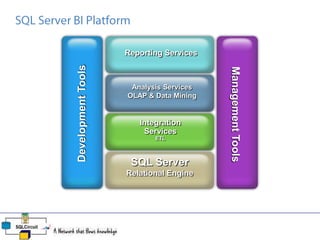
 SQL Server BI Platform
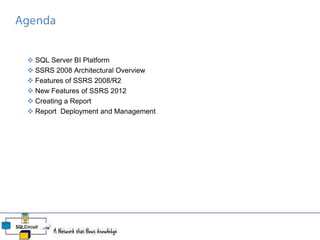
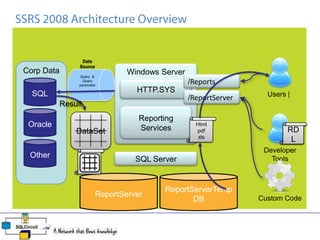
 SSRS 2008 Architectural Overview
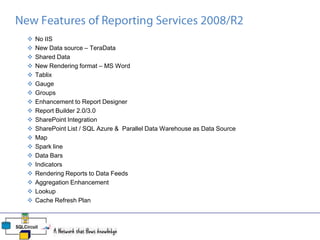
 Features of SSRS 2008/R2
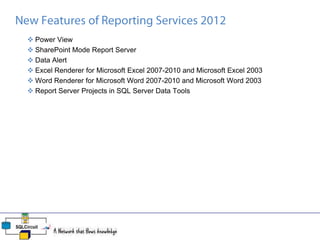
 New Features of SSRS 2012
 Creating a Report
 Report Deployment and Management
Reporting Services
Analysis Services
OLAP & Data Mining
Integration
Services
ETL
SQL Server
Relational Engine
DevelopmentTools
ManagementTools
SQL Server
Windows ServerCorp Data
Other
Oracle
SQL Users |
Developer
Tools
ReportServerTemp
DB
ReportServer
Reporting
Services
HTTP.SYS
/Reports
/ReportServer
Custom Code
RD
L
RD
L
Data
Source
Query &
Query
parameter
Result
DataSet
Html
pdf
xls
 No IIS
 New Data source – TeraData
 Shared Data
 New Rendering format – MS Word
 Tablix
 Gauge
 Groups
 Enhancement to Report Designer
 Report Builder 2.0/3.0
 SharePoint Integration
 SharePoint List / SQL Azure & Parallel Data Warehouse as Data Source
 Map
 Spark line
 Data Bars
 Indicators
 Rendering Reports to Data Feeds
 Aggregation Enhancement
 Lookup
 Cache Refresh Plan
 Power View
 SharePoint Mode Report Server
 Data Alert
 Excel Renderer for Microsoft Excel 2007-2010 and Microsoft Excel 2003
 Word Renderer for Microsoft Word 2007-2010 and Microsoft Word 2003
 Report Server Projects in SQL Server Data Tools
• Use Reporting Service Configuration manager.
DEMO
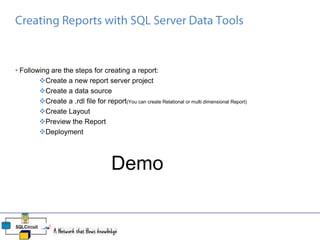
• Following are the steps for creating a report:
Create a new report server project
Create a data source
Create a .rdl file for report(You can create Relational or multi dimensional Report)
Create Layout
Preview the Report
Deployment
Demo
Q & A

SQL Server Reporting Services 2008

  • 1.
  • 2.
     SQL ServerBI Platform  SSRS 2008 Architectural Overview  Features of SSRS 2008/R2  New Features of SSRS 2012  Creating a Report  Report Deployment and Management
  • 3.
    Reporting Services Analysis Services OLAP& Data Mining Integration Services ETL SQL Server Relational Engine DevelopmentTools ManagementTools
  • 4.
    SQL Server Windows ServerCorpData Other Oracle SQL Users | Developer Tools ReportServerTemp DB ReportServer Reporting Services HTTP.SYS /Reports /ReportServer Custom Code RD L RD L Data Source Query & Query parameter Result DataSet Html pdf xls
  • 5.
     No IIS New Data source – TeraData  Shared Data  New Rendering format – MS Word  Tablix  Gauge  Groups  Enhancement to Report Designer  Report Builder 2.0/3.0  SharePoint Integration  SharePoint List / SQL Azure & Parallel Data Warehouse as Data Source  Map  Spark line  Data Bars  Indicators  Rendering Reports to Data Feeds  Aggregation Enhancement  Lookup  Cache Refresh Plan
  • 6.
     Power View SharePoint Mode Report Server  Data Alert  Excel Renderer for Microsoft Excel 2007-2010 and Microsoft Excel 2003  Word Renderer for Microsoft Word 2007-2010 and Microsoft Word 2003  Report Server Projects in SQL Server Data Tools
  • 7.
    • Use ReportingService Configuration manager. DEMO
  • 8.
    • Following arethe steps for creating a report: Create a new report server project Create a data source Create a .rdl file for report(You can create Relational or multi dimensional Report) Create Layout Preview the Report Deployment Demo
  • 9.