SPRING MVC
The spring web MVC provides model-view-controller
architecture
By Nagaraju
 The Model encapsulates the application data and in general they will consist of
POJO.
 The View is responsible for rendering the model data and in general it generates
HTML output that the client's browser can interpret.
 The Controller is responsible for processing user requests and building appropriate
model and passes it to the view for rendering.
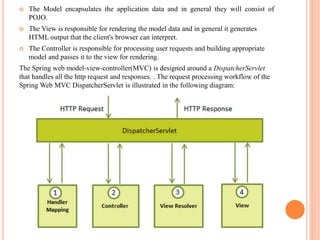
The Spring web model-view-controller(MVC) is designed around a DispatcherServlet
that handles all the http request and responses. . The request processing workflow of the
Spring Web MVC DispatcherServlet is illustrated in the following diagram:
Following is the sequence of events corresponding to an incoming HTTP request to
DispatcherServlet.
 After receiving an HTTP request, DispatcherServlet consults the HandlerMapping to call the
appropriate Controller.
 The Controller takes the request and calls the appropriate service methods based on used GET
or POST method. The service method will set model data based on defined business logic and
returns view name to the DispatcherServlet.
 The DispatcherServlet will take help from ViewResolver to pickup the defined view for the
request.
 Once view is finalized, The DispatcherServlet passes the model data to the view which is
finally rendered on the browser.
Required Configuration:
You need to map requests that you want the DispatcherServlet to handle, by using a URL mapping
in the web.xml.
<servlet>
<servlet-name>ServletName</servlet-name>
<servlet-class>org.springframework.web.servlet.DispatcherServlet</servlet-class>
<load-on-startup>1</load-on-startup>
</servlet>
<servlet-mapping><servlet-name>ServletName</servlet-name>
<url-pattern>*.jsp</url-pattern>
</servlet-mapping>
 Upon initialization of ServletName DispatcherServlet, the framework will try to load the
applicationcontext from a file named [servlet-name]-servlet.xml located in the application's
WebContent/WEB-INF directory.
 We can customize this file name and location by adding the servletlistenerContextLoaderListener in
your web.xml file as follows.
<context-param>
<param-name>contextConfigLocation</param-name>
<param-value>/WEB-INF/HelloWeb-servlet.xml</param-value>
</context-param>
<listener>
<listener-class>org.springframework.web.context.ContextLoaderListener</listener-class>
</listener>
 Required configuration for [servletname]-servlet.xml
<beans xmlns="http://www.springframework.org/schema/beans"
xmlns:context="http://www.springframework.org/schema/context"
xmlns:xsi="http://www.w3.org/2001/XMLSchema-instance"
xsi:schemaLocation="http://www.springframework.org/schema/beans
http://www.springframework.org/schema/beans/spring-beans-3.0.xsd
http://www.springframework.org/schema/context
http://www.springframework.org/schema/context/spring-context-3.0.xsd">
<context:component-scan base-package=“packagename" />
<bean ><property name="prefix" value="/WEB-INF/jsp/" />
<property name="suffix" value=".jsp" />
</bean>
</beans>
Following are the important points about HelloWeb-servlet.xmlfile:
 The [servlet-name]-servlet.xml file will be used to create the beans defined, overriding the definitions of any beans
defined with the same name in the global scope.
 The <context:component-scan...> tag will be use to activate Spring MVC annotationscanning capability which allows to
make use of annotations like @Controller and @RequestMapping etc.
Defining a controller:
@Controller annotation indicates that a particular class serves the role of a controller.
@RequestMapping annotation is used to map a URL to either an entire class or a particular handler method.
Ex:
@Controller
@RequestMapping("/hello")
public class HelloController{
@RequestMapping(method = RequestMethod.GET)
public String printHello(ModelMap model) {
model.addAttribute("message", "Hello Spring MVC Framework!");
return "hello";
}
}
SPRING SECURITY
 We can do authentication and authorization for the some specific urls by using spring security.
Only selected people can use the urls.
 We will mention the url in the spirng-security.xml to which authentication is to be done and the
username and password.
 Create the Spring-Security.xml file and mention the url to which authentication is to be done in
the intercept-url tag like this as shown in below
<beans:beans xmlns="http://www.springframework.org/schema/security"
xmlns:beans="http://www.springframework.org/schema/beans"
xmlns:xsi="http://www.w3.org/2001/XMLSchema-instance"
xsi:schemaLocation="http://www.springframework.org/schema/beans
http://www.springframework.org/schema/beans/spring-beans-3.0.xsd
http://www.springframework.org/schema/security http://www.springframework.org/schema/security/spring-
security-3.2.xsd">
<http auto-config="true">
<intercept-url pattern="/Url" access="ROLE_USER" /> </http>
<authentication-manager>
<authentication-provider>
<user-service>
<user name=“userName" password=“Password" authorities="ROLE_USER" />
</user-service> </authentication-provider> </authentication-manager>
</beans:beans>
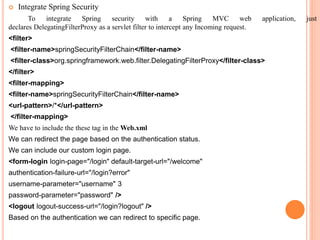
 Integrate Spring Security
To integrate Spring security with a Spring MVC web application, just
declares DelegatingFilterProxy as a servlet filter to intercept any Incoming request.
<filter>
<filter-name>springSecurityFilterChain</filter-name>
<filter-class>org.springframework.web.filter.DelegatingFilterProxy</filter-class>
</filter>
<filter-mapping>
<filter-name>springSecurityFilterChain</filter-name>
<url-pattern>/*</url-pattern>
</filter-mapping>
We have to include the these tag in the Web.xml
We can redirect the page based on the authentication status.
We can include our custom login page.
<form-login login-page="/login" default-target-url="/welcome"
authentication-failure-url="/login?error"
username-parameter="username" 3
password-parameter="password" />
<logout logout-success-url="/login?logout" />
Based on the authentication we can redirect to specific page.

Spring mvc

  • 1.
    SPRING MVC The springweb MVC provides model-view-controller architecture By Nagaraju
  • 2.
     The Modelencapsulates the application data and in general they will consist of POJO.  The View is responsible for rendering the model data and in general it generates HTML output that the client's browser can interpret.  The Controller is responsible for processing user requests and building appropriate model and passes it to the view for rendering. The Spring web model-view-controller(MVC) is designed around a DispatcherServlet that handles all the http request and responses. . The request processing workflow of the Spring Web MVC DispatcherServlet is illustrated in the following diagram:
  • 3.
    Following is thesequence of events corresponding to an incoming HTTP request to DispatcherServlet.  After receiving an HTTP request, DispatcherServlet consults the HandlerMapping to call the appropriate Controller.  The Controller takes the request and calls the appropriate service methods based on used GET or POST method. The service method will set model data based on defined business logic and returns view name to the DispatcherServlet.  The DispatcherServlet will take help from ViewResolver to pickup the defined view for the request.  Once view is finalized, The DispatcherServlet passes the model data to the view which is finally rendered on the browser. Required Configuration: You need to map requests that you want the DispatcherServlet to handle, by using a URL mapping in the web.xml. <servlet> <servlet-name>ServletName</servlet-name> <servlet-class>org.springframework.web.servlet.DispatcherServlet</servlet-class> <load-on-startup>1</load-on-startup> </servlet> <servlet-mapping><servlet-name>ServletName</servlet-name> <url-pattern>*.jsp</url-pattern> </servlet-mapping>
  • 4.
     Upon initializationof ServletName DispatcherServlet, the framework will try to load the applicationcontext from a file named [servlet-name]-servlet.xml located in the application's WebContent/WEB-INF directory.  We can customize this file name and location by adding the servletlistenerContextLoaderListener in your web.xml file as follows. <context-param> <param-name>contextConfigLocation</param-name> <param-value>/WEB-INF/HelloWeb-servlet.xml</param-value> </context-param> <listener> <listener-class>org.springframework.web.context.ContextLoaderListener</listener-class> </listener>  Required configuration for [servletname]-servlet.xml <beans xmlns="http://www.springframework.org/schema/beans" xmlns:context="http://www.springframework.org/schema/context" xmlns:xsi="http://www.w3.org/2001/XMLSchema-instance" xsi:schemaLocation="http://www.springframework.org/schema/beans http://www.springframework.org/schema/beans/spring-beans-3.0.xsd http://www.springframework.org/schema/context http://www.springframework.org/schema/context/spring-context-3.0.xsd"> <context:component-scan base-package=“packagename" />
  • 5.
    <bean ><property name="prefix"value="/WEB-INF/jsp/" /> <property name="suffix" value=".jsp" /> </bean> </beans> Following are the important points about HelloWeb-servlet.xmlfile:  The [servlet-name]-servlet.xml file will be used to create the beans defined, overriding the definitions of any beans defined with the same name in the global scope.  The <context:component-scan...> tag will be use to activate Spring MVC annotationscanning capability which allows to make use of annotations like @Controller and @RequestMapping etc. Defining a controller: @Controller annotation indicates that a particular class serves the role of a controller. @RequestMapping annotation is used to map a URL to either an entire class or a particular handler method. Ex: @Controller @RequestMapping("/hello") public class HelloController{ @RequestMapping(method = RequestMethod.GET) public String printHello(ModelMap model) { model.addAttribute("message", "Hello Spring MVC Framework!"); return "hello"; } }
  • 6.
    SPRING SECURITY  Wecan do authentication and authorization for the some specific urls by using spring security. Only selected people can use the urls.  We will mention the url in the spirng-security.xml to which authentication is to be done and the username and password.  Create the Spring-Security.xml file and mention the url to which authentication is to be done in the intercept-url tag like this as shown in below <beans:beans xmlns="http://www.springframework.org/schema/security" xmlns:beans="http://www.springframework.org/schema/beans" xmlns:xsi="http://www.w3.org/2001/XMLSchema-instance" xsi:schemaLocation="http://www.springframework.org/schema/beans http://www.springframework.org/schema/beans/spring-beans-3.0.xsd http://www.springframework.org/schema/security http://www.springframework.org/schema/security/spring- security-3.2.xsd"> <http auto-config="true"> <intercept-url pattern="/Url" access="ROLE_USER" /> </http> <authentication-manager> <authentication-provider> <user-service> <user name=“userName" password=“Password" authorities="ROLE_USER" /> </user-service> </authentication-provider> </authentication-manager> </beans:beans>
  • 7.
     Integrate SpringSecurity To integrate Spring security with a Spring MVC web application, just declares DelegatingFilterProxy as a servlet filter to intercept any Incoming request. <filter> <filter-name>springSecurityFilterChain</filter-name> <filter-class>org.springframework.web.filter.DelegatingFilterProxy</filter-class> </filter> <filter-mapping> <filter-name>springSecurityFilterChain</filter-name> <url-pattern>/*</url-pattern> </filter-mapping> We have to include the these tag in the Web.xml We can redirect the page based on the authentication status. We can include our custom login page. <form-login login-page="/login" default-target-url="/welcome" authentication-failure-url="/login?error" username-parameter="username" 3 password-parameter="password" /> <logout logout-success-url="/login?logout" /> Based on the authentication we can redirect to specific page.