Code Camp April-Spring Boot
April 2, 2016 Presented By - Nakul & Vishal
Audience
Beginner Level
Java Web Developers
Grails Developers
Objective
To get familiar with the Spring Boot framework and use it to build
microservices architecture.
Agenda
Introducing Spring Boot
Features
Artifacts
Profiling
Demo application using Spring
Boot and Groovy Templates
Introducing Spring Boot
- If Spring is the cake, Spring Boot is the
icing.
Spring boot is a suite, pre-configured, pre-sugared set of
frameworks/technologies to reduce boilerplate configuration providing you
the shortest way to have a Spring web application up and running with
smallest line of code/configuration out-of-the-box.
What is Spring Boot ?
The primary goals of Spring Boot are:
To provide a radically faster and widely accessible 'getting started'
experience for all Spring development
To be opinionated out of the box, but get out of the way quickly as
requirements start to diverge from the defaults
To provide a range of non-functional features that are common to large
classes of projects (e.g. embedded servers, security, metrics, health
checks, externalized configuration)
Spring Boot does not generate code and there is absolutely no requirement
Why Spring Boot ?
import org.springframework.boot.*;
import org.springframework.boot.autoconfigure.*;
import org.springframework.stereotype.*;
import org.springframework.web.bind.annotation.*;
@Controller
@EnableAutoConfiguration
@Configuration
@ComponentScan
//All three annotations can be replaced by one @SpringBootApplication
public class SampleController {
@RequestMapping("/")
String home() {
return "Hello World!";
}
public static void main(String[] args) throws Exception {
SpringApplication.run(SampleController.class, args);
}
A simple Spring Boot Application
Demo
Let’s hit some keys !!
Hello World from Spring Boot
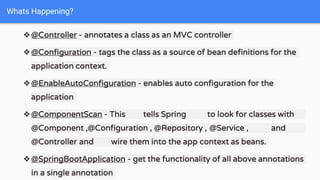
❖@Controller - annotates a class as an MVC controller
❖@Configuration - tags the class as a source of bean definitions for the
application context.
❖@EnableAutoConfiguration - enables auto configuration for the
application
❖@ComponentScan - This tells Spring to look for classes with
@Component ,@Configuration , @Repository , @Service , and
@Controller and wire them into the app context as beans.
❖@SpringBootApplication - get the functionality of all above annotations
in a single annotation
Whats Happening?
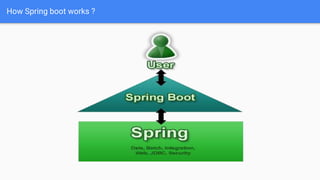
How Spring boot works ?
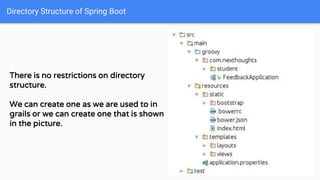
Directory Structure of Spring Boot
There is no restrictions on directory
structure.
We can create one as we are used to in
grails or we can create one that is shown
in the picture.
Demo
Let’s hit some keys !!
Look at the directory structure
Spring Boot Essentials
Spring Boot brings a great deal of magic to Spring application development.
But there are four core tricks that it performs:
■ Automatic configuration — Spring Boot can automatically provide
configuration for application functionality common to many Spring applications.
■ Starter dependencies — You tell Spring Boot what kind of functionality you need,and it
will ensure that the libraries needed are added to the build.
■ The command-line interface — This optional feature of Spring Boot lets you write
complete applications with just application code, but no need for a traditional project
build.
■ The Actuator — Gives you insight into what’s going on inside of a running Spring Boot
application.
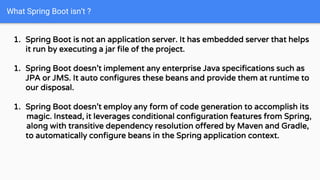
What Spring Boot isn’t ?
1. Spring Boot is not an application server. It has embedded server that helps
it run by executing a jar file of the project.
1. Spring Boot doesn’t implement any enterprise Java specifications such as
JPA or JMS. It auto configures these beans and provide them at runtime to
our disposal.
1. Spring Boot doesn’t employ any form of code generation to accomplish its
magic. Instead, it leverages conditional configuration features from Spring,
along with transitive dependency resolution offered by Maven and Gradle,
to automatically configure beans in the Spring application context.
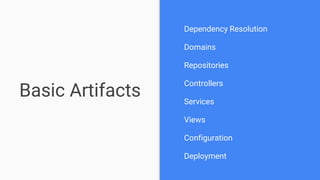
Basic Artifacts
Dependency Resolution
Domains
Repositories
Controllers
Services
Views
Configuration
Deployment
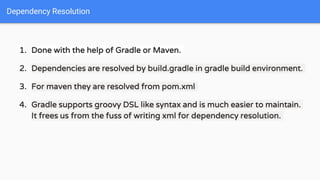
1. Done with the help of Gradle or Maven.
2. Dependencies are resolved by build.gradle in gradle build environment.
3. For maven they are resolved from pom.xml
4. Gradle supports groovy DSL like syntax and is much easier to maintain.
It frees us from the fuss of writing xml for dependency resolution.
Dependency Resolution
Resolving dependencies using Gradle
Let’s have a look at the build.gradle file in the root of our
application.
Demo
Let’s hit some keys !!
build.gradle
1. Annotated by the annotation @Entity
2. javax.persistence.Entity/grails.persistence.Entity/org.hibernate.annotat
ions.Entity
3. Can use JPA 2.1, Hibernate, Spring Data, GORM etc .
4. Classes annotated by @Entity is a component which our main class
searches for by the help of @ComponentScan
Domains
Demo
Let’s hit some keys !!
Domains
1. Provides abstraction.
2. Significantly reduces the amount of boilerplate code required to
implement DAO layer
3. Supports various persistence stores like MySql , MongoDB etc.
The central interface in Spring Data repository abstraction is Repository.It
takes the the domain class to manage as well as the id type of the domain
class as type arguments.
This interface acts primarily as a marker interface to capture the types to
work with and to help you to discover interfaces that extend this one.
Repositories
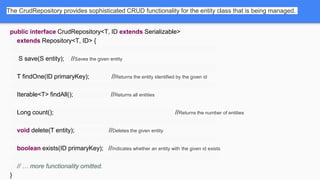
The CrudRepository provides sophisticated CRUD functionality for the entity class that is being managed.
public interface CrudRepository<T, ID extends Serializable>
extends Repository<T, ID> {
S save(S entity); //Saves the given entity
T findOne(ID primaryKey); //Returns the entity identified by the given id
Iterable<T> findAll(); //Returns all entities
Long count(); //Returns the number of entities
void delete(T entity); //Deletes the given entity
boolean exists(ID primaryKey); //Indicates whether an entity with the given id exists
// … more functionality omitted.
}
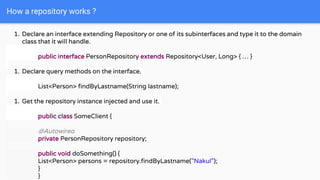
How a repository works ?
1. Declare an interface extending Repository or one of its subinterfaces and type it to the domain
class that it will handle.
public interface PersonRepository extends Repository<User, Long> { … }
1. Declare query methods on the interface.
List<Person> findByLastname(String lastname);
1. Get the repository instance injected and use it.
public class SomeClient {
@Autowired
private PersonRepository repository;
public void doSomething() {
List<Person> persons = repository.findByLastname("Nakul");
}
}
Demo
Let’s hit some keys !!
Repositories
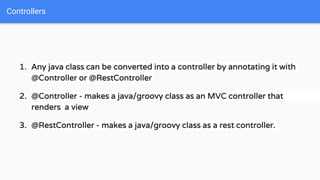
1. Any java class can be converted into a controller by annotating it with
@Controller or @RestController
2. @Controller - makes a java/groovy class as an MVC controller that
renders a view
3. @RestController - makes a java/groovy class as a rest controller.
Controllers
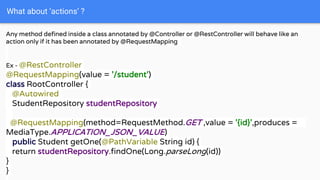
What about ‘actions’ ?
Any method defined inside a class annotated by @Controller or @RestController will behave like an
action only if it has been annotated by @RequestMapping
Ex - @RestController
@RequestMapping(value = '/student')
class RootController {
@Autowired
StudentRepository studentRepository
@RequestMapping(method=RequestMethod.GET ,value = '{id}',produces =
MediaType.APPLICATION_JSON_VALUE)
public Student getOne(@PathVariable String id) {
return studentRepository.findOne(Long.parseLong(id))
}
}
What about ‘actions’ ? Continued -
A simple MVC controller
Ex - @Controller
@RequestMapping(value = '/student')
class RootController { @Autowired
StudentRepository studentRepository
@RequestMapping(method=RequestMethod.GET ,value = '{id}')
public ModelAndView getOne(@PathVariable String id) {
return new ModelAndView(“views/index”,[:])
}
}
Demo
Let’s hit some keys !!
Controllers and Actions
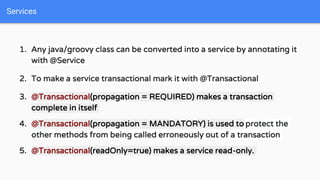
1. Any java/groovy class can be converted into a service by annotating it
with @Service
2. To make a service transactional mark it with @Transactional
3. @Transactional(propagation = REQUIRED) makes a transaction
complete in itself
4. @Transactional(propagation = MANDATORY) is used to protect the
other methods from being called erroneously out of a transaction
5. @Transactional(readOnly=true) makes a service read-only.
Services
Demo
Let’s hit some keys !!
Services
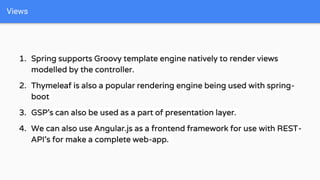
1. Spring supports Groovy template engine natively to render views
modelled by the controller.
2. Thymeleaf is also a popular rendering engine being used with spring-
boot
3. GSP’s can also be used as a part of presentation layer.
4. We can also use Angular.js as a frontend framework for use with REST-
API’s for make a complete web-app.
Views
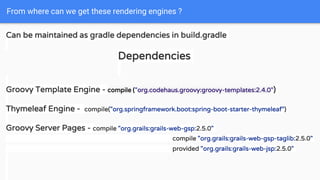
From where can we get these rendering engines ?
Can be maintained as gradle dependencies in build.gradle
Dependencies
Groovy Template Engine - compile ("org.codehaus.groovy:groovy-templates:2.4.0")
Thymeleaf Engine - compile("org.springframework.boot:spring-boot-starter-thymeleaf")
Groovy Server Pages - compile "org.grails:grails-web-gsp:2.5.0"
compile "org.grails:grails-web-gsp-taglib:2.5.0"
provided "org.grails:grails-web-jsp:2.5.0"
Groovy Template Engine
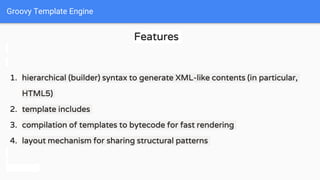
Features
1. hierarchical (builder) syntax to generate XML-like contents (in particular,
HTML5)
2. template includes
3. compilation of templates to bytecode for fast rendering
4. layout mechanism for sharing structural patterns
Groovy Template Engine
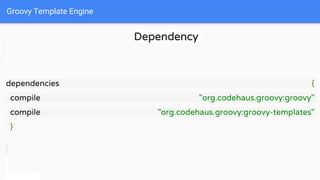
Dependency
dependencies {
compile "org.codehaus.groovy:groovy"
compile "org.codehaus.groovy:groovy-templates"
}
Groovy Template Engine
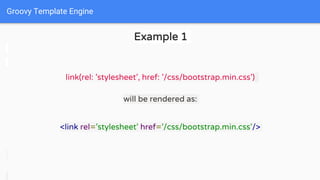
Example 1
link(rel: 'stylesheet', href: '/css/bootstrap.min.css')
will be rendered as:
<link rel='stylesheet' href='/css/bootstrap.min.css'/>
Groovy Template Engine
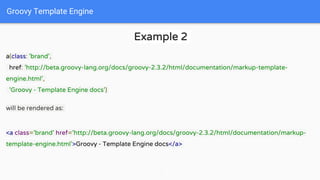
Example 2
a(class: 'brand',
href: 'http://beta.groovy-lang.org/docs/groovy-2.3.2/html/documentation/markup-template-
engine.html',
'Groovy - Template Engine docs')
will be rendered as:
<a class='brand' href='http://beta.groovy-lang.org/docs/groovy-2.3.2/html/documentation/markup-
template-engine.html'>Groovy - Template Engine docs</a>
Groovy Template Engine
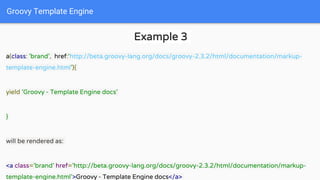
Example 3
a(class: 'brand', href:‘http://beta.groovy-lang.org/docs/groovy-2.3.2/html/documentation/markup-
template-engine.html'){
yield 'Groovy - Template Engine docs'
}
will be rendered as:
<a class='brand' href='http://beta.groovy-lang.org/docs/groovy-2.3.2/html/documentation/markup-
template-engine.html'>Groovy - Template Engine docs</a>
Demo
Let’s hit some keys !!
Views
Groovy Template Engine - Layouts
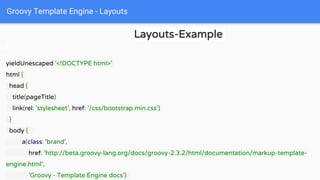
Layouts-Example
yieldUnescaped '<!DOCTYPE html>'
html {
head {
title(pageTitle)
link(rel: 'stylesheet', href: '/css/bootstrap.min.css')
}
body {
a(class: 'brand',
href: 'http://beta.groovy-lang.org/docs/groovy-2.3.2/html/documentation/markup-template-
engine.html',
'Groovy - Template Engine docs')
Groovy Template Engine - Layouts
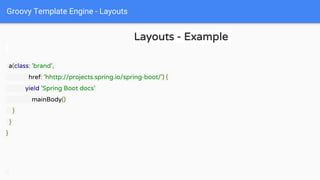
Layouts - Example
a(class: 'brand',
href: 'hhttp://projects.spring.io/spring-boot/') {
yield 'Spring Boot docs'
mainBody()
}
}
}
Groovy Template Engine - Layouts
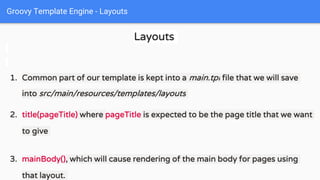
Layouts
1. Common part of our template is kept into a main.tpl file that we will save
into src/main/resources/templates/layouts
2. title(pageTitle) where pageTitle is expected to be the page title that we want
to give
3. mainBody(), which will cause rendering of the main body for pages using
that layout.
Groovy Template Engine - Layouts
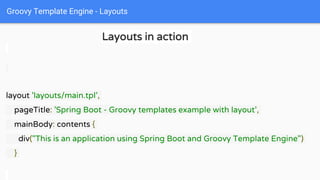
Layouts in action
layout 'layouts/main.tpl',
pageTitle: 'Spring Boot - Groovy templates example with layout',
mainBody: contents {
div("This is an application using Spring Boot and Groovy Template Engine")
}
Groovy Template Engine - Layouts
Layouts
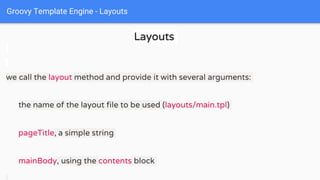
we call the layout method and provide it with several arguments:
the name of the layout file to be used (layouts/main.tpl)
pageTitle, a simple string
mainBody, using the contents block
Groovy Template Engine - Layouts
Layouts
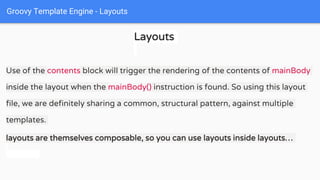
Use of the contents block will trigger the rendering of the contents of mainBody
inside the layout when the mainBody() instruction is found. So using this layout
file, we are definitely sharing a common, structural pattern, against multiple
templates.
layouts are themselves composable, so you can use layouts inside layouts…
Demo
Let’s hit some keys !!
Layouts
Profiles
Profiles
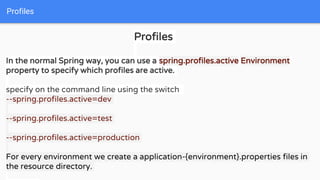
In the normal Spring way, you can use a spring.profiles.active Environment
property to specify which profiles are active.
specify on the command line using the switch
--spring.profiles.active=dev
--spring.profiles.active=test
--spring.profiles.active=production
For every environment we create a application-{environment}.properties files in
the resource directory.
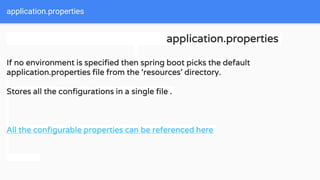
application.properties
If no environment is specified then spring boot picks the default
application.properties file from the ‘resources’ directory.
Stores all the configurations in a single file .
All the configurable properties can be referenced here
Demo
Let’s hit some keys !!
Profiles
References
References
Groovy Templates : https://spring.io/blog/2014/05/28/using-the-innovative-
groovy-template-engine-in-spring-boot
Spring Boot : Spring Boot in Action - Craig Walls, Manning Publication
Learning Spring Boot - Greg L. Turnquist, Packt
Publishing
More References - http://docs.spring.io/spring-
boot/docs/current/reference/htmlsingle/
Questions ?
For dummy project please visit https://github.com/pant-nakul/springboot-crud-
demo
Thank You for your patience !!!

Spring boot

  • 1.
    Code Camp April-SpringBoot April 2, 2016 Presented By - Nakul & Vishal
  • 2.
    Audience Beginner Level Java WebDevelopers Grails Developers
  • 3.
    Objective To get familiarwith the Spring Boot framework and use it to build microservices architecture.
  • 4.
    Agenda Introducing Spring Boot Features Artifacts Profiling Demoapplication using Spring Boot and Groovy Templates
  • 5.
    Introducing Spring Boot -If Spring is the cake, Spring Boot is the icing.
  • 6.
    Spring boot isa suite, pre-configured, pre-sugared set of frameworks/technologies to reduce boilerplate configuration providing you the shortest way to have a Spring web application up and running with smallest line of code/configuration out-of-the-box. What is Spring Boot ?
  • 7.
    The primary goalsof Spring Boot are: To provide a radically faster and widely accessible 'getting started' experience for all Spring development To be opinionated out of the box, but get out of the way quickly as requirements start to diverge from the defaults To provide a range of non-functional features that are common to large classes of projects (e.g. embedded servers, security, metrics, health checks, externalized configuration) Spring Boot does not generate code and there is absolutely no requirement Why Spring Boot ?
  • 8.
    import org.springframework.boot.*; import org.springframework.boot.autoconfigure.*; importorg.springframework.stereotype.*; import org.springframework.web.bind.annotation.*; @Controller @EnableAutoConfiguration @Configuration @ComponentScan //All three annotations can be replaced by one @SpringBootApplication public class SampleController { @RequestMapping("/") String home() { return "Hello World!"; } public static void main(String[] args) throws Exception { SpringApplication.run(SampleController.class, args); } A simple Spring Boot Application
  • 9.
    Demo Let’s hit somekeys !! Hello World from Spring Boot
  • 10.
    ❖@Controller - annotatesa class as an MVC controller ❖@Configuration - tags the class as a source of bean definitions for the application context. ❖@EnableAutoConfiguration - enables auto configuration for the application ❖@ComponentScan - This tells Spring to look for classes with @Component ,@Configuration , @Repository , @Service , and @Controller and wire them into the app context as beans. ❖@SpringBootApplication - get the functionality of all above annotations in a single annotation Whats Happening?
  • 11.
  • 12.
    Directory Structure ofSpring Boot There is no restrictions on directory structure. We can create one as we are used to in grails or we can create one that is shown in the picture.
  • 13.
    Demo Let’s hit somekeys !! Look at the directory structure
  • 14.
    Spring Boot Essentials SpringBoot brings a great deal of magic to Spring application development. But there are four core tricks that it performs: ■ Automatic configuration — Spring Boot can automatically provide configuration for application functionality common to many Spring applications. ■ Starter dependencies — You tell Spring Boot what kind of functionality you need,and it will ensure that the libraries needed are added to the build. ■ The command-line interface — This optional feature of Spring Boot lets you write complete applications with just application code, but no need for a traditional project build. ■ The Actuator — Gives you insight into what’s going on inside of a running Spring Boot application.
  • 15.
    What Spring Bootisn’t ? 1. Spring Boot is not an application server. It has embedded server that helps it run by executing a jar file of the project. 1. Spring Boot doesn’t implement any enterprise Java specifications such as JPA or JMS. It auto configures these beans and provide them at runtime to our disposal. 1. Spring Boot doesn’t employ any form of code generation to accomplish its magic. Instead, it leverages conditional configuration features from Spring, along with transitive dependency resolution offered by Maven and Gradle, to automatically configure beans in the Spring application context.
  • 16.
  • 17.
    1. Done withthe help of Gradle or Maven. 2. Dependencies are resolved by build.gradle in gradle build environment. 3. For maven they are resolved from pom.xml 4. Gradle supports groovy DSL like syntax and is much easier to maintain. It frees us from the fuss of writing xml for dependency resolution. Dependency Resolution
  • 18.
    Resolving dependencies usingGradle Let’s have a look at the build.gradle file in the root of our application.
  • 19.
    Demo Let’s hit somekeys !! build.gradle
  • 20.
    1. Annotated bythe annotation @Entity 2. javax.persistence.Entity/grails.persistence.Entity/org.hibernate.annotat ions.Entity 3. Can use JPA 2.1, Hibernate, Spring Data, GORM etc . 4. Classes annotated by @Entity is a component which our main class searches for by the help of @ComponentScan Domains
  • 21.
    Demo Let’s hit somekeys !! Domains
  • 22.
    1. Provides abstraction. 2.Significantly reduces the amount of boilerplate code required to implement DAO layer 3. Supports various persistence stores like MySql , MongoDB etc. The central interface in Spring Data repository abstraction is Repository.It takes the the domain class to manage as well as the id type of the domain class as type arguments. This interface acts primarily as a marker interface to capture the types to work with and to help you to discover interfaces that extend this one. Repositories
  • 23.
    The CrudRepository providessophisticated CRUD functionality for the entity class that is being managed. public interface CrudRepository<T, ID extends Serializable> extends Repository<T, ID> { S save(S entity); //Saves the given entity T findOne(ID primaryKey); //Returns the entity identified by the given id Iterable<T> findAll(); //Returns all entities Long count(); //Returns the number of entities void delete(T entity); //Deletes the given entity boolean exists(ID primaryKey); //Indicates whether an entity with the given id exists // … more functionality omitted. }
  • 24.
    How a repositoryworks ? 1. Declare an interface extending Repository or one of its subinterfaces and type it to the domain class that it will handle. public interface PersonRepository extends Repository<User, Long> { … } 1. Declare query methods on the interface. List<Person> findByLastname(String lastname); 1. Get the repository instance injected and use it. public class SomeClient { @Autowired private PersonRepository repository; public void doSomething() { List<Person> persons = repository.findByLastname("Nakul"); } }
  • 25.
    Demo Let’s hit somekeys !! Repositories
  • 26.
    1. Any javaclass can be converted into a controller by annotating it with @Controller or @RestController 2. @Controller - makes a java/groovy class as an MVC controller that renders a view 3. @RestController - makes a java/groovy class as a rest controller. Controllers
  • 27.
    What about ‘actions’? Any method defined inside a class annotated by @Controller or @RestController will behave like an action only if it has been annotated by @RequestMapping Ex - @RestController @RequestMapping(value = '/student') class RootController { @Autowired StudentRepository studentRepository @RequestMapping(method=RequestMethod.GET ,value = '{id}',produces = MediaType.APPLICATION_JSON_VALUE) public Student getOne(@PathVariable String id) { return studentRepository.findOne(Long.parseLong(id)) } }
  • 28.
    What about ‘actions’? Continued - A simple MVC controller Ex - @Controller @RequestMapping(value = '/student') class RootController { @Autowired StudentRepository studentRepository @RequestMapping(method=RequestMethod.GET ,value = '{id}') public ModelAndView getOne(@PathVariable String id) { return new ModelAndView(“views/index”,[:]) } }
  • 29.
    Demo Let’s hit somekeys !! Controllers and Actions
  • 30.
    1. Any java/groovyclass can be converted into a service by annotating it with @Service 2. To make a service transactional mark it with @Transactional 3. @Transactional(propagation = REQUIRED) makes a transaction complete in itself 4. @Transactional(propagation = MANDATORY) is used to protect the other methods from being called erroneously out of a transaction 5. @Transactional(readOnly=true) makes a service read-only. Services
  • 31.
    Demo Let’s hit somekeys !! Services
  • 32.
    1. Spring supportsGroovy template engine natively to render views modelled by the controller. 2. Thymeleaf is also a popular rendering engine being used with spring- boot 3. GSP’s can also be used as a part of presentation layer. 4. We can also use Angular.js as a frontend framework for use with REST- API’s for make a complete web-app. Views
  • 33.
    From where canwe get these rendering engines ? Can be maintained as gradle dependencies in build.gradle Dependencies Groovy Template Engine - compile ("org.codehaus.groovy:groovy-templates:2.4.0") Thymeleaf Engine - compile("org.springframework.boot:spring-boot-starter-thymeleaf") Groovy Server Pages - compile "org.grails:grails-web-gsp:2.5.0" compile "org.grails:grails-web-gsp-taglib:2.5.0" provided "org.grails:grails-web-jsp:2.5.0"
  • 34.
    Groovy Template Engine Features 1.hierarchical (builder) syntax to generate XML-like contents (in particular, HTML5) 2. template includes 3. compilation of templates to bytecode for fast rendering 4. layout mechanism for sharing structural patterns
  • 35.
    Groovy Template Engine Dependency dependencies{ compile "org.codehaus.groovy:groovy" compile "org.codehaus.groovy:groovy-templates" }
  • 36.
    Groovy Template Engine Example1 link(rel: 'stylesheet', href: '/css/bootstrap.min.css') will be rendered as: <link rel='stylesheet' href='/css/bootstrap.min.css'/>
  • 37.
    Groovy Template Engine Example2 a(class: 'brand', href: 'http://beta.groovy-lang.org/docs/groovy-2.3.2/html/documentation/markup-template- engine.html', 'Groovy - Template Engine docs') will be rendered as: <a class='brand' href='http://beta.groovy-lang.org/docs/groovy-2.3.2/html/documentation/markup- template-engine.html'>Groovy - Template Engine docs</a>
  • 38.
    Groovy Template Engine Example3 a(class: 'brand', href:‘http://beta.groovy-lang.org/docs/groovy-2.3.2/html/documentation/markup- template-engine.html'){ yield 'Groovy - Template Engine docs' } will be rendered as: <a class='brand' href='http://beta.groovy-lang.org/docs/groovy-2.3.2/html/documentation/markup- template-engine.html'>Groovy - Template Engine docs</a>
  • 39.
    Demo Let’s hit somekeys !! Views
  • 40.
    Groovy Template Engine- Layouts Layouts-Example yieldUnescaped '<!DOCTYPE html>' html { head { title(pageTitle) link(rel: 'stylesheet', href: '/css/bootstrap.min.css') } body { a(class: 'brand', href: 'http://beta.groovy-lang.org/docs/groovy-2.3.2/html/documentation/markup-template- engine.html', 'Groovy - Template Engine docs')
  • 41.
    Groovy Template Engine- Layouts Layouts - Example a(class: 'brand', href: 'hhttp://projects.spring.io/spring-boot/') { yield 'Spring Boot docs' mainBody() } } }
  • 42.
    Groovy Template Engine- Layouts Layouts 1. Common part of our template is kept into a main.tpl file that we will save into src/main/resources/templates/layouts 2. title(pageTitle) where pageTitle is expected to be the page title that we want to give 3. mainBody(), which will cause rendering of the main body for pages using that layout.
  • 43.
    Groovy Template Engine- Layouts Layouts in action layout 'layouts/main.tpl', pageTitle: 'Spring Boot - Groovy templates example with layout', mainBody: contents { div("This is an application using Spring Boot and Groovy Template Engine") }
  • 44.
    Groovy Template Engine- Layouts Layouts we call the layout method and provide it with several arguments: the name of the layout file to be used (layouts/main.tpl) pageTitle, a simple string mainBody, using the contents block
  • 45.
    Groovy Template Engine- Layouts Layouts Use of the contents block will trigger the rendering of the contents of mainBody inside the layout when the mainBody() instruction is found. So using this layout file, we are definitely sharing a common, structural pattern, against multiple templates. layouts are themselves composable, so you can use layouts inside layouts…
  • 46.
    Demo Let’s hit somekeys !! Layouts
  • 47.
    Profiles Profiles In the normalSpring way, you can use a spring.profiles.active Environment property to specify which profiles are active. specify on the command line using the switch --spring.profiles.active=dev --spring.profiles.active=test --spring.profiles.active=production For every environment we create a application-{environment}.properties files in the resource directory.
  • 48.
    application.properties application.properties If no environmentis specified then spring boot picks the default application.properties file from the ‘resources’ directory. Stores all the configurations in a single file . All the configurable properties can be referenced here
  • 49.
    Demo Let’s hit somekeys !! Profiles
  • 50.
    References References Groovy Templates :https://spring.io/blog/2014/05/28/using-the-innovative- groovy-template-engine-in-spring-boot Spring Boot : Spring Boot in Action - Craig Walls, Manning Publication Learning Spring Boot - Greg L. Turnquist, Packt Publishing More References - http://docs.spring.io/spring- boot/docs/current/reference/htmlsingle/
  • 51.
  • 52.
    For dummy projectplease visit https://github.com/pant-nakul/springboot-crud- demo
  • 53.
    Thank You foryour patience !!!