April 24, 2014
Taking Your Business, and
Users, to the Cloud!
VTUG: Spring Ahead 2014
Todd Smith – Citrix
© 2014 Citrix | Confidential – Do Not Distribute
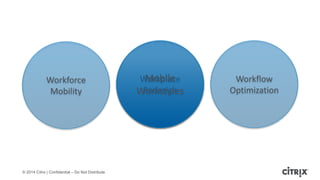
Workplace
Redesign
Mobile
Workstyles
Workforce
Mobility
Workflow
Optimization
© 2014 Citrix | Confidential – Do Not Distribute
A Mobile
Workstyle
makes people
happier and more
productive
© 2014 Citrix | Confidential – Do Not Distribute
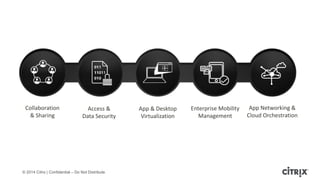
Collaboration
& Sharing
Access &
Data Security
App & Desktop
Virtualization
Enterprise Mobility
Management
App Networking &
Cloud Orchestration
© 2014 Citrix | Confidential – Do Not Distribute© 2013 Citrix | Confidential – Do Not Distribute
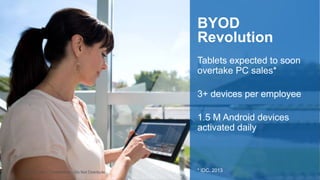
Tablets expected to soon
overtake PC sales*
3+ devices per employee
1.5 M Android devices
activated daily
BYOD
Revolution
* IDC, 2013
© 2014 Citrix | Confidential – Do Not Distribute
Mobility vs. Security
• Too many ways to lose data on mobile
devices
• Mobile networks becoming the norm vs.
WAN
• Data too big to move
• Confidentiality, compliance and IP
protection more complex
*Wireless Intelligence report, 1, 2013
© 2014 Citrix | Confidential – Do Not Distribute
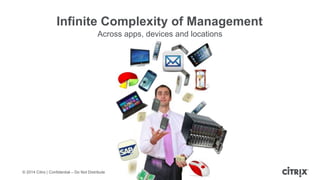
Infinite Complexity of Management
Across apps, devices and locations
© 2014 Citrix | Confidential – Do Not Distribute
16
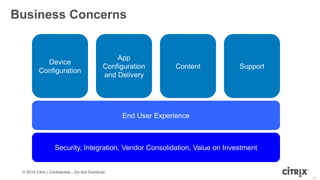
Business Concerns
Device
Configuration
App
Configuration
and Delivery
Content Support
End User Experience
Security, Integration, Vendor Consolidation, Value on Investment
© 2014 Citrix | Confidential – Do Not Distribute
17
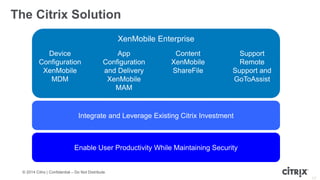
XenMobile Enterprise
The Citrix Solution
Device
Configuration
XenMobile
MDM
App
Configuration
and Delivery
XenMobile
MAM
Content
XenMobile
ShareFile
Support
Remote
Support and
GoToAssist
Integrate and Leverage Existing Citrix Investment
Enable User Productivity While Maintaining Security
© 2014 Citrix | Confidential – Do Not Distribute
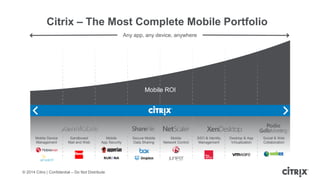
Citrix – The Most Complete Mobile Portfolio
Any app, any device, anywhere
Mobile ROI
Mobile Device
Management
Sandboxed
Mail and Web
Mobile
App Security
Secure Mobile
Data Sharing
Mobile
Network Control
SSO & Identity
Management
Desktop & App
Virtualization
Social & Web
Collaboration
© 2014 Citrix | Confidential – Do Not Distribute
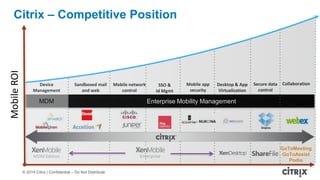
MobileROI
Device
Management
Sandboxed mail
and web
Mobile network
control
Mobile app
security
MDM Enterprise Mobility Management
Citrix - The Most Comprehensive Solution
SSO &
Id Mgmt
Secure data
control
Desktop & App
Virtualization
Collaboration
GoToMeeting
GoToAssist
Podio
MDM Edition Enterprise
Citrix – Competitive Position
© 2014 Citrix | Confidential – Do Not Distribute
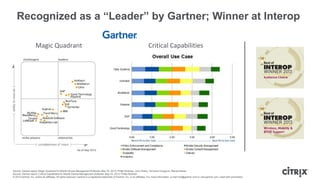
Recognized as a “Leader” by Gartner; Winner at Interop
Magic Quadrant Critical Capabilities
Source: Gartner report, Magic Quadrant for Mobile Device Management Software, May 23, 2013, Phillip Redman, John Girard, Terrence Cosgrove, Monica Basso
Source: Gartner report, Critical Capabilities for Mobile Device Management Software, May 23, 2013, Phillip Redman
© 2013 Gartner, Inc. and/or its affiliates. All rights reserved. Gartner is a registered trademark of Gartner, Inc. or its affiliates. For more information, e-mail info@gartner.com or visit gartner.com. Used with permission.
© 2014 Citrix | Confidential – Do Not Distribute
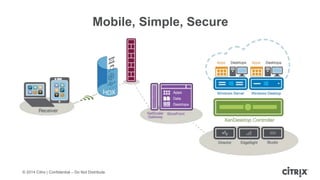
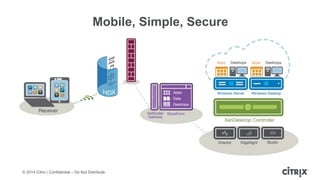
Mobile, Simple, Secure
© 2014 Citrix | Confidential – Do Not Distribute
What Do We Know?
© 2014 Citrix | Confidential – Do Not Distribute
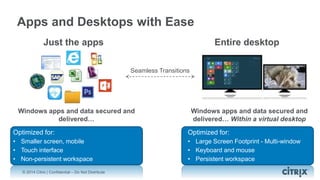
Entire desktopJust the apps
Windows apps and data secured and
delivered… Within a virtual desktop
Optimized for:
• Large Screen Footprint - Multi-window
• Keyboard and mouse
• Persistent workspace
Windows apps and data secured and
delivered…
Optimized for:
• Smaller screen, mobile
• Touch interface
• Non-persistent workspace
Apps and Desktops with Ease
Seamless Transitions
© 2014 Citrix | Confidential – Do Not Distribute
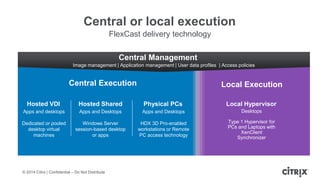
Central or local execution
FlexCast delivery technology
Physical PCs
Apps and Desktops
HDX 3D Pro-enabled
workstations or Remote
PC access technology
Central Management
Image management | Application management | User data profiles | Access policies
Central Execution Local Execution
Hosted VDI
Apps and desktops
Dedicated or pooled
desktop virtual
machines
Hosted Shared
Apps and Desktops
Windows Server
session-based desktop
or apps
Local Hypervisor
Desktops
Type 1 Hypervisor for
PCs and Laptops with
XenClient
Synchronizer
© 2014 Citrix | Confidential – Do Not Distribute
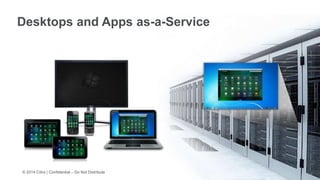
Desktops and Apps as-a-Service
© 2014 Citrix | Confidential – Do Not Distribute
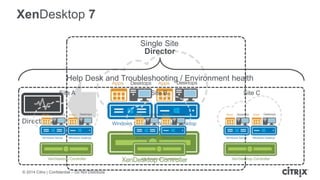
XenDesktop 7
Single Site
Director 2.1
Site A Site B Site C
Help Desk and Troubleshooting / Environment health
Director
© 2014 Citrix | Confidential – Do Not Distribute
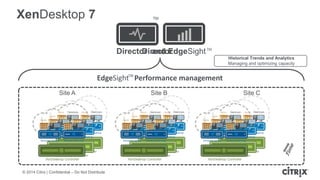
EdgeSight Performance management
Director and EdgeSight
XenDesktop 7
Site A Site B Site C
Director
Historical Trends and Analytics
Managing and optimizing capacity
TM
TM
TM
© 2014 Citrix | Confidential – Do Not Distribute
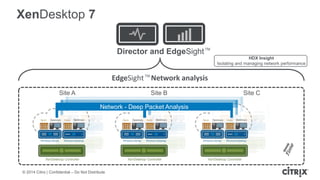
EdgeSight Network analysis
Director and EdgeSight
XenDesktop 7
Site A Site B Site C
HDX Insight
Isolating and managing network performance
Network - Deep Packet Analysis
TM
TM
© 2014 Citrix | Confidential – Do Not Distribute
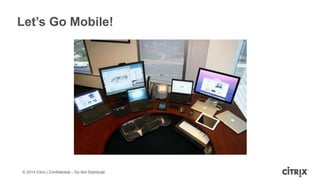
Let’s Go Mobile!
© 2014 Citrix | Confidential – Do Not Distribute
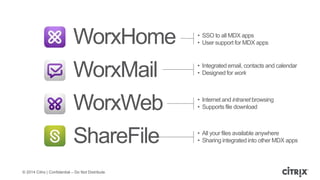
ShareFile
• SSO to all MDX apps
• User support for MDX apps
• Integrated email, contacts and calendar
• Designed for work
• Internet and intranet browsing
• Supports file download
• All your files available anywhere
• Sharing integrated into other MDX apps
WorxMail
WorxWeb
WorxHome
© 2014 Citrix | Confidential – Do Not Distribute
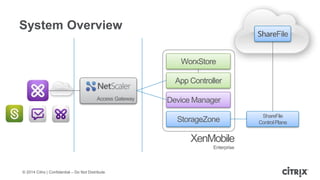
System Overview
Access Gateway
App Controller
Device Manager
ShareFile
WorxStore
StorageZone
ShareFile
ControlPlane
XenMobile
Enterprise
© 2014 Citrix | Confidential – Do Not Distribute
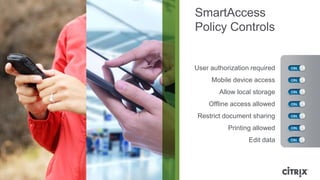
User authorization required
Mobile device access
Allow local storage
Offline access allowed
Restrict document sharing
Printing allowed
Edit data
SmartAccess
Policy Controls
Enrollment & App Store
© 2014 Citrix | Confidential – Do Not Distribute
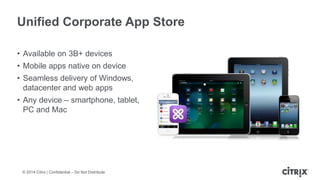
Unified Corporate App Store
• Available on 3B+ devices
• Mobile apps native on device
• Seamless delivery of Windows,
datacenter and web apps
• Any device – smartphone, tablet,
PC and Mac
© 2014 Citrix | Confidential – Do Not Distribute
Authentication
Authentication and SSO
• Strongly authenticates users
o NetScaler Gateway is primary authentication point
o Permits combinations of AD credentials with certificates,
tokens, and other second factors
• Registers devices to users
o Permits lock and wipe of corporate data/apps on selected
devices
• Serves as access manager for MDX managed apps
o Strongly identifies managed apps
o Determines app entitlements and policies for authenticated
users
o Brokers permitted data exchanges between managed apps
WorxHome
© 2014 Citrix | Confidential – Do Not Distribute
Single Sign-On
Authentication and SSO
• SSO for all managed apps
o Hosted HDX apps and desktops
o Web/SaaS apps
o MDX managed mobile apps
 Various online and offline modes selected by app policy
• MDX apps can use derived credentials
o Gateway tickets for micro-VPN access
o Automatic HTTP auth challenge responses
(NTLM today, Kerberos coming soon)
o Certificates for PKI protected web sites
o Specialty credentials eg
(SAML token for Sharefile access)
WorxHome
© 2014 Citrix | Confidential – Do Not Distribute
WorxMail
Mail, calendar, contacts
Enterprise class security
Beautiful native experience
Full inter-app integration
MDX-secured
• Secure email body and attachment
• “Open in” control to provide data leak
protection
• No Exchange server exposure to internet
• Send email with ShareFile attachments
• Integrated calendars and Exchange GAL
© 2014 Citrix | Confidential – Do Not Distribute
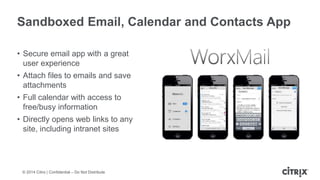
Sandboxed Email, Calendar and Contacts App
• Secure email app with a great
user experience
• Attach files to emails and save
attachments
• Full calendar with access to
free/busy information
• Directly opens web links to any
site, including intranet sites
© 2014 Citrix | Confidential – Do Not Distribute
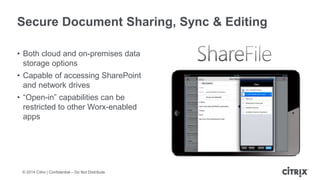
Secure Document Sharing, Sync & Editing
• Both cloud and on-premises data
storage options
• Capable of accessing SharePoint
and network drives
• “Open-in” capabilities can be
restricted to other Worx-enabled
apps
© 2014 Citrix | Confidential – Do Not Distribute
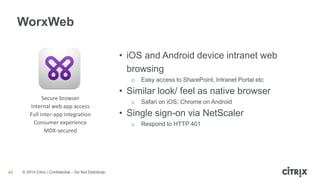
WorxWeb
42
Secure browser
Internal web app access
Full inter-app integration
Consumer experience
MDX-secured
• iOS and Android device intranet web
browsing
o Easy access to SharePoint, Intranet Portal etc
• Similar look/ feel as native browser
o Safari on iOS; Chrome on Android
• Single sign-on via NetScaler
o Respond to HTTP 401
© 2014 Citrix | Confidential – Do Not Distribute
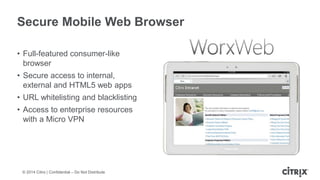
Secure Mobile Web Browser
• Full-featured consumer-like
browser
• Secure access to internal,
external and HTML5 web apps
• URL whitelisting and blacklisting
• Access to enterprise resources
with a Micro VPN
© 2014 Citrix | Confidential – Do Not Distribute
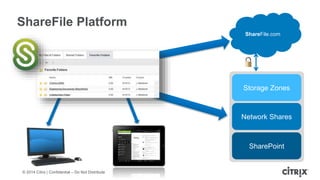
ShareFile Platform
Storage Zones
Network Shares
SharePoint
ShareFile.com
© 2014 Citrix | Confidential – Do Not Distribute
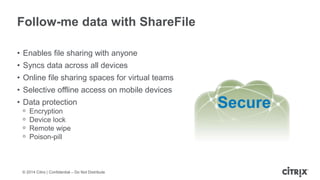
Follow-me data with ShareFile
• Enables file sharing with anyone
• Syncs data across all devices
• Online file sharing spaces for virtual teams
• Selective offline access on mobile devices
• Data protection
ᵒ Encryption
ᵒ Device lock
ᵒ Remote wipe
ᵒ Poison-pill
Secure
© 2014 Citrix | Confidential – Do Not Distribute
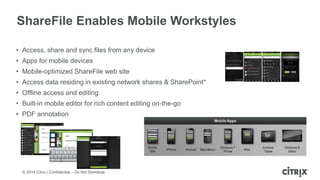
ShareFile Enables Mobile Workstyles
• Access, share and sync files from any device
• Apps for mobile devices
• Mobile-optimized ShareFile web site
• Access data residing in existing network shares & SharePoint*
• Offline access and editing
• Built-in mobile editor for rich content editing on-the-go
• PDF annotation
© 2014 Citrix | Confidential – Do Not Distribute
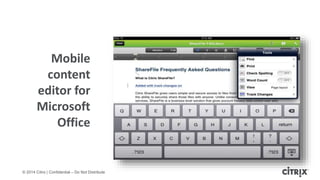
Mobile
content
editor for
Microsoft
Office
© 2014 Citrix | Confidential – Do Not Distribute
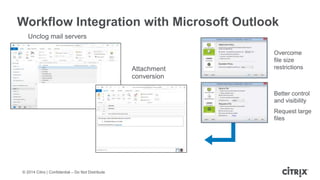
Workflow Integration with Microsoft Outlook
Attachment
conversion
Unclog mail servers
Overcome
file size
restrictions
Better control
and visibility
Request large
files
© 2014 Citrix | Confidential – Do Not Distribute
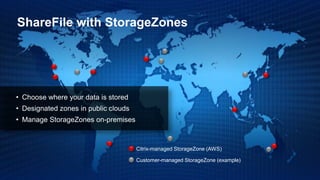
ShareFile with StorageZones
Citrix-managed StorageZone (AWS)
Customer-managed StorageZone (example)
• Choose where your data is stored
• Designated zones in public clouds
• Manage StorageZones on-premises
© 2014 Citrix | Confidential – Do Not Distribute
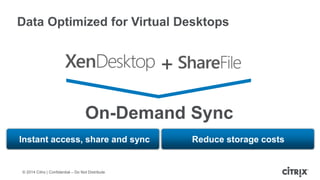
On-Demand Sync
+
Data Optimized for Virtual Desktops
Instant access, share and sync Reduce storage costs
MDX Technology
© 2014 Citrix | Confidential – Do Not Distribute
AppApp App
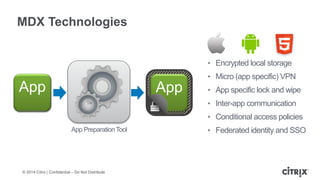
MDX Technologies
• Encrypted local storage
• Micro (app specific) VPN
• App specific lock and wipe
• Inter-app communication
• Conditional access policies
• Federated identity and SSO
App
App PreparationTool
© 2014 Citrix | Confidential – Do Not Distribute
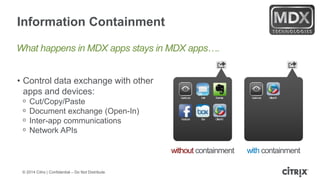
Information Containment
• Control data exchange with other
apps and devices:
ᵒ Cut/Copy/Paste
ᵒ Document exchange (Open-In)
ᵒ Inter-app communications
ᵒ Network APIs
QuickLook EvernoteMail
Facebook OfficeHDBox
QuickLook OfficeHD
without containment with containment
What happens in MDX apps stays in MDX apps….
© 2014 Citrix | Confidential – Do Not Distribute
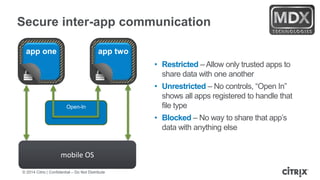
Secure inter-app communication
• Restricted – Allow only trusted apps to
share data with one another
• Unrestricted – No controls, “Open In”
shows all apps registered to handle that
file type
• Blocked – No way to share that app’s
data with anything else
app one app two
mobile OS
Open-In
© 2014 Citrix | Confidential – Do Not Distribute
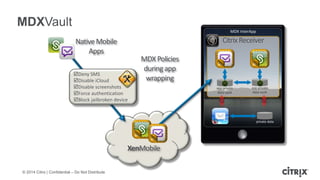
private data
CitrixReceiver
MDX InterApp
MDXVault
XenMobile
NativeMobile
Apps
Deny SMS
Disable iCloud
Disable screenshots
Force authentication
Block jailbroken device
MDXPolicies
duringapp
wrapping
app private
data vault
app private
data vault
© 2014 Citrix | Confidential – Do Not Distribute
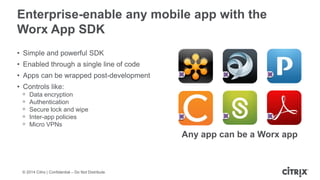
Enterprise-enable any mobile app with the
Worx App SDK
• Simple and powerful SDK
• Enabled through a single line of code
• Apps can be wrapped post-development
• Controls like:
ᵒ Data encryption
ᵒ Authentication
ᵒ Secure lock and wipe
ᵒ Inter-app policies
ᵒ Micro VPNs
Any app can be a Worx app
© 2014 Citrix | Confidential – Do Not Distribute
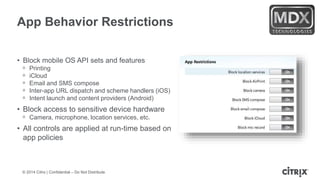
App Behavior Restrictions
• Block mobile OS API sets and features
ᵒ Printing
ᵒ iCloud
ᵒ Email and SMS compose
ᵒ Inter-app URL dispatch and scheme handlers (iOS)
ᵒ Intent launch and content providers (Android)
• Block access to sensitive device hardware
ᵒ Camera, microphone, location services, etc.
• All controls are applied at run-time based on
app policies
© 2014 Citrix | Confidential – Do Not Distribute
App Access Controls
• Block/permit app access based on policy
• User authentication (how and when)
ᵒ Online versus offline, re-authentication period,
max offline time
• Device security posture
ᵒ Jail-broken or rooted
ᵒ PIN/passcode enabled
ᵒ Hardware enforced encryption
ᵒ MDM enrolled vs unmanaged
• Network state
ᵒ Internal network or external
ᵒ Specific internal wifi networks
ᵒ Wifi Only
System Architecture
© 2014 Citrix | Confidential – Do Not Distribute
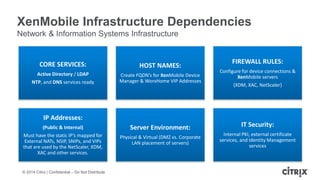
XenMobile Infrastructure Dependencies
Network & Information Systems Infrastructure
CORE SERVICES:
Active Directory / LDAP
NTP, and DNS services ready
HOST NAMES:
Create FQDN’s for XenMobile Device
Manager & WorxHome VIP Addresses
FIREWALL RULES:
Configure for device connections &
XenMobile servers
(XDM, XAC, NetScaler)
IP Addresses:
(Public & Internal)
Must have the static IP’s mapped for
External NATs, NSIP, SNIPs, and VIPs
that are used by the NetScaler, XDM,
XAC and other services.
Server Environment:
Physical & Virtual (DMZ vs. Corporate
LAN placement of servers)
IT Security:
Internal PKI, external certificate
services, and Identity Management
services
© 2014 Citrix | Confidential – Do Not Distribute
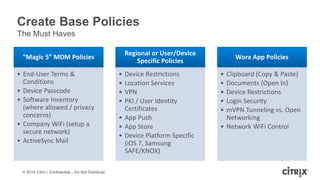
Create Base Policies
The Must Haves
“Magic 5” MDM Policies
• End-User Terms &
Conditions
• Device Passcode
• Software Inventory
(where allowed / privacy
concerns)
• Company WiFi (setup a
secure network)
• ActiveSync Mail
Regional or User/Device
Specific Policies
• Device Restrictions
• Location Services
• VPN
• PKI / User Identity
Certificates
• App Push
• App Store
• Device Platform Specific
(iOS 7, Samsung
SAFE/KNOX)
Worx App Policies
• Clipboard (Copy & Paste)
• Documents (Open In)
• Device Restrictions
• Login Security
• mVPN Tunneling vs. Open
Networking
• Network WiFi Control
© 2014 Citrix | Confidential – Do Not Distribute
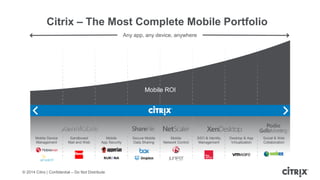
Citrix – The Most Complete Mobile Portfolio
Any app, any device, anywhere
Mobile ROI
Mobile Device
Management
Sandboxed
Mail and Web
Mobile
App Security
Secure Mobile
Data Sharing
Mobile
Network Control
SSO & Identity
Management
Desktop & App
Virtualization
Social & Web
Collaboration
© 2014 Citrix | Confidential – Do Not Distribute
Mobile, Simple, Secure
© 2014 Citrix | Confidential – Do Not Distribute
Questions?
•Todd Smith – Sales Engineering Manager
ᵒ Todd.smith2@citrix.com
•www.citrix.com
© 2014 Citrix | Confidential – Do Not Distribute
Want something for Free?
• The Free 350 page soup-to-nuts 'How To: BYOD Project Volume 1' e-book
will teach you:
• How to install and configure Citrix DesktopPlayer for Mac 1.1, soup-to-nuts...
• How to install and configure Citrix XenClient Enterprise Synchronizer 5.1.1.
• How to install and configure Microsoft Windows Server 2012 R2
• How to install and configure Hyper-V for use with the Citrix Synchronizer.
• How to prepare the environment for installation.
• How to train end-users to use the new DesktopPlayer for Mac solutions.
• Detailed Citrix Synchronizer Policies section.
• Detailed Citrix Synchronizer administration tasks explained.
• Citrix Synchronizer backup and recovery explained.
• How to create & maintain Synchronizer virtual machines.
• 350 pages of step-by-step, soup-to-nuts, and easy as 1,2,3!
• http://docs.dabcc.com
Work better. Live better.

Sprin VTUG citrix Solutions

  • 1.
    April 24, 2014 TakingYour Business, and Users, to the Cloud! VTUG: Spring Ahead 2014 Todd Smith – Citrix
  • 2.
    © 2014 Citrix| Confidential – Do Not Distribute
  • 3.
    © 2014 Citrix| Confidential – Do Not Distribute
  • 4.
    © 2014 Citrix| Confidential – Do Not Distribute
  • 5.
    © 2014 Citrix| Confidential – Do Not Distribute
  • 6.
    © 2014 Citrix| Confidential – Do Not Distribute
  • 7.
    © 2014 Citrix| Confidential – Do Not Distribute
  • 8.
    © 2014 Citrix| Confidential – Do Not Distribute
  • 9.
    © 2014 Citrix| Confidential – Do Not Distribute Workplace Redesign Mobile Workstyles Workforce Mobility Workflow Optimization
  • 10.
    © 2014 Citrix| Confidential – Do Not Distribute A Mobile Workstyle makes people happier and more productive
  • 11.
    © 2014 Citrix| Confidential – Do Not Distribute
  • 12.
    © 2014 Citrix| Confidential – Do Not Distribute Collaboration & Sharing Access & Data Security App & Desktop Virtualization Enterprise Mobility Management App Networking & Cloud Orchestration
  • 13.
    © 2014 Citrix| Confidential – Do Not Distribute© 2013 Citrix | Confidential – Do Not Distribute Tablets expected to soon overtake PC sales* 3+ devices per employee 1.5 M Android devices activated daily BYOD Revolution * IDC, 2013
  • 14.
    © 2014 Citrix| Confidential – Do Not Distribute Mobility vs. Security • Too many ways to lose data on mobile devices • Mobile networks becoming the norm vs. WAN • Data too big to move • Confidentiality, compliance and IP protection more complex *Wireless Intelligence report, 1, 2013
  • 15.
    © 2014 Citrix| Confidential – Do Not Distribute Infinite Complexity of Management Across apps, devices and locations
  • 16.
    © 2014 Citrix| Confidential – Do Not Distribute 16 Business Concerns Device Configuration App Configuration and Delivery Content Support End User Experience Security, Integration, Vendor Consolidation, Value on Investment
  • 17.
    © 2014 Citrix| Confidential – Do Not Distribute 17 XenMobile Enterprise The Citrix Solution Device Configuration XenMobile MDM App Configuration and Delivery XenMobile MAM Content XenMobile ShareFile Support Remote Support and GoToAssist Integrate and Leverage Existing Citrix Investment Enable User Productivity While Maintaining Security
  • 18.
    © 2014 Citrix| Confidential – Do Not Distribute Citrix – The Most Complete Mobile Portfolio Any app, any device, anywhere Mobile ROI Mobile Device Management Sandboxed Mail and Web Mobile App Security Secure Mobile Data Sharing Mobile Network Control SSO & Identity Management Desktop & App Virtualization Social & Web Collaboration
  • 19.
    © 2014 Citrix| Confidential – Do Not Distribute MobileROI Device Management Sandboxed mail and web Mobile network control Mobile app security MDM Enterprise Mobility Management Citrix - The Most Comprehensive Solution SSO & Id Mgmt Secure data control Desktop & App Virtualization Collaboration GoToMeeting GoToAssist Podio MDM Edition Enterprise Citrix – Competitive Position
  • 20.
    © 2014 Citrix| Confidential – Do Not Distribute Recognized as a “Leader” by Gartner; Winner at Interop Magic Quadrant Critical Capabilities Source: Gartner report, Magic Quadrant for Mobile Device Management Software, May 23, 2013, Phillip Redman, John Girard, Terrence Cosgrove, Monica Basso Source: Gartner report, Critical Capabilities for Mobile Device Management Software, May 23, 2013, Phillip Redman © 2013 Gartner, Inc. and/or its affiliates. All rights reserved. Gartner is a registered trademark of Gartner, Inc. or its affiliates. For more information, e-mail info@gartner.com or visit gartner.com. Used with permission.
  • 21.
    © 2014 Citrix| Confidential – Do Not Distribute Mobile, Simple, Secure
  • 22.
    © 2014 Citrix| Confidential – Do Not Distribute What Do We Know?
  • 23.
    © 2014 Citrix| Confidential – Do Not Distribute Entire desktopJust the apps Windows apps and data secured and delivered… Within a virtual desktop Optimized for: • Large Screen Footprint - Multi-window • Keyboard and mouse • Persistent workspace Windows apps and data secured and delivered… Optimized for: • Smaller screen, mobile • Touch interface • Non-persistent workspace Apps and Desktops with Ease Seamless Transitions
  • 24.
    © 2014 Citrix| Confidential – Do Not Distribute Central or local execution FlexCast delivery technology Physical PCs Apps and Desktops HDX 3D Pro-enabled workstations or Remote PC access technology Central Management Image management | Application management | User data profiles | Access policies Central Execution Local Execution Hosted VDI Apps and desktops Dedicated or pooled desktop virtual machines Hosted Shared Apps and Desktops Windows Server session-based desktop or apps Local Hypervisor Desktops Type 1 Hypervisor for PCs and Laptops with XenClient Synchronizer
  • 25.
    © 2014 Citrix| Confidential – Do Not Distribute Desktops and Apps as-a-Service
  • 26.
    © 2014 Citrix| Confidential – Do Not Distribute XenDesktop 7 Single Site Director 2.1 Site A Site B Site C Help Desk and Troubleshooting / Environment health Director
  • 27.
    © 2014 Citrix| Confidential – Do Not Distribute EdgeSight Performance management Director and EdgeSight XenDesktop 7 Site A Site B Site C Director Historical Trends and Analytics Managing and optimizing capacity TM TM TM
  • 28.
    © 2014 Citrix| Confidential – Do Not Distribute EdgeSight Network analysis Director and EdgeSight XenDesktop 7 Site A Site B Site C HDX Insight Isolating and managing network performance Network - Deep Packet Analysis TM TM
  • 29.
    © 2014 Citrix| Confidential – Do Not Distribute Let’s Go Mobile!
  • 30.
    © 2014 Citrix| Confidential – Do Not Distribute ShareFile • SSO to all MDX apps • User support for MDX apps • Integrated email, contacts and calendar • Designed for work • Internet and intranet browsing • Supports file download • All your files available anywhere • Sharing integrated into other MDX apps WorxMail WorxWeb WorxHome
  • 31.
    © 2014 Citrix| Confidential – Do Not Distribute System Overview Access Gateway App Controller Device Manager ShareFile WorxStore StorageZone ShareFile ControlPlane XenMobile Enterprise
  • 32.
    © 2014 Citrix| Confidential – Do Not Distribute User authorization required Mobile device access Allow local storage Offline access allowed Restrict document sharing Printing allowed Edit data SmartAccess Policy Controls
  • 33.
  • 34.
    © 2014 Citrix| Confidential – Do Not Distribute Unified Corporate App Store • Available on 3B+ devices • Mobile apps native on device • Seamless delivery of Windows, datacenter and web apps • Any device – smartphone, tablet, PC and Mac
  • 35.
    © 2014 Citrix| Confidential – Do Not Distribute Authentication Authentication and SSO • Strongly authenticates users o NetScaler Gateway is primary authentication point o Permits combinations of AD credentials with certificates, tokens, and other second factors • Registers devices to users o Permits lock and wipe of corporate data/apps on selected devices • Serves as access manager for MDX managed apps o Strongly identifies managed apps o Determines app entitlements and policies for authenticated users o Brokers permitted data exchanges between managed apps WorxHome
  • 36.
    © 2014 Citrix| Confidential – Do Not Distribute Single Sign-On Authentication and SSO • SSO for all managed apps o Hosted HDX apps and desktops o Web/SaaS apps o MDX managed mobile apps  Various online and offline modes selected by app policy • MDX apps can use derived credentials o Gateway tickets for micro-VPN access o Automatic HTTP auth challenge responses (NTLM today, Kerberos coming soon) o Certificates for PKI protected web sites o Specialty credentials eg (SAML token for Sharefile access) WorxHome
  • 38.
    © 2014 Citrix| Confidential – Do Not Distribute WorxMail Mail, calendar, contacts Enterprise class security Beautiful native experience Full inter-app integration MDX-secured • Secure email body and attachment • “Open in” control to provide data leak protection • No Exchange server exposure to internet • Send email with ShareFile attachments • Integrated calendars and Exchange GAL
  • 39.
    © 2014 Citrix| Confidential – Do Not Distribute Sandboxed Email, Calendar and Contacts App • Secure email app with a great user experience • Attach files to emails and save attachments • Full calendar with access to free/busy information • Directly opens web links to any site, including intranet sites
  • 40.
    © 2014 Citrix| Confidential – Do Not Distribute Secure Document Sharing, Sync & Editing • Both cloud and on-premises data storage options • Capable of accessing SharePoint and network drives • “Open-in” capabilities can be restricted to other Worx-enabled apps
  • 42.
    © 2014 Citrix| Confidential – Do Not Distribute WorxWeb 42 Secure browser Internal web app access Full inter-app integration Consumer experience MDX-secured • iOS and Android device intranet web browsing o Easy access to SharePoint, Intranet Portal etc • Similar look/ feel as native browser o Safari on iOS; Chrome on Android • Single sign-on via NetScaler o Respond to HTTP 401
  • 43.
    © 2014 Citrix| Confidential – Do Not Distribute Secure Mobile Web Browser • Full-featured consumer-like browser • Secure access to internal, external and HTML5 web apps • URL whitelisting and blacklisting • Access to enterprise resources with a Micro VPN
  • 45.
    © 2014 Citrix| Confidential – Do Not Distribute ShareFile Platform Storage Zones Network Shares SharePoint ShareFile.com
  • 46.
    © 2014 Citrix| Confidential – Do Not Distribute Follow-me data with ShareFile • Enables file sharing with anyone • Syncs data across all devices • Online file sharing spaces for virtual teams • Selective offline access on mobile devices • Data protection ᵒ Encryption ᵒ Device lock ᵒ Remote wipe ᵒ Poison-pill Secure
  • 47.
    © 2014 Citrix| Confidential – Do Not Distribute ShareFile Enables Mobile Workstyles • Access, share and sync files from any device • Apps for mobile devices • Mobile-optimized ShareFile web site • Access data residing in existing network shares & SharePoint* • Offline access and editing • Built-in mobile editor for rich content editing on-the-go • PDF annotation
  • 48.
    © 2014 Citrix| Confidential – Do Not Distribute Mobile content editor for Microsoft Office
  • 49.
    © 2014 Citrix| Confidential – Do Not Distribute Workflow Integration with Microsoft Outlook Attachment conversion Unclog mail servers Overcome file size restrictions Better control and visibility Request large files
  • 50.
    © 2014 Citrix| Confidential – Do Not Distribute ShareFile with StorageZones Citrix-managed StorageZone (AWS) Customer-managed StorageZone (example) • Choose where your data is stored • Designated zones in public clouds • Manage StorageZones on-premises
  • 51.
    © 2014 Citrix| Confidential – Do Not Distribute On-Demand Sync + Data Optimized for Virtual Desktops Instant access, share and sync Reduce storage costs
  • 52.
  • 53.
    © 2014 Citrix| Confidential – Do Not Distribute AppApp App MDX Technologies • Encrypted local storage • Micro (app specific) VPN • App specific lock and wipe • Inter-app communication • Conditional access policies • Federated identity and SSO App App PreparationTool
  • 54.
    © 2014 Citrix| Confidential – Do Not Distribute Information Containment • Control data exchange with other apps and devices: ᵒ Cut/Copy/Paste ᵒ Document exchange (Open-In) ᵒ Inter-app communications ᵒ Network APIs QuickLook EvernoteMail Facebook OfficeHDBox QuickLook OfficeHD without containment with containment What happens in MDX apps stays in MDX apps….
  • 55.
    © 2014 Citrix| Confidential – Do Not Distribute Secure inter-app communication • Restricted – Allow only trusted apps to share data with one another • Unrestricted – No controls, “Open In” shows all apps registered to handle that file type • Blocked – No way to share that app’s data with anything else app one app two mobile OS Open-In
  • 56.
    © 2014 Citrix| Confidential – Do Not Distribute private data CitrixReceiver MDX InterApp MDXVault XenMobile NativeMobile Apps Deny SMS Disable iCloud Disable screenshots Force authentication Block jailbroken device MDXPolicies duringapp wrapping app private data vault app private data vault
  • 57.
    © 2014 Citrix| Confidential – Do Not Distribute Enterprise-enable any mobile app with the Worx App SDK • Simple and powerful SDK • Enabled through a single line of code • Apps can be wrapped post-development • Controls like: ᵒ Data encryption ᵒ Authentication ᵒ Secure lock and wipe ᵒ Inter-app policies ᵒ Micro VPNs Any app can be a Worx app
  • 58.
    © 2014 Citrix| Confidential – Do Not Distribute App Behavior Restrictions • Block mobile OS API sets and features ᵒ Printing ᵒ iCloud ᵒ Email and SMS compose ᵒ Inter-app URL dispatch and scheme handlers (iOS) ᵒ Intent launch and content providers (Android) • Block access to sensitive device hardware ᵒ Camera, microphone, location services, etc. • All controls are applied at run-time based on app policies
  • 59.
    © 2014 Citrix| Confidential – Do Not Distribute App Access Controls • Block/permit app access based on policy • User authentication (how and when) ᵒ Online versus offline, re-authentication period, max offline time • Device security posture ᵒ Jail-broken or rooted ᵒ PIN/passcode enabled ᵒ Hardware enforced encryption ᵒ MDM enrolled vs unmanaged • Network state ᵒ Internal network or external ᵒ Specific internal wifi networks ᵒ Wifi Only
  • 60.
  • 62.
    © 2014 Citrix| Confidential – Do Not Distribute XenMobile Infrastructure Dependencies Network & Information Systems Infrastructure CORE SERVICES: Active Directory / LDAP NTP, and DNS services ready HOST NAMES: Create FQDN’s for XenMobile Device Manager & WorxHome VIP Addresses FIREWALL RULES: Configure for device connections & XenMobile servers (XDM, XAC, NetScaler) IP Addresses: (Public & Internal) Must have the static IP’s mapped for External NATs, NSIP, SNIPs, and VIPs that are used by the NetScaler, XDM, XAC and other services. Server Environment: Physical & Virtual (DMZ vs. Corporate LAN placement of servers) IT Security: Internal PKI, external certificate services, and Identity Management services
  • 63.
    © 2014 Citrix| Confidential – Do Not Distribute Create Base Policies The Must Haves “Magic 5” MDM Policies • End-User Terms & Conditions • Device Passcode • Software Inventory (where allowed / privacy concerns) • Company WiFi (setup a secure network) • ActiveSync Mail Regional or User/Device Specific Policies • Device Restrictions • Location Services • VPN • PKI / User Identity Certificates • App Push • App Store • Device Platform Specific (iOS 7, Samsung SAFE/KNOX) Worx App Policies • Clipboard (Copy & Paste) • Documents (Open In) • Device Restrictions • Login Security • mVPN Tunneling vs. Open Networking • Network WiFi Control
  • 64.
    © 2014 Citrix| Confidential – Do Not Distribute Citrix – The Most Complete Mobile Portfolio Any app, any device, anywhere Mobile ROI Mobile Device Management Sandboxed Mail and Web Mobile App Security Secure Mobile Data Sharing Mobile Network Control SSO & Identity Management Desktop & App Virtualization Social & Web Collaboration
  • 65.
    © 2014 Citrix| Confidential – Do Not Distribute Mobile, Simple, Secure
  • 66.
    © 2014 Citrix| Confidential – Do Not Distribute Questions? •Todd Smith – Sales Engineering Manager ᵒ Todd.smith2@citrix.com •www.citrix.com
  • 67.
    © 2014 Citrix| Confidential – Do Not Distribute Want something for Free? • The Free 350 page soup-to-nuts 'How To: BYOD Project Volume 1' e-book will teach you: • How to install and configure Citrix DesktopPlayer for Mac 1.1, soup-to-nuts... • How to install and configure Citrix XenClient Enterprise Synchronizer 5.1.1. • How to install and configure Microsoft Windows Server 2012 R2 • How to install and configure Hyper-V for use with the Citrix Synchronizer. • How to prepare the environment for installation. • How to train end-users to use the new DesktopPlayer for Mac solutions. • Detailed Citrix Synchronizer Policies section. • Detailed Citrix Synchronizer administration tasks explained. • Citrix Synchronizer backup and recovery explained. • How to create & maintain Synchronizer virtual machines. • 350 pages of step-by-step, soup-to-nuts, and easy as 1,2,3! • http://docs.dabcc.com
  • 68.