Source To URL without Dockerfile
정원천 (hardy.jung)
카카오 클라우드디플로이셀
hardy.jung@kakaocorp.com
발표자 소개
• Kakao CloudDeploy Cell Lead
• Certified Kubernetes Administrator
• SNS
• Kubernetes Korea Group : https://www.facebook.com/groups/k8skr/
• Blog : https://arisu1000.tistory.com/
• Book
• 자바 프로그래밍 면접, 이렇게 준비한다
• BACK TO THE BASIC, C++ 버그 헌팅
• 프로 윈도우폰 7 개발
• 클라우드 컴퓨팅 바이블
• Patent
• Method for Predicting a Property of Compound and System for Predicting a Property of Compound
• Automatic Method Using Quantum Mechanics Calculation Program and Materials Property Predictive Module and System therefor
• Multiple Linear Regression―Artificial Neural Network Model Predicting Absolute Entropy of Ideal Gas for Pure Organic Compound
• Etc +38
개요 – cloud app launcher
• 목적
• 개발자는 개발만 빌드 및 실행은 app launcher
• Main component
• Github
• Buildpack
• 소스기반으로 컨테이너 이미지 빌드
• Knative
• 컨테이너를 실행 및 관리
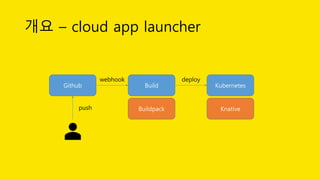
개요 – cloud app launcher
Github Build Kubernetes
push
webhook deploy
Buildpack Knative
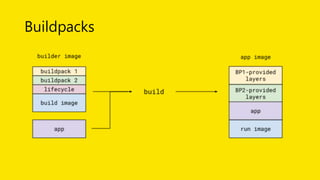
Buildpacks
• 용도 : 소스를 탐지해서 컨테이너화
• https://buildpacks.io/
• CNCF sandbox project
• 주요 참여 기업 : Pivotal, Heroku
Buildpacks
Buildpacks - 구성요소
• Pack(not packs)
• https://github.com/buildpack/pack
• CLI 명령어
• 소스코드를 실행가능한 컨테이너 이미지로 변경
• Lifecycle
• https://github.com/buildpack/lifecycle
• Buildpack API v3의 구현체
Buildpacks - 구성요소
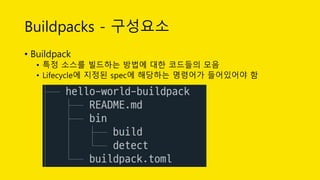
• Buildpack
• 특정 소스를 빌드하는 방법에 대한 코드들의 모음
• Lifecycle에 지정된 spec에 해당하는 명령어가 들어있어야 함
Buildpacks
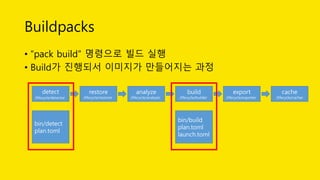
• “pack build” 명령으로 빌드 실행
• Build가 진행되서 이미지가 만들어지는 과정
detect
/lifecycle/detector
restore
/lifecycle/restorer
analyze
/lifecycle/analyzer
build
/lifecycle/builder
export
/lifecycle/exporter
cache
/lifecycle/cacher
bin/detect
plan.toml
bin/build
plan.toml
launch.toml
Buildpacks
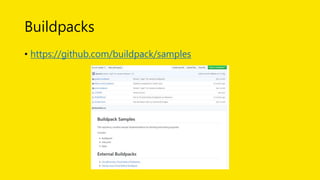
• https://github.com/buildpack/samples
Buildpacks
• bin/detect
#!/usr/bin/env bash
set -eo pipefail
if [[ -f pom.xml ]]; then
exit 0
fi
exit 1
Buildpacks
• bin/build
echo "---> Installing JDK"
echo "---> Running Maven”
if [[ -x mvnw ]]; then
echo "---> Running Maven Wrapper"
./mvnw clean install -B -DskipTests
else
mvn clean install -B -DskipTests
fi
# Set default start command
for jarFile in $(find target -maxdepth 1 -name "*.jar" -type f); do
echo "processes = [{ type = "web", command = "java -jar
$jarFile"}]" > "$layers_dir/launch.toml"
break;
done
Buildpacks
• 이미지 실행 Entrypoint
• launch.toml 파일을 해석해서 실행
• 현재는 type에 web만 지원
• Command에 실행할 명령어를 추가
"Entrypoint": [
"/lifecycle/launcher"
],
[[processes]]
type = "web"
command = "java -jar target/java-springboot-0.0.1-SNAPSHOT.jar"
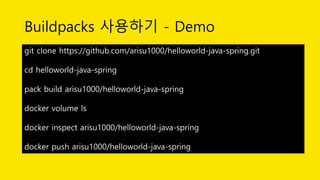
Buildpacks 사용하기 - Demo
git clone https://github.com/arisu1000/helloworld-java-spring.git
cd helloworld-java-spring
pack build arisu1000/helloworld-java-spring
docker volume ls
docker inspect arisu1000/helloworld-java-spring
docker push arisu1000/helloworld-java-spring
Knative
• 용도 : 컨테이너를 실행하고 관리하는 역할
• Kubernetes 에서 실행되는 serverless 플랫폼
• 2018년 7월 공개
• https://knative.dev/
• 주요 참여 기업 : Google, Pivotal, IBM, Red Hat, SAP
• 2019년 7월 버전 : 0.7
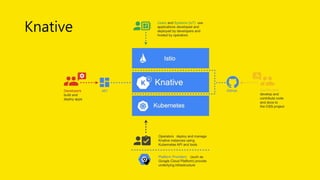
Knative
Knative
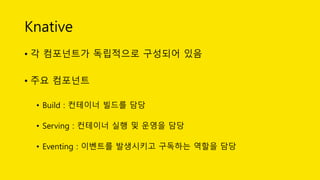
• 각 컴포넌트가 독립적으로 구성되어 있음
• 주요 컴포넌트
• Build : 컨테이너 빌드를 담당
• Serving : 컨테이너 실행 및 운영을 담당
• Eventing : 이벤트를 발생시키고 구독하는 역할을 담당
Knative - build
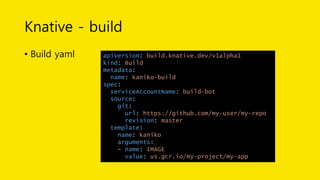
• Kubernetes CRD(Custom Resource Definition)를 생성해서 사용
• 주요 개념
• Source : 빌드할 소스
• Steps : 작업을 실행하기위한 컨테이너 이미지와 작업 내역들
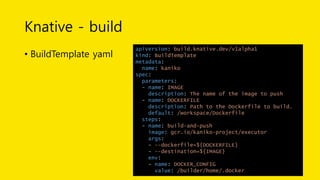
• BuildTemplate : 재사용 가능한 템플릿
• 인증 : kubernetes 시크릿을 이용하도록 ServiceAccount를 사용
Knative - build
• Build yaml apiVersion: build.knative.dev/v1alpha1
kind: Build
metadata:
name: kaniko-build
spec:
serviceAccountName: build-bot
source:
git:
url: https://github.com/my-user/my-repo
revision: master
template:
name: kaniko
arguments:
- name: IMAGE
value: us.gcr.io/my-project/my-app
Knative - build
• BuildTemplate yaml
apiVersion: build.knative.dev/v1alpha1
kind: BuildTemplate
metadata:
name: kaniko
spec:
parameters:
- name: IMAGE
description: The name of the image to push
- name: DOCKERFILE
description: Path to the Dockerfile to build.
default: /workspace/Dockerfile
steps:
- name: build-and-push
image: gcr.io/kaniko-project/executor
args:
- --dockerfile=${DOCKERFILE}
- --destination=${IMAGE}
env:
- name: DOCKER_CONFIG
value: /builder/home/.docker
Knative - build
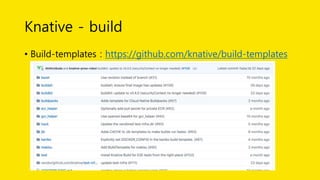
• Build-templates : https://github.com/knative/build-templates
Knative - serving
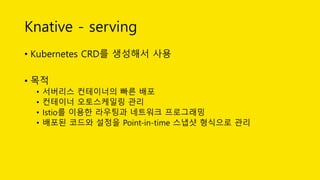
• Kubernetes CRD를 생성해서 사용
• 목적
• 서버리스 컨테이너의 빠른 배포
• 컨테이너 오토스케일링 관리
• Istio를 이용한 라우팅과 네트워크 프로그래밍
• 배포된 코드와 설정을 Point-in-time 스냅샷 형식으로 관리
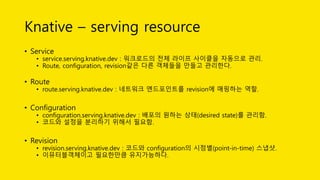
Knative – serving resource
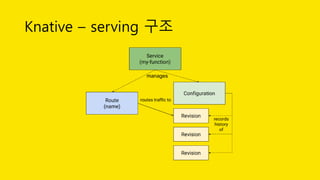
• Service
• service.serving.knative.dev : 워크로드의 전체 라이프 사이클을 자동으로 관리.
• Route, configuration, revision같은 다른 객체들을 만들고 관리한다.
• Route
• route.serving.knative.dev : 네트워크 엔드포인트를 revision에 매핑하는 역할.
• Configuration
• configuration.serving.knative.dev : 배포의 원하는 상태(desired state)를 관리함.
• 코드와 설정을 분리하기 위해서 필요함.
• Revision
• revision.serving.knative.dev : 코드와 configuration의 시점별(point-in-time) 스냅샷.
• 이뮤터블객체이고 필요한만큼 유지가능하다.
Knative – serving 구조
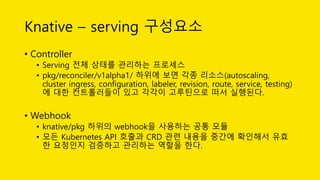
Knative – serving 구성요소
• Controller
• Serving 전체 상태를 관리하는 프로세스
• pkg/reconciler/v1alpha1/ 하위에 보면 각종 리소스(autoscaling,
cluster ingress, configuration, labeler, revision, route, service, testing)
에 대한 컨트롤러들이 있고 각각이 고루틴으로 떠서 실행된다.
• Webhook
• knative/pkg 하위의 webhook을 사용하는 공통 모듈
• 모든 Kubernetes API 호출과 CRD 관련 내용을 중간에 확인해서 유효
한 요청인지 검증하고 관리하는 역할을 한다.
Knative – serving 구성요소
• Activator
• 비활성화된 revision에 대한 요청을 받아서 버퍼링
• autoscaler에 메트릭 리포팅
• revision이 리포팅된 메트릭 기반으로 스케일이 된 다음에 revision에
요청을 다시 전송
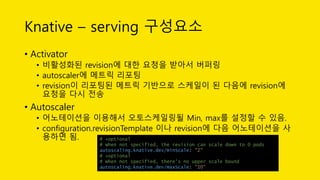
• Autoscaler
• 어노테이션을 이용해서 오토스케일링될 Min, max를 설정할 수 있음.
• configuration.revisionTemplate 이나 revision에 다음 어노테이션을 사
용하면 됨. # +optional
# When not specified, the revision can scale down to 0 pods
autoscaling.knative.dev/minScale: "2"
# +optional
# When not specified, there's no upper scale bound
autoscaling.knative.dev/maxScale: "10"

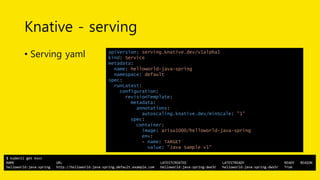
Knative - serving
• Serving yaml apiVersion: serving.knative.dev/v1alpha1
kind: Service
metadata:
name: helloworld-java-spring
namespace: default
spec:
runLatest:
configuration:
revisionTemplate:
metadata:
annotations:
autoscaling.knative.dev/minScale: "1"
spec:
container:
image: arisu1000/helloworld-java-spring
env:
- name: TARGET
value: ”Java Sample v1"
$ kubectl get ksvc
NAME URL LATESTCREATED LATESTREADY READY REASON
helloworld-java-spring http://helloworld-java-spring.default.example.com helloworld-java-spring-dws5r helloworld-java-spring-dws5r True
Knative 설치
• https://knative.dev/docs/install/
• Install to Docker for mac
• Install Istio
• Install Knative Serving
curl -L https://raw.githubusercontent.com/knative/serving/v0.7.0/third_party/istio-1.0.7/istio.yaml 
| sed 's/LoadBalancer/NodePort/' 
| kubectl apply --filename -
# Label the default namespace with istio-injection=enabled.
kubectl label namespace default istio-injection=enabled
kubectl get pods --namespace istio-system
curl -L https://github.com/knative/serving/releases/download/v0.7.0/serving.yaml 
| sed 's/LoadBalancer/NodePort/' 
| kubectl apply --selector networking.knative.dev/certificate-provider!=cert-manager --filename -
kubectl get pods --namespace knative-serving
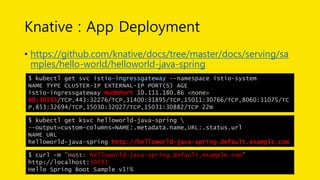
Knative : App Deployment
• https://github.com/knative/docs/tree/master/docs/serving/sa
mples/hello-world/helloworld-java-spring
$ kubectl get svc istio-ingressgateway --namespace istio-system
NAME TYPE CLUSTER-IP EXTERNAL-IP PORT(S) AGE
istio-ingressgateway NodePort 10.111.180.86 <none>
80:30593/TCP,443:32276/TCP,31400:31895/TCP,15011:30766/TCP,8060:31075/TC
P,853:32694/TCP,15030:32027/TCP,15031:30882/TCP 22m
$ kubectl get ksvc helloworld-java-spring 
--output=custom-columns=NAME:.metadata.name,URL:.status.url
NAME URL
helloworld-java-spring http://helloworld-java-spring.default.example.com
$ curl -H "Host: helloworld-java-spring.default.example.com"
http://localhost:30593
Hello Spring Boot Sample v1!%
Q&A
감사합니다

Source To URL Without Dockerfile

  • 1.
    Source To URLwithout Dockerfile 정원천 (hardy.jung) 카카오 클라우드디플로이셀 hardy.jung@kakaocorp.com
  • 2.
    발표자 소개 • KakaoCloudDeploy Cell Lead • Certified Kubernetes Administrator • SNS • Kubernetes Korea Group : https://www.facebook.com/groups/k8skr/ • Blog : https://arisu1000.tistory.com/ • Book • 자바 프로그래밍 면접, 이렇게 준비한다 • BACK TO THE BASIC, C++ 버그 헌팅 • 프로 윈도우폰 7 개발 • 클라우드 컴퓨팅 바이블 • Patent • Method for Predicting a Property of Compound and System for Predicting a Property of Compound • Automatic Method Using Quantum Mechanics Calculation Program and Materials Property Predictive Module and System therefor • Multiple Linear Regression―Artificial Neural Network Model Predicting Absolute Entropy of Ideal Gas for Pure Organic Compound • Etc +38
  • 3.
    개요 – cloudapp launcher • 목적 • 개발자는 개발만 빌드 및 실행은 app launcher • Main component • Github • Buildpack • 소스기반으로 컨테이너 이미지 빌드 • Knative • 컨테이너를 실행 및 관리
  • 4.
    개요 – cloudapp launcher Github Build Kubernetes push webhook deploy Buildpack Knative
  • 5.
    Buildpacks • 용도 :소스를 탐지해서 컨테이너화 • https://buildpacks.io/ • CNCF sandbox project • 주요 참여 기업 : Pivotal, Heroku
  • 6.
  • 7.
    Buildpacks - 구성요소 •Pack(not packs) • https://github.com/buildpack/pack • CLI 명령어 • 소스코드를 실행가능한 컨테이너 이미지로 변경 • Lifecycle • https://github.com/buildpack/lifecycle • Buildpack API v3의 구현체
  • 8.
    Buildpacks - 구성요소 •Buildpack • 특정 소스를 빌드하는 방법에 대한 코드들의 모음 • Lifecycle에 지정된 spec에 해당하는 명령어가 들어있어야 함
  • 9.
    Buildpacks • “pack build”명령으로 빌드 실행 • Build가 진행되서 이미지가 만들어지는 과정 detect /lifecycle/detector restore /lifecycle/restorer analyze /lifecycle/analyzer build /lifecycle/builder export /lifecycle/exporter cache /lifecycle/cacher bin/detect plan.toml bin/build plan.toml launch.toml
  • 10.
  • 11.
    Buildpacks • bin/detect #!/usr/bin/env bash set-eo pipefail if [[ -f pom.xml ]]; then exit 0 fi exit 1
  • 12.
    Buildpacks • bin/build echo "--->Installing JDK" echo "---> Running Maven” if [[ -x mvnw ]]; then echo "---> Running Maven Wrapper" ./mvnw clean install -B -DskipTests else mvn clean install -B -DskipTests fi # Set default start command for jarFile in $(find target -maxdepth 1 -name "*.jar" -type f); do echo "processes = [{ type = "web", command = "java -jar $jarFile"}]" > "$layers_dir/launch.toml" break; done
  • 13.
    Buildpacks • 이미지 실행Entrypoint • launch.toml 파일을 해석해서 실행 • 현재는 type에 web만 지원 • Command에 실행할 명령어를 추가 "Entrypoint": [ "/lifecycle/launcher" ], [[processes]] type = "web" command = "java -jar target/java-springboot-0.0.1-SNAPSHOT.jar"
  • 14.
    Buildpacks 사용하기 -Demo git clone https://github.com/arisu1000/helloworld-java-spring.git cd helloworld-java-spring pack build arisu1000/helloworld-java-spring docker volume ls docker inspect arisu1000/helloworld-java-spring docker push arisu1000/helloworld-java-spring
  • 15.
    Knative • 용도 :컨테이너를 실행하고 관리하는 역할 • Kubernetes 에서 실행되는 serverless 플랫폼 • 2018년 7월 공개 • https://knative.dev/ • 주요 참여 기업 : Google, Pivotal, IBM, Red Hat, SAP • 2019년 7월 버전 : 0.7
  • 16.
  • 17.
    Knative • 각 컴포넌트가독립적으로 구성되어 있음 • 주요 컴포넌트 • Build : 컨테이너 빌드를 담당 • Serving : 컨테이너 실행 및 운영을 담당 • Eventing : 이벤트를 발생시키고 구독하는 역할을 담당
  • 18.
    Knative - build •Kubernetes CRD(Custom Resource Definition)를 생성해서 사용 • 주요 개념 • Source : 빌드할 소스 • Steps : 작업을 실행하기위한 컨테이너 이미지와 작업 내역들 • BuildTemplate : 재사용 가능한 템플릿 • 인증 : kubernetes 시크릿을 이용하도록 ServiceAccount를 사용
  • 19.
    Knative - build •Build yaml apiVersion: build.knative.dev/v1alpha1 kind: Build metadata: name: kaniko-build spec: serviceAccountName: build-bot source: git: url: https://github.com/my-user/my-repo revision: master template: name: kaniko arguments: - name: IMAGE value: us.gcr.io/my-project/my-app
  • 20.
    Knative - build •BuildTemplate yaml apiVersion: build.knative.dev/v1alpha1 kind: BuildTemplate metadata: name: kaniko spec: parameters: - name: IMAGE description: The name of the image to push - name: DOCKERFILE description: Path to the Dockerfile to build. default: /workspace/Dockerfile steps: - name: build-and-push image: gcr.io/kaniko-project/executor args: - --dockerfile=${DOCKERFILE} - --destination=${IMAGE} env: - name: DOCKER_CONFIG value: /builder/home/.docker
  • 21.
    Knative - build •Build-templates : https://github.com/knative/build-templates
  • 22.
    Knative - serving •Kubernetes CRD를 생성해서 사용 • 목적 • 서버리스 컨테이너의 빠른 배포 • 컨테이너 오토스케일링 관리 • Istio를 이용한 라우팅과 네트워크 프로그래밍 • 배포된 코드와 설정을 Point-in-time 스냅샷 형식으로 관리
  • 23.
    Knative – servingresource • Service • service.serving.knative.dev : 워크로드의 전체 라이프 사이클을 자동으로 관리. • Route, configuration, revision같은 다른 객체들을 만들고 관리한다. • Route • route.serving.knative.dev : 네트워크 엔드포인트를 revision에 매핑하는 역할. • Configuration • configuration.serving.knative.dev : 배포의 원하는 상태(desired state)를 관리함. • 코드와 설정을 분리하기 위해서 필요함. • Revision • revision.serving.knative.dev : 코드와 configuration의 시점별(point-in-time) 스냅샷. • 이뮤터블객체이고 필요한만큼 유지가능하다.
  • 24.
  • 25.
    Knative – serving구성요소 • Controller • Serving 전체 상태를 관리하는 프로세스 • pkg/reconciler/v1alpha1/ 하위에 보면 각종 리소스(autoscaling, cluster ingress, configuration, labeler, revision, route, service, testing) 에 대한 컨트롤러들이 있고 각각이 고루틴으로 떠서 실행된다. • Webhook • knative/pkg 하위의 webhook을 사용하는 공통 모듈 • 모든 Kubernetes API 호출과 CRD 관련 내용을 중간에 확인해서 유효 한 요청인지 검증하고 관리하는 역할을 한다.
  • 26.
    Knative – serving구성요소 • Activator • 비활성화된 revision에 대한 요청을 받아서 버퍼링 • autoscaler에 메트릭 리포팅 • revision이 리포팅된 메트릭 기반으로 스케일이 된 다음에 revision에 요청을 다시 전송 • Autoscaler • 어노테이션을 이용해서 오토스케일링될 Min, max를 설정할 수 있음. • configuration.revisionTemplate 이나 revision에 다음 어노테이션을 사 용하면 됨. # +optional # When not specified, the revision can scale down to 0 pods autoscaling.knative.dev/minScale: "2" # +optional # When not specified, there's no upper scale bound autoscaling.knative.dev/maxScale: "10"

  • 27.
    Knative - serving •Serving yaml apiVersion: serving.knative.dev/v1alpha1 kind: Service metadata: name: helloworld-java-spring namespace: default spec: runLatest: configuration: revisionTemplate: metadata: annotations: autoscaling.knative.dev/minScale: "1" spec: container: image: arisu1000/helloworld-java-spring env: - name: TARGET value: ”Java Sample v1" $ kubectl get ksvc NAME URL LATESTCREATED LATESTREADY READY REASON helloworld-java-spring http://helloworld-java-spring.default.example.com helloworld-java-spring-dws5r helloworld-java-spring-dws5r True
  • 28.
    Knative 설치 • https://knative.dev/docs/install/ •Install to Docker for mac • Install Istio • Install Knative Serving curl -L https://raw.githubusercontent.com/knative/serving/v0.7.0/third_party/istio-1.0.7/istio.yaml | sed 's/LoadBalancer/NodePort/' | kubectl apply --filename - # Label the default namespace with istio-injection=enabled. kubectl label namespace default istio-injection=enabled kubectl get pods --namespace istio-system curl -L https://github.com/knative/serving/releases/download/v0.7.0/serving.yaml | sed 's/LoadBalancer/NodePort/' | kubectl apply --selector networking.knative.dev/certificate-provider!=cert-manager --filename - kubectl get pods --namespace knative-serving
  • 29.
    Knative : AppDeployment • https://github.com/knative/docs/tree/master/docs/serving/sa mples/hello-world/helloworld-java-spring $ kubectl get svc istio-ingressgateway --namespace istio-system NAME TYPE CLUSTER-IP EXTERNAL-IP PORT(S) AGE istio-ingressgateway NodePort 10.111.180.86 <none> 80:30593/TCP,443:32276/TCP,31400:31895/TCP,15011:30766/TCP,8060:31075/TC P,853:32694/TCP,15030:32027/TCP,15031:30882/TCP 22m $ kubectl get ksvc helloworld-java-spring --output=custom-columns=NAME:.metadata.name,URL:.status.url NAME URL helloworld-java-spring http://helloworld-java-spring.default.example.com $ curl -H "Host: helloworld-java-spring.default.example.com" http://localhost:30593 Hello Spring Boot Sample v1!%
  • 30.
  • 31.