Background – Policy
•Successful intrusion detection depends
on policy and management as much as
technology
– Security Policy (defining what is acceptable
and what is being defended) is the first
step
– Notification
• Who, how fast?
– Response Coordination
4.
Intro to Snort
•What is Snort?
– Snort is a multi-mode packet analysis tool
• Sniffer
• Packet Logger
• Forensic Data Analysis tool
• Network Intrusion Detection System
• Where did it come from?
– Developed out of the evolving need to perform
network traffic analysis in both real-time and for
forensic post processing
5.
Snort “Metrics”
• Small(~800k source download)
• Portable (Linux, Windows, MacOS X,
Solaris, BSD, IRIX, Tru64, HP-UX, etc)
• Fast (High probability of detection for a
given attack on 100Mbps networks)
• Configurable (Easy rules language,
many reporting/logging options
• Free (GPL/Open Source Software)
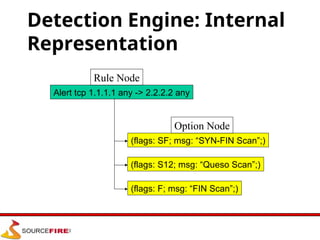
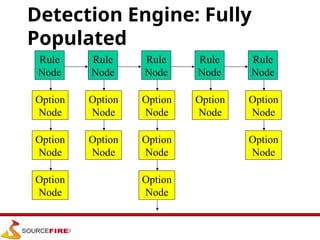
Detection Engine
• Rulesform “signatures”
• Modular detection elements are
combined to form these signatures
• Wide range of detection capabilities
– Stealth scans, OS fingerprinting, buffer
overflows, back doors, CGI exploits, etc.
• Rules system is very flexible, and
creation of new rules is relatively simple
8.
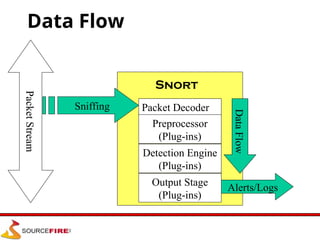
Plug-Ins
• Preprocessor
– Packetsare examined/manipulated before
being handed to the detection engine
• Detection
– Perform single, simple tests on a single
aspect/field of the packet
• Output
– Report results from the other plug-ins
9.
Using Snort
• Threemain operational modes
– Sniffer Mode
– Packet Logger Mode
– NIDS Mode
– (Forensic Data Analysis Mode)
• Operational modes are configured via
command line switches
– Snort automatically tries to go into NIDS mode if
no command line switches are given, looks for
snort.conf configuration file in /etc
10.
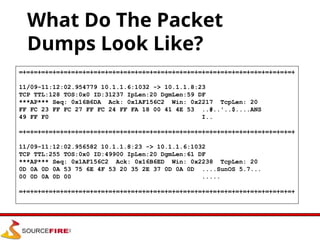
Using Snort –Sniffer Mode
• Works much like tcpdump
• Decodes packets and dumps them to
stdout
• BPF filtering interface available to
shape displayed network traffic
Packet Logger Mode
•Gee, it sure would be nice if I could
save those packets to disk…
• Multi-mode packet logging options
available
– Flat ASCII, tcpdump, XML, database, etc
available
• Log all data and post-process to look for
anomalous activity
13.
NIDS Mode
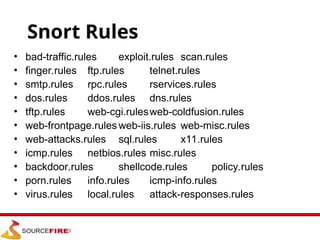
• Widevariety of rules available for
signature engine (~1300 as of June
2001, grow to ~2900 at May 2005)
• Multiple detection modes available via
rules and plug-ins
– Rules/signature
– Statistical anomaly
– Protocol verification
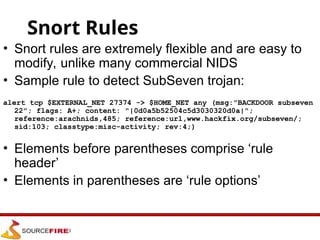
Snort Rules
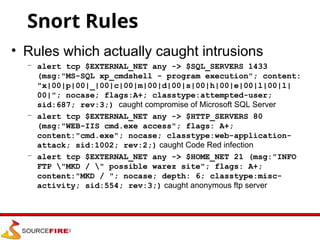
• Snortrules are extremely flexible and are easy to
modify, unlike many commercial NIDS
• Sample rule to detect SubSeven trojan:
alert tcp $EXTERNAL_NET 27374 -> $HOME_NET any (msg:"BACKDOOR subseven
22"; flags: A+; content: "|0d0a5b52504c5d3030320d0a|";
reference:arachnids,485; reference:url,www.hackfix.org/subseven/;
sid:103; classtype:misc-activity; rev:4;)
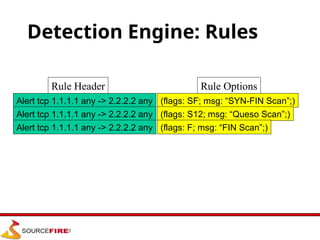
• Elements before parentheses comprise ‘rule
header’
• Elements in parentheses are ‘rule options’
16.
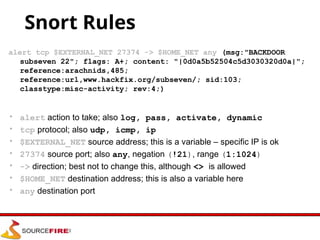
Snort Rules
alert tcp$EXTERNAL_NET 27374 -> $HOME_NET any (msg:"BACKDOOR
subseven 22"; flags: A+; content: "|0d0a5b52504c5d3030320d0a|";
reference:arachnids,485;
reference:url,www.hackfix.org/subseven/; sid:103;
classtype:misc-activity; rev:4;)
• alert action to take; also log, pass, activate, dynamic
• tcp protocol; also udp, icmp, ip
• $EXTERNAL_NET source address; this is a variable – specific IP is ok
• 27374 source port; also any, negation (!21), range (1:1024)
• -> direction; best not to change this, although <> is allowed
• $HOME_NET destination address; this is also a variable here
• any destination port
17.
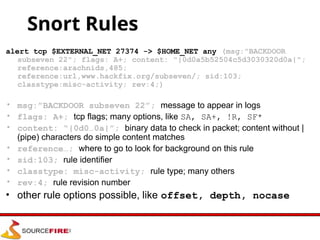
Snort Rules
alert tcp$EXTERNAL_NET 27374 -> $HOME_NET any (msg:"BACKDOOR
subseven 22"; flags: A+; content: "|0d0a5b52504c5d3030320d0a|";
reference:arachnids,485;
reference:url,www.hackfix.org/subseven/; sid:103;
classtype:misc-activity; rev:4;)
• msg:”BACKDOOR subseven 22”; message to appear in logs
• flags: A+; tcp flags; many options, like SA, SA+, !R, SF*
• content: “|0d0…0a|”; binary data to check in packet; content without |
(pipe) characters do simple content matches
• reference…; where to go to look for background on this rule
• sid:103; rule identifier
• classtype: misc-activity; rule type; many others
• rev:4; rule revision number
• other rule options possible, like offset, depth, nocase
Conclusion
• Snort isa powerful tool, but maximizing its
usefulness requires a trained operator
• Becoming proficient with network intrusion
detection takes 12 months; “expert” 24-36?
• Snort is considered a superior NIDS when
compared to most commercial systems
• Managed network security providers should
collect enough information to make decisions
without calling clients to ask what happened
Editor's Notes
#13 Uses all phases of Snort + plug-ins to analyze traffic for both misuse detection and anomalous activity
Can perform portscan detection, IP defragmentation, TCP stream reassembly, application layer analysis and normalization, etc
#16 Why need “pass”, like firewall, you may have some specific traffic you want to allow.
Activate/dynamic rule pairs give Snort a powerful capability. You can now have one rule activate another when it's action is performed for a set number of packets. This is very useful if you want to set Snort up to perform follow on recording when a specific rule goes off. Activate rules act just like alert rules, except they have a *required* option field: activates. Dynamic rules act just like log rules, but they have a different option field: activated_by. Dynamic rules have a second required field as well, count.
Activate rules are just like alerts but also tell Snort to add a rule when a specific network event occurs. Dynamic rules are just like log rules except are dynamically enabled when the activate rule id goes off.
http://www.snort.org/docs/snort_htmanuals/htmanual_261/node155.html
#22 Queso scan, a tool similar to NMAP,
http://www.securityfocus.com/infocus/1225