Tooltime/Wildcard
Tara Williams
Adult Learning
slideshare.net
What is slideshare.net?
SlideShare is the world's largest community for sharing
presentations. With 60 million monthly visitors and 130
million pageviews, it is amongst the most visited 200 websites
in the world. Besides presentations, SlideShare also supports
documents, PDFs, videos and webinars.
Source: slideshare.net
SlideShare: Why you should use it
This presentation is on slideshare’s website and gives a
great introduction to what the program can do for your
presentations and how to use it for research purposes.
Click on the title page to open up presentation.
• Kleiner Perkins Caufield &
Byers
• Pfizer
• Ogilvy
• JWT
• Edelman
• Burson Marsteller
• Frost & Sullivan
• CapGemini
• Booz Allen Hamilton
• Gartner
• Hewlett Packard
• IBM
• O'Reilly Media
• McGraw-Hill
• ReadWriteWeb
• Blackberry (RIM)
• Royal Dutch Shell
• …and millions of others
• The WhiteHouse
• Pew Internet
• US Army and US Navy
• NASA
• United Nations
• UNICEF
• UNDP
• UNEP (Ozonaction)
• World Economic Forum
• State of Utah
• Univ of Texas
• Univ of Illinois
• Bill & Melinda Gates
Foundation
• International Atomic Energy
Agency (IAEA)
• Dell
• Daimler
• PARC
Who uses SlideShare?
Source: slideshare.net
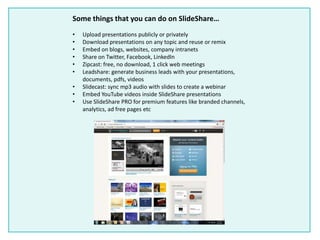
Some things that you can do on SlideShare…
• Upload presentations publicly or privately
• Download presentations on any topic and reuse or remix
• Embed on blogs, websites, company intranets
• Share on Twitter, Facebook, LinkedIn
• Zipcast: free, no download, 1 click web meetings
• Leadshare: generate business leads with your presentations,
documents, pdfs, videos
• Slidecast: sync mp3 audio with slides to create a webinar
• Embed YouTube videos inside SlideShare presentations
• Use SlideShare PRO for premium features like branded channels,
analytics, ad free pages etc
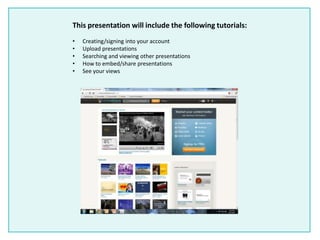
This presentation will include the following tutorials:
• Creating/signing into your account
• Upload presentations
• Searching and viewing other presentations
• How to embed/share presentations
• See your views
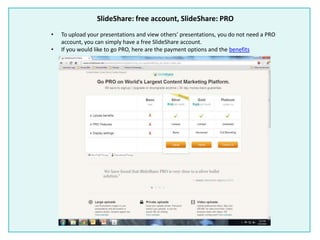
SlideShare: free account, SlideShare: PRO
• To upload your presentations and view others’ presentations, you do not need a PRO
account, you can simply have a free SlideShare account.
• If you would like to go PRO, here are the payment options and the benefits
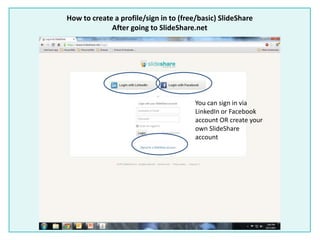
How to create a profile/sign in to (free/basic) SlideShare
After going to SlideShare.net
You can sign in via
LinkedIn or Facebook
account OR create your
own SlideShare
account
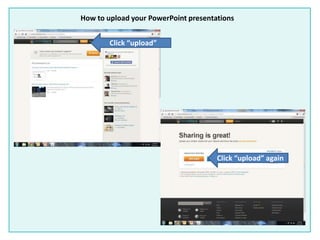
How to upload your PowerPoint presentations
Click “upload”
Click “upload” again
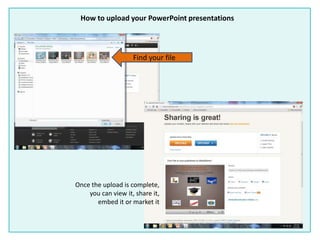
How to upload your PowerPoint presentations
Find your file
Once the upload is complete,
you can view it, share it,
embed it or market it
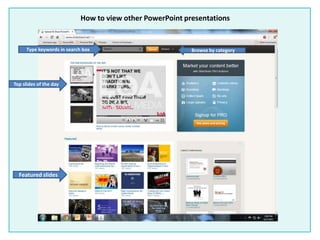
How to view other PowerPoint presentations
Featured slides
Top slides of the day
Type keywords in search box Browse by category
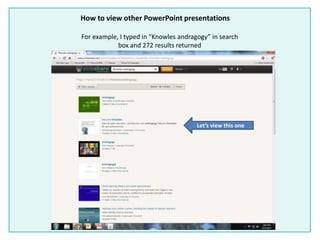
How to view other PowerPoint presentations
For example, I typed in “Knowles andragogy” in search
box and 272 results returned
Let’s view this one
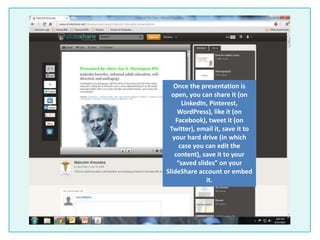
Once the presentation is
open, you can share it (on
LinkedIn, Pinterest,
WordPress), like it (on
Facebook), tweet it (on
Twitter), email it, save it to
your hard drive (in which
case you can edit the
content), save it to your
“saved slides” on your
SlideShare account or embed
it.
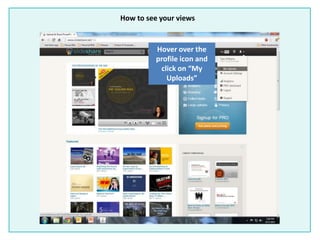
How to see your views
Hover over the
profile icon and
click on “My
Uploads”
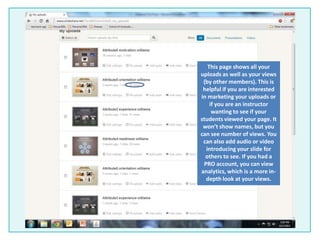
This page shows all your
uploads as well as your views
(by other members). This is
helpful if you are interested
in marketing your uploads or
if you are an instructor
wanting to see if your
students viewed your page. It
won’t show names, but you
can see number of views. You
can also add audio or video
introducing your slide for
others to see. If you had a
PRO account, you can view
analytics, which is a more in-
depth look at your views.
Thank you for viewing my presentation on SlideShare!
This website was very helpful for me when writing the blogs
because I was able to upload the projects , i.e. roots tracing
and attributes and show them on blogger. The bonus is
seeing how many views you have!
This is a great website and I highly recommend it for easy
uploading and embedding and also using it as a research tool
for a project or paper.
www.slideshare.net

Slideshare tool time

  • 1.
  • 2.
    What is slideshare.net? SlideShareis the world's largest community for sharing presentations. With 60 million monthly visitors and 130 million pageviews, it is amongst the most visited 200 websites in the world. Besides presentations, SlideShare also supports documents, PDFs, videos and webinars. Source: slideshare.net
  • 3.
    SlideShare: Why youshould use it This presentation is on slideshare’s website and gives a great introduction to what the program can do for your presentations and how to use it for research purposes. Click on the title page to open up presentation.
  • 4.
    • Kleiner PerkinsCaufield & Byers • Pfizer • Ogilvy • JWT • Edelman • Burson Marsteller • Frost & Sullivan • CapGemini • Booz Allen Hamilton • Gartner • Hewlett Packard • IBM • O'Reilly Media • McGraw-Hill • ReadWriteWeb • Blackberry (RIM) • Royal Dutch Shell • …and millions of others • The WhiteHouse • Pew Internet • US Army and US Navy • NASA • United Nations • UNICEF • UNDP • UNEP (Ozonaction) • World Economic Forum • State of Utah • Univ of Texas • Univ of Illinois • Bill & Melinda Gates Foundation • International Atomic Energy Agency (IAEA) • Dell • Daimler • PARC Who uses SlideShare? Source: slideshare.net
  • 5.
    Some things thatyou can do on SlideShare… • Upload presentations publicly or privately • Download presentations on any topic and reuse or remix • Embed on blogs, websites, company intranets • Share on Twitter, Facebook, LinkedIn • Zipcast: free, no download, 1 click web meetings • Leadshare: generate business leads with your presentations, documents, pdfs, videos • Slidecast: sync mp3 audio with slides to create a webinar • Embed YouTube videos inside SlideShare presentations • Use SlideShare PRO for premium features like branded channels, analytics, ad free pages etc
  • 6.
    This presentation willinclude the following tutorials: • Creating/signing into your account • Upload presentations • Searching and viewing other presentations • How to embed/share presentations • See your views
  • 7.
    SlideShare: free account,SlideShare: PRO • To upload your presentations and view others’ presentations, you do not need a PRO account, you can simply have a free SlideShare account. • If you would like to go PRO, here are the payment options and the benefits
  • 8.
    How to createa profile/sign in to (free/basic) SlideShare After going to SlideShare.net You can sign in via LinkedIn or Facebook account OR create your own SlideShare account
  • 9.
    How to uploadyour PowerPoint presentations Click “upload” Click “upload” again
  • 10.
    How to uploadyour PowerPoint presentations Find your file Once the upload is complete, you can view it, share it, embed it or market it
  • 11.
    How to viewother PowerPoint presentations Featured slides Top slides of the day Type keywords in search box Browse by category
  • 12.
    How to viewother PowerPoint presentations For example, I typed in “Knowles andragogy” in search box and 272 results returned Let’s view this one
  • 13.
    Once the presentationis open, you can share it (on LinkedIn, Pinterest, WordPress), like it (on Facebook), tweet it (on Twitter), email it, save it to your hard drive (in which case you can edit the content), save it to your “saved slides” on your SlideShare account or embed it.
  • 14.
    How to seeyour views Hover over the profile icon and click on “My Uploads”
  • 15.
    This page showsall your uploads as well as your views (by other members). This is helpful if you are interested in marketing your uploads or if you are an instructor wanting to see if your students viewed your page. It won’t show names, but you can see number of views. You can also add audio or video introducing your slide for others to see. If you had a PRO account, you can view analytics, which is a more in- depth look at your views.
  • 16.
    Thank you forviewing my presentation on SlideShare! This website was very helpful for me when writing the blogs because I was able to upload the projects , i.e. roots tracing and attributes and show them on blogger. The bonus is seeing how many views you have! This is a great website and I highly recommend it for easy uploading and embedding and also using it as a research tool for a project or paper. www.slideshare.net