ERP Implementation PowerPoint
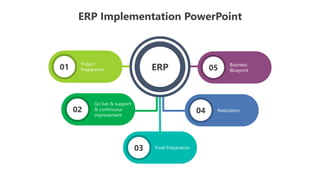
05
01
02
03
ERP
04
Project
Preparation
Go live & support
& continuous
improvement
Final Preparation
Realization
Business
Blueprint
ERP Implementation PowerPoint
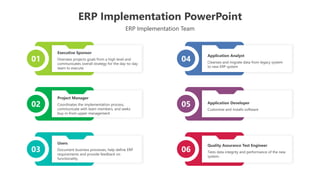
ERP Implementation Team
01 04
02 05
03 06
Quality Assurance Test Engineer
Tests data integrity and performance of the new
system.
Executive Sponsor
Oversees projects goals from a high level and
communicates overall strategy for the day-to-day
team to execute
Project Manager
Coordinates the implementation process,
communicate with team members, and seeks
buy-in from upper management
Users
Document business processes, help define ERP
requirements and provide feedback on
functionality.
Application Analyst
Cleanses and migrate data from legacy system
to new ERP system
Application Developer
Customize and installs software
ERP Implementation PowerPoint
ERP Implementation Strategy
Big Bang
Swiftly replace existing
systems with ERP across
the entire organization.
Phased Rollout
Gradual
implementation,
department by
department, reducing
disruption and risks.
Parallel Adoption
Run both old and new
systems concurrently for
a smooth transition.
Pilot Testing
Trial ERP in a small
segment before full-
scale implementation.
Hybrid Approach
Combines strategies for
flexibility and tailored
implementation across
departments.
ERP Implementation PowerPoint
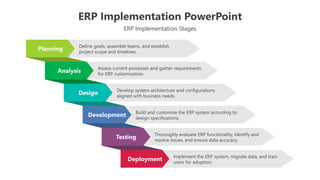
Planning
Analysis
Design
Development
Testing
Deployment
Define goals, assemble teams, and establish
project scope and timelines.
Assess current processes and gather requirements
for ERP customization.
Develop system architecture and configurations
aligned with business needs.
Build and customize the ERP system according to
design specifications.
Thoroughly evaluate ERP functionality, identify and
resolve issues, and ensure data accuracy.
Implement the ERP system, migrate data, and train
users for adoption.
ERP Implementation Stages
ERP Implementation PowerPoint
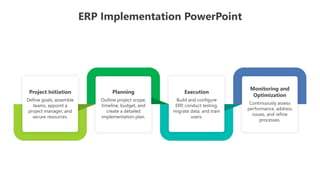
Project Initiation
Define goals, assemble
teams, appoint a
project manager, and
secure resources.
Planning
Outline project scope,
timeline, budget, and
create a detailed
implementation plan.
Execution
Build and configure
ERP, conduct testing,
migrate data, and train
users.
Monitoring and
Optimization
Continuously assess
performance, address
issues, and refine
processes.
ERP Implementation PowerPoint
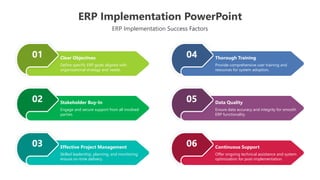
ERP Implementation Success Factors
01
02
03
04
05
06
Clear Objectives
Define specific ERP goals aligned with
organizational strategy and needs.
Stakeholder Buy-In
Engage and secure support from all involved
parties.
Effective Project Management
Skilled leadership, planning, and monitoring
ensure on-time delivery.
Thorough Training
Provide comprehensive user training and
resources for system adoption.
Data Quality
Ensure data accuracy and integrity for smooth
ERP functionality.
Continuous Support
Offer ongoing technical assistance and system
optimization for post-implementation.
ERP Implementation PowerPoint
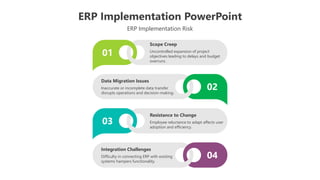
ERP Implementation Risk
Scope Creep
Uncontrolled expansion of project
objectives leading to delays and budget
overruns.
Data Migration Issues
Inaccurate or incomplete data transfer
disrupts operations and decision-making.
Resistance to Change
Employee reluctance to adapt affects user
adoption and efficiency.
Integration Challenges
Difficulty in connecting ERP with existing
systems hampers functionality.
01
03
02
04
Icons
Icons
You can add and edit some shapes to your presentation to present your data in a visual way.
● Choose your favourite infographic and insert it in your presentation using Ctrl C + Ctrl V or Cmd C +
Cmd V in Mac.
● Select one of the parts and ungroup it by right-clicking and choosing “Ungroup”.
● Change the color by clicking on the paint bucket.
● Then resize the element by clicking and dragging one of the square-shaped points of its bounding
box (the cursor should look like a double-headed arrow). Remember to hold Shift while dragging to
keep the proportions.
● Group the elements again by selecting them, right-clicking and choosing “Group”.
● Repeat the steps above with the other parts and when you’re done editing, copy the end result and
paste it into your presentation.
● Remember to choose the “Keep source formatting” option so that it keeps the design. For more
info, please visit Slideegg (Tips & Tricks).
How To Edit Shapes
Terms Of Use (Free Users)
If you are a free subscriber, you should credit SlideEgg by keeping the “Thank You” slide.
Kindly refer to the following slide for the Terms of Use for premium users.
You can:
• Customize or edit this template
• Use this template for both business and personal endeavors.
You can not:
• Sell, rent, or second-license SlideEgg content or its altered version.
Promulgate, unless explicitly permitted, SlideEgg content, by SlideEgg.
• Incorporate SlideEgg content in any database or file online or offline.
• Obtain SlideEgg content’s copyright.
Kindly refer to our Tutorial page or FAQ for advanced slide modification guidelines.
Terms Of Use (Premium Users)
Being a premium subscriber, you have the privilege of using this PPT template
without giving attribution to SlideEgg or keeping the “Thank You” slide.
You can:
• Customize or edit this template.
• Use this template for both business and personal endeavors.
• Circulate or share the editable format of this template with anyone you want.
You can not:
• Sell, rent or second-license SlideEgg content or the altered version of it.
Promulgate or include the templates in any other services database
• that performs as distribution or resale platform, unless explicitly permitted, by SlideEgg.
• Incorporate the elements used in SlideEgg templates separately.
• Obtain SlideEgg copyright for the elements used in this template as a logo or trademark.
Kindly refer to our Tutorial page or FAQ for advanced slide modification guidelines.
www.slideegg.com
Thank You!
We respect your valuable time with SlideEgg!
If you have any questions, please reach us
CREDIT: SlideEgg created this PowerPoint template.
Let this slide be kept for attribution.
Do you have a design request, please visit our Deckez site.

SlideEgg_200551-ERP Implementation PowerPoint.pptx

  • 1.
    ERP Implementation PowerPoint 05 01 02 03 ERP 04 Project Preparation Golive & support & continuous improvement Final Preparation Realization Business Blueprint
  • 2.
    ERP Implementation PowerPoint ERPImplementation Team 01 04 02 05 03 06 Quality Assurance Test Engineer Tests data integrity and performance of the new system. Executive Sponsor Oversees projects goals from a high level and communicates overall strategy for the day-to-day team to execute Project Manager Coordinates the implementation process, communicate with team members, and seeks buy-in from upper management Users Document business processes, help define ERP requirements and provide feedback on functionality. Application Analyst Cleanses and migrate data from legacy system to new ERP system Application Developer Customize and installs software
  • 3.
    ERP Implementation PowerPoint ERPImplementation Strategy Big Bang Swiftly replace existing systems with ERP across the entire organization. Phased Rollout Gradual implementation, department by department, reducing disruption and risks. Parallel Adoption Run both old and new systems concurrently for a smooth transition. Pilot Testing Trial ERP in a small segment before full- scale implementation. Hybrid Approach Combines strategies for flexibility and tailored implementation across departments.
  • 4.
    ERP Implementation PowerPoint Planning Analysis Design Development Testing Deployment Definegoals, assemble teams, and establish project scope and timelines. Assess current processes and gather requirements for ERP customization. Develop system architecture and configurations aligned with business needs. Build and customize the ERP system according to design specifications. Thoroughly evaluate ERP functionality, identify and resolve issues, and ensure data accuracy. Implement the ERP system, migrate data, and train users for adoption. ERP Implementation Stages
  • 5.
    ERP Implementation PowerPoint ProjectInitiation Define goals, assemble teams, appoint a project manager, and secure resources. Planning Outline project scope, timeline, budget, and create a detailed implementation plan. Execution Build and configure ERP, conduct testing, migrate data, and train users. Monitoring and Optimization Continuously assess performance, address issues, and refine processes.
  • 6.
    ERP Implementation PowerPoint ERPImplementation Success Factors 01 02 03 04 05 06 Clear Objectives Define specific ERP goals aligned with organizational strategy and needs. Stakeholder Buy-In Engage and secure support from all involved parties. Effective Project Management Skilled leadership, planning, and monitoring ensure on-time delivery. Thorough Training Provide comprehensive user training and resources for system adoption. Data Quality Ensure data accuracy and integrity for smooth ERP functionality. Continuous Support Offer ongoing technical assistance and system optimization for post-implementation.
  • 7.
    ERP Implementation PowerPoint ERPImplementation Risk Scope Creep Uncontrolled expansion of project objectives leading to delays and budget overruns. Data Migration Issues Inaccurate or incomplete data transfer disrupts operations and decision-making. Resistance to Change Employee reluctance to adapt affects user adoption and efficiency. Integration Challenges Difficulty in connecting ERP with existing systems hampers functionality. 01 03 02 04
  • 8.
  • 9.
  • 10.
    You can addand edit some shapes to your presentation to present your data in a visual way. ● Choose your favourite infographic and insert it in your presentation using Ctrl C + Ctrl V or Cmd C + Cmd V in Mac. ● Select one of the parts and ungroup it by right-clicking and choosing “Ungroup”. ● Change the color by clicking on the paint bucket. ● Then resize the element by clicking and dragging one of the square-shaped points of its bounding box (the cursor should look like a double-headed arrow). Remember to hold Shift while dragging to keep the proportions. ● Group the elements again by selecting them, right-clicking and choosing “Group”. ● Repeat the steps above with the other parts and when you’re done editing, copy the end result and paste it into your presentation. ● Remember to choose the “Keep source formatting” option so that it keeps the design. For more info, please visit Slideegg (Tips & Tricks). How To Edit Shapes
  • 11.
    Terms Of Use(Free Users) If you are a free subscriber, you should credit SlideEgg by keeping the “Thank You” slide. Kindly refer to the following slide for the Terms of Use for premium users. You can: • Customize or edit this template • Use this template for both business and personal endeavors. You can not: • Sell, rent, or second-license SlideEgg content or its altered version. Promulgate, unless explicitly permitted, SlideEgg content, by SlideEgg. • Incorporate SlideEgg content in any database or file online or offline. • Obtain SlideEgg content’s copyright. Kindly refer to our Tutorial page or FAQ for advanced slide modification guidelines.
  • 12.
    Terms Of Use(Premium Users) Being a premium subscriber, you have the privilege of using this PPT template without giving attribution to SlideEgg or keeping the “Thank You” slide. You can: • Customize or edit this template. • Use this template for both business and personal endeavors. • Circulate or share the editable format of this template with anyone you want. You can not: • Sell, rent or second-license SlideEgg content or the altered version of it. Promulgate or include the templates in any other services database • that performs as distribution or resale platform, unless explicitly permitted, by SlideEgg. • Incorporate the elements used in SlideEgg templates separately. • Obtain SlideEgg copyright for the elements used in this template as a logo or trademark. Kindly refer to our Tutorial page or FAQ for advanced slide modification guidelines.
  • 13.
    www.slideegg.com Thank You! We respectyour valuable time with SlideEgg! If you have any questions, please reach us CREDIT: SlideEgg created this PowerPoint template. Let this slide be kept for attribution. Do you have a design request, please visit our Deckez site.