Chapter 1: Introduction to C Page
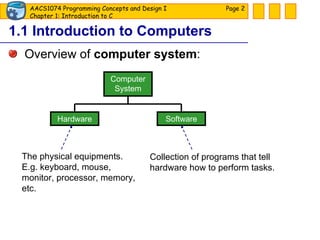
1.1 Introduction to Computers Overview of  computer system : Page  Computer System Software Hardware The physical equipments. E.g. keyboard, mouse, monitor, processor, memory, etc. Collection of programs that tell hardware how to perform tasks.
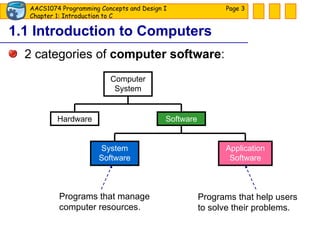
1.1 Introduction to Computers 2 categories of  computer software : Page  Computer System Software Hardware System Software Application Software Programs that manage computer resources. Programs that help users to solve their problems.
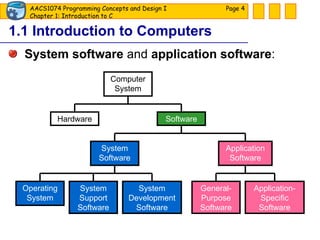
1.1 Introduction to Computers System software  and  application software : Page  Computer System Software Hardware System Software Application Software Operating System System Support Software System Development Software General-Purpose Software Application-Specific Software
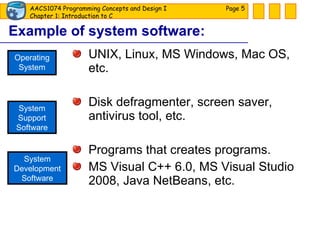
Example of system software: UNIX, Linux, MS Windows, Mac OS, etc. Disk defragmenter, screen saver, antivirus tool, etc. Programs that creates programs. MS Visual C++ 6.0, MS Visual Studio 2008, Java NetBeans, etc. Page  Operating System System Support Software System Development Software
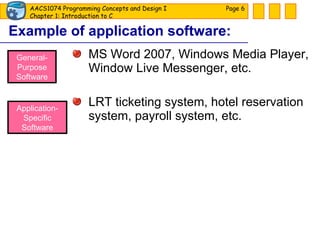
Example of application software: MS Word 2007, Windows Media Player, Window Live Messenger, etc. LRT ticketing system, hotel reservation system, payroll system, etc. Page  General-Purpose Software Application-Specific Software
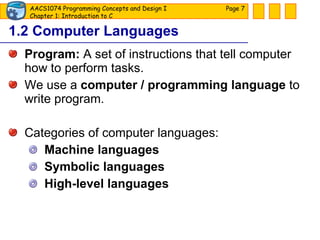
1.2 Computer Languages Program:  A set of instructions that tell computer how to perform tasks. We use a  computer / programming language  to write program. Categories of computer languages: Machine languages Symbolic languages High-level languages Page
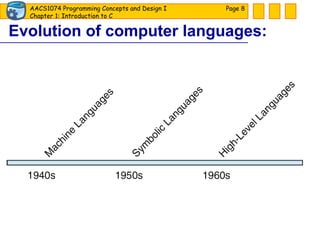
Evolution of computer languages: Page
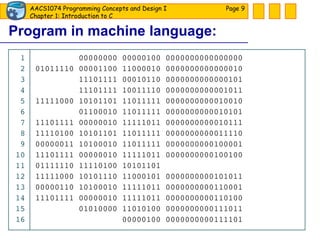
Program in machine language: Page
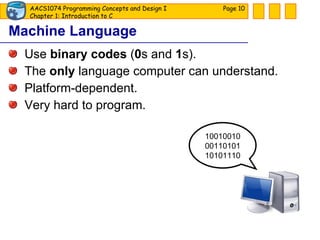
Machine Language Use  binary codes  ( 0 s and  1 s). The  only  language computer can understand. Platform-dependent. Very hard to program. Page  10010010 00110101 10101110
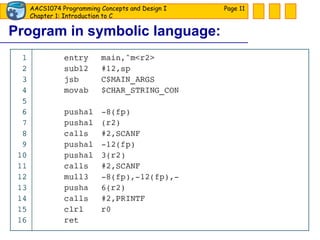
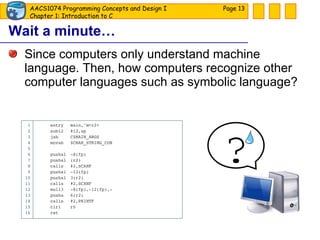
Program in symbolic language: Page
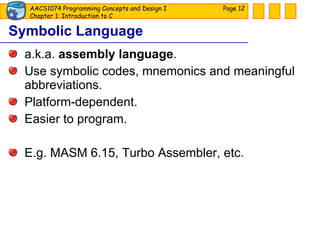
Symbolic Language a.k.a.  assembly language . Use symbolic codes, mnemonics and meaningful abbreviations. Platform-dependent. Easier to program. E.g. MASM 6.15, Turbo Assembler, etc. Page
Wait a minute… Since computers only understand machine language. Then, how computers recognize other computer languages such as symbolic language? Page  ?
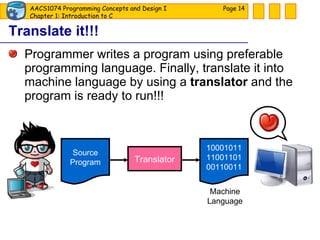
Translate it!!! Programmer writes a program using preferable programming language. Finally, translate it into machine language by using a  translator  and the program is ready to run!!! Page  Source Program Translator 10001011 11001101 00110011 Machine Language
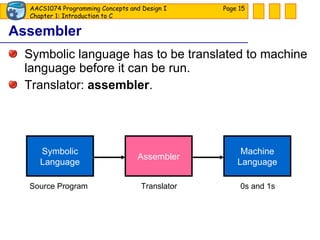
Assembler Symbolic language has to be translated to machine language before it can be run. Translator:  assembler . Page  Symbolic Language Machine Language Assembler Source Program Translator 0s and 1s
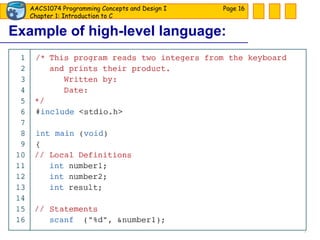
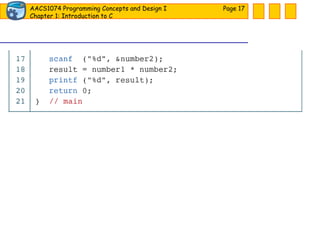
Example of high-level language: Page
Page
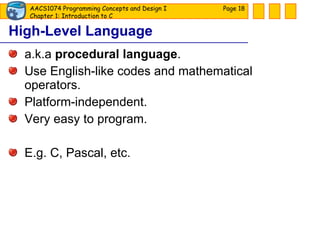
High-Level Language a.k.a  procedural language . Use English-like codes and mathematical operators. Platform-independent. Very easy to program. E.g. C, Pascal, etc. Page
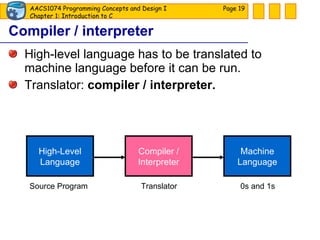
Compiler / interpreter High-level language has to be translated to machine language before it can be run. Translator:  compiler / interpreter. Page  High-Level Language Machine Language Compiler / Interpreter Source Program Translator 0s and 1s
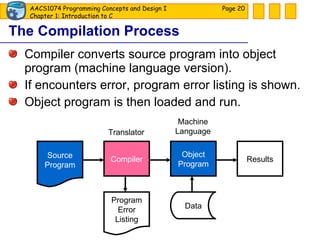
The Compilation Process Compiler converts source program into object program (machine language version). If encounters error, program error listing is shown. Object program is then loaded and run. Page  Compiler Object Program Results Program Error Listing Data Source Program Machine Language Translator
1.3 Introduction to C C  is a high-level language. For systems and applications programming. Portable / platform-independent: run at other platforms with no or little alterations. Page
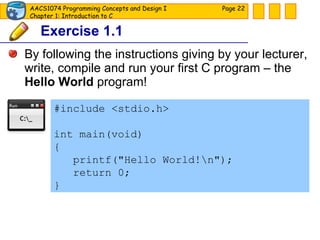
Exercise 1.1 By following the instructions giving by your lecturer, write, compile and run your first C program – the  Hello World  program! Page  #include <stdio.h> int main(void) { printf(&quot;Hello World!\n&quot;); return 0; }
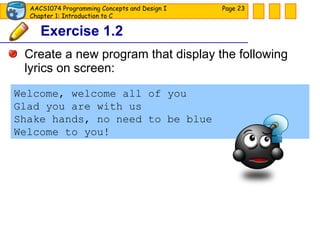
Exercise 1.2 Create a new program that display the following lyrics on screen: Page  Welcome, welcome all of you Glad you are with us Shake hands, no need to be blue Welcome to you!
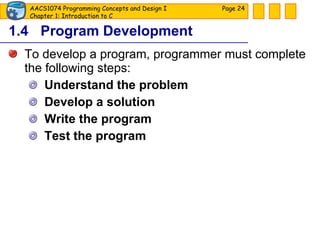
1.4 Program Development To develop a program, programmer must complete the following steps: Understand the problem Develop a solution Write the program Test the program Page
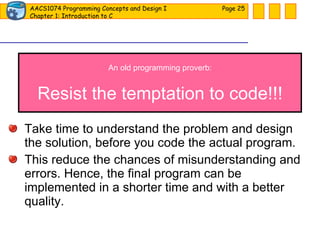
Take time to understand the problem and design the solution, before you code the actual program. This reduce the chances of misunderstanding and errors. Hence, the final program can be implemented in a shorter time and with a better quality. Page  An old programming proverb: Resist the temptation to code!!!
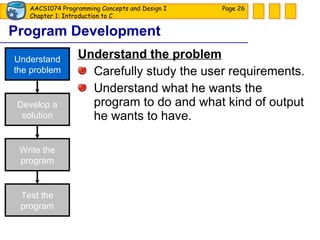
Program Development Understand the problem Carefully study the user requirements. Understand what he wants the program to do and what kind of output he wants to have. Page  Develop a solution Understand the problem Write the program Test the program
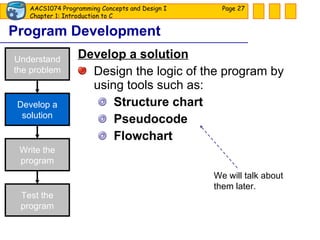
Program Development Develop a solution Design the logic of the program by using tools such as: Structure chart Pseudocode Flowchart Page  Develop a solution Understand the problem Write the program Test the program We will talk about them later.
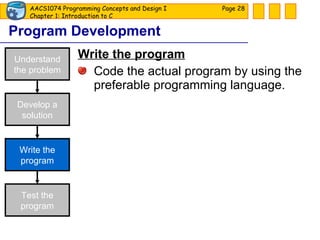
Program Development Write the program Code the actual program by using the preferable programming language. Page  Develop a solution Understand the problem Write the program Test the program
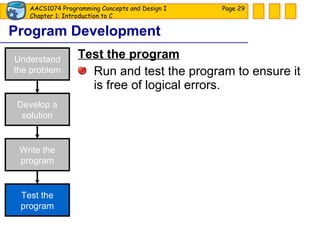
Program Development Test the program Run and test the program to ensure it is free of logical errors. Page  Develop a solution Understand the problem Write the program Test the program
Example 1.1 You would like to install new floor covering in your home and would like to calculate the cost that would be involved. Your plan is as follows: Only the living space will be carpeted. The garage and closets will not be considered. The kitchen and bathrooms will be covered with linoleum. The rest of the house is to be carpeted. Page
You need a computer program to compute the flooring cost. How should you approach this problem? Page
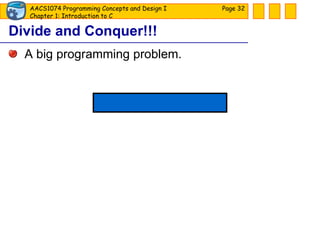
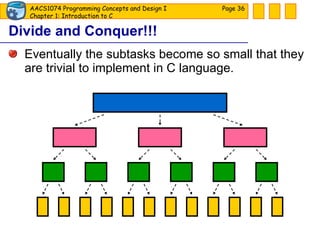
A big programming problem. Divide and Conquer!!! Page
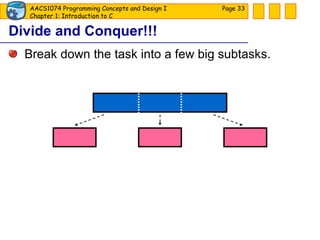
Break down the task into a few big subtasks. Divide and Conquer!!! Page
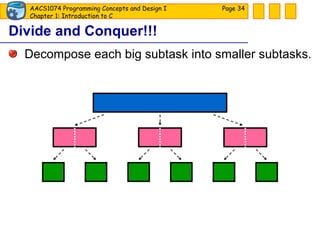
Decompose each big subtask into smaller subtasks. Divide and Conquer!!! Page
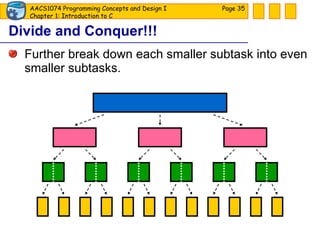
Further break down each smaller subtask into even smaller subtasks. Divide and Conquer!!! Page
Eventually the subtasks become so small that they are trivial to implement in C language. Divide and Conquer!!! Page
Divide and Conquer!!! a.k.a.  stepwise refinement  or  top-down design . Page
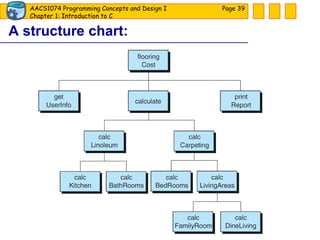
Tool: Structure Chart A hierarchy chart that shows the functional flow through the program. Shows how the program is broken into logical steps. Each step will be a separate module. Page
A structure chart: Page
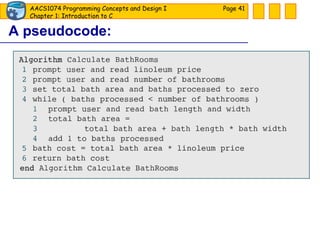
Tool: Pseudocode Use English words to convey program logic.  Contains the logical steps /  algorithms  to accomplish the task. Page
A pseudocode: Page
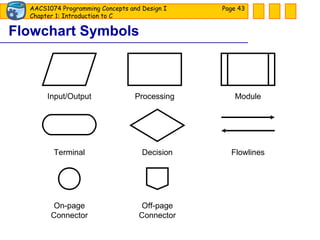
Tool: Flowchart Use standard graphical symbols to represent the logical flow of data through a program. [  show flowchart  ] Page
Flowchart Symbols Page  Input/Output Processing Module Decision Flowlines Terminal Off-page Connector On-page Connector
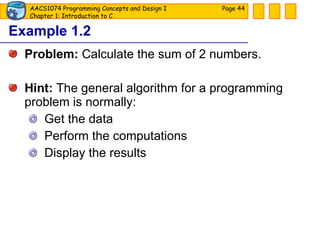
Example 1.2 Problem:  Calculate the sum of 2 numbers. Hint:  The general algorithm for a programming problem is normally: Get the data Perform the computations Display the results Page
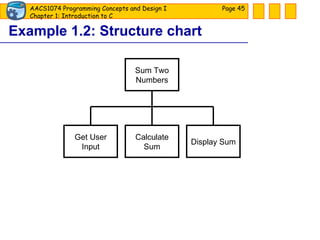
Example 1.2: Structure chart Page  Sum Two Numbers Get User Input Calculate Sum Display Sum
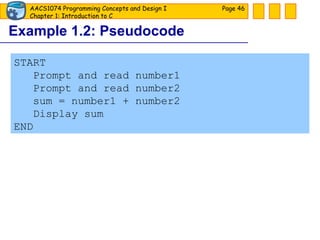
Example 1.2: Pseudocode Page  START Prompt and read number1 Prompt and read number2 sum = number1 + number2 Display sum END
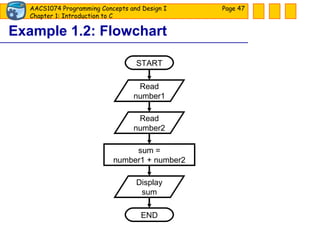
Example 1.2: Flowchart Page  START END Read number1 Read number2 sum = number1 + number2 Display sum
Exercise 1.3 By using structure chart, pseudocode and flowchart, design the solution for a program that reads three (3) numbers from user, calculates their total and average, and displays the calculated total and average on the screen. Page

Slide 01

  • 1.
  • 2.
    1.1 Introduction toComputers Overview of computer system : Page Computer System Software Hardware The physical equipments. E.g. keyboard, mouse, monitor, processor, memory, etc. Collection of programs that tell hardware how to perform tasks.
  • 3.
    1.1 Introduction toComputers 2 categories of computer software : Page Computer System Software Hardware System Software Application Software Programs that manage computer resources. Programs that help users to solve their problems.
  • 4.
    1.1 Introduction toComputers System software and application software : Page Computer System Software Hardware System Software Application Software Operating System System Support Software System Development Software General-Purpose Software Application-Specific Software
  • 5.
    Example of systemsoftware: UNIX, Linux, MS Windows, Mac OS, etc. Disk defragmenter, screen saver, antivirus tool, etc. Programs that creates programs. MS Visual C++ 6.0, MS Visual Studio 2008, Java NetBeans, etc. Page Operating System System Support Software System Development Software
  • 6.
    Example of applicationsoftware: MS Word 2007, Windows Media Player, Window Live Messenger, etc. LRT ticketing system, hotel reservation system, payroll system, etc. Page General-Purpose Software Application-Specific Software
  • 7.
    1.2 Computer LanguagesProgram: A set of instructions that tell computer how to perform tasks. We use a computer / programming language to write program. Categories of computer languages: Machine languages Symbolic languages High-level languages Page
  • 8.
    Evolution of computerlanguages: Page
  • 9.
    Program in machinelanguage: Page
  • 10.
    Machine Language Use binary codes ( 0 s and 1 s). The only language computer can understand. Platform-dependent. Very hard to program. Page 10010010 00110101 10101110
  • 11.
    Program in symboliclanguage: Page
  • 12.
    Symbolic Language a.k.a. assembly language . Use symbolic codes, mnemonics and meaningful abbreviations. Platform-dependent. Easier to program. E.g. MASM 6.15, Turbo Assembler, etc. Page
  • 13.
    Wait a minute…Since computers only understand machine language. Then, how computers recognize other computer languages such as symbolic language? Page ?
  • 14.
    Translate it!!! Programmerwrites a program using preferable programming language. Finally, translate it into machine language by using a translator and the program is ready to run!!! Page Source Program Translator 10001011 11001101 00110011 Machine Language
  • 15.
    Assembler Symbolic languagehas to be translated to machine language before it can be run. Translator: assembler . Page Symbolic Language Machine Language Assembler Source Program Translator 0s and 1s
  • 16.
    Example of high-levellanguage: Page
  • 17.
  • 18.
    High-Level Language a.k.a procedural language . Use English-like codes and mathematical operators. Platform-independent. Very easy to program. E.g. C, Pascal, etc. Page
  • 19.
    Compiler / interpreterHigh-level language has to be translated to machine language before it can be run. Translator: compiler / interpreter. Page High-Level Language Machine Language Compiler / Interpreter Source Program Translator 0s and 1s
  • 20.
    The Compilation ProcessCompiler converts source program into object program (machine language version). If encounters error, program error listing is shown. Object program is then loaded and run. Page Compiler Object Program Results Program Error Listing Data Source Program Machine Language Translator
  • 21.
    1.3 Introduction toC C is a high-level language. For systems and applications programming. Portable / platform-independent: run at other platforms with no or little alterations. Page
  • 22.
    Exercise 1.1 Byfollowing the instructions giving by your lecturer, write, compile and run your first C program – the Hello World program! Page #include <stdio.h> int main(void) { printf(&quot;Hello World!\n&quot;); return 0; }
  • 23.
    Exercise 1.2 Createa new program that display the following lyrics on screen: Page Welcome, welcome all of you Glad you are with us Shake hands, no need to be blue Welcome to you!
  • 24.
    1.4 Program DevelopmentTo develop a program, programmer must complete the following steps: Understand the problem Develop a solution Write the program Test the program Page
  • 25.
    Take time tounderstand the problem and design the solution, before you code the actual program. This reduce the chances of misunderstanding and errors. Hence, the final program can be implemented in a shorter time and with a better quality. Page An old programming proverb: Resist the temptation to code!!!
  • 26.
    Program Development Understandthe problem Carefully study the user requirements. Understand what he wants the program to do and what kind of output he wants to have. Page Develop a solution Understand the problem Write the program Test the program
  • 27.
    Program Development Developa solution Design the logic of the program by using tools such as: Structure chart Pseudocode Flowchart Page Develop a solution Understand the problem Write the program Test the program We will talk about them later.
  • 28.
    Program Development Writethe program Code the actual program by using the preferable programming language. Page Develop a solution Understand the problem Write the program Test the program
  • 29.
    Program Development Testthe program Run and test the program to ensure it is free of logical errors. Page Develop a solution Understand the problem Write the program Test the program
  • 30.
    Example 1.1 Youwould like to install new floor covering in your home and would like to calculate the cost that would be involved. Your plan is as follows: Only the living space will be carpeted. The garage and closets will not be considered. The kitchen and bathrooms will be covered with linoleum. The rest of the house is to be carpeted. Page
  • 31.
    You need acomputer program to compute the flooring cost. How should you approach this problem? Page
  • 32.
    A big programmingproblem. Divide and Conquer!!! Page
  • 33.
    Break down thetask into a few big subtasks. Divide and Conquer!!! Page
  • 34.
    Decompose each bigsubtask into smaller subtasks. Divide and Conquer!!! Page
  • 35.
    Further break downeach smaller subtask into even smaller subtasks. Divide and Conquer!!! Page
  • 36.
    Eventually the subtasksbecome so small that they are trivial to implement in C language. Divide and Conquer!!! Page
  • 37.
    Divide and Conquer!!!a.k.a. stepwise refinement or top-down design . Page
  • 38.
    Tool: Structure ChartA hierarchy chart that shows the functional flow through the program. Shows how the program is broken into logical steps. Each step will be a separate module. Page
  • 39.
  • 40.
    Tool: Pseudocode UseEnglish words to convey program logic. Contains the logical steps / algorithms to accomplish the task. Page
  • 41.
  • 42.
    Tool: Flowchart Usestandard graphical symbols to represent the logical flow of data through a program. [ show flowchart ] Page
  • 43.
    Flowchart Symbols Page Input/Output Processing Module Decision Flowlines Terminal Off-page Connector On-page Connector
  • 44.
    Example 1.2 Problem: Calculate the sum of 2 numbers. Hint: The general algorithm for a programming problem is normally: Get the data Perform the computations Display the results Page
  • 45.
    Example 1.2: Structurechart Page Sum Two Numbers Get User Input Calculate Sum Display Sum
  • 46.
    Example 1.2: PseudocodePage START Prompt and read number1 Prompt and read number2 sum = number1 + number2 Display sum END
  • 47.
    Example 1.2: FlowchartPage START END Read number1 Read number2 sum = number1 + number2 Display sum
  • 48.
    Exercise 1.3 Byusing structure chart, pseudocode and flowchart, design the solution for a program that reads three (3) numbers from user, calculates their total and average, and displays the calculated total and average on the screen. Page