
SKILLWISE- SELENIUM
Selenium 2.x
What is Selenium?
Selenium is a free (open source) automated testing suite for web
applications across different browsers and platforms.
It is quite similar to HP Quick Test Pro (QTP) only that Selenium focuses on
automating web-based applications.
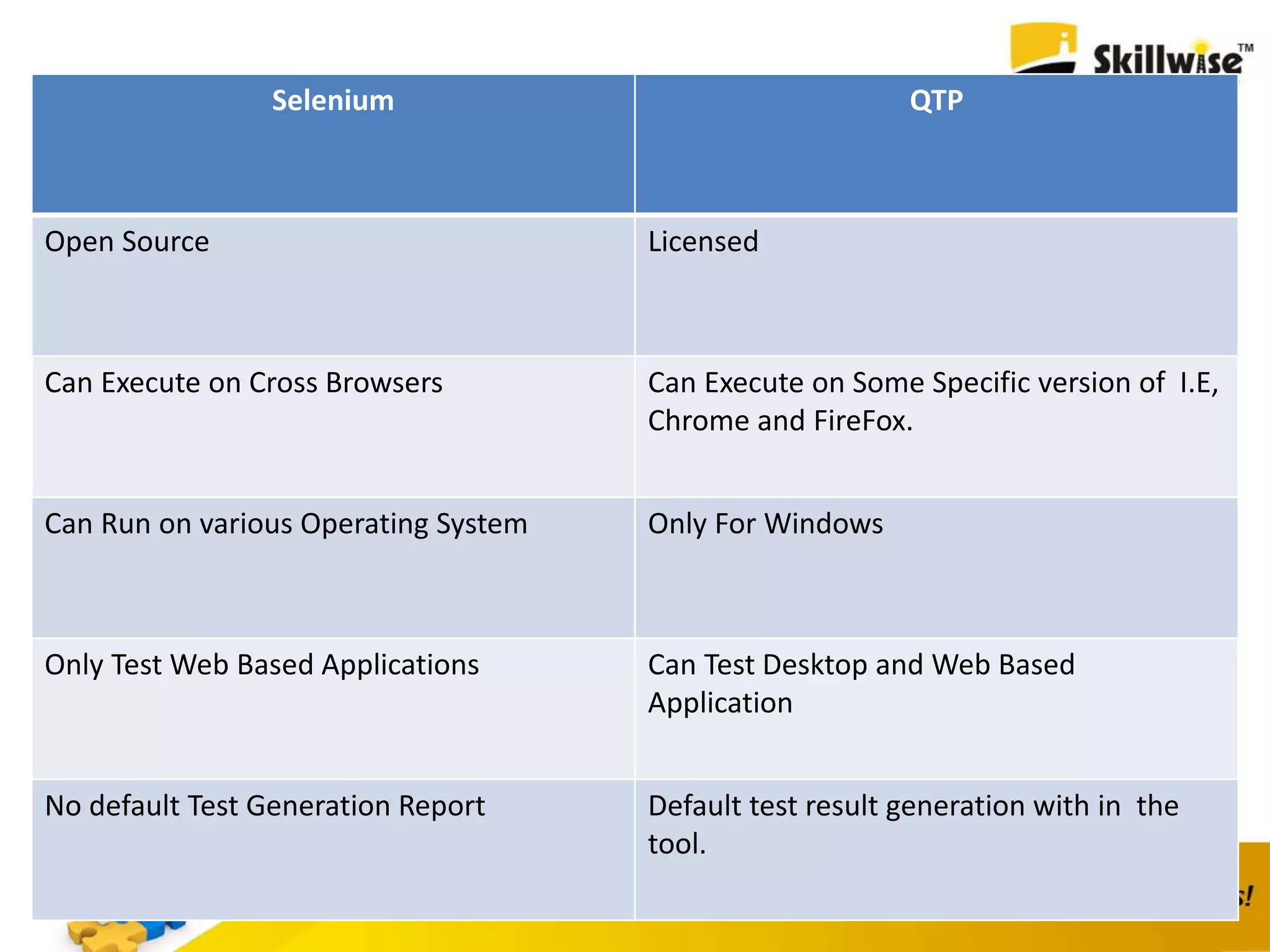
Selenium QTP
Open Source Licensed
Can Execute on Cross Browsers Can Execute on Some Specific version of I.E,
Chrome and FireFox.
Can Run on various Operating System Only For Windows
Only Test Web Based Applications Can Test Desktop and Web Based
Application
No default Test Generation Report Default test result generation with in the
tool.
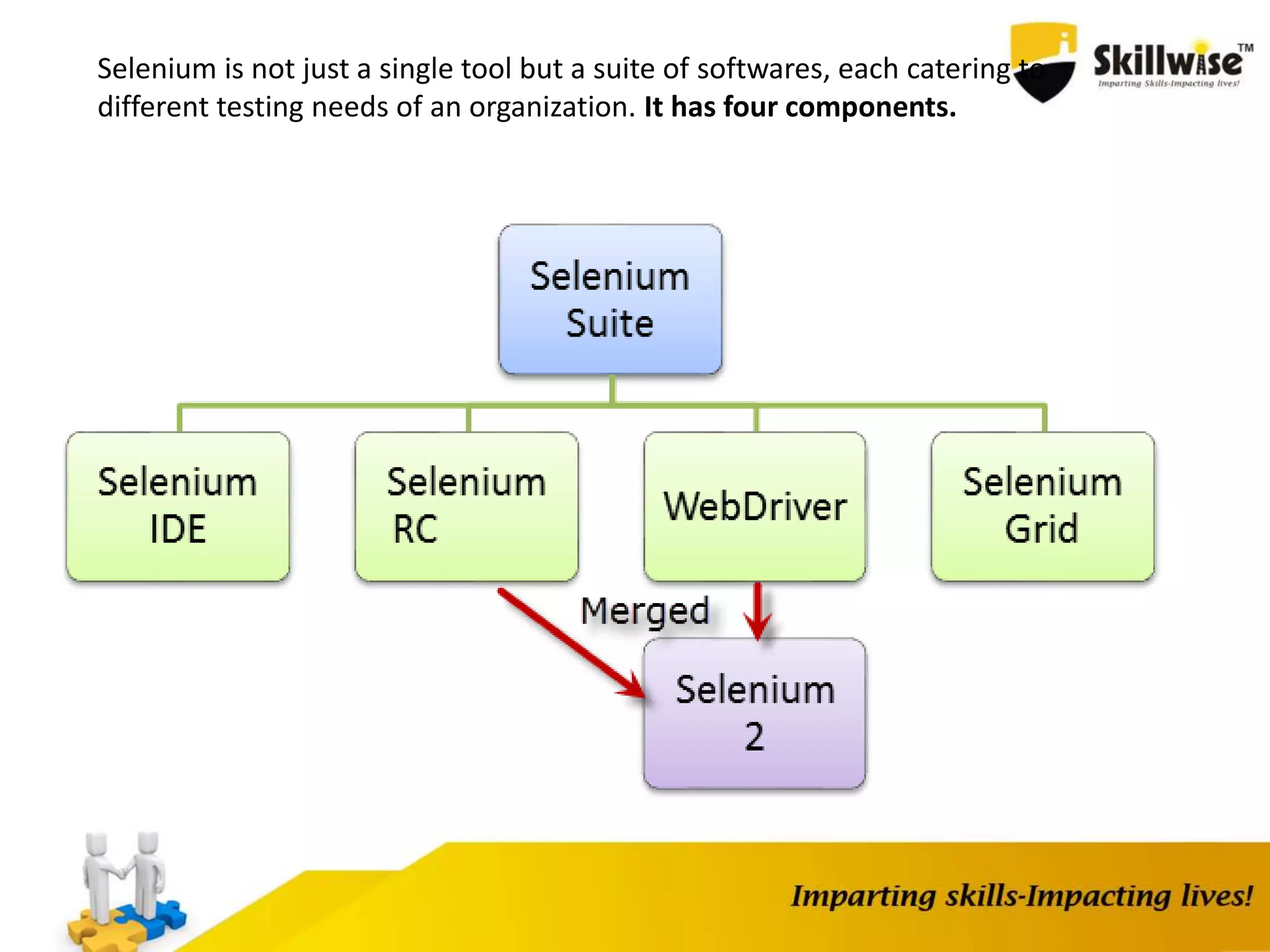
Selenium is not just a single tool but a suite of softwares, each catering to
different testing needs of an organization. It has four components.
Who Develop Selenium?
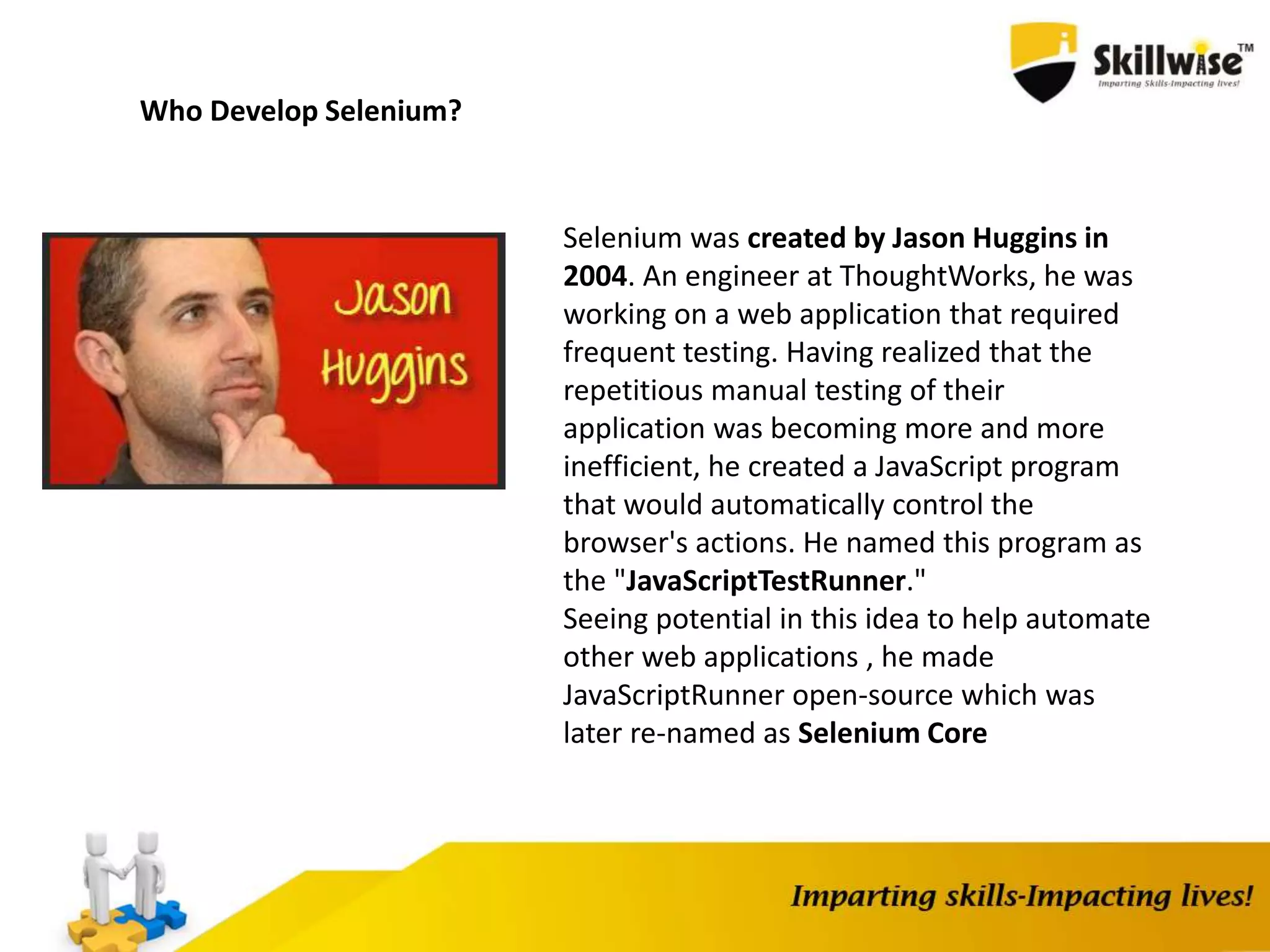
Selenium was created by Jason Huggins in
2004. An engineer at ThoughtWorks, he was
working on a web application that required
frequent testing. Having realized that the
repetitious manual testing of their
application was becoming more and more
inefficient, he created a JavaScript program
that would automatically control the
browser's actions. He named this program as
the "JavaScriptTestRunner."
Seeing potential in this idea to help automate
other web applications , he made
JavaScriptRunner open-source which was
later re-named as Selenium Core
Selenium IDE
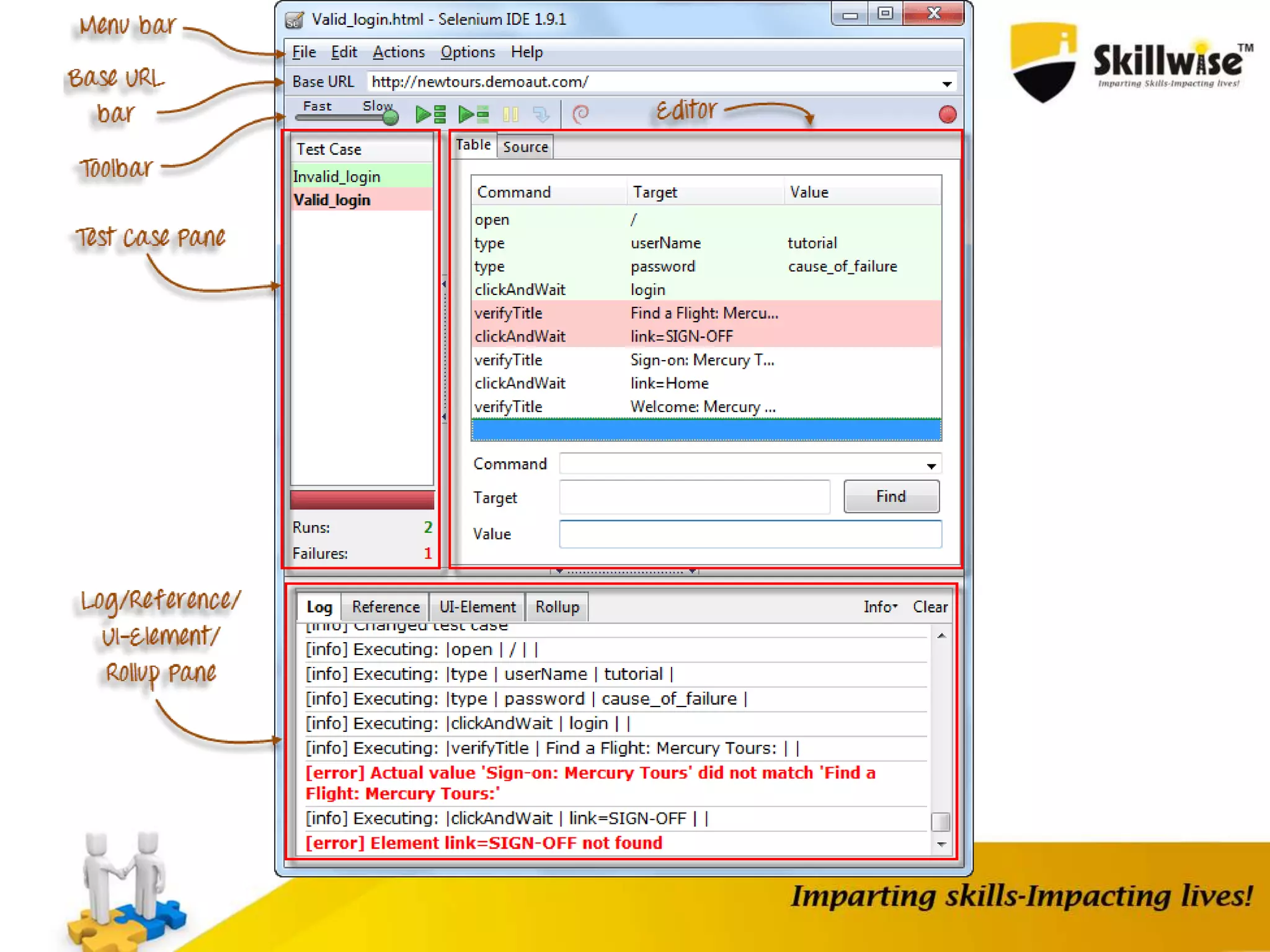
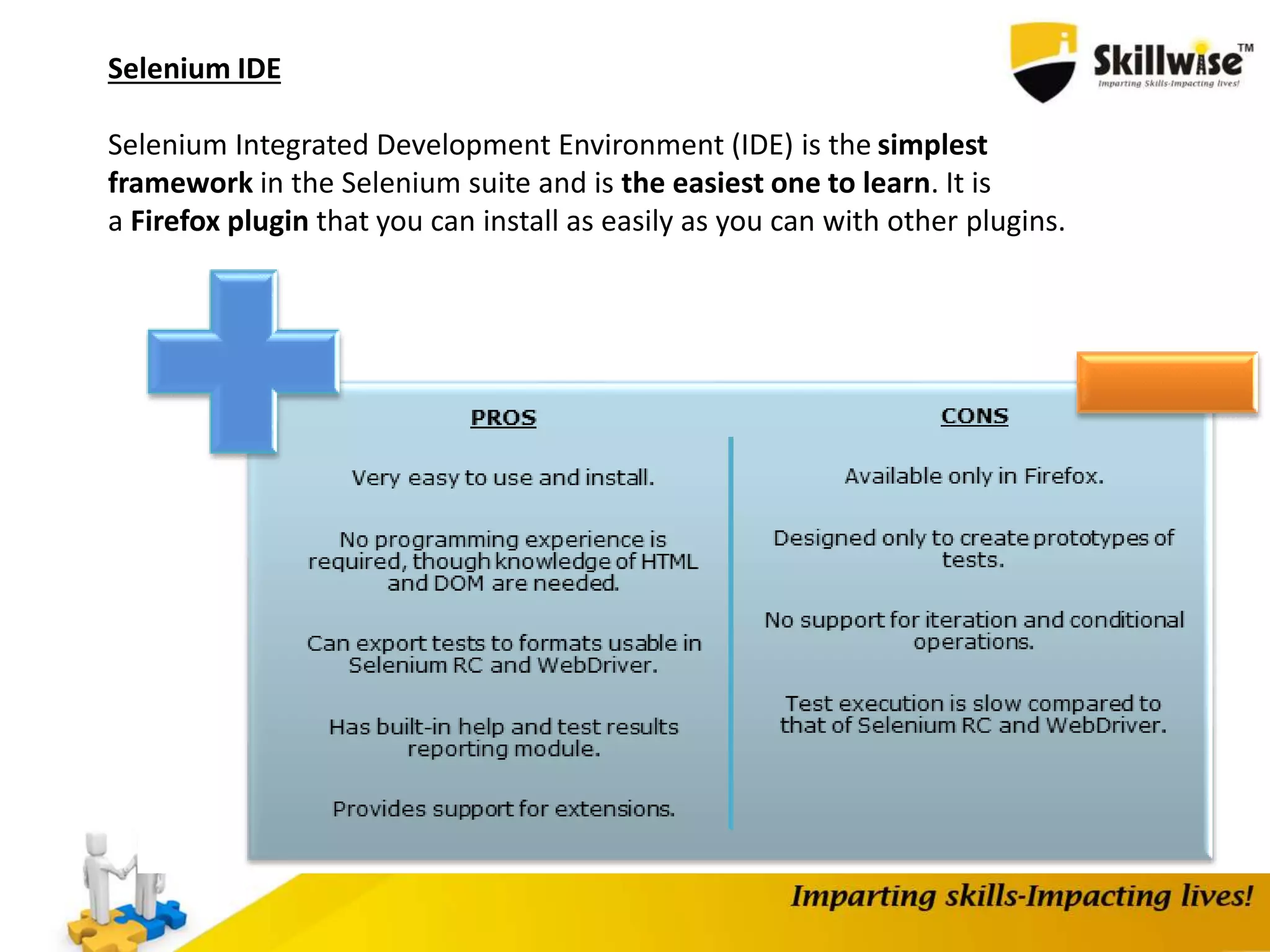
Selenium Integrated Development Environment (IDE) is the simplest
framework in the Selenium suite and is the easiest one to learn. It is
a Firefox plugin that you can install as easily as you can with other plugins.
Installing Selenium IDE , FireBug and
FirePath
1. Selenium IDE Setup
2. Creating Test Case and TestSuite
3. Debugging Selenium IDE (BreakPoint and Power Debugger)
4. Verify vs Assert
5. Handling Alerts, FileUpload
6. Pattern Matching
a) globbing
eg.
command Target Value
verifyTextPresent id=txt glob: taxyear*
globbing can be * ? []
[] - used to match any single character
e.g [0-9]
e.g [a-c]
b) Exact
e.g.
command Target Value
verifyTextPresent id=txt exact: amit[0-9]
c) RegEx
command Target Value
verifyTextPresent id=txt regexp: [Aa]mit[0-9]+
command Target Value
verifyTextPresent id=txt regexpi: amit[0-9]+
Create a Script Manually with Firebug
Now, we shall recreate the same test case manually, by typing in the commands.
This time, we will need to use Firebug.
Step 1 Open Firefox and Selenium IDE.
Type the base URL
The record button should be OFF.
Step 2 Click on the topmost blank line in the Editor.
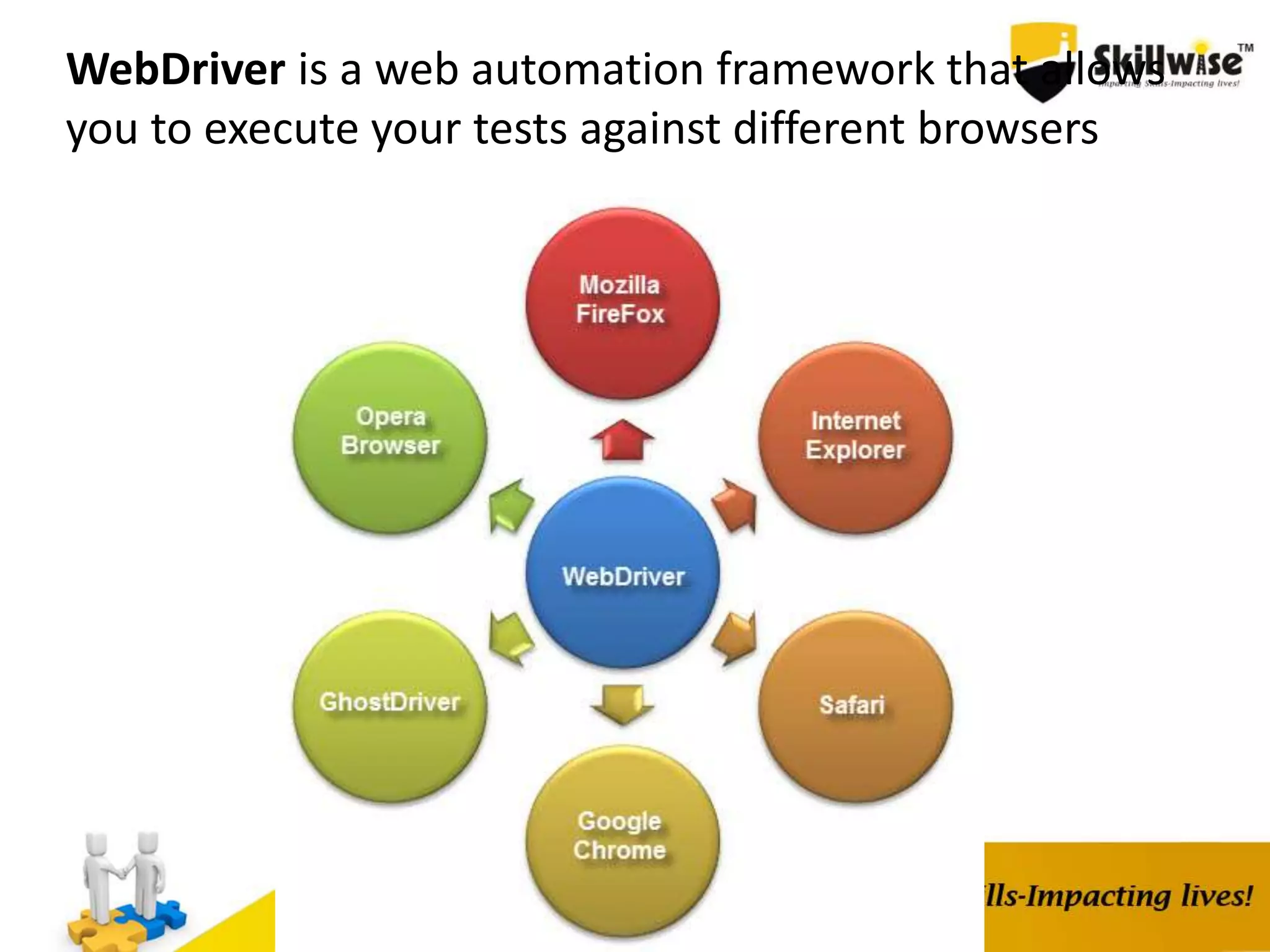
WebDriver is a web automation framework that allows
you to execute your tests against different browsers
WebDriver also enables you to use a programming language in creating your
test scripts(not possible in Selenium IDE).
You can now use conditional operations like if-then-else or switch-case
You can also perform looping like do-while.
Following programming languages are supported by WebDriver
•Java
•.Net
•PHP
•Python
•Perl
•Ruby
You do not have to know all of them. You just need to be knowledgeable in one
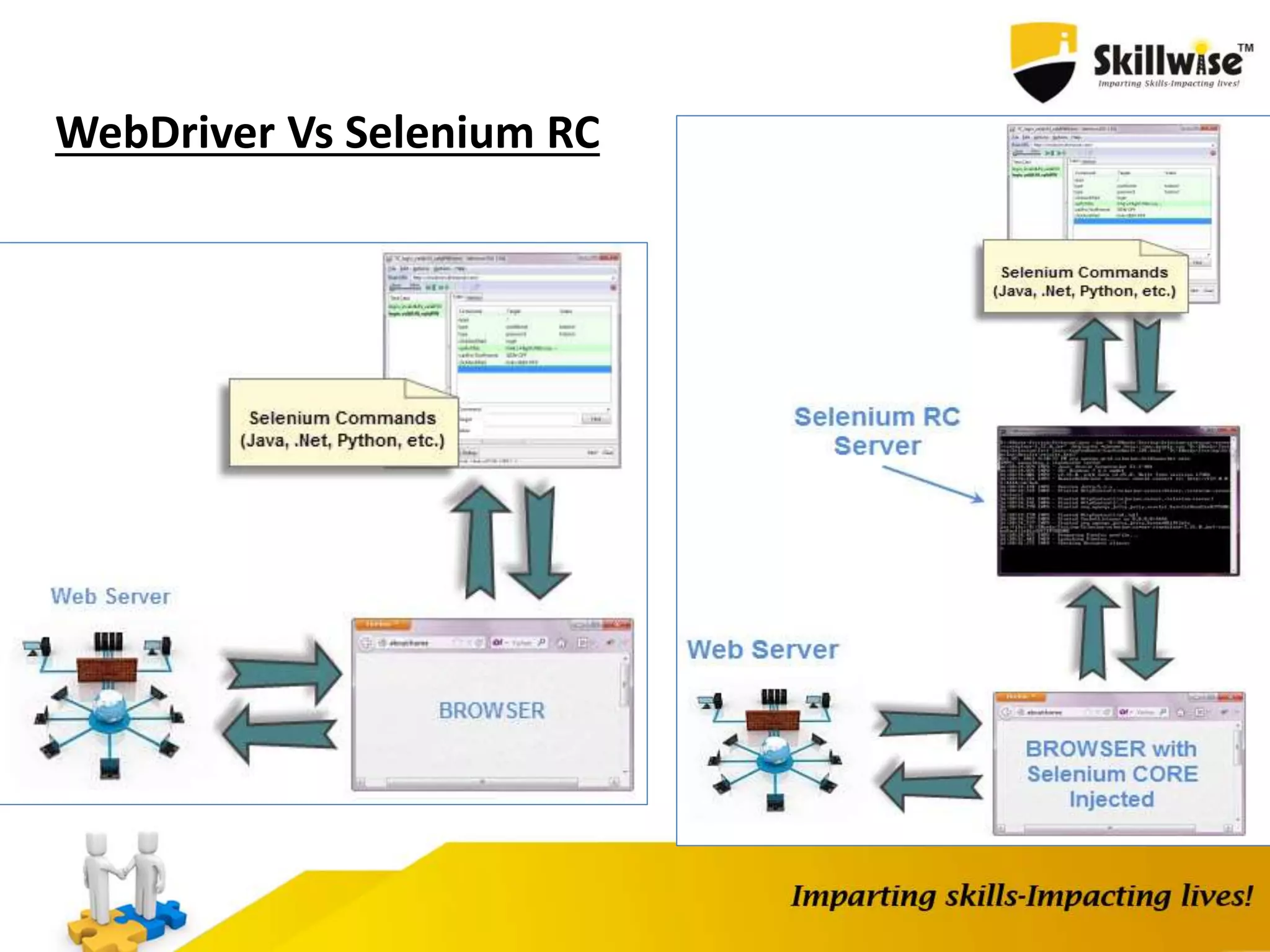
WebDriver Vs Selenium RC
Setup WebDriver
Step 1 - Install Java on your computer
Step 2 - Install Eclipse IDE
Step-3 Download WebDriver
http://docs.seleniumhq.org/download/
Step -4
Download Chrome Driver
http://chromedriver.storage.googleapis.com/index.html?path=2.14/
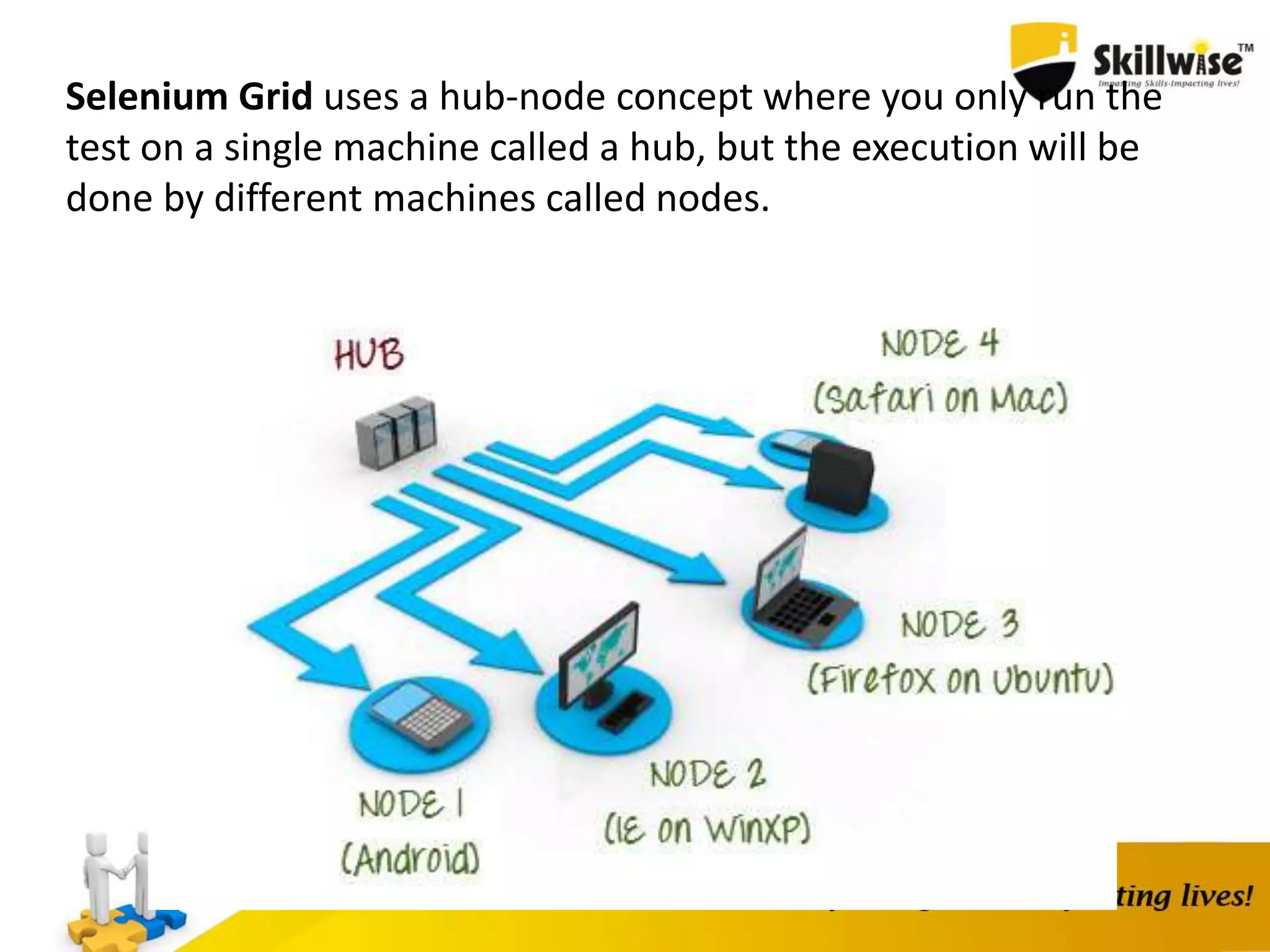
Selenium Grid uses a hub-node concept where you only run the
test on a single machine called a hub, but the execution will be
done by different machines called nodes.
When to Use Selenium Grid?
You should use Selenium Grid when you want to do either
one or both of following :
Run your tests against different browsers, operating systems,
and machines all at the same time.This will ensure that the
application you are testing is fully compatible with a wide
range of browser-OS combinations.
Save time in execution of your test suites. If you set up
Selenium Grid to run, say, 4 tests at a time, then you would
be able to finish the whole suite around 4 times faster.
Download Selenium Server from
http://docs.seleniumhq.org/download/
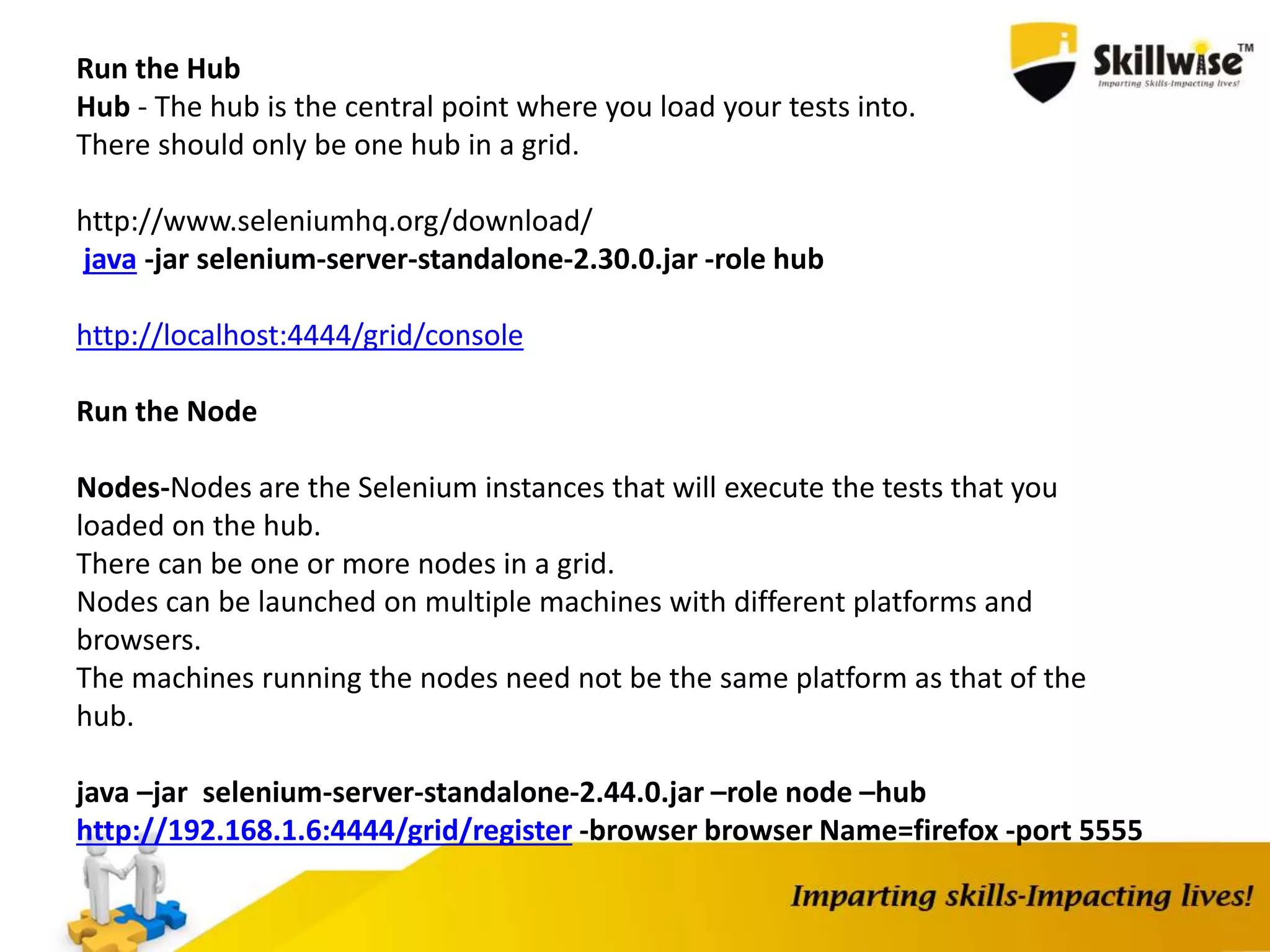
Run the Hub
Hub - The hub is the central point where you load your tests into.
There should only be one hub in a grid.
http://www.seleniumhq.org/download/
java -jar selenium-server-standalone-2.30.0.jar -role hub
http://localhost:4444/grid/console
Run the Node
Nodes-Nodes are the Selenium instances that will execute the tests that you
loaded on the hub.
There can be one or more nodes in a grid.
Nodes can be launched on multiple machines with different platforms and
browsers.
The machines running the nodes need not be the same platform as that of the
hub.
java –jar selenium-server-standalone-2.44.0.jar –role node –hub
http://192.168.1.6:4444/grid/register -browser browser Name=firefox -port 5555
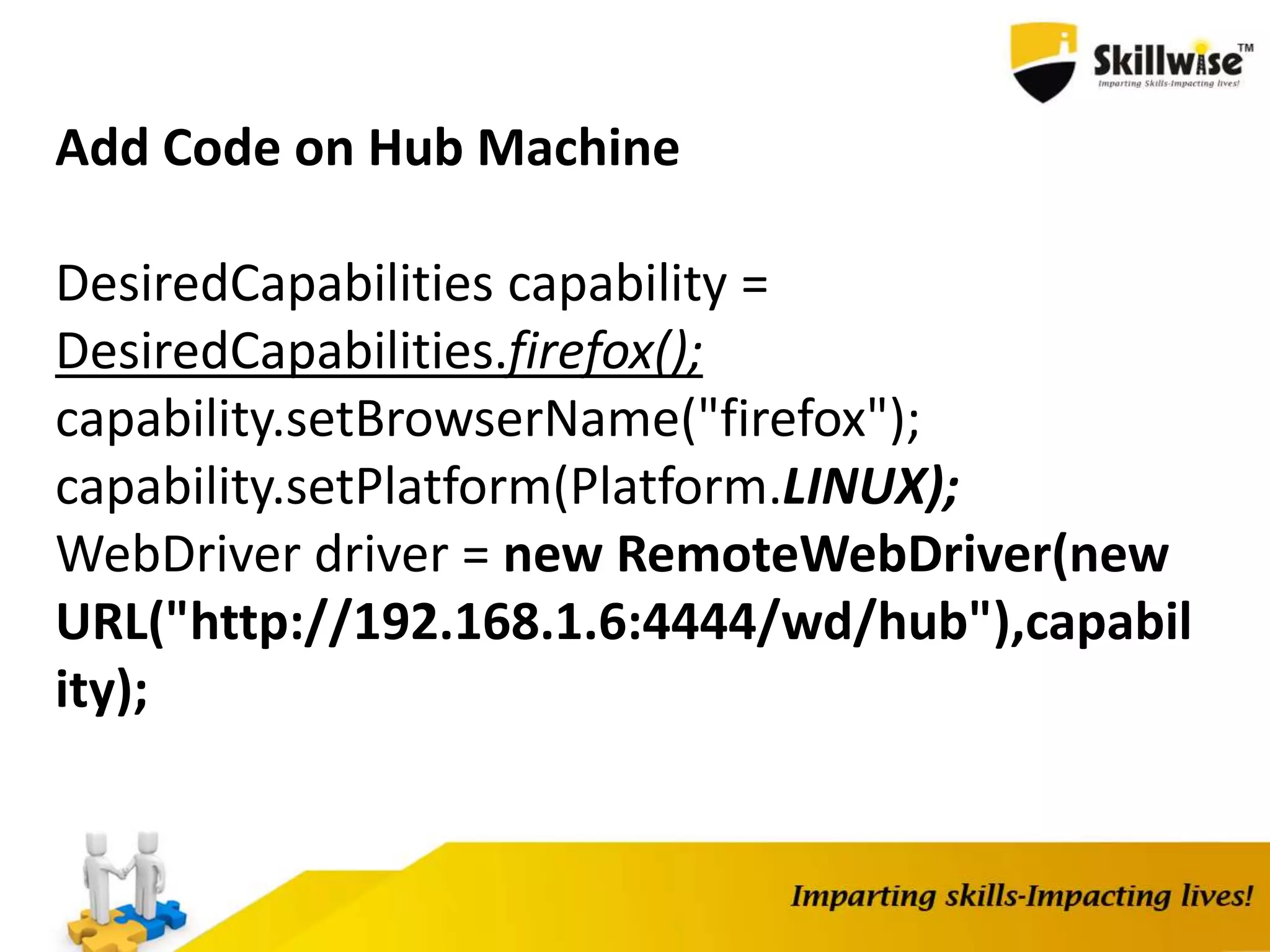
Add Code on Hub Machine
DesiredCapabilities capability =
DesiredCapabilities.firefox();
capability.setBrowserName("firefox");
capability.setPlatform(Platform.LINUX);
WebDriver driver = new RemoteWebDriver(new
URL("http://192.168.1.6:4444/wd/hub"),capabil
ity);
SKILLWISE_SELENIUM

SKILLWISE_SELENIUM

  • 1.
  • 3.
  • 4.
    What is Selenium? Seleniumis a free (open source) automated testing suite for web applications across different browsers and platforms. It is quite similar to HP Quick Test Pro (QTP) only that Selenium focuses on automating web-based applications.
  • 5.
    Selenium QTP Open SourceLicensed Can Execute on Cross Browsers Can Execute on Some Specific version of I.E, Chrome and FireFox. Can Run on various Operating System Only For Windows Only Test Web Based Applications Can Test Desktop and Web Based Application No default Test Generation Report Default test result generation with in the tool.
  • 6.
    Selenium is notjust a single tool but a suite of softwares, each catering to different testing needs of an organization. It has four components.
  • 7.
    Who Develop Selenium? Seleniumwas created by Jason Huggins in 2004. An engineer at ThoughtWorks, he was working on a web application that required frequent testing. Having realized that the repetitious manual testing of their application was becoming more and more inefficient, he created a JavaScript program that would automatically control the browser's actions. He named this program as the "JavaScriptTestRunner." Seeing potential in this idea to help automate other web applications , he made JavaScriptRunner open-source which was later re-named as Selenium Core
  • 8.
    Selenium IDE Selenium IntegratedDevelopment Environment (IDE) is the simplest framework in the Selenium suite and is the easiest one to learn. It is a Firefox plugin that you can install as easily as you can with other plugins.
  • 9.
    Installing Selenium IDE, FireBug and FirePath
  • 10.
    1. Selenium IDESetup 2. Creating Test Case and TestSuite 3. Debugging Selenium IDE (BreakPoint and Power Debugger) 4. Verify vs Assert 5. Handling Alerts, FileUpload 6. Pattern Matching a) globbing eg. command Target Value verifyTextPresent id=txt glob: taxyear* globbing can be * ? [] [] - used to match any single character e.g [0-9] e.g [a-c] b) Exact e.g. command Target Value verifyTextPresent id=txt exact: amit[0-9] c) RegEx command Target Value verifyTextPresent id=txt regexp: [Aa]mit[0-9]+ command Target Value verifyTextPresent id=txt regexpi: amit[0-9]+
  • 15.
    Create a ScriptManually with Firebug Now, we shall recreate the same test case manually, by typing in the commands. This time, we will need to use Firebug. Step 1 Open Firefox and Selenium IDE. Type the base URL The record button should be OFF. Step 2 Click on the topmost blank line in the Editor.
  • 16.
    WebDriver is aweb automation framework that allows you to execute your tests against different browsers
  • 17.
    WebDriver also enablesyou to use a programming language in creating your test scripts(not possible in Selenium IDE). You can now use conditional operations like if-then-else or switch-case You can also perform looping like do-while. Following programming languages are supported by WebDriver •Java •.Net •PHP •Python •Perl •Ruby You do not have to know all of them. You just need to be knowledgeable in one
  • 18.
  • 19.
    Setup WebDriver Step 1- Install Java on your computer Step 2 - Install Eclipse IDE Step-3 Download WebDriver http://docs.seleniumhq.org/download/ Step -4 Download Chrome Driver http://chromedriver.storage.googleapis.com/index.html?path=2.14/
  • 20.
    Selenium Grid usesa hub-node concept where you only run the test on a single machine called a hub, but the execution will be done by different machines called nodes.
  • 21.
    When to UseSelenium Grid? You should use Selenium Grid when you want to do either one or both of following : Run your tests against different browsers, operating systems, and machines all at the same time.This will ensure that the application you are testing is fully compatible with a wide range of browser-OS combinations. Save time in execution of your test suites. If you set up Selenium Grid to run, say, 4 tests at a time, then you would be able to finish the whole suite around 4 times faster.
  • 22.
    Download Selenium Serverfrom http://docs.seleniumhq.org/download/
  • 23.
    Run the Hub Hub- The hub is the central point where you load your tests into. There should only be one hub in a grid. http://www.seleniumhq.org/download/ java -jar selenium-server-standalone-2.30.0.jar -role hub http://localhost:4444/grid/console Run the Node Nodes-Nodes are the Selenium instances that will execute the tests that you loaded on the hub. There can be one or more nodes in a grid. Nodes can be launched on multiple machines with different platforms and browsers. The machines running the nodes need not be the same platform as that of the hub. java –jar selenium-server-standalone-2.44.0.jar –role node –hub http://192.168.1.6:4444/grid/register -browser browser Name=firefox -port 5555
  • 24.
    Add Code onHub Machine DesiredCapabilities capability = DesiredCapabilities.firefox(); capability.setBrowserName("firefox"); capability.setPlatform(Platform.LINUX); WebDriver driver = new RemoteWebDriver(new URL("http://192.168.1.6:4444/wd/hub"),capabil ity);