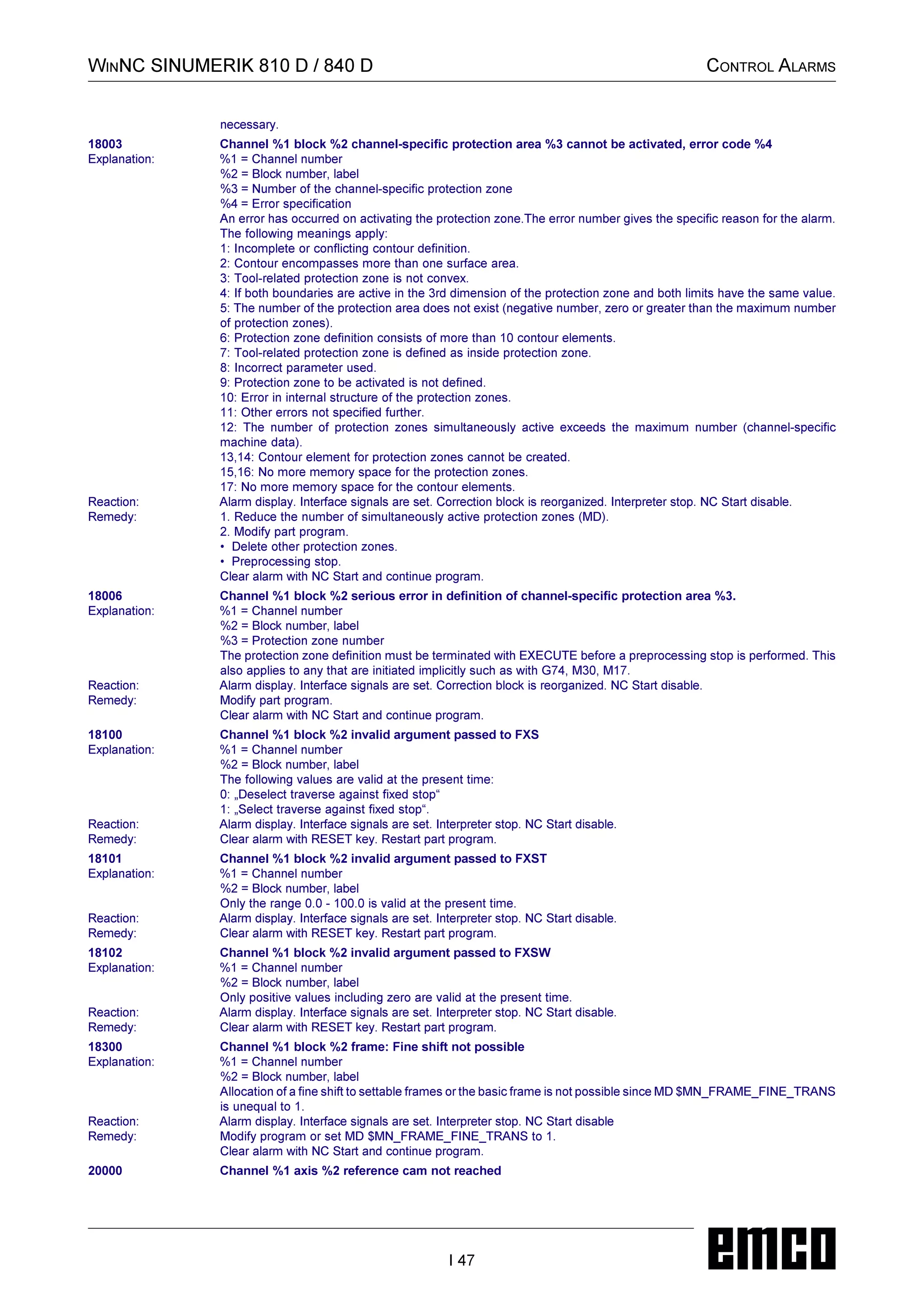
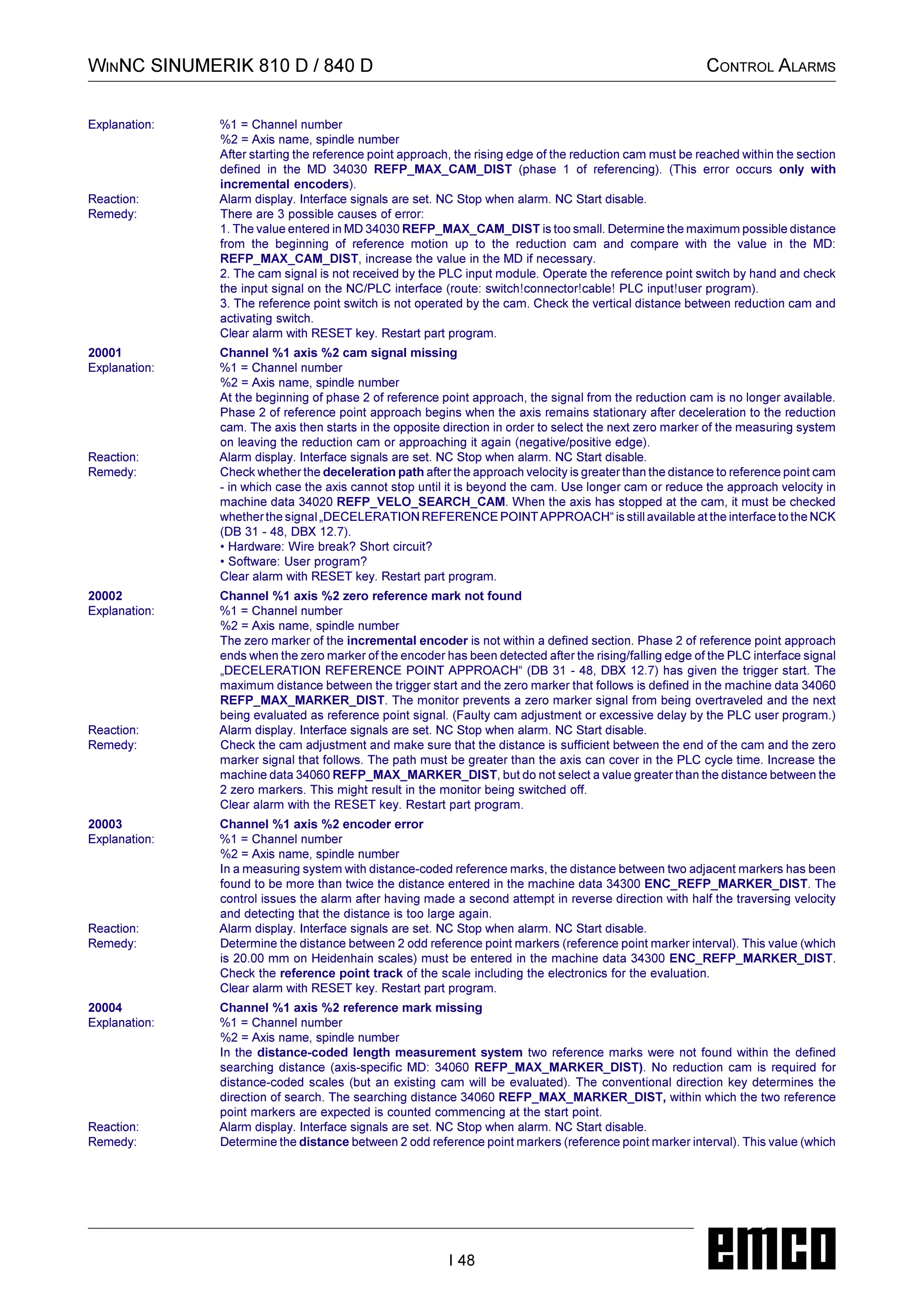
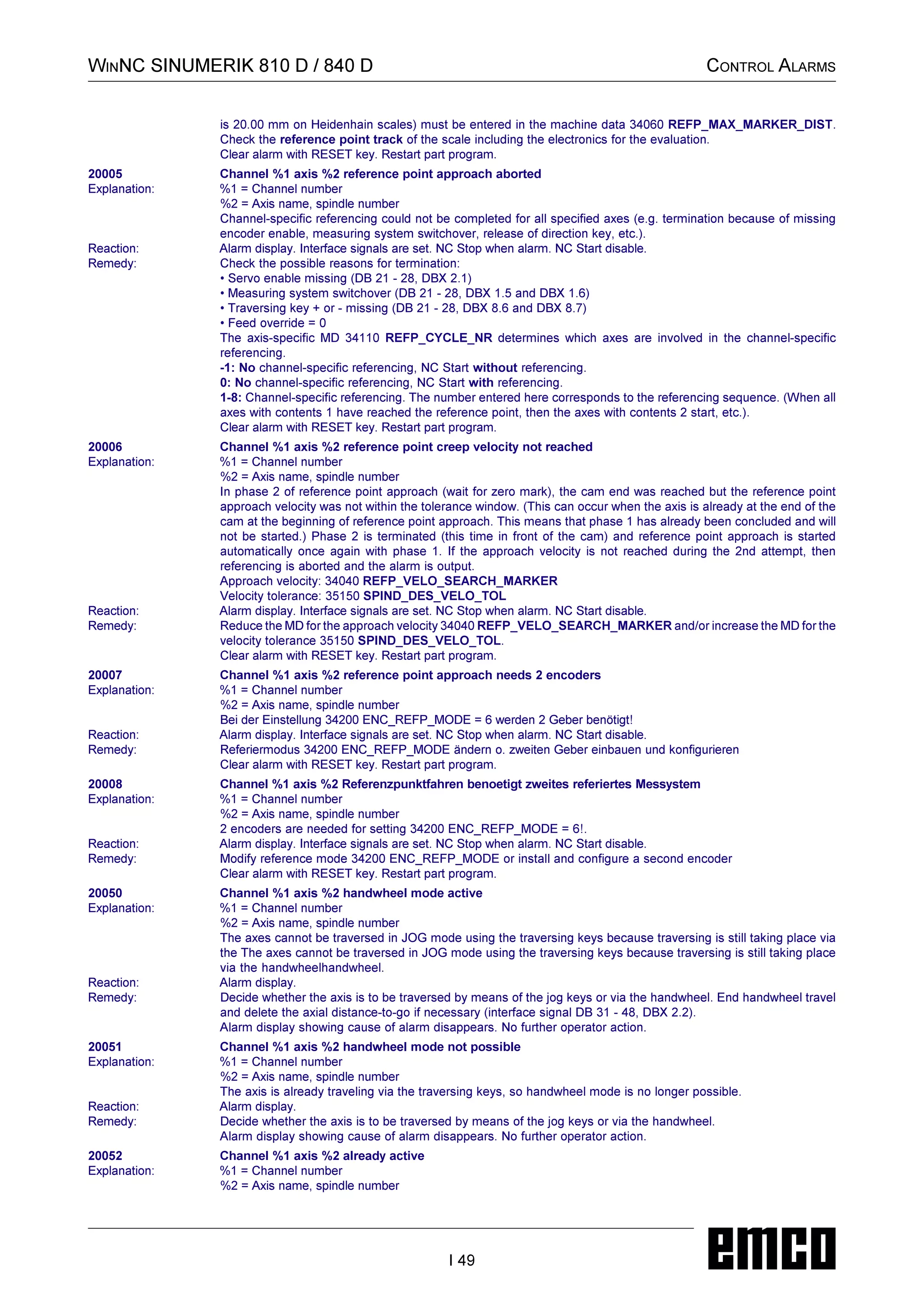
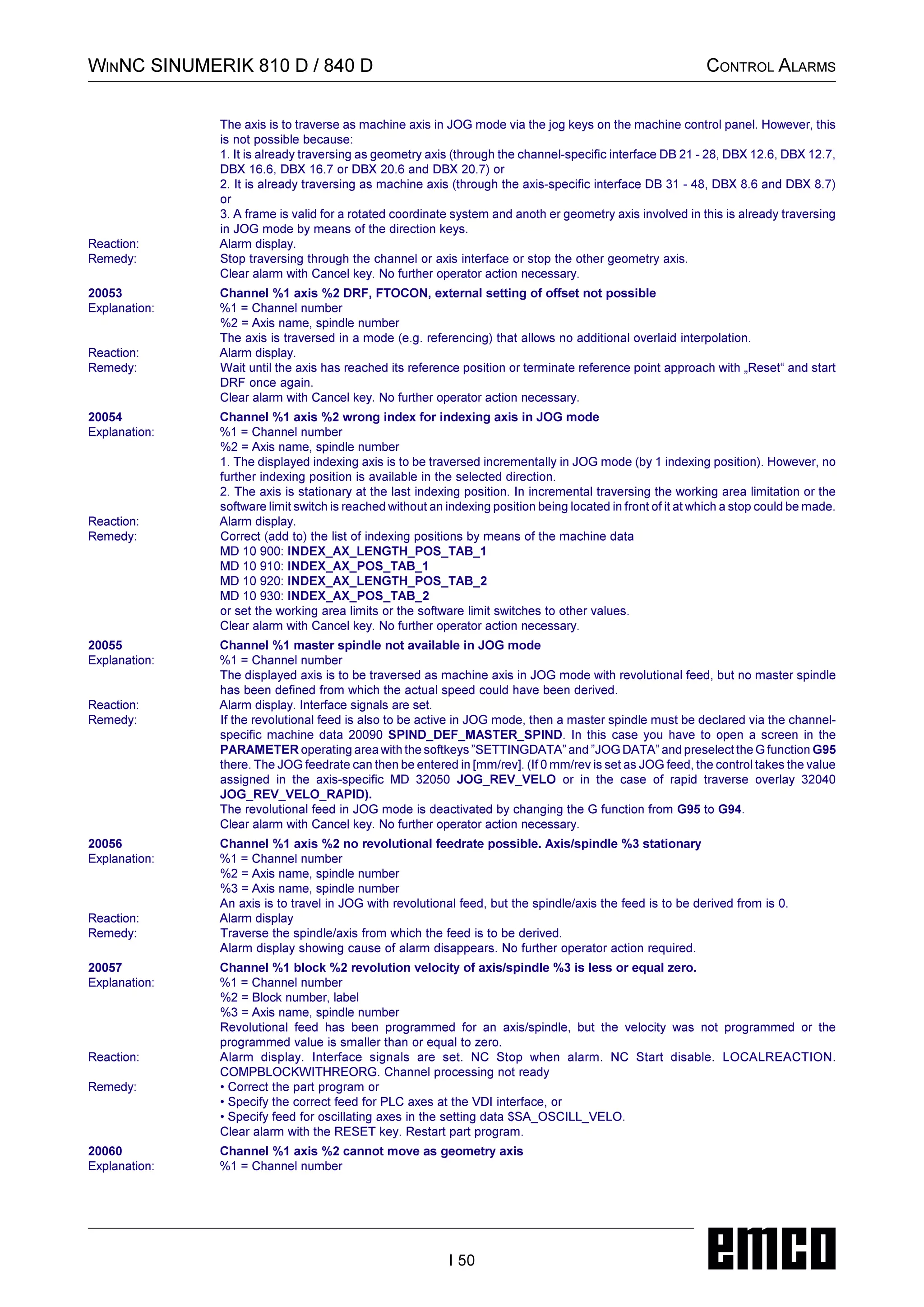
ALARMS AND MESSAGES
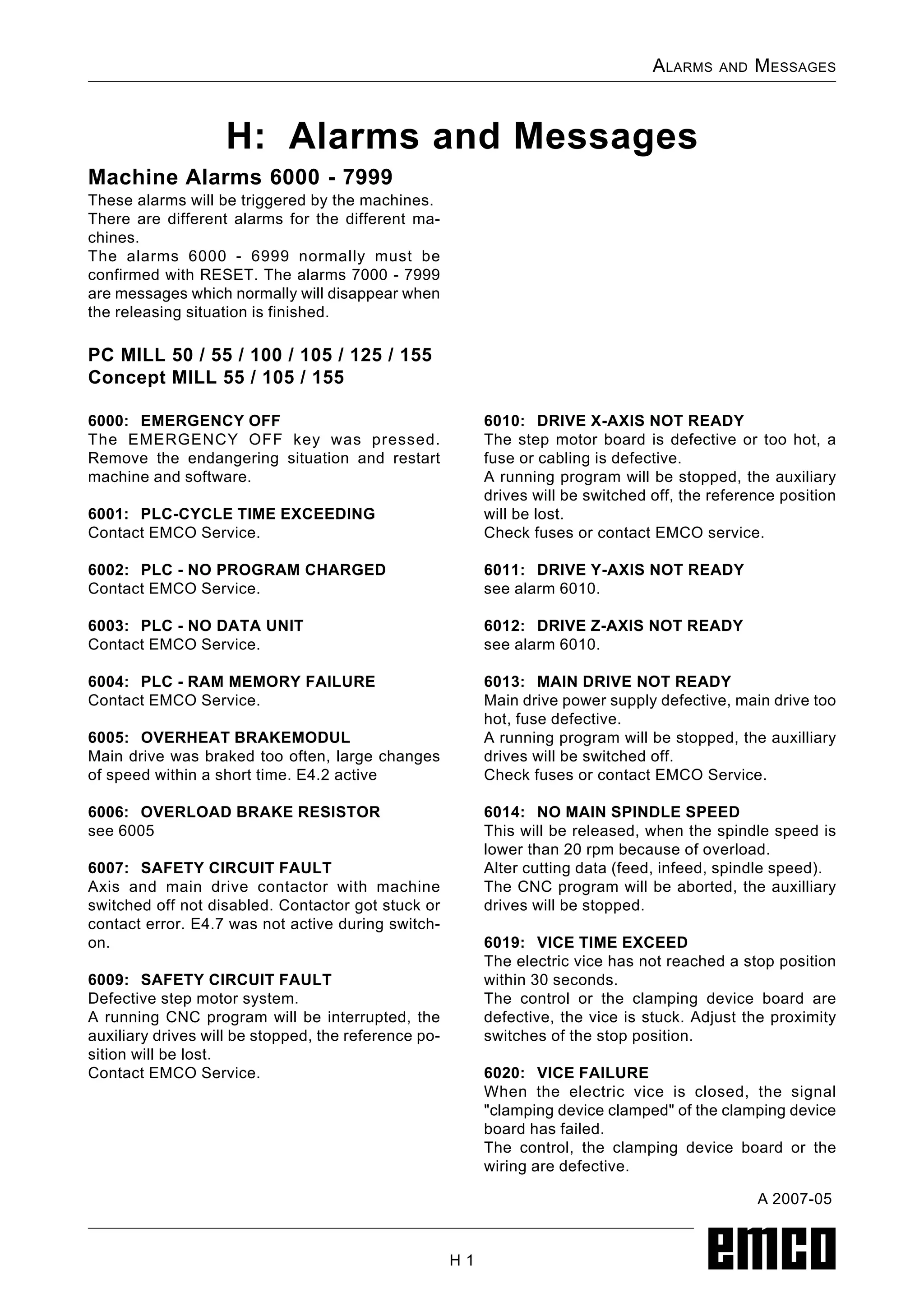
H: Alarms and Messages
H 1
Machine Alarms 6000 - 7999
These alarms will be triggered by the machines.
There are different alarms for the different ma-chines.
The alarms 6000 - 6999 normally must be
confirmed with RESET. The alarms 7000 - 7999
are messages which normally will disappear when
the releasing situation is finished.
PC MILL 50 / 55 / 100 / 105 / 125 / 155
Concept MILL 55 / 105 / 155
6000: EMERGENCY OFF
The EMERGENCY OFF key was pressed.
Remove the endangering situation and restart
machine and software.
6001: PLC-CYCLE TIME EXCEEDING
Contact EMCO Service.
6002: PLC - NO PROGRAM CHARGED
Contact EMCO Service.
6003: PLC - NO DATA UNIT
Contact EMCO Service.
6004: PLC - RAM MEMORY FAILURE
Contact EMCO Service.
6005: OVERHEAT BRAKEMODUL
Main drive was braked too often, large changes
of speed within a short time. E4.2 active
6006: OVERLOAD BRAKE RESISTOR
see 6005
6007: SAFETY CIRCUIT FAULT
Axis and main drive contactor with machine
switched off not disabled. Contactor got stuck or
contact error. E4.7 was not active during switch-on.
6009: SAFETY CIRCUIT FAULT
Defective step motor system.
A running CNC program will be interrupted, the
auxiliary drives will be stopped, the reference po-sition
will be lost.
Contact EMCO Service.
6010: DRIVE X-AXIS NOT READY
The step motor board is defective or too hot, a
fuse or cabling is defective.
A running program will be stopped, the auxiliary
drives will be switched off, the reference position
will be lost.
Check fuses or contact EMCO service.
6011: DRIVE Y-AXIS NOT READY
see alarm 6010.
6012: DRIVE Z-AXIS NOT READY
see alarm 6010.
6013: MAIN DRIVE NOT READY
Main drive power supply defective, main drive too
hot, fuse defective.
A running program will be stopped, the auxilliary
drives will be switched off.
Check fuses or contact EMCO Service.
6014: NO MAIN SPINDLE SPEED
This will be released, when the spindle speed is
lower than 20 rpm because of overload.
Alter cutting data (feed, infeed, spindle speed).
The CNC program will be aborted, the auxilliary
drives will be stopped.
6019: VICE TIME EXCEED
The electric vice has not reached a stop position
within 30 seconds.
The control or the clamping device board are
defective, the vice is stuck. Adjust the proximity
switches of the stop position.
6020: VICE FAILURE
When the electric vice is closed, the signal
clamping device clamped of the clamping device
board has failed.
The control, the clamping device board or the
wiring are defective.
A 2007-05
3214.
ALARMS AND MESSAGES
H 2
6022: CLAMPING DEVICE BOARD
DEFECTIVE
The signal clamping device clamped is
constantly released, although no command has
been given.
Replace the board.
6024: MACHINE DOOR OPEN
The door was opened while a machine movement.
The program will be aborted.
6027: DOOR LIMIT SWITCH DEFECTIVE
The limit switch of the automatic door is displaced,
defective, wrong cabled.
Contact EMCO service.
6028: DOOR TIMEOUT
The automatic door stucks, the pressured air
supply is insufficient, the limit switch is displaced.
Check door, pressured air supply, limit switch or
contact EMCO service.
6030: NO PART CLAMPED
No workpiece inserted, vice cheek displaced, con-trol
cam displaced, hardware defective.
Adjust or contact EMCO service.
6040: TOOL TURRET INDEX FAILURE
After WZW procedure drum pressed down by Z-axis.
Spindle position wrong or mechanical
defect. E4.3=0 in lower state
6041: TOOL CHANGE TIMEOUT
Tool drum stucks (collision?), main drive not
ready, fuse defective, hardware defective.
A running CNC program will be stopped.
Check for collisions, check fuses or contact
EMCO service.
6043-6046: TOOL DISK POSITION FAULT
Position error of main drive, error of position
supervising (inductive proximity switch defective
or disadjusted, drum allowance), fuse defective,
hardware defective.
The Z axis could have been slipped out of the
toothing while the machine was switched off.
A running CNC program will be stopped.
Contact EMCO service.
6047: TOOL DISK UNLOCKED
Tool drum turned out of locked position, inductive
proximity switch defective or disadjusted, fuse de-fective,
hardware defective.
A running CNC program will be interrupted.
Contact EMCO service.
When the tool drum is turned out of locked position
(no defect), act as following:
Turn the drum into locking position manually
Change into MANUAL (JOG) mode.
Turn the key switch. Traverse the Z slide upwards,
until the alarm disappears.
6048: DIVIDING TIME EXCEEDED
Dividing head stucks, insufficient pressured air
supply, hardware defective.
Check for collision, check pressured air supply or
contact EMCO service.
6049: INTERLOCKING TIME EXCEEDED
see alarm 6048
6050: M25 AT RUNNING MAIN SPINDLE
6069: CLAMPING FORTANI NOT OPEN
When opening the clamping pressure switch does
not fall within 400ms. Pressure switch defective
or mechanical problem. E22.3
6070: PRESSURE SWITCH FOR TANI MIS-SING
When closing the clamping pressure switch does
not respond. No compressed air or mechanical
problem. E22.3
6071: DIVIDING DEVICE NOT READY
Servo Ready Signal from frequency converter
missing. Excess temperature drive TANI or
frequency converter not ready for operation.
3218.
ALARMS AND MESSAGES
H 3
6072: VICE NOT READY
Attempt to start the spindle with an open vice or
without clamped workpiece.
Vice stucks mechanically, insufficient compressed
air supply, compressed air switch defective, fuse
defective, hardware defective.
Check the fuses or contact EMCO service.
6073: DIVIDING DEVICE NOT READY
7000: INVALID TOOLNUMBER PRO-GRAMMED
The tool position was programmed larger than
10.
The CNC program will be stopped.
Interrupt program with RESET and correct the
program.
7001: NO M6 PROGRAMMED
For an automatic tool change you also have to
program a M6 after the T word.
7007: FEED STOP!
The axes have been stopped by the robotics
interface (robotics entry FEEDHOLD).
7016: SWITCH ON AUXILIARY DRIVES
The auxiliary drives are off. Press the AUX ON
key for at least 0.5 sec. (to avoid accidentally
switching on) to switch on the auxiliary drives.
7017: REFERENCE MACHINE
Approach the reference point.
When the reference point is not active, manual
movements are possible only with key switch at
position setting operation.
7018: TURN KEY SWITCH
With NC-Start the key switch was in position
setting operation.
NC-Start is locked.
Turn the key switch in the position automatic to
run a program.
7020: SPECIAL OPERATION MODE ACTIVE
Special operation mode: The machine door is
opened, the auxiliary drives are switched on, the
key switch is in position setting operation and
the consent key is pressed.
Manual traversing the axes is possible with open
door. Swivelling the tool turret is not possible with
open door. Running a CNC program is possible
only with standing spindle (DRYRUN) and SIN-GLE
block operation.
For safety: If the consent key is pressed for more
than 40 sec. the function of this key is interrupted,
the consent key must be released and pressed
again.
7021: INITIALIZE TOOL TURRET
The tool turret operating was interrupted.
No traversing operation is possible.
Press tool turret key in JOG operation. Message
occurs after alarm 6040.
7022: INITIALIZE TOOL TURRET !
see 7021
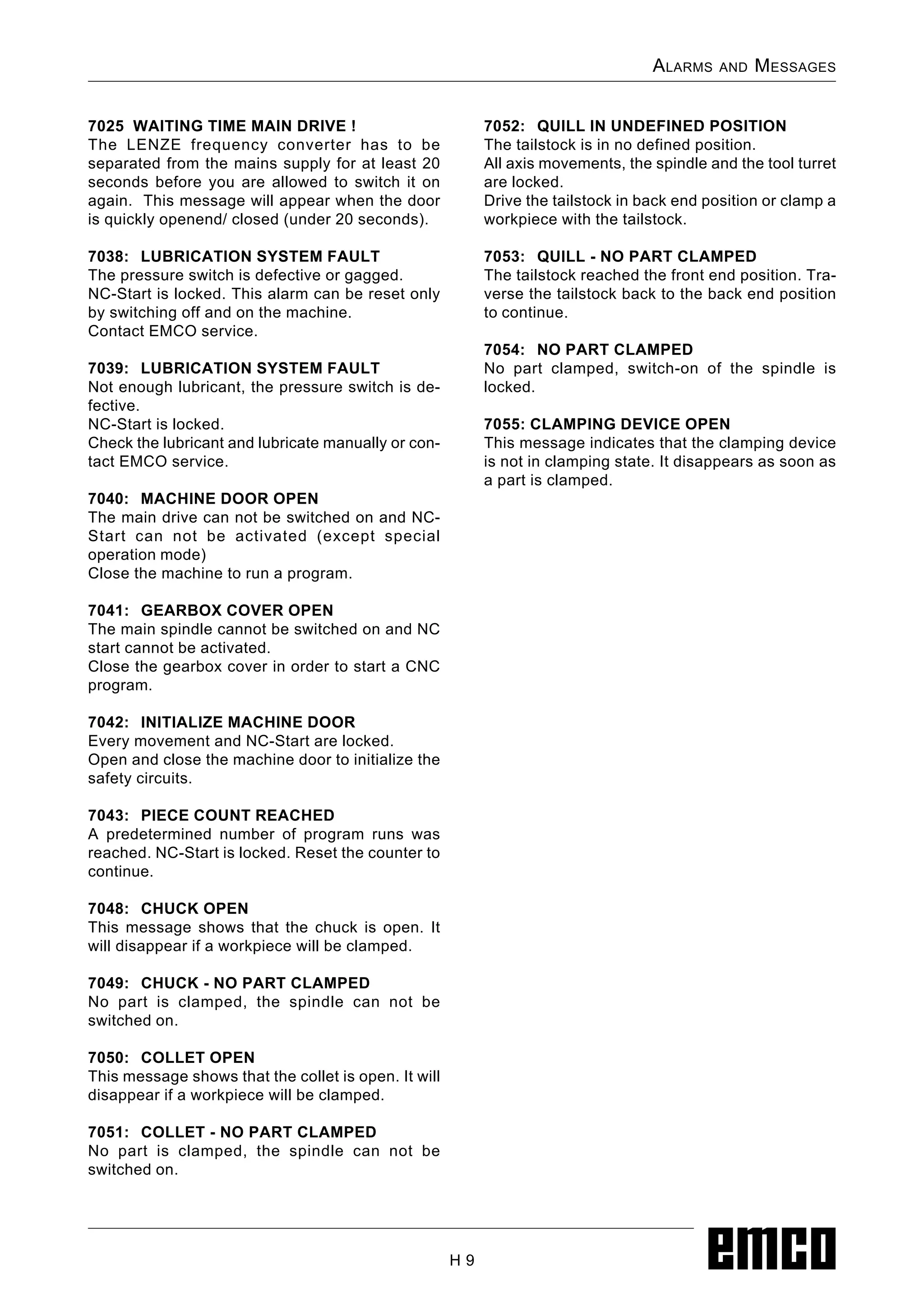
7023: WAITING TIME MAIN DRIVE!
The LENZE frequency converter has to be
separated from the mains supply for at least 20
seconds before you are allowed to switch it on
again. This message will appear when the door
is quickly openend/ closed (under 20 seconds).
7038: LUBRICATION SYSTEM FAULT
The pressure switch is defective or gagged.
NC-Start is locked. This can be reset only by
switching off and on the machine.
Contact EMCO service.
7039: LUBRICATION SYSTEM FAULT
Not enough lubricant, the pressure switch is de-fective.
NC-Start is locked.
Check the lubricant and lubricate manually or con-tact
EMCO service.
3225.
ALARMS AND MESSAGES
H 4
7040: MACHINE DOOR OPEN
The main drive can not be switched on and NC-Start
can not be activated (except special
operation mode)
Close the machine to run a program.
7042: INITIALIZE MACHINE DOOR
Every movement and NC-Start are locked.
Open and close the machine door to initialize the
safety circuits.
7043: PIECE COUNT REACHED
A predetermined number of program runs was
reached. NC-Start is locked. Reset the counter to
continue.
7050: NO PART CLAMPED
After switching on or after an the vice is neither at
the open position nor at the closed position.
NC-Start is locked.
Traverse the vice manually on a valid end position.
7051: DIVIDING HEAD NOT LOCKED!
Either the dividing head is in an undefined position
after the machine has been switched on, or the
locking signal after a dividing process is missing.
Initiate the dividing process, check, respectively
adjust the proximity switch for locking.
7054: VICE OPEN
3226.
When switching onthe main spindle with M3/M4
alarm 6072 (vice not ready) will be released.
7055: OPEN TOOL CLAMPING SYSTEM
A tool is clamped in the main spindle and the
control does not recognize the corresponding T
number.
Eject the tool from the main spindle when the
door is open by means of the PC keys Strg and
1 .
7056: SETTING DATA INCORRECT
An invalid tool number is stored in the setting
data.
Delete the setting data in the machine directory
xxxxx.pls.
7057: TOOLHOLDER OCCUPIED
The clamped tool cannot be positioned in the tool
turret since the position is occupied.
Eject the tool from the main spindle when the
door is open by means of the PC keys Strg and
1 .
7058: RETRACTING THE AXES
The position of the tool turret arm cannot be
clearly defined during the tool change.
Open the machine door, push the tool turret
magazine backwards to the stop. Move the milling
head in the JOG mode upwards to the Z reference
switch and then traverse the reference point.
7270: OFFSET COMPENSATION ACTIVE !
Only with PC-MILL 105
Offset compensation activated by the following
operation sequence.
- Reference point not active
- Machine in reference mode
- Key switch in manual operation
- Press STRG (or CTRL) and simultaneously 4
This must be carried out if prior to the tool change
procedure spindle positioning is not completed
(tolerance window too large)
7271: COMPENSATION FINISHED,DATA
SAVED !
see 7270
ALARMS AND MESSAGES
H 6
6000: EMERGENCY OFF
The EMERGENCY OFF key was pressed.
The reference position will be lost, the auxiliary
drives will be switched off.
Remove the endangering situation and restart ma-chine
and software.
6001: PLC-CYCLE TIME EXCEEDING
The auxiliary drives will be switched off.
Contact EMCO Service.
6002: PLC - NO PROGRAM CHARGED
The auxiliary drives will be switched off.
Contact EMCO Service.
6003: PLC - NO DATA UNIT
The auxiliary drives will be switched off.
Contact EMCO Service.
6004: PLC - RAM MEMORY FAILURE
The auxiliary drives will be switched off.
Contact EMCO Service.
6008: MISSING CAN SUBSCRIBER
The SPS-CAN board is not identified by the
control.
Check the interface cable and the power supply
of the CAN board.
6009: SAFETY CIRCUIT FAULT
Defective step motor system.
A running CNC program will be interrupted, the
auxiliary drives will be stopped, the reference po-sition
will be lost.
Contact EMCO Service.
6010: DRIVE X-AXIS NOT READY
The step motor board is defective or too hot, a
fuse is defective, over- or undervoltage from
mains.
A running program will be stopped, the auxiliary
drives will be switched off, the reference position
will be lost.
Check fuses or contact EMCO service.
6012: DRIVE Z-AXIS NOT READY
see 6010.
6013: MAIN DRIVE NOT READY
Main drive power supply defective or main drive
too hot, fuse defective, over- or undervoltage from
mains.
A running program will be stopped, the auxilliary
drives will be switched off.
Check fuses or contact EMCO Service.
6014: NO MAIN SPINDLE SPEED
This alarm will be released, when the spindle
speed is lower than 20 rpm because of overload.
Alter cutting data (feed, infeed, spindle speed).
The CNC program will be aborted, the auxiliary
drives will be switched off.
6015: NO DRIVEN TOOL SPINDLE SPEED
see 6014.
6016: AUTOMATIC TOOL TURRET SIGNAL
COUPLED MISSING
6017: AUTOMATIC TOOL TURRET SIGNAL
UNCOUPLED MISSING
In the tool turret that can be coupled, the position
of the coupling and uncoupling magnet is
monitored by means of two proximity switches. It
has to be made sure that the coupling is in the
rear stop position so that the tool turret can get to
the next tool position. Equally, during operation
with driven tools the coupling has to be safe in
the front stop position.
Check and adjust the cables, the magnet and the
stop position proximity switches.
6021: COLLET TIME OUT
During closing of the clamping device the pressure
switch has not reacted within one second.
6022: CLAMPING DEVICE BOARD
DEFECTIVE
The signal clamping device clamped is
constantly released, even though no command
has been given. Replace the board.
6023: COLLET PRESSURE MONITORING
The pressure switch turns off when the clamping
device is closed (compressed air failure for more
than 500ms).
PC TURN 50 / 55 / 105 / 120 / 125 / 155
Concept TURN 55 / 105 / 155
3229.
ALARMS AND MESSAGES
H 7
6024: MACHINE DOOR OPEN
The door was opened while a machine movement.
The program will be aborted.
6025: GEARBOX COVER NOT CLOSED
The gearbox cover was opened while a machine
movement. A running CNC program will be
aborted.
Close the cover to continue.
6027: DOOR LIMIT SWITCH DEFECTIVE
The limit switch of the automatic door is displaced,
defective, wrong cabled.
Contact EMCO service.
6028: DOOR TIMEOUT
The automatic door stucks, the pressured air
supply is insufficient, the limit switch is displaced.
Check door, pressured air supply, limit switch or
contact EMCO service.
6029: TAILSTOCK QUILL TIME EXCEED
The tailstock quill does not reach a final position
within 10 seconds.
Adjust the control and the stop position proximity
switches, or the tailstock quill is stuck.
6030: NO PART CLAMPED
No workpiece inserted, vice cheek displaced, con-trol
cam displaced, hardware defective.
Adjust or contact EMCO service.
6031: QUILL FAILURE
6032: TOOL CHANGE TIMEOUT
see alarm 6041.
6033: TOOL TURRET SYNC ERROR
Hardware defective.
Contact EMCO service.
6037: CHUCK TIMEOUT
The pressure switch does not react within one
second when the clamping device is closed.
6039: CHUCK PRESSURE FAILURE
The pressure switch turns off when the clamping
device is closed (compressed air failure for more
than 500ms).
6040: TOOL TURRET INDEX FAILURE
The tool turret is in no locked position, tool turret
sensor board defective, cabling defective, fuse
defective.
A running CNC program will be stopped.
Swivel the tool turret with the tool turret key, check
fuses or contact EMCO service.
6041: TOOL CHANGE TIMEOUT
Tool drum stucks (collision?), fuse defective, hard-ware
defective.
A running CNC program will be stopped.
Check for collisions, check fuses or contact
EMCO service.
6042: TOOL TURRET OVERHEAT
Tool turret motor too hot.
With the tool turret a max. of 14 swivel procedures
a minute may be carried out.
6043: TOOL CHANGE TIMEOUT
Tool drum stucks (collision?), fuse defective, hard-ware
defective.
A running CNC program will be stopped.
Check for collisions, check fuses or contact
EMCO service.
6045: TOOL TURRET SYNC MISSING
Hardware defective.
Contact EMCO service.
6046: TOOL TURRET ENCODER FAULT
Fuse defective, hardware defective.
Check fuses or contact EMCO service.
6048: CHUCK NOT READY
Attempt to start the spindle with open chuck or
without clamped workpiece.
Chuck stucks mechanically, insufficient pressured
air supply, fuse defective, hardware defective.
Check fuses or contact EMCO service.
6049: COLLET NOT READY
'()
6050: M25 DURING SPINDLE ROTATION
*
6056: QUILL NOTREADY
Attempt to start the spindle or to move an axis or
to swivel the tool turret with undefined tailstock
position.
Tailstock is locked mechanically (collision), insuf-ficient
pressured air supply, fuse defective,
magnetic switch defective.
Check for collisions, check fuses or contact
EMCO service.
6059: C-AXIS SWINGIN TIMEOUT
C-axis does not swivel in within 4 seconds.
Reason: not sufficient air pressure, and/or me-chanics
stuck.
6060: C-AXIS INDEX FAILURE
When swivelling in the C-axis the limit switch does
not respond.
Check pneumatics, mechanics and limit switch.
6064: AUTOMATIC DOOR NOT READY
Door stucks mechanically (collision), insufficient
pressured air supply, limit switch defective, fuse
defective.
Check for collisions, check fuses or contact
EMCO service.
6065: LOADER MAGAZINE FAILURE
Loader not ready.
Check if the loader is switched on, correctly con-nected
and ready for operation and/or disable
loader (WinConfig).
6066: CLAMPING DEVICE FAILURE
No compressed air at the clamping device
Check pneumatics and position of the clamping
device proximity detectors.
6067: NO COMPRESSED AIR
Turn the compressed air on, check the setting of
the pressure switch.
7000: INVALID TOOL NUMBER
PROGRAMMED
The tool position was programmed larger than 8.
The CNC program will be stopped.
Interrupt program with RESET and correct the
program.
7007: FEED HOLD
In the robotic mode a HIGH signal is at input E3.7.
Feed Stop is active until a low signal is at E3.7.
7016: SWITCH ON AUXILIARY DRIVES
The auxiliary drives are off. Press the AUX ON
key for at least 0.5 sec. (to avoid accidentally
switching on) to switch on the auxiliary drives (also
a lubricating pulse will be released).
7017: REFERENCE MACHINE
Approach the reference point.
When the reference point is not active, manual
movements are possible only with key switch at
position setting operation.
7018: TURN KEY SWITCH
With NC-Start the key switch was in position
setting operation.
NC-Start is locked.
Turn the key switch in the position automatic to
run a program.
7019: PNEUMATIC LUBRICATION MONITOR-ING!
Refill pneumatic oil
7020: SPECIAL OPERATION MODE ACTIVE
Special operation mode: The machine door is
opened, the auxiliary drives are switched on, the
key switch is in position setting operation and
the consent key is pressed.
Manual traversing the axes is possible with open
door. Swivelling the tool turret is possible with
open door. Running a CNC program is possible
only with standing spindle (DRYRUN) and SIN-GLE
block operation.
For safety: If the consent key is pressed for more
than 40 sec. the function of this key is interrupted,
the consent key must be released and pressed
again.
7021: TOOL TURRET NOT LOCKED
The tool turret operating was interrupted.
NC start and spindle start are locked. Press the
tool turret key in the RESET status of the control.
7022: COLLECTION DEVICE MONITORING
Time exceed of the swivelling movement.
Check the pneumatics, respectively whether the
mechanical system is jammed (possibly a
workpiece is jammed).
7023: ADJUST PRESSURE SWITCH !
During opening and closing of the clamping device
the pressure switch has to turn off and on once.
Adjust the pressure switch. This alarm does not
exist any more for versions starting with PLC 3.10.
7024: ADJUST CLAMPING DEVICE
PROXIMITY SWITCH !
When the clamping device is open and the
position stop control is active, the respective
proximity switch has to feed back that the
clamping device is Open.
Check and adjust the clamping device proximity
switch, check the cables.
3242.
ALARMS AND MESSAGES
H 9
7025 WAITING TIME MAIN DRIVE !
The LENZE frequency converter has to be
separated from the mains supply for at least 20
seconds before you are allowed to switch it on
again. This message will appear when the door
is quickly openend/ closed (under 20 seconds).
7038: LUBRICATION SYSTEM FAULT
The pressure switch is defective or gagged.
NC-Start is locked. This alarm can be reset only
by switching off and on the machine.
Contact EMCO service.
7039: LUBRICATION SYSTEM FAULT
Not enough lubricant, the pressure switch is de-fective.
NC-Start is locked.
Check the lubricant and lubricate manually or con-tact
EMCO service.
7040: MACHINE DOOR OPEN
The main drive can not be switched on and NC-Start
can not be activated (except special
operation mode)
Close the machine to run a program.
7041: GEARBOX COVER OPEN
The main spindle cannot be switched on and NC
start cannot be activated.
Close the gearbox cover in order to start a CNC
program.
7042: INITIALIZE MACHINE DOOR
Every movement and NC-Start are locked.
Open and close the machine door to initialize the
safety circuits.
7043: PIECE COUNT REACHED
A predetermined number of program runs was
reached. NC-Start is locked. Reset the counter to
continue.
7048: CHUCK OPEN
This message shows that the chuck is open. It
will disappear if a workpiece will be clamped.
7049: CHUCK - NO PART CLAMPED
No part is clamped, the spindle can not be
switched on.
7050: COLLET OPEN
This message shows that the collet is open. It will
disappear if a workpiece will be clamped.
7051: COLLET - NO PART CLAMPED
No part is clamped, the spindle can not be
switched on.
7052: QUILL IN UNDEFINED POSITION
The tailstock is in no defined position.
All axis movements, the spindle and the tool turret
are locked.
Drive the tailstock in back end position or clamp a
workpiece with the tailstock.
7053: QUILL - NO PART CLAMPED
The tailstock reached the front end position. Tra-verse
the tailstock back to the back end position
to continue.
7054: NO PART CLAMPED
No part clamped, switch-on of the spindle is
locked.
7055: CLAMPING DEVICE OPEN
This message indicates that the clamping device
is not in clamping state. It disappears as soon as
a part is clamped.
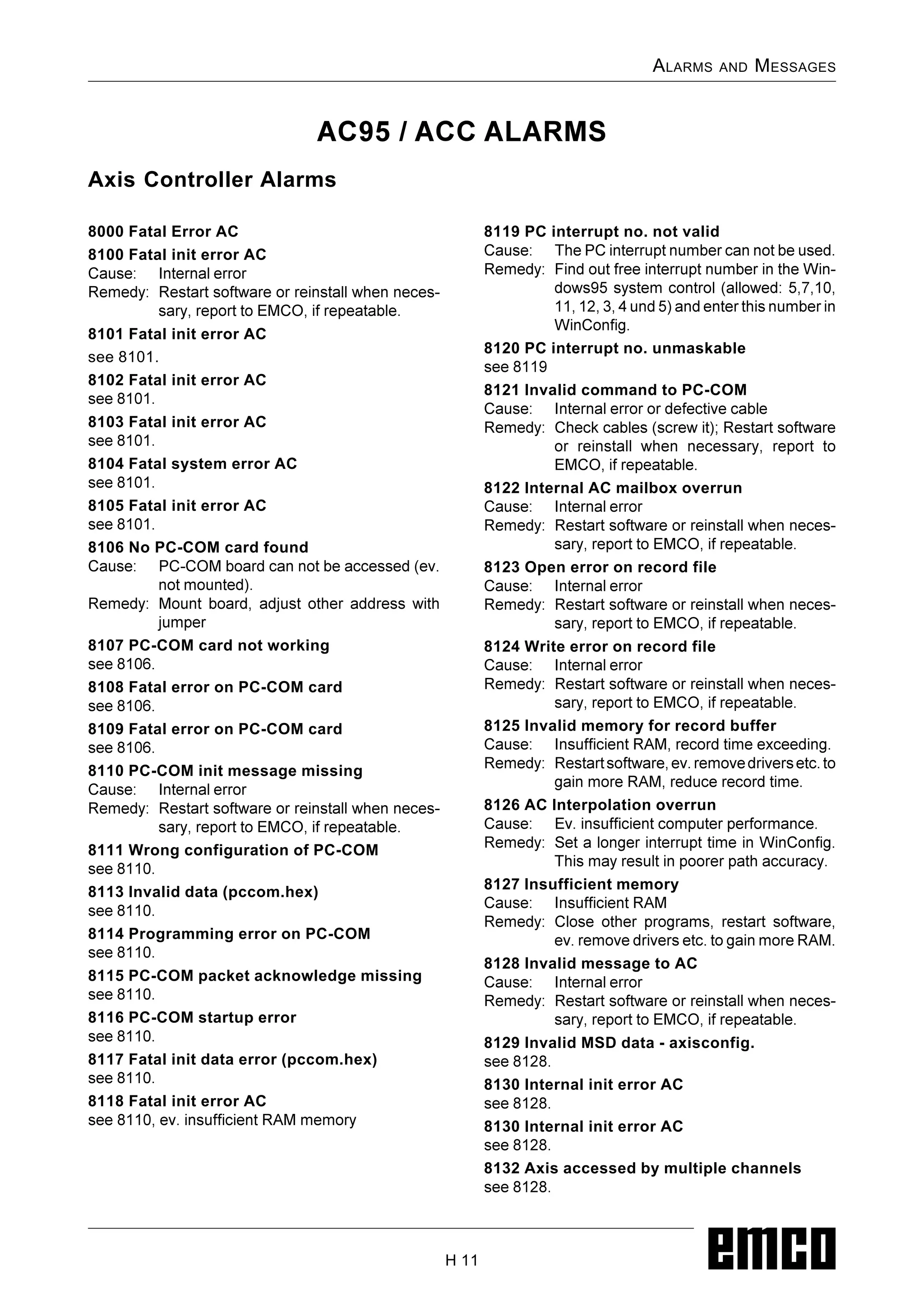
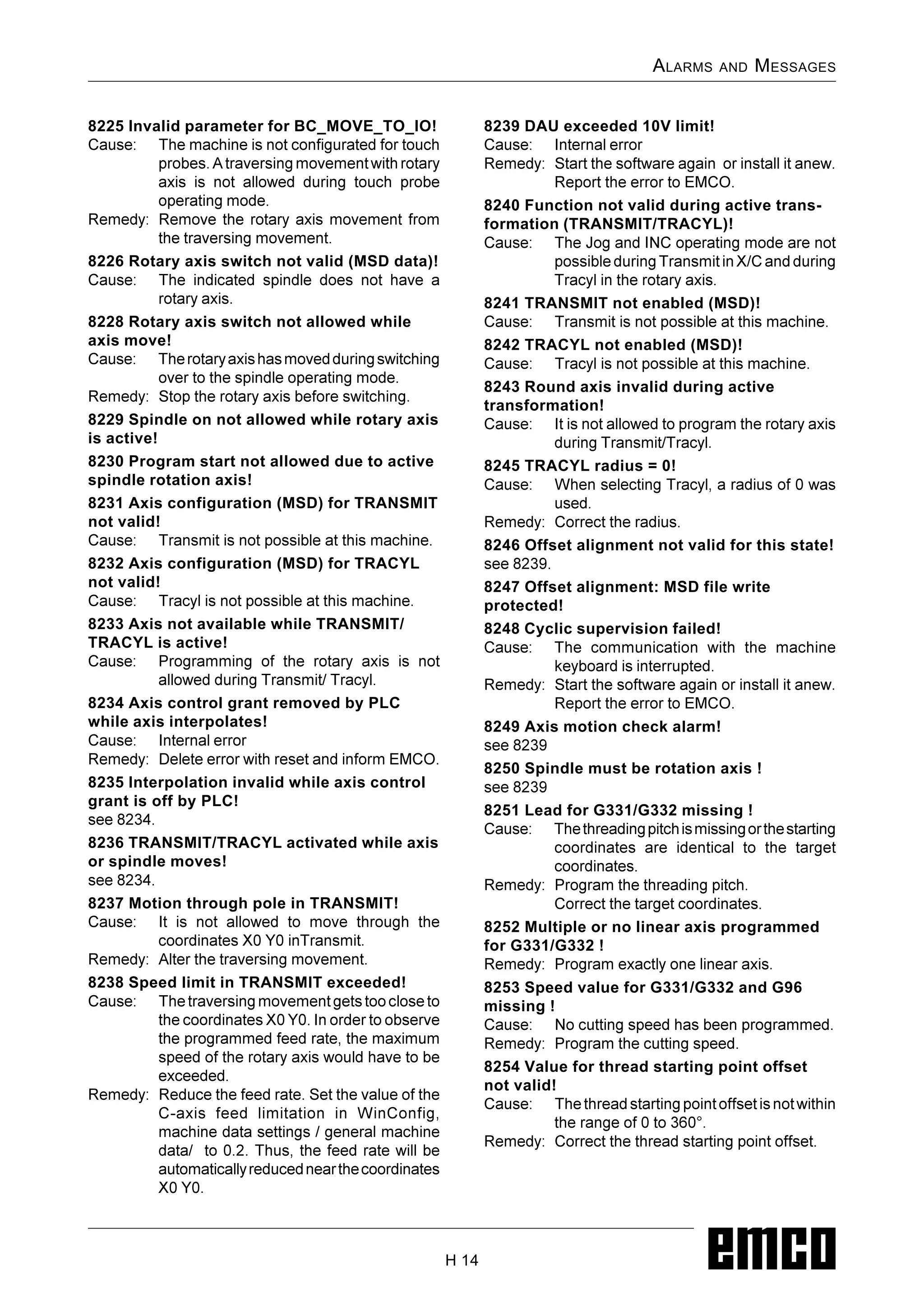
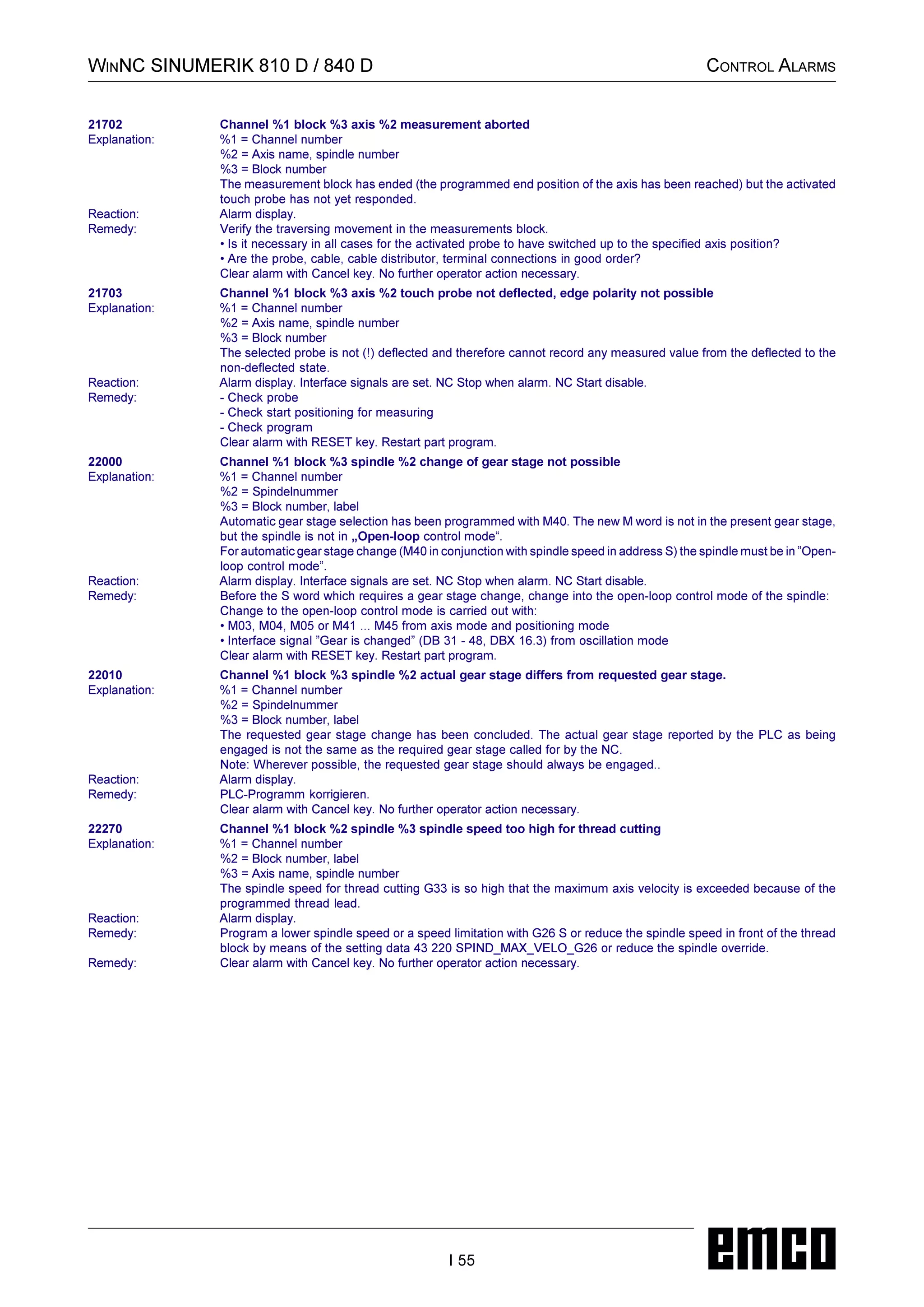
8101 Fatal initerror AC
see 8101.
8102 Fatal init error AC
)0'0
8103 Fatal init error AC
)0'0
8104 Fatal system error AC
)0'0
8105 Fatal init error AC
)0'0
8106 No PC-COM card found
!%$
-
.
$
2
3247.
2
8107 PC-COMcard not working
)0'
8108 Fatal error on PC-COM card
)0'
8109 Fatal error on PC-COM card
)0'
8110 PC-COM init message missing
1
8129 Invalid MSDdata - axisconfig.
)0+)
8130 Internal init error AC
)0+)
8130 Internal init error AC
)0+)
8132 Axis accessed by multiple channels
)0+)
Axis Controller Alarms
3276.
ALARMS AND MESSAGES
H 12
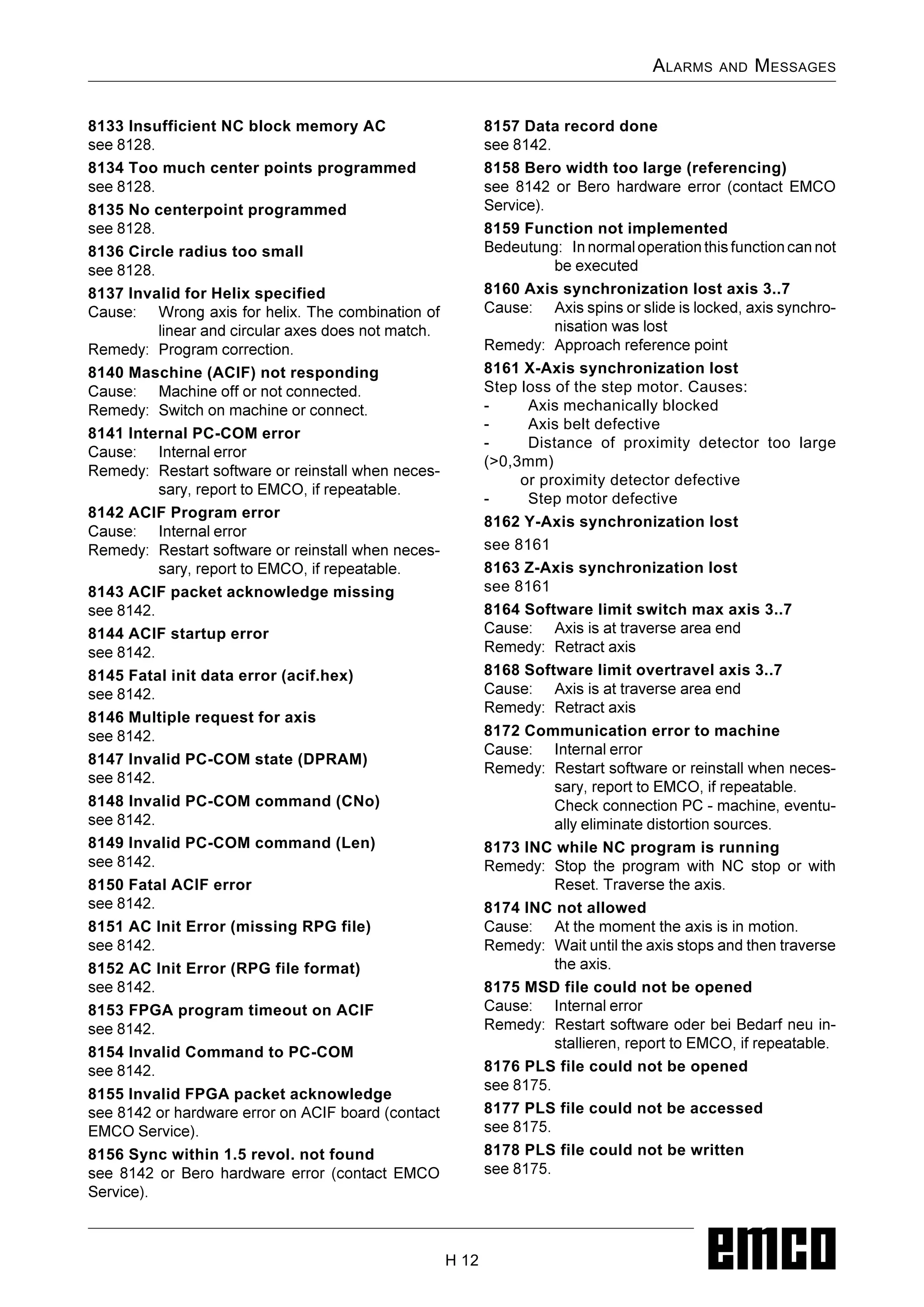
8133 Insufficient NC block memory AC
)0+)
8134 Too much center points programmed
)0+)
8135 No centerpoint programmed
)0+)
8136 Circle radius too small
)0+)
8137 Invalid for Helix specified
*
8161 X-Axis synchronizationlost
Step loss of the step motor. Causes:
- Axis mechanically blocked
- Axis belt defective
- Distance of proximity detector too large
(0,3mm)
or proximity detector defective
- Step motor defective
8162 Y-Axis synchronization lost
see 8161
8163 Z-Axis synchronization lost
see 8161
8164 Software limit switch max axis 3..7
8176 PLS filecould not be opened
)05,
8177 PLS file could not be accessed
)05,
8178 PLS file could not be written
)05,
3304.
ALARMS AND MESSAGES
H 13
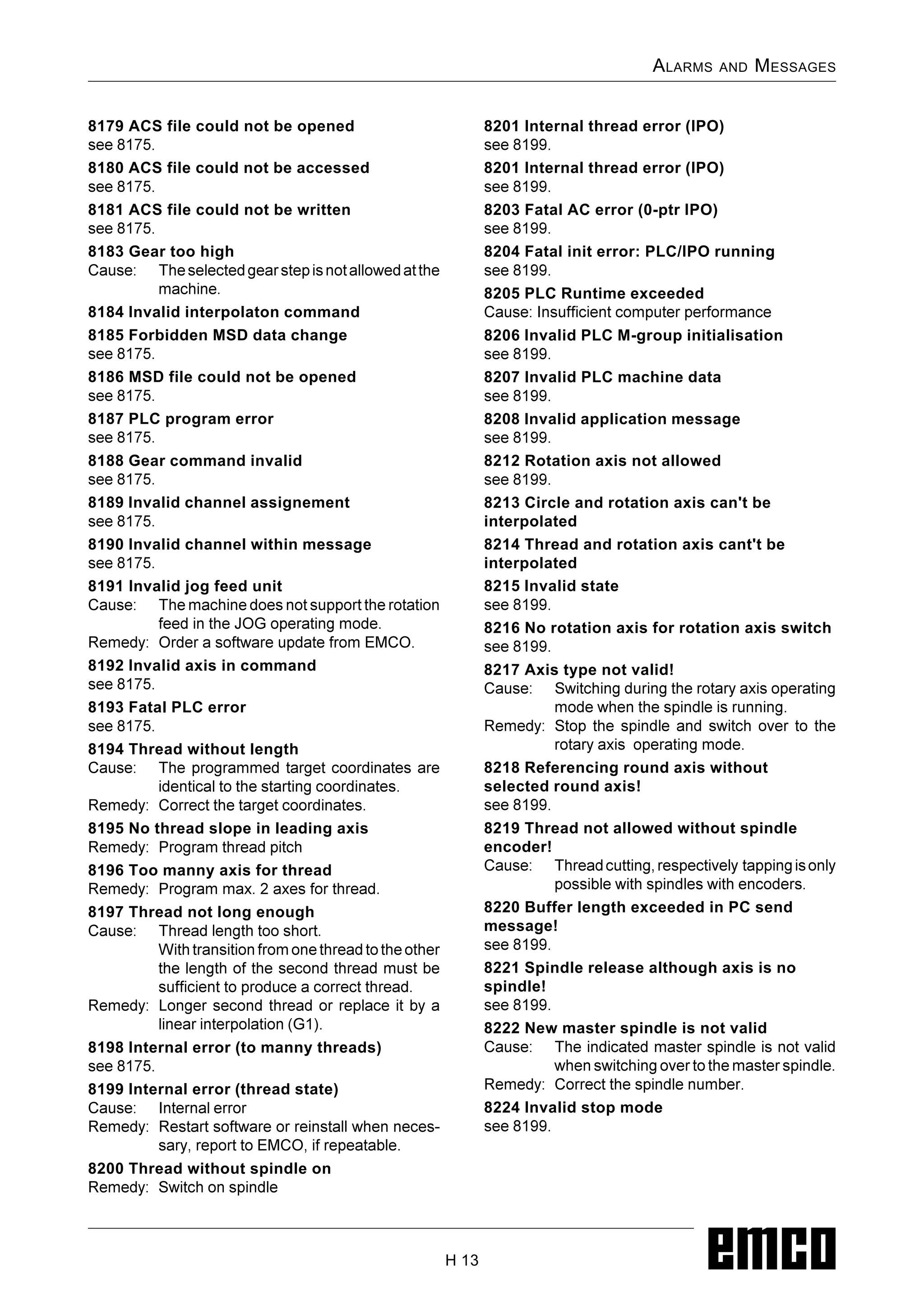
8179 ACS file could not be opened
)05,
8180 ACS file could not be accessed
)05,
8181 ACS file could not be written
)05,
8183 Gear too high
3305.
8184 Invalid interpolatoncommand
8185 Forbidden MSD data change
)05,
8186 MSD file could not be opened
)05,
8187 PLC program error
)05,
8188 Gear command invalid
)05,
8189 Invalid channel assignement
)05,
8190 Invalid channel within message
)05,
8191 Invalid jog feed unit
8206 Invalid PLCM-group initialisation
)044
8207 Invalid PLC machine data
)044
8208 Invalid application message
)044
8212 Rotation axis not allowed
)044
8213 Circle and rotation axis can't be
interpolated
8214 Thread and rotation axis cant't be
interpolated
8215 Invalid state
)044
8216 No rotation axis for rotation axis switch
)044
8217 Axis type not valid!
8
8229 Spindle onnot allowed while rotary axis
is active!
8230 Program start not allowed due to active
spindle rotation axis!
8231 Axis configuration (MSD) for TRANSMIT
not valid!
8233 Axis notavailable while TRANSMIT/
TRACYL is active!
3326.
/
8234 Axiscontrol grant removed by PLC
while axis interpolates!
1
=
3327.
#$%
8235 Interpolationinvalid while axis control
grant is off by PLC!
)+6(
8236 TRANSMIT/TRACYL activated while axis
or spindle moves!
)+6(
8237 Motion through pole in TRANSMIT!
1